ZINK Imaging 311011 hAppy Print User Manual QSG hAppy FCC
ZINK Imaging Inc. hAppy Print QSG hAppy FCC
Contents
- 1. User Manual QSG.pdf
- 2. User Manual.pdf
User Manual.pdf
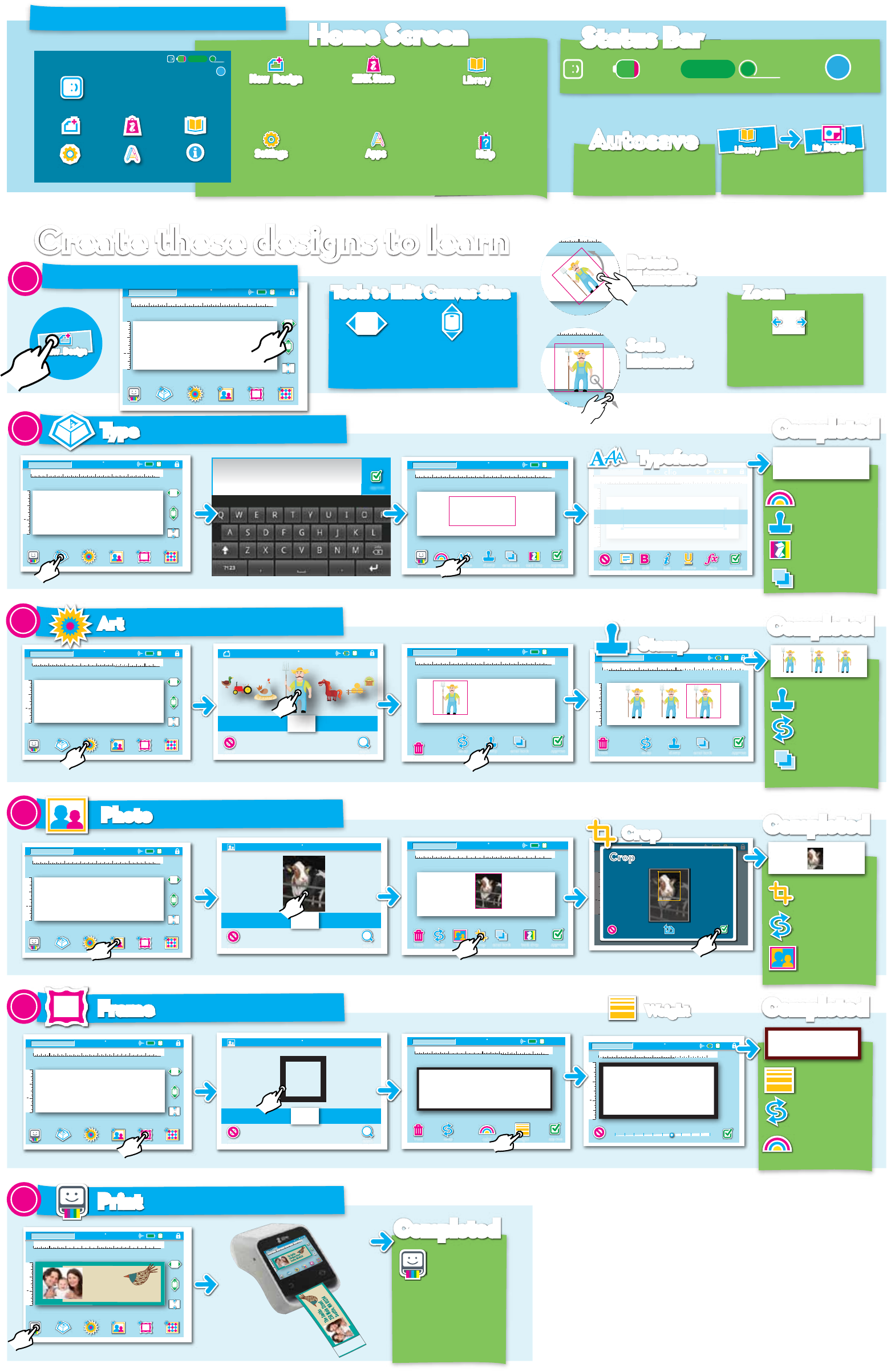
Here is what you will see on startup.
Tap the screen
and type
in a new size
5.50
Tools to Edit Canvas SizeTools to Edit Canvas Size
Choose the height
of the label from
five sizes
2
Z-Roll Size
and Qty.
Help
Screens
Status BarStatus Bar
WiFi
Status
Create these designs to learnCreate these designs to learn Rotate
Elements
Rotate
Elements
Scale
Elements
Scale
Elements
1
2
trash
1
2
1/2 1 1/2
3/4”
bold italic underline approvecancel effects
Untitled -1
Type something
Farmer Joe’s
Farmer Joe’s
Farmer Joeʻs
Farmer Joe’s
Farmer Joe’s
TypefaceTypeface
Add some text to your Canvas
TypeType
1/2 1 1/2
3/4”
2
Untitled -1
approvecolor typeface send back align
back drop
Farmer
Joe’s
Photos > Recent
search
cancel
Facebook
(12)
Picassa
(15)
Flickr
(35)
Birthday
(24)
SD Card
(16)
Add photos to your Canvas
PhotoPhoto
1/2 1 1/2
3/4”
1
2
2
Untitled -1
CropCrop Move yellow box choose your crop
revertcancel approve
CropCrop
1
2
1/2 1 1/2
3/4”
Untitled -1
StampStamp
1
2
search
Art > Farm Animals 3/4”
cancel
Solid
(10)
Baby Shower
(12)
Monkeys
(15)
Zoo Project
(35)
Birthday
(24)
Farm
Animals
(16)
trash
1/2 1 1/2
3/4”
2
Untitled -1
swap stamp
trash
approvesend back
WeightWeight
1/2 1 1/2
3/4”
Untitled -1
1
2
1
2
trash
1/2 1 1/2
3/4”
2
Untitled -1
swaptrash approve
Add a Frame to your Canvas
FrameFrame
weightcolor
Frames > Wood
search
cancel
Wood
(6)
Metal
(6)
Solid
(8)
Steel
(6)
Basic
(10)
2
4
5
trash
1/2 1 1/2
3/4”
2
Untitled -1
swap stamp
trash approvesend back back drop
trash
1/2 1 1/2
3/4”
2
Untitled -1
swap stamp
trash approvesend back back drop
approve
Farmer
Joe’s
1
2
trash
1/2 1 1/2
3/4”
2
Untitled -1
swaptrash approvesend back back drop
filter crop
New DesignNew Design
Go to the store for
more elements, designs
and hAppy gear
ZINK StoreZINK Store
Adjust settings
for using hAppy
SettingsSettings
Launch other apps
for use with hAppy
AppsApps
Handy guide to more
hAppy features and tools
HelpHelp
Home ScreenHome Screen
Start designing
with hAppy
New DesignNew Design
1/2 1 1/2
3/4”
1
2
2
Untitled -1
2.25
3/4
fit
1/2 1 1/2
3/4”
1
2
2
Untitled -1
2.25
3/4
fit
AutosaveAutosave
The Design Print Studio will
save the design as you work.
Go to your Library
of elements
and designs
LibraryLibrary
1/2 1 1/2
3/4”
1
2
2
Untitled -1
2.25
3/4
fit
Tap once to create a new Canvas for your design.
1
print
fit
Fit to screen with two
modes: fit to width
and fit to height
ZoomZoom
Fa r m e r
Jo eʻs
CompletedCompleted
CompletedCompleted
CompletedCompleted
CompletedCompleted
stamp
Tap to add Text Enter Text using keyboard
swap stamp
trash approvesend back
Choose a typeface Tap on typestyle to style text
Color
change text color
Stamp
copy your text
Backdrop
add background
behind your text
Send Back
arrange layers
Add art work to your Canvas
ArtArt
3
Tap to add Art Scroll to Browse then Tap to add Tap on stamp to make a copy Make a few copies
Stamp
copy your art
Swap
swap an existing
art for new art
Send Back
arrange layers
Crop
crop your photo
Swap
swap a photo for
a new photo
Filter
change photo
image style
Weight
control the weight
of the frame
Swap
swap a frame for
a new frame
Color
change text color
1/2 1 1/2
3/4”
1
2
2
Untitled -1
2.25
3/4
fit
1/2 1 1/2
3/4”
1
2
2
Untitled -1
2.25
3/4
fit
Tap to add a Photo
Tap to add a Frame
Scroll to Browse then Tap to add Tap to crop your photo Crop your photo
Scroll to Browse then Tap to add Slide control the thickness
Tap the Frame weight
Print Your Design
PrintPrint
6
Print
press to print your
design
Ready to use
apply to your
project
1/2 1 1/2
3/4”
1
2
2
Untitled -1
2.25
3/4
fit
Tap the Print Button
All designs are saved
in My Designs
MyMy DesignsDesigns
LibraryLibrary
16’ 4”
ZINK® STORE LIBRARY
APPS
ZINK
STUDIO
DESIGN&PRINT
NEW DESIGN
SETTINGS
?
INFO
/
12
”
?
16’ 4” /
12
”
Battery
Charge
Remaining
The Smiths
256 Main Street
Seattle, WA 01234
CompletedCompleted
Quick Start
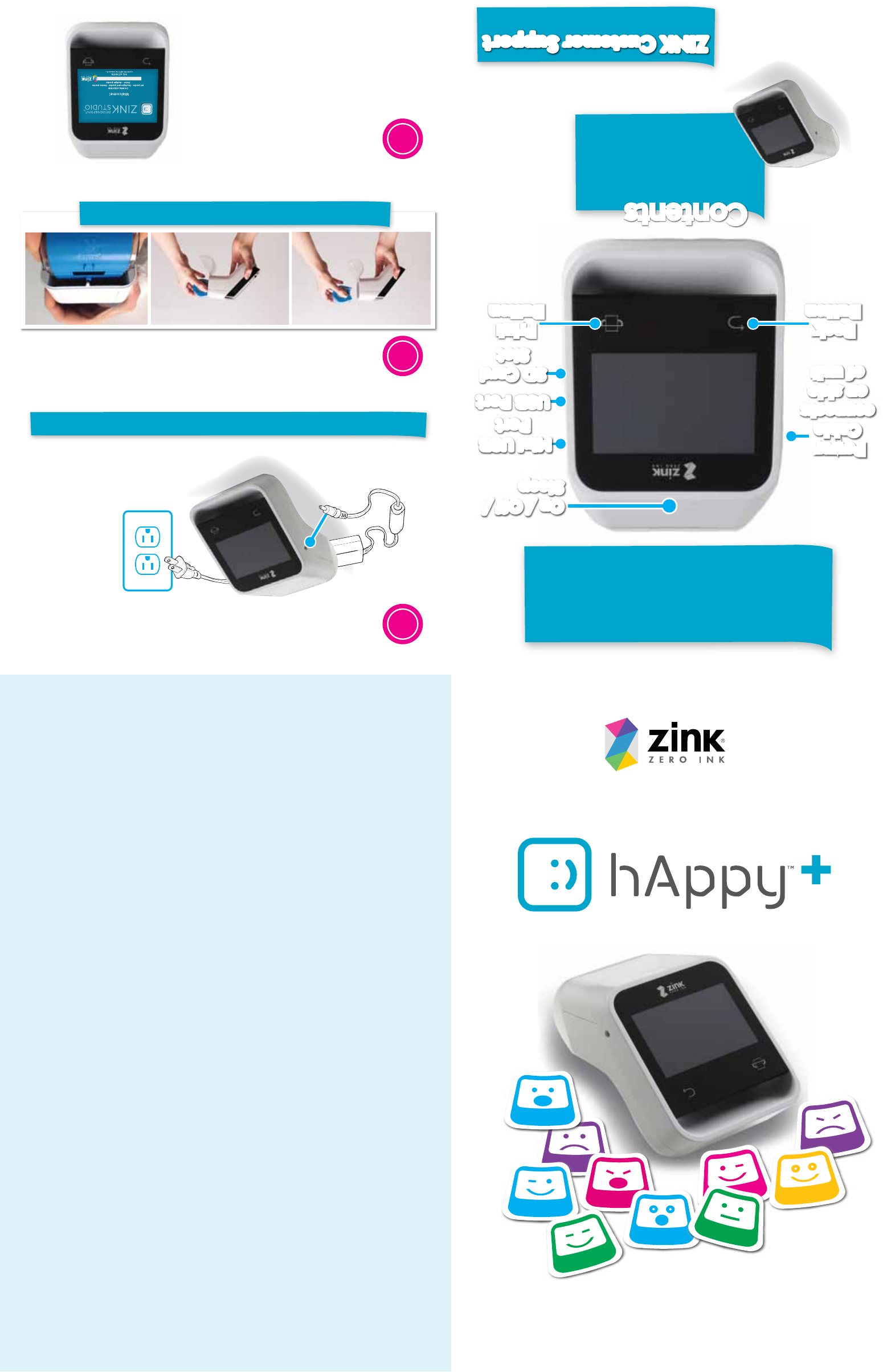
The ZINK hAppy+™ is the only full color,
handheld printer that allows you to
design and print beautiful labels, cards,
coupons, and more…wherever and
whenever you want!
On / Off /
Sleep
On / Off /
Sleep
USB PortUSB Port
Mini USB
Port
Mini USB
Port
SD Card
Slot
SD Card
Slot
ZINK hAppy+™
1/2” zRoll™
Power Cord
ZINK Cleaning Roll
(877)711-ZINK (9465)
ContentsContents
Power
Cable
connects
on side
of unit
Power
Cable
connects
on side
of unit
Back
Button
Back
Button
Print
Button
Print
Button
ZINK Customer SupportZINK Customer Support
This equipment has been tested and found to comply with the limits for a Class B digital device, pursuant
to Part 15 of the FCC Rules. These limits are designed to provide reasonable protection against harmful
interference in a residential installation. This equipment generates, uses and can radiate radio frequency
energy and, if not installed and used in accordance with the instructions, may cause harmful interference
to radio communications. However, there is no guarantee that interference will not occur in a particular
installation. If this equipment does cause harmful interference to radio or television reception, which can
be determined by turning the equipment off and on, the user is encouraged to try to correct the
interference by one of the following measures:
• Reorient or relocate the receiving antenna.
• Increase the separation between the equipment and receiver.
• Connect the equipment into an outlet on a circuit different from that
to which the receiver is connected.
• Consult the dealer or an experienced radio/TV technician for help.
FCC Caution: Any changes or modifications not expressly approved by the party responsible for
compliance could void the user's authority to operate this equipment.
This transmitter must not be co-located or operating in conjunction with any other antenna or transmitter.
Radiation Exposure Statement: This equipment complies with FCC radiation exposure limits set forth for
an uncontrolled environment. This equipment should be installed and operated with a minimum distance
of 20cm between the radiator and your body.
Note: The country code selection is for non-US models only and is not available on US models. Per FCC
regulation, all WiFi product models marketed in the US must be fixed to US operation channels only.
BATTERYGUIDELINESANDWARNINGS
• �Don’t disassemble the battery.
• �Don’t short circuit the battery.
• Don’t heat or expose the battery to open flame. Heating or exposing the battery to open flame
may cause the battery to explode.
• �Don’t use the battery near heat.
• �Don’t use the battery near an open fire, oven or any environment where the temperature
is above 140°F/60°C.
• �Keep the battery dry.
• �Don’t charge the battery in direct sunlight or in excessive heat.
• �Only use the specified power supply when charging the battery.
• �Don’t physically alter the battery. Don’t chip, break, or otherwise damage the battery housing.
• �Don’t solder the battery. The high temperature of soldering will damage the battery housing.
• �Don’t connect the battery directly to a main power source or any other improper power supply.
• �Don’t use the battery in any other devices.
• �Don’t touch any liquid that may leak from the battery. Electrolyte leakage can be dangerous. If
electrolytes come in contact with skin or eyes, immediately flush with water and seek medical assistance.
• �Don’t store the battery in a pocket or bag together with metallic objects such as keys, jewelry,
hairpins, or coins.
• �Don’t hit the battery with heavy objects such as a hammer or a weight.
• �Don’t put the battery in a microwave oven, dryer, orhigh-pressure container.
• �Stop charging the battery if charging is not completed within 6 hours.
• �Stop using the battery if it becomes too hot to touch or if foul odors are detected.
Federal Communication Commission Interference Statement
This device complies with Part 15 of the FCC Rules. Operation is subject to the following two conditions:
(1) This device may not cause harmful interference, and (2) this device must accept any interference
received, including interference that may cause undesired operation.
Your ZINK hAppy+™ should come with the battery partially charged.
1
3
Follow On-screen
Instructions
Turn ZINK hAppy+™ ON . . .
and Charge It Up
2
Load Your zRoll™
Please make sure top track matches when inserting.
Plug power
adapter into port
on side