ZOGLAB Microsystem WPU2015R Wireless temperature and humidity probe User Manual

ZOGLAB Microsystem Co.,Ltd. Wireless temperature and humidity probe

User Manual

YourEnvironmentisOurFocusZOGLABZOGLAB Microsystem Co.,Ltd1WPUWPUWPUWPU UserUserUserUser’’’’ssss ManualManualManualManualVer:1.1Date:2015.01.21
YourEnvironmentisOurFocusZOGLABZOGLAB Microsystem Co.,Ltd21 PRODUCT OVERVIEW1.1 General DescriptionWPU is a device with high precision sensor. It measures field temperature and humidity, and alsotransfers data to Data Centre for processing and display. Data Centre is able to manage several WPUs, displayreal-time data, and create graphs to show temperature and humidity fluctuation.1.2 Device FeaturesHigh precision sensorUniversal 2.4G Hz Wi-Fi communication technologyCharge acceptance and long battery lifeHighlight OLEDBreath-lamp-like LEDStreamlined and dainty design
YourEnvironmentisOurFocusZOGLABZOGLAB Microsystem Co.,Ltd31.3 Device ParametersOperating Temperature: -20 ~+60 Discharge0~+40 ChargeOperating Humidity 0~95%RH Non-condensingCharging Voltage 4.8~5.5VDCCharging Current <1.25A @ 5VDCCharging Time(Std.) ~4.0 hoursOperating Current Average ~20mA Peak ~200mACharging & Communication InterfaceminiUSB 9600bps 8 N 1Battery 3.6V Lithium Ion Battery Nominal Capacity(Minimum) 2500mAhOperating Time(Typical) >48 hours(with a sample rate of 2s)Standby Time(Typical) 3 monthsWireless Standard 802.11 b/g/nFrequency Range 2.412GHz~2.484GHzTransmit Power 802.11b 16 2dBm @11Mbps802.11g 14 2dBm @54Mbps802.11n 13 2dBm @HT20,MCS7Receiver Sensitivity 802.11b -93dBm @11Mbps,CCK802.11g -85dBm @54Mbps,OFDM802.11n -82dBm @HT20,MCS7Probe Type HC2-HSProbe Quantity 10/SetsT Measuring Range -50~100T Accuracy 0.3H Measuring Range 0~100%RHH Accuracy 0.5%RHLogging Interval 2 seconds~24 hoursMemory Size 250,000/1,000,000Start Mode Software Start/Remote StartSoftware EVS/CustomizedNetworking Features Unlimited expansion via APTest Report: AvailableSoftware: Self-defined inspection rules based on JQ211 standards. Refresh interval can beuser-defined. Original data can be saved, edited or modified. Support datatransmission supplement.Wireless Adaptor: High performance APInstall Accessory: AvailablePortable Transfer Case: AvailableIndustrial Tablet PC: Available
YourEnvironmentisOurFocusZOGLABZOGLAB Microsystem Co.,Ltd41.4 Safety PrecautionsThis device complies with Part 15 of the FCC Rules. Operation is subject to the following two conditions:(1) This device may not cause harmful interference, and(2) This device must accept any interference received, including interference that may cause undesiredoperation.Please take attention that changes or modification not expressly approved by the party responsible forcompliance could void the user’s authority to operate the equipment.Note: This product has been tested and found to comply with the limits for a Class B digital device,pursuant to Part 15 of the FCC Rules. These limits are designed to provide reasonable protection againstharmful interference in a residential installation. This product generates, uses, and can radiate radio frequencyenergy and, if not installed and used in accordance with the instructions, may cause harmful interference toradio communications. However, there is no guarantee that interference will not occur in a particularinstallation. If this product does cause harmful interference to radio or television reception, which can bedetermined by turning the equipment off and on, the user is encouraged to try to correct the interference by oneor more of the following measures:—Reorient or relocate the receiving antenna.—Increase the separation between the equipment and receiver.—Connect the equipment into an outlet on a circuit different from that to which the receiver is connected.—Consult the dealer or an experienced radio/TV technician for help.This equipment should be installed and operated with a minimum distance 20cm between the radiator andyour body.
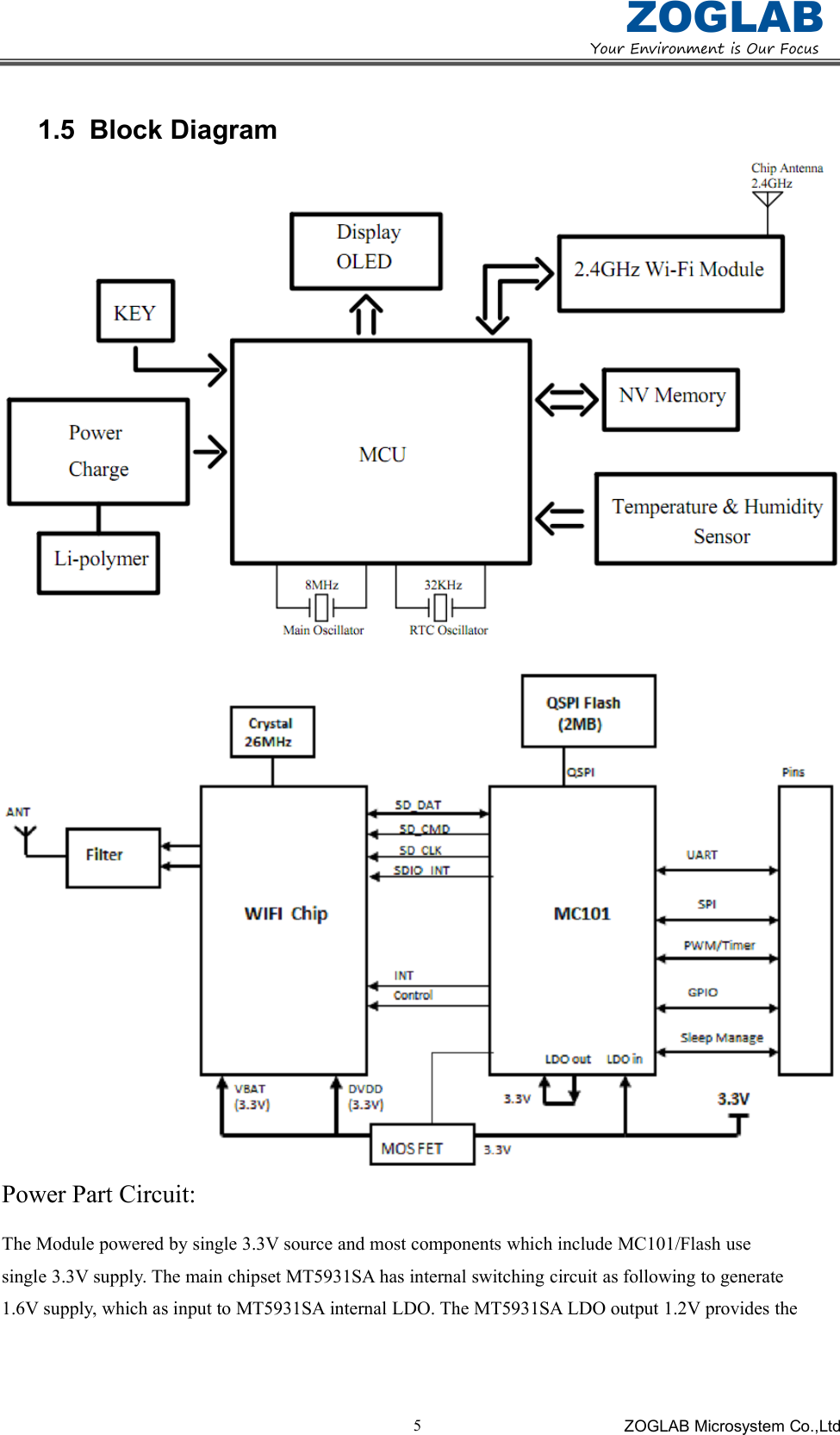
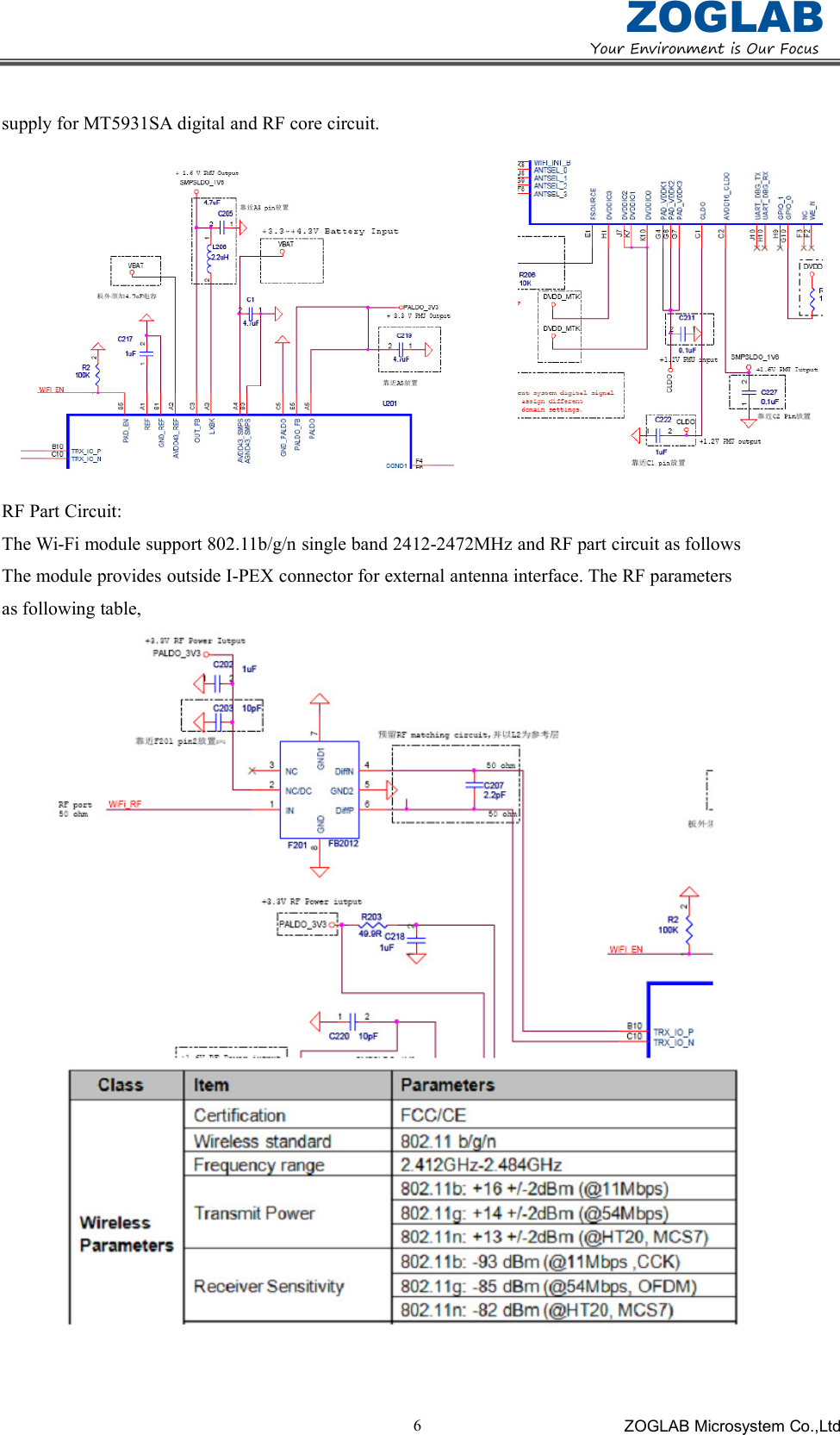
YourEnvironmentisOurFocusZOGLABZOGLAB Microsystem Co.,Ltd51.5 Block DiagramPower Part Circuit:The Module powered by single 3.3V source and most components which include MC101/Flash usesingle 3.3V supply. The main chipset MT5931SA has internal switching circuit as following to generate1.6V supply, which as input to MT5931SA internal LDO. The MT5931SA LDO output 1.2V provides the
YourEnvironmentisOurFocusZOGLABZOGLAB Microsystem Co.,Ltd6supply for MT5931SA digital and RF core circuit.RF Part Circuit:The Wi-Fi module support 802.11b/g/n single band 2412-2472MHz and RF part circuit as followsThe module provides outside I-PEX connector for external antenna interface. The RF parametersas following table,
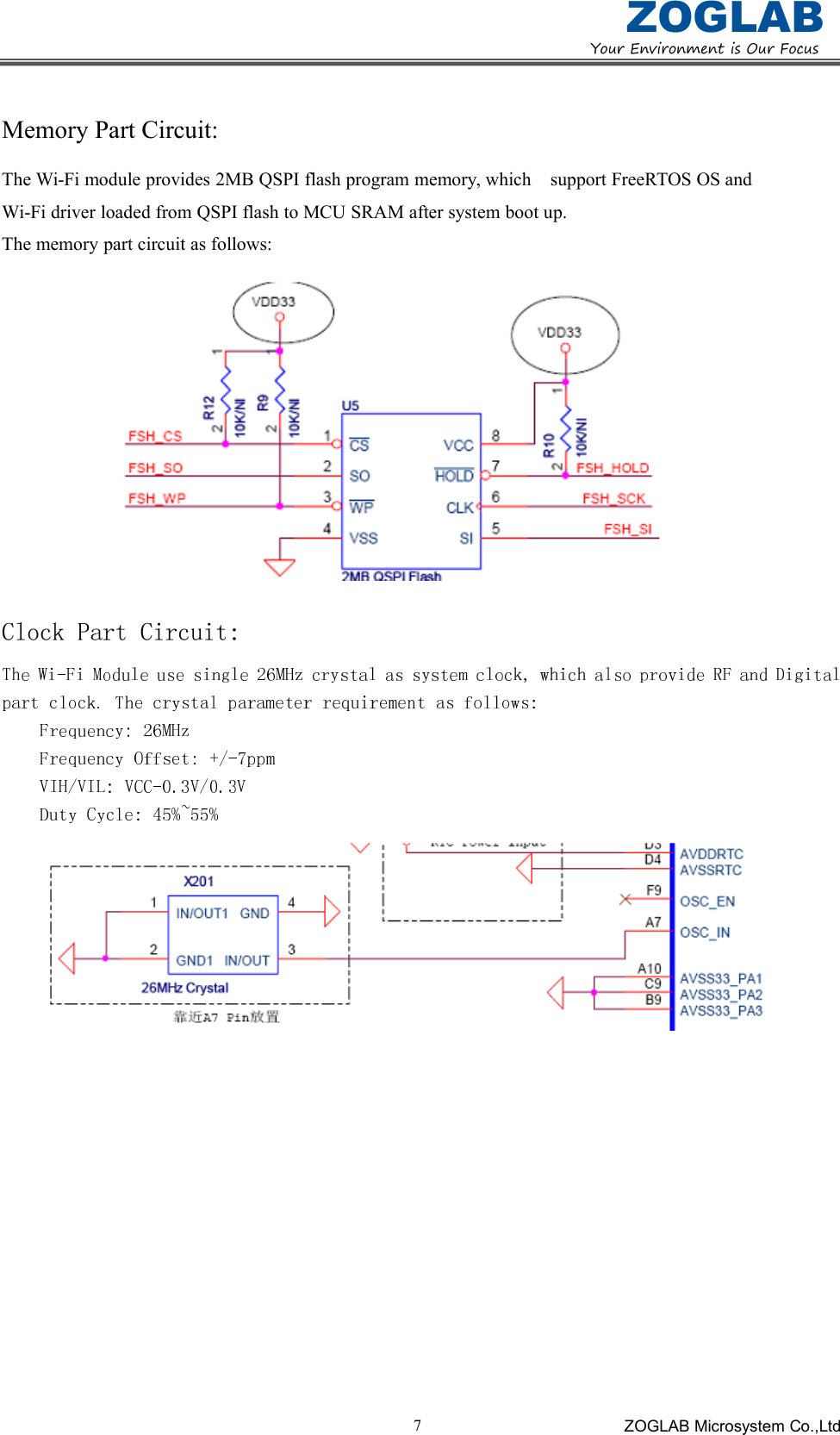
YourEnvironmentisOurFocusZOGLABZOGLAB Microsystem Co.,Ltd7Memory Part Circuit:The Wi-Fi module provides 2MB QSPI flash program memory, which support FreeRTOS OS andWi-Fi driver loaded from QSPI flash to MCU SRAM after system boot up.The memory part circuit as follows:Clock Part Circuit:
YourEnvironmentisOurFocusZOGLABZOGLAB Microsystem Co.,Ltd8OPERATION GUIDELINETurn On/OffWhen WPU is off, press and hold “*” key for 3 seconds to turn it on. In this status, WPU shows temperaturevalue, humidity value, and battery capacity.When WPU is on, press and hold “*” key for 3 seconds to turn it off. In this status, WPU will not display orwill display the charging icon only if it’s connecting to charger or PC.Display switchIn working mode, press “*” key to switch display the below items in cycle:1.Temperatureandhumidityvalue,batterypower2.ThepresetinfoofIP,subnetmaskandgateway3.SSIDoftheaccesspoint,passwordandsignalstrength4.TheIPandportofserverCaution: Charging icon automatically display when WPU is connected to USB interface.ChargeWPU will be charged through its USB interface connecting to any charger or PC. It allows a maximumcurrency of 1A. It takes about 4 hours to finish charging with the assorted charger. Please choose chargers withenough power or it will lead to prolongation of charging time.In charging mode, the LED will keep showing like a breath lamp until charging finished.

Navigation menu