Adobe CharacterSets Frame Maker 9.0 Character Sets FM9
User Manual: adobe FrameMaker - 9.0 - Character Sets Free User Guide for Adobe FrameMaker Software, Manual
Open the PDF directly: View PDF  .
.
Page Count: 21
FRAMEMAKER 9ADOBE®®
Character Sets
© 2008 Adobe Systems Incorporated. All rights reserved.
Adobe® FrameMaker® 9 Character Sets for Windows®
If this guide is distributed with software that includes an end-user agreement, this guide, as well as the software described in it, is furnished under license and may be used or
copied only in accordance with the terms of such license. Except as permitted by any such license, no part of this guide may be reproduced, stored in a retrieval system, or trans-
mitted, in any form or by any means, electronic, mechanical, recording, or otherwise, without the prior written permission of Adobe Systems Incorporated. Please note that the
content in this guide is protected under copyright law even if it is not distributed with software that includes an end-user license agreement.
The content of this guide is furnished for informational use only, is subject to change without notice, and should not be construed as a commitment by Adobe Systems Incorpo-
rated. Adobe Systems Incorporated assumes no responsibility or liability for any errors or inaccuracies that may appear in the informational content contained in this guide.
Please remember that existing artwork or images that you may want to include in your project may be protected under copyright law. The unauthorized incorporation of such
material into your new work could be a violation of the rights of the copyright owner. Please be sure to obtain any permission required from the copyright owner.
Any references to company names in sample templates are for demonstration purposes only and are not intended to refer to any actual organization.
Adobe, the Adobe logo, and FrameMaker are trademarks of Adobe Systems Incorporated in the United States and/or other countries.
Windows is either a registered trademark or trademark of Microsoft Corporation in the United States and/or other countries. ITC Zapf Dingbats and ITC Symbol are registered
trademarks of International Typeface Corporation. All other trademarks are the property of their respective owners.
This work is licensed under the Creative Commons Attribution Non-Commercial 3.0 License. To view a copy of this license, visit http://creativecommons.org/licenses/by-
nc/3.0/us/
This product contains either BSAFE and/or TIPEM software by RSA Data Security, Inc.
This product contains color data and/or the Licensed Trademark of The Focoltone Colour System.
PANTONE® Colors displayed in the software application or in the user documentation may not match PANTONE-identified standards. Consult current PANTONE Color Publi-
cations for accurate color. PANTONE® and other Pantone, Inc. trademarks are property of Pantone, Inc. © Pantone, Inc. 2003. Pantone, Inc. is the copyright owner of color data
and/or software which are licensed to Adobe Systems Incorporated to distribute for use only in combination with Adobe FrameMaker. PANTONE Color Data and/or Software
shall not be copied onto another disk or into memory unless as part of the execution of Adobe FrameMaker software.
Software is produced under Dainippon Ink and Chemicals Inc.'s copyrights of color-data-base derived from Sample Books.
This product contains ImageStream® Graphics and Presentation Filters Copyright ©1991-1996 Inso Corporation and/or Outside In® Viewer Technology ©1992-1996 Inso Corpo-
ration. All Rights Reserved.
This product includes software developed by the Apache Software Foundation (http://www.apache.org/).
Portions contributed by Gilles Vollant.
Certain Spelling portions of this product is based on Proximity Linguistic Technology. ©Copyright 1990 Merriam-Webster Inc. ©Copyright 1990 All rights reserved. Proximity
Technology A Division of Franklin Electronic Publishers, Inc. Burlington, New Jersey USA. ©Copyright 2003 Franklin Electronic Publishers Inc.©Copyright 2003 All rights
reserved. Proximity Technology A Division of Franklin Electronic Publishers, Inc. Burlington, New Jersey USA. Legal Supplement ©Copyright 1990/1994 Merriam-Webster
Inc./Franklin Electronic Publishers Inc. ©Copyright 1994 All rights reserved. Proximity Technology A Division of Franklin Electronic Publishers, Inc. Burlington, New Jersey
USA. ©Copyright 1990/1994 Merriam-Webster Inc./Franklin Electronic Publishers Inc. ©Copyright 1997All rights reserved. Proximity Technology A Division of Franklin
Electronic Publishers, Inc. Burlington, New Jersey USA ©Copyright 1990 Merriam-Webster Inc. ©Copyright 1993 All rights reserved. Proximity Technology A Division of
Franklin Electronic Publishers, Inc. Burlington, New Jersey USA. ©Copyright 2004 Franklin Electronic Publishers Inc. ©Copyright 2004 All rights reserved. Proximity
Technology A Division of Franklin Electronic Publishers, Inc. Burlington, New Jersey USA. ©Copyright 1991 Dr. Lluis de Yzaguirre I Maura ©Copyright 1991 All rights reserved.
Proximity Technology A Division of Franklin Electronic Publishers, Inc. Burlington, New Jersey USA. ©Copyright 1990 Munksgaard International Publishers Ltd. ©Copyright
1990 All rights reserved. Proximity Technology A Division of Franklin Electronic Publishers, Inc. Burlington, New Jersey USA. ©Copyright 1990 Van Dale Lexicografie bv
©Copyright 1990 All rights reserved. Proximity Technology A Division of Franklin Electronic Publishers, Inc. Burlington, New Jersey USA. ©Copyright 1995 Van Dale
Lexicografie bv ©Copyright 1996 All rights reserved. Proximity Technology A Division of Franklin Electronic Publishers, Inc. Burlington, New Jersey USA. ©Copyright 1990
IDE a.s. ©Copyright 1990 All rights reserved. Proximity Technology A Division of Franklin Electronic Publishers, Inc. Burlington, New Jersey USA. ©Copyright 1992
Hachette/Franklin Electronic Publishers Inc. ©Copyright 2004 All rights reserved. Proximity Technology A Division of Franklin Electronic Publishers, Inc. Burlington, New
Jersey USA. ©Copyright 1991 Text & Satz Datentechnik ©Copyright 1991 All rights reserved. Proximity Technology A Division of Franklin Electronic Publishers, Inc. Burlington,
New Jersey USA. ©Copyright 2004 Bertelsmann Lexikon Verlag ©Copyright 2004 All rights reserved. Proximity Technology A Division of Franklin Electronic Publishers, Inc.
Burlington, New Jersey USA. ©Copyright 2004 MorphoLogic Inc. ©Copyright 2004 All rights reserved. Proximity Technology A Division of Franklin Electronic Publishers, Inc.
Burlington, New Jersey USA. ©Copyright 1990 William Collins Sons & Co. Ltd. ©Copyright 1990 All rights reserved. Proximity Technology A Division of Franklin Electronic
Publishers, Inc. Burlington, New Jersey USA. ©Copyright 1993-95 Russicon Company Ltd. ©Copyright 1995 All rights reserved. Proximity Technology A Division of Franklin
Electronic Publishers, Inc. Burlington, New Jersey USA. ©Copyright 2004 IDE a.s. ©Copyright 2004 All rights reserved. Proximity Technology A Division of Franklin Electronic
Publishers, Inc. Burlington, New Jersey USA. The Hyphenation portion of this product is based on Proximity Linguistic Technology. ©Copyright 2003 Franklin Electronic
Publishers Inc.©Copyright 2003 All rights reserved. Proximity Technology A Division of Franklin Electronic Publishers, Inc. Burlington, New Jersey USA. ©Copyright 1984
William Collins Sons & Co. Ltd. ©Copyright 1988 All rights reserved. Proximity Technology A Division of Franklin Electronic Publishers, Inc. Burlington, New Jersey USA.
©Copyright 1990 Munksgaard International Publishers Ltd. ©Copyright 1990 All rights reserved. Proximity Technology A Division of Franklin Electronic Publishers, Inc.
Burlington, New Jersey USA. ©Copyright 1997 Van Dale Lexicografie bv ©Copyright 1997 All rights reserved. Proximity Technology A Division of Franklin Electronic
Publishers, Inc. Burlington, New Jersey USA. ©Copyright 1984 Editions Fernand Nathan ©Copyright 1989 All rights reserved. Proximity Technology A Division of Franklin
Electronic Publishers, Inc. Burlington, New Jersey USA. ©Copyright 1983 S Fischer Verlag ©Copyright 1997 All rights reserved. Proximity Technology A Division of Franklin
Electronic Publishers, Inc. Burlington, New Jersey USA. ©Copyright 1989 Zanichelli ©Copyright 1989 All rights reserved. Proximity Technology A Division of Franklin
Electronic Publishers, Inc. Burlington, New Jersey USA. ©Copyright 1989 IDE a.s. ©Copyright 1989 All rights reserved. Proximity Technology A Division of Franklin Electronic
Publishers, Inc. Burlington, New Jersey USA. ©Copyright 1990 Espasa-Calpe ©Copyright 1990 All rights reserved. Proximity Technology A Division of Franklin Electronic
Publishers, Inc. Burlington, New Jersey USA. ©Copyright 1989 C.A. Stromberg AB. ©Copyright 1989 All rights reserved. Proximity Technology A Division of Franklin Electronic
Publishers, Inc. Burlington, New Jersey USA.
Portions of Adobe Acrobat include technology used under license from Autonomy, and are copyrighted.
Adobe Systems Incorporated, 345 Park Avenue, San Jose, California 95110, USA.
Notice to U.S. government end users. The software and documentation are “Commercial Items,” as that term is defined at 48 C.F.R. §2.101, consisting of “Commercial Computer
Software” and “Commercial Computer Software Documentation,” as such terms are used in 48 C.F.R. §12.212 or 48 C.F.R. §227.7202, as applicable. Consistent with 48 C.F.R.
§12.212 or 48 C.F.R. §§227.7202-1 through 227.7202-4, as applicable, the Commercial Computer Software and Commercial Computer Software Documentation are being
licensed to U.S. Government end users (a) only as Commercial items and (b) with only those rights as are granted to all other end users pursuant to the terms and conditions
herein. Unpublished-rights reserved under the copyright laws of the United States. For U.S. Government End Users, Adobe agrees to comply with all applicable equal opportunity
laws including, if appropriate, the provisions of Executive Order 11246, as amended, Section 402 of the Vietnam Era Veterans Readjustment Assistance Act of 1974 (38 USC 4212),
and Section 503 of the Rehabilitation Act of 1973, as amended, and the regulations at 41 CFR Parts 60-1 through 60-60, 60-250, and 60-741. The affirmative action clause and
regulations contained in the preceding sentence shall be incorporated by reference.

i
Contents
Adobe FrameMaker Character Sets
FrameMaker 9 character sets . . . . . . . . . . . . . . . . . . . . . . . . . . . . . . . . . . . . . . . . . . . . . . . . . . . . . . . . . . . . . . 1
Support for FrameMaker 7.x character set . . . . . . . . . . . . . . . . . . . . . . . . . . . . . . . . . . . . . . . . . . . . . . . . . . 1

1
Adobe FrameMaker Character Sets
This document describes support for the Unicode character sets in Adobe® FrameMaker® 9.
FrameMaker 9 character sets
FrameMaker 9 supports the Unicode Character Set and uses UTF-8 encoding to provide Unicode support. For infor-
mation about Unicode character sets, see www.unicode.org.
When working with a FrameMaker document, you can insert characters in different languages by using the Input
Method Editor (IME) of the relevant language. To insert a specific character you can use:
•Character palette utility (Select File > Utilities > Character palette from FrameMaker 9)
•Hex Input palette (Select File > Utilities > Hex Input from FrameMaker 9)
•Windows Character Map utility (Select Programs > Accessories > System Tools > Character Map)
For more information about Unicode support in FrameMaker 9, see
help.adobe.com/en_US/FrameMaker/9.0/Using.
If a character glyph is not available for the selected font, FrameMaker displays a question mark (?) in its place.
However, because FrameMaker preserves the original code point, the glyph is displayed when you apply the correct
font.
Important: To type characters in the Symbol or Dingbats font, select the desired font, and type the content.
Because some special characters can no longer be represented by their character names in MIF documents, you must
enter the UTF-8 code points of such characters. For more information, see the FrameMaker MIF Reference Guide or
the FDK Programmer’s Guide.
FrameMaker uses code points below ‘\x20’ (referred to as control codes) for internal purpose. Control codes specify
how the surrounding text is formatted.
Inserting the European Community currency symbol
You can insert the European Community currency (Euro) symbol in FrameMaker 9 documents using the relevant
IME or character palette. To open a document across multiple versions of FrameMaker, or in other, non-Unicode
applications, you can use one of the following font families: Adobe Euro Monospace, Adobe Euro Sans, Adobe Euro
Serif, or a Unicode font.
The Adobe Type 1 Euro Sans, Adobe Euro Serif, and Adobe Euro Monospace font families are placed in a self-
extracting executable file. To install these fonts, double-click the Eurofont.exe file located in the FrameMaker instal-
lation folder. Unzip the font files to a separate folder, and then install the unzipped fonts by opening the Control
Panel and selecting Fonts > File > Install New Fonts.
ADOBE FRAMEMAKER 9
Character Sets
2
Support for FrameMaker 7.x character set
When you open a FrameMaker 7.x document in FrameMaker 8 or FrameMaker 9, font encoding is used to convert
the characters to Unicode encoding.
In FrameMaker 7.x or earlier, if you open a document on a platform (operating system and locale) that is different
from the one used to create it, a rectangular box appears for characters that are not available in the ANSI character
set. However, because FrameMaker preserves the character codes, the correct characters appear when you re-open
the document on the platform that was used to create it.
If you open a FrameMaker 7.x or earlier document in FrameMaker 9, it converts the unavailable characters to
Unicode and assumes that the converted characters are displayed correctly.
FrameMaker 9 support three character sets: ZapfDingbats (Dingbats), Symbol, and Standard (the platform-
dependent legacy character set). Some of the keyboard shortcuts used to enter the characters from these sets
continue to be supported in FrameMaker 9.
This document provides tables for each character set to list the supported keyboard shortcuts. The tables also
provide hexadecimal code values. “Hex code” is used to represent each character internally.
Instructions for typing quotation marks and apostrophes assume that Smart Quotes is off. For information about
Smart Quotes, see the FrameMaker User Guide.
FrameMaker 9 character sets
Standard character set All keyboard shortcuts are supported in FrameMaker 9.
Symbol and Dingbats character sets Keyboard shortcuts with a Hex code below 127 are supported in
FrameMaker 9. Keyboard shortcuts with Hex code above 127 are not supported in FrameMaker 9.
Note: For more information, see “Standard character set” on page 4 and “Symbol and ZapfDingbats character sets” on
page 11.
Using key sequences
Many characters are generated by a key sequence. This key sequence often uses the Control, Esc, or Meta key. This
document uses the following conventions for key sequences:
On Windows, you can also type a character in a document by using its ANSI number as described below:
1Press the Num Lock to activate the numeric keypad.
2Hold down the Alt key while typing the ANSI number (including the leading zero) using the keys on the numeric
keypad.
For example, to enter the “questiondown” character (¿) using its ANSI number, hold down Alt while typing 0191
from the numeric keypad, and then release Alt. Be sure to include the leading zero.
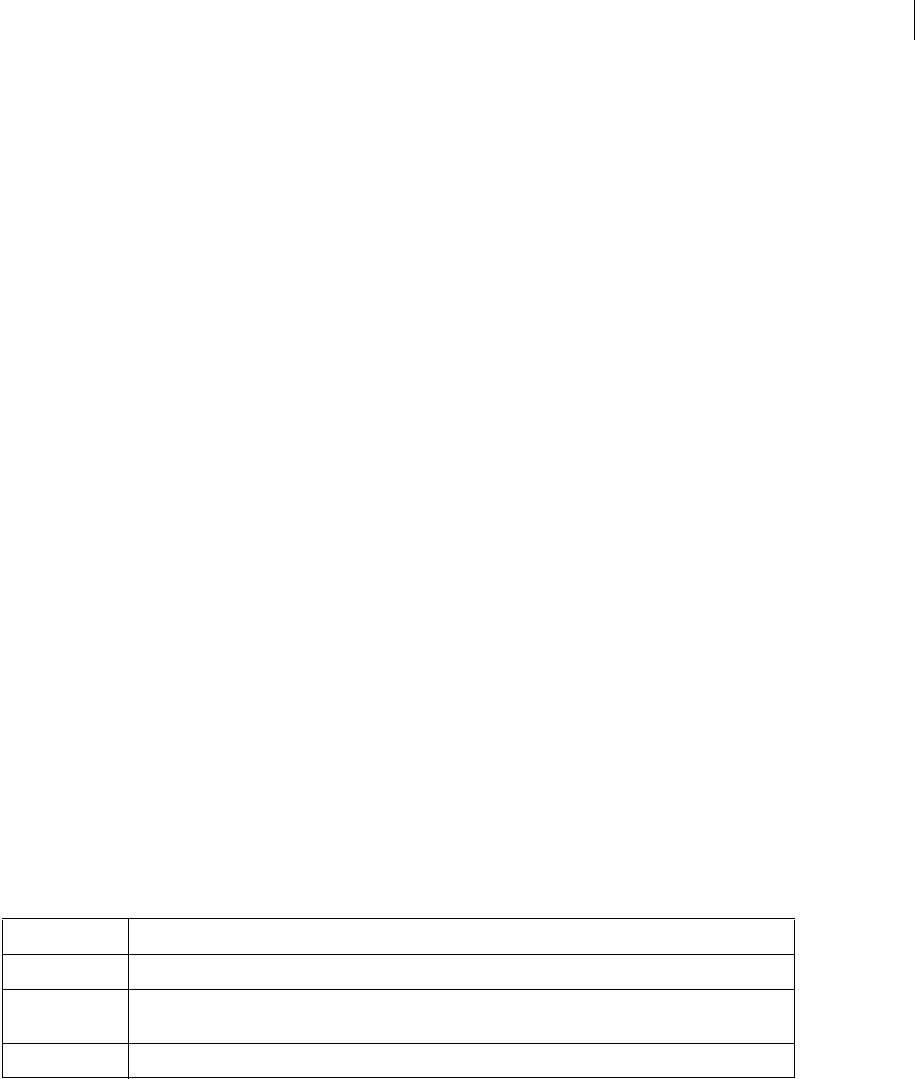
Example Action
Control+q Hold down Control while pressing the lowercase letter q.
Control+q Shift+a Hold down Control while pressing the letter q, then release both keys, and then hold down Shift while
pressing the letter a.
Esc ~ Shift+a Press and release Esc, then press and release ~ (tilde), then hold down Shift while pressing the letter a.
ADOBE FRAMEMAKER 9
Character Sets
3
Character sets
The Windows character set is based on the ANSI character set, and includes some additional characters not in the
ANSI set.
The tables in this section list the supported character sets, and the unsupported keyboard shortcuts in
FrameMaker 7.x and FrameMaker 8 for Windows.
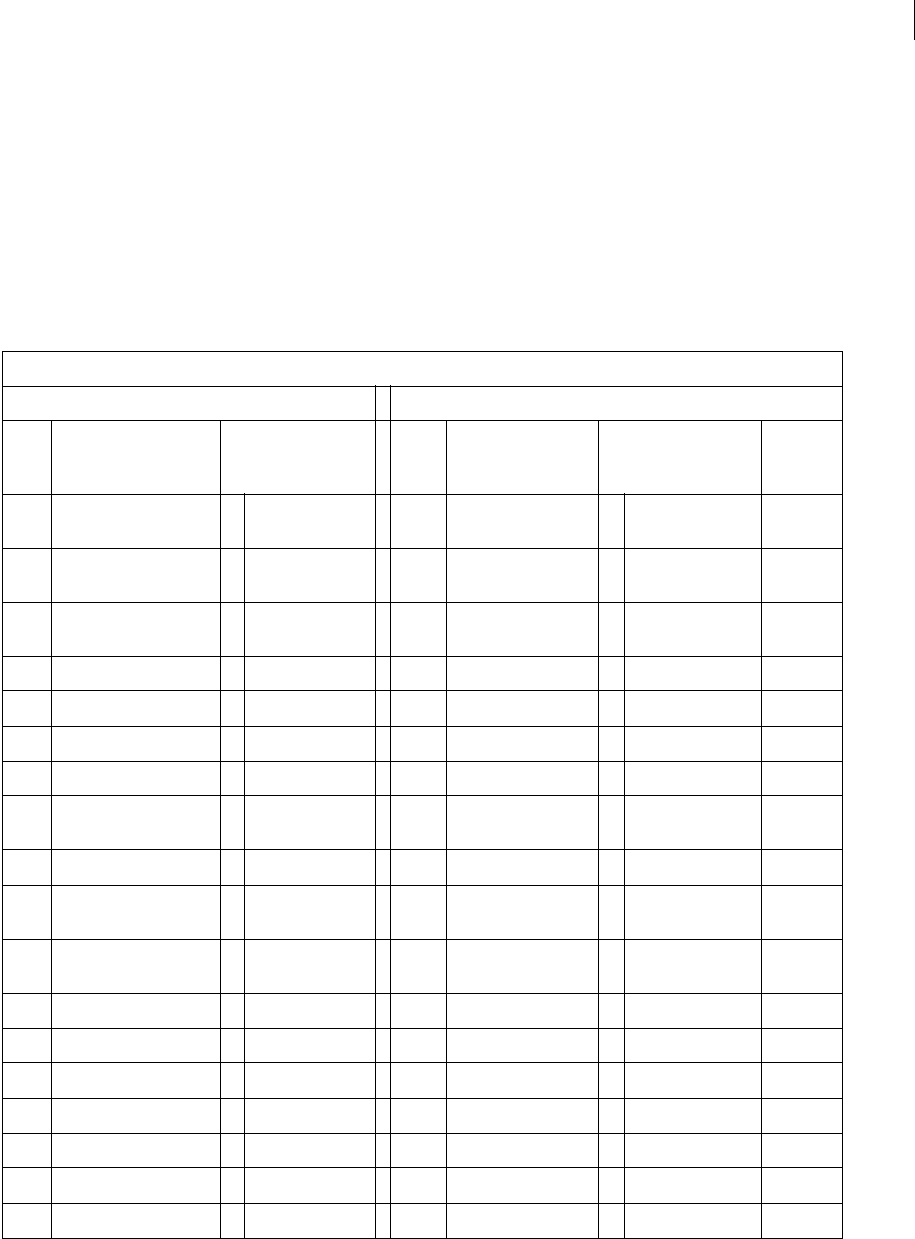
Standard character set for special hyphens, spaces, returns, and undisplayed characters
The following table lists the special hyphens, spaces, returns, and undisplayed characters supported in
FrameMaker 7.x, FrameMaker 8, or FrameMaker 9.
Special hyphens, spaces, returns, and undisplayed characters
Standard character set Symbol and Dingbats character sets
Hex
code
Key or key sequence Standard character
set: graphic and
name
Hex
code
Key or key sequence Symbol set: graphic
and name
ZapfDing-
bats:
graphic
\x04 Esc hyphen Shift+d or
Control+hyphen
discretionary
hyphen
\x04 Esc hyphen Shift+d or
Control+hyphen
discretionary
hyphen
\x05 Esc n s suppress hyphen-
ation
\x05 Esc n s suppress hyphen-
ation
\x15 Esc hyphen h nonbreaking
hyphen
\x15 Esc hyphen h nonbreaking
hyphen
\x08 Tab tab \x08 Tab tab
\x09 Shift+Return forced return \x09 Shift+Return forced return
\x0a Return end of paragraph \x0a Return end of paragraph
\x10 Esc space 1 (one) numeric space \x10 Esc space 1 (one) numeric space
\x11 Esc space h or
Control+space
nonbreaking space \x11 Esc space h or
Control+space
nonbreaking space
\x12 Esc space t thin space \x12 Esc space t thin space
\x13 Esc space n or
Alt+Control+space
en space \x13 Esc space n or
Alt+Control+space
en space
\x14 Esc space m or
Control+Shift+space
em space \x14 Esc space m or
Control+Shift+space
em space
\x27 Control+' ' quotesingle \x27 Control+' ‘ such that '
\x60 Control+‘ ` grave \x60 Control+' ‘ radiclex `
\xda Control+q Shift+z / fraction \xda
\xde Control+q Shift+w ÞReserved \xde
\xdf Control+q ‘ ßReserved \xdf
\xf5 Control+q Shift+m õ Reserved \xf5
\xf9 Control+q t ù Reserved \xf9
ADOBE FRAMEMAKER 9
Character Sets
4
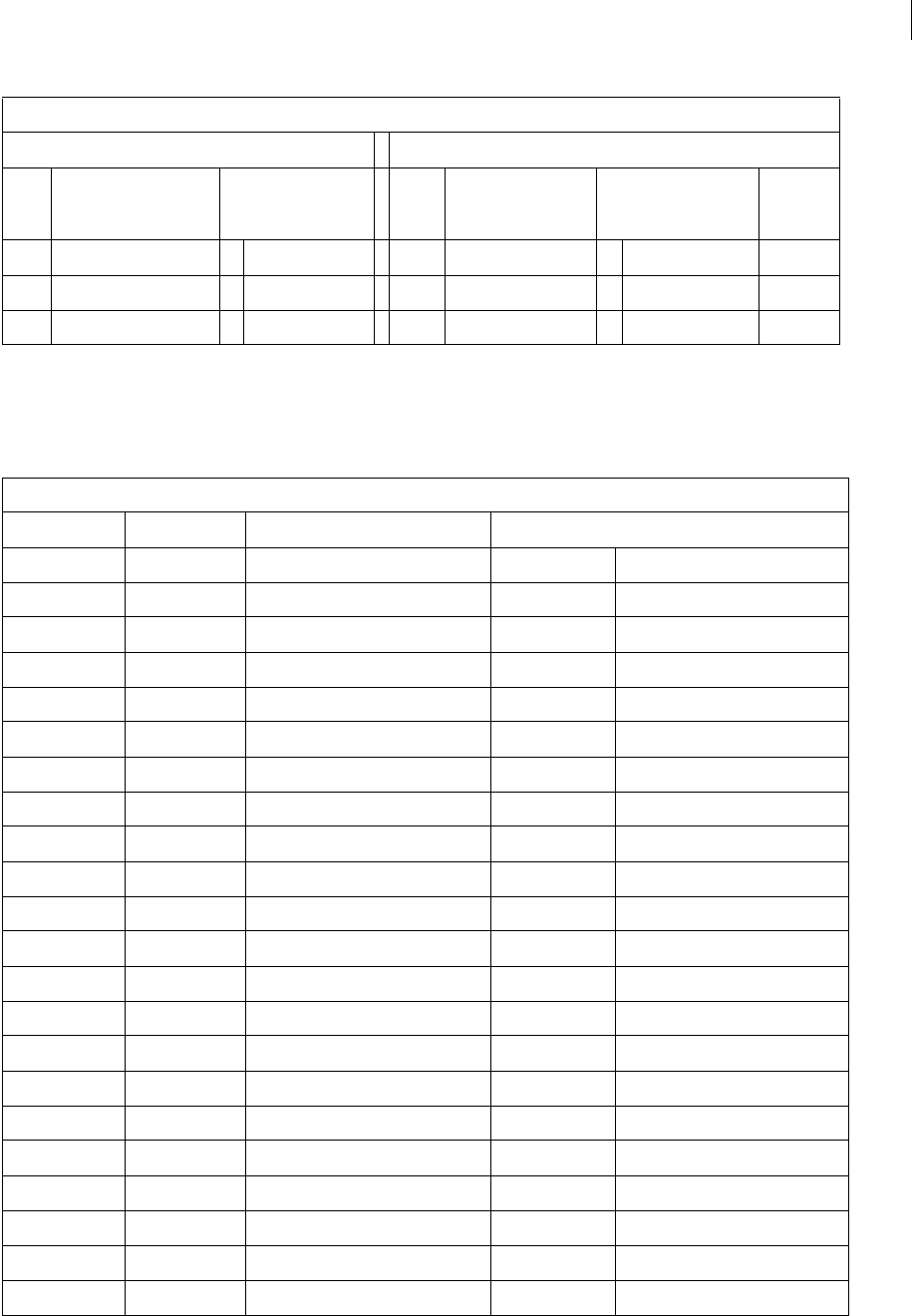
Standard character set
The following table lists the standard character set supported in FrameMaker 7.x, FrameMaker 8, and
FrameMaker 9, in their ANSI order:
\xfa Control+q r ú Reserved \xfa
\xfe Control+q Shift+j þ Reserved \xfe
\xfd Control+q Shift+f ý hungarumlaut \xfd
Standard character set
ANSI no. Hex code Key or key sequence Standard character set: graphic and name
032 \x20 space space
033 \x21 ! ! exclaim
034 \x22 " (Smart Quotes off ) " quotedbl
035 \x23 # # numbersign
036 \x24 $ $ dollar
037 \x25 % % percent
038 \x26 & & ampersand
040 \x28 ( ( parenleft
041 \x29 ) ) parenright
042 \x2a * * asterisk
043 \x2b + + plus
044 \x2c , (comma) , comma
045 \\ - (hyphen) - hyphen
046 \x2e . (period) . period
047 \x2f / / slash
048 \x30 0 0 zero
049 \x31 1 1 one
050 \x32 2 2 two
051 \x33 3 3 three
052 \x34 4 4 four
053 \x35 5 5 five
054 \x36 6 6 six
Special hyphens, spaces, returns, and undisplayed characters
Standard character set Symbol and Dingbats character sets
Hex
code
Key or key sequence Standard character
set: graphic and
name
Hex
code
Key or key sequence Symbol set: graphic
and name
ZapfDing-
bats:
graphic
ADOBE FRAMEMAKER 9
Character Sets
5
055 \x37 7 7 seven
056 \x38 8 8 eight
057 \x39 9 9 nine
058 \x3a : : colon
059 \x3b ; ; semicolon
060 \x3c < < less
061 \x3d = = equal
062 \x3e > > greater
063 \x3f ? ? question
064 \x40 @ @ at
065 \x41 A A A
066 \x42 B B B
067 \x43 C C C
068 \x44 D D D
069 \x45 E E E
070 \x46 F F F
071 \x47 G G G
072 \x48 H H H
073 \x49 I I I
074 \x4a J J J
075 \x4b K K K
076 \x4c L L L
077 \x4d M M M
078 \x4e N N N
079 \x4f O O O
080 \x50 P P P
081 \x51 Q Q Q
082 \x52 R R R
083 \x53 S S S
084 \x54 T T T
085 \x55 U U U
086 \x56 V V V
Standard character set
ANSI no. Hex code Key or key sequence Standard character set: graphic and name
ADOBE FRAMEMAKER 9
Character Sets
6
087 \x57 W W W
088 \x58 X X X
089 \x59 Y Y Y
090 \x5a Z Z Z
091 \x5b [ [ bracketleft
092 \x5c \ \ backslash
093 \x5d ] ] bracketright
094 \x5e ^ ^ asciicircum
095 \x5f _(underline) _ underscore
097 \x61 a a a
098 \x62 b b b
099 \x63 c c c
0100 \x64 d d d
0101 \x65 e e e
0102 \x66 f f f
0103 \x67 g g g
0104 \x68 h h h
0105 \x69 i i i
0106 \x6a j j j
0107 \x6b k k k
0108 \x6c l l l
0109 \x6d m m m
0110 \x6e n n n
0111 \x6f o o o
0112 \x70 p p p
0113 \x71 q q q
0114 \x72 r r r
0115 \x73 s s s
0116 \x74 t t t
0117 \x75 u u u
0118 \x76 v v v
0119 \x77 w w w
Standard character set
ANSI no. Hex code Key or key sequence Standard character set: graphic and name
ADOBE FRAMEMAKER 9
Character Sets
7
0120 \x78 x x x
0121 \x79 y y y
0122 \x7a z z z
0123 \x7b { { braceleft
0124 \x7c | | bar
0125 \x7d } } braceright
0126 \x7e ~ ~ asciitilde
0130 \xe2 Control+q b ‚quotesinglbase
0131 \xc4 Control+q Shift+d ƒ florin
0132 \xe3 Control+q c „ quotedblbase
0133 \xc9 Control+q Shift+i) … ellipsis
0134 \xa0 Control+q space † dagger
0135 \xe0 Control+q ` ‡ daggerdbl
0136 \xf6 Control+q v ˆ circumflex
0137 \xe4 Control+q d ‰ perthousand
0138 \xb3 Control+q 3 š Reserved
0139 \xdc Control+q \ ‹ guilsinglleft
0140 \xce Control+q }
Shift+n
ŒOE
0145 \xd4 Control+q
Shift+t or `
‘quoteleft
0146 \xd5 Control+q
Shift+u
’ quoteright
0147 \xd2 Alt+Control+` or
Control+q Shift+r
“quotedblleft
0148 \xd3 Control+Alt+' or
Control+q Shift+s
”quotedblright
0149 \xa5 Control+q % • bullet
0150 \xd0 Control+q Shift+p – endash
0151 \xd1 Control+q Shift+q — emdash
0152 \xf7 Control+q w ~ tilde
0153 \xaa Control+q * ™ trademarkserif
0154 \xf0 Control+q p šReserved
Standard character set
ANSI no. Hex code Key or key sequence Standard character set: graphic and name
ADOBE FRAMEMAKER 9
Character Sets
8
0155 \xdd Control+q ] › guilsinglright
0156 \xcf Control+q Shift+o œ oe
0159 \xd9 Esc % Shift+y Ÿ Ydieresis
0161 \xc1 Control+q Shift+a ¡ exclamdown
0162 \xa2 Control+q " ¢ cent
0163 \xa3 Control+q # £ sterling
0164 \xdb Control+q [ ¤ currency
0165 \xb4 Control+q 4 ¥ yen
0166 \xad Control+q hyphen ¦ pipe
0167 \xa4 Control+q $ § section
0168 \xac Control+q , ¨ dieresis
0169 \xa9 Control+q ) © copyrightserif
0170 \xbb Control+q ; ª ordfeminine
0171 \xc7 Control+q Shift+g « guillemetleft
0172 \xc2 Control+q Shift+b ¬ logicalnot
0173 \x2d - (hyphen) - hyphen
0174 \xa8 Control+q ( ® registerserif
0175 \xf8 Control+q x ¯ macron
0176 \xfb Control+q { ° ring
0177 \xb1 Control+q 1 ± plusminus
0178 \xb7 Control+q 7 2Reserved
0179 \xb8 Control+q 8 3Reserved
0180 \xab Control+q + ´ acute
0181 \xb5 Control+q 5 μ Reserved
0182 \xa6 Control+q & ¶ paragraph
0183 \xe1 Control+q a · periodcentered
0184 \xfc Control+q ¦ ¸ cedilla
0185 \xb6 Control+q 6 1Reserved
0186 \xbc Control+q < º ordmasculine
0187 \xc8 Control+q Shift+h » guillemetright
0188 \xb9 Control+q 9 ¼Reserved
0189 \xba Control+q : ½Reserved
Standard character set
ANSI no. Hex code Key or key sequence Standard character set: graphic and name
ADOBE FRAMEMAKER 9
Character Sets
9
0190 \xbd Control+q = ¾Reserved
0191 \xc0 Control+q @ ¿ questiondown
0192 \xcb Esc ` Shift+a À Agrave
0193 \xe7 Esc ' Shift+a Á Aacute
0194 \xe5 Esc ^ Shift+a  Acircumflex
0195 \xcc Esc ~ Shift+a à Atilde
0196 \x80 Esc % Shift+a Ä Adieresis
0197 \x81 Esc * Shift+a Å Aring
0198 \xae Control+q . Æ AE
0199 \x82 Esc comma Shift+c Ç Ccedilla
0200 \xe9 Esc ` Shift+e È Egrave
0201 \x83 Esc ' Shift+e É Eacute
0202 \xe6 Esc ^ Shift+e Ê Ecircumflex
0203 \xe8 Esc % Shift+e Ë Edieresis
0204 \xed Esc ` Shift+i Ì Igrave
0205 \xea Esc ' Shift+i Í Iacute
0206 \xeb Esc ^ Shift+i Î Icircumflex
0207 \xec Esc % Shift+i Ï Idieresis
0208 \xc3 Control+q Shift+c Ð Reserved
0209 \x84 Esc ~ Shift+n Ñ Ntilde
0210 \xf1 Esc ` Shift+o Ò Ograve
0211 \xee Esc ' Shift+o Ó Oacute
0212 \xef Esc ^ Shift+o Ô Ocircumflex
0213 \xcd Esc ~ Shift+o Õ Otilde
0214 \x85 Esc % Shift+o Ö Odieresis
0215 \xb0 Control+q zero × Reserved
0216 \xaf Control+q / Ø Oslash
0217 \xf4 Esc ` Shift+u Ù Ugrave
0218 \xf2 Esc ' Shift+u Ú Uacute
0219 \xf3 Esc ^ Shift+u Û Ucircumflex
0220 \x86 Esc % Shift+u Ü Udieresis
0221 \xc5 Control+q Shift+e Ý Reserved
Standard character set
ANSI no. Hex code Key or key sequence Standard character set: graphic and name
ADOBE FRAMEMAKER 9
Character Sets
10
0222 \xd7 Control+q
Shift+w
Þ Reserved
0223 \xa7 Control+q ' ß germandbls
0224 \x88 Esc ` a à agrave
0225 \x87 Esc ' a á aacute
0226 \x89 Esc ^ a â acircumflex
0227 \x8b Esc ~ a ã atilde
0228 \x8a Esc % a ä adieresis
0229 \x8c Esc * a å aring
0230 \xbe Control+q > æ ae
0231 \x8d Esc comma c ç ccedilla
0232 \x8f Esc ` e è egrave
0233 \x8e Esc ' e é eacute
0234 \x90 Esc ^ e ê ecircumflex
0235 \x91 Esc % e ë edieresis
0236 \x92 Esc ` i ì igrave
0237 \x93 Esc ' i í iacute
0238 \x94 Esc ^ i î icircumflex
0239 \x95 Esc % i ï idieresis
0240 \xb2 Control+q 2 ð Reserved
0241 \x96 Esc ~ n ñ ntilde
0242 \x98 Esc ` o ò ograve
0243 \x97 Esc ' o ó oacute
0244 \x99 Esc ^ o ô ocircumflex
0245 \x9b Esc ~ o õ otilde
0246 \x9a Esc % o ö odieresis
0247 \xd6 Control+q Shift+v ÷ Reserved
0248 \xbf Control+q ? ø oslash
0249 \x9d Esc ` u ù ugrave
0250 \x9c Esc ' u ú uacute
0251 \x9e Esc ^ u û ucircumflex
0252 \x9f Esc % u ü udieresis
Standard character set
ANSI no. Hex code Key or key sequence Standard character set: graphic and name
ADOBE FRAMEMAKER 9
Character Sets
11
Symbol and ZapfDingbats character sets
The following table lists the Symbol and Dingbats character set supported in older versions of FrameMaker as well
as FrameMaker 9 in their Hex order.
0253 \xc6 Control+q Shift+f ý Reserved
0254 \xca Control+q Shift+j þ Reserved
0255 \xd8 Esc % y ÿ ydieresis
Symbol and ZapfDingbats character sets
ANSI no. Hex code Key or key sequence Symbol set: graphic and name ZapfDingbats: graphic
032 \x20 space space
033 \x21 Shift+! !exclaim ✁
034 \x22 Shift+" ∀universal ✂
035 \x23 Shift+# #numbersign ✃
036 \x24 Shift+$ ∃existential ✄
037 \x25 Shift+% %percent ☎
038 \x26 Shift+& &ersand ✆
040 \x28 Shift+( (parenleft ✈
041 \x29 Shift+) )parenright ✉
042 \x2a Shift+* ∗asteriskmath ☛
043 \x2b Shift++ +plus ☞
044 \x2c , (comma) ,comma ✌
045 \x2d - (hyphen) −minus ✍
046 \x2e . (period) .period ✎
047 \x2f / /slash ✏
048 \x30 0 0zero ✐
049 \x31 1 1one ✑
050 \x32 2 2two ✒
051 \x33 3 3three ✓
052 \x34 4 4four ✔
053 \x35 5 5five ✕
054 \x36 6 6six ✖
055 \x37 7 7seven ✗
Standard character set
ANSI no. Hex code Key or key sequence Standard character set: graphic and name
ADOBE FRAMEMAKER 9
Character Sets
12
056 \x38 8 8eight ✘
057 \x39 9 9nine ✙
058 \x3a : :colon ✚
059 \x3b ; ;semicolon ✛
060 \x3c , <less ✜
061 \x3d = =equal ✝
062 \x3e > >greater ✞
063 \x3f ? ?question ✟
064 \x40 @ ≅congruent ✠
065 \x41 A ΑAlpha ✡
066 \x42 B ΒBeta ✢
067 \x43 C ΧChi ✣
068 \x44 D ΔDelta ✤
069 \x45 E ΕEpsilon ✥
070 \x46 F ΦPhi ✦
071 \x47 G ΓGamma ✧
072 \x48 H ΗEta ★
073 \x49 I ΙIota ✩
074 \x4a J ϑtheta1 ✪
075 \x4b K ΚKappa ✫
076 \x4c L ΛLambda ✬
077 \x4d M ΜMu ✭
078 \x4e N ΝNu ✮
079 \x4f O ΟOmicron ✯
080 \x50 P ΠPi ✰
081 \x51 Q ΘTheta ✱
082 \x52 R ΡRho ✲
083 \x53 S ΣSigma ✳
084 \x54 T ΤTau ✴
085 \x55 U ΥUpsilon ✵
086 \x56 V ςsigma1 ✶
087 \x57 W ΩOmega ✷
Symbol and ZapfDingbats character sets
ANSI no. Hex code Key or key sequence Symbol set: graphic and name ZapfDingbats: graphic
ADOBE FRAMEMAKER 9
Character Sets
13
088 \x58 X ΞXi ✸
089 \x59 Y ΨPsi ✹
090 \x5a Z ΖZeta ✺
091 \x5b [ [bracketleft ✻
092 \x5c \ ∴therefore ✼
093 \x5d ] ]bracketright ✽
094 \x5e ^ ⊥perpendicular ✾
095 \x5f _(underline) _underscore ✿
097 \x61 a αalpha ❁
098 \x62 b βbeta ❂
099 \x63 c χchi ❃
100 \x64 d δdelta ❄
101 \x65 e εepsilon ❅
102 \x66 f φphi ❆
103 \x67 g γgamma ❇
104 \x68 h ηeta ❈
105 \x69 i ιiota ❉
106 \x6a j ϕphil ❊
107 \x6b k κkappa ❋
108 \x6c l λlambda ●
109 \x6d m μmu ❍
110 \x6e n νnu ■
111 \x6f o οomicron ❏
112 \x70 p πpi ❐
113 \x71 q θtheta ❑
114 \x72 r ρrho ❒
115 \x73 s σsigma ▲
116 \x74 t τtau ▼
117 \x75 u υupsilon ◆
118 \x76 v ϖomega1 ❖
119 \x77 w ωomega ◗
120 \x78 x ξxi ❘
Symbol and ZapfDingbats character sets
ANSI no. Hex code Key or key sequence Symbol set: graphic and name ZapfDingbats: graphic
ADOBE FRAMEMAKER 9
Character Sets
14
Unsupported keyboard shortcuts for the Symbol and Dingbats character set in FrameMaker 8
The following table lists the Symbol and Dingbats character set supported in older versions of FrameMaker. In
FrameMaker 9, you can insert the corresponding Unicode characters, but the keyboard shortcuts are no longer
supported:
121 \x79 y ψpsi ❙
122 \x7a z ζzeta ❚
123 \x7b { {braceleft ❛
124 \x7c | |bar ❜
125 \x7d } }braceright ❝
126 \x7e ~ ∼similar ❞
Symbol and Dingbats character set
Ansi no. Hex code Key or key
sequence
Symbol set: graphic and name Dingbats: graphics
0130 Reserved
0131 Reserved
0132 Reserved
0133 Reserved
0134 Reserved
0135 Reserved
0136 Reserved
0137 Reserved
0138 Reserved
0139 Reserved
0140 Reserved
0145 Reserved
0146 Reserved
0147 Reserved
0148 Reserved
0149 Reserved
0150 Reserved
0151 Reserved
0152 Reserved
Symbol and ZapfDingbats character sets
ANSI no. Hex code Key or key sequence Symbol set: graphic and name ZapfDingbats: graphic
ADOBE FRAMEMAKER 9
Character Sets
15
0153 Reserved
0154 Reserved
0155 Reserved
0156 Reserved
0157 Reserved
0158 Reserved
0159 Reserved
0161 \xa1 Control+q ! ϒUpsilon1 ❡
0162 \xa2 Control+q " ′minute ❢
0163 \xa3 Control+q # ≤lessequal ❣
0164 \xa4 Control+q $ ⁄fraction ❤
0165 \xa5 Control+q % ∞infinity ❥
0166 \xa6 Control+q & ƒflorin ❦
0167 \xa7 Control+q ' ♣club ❧
0168 \xa8 Control+q ( ♦diamond ♣
0169 \xa9 Control+q ) ♥heart ♦
0170 \xaa Control+q * ♠spade ♥
0171 \xab Control+q + ↔arrowboth ♠
0172 \xac Control+q , ←arrowleft ①
0173 \xad Control+q - ↑arrowup ✍
0174 \xae Control+q . →arrowright ③
0175 \xaf Control+q / ↓arrowdown ④
0176 \xb0 Control+q 0 °degree ⑤
0177 \xb1 Control+q 1 ±plusminus ⑥
0178 \xb2 Control+q 2 ″second ⑦
0179 \xb3 Control+q 3 ≥greaterequal ⑧
0180 \xb4 Control+q 4 ×multiply ⑨
0181 \xb5 Control+q 5 ∝proportional ⑩
0182 \xb6 Control+q 6 ∂partialdiff ⑩
0183 \xb7 Control+q 7 •bullet ❷
0184 \xb8 Control+q 8 ÷divide ❸
0185 \xb9 Control+q 9 ≠notequal ❹
Symbol and Dingbats character set
Ansi no. Hex code Key or key
sequence
Symbol set: graphic and name Dingbats: graphics
ADOBE FRAMEMAKER 9
Character Sets
16
0186 \xba Control+q : ≡equivalence ❺
0187 \xbb Control+q ; ≈approxequal ❻
0188 \xbc Control+q < …ellipsis ❼
0189 \xbd Control+q = ⏐arrowvertex ❽
0190 \xbe Control+q > ⎯arrowhorizex ❾
0191 \xbf Control+q ? ↵carriagereturn ❿
0192 \xc0 Control+q @ ℵaleph ➀
0193 \xc1 Control+q
Shift+a
ℑIfraktur ➁
0194 \xc2 Control+q
Shift+b
ℜRfraktur ➂
0195 \xc3 Control+q
Shift+c
℘weierstrass ➃
0196 \xc4 Control+q
Shift+d
⊗circlemultiply ➄
0197 \xc5 Control+q
Shift+e
⊕circleplus ➅
0198 \xc6 Control+q
Shift+f
∅emptyset ➆
0199 \xc7 Control+q
Shift+g
∩intersection ➇
0200 \xc8 Control+q
Shift+h
∪union ➈
0201 \xc9 Control+q
Shift+i
⊃propersuperset ➉
0202 \xca Control+q
Shift+j
⊇reflexsuperset ➊
0203 \xcb Esc ` Shift+a ⊄notsubset ➋
0204 \xcc Esc ~ Shift+a ⊂propersubset ➌
0205 \xcd Esc ~ Shift+o ⊆reflexsubset ➍
0206 \xce Control+q
Shift+n
∈element ➎
0207 \xcf Control+q
Shift+o
∉notelement ➏
0208 \xd0 Control+q
Shift+p
∠angle ➐
0209 \xd1 Control+q
Shift+q
∇gradient ➑
Symbol and Dingbats character set
Ansi no. Hex code Key or key
sequence
Symbol set: graphic and name Dingbats: graphics
ADOBE FRAMEMAKER 9
Character Sets
17
0210 \xd2 Control+q
Shift+r
®registerserif ➒
0211 \xd3 Control+q
Shift+s
©copyrightserif ➓
0212 \xd4 Control+q
Shift+t
™trademarkserif ➔
0213 \xd5 Control+q
Shift+u
∏product →
0214 \xd6 Control+q
Shift+v
√radical ↔
0215 \xd7 Control+q
Shift+w
⋅dotmath ↕
0216 \xd8 Esc % y ¬logicalnot ➘
0217 \xd9 Esc % Shift+y ∧logicaland ➙
0218 \xda Control+q
Shift+z
∨logicalor ➚
0219 \xdb Control+q [ ⇔arrowdblboth ➛
0220 \xdc Control+q \ ⇐arrowdblleft ➜
0221 \xdd Control+q ] arrowdblup ➝
0222 \xde Control+q ^ arrowdblright ➞
0223 \xdf Control+q _ arrowdbldown ➟
0224 \xe0 Control+q ` lozenge ➠
0225 \xe1 Control+q a angleleft ➡
0226 \xe2 Control+q b registersans ➢
0227 \xe3 Control+q c copyrightsans ➣
0228 \xe4 Control+q d trademarksans ➤
0229 \xe5 Esc ^ Shift+a summation ➥
0230 \xe6 Esc ^ Shift+e parenlefttp ➦
0231 \xe7 Esc ' Shift+a parenleftex ➧
0232 \xe8 Esc % Shift+e parenleftbt ➨
0233 \xe9 Esc ` Shift+e bracketlefttp ➩
0234 \xea Esc ' Shift+i bracketleftex ➪
0235 \xeb Esc ^ Shift+i bracketleftbt ➫
0236 \xec Esc % Shift+i bracelefttp ➬
0237 \xed Esc ` Shift+i braceleftmid ➭
Symbol and Dingbats character set
Ansi no. Hex code Key or key
sequence
Symbol set: graphic and name Dingbats: graphics
ADOBE FRAMEMAKER 9
Character Sets
18
0238 \xee Esc ' Shift+o braceleftbt ➮
0239 \xef Esc ^ Shift+o braceex ➯
0240 \xf0 Reserved
0241 \xf1 Esc ` Shift+o angleright ➱
0242 \xf2 Esc ' Shift+u integral ➲
0243 \xf3 Esc ^ Shift+u integraltp ➳
0244 \xf4 Esc ` Shift+u integralex ➴
0245 \xf5 Control+q u integralbt ➵
0246 \xf6 Control+q v parenrighttp ➶
0247 \xf7 Control+q w parenrightex ➷
0248 \xf8 Control+q x parenrightbt ➸
0249 \xf9 Control+q y bracketrighttp ➹
0250 \xfa Control+q z bracketrightex ➺
0251 \xfb Control+q { bracketrightbt ➻
0252 \xfc Control+q ¦
(pipe)
bracerighttp ➼
0253 \xfd Control+q } bracerightmid ➽
0254 \xfe Control+q ~ bracerightbt ➾
0255
Symbol and Dingbats character set
Ansi no. Hex code Key or key
sequence
Symbol set: graphic and name Dingbats: graphics
