em trak Marine Electronics 411-0002 Class B AIS transceiver User Manual em trak B100 manual
em-trak Marine Electronics Ltd Class B AIS transceiver em trak B100 manual
User Manual
www.em-trak.com
Product Manual
HIGH PERFORMANCE
MARITIME
PRODUCTS
High Performance Maritime Products
em-trak B100
AIS Class B Transceiver
201-0137:1

Contents
1 - Notices ....................................................................................................................................1
1.1 - Safety warnings.....................................................................................................................1
1.2 - General notices .....................................................................................................................1
2 - About your AIS class B transceiver .....................................................................................4
2.1 - About AIS ..............................................................................................................................4
2.2 - Static and dynamic vessel data.............................................................................................4
2.3 - Important information for US customers................................................................................5
2.4 - What's in the box? .................................................................................................................6
3 - Installation ............................................................................................................................10
3.1 - Preparing for installation......................................................................................................10
3.2 - Installation procedures ........................................................................................................13
4 - Configuring your AIS transceiver .......................................................................................23
4.1 - Switching on your AIS transceiver for the first time.............................................................23
4.2 - Configuring your AIS transceiver.........................................................................................23
4.3 - Introduction to proAIS2........................................................................................................24
4.4 - Installing proAIS2 ................................................................................................................24
4.5 - Configuration using proAIS2 ...............................................................................................25
5 - Operation ..............................................................................................................................26
5.1 - Using the AIS transceiver....................................................................................................26
5.2 - Using a memory card ..........................................................................................................26
5.3 - Switch function ....................................................................................................................29
5.4 - Using proAIS2 with your AIS transceiver ............................................................................29
5.5 - Indicator functions ...............................................................................................................30
6 - Troubleshooting ...................................................................................................................32
7 - Specifications .......................................................................................................................33

Notices
Page 1
1 Notices
When reading this manual please pay attention to warnings marked with the warning
triangle shown on the left. These are important messages for safety, installation and
usage of the product.
1.1 Safety warnings
This equipment must be installed in accordance with the instructions provided in
this manual.
The em-trak B100 is an aid to navigation and must not be relied upon to provide
accurate navigation information. AIS is not a replacement for vigilant human
lookouts and other navigation aids such as Radar. The performance of the B100
may be seriously impaired if not installed as instructed in the user manual, or due
to other factors such as weather and or nearby transmitting devices. Compatibility
with other systems may vary and is reliant on the third party systems recognising
the standard outputs from the B100. em-trak reserves the right to update and
change these specifications at any time and without notice.
Do not install this equipment in a flammable atmosphere such as in an engine
room or near to fuel tanks.
1.2 General notices
Position source
All marine Automatic Identification System (AIS) transceivers utilise a satellite based location
system such as the Global Positioning Satellite (GPS) network.
The accuracy of a GPS position fix is variable and is affected by factors such as the antenna
positioning, how many satellites are used to determine a position and how long satellite
information has been received for.
Compass safe distance
The compass safe distance of this unit is 0.2m or greater for 0.3° deviation.
!
!
!
!

Notices
Page 2
RF emissions notice
Caution: The AIS transceiver generates and radiates radio frequency electromagnetic energy.
This equipment must be installed and operated according to the instructions contained in this
manual. Failure to do so can result in personal injury and / or AIS transceiver malfunction.
Caution: Never operate the AIS transceiver unless it is connected to a VHF antenna.
To maximise performance and minimise human exposure to radio frequency electromagnetic
energy you must make sure that the antenna is mounted at least 1.5 metres away from the AIS
transceiver and is connected to the AIS transceiver before power is applied. The system has a
Maximum Permissible Exposure (MPE) radius of 1.5m. This has been determined assuming the
maximum power of the AIS transceiver and using antennas with a maximum gain of 3dBi.The
antenna should be mounted 3.5m above the deck in order to meet RF exposure requirements.
Higher gain antennas will require a greater MPE radius. Do not operate the unit when anyone is
within the MPE radius of the antenna (unless they are shielded from the antenna field by a
grounded metallic barrier). The antenna should not be co-located or operated in conjunction with
any other transmitting antenna. The required antenna impedance is 50 Ohms.
Warranty
This product is supplied with standard warranty as defined in the accompanying warranty
information.
Any attempt to tamper with or damage this product will invalidate the warranty.
Disposal of this product and packaging
Please dispose of the AIS transceiver in accordance with the European WEEE Directive or with
the applicable local regulations for disposal of electrical equipment.
Every effort has been made to ensure the packaging for this product is recyclable. Please
dispose of the packaging in an environmentally friendly manner.
Accuracy of this manual
The AIS transceiver may be upgraded from time to time and future versions of the AIS
transceiver may therefore not correspond exactly with this manual. Information contained in this
manual is liable to change without notice. The manufacturer of this product disclaims any liability
!

Notices
Page 3
for consequences arising from omissions or inaccuracies in this manual and any other
documentation provided with this product.
Declaration of conformity
The manufacturer of this product declares that this product is in compliance with the essential
requirements and other provisions of the R&TTE directive 1995/5/EC.
The product carries the CE mark, notified body number and alert symbol as required by the
R&TTE directive.
The product is intended for sale in the following member states: Great Britain, France, Spain,
Sweden, Austria, Netherlands, Portugal, Denmark, Norway, Belgium, Italy, Finland, Ireland,
Luxembourg, Germany, Czech Republic.
FCC notice
This equipment has been tested and found to comply with the limits for a class B digital device,
pursuant to part 15 of the FCC Rules. These limits are designed to provide reasonable protection
against harmful interference in a residential installation.
This equipment generates, uses and can radiate radio frequency energy and, if not installed and
used in accordance with the instructions, may cause harmful interference to radio
communications.
This device complies with part 15 of the FCC Rules. Operation is subject to the following two
conditions: (1) This device may not cause harmful interference, and (2) this device must accept
any interference received, including interference that may cause undesired operation.
Changes or modifications not expressly approved by the party responsible for compliance could
void the user's authority to operate the equipment.
WARNING: It is a violation of the rules of the Federal Communications
Commission to input an MMSI that has not been properly assigned to the end
user, or to otherwise input any inaccurate data in this device.
Industry Canada notice
This AIS class B digital apparatus complies with Canadian ICES-003.
Cet appareil numérique de la AIS classe B est conforme à la norme NMB-003 du Canada.
!

About your AIS class B transceiver
Page 4
2 About your AIS class B transceiver
2.1 About AIS
The marine Automatic Identification System (AIS) is a location and vessel information reporting
system. It allows vessels equipped with AIS to automatically and dynamically share and regularly
update their position, speed, course and other information such as vessel identity with similarly
equipped vessels. Position is derived from the Global Positioning System (GPS) and
communication between vessels is by Very High Frequency (VHF) digital transmissions.
There are a number of types of AIS device as follows:
•Class A transceivers. These are similar to class B transceiver, but are designed to be fitted
to large vessels such as cargo ships and large passenger vessels. Class A transceivers
transmit at a higher VHF signal power than class B transceivers and therefore can be
received by more distant vessels, and also transmits more frequently. Class A transceivers
are mandatory on all vessels over 300 gross tonnes on international voyages and certain
types of passenger vessels under the SOLAS mandate.
•Class B transceivers. Similar to class A transceivers in many ways, but are normally lower
cost due to the less stringent performance requirements. Class B transceivers transmit at a
lower power and at a lower reporting rate than class A transceivers.
•AIS base stations. AIS base stations are used by Vessel Traffic Systems to monitor and
control the transmissions of AIS transceivers.
•Aids to Navigation (AtoN) transceivers. AtoNs are transceivers mounted on buoys or
other hazards to shipping which transmit details of their location to the surrounding vessels.
•AIS receivers. AIS receivers will generally receive transmissions from class A transceivers,
class B transceivers, AtoNs and AIS base stations but do not transmit any information about
the vessel on which they are installed.
The em-trak B100 is an AIS class B transceiver.
2.2 Static and dynamic vessel data
There are two categories of information transmitted by an AIS transceiver: static and dynamic
data.
The vessel's dynamic data, which includes location, speed over ground (SOG) and course over
ground (COG), is calculated automatically using the internal GPS receiver.

About your AIS class B transceiver
Page 5
Static data is information about the vessel which must be programmed into the AIS transceiver.
This includes:
• Maritime Mobile Service Identity (MMSI)
•Vessel name
• Vessel call sign (if available)
• Vessel type
• Vessel dimensions
In most countries the operation of an AIS transceiver is included under the vessel's marine VHF
licence provisions. The vessel on to which the AIS unit is to be installed must therefore possess a
current VHF radiotelephone licence which lists the AIS system, vessel Call Sign and MMSI
number.
An MMSI number is required in order for the AIS transceiver to operate. Please
contact the relevant authority in your country for more information.
2.3 Important information for US customers
There are specific laws in the USA regarding the configuration of AIS class B transceivers.
If you are a US resident and intend to use your AIS class B transceiver in US waters, you should
make sure that your retailer has configured your product prior to supplying it to you. If your AIS
transceiver has not been pre-configured please contact your dealer for details of how to have it
configured.
Alternatively, if you have received a configuration card for your AIS transceiver you may
configure the AIS transceiver by following the instructions provided with the card.
!

About your AIS class B transceiver
Page 6
2.4 What's in the box?
Figure 1 shows the items included with your AIS transceiver purchase. The following sections
give a brief overview of each item. Please ensure all items are present and if any of the items are
not present contact your dealer.
Figure 1 Items included in the product
Screws (packet of 4)
Product CD
Quick
start guide
Product manual
GPS Antenna
Class B AIS transceiver Power and data cable USB cable
Warranty
information

About your AIS class B transceiver
Page 7
Items included in the box:
• Support tools CD
The CD supplied with the package contains the following:
- proAIS2 software tool necessary to configure the AIS transceiver. Please refer to section
4 for details of the configuration process and how to use the proAIS2 tool.
- USB drivers required to connect to the AIS transceiver via USB.
- Alternative language versions of this manual.
- Other application software may be included on the CD depending on the version of
product you have purchased. For details of AIS application softwar please contact em-
trak via the details printed on the back of this manual.
• Quick start guide
The quick start guide gives a handy one page reference for the installation process.
• Product manual
This document is the product manual and should be read thoroughly prior to any attempt to install
or use the AIS transceiver.
• GPS antenna
The GPS antenna forms an integral part of the product's internal positioning system based on
GPS. Please refer to section 3.2 for details of how to install the GPS antenna.
• Fixing screws
Four fixing screws are provided with the product for mounting of the AIS transceiver. Please
refer to section 3.2 for details of how to mount the AIS transceiver.
• Power and data cable
The power and data cable connects to the AIS transceiver and enables connection to power,
NMEA0183 and an external switch.
• USB cable
The USB cable enables connection toa PC for configuration purposes.
• AIS transceiver unit
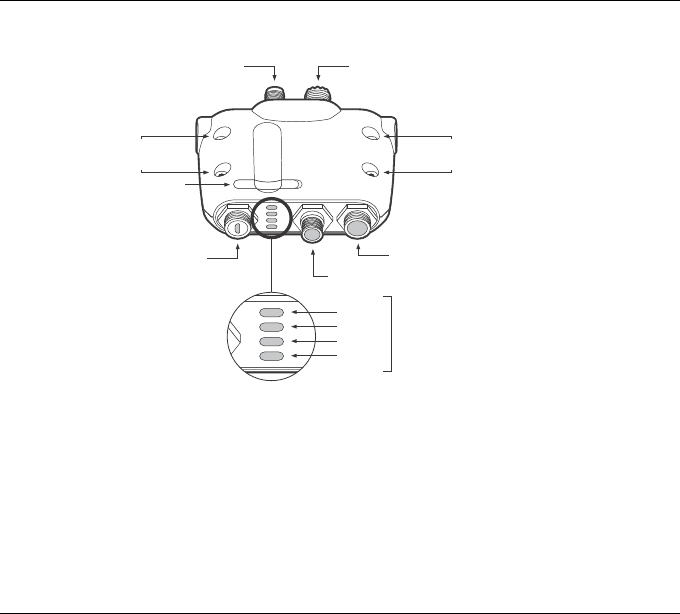
Figure 2 shows an overview of the AIS transceiver unit. The AIS transceiver has a number of
indicators which provide information to the user about the status of the AIS transceiver. Please
refer to section 5.5 for more details of indicator functions.
About your AIS class B transceiver
Page 8
Figure 2 AIS transceiver overview
Electrical connections
The AIS transceiver has the following electrical connections:
• Power supply
• Two independent NMEA0183 data port for connection to chart plotters and other NMEA0183
compatible equipment
• USB for connection to a PC
• External switch input
• NMEA2000 port for connection to NMEA2000 compatible equipment
• Memory card slot
VHF antenna connector
Power and data
NMEA 2000
GPS antenna connector
USB connector
Mounting
holes
Mounting
holes
Green
Amber
Red
Blue
Indicator
lights
Memory card slot
About your AIS class B transceiver
Page 9
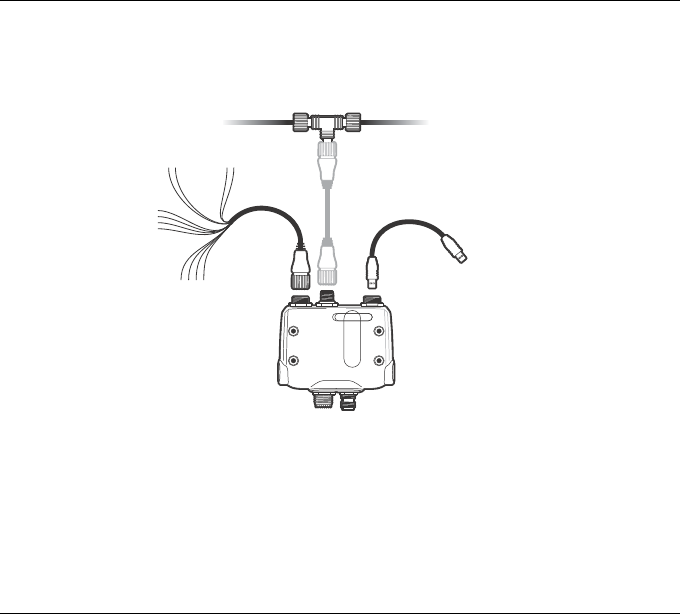
In addition there are two other connections for the GPS antenna and the VHF antenna. Figure 3
shows an overview of the electrical connections to the AIS transceiver.
Figure 3 Electrical connections to the AIS transceiver
Chartplotter
NMEA0183
device
Switch Power in
NMEA 2000
USB
Class B AIS transceiver
Installation
Page 10
3 Installation
3.1 Preparing for installation
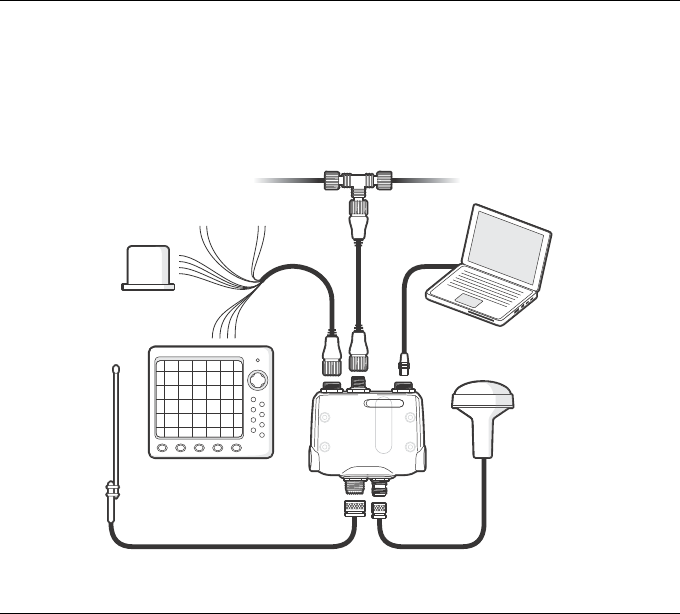
Figure 4 shows a typical installation configuration for the AIS transceiver. Please take the time to
familiarise yourself with the system elements and their connections prior to attempting
installation.
Figure 4 Typical installation configuration
GPS Antenna
VHF Antenna
Chartplotter
NMEA0183 device
SwitchPower in
NMEA 2000
Optional PC
Class B AIS
transceiver

Installation
Page 11
In addition to the items provided with your AIS transceiver the following items will be required for
installation.
VHF antenna
Connection to a suitable VHF antenna will be required for the AIS transceiver to operate. A
standard marine band VHF antenna such as that used with VHF voice radios will be sufficient.
Please take note of the warnings in section 1 regarding the use of antennas.
Alternatively, if you wish to use an existing VHF antenna, antenna splitter products are available
which allow the existing antenna to be used with two radio devices, such as a VHF voice radio
and the AIS transceiver.
When selecting an AIS antenna splitter make sure it is capable of operation with
an AIS transceiver. Some AIS antenna splitters are designed to work only with
AIS receivers. Please check with your dealer to ensure you purchase the correct
type of antenna splitter.
Antenna cables
The GPS antenna is provided with 10 metres of cable. If this is not sufficient to reach between
the desired GPS antenna location and the AIS transceiver unit you will need an extension cable.
Please contact your dealer for details. For reference the GPS antenna connector type on the AIS
transceiver unit is TNC receptacle, and is intended to mate with a TNC jack connector.
Please check that the VHF antenna you intend to use has sufficient cable to reach between the
VHF antenna and the AIS transceiver unit. If it is not sufficient you will need an extension cable.
Please contact your dealer for details of suitable products. For reference the VHF antenna
connector type on the AIS transceiver unit is SO239, and is intended to mate with a PL259
connector.
Power and data cables
The AIS transceiver unit is supplied with a two metre long power and data cable as an accessory.
If you require longer cables to reach your power supply, please ensure the cables are capable of
carrying currents of up to 2A peak and 200mA on average. Means of connecting the cables
together will also be required. The use of ScotchlokTM connectors is recommended for this
purpose.
!

Installation
Page 12
Chart plotter
To display received AIS messages from other vessels on your chart plotter, you will need to
connect your AIS transceiver to your chart plotter. Please refer to the user manual supplied with
your chart plotter for details of how to connect and configure your chart plotter for use with AIS
devices. For general guidance your chart plotter should be configured to accept NMEA data at
38400 baud (sometimes referred to as 'NMEA HS' in the plotter configuration menu). You may
also need to enable the display of AIS targets in the chart options.
Alternatively if you use an NMEA2000 network on your vessel it is possible to connect the AIS
transceiver to the NMEA2000 network via a suitable cable. Please refer to your dealer for details
of NMEA2000 cables.
Connection to a PC
If you choose to use a PC with suitable charting software to display received AIS messages as
other vessels, this can be accomplished by connecting the USB connector on the unit to the PC
via the supplied USB cable.
GPS antenna mount
A one inch 14 TPI pole mount is required to mount the supplied GPS antenna. Please contact
your dealer for details of suitable products.

Installation
Page 13
3.2 Installation procedures
Before beginning installation of your AIS transceiver, please ensure you have the necessary
additional items as detailed in section 3.1. It is strongly recommended that you read all of the
instructions in this manual prior to installation.
If after reading this manual you are unsure about any element of the installation process please
contact your dealer for advice.
The following sections explain the installation process step by step for each of the main elements
of the system.
Step 1 - Installing the AIS transceiver
Please note the following guidelines when selecting a location for your AIS transceiver:
• The AIS transceiver must be fitted in a location where it is at least 0.2m from a compass or
any magnetic device.
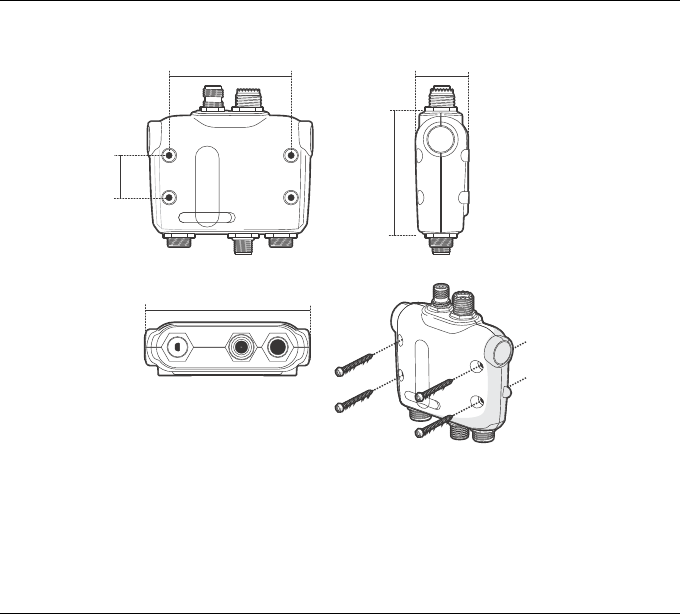
• There should be adequate space around the AIS transceiver for routing of cables. See
Figure 5 for details of the AIS transceiver dimensions.
• The ambient temperature around the AIS transceiver should be maintained between -10°C
and +55°C.
• The AIS transceiver should not be located in a flammable or hazardous atmosphere such as
in an engine room or near to fuel tanks.
• The AIS transceiver is not waterproof and must not be exposed to any spray or submersion.
• It is recommended that the AIS transceiver is installed in a 'below decks' environment.
• It is acceptable to mount the AIS transceiver either vertically or horizontally.
• The product is supplied with four self tapping screws for attachment of the AIS transceiver to
a suitable surface. Please refer to Figure 5 for guidance.
• The AIS transceiver should be mounted in a location where the indicators are readily visible
as these provide important information on the status of the AIS transceiver.
Installation
Page 14
Figure 5 AIS transceiver dimensions and mounting
87.2 mm
37.0 mm
116.0 mm
30.0 mm
87.0 mm
Installation
Page 15
Step 2 - Installing the GPS antenna
For mounting of the GPS antenna provided with your AIS transceiver you will require a one inch
14 TPI thread pole. You should ensure the GPS antenna has a good clear view of the entire sky.
It is not recommended that the GPS antenna is mounted up a mast where the motion of the
vessel will cause the antenna to swing and potentially reduce the accuracy of the GPS position.
Do not mount your antenna in the direct path of a radar transmitter.
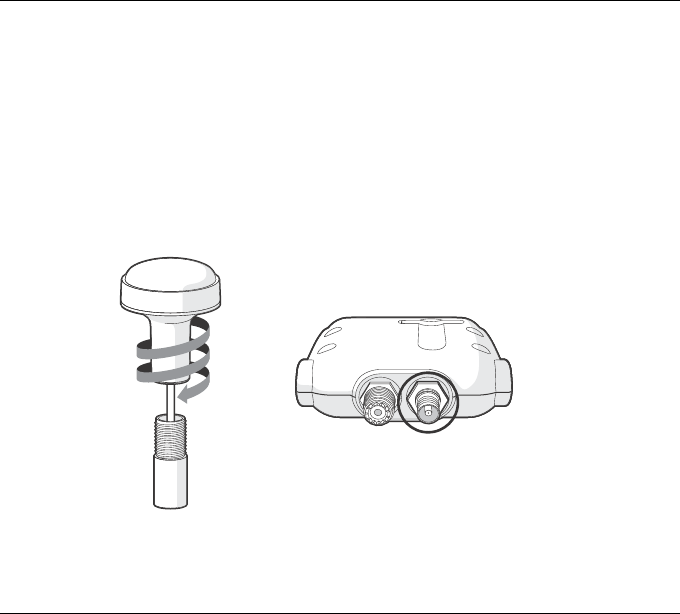
Feed the ten metre long cable attached to the GPS antenna cable through the pole and screw
the antenna onto the pole mount as shown in Figure 6.
Route the cable to your AIS transceiver unit, adding any necessary extension cables.
Connect the cable from the GPS antenna to the GPS connector on the AIS transceiver as shown
in Figure 6.
Figure 6 GPS antenna mounting and connection
GPS AntennaVHF Antenna

Installation
Page 16
Step 3 - Connecting the VHF antenna
Route the cable from the VHF antenna to the AIS transceiver and connect to the VHF connector
on the AIS transceiver as shown in Figure 7.
A standard marine band VHF antenna or AIS antenna should be used with the AIS transceiver.
The connector type on the AIS transceiver is SO239. Your chosen VHF antenna requires a
PL259 connector to mate with this. If your VHF antenna does not use this type of connector
please contact your dealer for details of available adaptors.
Figure 7 Position of the VHF antenna connector
GPS AntennaVHF Antenna
Installation
Page 17
Step 4 - Connecting the accessory cable
An accessory cable tis supplied with the product to provide connections to power, the external
switch and NMEA0183 data ports. The cable has a pre-moulded connector at one end which
should be connected to the connector on the unit marked ‘PWR/DATA’. The other end of the
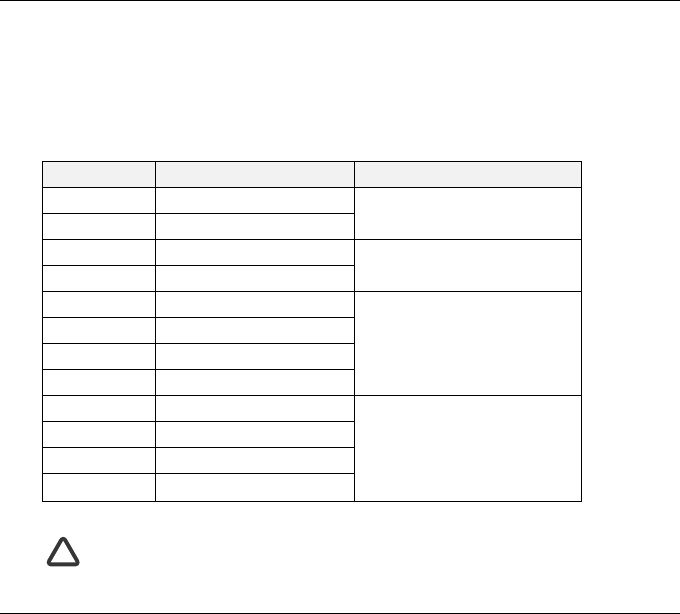
cable has twelve colour coded bare wires ready for connection. The table below in Figure 8 lists
the function of each colour coded wire for reference.
Figure 8 Colour coding of wires in the accessory cable
Please check your wiring very carefully before applying power to the product.
Failure to wire the product correctly could result in permanent damage.
Wire colour Description Function
Red Power in + Power supply connections
Black Power in -
Light green Switch input- External switch connection foe
silent mode
Orange Switch input+
Brown NMEA0183 port 1 TX+ High speed NMEA0183 port
(38,400baud) intended for
connection to chart plotters
Blue NMEA0183 port 1 TX-
White NMEA0183 port 1 RX+
Green NMEA0183 port 1 RX-
Purple NMEA0183 port 2 TX+ Low speed NMEA port
(4,800baud) intended for
connection to other NMEA0183
compatible sensors for
multiplexing of data to the chart
plotter
Pink NMEA0183 port 2 TX-
Grey NMEA0183 port 2 RX+
Yellow NMEA0183 port 2 RX-
!
Installation
Page 18
Step 5 - Connecting an external switch
If you require a remote external switch to activate the silent mode feature, it is possible to
connect a toggle switch to the AIS transceiver.
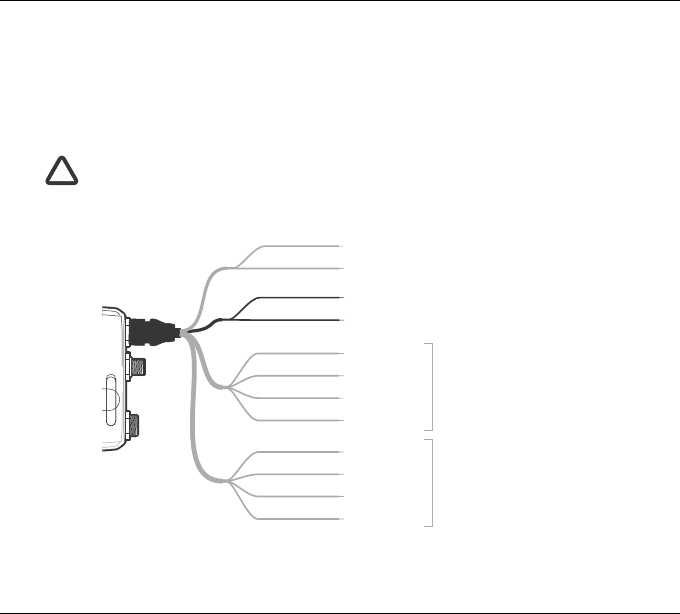
Connect the toggle switch between the light green and orange wires as shown in Figure 9.
Connection of an external switch to toggle silent mode is optional and not essential for normal
operation of the product.
Do not connect a voltage source across the switch inputs as this may damage the
transceiver.
Figure 9 Connecting an external switch
!
Transmit +
Transmit –
Power in +
Power in –
Switch input +
Switch input –
Receive +
Receive –
Brown
Blue
Light green
Orange
Red
Black
White
Green
Purple
Pink
Grey
Yellow
Transmit +
Transmit –
Receive +
Receive –
NMEA0183
Port 1
NMEA0183
Port 2

Installation
Page 19
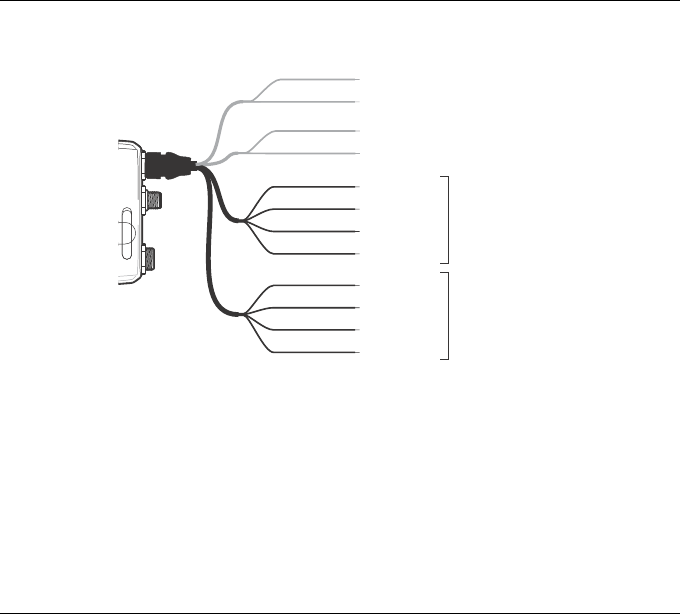
Step 6 - Connecting to NMEA0183 compatible equipment
The two independent NMEA0183 data ports provide connection to your chart plotter and other
NMEA0183 compatible equipment. Each port consists of four wires colour coded as shown in
the table in Figure 8 and in the diagram in Figure 10. Connect the wires to the appropriate
connections on your NMEA0183 compatible equipment. Please refer to your equipment manual
for more information.
The AIS transceiver has a high speed port which operates at 38400baud and a low speed port
which operates at 4800baud. The high speed port is intended primarily to connect to a chart
plotter, while the low speed port is intended to connect to other NMEA0183 devices. The ports
have bidirectional multiplexing, which means any messages which are received via the high
speed are automatically transmitted via the low speed port and vice-versa. This is particularly
useful when using a chart plotter having only a single NMEA0183 port as any other sensor such
as a gyro-compass can be connected to the AIS transceiver via the low speed port and the AIS
transceiver can be connected via the high speed port to the chart plotter resulting in the chart
plotter receiving both AIS information and heading information simultaneously. Please ensure
your equipment is configured to use the correct baud rate for the port it is connected to.
Installation
Page 20
Figure 10 Connecting to the NMEA0183 data port
Step 7- Connection to an NMEA2000 network (optional)
The AIS transceiver can be connected to an NMEA2000 network by a suitable NMEA2000
network cable available from your local dealer. If your vessel has an NMEA2000 network please
refer to the relevant documentation for your NMEA2000 equipment. Once connected, and with
your chart plotter also connected to your NMEA2000 network you will be able to receive AIS
targets on your chart plotter.
Step 8 - USB Connection (optional)
The AIS transceiver is supplied with a USB port for connection to a PC. The USB connector can
be connected directly to the USB port on the PC via the supplied USB cable. To enable
connection of the AIS transceiver to a PC the USB drivers, supplied on the product CD, must be
installed on the PC.
Transmit +
Transmit –
Power in +
Power in –
Switch input +
Switch input –
Receive +
Receive –
Brown
Blue
Light green
Orange
Red
Black
White
Green
Purple
Pink
Grey
Yellow
Transmit +
Transmit –
Receive +
Receive –
NMEA0183
Port 1
38,400baud
(chart plotter)
NMEA0183
Port 2
4,800baud
(other NMEA0183 device

Installation
Page 21
Prior to connecting the AIS to a PC the USB drivers must first be installed. To install the drivers
please follows the steps below:
1. Insert the product CD into the PC and navigate to the USB drivers folder.
2. Double click on the setup.exe file to launch the installer.
3. Follow the on screen installation instructions to complete installation.
4. Once installed the AIS unit can be connected to the PC. The USB drivers will be installed
automatically and the AIS will appear as a new COM port device.
5. Select the AIS COM port and a baud rate of 38,400 in PC based navigation software to make
use of the AIS data.
If the USB connection is removed from the PC during use you must reset the
connection before further use. to reset the connection, disconnect then reapply
power to the AIS before closing and relaunching any PC applications using the
USB connection. Finally, reconnect the USB cable between the PC and the AIS
transceiver.
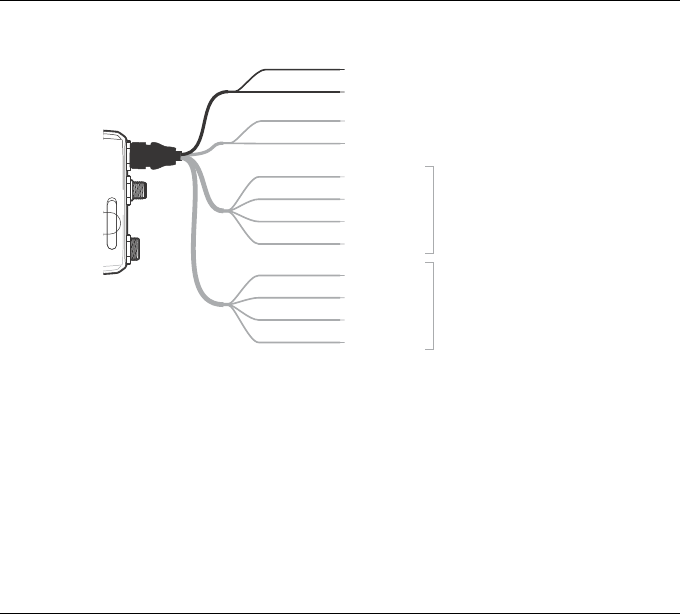
Step 9 - Connecting to a power supply
The AIS transceiver requires a 12V or 24V power supply typically provided by the vessel's
battery.
It is recommended that crimped and soldered lugs are used to connect the AIS transceiver to the
power source. It is recommended that the power supply is connected via a suitable circuit
breaker and/or 3A fuse block.
1. Connect the red wire to a 12V or 24V power supply positive terminal.
2. Connect the black wire to the supply negative terminal.
!
Installation
Page 22
Figure 11 Connecting the power supply
Transmit +
Transmit –
Power in +
Power in –
Switch input +
Switch input –
Receive +
Receive –
Brown
Blue
Light green
Orange
Red
Black
White
Green
Purple
Pink
Grey
Yellow
Transmit +
Transmit –
Receive +
Receive –
NMEA0183
Port 1
NMEA0183
Port 2
Configuring your AIS transceiver
Page 23
4 Configuring your AIS transceiver
Until correctly configured your AIS class B transceiver will only recieve AIS
messages and will not transmit AIS messages.
4.1 Switching on your AIS transceiver for the first time
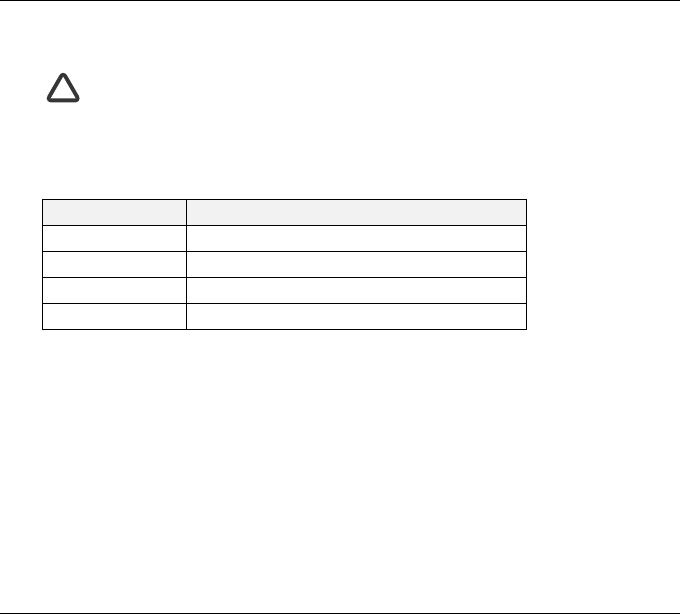
A few seconds after power is applied to the AIS transceiver, the indicators on unit will illuminate
in a pattern dependent on the configuration state of the unit. Figure 12 shows the functions of the
four indicators.
Figure 12 Indicator functions
If the AIS transceiver has been pre-configured the amber indicator will illuminate until a
transmission has been sent by the unit. This may take several minutes as the transceiver must
acquire a GPS position fix prior to transmitting its first message.
If the transceiver has not been pre-configured the amber and red indicators will be illuminated
until the configuration process has been completed.
4.2 Configuring your AIS transceiver
There are three potential ways in which your AIS transceiver can be configured:
1. Configuration in advance by your dealer or installer.
If your AIS transceiver has been configured for you by your dealer or installer you can proceed to
section 5.
2. Configuration using a configuration card
If you have received a configuration card with which to configure your AIS transceiver, please
refer to section 5.2 for more information.
Indicator Function
Green Unit is powered up and operating normally
Amber Unit is in a ‘transmit timeout’ period
Red Unit has an experienced an error
Blue Silent mode is activated
!

Configuring your AIS transceiver
Page 24
3. Configuration using proAIS2
Providing it is acceptable to do so under your local legislation it is possible to configure your AIS
transceiver yourself using the proAIS2 software provided with the product.
US Customers only: It is a violation of the rules of the Federal Communications
Commission for the end user to programme the vessel data. The vessel data must
only be programmed by a competent installer. If your AIS transceiver has not
been pre-configured for you please refer to your dealer for advice on how to have
the AIS transceiver configured by a competent installer, or refer to the information
provided with the product explaining how to apply for a configuration card.
4.3 Introduction to proAIS2
Included in the CD supplied with your product is a software tool called 'proAIS2'. proAIS2
provides the facility to configure, monitor and diagnose issues with your AIS transceiver.
proAIS2 can provide assistance with ensuring a satisfactory GPS is being received, and if any
internal alarms are being generated by the transceiver such as poor VHF antenna quality or if the
power supply is outside of the acceptable range. proAIS2 can also be used to activate ‘silent
mode’ which disables AIS transmissions.
Section 4.4 provides instructions on how to install proAIS2. Section 4.5 provides instructions on
how to configure the AIS transceiver using proAIS2. Further help on how to use the features of
proAIS2 can be found in the ‘Help menu within the proAIS2 tool.
proAIS2 is designed to be installed and used with a PC connected to the AIS transceiver via USB
using the supplied USB cable.
4.4 Installing proAIS2
1. Insert the CD into your PC then locate and run the setup.exe file on the CD and then follow
the on-screen prompts.
2. If a security warning appears, click 'Install' to continue with the installation.
3. Once installation is complete, proAIS2 will launch automatically and a start menu folder and
shortcut will be created for future use.
!

Configuring your AIS transceiver
Page 25
4.5 Configuration using proAIS2
For configuration purposes only, it is possible to power the AIS transceiver via its USB
connection. This is useful if you wish to configure your AIS transceiver away from the vessel
power supply. The AIS transceiver will not transmit any data whilst powered by USB.
You will require the following information in order to configure your AIS transceiver:
• MMSI
•Vessel name
• Vessel type
• Call sign
• Vessel dimensions and position of your GPS antenna installation
For further assistance in configuring your AIS transceiver please refer to the Help menu within
proAIS2.
Please ensure that you enter all vessel data accurately. Failure to do so could
result in other vessels failing to identify your vessel correctly. The vessel MMSI
can only be programmed once using proAIS2, please take care to programme
your MMSI correctly. If you need to change the MMSI for any reason, please
contact your dealer who will arrange to have the MMSI reset.
!

Operation
Page 26
5 Operation
5.1 Using the AIS transceiver
Once the unit has been configured it is ready for use. Providing other vessels with AIS
transceivers installed are within radio range of your vessel you should see their details appear on
your chart plotter or PC. These vessels will also be able to see your vessel on their chart plotter
or PC. It may take up to six minutes for your full vessel details to be visible to others.
Specific details of how to configure your chart plotter to make use of the AIS transceiver features
will be given in your chart plotter manual. If you are using charting software running on a PC,
please refer to the instructions provided with your chart plotting software for details of how to
configure it to display AIS information.
5.2 Using a memory card
A memory card of the ‘SD’ or ‘MMC’ type can be used with your AIS transceiver to perform a
number functions:
• Automatically configure the AIS transceiver with the vessel data for the vessel.
• Provide a mechanism for updating the software within the AIS transceiver.
• Provide the facility to record voyage data. Recorded data can be played back using a
suitable PC application to replay your voyages.
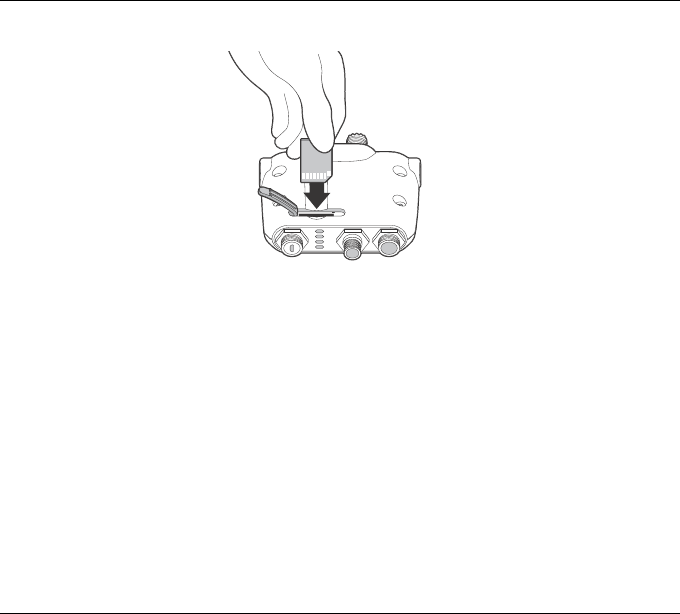
Please refer to Figure 13 for details of how to insert the memory card.
Operation
Page 27
Figure 13 Inserting a memory card
Configuration of the AIS transceiver via the memory card
You may have been asked to complete a registration form giving your vessel details and
subsequently received a configuration card with which to configure your AIS transceiver. If so
you should follow the instructions provided with the configuration card.
Software update via the memory card
You may have received a memory card with which to update the software in your AIS transceiver.
If so you should follow the instructions provided with the software update card.
Data logging via the memory card
You can record the AIS data from your voyage onto a memory card for play back using a suitable
PC chart plotting application. The card used must be of the following type:
• Standard ‘SD’ or ‘MMC’ memory card
• Maximum 2GB
• FAT32 formatted (most off the shelf SD cards used in digital cameras are pre-formatted to
this standard)
To begin data logging, insert the card into the slot as shown in Figure 13. The AIS transceiver will
begin logging data immediately and the blue status indicator will flash three times to indicate

Operation
Page 28
logging has started. Once the memory card is full the blue status indicator will flash for one
second every ten seconds until the card is removed. No further data logging will take place until
the logging file has been removed from the card. The logging file will not be deleted by re-
inserting the card.
If the card is removed from the card slot whilst the unit is powered on, or if the power is switched
off whilst the card is inserted, data logging will cease immediately. when the card is re-inserted
and the power is switched on, the logging file will be appended with logging data.
Reviewing voyage data from the memory card
Reviewing the voyage data logged on the memory card requires the use of a PC with a suitable
memory card reader. PC chart- plotting application software capable of reading the AIS voyage
data will also be required and this may be included with your AIS transceiver product.

Operation
Page 29
5.3 Switch function
When connected to the AIS transceiver following the instructions in section 3.2 an external switch
provides the ability to set the AIS transceiver into ‘silent mode’. In silent mode the transmission
of your own vessel data ceases, whilst the reception of other vessel’s AIS data continues. You
should use silent mode if you do not wish your vessel data to be received by other AIS devices.
When silent mode is active the blue indicator will be illuminated.
When silent mode is active other vessels will not be able to receive your vessel
information on their AIS devices. Your navigational safety may be compromised
as a result.
5.4 Using proAIS2 with your AIS transceiver
The proAIS2 tool has a range of features to help monitor the performance of your AIS
transceiver. To use the full range of features your AIS transceiver must be installed as described
in section 3 and connected to a PC running the proAIS2 application. Follow the instructions
provided in the help menu within proAIS2.
!
Operation
Page 30
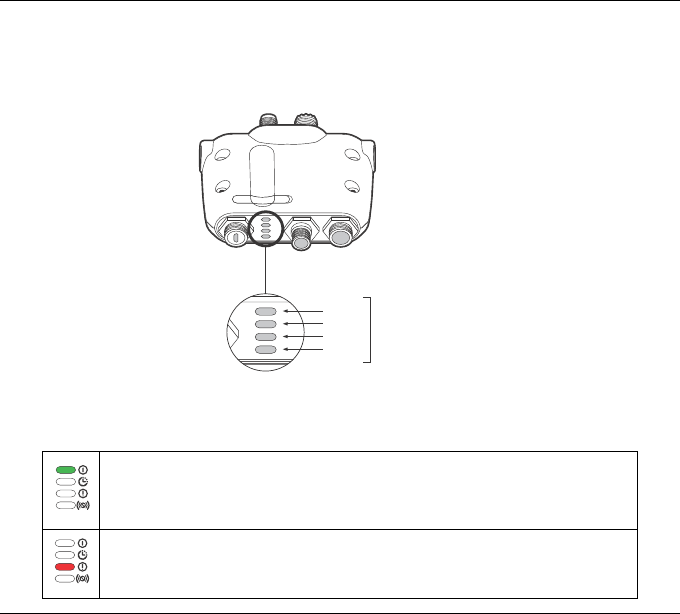
5.5 Indicator functions
The AIS transceiver includes four coloured indicators as shown in Figure 14. The state of the
indicators provides information regarding the status of the AIS transceiver.
Figure 14 Indicator location on the AIS transceiver unit
The meaning of typical indicator configurations is shown in the table below and Figure 14 shows
the orientation of the AIS transceiver.
Green indicator only
The AIS transceiver is powered up, has a position fix and has transmitted at least one
vessel information report. If the green indicator flashes this indicates the memory
card is full and data logging has stopped.
Red indicator only
The AIS transceiver has detected a system error. The likely causes of this are
detailed in the troubleshooting guide in section 6.
Green
Amber
Red
Blue
Indicator
lights

Operation
Page 31
Amber and blue indicators
When the switch function is configured to activate the silent mode feature and the
switch has been depressed for more than two seconds, this combination of indicators
will be illuminated to show that the transmitter is disabled.
This arrangement of indicators will also be visible if the AIS transceiver has been
configured for the blue indicator to signify received AIS messages. In this case the
blue indicator will rapidly turn on and off as messages are received.
Amber indicator only
The AIS transceiver is in 'transmit timeout' mode. This can be for a number of
reasons:
• The unit has only recently been powered on and is obtaining a position fix prior to
transmitting its first vessel information report. (This process can take several
minutes).
• Position fix has been lost. The AIS transceiver will attempt to regain position fix
for 30 minutes before entering an error state.
• The AIS radio channels are exceptionally busy so there is currently no available
timeslot for transmission.
• The unit has been in silent mode and after deactivating silent mode this amber
indicator will illuminate until the first AIS message has been sent
• The AIS transceiver has been commanded by the local authority (via an AIS base
station) to cease transmissions.

Troubleshooting
Page 32
6 Troubleshooting
If the guidance given in the table above does not rectify the problem you are experiencing,
please contact your dealer for further assistance.
Issue Possible cause and remedy
No data is being received
by the chart plotter
• Check that the power supply is connected correctly.
• Check that the power supply is a 12V or 24V supply.
• Check that the connections to the chart plotter are correct.
No indicators are
illuminated
• Check that the power supply is connected correctly.
• Check that the power supply is a 12V or 24V supply.
The Red 'error' indicator
is illuminated
• The unit may not have a valid MMSI. Check that the AIS
transceiver is correctly configured with a valid MMSI.
• The VHF antenna may be faulty. Please check the connection
to the VHF antenna and that the VHF antenna is not damaged.
The red indicator may illuminate briefly if the power supply is
interrupted or the VHF antenna characteristics are briefly
affected.
• The GPS antenna may be faulty. Please check the connection
to the GPS antenna and that the GPS antenna is not
damaged.
• The power supply is outside the allowable range. Check that
the power supply is within the range 9.6V to 31.2V.
• If none of the above correct the error condition please contact
your dealer for advice.
My MMSI is being
received by other vessels
but my vessel name is
not shown on their chart
plotter or PC
• Some older AIS devices and chart plotters do not process the
specific class B AIS message which provides the vessel name
(message 24). This is not a fault of your AIS transceiver.
Software upgrades are available for many older chart plotters
which will correct this issue.

Specifications
Page 33
7 Specifications
Parameter Value
Dimensions 116 x 115 x 37 mm (L x W x H)
Weight 150g (AIS transceiver unit only)
Power DC (9.6V - 31.2V)
Average power consumption 170mA at 12VDC
Peak current rating 2A
GPS Receiver (AIS Internal) 50 channel IEC 61108-1 compliant
Electrical Interfaces USB
NMEA0183 38.4kBaud bi-directional
NMEA0183 4.8kBaud bi-directional
NMEA2000 LEN=1
External switch
Connectors VHF antenna connector (SO-239)
GPS antenna connector (TNC)
USB mini-B
NMEA2000 standard connector
12 way power input / NMEA0183 / external switch
VHF Transceiver Transmitter x 1
Receiver x 2 (One receiver time shared between AIS and
DSC)
Frequency: 156.025 to 162.025 MHz in 25 kHz steps

Specifications
Page 34
Output Power 33dBm ± 1.5 dB
Channel Bandwidth 25kHz
Channel Step 25kHz
Modulation Modes 25kHz GMSK (AIS, TX and RX)
25kHz AFSK (DSC, RX only)
Bit rate 9600 b/s ± 50 ppm (GMSK)
1200 b/s ± 30 ppm (FSK)
RX Sensitivity Better than -107dBm at 20% PER
Co-channel 10dB
Adjacent channel 70dB
IMD 65dB
Blocking 84dB
Environmental Water resistant to IPx2
Operating temperature: -25ºC to +55ºC
Tested to IEC 60945 'Protected' category
Indicators Power, TX timeout, error, status
Operator Controls Single switch configurable to enable silent mode

Specifications
Page 35

The em-trak B100 is an aid to navigation and must not be relied upon to provide
accurate navigation information. AIS is not a replacement for vigilant human lookouts
and other navigation aids such as Radar. The performance of the B100 may be
seriously impaired if not installed as instructed in the user manual, or due to other
factors such as weather and or nearby transmitting devices. Compatibility with other
systems may vary and is reliant on the third party systems recognising the standard
outputs from the B100. em-trak reserves the right to update and change these
specifi cations at any time and without notice.
www.em-trak.com
Head Offi ce:
em-trak Marine Electronics Limited
Forum 3,
Parkway, Solent Business Park,
Whiteley, Fareham,
Southampton PO15 7FH
United Kingdom
T +44 (0)1489 611662 | F +44 (0)1489 611612
enquiries@em-trak.com
Regional Offi ce:
em-trak Marine Electronics Limited
470 Atlantic Avenue,
4th fl oor,
Boston MA 02210
USA
T +1 617 273 8395 | F +1 617 273 8001
enquiries@em-trak.com
High Performance Maritime Products