iKeyless MECJ 300-0247 Keyless Entry Remote User Manual 14 0044 Exhibit Cover
iKeyless, LLC 300-0247 Keyless Entry Remote 14 0044 Exhibit Cover
iKeyless >
Manual

5015 B.U. Bowman Drive Buford, GA 30518 USA Voice: 770-831-8048 Fax: 770-831-8598
Certification Exhibit
FCC ID: X32-MECJ
IC: 8797A-MECJ
FCC Rule Part: 15.231
IC Radio Standards Specification: RSS-210
ACS Project Number: 14-0044
Manufacturer: iKeyless, LLC
Model: 300-0247
Manual

300-0247
Draft Programming & Care Manual
2/7/2013

Contents
Programming……………………………..1-6
Battery Replacement…………………….7
Compliance Statements…………………8-9
i
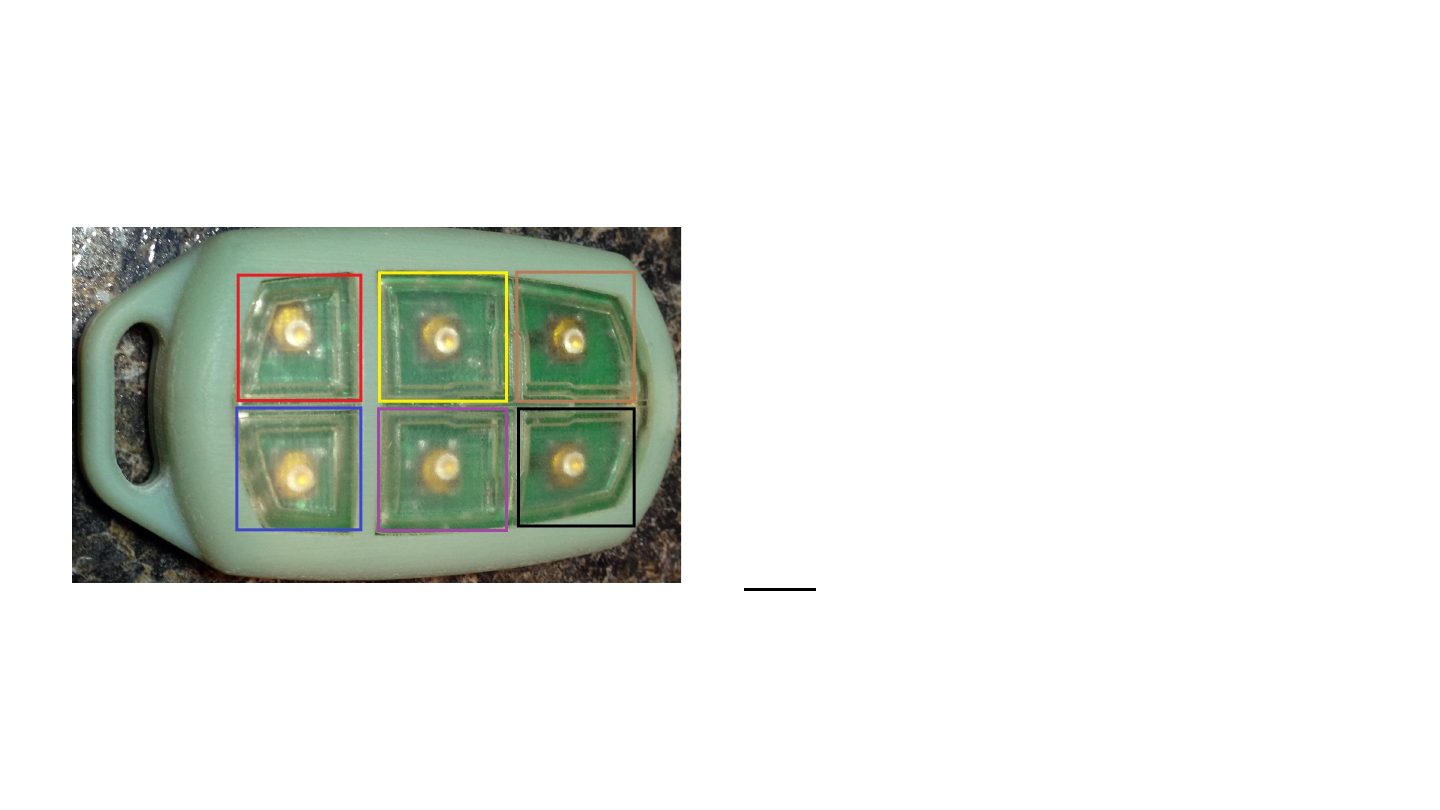
Remote Layout
Six Standard Buttons:
1. Extra function I (Red Square)
2. Extra function II (Blue Square)
3. Trunk (Yellow Square)
4. Alarm (Purple Square)
5. Lock (Brown Square)
6. Unlock (Black Square)
Note: Remote functionality is based on
remote configuration and supported vehicle
features. Please consult your vehicle’s
owners manual for supported features.
1

URCR Programming Summary
1. Press Unlock + Alarm at the same time, LED will turn on
2. Enter password by pressing four buttons in order one after the other: Alarm, Unlock, Lock, Trunk
3. Enter the number that corresponds to the key you want to program, using Unlock to increment the
“1”s place and Alarm to increment the “10”s place
4. Exit programming mode by pressing the Extra Function I button
5. The code you programmed will be flashed on the LED, first with a sequence of long pulses
indicating the value of the “10”s place followed by pause, then a sequence of short pulses indicating
the value of the “1”s place
2
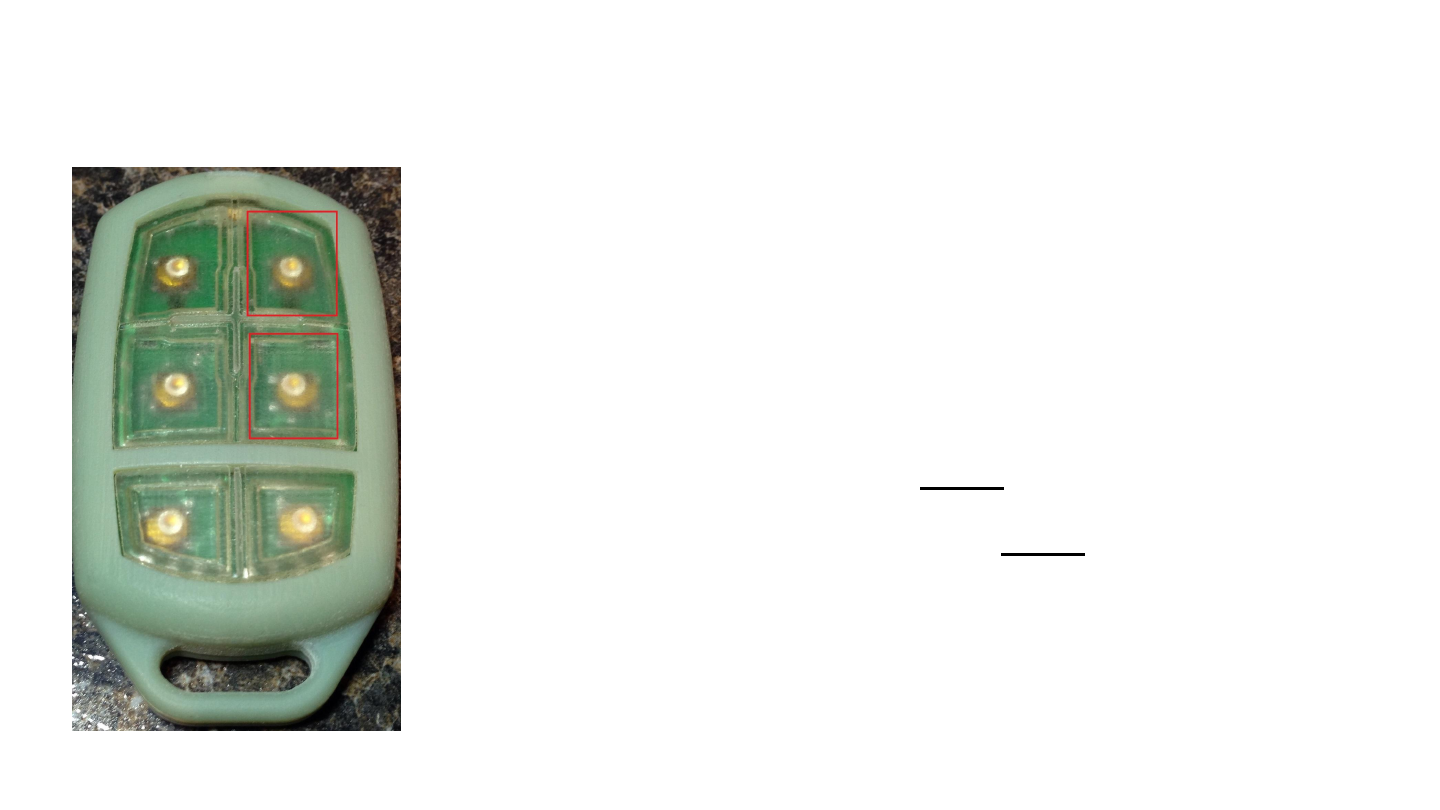
Step 1: Enter Programming Mode
-Press the Unlock + Alarm buttons
-LED will turn ON and stay on when
you release the buttons indicating
that the key is in program mode
-If the LED is ON go to Step 2
-If the LED turns OFF, repeat Step 1
3
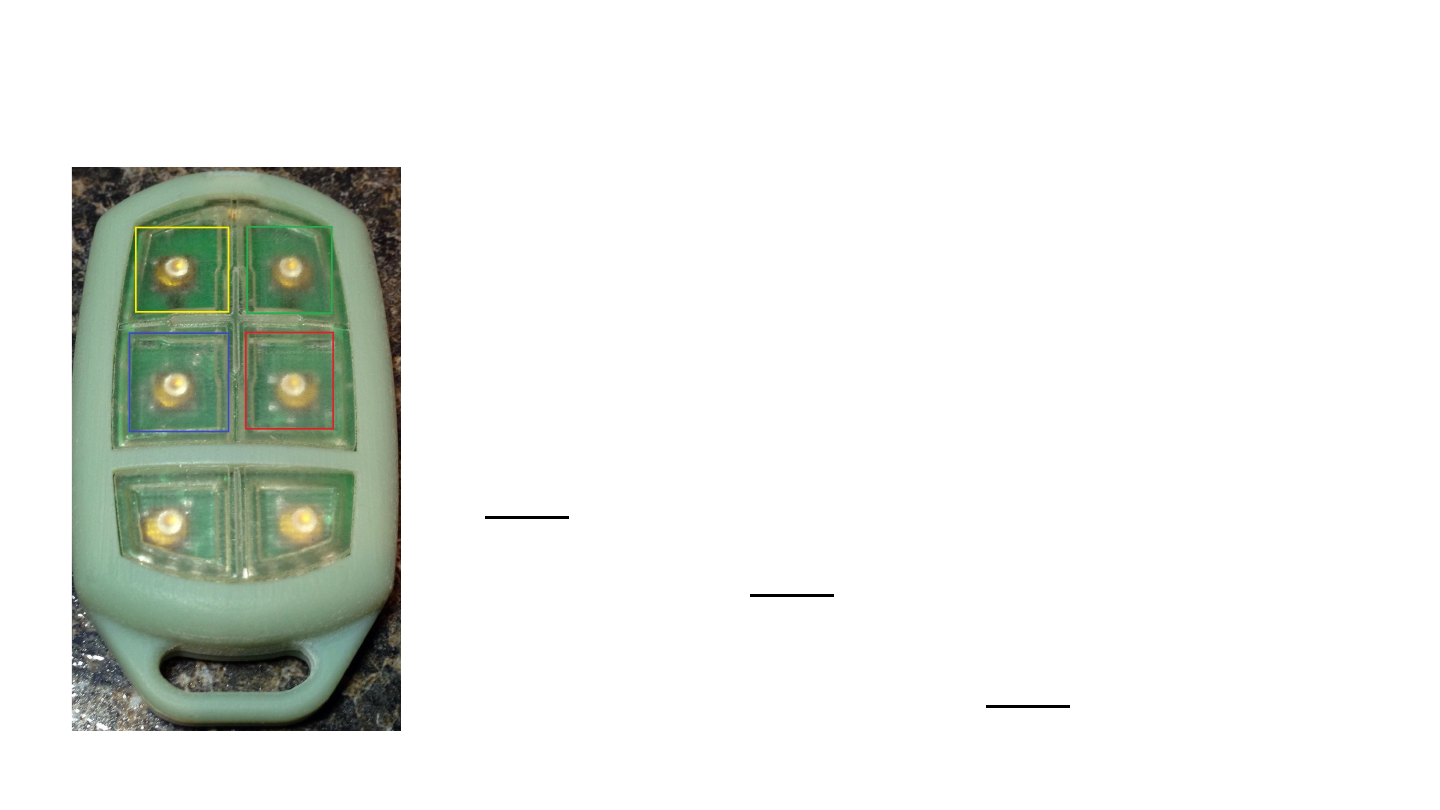
Step 2: Enter Password
-Enter the password by pressing and releasing four buttons in the
following order:
1. Alarm (red square)
2. Unlock (green square)
3. Lock (yellow square)
4. Trunk (blue square)
-If you enter the correct password, the LED will remain ON, go to
Step 3
-If you press the wrong button, the LED will blink 3 times and then
turn OFF, go back to Step 1
-If too much time passes between button presses the remote will
timeout and flash the LED 3 times and then turn OFF to indicate an
error and exit programming mode, go to Step 1
4
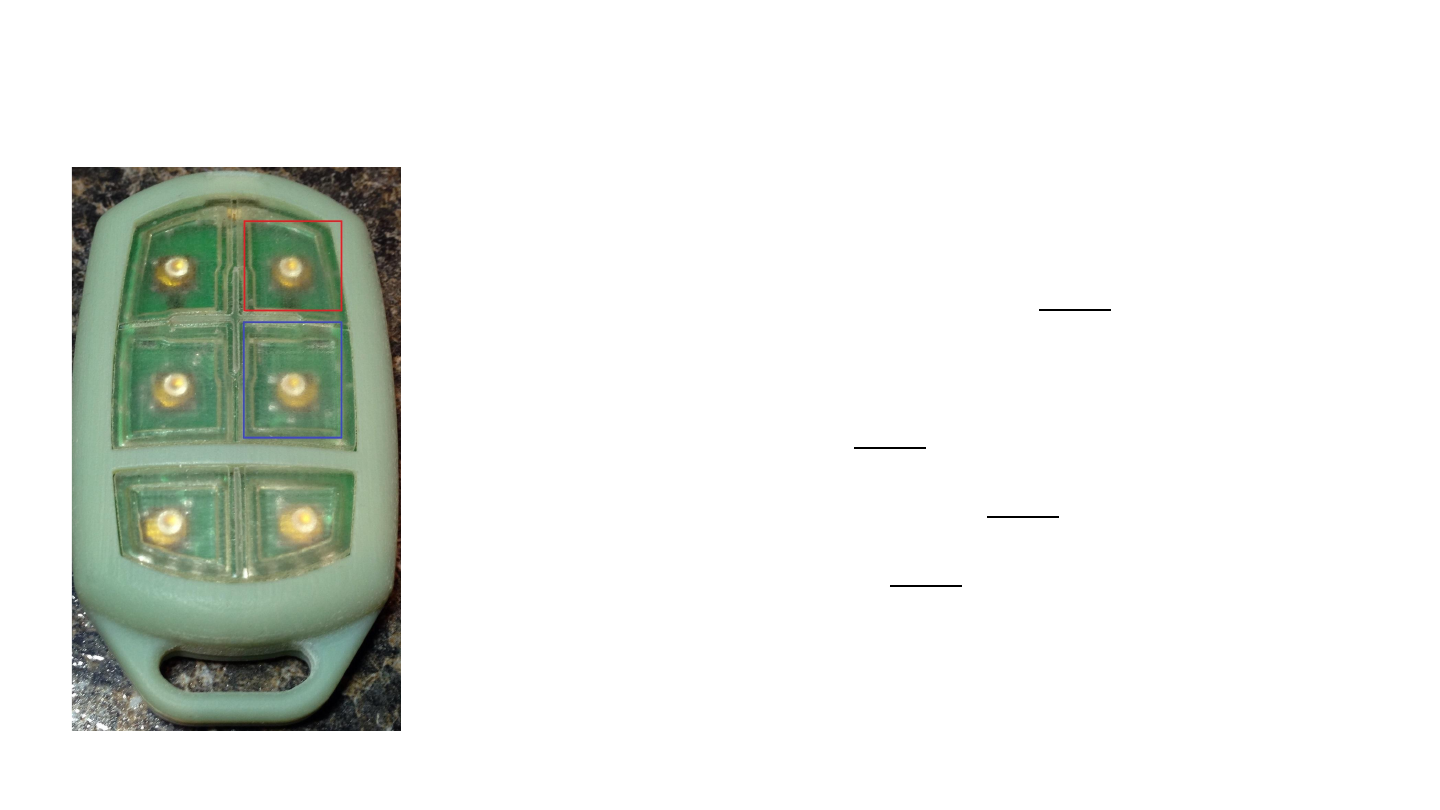
Step 3: Enter Remote Code
-Press Unlock (red square) to increment the “1”s place
-Press Alarm (blue square) to increment the “10”s place
-When you have entered the desired number, go to Step 4
Warnings:
-Zero is not a valid programming code, if you do increment the “1”s place or “10”s
place before exiting programming mode, it will trigger an error and the LED will
flash 3 times then turn OFF, go to Step 1
-Pressing Unlock (Increment “1”s place) more than 9 times will trigger an error and
the LED will flash 3 times then turn OFF, go to Step 1
-If too much time passes between button presses the remote will timeout and flash
the LED 3 times then turn OFF, go to Step 1
-Example 1:To enter the remote code “28” press Alarm twice to increment the “10”
s place twice (10 * 2 = 20) and press Unlock eight times to increment the “1”s
place
-Example 2:To enter the remote code “51” press Alarm five times to increment the
“10”s place and press Unlock one time to increment the “1”s place 5
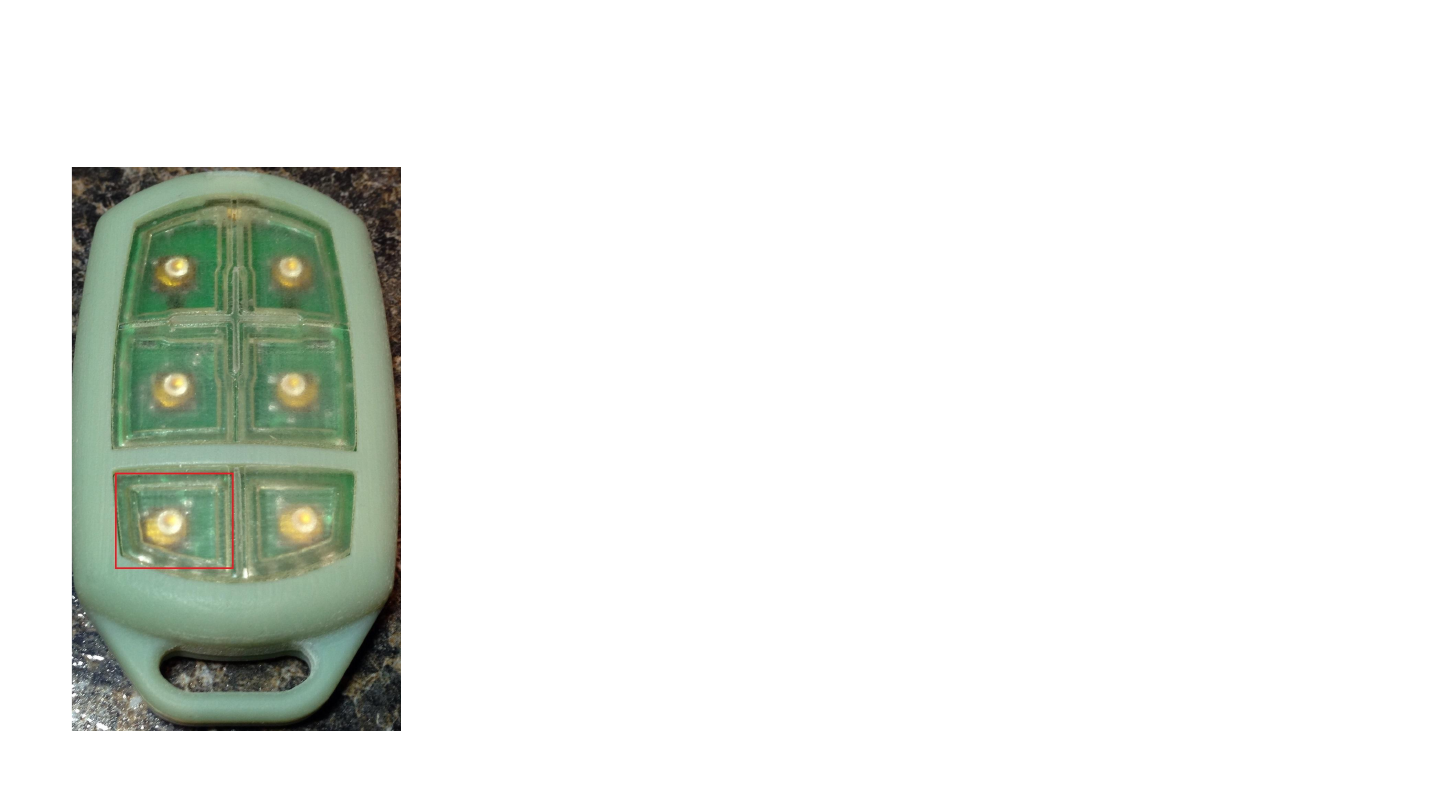
Step 4: Exit Programming Mode
-After you have entered the desired remote code, press Extra
Function I (red square) to exit programming mode
-If you entered a valid code, the LED will flash a sequence of
pulses to confirm your choice
-The LED will first flash a series of long pulses to show the “10”s
place, then turn off and pause, then flash a series of short
pulses to show the “1”s place and then turn off
-Programming is now complete
-If an error occurred the LED will flash 3 times and then turn off,
this means the remote was not successfully programmed
Example:
Three long pulses followed by four short pulses means that the
remote is programmed to the SKU corresponding to 34. 6
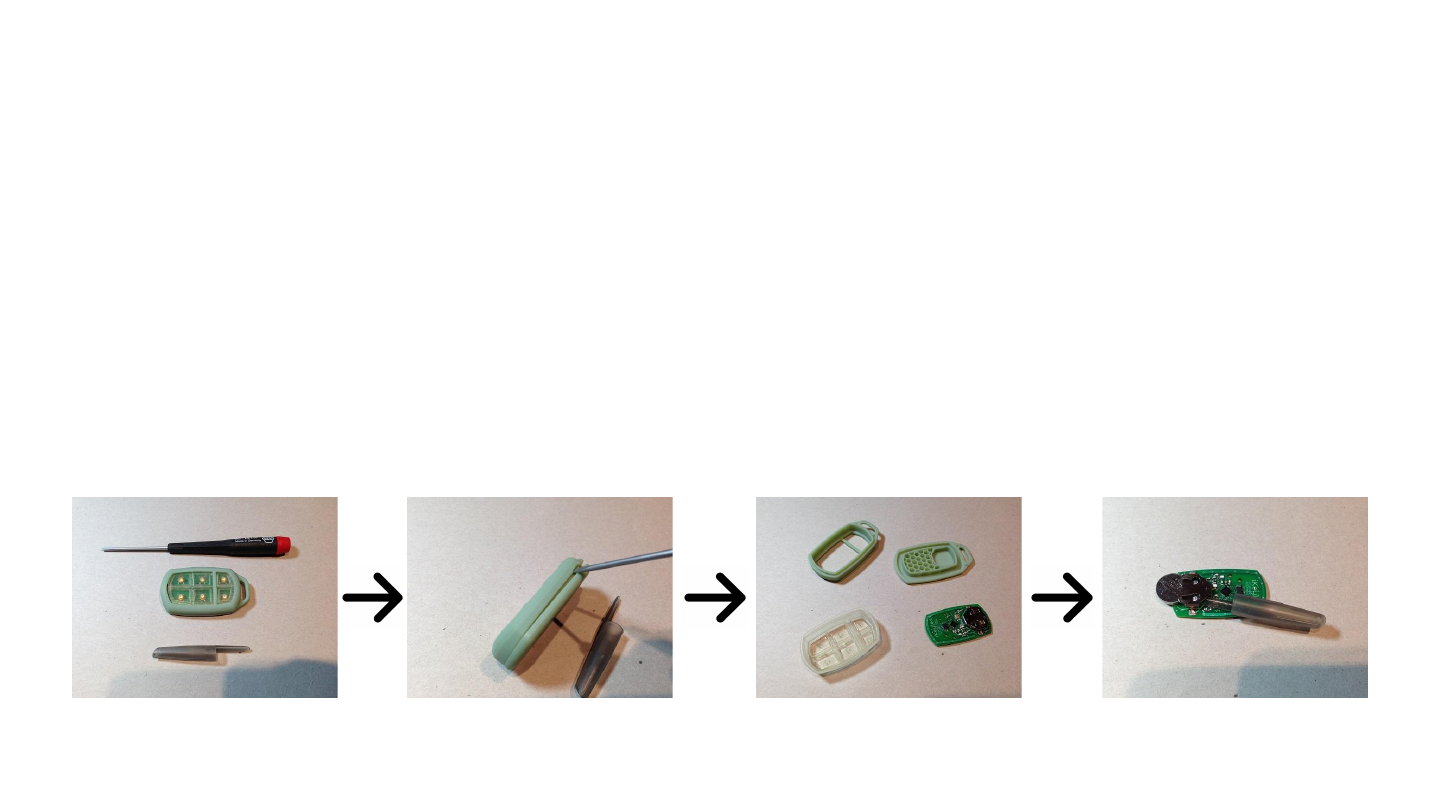
Changing the CR1632 Battery
1. You Will Need:
a. A Small Flat head Screw driver
b. A small piece of wood or plastic such as a pen-cap.
2. Insert the screwdriver into the notch on the left side of the remote. Gently twist till the top and bottom shell of the remote
pop apart slightly. If the shell does not pop apart, you may need a larger screwdriver.
3. Separate the back and front shell. Remove the rubber insert and the remote circuit board. Do not set the circuit board down
on any metal surface!
4. Using the wood or plastic tool, carefully push the battery out the bottom of the holder. Insert a new CR1632 battery with
any text facing up. Safely dispose of the old battery.
5. Reassemble the remote and use as normal.
7

FCC Regulatory Statement
Model: 300-0247
FCC ID: X32-MECJ
“NOTE: This equipment has been tested and found to comply with the limits for a Class B digital device, pursuant to Part 15 of the FCC Rules.
These limits are designed to provide reasonable protection against harmful interference in a residential installation. This equipment generates,
uses, and can radiate radio frequency energy and, if not installed and used in accordance with the instructions, may cause harmful interference to
radio communications. However, there is no guarantee that interference will not occur in a particular installation. If this equipment does cause
harmful interference to radio or television reception, which can be determined by turning the equipment off and on, the user is encouraged to
try to correct the interference by one or more of the following measures:
• Reorient or relocate the receiving antenna.
• Increase the separation between the equipment and receiver.
• Connect the equipment into an outlet on a circuit different from that to which the receiver is connected.
• Consult the dealer or an experienced radio/TV technician for help.
Warning: Changes or modifications to this device not expressly approved by (iKeyless LLC) could void the user’s authority to operate the
equipment. 8

IC Regulatory Statement
Model: 300-0247
IC: 8797A-MEJC
Under Industry Canada regulations, this radio transmitter may only operate using an antenna of a type and maximum (or lesser) gain
approved for the transmitter by Industry Canada. To reduce potential radio interference to other users, the antenna type and its gain should be
so chosen that the equivalent isotropically radiated power (e.i.r.p.) is not more than that necessary for successful communication.
This device complies with Industry Canada licence-exempt RSS standard(s). Operation is subject to the following two conditions: (1) this
device may not cause interference, and (2) this device must accept any interference, including interference that may cause undesired operation
of the device.
Conformément à la réglementation d'Industrie Canada, le présent émetteur radio peut fonctionner avec une antenne d'un type et d'un gain
maximal (ou inférieur) approuvé pour l'émetteur par Industrie Canada. Dans le but de réduire les risques de brouillage radioélectrique à
l'intention des autres utilisateurs, il faut choisir le type d'antenne et son gain de sorte que la puissance isotrope rayonnée équivalente (p.i.r.e.)
ne dépasse pas l'intensité nécessaire à l'établissement d'une communication satisfaisante.
Le présent appareil est conforme aux CNR d'Industrie Canada applicables aux appareils radio exempts de licence. L'exploitation est
autorisée aux deux conditions suivantes : (1) l'appareil ne doit pas produire de brouillage, et (2) l'utilisateur de l'appareil doit accepter tout
brouillage radioélectrique subi, même si le brouillage est susceptible d'en compromettre le fonctionnement. 9