iKeyless NSHKG020 NSHKL-G02X User Manual Manual

iKeyless, LLC NSHKL-G02X Manual

Manual

    5015 B.U. Bowman Drive  Buford, GA 30518 USA   Certification Exhibit     FCC ID:  X32-NSHKG020 IC: 8797A-NSHKG020  FCC Rule Part: 15.231 ISED Canada Radio Standards Specification: RSS-210  Project Number:  72128703   Manufacturer: iKeyless, LLC Model: NSHKL-G02X     Manual
User Manual Draft for NSHKL-G02XDoug Robertson2017/11/1411/14/2017 iKeyless Confidential 1
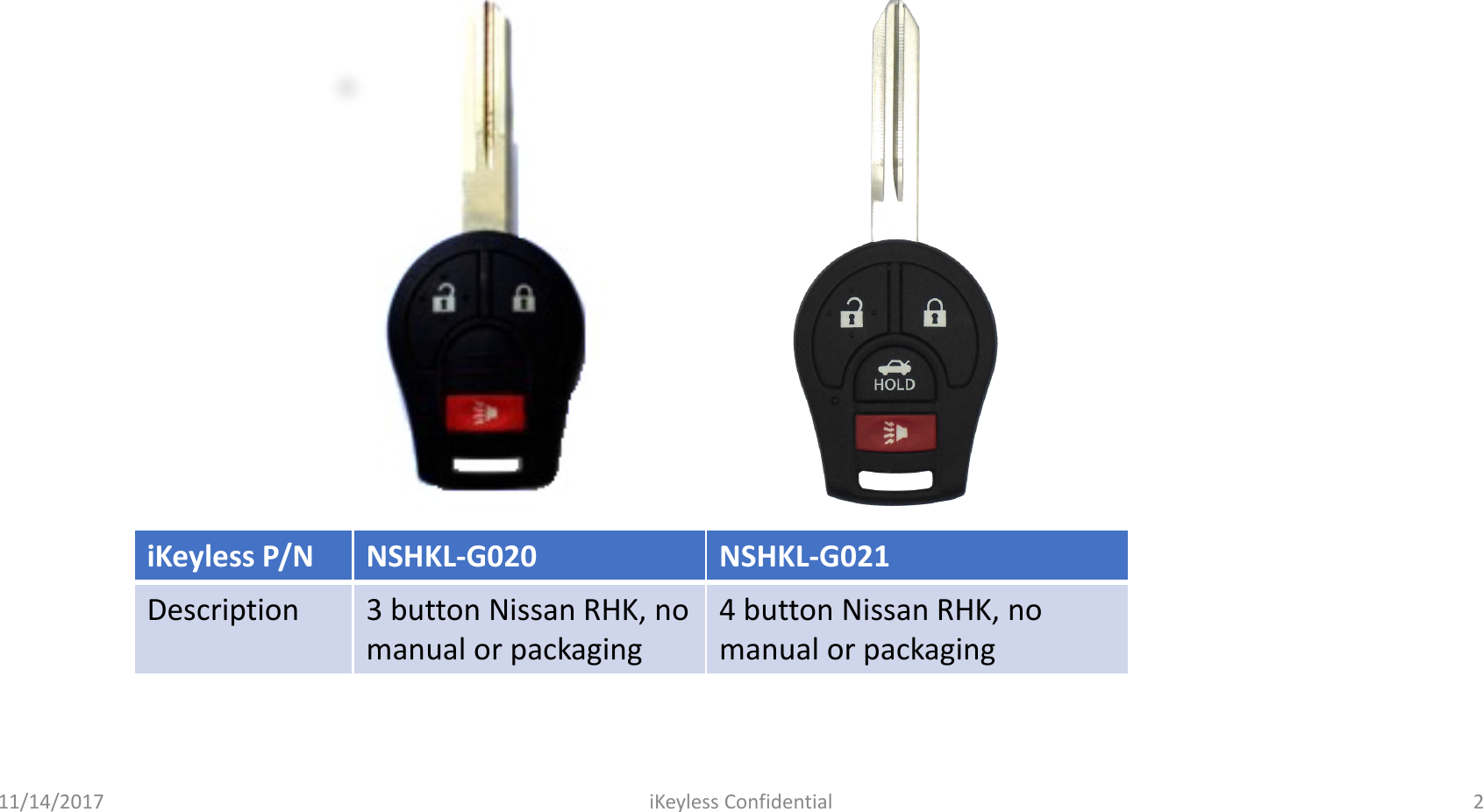
iKeylessP/NNSHKL-G020NSHKL-G021Description3 button Nissan RHK, no manual or packaging4 button Nissan RHK, no manual or packaging11/14/2017 iKeyless Confidential 2
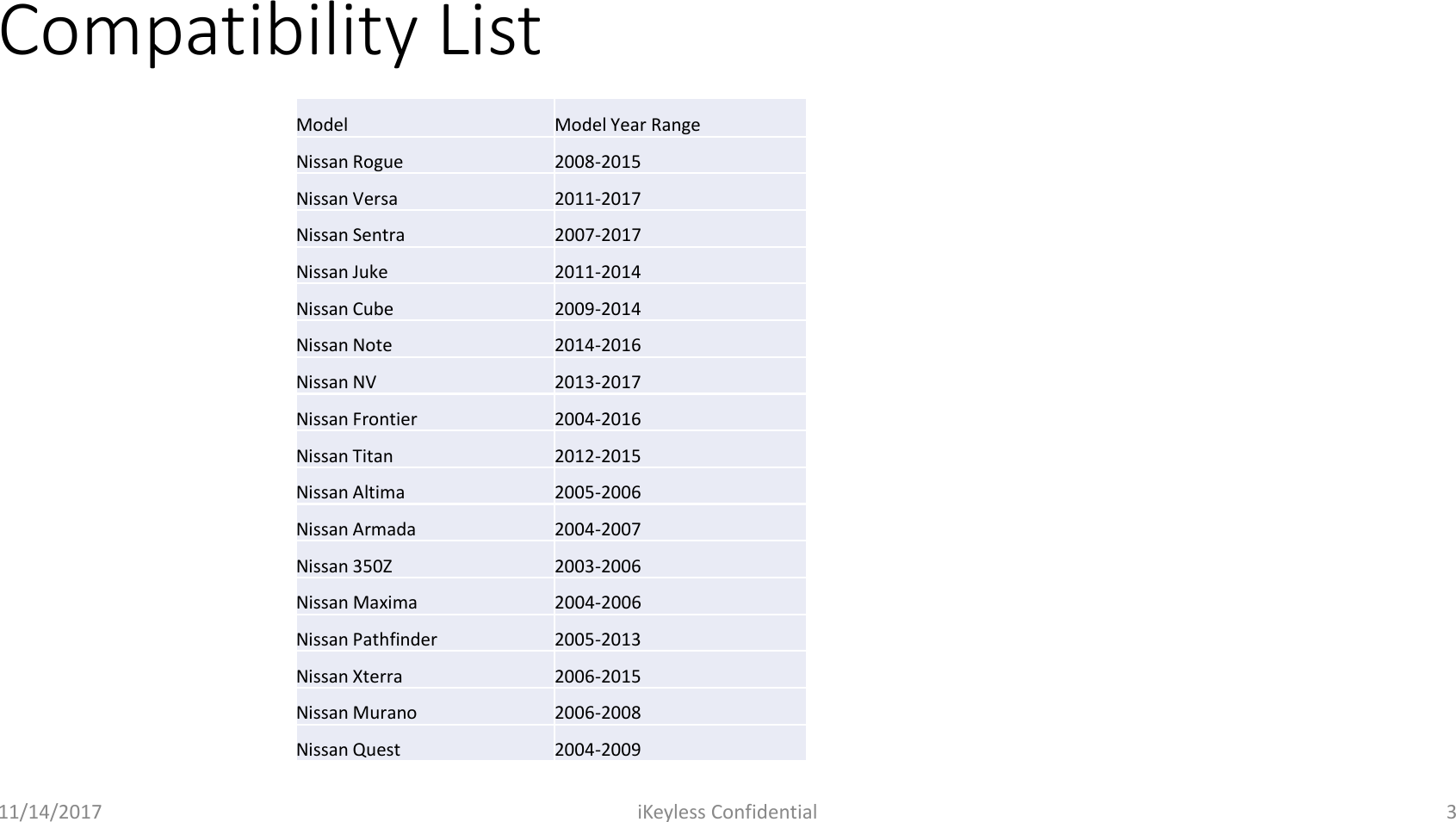
Compatibility List11/14/2017 iKeyless Confidential 3ModelModel Year RangeNissan Rogue2008-2015Nissan Versa2011-2017Nissan Sentra2007-2017Nissan Juke2011-2014Nissan Cube2009-2014Nissan Note2014-2016Nissan NV2013-2017Nissan Frontier2004-2016Nissan Titan2012-2015Nissan Altima2005-2006Nissan Armada2004-2007Nissan 350Z2003-2006Nissan Maxima2004-2006Nissan Pathfinder2005-2013Nissan Xterra2006-2015Nissan Murano2006-2008Nissan Quest2004-2009
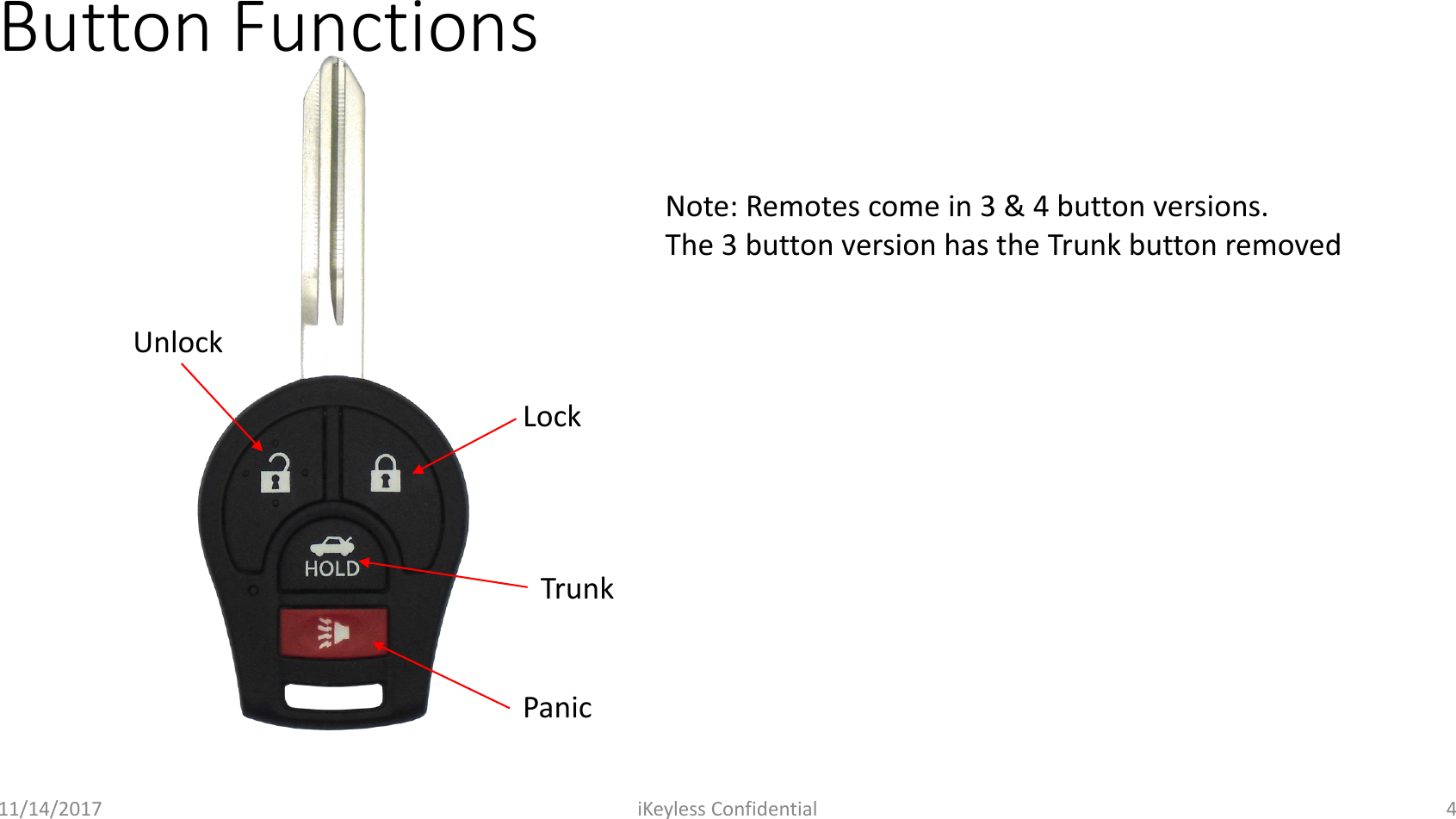
Button Functions11/14/2017 iKeyless Confidential 4TrunkUnlockLockPanicNote: Remotes come in 3 & 4 button versions.The 3 button version has the Trunk button removed
Transponder Pairing InstructionsLike an original Nissan RK, this product requires a separate procedure for pairing the transponder and the remote to the vehicle. The transponder will program exactly like an original key. The remote will require on-board programming. For help or assistance please contact technical support at 1-844-KEYS-USA with any questions related to the remote functions of this key.11/14/2017 iKeyless Confidential 5
RKE Programming InstructionsPLEASE READ CAREFULLY BEFORE TRYING! IF AT ANY TIME YOU MAKE A MISTAKE, START AND STOP YOUR CAR, EXIT THE VEHICLE AND START OVER. THE REMOTE CAN BE ONLY PROGRAMMED WITH A MASTER KEY 1. SIT IN CAR WITH DOORS AND WINDOWS CLOSED. 2. LOCK DOORS WITH POWER DOOR LOCK SWITCH ON DRIVER'S DOOR. 3. PUT IN AND PULL OUT KEY FROM IGNITION APPROX. 8 TIMES OR UNTIL YOU SEE THE HAZARD/TURN SIGNAL LIGHTS FLASH.(older models lights may flash after 4 or 5 times) YOU NEED TO DO THAT IN LESS THEN 10 SEC 4. WHEN HAZARD LIGHTS FLASH (ON 2005 AND NEWER MODELS THE GAUGE NEEDLES MAY JUMP A LITTLE INSTEAD) , PUT KEY IN IGNITION AND TURN TO THE ACC POSITION.(when your hazard lights flash your car is sending a signal to be received by the remote) 5. PRESS LOCK BUTTON ON THE NEW REMOTE TRANSMITTER, LIGHTS SHOULD FLASH AGAIN. IF YOU HAVE 2 REMOTES, 1 NEW AND 1 OLD OR 2 NEW ONES, PLEASE CONTINUE WITH STEPS 6 AND 7. IF NOT, SKIP TO END. 6. PRESS UNLOCK BUTTON ON DRIVER'S DOOR, THEN LOCK BUTTON ON DRIVERS DOOR, LIGHTS WILL AGAIN FLASH 7. PRESS LOCK BUTTON ON 2ND NEW OR OLD REMOTE. LIGHTS AGAIN WILL FLASH. YOU ARE DONE. EXIT VEHICLE AND TRY YOUR REMOTE. IT WILL NOT WORK FROM INSIDE CAR OR WITH KEY IN IGNITION. Note: if your hazard lights flash after inserting your key in and out, but you can't get the remote to program, you may have a dead battery or the wrong remote. If instructions do not work, do it again but when you get in - shut the door, buckle seat belt and lock doors, then proceed to putting key in ignition11/14/2017 iKeyless Confidential 6
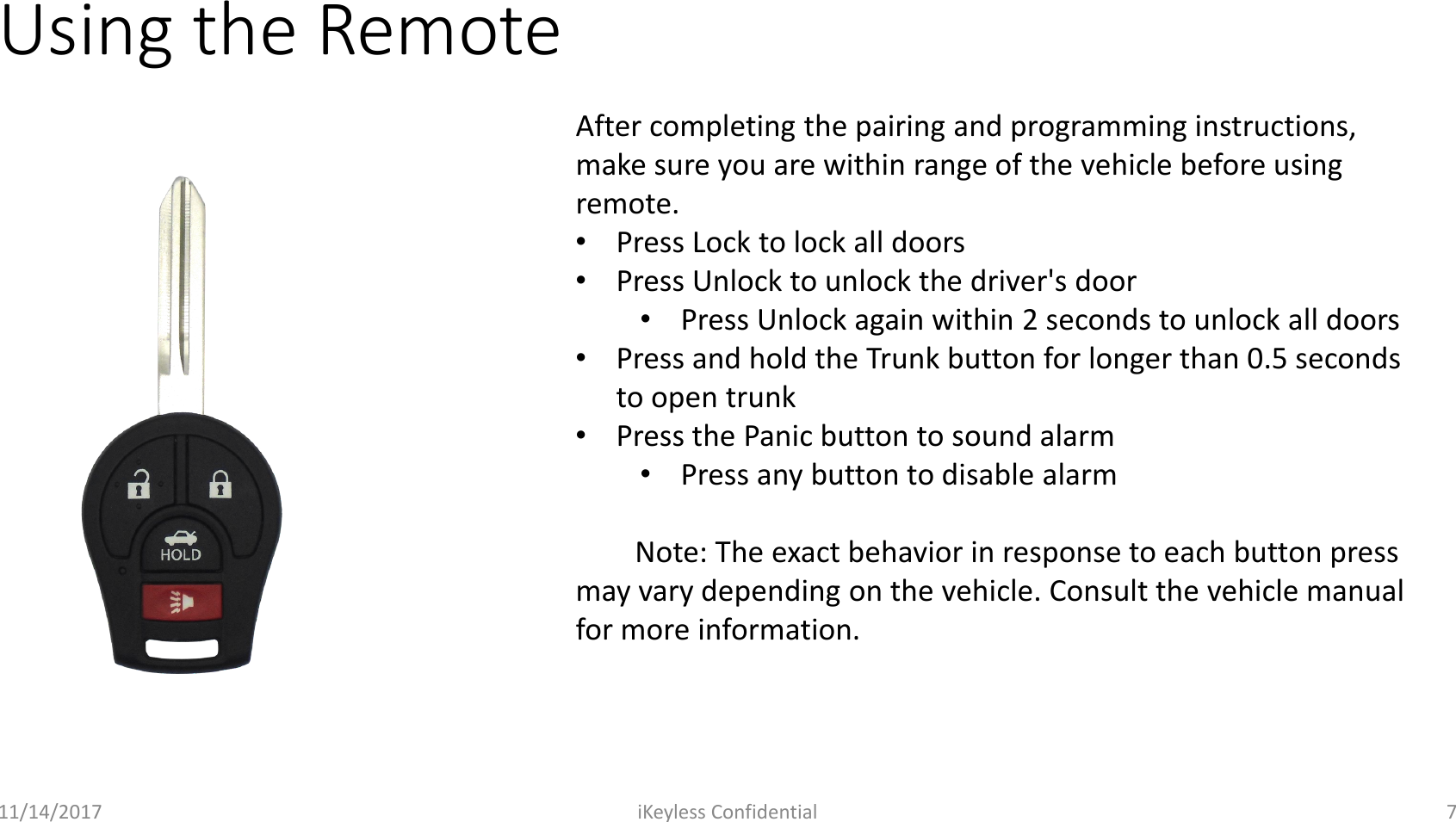
Using the Remote11/14/2017 iKeyless Confidential 7After completing the pairing and programming instructions, make sure you are within range of the vehicle before using remote.•Press Lock to lock all doors•Press Unlock to unlock the driver's door•Press Unlock again within 2 seconds to unlock all doors•Press and hold the Trunk button for longer than 0.5 seconds to open trunk•Press the Panic button to sound alarm•Press any button to disable alarmNote: The exact behavior in response to each button press may vary depending on the vehicle. Consult the vehicle manual for more information.
Replacing Battery11/14/2017 iKeyless Confidential 8
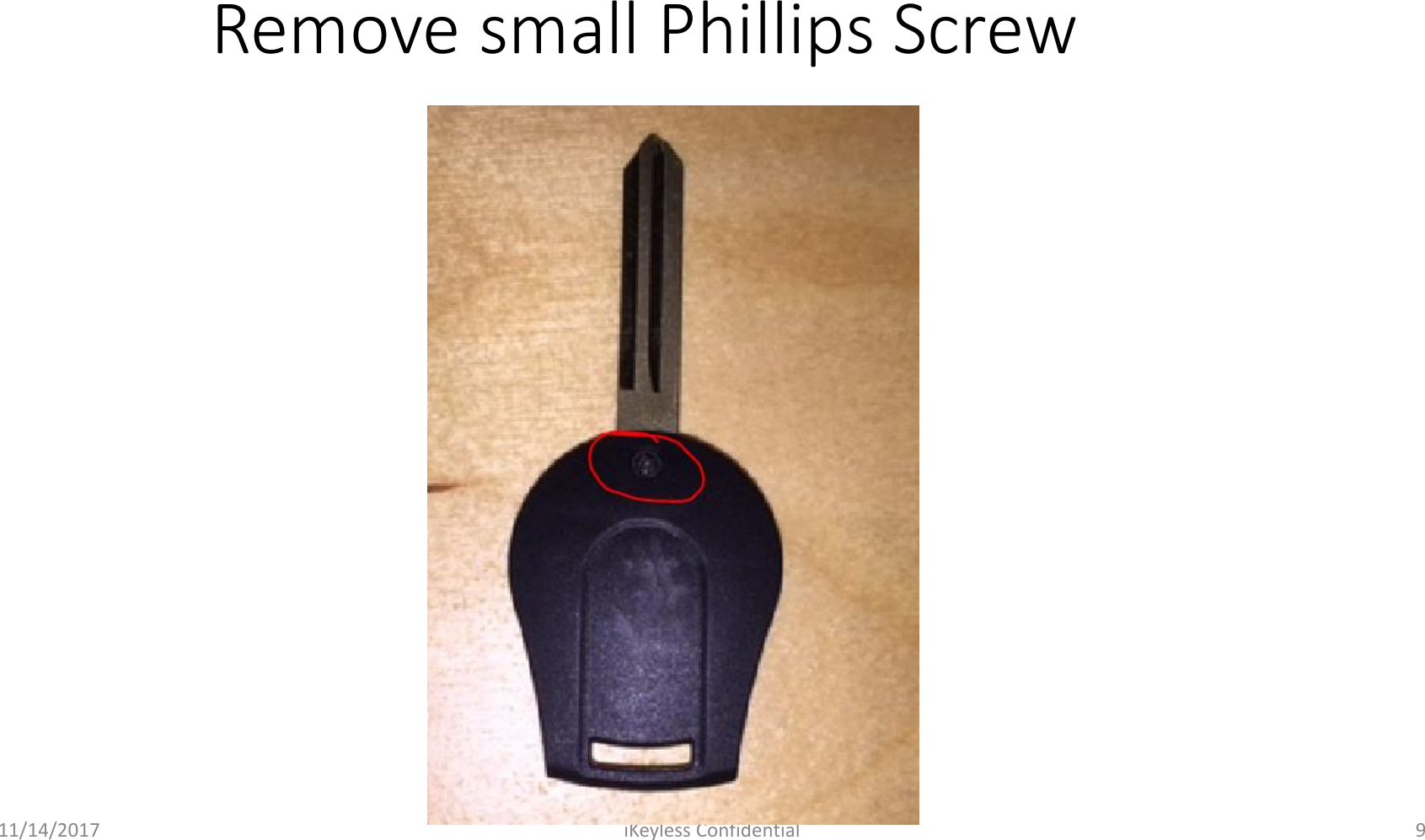
11/14/2017 iKeyless Confidential 9Remove small Phillips Screw
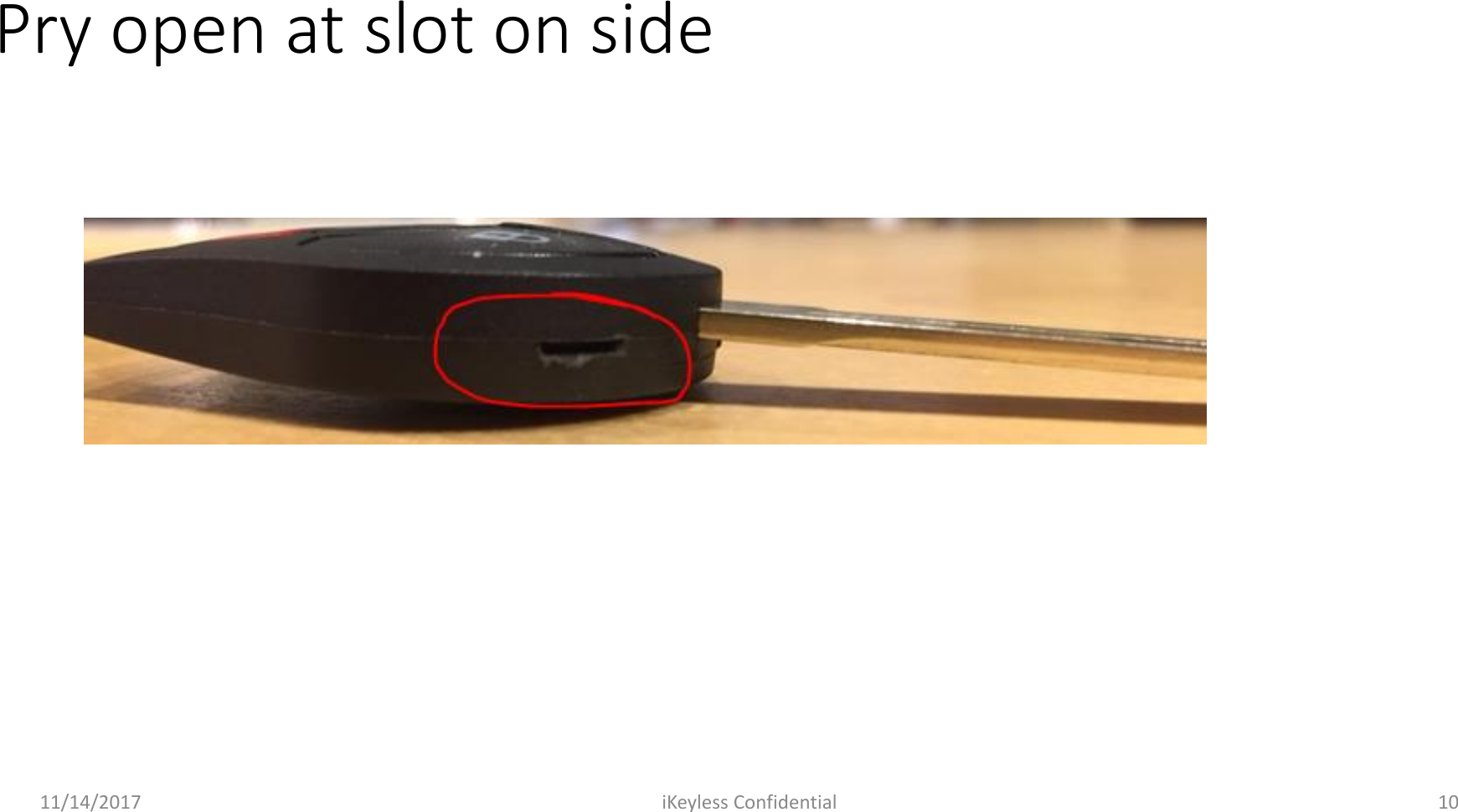
11/14/2017 iKeyless Confidential 10Pry open at slot on side
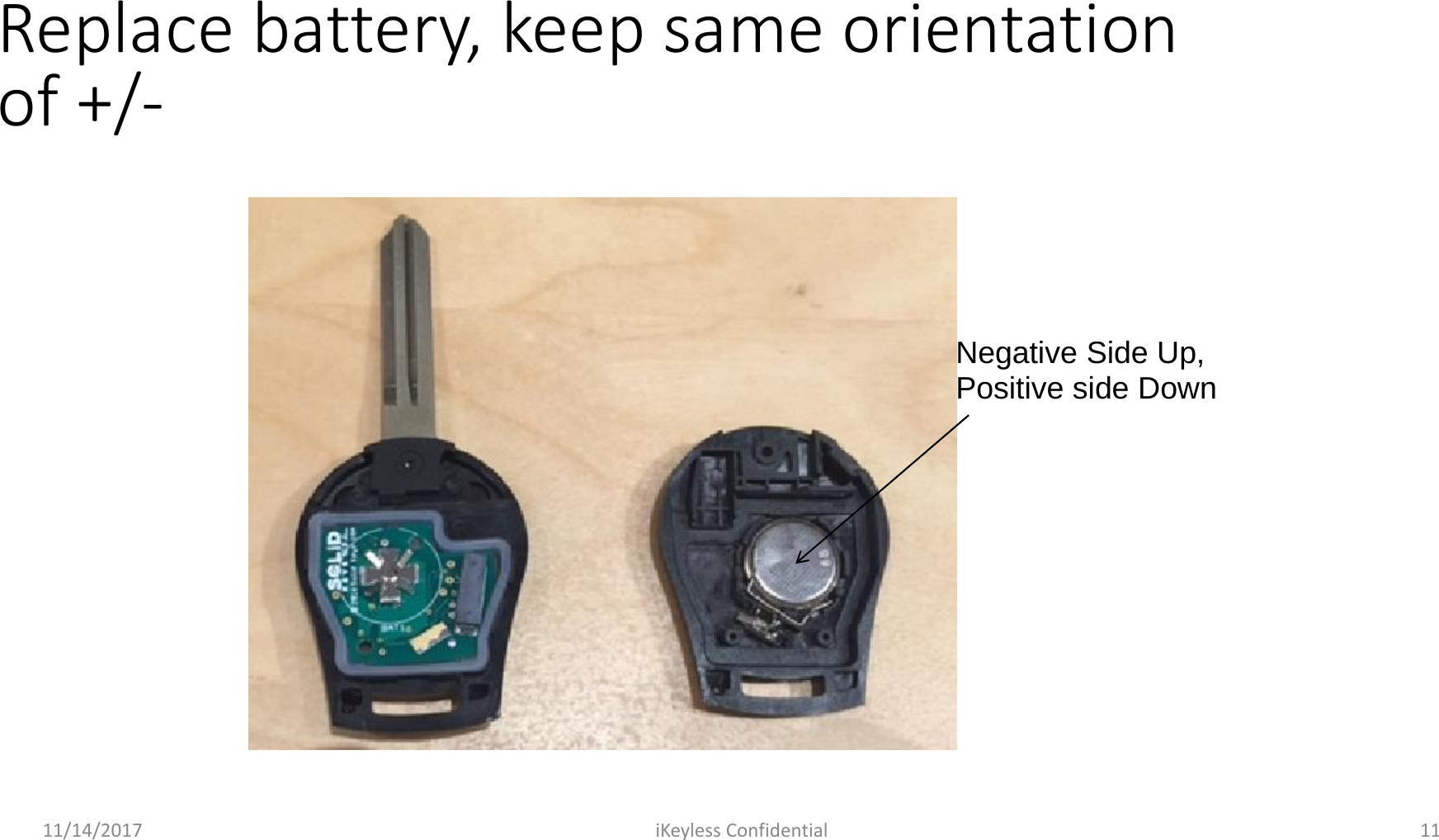
11/14/2017 iKeyless Confidential 11Replace battery, keep same orientation of +/-Negative Side Up,Positive side Down
11/14/2017 iKeyless Confidential 12Reverse steps to reassemble
Regulatory StatementsFCC Regulatory StatementMODEL:  NSHKL-G02XFCCID: X32-NSHKG020This device complies with part 15 of the FCC Rules. Operation is subject to the following two conditions: (1) This device may not cause harmful interference, and (2) this device must accept any interference received, including interference that may cause undesired operation.NOTE: This equipment has been tested and found to comply with the limits for a Class B digital device, pursuant to Part 15 of the FCC Rules. These limits are designed to provide reasonable protection against harmful interference in a residential installation. This equipment generates, uses, and can radiate radio frequency energy and, if not installed and used in accordance with the instructions, may cause harmful interference to radio communications. However, there is no guarantee that interference will not occur in a particular installation. If this equipment does cause harmful interference to radio or television reception, which can be determined by turning the equipment off and on, the user is encouraged to try to correct the interference by one or more of the following measures:•Reorient or relocate the receiving antenna.•Increase the separation between the equipment and receiver.•Connect the equipment into an outlet on a circuit different from that to which the receiver is connected.•Consult the dealer or an experienced radio/TV technician for help.ISED Regulatory StatementMODEL:  NSHKL-G02XIC:  8797A-NSHKG020This device complies with Industry Canada licence-exempt RSS standard(s). Operation is subject to the following two conditions: (1) this device may not cause interference, and (2) this device must accept any interference, including interference that may cause undesired operation of the device.Le présent appareil est conforme aux CNR d'Industrie Canada applicables aux appareils radio exempts de licence. L'exploitation est autorisée aux deux conditions suivantes : (1) l'appareil ne doit pas produire de brouillage, et (2) l'utilisateur de l'appareil doit accepter tout brouillageradioélectrique subi, même si le brouillage est susceptible d'en compromettre le fonctionnement.11/14/2017 iKeyless Confidential 13Warning: Changes or modifications to this device not expressly approved by iKeyless LLC could void the user’s authority to operate the equipment.

Navigation menu