User Manual
When a call is coming, you can answer it with the ways as
follows:
BTH-101-1
Magnetic Bluetooth Stereo Headset
User Manual
Specifications
The Headset Status
Note: The two Phones mentioned follows will be called Phone A and B.
Shortly press MFB once to answer another call and hold on
the current one.
After the above operation “2” settled, shortly press MFB to
transfer one call to another.
In ON MODE (except call state), press and hold MFB for 3 seconds,
until you hear “Di Di Power off”, the indicator light turns red for 1
second, then the headset will enter into OFF MODE.
Note:
Headset isn’t connected with any devices within 5 minutes, it will
automatically turn off.
Pairing Your Headset with
a Bluetooth Phone
Answering a Call
Rejecting a Call
Two-call Handling
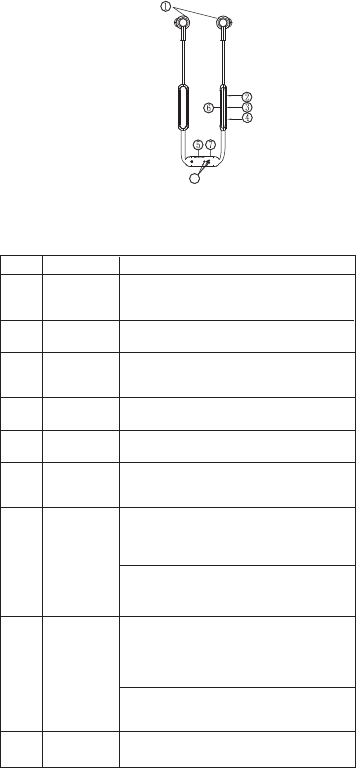
Structure Sketch
Note:
All the above operations have to respect the precondition that Phone
supports Bluetooth hands free profile V1.5 and Phones are running
under call holding function(Network service) from telecom.
Status No. Status
Pairing Mode
Not Connected
Standby Mode
Charging Mode
Low Voltage State
Call Mode
Headset Performance
Method 1:
Method 2:
Ending a Call
Press MFB once.
Answer the call with your phone.
Bluetooth Specification
Bluetooth Profiles Supported
Transmission Power
Operation Range
Frequency Range
Battery
Charging Voltage
Charging Time
Music Playing Time*
Talk Time *
Standby Time *
Driver
Sensitivity of Driver
Impedance of Driver
Frequency Range of Driver
Dimensions of Control and
Battery Box(mm):
Dimensions of PCB Box(mm):
Weight
V4.2
HSP, HFP, A2DP, AVRCP
Audio Decoding Profiles Supported
Noise Cancellation Version CVC 6.0
APTX, APTX-LL, SBC, AAC
Class 2
Up to 10 Meters
2.402-2.480GHz
Built-in Rechargeable
3.7V /60mAH Lithium Battery
DC 5V±0.25V
About 2 hours
Up to 3 hours
Up to 3.5 hours
Up to 108 hours
φ10MM
109±3dB/1kHz
16Ω±15%
20Hz~20kHz
Dimensions of Earbuds L29×W16×H16
L54.5×W11×H7
L40.6×W11.5×H8.9
About 24 g
*The time mentioned above may vary due to user's operation mode and
device settings.
Charging Your Headset
Prior to using the headset for the first time or no use for a long
time, please fully charge the battery.
Approximately 2 hours are required to fully charge the headset.
The indicator light turns red while being charged, and will turn
off automatically after being fully charged.
When the headset is running out of battery, the indicator light
will flash red (the headset will switch off automatically when the
battery is drained). Please charge the headset as above steps
in time to prolong the battery's useful life (Charging indication
will be delayed for a few minutes if the headset has not been
used for a long time or the battery is drained).
2.
3.
4.
1.
Check the charging device is suit to the headset or not.
Use only the supplied charger to charge the headset, if use
other device may violate the validation or the maintenance
article of this product and may cause danger.
Do not attempt to force open the built-in battery as this could
damage the headset.
Note 1:
Note 2:
Note 3:
Note 4:
Note 5:
Note 6:
Turning on Headset
Turning off Headset
Ensure the headset is off, and the distance between your
headset and phone is within 1 meter to activate the Bluetooth
function on the phone.
Search Bluetooth devices (see the user guide of your phone for
instructions).
Select headset “RATEL Ear BT” from the devices list of the phone.
Select headset “
RATEL Ear BT
”(If the version of the phone is or
under 2.0, you should input pairing code “0000”, and confirm).
Ensure there is no obstruction between your headset and
phone and within effective distance, you can use the headset
freely.
Under the circumstance of power off, once you turn on the
headset again, it will connect the paired phone automatically
within operation range. (See the user guide of your phone for
instructions.)
1.
2.
3.
4.
5.
6.
7.
1
2
3
4
5
6
Press and hold MFB for 2 seconds to reject the call.
When you are answering a call, there is another call coming:
You can end the call you are answering with the ways as
follows:
Bluetooth headset should be used with the compatible devices
which support Bluetooth wireless technology. This allows you to
make two calls and enjoy the music streaming at any time freely.
Please read this user manual carefully before using the headset,
and also read your device’s user manual regarding the Bluetooth
function, and pay attention to those important safety and
maintenance information.
Please keep the headset away from children.
(1)Drivers
(2)Volume Key- (V-)
(3)Multifunction Button (MFB)
(4)Volume Key+ (V+)
(5)Type C Charging Socket
(7)Indicator Light of Charging
(6)Micphone/Indicator Light of Power on/off
(8)Charging Pin
A fully charged headset will loose its power automatically
if left unused. It is recommended to charge the headset
each three months.
Do not leave the headset in a too hot or too cold condition
(best between -10℃ and 50℃) which may affect the
headset's operations although it is fully charged.
Do not dispose of the headset into fire or water.
Method 1:
Method 2:
Press MFB once.
End the call with your phone.
1.
2.
3.
4.
When the headset is in the mode of being searched, the
indicator light flashses red and blue alternately and the
speaker prompts “Bluetooth Pairing”.
When the headset is not connected with the device,
blue light will flash once each 2 seconds.
When the headset is connected with the device but no
any other operations, the blue light will flash once each
5 seconds.
When the battery's voltage is below than 3.3V, the
indicator light flashes red, and the speaker prompts
“Battery Level Low” every minute.
Power off
Automatically
7
Disconnected Mode
8
Pairing Failed Mode
9
If the pairing cannot be completed within 5 minutes after
the Pairing Mode has been activated, the headset will
power off automatically, the speaker prompts "Bluetooth
Pairing Failed" - "DiDi" - "Power off".
When the headset is in standby mode and it is moved
out the operation range of the phone, the headset will
be disconnected, the blue light will flash once each 5
seconds and the speaker prompts "DuDu" (The speaker
prompts "DuDu" each 15 seconds).
When the headset is disconnected by phone, the blue
light will flash once each 2 seconds and the speaker
prompts "Bluetooth Disconnected".
When the headset pairing failed, the speaker prompts
"Bluetooth Pairing Failed".
When the headset is disconnected in Standby Mode, it
will power off automatically after 5 minutes and the
speaker prompts "DiDi" - "Power off".
The indicator light turns red while being charged, and
will turn off automatically after being fully charged.
When in a call, the indicator light flashes blue once each
10 seconds.
Press and hold MFB for 2 seconds until the indicator light flashes
red and blue alternately and could hear “Bluetooth Pairing” as
PAIRING MODE. After the above operation “2” settled, press and hold MFB
for 2 seconds to end the current calling and shortly press
MFB to end another one.
During a call, press and hold “V+” for 3 seconds, the headset
will enter into MUTE MODE. In MUTE MODE, the speaker
will sound “Du” twice every 10 seconds, you could cancel the
MUTE MODE if press and hold “V+” for 3 seconds again.
In OFF MODE, press and hold MFB for 2 seconds, until you hear
“Di Di Di Power on”, the indicator light turns blue for 1 second,
then the headset will enter into ON MODE. The headset will be
connected automatically(when the headset isn’t connect to any
other Bluetooth devices and the pairing list is empty, the headset
will enter into pairing mode automatically).
Press and hold MFB for 2 seconds to end the current call
and answer another one.
During a call, press and hold “V-“ for 2 seconds and you will
hear “Du” prompt voice and can shift the call between cellphone
and headset.
Calling Transferring
Mute
Later you could hear “Bluetooth Paired” and then “Bluetooth
Connected”. (If the pairing cannot be completed within 5 minutes
after the PAIRING MODE has been activated, the headset will
power off. Please repeat above steps to do the pairing again).
8
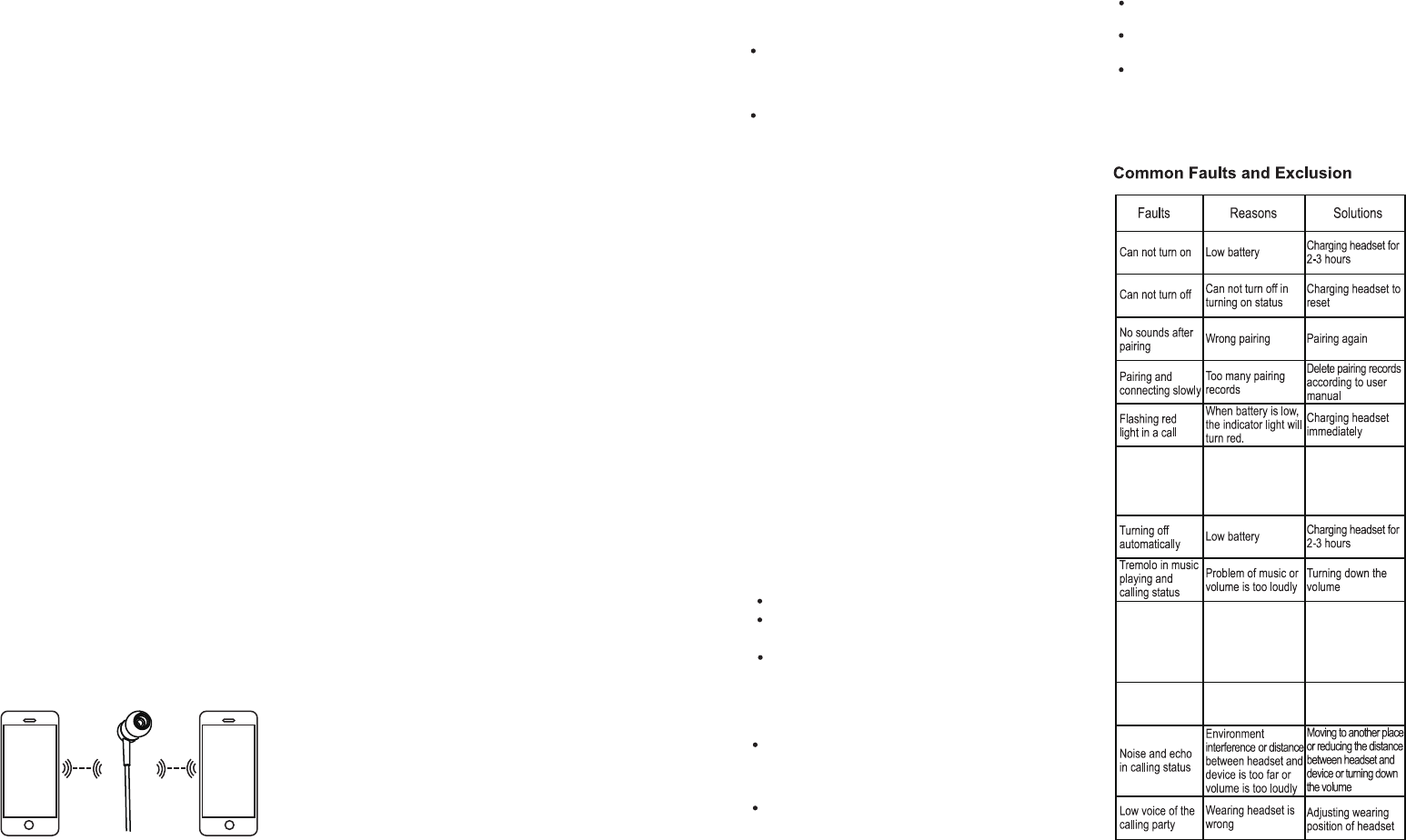
This function means “RATEL Ear BT” Bluetooth headset is connected
with 2 Phones of Bluetooth function at the same time.
When the Phone A & Phone B are neither paired, the two link
operation is as below:
Pairing Phone A: In OFF Mode, press and hold MFB until
indicator light flashes red and blue alternately, use phone A
to search the Bluetooth device “RATEL Ear BT”, enter pairing code
“0000” and confirm, pair the headset with phone A, and the headset
will enter into standby mode.
Turn off the Bluetooth function or switch off power in Phone A,
the headset will go back to no connected status.
Pairing Phone B: In OFF Mode, press and hold MFB until
indicator light flashes red and blue alternately, use phone B to
search the Bluetooth device
“RATEL Ear BT”
, enter pairing
code “0000” and confirm, pair the headset with phone B, and
the headset will enter into standby mode.
Connecting the Phone A&B at the same time:
Two-link Function
Headset Resetting
In call or music playing state, shortly press “V+ ”or “V-” once to
adjust the volume. When the volume up to maximum or minimum,
you could hear “Di” voice prompt.
In any state, as long as the headset is charging, it will be reset.
APTX/APTX-LL Function
Connected phones with APTX/APTX-LL function,
phones will show connected APTX/APTX-LL
Press and hold “V+” or “V-” for 2 seconds to forward the next song
or backward the previous song.
Delete Pairing Record on
the Headset
Adjusting the Volume
Forward/Backward
Shortly press MFB to PLAY music(paired and standby
condition), press MFB again to PAUSE music.
Music Pause /Playing
To disconnect the paired headset from your phone, please turn off
the headset or disconnect the headset from the Bluetooth menu of
your phone. When disconnecting, you could hear “Bluetooth disco-
nnected”.
The headset will beep when operates successfully but this
may be too low to hear.
The above operations may vary due to different devices.
Two-call Handling after 2-Link:
Disconnecting
This function is once paired the headset will connect with phone
In OFF Mode, after activating the headset, it will connect the phones
according to the pairing list in 5 minutes. If beyond 5 minutes and
not connected, the headset will Power off.
automatically and no need connect any more(Make sure your
phone Bluetooth function is activated and in the operation range
with phone).
Automatic Re-connecting
Do not use abrasive cleaning solvents to clean the headset.
Do not allow the headset to touch with any sharp objects as this
will cause scratching and damage.
Please keep headset away from high-temperature, humidity and
dust.
Maintenance
Note:
The two Phones mentioned follows will be called Phone A and B.
Note:
Due to technology of different phones, it’s not sure for all phones can go back
to the previous song, it may be back to the beginning.
1).
2).
3).
4).
Activate the Bluetooth function or switch on the
power of Phone A, search the Bluetooth device
“
RATEL Ear BT
” with Phone A, and connect it with
this phone, here 2 Phones are connected with
the headset.
Activate the Bluetooth function of phone A/B and
re-turn on the on mode headset. The headset will
automatically connect with (A/B ) phone. If need to
connect the 2nd phone, you should use manual
operation on phone.
For the difference of Phones, it doesn’t guarantee the compatibility
of all functions on every Bluetooth enabled device.
You should enter pairing code “0000” if your phone Bluetooth
version under 2.1, but there is no need if your phone is or above
version 2.1.
Note 1:
Note 2:
Method 1:
Method 2:
Two-link Function:
Additional Statements
The headset is compliant with the specified Bluetooth
version. It does not guarantee compatibility of all functions on
every Bluetooth enabled device. Please check your device’s
user manual for compatibility and functionality.
Since there is maybe a defect of compatibility for different
devices and especially for the third party players , it may cause
the malfunction of music play/pause.
The headset will be turned off automatically if not connect
with any Bluetooth devices in 5 minutes.
1.
2.
3.
4.
In ON and not connected mode, press and hold “V+” for 2 seconds
until the red and blue light flashes twice at the same time, you will
hear “Du” prompt voice twice, then the pairing record on the headset
will be deleted.
When all the pairing records are deleted, after the headset turn on
again, it couldn’t connect automatically and enter into pairing
mode directly.
When you are answering a calling from phone A, there is another
calling from phone B:
Press and hold MFB for 2 seconds to end the current call and
answer another one.
Shortly press MFB once to answer another call and hold on the
current one.
After the above operation “2” settled, shortly press MFB to
transfer one call to another.
After the above operation “2” settled, press and hold MFB for 2
seconds to end the current calling and shortly press MFB to end
another one.
In PAIRED MODE, press MFB twice to activate voice function
Voice Function
Can not activate
voice function
Can not be charged
by charging pin
Please check if have
dirty and sweat on
charging pin
Clean the dirty and
sweat on charging
pin
In music playing mode
or music pausing mode
within 10 seconds
ISO System should wait
for 8-10 seconds to act
ivate voice function after
music pause
Without indcator
light in charging
Type C charging cable
does’t output voltage or
DC power supply does’t
output power
Checking whether the
Type C charging cable
is plugged or DC power
switch is on
(ISO system should wait for 8-10 seconds to activate voice function
after music pause). Ensure your phone supports voice function,
and you have recorded the voice tag into your phone. See the user
guide of your phone for instructions.
FCC Warning
This device complies with Part 15 of the FCC Rules. Operation is subject to the following two
conditions:
(1) This device may not cause harmful interference, and (2) this device must accept any
interference received, including interference that may cause undesired operation.
NOTE : Any changes or modifications to this unit not expressly approved by the party responsible
for compliance could void the user's authority to operate the equipment.