ACA Digital WMIR-168 Mini PCI Module User Manual UVZWMIR 168 Manual
ACA Digital Corporation Mini PCI Module UVZWMIR 168 Manual
Users Manual

ACA‐DigitalCorp.
WLAN802.11b/gUserManual
Modelno.:WMIR‐168AG/E
(RalinkRT2561T)
ACA-DIGITAL
IntegratedBasebandandMACSolution
IEEE802.11b/gWLAN
2008/3/29
ACA-Digital Corp.
2
Contents:
Contents:............................................................................................................................ 2
Introduction ...................................................................................................................... 3
InstalltheWLANcard .................................................................................................... 4
InstallWMIR‐168AG(RalinkRT2561T)Driver........................................................... 5
FederalCommunicationsCommission(FCC)Requirements ................................... 7
ACA-Digital Corp.
3
Introduction
TheWirelessLANConfigurationUtilityisapowerfulapplicationthathelpsyouto
configurethisWLANcardandmonitorthestatisticsofthecommunicationstatus.
Unlikethestandardmethodofconfiguringthecardviatheoperatingsystemutili‐
ties,thisapplicationpermitsthedynamicmodificationoftheconfigurationparame‐
terswhilethecardisoperating.Italsooffersmoreconfigurationoptions.
WeoffertheWirelessLANConfigurationUtilityforWindows®98SE/Me/2000/XP.
Mini‐PCIWLANequipmenthasbeentestedandfoundtocomplywithlimitsfora
ClassBdigitaldevice,pursuanttoPart15oftheFCCrules.Theselimitsarede‐
signedtoprovidereasonableprotectionagainstharmfulinterferenceinresidential
installations.
Thisequipmentgenerates,uses,andcanradiateradiofrequencyenergy,andifnot
installedandusedinaccordancewiththeinstructions,maycauseharmfulinterfer‐
encetoradiocommunications.
ACA-Digital Corp.
4
InstalltheWLANcard
z ReleasethescrewfromPC/NB
z Findoutthepre‐wiredcable
z ConnectthecablewithMini‐PCI(“Main”connector)
z AlignandfirmlyplugtheMini‐PCIcardintotheslot.
z Re‐placethecovertoDeviceSecurethescrewwithacrossscrewdriver.
ACA-Digital Corp.
5
InstallWMIR‐168AG(RalinkRT2561T)Driver
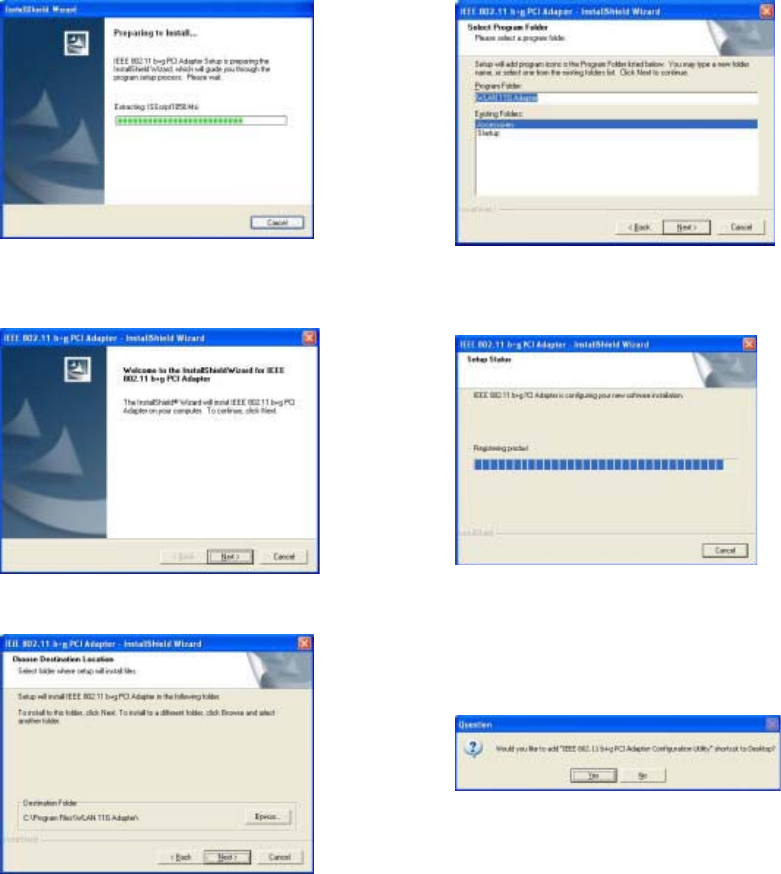
Theprogramwillautomaticallypro‐
ceedwithinstalling.
Press“Next”tocontinue
Press“Browser”tochangethefolder
wheresetupwillinstallfilesorpress
“Next”tocontinue.
Selectorcreateaprogramfolderand
press“Next”tocontinue.
Theprogramwillautomaticallypro‐
ceedwithinstalling.
Press“Yes”tocontinue.
ACA-Digital Corp.
6
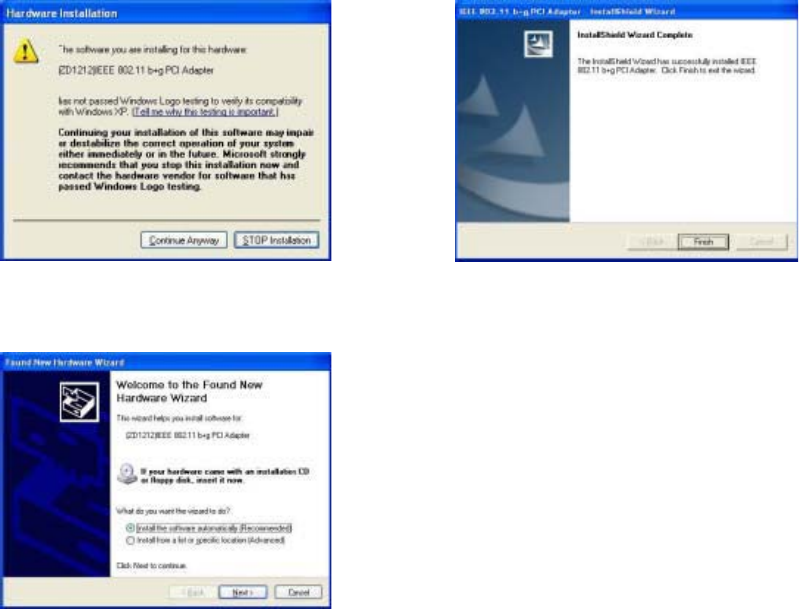
Press“Continue”tocontinuethe
process.
InserttheWirelessCardtoslotofNB
andchoose“Installthesoftware
automatically(Recommended)”and
press“Next”.
Press“Finish”tocompletetheinstal‐
lation
ACA-Digital Corp.
7
Federal Communications Commission (FCC) Requirements
ThisequipmenthasbeentestedandfoundtocomplywiththelimitsforaClassB
digitaldevice,pursuanttopart15oftheFCCrules.Theselimitsaredesignedto
providereasonableprotectionagainstharmfulinterferenceinaresidentialinstalla‐
tion.Thisequipmentgeneratesusesandcanradiateradiofrequencyenergyand,if
notinstalledandusedinaccordancewiththeinstructions,maycauseharmfulinter‐
ferencetoradiocommunications.However,thereisnoguaranteethatinterference
willnotoccurinaparticularinstallation.Ifthisequipmentdoescauseharmfulin‐
terferencetoradioortelevisionreception,whichcanbedeterminedbyturningthe
equipmentoffandon,theuserisencouragedtotrytocorrecttheinterferencebyone
ormoreofthefollowingmeasures:
‐Reorientorrelocatethereceivingantenna.
‐Increasetheseparationbetweentheequipmentandreceiver.
‐Connecttheequipmentintoanoutletonacircuitdifferentfromthattowhichthe
receiverisconnected.
‐Consultthedealeroranexperiencedradio/TVtechnicianforhelp.
INFORMATION:
ThisTransmittermustnotbeco‐locatedoroperatinginconjunctionwithanyother
antennaortransmitter.
Anychangesormodifications(includingtheantennas)madetothisdevicethatare
notexpresslyapprovedbythemanufacturermayvoidtheuser’sauthoritytooper‐
atetheequipment.
EndProductLabeling
Thistransmittermoduleisauthorizedonlyforuseindeviceswheretheantenna
maybeinstalledsuchthat20cmmaybemaintainedbetweentheantennaandusers.
Thefinalendproductmustbelabeledinvisibleareawiththefollowing:
ACA-Digital Corp.
8
“ContainsTXFCCID:UVZWMIR‐168”
EndProductManualInformation
Theusermanualforendusersmustincludethefollowinginformationinapromi‐
nentlocation“IMPORTANTNOTE:TocomplywithFCCRFexposurecompliance
requirements,theantennausedforthistransmittermustbeinstalledtoprovidea
separationdistanceofatleast20cmfromallpersonsandmustnotbeco‐locatedor
operatinginconjunctionwithanyotherantennaortransmitter.”
Thisdevicecomplieswithpart15oftheFCCrules.Operationissubjecttothefol‐
lowingtwoconditions
(1)Thisdevicemaynotcauseharmfulinterferenceand
(2)Thisdevicemustacceptanyinterferencereceived,includinginterferencethat
maycauseundesiredoperation
IMPORTANTNOTE:
Intheeventthattheseconditionscannotbemet(forexamplecertainlaptopcon‐
figurationsorco‐locationwithanothertransmitter),thentheFCCauthorizationisno
longerconsideredvalidandtheFCCIDcannotbeusedonthefinalproduct.In
thesecircumstances,theOEMintegratorwillberesponsibleforre‐evaluatingthe
endproduct(includingthetransmitter)andobtainingaseparateFCCauthorization.
ThisdeviceisintendedonlyforOEMintegratorsunderthefollowingconditions:
Theantennamustbeinstalledsuchthat20cmismaintainedbetweentheantenna
andusers.Aslongasaconditionaboveismet,furthertransmittertestwillnotbe
required.However,theOEMintegratorisstillresponsiblefortestingtheir
end‐productforanyadditionalcompliancerequirementsrequiredwiththismodule
installed(forexample,digitaldeviceemissions,PCperipheralrequirements,etc.).