AEE Wireless Technology 870VL 2.4G Wireless Transceiver User Manual Users manual
Shenzhen AEE Wireless Technology Co., Ltd. 2.4G Wireless Transceiver Users manual
Users manual
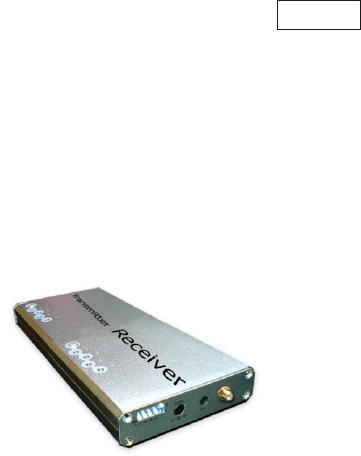
Please read this manual thoroughly before any attempt to install and
operate this product and retain it for your future reference.
User's Manual
2.4GHz Wireless Transceiver
Signal relay station
Model:870VL
English
TABLE OF CONTENTS
INSTALLATION & USAGE
Usage1
Installation
Usage2
7
INTRODUCTION 1~4
Notice
Approval Information (FCC/CE)
1
2~3
8
EU Environmental Protection
Waste electrical products should not be disposed of with
household waste. Please recycle where facilities exist.
Check with your Local Authority or retailer for recycling
advice.
7~10
PRODUCT 5~6
Package Contents
Feature Locations
6
5
5
Adapter
SPECIFICATIONS 11
TROUBLESHOOTING 12
Transfer approach
Channel set
Receiver Mode Setup
Restrictions
Maintenance
4
4
Channel Setup 10
10
9
8
7

INTRODUCTION
Thank you for purchasing our car back view monitor. This product
eel confident that you will be pleased with
the quality and features of this product.
The product is made of alloyed shell and special weather-proof enclosure
that protect it against power and water sprays. It passed the IP65 testing.
The product offers a new solution and experience for drivers. Drivers
can check the back situations through the camera mounted on the rear
car, and does not need to look back and forth.
This product is only for accessorial reminding tool, thus we will not take
any responsibility for resulting accident.
Please read the manual thoroughly before using, and following the
instruction accordingly.
works
at ISM-2.4GHz frequency band, which could be legally used worldwide
without permission. We f
Notice
Notice: This product may cause interferences with other wireless
equipment that operates at 2.4GHz ISM band. Please turn off one of
the equipments to eliminate the interference.
Product Assurance: This camera will emit electromagnetic wave,
just like other wireless products, however, its transmitting power is
less than other wireless products such as mobile phones. The 2.4GHz
wireless camera meets wireless frequency security standards and
recommended indexes while working. These standards and indexes
are certificated by academic organization and represent the cogitative
research of the scientific workers who continuously explore and
annotate the involved fields. So we believe that our products are safe
for customers.
1

All our products meet the requirements of approval FCC or CE, and
are granted the FCC or CE certification. They are authorized to bear
FCC or CE mark.
Approval Information
2
FCC
This equipment has been tested and found to comply with the limits
for a Class B digital device, pursuant to Part 15 of the FCC rules.
These limits are designed to provide reasonable protection against
harmful interference in a residential installation. This equipment
generates, uses and can radiate radio frequency energy and, if not
installed and used in accordance with the instructions, may cause
harmful interference to radio communications. However, there is no
guarantee that interference will not occur in a particular installation.
If this equipment does cause harmful interference to radio or television
reception, which can be determined by turning the equipment off and
on, the user is encouraged to try to correct the interference by the
following measures:
-Reorient or relocate the receiving antenna.
-Increase the separation between the equipment and the receiver.
-Connect the equipment into an outlet on a circuit different from that
to which the receiver is connected.
-Consult the dealer or an experienced radio/TV technician for help.
To assure continued compliance, any changes or modifications not
expressly approved by the party responsible for compliance could void
the user's authority to operate this equipment. (Example- use only
shielded interface cables when connecting to computer or peripheral
devices).
This equipment complies with FCC RF radiation exposure limits set
forth for an uncontrolled environment. This equipment should be
installed and operated with a minimum distance of 20 centimeters
between the radiator and your body.
This device complies with Part 15 of the FCC Rules. Operation is
subject to the following two conditions:
(1) This device may not cause harmful interference, and
FCC Radiation Exposure Statement

3
This product complies with standards including Low Voltage Device
Directive 2006/95/EC; EMC Directive 2004/108/EC and R&TTE
Directive 1999/5/EC. It passed the subject tests by the authority
concerned and is authorized to bear CE mark.
CE
(2) this device must accept any interference received, including
interference that may cause undesired operation.
This transmitter must not be co-located or operating in conjunction with
any other antenna or transmitter.
The antennas used for this transmitter must be installed to provide a
separation distance of at least 20 cm from all persons and must not be
co-located or operating in conjunction with any other antenna or
transmitter.
This equipment marketed in USA is restricted by firmware to only operate
on 2.4G channel 1-11.
Channel

1. DO NOT use this product to violate one's privacy. Monitoring one's
activities without consent is illegal and this product is not designed
and manufactured for such purpose;
2. DO NOT put this product near any medical equipment. Radio
waves might potentially cause breakdown of electrical medical
equipment. So this product should be placed at least 1 feet away
from any heart pacemaker. Radio waves might potentially
influence heart pacemaker and lead to respiratory disturbance;
3. DO NOT use this product for any illegal activities. We will not be
responsible for any consequences of illegal acts committed by the
user.
Restrictions
1. Ensure the sufficient ventilation space is available;
2. Do not shake or strike the product;
3. Keep it dry and dustless and avoid exposing it to direct sunlight;
4. Do not place product near any magnetic objects;
5. Avoid putting the product in places where the constantly changed
temperature or humidity occurs;
6. Keep product away from heat sources such as electric heater;
7. Do not use the camera near aggressive chemicals;
8. Do not use this camera near water, for example, near a bath tub,
wash bowl, kitchen sink or laundry tub, in a wet basement or near
a swimming pool and the like;
9. Do not use the camera in the places which are enclosed by metal.
The surrounding metal like lifter, cabin, may shield the
electromagnetic wave, and result in failure of signal reception;
10. Please obey the local government's environment protection policy;
11. Please turn off the power when left unused;
12. Do not disassemble or repair the camera or receiver; doing so
might cause damages to the product.
Maintenance
4
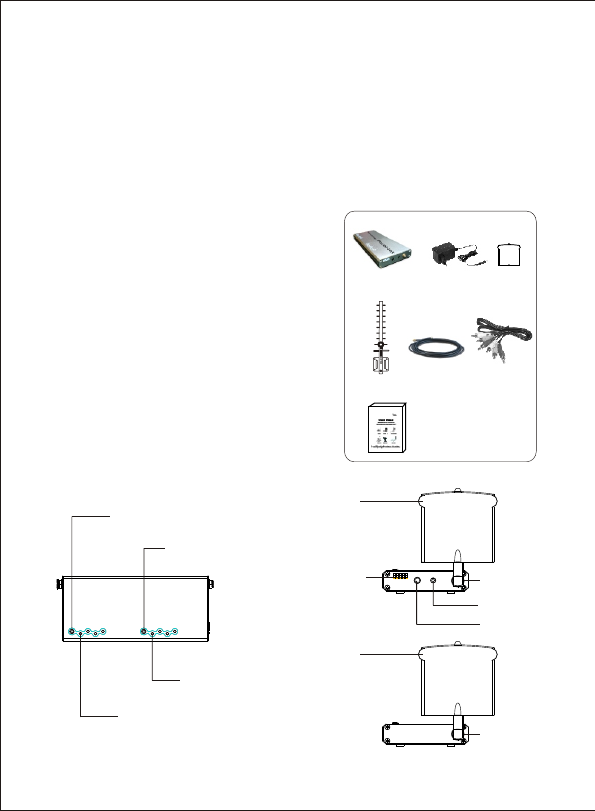
Feature Locations
This package comes with the following items. Please check whether
they are all included in the packaging box, if one or some is missing,
contact the retailer for replacement.
Package Contents
PRODUCT
Note:
The picture may vary from the actual object.
① ② ③
④⑤
①
②
③
④
2.4GHz Wireless Repeater X 1
DC 8V Power Adapter X 1
Antenna for the Transmitter X 2
Antenna X 1
⑤ Cable X1
⑥ A Cable X 1
⑦ User ’s Manual X 1
V
Transmitter Channel
Indicator
Receiver Channel
Indicator
Transmitter select
Receive select
Antenna
Antenna
SMA Jack
AV Output
Mode Control
DC Power
Socket
SMA Jack
5
⑥
⑦
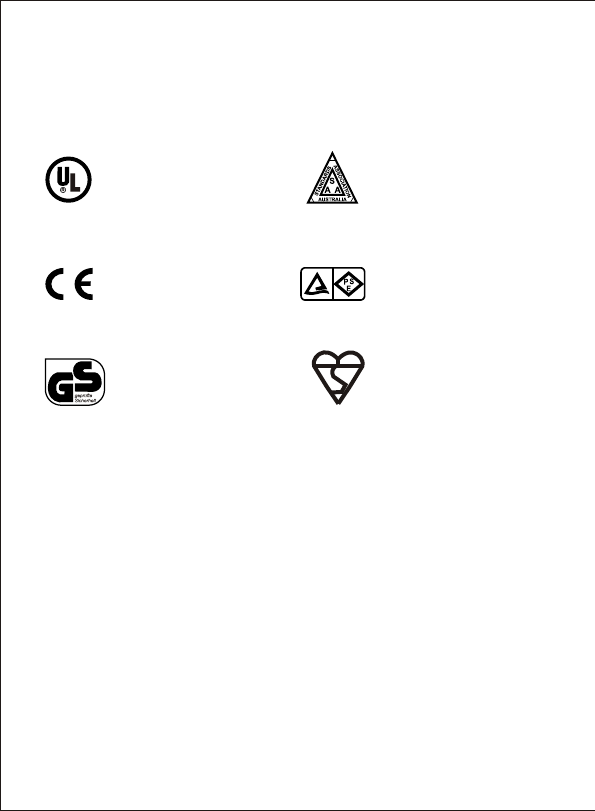
This product always conforms to the authenticated AC adapter. The
adapter should be marked one of the following:
Note: When using the power adapter, make sure the rating voltage is compatible
with that of the device to avoid potential damages resulting from incorrect
usage of power supply.
UL Mark
American power
supply authentication
SAA Mark
Australia power
supply authentication
GS Mark
German power
supply authentication
European Union power
supply authentication
CE Mark PSE Mark
Japan power
supply authentication
Adapter
BS Mark
British power
supply authentication
6
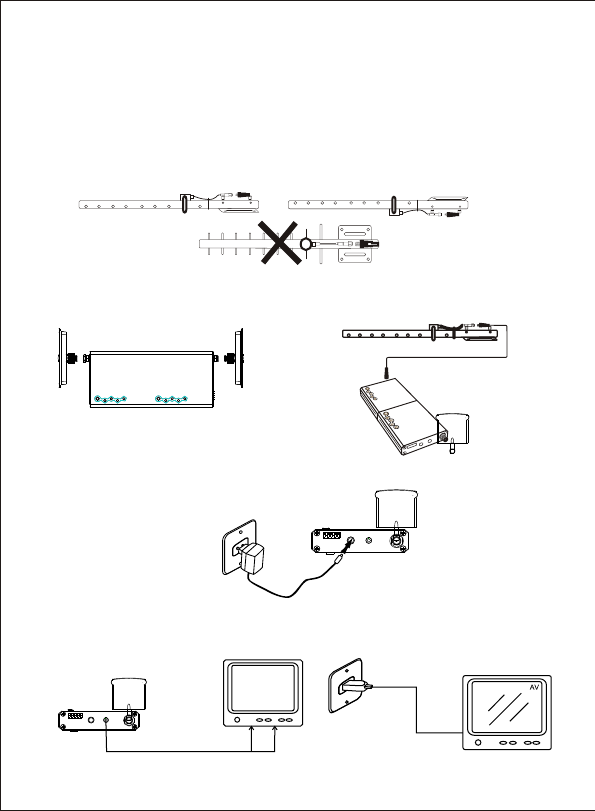
INSTALLATION & USAGE
Installation
2.Connect the antenna to Wireless Transceiver. Use the cable connect
the transmitter and the antenna for picture two.
Transmitter Receiver
3.Connect the adapter to the receiver.
USAGE 1
7
1.Connect the receiver to a monitor/TV with AV cable (yellow for
video and red for audio.)
2.Power on the monitor/TV and select AV mode.
1. Installing the transmitting antenna
Fixed the antenna to the wall for suitable location with the screw. The
antenna should be point to the camera.
①②
Note: Installing the antenna there are two ways.
① You can use the same antenna for the transmitter and the receiver of the transceiver
② You can use the different antennas for the transmitter and the receiver of the transceiver.
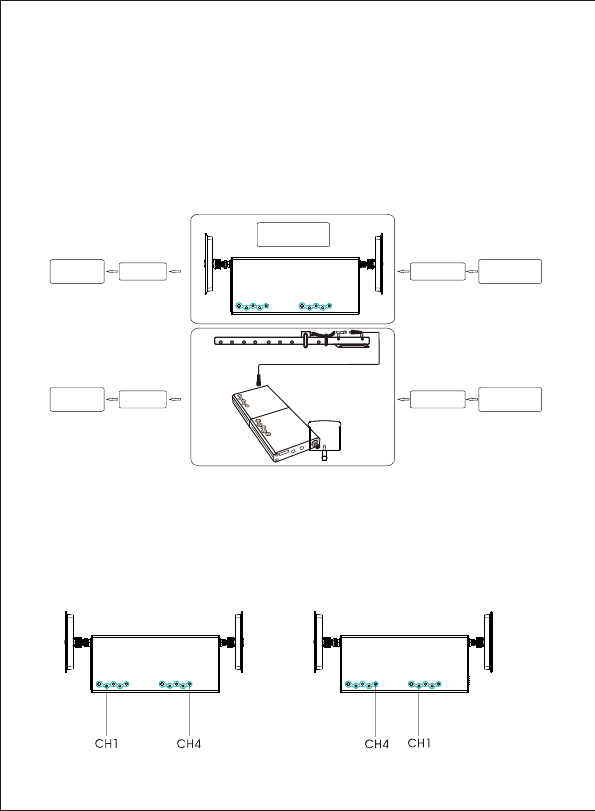
Transfer approach
When use the Wireless Transceiver , recommended that:
After installation ,connect the power, generally speaking, the “Ch1”
indicator of the transmitter is on, and the “Ch4” indicator of the
receiver is on. At this time, this is the best reception.
However, you can also select the channel ,use “Ch4” of the transmitter
and the “Ch1” of the receiver.
USAGE 2
Transmitter Receiver Transmitter Receiver
8
ZT823T
Z 711
TReceiver Transmitter
ZT870VL
Note:
1. The ZT870VL’s receiver antenna should be point to the ZT823T’S transmitter antenna, and
the ZT870VL’S transmitter antenna should be point to the ZT711’S receiver.
2. Recommended: From ZT823T to ZT870VL is 150m to 200m; From ZT823T to Z 711 is
up to 300m.
T
Transmitter Receiver
Locate the Transceiver between the Camera(ZT83T) and the receiver
(Z 711).
T
ZT823T
Z 711
TReceiver Transmitter
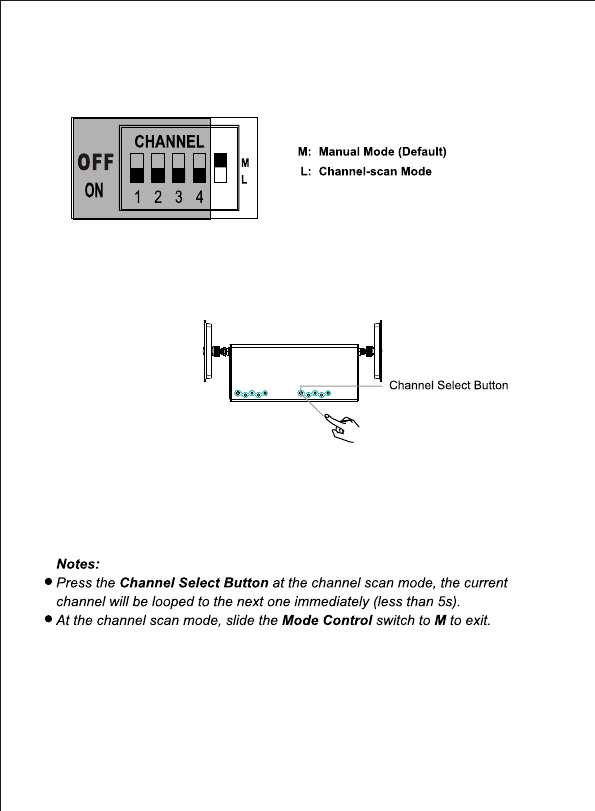
Channe-scan Set
1. Manual mode: Slide Mode Control switch to M to enter Manual mode.
In this mode, the receiver channel won’t change until you press the
Channel Select Button;
2. Channel Scan mode: Slide Mode Control switch to L to enter channel
scan mode. In this mode, all the available channels will display one
by one looping in turn per 5s.So you can watch the situations from up
to 4 different cameras via one receiver.
Transmitter Receiver
9
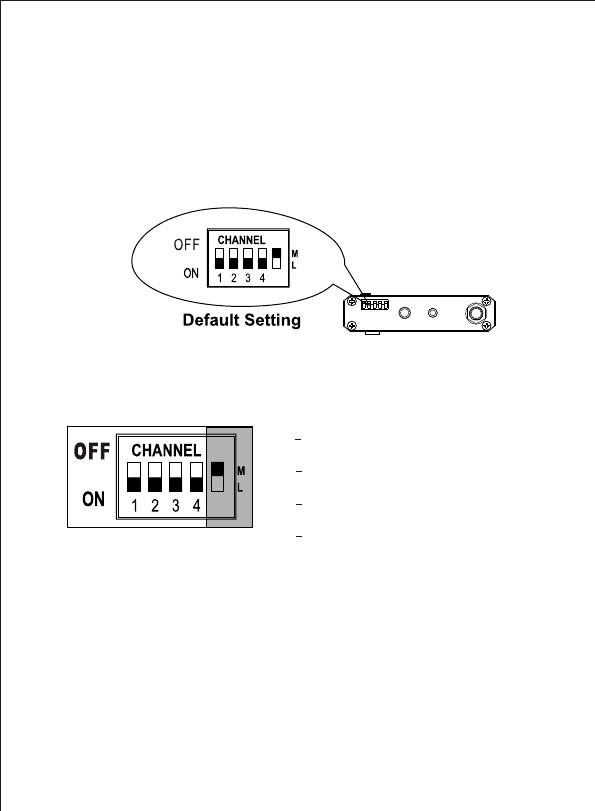
The receiver can support up to 4 cameras working at the same time.
You are allowed to set the Mode Control as described below. The
Mode Control has the precedence over other buttons.
Receiver Mode Setup
1CH1 Enable (Default)
CH1 Disable
ON:
OFF:
2CH2 Enable (Default)
CH2 Disable
ON:
OFF:
3CH3 Enable (Default)
CH3 Disable
ON:
OFF:
4CH4 Enable (Default)
CH4 Disable
ON:
OFF:
You can confirm which channel is set to receive signal from correspond-
ing camera. With this function, you could set the unused channels to
OFF, so that they will be skipped during the Manual mode or Channel
Scan mode.
Note:
If all channels are on OFF position, the default setting is CH1.
Channel Set
10
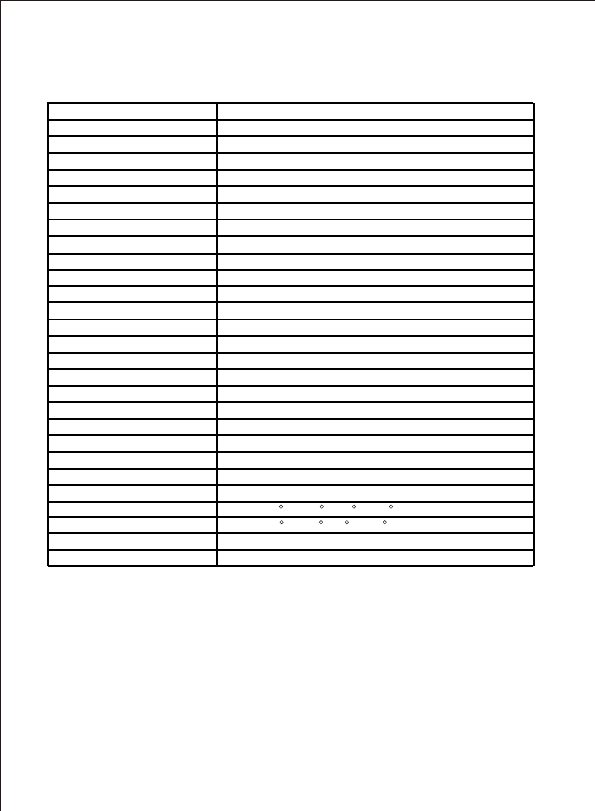
SPECIFICATIONS
*Actual transmission range may vary according to the weather, location,
interference and building construction.
*All the specifications are subject to minor change without prior notice.
2,400~2,483MHz
2414MHz/2432MHz/2450MHz/2468MHz
FM
PAL/NTSC(AUTO)
6.5MHz
40dB(AGC Off)
7~10mW(Nominal value FCC:2mW CE:10mW)
100m(min)
LED
75ohm
156mm*68mm*19mm(MAINBODY)
85%
8V/300mA
-10 C~+50 C/-14 F~122 F
-20 C~+60 C/-4 F~140 F
Φ3.5mm
260mA(Max.)
50ohm
SMA
Φ3.5mm (AUDIO+VIDEO)
50dB
10kohm
100~20KHz
≤-85dBm
Transmission Frequency
Work Transmission
Modulation Type
Unobstructed Effective Range
Channel Select
Channel Indicator
Receiving Sensitivity
Dimensions(W*D*H)
Storage Humidity
Storage Temperature
Operating Temperature
Power Supply
Power Input
Consumption Current
RF Input Impedance
Antenna Input
AV Output
Sound Control Sensitivity
Transmission Power
+
-100KHz
+
-
1.0 0.2Vp-p(Nominal value 1Vp-p)
+
-
1.2 0.4Vp-p(Nominal value 1Vp-p)
Color standard
Voice standard
Audio Output Level
Audio Output Impedance
Audio Frequency Range
Video Output Level
Video Output Impedance
Frequency Stability
SNR Audio
Pushbutton Switches choice
11
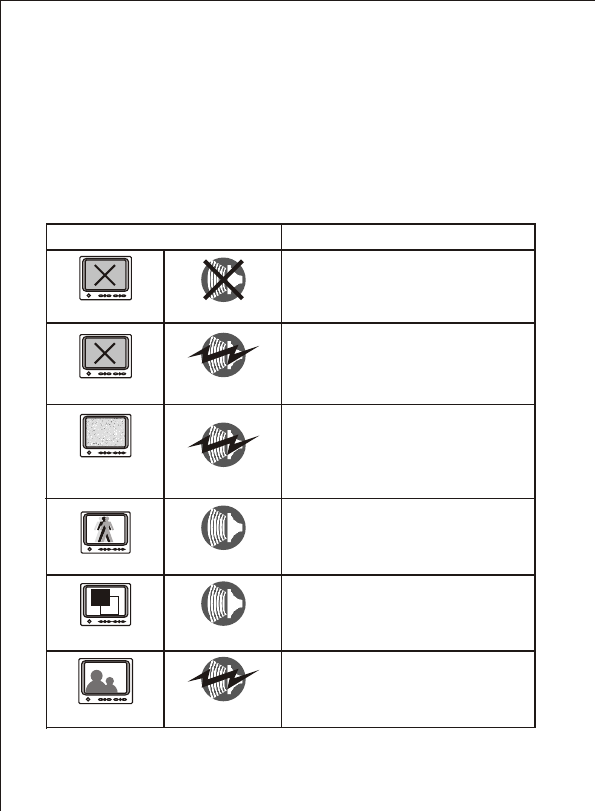
TROUBLESHOOTING
When you experience the operation problems, please check and try
the following yourself before claiming that it is the defective product
or consulting the experienced technician.
Abnormal Phenomena Possible Reasons/Solutions
Check whether the camera/receiver
is connected to power supply and
powered on.
1. Check if the channel of receiver is
the same as that of camera;
2. Check the distance & blocks.
Mismatching the TV system of PAL
or NTSC.
1. Interfered with other devices;
2. Check the distance & blocks.
Interfered with other devices nearby;
Remove or turn off such devices.
No image
Snowflakes
on image
Normal image
No color
Ghost image
No sound
Noisy
Noisy
Normal sound
Normal sound
No image Noisy
Check wether the li-battery runs out
12