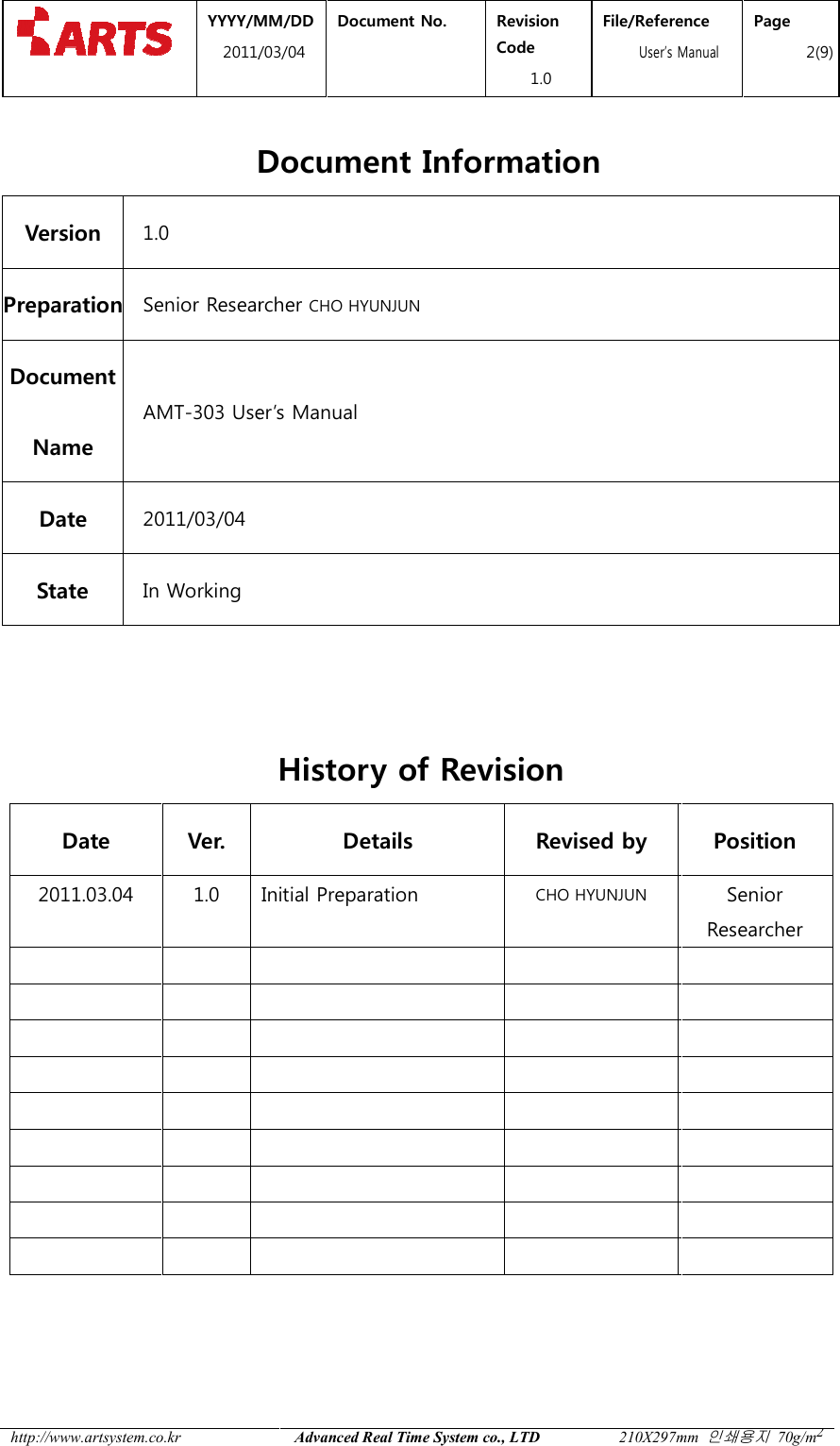
ARTSYSTEM AMT-303 USN Tag User Manual AMT 303

ARTSYSTEM Co., Ltd. USN Tag AMT 303

Users Manual

 YYYY20Preparer / Position Document ManagerPositionCHO HYUNJUN/ Senior Researcher   CHO HYUNJUNTitle AMT-303 User’s Manual   AMT            YYYY/MM/DD 2011/03/04 Document No.  Revision Code 1.0 File/ReferenceUser’s ManualDocument Manager / Position Review / Position Document Type CHO HYUNJUN / Senior Researcher     AMT-303 User’s Manual   File/Reference s Manual Document Document Class
 YYYY/MM2011/03 http://www.artsystem.co.kr   Document InformationVersion 1.0 Preparation Senior Researcher Document Name AMT-303 UserDate 2011/03/04 State In Working    Date Ver. 2011.03.04  1.0                             MM/DD 1/03/04 Document No.  Revision Code 1.0 File/Reference  User’s ManualAdvanced Real Time System co., LTD 210X297mm Document Information Senior Researcher CHO HYUNJUN User’s Manual   History of Revision Details Revised by Initial Preparation CHO HYUNJUN                               File/Reference s Manual Page 2(9) 210X297mm 인쇄용지 70g/m2 Position Senior Researcher
 YYYY/MM2011/03 http://www.artsystem.co.kr  Table of Contents 1.  OVERVIEW ................................1.1. PURPOSE ................................1.2. SCOPE ................................1.3. CAUTIONS ................................2.  BASIC STRUCTURE ................................2.1. NAME AND FUNCTION OF2.2. DETAILED FUNCTION OF2.3. CONSIDERATIONS IN IN2.4. SPECIFICATION ................................    MM/DD 1/03/04 Document No.  Revision Code 1.0 File/Reference  User’s ManualAdvanced Real Time System co., LTD 210X297mm ................................................................................................................................................................................................................................................................................................................................................................................................................................................................................................................................................................................................................................................................NAME AND FUNCTION OF EACH PART OF AMT-303 ................................DETAILED FUNCTION OF EACH PART OF AMT-303................................CONSIDERATIONS IN INSTALLATION ................................................................................................................................................................................................File/Reference s Manual Page 3(9) 210X297mm 인쇄용지 70g/m2 ............................................................ 4 .......................................................... 4 ................................................................ 4 ....................................................... 4 ............................................ 6 ........................................................... 6 ................................................................ 7 .............................................................. 8 ............................................. 9
 YYYY/MM2011/03 http://www.artsystem.co.kr  1. Overview This document is prepared for the right use of AMTequipment at the best condition with right handling methodsunderstand this manual before using the The specification is subject to change without notice, if necessary for improvement of performance If you have any inquiriesFor safety, carefully read safety items in this manual before use. 1.1. Purpose This document is the user1.2. Scope This document covers the structure and the operation methods of AMT1.3. Cautions  Cautions for Installation and Operation- Beware of electric shock in installing and operating the equipment as it uses DC 5power. Do  not  pull  out  the  power  supply  and  touch  it  with  wet  hands.  You  may have electric shock. - Check whether the output of the the equipment before using - We are not responsible for problems caused by using - Avoid a place with direct sun rays and a closed hot and humid place when selecting an  installation  and storage  position.  Install  and  store  the  equipment place under  room  temperature.can reduce the life span of the product.   Cautions for Maintenance- Do  not  place  a strong  impact  on  the  equipment and do not  drill the equipment. Otherwise,  the  equipment  may  be  broken  or  the  life  span  of  the  product  can  be short. MM/DD 1/03/04 Document No.  Revision Code 1.0 File/Reference  User’s ManualAdvanced Real Time System co., LTD 210X297mm This document is prepared for the right use of AMT-303, P2L TAG. To maintain the equipment at the best condition with right handling methods, carefully read and fully understand this manual before using the equipment. The specification is subject to change without notice, if necessary for improvement of inquiries, please do not hesitate to contact us, the Art SystemFor safety, carefully read safety items in this manual before use. This document is the user’s manual of AMT-303 This document covers the structure and the operation methods of AMTInstallation and Operation Beware of electric shock in installing and operating the equipment as it uses DC 5Do  not  pull  out  the  power  supply  and  touch  it  with  wet  hands.  You  may have electric shock.  the output of the adaptor is DC 5V and remove thebefore using it. We are not responsible for problems caused by using a power other than DC 5VAvoid a place with direct sun rays and a closed hot and humid place when selecting storage  position.  Install  and  store  the  equipment under  room  temperature. Installing  and  storing it in  a hot  and  humid  place can reduce the life span of the product. Cautions for Maintenance Do  not  place  a strong  impact  on  the  equipment and do not  drill the equipment. Otherwise,  the  equipment  may  be  broken  or  the  life  span  of  the  product  can  be File/Reference s Manual Page 4(9) 210X297mm 인쇄용지 70g/m2 303, P2L TAG. To maintain the , carefully read and fully The specification is subject to change without notice, if necessary for improvement of , please do not hesitate to contact us, the Art System Co., Ltd. This document covers the structure and the operation methods of AMT-303 Beware of electric shock in installing and operating the equipment as it uses DC 5V Do  not  pull  out  the  power  supply  and  touch  it  with  wet  hands.  You  may and remove the battery from power other than DC 5V Avoid a place with direct sun rays and a closed hot and humid place when selecting storage  position.  Install  and  store  the  equipment in  an  indoor Installing  and  storing it in  a hot  and  humid  place Do  not  place  a strong  impact  on  the  equipment and do not  drill the equipment. Otherwise,  the  equipment  may  be  broken  or  the  life  span  of  the  product  can  be
 YYYY/MM2011/03 http://www.artsystem.co.kr    Cautions for Disassembly- Do not disassemble, repair and modify the equipment, except an auWe are not responsible  Cautions According to Surrounding Environment- This  product  adopts  wireless  communication  using  ZigBee.  Therefore, communication status can be worse because of surrounding environment.        SPECIFY SERVICE INSTRUCTIONS AND WARRANTY TERMS      This device complies with part 15 of the FCC Rules. Oper           (1) this device may not cause harmful interference; and (2) this device must accept any interference           received, including interference that may cause undesired operation.            This equipment has been tested and found to comply with the limits for a Class B digital device, pursuant to           Part 15 of FCC Rules. These limits are designed to provide reasonable protection against harmful           interference in a residential installation. This equipme           energy. If not installed and used in accordance with the instructions, it may cause harmful interference to           radio communications. However, there is no guarantee that interference will not occu           installation. If this equipment does cause harmful interference to radio or television reception, which can be           determined by turning the equipment off and on, the user is encouraged to try and correct the interference            by one or more of the following measures:            - Reorient or relocate the receiving antenna.            - Increase the distance between the equipment and the receiver.            - Connect the equipment to outlet on a circuit different from that to which the receiver            - Consult the dealer or an experienced radio/TV technician for help.           Any changes or modifications not expressly approved by the party responsible for compliance could void the           user’s authority to operate the equipment.         FCC NOTE:        THE MANUFACTURER IS NOT RESPONSIBLE FOR ANY RADIO OR TV INTERFERENCE       CAUSED BY UNAUTHORIZED MODIFICATIONS TO THIS EQUIPMENT.       SUCH MODIFICATIONS COULD VOID THE USER'S AUTHORITY TO OPERATE THE        EQUIPMENT MM/DD 1/03/04 Document No.  Revision Code 1.0 File/Reference  User’s ManualAdvanced Real Time System co., LTD 210X297mm Cautions for Disassembly Do not disassemble, repair and modify the equipment, except an auresponsible for any problems caused by disassembly without permission   Cautions According to Surrounding Environment This  product  adopts  wireless  communication  using  ZigBee.  Therefore, communication status can be worse because of surrounding environment. SPECIFY SERVICE INSTRUCTIONS AND WARRANTY TERMS This device complies with part 15 of the FCC Rules. Operation is subject to the following two conditions:(1) this device may not cause harmful interference; and (2) this device must accept any interferencereceived, including interference that may cause undesired operation. been tested and found to comply with the limits for a Class B digital device, pursuant toPart 15 of FCC Rules. These limits are designed to provide reasonable protection against harmfulinterference in a residential installation. This equipment generates, uses, and can radiate radio frequencyenergy. If not installed and used in accordance with the instructions, it may cause harmful interference toradio communications. However, there is no guarantee that interference will not occur in a particularinstallation. If this equipment does cause harmful interference to radio or television reception, which can bedetermined by turning the equipment off and on, the user is encouraged to try and correct the interferenceone or more of the following measures: Reorient or relocate the receiving antenna. Increase the distance between the equipment and the receiver. Connect the equipment to outlet on a circuit different from that to which the receiver Consult the dealer or an experienced radio/TV technician for help. Any changes or modifications not expressly approved by the party responsible for compliance could void theuser’s authority to operate the equipment. THE MANUFACTURER IS NOT RESPONSIBLE FOR ANY RADIO OR TV INTERFERENCECAUSED BY UNAUTHORIZED MODIFICATIONS TO THIS EQUIPMENT. SUCH MODIFICATIONS COULD VOID THE USER'S AUTHORITY TO OPERATE THEFile/Reference s Manual Page 5(9) 210X297mm 인쇄용지 70g/m2 Do not disassemble, repair and modify the equipment, except an authorized person. for any problems caused by disassembly without permission    This  product  adopts  wireless  communication  using  ZigBee.  Therefore, communication status can be worse because of surrounding environment.  ation is subject to the following two conditions: (1) this device may not cause harmful interference; and (2) this device must accept any interference been tested and found to comply with the limits for a Class B digital device, pursuant to Part 15 of FCC Rules. These limits are designed to provide reasonable protection against harmful nt generates, uses, and can radiate radio frequency energy. If not installed and used in accordance with the instructions, it may cause harmful interference to r in a particular installation. If this equipment does cause harmful interference to radio or television reception, which can be determined by turning the equipment off and on, the user is encouraged to try and correct the interference  is connected. Any changes or modifications not expressly approved by the party responsible for compliance could void the THE MANUFACTURER IS NOT RESPONSIBLE FOR ANY RADIO OR TV INTERFERENCE     SUCH MODIFICATIONS COULD VOID THE USER'S AUTHORITY TO OPERATE THE
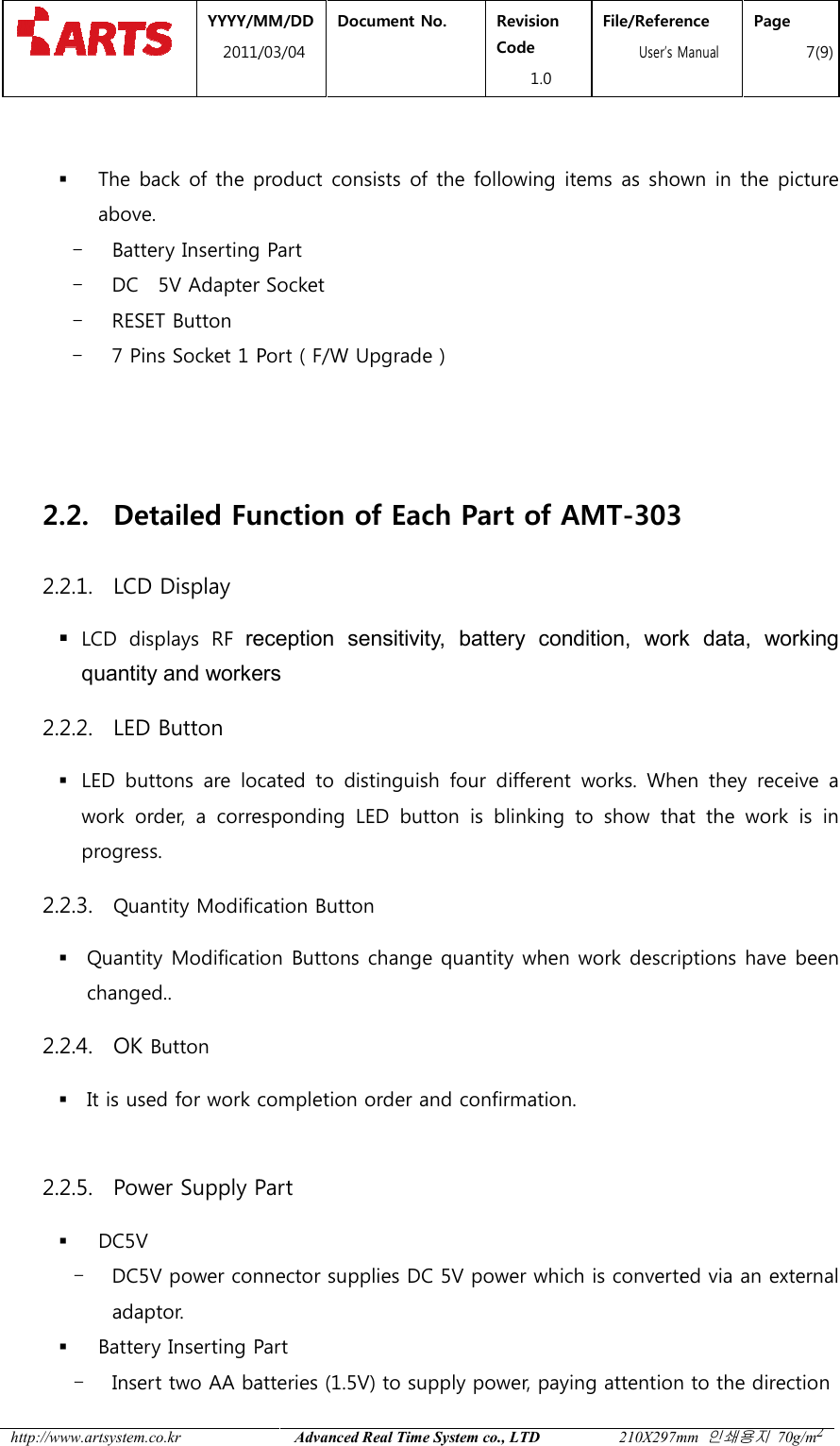
 YYYY/MM2011/03 http://www.artsystem.co.kr  2. Basic Structure2.1. Name and Function of Each Part of 2.1.1. The Front LCD  DisplayLED Button  The front of the product consists of the following items as shown in the picture above. - LCD - 4 LED Buttons for Work- 2 Quantity Modification Button- 1 SET Button - 1 OK LED Button 2.1.2.   The Back DC  5V Adapter SocketMM/DD 1/03/04 Document No.  Revision Code 1.0 File/Reference  User’s ManualAdvanced Real Time System co., LTD 210X297mm Basic Structure Name and Function of Each Part of AMT-30Quantity Modification ButtonsOK LED ButtonThe front of the product consists of the following items as shown in the picture or Work Identification 2 Quantity Modification Buttons Button Battery Inserting PartFile/Reference s Manual Page 6(9) 210X297mm 인쇄용지 70g/m2 03 Quantity Modification ButtonsSET ButtonOK LED Button The front of the product consists of the following items as shown in the picture Battery Inserting Part(AA type) 7 Pins Socket Reset Button
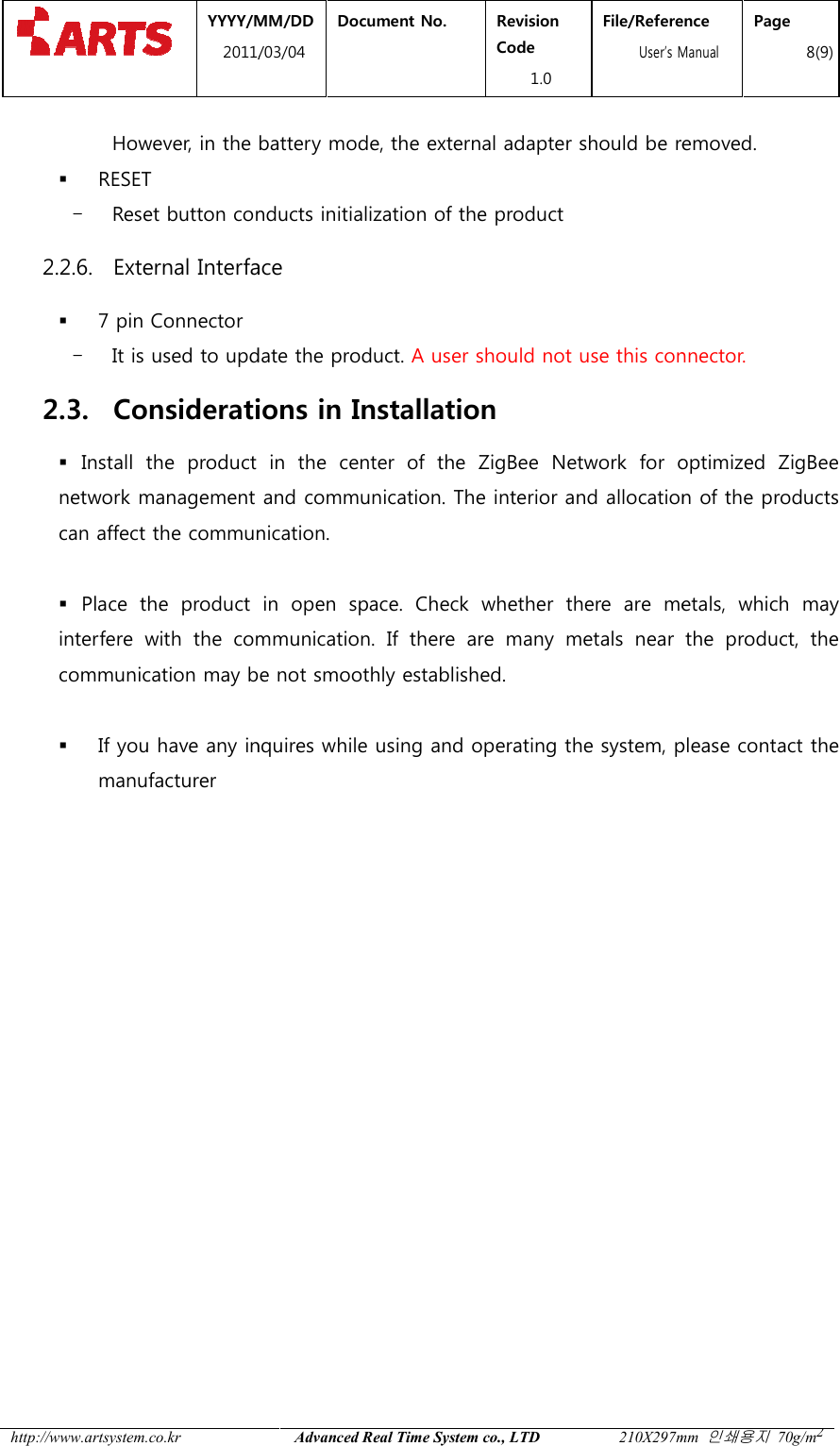
 YYYY/MM2011/03 http://www.artsystem.co.kr    The back of the product consists of the following items as shown in the picture above.   - Battery Inserting Part- DC    5V Adapter Socket- RESET Button - 7 Pins Socket 1 Port ( F/W Upgrade )   2.2. Detailed Function2.2.1. LCD Display  LCD  displays  RF reception  sensitivityquantity and workers2.2.2. LED Button  LED  buttons  are  located  to work  order,  a  corresponding  LED  button  is  blinking  to  show  that  the  work  is  in progress. 2.2.3. Quantity Modification Button Quantity Modification Buttonchanged..     2.2.4. OK Button  It is used for work completion order and confirmation.  2.2.5. Power Supply Part DC5V - DC5V power connector supplies DC 5V power which is converted via an external adaptor.  Battery Inserting Part- Insert two AA batteries (1.5V) to supply power, paying attention to the direction MM/DD 1/03/04 Document No.  Revision Code 1.0 File/Reference  User’s ManualAdvanced Real Time System co., LTD 210X297mm The back of the product consists of the following items as shown in the picture Battery Inserting Part Adapter Socket 1 Port ( F/W Upgrade ) Function of Each Part of AMT-303reception  sensitivity,  battery  condition,  work  data,  working quantity and workers LED  buttons  are  located  to distinguish four  different  works.  When  they  receive  a work  order,  a  corresponding  LED  button  is  blinking  to  show  that  the  work  is  in Quantity Modification Button Quantity Modification Buttons change quantity when work descriptions have been It is used for work completion order and confirmation.  Power Supply Part   power connector supplies DC 5V power which is converted via an external Battery Inserting Part Insert two AA batteries (1.5V) to supply power, paying attention to the direction File/Reference s Manual Page 7(9) 210X297mm 인쇄용지 70g/m2 The back of the product consists of the following items as shown in the picture    ,  battery  condition,  work  data,  working four  different  works.  When  they  receive  a work  order,  a  corresponding  LED  button  is  blinking  to  show  that  the  work  is  in s change quantity when work descriptions have been power connector supplies DC 5V power which is converted via an external Insert two AA batteries (1.5V) to supply power, paying attention to the direction
 YYYY/MM2011/03 http://www.artsystem.co.kr  However, in the battery mode, the external adapter should be removed. RESET - Reset button conducts initialization of the 2.2.6. External Interface 7 pin Connector - It is used to update the product. 2.3. Considerations in Installation Install  the  product  in  the  center  of  the network management and communication. The interior and allocation of the procan affect the communication.  Place  the  product  in  open  space.  Check  whether  there  are  metals,  which  may interfere  with  the  communicationcommunication may be not smoothly established.  If you have any inquiresmanufacturer         MM/DD 1/03/04 Document No.  Revision Code 1.0 File/Reference  User’s ManualAdvanced Real Time System co., LTD 210X297mm However, in the battery mode, the external adapter should be removed.Reset button conducts initialization of the product Interface  It is used to update the product. A user should not use this connector.Considerations in Installation Install  the  product  in  the  center  of  the ZigBee Network  for  optimized network management and communication. The interior and allocation of the procan affect the communication. Place  the  product  in  open  space.  Check  whether  there  are  metals,  which  may interfere  with  the  communication.  If  there  are  many  metals  near  the  product,  the communication may be not smoothly established. inquires while using and operating the system, please contact the File/Reference s Manual Page 8(9) 210X297mm 인쇄용지 70g/m2 However, in the battery mode, the external adapter should be removed.    A user should not use this connector. Network  for  optimized ZigBee network management and communication. The interior and allocation of the products Place  the  product  in  open  space.  Check  whether  there  are  metals,  which  may .  If  there  are  many  metals  near  the  product,  the while using and operating the system, please contact the
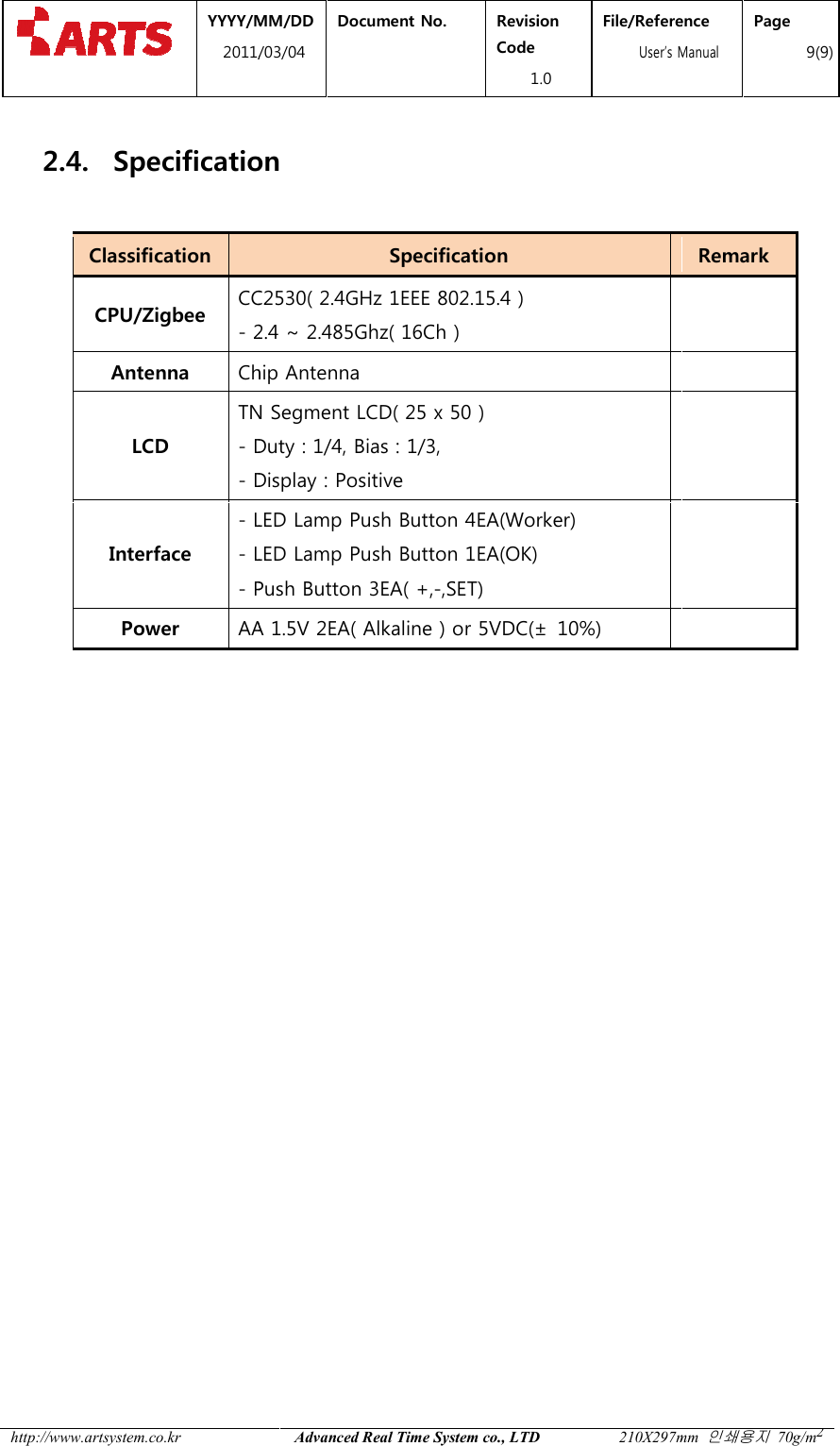
 YYYY/MM2011/03 http://www.artsystem.co.kr  2.4. Specification Classification CPU/Zigbee CC2530( 2.4GHz 1EEE 802.15.4 )- 2.4 ~ 2.485Ghz( 16Ch )Antenna Chip AntennaLCD TN Segment LCD( 25 x- Duty : 1/4, Bias : 1/3, - Display : PositiveInterface - LED Lamp Push Button 4EA(Worker)- LED Lamp Push Button 1EA(OK)- Push Button 3EA( +,Power AA 1.5V 2EA( Alkaline ) or 5VDC(   MM/DD 1/03/04 Document No.  Revision Code 1.0 File/Reference  User’s ManualAdvanced Real Time System co., LTD 210X297mm Specification Specification CC2530( 2.4GHz 1EEE 802.15.4 ) 2.4 ~ 2.485Ghz( 16Ch )  Chip Antenna  TN Segment LCD( 25 x 50 ) Duty : 1/4, Bias : 1/3,  Display : Positive  LED Lamp Push Button 4EA(Worker) LED Lamp Push Button 1EA(OK) Push Button 3EA( +,-,SET)    AA 1.5V 2EA( Alkaline ) or 5VDC(±  10%)  File/Reference s Manual Page 9(9) 210X297mm 인쇄용지 70g/m2 Remark

Navigation menu