Action Technology BTSC001AA BLUETOOTH SPEAKER User Manual User Manul en

Action Technology (Ji'an) Co., Ltd. BLUETOOTH SPEAKER User Manul en

USERS MANUAL

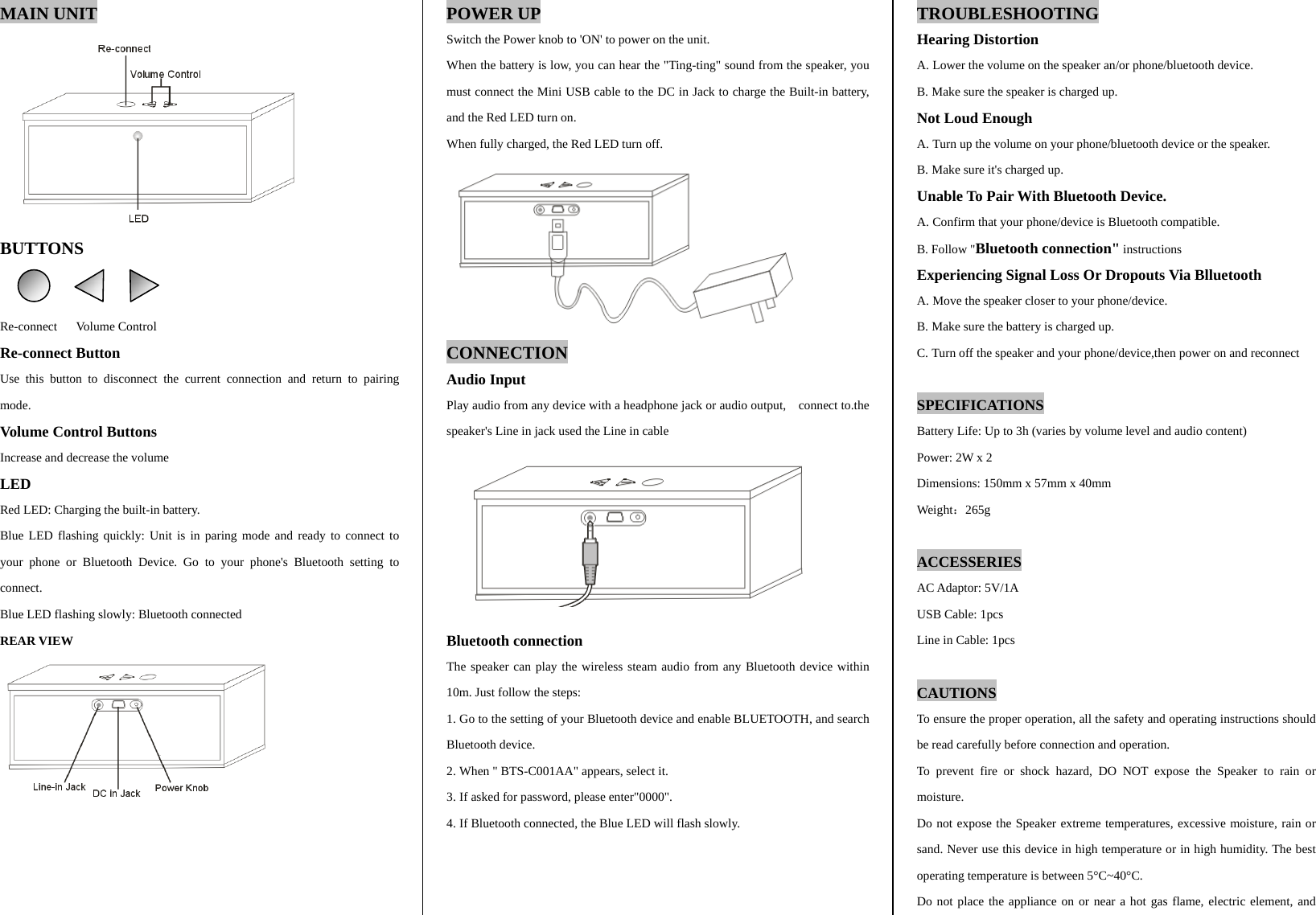
MAIN UNIT  BUTTONS   Re-connect   Volume Control Re-connect Button Use this button to disconnect the current connection and return to pairing mode. Volume Control Buttons Increase and decrease the volume LED Red LED: Charging the built-in battery. Blue LED flashing quickly: Unit is in paring mode and ready to connect to your phone or Bluetooth Device. Go to your phone's Bluetooth setting to connect. Blue LED flashing slowly: Bluetooth connected      POWER UP Switch the Power knob to 'ON' to power on the unit. When the battery is low, you can hear the "Ting-ting" sound from the speaker, you must connect the Mini USB cable to the DC in Jack to charge the Built-in battery, and the Red LED turn on. When fully charged, the Red LED turn off.  CONNECTION Audio Input Play audio from any device with a headphone jack or audio output,    connect to.the speaker's Line in jack used the Line in cable        Bluetooth connection The speaker can play the wireless steam audio from any Bluetooth device within 10m. Just follow the steps: 1. Go to the setting of your Bluetooth device and enable BLUETOOTH, and search Bluetooth device. 2. When " BTS-C001AA" appears, select it. 3. If asked for password, please enter"0000". 4. If Bluetooth connected, the Blue LED will flash slowly.   TROUBLESHOOTING Hearing Distortion A. Lower the volume on the speaker an/or phone/bluetooth device. B. Make sure the speaker is charged up.   Not Loud Enough A. Turn up the volume on your phone/bluetooth device or the speaker. B. Make sure it's charged up. Unable To Pair With Bluetooth Device. A. Confirm that your phone/device is Bluetooth compatible. B. Follow "Bluetooth connection" instructions Experiencing Signal Loss Or Dropouts Via Blluetooth A. Move the speaker closer to your phone/device. B. Make sure the battery is charged up. C. Turn off the speaker and your phone/device,then power on and reconnect  SPECIFICATIONS Battery Life: Up to 3h (varies by volume level and audio content) Power: 2W x 2 Dimensions: 150mm x 57mm x 40mm Weight:265g  ACCESSERIES AC Adaptor: 5V/1A USB Cable: 1pcs Line in Cable: 1pcs  CAUTIONS To ensure the proper operation, all the safety and operating instructions should be read carefully before connection and operation. To prevent fire or shock hazard, DO NOT expose the Speaker to rain or moisture. Do not expose the Speaker extreme temperatures, excessive moisture, rain or sand. Never use this device in high temperature or in high humidity. The best operating temperature is between 5°C~40°C. Do not place the appliance on or near a hot gas flame, electric element, and REAR VIEW
heaters or in areas subjected to direct sunlight.   Don't block any ventilation openings. Clean the Speaker only with a dry cloth. This product is intended to be used only with the power supply provided. The socket-outlet shall be installed near the equipment and shall be easily accessible.  FCC STATEMENT This equipment has been tested and found to comply with the limits for a Class B digital device, pursuant to part 15 of the FCC rules. These limits are designed to provide reasonable protection against harmful interference in a residential installation. This equipment generates, uses and can radiate radio frequency energy and, if not installed and used in accordance with the instructions, may cause harmful interference to radio communications. However, there is no guarantee that interference will not occur in a particular installation. If this equipment does cause harmful interference to radio or television reception, which can be determined by turning the equipment off and on, the user is encouraged to try to correct the interference by one or more of the following measures:  Reorient or relocate the receiving antenna.  Increase the separation between the equipment and receiver.  Connect the equipment into an outlet on a circuit different from that to     which the receiver is connected.  Consult the dealer or an experienced radio/TV technician for help.  FCC CAUTION This device complies with part 15 of the FCC rules. Operation is subject to the following two conditions: (1) this device may not cause harmful interference, and (2) this device must accept any interference received, including interference that may cause undesired operation. Any changes or modifications not expressly approved by the party responsible for compliance could void the user's authority to operate the equipment This device and its antenna must not be co-located or operating in conjunction with any other antenna or transmitter.

Navigation menu