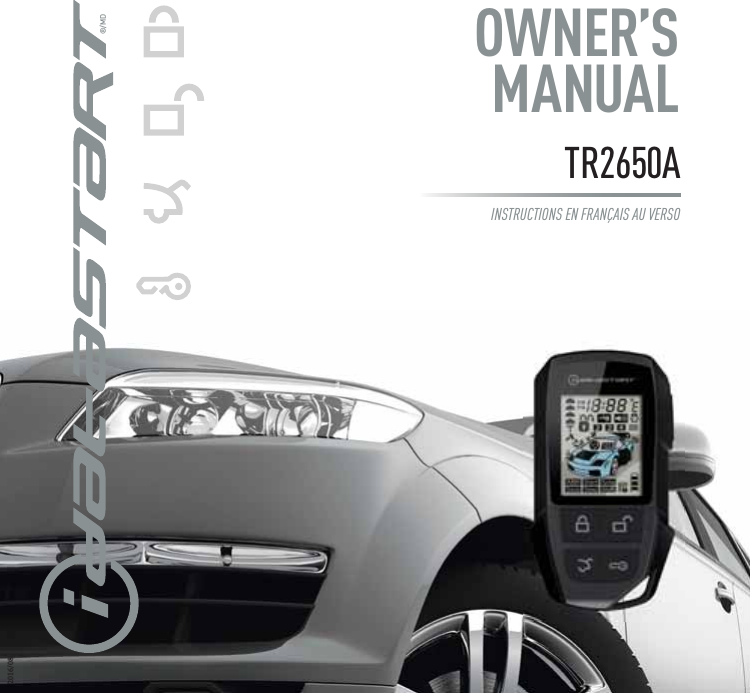
Automotive Data Solutions TR2650A CAR ALARM(TWO WAY) User Manual

Automotive Data Solutions Inc. CAR ALARM(TWO WAY)

user manual

OWNER’S MANUAL®/MDTR2650AINSTRUCTIONS EN FRANÇAIS AU VERSO2016/08
2   IDATASTART OWNER’S GUIDECUSTOMER SUPPORT: 866.427.2999 / WWW.IDATASTART.COMWELCOME TO IDATASTARTCongratulations on the purchase of your iDataStart remote start system. Please take a moment to review the following table of contents to help you quickly access the information you need.iDataStart remote overview 3iDataStart remote functions & confirmations 4-9Programming a new iDataStart remote 9Replacing iDataStart remote batteries 10Remote starting from your factory key fob 10Adjusting engine runtime settings 11Key takeover following remote start 11When servicing your vehicle (Valet Mode) 12Remote start troubleshooting 13Vehicle shutdown troubleshooting 14Limited lifetime warranty 15FCC statement 16SAR information statement 17-18IC statement 19Headquartered in Montreal, Canada, Automotive Data Solutions Inc. (ADS) is a privately held company specialized in the development and marketing of remote start and audio integration solutions destined for the automotive aftermarket. ADS’ award-winning products (marketed under the iDatalink®, iDatalink Maestro® and iDataStart® brands) are sold and installed through a network of Authorized Dealers across North America, South America, Europe and Russia. For more information about ADS’ products and services, visit www.adsdata.ca.
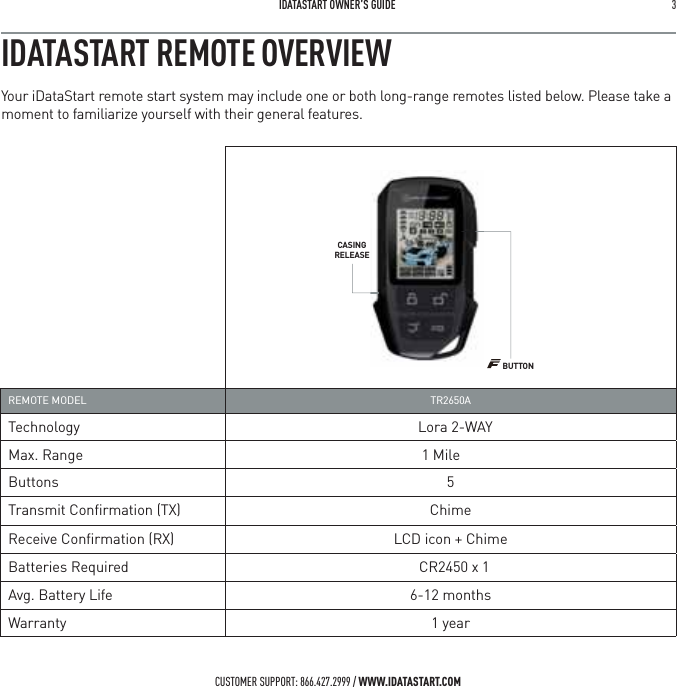
 IDATASTART OWNER’S GUIDE 3 CUSTOMER SUPPORT: 866.427.2999 / WWW.IDATASTART.COMREMOTE MODEL  TR2650ATechnology Lora 2-WAYMax. Range 1 MileButtons 5Transmit Confirmation (TX)  ChimeReceive Confirmation (RX)  LCD icon + ChimeBatteries Required  CR2450 x 1Avg. Battery Life 6-12 monthsWarranty 1 yearIDATASTART REMOTE OVERVIEWYour iDataStart remote start system may include one or both long-range remotes listed below. Please take a moment to familiarize yourself with their general features.BUTTONCASINGRELEASE
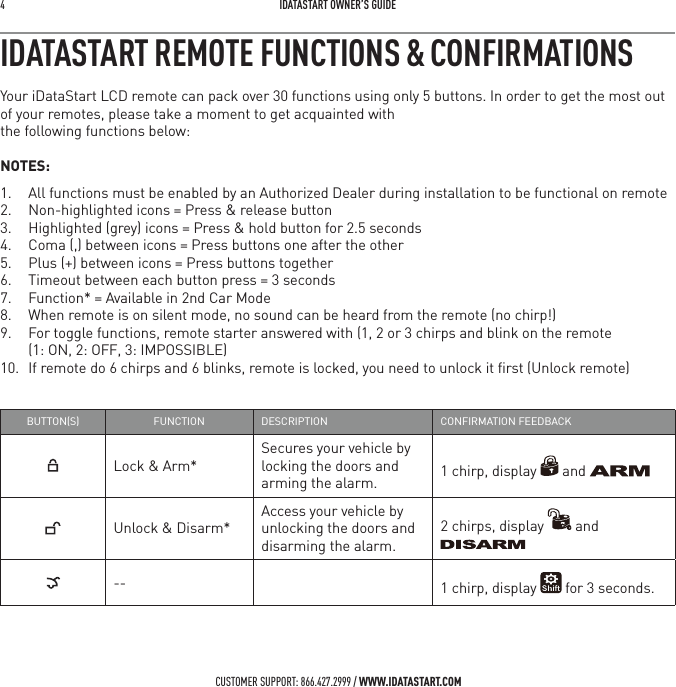
4   IDATASTART OWNER’S GUIDECUSTOMER SUPPORT: 866.427.2999 / WWW.IDATASTART.COMIDATASTART REMOTE FUNCTIONS & CONFIRMATIONSYour iDataStart LCD remote can pack over 30 functions using only 5 buttons. In order to get the most out of your remotes, please take a moment to get acquainted with  the following functions below:NOTES:1.  All functions must be enabled by an Authorized Dealer during installation to be functional on remote2.  Non-highlighted icons = Press & release button3.  Highlighted (grey) icons = Press & hold button for 2.5 seconds4.  Coma (,) between icons = Press buttons one after the other5.  Plus (+) between icons = Press buttons together6.  Timeout between each button press = 3 seconds7.  Function* = Available in 2nd Car Mode8.  When remote is on silent mode, no sound can be heard from the remote (no chirp!)9.  For toggle functions, remote starter answered with (1, 2 or 3 chirps and blink on the remote  (1: ON, 2: OFF, 3: IMPOSSIBLE)10.  If remote do 6 chirps and 6 blinks, remote is locked, you need to unlock it first (Unlock remote)BUTTONS FUNCTION DESCRIPTION CONFIRMATION FEEDBACKLock & Arm*Secures your vehicle by locking the doors and arming the alarm.  1 chirp, display   and Unlock & Disarm*Access your vehicle by unlocking the doors and disarming the alarm. 2 chirps, display   and -- 1 chirp, display   for 3 seconds.
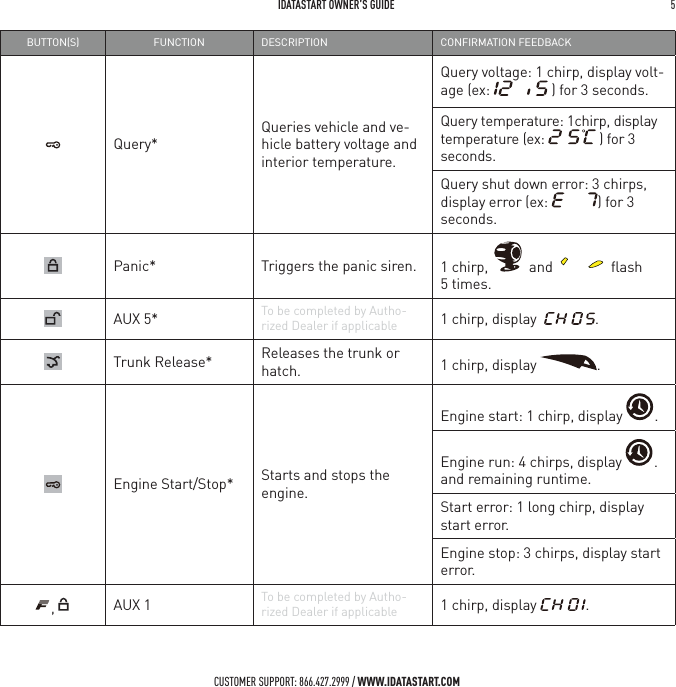
 IDATASTART OWNER’S GUIDE 5 CUSTOMER SUPPORT: 866.427.2999 / WWW.IDATASTART.COMBUTTONS FUNCTION DESCRIPTION CONFIRMATION FEEDBACKQuery*Queries vehicle and ve-hicle battery voltage and interior temperature.Query voltage: 1 chirp, display volt-age (ex:   ) for 3 seconds.Query temperature: 1chirp, display temperature (ex:   ) for 3 seconds.Query shut down error: 3 chirps, display error (ex:  ) for 3 seconds.Panic* Triggers the panic siren. 1 chirp,    and   flash 5 times.AUX 5* To be completed by Autho-rized Dealer if applicable 1 chirp, display   .Trunk Release* Releases the trunk or hatch. 1 chirp, display  .Engine Start/Stop* Starts and stops the engine.Engine start: 1 chirp, display  . Engine run: 4 chirps, display  . and remaining runtime.Start error: 1 long chirp, display start error.Engine stop: 3 chirps, display start error.,AUX 1 To be completed by Autho-rized Dealer if applicable 1 chirp, display  .
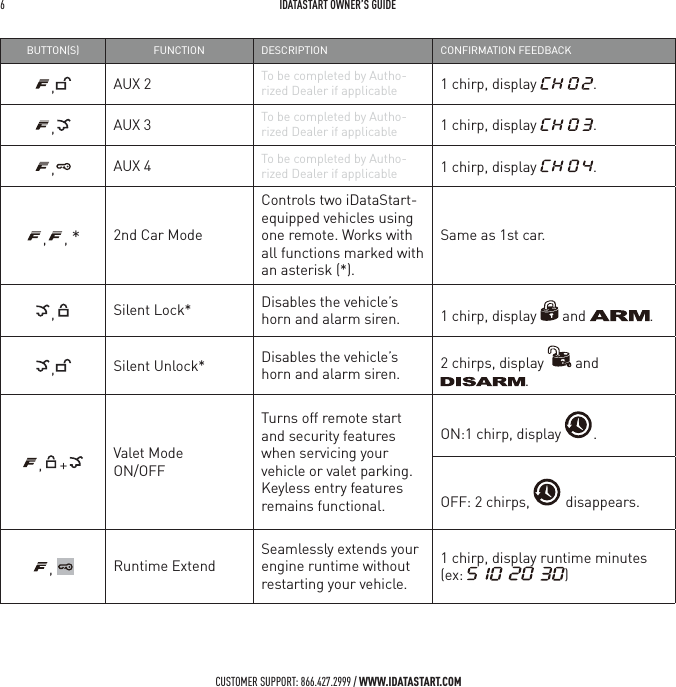
6   IDATASTART OWNER’S GUIDECUSTOMER SUPPORT: 866.427.2999 / WWW.IDATASTART.COMBUTTONS FUNCTION DESCRIPTION CONFIRMATION FEEDBACK,AUX 2 To be completed by Autho-rized Dealer if applicable 1 chirp, display  .,AUX 3 To be completed by Autho-rized Dealer if applicable 1 chirp, display  .,AUX 4 To be completed by Autho-rized Dealer if applicable 1 chirp, display  ., , *2nd Car ModeControls two iDataStart-equipped vehicles using one remote. Works with all functions marked with an asterisk (*).Same as 1st car.,Silent Lock* Disables the vehicle’s horn and alarm siren. 1 chirp, display   and  .,Silent Unlock* Disables the vehicle’s horn and alarm siren. 2 chirps, display   and ., + Valet Mode  ON/OFFTurns off remote start and security features when servicing your vehicle or valet parking. Keyless entry features remains functional.ON:1 chirp, display  .OFF: 2 chirps,   disappears.,  Runtime ExtendSeamlessly extends your engine runtime without restarting your vehicle.1 chirp, display runtime minutes (ex:  )
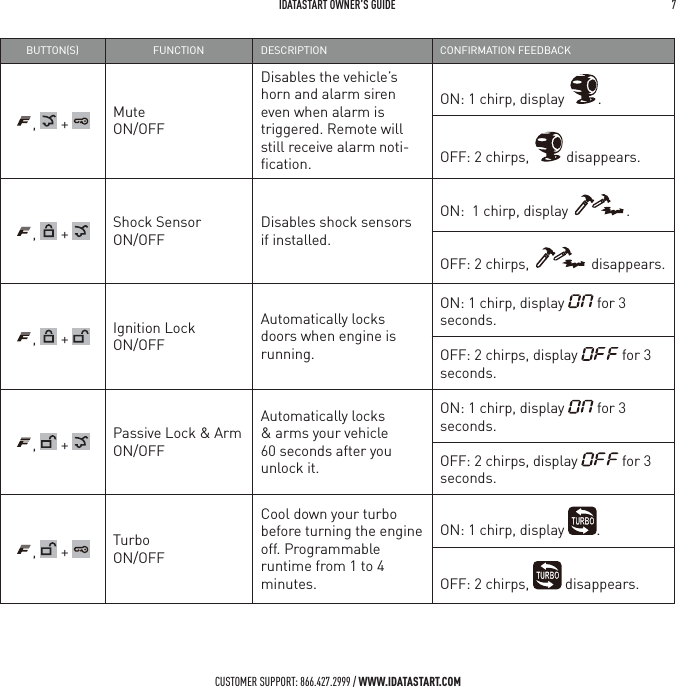
 IDATASTART OWNER’S GUIDE 7 CUSTOMER SUPPORT: 866.427.2999 / WWW.IDATASTART.COMBUTTONS FUNCTION DESCRIPTION CONFIRMATION FEEDBACK,   +  Mute  ON/OFFDisables the vehicle’s horn and alarm siren even when alarm is triggered. Remote will still receive alarm noti-fication.ON: 1 chirp, display  .OFF: 2 chirps,   disappears.,   +  Shock Sensor  ON/OFFDisables shock sensors if installed.ON:  1 chirp, display  .OFF: 2 chirps,   disappears.,   +  Ignition Lock  ON/OFFAutomatically locks doors when engine is running.ON: 1 chirp, display   for 3 seconds.OFF: 2 chirps, display   for 3 seconds.,   +  Passive Lock & Arm ON/OFFAutomatically locks & arms your vehicle 60 seconds after you unlock it.ON: 1 chirp, display   for 3 seconds.OFF: 2 chirps, display   for 3 seconds.,   +  Turbo  ON/OFFCool down your turbo before turning the engine off. Programmable runtime from 1 to 4 minutes.ON: 1 chirp, display  .OFF: 2 chirps,   disappears.
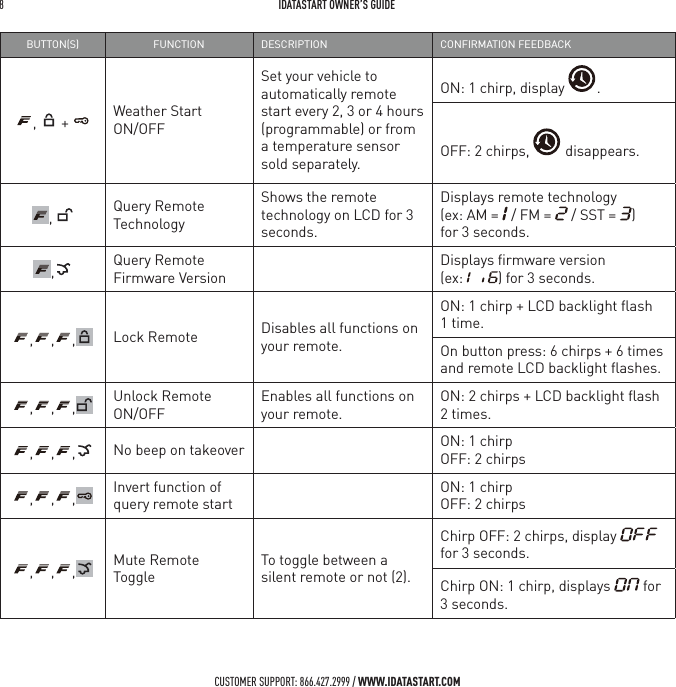
8   IDATASTART OWNER’S GUIDECUSTOMER SUPPORT: 866.427.2999 / WWW.IDATASTART.COMBUTTONS FUNCTION DESCRIPTION CONFIRMATION FEEDBACK,   +  Weather Start  ON/OFFSet your vehicle to automatically remote start every 2, 3 or 4 hours (programmable) or from a temperature sensor sold separately.ON: 1 chirp, display  . OFF: 2 chirps,   disappears.,  Query Remote TechnologyShows the remote technology on LCD for 3 seconds.Displays remote technology  (ex: AM =   / FM =   / SST =  )  for 3 seconds.,Query Remote Firmware VersionDisplays firmware version  (ex:  ) for 3 seconds., , , Lock Remote Disables all functions on your remote.ON: 1 chirp + LCD backlight flash 1 time.On button press: 6 chirps + 6 times and remote LCD backlight flashes., , , Unlock RemoteON/OFFEnables all functions on your remote. ON: 2 chirps + LCD backlight flash 2 times., , , No beep on takeover ON: 1 chirpOFF: 2 chirps, , , Invert function of query remote startON: 1 chirpOFF: 2 chirps, , , Mute Remote ToggleTo toggle between a silent remote or not (2).Chirp OFF: 2 chirps, display   for 3 seconds.Chirp ON: 1 chirp, displays   for 3 seconds.
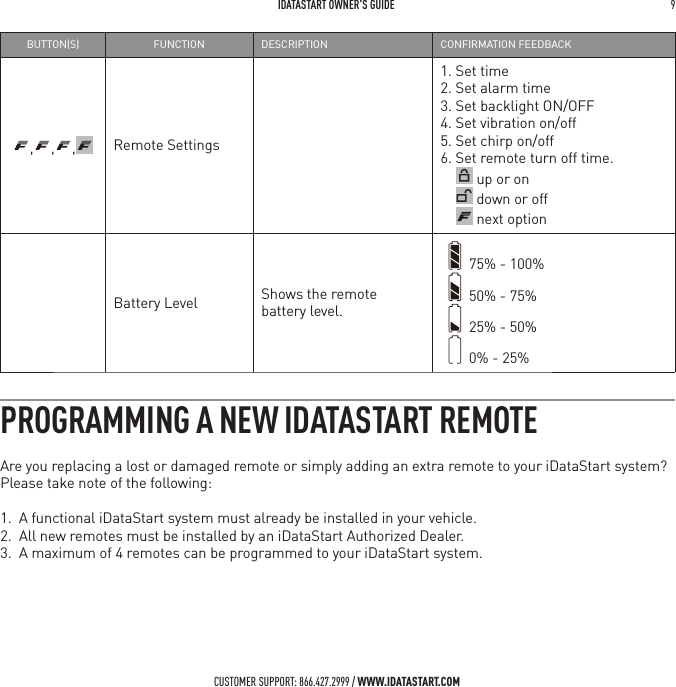
 IDATASTART OWNER’S GUIDE 9 CUSTOMER SUPPORT: 866.427.2999 / WWW.IDATASTART.COMBUTTONS FUNCTION DESCRIPTION CONFIRMATION FEEDBACK, , , Remote Settings1. Set time2. Set alarm time3. Set backlight ON/OFF4. Set vibration on/off5. Set chirp on/off6. Set remote turn off time.      up or on      down or off       next optionBattery Level Shows the remote  battery level.75% - 100%  50% - 75%    25% - 50%0% - 25%PROGRAMMING A NEW IDATASTART REMOTEAre you replacing a lost or damaged remote or simply adding an extra remote to your iDataStart system?  Please take note of the following: 1.  A functional iDataStart system must already be installed in your vehicle.2.  All new remotes must be installed by an iDataStart Authorized Dealer.3.  A maximum of 4 remotes can be programmed to your iDataStart system.
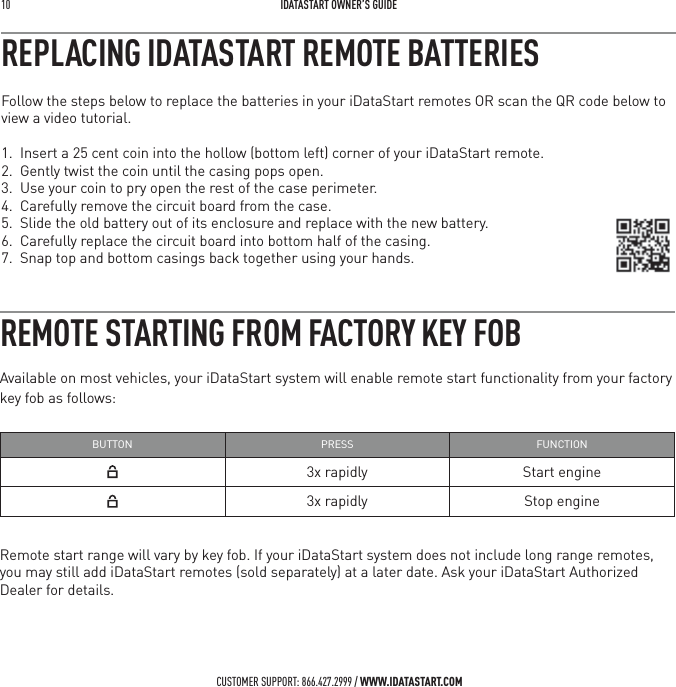
10   IDATASTART OWNER’S GUIDECUSTOMER SUPPORT: 866.427.2999 / WWW.IDATASTART.COMREMOTE STARTING FROM FACTORY KEY FOBAvailable on most vehicles, your iDataStart system will enable remote start functionality from your factory key fob as follows:BUTTON PRESS FUNCTION3x rapidly Start engine3x rapidly Stop engineRemote start range will vary by key fob. If your iDataStart system does not include long range remotes, you may still add iDataStart remotes (sold separately) at a later date. Ask your iDataStart Authorized Dealer for details.Follow the steps below to replace the batteries in your iDataStart remotes OR scan the QR code below to view a video tutorial. 1.  Insert a 25 cent coin into the hollow (bottom left) corner of your iDataStart remote.2.  Gently twist the coin until the casing pops open.3.  Use your coin to pry open the rest of the case perimeter.4.  Carefully remove the circuit board from the case.5.  Slide the old battery out of its enclosure and replace with the new battery.6.  Carefully replace the circuit board into bottom half of the casing. 7.  Snap top and bottom casings back together using your hands.REPLACING IDATASTART REMOTE BATTERIES
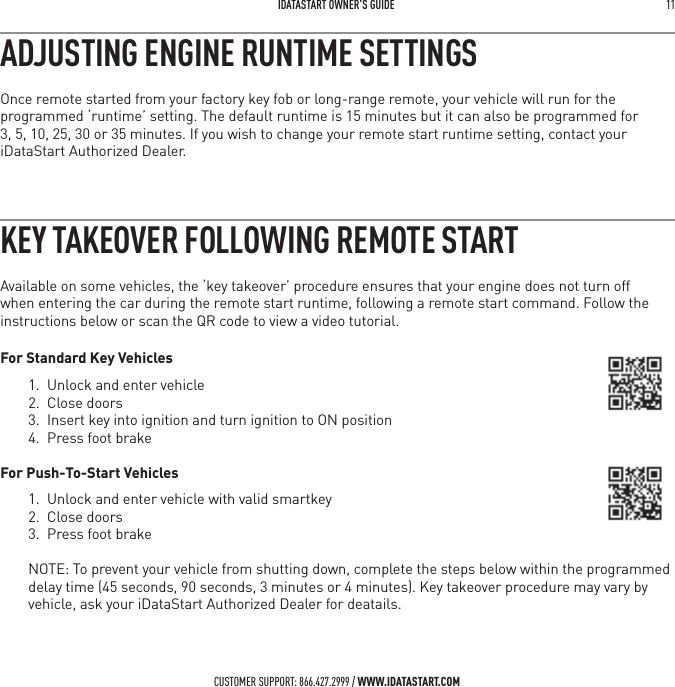
 IDATASTART OWNER’S GUIDE 11 CUSTOMER SUPPORT: 866.427.2999 / WWW.IDATASTART.COMADJUSTING ENGINE RUNTIME SETTINGSOnce remote started from your factory key fob or long-range remote, your vehicle will run for the programmed ‘runtime’ setting. The default runtime is 15 minutes but it can also be programmed for  3, 5, 10, 25, 30 or 35 minutes. If you wish to change your remote start runtime setting, contact your iDataStart Authorized Dealer.KEY TAKEOVER FOLLOWING REMOTE STARTAvailable on some vehicles, the ‘key takeover’ procedure ensures that your engine does not turn off when entering the car during the remote start runtime, following a remote start command. Follow the instructions below or scan the QR code to view a video tutorial.For Standard Key Vehicles1.  Unlock and enter vehicle2. Close doors3.  Insert key into ignition and turn ignition to ON position4.  Press foot brake For Push-To-Start Vehicles1.  Unlock and enter vehicle with valid smartkey2. Close doors3.  Press foot brakeNOTE: To prevent your vehicle from shutting down, complete the steps below within the programmed delay time (45 seconds, 90 seconds, 3 minutes or 4 minutes). Key takeover procedure may vary by vehicle, ask your iDataStart Authorized Dealer for deatails.
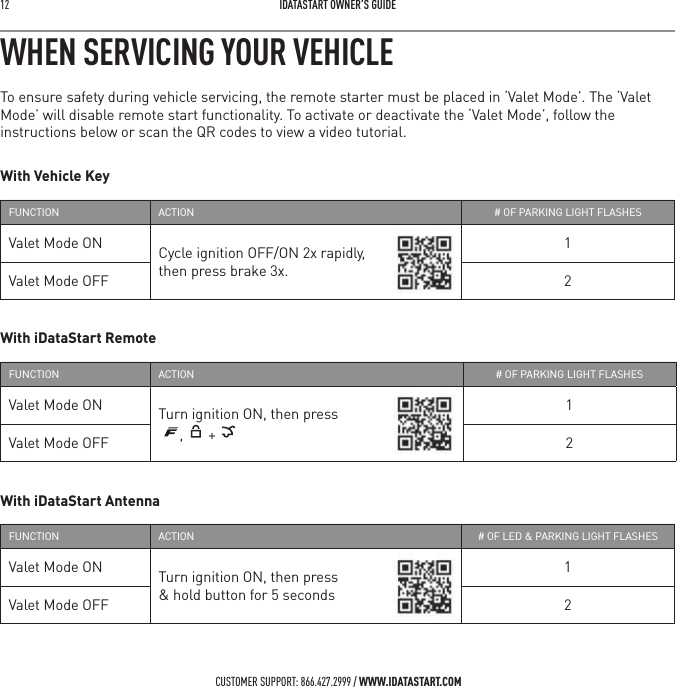
12   IDATASTART OWNER’S GUIDECUSTOMER SUPPORT: 866.427.2999 / WWW.IDATASTART.COMWHEN SERVICING YOUR VEHICLETo ensure safety during vehicle servicing, the remote starter must be placed in ‘Valet Mode’. The ‘Valet Mode’ will disable remote start functionality. To activate or deactivate the ‘Valet Mode’, follow the instructions below or scan the QR codes to view a video tutorial.With Vehicle Key FUNCTION ACTION # OF PARKING LIGHT FLASHESValet Mode ON Cycle ignition OFF/ON 2x rapidly,  then press brake 3x.1Valet Mode OFF 2With iDataStart RemoteFUNCTION ACTION # OF PARKING LIGHT FLASHESValet Mode ON Turn ignition ON, then press  ,  + 1Valet Mode OFF 2With iDataStart Antenna FUNCTION ACTION # OF LED & PARKING LIGHT FLASHESValet Mode ON Turn ignition ON, then press  & hold button for 5 seconds1Valet Mode OFF 2
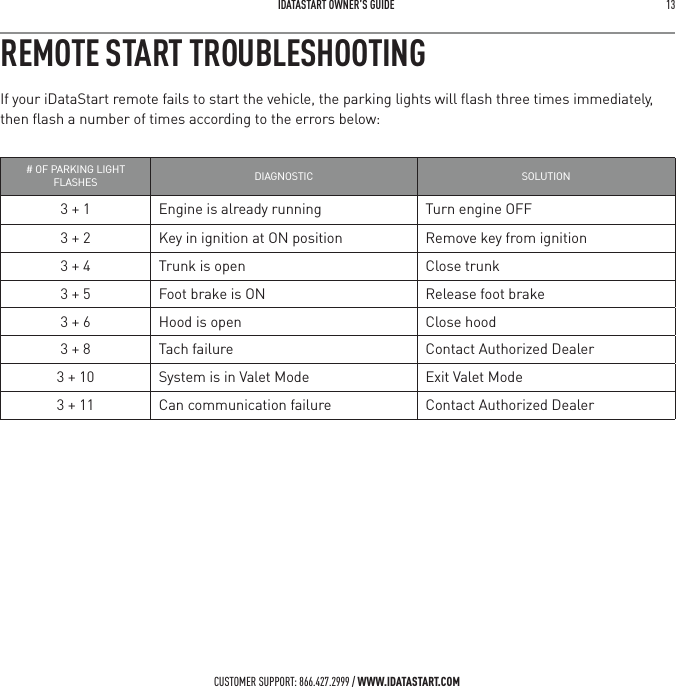
 IDATASTART OWNER’S GUIDE 13 CUSTOMER SUPPORT: 866.427.2999 / WWW.IDATASTART.COMREMOTE START TROUBLESHOOTINGIf your iDataStart remote fails to start the vehicle, the parking lights will flash three times immediately, then flash a number of times according to the errors below:# OF PARKING LIGHT FLASHES DIAGNOSTIC SOLUTION3 + 1 Engine is already running Turn engine OFF3 + 2 Key in ignition at ON position Remove key from ignition3 + 4 Trunk is open Close trunk3 + 5 Foot brake is ON Release foot brake3 + 6 Hood is open Close hood3 + 8 Tach failure Contact Authorized Dealer3 + 10 System is in Valet Mode Exit Valet Mode3 + 11 Can communication failure Contact Authorized Dealer
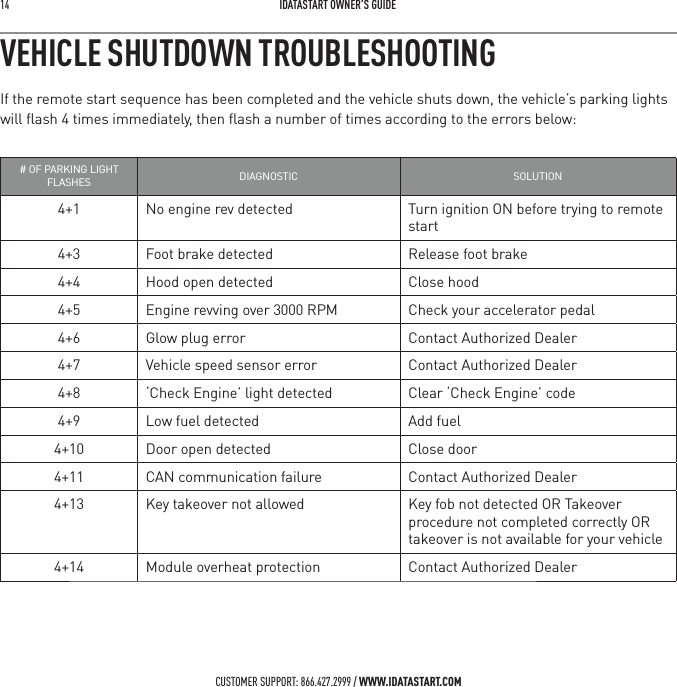
14   IDATASTART OWNER’S GUIDECUSTOMER SUPPORT: 866.427.2999 / WWW.IDATASTART.COMVEHICLE SHUTDOWN TROUBLESHOOTINGIf the remote start sequence has been completed and the vehicle shuts down, the vehicle’s parking lights  will flash 4 times immediately, then flash a number of times according to the errors below:# OF PARKING LIGHT FLASHES DIAGNOSTIC SOLUTION4+1 No engine rev detected Turn ignition ON before trying to remote start4+3 Foot brake detected Release foot brake4+4 Hood open detected Close hood4+5 Engine revving over 3000 RPM Check your accelerator pedal4+6 Glow plug error Contact Authorized Dealer4+7 Vehicle speed sensor error Contact Authorized Dealer4+8 ‘Check Engine’ light detected Clear ‘Check Engine’ code4+9 Low fuel detected Add fuel4+10 Door open detected Close door4+11 CAN communication failure Contact Authorized Dealer4+13 Key takeover not allowed  Key fob not detected OR Takeover procedure not completed correctly OR takeover is not available for your vehicle4+14 Module overheat protection  Contact Authorized Dealer
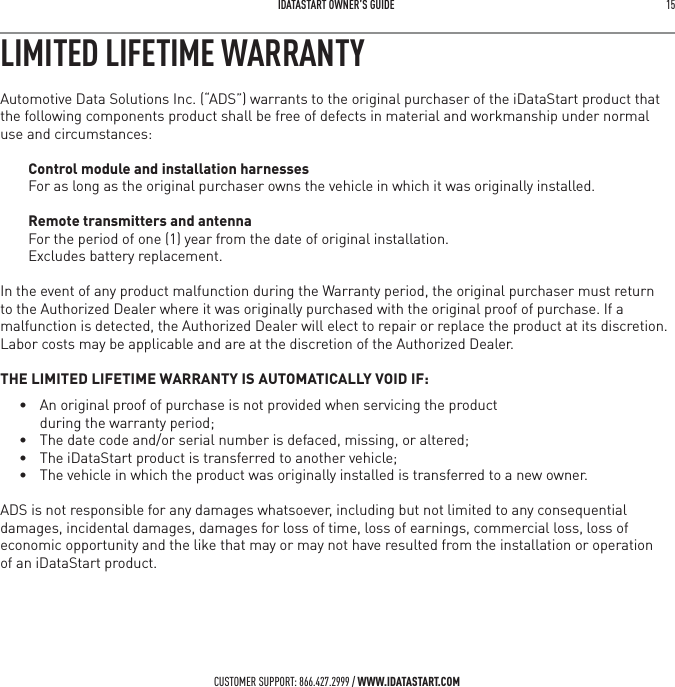
IDATASTART OWNER’S GUIDE 15 CUSTOMER SUPPORT: 866.427.2999 / WWW.IDATASTART.COMLIMITED LIFETIME WARRANTYAutomotive Data Solutions Inc. (“ADS”) warrants to the original purchaser of the iDataStart product that the following components product shall be free of defects in material and workmanship under normal use and circumstances:Control module and installation harnessesFor as long as the original purchaser owns the vehicle in which it was originally installed.Remote transmitters and antennaFor the period of one (1) year from the date of original installation.  Excludes battery replacement. In the event of any product malfunction during the Warranty period, the original purchaser must return to the Authorized Dealer where it was originally purchased with the original proof of purchase. If a malfunction is detected, the Authorized Dealer will elect to repair or replace the product at its discretion. Labor costs may be applicable and are at the discretion of the Authorized Dealer. THE LIMITED LIFETIME WARRANTY IS AUTOMATICALLY VOID IF:•  An original proof of purchase is not provided when servicing the product during the warranty period;•  The date code and/or serial number is defaced, missing, or altered;•  The iDataStart product is transferred to another vehicle;•  The vehicle in which the product was originally installed is transferred to a new owner.ADS is not responsible for any damages whatsoever, including but not limited to any consequential damages, incidental damages, damages for loss of time, loss of earnings, commercial loss, loss of economic opportunity and the like that may or may not have resulted from the installation or operation  of an iDataStart product.
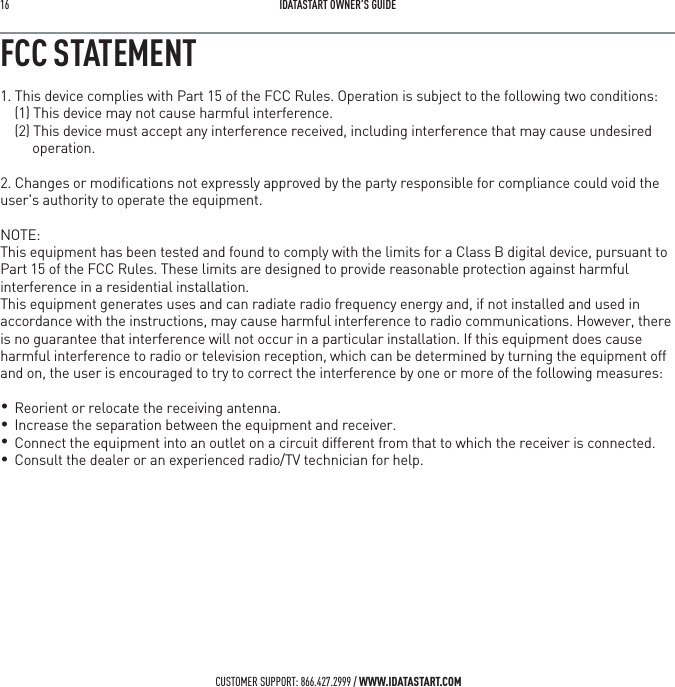
16   IDATASTART OWNER’S GUIDECUSTOMER SUPPORT: 866.427.2999 / WWW.IDATASTART.COMFCC STATEMENT1. This device complies with Part 15 of the FCC Rules. Operation is subject to the following two conditions:(1) This device may not cause harmful interference.(2) This device must accept any interference received, including interference that may cause undesired operation.2. Changes or modifications not expressly approved by the party responsible for compliance could void the user's authority to operate the equipment.NOTE: This equipment has been tested and found to comply with the limits for a Class B digital device, pursuant to Part 15 of the FCC Rules. These limits are designed to provide reasonable protection against harmful interference in a residential installation.This equipment generates uses and can radiate radio frequency energy and, if not installed and used in accordance with the instructions, may cause harmful interference to radio communications. However, there is no guarantee that interference will not occur in a particular installation. If this equipment does cause harmful interference to radio or television reception, which can be determined by turning the equipment off and on, the user is encouraged to try to correct the interference by one or more of the following measures:    Reorient or relocate the receiving antenna.    Increase the separation between the equipment and receiver.    Connect the equipment into an outlet on a circuit different from that to which the receiver is connected.     Consult the dealer or an experienced radio/TV technician for help.• •   • •
IDATASTART OWNER’S GUIDE 17 SAR Information Statement5IF wireless CAR ALARM (TWO WAY) is a radio transmitter. It is designed and manufactured not to exceed the emission limits for exposure to radiofrequency (RF) energy set by the Federal Communications Commission of the U.S. Government. These limits are part of comprehensive guidelines and establish permitted levels of RF energy for the general population. The guidelines are based on standards that were developed by independent scientific organizations through periodic and thorough evaluation of scientific studies. The standards include a substantial safety margin designed to assure the  safety of all persons, regardless of age and health. The exposure standard for wireless CAR ALARM (TWO WAY)s employs a unit of measurement known as the Specific Absorption Rate, or SAR. The SAR limit set by the FCC is   W/kg.The highest SAR value for this model CAR ALARM (TWO WAY) when tested for use at the extremity is 0.047   W/Kg .While there may be differences between the SAR levels of various CAR ALARM (TWO WAY)  and at various positions, they all meet the government requirement for safe exposure. The FCC has granted an Equipment Authorization for this model CAR ALARM (TWO WAY) with all reported SAR levels evaluated as in compliance with the FCC RF exposure guidelines. SAR information on this model CAR ALARM (TWO WAY) is on file with the FCC and can be found under the Display Grant section of http://www.fcc.gov/ oet/fccid after searching on FCC ID:2AEPJ-TR2650AThis device complies with FCC and ISED 10-g extremity SAR requirements when the device is used at 0 mm separation.Changes or modifications not expressly approved by the party responsible for compliance could void the user's authority to operate the equipment.CUSTOMER SUPPORT: 866.427.2999 / WWW.IDATASTART.COM
18   IDATASTART OWNER’S GUIDECUSTOMER SUPPORT: 866.427.2999 / WWW.IDATASTART.COMIC statementThis device complies with Industry Canada licence-exempt RSS standard(s).Operation is subject to the following two conditions:(1) This device may not cause interference, and.(2) This device must accept any interference, including interference that may cause undesired operation of the device.This equipment complies with IC radiation exposure limits set forth for an uncontrolled environment.End user must follow the specific operating instructions for satisfying RF exposure compliance. Thistransmitter must not be co-located or operating in conjunction with any other antenna or transmitter.The device is designed to meet the requirements for exposure to radio waves established by theFederal CommunicationsCommission (USA). These requirements set a SAR limit of  W/kg, averaged over one gram of tissue.The highest SAR value reported under. This standard during product certification for use when properly test at the extremityis 0.047  W/kg.Le présentappareilestconforme aux CNR d'Industrie Canada applicables auxappareils radio exempts de licence. L'exploitationestautorisée aux deux conditions suivantes:  l'appareil ne doit pas produire de brouillage, et  l'utilisateur de l'appareildoit accepter tout brouillageradioélectriquesubi, mêmesi le brouillageestsusceptible d'encompromettre le fonctionnement.Cetéquipementestconforme aux limitesd'exposition aux rayonnements de la IC définies pour un environnement non contrôlé. L'utilisateur final doit respecter les instructions de fonctionnementspécifiques pour satisfaire la conformité aux expositions RF. Cetémetteur ne doit pas être co-localiséesouopérant en conjonction avec uneautreantenneouémetteur.L'appareil mobile estconçu pour répondre aux exigences en matièred'exposition aux ondes radio établiespar la Federal CommunicationsCommission (Etats-Unis). Cesexigencesdéfinissent la valeur SAR limite à   W/kg, en moyenne pour ungramme de tissu.La valeur SAR la plus élevée pour cemodèled’alarme de voiture (deuxvoies) lorsqu’ilesttesté pour uneutilisation à l’extrémitéest de 0.047   W/ Kg Cetappareilrespecte les exigences de 10 g extrémité SAR FCC et ISED lorsquel’appareilestutilisélors de la séparation de 0 mm.CAN ICES-3 (B)/NMB-3(B)
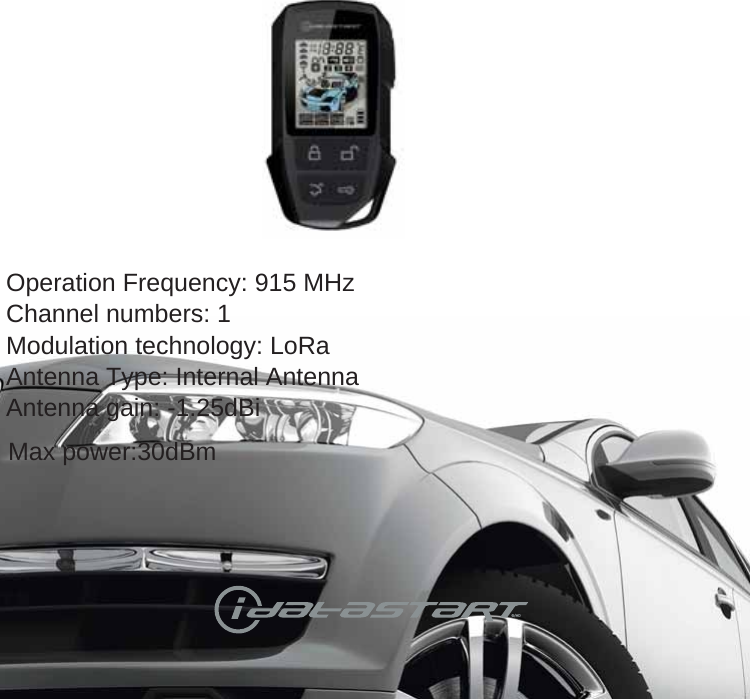
CUSTOMER SUPPORT: 866.427.2999 / WWW.IDATASTART.COM®/MDOperation Frequency: 915 MHzChannel numbers: 1Modulation technology: LoRaAntenna Type: Internal AntennaAntenna gain: -1.25dBiMax power:30dBm

Navigation menu