Berlin Group IR160US Internet Radio User Manual
Berlin Brands Group Inc. Internet Radio
User Manual

1
Usermanual
Product: INTERNET RADIO
Model: US-10031584
1.Features/TechnicalSpecifications
Availableforglobalstationsbyinternet
CompatiblewiththeaudioofWMA/MP3/OGG
With2.8”RGBTFTscreen
WiththeadaptorofDC5.9V/1.2A
AccesstoavailableWi‐FiInternet
2.MainKeys
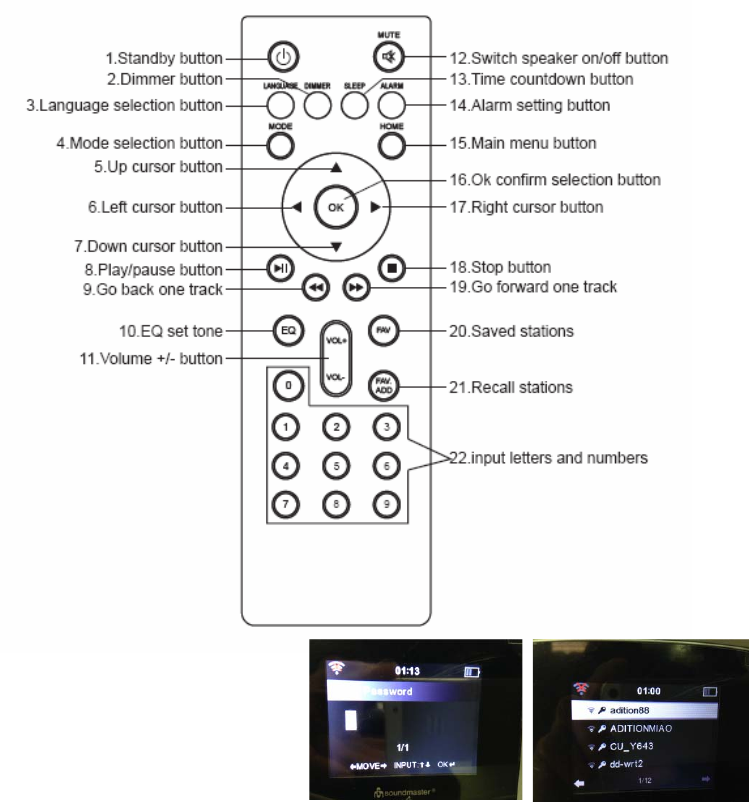
1. Speaker
2. Menu‐‐‐ShowMenuforthecurrentmode
3. Left‐‐‐Turnleft
4. Fav‐‐‐Quickaccesstofavoritestations
5. Standby‐‐‐Presstoswitchbetweenstandbyandon
2
6. Volume/Navigator/OK‐‐‐Combinekey
Rotaterotaryknobtoadjustthevolumewheninworkingmode
Rotaterotaryknobtoselectwheninmenumode
Pressrotaryknobtoconfirmwheninmenumode
Switchprogrammenuwheninworkingmode
7. Sleep‐‐‐Presstosetthesleeptimer
8. Right‐‐‐Turnright
9. Alarm‐‐‐Alarmsetting
10. Dimmer‐‐‐Adjustthebrightnessofscreentodifferentlevel
11. TFTscreen
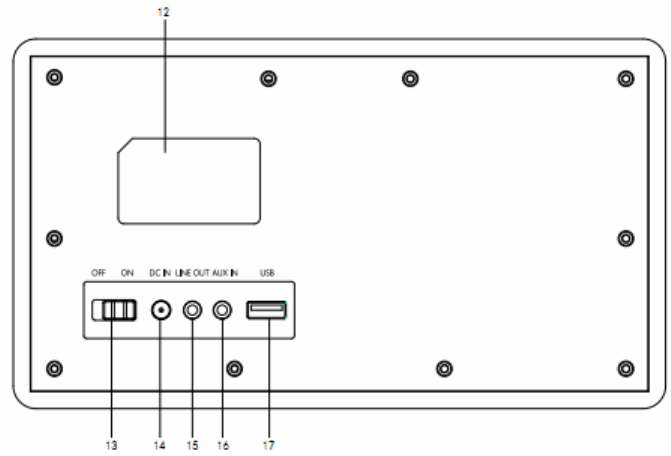
12. Ratinglabelrecess
13. On/Offswitchbutton
14. DCINsocket
15. Lineoutsocket
16. Auxinsocket
17. USBport‐playyourUSBsticks
3
3.SwitchOnorOff
PlugtheadaptorintotheDCinsocket(ontherearoftheproduct)andswitchthe“ON/OFF”
switchto“ON”,then“Welcome”willbeshownonthescreen.Meanwhile,theradiowillscan
theavailableaccesspointautomatically.YoucanusethebuttonVolume/Navigatortochoose
theinternet,andthenpressOKtoconfirmtheInternet.

4
Thestepsareasbelowforfirstuse:
1. Therewillbeprompt:WouldyouliketoconfigureNetworknow?PressNavigatorknobto
ChooseYES.Thentheinternetradiowillscanavailablenetwork.
2. Choosethenetworkyouwanttoconnectbyswitchingthenavigatorknobandpressitto
confirm.
3. Itwillremindyoutoenterpassword,byswitchingthenavigatorbuttontoinputthe
number,letterorcharacter.Afterfinishinginput,pressesnavigatorknobtoconfirmyour
input.
4. Thenyourinternetradioconnectedtoyournetwork.
Tips:Whenyouneedinputtheinternetpassword,pleasepressNavigatorbuttontochoose
thecharacters.Inthiscondition,pressLeftbuttoncanturnleftanddeletetheleftcharacters
atthesametime:
Note:Belowcharactersareavailablefortheradio:
Numbers(from0‐9)
Englishletters(fromAtoZandfromatoz)
Othercharacters(DEL,@,Blank,!,”,#,$,%,&,*,’,+and(,).
3.BasicOperation
→TimeDisplay→Analog
→Digital
→ManagemymediaU
→Network→WirelessNetworkConfiguration
→WirelessNetwork(WPSPBC)
→ManualConfiguration
→CheckNetworkwhenPowerOn
→Date&Time→SetDateandTime
→Configuration→SetTimeFormat
→SetDateFormat
Main
interface

5
Enter→→Alarm→Alarm1(TurnOff)→TurnOn
→TurnOff
→Alarm2(TurnOff)→TurnOn
→TurnOff
→NAPAlarm1(TurnOff)
→AlarmVolume
→Timer
→Language
→Dimmer→PowerSaving
→TurnOn
→Display→Color
→Monochrome
→PowerManagemet
→SleepTimer
→Buffer
→Weather→SetLocation
→TemperatureUnit
→ShowonStandy
→Configuration→LocalRadioSetup→ManualSetup(Country)
→ManualSetup(City)
→AutoDetect
Main
interface
Enter
→→PlaybackSetup→Off
→Repeatall
→Repeatone
→Shuffle
→DLNASetup→Rename(AirMusic)
→AirMusicControlApp
→Equaliser

6
→ResumeWhenPowerOn→On
→Off
→SoftwareUpdate
→ResettoDefault
→InternetRadio→MyFavorite
→RadioStation/Music
→LocalRadio
→History
→Service→SearchRadioStation
→AddNewRadioStation
→MediaCenter→USB
→UPnP
→MyPlaylist
→ClearMyplaylist
→InformationCenter→WeatherInformation
→FinancialInformation
→SystemInformation
4.FunctionOperation
1).AUX(Lineinput)
Function:Tosetuptheplayingmodeofprogramwithaudioplayfromoutsource.
PressMenu→RotatenavigatebuttontochooseAux→PressOKtoconfirm.
2)InternetRadio
Functions:Tosetuptheplaymodeofinternetradio
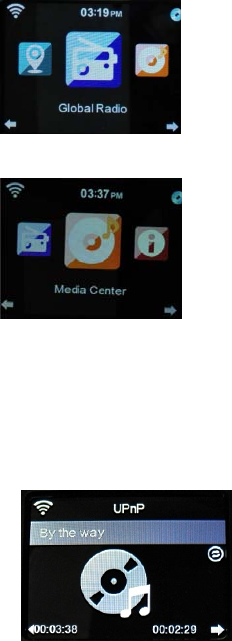
Steps:PressMenu→RotateNavigatebuttontochooseInternet
7
radio→PressOKbuttontoentertheinterface,thenbelowchoiceswill
beshownonthescreen:
1. MyFavorite
2. RadioStation/Music
3. LocalRadio
4. History
5. Service
3).MediaCenter
3.1USB
Functions:PlaytheaudiomediumbyUSB,whichis
compatiblewiththefilesofWMA/MP3/AAC/AAC+/FLAC/WAV.
Steps:PressMenu→RotateNavigatebuttontochoose“MediaCenter”
→PressOKtoentertheinterface.→Choose“USB”byrotateNavigatebutton→EnteritbyOK
button.
CompatiblewithUSB3.0andlowerversions.
Forthesetupofplay,pleaserefertothePlaybacksetupinConfiguration.
3.2UPNP
FUNCTIONS:Playthemediaincomputer.
Steps:PressMenu→RotateNavigatebuttontochoose“
MediaCenter”→pressOKbuttontoentertheinterface
→Choose“UPNP”byrotateNavigatebutton→EnteritbypressOK
Button.
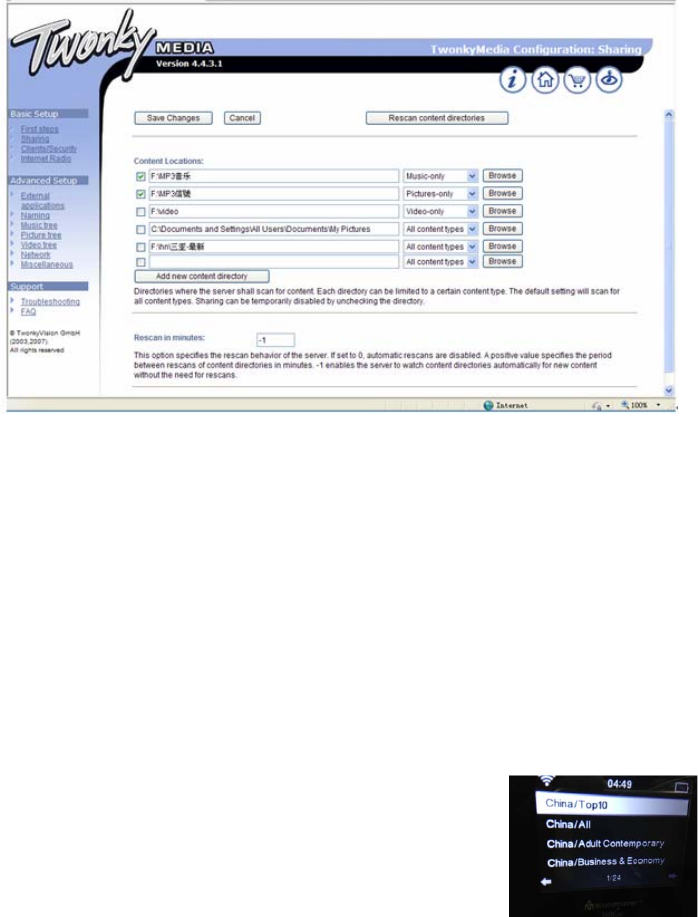
Note:Youmustinstallthesoftwareof“WindowsMedia
Play11”(orupgradeversions)orTwonkyMediain
Yourcomputer,whichisnecessaryfortheUPNPoperation.
In“WindowsMediaPlay”,youshouldgetthemediatoshareinyourplaylist.
Yourcomputermustbeavailabletotheinternet.
Themediamustbeputinyourplaylist.
Yourcomputermustbeallowedtobelinkedwithothers.(Youcansetupitin“Windows
MediaPlay”byhandorautomatically)
8
3.3MyPlaylist
Steps:PressMenu→RotateNavigatebuttontochoose“MediaCenter”→Pressokbuttonto
entertheinterface→Choose“Myplaylist”byrotateNavigateButton→EnteritbyOKbutton.
Note:IntheUPNPmode,whenplayingyoucanlongpressOKbuttontoputthechosenfile
intoyour”Myplaylist”.
3.4ClearMyPlaylist
PressMenu→RotateNavigatebuttontochoose“MediaCenter”→PressOKbuttontoenter
theinterface→Choose“ClearMyplaylist”byrotateNavigateButton→EnteritbyEnter
button.
Note:Bycuttingoffthepower,thefilesofyour“Myplaylist”willbeclearedautomatically.
6. MymediaU
Functions:Fastlyplaytheprogramofinternetradioperthepersonalplaylist.
Steps:Standby→MymediaU→PressOKtoconfirm
9
Note:Forthefirsttime,youneedregisterinhttp://www.mediayou.netandsetup
relateddatabeforeyouuseit,otherwisethedisplaywillshowinfotoreminderyounot
toconnecttheinternet.
Note:Thisoptiondefaultisdisable.UserneedselectEnableinManageMyMediaU
ofConfiguration,thencanseeMymediaUinMenu.
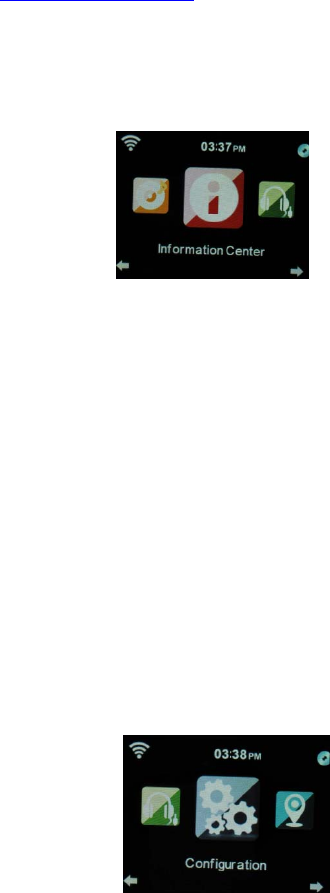
7. InformationCenter
Functions:checktheweatherallovertheworld,
Browsethestockstatusofmainstockexchange
globally,showthesysteminfooftheunit.
Steps:PressMenu→RotateNavigatebuttontochoose
“informationcenter”→PressOKbuttontoentertheinterface→ChoosetheItembyrotate
Navigatebutton→ConfirmitbyOKbutton.
7.1WeatherInformation
PressOKbutton,itwillentertheinterfacetochooselocationthenchoosethecityby
Navigatebutton,pressOKbuttontoenter.
Intheinterfaceofcityweather,youcanchecktheweatherinrecent5daysbyLeftorright
button.
7.2Financialinfomation
Note:ontheinterfaceof“Financialinformation”,youcan
Aimatyourinteresteditemsbycursor,thentherelated
Informationwillbeshownautomatically.
7.3Systeminformation
Functions:Tocheckthesoftwareversion,theMAC,IDandIPof
thewirelessinternet.
8. Configuration
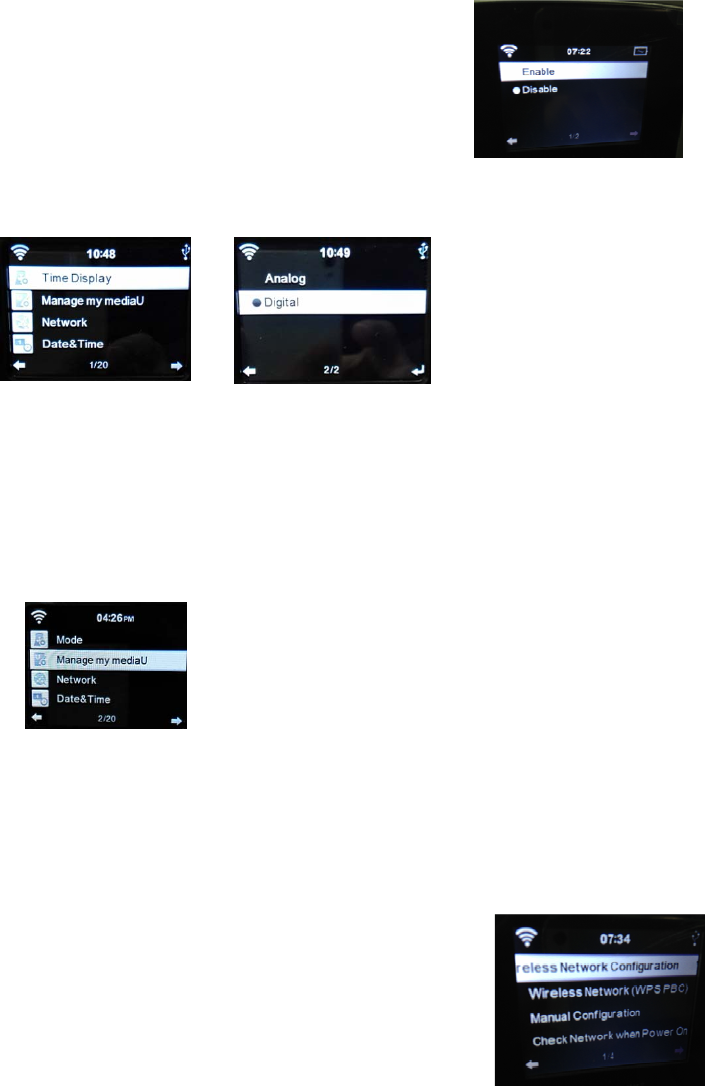
Functions:TosetupNetwork,Alarm,Date&Time,Language,Weather,Dimmerandetc.
Steps:PressMenu→RotateNavigatebuttontochoose“Configuration”→PressOKto
10
entertheinterface→ChoosetheitembyLeftorRight→ConfirmitbyOKbutton
Note:PressLeftbuttoncanreturntotheuppermenu.
Thereare20itemscanbesettingasbelow:
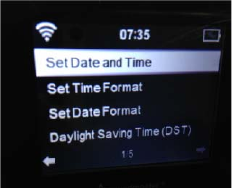
8.1TimeDisplay
Step:PressMenu→Configuration→TimeDisplay
Thereare2models:AnalogandDigital
IfyouselectAnalogmode,thetimewillshowpointerclockinstandby.IfyouselectDigital,the
timewillshowdigitalclock.
8.2ManageMyMediaU
Note:“Enable”meanstomanagemymedia;“Disable”means
nottomanagemymedia.
IfyouselectDisable,MyMediaoptionofthemenuwillbeconceal.IfyouselectEnable,youcan
seeMyMediaUoptioninmenu.
8.3Network
8.3.1WirelessNetworkConfiguration
Note:Itcansearchthewirelessnetworkautomaticallyand
Showthesearchedlistofnetwork,thenpressOKtolinkit.(Ifthenetworkiswithpassword,
youshouldinputthepassword.)
8.3.2WirelessNetwork(WPSPBC)
11
Note:WhenchoosingWPSPBC,Itwillshow“Pleasepressthe
WPSbuttononyourrouterwithin120Secs”,youmustpress
theWPSbuttonofRouter,thenthenetworkinbothsideswill
belinkedautomatically.
8.3.3ManualConfiguration
Steps:PressMenu→Configuration→Network→Choose“ManualConfiguration”bynavigate
knob→Enter>Wireless>Enter.Thenthreeitemsinthelist(DHCP,EnterSSID,Manage).
Note:Inthemodeof‘ON’(DHCP),theunitwillchecktheIPaddressofwirelessnetworkand
linkthenetworkautomatically.
Inthemodeof‘OFF’(DHCP),theunitwillchecktheIPaddressofwirelessnetworkandlinkthe
networkautomatically.
8.3.4CheckNetworkwhenPowerOn
Functions:When“PowerOn”,choose“Enable”tocheckthestatusofnetworklink
automatically;choose“Disable”nottocheckit.
Note:Ifthenetworkisnotlinkedonthemodeof“Enable”,itwillautomaticallyshowthe
choicesforyoutosetupthenetwork.
8.4DateandTime
Steps:PressMenu→Configuration→PressOKtoconfirm→PressRotateNavigatebuttonto
choose“Date&Time”→PressOKbuttontoentertheinterface
8.4.1setDateandTime
ManualSetup:Youcanmanualsetthedateandtime.
AutoDetect(UTC+00:00)00:00meansthetime
Differencebetweenserviceandlocaltime.
8.4.2SetTimeFormat
Tips:Theformatof24hourisacquiescent
12Hour
24 our
8.4.3SetDateFormat
Tips:TheformatofDD/MM/YYYYisacquiescent
YYYY/MM/DD

12
DD/MM/YYYY
MM/DD/YYYY
8.5Alarm
Tosetupthreealarms(Alarm1,Alarm2,NAPAlarm)andtheAlarmVolume.
Steps:PressPower→Configuration→PressOKtoconfirm→PressRotateNavigate
buttontochoose“Alarm”→PressOKbuttontoentertheinterface.
8.5.1ThetimeofNAPAlarmisfrom5minutesto120minutes.Andafterthesetupofthe
NAPAlarm,itbeginstocountthetimereverselyuntilthetimeisover,thenitwillswitchto
thestandbymodelautomaticallyandrings.
8.5.2Whenalarmrings,itwillenterthedisplayof“Standby”automatically.
8.5.3Youcansetupthealarmvolumeby“AlarmVolume”.(Volume7isacquiescent)
8.5.4Ifyoupressanybuttonwhenalarmrings,thealarmwillbeclosedandenterthemodel
ofstandbywith5minuteSNOOZE.
8.5.5TopressStandbybutton,itwillexitthemodeofSNOOZE.
8.5.6Afterthealarmsetup,youshouldexitit,thenthenewsetupcancomeintouse.
8.5.7Twoalarmswon’tringatthesametime.(Onlyafteronealarmstopringing,another
alarmcanbeused).
8.5.8Alarm1
TurnOn
TurnOff
Repeat:TosetuptheAlarmDate
Thechoicesareasbelow:
Everyday,Once,Mon,Tue,Wed,Thu,Fri,Sat,Sun
△Time:TosetuptheAlarmtime
△Sound:TosetuptheAlarmsound
1)Beep
2)Melody
3)InternetRadio
4)USB
13
●AlarmsoundMelodyisacquiescent.
8.6Timer
Steps:PressPower→Configuration→PressOKtoconfirm→PressRotateNavigatebuttonto
choose“Timer”→PressOKbuttontoentertheinterface.
PressLeftandRighttosetthetimeandconfirmbypresstherotaryknob.WheninCount
down,youcanpressOKbuttontostop.
8.7Language
Step:PressMenu→Configuration→Language→Pressoktoenter.
Itcansupport17languages:English,Deutsch,Espanol,Francais(France),Portuges,
Nederlands,Italiano,Pyccknn,Svenska,Norske,Dansk,magyar
Cesky,slovensky,poski,Turkce,Suomi,
8.8Dimmer
Step:PressMenu→Configuration→Dimmer→PressOKtoconfirm→
ChoosetheItembypressRotateNavigatebutton→PressOKbutton
toconfirm→pressNavigatebuttonorLeftandRightbuttontoadjustthebrightness.
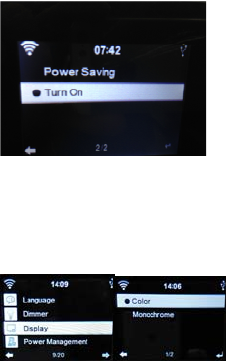
Tips:Therearetwoitemsforyourchoice(PowersavingandTurnOn).
8.9Display
Thereare2modelsyoucanselect:Colorand
Monochrome
8.10powermanagement
Configuretogotostandbymodeautomaticallyduringinthemenuor/andwithoutWifi
signal.
14
MinutesChoosethepowermanagementtimer(5/15/30mins)tosetthedurationoftheradio
toswitchstandbymodeautomaticallywhenyouarenotcontrollingit.Choose“Turnoff”to
ignorethepowermanagementfunction.
8.11SleepTimer
Topowerofftheunitautomaticallybysettingup
thesleeptimer.
Steps:PressMenu→Configuration→SleepTimer
→pressOKtoconfirm.
ThetimerangeisfromTurnOFF,15,30,60,90,120,150,180minutes
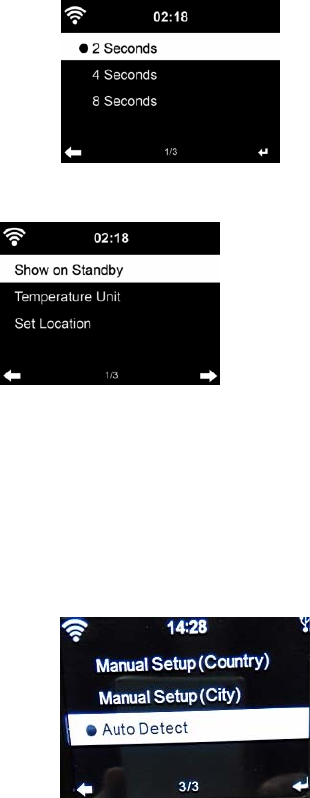
8.12Buffer
Steps:PressMenu→Configuration→Buffer→select
thebufferfrom2secondsto8seconds
8.13Weather
Toshowthecurrentweatherofselectedcity
Step:PressMenu→Configuration→Weather→Selectto
choosethecityandbelowItemsareforyourchoice:
8.13.1SetLocation
Tosetupglobalcityweathershowing
Steps:Choosedistrict→country→city→
PressOKtoconfirmitandtheweatherinfowillbeshowninthedisplay.
8.13.2TemperatureUnit:TosetuptheTemperatureUnitbyCentigradeorFahrenheit
8.13.3ShowONStandby:Toturnonorturnoffthesetup
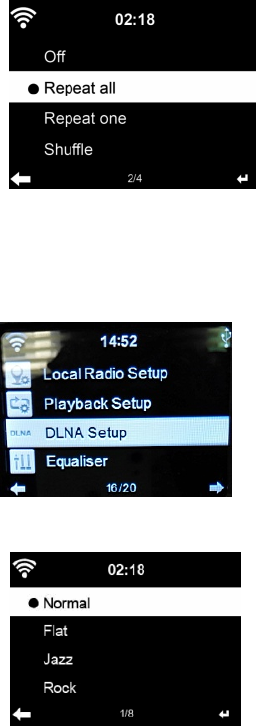
8.14LocalRadioSetup
Steps:PressMenu→Configuration→LocalRadioSetup→PressOKtochoosethestatusof
LocalRadio(ThestationoflocalradioisDecidedbytheinternetIPaddress).
8.14.1ManualSetup
Steps:PressStandby→Configuration→LocalRadioSetup→
15
ManualSetup→Choosedistrictandcountrytoentertheinterface
→pressOK(SaveaslocalRadio”)willshowonthedisplay→
PressOKbuttontoconfirm.
8.14.2AutoDetect
Step:PressStandby→Configuration→LocalRadioSetup→“AutoDetect”tocheckthestations
ofLocalRadioautomatically.
Tips:Itwillcreatetheradiostationoflocalinternetautomaticallyasperthelocalandnational
ID.
8.15.PlaybackSetup
PressStandby→Configuration→LocalRadioSetup→PressOKtochoosetheplaystatus
8.15.1OFF‘OFF’meanstojustplaythechosenitem.
8.15.2Repeatall,‘Repeatall’meanstoplaythe
Chosenitemrepeatedly.
8.15.3Repeatone,meanstoplaythechosenitem
once.
8.15.4Shuffle
“Shuffle”meanstoplayalltheitemsinyourplaylist
atrandom.
8.16Device(DLNAsetup)
Rename(AirMusic)
IfusingthePC,Win7willsupporttheDLNA
IfusingSamsungSmartPhone,itiswithbuild‐
InDLNA
IfusingotherSamsungSmartPhone,youcan
DownloadtheAPPlikeBubbleupnorSkiftato
UsetheDLNA.

16
8.17Equaliser
Fuction:‘Equalizer’canstrengththemusicimpact
On‐site
Steps:PressMenu→Configuration→Equalizer→PressOK
Tochoosedifferentmusicimpact(Normal→Flat→Jazz→Rock
→Soundtracks→Classical→POP→News
8.18.ResumeWhenPowerOn
Steps:PressMenu→Configuration→ResumeWhenPower
On→PressOKtochooseOnorOff
‘On’,meanstocontinuethemodeautomaticallywhenthepowerwasoff
‘Off’,meansnottocontinuethemodeandjustshowthemainmenuwhenthepowerwasoff
8.19.SoftwareUpdate
It’sjustusedforproductionandmaintenance.
Caution:Beforestartingasoftwareupgrade,ensure
Thattheunitispluggedintoastablemainspowerconnection.
Disconnectingpowerduringasoftwaremaypermanetlydamagetheunit.
8.20ResettoDefaut
Choosethisitem,itwillshow‘Areyousuretoreset
todefaultsetting’.
‘YES’,itwilldeleteallyourpresentsetupand
resumetotheoriginalmode
‘NO’,itwillkeepallyourpresentsetupandreturn
totheuppermenu.
5..Lineoutput
Youcanswitchtheradio’smediumontootherSpeakersbya3.5mmaudiolineout
Tips:Bydoingso,youcancontrolthemediavolumeonlybyotherspeakers.
17
FCCStatement
Changesormodificationsnotexpresslyapprovedbythepartyresponsibleforcompliance
couldvoidtheuser'sauthoritytooperatetheequipment.
ThisequipmenthasbeentestedandfoundtocomplywiththelimitsforaClassBdigitaldevice,
pursuanttoPart15oftheFCCRules.Theselimitsaredesignedtoprovidereasonable
protectionagainstharmfulinterferenceinaresidentialinstallation.Thisequipmentgenerates
usesandcanradiateradiofrequencyenergyand,ifnotinstalledandusedinaccordancewith
theinstructions,maycauseharmfulinterferencetoradiocommunications.However,thereis
noguaranteethatinterferencewillnotoccurinaparticularinstallation.Ifthisequipmentdoes
causeharmfulinterferencetoradioortelevisionreception,whichcanbedeterminedby
turningtheequipmentoffandon,theuserisencouragedtotrytocorrecttheinterferenceby
oneormoreofthefollowingmeasures:
‐‐Reorientorrelocatethereceivingantenna.
‐‐Increasetheseparationbetweentheequipmentandreceiver.
‐‐Connecttheequipmentintoanoutletonacircuitdifferentfromthattowhichthereceiveris
connected.
‐‐Consultthedealeroranexperiencedradio/TVtechnicianforhelp
Thisdevicecomplieswithpart15oftheFCCrules.Operationissubjecttothefollowingtwo
conditions(1)thisdevicemaynotcauseharmfulinterference,and(2)thisdevicemustaccept
anyinterferencereceived,includinginterferencethatmaycauseundesiredoperation.
The distance between the product and body is more than 20cm