Budderfly S0811011 Budderfly Multi-Way Switch User Manual QCVS0811011
Budderfly LLC Budderfly Multi-Way Switch QCVS0811011
Users Manual
PartNoS0811011
Description:
InstallingaBudderflyadaptertransformsyourbuilding’sexistingwiringintothe“BudderflyOpenNetwork”andallowsthe
adaptertomonitorenergyconsumptionandcommunicatethedatatoafacilitycontroller.
BudderflyadaptorswillusetheexistingpowerlineandtheRFforcommunicationandthusrequirenoreͲwiring.
UsingourBudderflysoftware,youcanvisualizeconsumptiondataandmanageeachindividualadapter.
TheBudderflyMultiͲWaylightswitchisacomponentoftheBudderflysystemanddesignedtoworkwithallother
Budderflydevices.ItisaplugͲandͲplayreplacementforyourexistinglightswitch.Onceinstalled,theBudderflyswitches
alsoactasrepeaterstoextendtherangeofthenetworkandincreaseefficiency.
Thisdeviceisdesignedforuseonlywithpermanentlyinstalledfixtures.
Installation:
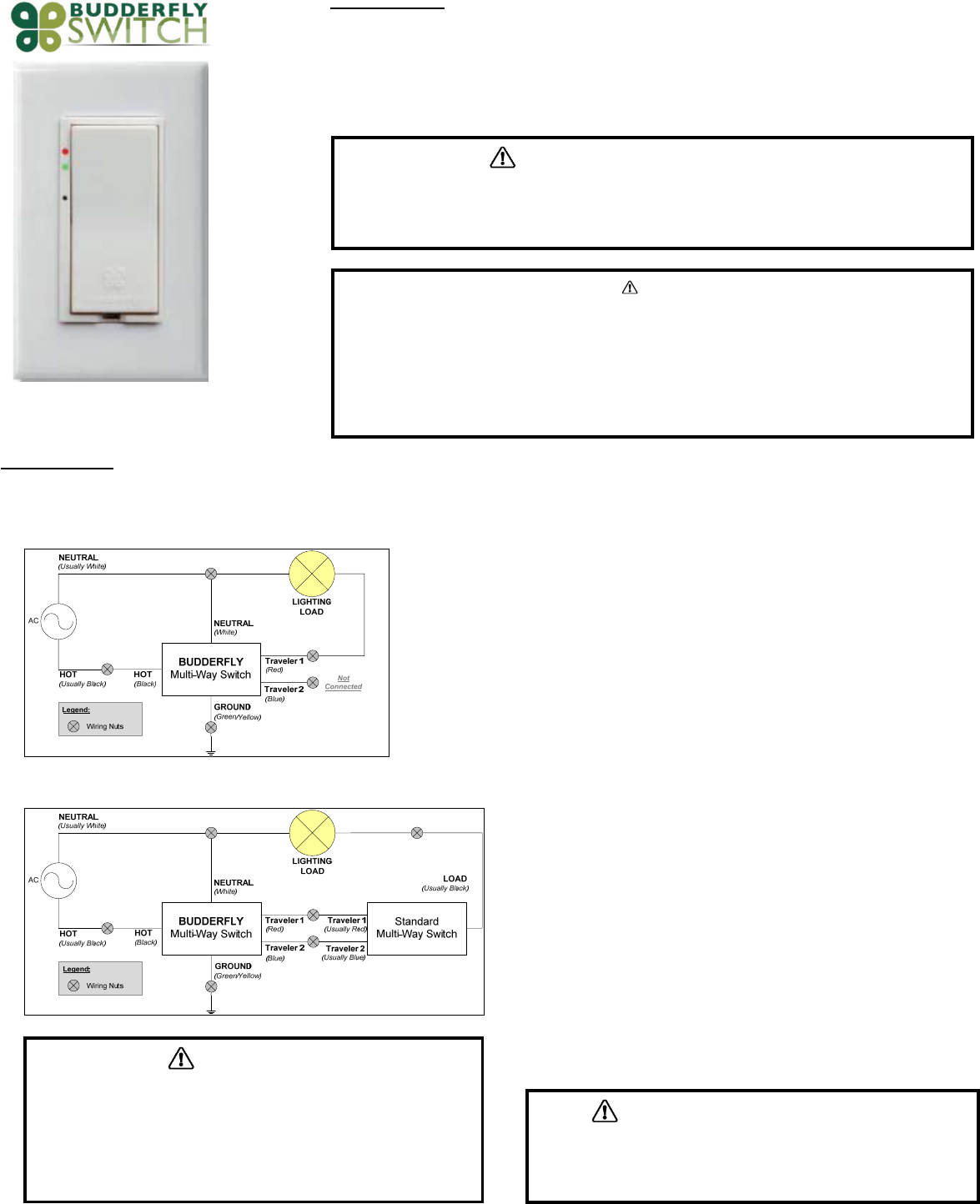
TheBudderflyMultiͲWaylightswitchmaybeusedinnewinstallationsortoreplaceanexistingwallswitch.Itcouldbeusedeitherasa2Ͳwayswitch,orasa3Ͳwayswitch.Thewiring
stepsforbothconfigurationsareexplainedinthefollowingdiagrams:
2ͲWayConfiguration:
3ͲWayConfiguration:
1. Atthecircuitbreakerorfusepanel,disconnectthepowerforallofthecircuitsin
theswitchjunctionbox.
2. DoubleCheckthatthepowerisOFFtotheswitchboxbeforecontinuingby
tryingtoturnonthecontrolledload.
3. Removethewallplatefromtheswitchyouarereplacing.Then,unscrewthe
switchitselfandpullitoutfromthejunctionbox.
4. Disconnectthewiresfromtheswitchyouarereplacing.
5. Followthewiringinformationprovidedbelowtoconnectthewiresasfollows:
oConnecttheGROUNDwire(usuallyBareCopperorGreen)totheGroundwire
ofBudderflySwitch(Yellow&Green).
o2ͲWayconfiguration:
ConnecttheLOADwire(usuallyBlack)thatgoestothelighttothe
Traveler#1(Red)wireofBudderflySwitch.
o3ͲWayconfiguration:
ConnecttheTraveler#1(UsuallyRed)andTraveler#2(UsuallyBlue)wires
oftheStandardMultiͲWaySwitchtotheTraveler#1(Red)andTraveler#2
(Blue)wiresofBudderflySwitchrespectively.
ConnecttheLOADwire(usuallyBlack)thatgoestothelighttotheLOAD
wire(usuallyBlack)oftheStandardMultiͲWaySwitch.
oConnecttheLINEwire(usuallyBlack)thatcomesfromtheelectricalservice
paneltotheHOTwireofBudderflySwitch(Black).
oConnecttheNEUTRALwire(usuallyWhite)totheNeutralwireofBudderfly
Switch(White).
6. Afteryouhaveconnectedallofthewires,ensurethatallofthewireconnectors
arefirmlyattachedandthatthereisnoexposedcopperexceptfortheGROUND
wire.
7. GentlyplaceBudderflyswitchintothejunctionbox,orientingtheunitwiththe
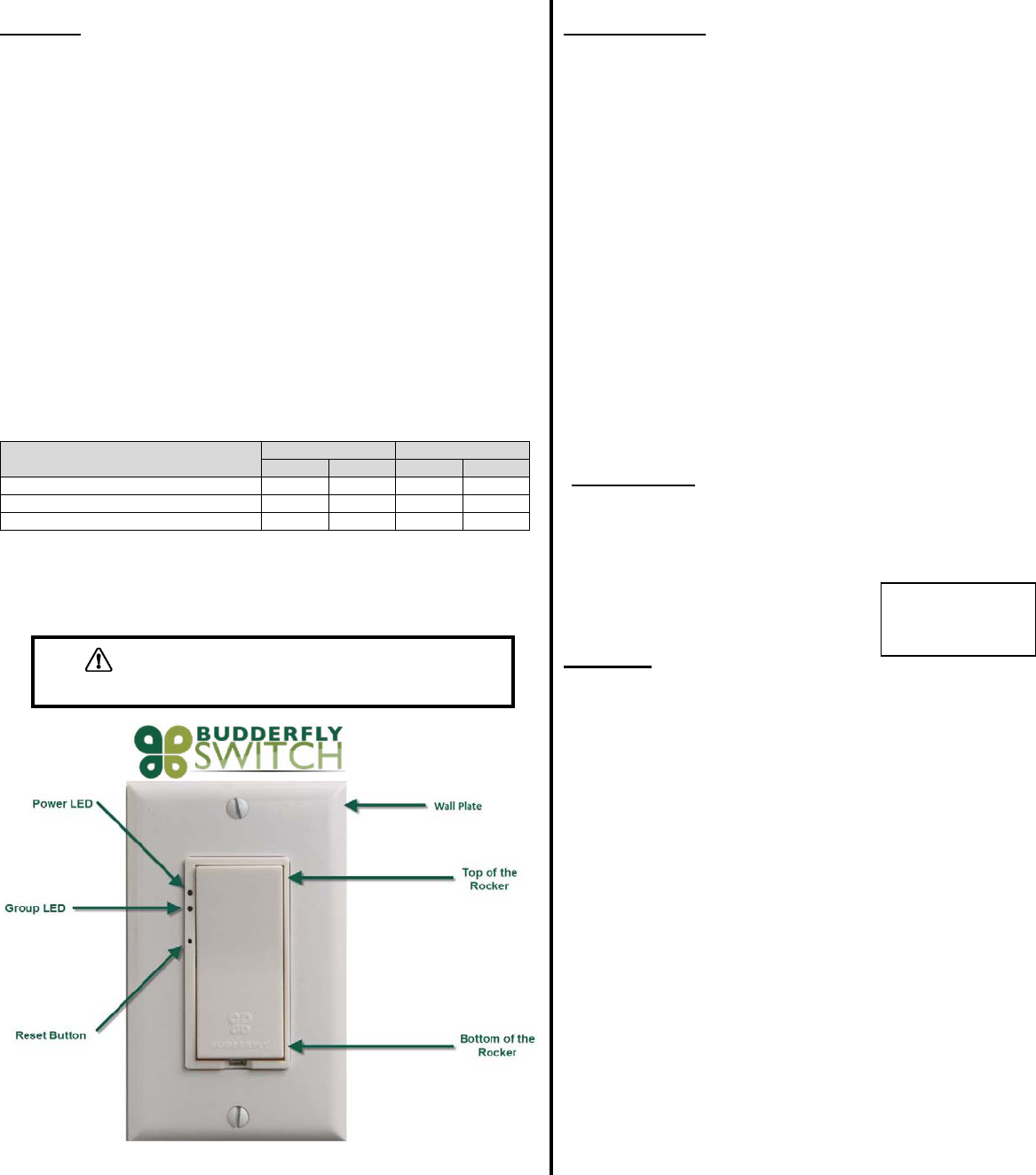
LEDbarontheleft.Then,screwtheswitchintoplace.
8. Reinstallthewallplate
9. Enablepowertotheswitchfromthecircuitbreakerorfusepanel
10. AfterthePowerLEDcomeson,testthattheswitchisworkingproperlyby
turningthelightonandoff
11. AddthedeviceaddresstotheBudderflywebapplication.
WARNING–ELECTRICALSHOCKHAZARD
xTheBudderflyMultiͲWaylightswitchisintendedforinstallationinaccordancewiththeNationalElectricCodeand
localregulationsintheUnitedStates.
xIfyouarenotknowledgeableorcomfortablewithelectricalcircuitry,youshouldhaveaqualifiedelectricianinstall
theBudderflyMultiͲWaylightswitchforyou.
Warning
RISKOFFIRE/ELECTRICALSHOCK/BURNS
ExerciseextremecautionwhenusingBudderflyswitchingdevicestocontrolappliances.
ToavoidtheriskofFire,ElectricalShock,Burnsorotherhazardswerecommendthefollowing:
xInstalltheBudderflyswitchesindooronly.
xNeverusetheBudderflyswitchestocontrolmedicaland/orlifesupportequipment.
xDonotusetheBudderflyswitchestocontrolelectricheatersoranyotherapplianceswhichmaypresenta
hazardousconditionduetounattendedorunintentionalpoweroncontrol.
NeverusetheBudderflyswitcheswithloadsthatexceedthemaximumratingspecified.
WiringInformation
xImportant:Budderflyswitchesareratedforandintendedtobeusedonlywith
copperwires.
xUse12AWGorlargerwiressuitablefor80o.
xRemove3/4"(1.9cm)ofinsulationfromeachwire.
xConnectasfollows:Twiststrandsofeachendtightlytogether.Holdbareends
ofwirestogetherandpushfirmlyintowireNut.ScrewNutclockwisemaking
surethatnobareconductorshowsbelowtheconnector.
WARNING–ELECTRICALSHOCKHAZARD
xTurnOFFthepowertothebranchcircuitfortheswitchandlightingfixtureat
theservicepanel.
xAllwiringconnectionsmustbemadewiththePOWEROFFtoavoidpersonal
injuryand/ordamagetotheswitch.
Features:
ͲRemoteOn/Offcontrol
ͲManualOn/Offcontrol
ͲAbilitytocreateagroupofdevices
ͲAbilitytomonitorpowerconsumption
ͲLEDindicatorstoshowthestateoftheswitch
On/OffControl:
ͲRemoteControl:
oTheBudderflyswitchescanbecontrolledremotelythrutheBudderflysoftware.
oTheBudderflysoftwarewillinformyouthattheactionwassuccessful.Incasetheaction
failed,pleaserepeattheprocedure
ͲManualControl:InadditiontotheRemotecontrol,theBudderflyswitchescanbe
controlledmanually.Tapthetoporbottomoftherockertogglethestateconnectedload.
DeviceGrouping:
ͲUsingtheBudderflywebapplication,itispossibletocreateaGroupofdevicesthatcanbe
controlledremotelysimultaneouslywithjustoneclick.
ͲBudderflyswitchescanjoin/disjoingroupsatanytime.
Powerconsumption:
Budderflyswitcheswillmeasurethecurrent,voltage,powerandenergyconsumedbythe
connectedload,andwillstorethecumulativeenergyconsumption.
ThedatacanbeaccessedatanytimethrutheBudderflysoftware.Theusercangenerate
reports,monitortheconsumptionorcheckexpenses.
LEDIndicators:
TheBudderflyswitchesareequippedwithtwoLEDstoindicatethecurrentstateofthedevice.
ThebehavioroftheseLEDsisexplainedinthefollowingtable:
StatusRedLEDGreenLED
ONOFFON OFF
Deviceisnotpowered.XX
Deviceispowered.LightingloadisOFF.X X
Deviceispowered.LightingloadisON.XX
Reset:
Ifthedevicestopsresponding,itcanberestartedbypushingtheResetButton.AnonͲmetallic
pinshouldbeusedtopushtheresetbutton.
Noneofthestoredparameterswillbeaffected.
Communication:
TheBudderflyMultiͲWaylightswitchesusethepowerlineandradiofrequencyto
communicatewiththeBudderflyFacilityController.
Theswitcheshavethecapabilitytorespondto(butnotlimitedto)thefollowing
commands:
xTurnON/OFF:TheconnectedlightingloadwillturnON/OFF.
xJoin/Disjoingroup“X”:TheswitchwillJoin/Disjointhegroup“X”.Eachswitchcan
beamemberofseveralgroupsatthesametime.
xDirectRTCsynchronization:Theswitchcanreceiveacommandtosynchronizeits
“RealTimeClock”
xGetActualMeasurement:Whentheswitchreceivesa“GetMeasurement”
command,itwillsendbacktothefacilitycontrollerastringofdatathatcontains:
ͲTheCurrentinAmpere“A”.
ͲThePowerinWatt“W”.
ͲATimestamp.
xGetStoredMeasurement:TheswitchwillsendbacktotheFacilityControllerthe
storedelectricalmeasurements.
xDirectResetCommands:Theswitchcanreceive3typesofresetcommands:
ͲHardReset:Thiscommandwillrestartthedevicewithoutaffectinganystored
parameter.
ͲDataReset:ThiscommandwilleraseallthemeasurementandRTCdatastored
inthenonͲvolatilememory.
ͲDisjoinGroup:Thiscommandwillremovethedevicefromallthejoined
groups.
xGroupResetCommands:Theaboveresetcommandscanbedirectedtoagroup
ofdevicesinsteadofjustonedevice.
Specifications:
xPower:120VͲ277VAC/60Hz
xMaximumLoads:
o120VAC,60Hertz:1600WforTungsten,1400WforElectronicballast,800W
forStandardballast
o277VAC,60Hertz:3300WforElectronicballast,1200WforStandardballast.
xNeutralLine:Required
xOperatingTemperature:0oCto+40oC
xCertification:UL&FCCcertificationsareinprogress
xForindooruseonly
Warranty:
BudderflyLLCwarrantstotheoriginalconsumerpurchaserandnotforthebenefit
ofanyoneelsethatthisproductatthetimeofitssalebyBudderflyisfreeofdefects
inmaterialandworkmanshipundernormalandproperuseforaperiodofthree(3)
yearsfromdateofdeliverytoyou.Budderfly’sonlyobligationistocorrectsuch
defectsbyrepairorreplacement,atitsoption,ifwithinsuchthreeyearperiodthe
productisreturnedprepaidviaBudderfly’sReturnedMaterialsAuthorization(RMA)
processtoBudderflyLLC,Att:QualityAssuranceDepartment,2TrapFallsRoad,
Suite507,Shelton,CT06484.Innocaseisproducttobereturnedwithoutfirst
obtaininganRMA.
Thiswarrantyexcludesandthereisdisclaimedliabilityforlaborforremovalofthis
productorreinstallation.Thiswarrantyisvoidifthisproductisinstalledimproperly
orinanimproperenvironment,overloaded,misused,opened,abused,oralteredin
anymanner,orisnotusedundernormaloperatingconditionsornotinaccordance
withanylabelsorinstructions.Therearenootherorimpliedwarrantiesofany
kind,includingmerchantabilityandfitnessforaparticularpurpose,butifany
impliedwarrantyisrequiredbytheapplicablejurisdiction,thedurationofanysuch
impliedwarrantyisrequiredbytheapplicablejurisdiction,thedurationofanysuch
impliedwarranty,includingmerchantabilityandfitnessforaparticularpurpose,is
limitedtothreeyears.Budderflyisnotliableforincidental,indirect,special,or
consequentialdamages,includingwithoutlimitation,damageto,orlossofuseof,
anyequipment,lostsalesorprofitsordelayorfailuretoperformthiswarranty
obligation.Budderfly’sliabilityonanyclaimfordamagesarisingoutofin
connectionwiththemanufacture,sales,installationdelivery,oruseofthe
productshallneverexceedthepurchasepriceoftheproduct.Theremedies
providedhereinaretheexclusiveremediesunderthiswarranty,whetherbasedon
contract,tortorotherwise.
Specificationsaresubject
tochangewithoutprior
noticeduetocontinuous
productimprovement.
WARNING–ELECTRICALSHOCKHAZARD
xNeveruseametallicpintopresstheresetbutton.
FCCComplianceStatement
ThisdevicecomplieswithPart15oftheFCCRules.Operationissubjecttothefollowingtwoconditions:
(1) Thisdevicemaynotcauseharmfulinterferenceand
(2) Thisdevicemustacceptanyinterferencereceived,includinginterferencethatmaycauseundesiredoperation.
ThisequipmenthasbeentestedandfoundtocomplywiththelimitsforaclassBdigitaldevice,pursuanttopart15oftheFCCRules.Theselimits
aredesignedtoprovidereasonableprotectionagainstharmfulinterferenceinaresidentialinstallation.Thisequipmentgenerates,uses,andcan
radiateradiofrequencyenergyandifnotinstalledandusedinaccordancewiththeinstructions,maycauseharmfulinterferencetoradio
communications.However,thereisnoguaranteethatinterferencewillnotoccurinaparticularinstallation.Ifthisequipmentdoescause
harmfulinterferencetoradioortelevisionreception,whichcanbedeterminedbyturningtheequipmentoffandon,theuserisencouragedtotryto
correcttheinterferencebyoneormoreofthefollowingmeasures:
xReorientorrelocatethereceivingantenna.
xIncreasetheseparationbetweentheequipmentandreceiver.
xConnecttheequipmentintoanoutletonacircuitdifferentfromthattowhichthereceiverisconnected.
xConsultthedealeroranexperiencedradio/TVtechnicianforhelp.
Theuseriscautionedthatchangesandmodificationsmadetotheequipmentwithouttheapprovalofmanufacturercouldvoidtheuser'sauthority
tooperatethisequipment.
WARNING
Chan
g
esormodificationsnotex
p
ressl
y
a
pp
rovedb
y
the
p
art
y
res
p
onsibleforcom
p
liancecouldvoidtheuser’sauthorit
y
too
p
eratethise
q
ui
p
ment
FCCID:(NoFCCIDhasbeenissuedyet;FCCCertificationisinprogress)
MadeinChina