Chuango Security Technology K1 K1 SMARTHOME DIY KIT User Manual K1 GQ ML V1 0

Chuango Security Technology Corporation K1 SMARTHOME DIY KIT K1 GQ ML V1 0

User Manual

K1SMARTHOME DIY KITQUICK GUIDEEN DE FR NL ES PT IT©2017 SMANOS HOLDING LTD. All Rights Reserved. Printed in ChinaVer: K1-GQ-ML-V1.0
ENENFCC STATEMENT1. This device complies with Part 15 of the FCC Rules.Operation is subject to the following two conditions:(1) This device may not cause harmful interference, and(2) This device must accept any interference received, including interference that may cause undesired operation.responsible for compliance could void the user’s authority to operate the equipment.NOTE: This equipment has been tested and found to comply with the limits for a Class B digital, pursuant to Part 15 or the FCC Rules. These limits are designed to provide reasonable protection against harmful interference in a residential installation. This equipment generates, uses and can radiate radio frequency energy and, if not installed and used in accordance with the instructions, may casue harmful interference to radio communications, However, there is no guarantee that interference will not occur in a particular installation. If the equipment does cause harmful interference to radio or television reception, which can be determined by turning the equipment off and on, the user is encouraged to try to correct the interference by one or more of the following measures:--- Reorient or relocate the receiving antenna.--- Increase the separation between the equipment and receiver.--- Connect the equipment into an outlet on a circuit different  from that to which the receiver is connected.Industry Canada Noticestandard(s).1. Operation is subject to the following two conditions:(1) this device may not cause interference, and  (2) this device must accept any interference, including interferencethat may cause undesired operation of the device."responsible for compliance could void the user’s authority to operate the equipment.
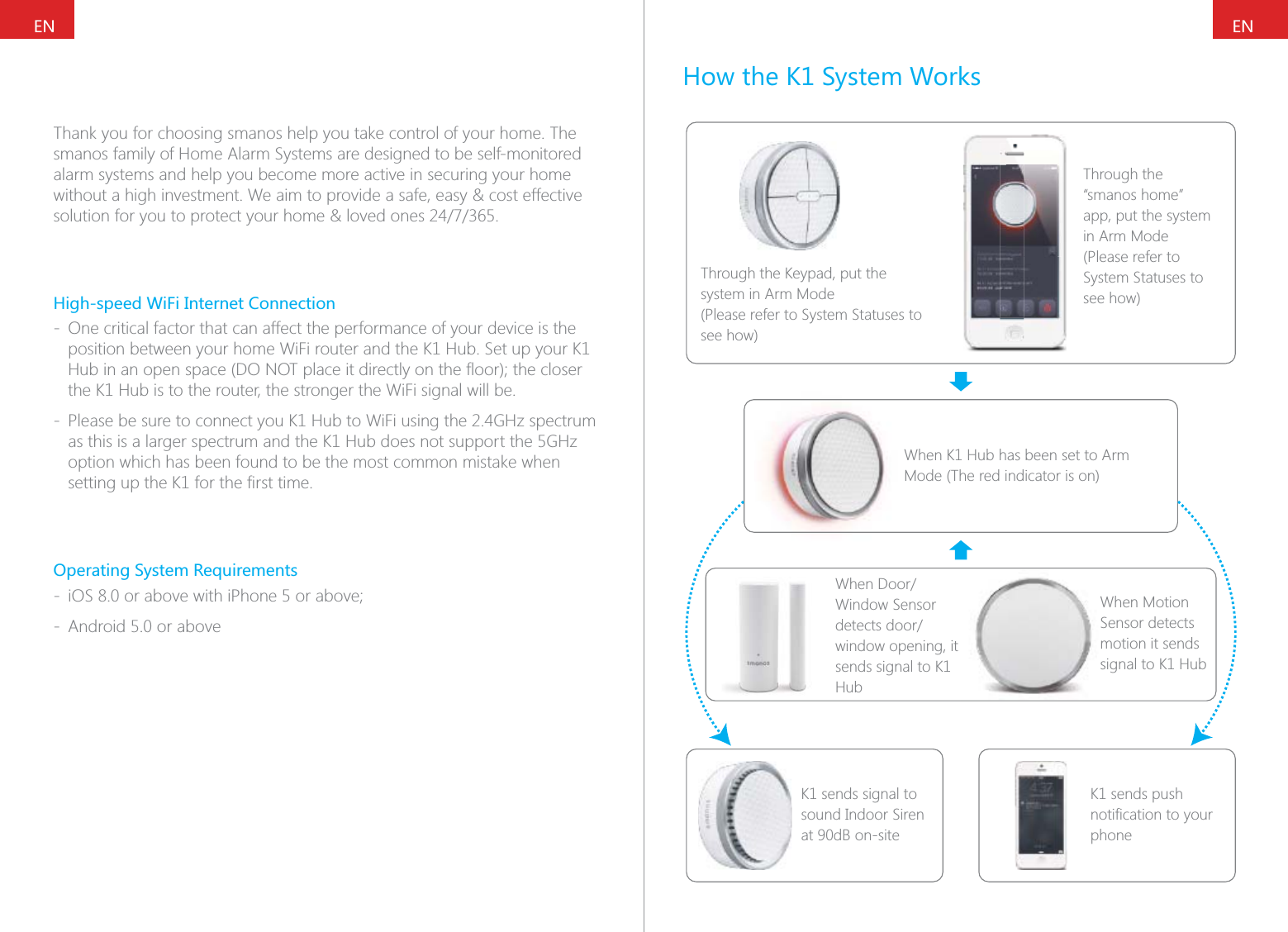
ENENThank you for choosing smanos help you take control of your home. The smanos family of Home Alarm Systems are designed to be self-monitored alarm systems and help you become more active in securing your home without a high investment. We aim to provide a safe, easy & cost effective High-speed WiFi Internet Connection - One critical factor that can affect the performance of your device is the position between your home WiFi router and the K1 Hub. Set up your K1 the K1 Hub is to the router, the stronger the WiFi signal will be. - Please be sure to connect you K1 Hub to WiFi using the 2.4GHz spectrum as this is a larger spectrum and the K1 Hub does not support the 5GHz option which has been found to be the most common mistake when Operating System Requirements -  - Android 5.0 or aboveHow the K1 System WorksThrough the Keypad, put the system in Arm Mode (Please refer to System Statuses to see how)Through the “smanos home” app, put the system in Arm Mode (Please refer to System Statuses to see how)When K1 Hub has been set to Arm Mode (The red indicator is on)Window Sensor window opening, it sends signal to K1 HubK1 sends signal to sound Indoor Siren at 90dB on-siteK1 sends push phoneWhen Motion Sensor detects motion it sends signal to K1 Hub
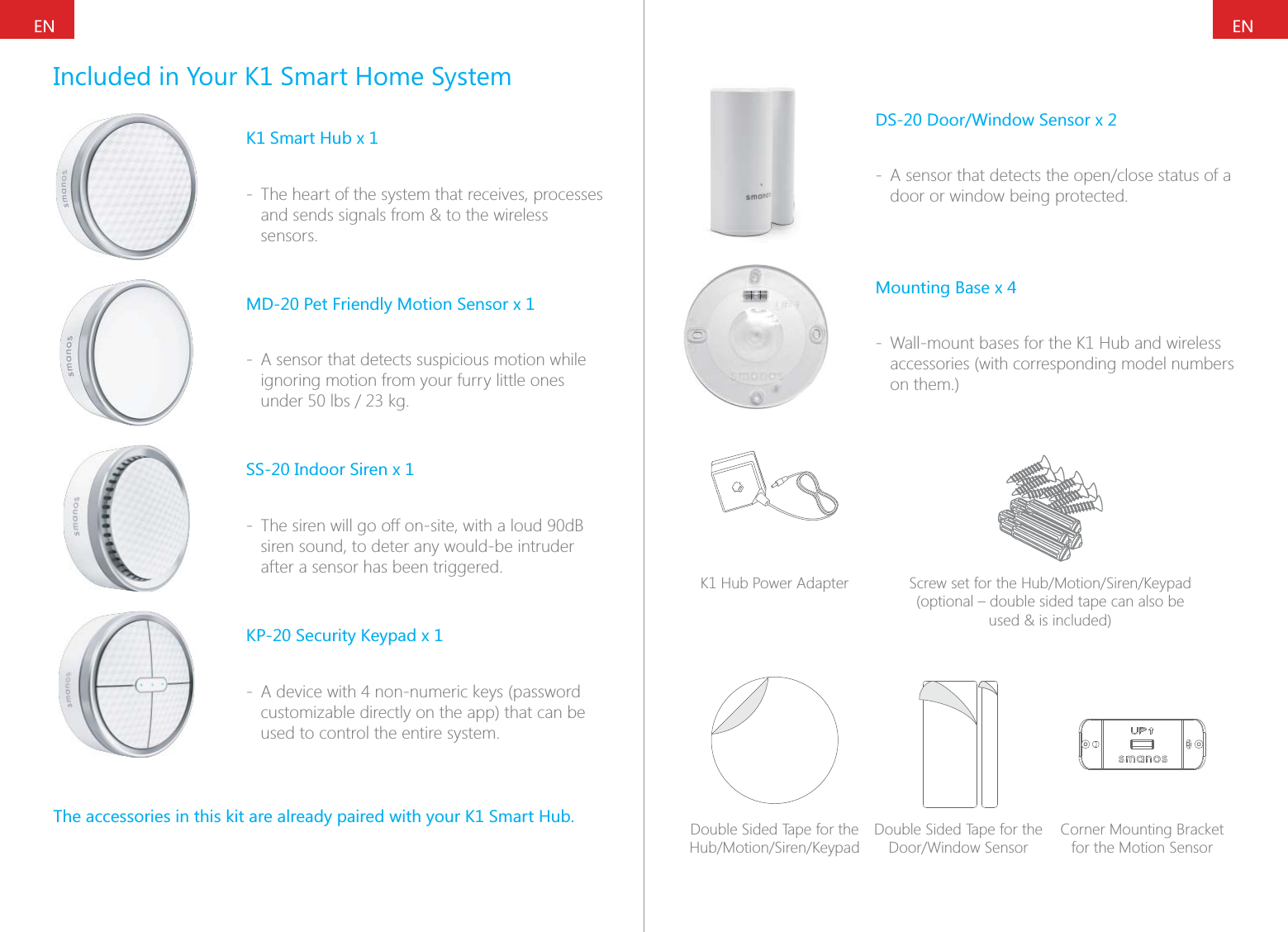
ENENIncluded in Your K1 Smart Home SystemK1 Smart Hub x 1 - The heart of the system that receives, processes and sends signals from & to the wireless sensors.MD-20 Pet Friendly Motion Sensor x 1 - A sensor that detects suspicious motion while ignoring motion from your furry little ones SS-20 Indoor Siren x 1 - The siren will go off on-site, with a loud 90dB siren sound, to deter any would-be intruder after a sensor has been triggered.KP-20 Security Keypad x 1 - A device with 4 non-numeric keys (password customizable directly on the app) that can be used to control the entire system.The accessories in this kit are already paired with your K1 Smart Hub.DS-20 Door/Window Sensor x 2 - door or window being protected.Mounting Base x 4 - Wall-mount bases for the K1 Hub and wireless accessories (with corresponding model numbers on them.)K1 Hub Power Adapter (optional – double sided tape can also be  used & is included)Double Sided Tape for the Double Sided Tape for the Corner Mounting Bracket for the Motion Sensor
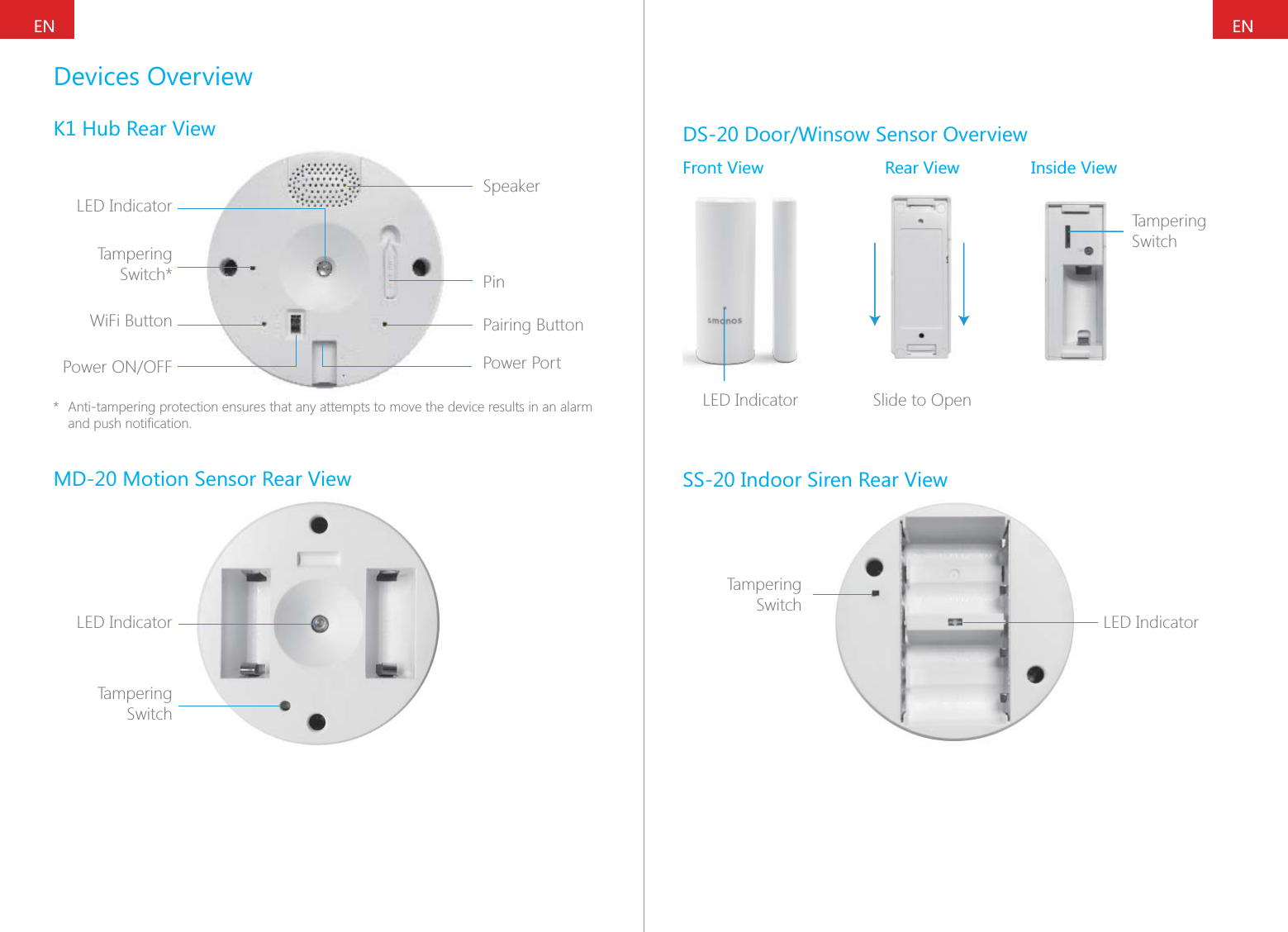
ENENDevices OverviewK1 Hub Rear ViewLED IndicatorSpeakerPinPairing ButtonPower PortTampering Switch*WiFi Button*  Anti-tampering protection ensures that any attempts to move the device results in an alarm MD-20 Motion Sensor Rear ViewLED IndicatorTampering SwitchDS-20 Door/Winsow Sensor OverviewFront View Rear View Inside ViewTampering SwitchTSLED Indicator Slide to OpenSS-20 Indoor Siren Rear ViewLED IndicatorTampering Switch
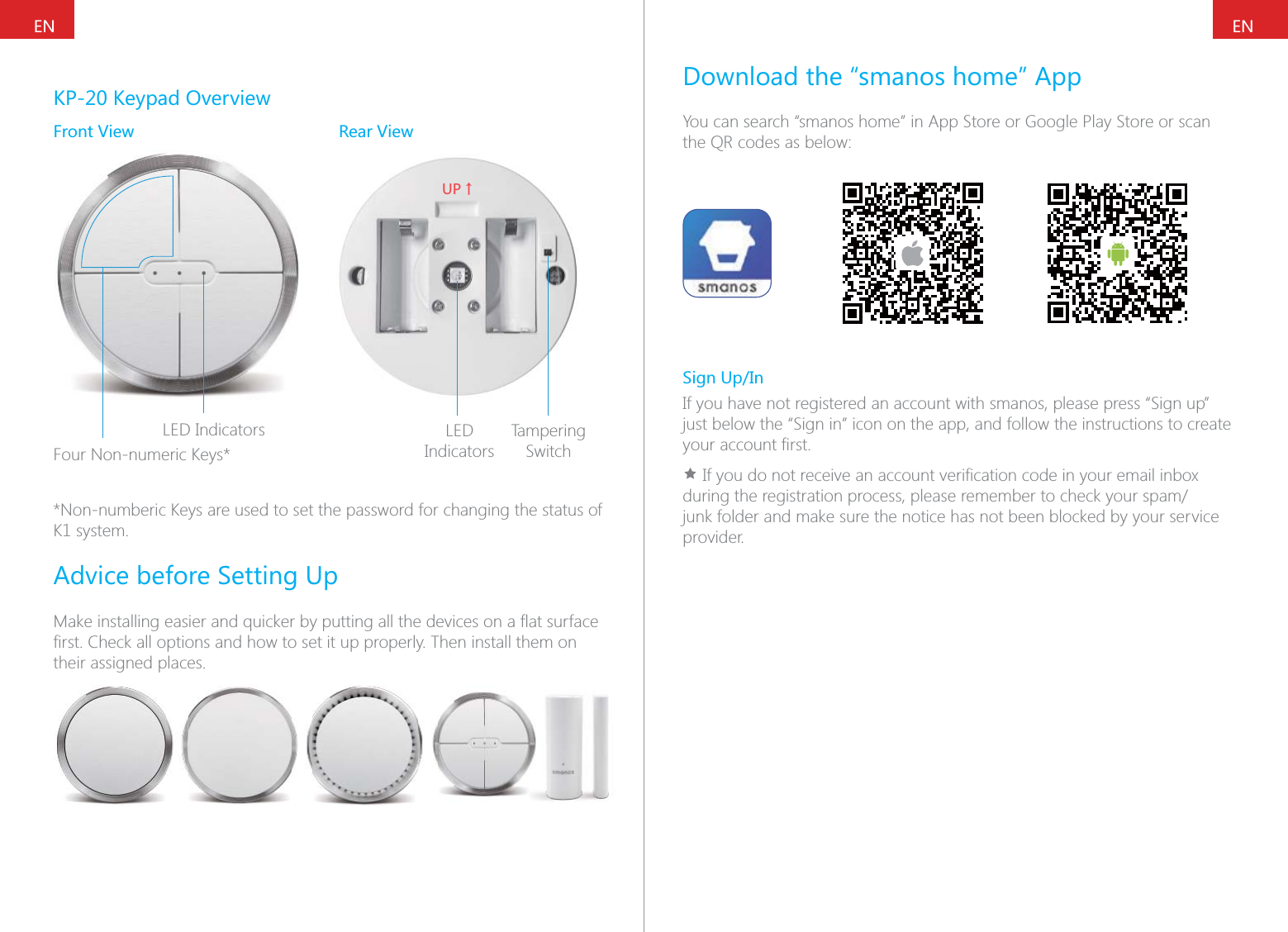
ENENKP-20 Keypad OverviewFront View Rear ViewLED IndicatorsFour Non-numeric Keys*;6ɑLED IndicatorsTampering Switch*Non-numberic Keys are used to set the password for changing the status of K1 system.Advice before Setting Uptheir assigned places.Download the “smanos home” AppYou can search “smanos home” in App Store or Google Play Store or scan the QR codes as below:Sign Up/InIf you have not registered an account with smanos, please press “Sign up” just below the “Sign in” icon on the app, and follow the instructions to create Ìjunk folder and make sure the notice has not been blocked by your service provider.
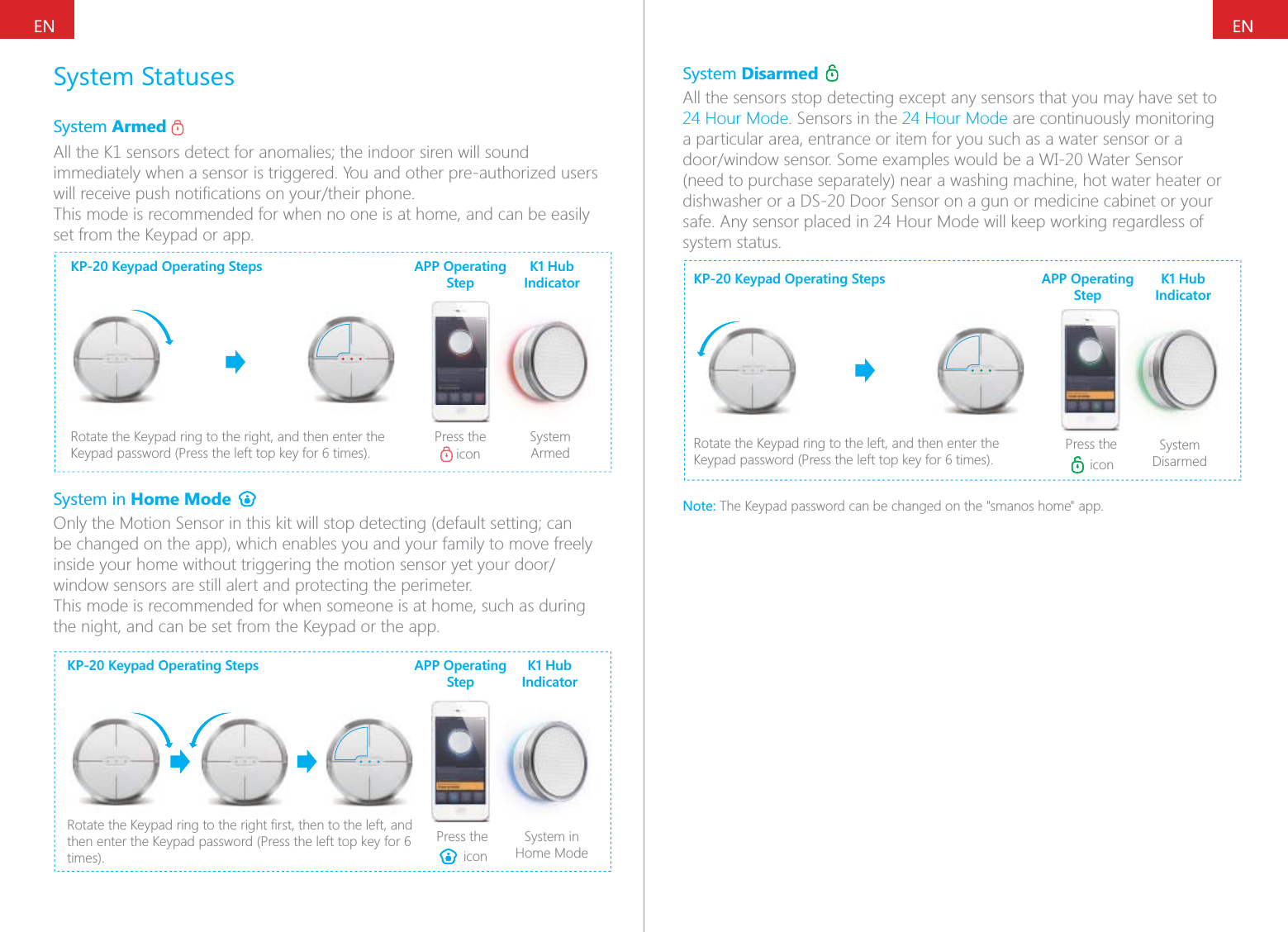
ENENSystem StatusesSystem Armed immediately when a sensor is triggered. You and other pre-authorized users This mode is recommended for when no one is at home, and can be easily set from the Keypad or app.KP-20 Keypad Operating StepsRotate the Keypad ring to the right, and then enter the Press the  iconSystem ArmedAPP Operating StepK1 Hub IndicatorSystem in Home Mode be changed on the app), which enables you and your family to move freely window sensors are still alert and protecting the perimeter.This mode is recommended for when someone is at home, such as during the night, and can be set from the Keypad or the app.KP-20 Keypad Operating Stepstimes).Press the  iconSystem in Home ModeAPP Operating StepK1 Hub IndicatorSystem Disarmed 24 Hour Mode. Sensors in the 24 Hour Mode are continuously monitoring a particular area, entrance or item for you such as a water sensor or a (need to purchase separately) near a washing machine, hot water heater or dishwasher or a DS-20 Door Sensor on a gun or medicine cabinet or your safe. Any sensor placed in 24 Hour Mode will keep working regardless of system status.KP-20 Keypad Operating StepsRotate the Keypad ring to the left, and then enter the Press the  iconSystem DisarmedAPP Operating StepK1 Hub IndicatorNote: The Keypad password can be changed on the "smanos home" app.
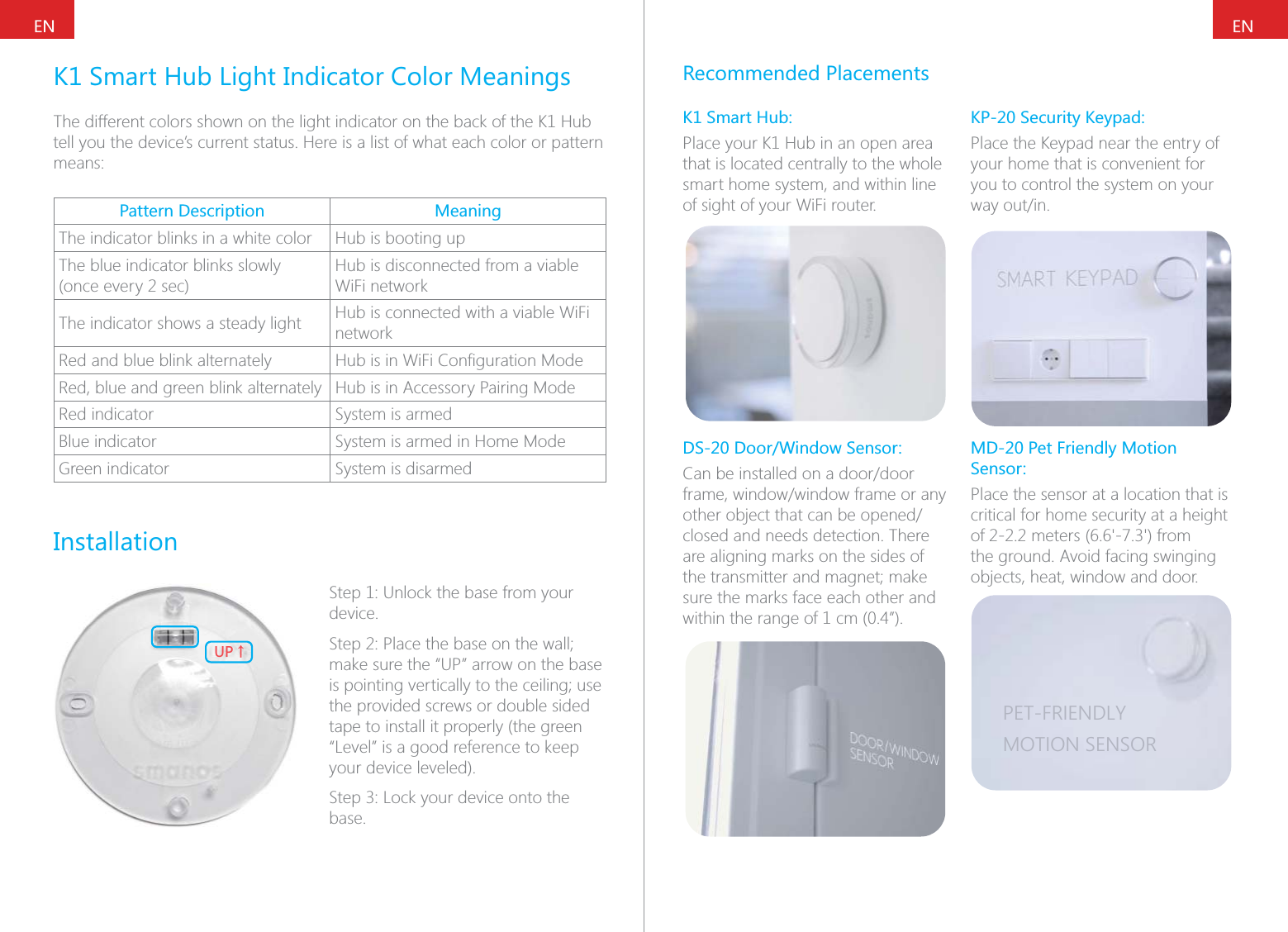
ENENK1 Smart Hub Light Indicator Color MeaningsThe different colors shown on the light indicator on the back of the K1 Hub tell you the device’s current status. Here is a list of what each color or pattern means:Pattern Description MeaningThe indicator blinks in a white color Hub is booting upThe blue indicator blinks slowly (once every 2 sec)Hub is disconnected from a viable WiFi networkThe indicator shows a steady light Hub is connected with a viable WiFi networkRed and blue blink alternately Red, blue and green blink alternately Hub is in Accessory Pairing ModeRed indicator System is armedBlue indicator System is armed in Home ModeGreen indicator System is disarmedInstallation;6ɑStep 1: Unlock the base from your device.make sure the “UP” arrow on the base the provided screws or double sided tape to install it properly (the green “Level” is a good reference to keep your device leveled).base.Recommended PlacementsK1 Smart Hub:Place your K1 Hub in an open area that is located centrally to the whole smart home system, and within line of sight of your WiFi router.DS-20 Door/Window Sensor:closed and needs detection. There are aligning marks on the sides of sure the marks face each other and within the range of 1 cm (0.4”).KP-20 Security Keypad:Place the Keypad near the entry of your home that is convenient for you to control the system on your MD-20 Pet Friendly Motion Sensor:Place the sensor at a location that is critical for home security at a height the ground. Avoid facing swinging objects, heat, window and door.PET-FRIENDLYMOTION SENSOR
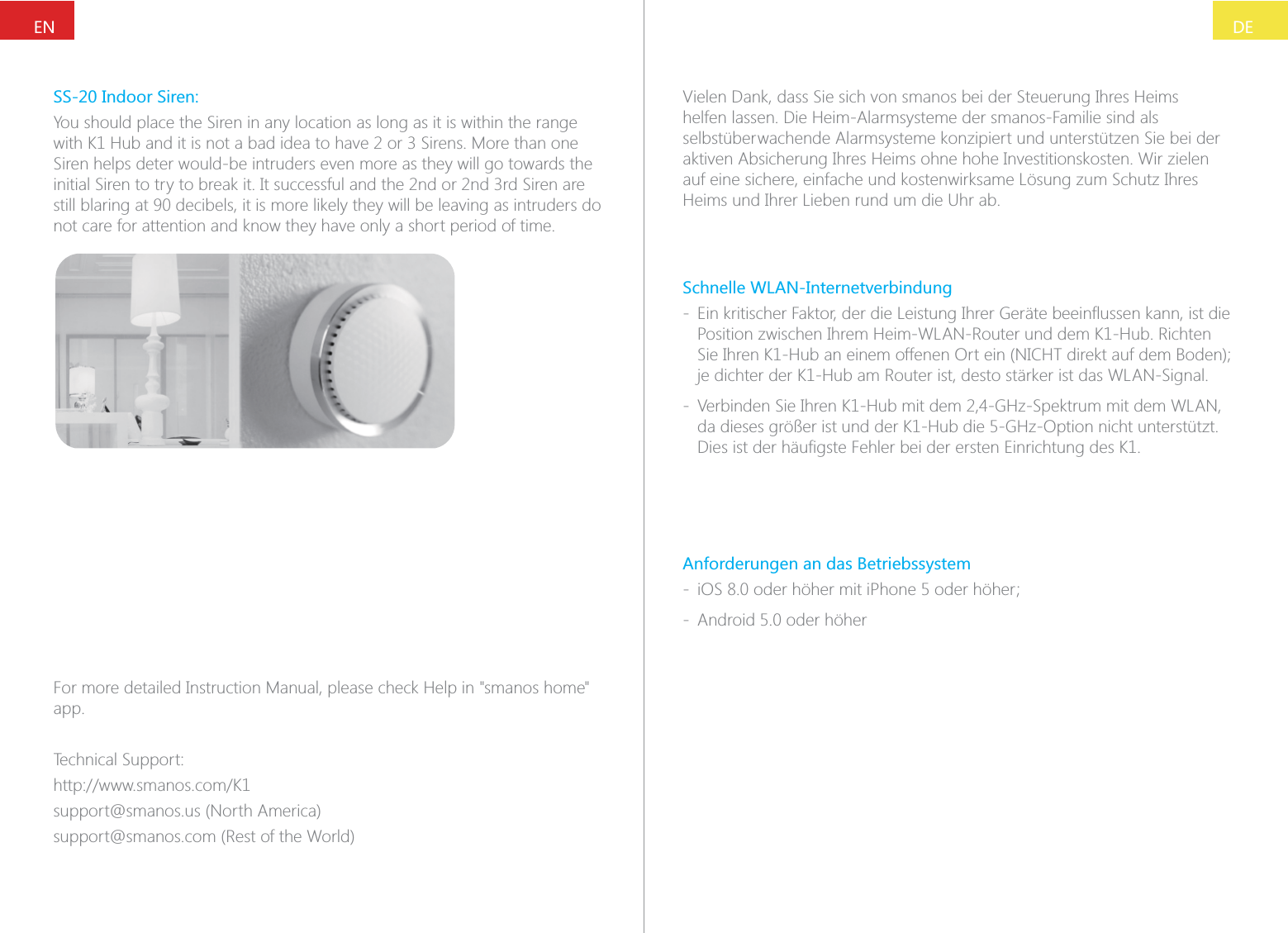
DEENSS-20 Indoor Siren:You should place the Siren in any location as long as it is within the range Siren helps deter would-be intruders even more as they will go towards the still blaring at 90 decibels, it is more likely they will be leaving as intruders do not care for attention and know they have only a short period of time.For more detailed Instruction Manual, please check Help in "smanos home" app.Technical Support:support@smanos.us (North America)support@smanos.com (Rest of the World)Vielen Dank, dass Sie sich von smanos bei der Steuerung Ihres Heims helfen lassen. Die Heim-Alarmsysteme der smanos-Familie sind als selbstüberwachende Alarmsysteme konzipiert und unterstützen Sie bei der aktiven Absicherung Ihres Heims ohne hohe Investitionskosten. Wir zielen auf eine sichere, einfache und kostenwirksame Lösung zum Schutz Ihres Heims und Ihrer Lieben rund um die Uhr ab.Schnelle WLAN-Internetverbindung - Position zwischen Ihrem Heim-WLAN-Router und dem K1-Hub. Richten je dichter der K1-Hub am Router ist, desto stärker ist das WLAN-Signal. - Verbinden Sie Ihren K1-Hub mit dem 2,4-GHz-Spektrum mit dem WLAN, da dieses größer ist und der K1-Hub die 5-GHz-Option nicht unterstützt. Anforderungen an das Betriebssystem -  - Android 5.0 oder höher
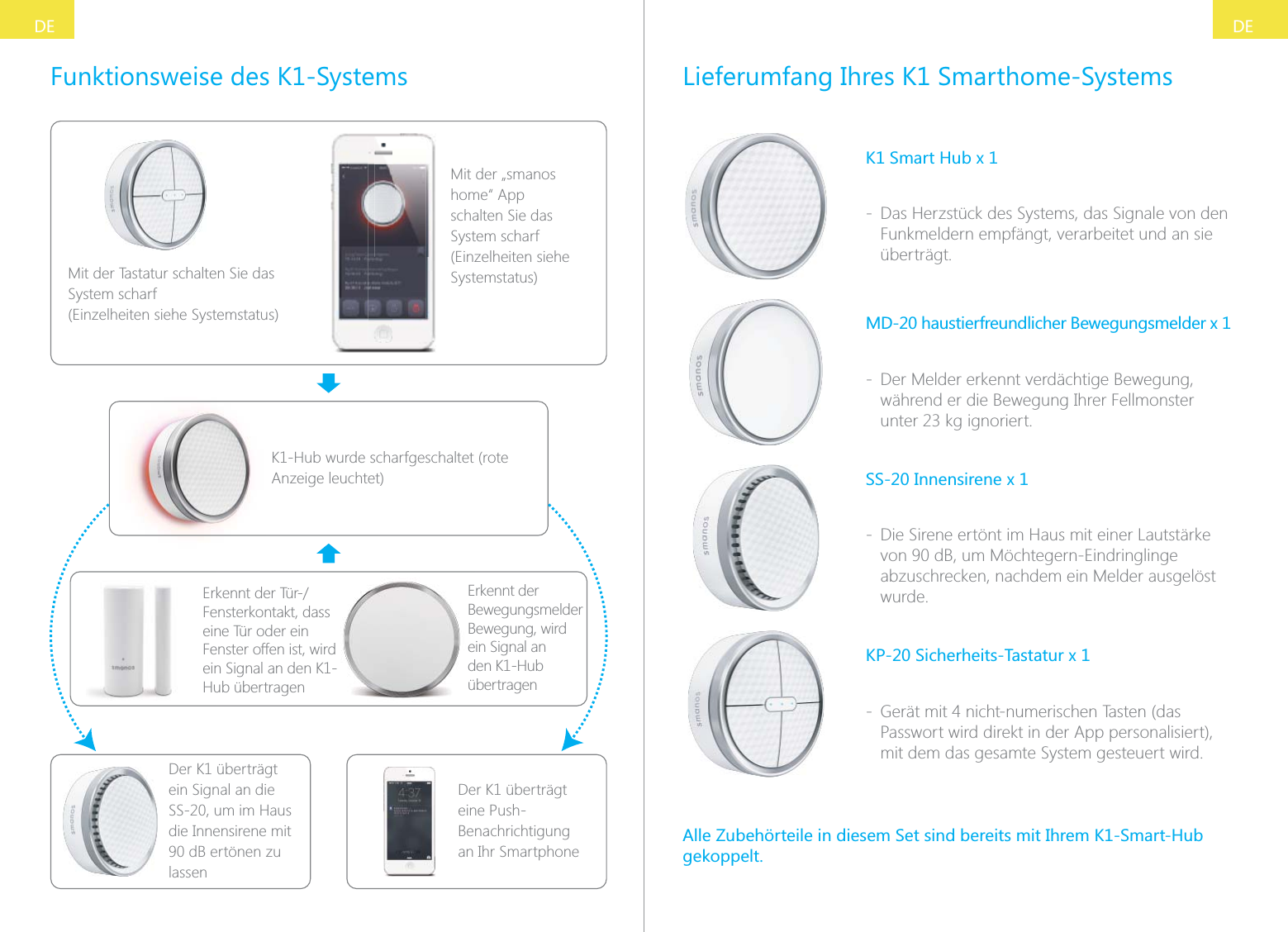
DEDEFunktionsweise des K1-SystemsMit der Tastatur schalten Sie das System scharf (Einzelheiten siehe Systemstatus)Mit der „smanos home“ App schalten Sie das System scharf (Einzelheiten siehe Systemstatus)K1-Hub wurde scharfgeschaltet (rote Anzeige leuchtet)Fensterkontakt, dass eine Tür oder ein Fenster offen ist, wird ein Signal an den K1-Hub übertragenDer K1 überträgt ein Signal an die SS-20, um im Haus die Innensirene mit 90 dB ertönen zu lassenDer K1 überträgt eine Push-Benachrichtigung an Ihr SmartphoneErkennt der Bewegungsmelder Bewegung, wird  ein Signal an den K1-Hub übertragenLieferumfang Ihres K1 Smarthome-SystemsK1 Smart Hub x 1 - Das Herzstück des Systems, das Signale von den Funkmeldern empfängt, verarbeitet und an sie überträgt.MD-20 haustierfreundlicher Bewegungsmelder x 1 - Der Melder erkennt verdächtige Bewegung, während er die Bewegung Ihrer Fellmonster SS-20 Innensirene x 1 - Die Sirene ertönt im Haus mit einer Lautstärke von 90 dB, um Möchtegern-Eindringlinge abzuschrecken, nachdem ein Melder ausgelöst wurde.KP-20 Sicherheits-Tastatur x 1 - Gerät mit 4 nicht-numerischen Tasten (das Passwort wird direkt in der App personalisiert), mit dem das gesamte System gesteuert wird.Alle Zubehörteile in diesem Set sind bereits mit Ihrem K1-Smart-Hub gekoppelt.
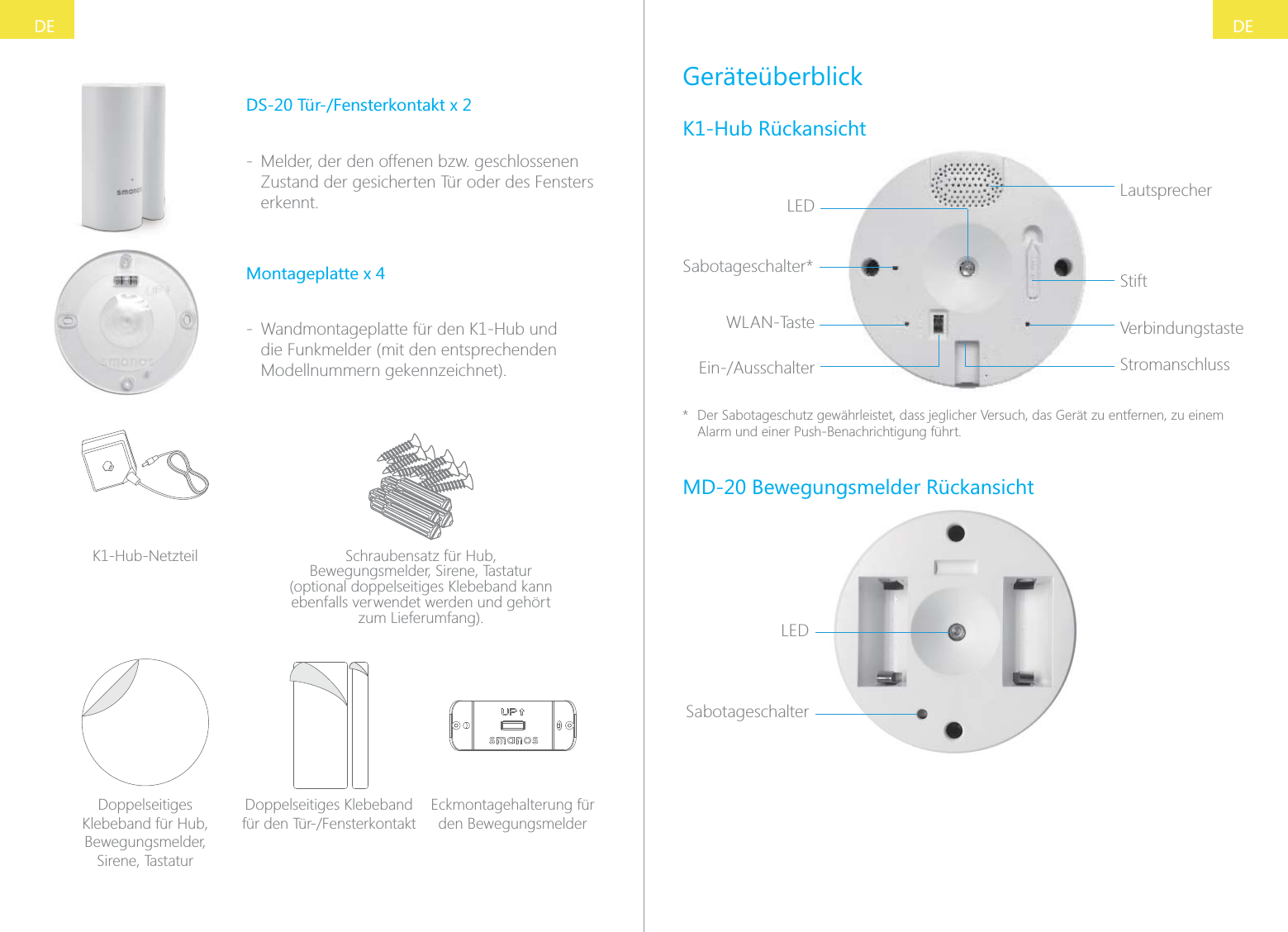
DEDEDS-20 Tür-/Fensterkontakt x 2 - Melder, der den offenen bzw. geschlossenen Zustand der gesicherten Tür oder des Fensters erkennt.Montageplatte x 4 - Wandmontageplatte für den K1-Hub und die Funkmelder (mit den entsprechenden Modellnummern gekennzeichnet).K1-Hub-Netzteil Schraubensatz für Hub, Bewegungsmelder, Sirene, Tastatur (optional doppelseitiges Klebeband kann ebenfalls verwendet werden und gehört zum Lieferumfang).Doppelseitiges Klebeband für Hub, Bewegungsmelder,  Sirene, TastaturDoppelseitiges Klebeband Eckmontagehalterung für den BewegungsmelderGeräteüberblickK1-Hub RückansichtLEDStiftStromanschlussLautsprecherVerbindungstasteSabotageschalter*WLAN-Taste*  Der Sabotageschutz gewährleistet, dass jeglicher Versuch, das Gerät zu entfernen, zu einem Alarm und einer Push-Benachrichtigung führt.MD-20 Bewegungsmelder RückansichtLEDSabotageschalter
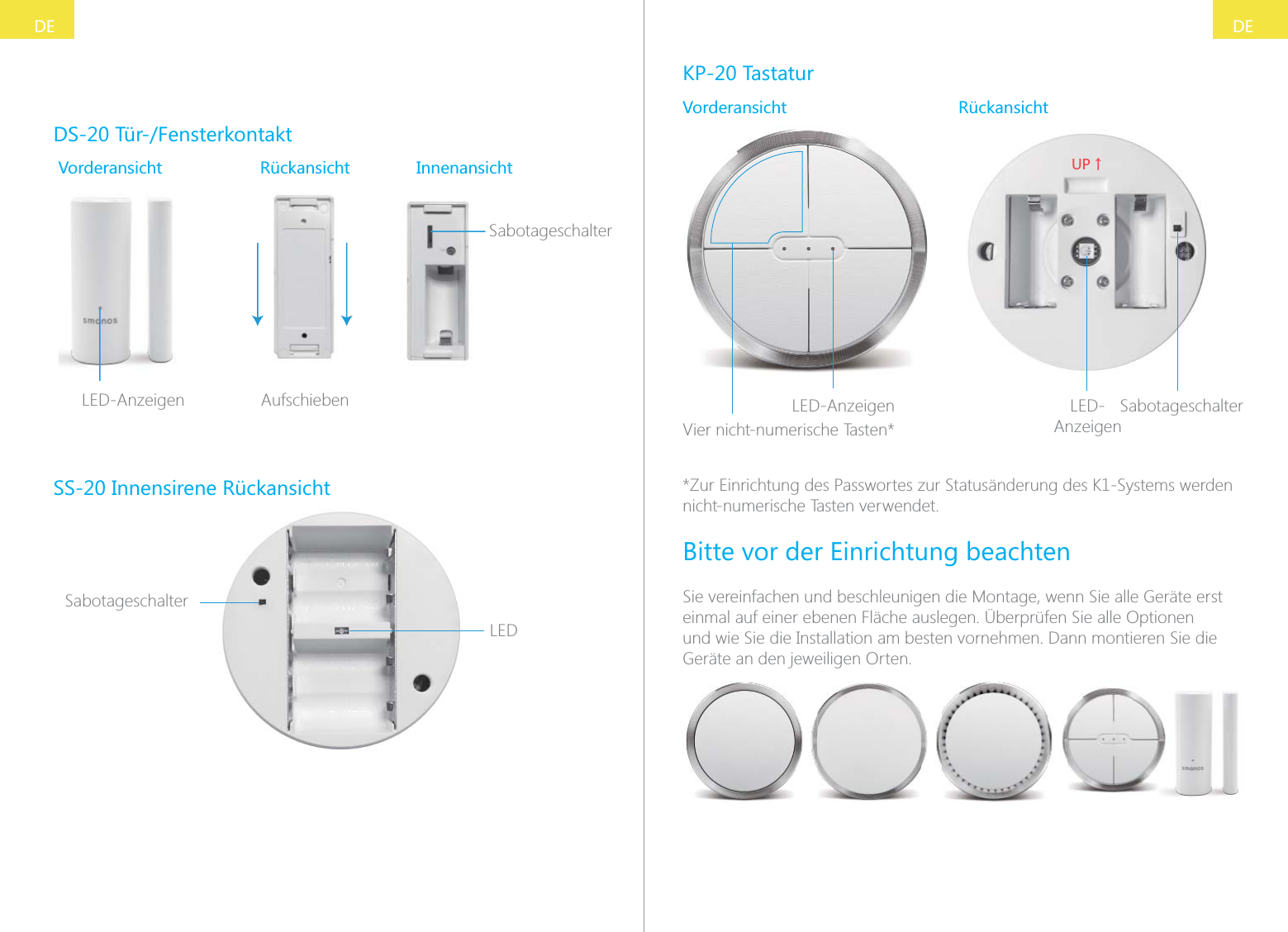
DEDEDS-20 Tür-/FensterkontaktVorderansicht Rückansicht InnenansichtSabotageschalterSLED-Anzeigen AufschiebenSS-20 Innensirene RückansichtLEDSabotageschalterKP-20 TastaturVorderansicht RückansichtLED-AnzeigenVier nicht-numerische Tasten*;6ɑLED-AnzeigenSabotageschalter*Zur Einrichtung des Passwortes zur Statusänderung des K1-Systems werden nicht-numerische Tasten verwendet.Bitte vor der Einrichtung beachtenSie vereinfachen und beschleunigen die Montage, wenn Sie alle Geräte erst einmal auf einer ebenen Fläche auslegen. Überprüfen Sie alle Optionen und wie Sie die Installation am besten vornehmen. Dann montieren Sie die Geräte an den jeweiligen Orten.
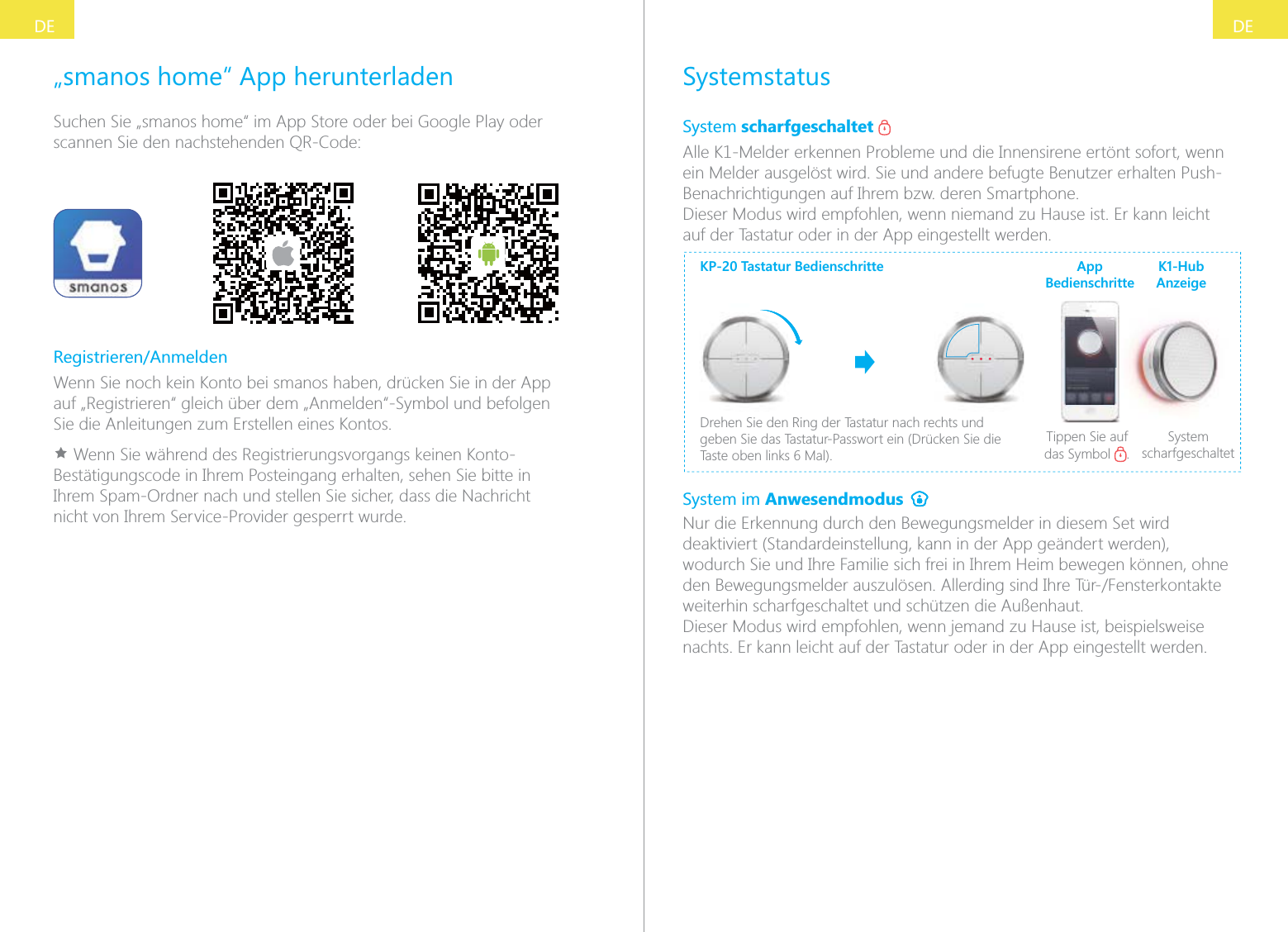
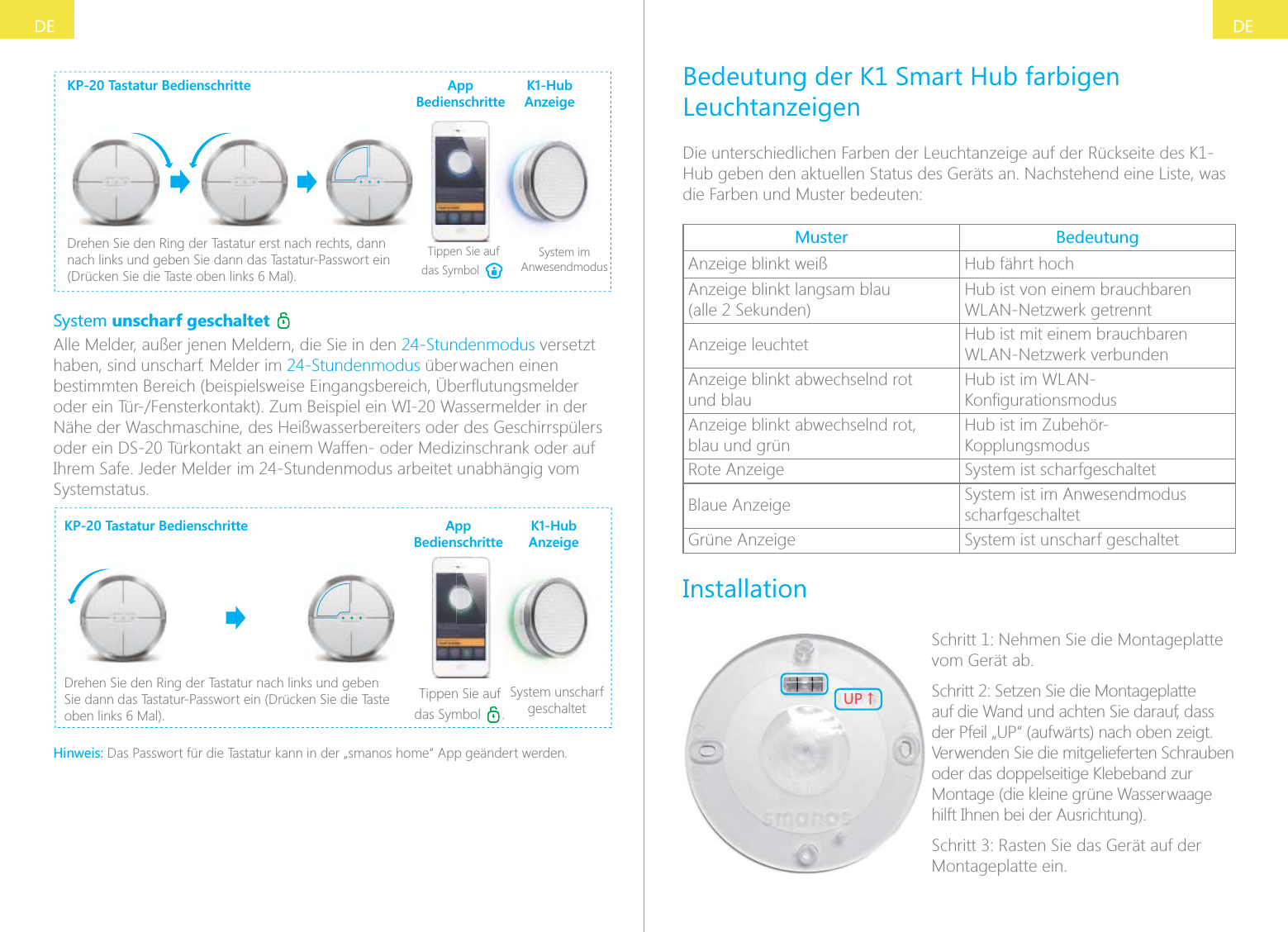
DEDESystemstatusSystem scharfgeschaltet   Alle K1-Melder erkennen Probleme und die Innensirene ertönt sofort, wenn ein Melder ausgelöst wird. Sie und andere befugte Benutzer erhalten Push-Benachrichtigungen auf Ihrem bzw. deren Smartphone.Dieser Modus wird empfohlen, wenn niemand zu Hause ist. Er kann leicht auf der Tastatur oder in der App eingestellt werden.KP-20 Tastatur BedienschritteDrehen Sie den Ring der Tastatur nach rechts und geben Sie das Tastatur-Passwort ein (Drücken Sie die Tippen Sie auf das Symbol  .System scharfgeschaltetApp BedienschritteK1-Hub AnzeigeSystem im Anwesendmodus Nur die Erkennung durch den Bewegungsmelder in diesem Set wird deaktiviert (Standardeinstellung, kann in der App geändert werden), wodurch Sie und Ihre Familie sich frei in Ihrem Heim bewegen können, ohne weiterhin scharfgeschaltet und schützen die Außenhaut.Dieser Modus wird empfohlen, wenn jemand zu Hause ist, beispielsweise nachts. Er kann leicht auf der Tastatur oder in der App eingestellt werden.„smanos home“ App herunterladenSuchen Sie „smanos home“ im App Store oder bei Google Play oder scannen Sie den nachstehenden QR-Code:Registrieren/AnmeldenWenn Sie noch kein Konto bei smanos haben, drücken Sie in der App auf „Registrieren“ gleich über dem „Anmelden“-Symbol und befolgen Sie die Anleitungen zum Erstellen eines Kontos.Ì Wenn Sie während des Registrierungsvorgangs keinen Konto-Bestätigungscode in Ihrem Posteingang erhalten, sehen Sie bitte in Ihrem Spam-Ordner nach und stellen Sie sicher, dass die Nachricht nicht von Ihrem Service-Provider gesperrt wurde.
DEDEKP-20 Tastatur BedienschritteDrehen Sie den Ring der Tastatur erst nach rechts, dann nach links und geben Sie dann das Tastatur-Passwort ein Tippen Sie auf das Symbol .System im AnwesendmodusApp BedienschritteK1-Hub AnzeigeSystem unscharf geschaltet   Alle Melder, außer jenen Meldern, die Sie in den 24-Stundenmodus versetzt haben, sind unscharf. Melder im 24-Stundenmodus überwachen einen Nähe der Waschmaschine, des Heißwasserbereiters oder des Geschirrspülers oder ein DS-20 Türkontakt an einem Waffen- oder Medizinschrank oder auf Ihrem Safe. Jeder Melder im 24-Stundenmodus arbeitet unabhängig vom Systemstatus.KP-20 Tastatur BedienschritteDrehen Sie den Ring der Tastatur nach links und geben Sie dann das Tastatur-Passwort ein (Drücken Sie die Taste Tippen Sie auf das Symbol  .System unscharf geschaltetApp BedienschritteK1-Hub AnzeigeHinweis: Das Passwort für die Tastatur kann in der „smanos home“ App geändert werden.Bedeutung der K1 Smart Hub farbigen LeuchtanzeigenDie unterschiedlichen Farben der Leuchtanzeige auf der Rückseite des K1-Hub geben den aktuellen Status des Geräts an. Nachstehend eine Liste, was die Farben und Muster bedeuten:Muster BedeutungAnzeige blinkt weiß Hub fährt hochAnzeige blinkt langsam blau  (alle 2 Sekunden)Hub ist von einem brauchbaren WLAN-Netzwerk getrenntAnzeige leuchtet Hub ist mit einem brauchbaren WLAN-Netzwerk verbundenAnzeige blinkt abwechselnd rot  und blauHub ist im WLAN-Anzeige blinkt abwechselnd rot,  blau und grünHub ist im Zubehör-KopplungsmodusRote Anzeige System ist scharfgeschaltetBlaue Anzeige System ist im Anwesendmodus scharfgeschaltetGrüne Anzeige System ist unscharf geschaltetInstallation;6ɑSchritt 1: Nehmen Sie die Montageplatte vom Gerät ab.Schritt 2: Setzen Sie die Montageplatte auf die Wand und achten Sie darauf, dass der Pfeil „UP“ (aufwärts) nach oben zeigt. Verwenden Sie die mitgelieferten Schrauben oder das doppelseitige Klebeband zur Montage (die kleine grüne Wasserwaage hilft Ihnen bei der Ausrichtung).Montageplatte ein.
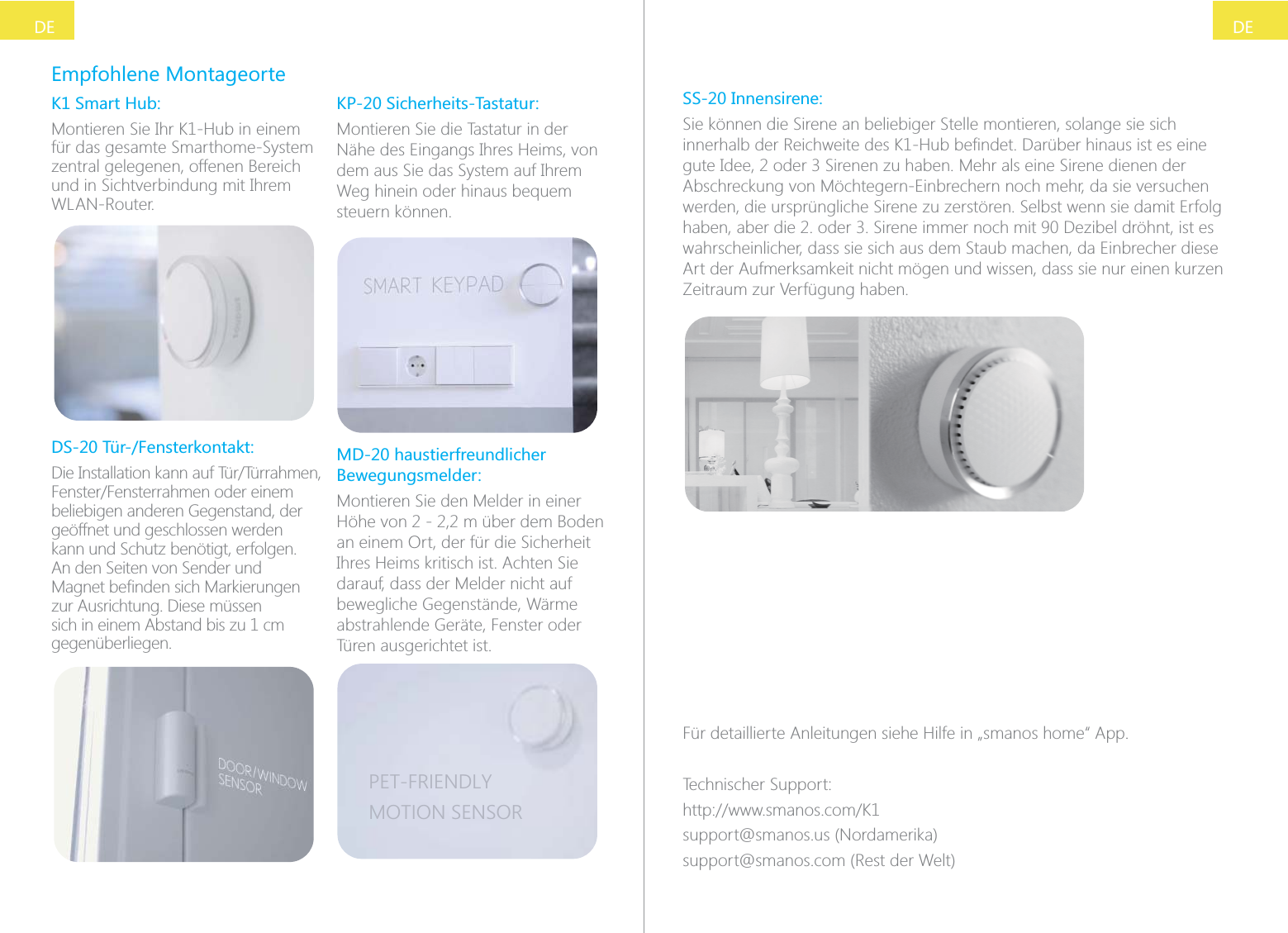
DEDEEmpfohlene MontageorteK1 Smart Hub:Montieren Sie Ihr K1-Hub in einem für das gesamte Smarthome-System zentral gelegenen, offenen Bereich und in Sichtverbindung mit Ihrem WLAN-Router.DS-20 Tür-/Fensterkontakt:beliebigen anderen Gegenstand, der geöffnet und geschlossen werden kann und Schutz benötigt, erfolgen. An den Seiten von Sender und zur Ausrichtung. Diese müssen sich in einem Abstand bis zu 1 cm gegenüberliegen.KP-20 Sicherheits-Tastatur:Montieren Sie die Tastatur in der Nähe des Eingangs Ihres Heims, von dem aus Sie das System auf Ihrem Weg hinein oder hinaus bequem steuern können.MD-20 haustierfreundlicher Bewegungsmelder:Montieren Sie den Melder in einer Höhe von 2 - 2,2 m über dem Boden an einem Ort, der für die Sicherheit Ihres Heims kritisch ist. Achten Sie darauf, dass der Melder nicht auf bewegliche Gegenstände, Wärme abstrahlende Geräte, Fenster oder Türen ausgerichtet ist.PET-FRIENDLYMOTION SENSORSS-20 Innensirene:Sie können die Sirene an beliebiger Stelle montieren, solange sie sich Abschreckung von Möchtegern-Einbrechern noch mehr, da sie versuchen werden, die ursprüngliche Sirene zu zerstören. Selbst wenn sie damit Erfolg wahrscheinlicher, dass sie sich aus dem Staub machen, da Einbrecher diese Art der Aufmerksamkeit nicht mögen und wissen, dass sie nur einen kurzen Zeitraum zur Verfügung haben.Für detaillierte Anleitungen siehe Hilfe in „smanos home“ App.Technischer Support:support@smanos.us (Nordamerika)support@smanos.com (Rest der Welt)
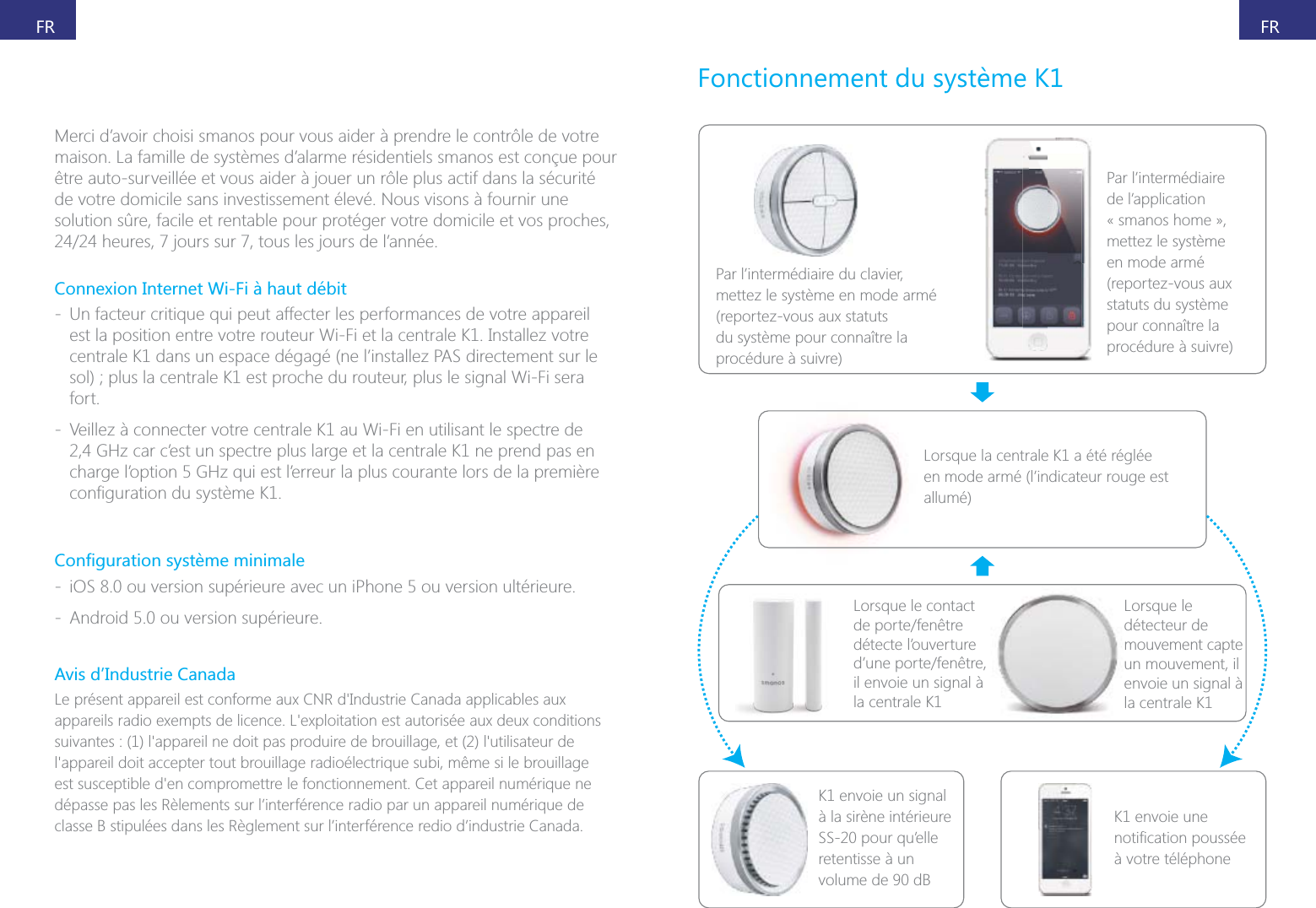
FRFRMerci d’avoir choisi smanos pour vous aider à prendre le contrôle de votre maison. La famille de systèmes d’alarme résidentiels smanos est conçue pour être auto-surveillée et vous aider à jouer un rôle plus actif dans la sécurité de votre domicile sans investissement élevé. Nous visons à fournir une solution sûre, facile et rentable pour protéger votre domicile et vos proches, Connexion Internet Wi-Fi à haut débit - Un facteur critique qui peut affecter les performances de votre appareil est la position entre votre routeur Wi-Fi et la centrale K1. Installez votre centrale K1 dans un espace dégagé (ne l’installez PAS directement sur le fort. - Veillez à connecter votre centrale K1 au Wi-Fi en utilisant le spectre de 2,4 GHz car c’est un spectre plus large et la centrale K1 ne prend pas en charge l’option 5 GHz qui est l’erreur la plus courante lors de la première  - iOS 8.0 ou version supérieure avec un iPhone 5 ou version ultérieure. - Android 5.0 ou version supérieure.Par l’intermédiaire du clavier, mettez le système en mode armé du système pour connaître la procédure à suivre)Par l’intermédiaire de l’application « smanos home », mettez le système en mode armé statuts du système pour connaître la procédure à suivre)Lorsque la centrale K1 a été réglée en mode armé (l’indicateur rouge est allumé)Lorsque le contact détecte l’ouverture il envoie un signal à la centrale K1K1 envoie un signal à la sirène intérieure SS-20 pour qu’elle retentisse à un volume de 90 dBK1 envoie une à votre téléphoneLorsque le détecteur de mouvement capte un mouvement, il envoie un signal à la centrale K1Avis d’Industrie Canadadépasse pas les Rèlements sur l’interférence radio par un appareil numérique de classe B stipulées dans les Règlement sur l’interférence redio d’industrie Canada.
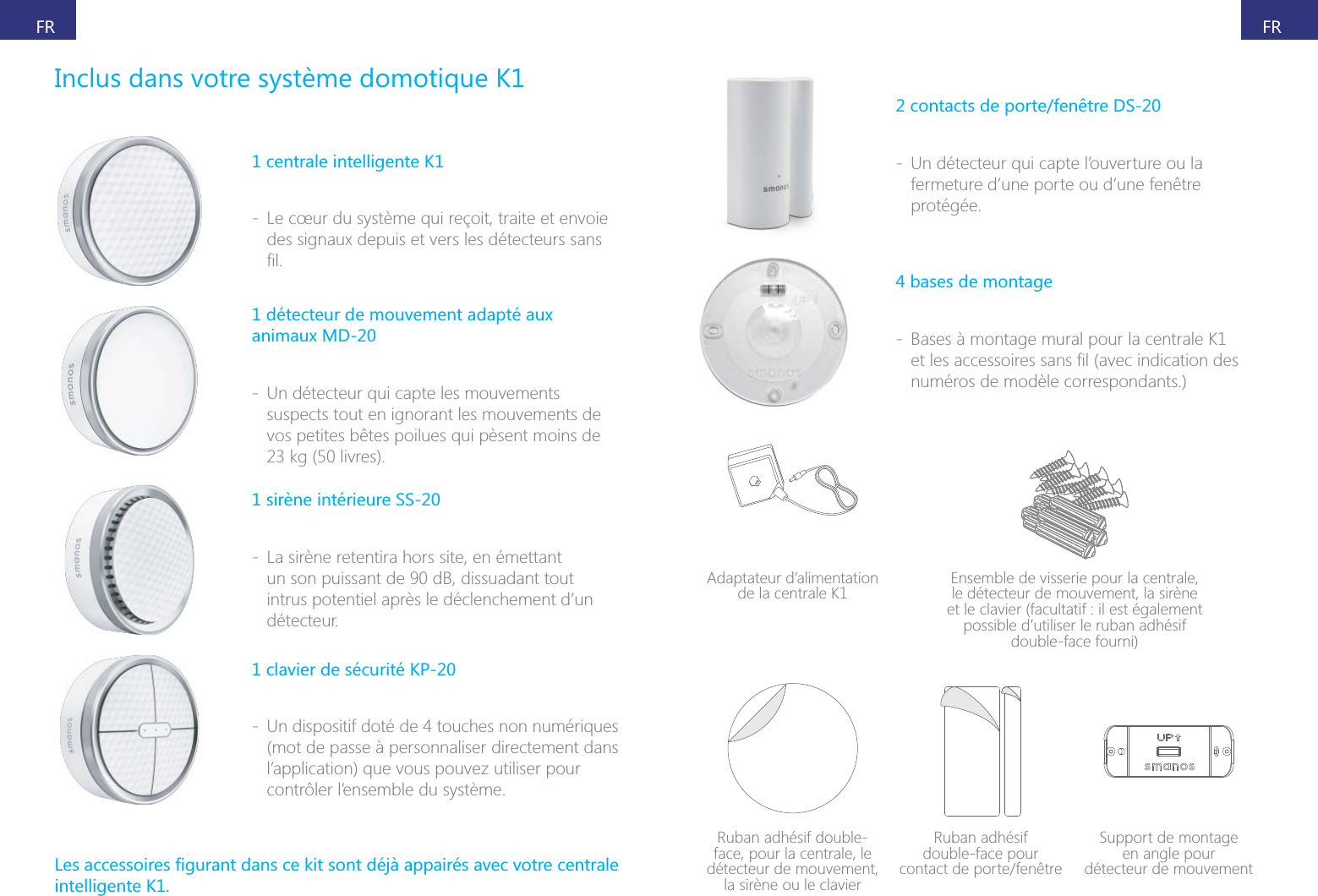
FRFR1 centrale intelligente K1 - Le cœur du système qui reçoit, traite et envoie 1 détecteur de mouvement adapté aux animaux MD-20 - Un détecteur qui capte les mouvements suspects tout en ignorant les mouvements de vos petites bêtes poilues qui pèsent moins de  - La sirène retentira hors site, en émettant un son puissant de 90 dB, dissuadant tout intrus potentiel après le déclenchement d’un détecteur.1 clavier de sécurité KP-20 - Un dispositif doté de 4 touches non numériques (mot de passe à personnaliser directement dans l’application) que vous pouvez utiliser pour contrôler l’ensemble du système.intelligente K1.2 contacts de porte/fenêtre DS-20 - Un détecteur qui capte l’ouverture ou la fermeture d’une porte ou d’une fenêtre protégée.4 bases de montage - Bases à montage mural pour la centrale K1 numéros de modèle correspondants.)Adaptateur d’alimentation de la centrale K1 Ensemble de visserie pour la centrale, le détecteur de mouvement, la sirène et le clavier (facultatif : il est également possible d’utiliser le ruban adhésif double-face fourni)Ruban adhésif double-face, pour la centrale, le détecteur de mouvement, la sirène ou le clavierRuban adhésif  double-face pour  Support de montage  en angle pour  détecteur de mouvement
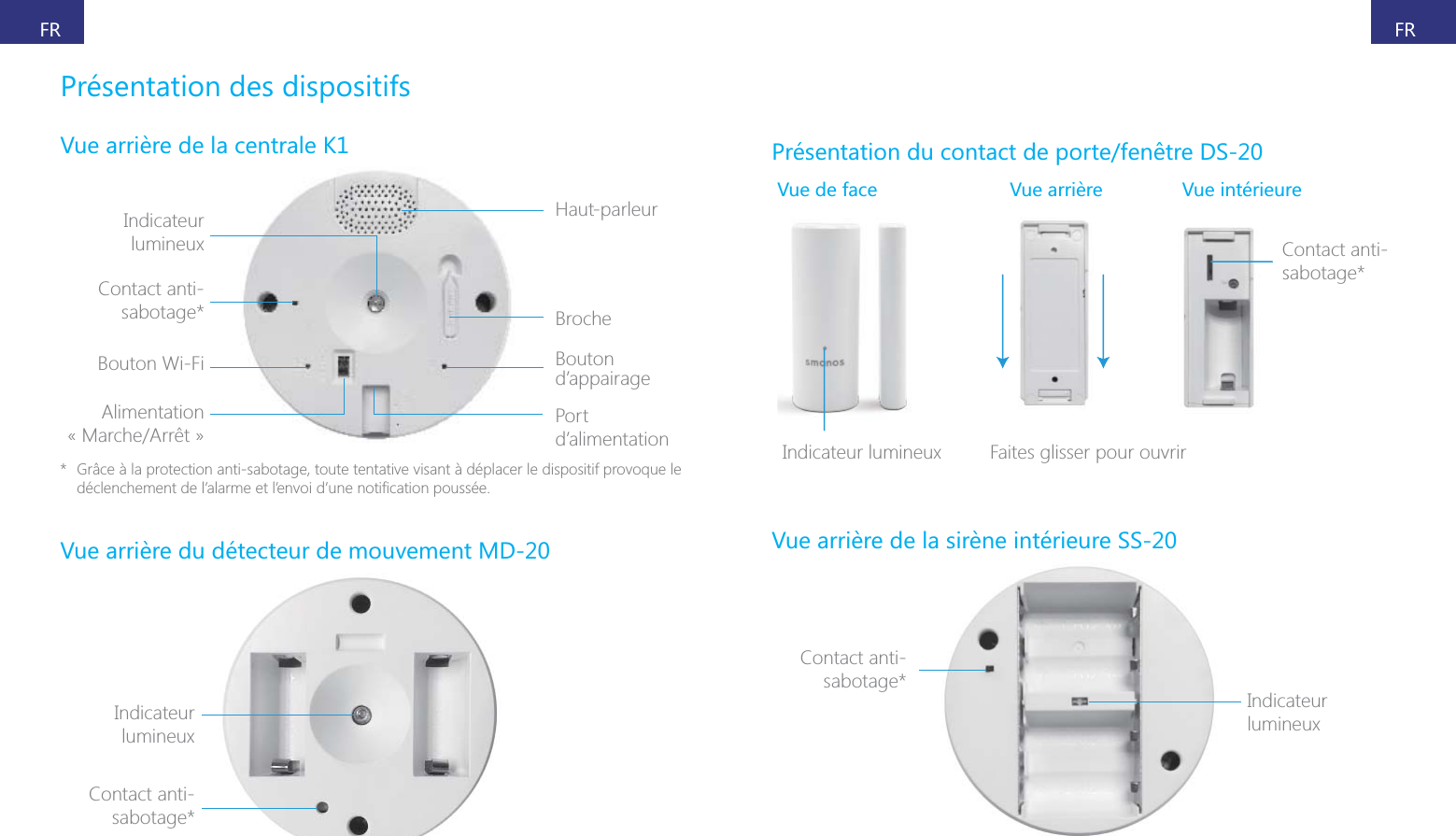
FRFRPrésentation des dispositifsIndicateur Haut-parleurBrocheBouton d’appairagePort d’alimentationContact anti-sabotage*Bouton Wi-FiAlimentation *  Grâce à la protection anti-sabotage, toute tentative visant à déplacer le dispositif provoque le Indicateur Contact anti-sabotage*Présentation du contact de porte/fenêtre DS-20Vue de face  Vue intérieureContact anti-sabotage*Cs       Faites glisser pour ouvrirIndicateur Contact anti-sabotage*
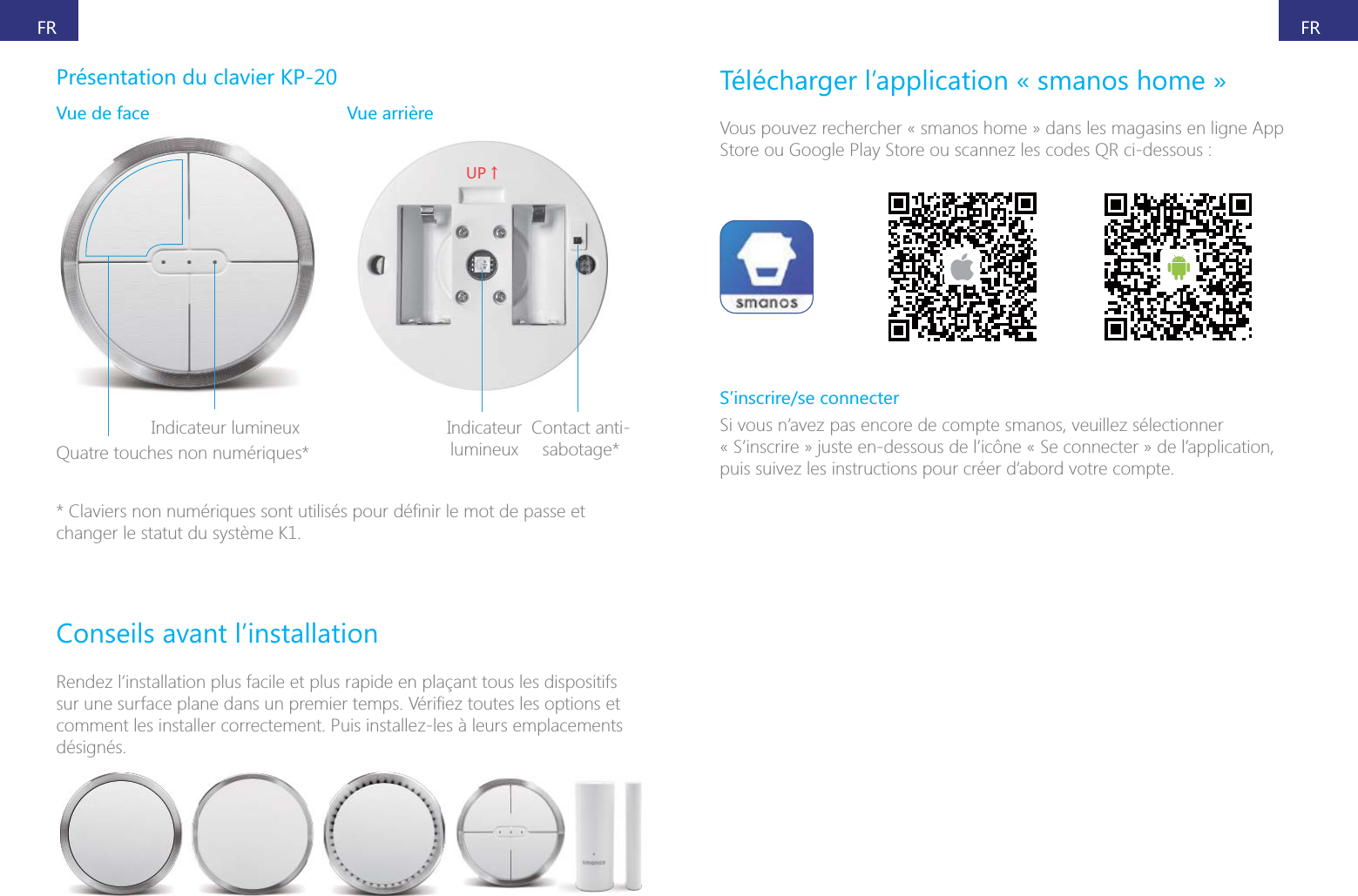
FRFRPrésentation du clavier KP-20Vue de face Quatre touches non numériques*;6ɑIndicateur Contact anti-sabotage*changer le statut du système K1.Conseils avant l’installationRendez l’installation plus facile et plus rapide en plaçant tous les dispositifs comment les installer correctement. Puis installez-les à leurs emplacements désignés.Télécharger l’application « smanos home »Vous pouvez rechercher « smanos home » dans les magasins en ligne App Store ou Google Play Store ou scannez les codes QR ci-dessous :S’inscrire/se connecterSi vous n’avez pas encore de compte smanos, veuillez sélectionner « S’inscrire » juste en-dessous de l’icône « Se connecter » de l’application, puis suivez les instructions pour créer d’abord votre compte.
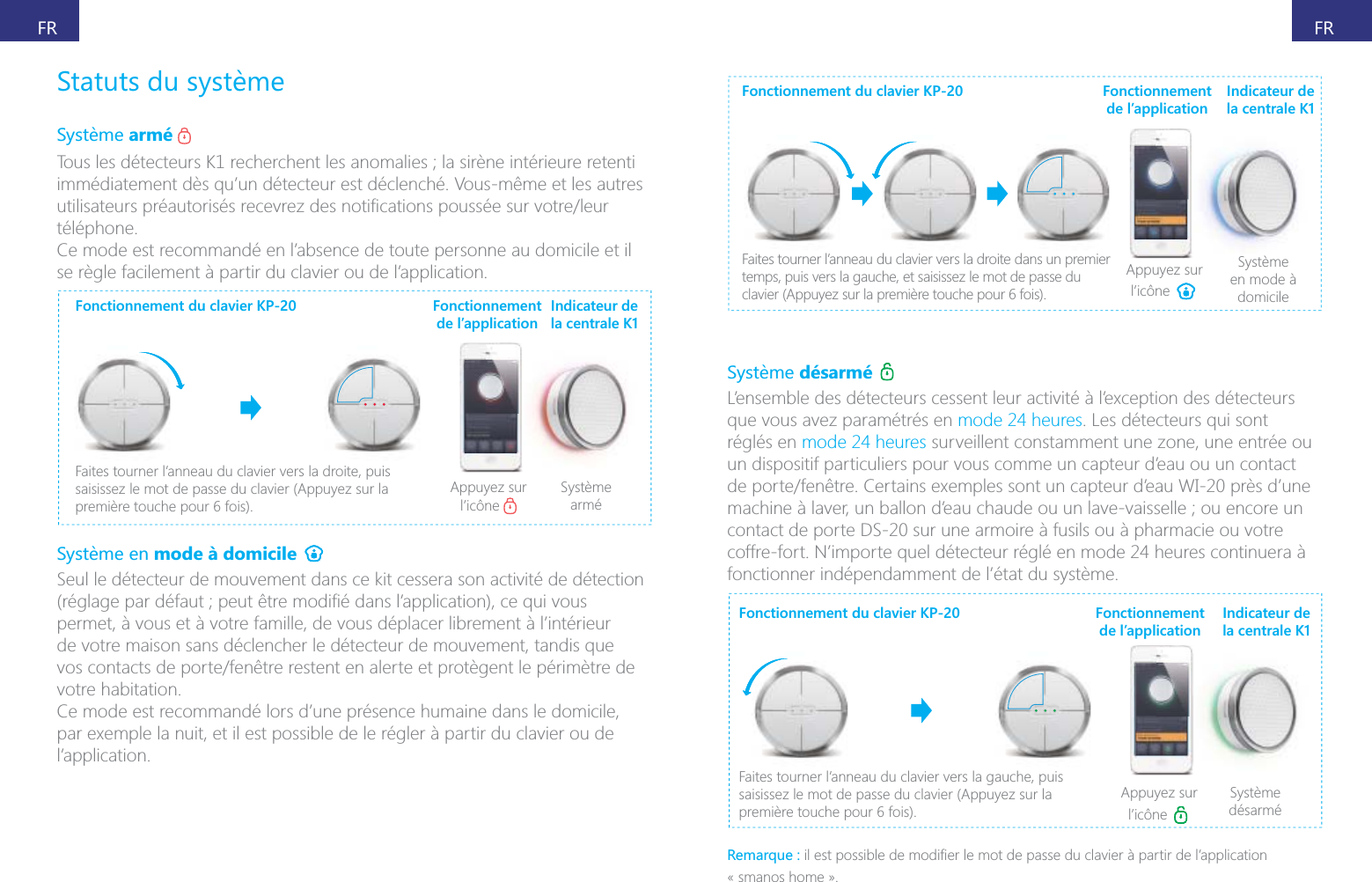
FRFRarmé immédiatement dès qu’un détecteur est déclenché. Vous-même et les autres téléphone.Ce mode est recommandé en l’absence de toute personne au domicile et il se règle facilement à partir du clavier ou de l’application.Fonctionnement du clavier KP-20Faites tourner l’anneau du clavier vers la droite, puis saisissez le mot de passe du clavier (Appuyez sur la Appuyez sur l’icône Système arméFonctionnement de l’applicationIndicateur de la centrale K1mode à domicile Seul le détecteur de mouvement dans ce kit cessera son activité de détection permet, à vous et à votre famille, de vous déplacer librement à l’intérieur de votre maison sans déclencher le détecteur de mouvement, tandis que votre habitation.Ce mode est recommandé lors d’une présence humaine dans le domicile, l’application.Fonctionnement du clavier KP-20Faites tourner l’anneau du clavier vers la droite dans un premier temps, puis vers la gauche, et saisissez le mot de passe du Appuyez sur l’icône Système en mode à domicileFonctionnement de l’applicationIndicateur de la centrale K1désarmé que vous avez paramétrés en mode 24 heures. Les détecteurs qui sont réglés en mode 24 heures surveillent constamment une zone, une entrée ou un dispositif particuliers pour vous comme un capteur d’eau ou un contact contact de porte DS-20 sur une armoire à fusils ou à pharmacie ou votre coffre-fort. N’importe quel détecteur réglé en mode 24 heures continuera à fonctionner indépendamment de l’état du système.Fonctionnement du clavier KP-20Faites tourner l’anneau du clavier vers la gauche, puis saisissez le mot de passe du clavier (Appuyez sur la Appuyez sur l’icône Système désarméFonctionnement de l’applicationIndicateur de la centrale K1Remarque :« smanos home ».
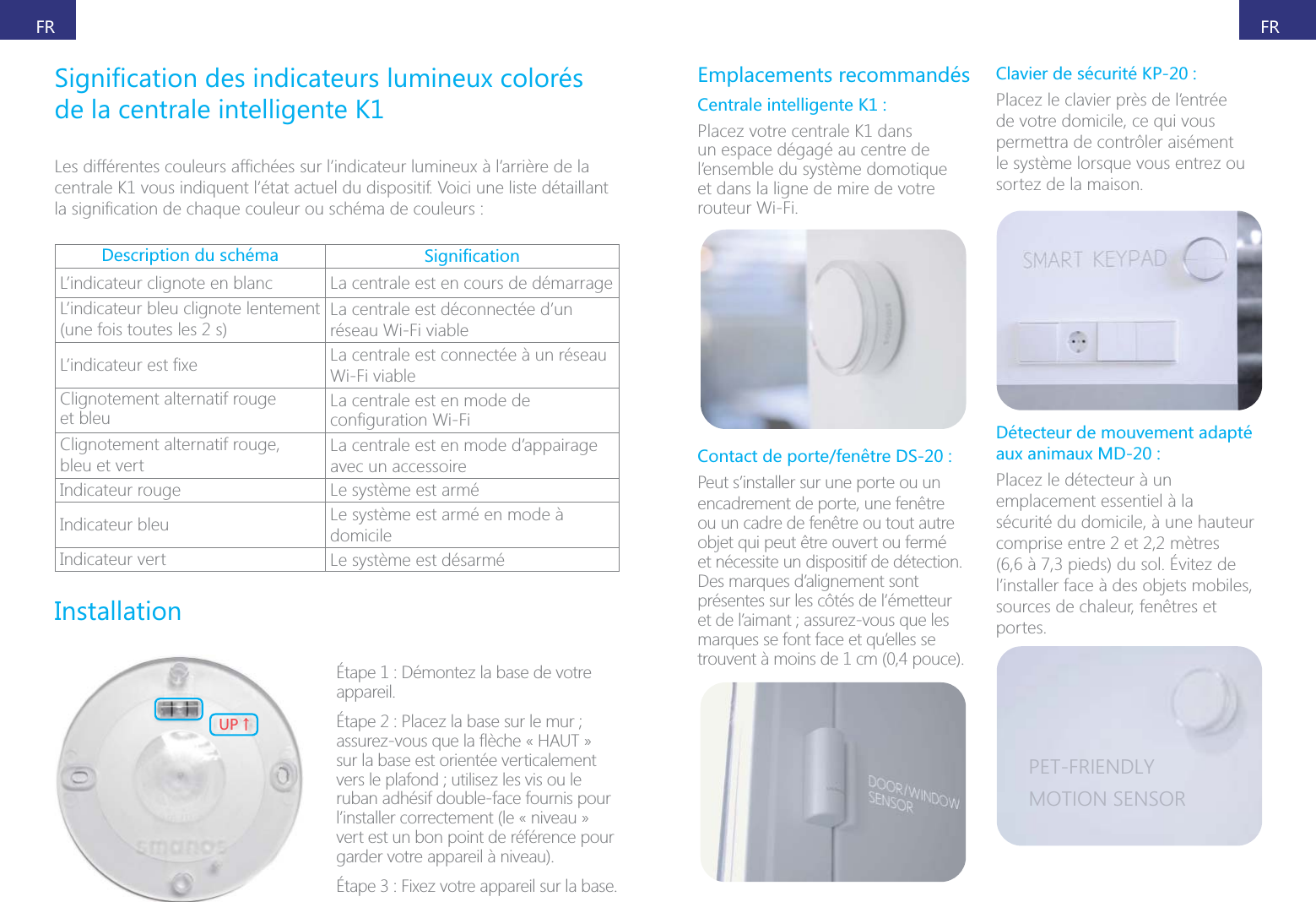
FRFRde la centrale intelligente K1centrale K1 vous indiquent l’état actuel du dispositif. Voici une liste détaillant Description du schéma L’indicateur clignote en blanc La centrale est en cours de démarrageL’indicateur bleu clignote lentement (une fois toutes les 2 s)La centrale est déconnectée d’un réseau Wi-Fi viable La centrale est connectée à un réseau Wi-Fi viableClignotement alternatif rouge  et bleu La centrale est en mode de Clignotement alternatif rouge,  bleu et vertLa centrale est en mode d’appairage avec un accessoireIndicateur rouge Le système est arméIndicateur bleu Le système est armé en mode à domicileIndicateur vert Le système est désarméInstallation;6ɑÉtape 1 : Démontez la base de votre appareil.sur la base est orientée verticalement ruban adhésif double-face fournis pour l’installer correctement (le « niveau » vert est un bon point de référence pour garder votre appareil à niveau).Emplacements recommandésCentrale intelligente K1 :Placez votre centrale K1 dans un espace dégagé au centre de l’ensemble du système domotique et dans la ligne de mire de votre routeur Wi-Fi.Contact de porte/fenêtre DS-20 :Peut s’installer sur une porte ou un encadrement de porte, une fenêtre ou un cadre de fenêtre ou tout autre objet qui peut être ouvert ou fermé et nécessite un dispositif de détection. Des marques d’alignement sont présentes sur les côtés de l’émetteur marques se font face et qu’elles se trouvent à moins de 1 cm (0,4 pouce).Clavier de sécurité KP-20 :Placez le clavier près de l’entrée de votre domicile, ce qui vous permettra de contrôler aisément le système lorsque vous entrez ou sortez de la maison.Détecteur de mouvement adapté aux animaux MD-20 :Placez le détecteur à un emplacement essentiel à la sécurité du domicile, à une hauteur comprise entre 2 et 2,2 mètres l’installer face à des objets mobiles, sources de chaleur, fenêtres et portes.PET-FRIENDLYMOTION SENSOR
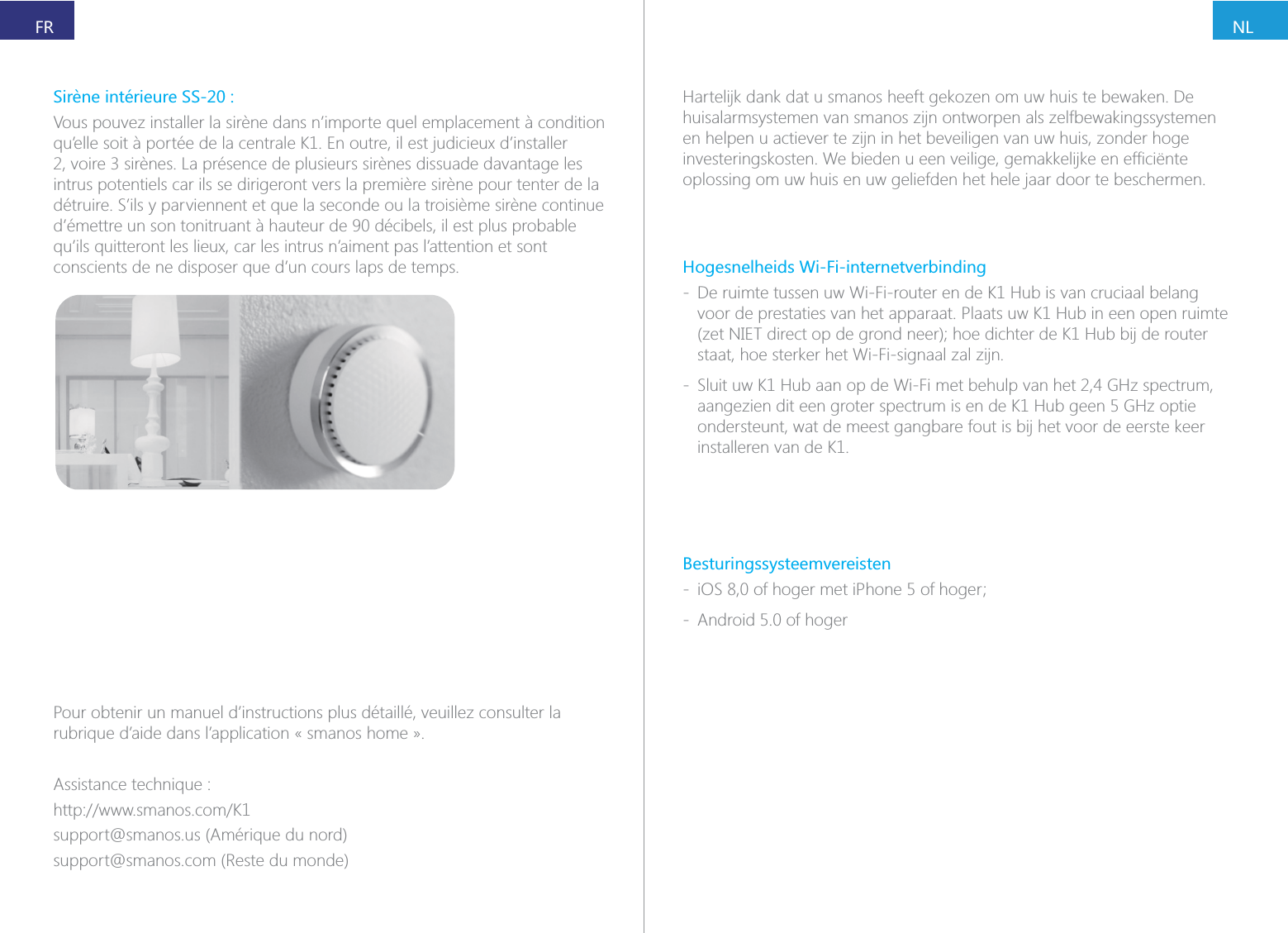
NLFRPour obtenir un manuel d’instructions plus détaillé, veuillez consulter la rubrique d’aide dans l’application « smanos home ».Assistance technique :support@smanos.us (Amérique du nord)support@smanos.com (Reste du monde)Vous pouvez installer la sirène dans n’importe quel emplacement à condition intrus potentiels car ils se dirigeront vers la première sirène pour tenter de la détruire. S’ils y parviennent et que la seconde ou la troisième sirène continue d’émettre un son tonitruant à hauteur de 90 décibels, il est plus probable conscients de ne disposer que d’un cours laps de temps.Hartelijk dank dat u smanos heeft gekozen om uw huis te bewaken. De huisalarmsystemen van smanos zijn ontworpen als zelfbewakingssystemen en helpen u actiever te zijn in het beveiligen van uw huis, zonder hoge oplossing om uw huis en uw geliefden het hele jaar door te beschermen.Hogesnelheids Wi-Fi-internetverbinding - De ruimte tussen uw Wi-Fi-router en de K1 Hub is van cruciaal belang voor de prestaties van het apparaat. Plaats uw K1 Hub in een open ruimte staat, hoe sterker het Wi-Fi-signaal zal zijn. - Sluit uw K1 Hub aan op de Wi-Fi met behulp van het 2,4 GHz spectrum, aangezien dit een groter spectrum is en de K1 Hub geen 5 GHz optie ondersteunt, wat de meest gangbare fout is bij het voor de eerste keer installeren van de K1.Besturingssysteemvereisten -  - Android 5.0 of hoger
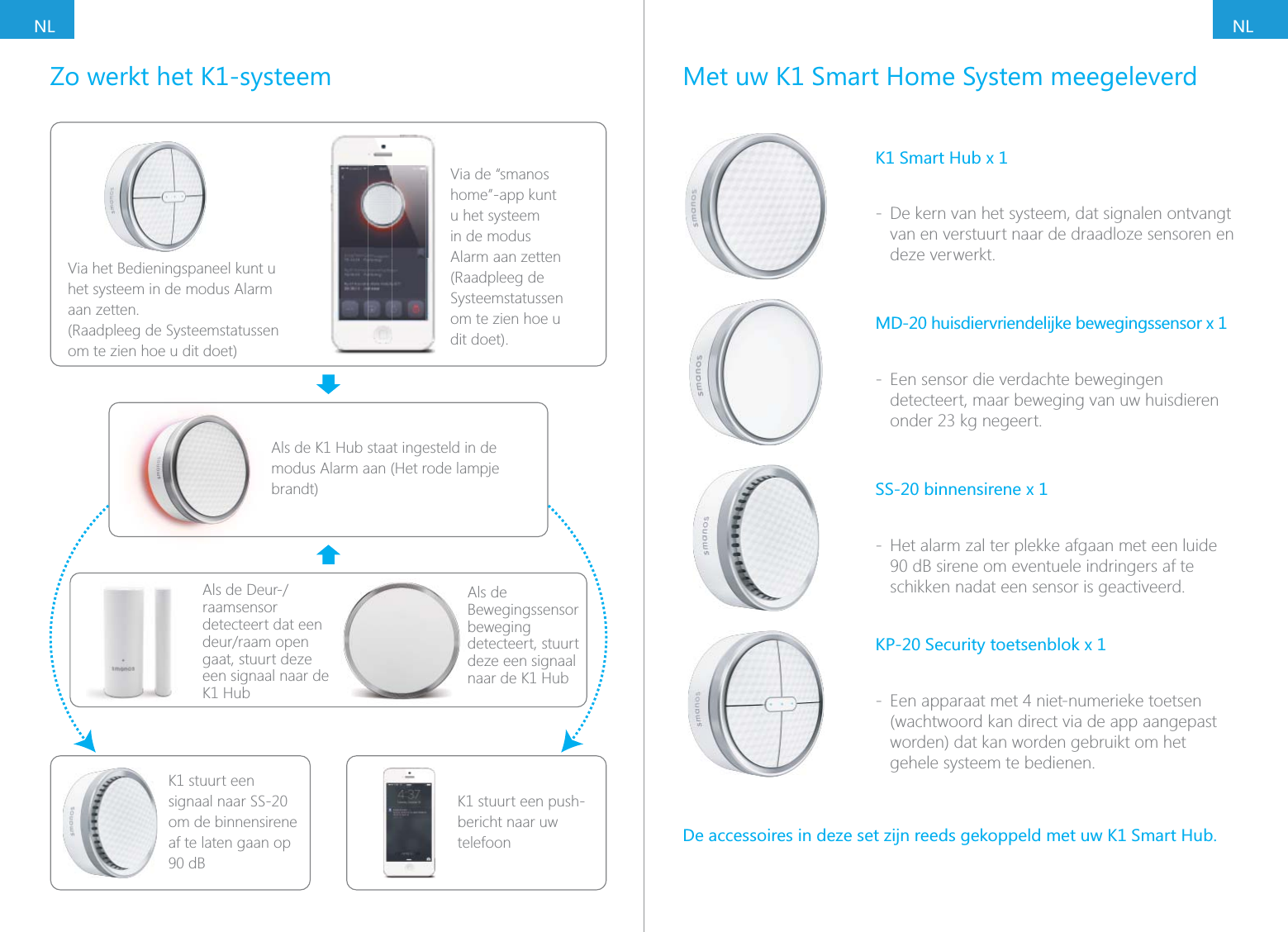
NLNLZo werkt het K1-systeemVia het Bedieningspaneel kunt u het systeem in de modus Alarm aan zetten. (Raadpleeg de Systeemstatussen om te zien hoe u dit doet)Via de “smanos home”-app kunt u het systeem in de modus Alarm aan zetten (Raadpleeg de Systeemstatussen om te zien hoe u dit doet).Als de K1 Hub staat ingesteld in de modus Alarm aan (Het rode lampje brandt)raamsensor detecteert dat een gaat, stuurt deze een signaal naar de K1 HubK1 stuurt een signaal naar SS-20 om de binnensirene af te laten gaan op 90 dBK1 stuurt een push-bericht naar uw telefoonAls de Bewegingssensor beweging detecteert, stuurt deze een signaal naar de K1 HubMet uw K1 Smart Home System meegeleverdK1 Smart Hub x 1 - De kern van het systeem, dat signalen ontvangt van en verstuurt naar de draadloze sensoren en deze verwerkt. - Een sensor die verdachte bewegingen detecteert, maar beweging van uw huisdieren SS-20 binnensirene x 1 - Het alarm zal ter plekke afgaan met een luide 90 dB sirene om eventuele indringers af te schikken nadat een sensor is geactiveerd.KP-20 Security toetsenblok x 1 - Een apparaat met 4 niet-numerieke toetsen (wachtwoord kan direct via de app aangepast worden) dat kan worden gebruikt om het gehele systeem te bedienen.
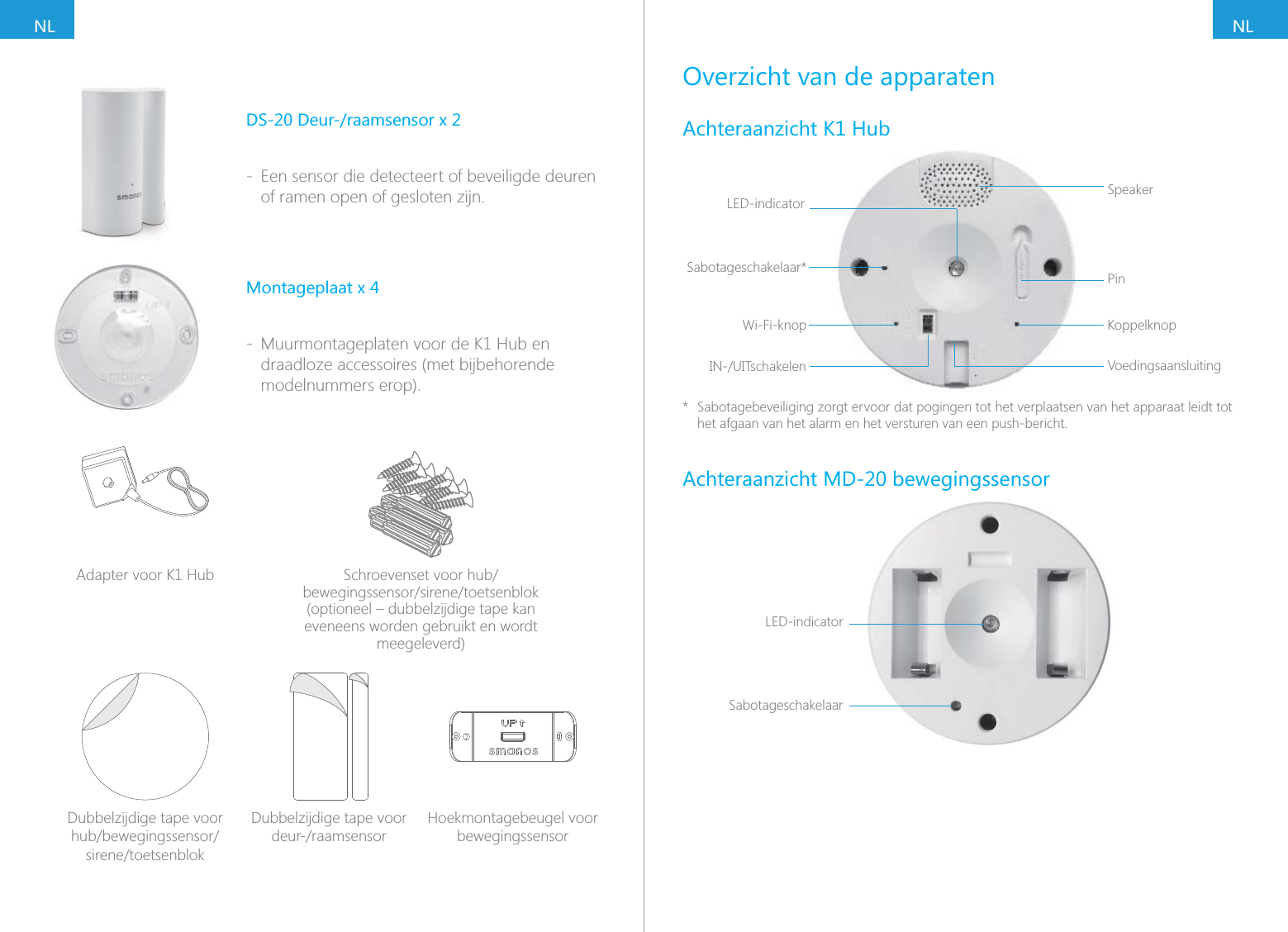
NLNLDS-20 Deur-/raamsensor x 2 - Een sensor die detecteert of beveiligde deuren of ramen open of gesloten zijn.Montageplaat x 4 - Muurmontageplaten voor de K1 Hub en draadloze accessoires (met bijbehorende modelnummers erop).Adapter voor K1 Hub (optioneel – dubbelzijdige tape kan eveneens worden gebruikt en wordt meegeleverd)Dubbelzijdige tape voor Dubbelzijdige tape voor Hoekmontagebeugel voor bewegingssensorOverzicht van de apparatenAchteraanzicht K1 HubLED-indicator SpeakerPinKoppelknopVoedingsaansluitingSabotageschakelaar*Wi-Fi-knop*  Sabotagebeveiliging zorgt ervoor dat pogingen tot het verplaatsen van het apparaat leidt tot het afgaan van het alarm en het versturen van een push-bericht.Achteraanzicht MD-20 bewegingssensorLED-indicatorSabotageschakelaar
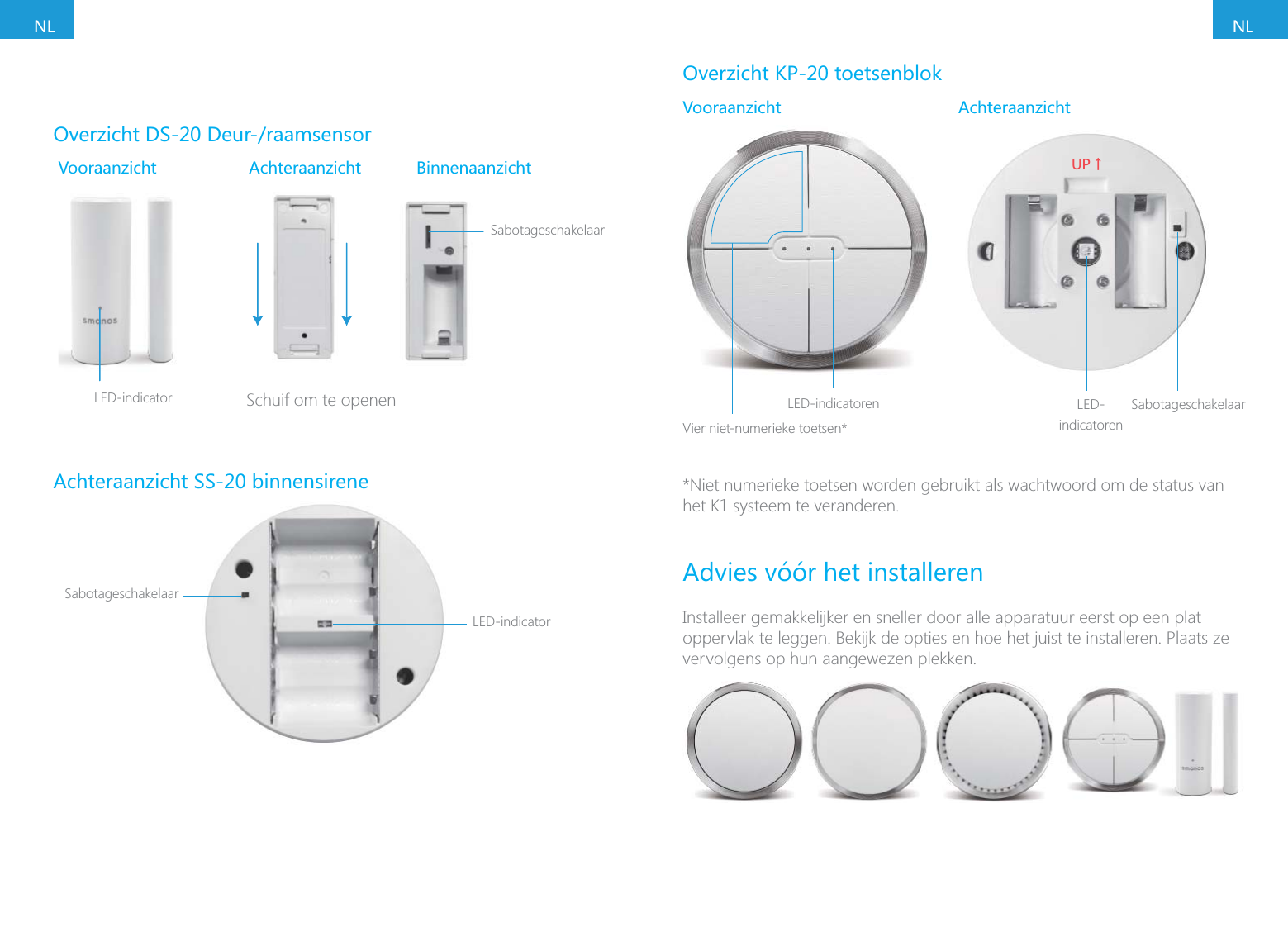
NLNLOverzicht DS-20 Deur-/raamsensorVooraanzicht Achteraanzicht BinnenaanzichtSabotageschakelaarSLED-indicator        Schuif om te openenAchteraanzicht SS-20 binnensireneLED-indicatorSabotageschakelaarOverzicht KP-20 toetsenblokVooraanzicht AchteraanzichtLED-indicatorenVier niet-numerieke toetsen*;6ɑLED-indicatorenSabotageschakelaar*Niet numerieke toetsen worden gebruikt als wachtwoord om de status van het K1 systeem te veranderen.Advies vóór het installerenInstalleer gemakkelijker en sneller door alle apparatuur eerst op een plat oppervlak te leggen. Bekijk de opties en hoe het juist te installeren. Plaats ze vervolgens op hun aangewezen plekken.
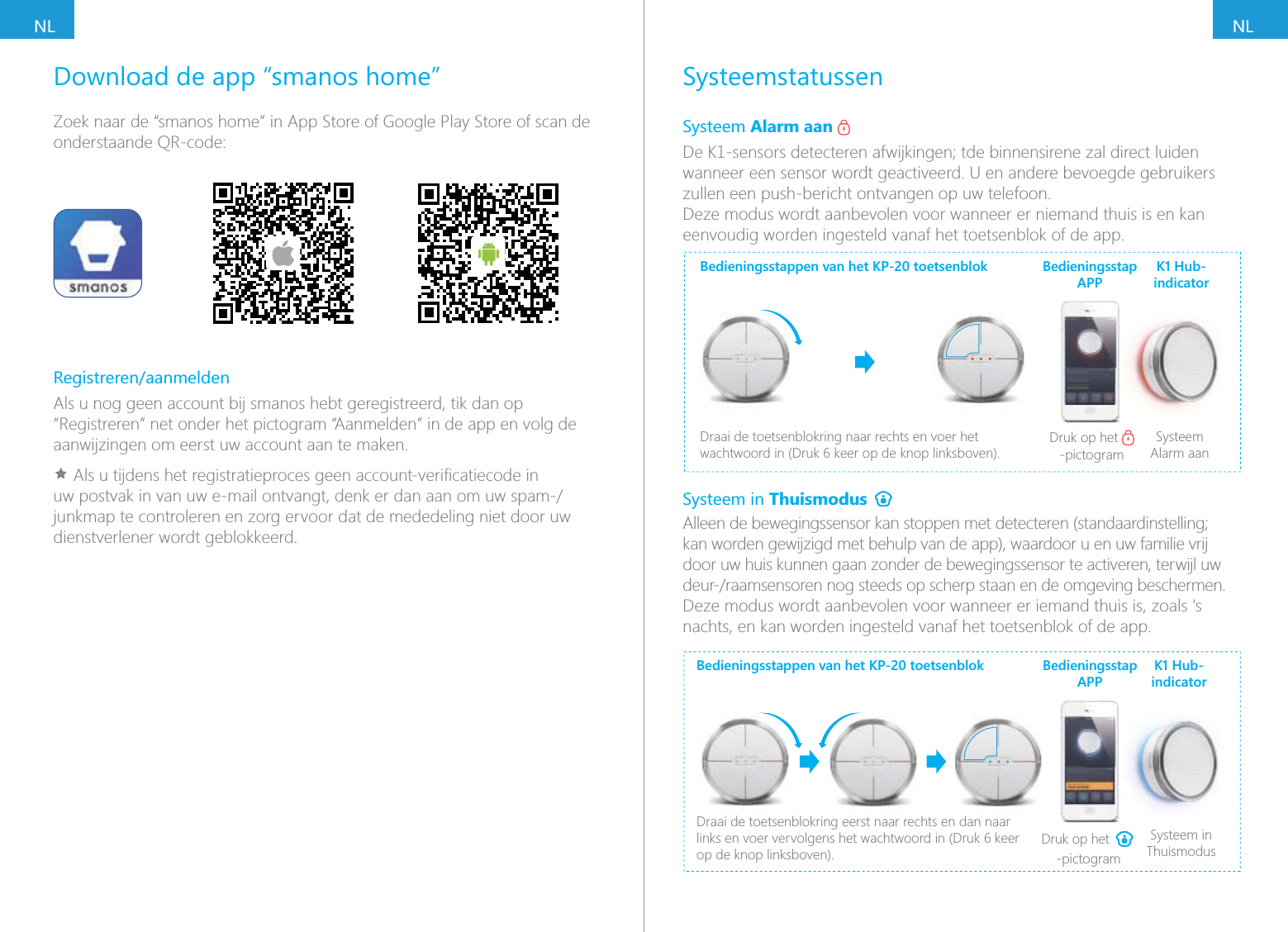
NLNLSysteemstatussenSysteem Alarm aan wanneer een sensor wordt geactiveerd. U en andere bevoegde gebruikers zullen een push-bericht ontvangen op uw telefoon.Deze modus wordt aanbevolen voor wanneer er niemand thuis is en kan eenvoudig worden ingesteld vanaf het toetsenblok of de app.Bedieningsstappen van het KP-20 toetsenblokDraai de toetsenblokring naar rechts en voer het  Druk op het -pictogramSysteem Alarm aanBedieningsstap APPK1 Hub-indicatorSysteem in Thuismodus kan worden gewijzigd met behulp van de app), waardoor u en uw familie vrij door uw huis kunnen gaan zonder de bewegingssensor te activeren, terwijl uw nachts, en kan worden ingesteld vanaf het toetsenblok of de app.Bedieningsstappen van het KP-20 toetsenblokDraai de toetsenblokring eerst naar rechts en dan naar op de knop linksboven).Druk op het -pictogramSysteem in ThuismodusBedieningsstap APPK1 Hub-indicatorDownload de app “smanos home”Zoek naar de “smanos home” in App Store of Google Play Store of scan de onderstaande QR-code:Registreren/aanmeldenAls u nog geen account bij smanos hebt geregistreerd, tik dan op “Registreren” net onder het pictogram “Aanmelden” in de app en volg de aanwijzingen om eerst uw account aan te maken.Ìjunkmap te controleren en zorg ervoor dat de mededeling niet door uw dienstverlener wordt geblokkeerd.
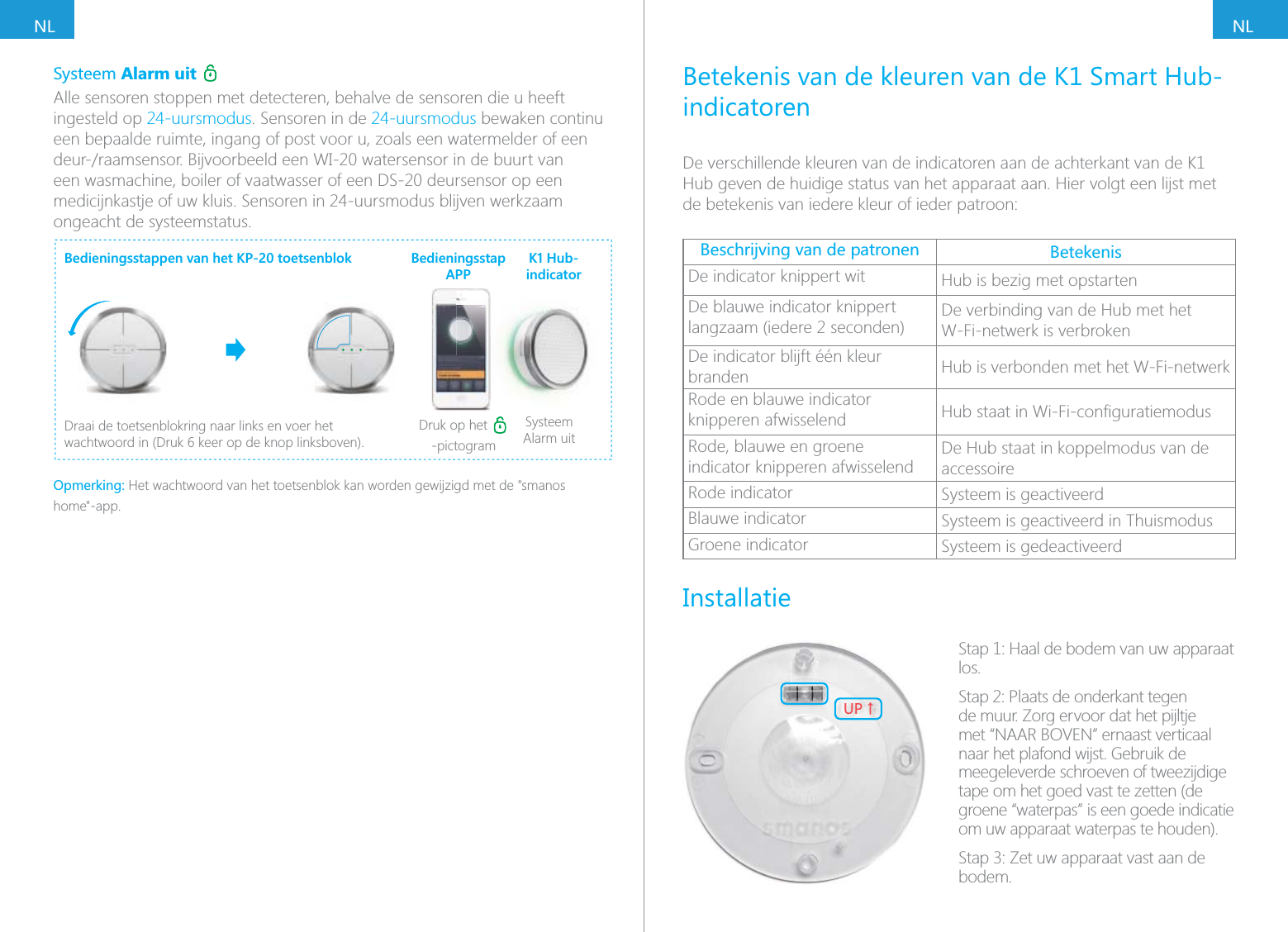
NLNLSysteem Alarm uit Alle sensoren stoppen met detecteren, behalve de sensoren die u heeft ingesteld op 24-uursmodus. Sensoren in de 24-uursmodus bewaken continu een bepaalde ruimte, ingang of post voor u, zoals een watermelder of een een wasmachine, boiler of vaatwasser of een DS-20 deursensor op een medicijnkastje of uw kluis. Sensoren in 24-uursmodus blijven werkzaam ongeacht de systeemstatus.Bedieningsstappen van het KP-20 toetsenblokDraai de toetsenblokring naar links en voer het Druk op het -pictogramSysteem Alarm uitBedieningsstap APPK1 Hub-indicatorOpmerking: Het wachtwoord van het toetsenblok kan worden gewijzigd met de "smanos home"-app.Betekenis van de kleuren van de K1 Smart Hub-indicatorenDe verschillende kleuren van de indicatoren aan de achterkant van de K1 Hub geven de huidige status van het apparaat aan. Hier volgt een lijst met de betekenis van iedere kleur of ieder patroon: BetekenisDe indicator knippert wit Hub is bezig met opstartenDe blauwe indicator knippert langzaam (iedere 2 seconden) De verbinding van de Hub met het W-Fi-netwerk is verbrokenDe indicator blijft één kleur branden Hub is verbonden met het W-Fi-netwerkRode en blauwe indicator  knipperen afwisselend Rode, blauwe en groene  indicator knipperen afwisselend De Hub staat in koppelmodus van de accessoireRode indicator Systeem is geactiveerdBlauwe indicator Systeem is geactiveerd in ThuismodusGroene indicator Systeem is gedeactiveerdInstallatie;6ɑStap 1: Haal de bodem van uw apparaat los.Stap 2: Plaats de onderkant tegen de muur. Zorg ervoor dat het pijltje met “NAAR BOVEN” ernaast verticaal naar het plafond wijst. Gebruik de meegeleverde schroeven of tweezijdige tape om het goed vast te zetten (de groene “waterpas” is een goede indicatie om uw apparaat waterpas te houden).bodem.
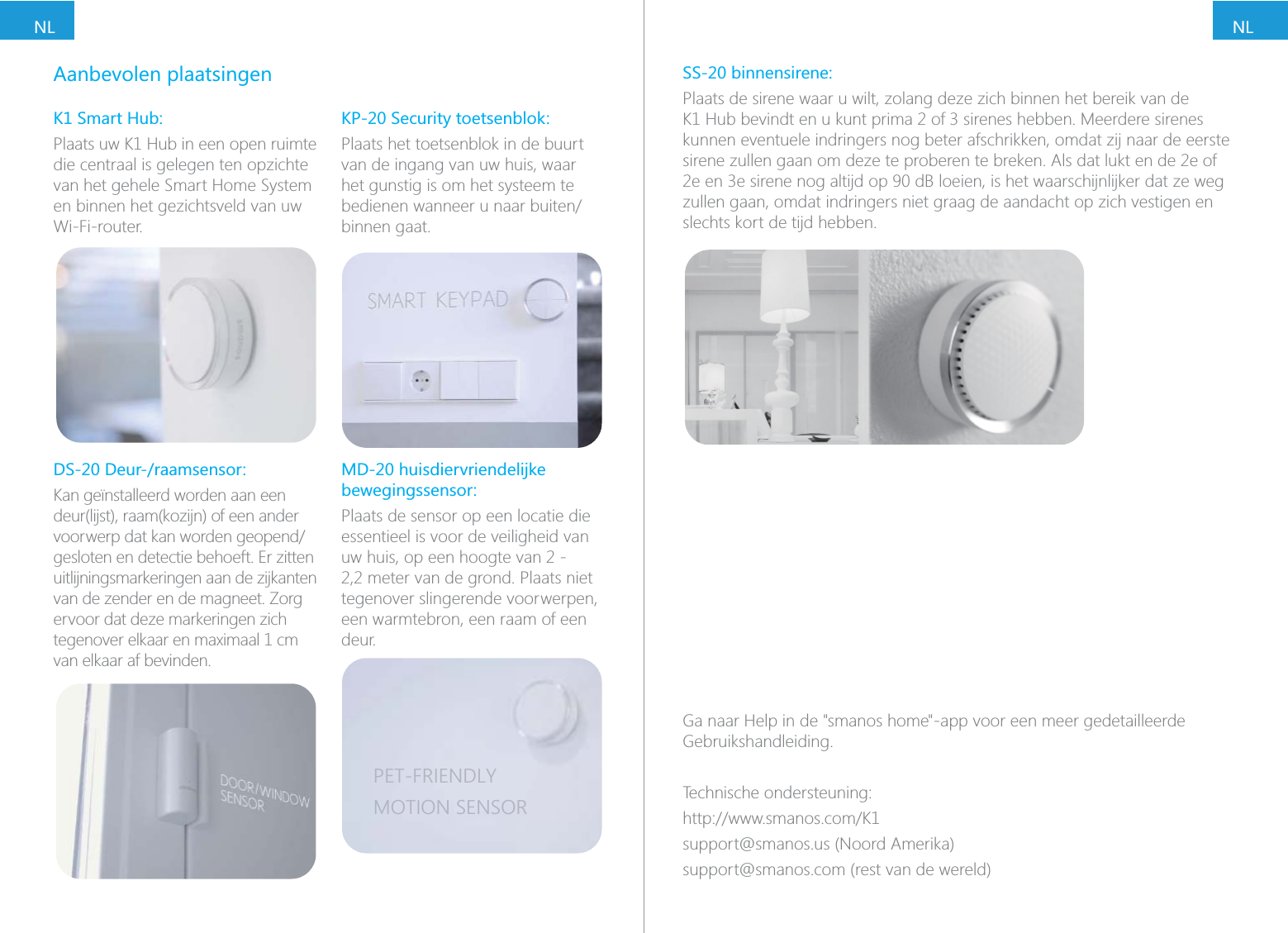
NLNLAanbevolen plaatsingenK1 Smart Hub:Plaats uw K1 Hub in een open ruimte die centraal is gelegen ten opzichte van het gehele Smart Home System en binnen het gezichtsveld van uw Wi-Fi-router.DS-20 Deur-/raamsensor:Kan geïnstalleerd worden aan een deur(lijst), raam(kozijn) of een ander gesloten en detectie behoeft. Er zitten uitlijningsmarkeringen aan de zijkanten van de zender en de magneet. Zorg ervoor dat deze markeringen zich van elkaar af bevinden.KP-20 Security toetsenblok:Plaats het toetsenblok in de buurt van de ingang van uw huis, waar het gunstig is om het systeem te binnen gaat.bewegingssensor:Plaats de sensor op een locatie die essentieel is voor de veiligheid van uw huis, op een hoogte van 2 - 2,2 meter van de grond. Plaats niet tegenover slingerende voorwerpen, een warmtebron, een raam of een deur.PET-FRIENDLYMOTION SENSORSS-20 binnensirene:Plaats de sirene waar u wilt, zolang deze zich binnen het bereik van de kunnen eventuele indringers nog beter afschrikken, omdat zij naar de eerste sirene zullen gaan om deze te proberen te breken. Als dat lukt en de 2e of zullen gaan, omdat indringers niet graag de aandacht op zich vestigen en slechts kort de tijd hebben.Ga naar Help in de "smanos home"-app voor een meer gedetailleerde Gebruikshandleiding.Technische ondersteuning:support@smanos.us (Noord Amerika)support@smanos.com (rest van de wereld)
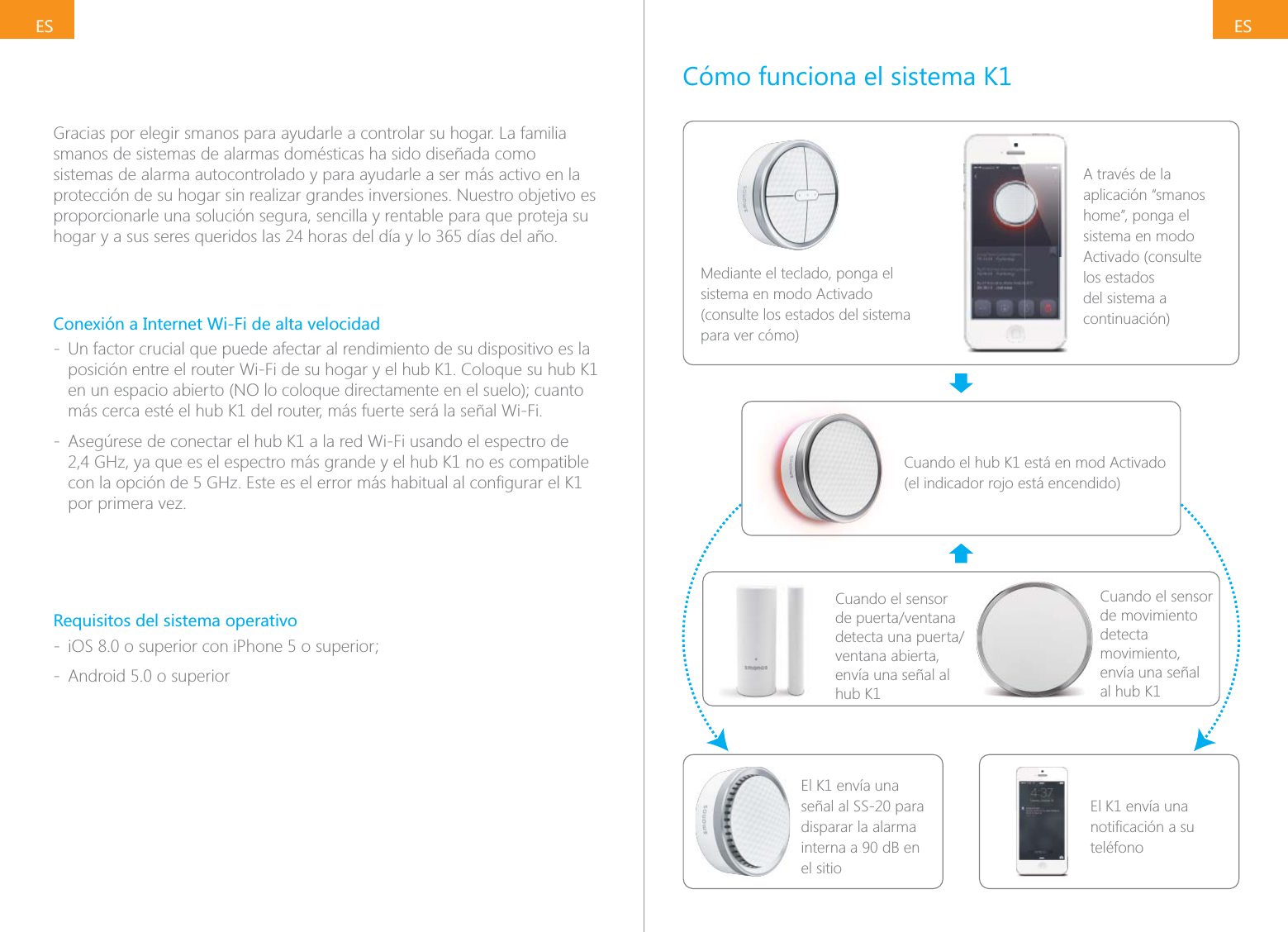
ESESGracias por elegir smanos para ayudarle a controlar su hogar. La familia smanos de sistemas de alarmas domésticas ha sido diseñada como sistemas de alarma autocontrolado y para ayudarle a ser más activo en la protección de su hogar sin realizar grandes inversiones. Nuestro objetivo es proporcionarle una solución segura, sencilla y rentable para que proteja su Conexión a Internet Wi-Fi de alta velocidad - Un factor crucial que puede afectar al rendimiento de su dispositivo es la posición entre el router Wi-Fi de su hogar y el hub K1. Coloque su hub K1 más cerca esté el hub K1 del router, más fuerte será la señal Wi-Fi. - Asegúrese de conectar el hub K1 a la red Wi-Fi usando el espectro de 2,4 GHz, ya que es el espectro más grande y el hub K1 no es compatible por primera vez.Requisitos del sistema operativo -  - Android 5.0 o superiorCómo funciona el sistema K1Mediante el teclado, ponga el sistema en modo Activado (consulte los estados del sistema para ver cómo)A través de la aplicación “smanos home”, ponga el sistema en modo Activado (consulte los estados del sistema a continuación)Cuando el hub K1 está en mod Activado (el indicador rojo está encendido)Cuando el sensor ventana abierta, envía una señal al hub K1El K1 envía una señal al SS-20 para disparar la alarma interna a 90 dB en el sitioEl K1 envía una teléfonoCuando el sensor de movimiento detecta movimiento, envía una señal  al hub K1
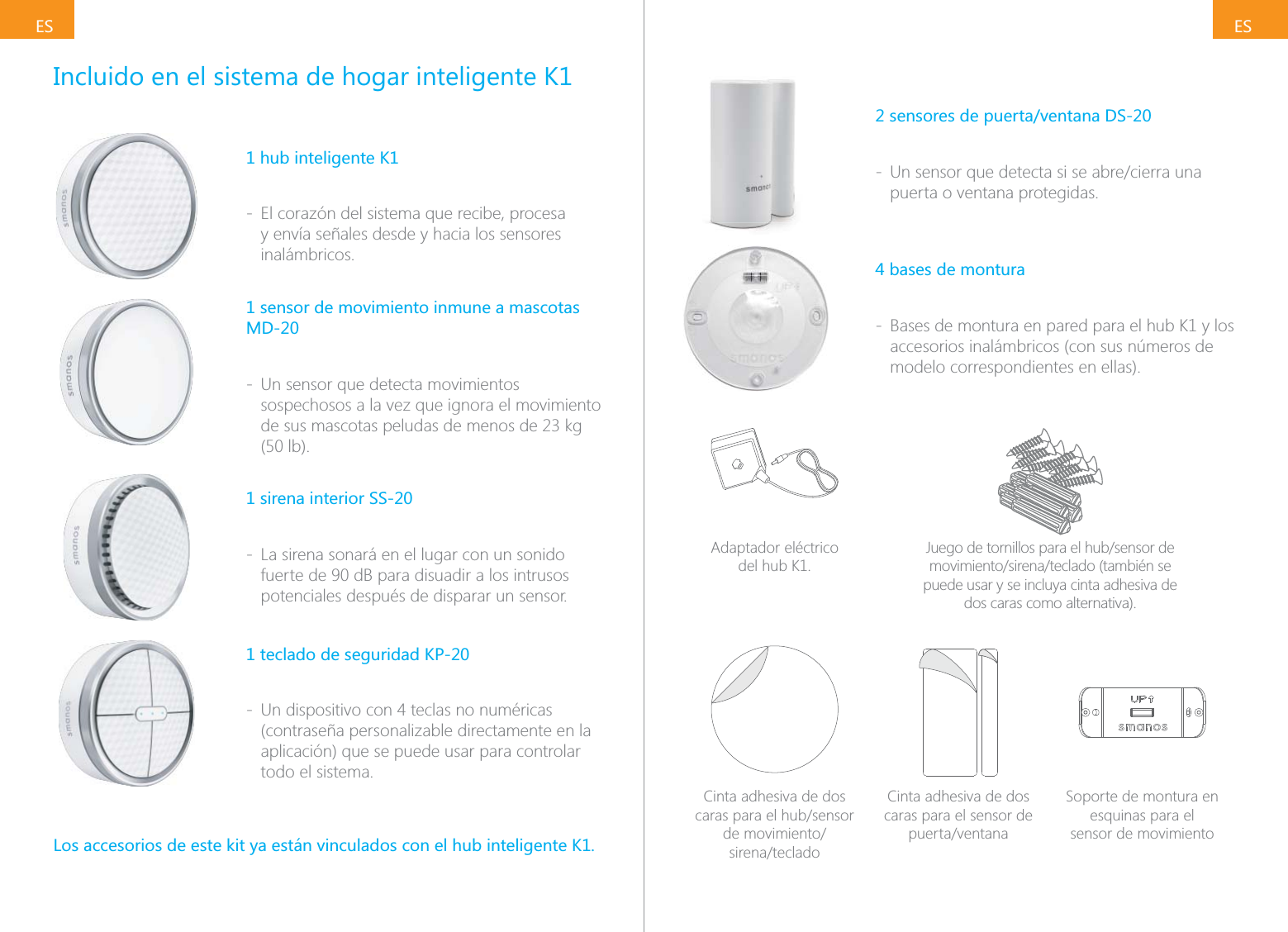
ESESIncluido en el sistema de hogar inteligente K11 hub inteligente K1 - El corazón del sistema que recibe, procesa y envía señales desde y hacia los sensores inalámbricos.1 sensor de movimiento inmune a mascotas MD-20 - Un sensor que detecta movimientos sospechosos a la vez que ignora el movimiento (50 lb).1 sirena interior SS-20 - La sirena sonará en el lugar con un sonido fuerte de 90 dB para disuadir a los intrusos potenciales después de disparar un sensor.1 teclado de seguridad KP-20 - Un dispositivo con 4 teclas no numéricas (contraseña personalizable directamente en la aplicación) que se puede usar para controlar todo el sistema.Los accesorios de este kit ya están vinculados con el hub inteligente K1.2 sensores de puerta/ventana DS-20 - puerta o ventana protegidas.4 bases de montura - Bases de montura en pared para el hub K1 y los accesorios inalámbricos (con sus números de modelo correspondientes en ellas).Adaptador eléctrico  del hub K1.puede usar y se incluya cinta adhesiva de dos caras como alternativa).Cinta adhesiva de dos  Cinta adhesiva de dos caras para el sensor de Soporte de montura en esquinas para el  sensor de movimiento
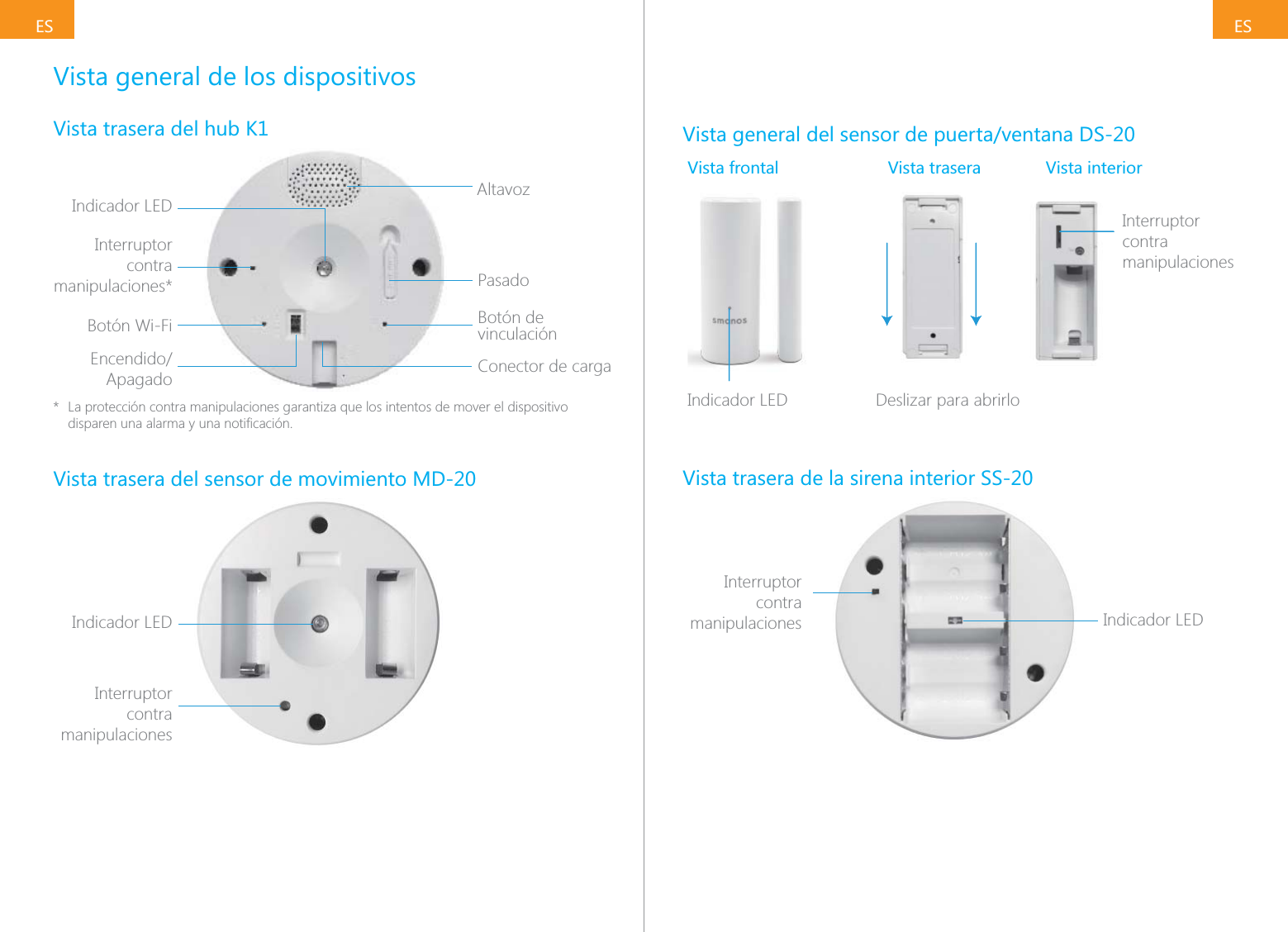
ESESVista general de los dispositivosVista trasera del hub K1Indicador LED AltavozPasadoBotón de vinculaciónConector de cargaInterruptor contra manipulaciones*Botón Wi-FiApagado*  La protección contra manipulaciones garantiza que los intentos de mover el dispositivo Vista trasera del sensor de movimiento MD-20Indicador LEDInterruptor contra manipulacionesVista general del sensor de puerta/ventana DS-20Vista frontal Vista trasera Vista interiorInterruptor contra manipulacionesIcmIndicador LED       Deslizar para abrirloVista trasera de la sirena interior SS-20Indicador LEDInterruptor contra manipulaciones
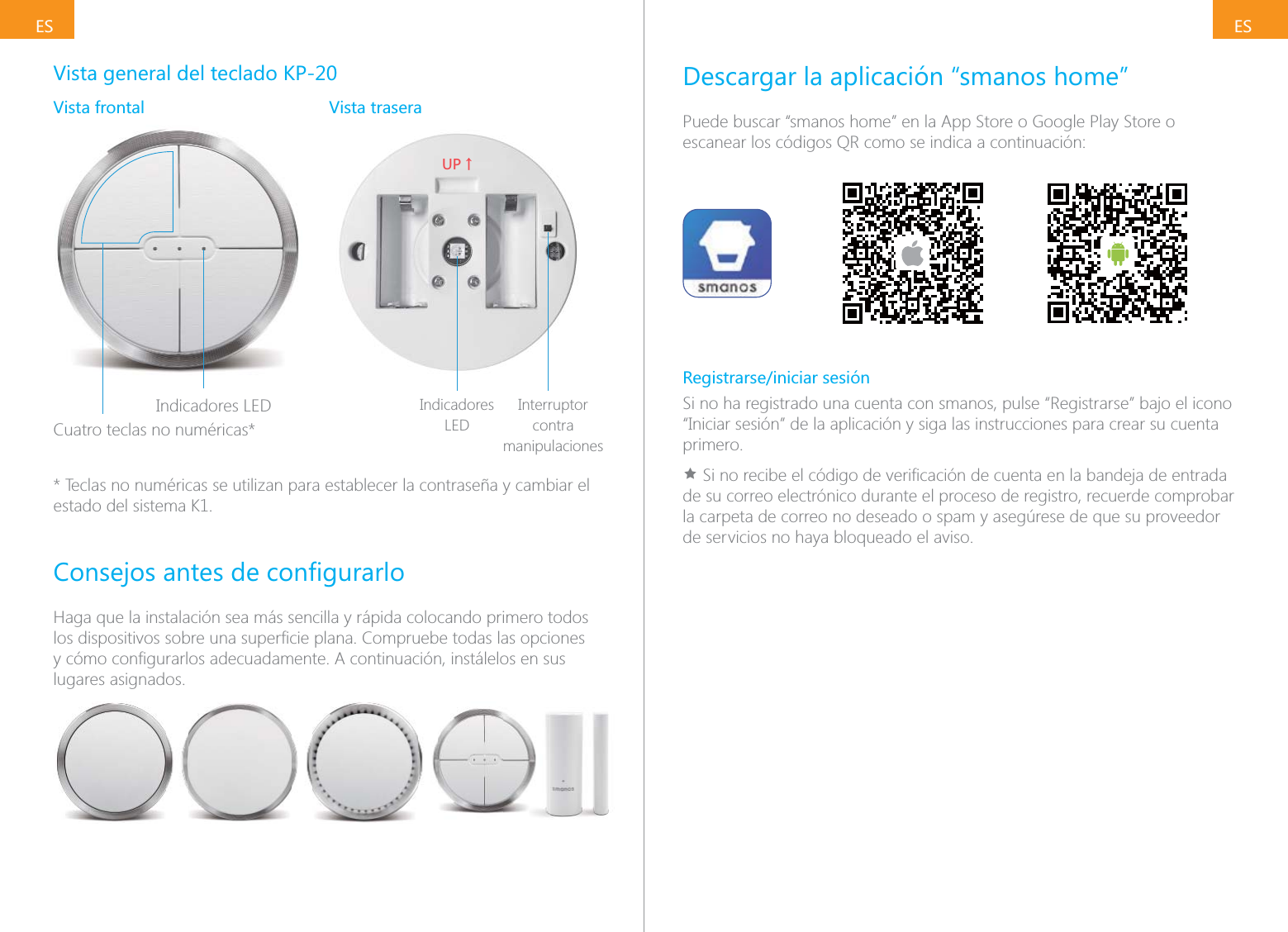
ESESVista general del teclado KP-20Vista frontal Vista traseraIndicadores LEDCuatro teclas no numéricas*;6ɑIndicadores LEDInterruptor contra manipulaciones* Teclas no numéricas se utilizan para establecer la contraseña y cambiar el estado del sistema K1.Haga que la instalación sea más sencilla y rápida colocando primero todos lugares asignados.Descargar la aplicación “smanos home”Puede buscar “smanos home” en la App Store o Google Play Store o escanear los códigos QR como se indica a continuación:Registrarse/iniciar sesiónSi no ha registrado una cuenta con smanos, pulse “Registrarse” bajo el icono “Iniciar sesión” de la aplicación y siga las instrucciones para crear su cuenta primero.Ìde su correo electrónico durante el proceso de registro, recuerde comprobar la carpeta de correo no deseado o spam y asegúrese de que su proveedor de servicios no haya bloqueado el aviso.
ESESEstados del sistemaSistema Activado Todos los sensores K1 detectan anomalías. La sirena interior sonará inmediatamente cuando se dispare un sensor. Usted y los otros usuarios Este modo está recomendado para momentos en que no haya nadie en Pasos de uso del teclado KP-20Gire el anillo del teclado hacia la derecha y, a continuación, introduzca la contraseña del teclado Pulse el icono Sistema activadoPasos de uso  de la aplicaciónIndicador  del hub K1Sistema en Modo hogar Solo el sensor de movimiento de este kit dejará de detectar (ajuste usted y a su familiar moverse con libertad dentro de su hogar sin disparar el alerta y protegerán el perímetro.Este modo está recomendado para momentos en que haya alguien en aplicación.Pasos de uso del teclado KP-20Gire primero el anillo del teclado hacia la derecha y, a continuación, introduzca la contraseña del teclado (Pulse la Pulse el icono Sistema en modo hogarPasos de uso  de la aplicaciónIndicador  del hub K1Sistema Desactivado modo 24 horas. Los sensores del modo 24 horas vigilan continuamente una zona concreta, la entrada o un objeto, como un detector de agua o una de una lavadora, el calentador de agua o el lavavajillas, o un sensor de puerta DS-20 en un armario de armas, de medicinas o en la caja fuerte. Los sensores del modo 24 horas seguirán funcionando independientemente del estado del sistema.Pasos de uso del teclado KP-20Gire el anillo del teclado hacia la izquierda y, a continuación, introduzca la contraseña del teclado Pulse el icono Sistema desactivadoPasos de uso de  la aplicaciónIndicador  del hub K1Nota: La contraseña del teclado se puede cambiar en la aplicación "smanos home".
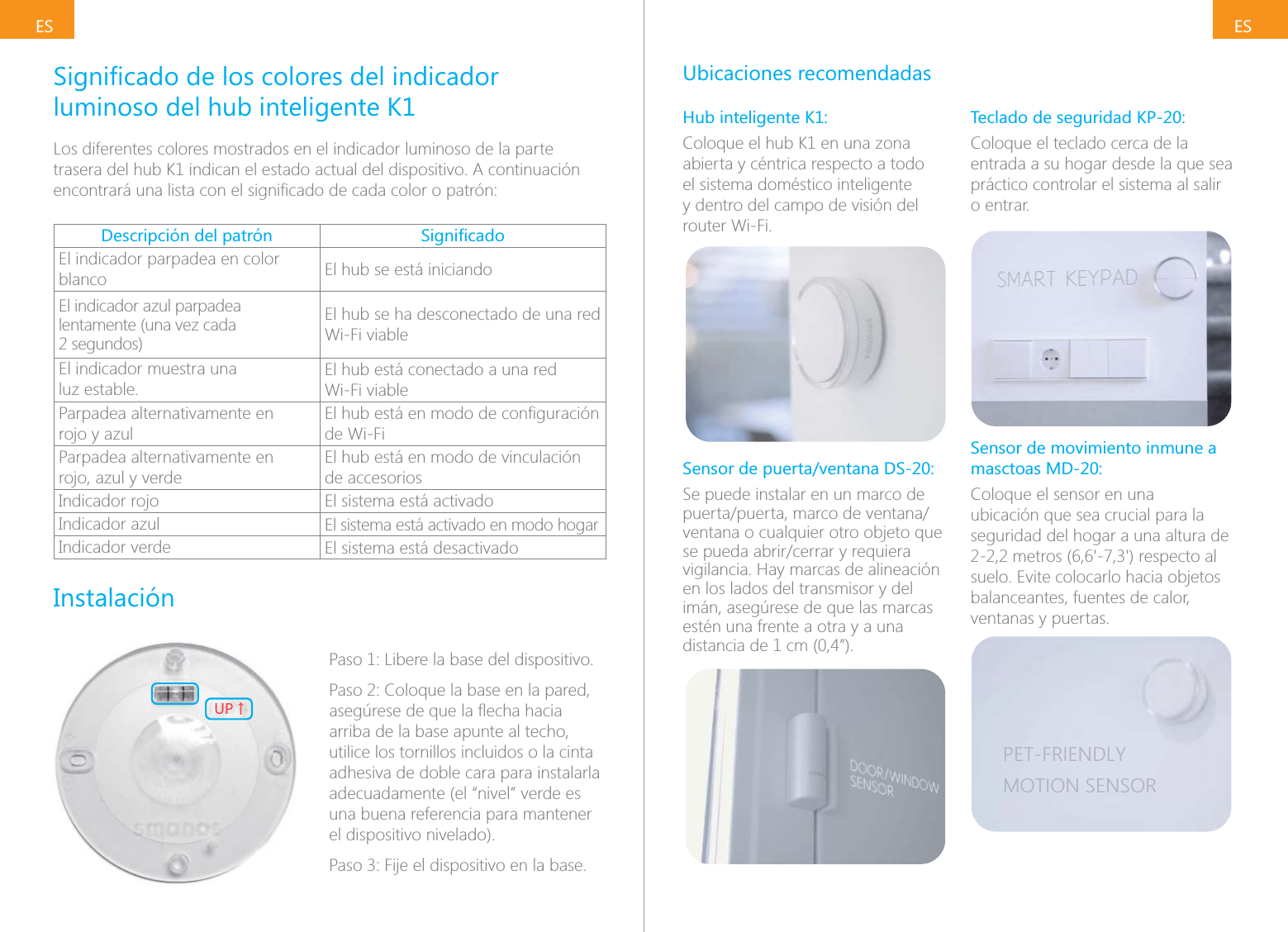
ESESluminoso del hub inteligente K1Los diferentes colores mostrados en el indicador luminoso de la parte trasera del hub K1 indican el estado actual del dispositivo. A continuación Descripción del patrón El indicador parpadea en color blanco El hub se está iniciandoEl indicador azul parpadea lentamente (una vez cada 2 segundos)El hub se ha desconectado de una red Wi-Fi viableEl indicador muestra una  luz estable.El hub está conectado a una red  Wi-Fi viableParpadea alternativamente en  rojo y azulde Wi-FiParpadea alternativamente en  rojo, azul y verdeEl hub está en modo de vinculación de accesoriosIndicador rojo El sistema está activadoIndicador azul El sistema está activado en modo hogarIndicador verde El sistema está desactivadoInstalación;6ɑPaso 1: Libere la base del dispositivo.Paso 2: Coloque la base en la pared, arriba de la base apunte al techo, utilice los tornillos incluidos o la cinta adhesiva de doble cara para instalarla adecuadamente (el “nivel” verde es una buena referencia para mantener el dispositivo nivelado).Ubicaciones recomendadasHub inteligente K1:Coloque el hub K1 en una zona abierta y céntrica respecto a todo el sistema doméstico inteligente y dentro del campo de visión del router Wi-Fi.Sensor de puerta/ventana DS-20:Se puede instalar en un marco de ventana o cualquier otro objeto que vigilancia. Hay marcas de alineación en los lados del transmisor y del imán, asegúrese de que las marcas estén una frente a otra y a una distancia de 1 cm (0,4”).Teclado de seguridad KP-20:Coloque el teclado cerca de la entrada a su hogar desde la que sea práctico controlar el sistema al salir o entrar.Sensor de movimiento inmune a masctoas MD-20:Coloque el sensor en una ubicación que sea crucial para la seguridad del hogar a una altura de suelo. Evite colocarlo hacia objetos balanceantes, fuentes de calor, ventanas y puertas.PET-FRIENDLYMOTION SENSOR
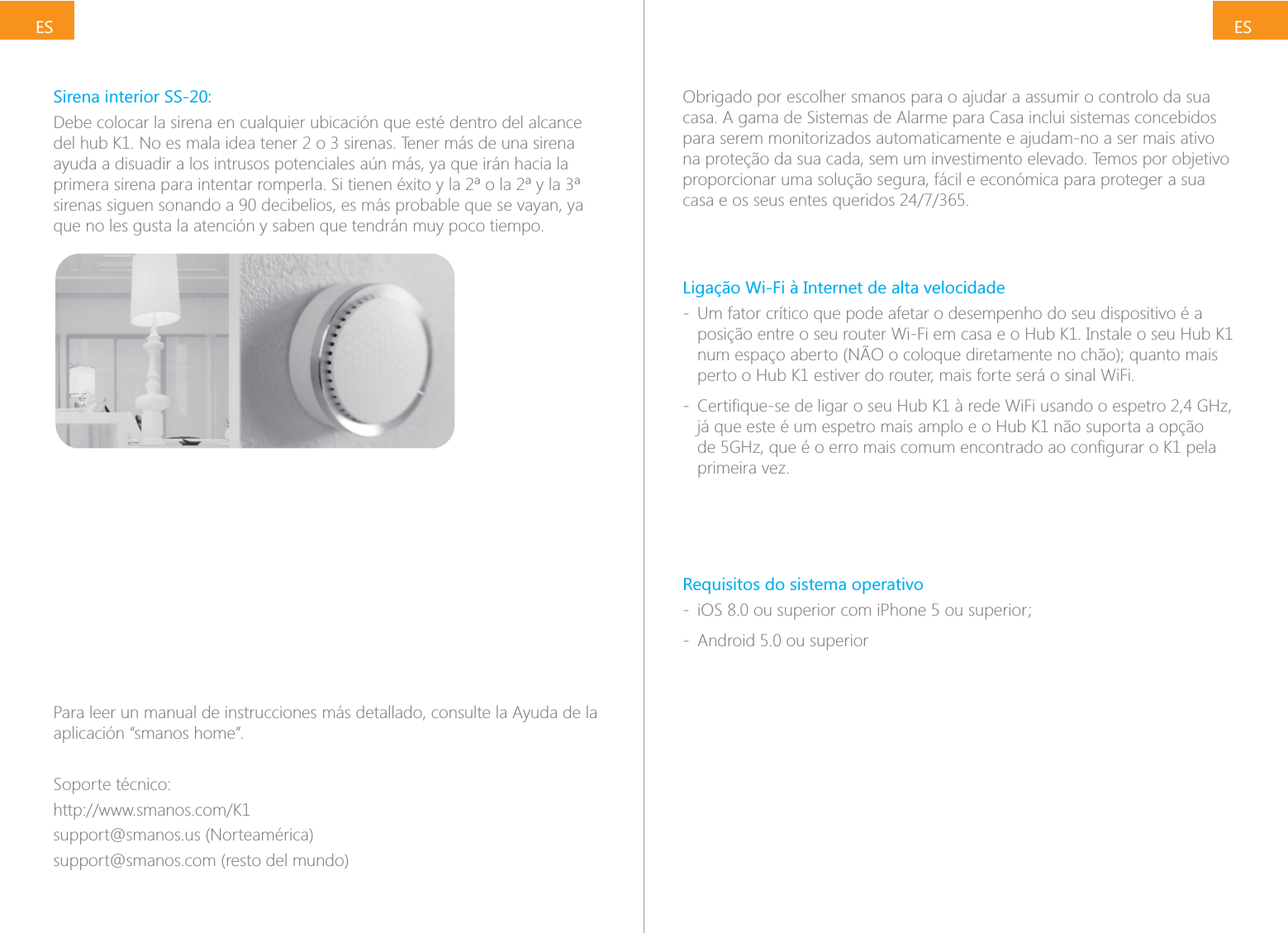
ESESSirena interior SS-20:Debe colocar la sirena en cualquier ubicación que esté dentro del alcance ayuda a disuadir a los intrusos potenciales aún más, ya que irán hacia la sirenas siguen sonando a 90 decibelios, es más probable que se vayan, ya que no les gusta la atención y saben que tendrán muy poco tiempo.Para leer un manual de instrucciones más detallado, consulte la Ayuda de la aplicación “smanos home”.Soporte técnico:support@smanos.us (Norteamérica)support@smanos.com (resto del mundo)Obrigado por escolher smanos para o ajudar a assumir o controlo da sua casa. A gama de Sistemas de Alarme para Casa inclui sistemas concebidos para serem monitorizados automaticamente e ajudam-no a ser mais ativo na proteção da sua cada, sem um investimento elevado. Temos por objetivo proporcionar uma solução segura, fácil e económica para proteger a sua Ligação Wi-Fi à Internet de alta velocidade - Um fator crítico que pode afetar o desempenho do seu dispositivo é a posição entre o seu router Wi-Fi em casa e o Hub K1. Instale o seu Hub K1 perto o Hub K1 estiver do router, mais forte será o sinal WiFi. - já que este é um espetro mais amplo e o Hub K1 não suporta a opção primeira vez.Requisitos do sistema operativo -  - Android 5.0 ou superior
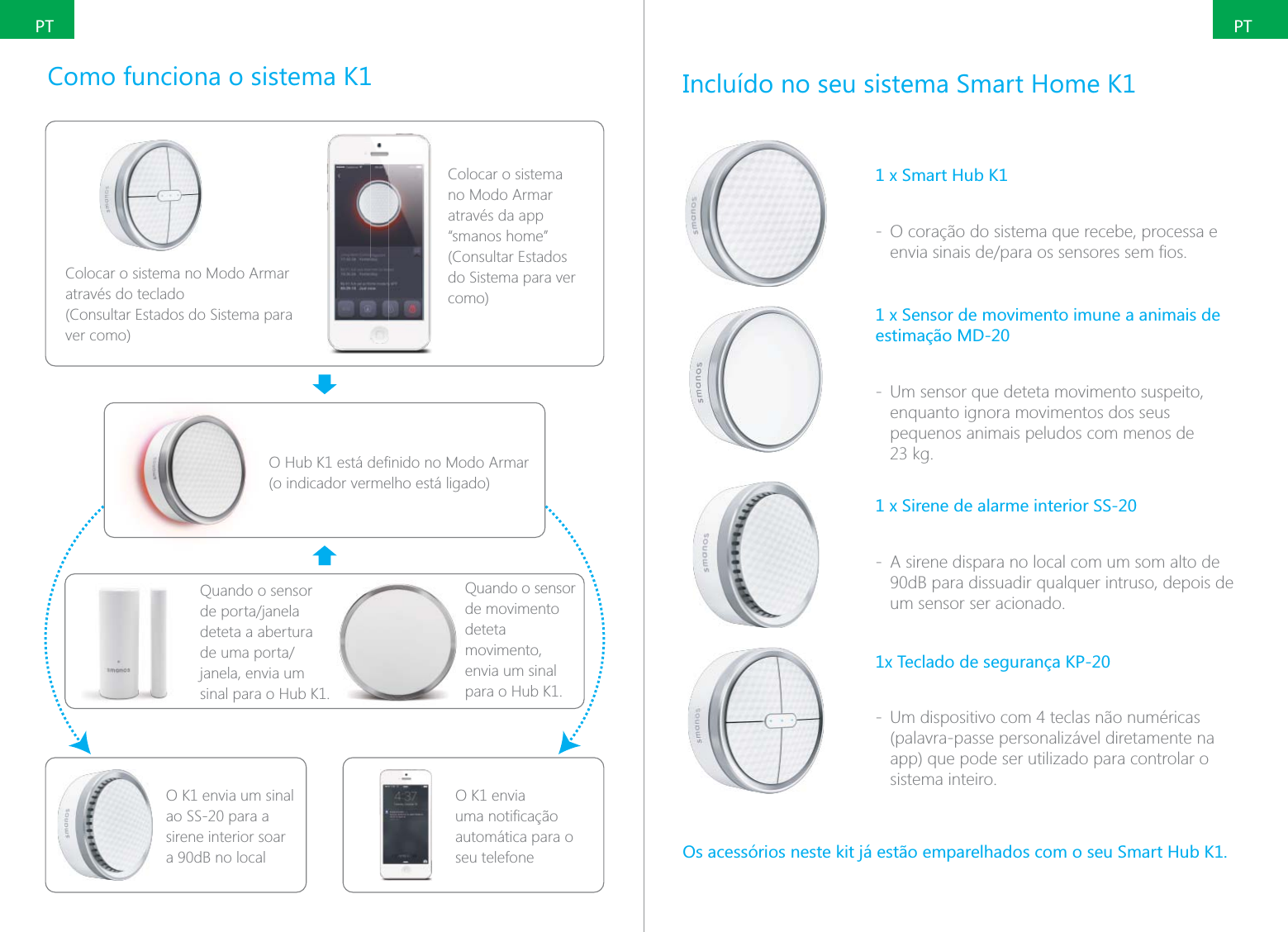
PTPTComo funciona o sistema K1Colocar o sistema no Modo Armar através do teclado (Consultar Estados do Sistema para ver como)Colocar o sistema no Modo Armar através da app “smanos home” (Consultar Estados do Sistema para ver como)(o indicador vermelho está ligado)Quando o sensor deteta a abertura janela, envia um sinal para o Hub K1.O K1 envia um sinal ao SS-20 para a sirene interior soar a 90dB no localO K1 envia automática para o seu telefoneQuando o sensor de movimento deteta movimento, envia um sinal para o Hub K1.Incluído no seu sistema Smart Home K11 x Smart Hub K1 - O coração do sistema que recebe, processa e 1 x Sensor de movimento imune a animais de estimação MD-20 - Um sensor que deteta movimento suspeito, enquanto ignora movimentos dos seus pequenos animais peludos com menos de 1 x Sirene de alarme interior SS-20 - A sirene dispara no local com um som alto de 90dB para dissuadir qualquer intruso, depois de um sensor ser acionado.1x Teclado de segurança KP-20 - Um dispositivo com 4 teclas não numéricas (palavra-passe personalizável diretamente na app) que pode ser utilizado para controlar o sistema inteiro.
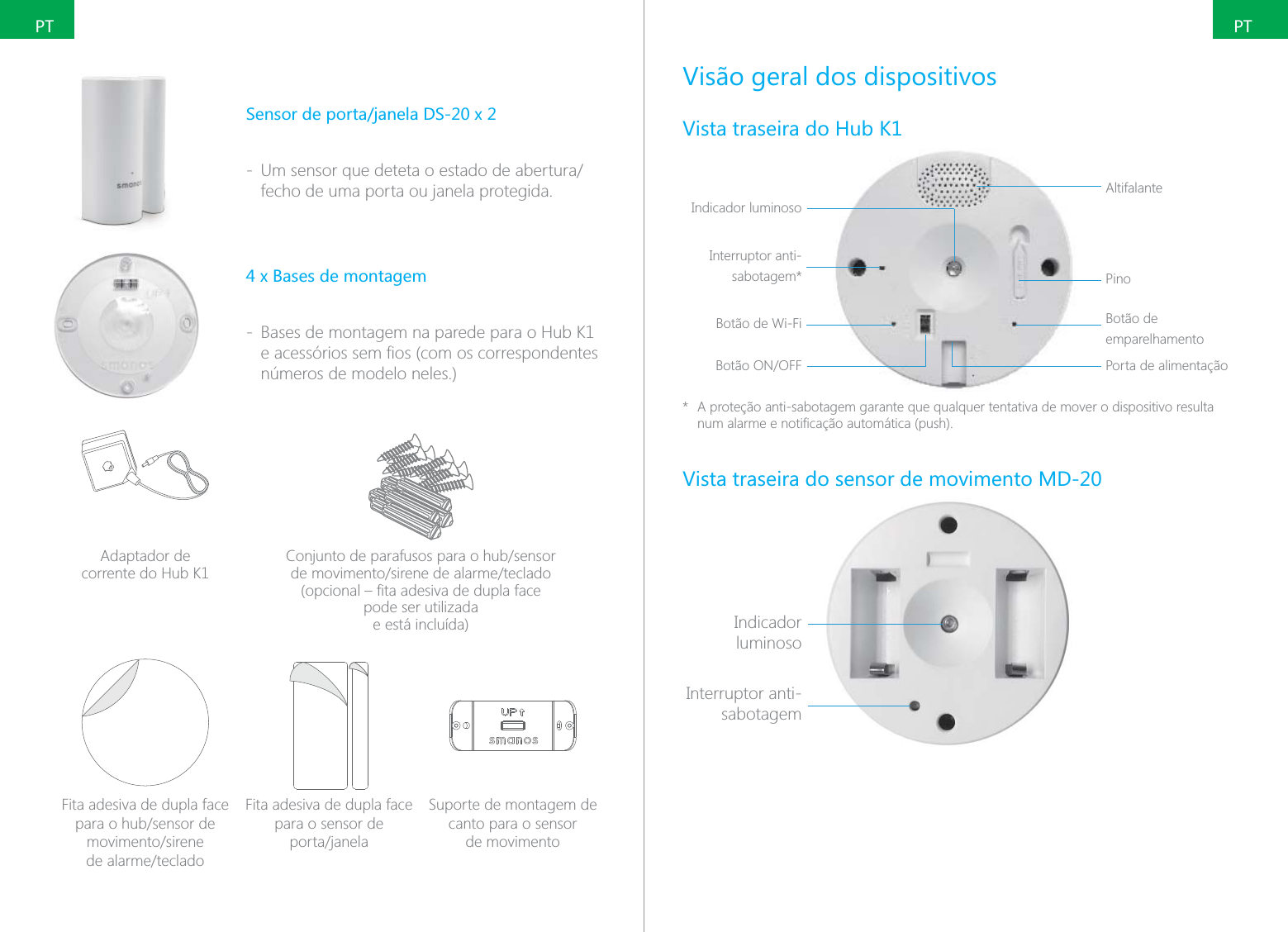
PTPT - fecho de uma porta ou janela protegida.4 x Bases de montagem - Bases de montagem na parede para o Hub K1 números de modelo neles.)Adaptador de  corrente do Hub K1 pode ser utilizada  e está incluída)Fita adesiva de dupla face  Fita adesiva de dupla face para o sensor de  Suporte de montagem de canto para o sensor  de movimentoVisão geral dos dispositivosVista traseira do Hub K1Indicador luminosoAltifalantePinoBotão de emparelhamentoPorta de alimentaçãoInterruptor anti-sabotagem*Botão de Wi-Fi*  A proteção anti-sabotagem garante que qualquer tentativa de mover o dispositivo resulta Vista traseira do sensor de movimento MD-20Indicador luminosoInterruptor anti-sabotagem
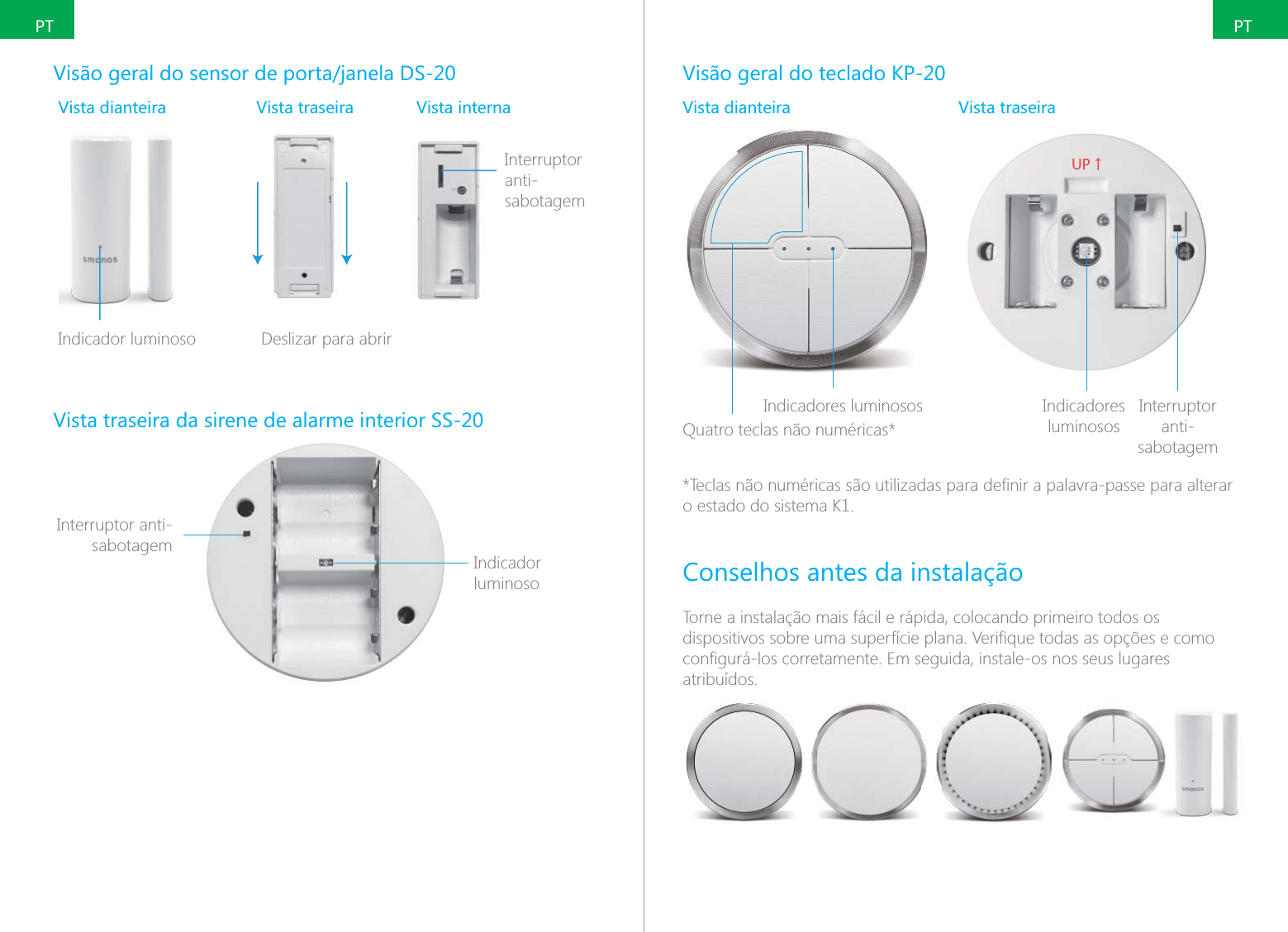
PTPTVista dianteira Vista traseira Vista internaInterruptor anti-sabotagemIasIndicador luminoso Deslizar para abrir Vista traseira da sirene de alarme interior SS-20Indicador luminosoInterruptor anti-sabotagemVisão geral do teclado KP-20Vista dianteira Vista traseiraIndicadores luminososQuatro teclas não numéricas*;6ɑIndicadores luminososInterruptor anti-sabotagemo estado do sistema K1.Conselhos antes da instalaçãoTorne a instalação mais fácil e rápida, colocando primeiro todos os atribuídos.
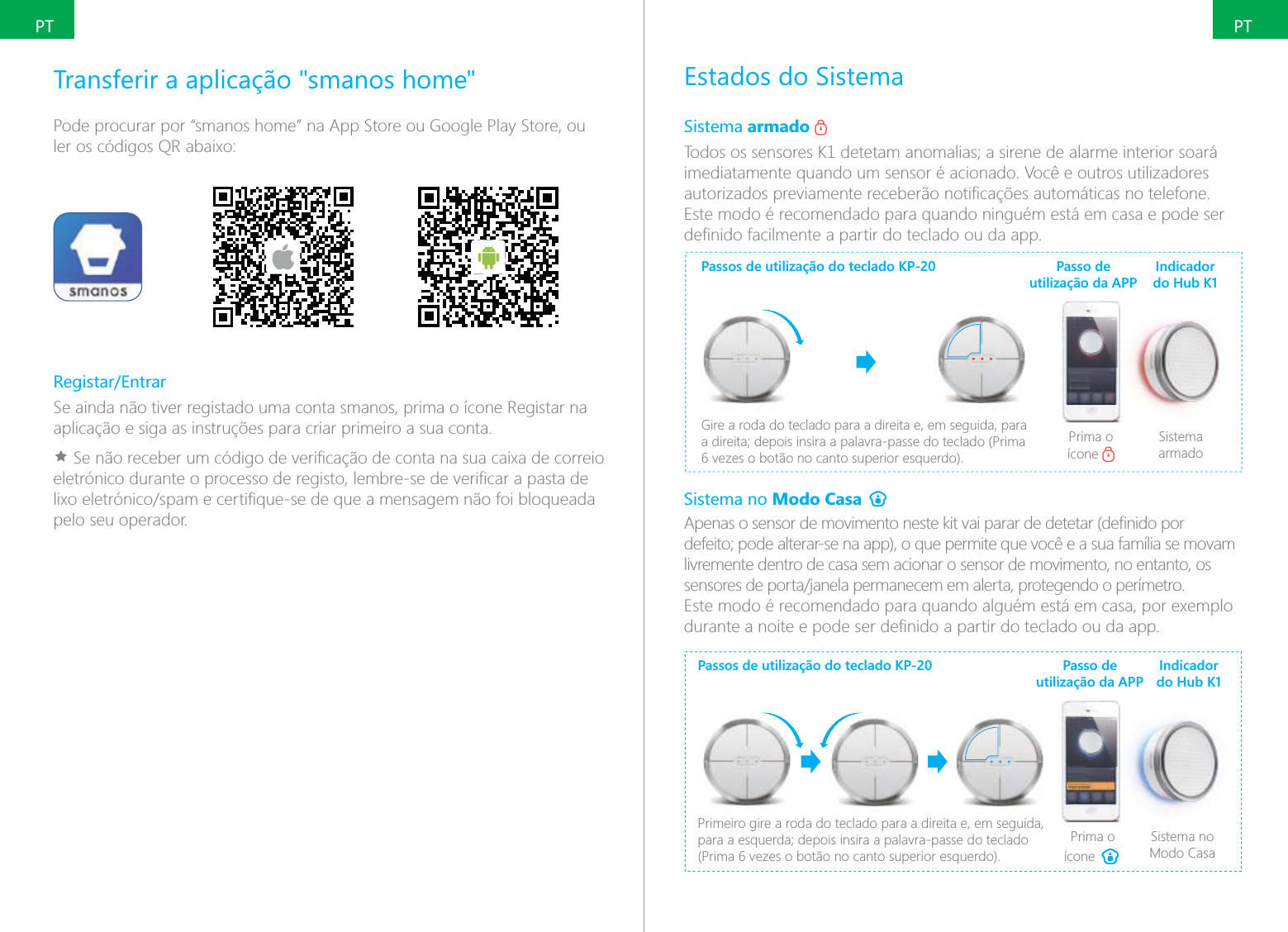
PTPTTransferir a aplicação "smanos home"Pode procurar por “smanos home” na App Store ou Google Play Store, ou Registar/EntrarSe ainda não tiver registado uma conta smanos, prima o ícone Registar na Ìpelo seu operador.Estados do SistemaSistema armado imediatamente quando um sensor é acionado. Você e outros utilizadores Este modo é recomendado para quando ninguém está em casa e pode ser Passos de utilização do teclado KP-20Gire a roda do teclado para a direita e, em seguida, para Prima o ícone Sistema armadoPasso de utilização da APPIndicador do Hub K1Sistema no Modo Casa livremente dentro de casa sem acionar o sensor de movimento, no entanto, os Passos de utilização do teclado KP-20Primeiro gire a roda do teclado para a direita e, em seguida, Prima o ícone Sistema no Modo CasaPasso de utilização da APPIndicador  do Hub K1
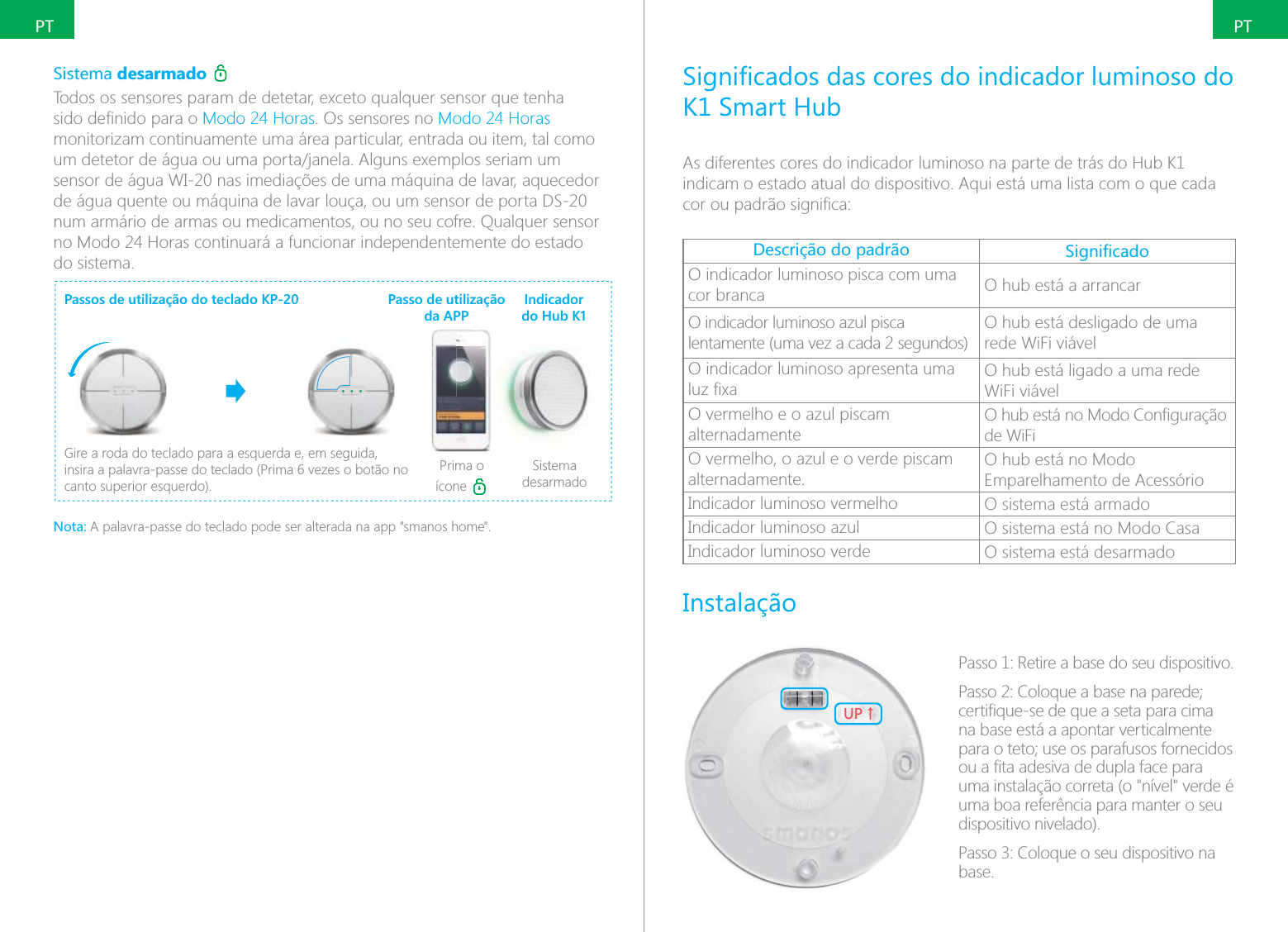
PTPTSistema desarmado Modo 24 Horas. Os sensores no Modo 24 Horas monitorizam continuamente uma área particular, entrada ou item, tal como de água quente ou máquina de lavar louça, ou um sensor de porta DS-20 num armário de armas ou medicamentos, ou no seu cofre. Qualquer sensor no Modo 24 Horas continuará a funcionar independentemente do estado do sistema.Passos de utilização do teclado KP-20Gire a roda do teclado para a esquerda e, em seguida, canto superior esquerdo).Prima o ícone Sistema desarmadoPasso de utilização da APPIndicador  do Hub K1Nota: A palavra-passe do teclado pode ser alterada na app "smanos home".K1 Smart HubAs diferentes cores do indicador luminoso na parte de trás do Hub K1 indicam o estado atual do dispositivo. Aqui está uma lista com o que cada Descrição do padrão O indicador luminoso pisca com uma cor branca O hub está a arrancarO indicador luminoso azul pisca lentamente (uma vez a cada 2 segundos)O hub está desligado de uma rede WiFi viávelO indicador luminoso apresenta uma O hub está ligado a uma rede WiFi viávelO vermelho e o azul piscam alternadamentede WiFiO vermelho, o azul e o verde piscam alternadamente.O hub está no Modo Emparelhamento de AcessórioIndicador luminoso vermelho O sistema está armadoIndicador luminoso azul O sistema está no Modo CasaIndicador luminoso verde O sistema está desarmadoInstalação;6ɑPasso 1: Retire a base do seu dispositivo.na base está a apontar verticalmente uma instalação correta (o "nível" verde é uma boa referência para manter o seu dispositivo nivelado).base.
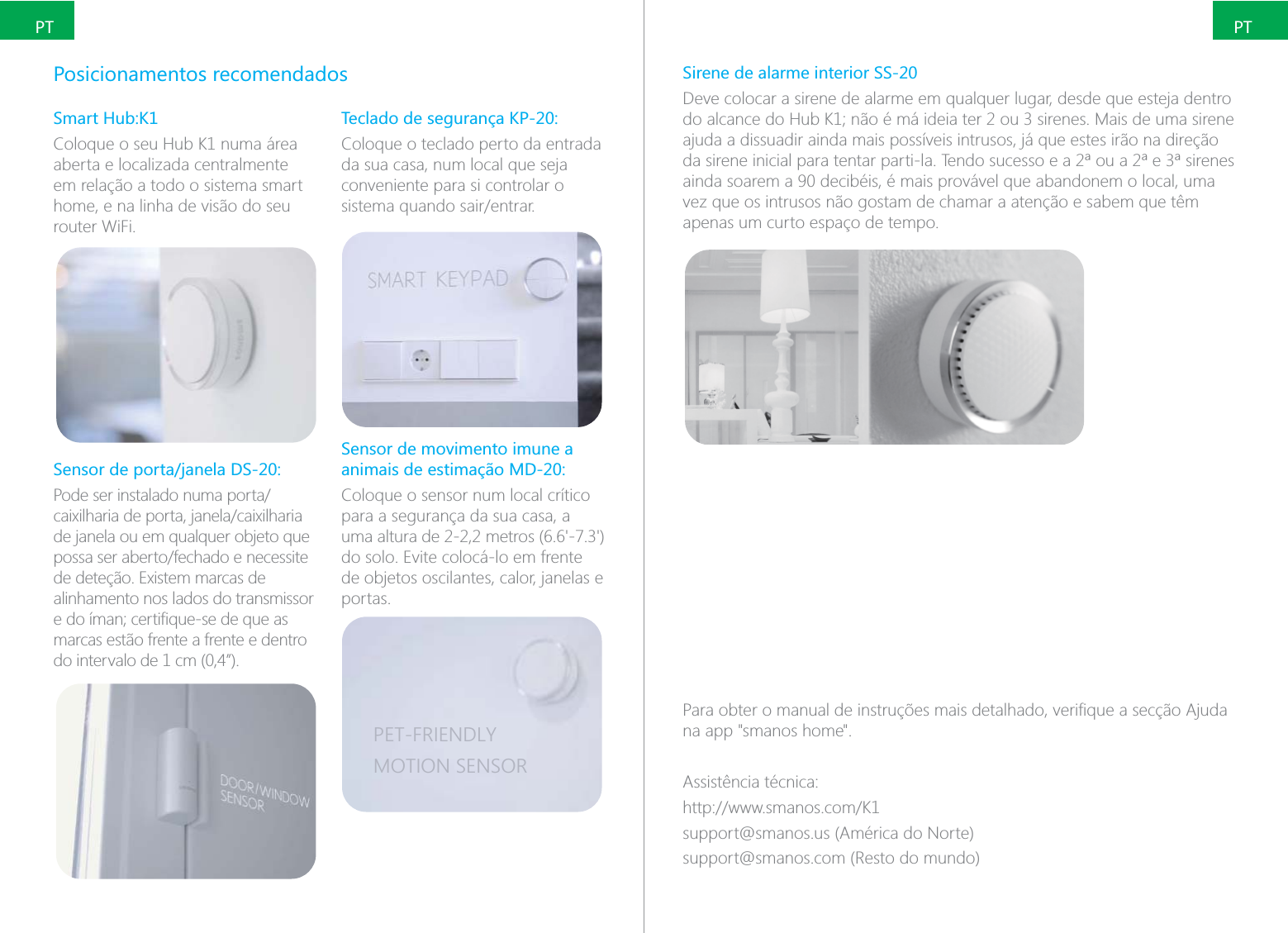
PTPTPosicionamentos recomendadosSmart Hub:K1Coloque o seu Hub K1 numa área aberta e localizada centralmente em relação a todo o sistema smart home, e na linha de visão do seu router WiFi.de janela ou em qualquer objeto que alinhamento nos lados do transmissor marcas estão frente a frente e dentro do intervalo de 1 cm (0,4”).Teclado de segurança KP-20:Coloque o teclado perto da entrada da sua casa, num local que seja conveniente para si controlar o Sensor de movimento imune a animais de estimação MD-20:Coloque o sensor num local crítico para a segurança da sua casa, a do solo. Evite colocá-lo em frente de objetos oscilantes, calor, janelas e portas.PET-FRIENDLYMOTION SENSORSirene de alarme interior SS-20Deve colocar a sirene de alarme em qualquer lugar, desde que esteja dentro ajuda a dissuadir ainda mais possíveis intrusos, já que estes irão na direção ainda soarem a 90 decibéis, é mais provável que abandonem o local, uma vez que os intrusos não gostam de chamar a atenção e sabem que têm apenas um curto espaço de tempo.na app "smanos home".Assistência técnica:support@smanos.us (América do Norte)support@smanos.com (Resto do mundo)
ITITGrazie per aver scelto smanos per il controllo della vostra abitazione. La gamma di sistemi di allarme per la casa smanos è dotata di funzione di monitoraggio automatico e vi aiuterà a proteggere la vostra abitazione in sicura, semplice ed economicamente vantaggiosa per la protezione della vostra abitazione e dei vostri cari 24 ore su 24, 7 giorni su 7.Connessione Internet Wi-Fi ad alta velocità - è la distanza tra Hub K1 e router, tanto più forte sarà il segnale Wi-Fi. - Sistemi operativi compatibili -  - Android 5.0 o versioni successiveFunzionamento del sistema K1Impostare il sistema in Modalità Inserimento con il tastierino. (fare riferimento alla sezione “Stati del sistema” per maggiori informazioni)home”, impostare il sistema in Modalità Inserimento (fare riferimento alla sezione “Stati del sistema” per maggiori informazioni).Modalità Inserimento, la spia rossa è accesa.Quando i sensori K1 invia un segnale attivare la sirena interna che suonerà con 90 dB nel sito interessato.K1 invia una allo smartphone Quando il rilevatore di movimento rileva un movimento, invia un segnale 
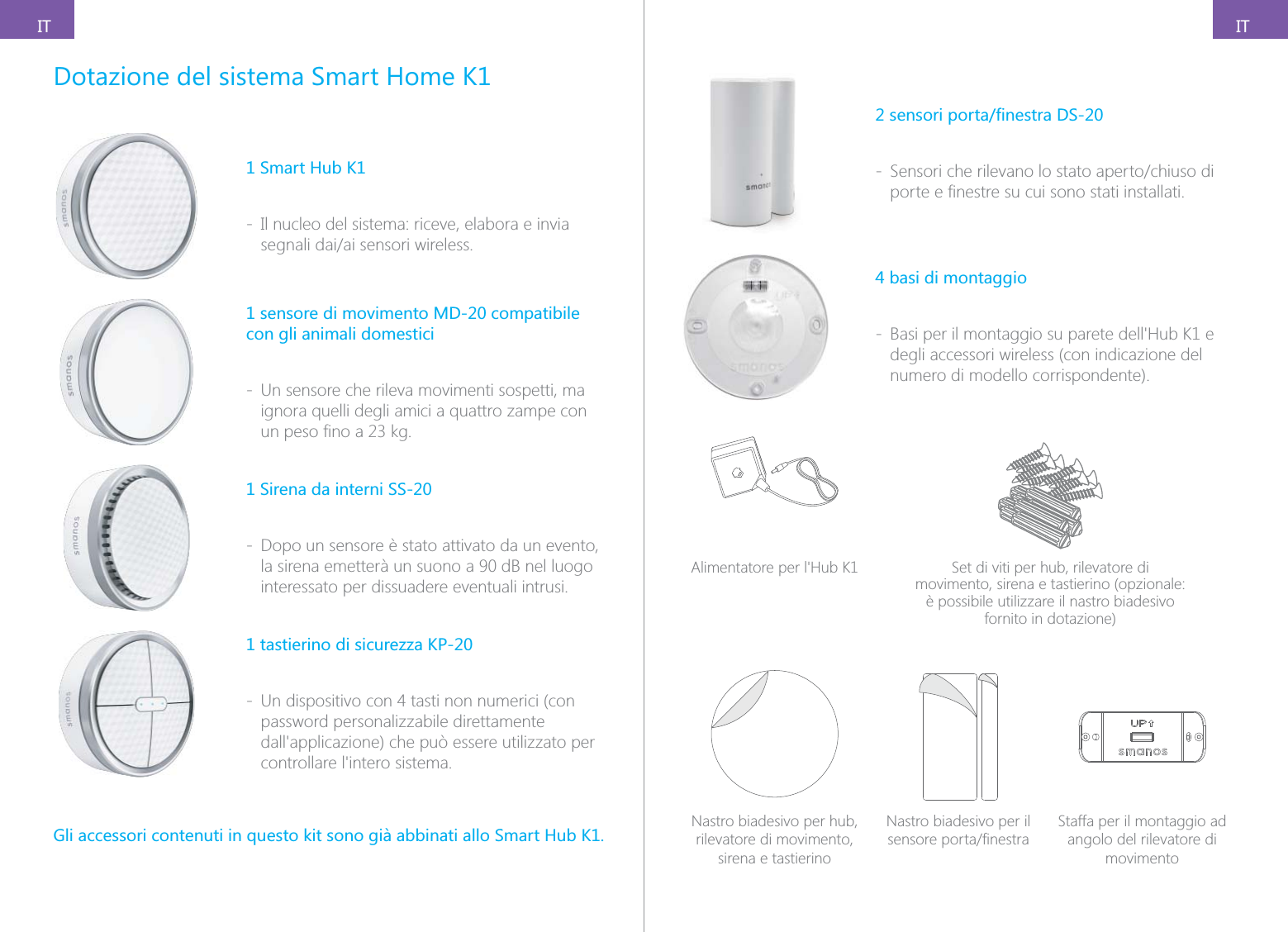
ITITDotazione del sistema Smart Home K11 Smart Hub K1 - Il nucleo del sistema: riceve, elabora e invia 1 sensore di movimento MD-20 compatibile con gli animali domestici - Un sensore che rileva movimenti sospetti, ma ignora quelli degli amici a quattro zampe con 1 Sirena da interni SS-20 - Dopo un sensore è stato attivato da un evento, la sirena emetterà un suono a 90 dB nel luogo interessato per dissuadere eventuali intrusi.1 tastierino di sicurezza KP-20 - Un dispositivo con 4 tasti non numerici (con password personalizzabile direttamente Gli accessori contenuti in questo kit sono già abbinati allo Smart Hub K1. - 4 basi di montaggio - degli accessori wireless (con indicazione del numero di modello corrispondente). Set di viti per hub, rilevatore di movimento, sirena e tastierino (opzionale: è possibile utilizzare il nastro biadesivo fornito in dotazione)Nastro biadesivo per hub, rilevatore di movimento, sirena e tastierinoNastro biadesivo per il Staffa per il montaggio ad angolo del rilevatore di movimento
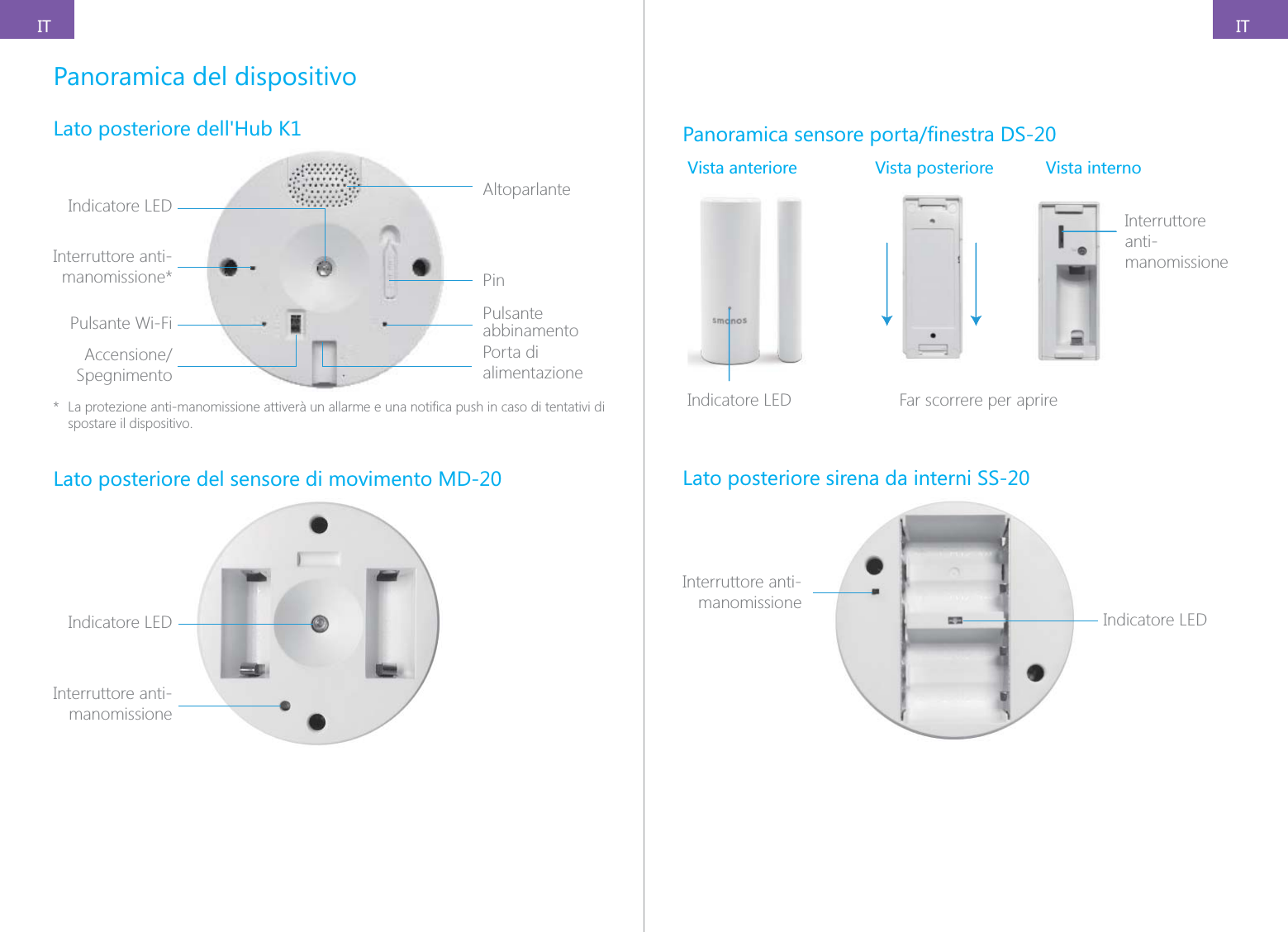
ITITPanoramica del dispositivoLato posteriore dell'Hub K1Indicatore LED AltoparlantePinPulsante abbinamentoPorta di alimentazionePulsante Wi-FiInterruttore anti-manomissione*Spegnimento* spostare il dispositivo.Lato posteriore del sensore di movimento MD-20Indicatore LEDInterruttore anti-manomissioneVista anteriore Vista posteriore Vista internoInterruttore anti-manomissioneIamIndicatore LED            Far scorrere per aprireLato posteriore sirena da interni SS-20Indicatore LEDInterruttore anti-manomissione
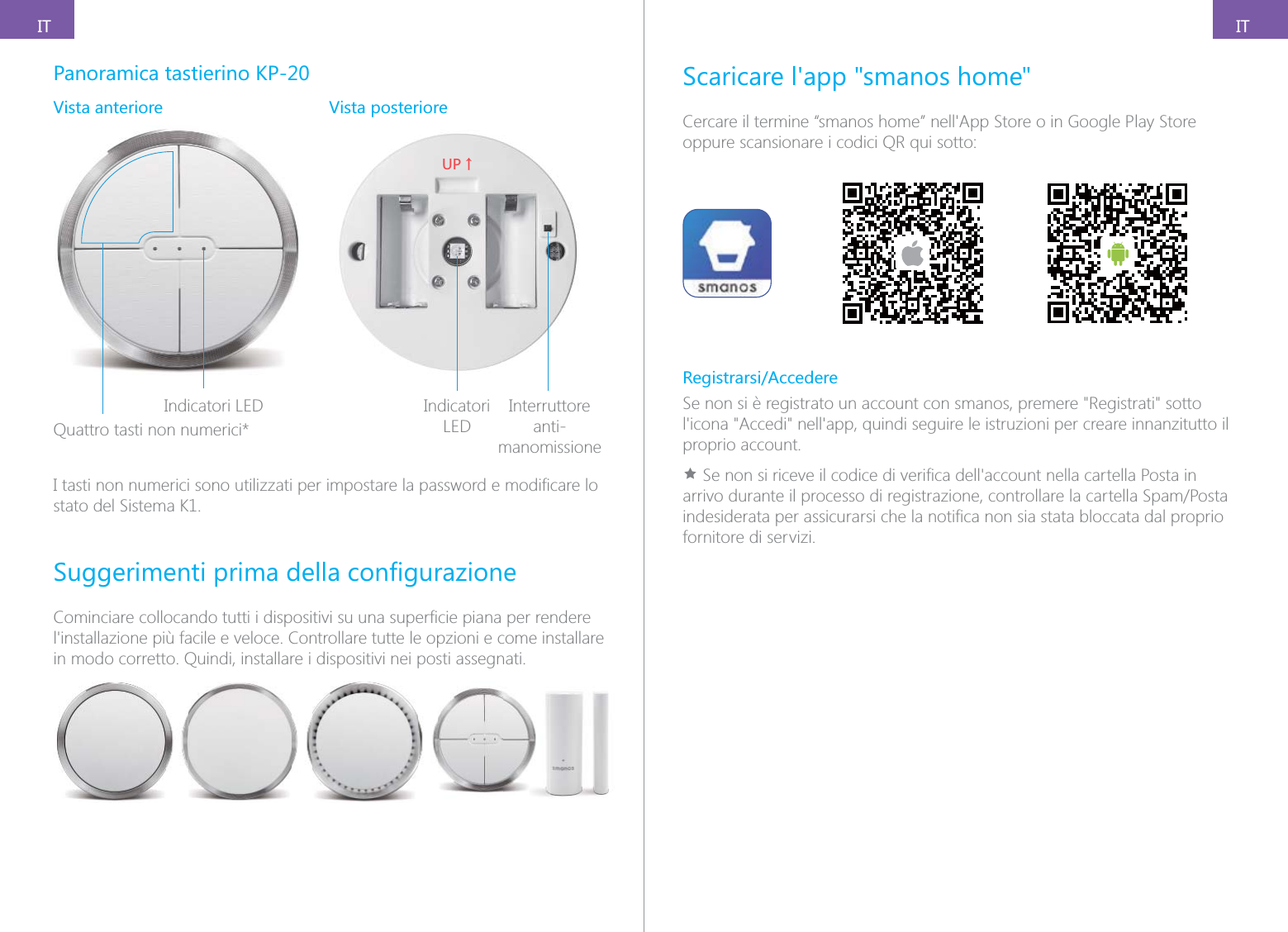
ITITPanoramica tastierino KP-20Vista anteriore Vista posterioreIndicatori LEDQuattro tasti non numerici*;6ɑIndicatori LEDInterruttore anti-manomissionestato del Sistema K1.in modo corretto. Quindi, installare i dispositivi nei posti assegnati.Scaricare l'app "smanos home"oppure scansionare i codici QR qui sotto:Registrarsi/AccedereSe non si è registrato un account con smanos, premere "Registrati" sotto proprio account.Ìfornitore di servizi.
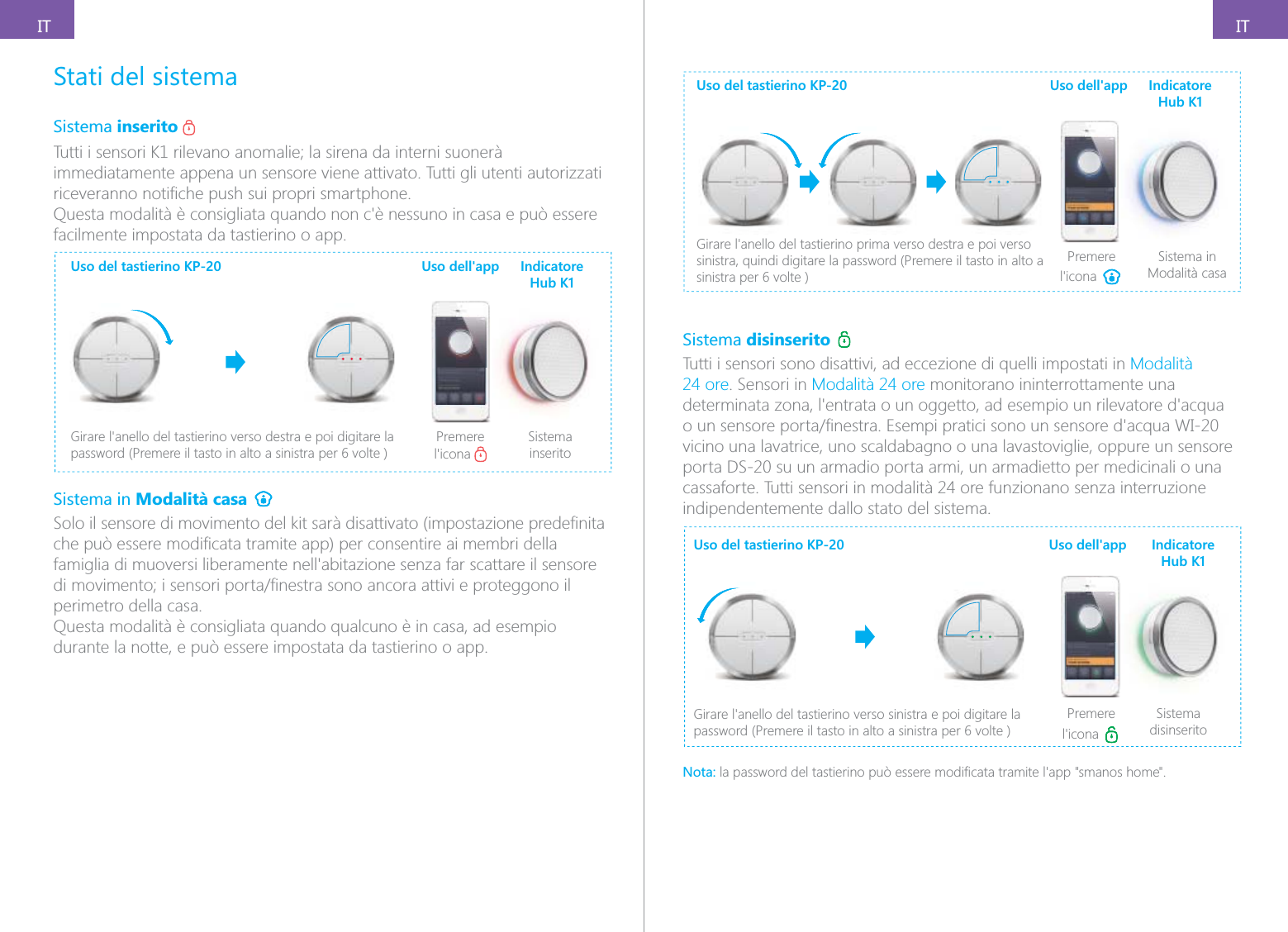
ITITStati del sistemaSistema inserito immediatamente appena un sensore viene attivato. Tutti gli utenti autorizzati facilmente impostata da tastierino o app.Uso del tastierino KP-20Premere Sistema inseritoUso dell'app Indicatore Hub K1Sistema in Modalità casa perimetro della casa.Questa modalità è consigliata quando qualcuno è in casa, ad esempio durante la notte, e può essere impostata da tastierino o app.Uso del tastierino KP-20sinistra, quindi digitare la password (Premere il tasto in alto a Premere Sistema in Modalità casaUso dell'app Indicatore Hub K1Sistema disinserito Tutti i sensori sono disattivi, ad eccezione di quelli impostati in Modalità 24 ore. Sensori in Modalità 24 ore monitorano ininterrottamente una vicino una lavatrice, uno scaldabagno o una lavastoviglie, oppure un sensore porta DS-20 su un armadio porta armi, un armadietto per medicinali o una cassaforte. Tutti sensori in modalità 24 ore funzionano senza interruzione indipendentemente dallo stato del sistema.Uso del tastierino KP-20Premere Sistema disinseritoUso dell'app Indicatore Hub K1Nota:
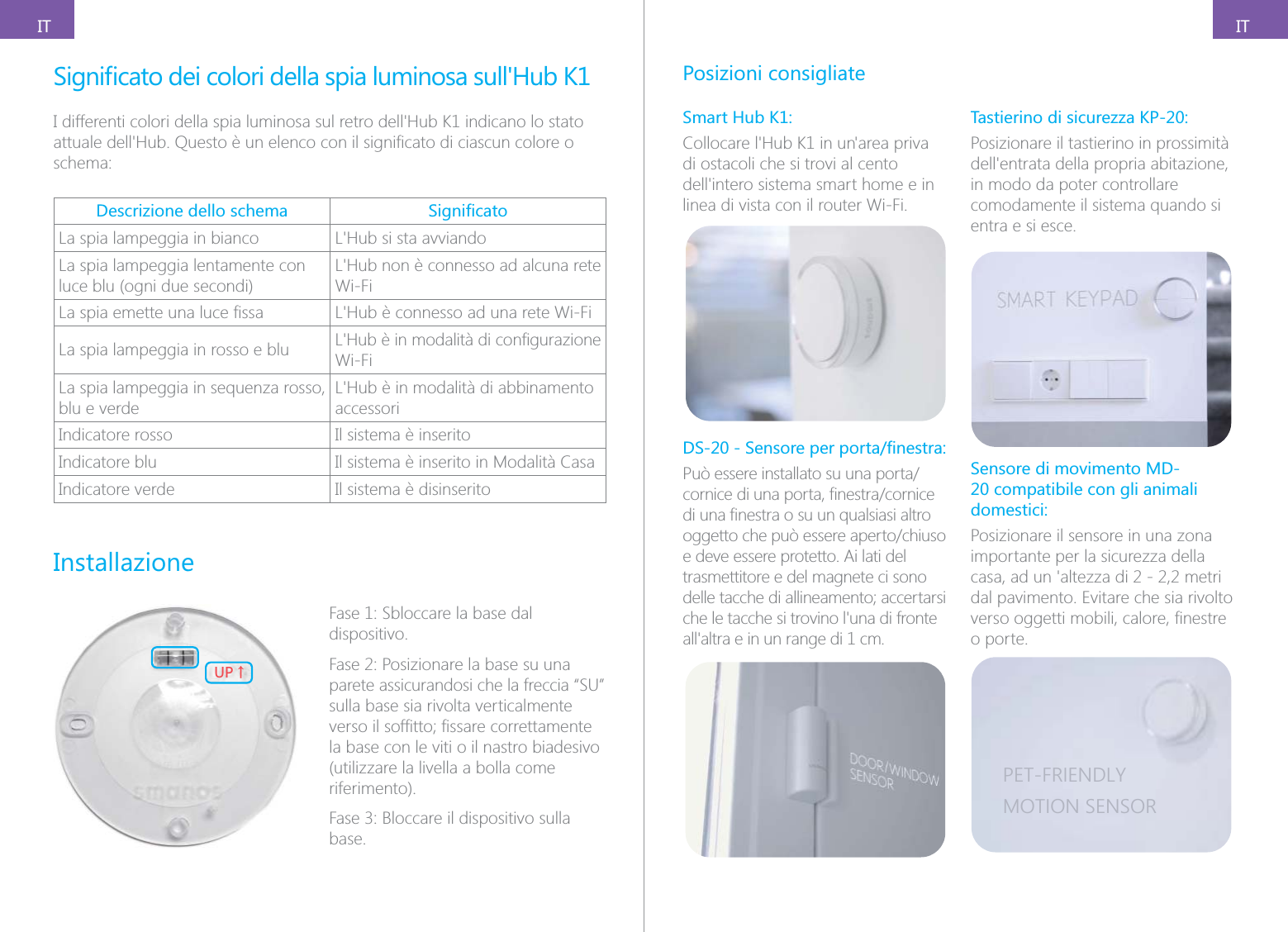
ITITschema:Descrizione dello schema La spia lampeggia in bianco La spia lampeggia lentamente con luce blu (ogni due secondi)Wi-Fi La spia lampeggia in rosso e blu Wi-FiLa spia lampeggia in sequenza rosso, blu e verdeaccessoriIndicatore rosso Il sistema è inseritoIndicatore blu Il sistema è inserito in Modalità CasaIndicatore verde Il sistema è disinseritoInstallazione;6ɑFase 1: Sbloccare la base dal dispositivo.Fase 2: Posizionare la base su una parete assicurandosi che la freccia “SU” sulla base sia rivolta verticalmente la base con le viti o il nastro biadesivo (utilizzare la livella a bolla come riferimento).base.Posizioni consigliateSmart Hub K1:di ostacoli che si trovi al cento linea di vista con il router Wi-Fi.e deve essere protetto. Ai lati del trasmettitore e del magnete ci sono Tastierino di sicurezza KP-20:Posizionare il tastierino in prossimità in modo da poter controllare comodamente il sistema quando si entra e si esce.Sensore di movimento MD-20 compatibile con gli animali domestici:Posizionare il sensore in una zona importante per la sicurezza della dal pavimento. Evitare che sia rivolto o porte.PET-FRIENDLYMOTION SENSOR
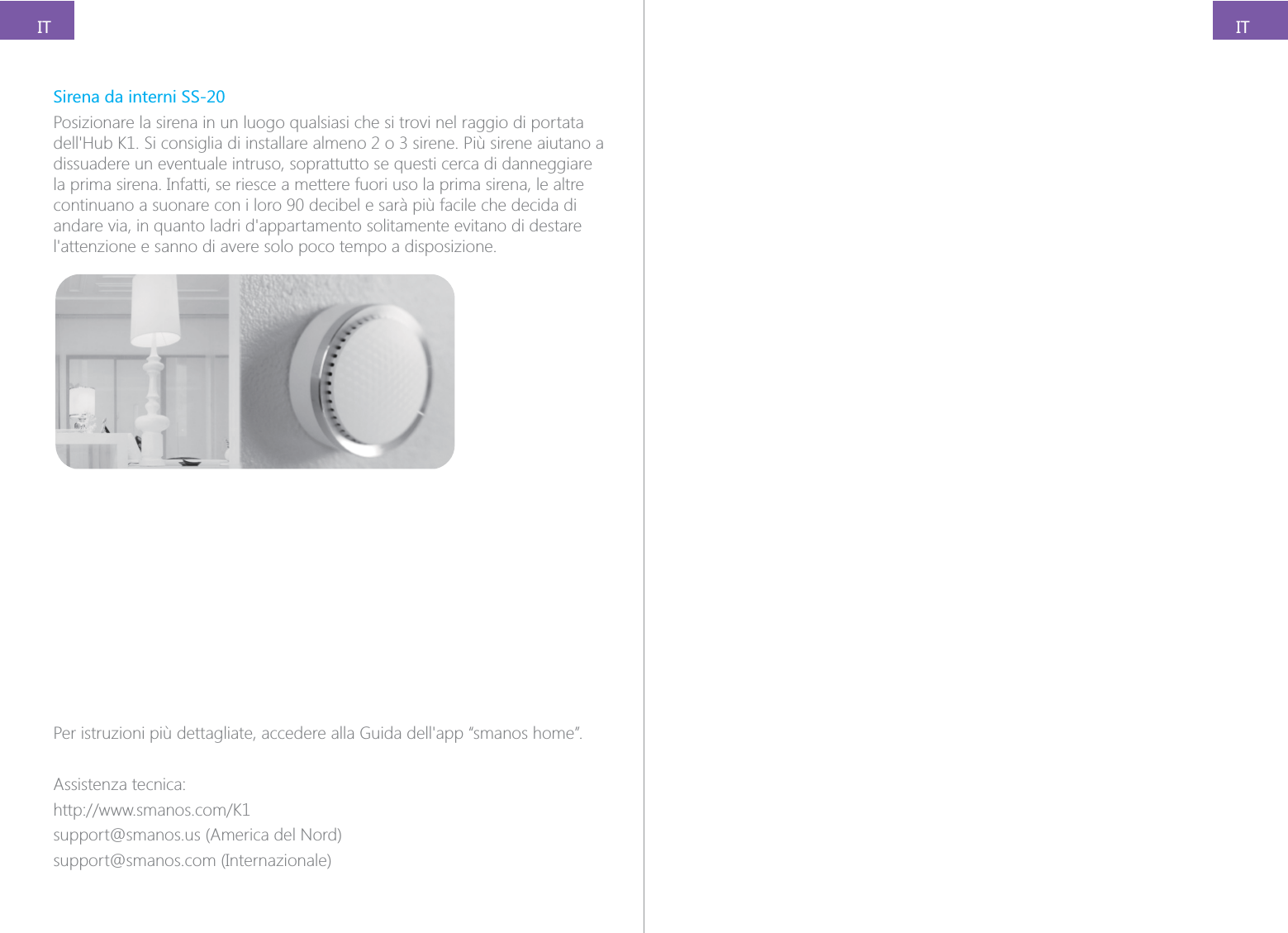
ITITSirena da interni SS-20Posizionare la sirena in un luogo qualsiasi che si trovi nel raggio di portata dissuadere un eventuale intruso, soprattutto se questi cerca di danneggiare la prima sirena. Infatti, se riesce a mettere fuori uso la prima sirena, le altre continuano a suonare con i loro 90 decibel e sarà più facile che decida di Assistenza tecnica:support@smanos.us (America del Nord)support@smanos.com (Internazionale)

Navigation menu