CoAsia Microelectronics 5096-SAT WearSmith ALCOHOL BREATH TESTER User Manual WearSmith W 6826 ai

CoAsia Microelectronics Corp. WearSmith ALCOHOL BREATH TESTER WearSmith W 6826 ai

User Manual

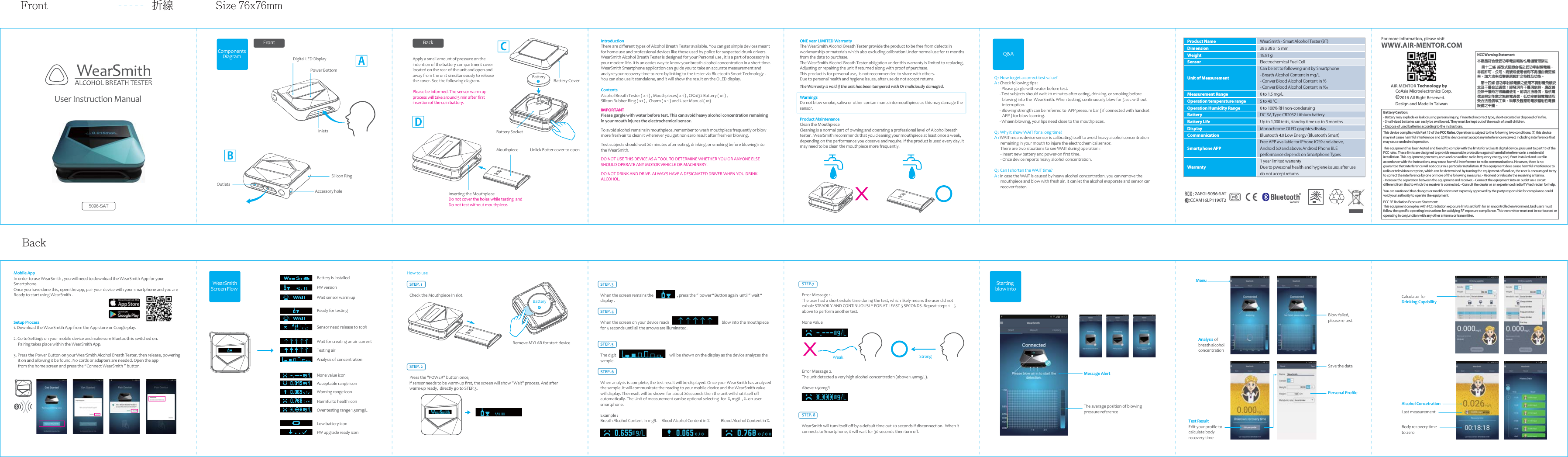
User Instruction Manual Components Diagram  Apply a small amount of pressure on the indention of the battery compartment cover located on the rear of the unit and open and away from the unit simultaneously to release the cover. See the following diagram.Please be informed. The sensor warm-up process will take around 5 min after first insertion of the coin battery. IntroductionThere are different types of Alcohol Breath Tester available. You can get simple devices meant for home use and professional devices like those used by police for suspected drunk drivers.WearSmith Alcohol Breath Tester is designed for your Personal use , it is a part of accessory in your modern life. It is an easies way to know your breath alcohol concentration in a short time. WearSmith Smartphone application can guide you to take an accurate measurement and analyze your recovery time to zero by linking to the tester via Bluetooth Smart Technology . You can also use it standalone, and it will show the result on the OLED display. Contents Alcohol Breath Tester ( x 1 ) , Mouthpieces( x 1 ) , CR2032 Battery ( x1 ) , Silicon Rubber Ring ( x1 ) ,  Charm ( x 1 ) and User Manual ( x1)IMPORTANTPlease gargle with water before test. This can avoid heavy alcohol concentration remaining in your mouth injures the electrochemical sensor.To avoid alcohol remains in mouthpiece, remember to wash mouthpiece frequently or blow more fresh-air to clean it whenever you get non-zero result after fresh-air blowing.Test subjects should wait 20 minutes after eating, drinking, or smoking before blowing into the WearSmith. DO NOT USE THIS DEVICE AS A TOOL TO DETERMINE WHETHER YOU OR ANYONE ELSE SHOULD OPERATE ANY MOTOR VEHICLE OR MACHINERY. DO NOT DRINK AND DRIVE. ALWAYS HAVE A DESIGNATED DRIVER WHEN YOU DRINK ALCOHOL.  FrontDigital LED DisplayPower BottomInlets Battery SocketBackACDONE year LIMITED Warranty The WearSmith Alcohol Breath Tester provide the product to be free from defects in workmanship or materials which also excluding calibration Under normal use for 12 months from the date to purchase. The WearSmith Alcohol Breath Tester obligation under this warranty is limited to replacing, Adjusting or repairing the unit if returned along with proof of purchase. This product is for personal use,  is not recommended to share with others.Due to personal health and hygiene issues, after use do not accept returns. The Warranty is void if the unit has been tampered with Or maliciously damaged. WarningsDo not blow smoke, saliva or other contaminants into mouthpiece as this may damage the sensor.  Product MaintenanceClean the MouthpieceCleaning is a normal part of owning and operating a professional level of Alcohol breath tester . WearSmith recommends that you cleaning your mouthpiece at least once a week, depending on the performance you observe and require. If the product is used every day, it may need to be clean the mouthpiece more frequently.5096-SATBattery+Battery Cover Outlets Accessory holeSilicon RingBQ : How to get a correct test value?A : Check following tips :       - Please gargle with water before test.       - Test subjects should wait 20 minutes after eating, drinking, or smoking before          blowing into the  WearSmith. When testing, continuously blow for 5 sec without          interruption.       - Blowing strength can be referred to  APP pressure bar ( if connected with handset          APP ) for blow-learning.      - Whaen blowing, your lips need close to the mouthpieces.Q : Why it show WAIT for a long time?A : WAIT means device sensor is calibrating itself to avoid heavy alcohol concentration        remaining in your mouth to injure the electrochemical sensor.        There are two situations to see WAIT during operation :       - Insert new battery and power-on first time.       - Once device reports heavy alcohol concentration.Q : Can I shorten the WAIT time?A : In case the WAIT is caused by heavy alcohol concentration, you can remove the        mouthpiece and blow with fresh air. It can let the alcohol evaporate and sensor can        recover faster.Q&AMobile AppIn order to use WearSmith , you will need to download the WearSmith App for your Smartphone. Once you have done this, open the app, pair your device with your smartphone and you are Ready to start using WearSmith .Setup Process1. Download the WearSmtih App from the App store or Google play.     2. Go to Settings on your mobile device and make sure Bluetooth is switched on.      Pairing takes place within the WearSmith App.  3. Press the Power Button on your WearSmith Alcohol Breath Tester, then release, powering     it on and allowing it be found. No cords or adapters are needed. Open the app      from the home screen and press the “Connect WearSmith ” button. Testing airAnalysis of concentrationNone value iconAcceptable range iconWarning range iconHarmful to health iconLow battery iconFW upgrade ready iconWait for creating an air currentReady for testingSensor need release to 100%Battery is installedFW versionWait sensor warm upOver testing range 1.50mg/LWearSmithScreen Flow FrontBack折線 Size 76x76mmSTEP.7 Error Message 1. The user had a short exhale time during the test, which likely means the user did not exhale STEADILY AND CONTINUOUSLY FOR AT LEAST 5 SECONDS. Repeat steps 1 – 5 above to perform another test. None ValueError Message 2. The unit detected a very high alcohol concentration (above 1.50mg/L). Above 1.50mg/L   STEP. 8 WearSmith will turn itself off by a default time out 20 seconds if disconnection.  When it connects to Smartphone, it will wait for 30 seconds then turn off. Weak StrongMessage AlertThe average position of blowing pressure referenceStarting blow intoMenuAnalysis of breath alcohol concentrationBlow failed, please re-testTest ResultEdit your profile to calculate body recovery timeSave the dataPersonal ProfileBody recovery time to zeroLast measurementAlcohol ConcetrationHow to use STEP. 1 Check the Mouthpiece In slot. Remove MYLAR for start deviceSTEP. 2 Press the "POWER" button once, if sensor needs to be warm-up first, the screen will show "Wait" process. And after warm-up ready,  directly go to STEP.3. STEP. 3 When the screen remains the                           , press the “ power “Button again  until “ wait “ display .STEP. 4  When the screen on your device reads                                                            blow into the mouthpiece for 5 seconds until all the arrows are illuminated.STEP. 5The digit                                                             will be shown on the display as the device analyzes the sample. STEP. 6 When analysis is complete, the test result will be displayed. Once your WearSmith has analyzed the sample, it will communicate the reading to your mobile device and the WearSmith value will display. The result will be shown for about 20seconds then the unit will shut itself off automatically. The Unit of measurement can be optional selecting  for  %, mg/L , ‰ on user smartphone. Example : Breath Alcohol Content in mg/L     Blood Alcohol Content in %             Blood Alcohol Content in ‰ Calculator for Drinking CapabilityUnlick Batter cover to open Inserting the Mouthpiece Do not cover the holes while testing  and Do not test without mouthpiece.MouthpieceBattery+Product Name WearSmith - Smart Alcohol Tester (BT)Dimension 38 x 38 x 15 mmWeight 19.91 gSensor Electrochemical Fuel CellUnit of MeasurementCan be set to following unit by Smartphone- Breath Alcohol Content in mg/L- Conver Blood Alcohol Content in %- Conver Blood Alcohol Content in ‰Measurement Range 0 to 1.5 mg/LOperation temperature range 5 to 40 °COperation Humidity Range 0 to 100% RH non-condensingBattery DC 3V, Type CR2032 Lithium batteryBattery Life Up to 1,000 tests, standby time up to 3 monthsDisplay Monochrome OLED graphics displayCommunication Bluetooth 4.0 Low Energy (Bluetooth Smart)Smartphone APPFree APP available for iPhone iOS9 and above,Android 5.0 and above; Android Phone BLEperformance depends on Smartphone TypesWarranty1 year limited warrantyDue to pwesonal health and hygiene issues, after usedo not accept returns.For more information, please visitWWW.AIR-MENTOR.COMAIR MENTOR Technology by     CoAsia Microelectronics Corp. ©2016 All Right Reserved.Design and Made In TaiwanThis device complies with Part 15 of the FCC Rules. Operation is subject to the following two conditions: (1) this device may not cause harmful interference and (2) this device must accept any interference received, including interference that may cause undesired operation.This equipment has been tested and found to comply with the limits for a Class B digital device, pursuant to part 15 of the FCC rules. These limits are designed to provide reasonable protection against harmful interference in a residential installation. This equipment generates, uses and can radiate radio frequency energy and, if not installed and used in accordance with the instructions, may cause harmful interference to radio communications. However, there is no guarantee that interference will not occur in a particular installation. If this equipment does cause harmful interference to radio or television reception, which can be determined by turning the equipment o and on, the user is encouraged to try to correct the interference by one or more of the following measures: - Reorient or relocate the receiving antenna. - Increase the separation between the equipment and receiver. - Connect the equipment into an outlet on a circuit dierent from that to which the receiver is connected. - Consult the dealer or an experienced radio/TV technician for help. You are cautioned that changes or modications not expressly approved by the party responsible for compliance could void your authority to operate the equipment. FCC RF Radiation Exposure Statement: This equipment complies with FCC radiation exposure limits set forth for an uncontrolled environment. End users must follow the specic operating instructions for satisfying RF exposure compliance. This transmitter must not be co-located or operating in conjunction with any other antenna or transmitter.NCC Warning Statement本產品符合低低功率電波輻射性電機管理辦法  第十二條  經型式認證合格之低功率射頻電機,非經許可,公司、商號或使用者均不得擅自變更頻率、加大功率或變更原設計之特性及功能。   第十四條 低功率射頻電機之使用不得影響飛航安全及干擾合法通信;經發現有干擾現象時,應改善至無干擾時方得繼續使用。前項合法通信,指依電信法規定作業之無線電通信。低功率射頻電機須忍受合法通信或工業、科學及醫療用電波輻射性電機設備之干擾。Battery Caution:- Battery may explode or leak causing personal injury, if inserted incorrect type, short-circuited or disposed of in re.- Small-sized batteries can easily be swallowed. They must be kept out of the reach of small children.- Dispose of used batteries according to the instructions.CCAM16LP1190T22AEGI-5096-SATFCC ID :

Navigation menu