Compoka Electronic Technology KBJ-229N Bluetooth headphone User Manual KBJ 229N

Shenzhen Compoka Electronic Technology Co., Ltd Bluetooth headphone KBJ 229N

15_KBJ-229N UserMan.pdf

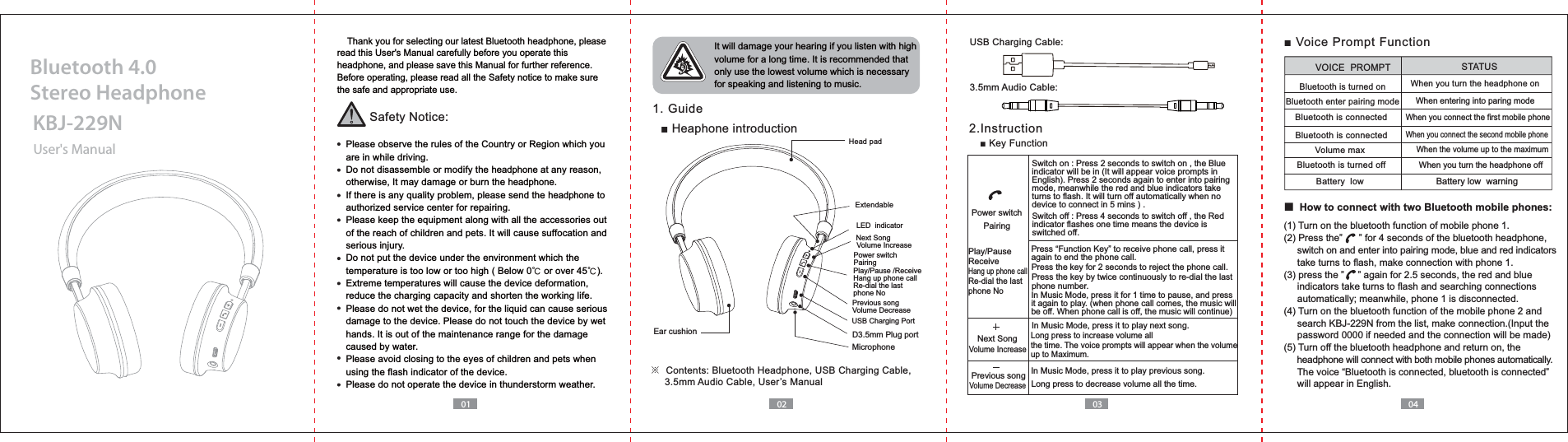
01 02 03 04    Thank you for selecting our latest Bluetooth headphone, please read this User's Manual carefully before you operate this headphone, and please save this Manual for further reference.Before operating, please read all the Safety notice to make sure the safe and appropriate use.Safety Notice:  Please observe the rules of the Country or Region which you   are in while driving.  Do not disassemble or modify the headphone at any reason,   otherwise, It may damage or burn the headphone.  If there is any quality problem, please send the headphone to   authorized service center for repairing.  Please keep the equipment along with all the accessories out   of the reach of children and pets. It will cause suffocation and   serious injury.  Do not put the device under the environment which the   temperature is too low or too high ( Below 0ņ or over 45ņ).  Extreme temperatures will cause the device deformation,  reduce the charging capacity and shorten the working life.  Please do not wet the device, for the liquid can cause serious   damage to the device. Please do not touch the device by wet   hands. It is out of the maintenance range for the damage   caused by water.  Please avoid closing to the eyes of children and pets when   using the flash indicator of the device.  Please do not operate the device in thunderstorm weather. It will damage your hearing if you listen with high volume for a long time. It is recommended that only use the lowest volume which is necessary for speaking and listening to music.  1. Guide 2.InstructionUser's ManualKBJ-229NBluetooth 4.0 Stereo HeadphoneHow to connect with two Bluetooth mobile phones:Play/Pause /ReceiveRe-dial the last phone NoNext SongVolume IncreasePrevious songVolume Decrease Ear cushion D3.5mm Plug portMicrophoneUSB Charging PortPower switchPairingLED  indicator※     3.5mm Audio Cable, User’s ManualUSB Charging Cable:3.5mm Audio Cable:Switch on : Press 2 seconds to switch on , the Blue indicator will be in (It will appear voice prompts in English). Press 2 seconds again to enter into pairing mode, meanwhile the red and blue indicators take turns to flash. It will turn off automatically when no device to connect in 5 mins ) .Switch off : Press 4 seconds to switch off , the Red indicator flashes one time means the device is switched off. again to end the phone call.Press the key by twice continuously to re-dial the last phone number.Press the key for 2 seconds to reject the phone call.In Music Mode, press it for 1 time to pause, and press it again to play. (when phone call comes, the music will be off. When phone call is off, the music will continue)In Music Mode, press it to play previous song.In Music Mode, press it to play next song.Long press to increase volume all the time. The voice prompts will appear when the volume up to Maximum.Previous songNext SongVolume IncreaseVolume DecreasePlay/PauseReceiveRe-dial the last phone NoPower switchPairingLong press to decrease volume all the time. Battery low  warningBluetooth is turned onBluetooth enter pairing modeVolume max Bluetooth is turned offVOICE  PROMPT STATUSWhen you turn the headphone off When you turn the headphone onWhen entering into paring modeWhen you connect the second mobile phoneWhen the volume up to the maximum  When you connect the first mobile phoneBluetooth is connectedBluetooth is connectedBattery  low(1) Turn on the bluetooth function of mobile phone 1.     switch on and enter into pairing mode, blue and red indicators      take turns to flash, make connection with phone 1.     indicators take turns to flash and searching connections      automatically; meanwhile, phone 1 is disconnected.(4) Turn on the bluetooth function of the mobile phone 2 and     password 0000 if needed and the connection will be made)(5) Turn off the bluetooth headphone and return on, the      headphone will connect with both mobile phones automatically.     will appear in English.Extendable
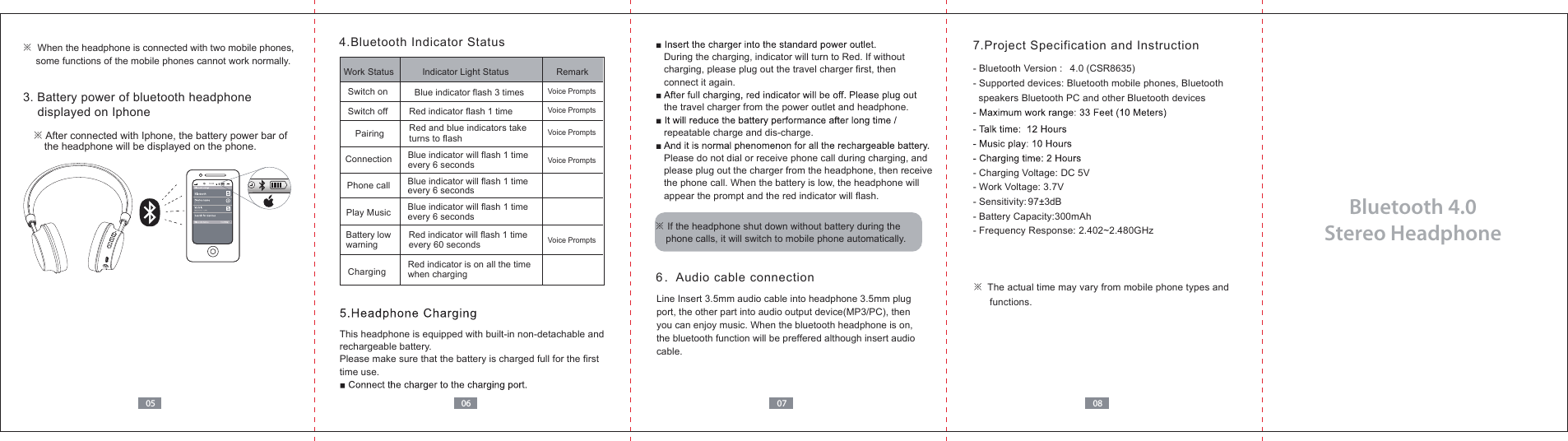
Bluetooth 4.0 Stereo Headphone 0605 07 087.Project Specification and Instruction- Bluetooth Version :  4.0 (CSR8635)- Supported devices: Bluetooth mobile phones, Bluetooth   speakers Bluetooth PC and other Bluetooth devices- Charging Voltage: DC 5V- Work Voltage: 3.7V- Sensitivity: 97±3dB  - Battery Capacity:300mAh - Frequency Response: 2.402~2.480GHz※  The actual time may vary from mobile phone types and      functions.3. Battery power of bluetooth headphone     displayed on Iphone※ After connected with Iphone, the battery power bar of     the headphone will be displayed on the phone.4.Bluetooth Indicator StatusThis headphone is equipped with built-in non-detachable and rechargeable battery.Please make sure that the battery is charged full for the first time use.※  When the headphone is connected with two mobile phones,      some functions of the mobile phones cannot work normally.6.Audio cable connection   During the charging, indicator will turn to Red. If without    charging, please plug out the travel charger first, then    connect it again.    the travel charger from the power outlet and headphone.   repeatable charge and dis-charge.   Please do not dial or receive phone call during charging, and    please plug out the charger from the headphone, then receive    the phone call. When the battery is low, the headphone will    appear the prompt and the red indicator will flash.Line Insert 3.5mm audio cable into headphone 3.5mm plug port, the other part into audio output device(MP3/PC), then you can enjoy music. When the bluetooth headphone is on, the bluetooth function will be preffered although insert audio cable. Red indicator will flash 1 time every 60 secondsChargingWork Status  Indicator Light Status RemarkSwitch on Blue indicator flash 3 timesSwitch off Red indicator flash 1 timeConnection Blue indicator will flash 1 time every 6 secondsPhone call Blue indicator will flash 1 time every 6 secondsBlue indicator will flash 1 time every 6 secondsPlay MusicBattery low  warningPairing  Red and blue indicators take turns to flash Voice PromptsVoice PromptsVoice PromptsVoice PromptsVoice PromptsRed indicator is on all the time when charging※ If the headphone shut down without battery during the     phone calls, it will switch to mobile phone automatically.10:30KBJ-229N
NOTE: This equipment has been tested and found to comply with the limits for a Class B digital device, pursuant to part 15 of the FCC Rules. These limits are designed to provide reasonable protection against harmful interference in a residential installation. This equipment generates, uses and can radiate radio frequency energy and, if not installed and used in accordance with the instructions, may cause harmful interference to radio communications. However, there is no guarantee that interference will not occur in a particular installation. If this equipment does cause harmful interference to radio or television reception, which can be determined by turning the equipment off and on, the user is encouraged to try to correct the interference by one or more of the following measures: —Reorient or relocate the receiving antenna. —Increase the separation between the equipment and receiver. —Connect the equipment into an outlet on a circuit different from that to which the receiver is connected. —Consult the dealer or an experienced radio/TV technician for help. Thisdevicecomplieswithpart15oftheFCCrules.Operationissubjecttothefollowingtwoconditions:(1)thisdevicemaynotcauseharmfulinterference,and(2)thisdevicemustacceptanyinterferencereceived,includinginterferencethatmaycauseundesiredoperation.Changesormodificationstothisunitnotexpresslyapprovedbythepartyresponsibleforcompliancecouldvoidtheuser'sauthoritytooperatetheequipment.

Navigation menu