Crystal Video Technology 306020180409 Wireless Video Transmission System User Manual

Shenzhen Crystal Video Technology Co.,LTD. Wireless Video Transmission System

User manual

BeamLink-Quad Wireless Transmission System天演无线图传快速使用指南Quick Start Guide Version:1.0深圳市视晶无线技术有限公司深圳市宝安中心区宝源路F518时尚创意园F10-13栋服务热线:400-6262-963传真:+86-755-29188427E-mail:Marketing@cv-hd.com产品及配件自购买之日起保修一年BeamLink-Quad ONE-YEAR LIMITED WARRANTY邮编:518102电话:+86-755-26716688E-mail:Sales@cv-hd.comModel:3060
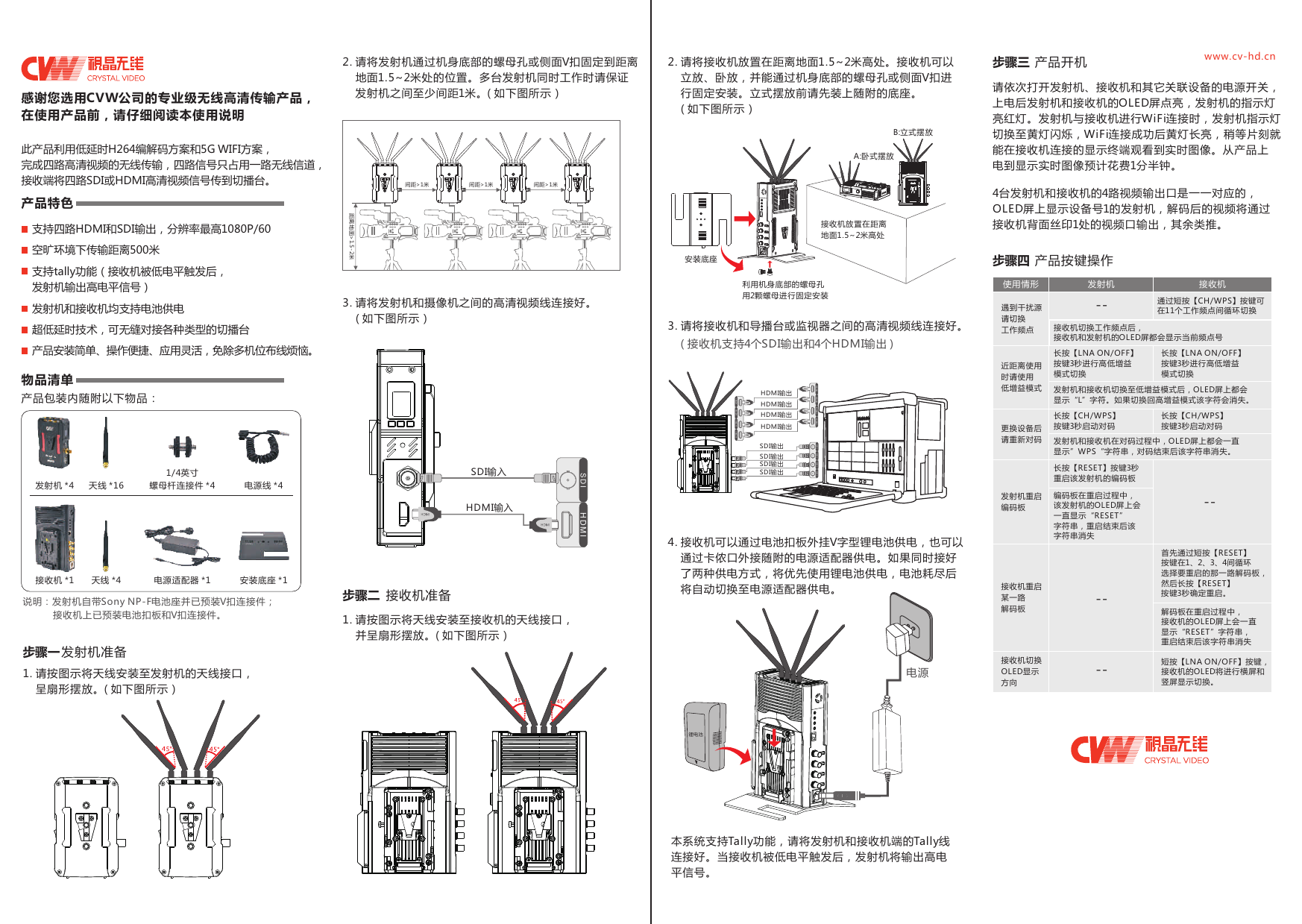
H D M IS D I H D M I产品特色支持四路HDMI和SDI输出,分辨率最高1080P/60超低延时技术,可无缝对接各种类型的切播台产品安装简单、操作便捷、应用灵活,免除多机位布线烦恼。物品清单产品包装内随附以下物品:天线 *161/4英寸螺母杆连接件 *4 电源线 *4天线 *4 电源适配器 *1 安装底座 *1发射机 *4接收机 *1说明:发射机自带Sony NP-F电池座并已预装V扣连接件;           接收机上已预装电池扣板和V扣连接件。1. 请按图示将天线安装至发射机的天线接口,    呈扇形摆放。( 如下图所示)发射机准备间距>1米 间距>1米 间距>1米距离地面>1.5-2米3. 请将发射机和摄像机之间的高清视频线连接好。    ( 如下图所示)HDMI输入SDI输入步骤二 接收机准备1. 请按图示将天线安装至接收机的天线接口,    并呈扇形摆放。( 如下图所示)接收机放置在距离地面1.5~2米高处B:立式摆放A:卧式摆放利用机身底部的螺母孔用2颗螺母进行固定安装安装底座3. 请将接收机和导播台或监视器之间的高清视频线连接好。00:00:00SDI输出SDI输出SDI输出SDI输出4. 接收机可以通过电池扣板外挂V字型锂电池供电,也可以    通过卡侬口外接随附的电源适配器供电。如果同时接好    了两种供电方式,将优先使用锂电池供电,电池耗尽后    将自动切换至电源适配器供电。锂电池电源请依次打开发射机、接收机和其它关联设备的电源开关,上电后发射机和接收机的OLED屏点亮,发射机的指示灯亮红灯。发射机与接收机进行WiFi连接时,发射机指示灯切换至黄灯闪烁,WiFi连接成功后黄灯长亮,稍等片刻就能在接收机连接的显示终端观看到实时图像。从产品上电到显示实时图像预计花费1分半钟。4台发射机和接收机的4路视频输出口是一一对应的,OLED屏上显示设备号1的发射机,解码后的视频将通过接收机背面丝印1处的视频口输出,其余类推。步骤四 产品按键操作使用情形 发射机 接收机遇到干扰源请切换工作频点通过短按【CH/WPS】按键可在11个工作频点间循环切换接收机切换工作频点后,接收机和发射机的OLED屏都会显示当前频点号近距离使用时请使用低增益模式长按【LNA ON/OFF】按键3秒进行高低增益模式切换发射机和接收机切换至低增益模式后,OLED屏上都会显示“L”字符。如果切换回高增益模式该字符会消失。长按【LNA ON/OFF】按键3秒进行高低增益模式切换更换设备后请重新对码 发射机和接收机在对码过程中,OLED屏上都会一直显示”WPS“字符串,对码结束后该字符串消失。长按【CH/WPS】按键3秒启动对码长按【CH/WPS】按键3秒启动对码发射机重启编码板长按【RESET】按键3秒重启该发射机的编码板编码板在重启过程中,该发射机的OLED屏上会一直显示“RESET”字符串,重启结束后该字符串消失接收机重启某一路解码板首先通过短按【RESET】按键在1、2、3、4间循环选择要重启的那一路解码板,然后长按【RESET】按键3秒确定重启。解码板在重启过程中,接收机的OLED屏上会一直显示“RESET”字符串,重启结束后该字符串消失 本系统支持Tally功能,请将发射机和接收机端的Tally线 连接好。当接收机被低电平触发后,发射机将输出高电 平信号。HD M IHD M IH D M IHD M IHDMI输出HDMI输出HDMI输出HDMI输出SD I SD IHD M IHD M IH D M IHD M I SD ISD I SD I( 接收机支持4个SDI输出和4个HDMI输出 )------接收机切换OLED显示方向短按【LNA ON/OFF】按键,接收机的OLED将进行横屏和竖屏显示切换。--此产品利用低延时H264编解码方案和5G WIFI方案,完成四路高清视频的无线传输,四路信号只占用一路无线信道,接收端将四路SDI或HDMI高清视频信号传到切播台。空旷环境下传输距离500米支持tally功能(接收机被低电平触发后,发射机输出高电平信号)发射机和接收机均支持电池供电步骤一2. 请将发射机通过机身底部的螺母孔或侧面V扣固定到距离    地面1.5~2米处的位置。多台发射机同时工作时请保证    发射机之间至少间距1米。( 如下图所示)2. 请将接收机放置在距离地面1.5~2米高处。接收机可以    立放、卧放,并能通过机身底部的螺母孔或侧面V扣进    行固定安装。立式摆放前请先装上随附的底座。    ( 如下图所示)    步骤三 产品开机 www.cv-hd.cn感谢您选用CVW公司的专业级无线高清传输产品,在使用产品前,请仔细阅读本使用说明
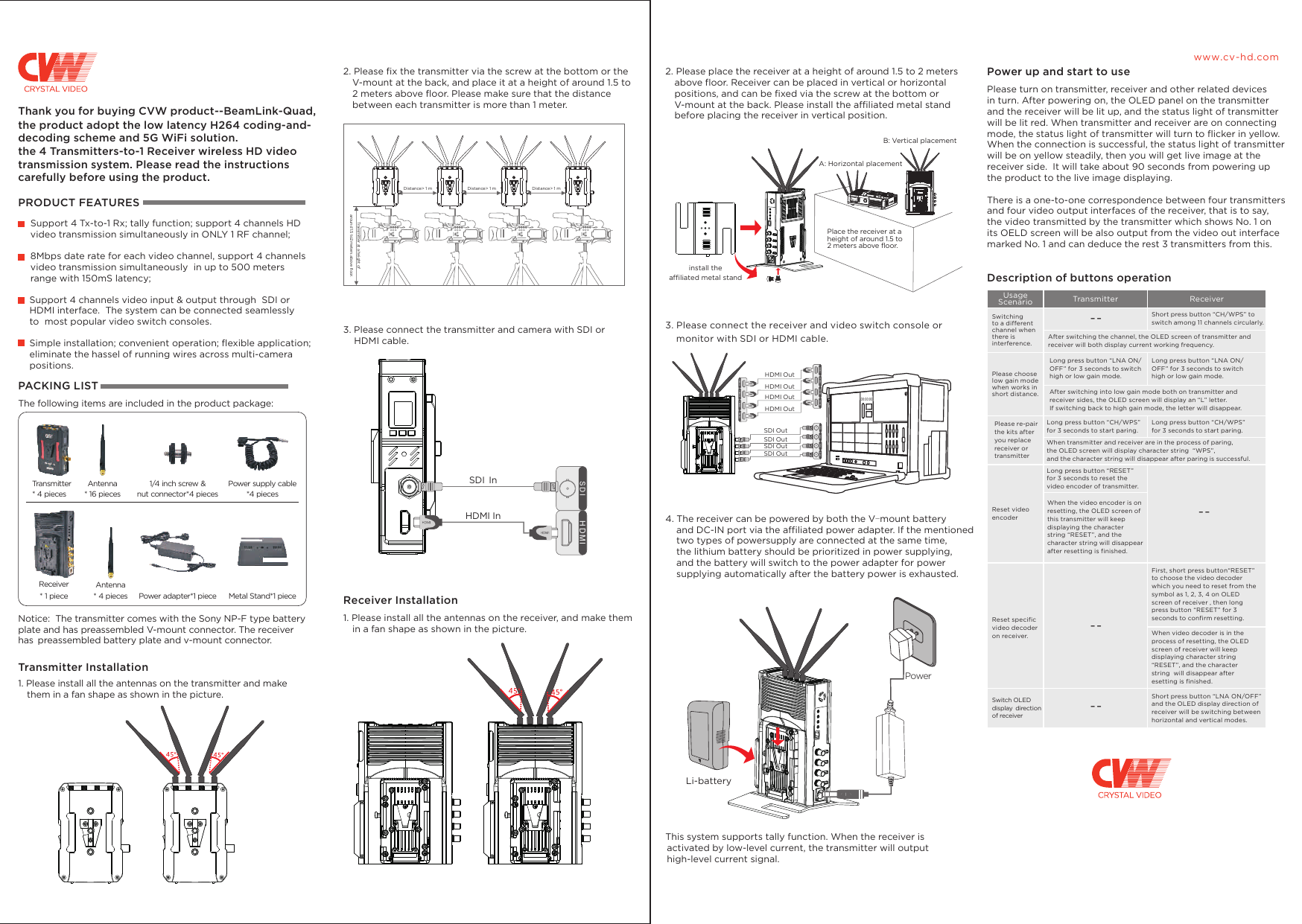
Place the receiver at a height of around 1.5 to2 meters above floor. Distance> 1 m Distance> 1 m Distance> 1 mTransmitter at a height of around 1.5 to2 meters above floor. Please turn on transmitter, receiver and other related devices in turn. After powering on, the OLED panel on the transmitter and the receiver will be lit up, and the status light of transmitter will be lit red. When transmitter and receiver are on connecting mode, the status light of transmitter will turn to flicker in yellow. When the connection is successful, the status light of transmitter will be on yellow steadily, then you will get live image at the receiver side.  It will take about 90 seconds from powering up the product to the live image displaying.There is a one-to-one correspondence between four transmitters and four video output interfaces of the receiver, that is to say, the video transmitted by the transmitter which shows No. 1 on its OELD screen will be also output from the video out interface marked No. 1 and can deduce the rest 3 transmitters from this.Description of buttons operationH D M IS D I H D M IHDMI InSDI Ininstall the affiliated metal stand00:00:00PowerUsage Scenario Transmitter ReceiverLong press button “LNA ON/OFF” for 3 seconds to switch high or low gain mode.HD M IHD M IH D M IHD M IHDMI OutSD I SD IHD M IHD M IH D M IHD M I SD ISD I SD I------3. Please connect the transmitter and camera with SDI or    HDMI cable. Receiver Installation1. Please install all the antennas on the receiver, and make them   in a fan shape as shown in the picture.3. Please connect the receiver and video switch console or    monitor with SDI or HDMI cable.HDMI OutHDMI OutHDMI OutSDI OutSDI OutSDI OutSDI Out4. The receiver can be powered by both the     and DC-IN port via the affiliated power adapter. If the mentioned     two types of powersupply are connected at the same time,     the lithium battery should be prioritized in power supplying,     and the battery will switch to the power adapter for power     supplying automatically after the battery power is exhausted.V-mount batteryThis system supports tally function. When the receiver is  activated by low-level current, the transmitter will output  high-level current signal.Short press button “CH/WPS” to switch among 11 channels circularly.After switching the channel, the OLED screen of transmitter and receiver will both display current working frequency. Please chooselow gain mode when works in short distance.Switching to a different channel when there is interference.After switching into low gain mode both on transmitter and receiver sides, the OLED screen will display an “L” letter. If switching back to high gain mode, the letter will disappear.Please re-pair the kits after you replace receiver or transmitterLong press button “CH/WPS” for 3 seconds to start paring.Long press button “CH/WPS”for 3 seconds to start paring.When transmitter and receiver are in the process of paring, the OLED screen will display character string  “WPS”, and the character string will disappear after paring is successful.Reset video encoderLong press button “RESET” for 3 seconds to reset the video encoder of transmitter.When the video encoder is on resetting, the OLED screen of this transmitter will keep displaying the character string “RESET”, and the character string will disappear after resetting is finished.Reset specific video decoder on receiver.First, short press button“RESET” to choose the video decoder which you need to reset from the symbol as 1, 2, 3, 4 on OLED screen of receiver , then long press button “RESET” for 3 seconds to confirm resetting.When video decoder is in the process of resetting, the OLED screen of receiver will keep displaying character string  “RESET”, and the character string  will disappear after esetting is finished. Switch OLED display direction of receiverShort press button “LNA ON/OFF” and the OLED display direction of receiver will be switching between horizontal and vertical modes.--Long press button “LNA ON/OFF” for 3 seconds to switch high or low gain mode.  Li-batteryThank you for buying CVW product--BeamLink-Quad,PRODUCT FEATURESSupport 4 Tx-to-1 Rx; tally function; support 4 channels HD video transmission simultaneously in ONLY 1 RF channel;8Mbps date rate for each video channel, support 4 channels video transmission simultaneously  in up to 500 meters range with 150mS latency;Support 4 channels video input & output through  SDI or HDMI interface.  The system can be connected seamlessly to  most popular video switch consoles.2. Please fix the transmitter via the screw at the bottom or the   V-mount at the back, and place it at a height of around 1.5 to   2 meters above floor. Please make sure that the distance   between each transmitter is more than 1 meter.2. Please place the receiver at a height of around 1.5 to 2 meters   above floor. Receiver can be placed in vertical or horizontal   positions, and can be fixed via the screw at the bottom or   V-mount at the back. Please install the affiliated metal stand   before placing the receiver in vertical position. B: Vertical placementA: Horizontal placementPower up and start to useAntenna * 16 pieces1/4 inch screw & nut connector*4 piecesAntenna* 4 pieces Power adapter*1 piece  Metal Stand*1 pieceTransmitter * 4 piecesReceiver* 1 piecewww.cv-hd.comSimple installation; convenient operation; flexible application; eliminate the hassel of running wires across multi-camera positions. PACKING LIST The following items are included in the product package:Power supply cable*4 piecesNotice:  The transmitter comes with the Sony NP-F type battery plate and has preassembled V-mount connector. The receiver has preassembled battery plate and v-mount connector. Transmitter Installation1. Please install all the antennas on the transmitter and make   them in a fan shape as shown in the picture.the product adopt the low latency H264 coding-and-decoding scheme and 5G WiFi solution.the 4 Transmitters-to-1 Receiver wireless HD video transmission system. Please read the instructions carefully before using the product.
This equipment has been tested and found to comply with the limits for a Class B digital device, pursuant to part 15 of the FCC Rules. These limits are designed to provide reasonable protection against harmful interference in a residential installation. This equipment generates, uses and can radiate radio frequency energy and, if not installed and used in accordance with the instructions, may cause harmful interference to radio communications. However, there is no guarantee that interference will not occur in a particular installation. If this equipment does cause harmful interference to radio or television reception, which can be determined by turning the equipment off and on, the user is encouraged to try to correct the interference by one or more of the following measures:    Reorient or relocate the receiving antenna.   Increase the separation between the equipment and receiver.    Connect the equipment into an outlet on a circuit different from that to which the receiver is connected.    Consult the dealer or an experienced radio/TV technician for help. FCC StatementThis device complies with FCC radiation exposure limits set forth for an uncontrolled environment and it also complies with Part 15 of the FCC RF Rules. This equipment must be installed and operated in accordance with provided instructions and the antenna(s) used for this transmitter must be installed to provide a separation distance of at least 20 cm from all persons and must not be co-located or operating in conjunction with any other antenna or transmitter. End-users and installers must be provided with antenna installation instructions and consider removing the no-collocation statement.FCC Radiation Exposure StatementThis device complies with Part 15 of the FCC Rules. Operation is subject to the following two conditions:  (1) this device may not cause harmful interference, and (2) this device must accept any interference received, including interference that may cause undesired operation.Any changes or modifications not expressly approved by the party responsible for compliance could void the user's authority to operate the equipment.Caution!

Navigation menu