DONGGUAN SMART HERO ELECTRONIC CO WLDB2324TX WIRELESS DOOR CHIME PUSH BUTTON User Manual

DONGGUAN SMART HERO ELECTRONIC PRODUCTS CO LTD WIRELESS DOOR CHIME PUSH BUTTON

User manual

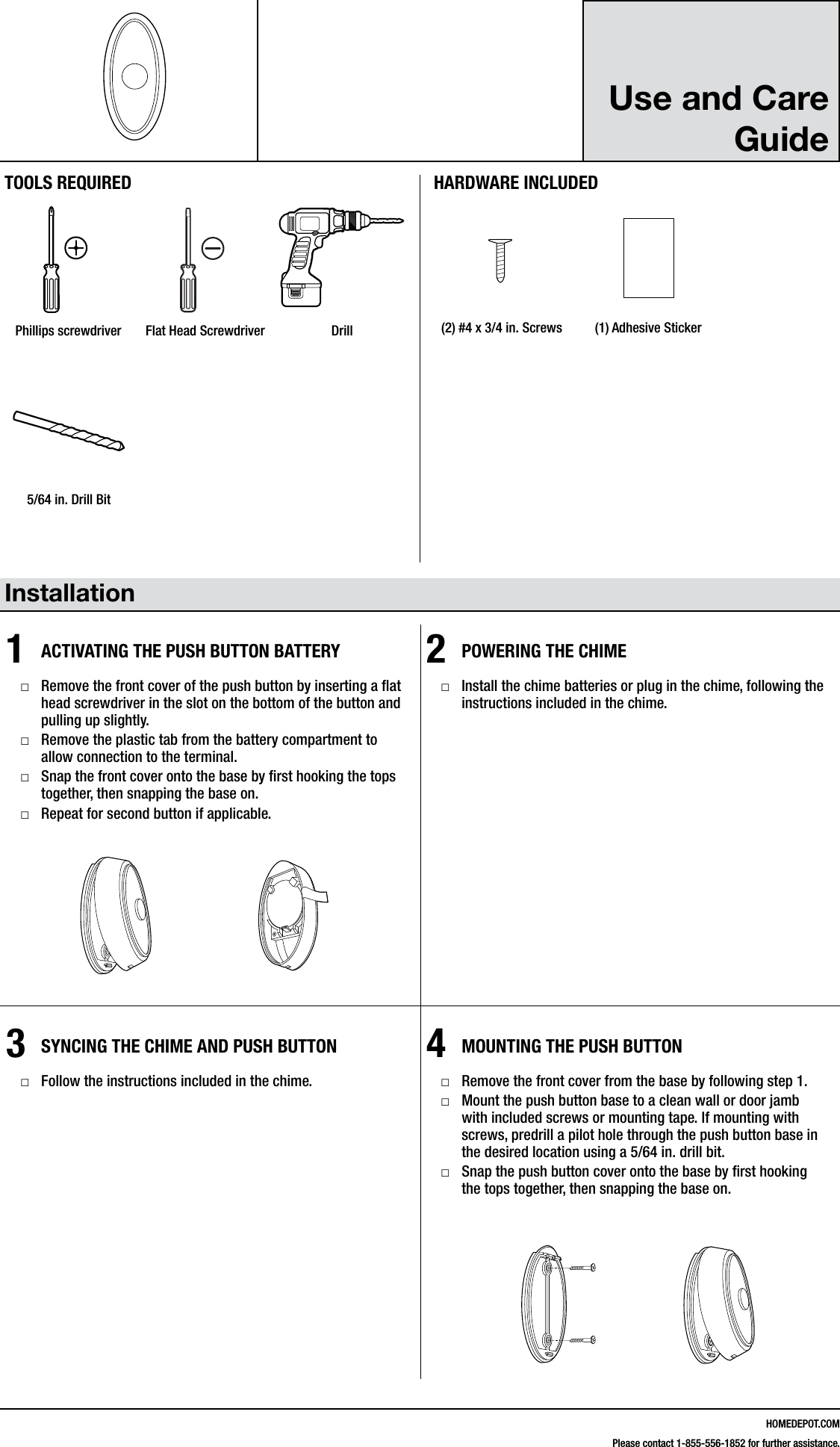
HOMEDEPOT.COMPlease contact 1-855-556-1852 for further assistance.Use and Care Guide Installation1ACTIVATING THE PUSH BUTTON BATTERY □Remove the front cover of the push button by inserting a at head screwdriver in the slot on the bottom of the button and pulling up slightly. □Remove the plastic tab from the battery compartment to allow connection to the terminal. □Snap the front cover onto the base by rst hooking the tops together, then snapping the base on. □Repeat for second button if applicable.2POWERING THE CHIME □Install the chime batteries or plug in the chime, following the instructions included in the chime.3SYNCING THE CHIME AND PUSH BUTTON □Follow the instructions included in the chime.4MOUNTING THE PUSH BUTTON □Remove the front cover from the base by following step 1. □Mount the push button base to a clean wall or door jamb with included screws or mounting tape. If mounting with screws, predrill a pilot hole through the push button base in the desired location using a 5/64 in. drill bit. □Snap the push button cover onto the base by rst hooking the tops together, then snapping the base on.216595Inst.aiTOOLS REQUIREDPhillips screwdriver Flat Head Screwdriver DrillHARDWARE INCLUDED#4x3/4#6x3/4#4x1 White Zinc #6x1 Self TappingScrewHardware.ai(2) #4 x 3/4 in. Screws (1) Adhesive Sticker216595Inst.ai5/64 in. Drill Bit216595Inst.ai#4x3/4#6x3/4#4x1 White Zinc #6x1 Self TappingScrewHardware.ai
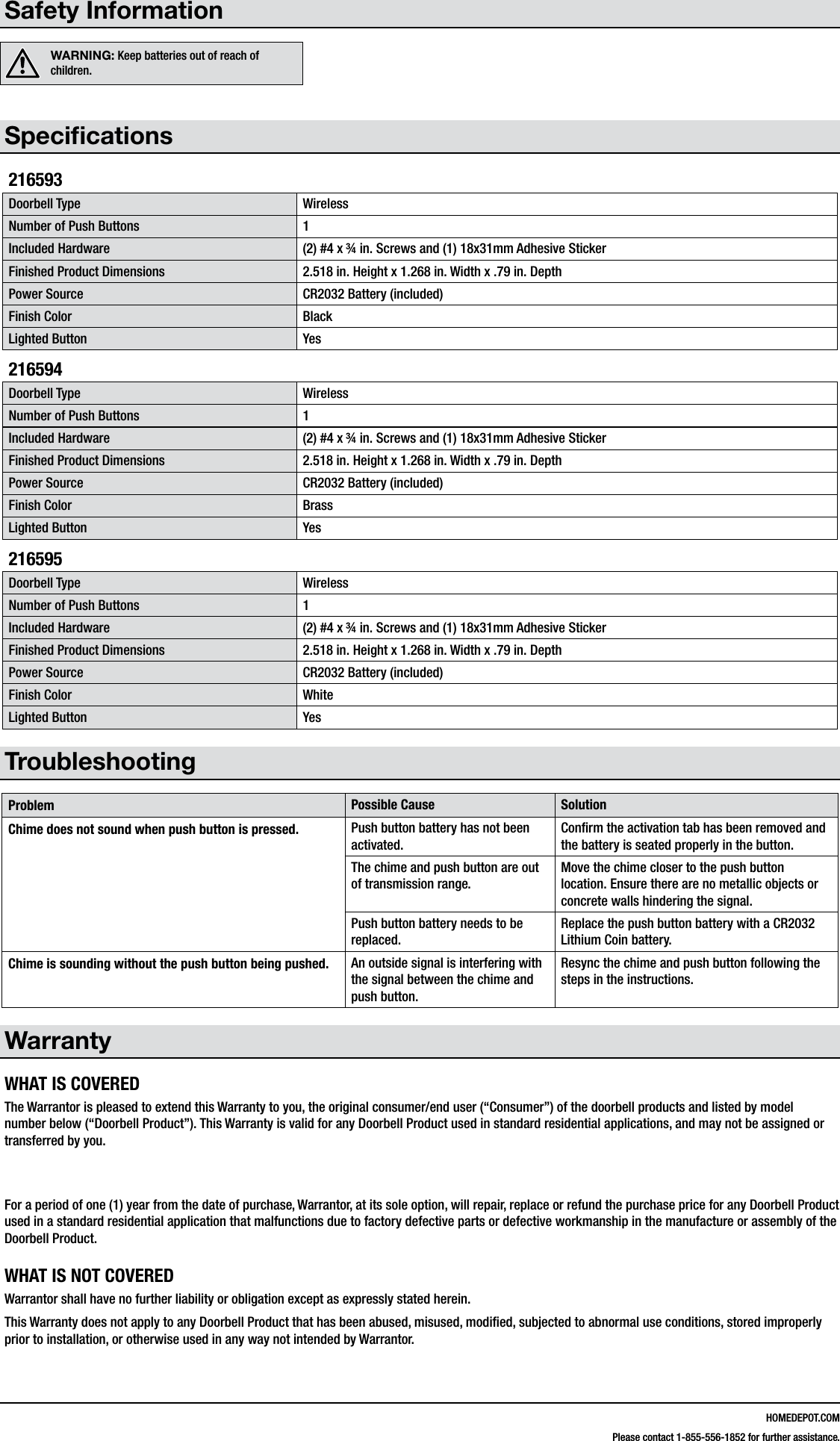
HOMEDEPOT.COMPlease contact 1-855-556-1852 for further assistance.Safety InformationWARNING: Keep batteries out of reach of children.Specications216593Doorbell Type WirelessNumber of Push Buttons 1Included Hardware (2) #4 x ¾ in. Screws and (1) 18x31mm Adhesive StickerFinished Product Dimensions 2.518 in. Height x 1.268 in. Width x .79 in. DepthPower Source CR2032 Battery (included)Finish Color BlackLighted Button Yes216594Doorbell Type WirelessNumber of Push Buttons 1Included Hardware (2) #4 x ¾ in. Screws and (1) 18x31mm Adhesive StickerFinished Product Dimensions 2.518 in. Height x 1.268 in. Width x .79 in. DepthPower Source CR2032 Battery (included)Finish Color BrassLighted Button Yes216595Doorbell Type WirelessNumber of Push Buttons 1Included Hardware (2) #4 x ¾ in. Screws and (1) 18x31mm Adhesive StickerFinished Product Dimensions 2.518 in. Height x 1.268 in. Width x .79 in. DepthPower Source CR2032 Battery (included)Finish Color WhiteLighted Button YesTroubleshootingProblem Possible Cause SolutionChime does not sound when push button is pressed. Push button battery has not been activated.Conrm the activation tab has been removed and the battery is seated properly in the button.The chime and push button are out of transmission range.Move the chime closer to the push button location. Ensure there are no metallic objects or concrete walls hindering the signal.Push button battery needs to be replaced.Replace the push button battery with a CR2032 Lithium Coin battery.Chime is sounding without the push button being pushed. An outside signal is interfering with the signal between the chime and push button.Resync the chime and push button following the steps in the instructions.WarrantyWHAT IS COVEREDThe Warrantor is pleased to extend this Warranty to you, the original consumer/end user (“Consumer”) of the doorbell products and listed by model number below (“Doorbell Product”). This Warranty is valid for any Doorbell Product used in standard residential applications, and may not be assigned or transferred by you.  For a period of one (1) year from the date of purchase, Warrantor, at its sole option, will repair, replace or refund the purchase price for any Doorbell Product used in a standard residential application that malfunctions due to factory defective parts or defective workmanship in the manufacture or assembly of the Doorbell Product.WHAT IS NOT COVEREDWarrantor shall have no further liability or obligation except as expressly stated herein. This Warranty does not apply to any Doorbell Product that has been abused, misused, modied, subjected to abnormal use conditions, stored improperly prior to installation, or otherwise used in any way not intended by Warrantor.
HOMEDEPOT.COMPlease contact 1-855-556-1852 for further assistance.This Warranty is limited to repair, replacement or refund as set forth above and any additional reimbursement is expressly excluded from this Warranty, including but not limited to reimbursement for inconvenience, installation costs, loss of use, return shipping charges, and batteries or other expendable items. If a claim is made under this Warranty on a product that is no longer available, Warrantor reserves the right to provide a similar product of comparable quality and value.To make a claim under this Warranty, the Consumer must, within ninety (90) days of actual or constructive knowledge of damage covered by this Warranty, return the product to your local The Home Depot store, or call Customer Service at 1-855-556-1852.Warrantor does not make any implied warranty of merchantability or tness of the product for a particular purpose. There are no other warranties that extend beyond the description on the face hereof.This Warranty gives you specic legal rights and you may have additional rights under applicable law.Contact the Customer Service Team at 1-855-556-1852 or visit www.HomeDepot.com.You are cautioned that changes or modifications not expressly approved by the party responsible for compliance could void your authority to operate the equipment.This device complies with Part 15 of the FCC Rules. Operation is subject to the following two conditions: (1) this device may not cause harmful interference, and(2) this device must accept any interference received, including interference that may cause undesired operation.This device complies with Industry Canada’s licence-exempt RSSs. Operation is subject to the following two conditions: (1) This device may not cause interference; and (2) This device must accept any interference, including interference that may cause undesired operation of the device. Le présent appareil est conforme aux CNR d'Industrie Canada applicables aux appareils radio exempts de licence. L'exploitation est autorisée aux deux conditions suivantes : (1) l'appareil ne doit pas produire de brouillage, et (2) l'utilisateur de l'appareil doit accepter tout brouillage radioélectrique subi, même si le brouillage est susceptible d'en compromettre le fonctionnement.

Navigation menu