Eaton HHB1BATR Open/Closed Sensor User Manual Manual Inside Page
Eaton Corporation Open/Closed Sensor Manual Inside Page
Eaton >
Contents
- 1. Manual Outside Page
- 2. Manual Inside Page
Manual Inside Page
Need help? Call 1-800-813-2199 for customer support or visit www.homeheartbeat.com
If Your Open/Closed Sensor . . .
• will not respond, make sure the battery in the sensor is installed correctly.
• does not send a signal to the Base Station, move the sensor and Base Station closer together (or consider getting a Range Extender).
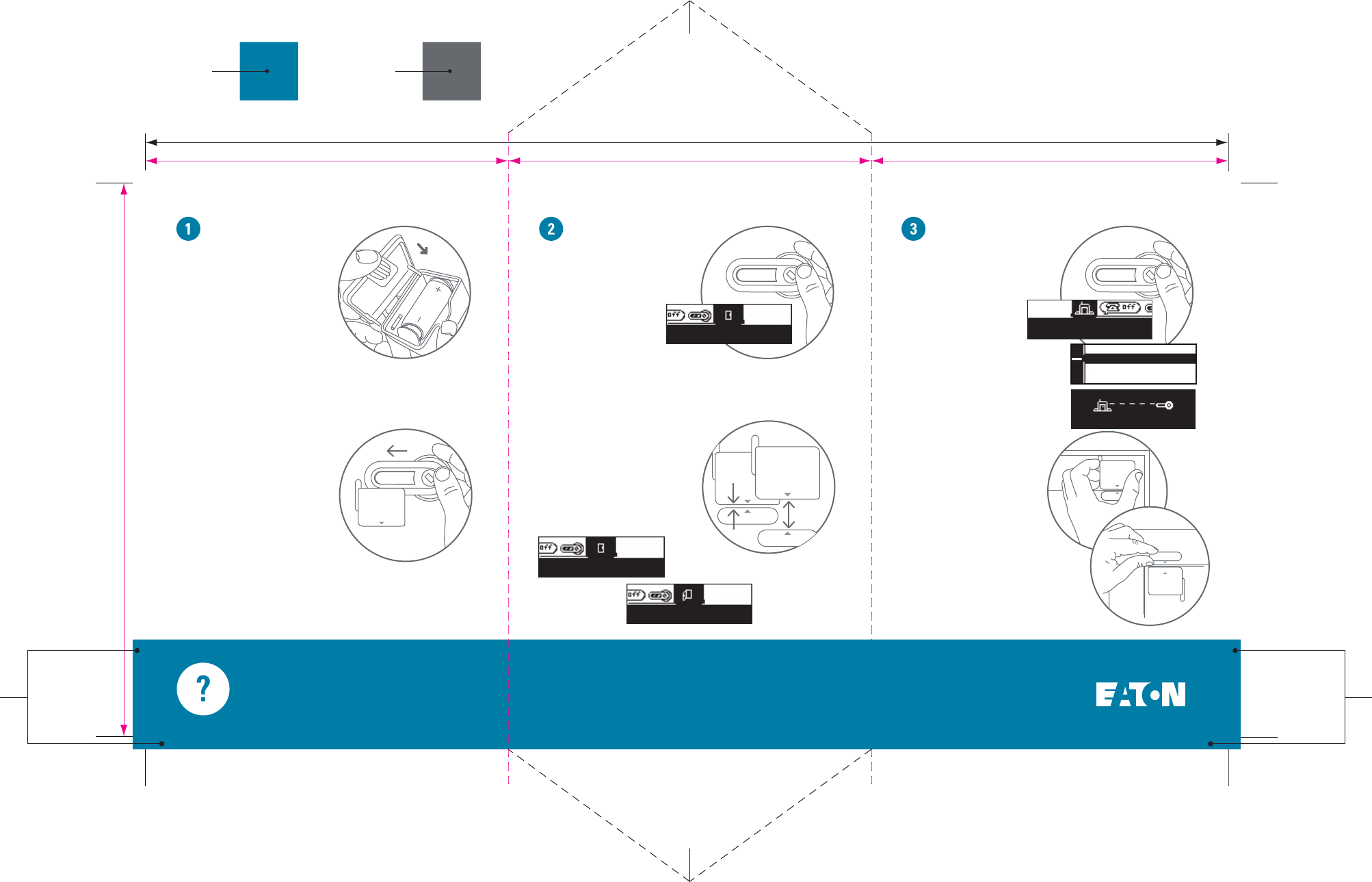
Set up Test Place and use
Test the sensor by moving its
two parts together and apart
while checking the Home Key
screen for feedback. (The
sensor is “closed” when the
two sensor parts are within
1/2 inch of each other.)
ROLL OVER and highlight
the Open/Closed icon on the
Home Key.
Take the sensor and the
Home Key to the location
where you want to place
it. Using the Home Key,
DOUBLE-CLICK at the
Home Status icon and
CLICK Check Range?
to go to the built-in Range Finder.
If you are out of range, move
closer to the Base Station or
add a Range Extender.
If the sensor is in range of
the Base Station, attach one
part to the edge of a door,
window, or cabinet, and the
other within 1/2 inch of it.
Mount each part by attaching
the enclosed adhesive tape to the
back or by using two #4 wood
screws (not included).
PMS 314
MATCH CMYK
PMS 431
MATCH CMYK
CLICK the Home Key thumbwheel
to wake the screen, then SLIDE
the Home Key into the Slide
Channel on the top of the sensor.
Follow the instructions on the
Home Key screen to join the
sensor to the system, name it, and
set In-Home Awareness
and "CallMe" Awareness.
A
B
REMOVE the sensor
cover and insert the
battery. The green LED
light inside the sensor
should flash four times
if the battery is good.
Replace the cover.
A
B
Front Door
Closed for 45mins
Front Door
Closed for 45mins
Front Door
Opened for 5mins
Open/Closed Sensor
Home Status
Everything is OK
In range
Done, go back?
Check Range?
>
5.625”
FOLD
DOES NOT PRINT
DOES NOT PRINT
FOLD
3.6875” 3.6875”
11”
3.625”
BLEED = .125”
BLEED = .125”