Fusion Electronics MS-AL300 AUDIO RECEIVER/PROCESSOR/AMPLIFIER WITH BLUETOOTH AND SEPARATE WIRED REMOTE CONTROL WITH USB PORT User Manual 2
Fusion Electronics Ltd AUDIO RECEIVER/PROCESSOR/AMPLIFIER WITH BLUETOOTH AND SEPARATE WIRED REMOTE CONTROL WITH USB PORT 2
Contents
- 1. User Manual
- 2. User Manual 2
User Manual 2



18
iPod/iPhone OPERATION
CONNECTING AN iPod/iPhone
Connect a FUSION compable Marine Dock to gain the benets of integrated housing for your
iPod or iPhone. Alternavely a cered Apple iPod sync cable can be used to connect your iPod/
iPhone to the USB port.
LISTENING TO AN iPod/iPhone
Press ‘Source’ buon and cycle to iPod. Playback of the iPod/iPhone will start automacally. Only
available if a iPod/iPhone is connected.
iPod/iPhone NAVIGATION
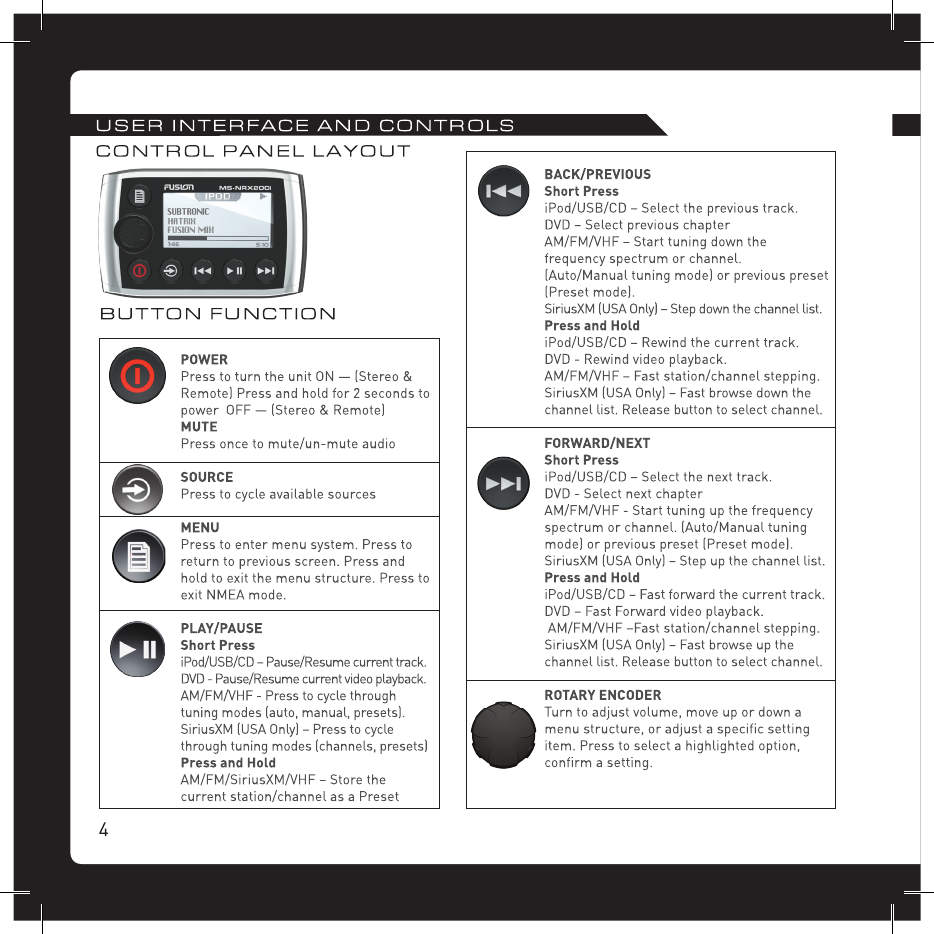
Press the ‘Menu’ button to enter the iPod menu. The rotary encoder operates similar to the click wheel on your
iPod. Turn to navigate and press to enter.
Note: Press the ‘Menu’ button to return to the previous menu screen.
PLAY/PAUSE Play or Pause the track
BACK/PREVIOUS Short Press: Press once to jump
back to start of current track.
Press twice to select previous track.
Press and Hold: Rewind track
NEXT/FORWARD Short Press: Selects next track
Press and Hold: Fast-forward track
iPod SETTINGS
REPEAT
Press the ‘Menu’ button and select ‘iPod Sengs’, select ‘Repeat’. OFF ONE ALL
SHUFFLE
Press the ‘Menu’ button and select ‘iPod Sengs’, select ‘Shuffle’. OFF TRACKS ALBUMS
F.A.S.T
FUSION ALPHA SEARCH TECHNOLOGY
If your iPod contains more than 100 Arsts, Songs or Albums you can use F.A.S.T to quickly
navigate by leer or number.
Example: Press the ‘Menu’ buon and select ‘Arsts’. Select ‘D’ and the rst ‘Arst’ beginning with ‘D’ will
automacally highlight. Using the ‘Rotary Encoder’ you can then scroll up or down from this selecon.
NO iPod CONNECTED
If this appears on the display possible causes are:
• Ensure the iPod/iPhone is correctly connected
• Ensure the cable is not excessively bent
• The iPods baery remains low (refer to iPod manual and charge the baery)
• Reset your iPod/iPhone
• Ensure your iPod/iPhone is on the list of supported models.
(refer to www.fusionelectronics.com for a list of supported models)

MS-NRX200i
12VDC
Power and Speaker Loom
UNI-Dock
NMEA Cable
AM/FM Antenna
Connecon Diagram