HAICOM Electronics HI-505SD Bluetooth GPS User Manual Manual

HAICOM Electronics Corp. Bluetooth GPS Manual

Manual

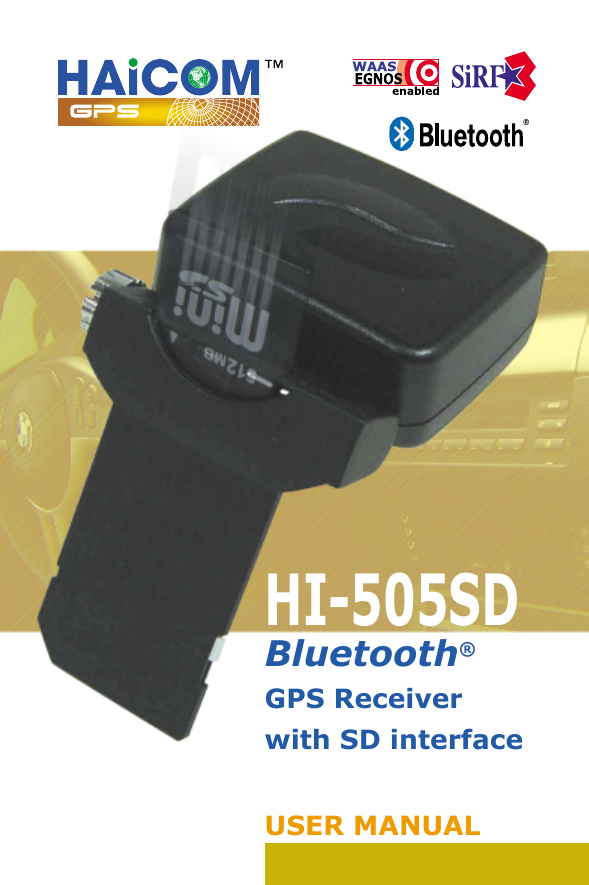
HI-505SDBluetooth® GPS Receiver with SD interfaceUSER MANUAL
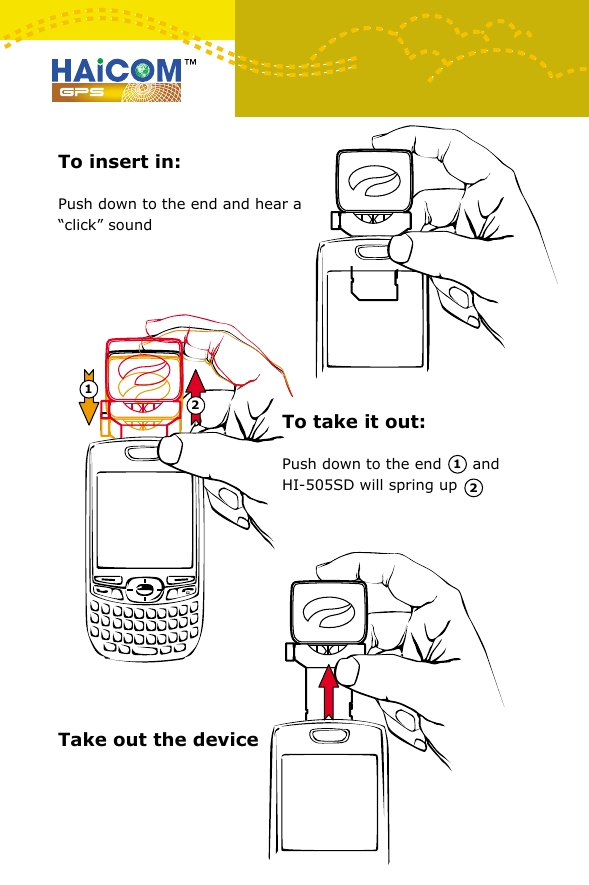
To insert in:Push down to the end and hear a “click” soundTake out the device21To take it out:Push down to the end      and HI-505SD will spring up121
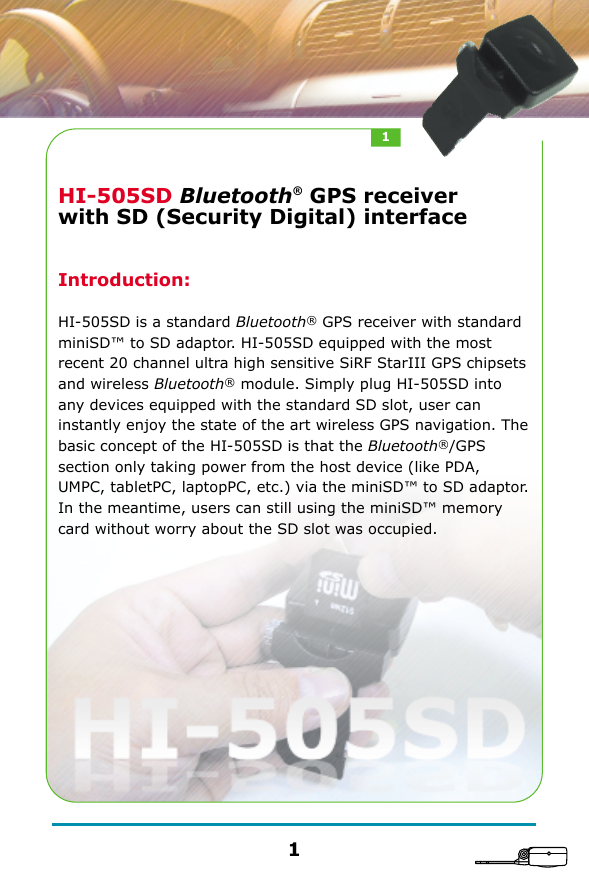
HI-505SD Bluetooth® GPS receiver with SD (Security Digital) interfaceIntroduction:HI-505SD is a standard Bluetooth® GPS receiver with standard miniSD™ to SD adaptor. HI-505SD equipped with the most recent 20 channel ultra high sensitive SiRF StarIII GPS chipsets and wireless Bluetooth® module. Simply plug HI-505SD into any devices equipped with the standard SD slot, user can instantly enjoy the state of the art wireless GPS navigation. The basic concept of the HI-505SD is that the Bluetooth®/GPS section only taking power from the host device (like PDA, UMPC, tabletPC, laptopPC, etc.) via the miniSD™ to SD adaptor. In the meantime, users can still using the miniSD™ memory card without worry about the SD slot was occupied.11
HI-505SD advantages:1.Simply plug in the HI-505SD into any SD slot from the standard mobile device with Bluetooth® features, the device become the all-in-one GPS navigator. HI-505SD provides the flexibility for GPS enable in different devices and different occasion usages. 2.Unlike other SD GPS receivers occupied the SD slot,  HI-505SD allow user to use any memory size miniSD™ card while using the HI-505SD simultaneously.3.Unlike most SD GPS receivers with fixed build-in memory, HI-505SD provide the flexibility for using any separate memory size miniSD™ card depend on how big the memory size needed.4.Unlike regular SDIO GPS receiver require complicated software and driver installation, user can easily use  HI-505SD and enjoy the GPS navigation simply set up the standard Bluetooth® connection between the devices.5.As soon as plug in HI-505SD, user can start using the wireless GPS navigation without worry about the Bluetooth® GPS receiver battery life.6. Equipped with the 20 channel ultra high sensitive SiRF StarIII GPS module, HI-505SD can get 3D fixed in any outdoor locations and without using the external antenna.7. Unlike normal Bluetooth® GPS receiver moving around dashboard while driving, HI-505SD fixed on the mobile device and not to worry about where to place the unit.8. HI-505SD module concept allow HI-505SD become a wired GPS receiver. By connecting with different optional cables via the adapting box, HI-505SD can also be used as a regular GPS mouse. HI-505SD can not only be wireless Bluetooth GPS receiver and also be the wired GPS receivers, like, USB GPS receiver, RS232 GPS receiver, PDA GPS receiver, etc.22
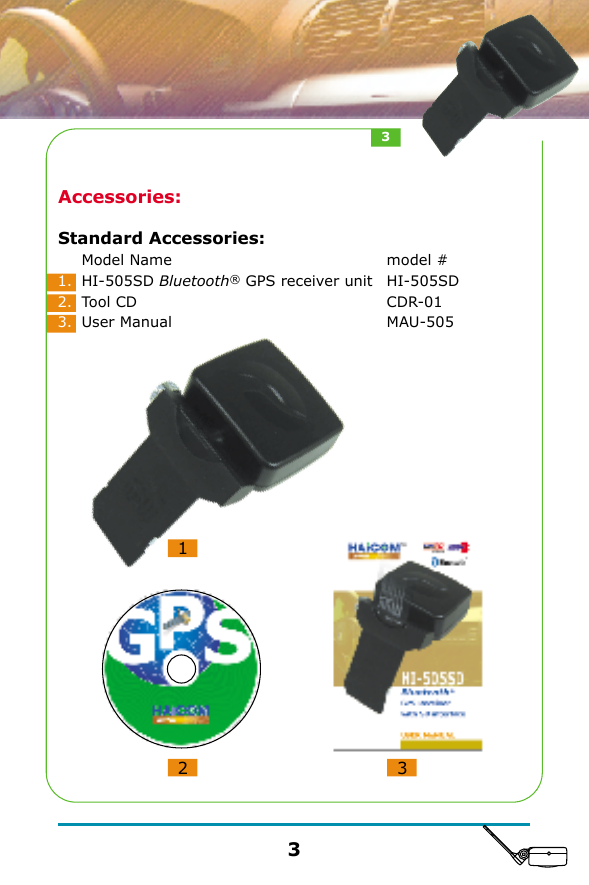
Accessories:Standard Accessories:12 31.2.3.Model NameHI-505SD Bluetooth® GPS receiver unitTool CDUser Manualmodel #HI-505SDCDR-01MAU-50533
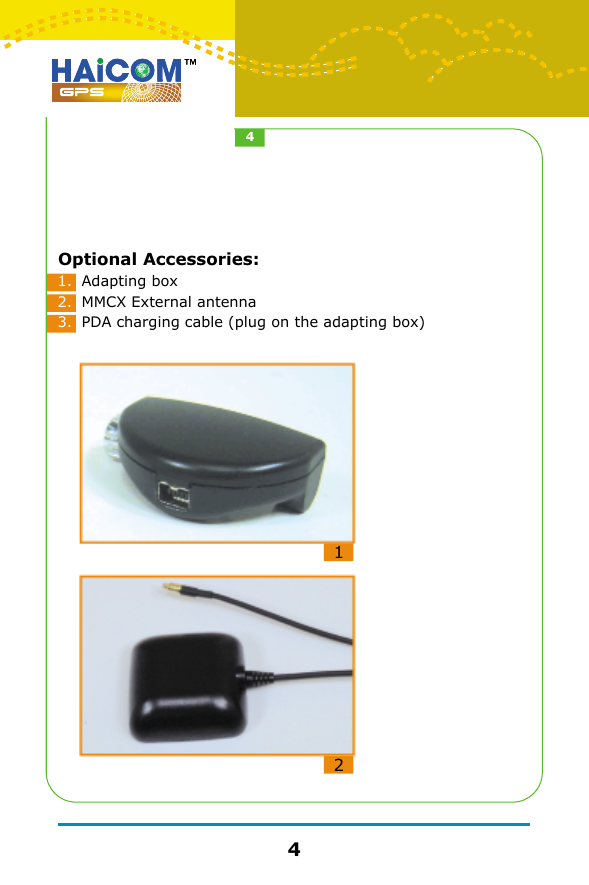
Optional Accessories:121.2.3.Adapting boxMMCX External antennaPDA charging cable (plug on the adapting box)44
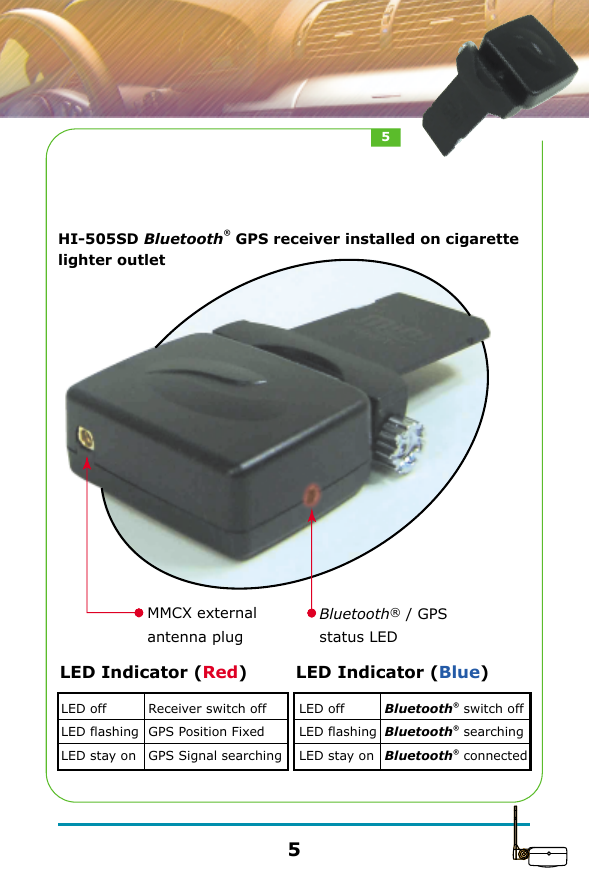
HI-505SD Bluetooth® GPS receiver installed on cigarette lighter outletLED offLED flashingLED stay onBluetooth® switch offBluetooth® searchingBluetooth® connectedLED Indicator (Blue)LED offLED flashingLED stay onReceiver switch offGPS Position FixedGPS Signal searchingLED Indicator (Red)MMCX external antenna plugBluetooth® / GPSstatus LED55
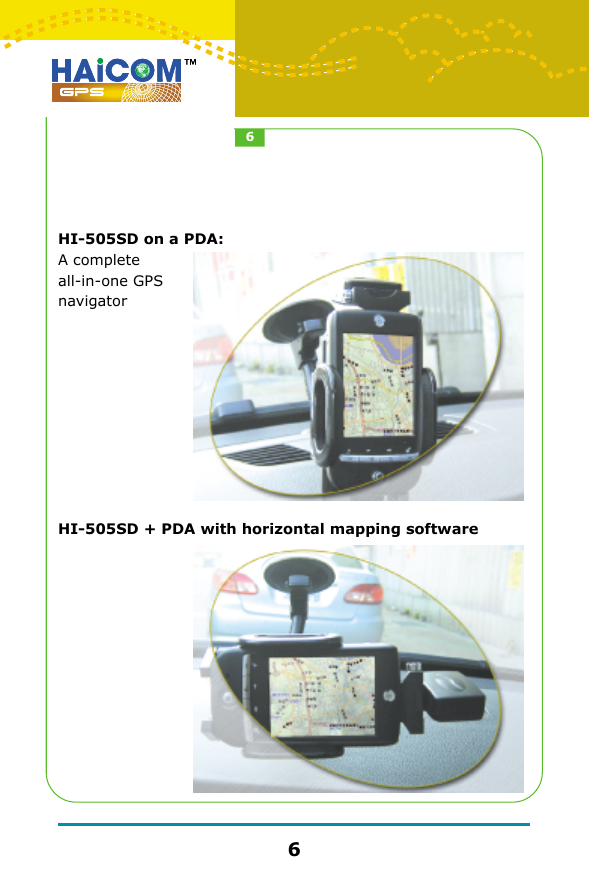
HI-505SD on a PDA:A complete all-in-one GPS navigatorHI-505SD + PDA with horizontal mapping software66
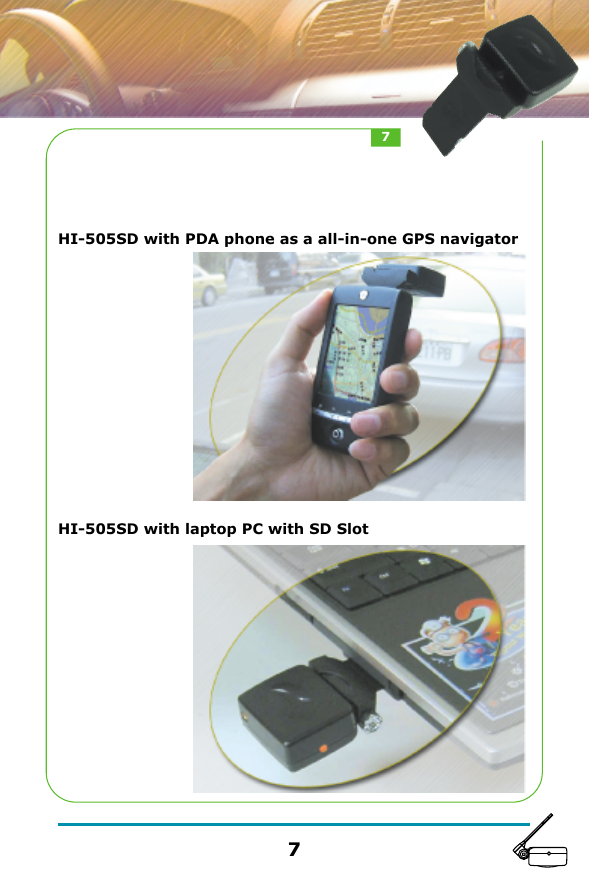
HI-505SD with PDA phone as a all-in-one GPS navigator  HI-505SD with laptop PC with SD Slot77
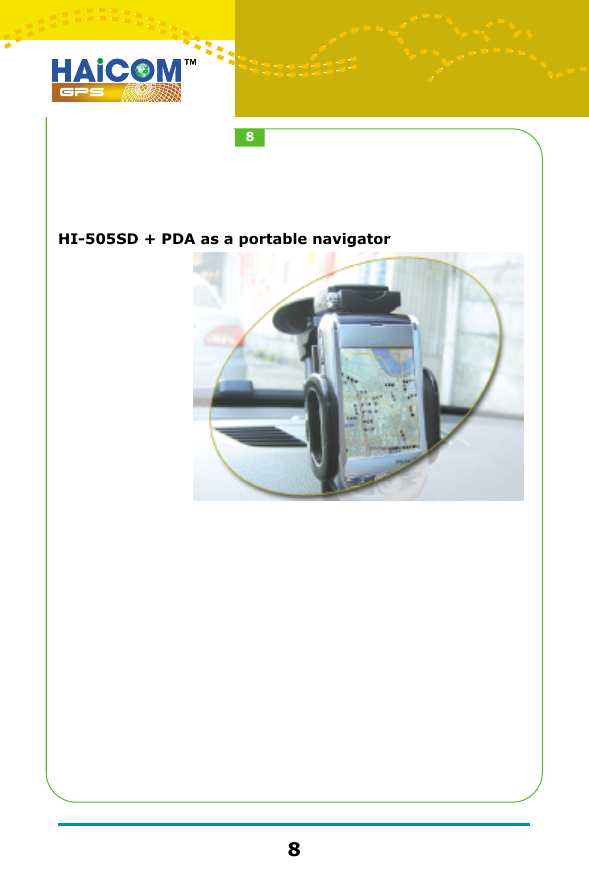
HI-505SD + PDA as a portable navigator88
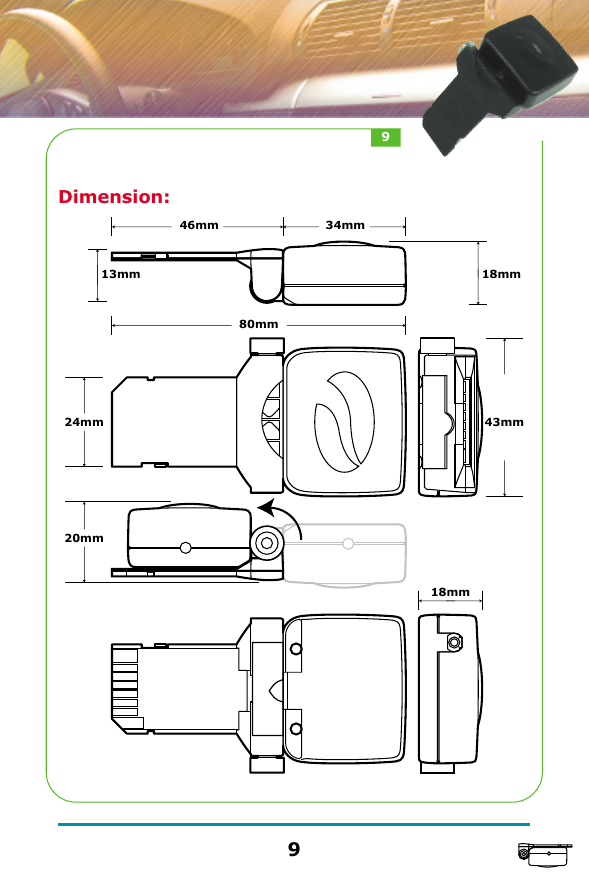
Dimension:46mm80mm34mm13mm 18mm43mm24mm20mm18mm99
GPS ReceiverSpecificationChipsetInterfacesProtocolBaud RateMax. Update RateDatumChannelFrequencyHot StartWarm StartCold StartReacquisition TikePosition AccuracyMacimum AltitudeMaximum velocityVoltagePower consumptionAntenna TypeExternal Antenna ConnectorDimensionLED IndicatorSiRF Star IIIBluetooth® & Mini-1394NMEA0183 GGA, GSA, GSV, RMC, GLL4800, N, 8, 11 HzWGS8420 channelL1, 1575.42MHz8 sec. Average38 sec. Average48 sec. Average100 ms15m 2D RMS, SA off18,000m515m/sDC 3.3V+-10%90mA continuous modeBuilt-in active antennaMMCX (Optional)Fold: 46 (L) x 43 (W) x 20 (H)mmUnfold: 80 (L) x 43 (W) x 18 (H)mm3D Positioning (blinking) or Searching GPS (on)1010
Bluetooth® Specifications:                     V1.1 CompliancesFrequency Range: Interface: Receiver Sensetivity: Transmitting Power: RF Input Impedance: Frequency hopping: Baseband Crystal OSC: Data Rate: Operating Temperature: Storage Temperature: Transmitting Range: Power Consumption: 2.4 ~ 2.4835 GHz unlicensed ISM bandUSB/UART/SPI-80 dBm @ 0.1% BERClass 2 -6 dBm ~ +4 dBm50 ohms1600hops/sec.16MHzUp to 723Kb/s-20°C ~ +80°C-30°C ~ +90°C10 meters (Typical)65 mA (Typical)Bluetooth® 1111
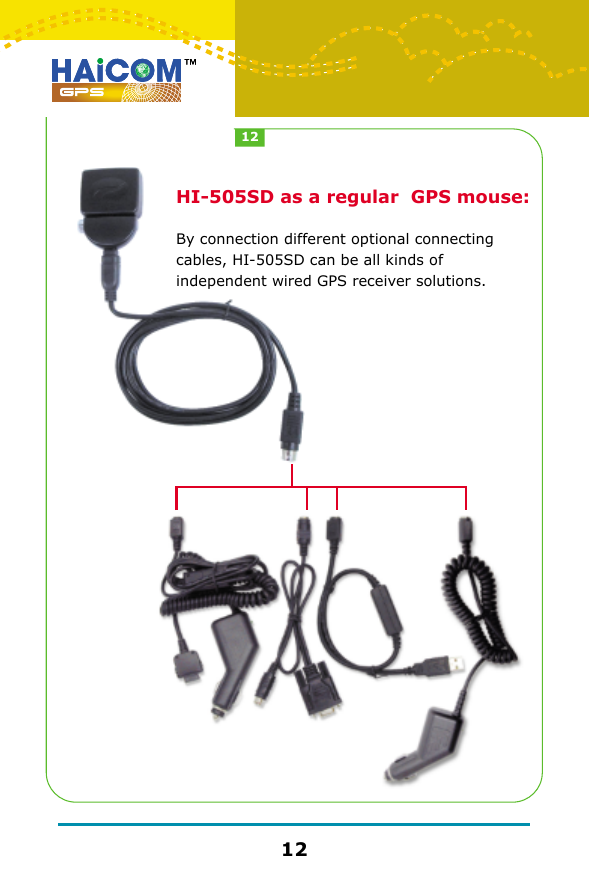
HI-505SD as a regular  GPS mouse:By connection different optional connecting cables, HI-505SD can be all kinds of independent wired GPS receiver solutions.1212
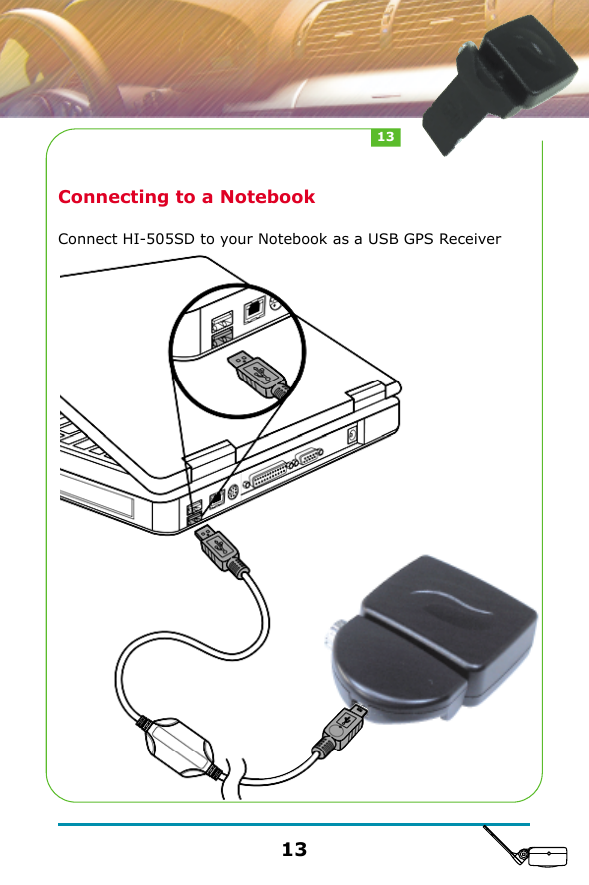
Connecting to a NotebookConnect HI-505SD to your Notebook as a USB GPS Receiver1313
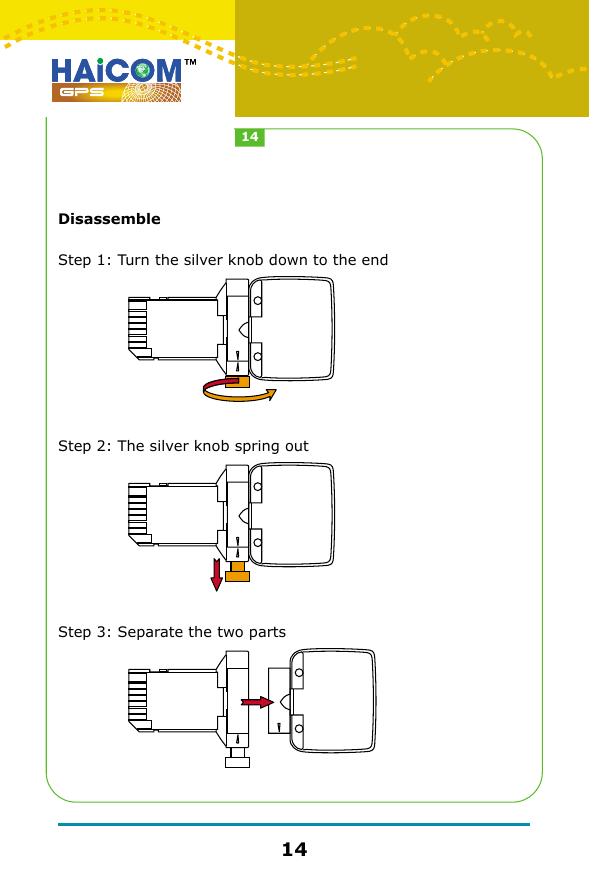
DisassembleStep 1: Turn the silver knob down to the endStep 2: The silver knob spring outStep 3: Separate the two parts1414
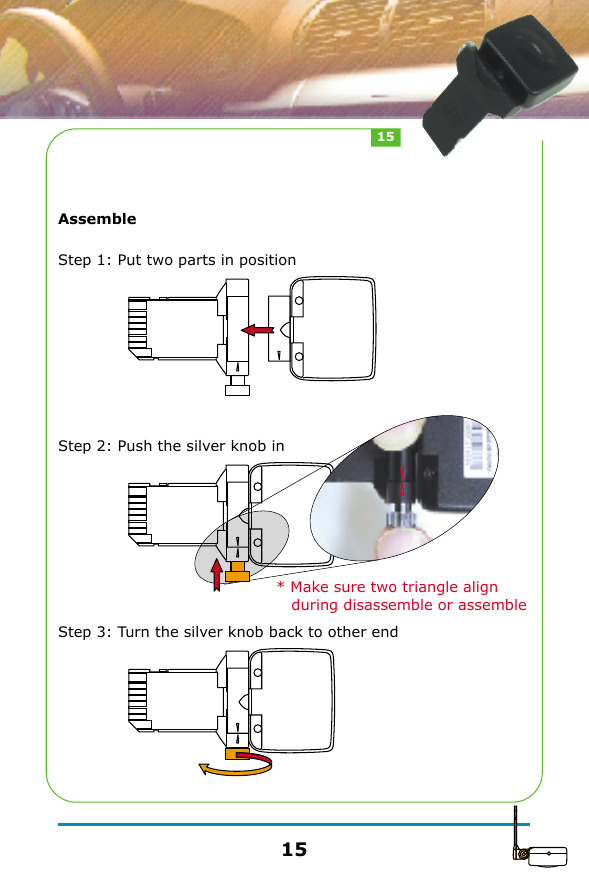
AssembleStep 1: Put two parts in positionStep 2: Push the silver knob inStep 3: Turn the silver knob back to other end1515* Make sure two triangle align    during disassemble or assemble
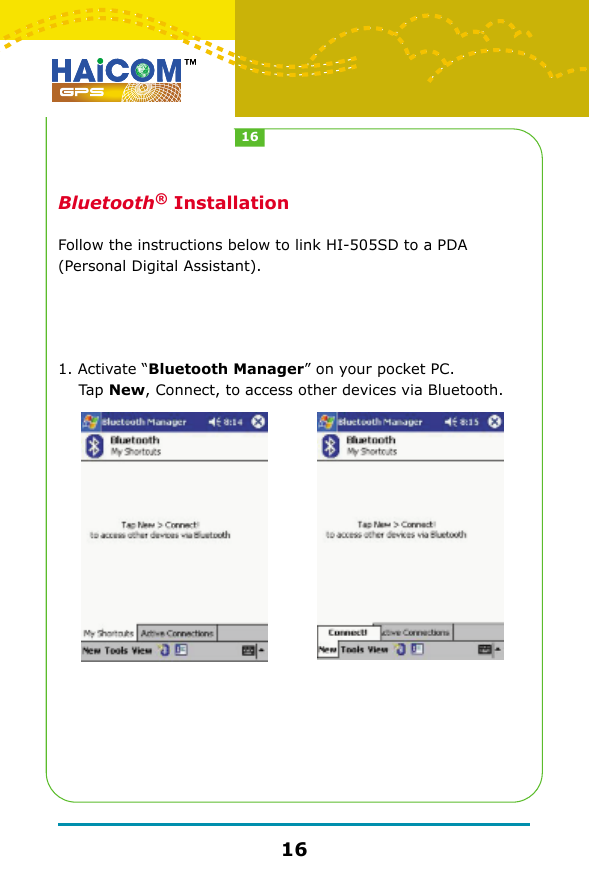
  Bluetooth® InstallationFollow the instructions below to link HI-505SD to a PDA (Personal Digital Assistant).1. Activate “Bluetooth Manager” on your pocket PC.     Tap New, Connect, to access other devices via Bluetooth.1616
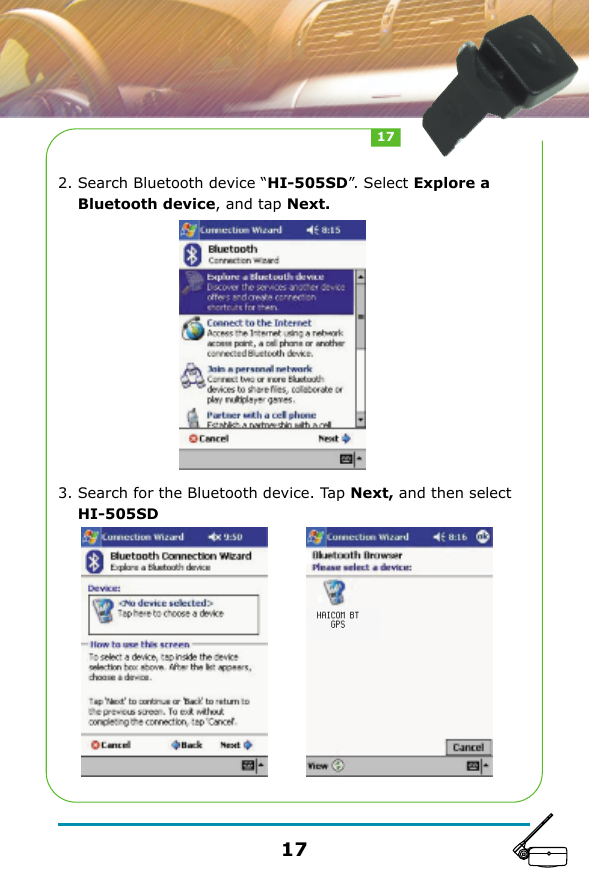
2. Search Bluetooth device “HI-505SD”. Select Explore a    Bluetooth device, and tap Next.3. Search for the Bluetooth device. Tap Next, and then select     HI-505SD1717
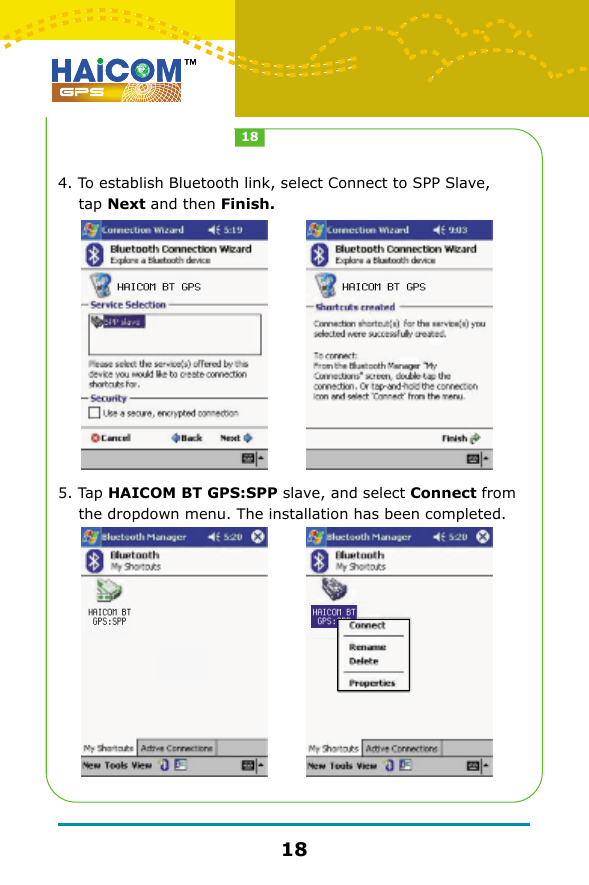
4. To establish Bluetooth link, select Connect to SPP Slave,     tap Next and then Finish.5. Tap HAICOM BT GPS:SPP slave, and select Connect from     the dropdown menu. The installation has been completed.1818
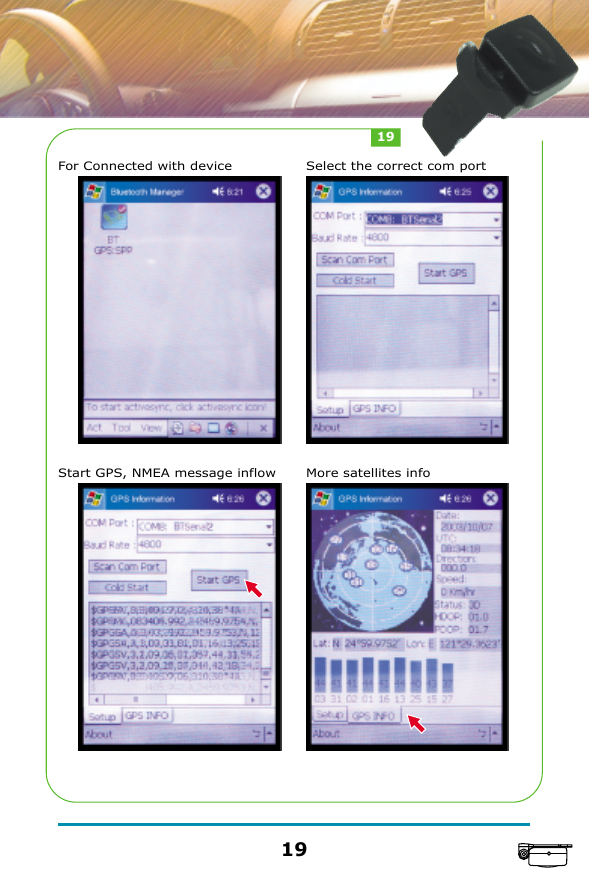
For Connected with device      Select the correct com portStart GPS, NMEA message inflow     More satellites info1919
GPS Technical DataONE-PULSE-PER-SECOND (1PPS) OUTPUTThe one-pulse-per-second output is provided for applications requiring precise timing measurements. The output pulse is 1usec in duration. Rising edge of the output pulse is accurate to +/-1usec with respect to the start of each GPS second. Accuracy of the one-pulse-per-second output is maintained only when the GPS receiver has valid position fix.The 1PPS output is always generated when the GPS receiver is powered-on. Proper adjustment of the 1PPS output to align with the GPS second requires calculation of the receiver clock offset and clock drift-rate as part of the position-velocity-time (PVT) solution. When enough satellite signals are received to generate valid position fixes, the 1PPS output is adjusted to align with the GPS second in several seconds. When the 1PPS output is brought in sync with the GPS second, the 1PPS Valid Signal on the I/O pin becomes active (HIGH); when the 1PPS output is not yet in sync with the GPS second, the 1PPS Valid Signal remains inactive (LOW).As long as enough satellite signals are received to generate valid position fixes, the 1PPS output remains synchronized to the GPS second, and the 1PPS Valid Signal remains active. If signal blockage prevents the receiver from generating valid position fix, the 1PPS output will drift away from the GPS second and the 1PPS Valid Signal will become inactive. Upon re-acquiring enough satellites to generate consecutive valid position fixes, the 1PPS Valid Signal will become active again, signaling that the 1PPS output is again synchronized with the GPS second.For best stable operation of the 1PPS signal, it is to be operated in static environment having clear view of the sky.2020
SOFTWARE INTERFACEThis section describes the details of the serial port commands through which the GPS module is controlled and monitored. The serial port commands allow users to set the receiver parameters, configure output message type, and retrieve status information. The baud rate and protocol of the host COM port must match the baud rate and protocol of the GPS receiver serial port for commands and data to be successfully transmitted and received. The default receiver protocol is 4800bps, 8 data bits, 1 stop bit, and none parity.NMEA OUTPUT MESSAGE SPECIFICATIONSThe GPS back card supports NMEA-0183 output format as defined by the National Marine Electronics Association (http://www.nmea.org). The currently supported NMEA messages for GPS applications are:GGAGLLGSAGSVRMCVTGGlobal Positioning System Fix DataGeographic Position Latitude / LongitudeGNSS DOP and Active SatellitesGNSS Satellites in ViewRecommended Minimum Specific GNSS DataCourse Over Ground and Ground Speed2121
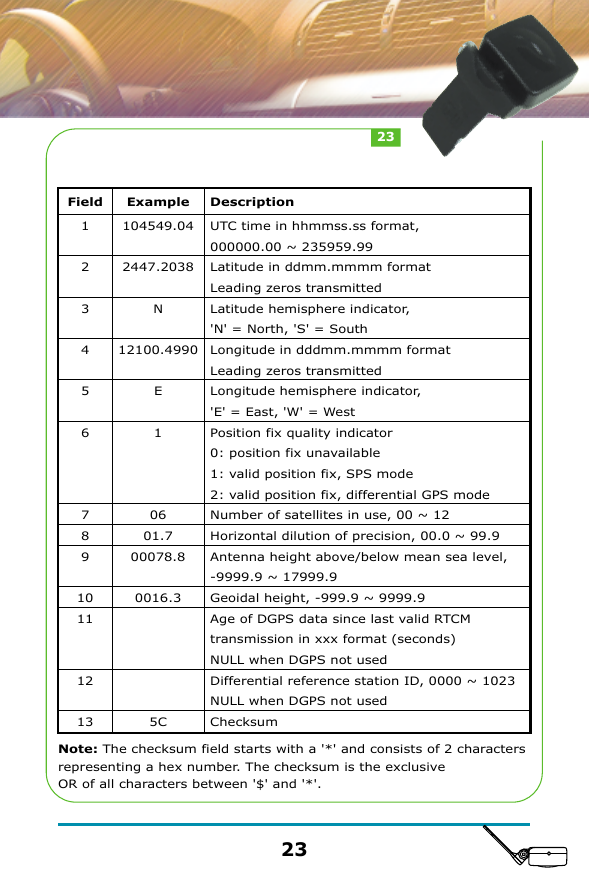
NMEA MessagesThe serial interface protocol is based on the National Marine Electronics Association's NMEA 0183 ASCII interface specification. This standard is fully define in "NMEA 0183, Version 3.01" The standard may be obtained from NMEA, www.nmea.orgGGA - GPS FIX DATATime, position and position-fix related data (number of satellites in use, HDOP, etc.). Format:$GPGGA,<1>,<2>,<3>,<4>,<5>,<6>,<7>,<8>,<9>,M,<10>,M,<11>,<12>,*<13><CR><LF>Example: $GPGGA,104549.04,2447.2038,N,12100.4990,E,1,06,01.7,00078.8,M,0016.3,M,,*5C<CR><LF>2222
Note: The checksum field starts with a '*' and consists of 2 characters representing a hex number. The checksum is the exclusive OR of all characters between '$' and '*'.Field12345678910111213Example104549.042447.2038N12100.4990E10601.700078.80016.35CDescriptionUTC time in hhmmss.ss format, 000000.00 ~ 235959.99Latitude in ddmm.mmmm formatLeading zeros transmittedLatitude hemisphere indicator, 'N' = North, 'S' = SouthLongitude in dddmm.mmmm formatLeading zeros transmittedLongitude hemisphere indicator, 'E' = East, 'W' = WestPosition fix quality indicator   0: position fix unavailable   1: valid position fix, SPS mode    2: valid position fix, differential GPS modeNumber of satellites in use, 00 ~ 12Horizontal dilution of precision, 00.0 ~ 99.9Antenna height above/below mean sea level, -9999.9 ~ 17999.9Geoidal height, -999.9 ~ 9999.9Age of DGPS data since last valid RTCM transmission in xxx format (seconds) NULL when DGPS not usedDifferential reference station ID, 0000 ~ 1023NULL when DGPS not usedChecksum2323
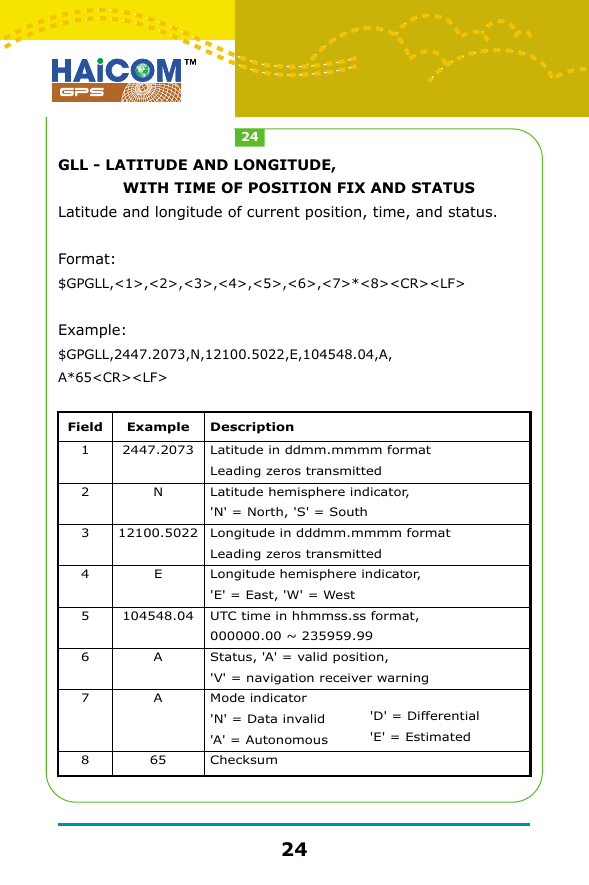
GLL - LATITUDE AND LONGITUDE,              WITH TIME OF POSITION FIX AND STATUSLatitude and longitude of current position, time, and status.Format:$GPGLL,<1>,<2>,<3>,<4>,<5>,<6>,<7>*<8><CR><LF>Example: $GPGLL,2447.2073,N,12100.5022,E,104548.04,A,A*65<CR><LF>Field12345678Example2447.2073N12100.5022E104548.04AA65DescriptionLatitude in ddmm.mmmm formatLeading zeros transmittedLatitude hemisphere indicator, 'N' = North, 'S' = SouthLongitude in dddmm.mmmm formatLeading zeros transmittedLongitude hemisphere indicator, 'E' = East, 'W' = WestUTC time in hhmmss.ss format, 000000.00 ~ 235959.99Status, 'A' = valid position, 'V' = navigation receiver warningMode indicator'N' = Data invalid'A' = AutonomousChecksum'D' = Differential'E' = Estimated2424
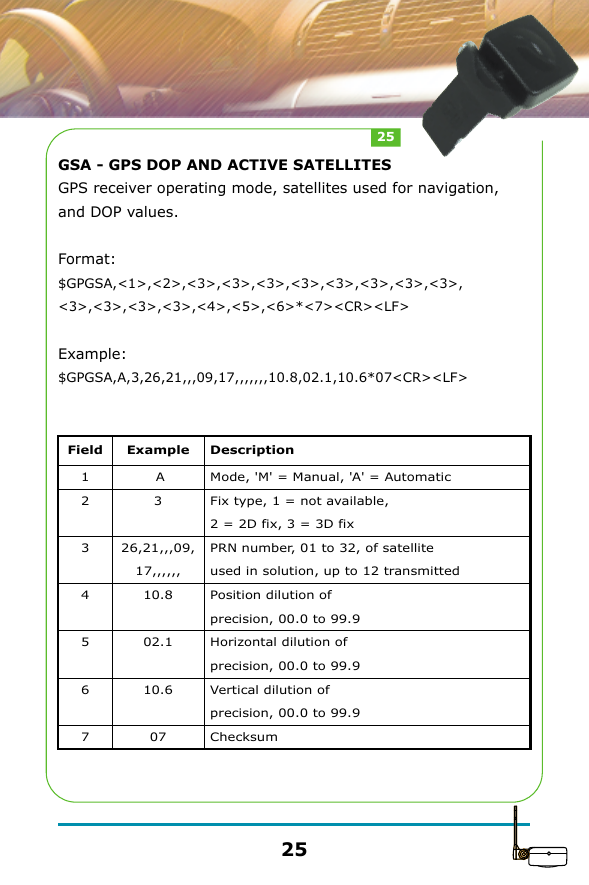
GSA - GPS DOP AND ACTIVE SATELLITESGPS receiver operating mode, satellites used for navigation, and DOP values.Format:$GPGSA,<1>,<2>,<3>,<3>,<3>,<3>,<3>,<3>,<3>,<3>,<3>,<3>,<3>,<3>,<4>,<5>,<6>*<7><CR><LF>Example: $GPGSA,A,3,26,21,,,09,17,,,,,,,10.8,02.1,10.6*07<CR><LF>Field1234567Example A326,21,,,09,17,,,,,,10.802.110.607DescriptionMode, 'M' = Manual, 'A' = AutomaticFix type, 1 = not available, 2 = 2D fix, 3 = 3D fixPRN number, 01 to 32, of satellite used in solution, up to 12 transmittedPosition dilution of precision, 00.0 to 99.9Horizontal dilution of precision, 00.0 to 99.9Vertical dilution of precision, 00.0 to 99.9Checksum2525
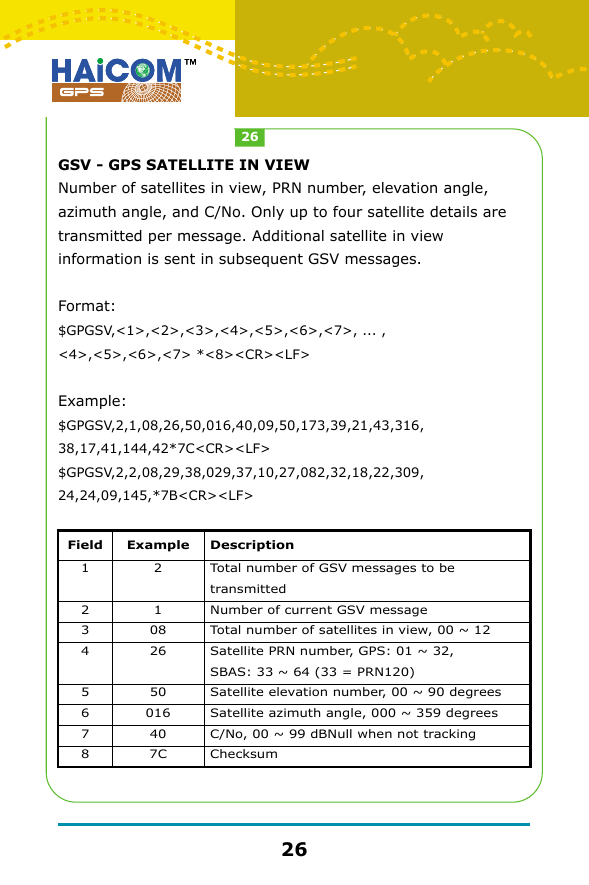
GSV - GPS SATELLITE IN VIEWNumber of satellites in view, PRN number, elevation angle, azimuth angle, and C/No. Only up to four satellite details are transmitted per message. Additional satellite in view information is sent in subsequent GSV messages. Format:$GPGSV,<1>,<2>,<3>,<4>,<5>,<6>,<7>, ... ,<4>,<5>,<6>,<7> *<8><CR><LF>Example: $GPGSV,2,1,08,26,50,016,40,09,50,173,39,21,43,316,38,17,41,144,42*7C<CR><LF>$GPGSV,2,2,08,29,38,029,37,10,27,082,32,18,22,309,24,24,09,145,*7B<CR><LF>Field12345678Example21082650016407CDescriptionTotal number of GSV messages to be transmittedNumber of current GSV messageTotal number of satellites in view, 00 ~ 12Satellite PRN number, GPS: 01 ~ 32, SBAS: 33 ~ 64 (33 = PRN120)Satellite elevation number, 00 ~ 90 degreesSatellite azimuth angle, 000 ~ 359 degreesC/No, 00 ~ 99 dBNull when not trackingChecksum2626
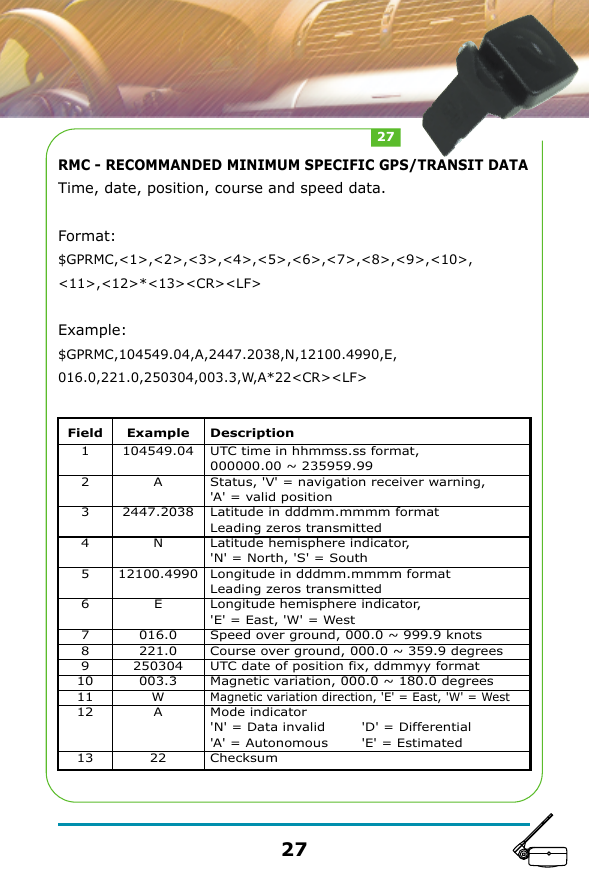
RMC - RECOMMANDED MINIMUM SPECIFIC GPS/TRANSIT DATATime, date, position, course and speed data.Format:$GPRMC,<1>,<2>,<3>,<4>,<5>,<6>,<7>,<8>,<9>,<10>,<11>,<12>*<13><CR><LF>Example: $GPRMC,104549.04,A,2447.2038,N,12100.4990,E,016.0,221.0,250304,003.3,W,A*22<CR><LF>Field12345678910111213Example104549.04A2447.2038N12100.4990E016.0221.0250304003.3WA22DescriptionUTC time in hhmmss.ss format, 000000.00 ~ 235959.99Status, 'V' = navigation receiver warning, 'A' = valid positionLatitude in dddmm.mmmm formatLeading zeros transmittedLatitude hemisphere indicator, 'N' = North, 'S' = SouthLongitude in dddmm.mmmm formatLeading zeros transmittedLongitude hemisphere indicator, 'E' = East, 'W' = WestSpeed over ground, 000.0 ~ 999.9 knotsCourse over ground, 000.0 ~ 359.9 degreesUTC date of position fix, ddmmyy formatMagnetic variation, 000.0 ~ 180.0 degreesMagnetic variation direction, 'E' = East, 'W' = West Mode indicator'N' = Data invalid'A' = AutonomousChecksum'D' = Differential'E' = Estimated2727
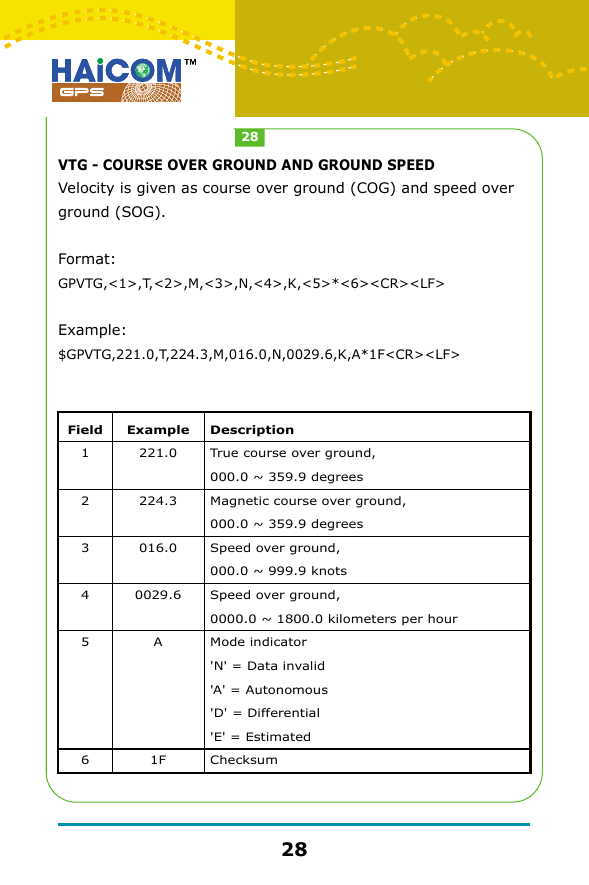
VTG - COURSE OVER GROUND AND GROUND SPEEDVelocity is given as course over ground (COG) and speed over ground (SOG).Format:GPVTG,<1>,T,<2>,M,<3>,N,<4>,K,<5>*<6><CR><LF>Example: $GPVTG,221.0,T,224.3,M,016.0,N,0029.6,K,A*1F<CR><LF>Field123456Example221.0224.3016.00029.6A1FDescriptionTrue course over ground, 000.0 ~ 359.9 degreesMagnetic course over ground, 000.0 ~ 359.9 degreesSpeed over ground, 000.0 ~ 999.9 knotsSpeed over ground, 0000.0 ~ 1800.0 kilometers per hourMode indicator'N' = Data invalid'A' = Autonomous'D' = Differential'E' = EstimatedChecksum2828
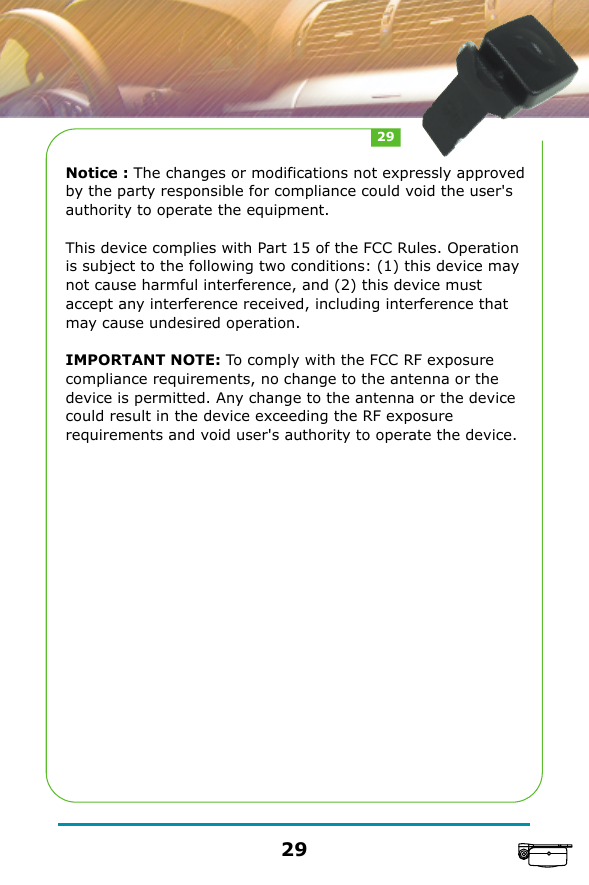
Notice : The changes or modifications not expressly approved by the party responsible for compliance could void the user's authority to operate the equipment.This device complies with Part 15 of the FCC Rules. Operation is subject to the following two conditions: (1) this device may not cause harmful interference, and (2) this device must accept any interference received, including interference that may cause undesired operation.IMPORTANT NOTE: To comply with the FCC RF exposure compliance requirements, no change to the antenna or the device is permitted. Any change to the antenna or the device could result in the device exceeding the RF exposure requirements and void user's authority to operate the device.2929

Navigation menu