Hantel WWC1000 Restaurant Wireless Data Management System User Manual manual eng

Hantel Co., Ltd. Restaurant Wireless Data Management System manual eng

User Manual

     SUN TELECOM INTL. PROPRIETARY 1               EXPEDITOR EXPEDITOR  OperationsOperations  ManualManual
     SUN TELECOM INTL. PROPRIETARY 2      - Table of Contents -     1.  What is Expeditor?  2.  Expeditor Components  3.  How to install Expeditor  4.  Specifications  5.  How to use The Expeditor  6.  Troubleshooting  7.  How to set up delay timing for  Table Unit  8.  Table Unit Delay timer set up  9. How to set up Chef Unit addresses  10. Warnings
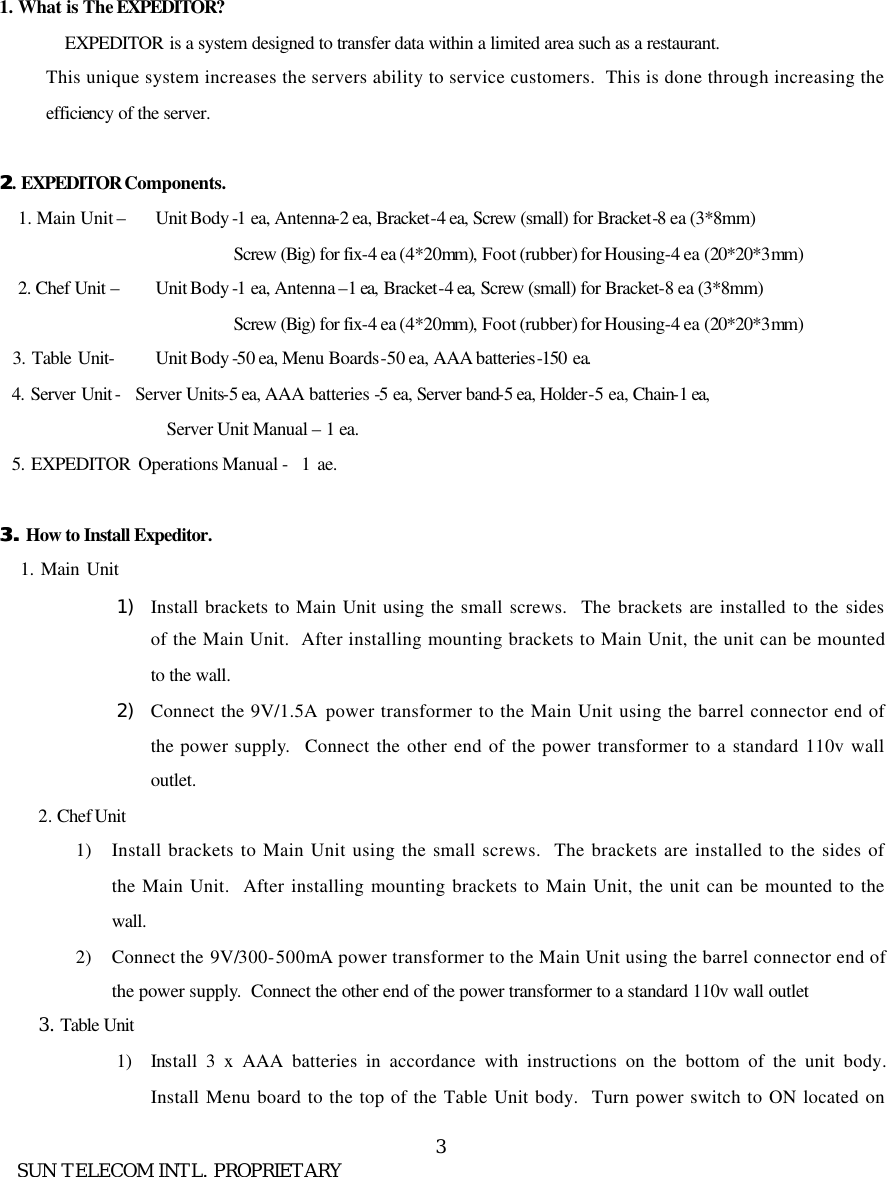
     SUN TELECOM INTL. PROPRIETARY 3      1. What is The EXPEDITOR? EXPEDITOR is a system designed to transfer data within a limited area such as a restaurant.   This unique system increases the servers ability to service customers.  This is done through increasing the efficiency of the server.    22. EXPEDITOR Components. 1. Main Unit –    Unit Body -1 ea, Antenna-2 ea, Bracket-4 ea, Screw (small) for Bracket-8 ea (3*8mm)                  Screw (Big) for fix-4 ea (4*20mm), Foot (rubber) for Housing-4 ea (20*20*3mm) 2. Chef Unit –    Unit Body -1 ea, Antenna –1 ea, Bracket-4 ea, Screw (small) for Bracket-8 ea (3*8mm)                  Screw (Big) for fix-4 ea (4*20mm), Foot (rubber) for Housing-4 ea (20*20*3mm)     3. Table Unit-    Unit Body -50 ea, Menu Boards-50 ea, AAA batteries-150 ea.   4. Server Unit - Server Units-5 ea, AAA batteries -5 ea, Server band-5 ea, Holder-5 ea, Chain-1 ea, Server Unit Manual – 1 ea.   5. EXPEDITOR Operations Manual -  1 ae.  3. 3. How to Install Expeditor.    1. Main Unit  1) Install brackets to Main Unit using the small screws.  The brackets are installed to the sides of the Main Unit.  After installing mounting brackets to Main Unit, the unit can be mounted to the wall. 2) Connect the 9V/1.5A power transformer to the Main Unit using the barrel connector end of the power supply.  Connect the other end of the power transformer to a standard 110v wall outlet.   2. Chef Unit 1) Install brackets to Main Unit using the small screws.  The brackets are installed to the sides of the Main Unit.  After installing mounting brackets to Main Unit, the unit can be mounted to the wall. 2) Connect the 9V/300-500mA power transformer to the Main Unit using the barrel connector end of the power supply.  Connect the other end of the power transformer to a standard 110v wall outlet 3. Table Unit 1) Install 3 x AAA batteries in accordance with instructions on the bottom of the unit body.  Install Menu board to the top of the Table Unit body.  Turn power switch to ON located on
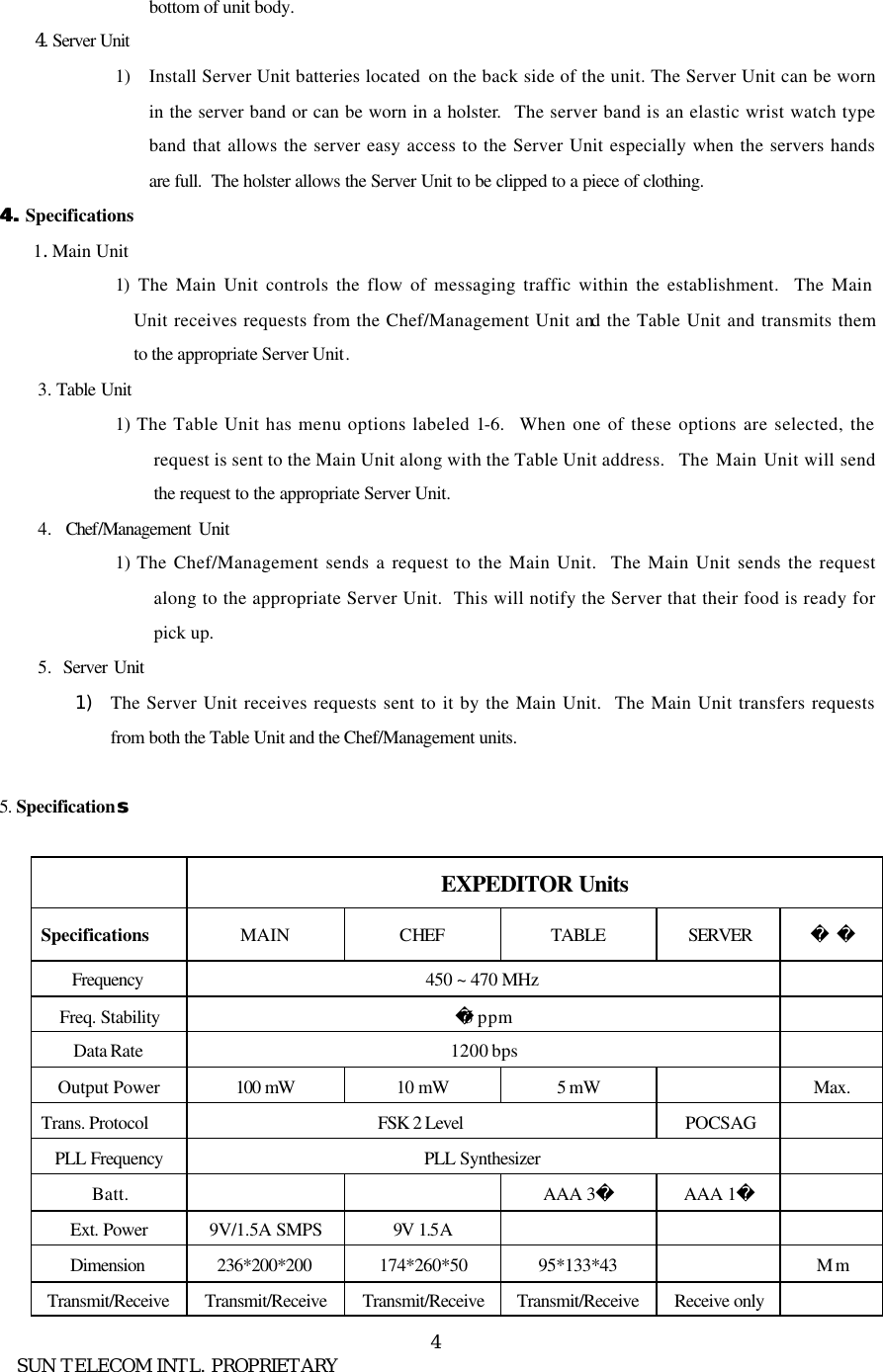
     SUN TELECOM INTL. PROPRIETARY 4bottom of unit body.     4. Server Unit  1) Install Server Unit batteries located  on the back side of the unit. The Server Unit can be worn in the server band or can be worn in a holster.  The server band is an elastic wrist watch type band that allows the server easy access to the Server Unit especially when the servers hands are full.  The holster allows the Server Unit to be clipped to a piece of clothing.  4. 4. Specifications   1. Main Unit   1)  The Main Unit controls the flow of messaging traffic within the establishment.  The Main Unit receives requests from the Chef/Management Unit and the Table Unit and transmits them to the appropriate Server Unit. 3. Table Unit   1) The Table Unit has menu options labeled 1-6.  When one of these options are selected, the request is sent to the Main Unit along with the Table Unit address.  The Main Unit will send the request to the appropriate Server Unit. 4.  Chef/Management  Unit   1) The Chef/Management sends a request to the Main Unit.  The Main Unit sends the request along to the appropriate Server Unit.  This will notify the Server that their food is ready for pick up. 5.  Server Unit   1) The Server Unit receives requests sent to it by the Main Unit.  The Main Unit transfers requests from both the Table Unit and the Chef/Management units.  5. Specification ss                 EXPEDITOR Units Specifications MAIN CHEF TABLE SERVER   Frequency  450 ~ 470 MHz   Freq. Stability 5 ppm   Data Rate 1200 bps   Output Power 100 mW 10 mW 5 mW    Max. Trans. Protocol   FSK 2 Level POCSAG   PLL Frequency PLL Synthesizer   Batt.      AAA 3 AAA 1   Ext. Power    9V/1.5A SMPS 9V 1.5A       Dimension 236*200*200 174*260*50 95*133*43    Mm Transmit/Receive Transmit/Receive Transmit/Receive Transmit/Receive Receive only
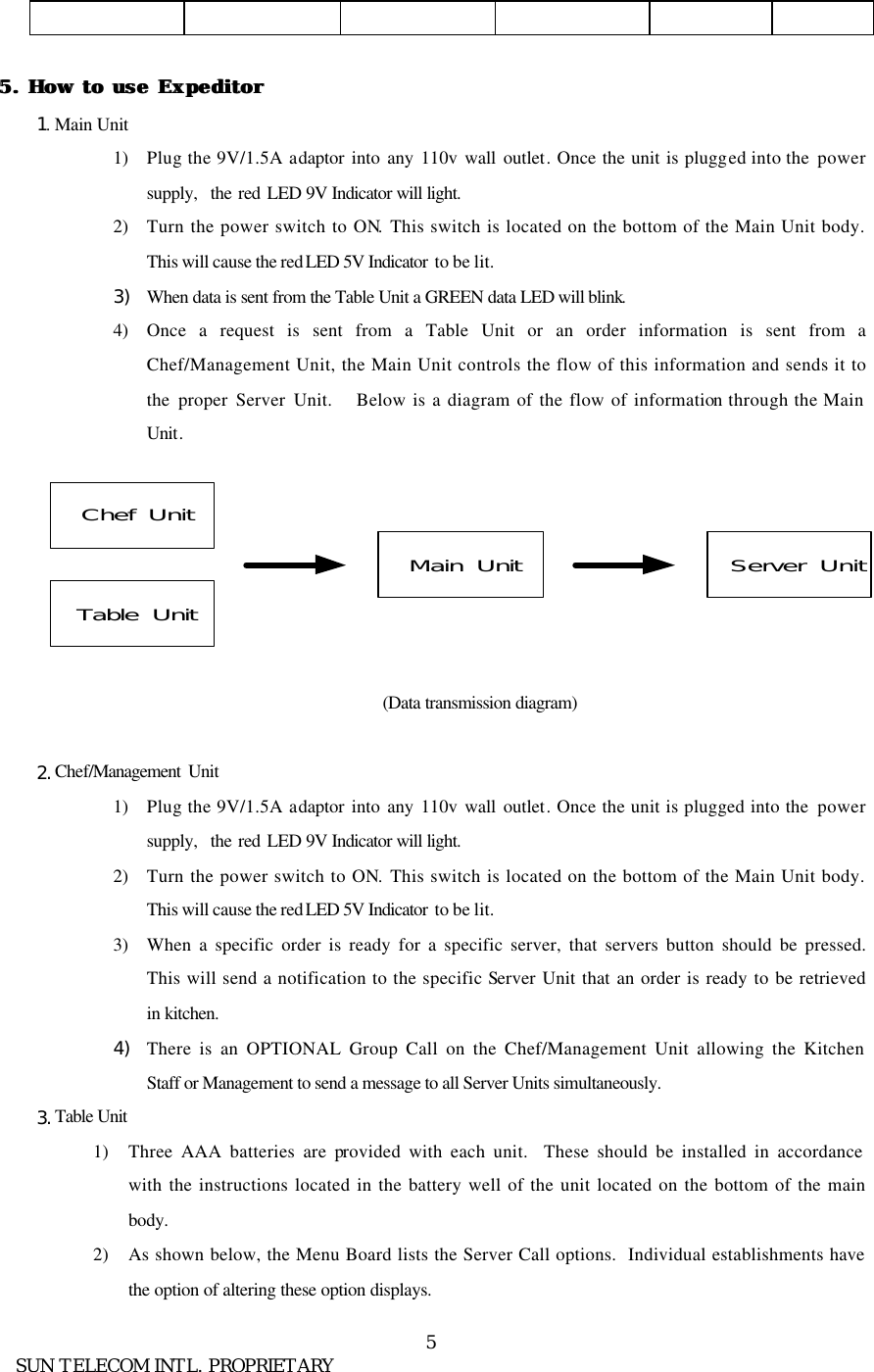
     SUN TELECOM INTL. PROPRIETARY 5            5. 5. How to use ExpeditorHow to use Expeditor  1. Main Unit 1) Plug the 9V/1.5A adaptor into any 110v wall outlet. Once the unit is plugged into the  power supply,  the red LED 9V Indicator will light. 2) Turn the power switch to ON. This switch is located on the bottom of the Main Unit body. This will cause the red LED 5V Indicator  to be lit. 3) When data is sent from the Table Unit a GREEN data LED will blink. 4) Once a request is sent from a Table Unit or an order information is sent from a Chef/Management Unit, the Main Unit controls the flow of this information and sends it to the proper Server Unit.   Below is a diagram of the flow of information through the Main Unit.               (Data transmission diagram)  2. Chef/Management  Unit 1) Plug the 9V/1.5A adaptor into any 110v wall outlet. Once the unit is plugged into the  power supply,  the red LED 9V Indicator will light. 2) Turn the power switch to ON. This switch is located on the bottom of the Main Unit body. This will cause the red LED 5V Indicator  to be lit. 3) When a specific order is ready for a specific server, that servers button should be pressed.  This will send a notification to the specific Server Unit that an order is ready to be retrieved in kitchen. 4) There is an OPTIONAL Group Call on the Chef/Management Unit allowing the Kitchen Staff or Management to send a message to all Server Units simultaneously. 3. Table Unit 1) Three AAA batteries are provided with each unit.  These should be installed in accordance with the instructions located in the battery well of the unit located on the bottom of the main body. 2) As shown below, the Menu Board lists the Server Call options.  Individual establishments have the option of altering these option displays. Chef  UnitTable  UnitMain  Unit Server  Unit
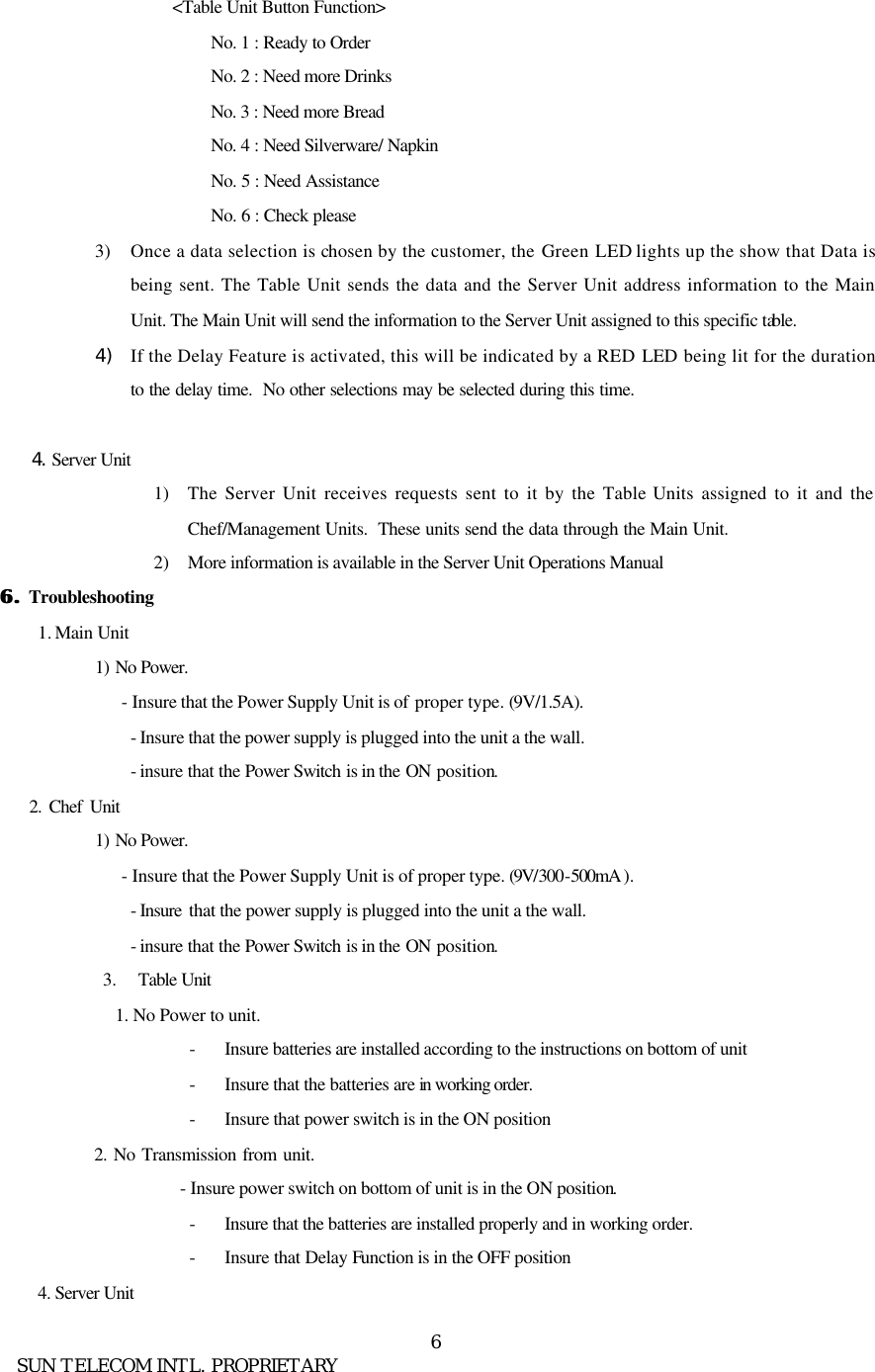
     SUN TELECOM INTL. PROPRIETARY 6<Table Unit Button Function> No. 1 : Ready to Order No. 2 : Need more Drinks No. 3 : Need more Bread   No. 4 : Need Silverware/ Napkin No. 5 : Need Assistance No. 6 : Check please 3) Once a data selection is chosen by the customer, the Green LED lights up the show that Data is being sent. The Table Unit sends the data and the Server Unit address information to the Main Unit. The Main Unit will send the information to the Server Unit assigned to this specific table.   4) If the Delay Feature is activated, this will be indicated by a RED LED  being lit for the duration to the delay time.  No other selections may be selected during this time.        4. Server Unit 1) The Server Unit receives requests sent to it by the Table Units assigned to it and the Chef/Management Units.  These units send the data through the Main Unit. 2) More information is available in the Server Unit Operations Manual 6. 6. Troubleshooting 1. Main Unit 1)  No Power. - Insure that the Power Supply Unit is of proper type. (9V/1.5A). - Insure that the power supply is plugged into the unit a the wall. - insure that the Power Switch is in the ON position.     2. Chef Unit 1)  No Power. - Insure that the Power Supply Unit is of proper type. (9V/300-500mA ). - Insure  that the power supply is plugged into the unit a the wall. - insure that the Power Switch is in the ON position. 3.  Table Unit 1. No Power to unit. - Insure batteries are installed according to the instructions on bottom of unit - Insure that the batteries are in working order.  - Insure that power switch is in the ON position    2. No Transmission from unit.          - Insure power switch on bottom of unit is in the ON position. - Insure that the batteries are installed properly and in working order. - Insure that Delay Function is in the OFF position 4. Server Unit
     SUN TELECOM INTL. PROPRIETARY 71) No Display on LED Screen. - Insure batteries are installed in accordance with instructions - Insure batteries are in working order. 2) No signal received by Server Unit. - Remove battery and wait 2 minutes. Replace battery and test again.                 7. 7. Table Unit Delay Time Setup 1.  Table Unit Delay time can be setup to range from 1 to 15 minutes of delay time.  The Dip switch diagram below shows how to setup this feature. An example of one minute Delay Time is listed below. 2.   1 Minute :               1  2   3  4       : Up : Down1 minute1 minute 9 minute9 minute2 minute2 minute 10 minute10 minute3 minute3 minute 11 minute11 minute4 minute4 minute 12 minute12 minute5 minute5 minute 13 minute13 minute6 minute6 minute 14 minute14 minute7 minute7 minute 15 minute15 minute8 minute8 minuteTable Unit Delay Time SetupTable Unit Delay Time SetupAddress Setup Delay Setup
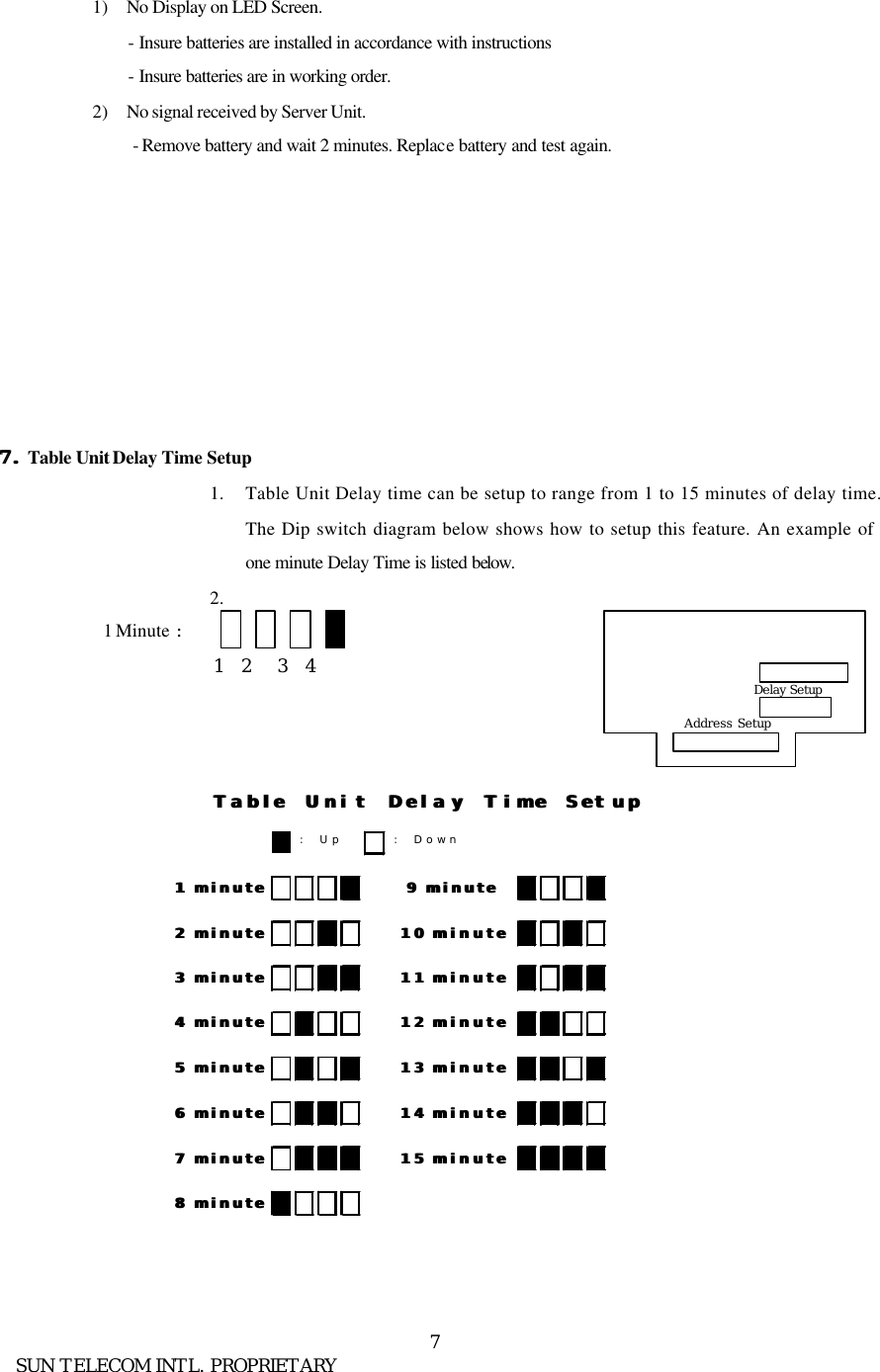
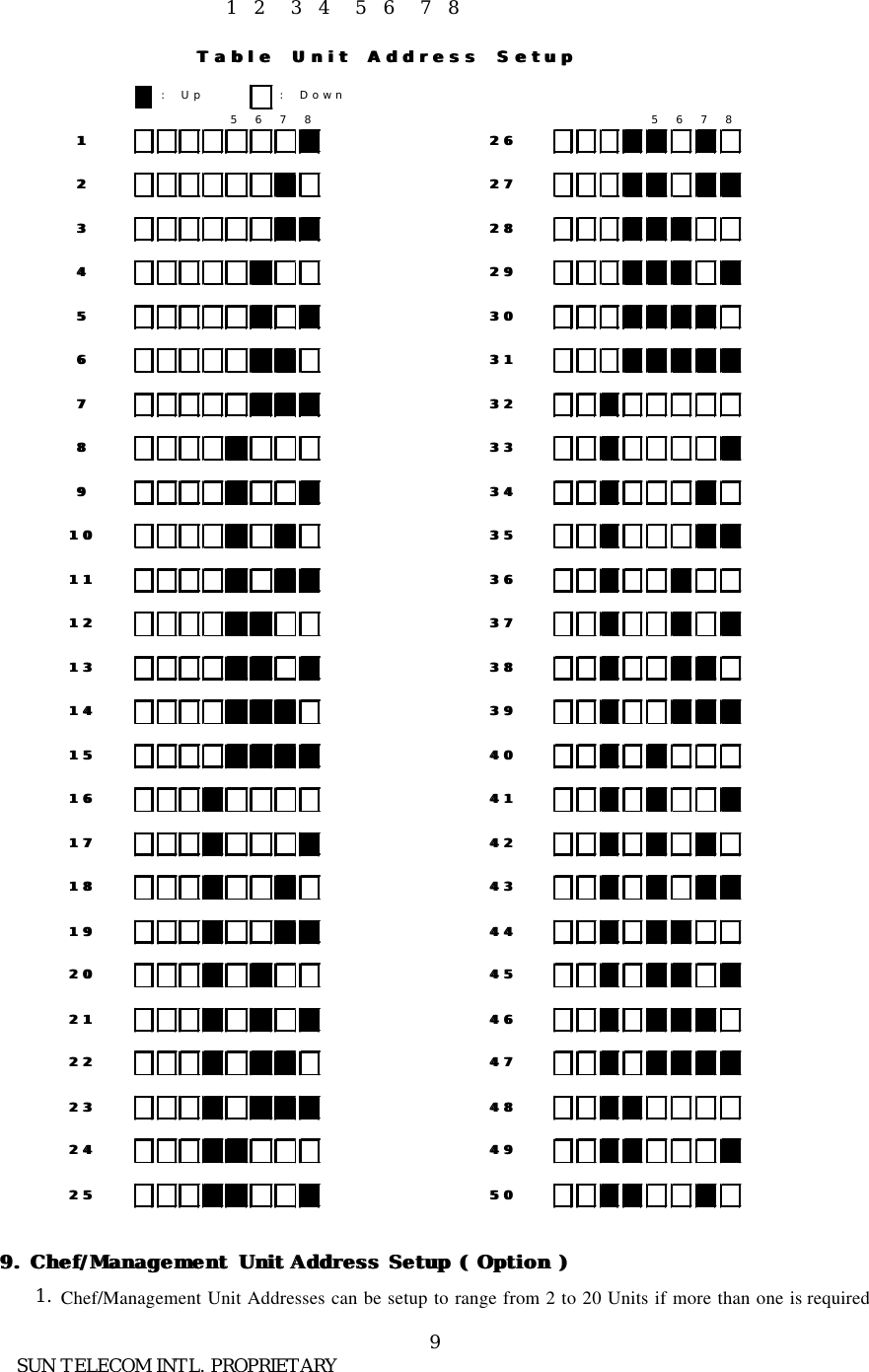
     SUN TELECOM INTL. PROPRIETARY 8       8. 8. Table Unit Address Setup 1.  Table Unit Addresses can be setup to range from 1 to 50 tables on a single Main Unit.  The Dip switch diagram below shows how to setup this feature. An example of Table #1 setup is listed below.   Table # 1  :
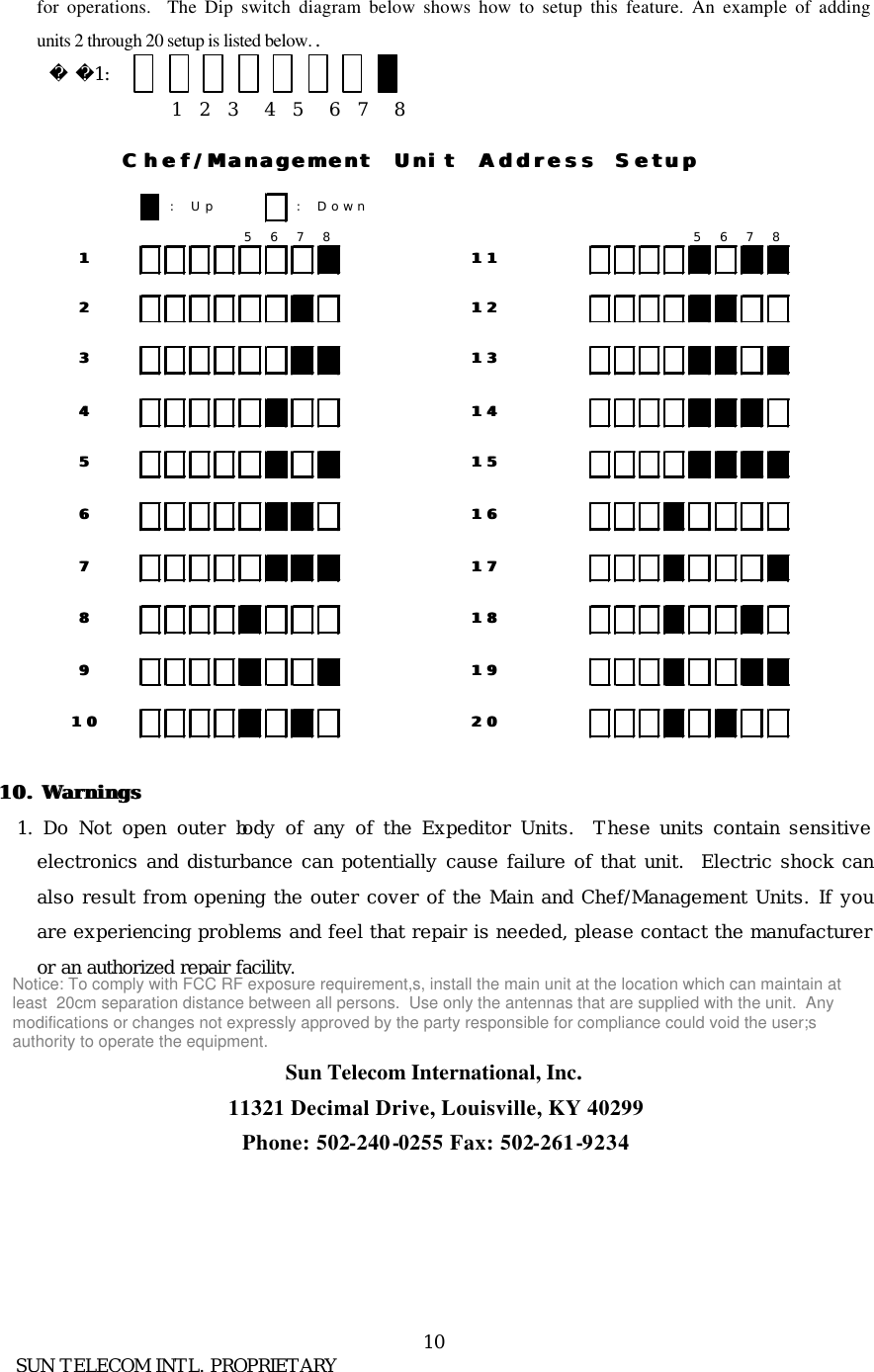
     SUN TELECOM INTL. PROPRIETARY 9                        1  2   3  4   5  6   7  8    9. Chef9. Chef/Management/Management Unit Unit Address Setup  Address Setup ( Option )( Option )      1. Chef/Management Unit Addresses can be setup to range from 2 to 20 Units if more than one is required : Up : Down5678 567811 262622 272733 282844 292955 303066 313177 323288 333399 34341010 35351111 36361212 37371313 38381414 39391515 40401616 41411717 42421818 43431919 44442020 45452121 46462222 47472323 48482424 49492525 5050Table Unit Address SetupTable Unit Address Setup
     SUN TELECOM INTL. PROPRIETARY 10 for operations.  The Dip switch diagram below shows how to setup this feature. An example of adding units 2 through 20 setup is listed below. .         1:                                 1  2  3   4  5   6  7   8   10. 10. WarningsWarnings  1.  Do Not open outer body of any of the Expeditor Units.  These units contain sensitive electronics and disturbance can potentially cause failure of that unit.  Electric shock can also result from opening the outer cover of the Main and Chef/Management Units. If you are experiencing problems and feel that repair is needed, please contact the manufacturer or an authorized repair facility.   Sun Telecom International, Inc. 11321 Decimal Drive, Louisville, KY 40299 Phone: 502-240-0255 Fax: 502-261-9234   : Up : Down5678 56781122334455667788991010Chef/Management Unit Address SetupChef/Management Unit Address Setup1111121213131818191920201414151516161717Notice: To comply with FCC RF exposure requirement,s, install the main unit at the location which can maintain atleast  20cm separation distance between all persons.  Use only the antennas that are supplied with the unit.  Anymodifications or changes not expressly approved by the party responsible for compliance could void the user;sauthority to operate the equipment.

Navigation menu