Honeywell Analytics SPMFLEX RFID Chemcassette Recognition User Manual Manual 2

Honeywell Analytics Inc RFID Chemcassette Recognition Manual 2

Contents

Manual 2

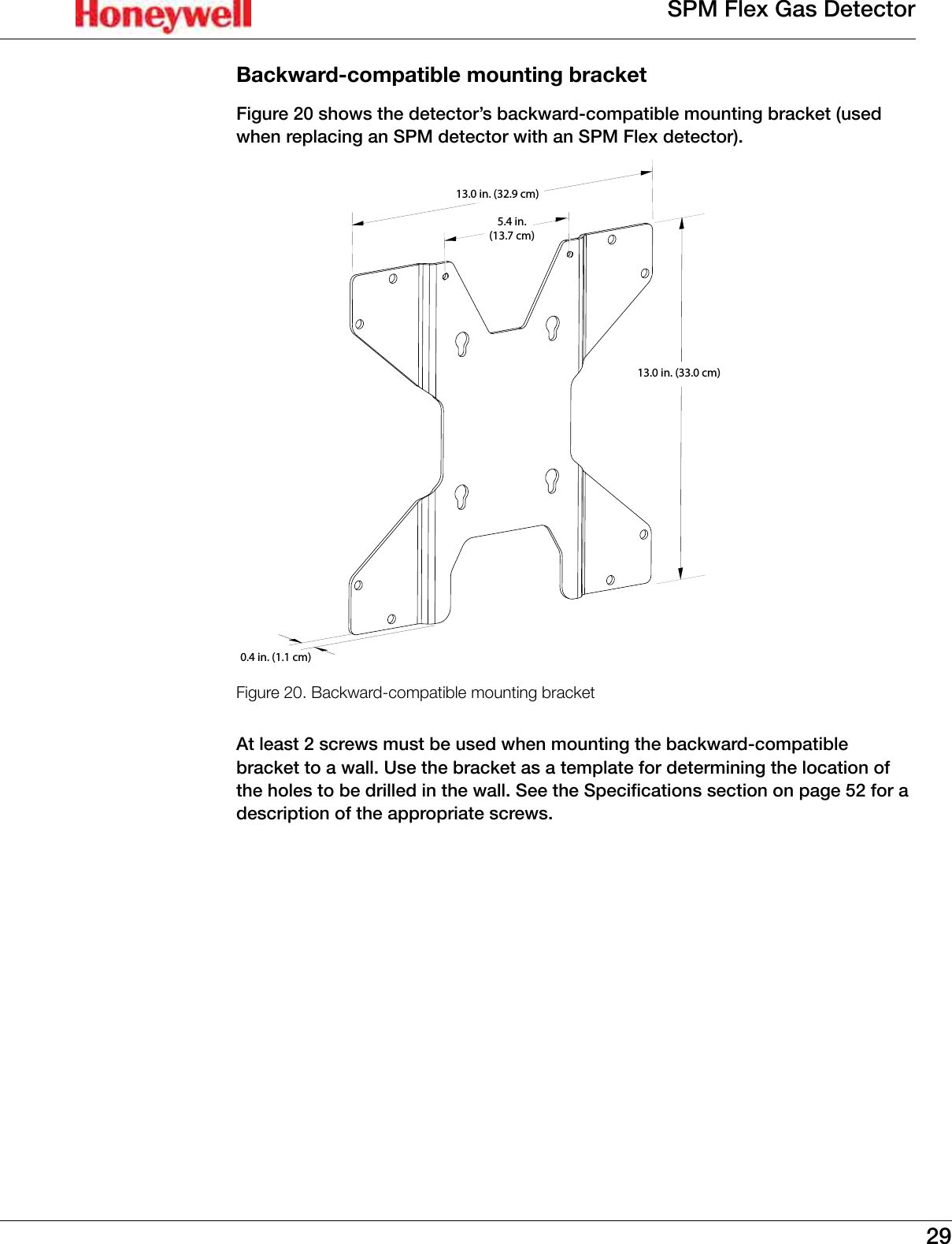
29SPM Flex Gas DetectorBackward-compatible mounting bracketFigure 20 shows the detector’s backward-compatible mounting bracket (used when replacing an SPM detector with an SPM Flex detector)�0.4 in. (1.1 cm)5.4 in.(13.7 cm)13.0 in. (33.0 cm)13.0 in. (32.9 cm)Figure 20. Backward-compatible mounting bracketAt least 2 screws must be used when mounting the backward-compatible bracket to a wall� Use the bracket as a template for determining the location of the holes to be drilled in the wall� See the Specifications section on page 52 for a description of the appropriate screws�
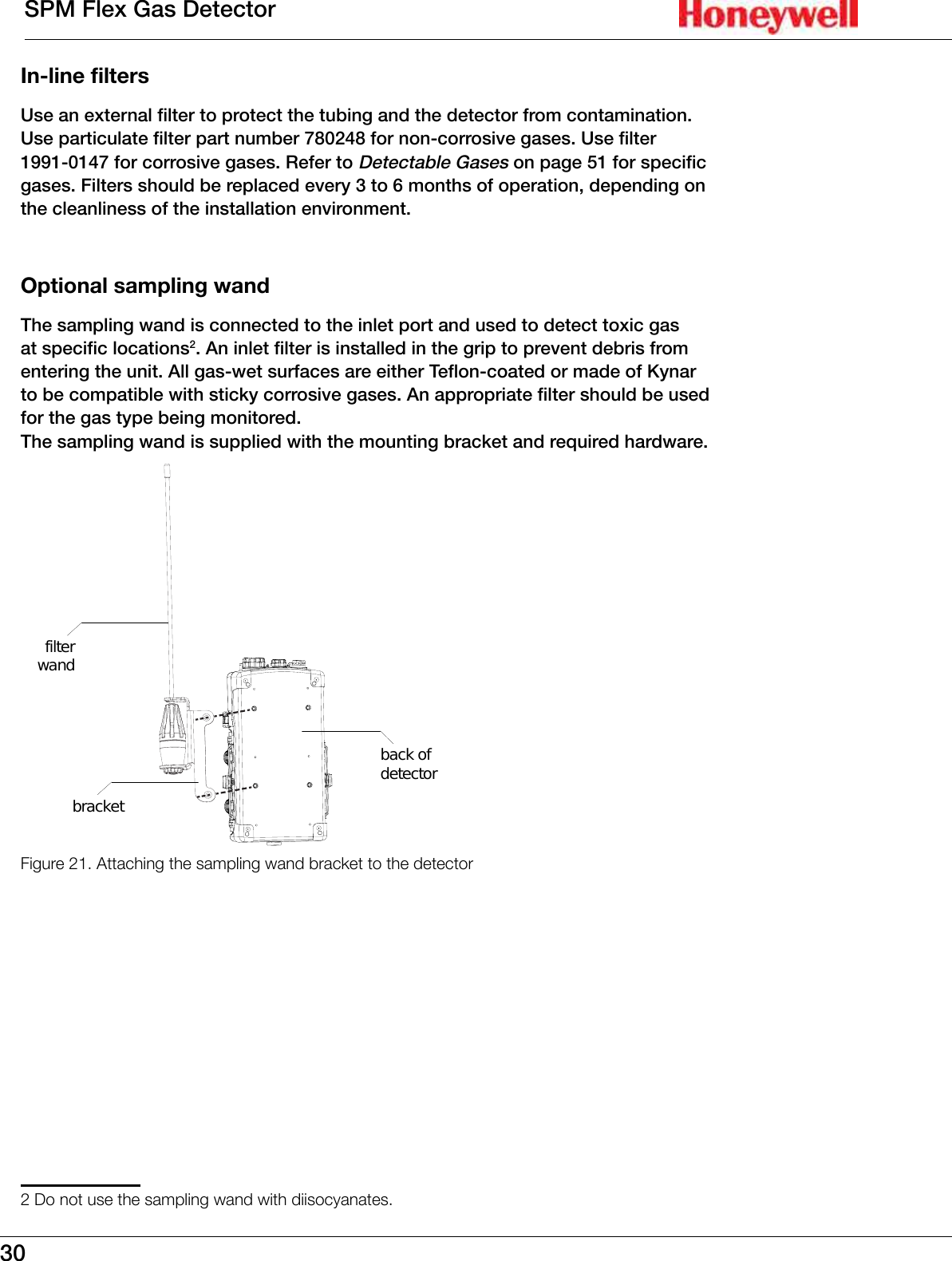
30SPM Flex Gas DetectorIn-line filtersUse an external filter to protect the tubing and the detector from contamination� Use particulate filter part number 780248 for non-corrosive gases� Use filter 1991-0147 for corrosive gases� Refer to Detectable Gases on page 51 for specific gases� Filters should be replaced every 3 to 6 months of operation, depending on the cleanliness of the installation environment�Optional sampling wandThe sampling wand is connected to the inlet port and used to detect toxic gas at specific locations2� An inlet filter is installed in the grip to prevent debris from entering the unit� All gas-wet surfaces are either Teflon-coated or made of Kynar to be compatible with sticky corrosive gases� An appropriate filter should be used for the gas type being monitored� The sampling wand is supplied with the mounting bracket and required hardware�filterwandbracketback ofdetectorFigure 21. Attaching the sampling wand bracket to the detector2 Do not use the sampling wand with diisocyanates.
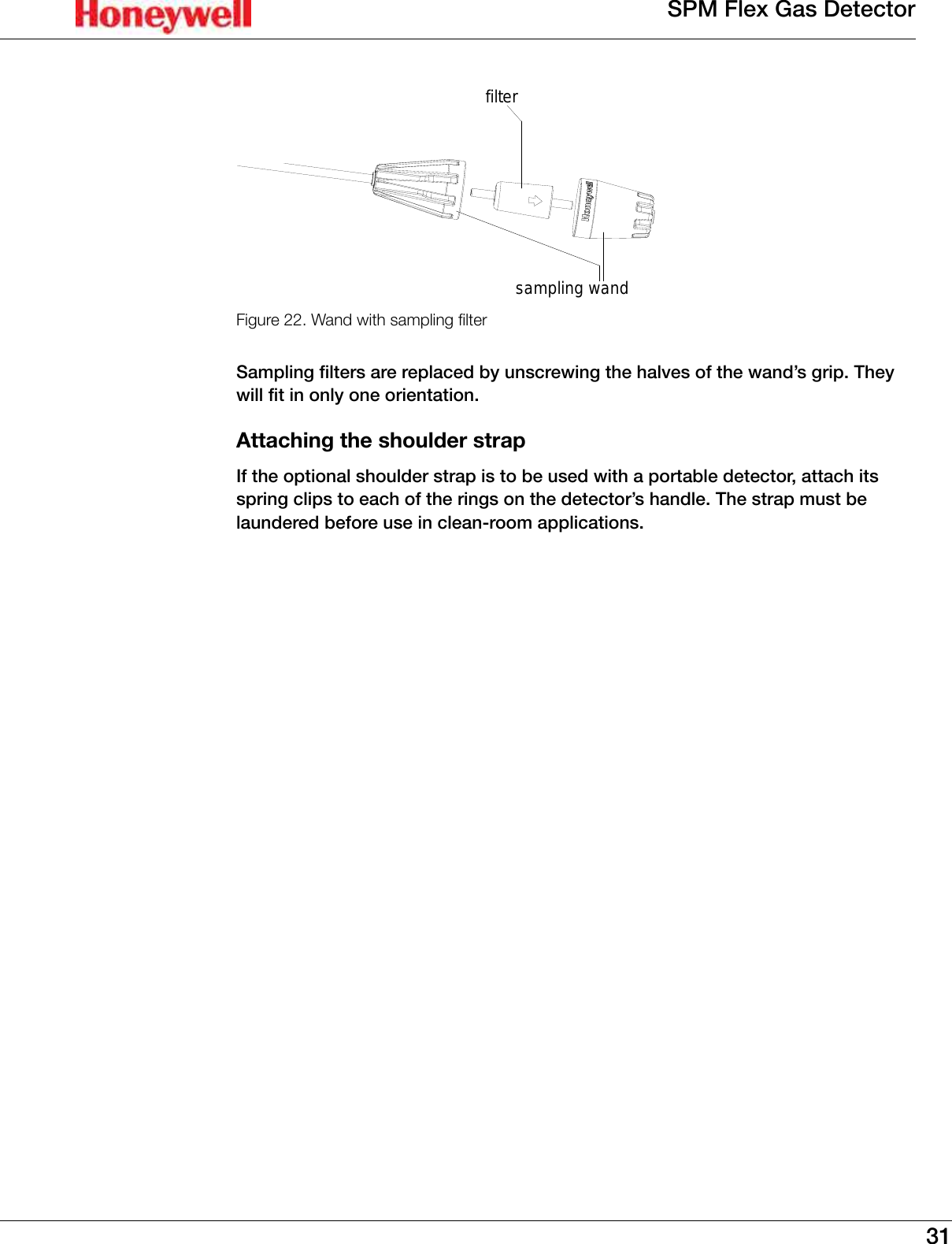
31SPM Flex Gas Detectorfiltersampling wandFigure 22. Wand with sampling lterSampling filters are replaced by unscrewing the halves of the wand’s grip� They will fit in only one orientation�Attaching the shoulder strapIf the optional shoulder strap is to be used with a portable detector, attach its spring clips to each of the rings on the detector’s handle� The strap must be laundered before use in clean-room applications�
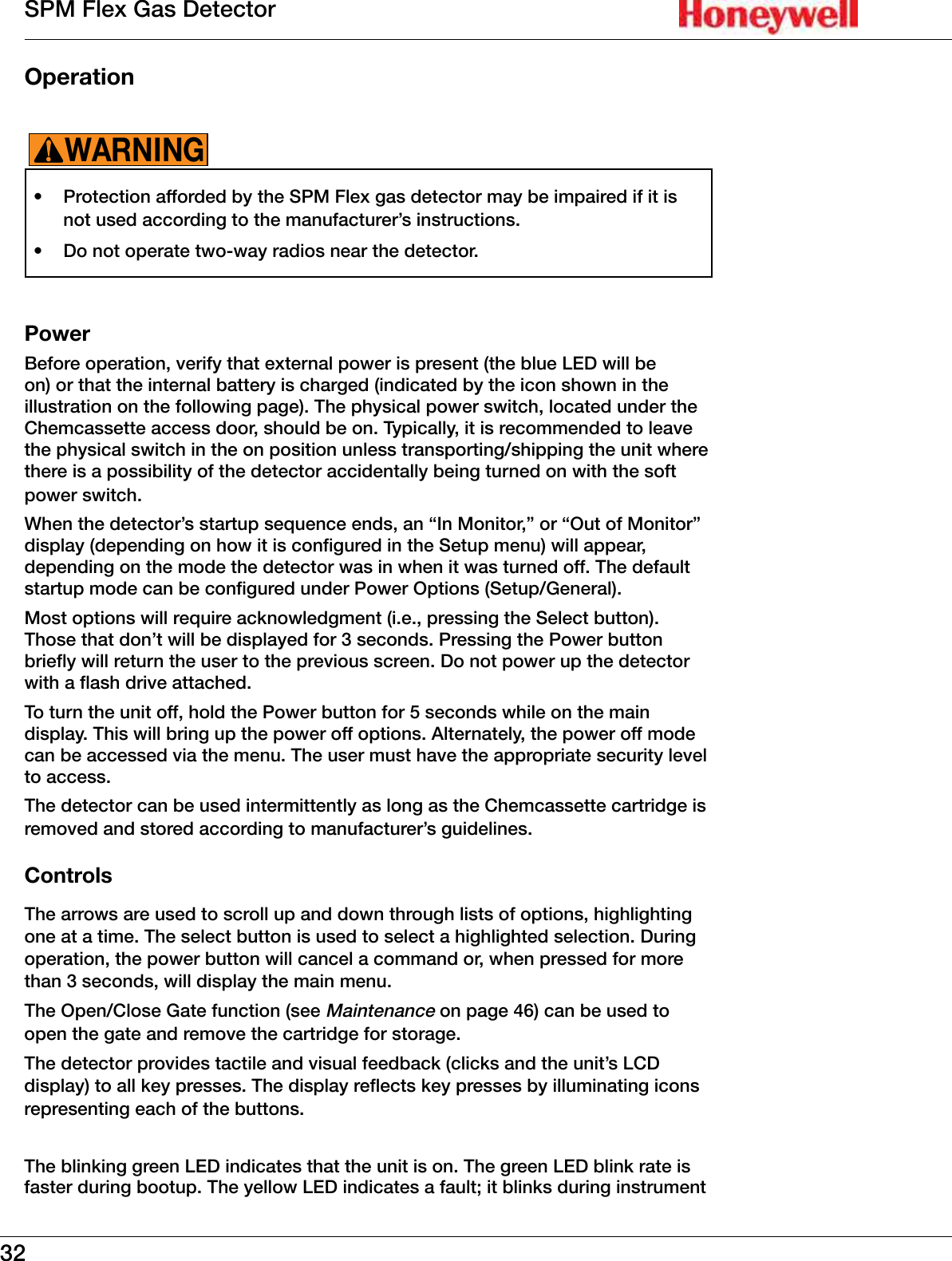
32SPM Flex Gas DetectorOperation •  Protection afforded by the SPM Flex gas detector may be impaired if it is not used according to the manufacturer’s instructions�•  Do not operate two-way radios near the detector�WARNING!PowerBefore operation, verify that external power is present (the blue LED will be on) or that the internal battery is charged (indicated by the icon shown in the illustration on the following page)� The physical power switch, located under the Chemcassette access door, should be on� Typically, it is recommended to leave the physical switch in the on position unless transporting/shipping the unit where there is a possibility of the detector accidentally being turned on with the soft power switch� When the detector’s startup sequence ends, an “In Monitor,” or “Out of Monitor” display (depending on how it is configured in the Setup menu) will appear, depending on the mode the detector was in when it was turned off� The default startup mode can be configured under Power Options (Setup/General)�Most options will require acknowledgment (i�e�, pressing the Select button)� Those that don’t will be displayed for 3 seconds� Pressing the Power button briefly will return the user to the previous screen� Do not power up the detector with a flash drive attached�To turn the unit off, hold the Power button for 5 seconds while on the main display� This will bring up the power off options� Alternately, the power off mode can be accessed via the menu� The user must have the appropriate security level to access�The detector can be used intermittently as long as the Chemcassette cartridge is removed and stored according to manufacturer’s guidelines�ControlsThe arrows are used to scroll up and down through lists of options, highlighting one at a time� The select button is used to select a highlighted selection� During operation, the power button will cancel a command or, when pressed for more than 3 seconds, will display the main menu�The Open/Close Gate function (see Maintenance on page 46) can be used to open the gate and remove the cartridge for storage�The detector provides tactile and visual feedback (clicks and the unit’s LCD display) to all key presses� The display reflects key presses by illuminating icons representing each of the buttons� The blinking green LED indicates that the unit is on� The green LED blink rate is faster during bootup� The yellow LED indicates a fault; it blinks during instrument
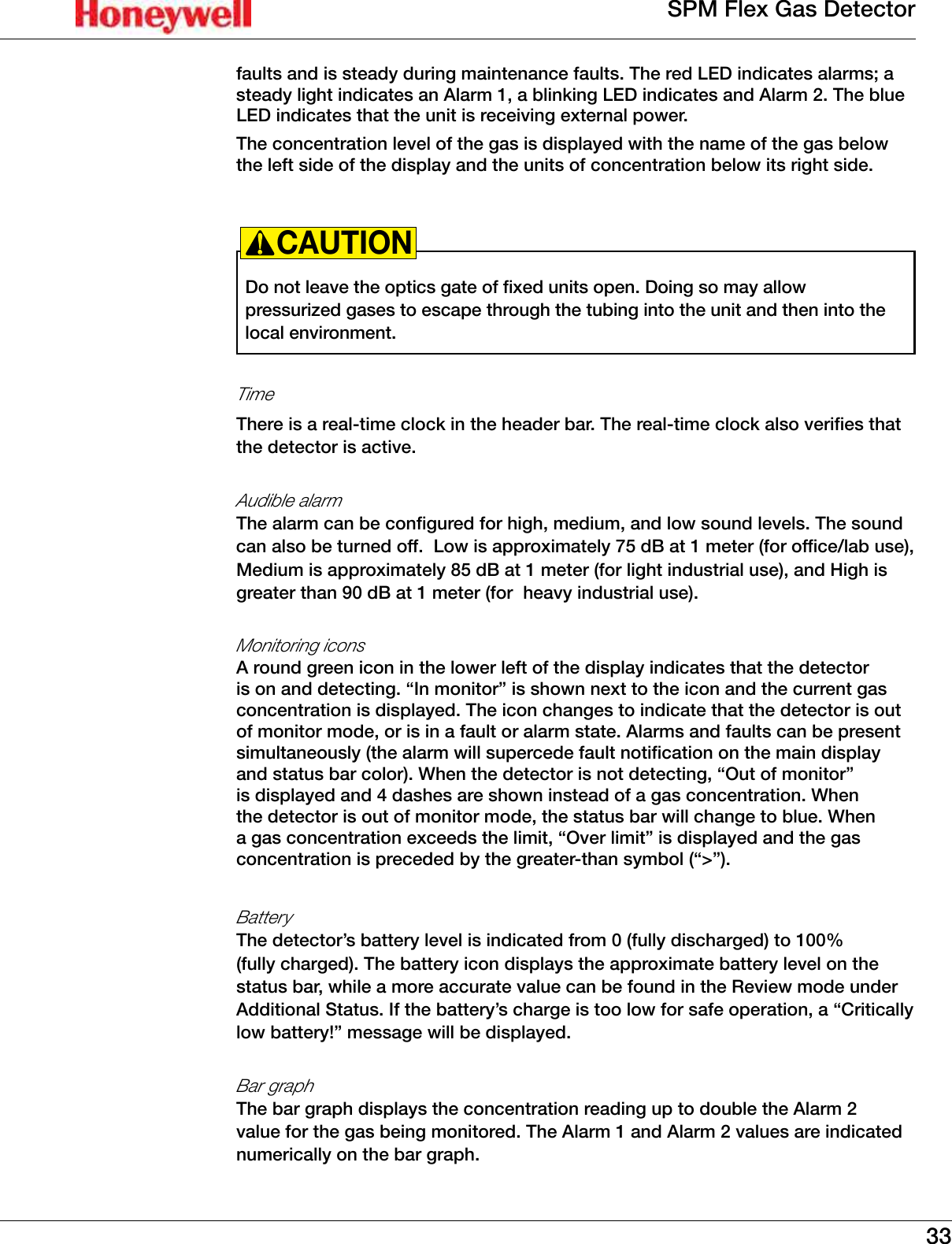
33SPM Flex Gas Detectorfaults and is steady during maintenance faults� The red LED indicates alarms; a steady light indicates an Alarm 1, a blinking LED indicates and Alarm 2� The blue LED indicates that the unit is receiving external power� The concentration level of the gas is displayed with the name of the gas below the left side of the display and the units of concentration below its right side�Do not leave the optics gate of fixed units open� Doing so may allow pressurized gases to escape through the tubing into the unit and then into the local environment�CAUTION!Time There is a real-time clock in the header bar� The real-time clock also verifies that the detector is active�Audible alarm The alarm can be configured for high, medium, and low sound levels� The sound can also be turned off�  Low is approximately 75 dB at 1 meter (for office/lab use), Medium is approximately 85 dB at 1 meter (for light industrial use), and High is greater than 90 dB at 1 meter (for  heavy industrial use)�Monitoring icons A round green icon in the lower left of the display indicates that the detector is on and detecting� “In monitor” is shown next to the icon and the current gas concentration is displayed� The icon changes to indicate that the detector is out of monitor mode, or is in a fault or alarm state� Alarms and faults can be present simultaneously (the alarm will supercede fault notification on the main display and status bar color)� When the detector is not detecting, “Out of monitor” is displayed and 4 dashes are shown instead of a gas concentration� When the detector is out of monitor mode, the status bar will change to blue� When a gas concentration exceeds the limit, “Over limit” is displayed and the gas concentration is preceded by the greater-than symbol (“>”)�Battery  The detector’s battery level is indicated from 0 (fully discharged) to 100% (fully charged)� The battery icon displays the approximate battery level on the status bar, while a more accurate value can be found in the Review mode under Additional Status� If the battery’s charge is too low for safe operation, a “Critically low battery!” message will be displayed�Bar graphThe bar graph displays the concentration reading up to double the Alarm 2 value for the gas being monitored� The Alarm 1 and Alarm 2 values are indicated numerically on the bar graph�
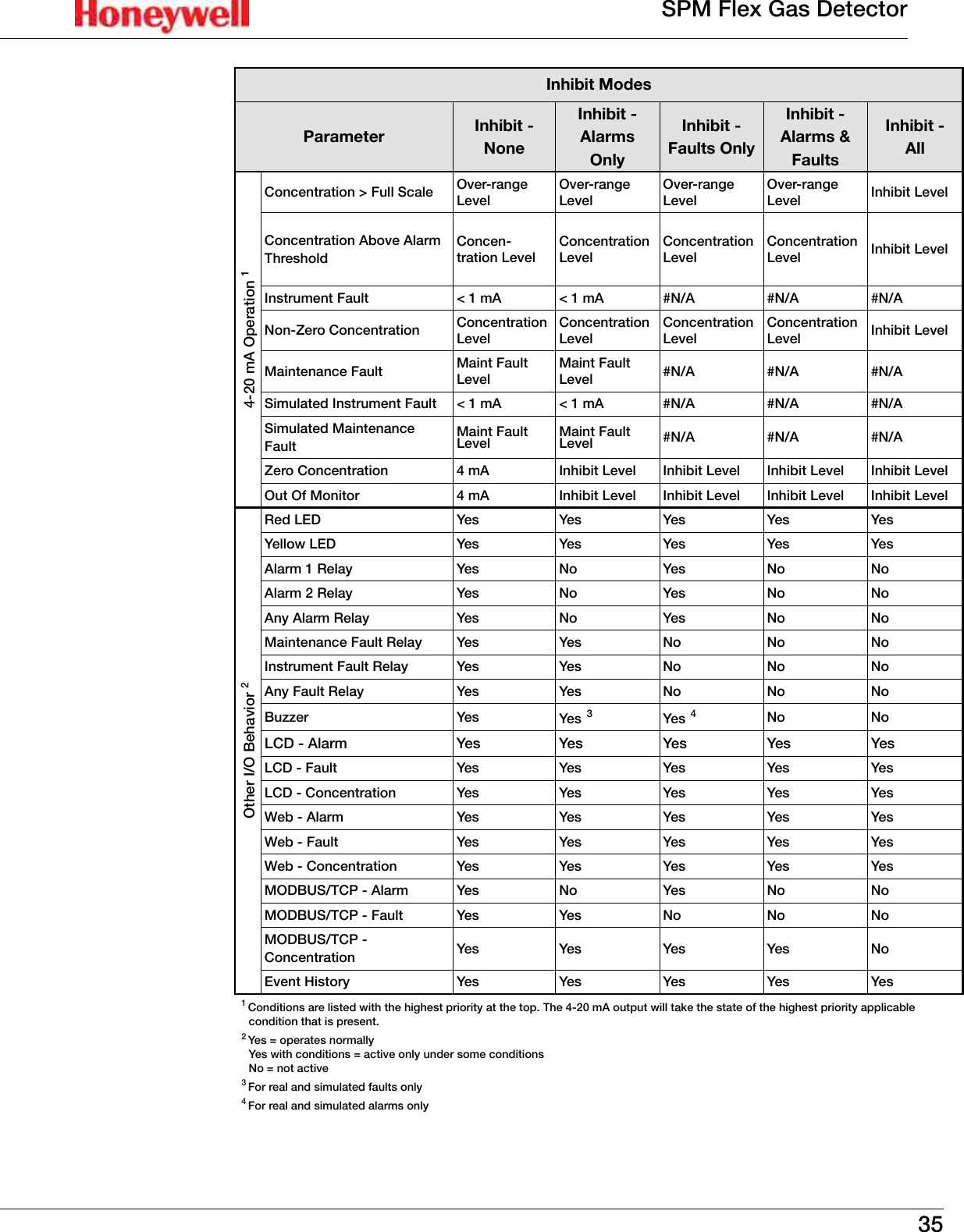
34SPM Flex Gas DetectorThe display can be configured for different backlight and dimming options� By default the backlight will dim after a few minutes of no activity� The display can be configured to turn off the backlight entirely after a set period of time�InhibitWhen the detector is in inhibit mode, it will show a bell icon with a red slash through it� 1�  Use the [Up] or [Down] buttons to select the “Inhibit” on the Maintenance menu�2�  Press the [Accept] button�3�  The Inhibit Type menu or the Time Out menu can then be selected� Possible inhibit types are none, alarms only, faults only, alarms and faults, and all, as shown in the following table)� The Time Out options (the time until the detector exits inhibit mode and returns to active monitoring) are from 1 to 60 minutes� 4�  To take the unit out of inhibit, select “None” from the Inhibit Type menu and press the [Accept] button twice to return to the Maintenance menu� If the inhibit times out before the inhibit state is returned to “none,” maintenance fault code M17 will be displayed� NOTE
35SPM Flex Gas DetectorInhibit ModesParameter Inhibit - NoneInhibit - Alarms OnlyInhibit - Faults OnlyInhibit - Alarms & FaultsInhibit - All4-20 mA Operation 1Concentration > Full Scale Over-range LevelOver-range LevelOver-range LevelOver-range Level Inhibit LevelConcentration Above Alarm ThresholdConcen-tration LevelConcentration LevelConcentration LevelConcentration Level Inhibit LevelInstrument Fault < 1 mA < 1 mA #N/A #N/A #N/ANon-Zero Concentration Concentration LevelConcentration LevelConcentration LevelConcentration Level Inhibit LevelMaintenance Fault Maint Fault LevelMaint Fault Level #N/A #N/A #N/ASimulated Instrument Fault < 1 mA < 1 mA #N/A #N/A #N/ASimulated Maintenance FaultMaint Fault Level Maint Fault Level #N/A #N/A #N/AZero Concentration 4 mA Inhibit Level Inhibit Level Inhibit Level Inhibit LevelOut Of Monitor 4 mA Inhibit Level Inhibit Level Inhibit Level Inhibit LevelOther I/O Behavior 2 Red LED Yes Yes Yes Yes YesYellow LED Yes Yes Yes Yes YesAlarm 1 Relay Yes No Yes No NoAlarm 2 Relay Yes No Yes No NoAny Alarm Relay Yes No Yes No NoMaintenance Fault Relay Yes Yes No No NoInstrument Fault Relay Yes Yes No No NoAny Fault Relay Yes Yes No No NoBuzzer Yes Yes 3Yes 4No NoLCD - Alarm Yes Yes Yes Yes YesLCD - Fault Yes Yes Yes Yes YesLCD - Concentration Yes Yes Yes Yes YesWeb - Alarm Yes Yes Yes Yes YesWeb - Fault Yes Yes Yes Yes YesWeb - Concentration Yes Yes Yes Yes YesMODBUS/TCP - Alarm Yes No Ye s No NoMODBUS/TCP - Fault Yes Yes No No NoMODBUS/TCP - Concentration Yes Yes Yes Yes NoEvent History Yes Yes Yes Yes Yes1 Conditions are listed with the highest priority at the top� The 4-20 mA output will take the state of the highest priority applicable condition that is present�2 Yes = operates normally Yes with conditions = active only under some conditions No = not active3 For real and simulated faults only4 For real and simulated alarms only
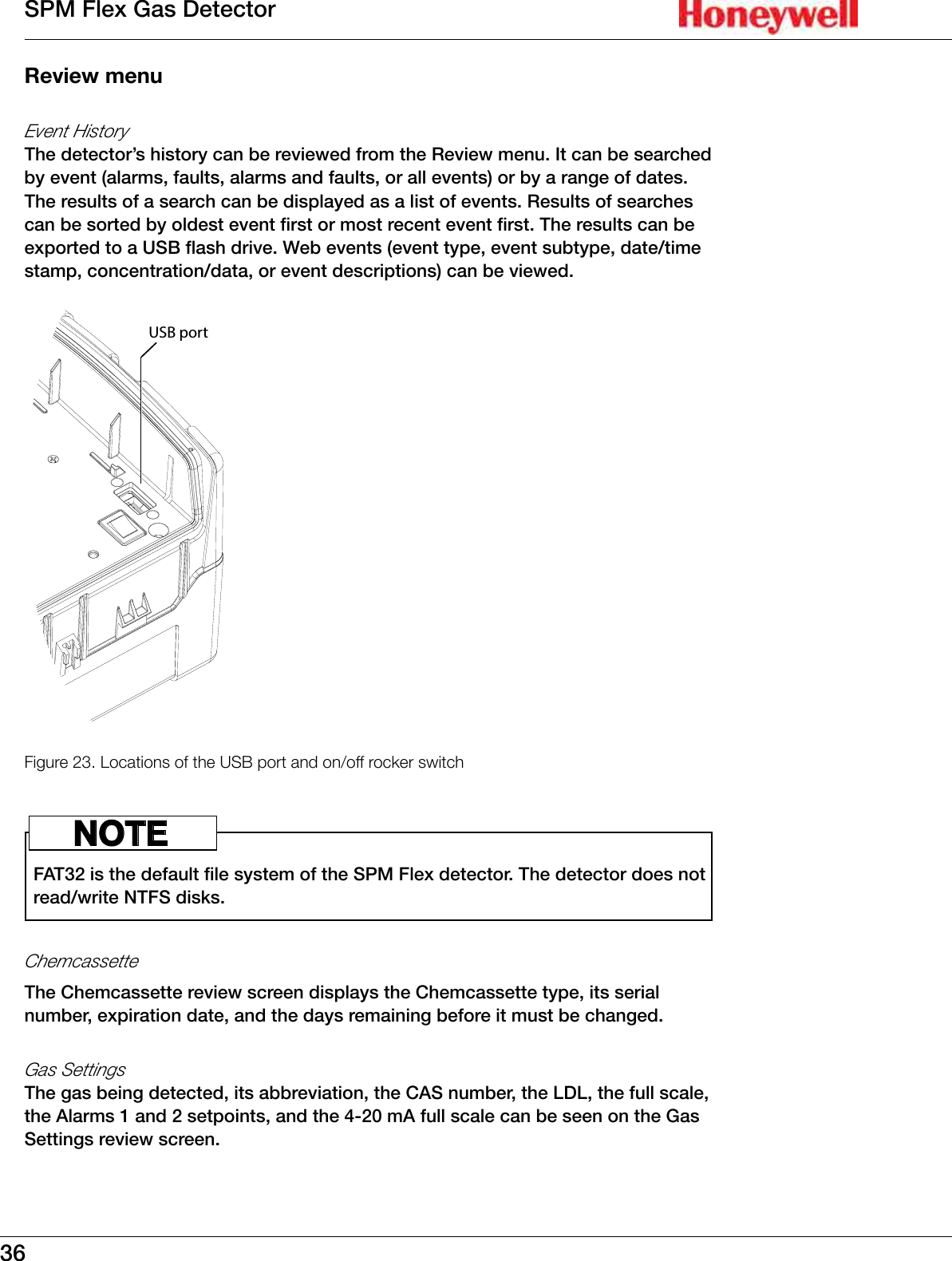
36SPM Flex Gas DetectorReview menuEvent HistoryThe detector’s history can be reviewed from the Review menu� It can be searched by event (alarms, faults, alarms and faults, or all events) or by a range of dates� The results of a search can be displayed as a list of events� Results of searches can be sorted by oldest event first or most recent event first� The results can be exported to a USB flash drive� Web events (event type, event subtype, date/time stamp, concentration/data, or event descriptions) can be viewed�USB portFigure 23. Locations of the USB port and on/off rocker switchFAT32 is the default file system of the SPM Flex detector� The detector does not read/write NTFS disks� NOTEChemcassetteThe Chemcassette review screen displays the Chemcassette type, its serial number, expiration date, and the days remaining before it must be changed�Gas SettingsThe gas being detected, its abbreviation, the CAS number, the LDL, the full scale, the Alarms 1 and 2 setpoints, and the 4-20 mA full scale can be seen on the Gas Settings review screen�
37SPM Flex Gas DetectorNetworkThe Network Summary option displays the IP address, the Subnet mask, the Gateway, and the MAC address�Additional StatusThe flow rate of the gas, the battery level, the ambient temperature and relative humidity, and the stream temperature and relative humidity can be found on the Additional Status Summary screen�Output StateThe detector’s relay assignment (i�e�, Alarm 1, Alarm 2, or Instrument Fault), the current relay states (e�g�, off, off, on), the current mA output (driven value and measured value), and the current inhibit state are displayed in the Output State Summary�Trend/PlotThe Trend/Plot review screen shows the date, time, and time range� A trend plot over the specified time range can be displayed� The data can be exported to a flash drive via the USB port as a csv file�SoftwareThe Software summary screen displays the number of the current version numbers of the software, the user interface, the gas detection algorithm, the optics algorithm, and the RFID algorithm�Calibration, set-up, and test modes are intended for use by trained personnel or service engineers only� Access to these modes can be passcode protected�WARNING!Maintenance menuInhibitAlarms or alarms and faults can be inhibited from the Maintenance menu� The timeout period (the length of time before inhibit mode is exited and monitoring resumes) can also be configured here� The range is 1 to 60 minutes� The default timeout period is 30 minutes� A timeout period of 0 minutes means that the feature is disabled�4-20 mA current loop calibrationThis feature allows the detector’s output to match an external monitoring device�Flow characterizationFlow characterization is an optional function� When utilized, it allows a flow
38SPM Flex Gas Detectorsystem to be optimized with a certain type of Chemcassette cartridge� This allows the SPM Flex detector to quickly reach the correct flow rate�Open/close gateThe gate can be opened and closed manually� For intermittent use, this allows Chemcassette cartridges to be conveniently removed and stored�Update programThrough the Update program option, the new firmware can be loaded via the USB port�Factory service modeFor Honeywell Analytics service personnel only�Setup menuMany of the functions of the SPM Flex detector can be configured from the Setup menu�GeneralThe backlight intensity and timeout period are chosen from this menu as well� The power-up options are chosen from this menu� The detector can be programmed to be in monitoring mode or out of monitoring mode when powered up� It can also be programmed to power up in the state it was in when it was powered down� (This is the default state�) Finally, if languages other than English are loaded in the detector’s software, the language can be chosen from the General menu� The unit IDs, either short (up to 20 characters) or long (up to 35 characters) and an idle timeout period of from 1 to 60 minutes (20 minutes default) can also be entered from the General menu� An idle timeout period of 0 minutes will disable the idle timeout function�MonitoringThe available gases are displayed and can be selected from the Gas menu� Alarms 1 and 2 can be enabled or disabled and their respective setpoints can be adjusted� The LDL can also be enabled or disabled and user-defined LDL limits can be entered� The minimum and maximum values for the 4-20 mA full scale can be entered�The TWA mode can be set for either a fixed start time or a floating start time at the TWA menu� The TWA start time can also be entered� The default is 08:00 but another time can be entered by the user� In this case, the detector will calculate the second time (8 hours later) and third time (16 hours later)�Before storing the detector following a gas event, purge the flow system by operating the detector in clean air until it returns to zero� If the case must be wiped down, install push fittings in the Sample In/Out ports to prevent fluids from entering the detector�
39SPM Flex Gas DetectorThe detector’s continuous monitoring algorithm enables a fast response and high sensitivity� It also rapidly indicates trends� However, in some cases, this algorithm can cause the decay time to be substantial, especially with gases having slow stain development, specifically low level AsH3 and GeH4� In the absence of gas, it may be necessary to continue monitoring for several minutes before zero concentration is reported�NOTELatchingThe SPM Flex detector’s alarms and faults can be either latching or non-latching, depending on the settings on the Latching menu� The default for both is latching�OutputsThe detector’s display characteristics (e�g�, brightness, time to dim/time to off) are set at the Display menu� The volume of the alarms (silent, low, medium, or high) are chosen from the Audio menu options� Parameters set from the Relays menu are relay assignments, that alarm relay’s normal state (energized or de-energized), and the maintenance fault’s normal state (energized or de-energized)� Three parameters can be set from the 4-20 mA Levels menu: the inhibit level from 1�5 mA to 3�5 mA (the default is 2�0 mA), the maintenance fault level from 1�5 mA to 3�5 mA (the default is 3 mA), and the overrange level from 21�0 mA to 22�0 mA (the default is 21�5 mA)� The mA levels are adjusted in 0�5 mA increments�NetworkThe Ethernet mode can be set for either auto or manual� In manual mode, the IP address, subnet mask, and default gateway can be specified� The Modbus TCP menu can be enabled or disabled (disabled is the default)�The web server is not designed for more than ten simultaneous connections� (Responses will be slower with more connections�)
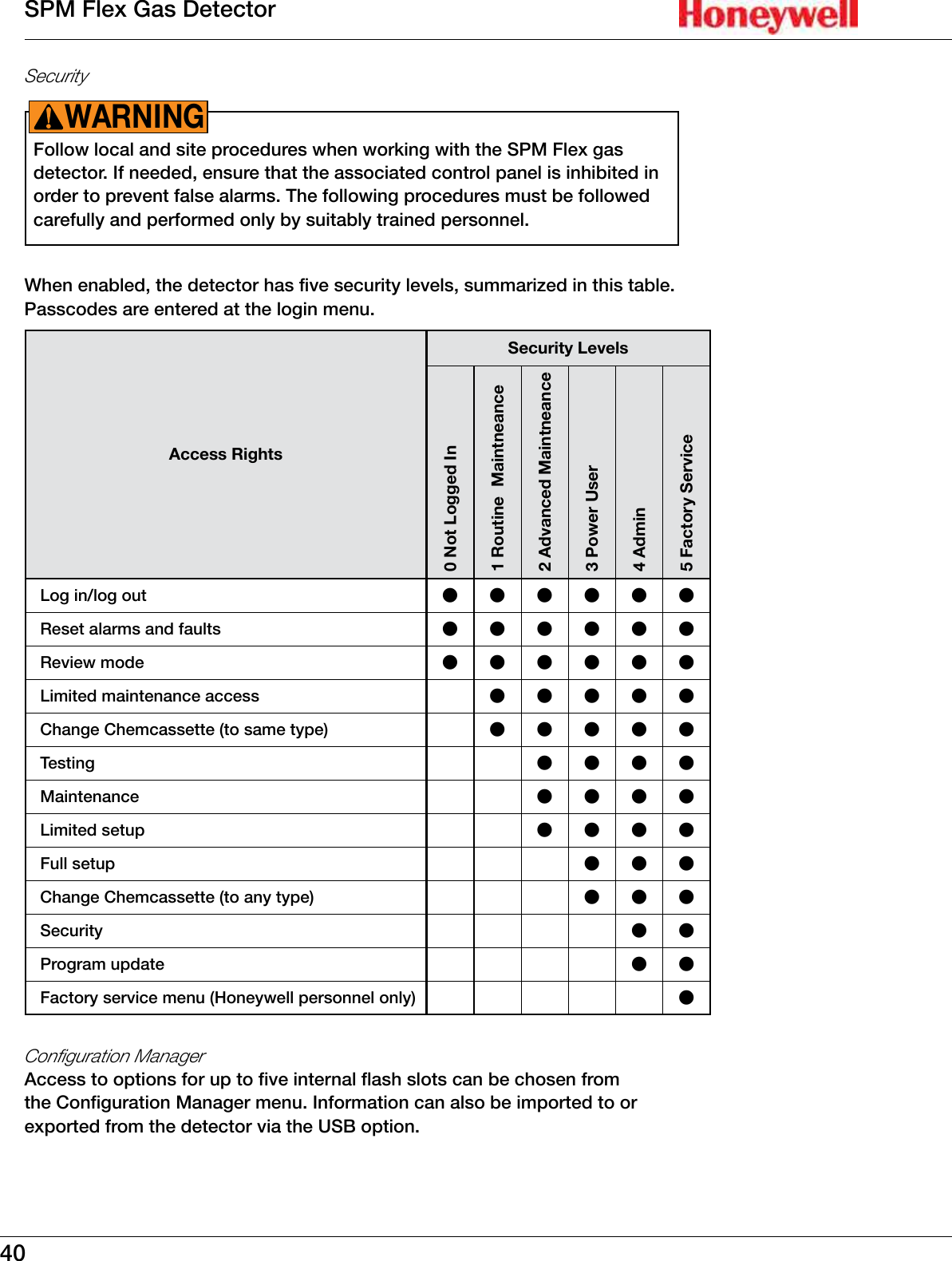
40SPM Flex Gas DetectorSecurityFollow local and site procedures when working with the SPM Flex gas detector� If needed, ensure that the associated control panel is inhibited in order to prevent false alarms� The following procedures must be followed carefully and performed only by suitably trained personnel�WARNING!When enabled, the detector has five security levels, summarized in this table� Passcodes are entered at the login menu�Access RightsSecurity Levels0 Not Logged In1 Routine  Maintneance2 Advanced Maintneance3 Power User4 Admin5 Factory ServiceLog in/log out llllllReset alarms and faults llllllReview mode llllllLimited maintenance access lllllChange Chemcassette (to same type) lllllTesting llllMaintenance llllLimited setup llllFull setup lllChange Chemcassette (to any type) lllSecurity l lProgram update l lFactory service menu (Honeywell personnel only) lConfiguration ManagerAccess to options for up to five internal flash slots can be chosen from the Configuration Manager menu� Information can also be imported to or exported from the detector via the USB option�
41SPM Flex Gas DetectorTest menuThe detector’s optical system can be checked from the Optics Verification screen (using the verification card�) Alarms 1 and 2, maintenance faults, and instrument faults can be tested from the Simulate menu� The alarms and faults can also be reset from the Simulate menu� The Force Relays and Force 4-20 mA options are also available through the Test menu�Power offSelect “Power off” to shut off the detector� Selecting this option has the same effect as pressing and holding the power button for 5 seconds�
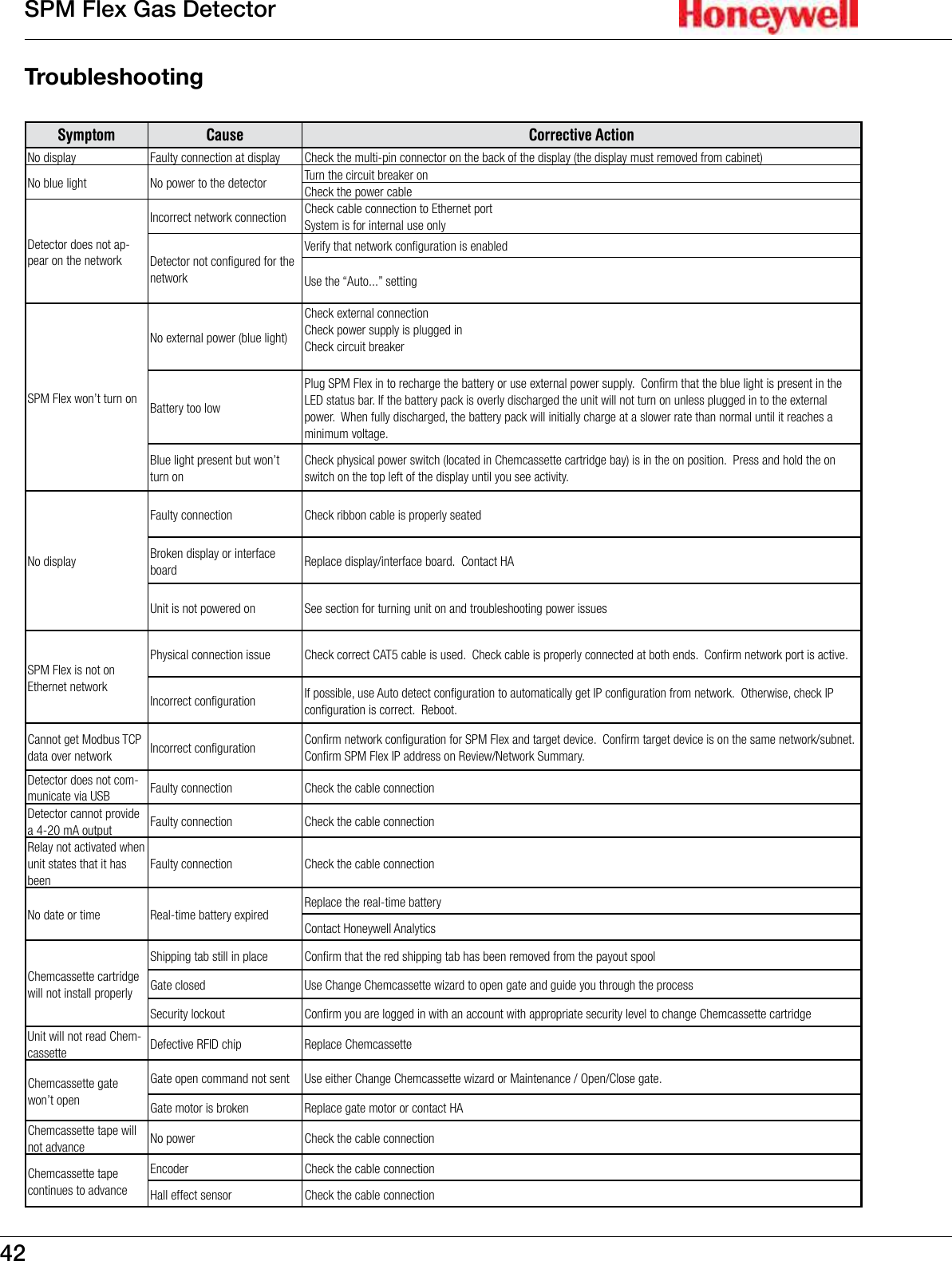
42SPM Flex Gas DetectorTroubleshootingSymptom Cause Corrective ActionNo display Faulty connection at display Check the multi-pin connector on the back of the display (the display must removed from cabinet)No blue light No power to the detector Turn the circuit breaker onCheck the power cableDetector does not ap-pear on the networkIncorrect network connection Check cable connection to Ethernet portSystem is for internal use onlyDetector not configured for the networkVerify that network configuration is enabledUse the “Auto...” settingSPM Flex won’t turn onNo external power (blue light)Check external connectionCheck power supply is plugged inCheck circuit breakerBattery too lowPlug SPM Flex in to recharge the battery or use external power supply.  Confirm that the blue light is present in the LED status bar. If the battery pack is overly discharged the unit will not turn on unless plugged in to the external power.  When fully discharged, the battery pack will initially charge at a slower rate than normal until it reaches a minimum voltage.Blue light present but won’t turn onCheck physical power switch (located in Chemcassette cartridge bay) is in the on position.  Press and hold the on switch on the top left of the display until you see activity.No displayFaulty connection Check ribbon cable is properly seatedBroken display or interface board Replace display/interface board.  Contact HAUnit is not powered on See section for turning unit on and troubleshooting power issuesSPM Flex is not on Ethernet networkPhysical connection issue Check correct CAT5 cable is used.  Check cable is properly connected at both ends.  Confirm network port is active.Incorrect configuration If possible, use Auto detect configuration to automatically get IP configuration from network.  Otherwise, check IP configuration is correct.  Reboot.Cannot get Modbus TCP data over network Incorrect configuration Confirm network configuration for SPM Flex and target device.  Confirm target device is on the same network/subnet.  Confirm SPM Flex IP address on Review/Network Summary.Detector does not com-municate via USB Faulty connection Check the cable connectionDetector cannot provide a 4-20 mA output Faulty connection Check the cable connectionRelay not activated when unit states that it has beenFaulty connection Check the cable connectionNo date or time  Real-time battery expired Replace the real-time batteryContact Honeywell AnalyticsChemcassette cartridge will not install properlyShipping tab still in place Confirm that the red shipping tab has been removed from the payout spoolGate closed Use Change Chemcassette wizard to open gate and guide you through the processSecurity lockout Confirm you are logged in with an account with appropriate security level to change Chemcassette cartridgeUnit will not read Chem-cassette Defective RFID chip Replace ChemcassetteChemcassette gate won’t openGate open command not sent Use either Change Chemcassette wizard or Maintenance / Open/Close gate.Gate motor is broken Replace gate motor or contact HAChemcassette tape will not advance No power Check the cable connectionChemcassette tape continues to advanceEncoder Check the cable connectionHall effect sensor Check the cable connection
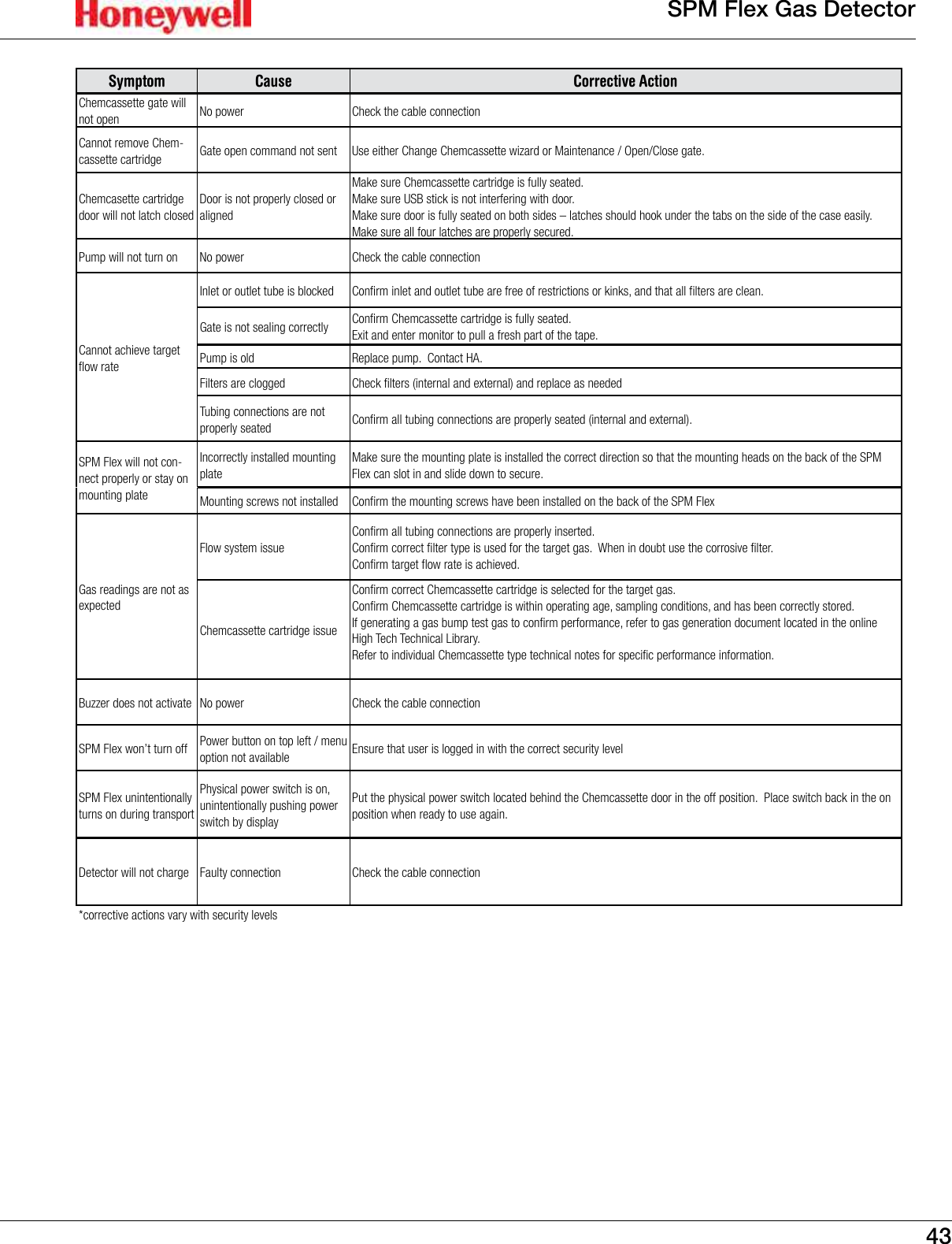
43SPM Flex Gas DetectorSymptom Cause Corrective ActionChemcassette gate will not open No power Check the cable connectionCannot remove Chem-cassette cartridge Gate open command not sent Use either Change Chemcassette wizard or Maintenance / Open/Close gate.Chemcasette cartridge door will not latch closedDoor is not properly closed or alignedMake sure Chemcassette cartridge is fully seated.  Make sure USB stick is not interfering with door.  Make sure door is fully seated on both sides – latches should hook under the tabs on the side of the case easily.  Make sure all four latches are properly secured.Pump will not turn on No power Check the cable connectionCannot achieve target flow rateInlet or outlet tube is blocked Confirm inlet and outlet tube are free of restrictions or kinks, and that all filters are clean.Gate is not sealing correctly Confirm Chemcassette cartridge is fully seated.Exit and enter monitor to pull a fresh part of the tape.Pump is old Replace pump.  Contact HA.Filters are clogged Check filters (internal and external) and replace as neededTubing connections are not properly seated Confirm all tubing connections are properly seated (internal and external).SPM Flex will not con-nect properly or stay on mounting plateIncorrectly installed mounting plateMake sure the mounting plate is installed the correct direction so that the mounting heads on the back of the SPM Flex can slot in and slide down to secure.Mounting screws not installed Confirm the mounting screws have been installed on the back of the SPM FlexGas readings are not as expectedFlow system issueConfirm all tubing connections are properly inserted.Confirm correct filter type is used for the target gas.  When in doubt use the corrosive filter.Confirm target flow rate is achieved.Chemcassette cartridge issueConfirm correct Chemcassette cartridge is selected for the target gas.Confirm Chemcassette cartridge is within operating age, sampling conditions, and has been correctly stored.If generating a gas bump test gas to confirm performance, refer to gas generation document located in the online High Tech Technical Library.Refer to individual Chemcassette type technical notes for specific performance information.Buzzer does not activate No power Check the cable connectionSPM Flex won’t turn off Power button on top left / menu option not available Ensure that user is logged in with the correct security levelSPM Flex unintentionally turns on during transportPhysical power switch is on, unintentionally pushing power switch by displayPut the physical power switch located behind the Chemcassette door in the off position.  Place switch back in the on position when ready to use again.Detector will not charge Faulty connection Check the cable connection*corrective actions vary with security levels
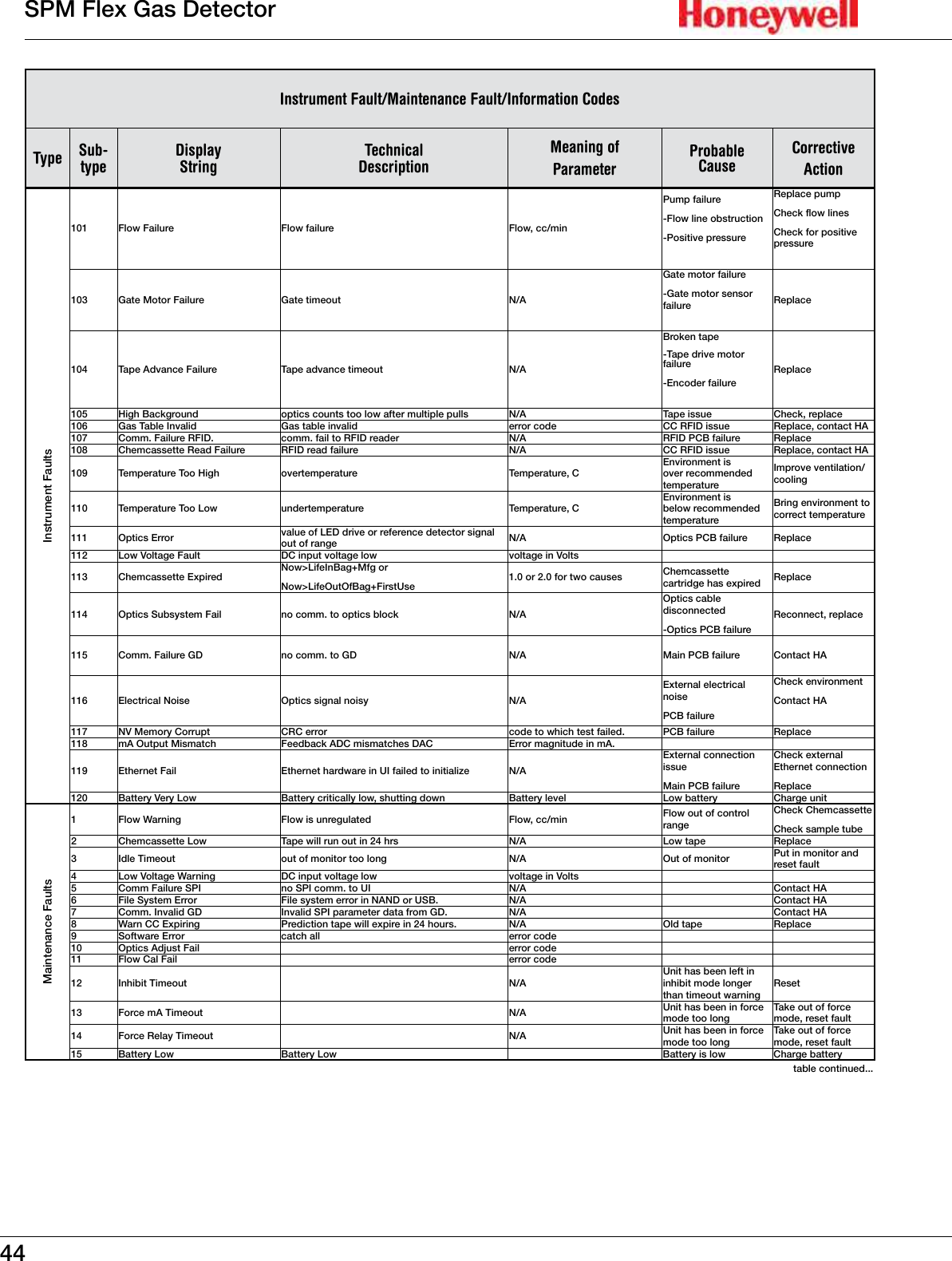
44SPM Flex Gas DetectorInstrument Fault/Maintenance Fault/Information CodesType Sub-typeDisplay StringTechnical DescriptionMeaning of ParameterProbableCauseCorrective  ActionInstrument Faults101 Flow Failure Flow failure Flow, cc/minPump failure-Flow line obstruction-Positive pressureReplace pumpCheck flow linesCheck for positive pressure103 Gate Motor Failure Gate timeout N/AGate motor failure-Gate motor sensor failure Replace104 Tape Advance Failure Tape advance timeout N/ABroken tape-Tape drive motor failure-Encoder failureReplace105 High Background optics counts too low after multiple pulls N/A Tape issue Check, replace106 Gas Table Invalid Gas table invalid error code CC RFID issue Replace, contact HA107 Comm� Failure RFID� comm� fail to RFID reader N/A RFID PCB failure Replace108 Chemcassette Read Failure RFID read failure N/A CC RFID issue Replace, contact HA109 Temperature Too High overtemperature Temperature, CEnvironment is over recommended temperatureImprove ventilation/cooling110 Temperature Too Low undertemperature Temperature, CEnvironment is below recommended temperatureBring environment to correct temperature111 Optics Error value of LED drive or reference detector signal out of range N/A Optics PCB failure Replace112 Low Voltage Fault DC input voltage low voltage in Volts113 Chemcassette ExpiredNow>LifeInBag+Mfg orNow>LifeOutOfBag+FirstUse1�0 or 2�0 for two causes Chemcassette cartridge has expired Replace114 Optics Subsystem Fail no comm� to optics block N/AOptics cable disconnected-Optics PCB failureReconnect, replace115 Comm� Failure GD no comm� to GD N/A Main PCB failure Contact HA116 Electrical Noise Optics signal noisy N/AExternal electrical noisePCB failureCheck environmentContact HA117 NV Memory Corrupt CRC error code to which test failed� PCB failure Replace118 mA Output Mismatch Feedback ADC mismatches DAC Error magnitude in mA�119 Ethernet Fail Ethernet hardware in UI failed to initialize N/AExternal connection issueMain PCB failureCheck external Ethernet connectionReplace120 Battery Very Low Battery critically low, shutting down Battery level Low battery Charge unitMaintenance Faults1 Flow Warning Flow is unregulated Flow, cc/min Flow out of control rangeCheck ChemcassetteCheck sample tube2 Chemcassette Low Tape will run out in 24 hrs N/A Low tape Replace3 Idle Timeout out of monitor too long N/A Out of monitor Put in monitor and reset fault4 Low Voltage Warning DC input voltage low voltage in Volts5 Comm Failure SPI no SPI comm� to UI N/A Contact HA6 File System Error File system error in NAND or USB� N/A Contact HA7 Comm� Invalid GD Invalid SPI parameter data from GD� N/A Contact HA8 Warn CC Expiring Prediction tape will expire in 24 hours� N/A Old tape Replace9 Software Error catch all error code10 Optics Adjust Fail error code11 Flow Cal Fail error code12 Inhibit Timeout N/AUnit has been left in inhibit mode longer than timeout warningReset13 Force mA Timeout N/A Unit has been in force mode too longTake out of force mode, reset fault14 Force Relay Timeout N/A Unit has been in force mode too longTake out of force mode, reset fault15 Battery Low Battery Low Battery is low Charge batterytable continued���
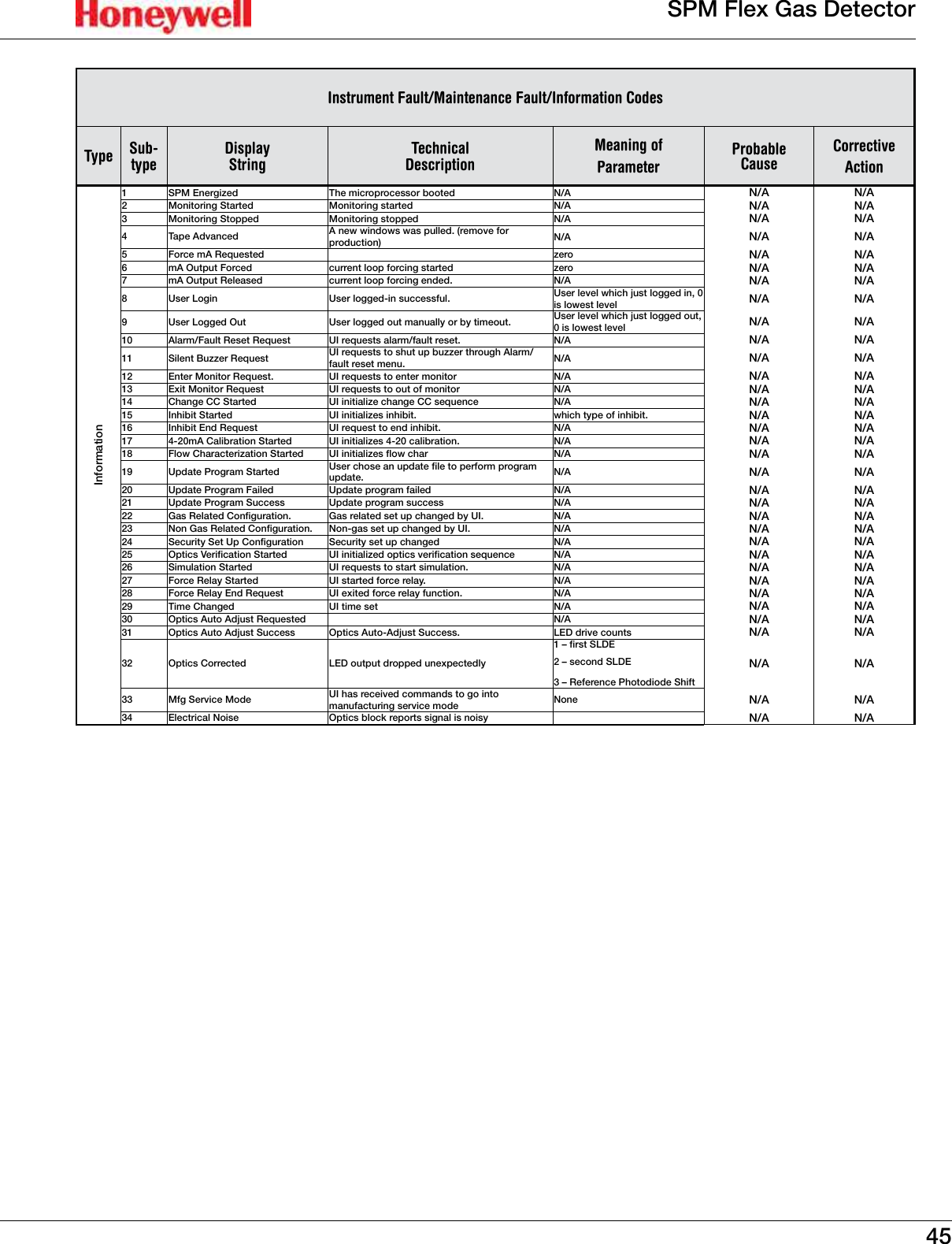
45SPM Flex Gas DetectorInstrument Fault/Maintenance Fault/Information CodesType Sub-typeDisplay StringTechnical DescriptionMeaning of ParameterProbableCauseCorrective  ActionInformation1 SPM Energized The microprocessor booted N/A N/A N/A2 Monitoring Started Monitoring started N/A N/A N/A3 Monitoring Stopped Monitoring stopped N/A N/A N/A4 Tape Advanced A new windows was pulled� (remove for production) N/A N/A N/A5 Force mA Requested zero N/A N/A6 mA Output Forced current loop forcing started zero N/A N/A7 mA Output Released current loop forcing ended� N/A N/A N/A8 User Login User logged-in successful� User level which just logged in, 0 is lowest level N/A N/A9 User Logged Out User logged out manually or by timeout� User level which just logged out, 0 is lowest level N/A N/A10  Alarm/Fault Reset Request UI requests alarm/fault reset� N/A N/A N/A11 Silent Buzzer Request UI requests to shut up buzzer through Alarm/fault reset menu� N/A N/A N/A12 Enter Monitor Request� UI requests to enter monitor N/A N/A N/A13 Exit Monitor Request UI requests to out of monitor N/A N/A N/A14 Change CC Started UI initialize change CC sequence N/A N/A N/A15 Inhibit Started UI initializes inhibit� which type of inhibit� N/A N/A16 Inhibit End Request UI request to end inhibit� N/A N/A N/A17 4-20mA Calibration Started UI initializes 4-20 calibration� N/A N/A N/A18 Flow Characterization Started  UI initializes flow char N/A N/A N/A19 Update Program Started User chose an update file to perform program update� N/A N/A N/A20 Update Program Failed Update program failed N/A N/A N/A21 Update Program Success Update program success N/A N/A N/A22 Gas Related Configuration� Gas related set up changed by UI� N/A N/A N/A23 Non Gas Related Configuration� Non-gas set up changed by UI� N/A N/A N/A24 Security Set Up Configuration Security set up changed N/A N/A N/A25 Optics Verification Started UI initialized optics verification sequence N/A N/A N/A26 Simulation Started UI requests to start simulation� N/A N/A N/A27 Force Relay Started UI started force relay� N/A N/A N/A28 Force Relay End Request UI exited force relay function�  N/A N/A N/A29 Time Changed UI time set N/A N/A N/A30 Optics Auto Adjust Requested N/A N/A N/A31 Optics Auto Adjust Success Optics Auto-Adjust Success� LED drive counts N/A N/A32 Optics Corrected LED output dropped unexpectedly1 – first SLDE2 – second SLDE3 – Reference Photodiode ShiftN/A N/A33 Mfg Service Mode UI has received commands to go into manufacturing service mode None N/A N/A34 Electrical Noise Optics block reports signal is noisy N/A N/A
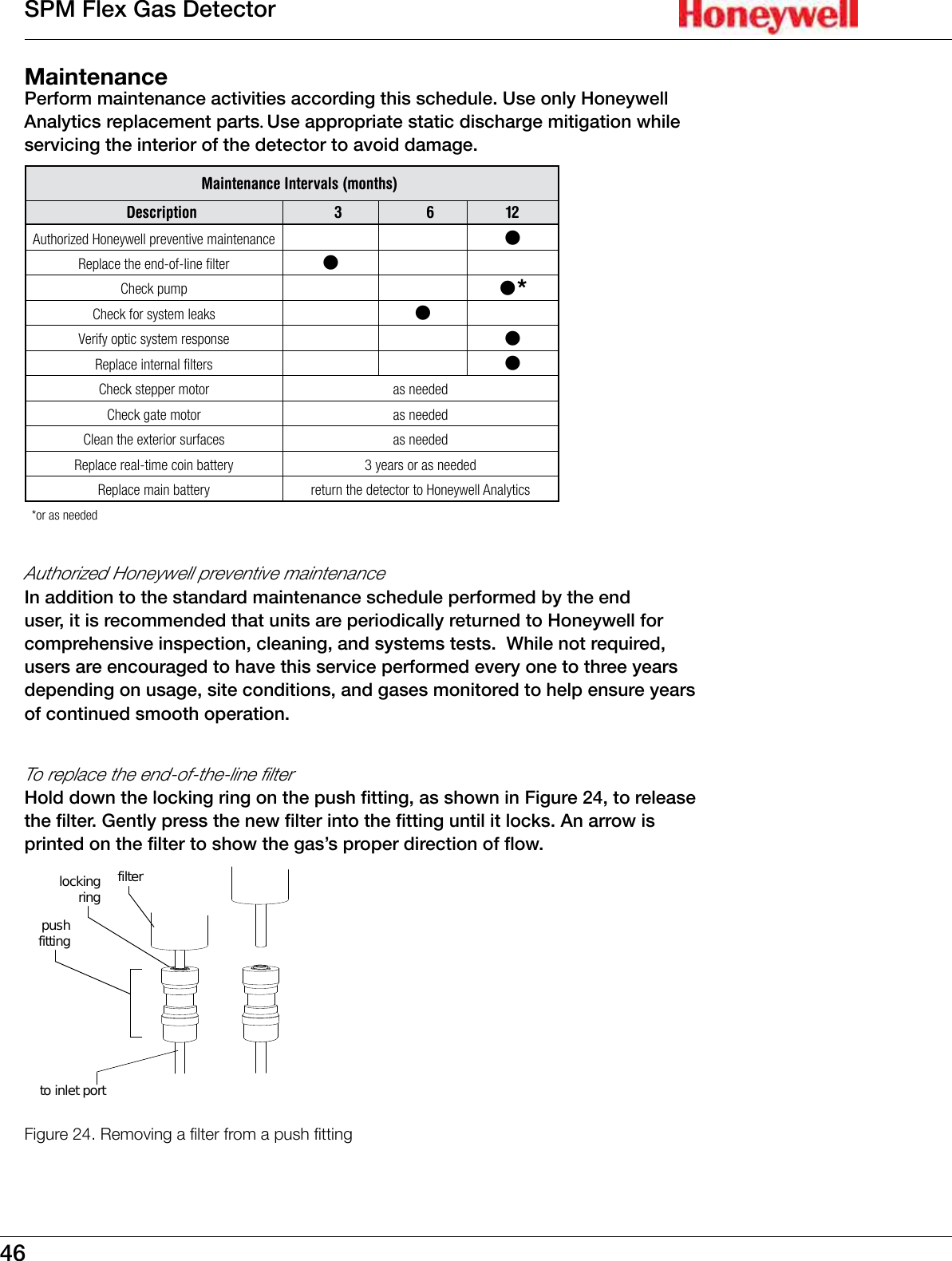
46SPM Flex Gas DetectorMaintenancePerform maintenance activities according this schedule� Use only Honeywell Analytics replacement parts. Use appropriate static discharge mitigation while servicing the interior of the detector to avoid damage�Maintenance Intervals (months)Description 3 6 12Authorized Honeywell preventive maintenance lReplace the end-of-line filter lCheck pump l*Check for system leaks lVerify optic system response lReplace internal filters lCheck stepper motor as neededCheck gate motor as neededClean the exterior surfaces as neededReplace real-time coin battery 3 years or as neededReplace main battery return the detector to Honeywell Analytics*or as neededAuthorized Honeywell preventive maintenanceIn addition to the standard maintenance schedule performed by the end user, it is recommended that units are periodically returned to Honeywell for comprehensive inspection, cleaning, and systems tests�  While not required, users are encouraged to have this service performed every one to three years depending on usage, site conditions, and gases monitored to help ensure years of continued smooth operation�   To replace the end-of-the-line filterHold down the locking ring on the push fitting, as shown in Figure 24, to release the filter� Gently press the new filter into the fitting until it locks� An arrow is printed on the filter to show the gas’s proper direction of flow�filterlockingringpushfittingto inlet portFigure 24. Removing a lter from a push tting
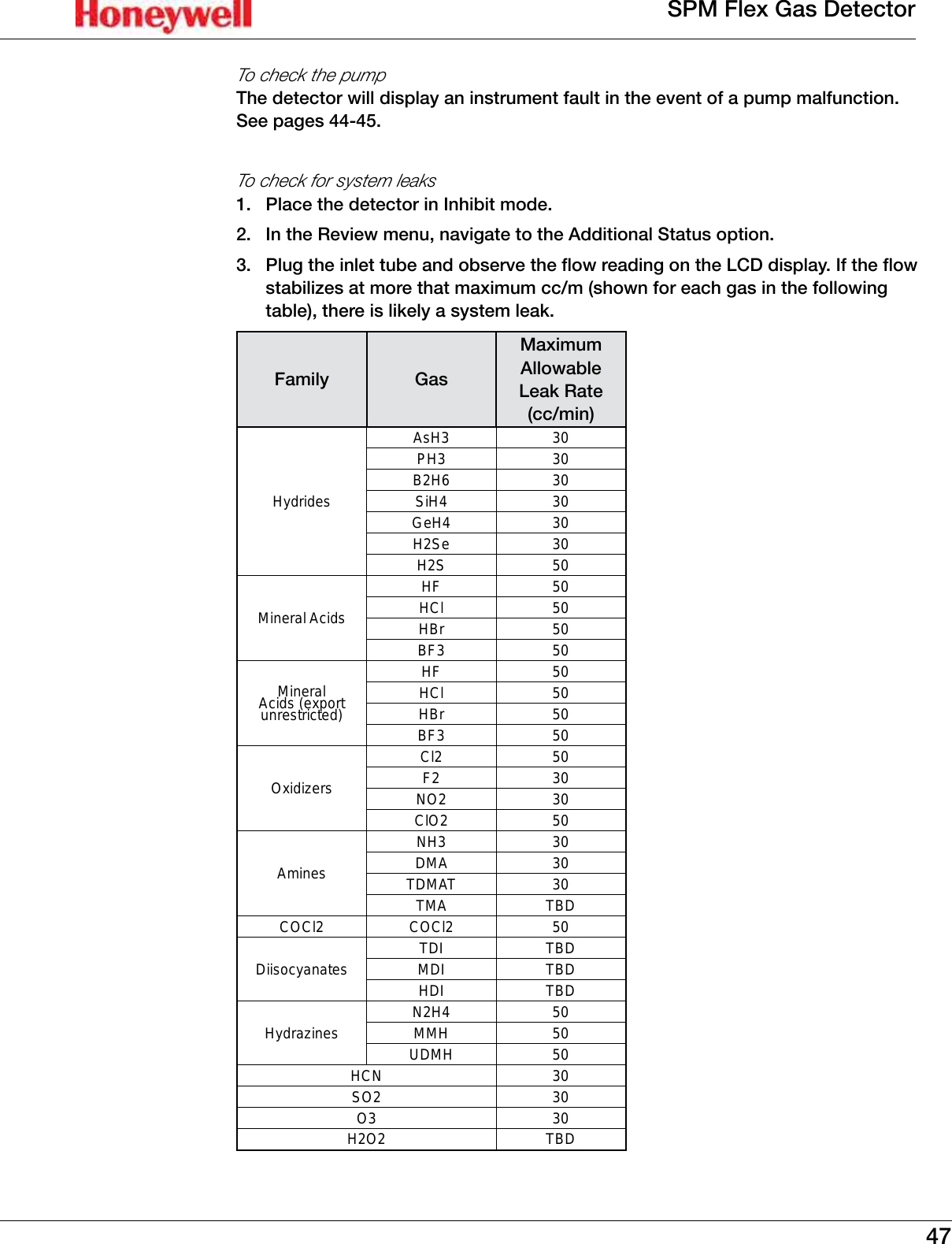
47SPM Flex Gas DetectorTo check the pumpThe detector will display an instrument fault in the event of a pump malfunction� See pages 44-45�To check for system leaks1�  Place the detector in Inhibit mode� 2�  In the Review menu, navigate to the Additional Status option� 3�  Plug the inlet tube and observe the flow reading on the LCD display� If the flow stabilizes at more that maximum cc/m (shown for each gas in the following table), there is likely a system leak�Family GasMaximum Allowable Leak Rate (cc/min)HydridesAsH3 30PH3 30B2H6 30SiH4 30GeH4 30H2Se 30H2S 50Mineral AcidsHF 50HCl 50HBr 50BF3 50Mineral Acids (export unrestricted)HF 50HCl 50HBr 50BF3 50OxidizersCl2 50F2 30NO2 30ClO2 50AminesNH3 30DMA 30TDMAT 30TMA TBDCOCl2 COCl2 50Diisocyanates TDI TBDMDI TBDHDI TBDHydrazines N2H4 50MMH 50UDMH 50HCN 30SO2 30O3 30H2O2 TBD
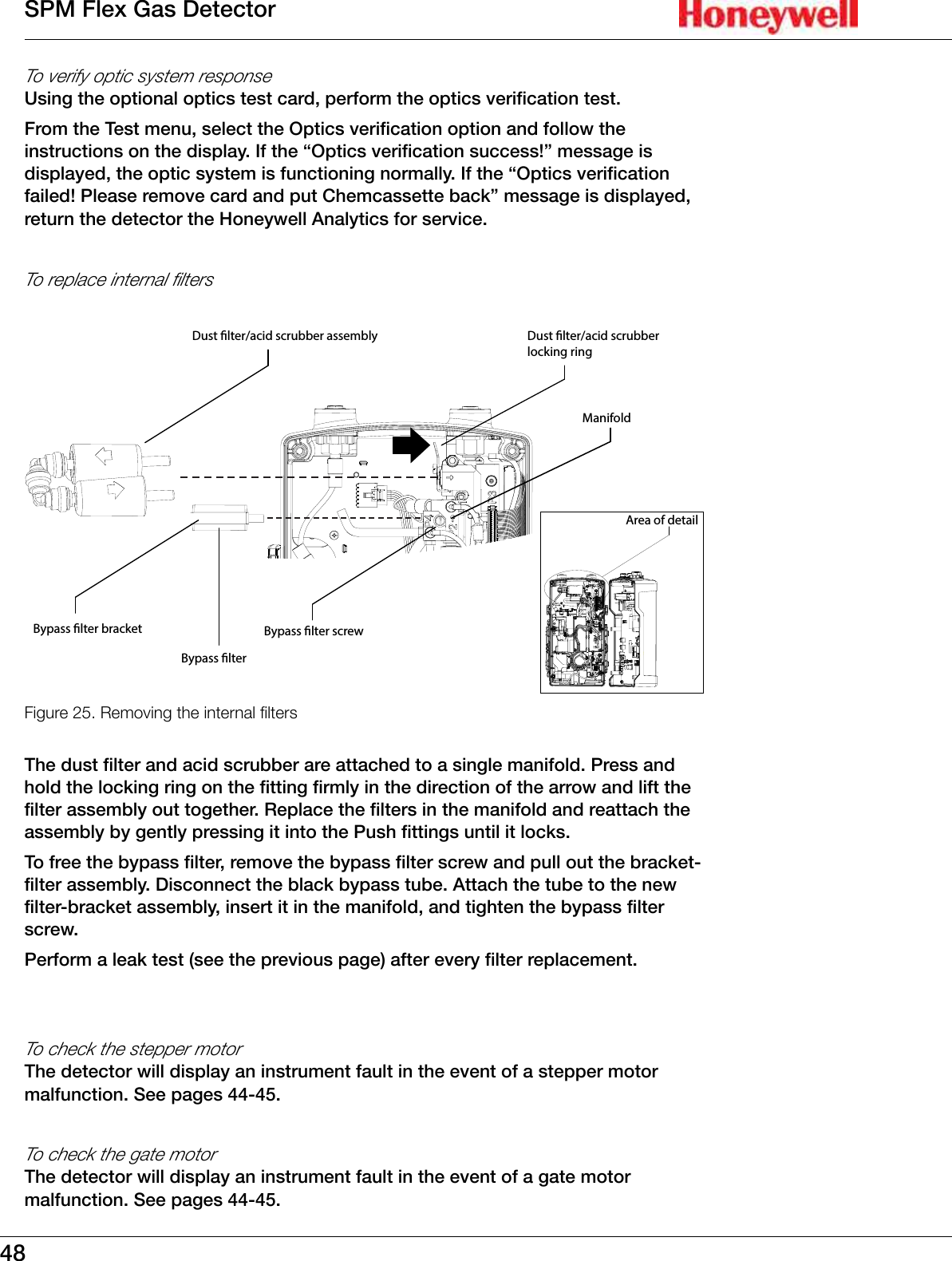
48SPM Flex Gas DetectorTo verify optic system responseUsing the optional optics test card, perform the optics verification test�From the Test menu, select the Optics verification option and follow the instructions on the display� If the “Optics verification success!” message is displayed, the optic system is functioning normally� If the “Optics verification failed! Please remove card and put Chemcassette back” message is displayed, return the detector the Honeywell Analytics for service�To replace internal filtersFigure 25. Bypass lterBypass lter bracketDust lter/acid scrubber assembly Dust lter/acid scrubber locking ringBypass lter screwArea of detailManifold Removing the internal ltersThe dust filter and acid scrubber are attached to a single manifold� Press and hold the locking ring on the fitting firmly in the direction of the arrow and lift the filter assembly out together� Replace the filters in the manifold and reattach the assembly by gently pressing it into the Push fittings until it locks� To free the bypass filter, remove the bypass filter screw and pull out the bracket-filter assembly� Disconnect the black bypass tube� Attach the tube to the new filter-bracket assembly, insert it in the manifold, and tighten the bypass filter screw�Perform a leak test (see the previous page) after every filter replacement�To check the stepper motorThe detector will display an instrument fault in the event of a stepper motor malfunction� See pages 44-45�To check the gate motorThe detector will display an instrument fault in the event of a gate motor malfunction� See pages 44-45�
49SPM Flex Gas DetectorTo replace the real-time coin batteryThe battery can be removed by gripping it firmly with needle-nose pliers and pulling straight out� Gently press the new battery with the positive (+) side facing out until it snaps into place�24  VDC 4-20  mARelay 1Relay 2COM    NC     NOFaultCOM    NC     NO/753303Energizer0% HgEDAMINUSAReal-timecoin batteryFigure 26. The real-time coin batteryTo clean the exterior surfacesExterior surfaces of the detector can be cleaned with a soft cloth moistened with water or with 6% IPA alcohol wipes� Storing the detectorWhen storing the detector with the power adaptor plugged in, the rocker switch can be left in the on position; the battery will continue charging� The detector can also be charged with the rocker switch off�When storing the detector without being plugged into the power adaptor, turn the rocker switch off� This will minimize the power �� This is the recommended setting for long-term storage or for transporting the detector� Charge the detector at least four hours every three months (the rocker switch can remain off)�RecyclingAt the end of its usable life, return the detector to Honeywell Analytics for recycling� Storing Chemcassette® cartridgesFollow the instructions on the cartridge label for acceptable storage temperatures and expiration dates�
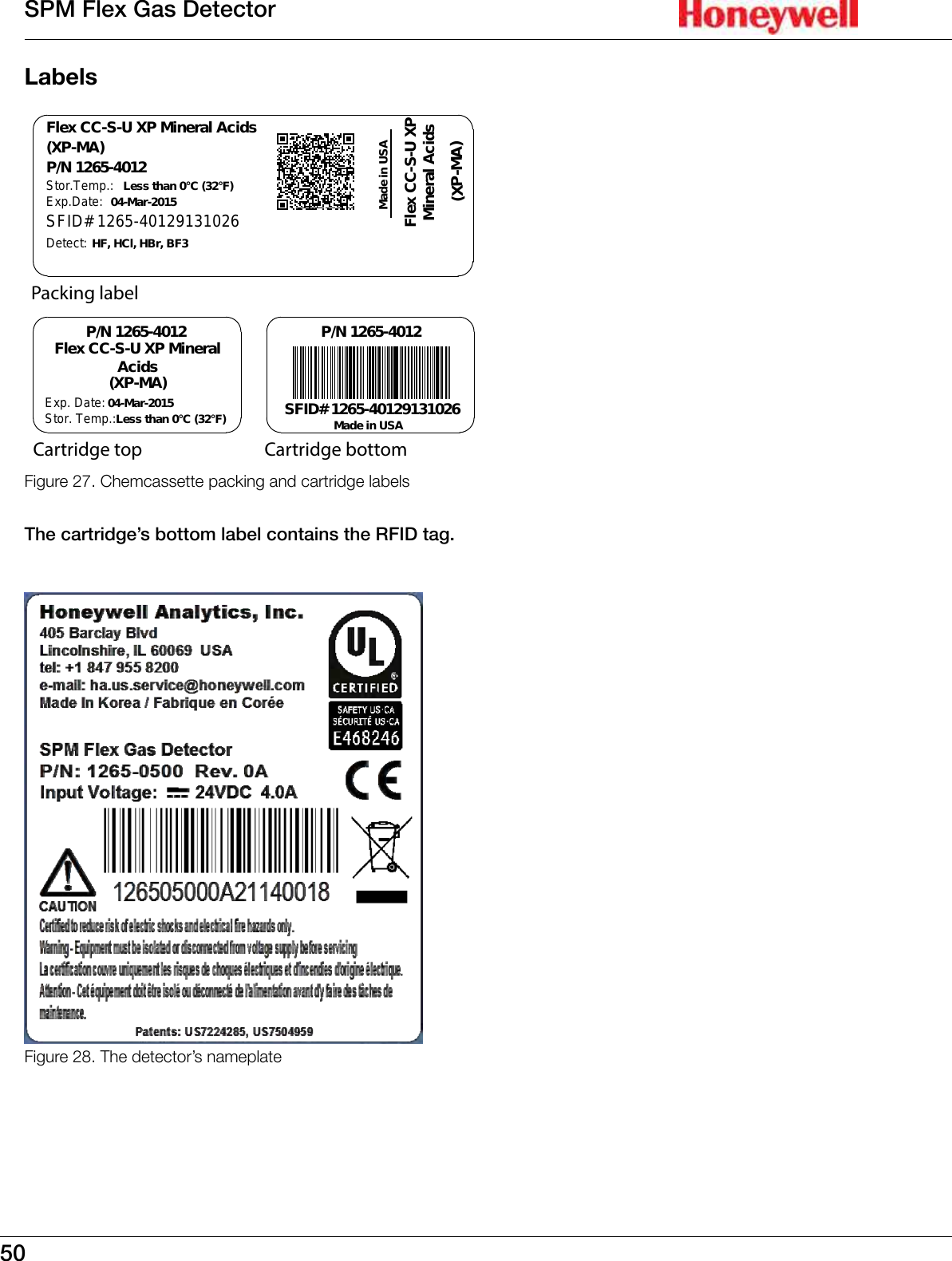
50SPM Flex Gas DetectorLabelsSFID# 1265-40129131026Flex CC-S-U XPMineral AcidsLess than 0°C (32°F)Less than 0°C (32°F)04-Mar-201504-Mar-2015P/N 1265-4012Flex CC-S-U XP Mineral AcidsP/N 1265-4012 P/N 1265-4012(XP-MA)(XP-MA)Stor.Temp.:Exp.Date:Stor. Temp.:Exp. Date: Made in USAMade in USASFID# 1265-40129131026Detect: HF, HCl, HBr, BF3Flex CC-S-U XP MineralAcids(XP-MA)Packing labelCartridge bottomCartridge topFigure 27. Chemcassette packing and cartridge labels The cartridge’s bottom label contains the RFID tag�Figure 28. The detector’s nameplate
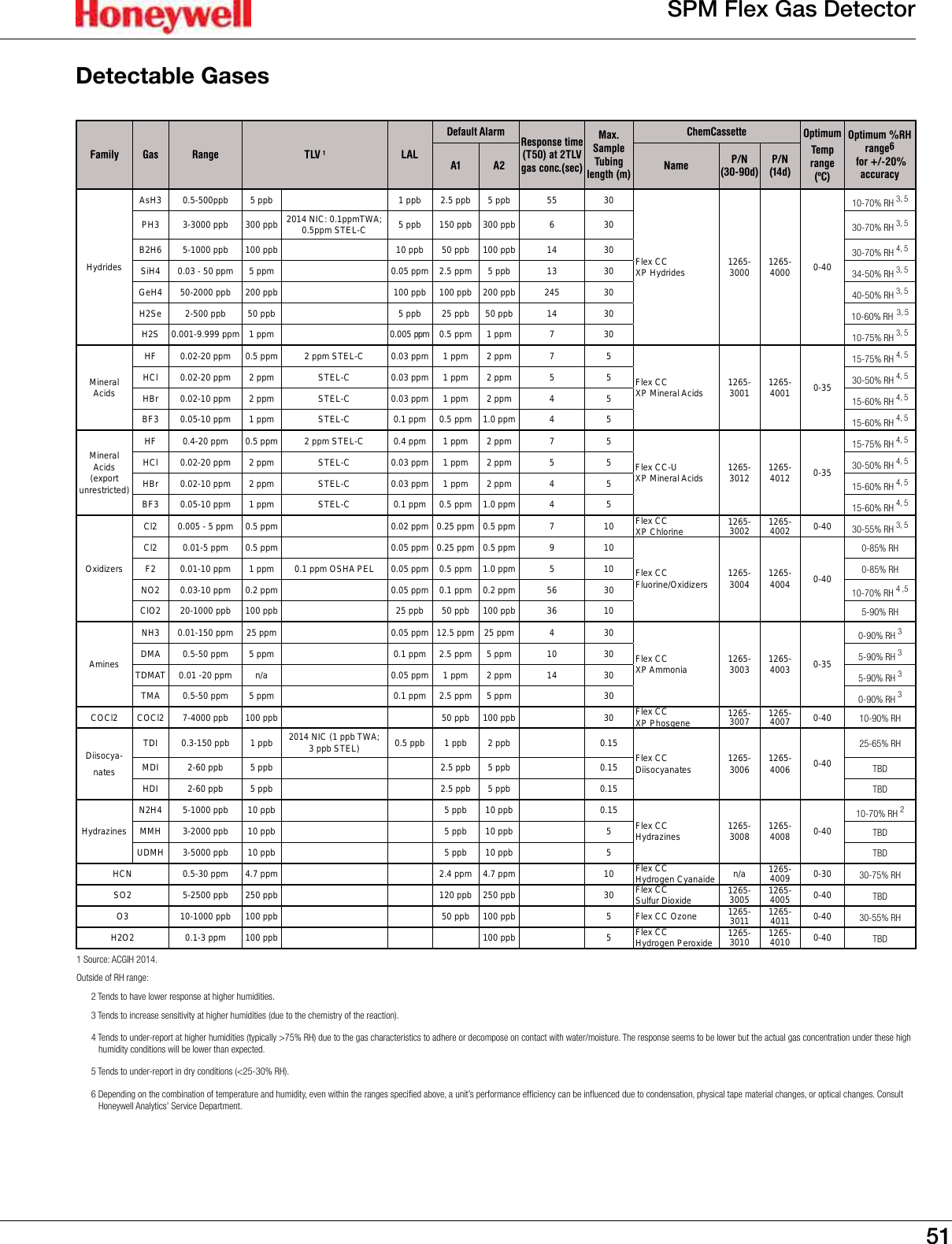
51SPM Flex Gas DetectorDetectable GasesFamily Gas Range TLV 1LALDefault Alarm Response time (T50) at 2TLV gas conc.(sec)Max. Sample Tubing length (m)ChemCassette Optimum Temp range (ºC) Optimum %RH range6  for +/-20%    accuracyA1 A2 Name P/N (30-90d)P/N (14d)HydridesAsH3 0.5-500ppb 5 ppb 1 ppb 2.5 ppb 5 ppb 55 30Flex CC XP Hydrides 1265-3000 1265-4000 0-4010-70% RH 3, 5PH3 3-3000 ppb 300 ppb 2014 NIC: 0.1ppmTWA; 0.5ppm STEL-C 5 ppb 150 ppb 300 ppb 6 30 30-70% RH 3, 5B2H6 5-1000 ppb 100 ppb 10 ppb 50 ppb 100 ppb 14 30 30-70% RH 4, 5SiH4 0.03 - 50 ppm 5 ppm 0.05 ppm 2.5 ppm 5 ppb 13 30 34-50% RH 3, 5GeH4 50-2000 ppb 200 ppb 100 ppb 100 ppb 200 ppb 245 30 40-50% RH 3, 5H2Se 2-500 ppb 50 ppb 5 ppb 25 ppb 50 ppb 14 30 10-60% RH 3, 5H2S 0.001-9.999 ppm 1 ppm 0.005 ppm 0.5 ppm 1 ppm 7 30 10-75% RH 3, 5Mineral AcidsHF 0.02-20 ppm 0.5 ppm 2 ppm STEL-C 0.03 ppm 1 ppm 2 ppm 7 5Flex CC XP Mineral Acids 1265-3001 1265-4001 0-3515-75% RH 4, 5HCl 0.02-20 ppm 2 ppm  STEL-C 0.03 ppm 1 ppm 2 ppm 5 5 30-50% RH 4, 5HBr 0.02-10 ppm 2 ppm  STEL-C 0.03 ppm 1 ppm 2 ppm 4 5 15-60% RH 4, 5BF3 0.05-10 ppm 1 ppm STEL-C 0.1 ppm 0.5 ppm 1.0 ppm 4 5 15-60% RH 4, 5Mineral Acids (export unrestricted)HF 0.4-20 ppm 0.5 ppm 2 ppm STEL-C 0.4 ppm 1 ppm 2 ppm 7 5Flex CC-U XP Mineral Acids 1265-3012 1265-4012 0-3515-75% RH 4, 5HCl 0.02-20 ppm 2 ppm  STEL-C 0.03 ppm 1 ppm 2 ppm 5 5 30-50% RH 4, 5HBr 0.02-10 ppm 2 ppm  STEL-C 0.03 ppm 1 ppm 2 ppm 4 5 15-60% RH 4, 5BF3 0.05-10 ppm 1 ppm STEL-C 0.1 ppm 0.5 ppm 1.0 ppm 4 5 15-60% RH 4, 5OxidizersCl2 0.005 - 5 ppm 0.5 ppm 0.02 ppm 0.25 ppm 0.5 ppm 7 10 Flex CC XP Chlorine 1265-3002 1265-4002 0-40 30-55% RH 3, 5Cl2 0.01-5 ppm 0.5 ppm 0.05 ppm 0.25 ppm 0.5 ppm 9 10Flex CC Fluorine/Oxidizers 1265-3004 1265-4004 0-400-85% RHF2 0.01-10 ppm 1 ppm 0.1 ppm OSHA PEL 0.05 ppm 0.5 ppm 1.0 ppm 5 10 0-85% RHNO2 0.03-10 ppm 0.2 ppm 0.05 ppm 0.1 ppm 0.2 ppm 56 30 10-70% RH 4 ,5ClO2 20-1000 ppb 100 ppb 25 ppb 50 ppb 100 ppb 36 10 5-90% RHAminesNH3 0.01-150 ppm 25 ppm 0.05 ppm 12.5 ppm 25 ppm 4 30Flex CC XP Ammonia 1265-3003 1265-4003 0-350-90% RH 3DMA 0.5-50 ppm 5 ppm 0.1 ppm 2.5 ppm 5 ppm 10 30 5-90% RH 3TDMAT 0.01 -20 ppm n/a 0.05 ppm 1 ppm 2 ppm 14 30 5-90% RH 3TMA 0.5-50 ppm 5 ppm 0.1 ppm 2.5 ppm 5 ppm 30 0-90% RH 3COCl2 COCl2 7-4000 ppb 100 ppb 50 ppb 100 ppb 30 Flex CC XP Phosgene 1265-3007 1265-4007 0-40 10-90% RHDiisocya-natesTDI 0.3-150 ppb 1 ppb 2014 NIC (1 ppb TWA; 3 ppb STEL) 0.5 ppb 1 ppb 2 ppb 0.15 Flex CC Diisocyanates 1265-3006 1265-4006 0-4025-65% RHMDI 2-60 ppb 5 ppb 2.5 ppb 5 ppb 0.15 TBDHDI 2-60 ppb 5 ppb 2.5 ppb 5 ppb 0.15 TBDHydrazinesN2H4 5-1000 ppb 10 ppb 5 ppb 10 ppb 0.15 Flex CCHydrazines 1265-3008 1265-4008 0-4010-70% RH 2MMH 3-2000 ppb 10 ppb 5 ppb 10 ppb 5 TBDUDMH 3-5000 ppb 10 ppb 5 ppb 10 ppb 5 TBDHCN 0.5-30 ppm 4.7 ppm 2.4 ppm 4.7 ppm 10 Flex CC Hydrogen Cyanaide n/a 1265-4009 0-30 30-75% RHSO2 5-2500 ppb 250 ppb 120 ppb 250 ppb 30 Flex CC Sulfur Dioxide 1265-3005 1265-4005 0-40 TBDO3 10-1000 ppb 100 ppb 50 ppb 100 ppb 5 Flex CC Ozone 1265-3011 1265-4011 0-40 30-55% RHH2O2 0.1-3 ppm 100 ppb 100 ppb 5 Flex CC Hydrogen Peroxide 1265-3010 1265-4010 0-40 TBD1 Source: ACGIH 2014.Outside of RH range: 2 Tends to have lower response at higher humidities.3 Tends to increase sensitivity at higher humidities (due to the chemistry of the reaction).4 Tends to under-report at higher humidities (typically >75% RH) due to the gas characteristics to adhere or decompose on contact with water/moisture. The response seems to be lower but the actual gas concentration under these high humidity conditions will be lower than expected.5 Tends to under-report in dry conditions (<25-30% RH).6 Depending on the combination of temperature and humidity, even within the ranges specified above, a unit’s performance efficiency can be influenced due to condensation, physical tape material changes, or optical changes. Consult Honeywell Analytics’ Service Department.
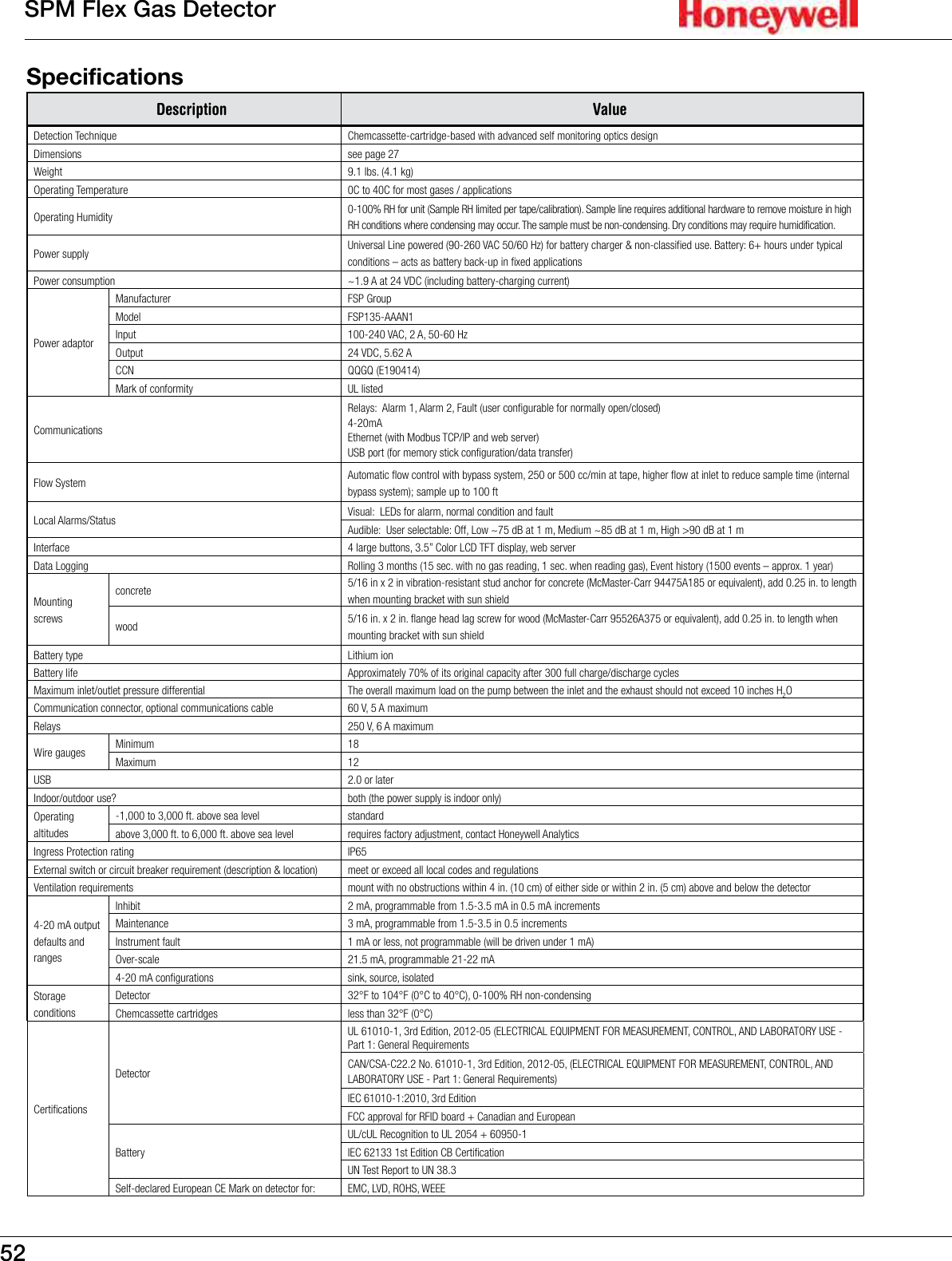
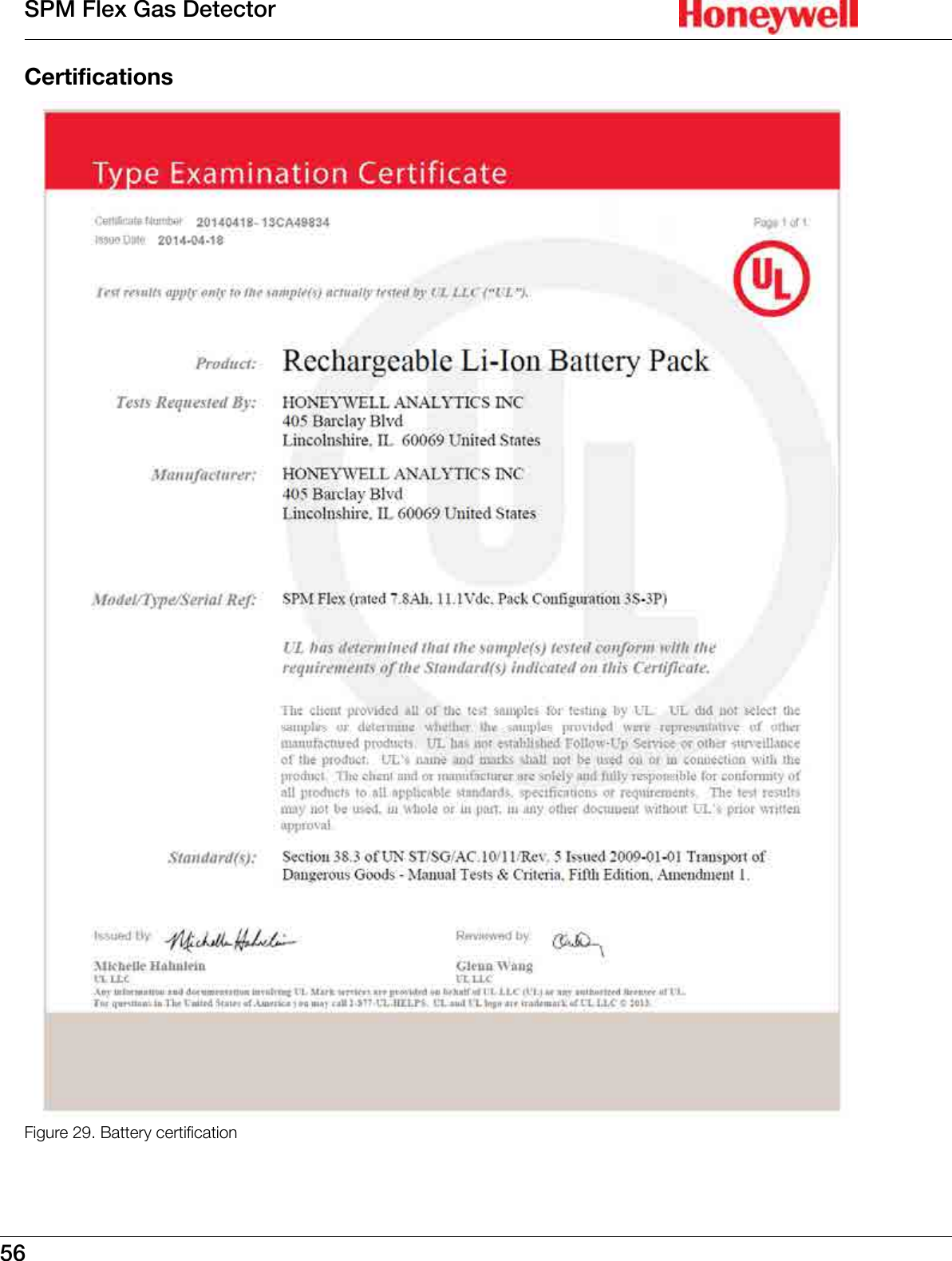
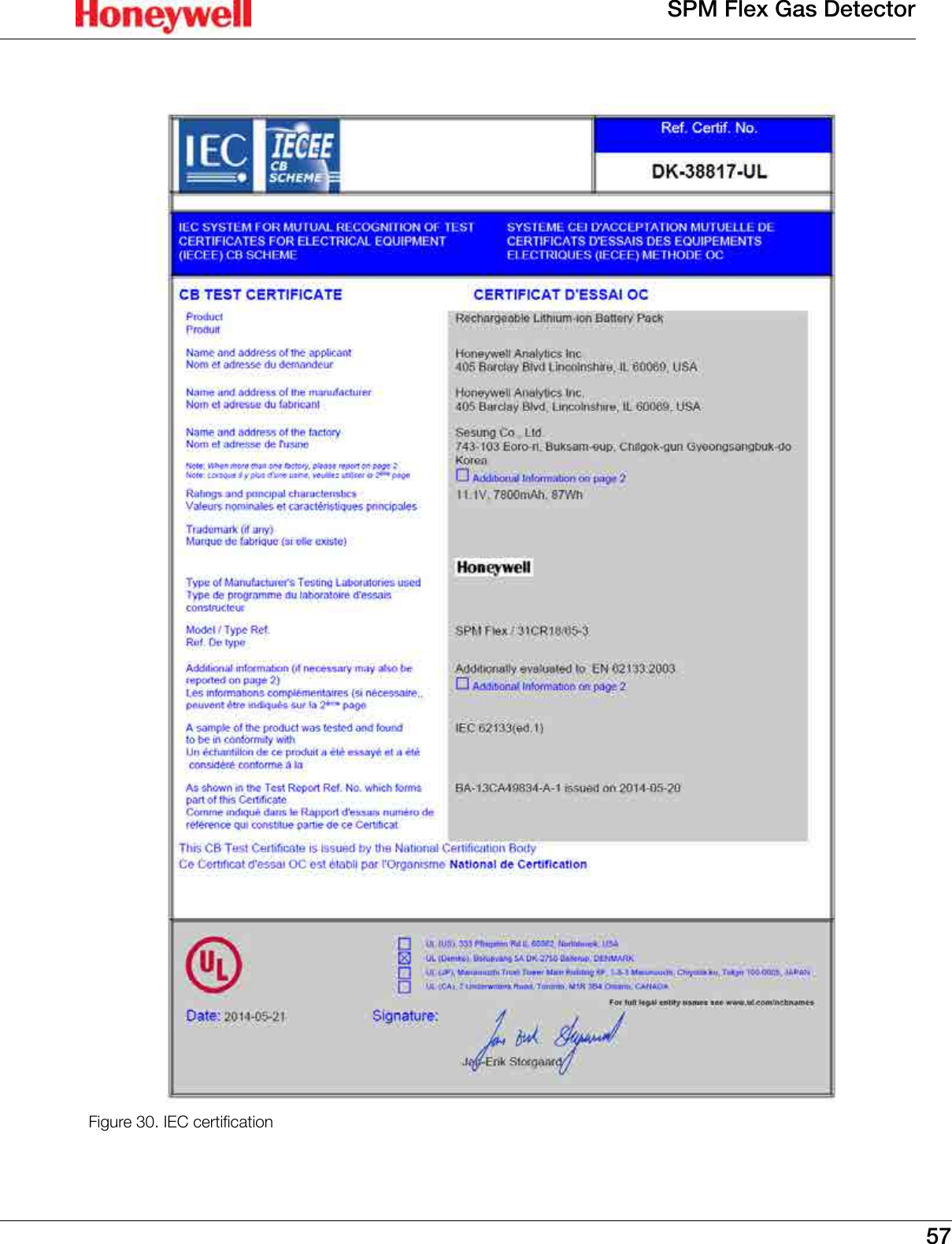
52SPM Flex Gas DetectorSpecifications Description ValueDetection Technique Chemcassette-cartridge-based with advanced self monitoring optics designDimensions see page 27Weight 9.1 lbs. (4.1 kg)Operating Temperature 0C to 40C for most gases / applicationsOperating Humidity 0-100% RH for unit (Sample RH limited per tape/calibration). Sample line requires additional hardware to remove moisture in high RH conditions where condensing may occur. The sample must be non-condensing. Dry conditions may require humidification.Power supply Universal Line powered (90-260 VAC 50/60 Hz) for battery charger & non-classified use. Battery: 6+ hours under typical conditions – acts as battery back-up in fixed applicationsPower consumption ~1.9 A at 24 VDC (including battery-charging current)Power adaptorManufacturer FSP GroupModel FSP135-AAAN1Input 100-240 VAC, 2 A, 50-60 HzOutput 24 VDC, 5.62 ACCN QQGQ (E190414)Mark of conformity UL listedCommunicationsRelays:  Alarm 1, Alarm 2, Fault (user configurable for normally open/closed)4-20mAEthernet (with Modbus TCP/IP and web server)USB port (for memory stick configuration/data transfer)Flow System Automatic flow control with bypass system, 250 or 500 cc/min at tape, higher flow at inlet to reduce sample time (internal bypass system); sample up to 100 ftLocal Alarms/Status Visual:  LEDs for alarm, normal condition and faultAudible:  User selectable: Off, Low ~75 dB at 1 m, Medium ~85 dB at 1 m, High >90 dB at 1 mInterface 4 large buttons, 3.5” Color LCD TFT display, web serverData Logging Rolling 3 months (15 sec. with no gas reading, 1 sec. when reading gas), Event history (1500 events – approx. 1 year)Mounting screwsconcrete 5/16 in x 2 in vibration-resistant stud anchor for concrete (McMaster-Carr 94475A185 or equivalent), add 0.25 in. to length when mounting bracket with sun shieldwood 5/16 in. x 2 in. flange head lag screw for wood (McMaster-Carr 95526A375 or equivalent), add 0.25 in. to length when mounting bracket with sun shieldBattery type Lithium ionBattery life Approximately 70% of its original capacity after 300 full charge/discharge cyclesMaximum inlet/outlet pressure differential The overall maximum load on the pump between the inlet and the exhaust should not exceed 10 inches H2OCommunication connector, optional communications cable 60 V, 5 A maximumRelays 250 V, 6 A maximumWire gauges Minimum 18Maximum 12USB 2.0 or laterIndoor/outdoor use? both (the power supply is indoor only)Operating altitudes-1,000 to 3,000 ft. above sea level standardabove 3,000 ft. to 6,000 ft. above sea level requires factory adjustment, contact Honeywell AnalyticsIngress Protection rating IP65External switch or circuit breaker requirement (description & location) meet or exceed all local codes and regulationsVentilation requirements mount with no obstructions within 4 in. (10 cm) of either side or within 2 in. (5 cm) above and below the detector4-20 mA output defaults and rangesInhibit 2 mA, programmable from 1.5-3.5 mA in 0.5 mA incrementsMaintenance 3 mA, programmable from 1.5-3.5 in 0.5 incrementsInstrument fault 1 mA or less, not programmable (will be driven under 1 mA)Over-scale 21.5 mA, programmable 21-22 mA4-20 mA configurations sink, source, isolatedStorage conditionsDetector 32°F to 104°F (0°C to 40°C), 0-100% RH non-condensingChemcassette cartridges less than 32°F (0°C)CertificationsDetectorUL 61010-1, 3rd Edition, 2012-05 (ELECTRICAL EQUIPMENT FOR MEASUREMENT, CONTROL, AND LABORATORY USE - Part 1: General RequirementsCAN/CSA-C22.2 No. 61010-1, 3rd Edition, 2012-05, (ELECTRICAL EQUIPMENT FOR MEASUREMENT, CONTROL, AND LABORATORY USE - Part 1: General Requirements)IEC 61010-1:2010, 3rd EditionFCC approval for RFID board + Canadian and EuropeanBatteryUL/cUL Recognition to UL 2054 + 60950-1IEC 62133 1st Edition CB CertificationUN Test Report to UN 38.3Self-declared European CE Mark on detector for: EMC, LVD, ROHS, WEEE
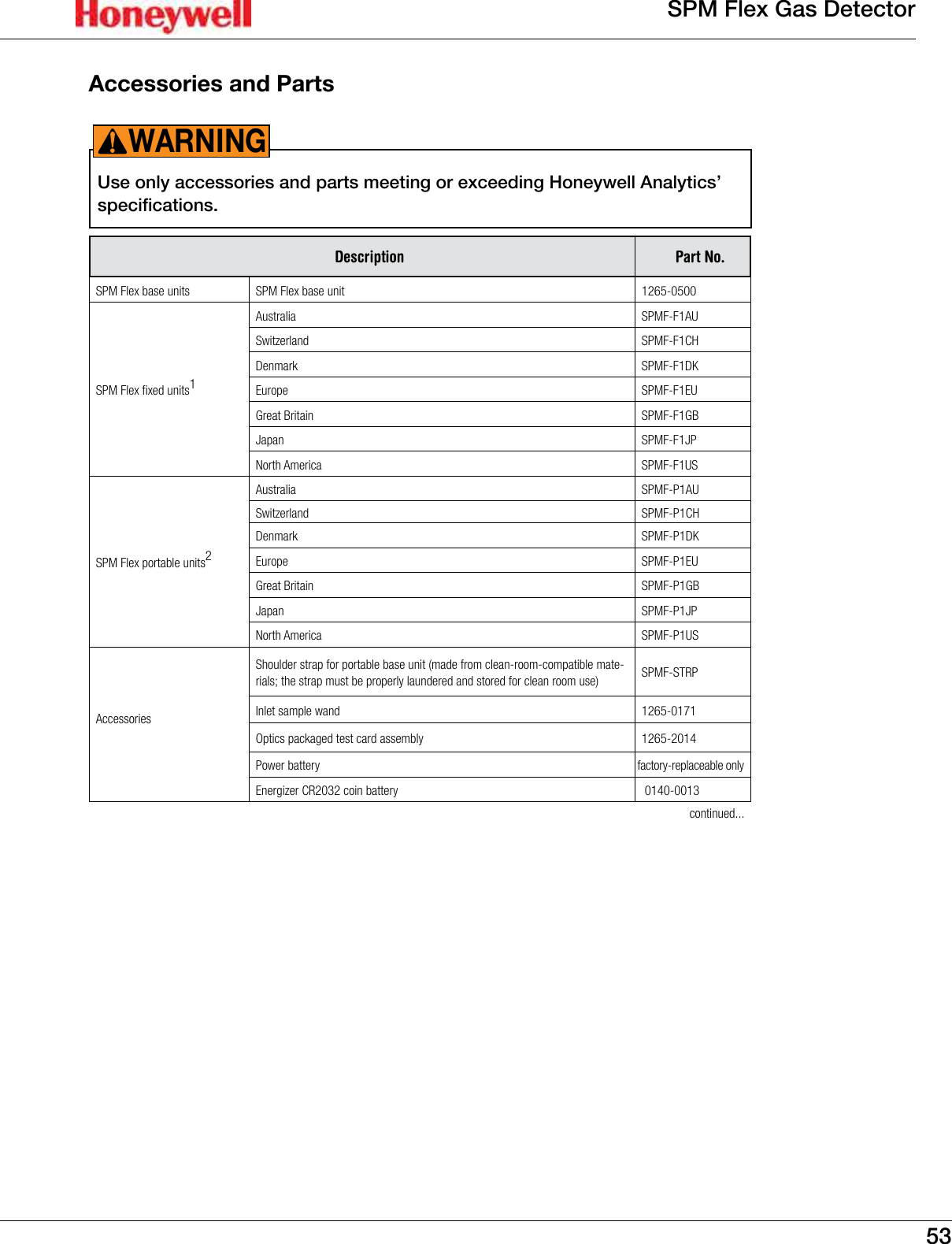
53SPM Flex Gas DetectorAccessories and PartsUse only accessories and parts meeting or exceeding Honeywell Analytics’ specifications�WARNING!Description Part No.SPM Flex base units SPM Flex base unit 1265-0500SPM Flex fixed units1Australia SPMF-F1AUSwitzerland SPMF-F1CHDenmark SPMF-F1DKEurope SPMF-F1EUGreat Britain SPMF-F1GBJapan SPMF-F1JPNorth America SPMF-F1USSPM Flex portable units2Australia SPMF-P1AUSwitzerland SPMF-P1CHDenmark SPMF-P1DKEurope SPMF-P1EUGreat Britain SPMF-P1GBJapan SPMF-P1JPNorth America SPMF-P1USAccessoriesShoulder strap for portable base unit (made from clean-room-compatible mate-rials; the strap must be properly laundered and stored for clean room use) SPMF-STRPInlet sample wand 1265-0171Optics packaged test card assembly 1265-2014Power battery factory-replaceable onlyEnergizer CR2032 coin battery  0140-0013continued...
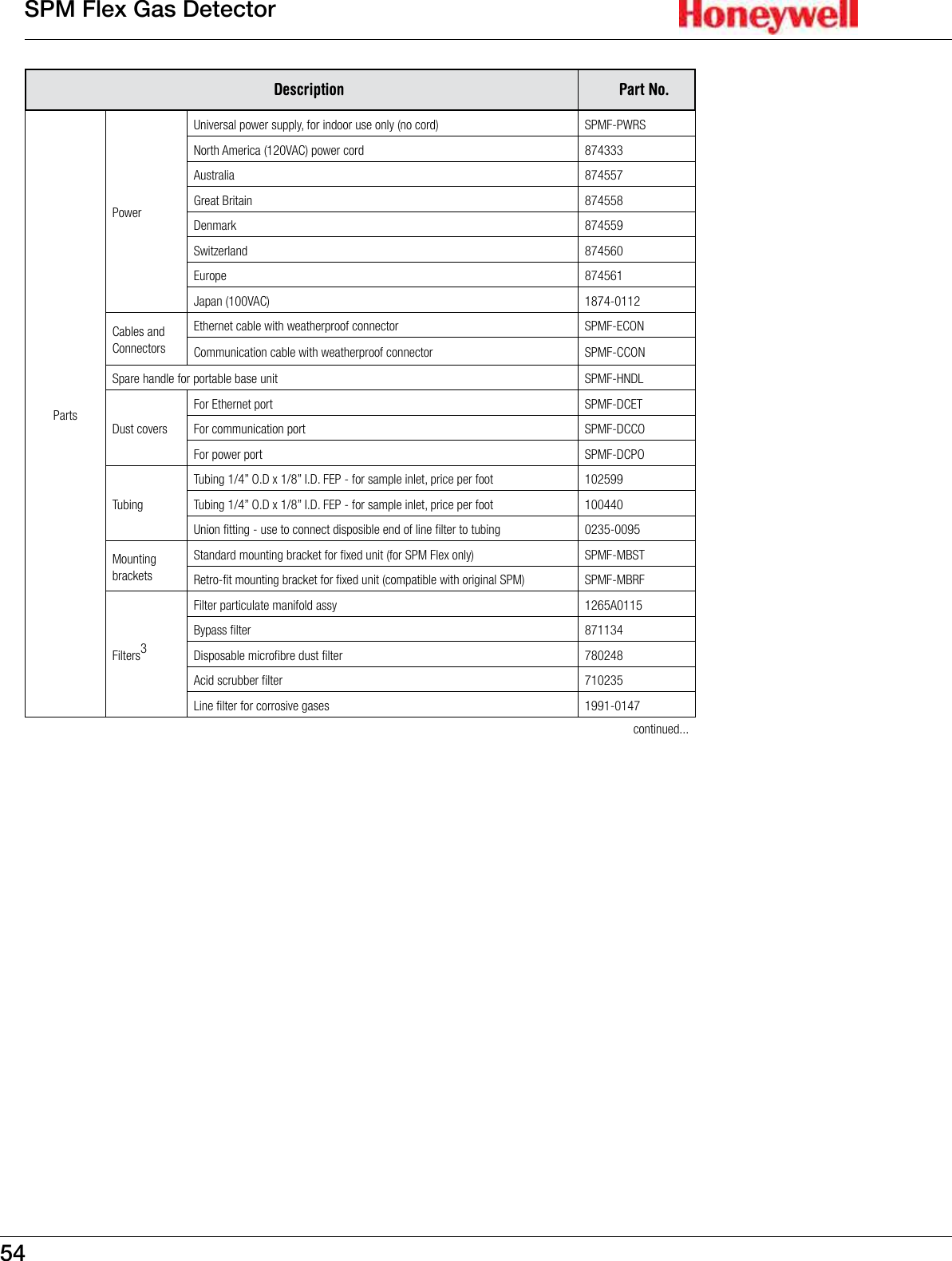
54SPM Flex Gas DetectorDescription Part No.PartsPower Universal power supply, for indoor use only (no cord) SPMF-PWRSNorth America (120VAC) power cord 874333Australia 874557Great Britain 874558Denmark 874559Switzerland 874560Europe 874561Japan (100VAC) 1874-0112Cables and ConnectorsEthernet cable with weatherproof connector  SPMF-ECONCommunication cable with weatherproof connector  SPMF-CCONSpare handle for portable base unit SPMF-HNDLDust covers For Ethernet port SPMF-DCETFor communication port SPMF-DCCOFor power port SPMF-DCPOTubingTubing 1/4” O.D x 1/8” I.D. FEP - for sample inlet, price per foot 102599Tubing 1/4” O.D x 1/8” I.D. FEP - for sample inlet, price per foot 100440Union fitting - use to connect disposible end of line filter to tubing 0235-0095Mounting bracketsStandard mounting bracket for fixed unit (for SPM Flex only) SPMF-MBSTRetro-fit mounting bracket for fixed unit (compatible with original SPM) SPMF-MBRFFilters3Filter particulate manifold assy 1265A0115 Bypass filter 871134 Disposable microfibre dust filter 780248 Acid scrubber filter 710235Line filter for corrosive gases 1991-0147continued...
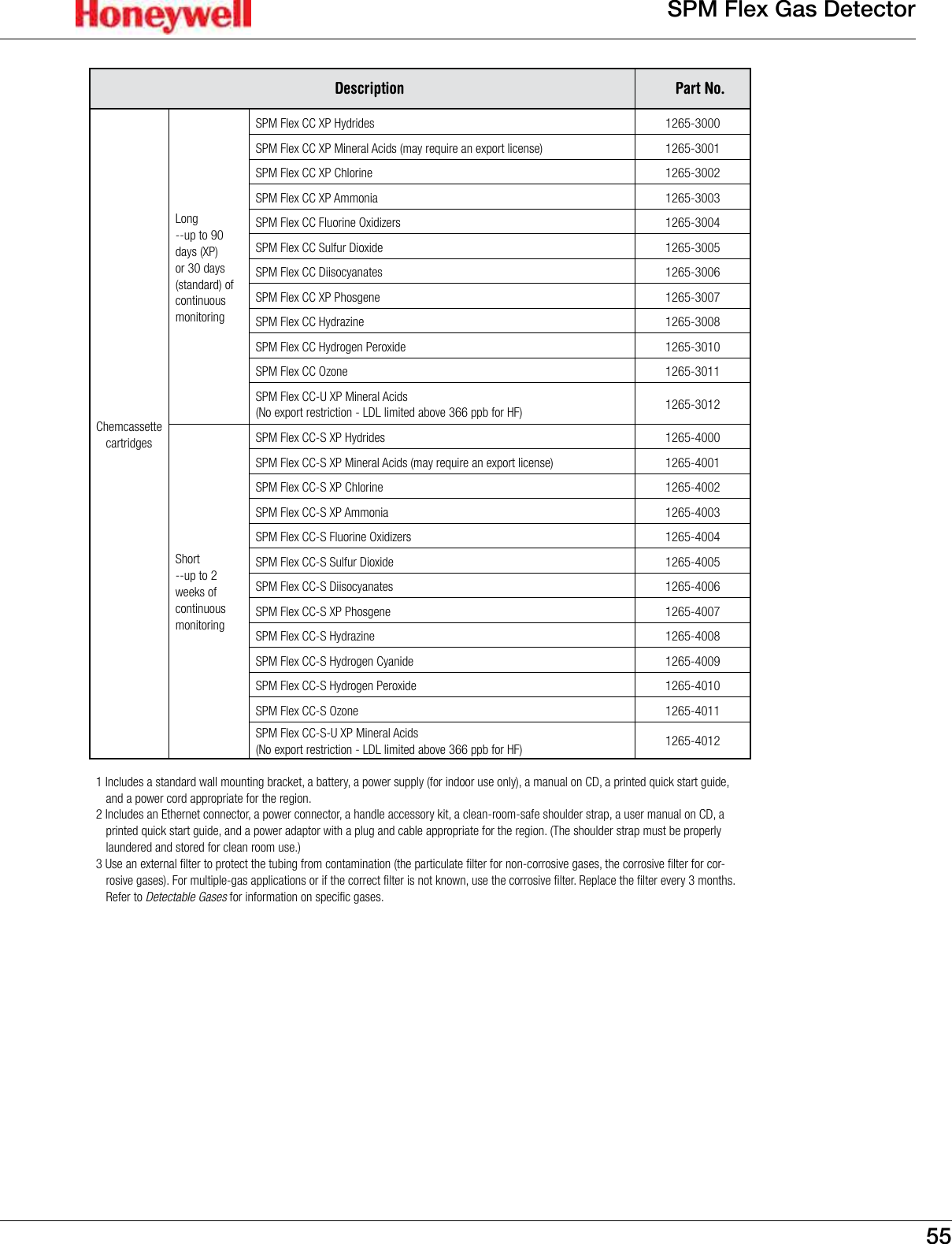
55SPM Flex Gas DetectorDescription Part No.Chemcassette cartridgesLong--up to 90 days (XP) or 30 days (standard) of continuous monitoringSPM Flex CC XP Hydrides 1265-3000SPM Flex CC XP Mineral Acids (may require an export license) 1265-3001SPM Flex CC XP Chlorine 1265-3002SPM Flex CC XP Ammonia 1265-3003SPM Flex CC Fluorine Oxidizers 1265-3004SPM Flex CC Sulfur Dioxide 1265-3005SPM Flex CC Diisocyanates 1265-3006SPM Flex CC XP Phosgene 1265-3007SPM Flex CC Hydrazine 1265-3008SPM Flex CC Hydrogen Peroxide 1265-3010SPM Flex CC Ozone 1265-3011SPM Flex CC-U XP Mineral Acids (No export restriction - LDL limited above 366 ppb for HF) 1265-3012Short --up to 2 weeks of continuous monitoringSPM Flex CC-S XP Hydrides 1265-4000SPM Flex CC-S XP Mineral Acids (may require an export license) 1265-4001SPM Flex CC-S XP Chlorine 1265-4002SPM Flex CC-S XP Ammonia 1265-4003SPM Flex CC-S Fluorine Oxidizers 1265-4004SPM Flex CC-S Sulfur Dioxide 1265-4005SPM Flex CC-S Diisocyanates 1265-4006SPM Flex CC-S XP Phosgene 1265-4007SPM Flex CC-S Hydrazine 1265-4008SPM Flex CC-S Hydrogen Cyanide 1265-4009SPM Flex CC-S Hydrogen Peroxide 1265-4010SPM Flex CC-S Ozone 1265-4011SPM Flex CC-S-U XP Mineral Acids (No export restriction - LDL limited above 366 ppb for HF) 1265-40121 Includes a standard wall mounting bracket, a battery, a power supply (for indoor use only), a manual on CD, a printed quick start guide, and a power cord appropriate for the region.2 Includes an Ethernet connector, a power connector, a handle accessory kit, a clean-room-safe shoulder strap, a user manual on CD, a printed quick start guide, and a power adaptor with a plug and cable appropriate for the region. (The shoulder strap must be properly laundered and stored for clean room use.)3 Use an external filter to protect the tubing from contamination (the particulate filter for non-corrosive gases, the corrosive filter for cor-rosive gases). For multiple-gas applications or if the correct filter is not known, use the corrosive filter. Replace the filter every 3 months. Refer to Detectable Gases for information on specific gases.
56SPM Flex Gas DetectorCertificationsFigure 29. Battery certication
57SPM Flex Gas DetectorFigure 30. IEC certication
58SPM Flex Gas DetectorFigure 31. placeholderXXX certication
59SPM Flex Gas DetectorFigure 32. placeholderYYY certication
60SPM Flex Gas DetectorFigure 33. placeholderZZZ certication
61SPM Flex Gas Detector
62SPM Flex Gas DetectorWarrantiesSPM Flex warrantyAll products are designed and manufactured to the latest internationally recognized standards by Honeywell Analytics under a Quality Management System that is certified to ISO 9001�As such, this instrument (including the pump) is warranted under proper use, to the original end-user purchaser, against any defects in materials or workmanship related failures for a period of 12 months from the date of first turn-on or 18 months from delivery from Honeywell Analytics to the customer, whichever is less� Separate warranty conditions apply to the sensor cartridges limited as indicated below� During this period, Honeywell Analytics will repair or replace defective parts on an exchange basis, F�O�B� to approved service centers on a global basis�This warranty does not cover damage caused by accident, abuse, or abnormal operating conditions�Defective equipment must be returned to Honeywell Analytics for repair� Before returning materials for repair or replacement, the Customer must obtain a Service Event Number (SE#) by contacting Honeywell Analytics Service in advance; include a detailed report stating the nature of the defect and ship the equipment prepaid to Honeywell Analytics’ factory� If no detail report is included, Honeywell Analytics reserves the right to charge an investigative fee (prices available upon request) before any repair or replacement is performed�  Returned goods must detail the Service Event Number (SE#) clearly on the package� Service in the field or at the customer’s premises is not covered under these warranty terms�  Time and travel expenses for on-site warranty services will be charged at Honeywell Analytics’ normal billing rates�  Contact your Honeywell Analytics representative for information on available Service Contracts�Honeywell Analytics shall not be liable for any loss or damage whatsoever or howsoever occasioned which may be a direct or indirect result of the use or operation of the Contract Goods by the Buyer or any Party�This warranty covers the gas detector and parts sold to the Buyer only by authorized distributors, dealers and representatives as appointed by Honeywell Analytics� This warranty does not cover defects attributable to improper installation, repair by an unauthorized person or the use of unauthorized accessories/parts on the product� A warranty claim will only be accepted if a proof of purchase is submitted and all conditions obtained within this Warranty are met� Honeywell Analytics reserves the right to validate any warranty claim prior to processing� Upon acceptance of a warranty claim, Honeywell Analytics will repair or replace the defective product free of charge� The initial warranty period is not extended by virtue of any works carried out there after� Instruments which have been repaired or replaced during the warranty period are warranted for the remainder of the unexpired portion of the original warranty period� Honeywell Analytics is released from all obligations under its warranty in the event repairs or modifications are made by persons other than its own authorized personnel, unless such work is authorized in writing by Honeywell Analytics� Honeywell Analytics is released from all obligations under its warranty in the event that detection substrates other than Honeywell Analytics’ Chemcassettes® have been installed and used in Honeywell Analytics’ instruments�Honeywell Analytics reserves the right to change this policy at any time�  Contact Honeywell Analytics for the most current warranty information�Chemcassette® cartridge warrantyAll Chemcassette cartridges® are warranted for a period not to exceed the Chemcassette® cartridge expiration date printed on each package and tape reel�
63SPM Flex Gas Detector
64SPM Flex Gas DetectorIndexAaccessories  53alarms  33, 37, 38  conguration  33  levels  16  relay’s normal state  39Allen wrench  22altitude  5Bbacklight   intensity  38  timeout period  38bar graph  16, 33battery  10, 30, 32  charge, low  33  level  33, 37  life  10, 30  pack, lithium-ion  10, 30  real-time coin  49  replacement  10, 30bootup  32buttons  15  Accept/Select  16, 32  arrows  16, 32  Power/Cancel  16Ccertications  56Chemcassette cartridges 33  access door  32  bottom label  50  labels  50  RFID tag  50  expiration dates  49  labels  49  loading  17  storage  17, 32, 38, 49  takeup spindle  17  packing labels  50cleaning  49clock  33conduit  19conguration  32Conguration Manager  40connections  congurable  22  relay terminal  20  three-wire  22connectors  19  communications  19, 20  Ethernet  19  power  19  weatherproof  19controls  13, 14cover  11Ddefault gateway  39display  16  back light  34  characteristics  39  dimming options  34  LCD  32  system, LCD and LED  16Eerror messages  18Ethernet  19, 39event history  36  exporting  36  searching  36  sorting  36  web events  36FFactory service mode  38false alarms, preventing  40fasteners  26faults  32, 37  instrument  32  maintenance  33  notications  33    tactile  32  visual  32FEP, see Teon uorinated ethyl-ene polymer  25le system,   default (FAT32)  36  NTFS  36lters,   acid scrubber  48  dust  48  end-of-the-line, replacing  46  external  30  for non-corrosive gases  30  inlet  31  inline  25, 30  internal, replacing  48  particulate  30rmware  38ash drive  36ash slots, internal  40Flow characterization  37ow rate  25, 37ow system optimization  374-20 mA  19, 38  current loop calibration  37  isolated conguration  22  output  22  sink conguration  22  source conguration  22Ggas concentration   level  33  reading  33gas detection algorithm version number  37gases,   detectable (table)  51  sticky corrosive  31gas-wet surfaces  31gate, manual operation  38gate motor, checking  48gateway  37Hhandle  11, 17hinges  17Iicons  32, 33idle timeout period  38IDs  38inhibit   level  39  modes  34, 35  state  37inlet port  25, 31In Monitor mode  32IP address  37, 39J-KKynar  31Llanguages  38Latching  11, 17, 39LDL  38LEDs  32  blue  33  green  32  red  33  yellow  32local codes  19local detector option  25
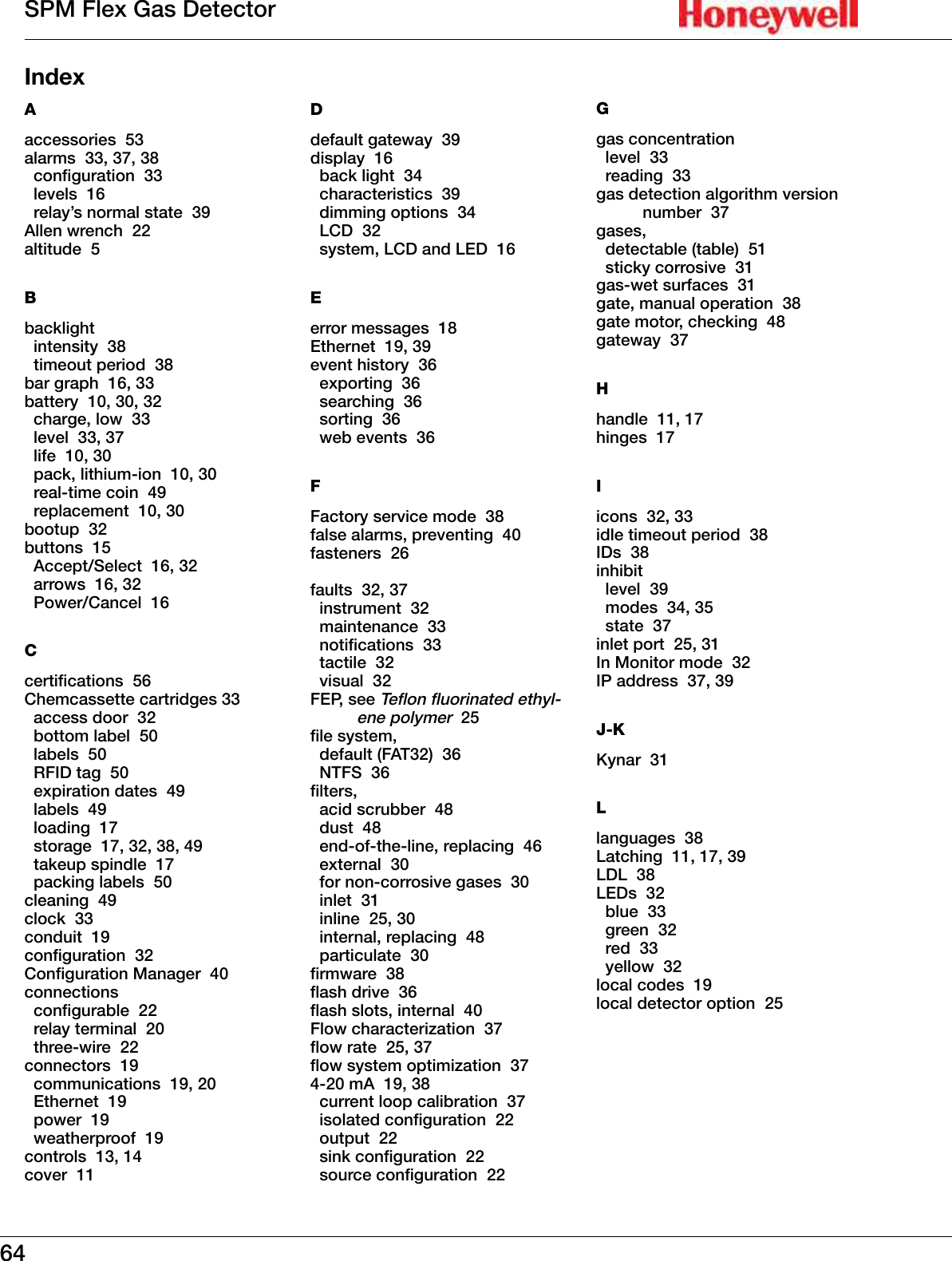
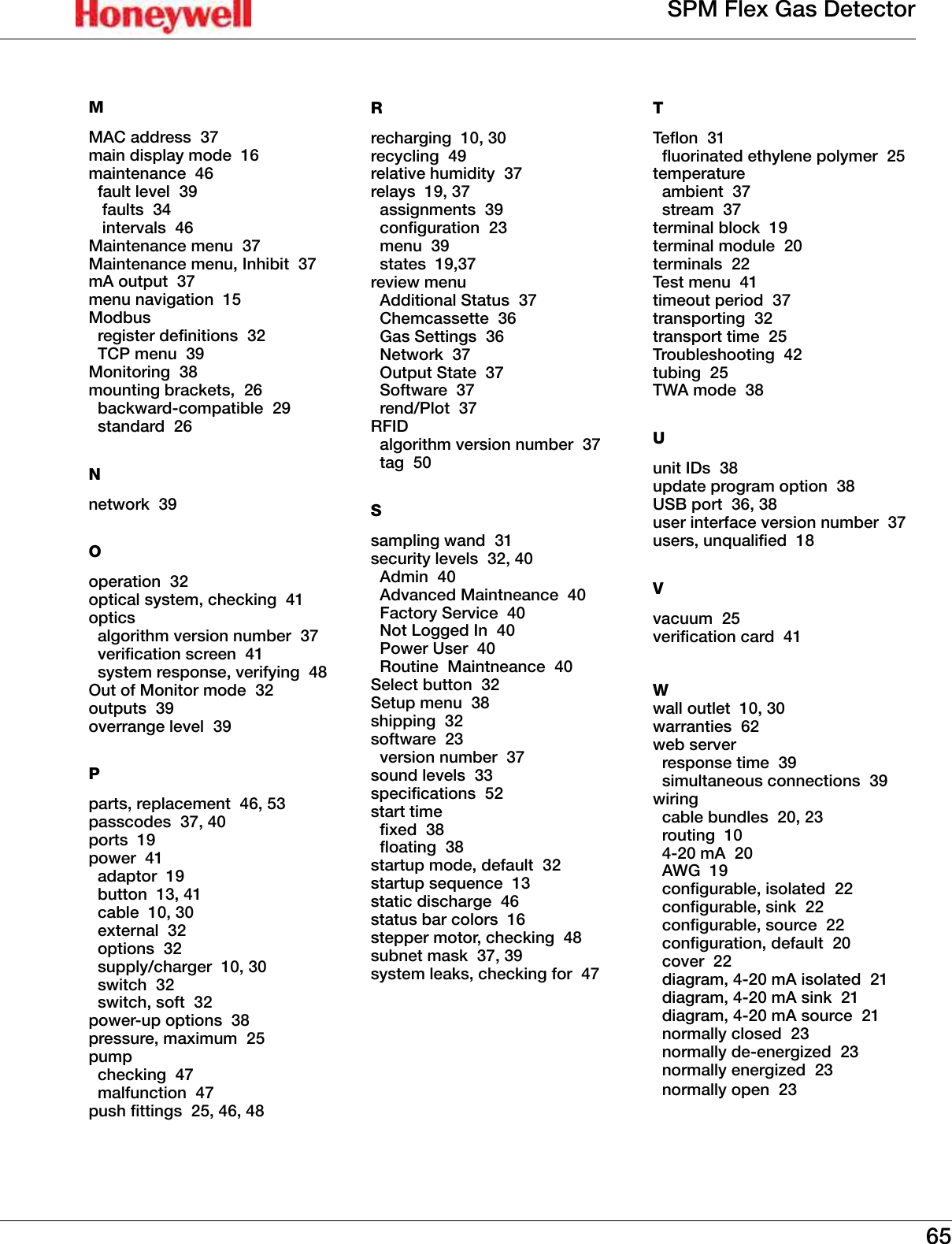
65SPM Flex Gas DetectorMMAC address  37main display mode  16maintenance  46  fault level  39   faults  34   intervals  46Maintenance menu  37Maintenance menu, Inhibit  37mA output  37menu navigation  15Modbus   register denitions  32  TCP menu  39Monitoring  38mounting brackets,  26  backward-compatible  29  standard  26Nnetwork  39Ooperation  32optical system, checking  41optics   algorithm version number  37  verication screen  41  system response, verifying  48Out of Monitor mode  32outputs  39overrange level  39Pparts, replacement  46, 53passcodes  37, 40ports  19power  41  adaptor  19  button  13, 41  cable  10, 30  external  32  options  32  supply/charger  10, 30  switch  32  switch, soft  32power-up options  38pressure, maximum  25pump  checking  47  malfunction  47push ttings  25, 46, 48Rrecharging  10, 30recycling  49relative humidity  37relays  19, 37   assignments  39  conguration  23  menu  39  states  19,37review menu  Additional Status  37  Chemcassette  36  Gas Settings  36  Network  37  Output State  37  Software  37  rend/Plot  37RFID   algorithm version number  37  tag  50Ssampling wand  31security levels  32, 40  Admin  40  Advanced Maintneance  40  Factory Service  40  Not Logged In  40  Power User  40  Routine  Maintneance  40Select button  32Setup menu  38shipping  32software  23  version number  37sound levels  33specications  52start time  xed  38  oating  38startup mode, default  32startup sequence  13static discharge  46status bar colors  16stepper motor, checking  48subnet mask  37, 39system leaks, checking for  47TTeon  31  uorinated ethylene polymer  25temperature  ambient  37  stream  37terminal block  19terminal module  20terminals  22Test menu  41timeout period  37transporting  32transport time  25Troubleshooting  42tubing  25TWA mode  38Uunit IDs  38update program option  38USB port  36, 38user interface version number  37users, unqualied  18Vvacuum  25verication card  41Wwall outlet  10, 30warranties  62web server   response time  39  simultaneous connections  39wiring   cable bundles  20, 23  routing  10  4-20 mA  20  AWG  19  congurable, isolated  22  congurable, sink  22  congurable, source  22  conguration, default  20  cover  22  diagram, 4-20 mA isolated  21  diagram, 4-20 mA sink  21  diagram, 4-20 mA source  21  normally closed  23  normally de-energized  23  normally energized  23  normally open  23
SPM Flex Gas Detector1998M0845Revision 0�74 (will be released as Revision 1)July 2014©2014 Honeywell Analytics

Navigation menu