INTELLIGENT SYSTEMS ISX Debugger and Capture User Manual SETUP

INTELLIGENT SYSTEMS Co.,Ltd. Debugger and Capture SETUP

user manual pt 2b

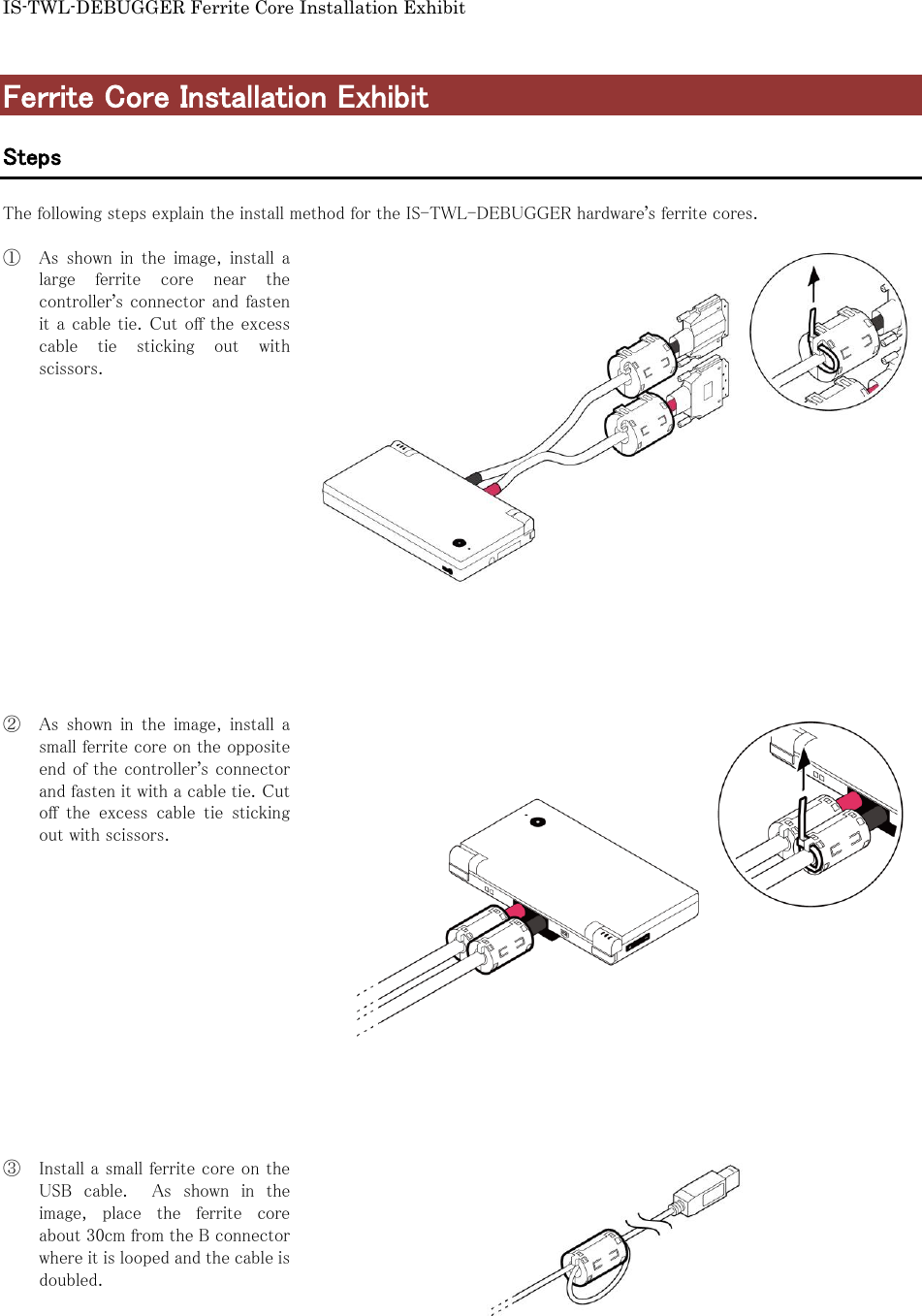
IS-TWL-DEBUGGER Ferrite Core Installation Exhibit  Ferrite Core Installation Exhibit  Steps  The following steps explain the install method for the IS-TWL-DEBUGGER hardware’s ferrite cores.  ① As  shown  in  the  image,  install  a large  ferrite  core  near  the controller’s connector and fasten it a cable tie. Cut off the excess cable  tie  sticking  out  with scissors.                 ② As  shown  in  the  image,  install  a small ferrite core on the opposite end of the controller’s connector and fasten it with a cable tie. Cut off  the  excess  cable  tie  sticking out with scissors.                ③ Install a small ferrite core on the USB  cable.    As  shown  in  the image,  place  the  ferrite  core about 30cm from the B connector where it is looped and the cable is doubled.

Navigation menu