Imagination Technologies 0060 Spread Spectrum Transceiver User Manual
Imagination Technologies Ltd Spread Spectrum Transceiver
User manual
F10
12
3
4
5
6
7
8
910
11
12 13
14
15
16
17
18
19
20 21
22
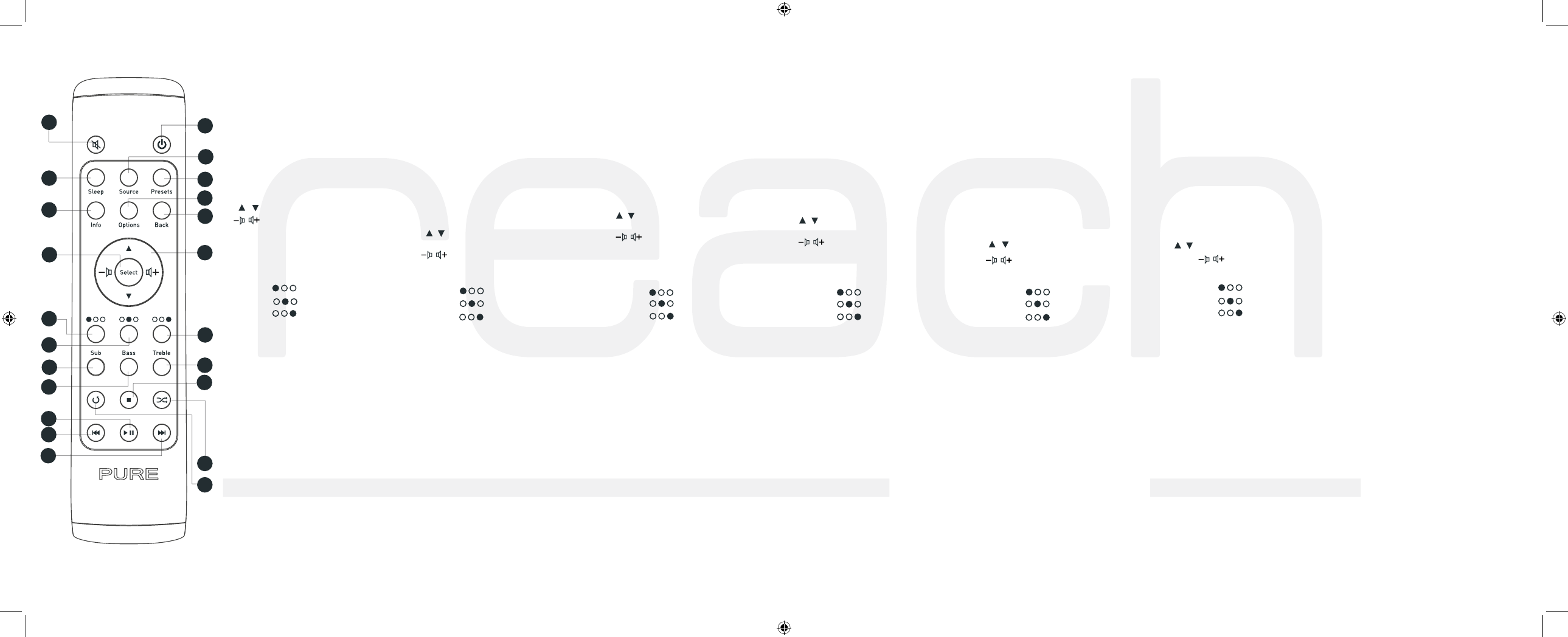
Remote Control Button Guide
1. Mute - Mute speakers/headphones.
2. Power - Switch between On and Standby.
3. Sleep - Press to start a Sleep Timer. Repeat to
increase time.
4. Source - Return to source menu screen.
5. Presets - Store and access your favourites.
6. Info - Change the information shown on screen.
7. Options - change settings.
8. Back - Return to the previous screen.
9. Select - Confirm a selection.
10. / - Select stations/tracks and menu options.
/ - Adjust volume.
Context-sensitive
11. Left [ ]
12. Centre [ ]
13. Right [ ]
AVANTI Flow only
14-16. Sub/Bass/Treble - adjust sound levels.
17. Stop - Stop current track (iPod).
Media player/Podcast/Listen Again/iPod
18. Play - Play/pause current track.
19. Previous track - Play the last track listened to.
Hold down for fast rewind.
20. Next track - Play the next track. Hold down for
fast forward.
Media Player/iPod only
21. Shuffle - Shuffle track order.
22. Repeat - Press once to repeat whole album, twice
to repeat current track.
Übersicht der Bedienelemente
1. Mute - Stummschalten von Lautsprechern /
Kophörer.
2. Power - Umschalten zwischen Betrieb und Standby.
3. Sleep - Drücken Sie diese Taste zum Starten eines
Sleep-Timers. Drücken Sie die Taste wiederholt,
um die Dauer zu verlängern.
4. Source - Zurück zur Anzeige “Source”.
5. Presets - Speichern und Aufrufen von Favoriten.
6. Info - Ändern der angezeigten Informationen.
7. Options -Ändern von Einstellungen.
8. Back - Zurück zur vorherigen Anzeige.
9. Select - Bestätigen einer Auswahl.
10. / - Auswählen von Stationen/Titeln un
Menüoptionen.
/ - Einstellen der Lautstärke.
Kontextabhängig
11. Links [ ]
12. Mitte [ ]
13. Rechts [ ]
Nur AVANTI Flow
14-16. Sub/Bass/Treble - Anpassen der Lautstärken.
17. Stopp - Stoppen des aktuellen Titels (ipod).
Media player/Podcast/Listen Again/iPod
18. Wiedegarbe - Wiedergeben/Unterbrechen des
aktuellen Titels.
19. Letzter Titel – Wiedergeben des zuletzt
angehörten. Titels Halten Sie diese Taste gedrückt,
um den Titel schnell zurückzuspulen.
20. Nächster Titel - Wiedergeben des nächsten Titels
Halten Sie diese Taste gedrückt, um den Titel
schnell vorzuspulen.
Nur Media Player/iPod
21. Shuffle - Zufällige Wiedergabe der Titel.
22. Wiederholen - Drücken Sie diese Taste einmal,
um das gesamte Album zu wiederholen, zweimal,
um den aktuellen Titel zu wiederholen.
Guide des commandes
1. Mute - Mettre les haut-parleurs/écouteurs en
sourdine.
2. Power - Commuter entre en marche et en veille.
3. Sleep - Activer le temporisateur de mise en veille.
Répéter pour augmenter le temps.
4. Source -Revenir à l’écran de menu source.
5. Presets - Enregistrer et accéder à vos favoris.
6. Info -Accéder aux informations à l’écran.
7. Options - Accéder aux paramètres.
8. Back - Retour à l’écran précédent.
9. Select - Confirmer une sélection.
10. / - Sélectionner des stations/plages et
options de menu.
/ - Régler le volume.
Fonction contextuelle
11. Gauche [ ]
12. Centre [ ]
13. Droite [ ]
AVANTI Flow uniquement
14-16. Sub/Bass/Treble - Réglage des niveaux
sonores.
17. Arrêt - Arrêt de la plage courante (iPod).
Media player/Podcast/Listen Again/iPod
18. Lecture - Lecture/pause la plage courante.
19. Plage précédente - Lecture de la dernière plage
écoutée. Maintenir enfoncé pour retour rapide.
20. Plage suivante - Lecture de la plage suivante.
Maintenir enfoncé pour avance rapide.
Media Player uniquement/iPod
21. Shuffle - Lecture des plages selon un ordre
aléatoire.
22. Repeat - Appuyer une fois pour répéter tout
l’album, deux fois pour répéter la plage courante.
Guida ai comandi
1. Mute - la modalità silenziosa di altoparlanti/cuffie.
2. Power - Commutare tra le modalità On e Standby.
3. Sleep - Avviare il timer di autospegnimento.
Premere ripetutamente per aumen tare il tempo.
4. Source - Tornare alla schermata del menu sorgenti.
5. Presets - Memorizzare e accedere ai preferiti.
6. Info - Modificare le informazioni visualizzate sullo
schermo.
7. Options - Modificare le impostazioni
8. Back - Tornare alla schermata precedente.
9. Select - Confermare una selezione.
10. / - Selezionare stazioni/tracce e voci del
menu.
/ - Regolare il volume.
Tasti contestuali
11. Sinistra [ ]
12. Centro [ ]
13. Destra [ ]
Solo AVANTI Flow
14-16. Sub/Bass/Treble - Regolare i livelli sonori.
17. Stop - Interrompere la traccia corrente (iPod).
Media player/Podcast/Listen Again/iPod
18. Riproduci - Riprodurre/mettere in pausa la
traccia corrente.
19. Traccia precedente - Riprodurre l’ultima traccia
ascoltata. Tenerlo premuto per procedere al
riavolgimento rapido.
20. Traccia successiva - Riprodurre la traccia
successiva. Tenere premuto per procedere
all’avanzamento rapido.
Solo Media Player/iPod
21. Shuffle - Riprodurre le tracce in ordine casuale.
22. Repeat - una volta per ripetere l’intero album,
due volte per ripetere la traccia corrente.
Vejledning til knapper
1. Mute - afbryder lyden i højttalere/hovedtelefoner.
2. Power - tænder for radioen og aktiverer standby-
tilstand.
3. Sleep - aktiverer sleep-timer-funktionen. Tryk igen
for at øge tiden.
4. Source - vender tilbage til kildemenuskærmen.
5. Presets - gemmer og åbner dine foretrukne
forudindstillinger.
6. Info - skifter mellem de oplysninger, der vises på
skærmen.
7. Options - ændrer indstillinger
8. Back - vender tilbage til forrige skærmbillede.
9. Select - bekræfter et valg.
10. / - vælger stationer/spor og menupunkter.
/ - regulerer lydstyrken.
Kontekstafhængig
11. Venstre [ ]
12. Center [ ]
13. Højre [ ]
Kun AVANTI Flow
14-16. Sub/Bass/Treble - juster lydstyrker.
17. Stop - afbryder det aktuelle spor (iPod).
Media player/Podcast/Listen Again/iPod
18. Play - afspiller/pauser det aktuelle spor.
19. Previous track - Pafspiller det sidste spor, der
har været spillet. Hold knappen nede for at spole
hurtigt tilbage.
20. Next track - Pafspiller det næste spor. Hold knap
pen nede for at spole hurtigt frem.
Kun Media Player/iPod
21. Shuffle - afspiller sporene i vilkårlig rækkefølge.
22. Repeat - tryk en gang for at gentage afspilningen
af hele albummet og to gange for at gentage
afspilningen af det aktuelle spor.
Guía de botones
1. Mute - Silencia los altavoces/auriculares.
2. Power - Cambia entre en funcionamiento y en
standby.
3. Sleep - Pulse para establecer un temporizador
para dormir. Repita para aumentar el tiempo.
4. Source - Vuelve a la pantalla del menú de fuentes.
5. Presets - Almacena y da acceso a sus ajustes
predeterminados favoritos.
6. Info - Cambia la información que aparece en
pantalla.
7. Options - Modifica la configuración.
8. Back - Vuelve a la pantalla anterior.
9. Select - Confirma una selección.
10. / Selecciona emisoras/pistas y opciones del
menú. / - Ajusta el volumen.
Sensible al contexto
11. Izquierda [ ]
12. Centro [ ]
13. Derecha [ ]
AVANTI Flow únicamente
14-16. Sub/Bass/Treble - Ajusta los niveles de
sonido.
17. Stop - Detiene la pista actual (iPod).
Safety Instructions
1. Read these instructions – All the safety and operating instructions
should be read before this product is operated.
2. Keep these instructions – The safety and operating instructions
should be retained for future reference.
3. Heed all warnings – All warnings on the appliance and in the
operating instructions should be adhered to.
4. Follow all instructions – All operating and use instructions should
be followed.
5. Do not use this apparatus near water or moisture
Prescriptions de sécurité
1. Veuillez lire les présentes instructions – Il faut lire toutes les
instructions de sécurité et d'utilisation avant d'utiliser le présent
produit.
2. Veuillez conserver les présentes instructions – Il faut conserver
les instructions de sécurité et d'utilisation en lieu sûr pour toute
référence ultérieure.
3. Veuillez observer tous les avertissements – Il faut observer tous les
avertissements figurant sur l'appareil ou dans le mode d'emploi.
4. Veuillez suivre toutes les instructions – Il faut suivre toutes les
instructions d'utilisation.
5. N'utilisez pas cet appareil à proximité d'une source d'eau ou
d'humidité
Wichtige Sicherheitsanweisungen
1. Anweisungen lesen – Alle Sicherheits- und Bedienungsanweisungen
müssen gelesen werden, bevor dieses Produkt in Betrieb genommen
wird.
2. Anweisungen aufbewahren – Die Sicherheits- und
Bedienungsanweisungen sind zum späteren Nachlesen
aufzubewahren.
3. Alle Anweisungen befolgen – Alle Sicherheits- und
Bedienungsanweisungen müssen beachtet werden.
4. Nur mit einem trockenen Tuch reinigen.
5. Die Belüftungsöffnungen nicht verdecken. Beim Einbau diese
Anweisungen beachten.
Prescrizioni di sicurezza
1. Leggere queste istruzioni – Prima di utilizzare il prodotto, è opportuno
leggere tutte le prescrizioni di sicurezza e le istruzioni d'uso.
2. Conservare queste istruzioni – Le prescrizioni di sicurezza e le
istruzioni d'uso dovrebbero essere conservate per eventuale futura
consultazione.
3. Attenersi alle istruzioni – È importante rispettare tutte le prescrizioni di
sicurezza e seguire le istruzioni d'uso.
4. Pulire solo con un panno asciutto.
5. Non ostruire le aperture di ventilazione. Installare seguendo le presenti
istruzioni.
Vigtige sikkerhedsanvisninger
1. Læs disse anvisninger – Alle sikkerheds- og driftsanvisninger skal
læses, før produktet tages i brug.
2. Gem anvisningerne – Sikkerheds- og driftsanvisningerne skal
gemmes til fremtidig brug.
3. Følg alle anvisninger – Alle sikkerheds- og driftsanvisninger skal
følges.
4. Rengør kun med en tør klud.
5. Bloker ikke ventilationsåbningerne. Installer i henhold til disse
anvisninger.
Instrucciones de seguridad
1. Lea estas instrucciones – Antes de utilizar este producto se deben
leer todas las instrucciones de seguridad y de funcionamiento.
2. Conserve estas instrucciones – Conserve las instrucciones de
seguridad y de funcionamiento para consultarlas más adelante.
3. Respete todas las advertencias – Siga todas las advertencias que
figuran en el aparato y en las instrucciones de funcionamiento.
4. Siga todas las instrucciones – Se deben seguir todas las
instrucciones de funcionamiento y de uso.
5. No utilice este aparato cerca del agua o en ambientes húmedos
Media player/Podcast/Volver a escuchar/iPod
18. Play - Reproduce/pausa la pista actual.
19. Previous track - Reproduce la última
pistaescuchada. Mantenga pulsado para
rebobinar.
20. Next track - Reproduce la siguiente pista.
Mantenga pulsado para avanzar.
Media Player/iPod únicamente
21. Shuffle - Orden de pistas aleatorio.
22. Repeat - Pulse una vez para repetir el álbum
entero y dos veces para repetir la pista actual.
reachf10_spanish_us.indd 1 02/07/2010 17:19:09

F10
Additional settings
Upgrade
Bind Remote
Bind remote
Press and on your
remote at the same
time
Bind remote
Binding is complete
Bind remote
Press Select on your remote
to test the bind.
Restart
A.
B.
C.
D.
1. Switch your radio on.
2. Select Options, then select Additional settings.
3. Select Bind remote* (A).
4. Press Repeat + Shuffle [ + ] on the
remote at the same time (B).
5. Press Select on your remote to test the binding
(C+D)
Koppeln Ihrer Fernbedienung
1. Schalten Sie das Radio ein.
2. Wählen Sie Options und dann
Additional settings.
3. Wählen Sie Bind remote* (A).
4. Drücken Sie auf der Fernbedienung gleichzeitig
die Tasten Repeat + Shuffle [ + ] (B).
5. Drücken Sie auf der Fernbedienung “Select”, um
die Kopplung zu bestätigen. (C+D)
Binding your remote
You can now use your remote to control all of
your Flow radio’s functions.
See over for full description of remote button
functions.
*If Bind remote is not available, you may need to
update your radio’s software. Please refer to your
manual for instructions on how to do this.
Sie können die Fernbedienung nun nutzen, um
die Funktionen Ihres Flow-Radios zu steuern.
Eine ausführliche Funktionsbeschreibung zu den
Tasten der Fernbedienung finden Sie auf der
nächsten Seite.
*Steht die Funktion Bind Remote nicht zur Verfü
gung, müssen Sie ggf. die Software Ihres Radios
aktualisieren. Anweisungen hierzu finden Sie im
Handbuch.
1. Mettez votre radio sous tension.
2. Sélectionnez Options, puis sélectionnez
Additional settings.
3. Sélectionnez Bind remote* (A).
4. Appuyez simultanément sur Répéter + Lecture
aléatoire [ + ] de la télécommande (B).
5. Appuyez sur Select de votre télécommande pour
confirmer la connexion (C+D)
Vous pouvez utiliser votre télécommande pour
commander toutes vos fonctions radio Flow.
Voir au verso pour une description complète des
fonctions des boutons de la télécommande.
Associazione del telecomando
1. Accendi la radio.
2. Seleziona Options, e quindi Additional settings.
3. Seleziona Bind remote* (A).
4. Premi simultaneamente i tasti Repeat + Shuffle
[ + ] del telecomando.(B).
5. Premi Select sul telecomando per confermare
l’associazione. (C+D)
Connexion de votre télécommande
* Si Bind Remote n’est pas disponible, il vous
faut peut-être mettre à jour votre logiciel radio.
Veuillez vous référer aux instructions de votre
manuel pour savoir comment procéder.
A questo punto, puoi usare il telecomando per
controllare tutte le funzioni della tua radio Flow.
Per la descrizione delle funzioni di tutti i tasti del
telecomando, vedi la pagina seguente.
* Se la funzione Bind remote non è disponibile,
può essere necessario aggiornare il software della
tua radio. Per l’aggiornamento consulta il
manuale di istruzioni.
1. Aktivering af radioen.
2. Vælg Options, og derefter Additional settings
3. Vælg Bind remote* (A).
4. Tryk på Repeat + Shuffle [ + ] på
fjernbetjeningen samtidig. (B)
5. Tryk på Select på fjernbetjeningen for at
bekræfte tilknytningen. (C + D)
Du kan nu bruge fjernbetjeningen til at styre alle
Flow-radioens funktioner.
Se den fulde beskrivelse af
fjernbetjeningsknappernes funktioner.
Tilknytning af fjernbetjening
*Hvis du ikke kan vælge Bind remote skal du
muligvis opdatere radioens software. Du kan finde
anvisninger på, hvordan du gør, i manualen.
1. Encendido de la radio.
2. Seleccione Options y, a continuación Additional
settings.
3. Seleccione Bind remote* (A).
4. Presione Repeat + Shuffle [ + ] en el
mando a distancia al mismo tiempo (B).
5. Presione Select en el mando a distancia para
Conexión del mando a distancia
probar la conexión (C+D)
Ahora podrá utilizar su mando a distancia para
controlar todas las funciones de su radio Flow.
Consulte a continuación la descripción completa
de las funciones de los botones del mando a
distancia.
* Si no se encuentra disponible la opción Bind
remote, es posible que deba actualizar el
software de su radio. Consulte este procedimiento
en el manual de instrucciones.
Specifications
RF Remote: 2.45Ghz ISM
Batteries: 2 x AA
Range: 10m
Compatible with: PURE EVOKE Flow
PURE AVANTI Flow
Technische Daten
Funkfernbedienung: 2.45Ghz ISM
Batteriebetrieb: Benötigt 2 x AA-Batterien
Reichweite: 10m
Kompatibel mit: PURE EVOKE Flow
PURE AVANTI Flow
Caractéristiques Techniques
Télécommande RF: 2.45Ghz ISM
Alimentation par piles: Requiert 2 x piles AA
Portée: 10m
Compatible avec : PURE EVOKE FLOW
PURE AVANTI FLOW
Especificaciones Técnicas
Mando a distancia RF: 2.45Ghz ISM
Pilas: 2 x AA
Distancia: 10m
Compatibile con: PURE EVOKE Flow
PURE AVANTI Flow
© Copyright 2010 Imagination Technologies Limited. All rights reserved.
Disposal of Waste Electrical & Electronic Equipment
This symbol on the product or on its packaging indicates that
this product should not be treated as household waste. Instead
it should be handed over to a suitable collection point for the
recycling of electrical and electronic equipment. By ensuring this
product is disposed of correctly, you will help prevent potential
negative consequences for the environment and human health,
which could otherwise be caused by inappropriate waste handling
of this product. The recycling of materials will help to conserve
natural resources. For more detailed information about recycling
of this product, please contact your local council office, your
household waste disposal service or the shop where you purchased
the product.
PURE North America
2269 Chestnut Street, Suite 455
San Francisco CA 94123-2600
USA
www.pure.com/us
support.pure.com
www.pure.com
PURE
Imagination Technologies Ltd.
Home Park Estate
Kings Langley
Herts, WD4 8LZ
United Kingdom
http://support.pure.com
sales@pure.com
PURE
Karl-Marx Strasse 6
64589 Stockstadt/Rhein
Germany
sales_gmbh@pure.com
PURE - Vertrieb über:
TELANOR AG
Unterhaltungselektronik
Bachstrasse 42
4654 Lostorf
Schweiz/Switzerland
info@telanor.ch
www.telanor.ch
PURE Australasia Pty Ltd
http://support.pure.com/au
sales.au@pure.com
FCC NOTICE TO A USER IN THE UNITED STATES
This equipment has been tested and found to comply
with the limits for a Class B digital device,
pursuant to Part 15 of the FCC Rules. These limits are
designed to provide reasonable protection
against harmful interference in a residential installation.
This equipment generates, uses, and can
radiate radio frequency energy and, if not installed and
used in accordance with the instructions,
may cause harmful interference to radio
communications. However, there is no guarantee that
interference will not occur in a particular installation. If
this equipment does cause harmful
interference to radio or television reception, which can
be determined by turning the equipment
off and on, the user is encouraged to try to correct the
interference by one or more of the
following measures:
• Reorient or relocate the receiving antenna.
• Increase the separation between the equipment and
receiver.
• Connect the equipment into an outlet on a circuit
different from that to which the receiver is connected.
• Consult the dealer or an experienced radio / TV
technician for help.
Warning! Any modification or changes to this device,
unless explicitly approved by PURE, will invalidate the
authorisation of this device. Operation of an
unauthorized device is prohibited under Section 302
of the Communications Act of 1934, as amended, and
Subpart 1 of Part 2 of Chapter 47 of the
Code of Federal Regulations.
This device complies with part 15 of the FCC rules.
Operation is subject to the following two conditions: (1)
This device may not cause harmful interference, and
(2) this device must accept any interference received,
including interference that may cause undesired
operation.
This Class B digital apparatus complies with Canadian
ICES-003
Cet appareil numérique de la classe B est conforme à la
norme NMB-003 du Canada
Printed on 100% recycled paper 102HG
Tekniske Specifikationer
RF-fjernbetjening: 2.45Ghz ISM
Batterieffekt: Kræver 2x AA
Rækkevidde: 10m
Kompatibel med: PURE EVOKE Flow
PURE AVANTI Flow
Specifiche Tecniche
Telecomando RF: 2.45Ghz ISM
Alimentazione a batterie: 2 batterie AA
Portata: 10m
Compatibile con: PURE EVOKE Flow
PURE AVANTI Flow
reachf10_spanish_us.indd 2 02/07/2010 17:19:09