Jonter Digital L2 Bluetooth Speaker User Manual In the box
Shenzhen Jonter Digital Co., Ltd Bluetooth Speaker In the box
user manual
USER Manual
Thanks to purchase our product. Please read the operation manual carefully
for better operation and enjoy your music.
What you got in the gift box?
1. L2 Bluetooth Speaker x 1 pcs
2. Micro USB chargeable cable x 1 pcs
3. 3.5mm Audio cable x 1 pcs
4. Instruction manual x 1 pcs
Features
1. Bluetooth function
2. With Microphone, support hands free

3. Aux in, compatible with all 3.5 Audio Device
4. With Bass Diaphragm
5. Built-in 1200mAH Li-battery
6. Micro USB jack to charging.
Specification
Output power: 3W
Frequency response: 90Hz~18KHz
Impedance: 4OHM
Sensitive: 80dB±2dB
Dimension: 92*92*45mm
S/N Ration: ≥65dB
Distortion: ≤1%
Power supply: Built-in battery or micro USB 5V
Tone Summarize:
Power on: 4 short beeps,then sound clip
Battery low: 2 beeps
Power off:4 short beeps
Aux mode:2 beeps
Connected: 4beeps
Disconnected: no beep,sound clip
Function:
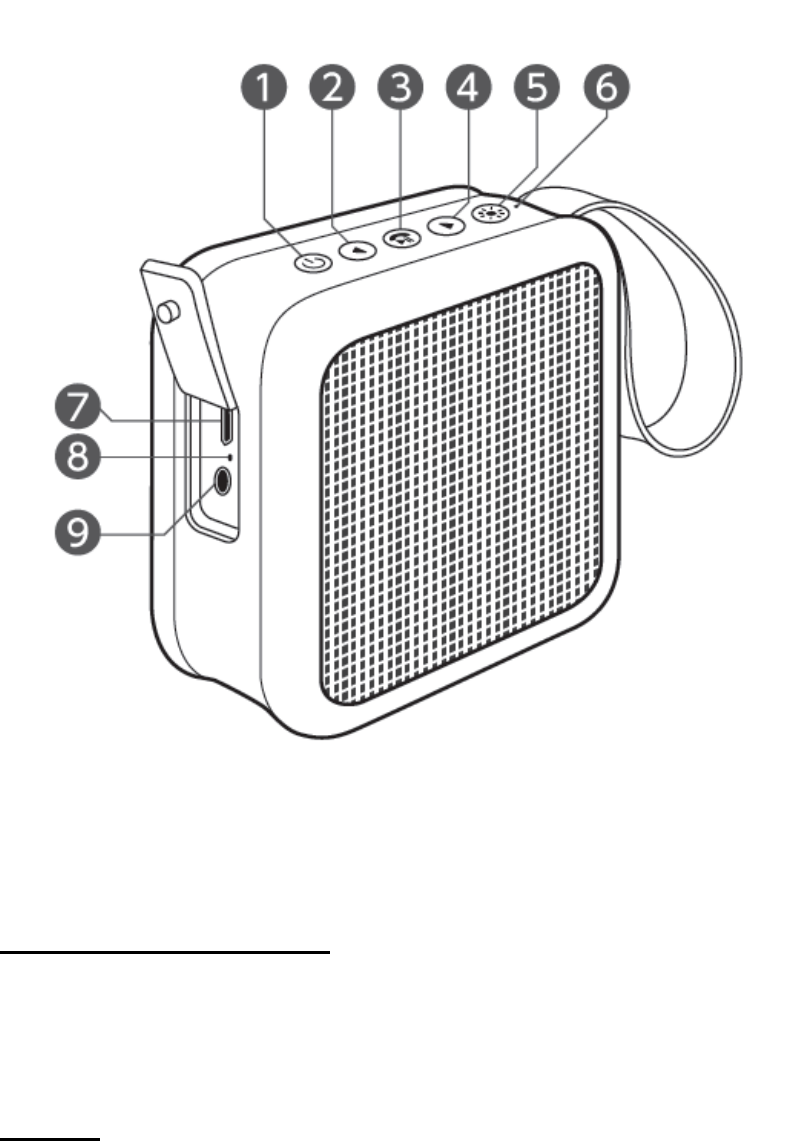
1.Turn on and Turn off
Press and hold about 3 seconds to turn on speaker, press again for 3
seconds to turn off.
2. Volume - / Previous music
Short press for previous music and long press for volume down

3. Volume+/ Next music
Short press for next music and long press for volume up
4.Play/pause/disconnect
Press for play and pause, Long press for 3 second to disconnect
Bluetooth.
5.Change LED Mode
Press to change LED light mode, press 3 seconds to turn off lights.
PAIRING:
1.Turn your speaker on with “dididi” sound.the speaker was in defaulted
Bluetooth mode with voice”The Bluetooth is ready to pair”
2.The Bluetooth indicator on the side of speaker will flash quickly
3.Turn on the bluetooth function of your device , search for “Gadget 8047793”
and select it to pair.
4.If pairing is successful,you will hear a tone to confirm and the side led light
will flash slowly.
5.Press 3seconds to disconnect.
HANDS-FREE SPEAKERPHONE
1.Press the to pick up the call and playing music will automatically
be paused.
2.Long press to reject the call
3.Press again to hangup the call when finished. The paused music
will resume playing automatically
LINE-IN
With the speaker powered on, connect the included AUX cable into the port 9
on the side of the speaker and plug the other end into your phones aux

port,then you can can play music via your phone.
The button was not workable under line-in mode,
pls control via your devices.
Charging:
Connect the speaker’s Micro USB socket 7 with theprovide charging cable,the
power indicator 8 will show red while the battery is charging, when a full charge
has been achieved the LED will turn off.
1.Battery: China battery 1200maH
2.Fully charge:2.5-3H
3.Play time: 5-6H
When charging, the side indicator will turn red and when it fully charged the
indicator will turn off
NOTE: This equipment has been tested and found to comply with the limits for a
Class B digital device, pursuant to part 15 of the FCC Rules. These limits are
designed to provide reasonable protection against harmful interference in a
residential installation. This equipment generates uses and can radiate radio
frequency energy and, if not installed and used in accordance with the instructions,
may cause harmful interference to radio communications. However, there is no
guarantee that interference will not occur in a particular installation. If this
equipment does cause harmful interference to radio or television reception, which
can be determined by turning the equipment off and on, the user is encouraged to
try to correct the interference by one or more of the following measures:
- Reorient or relocate the receiving antenna.
- Increase the separation between the equipment and receiver.
-Connect the equipment into an outlet on a circuit different from that to which the
receiver is connected.
-Consult the dealer or an experienced radio/TV technician for help
Changes or modifications not expressly approved by the party responsible for compliance
could void the user's authority to operate the equipment. This device complies with Part
15 of the FCC Rules. Operation is subject to the following two conditions:
(1) this device may not cause harmful interference, and
(2) this device must accept any interference received, including interference that may
cause undesired operation.
This device complies with Industry Canada licence-exempt RSS
standard(s). Operation is subject to the following two conditions:
(1)this device may not cause interference, and(2) this device must
accept any interference, includinginterference that may cause
undesired operation of the device.
Le présent appareil est conforme aux CNR d'Industrie Canada
applicables auxappareils radio exempts de licence. L'exploitation
est autorisée aux deux conditions suivantes :(1) l'appareil ne doit
pas produire de brouillage, et(2) l'utilisateur de l'appareil doit
accepter tout brouillage radioélectrique subi, même si le brouillage
est susceptible d'en compromettre lefonctionnement.