K Best Technology 5113R E1 Spread Spectrum Radios User Manual

K-Best Technology Inc. E1 Spread Spectrum Radios

Contents

User Manual 3

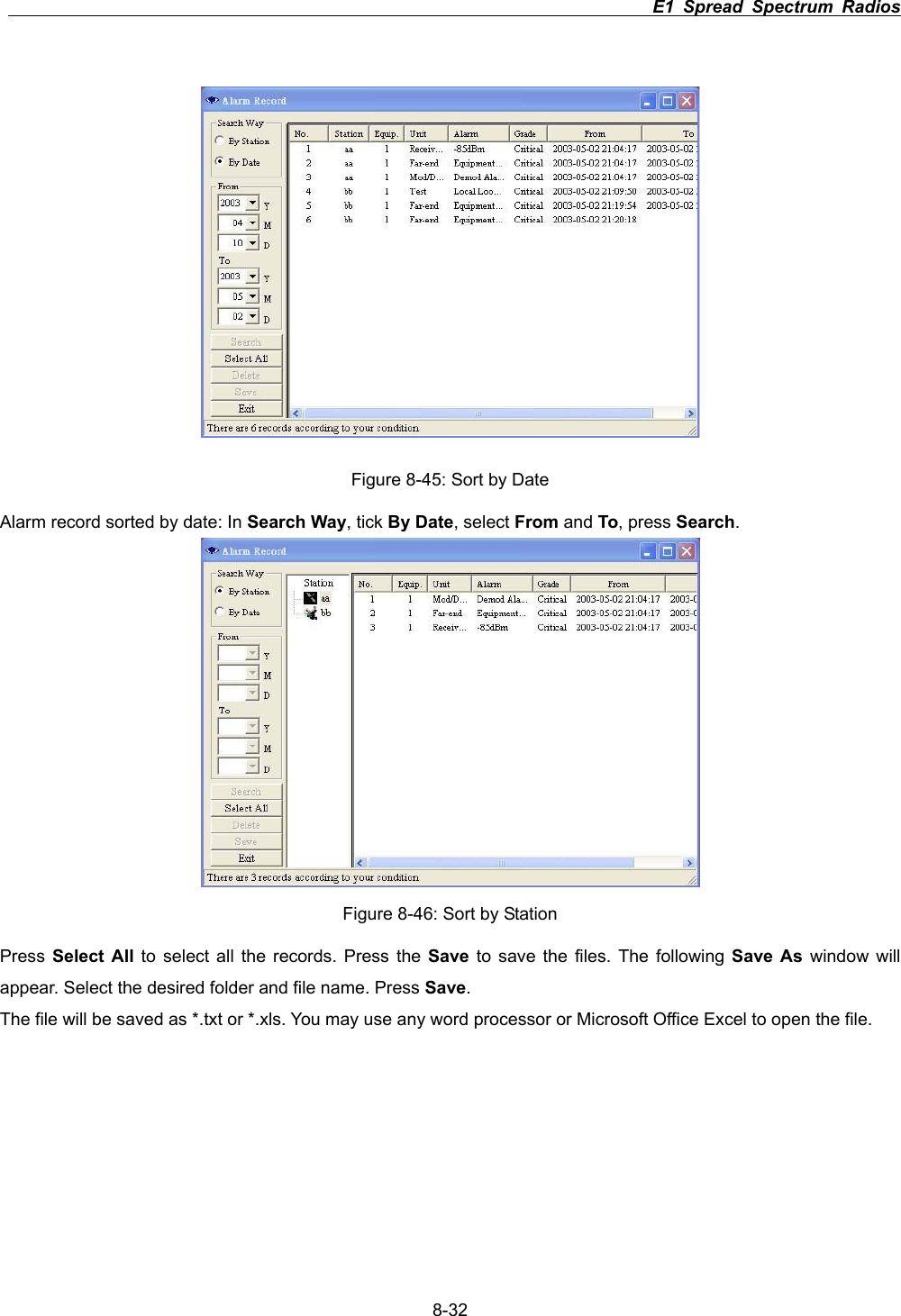
                                                                         E1 Spread Spectrum Radios      8-32Figure 8-45: Sort by Date Alarm record sorted by date: In Search Way, tick By Date,select From and To, press Search.Figure 8-46: Sort by Station Press  Select All to select all the records. Press the Save to save the files. The following Save As window will appear. Select the desired folder and file name. Press Save.The file will be saved as *.txt or *.xls. You may use any word processor or Microsoft Office Excel to open the file.
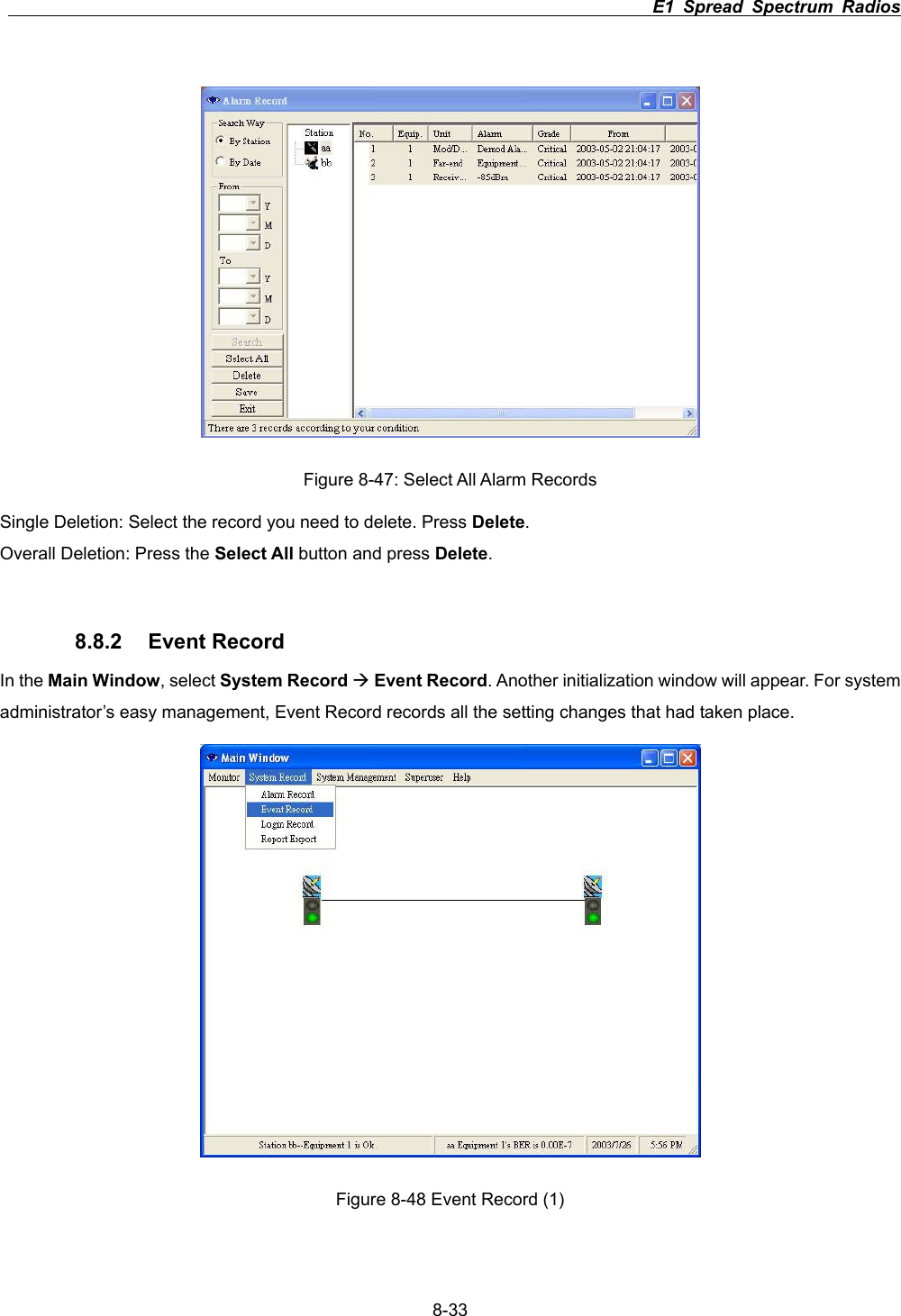
                                                                         E1 Spread Spectrum Radios      8-33Figure 8-47: Select All Alarm Records Single Deletion: Select the record you need to delete. Press Delete.Overall Deletion: Press the Select All button and press Delete.8.8.2 Event Record In the Main Window, select System Record ÆEvent Record. Another initialization window will appear. For system administrator’s easy management, Event Record records all the setting changes that had taken place.   Figure 8-48 Event Record (1)
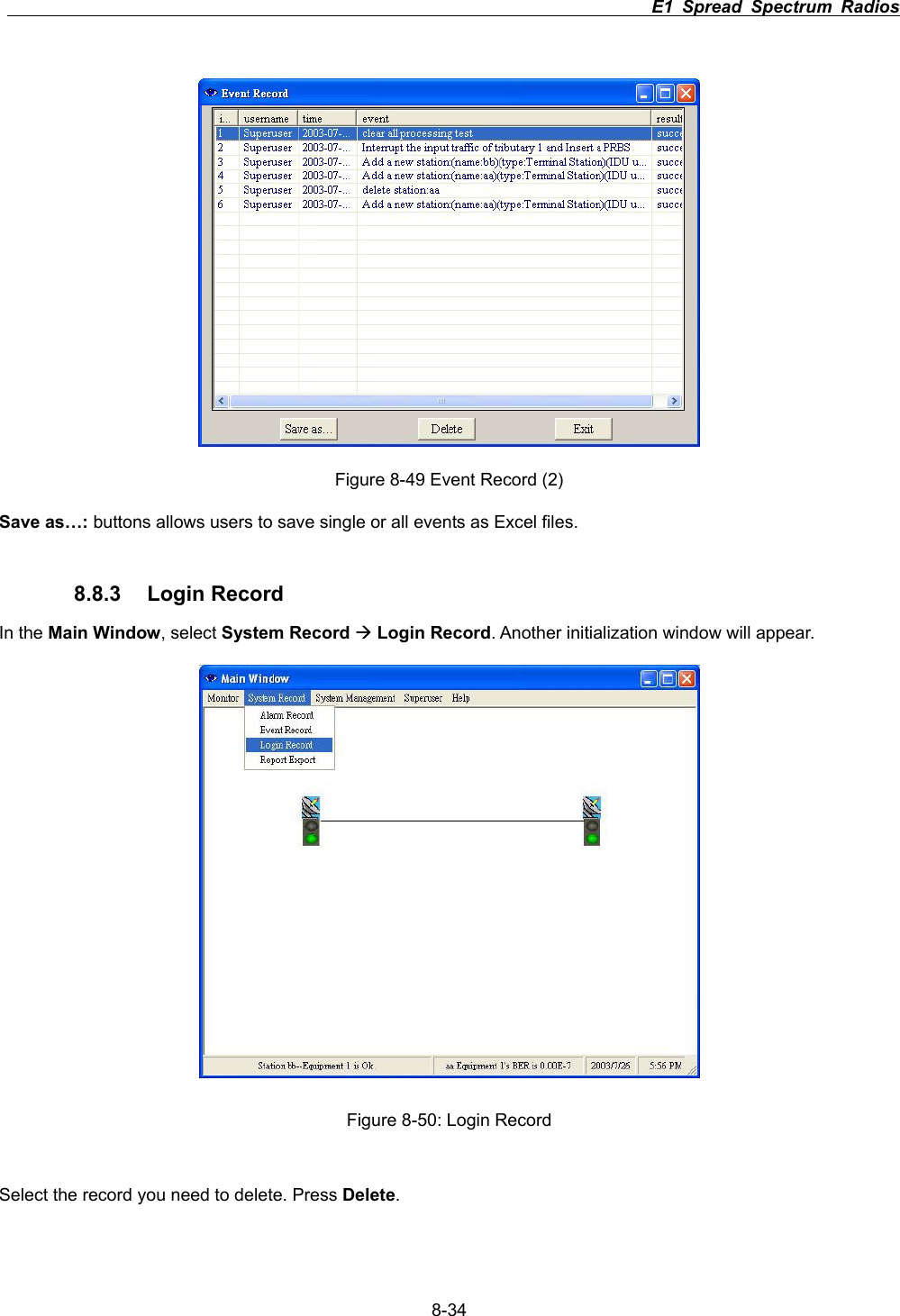
                                                                         E1 Spread Spectrum Radios      8-34Figure 8-49 Event Record (2) Save as…: buttons allows users to save single or all events as Excel files. 8.8.3 Login Record In the Main Window, select System Record ÆLogin Record. Another initialization window will appear. Figure 8-50: Login Record Select the record you need to delete. Press Delete.
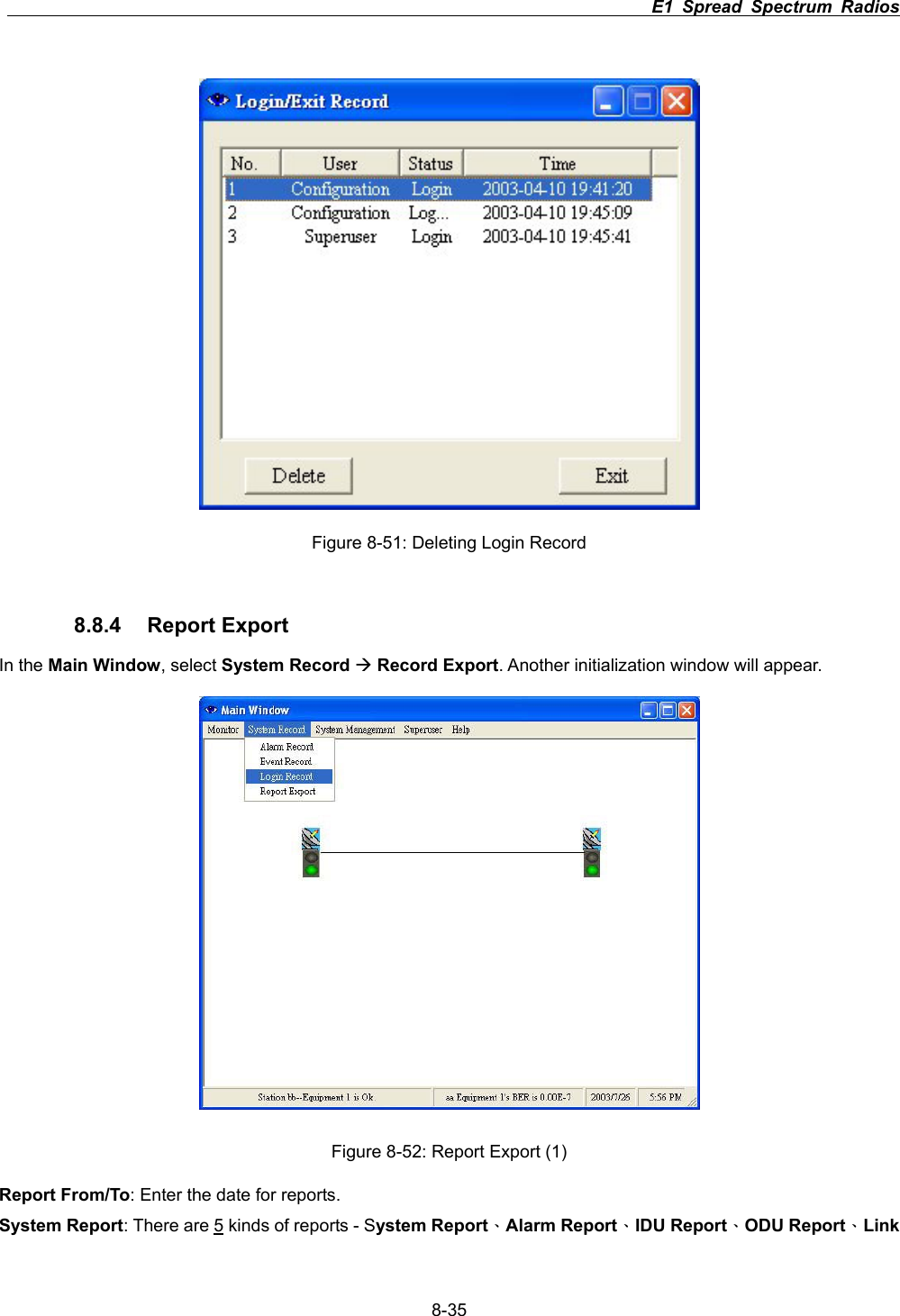
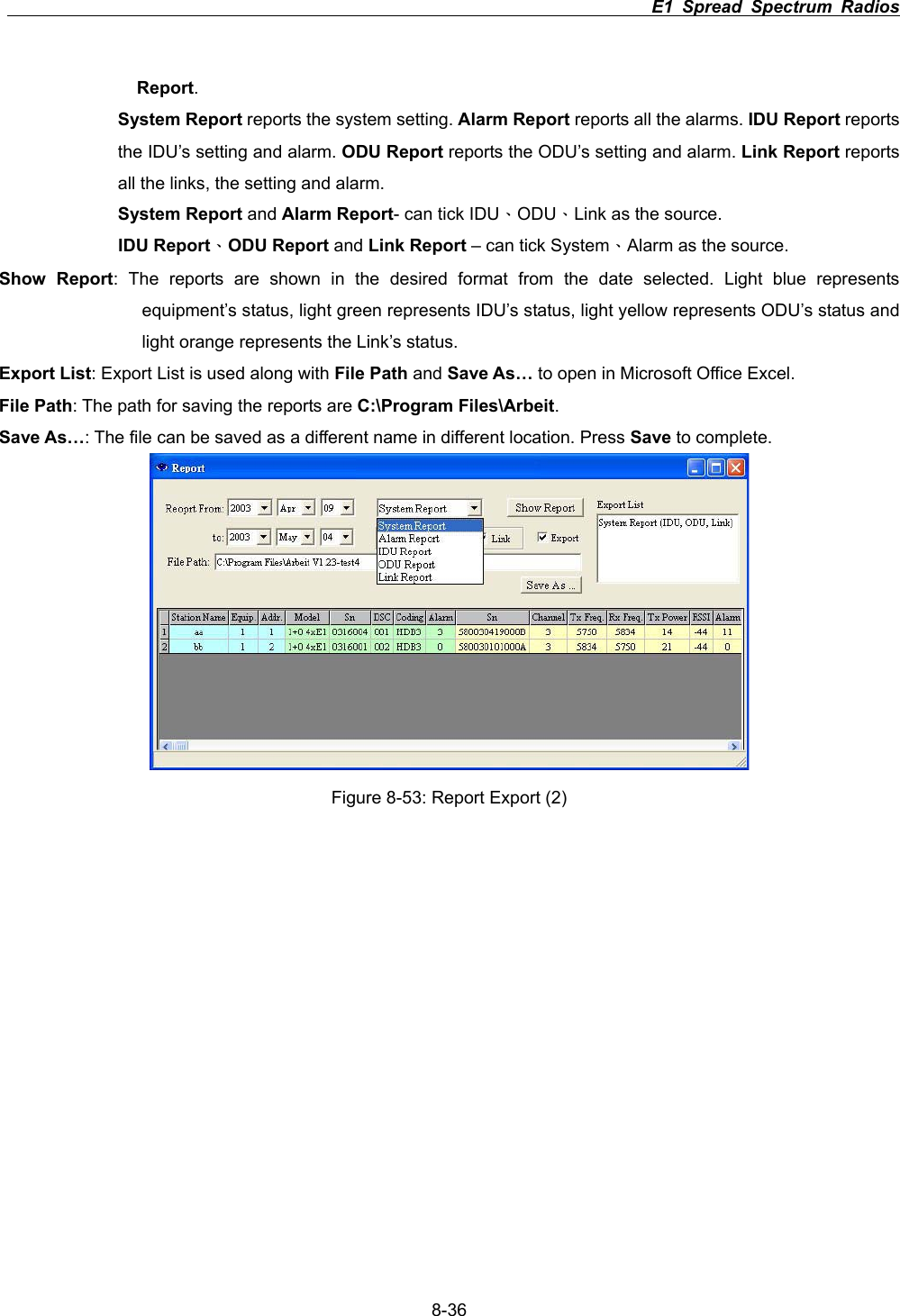
                                                                         E1 Spread Spectrum Radios      8-35Figure 8-51: Deleting Login Record 8.8.4 Report Export In the Main Window, select System Record ÆRecord Export. Another initialization window will appear.   Figure 8-52: Report Export (1) Report From/To: Enter the date for reports. System Report: There are 5 kinds of reports - System ReportΕAlarm ReportΕIDU ReportΕODU ReportΕLink
                                                                         E1 Spread Spectrum Radios      8-36Report.System Report reports the system setting. Alarm Report reports all the alarms. IDU Report reports the IDU’s setting and alarm. ODU Report reports the ODU’s setting and alarm. Link Report reports all the links, the setting and alarm.   System Report and Alarm Report- can tick IDUΕODUΕLink as the source. IDU ReportΕODU Report and Link Report – can tick SystemΕAlarm as the source. Show Report: The reports are shown in the desired format from the date selected. Light blue represents equipment’s status, light green represents IDU’s status, light yellow represents ODU’s status and light orange represents the Link’s status.   Export List: Export List is used along with File Path and Save As… to open in Microsoft Office Excel. File Path: The path for saving the reports are C:\Program Files\Arbeit.Save As…: The file can be saved as a different name in different location. Press Save to complete.   Figure 8-53: Report Export (2)
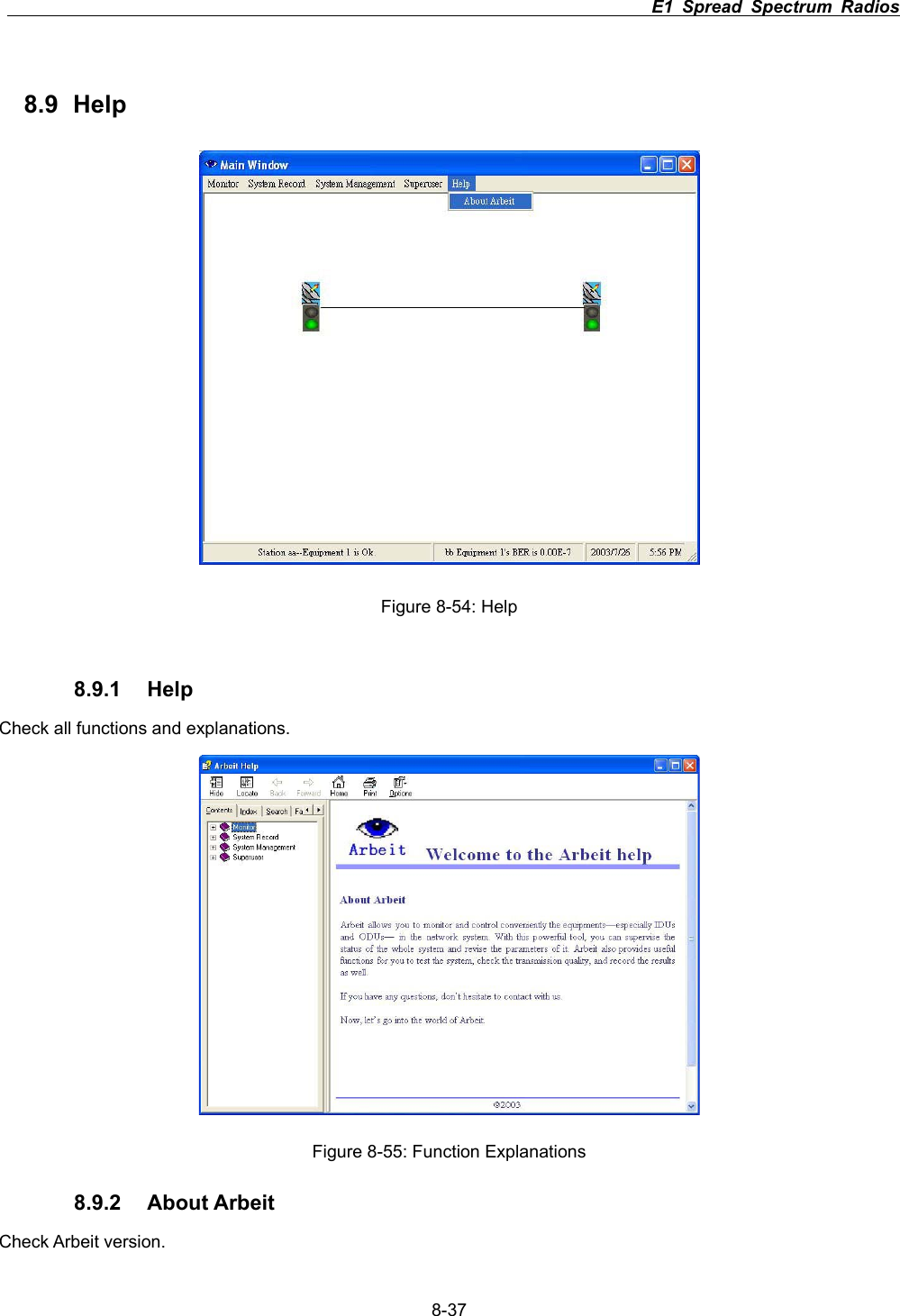
                                                                         E1 Spread Spectrum Radios      8-378.9 Help Figure 8-54: Help 8.9.1 Help Check all functions and explanations. Figure 8-55: Function Explanations 8.9.2 About Arbeit Check Arbeit version.
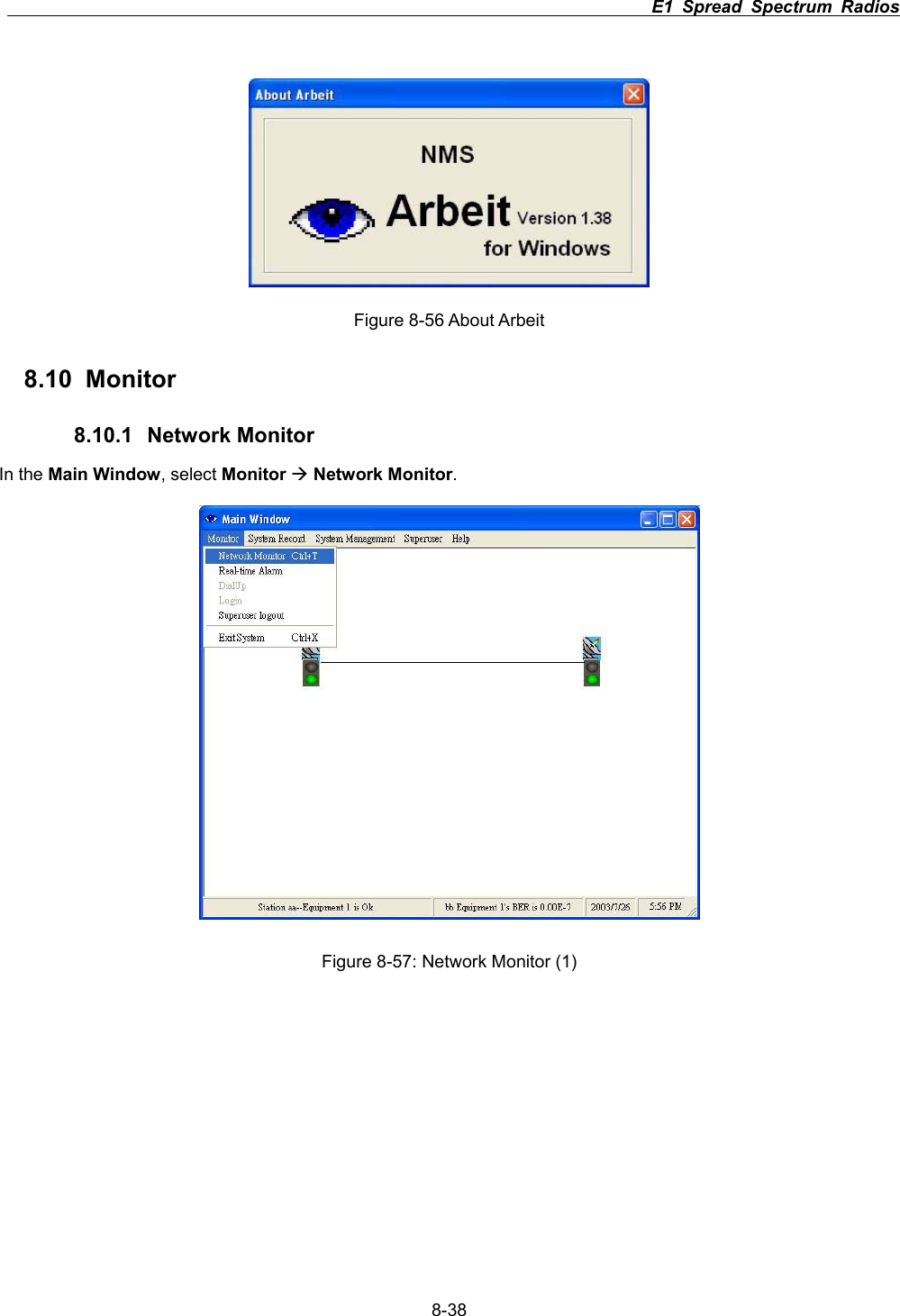
                                                                         E1 Spread Spectrum Radios      8-38Figure 8-56 About Arbeit 8.10   Monitor 8.10.1 Network Monitor In the Main Window, select Monitor ÆNetwork Monitor.Figure 8-57: Network Monitor (1)
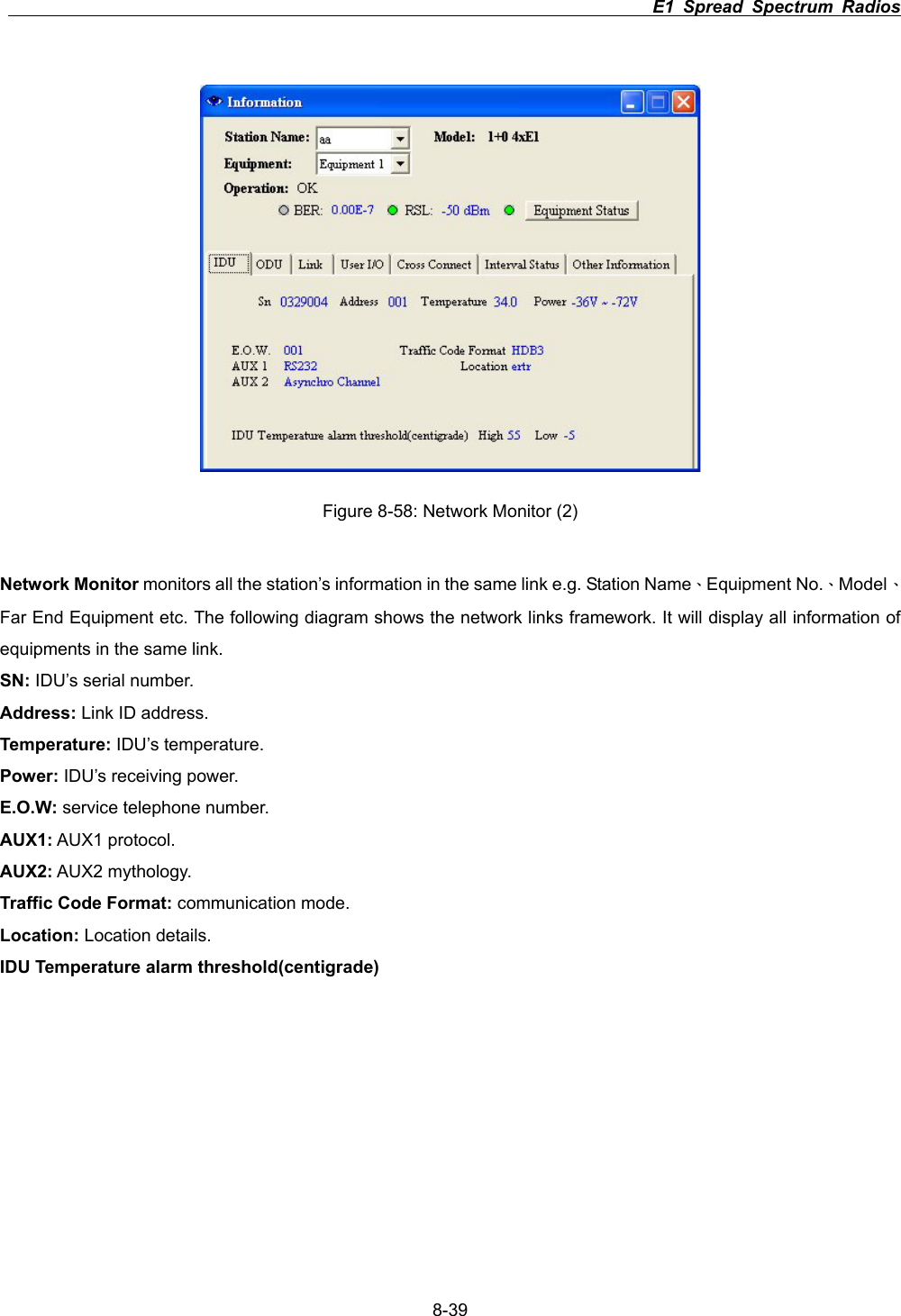
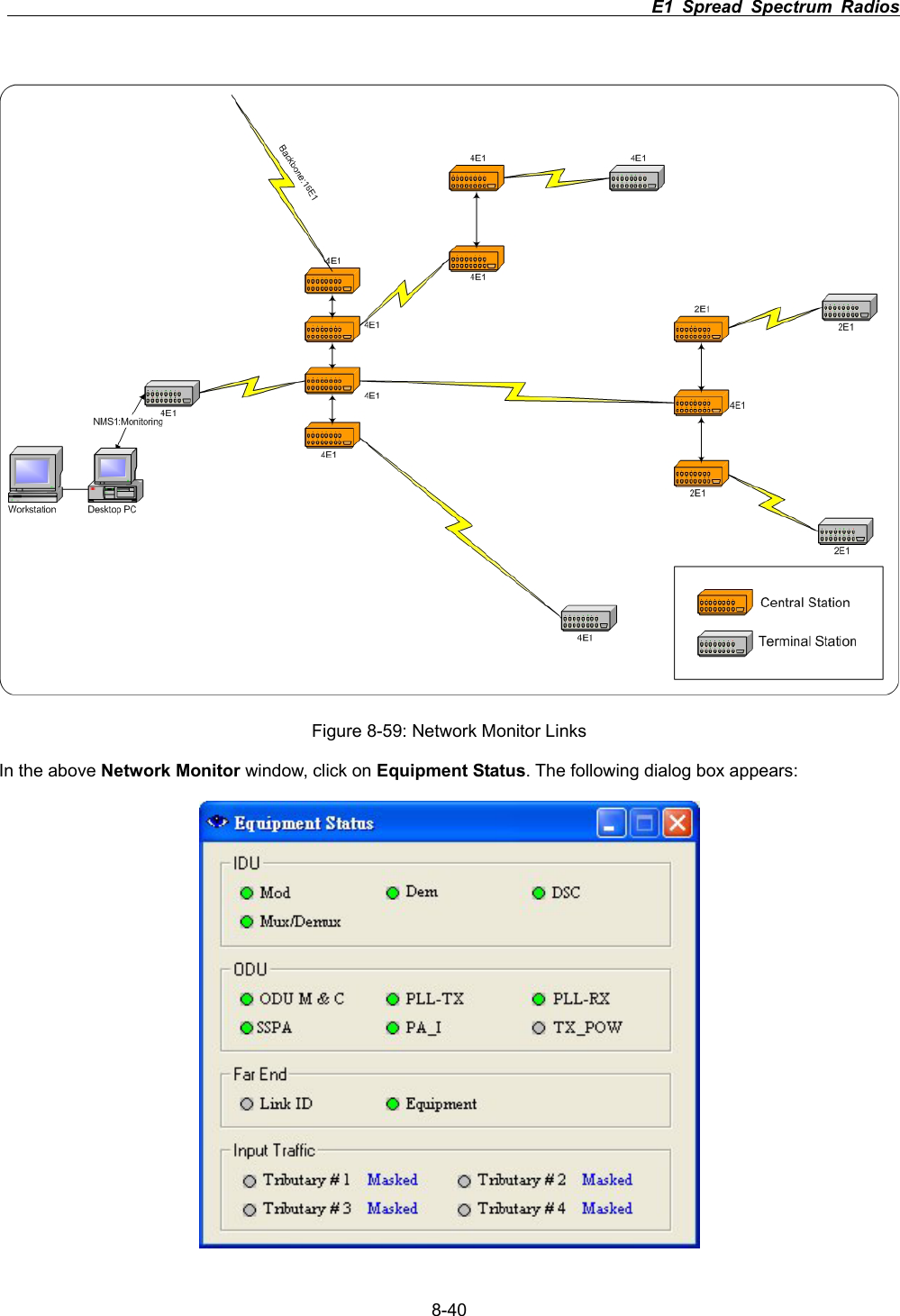
                                                                         E1 Spread Spectrum Radios      8-39Figure 8-58: Network Monitor (2) Network Monitor monitors all the station’s information in the same link e.g. Station NameΕEquipment No.ΕModelΕFar End Equipment etc. The following diagram shows the network links framework. It will display all information of equipments in the same link. SN: IDU’s serial number. Address: Link ID address. Temperature: IDU’s temperature. Power: IDU’s receiving power. E.O.W: service telephone number. AUX1: AUX1 protocol. AUX2: AUX2 mythology. Traffic Code Format: communication mode. Location: Location details. IDU Temperature alarm threshold(centigrade)
                                                                         E1 Spread Spectrum Radios      8-40Figure 8-59: Network Monitor Links In the above Network Monitor window, click on Equipment Status. The following dialog box appears:
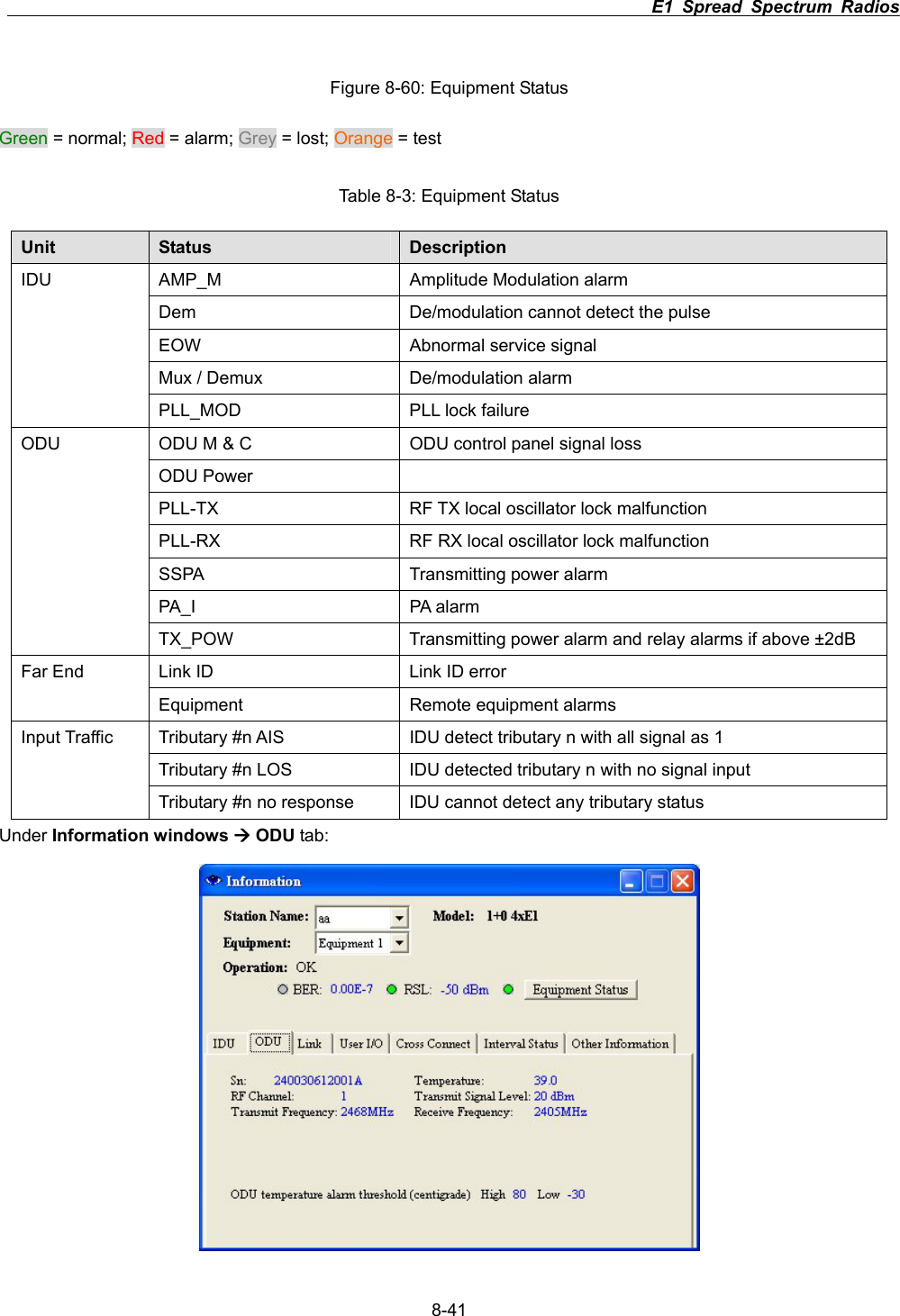
                                                                         E1 Spread Spectrum Radios      8-41Figure 8-60: Equipment Status Green = normal; Red = alarm; Grey = lost; Orange = test Table 8-3: Equipment Status Unit Status  Description AMP_M  Amplitude Modulation alarm Dem  De/modulation cannot detect the pulse EOW  Abnormal service signal Mux / Demux  De/modulation alarm IDUPLL_MOD  PLL lock failure ODU M & C  ODU control panel signal loss ODU Power   PLL-TX  RF TX local oscillator lock malfunction PLL-RX  RF RX local oscillator lock malfunction SSPA Transmitting power alarm PA_I PA alarm ODUTX_POW  Transmitting power alarm and relay alarms if above ±2dB Link ID  Link ID error Far End Equipment  Remote equipment alarms Tributary #n AIS  IDU detect tributary n with all signal as 1 Tributary #n LOS  IDU detected tributary n with no signal input Input Traffic Tributary #n no response  IDU cannot detect any tributary status Under Information windows Æ ODU tab:
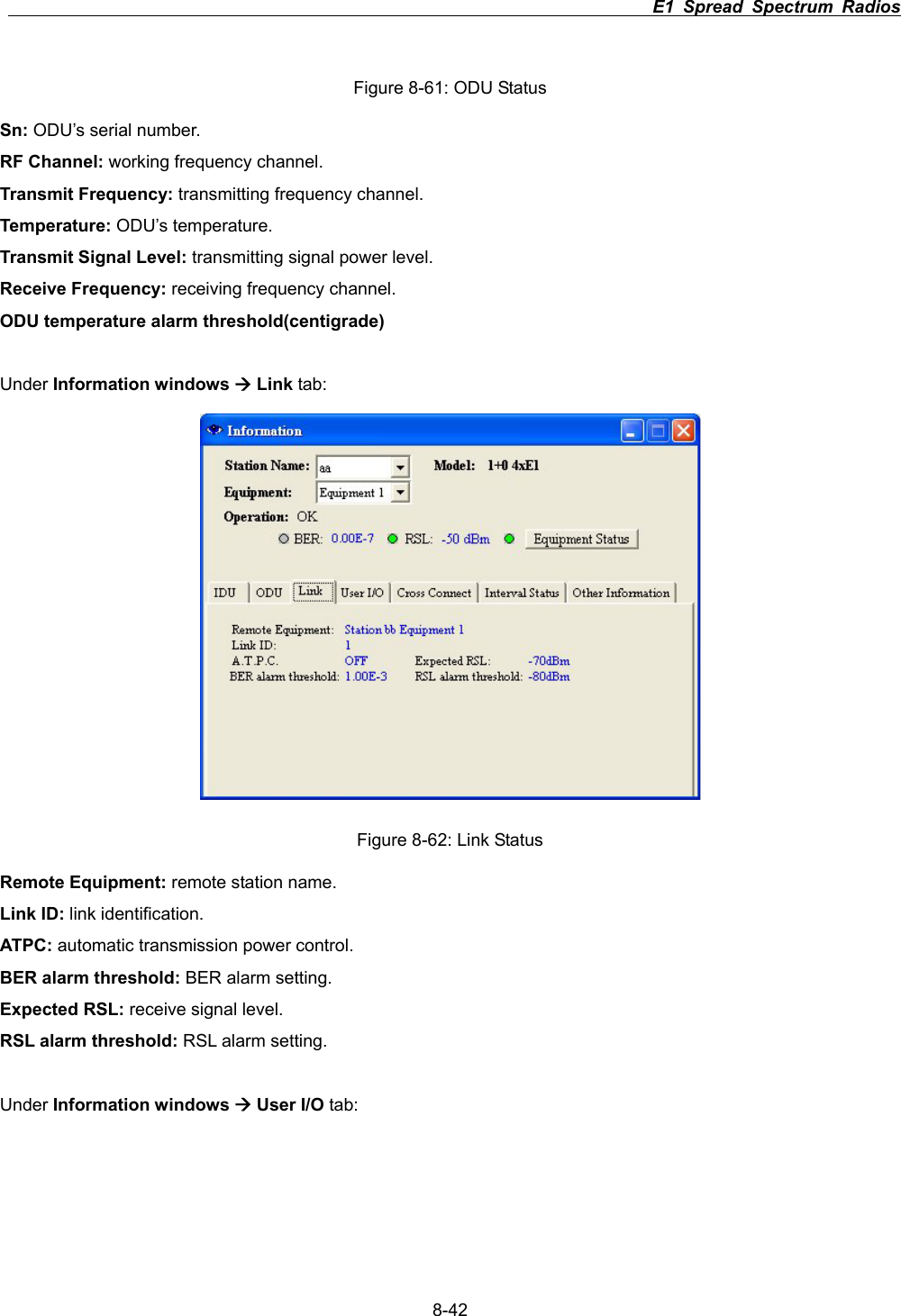
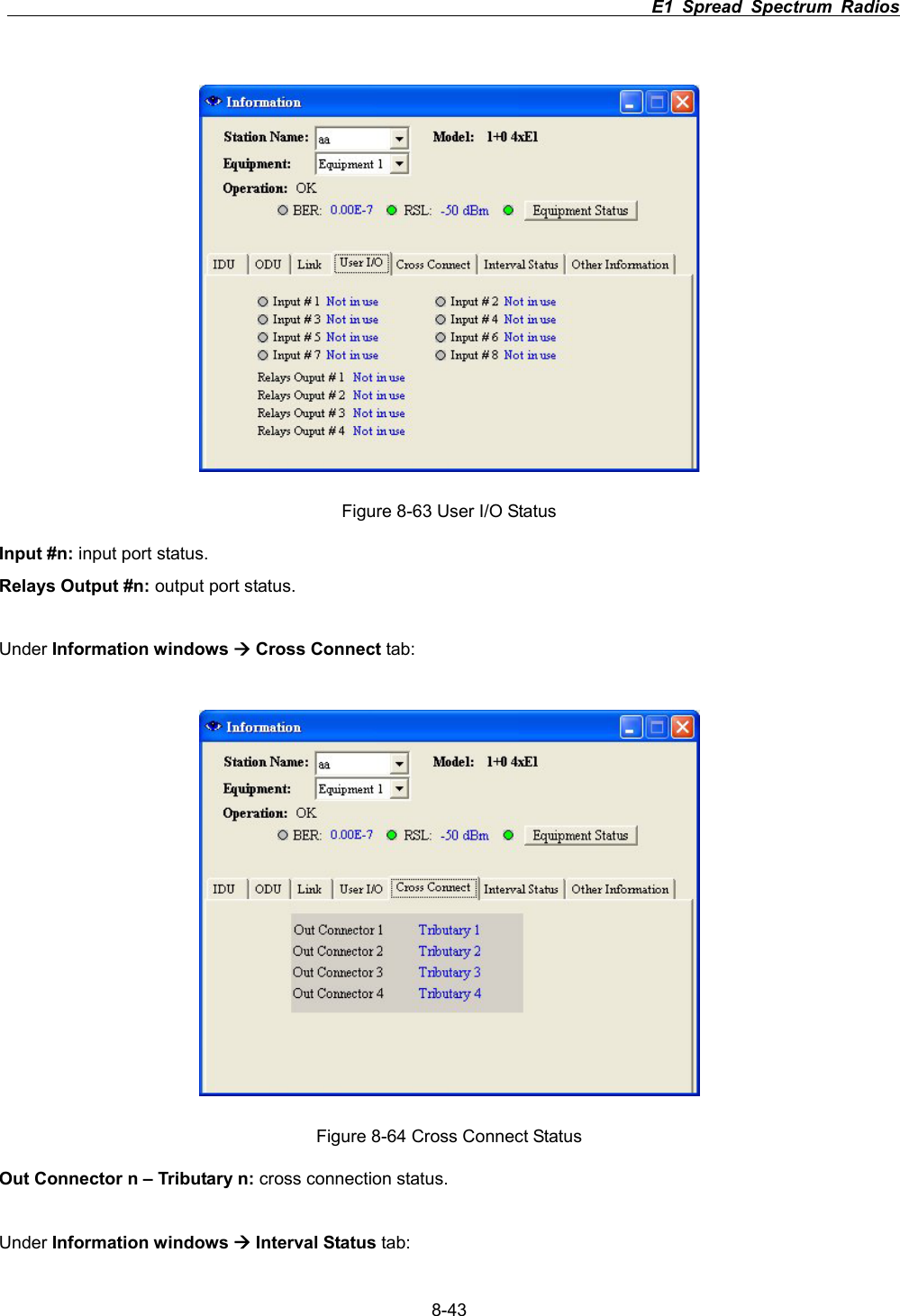
                                                                         E1 Spread Spectrum Radios      8-42Figure 8-61: ODU Status Sn: ODU’s serial number. RF Channel: working frequency channel. Transmit Frequency: transmitting frequency channel. Temperature: ODU’s temperature. Transmit Signal Level: transmitting signal power level. Receive Frequency: receiving frequency channel. ODU temperature alarm threshold(centigrade) Under Information windows Æ Link tab: Figure 8-62: Link Status Remote Equipment: remote station name. Link ID: link identification. ATPC: automatic transmission power control. BER alarm threshold: BER alarm setting. Expected RSL: receive signal level. RSL alarm threshold: RSL alarm setting. Under Information windows Æ User I/O tab:
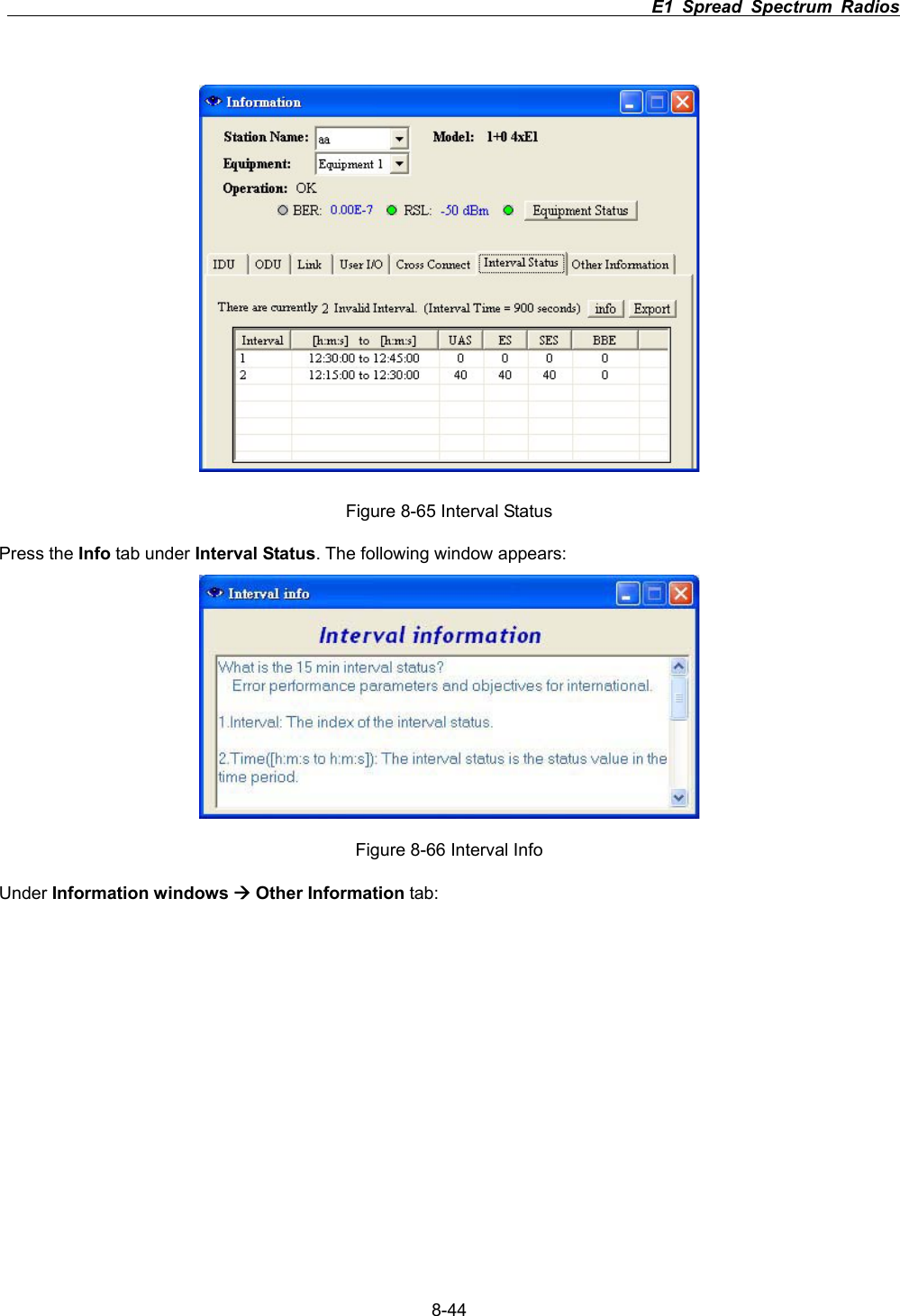
                                                                         E1 Spread Spectrum Radios      8-43Figure 8-63 User I/O Status Input #n: input port status. Relays Output #n: output port status. Under Information windows Æ Cross Connect tab: Figure 8-64 Cross Connect Status Out Connector n – Tributary n: cross connection status. Under Information windows Æ Interval Status tab:
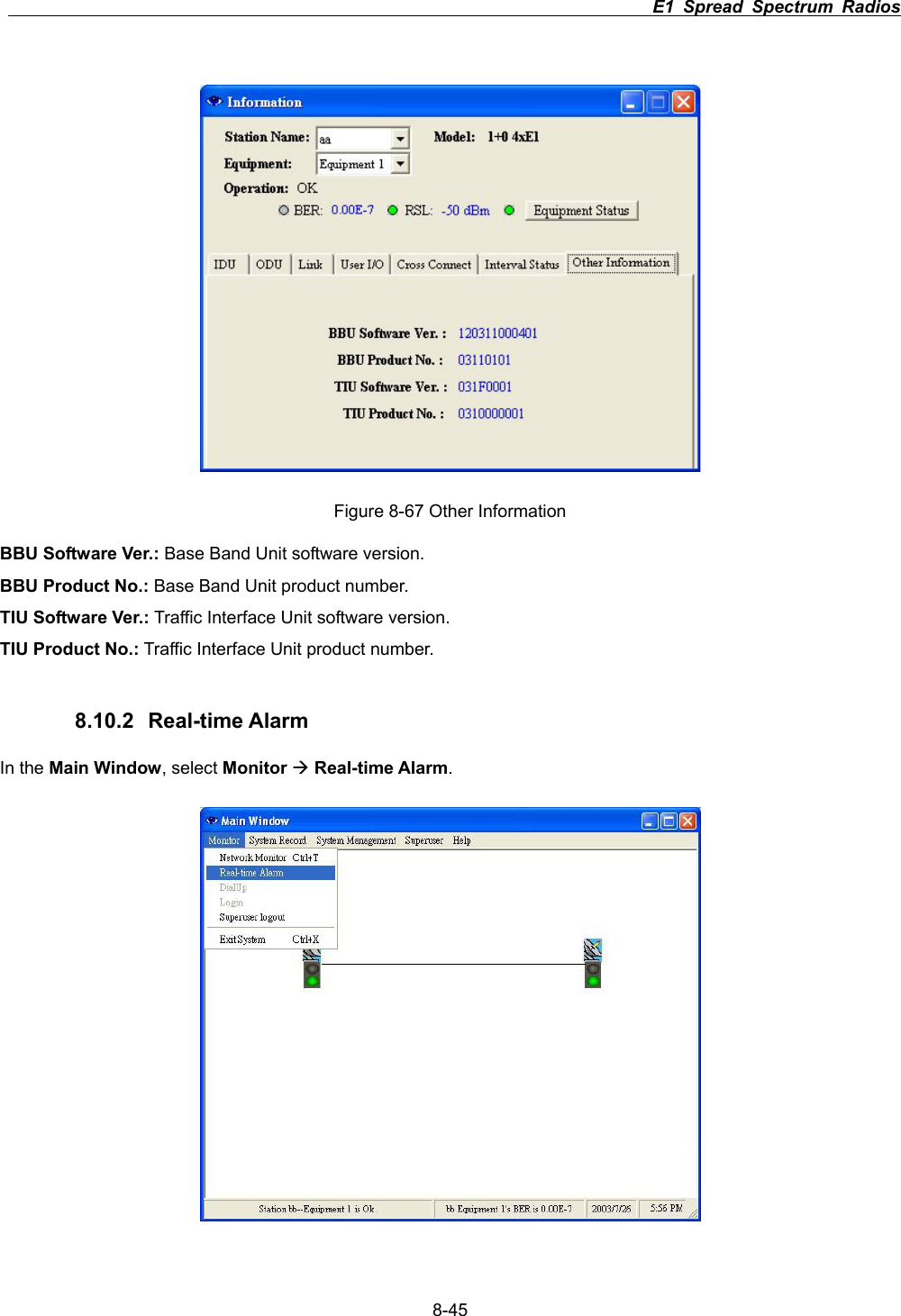
                                                                         E1 Spread Spectrum Radios      8-44Figure 8-65 Interval Status Press the Info tab under Interval Status. The following window appears: Figure 8-66 Interval Info Under Information windows Æ Other Information tab:
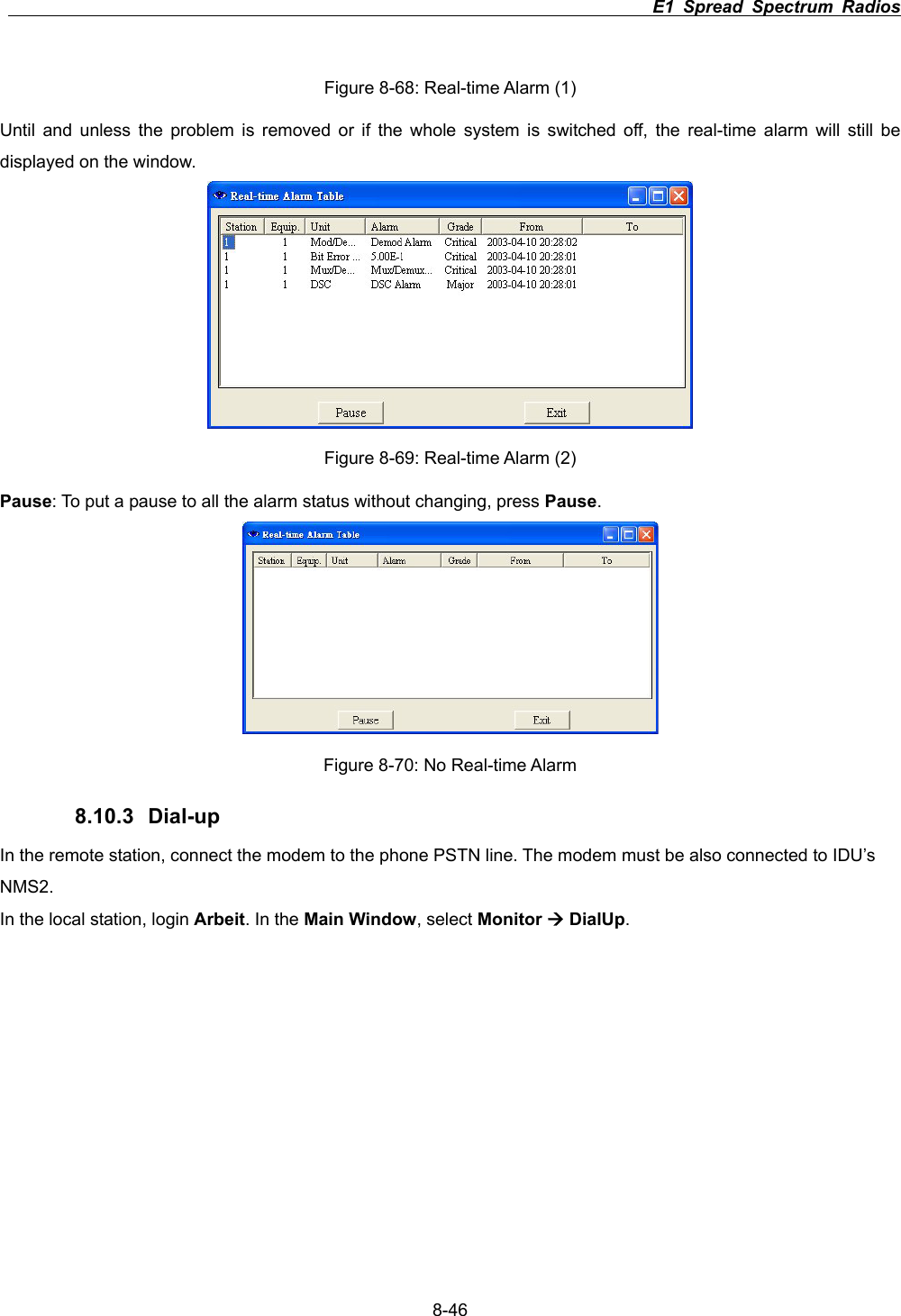
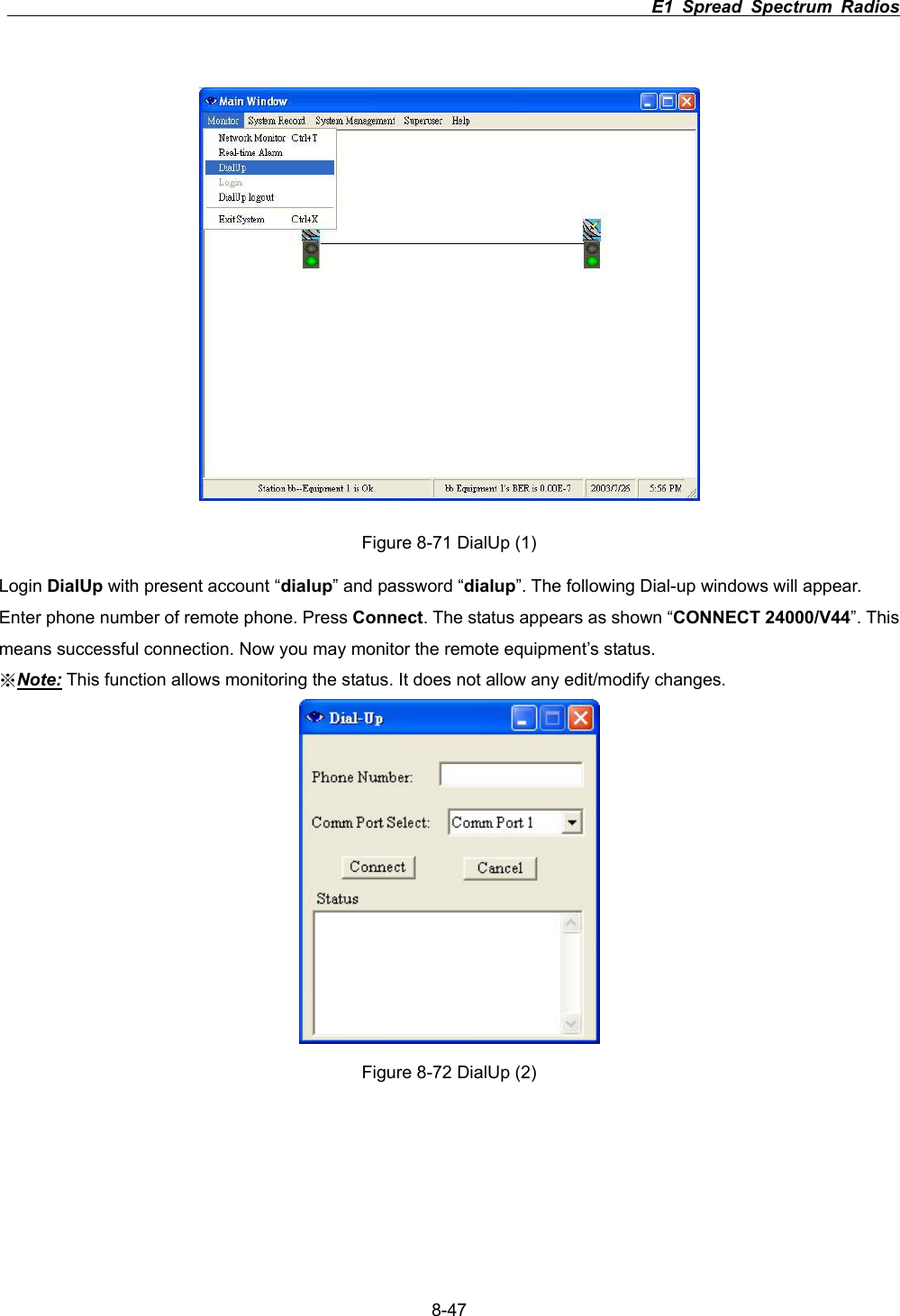
                                                                         E1 Spread Spectrum Radios      8-45Figure 8-67 Other Information BBU Software Ver.: Base Band Unit software version. BBU Product No.: Base Band Unit product number. TIU Software Ver.: Traffic Interface Unit software version. TIU Product No.: Traffic Interface Unit product number. 8.10.2 Real-time Alarm In the Main Window, select Monitor ÆReal-time Alarm.
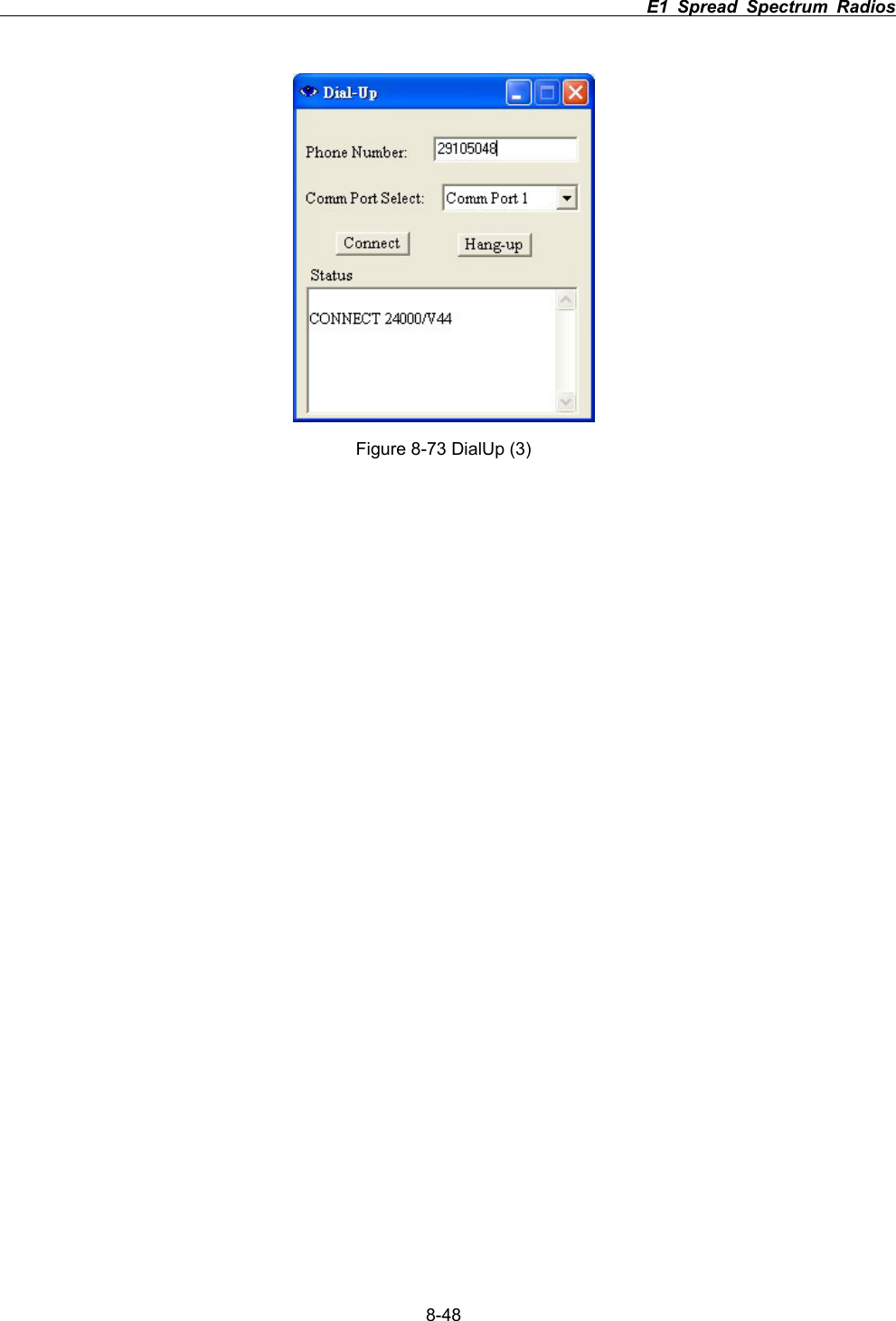
                                                                         E1 Spread Spectrum Radios      8-46Figure 8-68: Real-time Alarm (1) Until and unless the problem is removed or if the whole system is switched off, the real-time alarm will still be displayed on the window. Figure 8-69: Real-time Alarm (2) Pause: To put a pause to all the alarm status without changing, press Pause.Figure 8-70: No Real-time Alarm 8.10.3 Dial-up In the remote station, connect the modem to the phone PSTN line. The modem must be also connected to IDU’s NMS2.In the local station, login Arbeit. In the Main Window, select Monitor Æ DialUp.
                                                                         E1 Spread Spectrum Radios      8-47Figure 8-71 DialUp (1) Login DialUp with present account “dialup” and password “dialup”. The following Dial-up windows will appear. Enter phone number of remote phone. Press Connect. The status appears as shown “CONNECT 24000/V44”. This means successful connection. Now you may monitor the remote equipment’s status. ϡNote: This function allows monitoring the status. It does not allow any edit/modify changes. Figure 8-72 DialUp (2)
                                                                         E1 Spread Spectrum Radios      8-48Figure 8-73 DialUp (3)
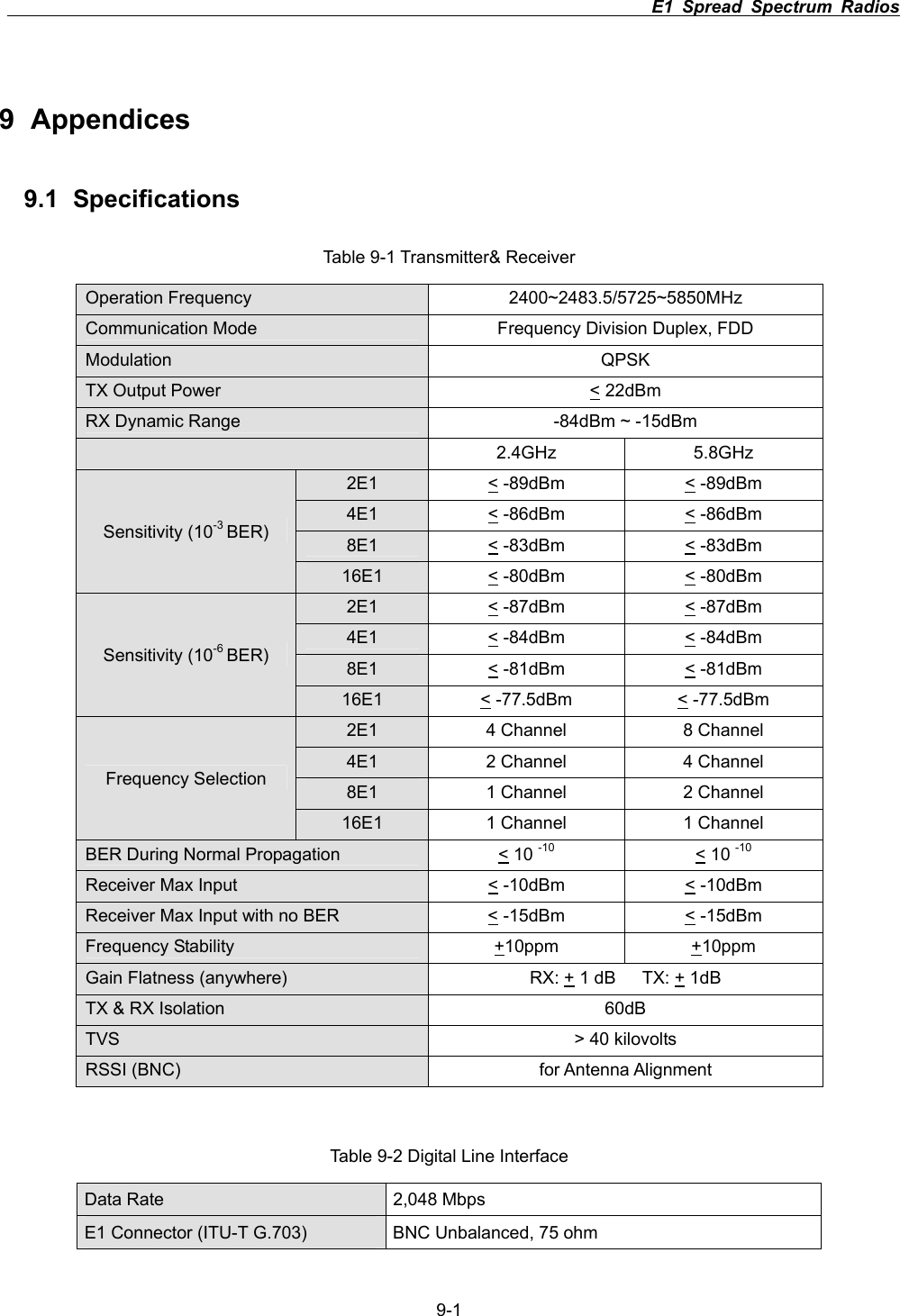
                                                                         E1 Spread Spectrum Radios      9-19 Appendices 9.1 Specifications Table 9-1 Transmitter& Receiver Operation Frequency  2400~2483.5/5725~5850MHz Communication Mode  Frequency Division Duplex, FDD Modulation QPSK  TX Output Power    < 22dBm RX Dynamic Range  -84dBm ~ -15dBm 2.4GHz 5.8GHz 2E1 < -89dBm  < -89dBm 4E1 < -86dBm  < -86dBm 8E1 < -83dBm  < -83dBm Sensitivity (10-3 BER)16E1 < -80dBm  < -80dBm 2E1 < -87dBm  < -87dBm 4E1 < -84dBm  < -84dBm 8E1 < -81dBm  < -81dBm Sensitivity (10-6 BER)16E1 < -77.5dBm  < -77.5dBm 2E1  4 Channel  8 Channel 4E1  2 Channel  4 Channel 8E1  1 Channel  2 Channel Frequency Selection 16E1  1 Channel  1 Channel BER During Normal Propagation  < 10 -10 < 10 -10Receiver Max Input  < -10dBm  < -10dBm Receiver Max Input with no BER  < -15dBm  < -15dBm Frequency Stability  +10ppm +10ppm Gain Flatness (anywhere)  RX: + 1 dB   TX: + 1dB TX & RX Isolation  60dB TVS  > 40 kilovolts RSSI (BNC)  for Antenna Alignment Table 9-2 Digital Line Interface Data Rate  2,048 Mbps E1 Connector (ITU-T G.703)  BNC Unbalanced, 75 ohm
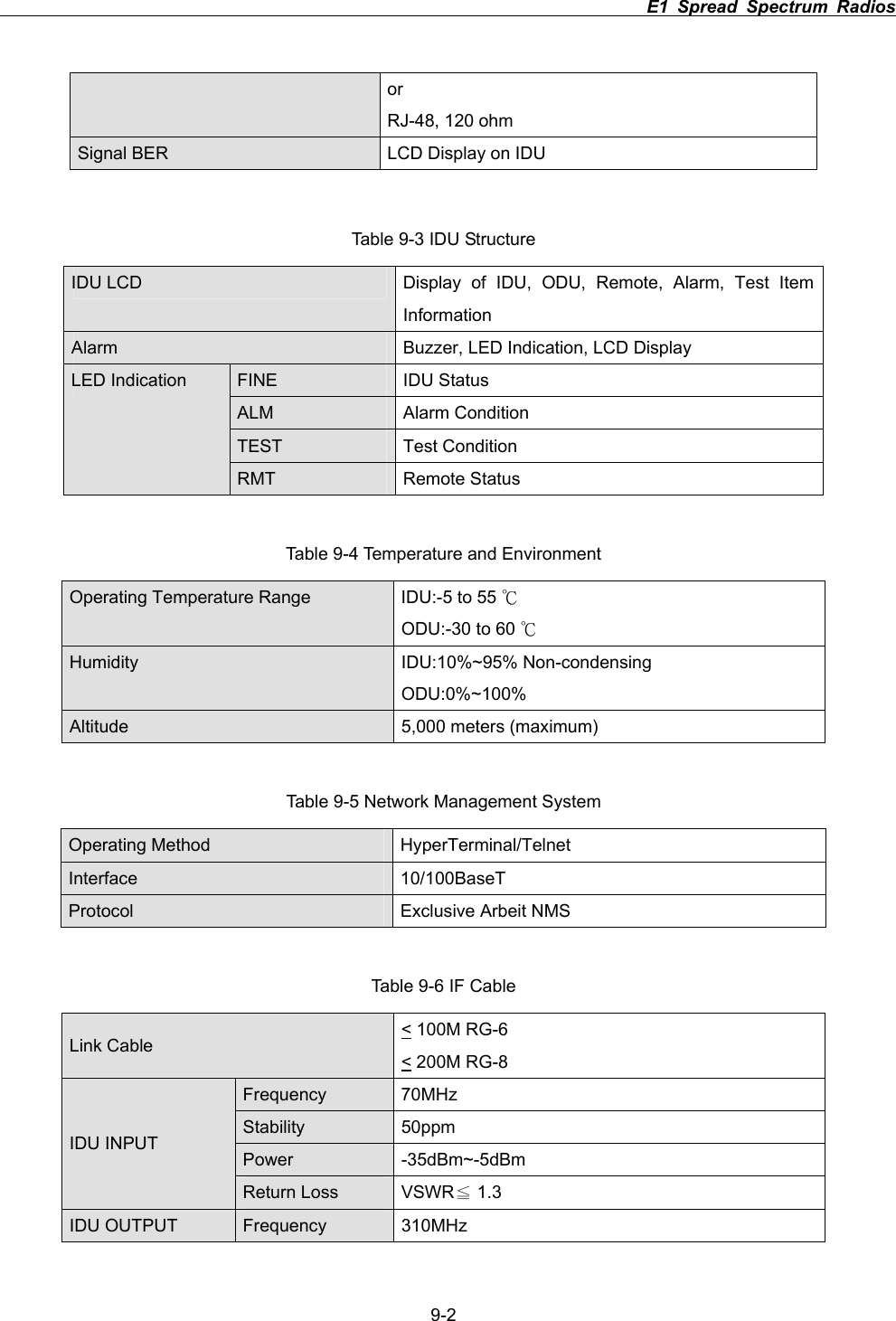
                                                                         E1 Spread Spectrum Radios      9-2orRJ-48, 120 ohm Signal BER    LCD Display on IDU Table 9-3 IDU Structure IDU LCD   Display of IDU, ODU, Remote, Alarm, Test Item InformationAlarm  Buzzer, LED Indication, LCD Display FINE IDU Status ALM Alarm Condition TEST Test Condition LED Indication RMT Remote Status Table 9-4 Temperature and Environment Operating Temperature Range  IDU:-5 to 55 кODU:-30 to 60 кHumidity IDU:10%~95% Non-condensing ODU:0%~100% Altitude 5,000 meters (maximum) Table 9-5 Network Management System Operating Method    HyperTerminal/Telnet Interface   10/100BaseT Protocol  Exclusive Arbeit NMS Table 9-6 IF Cable Link Cable  < 100M RG-6 < 200M RG-8 Frequency 70MHz  Stability 50ppm Power -35dBm~-5dBm IDU INPUT Return Loss  VSWR  1.3ЉIDU OUTPUT  Frequency 310MHz
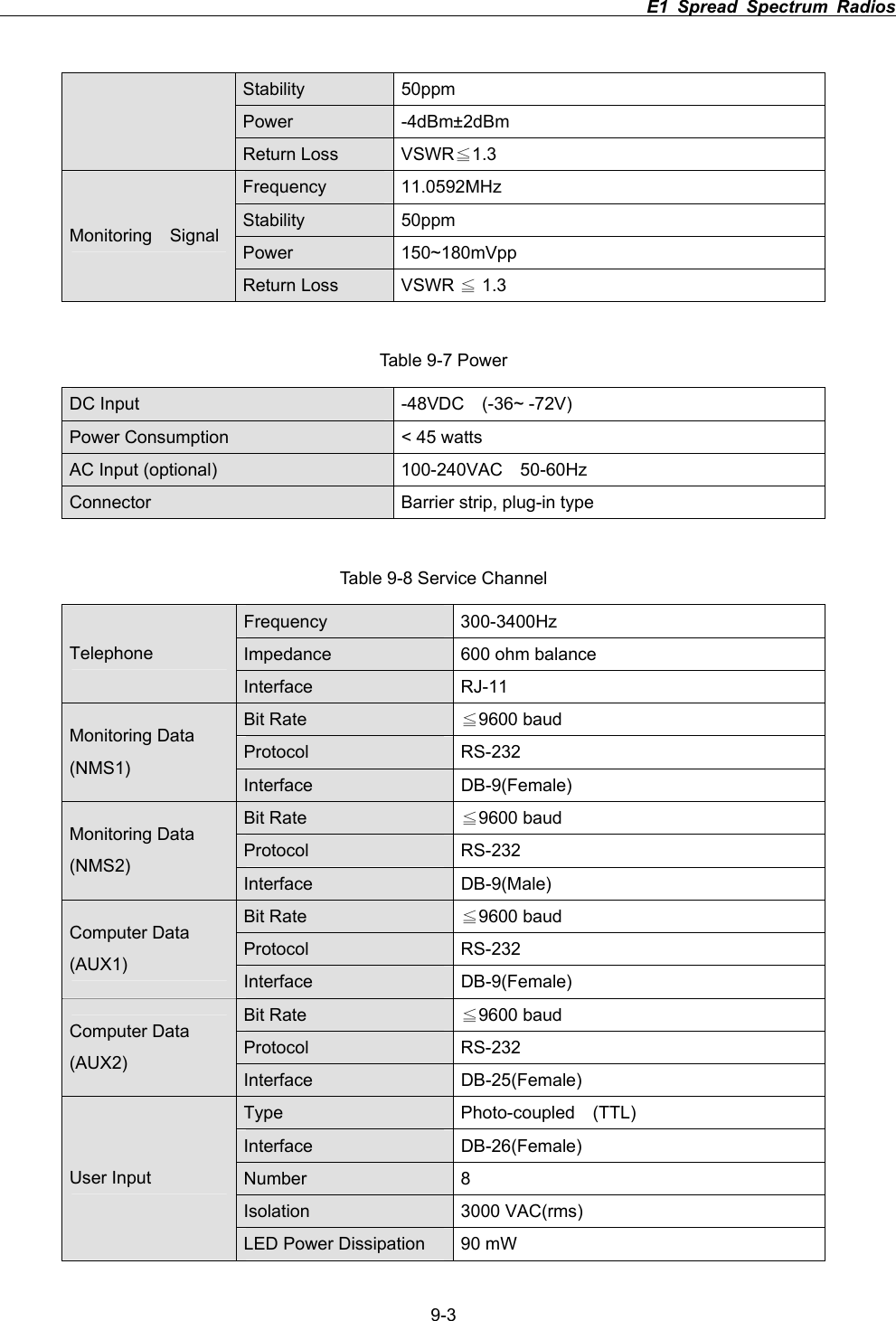
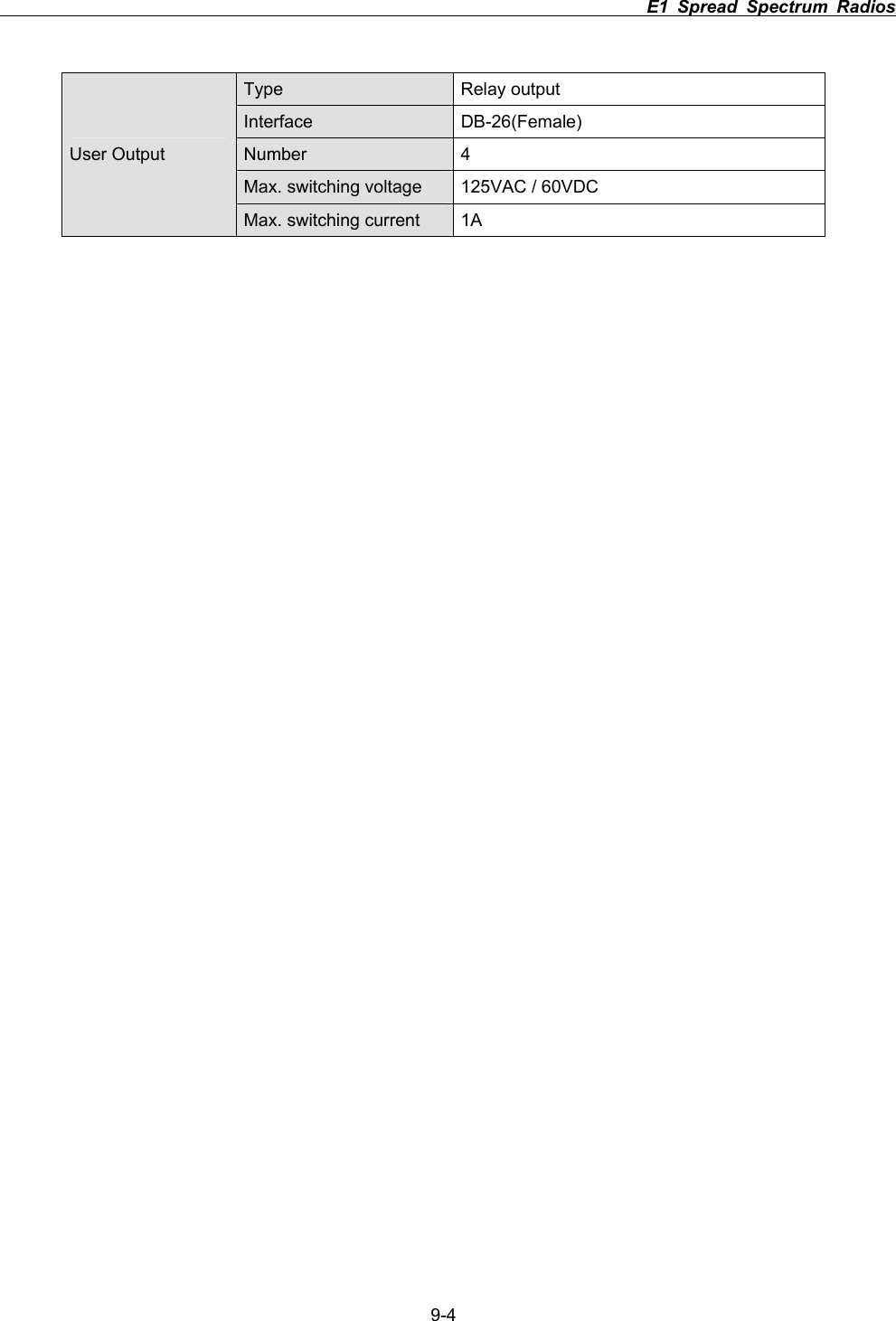
                                                                         E1 Spread Spectrum Radios      9-3Stability 50ppm Power -4dBm±2dBm Return Loss  VSWR 1.3ЉFrequency 11.0592MHz  Stability 50ppm Power 150~180mVpp Monitoring  Signal Return Loss  VSWR   1.3ЉTable 9-7 Power DC Input  -48VDC  (-36~ -72V)   Power Consumption  < 45 watts AC Input (optional)  100-240VAC    50-60Hz Connector  Barrier strip, plug-in type Table 9-8 Service Channel Frequency 300-3400Hz Impedance  600 ohm balance Telephone Interface RJ-11 Bit Rate  9600 baudЉProtocol RS-232 Monitoring Data (NMS1) Interface DB-9(Female) Bit Rate  9600 baudЉProtocol RS-232 Monitoring Data (NMS2) Interface DB-9(Male) Bit Rate  9600 baudЉProtocol RS-232 Computer Data (AUX1) Interface DB-9(Female) Bit Rate  Љ9600 baud Protocol RS-232 Computer Data (AUX2) Interface DB-25(Female) Type  Photo-coupled  (TTL) Interface DB-26(Female) Number 8 Isolation 3000 VAC(rms) User Input LED Power Dissipation  90 mW
                                                                         E1 Spread Spectrum Radios      9-4Type Relay output Interface DB-26(Female) Number 4 Max. switching voltage  125VAC / 60VDC User Output Max. switching current  1A
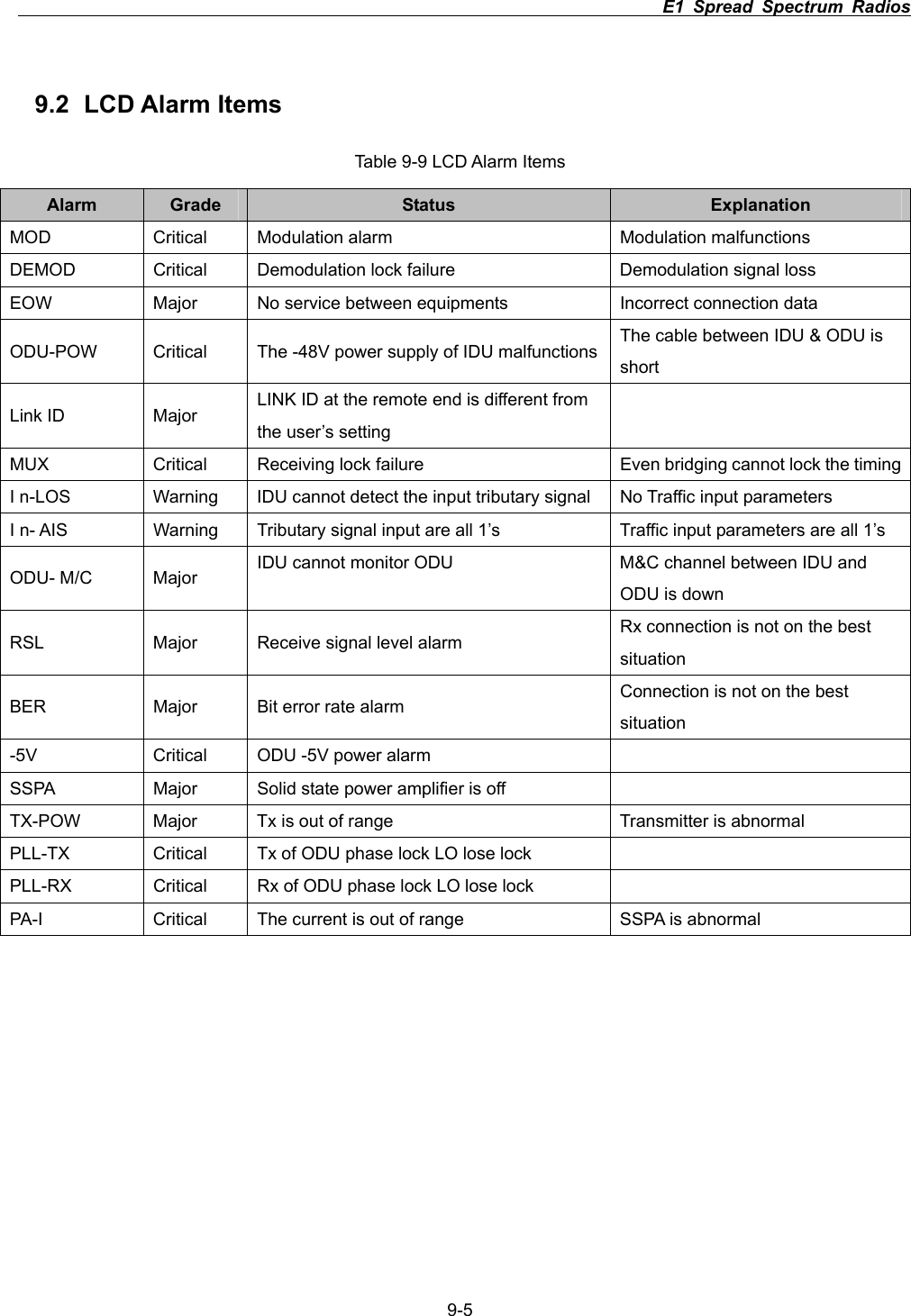
                                                                         E1 Spread Spectrum Radios      9-59.2 LCD Alarm Items Table 9-9 LCD Alarm Items Alarm  Grade Status  Explanation MOD  Critical  Modulation alarm  Modulation malfunctions DEMOD    Critical  Demodulation lock failure  Demodulation signal loss EOW  Major  No service between equipments  Incorrect connection data ODU-POW  Critical  The -48V power supply of IDU malfunctions The cable between IDU & ODU is short Link ID  Major  LINK ID at the remote end is different from the user’s setting MUX  Critical  Receiving lock failure  Even bridging cannot lock the timingI n-LOS  Warning  IDU cannot detect the input tributary signal  No Traffic input parameters I n- AIS  Warning  Tributary signal input are all 1’s  Traffic input parameters are all 1’s ODU- M/C  Major  IDU cannot monitor ODU  M&C channel between IDU and ODU is down RSL  Major  Receive signal level alarm  Rx connection is not on the best situationBER  Major  Bit error rate alarm  Connection is not on the best situation-5V  Critical  ODU -5V power alarm   SSPA  Major  Solid state power amplifier is off   TX-POW  Major  Tx is out of range  Transmitter is abnormal PLL-TX  Critical  Tx of ODU phase lock LO lose lock     PLL-RX  Critical  Rx of ODU phase lock LO lose lock   PA-I  Critical  The current is out of range  SSPA is abnormal
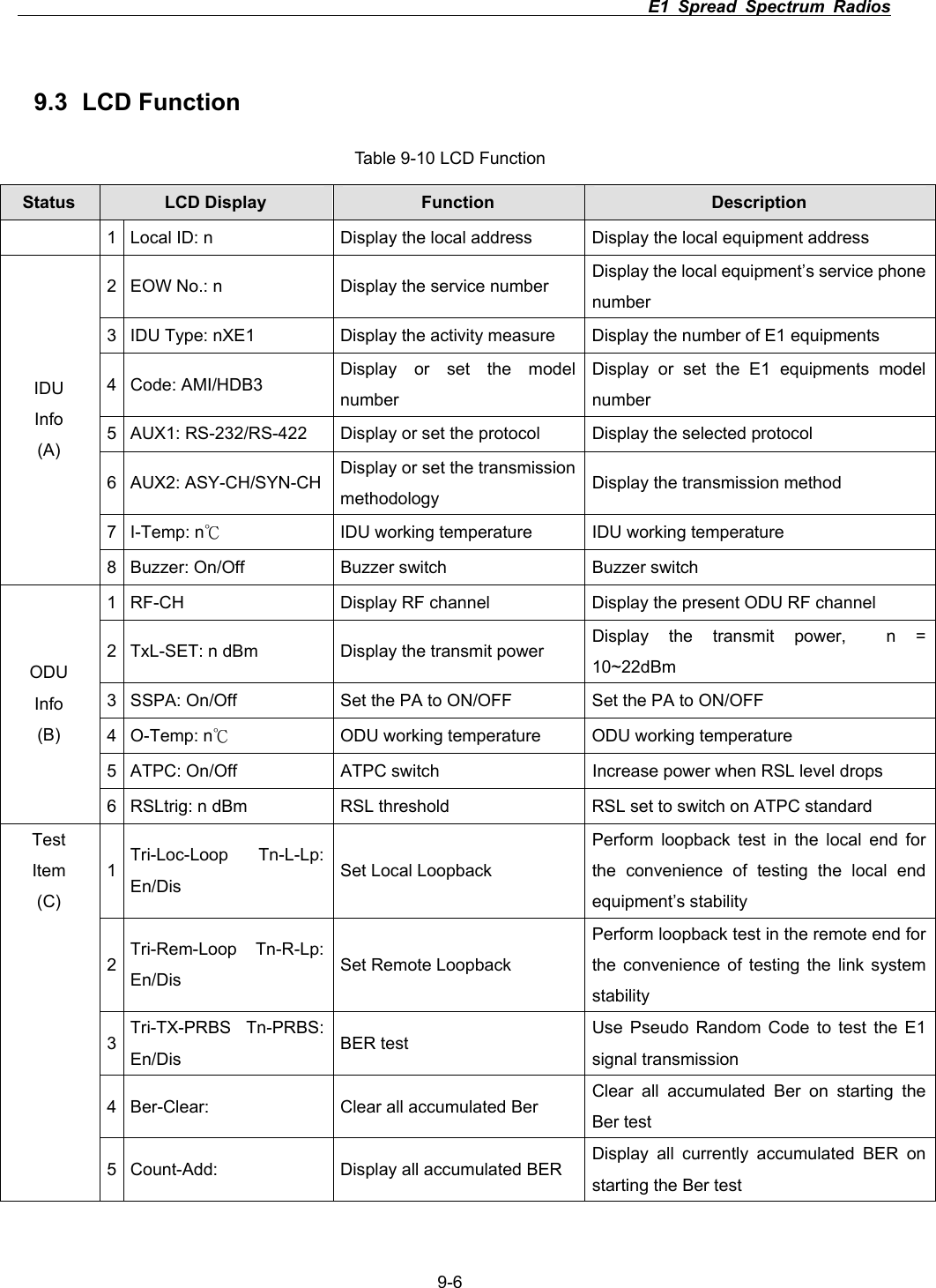
                                                                         E1 Spread Spectrum Radios      9-69.3 LCD Function Table 9-10 LCD Function Status LCD Display  Function  Description   1  Local ID: n    Display the local address  Display the local equipment address 2  EOW No.: n  Display the service number  Display the local equipment’s service phone number 3  IDU Type: nXE1  Display the activity measure  Display the number of E1 equipments 4 Code: AMI/HDB3  Display or set the model number Display or set the E1 equipments model number 5  AUX1: RS-232/RS-422  Display or set the protocol  Display the selected protocol 6 AUX2: ASY-CH/SYN-CH  Display or set the transmission methodology   Display the transmission method 7 I-Temp: nк  IDU working temperature  IDU working temperature IDUInfo(A)8  Buzzer: On/Off  Buzzer switch  Buzzer switch 1  RF-CH  Display RF channel  Display the present ODU RF channel 2  TxL-SET: n dBm  Display the transmit power  Display the transmit power,  n = 10~22dBm3  SSPA: On/Off  Set the PA to ON/OFF  Set the PA to ON/OFF 4 O-Temp: nк  ODU working temperature  ODU working temperature 5  ATPC: On/Off  ATPC switch  Increase power when RSL level drops ODUInfo(B)6  RSLtrig: n dBm  RSL threshold  RSL set to switch on ATPC standard 1Tri-Loc-Loop Tn-L-Lp: En/Dis  Set Local Loopback Perform loopback test in the local end for the convenience of testing the local end equipment’s stability 2Tri-Rem-Loop Tn-R-Lp: En/Dis  Set Remote Loopback Perform loopback test in the remote end for the convenience of testing the link system stability3Tri-TX-PRBS Tn-PRBS: En/Dis  BER test  Use Pseudo Random Code to test the E1 signal transmission 4  Ber-Clear:  Clear all accumulated Ber  Clear all accumulated Ber on starting the Ber test TestItem(C) 5  Count-Add:  Display all accumulated BER  Display all currently accumulated BER on starting the Ber test
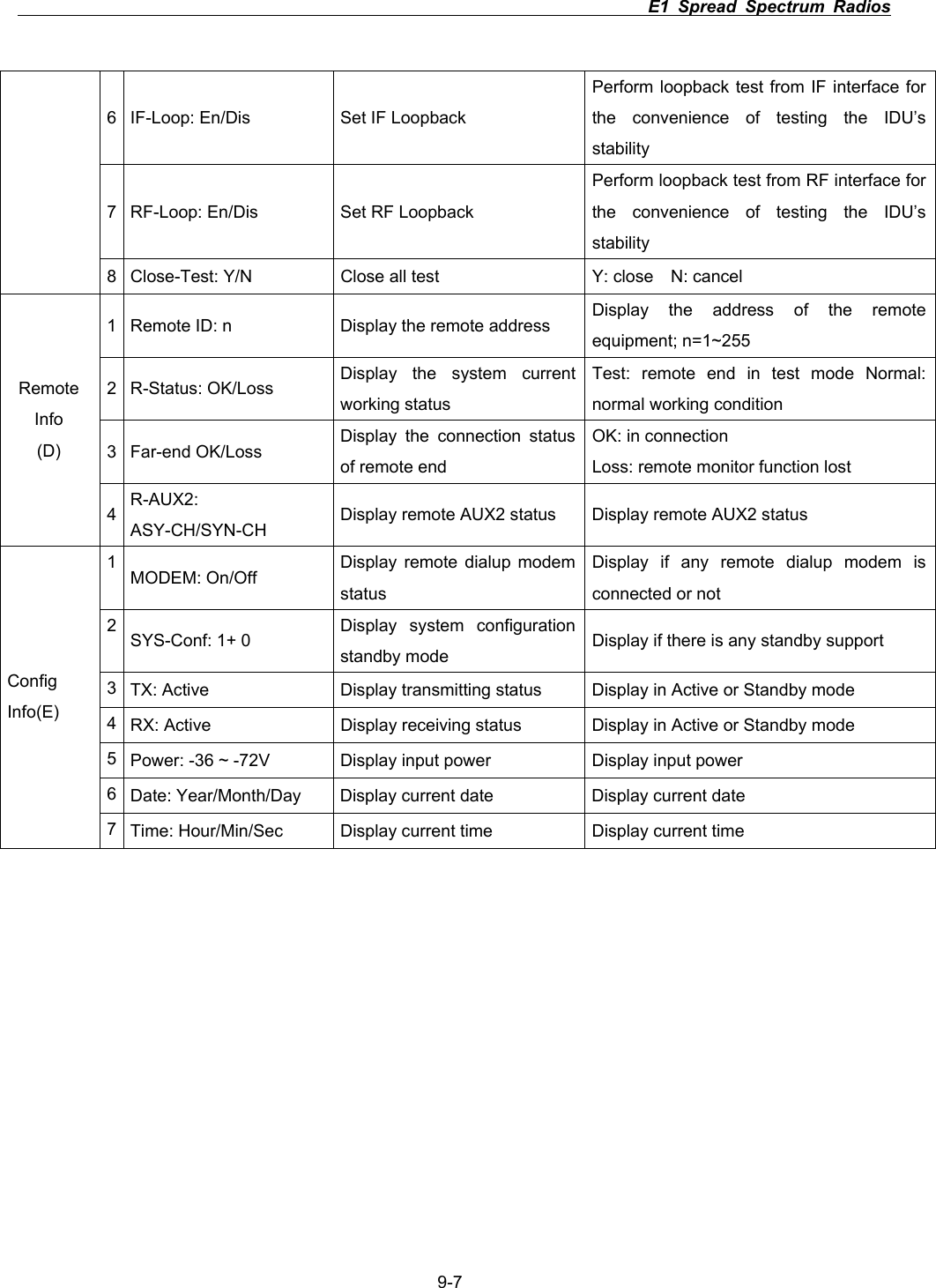
                                                                         E1 Spread Spectrum Radios      9-76  IF-Loop: En/Dis  Set IF Loopback   Perform loopback test from IF interface for the convenience of testing the IDU’s stability7  RF-Loop: En/Dis  Set RF Loopback   Perform loopback test from RF interface for the convenience of testing the IDU’s stability8  Close-Test: Y/N  Close all test  Y: close    N: cancel 1  Remote ID: n  Display the remote address  Display the address of the remote equipment; n=1~255 2 R-Status: OK/Loss  Display the system current working status Test: remote end in test mode Normal: normal working condition 3 Far-end OK/Loss  Display the connection status of remote end OK: in connection Loss: remote monitor function lost RemoteInfo(D) 4R-AUX2: ASY-CH/SYN-CH Display remote AUX2 status  Display remote AUX2 status 1MODEM: On/Off  Display remote dialup modem statusDisplay if any remote dialup modem is connected or not 2SYS-Conf: 1+ 0  Display system configuration standby mode  Display if there is any standby support 3TX: Active  Display transmitting status  Display in Active or Standby mode 4RX: Active  Display receiving status  Display in Active or Standby mode 5Power: -36 ~ -72V  Display input power  Display input power 6Date: Year/Month/Day  Display current date  Display current date ConfigInfo(E)7Time: Hour/Min/Sec  Display current time  Display current time
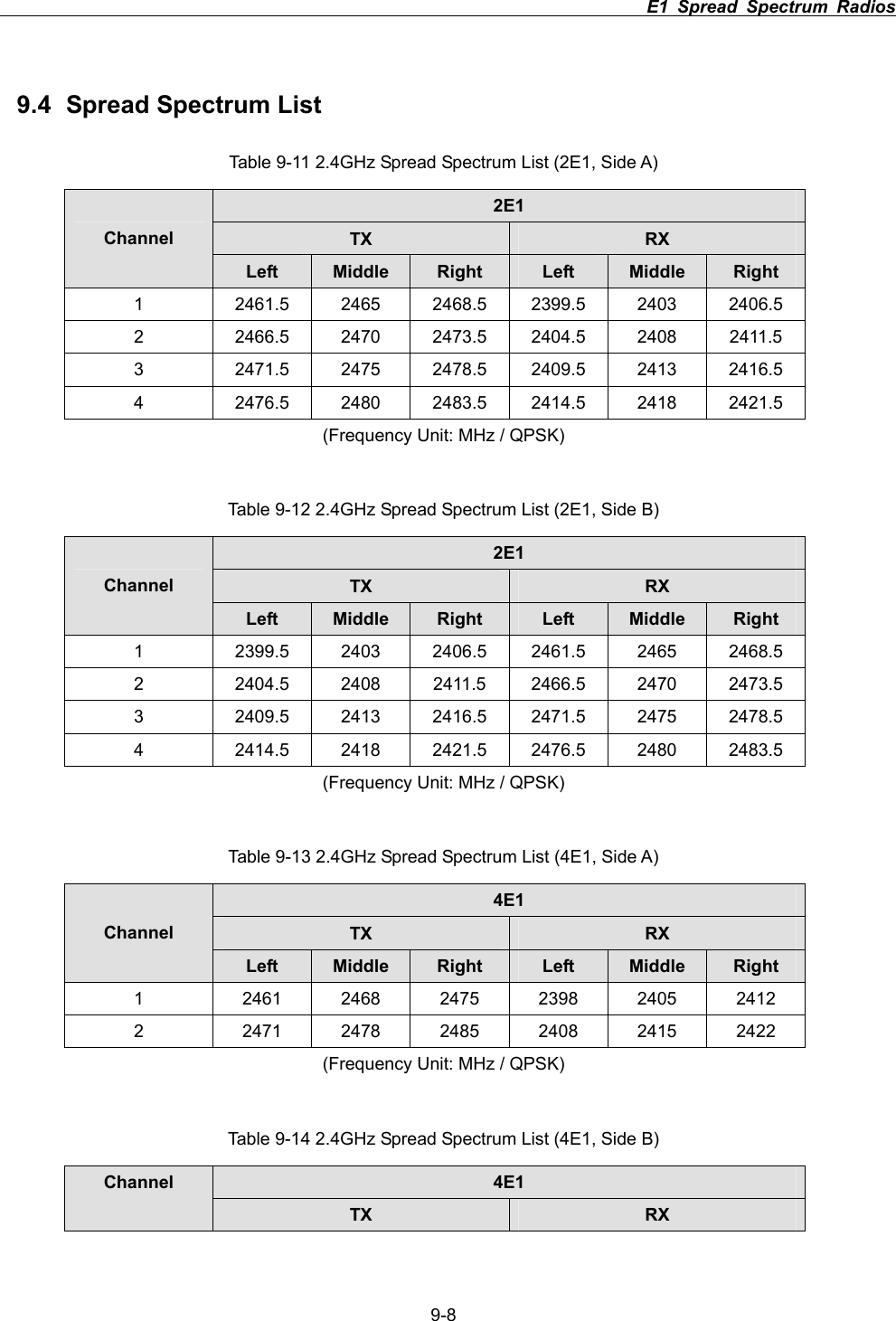
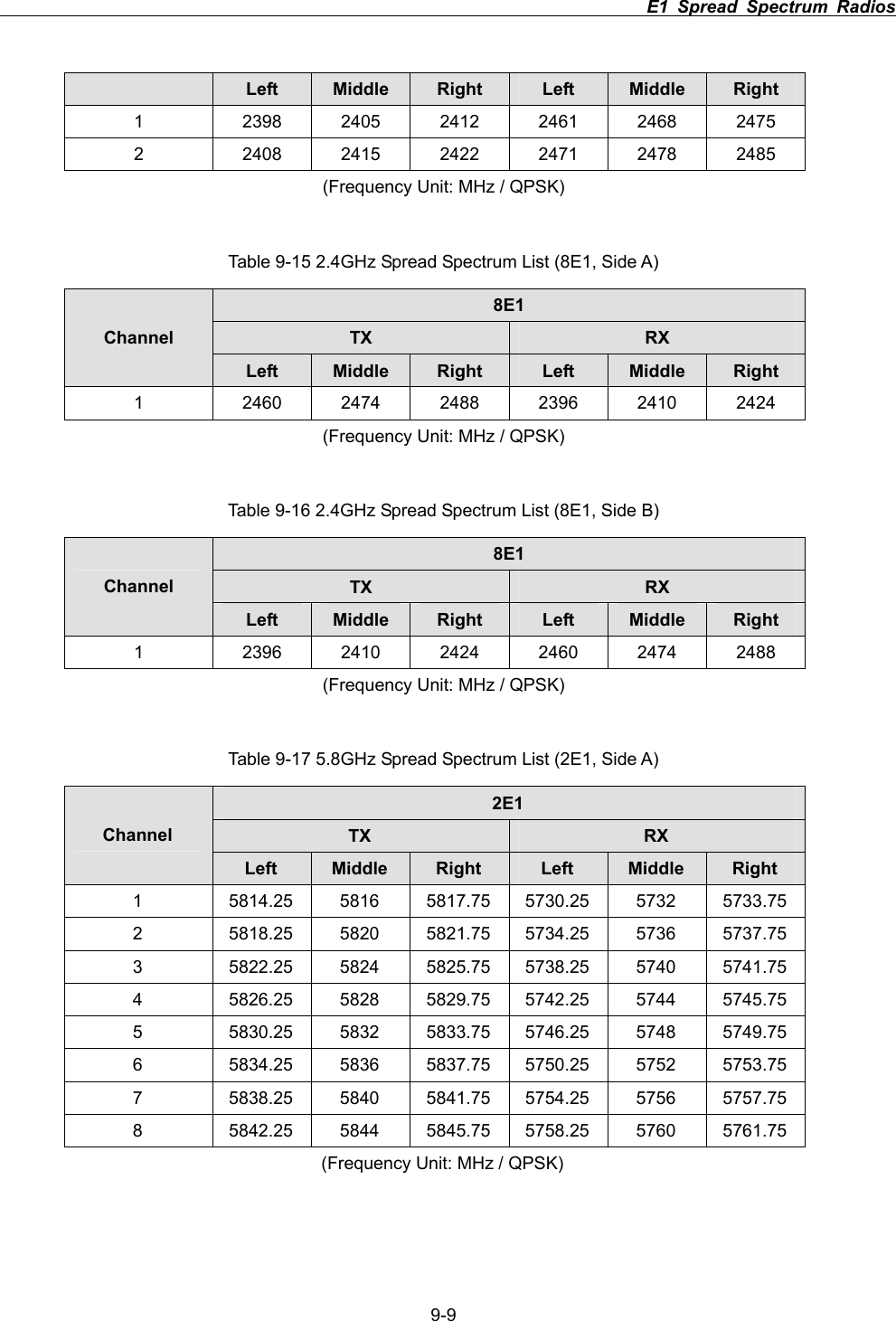
                                                                         E1 Spread Spectrum Radios      9-89.4  Spread Spectrum List Table 9-11 2.4GHz Spread Spectrum List (2E1, Side A) 2E1TX RXChannel Left  Middle Right Left  Middle Right1  2461.5 2465 2468.5 2399.5 2403 2406.5 2  2466.5 2470 2473.5 2404.5 2408 2411.5 3  2471.5 2475 2478.5 2409.5 2413 2416.5 4  2476.5 2480 2483.5 2414.5 2418 2421.5 (Frequency Unit: MHz / QPSK) Table 9-12 2.4GHz Spread Spectrum List (2E1, Side B) 2E1TX RXChannel Left  Middle Right Left  Middle Right1  2399.5 2403 2406.5 2461.5 2465 2468.5 2  2404.5 2408 2411.5 2466.5 2470 2473.5 3  2409.5 2413 2416.5 2471.5 2475 2478.5 4  2414.5 2418 2421.5 2476.5 2480 2483.5 (Frequency Unit: MHz / QPSK) Table 9-13 2.4GHz Spread Spectrum List (4E1, Side A) 4E1TX RXChannel Left  Middle Right Left  Middle Right1  2461 2468 2475 2398 2405 2412 2  2471 2478 2485 2408 2415 2422 (Frequency Unit: MHz / QPSK) Table 9-14 2.4GHz Spread Spectrum List (4E1, Side B) 4E1Channel TX RX
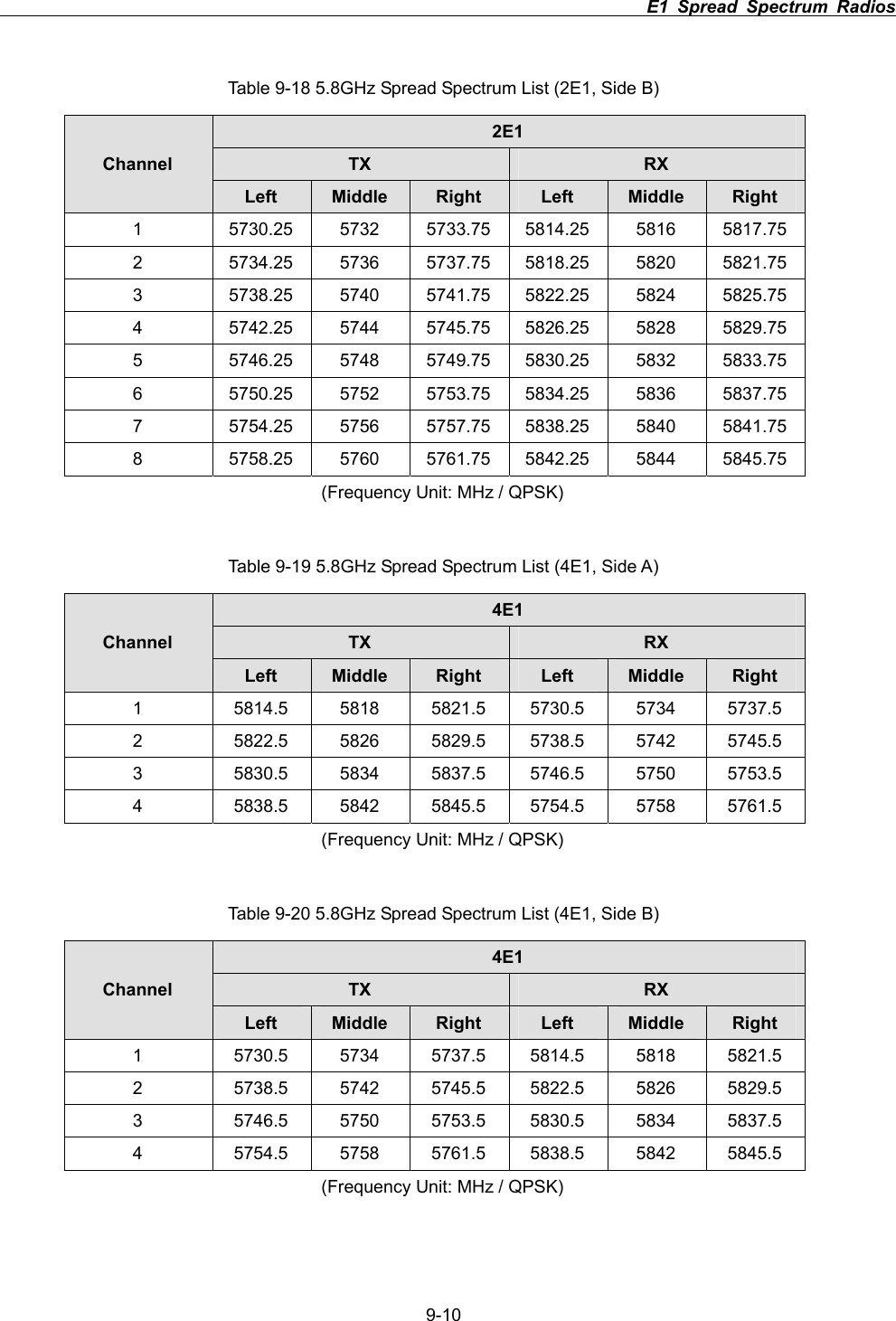
                                                                         E1 Spread Spectrum Radios      9-9Left  Middle Right Left  Middle Right1  2398 2405 2412 2461 2468 2475 2  2408 2415 2422 2471 2478 2485 (Frequency Unit: MHz / QPSK) Table 9-15 2.4GHz Spread Spectrum List (8E1, Side A) 8E1TX RXChannel Left  Middle Right Left  Middle Right1  2460 2474 2488 2396 2410 2424 (Frequency Unit: MHz / QPSK) Table 9-16 2.4GHz Spread Spectrum List (8E1, Side B) 8E1TX RXChannel Left  Middle Right Left  Middle Right1  2396 2410 2424 2460 2474 2488 (Frequency Unit: MHz / QPSK) Table 9-17 5.8GHz Spread Spectrum List (2E1, Side A) 2E1TX RXChannel Left Middle Right Left Middle Right1  5814.25 5816 5817.75 5730.25 5732 5733.75 2  5818.25 5820 5821.75 5734.25 5736 5737.75 3  5822.25 5824 5825.75 5738.25 5740 5741.75 4  5826.25 5828 5829.75 5742.25 5744 5745.75 5  5830.25 5832 5833.75 5746.25 5748 5749.75 6  5834.25 5836 5837.75 5750.25 5752 5753.75 7  5838.25 5840 5841.75 5754.25 5756 5757.75 8  5842.25 5844 5845.75 5758.25 5760 5761.75 (Frequency Unit: MHz / QPSK)
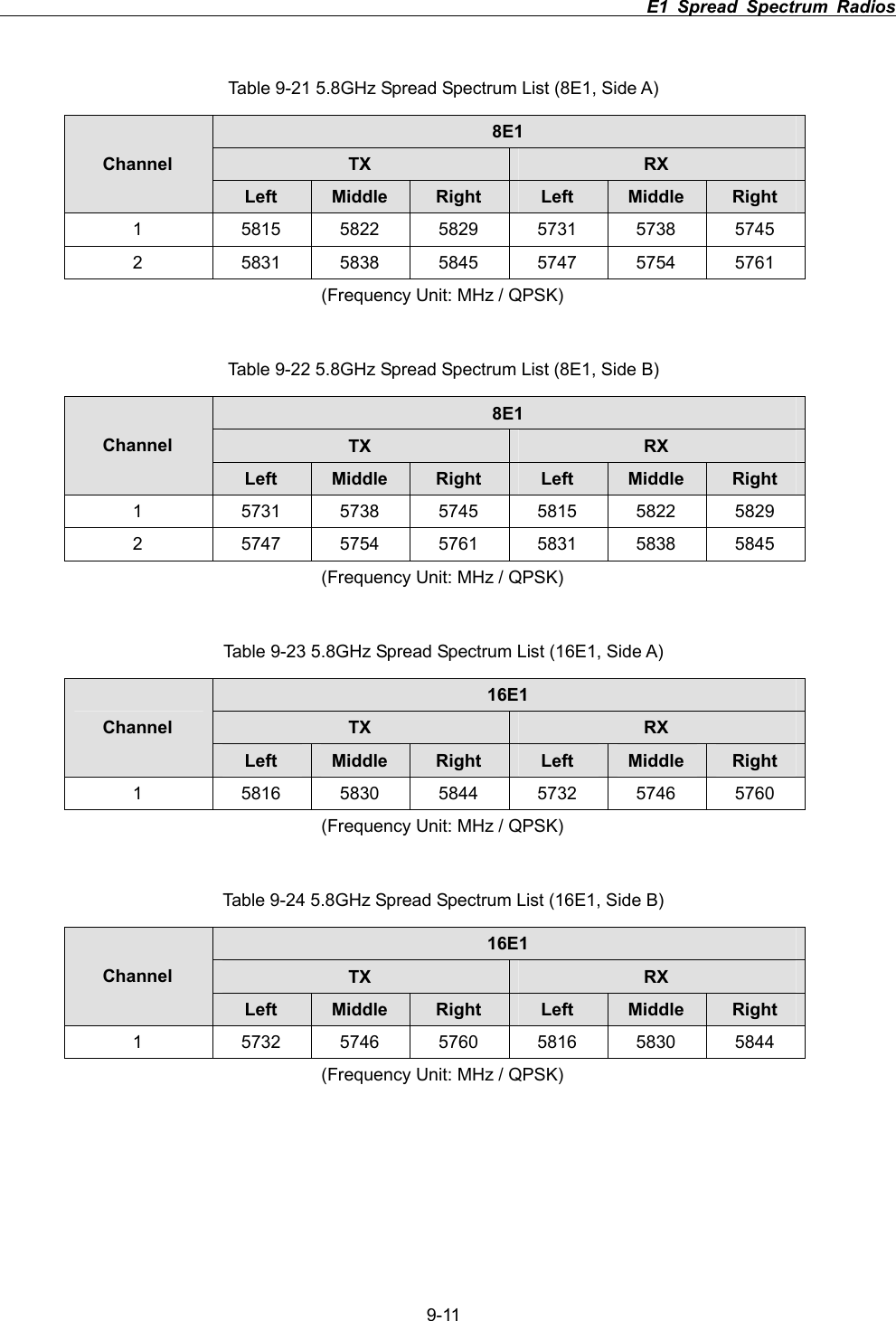
                                                                         E1 Spread Spectrum Radios      9-10Table 9-18 5.8GHz Spread Spectrum List (2E1, Side B) 2E1TX RXChannel Left Middle Right Left Middle Right1  5730.25 5732 5733.75 5814.25 5816 5817.75 2  5734.25 5736 5737.75 5818.25 5820 5821.75 3  5738.25 5740 5741.75 5822.25 5824 5825.75 4  5742.25 5744 5745.75 5826.25 5828 5829.75 5  5746.25 5748 5749.75 5830.25 5832 5833.75 6  5750.25 5752 5753.75 5834.25 5836 5837.75 7  5754.25 5756 5757.75 5838.25 5840 5841.75 8  5758.25 5760 5761.75 5842.25 5844 5845.75 (Frequency Unit: MHz / QPSK) Table 9-19 5.8GHz Spread Spectrum List (4E1, Side A) 4E1TX RXChannel Left Middle Right Left Middle Right1  5814.5 5818 5821.5 5730.5 5734 5737.5 2  5822.5 5826 5829.5 5738.5 5742 5745.5 3  5830.5 5834 5837.5 5746.5 5750 5753.5 4  5838.5 5842 5845.5 5754.5 5758 5761.5 (Frequency Unit: MHz / QPSK) Table 9-20 5.8GHz Spread Spectrum List (4E1, Side B) 4E1TX RXChannel Left Middle Right Left Middle Right1  5730.5 5734 5737.5 5814.5 5818 5821.5 2  5738.5 5742 5745.5 5822.5 5826 5829.5 3  5746.5 5750 5753.5 5830.5 5834 5837.5 4  5754.5 5758 5761.5 5838.5 5842 5845.5 (Frequency Unit: MHz / QPSK)
                                                                         E1 Spread Spectrum Radios      9-11 Table 9-21 5.8GHz Spread Spectrum List (8E1, Side A) 8E1TX RXChannel Left Middle Right Left Middle Right1  5815 5822 5829 5731 5738 5745 2  5831 5838 5845 5747 5754 5761 (Frequency Unit: MHz / QPSK) Table 9-22 5.8GHz Spread Spectrum List (8E1, Side B) 8E1TX RXChannel Left Middle Right Left Middle Right1  5731 5738 5745 5815 5822 5829 2  5747 5754 5761 5831 5838 5845 (Frequency Unit: MHz / QPSK) Table 9-23 5.8GHz Spread Spectrum List (16E1, Side A) 16E1TX RXChannel Left Middle Right Left Middle Right1  5816 5830 5844 5732 5746 5760 (Frequency Unit: MHz / QPSK) Table 9-24 5.8GHz Spread Spectrum List (16E1, Side B) 16E1TX RXChannel Left Middle Right Left Middle Right1  5732 5746 5760 5816 5830 5844 (Frequency Unit: MHz / QPSK)
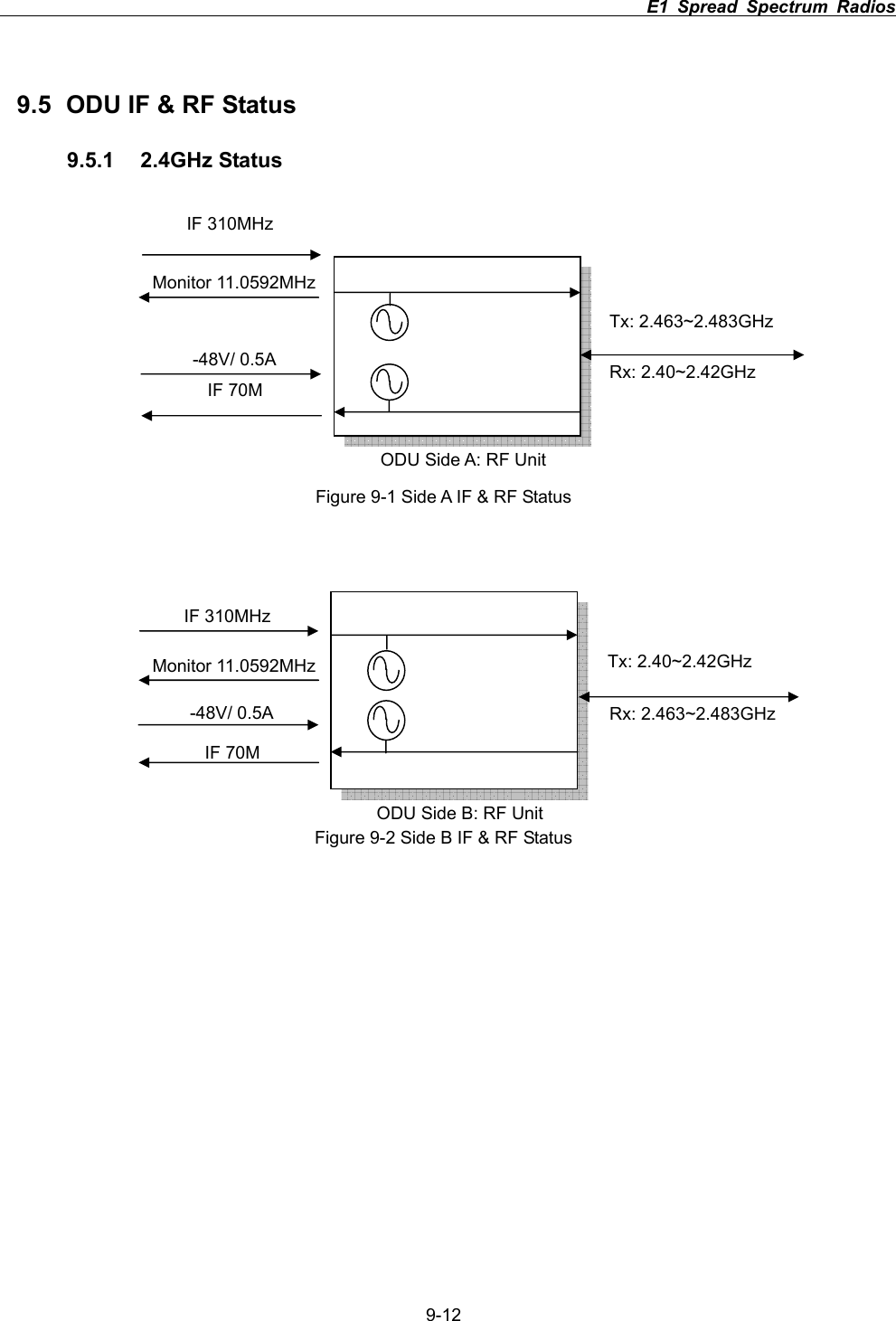
                                                                         E1 Spread Spectrum Radios      9-129.5  ODU IF & RF Status 9.5.1 2.4GHz Status       Figure 9-1 Side A IF & RF Status Figure 9-2 Side B IF & RF Status ODU Side B: RF UnitTx: 2.40~2.42GHz   Tx: 2.463~2.483GHz  ODU Side A: RF UnitRx: 2.40~2.42GHz Rx: 2.463~2.483GHz IF 310MHz   IF 70M -48V/ 0.5A Monitor 11.0592MHz IF 310MHz   IF 70M -48V/ 0.5A Monitor 11.0592MHz
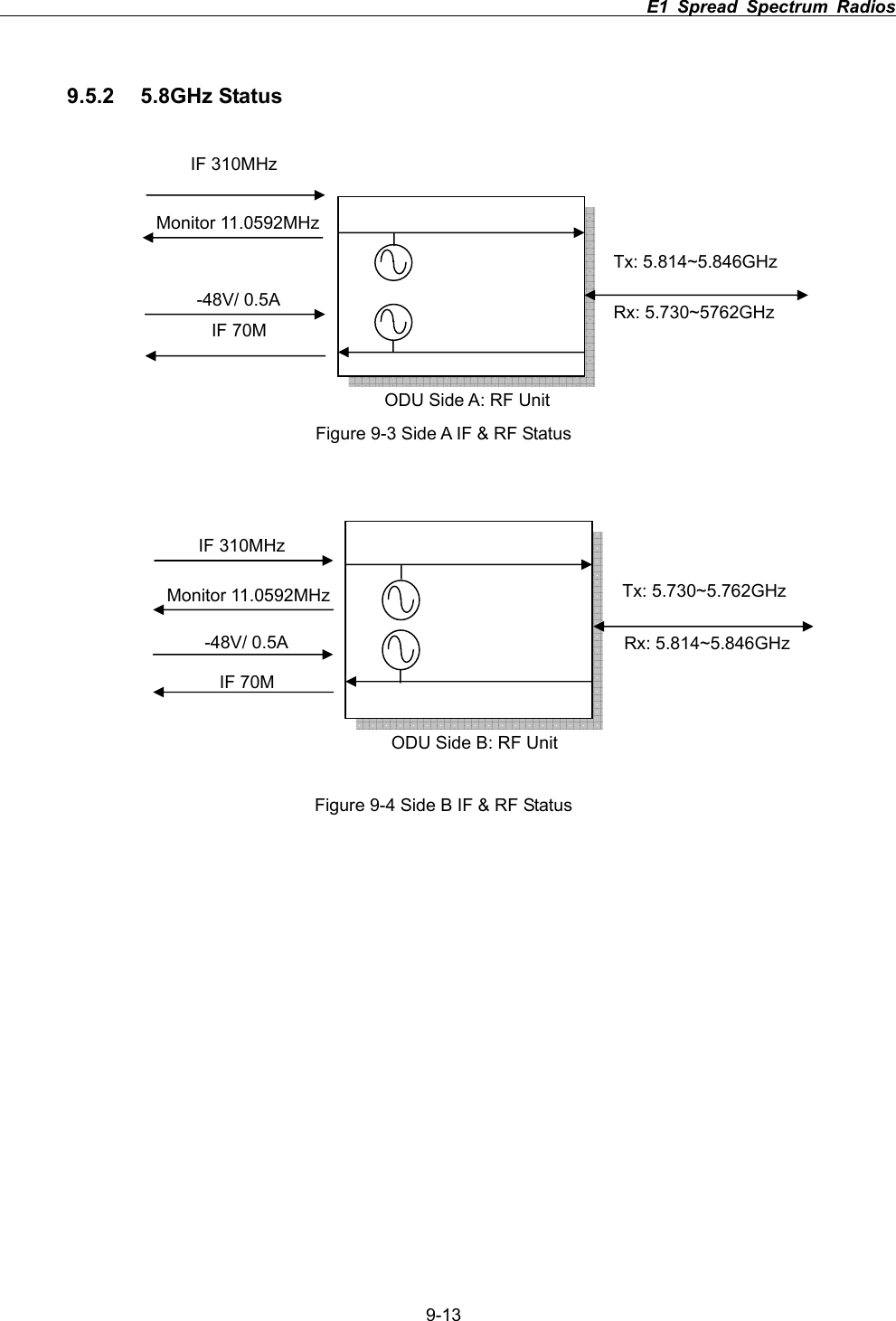
                                                                         E1 Spread Spectrum Radios      9-139.5.2 5.8GHz Status Figure 9-3 Side A IF & RF Status Figure 9-4 Side B IF & RF Status Tx: 5.814~5.846GHz  ODU Side A: RF UnitRx: 5.730~5762GHz IF 310MHz   IF 70M -48V/ 0.5A Monitor 11.0592MHz ODU Side B: RF UnitTx: 5.730~5.762GHz Rx: 5.814~5.846GHzIF 310MHz   IF 70M -48V/ 0.5A Monitor 11.0592MHz
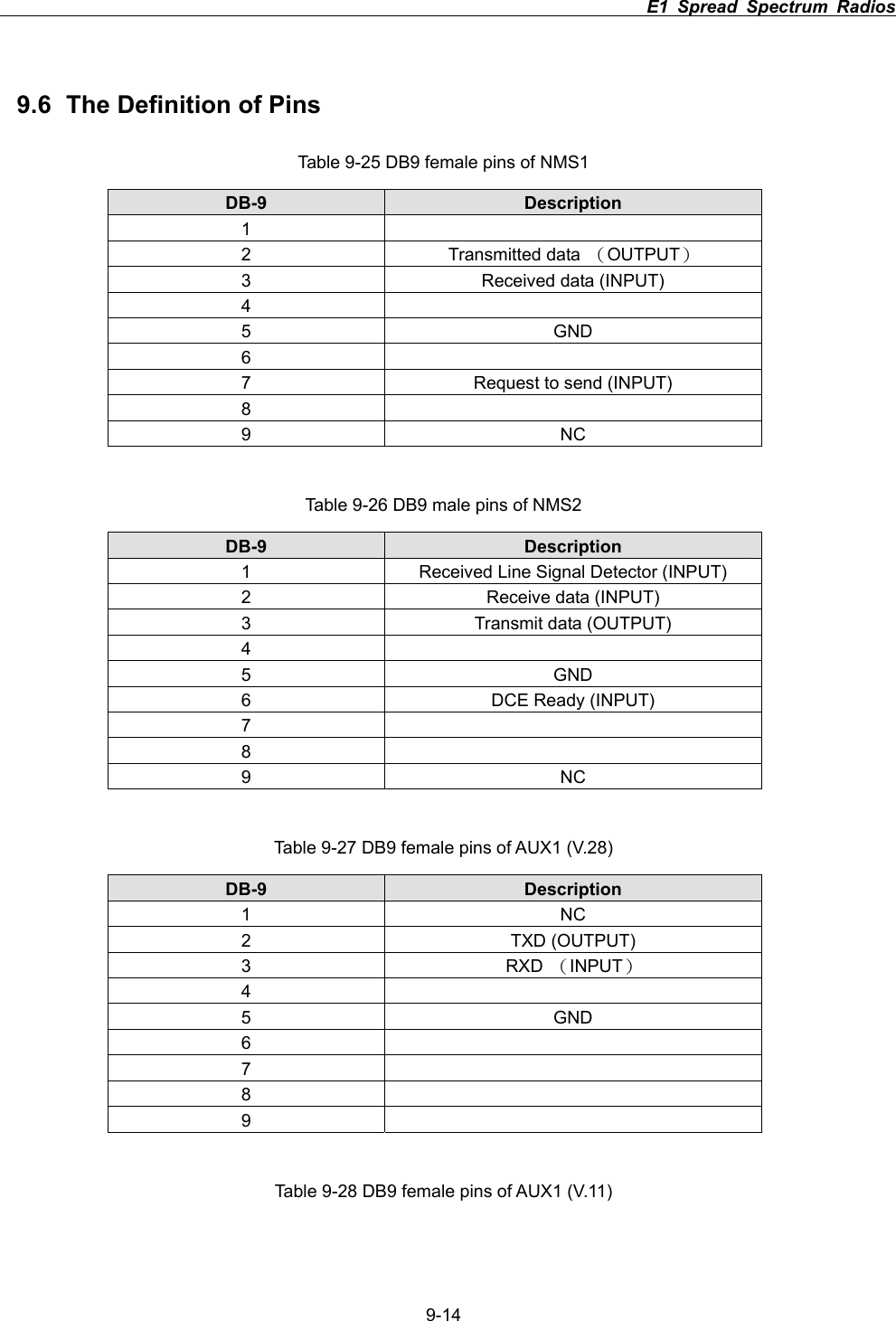
                                                                         E1 Spread Spectrum Radios      9-149.6  The Definition of Pins Table 9-25 DB9 female pins of NMS1 DB-9  Description 12 Transmitted data ΰOUTPUTα3  Received data (INPUT) 45 GND 67  Request to send (INPUT) 89 NC Table 9-26 DB9 male pins of NMS2 DB-9  Description 1  Received Line Signal Detector (INPUT) 2  Receive data (INPUT) 3  Transmit data (OUTPUT) 45 GND 6  DCE Ready (INPUT) 789 NC Table 9-27 DB9 female pins of AUX1 (V.28) DB-9  Description 1 NC 2 TXD (OUTPUT) 3 RXD ΰINPUTα45 GND 6789Table 9-28 DB9 female pins of AUX1 (V.11)
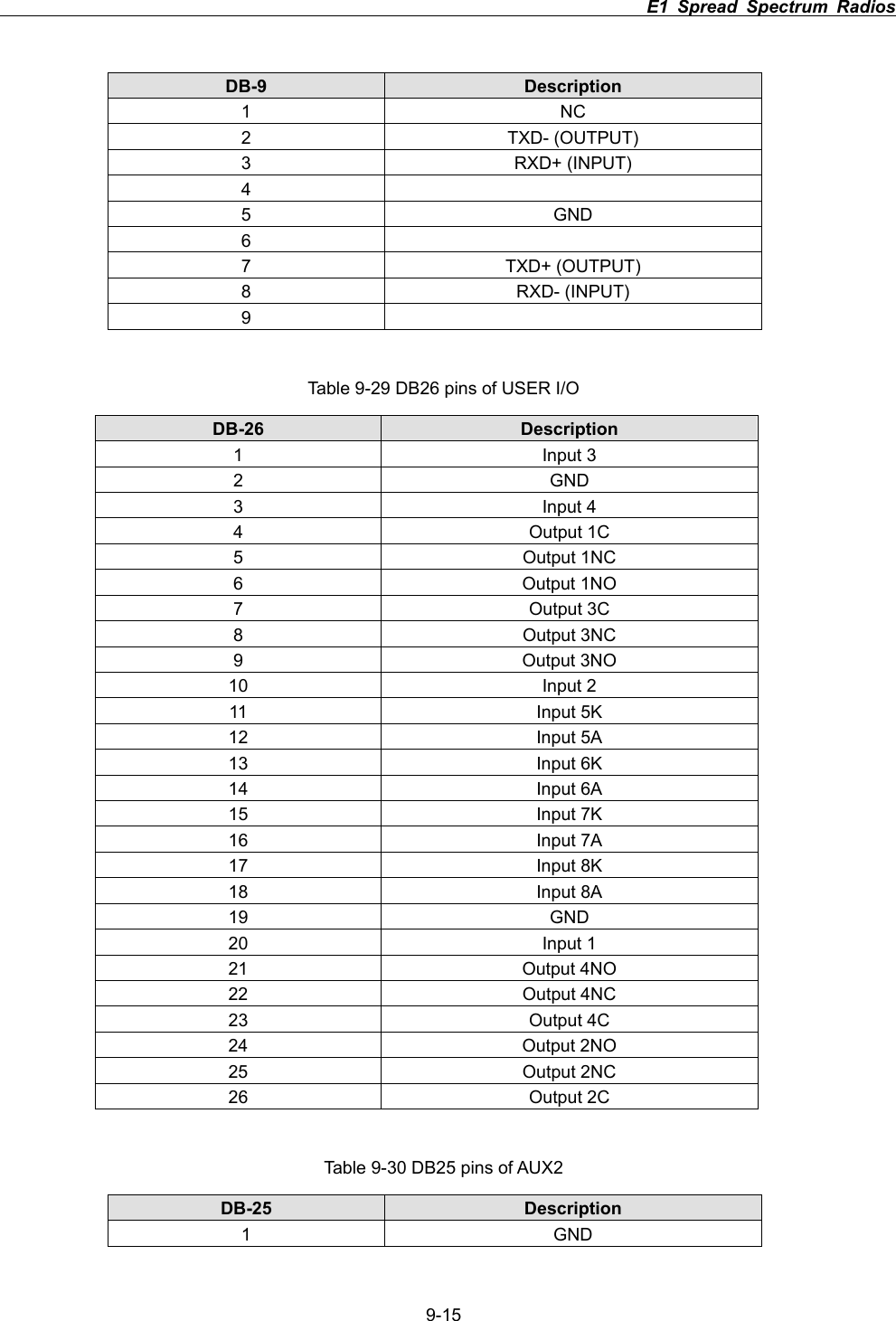
                                                                         E1 Spread Spectrum Radios      9-15DB-9  Description 1 NC 2 TXD- (OUTPUT) 3 RXD+ (INPUT) 45 GND 67 TXD+ (OUTPUT) 8 RXD- (INPUT) 9Table 9-29 DB26 pins of USER I/O DB-26 Description 1 Input 3 2 GND 3 Input 4 4 Output 1C 5 Output 1NC 6 Output 1NO 7 Output 3C 8 Output 3NC 9 Output 3NO 10 Input 2 11 Input 5K 12 Input 5A 13 Input 6K 14 Input 6A 15 Input 7K 16 Input 7A 17 Input 8K 18 Input 8A 19 GND 20 Input 1 21 Output 4NO 22 Output 4NC 23 Output 4C 24 Output 2NO 25 Output 2NC 26 Output 2C Table 9-30 DB25 pins of AUX2 DB-25 Description 1 GND
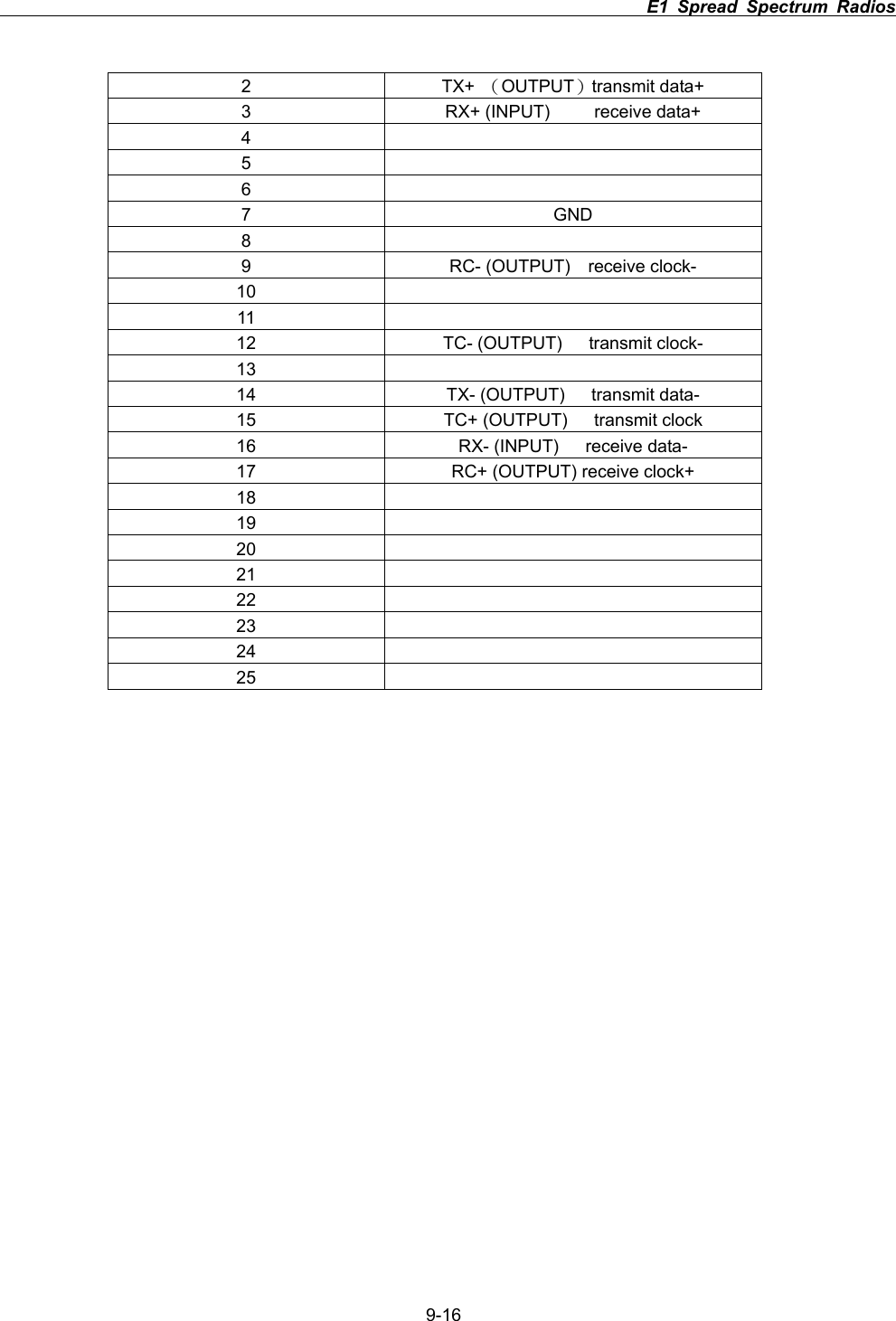
                                                                         E1 Spread Spectrum Radios      9-162 TX+ ΰOUTPUTαtransmit data+ 3  RX+ (INPUT)     receive data+ 4567 GND 89  RC- (OUTPUT)  receive clock- 1011  12  TC- (OUTPUT)   transmit clock- 1314  TX- (OUTPUT)   transmit data- 15  TC+ (OUTPUT)   transmit clock 16  RX- (INPUT)   receive data- 17  RC+ (OUTPUT) receive clock+ 1819202122232425
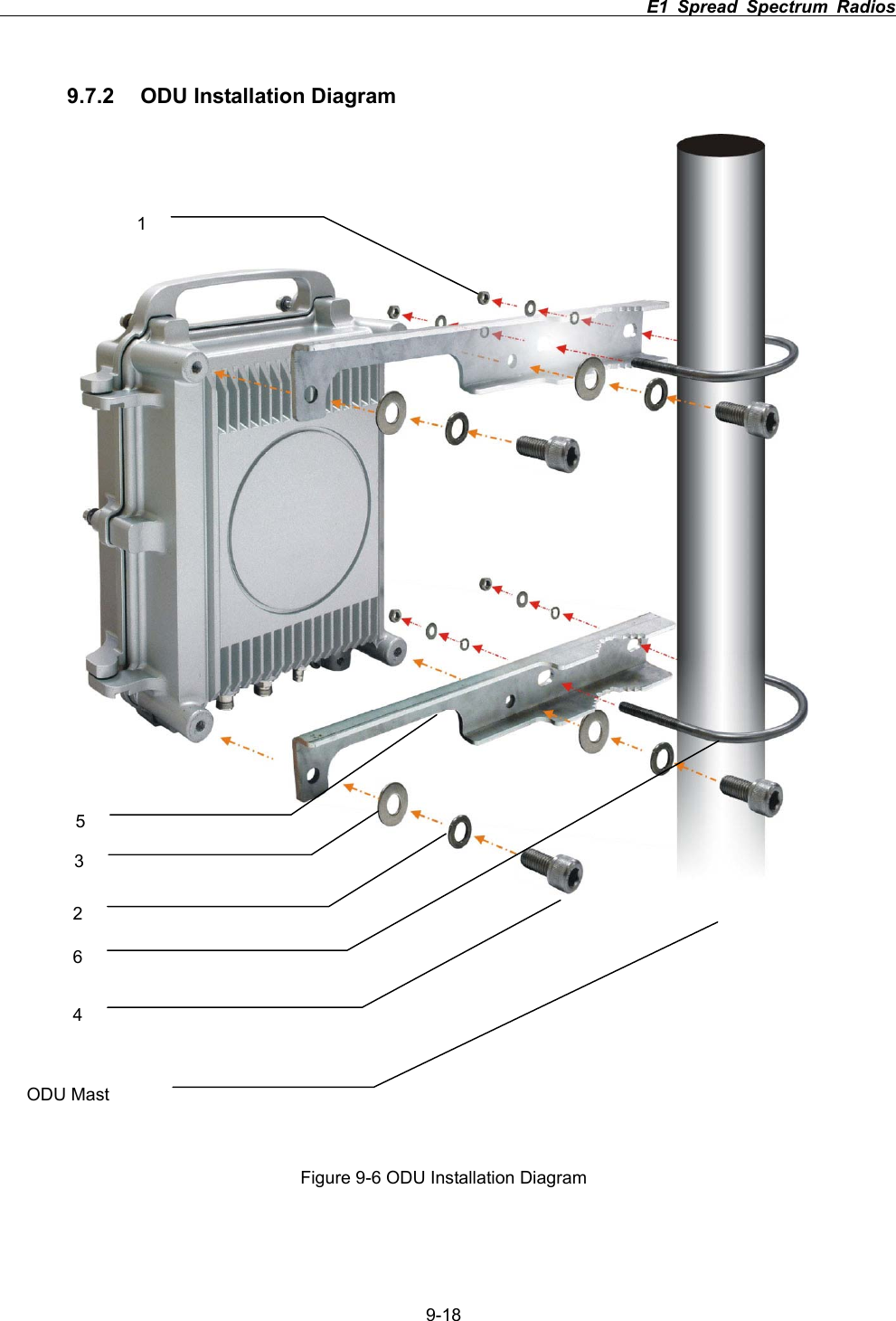
                                                                         E1 Spread Spectrum Radios      9-179.7 Installation Guide 9.7.1  Parts of ODU assembly      Nut[1]               Split Washer[2]        Flat Washer[3]           Hex Screw[4] ODU Fastening Assembly                                          Figure 9-5 Part accessoriesPart Q’TYNut[1] 4 Split Washer[2]  8 Flat Washer[3]  8 Hex Screw[4]  4 Mounting Bracket[5]  2 U-Bracket[6] 2 Mounting Bracket [5]U-Bracket[6]
                                                                         E1 Spread Spectrum Radios      9-189.7.2  ODU Installation Diagram Figure 9-6 ODU Installation Diagram123456ODU Mast
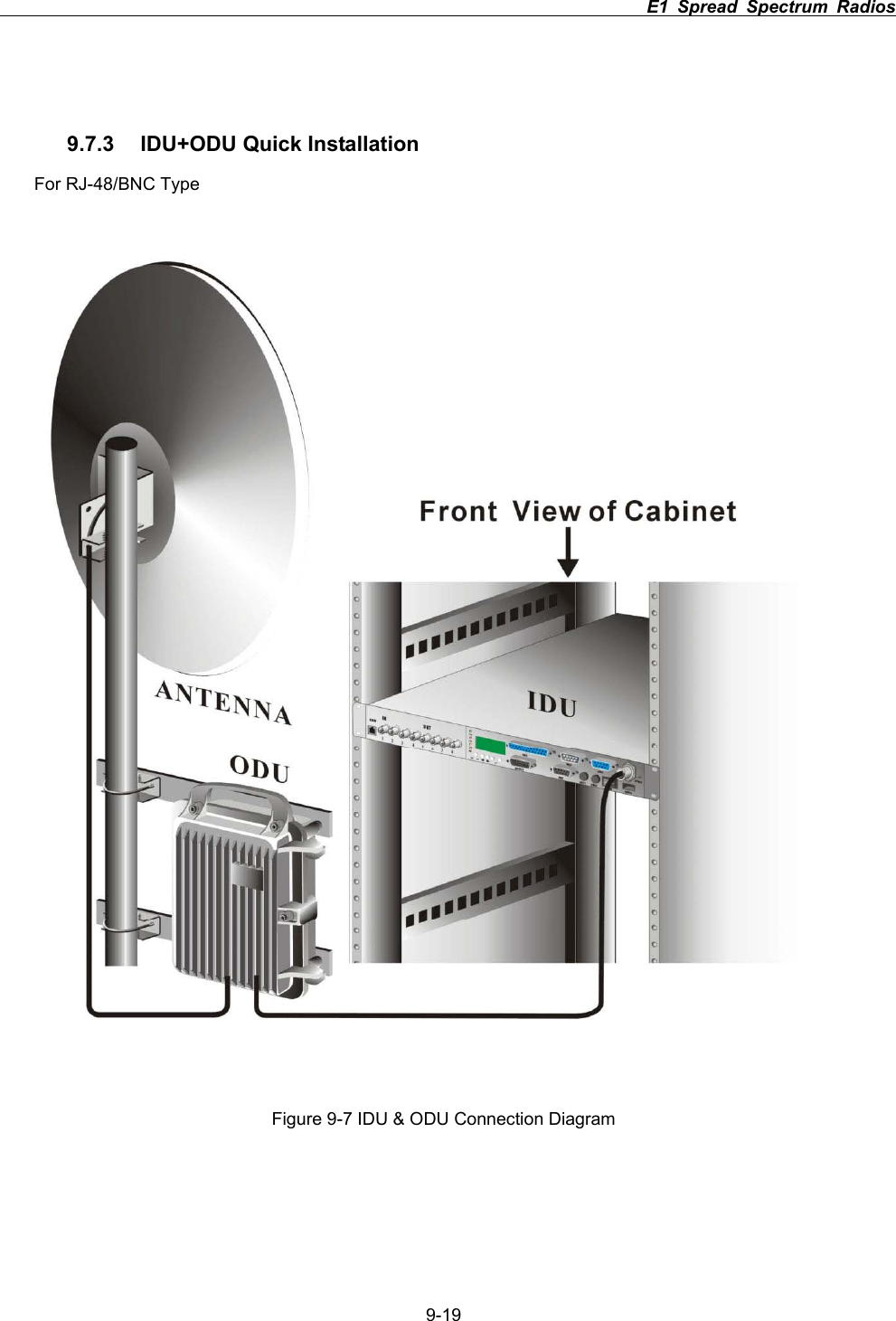
                                                                         E1 Spread Spectrum Radios      9-199.7.3  IDU+ODU Quick Installation For RJ-48/BNC Type Figure 9-7 IDU & ODU Connection Diagram
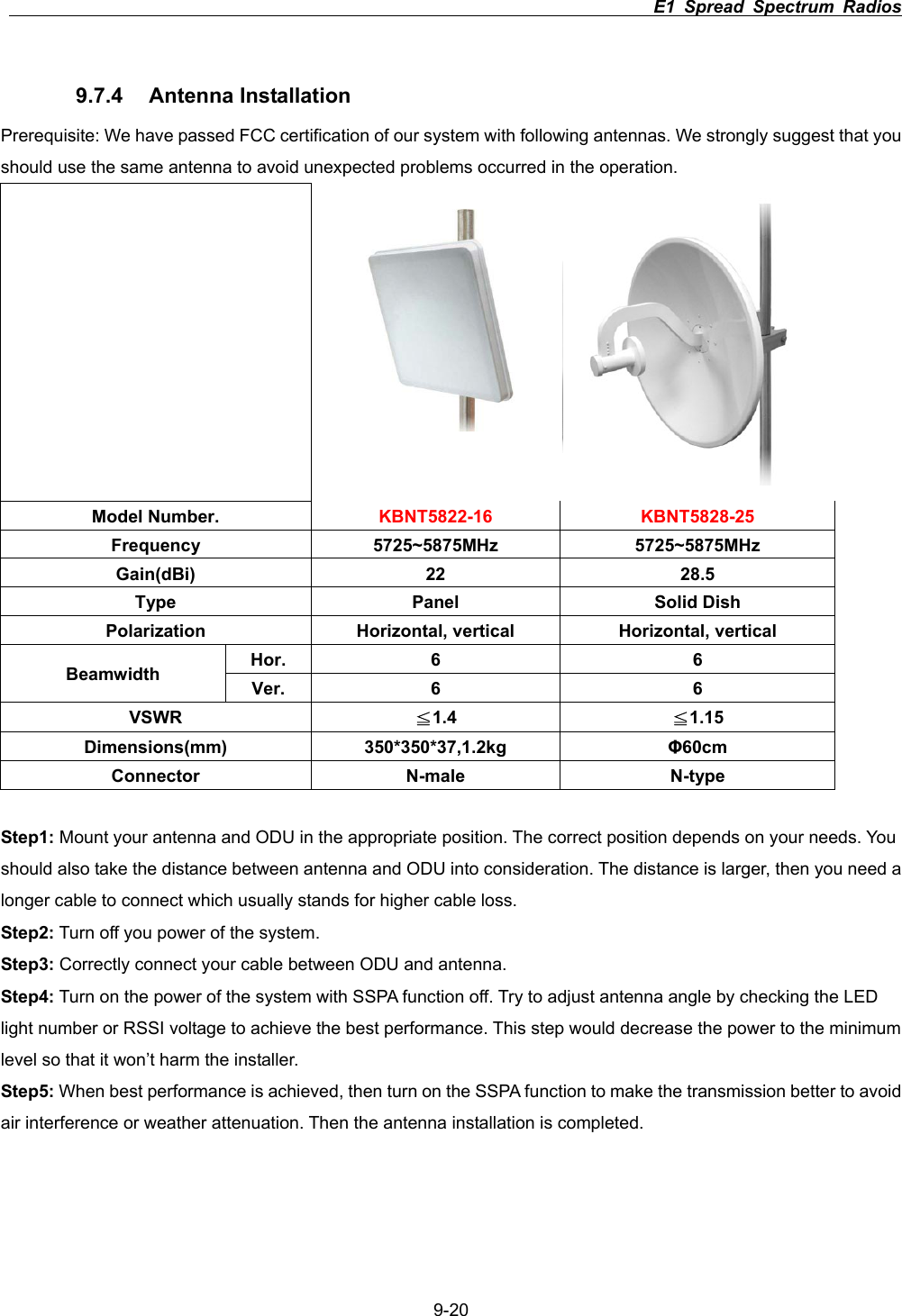
                                                                         E1 Spread Spectrum Radios      9-209.7.4 Antenna Installation Prerequisite: We have passed FCC certification of our system with following antennas. We strongly suggest that you should use the same antenna to avoid unexpected problems occurred in the operation.    Model Number.  KBNT5822-16 KBNT5828-25 Frequency 5725~5875MHz 5725~5875MHz Gain(dBi) 22  28.5 Type Panel Solid Dish Polarization  Horizontal, vertical  Horizontal, vertical Hor. 6  6 Beamwidth  Ver. 6  6 VSWR Љ1.4  Љ1.15 Dimensions(mm) 350*350*37,1.2kg  ĭ60cmConnector N-male N-type Step1: Mount your antenna and ODU in the appropriate position. The correct position depends on your needs. You should also take the distance between antenna and ODU into consideration. The distance is larger, then you need a longer cable to connect which usually stands for higher cable loss.   Step2: Turn off you power of the system.   Step3: Correctly connect your cable between ODU and antenna.   Step4: Turn on the power of the system with SSPA function off. Try to adjust antenna angle by checking the LED light number or RSSI voltage to achieve the best performance. This step would decrease the power to the minimum level so that it won’t harm the installer. Step5: When best performance is achieved, then turn on the SSPA function to make the transmission better to avoid air interference or weather attenuation. Then the antenna installation is completed.
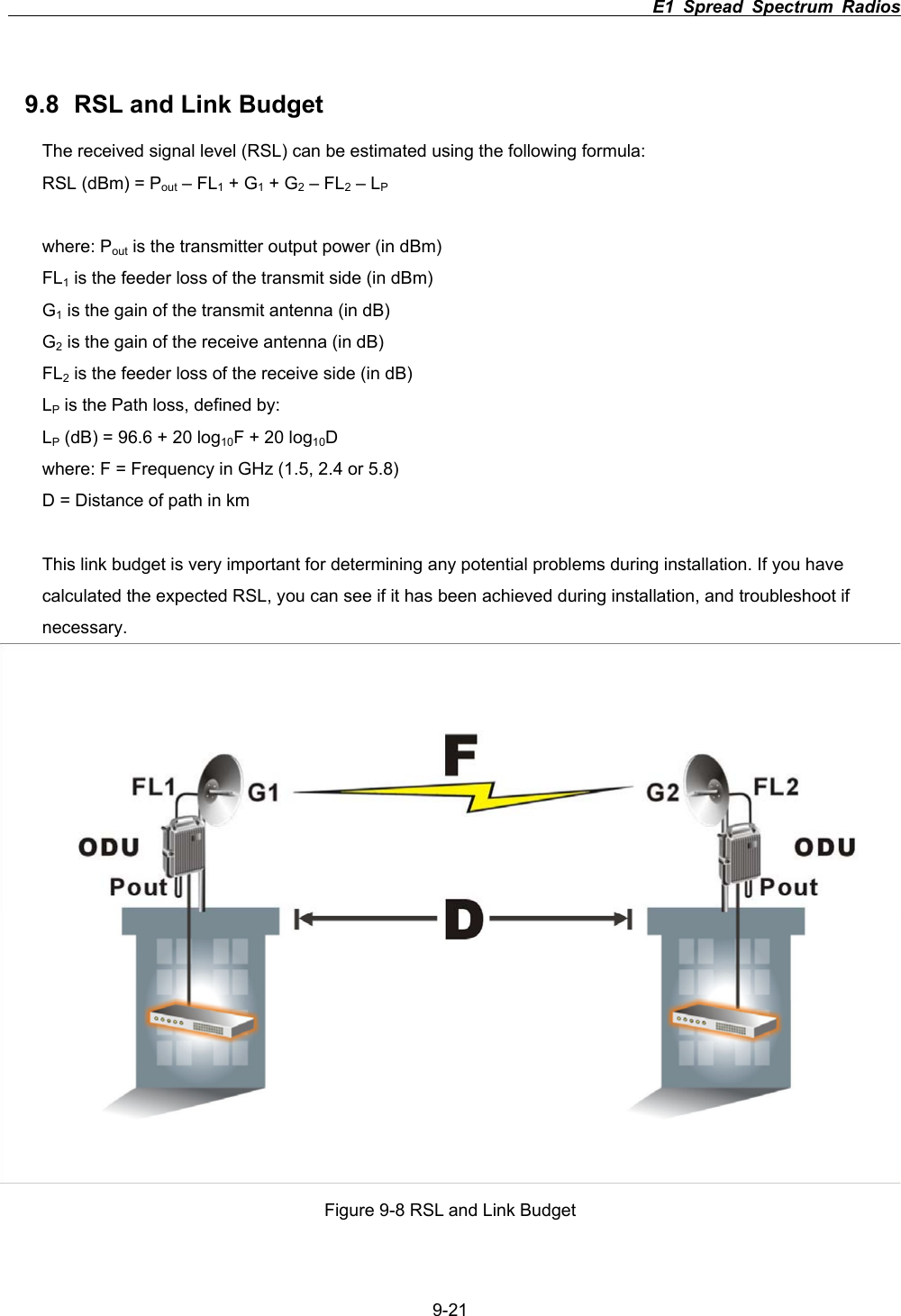
                                                                         E1 Spread Spectrum Radios      9-219.8  RSL and Link Budget The received signal level (RSL) can be estimated using the following formula: RSL (dBm) = Pout – FL1 + G1 + G2 – FL2 – LPwhere: Pout is the transmitter output power (in dBm) FL1 is the feeder loss of the transmit side (in dBm) G1 is the gain of the transmit antenna (in dB) G2 is the gain of the receive antenna (in dB) FL2 is the feeder loss of the receive side (in dB) LP is the Path loss, defined by: LP (dB) = 96.6 + 20 log10F + 20 log10Dwhere: F = Frequency in GHz (1.5, 2.4 or 5.8) D = Distance of path in km This link budget is very important for determining any potential problems during installation. If you have calculated the expected RSL, you can see if it has been achieved during installation, and troubleshoot if necessary. Figure 9-8 RSL and Link Budget

Navigation menu