KP Electronic Systems KPMTU150W UHF DATA TRANSMITTER User Manual users manual
KP Electronic Systems Ltd UHF DATA TRANSMITTER users manual
users manual
J9
Meter
Input Cables
MTU150W™
Long-Range
Synthesized Radio
Meter Transmitter
Web Site: www.kpsystems.com
ISRAEL Office
Email: info@kpsystems.com
Tefen Industrial Park, Tefen 24959
Tel: 972-4-987-3066 Fax: 972-4-987-3692
USA Office:
KP ELECTRONICS INC.
Email: info@kpsystems.com
109 Tudor Drive, North Wales, PA 19454
Tel: (215) 542-7460 Fax: (215) 542-7461
Book
096
Approved: Amir S. Rev:
New
MTU150W™ General Description
MTU150W™ is a long-range, synthesized
radio-metering transmitter in the VHF 450-
470 MHz frequency range.
When the MTU150W detects pulse
conditions at one or more of its inputs the
pulse is counted and saved.
When the number of the pulse is equal to the
Trans Scale defined by the GUP10™, it is
then transmitted to the central station
according to the WAT-NETTM protocol
selected for the system in operation.
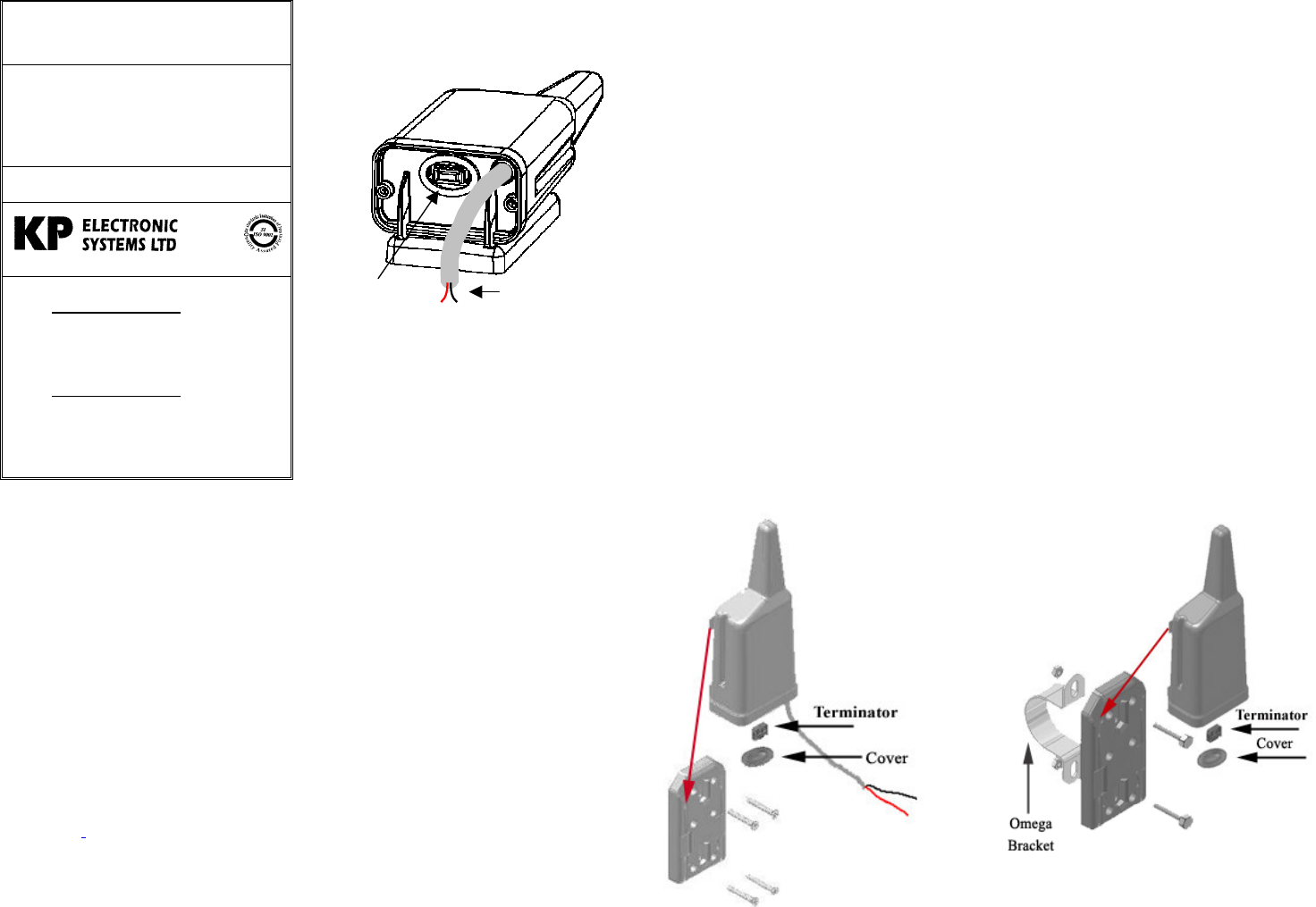
MTU150W™ has one connector (see Figure
1).
1. J9: The 10-pin programming jack is a
serial port to connect a PC or a FTU (see
Figure 1).
Unit parameters and meters values
are easily programmed using
Gup10™ utility-programming
software. (See the MTU150W™
Programming Guide) or by the FTU.
2. Meter Input: The meter input is a two
wires cable. These wires connect to the
meter output.
Figure 1: MTU150W™ View
Preparing for Operation
Before installing the MTU150W™
on site, perform the following
preparations:
1. Setting communication
parameters
2. Self test
Setting Communication
Parameters
Connect GUP10 program to the
MTU150W™ (see the
MTU150W™ programming
guide)
Self-Test
In order to perform a self-test please
see the Field Programmer User
Guide.
Installing the MTU150W
There are two mounting methods:
1. Wall mounting
2. On-Pipe mounting
Wall Mounting Installation
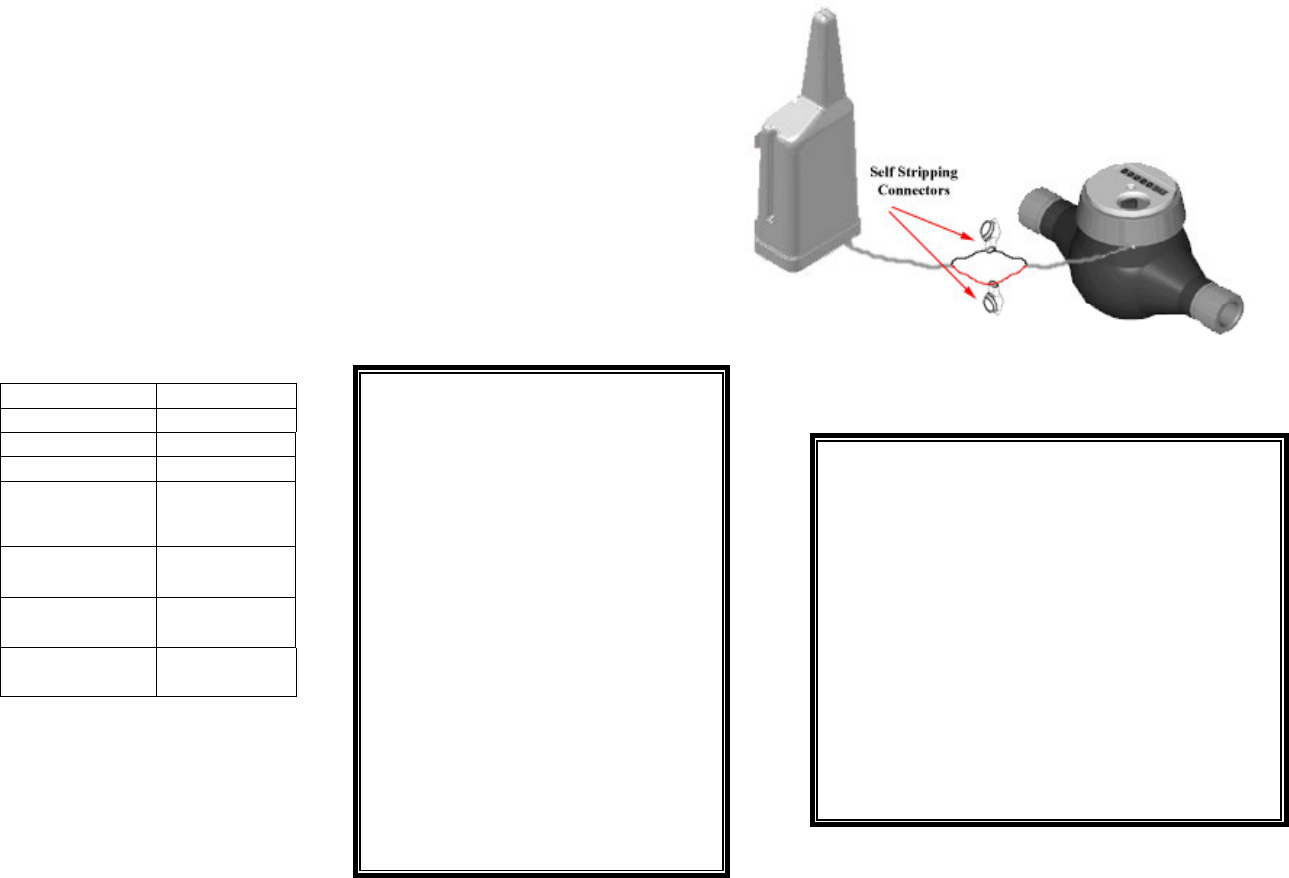
1. Fasten the mounting bracket on
the wall with four screws (See
figure 2)
2. Slide the MTU150W unit on the
mounting bracket until the 4 clips
are locking the unit
3. Define the parameters with the
field programmer (FTU100) see
the FTU User Guide
4. Insert the terminator to J9 (See
figure 1)
5. Put the cover
On-Pipe Mounting Installation
1. Fasten the mounting bracket
on the pipe with two screws
and the “Omega” bracket
(See figure 3)
2. Slide the MTU150W unit on
the mounting bracket until
the 4 clips are locking the
unit
3. Define the parameters with
the field programmer
(FTU100) see the FTU User
Guide
4. Insert the terminator to J9
(See figure 1)
5. Put the cover
Figure
: Wall Mounting Figure
: On-Pipe Mounting
Restrictions:
1. Do not mount the unit on any kind
of metal surface.
2. Do not mount any input cable next
to the antenna (see figure).
Meter types:
1.There are two main types of meters:
2. Meters that produces a ‘Passive
Pulse’.
3. Meters that produces an ‘Active-
Pulse’ (known also as-‘’Pulse
Generator’).
Technical Specifications:
Operating Voltage
8–15 VDC
Standby Current 30µA max.
Tx Current 0.8A max.
Power Output 2W
Freq. Stability 2.5ppm at
operating temp.
range
Operating Temp. -22F 120F
(-30C 60C)
Storage Temp. -40F 158F
(-40C 70C)
Weight 0.5 lb.
(230 gr.)
Wiring:
1. Connect the two polls of the Meter input
cable to the meter using a self-stripping
insulated connector (like 3M-Scotchlock
or equivalent).
2. Polarity: if a ‘Passive Pulse’ type meter
is connected, there is no polarity so the
wires can be connected in any order, if
an ‘Active Pulse’ type meter is
connected, there is a polarity and the
wires have to be connected in the
following order: Red wire to the
POSITIVE (+) poll and the Black wire
to the NEGATIVE (-) poll,
(see figure 4).
The manufacturer is not
responsible for any Radio
or TV interference caused
by unauthorized
modifications to this
equipment.
Such modifications could
void the user’s authority
to operate the equipment.
Figure 4: Wiring
To maintain compliance with FCC’s
RF exposure guidelines, this
equipment should be installed and
operated with minimum distance
20 cm. between the radiator and
your body.
Use only the supplied antenna.