Lumenetix LCT001 Light Commissioning Tool User Manual

Lumenetix Inc Light Commissioning Tool

User Manual

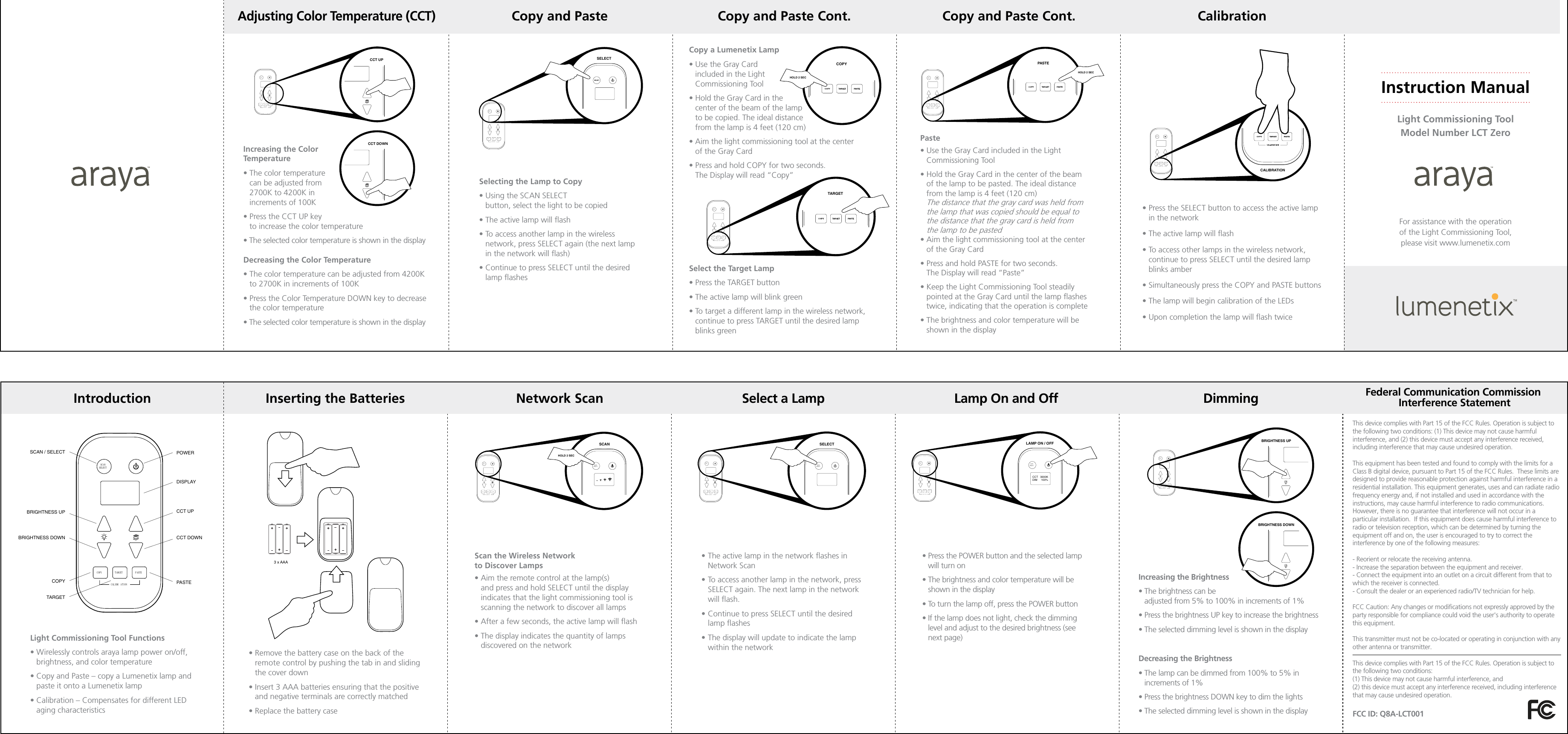
Copy and Paste Copy and Paste Cont. Copy and Paste Cont. CalibrationDimming Federal Communication Commission Interference StatementCopy a Lumenetix Lamp•  Use the Gray Card  included in the Light  Commissioning Tool •  Hold the Gray Card in the  center of the beam of the lamp  to be copied. The ideal distance  from the lamp is 4 feet (120 cm)•  Aim the light commissioning tool at the center  of the Gray Card •  Press and hold COPY for two seconds.  The Display will read “Copy”Select the Target Lamp• Press the TARGET button• The active lamp will blink green •  To target a different lamp in the wireless network, continue to press TARGET until the desired lamp blinks greenFor assistance with the operation  of the Light Commissioning Tool,  please visit www.lumenetix.comInstruction ManualLight Commissioning ToolModel Number LCT ZeroLamp On and OffSelect a LampIntroduction Inserting the Batteries Network Scan3 x AAA•  Remove the battery case on the back of the remote control by pushing the tab in and sliding the cover down•  Insert 3 AAA batteries ensuring that the positive and negative terminals are correctly matched• Replace the battery caseSCANSELECTCOPY TARGETCALIBR A TIONPASTESCAN / SELECT  POWERBRIGHTNESS UP CCT UPCCT DOWNDISPLAYPASTEBRIGHTNESS DOWNCOPYTARGETREMOTE CONTROLScan the Wireless Network  to Discover Lamps•  Aim the remote control at the lamp(s)  and press and hold SELECT until the display  indicates that the light commissioning tool is  scanning the network to discover all lamps•  After a few seconds, the active lamp will flash•  The display indicates the quantity of lamps discovered on the networkLight Commissioning Tool Functions•  Wirelessly controls araya lamp power on/off, brightness, and color temperature•  Copy and Paste – copy a Lumenetix lamp and paste it onto a Lumenetix lamp•  Calibration – Compensates for different LED aging characteristics•  The active lamp in the network flashes in Network Scan•  To access another lamp in the network, press SELECT again. The next lamp in the network will flash.•  Continue to press SELECT until the desired lamp flashes•  The display will update to indicate the lamp within the networkSELECTSCANSELECTCOPY TARGETCALIBRATIONPASTESCANSELECTSCANSCANSELECTCOPY TARGETCALIBRATIONPASTESELECTSCANSELECTLAMP ON / OFFHOLD 2 SECCCT   3000KDIM     100%SCANSELECTSCANSELECTCOPY TARGETCALIBR ATIONPASTELAMP ON / OFFCCT   3000KDIM     100%SCANSELECTSCANSELECTIncreasing the Brightness•  The brightness can be  adjusted from 5% to 100% in increments of 1%•  Press the brightness UP key to increase the brightness • The selected dimming level is shown in the displayDecreasing the Brightness•  The lamp can be dimmed from 100% to 5% in  increments of 1%•  Press the brightness DOWN key to dim the lights•  The selected dimming level is shown in the displayAdjusting Color Temperature (CCT)Increasing the Color  Temperature•  The color temperature  can be adjusted from  2700K to 4200K in  increments of 100K•  Press the CCT UP key  to increase the color temperature•  The selected color temperature is shown in the displayDecreasing the Color Temperature•  The color temperature can be adjusted from 4200K to 2700K in increments of 100K•  Press the Color Temperature DOWN key to decrease the color temperature•  The selected color temperature is shown in the displaySELECTSCANSELECTCOPY TARGETCALIBRATIONPASTECOPYHOLD 2 SECCOPY TARGETCALIBR ATIONPASTETARGETSCANSELECTPaste•  Use the Gray Card included in the Light Commissioning Tool•  Hold the Gray Card in the center of the beam  of the lamp to be pasted. The ideal distance  from the lamp is 4 feet (120 cm) The distance that the gray card was held from  the lamp that was copied should be equal to  the distance that the gray card is held from  the lamp to be pasted•  Aim the light commissioning tool at the center  of the Gray Card •  Press and hold PASTE for two seconds.  The Display will read “Paste”•  Keep the Light Commissioning Tool steadily pointed at the Gray Card until the lamp flashes twice, indicating that the operation is complete•  The brightness and color temperature will be shown in the displayCOPY TARGETCALIBRATIONPASTEPASTESCANSELECTHOLD 2 SECCALIBRATIONCOPY TARGETCALIBR ATIONPASTESCANSELECT•  Press the SELECT button to access the active lamp in the network•  The active lamp will flash •  To access other lamps in the wireless network, continue to press SELECT until the desired lamp blinks amber•  Simultaneously press the COPY and PASTE buttons•  The lamp will begin calibration of the LEDs•  Upon completion the lamp will flash twice•  Press the POWER button and the selected lamp will turn on•  The brightness and color temperature will be shown in the display•  To turn the lamp off, press the POWER button•  If the lamp does not light, check the dimming level and adjust to the desired brightness (see next page)BRIGHTNESS UPBRIGHTNESS DOWNCOPY TARGETCALIBRATIONPASTESCANSELECTSelecting the Lamp to Copy •  Using the SCAN SELECT  button, select the light to be copied•  The active lamp will flash•  To access another lamp in the wireless network, press SELECT again (the next lamp in the network will flash)•  Continue to press SELECT until the desired lamp flashesCCT UPCCT DOWNCOPY TARGETCALIBRATIONPASTESCANSELECTThis device complies with Part 15 of the FCC Rules. Operation is subject to the following two conditions: (1) This device may not cause harmful interference, and (2) this device must accept any interference received, including interference that may cause undesired operation. This equipment has been tested and found to comply with the limits for a Class B digital device, pursuant to Part 15 of the FCC Rules.  These limits are designed to provide reasonable protection against harmful interference in a residential installation. This equipment generates, uses and can radiate radio frequency energy and, if not installed and used in accordance with the instructions, may cause harmful interference to radio communications.  However, there is no guarantee that interference will not occur in a particular installation.  If this equipment does cause harmful interference to radio or television reception, which can be determined by turning the equipment off and on, the user is encouraged to try to correct the interference by one of the following measures: - Reorient or relocate the receiving antenna.- Increase the separation between the equipment and receiver.- Connect the equipment into an outlet on a circuit different from that to which the receiver is connected.- Consult the dealer or an experienced radio/TV technician for help. FCC Caution: Any changes or modifications not expressly approved by the party responsible for compliance could void the user's authority to operate this equipment. This transmitter must not be co-located or operating in conjunction with any other antenna or transmitter.This device complies with Part 15 of the FCC Rules. Operation is subject to the following two conditions:(1) This device may not cause harmful interference, and(2) this device must accept any interference received, including interference that may cause undesired operation.  FCC ID: Q8A-LCT001

Navigation menu