NiCOM USA NT350FP07 350W TRANSMITTER User Manual NT350

NiCOM USA 350W TRANSMITTER NT350

USERS MANUAL

  1           TABLE OF CONTENTS     CHAPTER 1  Transmitter General Description And Installation Procedures   Page 2  Remote Control Feature       Page 5  Analog telemetry Option       Page 7  Programming the NT 350       Page 8    CHAPTER 2  Electrical Specifications       Page 13  Mechanical Specifications       Page 15    CHAPTER 3  350 W schematics and components list          Page 16
  2  CHAPTER 1 GENERAL DESCRIPTION NT 350 Transmitter - Exciter  INTRODUCTION  The NT-350-LCD is a highly integrated broadband solid-state Mos-Fet FM transmitter of 350W rated power, fitted in a 3 unit rack, which do not require any specific calibration to operate in the 87.5  ÷ 108 MHz frequency range. The unit is microprocessor controlled with an optional PC interface.  Its compact size, high efficiency, wide mains range acceptance, low maintenance requirements and broadband construction, make this amplifier ideal in medium power repeaters, in unattended posts and as a reserve.  Its sturdy, modular mechanical and electrical construction guarantees a high MTBF and an easy maintenance.  The modules are easily identifiable and inspectable with few interconnections each with the other, through multi-pole connectors.  The nominal RF output power is obtained over the full FM range is particularly stable against time, temperature and frequency variations being ALC regulated, with a front panel adjustment.  The output power may be varied from a minimum level to the nominal level and the frequency varied over the full FM range, without retouching the drive power or any other adjustment than the ALC control.  The output stage has a reverse intermodulation figure, which is lower than standard bipolar construction, due to the all Mos-Fet design and approaches that of tube equipment.  A simple metering and alarm section completes the amplifier, permitting an easy check of the functioning with few, unambiguous readings.  The front panel displays forward, reflected power and modulation measures. It is possible to change the frequency of the unit from the front panel, password protected.  The whole assembly is designed in accordance with the CCIR, FCC and tighter international norms and conforms to the recent, strict      requirements for EMI susceptance and emission.
  3  INSTALLATION   After  unpacking the unit, check  for any  mechanical damage or loose parts inside. If   there is any  transportation damage, inform  the supplier  immediately  and do not  put  the module  into operation.  The  applicable voltage is 110 or 220v depending on how the unit was ordered. Please check the back of the unit for the voltage that the unit was set to, and if it is the wrong one, please call Nicom for instruction on how to set the voltage.  Ensure  that  the station’s  ground  system  connections  have a  ground  resistance of   less  than  5 ohms.  The equipment’s rack or cabinet  must be effectively grounded.  Check  that  the transmitter’s main switch  is off.  Connect the power cord to the AC plug.  STARTING PROCEDURE  Connect   the antenna  cable to  the ‘N’ type connector  on the  back of  the unit.  The antenna  system  must be set up to operate at  the transmitter’s  working  frequency.  ATTENTION  Antenna matching is extremely  crucial  for  FM  transmitters.  Operate this unit  only after  verifying  good  matching.  Mismatching  will  decrease  the  communication distance  and  unduly  stress the semiconductors. Turn  on  the transmitter. You should see the "WAIT" message appear on the LCD Display. After  few seconds  the green  LED “PLL  LOCK” should   turn  on.  This  indicates that  the frequency is locked on the programmed value. In the display will appear a sequence of squares. After  few more seconds the “RF ENABLE” green LED will come on.  This indicates that  RF power is being delivered  to the output  connector on  the back.   You can now increase the output power through the small trimpot located in the front panel and identified with " RF ADJ." Increase slowly till you reach the power you need; keep always an eye at the Reflected power reading to verify that the antenna is well operating. The indication of the reflected power is on the right side of the display "RFL". Once you have reached the desired power level, you should wait till the unit warms up (30 minutes)
  4   Now you can input modulation.  For MONO operation connect your signal to the XLR connector or BNC, Depending on the model. Following  the connecting instructions printed on the back of  the transmitter  and  then  regulate  the input  level  with the apposite  trimmer.   For stereo input, use the BNC connector  labeled “MPX”.    Regulate the audio with the apposite trimmer.  Note:Be sure that the modulation level is close to but not more than 75KHz.  75KHz is 100% modulation.  Lower modulation  level will  decrease the S/N value while over-modulation (>100%) will cause  distortion at  the receiver  and  it is against  current regulations.
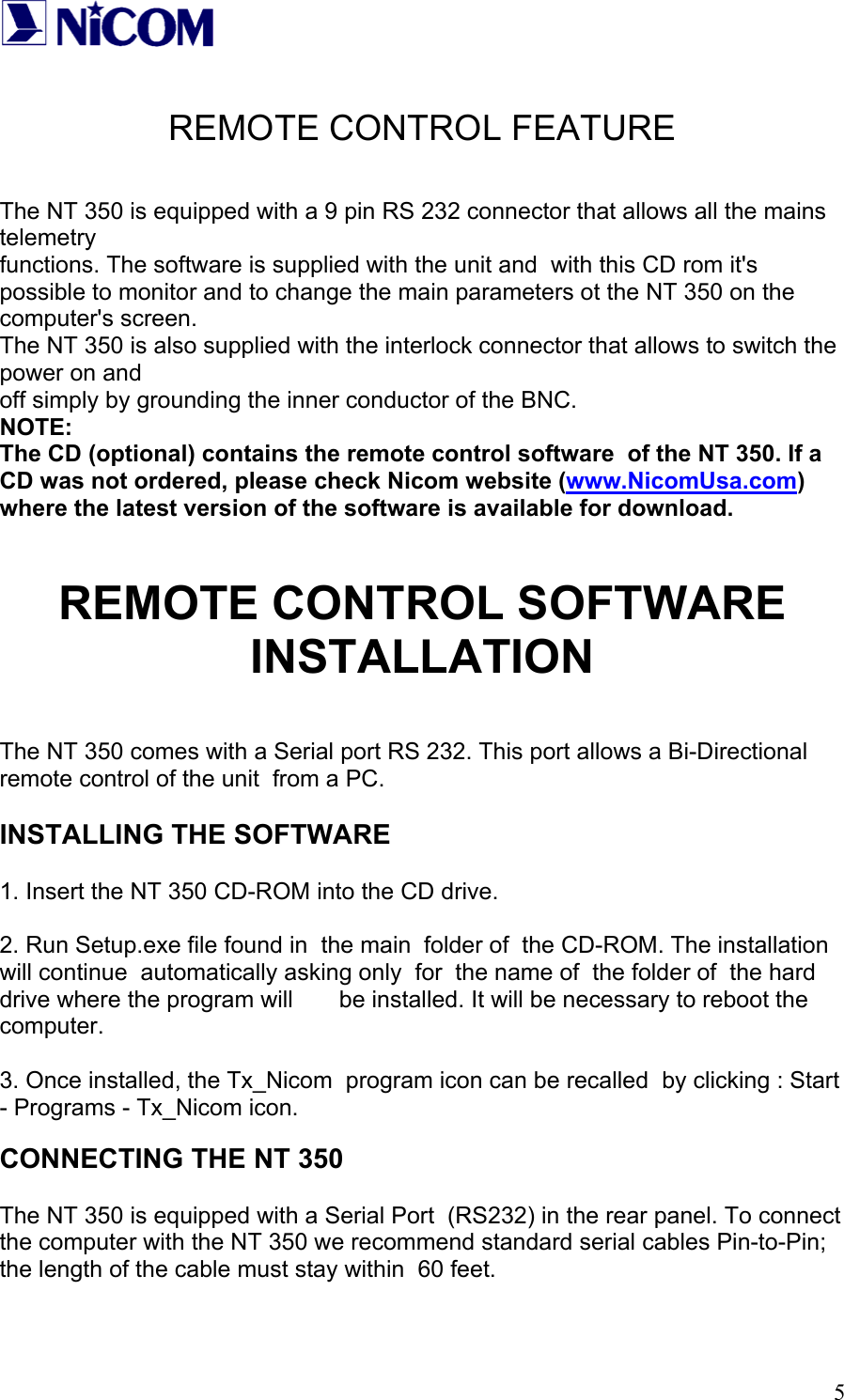
  5 REMOTE CONTROL FEATURE   The NT 350 is equipped with a 9 pin RS 232 connector that allows all the mains telemetry  functions. The software is supplied with the unit and  with this CD rom it's possible to monitor and to change the main parameters ot the NT 350 on the computer's screen. The NT 350 is also supplied with the interlock connector that allows to switch the power on and  off simply by grounding the inner conductor of the BNC. NOTE: The CD (optional) contains the remote control software  of the NT 350. If a CD was not ordered, please check Nicom website (www.NicomUsa.com) where the latest version of the software is available for download.   REMOTE CONTROL SOFTWARE INSTALLATION  The NT 350 comes with a Serial port RS 232. This port allows a Bi-Directional remote control of the unit  from a PC.   INSTALLING THE SOFTWARE  1. Insert the NT 350 CD-ROM into the CD drive.  2. Run Setup.exe file found in  the main  folder of  the CD-ROM. The installation will continue  automatically asking only  for  the name of  the folder of  the hard drive where the program will       be installed. It will be necessary to reboot the computer.  3. Once installed, the Tx_Nicom  program icon can be recalled  by clicking : Start - Programs - Tx_Nicom icon.  CONNECTING THE NT 350  The NT 350 is equipped with a Serial Port  (RS232) in the rear panel. To connect  the computer with the NT 350 we recommend standard serial cables Pin-to-Pin; the length of the cable must stay within  60 feet.
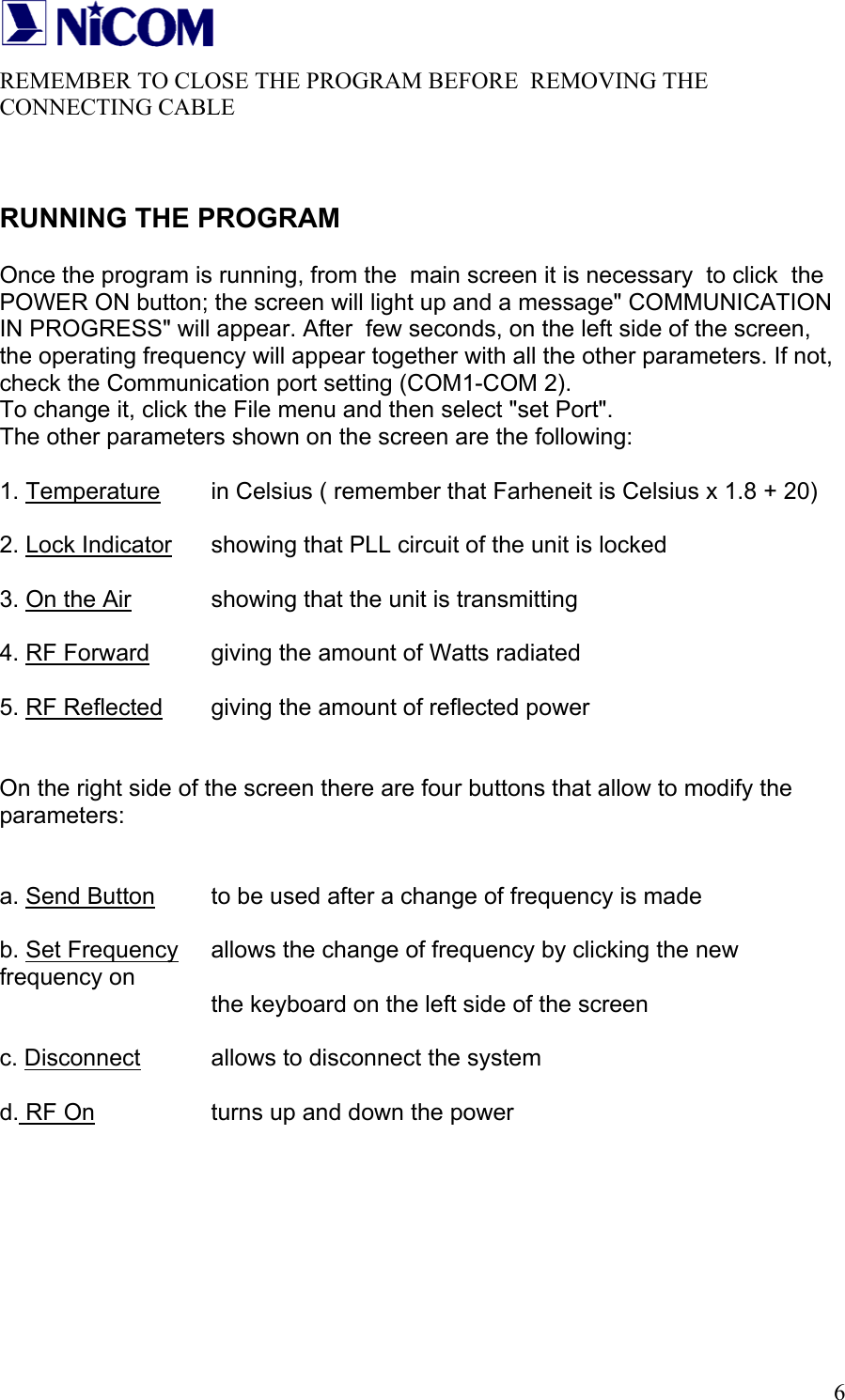
  6REMEMBER TO CLOSE THE PROGRAM BEFORE  REMOVING THE  CONNECTING CABLE   RUNNING THE PROGRAM  Once the program is running, from the  main screen it is necessary  to click  the POWER ON button; the screen will light up and a message" COMMUNICATION IN PROGRESS" will appear. After  few seconds, on the left side of the screen, the operating frequency will appear together with all the other parameters. If not, check the Communication port setting (COM1-COM 2).  To change it, click the File menu and then select "set Port". The other parameters shown on the screen are the following:   1. Temperature   in Celsius ( remember that Farheneit is Celsius x 1.8 + 20)  2. Lock Indicator   showing that PLL circuit of the unit is locked  3. On the Air    showing that the unit is transmitting  4. RF Forward   giving the amount of Watts radiated  5. RF Reflected   giving the amount of reflected power   On the right side of the screen there are four buttons that allow to modify the parameters:   a. Send Button   to be used after a change of frequency is made  b. Set Frequency   allows the change of frequency by clicking the new frequency on        the keyboard on the left side of the screen  c. Disconnect   allows to disconnect the system  d. RF On     turns up and down the power
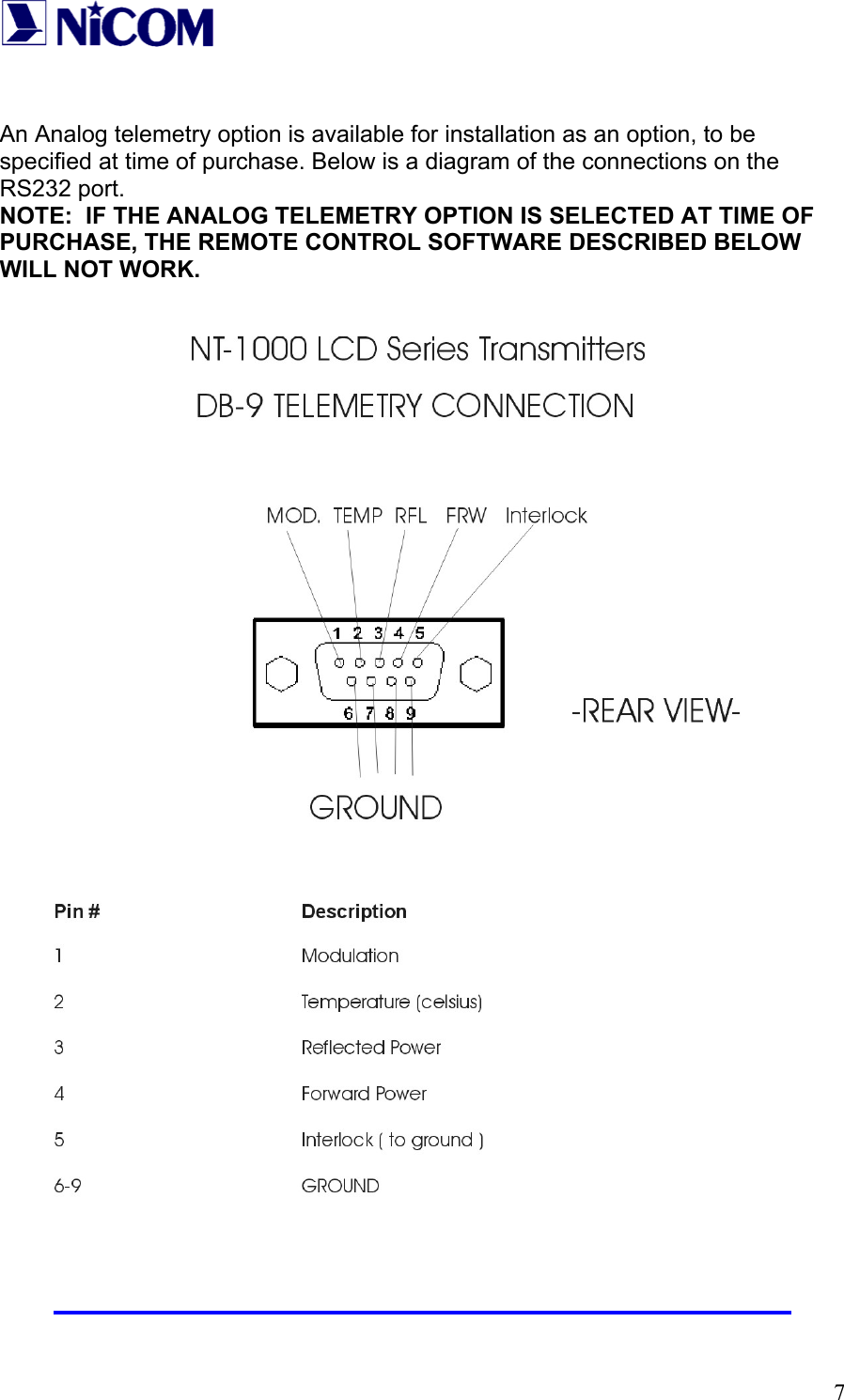
  7 An Analog telemetry option is available for installation as an option, to be specified at time of purchase. Below is a diagram of the connections on the RS232 port.  NOTE:  IF THE ANALOG TELEMETRY OPTION IS SELECTED AT TIME OF PURCHASE, THE REMOTE CONTROL SOFTWARE DESCRIBED BELOW WILL NOT WORK.
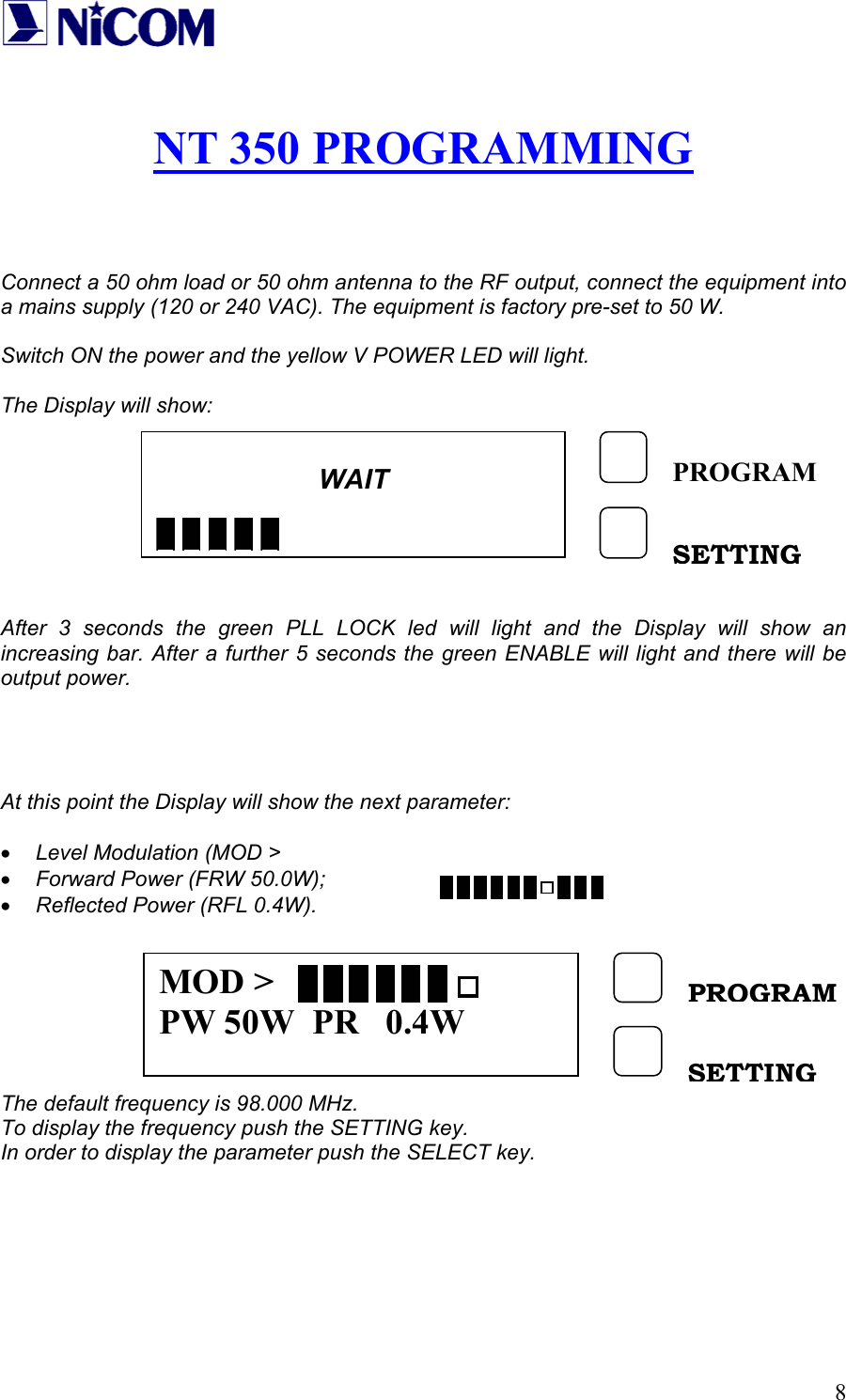
  8 NT 350 PROGRAMMING    Connect a 50 ohm load or 50 ohm antenna to the RF output, connect the equipment into a mains supply (120 or 240 VAC). The equipment is factory pre-set to 50 W.  Switch ON the power and the yellow V POWER LED will light.  The Display will show:         After 3 seconds the green PLL LOCK led will light and the Display will show an increasing bar. After a further 5 seconds the green ENABLE will light and there will be output power.     At this point the Display will show the next parameter:  • Level Modulation (MOD >                       • Forward Power (FRW 50.0W); • Reflected Power (RFL 0.4W).        The default frequency is 98.000 MHz. To display the frequency push the SETTING key. In order to display the parameter push the SELECT key.       WAIT        PROGRAMSETTING MOD > PW 50W  PR   0.4W PROGRAM SETTING
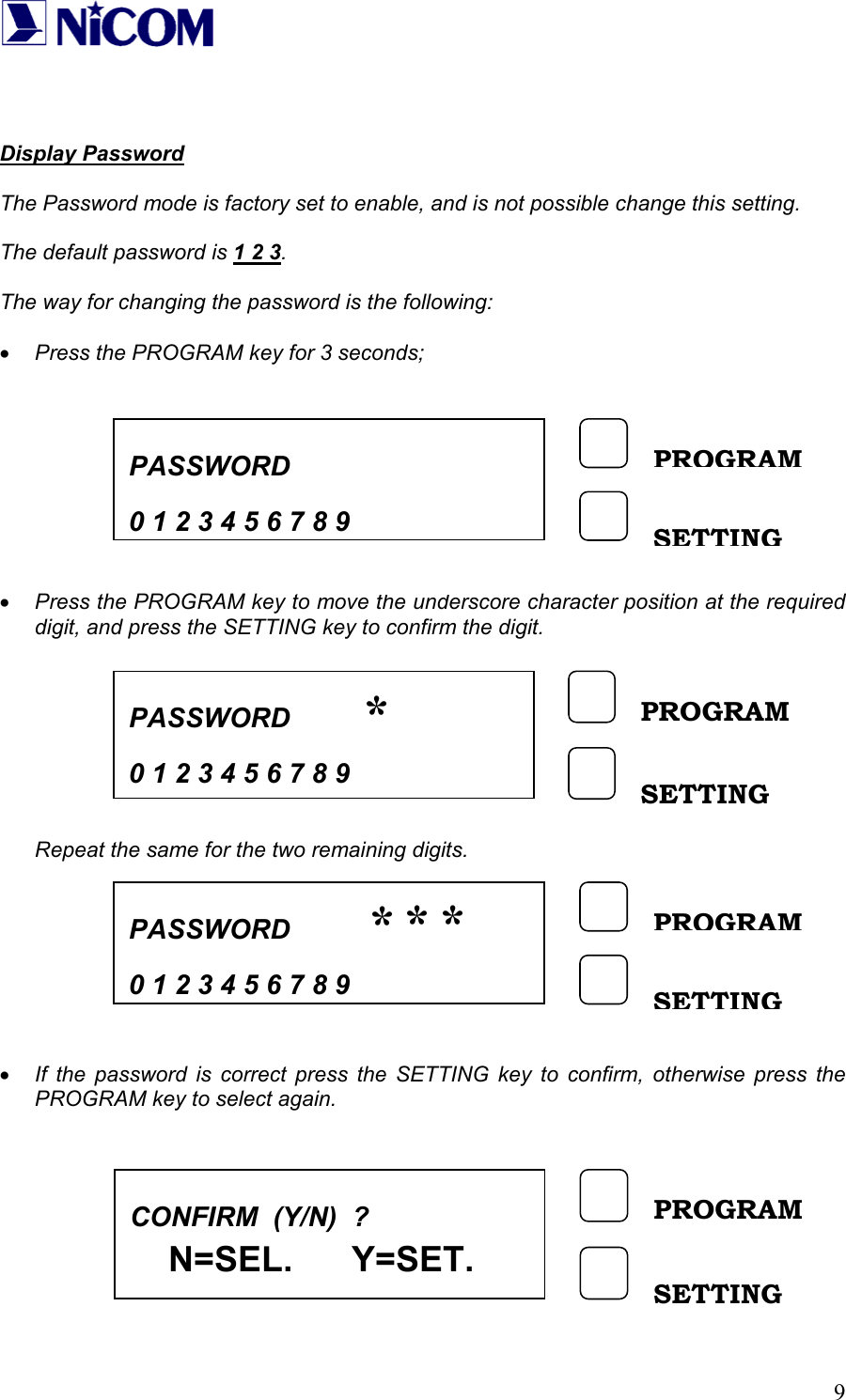
  9   Display Password  The Password mode is factory set to enable, and is not possible change this setting.  The default password is 1 2 3.  The way for changing the password is the following:  • Press the PROGRAM key for 3 seconds;          • Press the PROGRAM key to move the underscore character position at the required digit, and press the SETTING key to confirm the digit.         Repeat the same for the two remaining digits.         • If the password is correct press the SETTING key to confirm, otherwise press the PROGRAM key to select again.          PASSWORD    0 1 2 3 4 5 6 7 8 9PROGRAM SETTING PASSWORD    0 1 2 3 4 5 6 7 8 9 PROGRAM SETTING *PASSWORD    0 1 2 3 4 5 6 7 8 9PROGRAM SETTING ***CONFIRM  (Y/N)  ?     N=SEL.      Y=SET.   PROGRAM SETTING
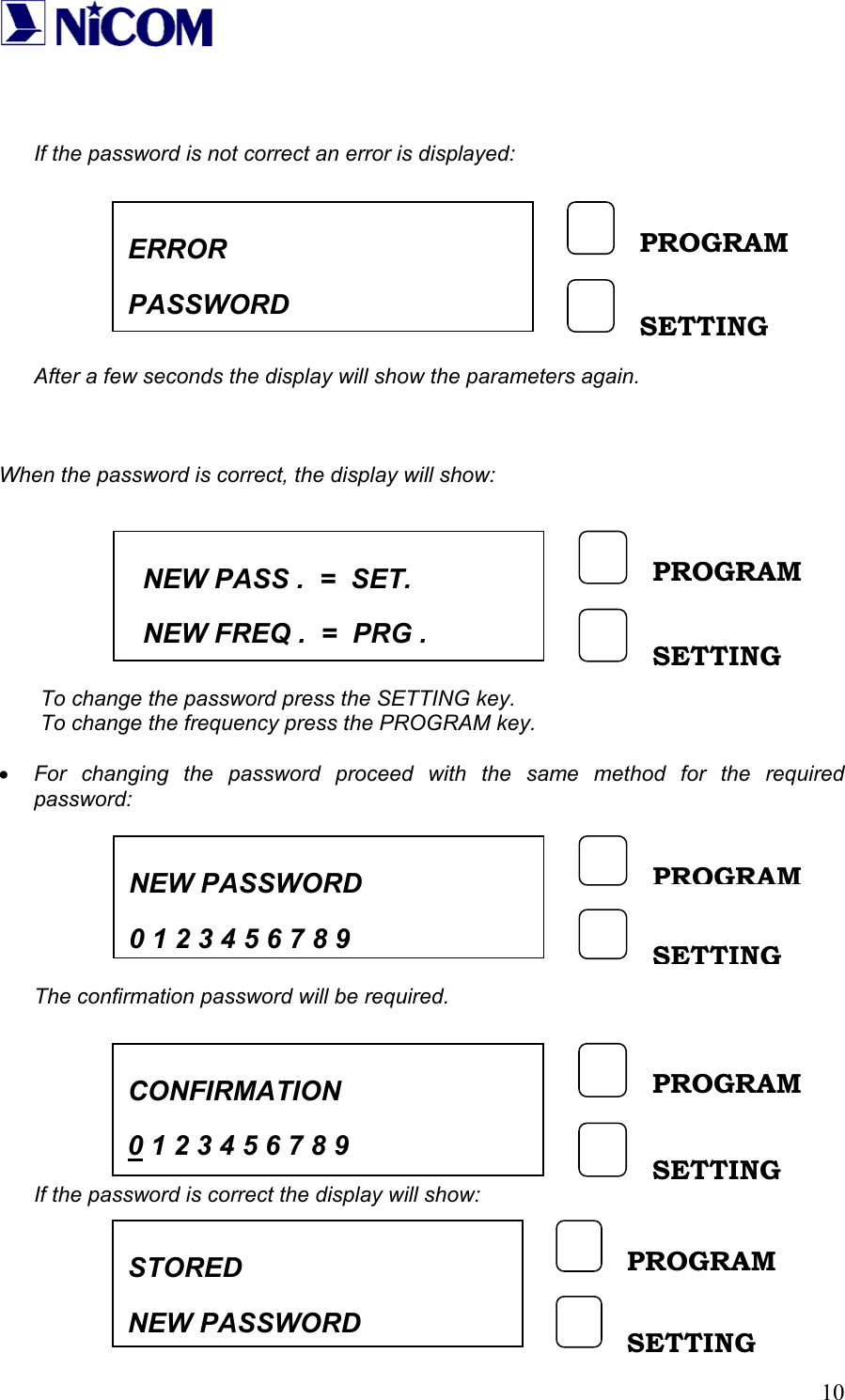
  10   If the password is not correct an error is displayed:          After a few seconds the display will show the parameters again.    When the password is correct, the display will show:         To change the password press the SETTING key. To change the frequency press the PROGRAM key.  • For changing the password proceed with the same method for the required password:          The confirmation password will be required.        If the password is correct the display will show:      NEW PASS .  =  SET.   NEW FREQ .  =  PRG . PROGRAM SETTING ERROR  PASSWORD PROGRAM SETTING NEW PASSWORD    0 1 2 3 4 5 6 7 8 9PROGRAM SETTING CONFIRMATION 0 1 2 3 4 5 6 7 8 9 PROGRAM SETTING STORED NEW PASSWORD PROGRAM SETTING
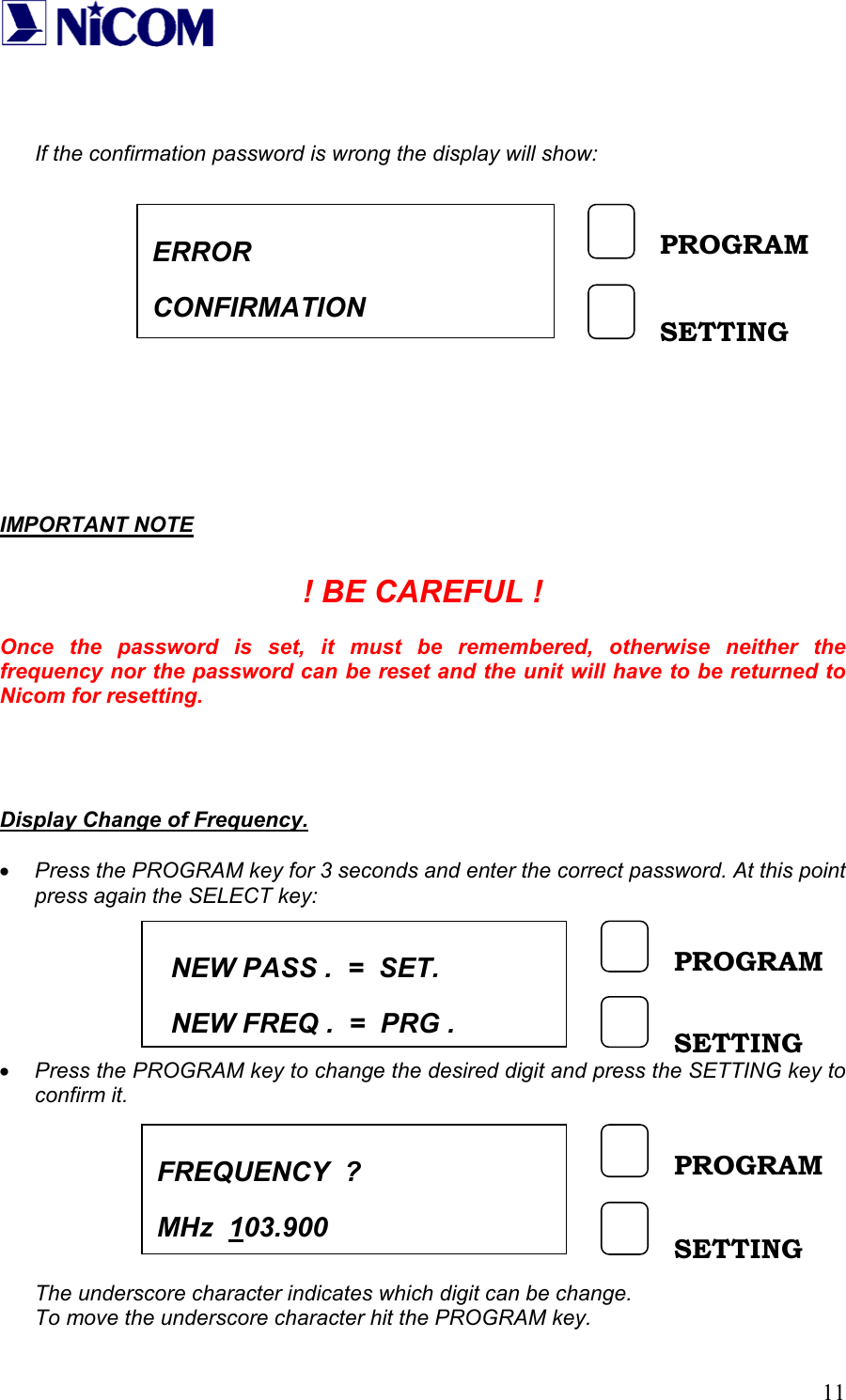
  11   If the confirmation password is wrong the display will show:               IMPORTANT NOTE  ! BE CAREFUL !  Once the password is set, it must be remembered, otherwise neither the frequency nor the password can be reset and the unit will have to be returned to Nicom for resetting.     Display Change of Frequency.  • Press the PROGRAM key for 3 seconds and enter the correct password. At this point press again the SELECT key:       • Press the PROGRAM key to change the desired digit and press the SETTING key to confirm it.        The underscore character indicates which digit can be change. To move the underscore character hit the PROGRAM key. ERROR CONFIRMATION PROGRAM SETTING NEW PASS .  =  SET.   NEW FREQ .  =  PRG .PROGRAM SETTING FREQUENCY  ? MHz  103.900 PROGRAM SETTING
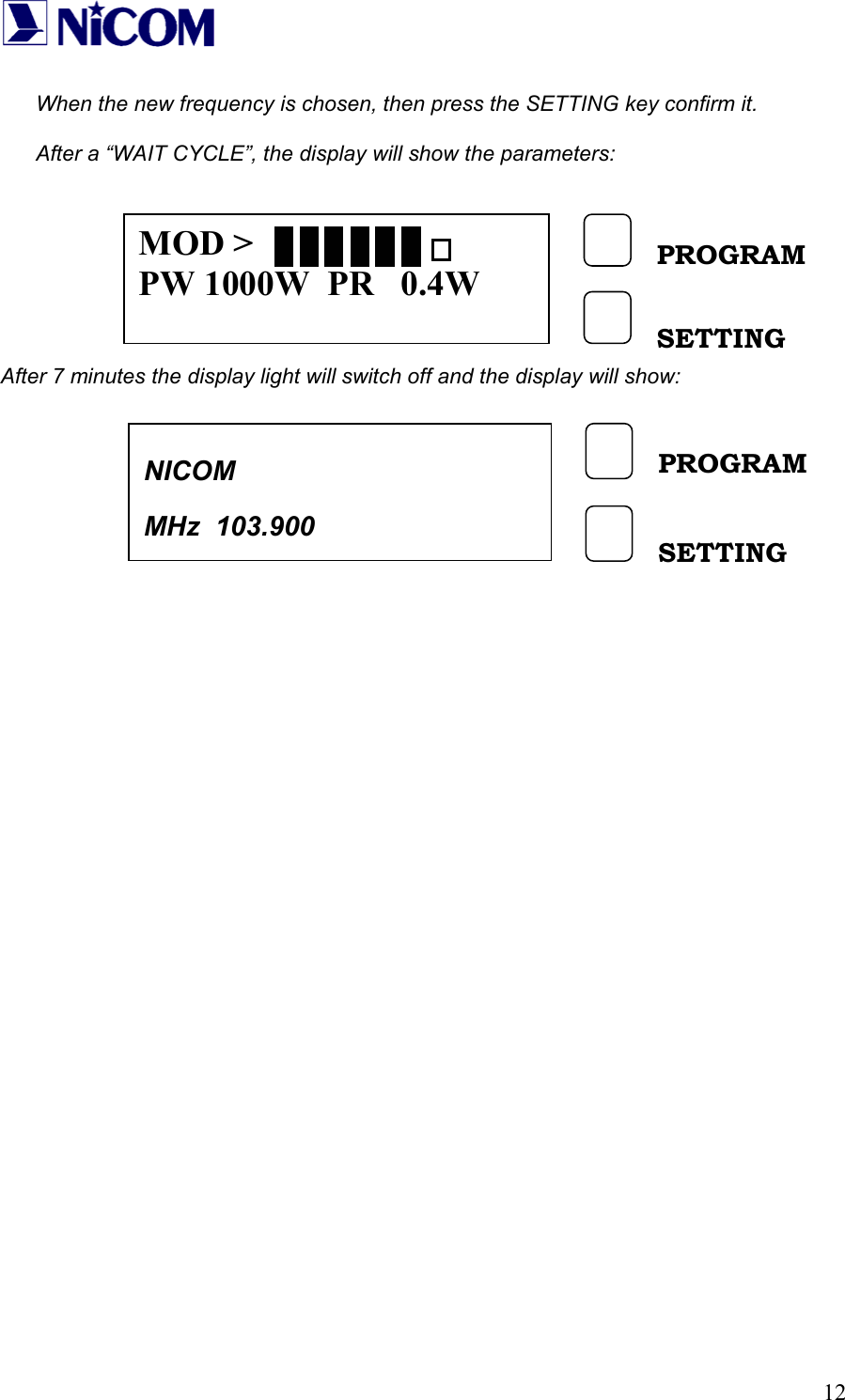
  12 When the new frequency is chosen, then press the SETTING key confirm it.  After a “WAIT CYCLE”, the display will show the parameters:         After 7 minutes the display light will switch off and the display will show:                        MOD > PW 1000W  PR   0.4W PROGRAM SETTING NICOM   MHz  103.900 PROGRAM SETTING
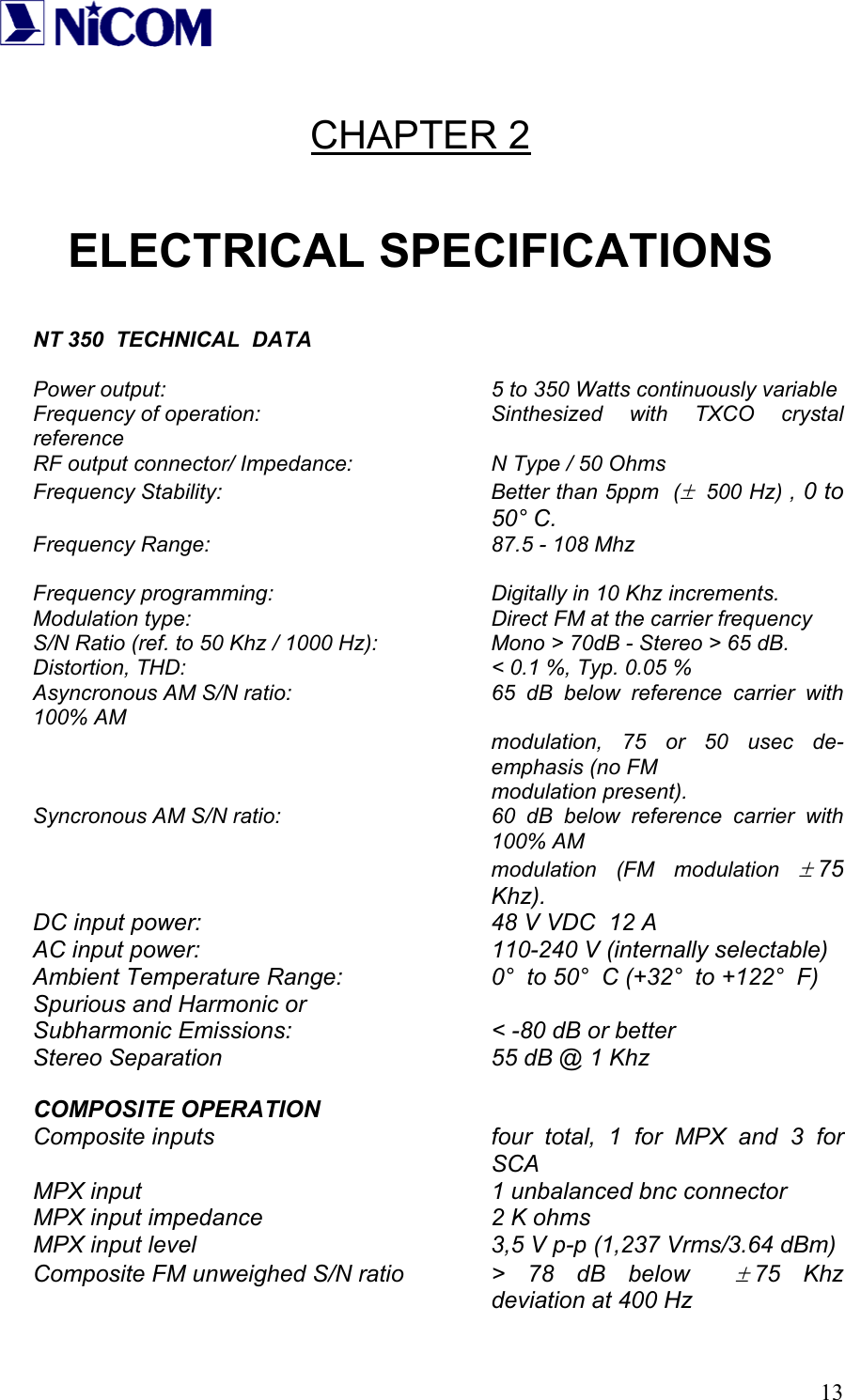
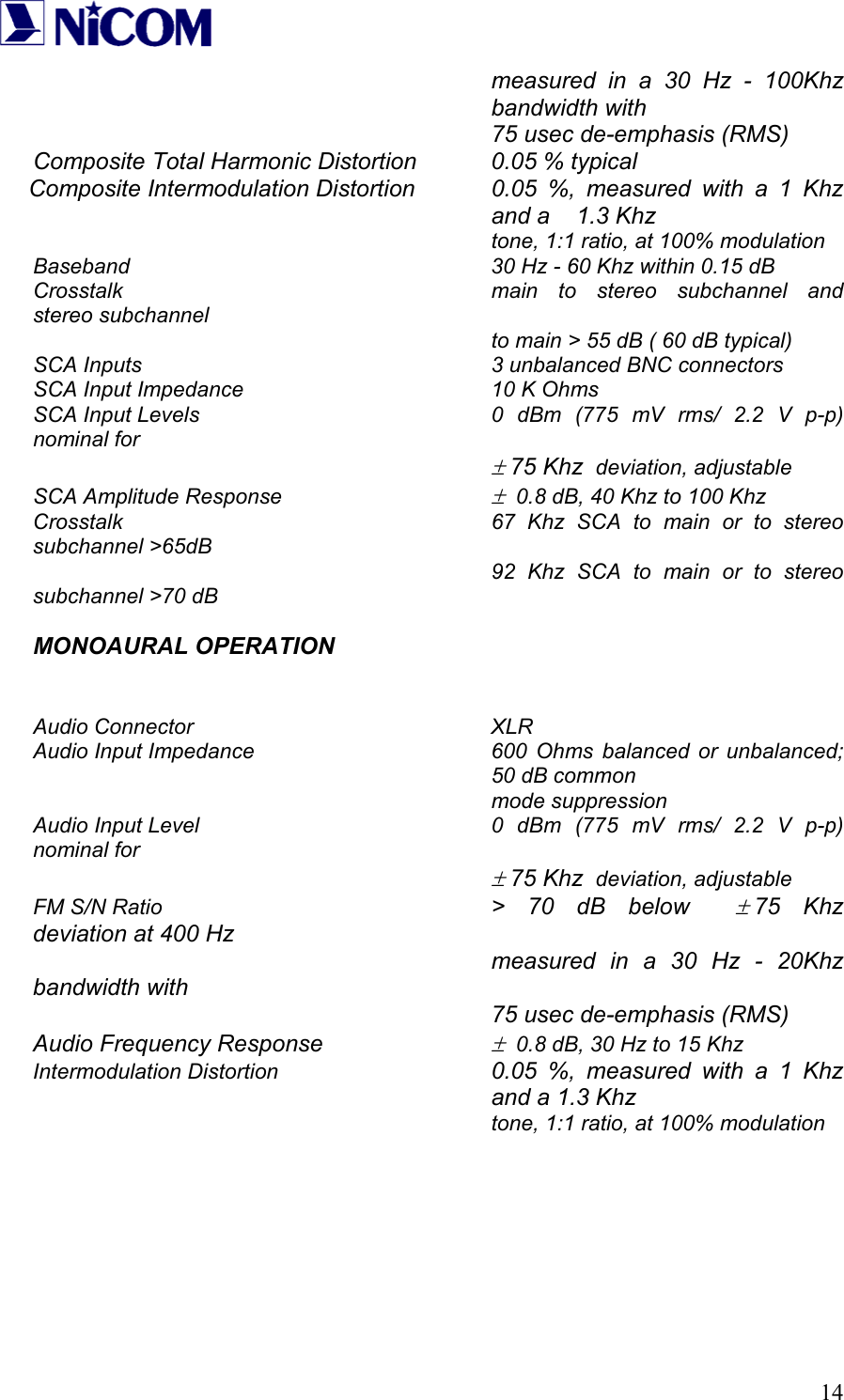
  13 CHAPTER 2  ELECTRICAL SPECIFICATIONS   NT 350  TECHNICAL  DATA  Power output:           5 to 350 Watts continuously variable Frequency of operation:    Sinthesized with TXCO crystal reference RF output connector/ Impedance:    N Type / 50 Ohms Frequency Stability:  Better than 5ppm  (±  500 Hz) , 0 to  50° C. Frequency Range:    87.5 - 108 Mhz  Frequency programming:       Digitally in 10 Khz increments. Modulation type:          Direct FM at the carrier frequency S/N Ratio (ref. to 50 Khz / 1000 Hz):    Mono > 70dB - Stereo > 65 dB. Distortion, THD:          < 0.1 %, Typ. 0.05 % Asyncronous AM S/N ratio:      65 dB below reference carrier with 100% AM modulation, 75 or 50 usec de-emphasis (no FM        modulation present). Syncronous AM S/N ratio:  60 dB below reference carrier with 100% AM modulation (FM modulation ± 75 Khz). DC input power:         48 V VDC  12 A AC input power:     110-240 V (internally selectable) Ambient Temperature Range:     0°  to 50°  C (+32°  to +122°  F) Spurious and Harmonic or Subharmonic Emissions:      < -80 dB or better Stereo Separation        55 dB @ 1 Khz  COMPOSITE OPERATION Composite inputs  four total, 1 for MPX and 3 for SCA MPX input     1 unbalanced bnc connector MPX input impedance        2 K ohms MPX input level          3,5 V p-p (1,237 Vrms/3.64 dBm) Composite FM unweighed S/N ratio  >  78  dB  below   ± 75 Khz deviation at 400 Hz
  14measured in a 30 Hz - 100Khz bandwidth with        75 usec de-emphasis (RMS) Composite Total Harmonic Distortion   0.05 % typical Composite Intermodulation Distortion  0.05 %, measured with a 1 Khz and a    1.3 Khz         tone, 1:1 ratio, at 100% modulation Baseband            30 Hz - 60 Khz within 0.15 dB Crosstalk      main to stereo subchannel and stereo subchannel               to main > 55 dB ( 60 dB typical) SCA Inputs     3 unbalanced BNC connectors SCA Input Impedance        10 K Ohms SCA Input Levels         0 dBm (775 mV rms/ 2.2 V p-p) nominal for        ± 75 Khz  deviation, adjustable SCA Amplitude Response     ±  0.8 dB, 40 Khz to 100 Khz Crosstalk            67 Khz SCA to main or to stereo subchannel >65dB        92 Khz SCA to main or to stereo subchannel >70 dB  MONOAURAL OPERATION   Audio Connector     XLR Audio Input Impedance  600 Ohms balanced or unbalanced; 50 dB common        mode suppression Audio Input Level         0 dBm (775 mV rms/ 2.2 V p-p) nominal for        ± 75 Khz  deviation, adjustable FM S/N Ratio     > 70 dB below  ± 75 Khz deviation at 400 Hz        measured in a 30 Hz - 20Khz bandwidth with        75 usec de-emphasis (RMS) Audio Frequency Response     ±  0.8 dB, 30 Hz to 15 Khz Intermodulation Distortion  0.05 %, measured with a 1 Khz and a 1.3 Khz        tone, 1:1 ratio, at 100% modulation
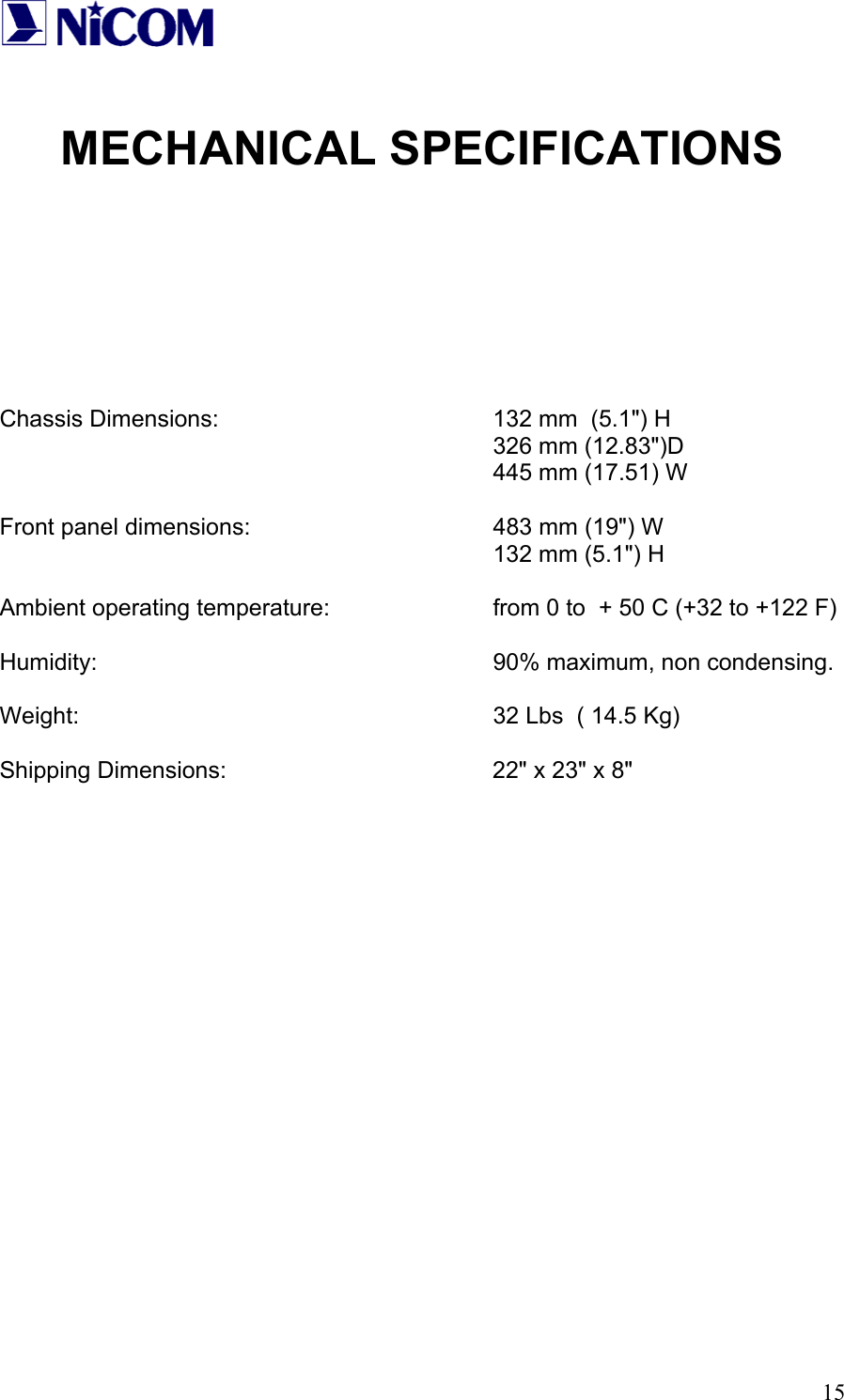
  15 MECHANICAL SPECIFICATIONS         Chassis Dimensions:        132 mm  (5.1") H        326 mm (12.83")D        445 mm (17.51) W  Front panel dimensions:        483 mm (19") W        132 mm (5.1") H  Ambient operating temperature:      from 0 to  + 50 C (+32 to +122 F)  Humidity:      90% maximum, non condensing.  Weight:      32 Lbs  ( 14.5 Kg)  Shipping Dimensions:        22" x 23" x 8"

Navigation menu