Prime Electronics and Satellitics WM288P Wireless LAN mini - PCI Card User Manual System Spec
Prime Electronics & Satellitics Inc. Wireless LAN mini - PCI Card System Spec
User Manual

編號:WM288PF00000 SP01 版次:A版
33333333
百一電子股份有限公司
Prime Electronics & Satellitics Inc. 產品規格書
適用機種:WM288P
WLAN CARD WM288P
Specifications
1. General specification
2. Standard test condition
3. Electrical specification
4. Frequency channel plan
核准: 審查: 製表:
莊繐瑄
修訂日期:
年 月 日
制定日期:
2003 年 1 月22 日
Page : 1/3

Specification
No. Item Condition Min. Typ. Max.
Test Method/Condition
1. General specification
1-1. Standard IEEE 802.11b
1-2. Frequency Band(MHz) 2400 2483.5
1-3. No. of Selectable
Channels
11 Channels (US, Canada)
13 Channels (Europe)
14 Channels (Japan)
1-4. Channel Spacing (MHz) 5
1-5. Modulation Technique DSSS (CCK, DQPSK, DBPSK)
1-6. Spreading 11-chip Barker Sequence
1-7. Media Access Protocol CSMA/CA(collision Avoidance) with
ACK
1-8. Interface Mini PCI Type III A
1-9. Dimensions 60.0 mm x 45.0 mm x 3.5 mm
1-10. LED Indicators non
1-11. Antenna Connector Hirose U.FL-R-SMT
2. Standard Test Condition
2-1. Supply voltage(V)
3.3
3. Electrical
Specification
Temperature Range:0 ~ 55℃
Humidity:95 % (Non-condensing)
150 Receiver Mode
3-1. Power Consumption
(mA)
@+3.3V
260 Transmit Mode
-82 -84 @ 11 Msps
-87 @ 5.5 Msps
-90 @ 2 Msps
3-2 Receive Sensitivity
(dBm)[FER < 8%]
-92 @ 1 Msps
3-3. Average Output Power
(dBm)
10 11 @29.5dB difference between the signal
level at center frequency and higher
first side lobe
3-4 Frequency Accuracy(ppm) - 25 + 25
Page : 2/3

4. Frequency channel plan
Regulation Domains
Channel_ID Frequency
(Mhz)
FCC
(X ’10’ )
IC
(X ‘20’ )
ETSI
(X ’30‘ )
Spain
(X ’31‘ )
France
(X ‘32’ )
MKK
(X ‘40’ )
1 2412 X X X
2 2417 X X X
3 2422 X X X
4 2427 X X X
5 2432 X X X
6 2437 X X X
7 2442 X X X
8 2447 X X X
9 2452 X X X
10 2457 X X X X X
11 2462 X X X X X
12 2467
X X
13 2472
X X
14 2484
X
Page : 3/3

AMD Confidential
Manufacturing Test Suite
User’s Manual
A Utility for Testing the
Am1772™ Mini PCI
Reference Design Kit
Version 0.2

MTS User Guide
© 2002 Advanced Micro Devices, Inc. All rights reserved.
The contents of this document are provided in connection with Advanced
Micro Devices, Inc. (“AMD”) products. AMD makes no representations or
warranties with respect to the accuracy or completeness of the contents of this
publication and reserves the right to make changes to specifications and
product descriptions at any time without notice. No license, whether express,
implied, arising by estoppel, or otherwise, to any intellectual property rights
are granted by this publication. Except as set forth in AMD’s Standard Terms
and Conditions of Sale, AMD assumes no liability whatsoever, and disclaims
any express or implied warranty, relating to its products including, but not
limited to, the implied warranty of merchantability, fitness for a particular
purpose, or infringement of any intellectual property right.
AMD’s products are not designed, intended, authorized or warranted for use
as components in systems intended for surgical implant into the body, or in
other applications intended to support or sustain life, or in any other
application in which the failure of AMD’s product could create a situation
where personal injury, death, or severe property or environmental damage may
occur. AMD reserves the right to discontinue or make changes to its products
at any time without notice.
Contacts
www.amd.com wlan.support@amd.com
Trademarks
AMD, the AMD Arrow logo, Alchemy, and combinations thereof, and Am1770, Am1771, and Am1772
are trademarks of Advanced Micro Devices, Inc.
Other product names used in this publication are for identification purposes only and may be trademarks of
their respective companies.
AMD Confidential
2

Federal Communication Commission
Interference Statement
This equipment has been tested and found to comply with the limits for a
Class B digital device, pursuant to Part 15 of FCC Rules. These limits are
designed to provide reasonable protection against harmful interference in a
residential installation. This equipment generates, uses, and can radiate radio
frequency energy and, if not installed and used in accordance with the
instructions, may cause harmful interference to radio communications.
However, there is no guarantee that interference will not occur in a particular
installation. If this equipment does cause harmful interference to radio or
television reception, which can be determined by turning the equipment off
and on, the user is encouraged to try to correct the interference by one or
more of the following measures:
1. Reorient or relocate the receiving antenna.
2. Increase the separation between the equipment and receiver.
3. Connect the equipment into an outlet on a circuit different from that to which the
receiver is connected.
4. Consult the dealer or an experienced radio technician for help.
FCC Caution
This equipment must be installed and operated in accordance with provided
instructions and a minimum 20 cm spacing must be provided between
computer mounted antenna and person’s body (excluding extremities of
hands, wrist and feet) during wireless modes of operation.
This device complies with Part 15 of the FCC Rules. Operation is subject to
the following two conditions: (1) this device may not cause harmful
interference, and (2) this device must accept any interference received,
including interference that may cause undesired operation.
Any changes or modifications not expressly approved by the party responsible
for compliance could void the authority to operate equipment.
Federal Communication Commission (FCC) Radiation Exposure Statement
This equipment complies with FCC radiation exposure set forth for an
uncontrolled environment.
AMD Confidential

MTS User Guide
Table of Contents
1 Overview 4
2 Installation 5
3 MTS Tests 7
3.1 Customized Transmit Modes 7
3.2 Transmit Continuous with Modulation 8
3.3 Transmit Packets with Modulation 9
3.4 Receive and Display PER 10
3.5 Unicast or Multicast Frame Transmit 11
3.6 Unicast or Multicast Frame Receive 12
3.7 Duty Cycle Measurement 13
3.8 Power Save and Awake 14
AMD Confidential
3

MTS User Guide
1 Overview
The AMD Manufacturing Test Suite (MTS) provides advanced functionalities, such as pure
carrier wave generation, upper and lower side band data generation, RF carrier
suppression, Tx Modulation Accuracy, BPSK, QPSK, Carrier 5.5, Carrier 11, Packet Error
Rate (PER) Measurement, 25% Duty Cycle, Power Save/Awake, Tx/Rx Traffic generation
in MAC mode and MAC Bypass Modes.
The following table shows the test suite’s eight modes and their features.
MTS Test Mode Features Run Mode
1 Customized Transmit Modes Carrier 1, Carrier 2, Upper Side
Band, Lower Side Band,
Randomized, Customized, RF
Carrier Suppression, Tx Modulation
Accuracy
Mac Bypass
2 Transmit Continuous With
Modulation
BPSK, QPSK, CCK 5.5, CCK 11 with
Scrambler On/Off, Data 101010,
111111, Random, Custom.
Mac Bypass
3 Transmit Packets With
Modulation
Transmit Broadcast Frames Mac Bypass
4 Receive and Display PER Receive Frames and Display Packet
Error Rate (PER)
Mac Bypass
5 Unicast and Multicast Frame
Transmit
Start/Join an Adhoc BSS and do
unicast or multicast (broadcast)
frame transmit/receive.
Mac Mode
6 Unicast and Multicast Frame
Receive
Join the Adhoc BSS started above
in #5 and receive frames.
Mac Mode
7 Duty Cycle Measurement 25% Duty Cycle Measurement Mac Bypass
8 Power Save and Awake Place device in Sleep and then
Awake it.
N/A
NOTE: mts.exe runs advanced baseband functionality that involves MAC tunneling. Please
do NOT run Am1772 Terminal.exe or AtlasCfg.exe while mts.exe is running.
AMD Confidential
4
MTS User Guide
AMD Confidential
5
2 Installation
Step #1: Install the Am1772™ Terminal application. See Am1772™ Terminal User’s
Manual.
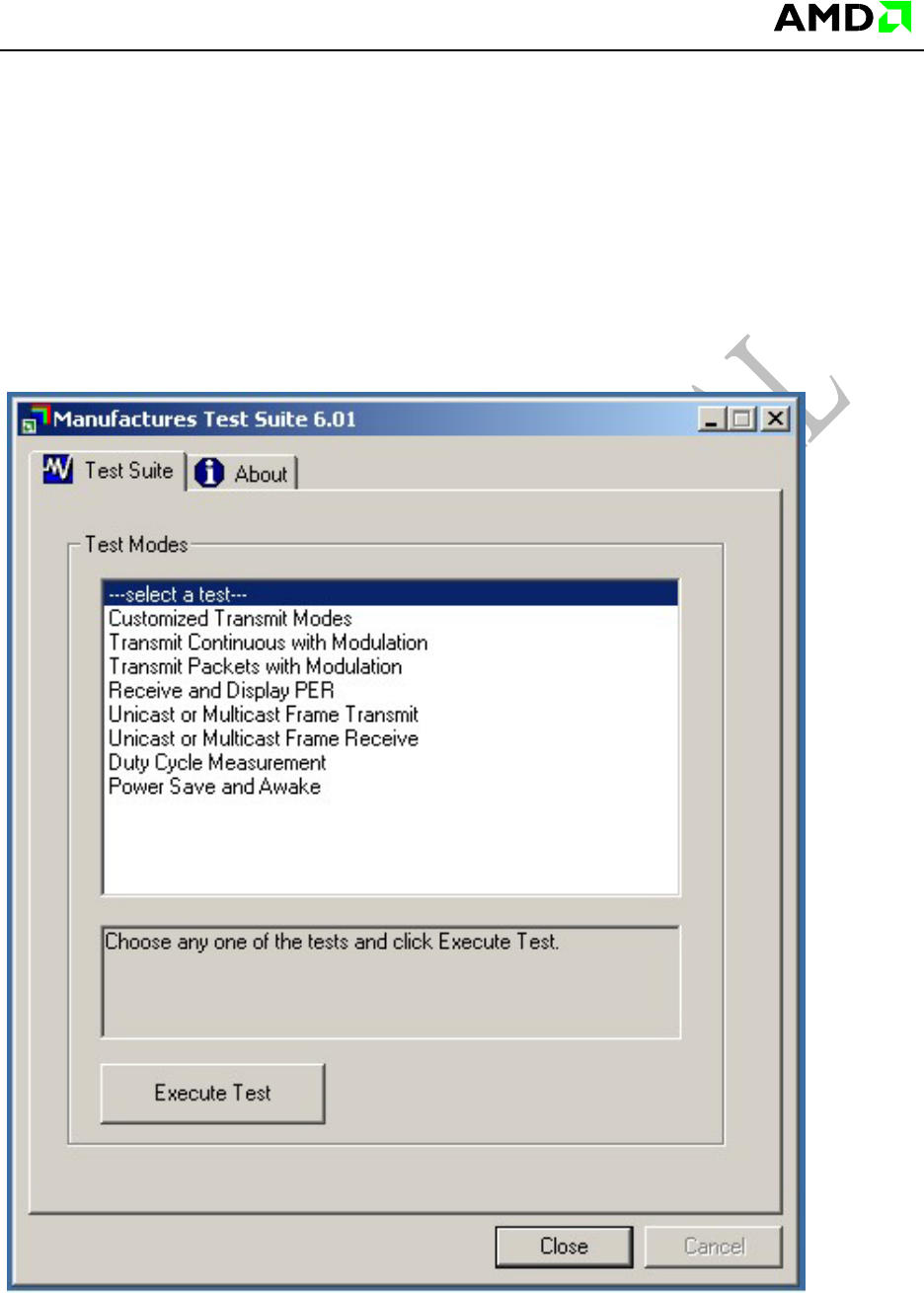
Step #2: The MTS application, MTS.EXE, should be within the above software pack. Save
it to the local drive and create a shortcut to it on the desktop. Run MTS.EXE. The following
Main Screen will be displayed:
MTS User Guide
AMD Confidential
6
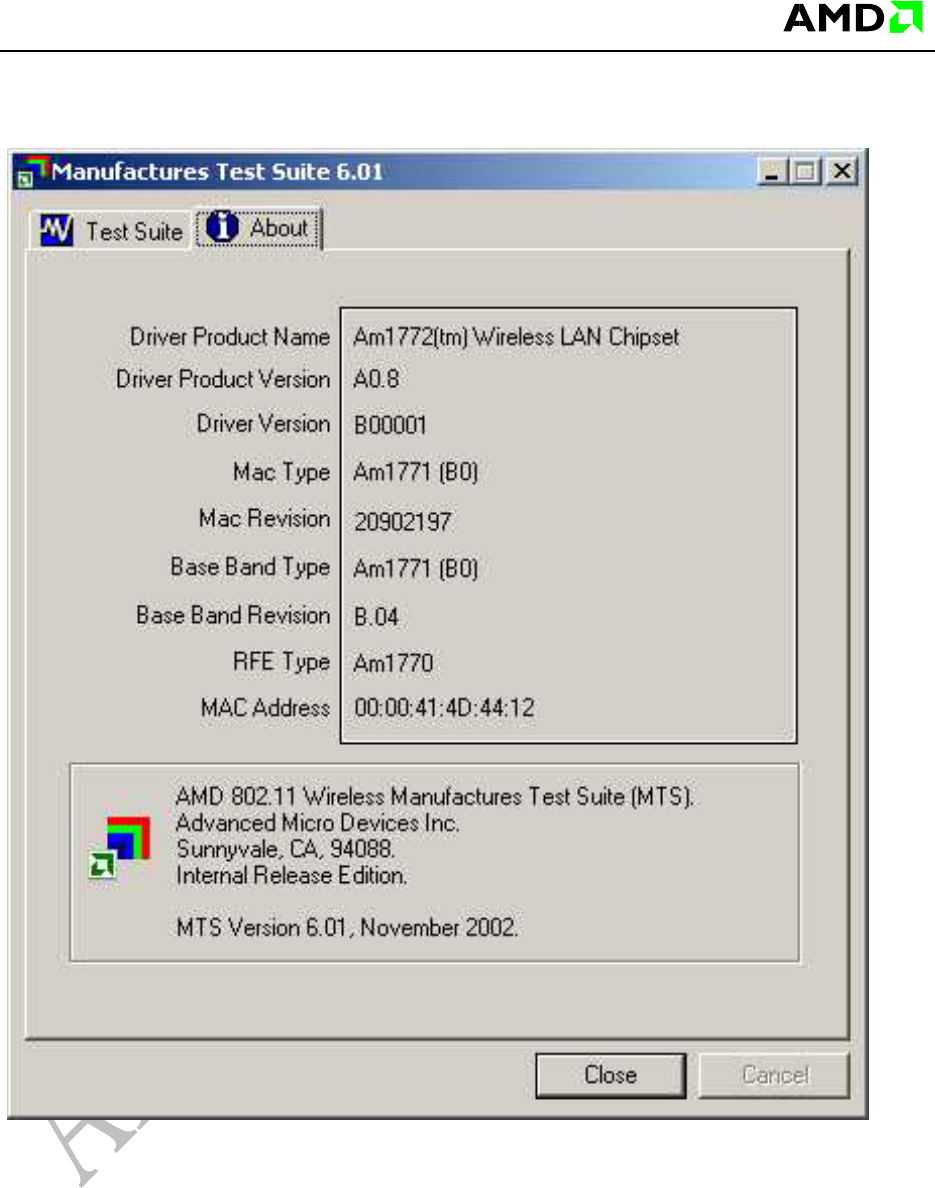
Clicking on the About property page displays the following screen:
MTS User Guide
AMD Confidential
7
3 MTS Tests
From the main test suite window, select a test to be performed. The following sections
describe each test.
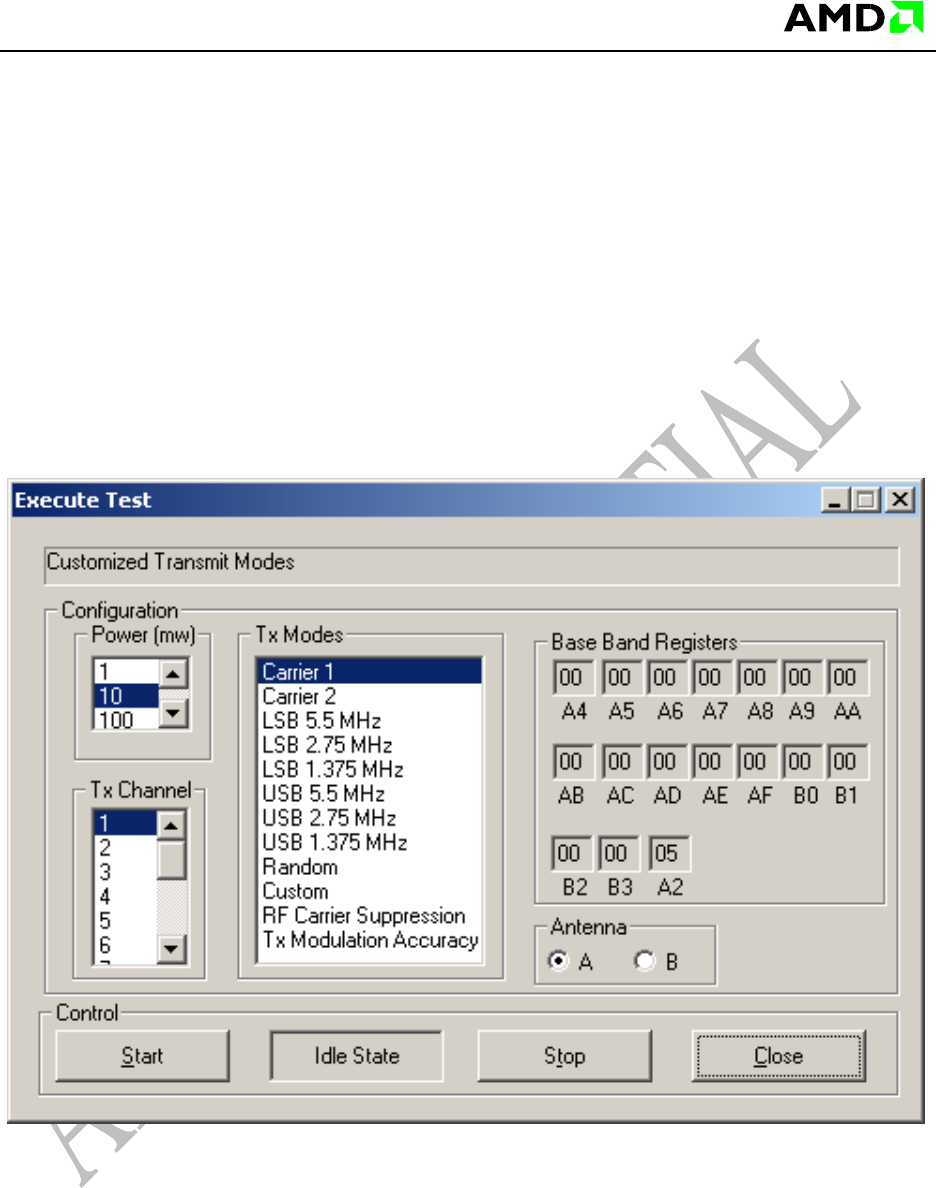
3.1 Customized Transmit Modes
Select the appropriate configuration and click Start to initiate the selected Tx Mode. To
change the configuration, first click Stop, change the configuration, and then Start again.
After the test click Close.
Customized Transmit Modes
MTS User Guide
AMD Confidential
8
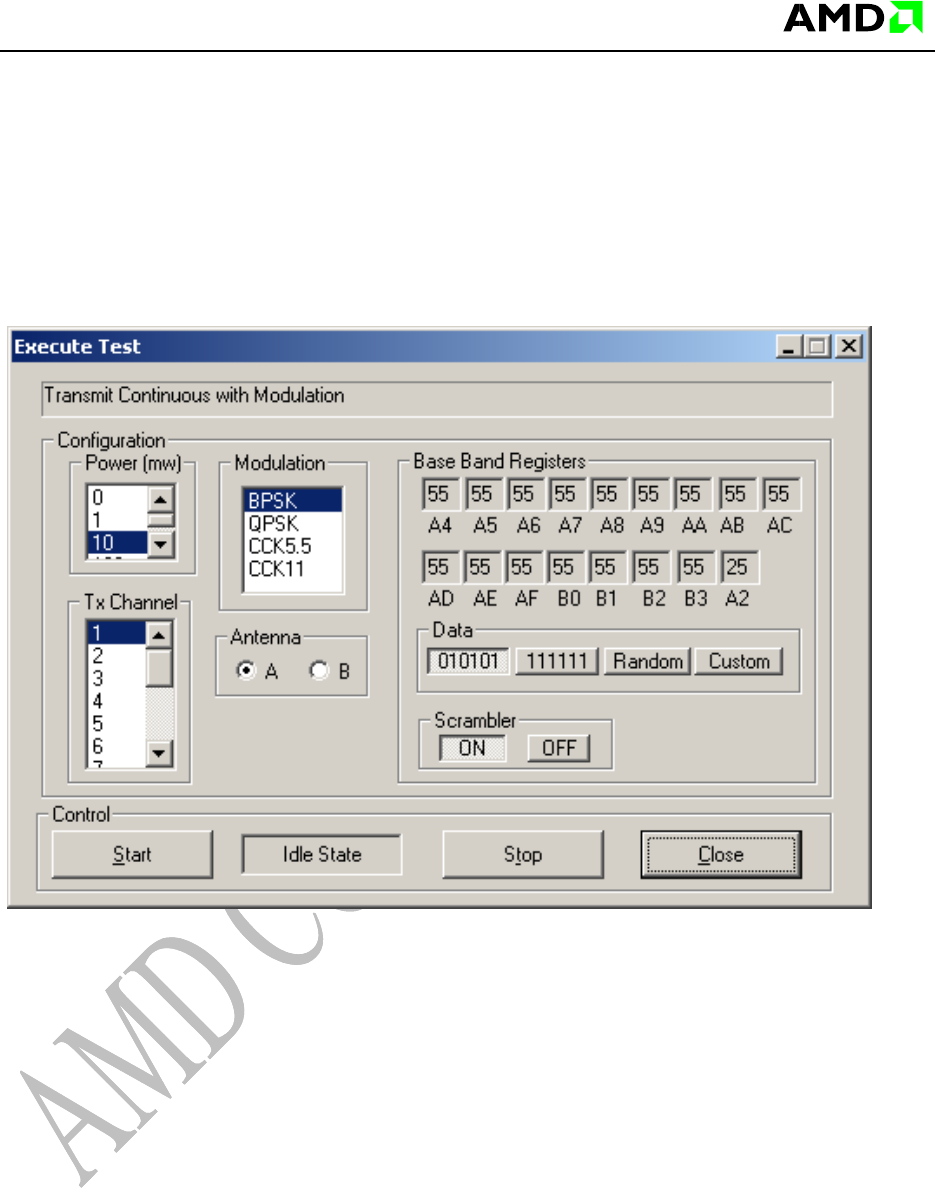
3.2 Transmit Continuous with Modulation
Select the appropriate configuration and click Start to initiate the selected modulation. To
change the configuration first click Stop, change the configuration, and then Start again.
After the test, click Close.
Transmit Continuous with Modulation
MTS User Guide
AMD Confidential
9
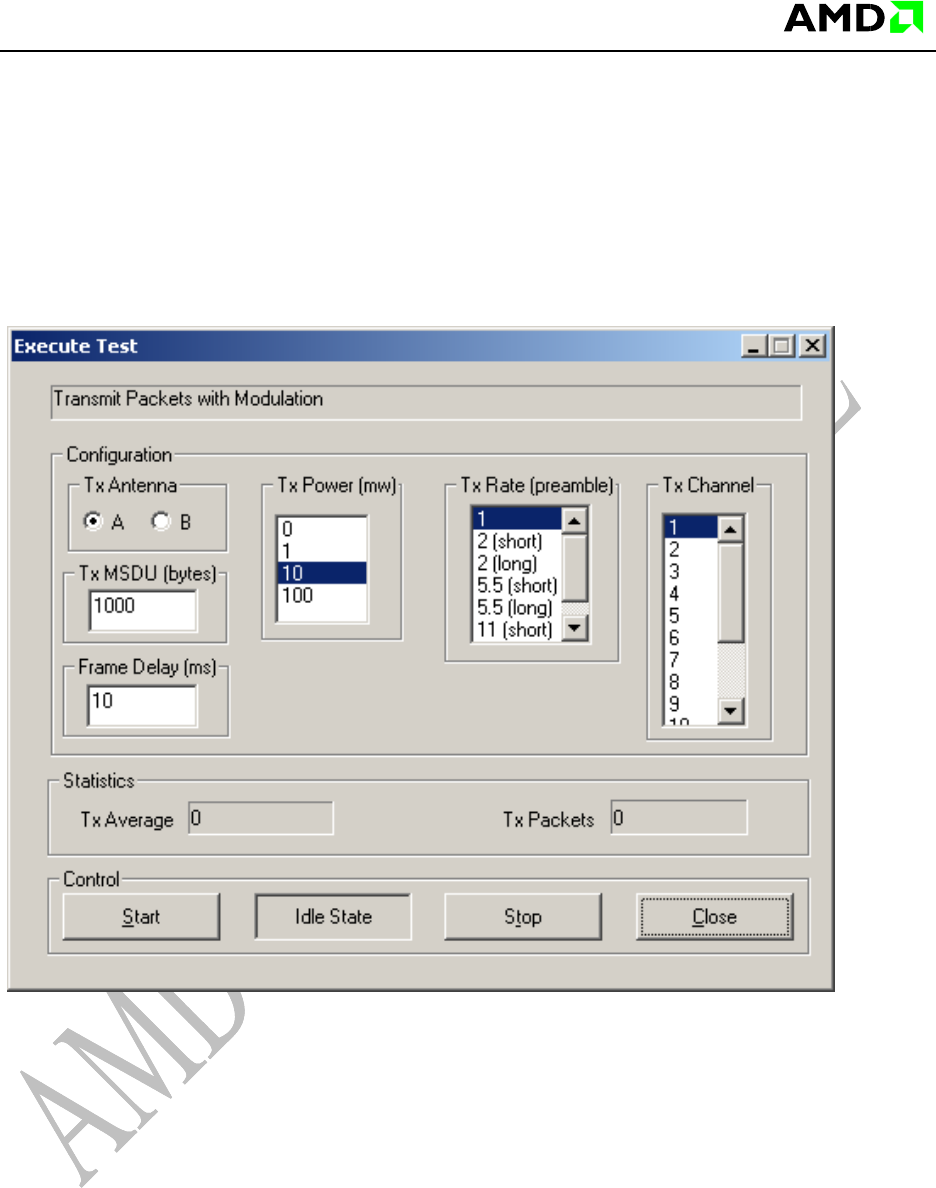
3.3 Transmit Packets with Modulation
Select the appropriate configuration and click Start to initiate the selected Tx mode. To
change the configuration first click Stop, change the configuration, and then Start again.
After the test, click Close.
Transmit Packets with Modulation
MTS User Guide
AMD Confidential
10
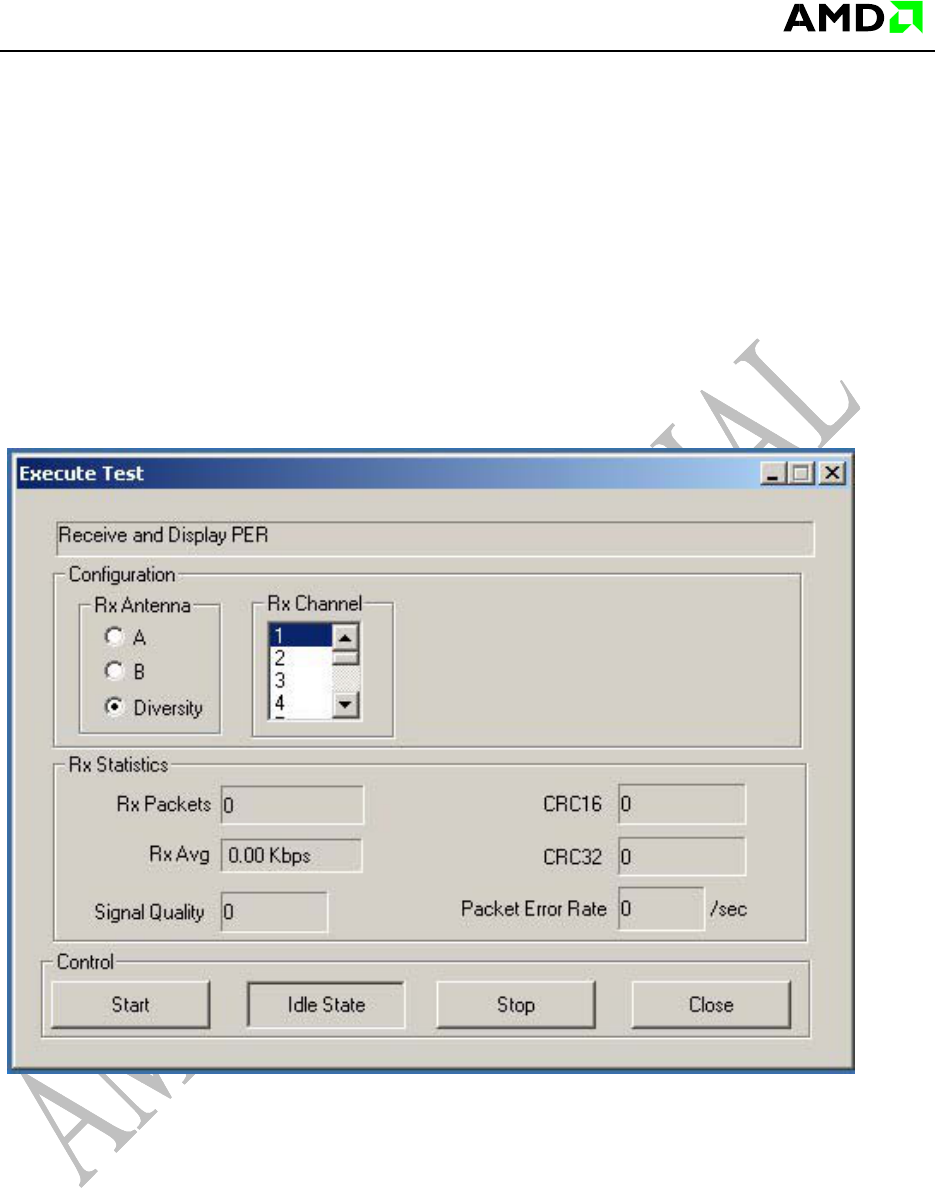
3.4 Receive and Display PER
Select the appropriate configuration and click Start to initiate the selected mode. After
selection press the Start button to see traffic with another InfraAP or Adhoc IBSS station
that is required for this test mode. Alternatively, use another notebook that is in unicast
transmit mode.
To change the configuration first click Stop, change the configuration, and then Start
again. After the test, click Close.
Receive and Display PER
MTS User Guide
AMD Confidential
11
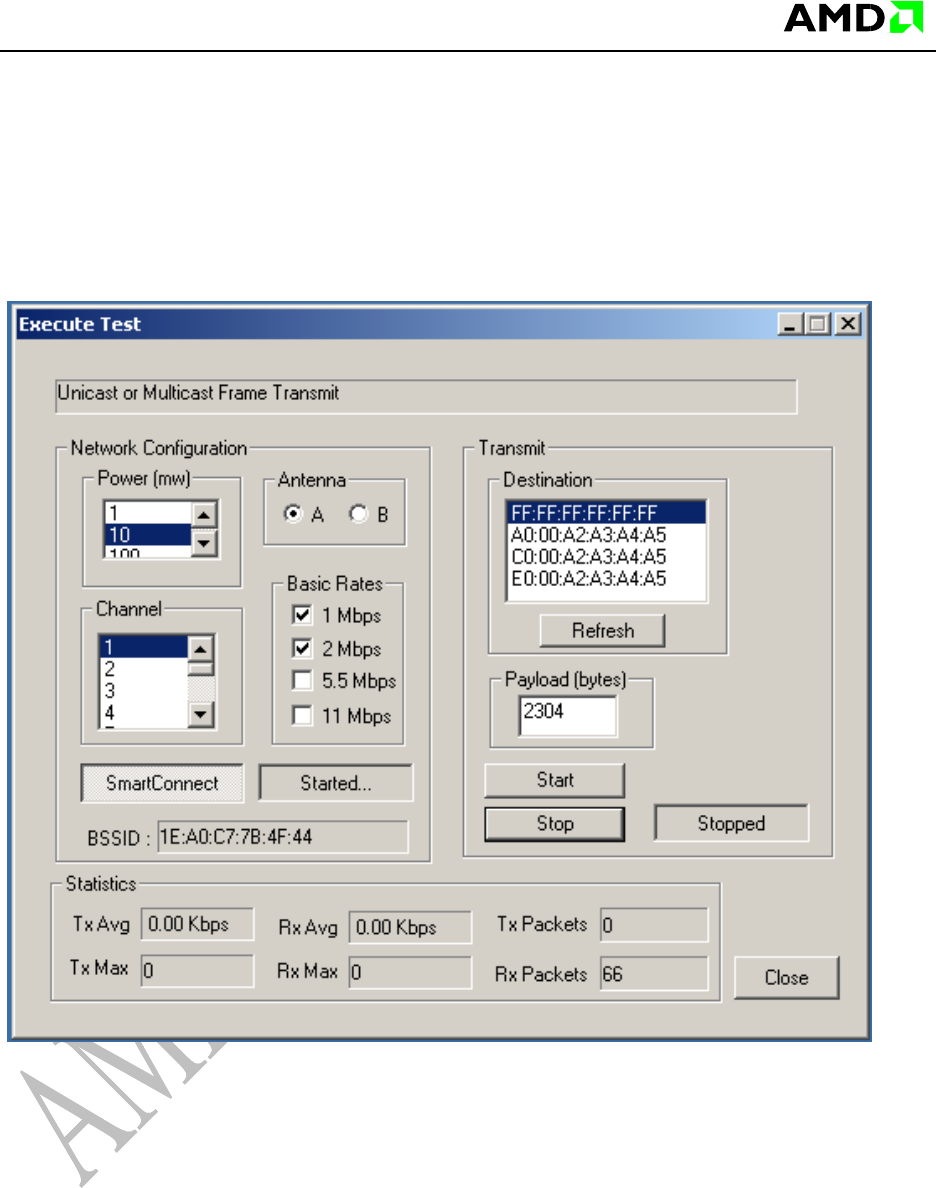
3.5 Unicast or Multicast Frame Transmit
Set up the required configuration first. Press the “Smart Connect” button. After activation
the left button switches from “NO NETWORK” to “STARTED” mode. This means an Adhoc
BSS has been started with SSID “AMD 802.11 MTS Network”. Now setup the required
PAYLOAD in bytes. Next, press “START” for start test mode, whereby after starting, the
“IDLE” button switches to “RUNNING”. Now validation over statistics is possible.
Unicast or Multicast Frame Transmit.
Note that this is a two-machine test. Start this mode on one machine and on another
machine run the MTS test “Unicast or Multicast Frame Transmit” and see it “Joining” the
network started by this test, that is, the “AMD 802.11 MTS Network”.
MTS User Guide
AMD Confidential
12
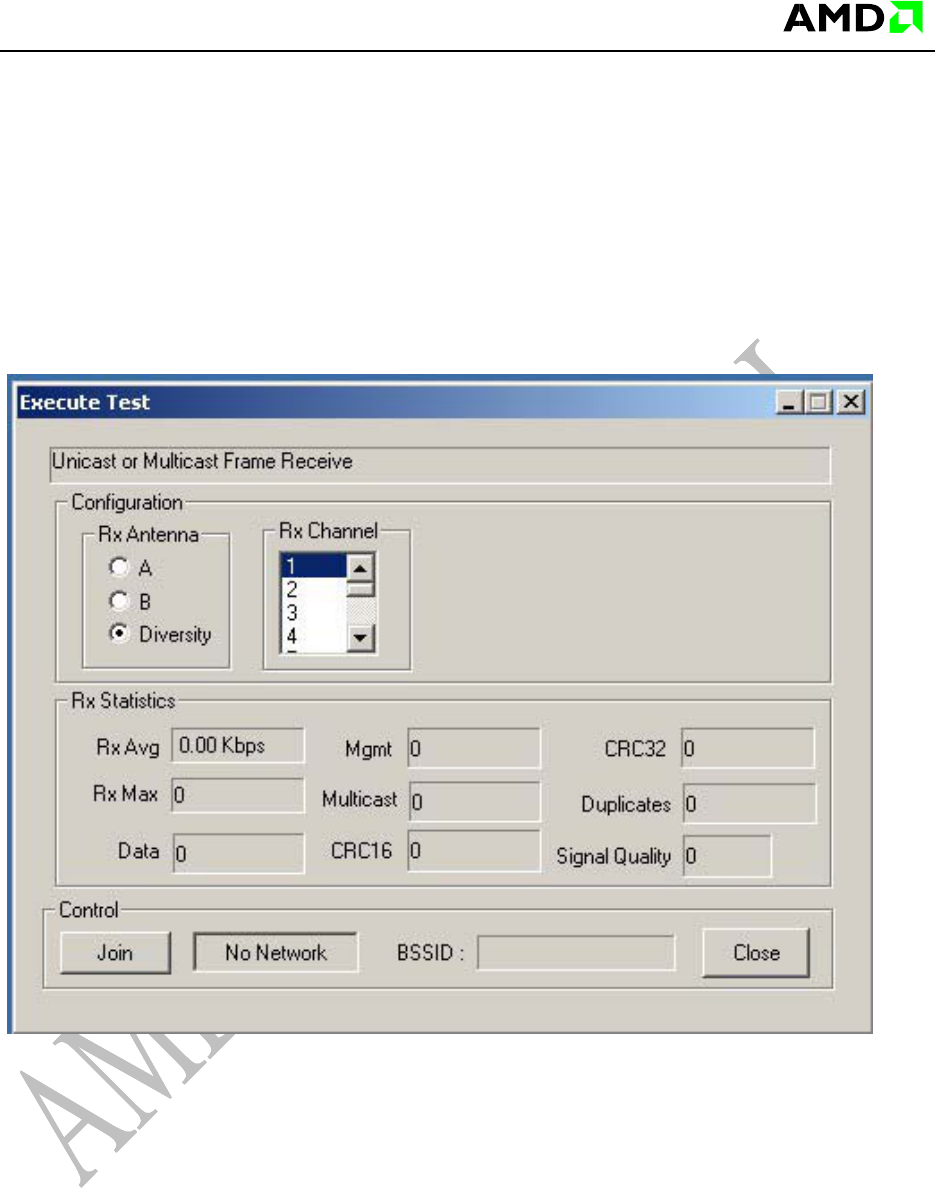
3.6 Unicast or Multicast Frame Receive
This is part of a two-machine test. Use the MTS mode “Unicast or Multicast Transmit” on
another machine to start an Adhoc BSS. (See previous section.) Now, set up the required
configuration first (make sure the Rx Channel is the same as that on the second machine
on which a BSS Start was done using Unicast or Multicast Transmit mode). Now push the
“JOIN” button, whereby after activation, the “No Network” button switches to “Joined…”.
Now validation over statistics is possible.
Unicast or Multicast Frame Receive.
Note, if “Started !” is displayed instead of “Joined…”, it means either the Rx channel was
not selected properly or the Adhoc BSS “AMD 802.11 MTS Network” was not started or is
out-of-range on the second machine. Please click the Join button again to disconnect,
verify setup and Join again.
MTS User Guide
AMD Confidential
13
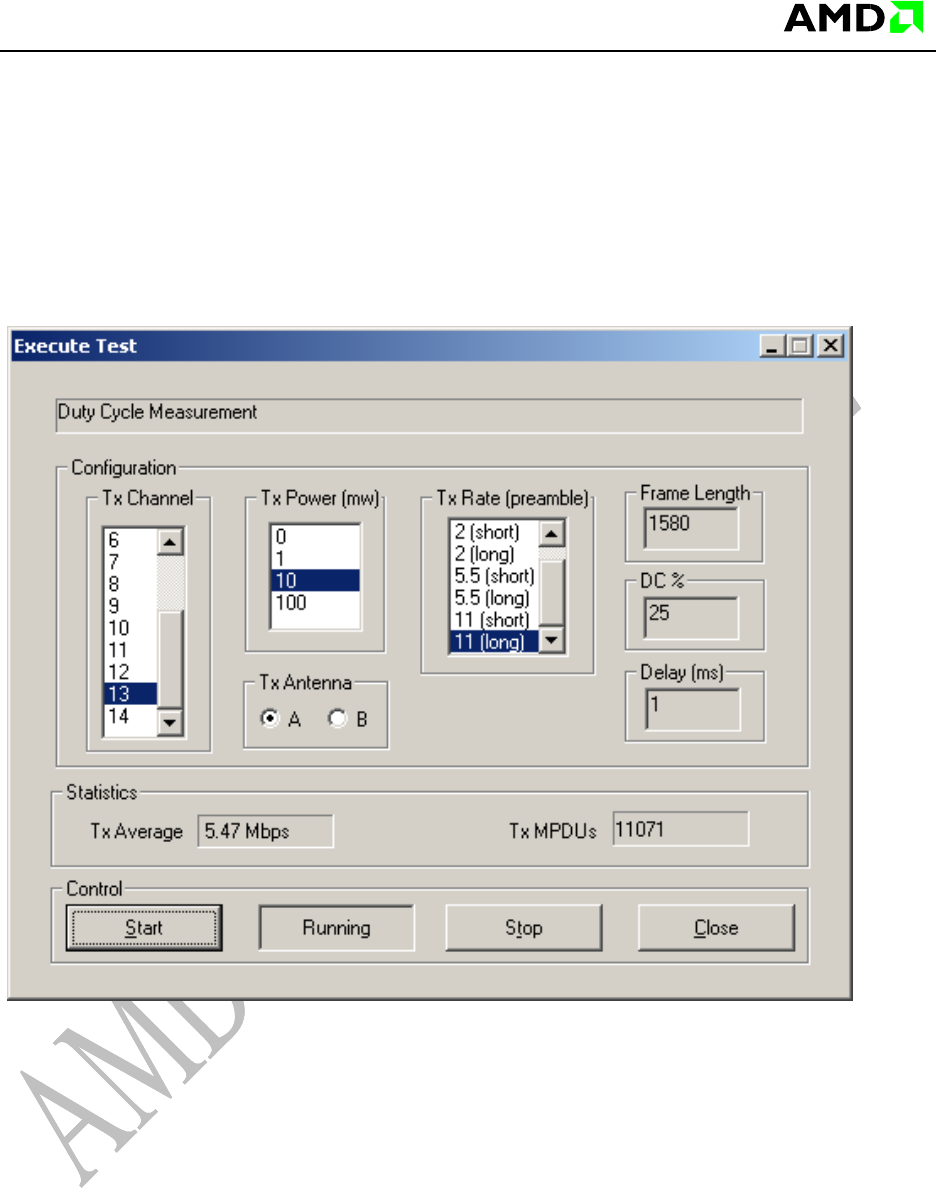
3.7 Duty Cycle Measurement
Set up the required configuration first. Press the “START” button next for the test,
whereby the “IDLE” button switches to “RUNNING”. Now validation over statistics is
possible.
Duty cycle measurement
MTS User Guide
AMD Confidential
14
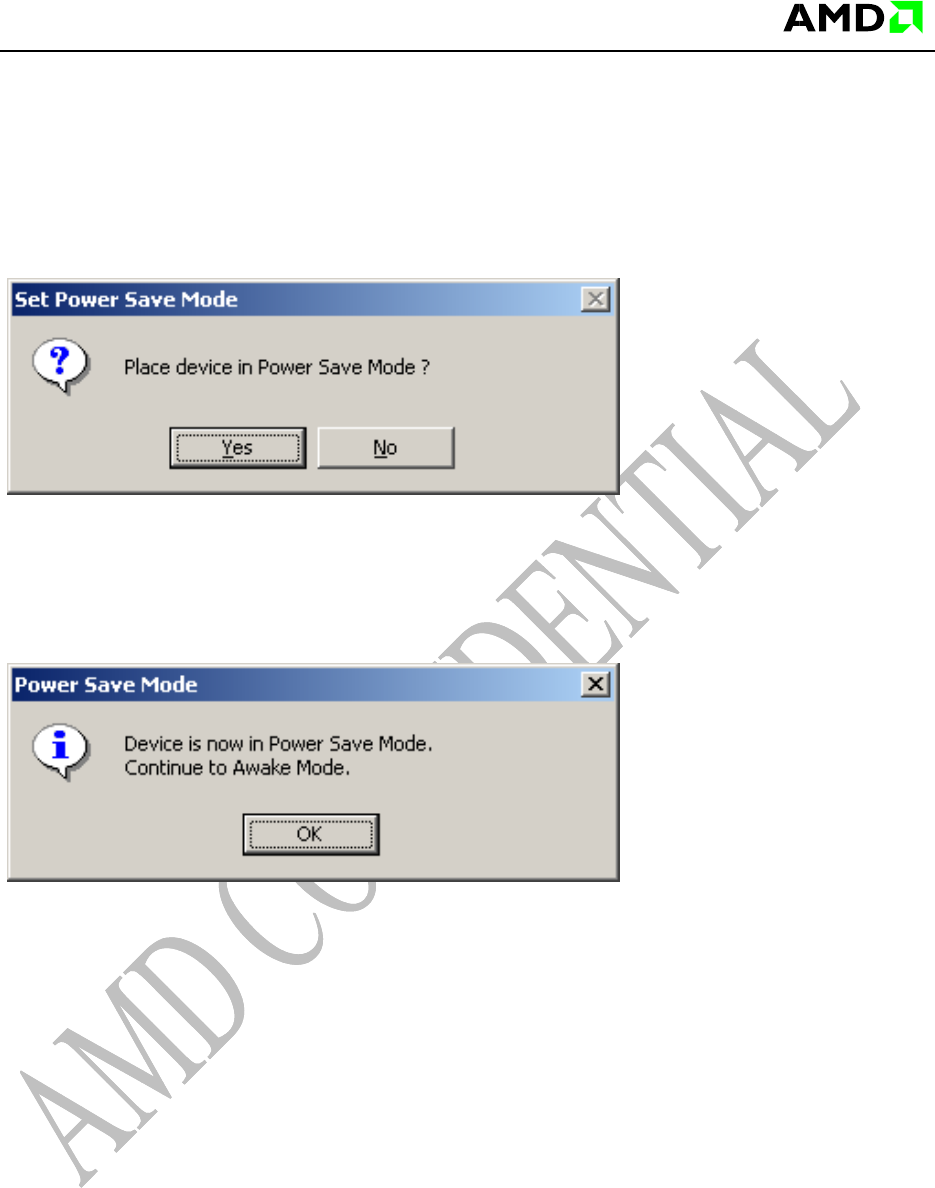
3.8 Power Save and Awake
This mode configures the power save mode for various system-level measurements.
After finalization of the test series, pressing the “OK” button wakes the system.