Rohde and Schwarz and Co KG 61020307 M3SR Series 4400 VHF/Transmitter User Manual

Rohde & Schwarz GmbH & Co KG M3SR Series 4400 VHF/Transmitter

Contents

Revised Manual

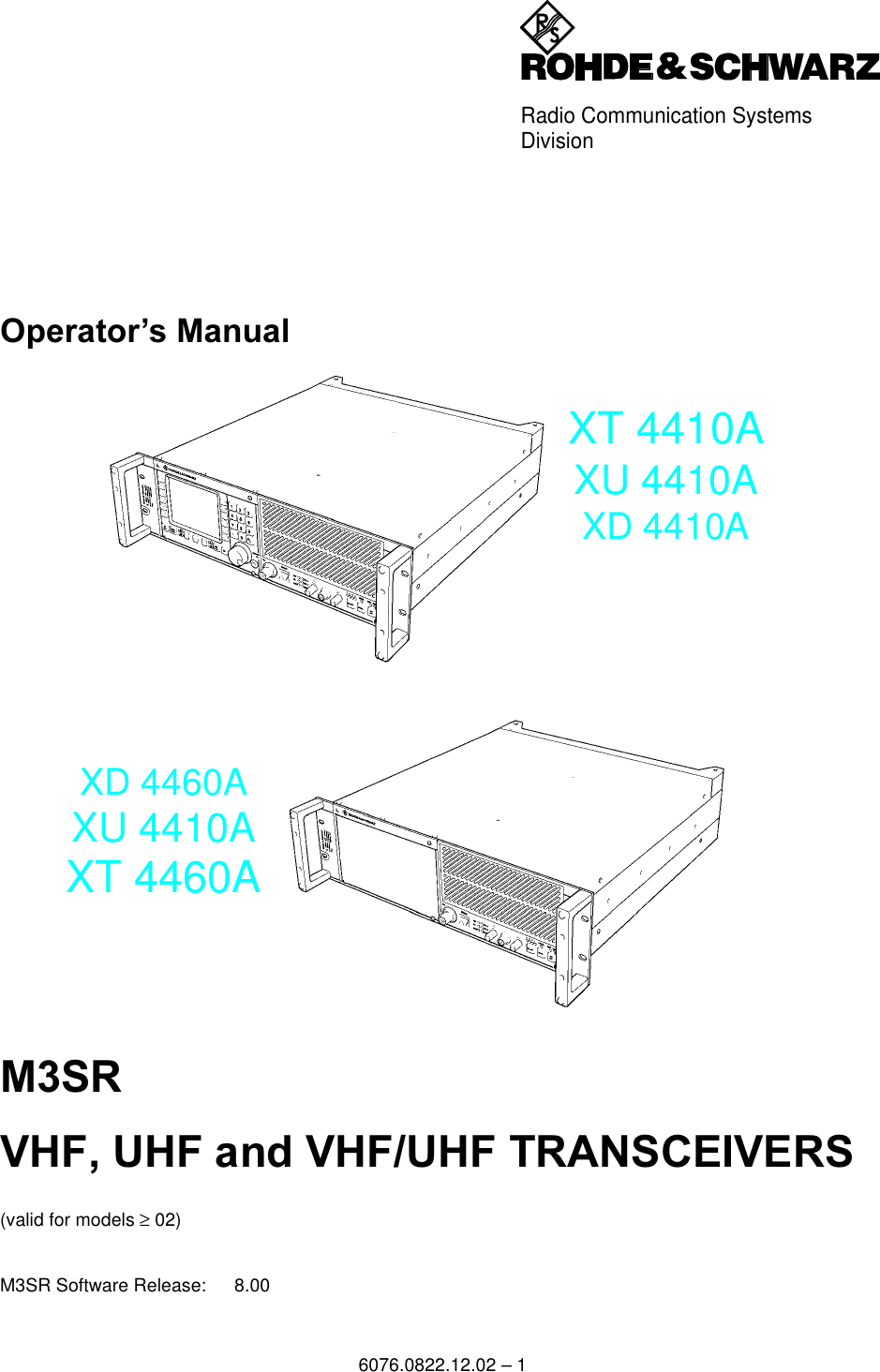
Radio Communication SystemsDivision6076.0822.12.02 – 12SHUDWRU¶V 0DQXDO0659+)8+)DQG9+)8+)75$16&(,9(56(valid for models ≥ 02)M3SR Software Release: 8.00XT 4410AXU 4410AXD 4410AXD 4460AXU 4410AXT 4460A
©Copying of this document as well as any other utilization and communication of its content are only admissiblewith the permission of the originator or other authorized persons.Any disregard will be prosecuted and is subject to restitution (UrhG, UWG, BGB). For the case a patent is is-sued or the design is officially registered all rights are reserved.52+'(6&+:$5=*PE+&R.*'0QFKHQ0KOGRUIVWU7HO,QW7HOHID[,QW3ULQWHGLQWKH)HGHUDO5HSXEOLFRI*HUPDQ\6XEMHFWWRFKDQJH'DWDZLWKRXWWROHUDQFHVRUGHURIPDJQLWXGHRQO\6076.0822.12.02 – 2
Adressen/AddressesFIRMENSITZ/HEADQUARTERS PhoneFaxE-mailRohde & Schwarz GmbH & Co. KG Mühldorfstraße 15 · D-81671 MünchenPostfach 80 14 69 · D-81614 München+49 (89) 41 29-0+49 89 4129-121 64-WERKE/PLANTSRohde & Schwarz Messgerätebau GmbHRiedbachstraße 58 · D-87700 MemmingenPostfach 1652 · D-87686 Memmingen+49 (8331) 108-0+49 (8331) 108-11 24-Rohde & Schwarz GmbH & Co. KGWerk TeisnachKaikenrieder Straße 27 · D-94244 TeisnachPostfach 1149 · D-94240 Teisnach+49 (9923) 857-0+49 (9923) 857-11 74-Rohde & Schwarz GmbH & Co. KG Dienstleistungszentrum KölnGraf-Zeppelin-Straße 18 · D-51147 KölnPostfach 98 02 60 · D-51130 Köln+49 (2203) 49-0+49 (2203) 49 51-308info@rsdc.rohde-schwarz.comservice@rsdc.rohde-schwarz.comTOCHTERUNTERNEHMEN/SUBSIDIARIESRohde & Schwarz Vertriebs-GmbHMühldorfstraße 15 · D-81671 MünchenPostfach 80 14 69 · D-81614 München+49 (89) 41 29-137 74+49 (89) 41 29-137 77-Rohde & Schwarz International GmbHMühldorfstraße 15 · D-81671 MünchenPostfach 80 14 60 · D-81614 München+49 (89) 41 29-129 84+49 (89) 41 29-120 50-Rohde & Schwarz Engineering and Sales GmbHMühldorfstraße 15 · D-81671 MünchenPostfach 80 14 29 · D-81614 München+49 (89) 41 29-137 11+49 (89) 41 29-137 23-R&S BICK Mobilfunk GmbHFritz-Hahne-Str. 7 · D-31848 Bad MünderPostfach 2062 · D-31844 Bad Münder+49 (5042) 998-0+49 (5042) 998-105-Rohde & Schwarz FTK GmbHWendenschlossstraße 168, Haus 28D-12557 Berlin+49 (30) 658 91-122+49 (30) 655 50-221-Rohde & Schwarz SIT GmbHAgastraße 3D-12489 Berlin+49 (30) 658 84-0+49 (30) 658 84-183ADRESSEN DEUTSCHLAND/ADDRESSES GERMANYRohde & Schwarz Vertriebs-GmbHMühldorfstraße 15 · D-81671 MünchenPostfach 80 14 69 · D-81614 München+49 89 4129-133 74+4989 4129-133 77-Zweigniederlassungen der Rohde & Schwarz Vertriebs-GmbH/Branch offices of Rohde & Schwarz Vertriebs-GmbHZweigniederlassung Nord, Geschäftsstelle BerlinErnst-Reuter-Platz 10 · D-10587 BerlinPostfach 100620 · D-10566 Berlin+49 (30) 34 79 48-0+49 (30) 34 79 48 48-Zweigniederlassung Büro BonnJosef-Wirmer-Straße 1-3 · D-53123 BonnPostfach 140264 · D-53057 Bonn+49 (228) 918 90-0+49 (228) 25 50 87-Zweigniederlassung Nord, Geschäftsstelle HamburgSteilshooper Alle 47 · D-22309 HamburgPostfach 60 22 40 · D-22232 Hamburg+49 (40) 63 29 00-0+49 (40) 630 78 70-Zweigniederlassung Mitte, Geschäftsstelle KölnNiederkasseler Straße 33 · D-51147 KölnPostfach 900 149 · D-51111 Köln+49 (2203) 807-0+49 (2203) 807-650-Zweigniederlassung Süd, Geschäftsstelle MünchenMühldorfstraße 15 · D-81671 MünchenPostfach 80 14 69 · D-81614 München+49 (89) 41 86 95-0+49 (89) 40 47 64-Zweigniederlassung Süd, Geschäftsstelle NürnbergDonaustraße 36D-90451 Nürnberg+49 (911) 642 03-0+49 (911) 642 03-33-Zweigniederlassung Mitte, Geschäftsstelle Neu-IsenburgSiemensstraße 20D-63263 Neu-Isenburg+49 (6102) 20 07-0+49 (6102) 20 07 12-ADRESSEN WELTWEIT/ADDRESSES WORLDWIDEsiehe / see AustriaAlbaniaROHDE & SCHWARZ Bureau d'Alger5B Place de Laperrine16035 Hydra-Alger+213 (21) 48 20 18+213 (21) 69 46 08AlgeriaPRECISION ELECTRONICA S.R.L.Av. Pde Julio A. Roca 710 - 6° Piso(C1067ABP) Buenos Aires+541 (14) 331 41 99+541 (14) 334 51 11alberto_lombardi@prec-elec.com.arArgentinaROHDE & SCHWARZ (AUSTRALIA) Pty. Ltd.Sales SupportUnit 62-8 South StreetRydalmere, N.S.W. 2116+61 (2) 88 45 41 00+61 (2) 96 38 39 88lyndell.james@rsaus.rohde-schwarz.comAustraliaROHDE & SCHWARZ-ÖSTERREICH Ges.m.b.H.Am Euro Platz 3Gebäude B1120 Wien+43 (1) 602 61 41-0+43 (1) 602 61 41-14office@rsoe.rohde-schwarz.comAustriaROHDE & SCHWARZ AzerbaijanLiaison Office BakuISR Plaza340 Nizami Str.370000 Baku+994 (12) 93 31 38+994 (12) 93 03 14RS-Azerbaijan@RUS.Rohde-Schwarz.comAzerbaijansiehe / see DenmarkBaltic CountriesBIL Consortium Ltd.Corporation OfficeHouse No: 95/A, Block - 'F'Road No. 4, BananiDhaka-1213+880 (2) 881 06 53+880 (2) 882 82 91BangladeshROHDE & SCHWARZ BELGIUM N.V.Excelsiorlaan 31 Bus 11930 Zaventem+32 (2) 721 50 02+32 (2) 725 09 36info@rsb.rohde-schwarz.comBelgiumROHDE & SCHWARZ  DO BRASIL LTDA.Av. Alfredo Egidio de Souza Aranha n° 177, 1° andar - Santo Amaro04726-170 Sao Paulo - SP+55 (11) 56 44 86 11 (general)+55 (11) 56 44 86 25 (sales)+55 (11) 56 44 86 36sales-brazil@rsdb.rohde-schwarz.comBrasilGKL Equipment PTE. Ltd.Jurong Point Post OfficeP.O.Box 141Singapore 916405+65 (6) 276 06 26+65 (6) 276 06 29gkleqpt@singnet.com.sgBruneiROHDE & SCHWARZ ÖSTERREICHRepresentation Office Bulgaria39, Fridtjof Nansen Blvd.1000 Sofia+359 (2) 963 43 34+359 (2) 963 21 97rohdebg@rsoe.rohde-schwarz.comBulgariasiehe / see SloveniaBosnia-Herzegovina
Adressen/AddressesROHDE & SCHWARZ CANADA Inc.555 March Rd.Kanata, Ontario K2K 2M5+1 (613) 592 80 00+1 (613) 592 80 09cgirwarnauth@rscanada.caCanadaTEKTRONIX CANADA Inc.Test and Measurement4929 Place OliviaSaint-Laurent, PqMontreal H4R 2V6+1 (514) 331 43 34+1 (514) 331 59 91CanadaDYMEQ Ltda.Av. Larrain 6666Santiago+56 (2) 339 20 00+56 (2) 339 20 10dnussbaum@dymeq.comChileROHDE & SCHWARZ China Ltd.Representative Office ShanghaiCentral Plaza227 Huangpi North RoadRM 807/809 Shanghai 200003+86 (21) 63 75 00 18+86 (21) 63 75 91 70ChinaROHDE & SCHWARZ China Ltd.Representative Office BeijingRoom 602, Parkview Center2 Jiangtai RoadChao Yang DistrictBeijing 100016+86 (10) 64 31 28 28+86 (10) 64 37 98 88info.rschina@rsbp.rohde-schwarz.comChinaROHDE & SCHWARZ China Ltd.Representative Office GuangzhouRoom 2903, Metro Plaza183 Tianhe North RoadGuangzhou 510075+86 (20) 87 55 47 58+86 (20) 87 55 47 59ChinaROHDE & SCHWARZ China Ltd.Representative Office ChengduUnit G, 28/F, First City Plaza308 Shuncheng AvenueChengdu 610017+86 (28) 86 52 76 05 to 09+86 (28) 86 52 76 10rsbpc@mail.sc.cninfo.netChinaROHDE & SCHWARZ China Ltd.Unit 311531/F Entertainment Building30 Queen's Road CentralHongkong+85 (2) 21 68 06 70+85 (2) 21 68 08 99ChinaROHDE & SCHWARZ China Ltd.Representative Office Xi'anRoom 10125, Jianguo Hotel Xi'anNo. 2, Huzhu RoadXi'an 710048+86 (29) 321 82 33+86 (29) 329 60 15sherry.yu@rsbp.rohde-schwarz.comChinaShanghai ROHDE & SCHWARZ Communication Technology Co.Ltd.Central Plaza, Unit 809227 Huangpi North RoadShanghai 200003ChinaBeijing ROHDE & SCHWARZ Communication Technology Co.Ltd.Room 106, Parkview CentreNo. 2, Jiangtai RoadChao Yang DistrictBeijing 100016+86 (10) 64 38 80 80+86 (10) 64 38 97 06Chinasiehe / see SloveniaCroatiaHINIS TELECAST LTD.Agiou Thoma 18KitiLarnaca 7550+357 (24) 42 51 78+357 (24) 42 46 21hinis@logos.cy.netCyprusROHDE & SCHWARZ - Praha s.r.o.Hadovka Office ParkEvropská 33c16000 Praha 6+420 (2) 24 31 12 32+420 (2) 24 31 70 43office@rscz.rohde-schwarz.comCzech RepublicROHDE & SCHWARZ DANMARK A/SEjby Industrivej 402600 Glostrup+45 (43) 43 66 99+45 (43) 43 77 44DenmarkREPRESENTACIONES MANFRED WEINZIERLVía Láctea No. 4 y Via Sta. InésP.O.Box 17-22-203091722 Cumbayá-Quito+593 (22) 89 65 97+593 (22) 89 65 97mweinzierl@accessinter.netEcuadorU.A.S. Universal Advanced Systems 31 Manshiet El-Bakry StreetHeliopolis11341 Cairo+20 (2) 455 67 44+20 (2) 256 17 40an_uas@link.netEgyptsiehe / see MexicoEl SalvadorROHDE & SCHWARZ DANMARK A/SEstonian Branch OfficeNarva mnt. 1310151 Tallinn+372 (6) 14 31 23+372 (6) 14 31 21margo.fingling@rsdk.rohde-schwarz.comEstoniaOrbis OyP.O.Box 1500421 Helsinski 42+358 (9) 47 88 30+358 (9) 53 16 04info@orbis.fiFinlandROHDE & SCHWARZ FRANCEImmeuble "Le Newton"9-11, rue Jeanne Braconnier92366 Meudon La Forêt Cédex+33 (1) 41 36 10 00+33 (1) 41 36 11 73FranceNiederlassung/Subsidiary Rennes37 Rue du BignonBât. AF-35510 Cesson Sevigne+33 (0) 299 51 97 00+33 (0) 299 51 98 77-FranceNiederlassung/Subsidiary ToulouseTechnoparc 3B.P. 501F-31674 Labège Cédex+33 (0) 561 39 10 69+33 (0) 561 39 99 10-FranceAix-en-Provence +33 (0) 494 07 39 94+33 (0) 494 07 55 11-FranceOffice Lyon +33 (0) 478 29 88 10+33 (0) 478 79 18 57FranceOffice Nancy +33 (0) 383 54 51 29+33 (0) 383 54 82 09FranceKOP Engineering Ltd.P.O. Box 110123rd Floor Akai House, OsuAccra North+233 (21) 77 89 13+233 (21) 701 06 20GhanaMERCURY S.A.6, Loukianou Str.10675 Athens+302 (10) 722 92 13+302 (10) 721 51 98mercury@hol.grGreecesiehe / see Mexico Guatemalasiehe / see Mexico HondurasElectronic Scientific Engineering36/F Dorset House,  Taikoo Place979 King's RoadQuarry BayHong Kong+852 (25) 07 03 33+852 (25) 07 09 25stephenchau@ese.com.hkHongkongROHDE & SCHWARZ Budapesti IrodaVáci út 1691138 Budapest+36 (1) 412 44 60+36 (1) 412 44 61rohdehu@rsoe.rohde-schwarz.comHungarysiehe / see DenmarkIceland
Adressen/AddressesROHDE & SCHWARZ  India Pvt. Ltd.Bangalore OfficeNo. 24, Service Road, Domlur2nd Stage ExtensionBangalore - 560 071+91 (80) 535 23 62+91 (80) 535 03 61rsindiab@rsnl.netIndiaROHDE & SCHWARZ India Pvt. Ltd.Hyderabad Office302 & 303, Millenium Centre6-3-1099/1100, SomajigudaHyderabad - 500 016+91 (40) 23 32 24 16+91 (40) 23 32 27 32rsindiah@nd2.dot.net.inIndiaROHDE & SCHWARZ India Pvt. Ltd.244, Okhla Industrial Estate, Phase-IIINew Delhi 110020+91 (11) 26 32 63 81+91 (11) 26 32 63 73sales@rsindia.rohde-schwarzservices@rsindia.rohde-schwarz.comIndiaROHDE & SCHWARZ India Pvt. Ltd.RS India Mumbai OfficeB-603, Remi Bizcourt, Shah IndustrialEstate, Off Veera Desai RoadMumbai - 400 058+91 (22) 26 30 18 10+91 (22) 26 32 63 73rsindiam@rsnl.netIndiaPT ROHDE & SCHWARZ IndonesiaGraha Paramita 5th FloorJln. Denpasar Raya Blok D-2Jakarta 12940+62 (21) 252 36 08+62 (21) 252 36 07sales@rsbj.rohde-schwarz.comservices@rsbj.rohde-schwarz.comIndonesiaROHDE & SCHWARZ IRANGroundfloor No. 1, 14th StreetKhaled Eslamboli (Vozara) Ave.15117 Tehran+98 (21) 872 42 96+98 (21) 871 90 12rs-tehran@neda.netIransiehe / see United KingdomIrelandEASTRONICS LTD.Messtechnik / T&M Equipment11 Rozanis St.P.O.Box 39300Tel Aviv 61392+972 (3) 645 87 77+972 (3) 645 86 66david_hasky@easx.co.ilIsraelJ.M. Moss (Engineering) Ltd.Kommunikationstechnik/ Communications Equipment9 Oded StreetP.O.Box 96752109 Ramat Gan+972 (3) 631 20 57+972 (3) 631 40 58jmmoss@zahav.net.ilIsraelROHDE & SCHWARZ ITALIA S.p.a.Centro Direzionale LombardoVia Roma 10820060 Cassina de Pecchi (MI)+39 (02) 95 70 42 03+39 (02) 95 30 27 72ornella.crippa@rsi.rohde-schwarz.comItalyROHDE & SCHWARZ ITALIA S.p.a.Via Tiburtina 118200156 Roma+39 (06) 41 59 82 18+39 (06) 41 59 82 70ItalyADVANTEST CorporationRS Sales Department1-32-1, Asahi-choNerima-kuTokyo 179-0071+81 (3) 39 30 41 90+81 (3) 39 30 41 86RSSales@advantest.co.jpJapanJordan Crown Engineering & Trading Co.Jabal Amman, Second CircleYoussef Ezzideen StreetP.O.Box 830414Amman, 11183+962 (6) 462 17 29+962 (6) 465 96 72jocrown@go.com.joJordanROHDE & SCHWARZ KazakhstanRepresentative Office AlmatyPl. Respubliki 15480013 Almaty+7 (32) 72 63 55 55+7 (32) 72 63 46 33RS-Kazakhstan@RUS-Rohde-Schwarz.comKazakhstanExcel Enterprises LtdDunga RoadP.O.Box 42 788Nairobi+254 (2) 55 80 88+254 (2) 54 46 79KenyaROHDE &  SCHWARZ Korea Ltd.83-29 Nonhyun-Dong, Kangnam-KuSeoul 135-010+82 (2) 514 45 46+82 (2) 514 45 49sales@rskor.rohde-schwarz.comservice@rskor.rohde-schwarz.comKoreaGroup Five Trading & Contracting Co.Mezanine FloorAl-Bana TowersAhmad Al Jaber StreetSharq+965 (244) 91 72/73/74+965 (244) 95 28jk_agarwal@yahoo.comKuwaitROHDE & SCHWARZ DANMARK A/SLatvian Branch OfficeMerkela iela 21-3011050 Riga+371 (7) 50 23 55+371 (7) 50 23 60rsdk@rsdk.rohde-schwarz.comLatviaROHDE & SCHWARZ Liaison Officec/o Haji Abdullah Alireza Co. Ltd.P.O.Box 361Riyadh 11411+966 (1) 465 64 28 Ext. 303+966 (1) 465 64 28 Ext. 229chris.porzky@rsd.rohde-schwarz.comLebanonNetcomLebanonsiehe / see SwitzerlandLiechtensteinROHDE & SCHWARZ DANMARK A/SLithuanian OfficeLukiskiu 5-2282600 Vilnius+370 (5) 239 50 10+370 (5) 239 50 11Lithuaniasiehe / see BelgiumLuxembourgsiehe / see SloveniaMacedoniaDAGANG TEKNIK SDN. BHD.No. 9, Jalan SS 4D/2Selangor Darul Ehsan47301 Petaling Jaya+60 (3) 27 03 55 68+60 (3) 27 03 34 39mey.nara@danik.com.myMalaysiaITEC International Technology LtdB'Kara RoadSan Gwann SGN 08+356 (21) 37 43 00 or 37 43 29+356 (21) 37 43 53sales@itec.com.mtMalta Rohde & Schwarz de Mexico (RSMX) S. de R.L. de C.V.German Centre Oficina 4-2-2Av. Santa Fé 170Col. Lomas de Santa Fé01210 Mexico D.F.+52 (55) 85 03 99 13+52 (55) 85 03 99 16latinoamerica@rsd.rohde-schwarz.comMexicoRohde & Schwarz de Mexico (RSMX)Av. Prol. Americas No. 1600, 2° PisoCol. Country ClubGuadalajara, Jal.Mexico CP, 44610+52 (33) 36 78 91 70+52 (33) 36 78 92 00Mexicosiehe / see RomaniaMoldaviaROHDE & SCHWARZ NEDERLAND B.V.Perkinsbaan 13439 ND Nieuwegein+31 (30) 600 17 00+31 (30) 600 17 99info@rsn.rohde-schwarz.comNetherlandsNichecom1 Lincoln Ave.Tawa, Wellington+64 (4) 232 32 33+64 (4) 232 32 30rob@nichecom.co.nzNew Zealandsiehe / see MexicoNicaraguaFerrostaal AbujaPlot 3323, Barada CloseP.O.Box 8513, WuseOff Amazon StreetMaitama, Abuja+234 (9) 413 52 51+234 (9) 413 52 50fsabuja@rosecom.netNigeria
Adressen/AddressesROHDE & SCHWARZ NORGE ASEnebakkveien 302 B1188 Oslo+47 (23) 38 66 00+47 (23) 38 66 01NorwayMustafa Sultan Science & Industry Co.LLC.For Test & Measurement ONLYWay No. 3503Building No. 241Postal Code 112Al Khuwair, Muscat+968 636 000+968 607 066m-aziz@mustafasultan.comOmanSiemens Pakistan23, West Jinnah AvenueIslamabad+92 (51) 227 22 00+92 (51) 227 54 98reza.bokhary@siemens.com.pkPakistansiehe / see Mexico Panamasiehe / see AustraliaPapua-NewGuineaMARCOM INDUSTRIAL EQUIPMENT, Inc.6-L Vernida I Condominium 120 Amorsolo St.Legaspi VillageMakati City/ Philippines 1229+63 (2) 813 29 31+63 (2) 810 58 07marcom@i-next.netPhilippinesROHDE & SCHWARZ Österreich SP.z o.o.Przedstawicielstwo w Polsceul. Stawki 2, Pietro 2800-193  Warszawa+48 (22) 860 64 94+48 (22) 860 64 99rohdepl@rsoe.rohde-schwarz.comPolandRohde & Schwarz Portugal, Lda.Alameda Antonio Sergio, n° 7R/C, Sala A2795-023 Linda-a-Velha+351 (21) 415 57 00+351 (21) 415 57 10telerus@mail.telepac.ptPortugalROHDE & SCHWARZRepresentation Office BucharestStr. Uranus 98Sc. 2, Et. 5, Ap. 3676102 Bucuresti, Sector 5+40 (21) 410 68 46+40 (21) 411 20 13rohdero@rsoe.rohde-schwarz.comRomaniaROHDE & SCHWARZRepresentative Office Moscow119180, Yakimanskaya nab., 2Moscow+7 (095) 745 88 50 to 53+7 (095) 745 88 54rs-russia@rsru.rohde-schwarz.comRussian FederationMr. Chris PorzkyROHDE & SCHWARZ International GmbHc/o Haji Abdullah Alireza Co. Ltd.P.O.Box 361Riyadh 11411+966 (1) 465 64 28 Ext. 303+966 (1) 465 6428 Ext. 229chris.porzky@rsd.rohde-schwarz.comSaudi ArabiaGENTECSaudi ArabiaRepresentative Office BelgradeTose Jovanovica 711030 Beograd+381 (11) 305 50 25+381 (11) 305 50 24Serbia-MontenegroSpecialne systemy a software, a.s.Svrcia ul.841 04 Bratislava+421 (2) 65 42 24 88+421 (2) 65 42 07 68stefan.lozek@special.skSlovak RepublicROHDE & SCHWARZ Representation LjubljanaTbilisijska 891000 Ljubljana+386 (1) 423 46 51+386 (1) 423 46 11rohdesi@rsoe.rohde-schwarz.comSloveniaProtea Data Systems (Pty.) Ltd.Communications and Measurement DivisionPrivate Bag X19Bramley 2018+27 (11) 719 57 00+27 (11) 786 58 91unicm@protea.co.zaSouth AfricaProtea Data Systems (Pty.) Ltd.Cape Town BranchUnit G9, Centurion Business ParkBosmandam RoadMilnertonCape Town, 7441+27 (21) 555 36 32+27 (21) 555 42 67unicm@protea.co.zaSouth AfricaROHDE & SCHWARZ ESPANA S.A.Salcedo, 1128034 Madrid+34 (91) 334 10 70+34 (91) 329 05 06rses@rses-rohde-schwarz.comSpainLANKA AVIONICS658/1/1, Negombo RoadMattumagalaRagama+94 (1) 95 66 78+94 (1) 95 83 11lankavio@sltnet.lkSri LankaSolarMan Co. Ltd.P.O.Box 11 545North of Fraouq Cementry 6/7/9 Bldg. 16Karthoum +249 (11) 47 31 08+249 (11) 47 31 38solarman29@hotmail.comSudanROHDE & SCHWARZ SVERIGE ABMarketing Div.Flygfältsgatan 15128 30 Skarpnäck+46 (8) 605 19 00+46 (8) 605 19 80info@rss.seSwedenRoschi Rohde & Schwarz AGMühlestr. 73063 Ittigen+41 (31) 922 15 22+41 (31) 921 81 01sales@roschi.rohde-schwarz.comSwitzerlandElectro Scientific OfficeBaghdad StreetDawara Clinical Lab. BldgP.O.Box 8162Damascus+963 (11) 231 59 74+963 (11) 231 88 75memo@hamshointl.comSyriaLancer Communication Co. Ltd.for Div. 1 and 716F, No. 30, Pei-Ping East RoadTaipei+886 (2) 23 91 10 02+886 (2) 23 95 82 82info@lancercomm.com.twTaiwanSystem Communication Co. Ltd.for Div. 2 and 816F, No. 30, Pei-Ping East RoadTaipei+886 (2) 23 91 10 02+886 (2) 23 95 82 82info@lancercomm.com.twTaiwanSSTL GroupP.O. Box 7512Dunga Street Plot 343/345Dar es Salaam+255 (22) 276 00 37+255 (22) 276 02 93sstl@twiga.comTanzaniaSchmidt Electronics (Thailand) Ltd.63 Government Housing Bank Bldg.Tower II, 19th floor, Rama 9 Rd.Huaykwang, BangkapiBangkok 10320+66 (2) 643 13 30 to 39+66 (2) 643 13 40kamthoninthuyot@schmidtthailand.comThailandTPP Operation Co., Ltd.41/5 Mooban TarineeBoromrajchonnee RoadTalingchan, Bangkok 10170+66 (2) 880 93 47+66 (2) 880 93 47thipsukon@tpp-operation.comThailandsiehe / see MexicoTrinidad &TobagoTELETEK71, Rue Alain SavaryResidence Alain Savary (C64)1003 TunisTunisiaROHDE & SCHWARZ International GmbHLiaison Office IstanbulBagdad Cad. 191/3, Arda Apt. B-Blok81030 Selamicesme-Istanbul+90 (216) 385 19 17+90 (216) 385 19 18rsturk@superonline.comTurkeyROHDE & SCHWARZRepresentative Office Kiev4, Patris Loumoumba ul01042 Kiev+38 (044) 268 60 55+38 (044) 268 83 64rohdeukr@rsoe.rohde-schwarz.comUkraineROHDE & SCHWARZ International GmbHLiaison Office Abu DhabiP.O. Box 31156+971 (2) 633 56 70+971 (2) 633 56 71United Arab EmiratesAbu Dhabimichael.rogler@rsd.rohde-schwarz.com
Adressen/AddressesROHDE & SCHWARZ Bick Mobile CommunicationP.O.Box 17466Dubai+971 (4) 883 71 35+971 (4) 883 71 36www.rsbick.deUnited Arab EmiratesROHDE & SCHWARZ Emirates L.L.C.Ahmed Al Nasri Building, Mezzanine Floor, P.O.Box 31156Off old Airport RoadBehind new GEMACO FurnitureAbu Dhabi+971 (2) 631 20 40+971 (2) 631 30 40rsuaeam@emirates.net.aeUnited Arab EmiratesROHDE & SCHWARZ UK Ltd.Ancells Business ParkFleetHampshireGU 51 2UZ England+44 (1252) 81 88 88 (sales)+44 (1252) 81 88 18 (service)+44 (1252) 81 14 47sales@rsuk.rohde-schwarz.comUnitedKingdomAEROMARINE S.A.Cerro Largo 149711200 Montevideo+598 (2) 400 39 62+598 (2) 401 85 97mjn@aeromarine.com.uyUruguayROHDE & SCHWARZ, Inc.Broadcast & Comm. Equipment(US Headquarters)7150-K Riverwood DriveColumbia, MD 21046+1 (410) 910 78 00+1 (410) 910 78 01rsatv@rsa.rohde-schwarz.comrsacomms@rsa.rohde-schwarz.comUSARohde & Schwarz Inc. Marketing & Support Center / T&M Equipment2540 SW Alan Blumlein WayM/S 58-925Beaverton, OR 97077-0001+1 (503) 627 26 84+1 (503) 627 25 65info@rsa.rohde-schwarz.comUSARohde & Schwarz Inc. Systems & EMI Products8080 Tristar DriveSuite 120Irving, Texas 75063+1 (469) 713 53 00+1 (469) 713 53 01info@rsa.rohde-schwarz.comUSAEQUILAB TELECOM C.A.Centro Seguros La PazPiso 6, Local E-61Ava. Francisco de MirandaBoleita, Caracas 1070+58 (2) 12 34 46 26+58 (2) 122 39 52 05r_ramirez@equilabtelecom.comVenezuelaREPRESENTACIONES BOPIC S.A.Calle C-4Qta. San JoseUrb. CaurimareCaracas 1061+58 (2) 129 85 21 29+58 (2) 129 85 39 94incotr@cantv.netVenezuelaSchmidt Vietnam Co., (H.K.) Ltd., Representative Office in HanoiIntern. Technology Centre8/F, HITC Building239 Xuan Thuy RoadCau Giay, Tu LiemHanoi+84 (4) 834 61 86+84 (4) 834 61 88svnhn@schmidtgroup.comVietnamsiehe / see MexicoWest IndiesGEDIS GmbHSophienblatt 100Postfach 22 0124021 Kiel+49 (431) 600 51-0+49 (431) 600 51-11sales@gedis-online.de
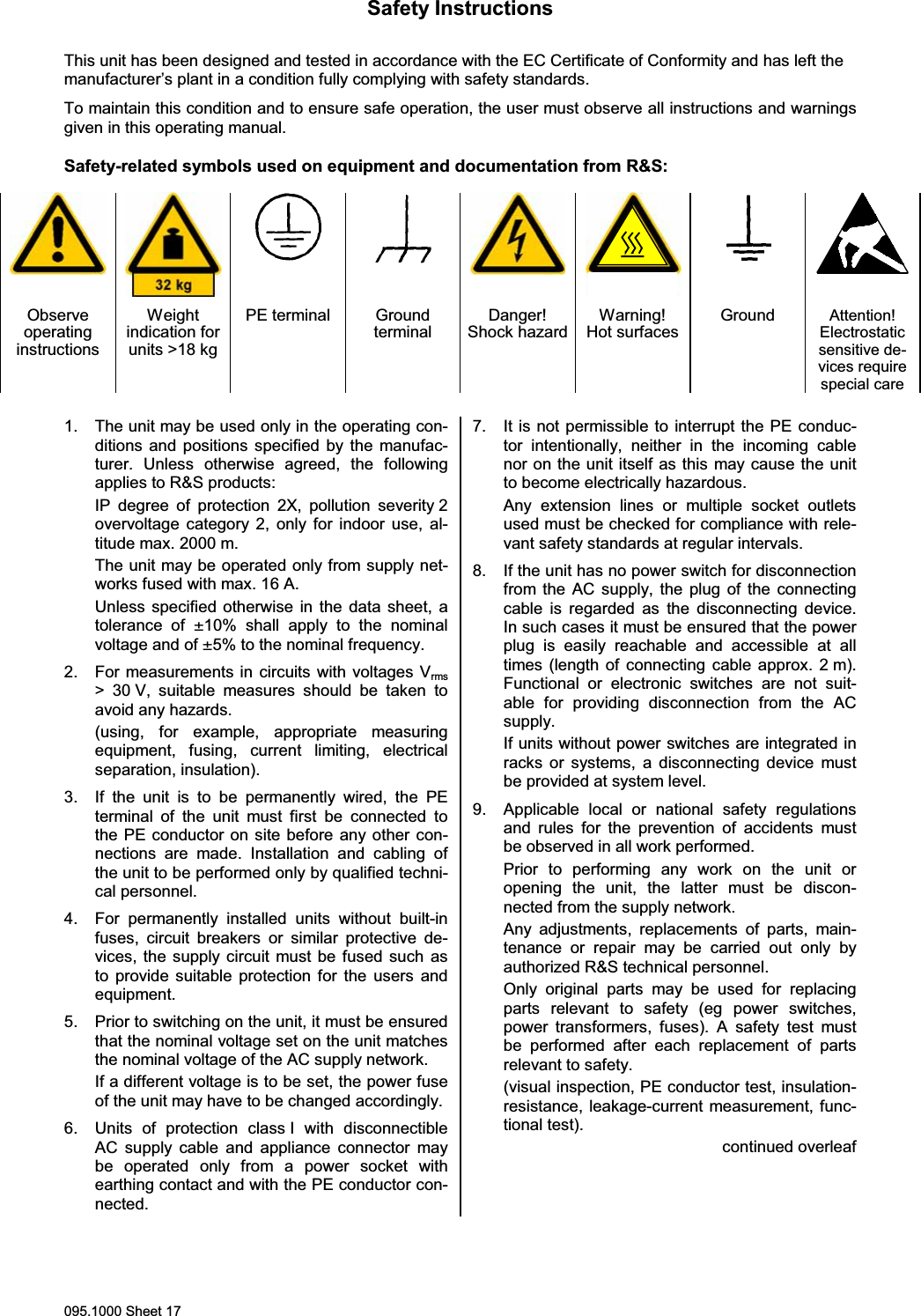
Safety Instructions095.1000 Sheet 17This unit has been designed and tested in accordance with the EC Certificate of Conformity and has left themanufacturer’s plant in a condition fully complying with safety standards.To maintain this condition and to ensure safe operation, the user must observe all instructions and warningsgiven in this operating manual.Safety-related symbols used on equipment and documentation from R&S:ObserveoperatinginstructionsWeightindication forunits >18 kgPE terminal GroundterminalDanger!Shock hazardWarning!Hot surfacesGround Attention!Electrostaticsensitive de-vices requirespecial care1. The unit may be used only in the operating con-ditions and positions specified by the manufac-turer. Unless otherwise agreed, the followingapplies to R&S products:IP degree of protection 2X, pollution severity 2overvoltage category 2, only for indoor use, al-titude max. 2000 m.The unit may be operated only from supply net-works fused with max. 16 A.Unless specified otherwise in the data sheet, atolerance of ±10% shall apply to the nominalvoltage and of ±5% to the nominal frequency.2. For measurements in circuits with voltages Vrms> 30 V, suitable measures should be taken toavoid any hazards.(using, for example, appropriate measuringequipment, fusing, current limiting, electricalseparation, insulation).3. If the unit is to be permanently wired, the PEterminal of the unit must first be connected tothe PE conductor on site before any other con-nections are made. Installation and cabling ofthe unit to be performed only by qualified techni-cal personnel.4. For permanently installed units without built-infuses, circuit breakers or similar protective de-vices, the supply circuit must be fused such asto provide suitable protection for the users andequipment.5. Prior to switching on the unit, it must be ensuredthat the nominal voltage set on the unit matchesthe nominal voltage of the AC supply network.If a different voltage is to be set, the power fuseof the unit may have to be changed accordingly.6. Units of protection class I with disconnectibleAC supply cable and appliance connector maybe operated only from a power socket withearthing contact and with the PE conductor con-nected.7. It is not permissible to interrupt the PE conduc-tor intentionally, neither in the incoming cablenor on the unit itself as this may cause the unitto become electrically hazardous.Any extension lines or multiple socket outletsused must be checked for compliance with rele-vant safety standards at regular intervals.8. If the unit has no power switch for disconnectionfrom the AC supply, the plug of the connectingcable is regarded as the disconnecting device.In such cases it must be ensured that the powerplug is easily reachable and accessible at alltimes (length of connecting cable approx. 2 m).Functional or electronic switches are not suit-able for providing disconnection from the ACsupply.If units without power switches are integrated inracks or systems, a disconnecting device mustbe provided at system level.9. Applicable local or national safety regulationsand rules for the prevention of accidents mustbe observed in all work performed.Prior to performing any work on the unit oropening the unit, the latter must be discon-nected from the supply network.Any adjustments, replacements of parts, main-tenance or repair may be carried out only byauthorized R&S technical personnel.Only original parts may be used for replacingparts relevant to safety (eg power switches,power transformers, fuses). A safety test mustbe performed after each replacement of partsrelevant to safety.(visual inspection, PE conductor test, insulation-resistance, leakage-current measurement, func-tional test).continued overleaf
Safety Instructions095.1000 Sheet 1810. Ensure that the connections with informationtechnology equipment comply with IEC950 /EN60950.11. Lithium batteries must not be exposed to hightemperatures or fire.Keep batteries away from children.If the battery is replaced improperly, there isdanger of explosion. Only replace the battery byR&S type (see spare part list).Lithium batteries are suitable for environmen-tally-friendly disposal or specialized recycling.Dispose them into appropriate containers, only.Do not short-circuit the battery.12. Equipment returned or sent in for repair must bepacked in the original packing or in packing withelectrostatic and mechanical protection.13. Electrostatics via  the connectors may dam-age the equipment. For the safe handling andoperation of the equipment,  appropriatemeasures against electrostatics should be im-plemented.14. The outside of the instrument is suitablycleaned using a soft, lint-free dustcloth. Neveruse solvents such as thinners, acetone andsimilar things, as they may damage the frontpanel labeling or plastic parts.15. Any additional safety instructions given in thismanual are also to be observed.
Für Betrieb im Europäischen Wirtschaftsraum (EWR) und zivilen Einsatz.Hinweis gemäß dem Gesetz über „Funkanlagen und Telekommunikations-endeinrichtungen“ (FTEG) und der Europäischen Richtlinie 1999/5/EG:Dieses Produkt darf innerhalb des EWR nicht uneingeschränkt betrieben werden, dader verwendete Frequenzbereich auf nicht harmonisierten Bändern erfolgt. NationaleVorschriften / Genehmigungen sind zu beachten.Das Gerät ist 4 Wochen vor Inverkehrbringen bei der jeweils zuständigen nationalenBehörde für die Frequenzhoheit zu notifizieren. Informationen hierzu im Internet unterfolgender Adresse: http://europa.eu.int/comm/enterprise/rtte/spectr.htmFor operation in the European Economic Area (EEA) and for civil use.Note pursuant to the German Radio and Telecommunications TerminalEquipment Directive (FTEG) and the European R&TTE Directive 1999/5/EC:Operation of this product within the EEA is subject to restrictions since the frequencybands used are not harmonized. National provisions / authorizations shall becomplied with.The product shall be notified to the competent national frequency managementauthority four weeks before the product is put on the market.For more information refer to: http://europa.eu.int/comm/enterprise/rtte/spectr.htm6012.1234.54 – 1 / 2
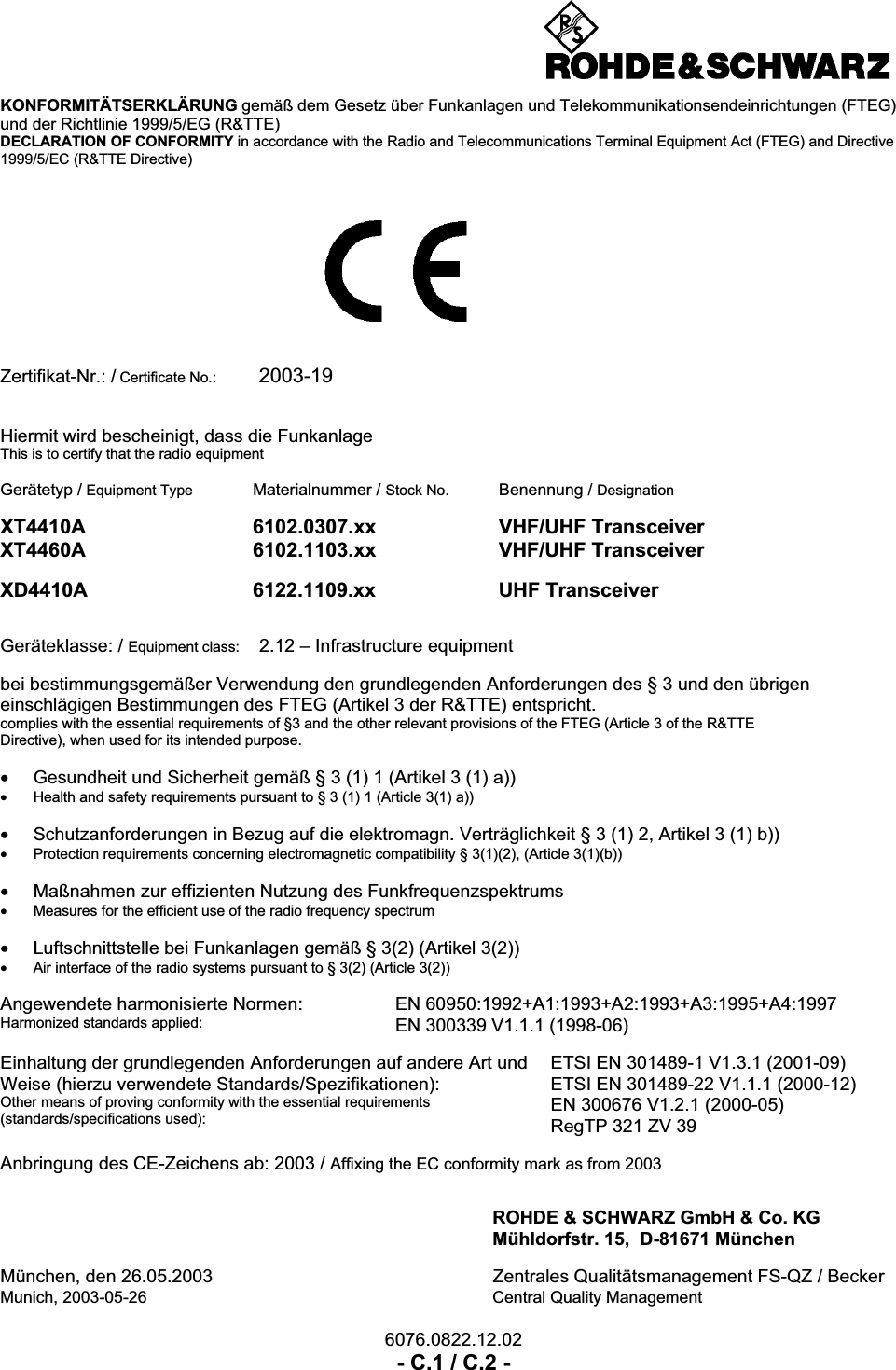
6076.0822.12.02- C.1 / C.2 -KONFORMITÄTSERKLÄRUNG gemäß dem Gesetz über Funkanlagen und Telekommunikationsendeinrichtungen (FTEG)und der Richtlinie 1999/5/EG (R&TTE)DECLARATION OF CONFORMITY in accordance with the Radio and Telecommunications Terminal Equipment Act (FTEG) and Directive1999/5/EC (R&TTE Directive)Zertifikat-Nr.: / Certificate No.: 2003-19Hiermit wird bescheinigt, dass die FunkanlageThis is to certify that the radio equipmentGerätetyp / Equipment Type Materialnummer / Stock No. Benennung / DesignationXT4410A 6102.0307.xx VHF/UHF TransceiverXT4460A 6102.1103.xx VHF/UHF TransceiverXD4410A 6122.1109.xx UHF TransceiverGeräteklasse: / Equipment class: 2.12 – Infrastructure equipmentbei bestimmungsgemäßer Verwendung den grundlegenden Anforderungen des § 3 und den übrigeneinschlägigen Bestimmungen des FTEG (Artikel 3 der R&TTE) entspricht.complies with the essential requirements of §3 and the other relevant provisions of the FTEG (Article 3 of the R&TTEDirective), when used for its intended purpose.•Gesundheit und Sicherheit gemäß § 3 (1) 1 (Artikel 3 (1) a))•Health and safety requirements pursuant to § 3 (1) 1 (Article 3(1) a))•Schutzanforderungen in Bezug auf die elektromagn. Verträglichkeit § 3 (1) 2, Artikel 3 (1) b))•Protection requirements concerning electromagnetic compatibility § 3(1)(2), (Article 3(1)(b))•Maßnahmen zur effizienten Nutzung des Funkfrequenzspektrums•Measures for the efficient use of the radio frequency spectrum•Luftschnittstelle bei Funkanlagen gemäß § 3(2) (Artikel 3(2))•Air interface of the radio systems pursuant to § 3(2) (Article 3(2))Angewendete harmonisierte Normen:Harmonized standards applied:EN 60950:1992+A1:1993+A2:1993+A3:1995+A4:1997EN 300339 V1.1.1 (1998-06)Einhaltung der grundlegenden Anforderungen auf andere Art undWeise (hierzu verwendete Standards/Spezifikationen):Other means of proving conformity with the essential requirements(standards/specifications used):ETSI EN 301489-1 V1.3.1 (2001-09)ETSI EN 301489-22 V1.1.1 (2000-12)EN 300676 V1.2.1 (2000-05)RegTP 321 ZV 39Anbringung des CE-Zeichens ab: 2003 / Affixing the EC conformity mark as from 2003ROHDE & SCHWARZ GmbH & Co. KGMühldorfstr. 15,  D-81671 MünchenMünchen, den 26.05.2003 Zentrales Qualitätsmanagement FS-QZ / BeckerMunich, 2003-05-26 Central Quality Management
Radio Communication SystemsDivision6012.1234.12.06 - 1 / 2If you have any questions on Radio Communication System products, our support center staff will provide any assistance possible. Hotline services are available: Monday through Friday from 08:00 to 17:00 (GMT + 1).Additionally you may also contact us round the clock via e-mail at the address stated above. Support CenterTelephone: +49 (0) 180 5124242Fax: +49 (0) 180 4129-13777e-mail: Customersupport@rohde-schwarz.com
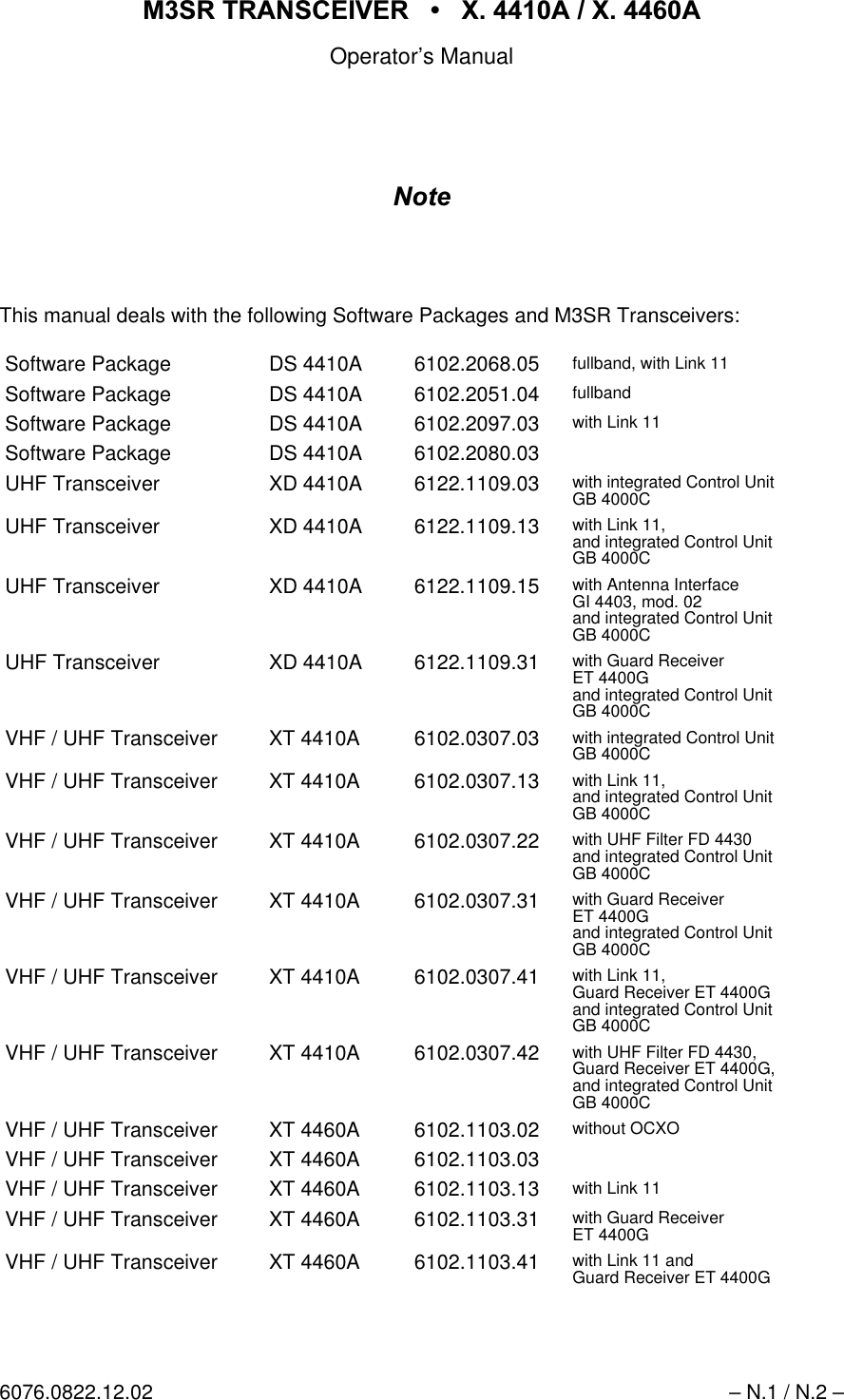
065 75$16&(,9(5  ; $  ; $Operator’s Manual6076.0822.12.02 – N.1 / N.2 –1RWHThis manual deals with the following Software Packages and M3SR Transceivers:Software Package DS 4410A 6102.2068.05 fullband, with Link 11Software Package DS 4410A 6102.2051.04 fullbandSoftware Package DS 4410A 6102.2097.03 with Link 11Software Package DS 4410A 6102.2080.03UHF Transceiver XD 4410A 6122.1109.03 with integrated Control UnitGB 4000CUHF Transceiver XD 4410A 6122.1109.13 with Link 11,and integrated Control UnitGB 4000CUHF Transceiver XD 4410A 6122.1109.15 with Antenna InterfaceGI 4403, mod. 02and integrated Control UnitGB 4000CUHF Transceiver XD 4410A 6122.1109.31 with Guard ReceiverET 4400Gand integrated Control UnitGB 4000CVHF / UHF Transceiver XT 4410A 6102.0307.03 with integrated Control UnitGB 4000CVHF / UHF Transceiver XT 4410A 6102.0307.13 with Link 11,and integrated Control UnitGB 4000CVHF / UHF Transceiver XT 4410A 6102.0307.22 with UHF Filter FD 4430and integrated Control UnitGB 4000CVHF / UHF Transceiver XT 4410A 6102.0307.31 with Guard ReceiverET 4400Gand integrated Control UnitGB 4000CVHF / UHF Transceiver XT 4410A 6102.0307.41 with Link 11,Guard Receiver ET 4400Gand integrated Control UnitGB 4000CVHF / UHF Transceiver XT 4410A 6102.0307.42 with UHF Filter FD 4430,Guard Receiver ET 4400G,and integrated Control UnitGB 4000CVHF / UHF Transceiver XT 4460A 6102.1103.02 without OCXOVHF / UHF Transceiver XT 4460A 6102.1103.03VHF / UHF Transceiver XT 4460A 6102.1103.13 with Link 11VHF / UHF Transceiver XT 4460A 6102.1103.31 with Guard ReceiverET 4400GVHF / UHF Transceiver XT 4460A 6102.1103.41 with Link 11 andGuard Receiver ET 4400G
Radio Communication Systems DivisionDocumentation Dept.Mühldorfstr. 15'0QFKHQFax +49 89 4129 126900803 6076.0822.12.02 - 001 please turn over(9$/8$7,212)0$18$/6here: 2SHUDWRU¶V0DQXDO,G1R065 7UDQVFHLYHU; $; $Dear Sirs,we constantly try to improve our technical manuals, so that you, our customer gets thebest possible benefit from them.In order to become better, we need your help and your opinion on the manuals. There-fore, we would like you to evaluate the accompanying manual and tell us your opinionabout it. In order to make the job easy for you, we have designed the following matrix.Please tick where appropriate.1. What is your general impression of the manual?qqqqqlousy not so good quite ok good excellent2. How do you assess the detail and depth of information in general?qqqqqfar too too much all information not enough important itemsdetailed information contained information missing3. How do you assess the size of the manual in general?qqqqqfar too a bit too appropriate to easy to very clearlybulky thick the equipment handle presented4. How do you assess the structure of the manual?qqqqqopaque difficult to quite ok easy to find very user-understand information friendly5. How do you assess the understandability (language) of manual?qqqqqvery difficult complicated normal to easy to very user-to follow language understand understand friendly
0803 6076.0822.12.02 - 002(9$/8$7,212)0$18$/62SHUDWRU¶V0DQXDO,G1R065 7UDQVFHLYHU; $; $6. How do you rate the number of illustrations?qqqqqfar too a bit too just about could be not enoughmany many right more illustrations7. How do you rate the quality of illustrations?qqqqqlousy not so good quite ok good excellent8. How do you assess the balance of text to illustrations?qqqqqlousy not so good quite ok good excellentFurther Comments and Suggestions for Improvement:Date / Signature / Department
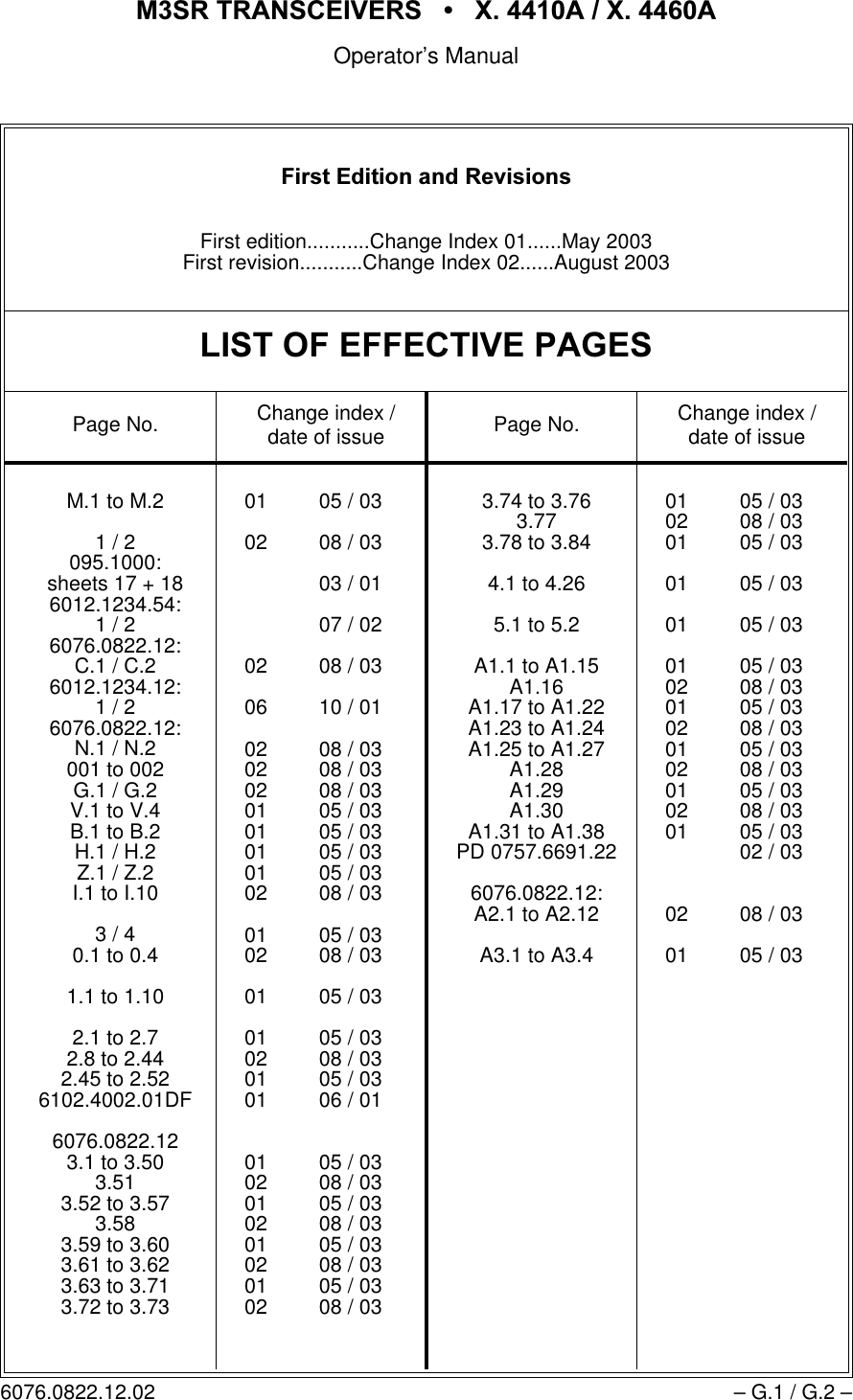
065 75$16&(,9(56  ; $  ; $Operator’s Manual6076.0822.12.02 – G.1 / G.2 –)LUVW(GLWLRQDQG5HYLVLRQVFirst edition...........Change Index 01......May 2003First revision...........Change Index 02......August 2003/,672)())(&7,9(3$*(6Page No. Change index / date of issue Page No. Change index / date of issueM.1 to M.21 / 2095.1000:sheets 17 + 186012.1234.54:1 / 26076.0822.12:C.1 / C.26012.1234.12:1/26076.0822.12:N.1 / N.2001 to 002G.1 / G.2V.1 to V.4B.1 to B.2H.1 / H.2Z.1 / Z.2I.1 to I.103/40.1 to 0.41.1 to 1.102.1 to 2.72.8 to 2.442.45 to 2.526102.4002.01DF6076.0822.123.1 to 3.503.513.52 to 3.573.583.59 to 3.603.61 to 3.623.63 to 3.713.72 to 3.7301 05 / 0302 08 / 0303 / 0107 / 0202 08 / 0306 10 / 0102 08 / 0302 08 / 0302 08 / 0301 05 / 0301 05 / 0301 05 / 0301 05 / 0302 08 / 0301 05 / 0302 08 / 0301 05 / 0301 05 / 0302 08 / 0301 05 / 0301 06 / 0101 05 / 0302 08 / 0301 05 / 0302 08 / 0301 05 / 0302 08 / 0301 05 / 0302 08 / 033.74 to 3.763.773.78 to 3.844.1 to 4.265.1 to 5.2A1.1 to A1.15A1.16A1.17 to A1.22A1.23 to A1.24A1.25 to A1.27A1.28A1.29A1.30A1.31 to A1.38PD 0757.6691.226076.0822.12:A2.1 to A2.12A3.1 to A3.401 05 / 0302 08 / 0301 05 / 0301 05 / 0301 05 / 0301 05 / 0302 08 / 0301 05 / 0302 08 / 0301 05 / 0302 08 / 0301 05 / 0302 08 / 0301 05 / 0302 / 0302 08 / 0301 05 / 03
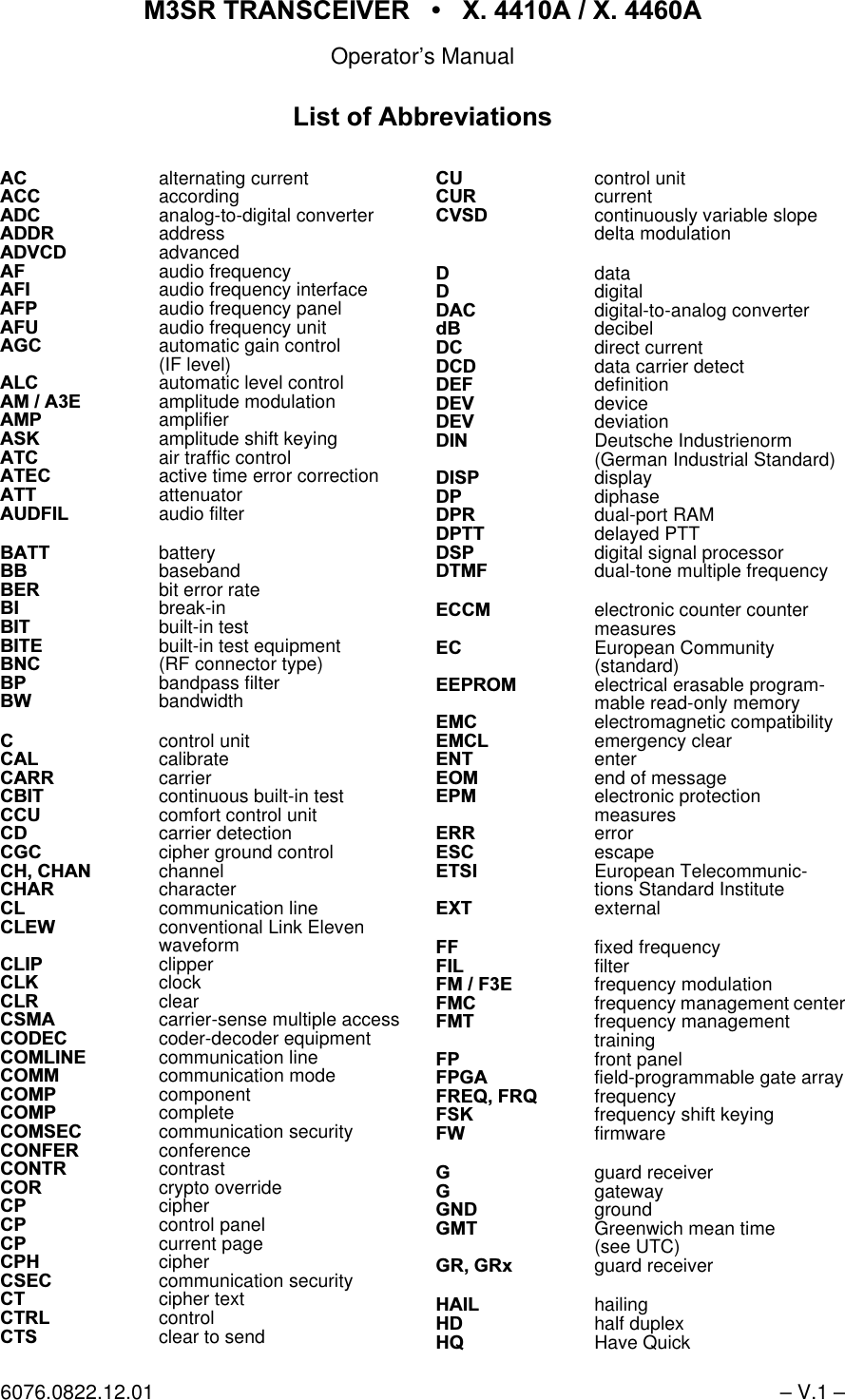
065 75$16&(,9(5  ; $  ; $Operator’s Manual6076.0822.12.01 – V.1 –$& alternating current$&& according$'&analog-to-digital converter$''5address$'9&'advanced$) audio frequency$),audio frequency interface$)3 audio frequency panel$)8 audio frequency unit$*&automatic gain control(IF level)$/&automatic level control$0$( amplitude modulation$03amplifier$6. amplitude shift keying$7& air traffic control$7(& active time error correction$77 attenuator$8'),/audio filter%$77 battery%% baseband%(5 bit error rate%, break-in%,7 built-in test%,7( built-in test equipment%1& (RF connector type)%3bandpass filter%: bandwidth&control unit&$/calibrate&$55 carrier&%,7 continuous built-in test&&8comfort control unit&'carrier detection&*&cipher ground control&+&+$1 channel&+$5 character&/communication line&/(: conventional Link Elevenwaveform&/,3clipper&/.clock&/5clear&60$ carrier-sense multiple access&2'(& coder-decoder equipment&20/,1( communication line&200 communication mode&203component&203complete&206(& communication security&21)(5 conference&2175 contrast&25crypto override &3cipher&3control panel&3current page&3+cipher&6(& communication security&7 cipher text&75/control&76 clear to send&8control unit&85current&96'continuously variable slopedelta modulation'data'digital'$& digital-to-analog converterG% decibel'&direct current'&'data carrier detect'()definition'(9 device'(9 deviation',1 Deutsche Industrienorm(German Industrial Standard)',63display'3 diphase'35dual-port RAM'377 delayed PTT'63digital signal processor'70)dual-tone multiple frequency(&&0 electronic counter countermeasures(& European Community(standard)((3520electrical erasable program-mable read-only memory(0& electromagnetic compatibility(0&/emergency clear(17 enter(20end of message(30electronic protectionmeasures(55 error(6& escape(76, European Telecommunic-tions Standard Institute(;7 external)) fixed frequency),/filter)0)( frequency modulation)0& frequency management center)07 frequency managementtraining )3 front panel)3*$field-programmable gate array)5(4)54 frequency)6. frequency shift keying):firmware*guard receiver*gateway*1'ground*07 Greenwich mean time(see UTC)*5*5[ guard receiver +$,/hailing+'half duplex+4 Have Quick/LVWRI$EEUHYLDWLRQV
065 75$16&(,9(5  ; $  ; $Operator’s Manual– V.2 – 6076.0822.12.01+: hardware+:0 hardware module,%,7 initiated built-in test,&$2International Civil AviationOrganization,'identification,'' interface design document,(& International ElectrotechnicalCommittee,(7)Internet engineering task force,)intermediate frequency,)interface,//80illumination,03impedance,1 input,19 inventory,2input/output,3Internet protocol,U'$Infrared Data Association,here also: infrared data access,6'1integrated services digitalnetwork,78International Telecommunic-tions Union (ITU standards).'' key distribution device.('key entry device.(<%'keyboard.)0& key and frequencymanagement center.0& key management center/local/$1 local area network/&$ logic cell array (SW-program-mable gate array)/' low distortion/('light-emitting diode/(9 level/1low noise/2 local oscillator/2&local/2* logical/26line of sight/3 lowpass filter/58line-replaceable unit/6% least significant bit/:low0main receiver065 multiband, multimode andmultirole surface radio0$,17 maintenance0('medium0+6 management and handlingsystem0+] megahertz0,6& miscellaneous00& mission management center00, man-machine interface02' module02'02'8 modulation021,7 monitor05. marker06% most significant bit07%)mean time between failures0775 mean time to repair1 newton1$72North Atlantic TreatyOrganization1% narrowband1( net entry12number2operational2&;2oven-controlled crystaloscillator2))6offset20& operation management center3$power amplifier3$5$06 parameters3%,7 power-on built-in test3&% printed circuit board3,1 personal identification number3// phase-locked loop30phase modulation325plain override 32:power33 preset page330parts per million330pulse per minute336pulse per second35(9 previous352' production3527protection36power supply37plain text377 push to talk3:5 power5radio5$0 random access memory5& remote control5&% radio control bus5'%radio data bus5(& receive5()reference5(0 remote5)radio frequency5)&request for commands5, ring indicator50% radio module bus 566, received signal strengthindicator576 ready to send5; receiver, reception5['receive data61 signal-to-noise ratio6$7851 Second Generation Anti-jamTactical UHF Radio for NATO6(5 serial6,'(71 sidetone6/slot612serial number62&software options controller63spacing6464/squelch648* squelch guard receiver
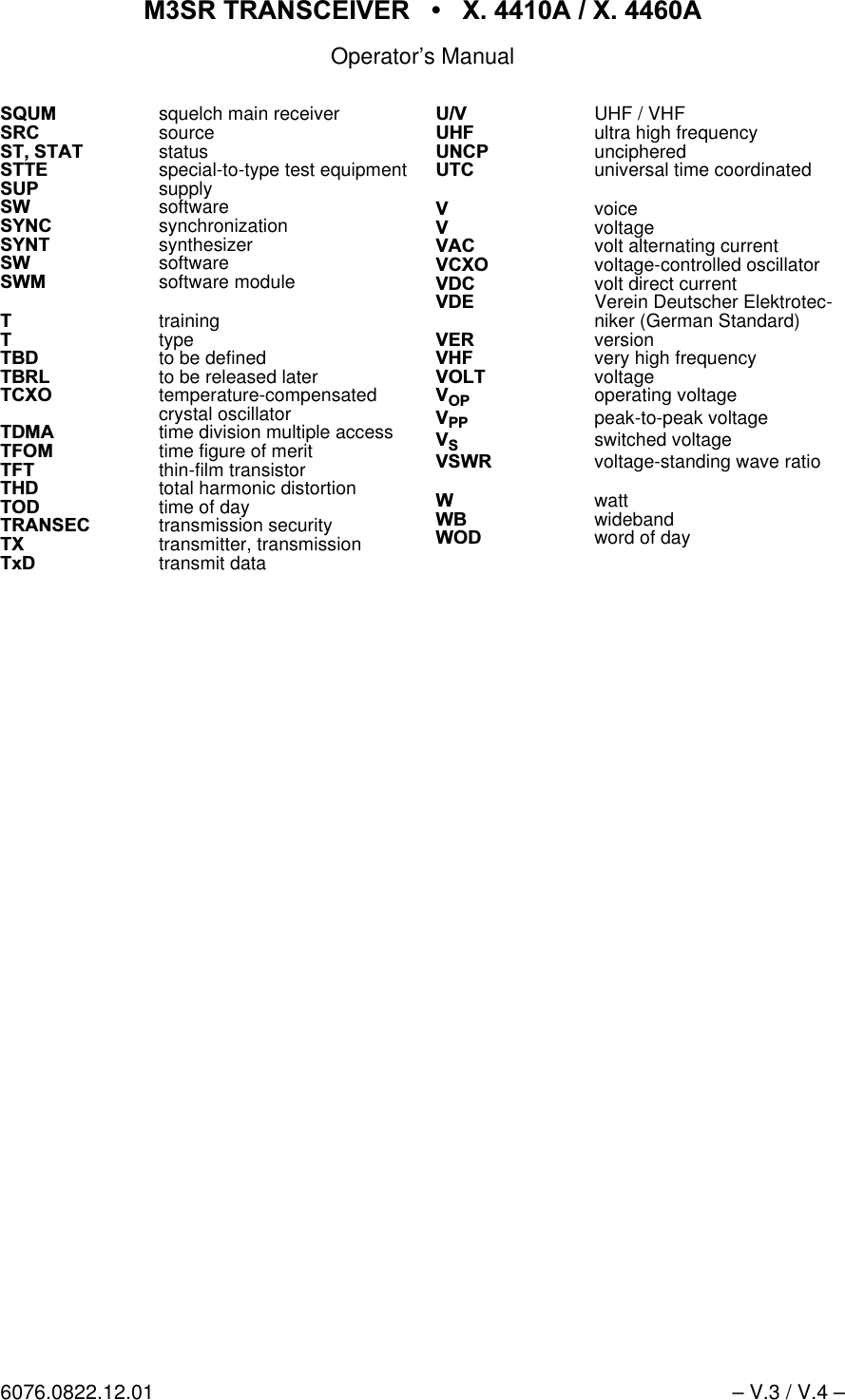
065 75$16&(,9(5  ; $  ; $Operator’s Manual6076.0822.12.01 – V.3 / V.4 –6480squelch main receiver65& source6767$7 status677( special-to-type test equipment683 supply6: software6<1& synchronization6<17 synthesizer6: software6:0 software module7training7type7%'to be defined7%5/to be released later7&;2temperature-compensatedcrystal oscillator7'0$ time division multiple access7)20time figure of merit7)7thin-film transistor7+'total harmonic distortion72' time of day75$16(& transmission security7; transmitter, transmission7['transmit data89 UHF / VHF8+) ultra high frequency81&3unciphered87& universal time coordinated9voice9voltage9$& volt alternating current9&;2voltage-controlled oscillator9'& volt direct current9'(Verein Deutscher Elektrotec-niker (German Standard)9(5 version9+)very high frequency92/7voltage923 operating voltage933 peak-to-peak voltage96switched voltage96:5  voltage-standing wave ratio: watt:% wideband:2' word of day
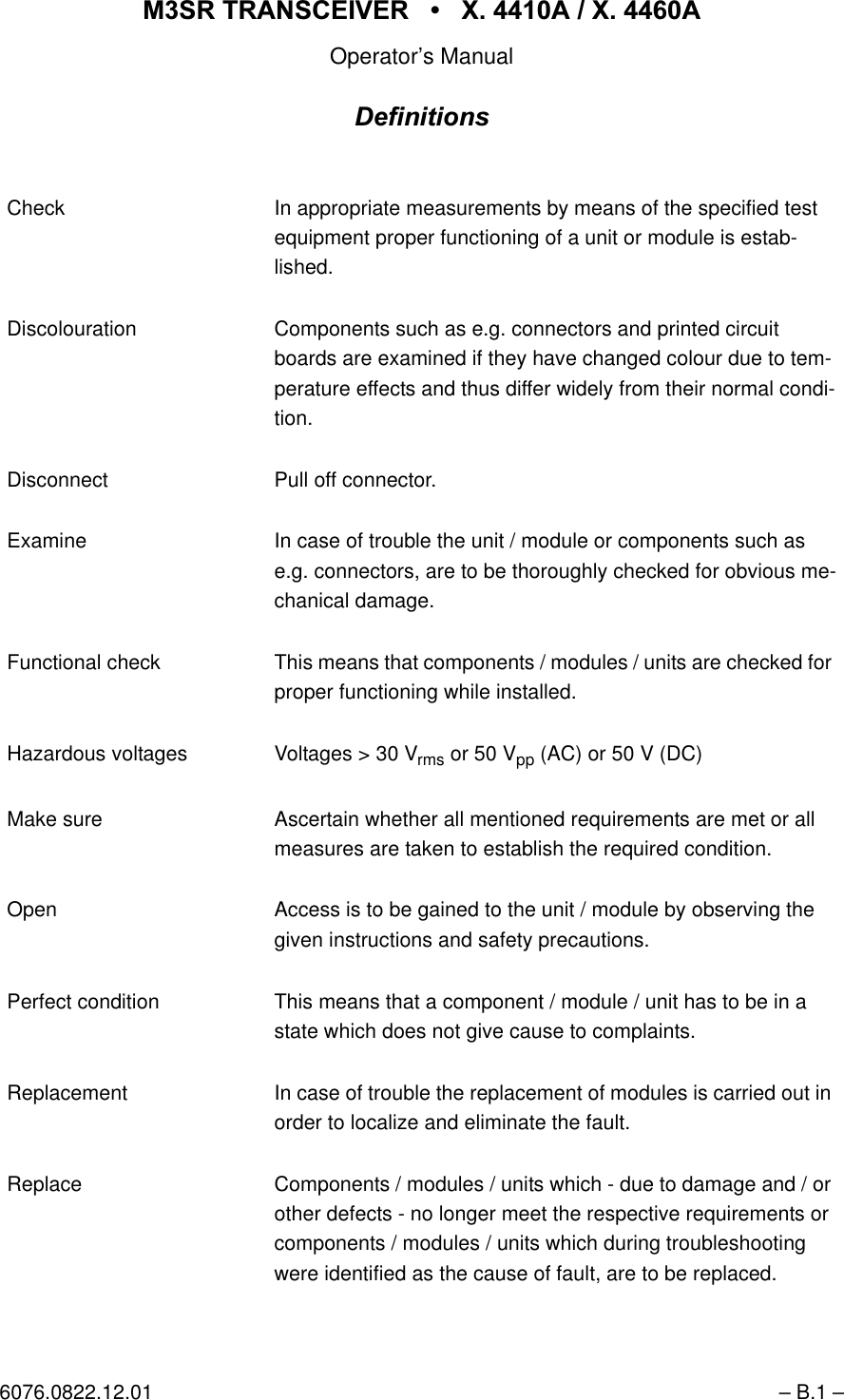
065 75$16&(,9(5  ; $  ; $Operator’s Manual6076.0822.12.01 – B.1 –'HILQLWLRQVCheck In appropriate measurements by means of the specified test equipment proper functioning of a unit or module is estab-lished. Discolouration Components such as e.g. connectors and printed circuit boards are examined if they have changed colour due to tem-perature effects and thus differ widely from their normal condi-tion.Disconnect Pull off connector.Examine In case of trouble the unit / module or components such as e.g. connectors, are to be thoroughly checked for obvious me-chanical damage. Functional check This means that components / modules / units are checked for proper functioning while installed.Hazardous voltages Voltages > 30 Vrms or 50 Vpp (AC) or 50 V (DC) Make sure Ascertain whether all mentioned requirements are met or all measures are taken to establish the required condition. Open Access is to be gained to the unit / module by observing the given instructions and safety precautions. Perfect condition This means that a component / module / unit has to be in a state which does not give cause to complaints. Replacement In case of trouble the replacement of modules is carried out in order to localize and eliminate the fault.Replace Components / modules / units which - due to damage and / or other defects - no longer meet the respective requirements or components / modules / units which during troubleshooting were identified as the cause of fault, are to be replaced.
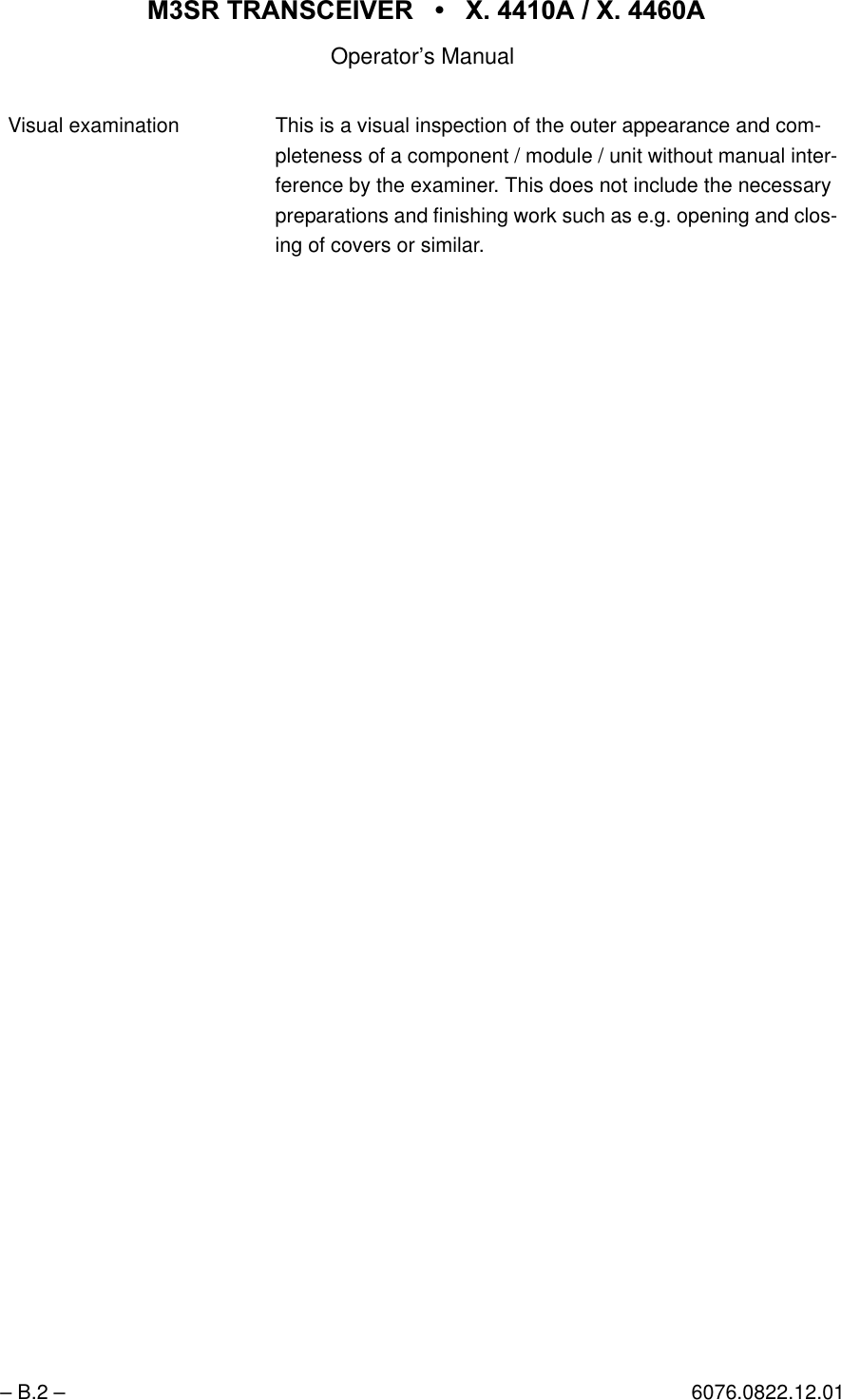
065 75$16&(,9(5  ; $  ; $Operator’s Manual– B.2 – 6076.0822.12.01Visual examination This is a visual inspection of the outer appearance and com- pleteness of a component / module / unit without manual inter-ference by the examiner. This does not include the necessary preparations and finishing work such as e.g. opening and clos-ing of covers or similar.
065 75$16&(,9(5  ; $  ; $Operator’s Manual6076.0822.12.01 – H.1 / H.2 –1RWLFHVThe three different notices used in this Operator’s Manual have the following meaning:7KLVKHDGLQJLVXVHGWRLQGLFDWHWKDWLQDFFXUDWHREVHUYDQFHRUQRQREVHUYDQFHRILQVWUXFWLRQVRUPHWKRGVFDQFDXVHLQMXU\RUHYHQIDWDODFFLGHQWVRUGXULQJDQRSHUDWLRQGHVFULEHGKD]DUGRXVPDWHULDOFDQEHVHWIUHHLQWKHXQLWRUV\VWHP&$87,217KLVKHDGLQJLVXVHGWRLQGLFDWHWKDWLQDFFXUDWHREVHUYDQFHRUQRQREVHUYDQFHRILQVWUXFWLRQVRUPHWKRGVFDQFDXVHGDPDJHWRWKHXQLW1RWH7KLVKHDGLQJLVXVHGWRGUDZWKHUHDGHU¶VDWWHQWLRQWRDSDUWLFXODUIDFWThis manual contains the following ’Warning’::HDUJRJJOHVZKHQZRUNLQJZLWKFRPSUHVVHGDLULQRUGHUWRDYRLGH\HLQMXULHV:$51,1*:$51,1*
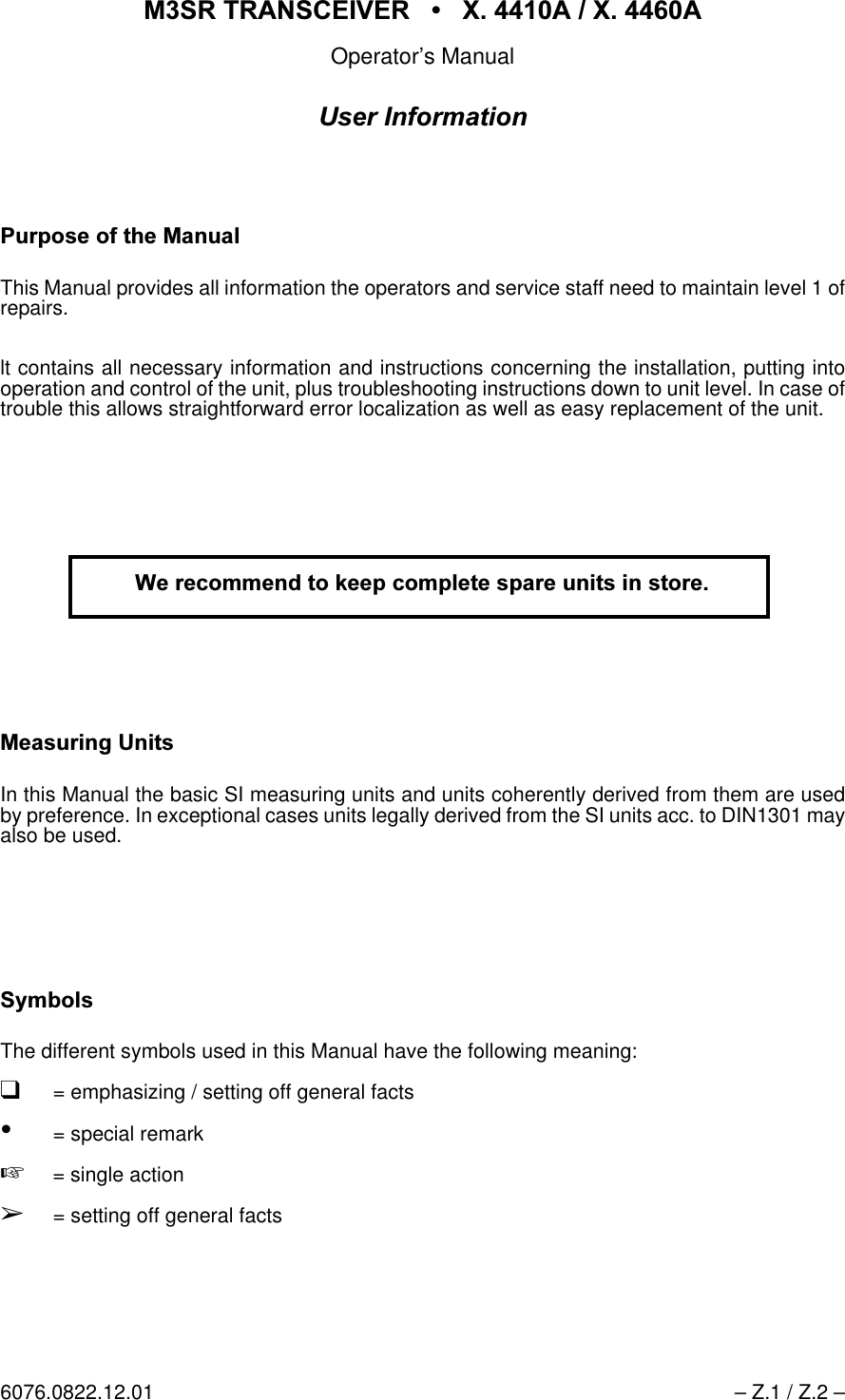
065 75$16&(,9(5  ; $  ; $Operator’s Manual6076.0822.12.01 – Z.1 / Z.2 –8VHU,QIRUPDWLRQ3XUSRVHRIWKH0DQXDOThis Manual provides all information the operators and service staff need to maintain level 1 ofrepairs.lt contains all necessary information and instructions concerning the installation, putting intooperation and control of the unit, plus troubleshooting instructions down to unit level. In case oftrouble this allows straightforward error localization as well as easy replacement of the unit.  0HDVXULQJ8QLWVIn this Manual the basic SI measuring units and units coherently derived from them are usedby preference. In exceptional cases units legally derived from the SI units acc. to DIN1301 mayalso be used. 6\PEROVThe different symbols used in this Manual have the following meaning:q= emphasizing / setting off general facts•= special remark+= single actionÇ= setting off general facts:HUHFRPPHQGWRNHHSFRPSOHWHVSDUHXQLWVLQVWRUH
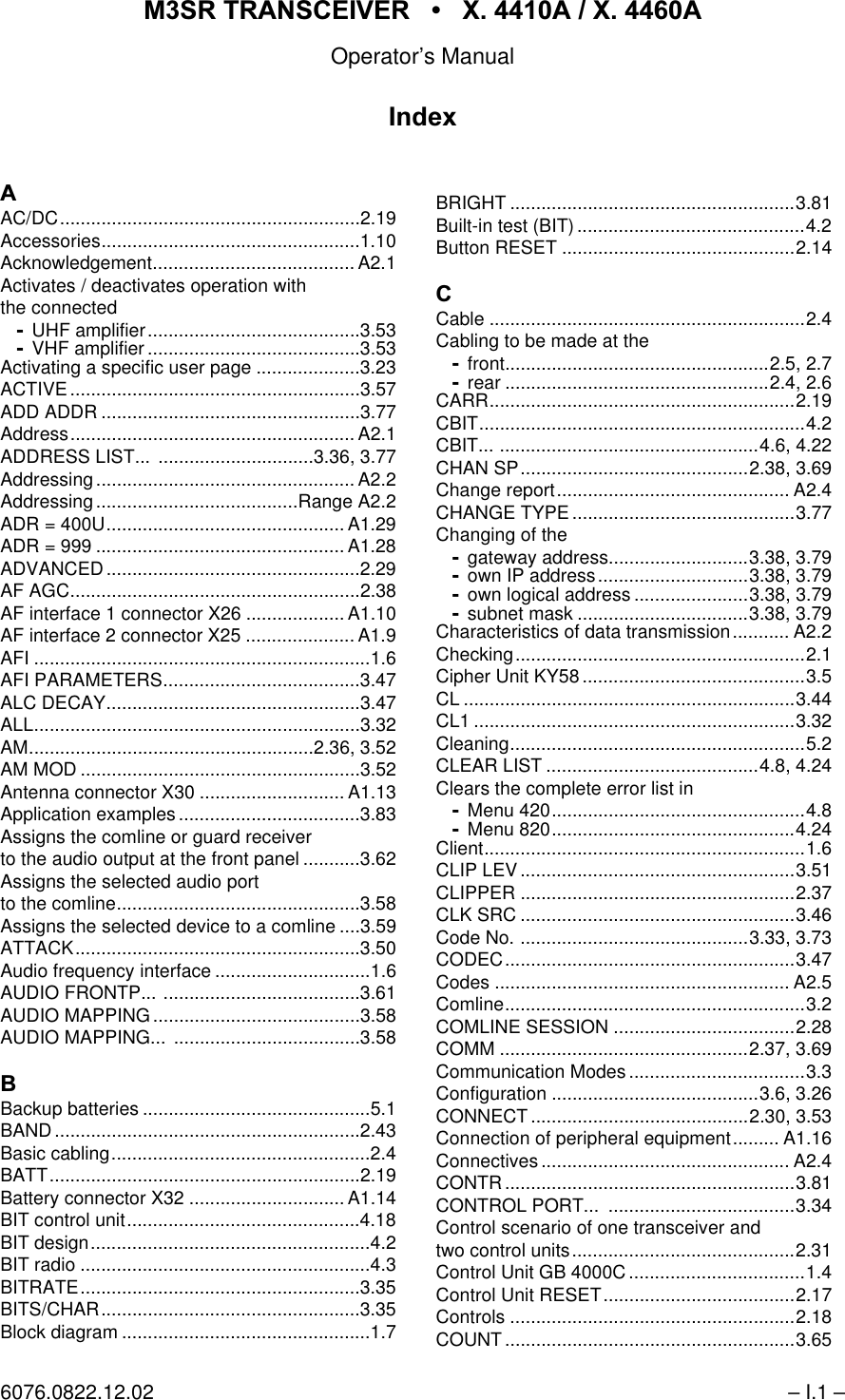
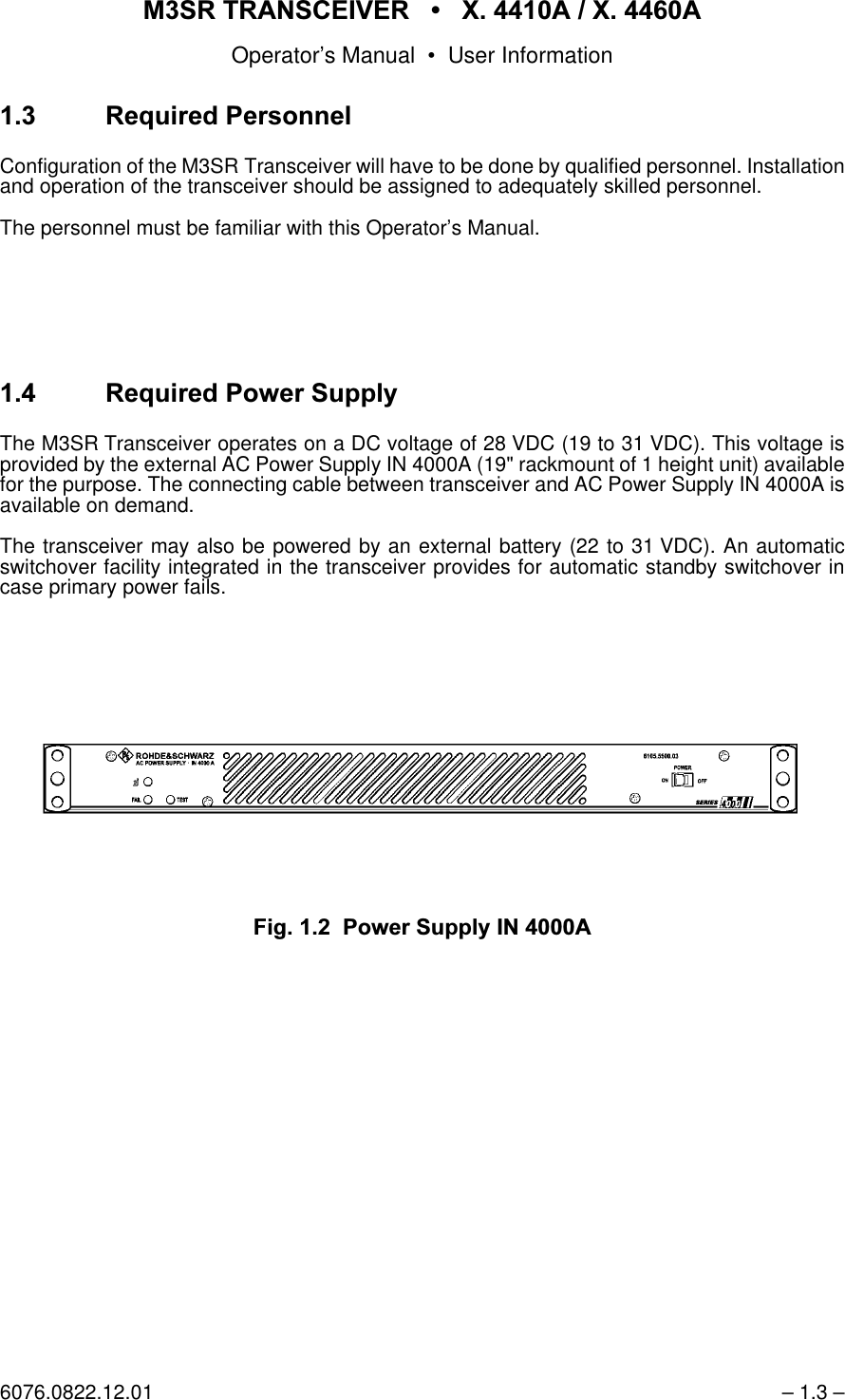
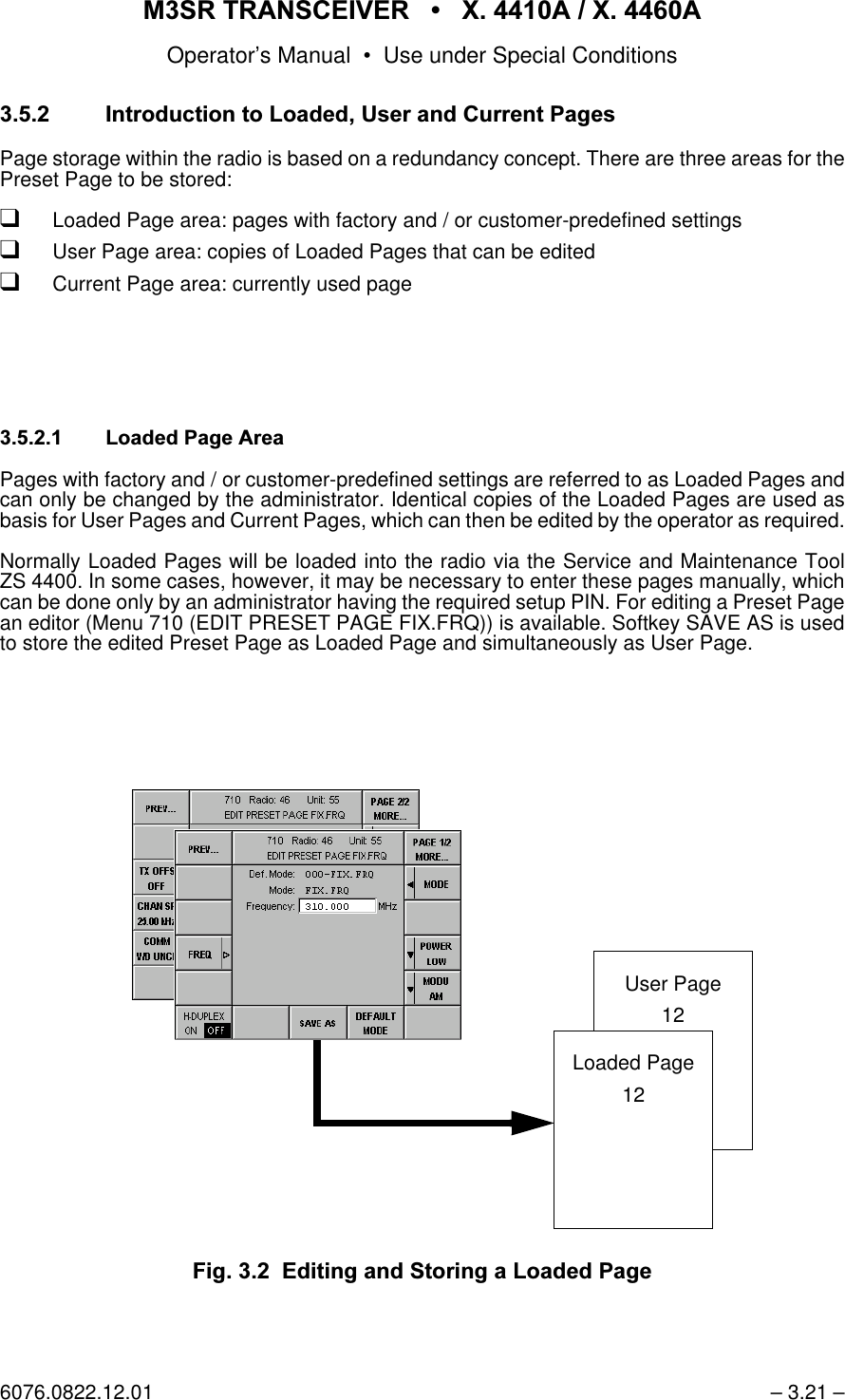
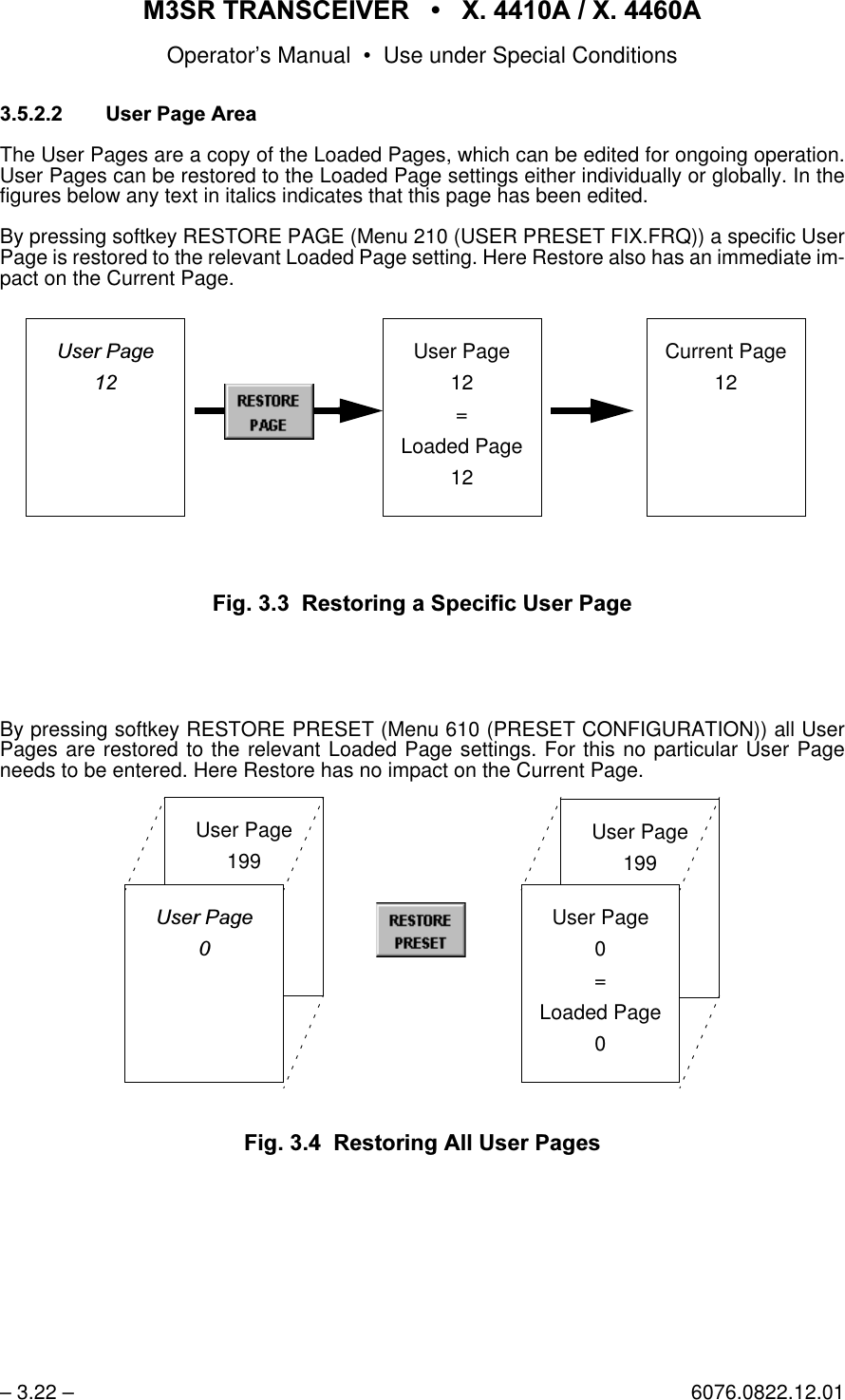
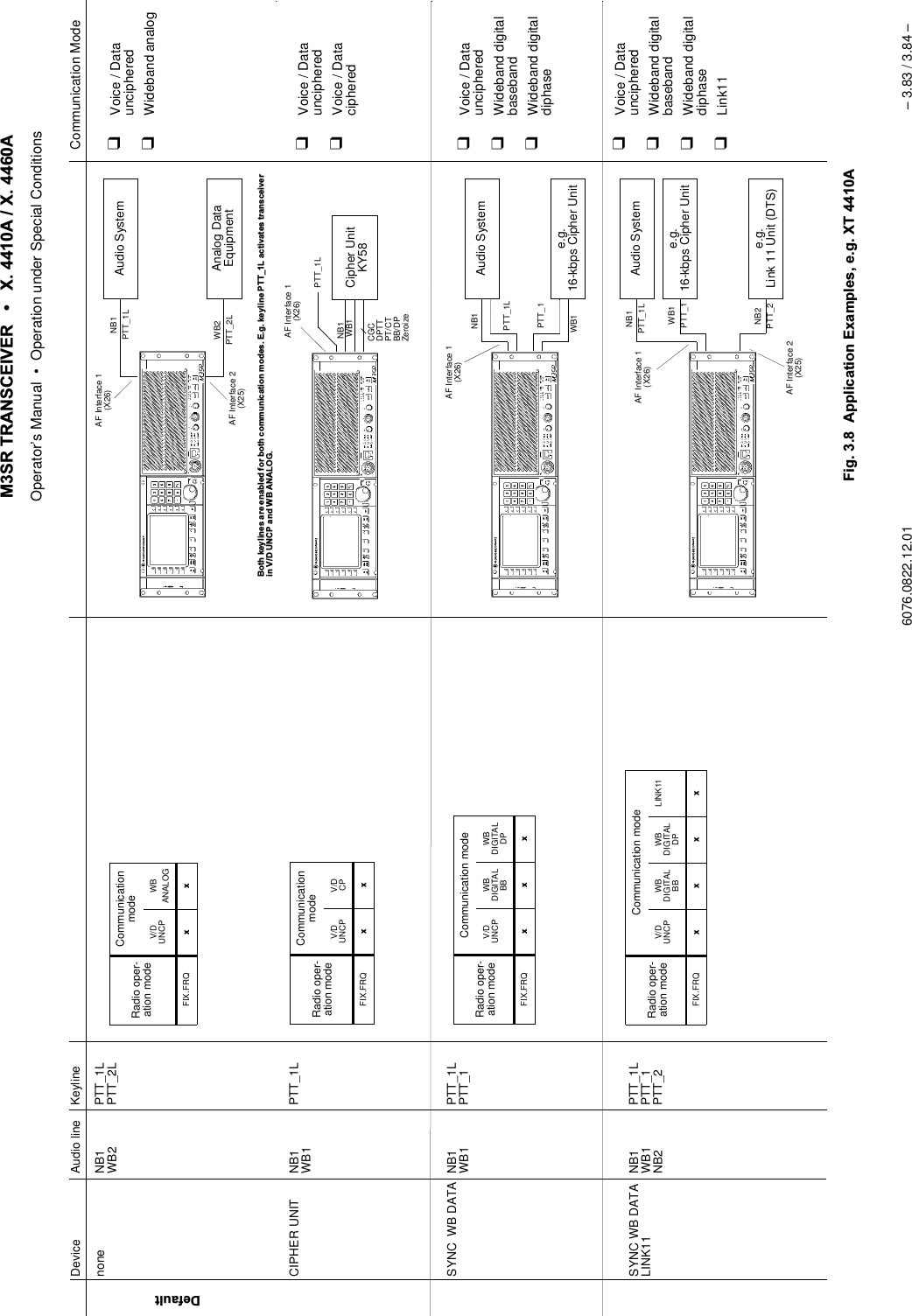
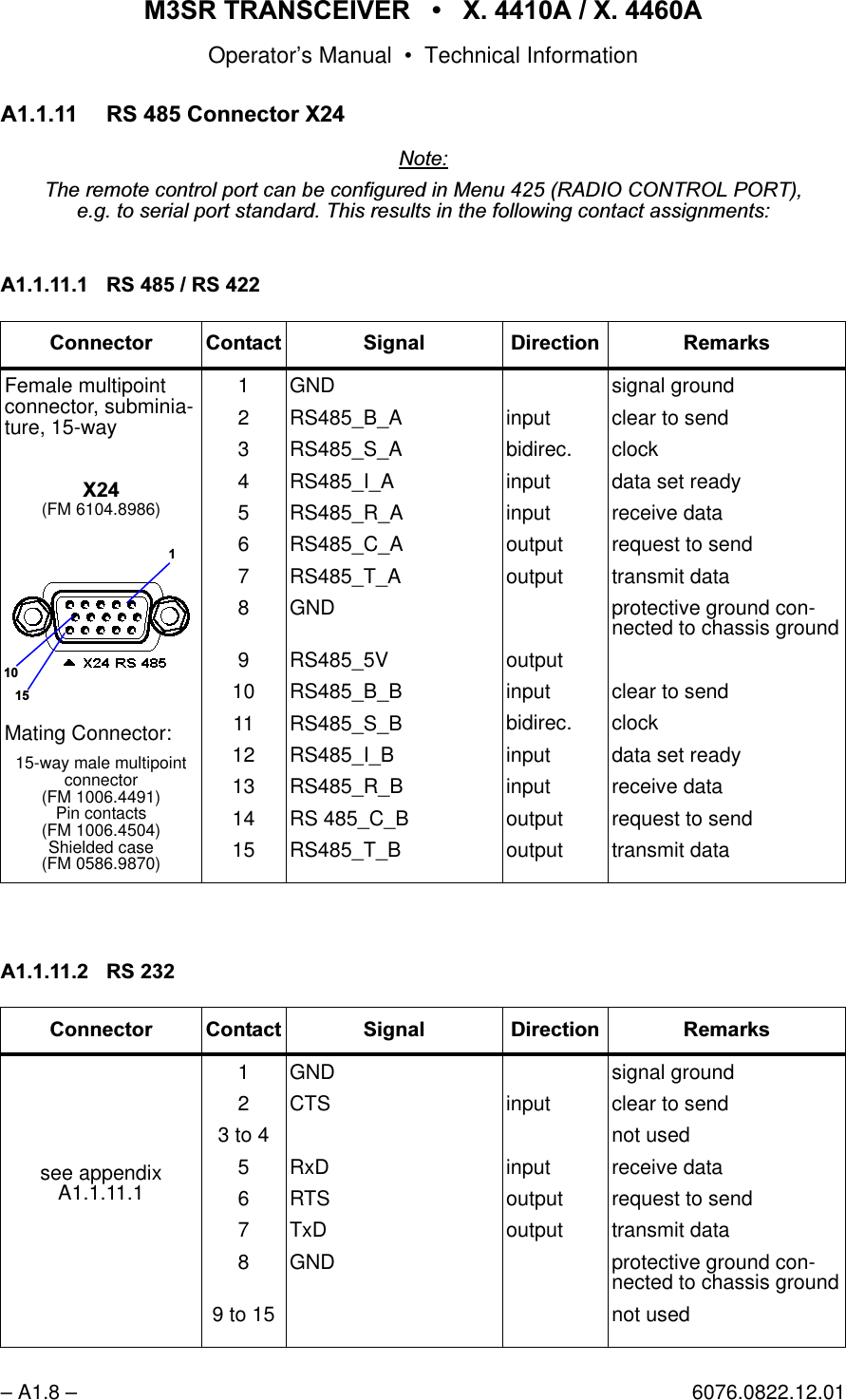
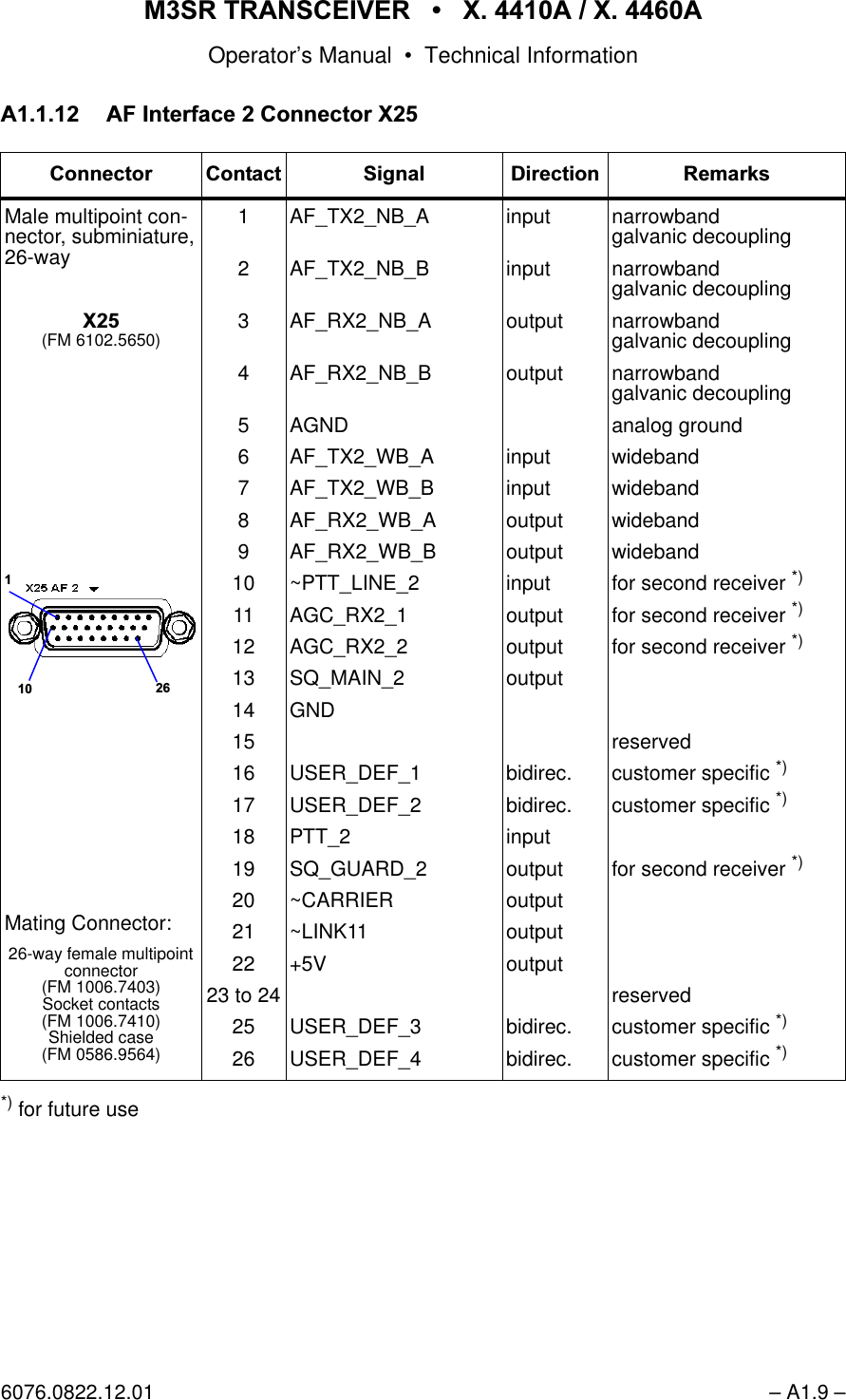
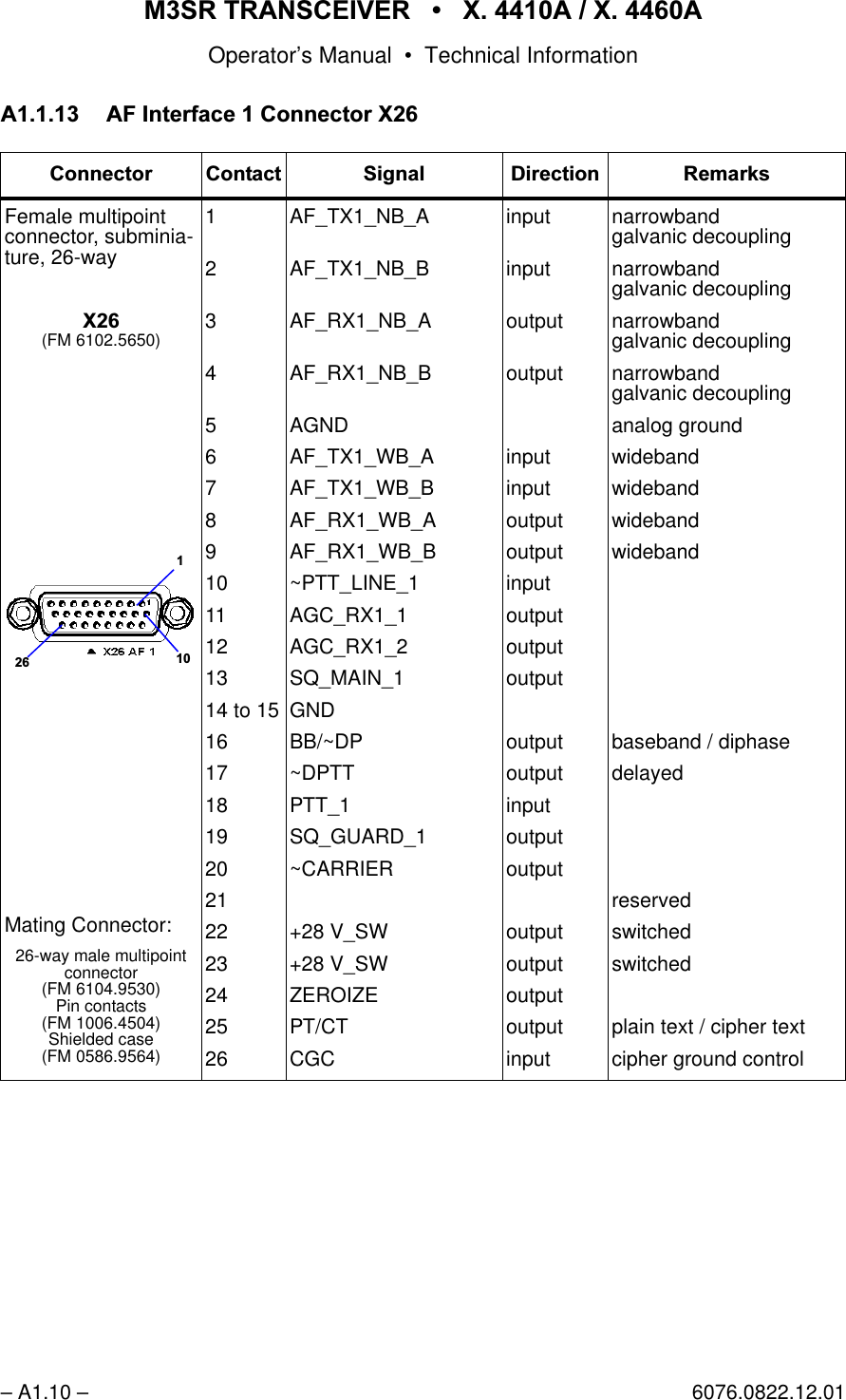
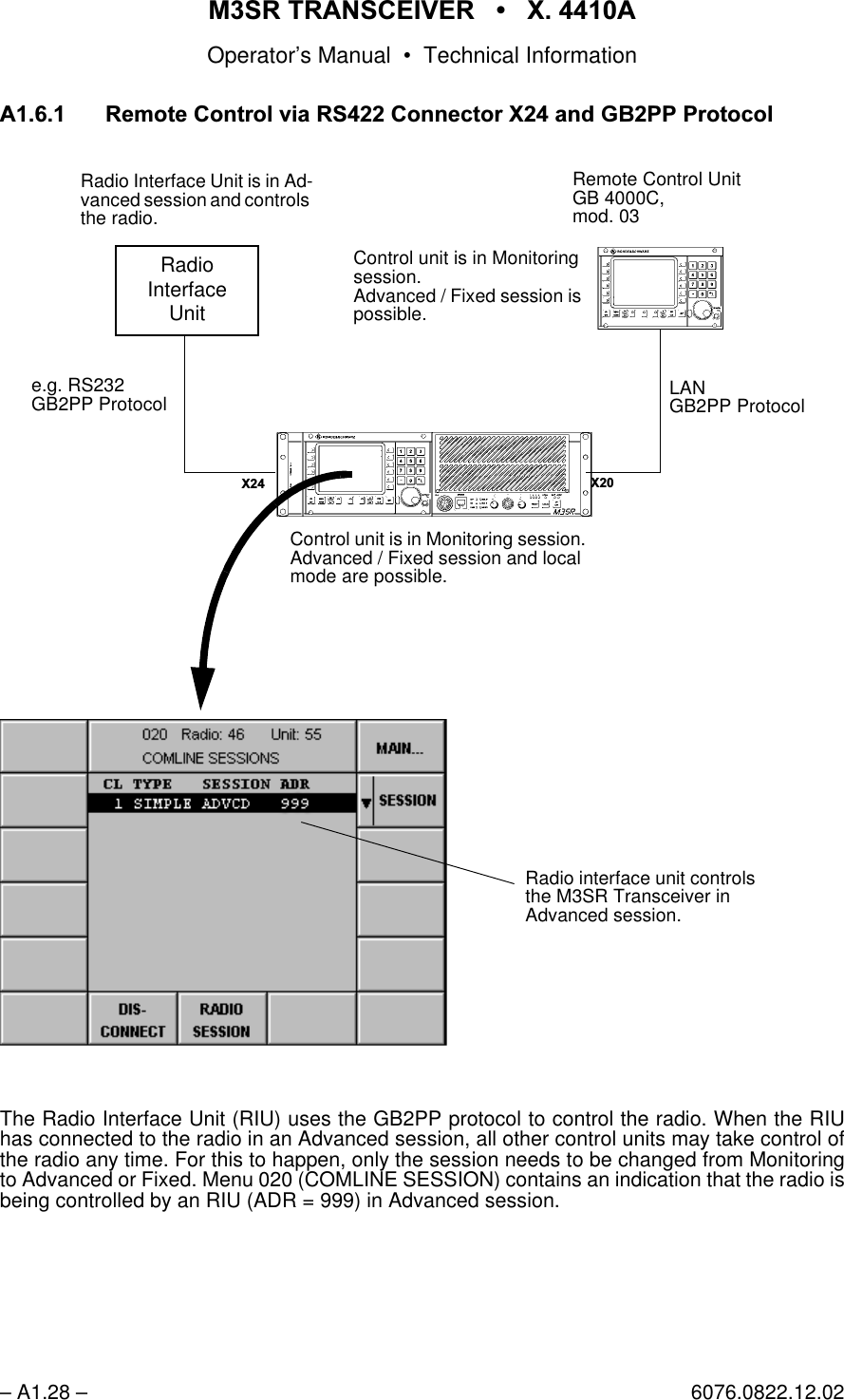
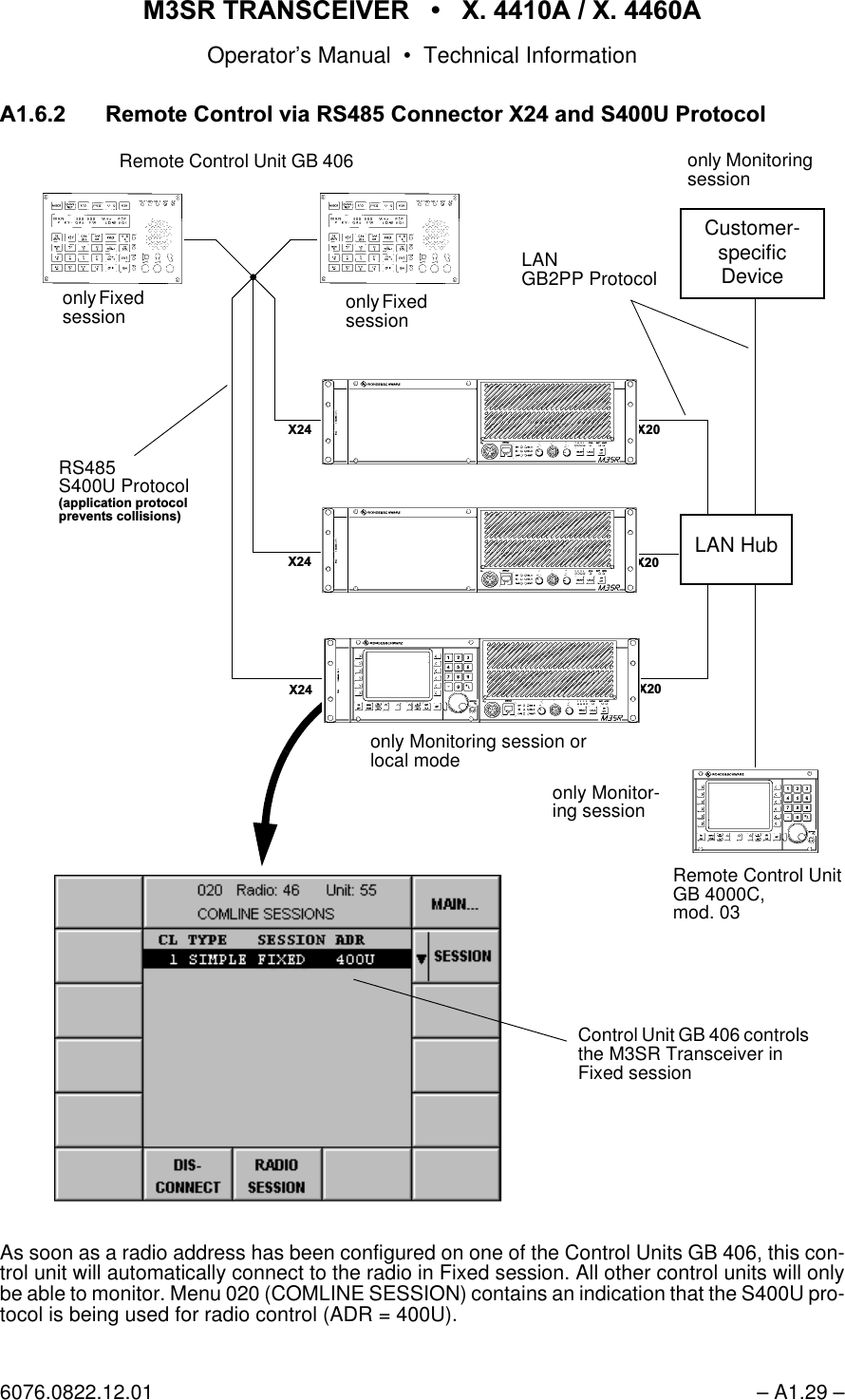
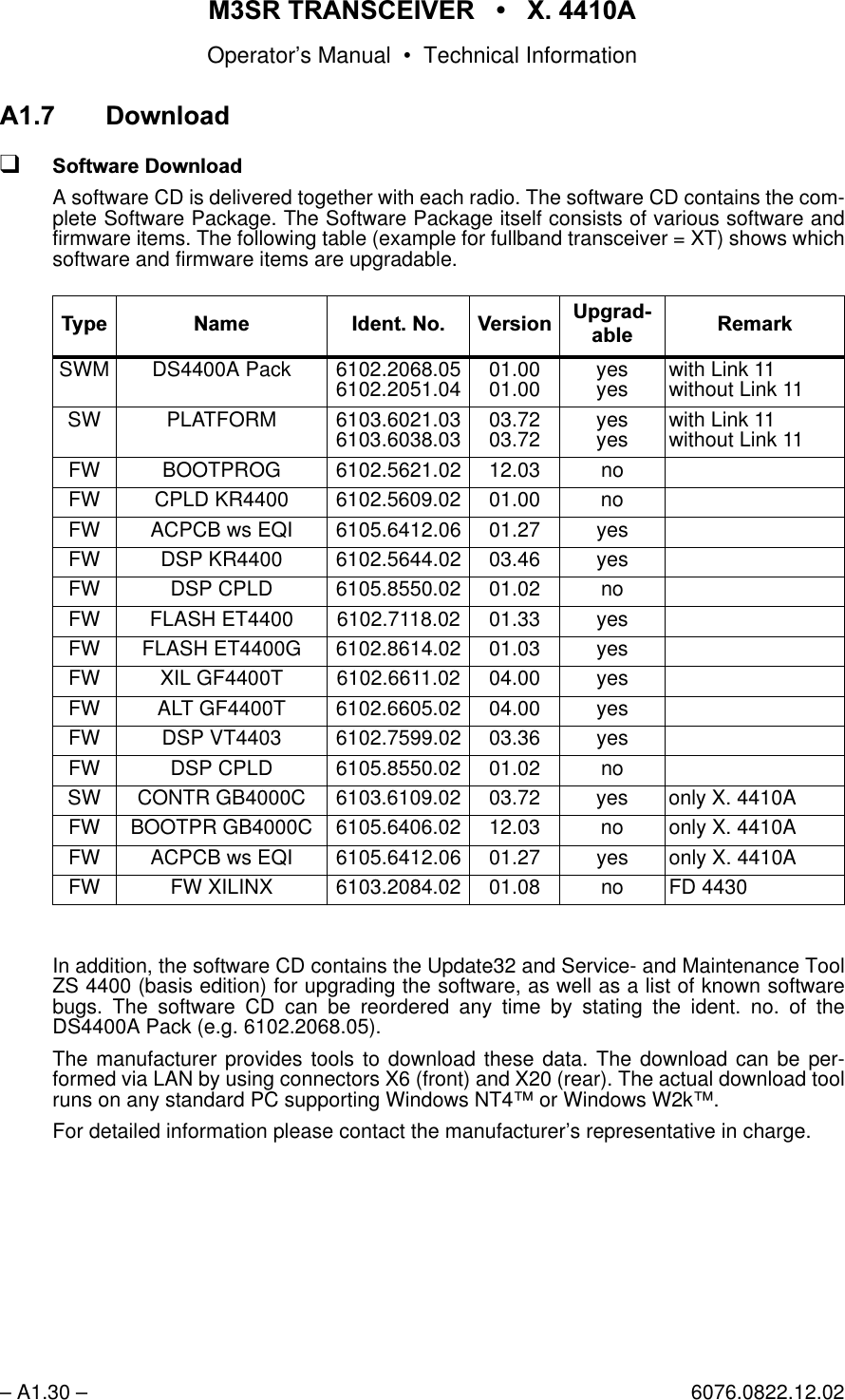
065 75$16&(,9(5  ; $  ; $Operator’s Manual6076.0822.12.02 – I.1 –$AC/DC..........................................................2.19Accessories..................................................1.10Acknowledgement....................................... A2.1Activates / deactivates operation withthe connectedUHF amplifier.........................................3.53VHF amplifier .........................................3.53Activating a specific user page ....................3.23ACTIVE........................................................3.57ADD ADDR ..................................................3.77Address....................................................... A2.1ADDRESS LIST...  ..............................3.36, 3.77Addressing .................................................. A2.2Addressing.......................................Range A2.2ADR = 400U.............................................. A1.29ADR = 999 ................................................ A1.28ADVANCED.................................................2.29AF AGC........................................................2.38AF interface 1 connector X26 ................... A1.10AF interface 2 connector X25 ..................... A1.9AFI .................................................................1.6AFI PARAMETERS......................................3.47ALC DECAY.................................................3.47ALL...............................................................3.32AM.......................................................2.36, 3.52AM MOD ......................................................3.52Antenna connector X30 ............................ A1.13Application examples ...................................3.83Assigns the comline or guard receiverto the audio output at the front panel ...........3.62Assigns the selected audio portto the comline...............................................3.58Assigns the selected device to a comline ....3.59ATTACK.......................................................3.50Audio frequency interface ..............................1.6AUDIO FRONTP... ......................................3.61AUDIO MAPPING ........................................3.58AUDIO MAPPING... ....................................3.58%Backup batteries ............................................5.1BAND...........................................................2.43Basic cabling..................................................2.4BATT............................................................2.19Battery connector X32 .............................. A1.14BIT control unit.............................................4.18BIT design......................................................4.2BIT radio ........................................................4.3BITRATE......................................................3.35BITS/CHAR..................................................3.35Block diagram ................................................1.7BRIGHT .......................................................3.81Built-in test (BIT) ............................................4.2Button RESET .............................................2.14&Cable .............................................................2.4Cabling to be made at thefront...................................................2.5, 2.7rear ...................................................2.4, 2.6CARR...........................................................2.19CBIT...............................................................4.2CBIT... ..................................................4.6, 4.22CHAN SP............................................2.38, 3.69Change report............................................. A2.4CHANGE TYPE ...........................................3.77Changing of thegateway address...........................3.38, 3.79own IP address.............................3.38, 3.79own logical address ......................3.38, 3.79subnet mask .................................3.38, 3.79Characteristics of data transmission........... A2.2Checking........................................................2.1Cipher Unit KY58...........................................3.5CL ................................................................3.44CL1 ..............................................................3.32Cleaning.........................................................5.2CLEAR LIST .........................................4.8, 4.24Clears the complete error list inMenu 420.................................................4.8Menu 820...............................................4.24Client..............................................................1.6CLIP LEV.....................................................3.51CLIPPER .....................................................2.37CLK SRC .....................................................3.46Code No. ............................................3.33, 3.73CODEC........................................................3.47Codes ......................................................... A2.5Comline..........................................................3.2COMLINE SESSION ...................................2.28COMM ................................................2.37, 3.69Communication Modes ..................................3.3Configuration ........................................3.6, 3.26CONNECT ..........................................2.30, 3.53Connection of peripheral equipment......... A1.16Connectives ................................................ A2.4CONTR ........................................................3.81CONTROL PORT...  ....................................3.34Control scenario of one transceiver andtwo control units...........................................2.31Control Unit GB 4000C ..................................1.4Control Unit RESET.....................................2.17Controls .......................................................2.18COUNT ........................................................3.65,QGH[
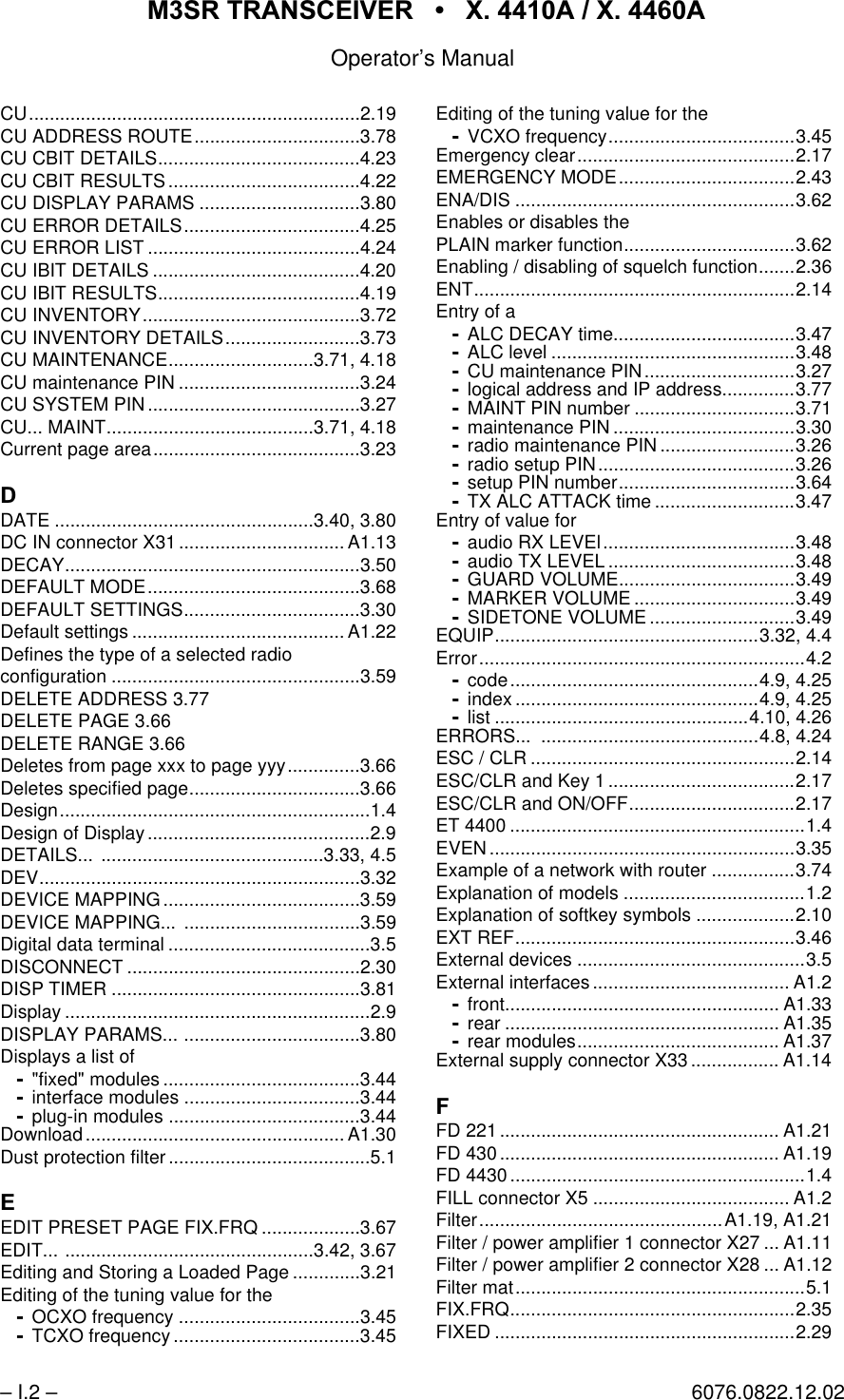
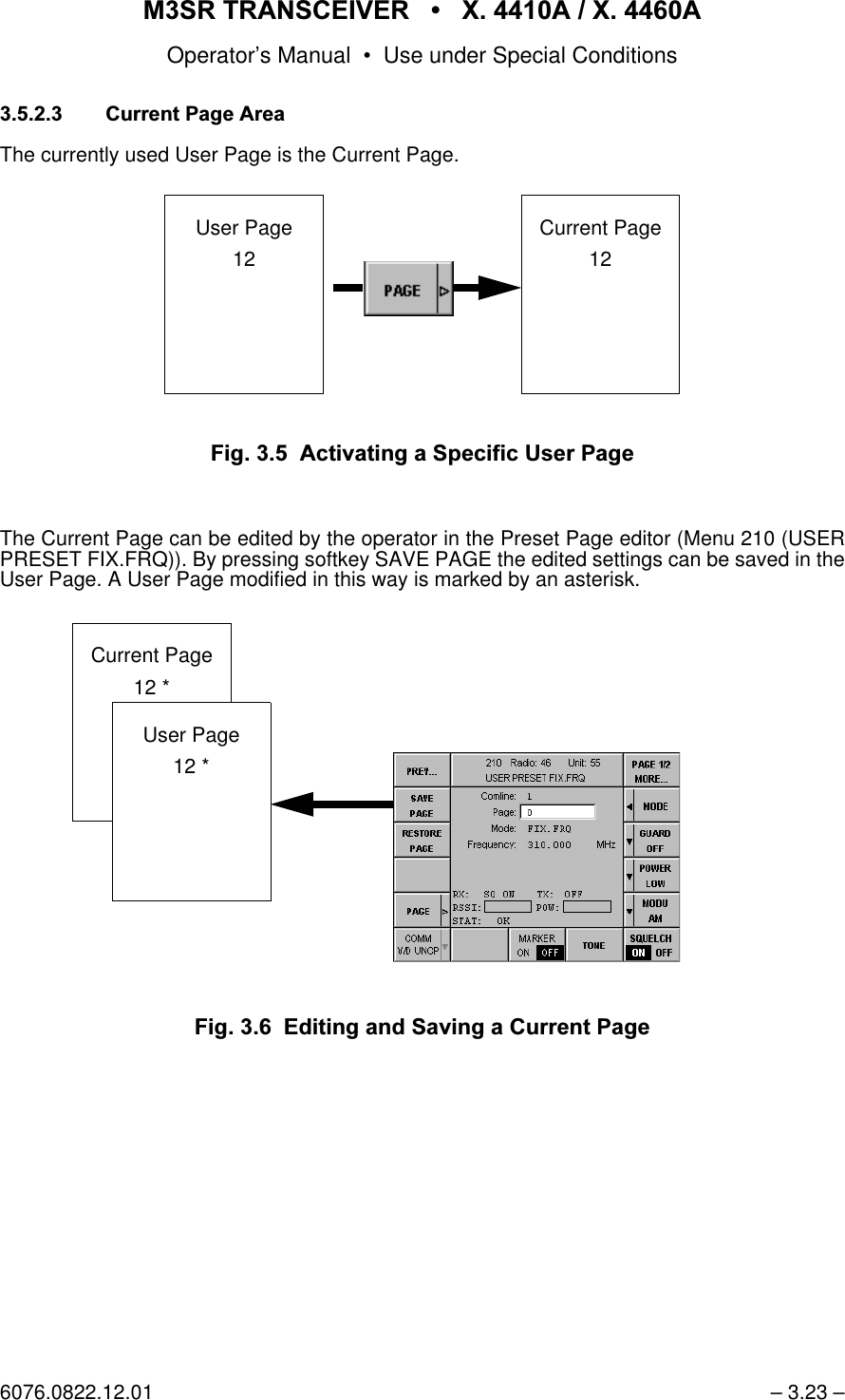
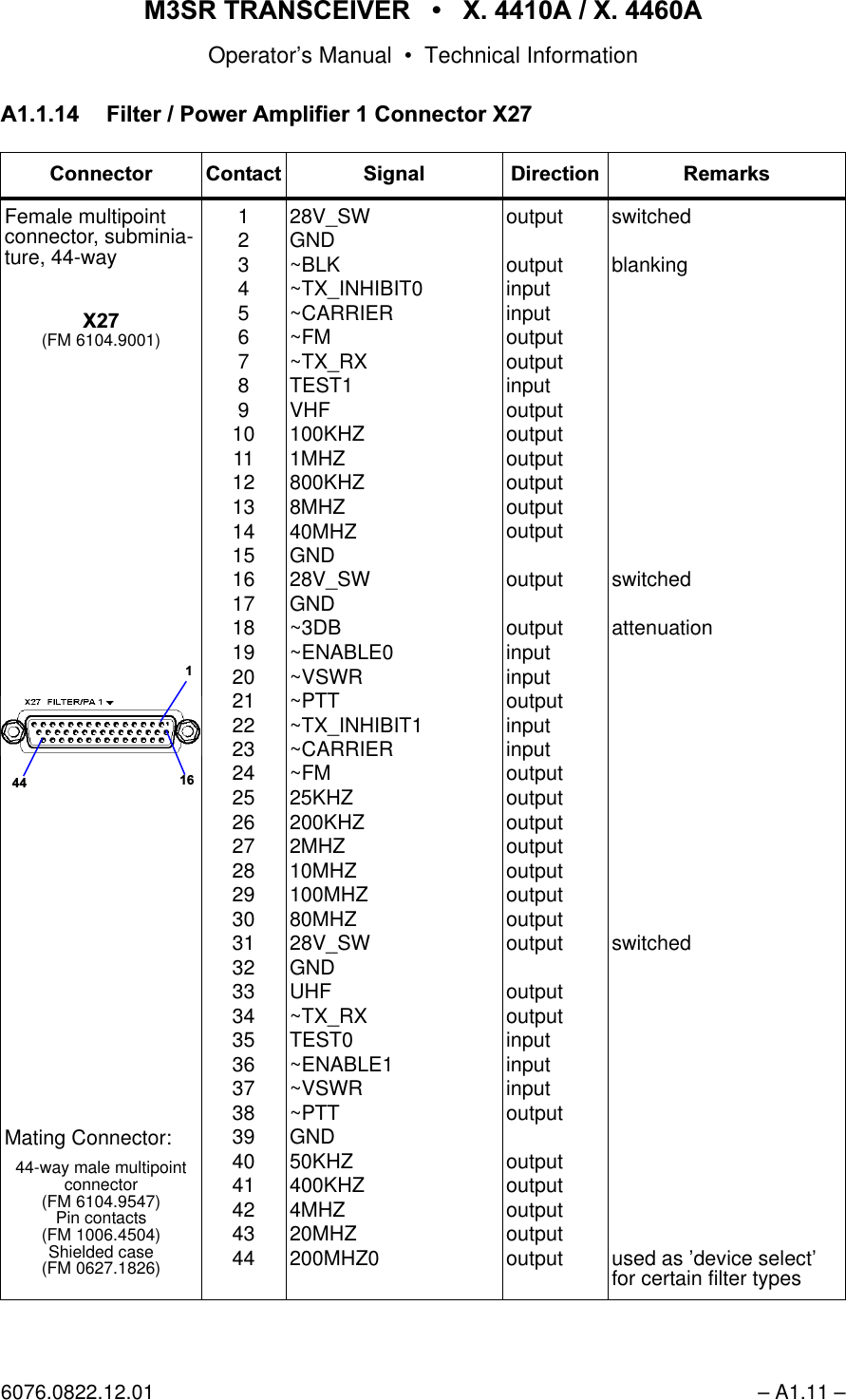
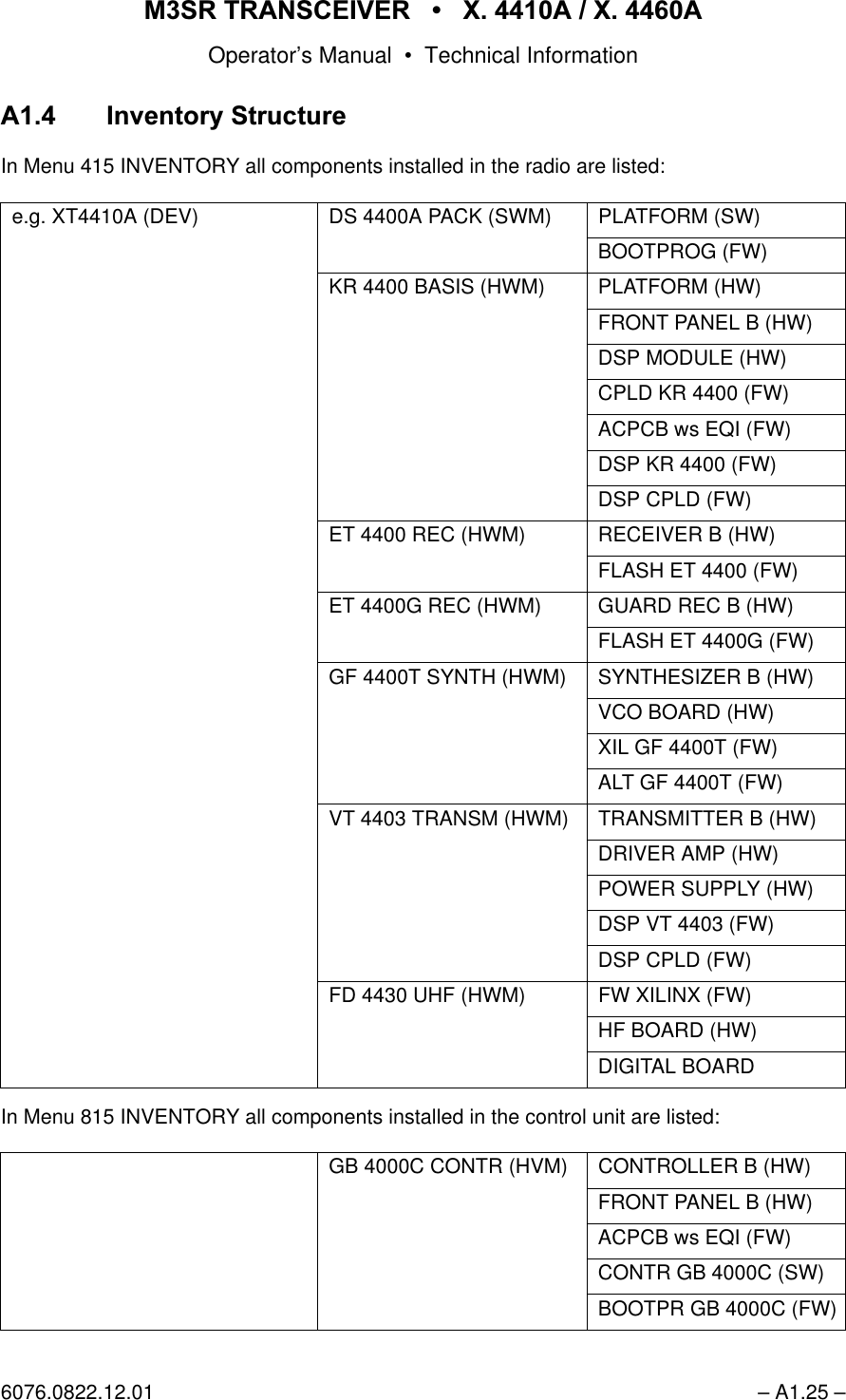
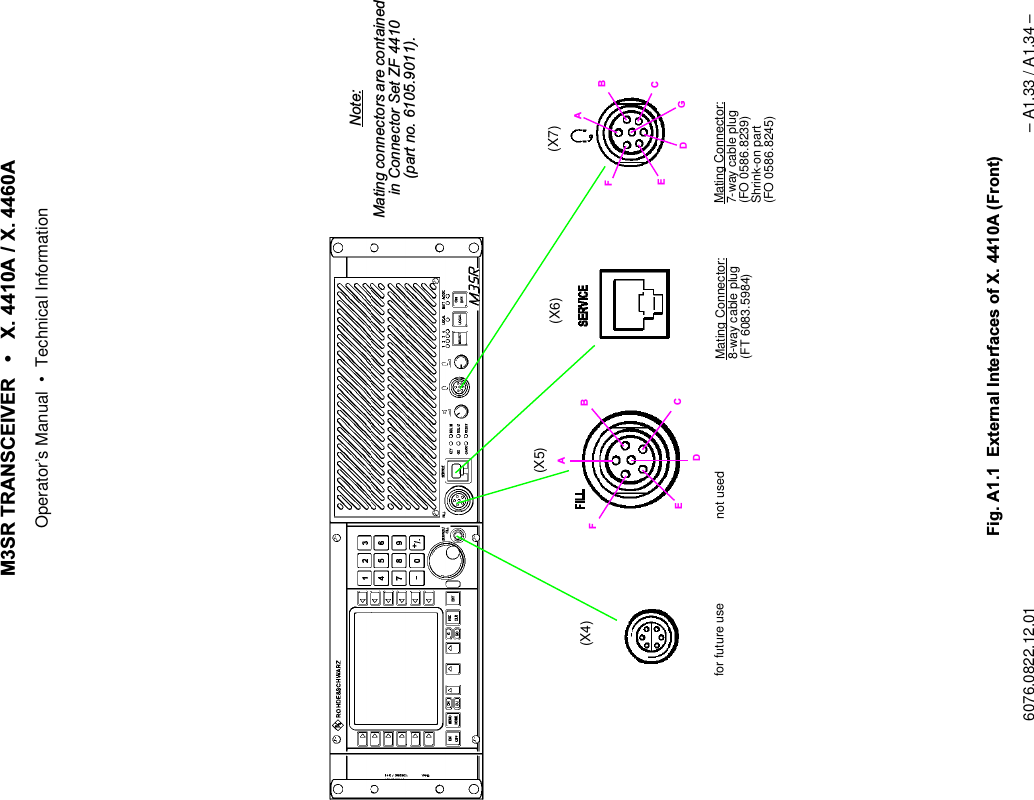
065 75$16&(,9(5  ; $  ; $Operator’s Manual– I.2 – 6076.0822.12.02CU................................................................2.19CU ADDRESS ROUTE................................3.78CU CBIT DETAILS.......................................4.23CU CBIT RESULTS.....................................4.22CU DISPLAY PARAMS ...............................3.80CU ERROR DETAILS..................................4.25CU ERROR LIST .........................................4.24CU IBIT DETAILS ........................................4.20CU IBIT RESULTS.......................................4.19CU INVENTORY..........................................3.72CU INVENTORY DETAILS..........................3.73CU MAINTENANCE............................3.71, 4.18CU maintenance PIN ...................................3.24CU SYSTEM PIN.........................................3.27CU... MAINT........................................3.71, 4.18Current page area........................................3.23'DATE ..................................................3.40, 3.80DC IN connector X31................................ A1.13DECAY.........................................................3.50DEFAULT MODE.........................................3.68DEFAULT SETTINGS..................................3.30Default settings ......................................... A1.22Defines the type of a selected radioconfiguration ................................................3.59DELETE ADDRESS 3.77DELETE PAGE 3.66DELETE RANGE 3.66Deletes from page xxx to page yyy..............3.66Deletes specified page.................................3.66Design............................................................1.4Design of Display...........................................2.9DETAILS... ...........................................3.33, 4.5DEV..............................................................3.32DEVICE MAPPING......................................3.59DEVICE MAPPING... ..................................3.59Digital data terminal .......................................3.5DISCONNECT .............................................2.30DISP TIMER ................................................3.81Display ...........................................................2.9DISPLAY PARAMS... ..................................3.80Displays a list of"fixed" modules ......................................3.44interface modules ..................................3.44plug-in modules .....................................3.44Download.................................................. A1.30Dust protection filter.......................................5.1(EDIT PRESET PAGE FIX.FRQ ...................3.67EDIT... ................................................3.42, 3.67Editing and Storing a Loaded Page .............3.21Editing of the tuning value for theOCXO frequency ...................................3.45TCXO frequency ....................................3.45Editing of the tuning value for theVCXO frequency....................................3.45Emergency clear..........................................2.17EMERGENCY MODE..................................2.43ENA/DIS ......................................................3.62Enables or disables thePLAIN marker function.................................3.62Enabling / disabling of squelch function.......2.36ENT..............................................................2.14Entry of aALC DECAY time...................................3.47ALC level ...............................................3.48CU maintenance PIN.............................3.27logical address and IP address..............3.77MAINT PIN number ...............................3.71maintenance PIN ...................................3.30radio maintenance PIN ..........................3.26radio setup PIN......................................3.26setup PIN number..................................3.64TX ALC ATTACK time ...........................3.47Entry of value foraudio RX LEVEl.....................................3.48audio TX LEVEL ....................................3.48GUARD VOLUME..................................3.49MARKER VOLUME ...............................3.49SIDETONE VOLUME ............................3.49EQUIP...................................................3.32, 4.4Error...............................................................4.2code................................................4.9, 4.25index ...............................................4.9, 4.25list .................................................4.10, 4.26ERRORS... ..........................................4.8, 4.24ESC / CLR ...................................................2.14ESC/CLR and Key 1 ....................................2.17ESC/CLR and ON/OFF................................2.17ET 4400 .........................................................1.4EVEN...........................................................3.35Example of a network with router ................3.74Explanation of models ...................................1.2Explanation of softkey symbols ...................2.10EXT REF......................................................3.46External devices ............................................3.5External interfaces...................................... A1.2front..................................................... A1.33rear ..................................................... A1.35rear modules....................................... A1.37External supply connector X33................. A1.14)FD 221 ...................................................... A1.21FD 430 ...................................................... A1.19FD 4430 .........................................................1.4FILL connector X5 ...................................... A1.2Filter...............................................A1.19, A1.21Filter / power amplifier 1 connector X27 ... A1.11Filter / power amplifier 2 connector X28 ... A1.12Filter mat........................................................5.1FIX.FRQ.......................................................2.35FIXED ..........................................................2.29
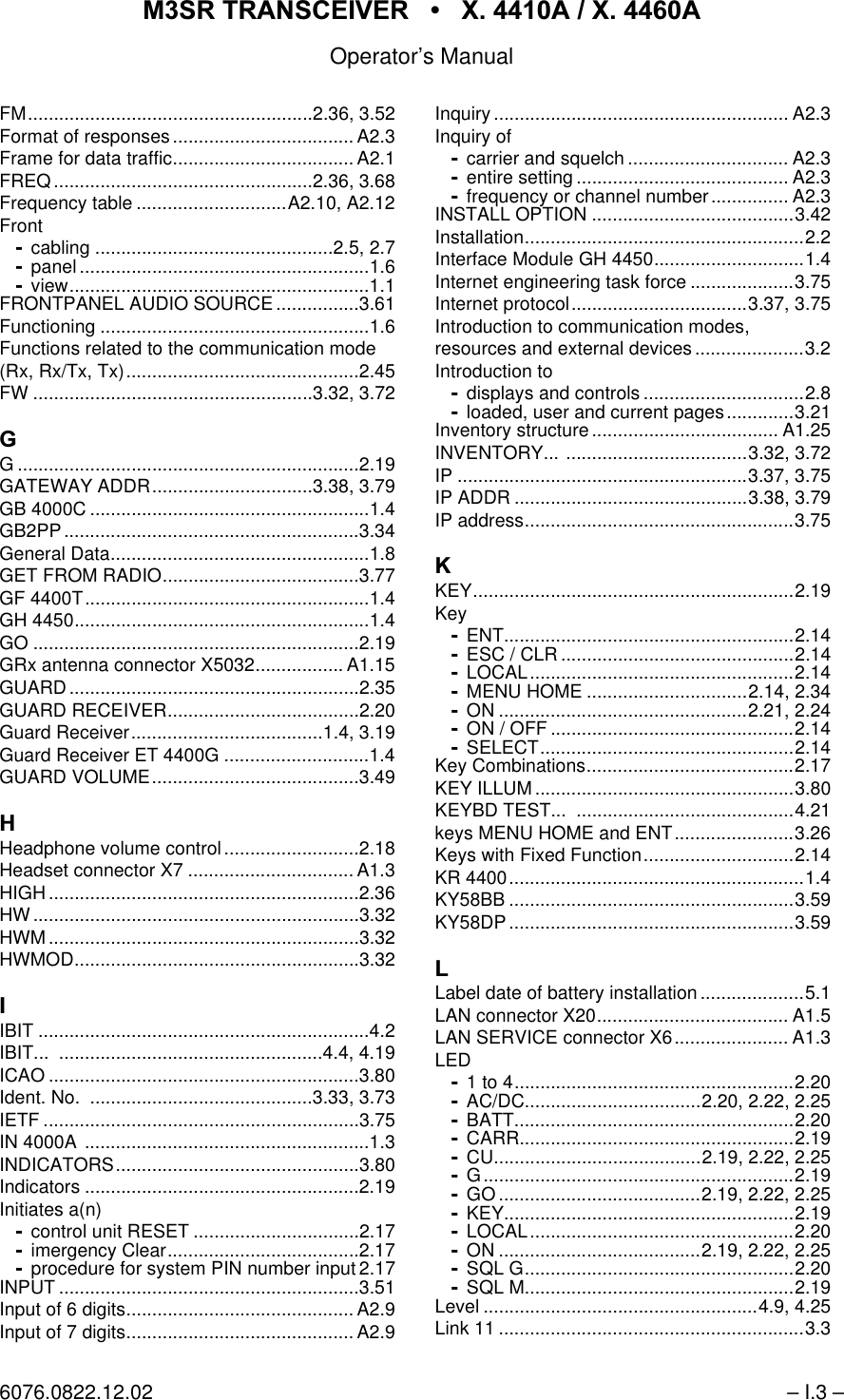
065 75$16&(,9(5  ; $  ; $Operator’s Manual6076.0822.12.02 – I.3 –FM.......................................................2.36, 3.52Format of responses................................... A2.3Frame for data traffic................................... A2.1FREQ..................................................2.36, 3.68Frequency table .............................A2.10, A2.12Frontcabling ..............................................2.5, 2.7panel ........................................................1.6view..........................................................1.1FRONTPANEL AUDIO SOURCE ................3.61Functioning ....................................................1.6Functions related to the communication mode(Rx, Rx/Tx, Tx).............................................2.45FW ......................................................3.32, 3.72*G ..................................................................2.19GATEWAY ADDR...............................3.38, 3.79GB 4000C ......................................................1.4GB2PP.........................................................3.34General Data..................................................1.8GET FROM RADIO......................................3.77GF 4400T.......................................................1.4GH 4450.........................................................1.4GO ...............................................................2.19GRx antenna connector X5032................. A1.15GUARD........................................................2.35GUARD RECEIVER.....................................2.20Guard Receiver.....................................1.4, 3.19Guard Receiver ET 4400G ............................1.4GUARD VOLUME........................................3.49+Headphone volume control..........................2.18Headset connector X7 ................................ A1.3HIGH............................................................2.36HW...............................................................3.32HWM............................................................3.32HWMOD.......................................................3.32,IBIT ................................................................4.2IBIT... ...................................................4.4, 4.19ICAO ............................................................3.80Ident. No.  ...........................................3.33, 3.73IETF .............................................................3.75IN 4000A .......................................................1.3INDICATORS...............................................3.80Indicators .....................................................2.19Initiates a(n)control unit RESET ................................2.17imergency Clear.....................................2.17procedure for system PIN number input 2.17INPUT ..........................................................3.51Input of 6 digits............................................ A2.9Input of 7 digits............................................ A2.9Inquiry ......................................................... A2.3Inquiry ofcarrier and squelch ............................... A2.3entire setting ......................................... A2.3frequency or channel number............... A2.3INSTALL OPTION .......................................3.42Installation......................................................2.2Interface Module GH 4450.............................1.4Internet engineering task force ....................3.75Internet protocol..................................3.37, 3.75Introduction to communication modes,resources and external devices .....................3.2Introduction todisplays and controls ...............................2.8loaded, user and current pages.............3.21Inventory structure.................................... A1.25INVENTORY... ...................................3.32, 3.72IP ........................................................3.37, 3.75IP ADDR .............................................3.38, 3.79IP address....................................................3.75.KEY..............................................................2.19KeyENT........................................................2.14ESC / CLR .............................................2.14LOCAL...................................................2.14MENU HOME ...............................2.14, 2.34ON ................................................2.21, 2.24ON / OFF ...............................................2.14SELECT.................................................2.14Key Combinations........................................2.17KEY ILLUM..................................................3.80KEYBD TEST...  ..........................................4.21keys MENU HOME and ENT.......................3.26Keys with Fixed Function.............................2.14KR 4400.........................................................1.4KY58BB .......................................................3.59KY58DP.......................................................3.59/Label date of battery installation ....................5.1LAN connector X20..................................... A1.5LAN SERVICE connector X6...................... A1.3LED1 to 4......................................................2.20AC/DC..................................2.20, 2.22, 2.25BATT......................................................2.20CARR.....................................................2.19CU........................................2.19, 2.22, 2.25G............................................................2.19GO .......................................2.19, 2.22, 2.25KEY........................................................2.19LOCAL...................................................2.20ON .......................................2.19, 2.22, 2.25SQL G....................................................2.20SQL M....................................................2.19Level .....................................................4.9, 4.25Link 11 ...........................................................3.3
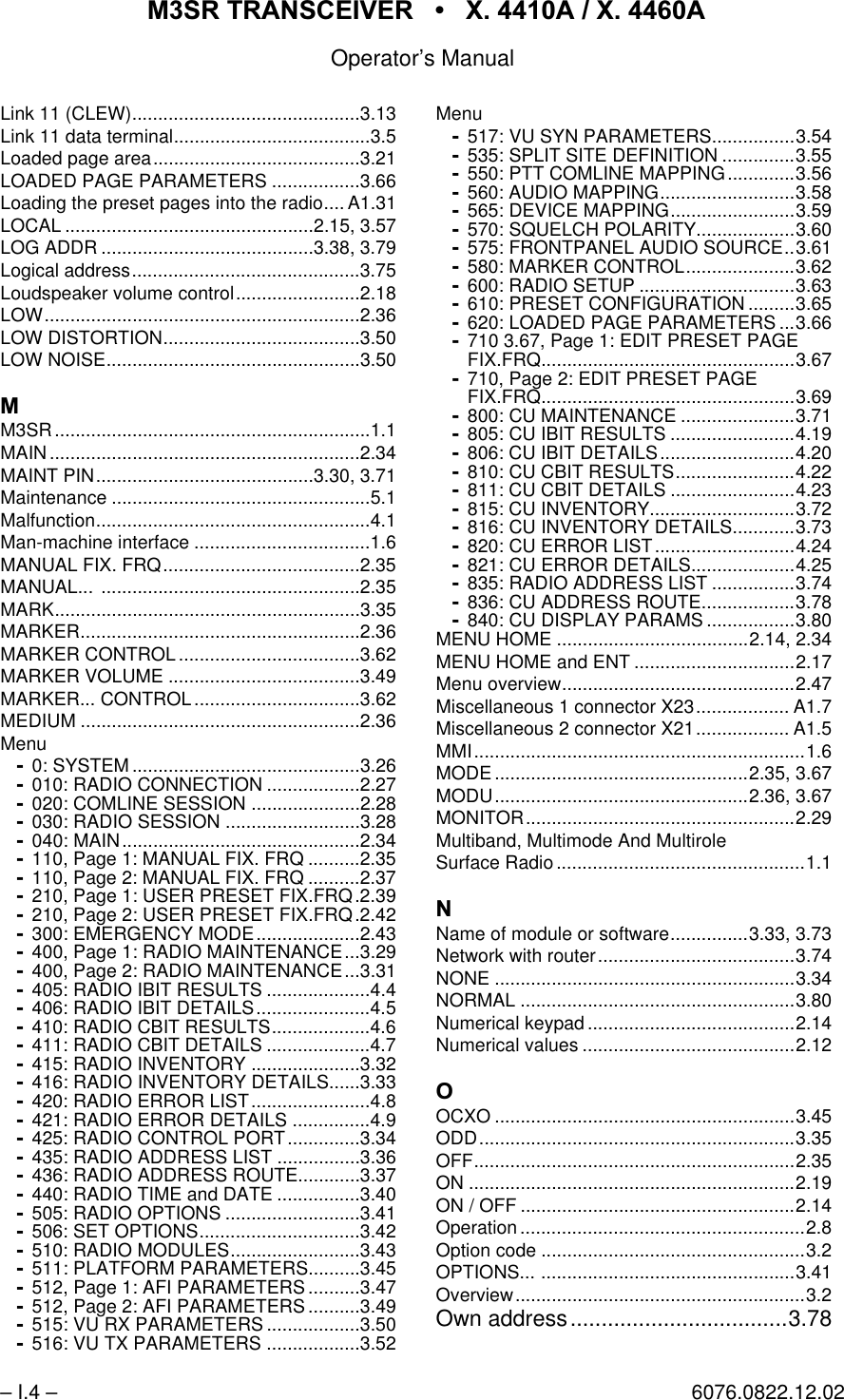
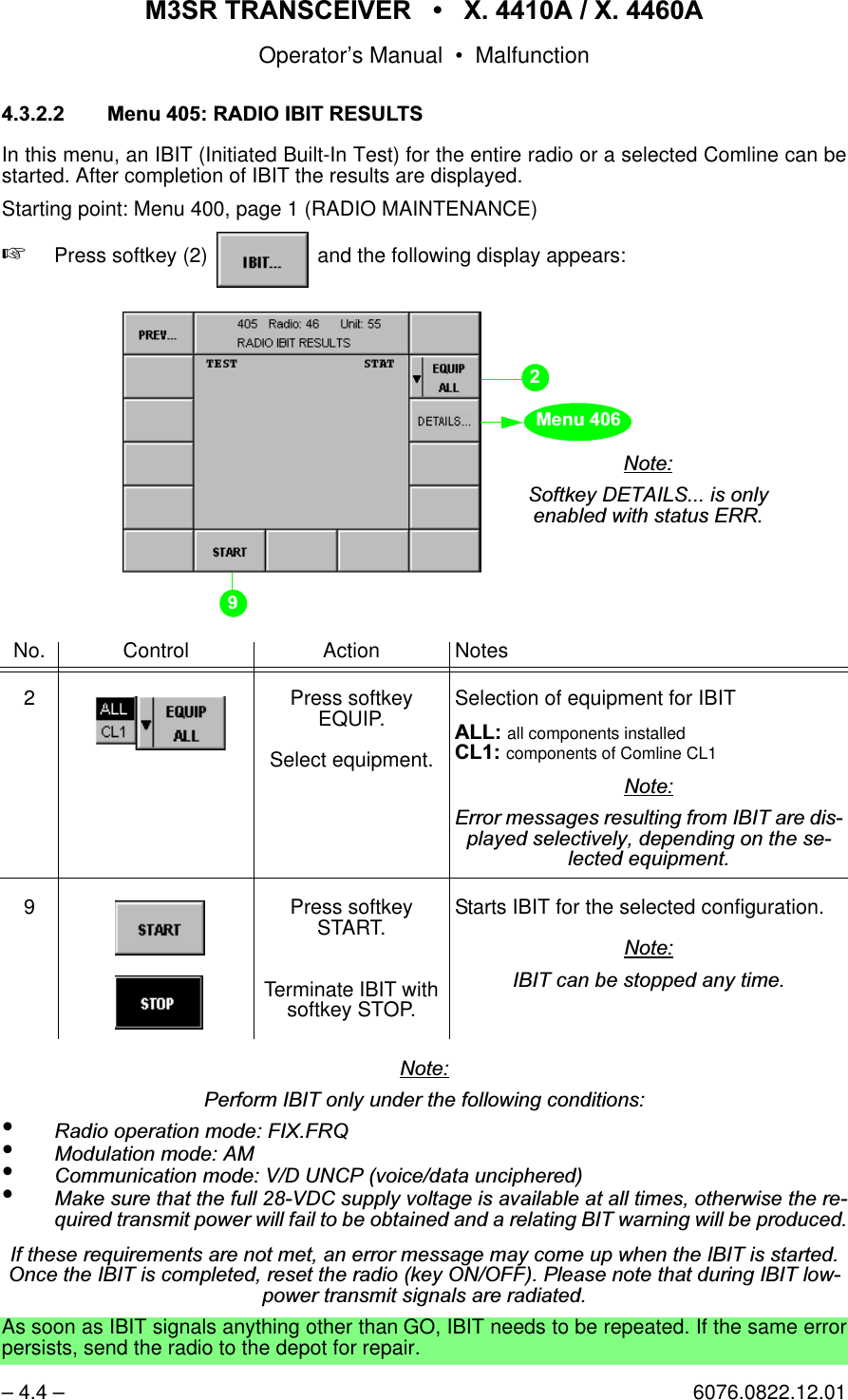
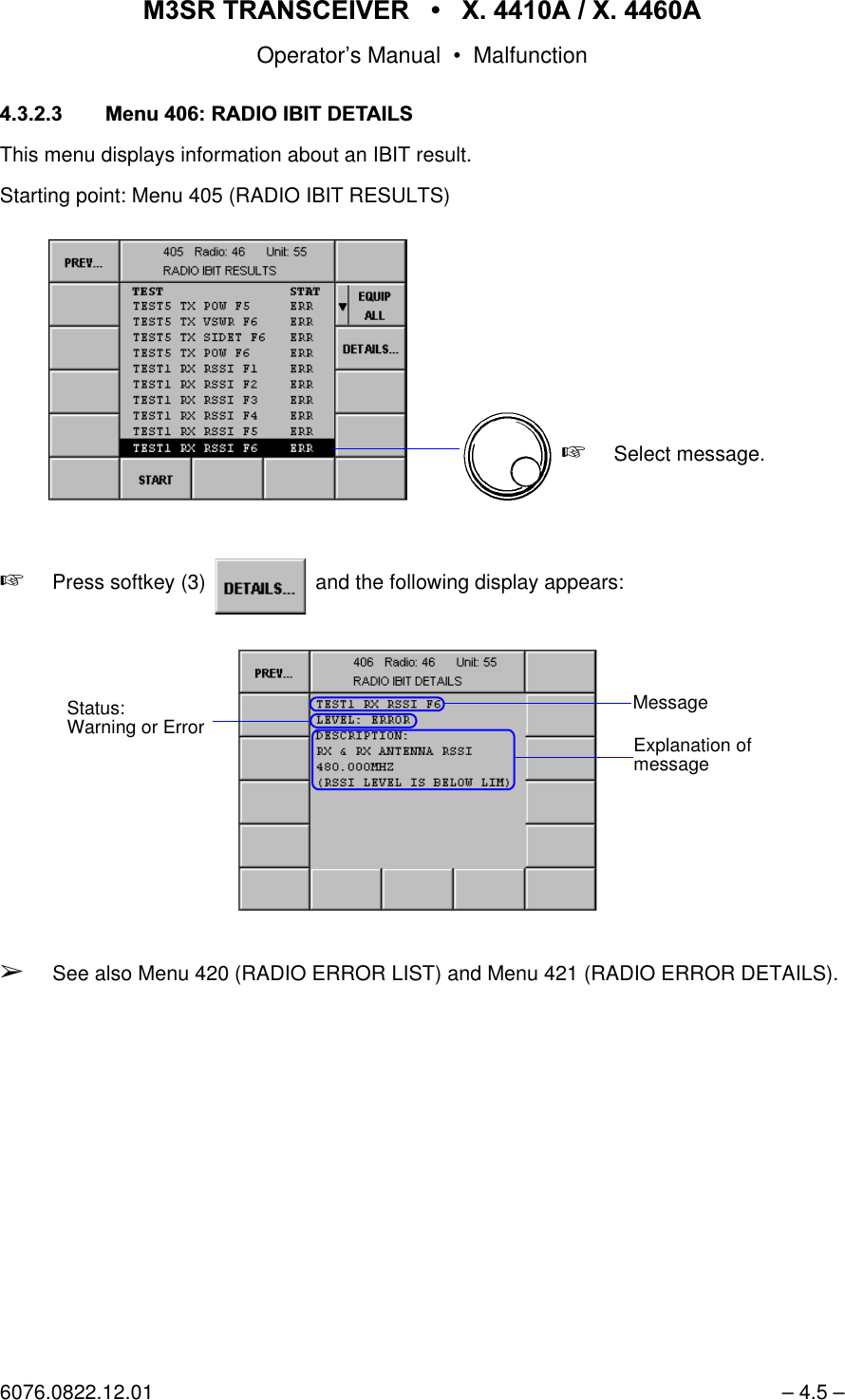
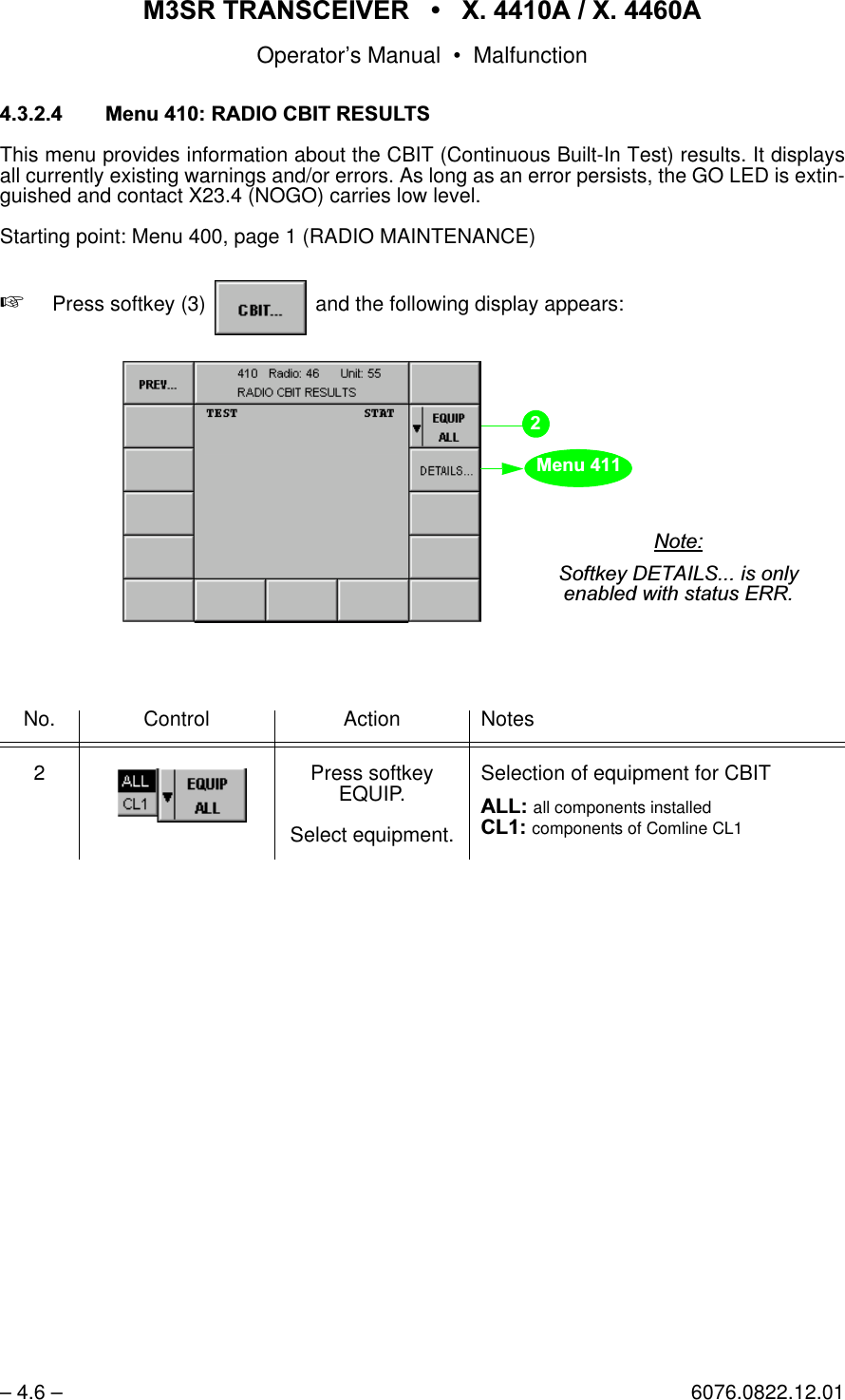
065 75$16&(,9(5  ; $  ; $Operator’s Manual– I.4 – 6076.0822.12.02Link 11 (CLEW)............................................3.13Link 11 data terminal......................................3.5Loaded page area........................................3.21LOADED PAGE PARAMETERS .................3.66Loading the preset pages into the radio.... A1.31LOCAL ................................................2.15, 3.57LOG ADDR .........................................3.38, 3.79Logical address............................................3.75Loudspeaker volume control........................2.18LOW.............................................................2.36LOW DISTORTION......................................3.50LOW NOISE.................................................3.500M3SR.............................................................1.1MAIN............................................................2.34MAINT PIN..........................................3.30, 3.71Maintenance ..................................................5.1Malfunction.....................................................4.1Man-machine interface ..................................1.6MANUAL FIX. FRQ......................................2.35MANUAL... ..................................................2.35MARK...........................................................3.35MARKER......................................................2.36MARKER CONTROL ...................................3.62MARKER VOLUME .....................................3.49MARKER... CONTROL ................................3.62MEDIUM ......................................................2.36Menu0: SYSTEM ............................................3.26010: RADIO CONNECTION ..................2.27020: COMLINE SESSION .....................2.28030: RADIO SESSION ..........................3.28040: MAIN..............................................2.34110, Page 1: MANUAL FIX. FRQ ..........2.35110, Page 2: MANUAL FIX. FRQ ..........2.37210, Page 1: USER PRESET FIX.FRQ.2.39210, Page 2: USER PRESET FIX.FRQ.2.42300: EMERGENCY MODE....................2.43400, Page 1: RADIO MAINTENANCE...3.29400, Page 2: RADIO MAINTENANCE...3.31405: RADIO IBIT RESULTS ....................4.4406: RADIO IBIT DETAILS......................4.5410: RADIO CBIT RESULTS...................4.6411: RADIO CBIT DETAILS ....................4.7415: RADIO INVENTORY .....................3.32416: RADIO INVENTORY DETAILS......3.33420: RADIO ERROR LIST.......................4.8421: RADIO ERROR DETAILS ...............4.9425: RADIO CONTROL PORT..............3.34435: RADIO ADDRESS LIST ................3.36436: RADIO ADDRESS ROUTE............3.37440: RADIO TIME and DATE ................3.40505: RADIO OPTIONS ..........................3.41506: SET OPTIONS...............................3.42510: RADIO MODULES.........................3.43511: PLATFORM PARAMETERS..........3.45512, Page 1: AFI PARAMETERS ..........3.47512, Page 2: AFI PARAMETERS ..........3.49515: VU RX PARAMETERS ..................3.50516: VU TX PARAMETERS ..................3.52Menu517: VU SYN PARAMETERS................3.54535: SPLIT SITE DEFINITION ..............3.55550: PTT COMLINE MAPPING.............3.56560: AUDIO MAPPING..........................3.58565: DEVICE MAPPING........................3.59570: SQUELCH POLARITY...................3.60575: FRONTPANEL AUDIO SOURCE..3.61580: MARKER CONTROL.....................3.62600: RADIO SETUP ..............................3.63610: PRESET CONFIGURATION .........3.65620: LOADED PAGE PARAMETERS ...3.66710 3.67, Page 1: EDIT PRESET PAGEFIX.FRQ.................................................3.67710, Page 2: EDIT PRESET PAGEFIX.FRQ.................................................3.69800: CU MAINTENANCE ......................3.71805: CU IBIT RESULTS ........................4.19806: CU IBIT DETAILS..........................4.20810: CU CBIT RESULTS.......................4.22811: CU CBIT DETAILS ........................4.23815: CU INVENTORY............................3.72816: CU INVENTORY DETAILS............3.73820: CU ERROR LIST...........................4.24821: CU ERROR DETAILS....................4.25835: RADIO ADDRESS LIST ................3.74836: CU ADDRESS ROUTE..................3.78840: CU DISPLAY PARAMS .................3.80MENU HOME .....................................2.14, 2.34MENU HOME and ENT ...............................2.17Menu overview.............................................2.47Miscellaneous 1 connector X23.................. A1.7Miscellaneous 2 connector X21.................. A1.5MMI................................................................1.6MODE .................................................2.35, 3.67MODU.................................................2.36, 3.67MONITOR....................................................2.29Multiband, Multimode And MultiroleSurface Radio................................................1.11Name of module or software...............3.33, 3.73Network with router......................................3.74NONE ..........................................................3.34NORMAL .....................................................3.80Numerical keypad ........................................2.14Numerical values .........................................2.122OCXO ..........................................................3.45ODD.............................................................3.35OFF..............................................................2.35ON ...............................................................2.19ON / OFF .....................................................2.14Operation.......................................................2.8Option code ...................................................3.2OPTIONS... .................................................3.41Overview........................................................3.2Own address...................................3.78
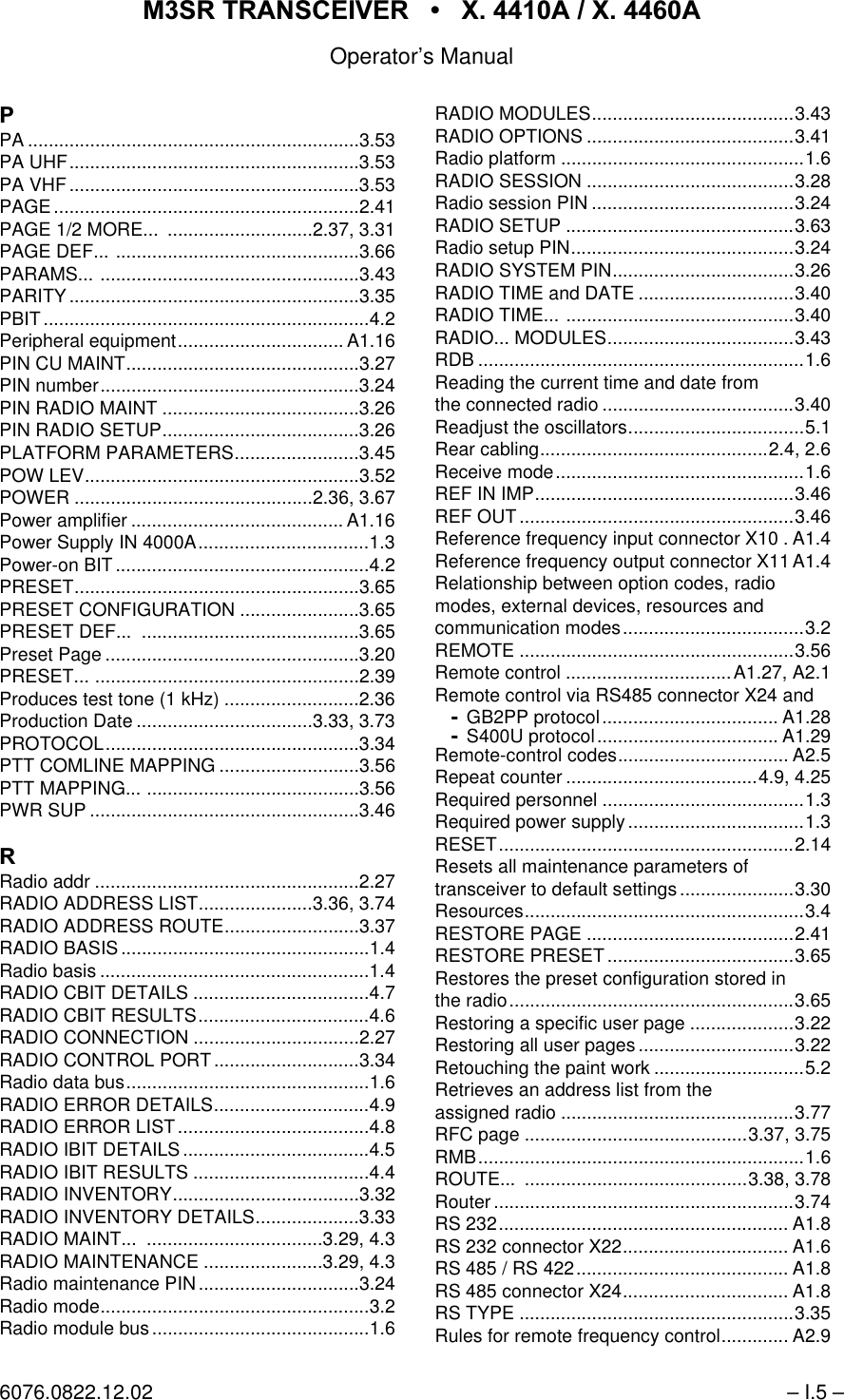
065 75$16&(,9(5  ; $  ; $Operator’s Manual6076.0822.12.02 – I.5 –3PA ................................................................3.53PA UHF........................................................3.53PA VHF........................................................3.53PAGE...........................................................2.41PAGE 1/2 MORE...  ............................2.37, 3.31PAGE DEF... ...............................................3.66PARAMS... ..................................................3.43PARITY........................................................3.35PBIT...............................................................4.2Peripheral equipment................................ A1.16PIN CU MAINT.............................................3.27PIN number..................................................3.24PIN RADIO MAINT ......................................3.26PIN RADIO SETUP......................................3.26PLATFORM PARAMETERS........................3.45POW LEV.....................................................3.52POWER ..............................................2.36, 3.67Power amplifier ......................................... A1.16Power Supply IN 4000A.................................1.3Power-on BIT.................................................4.2PRESET.......................................................3.65PRESET CONFIGURATION .......................3.65PRESET DEF...  ..........................................3.65Preset Page .................................................3.20PRESET... ...................................................2.39Produces test tone (1 kHz) ..........................2.36Production Date ..................................3.33, 3.73PROTOCOL.................................................3.34PTT COMLINE MAPPING ...........................3.56PTT MAPPING... .........................................3.56PWR SUP ....................................................3.465Radio addr ...................................................2.27RADIO ADDRESS LIST......................3.36, 3.74RADIO ADDRESS ROUTE..........................3.37RADIO BASIS................................................1.4Radio basis ....................................................1.4RADIO CBIT DETAILS ..................................4.7RADIO CBIT RESULTS.................................4.6RADIO CONNECTION ................................2.27RADIO CONTROL PORT ............................3.34Radio data bus...............................................1.6RADIO ERROR DETAILS..............................4.9RADIO ERROR LIST .....................................4.8RADIO IBIT DETAILS ....................................4.5RADIO IBIT RESULTS ..................................4.4RADIO INVENTORY....................................3.32RADIO INVENTORY DETAILS....................3.33RADIO MAINT...  ..................................3.29, 4.3RADIO MAINTENANCE .......................3.29, 4.3Radio maintenance PIN ...............................3.24Radio mode....................................................3.2Radio module bus..........................................1.6RADIO MODULES.......................................3.43RADIO OPTIONS ........................................3.41Radio platform ...............................................1.6RADIO SESSION ........................................3.28Radio session PIN .......................................3.24RADIO SETUP ............................................3.63Radio setup PIN...........................................3.24RADIO SYSTEM PIN...................................3.26RADIO TIME and DATE ..............................3.40RADIO TIME... ............................................3.40RADIO... MODULES....................................3.43RDB ...............................................................1.6Reading the current time and date fromthe connected radio .....................................3.40Readjust the oscillators..................................5.1Rear cabling............................................2.4, 2.6Receive mode................................................1.6REF IN IMP..................................................3.46REF OUT .....................................................3.46Reference frequency input connector X10 . A1.4Reference frequency output connector X11 A1.4Relationship between option codes, radiomodes, external devices, resources andcommunication modes...................................3.2REMOTE .....................................................3.56Remote control ................................A1.27, A2.1Remote control via RS485 connector X24 andGB2PP protocol.................................. A1.28S400U protocol................................... A1.29Remote-control codes................................. A2.5Repeat counter .....................................4.9, 4.25Required personnel .......................................1.3Required power supply ..................................1.3RESET.........................................................2.14Resets all maintenance parameters oftransceiver to default settings ......................3.30Resources......................................................3.4RESTORE PAGE ........................................2.41RESTORE PRESET ....................................3.65Restores the preset configuration stored inthe radio.......................................................3.65Restoring a specific user page ....................3.22Restoring all user pages ..............................3.22Retouching the paint work .............................5.2Retrieves an address list from theassigned radio .............................................3.77RFC page ...........................................3.37, 3.75RMB...............................................................1.6ROUTE... ...........................................3.38, 3.78Router ..........................................................3.74RS 232........................................................ A1.8RS 232 connector X22................................ A1.6RS 485 / RS 422......................................... A1.8RS 485 connector X24................................ A1.8RS TYPE .....................................................3.35Rules for remote frequency control............. A2.9
065 75$16&(,9(5  ; $  ; $Operator’s Manual– I.6 – 6076.0822.12.02Rx antenna connector X5031 ................... A1.15RX LEVEL....................................................3.486S400U..........................................................3.34S400U protocol ........................................... A2.1Safety rules ....................................................1.9SAVE AS......................................................3.68SAVE PAGE ................................................2.41SAVE TO CTRL UNIT..................................3.77SAVE TO RADIO.........................................3.39Saves address list to the control unit ..3.77, 3.79Saves the edited PRESET PAGE undera new PRESET number...............................3.68Scanning..................................................... A2.4Scheduled maintenance ................................5.1SELECT.......................................................2.15SELECT and 10 x LOCAL within 10 sec......2.17Select by turning the tuning knob.................2.12Selection ofaccess level ...........................................2.30active PTT line 3.56, 3.57AF AGC attack time ...............................3.50AF AGC decay time ...............................3.50antenna input .........................................3.51channel spacing.....................................3.69channel spacing value ...........................2.38clipper level............................................3.51clock frequency for referenceoutput X11 .............................................3.46clock source...........................................3.46communication line for PTT mapping ....3.56configuration of the power level forthe external power amplifier...................3.53date format.............................................3.80edit fields for power levels .....................3.52equipment for CBIT..................................4.6equipment for error list.............................4.8equipment for radio inventory ................3.32frequency mode .....................................3.80guard receiver AF signal........................2.35interface for level setting........................3.47modulation type ............................2.36, 3.67parity ......................................................3.35pre-defined communication mode 2.37, 3.69protocol type ..........................................3.34PTT level of the current line...................3.57radio operating mode.............................2.35sensitivity ...............................................3.50serial port standard ................................3.35section of the Preset Page to beedited or viewed.....................................3.67transmit power ..............................2.36, 3.67Tx offset value ..............................2.38, 3.70Selection within a set of values....................2.12Selects theentire radio or comline for IBIT ................4.4input to be monitored .............................3.46radio operation mode.............................3.68SENSITIV LW NOISE ..................................3.50Serial No.  ...........................................3.33, 3.73Server ............................................................1.6Service / FILL connector X4 ....................... A1.2Service and Maintenance Tool ZS 4400... A1.31SESSION.....................................................2.30SET OPTIONS.............................................3.42Sets the default IP .......................................2.17Setting of aAM modulation depth.............................3.52AM transmit power.................................3.52common frequency for Tx andRx operation ..........................................2.36display brightness..................................3.81display contrast......................................3.81display timer...........................................3.81FM transmit power.................................3.52front key illumination..............................3.80LED brightness ......................................3.80logical radio address..............................2.27new date ................................................3.40new time ................................................3.40number of bits in the telegram ...............3.35number of stop bits ................................3.35response threshold of the S/N squelch..3.51value for fine tuning of synthesizerFM modulator.........................................3.54value for FM Deviation Narrowband ......3.54value for FM Deviation Wideband(analog)..................................................3.54value for TX Deviation forLink 11 operation ...................................3.54SETUP.........................................................3.64SETUP... .....................................................3.64SIDETN VOLUME .......................................3.49Softkey.........................................................2.10ACTIVE..................................................3.57ADD ADDR............................................3.77ADDRESS LIST... ........................3.36, 3.77AF AGC .................................................2.38ALC DECAY ..........................................3.47AM .........................................................3.52AM MOD................................................3.52ATTACK.................................................3.50AUDIO FRONTP... ................................3.61AUDIO MAPPING... ..............................3.58BAND.....................................................2.43BITRATE................................................3.35BITS/CHAR............................................3.35BRIGHT .................................................3.81CBIT... ............................................4.6, 4.22CHAN SP......................................2.38, 3.69CHANGE TYPE.....................................3.77CL ..........................................................3.44CLEAR LIST ...................................4.8, 4.24CLIP LEV...............................................3.51CLIPPER ...............................................2.37CLK SRC ...............................................3.46CODEC..................................................3.47COMM ..........................................2.37, 3.69CONNECT....................................2.30, 3.53CONTR..................................................3.81CONTROL PORT...  ..............................3.34COUNT..................................................3.65CU... MAINT .................................3.71, 4.18DATE ............................................3.40, 3.80DECAY ..................................................3.50DEFAULT MODE...................................3.68
065 75$16&(,9(5  ; $  ; $Operator’s Manual6076.0822.12.02 – I.7 –softkeyDEFAULT SETTINGS ...........................3.30DELETE ADDRESS ..............................3.77DELETE PAGE......................................3.66DELETE RANGE ...................................3.66DETAILS... .....................................3.33, 4.5DEVICE MAPPING... ............................3.59DISCONNECT .......................................2.30DISP TIMER ..........................................3.81DISPLAY PARAMS...  ...........................3.80EDIT... ..........................................3.42, 3.67ENA/DIS ................................................3.62EQUIP.............................................3.32, 4.4ERRORS... ....................................4.8, 4.24EXT REF................................................3.46FM..........................................................3.52FREQ............................................2.36, 3.68GATEWAY ADDR.........................3.38, 3.79GET FROM RADIO ...............................3.77GUARD..................................................2.35GUARD VOLUME..................................3.49IBIT... .............................................4.4, 4.19INDICATORS.........................................3.80INPUT ....................................................3.51INSTALL OPTION .................................3.42INVENTORY... .............................3.32, 3.72IP ADDR .......................................3.38, 3.79KEY ILLUM ............................................3.80KEYBD TEST...  ....................................4.21LOCAL ...................................................3.57LOG ADDR ...................................3.38, 3.79MAINT PIN....................................3.30, 3.71MANUAL... ............................................2.35MARKER ...............................................2.36MARKER VOLUME ...............................3.49MARKER... CONTROL..........................3.62MODE ...........................................2.35, 3.67MODU...........................................2.36, 3.67 OCXO .....................................................3.45 OPTIONS... 3.41 PA...........................................................3.53 PA UHF ..................................................3.53 PA VHF...................................................3.53 PAGE......................................................2.41 PAGE 1/2 MORE... .......................2.37, 3.31 PAGE DEF...  .........................................3.66 PARAMS...  ............................................3.43 PARITY...................................................3.35 PIN CU MAINT .......................................3.27 PIN RADIO MAINT .................................3.26 PIN RADIO SETUP ................................3.26 POW LEV ...............................................3.52 POWER .........................................2.36, 3.67 PRESET .................................................3.65 PRESET DEF...  .....................................3.65 PRESET...  .............................................2.39 PROTOCOL ...........................................3.34 PWR SUP...............................................3.46RADIO MAINT...  ............................3.29, 4.3RADIO SESSION ..................................3.28RADIO TIME... ......................................3.40RADIO... MODULES..............................3.43REF IN IMP............................................3.46REF OUT ...............................................3.46REMOTE ...............................................3.56RESTORE PAGE ..................................2.41RESTORE PRESET..............................3.65ROUTE... .....................................3.38, 3.78RS TYPE ...............................................3.35RX LEVEL..............................................3.48SAVE AS ...............................................3.68SAVE PAGE ..........................................2.41SAVE TO CTRL UNIT ...........................3.77SAVE TO RADIO...................................3.39SENSITIV LW NOISE............................3.50SESSION...............................................2.30SET OPTIONS.......................................3.42SETUP...................................................3.64SETUP... ...............................................3.64SIDETN VOLUME .................................3.49SOURCE ...............................................3.58SPLIT SITE... ........................................3.55SQUELCH .............................................2.36SQUELCH LEV S/N...............................3.51SQUELCH... POLARITY........................3.60START............................................4.4, 4.19STOP..............................................4.4, 4.19STOP BITS............................................3.35SUBNET MASK............................3.38, 3.79TCXO.....................................................3.45TIME ......................................................3.40TIME READ ...........................................3.40TONE.....................................................2.36TX ALC .........................................3.47, 3.48TX ALC LEVEL......................................3.48TX DEV FM LK11 ..................................3.54TX DEV FM NB......................................3.54TX DEV FM WB.....................................3.54TX DEV TRIM........................................3.54TX LEVEL..............................................3.48TX OFFS.......................................2.38, 3.70TYPE .....................................................3.59VCXO.....................................................3.45VIEW FIXED..........................................3.44VIEW IF SLOT.......................................3.44VIEW MOD SLOT..................................3.44PROTOCOL...........................................3.34Softkey number............................................2.10Softkey symbols...........................................2.10Software Download................................... A1.30SOURCE .....................................................3.58SPACE.........................................................3.35SPLIT SITE DEFINITION ............................3.55SPLIT SITE... ..............................................3.55SQL G..........................................................2.19SQL M..........................................................2.19SQUELCH ...................................................2.36SQUELCH LEV S/N.....................................3.51SQUELCH POLARITY.................................3.60SQUELCH... POLARITY..............................3.60Standby switchover........................................1.3START...........................................................4.4Starts IBIT for the selected configuration.......4.4STOP.............................................................4.4STOP BITS..................................................3.35SUBNET MASK ..................................3.38, 3.79SW......................................................3.32, 3.72
065 75$16&(,9(5  ; $  ; $Operator’s Manual– I.8 – 6076.0822.12.02SwitchesAF AGC function on or off......................2.38automatic level control (ALC) fortransmitter on or off................................3.48between two active Presets ...................3.65between two preset counts ....................3.65clipper function on or off ........................2.37input impedance of interface X10 ..........3.46marker tone on or off .............................2.36monitoring function on or off ..................3.46over between radio and controller .........3.77Switching Off.......................................2.23, 2.26Switching On.......................................2.21, 2.24Switching the Transceiver On and Off .........2.21SWM ............................................................3.32SWMOD.......................................................3.32Synchron Data Mode .....................................3.3SYSTEM ......................................................3.26System PIN..................................................3.247Taking care ....................................................5.2TCXO...........................................................3.45Technical data........................................... A1.26Technical information.................................. A1.1Telescopic slide .............................................2.2Test messages............................................ A2.4TIME ............................................................3.40TIME READ .................................................3.40Toggle switches ...........................................2.13TONE...........................................................2.36Top view.........................................................1.5Transmit operation .........................................1.6Transmitter Unit VT 4403...............................1.4Troubleshooting .............................................4.2Tuning knob .................................................2.18TX ALC ........................................................3.47TX ALC LEVEL ............................................3.48TX DEV FM LK11 ........................................3.54TX DEV FM NB............................................3.54TX DEV FM WB ...........................................3.54TX DEV TRIM ..............................................3.54TX LEVEL ....................................................3.48TX OFFS.............................................2.38, 3.70Tx offset value..............................................2.38TYPE............................................................3.59Type.............................................................3.338UHF..............................................................2.35UHF Agile Filter FD 430............................ A1.19UHF Automatic Filter FD 221.................... A1.21UHF filter........................................................1.4UHF Filter FD 4430........................................1.4UHF Power Amplifier VD 480L ................. A1.16UHF+VHF ....................................................2.35Unpacking ......................................................2.1Update 32 Tool ......................................... A1.31Upper left softkey and ON/OFF andupper right softkey and ENT ........................2.17Use under normal conditions .........................2.1Use under special conditions.........................3.1User page area ............................................3.22User PIN ......................................................3.24USER PRESET FIX.FRQ ............................2.399V.24 remote control .................................... A2.1V/D CP...........................................................3.3V/D UNCP......................................................3.3Value selection ............................................2.12Variant ................................................3.33, 3.73VCXO...........................................................3.45VD 480L.................................................... A1.16Version No. ........................................3.33, 3.73VHF..............................................................2.35VHF/UHF Receiver ET 4400 (main receiver) 1.4VHF/UHF Synthesizer GF 4400T ..................1.4VIEW FIXED................................................3.44VIEW IF SLOT.............................................3.44VIEW MOD SLOT........................................3.44Visual inspection............................................4.1Voice / data ciphered.....................................3.3Voice / data unciphered .................................3.3VT 4403 .........................................................1.4VU RX PARAMETERS ................................3.50VU SYN PARAMETERS..............................3.54VU TX PARAMETERS ................................3.52:Warning .........................................................4.2WB ANALOG .................................................3.3WB DIGITAL BB ............................................3.3WB DIGTAL DP .............................................3.3Wideband Analog ..........................................3.3Wideband Digital..........................................3.11Wideband Digital Baseband ..........................3.3Wideband Digital Diphase .............................3.3;X10 ............................................................. A1.4X11 ............................................................. A1.4X20 ............................................................. A1.5X21 ............................................................. A1.5X22 ............................................................. A1.6X23 ............................................................. A1.7X24 ............................................................. A1.8X25 ............................................................. A1.9X26 ........................................................... A1.10X27 ........................................................... A1.11X28 ........................................................... A1.12X30 ........................................................... A1.13
065 75$16&(,9(5  ; $  ; $Operator’s Manual6076.0822.12.02 – I.9 / I.10 –X31............................................................ A1.13X32............................................................ A1.14X33............................................................ A1.14X4................................................................ A1.2X5................................................................ A1.2X5031........................................................ A1.15X5032........................................................ A1.15X6................................................................ A1.3X7................................................................ A1.3=ZS 4400 .................................................... A1.31
065 75$16&(,9(5  ; $  ; $Operator’s Manual • Overview6076.0822.12.01 – 3 / 4 –29(59,(:Chapter8VHU,QIRUPDWLRQGeneral Features, Explanation of Models, Required Personnel, Required Power Supply, Design, Functioning, General Data, Detailed Saftey Rules, Accessories8VHXQGHU1RUPDO&RQGLWLRQVIntroduction, Unpacking and Checking, Installation into a 19" Rack, Basic Cabling, Operation8VHXQGHU6SHFLDO&RQGLWLRQVIntroduction to Communication Modes, Resources and External Devices, Config-uration Examples, Guard Receiver, Preset Pages, PIN Numbers, Configuration0DOIXQFWLRQIntroduction, Visual Inspection, Troubleshooting0DLQWHQDQFHScheduled Maintenance, Taking Care$SS 7HFKQLFDO,QIRUPDWLRQExternal Interfaces, Connection of Peripheral Equipment, Default Settings, Inven-tory Structure, Technical Data, Remote Control, Download$SS95HPRWH&RQWURO683URWRFROGeneral, Frame for Data Traffic, Address, Acknowledgement, Addressing, Inquiry, Scanning, Test Messages, Remote Control Codes, Rules for Remote Frequency Control of Series M3SR$SS /$195HPRWH&RQWURO*%333URWRFROGeneral, List of Commands
065 75$16&(,9(56  ; $  ; $Operator’s Manual6076.0822.12.02 – 0.1 –List of ContentsChapter Title Page 8VHU,QIRUPDWLRQ1.1 General Features. . . . . . . . . . . . . . . . . . . . . . . . . . . . . . . . . . . . . . . . . . . . . . . . . . . . . . .1.11.2 Explanation of Models . . . . . . . . . . . . . . . . . . . . . . . . . . . . . . . . . . . . . . . . . . . . . . . . . . . 1.21.3 Required Personnel. . . . . . . . . . . . . . . . . . . . . . . . . . . . . . . . . . . . . . . . . . . . . . . . . . . . . 1.31.4 Required Power Supply. . . . . . . . . . . . . . . . . . . . . . . . . . . . . . . . . . . . . . . . . . . . . . . . . . 1.31.5 Design, e.g. XT 4410A - Mod. 22  . . . . . . . . . . . . . . . . . . . . . . . . . . . . . . . . . . . . . . . . . . 1.41.6 Functioning, e.g. XT 4410A - Mod. 22. . . . . . . . . . . . . . . . . . . . . . . . . . . . . . . . . . . . . . . 1.61.7 General Data . . . . . . . . . . . . . . . . . . . . . . . . . . . . . . . . . . . . . . . . . . . . . . . . . . . . . . . . . . 1.81.8 Detailed Safety Rules  . . . . . . . . . . . . . . . . . . . . . . . . . . . . . . . . . . . . . . . . . . . . . . . . . . . 1.91.9 Accessories . . . . . . . . . . . . . . . . . . . . . . . . . . . . . . . . . . . . . . . . . . . . . . . . . . . . . . . . . .1.10 8VHXQGHU 1RUPDO &RQGLWLRQV 2.1 Introduction . . . . . . . . . . . . . . . . . . . . . . . . . . . . . . . . . . . . . . . . . . . . . . . . . . . . . . . . . . . 2.12.2 Unpacking and Checking. . . . . . . . . . . . . . . . . . . . . . . . . . . . . . . . . . . . . . . . . . . . . . . . . 2.12.3 Installation into a 19" Rack  . . . . . . . . . . . . . . . . . . . . . . . . . . . . . . . . . . . . . . . . . . . . . . . 2.22.4 Basic Cabling. . . . . . . . . . . . . . . . . . . . . . . . . . . . . . . . . . . . . . . . . . . . . . . . . . . . . . . . . . 2.42.4.1 • M3SR Transceiver, e.g. XT 4410A . . . . . . . . . . . . . . . . . . . . . . . . . . . . . . . . . . . . . . . 2.42.4.2 • M3SR Transceiver, e.g. XT 4460A . . . . . . . . . . . . . . . . . . . . . . . . . . . . . . . . . . . . . . . 2.62.5 Operation. . . . . . . . . . . . . . . . . . . . . . . . . . . . . . . . . . . . . . . . . . . . . . . . . . . . . . . . . . . . . 2.82.5.1 • Introduction to Displays and Controls. . . . . . . . . . . . . . . . . . . . . . . . . . . . . . . . . . . . . 2.82.5.2 • Switching the Transceiver On and Off . . . . . . . . . . . . . . . . . . . . . . . . . . . . . . . . . . . 2.212.5.3 • Menu 010: RADIO CONNECTION. . . . . . . . . . . . . . . . . . . . . . . . . . . . . . . . . . . . . . 2.272.5.4 • Menu 020: COMLINE SESSION  . . . . . . . . . . . . . . . . . . . . . . . . . . . . . . . . . . . . . . . 2.282.5.5 • Menu 040: MAIN  . . . . . . . . . . . . . . . . . . . . . . . . . . . . . . . . . . . . . . . . . . . . . . . . . . . 2.342.5.6 • Menu 110, Page 1: MANUAL FIX. FRQ (Fixed Frequency) . . . . . . . . . . . . . . . . . . . 2.352.5.7 • Menu 110, Page 2: MANUAL FIX. FRQ (Fixed Frequency) . . . . . . . . . . . . . . . . . . . 2.372.5.8 • Menu 210, Page 1: USER PRESET FIX.FRQ (Fixed Frequency) . . . . . . . . . . . . . . 2.392.5.9 • Menu 210, Page 2: USER PRESET FIX.FRQ (Fixed Frequency) . . . . . . . . . . . . . . 2.422.5.10 • Menu 300: EMERGENCY MODE. . . . . . . . . . . . . . . . . . . . . . . . . . . . . . . . . . . . . . . 2.43 8VHXQGHU6SHFLDO &RQGLWLRQV 3.1 Introduction . . . . . . . . . . . . . . . . . . . . . . . . . . . . . . . . . . . . . . . . . . . . . . . . . . . . . . . . . . . 3.13.2 Introduction to Communication Modes, Resources and External Devices . . . . . . . . . . . 3.23.2.1 • Communication Modes. . . . . . . . . . . . . . . . . . . . . . . . . . . . . . . . . . . . . . . . . . . . . . . . 3.33.2.2 • Resources  . . . . . . . . . . . . . . . . . . . . . . . . . . . . . . . . . . . . . . . . . . . . . . . . . . . . . . . . .3.43.2.3 •  External Devices . . . . . . . . . . . . . . . . . . . . . . . . . . . . . . . . . . . . . . . . . . . . . . . . . . . . 3.53.3 Configuration Examples  . . . . . . . . . . . . . . . . . . . . . . . . . . . . . . . . . . . . . . . . . . . . . . . . . 3.63.3.1 • Voice / Data Unciphered. . . . . . . . . . . . . . . . . . . . . . . . . . . . . . . . . . . . . . . . . . . . . . . 3.63.3.2 • Wideband Analog . . . . . . . . . . . . . . . . . . . . . . . . . . . . . . . . . . . . . . . . . . . . . . . . . . . . 3.93.3.3 • Wideband Digital  . . . . . . . . . . . . . . . . . . . . . . . . . . . . . . . . . . . . . . . . . . . . . . . . . . . 3.113.3.4 • Link 11 (CLEW)  . . . . . . . . . . . . . . . . . . . . . . . . . . . . . . . . . . . . . . . . . . . . . . . . . . . . 3.133.3.5 • Voice Data Ciphered. . . . . . . . . . . . . . . . . . . . . . . . . . . . . . . . . . . . . . . . . . . . . . . . . 3.153.4 Guard Receiver . . . . . . . . . . . . . . . . . . . . . . . . . . . . . . . . . . . . . . . . . . . . . . . . . . . . . . . 3.193.5 Preset Page. . . . . . . . . . . . . . . . . . . . . . . . . . . . . . . . . . . . . . . . . . . . . . . . . . . . . . . . . .3.203.5.1 • General. . . . . . . . . . . . . . . . . . . . . . . . . . . . . . . . . . . . . . . . . . . . . . . . . . . . . . . . . . . 3.203.5.2 • Introduction to Loaded, User and Current Pages. . . . . . . . . . . . . . . . . . . . . . . . . . . 3.213.6 PIN Numbers . . . . . . . . . . . . . . . . . . . . . . . . . . . . . . . . . . . . . . . . . . . . . . . . . . . . . . . . . 3.243.7 Configuration . . . . . . . . . . . . . . . . . . . . . . . . . . . . . . . . . . . . . . . . . . . . . . . . . . . . . . . . .3.263.7.1 • Menu 0: SYSTEM. . . . . . . . . . . . . . . . . . . . . . . . . . . . . . . . . . . . . . . . . . . . . . . . . . . 3.263.7.2 • Menu 030: RADIO SESSION . . . . . . . . . . . . . . . . . . . . . . . . . . . . . . . . . . . . . . . . . . 3.283.7.3 • Menu 400, Page 1: RADIO MAINTENANCE . . . . . . . . . . . . . . . . . . . . . . . . . . . . . . 3.293.7.4 • Menu 400, Page 2: RADIO MAINTENANCE . . . . . . . . . . . . . . . . . . . . . . . . . . . . . . 3.31
065 75$16&(,9(56  ; $  ; $Operator’s Manual– 0.2 – 6076.0822.12.02Chapter Title Page3.7.5 • Menu 415: RADIO INVENTORY  . . . . . . . . . . . . . . . . . . . . . . . . . . . . . . . . . . . . . . . 3.323.7.6 • Menu 416: RADIO INVENTORY DETAILS. . . . . . . . . . . . . . . . . . . . . . . . . . . . . . . . 3.333.7.7 • Menu 425: RADIO CONTROL PORT. . . . . . . . . . . . . . . . . . . . . . . . . . . . . . . . . . . . 3.343.7.8 • Menu 435: RADIO ADDRESS LIST . . . . . . . . . . . . . . . . . . . . . . . . . . . . . . . . . . . . . 3.363.7.9 • Menu 436: RADIO ADDRESS ROUTE  . . . . . . . . . . . . . . . . . . . . . . . . . . . . . . . . . . 3.373.7.10 • Menu 440: RADIO TIME and DATE . . . . . . . . . . . . . . . . . . . . . . . . . . . . . . . . . . . . . 3.403.7.11 • Menu 505: RADIO OPTIONS. . . . . . . . . . . . . . . . . . . . . . . . . . . . . . . . . . . . . . . . . . 3.413.7.12 • Menu 506: SET OPTIONS . . . . . . . . . . . . . . . . . . . . . . . . . . . . . . . . . . . . . . . . . . . . 3.423.7.13 • Menu 510: RADIO MODULES . . . . . . . . . . . . . . . . . . . . . . . . . . . . . . . . . . . . . . . . . 3.433.7.14 • Menu 511: PLATFORM PARAMETERS. . . . . . . . . . . . . . . . . . . . . . . . . . . . . . . . . . 3.453.7.15 • Menu 512, Page 1: AFI PARAMETERS (Audio Frequency Interface) . . . . . . . . . . . 3.473.7.16 • Menu 512, Page 2: AFI PARAMETERS (Audio Frequency Interface) . . . . . . . . . . . 3.493.7.17 • Menu 515: VU RX PARAMETERS. . . . . . . . . . . . . . . . . . . . . . . . . . . . . . . . . . . . . . 3.503.7.18 • Menu 516: VU TX PARAMETERS . . . . . . . . . . . . . . . . . . . . . . . . . . . . . . . . . . . . . . 3.523.7.19 • Menu 517: VU SYN PARAMETERS. . . . . . . . . . . . . . . . . . . . . . . . . . . . . . . . . . . . . 3.543.7.20 • Menu 535: SPLIT SITE DEFINITION . . . . . . . . . . . . . . . . . . . . . . . . . . . . . . . . . . . . 3.553.7.21 • Menu 550: PTT COMLINE MAPPING . . . . . . . . . . . . . . . . . . . . . . . . . . . . . . . . . . . 3.563.7.22 • Menu 560: AUDIO MAPPING. . . . . . . . . . . . . . . . . . . . . . . . . . . . . . . . . . . . . . . . . . 3.583.7.23 • Menu 565: DEVICE MAPPING. . . . . . . . . . . . . . . . . . . . . . . . . . . . . . . . . . . . . . . . . 3.593.7.24 • Menu 570: SQUELCH POLARITY . . . . . . . . . . . . . . . . . . . . . . . . . . . . . . . . . . . . . . 3.603.7.25 • Menu 575: FRONTPANEL AUDIO SOURCE. . . . . . . . . . . . . . . . . . . . . . . . . . . . . . 3.613.7.26 • Menu 580: MARKER CONTROL . . . . . . . . . . . . . . . . . . . . . . . . . . . . . . . . . . . . . . . 3.623.7.27 • Menu 600: RADIO SETUP . . . . . . . . . . . . . . . . . . . . . . . . . . . . . . . . . . . . . . . . . . . . 3.633.7.28 • Menu 610: PRESET CONFIGURATION  . . . . . . . . . . . . . . . . . . . . . . . . . . . . . . . . . 3.653.7.29 • Menu 620: LOADED PAGE PARAMETERS  . . . . . . . . . . . . . . . . . . . . . . . . . . . . . . 3.663.7.30 • Menu 710, Page 1: EDIT PRESET PAGE FIX.FRQ (Fixed Frequency)  . . . . . . . . . 3.673.7.31 • Menu 710, Page 2: EDIT PRESET PAGE FIX.FRQ (Fixed Frequency)  . . . . . . . . . 3.693.7.32 • Menu 800: CU MAINTENANCE . . . . . . . . . . . . . . . . . . . . . . . . . . . . . . . . . . . . . . . . 3.713.7.33 • Menu 815: CU INVENTORY  . . . . . . . . . . . . . . . . . . . . . . . . . . . . . . . . . . . . . . . . . . 3.723.7.34 • Menu 816: CU INVENTORY DETAILS. . . . . . . . . . . . . . . . . . . . . . . . . . . . . . . . . . . 3.733.7.35 • Menu 835: RADIO ADDRESS LIST . . . . . . . . . . . . . . . . . . . . . . . . . . . . . . . . . . . . . 3.743.7.36 • Menu 836: CU ADDRESS ROUTE  . . . . . . . . . . . . . . . . . . . . . . . . . . . . . . . . . . . . . 3.783.7.37 • Menu 840: CU DISPLAY PARAMS  . . . . . . . . . . . . . . . . . . . . . . . . . . . . . . . . . . . . . 3.80 0DOIXQFWLRQ4.1 Introduction . . . . . . . . . . . . . . . . . . . . . . . . . . . . . . . . . . . . . . . . . . . . . . . . . . . . . . . . . . . 4.14.2 Visual Inspection . . . . . . . . . . . . . . . . . . . . . . . . . . . . . . . . . . . . . . . . . . . . . . . . . . . . . . .4.14.3 Troubleshooting. . . . . . . . . . . . . . . . . . . . . . . . . . . . . . . . . . . . . . . . . . . . . . . . . . . . . . . .4.24.3.1 • BIT Design . . . . . . . . . . . . . . . . . . . . . . . . . . . . . . . . . . . . . . . . . . . . . . . . . . . . . . . . . 4.24.3.2 • BIT Radio . . . . . . . . . . . . . . . . . . . . . . . . . . . . . . . . . . . . . . . . . . . . . . . . . . . . . . . . . . 4.34.3.3 • BIT Control Unit . . . . . . . . . . . . . . . . . . . . . . . . . . . . . . . . . . . . . . . . . . . . . . . . . . . . 4.180DLQWHQDQFH 5.1 Scheduled Maintenance  . . . . . . . . . . . . . . . . . . . . . . . . . . . . . . . . . . . . . . . . . . . . . . . . . 5.15.2 Taking Care . . . . . . . . . . . . . . . . . . . . . . . . . . . . . . . . . . . . . . . . . . . . . . . . . . . . . . . . . . . 5.25.2.1 • Cleaning . . . . . . . . . . . . . . . . . . . . . . . . . . . . . . . . . . . . . . . . . . . . . . . . . . . . . . . . . . . 5.25.2.2 • Retouching the Paint Work. . . . . . . . . . . . . . . . . . . . . . . . . . . . . . . . . . . . . . . . . . . . . 5.2$ 7HFKQLFDO ,QIRUPDWLRQ $A1.1 External Interfaces. . . . . . . . . . . . . . . . . . . . . . . . . . . . . . . . . . . . . . . . . . . . . . . . . . . . .A1.2A1.1.1 • Service / FILL Connector X4 (only X. 4410A). . . . . . . . . . . . . . . . . . . . . . . . . . . . . .A1.2A1.1.2 • FILL Connector X5 . . . . . . . . . . . . . . . . . . . . . . . . . . . . . . . . . . . . . . . . . . . . . . . . . .A1.2A1.1.3 • LAN SERVICE Connector X6. . . . . . . . . . . . . . . . . . . . . . . . . . . . . . . . . . . . . . . . . .A1.3A1.1.4 • Headset Connector X7 . . . . . . . . . . . . . . . . . . . . . . . . . . . . . . . . . . . . . . . . . . . . . . .A1.3A1.1.5 • Reference Frequency Input Connector X10. . . . . . . . . . . . . . . . . . . . . . . . . . . . . . .A1.4
065 75$16&(,9(56  ; $  ; $Operator’s Manual6076.0822.12.02 – 0.3 –Chapter Title PageA1.1.6 • Reference Frequency Output Connector X11  . . . . . . . . . . . . . . . . . . . . . . . . . . . . .A1.4A1.1.7 • LAN Connector X20 . . . . . . . . . . . . . . . . . . . . . . . . . . . . . . . . . . . . . . . . . . . . . . . . .A1.5A1.1.8 • Miscellaneous 2 Connector X21. . . . . . . . . . . . . . . . . . . . . . . . . . . . . . . . . . . . . . . .A1.5A1.1.9 • RS 232 Connector X22  . . . . . . . . . . . . . . . . . . . . . . . . . . . . . . . . . . . . . . . . . . . . . .A1.6A1.1.10 • Miscellaneous 1 Connector X23. . . . . . . . . . . . . . . . . . . . . . . . . . . . . . . . . . . . . . . .A1.7A1.1.11 • RS 485 Connector X24  . . . . . . . . . . . . . . . . . . . . . . . . . . . . . . . . . . . . . . . . . . . . . .A1.8A1.1.12 • AF Interface 2 Connector X25 . . . . . . . . . . . . . . . . . . . . . . . . . . . . . . . . . . . . . . . . .A1.9A1.1.13 • AF Interface 1 Connector X26 . . . . . . . . . . . . . . . . . . . . . . . . . . . . . . . . . . . . . . . .A1.10A1.1.14 • Filter / Power Amplifier 1 Connector X27 . . . . . . . . . . . . . . . . . . . . . . . . . . . . . . . . A1.11A1.1.15 • Filter / Power Amplifier 2 Connector X28 . . . . . . . . . . . . . . . . . . . . . . . . . . . . . . . .A1.12A1.1.16 • Antenna Connector X30 . . . . . . . . . . . . . . . . . . . . . . . . . . . . . . . . . . . . . . . . . . . . .A1.13A1.1.17 • DC IN Connector X31. . . . . . . . . . . . . . . . . . . . . . . . . . . . . . . . . . . . . . . . . . . . . . .A1.13A1.1.18 • Battery Connector X32 . . . . . . . . . . . . . . . . . . . . . . . . . . . . . . . . . . . . . . . . . . . . . .A1.14A1.1.19 • External Supply Connector X33 . . . . . . . . . . . . . . . . . . . . . . . . . . . . . . . . . . . . . . .A1.14A1.1.20 • Rx Antenna Connector X5031 (Part of Antenna Interface GI 4403). . . . . . . . . . . .A1.15A1.1.21 • GRx Antenna Connector X5032 (Part of Antenna Interface GI 4403, Mod. 04). . .A1.15A1.2 Connection of Peripheral Equipment. . . . . . . . . . . . . . . . . . . . . . . . . . . . . . . . . . . . . .A1.16A1.2.1 • UHF Power Amplifier VD 480L. . . . . . . . . . . . . . . . . . . . . . . . . . . . . . . . . . . . . . . .A1.16A1.2.2 • UHF Agile Filter FD 430 . . . . . . . . . . . . . . . . . . . . . . . . . . . . . . . . . . . . . . . . . . . . .A1.19A1.2.3 • UHF Automatic Filter FD 221 . . . . . . . . . . . . . . . . . . . . . . . . . . . . . . . . . . . . . . . . .A1.21A1.3 Default Settings . . . . . . . . . . . . . . . . . . . . . . . . . . . . . . . . . . . . . . . . . . . . . . . . . . . . . .A1.22A1.4 Inventory Structure  . . . . . . . . . . . . . . . . . . . . . . . . . . . . . . . . . . . . . . . . . . . . . . . . . . .A1.25A1.5 Technical Data . . . . . . . . . . . . . . . . . . . . . . . . . . . . . . . . . . . . . . . . . . . . . . . . . . . . . . .A1.26A1.6 Remote Control . . . . . . . . . . . . . . . . . . . . . . . . . . . . . . . . . . . . . . . . . . . . . . . . . . . . . .A1.27A1.6.1 • Remote Control via RS422 Connector X24 and GB2PP Protocol . . . . . . . . . . . . .A1.28A1.6.2 • Remote Control via RS485 Connector X24 and S400U Protocol. . . . . . . . . . . . . .A1.29A1.7 Download. . . . . . . . . . . . . . . . . . . . . . . . . . . . . . . . . . . . . . . . . . . . . . . . . . . . . . . . . . .A1.30Data Sheet for Digital Programmable Software Radios of Series M3SR. . . . . . . . . . .  PD 0757.6691.22$ 95HPRWH&RQWURO683URWRFRO $A2.1 General . . . . . . . . . . . . . . . . . . . . . . . . . . . . . . . . . . . . . . . . . . . . . . . . . . . . . . . . . . . . .A2.1A2.2 Frame for Data Traffic . . . . . . . . . . . . . . . . . . . . . . . . . . . . . . . . . . . . . . . . . . . . . . . . . .A2.1A2.3 Address . . . . . . . . . . . . . . . . . . . . . . . . . . . . . . . . . . . . . . . . . . . . . . . . . . . . . . . . . . . . .A2.1A2.4 Acknowledgement . . . . . . . . . . . . . . . . . . . . . . . . . . . . . . . . . . . . . . . . . . . . . . . . . . . . .A2.1A2.5 Addressing. . . . . . . . . . . . . . . . . . . . . . . . . . . . . . . . . . . . . . . . . . . . . . . . . . . . . . . . . . .A2.2A2.5.1 • Addressing Range . . . . . . . . . . . . . . . . . . . . . . . . . . . . . . . . . . . . . . . . . . . . . . . . . .A2.2A2.5.2 • Characteristics of Data Transmission. . . . . . . . . . . . . . . . . . . . . . . . . . . . . . . . . . . .A2.2A2.6 Inquiry . . . . . . . . . . . . . . . . . . . . . . . . . . . . . . . . . . . . . . . . . . . . . . . . . . . . . . . . . . . . . .A2.3A2.6.1 • Format of Responses . . . . . . . . . . . . . . . . . . . . . . . . . . . . . . . . . . . . . . . . . . . . . . . .A2.3A2.6.2 • Inquiry of Carrier and Squelch . . . . . . . . . . . . . . . . . . . . . . . . . . . . . . . . . . . . . . . . .A2.3A2.6.3 • Inquiry of Frequency or Channel Number  . . . . . . . . . . . . . . . . . . . . . . . . . . . . . . . .A2.3A2.6.4 • Inquiry of Entire Setting  . . . . . . . . . . . . . . . . . . . . . . . . . . . . . . . . . . . . . . . . . . . . . .A2.3A2.7 Scanning (S400U only) . . . . . . . . . . . . . . . . . . . . . . . . . . . . . . . . . . . . . . . . . . . . . . . . .A2.4A2.8 Test Messages. . . . . . . . . . . . . . . . . . . . . . . . . . . . . . . . . . . . . . . . . . . . . . . . . . . . . . . .A2.4A2.8.1 • Connectives . . . . . . . . . . . . . . . . . . . . . . . . . . . . . . . . . . . . . . . . . . . . . . . . . . . . . . .A2.4A2.8.2 • Change Report . . . . . . . . . . . . . . . . . . . . . . . . . . . . . . . . . . . . . . . . . . . . . . . . . . . . .A2.4A2.9 Remote-control Codes. . . . . . . . . . . . . . . . . . . . . . . . . . . . . . . . . . . . . . . . . . . . . . . . . .A2.5A2.10 Examples. . . . . . . . . . . . . . . . . . . . . . . . . . . . . . . . . . . . . . . . . . . . . . . . . . . . . . . . . . . .A2.8A2.11 Rules for Remote Frequency Control of Series M3SR . . . . . . . . . . . . . . . . . . . . . . . . .A2.9A2.11.1 • Input of 6 Digits: (25 / 12.5-kHz Spacing without Offset) . . . . . . . . . . . . . . . . . . . . .A2.9A2.11.2 • Input of 7 Digits: (25 / 12.5-kHz Spacing with Offset or 8.33-kHz Spacing) . . . . . . .A2.9A2.11.3 • Frequency Table. . . . . . . . . . . . . . . . . . . . . . . . . . . . . . . . . . . . . . . . . . . . . . . . . . .A2.10A2.11.4 • ICAO Frequency Table . . . . . . . . . . . . . . . . . . . . . . . . . . . . . . . . . . . . . . . . . . . . . .A2.12
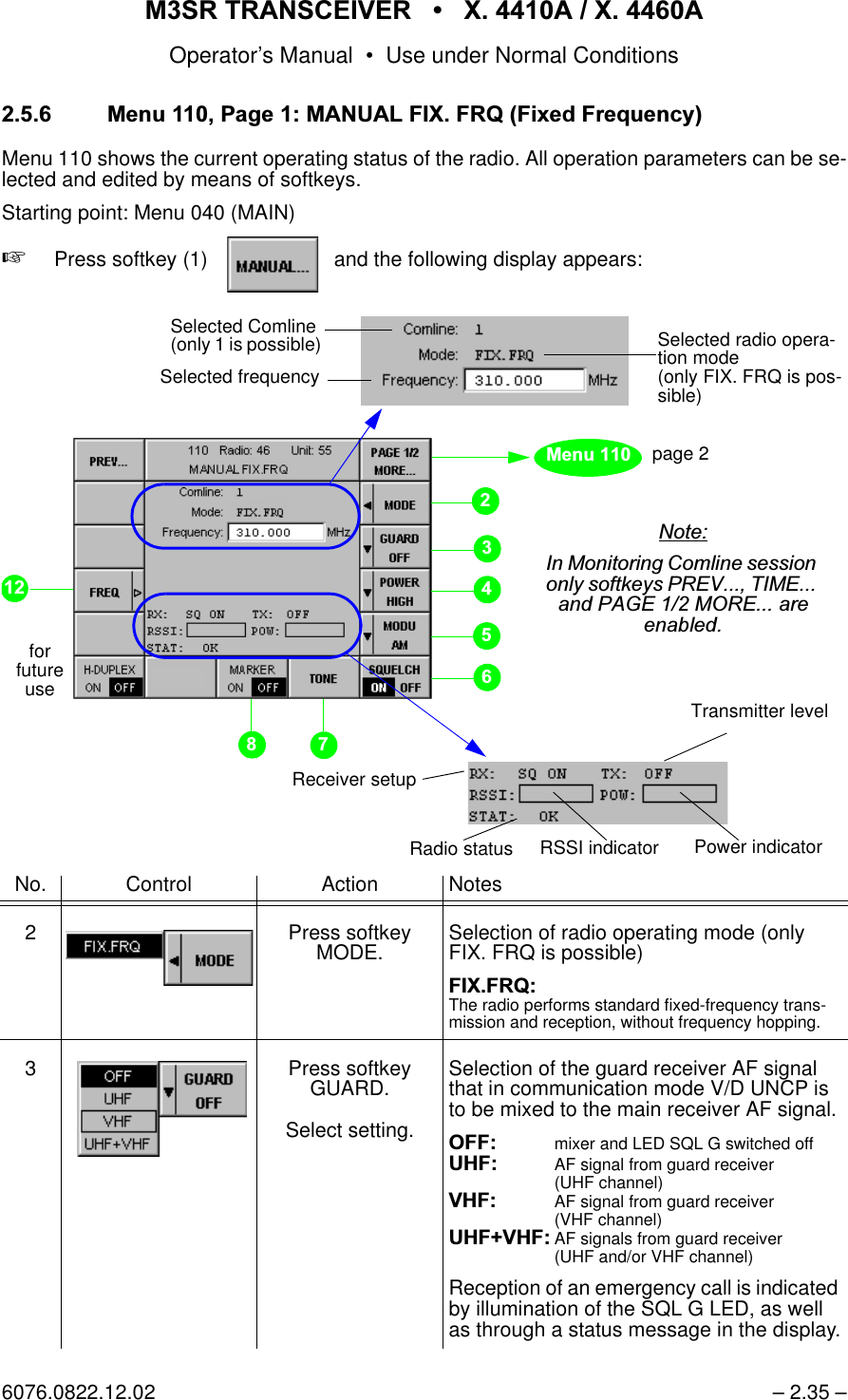
065 75$16&(,9(56  ; $  ; $Operator’s Manual– 0.4 – 6076.0822.12.02Chapter Title Page$ /$195HPRWH&RQWURO*%333URWRFRO $A3.1 General . . . . . . . . . . . . . . . . . . . . . . . . . . . . . . . . . . . . . . . . . . . . . . . . . . . . . . . . . . . . .A3.1A3.2 List of Commands . . . . . . . . . . . . . . . . . . . . . . . . . . . . . . . . . . . . . . . . . . . . . . . . . . . . .A3.1A3.2.1 • Primary Commands . . . . . . . . . . . . . . . . . . . . . . . . . . . . . . . . . . . . . . . . . . . . . . . . .A3.1A3.2.2 • Secondary Commands. . . . . . . . . . . . . . . . . . . . . . . . . . . . . . . . . . . . . . . . . . . . . . .A3.2List of FiguresFig. Title Page1.1 M3SR Transceiver X. 4410A / X. 4460A, Front View  . . . . . . . . . . . . . . . . . . . . . . . . . . . 1.11.2 Power Supply IN 4000A  . . . . . . . . . . . . . . . . . . . . . . . . . . . . . . . . . . . . . . . . . . . . . . . . . 1.31.3 Top View of e.g. XT 4410A, Mod. 22 (without Cover) . . . . . . . . . . . . . . . . . . . . . . . . . . . 1.51.4 Block Diagram of e.g. XT 4410A, Mod. 22  . . . . . . . . . . . . . . . . . . . . . . . . . . . . . . . . . . . 1.72.1 Design of Display (Principle) . . . . . . . . . . . . . . . . . . . . . . . . . . . . . . . . . . . . . . . . . . . . . . 2.92.2 Functions Related to the Communication Mode (Rx, Rx/Tx, Tx)  . . . . . . . . . . . . . . . . . 2.452.3 M3SR Transceiver X. 4410A / X. 4460A, Menu Overview  . . . . . . . . . . . . . . . . . . . . . . 2.472.4 M3SR Transceiver X. 4410A, Control and Display Elements . . . . . . . . . . . . . . . . . . . . 2.49Outline Dimensions Drawing . . . . . . . . . . . . . . . . . . . . . . . . . . . . . . . . . . . . . . . . . . . . . 6102.4002.01DF3.1 Overview . . . . . . . . . . . . . . . . . . . . . . . . . . . . . . . . . . . . . . . . . . . . . . . . . . . . . . . . . . . . . 3.23.2 Editing and Storing a Loaded Page. . . . . . . . . . . . . . . . . . . . . . . . . . . . . . . . . . . . . . . . 3.213.3 Restoring a Specific User Page. . . . . . . . . . . . . . . . . . . . . . . . . . . . . . . . . . . . . . . . . . . 3.223.4 Restoring All User Pages  . . . . . . . . . . . . . . . . . . . . . . . . . . . . . . . . . . . . . . . . . . . . . . . 3.223.5 Activating a Specific User Page  . . . . . . . . . . . . . . . . . . . . . . . . . . . . . . . . . . . . . . . . . . 3.233.6 Editing and Saving a Current Page . . . . . . . . . . . . . . . . . . . . . . . . . . . . . . . . . . . . . . . . 3.233.7 Example of a Network with Router  . . . . . . . . . . . . . . . . . . . . . . . . . . . . . . . . . . . . . . . . 3.743.8 Application Examples, e.g. XT 4410A . . . . . . . . . . . . . . . . . . . . . . . . . . . . . . . . . . . . . . 3.83A1.1 External Interfaces of X. 4410A (Front). . . . . . . . . . . . . . . . . . . . . . . . . . . . . . . . . . . .A1.33A1.2 External Interfaces (Rear) . . . . . . . . . . . . . . . . . . . . . . . . . . . . . . . . . . . . . . . . . . . . . .A1.35A1.3 External Interfaces (Rear Modules). . . . . . . . . . . . . . . . . . . . . . . . . . . . . . . . . . . . . . .A1.37
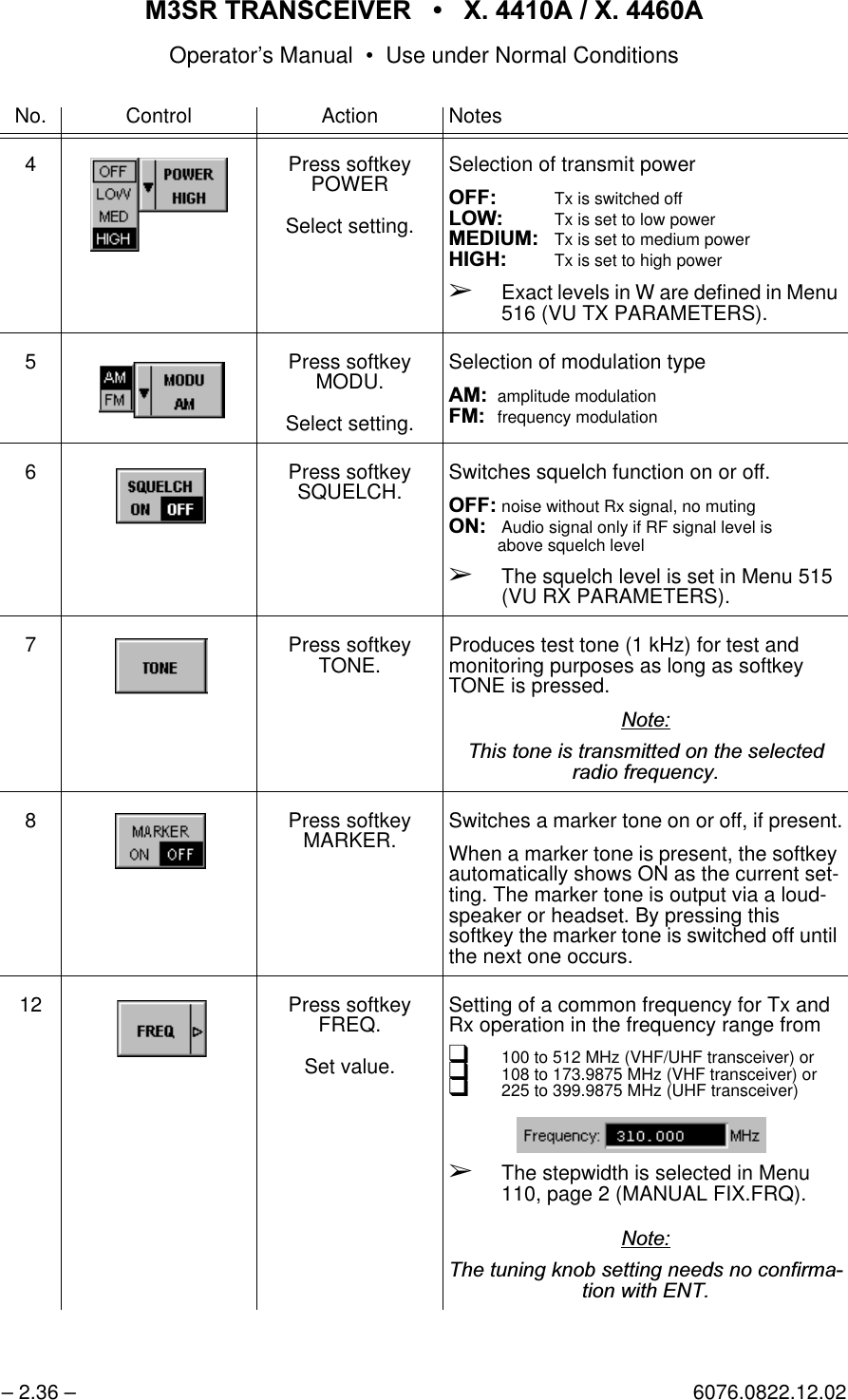
065 75$16&(,9(5  ; $  ; $Operator’s Manual • User Information6076.0822.12.01 – 1.1 – 8VHU ,QIRUPDWLRQThis manual deals with the following M3SR Transceivers:qVHF Transceivers XU 4410A and XU 4460AqUHF Transceivers XD 4410A and XD 4460AqVHF / UHF Transceivers XT 4410A and XT 4460AThe only difference between the four transceivers is the frequency range (X. means XD = UHF,XT = VHF/UHF, XU = VHF) and that M3SR Transceiver X. 4410A has a Control UnitGB 4000C, mod. 02 installed at the front instead of the dummy panel of X. 4460A. Therefore,here reference is made mostly to the "Transceiver" in general, differences being pointed out,where necessary. *HQHUDO)HDWXUHVM3SR (= Multiband, Multimode and Multirole Surface Radio) is a completely new, economic,highly flexible and future-oriented radio generation for military or non-military applications. It isdesigned as an advanced, reliable and dynamic communications platform to meet the joint tac-tical radio objectives, and meet the interoperability requirements for stationary, mobile, ship-board and even special airborne communications scenarios.The high-performance digital M3SR Transceiver can be used for transmission and reception inthe VHF and / or UHF band (in the range from 100 to 512 MHz).The radios are capable of transmitting and/or receiving analog voice, digital voice and data inall commonly used classes of emission, i.e. AM and FM in either narrowband or wideband con-figurations.M3SR Transceivers X. 4410A and X. 4460A operate in fixed frequency mode.)LJ  0657UDQVFHLYHU; $; $)URQW9LHZ; $; $
065 75$16&(,9(5  ; $  ; $Operator’s Manual • User Information– 1.2 – 6076.0822.12.01General benefits of the M3SR Transceiver are:q2SHQV\VWHPVDUFKLWHFWXUH to customize for individual initial or future needs.q'LJLWDOVRIWZDUHSURJUDPPLQJof multiband, multifunction and multimode technologyplatform for advanced data waveforms, allowing flexible use and fast upgrading.q+LJKPRGXODULW\VOLFHGUDGLRwith a variety of internal modules and rear interfacesto meet the customer’s operational and system requirements.q9HUVDWLOHPDQPDFKLQHLQWHUIDFHdue to various local control panels and remote controlunits.q6LPSOHGDWDKDQGOLQJ LQQHWZRUNVdue to compatibility with standard bus systems(RS 485, LAN).q+LJKUHOLDELOLW\ (MTBF), VKRUW 0775 and efficient testability together with optimummaintainability.([SODQDWLRQRI0RGHOVEach of the transceiver types is available in different models, which are distinguished as fol-lows. "xx" in the identification number stands for the model designator.XT 4410A (ident. no. 6102.0307.xx):XT 4460A (ident. no. 6102.1103.xx)XD 4410A (ident. no. 6122.1109.xx)OptionModel03 13 22 31 41 42LINK 11 (CLEW) SW package x xGuard Receiver ET 4400G x x xUHF Filter FD 4430 x xOptionModel02 03 13 31 41OCXO xxxxLINK 11 (CLEW) SW package x xGuard Receiver ET 4400G x xOptionModel03 13 15 31LINK 11 (CLEW) SW package x xGuard Receiver ET 4400G xAntenna Interface GI 4403, mod. 02 x
065 75$16&(,9(5  ; $  ; $Operator’s Manual • User Information6076.0822.12.01 – 1.3 – 5HTXLUHG3HUVRQQHOConfiguration of the M3SR Transceiver will have to be done by qualified personnel. Installationand operation of the transceiver should be assigned to adequately skilled personnel. The personnel must be familiar with this Operator’s Manual. 5HTXLUHG3RZHU6XSSO\The M3SR Transceiver operates on a DC voltage of 28 VDC (19 to 31 VDC). This voltage isprovided by the external AC Power Supply IN 4000A (19" rackmount of 1 height unit) availablefor the purpose. The connecting cable between transceiver and AC Power Supply IN 4000A isavailable on demand.The transceiver may also be powered by an external battery (22 to 31 VDC). An automaticswitchover facility integrated in the transceiver provides for automatic standby switchover incase primary power fails.)LJ 3RZHU6XSSO\,1 $
065 75$16&(,9(5  ; $  ; $Operator’s Manual • User Information– 1.4 – 6076.0822.12.01'HVLJQHJ;7 $0RG(See Fig. 1.3)The M3SR Transceiver is accommodated in a sturdy 19" case of 3 height units, its top beingformed by a detachable screwed-down metal cover. After removing this cover, the modules ofXT 4410A become visible, which are:qRadio Basis KR 4400, Mod. 04It is formed by several items, namely the mechanical parts chassis and housing, whichaccommodate the internal transceiver modules. Located in the left-hand part of the chas-sis is the radio platform, containing a number of interface connectors for interfacing withthe internal subassemblies and also with the outside. For internal signal transfer a RadioModule Bus, consisting of Radio Control Bus and Radio Data Bus, is available. Anotherpart of the radio basis is the Front Panel Unit, located directly at the front on the right. Itcontains various control and display elements such as LEDs and buttons, external con-nectors as well as a loudspeaker.qVHF/UHF Receiver ET 4400 (main receiver)The receiver is a plug-in module located in one of the slots in the centre left-hand part ofthe chassis. It is of compact design, both sides being EMC-protected by appropriateshielding covers. Once plugged into the radio platform in its assigned slot, the receiver isheld in place by quick-release fasteners. qVHF/UHF Synthesizer GF 4400TThe synthesizer is a plug-in module located in one of the slots in the centre left-hand partof the chassis. It is of compact design, both sides being EMC-protected by appropriateshielding covers. Once plugged into the radio platform in its assigned slot, the synthesiz-er is held in place by quick-release fasteners.qInterface Module GH 4450The interface module is a plug-in module in the left-hand rear part of the chassis. At itstop it carries several connectors for ribbon-cable connections towards the transmitterunit. In addition, the plug-in module contains three interfaces for the rear modules.qTransmitter Unit VT 4403, Mod. 02The transmitter unit is a power module located in the right-hand part of the chassis andextending over its full depth. It is made up of the actual transmitter board at the top andthe DC power supply located underneath. Both subassemblies are shielded by EMC cov-ers. Also part of the transmitter unit is a heat sink with two fans, which are accommodateddirectly at the rear, also on the right-hand side.qControl Unit GB 4000C, Mod. 02The control unit is located at the front on the left-hand side. It contains a display, controland display elements such as LEDs, fixed-function keys and softkeys, a keypad and aconnector.qUHF Filter FD 4430The UHF filter is a plug-in module located in the centre left-hand part of the chassis, nextto the control unit. Once plugged into the radio platform in its assigned slot, the UHF filteris held in place by quick-release fasteners.
065 75$16&(,9(5  ; $  ; $Operator’s Manual • User Information6076.0822.12.01 – 1.5 –)LJ  7RS9LHZRIHJ;7 $0RGZLWKRXW&RYHU9+)8+)7UDQVPLWWHU%RDUGwith'&3RZHU6XSSO\underneath(both are part ofTransmitter Unit VT 4403, Mod. 02)+HDWVLQNZLWKWZRIDQV(part of VT 4403, Mod. 02)3RZHUPRGXOHV)URQW3DQHO8QLW(part of KR 4400),QWHUIDFH0RGXOH*+ 9+)8+)6\QWKHVL]HU*) 73OXJLQPRGXOHV9+)8+)5HFHLYHU(7 )UDPH(part of Ra-dio Basis KR 4400)5DGLR3ODWIRUP(part of KR 4400)&RQWURO8QLW*%&0RG1RWH5DGLRSODWIRUPFRQQHFWRUVVKRZQZLWKRXWSURWHFWLYHFDSV8+))LOWHU)' 
065 75$16&(,9(5  ; $  ; $Operator’s Manual • User Information– 1.6 – 6076.0822.12.01 )XQFWLRQLQJHJ;7 $0RG(See Fig. 1.4)The Radio Platform contains the central processor (= server) of the M3SR Transceiver. ViaLAN/Ethernet, the server is connected to its clients. Clients may be an integrated Control UnitGB 4000C (mod. 02) and/or further Control Units GB 4000C (mod. 03) connected via the LANconnector X20 and a LAN hub, or customer-specific devices. The clients plus the softwarepackage DS4400A form the MMI (= man-machine interface) of the M3SR Transceiver. Clientsare controlled by using the GB2PP protocol. The MMI guides the operator through menu-basedoperating procedures and selectively visualizes all states on the display. Commands are en-tered by making use of the control elements and the keypad. Operation and indication of thetransceiver’s operating status are both menu-oriented, operator interaction is performed via thedisplay and keyboard. The modules are controlled by the central processor via the Radio Mod-ule Bus (RMB). The Radio Platform stores all parameters relating to the individual modules. Asystem monitor monitors the temperatures and operating voltages. In a clock section all clocksignals needed by the radio platform are generated. The RMB connects the modules ofXT 4410A to one another and also to the central processor and the I/O interfaces. Serial inter-faces are used for data transmission and remote control purposes. Parallel interfaces serve asdiscrete inputs and outputs and control for instance an externally connected filter and / or am-plifier. An Audio Frequency Interface (AFI) processes the analog signals in digital form so thatthey can be transmitted digitally on the Radio Data Bus (RDB).The Front Panel connected at the Radio Platform carries the control and display elements forhandling the basic transceiver functions. An Ethernet port is available for sending and receivingdata for service purposes (configuration and software download).When the transceiver operates in receive mode, the RF signal is taken from antenna connectorX30 to the VHF/UHF Transmitter Board. From here it is routed via a Tx/Rx switch to the UHFFilter FD 4430. The input stages of the filter are directly protected for electrostatic discharge.The filter is working for the VHF/UHF Receiver ET 4400 (main receiver) as a preselector to re-duce the interfering levels from other radios of the platform. In the main receiver, the RF signalpasses along a VHF path (100 to 224.975 MHz) or a UHF path (225 to 512 MHz) to the mixerstages. The mixer stages get the LO signal (365 to 652 MHz) from VHF/UHF SynthesizerGF 4400T. The AGC-controlled 2nd IF signal with a frequency of 455 kHz is demodulated in thedigital section of the receiver. The demodulated baseband signal is taken to the RDB for furtherprocessing.In transmit operation, VHF/UHF Synthesizer GF 4400T generates a carrier frequency in therange from 100 MHz to 512 MHz. For amplitude modulation, this carrier frequency is modu-lated by the VHF/UHF Transmitter Board. FM signals (both analog FM and digital FSK signals)are generated by the synthesizer to be merely amplified by the VHF/UHF Transmitter Board(signal RF_Drive). After amplification and filtering, the resulting signal is made available at an-tenna connector X30. The UHF Filter FD 4430 is working as postselector. The filter chain islocated within the transmit path of the radio. The selectivity of the filter chain reduces the trans-mitted noise energy of the radio which may degrade the sensitivity of other receiving radios onthe platform.Interface Module GH 4450 connects the RMB and discrete signals between the Radio Plat-form,  the VHF/UHF Transmitter Board and up to three further rear modules. Switchover be-tween transmission and reception is effected via the RMB.The integrated DC Power Supply uses the +28-VDC input voltage to generate all voltages re-quired in XT 4410A.
065 75$16&(,9(5  ; $  ; $Operator’s Manual • User Information6076.0822.12.01 – 1.7 –)LJ  %ORFN'LDJUDPRIHJ;7 $0RG&RQWURO8QLW9+)8+)5HFHLYHU(7 9+)8+)6\QWKHVL]HU*) 7*%&0RG5DGLR 3ODWIRUP5()B,1 ;5()B287 ;$PS)LO;$PS)LO ;0LVF ;0LVF;56 ;56 ;$);$);'LVSOD\ .H\ERDUG.'' ;.'' ;(WKHUQHW ; +HDGVHW ;5[(WKHUQHW ;)URQW 3DQHOµ&&ORFN50%$XGLR,2,QWHUIDFHV6HULDO3DUDOOHO(WKHUQHW)UHTXHQF\,QWHUIDFH6HFWLRQ5DGLR %DVLV.5 6HUYHU&OLHQW(WKHUQHW(WKHUQHW8+))LOWHU)' /2B5[,QWHUIDFH%RDUG*+ %$77(5< ;5)B'ULYH9+)8+)7UDQVPLWWHU%RDUG'&3RZHU6XSSO\'&B,1 ;&21752/;$QWHQQD ;7UDQVPLWWHU 8QLW97 5[B,Q7[B,Q7[B2XW5[B2XW
065 75$16&(,9(5  ; $  ; $Operator’s Manual • User Information– 1.8 – 6076.0822.12.01 *HQHUDO'DWDSee data sheet for Digital Programmable Software Radios of Series M3SR in Appendix A1.
065 75$16&(,9(5  ; $  ; $Operator’s Manual • User Information6076.0822.12.01 – 1.9 – 'HWDLOHG 6DIHW\ 5XOHVEstablish the cabling only if the transceiver is switched off.When fitting operating rooms and installing and operating electrical equipment, the relevant na-tional and international safety provisions and regulations have to be adhered to.The following safety instructions apply in particular:qIEC 364qVDE 0100qDIN 57100These safety regulations deal with the following subjects:ÇProtective measures:Prevention of accidentsOvervoltage protectionInsulation of equipmentGroundingÇType and laying of lines and cablesÇProvisions for operational facilities, rooms and equipment requiring special handling
065 75$16&(,9(5  ; $  ; $Operator’s Manual • User Information– 1.10 – 6076.0822.12.01 $FFHVVRULHV3RZHU6XSSO\IN 4000A$QWHQQDVHK 014not shown:HK 012HK 001&RQWURO8QLWVGB 4000C, mod. 03(remote version)not shown:GB 406.. on request)LOWHUDQG$PSOLILHUVFD 430not shown:VU 210LVU 220LVD 480L+DQGVHWVDQG+HDGVHWVGA 015not shown:GA 012GA 013GA 016H10DWLQJ&RQQHFWRUnot shown:ZF 4410
065 75$16&(,9(5  ; $  ; $Operator’s Manual • Use under Normal Conditions6076.0822.12.01 – 2.1 –8VH XQGHU 1RUPDO &RQGLWLRQV ,QWURGXFWLRQThis chapter provides information concerningqUnpacking and checkingqInstallation into a 19" rackqBasic cablingqOperation - Introduction to Displays and Controls - Switching the Transceiver On and Off - Menu RADIO CONNECTION - Menu COMLINE SESSION - Menu MAIN - Menu MANUAL FIX. FRQ - Menu USER PRESET FIX.FRQ - Menu EMERGENCY MODE8QSDFNLQJDQG&KHFNLQJAfter delivery carry out the following steps:1. Unpack the transceiver.2. Check if delivery (transceiver and accessories) is complete by referring to the delivery note.3. Check the transceiver and accessories for signs of damage which may have occurred during transit.4. Contact the shipping agent immediately, if damage is found.5. Keep the packaging (box etc.) for later use, e.g. if the transceiver is to be sent to the near-est R&S representative for repair (see address list following the title page of this manual).
065 75$16&(,9(5  ; $  ; $Operator’s Manual • Use under Normal Conditions– 2.2 – 6076.0822.12.01 ,QVWDOODWLRQLQWRD5DFN(See drawing 6102.4002.01DF at the end of this chapter)1RWH7KHWHOHVFRSLFVOLGHVDUHDYDLODEOHRQGHPDQGLGHQWQRRQO\IRUUDFNVSURYLGLQJIRUDVHDWHGGHSWKRIPPDQGDFFHVVLEOHIURPWKHUHDURUIRUWUDLOLQJFDEOHLQVWDOODWLRQ)L[LQJ DWUDFNIURQWHJ; $ ([WHQVLRQ6LGHOHQJWK[3KLOOLSVVFUHZV0[,GHQWQR[:DVKHU,GHQWQR0D[VFUHZLQGHSWKPP/RDGUDWLQJIRUHDFKVOLGHSDLU1,GHQWQR 
065 75$16&(,9(5  ; $  ; $Operator’s Manual • Use under Normal Conditions6076.0822.12.01 – 2.3 –For installation into a 19" rack with telescopic slides proceed as follows:1. Take the right-hand telescopic slide and extend it as far as it goes.2. Press the automatic unlocking device and pull the innermost slide completely out.3. Attach the innermost slide to the right-hand side panel of the transceiver by means of four Phillips screws and the associated washers (see figure above).4. Take the left-hand telescopic slide and extend it as far as it goes.5. Press the automatic unlocking device and pull the innermost slide completely out.6. Attach the innermost slide to the left-hand side panel of the transceiver by means of four Phillips screws and the associated washers (see figure above).7. Take the outer telescopic slides and mount them to the rack.8. Insert the transceiver, with its slides fitted, into the extended slides of the rack and slide it in until the stop is reached.9. Fasten the transceiver to the rack using four screws.10. Cable the transceiver at its rear acc. to chapter 2.4.
065 75$16&(,9(5  ; $  ; $Operator’s Manual • Use under Normal Conditions– 2.4 – 6076.0822.12.01 %DVLF&DEOLQJ&$87,21&RQQHFWWKHPDLQVFDEOHRQO\DIWHUDOORWKHUFDEOLQJKDVEHHQPDGH 065 7UDQVFHLYHUHJ;7 $ 5HDU&DEOLQJCabling to be made at the rear:X31: DC IN is protected against reverse polarity (no function in this case).1RWH7KHFRQQHFWLQJFDEOHEHWZHHQFRQQHFWRU;'& ,1RI;7 $DQGFRQQHFWRU;RI$&3RZHU6XSSO\,1 $LVDYDLODEOHRQGHPDQGRUGHUQXPEHUOHQJWK PX32: Optional battery connection (+19 to +31 VDC, ≤25 A) for automatic switchover in thecase of power failure.  GND  GNDHJ;7 $,1$X1 AC Mains(85 to 265 VAC)X32 Battery24 VDC (19to31VDC)X31 DC IN X30 to AntennaX2
065 75$16&(,9(5  ; $  ; $Operator’s Manual • Use under Normal Conditions6076.0822.12.01 – 2.5 – )URQW&DEOLQJCabling to be made at the front:1RWH)RUGHWDLOHGLQIRUPDWLRQRQFRQQHFWRUVDQGFRQWDFWDVVLJQPHQWVHHLQWHUIDFHGHVFULSWLRQLQ$SSHQGL[$7HFKQLFDO,QIRUPDWLRQ&RQQHFWRUIRUIXWXUHXVH)LOO*XQ&RQQHFWRUnot used6HUYLFH&RQQHFWRUused for connecting a PCfor•remote control•software download•monitoring•analysis&RQQHFWRU IRU+HDGVHW*$used for LOCALmode operation(voice)
065 75$16&(,9(5  ; $  ; $Operator’s Manual • Use under Normal Conditions– 2.6 – 6076.0822.12.01065 7UDQVFHLYHUHJ;7 $ 5HDU&DEOLQJCabling to be made at the rear:X31: DC IN is protected against reverse polarity (no function in this case).1RWH7KHFRQQHFWLQJFDEOHEHWZHHQFRQQHFWRU;'& ,1RI;7 $DQGFRQQHFWRU;RI$&3RZHU6XSSO\,1 $LVDYDLODEOHRQGHPDQGRUGHUQXPEHUOHQJWK PX32: Optional battery connection (+19 to +31 VDC, ≤25 A) for automatic switchover in thecase of power failure.  GND ,1$X1 AC Mains(85 to 265 VAC)X32 Battery24 VDC (19to31VDC)X31 DC IN X30 to AntennaX2X20 LANX44 LANX33 Control24 V (external, switched)  GND   GND*%&0RGHJ;7 $X42 Battery24 VDC (19 to 31 VDC)
065 75$16&(,9(5  ; $  ; $Operator’s Manual • Use under Normal Conditions6076.0822.12.01 – 2.7 – )URQW&DEOLQJCabling to be made at the front:1RWH)RUGHWDLOHGLQIRUPDWLRQRQFRQQHFWRUVDQGFRQWDFWDVVLJQPHQWVHHLQWHUIDFHGHVFULSWLRQLQ$SSHQGL[$7HFKQLFDO,QIRUPDWLRQ6HUYLFH&RQQHFWRUused for connecting a PCfor•remote control•software download•monitoring•analysis&RQQHFWRUIRU+HDGVHW*$not used)LOO*XQ&RQQHFWRUnot used
065 75$16&(,9(5  ; $  ; $Operator’s Manual • Use under Normal Conditions– 2.8 – 6076.0822.12.022SHUDWLRQ ,QWURGXFWLRQWR'LVSOD\VDQG&RQWUROVFor transceiver control, a multi-function man-machine interface is provided, featuring qDisplayqSoftkeys (menu-dependent multi-functional keys)qKeys with a fixed function (such as ON / OFF switch, ENTER key, numerical keypad, cur-sor control keys)qKey combinationsqControls (such as volume control and rotary knob)qIndicators (LEDs signalling the operating status)
065 75$16&(,9(5  ; $  ; $Operator’s Manual • Use under Normal Conditions6076.0822.12.02 – 2.9 – 'LVSOD\RQO\; $Reflecting its design as a software radio, the M3SR Transceiver controlled via GB 4000C relieson a menu-based control concept, the operator being guided through the individual menus andsubmenus and having a variety of selection options. This chapter assumes that the individual functions or submenus are called up starting on themain menu level. If necessary, press key MENU HOME (see chapter 2.5.1.4) to go to the mainmenu straight from any other level. )LJ 'HVLJQRI'LVSOD\3ULQFLSOHCalls the previous menu,QIRUPDWLRQ(GLW %R[Overview of operating statesand fields for manual inputsdepending on the selected operating mode0HQX1R5DGLR$GGU&RQWURO 8QLW $GGU0HQX7LWOH7LWOH $UHD RI 0HQX'LVSOD\)LHOGVZLWK6RIWNH\1DPHVBy using the associated softkeys various functions and parameter settings can be selected depending on the active menu Calls the next page of the same menu/L is only displayed if key LOCAL is pressed (LOCAL mode).
065 75$16&(,9(5  ; $  ; $Operator’s Manual • Use under Normal Conditions– 2.10 – 6076.0822.12.026RIWNH\VRQO\; $2.5.1.2.1 Softkey NumbersThe softkey numbering as shown by the example above is maintained throughout this chapter.2.5.1.2.2 Explanation of Softkey SymbolsThe use of symbols in the menu-dependent softkey designations follows some simple rules:This menu contains two pages. The page currently shown is page one.One menu is following, which is opened by pressing the softkey. The cur-rent setting is shown in the direction pointed out by the black arrowhead.Example:This menu is disabled right now (letters light-faced, i.e. not bold) or it is notpresent.Softkey No.SoftkeyNo.
065 75$16&(,9(5  ; $  ; $Operator’s Manual • Use under Normal Conditions6076.0822.12.02 – 2.11 –Some basic concepts need to be explained in order to fully understand the following chapters.One menu is following. The current setting is shown in the second line (ex-ample: HIGH).Example:Toggle switch with two functions, the currently active function is high-lighted.Fixed function: The tone is produced as long as you keep pressing thekey.(Three dots): Further menus are following.After pressing the associated softkey a parameter can be entered/editedmanually. In the direction pointed out by the arrowhead, the value (e.g. fre-quency) is displayed.Example:Press to return to previous menu.The asterisk (*) indicates that the new settings have not yet been stored.When the menu is left without storing the new settings, a warning comes up.+Press softkey SAVE * to save the current data or+Press key ENT to discard thechanges and leave.
065 75$16&(,9(5  ; $  ; $Operator’s Manual • Use under Normal Conditions– 2.12 – 6076.0822.12.022.5.1.2.3 Value SelectionqSelection within a set of values (example: power) can be made in different ways:1. Press the appropriate softkey associated to the relevant display field as many times asrequired, selection being made in forward direction. Confirm by pressing the ENTER key.The previously set value remains highlighted until a new setting is selected and con-firmed with ENTER.Example:2. Select by turning the tuning knob (in either direction). Confirm by pressing the ENTER key.Example:qNumerical values (example: frequency) can be set by using either the numerical keypad or the tuning knob and the ENTER key.Example:andSoftkeyandTuning Knoborandand
065 75$16&(,9(5  ; $  ; $Operator’s Manual • Use under Normal Conditions6076.0822.12.02 – 2.13 –qAn arrow after a figure means that if this numerical value has been changed it must be confirmed with ENTER.Example:qToggle switches are actuated by just pressing the appropriate softkey, i.e. without ENTER.Example:without
065 75$16&(,9(5  ; $  ; $Operator’s Manual • Use under Normal Conditions– 2.14 – 6076.0822.12.02 .H\VZLWK)L[HG)XQFWLRQq212)) Key (Control Unit GB 4000)Switching the transceiver on (but not off), or during operation switching the display off and on again.q0(18+20( Key (Control Unit GB 4000)Switching the transceiver to the Menu 040 (MAIN) straight from any other level.q(6&&/5 Key (Control Unit GB 4000)Deleting entries or aborting processes.q(17 Key (Control Unit GB 4000)Confirming entries or initiating processes.qNumerical keypad (Control Unit GB 4000)Input of numerical values and decimal point and in- or decrementing selection.q5(6(7 Button (Front Panel)When pressing this button all software in the transceiver will be reset and after a short time the software will be restarted. The last activated menu will be displayed.Key ON / OFF *)Key MENU HOME *)Button RESETKey ESC / CLR *)Key ON / OFFKey ENT *)Key LOCALKey SELECTNumerical keypad *)*) only X. 4410A
065 75$16&(,9(5  ; $  ; $Operator’s Manual • Use under Normal Conditions6076.0822.12.02 – 2.15 –q6(/(&7 Key (Front Panel)By using the SELECT key one of the AF sources for the loudspeaker can be selected thathave been configured in Menu 575 (FRONTPANEL AUDIO SOURCE), e.g. CL1 (Com-line) or Guard U/V. A Comline is a functional unit of radio modules.When CL1 is selected as AF source and communication mode V/D UNCP is active, theguard receiver AF signal can be output at the loudspeaker in addition to the main receiverAF signal, depending on the GUARD configuration (see Menu 110, page 1 (MANUALFIX.FRQ) and Menu 210, page 1(MANUAL PRESET FIX.FRQ)).After power-on, Comline 1 is selected by default. This is indicated by illumination ofLED 1.The following table shows how LEDs 1 and 2 are related and which AF signal is output by the loudspeaker:q/2&$/ Key (Front Panel)1RWH8VLQJWKLVNH\RQO\PDNHVVHQVHZLWK065 7UDQVFHLYHU; $Activate local mode.LED LOCAL lights up.In the menu title area an ’L’ comes up.The transceiver is controlled exclusively via Control Unit GB 4000C, mod. 02. In localmode the same functions are available as in remote mode, although here only commu-nication mode V/D UNCP makes sense.LED AF signal12no AF signalOLJKWHG AF signal of main receiver and in addition of guard receiver, if switched on via softkey GUARD in Menu 110 (MANUAL FIX.FRQ) or 210 (USER PRESET FIX.FRQ).IODVKLQJ AF signal of guard receiver (VHF band)IODVKLQJ AF signal of guard receiver (UHF band)IODVKLQJ IODVKLQJ AF signal of guard receiver (VHF and UHF bands)LED 1 lighted1. Press key LED 1 and 2 flashing2. Press key none of the LEDs lighted3. Press key LED 1 lighted
065 75$16&(,9(5  ; $  ; $Operator’s Manual • Use under Normal Conditions– 2.16 – 6076.0822.12.02Running remote control sessions (fixed, advanced) are terminated.Control units, which may be connected, are able to operate in remote control sessions (monitoring) only.In local mode the four audio lines (NB1, WB1, NB2, WB2) have no function. In voicemode (V/D UNCP) the signal from the headset interface is used for carrier modulation.The demodulated AF signal will be made available also at the headset interface.ALC (automatic level control) is performed in the front panel unit, compensating volume variations of voice signals. The Tx ALC cannot be disconnected.Carrier activation is performed in voice mode (V/D UNCP) via the headset interface.In Menu 550 (PTT COMLINE MAPPING) the four PTT lines (PTT_1, PTT_1L, PTT_2, PTT_2L) can be configured also for local mode. For more details on PTT mapping refer to chapter 3.1RWH:HUHFRPPHQGQRWWRFRQILJXUHWKH377OLQHVIRUORFDOPRGHDVWKLVPD\UHVXOWLQXQZDQWHGFDUULHUDFWLYDWLRQE\RQHRIWKHFRQQHFWHGGHYLFHVWhen local mode is left by pressing the LOCAL key, all settings which were active whenremote mode was last left will be reactivated. However, changes made in Menus 400(RADIO MAINTENANCE) and 600 (RADIO SETUP) will be preserved!For more details on communication modes, sessions, line mapping etc. see chapter 3.q212)) Key (Front Panel)Switching the transceiver on or off.
065 75$16&(,9(5  ; $  ; $Operator’s Manual • Use under Normal Conditions6076.0822.12.02 – 2.17 – .H\&RPELQDWLRQVBy hitting the following key combinations on Control Unit GB 4000C and the Front Panel, re-spectively, special commands can be given to the M3SR Transceiver..H\FRPELQDWLRQRQ&RQWURO8QLWRQO\; $'HVFULSWLRQ HIIHFWRQ065 7UDQVFHLYHU(6&&/5 and 212))or(6&&/5 and .H\The radio initiates an Emergency Clear.This works always, i.e. also in a Monitoring Ses-sion. No Advanced or Fixed Session is re-quired. Zeroize is available as output signal at connec-tor contact X26.24 (AF1) (refer to interface de-scription in Appendix A1).In the case that a Cipher Unit KY58 is con-nected, emergency clear will erase the KY58data.0(18+20( and (17 at the same timeInitiates the procedure for system PIN numberinput (see chapter 3).System PIN numbers cannot be changed sincethey are firmly tied to the hardware.The following 4 keys at the same time:8SSHU OHIW VRIWNH\ and 212)) andXSSHU ULJKWVRIWNH\ and (17Initiates a control unit RESET.The control unit then re-establishes the remotecontrol connection to the radio and displays thelast menu active before the RESET..H\FRPELQDWLRQRQ)URQW3DQHO 'HVFULSWLRQ HIIHFWRQ065 7UDQVFHLYHU6(/(&7 and 10 x /2&$/ within 10 sec Sets the default IP (Internet Protocol) address:Platform CPLAT set to 192.168.52.46This is necessary when incorrect IP addresseswere entered and the default IP address is to beused again for establishing a remote controlconnection to a radio.
065 75$16&(,9(5  ; $  ; $Operator’s Manual • Use under Normal Conditions– 2.18 – 6076.0822.12.02&RQWUROVqTuning Knob (Control Unit GB 4000)Selecting values.qLoudspeaker Volume Control (Front Panel)Adjusting volume:Low: control turned fully counter-clockwiseFull: control turned fully clockwiseqHeadphone Volume Control (Front Panel)Adjusting volume:Low: control turned fully counter-clockwiseFull: control turned fully clockwiseVolume ControlLoudspeakerTuning Knob(only X. 4410A) Volume ControlHeadphone
065 75$16&(,9(5  ; $  ; $Operator’s Manual • Use under Normal Conditions6076.0822.12.02 – 2.19 – ,QGLFDWRUVqLED 21 (Control Unit GB 4000)is illuminated when the control unit is on.qLED &8 (Control Unit GB 4000)is illuminated when the control unit is fully operative.qLED * (Control Unit GB 4000)lights up when the guard receiver squelch opens.qLED *2 (Control Unit GB 4000)is illuminated when the transceiver is fully operative.qLED .(< (Front Panel)signals that a device connected at the Fill Gun connector has been detected and that the transceiver is ready to load data. qLED *2 (Front Panel)signals that the M3SR Transceiver is fully operative.qLED &$55 (Front Panel)signals availability of a carrier signal at the antenna connector in transmit operation.qLED 64/ 0 (Front Panel)indicates reception of a signal by (main) Receiver ET 4400 (squelch).LED ON *)LED CU *) LED G *)LED GO *)LED KEYLED GOLED CARRLED SQL MLED SQL GLED LOCALLEDs 1 to 4LED BATTLED AC/DC*) only X. 4410A
065 75$16&(,9(5  ; $  ; $Operator’s Manual • Use under Normal Conditions– 2.20 – 6076.0822.12.02qLED 64/ * (Front Panel)indicates reception of a signal by Guard Receiver ET 4400G.qLEDs  to  (Front Panel)indicate which signal is being output via the loudspeaker (3 + 4 presently not used):qLED /2&$/ (Front Panel)is illuminated when the LOCAL key has been pressed, indicating that the transceiver can be controlled only locally via the integrated control unit. In addition, a headset (PTT key, microphone), which may be connected, will be enabled as well.qLED %$77 (Front Panel)signals availability of battery power.qLED $&'& (Front Panel)signals availability of AC/DC power.LED AF signal1234no AF signalOLJKWHG AF signal of main receiver and in addition of guard receiver, if switched on via softkey GUARD in Menu 110 (MANUAL FIX.FRQ) or 210 (USER PRESET FIX.FRQ).IODVKLQJ AF signal of guard receiver (VHF band)IODVKLQJ AF Signal of guard receiver (UHF band)IODVKLQJ IODVKLQJ AF signals of guard receiver (VHF and UHF bands)
065 75$16&(,9(5  ; $  ; $Operator’s Manual • Use under Normal Conditions6076.0822.12.02 – 2.21 –6ZLWFKLQJWKH7UDQVFHLYHU2QDQG2II 0657UDQVFHLYHU; $2.5.2.1.1 Minimum RequirementsBefore putting the M3SR Transceiver X. 4410A into operation make sure that the following min-imum requirements are met: •AC Power Supply IN 4000A (or a battery complying with the technical specifications) is available.•Antenna is connected.•Handset or headset is connected.•See also chapter 2.4 "Basic Cabling".2.5.2.1.2 Switching On1RWH:KHQVWDUWLQJXSWKHWUDQVFHLYHUWKHODVWPHQXZKLFKZDVDFWLYHEHIRUHVZLWFKLQJRIILVFDOOHGXSDJDLQRUWKHSURPSWIRU3,1HQWU\FRPHVXSLIWKHODVWPHQXZDV3,1SURWHFWHG+Press key ON / OFF on the Front Panel or Control Unit GB 4000C (see figure)..H\212)) .H\212))switches the transceiver on (but not off), or during opera-tion switches the display off and on againswitches the transceiver on / off
065 75$16&(,9(5  ; $  ; $Operator’s Manual • Use under Normal Conditions– 2.22 – 6076.0822.12.02qAll LEDs pointed out above are illuminated to indicate readiness for operation, their indi-vidual messages are:LED ON: control unit ready for operationLED CU: control unit okLEDs GO: radio okLED AC/DC: power availableLED 1: indicates which signal is being output via the loudspeaker1RWH,I/('UHPDLQVGDUNSUHVVWKH6(/(&7NH\qThe last activated menu is called up again, or the prompt for PIN entry comes up if the last menu was PIN-protected./('&8 /('21/('*2 /('*2 /('$&'&/('
065 75$16&(,9(5  ; $  ; $Operator’s Manual • Use under Normal Conditions6076.0822.12.02 – 2.23 –2.5.2.1.3 Switching Off+Press key ON / OFF on the Front Panel.qControl Unit GB 4000C, mod. 02 (left-hand part of the control panel) may be switched offseparately by using the ON/OFF key on its front panel. In this case the display will go darkalthough the radio is still operative.1RWH7KHFRQWUROXQLWGLVSOD\ZLOODOVREHGDUNZKLOHWKHVFUHHQVDYHULVDFWLYH+Press key ON/OFF.qDisplay goes dark and LED ON is extinguished..H\212))switches the transceiver on / off/('21.H\212))switches the control unit display off and on
065 75$16&(,9(5  ; $  ; $Operator’s Manual • Use under Normal Conditions– 2.24 – 6076.0822.12.02065 7UDQVFHLYHU; $2.5.2.2.1 Minimum RequirementsBefore putting the M3SR Transceiver X. 4460A into operation make sure that the followingminimum requirements are met: •Control Unit GB 4000C, mod. 03 (remote version) is connected with the transceiver via LAN.•Control Unit GB 4000C, mod. 03 is connected with the power distribution system.•AC Power Supply IN 4000A (or a battery complying with the technical specifications) is available.•Antenna is connected.•See also chapter 2.4 "Basic Cabling".2.5.2.2.2 Switching On+Press key ON / OFF on the Front Panel (see figure).+Press key ON / OFF on Control Unit GB 4000C, mod. 03..H\212))switches the transceiver on / off.H\212)) switches the control unit on / off
065 75$16&(,9(5  ; $  ; $Operator’s Manual • Use under Normal Conditions6076.0822.12.02 – 2.25 –qAll LEDs pointed out above are illuminated to indicate readiness for operation, their indi-vidual messages are:LED ON: control unit ready for operationLED CU: control unit okLEDs GO: radio okLED AC/DC: power availableLED 1: indicates which signal is being output via the loudspeaker1RWH,I/('UHPDLQVGDUNSUHVVWKH6(/(&7NH\qThe last activated menu is called up again, or the prompt for PIN entry comes up if the last menu was PIN-protected./('*2 /('$&'&/('&8 /('21/('*2Control Unit GB 4000C, Mod. 03 /('
065 75$16&(,9(5  ; $  ; $Operator’s Manual • Use under Normal Conditions– 2.26 – 6076.0822.12.022.5.2.2.3 Switching Off+Press key ON / OFF on Control Unit GB 4000C, mod. 03.qLED ON is extinguished.+Press key ON / OFF on the Front Panel./('21.H\212)) switches the control unit display off and on.H\212))switches the transceiver on / off
065 75$16&(,9(5  ; $  ; $Operator’s Manual • Use under Normal Conditions6076.0822.12.02 – 2.27 – 0HQX5$',2&211(&7,21Via Menu 010 the link setup between Control Unit GB 4000C and the radio is done.Starting point: Switching OnqThe following display appears:No. Control Action NotesSet address.Confirm with ENTER.Setting logical radio address in the rangefrom 001 to 999.1RWH:KHQWKH065 7UDQVFHLYHULVRSHUDWHGLQDQHWZRUNWKHDGGUHVVHVQHHGWREHFRQILJXUHGYLD0HQXV5$',2$''5(665287($''5(66/,67DQG&8$''5(665287(Address edit field0HQX:KHQSXWWLQJWKHUDGLRLQWRRSHUDWLRQWKHILUVWWLPH+Enter default address 46.:KHQWKHHQWHUHGDGGUHVVGRHVQRWSHUPLWWRFRQQHFWWRWKHWUDQVFHLYHUCheck if the address is in the control unit’s ad-dress list.1. Press key Menu 040 (MAIN)2. Press softkey Menu 800 (CU MAINTENANCE)3. Enter control unit maintenance PIN number by using the numerical key-pad, then press enter.4. Press softkey Menu 835 (CU ADDRESS LIST)ÇThis menu displays all addresses of devices the control unit can connect to.ÇIf necessary, enter the required ad-dress in the address list.
065 75$16&(,9(5  ; $  ; $Operator’s Manual • Use under Normal Conditions– 2.28 – 6076.0822.12.02 0HQX&20/,1(6(66,21In Menu 020 the operator can define the level of access, switch from COMLINE Session toRADIO Session (Menu 030) or cut the connection between control unit and radio, if necessary.The COMLINE session is the normal operating mode of the radio where all the COMLINE radiooperation parameters are set via Menus•110 (MANUAL FIX.FRQ),•210 (USER PRESET FIX.FRQ) and•300 (EMERGENCY).Menus 400 (RADIO MAINTENANCE), 600 (SETUP) and 800 (CU MAINTENANCE) are acces-sible only by entering the respective PINs. The assignment of modules to particular Comlinescannot be changed in a COMLINE session. For this a RADIO session is required, which is ac-tivated by entry of the respective PIN.In the COMLINE session the following three levels of access are available:qFIXEDqADVANCEDqMONITOR
065 75$16&(,9(5  ; $  ; $Operator’s Manual • Use under Normal Conditions6076.0822.12.02 – 2.29 –•FIXED - In a FIXED COMLINE session, a fixed remote control connection is established be-tween the own control unit and the radio which cannot be broken by third parties. - Therefore FIXED COMLINE session is used whenever continuous remote control is required.•ADVANCED - In an ADVANCED COMLINE session, the remote control connection between a con-trol unit and the radio can be broken by a third party. When another control unit has taken remote control of the radio, the display of the local control unit visualizes a mes-sage to this effect. - ADVANCED COMLINE session is used in normal radio control operation.•MONITOR - In a MONITOR COMLINE session, the operator is able to passively monitor on the dis-play of the control unit how control of the radio by another control unit is proceeding. Active radio control via the own control unit is disabled. - MONITOR COMLINE session is used for monitoring radio control. - MONITOR COMLINE session suffices for maintenance actions accessible via PIN.&$87,21,QD),;('&20/,1(VHVVLRQLWLVLPSRVVLEOHIRUIXUWKHUFRQWUROXQLWVZKLFKPD\EHFRQQHFWHGWRWDNHUHPRWHFRQWURORIWKHUDGLR$QH[FHSWLRQWRWKLVLV/2&$/PRGHZKLFKKDVWRSSULRULW\6RZKHQSUHVVLQJWKH/2&$/NH\D),;('&20/,1(VHVVLRQZLOOEHLQWHUUXSWHG
065 75$16&(,9(5  ; $  ; $Operator’s Manual • Use under Normal Conditions– 2.30 – 6076.0822.12.02Starting point: Menu 010 (RADIO CONNECTION)+Press softkey (9)     and the following display appears:No. Control Action Notes2 Press softkeySESSION.Select setting.Selection of access level021,7Only monitoring operation.$'9&'Command authority can be withdrawn.),;(' Command authority cannot be withdrawn.softkey CONNECTsoftkey DISCONNECTSelected Comline(only 1 is possible)Type of radio connection•SIMPLE•S400U•MASTER•SLAVEAccess level•blank = monitoring•ADVCD•FIXED}Remote control unit logicaladdress•own•001 to 999•400U (protocol)only split-site mode0HQX0HQX1RWH6RIWNH\5$',26(66,21LVGHVFULEHGLQFKDSWHU
065 75$16&(,9(5  ; $  ; $Operator’s Manual • Use under Normal Conditions6076.0822.12.02 – 2.31 – ([DPSOHThe example below illustrates a control scenario of one transceiver and two control units, thecommand authority changing between the two control units. The M3SR Transceiver X. 4410A with local control unit (GB 4000C, mod. 02) may also be re-mote-controlled by a Control Unit GB 4000C, mod. 03.+Change access level to fixedGB 4000C, mod. 03 - Unit 55 GB 4000C, mod. 02 - Unit 51Access level: advancedControl unit (55) controls transceiver with log-ical address 46 (ADR = own).Detail of Menu 030:The operator sees that his control unit (55) has advanced access level to the radio. Menu 040:Access level: monitoringControl unit 51 can take control any time.Detail of Menu 030:The operator sees that it is not his control unit (51) that has advanced access level to the ra-dio, but control unit (55). Menu 040:GB 4000C, mod. 02Unit: 51 X. 4410ARadio: 46GB 4000C, mod. 03Unit: 55CL TYPE SESSION ADR1SIMPLE ADVCD ownCL TYPE SESSION ADR1SIMPLE ADVCD 55
065 75$16&(,9(5  ; $  ; $Operator’s Manual • Use under Normal Conditions– 2.32 – 6076.0822.12.02+Change access level to monitoring+Press LOCAL key.GB 4000C, mod. 03 - Unit 55 GB 4000C, mod. 02 - Unit 51Access level is changed to fixed.Detail of Menu 030:Control unit controls transceiver alone and cannot be interrupted.→ The following message comes up:Detail of Menu 030:When the operator tries to change the COM-LINE session, the following message comes up:GB 4000C, mod. 03 - Unit 55 GB 4000C, mod. 02 - Unit 51Access level is changed to monitoring.Detail of Menu 030:Control unit can take control any time.→ The following message comes up:Detail of Menu 030:Control unit can take control any time.CL TYPE SESSION ADR1SIMPLE FIXED ownCL TYPE SESSION ADR1SIMPLE FIXED 55CL TYPE SESSION ADR1SIMPLE ownCL TYPE SESSION ADR1SIMPLE 55
065 75$16&(,9(5  ; $  ; $Operator’s Manual • Use under Normal Conditions6076.0822.12.02 – 2.33 –GB 4000C, mod. 03 - Unit 55 GB 4000C, mod. 02 - Unit 51The following message comes up:Only monitoring is possible.Menu 040:← The operator presses key LOCAL.Control unit controls transceiver in LOCAL mode.Menu 040:
065 75$16&(,9(5  ; $  ; $Operator’s Manual • Use under Normal Conditions– 2.34 – 6076.0822.12.020HQX0$,1Starting point: Menu 040If you come from any other menu,+ press key       and the Menu 040 MAIN (HOME) appears:Menu 040 shows the current operating status of the radio:qThe following settings are active:qDepending on the operation mode further displays are possible:key MENU HOME1RWH6RIWNH\V5$',20$,176(783DQG&80$,17DUHGHDOWZLWKLQFKDSWHUforfutureuse0HQX0HQX0HQXTx/Rx frequencyTransmitter level is OFFReceive mode with squelch onOperation onfixed frequencyManualradio operation0DQXDO 0RGH)L[HG)UHTXHQF\Tx/Rx frequencyTransmitter level is OFFReceive mode with squelch onOperation onfixed frequencyPresetpage number3UHVHW 0RGH)L[HG)UHTXHQF\Receive mode with squelch onOperation onfixed frequencyEmergencyradio operation(PHUJHQF\ 0RGHTransmitter level is OFFGuard frequency
065 75$16&(,9(5  ; $  ; $Operator’s Manual • Use under Normal Conditions6076.0822.12.02 – 2.35 – 0HQX3DJH0$18$/),;)54)L[HG)UHTXHQF\Menu 110 shows the current operating status of the radio. All operation parameters can be se-lected and edited by means of softkeys.Starting point: Menu 040 (MAIN)+Press softkey (1)      and the following display appears:No. Control Action Notes2 Press softkey MODE. Selection of radio operating mode (only FIX. FRQ is possible)),;)54The radio performs standard fixed-frequency trans-mission and reception, without frequency hopping.3 Press softkey GUARD.Select setting.Selection of the guard receiver AF signal that in communication mode V/D UNCP is to be mixed to the main receiver AF signal.2)) mixer and LED SQL G switched off8+)AF signal from guard receiver(UHF channel)9+) AF signal from guard receiver(VHF channel)8+)9+) AF signals from guard receiver(UHF and/or VHF channel)Reception of an emergency call is indicated by illumination of the SQL G LED, as well as through a status message in the display.softkey MANUAL...1RWH,Q0RQLWRULQJ&RPOLQHVHVVLRQRQO\VRIWNH\V35(97,0(DQG3$*(025(DUHHQDEOHGforfutureuse0HQX page 2Selected Comline(only 1 is possible) Selected radio opera-tion mode(only FIX. FRQ is pos-sible)Selected frequencyPower indicatorTransmitter levelRSSI indicatorRadio statusReceiver setup
065 75$16&(,9(5  ; $  ; $Operator’s Manual • Use under Normal Conditions– 2.36 – 6076.0822.12.024 Press softkey POWERSelect setting.Selection of transmit power2)) Tx is switched off/2: Tx is set to low power0(',80Tx is set to medium power+,*+ Tx is set to high powerÇExact levels in W are defined in Menu 516 (VU TX PARAMETERS).5 Press softkey MODU.Select setting.Selection of modulation type$0amplitude modulation)0frequency modulation6 Press softkey SQUELCH. Switches squelch function on or off.2)) noise without Rx signal, no muting21Audio signal only if RF signal level isabove squelch levelÇThe squelch level is set in Menu 515 (VU RX PARAMETERS).7 Press softkey TONE. Produces test tone (1 kHz) for test and monitoring purposes as long as softkey TONE is pressed.1RWH7KLVWRQHLVWUDQVPLWWHGRQWKHVHOHFWHGUDGLRIUHTXHQF\8 Press softkey MARKER. Switches a marker tone on or off, if present.When a marker tone is present, the softkey automatically shows ON as the current set-ting. The marker tone is output via a loud-speaker or headset. By pressing this softkey the marker tone is switched off until the next one occurs.12 Press softkey FREQ.Set value.Setting of a common frequency for Tx and Rx operation in the frequency range fromq100 to 512 MHz (VHF/UHF transceiver) orq108 to 173.9875 MHz (VHF transceiver) orq225 to 399.9875 MHz (UHF transceiver) ÇThe stepwidth is selected in Menu 110, page 2 (MANUAL FIX.FRQ).1RWH7KHWXQLQJNQREVHWWLQJQHHGVQRFRQILUPDWLRQZLWK(17No. Control Action Notes
065 75$16&(,9(5  ; $  ; $Operator’s Manual • Use under Normal Conditions6076.0822.12.02 – 2.37 –0HQX3DJH0$18$/),;)54)L[HG)UHTXHQF\Starting point: Menu 110, page 1+Press softkey (1)    and the following display appears:No. Control Action Notes2 See chapter 2.5.6, softkey 2.6 Press softkey CLIPPER. Switches clipper function on or off.(Noise reduction function only for receiver in AM mode)ÇThe CLIPPER level is selected in Menu 515 (VU RX PARAMETERS).7 See chapter 2.5.6, softkey 7.8 See chapter 2.5.6, softkey 8.11 Press softkey COMM.Select setting.Example: Selection of a pre-defined com-munication mode, without device mapping (see also chapter 3):9'81&3Voice/Data unciphered (not encrypted)•Audio line NB1•Keyline PTT_1L / PTT_2L:%$1$/2*for wideband data transmission up to 16 kbps (base-band)•Audio line WB2•Keyline PTT_1L / PTT_2Lsoftkey PAGE 1/2 MORE...1RWH,Q0RQLWRULQJ&RPOLQHVHVVLRQRQO\VRIWNH\V35(9DQG3$*(025(DUHHQDEOHGnofunction0HQX page 1
065 75$16&(,9(5  ; $  ; $Operator’s Manual • Use under Normal Conditions– 2.38 – 6076.0822.12.0212 Press softkey CHAN SP.Select value.Selection of the channel spacing valueThe channel spacing of 8.33 kHz is only available in the frequency range from118 MHz to 144 MHz.8.33 kHz and 25 kHz are used for civil Air Traffic Control (ATC) in AM modulation.25 kHz is standard in UHF band.13 Press softkey TX OFFS.Select value.Selection of the Tx offset valueTx offset is used for ATC purposes. Softkey TX OFFS is enabled in the frequency range from 118 MHz to 144 MHz.Tx offset is enabled with 25-kHz channel spacing.Tx offset selection is only available with AM modulation.1RWH$Q\FKDQJHRIWKH7[RIIVHWZLOORQO\WDNHHIIHFWZKHQWKHWUDQVPLWWHULVQH[WNH\HG14 Press softkeyAF AGC. Switches AF AGC function on or off.The AGC controls the volume at the AF out-put for headphones and loudspeaker to a constant value.AGC = Automatic Gain Control(of audio frequency)No. Control Action Notes
065 75$16&(,9(5  ; $  ; $Operator’s Manual • Use under Normal Conditions6076.0822.12.02 – 2.39 –0HQX3DJH86(535(6(7),;)54)L[HG)UHTXHQF\The PRESET menu is used for operation with the presettings stored in a PRESET PAGE. Afew of the pre-defined values of the PRESET PAGE can also be edited and the new value canbe stored.Starting point: Menu 040 (MAIN)+Press softkey (2)    and the following display appears:No. Control Action Notes2 Press softkey MODE. Selection of radio operating mode (only FIX. FRQ is possible)),;)54The radio performs standard fixed-frequency trans-mission and reception, without frequency hopping.softkey PRESET...page 20HQXPower indicatorTransmitter levelRSSI indicatorRadio statusReceiver setupSelected Comline(only 1 is possible)Selected radio opera-tion mode(only FIX. FRQ is possi-ble) Selected frequencySelected preset pageCurrentcommunication mode1RWH,Q0RQLWRULQJ&RPOLQHVHVVLRQRQO\VRIWNH\V35(97,0(DQG3$*(025(DUHHQDEOHG
065 75$16&(,9(5  ; $  ; $Operator’s Manual • Use under Normal Conditions– 2.40 – 6076.0822.12.023 Press softkey GUARD.Select setting.Selection of the guard receiver AF signal that in communication mode V/D UNCP is to be mixed to the main receiver AF signal.2))mixer and LED SQL G switched off8+)AF signal from guard receiver(UHF channel)9+)AF signal from guard receiver(VHF channel)8+)9+)AF signals from guard receiver(UHF and/or VHF channel)Reception of an emergency call is indicated by illumination of the SQL G LED, as well as through a status message in the display.4 Press softkey POWER.Select setting.Selection of transmit power2))Tx is switched off/2: Tx is set to low power0(',80Tx is set to medium power+,*+ Tx is set to high powerÇExact levels in W are defined in Menu 516 (VU TX PARAMETERS).5 Press softkey MODU.Select setting.Selection of modulation type$0amplitude modulation)0frequency modulation6 Press softkey SQUELCH. Switches the squelch function on or off2)) noise without Rx signal, no muting21Audio signal only if RF signal level isabove squelch levelÇThe squelch level is set in Menu 515 (VU RX PARAMETERS).7 Press softkey TONE. Produces test tone (1 kHz) for test and monitoring purposes as long as softkey TONE is pressed.1RWH7KLVWRQHLVWUDQVPLWWHGRQWKHVHOHFWHGUDGLRIUHTXHQF\8 Press softkey MARKER. Switches a marker tone on or off, if present.When a marker tone is present, the softkey automatically shows ON as the current set-ting. The marker tone is output via a loud-speaker or headset. By pressing this softkey the marker tone is switched off until the next one occurs.No. Control Action Notes
065 75$16&(,9(5  ; $  ; $Operator’s Manual • Use under Normal Conditions6076.0822.12.02 – 2.41 –11 Press softkey PAGE.Set value.The PAGE function is used to load a spe-cific User Page into the Current Page range.The range of values is determined in Menu 610 (PRESET CONFIGURATION).Preset count 1: 0 to 199Preset count 2: 0 to 99 (preset = 1)Preset count 2: 0 to 99 (preset = 2)For definition of Current Page, User Page and Loaded Page see chapter 3.13 Press softkey RESTORE PAGE. RESTORE PAGE restores the originally  Loaded Page in the User Page area. Simultaneously the Current page is up-dated also to the Loaded Page.14 Press softkey SAVE PAGE. By using the SAVE PAGE key the content of the Current Page is stored in the User Page.The asterisk signals that User Page and Loaded Page are no longer identical.No. Control Action Notes
065 75$16&(,9(5  ; $  ; $Operator’s Manual • Use under Normal Conditions– 2.42 – 6076.0822.12.020HQX3DJH86(535(6(7),;)54)L[HG)UHTXHQF\Starting point: Menu 210, page 1+Press softkey (1)   and the following display appears:No. Control Action Notes2 See chapter 2.5.8, softkey 2.6 Press softkeyCLIPPER. Switches clipper function on or off.(Noise reduction function only for receiver in AM mode)ÇThe CLIPPER level is selected in Menu 515 (VU RX PARAMETERS).7 See chapter 2.5.8, softkey 7.8 See chapter 2.5.8, softkey 8.11 See chapter 2.5.8, softkey 11.page 11RWH,Q0RQLWRULQJ&RPOLQHVHVVLRQRQO\VRIWNH\V35(9DQG3$*(025(DUHHQDEOHG0HQXCurrentcommunication mode
065 75$16&(,9(5  ; $  ; $Operator’s Manual • Use under Normal Conditions6076.0822.12.02 – 2.43 / 2.44 – 0HQX(0(5*(1&<02'(In the EMERGENCY menu, frequency band and transmit power for making an emergency callcan be selected. Reception of an emergency call is indicated by illumination of the SQL G LED,as well as through a status message in the display. When the operator then changes to theEMERGENCY menu, that frequency where the call was received on will be automatically set.Then the operator only has to press the PTT key to answer the emergency call. Depending onthe configuration in Menu 575 (FRONTPANEL AUDIO SOURCE), the emergency call will alsobe made audible via the loudspeaker. Softkey GUARD (see Menu 110, page 1 (MANUALFIX.FRQ) and Menu 210, page 1 (USER PRESET FIX.FRQ)) is used to select the guard re-ceiver AF signal that in communication mode V/D UNCP is to be mixed to the main receiver AFsignal on the Comline.Starting point: Menu 040 (MAIN)+Press softkey (3)   qThe following display appears:No. Control Action Notes2 Press softkey BAND to select the required band.Tunes to emergency frequency of transmit-ter (VHF or UHF):VHF = 121.500 MHzUHF = 243.000 MHz 1RWH:KHQWKHUDGLRUHFHLYHVDQHPHUJHQF\FDOOHJRQ0+]DQGWKHRSHUDWRUWKHQFKDQJHVWR0HQXWKHIUHTXHQF\RI0+]ZLOOEHWXQHGDXWRPDWLFDOO\+RZHYHULIWKHRSHUDWRUVWLOOZDQWVWRVHOHFW0+]WKHQKHRQO\QHHGVWRSUHVVVRIWNH\%$1'3 Press softkey POWER to select the required power level.Selection of emergency transmit power2)) Tx is switched off/2: Tx is set to low power0(',80Tx is set to medium power+,*+ Tx is set to high powerÇThe exact levels in W are set in Menu 516 (VU TX PARAMETERS).Guard receiver bandSelected ComlineTransmit power levelSelected guard frequency
065 75$16&(,9(5  ; $  ; $Operator’s Manual • Use under Normal Conditions6076.0822.12.01 – 2.45 / 2.46 –1) only AM2) only AM and 118 ≤ f≤ 144 MHz3) A separate audio line (e.g. NB2) needs to be configured in Menu 560 (AUDIO MAPPING)4) only with 25-kHz channel spacing5) A separate audio line (NB1) needs to be configured in Menu 560 (AUDIO MAPPING).   Please note that in this case the AF1 interface cannot be used any more for voice modes.)LJ  )XQFWLRQV5HODWHGWRWKH&RPPXQLFDWLRQ0RGH5[5[7[7[)XQFWLRQ&RPPXQLFDWLRQ0RGHVoice / DataUnciphered Voice / DataCiphered WidebandAnalog WidebandDigitalDiphaseWidebandDigitalBasebandLink 11Rx Squelch [--- --- --- --- ---Muting [--- --- --- --- [X26.13 [[[[[n / aRx Guard [[3) [3) [3) [3) [5)Rx AF AGC [1) --- --- --- --- ---Rx Clipper [1) --- --- --- --- ---Rx/Tx Frequencyin MHz XU:100 ≤ f < 174XD:225 ≤ f < 400XT:100 ≤ f≤ 512XU:100 ≤ f < 174XD:225 ≤ f < 400XT:100 ≤ f≤ 512XU:100 ≤ f < 174XD:225 ≤ f < 400XT:100 ≤ f≤ 512XU:100 ≤ f < 174XD:225 ≤ f < 400XT:100 ≤ f≤ 512XU:100 ≤ f < 174XD:225 ≤ f < 400XT:100 ≤ f≤ 512XD = XT:225 ≤ f < 400Rx/Tx Modulation(AM / FM) [[[[[FMRx/Tx ChannelSpacingin kHz8.33 2)12.525.012.525.0 12.525.00 12.525.0 12.525.0 25.0Tx Power [[[[[[Tx Tone [--- --- --- --- ---Tx TX Offset [4) --- --- --- --- ---
065 75$16&(,9(5  ; $  ; $Operator’s Manual • Use under Normal Conditions6076.0822.12.01 - 2.47 / 2.48 -)LJ  065 7UDQVFHLYHU; $; $0HQX2YHUYLHZWELCOME 000 SYSTEM010 CONNECT020 COMLINE SESSION 030 RADIO SESSION040 MAIN/MENU HOME 100 MANUAL 110 MANUAL FIX.FRQ (fixed frequency)200 PRESET 210 USER PRESET FIX.FRQ (fixed frequency)300 EMERGENCY400 RADIO MAINTENANCE Page 1/2 405 RADIO IBIT RESULTS 406 RADIO IBIT DETAILS410 RADIO CBIT RESULTS 411 RADIO CBIT DETAILS415 RADIO INVENTORY 416 RADIO INVENTORY DETAILS420 RADIO ERROR LIST 421 RADIO ERROR DETAILS425 RADIO CONTROL PORT435 RADIO ADDRESS LIST 436 RADIO ADDRESS ROUTE440 RADIO TIMEPage 2/2 505 RADIO OPTIONS 506 SET OPTIONS510 RADIO MODULES 511 PLATFORM PARAMETERS512 AFI PARAMETERS515 VU RX PARAMETERS516 VU TX PARAMETERS517 VU SYNT PARAMETERS535 SPLIT SITE DEFINITION550 PTT COMLINE MAPPING560 AUDIO MAPPING565 DEVICE MAPPING570 SQUELCH POLARITY575 FRONTPANEL AUDIO SOURCE580 MARKER CONTROL600 RADIO SETUP 610 PRESET CONFIGURATION620 LOADED PRESET PAGE PARAMS 710 EDIT PRESET PAGE FIX.FRQ800 CU MAINTENANCE 805 CU IBIT RESULTS 806 CU IBIT DETAILS807 KEYBOARD TEST810 CU CBIT RESULTS 811 CU CBIT DETAILS815 CU INVENTORY 816 CU INVENTORY DETAILS820 CU ERROR LIST 821 CU ERROR DETAILS835 CU ADDRESS LIST 836 CU ADDRESS ROUTE840 DISPLAY PARAMS
065 75$16&(,9(5  ; $  ; $Operator’s Manual • Use under Normal Conditions6076.0822.12.01 – 2.49 / 2.50 –)LJ  0657UDQVFHLYHU; $&RQWURO DQG'LVSOD\ (OHPHQWV7XQLQJNQRE• Tuning values• Selecting menus/RXGVSHDNHUKHDGSKRQHYROXPHFRQWURO/RZYROXPHControl turned fully counter-clockwise)XOOYROXPHControl turned fully clockwiseVRIWNH\V.H\V(17• Confirming entries• Initiating processes(6&&/5• Deleting entries• Aborting processes.H\V6(/(&7Selecting communication line 1 (2 to 4 disabled) = Rx and / or GRx signal/2&$/Selecting local / remoteoperation (toggle function)212))Switching transceiver on or off (toggle function)/('RQ.(<Key system on*2Radio ok&$55Carrier activated64/0Squelch main receiver active 64/*Squelch guard receiver active/('RQ21Control unit is on&8Control unit ok*Squelch guard receiver active*2Radio ok.H\V212))• ON: switching radio ON• OFF: switching only control unit off0(18+20(Switching to start menu 0405(6(7EXWWRQResetting the trans-ceiver1XPHULFDONH\SDG,QSXWRI• Numerical values• Decimal point.H\• Incrementing or decrementing selection'LVSOD\• Display of menus• Display of menu-dependent softkey functions6RIWNH\VSelecting menu-dependent functions/('RQWRCommunication line selected (2 to 4 disabled)/2&$/Local operation selected%$77Battery operation $&'&AC / DC operation
065 75$16&(,9(5  ; $  ; $Operator’s Manual • Use under Normal Conditions6076.0822.12.01 – 2.51 / 2.52 –)LJ 065 7UDQVFHLYHU; $&RQWURO DQG'LVSOD\ (OHPHQWV/RXGVSHDNHUKHDGSKRQHYROXPHFRQWURO/RZYROXPHControl turned fully counter-clockwise)XOOYROXPHControl turned fully clockwiseVRIWNH\V.H\V6(/(&7Selecting communication line 1 (2 to 4 disabled) = Rx and / or GRx signal/2&$/no function212))Switching transceiver on or off (toggle function)/('RQ.(<Key system on*2Radio ok&$55Carrier activated64/0Squelch main receiver active 64/*Squelch guard receiver active5(6(7EXWWRQResetting the trans-ceiver/('RQWRCommunication line selected (2 to 4 disabled)/2&$/Local operation selected%$77Battery operation $&'&AC / DC operation
065 75$16&(,9(5  ; $  ; $Operator’s Manual • Use under Special Conditions6076.0822.12.01 – 3.1 – 8VHXQGHU6SHFLDO &RQGLWLRQV1RWH$OOVHWWLQJVDUHWREHFDUULHGRXWE\TXDOLILHGSHUVRQDOV\VWHPDGPLQLVWUDWRURQO\ ,QWURGXFWLRQThis chapter provides information concerningqIntroduction to Communication Modes, Resources and External DevicesqConfiguration Examples - Voice / Data Unciphered - Wideband Analog - Wideband Digital - Link 11 (CLEW) - Voice / Data CipheredqGuard ReceiverqPreset PagesqPIN NumbersqConfiguration - Menu SYSTEM - Menu RADIO SESSION - Menu RADIO MAINTENANCE - Menu Radio SETUP - Menu CU MAINTENANCE
065 75$16&(,9(5  ; $  ; $Operator’s Manual • Use under Special Conditions– 3.2 – 6076.0822.12.01,QWURGXFWLRQWR&RPPXQLFDWLRQ0RGHV5HVRXUFHVDQG([WHUQDO'HYLFHVThe following diagram illustrates the relationship between Option Codes, Radio Modes, Exter-nal Devices, Resources and Communication Modes:•Option Codes: code to select functionality of radio software•Radio Modes: type of radio communication•Communication Mode: method for voice/data transmission •Resources: audio and PTT interfaces between radio and external devices•External Devices: type of data terminal equipment that can be connected at the audio in-terface•Comline: interface between Rx / Tx functional unit (radio modules) and resources.)LJ  2YHUYLHZ7KHUDGLRPRGHGHWHUPLQHVWKHDYDLODEOHFKRLFHRIFRPPXQLFDWLRQPRGHV2QFHD&RPOLQHLVDVVLJQHGWRDGHYLFHE\GHYLFHPDSSLQJWKHUHVRXUFHVDOVRQHHGWREHILUPO\DVVLJQHGWRWKHGHYLFH2QFHD&RPOLQHLVDVVLJQHGWRDGHYLFHE\GHYLFHPDSSLQJIXUWKHUFRPPXQLFDWLRQPRGHVZLOOEHFRPHDYDLODEOH:KHQRSWLRQFRGHVDUHHQWHUHGIXUWKHUFRPPXQLFDWLRQPRGHVZLOOEHFRPHDYDLODEOH9LDWKHFRPPXQLFDWLRQPRGHWKHUHVRXUFHVVHOHFWHGE\377DQGDXGLRPDSSLQJDUHDFWLYDWHG:KHQRSWLRQFRGHVDUHHQWHUHGIXUWKHUUDGLRPRGHVZLOOEHFRPHDYDLODEOH1RWH(DFKUHVRXUFHFDQEHDVVLJQHGRQO\RQFH*) basicExternal DevicesCipher Unit KY58Digital data terminalLink 11 data terminal...Radio ModesFIX.FRQ *)...Communication ModesVoice / Data unciphered *)Wideband analog *)Wideband digital (baseband)Wideband digital (diphase)Voice / Data cipheredLink 11...ResourcesAudio linesWideband 1 *)Wideband 2 *)Narrowband 1 *)Narrowband 2 *)...KeylinesPTT_1 *)PTT_2 *)PTT_1L *)PTT_2L *)...Option CodesLink 11...
065 75$16&(,9(5  ; $  ; $Operator’s Manual • Use under Special Conditions6076.0822.12.01 – 3.3 – &RPPXQLFDWLRQ0RGHVDepending on the option codes, the external devices connected at the Comline and the cur-rently active radio mode, one or several of the following communication modes are available: qVoice / Data Unciphered (V/D UNCP):The communication mode V/D UNCP is used for narrowband AM and FM voice commu-nication. The keyline selected by PTT mapping is used. Narrowband audio lines NB1 andNB2 are available. Audio line NB1 should be used by preference.qWideband Analog (WB ANALOG)The communication mode WB ANALOG is used for wideband AM and FM communica-tion with analog data terminals (only baseband). The keyline selected by PTT mappingis used. Wideband audio lines WB1 and WB2 are available. Audio line WB2 should beused by preference.qWideband Digital Baseband (WB DIGITAL BB) andWideband Digital Diphase (WB DIGTAL DP)The communication modes WB DIGITAL are used for data communication (ASK, FSK)with digital data terminals (baseband and diphase). Carrier activation for transmission iscarried out via keyline PTT_1, and the digital data are transmitted via wideband audio lineWB1.qLink 11 (LINK 11)The communication mode LINK 11 is used for data communication with Link 11 data ter-minals. Carrier activation for transmission is carried out via keyline PTT_2, and the dataare transmitted via narrowband audio line NB2.qVoice / Data Ciphered (V/D CP)The voice encrypted by Cipher Unit KY 58 is transmitted via wideband audio line WB1.Carrier activation for transmission is carried out via keyline PTT_1L. The KY 58 and theM3SR Transceiver are interconnected via the following signals:The following table illustrates how the radio operation mode is related to the communicationmode:1RWH:KHQFKDQJLQJWRDGLIIHUHQWFRPPXQLFDWLRQPRGHHJLQ0HQX0$18$/),;)54IXUWKHUSDUDPHWHUVPD\EHFKDQJHGDXWRPDWLFDOO\:KHQFKDQJLQJIURP9RLFH'DWD8QFLSKHUHGPRGXODWLRQPRGH$0FKDQQHOVSDFLQJN+]WR/LQNPRGXODWLRQPRGH)0DQGFKDQQHOVSDFLQJRIN+]ZLOOEHVHW+RZHYHUFKDQJLQJEDFNWR9RLFH'DWD8QFLSKHUHGZLOOQRWUHHVWDEOLVKWKHLQLWLDOVHWWLQJVRIPRGXODWLRQPRGHDQGFKDQQHOVSDFLQJ•CGC (cipher ground control) •BB/DP (baseband / diphase)•DPTT (delayed PTT) •ZEROIZE •PT/CT (plain text / cipher text)Radio operation modeCommunication modeV/D UNCP WBANALOGWBDIGITAL BBWBDIGITAL DPLINK11 V/D CPFIX.FRQ [[[[[[
065 75$16&(,9(5  ; $  ; $Operator’s Manual • Use under Special Conditions– 3.4 – 6076.0822.12.015HVRXUFHVThe Audio Frequency Interface (part of Radio Basis KR 4400) provides the following resources:qfour keylines - PTT_1L (contact X26.10) - PTT_1 (contact X26.18) - PTT_2L (contact X25.10) - PTT_2 (contact X25.18)qfour audio lines (narrowband, wideband) - NB1 (contacts: Tx = X26.1 and .2; Rx = X26.3 and .4) - NB2 (contacts: Tx = X25.1 and .2; Rx = X25.3 and .4) - WB1 (contacts: Tx = X26.6 and .7; Rx = X26.8 and .9) - WB2 (contacts: Tx = X25.6 and .7; Rx = X25.8 and .9)Resources are activated in Menu 550 (PTT COMLINE MAPPING) for keylines and in Menu 560(AUDIO MAPPING) for audio lines. Please note that each resource can be assigned only once.That means that if for instance the resource PTT 1L is assigned to device A, it cannot be as-signed to device B at the same time.Keylines may also be defined to be low or high-active.
065 75$16&(,9(5  ; $  ; $Operator’s Manual • Use under Special Conditions6076.0822.12.01 – 3.5 – ([WHUQDO'HYLFHVA great variety of external devices may be connected to the M3SR Transceiver. This alsoincludes cipher units, digital and Link 11 data terminals. Before external devices can be used,however, each of them needs to be connected to the Comline. This is done in Menu 565(DEVICE MAPPING). A Comline is a group of modules within the radio (see also Menu 510(RADIO MODULES)). Once the device is linked to the Comline, further communication modesare available for use (see table below). For the basic communication modes V/D UNCP and WB ANALOG, device mapping is not im-plemented. Resources are assigned via Menus 550 (PTT COMLINE MAPPING) and 560 (PTTMAPPING).Resource assignment to a device connected to the Comline is carried out automatically (seetable below).Consequently, not all resources are available for the basic communication modes V/D UNCPand WB ANALOG. The table shows that simultaneous connection of a cipher unit and a digitalmodem (SYNC WB DATA) is impossible because both devices need resource WB1.Once the external devices are linked to the Comline, the operator can select thecommunication mode he wants to communicate in by pressing softkey COMM in Menu 110,page 2 (MANUAL FIX.FRQ).External Device ComlineCommunication modeV/D UNCP WBANALOGWBDIGITAL BBWBDIGITAL DPLINK11 V/D CPno external device required CL1 [[Cipher Unit KY58 CL1 [[ [Link 11 data terminal CL1 [[ [Digital data terminal CL1 [[[[Communication Mode Comline Keylines Audio Lines External DeviceMappingPLL_1L PTT_1 PTT_2L PTT_2 NB1 WB1 NB2 WB2V/D UNCP CL1 according to PTT Mapping [[V/D UNCPCL1 [[&LSKHUXQLWV/D CP [WB ANALOG CL1 according to PTT Mapping [ [ QRPDSSLQJWB DIGITAL BB CL1 [ [ 'LJLWDOGDWDWHUPLQDOWB DIGITAL DP CL1 [ [LINK 11 CL1 [ [ /LQNGDWDWHUPLQDO
065 75$16&(,9(5  ; $  ; $Operator’s Manual • Use under Special Conditions– 3.6 – 6076.0822.12.01 &RQILJXUDWLRQ([DPSOHV 9RLFH'DWD8QFLSKHUHG1RWH1RGHYLFHKDVEHHQOLQNHGWRWKH&RPOLQHLQ0HQX'(9,&(0$33,1*Voice transmission shall take place via narrowband audio line NB1 and carrier activation viakeyline PTT_1L (low-active). Modulation is in AM or FM.Communication Mode Comline Keylines Audio Lines External DevicePLL_1L PTT_1 PTT_2L PTT_2 NB1 WB1 NB2 WB2V/D UNCP CL1 x [Audio SystemX26.1.2.3.4.10.11.12.13.20M3SR TransceiverAF Tx A NB AF Tx B NB AF Rx A NB AF Rx B NBPTT_1LAGC (LSB)AGC (MSB)SquelchCarrierStarting point: Menu 040 (MAIN)1. Press softkey Menu 400 (RADIO MAINTENANCE)2. Enter maintenance PIN by using the numerical keypad, then pressENTER.3. Press softkeys   Menu 560 (AUDIO MAPPING)4. Select audio lines NB1 by using the tuning knob.5. Press softkey 6. Select source CL1 by using the tuning knob, then press ENTER.7. Press softkeys   Menu 550 (PTT COMLINE MAPPING)8. Select keyline PTT_1L by using the tuning knob.9. Press softkey 10. Select Comline CL1 by using the tun-ing knob, then press ENTER.11. Press softkey   to set thePTT level to low.
065 75$16&(,9(5  ; $  ; $Operator’s Manual • Use under Special Conditions6076.0822.12.01 – 3.7 –12. Press softkeysMenu 570 (SQUELCH POLARITY)13. Select squelch SQ COMLINE 1 by us-ing the tuning knob.14. Press softkey   to set thesquelch level to low.15. Press softkeys   Menu 575(FRONTPANEL AUDIO SOURCE)16. Select audio source 1 by using the tuning knob.17. Press softkey 18. Select source CL1 by using the tuning knob.19. Press softkeys   Menu 510 (RADIO MODULES)20. Press softkey 21. Select module audio interface by us-ing the tuning knob.22. Press softkey Menu 512 (AFI PARAMETERS)23. Press softkey 24. Select audio line NB1 by using the tuning knob.25. Press softkey 26. Enter a new TX LEVEL by using the numerical keypad, then pressENTER.Range: -15 dB to 0 dB, if TX-ALC = ON27. Press softkey 28. Enter a new RX LEVEL by using the numerical keypad, then pressENTER.Range: -20 dB to +10 dB29. Press softkey 30. Enter a new TX ALC ATTACK time by using the numerical keypad, then press ENTER.Range: 10 ms to 100 ms;30 ms recommended31. Press softkey 32. Enter a new TX ALC DECAY time by using the numerical keypad, then press ENTER.Range: 100 ms to 2 000 ms;300 ms recommended33. Press softkey   to switch onthe automatic level control.34. Press softkeys   35. Enter a new value for SIDETONE VOLUME by using the numerical key-pad, then press ENTER.Range: -25.5 dB to 0 dBrelative to selected audio Rx level
065 75$16&(,9(5  ; $  ; $Operator’s Manual • Use under Special Conditions– 3.8 – 6076.0822.12.0136. Press softkey 37. Select module VU POWERAMPLIFIER by using the tuning knob.38. Press softkey Menu 516 (VU TX PARAMETERS)39. Press softkey 40. Enter a new modulation depth by us-ing the numerical keypad, then press ENTER.Range: 10% to 99%; 90% recommended41. Press softkeys   42. Select module VU RX (receiver) by using the tuning knob.43. Press softkey Menu 515 (VU RX PARAMETERS)44. Press softkey 45. Select a new AF AGC ATTACK time by using the tuning knob, then press ENTER.46. Press softkey 47. Select a new AF AGC DECAY time by using the tuning knob, then pressENTER.48. Press softkey 49. Enter a new threshold by using the numerical keypad, then pressENTER.Range: 6 dB to 20 dB50. Press softkey 51. Select a new clipper level by using the tuning knob, then press ENTER.52. Press softkey 53. Select module VU SYN (synthesizer) by using the tuning knob.54. Press softkey Menu 517 (VU SYN PARAMETERS)55. Press softkey 56. Enter a new value for TX Deviation (FM, narrowband) by using the nu-merical keypad, then press ENTER.Range: 1 kHz to 20 kHz;3.5 kHz recommended
065 75$16&(,9(5  ; $  ; $Operator’s Manual • Use under Special Conditions6076.0822.12.01 – 3.9 –:LGHEDQG$QDORJ1RWH1RGHYLFHKDVEHHQOLQNHGWRWKH&RPOLQHLQ0HQX'(9,&(0$33,1*Voice transmission is to take place via narrowband audio line NB1 and carrier activation viakeyline PTT_1L (low-active). Modulation is in AM or FM (see chapter 3.3.1). In addition, an an-alog data equipment is connected. Data transmission is to be carried out via wideband audioline WB2 and carrier activation via keyline PTT_2L (low-active). Modulation is in AM or FM. Communication Mode Comline Keylines Audio Lines External DeviceMappingPLL_1L PTT_1 PTT_2L PTT_2 NB1 WB1 NB2 WB2V/D UNCP CL1 x [WB ANALOG CL1 [ [ QRPDSSLQJAnalog Data EquipmentX26.1.2.3.410.11.12.13.20M3SR TransceiverAF Tx A NB AF Tx B NB AF Rx A NB AF Rx B NBPTT_1LAGC (LSB)AGC (MSB)SquelchCarrierX25.6.7.8.9.10AF Tx A WB AF Tx B WB AF Rx A WB AF Rx B WBPTT_2LAudio Systemno sidetoneno squelch softkeyno ALCno mutingStarting point: Menu 040 (MAIN)1. Press softkey Menu 400 (RADIO MAINTENANCE)2. Enter maintenance PIN by using the numerical keypad, then pressENTER.3. Press softkeys   Menu 560 (AUDIO MAPPING)4. Select audio lines WB2 by using the tuning knob.5. Press softkey 6. Select source CL1 by using the tuning knob, then press ENTER.7. Press softkeys   Menu 550 (PTT COMLINE MAPPING)8. Select keyline PTT_2L by using the tuning knob.9. Press softkey
065 75$16&(,9(5  ; $  ; $Operator’s Manual • Use under Special Conditions– 3.10 – 6076.0822.12.0110. Select Comline CL1 by using the tun-ing knob, then press ENTER.11. Press softkey   to set thePTT level to low.12. Press softkeysMenu 570 (SQUELCH POLARITY)13. Select squelch SQ COMLINE 1 by us-ing the tuning knob.14. Press softkey   to set thesquelch level to low.15. Press softkeys   Menu 510 (RADIO MODULES)16. Press softkey 17. Select module audio interface by us-ing the tuning knob.18. Press softkey Menu 512 (AFI PARAMETERS)19. Press softkey 20. Select audio line WB2 by using the tuning knob.21. Press softkey 22. Enter a new TX LEVEL by using the numerical keypad, then pressENTER.Range: -3 dB to +15.5 dBrelative to 1.4 Vpp0 dB = 1.4 Vpp into 600 Ω-3 dB = 1.0 Vpp into 600 Ω+15.5 dB = 8.0 Vpp into 600 Ω23. Press softkey 24. Enter a new RX LEVEL according to step 22.25. Press softkey 26. Select module VU POWERAMPLIFIER by using the tuning knob.27. Press softkey Menu 516 (VU TX PARAMETERS)28. Press softkey 29. Enter a new modulation depth by us-ing the numerical keypad, then press ENTER.Range: 10% to 99%; 90% recommended1RWH)UHTXHQF\UDQJH +]WRN+]30. Press softkey 31. Select module VU SYN (synthesizer) by using the tuning knob.32. Press softkey Menu 517 (VU SYN PARAMETERS)33. Press softkey 34. Enter a new value for TX Deviation (FM, wideband) by using the numeri-cal keypad, then press ENTER.Range: 1 kHz to 20 kHz;6.25 kHz recommended1RWH)UHTXHQF\UDQJH +]WRN+]
065 75$16&(,9(5  ; $  ; $Operator’s Manual • Use under Special Conditions6076.0822.12.01 – 3.11 – :LGHEDQG'LJLWDOFor voice communication, narrowband audio line NB1 is used, carrier activation is performedvia keyline PTT_1L low-active. Modulation is in AM or FM (see chapter 3.3.1). In addition, adigital data terminal is connected. Data communication is carried out via wideband audio lineWB1 and carrier activation via keyline PTT_1 low-active. Modulation is in ASK (= amplitudeshift keying) or FSK (= frequency shift keying). 1RWH,QGLSKDVHPRGHVLJQDOVFDQEHWUDQVPLWWHGZLWKDGDWDUDWHRIXSWRNELWV3OHDVHREVHUYHWKHORZHUFXWRIIIUHTXHQF\RI+]%HORZWKLVIUHTXHQF\WKHGLJLWDO$0PRGXODWRUZLOOVZLWFKEDFNWRFDUULHUOHYHOCommunication Mode Comline Keylines Audio Lines External DeviceMappingPLL_1L PTT_1 PTT_2L PTT_2 NB1 WB1 NB2 WB2V/D UNCP CL1 x [WB DIGITAL BB CL1 [ [ 'LJLWDO0RGHPWB DIGITAL DP CL1 [ [DigitalData TerminalX26.1.2.3.4.6.7.8.910.11.12.13.18.20M3SR TransceiverAF Tx A NB AF Tx B NB AF Rx A NB AF Rx B NBAF Tx A WB AF Tx B WB AF Rx A WB AF Rx B WBPTT_1LAGC (LSB)AGC (MSB)SquelchPTT_1CarrierAudio System no squelch softkeyno mutingStarting point: Menu 040 (MAIN)1. Press softkey Menu 400 (RADIO MAINTENANCE)2. ENTER maintenance PIN by using the numerical keypad, then pressENTER.3. Press softkeys   Menu 565 (DEVICE MAPPING)4. Select SYNC WB DATA by using the tuning knob.5. Press softkey 6. Select Comline 1 by using the tuning knob, then press ENTER.7. Press softkey
065 75$16&(,9(5  ; $  ; $Operator’s Manual • Use under Special Conditions– 3.12 – 6076.0822.12.018. Press key    (front panel).9. Press key    again.10. ENTER maintenance PIN by using the numerical keypad, then pressENTER.11. Press softkeys   Menu 560 (AUDIO MAPPING)12. Check if audio line WB1 is connected with Comline CL1. If necessary, con-nect.13. Press softkey Menu 550 (PTT COMLINE MAPPING)14. Check if keyline PTT_1 is connected with Comline CL1, if it is low-active and only effective in remote mode. If necessary, configure.15. Press softkey Menu 570 (SQUELCH POLARITY)16. Select squelch SQ COMLINE 1 by us-ing the tuning knob.17. Press softkey   to set thesquelch level to low.18. Press softkeys   Menu 510 (RADIO MODULES)19. Press softkey 20. Select module audio interface by us-ing the tuning knob.21. Press softkey Menu 512 (AFI PARAMETERS)22. Press softkey 23. Select audio line WB1 by using the tuning knob.24. Press softkey 25. Enter a new TX LEVEL by using the numerical keypad, then pressENTER.Range: -3 dB to +15.5 dBrelative to 1.4 Vpp1RWH$SSUR[LPDWLRQWRWKHGLJLWDOLQSXWOHYHOZLOOVXIILFH7KHVLJQDOZLOOEHGLJLWL]HGE\PHDQVRIDQLQWHUQDOFRPSDUDWRU26. Press softkey 27. Enter a new RX LEVEL by using the numerical keypad, then pressENTER.Range: -3 dB to +15.5 dBrelative to 1.4 Vpp28. Press softkey 29. Select module VU POWERAMPLIFIER by using the tuning knob.30. Press softkey Menu 516 (VU TX PARAMETERS)31. Press softkey 32. Enter a new modulation depth by us-ing the numerical keypad, then press ENTER.Range: 10% to 99%; 90% recommended0 dB = 1.4 Vpp into 600 Ω-3 dB = 1.0 Vpp into 600 Ω+15.5 dB = 8.0 Vpp into 600 Ω
065 75$16&(,9(5  ; $  ; $Operator’s Manual • Use under Special Conditions6076.0822.12.01 – 3.13 – /LQN&/(:For voice communication, narrowband audio line NB1 is used, carrier activation is performedvia keyline PTT_1L low-active. Modulation is in AM or FM (see chapter 3.3.1). In addition, aLink 11 data terminal is connected. Data communication is carried out via narrowband audioline NB2 and carrier activation via keyline PTT_2 high-active. Modulation is in FM. Communication Mode Comline Keylines Audio Lines External DeviceMappingPLL_1L PTT_1 PTT_2L PTT_2 NB1 WB1 NB2 WB2V/D UNCP CL1 x [LINK 11 CL1 [ [ /LQN'DWD7HUPLQDOLink 11 Data TerminalX26.1.2.3.4.10.11.12.13.20M3SR TransceiverAF Tx A NB AF Tx B NB AF Rx A NB AF Rx B NBPTT_1LAGC (LSB)AGC (MSB)SquelchCarrierAudio SystemX25.1.2.3.4.18.21AF Tx A NB AF Tx B NB AF Rx A NB AF Rx B NBPTT_2~LINK11no sidetoneStarting point: Menu 040 (MAIN)1. Press softkey Menu 400 (RADIO MAINTENANCE)2. ENTER maintenance PIN by using the numerical keypad, then pressENTER.3. Press softkeys   Menu 565 (DEVICE MAPPING)4. Select LINK 11 by using the tuning knob.5. Press softkey 6. Select Comline 1 by using the tuning knob, then press ENTER.7. Press softkey 8. Press key    (front panel).9. Press key    again.10. Enter maintenance PIN by using the numerical keypad, then pressENTER.11. Press softkeys   Menu 560 (AUDIO MAPPING)12. Check if audio line NB2 is connected with Comline CL1. If necessary, con-nect.
065 75$16&(,9(5  ; $  ; $Operator’s Manual • Use under Special Conditions– 3.14 – 6076.0822.12.0113. Press softkey Menu 550 (PTT COMLINE MAPPING)14. Check if keyline PTT_2 is connected with Comline CL1, if it is high-active and only effective in remote mode. If necessary, configure.15. Press softkey Menu 510 (RADIO MODULES)16. Press softkey 17. Select module audio interface by us-ing the tuning knob.18. Press softkey Menu 512 (AFI PARAMETERS)19. Press softkey 20. Select audio line NB2 by using the tuning knob.21. Press softkey 22. Enter a new TX LEVEL by using the numerical keypad, then pressENTER.Range: 0 dB +3 dB23. Press softkey 24. Enter a new RX LEVEL by using the numerical keypad, then pressENTER.Range: 0 dB +3 dB (effective level into 600 Ω)1RWH:LWKD/LQNWHVWVLJQDORIN+]ZLWKN+]GHYLDWLRQWKHRXWSXWOHYHOZLOOEHDGMXVWDEOHWRG%G%P25. Press softkeys   26. Select module VU SYN (synthesizer) by using the tuning knob.27. Press softkey Menu 517 (VU SYN PARAMETERS)28. Press softkey 29. Enter a value of 20 kHz for TX Devia-tion for Link 11 operation by using the numerical keypad, then pressENTER.30. Press softkey 31. Enter a new value for fine tuning of synthesizer FM modulator by using the tuning knob, then press ENTER.1RWH)LQHWXQLQJIRUN+]GHYLDWLRQWHVWVLJQDON+]VLQXVRLGDOZLWKHIIHFWLYHOHYHORIG%PLQWRΩ
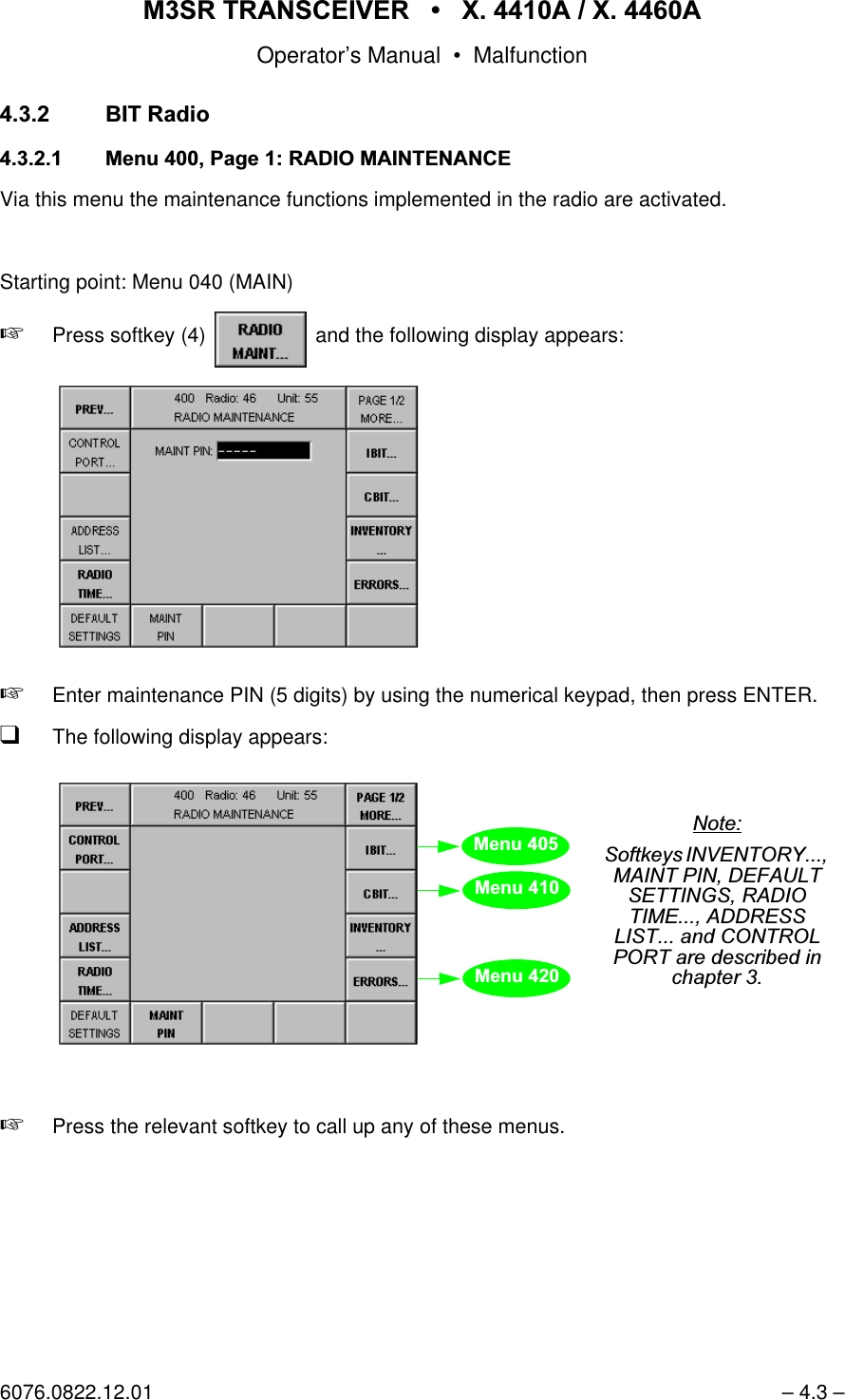
065 75$16&(,9(5  ; $  ; $Operator’s Manual • Use under Special Conditions6076.0822.12.01 – 3.15 –9RLFH'DWD&LSKHUHGA Cipher Unit KY58 is connected and operated in baseband mode. For voice communication,narrowband audio line NB1 and wideband audio line WB1 are used, carrier activation is per-formed via keyline PTT_1L low-active. Modulation is in AM or FM. In addition, a Link 11 dataterminal is connected. Data communication is carried out via narrowband audio line NB2 andcarrier activation via keyline PTT_2 high-active. Modulation is in FM (see chapter 3.3.4). Communication Mode Comline Keylines Audio Lines External DeviceMappingPLL_1L PTT_1 PTT_2L PTT_2 NB1 WB1 NB2 WB2V/D UNCP CL1[[&LSKHU8QLWV/D CP CL1 [LINK 11 CL1 [ [ /LQN'DWD7HUPLQDOLink 11 Data TerminalM3SR TransceiverX25.1.2.3.4.18.21AF Tx A NB AF Tx B NB AF Rx A NB AF Rx B NBPTT_2~LINK11X26.1.2.3.4.6.7.8.910.11.12.13.16.17.20.24.25.26AF Tx A NB AF Tx B NB AF Rx A NB AF Rx B NBAF Tx A WB AF Tx B WB AF Rx A WB AF Rx B WBPTT_1LAGC (LSB)AGC (MSB)SquelchBB/~DP~DPTTCarrierZeroizePT/CTCGCCipher Unit KY58to Audio System
065 75$16&(,9(5  ; $  ; $Operator’s Manual • Use under Special Conditions– 3.16 – 6076.0822.12.01Starting point: Menu 040 (MAIN)1. Press softkey Menu 400 (RADIO MAINTENANCE)2. ENTER maintenance PIN by using the numerical keypad, then pressENTER.3. Press softkeys   Menu 565 (DEVICE MAPPING)4. Select CIPHER UNIT by using the tuning knob.5. Press softkey 6. Select Comline 1 by using the tuning knob, then press ENTER.7. Press softkey 8. Select KY58BB or KY58DP by using the tuning knob, then press ENTER.9. Press softkey 10. Press key    (front panel).11. Press key    again.12. Enter maintenance PIN by using the numerical keypad, then pressENTER.13. Press softkeys   Menu 560 (AUDIO MAPPING)14. Check if audio lines NB1 and WB1 are connected with Comline CL1. If necessary, connect.15. Press softkey Menu 550 (PTT COMLINE MAPPING)16. Check if keyline PTT_1L is connected with Comline CL1, if it is low-active and only effective in remote mode. If necessary, configure.17. Press softkey Menu 570 (SQUELCH POLARITY)18. Select squelch SQ COMLINE 1 by us-ing the tuning knob.19. Press softkey   to set thesquelch level to low.20. Press softkeys   Menu 575(FRONTPANEL AUDIO SOURCE)21. Select audio source 1 by using the tuning knob.22. Press softkey 23. Select source CL1 by using the tuning knob.24. Press softkeys   Menu 580 (MARKER CONTROL)25. Press softkey   to enableplain marker tone.26. Press softkey Menu 510 (RADIO MODULES)27. Press softkey 28. Select module audio interface by us-ing the tuning knob.29. Press softkey
065 75$16&(,9(5  ; $  ; $Operator’s Manual • Use under Special Conditions6076.0822.12.01 – 3.17 –Menu 512 (AFI PARAMETERS)30. Press softkey 31. Select audio line NB1 by using the tuning knob.32. Press softkey 33. Enter a new TX LEVEL by using the numerical keypad, then pressENTER.Range: -15 dB to 0 dB, if TX-ALC = ON34. Press softkey 35. Enter a new RX LEVEL by using the numerical keypad, then pressENTER.Range: -20 dB to +10 dB36. Press softkey 37. Enter a new TX ALC ATTACK time by using the numerical keypad, then press ENTER.Range: 10 ms to 100 ms;30 ms recommended38. Press softkey 39. Enter a new TX ALC DECAY time by using the numerical keypad, then press ENTER.Range: 100 ms to 2 000 ms;300 ms recommended40. Press softkey   to switch onthe automatic level control.41. Press softkey 42. Select audio line WB1 by using the tuning knob.43. Press softkey 44. Enter a new TX LEVEL by using the numerical keypad, then pressENTER.Range: -3 dB to +15.5 dBrelative to 1.4 Vpp45. Press softkey 46. Enter a new RX LEVEL according to step 44.47. Press softkeys   48. Enter a new value for SIDETONE VOLUME by using the numerical key-pad, then press ENTER.Range: -25.5 dB to 0 dBrelative to selected audio Rx level49. Press softkey 50. Enter a new value for MARKER VOLUME according to step 48.51. Press softkey 52. Select module VU POWERAMPLIFIER by using the tuning knob.53. Press softkey Menu 516 (VU TX PARAMETERS)54. Press softkey 55. Enter a new modulation depth by us-ing the numerical keypad, then press ENTER.Range: 10% to 99%; 90% recommended0 dB = 1.4 Vpp into 600 Ω-3 dB = 1.0 Vpp into 600 Ω+15.5 dB = 8.0 Vpp into 600 Ω
065 75$16&(,9(5  ; $  ; $Operator’s Manual • Use under Special Conditions– 3.18 – 6076.0822.12.0156. Press softkeys   57. Select module VU RX (receiver) by using the tuning knob.58. Press softkey Menu 515 (VU RX PARAMETERS)59. Press softkey 60. Select a new AF AGC ATTACK time by using the tuning knob, then press ENTER.61. Press softkey 62. Select a new AF AGC DECAY time by using the tuning knob, then pressENTER.63. Press softkey 64. Enter a new threshold by using the numerical keypad, then pressENTER.Range: 6 dB to 20 dB65. Press softkey 66. Select a new clipper level by using the tuning knob, then press ENTER.67. Press softkey 68. Select module VU SYN (synthesizer) by using the tuning knob.69. Press softkey Menu 517 (VU SYN PARAMETERS)70. Press softkey 71. Enter a new value for TX Deviation (FM, narrowband) by using the nu-merical keypad, then press ENTER.Range: 1 kHz to 20 kHz;3.5 kHz recommended
065 75$16&(,9(5  ; $  ; $Operator’s Manual • Use under Special Conditions6076.0822.12.01 – 3.19 – *XDUG5HFHLYHUThe guard receiver is a common resource, meaning that it is not assigned to any particularComline.There are two different ways for the guard receiver to be operated.a) Without audio mappingPlug the module Guard Receiver ET 4400G into the M3SR Transceiver. No audio map-ping is necessary.The guard receiver is only available in communication mode Voice / Data unciphered (V/D UNCP).Depending on the selection made by using softkey GUARD (Menus 110 (MANUAL FIX.FRQ) and 210 (USER PRESET FIX.FRQ)), the guard receiver AF signal is mixed to the main receiver AF signal.Depending on the selection made by using softkey GUARD, the LEDs G (Control Unit) and SQL G (Front Panel), as well as a status message in the display signal an emer-gency call.Reception of an emergency call is signalled at contact X26.19 always, irrespective of the selection made by softkkey GUARD.The volume of the GRx audio signal is configured in Menu 512 (AFI PARAMETERS).b) With audio mappingAudio line NB2 is assigned to the guard receiver via Menu 560 (AUDIO MAPPING).The guard receiver AF signal is available on audio line NB2 irrespective of the commu-nication mode and the selection made by softkey GUARD (Menus 110 (MANUAL FIX.FRQ) and 210 (USER PRESET FIX.FRQ)).Reception of an emergency call is signalled at contact X26.19 always, irrespective of the selection made by softkkey GUARD.The volume of the GRx audio signal is configured in Menu 512 (AFI PARAMETERS).1RWH&RPPXQLFDWLRQPRGH/LQNFDQQRWEHXVHGZKHQDXGLROLQH1%LVDVVLJQHGWRWKHJXDUGUHFHLYHU
065 75$16&(,9(5  ; $  ; $Operator’s Manual • Use under Special Conditions– 3.20 – 6076.0822.12.013UHVHW3DJH *HQHUDOqA Preset Page always consists of two areas:Fixed Frequency areaEPM area (not used in this application)qFor the Preset Pages the full choice of functions is available, regardless of the functionsactually supported by the relevant radio. So for example Link 11 communication modecan be selected, although your radio may not have such functionality.qA plausibility check will only be performed when the Preset Page is called. So whenLink 11 mode is set in a Preset Page and this page is then called on a radio that does notsupport Link 11 functionality, the default (communication mode V/D UNCP) will be acti-vated instead. qWhen editing the Preset Pages make sure that matching parameters are selected. Forinstance for communication mode Link 11 select modulation type FM.
065 75$16&(,9(5  ; $  ; $Operator’s Manual • Use under Special Conditions6076.0822.12.01 – 3.21 –,QWURGXFWLRQWR/RDGHG8VHUDQG&XUUHQW3DJHVPage storage within the radio is based on a redundancy concept. There are three areas for thePreset Page to be stored:qLoaded Page area: pages with factory and / or customer-predefined settingsqUser Page area: copies of Loaded Pages that can be editedqCurrent Page area: currently used page /RDGHG3DJH$UHDPages with factory and / or customer-predefined settings are referred to as Loaded Pages andcan only be changed by the administrator. Identical copies of the Loaded Pages are used asbasis for User Pages and Current Pages, which can then be edited by the operator as required.Normally Loaded Pages will be loaded into the radio via the Service and Maintenance ToolZS 4400. In some cases, however, it may be necessary to enter these pages manually, whichcan be done only by an administrator having the required setup PIN. For editing a Preset Pagean editor (Menu 710 (EDIT PRESET PAGE FIX.FRQ)) is available. Softkey SAVE AS is usedto store the edited Preset Page as Loaded Page and simultaneously as User Page.)LJ (GLWLQJDQG6WRULQJD/RDGHG3DJHUser Page12Loaded Page12
065 75$16&(,9(5  ; $  ; $Operator’s Manual • Use under Special Conditions– 3.22 – 6076.0822.12.018VHU3DJH$UHDThe User Pages are a copy of the Loaded Pages, which can be edited for ongoing operation.User Pages can be restored to the Loaded Page settings either individually or globally. In thefigures below any text in italics indicates that this page has been edited.By pressing softkey RESTORE PAGE (Menu 210 (USER PRESET FIX.FRQ)) a specific UserPage is restored to the relevant Loaded Page setting. Here Restore also has an immediate im-pact on the Current Page.)LJ  5HVWRULQJD6SHFLILF8VHU3DJHBy pressing softkey RESTORE PRESET (Menu 610 (PRESET CONFIGURATION)) all UserPages are restored to the relevant Loaded Page settings. For this no particular User Pageneeds to be entered. Here Restore has no impact on the Current Page. )LJ  5HVWRULQJ$OO8VHU3DJHV8VHU3DJHUser Page12=Loaded Page12Current Page12User Page199User Page0=Loaded Page0User Page1998VHU3DJH
065 75$16&(,9(5  ; $  ; $Operator’s Manual • Use under Special Conditions6076.0822.12.01 – 3.23 – &XUUHQW3DJH$UHDThe currently used User Page is the Current Page.)LJ $FWLYDWLQJD6SHFLILF8VHU3DJHThe Current Page can be edited by the operator in the Preset Page editor (Menu 210 (USERPRESET FIX.FRQ)). By pressing softkey SAVE PAGE the edited settings can be saved in theUser Page. A User Page modified in this way is marked by an asterisk.)LJ  (GLWLQJDQG6DYLQJD&XUUHQW3DJHUser Page12Current Page12Current Page12 *User Page12 *
065 75$16&(,9(5  ; $  ; $Operator’s Manual • Use under Special Conditions– 3.24 – 6076.0822.12.01 3,11XPEHUVTo protect the radio system from tampering there are two levels of PIN (Personal IdentificationNumbers) numbers in force:qSystem PINqUser PINsSystem PIN•The System PIN is used to globally change the User PINs.•The System PIN is unique and firmly tied to one particular radio. The System PIN is de-rived from the equipment serial number and can be retrieved any time from the manufac-turer, if lost.•The System PIN is intended to be used by service or supervisor staff.User PINsThe User PINs are required to gain access to the Maintenance and Setup areas of the radioand also when the operator wants to change from Comline Session to Radio Session. Thereare three User PINs for the transceiver and one User PIN for the control unit. Transceiver•Radio Maintenance PINThe Radio Maintenance PIN is used to gain access to the Maintenance area. In the Main-tenance area it is for instance possible to clear the error list and/or to configure the trans-ceiver.•Radio Setup PINThe Radio Setup PIN is used to gain access to the Setup area. In the Setup area it is possible to create, modify and/or clear the Preset Pages.•Radio Session PINThe Radio Session PIN is used to change from Comline to Radio session. In the Radio session it is for instance possible to assign the modules to Comline CL1 and to reactivate the default settings.Control unit•CU Maintenance PINThe CU Maintenance PIN is used to gain access to the control unit Maintenance area. In the Maintenance area it is for instance possible to clear the error list and/or to configure the display parameters.These PIN numbers can be changed by the operator. The default setting (factory setting) ofthese PIN numbers is "00000". But please keep in mind: Once changed, the default setting isno longer valid and cannot be used any more.Each PIN number to be entered or changed is a five-digit decimal figure.
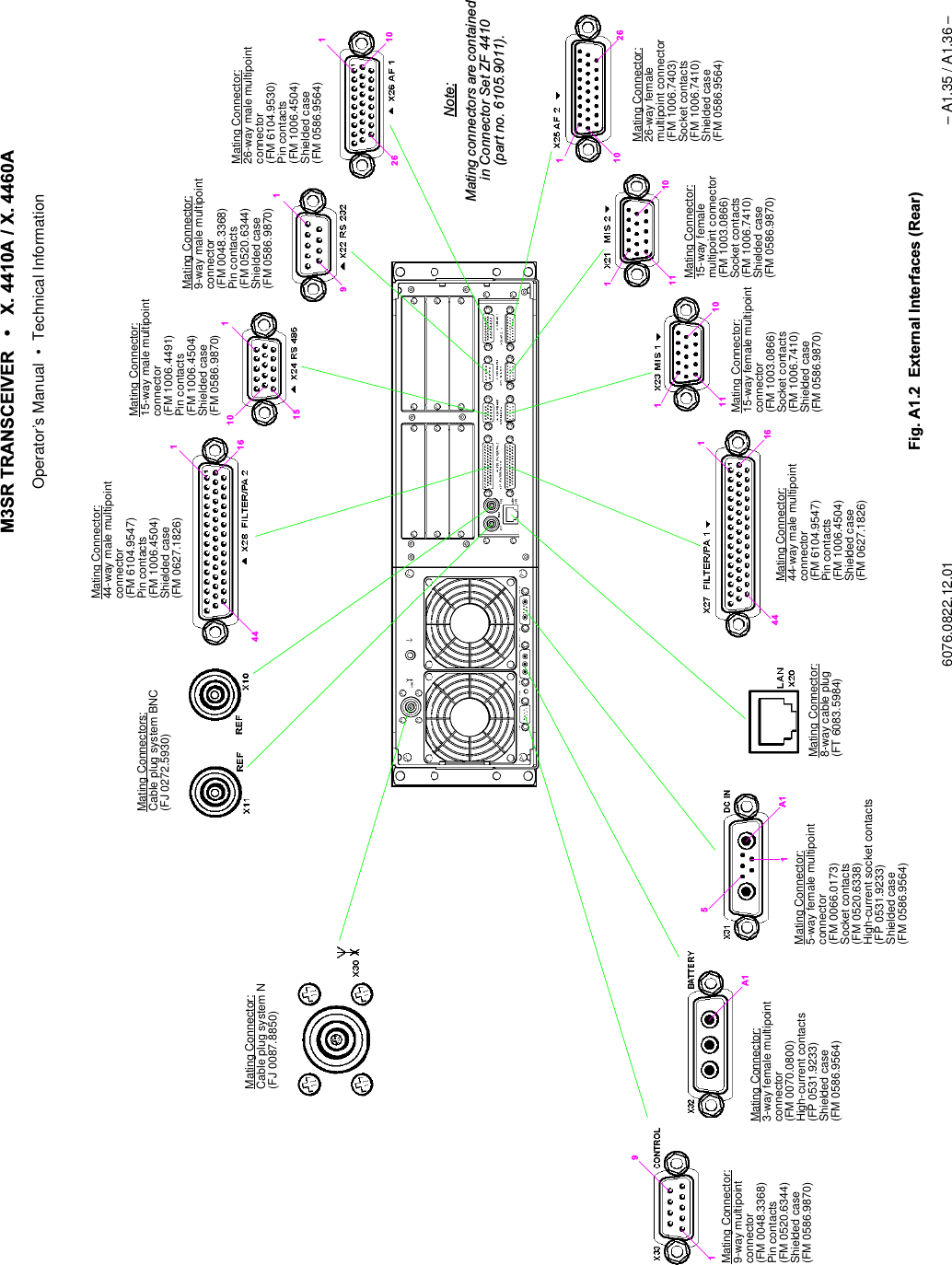
065 75$16&(,9(5  ; $  ; $Operator’s Manual • Use under Special Conditions6076.0822.12.01 – 3.25 –The figure below illustrates when a User PIN needs to be entered and where it can be changed:The relevant User PIN can be changed in Menu 400 (Radio Maintenance), Menu 600 (RadioSetup) and Menu 800 (CU Maintenance), respectively.In addition, the User PINs can be changed globally via Menu 0 (System Menu).&RPOLQH6HVVLRQ5DGLR6HVVLRQ0DLQWHQDQFH6HWXS0DLQWHQDQFH= PIN required= PIN changeable2SHUDWLRQControl Unit*)*) = not yet implementedTransceiver
065 75$16&(,9(5  ; $  ; $Operator’s Manual • Use under Special Conditions– 3.26 – 6076.0822.12.01 &RQILJXUDWLRQ 0HQX6<67(0In Menu 0 (SYSTEM) the User PINs can be changed globally (for details on PIN numbers referto chapter 3.6).+ Press key     and key    simultaneously.qThe following display appears:No. Control Action Notes2 Press softkey PIN RADIO MAINT.Abort entry.Entry of new radio maintenance PIN1. Enter the RADIO SYSTEM PIN number by using the numerical keypad, then press ENTER.2. Enter new MAINT PIN number by using the numerical keypad, then pressENTER.3. Confirm the new MAINT PIN number by repeating the entry by using the numeri-cal keypad, then press ENTER.3 For entry of a new radio setup PIN follow the same procedure as described for the radio maintenance PIN (see softkey 2).keys MENU HOME and ENTsoftkey PIN RADIO SETUP
065 75$16&(,9(5  ; $  ; $Operator’s Manual • Use under Special Conditions6076.0822.12.01 – 3.27 –4 For entry of a new radio session PIN fol-low the same procedure as described for the radio maintenance PIN (see softkey 2).14 Press softkey PIN CU MAINT.Abort entry.Entry of new CU maintenance PIN1. Enter the CU SYSTEM PIN number byusing the numerical keypad, then pressENTER.2. Enter new MAINT PIN number by using the numerical keypad, then pressENTER.3. Confirm the new MAINT PIN number by repeating the entry by using the numeri-cal keypad, then pressENTER.No. Control Action Notes
065 75$16&(,9(5  ; $  ; $Operator’s Manual • Use under Special Conditions– 3.28 – 6076.0822.12.010HQX5$',26(66,21Changing from Comline session to Radio session is required toqrestore the default settings (see Appendix A1),qinstall radio options (Menu 505 (RADIO OPTIONS)),qconnect a radio module to the Comline (Menu 510 (RADIO MODULES)),qconfigure split-site operation (Menu 535 (SPLIT SITE DEFINITION)) Starting point: Menu 020 (COMLINE SESSION)+Press softkey (8)     and the following display appears:+Enter RADIO SESSION PIN number by using the numerical keypad.+Confirm with ENTER key.softkey RADIO SESSIONforfutureuse0HQX0HQX0HQX0HQX0HQX
065 75$16&(,9(5  ; $  ; $Operator’s Manual • Use under Special Conditions6076.0822.12.01 – 3.29 – 0HQX3DJH5$',20$,17(1$1&(Via this menu the maintenance functions implemented in the radio are activated. The mainte-nance functions relate to the assignment of radio resources to Comlines, squelch polarity, in-ventory report, failure archive and initiation of IBIT functions. Access to some of themaintenance functions is protected by a PIN (Personal Identification Number), for Inventory,Errors and Radio Time, however, no PIN is required. Some maintenance functions should onlybe activated by trained maintenance staff. Starting point: Menu 040 (MAIN)+Press softkey (4)    and the following display appears:+Enter maintenance PIN (5 digits) by using the numerical keypad, then press ENTER.qThe following display appears:+Press the relevant softkey to call one of these menus.softkey RADIO MAINT...1RWH,Q5DGLRVHVVLRQVRIWNH\'()$8/76(77,1*LVHQDEOHG0HQX0HQXpage 20HQX0HQX0HQX1RWH6RIWNH\V,%,7&%,7DQG(55256DUHGHVFULEHGLQFKDSWHU
065 75$16&(,9(5  ; $  ; $Operator’s Manual • Use under Special Conditions– 3.30 – 6076.0822.12.01No. Control Action Notes9 Press softkey MAINT PIN.Abort entry.Entry of new maintenance PIN1. Enter the new PIN number by using the nu-merical keypad, then press ENTER.2. Confirm the new PIN number by repeating the entry by using the numerical keypad, then press ENTER.See also chapter 3.6.101RWH,Q5DGLRVHVVLRQWKLVVRIWNH\LVHQDEOHGPress softkey DEFAULTSETTINGS.Abort process.Resets all maintenance parameters of transceiver to default settings.See List of Default Parameters in Appen-dix A1.
065 75$16&(,9(5  ; $  ; $Operator’s Manual • Use under Special Conditions6076.0822.12.01 – 3.31 – 0HQX3DJH5$',20$,17(1$1&(Starting point: Menu 400, page 1+Press softkey (1)    and the following display appears:+Press the relevant softkey to call one of these menus.softkey PAGE 1/2 MORE...forfutureuseforfutureuse0HQX0HQX0HQX0HQXpage 10HQX0HQX0HQX0HQX0HQX0HQX
065 75$16&(,9(5  ; $  ; $Operator’s Manual • Use under Special Conditions– 3.32 – 6076.0822.12.010HQX5$',2,19(1725<This menu gives a survey of all hardware, software and firmware components installed inM3SR Transceiver X. 4410A or X. 4460A.Starting point: Menu 400, page 1 (RADIO MAINTENANCE)+Press softkey (4)    and the following display appears:No. Control Action Notes2 Press softkey EQUIP.Select setting.Selection of equipment for radio inven-toryDepending on the item selected the fol-lowing components are listed:$// all components installed&/components of CL1): firmware components+: all hardware components6: all software components+:02'name of the HW module article6:02'name of the SW module article'(9XT 4410A or X. 4460Asoftkey INVENTORY...see Appendix A1 Slot No. (see Menu 510)Types:DEV - device, e.g. XT 4410ASWM - identifier for software packageSW - identifier for softwareFW - identifier for firmwareHWM - identifier for hardware moduleHW - identifier for hardware0HQXHardware installationslot
065 75$16&(,9(5  ; $  ; $Operator’s Manual • Use under Special Conditions6076.0822.12.01 – 3.33 – 0HQX5$',2,19(1725<'(7$,/6This menu displays administrative data of a component.Starting point: Menu 415 (RADIO INVENTORY)+Press softkey (3)    and the following display appears:+Select component.softkey DETAILS...Example: Software Designation The data for the component selected inMenu 415 comprise the following:Type (hardware, software,firmware)Name of module or softwareIdent. No.VariantCode No.Version No.Serial No.Production Date
065 75$16&(,9(5  ; $  ; $Operator’s Manual • Use under Special Conditions– 3.34 – 6076.0822.12.010HQX5$',2&21752/3257Via this menu the serial control port parameters can be viewed and edited.1RWH2QHRIWKHSDUDPHWHUVWREHFRQILJXUHGLQ0HQXLVWKHSURWRFROIRUGDWDFRPPXQLFDWLRQYLDVHULDOFRQWUROSRUW;,UUHVSHFWLYHRIWKLVVHWWLQJWKHSURWRFROXVHGDWWKH/$1LQWHUIDFHV;DQG;LVDOZD\V*%33Starting point: Menu 400, page 1 (RADIO MAINTENANCE)+Press softkey (14)    and the following message appears:+Press softkey (9)    and the following display appears:No. Control Action Notes3 Press softkey PROTOCOL.Select setting.Selection of protocol type121(no remote control via control port*%33 remote control via GB2PP protocol ispossible (RS 232, RS 422)1RWH2QO\IRUSRLQWWRSRLQWFRQQHFWLRQ68 remote control via S400U protocol ispossible (RS 232, RS 422, RS 485)3D\DWWHQWLRQWRWKH:DUQLQJsoftkey CONTROL PORT... 
065 75$16&(,9(5  ; $  ; $Operator’s Manual • Use under Special Conditions6076.0822.12.01 – 3.35 –9 Press softkey SAVE. Saves the current settings.The asterisk (*) indicates that the new set-tings have not yet been stored.10 Press softkey PARITY.Select setting.Selection of parity121(no parity(9(1even number of bits2'' odd number of bits63$&(parity fixed at 00$5. parity fixed at 111 Press softkey STOP BITS. Setting the number of stop bits12 Press softkey BITS/CHAR. Setting the number of bits in the telegram13 Press softkey BITRATE.Select setting.Selection of bitrate14  Press softkey RS TYPE.Select setting.Selection of serial port standard.1RWH5HJDUGLQJWKH56LQWHUIDFHSOHDVHWDNHQRWHRIWKHIROORZLQJ&60$&'&DUULHU6HQVH0XOWLSOH$FFHVVZLWK&ROOLVLRQ'HWHFWLRQLVQRWVXSSRUWHGE\WKHUDGLR%XVRSHUDWLRQLVRQO\SRVVLEOHZLWK68SURWRFROVHHVRIWNH\DQG&RQWURO8QLW*%DSSOLFDWLRQSURWRFROSUHYHQWVFROOLVLRQVNo. Control Action Notes
065 75$16&(,9(5  ; $  ; $Operator’s Manual • Use under Special Conditions– 3.36 – 6076.0822.12.010HQX5$',2$''5(66/,671RWH:LWK065 7UDQVFHLYHU;7 $WKHDGGUHVVRIWKHLQWHJUDWHGFRQWUROXQLWQHHGVWREHHQWHUHGKHUHStarting point: Menu 400, page 1 (RADIO MAINTENANCE)+Press softkey (13)    and the following display appears:1RWH:HUHFRPPHQGWRHQWHUDOVRWKHUDGLR¶VRZQDGGUHVVORJLFDODQG,3DGGUHVV,I\RXIDLOWRGRVRDQGWKHQSUHVVVRIWNH\*(7)5205$',2VHHFKDSWHUODWHURQQRFRQQHFWLRQZLOOEHHVWDEOLVKHGIURPWKHFRQWUROXQLWWRWKHUDGLRsoftkey ADDRESS LIST...0HQX
065 75$16&(,9(5  ; $  ; $Operator’s Manual • Use under Special Conditions6076.0822.12.01 – 3.37 –0HQX5$',2$''5(665287(For addressing the M3SR devices the Internet Protocol (IP) is used. Therefore a unique IPaddress needs to be assigned to each device, permitting the device to be identified andaddressed without ambiguity. In addition, each device needs a freely selectable logical addressin the range from 000 to 999, which is the address to be entered in Menu 010 (RADIOCONNECTION) for addressed operation. The logical address spares the operator the tedioustask of entering the complex IP addresses.  Via Menu 436 the own address (logical and IP address) can be entered. When specifying theSubnet Mask and the IP addresses (own and Gateway), please observe the IETF (= InternetEngineering Task Force) standards (RFC pages (= Request for Commands)), in particular:q796: Address Mappingsq940: Toward an Internet Standard Scheme for Subnetting q950: Internet Standard Subnetting Procedureq1219: On the Assignment of Subnet Numbersq1517: Applicability Statement for the Implementation of Classless Inter-DomainRouting q1519: Classless Inter-Domain Routing: an Address Assignment and AggregationStrategyq1918: Address Allocation for Private InternetsIn compliance with RFC1918 the following address ranges are reserved for private networks:q10.0.0.0 to 10.255.255.255, associated subnet mask 255.0.0.0q172.16.0.0 to 172.31.255.255, associated subnet mask 255.255.0.0q192.168.0.0 to 192.168.0.255, associated subnet mask 255.255.255.0The subnet mask defines the respective address parts for network address and local address.1RWH•,3DGGUHVVHVDQGDUHQRWSHUPLWWHGWREHXVHG•)RUWKHQHWLQIUDVWUXFWXUHHJURXWHUZHUHFRPPHQGWRXVHWKHORZHUORFDODGGUHVVHVNetwork address Local addressSubnet mask 255 255 255 0IP addresses 192 168 0 0::::192 168 0 255max. 256 units0 reserved for network255 reserved for broadcast
065 75$16&(,9(5  ; $  ; $Operator’s Manual • Use under Special Conditions– 3.38 – 6076.0822.12.01Starting point: Menu 435 (RADIO ADDRESS LIST)+Press softkey (11)    and the following display appears:No. Control Action Notes2 Press softkey LOG ADDR.Change value.Changing the own logical address:Range of values: 001 to 9993 Press softkey IP ADDR.Change value.Changing the own IP address:11 Press softkey GATEWAY ADDR.Change value.Changing the gateway address:12 Press softkey SUBNET MASK.Change value.Changing the subnet mask:softkey ROUTE...1RWHZLOOGHOHWHDQH[LVWLQJJDWHZD\DGGUHVV
065 75$16&(,9(5  ; $  ; $Operator’s Manual • Use under Special Conditions6076.0822.12.01 – 3.39 –14 Press softkey SAVE TO RADIO. Saves address and subnet mask to the radio.The asterisk (*) indicates that the new set-tings have not yet been stored.qWhen softkey SAVE * has been pressed, the radio automatically per-forms a restart. qThe following display appears: +Switch radio off and on again.+Enter the radio address (see Menu 010).No. Control Action Notes
065 75$16&(,9(5  ; $  ; $Operator’s Manual • Use under Special Conditions– 3.40 – 6076.0822.12.01 0HQX5$',27,0(DQG'$7(Via this menu the time and date stored in the radio can be edited.1RWH7KHWLPHDQGGDWHHQWHUHGKHUHDUHRQO\XVHGWRGHWHUPLQHZKHQH[DFWO\DQHUURURFFXUUHG7LPHGDWHDQGHUURUDUHUHFRUGHGLQWKHHUURUOLVW0HQX5$',2(5525/,67RU0HQX&8(5525/,67Starting point: Menu 400, page 1 (RADIO MAINTENANCE)+Press softkey (11)    and the following display appears:No. Control Action Notes4 Press softkey TIME READ. When softkey TIME READ is pressed, GB 4000C starts reading the current time and date from the connected radio.12 Press softkey DATE.Set value.Setting a new dateThe year can be set between 1999 and 2037. The date within the radio is ad-justed accordingly.13 Press softkey TIME.Set value.Setting a new timeThe time is entered in 24 h format. The time within the radio is adjusted accord-ingly.softkey RADIO TIME...
065 75$16&(,9(5  ; $  ; $Operator’s Manual • Use under Special Conditions6076.0822.12.01 – 3.41 – 0HQX5$',2237,216In this menu all available radio options are listed.Starting point: Menu 400, page 2 (RADIO MAINTENANCE)+Press softkey (2)    and the following display appears:1RWH7KH6126HULDO1XPEHURIWKHRSWLRQVFRQWUROOHULVWKHQXPEHU\RXQHHGWRVSHFLI\ZKHQRUGHULQJDQHZRSWLRQIURP5RKGH6FKZDU]<RXZLOOWKHQJHWD62&6RIWZDUH2SWLRQV&RQWUROOHUILOHWKDWFDQEHORDGHGE\XVLQJWKH6HUYLFH0DLQWHQDQFH7RROsoftkey OPTIONS...1RWH,Q5DGLRVHVVLRQVRIWNH\,167$//237,21LVHQDEOHGList of radio options whichare installed and can there-fore be activated0HQXSerial no. of options controller
065 75$16&(,9(5  ; $  ; $Operator’s Manual • Use under Special Conditions– 3.42 – 6076.0822.12.010HQX6(7237,2161RWH2SWLRQFRGHVFDQEHVWEHORDGHGLQWRWKHUDGLRYLD/$1E\XVLQJWKH566HUYLFH0DLQWHQDQFH7RRO=6,GHQWQRIn this menu any new option can be installed. The data which need to be entered must be re-quested from the manufacturer.Starting point: Menu 505 (RADIO OPTIONS)+Press softkey (9)    and the following display appears:1RWH$IWHUORDGLQJDQRSWLRQFRGHHLWKHUYLDWKH/$1LQWHUIDFHDQGWKH6HUYLFH0DLQWHQDQFH7RRO=6RUE\LQSXWLQ0HQXYLDWKHQXPHULFDONH\SDGVZLWFKWKHUDGLRRIIDQGRQDJDLQ$OORZDSSUR[LPDWHO\PLQXWHIRUWKHRSWLRQWREHDFWLYDWHGNo. Control Action Notes2 Press softkey EDIT...Abort entry.In order to enable further options the new keys are to be entered.9 Press softkey SET OPTIONS. Activates options which are already in-stalled.softkey INSTALL OPTION+Select line where key is to be en-tered.
065 75$16&(,9(5  ; $  ; $Operator’s Manual • Use under Special Conditions6076.0822.12.01 – 3.43 – 0HQX5$',202'8/(6In this menu the individual radio modules are assigned to the Comlines.Starting point: Menu 400, page 2 (RADIO MAINTENANCE)+Press softkey (3)    and the following display appears:No. Control Action Notes2 Press softkey PARAMS... Switches to one of the following menus depending on the module selected.In the following menus module parameterscan be edited:Platform: 0HQXAFI (AF interface): 0HQXPlatform interfaces: IRUIXWXUHXVHReceiver: 0HQXTransmitter:   0HQXSynthesizer:  0HQXsoftkey RADIO... MODULES1RWH,Q5DGLRVHVVLRQVRIWNH\&/LVHQDEOHG6RIWNH\3$5$06SURYLGHVDFFHVVWRIXUWKHUPHQXVZKHUHPRGXOHSDUDPHWHUVFDQEHHGLWHGIRU'HIDXOW6HWWLQJVVHH$SSHQGL[$COM line1 = Comline numberA = all, module is a common resource(assigned to all Comlines)Module slot+Select module.
065 75$16&(,9(5  ; $  ; $Operator’s Manual • Use under Special Conditions– 3.44 – 6076.0822.12.013 Press softkey CL.Select value.The selected module is assigned to one of the radio Comlines.1RWH:LWK0657UDQVFHLYHU; $RU; $RQH&RPOLQHLVDYDLODEOH&RPOLQHVWRDUHLQDFWLYH,Q5DGLRVHVVLRQVRIWNH\&/LVHQDEOHG7 Press softkey VIEW FIXED. Displays a list of "fixed" modules, that is, modules that are firmly built in (for in-stance slot no. 18 for platform, 19 for au-dio interface).8 Press softkey VIEW IF SLOT. Displays a list of interface modules at the rear (11 to 16, backplane, IF slots).9 Press softkey VIEW MOD SLOT. Displays a list of plug-in modules (0 to 10). For display see previous page.14 Press softkey SAVE. Saves the current configuration.The asterisk (*) indicates that the new set-tings have not yet been stored.No. Control Action Notes
065 75$16&(,9(5  ; $  ; $Operator’s Manual • Use under Special Conditions6076.0822.12.01 – 3.45 – 0HQX3/$7)2503$5$0(7(56In this menu radio platform parameters can be edited. The parameter default settings are fac-tory-defined and should only be changed by service staff, for instance by using the R&S Serv-ice & Maintenance Tool ZS 4400 (Ident. no. 6105.2600.02).Starting point: Menu 510 (RADIO MODULES)+Press softkey (7)    and select module PLATFORM by using the tuning knob.+Press softkey (3)    and the following display appears:No. Control Action Notes2 Press softkey VCXO.Set value.Setting the tuning value for the VCXO fre-quencyRange of values: 0 to 4 0953 Press softkey TCXO.Set value.Setting the tuning value for the TCXO fre-quencyRange of values: 0 to 4 0954 Press softkey OCXO.Set value.Setting the tuning value for the OCXO fre-quencyRange of values: 0 to 65 5351RWH)RU'HIDXOW6HWWLQJVVHH$SSHQGL[$7KH9&;27&;2DQG2&;2OHDYHWKHIDFWRU\FRUUHFWO\FDOLEUDWHG$IWHUH[WHQGHGSHULRGVRIRSHUDWLRQKRZHYHULWPD\EHQHFHVVDU\WRUHFDOLEUDWHWKH7&;2DQG2&;2WRFRPSHQVDWHHIIHFWVRIDJLQJ7KLVVKRXOGEHGRQHE\VHUYLFHVWDIIRQO\7KHGHIDXOWVHWWLQJVHH$SSHQGL[$LVQRWUHVWRUHGZKHQWKH'()$8/76(77,1*VRIWNH\LVSUHVVHG
065 75$16&(,9(5  ; $  ; $Operator’s Manual • Use under Special Conditions– 3.46 – 6076.0822.12.015 Press softkey REF IN IMP. Switches the input impedance of interface X10 (Reference Frequency):2)) input is high impedance2150-Ω input at X10 enabled10 Press softkey PWR SUP.Select setting.Selection of the input to be monitored (CBIT):0$,1selects X31%$77selects X320% selects both DC power inputs12 Press softkeyEXT REF. Switches monitoring function on or off.1RWH,IWKHLQSXWLVPRQLWRUHG 21WKHLQWHUQDO2&;2RU7&;2KDVWRV\QFKURQL]HWRWKHH[WHUQDOUHIHUHQFHVLJQDO,IWKLVIDLOVD&%,7PHVVDJHZLOOFRPHXS13 Press softkey CLK SRC.Select setting.Selection of the clock sourceOCXO is recommended.14 Press softkey REF OUT.Select setting.Selection of the clock frequency for refer-ence output X11No. Control Action Notes
065 75$16&(,9(5  ; $  ; $Operator’s Manual • Use under Special Conditions6076.0822.12.01 – 3.47 –0HQX3DJH$),3$5$0(7(56$XGLR)UHTXHQF\,QWHUIDFHIn this menu the parameters of the Audio Frequency Interface are displayed and edited (page1 of 2). The default parameters have been selected to allow optimum performance. If, however,changes were made at some point and the operator then wants to re-establish the default set-tings (see Appendix A1), he only needs to press the Default softkey in Menu 400 (RADIOMAINTENANCE).Starting point: Menu 510 (RADIO MODULES)+Press softkey (7)    and select module AUDIO INTERFACE by using the tuning knob.+Press softkey (3)    and the following display appears:No. Control Action Notes2 Press softkey CODEC.Select setting.Selection of interface for level settingThe Rx level and Tx level are both as-signed to the selected NB or WB channel.3 Press softkeyTX ALC.Enter value.Entry of the TX ALC ATTACK time for transmitter AF signals in the range from 10 ms to 100 ms, 30 ms is recommended.1RWH&XVWRPHUVSHFLILFVHWWLQJVFDQEHFRQILJXUHGDVUHTXLUHG4 Press softkeyALC DECAY.Enter value.Entry of the ALC DECAY time for trans-mitter AF signals in the range from 100 ms to 2 000 ms, 300 ms is recom-mended.1RWH&XVWRPHUVSHFLILFVHWWLQJVFDQEHFRQILJXUHGDVUHTXLUHGpage 20HQX
065 75$16&(,9(5  ; $  ; $Operator’s Manual • Use under Special Conditions– 3.48 – 6076.0822.12.015 Press softkey TX ALC LEVEL.Enter value.Entry of the ALC level in the range from -6.5 dB to + 6.5 dBOutput level of TX ALC0 dB is recommended.6 Press softkey TX ALC. Switches the automatic level control (ALC) for transmitter on or off.13 Press softkey TX LEVEL.Enter value.Entry of value for audio TX LEVEL into 600 Ω of interfaces NB1 and NB2 in the range from -20 dB to +10 dBFor NB2 and device Link 11 (Menu 565 (DEVICE MAPPING)) the setting range is between -3 and +3 dB.For WB1 and WB2 the setting range is between -3 and +15.5 dB relative to 1.4 Vpp.14 Press softkey RX LEVEL.Enter value.Entry of value for audio RX LEVEL into 600 Ω of interfaces NB1 and NB2 in the range from -20 dB to +10 dBFor NB2 and device Link 11 (Menu 565 (DEVICE MAPPING)) the setting range is between -3 and +3 dB.For WB1 and WB2 the setting range is between -3 and +15.5 dB relative to 1.4 Vpp.No. Control Action NotesOperation with ALC-TXSetting Input range for constant modulation depth or FM deviation0 dBm -15 to +15 dBm-15 dBm -30 to 0 dBm
065 75$16&(,9(5  ; $  ; $Operator’s Manual • Use under Special Conditions6076.0822.12.01 – 3.49 – 0HQX3DJH$),3$5$0(7(56$XGLR)UHTXHQF\,QWHUIDFHIn this menu the parameters of the Audio Frequency Interface are displayed and edited (page2 of 2). For Default Settings see Appendix A1.Starting point: Menu 512, page 1+Press softkey (1)    and the following display appears:No. Control Action Notes12 Press softkey SIDETN VOLUME.Enter value.Entry of value for SIDETONE VOLUME in the range from -25.5 dB to 0 dB rela-tive to selected audio Rx levelThis is a narrowband voice sidetone available at the audio NB-Rx output and at the headset / loudspeaker. 13 Press softkey GUARD VOLUME.Enter value.Entry of value for GUARD VOLUME in the range from -25.5 dB to 0 dBThe Guard Volume is relative to the audio Rx level.14 Press softkey MARKERVOLUME.Enter value.Entry of value for MARKER VOLUME in the range from -25.5 dB to 0 dBThe Marker Volume is relative to the au-dio Rx level.1RWH7KLVVHWWLQJRQO\PDNHVVHQVHLI&LSKHU8QLW.<LVPDSSHG7KHRSHUDWRULVLQIRUPHGYLDDFRXVWLFVLJQDOZKHQWKHWUDQVFHLYHULVNH\HGLQSODLQWH[WPRGH9'81&3forfutureusefor future usepage 10HQX
065 75$16&(,9(5  ; $  ; $Operator’s Manual • Use under Special Conditions– 3.50 – 6076.0822.12.010HQX985;3$5$0(7(56In this menu receiver parameters are displayed and edited. For Default Settings see AppendixA1.Starting point: Menu 510 (RADIO MODULES)+Select module VU RX (receiver) by using the tuning knob.+Press softkey (3)   and the following display appears:No. Control Action Notes2 Press softkey SENSITIV LW NOISE.Select setting.Selection of sensitivity/2:12,6(means high sensitivity of receiver/2:',67257,21means low sensitivity of receiver which is thus less susceptible to interference3 Press softkey ATTACK.Select value.Selection of AF AGC attack timeThe attack time is the time the receiver needs for controlling the AF output signal to 90% of its nominal output level when the modulation depth has changed from 10% to 90%.4 Press softkey DECAY. Select value.Selection of AF AGC decay timeThe decay time is the time the receiver needs for controlling the AF output signal to its nominal output level when the mod-ulation depth has changed from 90% to 10%.
065 75$16&(,9(5  ; $  ; $Operator’s Manual • Use under Special Conditions6076.0822.12.02 – 3.51 –12 Press softkey CLIP LEV.Select setting.Selection of the clipper levelThis is used for noise clipping after AM voice demodulation.1RWH7KH&/,33(5LVVZLWFKHGRQDQGRIIE\XVLQJVRIWNH\LQ0HQXSDJH0$18$/),;)5413 Press softkey INPUT.Select setting.Selection of antenna input When the common RX/TX antenna of a transceiver is to be used select RX/TX.1RWH,QFRQMXQFWLRQZLWK$QWHQQD,QWHUIDFH*, DQGZLWKRXW8+))LOWHU)' VHOHFW5;LQDOORWKHUFDVHV5;7;LQSXW14 Press softkey SQUELCHLEV S/N.Set value.Setting the response threshold of the S/N squelch in the range from 6 to 20 dB (only effective with Narrowband Voice)No. Control Action Notes
065 75$16&(,9(5  ; $  ; $Operator’s Manual • Use under Special Conditions– 3.52 – 6076.0822.12.010HQX987;3$5$0(7(56In this menu the transmitter parameters are displayed and edited. For Default Settings andConnection of Peripheral Equipment see Appendix A1.Starting point: Menu 510 (RADIO MODULES)+Press softkey (7)    and select module VU POWER AMPLIFIER by using the tuning knob.+Press softkey (3)    and the following display appears:No. Control Action Notes2 Press softkey POW LEV.Select setting.Selection of edit fields for power levels/2: editing the value for low power level0(',80editing the value for medium powerlevel+,*+ editing the value for high powerlevel3 Press softkeyAM.Set value.Setting the AM transmit power (for LOW,MEDIUM, HIGH)For AM the power level (carrier unmodu-lated) can be set to values from 1 to 30 W.4 Press softkeyFM.Set value.Setting the FM transmit power (for LOW, MEDIUM, HIGH)For FM the power level can be set to val-ues from 1 to 100 W.5 Press softkeyAM MOD.Set value.Setting the AM modulation depth in the range from 10 to 99%, 90% is recom-mended.
065 75$16&(,9(5  ; $  ; $Operator’s Manual • Use under Special Conditions6076.0822.12.01 – 3.53 –11 Press softkey CONNECT.Select setting.Defines whether an external power am-plifier is connected at X. 4410A or X. 4460A and selects its type:98/ for future use98/ for future use9'/ UHF Amplifier100 W AM98/9'/ for future use98/9'/ for future use98/6(59'/ for future use98/6(59'/ for future use)'UHF Agile FilterSee Appendix A1, Connection of Periph-eral Equipment.12 Press softkeyPA UHF. Activates / deactivates operation with the connected UHF amplifier.The power amplifier can be activated via software at one of the power levels LOW, MED, and HIGH.13 Press softkeyPA VHF. Activates / deactivates operation with the connected VHF amplifier.The power amplifier can be activated via software at one of the power levels LOW, MED, and HIGH.14 Press softkey PA.Select setting.Selection of the configuration of the power level for the external power ampli-fier'HIDXOW selects power level (LOW, MED,HIGH) for use of X. 4410A orX. 4460A without power amplfier98/ for future use98/ for future use9'/ UHF Amplifier 100 W AM)'UHF Agile FilterSee Appendix A1, Connection of Periph-eral Equipment.No. Control Action Notes
065 75$16&(,9(5  ; $  ; $Operator’s Manual • Use under Special Conditions– 3.54 – 6076.0822.12.010HQX986<13$5$0(7(56In this menu the synthesizer parameters are displayed and edited. As the default settings havebeen configured for optimum performance, changing them will not be necessary in most cases.For Default Settings see Appendix A1.Starting point: Menu 510 (RADIO MODULES)+Select module VU SYN (synthesizer) by using the tuning knob.+Press softkey (3)   and the following display appears:No. Control Action Notes2 Press softkeyTX DEV FM NB.Set value.Setting the value for FM Deviation Nar-rowband in the range from 1 kHz to 20 kHz, 3.5 kHz is recommended.3 Press softkeyTX DEV FM WB.Set value.Setting the value for FM Deviation Wide-band (analog) in the range from 1 kHz to 20 kHz, 6.25 kHz is recommended.4 Press softkeyTX DEV FM LK11.Set value.Setting the value for TX Deviation for Link 11 operation in the range from 1 kHz to 20 kHz, 20 kHz is recommended.5 Press softkeyTX DEV TRIM.Set value.Setting the value for fine tuning of syn-thesizer FM modulator in the range from -30% to 30%This setting is effective for all analog pro-cedures, not for Wideband Data Digital FSK.
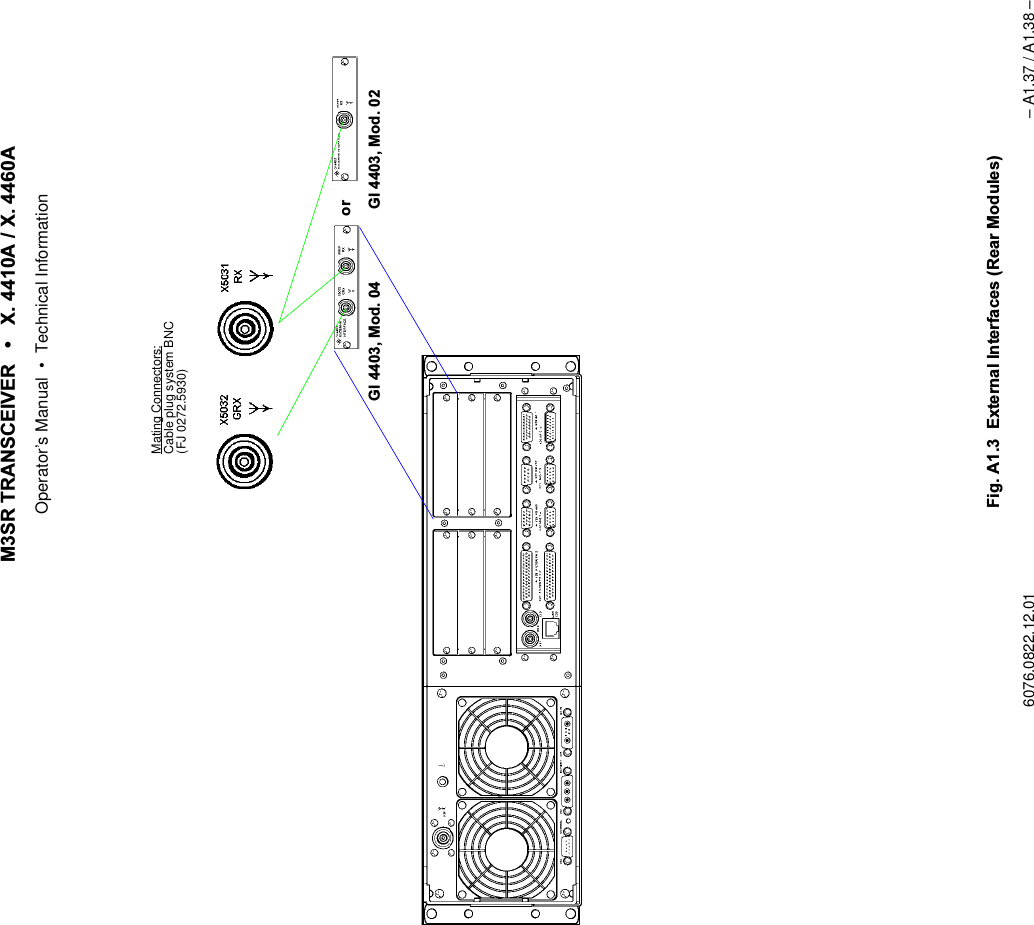
065 75$16&(,9(5  ; $  ; $Operator’s Manual • Use under Special Conditions6076.0822.12.01 – 3.55 –0HQX63/,76,7('(),1,7,211RWH1RWXVHGLQWKLVDSSOLFDWLRQStarting point: Menu 400, page 2 (RADIO MAINTENANCE)+Press softkey (3)    and the following display appears:Softkey SPLIT SITE...
065 75$16&(,9(5  ; $  ; $Operator’s Manual • Use under Special Conditions– 3.56 – 6076.0822.12.010HQX377&20/,1(0$33,1*1RWH:HUHFRPPHQGQRWWRFRQILJXUHWKHNH\OLQHVIRUORFDOPRGHDVWKLVPD\UHVXOWLQXQZDQWHGFDUULHUDFWLYDWLRQE\RQHRIWKHFRQQHFWHGGHYLFHVIn this menu the assignment of PTT lines to radio Comlines is displayed and edited. For DefaultSettings See Appendix A1.Starting point: Menu 400, page 2 (RADIO MAINTENANCE)+Press softkey (14)    and the following display appears:No. Control Action Notes2 Press softkey CL.Select setting.Selection of communication line for PTT mapping3 Press softkey REMOTE. Selection of the active PTT lineAn "X" then indicates that this line can be selected by remote control only.REMOTE means that the PTT line can be operated only in remote control but not in local control.softkey PTT MAPPING...PTT line interface (X25, X26) is only active if radio is set to REMOTEPTT contacts of X25 acc. to interface descrip-tion in Appendix A1Active ComlineLevel of active keyline+Select keyline.
065 75$16&(,9(5  ; $  ; $Operator’s Manual • Use under Special Conditions6076.0822.12.01 – 3.57 –4 Press softkey LOCAL. Selection of the active PTT lineAn "X" then indicates that this line can be selected by local control only.The PTT line is only enabled if the radio is set to LOCAL operation (key on Front Panel).5 Press softkey ACTIVE. Selection of the PTT level of the current line9 Press softkey SAVE. Saves the current configuration.The asterisk (*) indicates that the new set-tings have not yet been stored.No. Control Action Notes
065 75$16&(,9(5  ; $  ; $Operator’s Manual • Use under Special Conditions– 3.58 – 6076.0822.12.02 0HQX$8',20$33,1*In this menu the assignment of audio channels to Comlines is displayed and edited. Starting point: Menu 400, page 2+Press softkey (12)    and the following display appears:No. Control Action Notes2 Press softkey SOURCE.Select setting.Assigns the selected audio port to the Comline.&/Audio port is dedicated to Comline CL1 modules. Incommunication mode V/D UNCP any AF signalfrom the guard receiver will be added to the nar-rowband interface if the mixer is switched on viasoftkey GUARD (Menus 110 / 210).*8$5'Audio port is exclusively for AF signals from theguard receiver. Any AF signal from the guard re-ceiver will be output at the NB2 port in all communi-cation modes.1RWH:HUHFRPPHQGWRVZLWFKRQWKHPL[HUYLDVRIWNH\*8$5'0HQXVIRUERWK$)VLJQDOV9+)DQG8+)7KLVJXDUDQWHHVWKH$)VLJQDORXWSXWIURPWKHJXDUGUHFHLYHULQDOOFRPPXQLFDWLRQPRGHV9 Press softkey SAVE. Saves the current configuration.The asterisk (*) indicates that the new set-tings have not yet been stored.softkey AUDIO MAPPING...+Select audio lineNB: Voice infoWB: Data info
065 75$16&(,9(5  ; $  ; $Operator’s Manual • Use under Special Conditions6076.0822.12.01 – 3.59 –0HQX'(9,&(0$33,1*In this menu the assignment of radio configurations (e.g. Link 11) to Comlines is displayed andedited.Starting point: Menu 400, page 2 (RADIO MAINTENANCE)+Press softkey (11)    and the following display appears:1RWH•$VDUHVXOWRIGHYLFHPDSSLQJDOOWKHUHOHYDQWUDGLRVHWWLQJVVXFKDVUHVRXUFHDVVLJQPHQWLQWHUQDOVLJQDOSURFHVVLQJHWFDUHPDGH•:KHQWKHH[WHUQDOGHYLFHKDVEHHQFRQQHFWHGWRWKH&RPOLQHEHDEVROXWHO\VXUHWRVZLWFKWKHUDGLRRIIDQGRQDJDLQ•$IWHUVZLWFKRQFKHFNLIDXGLROLQH0HQX$8',20$33,1*DQGNH\OLQH0HQX377&20/,1(0$33,1*KDYHEHHQPDSSHGFRUUHFWO\•&$87,21:KHQUHPRYLQJWKHH[WHUQDOGHYLFHIURPWKH&RPOLQHDOOSUHYLRXVO\XVHGUHVRXUFHVZLOOEHFRPHIUHHDJDLQ7KHUHIRUHDOZD\VFKHFNERWKDXGLRPDSSLQJ0HQXDQG377PDSSLQJ0HQXNo. Control Action Notes2 Press softkey TYPE.Select setting.Defines the type of a selected radio con-figuration. At present, this function is available with cipher units only..<%% = Baseband mode.<'3 = Diphase mode3 Press softkey CL.Select setting.Assigns the selected device to a Comline.9 Press softkey SAVE. Saves the current configuration.The asterisk (*) indicates that the new set-tings have not yet been stored.softkey DEVICE MAPPING...+Select device 1RWH/,1.$DQG72'%($&21DUHIRUIXWXUHXVH
065 75$16&(,9(5  ; $  ; $Operator’s Manual • Use under Special Conditions– 3.60 – 6076.0822.12.010HQX648(/&+32/$5,7<In this menu the polarity of the squelch signal output level is displayed and edited.Starting point: Menu 400, page 2 (RADIO MAINTENANCE)+Press softkey (10)    and the following display appears:No. Control Action Notes2 Press softkey ACTIVE. The active polarity is switched from low to high and vice versa:9 Press softkey SAVE. Saves the current configuration.The asterisk (*) indicates that the new settings have not yet been stored.softkey SQUELCH... POLARITYActive level:High - positive polarityLow - level 0 V+Select squelch 
065 75$16&(,9(5  ; $  ; $Operator’s Manual • Use under Special Conditions6076.0822.12.02 – 3.61 – 0HQX)52173$1(/$8',26285&(By using the SELECT key one of the AF sources for the loudspeaker can be selected that havebeen configured in Menu 575, e.g. CL1 or Guard U/V.When CL1 is selected as AF source and communication mode V/D UNCP is active, the guardreceiver AF signal can be output at the loudspeaker in addition to the main receiver AF signal,depending on the GUARD configuration (see Menu 110 (MANUAL FIX.FRQ), page 1 andMenu 210, page 1 (USER PRESET FIX.FRQ)).The following table shows how LEDs 1 and 2 are related and which AF signal is output by theloudspeaker.Starting point: Menu 400, page 2 (RADIO MAINTENANCE)+Press softkey (9)    and the following display appears:LED AF signal12no AF signalOLJKWHGAF signal of main receiver and in addition of guard receiver, if switched on via softkey GUARD in Menu 110 (MANUAL FIX.FRQ) or 210 (USER PRESET FIX.FRQ).IODVKLQJAF signal of guard receiver (VHF band)IODVKLQJAF signal of guard receiver (UHF band)IODVKLQJIODVKLQJAF signal of guard receiver (VHF and UHF bands)LED 1 lighted1. Press key LEDs 1 and 2 flashing2. Press key none of the LEDs lighted 3. Press key LED 1 lightedsoftkey AUDIO FRONTP...+Select audio source 
065 75$16&(,9(5  ; $  ; $Operator’s Manual • Use under Special Conditions– 3.62 – 6076.0822.12.020HQX0$5.(5&21752/In this menu the marker for the selected Comline is enabled or disabled.Starting point: Menu 400, page 2 (RADIO MAINTENANCE)+Press softkey (7)    and the following display appears:No. Control Action Notes2 Press softkey SOURCE.Select setting.Assigns the Comline or guard receiver to the audio output at the Front Panel (loud-speaker, headset connector X7). 9 Press softkey SAVE. Saves the current configuration.The asterisk (*) indicates that the new set-tings have not yet been stored.No. Control Action Notes2 Press softkey ENA/DIS. Enables or disables the PLAIN marker function. The marker tone itself is switched on in Menu 110 (MANUAL FIX.FRQ) or 210 (USER PRESET FIX.FRQ).1RWH7KHPDUNHUWRQHLVWREHXVHGRQO\LI&LSKHU8QLW.<LVPDSSHG9 Press softkey SAVE. Saves the current configuration.The asterisk (*) indicates that the new set-tings have not yet been stored.softkey MARKER... CONTROL
065 75$16&(,9(5  ; $  ; $Operator’s Manual • Use under Special Conditions6076.0822.12.01 – 3.63 –0HQX5$',26(783Via the Radio Setup menus the PRESET PAGES (LOADED PAGES) are edited and stored.One PRESET consisting of up to 200 Pages can be stored in the radio. Alternatively, the PRE-SET may also be split up into two PRESETs with 100 Pages each.Each PRESET PAGE is made up of a fixed frequency and an EPM section (not used in thisapplication). When a PRESET PAGE is called up in PRESET mode, one of these sections isactivated and the radio is set accordingly. Which section is to be activated in each case is de-fined in the DEFAULT MODE setting, to be made in Menu 710. Page storage within the radio is based on a redundancy concept. For more details on Loaded,User and Current Pages see chapter 3.5.
065 75$16&(,9(5  ; $  ; $Operator’s Manual • Use under Special Conditions– 3.64 – 6076.0822.12.01Starting point: Menu 040 (MAIN)+Press softkey (5)    and the following display appears:+Enter setup PIN number (5 digits) by using the numerical keypad, then press ENTER.qThe following display appears:No. Control Action Notes9 Press softkey SETUP.Abort entry.Entry of a new setup PIN.1. Enter the new PIN by using the numerical keypad, then press ENTER.2. Confirm the new PIN by repeating the entry using the numerical keypad, then press EN-TER.See also chapter 3.6.softkey SETUP...for future use0HQX0HQX0HQX0HQX
065 75$16&(,9(5  ; $  ; $Operator’s Manual • Use under Special Conditions6076.0822.12.01 – 3.65 –0HQX35(6(7&21),*85$7,21In this menu the Preset configuration is displayed and edited.Starting point: Menu 600 (RADIO SETUP)+Press softkey (2)    and the following display appears:No. Control Action Notes2 Press softkey PRESET. Switches between two active Presets.1RWH6ZLWFKLQJRYHUEHWZHHQ3UHVHWDQGLVRQO\SRVVLEOHLI&RXQW[SDJHVLVVHOHFWHG6RVRIWNH\35(6(7LVHQDEOHGZLWKSUHVHWFRXQW 3 Press softkey COUNT. Switches between two preset counts.Count 2 is for 2 x 100 pages andCount 1 is for 200 pages.8 Press softkey RESTORE PRESET.Restores the Preset configuration stored in the radio. The Preset data are copied from the Loaded Presets into the User Presets.9 Press softkey SAVE. Saves the current configuration.The asterisk (*) indicates that the new set-tings have not yet been stored.softkey PRESET DEF...A Preset may consist of 200 or 2 x 100 Preset Pages.1RWH,Q5DGLRVHVVLRQVRIWNH\V35(6(7&2817DQG6$9(DUHHQDEOHG,Q&RPOLQHVHVVLRQVRIWNH\5(6725(35(6(7LVHQDEOHG
065 75$16&(,9(5  ; $  ; $Operator’s Manual • Use under Special Conditions– 3.66 – 6076.0822.12.010HQX/2$'('3$*(3$5$0(7(56In this menu the individual LOADED PAGES can be selected and deleted.Starting point: Menu 600 (RADIO SETUP)+Press softkey (3)    and the following display appears:No. Control Action Notes3 Press softkey DELETE PAGE.Abort entry.Deletes specified page.User-defined settings in the selected Pre-set Page are replaced by default values (see Default Settings in Appendix A1).4 Press softkey DELETE RANGE.Abort entry.Deletes from page xxx to page yyy.The user-defined settings in the pages of the specified range are deleted.1. Enter start number by using the numericalkeypad, then press ENTER.2. Enter stop number by using the numerical keypad, then press ENTER.softkey PAGE DEF...0HQX+Enter page no.Active presetDEFAULT: no customer-specific data loadedLOADED: customer-specific data loaded
065 75$16&(,9(5  ; $  ; $Operator’s Manual • Use under Special Conditions6076.0822.12.01 – 3.67 – 0HQX3DJH(',735(6(73$*(),;)54)L[HG)UHTXHQF\In this menu the settings of a Preset Page selected in Menu 620 (LOADED PRESET PARAMS)are displayed, edited and stored (page 1 of 2).Starting point: Menu 620 (LOADED PRESET PARAMS)+Press softkey (2)    and the following display appears:No. Control Action Notes2 Press softkey MODE. Selection of the section of the Preset Page to be edited or viewed),;)54only FIX. FRQ is possible4 Press softkey POWER.Select setting.Selection of transmit power2))Tx is switched off/2: Tx is set to low power0(',80Tx is set to medium power+,*+ Tx is set to high powerÇExact levels in W are defined in Menu 516 (VU TX PARAMETERS).5 Press softkey MODU.Select setting.Selection of modulation type$0amplitude modulation)0frequency modulationsoftkey EDIT...page 2Radio mode specified for this Preset Page if calledFrequency specified for this Preset PagePreset Page selected in Menu 620forfutureuse0HQXSection of Preset Page to be edited(only FIX. FRQ is possible)
065 75$16&(,9(5  ; $  ; $Operator’s Manual • Use under Special Conditions– 3.68 – 6076.0822.12.017 Press softkey DEFAULT MODE. Selection of the radio operation mode to be set, if this Preset Page is called up.8 Press softkey SAVE AS.Set value.Press softkey SAVE AS.Saves the edited PRESET PAGE under a new PRESET number.Range of values: 0 to 199The asterix (*) indicates that the new set-tings have not yet been stored.12 Press softkey FREQ.Set value.Setting the frequency in the range fromq100 to 512 MHz(VHF/UHF transceiver) orq100 to 173.9875 MHz(VHF transceiver) orq225 to 399.9875 MHz(UHF transceiver)No. Control Action Notes
065 75$16&(,9(5  ; $  ; $Operator’s Manual • Use under Special Conditions6076.0822.12.01 – 3.69 – 0HQX3DJH(',735(6(73$*(),;)54)L[HG)UHTXHQF\In this menu the settings of a Preset Page selected in Menu 620 (LOADED PRESET PARAMS)are displayed, edited and stored (page 2 of 2).Starting point: Menu 710, page 1+Press softkey (1)    and the following display appears:No. Control Action Notes2 See chapter 3.7.30, softkey 2.8 See chapter 3.7.30, softkey 8.11 Press softkey COMM.Select setting.Selection of a pre-defined communication mode1RWH:KHQDFRPPXQLFDWLRQPRGHQRWVXSSRUWHGE\WKHUDGLR6:RSWLRQPLVVLQJGHYLFHPDSSLQJLVVHWYLDWKH3UHVHW3DJHVFRPPXQLFDWLRQPRGH9'81&3ZLOOEHDFWLYDWHGE\GHIDXOW12 Press softkeyCHAN SP.Select setting.Selection of the channel spacingsoftkey PAGE 1/2 MORE...page 10HQXno function
065 75$16&(,9(5  ; $  ; $Operator’s Manual • Use under Special Conditions– 3.70 – 6076.0822.12.0113 Press softkeyTX OFFS.Select value.Selection of the Tx offset valueSee Menu 110, page 2 (MANUAL FIX.FRQ).No. Control Action Notes
065 75$16&(,9(5  ; 0  ; 0Operator’s Manual • Use under Special Conditions6076.0851.12.01 – 3.71 – 0HQX&80$,17(1$1&(In this menu the hardware and software parameters of the Control Unit GB 4000C are dis-played and edited.Starting point: Menu 040 (MAIN)+Press softkey (6)    and the following display appears:+Enter control unit maintenance PIN number (5 digits) by using the numerical keypad, then press ENTER.qThe following display appears:No. Control Action Notes9 Press softkey MAINT PIN.Abort entry.Entry of a new maintenance PIN1. Enter the new PIN by using the numerical keypad, then press ENTER.2. Confirm the new PIN by repeating the entry using the numerical keypad, then press EN-TER.See also chapter 3.6.softkey CU... MAINT0HQX0HQX0HQX1RWH6RIWNH\V,%,7&%,7DQG(55256DUHGHVFULEHGLQFKDSWHU
065 75$16&(,9(5  ; 0  ; 0Operator’s Manual • Use under Special Conditions– 3.72 – 6076.0851.12.02 0HQX&8,19(1725<This menu gives an overview of the hardware, software and firmware components installed inthe control unit.Starting point: Menu 800 (CU MAINTENANCE)+Press softkey (4)    and the following display appears:softkey INVENTORY...0HQXTypes:SW - identifier for softwareFW - identifier for firmwareHWM - identifier for hardware moduleHW - identifier for hardwaresee Appendix A1
065 75$16&(,9(5  ; 0  ; 0Operator’s Manual • Use under Special Conditions6076.0851.12.02 – 3.73 – 0HQX&8,19(1725<'(7$,/6This menu shows details about a component.Starting point: Menu 815 (CU INVENTORY)+Press softkey (3)    and the following display appears (example):+Select component.softkey DETAILS...The data for the component selected inMenu 815 comprise the following:Type (hardware, software,firmware)Name of module or softwareIdent. No.VariantCode No.Version No.Serial No.Production Date
065 75$16&(,9(5  ; 0  ; 0Operator’s Manual • Use under Special Conditions– 3.74 – 6076.0851.12.010HQX5$',2$''5(66/,67)LJ ([DPSOHRID1HWZRUNZLWK5RXWHU5RXWHU,3DGGUHVV/RJLFDODGGUHVV5&,3DGGUHVV/RJLFDODGGUHVV5,3DGGUHVV/RJLFDODGGUHVV5,3DGGUHVV/RJLFDODGGUHVV&,3DGGUHVV/RJLFDODGGUHVV&,3DGGUHVV/RJLFDODGGUHVV&*DWHZD\DGGUHVV*DWHZD\DGGUHVV5UDGLR&FRQWUROXQLWHub,3DGGUHVV/RJLFDODGGUHVV5Hub*DWHZD\DGGUHVV*DWHZD\*DWHZD\*DWHZD\HubHJIXUWKHUUDGLRVHJIXUWKHUUDGLRV
065 75$16&(,9(5  ; 0  ; 0Operator’s Manual • Use under Special Conditions6076.0851.12.01 – 3.75 –For addressing the M3SR devices the Internet Protocol (IP) is used. Therefore a unique IP ad-dress needs to be assigned to each device, permitting the device to be identified and ad-dressed without ambiguity. In addition, each device needs a freely selectable logical addressin the range from 000 to 999, which is the address to be entered in Menu 010 (RADIO CON-NECTION) for addressed operation. The logical address spares the operator the tedious taskof entering the complex IP addresses. Via Menu 835, the addresses (logical and IP addresses) of devices other than one’s own canbe entered or deleted. When entering the IP address please observe the IETF (= Internet En-gineering Task Force) standards (RFC pages = request for comments). In compliance withRFC1918, the following IP address ranges are reserved for private networks:q10.0.0.0 to 10.255.255.255, associated subnet mask 255.0.0.0q172.16.0.0 to 172.31.255.255, associated subnet mask 255.255.0.0q192.168.0.0 to 192.168.0.255, associated subnet mask 255.255.255.0The subnet mask defines the respective address parts for network address and local address.1RWH•,3DGGUHVVHVDQGDUHQRWSHUPLWWHGWREHXVHG•)RUWKHQHWLQIUDVWUXFWXUHHJURXWHUZHUHFRPPHQGWRXVHWKHORZHUORFDODGGUHVVHVMenu 835 displays all stored addresses. In Menu 010 (CU ADDRESS ROUTE) only those de-vices can be selected to set up a link, which figure in the address list and which in column ’G’are not marked with a ’-’ (wrong configuration, see Menu 836).When a radio is selected whose network address (e.g. 192.168..010) differs from the con-trol unit network address (e.g. 192.168..011), the link is set up via the router.Network address Local addressSubnet mask 255 255 255 0IP addresses 192 168 0 0::::192 168 0 255max. 256 units0 reserved for network255 reserved for broadcast
065 75$16&(,9(5  ; 0  ; 0Operator’s Manual • Use under Special Conditions– 3.76 – 6076.0851.12.01Example:1. Defining the subnet mask - depending on the number of networks and devices per network(up to 256 networks with max. 253 devices per network => 255.255.255.000)2. Defining the logical addresses and IP addresses - Select a logical address that clearly identifies the particular device and is easy to re-member.  - The logical and the local address may be identical.3. Defining the gateway addresses - For each local network a gateway address is required(192.168.082.001, 192.168.083.001 and 192.168.084.001). - For the local address always use "1".4. Entering the logical addresses and IP addresses for those radios that are to be linked up to - We recommend to also enter the logical addresses and IP addresses of the control units, because this will inhibit these addresses for radios and prevent multiple address allocation. 5. Entering the own address, subnet mask and gateway address in Menu 836 (CU AD-DRESS ROUTE)AddressLogical Associated IP = network + local46 192.168.082.010 192.168.082 01047 192.168.082.011 192.168.082 01148 192.168.082.012 192.168.082 01250 192.168.083.010 192.168.083 01051 192.168.083.011 192.168.083 01152 192.168.083.012 192.168.083 01255 192.168.082.020 192.168.082 02068 192.168.084.010 192.168.084 010
065 75$16&(,9(5  ; 0  ; 0Operator’s Manual • Use under Special Conditions6076.0851.12.02 – 3.77 –Starting point: Menu 800, page 1 (CU MAINTENANCE)+Press softkey (13)    and the following display appears:No. Control Action Notes2 Press softkey ADD ADDR.EnterAdds address to the address list. Entry of logical address and IP address for another device:3 Press softkey DELETEADDRESS.Abort process.Deletes the selected address.5 Press softkey CHANGE TYPE. Switches over between radio and controller (control unit).13 Press softkey GET FROM RADIO. Retrieves an address list from the assigned radio (see also Menu 435 (RADIO AD-DRESS LIST)). In this way the control unit obtains all addresses stored in the radio.14 Press softkey SAVE TO CTRL UNIT. Saves address list to the control unit.The asterisk (*) indicates that the new set-tings have not yet been stored.softkey ADDRESS LIST...0HQXLogical address Type of device:5 UDGLR& UHPRWHFRQWUROXQLWGateway:EODQN  GHYLFHLVSDUWRIWKHORFDOQHWZRUN  GHYLFHLVSDUWRIDQRWKHUQHWZRUNWREHUHDFKHGYLDDJDWHZD\  ZURQJFRQILJXUDWLRQVHH0HQX+Select address.IP address1RWH:KHQVRIWNH\*(7)5205$',2LVSUHVVHGDQ\H[LVWLQJDGGUHVVHVZLOOEHUHSODFHG7KLVSUHYHQWVWKDWLGHQWLFDO,3DGGUHVVHVZLWKGLIIHUHQWORJLFDODGGUHVVHVDUHFUHDWHG
065 75$16&(,9(5  ; 0  ; 0Operator’s Manual • Use under Special Conditions– 3.78 – 6076.0851.12.01 0HQX&8$''5(665287(Via Menu 836 the own address (logical and IP address) can be entered. When specifying theSubnet Mask and the IP addresses (own and Gateway), please observe the IETF standards(RFC pages), in particular:q796: Address Mappingsq940: Toward an Internet Standard Scheme for Subnetting q950: Internet Standard Subnetting Procedureq1219: On the Assignment of Subnet Numbersq1517: Applicability Statement for the Implementation of Classless Inter-DomainRouting q1519: Classless Inter-Domain Routing: an Address Assignment and AggregationStrategyq1918: Address Allocation for Private InternetsIn compliance with RFC1918 the following address ranges are reserved for private networks:q10.0.0.0 to 10.255.255.255, associated subnet mask 255.0.0.0q172.16.0.0 to 172.31.255.255, associated subnet mask 255.255.0.0q192.168.0.0 to 192.168.255.255, associated subnet mask 255.255.255.0Starting point: Menu 835 (CU ADDRESS LIST)+Press softkey (11)    and the following display appears:softkey ROUTE...
065 75$16&(,9(5  ; 0  ; 0Operator’s Manual • Use under Special Conditions6076.0851.12.01 – 3.79 –No. Control Action Notes2 Press softkeyLOG ADDR.Change value.Changing the own logical address:Range of values: 001 to 9993 Press softkeyIP ADDRChange value.Changing of the own IP address:11 Press softkey GATEWAY ADDR.Change value.Changing the gateway address:12 Press softkeySUBNET MASK.Change value.Changing the subnet mask:14 Press softkey SAVE TO CTRL UNIT. Saves address list to the control unit.The asterisk (*) indicates that the new set-tings have not yet been stored.1RWH(QWU\RIGHOHWHVDQH[LVWLQJJDWHZD\DGGUHVV
065 75$16&(,9(5  ; 0  ; 0Operator’s Manual • Use under Special Conditions– 3.80 – 6076.0851.12.010HQX&8',63/$<3$5$06In this menu the display parameters of the control unit are displayed and edited.Starting point: Menu 800 (CU MAINTENANCE)+Press softkey (6)    and the following display appears:No. Control Action Notes3 Press softkey INDICATORS.Set value.Setting the LED brightnessPermitted range of values: 0% to 100%4 Press softkey KEY ILLUM.Set value.Setting the front key illuminationPermitted range of values: 0% to 100%5 Press softkey DATE.Select format.Selection of the date format9 Press softkey SAVE. Saves the current configuration.The asterisk (*) indicates that the new set-tings have not yet been stored.11 Press softkey FREQ.Select setting.Selection of the frequency modeNORMAL:ICAO:softkey DISPLAY PARAMS... 
065 75$16&(,9(5  ; 0  ; 0Operator’s Manual • Use under Special Conditions6076.0851.12.01 – 3.81 / 3.82 –12 Press softkey DISP TIMER.Set value.Setting of the display timer in the range of 1 to 60 minutes (display goes blank). Permitted range of values: 0 to 60 min.After this timeout the display goes blank.13 Press softkey BRIGHT.Set value.Setting of the display brightness in per-cent.Permitted range of values: 0% to 100%14 Press softkey CONTR.Set value.Setting the display contrast in percent.Permitted range of values: 0% to 100%No. Control Action NotesFrequency (MHz) Channel spacing (kHz)Channelxxx.0000 25 xxx.000xxx.0000 8.33 xxx.005xxx.0083 8.33 xxx.010xxx.0167 8.33 xxx.015xxx.0250 25 xxx.025xxx.0250 8.33 xxx.030xxx.0333 8.33 xxx.035xxx.0417 8.33 xxx.040xxx.0500 25 xxx.050xxx.0500 8.33 xxx.055
065 75$16&(,9(5  ; $  ; $Operator’s Manual • Operation under Special Conditions6076.0822.12.01 – 3.83 / 3.84 –Radio oper-ation modeCommunication modeV/D UNCP V/DCPFIX.FRQ [[NB1PTT_1L Audio SystemWB2PTT_2LAF Interface 1(X26)AF Interface 2(X25)Analog DataEquipmentNB1PTT_1LWB1AF Interface 1(X26)Audio Systeme.g.16-kbps Cipher Unite.g.Link 11 Unit (DTS)NB1PTT_1LWB1PTT_1AF Interface 1(X26)NB2PTT_2AF Interface 2(X25)Audio Systeme.g.16-kbps Cipher UnitNB1PTT_1LWB1PTT_1AF Interface 1(X26)Radio oper-ation modeCommunication modeV/DUNCP WBDIGITAL BBWBDIGITAL DPLINK11FIX.FRQ [[[[Communication ModeqVoice / Data uncipheredqWideband analogqVoice / Data uncipheredqVoice / DatacipheredqVoice / Data uncipheredqWideband digital basebandqWideband digital diphaseqVoice / Data uncipheredqWideband digital basebandqWideband digital diphaseqLink11Radio oper-ation modeCommunication modeV/DUNCP WBDIGITALBBWBDIGITALDPFIX.FRQ [[[Radio oper-ation modeCommunication modeV/D UNCP WBANALOGFIX.FRQ [[KeylinePTT_1LPTT_2LPTT_1LPTT_1LPTT_1PTT_1LPTT_1PTT_2'HIDXOWDevice noneCIPHER UNITSYNC  WB DATASYNC WB DATALINK11Audio lineNB1WB2NB1WB1NB1WB1NB1WB1NB2Cipher UnitKY58CGCDPTTPT/CTBB/DPZeroize%RWKNH\OLQHVDUHHQDEOHGIRUERWKFRPPXQLFDWLRQPRGHV(JNH\OLQH377B/DFWLYDWHVWUDQVFHLYHULQ9'81&3DQG:%$1$/2*)LJ$SSOLFDWLRQ([DPSOHVHJ;7 $
065 75$16&(,9(5  ; $  ; $Operator’s Manual • Malfunction6076.0822.12.01 – 4.1 – 0DOIXQFWLRQ ,QWURGXFWLRQThis chapter provides information concerningqVisual InspectionqTroubleshooting - BIT Design - BIT Radio (Menu RADIO MAINTENANCE) - BIT Control Unit (Menu CU MAINTENANCE)9LVXDO,QVSHFWLRQCheck the following:1. Check external cabling between the complete transceiver and external equipment.2. Check all connectors for firm seating and the power supply cable and RF coaxial cables at the rear for mechanical damage. If necessary, replace cables by new ones one at a time until the defective connection has been found.&$87,21,IDFRQQHFWRUVKRZVDQ\GLVFRORXUDWLRQFDXVHGE\KHDWLWVPDWLQJFRQQHFWRULVDOVRGHIHFWLYHDQGPXVWEHUHSODFHGWRRObvious damage of minor importance can be eliminated on the spot, provided that the appro-priate equipment is available. In case of severe damage, the transceiver must be sent to thenearest repair facility.
065 75$16&(,9(5  ; $  ; $Operator’s Manual • Malfunction– 4.2 – 6076.0822.12.01 7URXEOHVKRRWLQJTroubleshooting of the remote-controlled transceiver is possible by using for instance a ControlUnit GB 4000C, mod. 03. %,7'HVLJQFor detection of device and system failures Built-In Test (BIT) functions are implemented in theequipment.The BIT functions support the service team in detecting and analysing equipment and systemerrors, helping them to decide on appropriate countermeasures.qPBITThe Power-on BIT is performed automatically after power supply has been switched on.qCBITThe Continuous BIT starts directly after PBIT.The system is subjected to a functional check.The modules installed in the radio basis are continuously checked by CBIT.Warnings and/or error messages produced during ongoing operation are displayed in Menu 410 (RADIO CBIT RESULTS) for the transceiver and in Menu 810 (CU CBIT RE-SULTS) for the control unit.As long as an error is indicated in Menu 410 (RADIO CBIT RESULTS), the GO LED remains dark and connector contact X23.4 (NOGO) carries low level.Menu 420 (RADIO ERROR LIST) or 820 (CU ERROR LIST) displays all warnings and error messages that have occurred, together with the time of occurrence.When malfunctions (warning or error message) have been detected, the failure is sig-nalled to the control unit and/or via GB2PP protocol to a connected remote control unit.qIBITThe Initiated BIT is used for equipment diagnostics (test of LEDs, RF wiring etc.). IBIT helps to localize failures and to support maintenance.It can be activated directly on the local control unit (Menu 405 (RADIO IBIT RESULTS)) and also by a remote control command (only GB2PP protocol). It takes several minutes for IBIT to be completed. It is possible to interrupt this test any time and to continue later.During IBIT the transceiver is not available for operation.Please note that the radio is only ok if CBIT and IBIT both signal GO.The rating of a BIT message can be either warning or error, depending on how serious the trou-ble is.qWhen there is a warning, operation may still go on, although the radio should be checked as soon as possible. The GO LED remains lighted in the presence of warnings.qWhen an error is indicated, the radio is not working correctly and needs to be sent to the next repair facility. The GO LED is extinguished in the presence of errors, and contact X23.4 changes to low level.Irrespective of the rating, a BIT message is reported in Menu 410 (RADIO CBIT RESULTS)and/or Menu 420 (RADIO ERROR LIST). Please take care: the RADIO ERROR LIST containsboth errors and warnings.CBIT always indicates the existing state, that means, as long as a BIT message is being indi-cated by CBIT, this problem persists.
065 75$16&(,9(5  ; $  ; $Operator’s Manual • Malfunction6076.0822.12.01 – 4.3 –%,75DGLR 0HQX3DJH5$',20$,17(1$1&(Via this menu the maintenance functions implemented in the radio are activated.Starting point: Menu 040 (MAIN)+Press softkey (4)   and the following display appears:+Enter maintenance PIN (5 digits) by using the numerical keypad, then press ENTER.qThe following display appears:+Press the relevant softkey to call up any of these menus.softkey RADIO MAINT...0HQX0HQX0HQX1RWH6RIWNH\V,19(1725<0$,173,1'()$8/76(77,1*65$',27,0($''5(66/,67DQG&21752/3257DUHGHVFULEHGLQFKDSWHU
065 75$16&(,9(5  ; $  ; $Operator’s Manual • Malfunction– 4.4 – 6076.0822.12.010HQX5$',2,%,75(68/76In this menu, an IBIT (Initiated Built-In Test) for the entire radio or a selected Comline can bestarted. After completion of IBIT the results are displayed.Starting point: Menu 400, page 1 (RADIO MAINTENANCE)+Press softkey (2)   and the following display appears:1RWH3HUIRUP,%,7RQO\XQGHUWKHIROORZLQJFRQGLWLRQV•5DGLRRSHUDWLRQPRGH),;)54•0RGXODWLRQPRGH$0•&RPPXQLFDWLRQPRGH9'81&3YRLFHGDWDXQFLSKHUHG•0DNHVXUHWKDWWKHIXOO9'&VXSSO\YROWDJHLVDYDLODEOHDWDOOWLPHVRWKHUZLVHWKHUHTXLUHGWUDQVPLWSRZHUZLOOIDLOWREHREWDLQHGDQGDUHODWLQJ%,7ZDUQLQJZLOOEHSURGXFHG,IWKHVHUHTXLUHPHQWVDUHQRWPHWDQHUURUPHVVDJHPD\FRPHXSZKHQWKH,%,7LVVWDUWHG2QFHWKH,%,7LVFRPSOHWHGUHVHWWKHUDGLRNH\212))3OHDVHQRWHWKDWGXULQJ,%,7ORZSRZHUWUDQVPLWVLJQDOVDUHUDGLDWHGAs soon as IBIT signals anything other than GO, IBIT needs to be repeated. If the same errorpersists, send the radio to the depot for repair.No. Control Action Notes2 Press softkey EQUIP.Select equipment.Selection of equipment for IBIT$//all components installed&/components of Comline CL11RWH(UURUPHVVDJHVUHVXOWLQJIURP,%,7DUHGLVSOD\HGVHOHFWLYHO\GHSHQGLQJRQWKHVHOHFWHGHTXLSPHQW9 Press softkey START.Terminate IBIT with softkey STOP.Starts IBIT for the selected configuration.1RWH,%,7FDQEHVWRSSHGDQ\WLPHsoftkey IBIT...1RWH6RIWNH\'(7$,/6LVRQO\HQDEOHGZLWKVWDWXV(550HQX
065 75$16&(,9(5  ; $  ; $Operator’s Manual • Malfunction6076.0822.12.01 – 4.5 – 0HQX5$',2,%,7'(7$,/6This menu displays information about an IBIT result.Starting point: Menu 405 (RADIO IBIT RESULTS)+Press softkey (3)   and the following display appears:ÇSee also Menu 420 (RADIO ERROR LIST) and Menu 421 (RADIO ERROR DETAILS).+Select message.softkey DETAILS...MessageExplanation ofmessageStatus:Warning or Error
065 75$16&(,9(5  ; $  ; $Operator’s Manual • Malfunction– 4.6 – 6076.0822.12.01 0HQX5$',2&%,75(68/76This menu provides information about the CBIT (Continuous Built-In Test) results. It displaysall currently existing warnings and/or errors. As long as an error persists, the GO LED is extin-guished and contact X23.4 (NOGO) carries low level.Starting point: Menu 400, page 1 (RADIO MAINTENANCE)+Press softkey (3)   and the following display appears:No. Control Action Notes2 Press softkey EQUIP.Select equipment.Selection of equipment for CBIT$//all components installed&/components of Comline CL1softkey CBIT...0HQX1RWH6RIWNH\'(7$,/6LVRQO\HQDEOHGZLWKVWDWXV(55
065 75$16&(,9(5  ; $  ; $Operator’s Manual • Malfunction6076.0822.12.01 – 4.7 –0HQX5$',2&%,7'(7$,/6This menu displays information about a CBIT result.Starting point: Menu 410 (RADIO CBIT RESULTS)+Press softkey (3)   and the following display appears:ÇSee also Menu 420 (RADIO ERROR LIST) and Menu 421 (RADIO ERROR DETAILS).+Select message.softkey DETAILS...MessageExplanation ofmessageStatus:Warning or Error
065 75$16&(,9(5  ; $  ; $Operator’s Manual • Malfunction– 4.8 – 6076.0822.12.01 0HQX5$',2(5525/,67This menu selectively displays all messages (warnings and errors) which have occurred in theradio, depending on the selected equipment. The first list entry always refers to the most recenterror. Up to 100 errors may be listed. When the error list is full, a warning message comes upprompting the operator to clear the error list. Failure to do so will close the error list for newentries.Starting point: Menu 400, page 1 (RADIO MAINTENANCE)+Press softkey (5)   and the following display appears:No. Control Action Notes2 Press softkey EQUIP.Select equipment.Selection of equipment for error list$//all components installed&/components of Comline CL1Depending on the selection, all errors or only those concerning CL1 are listed.9 Press softkey CLEAR LIST. Clears the complete error list in Menu 420.softkey ERRORS...0HQXThe latest errorError code number Error message
065 75$16&(,9(5  ; $  ; $Operator’s Manual • Malfunction6076.0822.12.01 – 4.9 –0HQX5$',2(5525'(7$,/6This menu shows the details of an error.Starting point: Menu 420 (RADIO ERROR LIST)+Press softkey (3)   and the following display appears:The details of an error selected in Menu 420 comprise the following data:Name of errorError index Consecutive error number in the radio error listError Code  See Error Code List in chapter 4.3.2.8Comline Comline No.Time Time and date of error occurrenceLevel  Classification of failure: error or warningRepeat Counter Number of occurrencesDescription Description of failure+Select error message.softkey DETAILS...
065 75$16&(,9(5  ; $  ; $Operator’s Manual • Malfunction– 4.10 – 6076.0822.12.01(UURU/LVWCheck the error code and proceed as indicated in the Action column (in most cases the radiowill need to be transferred to the nearest depot facility).1RWH(UURUFRGHV[[[DUHQRWOLVWHGLQWKHWDEOH,I,%,7VHHFKDSWHUUHWXUQVD[[[HUURUFRGH,%,7PXVWEHUHSHDWHG,IWKHHUURUSHUVLVWVVHQGWKHUDGLRWRWKHGHSRWCode Message Level Notes Action(CBIT message,frequent or single event)0001 GR CNAPI ERR W Inform depot.0002 GR General Software Error W Inform depot.0003 GR ERR STR FULL W Error store full Inform depot.0004 GR FLASH CHCKS ERR  E Checksum error of Flash EEPROM Inform depot.0100 PL +2.5 V LOW E Platform error:+25-V reference voltage lowSend radio to depot.0101 PL V_BATT LOW W Platform warning:33-V battery low    Send radio to depot(replace the platform battery).0102 PL V_RET LOW E Platform error:Retention voltage low Send radio to depot.0103 PL INT +10V LOW E Platform error:Internal voltage +10 V low Send radio to depot.0105 PL INT -10V LOW E Platform error:Internal voltage -10 V low Send radio to depot.0106 PL OVERTEMP W Platform warning:Overtemperature  Check airflow of fans and ambient temperature. If this fails to eliminate the fault, send radio to depot.0150 PL SRAM BATT EMPTY W Platform warning:SRAM battery is low Send radio to depot(replace the platform SRAM battery).0200 PS -12V LOW E DC power supply error:Voltage -12 V low CBIT message or frequent event:Send radio to depot.Single event:no action0201 PS +3.3V LOW E DC power supply error:Voltage +33 V low CBIT message or frequent event:Send radio to depot.Single event:no action0202 PS +5V LOW E DC power supply error:Voltage +5 V low CBIT message or frequent event:Send radio to depot.Single event:no action0203 PS +12V LOW E DC power supply error:Voltage +12 V low CBIT message or frequent event:Send radio to depot.Single event:no action0204 PS +33V LOW E DC power supply error:Voltage +33 V low CBIT message or frequent event:Send radio to depot.Single event:no action
065 75$16&(,9(5  ; $  ; $Operator’s Manual • Malfunction6076.0822.12.01 – 4.11 –0205 PS MAIN VLT LOW W DC power supply warning:Main voltage (28 VDC) low CBIT message:Send radio to depot.Frequent event:Check configuration (Menu 511, func-tion PWR SUP). Switch off and check external power supply, cables and connectors at X31. If this fails to elimi-nate the fault, send the radio to depot.Single event:Check configuration (Menu 511, func-tion PWR SUP). Switch off and check external power supply, cables and connectors at X31.0206 PS BATT VLT LOW W DC power supply warning:Battery voltage low CBIT message:Send radio to depot.Frequent event:Check configuration (Menu 511, func-tion PWR SUP). Switch off and check external power supply, cables and connectors at X31. If this fails to elimi-nate the fault, send the radio to depot.Single event:Check configuration (Menu 511, func-tion PWR SUP). Switch off and check external power supply, cables and connectors at X31.0207 PS VLT LW VLIM W DC power supply warning:VLIM voltage low CBIT message or frequent event:Send radio to depot.Single event:no action0208 PS VLT EXT SW W DC power supply warning:Voltage for external switch lowCBIT message or frequent event:Send radio to depot.Single event:no action0209 PS 28V LT AMP LOW DC W DC power supply warning:28 VDC for left amplifier lowCBIT message or frequent event:Send radio to depot.Single event:no action0210 PS 28V RT AMP LOW DC W DC power supply warning:28 VDC for right amplifier lowCBIT message or frequent event:Send radio to depot.Single event:no action0211 PS 28V DRV AMP LOW W DC power supply warning:28 VDC for driver amplifier lowCBIT message or frequent event:Send radio to depot.Single event:no action0212 PS VLT PAX LW VLIM W DC power supply warningVoltage power amplifier below limitCBIT message or frequent event:Send radio to depot.Single event:no action0213 PS OVERTEMP W DC power supply warning:Overtemperature in power supply unitCBIT message or frequent event:Check airflow of fans and ambient temperature. If this fails to eliminate the fault, send radio to depot.Single event:Check airflow of fans and ambient temperature.Code Message Level Notes Action(CBIT message,frequent or single event)
065 75$16&(,9(5  ; $  ; $Operator’s Manual • Malfunction– 4.12 – 6076.0822.12.010214 PS SPEED FAN1 LOW W DC power supply warning:Speed of fan 1 at trans-ceiver rear is too low CBIT message or frequent event:Check airflow of fans and ambient temperature. If this fails to eliminate the fault, send radio to depot.Single event:Check airflow of fans and ambient temperature.0215 PS SPEED FAN2 LOW W DC Power supply warning:Speed of fan 2 at trans-ceiver rear is too low CBIT message or frequent event:Check airflow of fans and ambient temperature. If this fails to eliminate the fault, send radio to depot.Single event:Check airflow of fans and ambient temperature.0216 PS DC UNDER VOLT W DC power supply warning:External DC supply under 18 VDCCBIT message or frequent event:Switch off and check external AC/DC Power Supply IN 4000A, cables and connectors. If this fails to eliminate the fault, send radio to depot.Single event:Switch off and check external AC/DC Power Supply IN 4000A, cables and connectors.0217 PS NO SYNC E DC power supply error:External 100-kHz reference not presentCBIT message or frequent event:Send radio to depot.Single event:no action0218 PS OVERTEMP AC/DC W DC power supply warning:Overtemperature in exter-nal Power SupplyIN 4000ACBIT message or frequent event:Switch off and check external AC/DC Power Supply IN 4000A, cables and connectors. If this fails to eliminate the fault, send radio to depot.Single event:Switch off and check external AC/DC Power Supply IN 4000A, cables and connectors.0250 SY DEF E Synthesizer error:Module defective  CBIT message or frequent event:Send radio to depot.Single event:no action0251 SY VOLT ERR E Synthesizer error:Voltage error CBIT message or frequent event:Send radio to depot.Single event:no action0252 SY SYNC E Synthesizer error:Synchronization error / bad time referenceCBIT message or frequent event:Send radio to depot.Single event:no action0253 SY EXT FREQ REF E Synthesizer error:Not locked to an external referenceCBIT message or frequent event:Send radio to depot.Single event:no action0254 SY LEV LO OSC E Synthesizer error:Local oscillator level low CBIT message or frequent event:Send radio to depot.Single event:no action0255 SY SYNC ERR E Synthesizer error:Synchronization/timing errorCBIT message or frequent event:Send radio to depot.Single event:no actionCode Message Level Notes Action(CBIT message,frequent or single event)
065 75$16&(,9(5  ; $  ; $Operator’s Manual • Malfunction6076.0822.12.01 – 4.13 –0256 SY PLL UNLOCK E Synthesizer error:PLL unlock CBIT message or frequent event:Send radio to depot.Single event:no action0257 SY FREQ CMD ERR W Synthesizer warning:Incorrect frequency value commandedInform depot.270 HSELU FREQ CMD ERR W UHF filter warning:Illegal frequency value commandedInform depot.271 HSELU NO OUTPOW E UHF filter error:No output power. The error message disappears after the next faultless transmis-sion.CBIT message or frequent event:Send radio to depot.Single event:no action272 HSELU NO INPOW E UHF filter error:No input power. The error message disappears after the next faultless transmis-sion.CBIT message or frequent event:Send radio to depot.Single event:no action273 HSELU VOLT ERR E UHF filter error:Voltage error CBIT message or frequent event:Send radio to depot.Single event:no action274 HSELU DEFECT E UHF filter error:UHF filter defective CBIT message or frequent event:Send radio to depot.Single event:no action0300 RX OVERTEMP W Receiver warning:Overtemperature in module CBIT message or frequent event:Check airflow of fans and ambient temperature. If this fails to eliminate the fault, send radio to depot.Single event:Check airflow of fans and ambient temperature.0301 RX EXT REF NOT PRES E Receiver error:External 100-kHz reference frequency not presentCBIT message or frequent event:Send radio to depot.Single event:no action0302 RX IF PART OVERLOAD E Receiver error:IF part overload  CBIT message or frequent event:Send radio to depot.Single event:no action0303 RX IN SIG OVERLOAD W Receiver warning:Input signal overload CBIT message or frequent event:Receive signal too large. Switch off and check RF cables. If this fails to eliminate the fault, send radio to depot.Single event:Receive signal too large. Switch off and check RF cables.0304 RX GEN ERR E Receiver error:General error CBIT message or frequent event:Send radio to depot.Single event:no action0305 RX WATCHDOG E Receiver error:Reset of µP caused by watchdog circuitSend radio to depot.Code Message Level Notes Action(CBIT message,frequent or single event)
065 75$16&(,9(5  ; $  ; $Operator’s Manual • Malfunction– 4.14 – 6076.0822.12.010306 RX INT REF DEF E Receiver error:Internal reference defective Send radio to depot.0307 RX IF PART DEF E Receiver error:IF part defective Send radio to depot.0308 RX INT LO DEF E Receiver error:Internal local oscillator defectiveCBIT message or frequent event:Send radio to depot.Single event:no action0309 RX EXT LO NOT PRES E Receiver error:External local oscillator not presentCBIT message:Send radio to depot.frequent event:Switch off and check RF cables. If this fails to eliminate the fault, send radio to depot.Single event:no action0350 TX GLOBAL ERROR E Transmitter error:TX is switched off due to global error in moduleSend radio to depot.0351 TX PIN DIODE SW DEF E Transmitter error:PIN diode switch defective Send radio to depot.0352 TX OUTPUT LOW E Transmitter error:Output power below mini-mum limitCBIT message or frequent event:Send radio to depot.Single event:no action0353 TX OUTPUT HIGH E Transmitter error:Output power above maxi-mum limitCBIT message or frequent event:Send radio to depot.Single event:no action0354 TX OVERTEMP W Transmitter warning:Tx is switched off due to overtemperature in moduleCBIT message or frequent event:Check airflow of fans and ambient temperature. If this fails to eliminate the fault, send radio to depot.Single event:Check airflow of fans and ambient temperature.0355 TX WATCHDOG E Transmitter error:Reset of µP caused by watchdog circuitSend radio to depot.0356 TX INCORR CMD E Transmitter error:Received command is not correctSend radio to depot.0357 TX OVERVOLTAGE W Transmitter warning:Overvoltage CBIT message or frequent event:Switch off and check DC power sup-ply. If this fails to eliminate the fault, send radio to depot.Single event:Switch off and check DC power sup-ply.0358 TX EXT REF NOT PRES E Transmitter error:External 100-kHz reference is not presentCBIT message or frequent event:Send radio to depot.Single event:no action0359 TX VSWR W Transmitter warning:Voltage standing-wave ratio above limitSwitch off and check antenna cabling. If this fails to eliminate the fault, send radio to depot.Code Message Level Notes Action(CBIT message,frequent or single event)
065 75$16&(,9(5  ; $  ; $Operator’s Manual • Malfunction6076.0822.12.01 – 4.15 –0360 TX IN DRIVE MISSING E Transmitter error:Input drive signal below limit or missingCBIT message or frequent event:Send radio to depot.Single event:no action0361 TX POW CTL LOOP LIM E Transmitter error:Power control loop out of limitsCBIT message or frequent event:Send radio to depot.Single event:no action0362 TX POW REDUCED W Transmitter warning:Output power reduced Check airflow of fans, ambient tem-perature, antenna cabling and DC power supply. If this fails to eliminate the fault, send radio to depot.0363 TX TEMP SENS SH E Transmitter error:Temperature sensor is shorted / defectiveInform depot.0400 GRX WATCHDOG E Guard receiver error:Reset of µP caused by watchdog circuitSend radio to depot.0401 GRX EXT REF NOT PRE E Guard receiver error:External 100-kHz reference is not presentCBIT message or frequent event:Send radio to depot.Single event:no action0402 GRX VCO1 NOT LOCKED E Guard receiver error:Loop of VCO1 (Voltage-Controlled Oscillator) not lockedCBIT message or frequent event:Send radio to depot.Single event:no action0403 GRX VCO2 NOT LOCKED E Guard receiver error:Loop of VCO2 (Voltage-Controlled Oscillator) not lockedCBIT message or frequent event:Send radio to depot.Single event:no action0404 GRX IN SIG OVERLOAD W Guard receiver warning:Input signal overload CBIT message or frequent event:Receive signal too large. Switch off and check RF cables. If this fails to eliminate the fault, send radio to depot.Single event:Receive signal too large. Switch off and check RF cables.0500 AFI WATCHDOG E Audio frequency interface error:Reset of µP caused by watchdog circuitSend radio to depot.0501 AFI BUFFER OVERFLOW W Audio frequency interface warning:Sample buffer overflowInform depot.0502 AFI CMD ERR E Audio frequency interface error:Received command is not correctInform depot.0503 AFI CODEC E Audio frequency interface error:Error in CODECCBIT message or frequent event:Send radio to depot.Single event:no action0504 AFI R/W ERR E Audio frequency interface error:Error during read/write accessInform depot.Code Message Level Notes Action(CBIT message,frequent or single event)
065 75$16&(,9(5  ; $  ; $Operator’s Manual • Malfunction– 4.16 – 6076.0822.12.010550 FPGA1 R/W ERR E Platform error:Test of internal circuit failed Send radio to depot.0551 FPGA2 R/W ERR E Platform error:Test of internal circuit failed Send radio to depot.0552 FPGA3 R/W ERR E Platform error:Test of internal circuit failed Send radio to depot.0600 IF CBIT OF EXT AMP W Pin TEST1 X278 / X288CBIT warning of external amplifierCBIT message or frequent event:Switch off and check external ampli-fier / filter, cables and connectors. If this fails to eliminate the fault, send radio to depot.Single event:Switch off and check external ampli-fier / filter, cables and connectors.0601 IF CBIT OF EXT AMP W Pin TEST0 X2735 / X2835CBIT warning of external amplifierCBIT message or frequent event:Switch off and check external ampli-fier / filter, cables and connectors. If this fails to eliminate the fault, send radio to depot.Single event:Switch off and check external ampli-fier / filter, cables and connectors.0602 IF VSWR OF EXT AMP W Pin VSWR X2720 / 37 / X2820 / 37VSWR warning of external amplifierCBIT message or frequent event:Switch off and check antenna cabling. If this fails to eliminate the fault, send radio to depot.Single event:Switch off and check antenna cabling.0603 EXT PA TUNING X27 W Pin TX_INHIBIT 0 X274Tuning error of external fil-ter (testing period 20 s before output of warning)Switch off and check external filter, cables and connectors. If this fails to eliminate the fault, send radio to depot.0604 EXT PA TUNING X27 W Pin TX_INHIBIT 1 X2722Tuning error of external fil-ter (testing period 20 s before output of warning)Switch off and check external filter, cables and connectors. If this fails to eliminate the fault, send radio to depot.0605 EXT PA TUNING X28 W Pin TX_INHIBIT 2 X284Tuning error of external fil-ter (testing period 20 s before output of warning)Switch off and check external filter, cables and connectors. If this fails to eliminate the fault, send radio to depot.0606 EXT PA TUNING X28 W Pin TX_INHIBIT 3 X2822Tuning error of external fil-ter (testing period 20 s before output of warning)Switch off and check external filter, cables and connectors. If this fails to eliminate the fault, send radio to depot.0700 PL PLL1 UNLOCK W Platform warning:PLL1 is unlocked CBIT message or frequent event:Send radio to depot.Single event:no action0701 PL PLL1 NO REF FREQ W Platform warning:No reference frequency for PLL1Check configuration (Menu 511, func-tion EXT REF).Check the cabling at interface X10.If required, change the configuration or replace the cable if external refer-ence is ok.0702 PL OCXO TEMP W Platform warning:Temperature of OCXO low Warning occurs either when chang-ing from TCXO to OCXO or while oven-controlled oscillator is in warm-up phase.Code Message Level Notes Action(CBIT message,frequent or single event)
065 75$16&(,9(5  ; $  ; $Operator’s Manual • Malfunction6076.0822.12.01 – 4.17 –0703 PL PLL2 UNLOCK E Platform error:PLL2 is unlocked CBIT message or frequent event:Send radio to depot.Single event:no action0704 PL PLL2 NO REF FREQ E Platform error:No reference frequency for PLL2Check configuration (Menu 511, func-tion EXT REF).Check the cabling at interface X10.If required, change the configuration or replace the cable if external refer-ence is ok.Code Message Level Notes Action(CBIT message,frequent or single event)
065 75$16&(,9(5  ; $  ; $Operator’s Manual • Malfunction– 4.18 – 6076.0822.12.01 %,7&RQWURO8QLW 0HQX&80$,17(1$1&(Starting point: Menu 040 (MAIN)+Press softkey (6)   and the following display appears:+Enter control unit maintenance PIN number (5 digits) by using the numerical keypad, then press ENTER.qThe following display appears:+Press the relevant softkey to call up any of these menus.softkey CU... MAINT0HQX0HQX0HQX1RWH6RIWNH\V,19(1725<0$,173,1',63/$<3$5$06DQG$''5(66/,67DUHGHVFULEHGLQFKDSWHU
065 75$16&(,9(5  ; $  ; $Operator’s Manual • Malfunction6076.0822.12.01 – 4.19 –0HQX&8,%,75(68/76In this menu the operator can start an IBIT (Initiated Built-In Test) for the Control Unit. WhenIBIT is completed the results are displayed.Starting point: Menu 800 (CU MAINTENANCE)+Press softkey (2)   and the following display appears:As soon as IBIT signals anything other than GO, IBIT needs to be repeated. If the error persists,send the radio to the depot for repair.No. Control Action Notes9 Press softkey START.Terminate IBIT with softkey STOP.Press keys ESC/CLR plus ENT at the same time.Terminate key-board test with softkey KEYBD TEST.Starts IBIT.1RWH,%,7FDQEHVWRSSHGDQ\WLPHThe keyboard test starts automatically.softkey IBIT...1RWH6RIWNH\'(7$,/6LVRQO\HQDEOHGZLWKVWDWXV(550HQX0HQX
065 75$16&(,9(5  ; $  ; $Operator’s Manual • Malfunction– 4.20 – 6076.0822.12.01 0HQX&8,%,7'(7$,/6This menu displays information about an IBIT result.Starting point: Menu 805 (CU IBIT RESULTS)+Press softkey (3)   and the following display appears:ÇSee also Menu 820 (CU ERROR LIST) and Menu 821 (CU ERROR DETAILS).+Select message.softkey DETAILS...MessageExplanation ofmessageStatus:Warning or Error
065 75$16&(,9(5  ; $  ; $Operator’s Manual • Malfunction6076.0822.12.01 – 4.21 – 0HQX&8.(<%2$5'7(67In the Keyboard Test the keyboard is checked for proper functioning. For this test the operatorshould press all keys and softkeys one after the other. The display shows which key has justbeen pressed. The keyboard test can be stopped any time by pressing keys ESC/CLR andENT simultaneously.When triggering the IBIT in Menu 805 the keyboard test is started automatically.Starting point: Menu 805 (CU IBIT RESULTS)+Press softkey (14)   and the following display appears:softkey KEYBD TEST...After ten seconds the display returns to Menu 805.or:+Press keys ESC/CLR plus ENT at the same time.
065 75$16&(,9(5  ; $  ; $Operator’s Manual • Malfunction– 4.22 – 6076.0822.12.010HQX&8&%,75(68/76In this menu the results for the Control Unit CBIT (Continuous Built-In Test) are displayed.Starting point: Menu 800 (CU MAINTENANCE)+Press softkey (3)   and the following display appears:softkey CBIT...1RWH6RIWNH\'(7$,/6LVRQO\HQDEOHGZLWKVWDWXV(550HQX
065 75$16&(,9(5  ; $  ; $Operator’s Manual • Malfunction6076.0822.12.01 – 4.23 – 0HQX&8&%,7'(7$,/6This menu displays information about a CBIT result.Starting point: Menu 810 (CU CBIT RESULTS)+Press softkey (3)   and the following display appears:ÇSee also Menu 820 (CU ERROR LIST) and Menu 821 (CU ERROR DETAILS).+Select message.softkey DETAILS...MessageExplanation ofmessageStatus:Warning or Error
065 75$16&(,9(5  ; $  ; $Operator’s Manual • Malfunction– 4.24 – 6076.0822.12.010HQX&8(5525/,67This menu displays all errors which have occurred in the control unit. The first list entry alwaysrefers to the most recent error. Up to 100 errors may be listed. When the error list is full, a warn-ing message comes up prompting the operator to clear the error list. Failure to do so will closethe error list for new entries.Starting point: Menu 800 (CU MAINTENANCE)+Press softkey (5)   qThe following display appears:No. Control Action Notes9 Press softkey CLEAR LIST. Clears the complete error list in Menu 820.softkey ERRORS...0HQXThe latest errorError code number Error message
065 75$16&(,9(5  ; $  ; $Operator’s Manual • Malfunction6076.0822.12.01 – 4.25 –0HQX&8(5525'(7$,/6This menu shows the details of an error.Starting point: Menu 820 (CU ERROR LIST)+Press softkey (3)   and the following display appears:The details of an error selected in Menu 820 comprise the following data:Name of errorError index Consecutive error number in the CU error listError Code  Error Code ListTime Time and date of error occurrenceLevel  Classification of failure: error or warningRepeat Counter Number of occurrencesDescription Description of failure+Select error message.softkey DETAILS...
065 75$16&(,9(5  ; $  ; $Operator’s Manual • Malfunction– 4.26 – 6076.0822.12.01(UURU/LVWCheck the error code and proceed as indicated in the Action column (in most cases the radiowill need to be transferred to the nearest depot facility).*) The SRAM battery is not a replaceable battery but a gold capacitor.Code Message Level Notes Action(CBIT message,frequent or single event)0002 GR General Software Error W Inform depot.0003 GR ERR STR FULL W Error store full Inform depot.1000 CP +28V RANGE W Control panel +28 VDCout of range Send radio to depot.1001 CP +2.5V RANGE W Control panel +2.5 VDC out of range Send radio to depot.1002 CP +3.3V RANGE W Control panel +3.3 VDC out of range CBIT message or frequent event:Send radio to depot.Single event:no action1003 CP +5.0V RANGE W Control panel +5.0 VDC out of range CBIT message or frequent event:Send radio to depot.Single event:no action1004 CP +12V RANGE W Control panel +12 VDCout of range CBIT message or frequent event:Send radio to depot.Single event:no action1005 CP -12V RANGE W Control panel -12 VDCout of range CBIT message or frequent event:Send radio to depot.Single event:no action1006 CP OVERTEMP W Control panelovertemperature Check / correct ambient temperature (must be below 55 °C). If this fails to eliminate the fault, send the radio to the depot.1007 *) CP SRAM BATT LOW W Control panel interfaces SRAM battery low Send radio to depot.3000 TEST1 ALTERA_RDBK E Read back test of FPGA failed Send radio to depot.3001 TEST1 EPSON_RDBK E Read back test of the dis-play controller failed Send radio to depot.3002 TEST3 LOOPB IRDA E Loopback test of the IRDA interface failed Send radio to depot.3005 TEST3 LOOPB KDD E Loopback test of the KDD serial port failed Send radio to depot.3006 TEST3 LOOPB SMC2 E Loopback test of the serial port SMC2 failed Send radio to depot.
065 75$16&(,9(5  ; $  ; $Operator’s Manual • Maintenance6076.0822.12.01 – 5.1 – 0DLQWHQDQFH1RWH$OOPDLQWHQDQFHLVWREHFDUULHGRXWE\TXDOLILHGSHUVRQDORQO\ 6FKHGXOHG0DLQWHQDQFHqWe recommend to readjust the oscillators (TCXO and OCXO, part of Radio Platform HPLAT, see the relevant Service Manual) one year after the M3SR Transceiver was first put into operation. Only this can guarantee that the specification is met.qThe backup battery (part of Radio Platform HPLAT, see the relevant Service Manual) need to be replaced once every three years after installation (see figure below).qThe filter mat of the dust protection filter needs to be cleaned or replaced (ident. no. 6102.6092.00) at certain intervals. The time interval depends on the environmental con-ditions the transceiver is operated in. To remove the filter mat proceed as follows:1. Undo the two screws (see figure below) fixing the cover to the front panel.2. Carefully remove the cover.3. Remove the filter mat from the ventilating duct.4. Clean the filter mat by using compressed air or water.5. Re-insert the cleaned and dried filter mat into the ventilating duct.6. Perform steps 1 and 2 in the reverse order.Otherwise the transceiver is free from scheduled maintenance.Label: Date of battery installation e.g. XT 4410A
065 75$16&(,9(5  ; $  ; $Operator’s Manual • Maintenance– 5.2 – 6076.0822.12.017DNLQJ&DUHSuch measures involve cleaning and touching up slight blemishes in the varnish coat of thetransceiver. The following materials are required: &OHDQLQJ:HDUJRJJOHVZKHQZRUNLQJZLWKFRPSUHVVHGDLULQRUGHUWRDYRLGH\HLQMXULHV&$87,21'LUHFWFRPSUHVVHGDLUILUVWWRZDUGVJURXQGXQWLOQRPRUHFRQGHQVHGZDWHULVFRQWDLQHGLQWKHDLUMHW.HHSDPLQLPXPGLVWDQFHRIFPEHWZHHQFRPSUHVVHGDLUDQGWUDQVFHLYHU1. First of all clean surfaces of the unit with compressed air.2. Continue cleaning with a soft brush or a duster.3. Clean heavily contaminated surfaces, especially grease stains, with a soft, lint-free cloth moistened with suds.5HWRXFKLQJWKH3DLQW:RUNTouch up the paint work of the M3SR Transceiver as follows:1. Remove any loose paint particles from the area to be retouched.2. Clean area to be retouched with a soft, lint-free cloth soaked in suds or similar.3. Wait for the suds to dry out.4. Retouch with paint carefully and allow plenty of time to dry out.5. Once the first coat is completely dry, apply a second coat and again allow it to dry. The repair is thus completed.,WHP'HVFULSWLRQ1 Soft brush2Duster3 Cleaning compound, e.g. suds, household detergent4 VarnishFront panel: RAL 7947 telegreyChassis:KB90 grey:$51,1*
065 75$16&(,9(5  ; $  ; $Operator’s Manual • Technical Information6076.0822.12.01 – A1.1 –$ 7HFKQLFDO ,QIRUPDWLRQ1RWH)RUXVHRIWKH065 7UDQVFHLYHUUHDGLQJWKLVDSSHQGL[LVQRWHVVHQWLDO7KLVDSSHQGL[SURYLGHVLQIRUPDWLRQIRUDQ\RQHLQWHUHVWHGLQWKHWHFKQLFDOIDFWVDQGILJXUHVRI; $RU; $The technical information covers the following:qExternal InterfacesqConnection of Peripheral EquipmentqDefault SettingsqInventory StructureqTechnical Data for M3SR TransceiverqRemote ControlqDownload
065 75$16&(,9(5  ; $  ; $Operator’s Manual • Technical Information– A1.2 – 6076.0822.12.01$ ([WHUQDO,QWHUIDFHV(see Figs. A1.1 to A1.3)More detailed information is provided by the interface description, available on demand fromRohde & Schwarz at extra charge (order no.: 6102.4002.01SB).* or ~ = inverted signal$ 6HUYLFH),//&RQQHFWRU;RQO\; $1RWH)RUIXWXUHXVH$ ),//&RQQHFWRU;1RWH1RWXVHG
065 75$16&(,9(5  ; $  ; $Operator’s Manual • Technical Information6076.0822.12.01 – A1.3 –$ /$16(59,&(&RQQHFWRU;1RWH;LVDQ0',;FURVVRYHUFRQQHFWRU$ +HDGVHW&RQQHFWRU;&RQQHFWRU &RQWDFW 6LJQDO 'LUHFWLRQ 5HPDUNVRecessed socket,8-way;(FT 4052.5738)Mating Connector:8-way cable plug(FT 6083.5984)12345678PL_ETH_RX+PL_ETH_RX- PL_ETH_TX+ PL_ETH_TX-inputinputoutputoutputacc. to 10BaseTacc. to 10BaseTacc. to 10BaseTnot connectednot connectedacc. to 10BaseTnot connectednot connected&RQQHFWRU &RQWDFW 6LJQDO 'LUHFWLRQ 5HPDUNVRecessed socket,7-way;(FO 586.7855)Mating Connector:7-way cable plug(FO 0586.8239)Shrink-on part(FO 0586.8245)ABCDEFGHeadphonesHeadphones (-)Microphone 0.5 mVMicrophone 0.5 mV (-)Microphone 150 mV*PTTGNDoutputinputinputinputreturn to GNDreturn to GNDfor microphone 150 mV and *PTT$%&*'()
065 75$16&(,9(5  ; $  ; $Operator’s Manual • Technical Information– A1.4 – 6076.0822.12.01$5HIHUHQFH)UHTXHQF\,QSXW&RQQHFWRU;$ 5HIHUHQFH)UHTXHQF\2XWSXW&RQQHFWRU;&RQQHFWRU &RQWDFW 6LJQDO 'LUHFWLRQ 5HPDUNVRecessed socket,type BNC;(FJ 0048.6796)Mating Connector:Cable plug system BNC(FJ 0272.5930)12F_REF_INGNDinput&RQQHFWRU &RQWDFW 6LJQDO 'LUHFWLRQ 5HPDUNVRecessed socket,type BNC;(FJ 0048.6796)Mating Connector:Cable plug system BNC(FJ 0272.5930)12F_REF_OUT GNDoutput
065 75$16&(,9(5  ; $  ; $Operator’s Manual • Technical Information6076.0822.12.01 – A1.5 –$/$1&RQQHFWRU;1RWH;LVDQ0',FRQQHFWRU$0LVFHOODQHRXV&RQQHFWRU;1RWH8VHU,2IRUFXVWRPHUVSHFLILFVROXWLRQV1RWVXSSRUWHGE\VRIWZDUHIRUIXWXUHXVH5HOD\FRQWDFWVIRUFRQWURORIH[WHUQDO5)UHOD\V&RQQHFWRU &RQWDFW 6LJQDO 'LUHFWLRQ 5HPDUNVRecessed socket,8-way;(FT 0048.9620)Mating Connector:8-way cable plug(FT 6083.5984)12345678PL_ETH_TX+PL_ETH_TX-PL_ETH_RX+PL_ETH_RX-outputoutputinputinputacc. to 10BaseTacc. to 10BaseTacc. to 10BaseTnot connectednot connectedacc. to 10BaseTnot connectednot connected&RQQHFWRU &RQWDFW 6LJQDO 'LUHFWLRQ 5HPDUNVMale multipoint con-nector, subminiature,15-way;(FM 6104.9018)Mating Connector:15-way female multipoint connector(FM 1003.0866)Socket contacts(FM 1006.7410)Shielded case(FM 0586.9870)123456789101112131415RELAY_1RELAY_2RELAY_3RELAY_4 USER_I/O_0USER_I/O_1USER_I/O_2GNDUSER_I/O_3USER_I/O_4USER_I/O_5USER_I/O_6USER_I/O_7GNDUSER_I/O_8outputoutputoutputoutput
065 75$16&(,9(5  ; $  ; $Operator’s Manual • Technical Information– A1.6 – 6076.0822.12.01$56&RQQHFWRU;1RWH1RWXVHGLQWKLVDSSOLFDWLRQ,QWHUIDFHIRUXVHUGDWDHJWRFRQQHFWD'7(GDWDWHUPLQDOHTXLSPHQW&RQQHFWRU &RQWDFW 6LJQDO 'LUHFWLRQ 5HPDUNVFemale multipoint connector, 9-way;(FM 6104.9018)Mating Connector:9-way male multipoint connector(FM 0048.3368)Pin contacts(FM 0520.6344)Shielded case(FM 0586.9870)123456789RS 232_DCD RS 232_RXDRS 232_TXDRS 232_DTRGNDRS 232_DSRRS 232_RTS RS 232_CTSRS 232_RIoutputoutputinputinputoutputinputoutputoutputdata carrier detectreceive datatransmit datadata terminal readydata set readyready to sendclear to sendring indicator
065 75$16&(,9(5  ; $  ; $Operator’s Manual • Technical Information6076.0822.12.01 – A1.7 –$ 0LVFHOODQHRXV&RQQHFWRU;*) Used in conjunction with EPM radio modes (e.g. SECOS). Not used in this application.&RQQHFWRU &RQWDFW 6LJQDO 'LUHFWLRQ 5HPDUNVMale multipoint con-nector, subminiature,15-way;(FM 6104.8986)Mating Connector:15-way female multipoint connector(FM 1003.0866)Socket contacts(FM 1006.7410)Shielded case(FM 0586.9870)123456789101112131415TOD_ATOD_BTODCONFIGURATION NOGO~ZEROIZE~INHIBIT_TX~INHIBIT_RXGND~SOK_1~Bl_1~SOK_2~Bl_2~NE_2GND~NE_1bidirec.bidirec.outputoutputinputinputinputbidirec.bidirec.outputoutputoutputbidirec.time of day *)time of day *)reference voltage *)synchronization ok *)break-in *)synchronization ok *)break-in *)net entry *)net entry *)
065 75$16&(,9(5  ; $  ; $Operator’s Manual • Technical Information– A1.8 – 6076.0822.12.01$ 56 &RQQHFWRU;1RWH7KHUHPRWHFRQWUROSRUWFDQEHFRQILJXUHGLQ0HQX5$',2&21752/3257HJWRVHULDOSRUWVWDQGDUG7KLVUHVXOWVLQWKHIROORZLQJFRQWDFWDVVLJQPHQWV$ 5656$ 56&RQQHFWRU &RQWDFW 6LJQDO 'LUHFWLRQ 5HPDUNVFemale multipoint connector, subminia-ture, 15-way;(FM 6104.8986)Mating Connector:15-way male multipoint connector(FM 1006.4491)Pin contacts(FM 1006.4504)Shielded case(FM 0586.9870)123456789101112131415GNDRS485_B_ARS485_S_ARS485_I_A RS485_R_ARS485_C_ARS485_T_AGNDRS485_5VRS485_B_BRS485_S_BRS485_I_BRS485_R_BRS 485_C_BRS485_T_Binputbidirec.inputinputoutputoutputoutputinputbidirec.inputinputoutputoutputsignal groundclear to sendclockdata set readyreceive datarequest to sendtransmit dataprotective ground con-nected to chassis groundclear to sendclockdata set readyreceive datarequest to sendtransmit data&RQQHFWRU &RQWDFW 6LJQDO 'LUHFWLRQ 5HPDUNVsee appendix A1.1.11.1123 to 456789 to 15GNDCTSRxDRTSTxDGNDinputinputoutputoutputsignal groundclear to sendnot usedreceive datarequest to sendtransmit dataprotective ground con-nected to chassis groundnot used
065 75$16&(,9(5  ; $  ; $Operator’s Manual • Technical Information6076.0822.12.01 – A1.9 –$ $),QWHUIDFH&RQQHFWRU;*) for future use&RQQHFWRU &RQWDFW 6LJQDO 'LUHFWLRQ 5HPDUNVMale multipoint con-nector, subminiature,26-way;(FM 6102.5650)Mating Connector:26-way female multipoint connector(FM 1006.7403)Socket contacts(FM 1006.7410)Shielded case(FM 0586.9564)1234567891011121314151617181920212223 to 242526AF_TX2_NB_AAF_TX2_NB_BAF_RX2_NB_AAF_RX2_NB_BAGNDAF_TX2_WB_AAF_TX2_WB_BAF_RX2_WB_AAF_RX2_WB_B~PTT_LINE_2AGC_RX2_1AGC_RX2_2SQ_MAIN_2GNDUSER_DEF_1USER_DEF_2PTT_2SQ_GUARD_2~CARRIER~LINK11+5VUSER_DEF_3USER_DEF_4inputinputoutputoutputinputinputoutputoutputinputoutputoutputoutputbidirec.bidirec.inputoutputoutputoutputoutputbidirec.bidirec.narrowbandgalvanic decouplingnarrowbandgalvanic decouplingnarrowbandgalvanic decouplingnarrowbandgalvanic decouplinganalog groundwidebandwidebandwidebandwidebandfor second receiver *)for second receiver *)for second receiver *)reservedcustomer specific *)customer specific *)for second receiver *)reservedcustomer specific *)customer specific *) 
065 75$16&(,9(5  ; $  ; $Operator’s Manual • Technical Information– A1.10 – 6076.0822.12.01$ $),QWHUIDFH&RQQHFWRU;&RQQHFWRU &RQWDFW 6LJQDO 'LUHFWLRQ 5HPDUNVFemale multipoint connector, subminia-ture, 26-way;(FM 6102.5650)Mating Connector:26-way male multipoint connector(FM 6104.9530)Pin contacts(FM 1006.4504)Shielded case(FM 0586.9564)1234567891011121314 to 151617181920212223242526AF_TX1_NB_AAF_TX1_NB_BAF_RX1_NB_AAF_RX1_NB_BAGNDAF_TX1_WB_AAF_TX1_WB_BAF_RX1_WB_AAF_RX1_WB_B~PTT_LINE_1AGC_RX1_1AGC_RX1_2SQ_MAIN_1GNDBB/~DP~DPTTPTT_1SQ_GUARD_1~CARRIER+28 V_SW+28 V_SWZEROIZEPT/CTCGCinputinputoutputoutputinputinputoutputoutputinputoutputoutputoutputoutputoutputinputoutputoutputoutputoutputoutputoutputinputnarrowbandgalvanic decouplingnarrowbandgalvanic decouplingnarrowbandgalvanic decouplingnarrowbandgalvanic decouplinganalog groundwidebandwidebandwidebandwidebandbaseband / diphasedelayedreservedswitchedswitchedplain text / cipher textcipher ground control
065 75$16&(,9(5  ; $  ; $Operator’s Manual • Technical Information6076.0822.12.01 – A1.11 –$ )LOWHU3RZHU$PSOLILHU&RQQHFWRU;&RQQHFWRU &RQWDFW 6LJQDO 'LUHFWLRQ 5HPDUNVFemale multipoint connector, subminia-ture, 44-way;(FM 6104.9001)Mating Connector:44-way male multipoint connector(FM 6104.9547)Pin contacts(FM 1006.4504)Shielded case(FM 0627.1826)123456789101112131415161718192021222324252627282930313233343536373839404142434428V_SWGND~BLK~TX_INHIBIT0~CARRIER~FM~TX_RXTEST1VHF100KHZ1MHZ800KHZ8MHZ40MHZGND28V_SWGND~3DB~ENABLE0~VSWR~PTT~TX_INHIBIT1~CARRIER~FM25KHZ200KHZ2MHZ10MHZ100MHZ80MHZ28V_SWGNDUHF~TX_RXTEST0~ENABLE1~VSWR~PTTGND50KHZ400KHZ4MHZ20MHZ200MHZ0outputoutputinputinputoutputoutputinputoutputoutputoutputoutputoutputoutputoutputoutputinputinputoutputinputinputoutputoutputoutputoutputoutputoutputoutputoutputoutputoutputinputinputinputoutputoutputoutputoutputoutputoutputswitchedblankingswitchedattenuationswitchedused as ’device select’ for certain filter types
065 75$16&(,9(5  ; $  ; $Operator’s Manual • Technical Information– A1.12 – 6076.0822.12.01$ )LOWHU3RZHU$PSOLILHU&RQQHFWRU;&RQQHFWRU &RQWDFW 6LJQDO 'LUHFWLRQ 5HPDUNVFemale multipoint connector, subminia-ture, 44-way;(FM 6104.9001)Mating Connector:44-way male multipoint connector(FM 6104.9547)Pin contacts(FM 1006.4504)Shielded case(FM 0627.1826)123456789101112131415161718192021222324252627282930313233343536373839404142434428V_SWGND~BLK~TX_INHIBIT2~CARRIER~FM~TX_RXTEST1VHF100KHZ1MHZ800KHZ8MHZ40MHZGND28V_SWGND~3DB~ENABLE0~VSWR~PTT~TX_INHIBIT3~CARRIER~FM25KHZ200KHZ2MHZ10MHZ100MHZ80MHZ28V_SWGNDUHF~TX_RXTEST0~ENABLE1~VSWR~PTTGND50KHZ400KHZ4MHZ20MHZ200MHZ1outputoutputinputinputoutputoutputinputoutputoutputoutputoutputoutputoutputoutputoutputinputinputoutputinputinputoutputoutputoutputoutputoutputoutputoutputoutputoutputoutputinputinputinputoutputoutputoutputoutputoutputoutputswitchedblankingswitchedattenuationswitchedused as ’device select’ for certain filter types 
065 75$16&(,9(5  ; $  ; $Operator’s Manual • Technical Information6076.0822.12.01 – A1.13 –$ $QWHQQD&RQQHFWRU;$'&,1&RQQHFWRU;&RQQHFWRU &RQWDFW 6LJQDO 'LUHFWLRQ 5HPDUNVRecessed socket, N-type;(FJ 6104.9353)Mating Connector:Cable plug system N(FJ 0087.8850)12AntennaGNDRF Rx input / Tx output&RQQHFWRU &RQWDFW 6LJQDO 'LUHFWLRQ 5HPDUNVMultipoint connector 7-way: 2 high-current (40 A) pins + 5 auxil-iary pins;(FM 6105.0337)Mating Connector:5-way femalemultipoint connector(FM 0066.0173)Socket contacts(FM 0520.6338)High-current socket con-tacts(FP 0531.9233)Shielded caseA1A212345MAINGNDPFAILPTEMPPRETSPARESPAREinputinputinputinput28 VDC nominal100 Ω to GND$
065 75$16&(,9(5  ; $  ; $Operator’s Manual • Technical Information– A1.14 – 6076.0822.12.01$ %DWWHU\&RQQHFWRU;$([WHUQDO6XSSO\&RQQHFWRU;&RQQHFWRU &RQWDFW 6LJQDO 'LUHFWLRQ 5HPDUNVMultipoint connector 3-way: 2 high-current (40 A) pins;(FM 0070.0780)Mating Connector:3-way female multipoint connector(FM 0070.0800)High-current contacts(FP 0531.9233)Shielded case(FM 0586.9564)A1A2A3GNDSPAREBATTERY input 19 to 31 VDC&RQQHFWRU &RQWDFW 6LJQDO 'LUHFWLRQ 5HPDUNVFemale multipoint connector, 9-way;(FM 0243.1346)Mating Connector:9-way multipoint connector(FM 0048.3368)Pin contacts(FM 0520.6344)Shielded case(FM 0586.9870)12345678928V_EXTGNDONGND28V_EXT_SW28V_EXTOFF28V_EXT_SW28V_EXT_SWoutputinputoutputoutputinputoutputoutputswitchedswitchedswitched$
065 75$16&(,9(5  ; $  ; $Operator’s Manual • Technical Information6076.0822.12.01 – A1.15 –$ 5[$QWHQQD&RQQHFWRU;3DUWRI$QWHQQD,QWHUIDFH*,$ *5[$QWHQQD&RQQHFWRU;3DUWRI$QWHQQD,QWHUIDFH*,0RG&RQQHFWRU &RQWDFW 6LJQDO 'LUHFWLRQ 5HPDUNV Recessed socket,type BNC;(part of W2:DV 6103.4864)Mating Connector:Cable plug system BNC(FJ 0272.5930)12Antenna RxGNDinput&RQQHFWRU &RQWDFW 6LJQDO 'LUHFWLRQ 5HPDUNV Recessed socket,type BNC;(part of W1:DV 6103.4858)Mating Connector:Cable plug system BNC(FJ 0272.5930)12Antenna GRxGNDinput
065 75$16&(,9(5  ; $Operator’s Manual • Technical Information– A1.16 – 6076.0822.12.02$ &RQQHFWLRQRI3HULSKHUDO(TXLSPHQW$ 8+)3RZHU$PSOLILHU9'/When frequencies outside the frequency range of 225 to 400 MHz or communication modeLINK 11, UHF Power Amplifier VD 480L will be bypassed.The following CBIT messages relating to UHF Amplifier VD 480L may occur:q601: IF CBIT OF EXT AMPq602: IF VSWR OF EXT AMPMake sure that in UHF Power Amplifier VD 480L the jumpers for connector X400 are set asfollows (see also User Manual 6045.5822.12), otherwise an error message may come up:X400.1 and .2: jumper (voltage error)X400.3 and .4: no jumper (no input power monitoring)X400.5 and .6: jumper (VSWR error)When selecting the power level, bear in mind that VD 480L can be driven with max. 25 W.VD 480L.13.14.15.27.28.29.30.42.43.44M3SR Transceiver8MHZ40MHZGND2MHZ10MHZ100MHZ80MHZ4MHZ20MHZ200MHZX27.1.2.3.4.5.6.17.18.19.20.21.33.34.3528V_SWGND ~BLK ~TX_INHIBIT0~CARRIER~FMGND~3DB~ENABLE0~VSWR~PTTUHF~TX/RXTEST0X30 X107 X108to AntennaX105.25.2.24.22.19.4.15.12.10.7.5.11.9.18X106.6.14.10.4.12.7.15.5.13.8
065 75$16&(,9(5  ; $  ; $Operator’s Manual • Technical Information6076.0822.12.01 – A1.17 –Starting point: Menu 040 (MAIN)1. Press softkey Menu 400 (RADIO MAINTENANCE)2. ENTER maintenance PIN by using the numerical keypad, then pressENTER.3. Press softkeys   Menu 510 (RADIO MODULES)4. Press softkey 5. Select module VU POWERAMPLIFIER by using the tunig knob.6. Press softkey Menu 516 (VU TX PARAMETERS)7. Press softkey 8. Select UHF Power Amplifier VD 480L by using the tuning knob, then press ENTER.9. Press softkey 10. Select UHF Power Amplifier VD 480L by using the tuning knob, then press ENTER.11. Press softkey 12. Select power level LOW by using the tuning knob, then press ENTER.13. Press softkey 14. Enter a new power level, e.g. 1 W, by using the numerical keypad, then press ENTER.15. Press softkey 16. Enter a new power level, e.g. 5 W, by using the numerical keypad, then press ENTER.17. Press softkey   to e.g.deactivate the power level setting (LOW).18. Press softkey 19. Select power level MED by using thetuning knob, then press ENTER.20. Press softkey 21. Enter a new power level, e.g. 2 W, byusing the numerical keypad, then press ENTER.22. Press softkey 23. Enter a new power level, e.g. 10 W, by using the numerical keypad, thenpress ENTER.24. Press softkey   to e.g.deactivate the power level setting (MED).25. Press softkey 26. Select power level HIGH by using thetuning knob, then press ENTER.27. Press softkey 28. Enter a new power level, e.g. 12 W, by using the numerical keypad, thenpress ENTER29. Press softkey 30. Enter a new power level, e.g. 15 W, by using the numerical keypad, thenpress ENTER.31. Press softkey   to e.g.activate the power level setting (HIGH).
065 75$16&(,9(5  ; $  ; $Operator’s Manual • Technical Information– A1.18 – 6076.0822.12.01Since the power amplifier is deactivated (PA UHF = OFF), the default values are used for PTT in-stead of the values configured for AM or FM.Default values:AM = 3 WFM = 5 WSince the power amplifier is deactivated (PA UHF = OFF), the default values are used for PTT in-stead of the values configured for AM or FM.Default values:AM = 10 WFM = 10 WSince the power amplifier is activated (PA UHF = ON), the configured values are used for PTT in-stead of the default values.Configured values:AM = 12 W → 12 W x gain of VD 480LFM = 15 W → 15 W x gain of VD 480L
065 75$16&(,9(5  ; $  ; $Operator’s Manual • Technical Information6076.0822.12.01 – A1.19 –$ 8+)$JLOH)LOWHU)'The UHF Agile Filter FD 430 can be used in all communication modes.Only frequencies from the frequency range 225 to 400 MHz are permitted to be used.Softkey PA UHF has no function, because FD 430 is active always and cannot be bypassed.When selecting the power level, bear in mind that UHF Agile Filter FD 430 can be driven withmax. 10 W (AM) or 15 W (FM).FD 430M3SR TransceiverX27.1.2.6.10.11.12.13.14.15.16.17.21.25.26.27.28.29.30.31.32.39.40.41.42.43.4428V_SWGND~FM100KHZ1MHZ800KHZ8MHZ40MHZGND 28V_SWGND~PTT25KHZ200KHZ2MHZ10MHZ100MHZ80MHZ28V_SWGNDGND50KHZ400KHZ4MHZ20MHZ200MHZX30 X5 X2to AntennaX1.1.3.29.30.13.33.16.36.4.2.5.26.11.31.14.34.17.37.20.19.25.12.32.15.35.18
065 75$16&(,9(5  ; $  ; $Operator’s Manual • Technical Information– A1.20 – 6076.0822.12.01Starting point: Menu 040 (MAIN)1. Press softkey Menu 400 (RADIO MAINTENANCE)2. ENTER maintenance PIN by using the numerical keypad, then pressENTER.3. Press softkeys   Menu 510 (RADIO MODULES)4. Press softkey 5. Select module VU POWERAMPLIFIER by using the tuning knob.6. Press softkey Menu 516 (VU TX PARAMETERS)7. Press softkey 8. Select UHF Agile Filter FD 430 by us-ing the tuning knob, then pressENTER.9. Press softkey 10. Select UHF Agile Filter FD 430 by us-ing the tuning knob, then pressENTER.11. Press softkey 12. Select power level LOW by using the tuning knob, then press ENTER.13. Press softkey 14. Enter a new power level by using the numerical keypad, then pressENTER.15. Press softkey 16. Enter a new power level by using thenumerical keypad, then pressENTER.17. Press softkey 18. Select power level MED by using thetuning knob, then press ENTER.19. Press softkey 20. Enter a new power level by using thenumerical keypad, then pressENTER.21. Press softkey 22. Enter a new power level by using thenumerical keypad, then pressENTER.23. Press softkey 24. Select power level HIGH by using thetuning knob, then press ENTER.25. Press softkey 26. Enter a new power level by using thenumerical keypad, then pressENTER.27. Press softkey 28. Enter a new power level by using thenumerical keypad, then press EN-TER.
065 75$16&(,9(5  ; $  ; $Operator’s Manual • Technical Information6076.0822.12.01 – A1.21 –$ 8+)$XWRPDWLF)LOWHU)'UHF Filter FD 221 can be used in all communication modes.Only frequencies from the frequency range between 225 and 400 MHz are permitted to beused.Filter tuning is monitored by signal ~Tx_INHIBIT0 (contact X27.4). As long as filter tuning is inprogress, the transmitter is disabled. If tuning fails to be completed within approximately 20 s,the message " 603: EXT PA TUNING X27" comes up.No setup procedures are required in the M3SR Transceiver.FD 221M3SR TransceiverX27.1.2.4.10.11.12.13.14.15.16.17.25.26.27.28.29.30.31.32.40.41.42.43.4428V_SWGND~TX_INHIBIT0100KHZ1MHZ800KHZ8MHZ40MHZGND 28V_SWGND25KHZ200KHZ2MHZ10MHZ100MHZ80MHZ28V_SWGND50KHZ400KHZ4MHZ20MHZ200MHZX30 X10 X20to AntennaX1.31.34.18.3.7.6.10.13.35.32.36.1.4.8.11.15.14.33.19.2.5.9.12.16
065 75$16&(,9(5  ; $  ; $Operator’s Manual • Technical Information– A1.22 – 6076.0822.12.01$ 'HIDXOW6HWWLQJVThere are two different scenarios for default settings to become active:qThe radio is powered up for the first time.qThe radio is reset during operation by using softkey DEFAULT SETTINGS in Menu 400. In this case only the maintenance parameters will be reset, all other parameters are not affected. In the tables below, such parameters non-affected by a reset are marked by an "N" in the last column.Frequency 310 MHz (UHF and VHF/UHF)Mode FIX.FRQGuard OFFPower HIGHModulation AMSquelch ONMarker OFFH-DuplexH-Duplex RXH-Duplex TXOFF310 MHz (UHF and VHF/UHF)311 MHz (UHF and VHF/UHF)Clipper OFFCOMM V/D UNCPHChan SP 25 kHzTx Offs OFFAF AGC OFFPreset No. 0Band UHFRadio TimeDate00:0001.01.70NNDefault Address Radio Logical 46IP 192.168.052.046 T RNRadio Modules Slot 0 VU GRX, ALLSlot 3 VU SYN, CL1Slot 4 VU RX, CL1Slot 17 VU TX, CL1Slot 18 PLAT, ALLSlot 19 AFI, CL1Slot 20 PLAT INT, ALLNNNNNNNOperation type ManualRemote Control RS485 (X24) 9 600, 7, 1, ODD, RS485, S400U protocol
065 75$16&(,9(5  ; $Operator’s Manual • Technical Information6076.0822.12.02 – A1.23 –Module Parameters CPLAT:RX SQ Level S/N 10 dBInput RXTX or RX1RWH,QFRQMXQFWLRQZLWK$QWHQQD,QWHUIDFH*, DQGZLWKRXW8+))LOWHU)' VHOHFW5;LQDOORWKHUFDVHV5;7;LQSXWNClipper Level 90%Sensitivity LNAttack 10 msDecay 100 msTX AM TX Power 3, 10, 30FM TX Power 5, 10, 45AM MOD 90%Voltage Protection ONExternal Power Amplifier NoneExternal Filter NoneSY(Parametersfor AFI)TX Deviation WB 6.3 kHzTX Deviation NB 3.5 kHzTX Deviation L11 20 kHzTX Deviation TRIM 0% NPlat VCXO 2 047 NTCXO 2 047 NOCXO 32 767 NRef Out 10 MHzEXT REF OFFREF IN INPUT OFFPWR SUP MAINCLK SRC OCXO (if unavailable: TCXO)AFI TX ALC ONRX LEVEL 0 dBmTX LEVEL 0 dBmTX ALC Attack 30 msTX ALC Decay 300 msTX ALC Level 0 dBMarker Volume -1.5 dBGuard Volume 0 dBSidetone Volume -6 dBSplit Site Simple
065 75$16&(,9(5  ; $Operator’s Manual • Technical Information– A1.24 – 6076.0822.12.02Default values for Setup:Default values for Control Unit GB 4000CStandby not selectablePTT Mapping PTT1 CL1 lowPTT1L Rem CL1 lowPTT2 CL1 highPTT2L Rem CL1 lowPhantom Mapping not selectableAudio Mapping WB1 noneNB1 to CL1WB2 to CL1NB2 noneDevice Mapping All none, no CL assignedSQ Polarity All lowAudio Source Source 1 = CL12 = Guard U/VMarker Control DisabledLocal Mode OFF NPINs All PINs set to 00000 NActive Preset 1 NPreset Count 1 NNo. of Pages 200 NDefault Address Control Unit Logical 47IP 192.168.052.047 T CNContrast 100% NBrightness 100% NDisplay Timer 60 min NIndicators 100% NKey Illumination 100% NFrequency ICAO NDate Format YYYY / MM / DD N
065 75$16&(,9(5  ; $  ; $Operator’s Manual • Technical Information6076.0822.12.01 – A1.25 –$ ,QYHQWRU\6WUXFWXUHIn Menu 415 INVENTORY all components installed in the radio are listed:In Menu 815 INVENTORY all components installed in the control unit are listed:e.g. XT4410A (DEV) DS 4400A PACK (SWM) PLATFORM (SW)BOOTPROG (FW)KR 4400 BASIS (HWM) PLATFORM (HW)FRONT PANEL B (HW)DSP MODULE (HW)CPLD KR 4400 (FW)ACPCB ws EQI (FW)DSP KR 4400 (FW)DSP CPLD (FW)ET 4400 REC (HWM) RECEIVER B (HW)FLASH ET 4400 (FW)ET 4400G REC (HWM) GUARD REC B (HW)FLASH ET 4400G (FW)GF 4400T SYNTH (HWM) SYNTHESIZER B (HW)VCO BOARD (HW)XIL GF 4400T (FW)ALT GF 4400T (FW)VT 4403 TRANSM (HWM) TRANSMITTER B (HW)DRIVER AMP (HW)POWER SUPPLY (HW)DSP VT 4403 (FW)DSP CPLD (FW)FD 4430 UHF (HWM) FW XILINX (FW)HF BOARD (HW)DIGITAL BOARDGB 4000C CONTR (HVM) CONTROLLER B (HW)FRONT PANEL B (HW)ACPCB ws EQI (FW)CONTR GB 4000C (SW)BOOTPR GB 4000C (FW)
065 75$16&(,9(5  ; $  ; $Operator’s Manual • Technical Information– A1.26 – 6076.0822.12.01$7HFKQLFDO'DWDSee data sheet for Digital Programmable Software Radios of Series M3SR in the annex.
065 75$16&(,9(5  ; $  ; $Operator’s Manual • Technical Information6076.0822.12.01 – A1.27 –$ 5HPRWH&RQWUROFor remote control of the M3SR Transceiver two different serial connections may be used:*) The protocol and the serial port standard for the serial connection X24 can be configured  via Menu 425 (SERIAL CONTROL INTERFACE).The following table shows the difference between the protocols:x = supported FF = fixed frequency6HULDO&RQQHFWLRQ6HULDO3RUW6WDQGDUG3URWRFRO 1RWHX6 / X20 LAN GB2PP Multipoint connection(TCP IP addressing)X24 *) RS232RS422GB2PP Point-to-point connectionRS232RS422S400U Point-to-point connectionRS485 S400U Multipoint connection(with CSMA/CD)68 *%33Operation mode:•Manual•Preset•Emergency;(only FF);(only FF);(only FF);;;Radio maintenance - ;Preset Page setup - ;CBIT status ;;Error List:•Read•Clear--XXStart of IBIT - XSession control - X
065 75$16&(,9(5  ; $Operator’s Manual • Technical Information– A1.28 – 6076.0822.12.02$ 5HPRWH&RQWUROYLD56&RQQHFWRU;DQG*%333URWRFROThe Radio Interface Unit (RIU) uses the GB2PP protocol to control the radio. When the RIUhas connected to the radio in an Advanced session, all other control units may take control ofthe radio any time. For this to happen, only the session needs to be changed from Monitoringto Advanced or Fixed. Menu 020 (COMLINE SESSION) contains an indication that the radio isbeing controlled by an RIU (ADR = 999) in Advanced session.; ;RadioInterfaceUnitLANGB2PP ProtocolRemote Control UnitGB 4000C,mod. 03 e.g. RS232GB2PP ProtocolRadio interface unit controls the M3SR Transceiver in Advanced session.Control unit is in Monitoring session.Advanced / Fixed session and local mode are possible.Control unit is in Monitoring session.Advanced / Fixed session is possible.Radio Interface Unit is in Ad-vanced session and controls the radio.
065 75$16&(,9(5  ; $  ; $Operator’s Manual • Technical Information6076.0822.12.01 – A1.29 –$ 5HPRWH&RQWUROYLD56&RQQHFWRU;DQG683URWRFROAs soon as a radio address has been configured on one of the Control Units GB 406, this con-trol unit will automatically connect to the radio in Fixed session. All other control units will onlybe able to monitor. Menu 020 (COMLINE SESSION) contains an indication that the S400U pro-tocol is being used for radio control (ADR = 400U).LAN HubCustomer-specificDevice;;; ;;;only Monitor-ing sessiononly Monitoring session orlocal modeControl Unit GB 406 controls the M3SR Transceiver in Fixed sessionRemote Control Unit GB 406 Remote Control UnitGB 4000C,mod. 03 LANGB2PP ProtocolRS485S400U ProtocolDSSOLFDWLRQSURWRFROSUHYHQWVFROOLVLRQVonly Monitoring sessiononly Fixed session only Fixed session
065 75$16&(,9(5  ; $Operator’s Manual • Technical Information– A1.30 – 6076.0822.12.02$'RZQORDGq6RIWZDUH'RZQORDGA software CD is delivered together with each radio. The software CD contains the com-plete Software Package. The Software Package itself consists of various software andfirmware items. The following table (example for fullband transceiver = XT) shows whichsoftware and firmware items are upgradable.In addition, the software CD contains the Update32 and Service- and Maintenance ToolZS 4400 (basis edition) for upgrading the software, as well as a list of known softwarebugs. The software CD can be reordered any time by stating the ident. no. of theDS4400A Pack (e.g. 6102.2068.05).The manufacturer provides tools to download these data. The download can be per-formed via LAN by using connectors X6 (front) and X20 (rear). The actual download toolruns on any standard PC supporting Windows NT4™ or Windows W2k™.For detailed information please contact the manufacturer’s representative in charge.7\SH1DPH ,GHQW1R9HUVLRQ 8SJUDGDEOH 5HPDUNSWM DS4400A Pack 6102.2068.056102.2051.04 01.0001.00 yesyes with Link 11without Link 11SW PLATFORM 6103.6021.036103.6038.03 03.7203.72 yesyes with Link 11without Link 11FW BOOTPROG 6102.5621.02 12.03 noFW CPLD KR4400 6102.5609.02 01.00 noFW ACPCB ws EQI 6105.6412.06 01.27 yesFW DSP KR4400 6102.5644.02 03.46 yesFW DSP CPLD 6105.8550.02 01.02 noFW FLASH ET4400 6102.7118.02 01.33 yesFW FLASH ET4400G 6102.8614.02 01.03 yesFW XIL GF4400T 6102.6611.02 04.00 yesFW ALT GF4400T 6102.6605.02 04.00 yesFW DSP VT4403 6102.7599.02 03.36 yesFW DSP CPLD 6105.8550.02 01.02 noSW CONTR GB4000C 6103.6109.02 03.72 yes only X. 4410AFW BOOTPR GB4000C 6105.6406.02 12.03 no only X. 4410AFW ACPCB ws EQI 6105.6412.06 01.27 yes only X. 4410AFW FW XILINX 6103.2084.02 01.08 no FD 4430
065 75$16&(,9(5  ; $  ; $Operator’s Manual • Technical Information6076.0822.12.01 – A1.31 / A1.32 –Update 32 ToolThe Update 32 Tool is contained on the software CD that is delivered with eachM3SR Transceiver. Downloading the software is done in a number of single steps.Please follow the instructions in the Software Manual of the Update 32 Tool (ident. no.6076.0168.42). It is also contained on the software CD. Another, more comfortablemeans for upgrading is the Service and Maintenance Tool ZS 4400.Service & Maintenance Tool ZS 4400 (ident. no. 6105.2600.02)The Service & Maintenance Tool automatically compares the software and firmwareloaded in the M3SR Transceiver with that on the software CD. In the case that any differ-ence is detected, the required upgrade is performed also automatically.Please follow the instructions in the Software Manual of Service & Maintenance ToolZS 4400.q/RDGLQJWKH3UHVHW3DJHVLQWRWKH5DGLRControl Unit GB 4000CThe Preset Pages can be entered manually via the following menus:620 (LOADED PRESET PAGES PARAMS) and710 (EDIT PRESET PAGE (FIX.FRQ).Service & Maintenance Tool ZS 4400 (ident. no. 6105.2600.02)The Service & Maintenance Tool can be used to retrieve from the radio (reference de-vice) all Preset Pages that have been edited manually, to duplicate them in a second stepinto other radios.Please follow the instructions in the Software Manual of Service & Maintenance ToolZS 4400.
065 75$16&(,9(5  ; $  ; $Operator’s Manual • Technical Information6076.0822.12.01 – A1.33 / A1.34 –)LJ $ ([WHUQDO,QWHUIDFHVRI; $)URQWMating Connector:8-way cable plug(FT 6083.5984)Mating Connector:7-way cable plug(FO 0586.8239)Shrink-on part(FO 0586.8245)for future use$%&'()(X4)(X5) (X6) (X7)%&*'()1RWH0DWLQJFRQQHFWRUVDUHFRQWDLQHGLQ&RQQHFWRU6HW=) SDUWQRnot used$
065 75$16&(,9(5  ; $  ; $Operator’s Manual • Technical Information6076.0822.12.01 – A1.35 / A1.36 –)LJ $ ([WHUQDO,QWHUIDFHV5HDUMating Connector:44-way male multipoint connector(FM 6104.9547)Pin contacts(FM 1006.4504)Shielded case(FM 0627.1826) Mating Connector:44-way male multipoint connector(FM 6104.9547)Pin contacts(FM 1006.4504)Shielded case(FM 0627.1826)Mating Connector:15-way female multipoint connector(FM 1003.0866)Socket contacts(FM 1006.7410)Shielded case(FM 0586.9870)Mating Connector:15-way female multipoint connector(FM 1003.0866)Socket contacts(FM 1006.7410)Shielded case(FM 0586.9870)Mating Connector:26-way female multipoint connector(FM 1006.7403)Socket contacts(FM 1006.7410)Shielded case(FM 0586.9564) Mating Connector:26-way male multipoint connector(FM 6104.9530)Pin contacts(FM 1006.4504)Shielded case(FM 0586.9564) Mating Connector:9-way male multipoint connector(FM 0048.3368)Pin contacts(FM 0520.6344)Shielded case(FM 0586.9870) Mating Connector:15-way male multipoint connector(FM 1006.4491)Pin contacts(FM 1006.4504)Shielded case(FM 0586.9870)Mating Connectors:Cable plug system BNC(FJ 0272.5930)Mating Connector:5-way female multipoint connector(FM 0066.0173)Socket contacts(FM 0520.6338)High-current socket contacts(FP 0531.9233)Shielded case(FM 0586.9564)$$Mating Connector:3-way female multipoint connector(FM 0070.0800)High-current contacts(FP 0531.9233)Shielded case(FM 0586.9564)Mating Connector:9-way multipoint connector(FM 0048.3368)Pin contacts(FM 0520.6344)Shielded case(FM 0586.9870)Mating Connector:Cable plug system N(FJ 0087.8850)Mating Connector:8-way cable plug(FT 6083.5984)1RWH0DWLQJFRQQHFWRUVDUHFRQWDLQHGLQ&RQQHFWRU6HW=) SDUWQR
065 75$16&(,9(5  ; $  ; $Operator’s Manual • Technical Information6076.0822.12.01 – A1.37 / A1.38 –)LJ $ ([WHUQDO,QWHUIDFHV5HDU0RGXOHVMating Connectors:Cable plug system BNC(FJ 0272.5930)RU*,0RG*,0RG
Digital Reprogrammable Software Radios R&S M3SRYour key to interoperability◆Software download of new waveforms◆High growth potential through P3I(preplanned product improvement)◆Embedded hopping filter optionally available◆High operational flexibility while on mission◆Interoperability with existing radios according to international standards◆Easy system integration◆Low life cycle costs
2Digital Reprogrammable Software Radios R&S M3SRThe R&S M3SR (multiband, multimode and multirole surface radio) represents an innovative and versatile generation of software radios for use in the navy, civil and military air traffic control, air defence and stationary applications. In addition to the R&S M3TR (multiband, multimode and multirole tactical radio) and R&S M3AR (multiband, multimode and multirole airborne radio), the R&S M3SR is the third element of a new radio equipment generation. All three feature functionality that can be varied by means of software.For the commercial user, the basic units come standard with the waveform for air traffic control (ATC) in line with EN300676. The R&S M3SR can be used both in normal ATC operation and as an emergency backup radio.The R&S M3SR is interoperable with many types of existing radio equipment and standards. For military customers, this means seamless communication with their own and allied troops. To com-municate with neighbouring troops, the radio is switched to the waveform or communication protocol used there. This switchover can be carried out online even during a mission.The operational functions and the avail-able waveforms are determined by the loaded application software. Additional functions can be implemented, as required, by downloading the appropriate software and/or using plug-in hardware modules.Modular designThe R&S M3SR features highly modular hardware and software architecture. All R&S M3SR units are based on the uni-form Radio Basis R&S KR4400. The versa-tile P3I upgrade concept of the basic version helps to avoid unnecessarily high initial investment costs. The R&S M3SR is available as a receiver, transmitter or transceiver, according to the customer's requirements. Radio Basis R&S KR4400The various models are set up on the hardware and software of the Radio Basis R&S KR4400, which forms the central and common part of all R&S M3SR radios. The radio basis is independent of the RF-specific modules. Additional radio-specific hardware and software modules define the performance features of the radio.The R&S KR4400 consists of the mechan-ical frame, the radio platform and a front panel with audio interface, loudspeaker and status displays. The platform is the control center of the radio. The embedded realtime operating system controls and monitors all functions in the radio. A con-trol panel (R&S GB4000C) can be inte-grated for local control of the radios. The main tasks of the radio basis include:◆Monitoring and control of the complete radio unit◆Mechanical and electrical accommo-dation of modules and control panel◆Digital voice and data processing◆Internal routing of information data to the interfaces◆Standard interfaces to peripherals◆Audio interface, loading of encryp-tion keys and display of status infor-mationAn oven-controlled crystal oscillator (OCXO) is integrated as standard to meet the stringent requirements regarding time stability. For the configuration of the various radio models, the radio basis is equipped with slots for the radio modules, and a mechanical fixture on the side to accom-modate the transmitter module.
Digital Reprogrammable Software Radios R&S M3SR 3Key features of the modulesThe modules have the following out-standing features:◆Independent use of all modules (no alignment or manual adjustment when modules are replaced)◆Central download of software and firmware (no need to open the radio unit)◆Data exchange via radio module bus◆Type label with bar code identification down to PCB level (fast automated detection and identification)◆All modules with electromagnetic shielding (maximum EMC/EMI immunity)◆All settings made via software (reduced maintenance)◆Fast and easy replacement of modules (short MTTR)Modules for radio module slotsVHF/UHF Synthesizer Module R&S GF4400TThe synthesizer module is the core of the high-frequency structure of the radio unit. It covers the frequency range from 100 MHz to 512 MHz, generates the RF signal for driving the transmitter and sup-plies the local oscillator (LO) signal for the receiver module. Direct digital synthesis (DDS) technology ensures fine frequency tuning with high accuracy and high speed. The extremely low-noise signal generation allows the radio to be used at sites with stringent requirements regard-ing large-signal immunity (collocation).VHF/UHF Receiver Module R&S ET4400The Main Receiver Module R&S ET4400 can be universally used for all operational modes in the VHF/UHF range. The use of programmable VLSI components makes the module extremely compact, occupy-ing only one slot. The flexible digital demodulator allows the processing of complex digital waveforms. VHF/UHF Guard Receiver R&S ET4400GThe R&S ET4400G simultaneously moni-tors the emergency frequencies in the VHF (121.5 MHz) and UHF (243 MHz) ranges and can be installed in any R&S M3SR model, irrespective of the other modules. The AF of the guard receiver can either be routed to one of the audio inter-faces or mixed with the AF of the main receiver. The software for using a guard receiver is supplied with the basic unit.Electronic Protective Measures (EPM) Processor Module R&S GP4400The powerful EPM Processor Module R&S GP4400 handles data processing for spe-cial waveforms. It occupies one radio mod-ule slot and can host EPM waveforms such as SATURN, SECOS or HAVE QUICK I/II on its memory devices. Its functionality is determined by the loaded software. Power modulesVHF/UHF Transmitter Module R&S VT4403The R&S VT4403 is a universal transmitter module for all operational modes in the frequency range 100 MHz to 512 MHz and is mounted in the R&S KR4400. This means that there is one transmitter for each radio. A PIN diode switch is pro-vided for fast and reliable switchover between transmission and reception. Two low-noise, temperature-controlled fans are provided on the rear panel for heat dissipation of the transmitter.Main Receiver Module R&S ET4400
4Digital Reprogrammable Software Radios R&S M3SRorRadio modulesPower modulesRXSynthesizerEPM processorRadio basisRadio module bus (RMB)Standard I/OGuardreceiverincl. DCpower supplyAC/DC powersupplyRadio control and signal processingLocalcontrolpanelBackplaneAudio front panel with fill gun connectorInterface cardsTXBlock diagram of R&S M3SRInternal AC/DC Power Supply R&S IN4400AThe R&S IN4400A is the internal AC/DC power supply required for receiver and multireceiver radio types. Its submodules are an AC/DC converter and a DC/DC con-verter. The AC/DC converter delivers DC from the external mains supply. The R&S IN4400A occupies the slot assigned to the transmitter module. The external Universal Power Supply R&S IN4000A is required for transceivers or transmitters.Local control panelA local control panel can be integrated in the front of the Radio Basis R&S KR4400. If a local control panel is not required, a blank panel is fitted instead.Comfort Control Panel (CCP) R&S GB4000C The ½ 19" plug-in CCP is the standard control panel and allows easy and conve-nient local control of the radio. All radio functions are controlled by the R&S GB4000C. The 5" display has softkeys and a user-friendly, menu-guided user inter-face. The keypad is backlighted by LEDs. Any additional R&S M3SR units that are connected can be controlled and moni-tored from a local control panel.InterfacesIn addition to the interfaces provided as standard, interface cards can be inserted. Six free slots are available for interface cards. These cards may contain customer-specific interfaces as well as other func-tions.Backplane R&S GH4400The Backplane R&S GH4400 connects the optional interface cards and the transmit-ter module to the radio module bus. This passive PCB does not occupy a radio module slot. The Backplane R&S GH4400 is required for every R&S M3SR configu-ration except receivers, which do not need interface cards.Antenna connector configura-tionsThe connector for a combined transmit-ting/receiving antenna is configured as standard. Depending on the antennas used, various connector combinations are offered. This means that either separate or combined antenna connectors are available for main receiver, guard receiver and transmitter.Due to the use of a universal wideband amplifier, only one antenna connector is required, irrespective of the frequency range. If separate operation of the VHF and UHF range is required for special applications, an external diplexer (e.g. R&S FT224) has to be used.Remote controlA variety of standardized interfaces is available for remote control of the radio units. An integrated LAN (local area net-work) hub allows easy integration into data networks. Any number of radios can thus be controlled from a central operator position. The R&S M3SR radios can be remote-con-trolled via external remote control units, other R&S M3SR units with integrated control panel, Rohde&Schwarz remote control systems or customer-specific solutions.
Digital Reprogrammable Software Radios R&S M3SR 5Built-in test (BIT) conceptAn efficient BIT concept allows identifica-tion and location of functional failures down to module level. All failures detected during the test can be indicated locally and remotely. ◆Power-up BIT (PBIT)Automatic test after power-up of the unit◆Continuous BIT (CBIT)Automatic start after successful PBIT and continuous and automatic moni-toring of all modules including radio basis during operation◆Initiated BIT (IBIT)Interactive test in non-operating status to support maintenance of the radio units; can be triggered locally or remotely; test and analysis of the signal path in the radio with the aid of test signals without disconnecting the antenna connector (test signal gener-ator already built in; simplified diag-nostics possible without opening the unit)Radio failure archiveAll failures detected and error messages are stored in the radio failure archive. The archive can be read locally on the CCP and remotely. Each entry also contains a description in plain text.Inventory reportThe software and hardware states of the radio system are entered in full detail into the inventory report. The report allows a fast overview of the total configuration status without having to open the unit. Power supply conceptTransceivers and transmitters are sup-plied from DC. The external Universal Power Supply R&S IN4000A or other AC/DC sources provide AC supply for the radios. Receivers and multireceivers have an integrated AC/DC power supply (R&S IN4400A).Radio typePower supplyReceiver Transmitter TransceiverDC integrated integrated integratedAC/DC integrated external R&S IN4000A external R&S IN4000A
6Digital Reprogrammable Software Radios R&S M3SRSpecifications for basic fixed-frequency radioCommon data for transmitter, transceiver and receiver radio configurationsUnless stated otherwise, specs are valid for the frequency range from 108 MHz to 174 MHz and 225 MHz to 400 MHz. For the remaining ranges down to 100 MHz and up to 512 MHz, minor deviations may occur.Usable frequency range 100 MHz to 512 MHz without gapWaveforms contained instandard radio configuration VHF (108 MHz to 173.975 MHz): LOS FM LOS AMCivil ATC AM acc. to EN300676UHF (225 MHz to 399.975 MHz):LOS FM LOS AMOptional waveforms – HAVE QUICK I/II acc. to STANAG4246– SATURN acc. to STANAG4372– UHF DAMA with external modemacc. to MIL-STD-188-181/2/3 on request– Link 11 with external modem acc. toSTANAG5511 – Link 22 with external modem acc. toSTANAG5522 on request– Link 4A with external modem acc. toSTANAG5504 on request– Link Y Mk2 with external modem onrequest– SECOS voice, Rohde&SchwarzTRANSEC/COMSEC waveform– SECOS with data preprocessor (DPP)– SECOS with TDMA on request– other waveforms on requestChannel spacing 8.33 kHz, 25 kHz, 75 kHz (HAVE QUICK mode)Frequency spacing 8.33 kHz, 12.5 kHz and 25 kHz synthe-sizer incrementsFrequency drift (–20qC to +55qC) 0.1 ppm (10–7) with OCXOFrequency offset (for TX only) up to 4-carrier offset mode ±2.5 kHz/5 kHz/7.5 kHz5-carrier offset mode on requestPreset pages (channel configuration, including all operational parameters) 200Classes of emission AM: A3E, A9E, AXX (16 kbit/s base-band and diphase)FM: F3E, F9E, FSK, FSK-MSKReceiver dataSensitivityWith AM (m = 0.3)With FM (±3.5 kHz deviation)For (S+N)/N = 10 dB (weighted to ITU-T) and fm = 1 kHzd–107 dBm (low-noise mode)d–101 dBm (low-distortion mode)d–110 dBm (low-noise mode)d–104 dBm (low-distortion mode)Note: If a guard receiver with common main receiver antenna is installed in an R&S M3SR, the sensitivity of the main receiver is reduced by 4 dB.AM internal noise level (with input signal –47 dBm, fm = 1 kHz, m = 0.3) (S+N)/N t40 dB (modulated-to-unmodulated), weighted to ITU-TFM noise quieting (with input signal –70 dBm, fm = 1 kHz; deviation = ±3.5 kHz ) (S+N)/N t40 dB, weighted to ITU-TSelectivity (IF bandwidth)Main RXBW 1 for 25 kHz channel spacingBW 2 for 8.33 kHz channel spacingBW 3 for dataBW 4 for datat26 kHz/6 dB, d50 kHz/80 dBt7 kHz/6 dB, d13 kHz/60 dBt50 kHz/6 dB, d150 kHz/70 dBt70 kHz/6 dB, d140 kHz/60 dBRFI (radio frequency interference) suppressionAdjacent-channel rejection VHF ATC band acc. to EN300676t60 dB for 8.33 kHz and 25 kHz channel spacingDesensitizationS+N/N !10 dB, weighted to ITU-T wanted signal –95 dBm/m = 0.6, unwanted signal +80 dBcVHF at !±200 kHzUHF at !±200 kHzIF/image rejection t80 dBSpurious rejection 80 dBSuppression of 3rd order intermodula-tion productsLow-distortion mode, ref = –101 dBm, m = 30%, 'f = 100 kHz t70 dBLocal oscillator reradiation at antenna connector d–90 dBmSquelch(S+N)/N setting range 6 dB to 20 dBSquelch hysteresis 1.5 dB to 6 dBSquelch attenuation (muting) (AF out-put with activated squelch threshold) d–70 dBmAF outputs (voice) (valid for A3E and F3E in plain and fixed-frequency mode)Line outputImpedanceLevel with input signal –47 dBm, fm = 1 kHz, m = 0.6 or 'f = 3.5 kHz600 : ±10%0 dBm nominal (–20 dBm to +10 dBm settable) into 600 :, balanced (float-ing) allowing external grounding;500 V minimum isolation against groundAF responseWith 25 kHz channel spacing andinput signal –47 dBm, m = 0.3With 8.33 kHz channel spacing andinput signal –47 dBm, m = 0.3300 Hz to 3500 Hz with ±2 dB d150 Hz with d–15 dB (fref = 1 kHz) t5000 Hz with d–20 dB (fref = 1 kHz) 300 Hz to 3000 Hz with ±2 dB d150 Hz with d–15 dB (fref = 1 kHz) t4000 Hz with d–20 dB (fref = 1 kHz) THD (total harmonic distortion) (with input signal –79 dBm to +3 dBm, fm = 1 kHz and 600 : termination)With m = 0.6With m = 0.9d5%d10%Noise peak limiter threshold range m = 0.3 to 0.9 adjustableAF AGC with input variation m = 0.3 to 0.9 d1 dB AF output variation
Digital Reprogrammable Software Radios R&S M3SR 7AF outputs (WB) (valid for A9E and F9E in plain and fixed-frequency mode)Line outputImpedanceLevel with input signal –47 dBm, fm = 1 kHz, m = 0.9 or ±6.25 kHz FMdeviation600 : ±10%1.4 V peak-peak nominal (1 V to 8 V peak-peak settable) into 600 : unbalancedAF responseWith input signal –47 dBm, m = 0.9Extended frequency range on request30 Hz to 12000 Hz with ±2 dB 25000 Hz with d–10 dB (fref = 1 kHz) 30 Hz to 16000 Hz with ±2 dB THD (with input signal –79 dBm to +3 dBm, m = 0.9, fm = 1 kHz and 600 :termination) d10%AF outputs (data) (valid for ASK and FSK/MSK)Data rate max. 32 kbit/s, higher data rates on request16 kbit/s baseband or diphasem = 0.9; 'F = ±6.25 kHzRF AGCWith modulated input signals AM (m = 0.6) or FM (±4.66 kHz deviation)–107 dBm to +1 dBm (LN mode) or–101 dBm to +7 dBm (LD mode)For values with guard receiver installed, see page 9.d3 dB AF output variationTransmitter dataUnless stated otherwise, specs refer to the antenna terminal and involve an antenna impedance of 50 : (max. VSWR = 1.1 and nominal power supply).Output powerAM carrier power 30 W nominal, 1 W to 30 W adjustableFM/FSK 100 W nominal, 1 W to 100 W adjust-ablePower setting quasi-continuously and independently for AM and FMPower reductionfor VSWR d2for VSWR !2for 26 V (FM)/28 V (AM) to 19 V DCd1 dBgraceful degradationgraceful degradation from nominal powerPermissible mismatch without damage short circuit to open circuit, all phasesDuty cycle continuous transmissionThermal protection integrated temperature-controlled fansUnwanted emissionsHarmonics suppression VHF (108 MHz to 173.975 MHz)UHF (225 MHz to 399.975 MHz): t80 dB for 2nd harmonicst65 dB for 2nd harmonicst80 dB for 3rd harmonics and higherNonharmonic spurious suppression (for !100 kHz from carrier frequency) t80 dBc, 90 dBc typ.Phase noise attenuationat 'f = ±25 kHz from carrier at 'f = ±1% from carrierat 'f = !±10 MHzt120 dBc (1 Hz) (VHF)/t110 dBc (1 Hz) (UHF)t150 dBc (1 Hz)165 dBc (1 Hz)AM modulation depth tolerance with specified input level at AF inputs 80% to 98%FM frequency deviationVoiceWB/dataconfigurable acc. to the mode used; examples3.5 kHz6.25 kHzAF inputs (NB voice) (valid for A3E and F3E in plain and fixed-frequency mode)Nominal input level voice audio 0 dBmAF line input voice –15 dBm to +10 dBm settable, into 600 : ±10% balanced; transformers with center tap for phantom circuit;500 V minimum isolation against groundAF responseWith 25 kHz channel spacing and nominal input signalWith 8.33 kHz channel spacing and nominal input signal300 Hz to 3500 Hz with ±2 dB d100 Hz with d–20 dB (fref = 1 kHz) t5000 Hz with d–25 dB (fref = 1 kHz) 300 Hz to 2500 Hz with ±2 dB d100 Hz with d–20 dB (fref = 1 kHz) t3200 Hz with d–25 dB (fref = 1 kHz) AF inputs (WB)Nominal input level wideband 1.4 V peak-peakAF line input WB/data 1 V to 8 V peak-peak adjustable, into 600 : ±10% AF response (valid for A9E)With nominal input signalExtended frequency range on request30 Hz to 12000 Hz with ±2 dB 30 Hz to 16000 Hz with ±2 dB AF response (valid for F9E)With nominal input signalExtended frequency range on request300 Hz to 12000 Hz with ±2 dB 300 Hz to 16000 Hz with ±2 dB AF inputs (data) (valid for ASK and FSK/MSK)Data rate max. 32 kbit/s, higher data rates on request16 kbit/s baseband or diphasem = 0.9; 'F = ±6.25 kHzDistortion AM/FM (with 0 dBm input (300 Hz to 3500 Hz)) d8%ALC (automatic level control) function selectableModulation depth variation for ±15 dB, with input level setting –15 dBm to 0 dBm  m = 0.8 to 0.98Noise modulation (S+N/N) (m = 0.9, 1 kHz; fm = 5 kHz) t40 dBSpecial tones and PTTTest tone 1 kHz/m = 0.9; generator included as standard; for local and remote testsSidetone (in plain AM/FM (normal voice) mode, level related to adjusted RX output) sidetone derived from carrier (AM) or power monitor (FM) and introduced into normal AF output0 dB to 10 dB adjustablePTT signalling variety of methods (configurable): parallel (ground or voltage), serial or via audio inband tone (e.g. 2040 Hz) on request
Digital Reprogrammable Software Radios R&S M3SR 8Built-in interfacesSerial interfaces 2 serial interfaces up to 115 kbit/s; one RS-232-C, the other one can be config-ured as RS-232-C/RS-422/RS-485, parameters adjustable for radio con-trol, configuration, user data (SECOS mode with DPP)LAN 2 interfaces acc. to Ethernet IEEE802.3, RJ-45 connectors, 10baseT;for radio control, configuration and software downloadRF power amplifier (PA) and RF filter control interfaces 2 user-configurable interfaces for Rohde&Schwarz PA and filters: 2 x PA or 2 x filter or 1 x filter + 1 x PA; others on requestRF connectors for antennas N female for TX or common TX/RX antenna and BNC female for RXAF standard interfaces 2 narrowband, 2 wideband;for voice and user dataExternal reference frequency for special applications; input/output (BNC connector): 0.8/1/2/5 or 10 MHz configurable, can be daisy-chainedTiming system input/output to receive/transmit TOD (time of day) from/to external timing system (e.g. R&S GT400) acc. to STANAG 4246, STANAG 4430, ICD-GPS-060Key distribution device interface (fill gun) KYK-13, KOI-18, DTD (data transfer device) conforming to DS100/DS101/DS102; Rohde&Schwarz KDD (key distribution device); external mainte-nance toolExternal crypto devices  KY 58, KY 57 (others on request)Miscellaneous interfaces e.g. PTT, carrier SQ, NOGO, INHIBIT, switched DC for external devices; other I/Os on requestHeadphones output max. 1 V at 150 : (adjustable to lower values down to 0 V), NF7-type headset connectorIntegrated loudspeakermax. 0.4 W, volume adjustable via knobMicrophone inputs dynamic micro: 0 mV to 25 mV into 150 :amplifier micro: 0 V to 1 V/150 :,15 mA to 20 mA, 9 V DC max., NF7-type headset connector General dataOperating temperature range –20qC to +55qCStorage temperature range –40qC to +70qCHumidity d95% at +55qC to MIL-STD-810F method 507.2 and DIN EN 60068-2-30, +25qC /+55qCDust and water protectionControl unitRadioIP 54IP 20, upgradeable to IP 32, for radio front onlyFungus protected to MIL-STD-810C method 508.2Permissible altitudePermanent operation5 min operationTransport5000 m asl10000 m asl10000 m aslVibration 5 Hz to 55 Hz, 0.4 mm double amplitude, test period: 30 min to DIN EN 60068-2-6, MIL-STD-167-1 type 1, STANAG4138Shock45 Hz to 2000 Hz, d40 g, 3 shocks in two of three axes to DIN EN 60068-2-27, MIL-STD-810D method 516.3EMI/EMC EN301489MIL-STD-461E: CE101, CE102, CE106, CS101, CS114, RE102, RS101 (maxi-mally achieved test field strength 160 dBpT), RS-103 (2 MHz to 1 GHz, test field strength 10 V/m)Transients and spikes (AC supply) STANAG1008 edition 8 and MIL-STD-1399 sec.103 type 1Electrical safety Directive 72/23/EEC (CE mark), IEC 950, VDE0804, VDE0805, VDE0866, EN60950Cooling sensor-controlled forced-air cooling by integrated fans, air flow direction from front to rear side; if there is a front door, it should have sufficient air inletsPower supplyDC operationAC operationReceiverTransmitter, transceiverAC/DC operationPower consumption (example: VHF/UHF transceiver with CCP, EPM, guard RX)28 V nominal, 19 V to 31 V with some degradations (acc. to Directives 89/336/EEC and 72/23/EEC)90 V to 264 V, 47 Hz to 63 Hz90 V to 264 V, 47 Hz to 63 Hz; 110 V at 400 Hz to 440 Hz (with external R&S IN4000A)automatic switchover; priority to ACdepending on configuration and DC/AC supplyapprox. 80 W (receive mode, DC)approx. 380 W/505 VA for VHF/UHF 30 W AM/100 W FM (transmit mode, AC/DC)DimensionsTransceiver/transmitter (DC) 19" plug-in, 3 HUTransceiver/transmitter set (AC/DC) 19" plug-in, 3 HU + 1 HU (AC power supply)Receiver/multiple receiver (AC/DC) 19" plug-in, 3 HUAdditional space for rear cabling 200 mm recommendedWeightReceiver approx. 14 kgTransceiver approx. 16.5 kg EPM transceiver incl. guard receiver approx.17.5 kg External Universal Power Supply R&S IN4000A 5.7 kgLogisticsMTTR on module level 15 min typ.Important note: All adjustments, settings and configurations stated above can be performed locally or remotely via software.
Digital Reprogrammable Software Radios R&S M3SR  9Plug-in optionGuard Receiver R&S ET4400GGuard (distress) frequencies 121.5 MHz and 243 MHz in parallel at the same timeInput signal protection d+21 dBmSensitivity (with AM (m = 0.3), 121.5/243 MHz)ITU-T S+N/N = 10 dB d–101 dBmImage and spurious rejection 80 dBSelectivity (IF bandwidth)  t30 kHz/6 dB, d75 kHz/60 dBAM internal noise level (with input signal –47 dBm, fm = 1 kHz, m = 0.8) (S+N)/N = 40 dB (modulated-to-unmodulated), weighted to ITU-TCertified Environmental SystemISO 14001REG. NO 1954Certified Quality SystemISO 9001DQS REG. NO 1954Ordering informationOrder designation Type Order No.Basic radioR&S M3SR Basic Unit Hardware for split-site receiver radios, without CCP, without software, AC/DC R&S MR4400E 6057.8496.02R&S M3SR Basic Unit Hardware for split-site transmitter radios; without CCP, without software, DC R&S MR4400S 6057.8544.02R&S M3SR Basic Unit Hardware for transceiver radios, without CCP, without software, DC R&S MR4400X 6057.8596.02OptionsFrequency range VHF, 108 MHz to 174 MHz R&S FR4400U 6057.8644.02Frequency range UHF, 225 MHz to 400 MHz R&S FR4400D 6057.8696.02Frequency range VHF/UHF, 100 MHz to 512 MHz R&S FR4400T 6057.8744.02Recommended extrasVHF/UHF Guard Receiver, optional module for R&S M3SR, 121.5 MHz and 243 MHz1) R&S ET4400G 6102.8508.02Optional Software for fixed frequency and Link 11 operation for R&S M3SR1) R&S DS4400A 6102.2000.13R&S M3SR Antenna Interface for separate receive and transmit antennas1) R&S GI4403 6103.4758.02R&S M3SR Antenna Interface for separate guard RX and combined RX/TX antennas1) R&S GI4403 6103.4758.03R&S M3SR Antenna Interface for separate guard RX, main RX and TX antennas1) R&S GI4403 6103.4758.04Local Comfort Control Panel (CCP) R&S GB4000C 6105.6006.02Protection Processor Module for EPM operation R&S GP4400 6102.9504.03Frequency Agile Filter Module for R&S M3SR R&S FD4430 6103.2003.02SECOS Waveform Software for voice operation R&S GS4400 6057.8796.02SECOS DPP Waveform Software for voice operation (voice + data) R&S GS4400 6057.8796.03SECOS Waveform Software for voice operation (voice + data + TDMA) R&S GS4400 on requestHAVE QUICK I Waveform Software for voice operation R&S GS4400 on requestHAVE QUICK II Waveform Software for voice operation R&S GS4400 6057.8796.05SATURN Waveform Software for voice operation R&S GS4400 6057.8796.06Interface Card for UHF DAMA operation with external modem R&S GI4402 on requestPackages for later upgrade to SECOS, HAVE QUICK I/II, SATURN, etc, on request.
ROHDE & SCHWARZ GmbH & Co. KG Mühldorfstraße 15 81671 München  GermanyP.O.B. 8014 69  81614 München, Germany  Telephone +49 89 4129-0  Fax +49 89 4129-13663 www.rohde-schwarz.comPD 0757.6691.22Digital Reprogrammable Software Radios R&S M3SR Trade names are trademarks of the ownersSubject to changeData without tolerances: typical values Printed in Germany 0203 (Bi sk)Correct order number:6102.0607.13forproductR&S XT 4460JFor thecorrectorder numberand type of your equipment,please contact your Rohde & Schwarzrepresentative.Basic radio...R&S MR 4400XOptions...Recommended extras...6102.2000.13...6102.9504.03...6057.8796.05...✓✓✓✓✓R&S M3SR Basic Unit for transceiver radios,without CCP, without software, DCR&S FR 4400TFrequency range VHF/UHF, 100 MHz to512 MHzR&S DS 4400AOptional Software for fixed frequency andLink 11 operation for R&S M3SRR&SGP 4400Protection Processor Module for EPMoperationR&SGS 4400HAVE QUICK II Waveform Software for voiceoperationOrder designationTypeOrder No.Add itemOrdering example:The customer wishes to purchase an R&S M3SR that includes:– transceiver– for the VHF/UHF range (100 MHz to 512 MHz)– with Link 11 function and HAVE QUICK II.The following components need to be selected:6057.8596.026057.8744.02Auxiliary equipmentPower supplyUniversal Power Supply (external AC) R&S IN4000A 6105.5500.03Power supply cable R&S M3SR-R&S IN4000A, 1 m 6105.5639.10Compatible remote control unitsComfort Control Unit (DC)Comfort Control Unit (AC/DC) (suitable for all radio types, incl. software)R&S GB4000CR&S GB4000C6105.6006.03on requestRemote Control Units of R&S Series400U2) R&S GB406xx on requestAudio accessoriesHandset, rugged type R&S GA013 0693.7712.02Headset, standard type R&S GA015 0583.6012.02Headset, light type R&S GA015L 6082.9663.02Headset, rugged type R&S GA012 0693.7664.02Microphone, dynamic, handheld type R&S GA016H1 0583.5568.02External filters and amplifiersAll Rohde&Schwarz filters and amplifiers in the radio frequency range are suitable. They can be remote-controlled via the basic radio.Mating connectors (suitable for all radio types)Full Connector Set R&S ZF4410 6105.9011.02Connector Set without circular connector R&S ZF4410 6105.9011.03AntennasVHF (100 MHz to 163 MHz) R&S HK012 0459.7611.02UHF (225 MHz to 400 MHz) R&S HK001 0425.2781.03VHF/UHF (100 MHz to 1300 MHz) R&S HK014 0644.1514.02MiscellaneousVHF/UHF Diplexer (100 MHz to 163 MHz/225 MHz to 400 MHz ) R&S FT224 0525.5117.03Rohde&Schwarz Timing System3) R&S GT400 on request1) Also available as upgrade kit.2)  With R&S GB406xx, only the operational remote-control functions of R&S M3SR are available. Please ask for special firmware to control R&S M3SR.3) Recommended for time synchronization of frequency hopping systems, including GPS receiver and disciplined rubidium oscillator.
065 75$16&(,9(5  ; $  ; $Operator’s Manual • V.24 Remote Control (S400U Protocol)6076.0822.12.02 – A2.1 –$95HPRWH&RQWURO683URWRFRO$ *HQHUDOVia interface X24 (RS 485 / RS 232) the M3SR Transceiver can be remote-controlled by meansof a personal computer and/or for example the following control units:qGB 406C1 (only fixed frequency and voice)qGB 406C2 (only fixed frequency and voice)$)UDPHIRU'DWD7UDIILFEach data transmission is started with "Line Feed" (lf) and ended with "Carriage Return" (cr).Several commands up to a total length of 100 characters may be stringed together. Any char-acters exceeding this will be ignored. The response of the interface always starts with a linefeed.$ $GGUHVVEach data transmission contains an address.Address format for commands: AxxAddress format for responses: axx$ $FNQRZOHGJHPHQWThe acknowledgement contains, in addition to the frame with "lf" and "cr", the address and acharacter signalling the following information:The priority is governed by this sequence.?= reception of a corrupted character (e.g. wrong parity, length or similar)*= command not permitted, false parameter etc.E= local operation (all inquiries / commands are responded to with "axxE" only)U= command correctly understood
065 75$16&(,9(5  ; $  ; $Operator’s Manual • V.24 Remote Control (S400U Protocol)– A2.2 – 6076.0822.12.02$$GGUHVVLQJ$ $GGUHVVLQJ5DQJHAddresses 01 to 99 are the generally used device addresses.The following is valid if Tx operation is separated from Rx operation (Split Site):Rx addressing range: 01 to 49Tx addressing range: 50 to 99Tx address = (associated Rx) + 50$&KDUDFWHULVWLFVRI'DWD7UDQVPLVVLRQTransmission is carried out asynchronously in ISO-7-bit code and with odd parity (with300 Baud even parity). Characters with wrong parity and faulty ones will be ignored.Baud rates between 300 and 115 200 baud are accepted.
065 75$16&(,9(5  ; $  ; $Operator’s Manual • V.24 Remote Control (S400U Protocol)6076.0822.12.02 – A2.3 –$ ,QTXLU\$ )RUPDWRI5HVSRQVHVThis format corresponds to that of the acknowledgements. Thus the same characters are con-tained (E, U) in addition to the frame, the address and the information required. The waitingperiod until the end of response depends on the kind of command and varies from approxi-mately 100 ms up to 5 s.$,QTXLU\RI&DUULHUDQG6TXHOFKThe control code for this inquiry is "N". This inquiry is recommended for general polling ofchanges concerning the test message and the setting.$ ,QTXLU\RI)UHTXHQF\RU&KDQQHO1XPEHUThe control code for this inquiry is "O2". Either the channel number or the frequency can beinquired, but not the channel / frequency assignment. This inquiry is recommended in order totrace the scanning.$ ,QTXLU\RI(QWLUH6HWWLQJThe control code for this inquiry is "O3". The following information is reported:qRadio characteristicsqFrequency or channelqMode of operationqCommunication modeqClass of emissionqGuard receiver on / offqPower stageqSquelch on / offqScanning mode (only if set)This inquiry should be performed about 1 s after all setting commands in order to check if thecommand was executed successfully.
065 75$16&(,9(5  ; $  ; $Operator’s Manual • V.24 Remote Control (S400U Protocol)– A2.4 – 6076.0822.12.02$ 6FDQQLQJ68RQO\The control code is "Q" with two 2-digit channel numbers defining start and end channels.The scanning mode is left by entering a new frequency or channel number.If in scanning a channel (= preset stored in radio) is hit where reception is taking place, scan-ning will stop until a new scanning command is received.$ 7HVW0HVVDJHVThe control code for the inquiry of test messages is "O1". If there are several test messages,all of them are contained in the radio answer.$ &RQQHFWLYHVThe messages "VSWR > 2" (T4) and "No carrier" (T5) are linked with PTT and stored.$&KDQJH5HSRUWAny alterations of test messages or status messages (S400U only) will be transmitted immedi-ately after the next inquiry.
065 75$16&(,9(5  ; $  ; $Operator’s Manual • V.24 Remote Control (S400U Protocol)6076.0822.12.02 – A2.5 –$ 5HPRWHFRQWURO&RGHVCommand Function Code Direction NoteEPM modes Plain (not encrypted)Cipher ext. (encrypted) B0B7 CU → radioPresets Preset (stored in remote CU)xx = 00 to 99e.g. no. 05: C005F305000L1C0xx CU → radio S400U onlyChannel loading Loading of frequencies into channelxx = 00 to 99 (= preset stored in radio) C6xxFxxxxxx[x] CU → radio S400U onlyOperation VoiceDataB0: wideband analogLink 11Link 4aB0: wideband digital basebandB0: wideband digital diphaseD0D1D1D4D5D6D7CU → radio S400U onlyS4400 onlyt.b.r.l.Local mode Operation via local CU(E instead of U at the end of message)All commands and inquiries are answered with "axxE" only.E radio → CUS4400 onlyFrequencyVHF + UHF100.000 to 511.975 MHz(25-kHz spacing)100.000.0 to 511.991.6 MHz(8.33-kHz spacing)VHF100.000 to 162.975 MHz(25-kHz spacing)100.000.0 to 162.991.6 MHz(8.33-kHz spacing)UHF225.000 to 399.975 MHz(25-kHz spacing)225.000.0 to 399.991.6 MHz(8.33-kHz spacing)Fxxxxxx[x] CU → radiosee A2.11S4400 onlyS400U onlyS400U onlyGuard receiver OffOn G0G1 CU → radioClass of emission AMFM I1I7 CU → radioChannel Select channel (= preset stored in radio)xx = 00 to 99 Kxx CU → radioFrequencymodes Manuale.g. FxxxxxxL0Presete.g. C0xxFxxxxxxL1 (= preset stored in CU)e.g. KxxL1 (= preset stored in radio)e.g. QxxxxL1Guard (includes voice "B0D0" with AM "I1")e.g. F243000L2 (UHF guard frequency)Maritime (e.g. KxxL3)L0L1L2L3CU → radioS400U onlyS400U onlyn/a
065 75$16&(,9(5  ; $  ; $Operator’s Manual • V.24 Remote Control (S400U Protocol)– A2.6 – 6076.0822.12.02Inquiry Carrier and squelch reportsrecommended time-out for inquiry "N" 1.2 s, for all other inquiries and commands 5 s (9 600 Bd)N CU → radioInquiries Version and date of radio software(response Vx.xxdd.mm.yy)Test message(response T0 to Txx)Channel or frequency(response Kxx or Fxxxxx)Entire setting parameters(response Pxyz[Cxxx*][Fxxxxxx][Kxx]Lx[Qxxyy*]BxDxGxIxSxVx[Wx**]Status of HDX setup[ ] = available according to selected mode* = S400U only** = valid in anti-jam mode onlyO0O1O2O3O5CU → radio S400U onlyS400U onlyRadio types Frequency rangex=1: VHFX=2: UHFX=3: VHF/UHFX=5 to 7Equipment typey=1 to 4y=5: Rxy=6: Txy=7: Rx/Txy=8: split sitePxyz radio → CUS400U onlyS400U onlyScanning Scanning between channels xx and yyxx = 00 to 98yy = 01 to 99Switched off by frequency (FxxxxxxL0) or channel (KxxL1) commandQxxyy CU → radio S400U onlyRadiomodes Radio offRadio on (low power)Radio on (medium power)Radio on (high power)S0S1S3S5CU → radio S4400: S0 is effective for Tx onlyTestmessages(CBIT)Radio GoRadio NoGo in local operationHighamp NoGoAmp NoGoVSWR > 2Carrier NoGoBlower onSupply voltage out of rangeLocal CU NoGoTx/Rx switch NoGoPP NoGoDC NoGoAC NoGoIF NoGoSynth NoGoOption 2 NoGoGRx NoGoLink 11 / 4A NoGoOption 1 NoGoRF NoGoOvertemperatureAudio IF NoGoFPGA NoGoBattery lowDAMA NoGoT0T1T2T3T4T5T6T7T8T9T10T40T41T42T43T44T45T46T47T48T49T50T51T52T53radio → CUS400U onlyS400U onlyS400U onlyS400U onlyS4400 onlyS4400 onlyS4400 onlyt.b.r.l.Command Function Code Direction Note
065 75$16&(,9(5  ; $  ; $Operator’s Manual • V.24 Remote Control (S400U Protocol)6076.0822.12.02 – A2.7 –Radio warning messagesSame problem as Ty/Tyy, but meaning is only "Warning" instead of "NoGo".T1yyPositiveacknowl-edgementResponse if command is free from syntax er-rors (= "*" instead of "U") orbit errors (e.g. parity = "?" instead of "U")"!" instead of "U"U radio → CUS400U onlyAF control Squelch offSquelch on V0V1 CU → radioIF band-width NarrowbandWideband W0W1 CU → radio S400U onlyS400U onlyCarrier / squelchreportsNo carrier and no squelchSquelch - RxSquelch - GRxSquelch - Rx and GRxCarrierCarrier and squelch - RxCarrier and squelch - GRxCarrier and squelch - Rx and GRxX0X1X2X3X4X5X6X7radio → CUPTTcontrol PTT offPTT (timeout 1 s)PTT with tone (timeout 1 s)PTT enabledPTT inhibitedTone without PTTY0Y1Y2Y3Y4Y5CU → radio S400U onlyS400U onlyS400U onlyS400U onlyUserbitsoutputf = hex number from 0 to f Zff CU → radio t.b.r.l.Command Function Code Direction Note
065 75$16&(,9(5  ; $  ; $Operator’s Manual • V.24 Remote Control (S400U Protocol)– A2.8 – 6076.0822.12.02$ ([DPSOHV(e.g. address 01)Command Code →Code ←MeaningInquiry lfA01Ncr lfa01X0Ucr SQL / carrier offInquiry lfA01O1cr lfa01T0Ucr No failureInquiry lfA01O2cr lfa01F300000Ucr Current frequencyInquiry lfA01O3cr lfa01P371F300000L0B0D0G0I1S1V1W0Ucr Overall statusTransmitter on lfA01S1O1cr lfa01T0Ucr No failure(low power)Frequency lfA01F300000L0O3cr lfa01Ecr Local operationFrequency lfA01F30000L0cr lfa01*cr Impermissible value(30 MHz)Frequency(8.33-kHz spacing)lfA01F1234500L0cr(e.g. 123.4500 MHz) lfa01Ucr 7 numbers instead of 6:8.33-kHz spacing or 25 / 12.5-kHz spacing with offsetChannel 00 lfA01K00L1cr lfa01Ucr Correctly understoodGuardreceiver on lfA01G1O3cr lfa01P371F300000L0B0D0G0I1S1V1W0Ucr GRx not installed(answer: G0 !)Scanning lfA01Q0108L1O3Ncr lfa01P371K01L1Q0108B0D0G0I1S1V1W0X0Ucr Correctly understood(S400U only)Inquiry dur-ing scan-ninglfA01O2crlfA01O2cr:lfa01K02Ucrlfa01K03Ucr:Scanning operation(S400U only)lfA01O2cr lfa01K07X1Ucr Scanning stop at channel 7 due to reception(recommended inquiry rate 1/s)Transmitter off lfA01S0O3cr lfa01P372F300000L0B0D0G0I1S0V1W0Ucr Correctly understoodInquiry of alteration lfA01Ncr lfa01X1cr SQL main receiver(recommended inquiry rate 1/s)Inquiry of alteration lfA01Ncr lfa01X0T07Ucr Occurence of NoGo mes-sage:Operating voltage out of range(radio attaches message Txx altough not inquired)
065 75$16&(,9(5  ; $  ; $Operator’s Manual • V.24 Remote Control (S400U Protocol)6076.0822.12.02 – A2.9 –$ 5XOHVIRU5HPRWH)UHTXHQF\&RQWURORI6HULHV065$ ,QSXWRI'LJLWVN+]6SDFLQJZLWKRXW2IIVHWFormat: FFFFXX (XX = 00 / 12 / 25 / 37 / 50 / 62 / 75 / 87)$,QSXWRI'LJLWVN+]6SDFLQJZLWK2IIVHWRUN+]6SDFLQJa) OffsetFormat: FFFFXXO (XX = 00 / 12 / 25 / 37 / 50 / 62 / 75 / 87)O = 1: -2.5 kHzO = 2: +2.5 kHzO = 4: -5 kHzO = 5: +5 kHzO = 7: -7.5 kHzO = 8: +7.5 kHzb) 8.33-kHz spacingFormat: FFFFXXX (XXX = 000 / 083 / 166 / 250 / 333 / 416 / 500 / 583 / 666 /750 / 833 / 916)
065 75$16&(,9(5  ; $  ; $Operator’s Manual • V.24 Remote Control (S400U Protocol)– A2.10 – 6076.0822.12.02$ )UHTXHQF\7DEOH(e.g. 118.000 MHz to 118.100 MHz)Frequency(MHz) Spacing / BW /Offset (kHz) Command118.000.0 8.33 / NB / -12.5 / WB / 012.5 / WB / +2.512.5 / WB / +5.012.5 / WB / +7.51180000118000118000211800051180008118.000.3 8.33 / NB / - 11800083118.012.5 12.5 / WB / 012.5 / WB / -2.512.5 / WB / +2.512.5 / WB / -5.012.5 / WB / +5.012.5 / WB / -7.512.5 / WB / +7.5118012118012111801221180124118012511801271180128118.016.6 8.33 / NB / - 1180166118.025.0 8.33 / NB / -12.5 / WB / 012.5 / WB / -2.512.5 / WB / +2.512.5 / WB / -5.012.5 / WB / +5.012.5 / WB / -7.512.5 / WB / +7.51180250118025118025111802521180254118025511802571180258118.033.3 8.33 / NB / - 1180333118.037.5 12.5 / WB / 012.5 / WB / -2.512.5 / WB / +2.512.5 / WB / -5.012.5 / WB / +5.012.5 / WB / -7.512.5 / WB / +7.5118037118037111803721180374118037511803771180378118.041.6 8.33 / NB / - 1180416118.050.0 8.33 / NB / -12.5 / WB / 012.5 / WB / -2.512.5 / WB / +2.512.5 / WB / -5.012.5 / WB / +5.012.5 / WB / -7.512.5 / WB / +7.51180500118050118050111805021180504118050511805071180508118.058.3 8.33 / NB / - 1180583118.062.5 2.5 / WB / 012.5 / WB / -2.512.5 / WB / +2.512.5 / WB / -5.012.5 / WB / +5.012.5 / WB / -7.512.5 / WB / +7.5118062118062111806221180624118062511806271180628118.066.6 8.33 / NB / - 1180666
065 75$16&(,9(5  ; $  ; $Operator’s Manual • V.24 Remote Control (S400U Protocol)6076.0822.12.02 – A2.11 –118.075.0 8.33 / NB / -12.5 / WB / 012.5 / WB / -2.512.5 / WB / +2.512.5 / WB / -5.012.5 / WB / +5.012.5 / WB / -7.512.5 / WB / +7.51180750118075118075111807521180754118075511807571180758118.083.3 8.33 / NB / - 1180833118.087.5 12.5 / WB / 012.5 / WB / -2.512.5 / WB / +2.512.5 / WB / -5.012.5 / WB / +5.012.5 / WB / -7.512.5 / WB / +7.5118087118087111808721180874118087511808771180878118.091.6 8.33 / NB / - 1180916118.100.0 12.5 / WB / 012.5 / WB / -2.512.5 / WB / -5.012.5 / WB / -7.5118100118100111810041181007Frequency(MHz) Spacing / BW /Offset (kHz) Command
065 75$16&(,9(5  ; $  ; $Operator’s Manual • V.24 Remote Control (S400U Protocol)– A2.12 – 6076.0822.12.02$ ,&$2)UHTXHQF\7DEOH(e.g. 118.000 MHz to 118.100 MHz)ICAO Frequency(MHz) Spacing (kHz) Command118.000 25 118000118.005 8.33 1180000118.010 8.33 1180083118.015 8.33 1180166118.025 25 118025118.030 8.33 1180250118.035 8.33 1180333118.040 8.33 1180416118.050 25 118050118.055 8.33 1180500118.060 8.33 1180583118.065 8.33 1180666118.075 25 118075118.080 8.33 1180750118.085 8.33 1180833118.090 8.33 1180916118.100 25 118100
065 75$16&(,9(5  ; $  ; $Operator’s Manual • LAN / V.24 Remote Control (GB2PP Protocol)6076.0822.12.01 – A3.1 –$ /$195HPRWH&RQWURO*%333URWRFRO$ *HQHUDOMore detailed information is provided by the Serial Interface Control Document, available ondemand from Rohde & Schwarz at extra charge (order no.: 6102.3258.00).$/LVWRI&RPPDQGVThe following lists contains possible commands. It does not claim to be complete.$ 3ULPDU\&RPPDQGVAL ALEAS ALISDL DownloadDM DAMAER ErrorsEX External interfacesFF Fixed frequencyGR General radio functionalityGX Guard receiverHQ Have QuickHW Hardware interfaceMH MIB handlingOP OptionsPP Preset Page controlRA Selection between two radios (with M3SR the radio selection parameter in the MIB path is left out, default = RA)RB With M3TR for multi-combined radiosRC Radio controlSC Session controlSE SECOSSH SECOM-HST SATURNSV SECOM-VUA User access
065 75$16&(,9(5  ; $  ; $Operator’s Manual • LAN / V.24 Remote Control (GB2PP Protocol)– A3.2 – 6076.0822.12.01$6HFRQGDU\&RPPDQGVAC Set and request the current communication mode of the radioAD Define and request the current address definition list of the radioAF Set and request the configuration parameters of the AFIAG Set and request the current AF AGC statusAM Set and request the audio mapping between audio and ComlineAP Set and request the active control portAS Set and request the order of audio output at the radio front panelAS Start / stop scan modeAT Set all trap-commands to offCC Request the current capabilities of the ComlinesCD Request the detail of one entry in the CBIT listCL Clear the complete error list of the radioCL Set and request the clipper status for the receiver moduleCO Set and request the current communication modeCP Change stored PIN numberCP Set and request the current parameter pageCS Request the status of the last CBITCS Request and trap the current cipher unit statusDM Request the current data port mode statusDM Set and request the device mapping between an external device and the radioDM Set and request the default communication mode of the radioDO Delete an activated radio optionDP Disable activated user PINDP Delete one or a range of Preset PagesDS Set all radio settings to default valuesDS Set and request the default Tx power switchED Request the error detail for an error log entryEE Request the data of one error log entryEL Request the error list with all error log entriesEP Enable special PIN for a userET Request the current radio elapsed timeFD Set and request the mapping for full duplex modeGN Request the current GO/NOGO status of the radioGR Set and request the current guard receiver statusID Request the detail of one entry in the IBIT listIL Request the inventory list of the radioIR Enable / disable RxIS Request the status of the last IBITIT Enable / disable TxLD Set and request the logical address of a local control unitLI Set and request the LAN interface parametersLP Set and request the parameters of one preset page within the loaded presetLS Request a status list of the preset pages stored in the loaded preset
065 75$16&(,9(5  ; $  ; $Operator’s Manual • LAN / V.24 Remote Control (GB2PP Protocol)6076.0822.12.01 – A3.3 –MA Acknowledge / disacknowledge and request marker toneMC Set and request the mapping between slot numbers and Comline for a moduleMD Set and request the current modulation statusML Request the available communication modesMP Set and request the default MIB pathMT Enable or disable marker tone for the radio ComlineND Request the detail of one entry in the inventory listOA Set and request the own address of the radioOL Request the radio option listOP Activate a new radio optionPA Set and request the configuration parameters of the VU PAPD Send new data to the radio within the Preset key download containerPD Set and request the current Preset definitionPF Set and request the current PTT statusPG Set and request the activated connection controlPL Set and request the configuration parameters of the radio platformPM Set and request the PTT mapping between keylines and ComlinesPP Set and request the currently selected Preset PagePS Set and request the currently selected PresetPT Set and request the current PTT tone statusRI Request the current Rx indicator statusRL Set and request the radio local statusRP Restore the selected Preset Page from Loaded Preset to User PresetRS Set and request the standby mode status of the radio modulesRS Request the current RSSI levelRS Request the current guard RSSI levelRX Set and request the configuration parameters of the VU RXSB Request the current sessions of the connected radioSC Request the current capabilitiesSD Send new software to the radio within the software download containerSD Set and request the definition of the main / standby partnersSI Start / stop IBITSI Request the current squelch indicator statusSI Set and request the serial interface parametersSM Set and request the current scan mode statusSN Request the current scan indicator statusSP Set and request the squelch polaritySP Save the parameters of the current preset pageSP Set and request the channel spacing for fix frequency modeSQ Set and request the current squelch statusSQ Set and request the squelch switch statusSS Set and request the assignment of a radio’s own Comline to a split-site partner’s ComlineST Set and request a current session on a Comline
065 75$16&(,9(5  ; $  ; $Operator’s Manual • LAN / V.24 Remote Control (GB2PP Protocol)– A3.4 – 6076.0822.12.01SY Set and request the configuration parameters of the VU SYNTC Request the current Tx indicator statusTI Set and request the radio timeTO Request the current Tx output power indicator statusTO Set and request the current Tx offset statusTR Set and request the current Tx / Rx frequency statusTS Set and request the Tx power switch statusTV Request the current Tx VSWR indicator statusTX Set and request the configuration parameters of the VU TX

Navigation menu