Ruckus SmartCell Gateway™ 200 Command Line Interface Reference Guide For RuckOS 3.0 SCG Ruck OS 3 0 Cli Rg 20141203
SCG-200 Command Line Interface Reference Guide for RuckOS 3.0 scg-3-0-cli-rg--20141203
2014-12-03
User Manual: Ruckus SCG-200 Command Line Interface Reference Guide for RuckOS 3.0
Open the PDF directly: View PDF  .
.
Page Count: 382 [warning: Documents this large are best viewed by clicking the View PDF Link!]
- Contents
- About This Guide
- Introduction to the SCG Command Line Interface
- Configuration Commands
- Configuration Commands
- eap-aka
- eap-sim
- encrypt-mac-ip
- end
- event
- event db-persistence
- event email
- event snmp-trap
- event-email
- exit
- ftp-server
- ftp-test
- ggsn-service
- help
- hlr-mnc-ndc
- hlr-service
- hlr-system-wide
- hostname
- hotspot-profile
- interface
- ip default-gateway
- ip internal-subnet
- ip name-server
- ip route
- ip separate-access-core
- l2ogre-profile
- l3ogre-profile
- lbs-service
- license import
- lineman
- logging console
- lwapp2scg
- mgmt-acl
- mvno
- network-traffic-profile
- no 3rd-zone
- no acct-profile
- no admin
- no admin-radius
- no adv-forwarding-profile
- no ap
- no ap auto-tagging
- no ap-cert-check
- no ap-control-mgmt-tos
- no ap-root-ca
- no ap-sci
- no auth-profile
- no cgf-service
- no cls-sess msisdn
- no cls-sess
- no control-plane
- no data-plane
- no dhcp-service
- no domain
- no dp-group
- no eap-aka
- no eap-sim
- no encrypt-mac-ip
- no event
- no ftp-server
- no ggsn-service
- no hlr-mnc-ndc
- no hlr-service
- no hotspot-profile
- no interface
- no ip
- no l2ogre-profile
- no l3ogre-profile
- no lbs-service
- no lineman
- no logging
- no mvno
- no network-traffic-profile
- no pmipv6-profile
- no radius-service
- no report
- no rks-gre
- no role
- no snmp-trap
- no snmp-v2-community
- no snmp-v3-user
- no soft-gre
- no subpackages
- no ttg-pdg-profile
- no user-agent-blacklist
- no user-role
- no user-traffic-profile
- no zone
- northbound-authtype
- northbound-portal
- ntp-server
- pmipv6-profile
- q-in-q-ethertype
- radius-service
- report
- rks-gre
- role
- Configuration Commands
- Debug Commands
- Setup Commands
- Show Commands
- show 3rd zone
- show admin-activity
- show alarm
- show ap
- show ap-stats
- show backup
- show backup-config
- show backup-config-state
- show backup-network
- show backup-state
- show backup-upgrade-state
- show cgf-cnxn-stats
- show cgf-tx-stats
- show client
- show clock
- show cls-sess
- show cls-sess-range
- show cluster
- show cluster-state
- show control-plane
- show control-plane-stats
- show cpuinfo
- show data-plane
- show data-plane-stats
- show dhcp-relay-stats
- show dhcp-server-stats
- show diskinfo
- show event
- show ggsn-cnxn-stats
- show ggsn-gtpc-stats
- show history
- show hlr-stats
- show hlr-sctp-stats
- show interface
- show internal-subnet
- show ip
- show license
- show lma-connectivity-stats
- show lma-signaling-stats
- show meminfo
- show ntp
- show radius-proxy-stats
- show radius-server-stats
- show report-result
- show rogue-aps
- show running-config
- show service
- show ttg-client
- show upgrade-history
- show upgrade-state
- show version
- show zone
- System Commands
- ?
- backup
- backup config
- backup network
- backup-upgrade
- cluster in-service
- config
- copy
- copy backup
- copy backup-config
- copy backup-network
- copy client
- copy report-result
- delete backup
- delete backup-config
- delete backup-network
- delete client
- diagnostic
- enable
- enable <new-password>
- exit
- help
- logout
- no service
- ping
- reload
- reload ap
- reload data-plane
- reload now
- remote ap-cli
- restore config
- restore local
- restore network
- service restart
- service start
- set-factory
- setup
- shutdown
- shutdown now
- upgrade
- Index

Ruckus Wireless™
SmartCell Gateway™ 200
Command Line Interface Reference Guide for
RuckOS 3.0
Part Number 800-70675-001 Rev A
Published November 2014
www.ruckuswireless.com

SmartCell Gateway 200 Command Line Interface Reference Guide for RuckOS 3.0, 800-70675-001 Rev A 2
Copyright Notice and Proprietary Information
Copyright 2014. Ruckus Wireless, Inc. All rights reserved.
No part of this documentation may be used, reproduced, transmitted, or translated, in any form or by any means,
electronic, mechanical, manual, optical, or otherwise, without prior written permission of Ruckus Wireless, Inc.
(“Ruckus”), or as expressly provided by under license from Ruckus.
Destination Control Statement
Technical data contained in this publication may be subject to the export control laws of the United States of America.
Disclosure to nationals of other countries contrary to United States law is prohibited. It is the reader’s responsibility to
determine the applicable regulations and to comply with them.
Disclaimer
THIS DOCUMENTATION AND ALL INFORMATION CONTAINED HEREIN (“MATERIAL”) IS PROVIDED FOR GENERAL
INFORMATION PURPOSES ONLY. RUCKUS AND ITS LICENSORS MAKE NO WARRANTY OF ANY KIND, EXPRESS
OR IMPLIED, WITH REGARD TO THE MATERIAL, INCLUDING, BUT NOT LIMITED TO, THE IMPLIED WARRANTIES
OF MERCHANTABILITY, NON-INFRINGEMENT AND FITNESS FOR A PARTICULAR PURPOSE, OR THAT THE
MATERIAL IS ERROR-FREE, ACCURATE OR RELIABLE. RUCKUS RESERVES THE RIGHT TO MAKE CHANGES OR
UPDATES TO THE MATERIAL AT ANY TIME.
Limitation of Liability
IN NO EVENT SHALL RUCKUS BE LIABLE FOR ANY DIRECT, INDIRECT, INCIDENTAL, SPECIAL OR CONSEQUEN-
TIAL DAMAGES, OR DAMAGES FOR LOSS OF PROFITS, REVENUE, DATA OR USE, INCURRED BY YOU OR ANY
THIRD PARTY, WHETHER IN AN ACTION IN CONTRACT OR TORT, ARISING FROM YOUR ACCESS TO, OR USE
OF, THE MATERIAL.
Trademarks
Ruckus Wireless, Ruckus, the bark logo, ZoneFlex, FlexMaster, ZoneDirector, SmartMesh, Channelfly, Smartcell,
Dynamic PSK, and Simply Better Wireless are trademarks of Ruckus Wireless, Inc. in the United States and other
countries. All other product or company names may be trademarks of their respective owners.

SmartCell Gateway 200 Command Line Interface Reference Guide for RuckOS 3.0, 800-70675-001 Rev A 3
Contents
About This Guide
Document Conventions . . . . . . . . . . . . . . . . . . . . . . . . . . . . . . . . . . . . . . . . . . . . . . . . . 12
Related Documentation . . . . . . . . . . . . . . . . . . . . . . . . . . . . . . . . . . . . . . . . . . . . . . . . . 12
Documentation Feedback. . . . . . . . . . . . . . . . . . . . . . . . . . . . . . . . . . . . . . . . . . . . . . . . 13
1 Introduction to the SCG Command Line Interface
Overview of the SCG Command Line Interface . . . . . . . . . . . . . . . . . . . . . . . . . . . . . . . . 15
Accessing the Command Line Interface . . . . . . . . . . . . . . . . . . . . . . . . . . . . . . . . . . . . . 15
What You Will Need . . . . . . . . . . . . . . . . . . . . . . . . . . . . . . . . . . . . . . . . . . . . . . . . . . . 15
Connect the Administrative Computer to SCG . . . . . . . . . . . . . . . . . . . . . . . . . . . . . . . 15
Start and Configure the SSH Client . . . . . . . . . . . . . . . . . . . . . . . . . . . . . . . . . . . . . . . 16
Using SSH Connection . . . . . . . . . . . . . . . . . . . . . . . . . . . . . . . . . . . . . . . . . . . . . . . 17
Using Serial Connection . . . . . . . . . . . . . . . . . . . . . . . . . . . . . . . . . . . . . . . . . . . . . . 18
Log On to CLI . . . . . . . . . . . . . . . . . . . . . . . . . . . . . . . . . . . . . . . . . . . . . . . . . . . . . . . 21
2 Configuration Commands
config . . . . . . . . . . . . . . . . . . . . . . . . . . . . . . . . . . . . . . . . . . . . . . . . . . . . . . . . . . . . . . . 25
3rd-zone. . . . . . . . . . . . . . . . . . . . . . . . . . . . . . . . . . . . . . . . . . . . . . . . . . . . . . . . . . . . . 26
acct-profile . . . . . . . . . . . . . . . . . . . . . . . . . . . . . . . . . . . . . . . . . . . . . . . . . . . . . . . . . . . 29
admin . . . . . . . . . . . . . . . . . . . . . . . . . . . . . . . . . . . . . . . . . . . . . . . . . . . . . . . . . . . . . . . 31
config-admin-radius . . . . . . . . . . . . . . . . . . . . . . . . . . . . . . . . . . . . . . . . . . . . . . . . . . . . 33
adv-forwarding-profile. . . . . . . . . . . . . . . . . . . . . . . . . . . . . . . . . . . . . . . . . . . . . . . . . . . 35
ap. . . . . . . . . . . . . . . . . . . . . . . . . . . . . . . . . . . . . . . . . . . . . . . . . . . . . . . . . . . . . . . . . . 38
ap-auto-tagging . . . . . . . . . . . . . . . . . . . . . . . . . . . . . . . . . . . . . . . . . . . . . . . . . . . . . . . 49
ap-cert-check. . . . . . . . . . . . . . . . . . . . . . . . . . . . . . . . . . . . . . . . . . . . . . . . . . . . . . . . . 51
ap-control-mgmt-tos . . . . . . . . . . . . . . . . . . . . . . . . . . . . . . . . . . . . . . . . . . . . . . . . . . . 51
ap-heartbeat. . . . . . . . . . . . . . . . . . . . . . . . . . . . . . . . . . . . . . . . . . . . . . . . . . . . . . . . . . 52
ap-portal-cert . . . . . . . . . . . . . . . . . . . . . . . . . . . . . . . . . . . . . . . . . . . . . . . . . . . . . . . . . 52
ap-root-ca . . . . . . . . . . . . . . . . . . . . . . . . . . . . . . . . . . . . . . . . . . . . . . . . . . . . . . . . . . . 55
ap-sci . . . . . . . . . . . . . . . . . . . . . . . . . . . . . . . . . . . . . . . . . . . . . . . . . . . . . . . . . . . . . . . 55
auth-profile . . . . . . . . . . . . . . . . . . . . . . . . . . . . . . . . . . . . . . . . . . . . . . . . . . . . . . . . . . . 56
cgf-service . . . . . . . . . . . . . . . . . . . . . . . . . . . . . . . . . . . . . . . . . . . . . . . . . . . . . . . . . . . 59
changepassword . . . . . . . . . . . . . . . . . . . . . . . . . . . . . . . . . . . . . . . . . . . . . . . . . . . . . . 66

Contents
SmartCell Gateway 200 Command Line Interface Reference Guide for RuckOS 3.0, 800-70675-001 Rev A 4
clock. . . . . . . . . . . . . . . . . . . . . . . . . . . . . . . . . . . . . . . . . . . . . . . . . . . . . . . . . . . . . . . . 67
cluster-ip-list . . . . . . . . . . . . . . . . . . . . . . . . . . . . . . . . . . . . . . . . . . . . . . . . . . . . . . . . . . 67
cluster-redundancy . . . . . . . . . . . . . . . . . . . . . . . . . . . . . . . . . . . . . . . . . . . . . . . . . . . . . 68
data-plane . . . . . . . . . . . . . . . . . . . . . . . . . . . . . . . . . . . . . . . . . . . . . . . . . . . . . . . . . . . 70
dhcp-service. . . . . . . . . . . . . . . . . . . . . . . . . . . . . . . . . . . . . . . . . . . . . . . . . . . . . . . . . . 72
do. . . . . . . . . . . . . . . . . . . . . . . . . . . . . . . . . . . . . . . . . . . . . . . . . . . . . . . . . . . . . . . . . . 73
dp-group . . . . . . . . . . . . . . . . . . . . . . . . . . . . . . . . . . . . . . . . . . . . . . . . . . . . . . . . . . . . 74
domain . . . . . . . . . . . . . . . . . . . . . . . . . . . . . . . . . . . . . . . . . . . . . . . . . . . . . . . . . . . . . . 75
3 Configuration Commands
eap-aka . . . . . . . . . . . . . . . . . . . . . . . . . . . . . . . . . . . . . . . . . . . . . . . . . . . . . . . . . . . . 121
eap-sim . . . . . . . . . . . . . . . . . . . . . . . . . . . . . . . . . . . . . . . . . . . . . . . . . . . . . . . . . . . . 123
encrypt-mac-ip . . . . . . . . . . . . . . . . . . . . . . . . . . . . . . . . . . . . . . . . . . . . . . . . . . . . . . . 125
end . . . . . . . . . . . . . . . . . . . . . . . . . . . . . . . . . . . . . . . . . . . . . . . . . . . . . . . . . . . . . . . . 125
event . . . . . . . . . . . . . . . . . . . . . . . . . . . . . . . . . . . . . . . . . . . . . . . . . . . . . . . . . . . . . . 126
event db-persistence . . . . . . . . . . . . . . . . . . . . . . . . . . . . . . . . . . . . . . . . . . . . . . . . . . 127
event email . . . . . . . . . . . . . . . . . . . . . . . . . . . . . . . . . . . . . . . . . . . . . . . . . . . . . . . . . . 128
event snmp-trap . . . . . . . . . . . . . . . . . . . . . . . . . . . . . . . . . . . . . . . . . . . . . . . . . . . . . . 128
event-email . . . . . . . . . . . . . . . . . . . . . . . . . . . . . . . . . . . . . . . . . . . . . . . . . . . . . . . . . . 129
exit . . . . . . . . . . . . . . . . . . . . . . . . . . . . . . . . . . . . . . . . . . . . . . . . . . . . . . . . . . . . . . . . 130
ftp-server . . . . . . . . . . . . . . . . . . . . . . . . . . . . . . . . . . . . . . . . . . . . . . . . . . . . . . . . . . . 130
ftp-test . . . . . . . . . . . . . . . . . . . . . . . . . . . . . . . . . . . . . . . . . . . . . . . . . . . . . . . . . . . . . 132
ggsn-service . . . . . . . . . . . . . . . . . . . . . . . . . . . . . . . . . . . . . . . . . . . . . . . . . . . . . . . . . 132
help . . . . . . . . . . . . . . . . . . . . . . . . . . . . . . . . . . . . . . . . . . . . . . . . . . . . . . . . . . . . . . . 135
hlr-mnc-ndc . . . . . . . . . . . . . . . . . . . . . . . . . . . . . . . . . . . . . . . . . . . . . . . . . . . . . . . . . 135
hlr-service. . . . . . . . . . . . . . . . . . . . . . . . . . . . . . . . . . . . . . . . . . . . . . . . . . . . . . . . . . . 137
hlr-system-wide . . . . . . . . . . . . . . . . . . . . . . . . . . . . . . . . . . . . . . . . . . . . . . . . . . . . . . 144
hostname . . . . . . . . . . . . . . . . . . . . . . . . . . . . . . . . . . . . . . . . . . . . . . . . . . . . . . . . . . . 145
hotspot-profile . . . . . . . . . . . . . . . . . . . . . . . . . . . . . . . . . . . . . . . . . . . . . . . . . . . . . . . 146
interface . . . . . . . . . . . . . . . . . . . . . . . . . . . . . . . . . . . . . . . . . . . . . . . . . . . . . . . . . . . . 149
ip default-gateway . . . . . . . . . . . . . . . . . . . . . . . . . . . . . . . . . . . . . . . . . . . . . . . . . . . . 151
ip internal-subnet . . . . . . . . . . . . . . . . . . . . . . . . . . . . . . . . . . . . . . . . . . . . . . . . . . . . . 152
ip name-server . . . . . . . . . . . . . . . . . . . . . . . . . . . . . . . . . . . . . . . . . . . . . . . . . . . . . . . 152
ip route . . . . . . . . . . . . . . . . . . . . . . . . . . . . . . . . . . . . . . . . . . . . . . . . . . . . . . . . . . . . . 153
ip separate-access-core . . . . . . . . . . . . . . . . . . . . . . . . . . . . . . . . . . . . . . . . . . . . . . . . 153
l2ogre-profile. . . . . . . . . . . . . . . . . . . . . . . . . . . . . . . . . . . . . . . . . . . . . . . . . . . . . . . . . 154
l3ogre-profile. . . . . . . . . . . . . . . . . . . . . . . . . . . . . . . . . . . . . . . . . . . . . . . . . . . . . . . . . 156
lbs-service . . . . . . . . . . . . . . . . . . . . . . . . . . . . . . . . . . . . . . . . . . . . . . . . . . . . . . . . . . 158
license import . . . . . . . . . . . . . . . . . . . . . . . . . . . . . . . . . . . . . . . . . . . . . . . . . . . . . . . . 159

Contents
SmartCell Gateway 200 Command Line Interface Reference Guide for RuckOS 3.0, 800-70675-001 Rev A 5
lineman. . . . . . . . . . . . . . . . . . . . . . . . . . . . . . . . . . . . . . . . . . . . . . . . . . . . . . . . . . . . . 159
logging console. . . . . . . . . . . . . . . . . . . . . . . . . . . . . . . . . . . . . . . . . . . . . . . . . . . . . . . 160
lwapp2scg . . . . . . . . . . . . . . . . . . . . . . . . . . . . . . . . . . . . . . . . . . . . . . . . . . . . . . . . . . 160
mgmt-acl . . . . . . . . . . . . . . . . . . . . . . . . . . . . . . . . . . . . . . . . . . . . . . . . . . . . . . . . . . . 162
mvno . . . . . . . . . . . . . . . . . . . . . . . . . . . . . . . . . . . . . . . . . . . . . . . . . . . . . . . . . . . . . . 165
network-traffic-profile . . . . . . . . . . . . . . . . . . . . . . . . . . . . . . . . . . . . . . . . . . . . . . . . . . 169
no 3rd-zone . . . . . . . . . . . . . . . . . . . . . . . . . . . . . . . . . . . . . . . . . . . . . . . . . . . . . . . . . 172
no acct-profile. . . . . . . . . . . . . . . . . . . . . . . . . . . . . . . . . . . . . . . . . . . . . . . . . . . . . . . . 172
no admin . . . . . . . . . . . . . . . . . . . . . . . . . . . . . . . . . . . . . . . . . . . . . . . . . . . . . . . . . . . 173
no admin-radius . . . . . . . . . . . . . . . . . . . . . . . . . . . . . . . . . . . . . . . . . . . . . . . . . . . . . . 173
no adv-forwarding-profile . . . . . . . . . . . . . . . . . . . . . . . . . . . . . . . . . . . . . . . . . . . . . . . 174
no ap . . . . . . . . . . . . . . . . . . . . . . . . . . . . . . . . . . . . . . . . . . . . . . . . . . . . . . . . . . . . . . 174
no ap auto-tagging . . . . . . . . . . . . . . . . . . . . . . . . . . . . . . . . . . . . . . . . . . . . . . . . . . . . 175
no ap-cert-check . . . . . . . . . . . . . . . . . . . . . . . . . . . . . . . . . . . . . . . . . . . . . . . . . . . . . 175
no ap-control-mgmt-tos . . . . . . . . . . . . . . . . . . . . . . . . . . . . . . . . . . . . . . . . . . . . . . . . 176
no ap-root-ca . . . . . . . . . . . . . . . . . . . . . . . . . . . . . . . . . . . . . . . . . . . . . . . . . . . . . . . . 176
no ap-sci . . . . . . . . . . . . . . . . . . . . . . . . . . . . . . . . . . . . . . . . . . . . . . . . . . . . . . . . . . . 177
no auth-profile . . . . . . . . . . . . . . . . . . . . . . . . . . . . . . . . . . . . . . . . . . . . . . . . . . . . . . . 177
no cgf-service. . . . . . . . . . . . . . . . . . . . . . . . . . . . . . . . . . . . . . . . . . . . . . . . . . . . . . . . 178
no cls-sess msisdn . . . . . . . . . . . . . . . . . . . . . . . . . . . . . . . . . . . . . . . . . . . . . . . . . . . . 178
no cls-sess . . . . . . . . . . . . . . . . . . . . . . . . . . . . . . . . . . . . . . . . . . . . . . . . . . . . . . . . . . 179
no control-plane . . . . . . . . . . . . . . . . . . . . . . . . . . . . . . . . . . . . . . . . . . . . . . . . . . . . . . 179
no data-plane . . . . . . . . . . . . . . . . . . . . . . . . . . . . . . . . . . . . . . . . . . . . . . . . . . . . . . . . 179
no dhcp-service . . . . . . . . . . . . . . . . . . . . . . . . . . . . . . . . . . . . . . . . . . . . . . . . . . . . . . 180
no domain . . . . . . . . . . . . . . . . . . . . . . . . . . . . . . . . . . . . . . . . . . . . . . . . . . . . . . . . . . 180
no dp-group . . . . . . . . . . . . . . . . . . . . . . . . . . . . . . . . . . . . . . . . . . . . . . . . . . . . . . . . . 183
no eap-aka . . . . . . . . . . . . . . . . . . . . . . . . . . . . . . . . . . . . . . . . . . . . . . . . . . . . . . . . . . 183
no eap-sim . . . . . . . . . . . . . . . . . . . . . . . . . . . . . . . . . . . . . . . . . . . . . . . . . . . . . . . . . . 184
no encrypt-mac-ip . . . . . . . . . . . . . . . . . . . . . . . . . . . . . . . . . . . . . . . . . . . . . . . . . . . . 184
no event . . . . . . . . . . . . . . . . . . . . . . . . . . . . . . . . . . . . . . . . . . . . . . . . . . . . . . . . . . . . 185
no ftp-server . . . . . . . . . . . . . . . . . . . . . . . . . . . . . . . . . . . . . . . . . . . . . . . . . . . . . . . . . 185
no ggsn-service . . . . . . . . . . . . . . . . . . . . . . . . . . . . . . . . . . . . . . . . . . . . . . . . . . . . . . 186
no hlr-mnc-ndc. . . . . . . . . . . . . . . . . . . . . . . . . . . . . . . . . . . . . . . . . . . . . . . . . . . . . . . 186
no hlr-service . . . . . . . . . . . . . . . . . . . . . . . . . . . . . . . . . . . . . . . . . . . . . . . . . . . . . . . . 187
no hotspot-profile . . . . . . . . . . . . . . . . . . . . . . . . . . . . . . . . . . . . . . . . . . . . . . . . . . . . . 187
no interface. . . . . . . . . . . . . . . . . . . . . . . . . . . . . . . . . . . . . . . . . . . . . . . . . . . . . . . . . . 188
no ip . . . . . . . . . . . . . . . . . . . . . . . . . . . . . . . . . . . . . . . . . . . . . . . . . . . . . . . . . . . . . . . 188
no l2ogre-profile . . . . . . . . . . . . . . . . . . . . . . . . . . . . . . . . . . . . . . . . . . . . . . . . . . . . . . 189
no l3ogre-profile . . . . . . . . . . . . . . . . . . . . . . . . . . . . . . . . . . . . . . . . . . . . . . . . . . . . . . 189

Contents
SmartCell Gateway 200 Command Line Interface Reference Guide for RuckOS 3.0, 800-70675-001 Rev A 6
no lbs-service . . . . . . . . . . . . . . . . . . . . . . . . . . . . . . . . . . . . . . . . . . . . . . . . . . . . . . . . 191
no lineman . . . . . . . . . . . . . . . . . . . . . . . . . . . . . . . . . . . . . . . . . . . . . . . . . . . . . . . . . . 191
no logging. . . . . . . . . . . . . . . . . . . . . . . . . . . . . . . . . . . . . . . . . . . . . . . . . . . . . . . . . . . 192
no mvno . . . . . . . . . . . . . . . . . . . . . . . . . . . . . . . . . . . . . . . . . . . . . . . . . . . . . . . . . . . . 192
no network-traffic-profile . . . . . . . . . . . . . . . . . . . . . . . . . . . . . . . . . . . . . . . . . . . . . . . . 193
no pmipv6-profile . . . . . . . . . . . . . . . . . . . . . . . . . . . . . . . . . . . . . . . . . . . . . . . . . . . . . 193
no radius-service . . . . . . . . . . . . . . . . . . . . . . . . . . . . . . . . . . . . . . . . . . . . . . . . . . . . . 194
no report. . . . . . . . . . . . . . . . . . . . . . . . . . . . . . . . . . . . . . . . . . . . . . . . . . . . . . . . . . . . 194
no rks-gre. . . . . . . . . . . . . . . . . . . . . . . . . . . . . . . . . . . . . . . . . . . . . . . . . . . . . . . . . . . 195
no role . . . . . . . . . . . . . . . . . . . . . . . . . . . . . . . . . . . . . . . . . . . . . . . . . . . . . . . . . . . . . 195
no snmp-trap . . . . . . . . . . . . . . . . . . . . . . . . . . . . . . . . . . . . . . . . . . . . . . . . . . . . . . . . 196
no snmp-v2-community . . . . . . . . . . . . . . . . . . . . . . . . . . . . . . . . . . . . . . . . . . . . . . . . 196
no snmp-v3-user . . . . . . . . . . . . . . . . . . . . . . . . . . . . . . . . . . . . . . . . . . . . . . . . . . . . . 197
no soft-gre . . . . . . . . . . . . . . . . . . . . . . . . . . . . . . . . . . . . . . . . . . . . . . . . . . . . . . . . . . 197
no subpackages . . . . . . . . . . . . . . . . . . . . . . . . . . . . . . . . . . . . . . . . . . . . . . . . . . . . . . 198
no ttg-pdg-profile . . . . . . . . . . . . . . . . . . . . . . . . . . . . . . . . . . . . . . . . . . . . . . . . . . . . . 198
no user-agent-blacklist . . . . . . . . . . . . . . . . . . . . . . . . . . . . . . . . . . . . . . . . . . . . . . . . . 199
no user-role . . . . . . . . . . . . . . . . . . . . . . . . . . . . . . . . . . . . . . . . . . . . . . . . . . . . . . . . . 199
no user-traffic-profile. . . . . . . . . . . . . . . . . . . . . . . . . . . . . . . . . . . . . . . . . . . . . . . . . . . 200
no zone . . . . . . . . . . . . . . . . . . . . . . . . . . . . . . . . . . . . . . . . . . . . . . . . . . . . . . . . . . . . 200
northbound-authtype . . . . . . . . . . . . . . . . . . . . . . . . . . . . . . . . . . . . . . . . . . . . . . . . . . 202
northbound-portal. . . . . . . . . . . . . . . . . . . . . . . . . . . . . . . . . . . . . . . . . . . . . . . . . . . . . 202
ntp-server . . . . . . . . . . . . . . . . . . . . . . . . . . . . . . . . . . . . . . . . . . . . . . . . . . . . . . . . . . . 203
pmipv6-profile. . . . . . . . . . . . . . . . . . . . . . . . . . . . . . . . . . . . . . . . . . . . . . . . . . . . . . . . 203
q-in-q-ethertype . . . . . . . . . . . . . . . . . . . . . . . . . . . . . . . . . . . . . . . . . . . . . . . . . . . . . . 205
radius-service . . . . . . . . . . . . . . . . . . . . . . . . . . . . . . . . . . . . . . . . . . . . . . . . . . . . . . . . 206
report . . . . . . . . . . . . . . . . . . . . . . . . . . . . . . . . . . . . . . . . . . . . . . . . . . . . . . . . . . . . . . 208
rks-gre . . . . . . . . . . . . . . . . . . . . . . . . . . . . . . . . . . . . . . . . . . . . . . . . . . . . . . . . . . . . . 212
role . . . . . . . . . . . . . . . . . . . . . . . . . . . . . . . . . . . . . . . . . . . . . . . . . . . . . . . . . . . . . . . . 213
4 Configuration Commands
sms-server . . . . . . . . . . . . . . . . . . . . . . . . . . . . . . . . . . . . . . . . . . . . . . . . . . . . . . . . . . 216
smtp-server . . . . . . . . . . . . . . . . . . . . . . . . . . . . . . . . . . . . . . . . . . . . . . . . . . . . . . . . . 217
snmp-trap. . . . . . . . . . . . . . . . . . . . . . . . . . . . . . . . . . . . . . . . . . . . . . . . . . . . . . . . . . . 219
snmp-v2-community. . . . . . . . . . . . . . . . . . . . . . . . . . . . . . . . . . . . . . . . . . . . . . . . . . . 219
snmp-v3-user . . . . . . . . . . . . . . . . . . . . . . . . . . . . . . . . . . . . . . . . . . . . . . . . . . . . . . . . 221
soft-gre. . . . . . . . . . . . . . . . . . . . . . . . . . . . . . . . . . . . . . . . . . . . . . . . . . . . . . . . . . . . . 223
stats-upload . . . . . . . . . . . . . . . . . . . . . . . . . . . . . . . . . . . . . . . . . . . . . . . . . . . . . . . . . 225
subpackages . . . . . . . . . . . . . . . . . . . . . . . . . . . . . . . . . . . . . . . . . . . . . . . . . . . . . . . . 226

Contents
SmartCell Gateway 200 Command Line Interface Reference Guide for RuckOS 3.0, 800-70675-001 Rev A 7
syslog-server . . . . . . . . . . . . . . . . . . . . . . . . . . . . . . . . . . . . . . . . . . . . . . . . . . . . . . . . 227
ttg-pdg-profile. . . . . . . . . . . . . . . . . . . . . . . . . . . . . . . . . . . . . . . . . . . . . . . . . . . . . . . . 229
user-agent-blacklist . . . . . . . . . . . . . . . . . . . . . . . . . . . . . . . . . . . . . . . . . . . . . . . . . . . 232
user-role . . . . . . . . . . . . . . . . . . . . . . . . . . . . . . . . . . . . . . . . . . . . . . . . . . . . . . . . . . . . 233
user-traffic-profile . . . . . . . . . . . . . . . . . . . . . . . . . . . . . . . . . . . . . . . . . . . . . . . . . . . . . 236
web-cert . . . . . . . . . . . . . . . . . . . . . . . . . . . . . . . . . . . . . . . . . . . . . . . . . . . . . . . . . . . . 239
zone . . . . . . . . . . . . . . . . . . . . . . . . . . . . . . . . . . . . . . . . . . . . . . . . . . . . . . . . . . . . . . . 241
zone-template. . . . . . . . . . . . . . . . . . . . . . . . . . . . . . . . . . . . . . . . . . . . . . . . . . . . . . . . 279
zone-zd . . . . . . . . . . . . . . . . . . . . . . . . . . . . . . . . . . . . . . . . . . . . . . . . . . . . . . . . . . . . 280
5 Debug Commands
debug. . . . . . . . . . . . . . . . . . . . . . . . . . . . . . . . . . . . . . . . . . . . . . . . . . . . . . . . . . . . . . 281
ap-cli . . . . . . . . . . . . . . . . . . . . . . . . . . . . . . . . . . . . . . . . . . . . . . . . . . . . . . . . . . . . . . 282
diagnostic. . . . . . . . . . . . . . . . . . . . . . . . . . . . . . . . . . . . . . . . . . . . . . . . . . . . . . . . . . . 283
do. . . . . . . . . . . . . . . . . . . . . . . . . . . . . . . . . . . . . . . . . . . . . . . . . . . . . . . . . . . . . . . . . 284
end . . . . . . . . . . . . . . . . . . . . . . . . . . . . . . . . . . . . . . . . . . . . . . . . . . . . . . . . . . . . . . . . 284
exit . . . . . . . . . . . . . . . . . . . . . . . . . . . . . . . . . . . . . . . . . . . . . . . . . . . . . . . . . . . . . . . . 285
delete . . . . . . . . . . . . . . . . . . . . . . . . . . . . . . . . . . . . . . . . . . . . . . . . . . . . . . . . . . . . . . 285
execute. . . . . . . . . . . . . . . . . . . . . . . . . . . . . . . . . . . . . . . . . . . . . . . . . . . . . . . . . . . . . 286
export log . . . . . . . . . . . . . . . . . . . . . . . . . . . . . . . . . . . . . . . . . . . . . . . . . . . . . . . . . . . 286
help . . . . . . . . . . . . . . . . . . . . . . . . . . . . . . . . . . . . . . . . . . . . . . . . . . . . . . . . . . . . . . . 287
no screen-pagination . . . . . . . . . . . . . . . . . . . . . . . . . . . . . . . . . . . . . . . . . . . . . . . . . . 287
screen-pagination . . . . . . . . . . . . . . . . . . . . . . . . . . . . . . . . . . . . . . . . . . . . . . . . . . . . . 288
6Setup Commands
rbddump. . . . . . . . . . . . . . . . . . . . . . . . . . . . . . . . . . . . . . . . . . . . . . . . . . . . . . . . . . . . 289
setup . . . . . . . . . . . . . . . . . . . . . . . . . . . . . . . . . . . . . . . . . . . . . . . . . . . . . . . . . . . . . . 290
7Show Commands
show 3rd zone . . . . . . . . . . . . . . . . . . . . . . . . . . . . . . . . . . . . . . . . . . . . . . . . . . . . . . . 297
show admin-activity . . . . . . . . . . . . . . . . . . . . . . . . . . . . . . . . . . . . . . . . . . . . . . . . . . . 298
show alarm. . . . . . . . . . . . . . . . . . . . . . . . . . . . . . . . . . . . . . . . . . . . . . . . . . . . . . . . . . 299
show ap . . . . . . . . . . . . . . . . . . . . . . . . . . . . . . . . . . . . . . . . . . . . . . . . . . . . . . . . . . . . 301
show ap-stats. . . . . . . . . . . . . . . . . . . . . . . . . . . . . . . . . . . . . . . . . . . . . . . . . . . . . . . . 303
show backup . . . . . . . . . . . . . . . . . . . . . . . . . . . . . . . . . . . . . . . . . . . . . . . . . . . . . . . . 306
show backup-config . . . . . . . . . . . . . . . . . . . . . . . . . . . . . . . . . . . . . . . . . . . . . . . . . . . 307
show backup-config-state . . . . . . . . . . . . . . . . . . . . . . . . . . . . . . . . . . . . . . . . . . . . . . 307
show backup-network . . . . . . . . . . . . . . . . . . . . . . . . . . . . . . . . . . . . . . . . . . . . . . . . . 308
show backup-state. . . . . . . . . . . . . . . . . . . . . . . . . . . . . . . . . . . . . . . . . . . . . . . . . . . . 308

Contents
SmartCell Gateway 200 Command Line Interface Reference Guide for RuckOS 3.0, 800-70675-001 Rev A 8
show backup-upgrade-state. . . . . . . . . . . . . . . . . . . . . . . . . . . . . . . . . . . . . . . . . . . . . 309
show cgf-cnxn-stats . . . . . . . . . . . . . . . . . . . . . . . . . . . . . . . . . . . . . . . . . . . . . . . . . . . 309
show cgf-tx-stats . . . . . . . . . . . . . . . . . . . . . . . . . . . . . . . . . . . . . . . . . . . . . . . . . . . . . 310
show client . . . . . . . . . . . . . . . . . . . . . . . . . . . . . . . . . . . . . . . . . . . . . . . . . . . . . . . . . . 310
show clock . . . . . . . . . . . . . . . . . . . . . . . . . . . . . . . . . . . . . . . . . . . . . . . . . . . . . . . . . . 311
show cls-sess. . . . . . . . . . . . . . . . . . . . . . . . . . . . . . . . . . . . . . . . . . . . . . . . . . . . . . . . 312
show cls-sess-range. . . . . . . . . . . . . . . . . . . . . . . . . . . . . . . . . . . . . . . . . . . . . . . . . . . 312
show cluster . . . . . . . . . . . . . . . . . . . . . . . . . . . . . . . . . . . . . . . . . . . . . . . . . . . . . . . . . 313
show cluster-state . . . . . . . . . . . . . . . . . . . . . . . . . . . . . . . . . . . . . . . . . . . . . . . . . . . . 313
show control-plane . . . . . . . . . . . . . . . . . . . . . . . . . . . . . . . . . . . . . . . . . . . . . . . . . . . . 314
show control-plane-stats . . . . . . . . . . . . . . . . . . . . . . . . . . . . . . . . . . . . . . . . . . . . . . . 315
show cpuinfo . . . . . . . . . . . . . . . . . . . . . . . . . . . . . . . . . . . . . . . . . . . . . . . . . . . . . . . . 317
show data-plane. . . . . . . . . . . . . . . . . . . . . . . . . . . . . . . . . . . . . . . . . . . . . . . . . . . . . . 317
show data-plane-stats . . . . . . . . . . . . . . . . . . . . . . . . . . . . . . . . . . . . . . . . . . . . . . . . . 318
show dhcp-relay-stats . . . . . . . . . . . . . . . . . . . . . . . . . . . . . . . . . . . . . . . . . . . . . . . . . 320
show dhcp-server-stats . . . . . . . . . . . . . . . . . . . . . . . . . . . . . . . . . . . . . . . . . . . . . . . . 320
show diskinfo . . . . . . . . . . . . . . . . . . . . . . . . . . . . . . . . . . . . . . . . . . . . . . . . . . . . . . . . 321
show event . . . . . . . . . . . . . . . . . . . . . . . . . . . . . . . . . . . . . . . . . . . . . . . . . . . . . . . . . . 321
show ggsn-cnxn-stats . . . . . . . . . . . . . . . . . . . . . . . . . . . . . . . . . . . . . . . . . . . . . . . . . 323
show ggsn-gtpc-stats. . . . . . . . . . . . . . . . . . . . . . . . . . . . . . . . . . . . . . . . . . . . . . . . . . 323
show history . . . . . . . . . . . . . . . . . . . . . . . . . . . . . . . . . . . . . . . . . . . . . . . . . . . . . . . . . 324
show hlr-stats. . . . . . . . . . . . . . . . . . . . . . . . . . . . . . . . . . . . . . . . . . . . . . . . . . . . . . . . 324
show hlr-sctp-stats. . . . . . . . . . . . . . . . . . . . . . . . . . . . . . . . . . . . . . . . . . . . . . . . . . . . 325
show interface . . . . . . . . . . . . . . . . . . . . . . . . . . . . . . . . . . . . . . . . . . . . . . . . . . . . . . . 325
show internal-subnet. . . . . . . . . . . . . . . . . . . . . . . . . . . . . . . . . . . . . . . . . . . . . . . . . . . 327
show ip. . . . . . . . . . . . . . . . . . . . . . . . . . . . . . . . . . . . . . . . . . . . . . . . . . . . . . . . . . . . . 328
show license. . . . . . . . . . . . . . . . . . . . . . . . . . . . . . . . . . . . . . . . . . . . . . . . . . . . . . . . . 328
show lma-connectivity-stats . . . . . . . . . . . . . . . . . . . . . . . . . . . . . . . . . . . . . . . . . . . . . 329
show lma-signaling-stats . . . . . . . . . . . . . . . . . . . . . . . . . . . . . . . . . . . . . . . . . . . . . . . 329
show meminfo . . . . . . . . . . . . . . . . . . . . . . . . . . . . . . . . . . . . . . . . . . . . . . . . . . . . . . . 330
show ntp . . . . . . . . . . . . . . . . . . . . . . . . . . . . . . . . . . . . . . . . . . . . . . . . . . . . . . . . . . . 330
show radius-proxy-stats . . . . . . . . . . . . . . . . . . . . . . . . . . . . . . . . . . . . . . . . . . . . . . . . 331
show radius-server-stats. . . . . . . . . . . . . . . . . . . . . . . . . . . . . . . . . . . . . . . . . . . . . . . . 332
show report-result. . . . . . . . . . . . . . . . . . . . . . . . . . . . . . . . . . . . . . . . . . . . . . . . . . . . . 332
show rogue-aps . . . . . . . . . . . . . . . . . . . . . . . . . . . . . . . . . . . . . . . . . . . . . . . . . . . . . . 333
show running-config . . . . . . . . . . . . . . . . . . . . . . . . . . . . . . . . . . . . . . . . . . . . . . . . . . . 334
show service. . . . . . . . . . . . . . . . . . . . . . . . . . . . . . . . . . . . . . . . . . . . . . . . . . . . . . . . . 348
show ttg-client . . . . . . . . . . . . . . . . . . . . . . . . . . . . . . . . . . . . . . . . . . . . . . . . . . . . . . . 349
show upgrade-history . . . . . . . . . . . . . . . . . . . . . . . . . . . . . . . . . . . . . . . . . . . . . . . . . . 349

Contents
SmartCell Gateway 200 Command Line Interface Reference Guide for RuckOS 3.0, 800-70675-001 Rev A 9
show upgrade-state . . . . . . . . . . . . . . . . . . . . . . . . . . . . . . . . . . . . . . . . . . . . . . . . . . . 350
show version. . . . . . . . . . . . . . . . . . . . . . . . . . . . . . . . . . . . . . . . . . . . . . . . . . . . . . . . . 350
show zone . . . . . . . . . . . . . . . . . . . . . . . . . . . . . . . . . . . . . . . . . . . . . . . . . . . . . . . . . . 351
8 System Commands
?. . . . . . . . . . . . . . . . . . . . . . . . . . . . . . . . . . . . . . . . . . . . . . . . . . . . . . . . . . . . . . . . . . 353
backup . . . . . . . . . . . . . . . . . . . . . . . . . . . . . . . . . . . . . . . . . . . . . . . . . . . . . . . . . . . . . 354
backup config. . . . . . . . . . . . . . . . . . . . . . . . . . . . . . . . . . . . . . . . . . . . . . . . . . . . . . . . 355
backup network . . . . . . . . . . . . . . . . . . . . . . . . . . . . . . . . . . . . . . . . . . . . . . . . . . . . . . 355
backup-upgrade. . . . . . . . . . . . . . . . . . . . . . . . . . . . . . . . . . . . . . . . . . . . . . . . . . . . . . 356
cluster in-service. . . . . . . . . . . . . . . . . . . . . . . . . . . . . . . . . . . . . . . . . . . . . . . . . . . . . . 356
config . . . . . . . . . . . . . . . . . . . . . . . . . . . . . . . . . . . . . . . . . . . . . . . . . . . . . . . . . . . . . . 357
copy . . . . . . . . . . . . . . . . . . . . . . . . . . . . . . . . . . . . . . . . . . . . . . . . . . . . . . . . . . . . . . . 357
copy backup. . . . . . . . . . . . . . . . . . . . . . . . . . . . . . . . . . . . . . . . . . . . . . . . . . . . . . . . . 358
copy backup-config . . . . . . . . . . . . . . . . . . . . . . . . . . . . . . . . . . . . . . . . . . . . . . . . . . . 358
copy backup-network. . . . . . . . . . . . . . . . . . . . . . . . . . . . . . . . . . . . . . . . . . . . . . . . . . 359
copy client . . . . . . . . . . . . . . . . . . . . . . . . . . . . . . . . . . . . . . . . . . . . . . . . . . . . . . . . . . 359
copy report-result . . . . . . . . . . . . . . . . . . . . . . . . . . . . . . . . . . . . . . . . . . . . . . . . . . . . . 360
delete backup. . . . . . . . . . . . . . . . . . . . . . . . . . . . . . . . . . . . . . . . . . . . . . . . . . . . . . . . 361
delete backup-config . . . . . . . . . . . . . . . . . . . . . . . . . . . . . . . . . . . . . . . . . . . . . . . . . . 361
delete backup-network . . . . . . . . . . . . . . . . . . . . . . . . . . . . . . . . . . . . . . . . . . . . . . . . . 362
delete client . . . . . . . . . . . . . . . . . . . . . . . . . . . . . . . . . . . . . . . . . . . . . . . . . . . . . . . . . 362
diagnostic. . . . . . . . . . . . . . . . . . . . . . . . . . . . . . . . . . . . . . . . . . . . . . . . . . . . . . . . . . . 363
enable. . . . . . . . . . . . . . . . . . . . . . . . . . . . . . . . . . . . . . . . . . . . . . . . . . . . . . . . . . . . . . 365
enable <new-password> . . . . . . . . . . . . . . . . . . . . . . . . . . . . . . . . . . . . . . . . . . . . . . . 365
exit . . . . . . . . . . . . . . . . . . . . . . . . . . . . . . . . . . . . . . . . . . . . . . . . . . . . . . . . . . . . . . . . 366
help . . . . . . . . . . . . . . . . . . . . . . . . . . . . . . . . . . . . . . . . . . . . . . . . . . . . . . . . . . . . . . . 366
logout . . . . . . . . . . . . . . . . . . . . . . . . . . . . . . . . . . . . . . . . . . . . . . . . . . . . . . . . . . . . . . 367
no service . . . . . . . . . . . . . . . . . . . . . . . . . . . . . . . . . . . . . . . . . . . . . . . . . . . . . . . . . . . 367
ping . . . . . . . . . . . . . . . . . . . . . . . . . . . . . . . . . . . . . . . . . . . . . . . . . . . . . . . . . . . . . . . 368
reload . . . . . . . . . . . . . . . . . . . . . . . . . . . . . . . . . . . . . . . . . . . . . . . . . . . . . . . . . . . . . . 368
reload ap . . . . . . . . . . . . . . . . . . . . . . . . . . . . . . . . . . . . . . . . . . . . . . . . . . . . . . . . . . . 369
reload data-plane . . . . . . . . . . . . . . . . . . . . . . . . . . . . . . . . . . . . . . . . . . . . . . . . . . . . . 370
reload now . . . . . . . . . . . . . . . . . . . . . . . . . . . . . . . . . . . . . . . . . . . . . . . . . . . . . . . . . . 370
remote ap-cli . . . . . . . . . . . . . . . . . . . . . . . . . . . . . . . . . . . . . . . . . . . . . . . . . . . . . . . . 371
restore config . . . . . . . . . . . . . . . . . . . . . . . . . . . . . . . . . . . . . . . . . . . . . . . . . . . . . . . . 371
restore local . . . . . . . . . . . . . . . . . . . . . . . . . . . . . . . . . . . . . . . . . . . . . . . . . . . . . . . . . 372
restore network. . . . . . . . . . . . . . . . . . . . . . . . . . . . . . . . . . . . . . . . . . . . . . . . . . . . . . . 373
service restart . . . . . . . . . . . . . . . . . . . . . . . . . . . . . . . . . . . . . . . . . . . . . . . . . . . . . . . . 373

Contents
SmartCell Gateway 200 Command Line Interface Reference Guide for RuckOS 3.0, 800-70675-001 Rev A 10
service start . . . . . . . . . . . . . . . . . . . . . . . . . . . . . . . . . . . . . . . . . . . . . . . . . . . . . . . . . 374
set-factory . . . . . . . . . . . . . . . . . . . . . . . . . . . . . . . . . . . . . . . . . . . . . . . . . . . . . . . . . . 375
setup . . . . . . . . . . . . . . . . . . . . . . . . . . . . . . . . . . . . . . . . . . . . . . . . . . . . . . . . . . . . . . 375
shutdown . . . . . . . . . . . . . . . . . . . . . . . . . . . . . . . . . . . . . . . . . . . . . . . . . . . . . . . . . . . 376
shutdown now . . . . . . . . . . . . . . . . . . . . . . . . . . . . . . . . . . . . . . . . . . . . . . . . . . . . . . . 376
upgrade . . . . . . . . . . . . . . . . . . . . . . . . . . . . . . . . . . . . . . . . . . . . . . . . . . . . . . . . . . . . 377
Index
SmartCell Gateway 200 Command Line Interface Reference Guide for RuckOS 3.0, 800-70675-001 Rev A 11
About This Guide
This SmartCell Gateway™ (SCG) 200 Command Line Interface Reference Guide
contains the syntaxes and commands for configuring and managing the SCG from
the command line interface.
This guide is written for service operators and system administrators who are
responsible for managing, configuring, and troubleshooting Ruckus Wireless
devices. Consequently, it assumes a basic working knowledge of local area
networks, wireless networking, and wireless devices.
NOTE: This guide assumes that the SmartCell Gateway has already been installed
as described in Getting Started Guide.
Most user guides and release notes are available in Adobe Acrobat Reader Portable
Document Format (PDF) or HTML on the Ruckus Wireless Support Web site at
https://support.ruckuswireless.com/documents.
About This Guide
Document Conventions
SmartCell Gateway 200 Command Line Interface Reference Guide for RuckOS 3.0, 800-70675-001 Rev A 12
Document Conventions
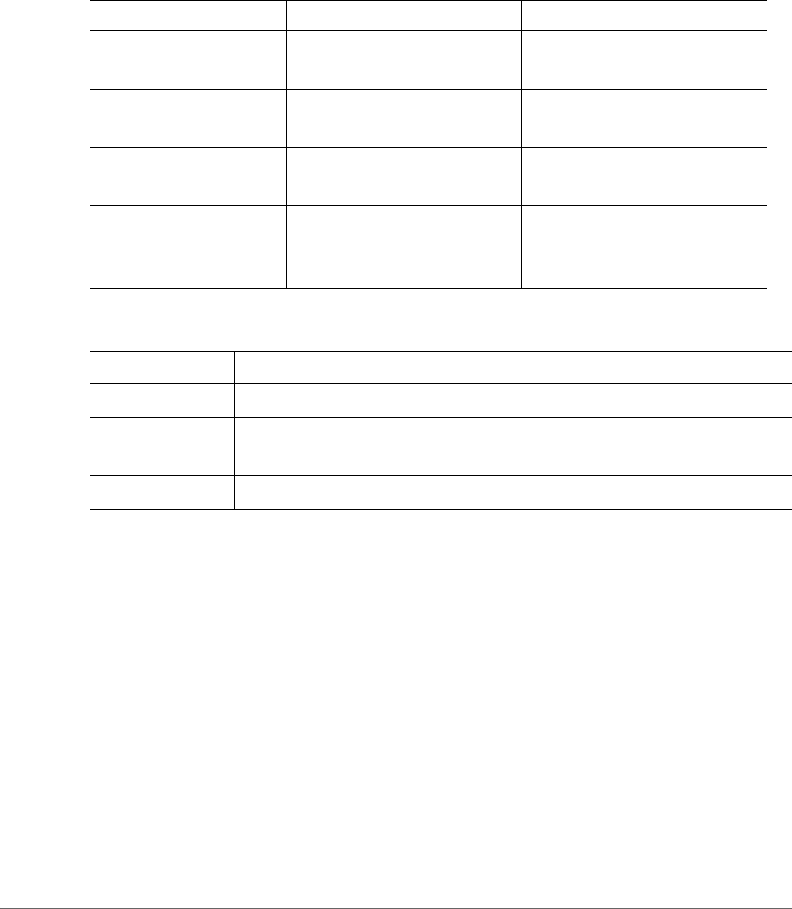
Table 1 and Table 2 list the text and notice conventions that are used throughout
this guide.
Related Documentation
For a complete list of documents that accompany this release, refer to the Release
Notes.
Table 1. Text conventions
Convention Description Example
monospace Represents information as it
appears on screen [Device name]>
monospace bold Represents information that
you enter
[Device name]> set
ipaddr 10.0.0.12
default font bold Keyboard keys, software
buttons, and field names
On the Start menu, click All
Programs.
italics Screen or page names Click Advanced Settings.
The Advanced Settings page
appears.
Table 2. Notice conventions
Notice Type Description
NOTE Information that describes important features or instructions
CAUTION! Information that alerts you to potential loss of data or potential
damage to an application, system, or device
WARNING! Information that alerts you to potential personal injury

About This Guide
Documentation Feedback
SmartCell Gateway 200 Command Line Interface Reference Guide for RuckOS 3.0, 800-70675-001 Rev A 13
Documentation Feedback
Ruckus Wireless is interested in improving its documentation and welcomes your
comments and suggestions. You can email your comments to Ruckus Wireless at:
docs@ruckuswireless.com
When contacting us, please include the following information:
• Document title
• Document part number (on the cover page)
• Page number (if appropriate)
For example:
• Ruckus Wireless SmartCell Gateway 200 Administrator Guide (Release 3.0)
• Part number: 800-70672-001
• Page 88


Introduction to the SCG Command Line Interface
Overview of the SCG Command Line Interface
SmartCell Gateway 200 Command Line Interface Reference Guide for RuckOS 3.0, 800-70675-001 Rev A 15
Overview of the SCG Command Line Interface
The SCG command line interface (CLI) is a software tool that enables you to
configure and manage SmartCell Gateway 200. Using the command line interface,
you can issue commands from an operating system prompt, such as the Microsoft
Windows command prompt or a Linux operating system terminal. Each command
performs a specific action for configuring device settings or returning information
about the status of a specific device feature.
Accessing the Command Line Interface
The SCG-200 has a built-in command line interface (CLI) that you can use to
configure SCG settings and manage access points. This section describes the
requirements and the procedure for accessing the SCG CLI.
What You Will Need
To access the SCG CLI, you will need the following:
1A computer that you want to designate as administrative computer
2A network connection to SCG (if you want to use an SSH connection) or an RS-
232 serial to RJ45 cable (if you want to use a serial connection)
3An SSH (secure shell) client
Connect the Administrative Computer to SCG
Connect the administrative computer to SCG either through the network or directly
using an RS-232 serial to RJ45 cable.
1If you want to use an SSH connection, connect the administrative computer to
the same subnet or broadcast domain as the Management (Web) interface of
the SCG.
2If you want to use a serial connection, make sure that both the administrative
computer and the SCG are both powered on. And then, do the following:
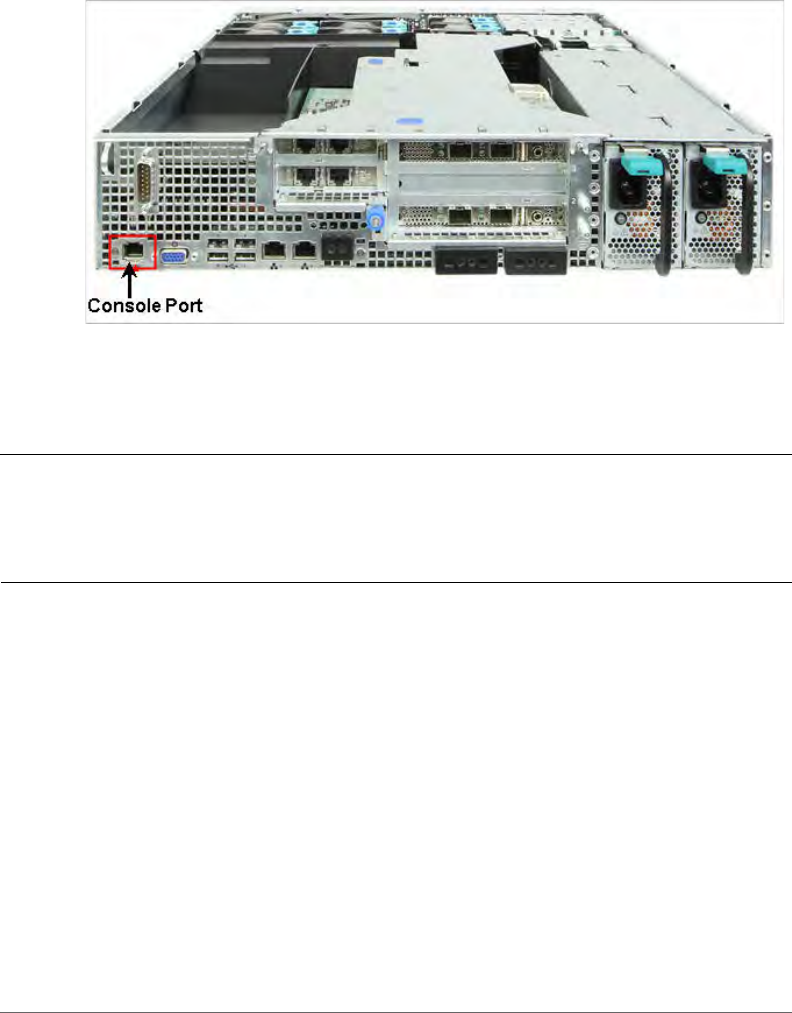
• Connect the RJ45 end of the cable to the port labeled |O|O| (console port)
on the SCG. See Figure 1 for the location of the console port.
• Connect the RS-232 end of the cable to a COM port on the administrative
computer.
Introduction to the SCG Command Line Interface
Accessing the Command Line Interface
SmartCell Gateway 200 Command Line Interface Reference Guide for RuckOS 3.0, 800-70675-001 Rev A 16
Figure 1. Location of console port
Start and Configure the SSH Client
Before starting this procedure, make sure that the SSH client is already installed on
the administrative computer.
NOTE: The following procedure describes how to use PuTTY, a free and open
source telnet/SSH client, to access the SCG CLI. If you are using a different SSH
client, the procedure may be slightly different (although the connection settings
should be the same). For more information on PuTTY, visit www.putty.org.
See the following sections depending on your connection method:
•Using SSH Connection
•Using Serial Connection
Introduction to the SCG Command Line Interface
Accessing the Command Line Interface
SmartCell Gateway 200 Command Line Interface Reference Guide for RuckOS 3.0, 800-70675-001 Rev A 17
Using SSH Connection
If you have connected the administrative computer to the same subnet or broadcast
domain as the Management (Web) interface of the SCG, follow these steps to start
and configure the SSH client.
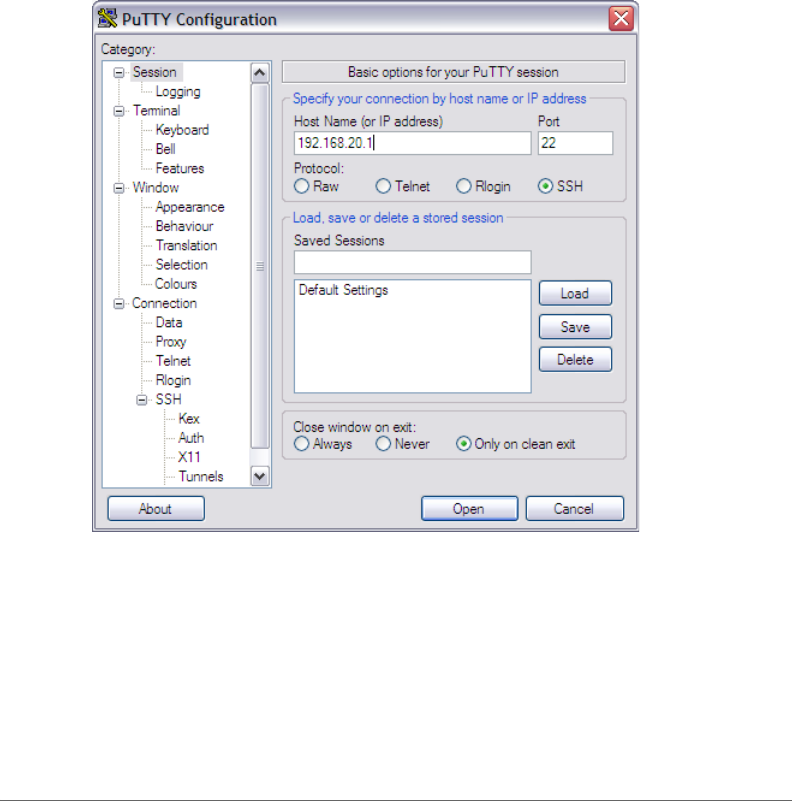
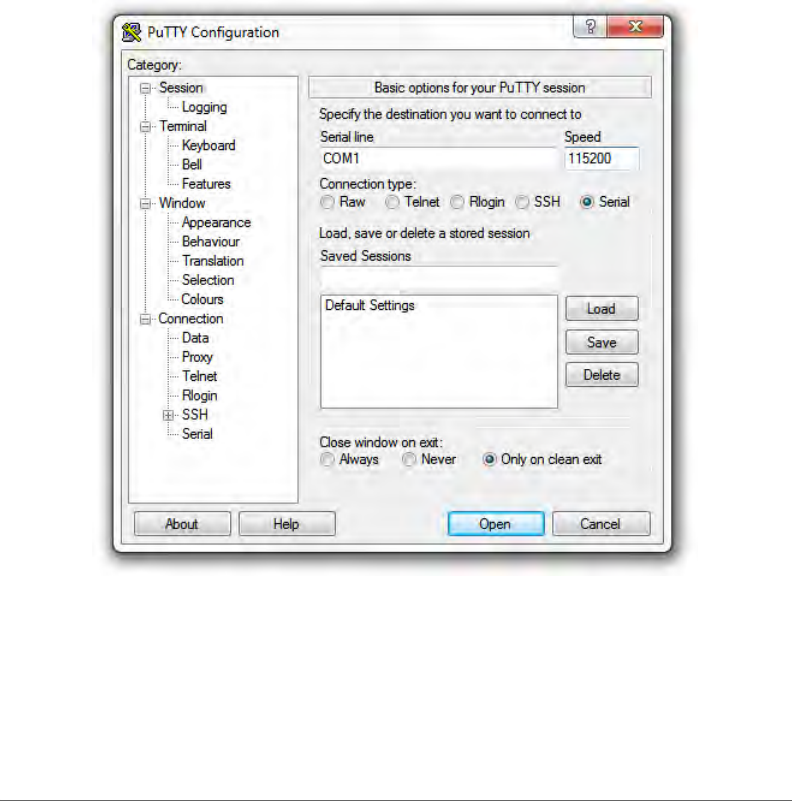
1Start PuTTY. The PuTTY configuration dialog box appears, showing the Session
screen as seen in Figure 2.
2In Connection type, select SSH.
Figure 2. Selecting SSH as a connection type
3Enter the IP address of the Management (Web) interface of the SCG in the Host
Name (or IP address) field as seen in Figure 2.
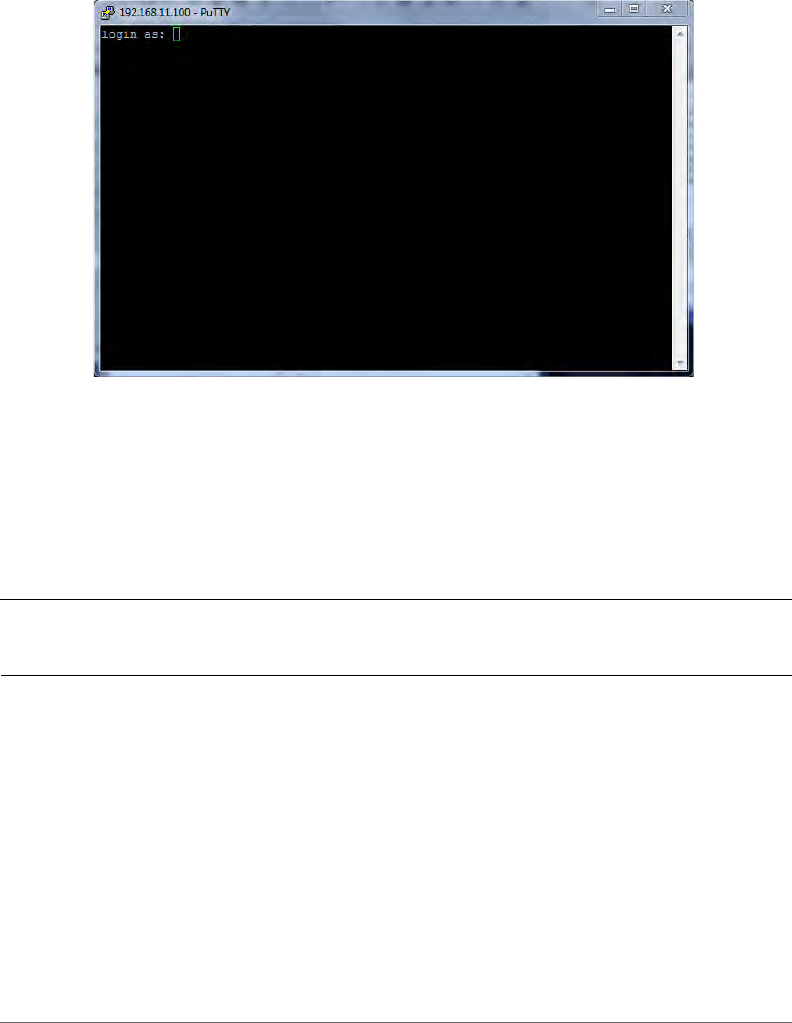
4Click Open. The PuTTY console appears and displays the login prompt. See
Figure 6.
Introduction to the SCG Command Line Interface
Accessing the Command Line Interface
SmartCell Gateway 200 Command Line Interface Reference Guide for RuckOS 3.0, 800-70675-001 Rev A 18
Using Serial Connection
If you have connected the administrative computer to the console port on the SCG
using an RS-232 serial to RJ45 cable, follow these steps to start and configure the
SSH client.
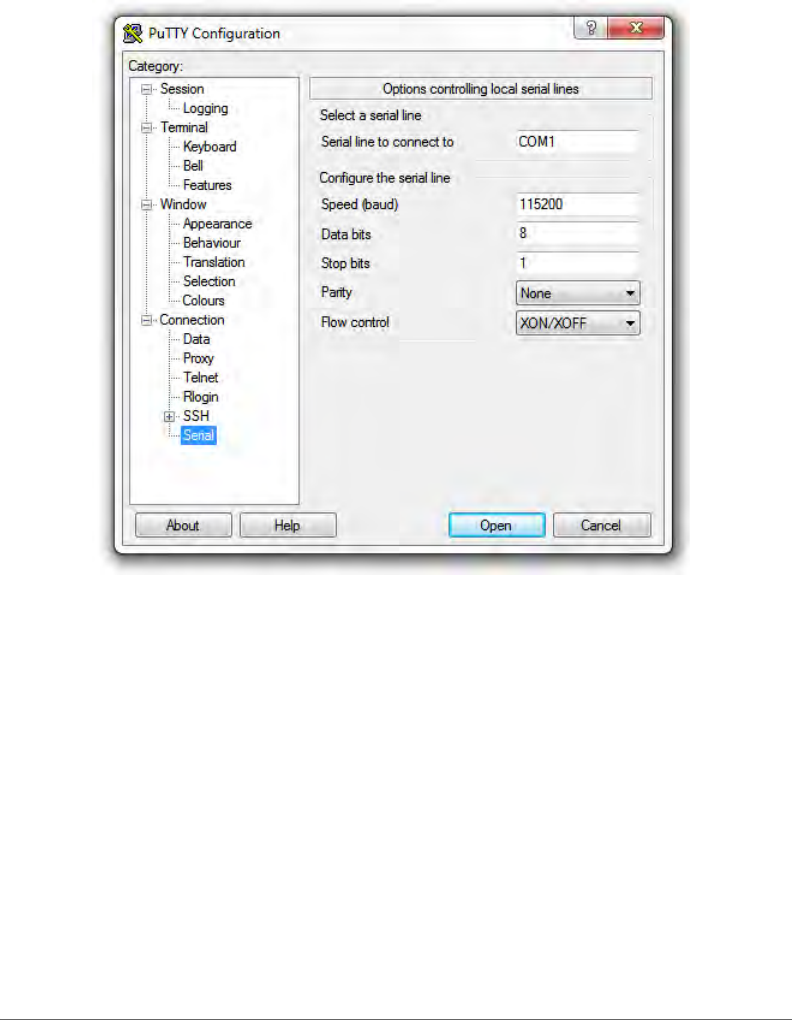
1Start PuTTY. The PuTTY Configuration dialog box appears, showing the Session
screen as seen in Figure 3.
2In Connection type, select Serial if you are connecting via serial cable.
Figure 3. Selecting serial as a connection type
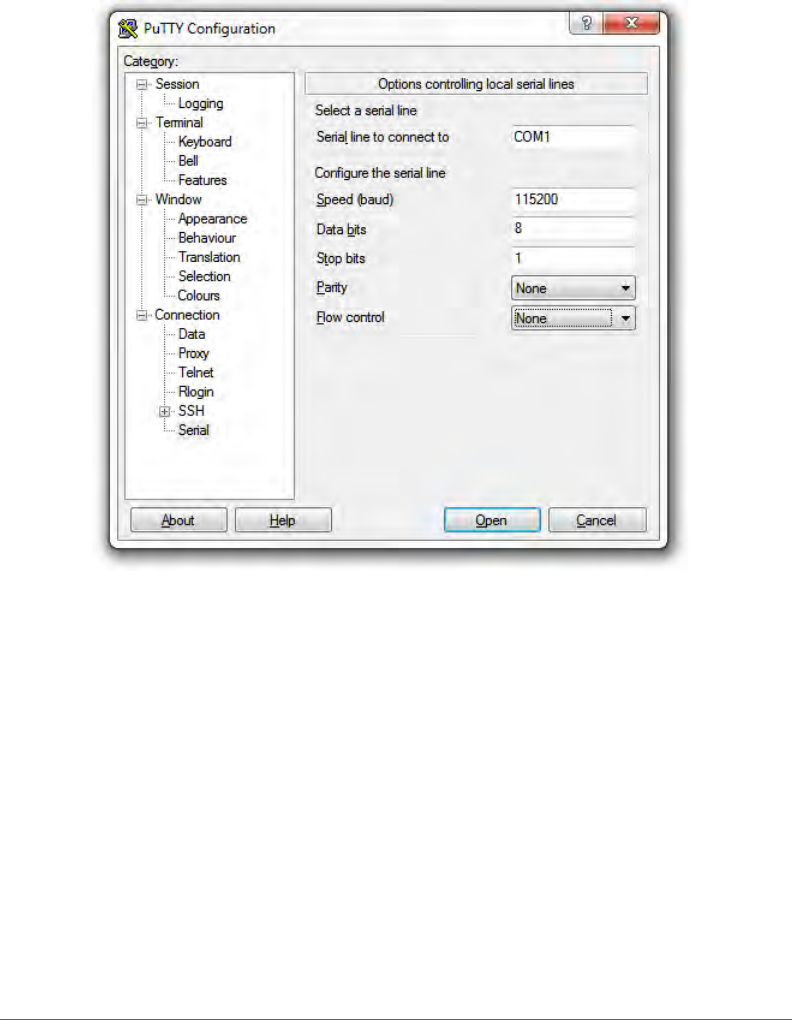
3Under Category, click Connection > Serial. The serial connection options appear
on the right side of the dialog box, displaying PuTTY’s default serial connection
settings. See Figure 4.
Introduction to the SCG Command Line Interface
Accessing the Command Line Interface
SmartCell Gateway 200 Command Line Interface Reference Guide for RuckOS 3.0, 800-70675-001 Rev A 19
Figure 4. PuTTy’s default serial connection setting
4Configure the serial connection settings as follows. See Figure 5.
• Serial line to connect to: Type the COM port name to which you connected
the RS-232 cable.
• Bits per second: 115200
• Data bits: 8
• Stop bits: 1
•Parity: None
• Flow control: None
Introduction to the SCG Command Line Interface
Accessing the Command Line Interface
SmartCell Gateway 200 Command Line Interface Reference Guide for RuckOS 3.0, 800-70675-001 Rev A 20
Figure 5. PuTTY’s serial connection settings for connecting to SCG
5Click Open. The PuTTY console appears and displays the login prompt as seen
in Figure 6.
Introduction to the SCG Command Line Interface
Accessing the Command Line Interface
SmartCell Gateway 200 Command Line Interface Reference Guide for RuckOS 3.0, 800-70675-001 Rev A 21
Figure 6. PuTTY console displaying the login prompt
You have completed configuring the SSH client to connect to the SCG CLI.
Log On to CLI
The following describes the process for logging on to the CLI.
• Log on to the SCG using putty/Xssh (any other application) using the user
credentials of login name and password as given.
NOTE: You cannot use 'admin' as a password, which is used during the SCG
installation procedure.
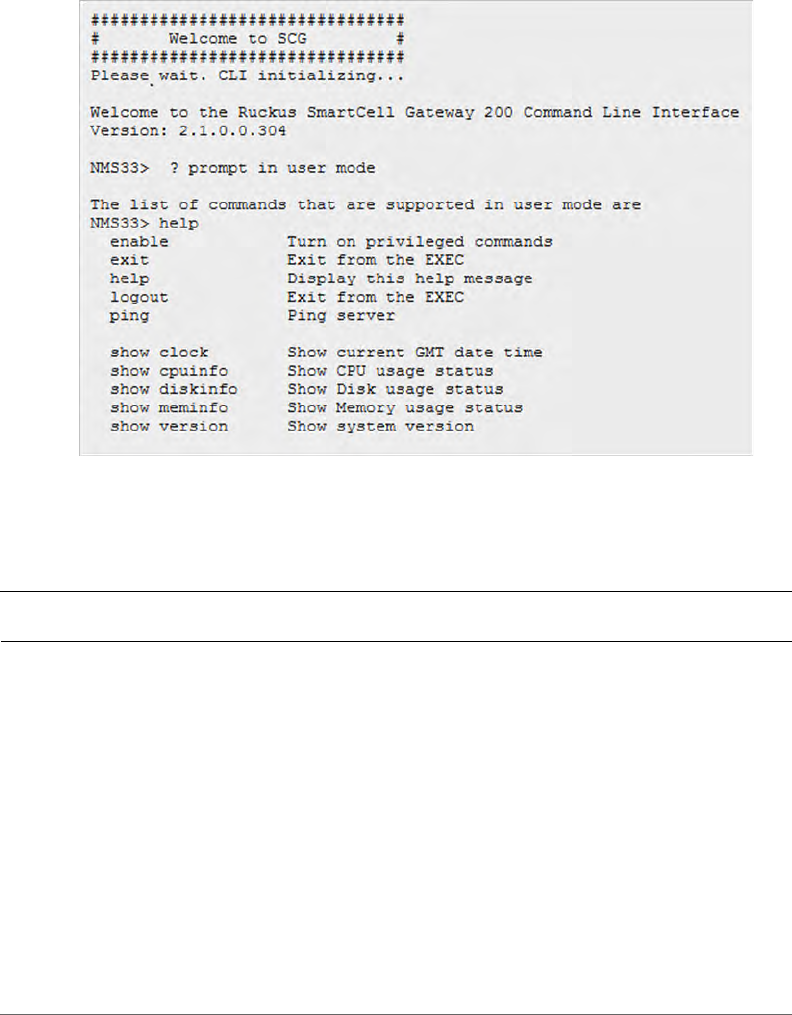
• The Ruckus Wireless SCG CLI welcome message appears with the CLI prompt
as seen in Figure 7.
Introduction to the SCG Command Line Interface
Accessing the Command Line Interface
SmartCell Gateway 200 Command Line Interface Reference Guide for RuckOS 3.0, 800-70675-001 Rev A 22
Figure 7. Welcome to SCG
• You are now logged into the SCG CLI as a user with limited privileges by looking
at the CLI prompt. If you are in limited mode, the prompt appears as ruckus>
(with a greater than sign). To view a list of commands that are available at the
root level or user mode, enter help or ? as seen in Figure 7 and Figure 8.
NOTE: To change the CLI prompt to a privileged mode, see step 5.
Introduction to the SCG Command Line Interface
Accessing the Command Line Interface
SmartCell Gateway 200 Command Line Interface Reference Guide for RuckOS 3.0, 800-70675-001 Rev A 23
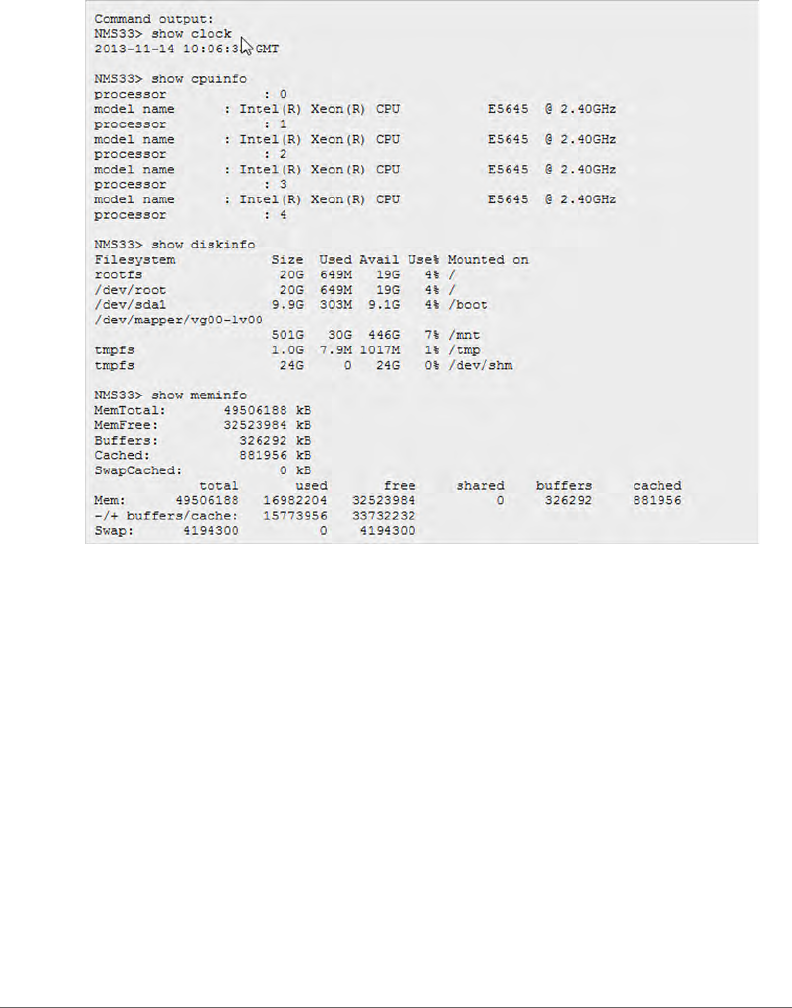
Figure 8. Using Show Commands
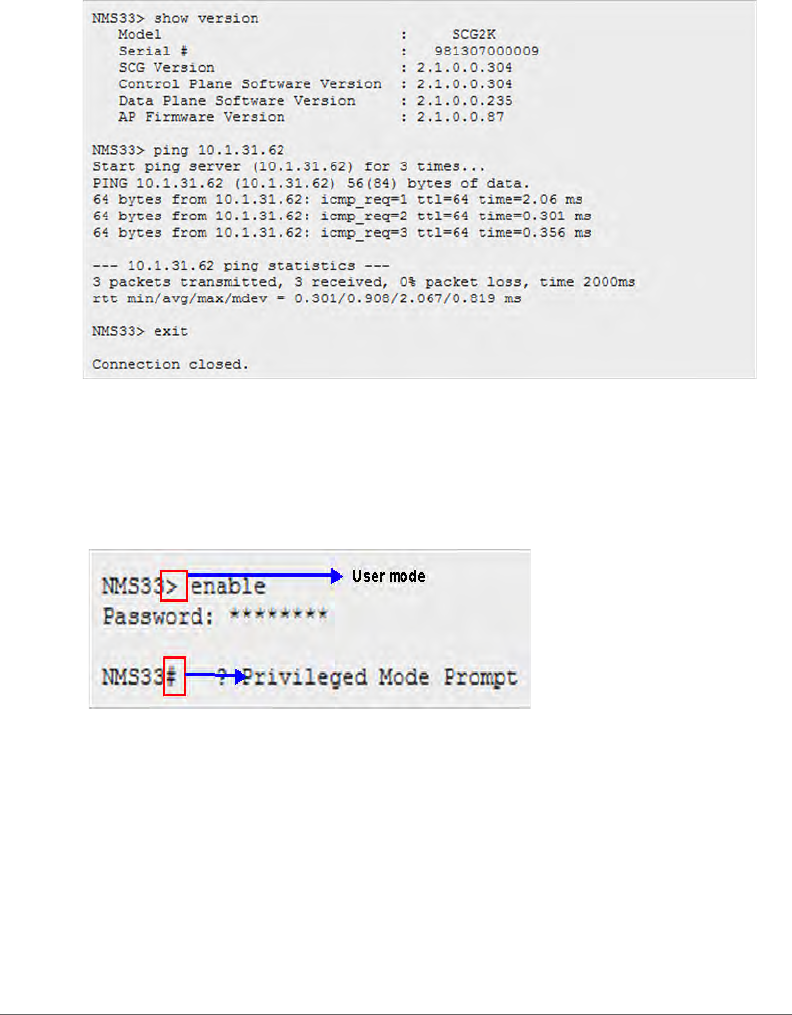
• As a user with limited privileges, you can view a history of commands that were
previously executed and ping a device as seen in Figure 9.
Introduction to the SCG Command Line Interface
Accessing the Command Line Interface
SmartCell Gateway 200 Command Line Interface Reference Guide for RuckOS 3.0, 800-70675-001 Rev A 24
Figure 9. Using the Ping command
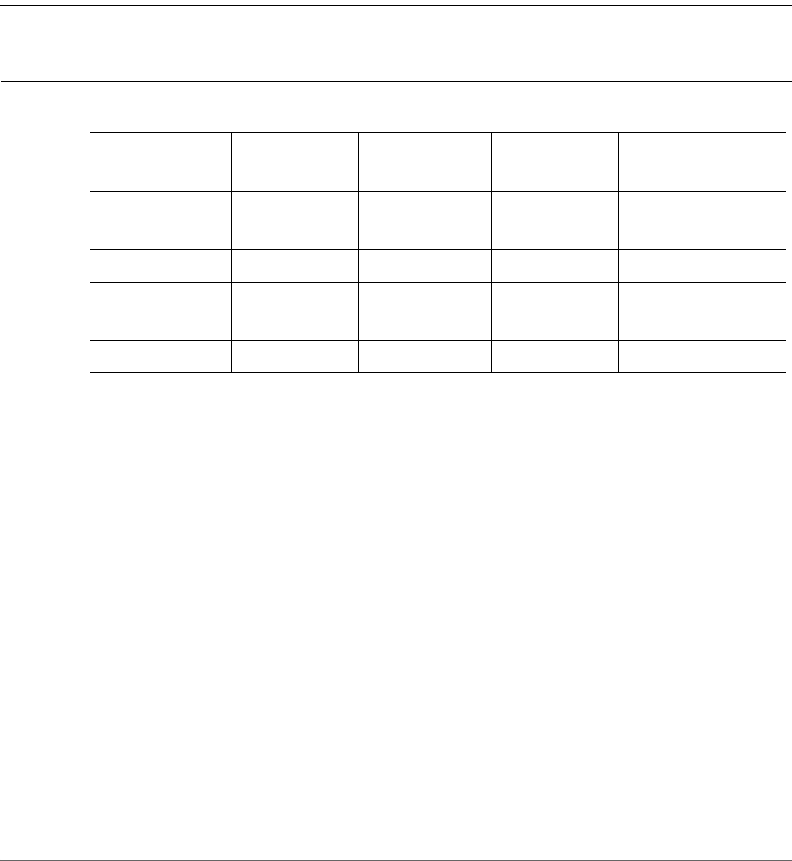
• If you want to run more commands, you need to switch to privileged mode by
entering enable and the password at the root prompt as seen in Figure 10. The
prompt changes from ruckus> to ruckus# (with a pound sign) as seen in Figure
10. Refer to enable command for details.
Figure 10. Changing to privileged mode
SmartCell Gateway 200 Command Line Interface Reference Guide for RuckOS 3.0, 800-70675-001 Rev A 25
2
Configuration Commands
This chapter describes the commands that you can use to configure, enable, and
disable various SCG components. The following table lists the commands.
NOTE: For easy access and reading, the configuration chapter has been split into
three chapters based on the alphabetical order of commands.
config
To execute commands in configuration mode, you need to change the mode to:
ruckus(config)#
Example
SCG30# config
SCG30(config)#
Table 3. Configuration commands
3rd-zone acct-profile admin config-admin-
radius
adv-forwarding-
profile
ap ap-auto-
tagging
ap-cert-check ap-control-
mgmt-tos
ap-heartbeat
ap-portal-cert ap-root-ca ap-sci auth-profile cgf-service
changepasswor
d
clock cluster-ip-list cluster-
redundancy
data-plane
dhcp-service do dp-group domain
Configuration Commands
3rd-zone
SmartCell Gateway 200 Command Line Interface Reference Guide for RuckOS 3.0, 800-70675-001 Rev A 26
3rd-zone
To create or update the third party AP zone configuration, use the following
command.
ruckus(config)# 3rd-zone <name>
Syntax Description
This command uses the following syntax:
name: AP zone name
Default
This command has no default settings.
Command Mode
Config
Example
SCG30(config)# 3rd-zone indus-ap
Related Commands
Table 4 lists the related to 3rd-zone configuration commands.
Table 4. Commands related to ruckus(config-3rd-zone).
Syntax and Type Parameters (if any) Description
ruckus(config-3rd-zone)# access-
network
Type: Privileged
[qinq-l2 | l2ogre] Sets the access network to Q-
in-Q layer 2 or L2oGRE.
ruckus(config-3rd-zone)# acct-interval
Type: Privileged
<minutes>: Interval to
send interim update
Sets the accounting interval.
ruckus(config-3rd-zone)# acct-server
Type: Privileged
Sets the accounting service.
ruckus(config-3rd-zone)# acct-
service-profile
Type: Privileged
<name> Sets the accounting service
profile.
ruckus(config-3rd-zone)# acct-ttg-
session
Type: Privileged
<name> Sets the accounting for TTG
session.

Configuration Commands
3rd-zone
SmartCell Gateway 200 Command Line Interface Reference Guide for RuckOS 3.0, 800-70675-001 Rev A 27
ruckus(config-3rd-zone)# auth-server
Type: Privileged
Sets the authentication
service.
ruckus(config-3rd-zone)# auth-
service-profile
Type: Privileged
<name> Sets the authentication service
profile.
ruckus(config-3rd-zone)# auth-type
Type: Privileged
Sets the authentication service
type.
ruckus(config-3rd-zone)# core-
network
Type: Privileged
Sets the core network.
ruckus(config-3rd-zone)# description
Type: Privileged
<text> Sets the description,
ruckus(config-3rd-zone)# do
Type: Privileged
Executes the do command.
ruckus(config-3rd-zone)# end
Type: Privileged
Ends the current configuration
session and returns to
privileged EXEC mode.
ruckus(config-3rd-zone)# exit
Type: Privileged
Exits from the EXEC.
ruckus(config-3rd-zone)# forwarding-
service-profile
Type: Privileged
<name> Sets the core network
forwarding profile.
ruckus(config-3rd-zone)# help
Type: Privileged
Displays the help.
ruckus(config-3rd-zone)# hotspot-
profile
Type: Privileged
<name> Sets the hotspot (WISPr)
service profile.
ruckus(config-3rd-zone)# ip
Type: Privileged
single-ip <ip>
ip-range <ip> <ip>
subnet <ip> <mask>
Sets the access network
source IP address.
Table 4. Commands related to ruckus(config-3rd-zone).
Syntax and Type Parameters (if any) Description

Configuration Commands
3rd-zone
SmartCell Gateway 200 Command Line Interface Reference Guide for RuckOS 3.0, 800-70675-001 Rev A 28
ruckus(config-3rd-zone)# move
Type: Privileged
domain <name> Moves the zone to another
domain.
ruckus(config-3rd-zone)# name
Type: Privileged
<name> Sets the 3rd party zone name.
ruckus(config-3rd-zone)# network-
traffic-profile
Type: Privileged
<name> Sets the access network traffic
profile.
ruckus(config-3rd-zone)# no
Type: Privileged
acct-server
acct-service-profile
acct-ttg-session
ip
radius-client
vlan-tag
Disables and deletes
commands.
ruckus(config-3rd-zone)# radius-client
Type: Privileged
default-share-secret
<password>
single-ip <ip>
<password>
ip-range <ip> <ip>
<password>
subnet <ip> <mask>
<password>
Sets the RADIUS client
options.
ruckus(config-3rd-zone)# vlan-tag
Type: Privileged
s-vlan <s-vlan-start> <s-
vlan-end> c-vlan <c-vlan-
start> <c-vlan-end>
s-vlan <s-vlan-start> <s-
vlan-end> c-vlan <c-vlan-
start> <c-vlan-end> vlan-
mapping <mapping-vlan-
start>
<mapping-vlan-end>
Adds access network Q-in-Q
VLAN tags.
Table 4. Commands related to ruckus(config-3rd-zone).
Syntax and Type Parameters (if any) Description

Configuration Commands
acct-profile
SmartCell Gateway 200 Command Line Interface Reference Guide for RuckOS 3.0, 800-70675-001 Rev A 29
acct-profile
To create or update the accounting service profile configuration, use the following
command:
ruckus(config)# acct-profile <name>
Syntax Description
This command uses the following syntax:
name: Accounting service profile name
Default
This command has no default settings.
Command Mode
Config
Example
SCG30(config)# acct-profile rad-profile
Related Commands
•Table 5 lists the related acct-profile configuration commands.
•Table 6 lists the related acct-profile-realm configuration commands.
ruckus(config-3rd-zone)# vlan-type
Type: Privileged
qinq
strip-qinq
strip-svlan-preserve-
cvlan
strip-qinq-add-vlan
<vlan-id>
map-svlan-preserve-
cvlan
qinq <s-vlan-id>
strip-all
preserve-all
strip-all-add-vlan <vlan-
id>
Sets the core network VLAN
mapping type.
Table 4. Commands related to ruckus(config-3rd-zone).
Syntax and Type Parameters (if any) Description
Configuration Commands
acct-profile
SmartCell Gateway 200 Command Line Interface Reference Guide for RuckOS 3.0, 800-70675-001 Rev A 30
Table 5 lists the related acct-profile configuration commands.
Table 5. Commands related to ruckus(config-acct-profile).
Syntax and Type Parameters (if any) Description
ruckus(config-acct-profile)# default
Type: Privileged
no-match-realm acct
<name>
no-realm acct <name>
Set the default service.
No matching or no realm found
based on the default accounting
service and accounting service
name.
ruckus(config-acct-profile)#
description
Type: Privileged
<text> Set the description.
ruckus(config-acct-profile)# do
Type: Privileged
Executes the do command.
ruckus(config-acct-profile)# end
Type: Privileged
Ends the current configuration
session and returns to privileged
EXEC mode.
ruckus(config-acct-profile)# exit
Type: Privileged
Exits from the EXEC.
ruckus(config-acct-profile)# help
Type: Privileged
Displays the help.
ruckus(config-acct-profile)# name
Type: Privileged
<name> Sets the accounting service
profile name.
ruckus(config-acct-profile)# no
Type: Privileged
realm <name> Disables the realm based on the
realm name.
ruckus(config-acct-profile)# realm
Type: Privileged
<realm> Set the accounting service
realm.
Configuration Commands
admin
SmartCell Gateway 200 Command Line Interface Reference Guide for RuckOS 3.0, 800-70675-001 Rev A 31
Table 6 lists the related acct-profile-realm configuration commands.
.
admin
To create or update the administrator’s profile (including the email address, login ID
and password), use the following command:
ruckus(config)# admin <name>
Once you enter the config-admin context, you can configure the rest of the
administrator’s profile (see example below).
Syntax Description
This command uses the following syntax:
name: Administrator user name
Default
This command has no default settings.
Command Mode
Config
Table 6. Commands related to ruckus(config-acct-profile-realm)
Syntax and Type Parameters (if any) Description
ruckus(config-acct-profile-realm)# acct-service
Type: Privileged
<name> Sets the accounting service.
ruckus(config-acct-profile-realm)# do
Type: Privileged
Executes the do command.
ruckus(config-acct-profile-realm)# end
Type: Privileged
Ends the current
configuration session and
returns to privileged EXEC
mode.
ruckus(config-acct-profile-realm# exit
Type: Privileged
Exits from the EXEC.
ruckus(config-acct-profile-realm)# help
Type: Privileged
Displays the help.
ruckus(config-acct-profile-realm)# name
Type: Privileged
<name> Sets the realm name.

Configuration Commands
admin
SmartCell Gateway 200 Command Line Interface Reference Guide for RuckOS 3.0, 800-70675-001 Rev A 32
Example
ruckus(config)# admin joe
ruckus(config-admin)# email joe@company.com
ruckus(config-admin)# password admin!234
ruckus(config-admin)# phone 22870001
ruckus(config-admin)# real-name "Joe Admin"
ruckus(config-admin)# title CTO
ruckus(config-admin)# radius radius-1
ruckus(config-admin-radius)# ip 1.1.1.1
ruckus(config-admin-radius)# port 1813
ruckus(config-admin-radius)# realm tw1
ruckus(config-admin-radius)# shared-secret 11
Retype: **
ruckus(config-admin-radius)# exit
ruckus(config-admin)# exit
ruckus(config)#
Related Commands
Table 7 lists the related admin configuration commands.
Table 7. Commands related to ruckus(config-admin)
Syntax and Type Parameters (if any) Description
ruckus(config-admin)# do
Type: Privileged
Executes the do command.
ruckus(config-admin)# email
Type: Privileged
<email> Set the user’s email details.
ruckus(config-admin)# end
Type: Privileged
Ends the current configuration
session and returns to privileged
EXEC mode.
ruckus(config-admin)# exit
Type: Privileged
Exits from the EXEC.
ruckus(config-admin)# help
Type: Privileged
Displays the help.
ruckus(config-admin)# password
Type: Privileged
<password> Set the password for user.
ruckus(config-admin)# phone
Type: Privileged
<phone> Set the phone number of the
user.
Configuration Commands
config-admin-radius
SmartCell Gateway 200 Command Line Interface Reference Guide for RuckOS 3.0, 800-70675-001 Rev A 33
config-admin-radius
To configure the RADIUS server for administrators use the following command:
ruckus(config)# admin-radius
Syntax Description
This command uses the following syntax:
name: RADIUS server name
Default
This command has no default settings.
Command Mode
Config
Example
SCG30(config)# admin-radius aaa-auth
ruckus(config-admin)# real-name
Type: Privileged
<name> Set the real name of the user.
ruckus(config-admin)# title
Type: Privileged
<text> Set the user’s job title.
Table 7. Commands related to ruckus(config-admin)
Syntax and Type Parameters (if any) Description

Configuration Commands
config-admin-radius
SmartCell Gateway 200 Command Line Interface Reference Guide for RuckOS 3.0, 800-70675-001 Rev A 34
Related Commands
Table 8 lists the related admin-radius-service configuration commands.
Table 8. Commands related to ruckus(config-radius-service)
Syntax and Type Parameters (if any) Description
ruckus(config-admin-radius)# do
Type: Privileged
Executes the do command.
ruckus(config-admin-radius)# end
Type: Privileged
Ends the current configuration
session and returns to privileged
EXEC mode.
ruckus(config-admin-radius)# exit
Type: Privileged
Exits from the EXEC.
ruckus(config-admin-radius)# help
Type: Privileged
Displays the help.
ruckus(config-admin-radius)# ip
Type: Privileged
<ip> Sets the IP addresses of the
primary RADIUS server.
ruckus(config-admin-radius)# name
Type: Privileged
<name> Sets the RADIUS server name.
ruckus(config-admin-radius)# port
Type: Privileged
<port> Sets the port addresses of the
primary RADIUS server.
ruckus(config-admin-radius)# realm
Type: Privileged
<realms> Multiple
realms supported.
Use a comma (,) to
separate realms
(example:home1,hom
e2)
Sets the realms.
ruckus(config-admin-radius)# service
Type: Privileged
<services>: Multiple
services supported.
Use a comma (,) to
separate services
(example:home1,hom
e2)
Sets the services.
ruckus(config-admin-radius)# shared-
secret
Type: Privileged
<shared-secret>
Shared secret
between 1 and 255.
Sets the shared secret of the
primary RADIUS server.
Configuration Commands
adv-forwarding-profile
SmartCell Gateway 200 Command Line Interface Reference Guide for RuckOS 3.0, 800-70675-001 Rev A 35
adv-forwarding-profile
To enter the advanced (mixed mode) profile configuration, use the following
command:
ruckus(config)# adv-forwarding-profile <name>
Syntax Description
This command uses the following syntax:
name: Profile name
Default
This command has no default settings.
Command Mode
Config
Example
SCG30(config)# adv-forwarding-profile ttg-pdg
ruckus(config-admin-radius)# test
Type: Privileged
<username>
<password>
Tests the RADIUS server based
on the user credentials.
ruckus(config-admin-radius)# type
Type: Privileged
[ radius | tacacs ]] Sets the admin authentication
type,
Table 8. Commands related to ruckus(config-radius-service)
Syntax and Type Parameters (if any) Description

Configuration Commands
adv-forwarding-profile
SmartCell Gateway 200 Command Line Interface Reference Guide for RuckOS 3.0, 800-70675-001 Rev A 36
Related Commands
•Table 9 lists related adv-forwarding-profile configuration commands.
•Table 10 lists the related adv-forwarding-profile-apn configuration commands.
Table 9 lists commands related to adv-forwarding-profile configuration commands.
Table 9. Commands related to ruckus(config-adv-forwarding-profile)
Syntax and Type Parameters (if any) Description
ruckus(config-adv-forwarding-
profile)# apn
Type: Privileged
nioi <apn>
ni <apn>
Creates or updates the
forwarding policy for APN
configuration commands.
ruckus(config-adv-forwarding-
profile)# default
Type: Privileged
Sets the APN default settings.
ruckus(config-adv-forwarding-
profile)# description
Type: Privileged
<text> Sets the description. Length is
between 1 and 128.
ruckus(config-adv-forwarding-
profile)# no
Type: User
apn <apn>
realm <realm>
Delete forwarding policies for
APN or default APNs for realm.
ruckus(config-adv-forwarding-
profile)# realm
Type: Privileged
Creates or updates the default
APN for realm.
ruckus(config-adv-forwarding-
profile)# do
Type: Privileged
Executes the do command.
ruckus(config-adv-forwarding-
profile)# end
Type: Privileged
Ends the current configuration
session and returns to privileged
EXEC mode.
ruckus(config-adv-forwarding-
profile)# exit
Type: Privileged
Exits from the EXEC.
ruckus(config-adv-forwarding-
profile)# help
Type: Privileged
Displays the help.
Configuration Commands
adv-forwarding-profile
SmartCell Gateway 200 Command Line Interface Reference Guide for RuckOS 3.0, 800-70675-001 Rev A 37
Table 10 lists the related adv-forwarding-profile-apn configuration commands.
Table 10. Commands related to ruckus(config-adv-forwarding-profile-apn)
Syntax and Type Parameters (if any) Description
ruckus(config-adv-forwarding-profile-
apn)# profile
Type: Privileged
Sets the forwarding service
profile.
ruckus(config-adv-forwarding-profile-
apn)# route-type
Type: Privileged
[ bridge | l3ogre ] Sets the route type to either
bridge or L3oGRE.
ruckus(config-adv-forwarding-profile-
apn)# do
Type: Privileged
Executes the do command.
ruckus(config-adv-forwarding-profile-
apn)# end
Type: Privileged
Ends the current configuration
session and returns to privileged
EXEC mode.
ruckus(config-adv-forwarding-profile-
apn)# exit
Type: Privileged
Exits from the EXEC.
ruckus(config-adv-forwarding-profile-
apn)# help
Type: Privileged
Displays the help.

Configuration Commands
ap
SmartCell Gateway 200 Command Line Interface Reference Guide for RuckOS 3.0, 800-70675-001 Rev A 38
ap
To update the AP configuration, use the following commands:
ruckus(config)# ap <mac>
ruckus(config)# ap pre-prov <import <ftp-url>> <export <ftp-url>>
ruckus(config)# ap swap <import <ftp-url>> <export <ftp-url>>
Syntax Description
This command uses the following syntax:
<mac> lock
<mac>: AP MAC address
lock: Lock AP
<mac> ap pre-prov <import <ftp-url>> <export <ftp-url>>
<mac>: AP MAC address
pre-prov: Update Pre-provision configuration
<import>: Import the pre-provision APs from a CSV file using FTP
<ftp-url>: FTP URL, format: ftp://:@/
export: Exports the pre-provision APs to a CSV file using FTP
<mac> ap swap <import <ftp-url>> <export <ftp-url>>
<mac>: AP MAC address
swap: Update Swap configuration
<import>: Imports the pre-provision APs from a CSV file using FTP
<ftp-url>: FTP URL, format: ftp://:@/
export: Exports the pre-provision APs to a CSV file using FTP
<mac> move zone <name>
<mac>: AP MAC address
move: Move AP
zone: Target AP Zone
<name>: AP Zone name
Default
This command has no default settings.
Command Mode
Config

Configuration Commands
ap
SmartCell Gateway 200 Command Line Interface Reference Guide for RuckOS 3.0, 800-70675-001 Rev A 39
Example
ruckus(config)# ap mac
SCG30(config)# ap A1:87:45:34:56:FE
ruckus(config)# ap pre-prov <export <ftp-url>>
SCG30(config)# ap pre-prov import ftp://
ruckus:ruckus1!@172.19.7.100/backup/AP_ad8745345
ruckus(config)# ap swap <import <ftp-url>>
SCG30(config)# ap swap export ftp://ruckus:ruckus1!@172.19.7.100
Related Commands
•Table 11 lists the related ap profile configuration commands.
•Table 12 lists the related ap model configuration commands.
•Table 13 lists the related ap model lan1 configuration commands.
Table 11 lists the related ap profile configuration commands.
Table 11. Commands related to ruckus(config-ap).
Syntax and Type Parameters (if any) Description
ruckus(config-ap)# admin
Type: Privileged
<logon> <password> Sets the administrative logon
credentials.
ruckus(config-ap)# admin-mode
Type: Privileged
<locked> <unlocked> Sets the administrative mode to either
locked or unlocked.
ruckus(config-ap)# ap-logon
Type: Privileged
<logon-id> Sets the access point administration
login credentials.
ruckus(config-ap)# ap-model
Type: Privileged
<ap-model> Sets the model specification (overrides
the zone configuration).
ruckus(config-ap)# ap-password
Type: Privileged
<password> Sets the access point administrative
password.
ruckus(config-ap)# bonjour-
gateway
Type: Privileged
Enables the bonjour gateway.
ruckus(config-ap)# bonjour-
policy
Type: Privileged
Enables the bonjour policy.

Configuration Commands
ap
SmartCell Gateway 200 Command Line Interface Reference Guide for RuckOS 3.0, 800-70675-001 Rev A 40
ruckus(config-ap)# client-
admission-control
Type: Privileged
2.4g
5g
2.4g minClientCount
<minClientCount>
Min Client Count
(Default: 10)
2.4g maxRadioLoad
<maxRadioLoad>
Max Radio Load
(Default: 75%)
2.4g
minClientThroughput
<minClientThroughput
>:
Min Client Throughput
(Default: 0.0Mbps)
5g minClientCount
<minClientCount>
Min Client Count
(Default: 20)
5g maxRadioLoad
<maxRadioLoad>
Max Radio Load
(Default: 75%)
5g
minClientThroughput
<minClientThroughput
>
Min Client Throughput
(Default: 0.0Mbps)
Enables the client admission control.
ruckus(config-ap)# description
Type: Privileged
<description> Sets the model specification (overrides
the zone configuration).
ruckus(config-ap)# gps
Type: Privileged
<latitude> <longitude> Sets the GPS coordinates to latitude
and longitude values.
Table 11. Commands related to ruckus(config-ap).
Syntax and Type Parameters (if any) Description

Configuration Commands
ap
SmartCell Gateway 200 Command Line Interface Reference Guide for RuckOS 3.0, 800-70675-001 Rev A 41
ruckus(config-ap)# gps-latitude
Type: Privileged
<gps-latitude> Sets the GPS coordination latitude.
ruckus(config-ap)# gps-
longitude
Type: Privileged
<gps-longitude> Sets the GPS coordination longitude.
ruckus(config-ap)# do
Type: Privileged
Executes the do command.
ruckus(config-ap)# end
Type: Privileged
Ends the current configuration session
and returns to privileged EXEC mode.
ruckus(config-ap)# exit
Type: Privileged
Exits from the EXEC.
ruckus(config-ap)# help
Type: Privileged
Displays the help.
ruckus(config-ap)# hotspot20
Type: Privileged
<name> [ swe | cze |
spa | eng | chi | ger | fre
| jpn | dan | tur | dut ]
<name>: Name
swe: Swedish
cze: Czech
spa: Spanish
eng: English
chi: Chinese
ger: German
fre: French
jpn: Japanese
dan: Danish
tur: Turkish
dut: Dutch
Sets the hotspot 2.0 settings.
Table 11. Commands related to ruckus(config-ap).
Syntax and Type Parameters (if any) Description
Configuration Commands
ap
SmartCell Gateway 200 Command Line Interface Reference Guide for RuckOS 3.0, 800-70675-001 Rev A 42
ruckus(config-ap)# ip
Type: Privileged
address <ip>
<network-mask>
<gateway>
name-server <dns-
server> secondary
Sets the IP address and primary and
secondary DNS servers.
ruckus(config-ap)# location
Type: Privileged
<location> Sets the location.
ruckus(config-ap)# mesh
Type: Privileged
[ root | disable | auto |
mesh ]
Sets the mesh mode to either:
• root: Root AP
• disable: Disable
• auto: Auto
• mesh: Mesh AP
ruckus(config-ap)# model
Type: Privileged
Sets the model specifications. It
overrides the zone configuration.
ruckus(config-ap)# name
Type: Privileged
<name> Sets the AP name.
Table 11. Commands related to ruckus(config-ap).
Syntax and Type Parameters (if any) Description

Configuration Commands
ap
SmartCell Gateway 200 Command Line Interface Reference Guide for RuckOS 3.0, 800-70675-001 Rev A 43
ruckus(config-ap)# no
Type: Privileged
admin
bonjour-gateway
client-admission-
control
description
hotspot20
ip <address> <name-
server secondary>
location
model
override-client-
admission-control
override-smart-mon
radio
smart-mon
swap-in-ap
syslog
uplink-ap
Disables the configuration.
ruckus(config-ap)# override-
client-admission-control
Type: Privileged
<2.4g> <5g> Overrides the client admission control.
ruckus(config-ap)# override-
smart-mon
Type: Privileged
Overrides the smart monitor.
Table 11. Commands related to ruckus(config-ap).
Syntax and Type Parameters (if any) Description

Configuration Commands
ap
SmartCell Gateway 200 Command Line Interface Reference Guide for RuckOS 3.0, 800-70675-001 Rev A 44
ruckus(config-ap)# radio
Type: Privileged
2.4g channel
<channel>
5g channel <channel>
2.4g channelization
<channelization>
5g channelization
<channelization>
2.4g tx-power <tx-
power>
5g tx-power <tx-
power>
2.4g wlan-service
5g wlan-service
2.4g wlan-group
<name>
5g wlan-group
<name>
2.4g roam [ enable |
disable ]
5g roam [ enable |
disable ]
Sets the radio channels.
ruckus(config-ap)# smart-mon
Type: Privileged
interval <between 5-
60>
threshold <between 1-
10>
Enables the smart monitor.
ruckus(config-ap)# swap-in-ap
Type: Privileged
<mac> Sets the AP Mac IP address for swap-
in.
Table 11. Commands related to ruckus(config-ap).
Syntax and Type Parameters (if any) Description

Configuration Commands
ap
SmartCell Gateway 200 Command Line Interface Reference Guide for RuckOS 3.0, 800-70675-001 Rev A 45
ruckus(config-ap)# syslog
Type: Privileged
enable <ip> <port> -
Enable the syslog
server
enable <ip> <port> [
Local2 | Keep Original |
Local1 | Local5 | Local6
| Local0 | Local7 |
Local3 | Local4 ] [ Error |
Critical | Warning | All |
Alert | Notice | Info |
Emergency ]
disable - Disables the
syslog server
Sets the syslog server.
ruckus(config-ap)# uplink
Type: Privileged
[ smart | manual ] Sets the uplink selection to either smart
or manual.
ruckus(config-ap)# uplink-ap
Type: Privileged
Sets the uplink to manual access point.
ruckus(config-ap)# zone
Type: Privileged
<name> Move the access point to another zone.
Table 11. Commands related to ruckus(config-ap).
Syntax and Type Parameters (if any) Description

Configuration Commands
ap
SmartCell Gateway 200 Command Line Interface Reference Guide for RuckOS 3.0, 800-70675-001 Rev A 46
Table 12 lists the related to ap-model configuration commands.
Table 12. Commands related to ruckus(config-ap-model)
Syntax and Type Parameters (if any) Description
ruckus(config-ap-model)# ext-ant
Type: Privileged
2.4g <number> - 2.4
with DBI number
2.4gg <number> [ 3 | 2
] - 3/2 antennas
5g <number> - 5g with
DBI number
5gg <number> [ 2 | 3 ]
- 5gg with 2/3
antennas
Enables the external antenna.
ruckus(config-ap-model)#
internal-heater
Type: Privileged
Enables the internal heater.
ruckus(config-ap-model)# lan1
ruckus(config-ap-model)# lan2
ruckus(config-ap-model)# lan3
ruckus(config-ap-model)# lan4
ruckus(config-ap-model)# lan5
Type: Privileged
Sets the LAN configurations from 1 to
5.
ruckus(config-ap-model)# led
Type: Privileged
Enables the status of LEDs.
ruckus(config-ap-model)# led-
mode
Type: Privileged
Sets the LED mode.
ruckus(config-ap-model)# lldp
Type: Privileged
Enables link layer discovery protocol.
ruckus(config-ap-model)# lldp-
ad-interval
Type: Privileged
<seconds> Sets the LLDP advertise interval.
ruckus(config-ap-model)# lldp-
hold-time
Type: Privileged
<seconds> Sets the LLDP hold time.

Configuration Commands
ap
SmartCell Gateway 200 Command Line Interface Reference Guide for RuckOS 3.0, 800-70675-001 Rev A 47
ruckus(config-ap-model)# lldp-
mgmt
Type: Privileged
Enables LLDP management IP TLV.
ruckus(config-ap-model)# no
Type: Privileged
ext-ant
internal-heater
lan1
lan2
lan3
lan4
lan5
led
lldp
lldp-mgmt
poe-out-port
radio-band
Disables or deletes the settings that
have been configured.
ruckus(config-ap-model)# poe-
out-port
Type: Privileged
Enables the PoE out port.
ruckus(config-ap-model)# radio-
band
Type: Privileged
${value} Switches the radio band.
ruckus(config-ap-model)# do
Type: Privileged
Executes the do command.
ruckus(config-ap-model)# end
Type: Privileged
Ends the current configuration session
and returns to privileged EXEC mode.
ruckus(config-ap-model)# exit
Type: Privileged
Exits from the EXEC.
ruckus(config-ap-model)# help
Type: Privileged
Displays the help.
Table 12. Commands related to ruckus(config-ap-model)
Syntax and Type Parameters (if any) Description

Configuration Commands
ap
SmartCell Gateway 200 Command Line Interface Reference Guide for RuckOS 3.0, 800-70675-001 Rev A 48
Table 13 lists the related to ap-model-lan1 configuration commands.
Table 13. Commands related to ruckus(config-ap-model-lan1)
Syntax and Type Parameters (if any) Description
ruckus(config-ap-model-lan1)#
8021x
Type: Privileged
<802.1x-type> Sets 802.1x.
ruckus(config-ap-model-lan1)#
acct-service
Type: Privileged
<acct-service> Sets the authentication service
configurations.
ruckus(config-ap-model-lan1)#
auth-service
Type: Privileged
<auth-service> Sets the authentication service
configurations.
ruckus(config-ap-model-lan1)#
mac-bypass
Type: Privileged
Sets the MAC bypass.
ruckus(config-ap-model-lan1)#
members
Type: Privileged
<members> Sets the AP model configurations.
ruckus(config-ap-model-lan1)# no
Type: User
acct-service
mac-bypass
Disables or deletes the settings that
have been configured.
ruckus(config-ap-model-lan1)#
supplicant
Type: Privileged
mac
custom <username>
<password>
Sets the supplicant.
ruckus(config-ap-model-lan1)#
type
Type: Privileged
[trunk-port | access-
port | general-port]
Sets the port type.
ruckus(config-ap-model-lan1)#
vlan-untag-id
Type: Privileged
<vlan-untag-id> Sets the VLAN untag IID.
ruckus(config-ap-model-lan1)# do
Type: Privileged
Executes the do command.
Configuration Commands
ap-auto-tagging
SmartCell Gateway 200 Command Line Interface Reference Guide for RuckOS 3.0, 800-70675-001 Rev A 49
ap-auto-tagging
To setup critical access point auto tagging rules or to enable auto tagging critical
access points, use the following command:
ruckus(config)# ap-auto-tagging <enable>
ruckus(config)# ap-auto-tagging rule <daily-threshold <threshold> [ g | m ]>>
Syntax Description
This command uses the following syntax:
enable: Enable the auto tagging critical APs
rule: Select the auto tagging rule
daily-threshold: Daily traffic bytes that exceeds the threshold rule
g: Threshold value in gigabytes
m: Threshold value in megabytes
Default
This command has no default settings.
Command Mode
Config
Example
SCG30(config)# ap-auto-tagging enable
SCG30(config)# ap-auto-tagging rule daily-threshold 90 g
ruckus(config-ap-model-lan1)#
end
Type: Privileged
Ends the current configuration session
and returns to privileged EXEC mode.
ruckus(config-ap-model-lan1)#
exit
Type: Privileged
Exits from the EXEC.
ruckus(config-ap-model-lan1)#
help
Type: Privileged
Displays the help.
Table 13. Commands related to ruckus(config-ap-model-lan1)
Syntax and Type Parameters (if any) Description
Configuration Commands
ap-auto-tagging
SmartCell Gateway 200 Command Line Interface Reference Guide for RuckOS 3.0, 800-70675-001 Rev A 50
Related Commands
Table 14 lists the related to ap-auto-tagging configuration commands.
Table 14. Commands related to ruckus(config-ap-auto-tagging)
Syntax and Type Parameters (if any) Description
ruckus(config-ap-auto-tagging)#
enable
Type: Privileged
Enables the auto tagging for critical
APs.
ruckus(config-ap-auto-tagging)#
no
Type: Privileged
<enable> Disables the auto tagging for critical
APs.
ruckus(config-ap-auto-tagging)#
rule
Type: Privileged
<daily-threshold> Sets the auto tagging rule to daily traffic
bytes, which exceeds the threshold
rule.
ruckus(config-ap-auto-tagging)#
threshold
Type: Privileged
<threshold> Sets the threshold value.
ruckus(config-ap-auto-tagging)#
unit
Type: Privileged
[ m | g ] Sets the unit to either megabytes or
gigabytes.

Configuration Commands
ap-cert-check
SmartCell Gateway 200 Command Line Interface Reference Guide for RuckOS 3.0, 800-70675-001 Rev A 51
ap-cert-check
To enable the access point certificate check, use the following command:
ruckus(config)# ap-cert-check
Syntax Description
This command has no arguments or keywords.
Default
This command has the default settings of enable.
Command Mode
Config
Example
SCG30(config)# ap-cert-check
Successful operation
ap-control-mgmt-tos
To enable the access control and management traffic type of service and values,
use the following command:
ruckus(config)# ap-control-mgmt-tos <value>
Syntax Description
This command has no arguments or keywords.
Default
This command uses the following syntax:
value: TOS value
Command Mode
Config
Example
SCG30(config)# ap-control-mgmt-tos 10

Configuration Commands
ap-heartbeat
SmartCell Gateway 200 Command Line Interface Reference Guide for RuckOS 3.0, 800-70675-001 Rev A 52
ap-heartbeat
To setup the access point heartbeat, use the following command:
ruckus(config)# ap-heartbeat <seconds>
Syntax Description
This command uses the following syntax:
seconds: Interval in seconds, which the AP sends the heartbeat to the SCG such
as: 30, 60, 150 and 300
Default
This command has no default settings.
Command Mode
Config
Example
SCG30(config)# ap-heartbeat 30
ap-portal-cert
To update the AP portal certificate configuration, use the following command:
ruckus(config)# ap-portal-cert
Syntax Description
This command has no arguments or keywords.
Default
This command has no default settings.
Command Mode
Config
Example
SCG30SCG30(config)# ap-portal-cert
Related Commands
•Table 15 lists the related to ap-portal-cert configuration commands.
•Table 16 lists the related to ap-portal-cert-generate-csr configuration
commands.
Configuration Commands
ap-portal-cert
SmartCell Gateway 200 Command Line Interface Reference Guide for RuckOS 3.0, 800-70675-001 Rev A 53
Table 15 lists the related to ap-portal-cert configuration commands.
Table 15. Commands related to ruckus(config-ap-portal-cert)
Syntax and Type Parameters (if any) Description
ruckus(config-ap-portal-cert)#
generate-csr
Type: Privileged
<ftp-url>
FTP URL, format: ftp:/
<username>:<passw
ord>@<ftp-host>[/
<dir-path>]
Generates the certificate signing
request.
ruckus(config-ap-portal-cert)#
upload-cert
Type: Privileged
<ftp-url>
FTP URL, format: ftp:/
<username>:<passw
ord>@<ftp-host>[/
<dir-path>]
Uploads the certificate.
ruckus(config-ap-portal-cert)# do
Type: Privileged
Executes the do command.
ruckus(config-ap-portal-cert)# end
Type: Privileged
Ends the current configuration session
and returns to privileged EXEC mode.
ruckus(config-ap-portal-cert)# exit
Type: Privileged
Exits from the EXEC.
ruckus(config-ap-portal-cert)#
help
Type: Privileged
Displays the help.
Configuration Commands
ap-portal-cert
SmartCell Gateway 200 Command Line Interface Reference Guide for RuckOS 3.0, 800-70675-001 Rev A 54
Table 16 lists the related to ap-portal-cert-generate-csr configuration commands.
Table 16. Commands related to ruckus(config-ap-portal-cert-generate-csr)
Syntax and Type Parameters (if any) Description
ruckus(config-ap-portal-cert-
generate-csr)# city
Type: Privileged
<city> Sets the city name.
ruckus(config-ap-portal-cert-
generate-csr)# common-name
Type: Privileged
<name> Sets the domain name.
ruckus(config-ap-portal-cert-
generate-csr)# country
Type: Privileged
<country> Sets the county.
ruckus(config-ap-portal-cert-
generate-csr)# email
Type: Privileged
<email> Sets the email address.
ruckus(config-ap-portal-cert-
generate-csr)# organization
Type: Privileged
<organization> Sets the organization name.
ruckus(config-ap-portal-cert-
generate-csr)# state
Type: Privileged
<state> Sets the state name.
ruckus(config-ap-portal-cert-
generate-csr)# unit
Type: Privileged
<unit> Sets the unit name.

Configuration Commands
ap-root-ca
SmartCell Gateway 200 Command Line Interface Reference Guide for RuckOS 3.0, 800-70675-001 Rev A 55
ap-root-ca
To update the AP root CA, use the following command:
ruckus(config)# ap-root-ca <ftp-url>
Syntax Description
This command uses the following syntax:
ftp-url: AP Root CA file, FTP URL Format: ftp://<username>:<password>@<ip>/
<file-path>)
Default
This command has no default settings.
Command Mode
Config
Example
SCG30(config)# ap-root-ca ftp://mahan:ruckus1!@172.19.7.100/
backup/AP_ad87453456fe.csv
ap-sci
To enable the access point sci, use the following command:
ruckus(config)# ap-sci enable
Syntax Description
This command uses the following syntax:
enable: Enables the AP SCI.
Default
This command has no default settings.
Command Mode
Config
Example
SCG30(config)# ap-sci enable

Configuration Commands
auth-profile
SmartCell Gateway 200 Command Line Interface Reference Guide for RuckOS 3.0, 800-70675-001 Rev A 56
auth-profile
To enter authentication service profile configuration, use the following command:
ruckus(config)# auth-profile <name>
Syntax Description
This command uses the following syntax:
name: Authentication service profile name
Default
This command has no default settings.
Command Mode
Config
Example
SCG30(config)# auth-profile aaa-auth
Related Commands
•Table 17 lists the related auth profile configuration commands.
•Table 18 lists the related auth profile realm configuration commands.
Table 17 lists the related auth-profile configuration commands.
Table 17. Commands related to ruckus(config-auth-profile)
Syntax and Type Parameters (if any) Description
ruckus(config-auth-profile)# aaa-
interim-acct-interval
Type: Privileged
<seconds> Sets the interim accounting
interval for hosted AAA server.
ruckus(config-auth-profile)# aaa-
session-idle-timeout
Type: Privileged
<seconds> Set the session idle timeout for
hosted AAA server.
ruckus(config-auth-profile)# aaa-
session-timeout
Type: Privileged
<seconds> Set the session timeout for hosted
AAA server
ruckus(config-auth-profile)# aaa-
support
Type: Privileged
Enables hosted AAA support.

Configuration Commands
auth-profile
SmartCell Gateway 200 Command Line Interface Reference Guide for RuckOS 3.0, 800-70675-001 Rev A 57
ruckus(config-auth-profile)# default
Type: Privileged
Sets default services.
ruckus(config-auth-profile)#
description
Type: Privileged
<text> Sets the descriptions.
ruckus(config-auth-profile)# do
Type: Privileged
Executes the do command.
ruckus(config-auth-profile)# end
Type: Privileged
Ends the current configuration
session and returns to privileged
EXEC mode.
ruckus(config-auth-profile)# exit
Type: Privileged
Exits from the EXEC.
ruckus(config-auth-profile)# help
Type: Privileged
Displays the help.
ruckus(config-auth-profile)# gpp-
support
Type: Privileged
Enables 3GPP support.
ruckus(config-auth-profile)# no
Type: Privileged
gpp-support
aaa-support
realm <realm>
Disables GPP, AAA or Realm
support.
ruckus(config-auth-profile)# realm
Type: Privileged
<realm> Sets the realm.
ruckus(config-auth-profile)# sgsn-
mcc
Type: Privileged
<mcc> Sets the mobile country code.
ruckus(config-auth-profile)# sgsn-
mnc
Type: Privileged
<mnc> Sets the mobile network code.
Table 17. Commands related to ruckus(config-auth-profile)
Syntax and Type Parameters (if any) Description
Configuration Commands
auth-profile
SmartCell Gateway 200 Command Line Interface Reference Guide for RuckOS 3.0, 800-70675-001 Rev A 58
Table 18 lists the related auth-profile-realm configuration commands.
Table 18. Commands related to ruckus(config-auth-profile-realm)
Syntax and Type Parameters (if any) Description
ruckus(config-auth-profile-realm)#
auth-method
Type: Privileged
Sets the authorization method.
ruckus(config-auth-profile-realm)#
auth-service
Type: Privileged
<name> Sets the authentication service.
ruckus(config-auth-profile-realm)#
dynamic-vlan
Type: Privileged
<vlan-id> Sets the dynamic VLAN ID.
ruckus(config-auth-profile-realm# do
Type: Privileged
Executes the do command.
ruckus(config-auth-profile-realm)#
end
Type: Privileged
Ends the current configuration
session and returns to privileged
EXEC mode.
ruckus(config-auth-profile-realm)#
exit
Type: Privileged
Exits from the EXEC.
ruckus(config-auth-profile-realm)#
help
Type: Privileged
Displays the help.

Configuration Commands
cgf-service
SmartCell Gateway 200 Command Line Interface Reference Guide for RuckOS 3.0, 800-70675-001 Rev A 59
cgf-service
To setup the CGF service configuration, use the following command:
ruckus(config)# cgf-service <name>
Syntax Description
This command uses the following syntax:
name: CGF service name
Default
This command has no default settings.
Command Mode
Config
Example
SCG30(config)# cgf-service charge-ser
Related Commands
•Table 19 lists the related cgf service profile configuration commands.
•Table 20 lists the related cgf service ftp server configuration commands.
•Table 21 lists the related cgf service server configuration commands.
Table 19 lists the related cgf-service profile configuration commands.
Table 19. Commands related to ruckus(config-cgf-service) profile
Syntax and Type Parameters (if any) Description
ruckus(config-cgf-service)# auto-
export-ftp
Type: Privileged
Enables the auto export through
FTP.
ruckus(config-cgf-service)# cdr-
node-id
Type: Privileged
<node-id> Enables the node ID. The length
range is between 1 and 20.
ruckus(config-cgf-service)# cdr-
response-timeout
Type: Privileged
<seconds> Sets the CDR response timeout.
ruckus(config-cgf-service)# cdr-retry
Type: Privileged
<retry-times> Sets the CDR retries.

Configuration Commands
cgf-service
SmartCell Gateway 200 Command Line Interface Reference Guide for RuckOS 3.0, 800-70675-001 Rev A 60
ruckus(config-cgf-service)# cdr-
send-apn-network-id
Type: Privileged
Enables in sending the APN
network identifier to the CDR.
ruckus(config-cgf-service)# cdr-
send-apn-op-id
Type: Privileged
Enables sending the APN
operator identifier.
ruckus(config-cgf-service)# cdr-
send-apn-sel-mode
Type: Privileged
Enables sending the APN
selection mode.
ruckus(config-cgf-service)# cdr-
send-charging-sel-mode
Type: Privileged
Enables sending the charging
characteristic selection mode.
ruckus(config-cgf-service)# cdr-
send-diag
Type: Privileged
Enables sending the diagnostic
to the CDR.
ruckus(config-cgf-service)# cdr-
send-dyn-addr-flag
Type: Privileged
Enables in sending the dynamic
mode address flag.
ruckus(config-cgf-service)# cdr-
send-local-record-sn
Type: Privileged
Enables in sending the local
record sequence number.
ruckus(config-cgf-service)# cdr-
send-msisdn
Type: Privileged
Enables in sending the MSISDN.
ruckus(config-cgf-service)# cdr-
send-node-id
Type: Privileged
Enables in sending the node ID
to the CDR.
ruckus(config-cgf-service)# cdr-
send-pdp-addr
Type: Privileged
Enables in sending the PDF
address to the CDR.
Table 19. Commands related to ruckus(config-cgf-service) profile
Syntax and Type Parameters (if any) Description

Configuration Commands
cgf-service
SmartCell Gateway 200 Command Line Interface Reference Guide for RuckOS 3.0, 800-70675-001 Rev A 61
ruckus(config-cgf-service)# cdr-
send-pdp-type
Type: Privileged
Enables in sending the PDF type
to the CDR.
ruckus(config-cgf-service)# cdr-
send-rat-type
Type: Privileged
Enables in sending the RAT type.
ruckus(config-cgf-service)# cdr-
send-sgsn-addr
Type: Privileged
Enables in sending the SGSN
address to the CDR.
ruckus(config-cgf-service)# cdr-
sgsn-plmn-id
Type: Privileged
Enables the SGSN/WAG PLMN
identifier
ruckus(config-cgf-service)# cdr-
traffic-vol
Type: Privileged
Enables listing traffic volumes.
ruckus(config-cgf-service)# cdr-ttg
Type: Privileged
Sets the CDR for TTG.
ruckus(config-cgf-service)# cdr-type
Type: Privileged
[s-cdr | w-cdr] Sets the CDR type as S-CDR or
W-CDR.
ruckus(config-cgf-service)#
charging-mode
Type: Privileged
[ local-binary-file | server |
both ]
local-binary-file: Local
Binary File
server: Server
both: Both
Sets the charging service type.
ruckus(config-cgf-service)#
description
Type: Privileged
<text> Sets the CGF service
description.
ruckus(config-cgf-service)# do
Type: Privileged
Executes the do command.
Table 19. Commands related to ruckus(config-cgf-service) profile
Syntax and Type Parameters (if any) Description

Configuration Commands
cgf-service
SmartCell Gateway 200 Command Line Interface Reference Guide for RuckOS 3.0, 800-70675-001 Rev A 62
ruckus(config-cgf-service)# end
Type: Privileged
Ends the current configuration
session and returns to privileged
EXEC mode.
ruckus(config-cgf-service)# exit
Type: Privileged
Exits from the EXEC.
ruckus(config-cgf-service)# help
Type: Privileged
Displays the help.
ruckus(config-cgf-service)# export-
schedule
Type: Privileged
daily <hour> <minute>
hour <minute>
Sets the export schedule based
on hours and minutes or daily.
ruckus(config-cgf-service)# file-life-
time
Type: Privileged
<days> Sets the file lifetime.
ruckus(config-cgf-service)# file-time-
limit
Type: Privileged
<minutes> Sets the file timer interval.
ruckus(config-cgf-service)# ftp-
server
Type: Privileged
<host> Sets the FTP server setting by
defining the host server.
ruckus(config-cgf-service)# ftp-
server-test
Type: Privileged
Tests the FTP settings.
ruckus(config-cgf-service)# gtp-
echo-retry
Type: Privileged
<retry-times> Set the retries of GTP echo
response.
ruckus(config-cgf-service)# gtp-
echo-timeout
Type: Privileged
<seconds> Sets the retries of GTP echo
timeout.
ruckus(config-cgf-service)# lbo
Type: Privileged
Enables CDR for direct IP access
(LBO).
Table 19. Commands related to ruckus(config-cgf-service) profile
Syntax and Type Parameters (if any) Description

Configuration Commands
cgf-service
SmartCell Gateway 200 Command Line Interface Reference Guide for RuckOS 3.0, 800-70675-001 Rev A 63
ruckus(config-cgf-service)# lbo-
node-id
Type: Privileged
<node-id> Enables the node ID. The length
range is between 1 and 20.
ruckus(config-cgf-service)# lbo-
send-local-record-sn
Type: Privileged
Enables in sending the local
record sequence number.
ruckus(config-cgf-service)# lbo-
send-node-id
Type: Privileged
Enables the node identifier.
ruckus(config-cgf-service)# max-cdr-
request
Type: Privileged
<number> Sets the maximum CDRs per
request.
ruckus(config-cgf-service)# no
Type: Privileged
auto-export-ftp
cdr-send-apn-network-id
cdr-send-apn-sel-mode
cdr-send-apn-op-id
cdr-send-charging-sel-
mode
cdr-send-diag
cdr-send-dyn-addr-flag
cdr-send-local-record-sn
cdr-send-msisdn
cdr-send-node-id
cdr-send-pdp-addr
cdr-send-pdp-type
cdr-send-rat-type
Disable various options.
.................................continued
Table 19. Commands related to ruckus(config-cgf-service) profile
Syntax and Type Parameters (if any) Description

Configuration Commands
cgf-service
SmartCell Gateway 200 Command Line Interface Reference Guide for RuckOS 3.0, 800-70675-001 Rev A 64
Table 20 lists the related cgf-service-ftp-server configuration commands.
ruckus(config-cgf-service)# no
Type: Privileged
cdr-send-sgsn-addr
cdr-sgsn-plmn-id
cdr-traffic-vol
cdr-ttg
lbo
lbo-send-local-record-sn
lbo-send-node-id
server <ip>
Disables various options.
ruckus(config-cgf-service)# record-
limit
Type: Privileged
<integer> Sets the record limit.
ruckus(config-cgf-service)# server
Type: Privileged
<ip> priority [up | down]
<ip>
Sets the server’s IP address. The
DNS server’s priority can also be
changed by moving the priority
either up or down.
Table 20. Commands related to ruckus(config-cgf-service-ftp-server)
Syntax and Type Parameters (if any) Description
ruckus(config-cgf-service-ftp-
server)# password
Type: Privileged
<password> Sets the username for the FTP
server.
ruckus(config-cgf-service-ftp-
server)# port
Type: Privileged
<port> Sets the FTP server port.
ruckus(config-cgf-service-ftp-
server)# remote-dir
Type: Privileged
<remote-dir> Sets the remote directory for the
FTP server.
ruckus(config-cgf-service-ftp-
server)# test
Type: Privileged
Tests the FTP settings.
Table 19. Commands related to ruckus(config-cgf-service) profile
Syntax and Type Parameters (if any) Description

Configuration Commands
cgf-service
SmartCell Gateway 200 Command Line Interface Reference Guide for RuckOS 3.0, 800-70675-001 Rev A 65
Table 21 lists the related cgf-service-server configuration commands.
ruckus(config-cgf-service-ftp-
server)# username
Type: Privileged
<username> Sets the username for the FTP
server.
ruckus(config-cgf-service-ftp-
server)# do
Type: Privileged
Executes the do command.
ruckus(config-cgf-service-ftp-
server))# end
Type: Privileged
Ends the current configuration
session and returns to privileged
EXEC mode.
ruckus(config-cgf-service-ftp-
server)# exit
Type: Privileged
Exits from the EXEC.
ruckus(config-cgf-service-ftp-
server)# help
Type: Privileged
Displays the help.
Table 21. Commands related to ruckus(config-cgf-service-server)
Syntax and Type Parameters (if any) Description
ruckus(config-cgf-service-server)#
port
Type: Privileged
<port> Sets the server port.
ruckus(config-cgf-service-server)#
do
Type: Privileged
Executes the do command.
ruckus(config-cgf-service-server)#
end
Type: Privileged
Ends the current configuration
session and returns to privileged
EXEC mode.
ruckus(config-cgf-service-server)#
exit
Type: Privileged
Exits from the EXEC.
Table 20. Commands related to ruckus(config-cgf-service-ftp-server)
Syntax and Type Parameters (if any) Description

Configuration Commands
changepassword
SmartCell Gateway 200 Command Line Interface Reference Guide for RuckOS 3.0, 800-70675-001 Rev A 66
changepassword
To change the administrative password, use the following command:
ruckus(config)# changepassword <old password> <new password>
Syntax Description
This command uses the following syntax:
old password: Existing password
new password: Changed password.
The password must contain at least eight characters with at least one number,
one letter, and one special character (~ ! @ # $ % ^ & * ( ) - _ = + [ ] { } \ | ; : ' "
, . < > / ?) except ` or $(.
Default
This command has no default settings.
Command Mode
Config
Example
SCG30(config)# changepassword
Old Password: ruckus1!
New Password:ruckus2!
ruckus(config-cgf-service-server)#
help
Type: Privileged
Displays the help.
Table 21. Commands related to ruckus(config-cgf-service-server)
Syntax and Type Parameters (if any) Description

Configuration Commands
clock
SmartCell Gateway 200 Command Line Interface Reference Guide for RuckOS 3.0, 800-70675-001 Rev A 67
clock
To update the system clock or the timezone configuration, use the following
command:
ruckus(config)# clock timezone <timezone>
Syntax Description
This command uses the following syntax:
timezone: Sets the system clock timezone
<timezone>: Timezone name of the domain
Default
This command has no default settings.
Command Mode
Config
Example
SCG30(config)# clock timezone Africa/Nairobi
cluster-ip-list
To update the node IP address mapping list of the cluster configuration, use the
following command:
ruckus(config)# cluster-ip-list <ip-mappings>
Syntax Description
This command uses the following syntax:
ip-mappings: Node IP mapping list, which is space separated.
Default
This command has no default settings.
Command Mode
Config
Example
SCG30(config)# cluster-ip-list <old-ip>:<new-ip> <old-ip2>:<new-
ip2>

Configuration Commands
cluster-redundancy
SmartCell Gateway 200 Command Line Interface Reference Guide for RuckOS 3.0, 800-70675-001 Rev A 68
SCG30(config)# cluster-ip-list 172.19.18.96:172.19.13.56
172.19.15.67:172.19.10.07
cluster-redundancy
To create or update a cluster redundancy configuration, use the following
command:
ruckus(config)# cluster-redundancy
Syntax Description
This command has no arguments or keywords
Default
This command has no default settings.
Command Mode
Config
Example
SCG30(config)# cluster-redundancy
Related Commands
•Table 22 lists the related cluster redundancy configuration commands.
•Table 23 lists the related cluster redundancy cluster configuration commands.

Configuration Commands
cluster-redundancy
SmartCell Gateway 200 Command Line Interface Reference Guide for RuckOS 3.0, 800-70675-001 Rev A 69
Table 22 lists the related cluster redundancy configuration commands.
Table 23 lists the related cluster redundancy cluster configuration commands.
Table 22. Commands related to ruckus(config-cluster-redundancy)
Syntax and Type Parameters (if any) Description
ruckus(config-cluster-redundancy)#
cluster
Type: Privileged
<name>
<name> priority [ up |
down ]
Create or update the cluster
redundancy configuration.
ruckus(config-cluster-redundancy)# do
Type: Privileged
Executes the do command.
ruckus(config-cluster-redundancy)#
enable
Type: Privileged
Enables the cluster
redundancy configuration.
ruckus(config-cluster-redundancy)# end
Type: Privileged
Ends the current configuration
session and returns to
privileged EXEC mode.
ruckus(config-cluster-redundancy)# exit
Type: Privileged
Exits from the EXEC.
ruckus(config-cluster-redundancy)# help
Type: Privileged
Displays the help.
ruckus(config-cluster-redundancy)# no
Type: Privileged
<cluster>
<enable>
Disables the enable option.
Table 23. Commands related to ruckus(config-cluster-redundancy-cluster)
Syntax and Type Parameters (if any) Description
ruckus(config-cluster-redundancy-
cluster)# ip-list
Type: Privileged
<ip-list> Sets the control IP address
list.

Configuration Commands
data-plane
SmartCell Gateway 200 Command Line Interface Reference Guide for RuckOS 3.0, 800-70675-001 Rev A 70
data-plane
To update the dataplane configuration, use the following command:
ruckus(config)# data-plane <name> <<name> forward-stp>
Syntax Description
This command uses the following syntax:
<name>: Name of the dataplane
forward-stp: Disables the STP package bridge
Default
This command has no default settings.
Command Mode
Config
Example
SCG30(config)# data-plane indus4d1
Related Commands
Table 24 lists the related data plane configuration commands
Table 24. Commands related to ruckus(config-data-plane)
Syntax and Type Parameters (if any) Description
ruckus(config-data-plane)# ip
Type: Privileged
route <dest-network>
<network-mask>
<next-hop-ip>
address dhcp
address <ip> <mask>
<gateway>
secondary <ip>
<mask>
name-server <ip>
secondary
route <ip> <mask> <ip>
Sets the IP configuration
commands.
Configuration Commands
data-plane
SmartCell Gateway 200 Command Line Interface Reference Guide for RuckOS 3.0, 800-70675-001 Rev A 71
ruckus(config-data-plane)# no
Type: Privileged
ip secondary
ip name-server
secondary
ip route <dest-network>
<network-mask>
<nexth-op-ip>
ip route <ip> <mask>
<ip>
vlan
Disables / deletes options.
ruckus(config-data-plane)# do
Type: Privileged
Executes the do command.
ruckus(config-data-plane)# end
Type: Privileged
Ends the current configuration
session and returns to privileged
EXEC mode.
ruckus(config-data-plane)# exit
Type: Privileged
Exits from the EXEC.
ruckus(config-data-plane)# help
Type: Privileged
Displays the help.
ruckus(config-data-plane)# vlan
Type: Privileged
<vlan-id> secondary Updates the VLAN configuration.
Table 24. Commands related to ruckus(config-data-plane)
Syntax and Type Parameters (if any) Description
Configuration Commands
dhcp-service
SmartCell Gateway 200 Command Line Interface Reference Guide for RuckOS 3.0, 800-70675-001 Rev A 72
dhcp-service
To setup the DHCP service configuration, use the following command.
ruckus(config)# dhcp-service <name>
Syntax Description
This command uses the following syntax:
name: HCP service name
Default
This command has no default settings.
Command Mode
Config
Example
SCG30(config)# dhcp-service dhcp1
Related Commands
Table 25 lists the related dhcp service profile configuration commands.
Table 25. Commands related to ruckus(config-dhcp-service)
Syntax and Type Parameters (if any) Description
ruckus(config-dhcp-service)#
description
Type: Privileged
<text> Sets the description.
ruckus(config-dhcp-service)# no
Type: Privileged
server secondary Disables the secondary DHCP
server.
ruckus(config-dhcp-service)# server
Type: Privileged
<ip> [secondary |
primary]
Sets the IP address for DHCP
secondary and primary servers.
ruckus(config-dhcp-service)# do
Type: Privileged
Executes the do command.
ruckus(config-dhcp-service)# end
Type: Privileged
Ends the current configuration
session and returns to privileged
EXEC mode.
ruckus(config-dhcp-service)# exit
Type: Privileged
Exits from the EXEC.

Configuration Commands
do
SmartCell Gateway 200 Command Line Interface Reference Guide for RuckOS 3.0, 800-70675-001 Rev A 73
do
To setup the do command, use the following command.
ruckus(config)# do
Syntax Description
This command has no arguments or keywords.
Default
This command has no default settings.
Command Mode
Config
Example
SCG30(config)# do
ruckus(config-dhcp-service)# help
Type: Privileged
Displays the help.
Table 25. Commands related to ruckus(config-dhcp-service)
Syntax and Type Parameters (if any) Description

Configuration Commands
dp-group
SmartCell Gateway 200 Command Line Interface Reference Guide for RuckOS 3.0, 800-70675-001 Rev A 74
dp-group
To enable and set the dataplane grouping, use the following command.
ruckus(config)# dp-group <dp-mac-group>
Syntax Description
This command uses the following syntax:
<dp-mac-group>: Dataplane groups, which is comma separated DP MAC
addresses in a group. For example, 3 DP value is seen as “,”.
Default
This command has no default settings.
Command Mode
Config
Example
SCG30(config)# dp-group dp1-172.19.7.100 dp2-172.19.8.120

Configuration Commands
domain
SmartCell Gateway 200 Command Line Interface Reference Guide for RuckOS 3.0, 800-70675-001 Rev A 75
domain
To create or update the domain configuration, use the following command:
ruckus(config)# domain <name>
Syntax Description
This command uses the following syntax:
name: Name of the domain
Default
This command has no default settings.
Command Mode
Config
Example
SCG30(config)# domain indusap1
Related Commands
•Table 26lists the related to domain configuration commands.
•Table 27 lists the related domain 3rd-zone configuration commands.
•Table 28 lists the related domain-zone configuration commands.
•Table 29 lists the related domain-zone-aaa configuration commands.
•Table 30 lists the related domain-zone-ap-group configuration commands.
•Table 31 lists the related domain-zone-ap-group-lldp configuration commands.
•Table 32 lists the related to domain-zone-ap-model configuration commands.
•Table 33 lists the related domain-zone-ap-model-lan1 configuration commands.
•Table 34 lists the related domain-zone-ap-registration-rule configuration
commands.
•Table 35 lists the related domain-zone-bonjour-policy configuration commands.
•Table 37 lists the related domain-zone-device-policy configuration commands.
•Table 38 lists the related domain-zone-device-policy policy rule configuration
commands.
•Table 39 lists the related zone-guest-access configuration commands.
•Table 40 lists the related domain-zone-hotspot configuration commands.
•Table 41 lists the related domain-zone-l2-acl configuration commands.
Configuration Commands
domain
SmartCell Gateway 200 Command Line Interface Reference Guide for RuckOS 3.0, 800-70675-001 Rev A 76
•Table 42 lists the related domain-zone-web-authentication configuration
commands.
•Table 43 lists the related domain-zone-wlan configuration commands.
•Table 44 lists the related domain-zone-wlan-group configuration commands.
•Table 45 lists the related domain-zone-wlan-scheduler configuration commands.
Table 26 lists the related to domain configuration commands.
Table 26. Commands related to ruckus(config-domain)
Syntax and Type Parameters (if any) Description
ruckus(config-domain)# 3rd-zone
Type: Privileged
<namer> Creates or updates a Third Party
AP zone in the current domain.
ruckus(config-domain)# admin
Type: Privileged
<username>
<rolename>
Adds an administrator and
assign a role in the current
domain.
ruckus(config-domain)# description
Type: Privileged
<text> Sets the domain description.
ruckus(config-domain)# do
Type: Privileged
Executes the do command.
ruckus(config-domain)# end
Type: Privileged
Ends the current configuration
session and returns to privileged
EXEC mode.
ruckus(config-domain)# exit
Type: Privileged
Exits from the EXEC.
ruckus(config-domain)# help
Type: Privileged
Displays the help.
ruckus(config-domain-)# no
Type: Privileged
admin <username>
zone <name>
Disable or remove configuration
settings in the current domain,
ruckus(config-domain)# parent
Type: Privileged
<name> Sets the parent domain name.

Configuration Commands
domain
SmartCell Gateway 200 Command Line Interface Reference Guide for RuckOS 3.0, 800-70675-001 Rev A 77
ruckus(config-domain)# zone
Type: Privileged
<name> - AP zone
name
<name> template
<name> - Create from
template
<name> clone <name>
- Clone from an existing
AP zone
<name> ap-firmware
<ap-firmware> -
Change AP firmware
<name> cluster-
switch-over <name> -
Enable cluster
switchover
Create or update an AP zone in
the current domain.
ruckus(config-domain)# zone-zd
Type: Privileged
<ap-firmware> import
<ftp-url>
Create AP zone from ZD backup
file.
Table 26. Commands related to ruckus(config-domain)
Syntax and Type Parameters (if any) Description

Configuration Commands
domain
SmartCell Gateway 200 Command Line Interface Reference Guide for RuckOS 3.0, 800-70675-001 Rev A 78
Table 27 lists the related domain 3rd-zone configuration commands.
Table 27. Commands related to ruckus(config-domain-3rd-zone)
Syntax and Type Parameters (if any) Description
ruckus(config-domain-3rd-zone)#
acct-interval
Type: Privileged
<minutes> Number of
minutes to send interim
updates.
Sets the accounting interval.
ruckus(config-domain-3rd-zone)#
acct-server
Type: Privileged
Sets the accounting service.
ruckus(config-domain-3rd-zone)#
acct-service-profile
Type: Privileged
<name> Sets the accounting service profile
configuration.
ruckus(config-domain-3rd-zone)#
acct-ttg-session
Type: Privileged
Enables accounting for TTG
sessions.
ruckus(config-domain-3rd-zone)#
auth-server
Type: Privileged
Sets the authentication service.
ruckus(config-domain-3rd-zone)#
auth-service-profile
Type: Privileged
<name> Sets the authentication service
profile configuration.
ruckus(config-domain-3rd-zone)#
auth-type
Type: Privileged
Sets the authentication server
type.
ruckus(config-domain-3rd-zone)#
core-network
Type: Privileged
Sets the core network.
ruckus(config-domain-3rd-zone)#
description
Type: Privileged
<text> Sets the description.
ruckus(config-domain-3rd-zone)#
forwarding-service-profile
Type: Privileged
<name> Sets the core network forwarding
service profile.

Configuration Commands
domain
SmartCell Gateway 200 Command Line Interface Reference Guide for RuckOS 3.0, 800-70675-001 Rev A 79
ruckus(config-domain-3rd-zone)#
hotspot-profile
Type: Privileged
<name> Sets the hotspot profile
configuration.
ruckus(config-domain-3rd-zone)# ip
Type: Privileged
single-ip <ip>
ip-range <ip> <ip>
subnet <ip> <mask>
Adds access network source IP
address.
ruckus(config-domain-3rd-zone)#
move
Type: Privileged
domain <name> Moves the zone to another
domain.
ruckus(config-domain-3rd-zone)#
network-traffic-profile
Type: Privileged
<name> Sets the network traffic profile.
ruckus(config-domain-3rd-zone)# no
Type: Privileged
acct-server
acct-service-profile
acct-ttg-session
ip
radius-client
vlan-tag
Disables and deletes configuration
options.
ruckus(config-domain-3rd-zone)#
radius-client
Type: Privileged
default-share-secret
<password>
single-ip <ip>
<password>
ip-range <ip> <ip>
<password>
subnet <ip> <mask>
<password>
Sets the configuration for RADIUS
client.
Table 27. Commands related to ruckus(config-domain-3rd-zone)
Syntax and Type Parameters (if any) Description

Configuration Commands
domain
SmartCell Gateway 200 Command Line Interface Reference Guide for RuckOS 3.0, 800-70675-001 Rev A 80
ruckus(config-domain-3rd-zone)#
vlan-tag
Type: Privileged
s-vlan <s-vlan-start>
<s-vlan-end> c-vlan
<c-vlan-start> <c-vlan-
end>
s-vlan <s-vlan-start>
<s-vlan-end> c-vlan
<c-vlan-start> <c-vlan-
end> vlan-mapping
<mapping-vlan-start>
<mapping-vlan-end>
Adds access network Q-in-Q
VLAN tags.
ruckus(config-domain-3rd-zone)#
vlan-type
Type: Privileged
qinq
strip-qinq
strip-svlan-preserve-
cvlan
strip-qinq-add-vlan
<vlan-id>
map-svlan-preserve-
cvlan
add-svlan-preserve-
cvlan <s-vlan-id>
strip-all
preserve-all
strip-all-add-vlan
<vlan-id>
Sets the core network VLAN
mapping type.
ruckus(config-domain-3rd-zone)# do
Type: Privileged
Executes the do command.
ruckus(config-domain-3rd-zone)#
end
Type: Privileged
Ends the current configuration
session and returns to privileged
EXEC mode.
ruckus(config-domain-3rd-zone)#
exit
Type: Privileged
Exits from the EXEC.
Table 27. Commands related to ruckus(config-domain-3rd-zone)
Syntax and Type Parameters (if any) Description

Configuration Commands
domain
SmartCell Gateway 200 Command Line Interface Reference Guide for RuckOS 3.0, 800-70675-001 Rev A 81
Table 28 lists the related domain-zone configuration commands.
ruckus(config-domain-3rd-zone)#
help
Type: Privileged
Displays the help.
Table 28. Commands related to ruckus(config-domain-zone)
Syntax and Type Parameters (if any) Description
ruckus(config-domain-zone)# aaa
Type: Privileged
<name> Creates or updates the AAA
server configuration.
ruckus(config-domain-zone)# adj-
threshold
Type: Privileged
2.4g ${value}
5g ${value}
Value is minimum = 1
and maximum = 100
Sets the adjacent radio
threshold of the client load
balancing.
ruckus(config-domain-zone)# ap-
firmware
Type: Privileged
<ap-firmware> Sets the AP firmware.
ruckus(config-domain-zone)# ap-group
Type: Privileged
<name> Creates or updates the AP
group configuration.
ruckus(config-domain-zone)# ap-logon
Type: Privileged
<logon-id> Sets the login ID for the AP
administrator.
ruckus(config-domain-zone)# ap-model
Type: Privileged
<name> Sets the AP model
configuration.
ruckus(config-domain-zone)# ap-
password
Type: Privileged
Sets the password for the AP
administrator.
ruckus(config-domain-zone)# ap-
reboot-timeout
Type: Privileged
default-gateway
<hours>
control-gateway [
<hours and minutes> ]
Sets the AP reboot timeout.
Table 27. Commands related to ruckus(config-domain-3rd-zone)
Syntax and Type Parameters (if any) Description
Configuration Commands
domain
SmartCell Gateway 200 Command Line Interface Reference Guide for RuckOS 3.0, 800-70675-001 Rev A 82
ruckus(config-domain-zone)# ap-
registration-rule
Type: Privileged
<priority> Creates or updates the AP
registration rule configuration.
ruckus(config-domain-zone)#
background-scan
Type: Privileged
2.4g <seconds>
5g <seconds>
Sets the background scanning.
ruckus(config-domain-zone)# band-
balancing
Type: Privileged
2.4g <int> 2.4g
2.4G band
<int>: Percentage of
clients on 2.4G band
Sets the band balance.
ruckus(config-domain-zone)# bonjour-
gateway
Type: Privileged
Enables the bonjour gateway.
ruckus(config-domain-zone)# bonjour-
policy
Type: Privileged
<name> Creates or updates the bonjour
policy.
ruckus(config-domain-zone)# channel
Type: Privileged
2.4g <channel>
5g indoor <channel>
5g outdoor <channel>
Sets the channel.
ruckus(config-domain-zone)#
channelization
Type: Privileged
2.4g [ 20 | 40 ]
5g [ 40 | 20 ]
Sets the channelization.
Table 28. Commands related to ruckus(config-domain-zone)
Syntax and Type Parameters (if any) Description

Configuration Commands
domain
SmartCell Gateway 200 Command Line Interface Reference Guide for RuckOS 3.0, 800-70675-001 Rev A 83
ruckus(config-domain-zone)# client-
admission-control
Type: Privileged
2.4g
5g
2.4g minClientCount
<minClientCount>
2.4g maxRadioLoad
<maxRadioLoad>
2.4g
minClientThroughput
<minClientThroughput
>5g minClientCount
<minClientCount>
5g maxRadioLoad
<maxRadioLoad>
5g
minClientThroughput
<minClientThroughput
>
Enables the client admission
control.
ruckus(config-domain-zone)# country-
code
Type: Privileged
<country-code> Sets the country code.
ruckus(config-domain-zone)#
description
Type: Privileged
<text> Sets the description,
ruckus(config-domain-zone)# device-
policy
Type: Privileged
<name> Sets the devise policy.
ruckus(config-domain-zone)# guest-
access
Type: Privileged
<name> Sets the guest access.
ruckus(config-domain-zone)# headroom
Type: Privileged
2.4g <client>
5g: 5 GHz radio
Sets the headroom (# of clients)
of client load balancing.
ruckus(config-domain-zone)# hotspot
Type: Privileged
<name> Creates or updates the WISPr
hotspot configuration.
Table 28. Commands related to ruckus(config-domain-zone)
Syntax and Type Parameters (if any) Description

Configuration Commands
domain
SmartCell Gateway 200 Command Line Interface Reference Guide for RuckOS 3.0, 800-70675-001 Rev A 84
ruckus(config-domain-zone)# indoor-
channel
Type: Privileged
Enables the indoor channels.
ruckus(config-domain-zone)# l2-acl
Type: Privileged
<name> Sets the layer 2 access control
list.
ruckus(config-domain-zone)# lbs
Type: Privileged
Enables the location based
service.
ruckus(config-domain-zone)# lbs-
service
Type: Privileged
Sets the location based service.
ruckus(config-domain-zone)# load-
balancing
Type: Privileged
2.4g
5g
Sets the client load balancing.
ruckus(config-domain-zone)# mesh
Type: Privileged
Enables mesh networking.
ruckus(config-domain-zone)# mesh-
name
Type: Privileged
<name> Sets the mesh name (ESSID).
ruckus(config-domain-zone)# mesh-
passphrase
Type: Privileged
<mesh-passphrase> Sets the mesh passphrase.
ruckus(config-domain-zone)# mesh-
uplink-selection
Type: Privileged
[ dynamic | static ] Sets the mesh uplink auto
selection to either dynamic or
static link metrics.
ruckus(config-domain-zone)# move
Type: Privileged
domain <name> Moves the zone to another
domain.
Table 28. Commands related to ruckus(config-domain-zone)
Syntax and Type Parameters (if any) Description

Configuration Commands
domain
SmartCell Gateway 200 Command Line Interface Reference Guide for RuckOS 3.0, 800-70675-001 Rev A 85
ruckus(config-domain-zone)# no
Type: Privileged
aaa <name>
ap-group <name>
ap-registration-rule
<priority>
background-scan
<2.4g> <5g>
band-balancing
bonjour-gateway
bonjour-policy
client-admission-
control <2.4g> <5g>
description
device-policy
guest-access
hotspot <name>
indoor-channel
l2-acl
lbs
load-balancing
mesh
roam
smart-mon
smart-roam-
disconnect-event
syslog-enabled
timezone-dst
web-authentication
wlan <name>
wlan-group <name>
wlan-scheduler
Disables and deletes
commands.
ruckus(config-domain-zone)# roam
Type: Privileged
2.4g
5g
Sets the smart roam.
Table 28. Commands related to ruckus(config-domain-zone)
Syntax and Type Parameters (if any) Description

Configuration Commands
domain
SmartCell Gateway 200 Command Line Interface Reference Guide for RuckOS 3.0, 800-70675-001 Rev A 86
ruckus(config-domain-zone)# rouge-ap-
detection
Type: Privileged
[ disable | enable ] -
Disables or enables
rogue access points
report-all [ disable |
enable ] - Enables or
disables all rogue
devices
report-only-malicious [
enable | disable ] -
Enables or disables
only malicious rogue
device types
report-ssid-spoofing [
disable | enable ] -
Enables or disables
malicious rogue
devices which have
SSID spoofing
report-same-network [
enable | disable ] -
Enables or disables
malicious rogue
devices which have
same network
report-mac-spoofing [
disable | enable ] -
Enables or disables
malicious rogue
devices which have
MAC IP address
spoofing
protect-from-
malicious [ disable |
enable ] - Enables or
disables the network
from malicious rogue
access points
Sets the report rouge access
point.
Table 28. Commands related to ruckus(config-domain-zone)
Syntax and Type Parameters (if any) Description

Configuration Commands
domain
SmartCell Gateway 200 Command Line Interface Reference Guide for RuckOS 3.0, 800-70675-001 Rev A 87
ruckus(config-domain-zone)# smart-
mon
Type: Privileged
interval <value>
threshold <value>
Sets the smart monitor interval.
ruckus(config-domain-zone)# smart-
roam-disconnect-event
Type: Privileged
Enables smart roam disconnect
event.
ruckus(config-domain-zone)# syslog-
enabled
Type: Privileged
Enables the external syslog
server for APs for the specified
zone.
ruckus(config-domain-zone)# syslog-
facility
Type: Privileged
[ Local7 | Local1 |
Local6 | Keep Original
| Local0 | Local4 |
Local5 | Local3 |
Local2 ]
Sets the syslog server facility,
ruckus(config-domain-zone)# syslog-ip
Type: Privileged
<ip> Sets the IP address for the
syslog server.
ruckus(config-domain-zone)# syslog-
port
Type: Privileged
<port> Sets the port number for the
syslog server.
ruckus(config-domain-zone)# syslog-
priority
Type: Privileged
[ Alert | Info | Critical |
Warning | Notice |
Emergency | All | Error ]
Sets the syslog server priority.
ruckus(config-domain-zone)# timezone
Type: Privileged
System - Follows the
SCG time zone setting
System [ <time zone> ]
Select the time zone
from system database
User-defined [ <time
zone abbr.> ]
User defined time zone
Time zone
abbreviation (example:
GMT, CS T, E ST)
Sets the timezone for zone.
Table 28. Commands related to ruckus(config-domain-zone)
Syntax and Type Parameters (if any) Description

Configuration Commands
domain
SmartCell Gateway 200 Command Line Interface Reference Guide for RuckOS 3.0, 800-70675-001 Rev A 88
ruckus(config-domain-zone)# timezone-
dst
Type: Privileged
[ <Start | End> ]
<order> <weekday>
<month> <hour>
Sets the user defined timezone
for daylight savings.
ruckus(config-domain-zone)# timezone-
gmt-offset
Type: Privileged
[ <hour | hour:
minute>] For example,
8, -7:45
Sets the user defined timezone
for GMT offset.
ruckus(config-domain-zone)# tunnel-
profile
Type: Privileged
<profile-name> Sets the AP GRE tunnel profile.
ruckus(config-domain-zone)# tunnel-
encrypt
Type: Privileged
Sets the tunnel encryption.
ruckus(config-domain-zone)# tunnel-
type
Type: Privileged
[ gre | gre-udp ] Sets the tunnel type.
ruckus(config-domain-zone)# tx-power
Type: Privileged
2.4g ${value}
5g ${value}
Value is minimum = 1
and maximum = 100
Sets the TX power adjustment.
ruckus(config-domain-zone)# weak-
bypass
Type: Privileged
2.4g ${value}
5g ${value}
Value is minimum = 1
and maximum = 100
Sets the weak bypass threshold
of the client load balancing.
ruckus(config-domain-zone)# web-
authentication
Type: Privileged
<name> Sets the web authentication.
ruckus(config-domain-zone)# wlan
Type: Privileged
<name> Creates or updates the WLAN/
ESSID configuration.
ruckus(config-domain-zone)# wlan-
group
Type: Privileged
<name> Creates or updates the WLAN
group configuration.
Table 28. Commands related to ruckus(config-domain-zone)
Syntax and Type Parameters (if any) Description
Configuration Commands
domain
SmartCell Gateway 200 Command Line Interface Reference Guide for RuckOS 3.0, 800-70675-001 Rev A 89
ruckus(config-domain-zone)# wlan-
scheduler
Type: Privileged
<name> Creates or updates the WLAN
scheduler configuration.
ruckus(config-domain-zone)# do
Type: Privileged
Executes the do command.
ruckus(config-domain-zone)# end
Type: Privileged
Ends the current configuration
session and returns to
privileged EXEC mode.
ruckus(config-domain-zone)# exit
Type: Privileged
Exits from the EXEC.
ruckus(config-domain-zone)# help
Type: Privileged
Displays the help.
Table 28. Commands related to ruckus(config-domain-zone)
Syntax and Type Parameters (if any) Description

Configuration Commands
domain
SmartCell Gateway 200 Command Line Interface Reference Guide for RuckOS 3.0, 800-70675-001 Rev A 90
Table 29 lists the related domain-zone-aaa configuration commands.
Table 29. Commands related ruckus(config-domain-zone-aaa)
Syntax and Type Parameters (if any) Description
ruckus(config-domain-aaa)# admin-
domain
Type: Privileged
Enables the admin domain
name.
ruckus(config-domain-aaa)# admin-
domain-name
Type: Privileged
<admin-domain> Creates or updates the admin
domain.
ruckus(config-domain-aaa)# admin-
password
Type: Privileged
<admin-password> Creates or updates the admin
password.
ruckus(config-domain-zone-aaa)#
backup
Type: Privileged
ip <ip>
port <port>
shared-secret <shared-
secret>
Enables backup of RADIUS
support and set related
settings.
ruckus(config-domain-aaa)# base-
domain
Type: Privileged
<base-domain> Set the base domain.
ruckus(config-domain-aaa)# description
Type: Privileged
<description> Sets the description.
ruckus(config-domain-aaa)# global-
catalog
Type: Privileged
Enables the global catalog
support.
ruckus(config-domain-zone-aaa)# ip
Type: Privileged
<ip> Set IP addresses of primary
RADIUS server.
ruckus(config-domain-zone-aaa)# key-
attribute
Type: Privileged
<key-attribute> Sets the key attributes for the
primary RADIUS server.
ruckus(config-domain-zone-aaa)# no
Type: Privileged
backup
global-catalog
no-response-fail
Disables or deletes
configuration settings.

Configuration Commands
domain
SmartCell Gateway 200 Command Line Interface Reference Guide for RuckOS 3.0, 800-70675-001 Rev A 91
ruckus(config-domain-zone-aaa)# no-
response-fail
Type: Privileged
Enables no response fail.
ruckus(config-domain-zone-aaa)#
password
Type: Privileged
<password> Sets the password for the
primary RADIUS server.
ruckus(config-domain-zone-aaa)# port
Type: Privileged
<port> Sets the port number of the
primary RADIUS server.
ruckus(config-domain-zone-aaa)#
response-window
Type: Privileged
<seconds> Sets the response window.
ruckus(config-domain-zone-aaa)#
revive-interval
Type: Privileged
<seconds> Sets the revive interval.
ruckus(config-domain-zone-aaa)#
search-filter
Type: Privileged
<search-filter> Sets the search filter.
ruckus(config-domain-zone-aaa)#
shared-secret
Type: Privileged
<shared-secret> Sets the shared secret of the
primary RADIUS server.
ruckus(config-domain-zone-aaa)# test
Type: Privileged
<username>
<password>
Tests the connectivity of the
AAA server.
ruckus(config-domain-zone-aaa)# type
Type: Privileged
[ radius | radius-acct |
LDAP | AD ]
Sets the RADIUS type.
ruckus(config-domain-zone-aaa)#
windows-domain
Type: Privileged
<windows-domain> Sets the windows domain
name.
ruckus(config-domain-zone-aaa)#
zombie-period
Type: Privileged
<seconds> Sets the zombie period.
ruckus(config-domain-zone-aaa)# do
Type: Privileged
Executes the do command.
Table 29. Commands related ruckus(config-domain-zone-aaa)
Syntax and Type Parameters (if any) Description

Configuration Commands
domain
SmartCell Gateway 200 Command Line Interface Reference Guide for RuckOS 3.0, 800-70675-001 Rev A 92
Table 30 lists the related domain-zone-ap-group configuration commands.
ruckus(config-domain-zone-aaa)# end
Type: Privileged
Ends the current configuration
session and returns to
privileged EXEC mode.
ruckus(config-domain-zone-aaa)# exit
Type: Privileged
Exits from the EXEC.
ruckus(config-domain-zone-aaa)# help
Type: Privileged
Displays the help.
Table 30. Commands related to ruckus(config-domain-zone-ap-group)
Syntax and Type Parameters (if any) Description
ruckus(config-domain-zone-ap-group)#
channel
Type: Privileged
2.4g ${value}
5g indoor ${value}
5g outdoor ${value}
Sets the channel.
ruckus(config-domain-zone-ap-group)#
channelization
Type: Privileged
2.4g [ 20 | 40 ]
5g [ 40 | 20 ]
Sets the channelization.
ruckus(config-domain-zone-ap-group)#
client-admission-control
Type: Privileged
2.4g
5g
2.4g minClientCount
<minClientCount>
Min Client Count
(Default: 10)
2.4g maxRadioLoad
<maxRadioLoad>
Max Radio Load
(Default: 75%)
2.4g
minClientThroughput
<minClientThroughput
>:
Min Client Throughput
(Default: 0.0Mbps)
Enables the client admission
control.
..................continued
Table 29. Commands related ruckus(config-domain-zone-aaa)
Syntax and Type Parameters (if any) Description

Configuration Commands
domain
SmartCell Gateway 200 Command Line Interface Reference Guide for RuckOS 3.0, 800-70675-001 Rev A 93
ruckus(config-domain-zone-ap-group)#
client-admission-control
Type: Privileged
5g minClientCount
<minClientCount>
Min Client Count
(Default: 20)
5g maxRadioLoad
<maxRadioLoad>
Max Radio Load
(Default: 75%)
5g
minClientThroughput
<minClientThroughput
>
Min Client Throughput
(Default: 0.0Mbps)
Enables the client admission
control.
ruckus(config-domain-zone-ap-group)#
description
Type: Privileged
<text> Sets the description.
ruckus(config-domain-zone-ap-group)#
external-antenna
Type: Privileged
<ap-model> 5g [
disable | enable ]
<ap-model> 5g gain
<gain>
<ap-model> 5g [ 3-
antennas | 2-antennas ]
<ap-model> 2.4g gain
<gain>
<ap-model> 2.4g [
enable | disable ]
<ap-model> 2.4g [ 2-
antennas | 3-antennas ]
Sets the external antenna for
specific AP model.
ruckus(config-domain-zone-ap-group)#
internal-heater
Type: Privileged
<ap-model> [ enable |
disable ]
Sets the internal heater for
specific AP model.
Table 30. Commands related to ruckus(config-domain-zone-ap-group)
Syntax and Type Parameters (if any) Description

Configuration Commands
domain
SmartCell Gateway 200 Command Line Interface Reference Guide for RuckOS 3.0, 800-70675-001 Rev A 94
ruckus(config-domain-zone-ap-group)#
lbs
Type: Privileged
Enables the location based
service.
ruckus(config-domain-zone-ap-group)#
lbs-service
Type: Privileged
Sets the location based
service.
ruckus(config-domain-zone-ap-group)#
led-mode
Type: Privileged
<ap-model> Sets the LED mode for specific
AP model.
ruckus(config-domain-zone-ap-group)#
lldp
Type: Privileged
<ap-model> [ enable |
disable ]
Sets the LLDP for a specific AP
model.
ruckus(config-domain-zone-ap-group)#
member
Type: Privileged
add <ap-mac>
move-to <apgroup-
name> <ap-mac>
remove <mac>
Sets the AP group member.
It adds a new access point to
current AP group.
The AP Mac address removes
the access point from the
current AP group and moves it
to other AP group.
ruckus(config-domain-zone-ap-group)#
no
Type: Privileged
channel 2.4g
channel 5g indoor
channel 5g outdoor
channelization 2.4g
channelization 5g
client-admission-
control
description
external-antenna <ap-
model> 5g
external-antenna <ap-
model> 2.4g
external-antenna
${model}
Disables / deletes the
configuration settings.
..................continued
Table 30. Commands related to ruckus(config-domain-zone-ap-group)
Syntax and Type Parameters (if any) Description

Configuration Commands
domain
SmartCell Gateway 200 Command Line Interface Reference Guide for RuckOS 3.0, 800-70675-001 Rev A 95
ruckus(config-domain-zone-ap-group)#
no
Type: Privileged
internal-heater
lbs
led-mode
lldp
override-client-
admission-control
override-lbs
poe-out
port-setting
radio-band
status-leds
tx-power 2.4g
tx-power 5g
wlan-group 2.4g
wlan-group 5g
Disables / deletes the
configuration settings.
ruckus(config-domain-zone-ap-group)#
override-client-admission-control
Type: Privileged
2.4g
5g
Overrides the client admission
control settings.
ruckus(config-domain-zone-ap-group)#
override-lbs
Type: Privileged
Overrides the location based
service to zone settings.
ruckus(config-domain-zone-ap-group)#
poe-out
Type: Privileged
<ap-model> [ enable |
disable ]
Sets the PoE out port for a
specific AP model.
ruckus(config-domain-zone-ap-group)#
port-setting
Type: Privileged
<ap-model> Sets the port settings for
specific AP model.
ruckus(config-domain-zone-ap-group)#
radio-band
Type: Privileged
<ap-model> [ 2.4g | 5g ] Switches the radio band for a
specific AP model.
Table 30. Commands related to ruckus(config-domain-zone-ap-group)
Syntax and Type Parameters (if any) Description
Configuration Commands
domain
SmartCell Gateway 200 Command Line Interface Reference Guide for RuckOS 3.0, 800-70675-001 Rev A 96
ruckus(config-domain-zone-ap-group)#
status-leds
Type: Privileged
<ap-model> [ enable |
disable ]
Sets the status LED for
specific AP model.
ruckus(config-domain-zone-ap-group)#
tx-power
Type: Privileged
2.4g ${value}
5g ${value}
Sets the TX power adjustment.
ruckus(config-domain-zone-ap-group)#
wlan-group
Type: Privileged
2.4g
5g
Sets the WLAN group
configurations.
ruckus(config-domain-zone-ap-group)#
do
Type: Privileged
Executes the do command.
ruckus(config-domain-zone-ap-group)#
end
Type: Privileged
Ends the current configuration
session and returns to
privileged EXEC mode.
ruckus(config-domain-zone-ap-group)#
exit
Type: Privileged
Exits from the EXEC.
ruckus(config-domain-zone-ap-group)#
help
Type: Privileged
Displays the help.
Table 30. Commands related to ruckus(config-domain-zone-ap-group)
Syntax and Type Parameters (if any) Description

Configuration Commands
domain
SmartCell Gateway 200 Command Line Interface Reference Guide for RuckOS 3.0, 800-70675-001 Rev A 97
Table 31 lists the related domain-zone-ap-group-lldp configuration commands.
Table 32 lists the related to domain-zone-ap-model configuration commands.
Table 31. Commands related to ruckus(config-domain-zone-ap-group lldp)
Syntax and Type Parameters (if any) Description
ruckus(config-domain-zone-ap-group-
lldp)# lldp-ad-interval
Type: Privileged
<seconds> Sets the LLDP advertise
interval in seconds from the
range 1 to 300.
ruckus(config-domain-zone-ap-group-
lldp)# lldp-hold-time
Type: Privileged
<seconds> Sets the LLDP hold time in
seconds from the range 60 to
1200.
ruckus(config-domain-zone-ap-group-
lldp)# lldp-mgmt
Type: Privileged
Enables the LLDP
management IP TLV.
Table 32. Commands related to ruckus(config-domain-zone-ap-model)
Syntax and Type Parameters (if any) Description
ruckus(config-domain-zone-ap-model)#
ext-ant
Type: Privileged
2.4g <number>
2.4gg <number> [ 3 | 2 ]
5g <number>
5gg <number> [ 2 | 3 ]
Sets the external antenna.
ruckus(config-domain-zone-ap-model)#
internal-heater
Type: Privileged
Enables international heater.
ruckus(config-domain-zone-ap-model)#
lan1
ruckus(config-domain-zone-ap-model)#
lan2
ruckus(config-domain-zone-ap-model)#
lan3
ruckus(config-domain-zone-ap-model)#
lan4
ruckus(config-domain-zone-ap-model)#
lan5
Type: Privileged
Sets the LAN configurations
from 1 to 5.

Configuration Commands
domain
SmartCell Gateway 200 Command Line Interface Reference Guide for RuckOS 3.0, 800-70675-001 Rev A 98
ruckus(config-domain-zone-ap-model)#
led
Type: Privileged
Enables the status of led.
ruckus(config-domain-zone-ap-model)#
led-mode
Type: Privileged
Sets the led mode
description
ruckus(config-domain-zone-ap-model)#
lldp
Type: Privileged
Enables the Link Layer
Discovery Protocol (LLDP).
ruckus(config-domain-zone-ap-model)#
lldp-ad-interval
Type: Privileged
<seconds> Sets the LLDP advertise
interval.
ruckus(config-domain-zone-ap-model)#
lldp-hold-time
Type: Privileged
<seconds> Sets the LLDP hold time.
ruckus(config-domain-zone-ap-model)#
lldp-mgmt
Type: Privileged
Enables the LLDP
management IP TLV.
ruckus(config-domain-zone-ap-model)#
no
Type: Privileged
ext-ant
internal-heater
lan1
lan2
lan3
lan4
lan5
led
lldp
lldp-mgmt
poe-out-port
radio-band
Disables or deletes the
settings that have been
configured.
Table 32. Commands related to ruckus(config-domain-zone-ap-model)
Syntax and Type Parameters (if any) Description

Configuration Commands
domain
SmartCell Gateway 200 Command Line Interface Reference Guide for RuckOS 3.0, 800-70675-001 Rev A 99
Table 33 lists the related domain-zone-ap-model-lan1 configuration commands.
ruckus(config-domain-zone-ap-model)#
poe-out-port
Type: Privileged
Enables the PoE out port
ruckus(config-domain-zone-ap-group)#
radio-band
Type: Privileged
${value} Switches the radio band for a
specific AP model.
ruckus(config-domain-zone-ap-model)#
do
Type: Privileged
Executes the do command.
ruckus(config-domain-zone-ap-model)#
end
Type: Privileged
Ends the current
configuration session and
returns to privileged EXEC
mode.
ruckus(config-domain-zone-ap-model)#
exit
Type: Privileged
Exits from the EXEC.
ruckus(config-domain-zone-ap-model)#
help
Type: Privileged
Displays the help.
Table 33. Commands related to ruckus(config-domain-zone-ap-model-lan1)
Syntax and Type Parameters (if any) Description
ruckus(config-domain-zone-ap-model-
lan1)# 8021x
Type: Privileged
<8021x-type> Sets the 802.1x.
ruckus(config-domain-zone-ap-model-
lan1)# acct-service
Type: Privileged
<acct-service> Sets the accounting service
configurations.
ruckus(config-domain-zone-ap-model-
lan1)# auth-service
Type: Privileged
<auth-service> Sets the authentication
service configurations.
Table 32. Commands related to ruckus(config-domain-zone-ap-model)
Syntax and Type Parameters (if any) Description

Configuration Commands
domain
SmartCell Gateway 200 Command Line Interface Reference Guide for RuckOS 3.0, 800-70675-001 Rev A 100
ruckus(config-domain-zone-ap-model-
lan1)# mac-bypass
Type: Privileged
Sets the MAC authentication
bypass.
ruckus(config-domain-zone-ap-model-
lan1)# members
Type: Privileged
<members> Sets the members.
ruckus(config-domain-zone-ap-model-
lan1)# no
Type: Privileged
acct-service
mac-bypass
Disables or deletes the
settings that have been
configured.
ruckus(config-domain-zone-ap-model-
lan1)# supplicant
Type: Privileged
mac
custom <username>
<password>
Sets the supplicant.
ruckus(config-domain-zone-ap-model-
lan1)# type
Type: Privileged
[ trunk-port | access-
port | general-port ]
Sets the port type.
ruckus(config-domain-zone-ap-model-
lan1)# vlan-untag-id
Type: Privileged
<vlan-untag-id> Sets the VLAN untag ID.
ruckus(config-domain-zone-ap-model-
lan1)# do
Type: Privileged
Executes the do command.
ruckus(config-domain-zone-ap-model-
lan1)# end
Type: Privileged
Ends the current
configuration session and
returns to privileged EXEC
mode.
ruckus(config-domain-zone-ap-model-
lan1)# exit
Type: Privileged
Exits from the EXEC.
ruckus(config-domain-zone-ap-model-
lan1)# help
Type: Privileged
Displays the help.
Table 33. Commands related to ruckus(config-domain-zone-ap-model-lan1)
Syntax and Type Parameters (if any) Description

Configuration Commands
domain
SmartCell Gateway 200 Command Line Interface Reference Guide for RuckOS 3.0, 800-70675-001 Rev A 101
Table 34 lists the related domain-zone-ap-registration-rule configuration
commands.
Table 34. Commands related to ruckus(config-domain-zone-ap-registration-rule)
Syntax and Type Parameters (if any) Description
ruckus(config-domain-zone-ap-
registration-rule)# description
Type: Privileged
<text> Sets the description.
ruckus(config-domain-zone-ap-
registration-rule)# gps
Type: Privileged
<latitude> <longitude>
<distance>
Sets the GPS coordinates.
ruckus(config-domain-zone-ap-
registration-rule)# ip-range
Type: Privileged
<ip> <ip> Sets the IP address range
from and to IP address.
ruckus(config-domain-zone-ap-
registration-rule)# provision-tag
Type: Privileged
<tag> Sets the provision tags.
ruckus(config-domain-zone-ap-
registration-rule)# subnet
Type: Privileged
<ip> <mask> Sets the subnet IP address
and subnet mask.
ruckus(config-domain-zone-ap-
registration-rule)# type
Type: Privileged
[ gps | provision-tag |
ip-range | subnet ]
Sets the rule type.
ruckus(config-domain-zone-ap-
registration-rule)# do
Type: Privileged
Executes the do command.
ruckus(config-domain-zone-ap-
registration-rule)# end
Type: Privileged
Ends the current
configuration session and
returns to privileged EXEC
mode.
ruckus(config-domain-zone-ap-
registration-rule)# exit
Type: Privileged
Exits from the EXEC.

Configuration Commands
domain
SmartCell Gateway 200 Command Line Interface Reference Guide for RuckOS 3.0, 800-70675-001 Rev A 102
Table 35 lists the related domain-zone-bonjour-policy configuration commands.
ruckus(config-domain-zone-ap-
registration-rule)# help
Type: Privileged
Displays the help.
Table 35. Commands related to ruckus(config-domain-zone-bonjour-policy)
Syntax and Type Parameters (if any) Description
ruckus(config-domain-zone-bonjour-
policy)# description
Type: Privileged
<text> Sets the description.
ruckus(config-domain-zone-bonjour-
policy)# no rule
Type: Privileged
<priority> Deletes the rules based on
the rule priority.
ruckus(config-domain-zone-bonjour-
policy)# rule
Type: Privileged
<priority> Sets the bonjour policy set of
rules based on the rule
priority.
ruckus(config-domain-zone-bonjour-
policy)# do
Type: Privileged
Executes the do command.
ruckus(config-domain-zone-bonjour-
policy)# exit
Type: Privileged
Exits from the EXEC.
ruckus(config-domain-zone-bonjour-
policy)# end
Type: Privileged
Ends the current
configuration session and
returns to privileged EXEC
mode.
ruckus(config-domain-zone-bonjour-
policy)# help
Type: Privileged
Displays the help.
Table 34. Commands related to ruckus(config-domain-zone-ap-registration-rule)
Syntax and Type Parameters (if any) Description

Configuration Commands
domain
SmartCell Gateway 200 Command Line Interface Reference Guide for RuckOS 3.0, 800-70675-001 Rev A 103
Table 36 lists the related domain-zone-bonjour-policy-rule configuration commands.
Table 37 lists the related domain-zone-device-policy configuration commands.
Table 36. Commands related to ruckus(config-domain-zone-bonjour-policy-rule)
Syntax and Type Parameters (if any) Description
ruckus(config-domain-zone-bonjour-
policy-rule)# bridge-service
Type: Privileged
Sets the bridge service.
ruckus(config-domain-zone-bonjour-
policy-rule)# from-vlan
Type: Privileged
<int> Sets the from VLAN.
ruckus(config-domain-zone-bonjour-
policy-rule)# notes
Type: Privileged
<int> Sets the notes.
ruckus(config-domain-zone-bonjour-
policy-rule)# protocol
Type: Privileged
Sets the bridge service
when it is 'other'.
ruckus(config-domain-zone-bonjour-
policy-rule)# to-vlan
Type: Privileged
<int> Sets the VLAN.
Table 37. Commands related to ruckus(config-domain-zone-device-policy)
Syntax and Type Parameters (if any) Description
ruckus(config-domain-zone-device-policy)#
default-action
Type: Privileged
[ allow | block ] Sets the default action to
either allow or block.
ruckus(config-domain-zone-device-policy)#
description
Type: Privileged
<text> Sets the description.
ruckus(config-domain-zone-device-policy#
no policy-rule
Type: Privileged
[ <Device Type> ] Deletes the device policy
rules.

Configuration Commands
domain
SmartCell Gateway 200 Command Line Interface Reference Guide for RuckOS 3.0, 800-70675-001 Rev A 104
Table 38 lists the related domain-zone-device-policy-policy-rule configuration
commands.
ruckus(config-domain-zone-device-policy)#
policy-rule
Type: Privileged
Sets the device policy.
ruckus(config-domain-zone-device-policy)#
do
Type: Privileged
Executes the do command.
ruckus(config-domain-zone-device-policy)#
exit
Type: Privileged
Exits from the EXEC.
ruckus(config-domain-zone-device-policy)#
end
Type: Privileged
Ends the current
configuration session and
returns to privileged EXEC
mode.
ruckus(config-domain-zone-device-policy)#
help
Type: Privileged
Displays the help.
Table 38. Commands related to ruckus (config-domain-zone-device-policy-policy rule)
Syntax and Type Parameters (if any) Description
ruckus(config-domain-zone-device-policy-
policy-rule)# action
Type: Privileged
[ allow | block ] Sets the default action to
either allow or block.
ruckus(config-domain-zone-device-policy-
policy-rule)# description
Type: Privileged
<text> Sets the description.
ruckus(config-domain-zone-device-policy-
policy-rule)# downlink
Type: Privileged
[ <Rate Limiting> ]
Rate limiting (mbps)
Sets the downlink rate
limiting.
Table 37. Commands related to ruckus(config-domain-zone-device-policy)
Syntax and Type Parameters (if any) Description

Configuration Commands
domain
SmartCell Gateway 200 Command Line Interface Reference Guide for RuckOS 3.0, 800-70675-001 Rev A 105
Table 39 lists the related zone-guest-access configuration commands.
ruckus(config-domain-zone-device-policy-
policy-rule)# no vlan
Type: Privileged
Resets the VLAN number.
ruckus(config-domain-zone-device-policy-
policy-rule)# type
Type: Privileged
[ <Device Type> ] Sets the device type.
ruckus(config-domain-zone-device-policy-
policy-rule)# uplink
Type: Privileged
[ <Rate Limiting> ]
Rate limiting (mbps)
Sets the uplink rate limiting.
ruckus(config-domain-zone-device-policy-
policy-rule)# vlan
Type: Privileged
[ <VLAN Number> ]] Sets the VLAN number.
Table 39. Commands related to ruckus (config-zone-guest-access)
Syntax and Type Parameters (if any) Description
ruckus(config-domain-zone-guest-access)#
description
Type: Privileged
<text> Sets the description.
ruckus(config-domain-zone-guest-access)#
enable-terms-and-conditions
Type: Privileged
Enables the web portal
terms and conditions.
ruckus(config-domain-zone-guest-access)#
grace-period
Type: Privileged
<minutes> Sets the grace period.
ruckus(config-domain-zone-guest-access)#
language
Type: Privileged
Sets the language.
ruckus(config-domain-zone-guest-access)#
no
Type: Privileged
enable-terms-and-
conditions
sms-gateway
terms-and-conditions
Disables the various
options.
Table 38. Commands related to ruckus (config-domain-zone-device-policy-policy rule)
Syntax and Type Parameters (if any) Description

Configuration Commands
domain
SmartCell Gateway 200 Command Line Interface Reference Guide for RuckOS 3.0, 800-70675-001 Rev A 106
Table 40 lists the related domain-zone-hotspot configuration commands.
ruckus(config-domain-zone-guest-access)#
session-timeout
Type: Privileged
<minutes> Sets the session timeout
as per the specified
minutes.
ruckus(config-domain-zone-guest-access)#
sms-gateway
Type: Privileged
Sets the guest pass for
the SMS gateway.
ruckus(config-domain-zone-guest-access)#
start-page
Type: Privileged
original
redirect <start-url>
Sets the start page.
ruckus(config-domain-zone-guest-access)#
terms-and-conditions
Type: Privileged
Sets the terms and
conditions for the web
portal.
ruckus(config-domain-zone-guest-access)#
title
Type: Privileged
Sets the title for the web
portal.
Table 40. Commands related to ruckus(config-domain-zone-hotspot)
Syntax and Type Parameters (if any) Description
ruckus(config-domain-zone-hotspot)#
description
Type: Privileged
<text> Sets the description.
ruckus(config-domain-zone-hotspot)#
grace-period
Type: Privileged
<minutes> Sets the grace period.
ruckus(config-domain-zone-hotspot)#
location-id
Type: Privileged
<location-id> Sets the location ID.
ruckus(config-domain-zone-hotspot)#
location-name
Type: Privileged
<name> Sets the location name.
Table 39. Commands related to ruckus (config-zone-guest-access)
Syntax and Type Parameters (if any) Description

Configuration Commands
domain
SmartCell Gateway 200 Command Line Interface Reference Guide for RuckOS 3.0, 800-70675-001 Rev A 107
ruckus(config-domain-zone-hotspot)#
logon-url
Type: Privileged
internal
external <logon-url>
Sets the logon model
ruckus(config-domain-zone-hotspot)# no
Type: Privileged
walled-garden <walled-
garden-list>
Disables the accounting
server / walled-garden list
options.
ruckus(config-domain-zone-hotspot)#
session-timeout
Type: Privileged
<minutes> Sets the sessions timeout.
ruckus(config-domain-zone-hotspot)#
smart-client-support
Type: Privileged
none
enable
only <instructions>
Sets the smart client
support.
ruckus(config-domain-zone-hotspot)# start-
page
Type: Privileged
original
redirect <start-url>
Sets the start page.
ruckus(config-domain-zone-hotspot)#
walled-garden
Type: Privileged
<walled-garden-list> Enables Walled Garden.
Allows unauthorized
destinations. Comma-
separated IP, IP range,
CIDR and regular
expression domain name
list
ruckus(config-domain-zone-hotspot)# do
Type: Privileged
Executes the do
command.
ruckus(config-domain-zone-hotspot)# end
Type: Privileged
Ends the current
configuration session and
returns to privileged EXEC
mode.
ruckus(config-domain-zone-hotspot)# exit
Type: Privileged
Exits from the EXEC.
ruckus(config-domain-zone-hotspot)# help
Type: Privileged
Displays the help.
Table 40. Commands related to ruckus(config-domain-zone-hotspot)
Syntax and Type Parameters (if any) Description

Configuration Commands
domain
SmartCell Gateway 200 Command Line Interface Reference Guide for RuckOS 3.0, 800-70675-001 Rev A 108
Table 41 lists the related domain-zone-l2-acl configuration commands.
Table 42 lists the related domain-zone-web-authentication configuration
commands.
Table 41. Commands related to ruckus(config-domain-zone-l2-acl)
Syntax and Type Parameters (if any) Description
ruckus(config-domain-zone-l2-acl)# action
Type: Privileged
[ allow | block ] Sets the handling action to
allow or block.
ruckus(config-domain-zone-l2-acl)#
description
Type: Privileged
<text> Sets the description.
ruckus(config-domain-zone-l2-acl)# mac
Type: Privileged
${value} Sets the MAC value.
ruckus(config-domain-zone-l2-acl)# no mac
Type: Privileged
${value} Disables the MAC value.
Table 42. Commands related to ruckus (config-domain-zone-web-authentication)
Syntax and Type Parameters (if any) Description
ruckus(config-domain-zone-web-
authentication)# description
Type: Privileged
<text> Sets the description.
ruckus(config-domain-zone-web-
authentication)# grace-period
Type: Privileged
<minutes> Sets the grace period.
ruckus(config-domain-zone-web-
authentication)# language
Type: Privileged
Sets the language.
ruckus(config-domain-zone-web-
authentication)# session-timeout
Type: Privileged
<minutes> Sets the session timeout as
per the specified minutes.
ruckus(config-domain-zone-web-
authentication)# start-page
Type: Privileged
original
redirect <start-url>
Sets the start page.

Configuration Commands
domain
SmartCell Gateway 200 Command Line Interface Reference Guide for RuckOS 3.0, 800-70675-001 Rev A 109
Table 43 lists the related domain-zone-wlan configuration commands.
Table 43. Commands related to ruckus(config-domain-zone-wlan)
Syntax and Type Parameters (if any) Description
ruckus(config-domain-zone-wlan)#
access-network
Type: Privileged
Enables tunnel WLAN traffic to
the SCG.
ruckus(config-domain-zone-wlan)#
acct-delay-time
Type: Privileged
Enables the acct-delay time.
ruckus(config-domain-zone-wlan)#
acct-interval
Type: Privileged
<minutes> Set the authentication service.
Enables accounting interval to
send interim updates.
ruckus(config-domain-zone-wlan)#
acct-service
Type: Privileged
<name> Sets the accounting service.
ruckus(config-domain-zone-wlan)#
acct-service-use-proxy
Type: Privileged
Set the accounting service:
Uses the SCG as proxy.
ruckus(config-domain-zone-wlan)#
acct-ttg-session
Type: Privileged
Sets the accounting service.
Enables accounting for TTG
sessions.
ruckus(config-domain-zone-wlan)#
auth-method
Type: Privileged
Sets the authentication method.
ruckus(config-domain-zone-wlan)#
auth-service
Type: Privileged
<name> Sets the authentication service.
ruckus(config-domain-zone-wlan)#
auth-service-use-proxy
Type: Privileged
Sets the authentication service.
Enables accounting for TTG
sessions.
ruckus(config-domain-zone-wlan)#
auth-type
Type: Privileged
Sets the authentication type.

Configuration Commands
domain
SmartCell Gateway 200 Command Line Interface Reference Guide for RuckOS 3.0, 800-70675-001 Rev A 110
ruckus(config-domain-zone-wlan)#
bss-minrate
Type: Privileged
[ 5.5mbps | 24mbps |
12mbps | 1mbps |
2mbps ]
Sets the BSS minimum rate.
ruckus(config-domain-zone-wlan)#
called-sta
Type: Privileged
Sets the called STA ID.
ruckus(config-domain-zone-wlan)#
client-fingerprinting
Type: Privileged
Sets the client fingerprinting.
ruckus(config-domain-zone-wlan)#
client-tx-rx-statistics
Type: Privileged
Enables ignore statistics from
unauthorized clients.
ruckus(config-domain-zone-wlan)#
core-network
Type: Privileged
[ l3ogre | ttg-pdg |
bridge | mixed | l2ogre |
pmipv6 ]
Sets the core network.
ruckus(config-domain-zone-wlan)#
description
Type: Privileged
<text> Sets the description,
ruckus(config-domain-zone-wlan)#
device-policy
Type: Privileged
[ <Policy Name> ] Sets the device policy.
ruckus(config-domain-zone-wlan)#
dgaf
Type: Privileged
Disables downstream group-
address frame forwarding.
ruckus(config-domain-zone-wlan)#
dhcp-option-82
Type: Privileged
Enables DHCP option 82.
ruckus(config-domain-zone-wlan)#
dhcp-option-82-format
Type: Privileged
[ ruckus-gre | soft-gre ] Enables DHCP option 82 format
options.
Table 43. Commands related to ruckus(config-domain-zone-wlan)
Syntax and Type Parameters (if any) Description

Configuration Commands
domain
SmartCell Gateway 200 Command Line Interface Reference Guide for RuckOS 3.0, 800-70675-001 Rev A 111
ruckus(config-domain-zone-wlan)#
disable-band-balancing
Type: Privileged
Disables radio band balancing
on WLAN.
ruckus(config-domain-zone-wlan)#
disable-load-balancing
Type: Privileged
Disables client load balancing
on WLAN.
ruckus(config-domain-zone-wlan)#
disable-wlan
Type: Privileged
Disables this WLAN service.
ruckus(config-domain-zone-wlan)#
dnlink-limit
Type: Privileged
Sets the downlink rate limiting.
ruckus(config-domain-zone-wlan)#
enable-type
Type: Privileged
Enables the WLAN service type.
ruckus(config-domain-zone-wlan)#
enc-algorithm
Type: Privileged
Sets the encryption algorithm.
ruckus(config-domain-zone-wlan)#
enc-method
Type: Privileged
Sets the encryption method.
ruckus(config-domain-zone-wlan)#
enc-passphrase
Type: Privileged
<password> Sets the encryption
passphrase.
ruckus(config-domain-zone-wlan)#
enc-wep-key
Type: Privileged
<wep-key-index>
<wep-key>
WEP key (HEX), length
should be 10 (WEP-64)
or 26 (WEP-128)
Sets WEP key (HEX).
Table 43. Commands related to ruckus(config-domain-zone-wlan)
Syntax and Type Parameters (if any) Description

Configuration Commands
domain
SmartCell Gateway 200 Command Line Interface Reference Guide for RuckOS 3.0, 800-70675-001 Rev A 112
ruckus(config-domain-zone-wlan)#
force-dhcp
Type: Privileged
timeout <seconds>
timeout: Sets the
disconnect client
timeout interval
<seconds>: Sets the
disconnect client
timeout in intervals of 5
- 15 seconds
Sets the timeout for DHCP in
seconds.
ruckus(config-domain-zone-wlan)#
forwarding-policy
Type: Privileged
Sets the forwarding policy
configurations.
ruckus(config-domain-zone-wlan)#
guest-access
Type: Privileged
<name> Sets the guest access service.
ruckus(config-domain-zone-wlan)#
guest-access-auth-service
Type: Privileged
Sets the authentication server.
ruckus(config-domain-zone-wlan)#
hide-ssid
Type: Privileged
Hides SSID in beacon
broadcast.
ruckus(config-domain-zone-wlan)#
hotspot
Type: Privileged
<name> Sets the hotspot service.
ruckus(config-domain-zone-wlan)#
hotspot2
Type: Privileged
<name> Sets the hotspot 2.0
configuration.
ruckus(config-domain-zone-wlan)#
inactivity-timeout
Type: Privileged
<number> Sets the inactivity timeout.
Terminates idle user sessions
after the specified seconds of
inactivity.
ruckus(config-domain-zone-wlan)# l2-
acl
Type: Privileged
[ <ACL Name> ] Sets the layer 2 access control
list.
Table 43. Commands related to ruckus(config-domain-zone-wlan)
Syntax and Type Parameters (if any) Description
Configuration Commands
domain
SmartCell Gateway 200 Command Line Interface Reference Guide for RuckOS 3.0, 800-70675-001 Rev A 113
ruckus(config-domain-zone-wlan)#
mac-802-11x-format
Type: Privileged
Sets the MAC authentication.
Sets the MAC address in 802.1X
format.
ruckus(config-domain-zone-wlan)#
mac-auth
Type: Privileged
<password> Sets the MAC authentication.
ruckus(config-domain-zone-wlan)#
max-clients
Type: Privileged
<number> Sets the maximum clients.
Allows clients per AP radio to
associate with this WLAN.
Range is between 1 and 512.
ruckus(config-domain-zone-wlan)#
mgmt-tx-rate
Type: Privileged
[ 5.5mbps | 48mbps |
6mbps | 2mbps |
36mbps | 1mbps |
18mbps | 12mbps |
54mbps | 9mbps |
11mbps | 24mbps ]
Sets the management Tx rates.
ruckus(config-domain-zone-wlan)# no
Type: Privileged
access-network
acct-delay-time
acct-service
acct-service-use-proxy
acct-ttg-session
auth-service-use-proxy
bss-minrate
client-fingerprinting
client-tx-rx-statistics
device-policy
dgaf
dhcp-option-82
disable-band-
balancing
disable-load-balancing
disable-wlan
dnlink-limit
Disables or deletes the
configuration settings.
................................continue
Table 43. Commands related to ruckus(config-domain-zone-wlan)
Syntax and Type Parameters (if any) Description

Configuration Commands
domain
SmartCell Gateway 200 Command Line Interface Reference Guide for RuckOS 3.0, 800-70675-001 Rev A 114
ruckus(config-domain-zone-wlan)# no
Type: Privileged
force-dhcp
hide-ssid
l2-acl
mac-802-11x-format
mac-auth
ofdm-only (Orthogonal
Frequency Division
Multiplexing)
onboarding-auth-
service-use-proxy
proxy-arp
qinq-vlan
roam
support-802-11d
uplink-limit
user-traffic-profile
vlan-enabled
wireless-client-isolation
zero-it-activation
zero-it-onboarding
Disables or deletes the
configuration settings.
ruckus(config-domain-zone-wlan)#
ofdm-only
Type: Privileged
Enables OFDM (Orthogonal
Frequency Division Multiplexing)
rates.
ruckus(config-domain-zone-wlan)#
onboarding-auth-service
Type: Privileged
<name> Sets the onboarding
authentication service.
ruckus(config-domain-zone-wlan)#
onboarding-auth-service-use-proxy
Type: Privileged
Sets the onboarding
authentication service using the
SCG proxy server.
ruckus(config-domain-zone-wlan)#
priority
Type: Privileged
Sets the priority as either low or
high.
Table 43. Commands related to ruckus(config-domain-zone-wlan)
Syntax and Type Parameters (if any) Description

Configuration Commands
domain
SmartCell Gateway 200 Command Line Interface Reference Guide for RuckOS 3.0, 800-70675-001 Rev A 115
ruckus(config-domain-zone-wlan)#
proxy-arp
Type: Privileged
Enables proxy ARP.
ruckus(config-domain-zone-wlan)#
qinq-vlan
Type: Privileged
<s-vlan-id> Enables Q-in-Q VLAN.
ruckus(config-domain-zone-wlan)#
radius-nas-id
Type: Privileged
<number> Sets the RADIUS NAS ID.
ruckus(config-domain-zone-wlan)#
radius-nas-max-retries
Type: Privileged
<times> Sets the maximum number of
retries for RADIUS NAS.
ruckus(config-domain-zone-wlan)#
radius-nas-reconnect-primary
Type: Privileged
<minutes> Sets the reconnection to the
primary RADIUS NAS.
ruckus(config-domain-zone-wlan)#
radius-nas-request-timeout
Type: Privileged
<seconds> Sets the RADIUS NAS request
timeout.
ruckus(config-domain-zone-wlan)#
radius-nas-type
Type: Privileged
Sets the RADIUS NAS type.
ruckus(config-domain-zone-wlan)#
roam
Type: Privileged
Enables roaming.
ruckus(config-domain-zone-wlan)#
roam-factor
Type: Privileged
2.4g <value>
5g <value>
Sets the roam factor.
ruckus(config-domain-zone-wlan)#
scheduler
Type: Privileged
[ <Profile Name> ] Sets the WLAN scheduler
profile.
ruckus(config-domain-zone-wlan)# ssid
Type: Privileged
<ssid> Sets the WLAN SSID
configuration.
Table 43. Commands related to ruckus(config-domain-zone-wlan)
Syntax and Type Parameters (if any) Description

Configuration Commands
domain
SmartCell Gateway 200 Command Line Interface Reference Guide for RuckOS 3.0, 800-70675-001 Rev A 116
ruckus(config-domain-zone-wlan)#
support-802-11d
Type: Privileged
Enables support for 802.11d.
ruckus(config-domain-zone-wlan)#
uplink-limit
Type: Privileged
Sets the uplink rate limiting.
ruckus(config-domain-zone-wlan)#
user-traffic-profile
Type: Privileged
Sets the user traffic profile.
ruckus(config-domain-zone-wlan)#
vlan-enabled
Type: Privileged
Enables dynamic VLAN.
ruckus(config-domain-zone-wlan)#
vlan-id
Type: Privileged
<vlan-id> Sets the VLAN ID
ruckus(config-domain-zone-wlan)#
web-authentication
Type: Privileged
<name> Sets the web authentication
service.
ruckus(config-domain-zone-wlan)#
wireless-client-isolation
Type: Privileged
Sets the wireless client Isolation.
ruckus(config-domain-zone-wlan)#
zero-it-activation
Type: Privileged
Enables zero-it activation
(WLAN users are provided with
wireless configuration installer
after they log in).
ruckus(config-domain-zone-wlan)#
zero-it-onboarding
Type: Privileged
Enables zero-it device
registration from the guest
portal.
ruckus(config-domain-zone-wlan)# do
Type: Privileged
Executes the do command.
ruckus(config-domain-zone-wlan)# end
Type: Privileged
Ends the current configuration
session and returns to privileged
EXEC mode.
Table 43. Commands related to ruckus(config-domain-zone-wlan)
Syntax and Type Parameters (if any) Description

Configuration Commands
domain
SmartCell Gateway 200 Command Line Interface Reference Guide for RuckOS 3.0, 800-70675-001 Rev A 117
Table 44 lists the related domain-zone-wlan-group configuration commands.
.
ruckus(config-domain-zone-wlan)# exit
Type: Privileged
Exits from the EXEC.
ruckus(config-domain-zone-wlan)# help
Type: Privileged
Displays the help.
Table 44. Commands related to ruckus(config-domain-zone-wlan-group).
Syntax and Type Parameters (if any) Description
ruckus(config-domain-zone-wlan-
group)# description
Type: Privileged
<text> Sets the description,
ruckus(config-domain-zone-wlan-
group)# no
Type: Privileged
wlan <name> Disables or removes WLAN
from this group.
ruckus(config-domain-zone-wlan-
group)# wlan
Type: Privileged
<name> vlan <vlanTag>
nasid <nasid>
<name> nasid <nasid>
vlan <vlanTag>
<name> vlan <vlanTag>
<name> nasid <nasid>
<name>
Sets a WLAN in this group or
overrides VLAN setting.
ruckus(config-domain-zone-wlan-
group# do
Type: Privileged
Executes the do command.
ruckus(config-domain-zone-wlan-
group)# end
Type: Privileged
Ends the current configuration
session and returns to
privileged EXEC mode.
ruckus(config-domain-zone-wlan-
group# exit
Type: Privileged
Exits from the EXEC.
Table 43. Commands related to ruckus(config-domain-zone-wlan)
Syntax and Type Parameters (if any) Description
Configuration Commands
domain
SmartCell Gateway 200 Command Line Interface Reference Guide for RuckOS 3.0, 800-70675-001 Rev A 118
Table 45 lists the related domain-zone-wlan-scheduler configuration commands.
.
ruckus(config-domain-zone-wlan-
group)# help
Type: Privileged
Displays the help.
Table 45. Commands related to ruckus (config-domain-zone-wlan-scheduler)
Syntax and Type Parameters (if any) Description
ruckus(config-domain-zone-wlan-
scheduler)# description
Type: Privileged
<text> Sets the description,
ruckus(config-domain-zone-wlan-
scheduler)# schedule-data
Type: Privileged
${state} ${weekday}
${from} ${to}
Sets the schedule table.
Table 44. Commands related to ruckus(config-domain-zone-wlan-group).
Syntax and Type Parameters (if any) Description

SmartCell Gateway 200 Command Line Interface Reference Guide for RuckOS 3.0, 800-70675-001 Rev A 119
3
Configuration Commands
This chapter describes the commands that you can use to configure, enable, and
disable various SCG components. The following table lists the commands.
NOTE: For easy access and reading, the configuration chapter has been split into
3 chapters based on the alphabetical order of commands.
Table 46. Configuration commands
eap-aka eap-sim encrypt-mac-ip end event
event db-
persistence
event email event snmp-
trap
event-email exit
ftp-server ftp-test ggsn-service help hlr-mnc-ndc
hlr-service hlr-system-
wide
hostname hotspot-profile interface
ip default-
gateway
ip internal-
subnet
ip name-server ip route ip separate-
access-core
l2ogre-profile l3ogre-profile lbs-service license import lineman
logging console lwapp2scg mgmt-acl mvno network-traffic-
profile
no 3rd-zone no acct-profile no admin no admin-
radius
no adv-
forwarding-profile
no ap no ap auto-
tagging
no ap-cert-
check
no ap-
control-
mgmt-tos
no ap-root-ca
no ap-sci no auth-
profile
no cgf-service no cls-sess
msisdn
no cls-sess
no control-
plane
no data-plane no dhcp-
service
no domain no dp-group
no eap-aka no eap-sim no encrypt-
mac-ip
no event no ftp-server

Configuration Commands
SmartCell Gateway 200 Command Line Interface Reference Guide for RuckOS 3.0, 800-70675-001 Rev A 120
no ggsn-
service
no hlr-mnc-
ndc
no hlr-service no hotspot-
profile
no interface
no ip no l2ogre-
profile
no l3ogre-
profile
no lbs-service no lineman
no logging no mvno no network-
traffic-profile
no pmipv6-
profile
no radius-service
no report no rks-gre no role no snmp-trap no snmp-v2-
community
no snmp-v3-
user
no soft-gre no
subpackages
no ttg-pdg-
profile
no user-agent-
blacklist
no user-role no user-
traffic-profile
no zone northbound-
authtype
northbound-portal
ntp-server pmipv6-
profile
q-in-q-
ethertype
radius-
service
report
rks-gre role
Table 46. Configuration commands

Configuration Commands
eap-aka
SmartCell Gateway 200 Command Line Interface Reference Guide for RuckOS 3.0, 800-70675-001 Rev A 121
eap-aka
To setup the EAP-AKA configuration, use the following command.
ruckus(config)# eap-aka <enable>
Syntax Description
This command uses the following syntax:
enable: Enable EAP-AKA
Default
This command has no default settings.
Command Mode
Config
Example
SCG30(config)# eap-aka enable
Related Commands
Table 47 lists the related eap-aka configuration commands.
)
Table 47. Commands related to ruckus(config-eap-aka)
Syntax and Type Parameters (if any) Description
ruckus(config-eap-aka)# active-secret
Type: Privileged
Sets the EAP-AKA active secret
key number.
ruckus(config-eap-aka)# cache-
cleanup
Type: Privileged
Enables cache cleanup setting.
ruckus(config-eap-aka)# cache-
cleanup-time
Type: Privileged
<hours> <minutes> Sets the cache cleanup setting.
ruckus(config-eap-aka)# cache-
history-len
Type: Privileged
<history-length> Sets the cache history length.
ruckus(config-eap-aka)# fast-reauth
Type: Privileged
Enables re-authentication
support.
ruckus(config-eap-aka)# max-reauth
Type: Privileged
<number> Sets the maximum successive
re-authentication.
Configuration Commands
eap-aka
SmartCell Gateway 200 Command Line Interface Reference Guide for RuckOS 3.0, 800-70675-001 Rev A 122
ruckus(config-eap-aka-sim)# no
Type: Privileged
cache-cleanup
fast-reauth
secret
user-id-privacy
Disables various options.
ruckus(config-eap-aka)# reauth-realm
Type: Privileged
<re-auth-realm> Sets the re-authentication
realm.
ruckus(config-eap-aka)# secret
Type: Privileged
<secret-key> Adds EAP-AKA secret key.
ruckus(config-eap-aka)# user-id-
privacy
Type: Privileged
Enables the user Id privacy
support.
ruckus(config-eap-aka)# do
Type: Privileged
Executes the do command.
ruckus(config-eap-aka)# end
Type: Privileged
Ends the current configuration
session and returns to privileged
EXEC mode.
ruckus(config-eap-aka)# exit
Type: Privileged
Exits from the EXEC.
ruckus(config-eap-aka)# help
Type: Privileged
Displays the help.
Table 47. Commands related to ruckus(config-eap-aka)
Syntax and Type Parameters (if any) Description
Configuration Commands
eap-sim
SmartCell Gateway 200 Command Line Interface Reference Guide for RuckOS 3.0, 800-70675-001 Rev A 123
eap-sim
To setup the EAP-SIM configuration, use the following command.
ruckus(config)# eap-sim <enable>
Syntax Description
This command uses the following syntax:
enable: Enable EAP-SIM
Default
This command has no default settings.
Command Mode
Config
Example
SCG30(config)# eap-sim enable
Related Commands
Table 48 lists the related eap-sim configuration commands.
Table 48. Commands related to ruckus(config-eap-sim)
Syntax and Type Parameters (if any) Description
ruckus(config-eap-sim)# active-secret
Type: Privileged
Sets the EAP-SIM active secret
key number.
ruckus(config-eap-sim)# cache-
cleanup
Type: Privileged
Enables the cache cleanup
settings.
ruckus(config-eap-sim)# cache-
cleanup-time
Type: Privileged
<hours> <minutes> Set the cache cleanup settings.
ruckus(config-eap-sim)# cache-
history-len
Type: Privileged
<number> Set the cache history length.
ruckus(config-eap-sim)# fast-reauth
Type: Privileged
Enables re-authentication
support.

Configuration Commands
eap-sim
SmartCell Gateway 200 Command Line Interface Reference Guide for RuckOS 3.0, 800-70675-001 Rev A 124
ruckus(config-eap-sim)# max-reauth
Type: Privileged
<number> Sets the maximum successive
re-authentication.
ruckus(config-eap-sim)# no
Type: Privileged
cache-cleanup
fast-reauth
secret
user-id-privacy:
Disables various options.
ruckus(config-eap-sim)# reauth-realm
Type: Privileged
<re-auth-realm> Sets the re-authentication realm.
ruckus(config-eap-sim)# secret
Type: Privileged
<secret-key> Adds EAP-SIM secret key.
ruckus(config-eap-sim)# user-id-
privacy
Type: Privileged
Enables the user Id privacy
support.
ruckus(config-eap-sim)# do
Type: Privileged
Executes the do command.
ruckus(config-eap-sim)# end
Type: Privileged
Ends the current configuration
session and returns to privileged
EXEC mode.
ruckus(config-eap-sim)# exit
Type: Privileged
Exits from the EXEC.
ruckus(config-eap-sim)# help
Type: Privileged
Displays the help.
Table 48. Commands related to ruckus(config-eap-sim)
Syntax and Type Parameters (if any) Description

Configuration Commands
encrypt-mac-ip
SmartCell Gateway 200 Command Line Interface Reference Guide for RuckOS 3.0, 800-70675-001 Rev A 125
encrypt-mac-ip
To enable encryption of MAC and IP address, use the following command.
ruckus(config)# encrypt-mac-ip
Syntax Description
This command has no arguments or keywords.
Default
This command has no default settings.
Command Mode
Config
Example
SCG30(config)# encrypt-mac-ip
Successful operation
end
To end the current session and returns to privileged EXEC mode, use the following
command.
ruckus(config)# end
Syntax Description
This command has no arguments or keywords.
Default
This command has no default settings.
Command Mode
Config
Example
SCG30(config)# end
Configuration Commands
event
SmartCell Gateway 200 Command Line Interface Reference Guide for RuckOS 3.0, 800-70675-001 Rev A 126
event
To update the event notification configuration, use the following command.
ruckus(config)# event <eventCode>
Syntax Description
This command uses the following syntax:
<eventCode>: Single configuration event notification
Default
This command has no default settings.
Command Mode
Config
Example
SCG30(config)# event 1002
Related Commands
Table 49 lists the related event configuration commands.
Table 49. Commands related to ruckus(config-event)
Syntax and Type Parameters (if any) Description
ruckus(config-event)# db-
persistence
Type: Privileged
Enables the data blade persistence
for the event.
ruckus(config-event)# email
Type: Privileged
Enables the email notification.
ruckus(config-event)# no
Type: Privileged
db-persistence
email
snmp-trap
Disables various options.
ruckus(config-event)# snmp-trap
Type: Privileged
Enables the SNMP trap.

Configuration Commands
event db-persistence
SmartCell Gateway 200 Command Line Interface Reference Guide for RuckOS 3.0, 800-70675-001 Rev A 127
event db-persistence
To enable data base persistence for the event, use the following command.
ruckus(config)# event db-persistence
Syntax Description
This command has no arguments or keywords.
Default
This command has no default settings.
Command Mode
Config
Example
SCG30(config)# event db-persistence
No. Event Code Category Type Description Severity SNMP Email
DB Persistence
--------- ----------- --------------- -----------------------
1 103 AP Communication AP status changed to Managed This event
occurs when AP is appro Informational Enabled Enabled Enabled
b y t he S C G .
2 105 AP Communication AP rejected
This event occurs when AP is rejected Minor Enabled by the SCG.
3 106 AP Communication AP firmware updated
This event occurs when AP successful Informational Enabled updates
the firmware details to the SCG.
Please choose Event Codes (separated by ',') to enable DB persistence
events:

Configuration Commands
event email
SmartCell Gateway 200 Command Line Interface Reference Guide for RuckOS 3.0, 800-70675-001 Rev A 128
event email
To enable event triggers for selected email notification, use the following command.
ruckus(config)# event email <eventCode>
Syntax Description
This command has no arguments or keywords.
Command Mode
Config
Example
SCG30(config)# event email 305, 214, 113
event snmp-trap
To enable the events to trigger the SNMP trap, use the following command.
ruckus(config)# event snmp-trap <eventCode>
Syntax Description
This command has no arguments or keywords.
Command Mode
Config
Example
SCG30(config)# event snmp-trap 305,114,102
Configuration Commands
event-email
SmartCell Gateway 200 Command Line Interface Reference Guide for RuckOS 3.0, 800-70675-001 Rev A 129
event-email
To setup the event to email services, use the following command.
ruckus(config)# event-email <eventCode>
Syntax Description
This command has no arguments or keywords.
Command Mode
Config
Example
SCG30(config)# event-email
SCG30(config-event-email)#
Related Commands
Table 50 lists the related event-email configuration commands.
Table 50. Commands related to ruckus(config-event-email)
Syntax and Type Parameters (if any) Description
ruckus(config-event-email)# do
Type: Privileged
Enables the do command.
ruckus(config-event-email)# enable
Type: Privileged
Enables the email notifications for
events.
ruckus(config-event-email)# mail-to
Type: Privileged
<email> Enables the email address
configuration.
ruckus(config-event-email)# end:
Privileged
End the current configuration
session and returns to the
privileged EXEC mode.
ruckus(config-event-email)# exit
Privileged
Exit from the EXEC.
ruckus(config-event-email)# help
Privileged
Display the help message.
ruckus(config-event)# no
Type: Privileged
enable
email
Disables various options.

Configuration Commands
exit
SmartCell Gateway 200 Command Line Interface Reference Guide for RuckOS 3.0, 800-70675-001 Rev A 130
exit
To exit from the EXEC, use the following command.
ruckus(config)# exit
Syntax Description
This command has no arguments or keywords.
Command Mode
Config
Example
SCG30(config)# exit
ftp-server
To update the FTP server for uploading reports configuration, use the following
command.
ruckus(config)# ftp-server <name>
Once you enter the config-ftp-server context, you can configure the rest of the FTP
server settings (see example below).
Syntax Description
This command has no arguments or keywords
Default
This command has no default settings.
Command Mode
config
Example
SCG30(config)# ftp-server ftp1
SCG30(config-ftp-server)# host 1.1.1.1
SCG30(config-ftp-server)# port 21
SCG30(config-ftp-server)# username test
SCG30(config-ftp-server)# password test
Retype: ****
SCG30(config-ftp-server)# exit
SCG30(config)#

Configuration Commands
ftp-server
SmartCell Gateway 200 Command Line Interface Reference Guide for RuckOS 3.0, 800-70675-001 Rev A 131
Related Commands
Table 51 lists the related ftp-server commands.
Table 51. Commands related to ruckus(config-ftp-server)
Syntax and Type Parameters (if any) Description
ruckus(config-ftp-server)# enable
Type: Privileged
Enable for uploading reports to the
FTP server.
ruckus(config-ftp-server)# host
Type: Privileged
<ip> Sets the FTP server IP address.
ruckus(config-ftp-server)# no
Type: Privileged
<enable> Disables uploaded reports to the
FTP server.
ruckus(config-ftp-server)# password
Type: Privileged
<password> Sets the FTP password.
ruckus(config-ftp-server)# port
Type: Privileged
<port> Sets the FTP server port.
ruckus(config-ftp-server)# stats-
interval
Type: Privileged
[ daily | hourly ] Sets the statistics data interval.
ruckus(config-ftp-server)# remote-
directory
Type: Privileged
<directory> Sets the FTP remote directory.
ruckus(config-ftp-server)# port
Type: Privileged
<port> Sets the FTP server port.
ruckus(config-ftp-server)# test
Type: Privileged
Test the FTP settings.
ruckus(config-ftp-server)# username
Type: Privileged
<username> Sets the user name.
ruckus(config-ftp-server)# do
Type: Privileged
Executes the do command.
ruckus(config-ftp-server)# end
Type: Privileged
Ends the current configuration
session and returns to privileged
EXEC mode.
ruckus(config-ftp-server)# exit
Type: Privileged
Exits from the EXEC.

Configuration Commands
ftp-test
SmartCell Gateway 200 Command Line Interface Reference Guide for RuckOS 3.0, 800-70675-001 Rev A 132
ftp-test
To test the FTP server connection, use the following command.
ruckus(config)# ftp-test <name>
Syntax Description
This command uses the following syntax:
<name>: FTP server name
Default
This command has no default settings.
Command Mode
config
Example
SCG30(config)# ftp-server FTP-SERVER
Fail to connection to FTP server
ggsn-service
To create or update the APN resolution to GGSN / PGW configuration, use the
following command.
ruckus(config)# ggsn-service <apn <name>>
ruckus(config)# ggsn-service <dns-retry <number>>
ruckus(config)# ggsn-service <dns-server <ip>>
ruckus(config)# ggsn-service <dns-timeout <seconds>>
ruckus(config)# ggsn-service <request-timer <seconds>>
ruckus(config)# ggsn-service <response-timer <seconds>>
ruckus(config)# ggsn-service <retry <number>>
ruckus(config-ftp-server)# help
Type: Privileged
Displays the help.
Table 51. Commands related to ruckus(config-ftp-server)
Syntax and Type Parameters (if any) Description

Configuration Commands
ggsn-service
SmartCell Gateway 200 Command Line Interface Reference Guide for RuckOS 3.0, 800-70675-001 Rev A 133
Syntax Description
This command uses the following syntax:
apn <name>
apn: Creates or updates the APN resolution to GGSN / PGW configuration
<name>: Name of the APN
dns-retry <number>
dns-retry: Sets the number of DNS retry
<number>: Number of DNS retries
dns-server <ip> priority [down | up ]
dns-server: Sets the DNS server
<ip> DNS server IP address
priority [down | up ]: Change DNS server priority by moving the priority either
up or down.
dns-timeout <seconds>
dns-timeout: Sets the DNS response timeout in seconds
<seconds>: DNS response timeout
request-timer <seconds>
request-timer: Sets the echo request timer in seconds
<seconds>: Echo request timeout
response-timer <seconds>
response-timer: Sets the echo response timer in seconds
<seconds>: Echo response timeout
retry <number>
retry: Sets the number of retries
<number>: Number of retries
Default
This command has no default settings.
Command Mode
Config
Example
SCG30(config)# ggsn-service apn app1
SCG30(config)# ggsn-service dns-retry 10
Configuration Commands
ggsn-service
SmartCell Gateway 200 Command Line Interface Reference Guide for RuckOS 3.0, 800-70675-001 Rev A 134
SCG30(config)# ggsn-service dns-server host 1.1.1.1
SCG30(config)# ggsn-service dns-timeout 120
SCG30(config)# ggsn-service request-timer 90
SCG30(config)# ggsn-service response-timer 180
SCG30(config)# ggsn-service retry 05
Related Commands
Table 52 lists the related ggsn-service-apn configuration commands.
Table 52. Commands related to ruckus(config-ggsn-service-apn)
Syntax and Type Parameters (if any) Description
ruckus(config-ggsn-service-apn)# ip
Type: Privileged
<ip> Sets the GGSN IP address.
ruckus(config-ggsn-service-apn)# do
Type: Privileged
Executes the do command.
ruckus(config-ggsn-service-apn)#
end
Type: Privileged
Ends the current configuration
session and returns to privileged
EXEC mode.
ruckus(config-ggsn-service-apn)#
exit
Type: Privileged
Exits from the EXEC.
ruckus(config-ggsn-service-apn)#
help
Type: Privileged
Displays the help.

Configuration Commands
help
SmartCell Gateway 200 Command Line Interface Reference Guide for RuckOS 3.0, 800-70675-001 Rev A 135
help
To display the help message, use the following command.
ruckus(config)# help
Syntax Description
This command has no arguments or keywords.
Default
This command has no default settings.
Command Mode
Config
Example
SCG30(config)# help
hlr-mnc-ndc
To setup the HLR service MNC to NDC mapping configuration, use the following
command.
ruckus(config)# hlr-mnc-ndc
Syntax Description
This command has no arguments or keywords.
Default
This command has no default settings.
Command Mode
Config
Example
SCG30(config)# hlr-mnc-ndc 345 346 679
Configuration Commands
hlr-mnc-ndc
SmartCell Gateway 200 Command Line Interface Reference Guide for RuckOS 3.0, 800-70675-001 Rev A 136
Related Commands
Table 53 lists the related hlr-mnc-ndc server configuration commands.
Table 53. Commands related to ruckus(config-hlr-mnc-ndc)
Syntax and Type Parameters (if any) Description
ruckus(config-hlr-mnc-ndc)# mcc
Type: Privileged
<mcc> Sets the mobile country code.
ruckus(config-hlr-mnc-ndc)# mnc
Type: Privileged
<mnc> Sets the mobile network code.
ruckus(config-hlr-mnc-ndc)# ndc
Type: Privileged
<ndc> Sets the network destination
code.
ruckus(config-hlr-mnc-ndc)# do
Type: Privileged
Executes the do command.
ruckus(config-hlr-mnc-ndc)# end
Type: Privileged
Ends the current configuration
session and returns to privileged
EXEC mode.
ruckus(config-hlr-mnc-ndc)# exit
Type: Privileged
Exits from the EXEC.
ruckus(config-hlr-mnc-ndc)# help
Type: Privileged
Displays the help.

Configuration Commands
hlr-service
SmartCell Gateway 200 Command Line Interface Reference Guide for RuckOS 3.0, 800-70675-001 Rev A 137
hlr-service
To setup the HLR service MNC to NDC mapping configuration, use the following
command.
ruckus(config)# hlr-service <name>
Syntax Description
This command uses the following syntax:
name: Name of the HLR service
Default
This command has no default settings.
Command Mode
Config
Example
SCG30(config)# hlr-service hlr2
Related Commands
•Table 54 lists the related hlr-service configuration commands.
•Table 55 lists the related hlr service sccp gtt configuration commands.
•Table 56 lists the related hlr service sctp configuration commands.

Configuration Commands
hlr-service
SmartCell Gateway 200 Command Line Interface Reference Guide for RuckOS 3.0, 800-70675-001 Rev A 138
Table 54 lists the related hlr-service configuration commands.
Table 54. Commands related to ruckus(config-hlr-service)
Syntax and Type Parameters (if any) Description
ruckus(config-hlr-service)# auth-
caching
Type: Privileged
Enables authorization caching.
ruckus(config-hlr-service)# auth-map-
version
Type: Privileged
[version3 | version2 ] Sets the authorization MAP
version.
ruckus(config-hlr-service)# av-caching
Type: Privileged
Enables AV caching.
ruckus(config-hlr-service)# cache-
cleanup-time
Type: Privileged
daily <hour> <minute> Sets the cache cleanup time.
ruckus(config-hlr-service)# cache-
history-time
Type: Privileged
<seconds> Sets the cache history in
seconds.
ruckus(config-hlr-service)# default-
point-code-format
Type: Privileged
[ integer | dotted ] Sets the default point code
format.
ruckus(config-hlr-service)# description
Type: Privileged
<text> Sets the description.
ruckus(config-hlr-service)# dest-gt-
indicator
Type: Privileged
[ 1 | 2 ]
1: Global title includes
translation type only
2: Global title includes
translation type,
numbering plan,
encoding scheme and
nature of address
indicator
Sets the destination global title
indicator.

Configuration Commands
hlr-service
SmartCell Gateway 200 Command Line Interface Reference Guide for RuckOS 3.0, 800-70675-001 Rev A 139
ruckus(config-hlr-service)# dest-
nature-addr-indicator
Type: Privileged
[ 3 | 4 | 1 | 5 | 2 ] where
3: Reserved for National
Use
4: National Significant
Number
1: Unknown
5:International Number
2: Subscriber Number
Sets the destination address
indicator.
ruckus(config-hlr-service)# dest-
numbering-plan
Type: Privileged
<1>
1: ISDN mobile
numbering plan
(recommendations
E.214)
Sets the destination numbering
plan.
ruckus(config-hlr-service)# dest-
translation-type
Type: Privileged
<translation-type> Sets the destination translation
type.
ruckus(config-hlr-service)# do
Type: Privileged
Executes the do command.
ruckus(config-hlr-service)# end
Type: Privileged
Ends the current configuration
session and returns to
privileged EXEC mode.
ruckus(config-hlr-service)# exit
Type: Privileged
Exits from the EXEC.
ruckus(config-hlr-service)# help
Type: Privileged
Displays the help.
ruckus(config-hlr-service)# eap-sim-
map-version
Type: Privileged
[version2 | version3] Sets the EAP-SIM MAP version.
Table 54. Commands related to ruckus(config-hlr-service)
Syntax and Type Parameters (if any) Description

Configuration Commands
hlr-service
SmartCell Gateway 200 Command Line Interface Reference Guide for RuckOS 3.0, 800-70675-001 Rev A 140
ruckus(config-hlr-service)# gt-point-
code
Type: Privileged
<point-code>
<point-code-1> <point-
code-2> <point-code-
3>
Sets the GT point code.
ruckus(config-hlr-service)# local-
network-indicator
Type: Privileged
[ 3 | 2 | 1 | 4 ]
where:
3: National
2: International Spare
1:International
4: National Spar e
Sets the local network indicator.
ruckus(config-hlr-service)# local-point-
code
Type: Privileged
<point-code>
<point-code-1> <point-
code-2> <point-code-
3>
Sets the local point code.
ruckus(config-hlr-service)# max-reuse-
time
Type: Privileged
<number> Sets the maximum reuse time.
ruckus(config-hlr-service)# no
Type: Privileged
auth-caching
av-caching
sccp-gtt <gt-digits>
sctp <ip>
source-has-point-code
Disables various options.
ruckus(config-hlr-service)# routing-
context
Type: Privileged
<routing-context> Sets the routing context.
ruckus(config-hlr-service)# sccp-gtt
Type: Privileged
<gt-digits> Sets the SCCP GTT table
configuration.
ruckus(config-hlr-service)# sctp
Type: Privileged
<ip> Sets the SCTP association to
core network configuration.
Table 54. Commands related to ruckus(config-hlr-service)
Syntax and Type Parameters (if any) Description

Configuration Commands
hlr-service
SmartCell Gateway 200 Command Line Interface Reference Guide for RuckOS 3.0, 800-70675-001 Rev A 141
ruckus(config-hlr-service)# sgsn-isdn-
addr
Type: Privileged
<sgsn-isdn-address> Sets the SGSN ISDN address.
ruckus(config-hlr-service)# source-gt-
indicator
Type: Privileged
[ 2 | 1 ] Sets the source GT indicator to:
2: Global title Includes
translation type, numbering
plan, encoding scheme and
nature of address indicator.
1: Global title includes
translation type only.
ruckus(config-hlr-service)# source-
has-point-code
Type: Privileged
Enables the source point code.
ruckus(config-hlr-service)# source-
nature-addr-indicator
Type: Privileged
[ 3 | 2 | 4 | 1 | 5 ] Sets the source nature address
of indicator to:
3: Reserved for National Use
2: Subscriber Number
4: National Significant
Number
1: Unknown
5:International Number
ruckus(config-hlr-service)# source-
numbering-plan
Type: Privileged
<1>
1: ISDN mobile
numbering plan
(recommendations
E.163 and E.164).
Sets the source numbering
plan.
ruckus(config-hlr-service)# source-
translation-type
Type: Privileged
<translation-type> Sets the source translation type.
Table 54. Commands related to ruckus(config-hlr-service)
Syntax and Type Parameters (if any) Description

Configuration Commands
hlr-service
SmartCell Gateway 200 Command Line Interface Reference Guide for RuckOS 3.0, 800-70675-001 Rev A 142
Table 55 lists the related hlr-service configuration commands.
Table 55. Commands related to ruckus(config-hlr-service-sccp-gtt)
Syntax and Type Parameters (if any) Description
ruckus(config-hlr-service-sccp-gtt)#
addr-indicator
Type: Privileged
[ 2 | 1 ] Sets the address indicator.
2: Route on SSN
1: Route on GT
ruckus(config-hlr-service-sccp-gtt)#
e164-address
Type: Privileged
<e164-address> Address as per
recommendations E.164.
ruckus(config-hlr-service-sccp-gtt)#
gt-indicator
Type: Privileged
[ 2 | 1 ] Sets the GT indicator to:
2: Global title includes
translation type, numbering
plan, encoding scheme and
nature of address indicator.
1: Global title includes
translation type only.
ruckus(config-hlr-service-sccp-gtt)#
has-point-code
Type: Privileged
Sets the HAS point codes.
ruckus(config-hlr-service-sccp-gtt)#
has-ssn
Type: Privileged
Enables HAS upstream or
downstream SSN.
ruckus(config-hlr-service-sccp-gtt)#
nature-addr-indicator
Type: Privileged
[ 3 | 2 | 1 | 5 | 4 ] Sets the destination nature of
address indicator to:
3: Reserved for national use
2: Subscriber number
1: Unknown
5: International number
4: National significant number
ruckus(config-hlr-service-sccp-gtt)#
no
Type: Privileged
has-point-code
has-ssn
Disables and deletes the set
configurations.

Configuration Commands
hlr-service
SmartCell Gateway 200 Command Line Interface Reference Guide for RuckOS 3.0, 800-70675-001 Rev A 143
Table 56 lists the related hlr-service- sctp configuration commands.
ruckus(config-hlr-service-sccp-gtt)#
numbering-plan
Type: Privileged
[2 | 1] Sets the numbering plan to:
2: ISDN/telephony numbering
plan (recommendations E.164)
1: ISDN mobile numbering plan
(recommendations E.214)
ruckus(config-hlr-service-sccp-gtt)# -
point-code
Type: Privileged
<point-code>
<point-code-1> <point-
code-2> <point-code-3>
Sets the point codes.
ruckus(config-hlr-service-sccp-gtt)#
translation-type
Type: Privileged
<type> Sets the translation type.
Table 56. Commands related to ruckus(config-hlr-service-sctp)
Syntax and Type Parameters (if any) Description
ruckus(config-hlr-service-sctp)# adj-
point-code
Type: Privileged
<point-code>
<point-code-1> <point-
code-2> <point-code-
3>
Sets the point codes.
ruckus(config-hlr-service-sctp)# dest-
port
Type: Privileged
<port> Sets the destination port.
ruckus(config-hlr-service-sctp)# max-
inbound-streams
Type: Privileged
<number> Sets the maximum inbound
streams.
ruckus(config-hlr-service-sctp)# max-
outbound-streams
Type: Privileged
<number> Sets the maximum outbound
streams.
ruckus(config-hlr-service-sctp)#
source-port
Type: Privileged
<port> Sets the source port.
Table 55. Commands related to ruckus(config-hlr-service-sccp-gtt)
Syntax and Type Parameters (if any) Description

Configuration Commands
hlr-system-wide
SmartCell Gateway 200 Command Line Interface Reference Guide for RuckOS 3.0, 800-70675-001 Rev A 144
hlr-system-wide
To setup the HLR system wide configuration, use the following command.
ruckus(config)# hlr-system-wide
Syntax Description
This command has no arguments or keywords.
Default
This command has no default settings.
Command Mode
Config
Example
SCG30(config)# hlr-system-wide
Related Commands
Table 57 lists the related hlr-system-wide configuration commands.
Table 57. Commands related to ruckus(config-hlr-system-wide)
Syntax and Type Parameters (if any) Description
ruckus(config-hlr-system-wide)# do
Type: Privileged
Executes the do command.
ruckus(config-hlr-system-wide)#
enable
Type: Privileged
Enables MAP gateway.
ruckus(config-hlr-system-wide)#
map-gateway-1
Type: Privileged
Sets the MAP gateway.
ruckus(config-hlr-system-wide)#
map-gateway-2
Type: Privileged
Sets the MAP gateway.
ruckus(config-hlr-system-wide)# end
Type: Privileged
Ends the current configuration
session and returns to privileged
EXEC mode.
ruckus(config-hlr-system-wide)# exit
Type: Privileged
Exits from the EXEC.
Configuration Commands
hostname
SmartCell Gateway 200 Command Line Interface Reference Guide for RuckOS 3.0, 800-70675-001 Rev A 145
hostname
To change the hostname, use the following command.
ruckus(config)# hostname <hostname>
Syntax Description
This command uses the following syntax:
hostname: Changed hostname
Default
This command has no default settings.
Command Mode
Config
Example
SCG30(config)# hostname
This command will restart some services. Do you want to
continue (or input 'no' to cancel)? [yes/no]
ruckus(config-hlr-system-wide)# help
Type: Privileged
Displays the help.
ruckus(config-hlr-system-wide)# no
Type: Privileged
<enable>
Disables MAP gateway.
<map-gateway-2>
Clears MAP gateway 2
Disables the MAP gateway
services.
ruckus(config-hlr-system-wide)#
traffic-mode
Type: Privileged
[ override | load-share ] Sets the traffic mode by defining
the override and load share.
Table 57. Commands related to ruckus(config-hlr-system-wide)
Syntax and Type Parameters (if any) Description
Configuration Commands
hotspot-profile
SmartCell Gateway 200 Command Line Interface Reference Guide for RuckOS 3.0, 800-70675-001 Rev A 146
hotspot-profile
To create or update the Hotspot (WISPr) service profile configuration, use the
following command.
ruckus(config)# hotspot profile <name>
Syntax Description
This command uses the following syntax:
name: Name of the Hotspot (WISPr) service profile
Default
This command has no default settings.
Command Mode
Config
Example
SCG30(config)# hotspot htsp1
Related Commands
Table 58 lists the related hotspot-profile configuration commands.
Table 58. Commands related to ruckus(config-hotspot-profile)
Syntax and Type Parameters (if any) Description
ruckus(config-hotspot-profile)# description
Type: Privileged
<text> Sets the description.
ruckus(config-hotspot-profile# do
Type: Privileged
Executes the do command.
ruckus(config-hotspot-profile)# end
Type: Privileged
Ends the current
configuration session and
returns to privileged EXEC
mode.
ruckus(config-hotspot-profile)# exit
Type: Privileged
Exits from the EXEC.
ruckus(config-hotspot-profile)# grace-period
Type: Privileged
<minutes> Sets the EAP-SIM MAP
version.

Configuration Commands
hotspot-profile
SmartCell Gateway 200 Command Line Interface Reference Guide for RuckOS 3.0, 800-70675-001 Rev A 147
ruckus(config-hotspot-profile)# help
Type: Privileged
Displays the help.
ruckus(config-hotspot-profile)# location-id
Type: Privileged
<location-id> Sets the location ID.
ruckus(config-hotspot-profile)# location-
name
Type: Privileged
<location-name> Sets the location name.
ruckus(config-hotspot-profile)# logon-url
Type: Privileged
internal
external <logon-url>
<logon-url>:
Redirects
unauthenticated user
to the URL for
authentication
Sets the logon model.
ruckus(config-hotspot-profile)# name
Type: Privileged
Renames the hotspot
profile.
ruckus(config-hotspot-profile)# no walled-
garden
Type: Privileged
<walled-garden-list> Allows unauthorized
destinations. Comma
separated IP address, IP
address range, CIDR and
domain name list.
ruckus(config-hotspot-profile)# session-
timeout
Type: Privileged
<minutes> Sets the session timeout.
Defined in minutes.
Table 58. Commands related to ruckus(config-hotspot-profile)
Syntax and Type Parameters (if any) Description

Configuration Commands
hotspot-profile
SmartCell Gateway 200 Command Line Interface Reference Guide for RuckOS 3.0, 800-70675-001 Rev A 148
ruckus(config-hotspot-profile)# smart-client-
support
Type: Privileged
none
enable
only <instructions>
only
Only smart client
allowed with
instructions for
enabling users to log
on using the Smart
Client application
Sets the smart client
support.
ruckus(config-hotspot-profile)# start-page
Type: Privileged
original
redirect <start-url>
<start-url>: Redirects
to the defined URL
Sets the start page.
ruckus(config-hotspot-profile)# walled-
garden
Type: Privileged
<walled-garden-list> Enables walled garden.
Allows unauthorized
destinations. Comma-
separated IP, IP range, CIDR
and regular expression
domain name list.
Table 58. Commands related to ruckus(config-hotspot-profile)
Syntax and Type Parameters (if any) Description

Configuration Commands
interface
SmartCell Gateway 200 Command Line Interface Reference Guide for RuckOS 3.0, 800-70675-001 Rev A 149
interface
To setup the interface configuration, use the following command.
ruckus(config)# interface <cluster>
ruckus(config)# interface <control>
ruckus(config)# interface <management>
ruckus(config)# interface <user-defined <name>>
Syntax Description
This command has no arguments or keywords.
Default
cluster <name>
cluster: Sets the cluster interface
<name>: Name of the cluster
control: Sets the interface control configuration
management: Sets the management interface configuration
user-defined <name>
user-defined: Sets the user defined interface configuration
name: User defined interface name.
Command Mode
Config
Example
SCG30(config)# interface cluster
SCG30(config)# interface control
SCG30(config)# interface management
SCG30(config)# interface user-defined UD1

Configuration Commands
interface
SmartCell Gateway 200 Command Line Interface Reference Guide for RuckOS 3.0, 800-70675-001 Rev A 150
Related Commands
Table 59 lists the related interface configuration commands.
Table 59. Commands related to ruckus(config-interface)
Syntax and Type Parameters (if any) Description
ruckus(config-if)# do
Type: Privileged
Executes the do command.
ruckus(config-if)# end
Type: Privileged
Ends the current configuration
session and returns to privileged
EXEC mode.
ruckus(config-if)# exit
Type: Privileged
Exits from the EXEC.
ruckus(config-if# help
Type: Privileged
Displays the help.
ruckus(config-if)# interface
Type: Privileged
<control> Sets the physical interface such
as control interface.
ruckus(config-if)# name
Type: Privileged
Renames the user-define
interface.
ruckus(config-if)# ip
Type: Privileged
<address dhcp>
Sets the IP address of the
interface. DHCP is the IP
address negotiated by
DHCP.
address <ip> <mask>
<gateway>
Sets the IP address of the
interface, where <ip> is
the static IP address,
<mask> is the IP subnet
mask for the specified
<gateway>
Sets the IP address.
ruckus(config-if)# service
Type: Privileged
<hotspot> Sets the services such as
hotspot.

Configuration Commands
ip default-gateway
SmartCell Gateway 200 Command Line Interface Reference Guide for RuckOS 3.0, 800-70675-001 Rev A 151
ip default-gateway
To setup the default gateway configuration, use the following command.
ruckus(config)# ip default-gateway cluster
ruckus(config)# ip default-gateway control
ruckus(config)# ip default-gateway management
Syntax Description
This command uses the following syntax:
cluster: Cluster interface
control: Control interface
management: Management interface
Default
This command has no default settings.
Command Mode
Config
Example
SCG30(config)# ip default-gateway control
ruckus(config-if)# vlan
Type: Privileged
<vlan-id> Sets the VLAN ID for the
interface.
Table 59. Commands related to ruckus(config-interface)
Syntax and Type Parameters (if any) Description

Configuration Commands
ip internal-subnet
SmartCell Gateway 200 Command Line Interface Reference Guide for RuckOS 3.0, 800-70675-001 Rev A 152
ip internal-subnet
To setup the IP address internal subnet, use the following command.
ruckus(config)# ip internal-subnet <prefix>
Syntax Description
This command uses the following syntax:
<prefix>: Subnet prefix
Default
This command has no default settings.
Command Mode
Config
Example
SCG30(config)# ip internal-subnet prefix
This command will reboot internal interface, data planes and SMF
service. Do you want to continue?
ip name-server
To setup the name server configuration, use the following command.
ruckus(config)# ip name-server <ip> <ip>
Syntax Description
This command uses the following syntax:
ip: Primary DNS server
ip: Secondary DNS server
Default
This command has no default settings.
Command Mode
Config
Example
SCG30(config)# ip name-server ip 172.19.13.56

Configuration Commands
ip route
SmartCell Gateway 200 Command Line Interface Reference Guide for RuckOS 3.0, 800-70675-001 Rev A 153
ip route
To setup the static rule configuration, use the following command.
ruckus(config)# ip route <ip> <mask> <ip> <interface> <metric>
Syntax Description
This command uses the following syntax:
<ip> <mask> <ip> <interface> <metric>
<ip>: Destination network IP address
<mask>: Destination network mask
<ip>: Next hop IP address
<interface>: Interface
<metric>: Distance metric for this route
Default
This command has no default settings.
Command Mode
Config
Example
SCG30(config)# ip route ip 193.12.30.10
ip separate-access-core
To enable access and core gateway, use the following command.
ruckus(config)# ip separate-access-core <enable>
Syntax Description
This command uses the following syntax:
enable: To enable access and core gateway
Default
This command has no default settings.
Command Mode
Config

Configuration Commands
l2ogre-profile
SmartCell Gateway 200 Command Line Interface Reference Guide for RuckOS 3.0, 800-70675-001 Rev A 154
Example
SCG30(config)# ip separate-access-core enable
l2ogre-profile
To create or update the L2oGRE profile configuration, use the following command.
ruckus(config)# l2ogre-profile <name>
Syntax Description
This command uses the following syntax:
name: L2oGRE profile name
Default
This command has no default settings.
Command Mode
Config
Example
SCG30(config)# l2ogre-profile l2g1
Related Commands
Table 60 lists the related 2ogre-profile configuration commands.
Table 60. Commands related to ruckus(config-l2ogre-profile)
Syntax and Type Parameters (if any) Description
ruckus(config-l2ogre-profile)# core-
network-gateway
Type: Privileged
<ip> Set the core network
gateway IP address.
ruckus(config-l2ogre-profile)# description
Type: Privileged
<text> Sets the description. Length
is between 1 and 128.
ruckus(config-l2ogre-profile)# keep-alive-
period
Type: Privileged
<seconds> Sets the tunnel keep alive
period.
ruckus(config-l2ogre-profile)# keep-alive-
retry
Type: Privileged
<number> Sets the tunnel keep alive
retries.
Configuration Commands
l2ogre-profile
SmartCell Gateway 200 Command Line Interface Reference Guide for RuckOS 3.0, 800-70675-001 Rev A 155
ruckus(config-l2ogre-profile)# no
Type: Privileged
tunnel-keep-alive Disables L2oGRE settings.
ruckus(config-l2ogre-profile)# tunnel-
keep-alive
Type: Privileged
Enables tunnel keep alive.
ruckus(config-l2ogre-profile)# tunnel-mtu
Type: Privileged
auto - Auto MTU size
<bytes> - Manual MTU
size
Sets the tunnel MTU options.
ruckus(config-l2ogre-profile)# do
Type: Privileged
Executes the do command.
ruckus(config-l2ogre-profile)# end
Type: Privileged
Ends the current
configuration session and
returns to privileged EXEC
mode.
ruckus(config-l2ogre-profile)# exit
Type: Privileged
Exits from the EXEC.
ruckus(config-l2ogre-profile)# help
Type: Privileged
Displays the help.
Table 60. Commands related to ruckus(config-l2ogre-profile)
Syntax and Type Parameters (if any) Description
Configuration Commands
l3ogre-profile
SmartCell Gateway 200 Command Line Interface Reference Guide for RuckOS 3.0, 800-70675-001 Rev A 156
l3ogre-profile
To create or update the L3oGRE profile configuration, use the following command.
ruckus(config)# l3ogre-profile <name>
Syntax Description
This command uses the following syntax:
name: L3oGRE profile name
Default
This command has no default settings.
Command Mode
Config
Example
SCG30(config)# l3ogre-profile l3g1
Related Commands
Table 61 lists the related l3ogre-profile configuration command
.
Table 61. Commands related to ruckus(config-l3ogre-profile)
Syntax and Type Parameters (if any) Description
ruckus(config-l3ogre-profile)# core-
network-gateway
Type: Privileged
<ip> Set the core network
gateway IP address.
ruckus(config-l3ogre-profile)# description
Type: Privileged
<text> Sets the description.
Length is between 1 and
128.
ruckus(config-l3ogre-profile)# dhcp-relay
Type: Privileged
<name> Sets the DHCP relay
service.
ruckus(config-l3ogre-profile)# dhcp-relay-
tunnel
Type: Privileged
Enables DHCP relay
through tunnel.
ruckus(config-l3ogre-profile)# keep-alive-
period
Type: Privileged
<seconds> Sets the tunnel keep alive
period.

Configuration Commands
l3ogre-profile
SmartCell Gateway 200 Command Line Interface Reference Guide for RuckOS 3.0, 800-70675-001 Rev A 157
ruckus(config-l3ogre-profile)# keep-alive-
retry
Type: Privileged
<number> Sets the tunnel keep alive
retries.
ruckus(config-l3ogre-profile)# no
Type: Privileged
dhcp-relay-tunnel
tunnel-keep-alive
Disables L3oGRE settings.
ruckus(config-l3ogre-profile)# tunnel-
interface
Type: Privileged
data-plane <name>
<ip> <mask>
Sets the gateway tunnel.
ruckus(config-l3ogre-profile)# tunnel-keep-
alive
Type: Privileged
Enables tunnel keep alive.
ruckus(config-l3ogre-profile)# tunnel-mtu
Type: Privileged
auto - Auto MTU size
<bytes> - Manual MTU
size
Sets the tunnel MTU
options.
ruckus(config-l3ogre-profile)# do
Type: Privileged
Executes the do
command.
ruckus(config-l3ogre-profile)# end
Type: Privileged
Ends the current
configuration session and
returns to privileged EXEC
mode.
ruckus(config-l3ogre-profile)# exit
Type: Privileged
Exits from the EXEC.
ruckus(config-l3ogre-profile)# help
Type: Privileged
Displays the help.
Table 61. Commands related to ruckus(config-l3ogre-profile)
Syntax and Type Parameters (if any) Description

Configuration Commands
lbs-service
SmartCell Gateway 200 Command Line Interface Reference Guide for RuckOS 3.0, 800-70675-001 Rev A 158
lbs-service
To create and update the Location Based Service (LBS) configuration, use the
following command.
ruckus(config)# lbs-service
Syntax Description
This command uses the following syntax:
name: LBS venue name
Default
This command has no default settings.
Command Mode
Config
Example
SCG30(config)# lbs-service name
SCG30(config-lbs-service)#
Related Commands
Table 62 lists the related lbs-service configuration command
.
Table 62. Commands related to ruckus(config-lbs-service).
Syntax and Type Parameters (if any) Description
ruckus(config-lbs-service)# do
Type: Privileged
Sets the do command.
ruckus(config-lbs-service)# end
Type: Privileged
Ends the current configuration
session and returns to the
privileged EXEC mode.
ruckus(config-lbs-service)# exit
Type: Privileged
Exits from the EXEC.
ruckus(config-lbs-service)# help
Type: Privileged
Displays the help message.
ruckus(config-lbs-service)# host
Type: Privileged
<IP address>
<domain name>
Sets the server address.
ruckus(config-lbs-service)# password
Type: Privileged
<password> Sets the password.
Configuration Commands
license import
SmartCell Gateway 200 Command Line Interface Reference Guide for RuckOS 3.0, 800-70675-001 Rev A 159
license import
To setup the import licenses, use the following command.
ruckus(config)# license import <ftp-url>
Syntax Description
This command uses the following syntax:
ftp-url: License file. FTP URL format is, ftp://<username>:<password>@<ip>/
<file-path>
Default
This command has no default settings.
Command Mode
Config
Example
SCG30(config)# license import ftp://mahan:ruckus1!@172.19.7.100
lineman
To setup the workflow URL, use the following command.
ruckus(config)# lineman <workflowURL>
Syntax Description
This command uses the following syntax:
<workflowURL>: Set the workflow URL
Default
This command has no default settings.
ruckus(config-lbs-service)# port
Type: Privileged
<port> Sets the port number.
ruckus(config-lbs-service)# venue
Type: Privileged
<venue> Sets the LBS venue.
Table 62. Commands related to ruckus(config-lbs-service).
Syntax and Type Parameters (if any) Description

Configuration Commands
logging console
SmartCell Gateway 200 Command Line Interface Reference Guide for RuckOS 3.0, 800-70675-001 Rev A 160
Command Mode
Config
Example
SCG30(config)# lineman https://172.19.10.4:8443
logging console
To enable service logging on the console, use the following command.
ruckus(config)# logging console cli [ error | info ] cli debug
Syntax Description
This command uses the following syntax:
cli: Enable CLI logging on the console
error: Enable CLI logging on the console and change logging level to ERROR
info: Enable CLI logging on the console and change logging level to INFO
debug: Enable CLI logging on the console and change logging level to DEBUG
Default
This command has no default settings.
Command Mode
Config
Example
SCG30(config)# logging console cli error
lwapp2scg
To update the LWAPP to SCG configurations, use the following command.
ruckus(config)# lwapp2scg
Syntax Description
This command has no arguments or keywords.
Default
This command has no default settings.
Command Mode
Config

Configuration Commands
lwapp2scg
SmartCell Gateway 200 Command Line Interface Reference Guide for RuckOS 3.0, 800-70675-001 Rev A 161
Example
SCG30(config)# lwapp2scg
SCG30(config)# lwapp2scg
Related Commands
Table 63 lists the related lwapp2scg configuration command
.
Table 63. Commands related to ruckus(config-lwapp2scg).
Syntax and Type Parameters (if any) Description
ruckus(config-lwapp2scg)# acl-ap
Type: Privileged
mac <ApMac>
mac: AP MAC IP address
<ApMac>: AP MAC IP
address. Separated with
comma. For example,
1a:2b:3c:4d:5f:60,11:22:
33:44:55:66
serial <SerialNumber>
serial: AP serial number
<SerialNumber>: AP
serial number(s).
Separated with comma.
For example,
123456789012,9876543
21021
Sets the ACL AP.
ruckus(config-lwapp2scg)# no acl-ap
Type: Privileged
Deletes the ACL AP.
ruckus(config-lwapp2scg)# do
Type: Privileged
Sets the do command
ruckus(config-lwapp2scg)# end
Type: Privileged
Ends the current
configuration session and
returns to the privileged
EXEC mode.
ruckus(config-lwapp2scg)# exit
Type: Privileged
Exits from the EXEC.
ruckus(config-lwapp2scg)# help
Type: Privileged
Displays the help message.
Configuration Commands
mgmt-acl
SmartCell Gateway 200 Command Line Interface Reference Guide for RuckOS 3.0, 800-70675-001 Rev A 162
mgmt-acl
To create or update the management interface access control list configuration, use
the following command.
ruckus(config)# mgmt-acl
Syntax Description
This command has no arguments or keywords.
Default
This command has no default settings.
Command Mode
Config
Example
SCG30(config)# mgmt-acl
ruckus(config-lwapp2scg)# pasv-port
Type: Privileged
<port> Sets the dynamic data
transmission port range.
ruckus(config-lwapp2scg)# policy
Type: Privileged
<accept> Accept by ACL
AP list
<accept-all> Accept all
<deny> Deny by ACL AP
list
<deny-all> Deny all
Sets the ACL policy.
Table 63. Commands related to ruckus(config-lwapp2scg).
Syntax and Type Parameters (if any) Description
Configuration Commands
mgmt-acl
SmartCell Gateway 200 Command Line Interface Reference Guide for RuckOS 3.0, 800-70675-001 Rev A 163
Related Commands
Table 64 lists the related mgmt-acl server configuration commands.
.
Table 64. Commands related to ruckus(config-mgmt-acl)
Syntax and Type Parameters (if any) Description
ruckus(config-mgmt-acl)# enable
Type: Privileged
Enables the access control of
the management interface.
ruckus(config-mgmt-acl)# no
Type: Privileged
enable
rule
Disables various options.
ruckus(config-mgmt-acl)# rule
Type: Privileged
<name>: ACL rule name Creates or updates the
management interface ACL
rule configuration.
ruckus(config-mgmt-acl)# do
Type: Privileged
Executes the do command.
ruckus(config-mgmt-acl)# end
Type: Privileged
Ends the current
configuration session and
returns to privileged EXEC
mode.
ruckus(config-mgmt-acl)# exit
Type: Privileged
Exits from the EXEC.
ruckus(config-mgmt-acl)# help
Type: Privileged
Displays the help.

Configuration Commands
mgmt-acl
SmartCell Gateway 200 Command Line Interface Reference Guide for RuckOS 3.0, 800-70675-001 Rev A 164
Table 65 lists the related mgmt-acl-rule configuration commands.
.
Table 65. Commands related to ruckus(config-mgmt-acl-rule)
Syntax and Type Parameters (if any) Description
ruckus(config-mgmt-acl-rule)#
description
Type: Privileged
<text> Description of the server
created.
ruckus(config-mgmt-acl-rule)#
restriction
Type: Privileged
single <ip>: Sets single IP
restriction and IP address
range <ip> <ip>: Sets IP
range restriction with start
and end IP addresses
subnet <ip> <mask>: Sets
the subnet restriction along
with network address and
subnet mask
Executes commands within
the context.
ruckus(config-mgmt-acl-rule)# do
Type: Privileged
Executes the do command.
ruckus(config-mgmt-acl-rule)# end
Type: Privileged
Ends the current
configuration session and
returns to privileged EXEC
mode.
ruckus(config-mgmt-acl-rule)# exit
Type: Privileged
Exits from the EXEC.
ruckus(config-mgmt-acl-rule)# help
Type: Privileged
Displays the help.

Configuration Commands
mvno
SmartCell Gateway 200 Command Line Interface Reference Guide for RuckOS 3.0, 800-70675-001 Rev A 165
mvno
To create or update the MVNO configuration, use the following command.
ruckus(config)# mvno <name>
Syntax Description
This command uses the following syntax:
name: MVNO name
Default
This command has no default settings.
Command Mode
Config
Example
SCG30(config)# mvno mv1
Related Commands
•Table 66 lists the related mvno configuration commands.
•Table 67 lists the related mvno-admin configuration commands.
•Table 68 lists the related mvno admin radius configuration commands.
Table 66 lists the related mvno configuration commands.
Table 66. Commands related to ruckus(config-mvno)
Syntax and Type Parameters (if any) Description
ruckus(config-mvno)# admin
Type: Privileged
<name> Adds an administrator account.
ruckus(config-mvno)# admin-radius
Type: Privileged
<name> Set the RADIUS server for
administrators.
ruckus(config-mvno)# capabilities
Type: Privileged
<capabilities-depth-1>
<capabilities-depth-2>
<capabilities-depth-3>
<capabilities-depth-4>
<capabilities-depth-5>
<capabilities-depth-6>
Sets the capabilities.

Configuration Commands
mvno
SmartCell Gateway 200 Command Line Interface Reference Guide for RuckOS 3.0, 800-70675-001 Rev A 166
ruckus(config-mvno)# description
Type: Privileged
<text> Sets the description.
ruckus(config-mvno)# do
Type: Privileged
Executes the do command.
ruckus(config-mvno)# end
Type: Privileged
Ends the current configuration
session and returns to privileged
EXEC mode.
ruckus(config-mvno)# exit
Type: Privileged
Exits from the EXEC.
ruckus(diagnostic))# help
Type: Privileged
Displays the help.
ruckus(config-mvno)# no
Type: Privileged
admin-radius
<capabilities-depth-1>
<capabilities-depth-2>
<capabilities-depth-3>
<capabilities-depth-4>
<capabilities-depth-5>
<capabilities-depth-6>
wlan
zone
Disables and deletes
configuration commands.
ruckus(config-mvno)# wlan
Type: Privileged
<name> Adds a WLAN and WLAN name.
ruckus(config-mvno)# zone
Type: Privileged
<name> Adds a zone and zone name.
Table 66. Commands related to ruckus(config-mvno)
Syntax and Type Parameters (if any) Description
Configuration Commands
mvno
SmartCell Gateway 200 Command Line Interface Reference Guide for RuckOS 3.0, 800-70675-001 Rev A 167
Table 67 lists the related mvno-admin configuration commands.
l
Table 67. Commands related to ruckus(config-mvno-admin)
Syntax and Type Parameters (if any) Description
ruckus(config-mvno-admin)# email
Type: Privileged
<email> Set the user’s email details.
ruckus(config-mvno-admin)# name
Type: Privileged
<name> Set the name of the user.
ruckus(config-mvno-admin)#
password
Type: Privileged
<password> Set the password for user.
ruckus(config-mvno-admin)# phone
Type: Privileged
<phone> Set the phone number of the
user.
ruckus(config-mvno-admin)# real-
name
Type: Privileged
<name> Set the real name of the user.
ruckus(config-mvno-admin)# title
Type: Privileged
<text> Set the user’s job title.
ruckus(config-mvno-admin)# do
Type: Privileged
Executes the do command.
ruckus(config-mvno-admin)# end
Type: Privileged
Ends the current configuration
session and returns to
privileged EXEC mode.
ruckus(config-mvno-admin)# exit
Type: Privileged
Exits from the EXEC.
ruckus(config-mvno-admin)# help
Type: Privileged
Displays the help.

Configuration Commands
mvno
SmartCell Gateway 200 Command Line Interface Reference Guide for RuckOS 3.0, 800-70675-001 Rev A 168
Table 68 lists the related mvno-admin-radius configuration commands.
l
Table 68. Commands related to ruckus(config-mvno-admin-radius)
Syntax and Type Parameters (if any) Description
ruckus(config-mvno-admin-radius)#
backup
Type: Privileged
ip <ip>
port <port>
shared-secret
<password>
request-timeout
<seconds>
max-retry <number>
retry-prilnvl <minutes>
Enables backup RADIUS
support and its related
settings.
ruckus(config-mvno-admin-radius)# ip
Type: Privileged
<ip> Sets the IP addresses of
primary RADIUS server.
ruckus(config-mvno-admin-radius)#
no
Type: Privileged
backup Disables or deletes the
configuration settings.
ruckus(config-mvno-admin-radius)#
port
Type: Privileged
<port> Sets the port number of
primary RADIUS server.
ruckus(config-mvno-admin-radius)#
realm
Type: Privileged
<realms> Sets the realm service.
Multiple realms are supported
by using a comma (,)
separation. For example,
home1,home2.
ruckus(config-mvno-admin-radius)#
service
Type: Privileged
<services> Sets the service. Multiple
services are supported by
using a comma (,) separation.
For example, home1,home2.
ruckus(config-mvno-admin-radius)#
shared-secret
Type: Privileged
<password> Sets the shared secret of the
primary RADIUS server. The
length is between 1 and 255
characters.
ruckus(config-mvno-admin-radius)#
type
Type: Privileged
[ radius | tacacs ] Sets the authentication type as
either RADIUS or TACAS.
Configuration Commands
network-traffic-profile
SmartCell Gateway 200 Command Line Interface Reference Guide for RuckOS 3.0, 800-70675-001 Rev A 169
network-traffic-profile
Sets the network traffic profile configuration, use the following command.
ruckus(config)# network-traffic-profile <name>
Syntax Description
This command uses the following syntax:
name: Name of the network traffic profile
Default
This command has no default settings.
Command Mode
Config
Example
SCG30(config)# network-traffic-profile ntp1
Related Commands
•Table 69 lists the related network profile configuration commands.
•Table 70 lists the related network traffic profile network acl configuration
commands.
ruckus(config-mvno-admin-radius)#
do
Type: Privileged
Executes the do command.
ruckus(config-mvno-admin-radius)#
end
Type: Privileged
Ends the current configuration
session and returns to
privileged EXEC mode.
ruckus(config-mvno-admin-radius#
exit
Type: Privileged
Exits from the EXEC.
ruckus(config-mvno-admin-radius)#
help
Type: Privileged
Displays the help.
Table 68. Commands related to ruckus(config-mvno-admin-radius)
Syntax and Type Parameters (if any) Description
Configuration Commands
network-traffic-profile
SmartCell Gateway 200 Command Line Interface Reference Guide for RuckOS 3.0, 800-70675-001 Rev A 170
Table 69 lists the related network-profile configuration commands.
.
Table 69. Commands related to ruckus(config-network-profile)
Syntax and Type Parameters (if any) Description
ruckus(config-network-traffic-profile)#
default-action
Type: Privileged
[ block | allow ] Sets the default action as either
block or allow.
ruckus(config-network-traffic-profile)#
description
Type: Privileged
<description> Sets the network traffic profile
description.
ruckus(config-network-traffic-profile)#
do
Type: Privileged
Executes the do command.
ruckus(config-network-traffic-profile)#
end
Type: Privileged
Ends the current configuration
session and returns to privileged
EXEC mode.
ruckus(config-network-traffic-profile)#
exit
Type: Privileged
Exits from the EXEC.
ruckus(config-network-traffic-profile)#
help
Type: Privileged
Displays the help.
ruckus(config-network-traffic-profile)#
network-acl
Type: Privileged
Sets the network access control
configurations.
ruckus(config-network-traffic-profile)#
no
Type: Privileged
network-acl Disables or deletes network traffic
profile settings, such as rate limit.

Configuration Commands
network-traffic-profile
SmartCell Gateway 200 Command Line Interface Reference Guide for RuckOS 3.0, 800-70675-001 Rev A 171
Table 70 lists the related network-traffic-profile-network-acl configuration
commands.
Table 70. Commands related to ruckus(config-network-traffic-profile-network-acl)
Syntax and Type Parameters (if any) Description
ruckus(config-network-traffic-
profile-network-acl)# action
Type: Privileged
[ allow | block ] Sets the permission
configurations as either allow or
block.
ruckus(config-network-traffic-
profile-network-acl)# destination-ip
Type: Privileged
<ip> subnet-mask
<mask>
Sets the destination IP address.
ruckus(config-network-traffic-
profile-network-acl)# destination-
port
Type: Privileged
<value>
range <from-port> <to-
port>
Sets the destination port
configurations.
ruckus(config-network-traffic-
profile-network-acl)# direction
Type: Privileged
[ upstream | downstream
]
Sets the direction configurations
as either up stream or down
stream.
ruckus(config-network-traffic-
profile-network-acl)# protocol
Type: Privileged
[ esp | udp | sctp | icmp |
icmpv6 | igmp | udplite |
ah | tcp ]
Sets the protocol configurations.
ruckus(config-network-traffic-
profile-network-acl)# source-ip
Type: Privileged
<ip> subnet-mask
<mask>
Sets the source IP address.
ruckus(config-network-traffic-
profile-network-acl)# source-port
Type: Privileged
<value>
range <from-port> <to-
port>
Sets the source port
configurations.
ruckus(config-network-traffic-
profile-network-acl)# do
Type: Privileged
Executes the do command.
ruckus(config-network-traffic-
profile-network-acl)# end
Type: Privileged
Ends the current configuration
session and returns to privileged
EXEC mode.
Configuration Commands
no 3rd-zone
SmartCell Gateway 200 Command Line Interface Reference Guide for RuckOS 3.0, 800-70675-001 Rev A 172
no 3rd-zone
To delete the 3rd Party AP zone configurations, use the following command.
ruckus(config)# no 3rd-zone <name>
Syntax Description
This command uses the following syntax:
name: 3rd Party AP zone name
Default
This command has no default settings.
Command Mode
Config
Example
SCG30(config)# no 3rd-zone ap3
no acct-profile
To delete accounting service profile configuration, use the following command.
ruckus(config)# no acct-profile <name>
Syntax Description
This command uses the following syntax:
name: Accounting service profile name
Default
This command has no default settings.
ruckus(config-network-traffic-
profile-network-acl)# exit
Type: Privileged
Exits from the EXEC.
ruckus(config-network-traffic-
profile-network-acl)# help
Type: Privileged
Displays the help.
Table 70. Commands related to ruckus(config-network-traffic-profile-network-acl)
Syntax and Type Parameters (if any) Description

Configuration Commands
no admin
SmartCell Gateway 200 Command Line Interface Reference Guide for RuckOS 3.0, 800-70675-001 Rev A 173
Command Mode
Config
Example
SCG30(config)# no acct-profile acct1
no admin
To delete the administrator, use the following command.
ruckus(config)# no admin <username>
Syntax Description
This command uses the following syntax:
username: Name of the administrator to be deleted
Default
This command has no default settings.
Command Mode
Config
Example
SCG30(config)# no admin ruckus
no admin-radius
To delete RADIUS servers configurations for administrators, use the following
command.
ruckus(config)# no admin-radius <name>
Syntax Description
This command uses the following syntax:
name: AAA server name
Default
This command has no default settings.
Command Mode
Config

Configuration Commands
no adv-forwarding-profile
SmartCell Gateway 200 Command Line Interface Reference Guide for RuckOS 3.0, 800-70675-001 Rev A 174
Example
SCG30(config)# no admin-radius adr1
no adv-forwarding-profile
To delete advanced (mixed mode) profile configuration, use the following command.
ruckus(config)# no adv-forwarding-profile <name>
Syntax Description
This command uses the following syntax:
name: Advanced (mixed mode) name
Default
This command has no default settings.
Command Mode
Config
Example
SCG30(config)# no adv-forwarding-profile adv1
no ap
To delete the lock or unlock the access point, use the following command.
ruckus(config)# no ap <mac> lock
Syntax Description
This command uses the following syntax:
mac: AP MAC address
lock: Unlock AP
Default
This command has no default settings.
Command Mode
Config
Example
SCG30(config)# no ap 50:A7:33:24:EA:00

Configuration Commands
no ap auto-tagging
SmartCell Gateway 200 Command Line Interface Reference Guide for RuckOS 3.0, 800-70675-001 Rev A 175
no ap auto-tagging
To disable auto tagging of critical access points, use the following command.
ruckus(config)# no ap auto-tagging <enable>
Syntax Description
This command uses the following syntax:
enable: Disable the auto tagging for critical access point
Default
This command has no default settings.
Command Mode
Config
Example
SCG30(config)# no ap auto-tagging enable
no ap-cert-check
To disable the access point certificate check, use the following command.
ruckus(config)# no ap-cert-check
Syntax Description
This command has no arguments or keywords.
Default
This command has no default settings.
Command Mode
Config
Example
SCG30(config)# no ap-cert-check

Configuration Commands
no ap-control-mgmt-tos
SmartCell Gateway 200 Command Line Interface Reference Guide for RuckOS 3.0, 800-70675-001 Rev A 176
no ap-control-mgmt-tos
To disable the access point control management traffic type of service, use the
following command.
ruckus(config)# no ap-control-mgmt-tos
Syntax Description
This command has no arguments or keywords.
Default
This command has no default settings.
Command Mode
Config
Example
SCG30(config)# no ap-control-mgmt-tos
no ap-root-ca
To disable or delete the access point root ca, use the following command.
ruckus(config)# no ap-root-ca
Syntax Description
This command has no arguments or keywords.
Default
This command has no default settings.
Command Mode
Config
Example
SCG30(config)# no ap-root-ca

Configuration Commands
no ap-sci
SmartCell Gateway 200 Command Line Interface Reference Guide for RuckOS 3.0, 800-70675-001 Rev A 177
no ap-sci
To disable the access point sci configurations, use the following command.
ruckus(config)# no ap-sci <enable>
Syntax Description
This command uses the following syntax:
enable: Disables the AP SCI.
Default
This command has no default settings.
Command Mode
Config
Example
SCG30(config)# no ap-sci enable
no auth-profile
To delete an authentication service configuration, use the following command.
ruckus(config)# no auth-profile <name>
Syntax Description
This command uses the following syntax:
name: Name of the authentication service to be deleted.
Default
This command has no default settings.
Command Mode
Config
Example
SCG30(config)# no auth-profile ap1

Configuration Commands
no cgf-service
SmartCell Gateway 200 Command Line Interface Reference Guide for RuckOS 3.0, 800-70675-001 Rev A 178
no cgf-service
To delete CGF service configuration, use the following command.
ruckus(config)# no cgf-service <name>
Syntax Description
This command uses the following syntax:
name: CGF service name
Default
This command has no default settings.
Command Mode
Config
Example
SCG30(config)# no cgf-service cgf1
no cls-sess msisdn
To delete the session served by current node for the received MSISDN, use the
following command:
ruckus(config)# no cls-sess msisdn <ms-isdn>
Syntax Description
msisdn <msisdn>: MSISDN and MSISDN value. The length of MSISDN should
be between 10 to15 digits.
Default
This command has no default settings.
Command Mode
Privileged
Example
SCG30(config)# no cls-sess msisdn 123456789012345

Configuration Commands
no cls-sess
SmartCell Gateway 200 Command Line Interface Reference Guide for RuckOS 3.0, 800-70675-001 Rev A 179
no cls-sess
To delete all the sessions served by current node, use the following command:
ruckus(config)# no cls-sess
Syntax Description
This command has no arguments or keywords.
Default
This command has no default settings.
Command Mode
Privileged
Example
SCG30(config)# no all-cls-sess
no control-plane
To remove the control plane from the cluster configuration, use the following
command.
ruckus(config)# no control-plane <name>
Syntax Description
This command uses the following syntax:
name: Control plane name
Default
This command has no default settings.
Command Mode
Config
Example
SCG30(config)# no control-plane cp1
no data-plane
To disable the STP package bridge of the local dataplane configuration, use the
following command.

Configuration Commands
no dhcp-service
SmartCell Gateway 200 Command Line Interface Reference Guide for RuckOS 3.0, 800-70675-001 Rev A 180
ruckus(config)# no data-plane <name> forward-stp
Syntax Description
This command uses the following syntax:
name: Dataplane name
forward-stp: Disables the STP package bridge
Default
This command has no default settings.
Command Mode
Config
Example
SCG30(config)# no data-plane name indus7-d1
no dhcp-service
To delete DHCP service configuration, use the following command.
ruckus(config)# no dhcp-service <name>
Syntax Description
This command uses the following syntax:
name: DHCP service name.
Default
This command has no default settings.
Command Mode
Config
Example
SCG30(config)# no dhcp-service dhps1
no domain
To delete management domains or access point zones in a specific domain
configuration, use the following command.
ruckus(config)# no domain

Configuration Commands
no domain
SmartCell Gateway 200 Command Line Interface Reference Guide for RuckOS 3.0, 800-70675-001 Rev A 181
Syntax Description
This command uses the following syntax:
<name> zone <name>
<name>: Domain name
zone: Deletes AP zones of a specific domain
<name>: AP zone name
<name> zone <name> ap <ap-mac>
<name>: Domain name
zone: Deletes AP zones of a specific domain
<name>: AP zone name
ap: Deletes an AP of a specific AP zone
<ap-mac>: AP MAC address
<name> zone <name> wlan <name>
<name>: Domain name
zone: Deletes AP zones of a specific domain
<name>: AP zone name
wlan: Deletes WLANs of a specific AP zone
<name>: WLAN name
<name> zone <name> aaa <name>
<name>: Domain name
zone: Deletes AP zones of a specific domain
<name>: AP zone name
aaa: Deletes AAA servers of a specific AP zone
<name>: AAA server name
<name> zone <name> hotspot <name>
<name>: Domain name
zone: Deletes AP zones of a specific domain
<name>: AP zone name
hotspot: Deletes WISPr (Hotspot) of a specific AP zone
<name>: WISPr (Hotspot) name
<name> zone <name> hotspot-v2-sp <name>
<name>: Domain name
zone: Deletes AP zones of a specific domain
<name>: AP zone name

Configuration Commands
no domain
SmartCell Gateway 200 Command Line Interface Reference Guide for RuckOS 3.0, 800-70675-001 Rev A 182
hotspot-v2-sp: Deletes Hotspot 2.0 service provider profiles of a specific AP
zone
<name>: Service provider profile name
<name> zone <name> hotspot-v2-op <name>
<name>: Domain name
zone: Deletes AP zones of a specific domain
<name>: AP zone name
hotspot-v2-op: Shows Hotspot 2.0 operator profiles of a specific AP zone
<name>: Operator profile name
<name> zone <name> ap-group <name>
<name>: Domain name
zone: Deletes AP zones of a specific domain
<name>: AP zone name
ap-group: Deletes AP groups of a specific AP zone
<name>: AP group name
<name> zone <name> wlan-group <name>
<name>: Domain name
zone: Deletes AP zones of a specific domain
<name>: AP zone name
wlan-group: Delete WLAN groups of a specific AP zone
<name>: WLAN group name
<name> zone <name> ap-register-rule <priority>
<name>: Domain name
zone: Deletes AP zones of a specific domain
<name>: AP zone name
ap-register-rule: Deletes AP registration rules of a specific AP zone
<priority> AP registration rule
<name> zone <name> cluster-switch-over
<name>: Domain name
zone: Disables the cluster switchover of a specific AP zone
<name>: AP zone name
cluster-switch-over: Disables the cluster switchover
<name>
<name>: Domain name

Configuration Commands
no dp-group
SmartCell Gateway 200 Command Line Interface Reference Guide for RuckOS 3.0, 800-70675-001 Rev A 183
Default
This command has no default settings.
Command Mode
Config
Example
SCG30(config)# no domain indus5-d
no dp-group
To disable the dataplane grouping configuration, use the following command.
ruckus(config)# no dp-group
Syntax Description
This command has no arguments or keywords.
Default
This command has no default settings.
Command Mode
Config
Example
SCG30(config)# no dp-group
no eap-aka
To disable the EAP_AKA configuration, use the following command.
ruckus(config)# no eap-aka <enable>
Syntax Description
This command uses the following syntax:
enable: Disables the EAP-AKA
Default
This command has no default settings.
Command Mode
Config

Configuration Commands
no eap-sim
SmartCell Gateway 200 Command Line Interface Reference Guide for RuckOS 3.0, 800-70675-001 Rev A 184
Example
SCG30 (config)# no eap-aka enable
no eap-sim
To disable the EAP_SIM configuration, use the following command.
ruckus(config)# no eap-sim <enable>
Syntax Description
This command uses the following syntax:
enable: Disables the EAP-SIM
Default
This command has no default settings.
Command Mode
Config
Example
SCG30(config)# no eap-sim enable
no encrypt-mac-ip
To disable the encryption of MAC and IP address, use the following command.
ruckus(config)# no encrypt-mac-ip
Syntax Description
This command has no arguments or keywords.
Default
This command has no default settings.
Command Mode
Config
Example
SCG30(config)# no encrypt-mac-ip
Do you want to continue to disable (or input 'no' to cancel)? [yes/
no]

Configuration Commands
no event
SmartCell Gateway 200 Command Line Interface Reference Guide for RuckOS 3.0, 800-70675-001 Rev A 185
no event
To disable the trigger to SNMP trap/email configuration, use the following command.
ruckus(config)# no event <snmp-trap> <email> <db-persistence>
Syntax Description
This command uses the following syntax:
snmp-trap: Disables the trigger to SNMP trap
email: Disables the to trigger email
db-persistence: Disables DB persistence for the even
Default
This command has no default settings.
Command Mode
Config
Example
SCG30(config)# no event email 305, 214, 113
no ftp-server
To delete FTP server, use the following command.
ruckus(config)# no ftp-server <FTPname>
Syntax Description
This command uses the following syntax:
<FTPname>: Name of the FTP server
Default
This command has no default settings.
Command Mode
Config
Example
SCG30(config)# no ftp-server ftp1

Configuration Commands
no ggsn-service
SmartCell Gateway 200 Command Line Interface Reference Guide for RuckOS 3.0, 800-70675-001 Rev A 186
no ggsn-service
To delete GGSN APN resolutions or DNS servers, use the following command.
ruckus(config)# no ggsn-service <apn <name>> <dns-server <ip>>
Syntax Description
This command uses the following syntax:
apn <domain-name>
apn: APN resolution to GGSN configuration table
<name>: Domain name
dns-server <ip>
dns-server: DNS server
<ip>: DNS server IP
Default
This command has no default settings.
Command Mode
Config
Example
SCG30(config)# no ggsn-service dns-server host 1.1.1.1
no hlr-mnc-ndc
To delete HLR service MNC to NDC mappings configurations, use the following
command.
ruckus(config)# no hlr-mnc-ndc <mcc> <mnc> <ndc>
Syntax Description
This command uses the following syntax:
<mcc> <mnc> <ndc>
mcc: Mobile country code
mnc: Mobile network code
ndc: Network destination code
Default
This command has no default settings.

Configuration Commands
no hlr-service
SmartCell Gateway 200 Command Line Interface Reference Guide for RuckOS 3.0, 800-70675-001 Rev A 187
Command Mode
Config
Example
SCG30(config)# no hlr-mnc-ndc 345 346 679
no hlr-service
To delete HLR service configuration, use the following command.
ruckus(config)# no hlr-service <name>
Syntax Description
This command uses the following syntax:
hlr-name: HLR service name
Default
This command has no default settings.
Command Mode
Config
Example
SCG30(config)# no hlr-service hlr11
no hotspot-profile
To delete hotspot service profile configuration, use the following command.
ruckus(config)# no hotspot-profile <name>
Syntax Description
This command uses the following syntax:
name: Hotspot service profile name
Default
This command has no default settings.
Command Mode
Config

Configuration Commands
no interface
SmartCell Gateway 200 Command Line Interface Reference Guide for RuckOS 3.0, 800-70675-001 Rev A 188
Example
SCG30(config)# no hotspot-profile hpsp12
no interface
To disable an interface configuration, use the following command.
ruckus(config)# no interface <user-defined <name>>
Syntax Description
This command uses the following syntax:
user-defined: User defined interface
name: User defined interface name
Default
This command has no default settings.
Command Mode
Config
Example
SCG30(config)# no interface user-defined UD1
no ip
To remove all IP address static routes, use the following command.
ruckus(config)# no ip <route> <route <dest-network> <network-mask>
<nexth-op-ip> [ cluster | management | control ]> <name-server secondary>
Syntax Description
This command uses the following syntax:
route: Delete static routes
dest-network: Destination network
network-mask: Destination network mask
next-hop-ip: Next hop IP address
cluster: Cluster interface
management: Management interface
control: Control interface
name-server: Delete all name servers
secondary: Delete secondary name server

Configuration Commands
no l2ogre-profile
SmartCell Gateway 200 Command Line Interface Reference Guide for RuckOS 3.0, 800-70675-001 Rev A 189
Default
This command has no default settings.
Command Mode
Config
Example
SCG30(config)# no ip route ip 193.12.30.10
no l2ogre-profile
To delete the L2oGRE configuration, use the following command.
ruckus(config)# no l2ogre <name>
Syntax Description
This command uses the following syntax:
name: L2oGRE profile name
Default
This command has no default settings.
Command Mode
Config
Example
SCG30(config)# no l2ogre l2g13
no l3ogre-profile
To delete the L3oGRE configuration, use the following command.
ruckus(config)# no l3ogre <name>
Syntax Description
This command uses the following syntax:
name: L3oGRE profile name
Default
This command has no default settings.

Configuration Commands
no l3ogre-profile
SmartCell Gateway 200 Command Line Interface Reference Guide for RuckOS 3.0, 800-70675-001 Rev A 190
Command Mode
Config
Example
SCG30(config)# no l3ogre l3g19

Configuration Commands
no lbs-service
SmartCell Gateway 200 Command Line Interface Reference Guide for RuckOS 3.0, 800-70675-001 Rev A 191
no lbs-service
To delete the location based service venue name. use the following command.
ruckus(config)# no lbs-service <name>
Syntax Description
This command uses the following syntax:
name: LBS venue name
Default
This command has no default settings.
Command Mode
Config
Example
SCG30(config)# no lbs-service lbs-service
Do you want to continue to delete (or input 'no' to cancel)? [yes/no]
no lineman
To delete the workflow URL, use the following command.
ruckus(config)# no lineman <workflowURL>
Syntax Description
This command uses the following syntax:
<workflowURL>: Deletes the workflow URL
Default
This command has no default settings.
Command Mode
Config
Example
ruckus(config)# no lineman https://172.19.10.4:8443

Configuration Commands
no logging
SmartCell Gateway 200 Command Line Interface Reference Guide for RuckOS 3.0, 800-70675-001 Rev A 192
no logging
To disable service logging settings, use the following command.
ruckus(config)# no logging <console cli>
Syntax Description
This command uses the following syntax:
console: Disables all services that logon to the console and reverts to default
settings.
cli: Disables the CLI logging on the console and changes the default log level
Default
This command has no default settings.
Command Mode
Config
Example
SCG30(config)# no logging console cli
no mvno
To delete MVNO configurations, use the following command.
ruckus(config)# no mvno <name>
Syntax Description
This command uses the following syntax:
name: MVNO name
Default
This command has no default settings.
Command Mode
Config
Example
SCG30(config)# no mvno mv1

Configuration Commands
no network-traffic-profile
SmartCell Gateway 200 Command Line Interface Reference Guide for RuckOS 3.0, 800-70675-001 Rev A 193
no network-traffic-profile
To delete the network traffic configuration, use the following command.
ruckus(config)# no network-traffic-profile <name>
Syntax Description
This command uses the following syntax:
name: Name of the network service to be deleted
Default
This command has no default settings.
Command Mode
Config
Example
SCG30(config)# no network-traffic-profile ntp1
no pmipv6-profile
To delete the PMIPv6 profile, use the following command.
ruckus(config)# no pmipv6-profile <name>
Syntax Description
This command uses the following syntax:
name: PMIPv6 profile name
Default
This command has no default settings.
Command Mode
Config
Example
SCG30(config)# no pmipv6-profile pmip34

Configuration Commands
no radius-service
SmartCell Gateway 200 Command Line Interface Reference Guide for RuckOS 3.0, 800-70675-001 Rev A 194
no radius-service
To delete a RADIUS service configuration, use the following command.
ruckus(config)# no radius-service <name>
Syntax Description
This command uses the following syntax:
name: Name of the RADIUS service to be deleted.
Default
This command has no default settings.
Command Mode
Config
Example
SCG30(config)# no radius-service rad87
no report
To delete reports, use the following command.
ruckus(config)# no report <report-title>
Syntax Description
This command uses the following syntax:
report-title: Report to be deleted
Default
This command has no default settings.
Command Mode
Config
Example
SCG30(config)# no report scg-dns-report

Configuration Commands
no rks-gre
SmartCell Gateway 200 Command Line Interface Reference Guide for RuckOS 3.0, 800-70675-001 Rev A 195
no rks-gre
To delete reports, use the following command.
ruckus(config)# no rks-gre <name>
Syntax Description
This command uses the following syntax:
name: Ruckus GRE tunnel profile name
Default
This command has no default settings.
Command Mode
Config
Example
SCG30(config)# no rks-gre GRE1
no role
To delete the role, use the following command.
ruckus(config)# no role <name>
Syntax Description
This command uses the following syntax:
name: Name of the role to be deleted
Default
This command has no default settings.
Command Mode
Config
Example
ruckus(config)# no role rm34

Configuration Commands
no snmp-trap
SmartCell Gateway 200 Command Line Interface Reference Guide for RuckOS 3.0, 800-70675-001 Rev A 196
no snmp-trap
To disable SNMP trap configuration, use the following command.
ruckus(config)# no snmp-trap
Syntax Description
This command has no arguments or keywords.
Default
This command has no default settings.
Command Mode
Config
Example
SCG30(config)# no snmp-trap 113
no snmp-v2-community
To delete SNMPv2 community, use the following command.
ruckus(config)# no snmp-v2-community <community>
Syntax Description
This command uses the following syntax:
community: Community name
Default
This command has no default settings.
Command Mode
Config
Example
SCG30(config)# no snmp-v2-community cm2

Configuration Commands
no snmp-v3-user
SmartCell Gateway 200 Command Line Interface Reference Guide for RuckOS 3.0, 800-70675-001 Rev A 197
no snmp-v3-user
To delete SNMPv3 user configuration, use the following command.
ruckus(config)# no snmp-v3-user <user>
Syntax Description
This command uses the following syntax:
user: User name
Default
This command has no default settings.
Command Mode
Config
Example
SCG30(config)# no snmp-v3-user ud11
no soft-gre
To delete the oft GRE tunnel profile, use the following command.
ruckus(config)# no soft-gre <name>
Syntax Description
This command uses the following syntax:
name: Soft GRE tunnel profile name
Default
This command has no default settings.
Command Mode
Config
Example
SCG30(config)# no soft-gre GRE1

Configuration Commands
no subpackages
SmartCell Gateway 200 Command Line Interface Reference Guide for RuckOS 3.0, 800-70675-001 Rev A 198
no subpackages
To delete subscription packages, use the following command.
ruckus(config)# no subpackages <name>
Syntax Description
This command uses the following syntax:
name: Name of the subscription package
Default
This command has no default settings.
Command Mode
Config
Example
SCG30(config)# no subpackages sub1
Do you want to continue to delete (or input 'no' to cancel)? [yes/no]
no ttg-pdg-profile
To delete TTG+PDG profile configurations, use the following command.
ruckus(config)# no ttg-pdg-profile <name>
Syntax Description
This command uses the following syntax:
name: TTG PDG profile name
Default
This command has no default settings.
Command Mode
Config
Example
ruckus(config)# no ttg-pdg-profile ttg34

Configuration Commands
no user-agent-blacklist
SmartCell Gateway 200 Command Line Interface Reference Guide for RuckOS 3.0, 800-70675-001 Rev A 199
no user-agent-blacklist
To delete the user agent blacklisted, use the following command.
ruckus(config)# no user-agent-blacklist <name>
Syntax Description
This command uses the following syntax:
name: Name of the user agent which is blacklisted
Default
This command has no default settings.
Command Mode
Config
Example
ruckus(config)# no user-agent-blacklist userb1
Do you want to continue to delete (or input 'no' to cancel)? [yes/no]
no user-role
To delete all users except the default user, use the following command.
ruckus(config)# no user-role <name>
Syntax Description
This command uses the following syntax:
name: Name of the user role
Default
This command has no default settings.
Command Mode
Config
Example
ruckus(config)# no user-role userr1
Do you want to continue to delete (or input 'no' to cancel)? [yes/no]

Configuration Commands
no user-traffic-profile
SmartCell Gateway 200 Command Line Interface Reference Guide for RuckOS 3.0, 800-70675-001 Rev A 200
no user-traffic-profile
To delete all users traffic profiles, use the following command.
ruckus(config)# no user-traffic-profile <name>
Syntax Description
This command uses the following syntax:
name: Name of the user traffic profile
Default
This command has no default settings.
Command Mode
Config
Example
ruckus(config)# no user-traffic-profile userp1
Do you want to continue to delete (or input 'no' to cancel)? [yes/no]
no zone
To delete all AP zones, expect staging zone use the following command.
ruckus(config)# no zone
Syntax Description
This command uses the following syntax:
<name> ap <ap-mac>
<name>: AP zone name
ap: Deletes an AP of a specific AP zone
<ap-mac>: AP MAC address
<name> wlan <name>
<name>: AP zone name
wlan: Deletes WLANs of a specific AP zone
<name>: WLAN name
<name> aaa <name>
<name>: AP zone name
aaa: Delete AAA servers of a specific AP zone

Configuration Commands
no zone
SmartCell Gateway 200 Command Line Interface Reference Guide for RuckOS 3.0, 800-70675-001 Rev A 201
<name>: AAA server name
<name> hotspot <name>
<name>: AP zone name
hotspot: Delete WISPr (Hotspot) of a specific AP zone
<name>: WISPr (Hotspot) name
<name> hotspot-v2-sp <name>
<name>: AP zone name
hotspot-v2-sp: Delete Hotspot 2.0 Service Provider Profiles of a specific AP
Zone
<name>: Service Provider profile name
<name> hotspot-v2-op <name>
<name>: AP zone name
hotspot-v2-op: Delete Hotspot 2.0 Operator Profiles of a specific AP Zone
<name>: Operator profile name
<name> ap-group <name>
<name>: AP zone name
ap-group: Delete AP Groups of a specific AP Zone
<name>: AP Group name
<name> wlan-group <name>
<name>: AP zone name
wlan-group: Delete WLAN Groups of a specific AP Zone
<name>: WLAN Group name
<name> ap-register-rule <priority>
<name>: AP zone name
ap-register-rule: Delete AP Registration Rules of a specific AP Zone
<priority>: AP Registration Rule
<name> cluster-switch-over
<name>: AP zone name
cluster-switch-over: Disables the cluster switchover
<name>
<name>: AP zone name

Configuration Commands
northbound-authtype
SmartCell Gateway 200 Command Line Interface Reference Guide for RuckOS 3.0, 800-70675-001 Rev A 202
Default
This command has no default settings.
Command Mode
Config
Example
SCG30(config)# no zone induszd3
northbound-authtype
Sets the RADIUS authentication type to northbound portal interface, use the
following command.
ruckus(config)# northbound-authtype
Syntax Description
This command uses the following syntax:
<PAP/CHAP>: RADIUS authentication type
Default
This command has no default settings.
Command Mode
Config
Example
SCG30(config)# northbound-authtype PAP
SCG30(config)# northbound-authtype CHAP
northbound-portal
Sets the northbound portal configuration, use the following command.
ruckus(config)# northbound-portal <password>
Syntax Description
This command uses the following syntax:
password: Password for the northbound portal interface

Configuration Commands
ntp-server
SmartCell Gateway 200 Command Line Interface Reference Guide for RuckOS 3.0, 800-70675-001 Rev A 203
Default
This command has no default settings.
Command Mode
Config
Example
SCG30(config)# northbound-portal ruckus1!
ntp-server
Sets the NTP server configuration, use the following command.
ruckus(config)# ntp-server <ntp-server>
Syntax Description
This command uses the following syntax:
ntp-server: NTP server IP/domain name
Default
This command has no default settings.
Command Mode
Config
Example
SCG30(config)# ntp-server host 172.19.13.53
pmipv6-profile
Sets the NTP server configuration, use the following command.
ruckus(config)# pmipv6-profile <global interval <interval-value>> | <global
retry <retries-value> | <global refresh-time <time>> | <profile-name>
Syntax Description
This command uses the following syntax:
global interval <interval-value>
global: Global LMA and MAG options
interval: Set the LMA keep-alive interval
<interval-value>: LMA keep-alive interval value, which is between 5 and 60
Configuration Commands
pmipv6-profile
SmartCell Gateway 200 Command Line Interface Reference Guide for RuckOS 3.0, 800-70675-001 Rev A 204
global retry <retries-value>
global: Global LMA and MAG options
retry: Set the LMA keep-alive retries
<retries-value>: LMA keep-alive retries value, which is between 1 and 10
global refresh-time <time>
global: Global LMA and MAG options
refresh-time: Binding refresh time
<time>: Binding refresh time value, which is between 4 and 65535
<profile-name>
<profile-name>: PMIPv6 profile name
Default
This command has no default settings.
Command Mode
Config
Example
SCG30(config)# pmipv6-profile global refresh-time 120
Related Commands
Table 71 lists the related pmipv6 configuration commands.
.
Table 71. Commands related to ruckus(config-pmipv6-profile).
Syntax and Type Parameters (if any) Description
ruckus(config-pmipv6-profile)# apn
Type: Privileged
<apn>: APN Name Sets the APN value.
ruckus(config-pmipv6-profile)#
description
Type: Privileged
<description> Sets the description length
between 1 and 128.
ruckus(config-pmipv6-profile)# lma-ip
Type: Privileged
<ip> [ secondary |
primary ]
Sets the LMA IP address.
ruckus(config-pmipv6-profile)# mac48
Type: Privileged
[ hexadecimal | decimal ] Sets the Mac48 format.
Configuration Commands
q-in-q-ethertype
SmartCell Gateway 200 Command Line Interface Reference Guide for RuckOS 3.0, 800-70675-001 Rev A 205
q-in-q-ethertype
To change Q-in-Q ether type, use the following command.
ruckus(config)# q-in-q-ethertype <8100> | <9100> | <9200> | <88a8>
Syntax Description
This command uses the following syntax:
[8100 | 9100 | 9200 | 88a8]
8100: 0x8100
9100: 0x9100
9200: 0x9200
88a8: 0x88a8
Default
This command has no default settings.
Command Mode
Config
Example
SCG30(config)# q-in-q-ethertype 9200
ruckus(config-pmipv6-profile)# mn-id
Type: Privileged
[ mac48 | nai ] Sets the MN-ID options, which
are:
• mac48: Mac48 @ APN type
• nai: NAI from authentication
type
ruckus(config-pmipv6-profile)# no
Type: Privileged
no lma-ip <secondary> Disables the LMA IP address.
Table 71. Commands related to ruckus(config-pmipv6-profile).
Syntax and Type Parameters (if any) Description

Configuration Commands
radius-service
SmartCell Gateway 200 Command Line Interface Reference Guide for RuckOS 3.0, 800-70675-001 Rev A 206
radius-service
Sets the RADIUS service configurations, use the following command.
ruckus(config)# radius-service <name>
Syntax Description
This command uses the following syntax:
name: Name of the RADIUS server
Default
This command has no default settings.
Command Mode
Config
Example
SCG30(config)# radius-service rad01
Related Commands
Table 72 lists the related radius-service configuration commands.
Table 72. Commands related to ruckus(config-radius-service)
Syntax and Type Parameters (if any) Description
ruckus(config-radius-service)#
backup
Type: Privileged
ip <ip>: Set the IP
address of secondary
RADIUS server
port <port>: Set the port
of secondary RADIUS
server
shared-secret <shared-
secret>: Set the shared
secret of secondary
RADIUS server
Enables backup RADIUS
support and related settings.
ruckus(config-radius-service)#
description
Type: Privileged
<text> Sets the description of the
RADIUS server created.
ruckus(config-radius-service)# do
Type: Privileged
Executes the do command.

Configuration Commands
radius-service
SmartCell Gateway 200 Command Line Interface Reference Guide for RuckOS 3.0, 800-70675-001 Rev A 207
ruckus(config-radius-service)# end
Type: Privileged
Ends the current configuration
session and returns to privileged
EXEC mode.
ruckus(config-radius-service)# exit
Type: Privileged
Exits from the EXEC.
ruckus(config-radius-service)# help
Type: Privileged
Displays the help.
ruckus(config-radius-service)# ip
Type: Privileged
<ip> Sets the IP addresses of the
primary RADIUS server.
ruckus(config-radius-service)# max-
retry
Type: Privileged
<times> Sets the maximum number of
retries.
ruckus(config-radius-service)# mor
Type: Privileged
[ <0 or 10-4096> ] Sets the maximum outstanding
requests per server.
ruckus(config-radius-service)# no
Type: Privileged
backup
no-response-fail
Disables various options.
ruckus(config-radius-service)# port
Type: Privileged
<port> Sets the port addresses of the
primary RADIUS server.
ruckus(config-radius-service)#
reconnect-primary
Type: Privileged
<minutes> Sets the reconnect time to the
primary RADIUS server.
ruckus(config-radius-service)#
request-timeout
Type: Privileged
<seconds> Sets the request timeout in
seconds.
ruckus(config-radius-service)#
response-window
Type: Privileged
<seconds> Sets the response window in
seconds.
ruckus(config-radius-service)#
revive-interval
Type: Privileged
<seconds> Sets the revive interval period in
seconds.
Table 72. Commands related to ruckus(config-radius-service)
Syntax and Type Parameters (if any) Description
Configuration Commands
report
SmartCell Gateway 200 Command Line Interface Reference Guide for RuckOS 3.0, 800-70675-001 Rev A 208
report
Sets the report configurations, use the following command.
ruckus(config)# report <title>
Syntax Description
This command uses the following syntax:
title: Name of the report
Default
This command has no default settings.
Command Mode
Config
Example
SCG30(config)# report rep01
ruckus(config-radius-service)#
sanity-timer
Type: Privileged
<seconds> Sets the sanity timer in seconds.
ruckus(config-radius-service)#
shared-secret
Type: Privileged
<shared-secret> Sets the shared secret of the
primary RADIUS server.
ruckus(config-radius-service)# test
Type: Privileged
<username>
<password>
Tests the RADIUS server based
on the user credentials.
ruckus(config-radius-service)#
threshold
Type: Privileged
[ <10-90 %> ] Sets the percentage of
maximum number of
outstanding requests.
ruckus(config-radius-service)# type
Type: Privileged
[ radius | radius-acct ] Sets the RADIUS type and
RADIUS accounting type.
ruckus(config-radius-service)#
zombie-period
Type: Privileged
<seconds> Sets the zombie period in
seconds.
Table 72. Commands related to ruckus(config-radius-service)
Syntax and Type Parameters (if any) Description

Configuration Commands
report
SmartCell Gateway 200 Command Line Interface Reference Guide for RuckOS 3.0, 800-70675-001 Rev A 209
Related Commands
Table 73 lists the related report configuration command.
Table 73. Commands related to ruckus(config-report)
Syntax and Type Parameters (if any) Description
ruckus(config-report)# csv-format
Type: Privileged
Sets the output of the report in
CSV format.
ruckus(config-report)# description
Type: Privileged
<text> Sets the description.
ruckus(config-report)# do
Type: Privileged
Executes the do command.
ruckus(config-report)# end
Type: Privileged
Ends the current configuration
session and returns to
privileged EXEC mode.
ruckus(config-report)# exit
Type: Privileged
Exits from the EXEC.
ruckus(config-report)# help
Type: Privileged
Displays the help.
ruckus(config-report)# email
Type: Privileged
<email> Sets the email notification.
ruckus(config-report)# enable-export
Type: Privileged
Enables the export report
results to the FTP server.
ruckus(config-report)# export
Type: Privileged
<ftp-url> - FTP URL
format is: ftp://
<username>:<password
>@<ftp-host>[/<dir-
path>]
Sets the export report results to
FTP server.
ruckus(config-report)# export-test
Type: Privileged
Tests the FTP server.

Configuration Commands
report
SmartCell Gateway 200 Command Line Interface Reference Guide for RuckOS 3.0, 800-70675-001 Rev A 210
ruckus(config-report)# no
Type: Privileged
csv-format
email
enable export
export
pdf-format
resource-filter
schedule
Disables and deletes
commands.
ruckus(config-report)# pdf-format
Type: Privileged
Sets the outputs of the report
in a PDF format.
ruckus(config-report)# resource-filter
Type: Privileged
ggsn <ggsn-ip>
ssid <ssid>
radio ${value}
device plane <name>
device domain <name>
device zone <name>
device ap <name>
Sets the resource filter criteria.
ruckus(config-report)# schedule
Type: Privileged
monthly <date-of-
month> hour <hour>
minute <minute>
weekly <date-of-week>
hour <hour> minute
<minute>
daily <hour> minute
<minute>
hourly <minute>
Sets the schedule.
Table 73. Commands related to ruckus(config-report)
Syntax and Type Parameters (if any) Description

Configuration Commands
report
SmartCell Gateway 200 Command Line Interface Reference Guide for RuckOS 3.0, 800-70675-001 Rev A 211
ruckus(config-report)# time-filter
Type: Privileged
monthly months
<months>
daily days <days>
hourly days <days>
hourly hours <hours>
15min hours <hours>
5min hours <hours>
time-period hours
<hours>
Sets the time filter.
ruckus(config-report)# type
Type: Privileged
Sets the report type.
Table 73. Commands related to ruckus(config-report)
Syntax and Type Parameters (if any) Description
Configuration Commands
rks-gre
SmartCell Gateway 200 Command Line Interface Reference Guide for RuckOS 3.0, 800-70675-001 Rev A 212
rks-gre
To create or update the Ruckus GRE configuration, use the following command.
ruckus(config)# rks-gre <name>
Syntax Description
This command uses the following syntax:
<name>: Ruckus GRE name
Default
This command has no default settings.
Command Mode
Config
Example
SCG30(config)# rks-gre GRE1
Related Commands
Table 74 lists the related rks-gre configuration command.
Table 74. Commands related to ruckus(config-rke-gre)
Syntax and Type Parameters (if any) Description
ruckus(config-rks-gre)# description
Type: Privileged
<text> Sets the description.
ruckus(config-rks-gre)# do
Type: Privileged
Executes the do command.
ruckus(config-rks-gre)# end
Type: Privileged
Ends the current configuration
session and returns to privileged
EXEC mode.
ruckus(config-rks-gre)# exit
Type: Privileged
Exits from the EXEC.
ruckus(config-rks-gre)# help
Type: Privileged
Displays the help.
Configuration Commands
role
SmartCell Gateway 200 Command Line Interface Reference Guide for RuckOS 3.0, 800-70675-001 Rev A 213
role
Sets the role, use the following command.
ruckus(config)# role <name>
Syntax Description
This command uses the following syntax:
name: Define the role name
Default
This command has no default settings.
Command Mode
Config
Example
SCG30(config)# role admin01
ruckus(config-rks-gre)# gateway-mtu
Type: Privileged
auto: Enables auto
discover
<manually-size>
Manual size between
850 and 1500
Sets the WAN interface MTU.
ruckus(config-rks-gre)# no
Type: Privileged
description
gateway-mtu
tunnel-encryption
Disables and deletes
commands.
ruckus(config-rks-gre)# tunnel-
encryption
Type: Privileged
Enables the tunnel encryption.
ruckus(config-rks-gre)# tunnel-mode
Type: Privileged
[ gre-udp | gre ]
gre-udp: GRE+UDP
(Support for APs
behind NAT.)
gre: GRE
Sets the tunnel mode.
Table 74. Commands related to ruckus(config-rke-gre)
Syntax and Type Parameters (if any) Description
Configuration Commands
role
SmartCell Gateway 200 Command Line Interface Reference Guide for RuckOS 3.0, 800-70675-001 Rev A 214
Related Commands
Table 75 lists the related role configuration commands.
Table 75. Commands related to ruckus(config-role).
Syntax and Type Parameters (if any) Description
ruckus(config-role)# capabilities
Type: Privileged
<capabilities-depth-1>
<capabilities-depth-2>
<capabilities-depth-3>
<capabilities-depth-4>
<capabilities-depth-5>
<capabilities-depth-6>
Sets the capabilities details.
ruckus(config-role)# description
Type: Privileged
<text> Sets the description for the
assigned role.
ruckus(config-role)# do
Type: Privileged
Executes the do command.
ruckus(config-role)# end
Type: Privileged
Ends the current configuration
session and returns to privileged
EXEC mode.
ruckus(config-role)# exit
Type: Privileged
Exits from the EXEC.
ruckus(config-role)# help
Type: Privileged
Displays the help.
ruckus(config-role)# no
Type: Privileged
<capabilities-depth-1>
<capabilities-depth-2>
<capabilities-depth-3>
<capabilities-depth-4>
<capabilities-depth-5>
<capabilities-depth-6>
Disables the capabilities
assigned.
SmartCell Gateway 200 Command Line Interface Reference Guide for RuckOS 3.0, 800-70675-001 Rev A 215
4
Configuration Commands
This chapter describes the commands that you can use to configure, enable, and
disable various SCG components. The following table lists the commands.
NOTE: For easy access and reading, the configuration chapter has been split into
3 chapters based on the alphabetical order of commands.
Table 76. Configuration commands
sms-server smtp-server snmp-trap snmp-v2-
community
snmp-v3-user
soft-gre stats-upload subpackages syslog-server ttg-pdg-profile
user-agent-
blacklist
user-role user-traffic-
profile
web-cert zone
zone-template zone-zd

Configuration Commands
sms-server
SmartCell Gateway 200 Command Line Interface Reference Guide for RuckOS 3.0, 800-70675-001 Rev A 216
sms-server
To enable SMS server configurations, use the following command.
ruckus(config)# sms-server
Syntax Description
This command has no arguments or keywords.
Default
This command has no default settings.
Command Mode
Config
Example
SCG30(config)# sms-server
Related Commands
Table 77 lists the related sms-server configuration commands.
Table 77. Commands related to ruckus(config-sms-server)
Syntax and Type Parameters (if any) Description
ruckus(config-sms-server)#
account-sid
Type: Privileged
<sid> Sets the account SID, which is a 34
character string that uniquely
identifies this account.
ruckus(config-sms-server)# auth-
token
Type: Privileged
<token> Sets the authorization token
identifier.
ruckus(config-sms-server)# enable
Type: Privileged
Enables the SMS server.
ruckus(config-sms-server)# from
Type: Privileged
<from> Sets the sender’s mail address.
ruckus(config-sms-server)# no
enable
Type: Privileged
Disables the SMS server.
ruckus(config-sms-server)# server-
name
Type: Privileged
<server-name> Sets the server name.

Configuration Commands
smtp-server
SmartCell Gateway 200 Command Line Interface Reference Guide for RuckOS 3.0, 800-70675-001 Rev A 217
smtp-server
To update the SMTP server configurations, use the following command.
ruckus(config)# smtp-server
Syntax Description
This command has no arguments or keywords.
Default
This command has no default settings.
Command Mode
Config
Example
SCG30(config)# smtp-server
Related Commands
Table 78 lists the related smtp-server configuration commands.
Table 78. Commands related to ruckus(config-smtp-server)
Syntax and Type Parameters (if any) Description
ruckus(config-smtp-server)# enable
Type: Privileged
Enables the SMTP server.
ruckus(config-smtp-server)# from
Type: Privileged
<mail> Sets the sender’s mail address.
ruckus(config-smtp-server)# host
Type: Privileged
<host> Sets the SMTP server IP address or
domain name.
ruckus(config-smtp-server)# do
Type: Privileged
Executes the do command.
ruckus(config-smtp-server)# end
Type: Privileged
Ends the current configuration
session and returns to privileged
EXEC mode.
ruckus(diagnostic)# exit
Type: Privileged
Exits from the EXEC.
ruckus(config-smtp-server)# help
Type: Privileged
Displays the help.

Configuration Commands
smtp-server
SmartCell Gateway 200 Command Line Interface Reference Guide for RuckOS 3.0, 800-70675-001 Rev A 218
ruckus(config-smtp-server)# no
Type: Privileged
enable: Disables
SMTP Server
password: Removes
password
start-tls: Disables
STARTTLS
encryption
tls: Disables TLS
encryption
username: Removes
the username
Disables TLS or STARTTLS
encryption commands.
ruckus(config-smtp-server)#
password
Type: Privileged
<password> Sets the password.
ruckus(config-smtp-server)# port
Type: Privileged
<port> Sets the port number.
ruckus(config-smtp-server)# start-tls
Type: Privileged
Enables STARTTLS encryption.
ruckus(config-smtp-server)# test
Type: Privileged
Tests the SMTP settings.
ruckus(config-smtp-server)# tls
Type: Privileged
Enables TTLS encryption.
ruckus(config-smtp-server)# to
Type: Privileged
<mail> Sets the receiver’s email address.
ruckus(config-smtp-server)#
username
Type: Privileged
<username> Sets the logon name.
Table 78. Commands related to ruckus(config-smtp-server)
Syntax and Type Parameters (if any) Description

Configuration Commands
snmp-trap
SmartCell Gateway 200 Command Line Interface Reference Guide for RuckOS 3.0, 800-70675-001 Rev A 219
snmp-trap
To enable SNMP traps, use the following command.
ruckus(config)# snmp-trap
Syntax Description
This command has no arguments or keywords.
Default
This command has no default settings.
Command Mode
Config
Example
SCG30(config)# snmp-trap
snmp-v2-community
Sets the SNMPv2 community, use the following command.
ruckus(config)# snmp-v2-community <community>
Syntax Description
This command uses the following syntax:
community: Community name
Default
This command has no default settings.
Command Mode
Config
Example
SCG30(config)# snmp-v2-community comm3

Configuration Commands
snmp-v2-community
SmartCell Gateway 200 Command Line Interface Reference Guide for RuckOS 3.0, 800-70675-001 Rev A 220
Related Commands
Table 79 lists the related snmp-v2-community configuration commands.
.
Table 79. Commands related to ruckus(config-snmp-v2-community)
Syntax and Type Parameters (if any) Description
ruckus(config-snmp-v2-
community)# no
Type: Privileged
read: Disables read
privilege
trap: Disables trap
privilege
trap-target <ip> <port>:
Deletes trap target IP
address and port
write: Disables write
privilege
Disables various options.
ruckus(config-snmp-v2-
community)# read
Type: Privileged
Enables read privileges.
ruckus(config-snmp-v2-
community)# trap
Type: Privileged
Enables trap privileges.
ruckus(config-snmp-v2-
community)# trap-target
Type: Privileged
<ip> <port> Enables trap target by setting the
IP address and port.
ruckus(config-snmp-v2-
community)# write
Type: Privileged
Enables write privileges.
ruckus(config-snmp-v2-
community)# do
Type: Privileged
Executes the do command.
ruckus(config-snmp-v2-
community)# end
Type: Privileged
Ends the current configuration
session and returns to privileged
EXEC mode.
ruckus(config-snmp-v2-
community)# exit
Type: Privileged
Exits from the EXEC.

Configuration Commands
snmp-v3-user
SmartCell Gateway 200 Command Line Interface Reference Guide for RuckOS 3.0, 800-70675-001 Rev A 221
snmp-v3-user
Sets the SNMPv3 user configuration, use the following command.
ruckus(config)# snmp-v3-user <user>
Syntax Description
This command uses the following syntax:
user: User name
Default
This command has no default settings.
Command Mode
Config
Example
SCG30(config)# snmp-v3-user ud3
ruckus(config-snmp-v2-
community)# help
Type: Privileged
Displays the help.
Table 79. Commands related to ruckus(config-snmp-v2-community)
Syntax and Type Parameters (if any) Description

Configuration Commands
snmp-v3-user
SmartCell Gateway 200 Command Line Interface Reference Guide for RuckOS 3.0, 800-70675-001 Rev A 222
Related Commands
Table 80 lists the related config-snmp-v3-user configuration commands.
.
Table 80. Commands related to ruckus(config-snmp-v3-user)
Syntax and Type Parameters (if any) Description
ruckus(config-snmp-v3-user)# auth
Type: Privileged
none
sha <auth-password>
md5 <auth-password>
Sets SNMPv3 user
authentication.
ruckus(config-snmp-v3-user)# no
Type: Privileged
read: Disables read
privilege
trap: Disables trap
privilege
trap-target <ip> <port>:
Deletes trap target IP
address and port
write: Disables write
privilege
Disables various options.
ruckus(config-snmp-v3-user)#
privacy
Type: Privileged
none: Set to none
des <privacy-phrase>:
DES privacy phrase
aes <privacy-phrase>:
AES privacy phrase
Sets the user privacy.
ruckus(config-snmp-v3-user)# read
Type: Privileged
Enables read privileges.
ruckus(config-snmp-v3-user)# trap
Type: Privileged
Enables trap privileges.
ruckus(config-snmp-v3-user)# trap-
target
Type: Privileged
<ip> <port> Enables trap target by setting
the IP address and port.
ruckus(config-snmp-v3-user)# write
Type: Privileged
Enables write privileges.
ruckus(config-snmp-v3-user)# do
Type: Privileged
Executes the do command.
Configuration Commands
soft-gre
SmartCell Gateway 200 Command Line Interface Reference Guide for RuckOS 3.0, 800-70675-001 Rev A 223
soft-gre
To create/ update the soft GRE configuration, use the following command.
ruckus(config)# soft-gre <name>
Syntax Description
This command uses the following syntax:
<name>: Soft GRE name
Default
This command has no default settings.
Command Mode
Config
Example
SCG30(config)# soft-gre GRE1
ruckus(config-snmp-v3-user)# end
Type: Privileged
Ends the current configuration
session and returns to privileged
EXEC mode.
ruckus(config-snmp-v3-user)# exit
Type: Privileged
Exits from the EXEC.
ruckus(config-snmp-v3-user)# help
Type: Privileged
Displays the help.
Table 80. Commands related to ruckus(config-snmp-v3-user)
Syntax and Type Parameters (if any) Description

Configuration Commands
soft-gre
SmartCell Gateway 200 Command Line Interface Reference Guide for RuckOS 3.0, 800-70675-001 Rev A 224
Related Commands
Table 81 lists the related config-soft-gre configuration commands.
Table 81. Commands related to ruckus(config-soft-gre)
Syntax and Type Parameters (if any) Description
ruckus(config-soft-gre)# description
Type: Privileged
<text> Set the description.
ruckus(config-soft-gre)# do
Type: Privileged
Executes the do command.
ruckus(config-soft-gre)# end
Type: Privileged
Ends the current session and
returns to privileged EXEC mode.
ruckus(config-soft-gre)# exit
Type: Privileged
Exits from the EXEC.
ruckus(config-soft-gre)# help
Type: Privileged
Access the help message.
ruckus(config-soft-gre)# gateway
Type: Privileged
<ip> [ primary |
secondary]
Sets the gateway address to the
IP address of the primary or
secondary server.
ruckus(config-soft-gre)# gateway-mtu
Type: Privileged
auto:
<manually-size>
Sets the gateway path MTU to
either auto or manual mode. The
manual size, is in the range 850
and 1500.
ruckus(config-soft-gre)# icmp-period
Type: Privileged
<seconds> Sets the ICMP keep alive period
in seconds.
ruckus(config-soft-gre)# icmp-retry
Type: Privileged
<retryTimes> Sets the ICMP keep alive retry.
ruckus(config-soft-gre)# no
Type: Privileged
gateway <secondary>
gateway-mtu
Disables various options.

Configuration Commands
stats-upload
SmartCell Gateway 200 Command Line Interface Reference Guide for RuckOS 3.0, 800-70675-001 Rev A 225
stats-upload
To update the FTP server for uploading statistical data, use the following command.
ruckus(config)# stats-upload
Syntax Description
This command has no arguments or keywords.
Default
This command has no default settings.
Command Mode
Config
Example
SCG30(config)# stats-upload
Related Commands
Table 82 lists the related config-stats-upload configuration commands.
.
Table 82. Commands related to ruckus(config-stats-upload)
Syntax and Type Parameters (if any) Description
ruckus(config-stats-upload)# enable
Type: Privileged
<text> Enables to upload the statistical
data to the FTP server.
ruckus(config-stats-upload)# do
Type: Privileged
Executes the do command.
ruckus(config-stats-upload)# end
Type: Privileged
Ends the current session and
returns to privileged EXEC
mode.
ruckus(config-stats-upload)# exit
Type: Privileged
Exits from the EXEC.
ruckus(config-stats-upload)# help
Type: Privileged
Access the help message.
ruckus(config-stats-upload)# ftp-
server
Type: Privileged
<${value}> Sets the FTP server.
ruckus(config-stats-upload)# no
Type: Privileged
enable Disables the enable option.

Configuration Commands
subpackages
SmartCell Gateway 200 Command Line Interface Reference Guide for RuckOS 3.0, 800-70675-001 Rev A 226
subpackages
To create or update the subscription package configuration, use the following
command.
ruckus(config)# subpackages <name>
Syntax Description
This command uses the following syntax:
name: Name of the subscription package.
Default
This command has no default settings.
Command Mode
Config
Example
SCG30(config)# subpackages sub1
ruckus(config-stats-upload)# stats-
interval
Type: Privileged
[ daily | hourly ] Sets the statistical data interval
to either hourly or daily.
ruckus(config-stats-upload)# test
Type: Privileged
Test the FTP settings.
Table 82. Commands related to ruckus(config-stats-upload)
Syntax and Type Parameters (if any) Description

Configuration Commands
syslog-server
SmartCell Gateway 200 Command Line Interface Reference Guide for RuckOS 3.0, 800-70675-001 Rev A 227
Related Commands
Table 83 lists the related config-subpackages configuration commands.
.
syslog-server
To update the syslog server configurations, use the following command.
ruckus(config)# syslog-server
Syntax Description
This command has no arguments or keywords.
Default
This command has no default settings.
Command Mode
Config
Example
SCG30(config)# syslog-server
Table 83. Commands related to ruckus (config-subpackages)
Syntax and Type Parameters (if any) Description
ruckus(config-subpackages)#
description
Type: Privileged
<description> Sets the description.
ruckus(config-subpackages)#
expiration-interval
Type: Privileged
[ week | hour | year | never
| month | day ]
Sets the expiration interval to:
• week: Set Week
• hour: Set Hour
• year: Set Year
• never: Never
• month: Set Month
• day: Set Day
ruckus(config-subpackages)#
expiration-value
Type: Privileged
<expiration-value> Sets the expiration value.

Configuration Commands
syslog-server
SmartCell Gateway 200 Command Line Interface Reference Guide for RuckOS 3.0, 800-70675-001 Rev A 228
Related Commands
Table 84 lists the relate syslog-server configuration commands.
.
Table 84. Commands related to ruckus(config-syslog-server)
Syntax and Type Parameters (if any) Description
ruckus(config-syslog-server)# enable
Type: Privileged
Enables the syslog server.
ruckus(config-syslog-server)# facility
Type: Privileged
[ Local1 | Local2 |
Local4 | Local3 |
Local7 | Local0 |
Local5 | Local6]
Sets the facility to send events
from the remote syslog server
to the local systems.
ruckus(config-syslog-server)# filter
Type: Privileged
[ all | severity | exclude-
client ]
Sets the settings for filtering
events to either all or events
above a certain severity level or
events except client associate/
disassociate.
ruckus(config-syslog-server)# filter-
severity
Type: Privileged
[ Debug | Critical |
Minor | Warning | Major
| Info ]
Sets the event severity filter
settings.
ruckus(config-syslog-server)# host
Type: Privileged
<ip> Sets the syslog server IP
address.
ruckus(config-syslog-server)# no
Type: Privileged
<enable> Disables the syslog server.
ruckus(config-syslog-server)# port
Type: Privileged
<port> Sets the syslog server port.
ruckus(config-syslog-server)# priority
Type: Privileged
[ Minor | Critical |
Debug | Info | Warning
| Major ] [ Info | Error |
Debug | Warning ]
Sets the priority for events.
ruckus(config-syslog-server)# do
Type: Privileged
Executes the do command.
ruckus(config-syslog-server)# end
Type: Privileged
Ends the current configuration
session and returns to
privileged EXEC mode.
Configuration Commands
ttg-pdg-profile
SmartCell Gateway 200 Command Line Interface Reference Guide for RuckOS 3.0, 800-70675-001 Rev A 229
ttg-pdg-profile
To create and update the TTG+PDG profile configurations, use the following
command.
ruckus(config)# ttg-pdg-profile <name>
Syntax Description
This command uses the following syntax:
name: TTG PDG profile name
Default
This command has no default settings.
Command Mode
Config
Example
SCG30(config)# ttg-pdg-profile ntp34
ruckus(config-syslog-server)# exit
Type: Privileged
Exits from the EXEC.
ruckus(config-syslog-server)# help
Type: Privileged
Displays the help.
Table 84. Commands related to ruckus(config-syslog-server)
Syntax and Type Parameters (if any) Description

Configuration Commands
ttg-pdg-profile
SmartCell Gateway 200 Command Line Interface Reference Guide for RuckOS 3.0, 800-70675-001 Rev A 230
Related Commands
•Table 85 lists the related ttg-pdg-profile configuration commands.
•Table 86 lists the related ttg-pdg-profile-apn configuration commands.
Table 85 lists the related ttg-pdg-profile configuration commands
Table 85. Commands related to ruckus(config-ttg-pdg-profile)
Syntax and Type Parameters (if any) Description
ruckus(config-ttg-pdg-profile)# acct-
retry
Type: Privileged
<retry-times> Sets the accounting retries.
ruckus(config-ttg-pdg-profile)# acct-
retry-timeout
Type: Privileged
<seconds> Sets the accounting retry
timeout.
ruckus(config-ttg-pdg-profile)# apn
Type: Privileged
nioi <apn>
ni <apn>
Creates or updates the
forwarding policy for APN
configuration commands.
ruckus(config-ttg-pdg-profile)# apn-
format-ggsn
Type: Privileged
[ dns | string ] Sets the APN format to GGSN.
ruckus(config-ttg-pdg-profile)# apn-oi
Type: Privileged
Enables APN-OI for DNS
resolution.
ruckus(config-ttg-pdg-profile)# default
Type: Privileged
Sets the default APN settings.
ruckus(config-ttg-pdg-profile)#
description
Type: Privileged
<text> Sets the description. Length is
between 1 and 128.
ruckus(config-ttg-pdg-profile)# no
Type: Privileged
apn
apn-oi
realm <realm>
Deletes forwarding policies for
APN or default APNs for realm.
ruckus(config-ttg-pdg-profile)# pdgue-
idle-timeout
Type: Privileged
<seconds> Sets the PDG user equipment
session idle timeout.
ruckus(config-ttg-pdg-profile)# realm
Type: Privileged
Creates or updates the default
APN for realm.

Configuration Commands
ttg-pdg-profile
SmartCell Gateway 200 Command Line Interface Reference Guide for RuckOS 3.0, 800-70675-001 Rev A 231
Table 86 lists the related ttg-pdg-profile-apn configuration commands.
ruckus(config-ttg-pdg-profile)# do
Type: Privileged
Executes the do command.
ruckus(config-ttg-pdg-profile)# end
Type: Privileged
Ends the current configuration
session and returns to privileged
EXEC mode.
ruckus(config-ttg-pdg-profile)# exit
Type: Privileged
Exits from the EXEC.
ruckus(config-ttg-pdg-profile)# help
Type: Privileged
Displays the help.
Table 86. Commands related to ruckus(config-ttg-pdg-profile-apn)
Syntax and Type Parameters (if any) Description
ruckus(config-ttg-pdg-profile-apn)#
route-type
Type: Privileged
[ pdg | gtpv2 | gtpv1 ]] Sets the route type.
ruckus(config-ttg-pdg-profile-apn)# do
Type: Privileged
Executes the do command.
ruckus(config-ttg-pdg-profile-apn)#
end
Type: Privileged
Ends the current configuration
session and returns to privileged
EXEC mode.
ruckus(config-ttg-pdg-profile-apn)# exit
Type: Privileged
Exits from the EXEC.
ruckus(config-ttg-pdg-profile-apn)#
help
Type: Privileged
Displays the help.
Table 85. Commands related to ruckus(config-ttg-pdg-profile)
Syntax and Type Parameters (if any) Description
Configuration Commands
user-agent-blacklist
SmartCell Gateway 200 Command Line Interface Reference Guide for RuckOS 3.0, 800-70675-001 Rev A 232
user-agent-blacklist
To create and update the user agent blacklisted configuration, use the following
command.
ruckus(config)# user-agent-blacklist <name>
Syntax Description
This command uses the following syntax:
name: Name of the user agent blacklisted
Default
This command has no default settings.
Command Mode
Config
Example
SCG30(config)# user-agent-blacklist user-agent-blacklist
SCG30(config-user-agent-blacklist)#
Related Commands
Table 87 lists the related user-agent-blacklist configuration commands.
Table 87. Commands related to ruckus(config-user-agent-blacklist)
Syntax and Type Parameters (if any) Description
ruckus(config-user-agent-blacklist)#
do
Type: Privileged
Sets the do command.
ruckus(config-user-agent-blacklist)#
end
Type: Privileged
Ends the current configuration
session and returns to
privileged EXEC mode.
ruckus(config-user-agent-blacklist)#
error
Type: Privileged
<error> Sets the error code between
400 and 599.
ruckus(config-user-agent-blacklist)#
error-message
Type: Privileged
<error message> Sets the error message.
Configuration Commands
user-role
SmartCell Gateway 200 Command Line Interface Reference Guide for RuckOS 3.0, 800-70675-001 Rev A 233
user-role
To create and update the user role configuration, use the following command.
ruckus(config)# user-role <name>
Syntax Description
This command uses the following syntax:
name: Name of the user role
Default
This command has no default settings.
Command Mode
Config
Example
SCG30(config)# user-role user-role
SCG30(config-user-role)#
ruckus(config-user-agent-blacklist)#
exit
Type: Privileged
Exits from the EXEC.
ruckus(config-user-agent-blacklist)#
help
Type: Privileged
Displays the help.
ruckus(config-user-agent-blacklist)#
name
Type: Privileged
<name> Sets the user agent name who
is blacklisted.
ruckus(config-user-agent-blacklist)#
pattern
Type: Privileged
<pattern> Sets the user agent pattern
Table 87. Commands related to ruckus(config-user-agent-blacklist)
Syntax and Type Parameters (if any) Description

Configuration Commands
user-role
SmartCell Gateway 200 Command Line Interface Reference Guide for RuckOS 3.0, 800-70675-001 Rev A 234
Related Commands
Table 88 lists the related user-role configuration commands.
Table 88. Commands related to ruckus(config-user-role)
Syntax and Type Parameters (if any) Description
ruckus(config-user-role)# allow-wlan-
type
Type: Privileged
<all>: Allows zero IT
access to all WLANs
<zones>: Allows zero IT
access to all WLANs in the
selected zones
<wlans>: Allows zero IT
access to selected
WLANs
Sets the allowed resources. f
ruckus(config-user-role)# customize-
group-attr
Type: Privileged
proxy aaa <name> <text>
non-proxy <name> aaa
<name> <text>
proxy-aaa <name> <text>
proxy-aaa: SCG Proxy
AAA
non-proxy-aaa <name>
<text>
Adds the customized group
attribute value for various AAA
servers.
ruckus(config-user-role)# description
Type: Privileged
<description> Sets the description.
ruckus(config-user-role)# do
Type: Privileged
Sets the do command.
ruckus(config-user-role)# dpsk-expire-
unit
Type: Privileged
<Day> <Week> <Month>
<Year>
<Never>
Sets the DPSK expiration
unit.
ruckus(config-user-role)# dpsk-expire-
value
Type: Privileged
<dpsk-expire-value> Sets the DPSK expiration
value.
ruckus(config-user-role)# enable-dpsk-
expire-value
Type: Privileged
Enables the DPSK auto
removal.
Configuration Commands
user-role
SmartCell Gateway 200 Command Line Interface Reference Guide for RuckOS 3.0, 800-70675-001 Rev A 235
ruckus(config-user-role)# end
Type: Privileged
Ends the current
configuration session and
returns to privileged EXEC
mode.
ruckus(config-user-role)# exit
Type: Privileged
Exits from the EXEC.
ruckus(config-user-role)# group-attr
Type: Privileged
<text> Sets the default group
attribute value.
ruckus(config-user-role)# help
Type: Privileged
Displays the help.
ruckus(config-user-role)# max-devices
Type: Privileged
<max-devices> Sets the number for
maximum devices allowed.
ruckus(config-user-role)# no
Type: Privileged
<customize-group-attr>
<description>
<enable-dpsk-auto-
removal>
<wlan> <zone>
Disables the override on the
specified settings.
ruckus(config-user-role)# wlan
Type: Privileged
<name> Adds a WLAN.
ruckus(config-user-role)# zone
Type: Privileged
<name> Adds an AP zone.
Table 88. Commands related to ruckus(config-user-role)
Syntax and Type Parameters (if any) Description
Configuration Commands
user-traffic-profile
SmartCell Gateway 200 Command Line Interface Reference Guide for RuckOS 3.0, 800-70675-001 Rev A 236
user-traffic-profile
To create and update the user traffic profile configuration, use the following
command.
ruckus(config)# user-traffic-profile <name>
Syntax Description
This command uses the following syntax:
name: Name of the user traffic profile
Default
This command has no default settings.
Command Mode
Config
Example
SCG30(config)# user-traffic-profile user-traffic-profile
SCG30(config-user-traffic-profile)#
Related Commands
•Table 89 lists the related user-traffic-profile configuration commands.
•Table 90 lists the related user-traffic-profile-acl configuration commands.
Table 89 lists the related user-traffic-profile configuration commands.
Table 89. Commands related to (config-user-traffic-profile)
Syntax and Type Parameters (if any) Description
ruckus(config-user-traffic-profile)# acl
Type: Privileged
Sets the network access
control list.
ruckus(config-user-traffic-profile)#
default-action
Type: Privileged
<default-action> Sets the default action.
ruckus(config-user-traffic-profile)#
description
Type: Privileged
<description> Sets the description.
ruckus(config-user-traffic-profile)# do
Type: Privileged
Sets the do command.

Configuration Commands
user-traffic-profile
SmartCell Gateway 200 Command Line Interface Reference Guide for RuckOS 3.0, 800-70675-001 Rev A 237
Table 90 lists the related user-traffic-profile-acl configuration commands.
ruckus(config-user-traffic-profile)# end
Type: Privileged
Ends the current
configuration session and
returns to privileged EXEC
mode.
ruckus(config-user-traffic-profile)# exit
Type: Privileged
Exits from the EXEC.
ruckus(config-user-traffic-profile)# help
Type: Privileged
Displays the help.
ruckus(config-user-traffic-profile)# name
Type: Privileged
<name> Sets the number for
maximum devices allowed.
ruckus(config-user-traffic-profile)# no
Type: Privileged
<acl> Disables the override on the
specified settings.
Table 90. Commands related to ruckus(config-user-traffic-profile-acl)
Syntax and Type Parameters (if any) Description
ruckus(config-user-traffic-profile-acl)#
action
Type: Privileged
<action> Sets the handling action.
ruckus(config-user-traffic-profile-acl))#
description
Type: Privileged
<description> Sets the description.
ruckus(config-user-traffic-profile-acl))#
destination-ip
Type: Privileged
<host> Sets the
destination host IP
address
<network> Sets the
destination subnet IP
address
Sets the destination IP
address.
ruckus(config-user-traffic-profile-acl))#
destination-port
Type: Privileged
<port> Sets the destination port
number.
Table 89. Commands related to (config-user-traffic-profile)
Syntax and Type Parameters (if any) Description

Configuration Commands
user-traffic-profile
SmartCell Gateway 200 Command Line Interface Reference Guide for RuckOS 3.0, 800-70675-001 Rev A 238
ruckus(config-user-traffic-profile-acl))#
direction
Type: Privileged
<direction> Sets the traffic direction.
ruckus(config-user-traffic-profile-acl))#
do
Type: Privileged
Sets the do command.
ruckus(config-user-traffic-profile-acl))#
end
Type: Privileged
Ends the current
configuration session and
returns to privileged EXEC
mode.
ruckus(config-user-traffic-profile-acl))#
exit
Type: Privileged
Exits from the EXEC.
ruckus(config-user-traffic-profile-acl))#
help
Type: Privileged
Displays the help.
ruckus(config-user-traffic-profile-acl))#
protocol Type: Privileged
<protocol> Value should
be in the range of 1 to 255
Sets the protocol.
ruckus(config-user-traffic-profile-acl))#
source-ip
Type: Privileged
<source-ip> Sets the source IP address.
ruckus(config-user-traffic-profile-acl))#
source-port
Type: Privileged
<port> Sets the source port number.
Table 90. Commands related to ruckus(config-user-traffic-profile-acl)
Syntax and Type Parameters (if any) Description
Configuration Commands
web-cert
SmartCell Gateway 200 Command Line Interface Reference Guide for RuckOS 3.0, 800-70675-001 Rev A 239
web-cert
Sets the web certification configurations, use the following command.
ruckus(config)# web-cert
Syntax Description
This command has no arguments or keywords.
Default
This command has no default settings.
Command Mode
Config
Example
SCG30(config)# web-cert
Related Commands
•Table 91 lists the related web-cert configuration commands.
•Table 92 lists the related web-cert-generate-csr configuration commands.
Table 91 lists the related web-cert configuration commands.
.
Table 91. Commands related to ruckus(config-web-cert)
Syntax and Type Parameters (if any) Description
ruckus(config-web-cert)# do
Type: Privileged
Executes the do command.
ruckus(config-web-cert)# end
Type: Privileged
Ends the current configuration
session and returns to privileged
EXEC mode.
ruckus(config-web-cert)# exit
Type: Privileged
Exits from the EXEC.
ruckus(diagnostic)# help
Type: Privileged
Displays the help.

Configuration Commands
web-cert
SmartCell Gateway 200 Command Line Interface Reference Guide for RuckOS 3.0, 800-70675-001 Rev A 240
Table 92 lists the related web-cert-generate-csr configuration commands.
.
ruckus(config-web-cert)# generate-
csr
Type: Privileged
<ftp-url>: FTP URL
format is: ftp://
<username>:<passwo
rd>@ <ftp-host>[/<dir-
path>]
Generates the certificate signing
request.
ruckus(config-web-cert)# upload-cert
Type: Privileged
<ftp-url>: FTP URL
format is: ftp://
<username>:<passwo
rd>@ <ftp-host>[/<dir-
path>]
Uploads the certificate.
Table 92. Commands related to ruckus(config-web-cert-generate-csr)
Syntax and Type Parameters (if any) Description
ruckus(config-web-cert-generate-csr)#
city
Type: Privileged
<city> Sets the city.
ruckus(config-web-cert-generate-csr)#
common-name
Type: Privileged
<name> Sets the domain name.
ruckus(config-web-cert-generate-csr)#
country
Type: Privileged
<country> Sets the country.
ruckus(config-web-cert-generate-csr)#
email
Type: Privileged
<email> Sets the email address.
ruckus(config-web-cert-generate-csr)#
organization
Type: Privileged
<organization> Sets the organization.
ruckus(config-web-cert-generate-csr)#
state
Type: Privileged
<state> Sets the state.
Table 91. Commands related to ruckus(config-web-cert)
Syntax and Type Parameters (if any) Description
Configuration Commands
zone
SmartCell Gateway 200 Command Line Interface Reference Guide for RuckOS 3.0, 800-70675-001 Rev A 241
zone
To create or update the AP zone configurations, use the following command.
ruckus(config)# zone
Syntax Description
This command uses the following syntax:
<name>: AP zone name
<name> template <name>
<name>: AP zone name
template: Creates a AP zone from the template
<name>: Name of the zone template
<name> ap-firmware <ap-firmware>
<name>: AP zone name
ap-firmware: Changes the AP firmware
<ap-firmware>: Version of the AP firmware
<name> cluster-switch-over <name>
ruckus(config-web-cert-generate-csr)#
unit
Type: Privileged
<organization-unit> Sets the organization unit.
ruckus(config-web-cert-generate-csr)#
do
Type: Privileged
Executes the do command.
ruckus(config-web-cert-generate-csr)#
end
Type: Privileged
Ends the current configuration
session and returns to
privileged EXEC mode.
ruckus(config-web-cert-generate-csr)#
exit
Type: Privileged
Exits from the EXEC.
ruckus(config-web-cert-generate-csr)#
help
Type: Privileged
Displays the help.
Table 92. Commands related to ruckus(config-web-cert-generate-csr)
Syntax and Type Parameters (if any) Description

Configuration Commands
zone
SmartCell Gateway 200 Command Line Interface Reference Guide for RuckOS 3.0, 800-70675-001 Rev A 242
<name>: AP zone name
cluster-switch-over: Enables the cluster switchover
<name>: Cluster redundancy name
<name> template-apply <name>
<name>: AP zone name
template-apply: Apply the zone template
<name>: Zone template name
Default
This command has no default settings.
Command Mode
Config
Example
SCG30(config)# zone indus3-ap3
Related Commands
•Table 93 lists the related zone configuration commands.
•Table 94 lists the related zone-aaa configuration commands.
•Table 95 lists the related zone-ap-group configuration commands.
•Table 96 lists the related zone-ap-group-lldp configuration commands.
•Table 97 lists the related zone-ap-group-port-setting configuration commands.
•Table 98 lists the commands related zone-ap-model configuration commands.
•Table 99 lists the related zone-ap-model-lan1 configuration commands.
•Table 100 lists the related zone-ap-registration-rule configuration commands.
•Table 101 lists the related zone-bonjour-policy configuration commands.
•Table 103 lists the related zone-device-policy configuration commands.
•Table 104 lists the related zone-device-policy policy rule configuration
commands.
•Table 105 lists the related zone-guest-access configuration commands.
•Table 106 lists the related zone-hotspot configuration commands.
•Table 107 lists the related zone-l2-acl configuration commands.
•Table 108 lists the related zone-web-authentication configuration commands.
•Table 109 lists the related zone-wlan configuration commands.

Configuration Commands
zone
SmartCell Gateway 200 Command Line Interface Reference Guide for RuckOS 3.0, 800-70675-001 Rev A 243
•Table 110 lists the related zone-wlan-group configuration commands.
•Table 111 lists the related zone-wlan-scheduler configuration commands.
Table 93 lists the related zone configuration commands.
Table 93. Commands related to ruckus(config-zone)
Syntax and Type Parameters (if any) Description
ruckus(config-zone)# aaa
Type: Privileged
<name> Creates or updates the AAA
server configuration.
ruckus(config-zone)# adj-threshold
Type: Privileged
2.4g ${value}
5g ${value}
Value is minimum = 1
and maximum = 100
Sets the adjacent radio threshold
of the client load balancing.
ruckus(config-zone)# ap-firmware
Type: Privileged
<ap-firmware> Sets the AP firmware version.
ruckus(config-zone)# ap-group
Type: Privileged
<name> Creates or updates the AP group
configuration.
ruckus(config-zone)# ap-logon
Type: Privileged
<logon-id> Sets the login ID for the AP
administrator.
ruckus(config-zone)# ap-model
Type: Privileged
<name> Sets the AP model name.
ruckus(config-zone)# ap-password
Type: Privileged
Sets the password for the AP
administrator.
ruckus(config-zone)# ap-reboot-
timeout
Type: Privileged
default-gateway
<hours>
control-gateway [
<hours and minutes> ]
Sets the AP reboot timeout.
ruckus(config-zone)# ap-
registration-rule
Type: Privileged
<priority> Creates or updates the AP
registration rule configuration.
ruckus(config-zone)# background-
scan
Type: Privileged
2.4g <seconds>
5g <seconds>
Sets the background scanning.

Configuration Commands
zone
SmartCell Gateway 200 Command Line Interface Reference Guide for RuckOS 3.0, 800-70675-001 Rev A 244
ruckus(config-zone)# band-
balancing
Type: Privileged
2.4g <int>
2.4g: 2.4G band
<int>: Percent of clients
on 2.4G Band
Sets the band balancing.
ruckus(config-zone)# bonjour-
gateway
Type: Privileged
Enables the bonjour gateway.
ruckus(config-zone)# bonjour-policy
Type: Privileged
<name> Create or update the bonjour
policy.
ruckus(config-zone)# channel
Type: Privileged
2.4g <channel>
5g indoor <channel>
5g outdoor <channel>
Sets the channel.
ruckus(config-zone)# channelization
Type: Privileged
2.4g [ 20 | 40 ]
5g [ 40 | 20 ]
Sets the channelization.
ruckus(config-zone)# client-
admission-control
Type: Privileged
2.4g
5g
2.4g minClientCount
<minClientCount>
2.4g maxRadioLoad
<maxRadioLoad>
2.4g
minClientThroughput
<minClientThroughput>
5g minClientCount
<minClientCount>
5g maxRadioLoad
<maxRadioLoad>
Enables the client admission
control.
ruckus(config-zone)# country-code
Type: Privileged
<country-code> Sets the country code.
ruckus(config-zone)# description
Type: Privileged
<text> Sets the description,
Table 93. Commands related to ruckus(config-zone)
Syntax and Type Parameters (if any) Description

Configuration Commands
zone
SmartCell Gateway 200 Command Line Interface Reference Guide for RuckOS 3.0, 800-70675-001 Rev A 245
ruckus(config-zone)# devise-policy
Type: Privileged
<name> Sets the devise policy.
ruckus(config-zone)# guest-access
Type: Privileged
<name> Sets the guest access.
ruckus(config-zone)# headroom
Type: Privileged
2.4g <client>
5g: 5 GHz radio
Sets the headroom (# of clients) of
client load balancing.
ruckus(config-zone)# hotspot
Type: Privileged
<name> Creates or updates the Hotspot
(WISPr) configuration.
ruckus(config-zone)# indoor-channel
Type: Privileged
Enables the indoor channels.
ruckus(config-zone)# l2-acl
Type: Privileged
<name> Sets the layer 2 access control list
(ACL).
ruckus(config-zone)# lbs
Type: Privileged
Enables the location based
service.
ruckus(config-zone)# lbs-service
Type: Privileged
Sets the location based service.
ruckus(config-zone)# load-balancing
Type: Privileged
2.4g
5g
Sets the client load balancing.
ruckus(config-zone)# mesh
Type: Privileged
Enables mesh networking.
ruckus(config-zone)# mesh-name
Type: Privileged
<name> Sets the mesh name (ESSID).
ruckus(config-zone)# mesh-
passphrase
Type: Privileged
<mesh-passphrase> Sets the mesh passphrase.
ruckus(config-zone)# mesh-uplink-
selection
Type: Privileged
[ dynamic | static ] Sets the mesh uplink auto
selection to either dynamic or
static link metrics.
ruckus(config-zone)# move
Type: Privileged
domain <name> Moves the zone to another
domain.
Table 93. Commands related to ruckus(config-zone)
Syntax and Type Parameters (if any) Description

Configuration Commands
zone
SmartCell Gateway 200 Command Line Interface Reference Guide for RuckOS 3.0, 800-70675-001 Rev A 246
ruckus(config-zone)# no
Type: Privileged
aaa <name>
ap-group <name>
ap-registration-rule
<priority>
background-scan 2.4g
background-scan 5g
band-balancing
bonjour-gateway
bonjour-policy
client-admission-control
description
device-policy
guest-access
hotspot <name>
indoor-channel
l2-acl
lbs
load-balancing
mesh
roam
smart-mon
smart-roam-
disconnect-event
syslog-enabled
timezone-dst
web-authentication
wlan <name>
wlan-group <name>
wlan-scheduler
Disables and deletes command
configuration.
ruckus(config-zone)# roam
Type: Privileged
2.4g
5g
Sets the smart roam.
Table 93. Commands related to ruckus(config-zone)
Syntax and Type Parameters (if any) Description

Configuration Commands
zone
SmartCell Gateway 200 Command Line Interface Reference Guide for RuckOS 3.0, 800-70675-001 Rev A 247
ruckus(config-zone)# rouge-ap-
detection
Type: Privileged
[ disable | enable ] -
Disables or enables
rogue access points
report-all [ disable |
enable ] - Enables or
disables all rogue
devices
report-only-malicious [
enable | disable ] -
Enables or disables only
malicious rogue device
types
report-ssid-spoofing [
disable | enable ] -
Enables or disables
malicious rogue devices
which have SSID
spoofing
report-same-network [
enable | disable ] -
Enables or disables
malicious rogue devices
which have same
network
report-mac-spoofing [
disable | enable ] -
Enables or disables
malicious rogue devices
which have MAC IP
address spoofing
protect-from-malicious [
disable | enable ] -
Enables or disables the
network from malicious
rogue access points
Sets the report rouge access
point.
Table 93. Commands related to ruckus(config-zone)
Syntax and Type Parameters (if any) Description

Configuration Commands
zone
SmartCell Gateway 200 Command Line Interface Reference Guide for RuckOS 3.0, 800-70675-001 Rev A 248
ruckus(config-zone)# smart-mon
Type: Privileged
interval <between 5-
60>
threshold <between 1-
10
Sets the smart monitor interval.
ruckus(config-zone)# smart-roam-
disconnect-event
Type: Privileged
Enables smart roam disconnect
event.
ruckus(config-zone)# syslog-enabled
Type: Privileged
Enables the external syslog server
for APs in this zone.
ruckus(config-zone)# syslog-facility
Type: Privileged
[ Local6 | Keep Original |
Local0 | Local5 | Local7
| Local1 | Local4 | Local3
| Local2 ]
Sets the syslog server facility,
ruckus(config-zone)# syslog-ip
Type: Privileged
<ip> Sets the syslog server IP address.
ruckus(config-zone)# syslog-port
Type: Privileged
<port> Sets the syslog server port.
ruckus(config-zone)# syslog-priority
Type: Privileged
[ Alert | Info | Critical |
Warning | Notice |
Emergency | All | Error ]
Sets the syslog server priority.
ruckus(config-zone)# timezone
Type: Privileged
System - Follows the
SCG time zone setting
System [ <time zone> ]
Select the time zone
from system database
User-defined [ <time
zone abbr.> ]
User defined time zone
Time zone abbreviation
(example: GMT, CST,
EST)
Sets the timezone for zone.
Table 93. Commands related to ruckus(config-zone)
Syntax and Type Parameters (if any) Description

Configuration Commands
zone
SmartCell Gateway 200 Command Line Interface Reference Guide for RuckOS 3.0, 800-70675-001 Rev A 249
ruckus(config-zone)# timezone-dst
Type: Privileged
[ <Start | End> ] <order>
<weekday> <month>
<hour>
Sets the user defined timezone for
daylight savings.
ruckus(config-zone)# timezone-gmt-
offset
Type: Privileged
[ <hour | hour: minute>]
For example, 8, -7:45
Sets the user defined timezone for
GMT offset.
ruckus(config-zone)# tunnel-profile
Type: Privileged
<profile-name> Sets the AP GRE tunnel profile.
ruckus(config-zone)# tunnel-type
Type: Privileged
[ gre | gre-udp ] Sets the tunnel type.
ruckus(config-zone)# tx-power
Type: Privileged
2.4g ${value}
5g ${value}
Value is minimum = 1
and maximum = 100
Sets the TX power adjustment.
ruckus(config-zone)# weak-bypass
Type: Privileged
2.4g ${value}
5g ${value}
Value is minimum = 1
and maximum = 100
Sets the weak bypass threshold
of the client load balancing.
ruckus(config-zone)# web-
authentication
Type: Privileged
<name> Sets the web authentication.
ruckus(config-zone)# wlan
Type: Privileged
<name> Creates or updates the WLAN
configuration.
ruckus(config-zone)# wlan-group
Type: Privileged
<name> Creates or updates the WLAN
group configuration.
ruckus(config-zone)# wlan-scheduler
Type: Privileged
<name> Creates or updates the WLAN
scheduler configuration.
ruckus(config-zone)# do
Type: Privileged
Executes the do command.
ruckus(config-zone)# end
Type: Privileged
Ends the current configuration
session and returns to privileged
EXEC mode.
Table 93. Commands related to ruckus(config-zone)
Syntax and Type Parameters (if any) Description

Configuration Commands
zone
SmartCell Gateway 200 Command Line Interface Reference Guide for RuckOS 3.0, 800-70675-001 Rev A 250
Table 94 lists the related zone-aaa configuration commands.
ruckus(config-zone)# exit
Type: Privileged
Exits from the EXEC.
ruckus(config-zone)# help
Type: Privileged
Displays the help.
Table 94. Commands related ruckus(config-zone-aaa-server profile)
Syntax and Type Parameters (if any) Description
ruckus(config-zone-aaa)# admin-
domain
Type: Privileged
Enables the admin domain
name.
ruckus(config-zone-aaa)# admin-
domain-name
Type: Privileged
<admin-domain> Creates or updates the admin
domain name.
ruckus(config-zone-aaa)# admin-
password
Type: Privileged
<admin-password> Creates or updates the admin
password.
ruckus(config-zone-aaa)# backup
Type: Privileged
ip <ip>
port <port>
shared-secret <shared-
secret>
Enables backup of RADIUS
support and set related settings.
ruckus(config-zone-aaa)# base-
domain
Type: Privileged
<base-domain> Set the base domain.
ruckus(config-zone-aaa)#
description
Type: Privileged
<description> Sets the description.
ruckus(config-zone-aaa)# global-
catalog
Type: Privileged
Enables the global catalog
support.
Table 93. Commands related to ruckus(config-zone)
Syntax and Type Parameters (if any) Description

Configuration Commands
zone
SmartCell Gateway 200 Command Line Interface Reference Guide for RuckOS 3.0, 800-70675-001 Rev A 251
ruckus(config-zone-aaa)# ip
Type: Privileged
<ip> Sets the IP addresses of the
primary RADIUS server.
ruckus(config-zone-aaa)# key-
attribute
Type: Privileged
<key-attribute> Sets the key attributes for the
primary RADIUS server.
ruckus(config-zone-aaa)# no
Type: Privileged
backup
global-catalog
no-response-fail
Disables or deletes configuration
settings.
ruckus(config-zone-aaa)# no-
response-fail
Type: Privileged
Enables no response fail.
ruckus(config-zone-aaa)# password
Type: Privileged
<password> Sets the password for the
primary RADIUS server.
ruckus(config-zone-aaa)# port
Type: Privileged
<port> Sets the port number of the
primary RADIUS server.
ruckus(config-zone-aaa)# response-
window
Type: Privileged
<seconds> Sets the response window.
ruckus(config-zone-aaa)# revive-
interval
Type: Privileged
<seconds> Sets the revive interval.
ruckus(config-zone-aaa)# search-
filter
Type: Privileged
<search-filter> Sets the search filter.
ruckus (config-zone-aaa)# shared-
secret
Type: Privileged
<shared-secret> Sets the shared secret of the
primary RADIUS server.
ruckus(config-zone-aaa)# test
Type: Privileged
<username>
<password>
Tests the connectivity of the AAA
server.
Table 94. Commands related ruckus(config-zone-aaa-server profile)
Syntax and Type Parameters (if any) Description
Configuration Commands
zone
SmartCell Gateway 200 Command Line Interface Reference Guide for RuckOS 3.0, 800-70675-001 Rev A 252
ruckus(config-zone-aaa)# type
Type: Privileged
[ radius | radius-acct |
LDAP | AD ]
radius: RADIUS type
radius-acct: RADIUS
accounting type
LDAP: LDAP
AD: Active Directory
Sets the RADIUS type.
ruckus(config-zone-aaa)# windows-
domain
Type: Privileged
<windows-domain> Sets the windows domain name.
ruckus(config-zone-aaa)# zombie-
period
Type: Privileged
<seconds> Sets the zombie period.
ruckus(config-zone-aaa)# do
Type: Privileged
Executes the do command.
ruckus(config-zone-aaa)# end
Type: Privileged
Ends the current configuration
session and returns to privileged
EXEC mode.
ruckus(config-zone-aaa)# exit
Type: Privileged
Exits from the EXEC.
ruckus(config-zone-aaa)# help
Type: Privileged
Displays the help.
Table 94. Commands related ruckus(config-zone-aaa-server profile)
Syntax and Type Parameters (if any) Description
Configuration Commands
zone
SmartCell Gateway 200 Command Line Interface Reference Guide for RuckOS 3.0, 800-70675-001 Rev A 253
Table 95 lists the related zone-ap-group configuration commands.
Table 95. Commands related to ruckus(config-zone-ap-group)
Syntax and Type Parameters (if any) Description
ruckus(config-zone-ap-group)# channel
Type: Privileged
2.4g ${value}
5g indoor ${value}
5g outdoor ${value}
Sets the channel.
ruckus(config-zone-ap-group)#
channelization
Type: Privileged
2.4g [ 20 | 40 ]
5g [ 40 | 20 ]
Sets the channelization.
ruckus(config-zone-ap-group)# client-
admission-control
Type: Privileged
2.4g
5g
2.4g minClientCount
<minClientCount>
Min Client Count
(Default: 10)
2.4g maxRadioLoad
<maxRadioLoad>
Max Radio Load
(Default: 75%)
2.4g
minClientThroughput
<minClientThroughput>:
Min Client Throughput
(Default: 0.0Mbps)
Enables the client
admission control.
.................continued

Configuration Commands
zone
SmartCell Gateway 200 Command Line Interface Reference Guide for RuckOS 3.0, 800-70675-001 Rev A 254
ruckus(config-zone-ap-group)# client-
admission-control
Type: Privileged
5g minClientCount
<minClientCount>
Min Client Count
(Default: 20)
5g maxRadioLoad
<maxRadioLoad>
Max Radio Load
(Default: 75%)
5g minClientThroughput
<minClientThroughput>
Min Client Throughput
(Default: 0.0Mbps)
Enables the client
admission control.
ruckus(config-zone-ap-group)#
description
Type: Privileged
<text> Sets the description.
ruckus(config-zone-ap-group)# external-
antenna
Type: Privileged
<ap-model> 5g [ disable
| enable ]
<ap-model> 5g gain
<gain>
<ap-model> 5g [ 3-
antennas | 2-antennas ]
<ap-model> 2.4g gain
<gain>
<ap-model> 2.4g [
enable | disable ]
<ap-model> 2.4g [ 2-
antennas | 3-antennas ]
Sets the external antenna
for specific AP model.
ruckus(config-zone-ap-group)# internal-
heater
Type: Privileged
<ap-model> [ enable |
disable ]
Sets the internal heater for
specific AP model.
ruckus(config-zone-ap-group)# lbs
Type: Privileged
Enables the location based
service.
Table 95. Commands related to ruckus(config-zone-ap-group)
Syntax and Type Parameters (if any) Description

Configuration Commands
zone
SmartCell Gateway 200 Command Line Interface Reference Guide for RuckOS 3.0, 800-70675-001 Rev A 255
ruckus(config-zone-ap-group)# lbs-service
Type: Privileged
Sets the location based
service.
ruckus(config-zone-ap-group)# led-mode
Type: Privileged
<ap-model> Sets the LED mode for
specific AP model.
ruckus(config-zone-ap-group)# lldp
Type: Privileged
<ap-model> [ enable |
disable ]
Sets the LLDP for a specific
AP model.
ruckus(config-zone-ap-group)# member
Type: Privileged
add <ap-mac>
move-to <name>
<mac>
remove <mac>
Sets the AP group member.
It adds a new access point
to current AP group.
The AP Mac address
removes the access point
from the current AP group
and moves it to other AP
group.
ruckus(config-zone-ap-group)# no
Type: Privileged
channel 2.4g
channel 5g indoor
channel 5g outdoor
channelization 2.4g
channelization 5g
client-admission-control
description
external-antenna <ap-
model> 5g
external-antenna <ap-
model> 2.4g
internal heater
Disables / deletes the
configuration settings.
..................continued
Table 95. Commands related to ruckus(config-zone-ap-group)
Syntax and Type Parameters (if any) Description

Configuration Commands
zone
SmartCell Gateway 200 Command Line Interface Reference Guide for RuckOS 3.0, 800-70675-001 Rev A 256
ruckus(config-zone-ap-group)# no
Type: Privileged
lbs
led-mode
lldp
override-client-
admission-control
override-lbs
poe-out
poe-port
port-setting
radio-band
status-led
tx-power 2.4g
tx-power 5g
wlan-group 2.4g
wlan-group 5g
Disables / deletes the
configuration settings.
ruckus(config-zone-ap-group)# override-
client-admission-control
Type: Privileged
2.4g
5g
Overrides the client
admission control settings.
ruckus(config-zone-ap-group)# override-
lbs
Type: Privileged
Overrides the location
based service to zone
settings.
ruckus(config-zone-ap-group)# poe-out
Type: Privileged
<ap-model> [ enable |
disable ]
Sets the PoE out port for a
specific AP model.
ruckus(config-zone-ap-group)# port-
setting
Type: Privileged
<ap-model> Sets the port settings for
specific AP model.
ruckus(config-zone-ap-group)# radio-
band
Type: Privileged
${value} Switches the radio band for
a specific AP model.
ruckus(config-zone-ap-group)# status-
leds
Type: Privileged
<ap-model> [ enable |
disable ]
Sets the status LED for
specific AP model.
Table 95. Commands related to ruckus(config-zone-ap-group)
Syntax and Type Parameters (if any) Description

Configuration Commands
zone
SmartCell Gateway 200 Command Line Interface Reference Guide for RuckOS 3.0, 800-70675-001 Rev A 257
Table 96 lists the related zone-ap-group-lldp configuration commands.
ruckus(config-zone-ap-group)# tx-power
Type: Privileged
2.4g ${value}
5g ${value}
Sets the TX power
adjustment.
ruckus(config-zone-ap-group)# wlan-
group
Type: Privileged
2.4g
5g
Sets the WLAN group
configurations.
ruckus(config-zone-ap-group)# do
Type: Privileged
Executes the do command.
ruckus(config-zone-ap-group)# end
Type: Privileged
Ends the current
configuration session and
returns to privileged EXEC
mode.
ruckus(config-zone-ap-group)# exit
Type: Privileged
Exits from the EXEC.
ruckus(config-zone-ap-group)# help
Type: Privileged
Displays the help.
Table 96. Commands related to ruckus(config-zone-ap-group-lldp)
Syntax and Type Parameters (if any) Description
ruckus(config-zone-ap-group-lldp)# lldp-
ad-interval
Type: Privileged
<seconds> Sets the LLDP advertise
interval in seconds from the
range 1 to 300.
ruckus(config-zone-ap-group-lldp)# lldp-
hold-time
Type: Privileged
<seconds> Sets the LLDP hold time in
seconds from the range 60
to 1200.
ruckus(config-zone-ap-group-lldp)# lldp-
mgmt
Type: Privileged
Enables the LLDP
management IP TLV.
Table 95. Commands related to ruckus(config-zone-ap-group)
Syntax and Type Parameters (if any) Description

Configuration Commands
zone
SmartCell Gateway 200 Command Line Interface Reference Guide for RuckOS 3.0, 800-70675-001 Rev A 258
Table 97 lists the related zone-ap-group-port-setting configuration commands.
Table 97. Commands related to ruckus(config-zone-ap-group-port)
Syntax and Type Parameters (if any) Description
ruckus(config-zone-ap-group-port-
setting)# dot1x
Type: Privileged
authsvr [
<Authenticator Server
Name> ]
accsvr <name>
mac-auth-bypass [ true
| false ]
supplicant user-name [
<user name>
password <password>
supplicant mac
Sets the 802.1x role.
ruckus(config-zone-ap-group-port-
setting)# lan
Type: Privileged
<port>
<port> uplink [ general |
access | trunk ]
<port> untag <vlan>
<port> member <vlan-
members>
<port> dot1x [ auth-
mac-based | disabled |
auth-port-based |
supplicant ]
Enables or disable specific
port.
ruckus(config-zone-ap-group-port-
setting)# no
Type: Privileged
dot1x accsvr
lan <port>
Disables or deletes the
configuration settings.

Configuration Commands
zone
SmartCell Gateway 200 Command Line Interface Reference Guide for RuckOS 3.0, 800-70675-001 Rev A 259
Table 98 lists the commands related zone-ap-model configuration commands.
ruckus(config-zone-ap-group-port-
setting)# do
Type: Privileged
Executes the do command.
ruckus(config-zone-ap-group-port-
setting)# end
Type: Privileged
Ends the current
configuration session and
returns to privileged EXEC
mode.
ruckus(config-zone-ap-group-port-
setting)# exit
Type: Privileged
Exits from the EXEC.
ruckus(config-zone-ap-group-port-
setting)# help
Type: Privileged
Displays the help.
Table 98. Commands related to (config-zone-ap-model)
Syntax and Type Parameters (if any) Description
ruckus(config-zone-ap-model)# ext-ant
Type: Privileged
2.4g <number>
2.4gg <number> [ 3 | 2 ]
5g <number>
5gg <number> [ 2 | 3 ]
Sets the external antenna.
ruckus(config-zone-ap-model)# internal-
heater
Type: Privileged
Enables international heater.
ruckus(config-zone-ap-model)# lan1
ruckus(config-zone-ap-model)# lan2
ruckus(config-zone-ap-model)# lan3
ruckus(config-zone-ap-model)# lan4
ruckus(config-zone-ap-model)# lan5
Type: Privileged
Sets the LAN configurations
from 1 to 5.
Table 97. Commands related to ruckus(config-zone-ap-group-port)
Syntax and Type Parameters (if any) Description

Configuration Commands
zone
SmartCell Gateway 200 Command Line Interface Reference Guide for RuckOS 3.0, 800-70675-001 Rev A 260
ruckus(config-zone-ap-model)# led
Type: Privileged
Enables the status of led.
ruckus(config-zone-ap-model)# led-
mode
Type: Privileged
Sets the led mode
description.
ruckus(config-zone-ap-model)# lldp
Type: Privileged
Enables the Link Layer
Discovery Protocol (LLDP).
ruckus(config-zone-ap-model)# lldp-ad-
interval
Type: Privileged
<seconds> Sets the LLDP advertise
interval.
ruckus(config-zone-ap-model)# lldp-
hold-time
Type: Privileged
<seconds> Sets the LLDP hold time.
ruckus(config-zone-ap-model)# lldp-
mgmt
Type: Privileged
Enables the LLDP
management IP TLV.
ruckus(config-zone-ap-model)# no
Type: Privileged
ext-ant
internal-heater
lan1
lan2
lan3
lan4
lan5
led
lldp
lldp-mgmt
poe-out-port
radio-band
Disables or deletes the
settings that have been
configured.
ruckus(config-zone-ap-model)# poe-out-
port
Type: Privileged
Enables the PoE out port.
Table 98. Commands related to (config-zone-ap-model)
Syntax and Type Parameters (if any) Description

Configuration Commands
zone
SmartCell Gateway 200 Command Line Interface Reference Guide for RuckOS 3.0, 800-70675-001 Rev A 261
Table 99 lists the related zone-ap-model-lan1 configuration commands.
ruckus(config-zone-ap-model)# radio-
band
Type: Privileged
${value} Switches the radio band.
ruckus(config-zone-ap-model)# do
Type: Privileged
Executes the do command.
ruckus(config-zone-ap-model)# end
Type: Privileged
Ends the current
configuration session and
returns to privileged EXEC
mode.
ruckus(config-zone-ap-model)# exit
Type: Privileged
Exits from the EXEC.
ruckus(config-zone-ap-model)# help
Type: Privileged
Displays the help.
Table 99. Commands related to ruckus(config-zone-ap-model-lan1)
Syntax and Type Parameters (if any) Description
ruckus(config-zone-ap-model-lan1)#
8021x
Type: Privileged
<8021x-type> Sets the 802.1x.
ruckus(config-zone-ap-model-lan1)#
acct-service
Type: Privileged
<acct-service> Sets the accounting service
configurations.
ruckus(config-zone-ap-model-lan1)#
auth-service
Type: Privileged
<auth-service> Sets the authentication service
configurations.
ruckus(config-zone-ap-model-lan1)#
mac-bypass
Type: Privileged
Sets the MAC authentication
bypass.
ruckus(config-zone-ap-model-lan1)#
members
Type: Privileged
<members> Sets the members.
Table 98. Commands related to (config-zone-ap-model)
Syntax and Type Parameters (if any) Description
Configuration Commands
zone
SmartCell Gateway 200 Command Line Interface Reference Guide for RuckOS 3.0, 800-70675-001 Rev A 262
ruckus(config-zone-ap-model-lan1)# no
Type: Privileged
acct-service
mac-bypass
Disables or deletes the
settings that have been
configured.
ruckus(config-zone-ap-model-lan1)#
supplicant
Type: Privileged
mac
custom <username>
<password>
Sets the supplicant.
ruckus(config-zone-ap-model-lan1)#
type
Type: Privileged
[ trunk-port | access-
port | general-port ]
Sets the port type.
ruckus(config-zone-ap-model-lan1)#
vlan-untag-id
Type: Privileged
<vlan-untag-id> Sets the VLAN untag ID.
ruckus(config-zone-ap-model-lan1)# do
Type: Privileged
Executes the do command.
ruckus(config-zone-ap-model-lan1)#
end
Type: Privileged
Ends the current configuration
session and returns to
privileged EXEC mode.
ruckus(config-zone-ap-model-lan1)# exit
Type: Privileged
Exits from the EXEC.
ruckus(config-zone-ap-model-lan1)#
help
Type: Privileged
Displays the help.
Table 99. Commands related to ruckus(config-zone-ap-model-lan1)
Syntax and Type Parameters (if any) Description

Configuration Commands
zone
SmartCell Gateway 200 Command Line Interface Reference Guide for RuckOS 3.0, 800-70675-001 Rev A 263
Table 100 lists the related zone-ap-registration-rule configuration commands.
Table 100. Commands related to ruckus(config-zone-ap-registration-rule)
Syntax and Type Parameters (if any) Description
ruckus(config-zone-ap-registration-rule)#
description
Type: Privileged
<text> Sets the description.
ruckus(config-zone-ap-registration-rule)#
gps
Type: Privileged
<latitude> <longitude>
<distance>
Sets the GPS coordinates.
ruckus(config-zone-ap-registration-rule)#
ip-range
Type: Privileged
<ip> <ip> Sets the subnet IP address
and mask.
ruckus(config-zone-ap-registration-rule)#
provision-tag
Type: Privileged
<tag> Sets the provision tags.
ruckus(config-zone-ap-registration-rule)#
subnet
Type: Privileged
<ip> <mask> Sets the subnet.
ruckus(config-zone-ap-registration-rule)#
type
Type: Privileged
[ gps | provision-tag | ip-
range | subnet ]
Sets the rule type.
ruckus(config-zone-ap-registration-rule)#
do
Type: Privileged
Executes the do command.
ruckus(config-zone-ap-registration-rule)#
exit
Type: Privileged
Exits from the EXEC.
ruckus(config-zone-ap-registration-rule#
end
Type: Privileged
Ends the current
configuration session and
returns to privileged EXEC
mode.
ruckus(config-zone-ap-registration-rule#
help
Type: Privileged
Displays the help.
Configuration Commands
zone
SmartCell Gateway 200 Command Line Interface Reference Guide for RuckOS 3.0, 800-70675-001 Rev A 264
Table 101 lists the related zone-bonjour-policy configuration commands.
Table 101. Commands related to ruckus(config-zone-bonjour-policy)
Syntax and Type Parameters (if any) Description
ruckus(config-zone-bonjour-policy)#
description
Type: Privileged
<text> Sets the description.
ruckus(config-zone-bonjour-policy)# no rule
Type: Privileged
<priority> Deletes the rules based on
the rule priority.
ruckus(config-zone-bonjour-policy)# rule
Type: Privileged
<priority> Sets the bonjour policy
based on the rule priority.
ruckus(config-zone-bonjour-policy)# do
Type: Privileged
Executes the do
command.
ruckus(config-zone-bonjour-policy)# exit
Type: Privileged
Exits from the EXEC.
ruckus(config-zone-bonjour-policy)# end
Type: Privileged
Ends the current
configuration session and
returns to privileged EXEC
mode.
ruckus(config-zone-bonjour-policy)# help
Type: Privileged
Displays the help.

Configuration Commands
zone
SmartCell Gateway 200 Command Line Interface Reference Guide for RuckOS 3.0, 800-70675-001 Rev A 265
Table 102 lists the related zone-bonjour-policy-rule configuration commands.
Table 103 lists the related zone-device-policy configuration commands.
Table 102. Commands related to ruckus(config-zone-bonjour-policy-rule)
Syntax and Type Parameters (if any) Description
ruckus(config-zone-bonjour-policy-rule)#
bridge-service
Type: Privileged
Sets the bridge service.
ruckus(config-zone-bonjour-policy-rule)#
from-vlan
Type: Privileged
<int> Sets the from VLAN.
ruckus(config-zone-bonjour-policy-rule)#
notes
Type: Privileged
<int> Sets the notes.
ruckus(config-zone-bonjour-policy-rule)#
protocol
Type: Privileged
Sets the bridge service
when it is 'other'.
ruckus(config-zone-bonjour-policy-rule)# to-
vlan
Type: Privileged
<int> Sets the VLAN.
Table 103. Commands related to ruckus(config-zone-device-policy)
Syntax and Type Parameters (if any) Description
ruckus(config-zone-device-policy)# default-
action
Type: Privileged
[ allow | block ] Sets the default action to
either allow or block.
ruckus(config-zone-device-policy)#
description
Type: Privileged
<text> Sets the description.
ruckus(config-zone-device-policy# no rule
Type: Privileged
<priority> Deletes the rules based on
the rule priority.
ruckus(config-zone-device-policy)# rule
Type: Privileged
<priority> Sets the device policy
based on the rule priority.

Configuration Commands
zone
SmartCell Gateway 200 Command Line Interface Reference Guide for RuckOS 3.0, 800-70675-001 Rev A 266
Table 104 lists the related zone-device-policy policy rule configuration commands.
ruckus(config-zone-device-policy)# do
Type: Privileged
Executes the do command.
ruckus(config-zone-device-policy)# exit
Type: Privileged
Exits from the EXEC.
ruckus(config-zone-device-policy)# end
Type: Privileged
Ends the current
configuration session and
returns to privileged EXEC
mode.
ruckus(config-zone-device-policy)# help
Type: Privileged
Displays the help.
Table 104. Commands related to ruckus(config-zone-device-policy-policy rule)
Syntax and Type Parameters (if any) Description
ruckus(config-zone-device-policy-policy-
rule)# action
Type: Privileged
[ allow | block ] Sets the default action to
either allow or block.
ruckus(config-zone-device-policy-policy-
rule)# description
Type: Privileged
<text> Sets the description.
ruckus(config-zone-device-policy-policy-
rule)# downlink
Type: Privileged
[ <Rate Limiting> ]
Rate limiting (mbps)
Sets the downlink rate
limiting.
ruckus(config-zone-device-policy-policy-
rule)# no vlan
Type: Privileged
Resets the VLAN number.
ruckus(config-zone-device-policy-policy-
rule)# type
Type: Privileged
[ <Device Type> ] Sets the device type.
ruckus(config-zone-device-policy-policy-
rule)# uplink
Type: Privileged
[ <Rate Limiting> ]
Rate limiting (mbps)
Sets the uplink rate
limiting.
Table 103. Commands related to ruckus(config-zone-device-policy)
Syntax and Type Parameters (if any) Description

Configuration Commands
zone
SmartCell Gateway 200 Command Line Interface Reference Guide for RuckOS 3.0, 800-70675-001 Rev A 267
Table 105 lists the related zone-guest-access configuration commands.
ruckus(config-zone-device-policy-policy-
rule)# vlan
Type: Privileged
[ <VLAN Number> ]] Sets the VLAN number.
Table 105. Commands related to ruckus (config-zone-guest-access)
Syntax and Type Parameters (if any) Description
ruckus(config-zone-guest-access)#
description
Type: Privileged
<text> Sets the description.
ruckus(config-zone-guest-access)# enable-
terms-and-conditions
Type: Privileged
Enables the web portal
terms and conditions.
ruckus(config-zone-guest-access)# grace-
period
Type: Privileged
<minutes> Sets the grace period.
ruckus(config-zone-guest-access)#
language
Type: Privileged
Sets the language.
ruckus(config-zone-guest-access)# no
Type: Privileged
enable-terms-and-
conditions
sms-gateway
terms-and-conditions
Disables the various
options.
ruckus(config-zone-guest-access)# session-
timeout
Type: Privileged
<minutes> Sets the session timeout
as per the specified
minutes.
ruckus(config-zone-guest-access)# sms-
gateway
Type: Privileged
Sets the guest pass for the
SMS gateway.
ruckus(config-zone-guest-access)# terms-
and-conditions
Type: Privileged
Sets the terms and
conditions for the web
portal.
Table 104. Commands related to ruckus(config-zone-device-policy-policy rule)
Syntax and Type Parameters (if any) Description
Configuration Commands
zone
SmartCell Gateway 200 Command Line Interface Reference Guide for RuckOS 3.0, 800-70675-001 Rev A 268
Table 106 lists the related zone-hotspot configuration commands.
ruckus(config-zone-guest-access)# title
Type: Privileged
Sets the title for the web
portal.
Table 106. Commands related to ruckus(config-zone-hotspot)
Syntax and Type Parameters (if any) Description
ruckus(config-zone-hotspot)# description
Type: Privileged
<text> Sets the description.
ruckus(config-zone-hotspot)# grace-period
Type: Privileged
<minutes> Sets the grace period.
ruckus(config-zone-hotspot)# location-id
Type: Privileged
<location-id> Sets the location ID.
ruckus(config-zone-hotspot)# location-name
Type: Privileged
<name> Sets the location name.
ruckus(config-zone-hotspot)# logon-url
Type: Privileged
internal
external <logon-url>
Sets the logon model
ruckus(config-zone-hotspot)# no
Type: Privileged
walled-garden <walled-
garden-list>
Disables the accounting
server / walled-garden list
options.
ruckus(config-zone-hotspot)# session-
timeout
Type: Privileged
<minutes> Sets the sessions timeout.
ruckus(config-zone-hotspot)# smart-client-
support
Type: Privileged
none
enable
only <instructions>
Sets the smart client
support.
ruckus(config-zone-hotspot)# start-page
Type: Privileged
original
redirect <start-url>
Sets the start page.
Table 105. Commands related to ruckus (config-zone-guest-access)
Syntax and Type Parameters (if any) Description

Configuration Commands
zone
SmartCell Gateway 200 Command Line Interface Reference Guide for RuckOS 3.0, 800-70675-001 Rev A 269
Table 107 lists the related zone-l2-acl configuration commands.
ruckus(config-zone-hotspot)# walled-garden
Type: Privileged
<walled-garden-list> Enables walled garden.
Allows unauthorized
destinations. Comma-
separated IP, IP range,
CIDR and regular
expression domain name
list
ruckus(config-zone-hotspot)# do
Type: Privileged
Executes the do
command.
ruckus(config-zone-hotspot)# end
Type: Privileged
Ends the current
configuration session and
returns to privileged EXEC
mode.
ruckus(config-zone-hotspot)# exit
Type: Privileged
Exits from the EXEC.
ruckus(config-zone-hotspot)# help
Type: Privileged
Displays the help.
Table 107. Commands related to ruckus(config-zone-l2-acl)
Syntax and Type Parameters (if any) Description
ruckus(config-zone-l2-acl)# action
Type: Privileged
[ allow | block ] Sets the handling action to
allow or block.
ruckus(config-zone-l2-acl)# description
Type: Privileged
<text> Sets the description.
ruckus(config-zone-l2-acl)# mac
Type: Privileged
${value} Sets the MAC value.
ruckus(config-zone-l2-acl)# no mac
Type: Privileged
${value} Disables the MAC value.
Table 106. Commands related to ruckus(config-zone-hotspot)
Syntax and Type Parameters (if any) Description

Configuration Commands
zone
SmartCell Gateway 200 Command Line Interface Reference Guide for RuckOS 3.0, 800-70675-001 Rev A 270
Table 108 lists the related zone-web-authentication configuration commands.
Table 109 lists the related zone-wlan configuration commands.
Table 108. Commands related to ruckus (config-zone-web-authentication)
Syntax and Type Parameters (if any) Description
ruckus(config-zone-web-authentication)#
description
Type: Privileged
<text> Sets the description.
ruckus(config-zone-web-authentication)#
grace-period
Type: Privileged
<minutes> Sets the grace period.
ruckus(config-zone-web-authentication)#
language
Type: Privileged
Sets the language.
ruckus(config-zone-web-authentication)#
session-timeout
Type: Privileged
<minutes> Sets the session timeout as
per the specified minutes.
ruckus(config-zone-web-authentication)#
start-page
Type: Privileged
original
redirect <start-url>
Sets the start page.
Table 109. Commands related to ruckus(config-zone-wlan)
Syntax and Type Parameters (if any) Description
ruckus(config-zone-wlan)# access-
network
Type: Privileged
Enables tunnel WLAN
traffic to the SCG.
ruckus(config-zone-wlan)# acct-delay-
time
Type: Privileged
Enables the acct-delay
time.
ruckus(config-zone-wlan)# acct-interval
Type: Privileged
<minutes> Set the authentication
service. Enables
accounting interval to send
interim updates.
ruckus(config-zone-wlan)# acct-service
Type: Privileged
<name> Sets the accounting
service.

Configuration Commands
zone
SmartCell Gateway 200 Command Line Interface Reference Guide for RuckOS 3.0, 800-70675-001 Rev A 271
ruckus(config-zone-wlan)# acct-service-
use-proxy
Type: Privileged
Set the accounting
service: Uses the SCG as
proxy.
ruckus(config-zone-wlan)# acct-ttg-
session
Type: Privileged
Sets the accounting
service. Enables
accounting for TTG
sessions.
ruckus(config-zone-wlan)# auth-method
Type: Privileged
<name> Sets the authentication
method.
ruckus(config-zone-wlan)# auth-service
Type: Privileged
<name> Sets the authentication
service.
ruckus(config-zone-wlan)# auth-service-
use-proxy
Type: Privileged
Sets the authentication
service. Enables
accounting for TTG
sessions.
ruckus(config-zone-wlan)# auth-type
Type: Privileged
Sets the authentication
type.
ruckus(config-zone-wlan)# bss-minrate
Type: Privileged
[ 5.5mbps | 24mbps |
12mbps | 1mbps | 2mbps ]
Sets the BSS minimum
rate.
ruckus(config-zone-wlan)# called-sta
Type: Privileged
Sets the called STA ID.
ruckus(config-zone-wlan)# client-
fingerprinting
Type: Privileged
Sets the client
fingerprinting.
ruckus(config-zone-wlan)# client-tx-rx-
statistics
Type: Privileged
Enables ignore statistics
from unauthorized clients.
ruckus(config-zone-wlan)# core-network
Type: Privileged
[ l3ogre | ttg-pdg | bridge |
mixed | l2ogre | pmipv6 ]
Sets the core network.
ruckus(config-zone-wlan)# description
Type: Privileged
<text> Sets the description.
Table 109. Commands related to ruckus(config-zone-wlan)
Syntax and Type Parameters (if any) Description

Configuration Commands
zone
SmartCell Gateway 200 Command Line Interface Reference Guide for RuckOS 3.0, 800-70675-001 Rev A 272
ruckus(config-zone-wlan)# device-policy
Type: Privileged
[ <Policy Name> ] Sets the device policy.
ruckus(config-zone-wlan)# dgaf
Type: Privileged
Disables downstream
group-address frame
forwarding.
ruckus(config-zone-wlan)# dhcp-option-
82
Type: Privileged
Enables DHCP option 82.
ruckus(config-zone-wlan)# dhcp-option-
82-format
Type: Privileged
[ ruckus-gre | soft-gre ] Enables DHCP option 82
format options.
ruckus(config-zone-wlan)# disable-band-
balancing
Type: Privileged
Disables radio band
balancing on WLAN.
ruckus(config-zone-wlan)# disable-load-
balancing
Type: Privileged
Disables client load
balancing on WLAN.
ruckus(config-zone-wlan)# disable-wlan
Type: Privileged
Disables this WLAN
service.
ruckus(config-zone-wlan)# dnlink-limit
Type: Privileged
Sets the downlink rate
limiting.
ruckus(config-zone-wlan)# enable-type
Type: Privileged
Enables the WLAN service
type.
ruckus(config-zone-wlan)# enc-algorithm
Type: Privileged
Sets the encryption
algorithm.
ruckus(config-zone-wlan)# enc-method
Type: Privileged
Sets the encryption
method.
ruckus(config-zone-wlan)# enc-
passphrase
Type: Privileged
<password> Sets the encryption
passphrase.
Table 109. Commands related to ruckus(config-zone-wlan)
Syntax and Type Parameters (if any) Description

Configuration Commands
zone
SmartCell Gateway 200 Command Line Interface Reference Guide for RuckOS 3.0, 800-70675-001 Rev A 273
ruckus(config-zone-wlan)# enc-wep-key
Type: Privileged
<wep-key-index> <wep-
key>
WEP key (HEX), length
should be 10 (WEP-64) or
26 (WEP-128)
Sets WEP key (HEX).
ruckus(config-zone-wlan)# force-dhcp
Type: Privileged
timeout <seconds>
timeout: Sets the
disconnect client timeout
interval
<seconds>: Sets the
disconnect client timeout
in intervals of 5 - 15
seconds
Sets the timeout for DHCP
in seconds.
ruckus(config-zone-wlan)# forwarding-
policy
Type: Privileged
Sets the forwarding policy
configurations.
ruckus(config-zone-wlan)# guest-access
Type: Privileged
<name> Sets the guest access
service.
ruckus(config-zone-wlan)# guest-access-
auth-service
Type: Privileged
Sets the authentication
server.
ruckus(config-zone-wlan)# hide-ssid
Type: Privileged
Hides SSID in beacon
broadcast.
ruckus(config-zone-wlan)# hotspot
Type: Privileged
<name> Sets the hotspot service.
ruckus(config-zone-wlan)# hotspot2
Type: Privileged
<name> Sets the hotspot 2.0
configuration.
ruckus(config-zone-wlan)# inactivity-
timeout
Type: Privileged
<number> Sets the inactivity timeout.
Terminates idle user
sessions after the specified
seconds of inactivity.
ruckus(config-zone-wlan)# l2-acl
Type: Privileged
[ <ACL Name> ] Sets the layer 2 access
control list.
Table 109. Commands related to ruckus(config-zone-wlan)
Syntax and Type Parameters (if any) Description
Configuration Commands
zone
SmartCell Gateway 200 Command Line Interface Reference Guide for RuckOS 3.0, 800-70675-001 Rev A 274
ruckus(config-zone-wlan)# mac-802-11x-
format
Type: Privileged
Sets the MAC
authentication. Sets the
MAC address in 802.1X
format.
ruckus(config-zone-wlan)# mac-auth
Type: Privileged
<password> Sets the MAC
authentication.
ruckus(config-zone-wlan)# max-clients
Type: Privileged
<number> Sets the maximum clients.
Allows clients per AP radio
to associate with this
WLAN. Range is between
1 and 512.
ruckus(config-zone-wlan)# mgmt-tx-rate
Type: Privileged
[ 5.5mbps | 48mbps |
6mbps | 2mbps | 36mbps
| 1mbps | 18mbps |
12mbps | 54mbps |
9mbps | 11mbps |
24mbps ]
Sets the management Tx
rates.
ruckus(config-zone-wlan)# no
Type: Privileged
access-network
acct-delay-time
acct-service-use-proxy
acct-ttg-session
auth-service-use-proxy
bss-minrate
client-fingerprinting
client-tx-rx-statistics
Disables or deletes the
configurations that have
been set.
....................................co
ntinued
Table 109. Commands related to ruckus(config-zone-wlan)
Syntax and Type Parameters (if any) Description

Configuration Commands
zone
SmartCell Gateway 200 Command Line Interface Reference Guide for RuckOS 3.0, 800-70675-001 Rev A 275
ruckus(config-zone-wlan)# no
Type: Privileged
device-policy
dgaf
dhcp-option-82
disable-band-balancing
disable-load-balancing
disable-wlan
dnlink-limit
force-dhcp
hide-ssid
l2-acl
mac-802-11x-format
mac-auth
ofdm-only
onboarding-auth-service-
use-proxy
proxy-arp
qinq-vlan
roam
support-802-11d
uplink-limit
user-traffic-profile
vlan-enabled
wireless-client-isolation
zero-it-activation
zero-it-onboarding
Disables or deletes the
configurations that have
been set.
ruckus(config-zone-wlan)# ofdm-only
Type: Privileged
Enables OFDM only.
ruckus(config-zone-wlan)# onboarding-
auth-service
Type: Privileged
<name> Sets the onboarding
authentication service.
Table 109. Commands related to ruckus(config-zone-wlan)
Syntax and Type Parameters (if any) Description

Configuration Commands
zone
SmartCell Gateway 200 Command Line Interface Reference Guide for RuckOS 3.0, 800-70675-001 Rev A 276
ruckus(config-zone-wlan)# onboarding-
auth-service-use-proxy
Type: Privileged
Sets the onboarding
authentication service
using the SCG proxy
server.
ruckus(config-zone-wlan)# priority
Type: Privileged
Sets the priority as either
low or high.
ruckus(config-zone-wlan)# proxy-arp
Type: Privileged
Enables proxy ARP.
ruckus(config-zone-wlan)# qinq-vlan
Type: Privileged
<s-vlan-id> Enables Q-in-Q VLAN.
ruckus(config-zone-wlan)# radius-nas-id
Type: Privileged
<number> Sets the RADIUS NAS ID.
ruckus(config-zone-wlan)# radius-nas-
max-retries
Type: Privileged
<times> Sets the maximum
number of retries for
RADIUS NAS.
ruckus(config-zone-wlan)# radius-nas-
reconnect-primary
Type: Privileged
<minutes> Sets the reconnection to
the primary RADIUS NAS.
ruckus(config-zone-wlan)# radius-nas-
request-timeout
Type: Privileged
<seconds> Sets the RADIUS NAS
request timeout.
ruckus(config-zone-wlan)# radius-nas-
type
Type: Privileged
Sets the RADIUS NAS
type.
ruckus(config-zone-wlan)# roam
Type: Privileged
Enables roaming.
ruckus(config-zone-wlan)# roam-factor
Type: Privileged
2.4g <value>
5g <value>
Sets the roam factor.
ruckus(config-zone-wlan)# scheduler
Type: Privileged
[ <Profile Name> ] Sets the WLAN scheduler
profile.
ruckus(config-zone-wlan)# ssid
Type: Privileged
<ssid> Sets the WLAN SSID
configuration.
Table 109. Commands related to ruckus(config-zone-wlan)
Syntax and Type Parameters (if any) Description
Configuration Commands
zone
SmartCell Gateway 200 Command Line Interface Reference Guide for RuckOS 3.0, 800-70675-001 Rev A 277
ruckus(config-zone-wlan)# support-802-
11d
Type: Privileged
Enables support for
802.11d.
ruckus(config-zone-wlan)# uplink-limit
Type: Privileged
Sets the uplink rate
limiting.
ruckus(config-zone-wlan)# user-traffic-
profile
Type: Privileged
Sets the user traffic profile.
ruckus(config-zone-wlan)# vlan-enabled
Type: Privileged
Enables dynamic VLAN.
ruckus(config-zone-wlan)# vlan-id
Type: Privileged
<vlan-id> Sets the VLAN ID.
ruckus(config-zone-wlan)# web-
authentication
Type: Privileged
<name> Sets the web
authentication service.
ruckus(config-zone-wlan)# wireless-client-
isolation
Type: Privileged
Sets the wireless client
isolation.
ruckus(config-zone-wlan)# zero-it-
activation
Type: Privileged
Enables zero-it activation
(WLAN users are provided
with wireless configuration
installer after they log in).
ruckus(config-zone-wlan)# zero-it-
onboarding
Type: Privileged
Enables zero-it device
registration from the guest
portal.
ruckus(config-zone-wlan)# do
Type: Privileged
Executes the do
command.
ruckus(config-zone-wlan)# end
Type: Privileged
Ends the current
configuration session and
returns to privileged EXEC
mode.
Table 109. Commands related to ruckus(config-zone-wlan)
Syntax and Type Parameters (if any) Description

Configuration Commands
zone
SmartCell Gateway 200 Command Line Interface Reference Guide for RuckOS 3.0, 800-70675-001 Rev A 278
Table 110 lists the related zone-wlan-group configuration commands.
.
ruckus(config-zone-wlan)# exit
Type: Privileged
Exits from the EXEC.
ruckus(config-zone-wlan)# help
Type: Privileged
Displays the help.
Table 110. Commands related to ruckus(config-zone-wlan-group)
Syntax and Type Parameters (if any) Description
ruckus(config-zone-wlan-group)#
description
Type: Privileged
<text> Sets the description,
ruckus(config-zone-wlan-group)# no
Type: Privileged
wlan <name> Disables or deletes the
configuration settings.
ruckus(config-zone-wlan-group)# wlan
Type: Privileged
<name> vlan <vlanTag>
nasid <nasid>
<name> nasid <nasid>
vlan <vlanTag>
<name> vlan <vlanTag>
<name> nasid <nasid>
<name>
Sets a WLAN in this group,
or overrides the VLAN
setting.
ruckus(config-zone-wlan-group)# do
Type: Privileged
Executes the do
command.
ruckus(config-zone-wlan-group)# end
Type: Privileged
Ends the current
configuration session and
returns to privileged EXEC
mode.
ruckus(config-zone-wlan-group)# exit
Type: Privileged
Exits from the EXEC.
ruckus(config-zone-wlan-group)# help
Type: Privileged
Displays the help.
Table 109. Commands related to ruckus(config-zone-wlan)
Syntax and Type Parameters (if any) Description
Configuration Commands
zone-template
SmartCell Gateway 200 Command Line Interface Reference Guide for RuckOS 3.0, 800-70675-001 Rev A 279
Table 111 lists the related zone-wlan-scheduler configuration commands.
.
zone-template
To create or update the zone template configurations, use the following command.
ruckus(config)# zone-template
Syntax Description
This command uses the following syntax:
import <ftp-url>
import: Import AP Zone Template from FTP server
<ftp-url>: FTP URL, format: ftp://<username>:<password>@<ftp-host>/
<file-path>
<name> extract <name>
<name>: AP Zone Template name
extract: Extract AP Zone Template from an existing AP Zone
<name>: AP Zone name
<name> export <ftp-url>
<name>: AP Zone Template name
export: Export AP Zone Template to FTP server
<ftp-url>: FTP URL, format: ftp://<username>:<password>@<ftp-host>[/
<dir-path> ]P URL, format: ftp://:@[/]
Default
This command has no default settings.
Table 111. Commands related to ruckus (config-zone-wlan-scheduler)
Syntax and Type Parameters (if any) Description
ruckus(config-zone-wlan-scheduler)#
description
Type: Privileged
<text> Sets the description,
ruckus(config-zone-wlan-scheduler)#
schedule-data
Type: Privileged
${state} ${weekday}
${from} ${to}
Sets the schedule table.

Configuration Commands
zone-zd
SmartCell Gateway 200 Command Line Interface Reference Guide for RuckOS 3.0, 800-70675-001 Rev A 280
Command Mode
Config
Example
SCG30(config)# zone-template acct-profile
zone-zd
To create an access point zone from the ZD backup file, use the following command.
ruckus(config)# zone-zd <ap-firmware> import <ftp-url>
Syntax Description
This command uses the following syntax:
<ap-firmware> import <ftp-url>
<ap-firmware>: AP firmware version
import: Import ZD backup from FTP server to create a AP Zone
<ftp-url>: FTP URL, format: ftp://:@/
Default
This command has no default settings.
Command Mode
Config
Example
SCG30(config)# zone-zd ap-frm1

SmartCell Gateway 200 Command Line Interface Reference Guide for RuckOS 3.0, 800-70675-001 Rev A 281
5
Debug Commands
This chapter describes the commands that you can use to debug the SCG. The
following table lists the commands.
debug
To execute commands in debug mode, you need to change the mode to:
ruckus(debug)#
Example
SCG30# debug
Table 112. Debug commands
debug ap-cli diagnostic do
end exit delete execute
export log help no screen-
pagination
screen-pagination

Debug Commands
ap-cli
SmartCell Gateway 200 Command Line Interface Reference Guide for RuckOS 3.0, 800-70675-001 Rev A 282
ap-cli
To run AP CLI debug script management, use the following command:
ruckus(debug)# ap-cli
Syntax Description
This command has no arguments or keywords.
Default
This command has no default settings.
Command Mode
Debug
Example
SCG30(debug)# ap-cli
Related Commands
Table 113 lists the related debug ap-cli configuration commands.
Table 113. Commands related to ruckus(debug-ap-cli)
Syntax and Type Parameters (if any) Description
ruckus(debug-ap-cli)# execute
Type: Privileged
zone <name> Executes the API CLI script.
ruckus(debug-ap-cli)# show
Type: Privileged
zone <name> Shows the script execution
summary of a specified zone.
ruckus(debug-ap-cli)# upload
Type: Privileged
zone <name> <ftp-url> Uploads the API CLI script from a
remote FTP server.
ruckus(debug-ap-cli)# do
Type: Privileged
Executes the do command.
ruckus(debug-ap-cli)# end
Type: Privileged
Ends the current configuration
session and returns to privileged
EXEC mode.
ruckus(debug-ap-cli)# exit
Type: Privileged
Exits from the EXEC.
ruckus(debug-ap-cli)# help
Type: Privileged
Displays the help.
Debug Commands
diagnostic
SmartCell Gateway 200 Command Line Interface Reference Guide for RuckOS 3.0, 800-70675-001 Rev A 283
diagnostic
To run debug diagnostic script management, use the following command:
ruckus(debug)# diagnostic
Syntax Description
This command has no arguments or keywords.
Default
This command has no default settings.
Command Mode
Debug
Example
SCG30(debug)# diagnostic
Related Commands
Table 114 lists the related debug diagnostic commands.
Table 114. Commands related to ruckus(debug-diagnostic)
Syntax and Type Parameters (If Any) Description
ruckus(debug-diagnostic)# delete
Type: Privileged
<name> Deletes a diagnostic script. Specify
the script name.
ruckus(debug-diagnostic)# execute
Type: Privileged
<name> <params> Executes a diagnostic script. Specify
the script name.
ruckus(debug-diagnostic)# show
Type: Privileged
<name> Shows the diagnostic script. Specify
the script name and its parameters.
ruckus(debug-diagnostic)# upload
Type: Privileged
<ftp-url>: FTP URL
format is: ftp://
<username>:<pass
word>@<ftp-host>/
<file-path>
Uploads a diagnostic script from a
remote FTP server.
ruckus(debug-diagnostic)# do
Type: Privileged
Executes the do command.
ruckus(debug-diagnostic)# end
Type: Privileged
Ends the current configuration
session and returns to privileged
EXEC mode.
Debug Commands
do
SmartCell Gateway 200 Command Line Interface Reference Guide for RuckOS 3.0, 800-70675-001 Rev A 284
do
To run the debug do command:
ruckus(debug)# do
Syntax Description
This command has no arguments or keywords
Default
This command has no default settings.
Command Mode
Debug
Example
SCG30(debug)# do
end
To end the current configuration session and returns to privileged exec mode, use
the following command:
ruckus(debug)# end
Syntax Description
This command has no arguments or keywords
Default
This command has no default settings.
Command Mode
Debug
ruckus(debug-diagnostic)# exit
Type: Privileged
Exits from the EXEC.
ruckus(debug-diagnostic)# help
Type: Privileged
Displays the help.
Table 114. Commands related to ruckus(debug-diagnostic)
Syntax and Type Parameters (If Any) Description

Debug Commands
exit
SmartCell Gateway 200 Command Line Interface Reference Guide for RuckOS 3.0, 800-70675-001 Rev A 285
Example
SCG30(debug)# end
exit
To exit from the exec mode, use the following command:
ruckus(debug)# exit
Syntax Description
This command has no arguments or keywords
Default
This command has no default settings.
Command Mode
Debug
Example
SCG30(debug)# exit
delete
To delete a debug script that has been uploaded to the SCG, use the following
command:
ruckus(debug)# delete <script-name>
Syntax Description
This command uses the following syntax:
script-name: Name of the debug script that you want to delete
Default
This command has no default settings.
Command Mode
privileged
Example
SCG30(debug)# delete spn-1test

Debug Commands
execute
SmartCell Gateway 200 Command Line Interface Reference Guide for RuckOS 3.0, 800-70675-001 Rev A 286
execute
To execute a debug script that has been uploaded to the SCG, use the following
command:
ruckus(debug)# execute <script-name>
Syntax Description
This command uses the following syntax:
script-name: Name of the debug script that you want to execute
Default
This command has no default settings.
Command Mode
privileged
Example
SCG30(debug)# execute sp1-test
export log
To export the local system logs to external FTP server, use the following command:
ruckus(debug)# export log <ftp-url> <ftp-url> app <name>
Syntax Description
This command uses the following syntax:
<ftp-url> - FTP URL, Format: ftp://<username>:<password>@<ftp-host>[/<dir-
path>]]
app: Application
<name>: Application name
Default
This command has no default settings.
Command Mode
Debug
Example
SCG30(debug)# export log ftp://mahan:ruckus1!@172.19.7.100

Debug Commands
help
SmartCell Gateway 200 Command Line Interface Reference Guide for RuckOS 3.0, 800-70675-001 Rev A 287
help
To display the command line interface help, use the following command:
ruckus(debug)# help
Syntax Description
This command has no arguments or keywords.
Default
This command has no default settings.
Command Mode
Debug
Example
SCG30(debug)# help
no screen-pagination
To disable the screen pagination, use the following command:
ruckus(debug)# no screen-pagination
Syntax Description
This command has no arguments or keywords.
Default
This command has no default settings.
Command Mode
Debug
Example
SCG30(debug)# no screen-pagination

Debug Commands
screen-pagination
SmartCell Gateway 200 Command Line Interface Reference Guide for RuckOS 3.0, 800-70675-001 Rev A 288
screen-pagination
To enable the screen pagination, use the following command:
ruckus(debug)# screen-pagination
Syntax Description
This command has no arguments or keywords.
Default
This command has no default settings.
Command Mode
Debug
Example
SCG30(debug)# screen-pagination

SmartCell Gateway 200 Command Line Interface Reference Guide for RuckOS 3.0, 800-70675-001 Rev A 289
6
Setup Commands
This chapter describes the commands that you can use Sets up the SCG.
Commands covered include:
•rbddump
•setup
rbddump
To display the board data of the SCG, use the following command::
ruckus# rbddump
Syntax Description
This command has no arguments or keywords.
Default
This command has no default settings.
Command Mode
Privileged
Example
ruckus# rbddump
name: Gallus
magic: 35333131
cksum: 6dd
rev: 5.4
Serial#: 00000089
Customer ID: ruckus
Model: SCG1k
V54 Board Type: Undef
V54 Board Class: AP71
Random#: 0000 0000 0000 0000 0000 0000 0000 0000
symimgs: no
ethport: 0
V54 MAC Address Pool: yes, size 32, base 00:1D:2E:89:00:00

Setup Commands
setup
SmartCell Gateway 200 Command Line Interface Reference Guide for RuckOS 3.0, 800-70675-001 Rev A 290
major: 0
minor: 0
pciId: 0000
dblade0: yes 00:1D:2E:89:00:10
dblade1: yes 00:1D:2E:89:00:18
eth0: yes 00:1D:2E:89:00:00
eth1: yes 00:1D:2E:89:00:01
eth2: - 00:1D:2E:89:00:02
eth3: - 00:1D:2E:89:00:03
eth4: - 00:1D:2E:89:00:04
eth5: - 00:1D:2E:89:00:05
uart0: no
sysled: no, gpio 0
sysled2: no, gpio 0
sysled3: no, gpio 0
sysled4: no, gpio 0
Fixed Ctry Code: no
Antenna Info: no, value 0x00000000
Local Bus: disabled
factory: yes, gpio 8
serclk: internal
cpufreq: calculated 0 Hz
sysfreq: calculated 0 Hz
memcap: disabled
watchdg: enabled
setup
Sets up the SCG network interface settings, use the following command:
ruckus# setup
Syntax Description
This command has no arguments or keywords.
Default
This command has no default settings.
Command Mode
Privileged

Setup Commands
setup
SmartCell Gateway 200 Command Line Interface Reference Guide for RuckOS 3.0, 800-70675-001 Rev A 291
Example
ruckus# setup
################################################
Start SCG setup process:
################################################
Current network settings:
************************************
Control(AP/Dataplane):
************************************
IP TYPE :
IP Address :
Netmask :
Gateway :
Default Gateway :
Primary DNS Server :
Secondary DNS Server :
************************************
************************************
Cluster:
************************************
IP TYPE :
IP Address :
Netmask :
Gateway :
Default Gateway :
Primary DNS Server :
Secondary DNS Server :
************************************
************************************
Management(Web):
************************************
IP TYPE :
IP Address :
Netmask :
Gateway :
Default Gateway :
Primary DNS Server :
Secondary DNS Server :
************************************

Setup Commands
setup
SmartCell Gateway 200 Command Line Interface Reference Guide for RuckOS 3.0, 800-70675-001 Rev A 292
************************************
IP address setup for Control(AP/Dataplane)
************************************
1. MANUAL
2. DHCP
************************************
Select IP configuration: (1/2) 2
************************************
Control(AP/Dataplane):
************************************
IP Address : 10.2.6.231
Netmask : 255.255.0.0
Gateway : 10.2.0.1
Primary DNS Server : 172.17.17.16
Secondary DNS Server : 168.95.1.1
************************************
Are these correct? (y/n): y
Execute networking configuration of Control(AP/Dataplane)!
Save networking configuration of Control(AP/Dataplane)!
************************************
IP address setup for Cluster
************************************
1. MANUAL
2. DHCP
************************************
Select IP configuration: (1/2) 2
************************************
Cluster:
************************************
IP Address : 10.2.6.229
Netmask : 255.255.0.0
Gateway : 10.2.0.1
Primary DNS Server : 172.17.17.16
Secondary DNS Server : 168.95.1.1
************************************
Are these correct? (y/n): y
Execute networking configuration of Cluster!
Save networking configuration of Cluster!
************************************

Setup Commands
setup
SmartCell Gateway 200 Command Line Interface Reference Guide for RuckOS 3.0, 800-70675-001 Rev A 293
IP address setup for Management(Web)
************************************
1. MANUAL
2. DHCP
************************************
Select IP configuration: (1/2) 2
************************************
Management(Web):
************************************
IP Address : 10.2.6.230
Netmask : 255.255.0.0
Gateway : 10.2.0.1
Primary DNS Server : 172.17.17.16
Secondary DNS Server : 168.95.1.1
************************************
Are these correct? (y/n): y
Execute networking configuration of Management(Web)!
Save networking configuration of Management(Web)!
************************************
Available Gateway:
************************************
Control : 10.2.0.1
Cluster : 10.2.0.1
Management : 10.2.0.1
************************************
Select system default gateway (Control, Cluster, Management)?
Management
Network need to be restarted to active!!!
Setup configuration of ethers...
Network would be restarted. You could connect to SCG back by using
Management port (10.2.6.230)!!
Enter "restart network" to continue... restart network
NOTE: At this point, log on to the SCG CLI, and then run the setup command again.
ruckus# setup
################################################
Start SCG setup process:
################################################

Setup Commands
setup
SmartCell Gateway 200 Command Line Interface Reference Guide for RuckOS 3.0, 800-70675-001 Rev A 294
Current network settings:
************************************
Control(AP/Dataplane):
************************************
IP TYPE : dhcp
IP Address : 10.2.6.231
Netmask : 255.255.0.0
Gateway : 10.2.0.1
Default Gateway : no
Primary DNS Server : 172.17.17.16
Secondary DNS Server : 168.95.1.1
************************************
************************************
Cluster:
************************************
IP TYPE : dhcp
IP Address : 10.2.6.229
Netmask : 255.255.0.0
Gateway : 10.2.0.1
Default Gateway : no
Primary DNS Server : 172.17.17.16
Secondary DNS Server : 168.95.1.1
************************************
************************************
Management(Web):
************************************
IP TYPE : dhcp
IP Address : 10.2.6.230
Netmask : 255.255.0.0
Gateway : 10.2.0.1
Default Gateway : yes
Primary DNS Server : 172.17.17.16
Secondary DNS Server : 168.95.1.1
************************************
Server need to restart network after network setting.
Do you want to setup network? [YES/no]: no
(C)reate a new cluster or (J)oin an exist cluster: (c/j) c
Cluster Name ([a-zA-Z0-9_-]): test_cluster
Controller Description: test_cluster

Setup Commands
setup
SmartCell Gateway 200 Command Line Interface Reference Guide for RuckOS 3.0, 800-70675-001 Rev A 295
************************************
Create/Join : create
DISCOVERY PROTOCOL: tcp
Cluster Name : test_cluster
Blade ID : f7585769-6dd7-4e63-aa2c-e6da76501680
DESCRIPTION : test_cluster
************************************
Are these correct? (y/n): y
Enter the controller name of the blade([a-zA-Z0-9_-]): test_cluster
NTP Server ([a-zA-Z0-9._-]): [pool.ntp.org]
Reset admin's password!
Enter admin password:
Enter admin password again:
Enter the enable password:
Enter the enable password again:
Reset admin's password done!
stty: standard input: Invalid argument
New hostname: test_cluster
Change admin password done!
************************************
Check SCG installation status
************************************
Wait for cluster config operation start!
Wait for cluster config operation start!
Wait for cluster config operation start!
Wait for cluster config operation start!
Bootstrapping, Tue Dec 18 15:25:32 GMT 2012
Blade Channel Jointed, Tue Dec 18 15:25:34 GMT 2012
Configurer Channel Jointed, Tue Dec 18 15:25:43 GMT 2012
Cassandra Started, Tue Dec 18 15:26:03 GMT 2012
Cassandra Initialized, Tue Dec 18 15:27:14 GMT 2012
First Time Initialization Process Done, Tue Dec 18 15:28:02 GMT 2012
Available, Tue Dec 18 15:29:47 GMT 2012

SmartCell Gateway 200 Command Line Interface Reference Guide for RuckOS 3.0, 800-70675-001 Rev A 296
7
Show Commands
This chapter describes the commands that you can use to view information about
the various components of SCG. The following table lists the various Show
commands.
NOTE: Use the “do show” command to use show commands in either user or
privileged mode.
Table 115. Show commands
show 3rd zone show admin-
activity
show alarm show ap show ap-stats
show backup show backup-
config
show backup-
config-state
show backup-
network
show backup-
state
show backup-
upgrade-state
show cgf-
cnxn-stats
show cgf-tx-
stats
show client show clock
show cls-sess show cls-
sess-range
show cluster show cluster-
state
show control-
plane
show control-
plane-stats
show cpuinfo show data-plane show data-
plane-stats
show dhcp-
relay-stats
show dhcp-
relay-stats
show dhcp-
server-stats
show diskinfo show event show ggsn-
cnxn-stats
show ggsn-
gtpc-stats
show history show hlr-stats show hlr-sctp-
stats
show interface
show internal-
subnet
show ip show license show lma-
connectivity-
stats
show lma-
signaling-stats
show meminfo show ntp show radius-
proxy-stats
show radius-
server-stats
show report-
result
show rogue-aps show running-
config
show service show ttg-client show upgrade-
history
show upgrade-
state
show version show zone

Show Commands
show 3rd zone
SmartCell Gateway 200 Command Line Interface Reference Guide for RuckOS 3.0, 800-70675-001 Rev A 297
show 3rd zone
To view the 3rd Party AP zone states, use the following command:
ruckus# show 3rd-zone
Syntax Description
This command uses the following syntax:
<name> ap
<name>: AP zone name
ap: AP list of a specific AP zone
<name> client <client-mac>
<name>: AP zone name
client: Client list of a specific AP zone
<client-mac>: Client MAC address
<name> ttg-client <client-mac>
<name>: AP zone name
ttg-client: TTG client list of a specific AP zone
<client-mac>: Client MAC address
Default
This command has no default settings.
Command Mode
Privileged
Example
SCG30# show 3rd-zone indus45-rd1

Show Commands
show admin-activity
SmartCell Gateway 200 Command Line Interface Reference Guide for RuckOS 3.0, 800-70675-001 Rev A 298
show admin-activity
To view the activities of an administrator account, use the following command:
ruckus# show admin-activity
Syntax Description
This command uses the following syntax:
admin <username>
admin: Filtered by user
<username>: User name
ip <ip>
ip: Filtered by browser IP
<ip>: Browser IP
resource <resource> <action>
resource: Filtered by resource
<resource>: Resource
<action>: Resource action
datetime <from-time> <to-time>
datetime: Filtered by datetime
<from-time>: From time
<to-time>: To time
Default
This command has no default settings.
Command Mode
Privileged
Example
SCG30# show admin-activity scg_admin

Show Commands
show alarm
SmartCell Gateway 200 Command Line Interface Reference Guide for RuckOS 3.0, 800-70675-001 Rev A 299
show alarm
To see the outstanding access point alarms, use the following command:
ruckus# show alarm
Syntax Description
This command uses the following syntax:
category <alarm-category> | source [ cluster | client | ap | mvno | scg ] [ data-
plane | control-plane ] <name>
source: Filtered by Source
cluster: Cluster
client: Client
ap: Access Point
mvno: MVNO system
scg: SCG system
data-plane: Data Plane
control-plane: Control Plane
<name>: Plane name
category <alarm-category>: Alarm category
category; Filtered by alarm category
AP_Communication
AP_State_Change
Accounting
Authentication
Authorization
C_D_Interface
Cluster
Configuration
Dataplane
Ga_Interface
Gn_S2a_Interface
Gr_Interface
IPMI

Show Commands
show alarm
SmartCell Gateway 200 Command Line Interface Reference Guide for RuckOS 3.0, 800-70675-001 Rev A 300
License
System
Threshold
Tunnel - Access Point
control-plane <name>
control-plane: Control Plane
<name>: Plane name
data-plane <name>
data-plane: Data Plane
<name>: Plane name
[ ap-mac | zone ] <value>
ap-mac: AP MAC address
zone: AP Zone name
<value>: Filter Value
status [ outstanding | cleared ]
status: Filtered by Status
outstanding: Outstanding
cleared: Cleared
ack-time <ack-from-time> <ack-to-time>
ack-time: Filtered by Acknowledge Time
<ack-from-time>: From time
<ack-to-time>: To time
datetime <from-time> <to-time>
datetime: Filtered by Datetime
<from-time>: From time
<to-time>: To time
severity [ minor | info | major | critical | warn ]
severity: Filtered by Severity
minor: Minor
info: Informational
major: Major
critical: Critical

Show Commands
show ap
SmartCell Gateway 200 Command Line Interface Reference Guide for RuckOS 3.0, 800-70675-001 Rev A 301
warn: Warning
type <alarm-type>
type: Filtered by Type
<alarm-type>: Alarm type
Default
This command has no default settings.
Command Mode
privileged
Example
SCG30# show alarm category session control-plane indus7-c
show ap
To display details about a particular access point, use the following command:
ruckus# show ap <mac> <mac> mesh [ downlinks | neighbors | topology ]
Syntax Description
This command uses the following syntax:
show ap: Displays a list of MAC addresses of managed access points
show ap <mac>: Displays information about the access point with the MAC
address you specified
show <mac> mesh [ downlinks | neighbors | topology ]: Displays the following
information:
<mac>: AP MAC address
mesh: AP Mesh stats
downlinks: Show AP Mesh downlinks
neighbors: Show AP Mesh neighbors
topology: Show AP Mesh topology
Default
This command has no default settings.
Command Mode
Privileged

Show Commands
show ap
SmartCell Gateway 200 Command Line Interface Reference Guide for RuckOS 3.0, 800-70675-001 Rev A 302
Example
SCG30# show ap
1: 00:0C:29:02:7C:E1
2: 00:0C:29:01:B7:E1
SCG30# show ap 00:0C:29:02:7C:E1
General Information
-----------------------------------
AP MAC Address : 00:0C:29:02:7C:E1
AP Name : Sim-10191
Description :
Serial Number : 870731467648
Location :
GPS Coordinates : 40.831,-76.457
Firmware Version : 9.4.0.2.81
IP Address : 4.112.40.32
External IP Address : 10.2.4.112:54188
Model : ZF7343
Mesh Role (Hops) : Disabled
Status Summary
-----------------------------------
Connection Status : Connect
Uptime : 21d 5h 6m
Configuration Status: Up-to-date
AP Zone : sim-zone-10
Control Plane : SCG186
Data Plane :
Associated Clients : 4
Sensor Information
-----------------------------------
Sensor Available : Disabled
Mounting Direction :
Current Temperature :
Highest Temp Since Bootup :
Lowest Temp Since Bootup :

Show Commands
show ap-stats
SmartCell Gateway 200 Command Line Interface Reference Guide for RuckOS 3.0, 800-70675-001 Rev A 303
show ap-stats
To display the AP statistics, use the following command:
ruckus# show ap-stats
Syntax Description
This command uses the following syntax:
<mac> type [data-throughput | client-count | client-association ] ap period [ 30-
d | 8-h | 24-h | 7-d ]
<mac>: AP MAC address
type: Statistics data type
data-throughput: Data throughput
client-count: Client count
client-association: Client associations
ap: Per AP
period: Statistics period
30-d: 30 days
8-h: 8 hours
24-h: 24 hours
7-d: 7 days
<mac> type [ data-throughput | client-association | client-count ] radio [ 2.4g |
5g ] period [ 8-h | 30-d | 7-d | 24-h ]
<mac>: AP MAC address
type: Statistics data type
data-throughput: Data throughput
client-association: Client associations
client-count: Client count
radio: Per Radio
2.4g: 2.4 GHz radio
5g: 5 GHz radio
period: Statistics period
8-h: 8 hours
30-d: 30 days
7-d: 7 days

Show Commands
show ap-stats
SmartCell Gateway 200 Command Line Interface Reference Guide for RuckOS 3.0, 800-70675-001 Rev A 304
24-h: 24 hours
<mac> type [ client-count | client-association | data-throughput ] zone <name>
wlan <ssid> period [ 8-h | 24-h | 7-d| 30-d ]
<mac>: AP MAC address
type: Statistics data type
client-count: Client count
client-association: Client associations
data-throughput: Data throughput
zone: AP Zone
<name>: AP Zone name
wlan: WLAN
<ssid>: WLAN SSID
period: Statistics period
8-h: 8 hours
24-h: 24 hours
7-d: 7 days
30-d: 30 days
<mac> type [ client-association | data-throughput | client-count ] zone <name>
wlan <ssid> radio [ 2.4g | 5g ] period [ 30-d | 8-h | 24-h | 7-d ]
<mac>: AP MAC address
type: Statistics data type
client-association: Client associations
data-throughput: Data throughput
client-count: Client count
zone: AP Zone
<name>: AP Zone name
wlan: WLAN
<ssid>: WLAN SSID
radio: Per Radio
2.4g: 2.4 GHz radio
5g: 5 GHz radio
period: Statistics period

Show Commands
show ap-stats
SmartCell Gateway 200 Command Line Interface Reference Guide for RuckOS 3.0, 800-70675-001 Rev A 305
30-d: 30 days
8-h: 8 hours
24-h: 24 hours
7-d: 7 days
<mac> type client-os
<mac>: AP MAC address
type: Statistics data type
client-os: Client OS types
<mac> type client-os zone <name> wlan <ssid>
<mac>: AP MAC address
type: Statistics data type
client-os: Client OS types
zone: AP Zone
<name>: AP Zone name
wlan: WLAN
<ssid>: WLAN SSID
<mac> type rks-gre period [ 7-d | 30-d | 8-h | 24-h ]
<mac>: AP MAC address
type: Statistics data type
rks-gre: Ruckus GRE tunnel usage
period: Statistics period
7-d: 7 days
30-d: 8 hours
8-h: 8 hours
24-h: 24 hours
<mac> type air-time radio [ 2.4g | 5g ] period [ 8-h | 30-d | 7-d | 24-h ]
<mac>: AP MAC address
type: Statistics data type
air-time: Air Time
radio: Per Radio
2.4g: 2.4 GHz radio
5g: 5 GHz radio

Show Commands
show backup
SmartCell Gateway 200 Command Line Interface Reference Guide for RuckOS 3.0, 800-70675-001 Rev A 306
period: Statistics period
8-h: 8 hours
30-d: 8 hours
7-d: 7 days
24-h: 24 hours
Default
This command has no default settings.
Command Mode
Privileged
Example
SCG30# show ap-stats A1:87:45:34:56:FE
show backup
To display a list of available system backup versions, use the following command:
ruckus# show backup
Syntax Description
This command has no arguments or keywords.
Default
This command has no default settings.
Command Mode
Privileged
Example
SCG30# show backup
idx version date
------------------------------------------
1 1.1.0.0.207 2012-10-16 06:46:07 GMT
2 1.1.0.0.209 2012-10-17 05:20:51 GMT

Show Commands
show backup-config
SmartCell Gateway 200 Command Line Interface Reference Guide for RuckOS 3.0, 800-70675-001 Rev A 307
show backup-config
To display a list of available configuration backup versions, use the following
command:
ruckus# show backup-config
Syntax Description
This command has no arguments or keywords.
Default
This command has no default settings.
Command Mode
Privileged
Example
SCG30# show backup-config
Available backup configurations:
1: Configuration_20121219071503GMT_1.1.0.0.246.bak 2012-12-19
07:15:03 GMT
show backup-config-state
To display the status of the available configuration backup, use the following
command:
ruckus# show backup-config-state
Syntax Description
This command has no arguments or keywords.
Default
This command has no default settings.
Command Mode
Privileged
Example
SCG30# show backup-config-state
No running configuration

Show Commands
show backup-network
SmartCell Gateway 200 Command Line Interface Reference Guide for RuckOS 3.0, 800-70675-001 Rev A 308
show backup-network
To display backup network configuration versions, use the following command:
ruckus# show backup-network
Syntax Description
This command has no arguments or keywords.
Default
This command has no default settings.
Command Mode
Privileged
Example
SCG30# show backup-network
show backup-state
To display the system backup state, use the following command:
ruckus# show backup-state
Syntax Description
This command has no arguments or keywords.
Default
This command has no default settings.
Command Mode
Privileged
Example
SCG30# show backup-state

Show Commands
show backup-upgrade-state
SmartCell Gateway 200 Command Line Interface Reference Guide for RuckOS 3.0, 800-70675-001 Rev A 309
show backup-upgrade-state
To display the system backup system backup and upgrade state, use the following
command:
ruckus# show backup-upgrade-state
Syntax Description
This command has no arguments or keywords.
Default
This command has no default settings.
Command Mode
Privileged
Example
SCG30# show backup-upgrade-state
show cgf-cnxn-stats
To display the CGF connectivities statistics, use the following command:
ruckus# show cgf-cnxn-stats
Syntax Description
This command has no arguments or keywords.
Default
This command has no default settings.
Command Mode
Privileged
Example
SCG30# show cgf-cnxn-stats

Show Commands
show cgf-tx-stats
SmartCell Gateway 200 Command Line Interface Reference Guide for RuckOS 3.0, 800-70675-001 Rev A 310
show cgf-tx-stats
To display the CGF transactions statistics, use the following command:
ruckus# show cgf-tx-stats
Syntax Description
This command has no arguments or keywords.
Default
This command has no default settings.
Command Mode
Privileged
Example
SCG30# show cgf-tx-stats
show client
To display current AP associated client sessions, use the following command:
ruckus# show client
Syntax Description
This command uses the following syntax:
<client-mac>: Client MAC address
<mac-address>: MAC address of the wireless client
<zone-name>: Zone name.
Default
This command has no default settings.
Command Mode
Privileged
Example
SCG30# show client 00:03:00:15:40:08
General Information
-----------------------------------
STA MAC Address : 00:03:00:15:40:08
IP Address : 1.21.64.8
User Name :

Show Commands
show clock
SmartCell Gateway 200 Command Line Interface Reference Guide for RuckOS 3.0, 800-70675-001 Rev A 311
Auth Method : NONE
Encryption Method :
Connected Since :
OS Type :
Host Name :
Status : Unauthorized
AP Zone : Antonio-Sim
Access Point : Sim-21
-----------------------------------
Channel : 0
VLAN : 1
SNR (dB) : 32
Packets from Client : 0
Bytes from Client : 67.3K
Packets to Client : 0
Bytes to Client : 134.6K
Dropped Packets to Client : 427.9K
# of Events
Critical : 0
Major : 0
Minor : 0
Warning : 0
Informational : 0
show clock
To display the current GMT date and time, use the following command:
ruckus# show clock
Syntax Description
This command has no arguments or keywords.
Default
This command has no default settings.
Command Mode
Privileged
Example
SCG30> show clock
2012-12-18 08:27:54 GMT

Show Commands
show cls-sess
SmartCell Gateway 200 Command Line Interface Reference Guide for RuckOS 3.0, 800-70675-001 Rev A 312
show cls-sess
To display the session information of a user equipment at a node level as per the
MSISDN, use the following command:
ruckus# show cls-sess <ms-isdn>
Syntax Description
This command uses the following syntax:
msisdn <msisdn>: MSISDN and MSISDN value
Default
This command has no default settings.
Command Mode
Privileged
Example
SCG30# show cls-sess msisdn 123456789012345
show cls-sess-range
To display the session details of a user equipment created on or after the specified
time at a node level, use the following command:
ruckus# show cls-sess-range < sess establishment timestamp> <number
of sessions>
Syntax Description
This command uses the following syntax:
<sess establishment timestamp>: Timestamp on session establishment in the
format hh/mm/ss. For example: 23/06/30
<number of sessions>>: Indicates the number of connected sessions to the SCG
Default
This command has no default settings.
Command Mode
Privileged
Example
SCG30# show cls-sess-range 230450 1

Show Commands
show cluster
SmartCell Gateway 200 Command Line Interface Reference Guide for RuckOS 3.0, 800-70675-001 Rev A 313
show cluster
To display the system cluster settings, use the following command:
ruckus# show cluster
Syntax Description
This command uses the following syntax:
<name>: Name of the cluster
<ip-list>: Cluster node IP list
Default
This command has no default settings.
Command Mode
Privileged
Example
SCG30# show cluster
show cluster-state
To display the system cluster state, use the following command:
ruckus# show cluster-state
Syntax Description
This command has no arguments or keywords.
Default
This command has no default settings.
Command Mode
Privileged
Example
SCG30# show cluster-state

Show Commands
show control-plane
SmartCell Gateway 200 Command Line Interface Reference Guide for RuckOS 3.0, 800-70675-001 Rev A 314
show control-plane
To display the list of control planes on the SCG, use the following command:
ruckus# show control-plane <name>
Syntax Description
This command uses the following syntax:
name: Name of the controlplane
Default
This command has no default settings.
Command Mode
Privileged
Example
SCG30# show control-plane SCG186-C
Serial Number : 00000086
Model : SCG1k
Description : SCG186
Management IP : 172.17.20.186
Cluster IP : 10.2.1.186
Control IP : 10.2.0.186
Firmware : 1.1.1.0.32
Status : In_Service
Role : Follower
# of APs : 1,233
Total Memory : 47.21G
Total Disk : 500.76G
# of Ports : 6
Manage : SCG186-D1 SCG186-D0
Resource Utilization Summary
-----------------------------------
Resource Data Type Last 15 Minutes Last 1 Hour Last 24 Hours
CPU Max_Utilization 31% 31% 41%
Memory Max_Utilization 40% 40% 43%
Disk Max_Utilization 25% 25% 25%
Control Interface (Port 0) Bytes(Tx/Rx) 283.79M/246.0M 987.38M/
877.0M 24.69G/22.09G
Control Interface (Port 0) Pkts(Tx/Rx/Tx Dropped/Rx Dropped)
1423791/1400794/0/0 4874128/4866948/0/0 113893537/114241325/0/0
Control Interface (Port 3) Bytes(Tx/Rx) 0/0 0/0 0/0

Show Commands
show control-plane-stats
SmartCell Gateway 200 Command Line Interface Reference Guide for RuckOS 3.0, 800-70675-001 Rev A 315
Control Interface (Port 3) Pkts(Tx/Rx/Tx Dropped/Rx Dropped) 0/
0/0/0 0/0/0/0 0/0/0/0
Cluster Interface (Port 1) Bytes(Tx/Rx) 468.83K/1.67M 1.83M/
8.84M 39.49M/159.63M
Cluster Interface (Port 1) Pkts(Tx/Rx/Tx Dropped/Rx Dropped)
3489/21795/0/0 13999/87703/0/0 308988/2114188/0/0
Cluster Interface (Port 4) Bytes(Tx/Rx) 0/0 0/0 0/0
Cluster Interface (Port 4) Pkts(Tx/Rx/Tx Dropped/Rx Dropped) 0/
0/0/0 0/0/0/0 0/0/0/0
Mgmt Interface (Port 2) Bytes(Tx/Rx) 2.41M/2.62M 10.6M/11.89M
350.15M/617.04M
Mgmt Interface (Port 2) Pkts(Tx/Rx/Tx Dropped/Rx Dropped) 19471/
33600/0/0 37374/118176/0/0 470838/2641261/0/0
Mgmt Interface (Port 5) Bytes(Tx/Rx) 0/0 0/0 0/0
Mgmt Interface (Port 5) Pkts(Tx/Rx/Tx Dropped/Rx Dropped) 0/0/
0/0 0/0/0/0 0/0/0/0
show control-plane-stats
To display control plane status, use the following command:
ruckus# show control-plane-stats <name>
Syntax Description
This command uses the following syntax:
<name> type [ memory | disk | cpu ] period [ 7-d | 30-d | 24-h | 8-h ]
<name>: Controlplane name
type: Statistics data type
memory: Memory usage
disk: Disk usage
cpu: CPU usage
period: Statistics period
7-d: 7 days
30-d: 8 hours
24-h: 24 hours
8-h: 8 hours
<name> type port [ 3 | 0 | 1 | 4 | 2 | 5 ] period [ 8-h | 30-d | 24-h | 7-d ]
<name>: Controlplane name
type: Statistics data type

Show Commands
show control-plane-stats
SmartCell Gateway 200 Command Line Interface Reference Guide for RuckOS 3.0, 800-70675-001 Rev A 316
port: Port usage
3: Port 3
0: Port 0
1: Port 1
4: Port 4
2: Port 2
5: Port 5
period: Statistics period
8-h: 8 hours
30-d: 8 hours
24-h: 24 hours
7-d: 7 days
<name> type interface [ management | control | cluster ] period [ 24-h | 7-d | 8-
h | 30-d ]
<name>: Controlplane name
type: Statistics data type
interface: Interface usage
management: Management interface
control: Control interface
cluster: Cluster interface
period: Statistics period
24-h: 24 hours
7-d: 7 days
8-h: 8 hours
30-d: 8 hours
Default
This command has no default settings.
Command Mode
Privileged
Example
SCG30# show control-plane-stats indus7-c

Show Commands
show cpuinfo
SmartCell Gateway 200 Command Line Interface Reference Guide for RuckOS 3.0, 800-70675-001 Rev A 317
show cpuinfo
To display the current CPU usage status, use the following command:
ruckus# show cpuinfo
Syntax Description
This command has no arguments or keywords.
Default
This command has no default settings.
Command Mode
Privileged
Example
SCG30# show cpuinfo
processor : 0
model name : Intel(R) Xeon(R) CPU E5645 @ 2.40GHz
processor : 1
model name : Intel(R) Xeon(R) CPU E5645 @ 2.40GHz
processor : 2
model name : Intel(R) Xeon(R) CPU E5645 @ 2.40GHz
show data-plane
To display a list of data planes on the SCG, use the following command:
ruckus# show data-plane
Syntax Description
This command uses the following syntax:
name: Name of the dataplane.
Default
This command has no default settings.
Command Mode
Privileged
Example
SCG30# show data-plane SCG187-D1
Serial Number : 2.0G1110-FP700083

Show Commands
show data-plane-stats
SmartCell Gateway 200 Command Line Interface Reference Guide for RuckOS 3.0, 800-70675-001 Rev A 318
Model : CN5750p2.1-750-SSP
IP Address : 169.254.255.10
MAC Address : 00:1D:2E:87:00:18
Firmware : 1.1.1.0.29
Status : Fault
# of Tunnels : 0
Managed By : SCG187
Uptime : 23h 37m
Network Usage Summary
-----------------------------------
Resource Data Type Last 15 Minutes Last 1 Hour Last 24 Hours
Port 0 Bytes(Tx/Rx) 0/0 0/0 0/0
Port 0 Pkts(Tx/Rx/Tx Dropped/Rx Dropped) 0/0/0/0 0/0/0/0 0/0/0/0
Port 1 Bytes(Tx/Rx) 0/0 0/0 0/0
Port 1 Pkts(Tx/Rx/Tx Dropped/Rx Dropped) 0/0/0/0 0/0/0/0 0/0/0/0
show data-plane-stats
To display dataplane statistics, use the following command:
ruckus# show data-plane-stats
Syntax Description
This command uses the following syntax:
<name> type port [ 1 | 0 ] period [ 8-h | 7-d | 24-h | 30-d ]
<name>: Data Plane name
type: Statistics data type
port: Port usage
1: Port 1
0: Port 0
period: Statistics period
8-h: 8 hours
7-d: 7 days
24-h: 24 hours
30-d: 8 hours
Default
This command has no default settings.

Show Commands
show data-plane-stats
SmartCell Gateway 200 Command Line Interface Reference Guide for RuckOS 3.0, 800-70675-001 Rev A 319
Command Mode
Privileged
Example
SCG30# show data-plane stats

Show Commands
show dhcp-relay-stats
SmartCell Gateway 200 Command Line Interface Reference Guide for RuckOS 3.0, 800-70675-001 Rev A 320
show dhcp-relay-stats
To display a list of DHCP relay statistics, use the following command:
ruckus# show dhcp-relay-stats
Syntax Description
This command has no arguments or keywords
Default
This command has no default settings.
Command Mode
Privileged
Example
SCG30# show dhcp-relay-stats
show dhcp-server-stats
To display a list of DHCP server statistics, use the following command:
ruckus# show dhcp-server-stats
Syntax Description
This command has no arguments or keywords
Default
This command has no default settings.
Command Mode
Privileged
Example
SCG30# show dhcp-server-stats

Show Commands
show diskinfo
SmartCell Gateway 200 Command Line Interface Reference Guide for RuckOS 3.0, 800-70675-001 Rev A 321
show diskinfo
To display the current disk usage on the SCG, use the following command:
ruckus# show diskinfo
Syntax Description
This command has no arguments or keywords.
Default
This command has no default settings.
Command Mode
Privileged
Example
SCG30# show diskinfo
Filesystem 1K-blocks Used Available Use% Mounted on
rootfs 20642428 352268 19241584 2% /
/dev/root 20642428 352268 19241584 2% /
/dev/sda1 10321208 117812 9679108 2% /boot
/dev/mapper/vg00-lv00
525084552 136105168 362306644 28% /mnt
tmpfs 1048576 684 1047892 1% /tmp
tmpfs 24753476 0 24753476 0% /dev/shm
show event
To see events based on staging zones, use the following command:
ruckus# show event
Syntax Description
This command uses the following syntax:
category <event-category> | source [ mvno | client | ap | scg | cluster ] [ data-
plane | control-plane ] <name>
source: Filtered by Source
mvno: MVNO system
client: Client
ap: Access Point
scg: SCG system

Show Commands
show event
SmartCell Gateway 200 Command Line Interface Reference Guide for RuckOS 3.0, 800-70675-001 Rev A 322
cluster: Cluster
data-plane: Data Plane
category <event-category>
category: Filtered by event category
<event-category>: Event category
control-plane <name>
control-plane: Control Plane
<name>: Plane name
data-plane <name>
data-plane: Data Plane
<name>: Plane name
[ zone | ap-mac ] <value>
zone: AP Zone name
ap-mac: AP MAC address
<value>: Filter Value
3rd-zone <value>
3rd-zone: Third Party AP Zone name
<value>: Filter Value
<client-mac>
<client-mac>: Client MAC address
datetime <from-time> <to-time>
datetime: Filtered by Datetime
<from-time>: From time
<to-time>: To time
severity [minor | warn | major | critical | info]
severity: Filtered by Severity
minor: Minor
warn: Warning
major: Major
critical: Critical
info: Informational
type <event-type>
type: Filtered by Type

Show Commands
show ggsn-cnxn-stats
SmartCell Gateway 200 Command Line Interface Reference Guide for RuckOS 3.0, 800-70675-001 Rev A 323
<event-type>: Event type
Default
This command has no default settings.
Command Mode
Privileged
Example
SCG30# show event A1:87:45:34:56:FE
show ggsn-cnxn-stats
To display GGSN Connections statistics, use the following command:
ruckus# show ggsn-cnxn-stats
Syntax Description
This command has no arguments or keywords
Default
This command has no default settings.
Command Mode
Privileged
Example
SCG30# show ggsn-cnxn-stats
show ggsn-gtpc-stats
To display GGSN GTP-C sessions statistics, use the following command:
ruckus# show ggsn-gtpc-stats
Syntax Description
This command has no arguments or keywords
Default
This command has no default settings.
Command Mode
Privileged

Show Commands
show history
SmartCell Gateway 200 Command Line Interface Reference Guide for RuckOS 3.0, 800-70675-001 Rev A 324
Example
SCG30# show ggsn-gtpc-stats
show history
To display a list of CLI commands that have recently been executed, use the
following command:
ruckus# show history
Syntax Description
This command has no arguments or keywords
Default
This command has no default settings.
Command Mode
Privileged
Example
SCG30# show history
0. enable
1. show domain "Administration Domain"
2. show dp-group
3. show ftp-server
4. show history
show hlr-stats
To display a list of HRL statistics, use the following command:
ruckus# show hlr-stats
Syntax Description
This command has no arguments or keywords
Default
This command has no default settings.
Command Mode
Privileged

Show Commands
show hlr-sctp-stats
SmartCell Gateway 200 Command Line Interface Reference Guide for RuckOS 3.0, 800-70675-001 Rev A 325
Example
SCG30# show hlr-stats
show hlr-sctp-stats
To display a list of HLR SCTP associations statistics, use the following command:
ruckus# show hlr-sctp-stats
Syntax Description
This command has no arguments or keywords
Default
This command has no default settings.
Command Mode
Privileged
Example
SCG30# show hlr-sctp-stats
show interface
To display the interface runtime status, use the following command:
ruckus# show interface
Syntax Description
This command uses the following syntax:
[ cluster | management | control ]
<cluster>: Cluster interface
<management>: Management interface
<control>: Control interface
user-defined
<user-defined>: User defined interface
Default
This command has no default settings.
Command Mode
Privileged

Show Commands
show interface
SmartCell Gateway 200 Command Line Interface Reference Guide for RuckOS 3.0, 800-70675-001 Rev A 326
Example
SCG30# show interfaces
===================================================
Physical Interfaces
===================================================
Interface : Control
IP Mode : Dhcp
IP Address : 10.2.2.27
Subnet Mask : 255.255.0.0
Gateway :
Interface : Cluster
IP Mode : Static
IP Address : 1.1.1.1
Subnet Mask : 255.255.255.0
Gateway :
Interface : Management
IP Mode : Dhcp
IP Address : 10.2.6.26
Subnet Mask : 255.255.0.0
Gateway : 10.2.0.1
ruckus# show interfaces cluster
===================================================
Physical Interfaces
===================================================
Interface : Cluster
IP Mode : Static
IP Address : 1.1.1.1
Subnet Mask : 255.255.255.0
Gateway :
ruckus# show interfaces management
===================================================
Physical Interfaces
===================================================
Interface : Management
IP Mode : Dhcp
IP Address : 10.2.6.26
Subnet Mask : 255.255.0.0
Gateway : 10.2.0.1
ruckus# show interfaces control

Show Commands
show internal-subnet
SmartCell Gateway 200 Command Line Interface Reference Guide for RuckOS 3.0, 800-70675-001 Rev A 327
===================================================
Physical Interfaces
===================================================
Interface : Control
IP Mode : Dhcp
IP Address : 10.2.2.27
Subnet Mask : 255.255.0.0
Gateway :
ruckus# show interfaces user-defined
===================================================
User Defined Interfaces
===================================================
Name : 186
IP Address : 10.3.0.186
Subnet Mask : 255.255.0.0
Gateway : 10.3.0.1
VLAN : 100
Physical Interface : Control
Service : Hotspot
show internal-subnet
To display the runtime internal subnet prefix, use the following command:
ruckus# show internal-subnet
Syntax Description
This command has no arguments or keywords.
Default
This command has no default settings.
Command Mode
Privileged
Example
SCG30# show internal-subnet

Show Commands
show ip
SmartCell Gateway 200 Command Line Interface Reference Guide for RuckOS 3.0, 800-70675-001 Rev A 328
show ip
To display information about SCG static route, use the following command:
ruckus# show ip <route static>
Syntax Description
This command uses the following syntax:
route: IP routing table
static: Static routes
Default
This command has no default settings.
Command Mode
Privileged
Example
SCG30# show ip route static
==============================================================
Static Routes
==============================================================
IP Address Metric Subnet Mask Gateway Interface
172.17.20.0 255.255.254.0 10.2.0.1 Management
show license
To display information about the current SCG license, use the following command:
ruckus# show license
Syntax Description
This command has no arguments or keywords.
Default
This command has no default settings.
Command Mode
Privileged
Example
SCG30# show license
WiFi Control Licenses: 10

Show Commands
show lma-connectivity-stats
SmartCell Gateway 200 Command Line Interface Reference Guide for RuckOS 3.0, 800-70675-001 Rev A 329
Consumed : 0 (0%)
Available : 10 (100)
show lma-connectivity-stats
To display the LMA connectivity status, use the following command:
ruckus# show lma-connectivity-stats
Syntax Description
This command has no arguments or keywords.
Default
This command has no default settings.
Command Mode
Privileged
Example
SCG30# show lma-connectivity-stats
show lma-signaling-stats
To display the LMA signalling status, use the following command:
ruckus# show lma-signaling-stats
Syntax Description
This command has no arguments or keywords.
Default
This command has no default settings.
Command Mode
Privileged
Example
ruckus# show lma-signaling-stats

Show Commands
show meminfo
SmartCell Gateway 200 Command Line Interface Reference Guide for RuckOS 3.0, 800-70675-001 Rev A 330
show meminfo
To view the current memory usage status, use the following command:
ruckus# show meminfo
Syntax Description
This command has no arguments or keywords.
Default
This command has no default settings.
Command Mode
Enable
Example
SCG30# show meminfo
MemTotal: 8202196 kB
MemFree: 1957064 kB
Buffers: 46772 kB
Cached: 183088 kB
SwapCached: 0 kB
total used free shared buffers cached
Mem: 8202196 6245132 1957064 0 46772 183088
-/+ buffers/cache: 6015272 2186924
Swap: 4194300 0 4194300
show ntp
To view the NTP status, use the following command:
ruckus# show ntp <associations>
Syntax Description
This command uses the following syntax:
associations: NTP peer status.
Default
This command has no default settings.
Command Mode
Privileged

Show Commands
show radius-proxy-stats
SmartCell Gateway 200 Command Line Interface Reference Guide for RuckOS 3.0, 800-70675-001 Rev A 331
Example
SCG30# show ntp associations
remote refid st t when poll reach delay offset jitter
========================================================
ns02.hns.net.in .INIT. 16 u - 1024 0 0.000 0.000 0.000
*LOCAL(0) LOCL. 12 l 43 64 377 0.000 0.000 0.000
show radius-proxy-stats
To view statistics of RADIUS proxy on SCG, use the following command:
ruckus# show radius-proxy-stats
Syntax Description
This command has no arguments or keywords.
Default
This command has no default settings.
Command Mode
Privileged
Example
SCG30# show radius-proxy-stats
No. MVNO Account Control Plane AAA IP Created
On Last Modified On NAS Type Auth
Accounting ACCESS Request ACCESS Challenge ACCESS Accept
ACCESS Reject Account Request Accounting Response CoA (AAA)
DM (AAA) DM (NAS) Dropped requests due to rate Limiting
(Auth/Acc) AP Accounting AP Accounting Request/Response CoA
(NAS) CoA Autz Only
------------ ----------- --------------
1 Super INDUS7-C 104.0.0.10 2014-04-18 11:22:18 GMT 2014-
04-24 13:33:17 GMT Ruckus AP 76/0/0 59/11 112/112 0/0 76/76
0/0 178/178 118/118 0/0/0 0/0/0 0/0/0 12/65 59/12 178/118 0/0/
0 0/0/0

Show Commands
show radius-server-stats
SmartCell Gateway 200 Command Line Interface Reference Guide for RuckOS 3.0, 800-70675-001 Rev A 332
show radius-server-stats
To view statistics of RADIUS server on SCG, use the following command:
ruckus# show radius-server-stats
Syntax Description
This command has no arguments or keywords.
Default
This command has no default settings.
Command Mode
Privileged
Example
SCG30# show radius-server-stats
No. MVNO Account Control Plane AAA IP Created On
Last Modified On NAS Type Auth Type Auth(Perm) Auth(Psd)
Auth(Fast Auth) Auth(Failed) ACCESS Accounting Session
Accounting Request AP Accounting AP Accounting Request/Response
AP Accounting ON Request AP Accounting OFF Request
--------------- ------------- ---------- ----------- ---------
1 Super INDUS7-C 182.21.160.85 2014-04-17 10:16:43 GMT
2014-04-24 13:59:31 GMT Ruckus AP 0/0 0/0 0/0 0/0/0 0/0/0/0
0/0 0/0 0/0 0/0 66/66 64/64
show report-result
To view report results or to view a specific report, use the following command:
ruckus# show report-result <report-title>
Syntax Description
This command uses the following syntax:
report-title: Report title
Default
This command has no default settings.
Command Mode
Privileged

Show Commands
show rogue-aps
SmartCell Gateway 200 Command Line Interface Reference Guide for RuckOS 3.0, 800-70675-001 Rev A 333
Example
SCG30# show report-result report1
No.Date and Time Title Report Template Result Links Status Time
Taken
---------- ------------- ------------------------------------
1 2014-04-25 09:02:26 GMT Report1Client Number CSV Success 43ms
2 2014-04-25 00:00:02 GMT Report1 Client Number CSV Success 19ms
3 2014-04-24 00:00:02 GMT Report1 Client Number CSV Success 23ms
4 2014-04-23 00:00:02 GMT Report1 Client Number CSV Success 20ms
show rogue-aps
To view the rouge access points, use the following command:
ruckus# show rouge-aps rogueMac ${rogueMac}
ruckus# show rouge-aps type [ MaliciousAP(SSID-spoof) | Ad-hoc | Rogue
| MaliciousAP(Same-Network) | MaliciousAP(MAC-spoof) |
RogueAPtimeout ]
Syntax Description
This command uses the following syntax:
rogueMac: The MAC IP address of the rogue AP
${rogueMac}: MAC IP address
type: Rogue type
MaliciousAP(SSID-spoof): Malicious AP (SSID-spoof)
Ad-hoc: Ad-hoc
Rogue: Rogue
MaliciousAP(Same-Network): Malicious AP (Same-Network)
MaliciousAP(MAC-spoof): Malicious AP (MAC-spoof)
RogueAPtimeout: Rogue AP timeout
Default
This command has no default settings.
Command Mode
Privileged
Example
SCG30# show rogue-aps type type
No data found

Show Commands
show running-config
SmartCell Gateway 200 Command Line Interface Reference Guide for RuckOS 3.0, 800-70675-001 Rev A 334
show running-config
To view the current system configuration, use the following commands:
ruckus# show running-config
Syntax Description
This command uses the following syntax:
3rd-zone <name>
3rd-zone:
<name>: Third Party AP zone name
zone <name>
zone: Shows the AP zone configurations
<name>: AP Zone name
zone <name> ap <mac>
zone: Shows the AP zone configurations
<name>: AP zone name
ap: Shows the AP configurations
<mac>: AP MAC address
zone <name> wlan <name>
zone: Shows the AP zone configurations
<name>: AP zone name
wlan: Shows the WLAN configurations
<name>: WLAN name
zone <name> aaa <name>
zone: Shows the AP zone configurations
<name>: AP Zone name
aaa: Shows the AAA server configurations
<name>: AAA server name
zone <name> hotspot <name>
zone: Shows the AP zone configurations
<name>: AP zone name
hotspot: Shows the WISPr (Hotspot) configurations
<name>: WISPr (Hotspot) name
zone <name> hotspot-v2-sp <name>

Show Commands
show running-config
SmartCell Gateway 200 Command Line Interface Reference Guide for RuckOS 3.0, 800-70675-001 Rev A 335
zone: Shows the AP zone configurations
<name>: AP zone name
hotspot-v2-sp: Shows the Hotspot 2.0 service provider profile configurations
<name>: Service provider profile name
zone <name> hotspot-v2-op <name>
zone: Shows the AP zone configurations
<name>: AP zone name
hotspot-v2-op: Shows the Hotspot 2.0 operator profile configurations
<name>: Operator profile name
zone <name> ap-group <name>
zone: Shows the AP zone configurations
<name>: AP zone name
ap-group: Shows the AP group configurations
<name>: AP group name
zone <name> wlan-group <name>
zone: Shows the AP zone configurations
<name>: AP zone name
wlan-group: Shows the WLAN group configurations
<name>: WLAN group name
zone <name> ap-model <name>
zone: Shows the AP zone configurations
<name>: AP Zone name
ap-model: Shows the AP model configurations
<name>: AP model name
zone <name> ap-registration-rule <priority>
zone: Shows the AP zone configurations
<name>: AP zone name
ap-registration-rule: Shows the AP registration rules configurations
<priority>: AP registration rule priority
zone-global [ country-code | ap-sci | ap-gre-tunnel ]
zone-global: Shows the zone global configurations
country-code: Shows the default country code for new zone

Show Commands
show running-config
SmartCell Gateway 200 Command Line Interface Reference Guide for RuckOS 3.0, 800-70675-001 Rev A 336
ap-sci: Shows the AP SCI
ap-gre-tunnel: Shows the AP GRE tunnel UDP port
zone ${zoneKey} bonjour-gateway
zone: Shows the bonjour gateway zone configurations
${zoneKey}:
bonjour-gateway: Shows the bonjour gateway
zone ${zoneKey} bonjour-policy <name>
zone:
${zoneKey}:
bonjour-policy: Shows the bonjour policy
<name>: Policy name
zone ${zoneKey} device-policy <name>
zone:
${zoneKey}:
device-policy: Shows the device policy
<name>: Policy Name
zone ${zoneKey} l2-acl <name>
zone:
${zoneKey}:
l2-acl: Shows the Layer 2 Access Control List (ACL)
<name>: ACL Name
ap <mac>
ap: Shows the AP configurations
<mac>: AP MAC address
ap-heartbeat
ap-heartbeat:
ap-auto-tagging
ap-auto-tagging: Shows the critical AP auto tagging rule configurations
ap-cert-check
ap-cert-check:
ap-root-ca
ap-root-ca:
l2ogre-profile <name>

Show Commands
show running-config
SmartCell Gateway 200 Command Line Interface Reference Guide for RuckOS 3.0, 800-70675-001 Rev A 337
l2ogre-profile:
<name>: L2oGRE Profile name
l3ogre-profile <name>
l3ogre-profile:
<name>: L3oGRE Profile name
ttg-pdg-profile <name>
ttg-pdg-profile:
<name>: TTG PDG profile name
pmipv6-profile <name>
pmipv6-profile:
<name>: PMIPv6 Profile name
adv-forwarding-profile <name>
adv-forwarding-profile:
<name>: Advanced (Mixed Mode) profile name
dhcp-service <name>
dhcp-service:
<name>: DHCP service name
lbs-service <name>
lbs-service: Shows the LBS service name
<name>: LBS service name
sms-server
sms-server: Shows the SMS server configurations
admin <username>
admin:
<username>: User name
admin-radius <name>
admin-radius:
<name>: RADIUS server name
role <name>
role:
<name>: Role name
mvno <name>
mvno:

Show Commands
show running-config
SmartCell Gateway 200 Command Line Interface Reference Guide for RuckOS 3.0, 800-70675-001 Rev A 338
<name>: MVNO domain name
user-role <name>
user-role: Show the user’s role name
<name>: User role name
subpackages <name>
subpackages: Shows the subscription packages configurations
<name>: Subscription packages
domain <name>
domain: Shows the management domain configurations
<name>: Domain name
domain <name> zone <name>
domain: Shows the management domain configurations
<name>: Domain name
zone: Shows the AP zone configurations of a specific domain
<name>: AP zone name
domain <name> 3rd-zone <name>
domain: Shows the management domain configurations
<name>: Domain name
3rd-zone: Shows the third party AP zone configurations of a specific domain
<name>: Third Party AP Zone name
domain <name> zone <name> ap <mac>
domain: Shows the management domain configurations
<name>: Domain name
zone: Shows the AP zone configurations
<name>: AP zone name
ap: Shows the AP configurations
<mac>: AP MAC address
domain <name> zone <name> wlan <name>
domain: Shows the management domain configurations
<name>: Domain name
zone: Show AP zone configurations
<name>: AP zone name

Show Commands
show running-config
SmartCell Gateway 200 Command Line Interface Reference Guide for RuckOS 3.0, 800-70675-001 Rev A 339
wlan: Show WLAN configurations
<name>: WLAN name
domain <name> zone <name> aaa <name>
domain: Shows the management domain configurations
<name>: Domain name
zone: Show AP zone configurations
<name>: AP zone name
aaa: Show AAA server configurations
<name>: AAA server name
domain <name> zone <name> hotspot <name>
domain: Shows the management domain configurations
<name>: Domain name
zone: Show AP zone configurations
<name>: AP zone name
hotspot: Shows the WISPr (Hotspot) configurations
<name>: WISPr (Hotspot) name
domain <name> zone <name> hotspot-v2-sp <name>
domain: Shows the management domain configurations
<name>: Domain name
zone: Shows the AP zone configurations
<name>: AP zone name
hotspot-v2-sp: Shows the Hotspot 2.0 service provider profile configurations
<name>: Service provider profile name
domain <name> zone <name> hotspot-v2-op <name>
domain: Shows the management domain configurations
<name>: Domain name
zone: Show AP zone configurations
<name>: AP zone name
hotspot-v2-op: Shows the Hotspot 2.0 operator profile configurations
<name>: Operator profile name
domain <name> zone <name> ap-group <name>
domain: Shows the management domain configurations

Show Commands
show running-config
SmartCell Gateway 200 Command Line Interface Reference Guide for RuckOS 3.0, 800-70675-001 Rev A 340
<name>: Domain name
zone: Shows the AP zone configurations
<name>: AP zone name
ap-group: Shows the AP group configurations
<name>: AP group name
domain <name> zone <name> wlan-group <name>
domain: Shows the management domain configurations
<name>: Domain name
zone: Shows the AP zone configurations
<name>: AP Zone name
wlan-group: Shows the WLAN group configurations
<name>: WLAN group name
domain <name> zone <name> ap-model <name>
domain: Shows the management domain configurations
<name>: Domain name
zone: Shows the AP zone configurations
<name>: AP zone name
ap-model: Shows the AP model configurations
<name>: AP model name
domain <name> zone <name> ap-registration-rule <priority>
domain: Shows the management domain configurations
<name>: Domain name
zone: Shows the AP zone configurations
<name>: AP zone name
ap-registration-rule: Shows the AP registration rules configurations
<priority>: AP registration rule priority
zone-template <name>
zone-template:
<name>: AP zone template name
zone-template <name> wlan-group <name>
zone-template: Shows the AP zone template configurations
<name>: AP zone template name

Show Commands
show running-config
SmartCell Gateway 200 Command Line Interface Reference Guide for RuckOS 3.0, 800-70675-001 Rev A 341
wlan-group: Shows the WLAN group configurations
<name>: WLAN group name
zone-template <name> wlan <name>
zone-template: Shows the AP zone template configurations
<name>: AP zone template name
wlan: Show WLAN configurations
<name>: WLAN name
zone-template <name> aaa <name>
zone-template: Shows the AP zone template configurations
<name>: AP zone template name
aaa: Shows the AAA server configurations
<name>: AAA server name
zone-template <name> hotspot <name>
zone-template: Shows the AP zone template configurations
<name>: AP zone template name
hotspot: Shows the WISPr (Hotspot) configurations
<name>: WISPr (Hotspot) name
zone-template <name> hotspot-v2-sp <name>
zone-template: Shows the AP zone template configurations
<name>: AP zone template name
hotspot-v2-sp: Shows the Hotspot 2.0 service provider profile configurations
<name>: Service provider profile name
zone-template <name> hotspot-v2-op <name>
zone-template: Shows the AP zone template configurations
<name>: AP Zone template name
hotspot-v2-op: Shows the Hotspot 2.0 operator profile configurations
<name>: Operator profile name
zone-template <name> wlan-scheduler <name>
zone-template: Shows the AP zone template configurations
<name>: AP zone template name
wlan-scheduler: Shows the WLAN scheduler configurations
<name>: WLAN scheduler name

Show Commands
show running-config
SmartCell Gateway 200 Command Line Interface Reference Guide for RuckOS 3.0, 800-70675-001 Rev A 342
zone-template <name> ap-group <name>
zone-template: Shows the AP zone template configurations
<name>: AP zone template name
ap-group: Shows the AP group configurations
<name>: AP group name
zone-template <name> ap-model <name>
zone-template: Shows the AP zone template configurations
<name>: AP zone template name
ap-model: Shows the AP model configurations
<name>: AP model name
wlan-template <name>
wlan-template:
<name>: WLAN template name
wlan-template <name> wlan <name>
wlan-template: Shows the WLAN template configurations
<name>: WLAN template name
wlan: Show WLAN configurations
<name>: WLAN name
wlan-template <name> aaa <name>
wlan-template: Shows the WLAN template configurations
<name>: WLAN template name
aaa: Show AAA server configurations
<name>: AAA server name
wlan-template <name> hotspot <name>
wlan-template: Shows the WLAN template configurations
<name>: WLAN template name
hotspot: Shows the WISPr (Hotspot) configurations
<name>: WISPr (Hotspot) name
wlan-template <name> hotspot-v2-sp <name>
wlan-template: Shows the WLAN template configurations
<name>: WLAN template name
hotspot-v2-sp: Shows the Hotspot 2.0 service provider profile configurations

Show Commands
show running-config
SmartCell Gateway 200 Command Line Interface Reference Guide for RuckOS 3.0, 800-70675-001 Rev A 343
<name>: Service provider profile name
wlan-template <name> hotspot-v2-op <name>
wlan-template: Shows WLAN template configurations
<name>: WLAN template name
hotspot-v2-op: Shows the Hotspot 2.0 operator profile configurations
<name>: Operator profile name
wlan-template <name> wlan-scheduler <name>
wlan-template: Shows the WLAN template configurations
<name>: WLAN template name
wlan-scheduler: Shows the WLAN scheduler configurations
<name>: WLAN scheduler name
control-plane <name>
control-plane: Shows the controlplane configurations
<name>: Controlplane name
control-plane <name> ip route static
control-plane: Shows the controlplane configurations
<name>: Controlplane name
ip: Shows the controlplane IP configurations
route: Shows the controlplane routing configurations
static: Shows the static routes
control-plane <name> interface user-defined <name>
control-plane: Shows the controlplane configurations
<name>: Controlplane name
interface: Shows the interface configurations
user-defined: Shows the user defined interface configurations
<name>: User defined interface name
control-plane <name> interface [management | cluster | control]
control-plane: Shows the controlplane configurations
<name>: Controlplane name
interface: Shows the interface configurations
management: Management interface
cluster: Cluster interface

Show Commands
show running-config
SmartCell Gateway 200 Command Line Interface Reference Guide for RuckOS 3.0, 800-70675-001 Rev A 344
control: Control interface
data-plane <name>
data-plane: Shows the data plane configurations
<name>: Data plane name
dp-group
dp-group: Show Data Plane Grouping configurations
snmp-trap
snmp-trap:
snmp-v2-community <snmp-community>
snmp-v2-community: Show SNMPv2 Community configurations
<snmp-community>: SNMPv2 Community
event
event: Show Events configurations
event ${eventCode}
event:
${eventCode}:
event email
event:
email:
snmp-v3-user <snmp-user>
snmp-v3-user: Show SNMPv3 User configurations
<snmp-user>: SNMPv3 User
interface ${ifName}? Shows the interface details for control and data plane
interfaces
interface:
${ifName}?:
interface user-defined <name>
interface:
user-defined: Shows the user defined interface configurations
<name>: User defined interface name
ip route static
ip: Shows the controlplane IP configurations
route: Shows the controlplane routing configurations

Show Commands
show running-config
SmartCell Gateway 200 Command Line Interface Reference Guide for RuckOS 3.0, 800-70675-001 Rev A 345
static: Shows the static routes
internal-subnet
internal-subnet: Shows the internal subnet prefix
ggsn-service
ggsn-service: Shows the GGSN / PGW service configurations
ggsn-service apn <name>
ggsn-service:
apn: Shows the APN resolutions of GGSN / PGW Service
<name>: APN resolution domain name
hlr-service <name>
hlr-service: Shows the HLR service configurations
<name>: HLR service name
hlr-system-wide
hlr-system-wide:
hlr-mnc-ndc
hlr-mnc-ndc: Shows the HLR service MNC to NDC mappings
cgf-service <name>
cgf-service: Shows the CGF service configurations
<name>: CGF service name
radius-service <name>
radius-service: Shows the RADIUS service configurations
<name>: RADIUS service name
auth-profile <name>
auth-profile:
<name>: Authentication service profile name
acct-profile <name>
acct-profile:
<name>: Accounting service profile name
hotspot-profile <name>
hotspot-profile:
<name>: Hotspot service profile name
network-traffic-profile <name>
network-traffic-profile:

Show Commands
show running-config
SmartCell Gateway 200 Command Line Interface Reference Guide for RuckOS 3.0, 800-70675-001 Rev A 346
<name>: Network traffic profile name
user-traffic-profile <name>
user-traffic-profile:
<name>: Shows the user traffic profile name
rks-gre <name>
rks-gre:
<name>: Shows the Ruckus GRE name
ntp-server
ntp-server:
lineman
lineman:
smtp-server
smtp-server:
ftp-server
ftp-server
stats-upload
stats-upload:
syslog-server
syslog-server
northbound-portal
northbound-portal: Shows Northbound portal interface configurations
mgmt-acl <name>
mgmt-acl
<name>: ACL name
web-cert
web-cert
eap-sim
eap-sim
eap-aka
eap-aka
q-in-q-ethertype
q-in-q-ethertype:
ap-portal-cert

Show Commands
show running-config
SmartCell Gateway 200 Command Line Interface Reference Guide for RuckOS 3.0, 800-70675-001 Rev A 347
ap-portal-cert:
user-agent-blacklist <name>
user-agent-blacklist: Shows the user agent black list configurations
<name>: User agent black name
lwapp2scg
lwapp2scg: Shows the LWAPP2SCG configuration
encrypt-mac-ip
encrypt-mac-ip:
ap-control-mgmt-tos
ap-control-mgmt-tos:
report <report-title>
report:
<report-title>: Report title
cluster-redundancy <name>
cluster-redundancy:
<name>: Cluster name
soft-gre <name>
soft-gre: Show Soft GRE configurations
<name>: Soft GRE name
Default
This command has no default settings.
Command Mode
Privileged
Example
SCG30# show running-config ttg-pdg-profile
No. Name Description
----- ------------------- -----------------------------
1 TTG TTG

Show Commands
show service
SmartCell Gateway 200 Command Line Interface Reference Guide for RuckOS 3.0, 800-70675-001 Rev A 348
show service
To view the system service state, use the following command:
ruckus# show service
Syntax Description
This command uses the following syntax:
name: System service name
Default
This command has no default settings.
Command Mode
Privileged
Example
SCG30# show service
cassandra is on.
communicator is on.
configure is on.
eventreader is on.
freeradius is on.
memcached is on.
monitor is on.
northbound is on.
repcached is on.
scheduler is on.
tomcat is on.
ruckus# show service cassandra
cassandra is on

Show Commands
show ttg-client
SmartCell Gateway 200 Command Line Interface Reference Guide for RuckOS 3.0, 800-70675-001 Rev A 349
show ttg-client
To view the current TTG client sessions, use the following command:
ruckus# show ttg-client <client-mac>
Syntax Description
This command uses the following syntax:
client-mac: Client MAC address
Default
This command has no default settings.
Command Mode
Privileged
Example
SCG30# show ttg-client A1:87:45:34:56:FE
show upgrade-history
To display system upgrade history, use the following command:
ruckus# show upgrade-history
Syntax Description
This command has no arguments or keywords.
Default
This command has no default settings.
Command Mode
Privileged
Example
SCG30# show upgrade-history
No. Start time SCG version Control Plane version Data Plane
version AP Firmware version File name Elapsed
-------------- -----------------------------------------------
1 2014-04-17 10:42:13 GMT 2.1.1.0.201->2.5.0 2.1.1.0.214-
>2.5.0.0. 2.1.1.0.189->2.5.0 2.1.1.0.174->2.5.0. scg-install-
er_2.5. 40m 12s .0.538 556 .0.508 0.497 0.0.538.ximg

Show Commands
show upgrade-state
SmartCell Gateway 200 Command Line Interface Reference Guide for RuckOS 3.0, 800-70675-001 Rev A 350
2 2014-04-17 09:45:39 GMT 1.1.2.0.109->2.1.1 1.1.2.0.108-
>2.1.1.0. 1.1.2.0.91->2.1.1. 1.1.2.0.100->2.1.1. scg-install-
er_2.1. 27m 13s 0.201 214 0.189 0.174 1.0.201.ximg
3 2014-04-16 11:02:34 GMT 1.1.2.0.109 1.1.2.0.108 1.1.2.0.91
1.1.2.0.100 Fresh Installation 3m 55s
show upgrade-state
To display the system upgrade state, use the following command:
ruckus# show upgrade-state
Syntax Description
This command has no arguments or keywords.
Default
This command has no default settings.
Command Mode
Privileged
Example
SCG30# show upgrade-state
show version
To view the SCG version, use the following command:
ruckus# show version
Syntax Description
This command has no arguments or keywords.
Default
This command has no default settings.
Command Mode
Enable
Example
SCG30# ruckus> show version
Model : SCG1k
Serial #: 971307000027

Show Commands
show zone
SmartCell Gateway 200 Command Line Interface Reference Guide for RuckOS 3.0, 800-70675-001 Rev A 351
SCG Version: 2.5.0.0.538
Control Plane Software Version: 2.5.0.0.556
Data Plane Software Version : 2.5.0.0.508
AP Firmware Version : 2.5.0.0.497
show zone
To view the AP zone states, use the following command:
ruckus# show zone
Syntax Description
This command uses the following syntax:
<name> ap <mac>
<name>: AP zone name
ap: Show the AP list of a specific AP zone
<mac>: AP MAC address
<name> client <client-mac>
<name>: AP zone name
client: Shows the client list of a specific AP zone
<client-mac>: Client MAC address
<name> ttg-client <client-mac>
<name>: AP zone name
ttg-client: Shows the TTG client list of a specific AP zone
<client-mac>: Client MAC address <zone-name>: AP zone name
Default
This command has no default settings.
Command Mode
Privileged
Example
SCG30# show zone
No. Zone Name Management Domain Description AP Firmware # of
Alarms # of APs # of WLANs # of Clients
--------- ---------------------------------------------------
1 INDUS7-WISP Administration Domain INDUS7-WISP 2.5.0.0.497
0/1/0/0 1 (1/0) 2 0

Show Commands
show zone
SmartCell Gateway 200 Command Line Interface Reference Guide for RuckOS 3.0, 800-70675-001 Rev A 352
2 P1_ZONE_01 Deployment_Demo_DOMAIN phase1 Zone 01
1.1.2.0.100 0/1000/0/0 1000 (0/1000) 1 0
3 WISPR Administration Domain WISPR 2.5.0.0.497 0/1/0/0
0 (0/0) 2 0
4 INDUS7-MVNO Administration Domain INDUS7-MVNO
2.5.0.0.497 0/0/0/0 0 (0/0) 1 0
5 Staging Zone Administration Domain Staging Zone
0/1/0/0 0 (0/0) 0 0
6 INDUS2-AP2 Administration Domain INDUS2-AP2 2.5.0.0.497
0/0/0/0 1 (1/0) 3 2

SmartCell Gateway 200 Command Line Interface Reference Guide for RuckOS 3.0, 800-70675-001 Rev A 353
8
System Commands
This chapter describes the commands that you can use to configure administrative
and system settings on the SCG. The following table list the System Commands.
?
To display commands that are available on the command line, use the following
command:
ruckus# ?
Syntax Description
This command has no arguments or keywords.
Default
This command has no default settings.
Command Mode
Privileged
Table 116. System commands
? backup backup config backup network backup-
upgrade
cluster in-
service
config copy copy backup copy backup-
config
copy backup-
network
copy client copy report-
result
delete backup delete backup-
config
delete backup-
network
delete client diagnostic enable enable <new-
password>
exit help logout no service ping
reload reload ap reload data-
plane
reload now remote ap-cli
restore config restore local restore
network
service restart service start
set-factory setup shutdown shutdown now upgrade

System Commands
backup
SmartCell Gateway 200 Command Line Interface Reference Guide for RuckOS 3.0, 800-70675-001 Rev A 354
Example
SCG30#
backup Backup system or configuration
backup-upgrade Backup and upgrade system
cluster Cluster commands
config Enter configuration mode
copy Copy commands
debug Debug commands
delete Delete backup file commands
diagnostic Diagnostic commands
enable Modify enable password
exit Turn off privileged commands
help Display this help message
logout Exit from the EXEC
no No commands
ping Ping server
rbddump Dump Rbd board data
reload Reload system
remote Remote commands
restore Restore system
service Service commands
set-factory Set factory
show Show system information
shutdown Shutdown system
upgrade Upgrade system
backup
To backup the SCG whole cluster system, use the following command:
ruckus# backup
Syntax Description
This command has no arguments or keywords.
Default
This command has no default settings.
Command Mode
Privileged

System Commands
backup config
SmartCell Gateway 200 Command Line Interface Reference Guide for RuckOS 3.0, 800-70675-001 Rev A 355
Example
SCG30# backup
backup config
To backup SCG configuration, use the following command:
ruckus# backup config
Syntax Description
This command has no arguments or keywords.
Default
This command has no default settings.
Command Mode
Privileged
Example
SCG30# backup config
backup network
To backup SCG network configuration, use the following command:
ruckus# backup network
Syntax Description
This command has no arguments or keywords.
Default
This command has no default settings.
Command Mode
Privileged
Example
SCG30# backup network

System Commands
backup-upgrade
SmartCell Gateway 200 Command Line Interface Reference Guide for RuckOS 3.0, 800-70675-001 Rev A 356
backup-upgrade
To backup and upgrade the SCG whole cluster system, use the following command:
ruckus# backup-upgrade
Syntax Description
This command uses the following syntax:.
<ftp-url> : Upgrade file. The FTP URL format: ftp://<username>:<pass-
word>@<ftp-host>[/<dir-path>]
Default
This command has no default settings.
Command Mode
Privileged
Example
SCG30# backup-upgrade ftp://mahan:ruckus1!@172.19.7.100/backup/
AP_ad87453456fe.csv
cluster in-service
To restore the cluster to a normal state, use the following command:
ruckus# cluster in-service
Syntax Description
This command has no arguments or keywords.
Default
This command has no default settings.
Command Mode
Privileged
Example
SCG30# cluster in-service
System Commands
config
SmartCell Gateway 200 Command Line Interface Reference Guide for RuckOS 3.0, 800-70675-001 Rev A 357
config
To change to configuration mode, use the following command:
ruckus# config
Syntax Description
This command has no arguments or keywords.
Default
This command has no default settings.
Command Mode
Privileged
Example
SCG30# config
NOTE: To view configuration commands, see Configuration Commands chapters.
copy
To copy backup, backup-config, or backup-network file from external FTP server,
use the following command:
ruckus# copy <ftp-url> backup
ruckus# copy <ftp-url> backup-config
ruckus# copy <ftp-url> backup-network
Syntax Description
This command uses the following syntax:
<ftp-url> backup: Backup file. FTP URL format: ftp://<username>:<pass-
word>@<ftp-host>[/<dir-path>]
<ftp-url> backup-config: Backup of the configuration file. The FTP URL
format: ftp://<username>:<password>@<ftp-host>[/<dir-path>]
<ftp-url> backup-network: Backup of the network configuration file. The FTP
URL format: ftp://<username>:<password>@<ftp-host>[/<dir-path>]
Default
This command has no default settings.

System Commands
copy backup
SmartCell Gateway 200 Command Line Interface Reference Guide for RuckOS 3.0, 800-70675-001 Rev A 358
Command Mode
Privileged
Example
SCG30# copy ftp://test:testpwd@172.17.22.11 backup
SCG30# copy ftp://test:testpwd@172.17.22.11/scg-config backup-
config
SCG30# copy ftp://test:testpwd@172.17.22.11/scg-network backup-
network
copy backup
To copy backup file to external FTP server, use the following command:
ruckus# copy backup <ftp-url>
Syntax Description
This command uses the following syntax:
<ftp-url>: FTP directory. FTP URL format: ftp://<username>:<password>@<ftp-
host>[/<dir-path>]
Default
This command has no default settings.
Command Mode
Privileged
Example
SCG30# copy backup ftp://test:testpwd@172.17.22.11
copy backup-config
To copy backup configuration file to external FTP server, use the following command:
ruckus# copy backup-config <ftp-url>
Syntax Description
This command uses the following syntax:
<ftp-url>: FTP directory. FTP URL format: ftp://<username>:<password>@<ftp-
host>[/<dir-path>]

System Commands
copy backup-network
SmartCell Gateway 200 Command Line Interface Reference Guide for RuckOS 3.0, 800-70675-001 Rev A 359
Default
This command has no default settings.
Command Mode
Privileged
Example
SCG30# copy backup-config ftp://test:testpwd@172.17.22.11/scg-
config
copy backup-network
To copy backup network configuration file to external FTP server, use the following
command:
ruckus# copy backup-network <ftp-url>
Syntax Description
This command uses the following syntax:
<ftp-url>: FTP directory. FTP URL format: ftp://<username>:<password>@<ftp-
host>[/<dir-path>]
Default
This command has no default settings.
Command Mode
Privileged
Example
SCG30# copy backup-network ftp://test:testpwd@172.17.22.11/scg-
network
copy client
To copy AP client statistics to external FTP server, use the following command:
ruckus# copy client <name> <ftp-url>
Syntax Description
The command uses the following syntax:
<name> <ftp-url>
<name>: AP Zone name

System Commands
copy report-result
SmartCell Gateway 200 Command Line Interface Reference Guide for RuckOS 3.0, 800-70675-001 Rev A 360
<ftp-url>: FTP directory, FTP URL Format: ftp://<username>:<pass-
word>@<ftp-host>[/<dir-path>]
Default
This command has no default settings.
Command Mode
Privileged
Example
SCG30# copy client test Zone ftp://test:testpwd@172.17.22.11
copy report-result
To copy report result to external FTP server, use the following command:
ruckus# copy report-result <name> <ftp-url>
Syntax Description
The command uses the following syntax:
<name> <ftp-url>
<name>: Report name
<ftp-url>: FTP directory, FTP URL format: ftp://<username>:<pass-
word>@<ftp-host>[/<dir-path>]]
Default
This command has no default settings.
Command Mode
Privileged
Example
SCG30# copy report-result scg report ftp://
test:testpwd@172.17.22.11

System Commands
delete backup
SmartCell Gateway 200 Command Line Interface Reference Guide for RuckOS 3.0, 800-70675-001 Rev A 361
delete backup
To delete certain or all backup files, use the following command:
ruckus# delete backup <version>
Syntax Description
This command uses the following syntax:
<version>: Backup version
Default
This command has no default settings.
Command Mode
Privileged
Example
SCG30# delete backup
SCG30# delete backup 1
delete backup-config
To delete certain or all backup configuration files, use the following command:
ruckus# delete backup-config <version>
Syntax Description
This command uses the following syntax:
<version>: Backup configuration version
Default
This command has no default settings.
Command Mode
Privileged
Example
SCG30# delete backup-config
SCG30# delete backup-config 1

System Commands
delete backup-network
SmartCell Gateway 200 Command Line Interface Reference Guide for RuckOS 3.0, 800-70675-001 Rev A 362
delete backup-network
To delete certain or all backup network configuration files, use the following
command:
ruckus# delete backup-network <version>
Syntax Description
This command uses the following syntax:
<version>: Backup network configuration version
Default
This command has no default settings.
Command Mode
Privileged
Example
SCG30# delete backup-network
SCG30# delete backup-network 1
delete client
To delete AP client, use the following command:
ruckus# delete client <client-mac>
Syntax Description
This command uses the following syntax:
<client-mac>: Client Mac address
Default
This command has no default settings.
Command Mode
Privileged
Example
SCG30# delete client A1:87:45:34:56:FE

System Commands
diagnostic
SmartCell Gateway 200 Command Line Interface Reference Guide for RuckOS 3.0, 800-70675-001 Rev A 363
diagnostic
To run diagnostic commands, use the following command:
ruckus# diagnostic
Syntax Description
This command has no arguments or keywords
Default
This command has no default settings.
Command Mode
Privileged
Example
SCG30# diagnostic
Related Commands
Table 117 lists the related diagnostic commands.
Table 117. Commands related to ruckus(diagnostic)
Syntax and Type Parameters (If Any) Description
ruckus(diagnostic)# copy snapshot
Type: Privileged
<ftp-url>:
FTP directory URL, Format:
ftp://
<username>:<password>@
<ftp-host>[/<dir-path>]
Copy snapshot to
external FTP server.
ruckus(diagnostic)# do
Type: Privileged
Executes the do
command.
ruckus(diagnostic)# delete snapshot
Type: Privileged
${snapshotName} Deletes all snapshot.
ruckus(diagnostic)# end
Type: Privileged
Ends the current
configuration session
and returns to privileged
EXEC mode.
ruckus(diagnostic)# execute all
Type: Privileged
Executes all cases.

System Commands
diagnostic
SmartCell Gateway 200 Command Line Interface Reference Guide for RuckOS 3.0, 800-70675-001 Rev A 364
ruckus(diagnostic)# execute case
Type: Privileged
<name>: Case name Executes the specified
case.
ruckus(diagnostic)# exit
Type: Privileged
Exits from the EXEC.
ruckus(diagnostic)# help
Type: Privileged
Displays the help.
ruckus(diagnostic)# show case
Type: Privileged
Shows the case.
ruckus(diagnostic)# show ipmi
Type: Privileged
[ leds | fru | sel | rks | health ]
leds: Shows the front panel
alarm LEDs
fru: Shows the FRU inventory
data
sel: Shows the system event
log records
rks: Shows the Ruckus
related information
health: Shows the BMC
basic health
Shows IPMI information.
ruckus(diagnostic)# show snapshot
Type: Privileged
Show snapshot files.
ruckus(diagnostic)# show version
Type: Privileged
Shows the version.
Table 117. Commands related to ruckus(diagnostic)
Syntax and Type Parameters (If Any) Description

System Commands
enable
SmartCell Gateway 200 Command Line Interface Reference Guide for RuckOS 3.0, 800-70675-001 Rev A 365
enable
To enable privileged commands on the command line interface, use the following
command:
ruckus# enable
Syntax Description
This command uses the following syntax:
password: Password to change the mode.
Default
This command has no default settings.
Command Mode
Privileged
Example
SCG30> enable
Password: *********
SCG30# config
SCG30 config)#
enable <new-password>
To setup or update the SCG administrator password, use the following command:
ruckus# enable <new-password>
Syntax Description
This command uses the following syntax:
new-password: The new SCG administrator password that you want to set.
Default
This command has no default settings.
Command Mode
Privileged
Example
SCG30# enable password!356
Retype: ************
Enable password updated

System Commands
exit
SmartCell Gateway 200 Command Line Interface Reference Guide for RuckOS 3.0, 800-70675-001 Rev A 366
exit
To exit from EXEC, use the following command:
ruckus# exit
Syntax Description
This command has no arguments or keywords
Default
This command has no default settings.
Command Mode
User
Example
SCG30> exit
help
To display the command line interface help, use the following command:
ruckus# help
Syntax Description
This command has no arguments or keywords.
Default
This command has no default settings.
Command Mode
User
Example
SCG30# help
config Enter configuration mode
debug Debug commands
enable Modify enable password
exit Turn off privileged commands
help Display this help message
logout Exit from the EXEC

System Commands
logout
SmartCell Gateway 200 Command Line Interface Reference Guide for RuckOS 3.0, 800-70675-001 Rev A 367
logout
To exit from EXEC, use the following command:
ruckus# logout
Syntax Description
This command has no arguments or keywords
Default
This command has no default settings.
Command Mode
User
Example
ruckus# logout
no service
To stop all SCG services, use the following command:
ruckus# no service
Syntax Description
This command has no arguments or keywords.
Default
This command has no default settings.
Command Mode
Privileged
Example
SCG30# no service
Please note that this command will cause current SSH connection
closed for SSH restart. Do you want to stop all services (yes/
no)? yes
Stopping all services...
Connection to 10.2.6.230 closed by remote host.

System Commands
ping
SmartCell Gateway 200 Command Line Interface Reference Guide for RuckOS 3.0, 800-70675-001 Rev A 368
ping
To ping a server, use the following command:
ruckus# ping <ip> <name>
Syntax Description
This command uses the following syntax:
<ip>: IP address
<name>: Domain name
Default
This command has no default settings.
Command Mode
User
Example
SCG30# ping 172.17.20.182
Start ping server (172.17.20.182) for 3 times...
PING 172.17.20.182 (172.17.20.182) 56(84) bytes of data.
64 bytes from 172.17.20.182: icmp_req=1 ttl=63 time=1.64 ms
64 bytes from 172.17.20.182: icmp_req=2 ttl=63 time=1.15 ms
64 bytes from 172.17.20.182: icmp_req=3 ttl=63 time=1.01 ms
--- 172.17.20.182 ping statistics ---
3 packets transmitted, 3 received, 0% packet loss, time 2002ms
rtt min/avg/max/mdev = 1.015/1.271/1.647/0.273 ms.
reload
To reload the SCG after 30 seconds, use the following command:
ruckus# reload <seconds>
Syntax Description
This command uses the following syntax:
seconds: Indicate the number of seconds before SCG reboots itself.
Default
This command has no default settings.

System Commands
reload ap
SmartCell Gateway 200 Command Line Interface Reference Guide for RuckOS 3.0, 800-70675-001 Rev A 369
Command Mode
Privileged
Example
SCG30# reload <60>
Do you want to reboot system (yes/no)? yes
Server would be rebooted in 60 seconds.
Broadcast message from admin (Tue June 18 15:11:24 2013):
The system is going down for reboot NOW!
reload ap
To reboot an access point, use the following command:
ruckus# reload <mac>
Syntax Description
This command uses the following syntax:
mac: AP Mac address
Default
This command has no default settings.
Command Mode
Privileged
Example
SCG30# reload ap 00:1c:2d:ee:ff:cc
Success to trigger AP (00:1c:2d:ee:ff:cc) reboot.

System Commands
reload data-plane
SmartCell Gateway 200 Command Line Interface Reference Guide for RuckOS 3.0, 800-70675-001 Rev A 370
reload data-plane
To reboot a dataplane, use the following command
ruckus# reload data-plane <name>
Syntax Description
This command uses the following syntax:
name: Dataplane name
Default
This command has no default settings.
Command Mode
Privileged
Example
SCG30# reload data-plane 00:1c:2d:ee:ff:cc
Success to trigger data plane (00:1c:2d:ee:ff:cc) reboot.
reload now
To reload the system immediately, use the following command:
ruckus# reload now
Syntax Description
This command has no arguments or keywords.
Default
This command has no default settings.
Command Mode
Privileged
Example
SCG30# reload now

System Commands
remote ap-cli
SmartCell Gateway 200 Command Line Interface Reference Guide for RuckOS 3.0, 800-70675-001 Rev A 371
remote ap-cli
To display the name and firmware version of a remote access point, use the following
command:
ruckus# remote ap-cli <mac> <command>
Syntax Description
This command uses the following syntax:
mac: MAC address of the access point
command: Command that retrieves the access point name and firmware
version, double-quoted
Default
This command has no default settings.
Command Mode
Privileged
Example
SCG30# remote ap-cli 74:91:1A:2A:DB:80 "get version"
Ruckus 7962 Multimedia Hotzone Wireless AP
Version: 1.1.0.0.151
OK
restore config
To restore a configuration backup file that you uploaded to the FTP server, use the
following command:
ruckus# restore config
Syntax Description
This command has no arguments or keywords.
Default
This command has no default settings.
Command Mode
Privileged
Example
SCG30# restore config

System Commands
restore local
SmartCell Gateway 200 Command Line Interface Reference Guide for RuckOS 3.0, 800-70675-001 Rev A 372
After restore configuration well done, SCG will be restarted,User
need to re-login. Do you want to restore configuration in this
context (yes/no)? yes
Available backup configurations:
Available backup configurations:
1: Configuration_20121219071503GMT_1.1.0.0.246.bak 2012-12-19
07:15:03 GMT
Please choose a backup configuration to restore: (Or input 'No'
to cancel)
Restore process starts
Restore process has been scheduled to run
restore local
To restore the current system without a system integrity test, use the following
command:
ruckus# restore local
Syntax Description
This command has no arguments or keywords.
Default
This command has no default settings.
Command Mode
Privileged
Example
SCG30# restore local
This action will REBOOT the system. Do you want to continue (yes/
no)? yes
Restore process starts
Restore process has been scheduled to run

System Commands
restore network
SmartCell Gateway 200 Command Line Interface Reference Guide for RuckOS 3.0, 800-70675-001 Rev A 373
restore network
To restore the network configuration, use the following command:
ruckus# restore network
Syntax Description
This command has no arguments or keywords.
Default
This command has no default settings.
Command Mode
Privileged
Example
SCG30# restore network
service restart
To restart all the SCG services, use the following command:
ruckus# service restart
Syntax Description
This command has no arguments or keywords.
Default
This command has no default settings.
Command Mode
Privileged
Example
SCG30# service restart
Please note that this command will cause current SSH connection
closed for SSH restart. Do you want to restart all services (yes/
no)? yes
Restarting all services...

System Commands
service start
SmartCell Gateway 200 Command Line Interface Reference Guide for RuckOS 3.0, 800-70675-001 Rev A 374
service start
To start all the SCG services, use the following command:
ruckus# service start
Syntax Description
This command has no arguments or keywords.
Default
This command has no default settings.
Command Mode
Privileged
Example
SCG30# service start
Please note that this command will cause current SSH connection
closed for SSH restart. Do you want to start all services (yes/
no)? yes
Starting all services...
wait for (cassandra,communicator,eventreader,freera-
dius,memcached,monitor,northbound,repcached,scheduler,tomcat)
Up!
wait for (cassandra,communicator,eventreader,freera-
dius,memcached,monitor,northbound,repcached,scheduler,tomcat)
Up!
wait for (communicator,eventreader,freera-
dius,memcached,monitor,northbound,repcached,scheduler,tomcat)
Up!
wait for (communicator,eventreader,monitor,north-
bound,repcached,scheduler,tomcat) Up!
wait for (communicator,eventreader,monitor,north-
bound,repcached,scheduler,tomcat) Up!
wait for (communicator,eventreader,monitor,north-
bound,repcached,scheduler,tomcat) Up!
wait for (communicator,eventreader,monitor,north-
bound,repcached,scheduler,tomcat) Up!
wait for (communicator,eventreader,northbound,tomcat) Up!
All services are up!
ruckus# Connection to 10.2.6.230 closed by remote host.
System Commands
set-factory
SmartCell Gateway 200 Command Line Interface Reference Guide for RuckOS 3.0, 800-70675-001 Rev A 375
set-factory
To reset to factory settings of the SCG system, use the following command:
ruckus# set-factory
CAUTION! Resetting a node to factory settings will erase all of its system
configuration settings, backup files, and cluster settings. Before resetting a node to
factory settings, Ruckus Wireless strongly recommends that you export all of the
backup files on the SCG to an FTP server using either the web interface or CLI.
NOTE: For information on how to use the SCG web interface to reset a node to
factory settings, see the SmartCell Gateway 200 Administrator Guide.
Syntax Description
This command has no arguments or keywords.
Default
This command has no default settings.
Command Mode
Privileged
Example
SCG30# set-factory
setup
To setup the SCG system, use the following command:
ruckus# setup
Syntax Description
This command has no arguments or keywords.
Default
This command has no default settings.
Command Mode
User

System Commands
shutdown
SmartCell Gateway 200 Command Line Interface Reference Guide for RuckOS 3.0, 800-70675-001 Rev A 376
Example
SCG30# setup
shutdown
To shutdown the SCG gracefully after 30 seconds, use the following command:
ruckus# shutdown <seconds>
Syntax Description
This command uses the following syntax:
seconds: Indicates the number of seconds before SCG shutdowns.
Default
This command has no default settings.
Command Mode
Privileged
Example
SCG30# shutdown 10
Do you want to shutdown system
Server would be shutdown in 10 seconds
shutdown now
To shutdown the SCG immediately, use the following command:
ruckus# shutdown now
Syntax Description
This command has no arguments or keywords.
Default
This command has no default settings.
Command Mode
Privileged
Example
SCG30# shutdown now
Do you want to shutdown system?
Server would be shutdown in 30 seconds

System Commands
upgrade
SmartCell Gateway 200 Command Line Interface Reference Guide for RuckOS 3.0, 800-70675-001 Rev A 377
upgrade
To upgrade the SCG system, use the following command:
ruckus# upgrade <ftp-url>
Syntax Description
This command uses the following syntax:
<ftp-url>: Upgrade file. FTP URL format is: ftp://<username>:<password>@<ip>[/
<file-path>].
Default
This command has no default settings.
Command Mode
Privileged
Example
SCG30# upgrade ftp://mahan:ruckus1!@172.19.7.100

SmartCell Gateway 200 Command Line Interface Reference Guide for RuckOS 3.0, 800-70675-001 Rev A 378
Index
Symbols
? 353
Numerics
3rdparty-zone 26
A
accessing the SCG CLI 15
acct-profile 29
admin 31
adv-forwarding-profile 35
ap 38
ap-auto-tagging 49
ap-cli 282
ap-heartbeat 52
apn 132
ap-root-ca 55
ap-sci |enable 51, 55
auth-profile 56
B
backup 354
backup config 355
backup network 355
backup-upgrade 356
C
cgf-service 59
channel 59
clock 67
cluster in-service 356
cluster-ip-list 67
cluster-redundancy 68
config 357
config-3rd-zone 26
config-acct-profile 30
config-acct-profile-realm 31
config-admin 32
config-adv-forwarding-profile 36
config-adv-forwarding-profile-ap related
commands 37
config-adv-forwarding-profile-apn 37
config-ap 39
config-ap-auto-tagging 50
config-ap-model 46
config-ap-model-lan1 48
config-ap-portal-cert 53
config-ap-portal-cert-generate-csr 54
config-auth-profile commands 56
config-auth-profile-realm 58
config-cgf-service 59
config-cgf-service-ftp-server commands
64
config-cgf-service-server 65
config-cluster-redundancy 69
config-cluster-redundancy-cluster 69
config-data-plane commands 70
config-dhcp-service commands 72
config-domain commands 76
config-domain zone-ap-model-lan1 99
config-domain-3rd-zone 78
config-domain-zone 81
config-domain-zone-aaa 90
config-domain-zone-ap-group configura-
tion 92
config-domain-zone-ap-model 97
config-domain-zone-ap-registration-rule
101
config-domain-zone-bonjour-policy 102
config-domain-zone-bonjour-policy-rule
103
config-domain-zone-device-policy 103
config-domain-zone-device-policy-policy
rule 104
config-domain-zone-hotspot 106
config-domain-zone-l2-acl) 108
config-domain-zone-web-authentication
108
config-domain-zone-wlan 109
config-domain-zone-wlan-group 117
config-eap-aka commands 121
config-eap-sim commands 123, 126,
129
config-ftp-server commands 131
config-ggsn-service commands 134
config-hlr-mnc-ndc commands 136

Index
SmartCell Gateway 200 Command Line Interface Reference Guide for RuckOS 3.0, 800-70675-001 Rev A 379
config-hlr-service commands 138, 142
config-hlr-service-sctp 143
config-hlr-system-wide commands 144
config-hotspot-profile 146
config-interface commands 150
config-l2ogre-profile commands 154
config-l3ogre-profile commands 156
config-lbs-service 158
config-lwapp2scg 161
config-mgmt-acl 163
config-mgmt-acl-rule 164
config-mvno 165
config-mvno-admin 167
config-mvno-admin-radius 168
config-network-profile commands 170,
204
config-network-traffic-profile-network-ac
commands 171
config-radius-service 34, 206
config-report commands 209
config-rke-gre 212
config-role commands 214
config-sms-server 216
config-smtp-server commands 217
config-snmp-v2-community commands
220
config-snmp-v3-user 222, 224, 225
config-syslog-server 228
config-ttg-pdg-profile 230
config-ttg-pdg-profile-apn 231
config-user-agent-blacklist 232
config-user-role 234
config-user-traffic-profile 236
config-user-traffic-profile-acl 237
config-web-cert commands 239
config-zone 243
config-zone-aaa 250
config-zone-ap-group 97, 253, 257
config-zone-ap-group-port 258
config-zone-ap-model 259
config-zone-ap-model-lan1 261
config-zone-ap-registration-rule 263
config-zone-bonjour-policy-rule 265
config-zone-device-policy 265
config-zone-device-policy-policy rule 266
config-zone-guest-access) 105, 267
config-zone-hotspot 268
config-zone-l2-acl) 269
config-zone-web-authentication 270
config-zone-wlan 270
config-zone-wlan-group 278
config-zone-wlan-scheduler 279
Connect the Administrative Computer to
SCG 15
copy 357
copy backup 358
copy backup-config 358
copy client 359
copy report-result 360
D
data-plane 70
debug 281
debug diagnostic 283
debug-ap-cli 282
delete 285
delete backup 361
delete backup-config 361
delete backup-network 362
delete client 362
dhcp-service 72, 284
diagnostic 283, 363
dns-retry 132
dns-server 132
dns-timeout 132
domain 75
domain-zone-ap-model 97
E
eap-aka 121
eap-sim 123
enable 365, 365
end 125, 284
event 126
event email 128, 129
execute 286
exit 130, 366
export log 286
F
ftp-server 130
H
help 287, 366
hlr-mnc-ndc 135
hlr-service 137
hlr-system-wide 144

Index
SmartCell Gateway 200 Command Line Interface Reference Guide for RuckOS 3.0, 800-70675-001 Rev A 380
hotspot 146
I
interface management 149
ip default-gateway 151
ip internal-subnet 152
ip name-server 152
ip route 153
L
license import 159
limited privileges 22
lineman 159
log on to CLI 21
logging console 160
logout 367
M
management (Web) interface 15
mgmt-acl 162
mvno 165
N
name 169
network-traffic-profile 169
no 3rd-zone 172
no acct-profile 172
no admin 173
no admin-radius 173
no adv-forwarding-profile 174
no ap 174
no ap auto-tagging 175
no ap-cert-check 175
no ap-root-ca 176
no ap-sci 177
no auth-profile 177
no cgf-service 178
no cls-sess 178, 179
no control-plane 179
no data-plane 179
no dhcp-service 180
no domain 180
no dp-group 183
no eap-aka 183
no eap-sim 184
no event 185
no ftp-server 185
no ggsn-service 186
no hlr-mnc-ndc 186
no hlr-service 187
no hotspot-profile 187
no interface 188
no ip 188
no l2ogre-profile 189
no l3ogre-profile 189
no lineman 191
no logging 192
no mgmt-acl 192
no mvno 192
no network-traffic-profile 193
no pmipv6-profile 193
no radius-service 194
no report 194
no rks-gre 195
no role 195
no screen-pagination 287
no service 367
no snmp-trap 196
no snmp-v2-community 196
no snmp-v3-user 197
no soft-gre 197
no ttg-pdg-profile 198
no zone 200
northbound-authtype 202
northbound-portal 202
ntp-server 203
O
overview 15
P
ping 368
pmipv6-profile 203
Q
q-in-q-ethertype 205
R
radius-service 206
rbddump 289
reload 368
reload ap 369
reload data-plane 370
reload now 370

Index
SmartCell Gateway 200 Command Line Interface Reference Guide for RuckOS 3.0, 800-70675-001 Rev A 381
remote ap-cli 371
report 208
request-timer 132
response-timer 132
restore config 371
restore local 372
restore network 373
retry 132
rJ45 cable 15
role 213
rS-232 serial 15
S
screen-pagination 288
serial connection 15, 18
service restart 373
service start 374
set-factory 375
setup 290, 375
show admin 297
show admin-activity 298
show alarm 299
show ap 301
show ap-heartbeat 303
show backup 306
show backup-config 307
show backup-network 308
show backup-state 308
show backup-upgrade-state 309
show cgf-cnxn-stats 309
show cgf-tx-stats 310
show client 310
show clock 311
show cls-sess 312
show cls-sess-range 312
show cluster 313
show cluster-state 313
show control-plane 314
show control-plane-stats 315
show cpuinfo 317
show data-plane 317
show data-plane-stats 318
show dhcp-relay-stats 320
show dhcp-server-stats 320
show diskinfo 321
show event 321
show ggsn-cnxn-stats 323
show ggsn-gtpc-stats 323
show history 324
show hlr-sctp-stats 325
show hlr-stats 324
show interface 325
show internal-subnet 327
show ip 328
show license 328
show lma-connectivity-stats 329
show lma-signaling-stats 329
show meminfo 330
show ntp 330
show radius-proxy-stats 331
show radius-server-stats 332
show report-result 332
show running-config 334
show service 348
show ttg-client 349
show upgrade-history 349
show upgrade-state 350
show version 350
show zone 351
shutdown 376
shutdown force 377
shutdown now 376
smtp-server 216, 217
snmp-trap 219
snmp-v2-community 219
snmp-v3-user 221
soft-gre 223
sSH client 16
SSH connection 17
sSH connection 15
syslog server 227
T
ttg-pdg-profile 229
U
upgrade 377
W
web-cert 239
Z
zone 241
zone-template 279
zone-zd 280

Copyright © 2006-2014. Ruckus Wireless, Inc.
350 West Java Dr. Sunnyvale, CA 94089. USA
www.ruckuswireless.com
