SAN FORD MACHINERY JY16008RSF RADIO FREQUENCY REMOTE CONTROL SWITCH User Manual Remote control panel function
SAN FORD MACHINERY CO., LTD RADIO FREQUENCY REMOTE CONTROL SWITCH Remote control panel function
Users Manual
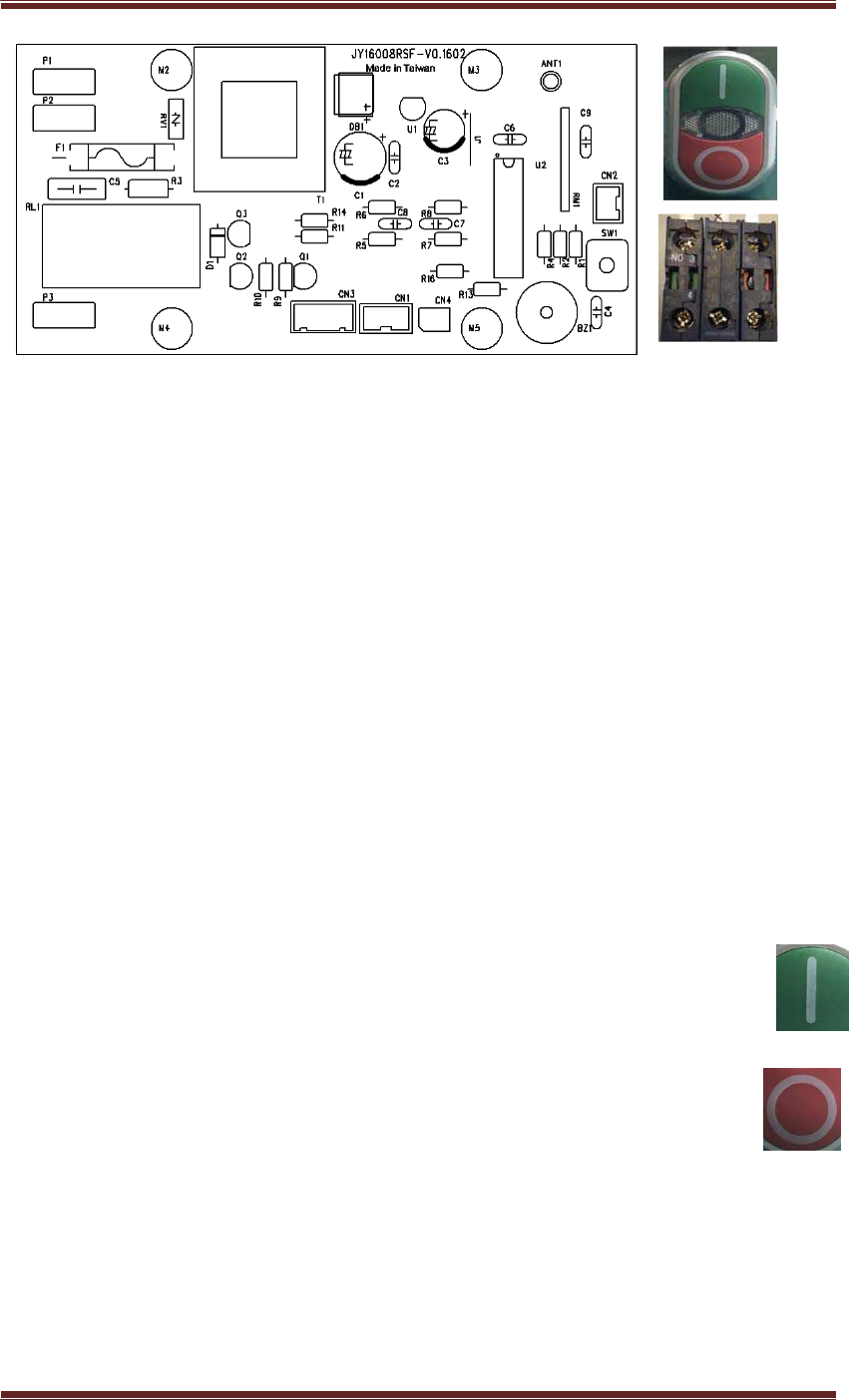
Dust Cyclone- Remote control panel function
Page
1
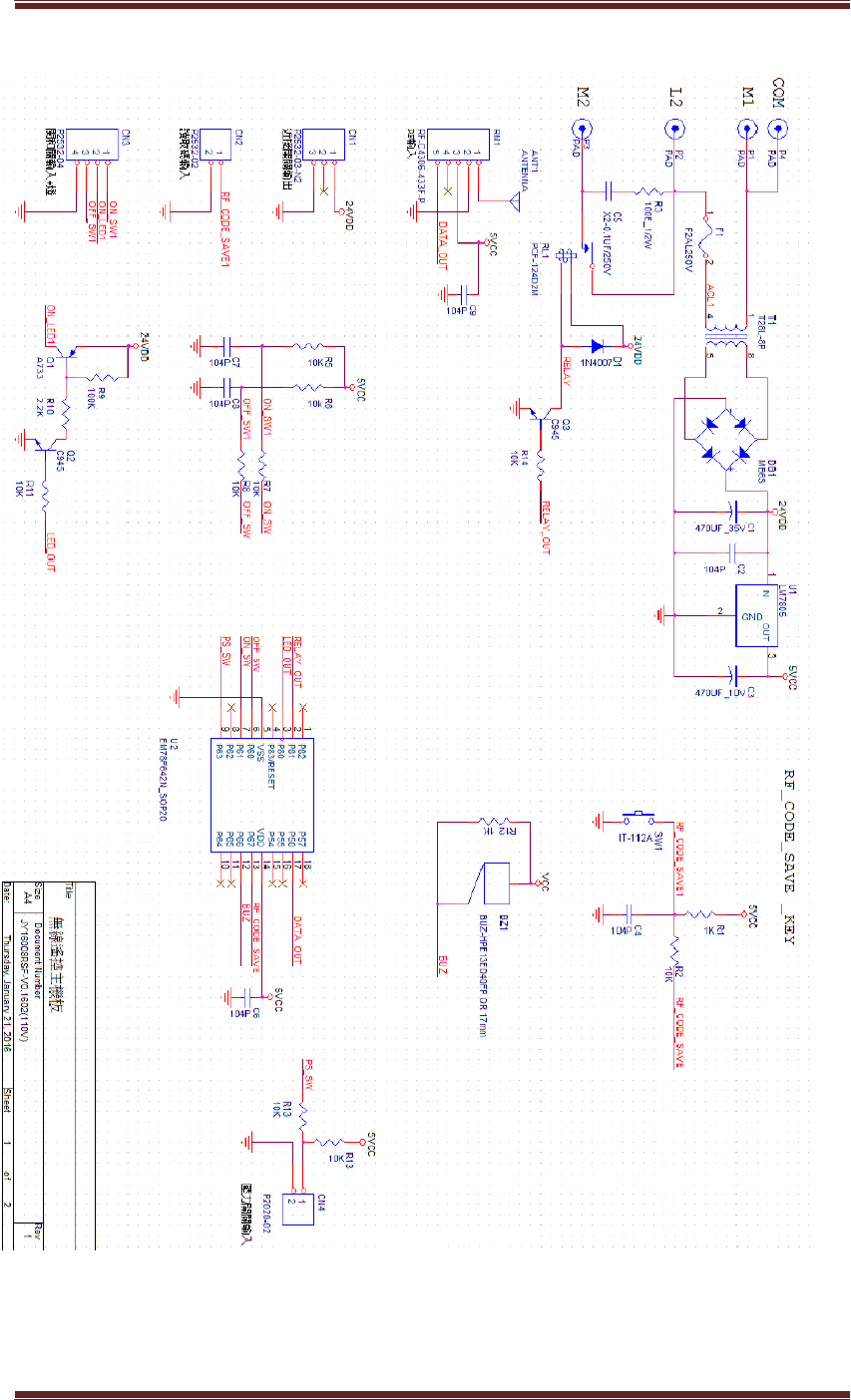
Control panel wire diagram (Refer to attachment 1)
Switch
1.
Switch on the power source, the panel will beep for 0.25seconds.
2. Press the SW1 button until you hear a beep that lasts for 0.15 seconds, this beep
will go off twice. Thereafter, press the D button on the hand held remote
controller to send a code to the panel, which will read the code in 5 seconds
completing the CODE SAVE CPU EEPROM, 0.15 second beep, stopping for 0.15
seconds continuously for three times will mean that you have completed the setup.
If this is not done within the 5 second time frame, you will have to repeat the code
link set up again. Repeating this will not clear the first code setup.
3. Press the A button on the hand held remote controller, the control panel will
activate the RELAY (RL1) ON + LED OUT ON and beep for 0.15 seconds.
4. Press the B button on the hand held remote controller, the control panel will
activate the RELAY (RL1) OFF + LED OUT OFF and beep for 0.15 seconds.
5. In RELAY OFF mode, press the green button on the switch (CN3) to activate
RELAY (RL1) ON + LED OUT ON and will beep for 0.15 seconds.
6. In RELAY ON mode, press the red button on the switch (CN3) to activate
RELAY (RL1) OFF + LED OUT OFF and will beep for 0.15 seconds.
Page
2
JY16008
R
S
F
Remote control
panel function
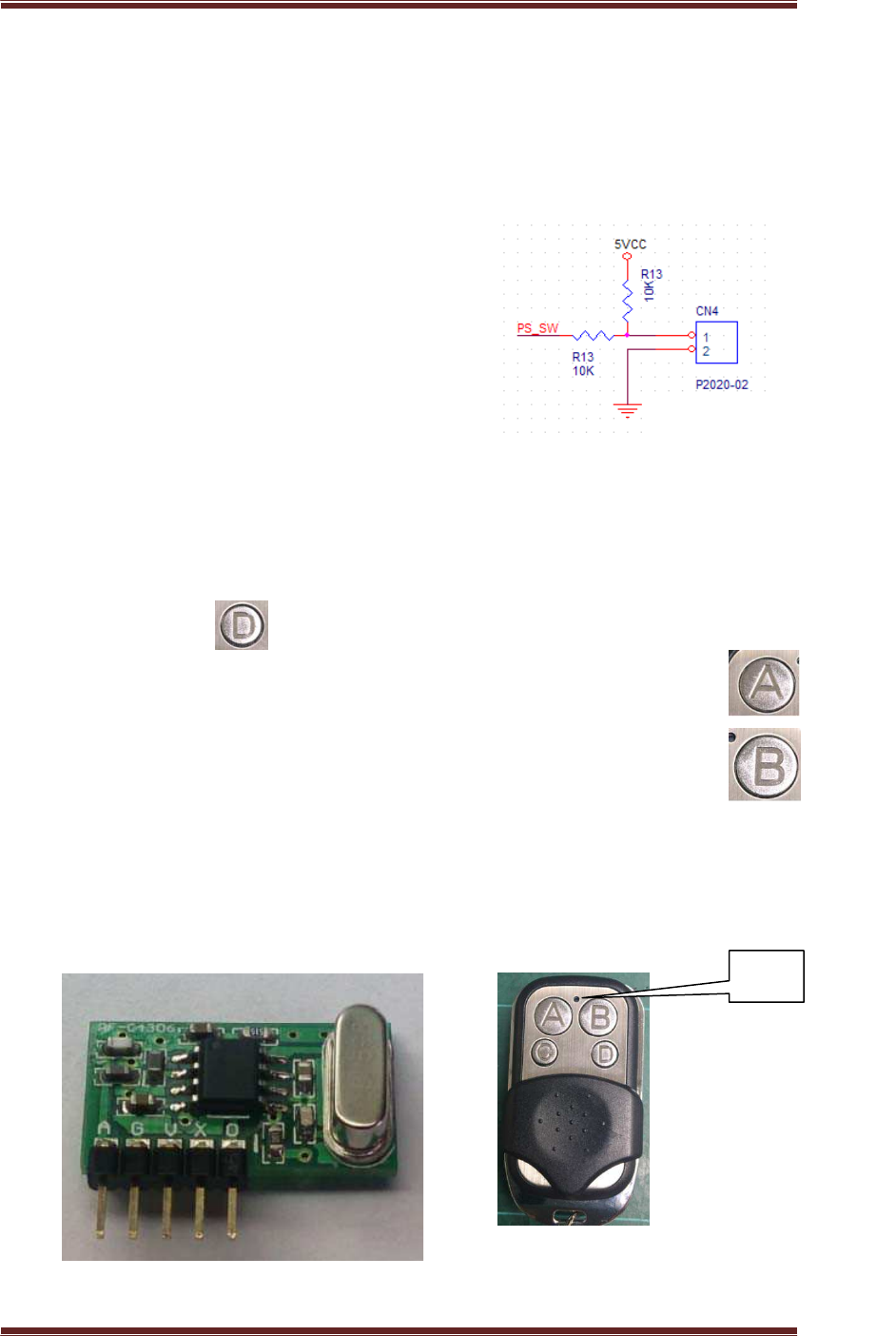
Pressure switch input:
1. When the PS_SW is 0, the forced output is RELAY (RL1) OFF. This
will affect the other functions.
2. When the PS_SW is 1, RELAY (RL1) will function normally.
3.
Refer to the diagram on the right:
Hand held remote controller function:
1.
A is ON, B is OFF
、
C(NC)
、
D
is code output
2. First pressing D will send a code signal, and the LED will flash,
simultaneously press the set button on the control panel to save the
code.
3.
Pressing A , the LED will flash and signal ON
4.
Pressing B, the LED will flash and signal OFF
5. Output frequency is 433MHZ
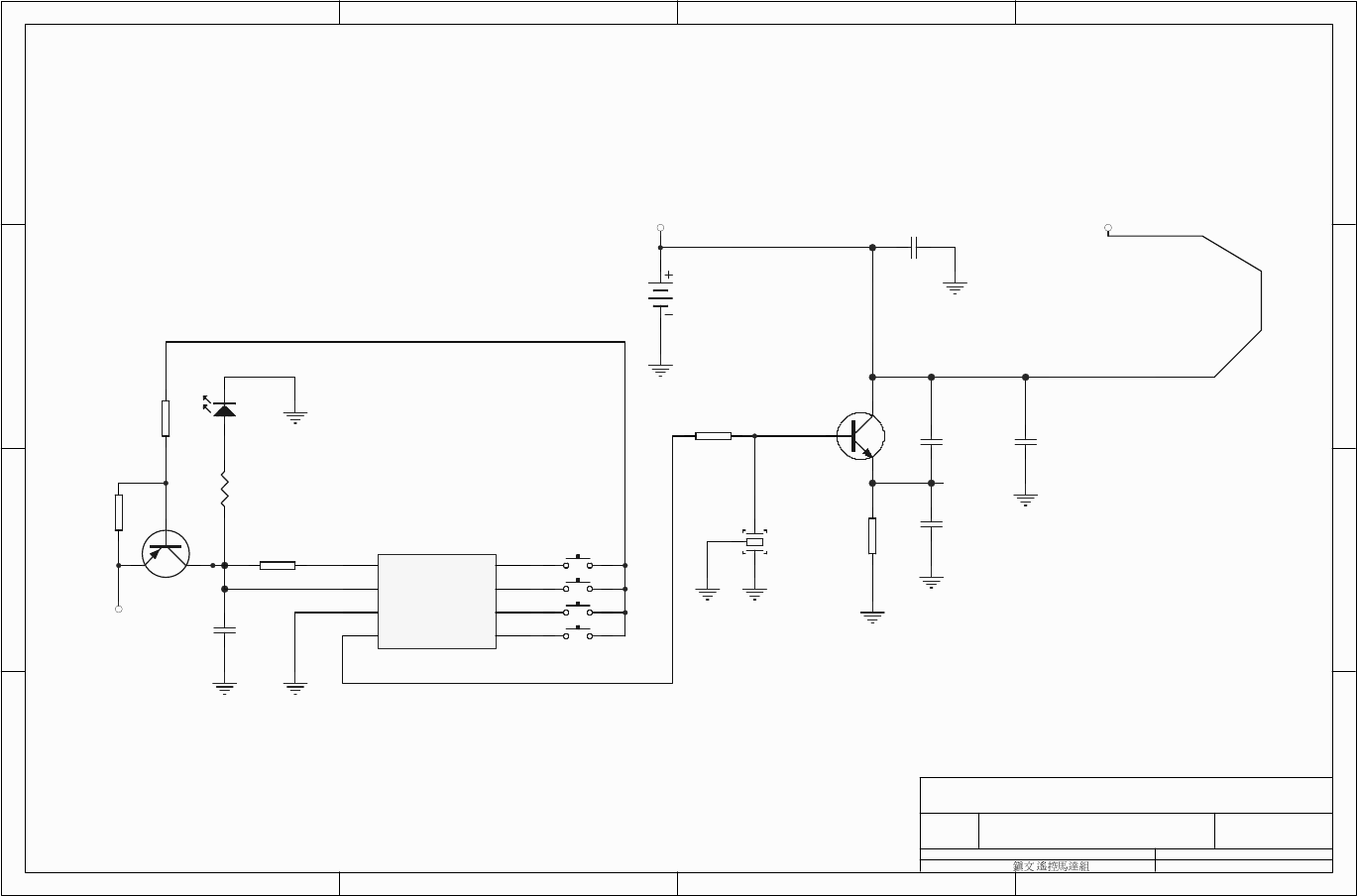
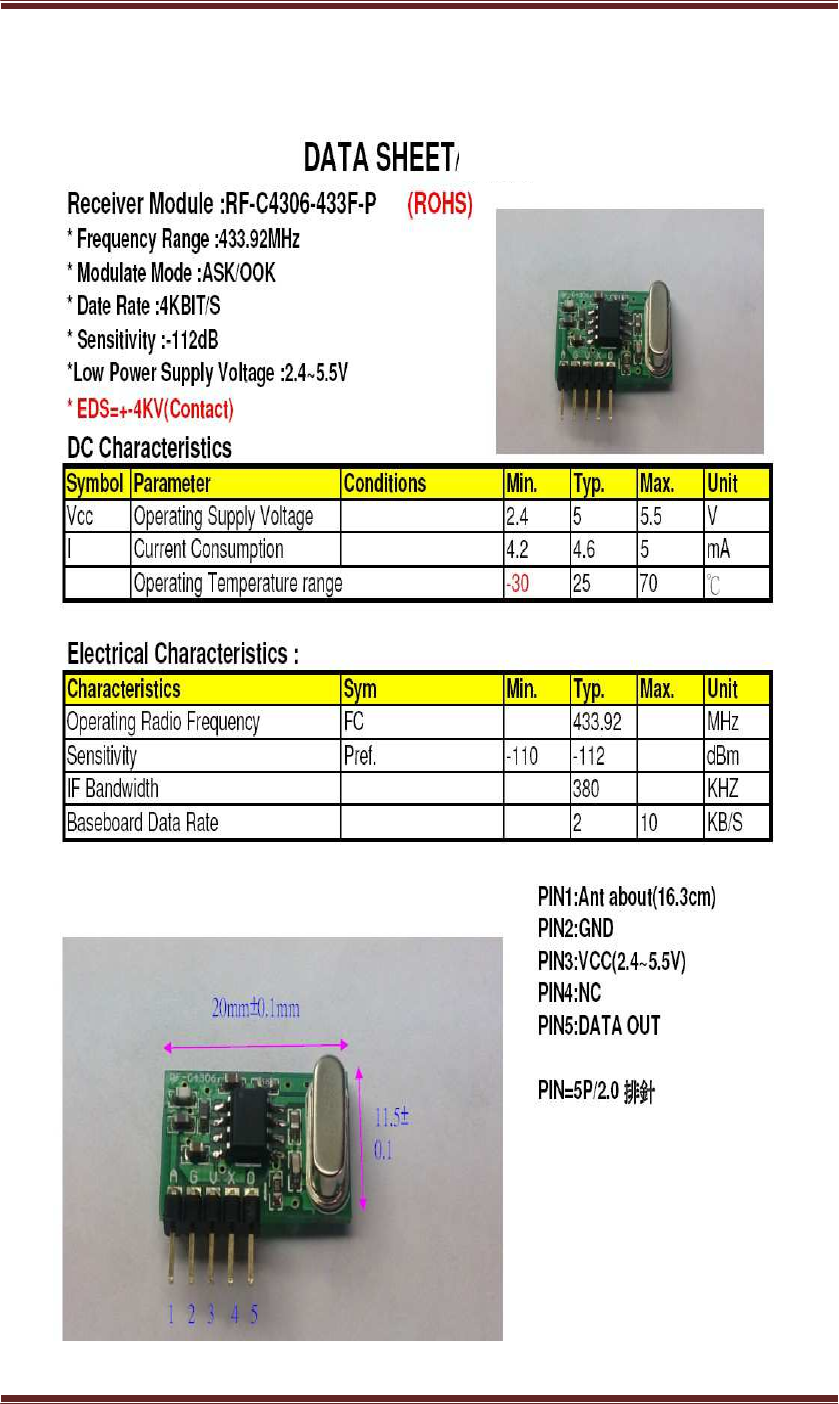
Control panel receiver : DATASHEET per attachment (2)
LED
Pressure switch input
Page
3
JY16008
R
S
F
Remote control
panel function
ATTACHMENT(1)
1 2 3 4
A
B
C
D
4
321
D
C
B
ATitle
Number RevisionSize
A4
Date: 21-Jan-2016 Sheet of
File: D:\PCB\ \ \TX-4KEY-1527.schDrawn By:
R5
150K
Q1
2SC3356
C4
470PF
SR1
C2
3PF
C3
13PF
R6
47R
C6
433.92MHZ
433.92
PCB LOOP
ANT
LED
12V
OSC
1
VCC
2
GND
3
OUT
4K0 5
K1 6
K2 7
K3 8
U1
EV1527
R2
330K
C1
104Z
R3
47K
K2
R1
10K
Q1
2N3906
12V
12V
R4
47R
12V
TX-4KEY-434
K1
K0
K3
Page
4
JY16008
R
S
F
Remote control
panel function
ATTACHMENT(2)
2006/8/16 v1.0
Federal Communication Commission Interference Statement
This equipment has been tested and found to comply with the limits for a Class B digital
device, pursuant to Part 15 of the FCC Rules. These limits are designed to provide
reasonable protection against harmful interference in a residential installation. This
equipment generates, uses and can radiate radio frequency energy and, if not installed
and used in accordance with the instructions, may cause harmful interference to radio
communications. However, there is no guarantee that interference will not occur in a
particular installation. If this equipment does cause harmful interference to radio or
television reception, which can be determined by turning the equipment off and on, the
user is encouraged to try to correct the interference by one of the following measures:
- Reorient or relocate the receiving antenna.
- Increase the separation between the equipment and receiver.
- Connect the equipment into an outlet on a circuit different from that
to which the receiver is connected.
- Consult the dealer or an experienced radio/TV technician for help.
FCC Caution: Any changes or modifications not expressly approved by the party
responsible for compliance could void the user's authority to operate this equipment.
This device complies with Part 15 of the FCC Rules. Operation is subject to the following
two conditions: (1) This device may not cause harmful interference, and (2) this device
must accept any interference received, including interference that may cause undesired
operation.
Industry Canada statement:
This device complies with Industry Canada’s licence-exempt RSSs. Operation
is subject to the following two conditions:
(1) This device may not cause interference; and
(2) This device must accept any interference, including interference that may
cause undesired operation of the device.
Le présent appareil est conforme aux CNR d’Industrie Canada applicables aux
appareils radio exempts de licence. L’exploitation est autorisée aux deux
conditions suivantes:
1) l’appareil ne doit pas produire de brouillage;
2) l’utilisateur de l’appareil doit accepter tout brouillage radioélectrique subi,
même si le brouillage est susceptible d’en compromettre le fonctionnement.