SKYPINE ELECTRONICS CNE8213FA Car DVD entertainment center User Manual Contents

SKYPINE ELECTRONICS (SHEN ZHEN) CO., LTD. Car DVD entertainment center Contents

Users Manual

VER:7-9820-8319-00-00注意:红色虚线为刀模线 This device complies with Part 15 of the FCC Rules. Operation is subject to the following two conditions:(1) this device may not cause harmful interference, and(2) this device must accept any interference received, includinginterference that may cause undesired operation.Warning:Changes or modifications to this unit not expressly approved by the party responsible for compliance could void the user's authority to operate the equipment.FCC ID:V8VCNE8213FAThis equipment complies with FCC RF radiation exposure limits set forthfor an uncontrolled environment.This equipment should be installed andoperated with a minimum distance of 20 centimeters between the radiatorand your body.
1ContentsThankyouforyourchoosingourproduct.Wehopeyouwillfindtheinstructionsinthisusermanualclearandeasytofollow.Ifyoutakeafewminutestolookthroughit,you’lllearnhowtouseallthefeaturesofyournewunitformaximumenjoyment.Afteryouhavefinishedreadingtheinstructions,pleasekeepthismanualinasafeplaceforfuturereference.PrecautionsPrecautionsPrecautionsPrecautions3-43-43-43-4Onsafety3Moisturecondensation3Tomaintainhighsoundquality3Playablediscs3DVDRegionManagement4PreparationPreparationPreparationPreparation5555Features5ToolsandSupplies5WARNING5DisconnectingtheBattery5CCCControlso ntrolsontrolsontrolsaaaandn dndndIndicatorsI ndicatorsIndicatorsIndicators6-76-76-76-7ButtonOperation6TheKeyAreasOfTouchScreen7RemoteRemoteRemoteRemoteControlC ontrolControlControl8-98-98-98-9FrontZoneRemoteControl8TTTTFTF TFTFTMonitorM onitorMonitorMonitorOperationO perationOperationOperation10101010RearCameraMode10ImageSettings10ParkingBrakeInterlock10OperatingOperatingOperatingOperatingInstructionsI nstructionsInstructionsInstructions11-1211-1211-1211-12PowerOn/Off11PlayingSourceSelection11VolumeAdjustment11AudioControlMenu11Five-ChannelAudioControl12RearZone12SystemReset12Mute12Standby12SystemSystemSystemSystemSetupS etupSetupSetupMenuM enuMenuMenu13-1713-1713-1713-17MAINMenu13RearzoneMenu13ScreenSetting13GeneralSetupMenu14Video15ASP(AudioSignalProcessing)ConfigurationMenu16LanguageMenu17TunerTunerTunerTunerOperationO perationOperationOperation18-1918-1918-1918-19TunerTFTDisplay18SwitchtoRadiosource18SelectFM/AMBand18AutoTuning18ManualTuning19UsingPresetStations19AutoStore(AS)19ProgramScan(PS)19LocalRadioStationsSeeking(LOC)19
2NOTENOTENOTENOTE:1.certaindescriptioninthebookmaydifferfromtheactualunit.2.Somepicturesoriconsinthebookmaydifferfromactualdisplay.3.Specificationssubjecttochangewithoutnotice.DVDDVDDVDDVDPlayerP layerPlayerPlayerOperationO perationOperationOperation20-2520-2520-2520-25Insert/EjectDisc20ResettheLoadingMechanism20AccessingDVDMode20UsingtheTouch-ScreenControls20ControllingPlayback21AccessingtheDVDMenu21MovingThroughChapters21FastForward/FastReverse21Selecting2-Channelor6-ChannelAudioPlayback22GOTOSearch22DirectChapter/TrackSelection23ViewinganAlternatePictureAngle(DVDOnly)23Zooming23Multi-LanguageDiscs(DVDOnly)23PlaybackInformation23GeneralDiscInformation25CD/MP3/WMA/JPEGCD/MP3/WMA/JPEGCD/MP3/WMA/JPEGCD/MP3/WMA/JPEGOperationO perationOperationOperation26-2826-2826-2826-28CDPlayerUserInterface26MP3/WMADiscs27JPEGDiscs28iPodiPodiPodiPodOOOOperationp erationperationperation29292929AccessingiPodMode29iPodInstructions29PlaybackofvideooniPod29USBUSBUSBUSBOOOOperationp erationperationperation30303030SDSDSDSD OperationOperationOperationOperation31313131NavigationNavigationNavigationNavigationOperationO perationOperationOperation32323232HowtoaccesstheNavigationmode32HowtoListentoAudioWhileUsingNavigation32BluetoothBluetoothBluetoothBluetoothOperationO perationOperationOperation33-3633-3633-3633-36AccessingBluetoothMode33BluetoothUserInterface33TroubleshootingTroubleshootingTroubleshootingTroubleshooting37-4037-4037-4037-40SpecificationsSpecificationsSpecificationsSpecifications41414141
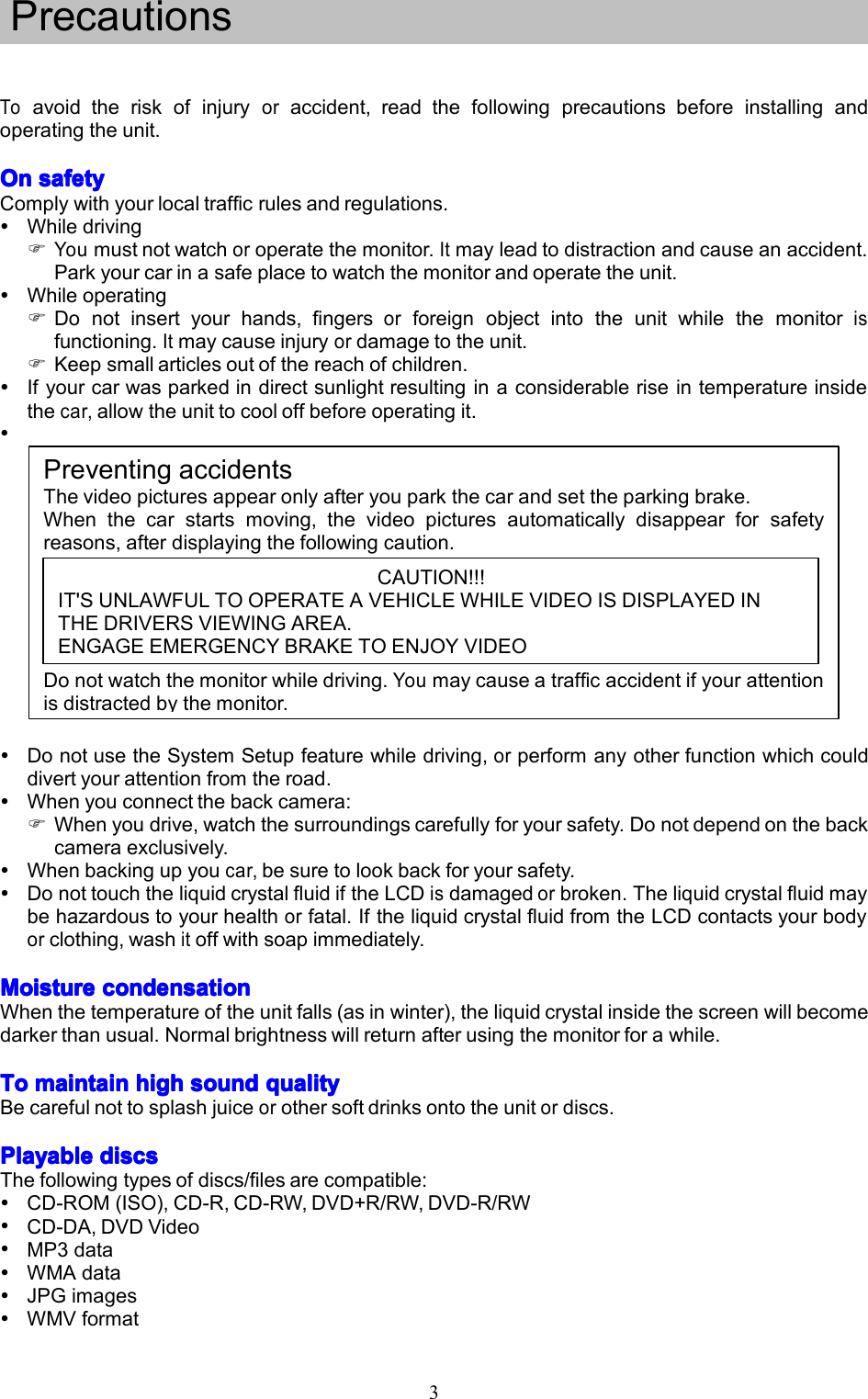
3Toavoidtheriskofinjuryoraccident,readthefollowingprecautionsbeforeinstallingandoperatingtheunit.OnOnOnOnsafetys afetysafetysafetyComplywithyourlocaltrafficrulesandregulations.WhiledrivingYoumustnotwatchoroperatethemonitor.Itmayleadtodistractionandcauseanaccident.Parkyourcarinasafeplacetowatchthemonitorandoperatetheunit.WhileoperatingDonotinsertyourhands,fingersorforeignobjectintotheunitwhilethemonitorisfunctioning.Itmaycauseinjuryordamagetotheunit.Keepsmallarticlesoutofthereachofchildren.Ifyourcarwasparkedindirectsunlightresultinginaconsiderableriseintemperatureinsidethecar,allowtheunittocooloffbeforeoperatingit.PreventingaccidentsThevideopicturesappearonlyafteryouparkthecarandsettheparkingbrake.Whenthecarstartsmoving,thevideopicturesautomaticallydisappearforsafetyreasons,afterdisplayingthefollowingcaution.Donotwatchthemonitorwhiledriving.Youmaycauseatrafficaccidentifyourattentionisdistractedbythemonitor.DonotusetheSystemSetupfeaturewhiledriving,orperformanyotherfunctionwhichcoulddivertyourattentionfromtheroad.Whenyouconnectthebackcamera:Whenyoudrive,watchthesurroundingscarefullyforyoursafety.Donotdependonthebackcameraexclusively.Whenbackingupyoucar,besuretolookbackforyoursafety.DonottouchtheliquidcrystalfluidiftheLCDisdamagedorbroken.Theliquidcrystalfluidmaybehazardoustoyourhealthorfatal.IftheliquidcrystalfluidfromtheLCDcontactsyourbodyorclothing,washitoffwithsoapimmediately.MoistureMoistureMoistureMoisturecondensationc ondensationcondensationcondensationWhenthetemperatureoftheunitfalls(asinwinter),theliquidcrystalinsidethescreenwillbecomedarkerthanusual.Normalbrightnesswillreturnafterusingthemonitorforawhile.ToToToTomaintainm aintainmaintainmaintainhighh ighhighhighsounds oundsoundsoundqualityq ualityqualityqualityBecarefulnottosplashjuiceorothersoftdrinksontotheunitordiscs.PlayablePlayablePlayablePlayablediscsd iscsdiscsdiscsThefollowingtypesofdiscs/filesarecompatible:CD-ROM(ISO),CD-R,CD-RW,DVD+R/RW,DVD-R/RWCD-DA,DVDVideoMP3dataWMAdataJPGimagesWMVformatPrecautionsCAUTION!!!IT'SUNLAWFULTOOPERATEAVEHICLEWHILEVIDEOISDISPLAYEDINTHEDRIVERSVIEWINGAREA.ENGAGEEMERGENCYBRAKETOENJOYVIDEO
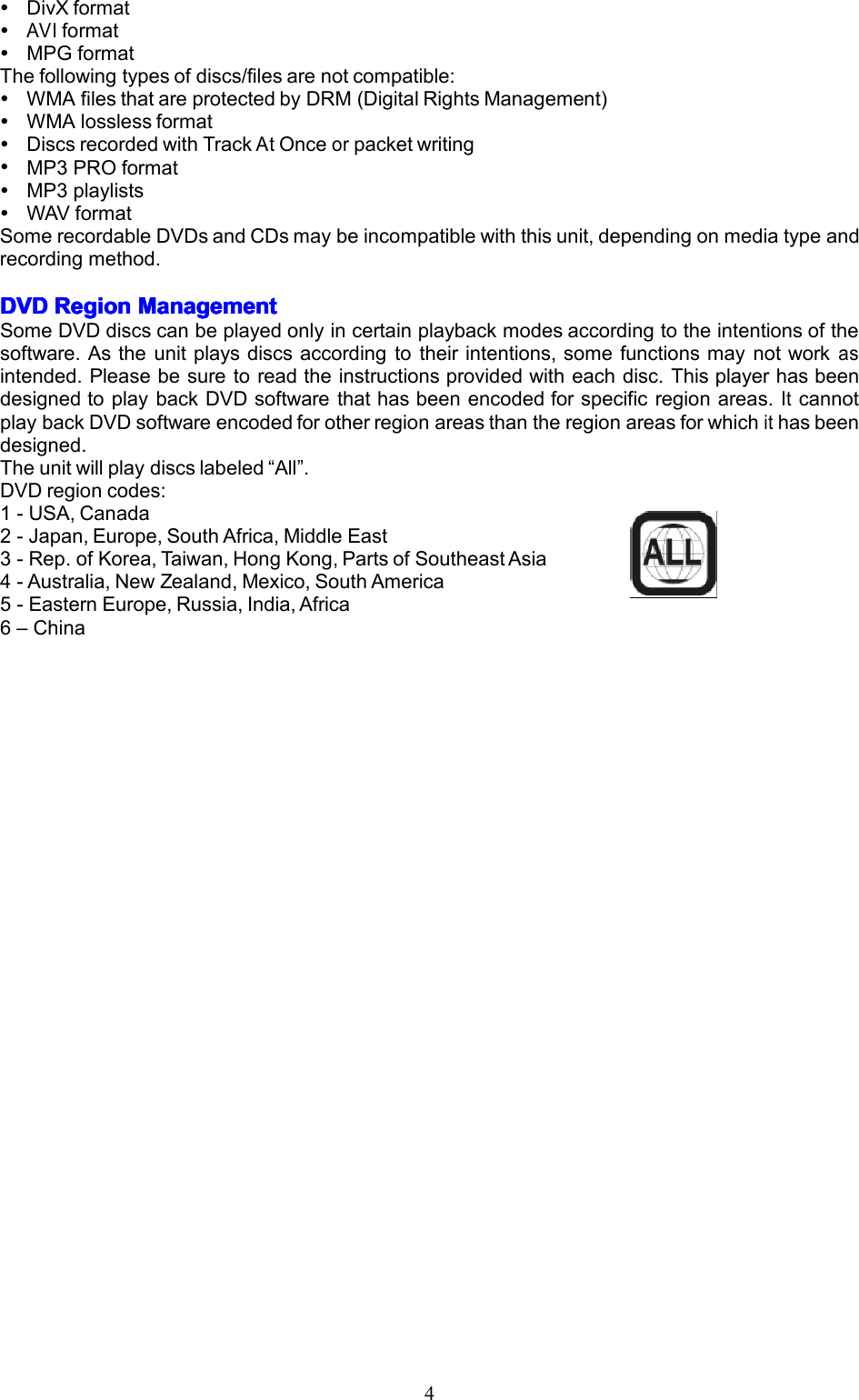
4DivXformatAVIformatMPGformatThefollowingtypesofdiscs/filesarenotcompatible:WMAfilesthatareprotectedbyDRM(DigitalRightsManagement)WMAlosslessformatDiscsrecordedwithTrackAtOnceorpacketwritingMP3PROformatMP3playlistsWAVformatSomerecordableDVDsandCDsmaybeincompatiblewiththisunit,dependingonmediatypeandrecordingmethod.DVDDVDDVDDVDRegionR egionRegionRegionManagementM anagementManagementManagementSomeDVDdiscscanbeplayedonlyincertainplaybackmodesaccordingtotheintentionsofthesoftware.Astheunitplaysdiscsaccordingtotheirintentions,somefunctionsmaynotworkasintended.Pleasebesuretoreadtheinstructionsprovidedwitheachdisc.ThisplayerhasbeendesignedtoplaybackDVDsoftwarethathasbeenencodedforspecificregionareas.ItcannotplaybackDVDsoftwareencodedforotherregionareasthantheregionareasforwhichithasbeendesigned.Theunitwillplaydiscslabeled“All”.DVDregioncodes:1-USA,Canada2-Japan,Europe,SouthAfrica,MiddleEast3-Rep.ofKorea,Taiwan,HongKong,PartsofSoutheastAsia4-Australia,NewZealand,Mexico,SouthAmerica5-EasternEurope,Russia,India,Africa6–China
5PreparationPleasereadalloftheinstructionsbelowbeforebeginningyourinstallation.Werecommendthatyouhaveyourunitinstalledbyanexperiencedcarnavigationsysteminstaller.FeaturesFeaturesFeaturesFeaturesDoubleDINsize,all-in-onehighlyintegratedentertainmentsystemBuilt-inDVDPlayer,automotivespecificationslotloadingmechanismBuilt-inFM/AMTuner,Highresolution6.2”(16:9)TFTcolormonitor,contrastandbrightnessadjustmentBuilt-in40WX4outputamplifier,4.1channelsurroundsoundoutput.Dualzonefunctionwitheasyoperation.SmartTouch-screenoperationAllfunctionscanbeoperatedbytouchscreen,includedRemoteControlsBuilt-iniPodControl,NavigationsystemPowerfulGraphicUserInterfaceandsoftwareupdateability.ToolsToolsToolsToolsanda ndandandSuppliesS uppliesSuppliesSuppliesWesuggestusingthesetoolsandsuppliestoinstalltheunit.•Torxtype,flat-headandPhilipsscrewdrivers•Wirecuttersandstrippers•Toolstoremoveexistingradio(screwdriver,socketwrenchsetorothertools)•Electricaltape•Crimpingtool•Voltmeter/testlight•Crimpconnections•18gaugewireforpowerconnections•16–18gaugespeakerwire•Heatshrinktubing•SolderingironandsolderWARNING!WARNING!WARNING!WARNING!1.Onlyconnecttheunittoa12-voltnegativegroundsystem.2.Neverinstallthisunitwhereoperationandviewingcouldinterferewithsafedrivingconditions.3.Toreducetheriskofatrafficaccident(exceptwhenusingforrearviewvideocamera)neverusethevideodisplayfunctionwhiledrivingthevehicle.Thismaybeinviolationoflocallaws.4.Neverdisassembleoradjusttheunitwithouttheassistanceofaprofessional.Fordetails,pleaseconsultyourlocalcarstereospecialtyshop.5.Topreventinjuryfromshockorfire,neverexposethisunittomoistureorwater.6.Neveruseirregulardiscs,theonlyrecommendeddiscsizeisa12cmrounddisc.7.Topreventdamagetothemechanisminsidethisunit,avoidimpacttotheTFTmonitor.8.Donotchangethefuseonthepowerwirewithoutprofessionalguidance.Usinganimproperfusemaycausedamagetotheunitandresultinafire.9.Themonitoremploysanautomaticmotorizedmechanism.Topreventdamagetothecoremechanism,pleasedonotpush,pullorswivelthemonitormanually.DisconnectingDisconnectingDisconnectingDisconnectingthet hethetheBatteryB atteryBatteryBatteryTopreventashortcircuit,turnofftheignitionandremovethenegative(-)batterycablepriortostartingtheinstallation.NOTENOTENOTENOTE:Iftheunitistobeinstalledinacarequippedwithanon-boarddriveornavigationcomputer,donotdisconnectthebatterycable.Ifthecableisdisconnected,thecomputermemorymaybelost.Undertheseconditions,useextracautionduringinstallationtoavoidcausingashortcircuit.NOTENOTENOTENOTE:ItisespeciallyimportantthatyoureadtheWARNINGW ARNINGWARNINGWARNINGSSSSandNOTEN OTENOTENOTESSSSinthismanual
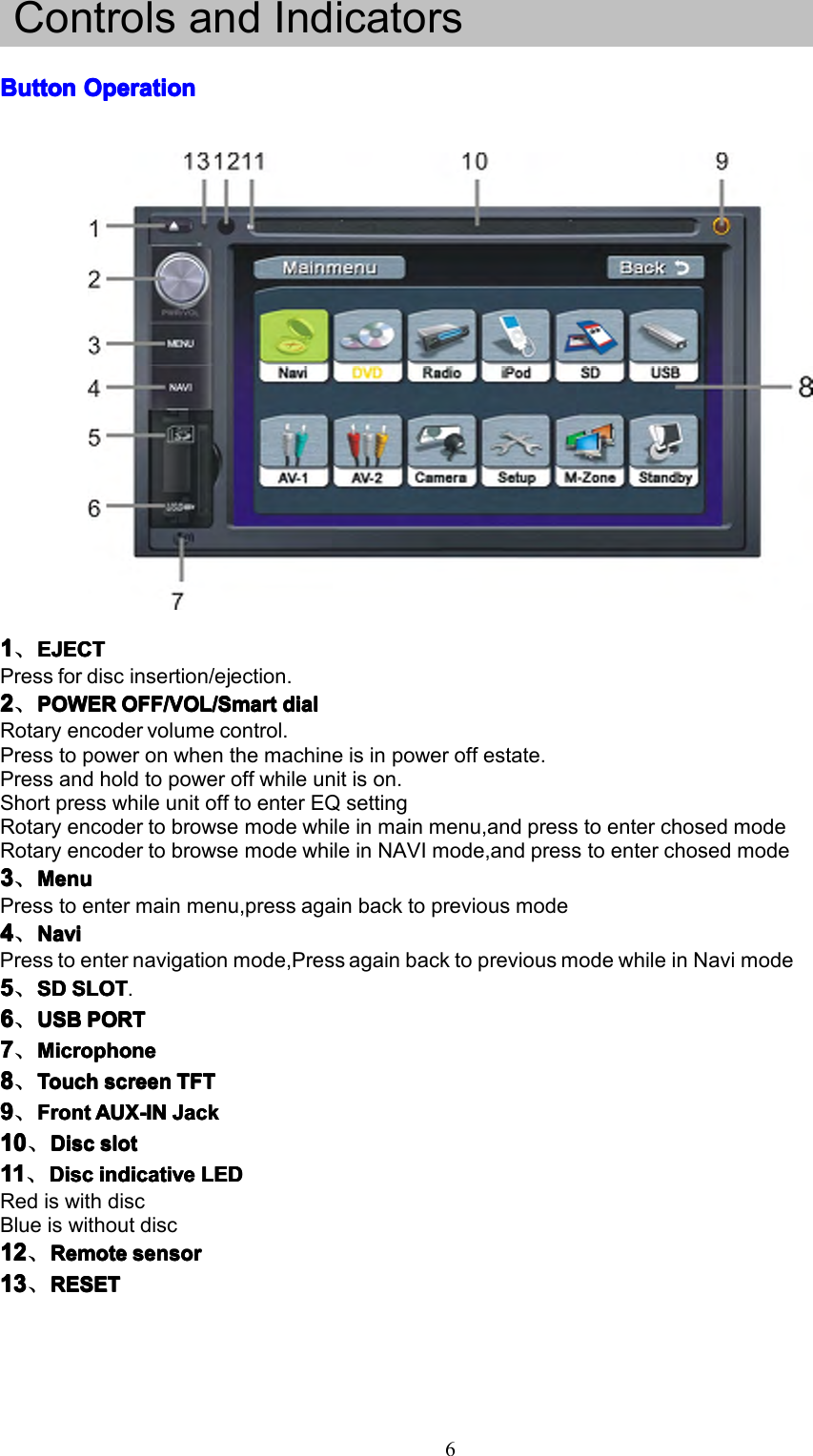
6ControlsandIndicatorsButtonButtonButtonButtonOperationO perationOperationOperation1111、EJECTE JECTEJECTEJECTPressfordiscinsertion/ejection.2222、POWERPOWERPOWERPOWEROFF/VOL/SmartO FF/VOL/SmartOFF/VOL/SmartOFF/VOL/Smartdiald ialdialdialRotaryencodervolumecontrol.Presstopoweronwhenthemachineisinpoweroffestate.Pressandholdtopoweroffwhileunitison.ShortpresswhileunitofftoenterEQsettingRotaryencodertobrowsemodewhileinmainmenu,andpresstoenterchosedmodeRotaryencodertobrowsemodewhileinNAVImode,andpresstoenterchosedmode3333、MenuMenuMenuMenuPresstoentermainmenu,pressagainbacktopreviousmode4444、NaviNaviNaviNaviPresstoenternavigationmode,PressagainbacktopreviousmodewhileinNavimode5555、SDSDSDSDSLOTS LOTSLOTSLOT.6666、USBUSBUSBUSBPORTP ORTPORTPORT7777、MicrophoneMicrophoneMicrophoneMicrophone8888、TouchTouchTouchTouchscreens creenscreenscreenTFTT FTTFTTFT9999、FrontFrontFrontFrontAUX-INA UX-INAUX-INAUX-INJackJ ackJackJack10101010、DiscD iscDiscDiscslots lotslotslot11111111、DiscD iscDiscDiscindicativei ndicativeindicativeindicativeLEDL EDLEDLEDRediswithdiscBlueiswithoutdisc12121212、RemoteR emoteRemoteRemotesensors ensorsensorsensor13131313、RESETR ESETRESETRESET
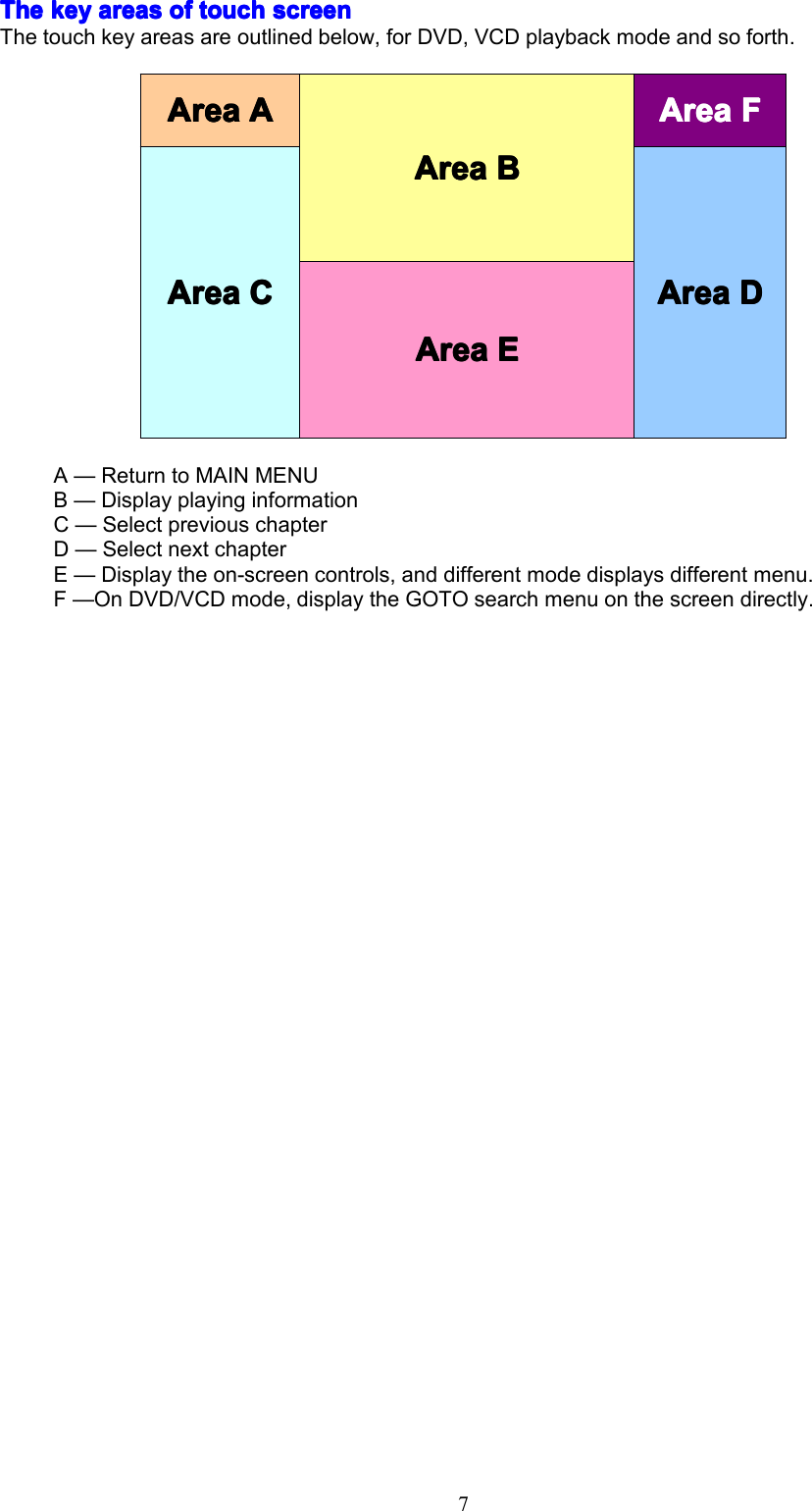
7TheTheTheThekeyk eykeykeyareasa reasareasareasofo fofoftoucht ouchtouchtouchscreens creenscreenscreenThetouchkeyareasareoutlinedbelow,forDVD,VCDplaybackmodeandsoforth.A—ReturntoMAINMENUB—DisplayplayinginformationC—SelectpreviouschapterD—SelectnextchapterE—Displaytheon-screencontrols,anddifferentmodedisplaysdifferentmenu.F—OnDVD/VCDmode,displaytheGOTOsearchmenuonthescreendirectly.AAAArear eareareaAAAAAAAArear eareareaBBBBAreaAreaAreaAreaFFFFAAAArear eareareaCCCCAAAArear eareareaDDDDAAAArear eareareaEEEE
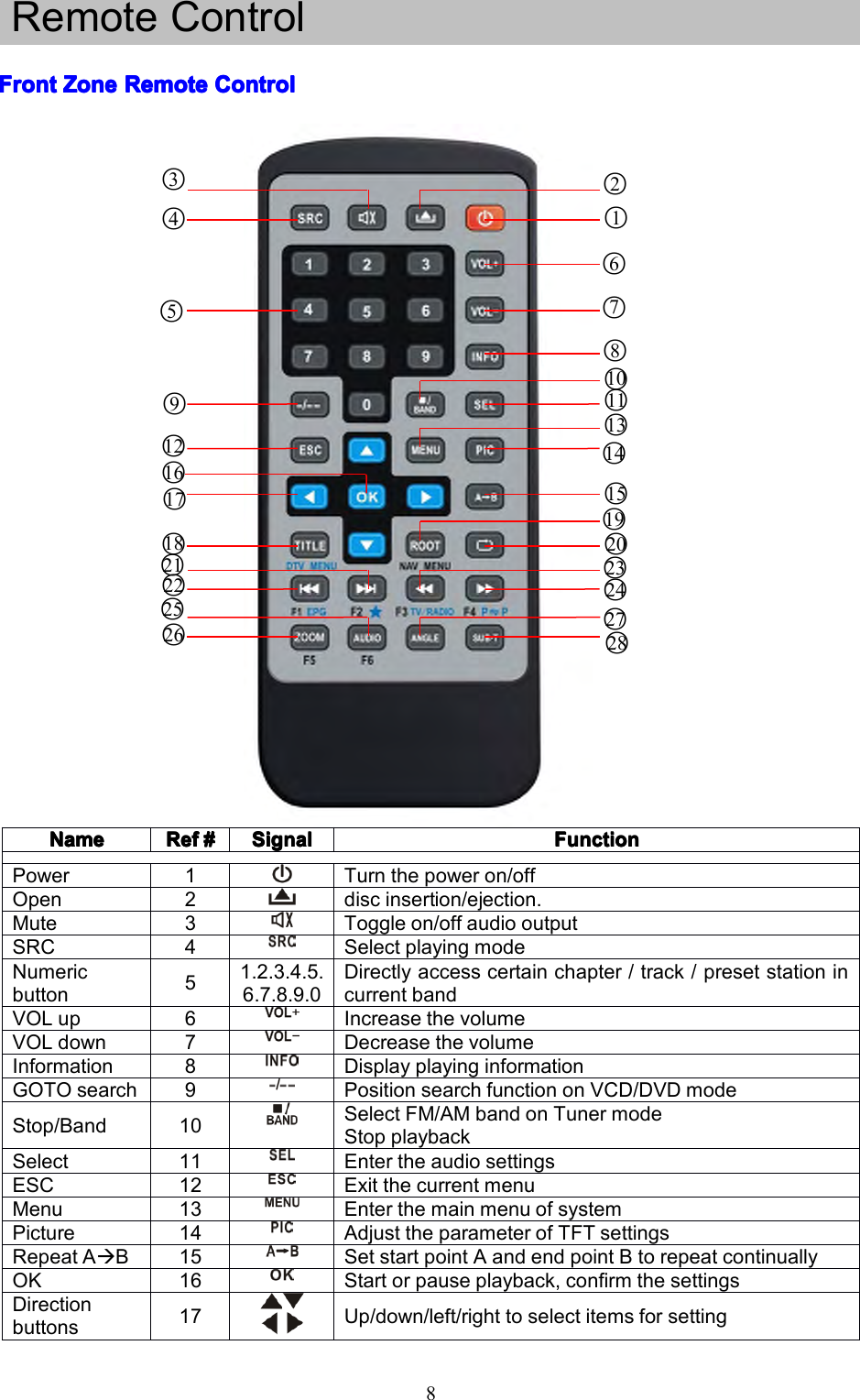
8RemoteControlFFFFrontr ontrontrontZoneZ oneZoneZoneRemoteR emoteRemoteRemoteControlC ontrolControlControlNameNameNameNameRefRefRefRef####SignalSignalSignalSignalFunctionFunctionFunctionFunctionPower1Turnthepoweron/offOpen2discinsertion/ejection.Mute3Toggleon/offaudiooutputSRC4SelectplayingmodeNumericbutton51.2.3.4.5.6.7.8.9.0Directlyaccesscertainchapter/track/presetstationincurrentbandVOLup6IncreasethevolumeVOLdown7DecreasethevolumeInformation8DisplayplayinginformationGOTOsearch9PositionsearchfunctiononVCD/DVDmodeStop/Band10SelectFM/AMbandonTunermodeStopplaybackSelect11EntertheaudiosettingsESC12ExitthecurrentmenuMenu13EnterthemainmenuofsystemPicture14AdjusttheparameterofTFTsettingsRepeatAB15SetstartpointAandendpointBtorepeatcontinuallyOK16Startorpauseplayback,confirmthesettingsDirectionbuttons17Up/down/left/righttoselectitemsforsetting1○2○6○7○8○10○11○13○14○15○19○20○23○24○27○28○9○3○4○5○12○16○18○21○22○25○26○17○
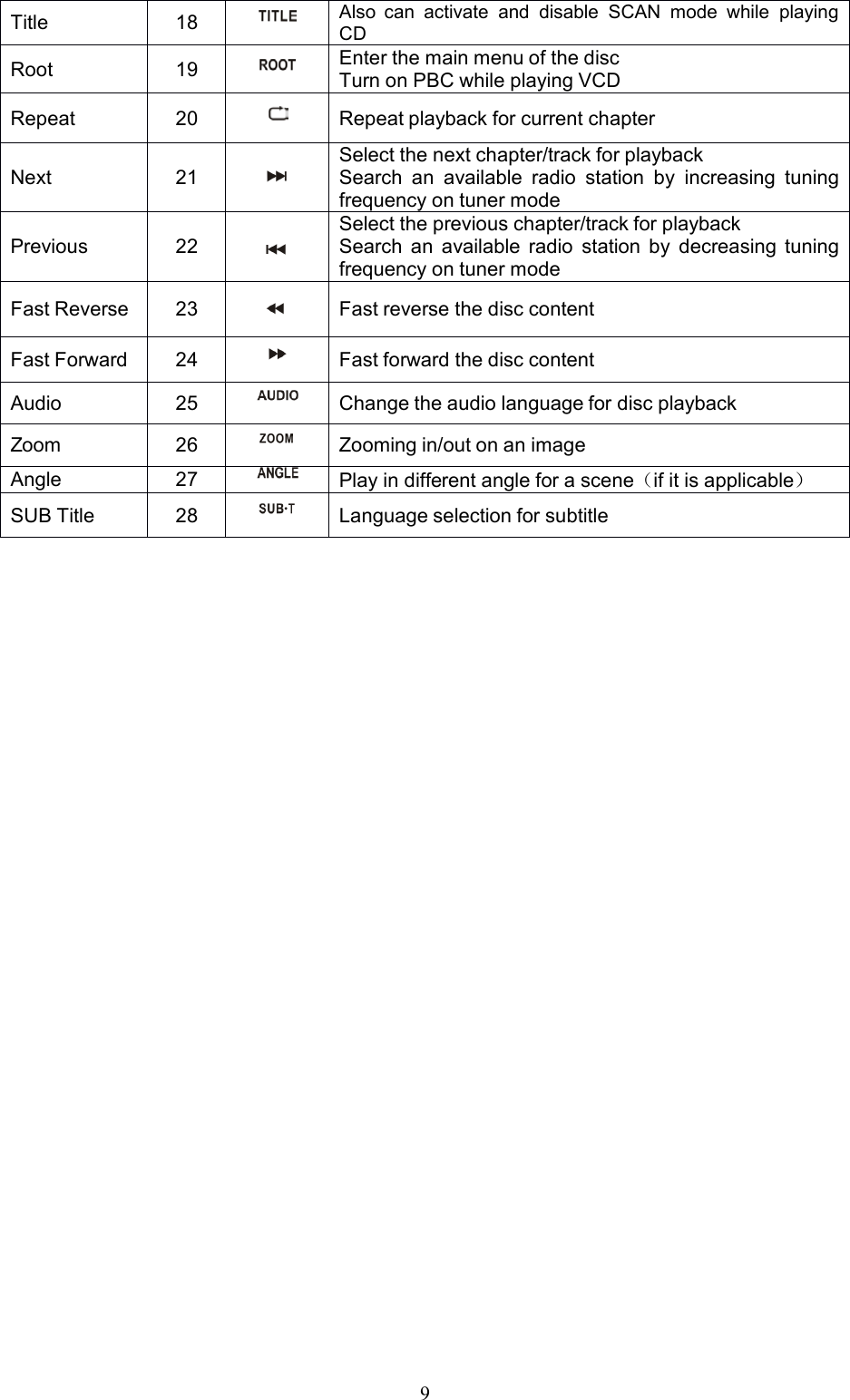
9Title18AlsocanactivateanddisableSCANmodewhileplayingCDRoot19EnterthemainmenuofthediscTurnonPBCwhileplayingVCDRepeat20RepeatplaybackforcurrentchapterNext21Selectthenextchapter/trackforplaybackSearchanavailableradiostationbyincreasingtuningfrequencyontunermodePrevious22Selectthepreviouschapter/trackforplaybackSearchanavailableradiostationbydecreasingtuningfrequencyontunermodeFastReverse23FastreversethedisccontentFastForward24FastforwardthedisccontentAudio25ChangetheaudiolanguagefordiscplaybackZoom26Zoomingin/outonanimageAngle27Playindifferentangleforascene(ifitisapplicable)SUBTitle28Languageselectionforsubtitle
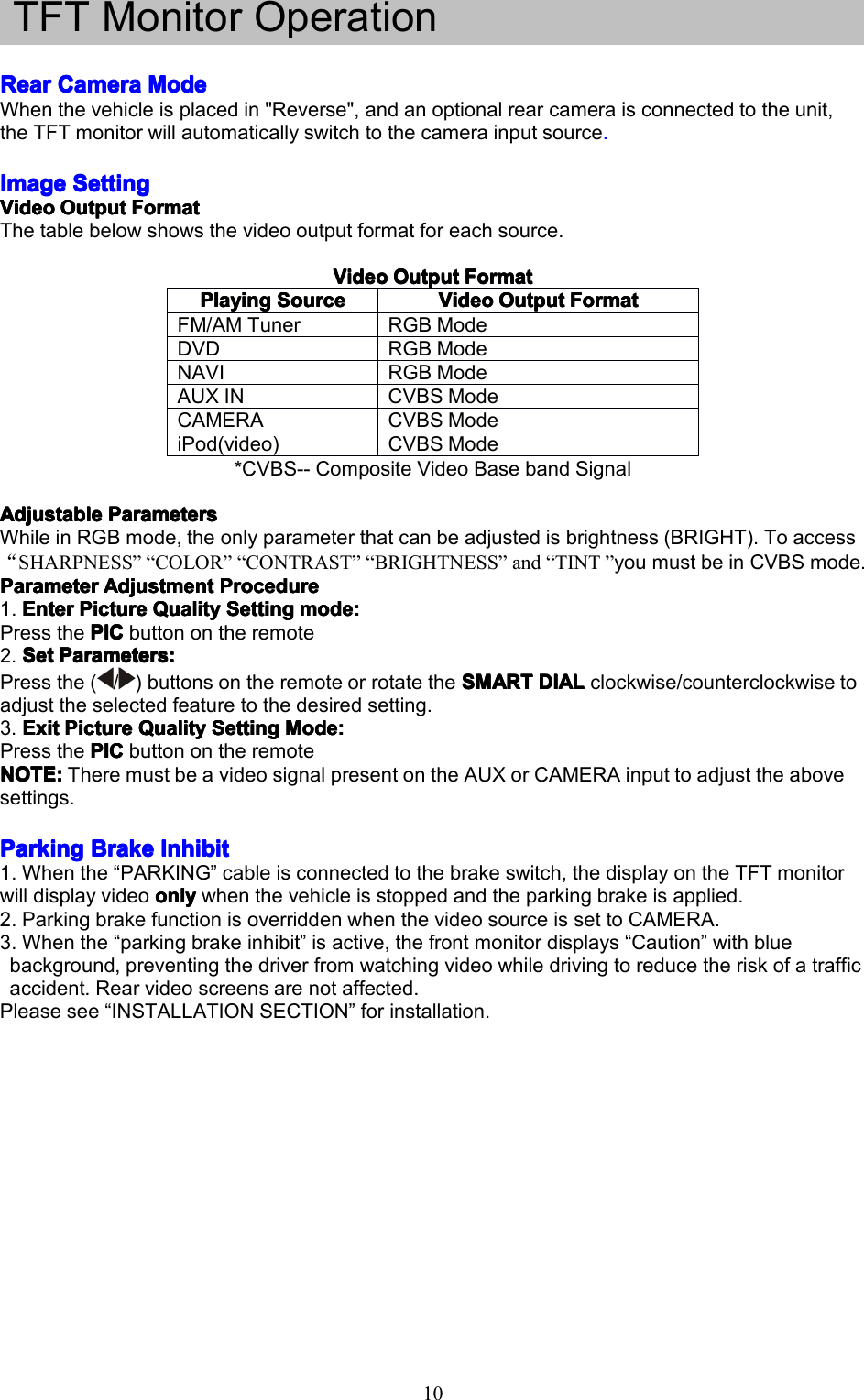
10TFTMonitorOperationRearRearRearRearCameraC ameraCameraCameraModeM odeModeModeWhenthevehicleisplacedin"Reverse",andanoptionalrearcameraisconnectedtotheunit,theTFTmonitorwillautomaticallyswitchtothecamerainputsource.ImageImageImageImageSettingS ettingSettingSettingVideoVideoVideoVideoOutputO utputOutputOutputFormatF ormatFormatFormatThetablebelowshowsthevideooutputformatforeachsource.VideoV ideoVideoVideoOutputO utputOutputOutputFormatF ormatFormatFormat*CVBS--CompositeVideoBasebandSignalAdjustableAdjustableAdjustableAdjustableParametersP arametersParametersParametersWhileinRGBmode,theonlyparameterthatcanbeadjustedisbrightness(BRIGHT).Toaccess“SHARPNESS”“COLOR”“CONTRAST”“BRIGHTNESS”and“TINT”youmustbeinCVBSmode.ParameterParameterParameterParameterAdjustmentA djustmentAdjustmentAdjustmentProcedureP rocedureProcedureProcedure1.EnterEnterEnterEnterPictureP icturePicturePictureQualityQ ualityQualityQualitySettingS ettingSettingSettingmode:m ode:mode:mode:PressthePICPICPICPICbuttonontheremote2.SetSetSetSetParameters:P arameters:Parameters:Parameters:Pressthe(/)buttonsontheremoteorrotatetheSMARTS MARTSMARTSMARTDIALD IALDIALDIALclockwise/counterclockwisetoadjusttheselectedfeaturetothedesiredsetting.3.ExitE xitExitExitPictureP icturePicturePictureQualityQ ualityQualityQualitySettingS ettingSettingSettingMode:M ode:Mode:Mode:PressthePICPICPICPICbuttonontheremoteNOTE:NOTE:NOTE:NOTE:TheremustbeavideosignalpresentontheAUXorCAMERAinputtoadjusttheabovesettings.ParkingParkingParkingParkingBrakeB rakeBrakeBrakeInhibitI nhibitInhibitInhibit1.Whenthe“PARKING”cableisconnectedtothebrakeswitch,thedisplayontheTFTmonitorwilldisplayvideoonlyonlyonlyonlywhenthevehicleisstoppedandtheparkingbrakeisapplied.2.ParkingbrakefunctionisoverriddenwhenthevideosourceissettoCAMERA.3.Whenthe“parkingbrakeinhibit”isactive,thefrontmonitordisplays“Caution”withbluebackground,preventingthedriverfromwatchingvideowhiledrivingtoreducetheriskofatrafficaccident.Rearvideoscreensarenotaffected.Pleasesee“INSTALLATIONSECTION”forinstallation.PPPPlayingl ayinglayinglayingSourceS ourceSourceSourceVideoVideoVideoVideoOutputO utputOutputOutputFormatF ormatFormatFormatFM/AMTunerRGBModeDVDRGBModeNAVIRGBModeAUXINCVBSModeCAMERACVBSModeiPod(video)CVBSMode
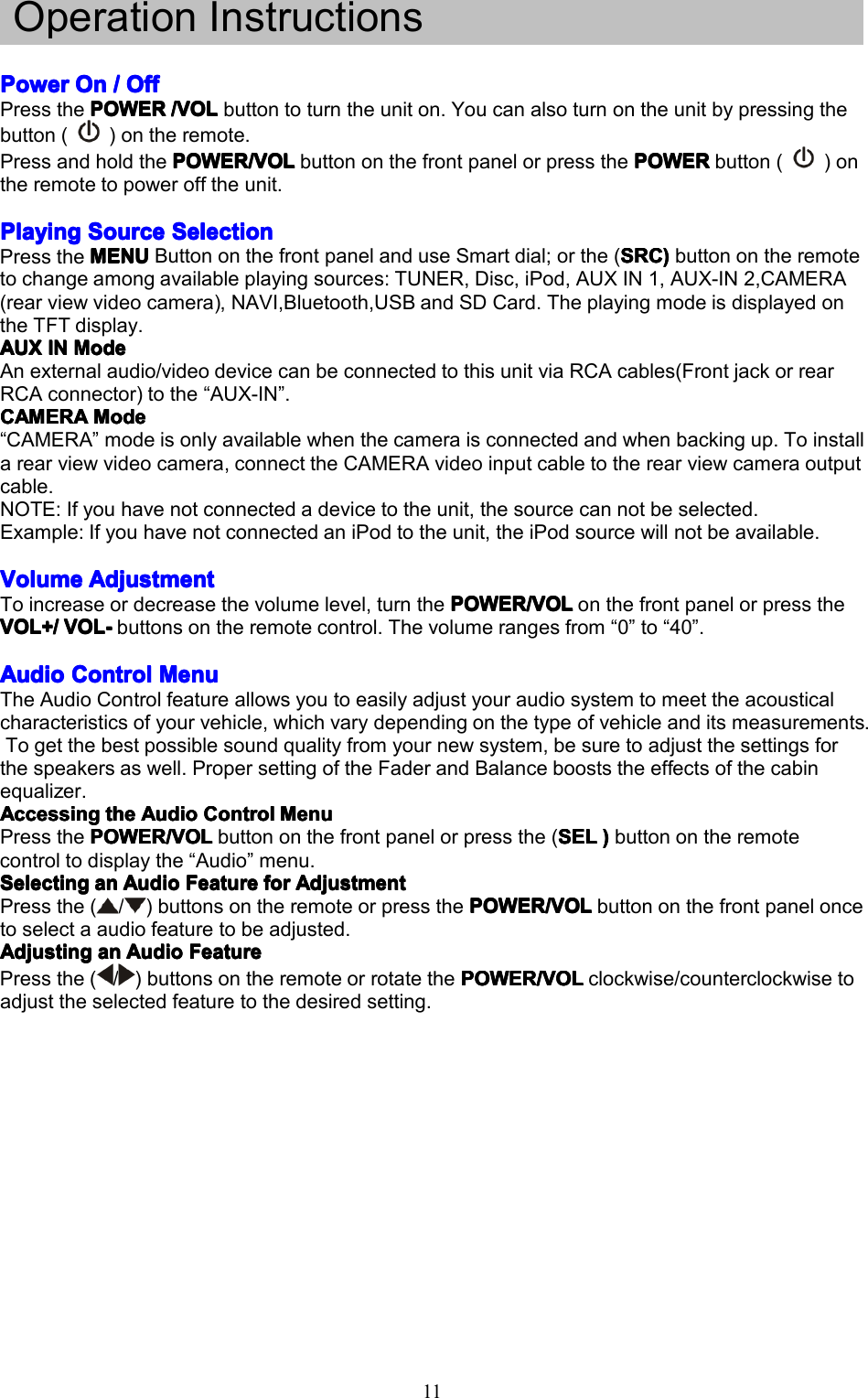
11OperationInstructionsPowerPowerPowerPowerOnO nOnOn////OffO ffOffOffPressthePOWERPOWERPOWERPOWER/VOL/ VOL/VOL/VOLbuttontoturntheuniton.Youcanalsoturnontheunitbypressingthebutton()ontheremote.PressandholdthePOWER/VOLP OWER/VOLPOWER/VOLPOWER/VOLbuttononthefrontpanelorpressthePOWERP OWERPOWERPOWERbutton()ontheremotetopowerofftheunit.PlayingPlayingPlayingPlayingSourceS ourceSourceSourceSelectionS electionSelectionSelectionPresstheMENUMENUMENUMENUButtononthefrontpanelanduseSmartdial;orthe(SRCS RCSRCSRC))))buttonontheremotetochangeamongavailableplayingsources:TUNER,Disc,iPod,AUXIN1,AUX-IN2,CAMERA(rearviewvideocamera),NAVI,Bluetooth,USBandSDCard.TheplayingmodeisdisplayedontheTFTdisplay.AUXAUXAUXAUXINI NININModeM odeModeModeAnexternalaudio/videodevicecanbeconnectedtothisunitviaRCAcables(FrontjackorrearRCAconnector)tothe“AUX-IN”.CAMERACAMERACAMERACAMERAModeM odeModeMode“CAMERA”modeisonlyavailablewhenthecameraisconnectedandwhenbackingup.Toinstallarearviewvideocamera,connecttheCAMERAvideoinputcabletotherearviewcameraoutputcable.NOTE:Ifyouhavenotconnectedadevicetotheunit,thesourcecannotbeselected.Example:IfyouhavenotconnectedaniPodtotheunit,theiPodsourcewillnotbeavailable.VolumeVolumeVolumeVolumeAdjustmentA djustmentAdjustmentAdjustmentToincreaseordecreasethevolumelevel,turnthePOWER/VOLP OWER/VOLPOWER/VOLPOWER/VOLonthefrontpanelorpresstheVOL+/VOL+/VOL+/VOL+/VOL-V OL-VOL-VOL-buttonsontheremotecontrol.Thevolumerangesfrom“0”to“40”.AudioAudioAudioAudioControlC ontrolControlControlMenuM enuMenuMenuTheAudioControlfeatureallowsyoutoeasilyadjustyouraudiosystemtomeettheacousticalcharacteristicsofyourvehicle,whichvarydependingonthetypeofvehicleanditsmeasurements.Togetthebestpossiblesoundqualityfromyournewsystem,besuretoadjustthesettingsforthespeakersaswell.PropersettingoftheFaderandBalancebooststheeffectsofthecabinequalizer.AccessingAccessingAccessingAccessingthet hethetheAudioA udioAudioAudioControlC ontrolControlControlMenuM enuMenuMenuPressthePOWER/VOLPOWER/VOLPOWER/VOLPOWER/VOLbuttononthefrontpanelorpressthe(SELS ELSELSEL))))buttonontheremotecontroltodisplaythe“Audio”menu.SelectingSelectingSelectingSelectingana nananAudioA udioAudioAudioFeatureF eatureFeatureFeatureforf orforforAdjustmentA djustmentAdjustmentAdjustmentPressthe(/)buttonsontheremoteorpressthePOWER/VOLP OWER/VOLPOWER/VOLPOWER/VOLbuttononthefrontpaneloncetoselectaaudiofeaturetobeadjusted.AdjustingAdjustingAdjustingAdjustingana nananAudioA udioAudioAudioFeatureF eatureFeatureFeaturePressthe(/)buttonsontheremoteorrotatethePOWER/VOLP OWER/VOLPOWER/VOLPOWER/VOLclockwise/counterclockwisetoadjusttheselectedfeaturetothedesiredsetting.
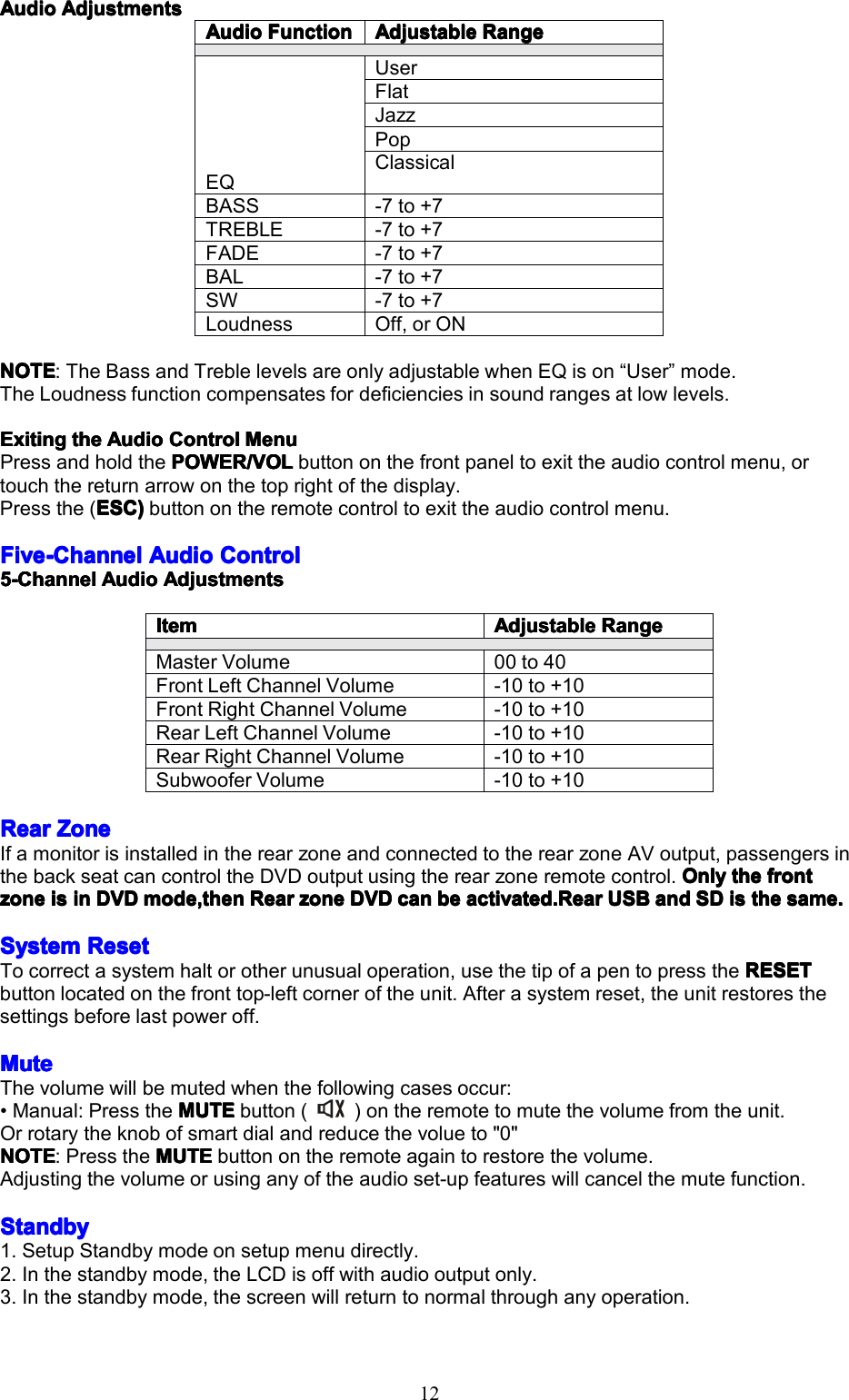
12AudioAudioAudioAudioAdjustmentsA djustmentsAdjustmentsAdjustmentsNOTENOTENOTENOTE:TheBassandTreblelevelsareonlyadjustablewhenEQison“User”mode.TheLoudnessfunctioncompensatesfordeficienciesinsoundrangesatlowlevels.ExitingExitingExitingExitingthet hethetheAudioA udioAudioAudioControlC ontrolControlControlMenuM enuMenuMenuPressandholdthePOWER/VOLPOWER/VOLPOWER/VOLPOWER/VOLbuttononthefrontpaneltoexittheaudiocontrolmenu,ortouchthereturnarrowonthetoprightofthedisplay.Pressthe(ESC)ESC)ESC)ESC)buttonontheremotecontroltoexittheaudiocontrolmenu.FiveFiveFiveFive-Channel- Channel-Channel-ChannelAudioA udioAudioAudioControlC ontrolControlControl5555-Channel-Channel-Channel-ChannelAudioA udioAudioAudioAdjustmentsA djustmentsAdjustmentsAdjustmentsRearRearRearRearZoneZ oneZoneZoneIfamonitorisinstalledintherearzoneandconnectedtotherearzoneAVoutput,passengersinthebackseatcancontroltheDVDoutputusingtherearzoneremotecontrol.OnlyO nlyOnlyOnlythet hethethefrontf rontfrontfrontzonezonezonezoneisi sisisini nininDVDD VDDVDDVDmode,thenm ode,thenmode,thenmode,thenRearR earRearRearzonez onezonezoneDVDD VDDVDDVDcanc ancancanbeb ebebeactivated.Reara ctivated.Rearactivated.Rearactivated.RearUSBU SBUSBUSBanda ndandandSDS DSDSDisi sisisthet hethethesame.s ame.same.same.SystemSystemSystemSystemResetR esetResetResetTocorrectasystemhaltorotherunusualoperation,usethetipofapentopresstheRESETR ESETRESETRESETbuttonlocatedonthefronttop-leftcorneroftheunit.Afterasystemreset,theunitrestoresthesettingsbeforelastpoweroff.MuteMuteMuteMuteThevolumewillbemutedwhenthefollowingcasesoccur:•Manual:PresstheMUTEM UTEMUTEMUTEbutton()ontheremotetomutethevolumefromtheunit.Orrotarytheknobofsmartdialandreducethevolueto"0"NOTENOTENOTENOTE:PresstheMUTEM UTEMUTEMUTEbuttonontheremoteagaintorestorethevolume.Adjustingthevolumeorusinganyoftheaudioset-upfeatureswillcancelthemutefunction.StandbyStandbyStandbyStandby1.SetupStandbymodeonsetupmenudirectly.2.Inthestandbymode,theLCDisoffwithaudiooutputonly.3.Inthestandbymode,thescreenwillreturntonormalthroughanyoperation.AudioAudioAudioAudioFunctionF unctionFunctionFunctionAdjustableAdjustableAdjustableAdjustableRangeR angeRangeRangeEQUserFlatJazzPopClassicalBASS-7to+7TREBLE-7to+7FADE-7to+7BAL-7to+7SW-7to+7LoudnessOff,orONItemItemItemItemAdjustableAdjustableAdjustableAdjustableRangeR angeRangeRangeMasterVolume00to40FrontLeftChannelVolume-10to+10FrontRightChannelVolume-10to+10RearLeftChannelVolume-10to+10RearRightChannelVolume-10to+10SubwooferVolume-10to+10
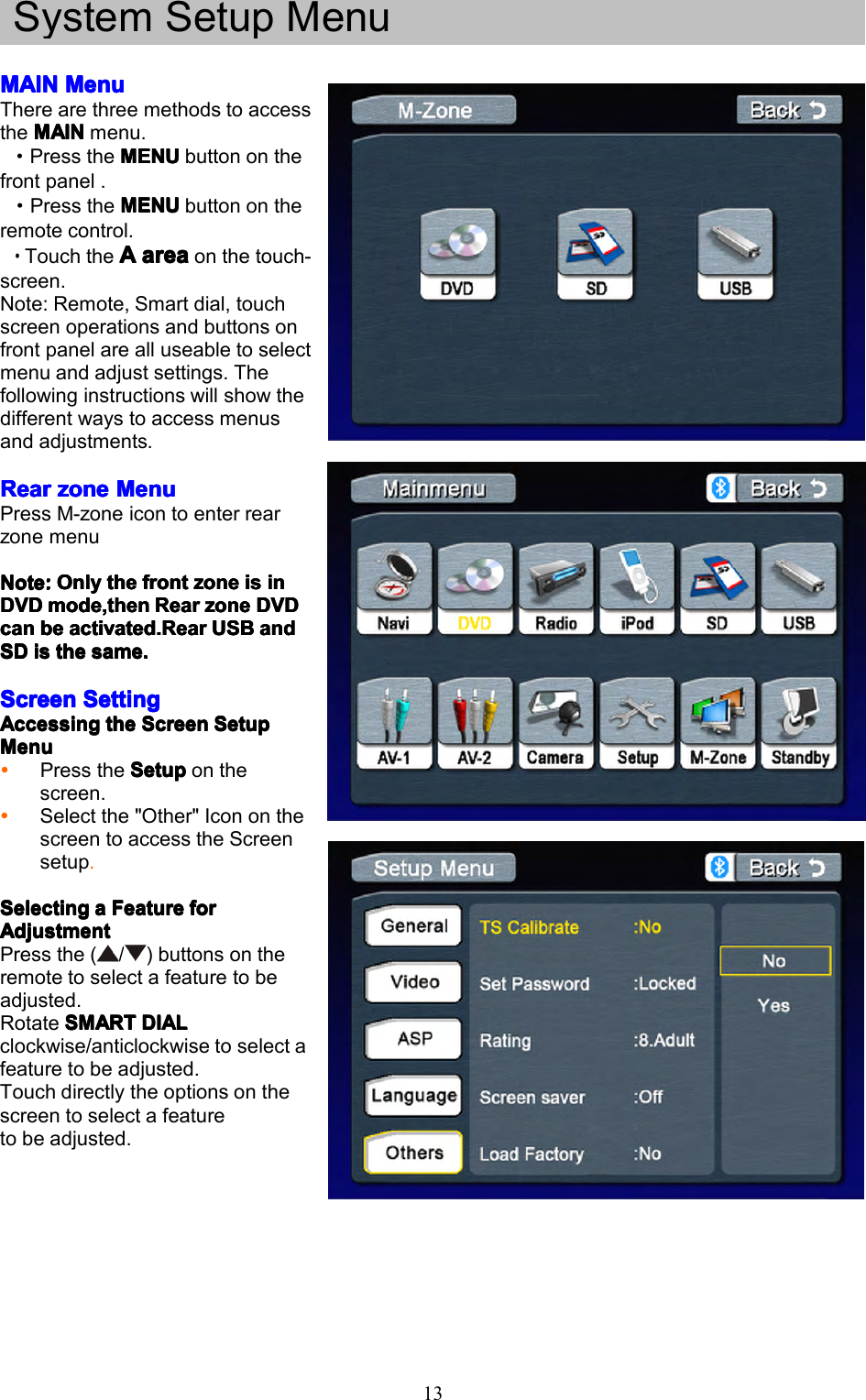
13SystemSetupMenuMAINMAINMAINMAINMenuM enuMenuMenuTherearethreemethodstoaccesstheMAINMAINMAINMAINmenu.·PresstheMENUM ENUMENUMENUbuttononthefrontpanel.·PresstheMENUMENUMENUMENUbuttonontheremotecontrol.·TouchtheAAAAareaa reaareaareaonthetouch-screen.Note:Remote,Smartdial,touchscreenoperationsandbuttonsonfrontpanelarealluseabletoselectmenuandadjustsettings.Thefollowinginstructionswillshowthedifferentwaystoaccessmenusandadjustments.RearRearRearRearzonez onezonezoneMenuM enuMenuMenuPressM-zoneicontoenterrearzonemenuNote:Note:Note:Note:OnlyO nlyOnlyOnlythet hethethefrontf rontfrontfrontzonez onezonezoneisi sisisini nininDVDDVDDVDDVDmode,thenm ode,thenmode,thenmode,thenRearR earRearRearzonez onezonezoneDVDD VDDVDDVDcancancancanbeb ebebeactivated.Reara ctivated.Rearactivated.Rearactivated.RearUSBU SBUSBUSBanda ndandandSDSDSDSDisi sisisthet hethethesame.s ame.same.same.ScreenScreenScreenScreenSettingS ettingSettingSettingAccessingAccessingAccessingAccessingthet hethetheScreenS creenScreenScreenSetupS etupSetupSetupMenuMenuMenuMenuPresstheSetupS etupSetupSetuponthescreen.Selectthe"Other"IcononthescreentoaccesstheScreensetup.SelectingSelectingSelectingSelectingaaaaFeatureF eatureFeatureFeatureforf orforforAdjustmentAdjustmentAdjustmentAdjustmentPressthe(/)buttonsontheremotetoselectafeaturetobeadjusted.RotateSMARTS MARTSMARTSMARTDIALD IALDIALDIALclockwise/anticlockwisetoselectafeaturetobeadjusted.Touchdirectlytheoptionsonthescreentoselectafeaturetobeadjusted.
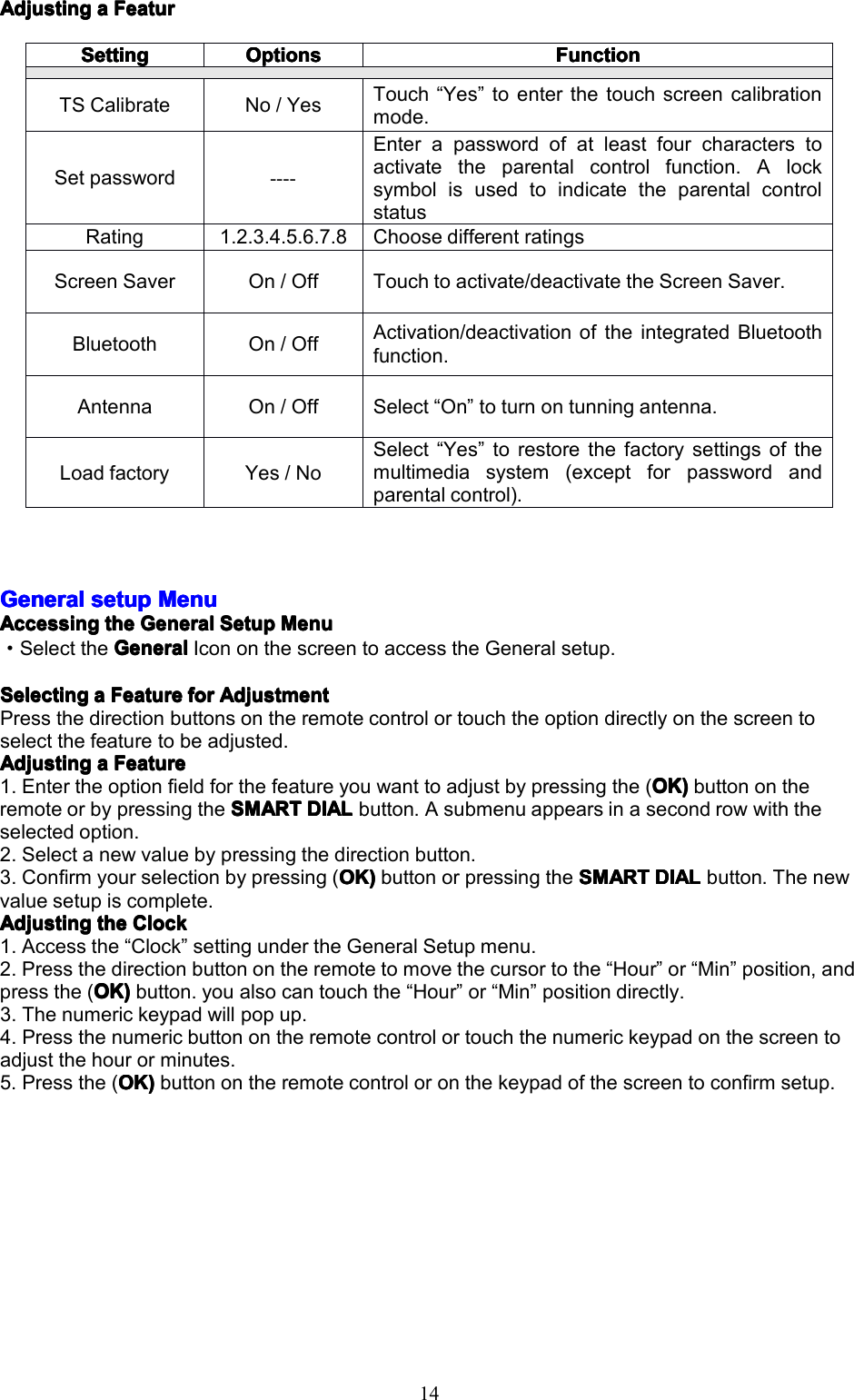
14AdjustingAdjustingAdjustingAdjustingaaaaFeaturF eaturFeaturFeaturGeneralGeneralGeneralGeneralsetups etupsetupsetupMenuM enuMenuMenuAccessingAccessingAccessingAccessingthet hethetheGeneralG eneralGeneralGeneralSetupS etupSetupSetupMenuM enuMenuMenu·SelecttheGeneralGeneralGeneralGeneralIcononthescreentoaccesstheGeneralsetup.SelectingSelectingSelectingSelectingaaaaFeatureF eatureFeatureFeatureforf orforforAdjustmentA djustmentAdjustmentAdjustmentPressthedirectionbuttonsontheremotecontrolortouchtheoptiondirectlyonthescreentoselectthefeaturetobeadjusted.AdjustingAdjustingAdjustingAdjustingaaaaFeatureF eatureFeatureFeature1.Entertheoptionfieldforthefeatureyouwanttoadjustbypressingthe(OK)O K)OK)OK)buttonontheremoteorbypressingtheSMARTSMARTSMARTSMARTDIALD IALDIALDIALbutton.Asubmenuappearsinasecondrowwiththeselectedoption.2.Selectanewvaluebypressingthedirectionbutton.3.Confirmyourselectionbypressing(OK)O K)OK)OK)buttonorpressingtheSMARTS MARTSMARTSMARTDIALD IALDIALDIALbutton.Thenewvaluesetupiscomplete.AdjustingAdjustingAdjustingAdjustingthet hethetheClockC lockClockClock1.Accessthe“Clock”settingundertheGeneralSetupmenu.2.Pressthedirectionbuttonontheremotetomovethecursortothe“Hour”or“Min”position,andpressthe(OK)OK)OK)OK)button.youalsocantouchthe“Hour”or“Min”positiondirectly.3.Thenumerickeypadwillpopup.4.Pressthenumericbuttonontheremotecontrolortouchthenumerickeypadonthescreentoadjustthehourorminutes.5.Pressthe(OK)O K)OK)OK)buttonontheremotecontroloronthekeypadofthescreentoconfirmsetup.SettingSettingSettingSettingOptionsOptionsOptionsOptionsFunctionFunctionFunctionFunctionTSCalibrateNo/YesTouch“Yes”toenterthetouchscreencalibrationmode.Setpassword----Enterapasswordofatleastfourcharacterstoactivatetheparentalcontrolfunction.AlocksymbolisusedtoindicatetheparentalcontrolstatusRating1.2.3.4.5.6.7.8ChoosedifferentratingsScreenSaverOn/OffTouchtoactivate/deactivatetheScreenSaver.BluetoothOn/OffActivation/deactivationoftheintegratedBluetoothfunction.AntennaOn/OffSelect“On”toturnontunningantenna.LoadfactoryYes/NoSelect“Yes”torestorethefactorysettingsofthemultimediasystem(exceptforpasswordandparentalcontrol).
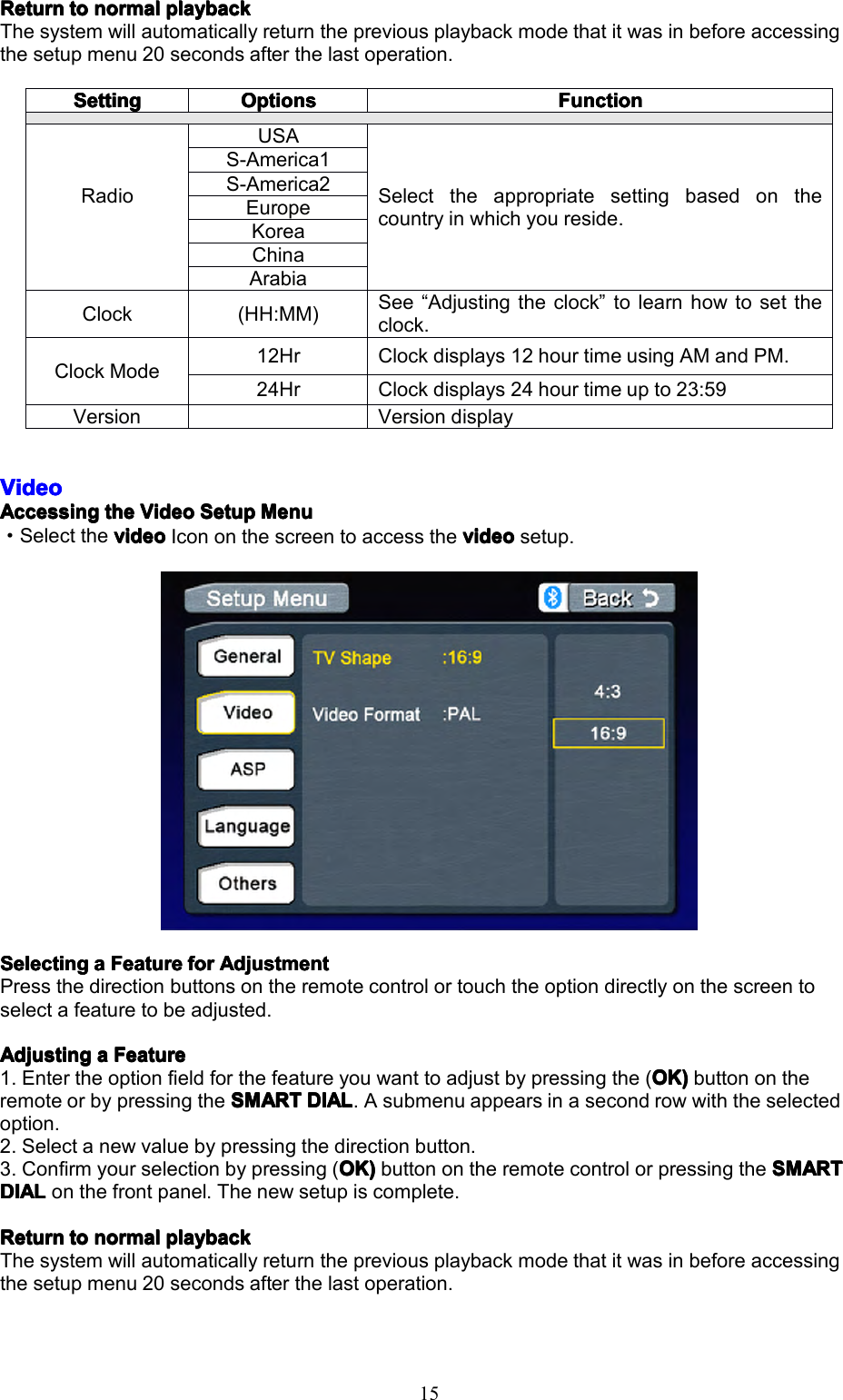
15ReturnReturnReturnReturntot ototonormaln ormalnormalnormalplaybackp laybackplaybackplaybackThesystemwillautomaticallyreturnthepreviousplaybackmodethatitwasinbeforeaccessingthesetupmenu20secondsafterthelastoperation.VideoVideoVideoVideoAccessingAccessingAccessingAccessingthet hethetheVideoV ideoVideoVideoSetupS etupSetupSetupMenuM enuMenuMenu·SelectthevideovideovideovideoIcononthescreentoaccessthevideov ideovideovideosetup.SelectingSelectingSelectingSelectingaaaaFeatureF eatureFeatureFeatureforf orforforAdjustmentA djustmentAdjustmentAdjustmentPressthedirectionbuttonsontheremotecontrolortouchtheoptiondirectlyonthescreentoselectafeaturetobeadjusted.AdjustingAdjustingAdjustingAdjustingaaaaFeatureF eatureFeatureFeature1.Entertheoptionfieldforthefeatureyouwanttoadjustbypressingthe(OK)O K)OK)OK)buttonontheremoteorbypressingtheSMARTSMARTSMARTSMARTDIALD IALDIALDIAL.Asubmenuappearsinasecondrowwiththeselectedoption.2.Selectanewvaluebypressingthedirectionbutton.3.Confirmyourselectionbypressing(OK)O K)OK)OK)buttonontheremotecontrolorpressingtheSMARTS MARTSMARTSMARTDIALDIALDIALDIALonthefrontpanel.Thenewsetupiscomplete.ReturnReturnReturnReturntot ototonormaln ormalnormalnormalplaybackp laybackplaybackplaybackThesystemwillautomaticallyreturnthepreviousplaybackmodethatitwasinbeforeaccessingthesetupmenu20secondsafterthelastoperation.SettingSettingSettingSettingOptionsOptionsOptionsOptionsFunctionFunctionFunctionFunctionRadioUSASelecttheappropriatesettingbasedonthecountryinwhichyoureside.S-America1S-America2EuropeKoreaChinaArabiaClock(HH:MM)See“Adjustingtheclock”tolearnhowtosettheclock.ClockMode12HrClockdisplays12hourtimeusingAMandPM.24HrClockdisplays24hourtimeupto23:59VersionVersiondisplay
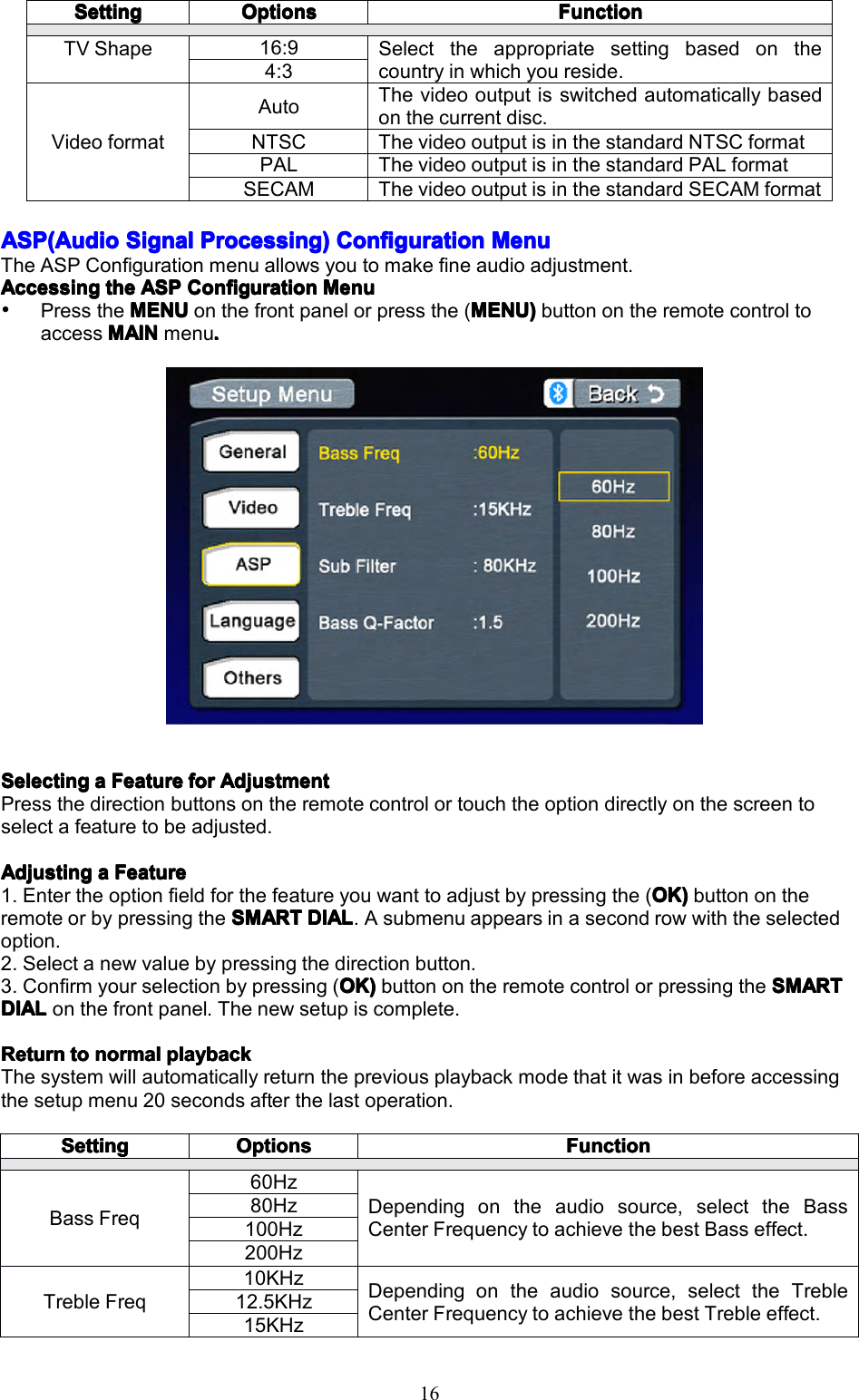
16ASP(AudioASP(AudioASP(AudioASP(AudioSignalS ignalSignalSignalProcessing)P rocessing)Processing)Processing)ConfigC onfigConfigConfigurationu rationurationurationMenuM enuMenuMenuTheASPConfigurationmenuallowsyoutomakefineaudioadjustment.AccessingAccessingAccessingAccessingthet hethetheASPA SPASPASPConfigC onfigConfigConfigurationu rationurationurationMenuM enuMenuMenuPresstheMENUMENUMENUMENUonthefrontpanelorpressthe(MENU)M ENU)MENU)MENU)buttonontheremotecontroltoaccessMAINMAINMAINMAINmenu....SelectingSelectingSelectingSelectingaaaaFeatureF eatureFeatureFeatureforf orforforAdjustmentA djustmentAdjustmentAdjustmentPressthedirectionbuttonsontheremotecontrolortouchtheoptiondirectlyonthescreentoselectafeaturetobeadjusted.AdjustingAdjustingAdjustingAdjustingaaaaFeatureF eatureFeatureFeature1.Entertheoptionfieldforthefeatureyouwanttoadjustbypressingthe(OK)O K)OK)OK)buttonontheremoteorbypressingtheSMARTSMARTSMARTSMARTDIALD IALDIALDIAL.Asubmenuappearsinasecondrowwiththeselectedoption.2.Selectanewvaluebypressingthedirectionbutton.3.Confirmyourselectionbypressing(OK)O K)OK)OK)buttonontheremotecontrolorpressingtheSMARTS MARTSMARTSMARTDIALDIALDIALDIALonthefrontpanel.Thenewsetupiscomplete.ReturnReturnReturnReturntot ototonormaln ormalnormalnormalplaybackp laybackplaybackplaybackThesystemwillautomaticallyreturnthepreviousplaybackmodethatitwasinbeforeaccessingthesetupmenu20secondsafterthelastoperation.SettingSettingSettingSettingOptionsOptionsOptionsOptionsFunctionFunctionFunctionFunctionTVShape16:9Selecttheappropriatesettingbasedonthecountryinwhichyoureside.4:3VideoformatAutoThevideooutputisswitchedautomaticallybasedonthecurrentdisc.NTSCThevideooutputisinthestandardNTSCformatPALThevideooutputisinthestandardPALformatSECAMThevideooutputisinthestandardSECAMformatSettingSettingSettingSettingOptionsOptionsOptionsOptionsFunctionFunctionFunctionFunctionBassFreq60HzDependingontheaudiosource,selecttheBassCenterFrequencytoachievethebestBasseffect.80Hz100Hz200HzTrebleFreq10KHzDependingontheaudiosource,selecttheTrebleCenterFrequencytoachievethebestTrebleeffect.12.5KHz15KHz
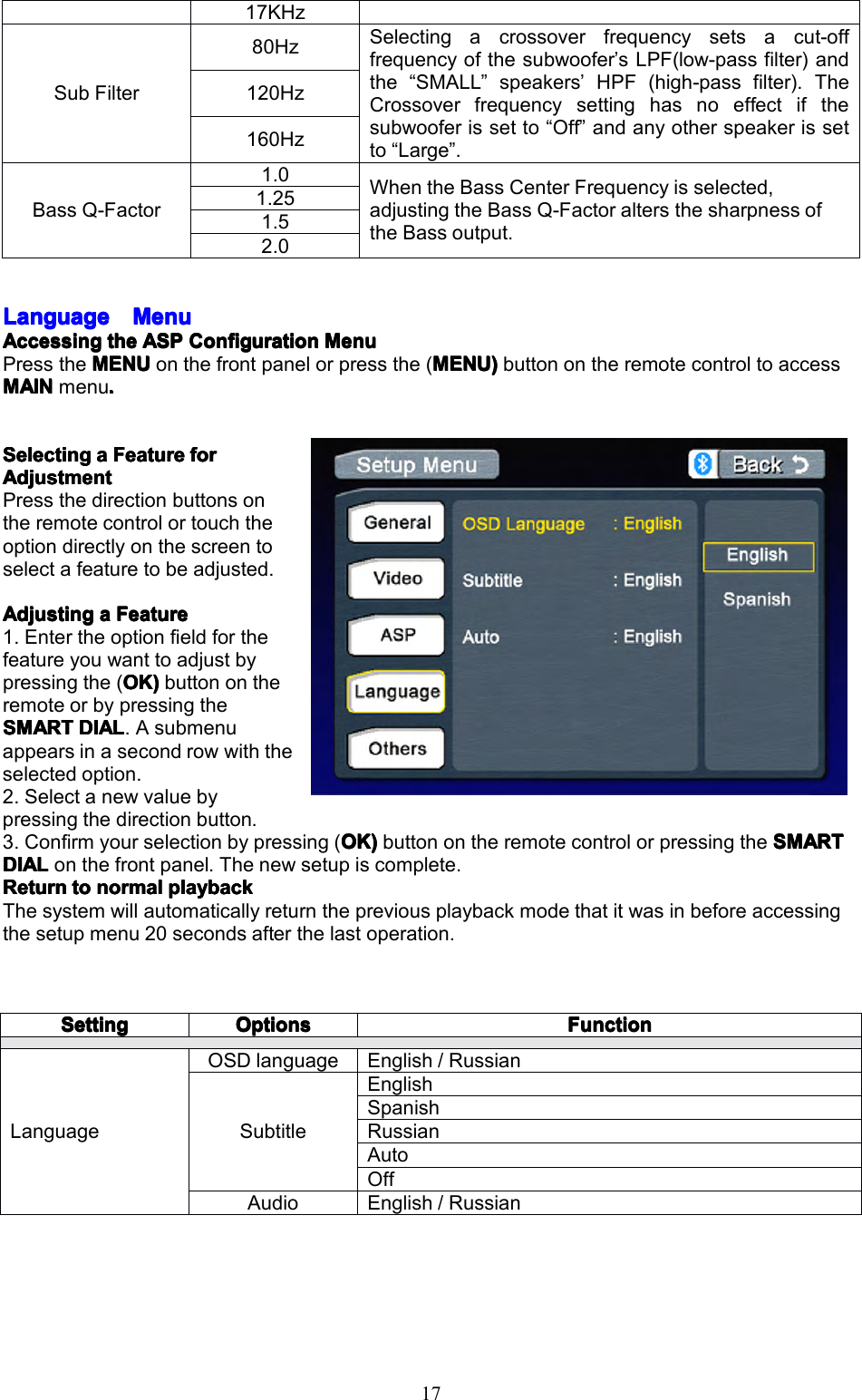
17LanguageLanguageLanguageLanguageMenuM enuMenuMenuAccessingAccessingAccessingAccessingthet hethetheASPA SPASPASPConfigC onfigConfigConfigurationu rationurationurationMenuM enuMenuMenuPresstheMENUMENUMENUMENUonthefrontpanelorpressthe(MENU)M ENU)MENU)MENU)buttonontheremotecontroltoaccessMAINMAINMAINMAINmenu....SelectingSelectingSelectingSelectingaaaaFeatureF eatureFeatureFeatureforf orforforAdjustmentAdjustmentAdjustmentAdjustmentPressthedirectionbuttonsontheremotecontrolortouchtheoptiondirectlyonthescreentoselectafeaturetobeadjusted.AdjustingAdjustingAdjustingAdjustingaaaaFeatureF eatureFeatureFeature1.Entertheoptionfieldforthefeatureyouwanttoadjustbypressingthe(OK)O K)OK)OK)buttonontheremoteorbypressingtheSMARTSMARTSMARTSMARTDIALD IALDIALDIAL.Asubmenuappearsinasecondrowwiththeselectedoption.2.Selectanewvaluebypressingthedirectionbutton.3.Confirmyourselectionbypressing(OK)O K)OK)OK)buttonontheremotecontrolorpressingtheSMARTS MARTSMARTSMARTDIALDIALDIALDIALonthefrontpanel.Thenewsetupiscomplete.ReturnReturnReturnReturntot ototonormaln ormalnormalnormalplaybackp laybackplaybackplaybackThesystemwillautomaticallyreturnthepreviousplaybackmodethatitwasinbeforeaccessingthesetupmenu20secondsafterthelastoperation.17KHzSubFilter80HzSelectingacrossoverfrequencysetsacut-offfrequencyofthesubwoofer’sLPF(low-passfilter)andthe“SMALL”speakers’HPF(high-passfilter).TheCrossoverfrequencysettinghasnoeffectifthesubwooferissetto“Off”andanyotherspeakerissetto“Large”.120Hz160HzBassQ-Factor1.0WhentheBassCenterFrequencyisselected,adjustingtheBassQ-FactoraltersthesharpnessoftheBassoutput.1.251.52.0SettingSettingSettingSettingOptionsOptionsOptionsOptionsFunctionFunctionFunctionFunctionLanguageOSDlanguageEnglish/RussianSubtitleEnglishSpanishRussianAutoOffAudioEnglish/Russian
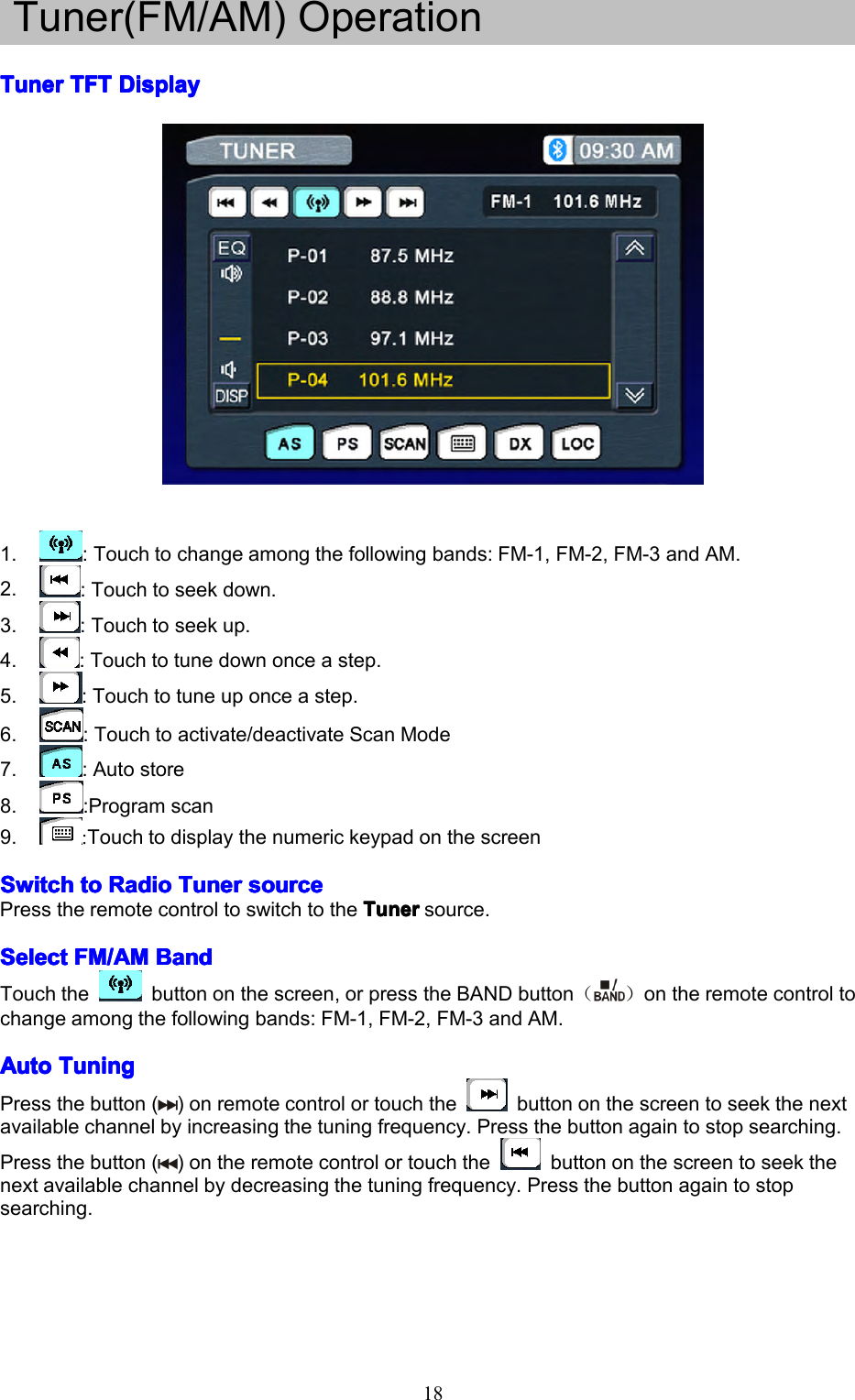
18Tuner(FM/AM)OperationTunerTunerTunerTunerTFTT FTTFTTFTDisplayD isplayDisplayDisplay1.:Touchtochangeamongthefollowingbands:FM-1,FM-2,FM-3andAM.2.:Touchtoseekdown.3.:Touchtoseekup.4.:Touchtotunedownonceastep.5.:Touchtotuneuponceastep.6.:Touchtoactivate/deactivateScanMode7.:Autostore8.:Programscan9.:TouchtodisplaythenumerickeypadonthescreenSwitchSwitchSwitchSwitchtot ototoRadioR adioRadioRadioTunerT unerTunerTunersources ourcesourcesourcePresstheremotecontroltoswitchtotheTunerT unerTunerTunersource.SelectSelectSelectSelectFM/AMF M/AMFM/AMFM/AMBandB andBandBandTouchthebuttononthescreen,orpresstheBANDbutton()ontheremotecontroltochangeamongthefollowingbands:FM-1,FM-2,FM-3andAM.AutoAutoAutoAutoTuningT uningTuningTuningPressthebutton()onremotecontrolortouchthebuttononthescreentoseekthenextavailablechannelbyincreasingthetuningfrequency.Pressthebuttonagaintostopsearching.Pressthebutton()ontheremotecontrolortouchthebuttononthescreentoseekthenextavailablechannelbydecreasingthetuningfrequency.Pressthebuttonagaintostopsearching.
19ManualManualManualManualTuningT uningTuningTuningPressthebuttonontheremotecontrolortouchthebuttontoincreasethetuningfrequencyonestepatatime.Pressthebuttonontheremotecontrolortouchthebuttontodecreasethetuningfrequencyonestepatatime.UsingUsingUsingUsingPresetP resetPresetPresetStationsS tationsStationsStations12numberedpresetbuttonsstoreandrecallstationsforeachband.Front6storedstations(P1-P6)forthecurrentbandappearonthescreen,touchthechanneldirectlyforuse.Youcantouchthearrowbuttonsoronthescreentoseetheother6stations.StoringStoringStoringStoringaaaaStationS tationStationStation1.Selectaband(ifneeded),thenselectastation.2.Touchandholdanonscreenpresetbutton(6)forthreeseconds.Thepresetnumberappearsatthetopofthescreen.RecallingRecallingRecallingRecallingaaaaStationS tationStationStation1.Selectaband(ifneeded).2.Touchanon-screenpresetbutton(6)toselectthecorrespondingstoredstation.AutoAutoAutoAutoStoreS toreStoreStore(AS)( AS)(AS)(AS)PressASbuttononthescreentoautomaticallyscanandstoreallstationsincurrentband.ProgramProgramProgramProgramScanS canScanScan(PS)( PS)(PS)(PS)1.pressthePSbuttononthescreen.scanthestationsinthe12presetchannelsinthecurrentband.2.Touchthebuttononthescreentoautomaticallyscanallstationsincurrentbandtopreviewstations.3.Pressanybuttontostopscanningandlistentotheselectedstation.DXDXDXDXanda ndandandLocL ocLocLocStationsS tationsStationsStationsSeekingS eekingSeekingSeeking(LOC)( LOC)(LOC)(LOC)WhentheLocalfunctionison,onlyradiostationswithastrongsignalaretuned.WhentheLocalfunctionisactive,“LOC”appearsonthescreenandanindicatorisilluminated.ToactivatetheLocalfunctioninAM/FMtunermode,touchthebuttononthescreen.TouchthetoActivatetheDXfunction
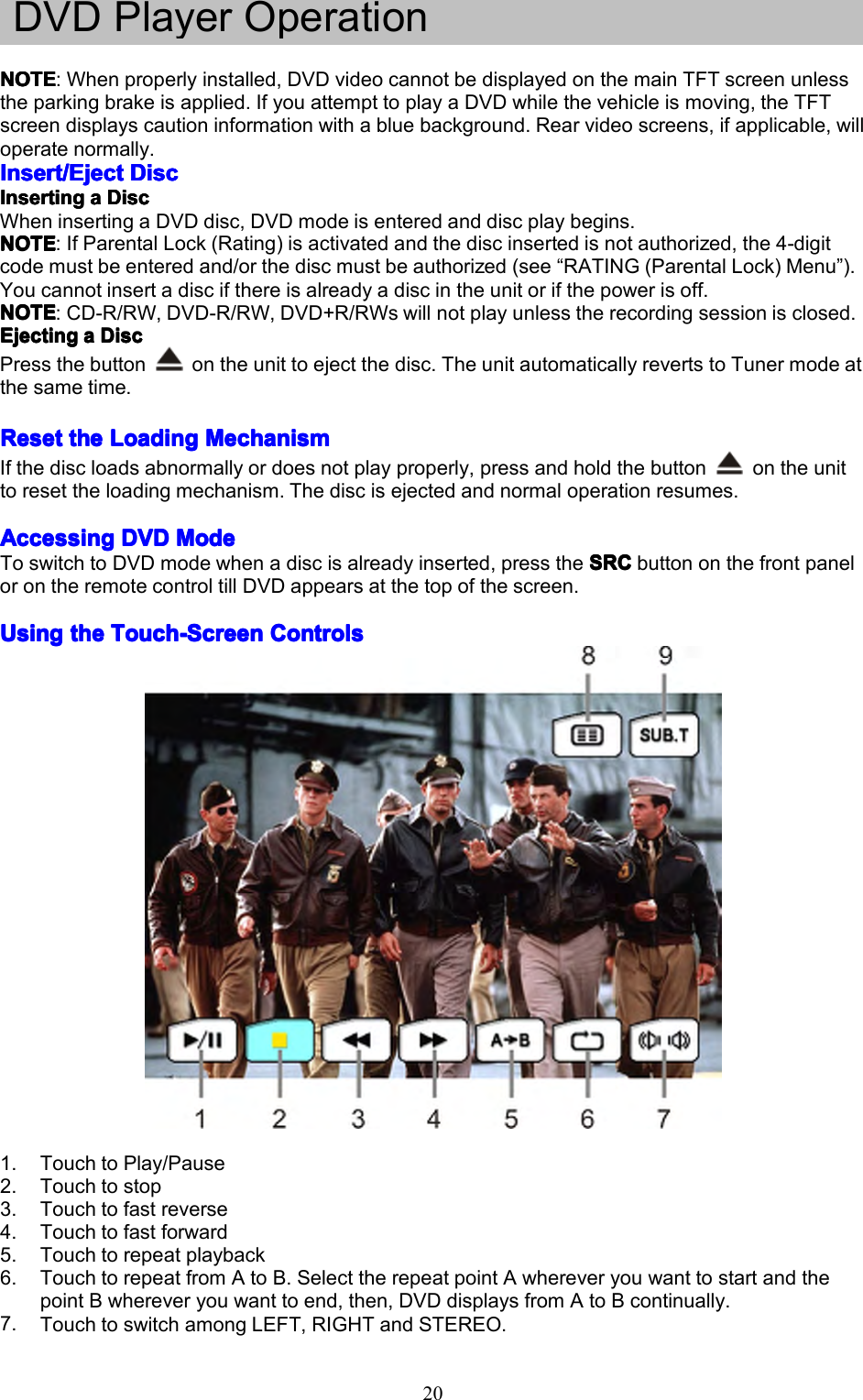
20DVDPlayerOperationNOTENOTENOTENOTE:Whenproperlyinstalled,DVDvideocannotbedisplayedonthemainTFTscreenunlesstheparkingbrakeisapplied.IfyouattempttoplayaDVDwhilethevehicleismoving,theTFTscreendisplayscautioninformationwithabluebackground.Rearvideoscreens,ifapplicable,willoperatenormally.Insert/EjectInsert/EjectInsert/EjectInsert/EjectDiscD iscDiscDiscInserInserInserInsertingt ingtingtingaaaaDiscD iscDiscDiscWheninsertingaDVDdisc,DVDmodeisenteredanddiscplaybegins.NOTENOTENOTENOTE:IfParentalLock(Rating)isactivatedandthediscinsertedisnotauthorized,the4-digitcodemustbeenteredand/orthediscmustbeauthorized(see“RATING(ParentalLock)Menu”).Youcannotinsertadiscifthereisalreadyadiscintheunitorifthepowerisoff.NOTENOTENOTENOTE:CD-R/RW,DVD-R/RW,DVD+R/RWswillnotplayunlesstherecordingsessionisclosed.EjectingEjectingEjectingEjectingaaaaDiscD iscDiscDiscPressthebuttonontheunittoejectthedisc.TheunitautomaticallyrevertstoTunermodeatthesametime.ResetResetResetResetthet hethetheLoadingL oadingLoadingLoadingMechanismM echanismMechanismMechanismIfthediscloadsabnormallyordoesnotplayproperly,pressandholdthebuttonontheunittoresettheloadingmechanism.Thediscisejectedandnormaloperationresumes.AccessingAccessingAccessingAccessingDVDD VDDVDDVDModeM odeModeModeToswitchtoDVDmodewhenadiscisalreadyinserted,presstheSRCS RCSRCSRCbuttononthefrontpanelorontheremotecontroltillDVDappearsatthetopofthescreen.UsingUsingUsingUsingthet hethetheTouch-ScreenT ouch-ScreenTouch-ScreenTouch-ScreenControlsC ontrolsControlsControls1.TouchtoPlay/Pause2.Touchtostop3.Touchtofastreverse4.Touchtofastforward5.Touchtorepeatplayback6.TouchtorepeatfromAtoB.SelecttherepeatpointAwhereveryouwanttostartandthepointBwhereveryouwanttoend,then,DVDdisplaysfromAtoBcontinually.7.TouchtoswitchamongLEFT,RIGHTandSTEREO.
218.TouchtoreturntoDVDmainmenu9.TouchtodisplaySub-titleControllingControllingControllingControllingPlaybackP laybackPlaybackPlaybackStoppingStoppingStoppingStoppingPlaybackP laybackPlaybackPlaybackTouchthestopbuttononthescreenorpressthe(((()buttonontheremotecontroltostopDVDplay;touchtheplay/pausebuttononthescreenorthe(OK)O K)OK)OK)buttonontheremotecontroltoresumediskplay.PausingPausingPausingPausingPlaybackP laybackPlaybackPlaybackTouchtheplay/pausebuttononthescreentosuspendorresumediscplay.RepeatRepeatRepeatRepeatPlaybackP laybackPlaybackPlaybackPresstheRepeatR epeatRepeatRepeatbuttononthescreenorontheremotecontroltoalterrepeatmodeaccordingtothefollowing:•DVD:RepeatTitle,RepeatChapter,RepeatOff•VCD(PBCOff):RepeatSingle,RepeatOff•MP3:RepeatSingle,RepeatFolder,RepeatAll,RepeatOffNOTENOTENOTENOTE:ForVCDplay,therepeatfunctionisnotavailableifPBCison.PBCPBCPBCPBC(Play( Play(Play(Playbackb ackbackbackControl)C ontrol)Control)Control)(VCD( VCD(VCD(VCDOnly)O nly)Only)Only)ForVCDwithplaybackfunctionality,playbackcontrol(PBC)providesadditionalcontrolsforVCDplayback.Pressthe(ROOT)ROOT)ROOT)ROOT)buttonontheremotecontroltotogglethePBCfunction“On”/”Off”.OncePBCison,playbackstartsfromtrackoneoftheplaylist.NOTENOTENOTENOTE:WhenPBCisactivated,fastforward,slowplayback,andprevious/nexttrackareavailable.Repeatanddirecttrackselectionarenotavailable.WhenPBCisactivated,selectingrandom,scan,orsearchplaybackautomaticallydeactivatesPBC.SectionalSectionalSectionalSectionalRepeatR epeatRepeatRepeatFunctionF unctionFunctionFunction(A-B)( A-B)(A-B)(A-B)UsetheA-Bfunctiontodefineaspecificareaofadisctorepeat.•PresstheRepeatRepeatRepeatRepeatA-BA -BA-BA-Bbutton()onthescreenorontheremotecontroltosetthestartpoint(A)oftherepeatedsection.•PresstheRepeatR epeatRepeatRepeatA-BA -BA-BA-Bbutton()againonceyoureachthedesiredendpoint(B)oftherepeatedsection.TheselectedportionoftheDVDwillnowrepeatcontinuously.•PresstheRepeatR epeatRepeatRepeatA-BA -BA-BA-Bbutton()againtocanceltheA-Bsectionsettingandstoprepeatplay.AccessingAccessingAccessingAccessingthet hethetheDVDD VDDVDDVDMenuM enuMenuMenu1.YoucantouchtheareaF,andthentouchthebuttontorecallthemainDVDmenu.2.Usethearrowbuttonsontheremotetoselectatitlefromthemenu.3.Pressthe(TITLET ITLETITLETITLE))))buttonontheremotecontroltoselectadifferenttitleforplayback.4.Pressthe(OK)OK)OK)OK)buttonontheremotecontrolortouchtheitemdirectlytoconfirmyourselectionandbeginplayback.MovingMovingMovingMovingThroughT hroughThroughThroughChaptersC haptersChaptersChaptersPressthe()buttonontheremotecontroltoadvancetothenextchapterontheDVD.Pressthe()buttonontheremotecontroltomovetothepreviouschapterontheDVD.Touchtherightsideofthescreentoadvancetothenextchapter,ortouchtheleftsideofthescreentomovetothepreviouschapter.FastFastFastFastForward/FastF orward/FastForward/FastForward/FastReverseR everseReverseReversePressthe()buttonontheremotecontrolortouchtheofareaEonthescreentofastforward.Keeppressingortouchingandreleasingthebuttontoincreasetheratefrom“X2”to“X4”,“X8”,and“X16”.Pressthe()buttonontheremotecontrolortouchtheofareaEonthescreentofastreverse.Keeppressingortouchingandreleasingthebuttontoincreasetheratefrom“X2”to“X4”,“X8”,and“X16”.
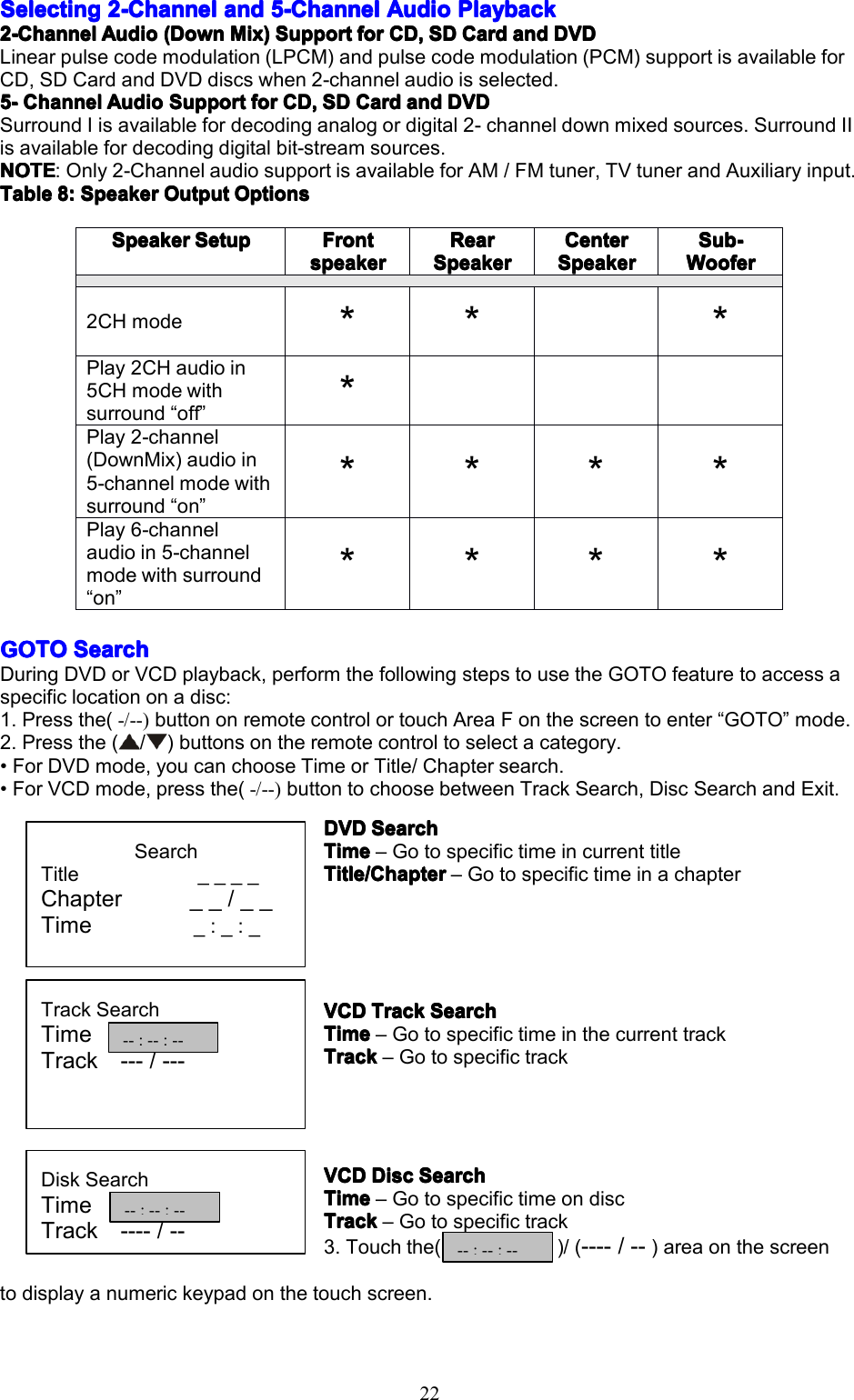
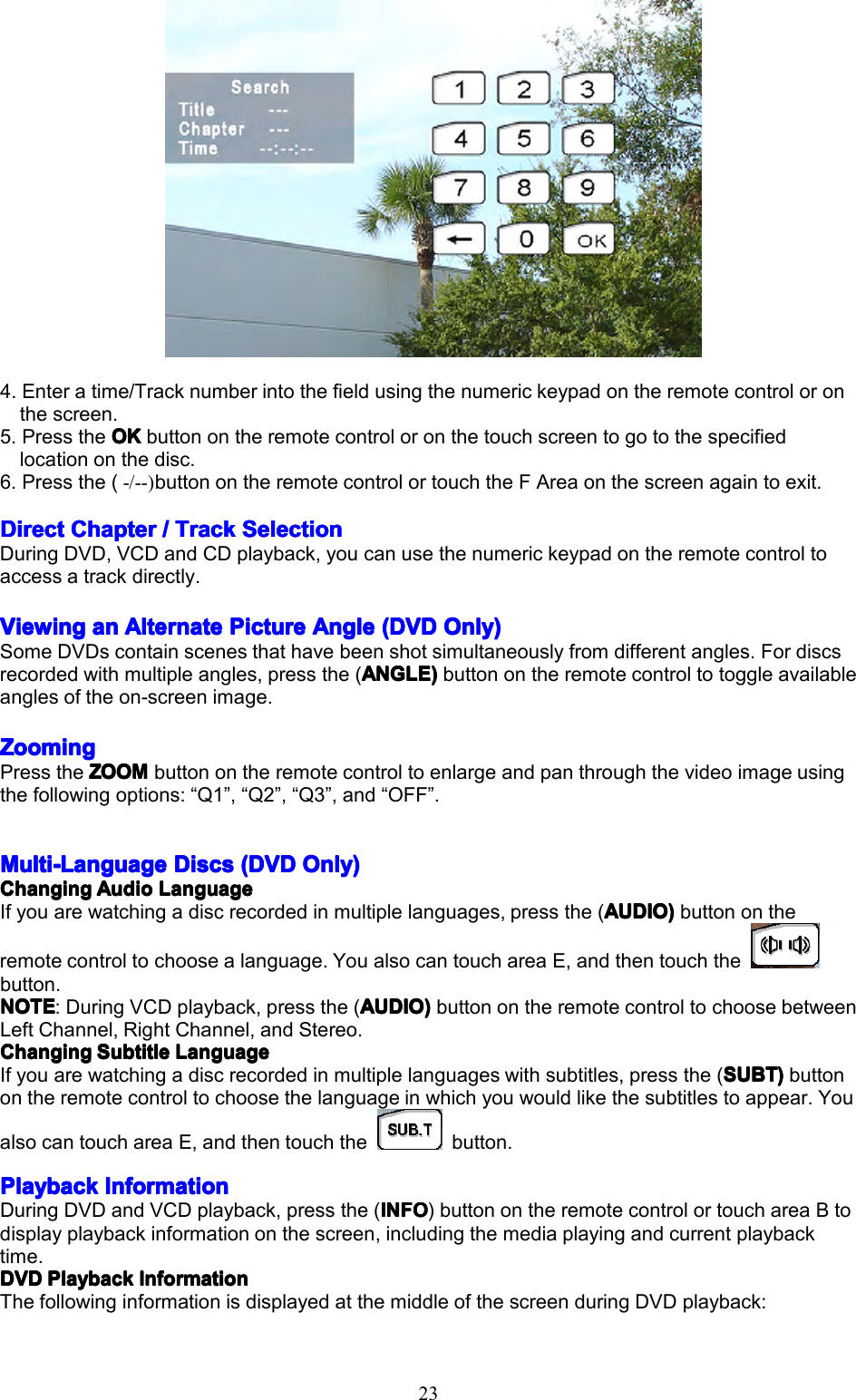
22SelectingSelectingSelectingSelecting2-Channel2 -Channel2-Channel2-Channelanda ndandand5555-Channel- Channel-Channel-ChannelAudioA udioAudioAudioPlaybackP laybackPlaybackPlayback2-Channel2-Channel2-Channel2-ChannelAudioA udioAudioAudio(Down( Down(Down(DownMix)M ix)Mix)Mix)SupportS upportSupportSupportforf orforforCD,C D,CD,CD,SDS DSDSDCardC ardCardCardanda ndandandDVDD VDDVDDVDLinearpulsecodemodulation(LPCM)andpulsecodemodulation(PCM)supportisavailableforCD,SDCardandDVDdiscswhen2-channelaudioisselected.5555----ChannelChannelChannelChannelAudioA udioAudioAudioSupportS upportSupportSupportforf orforforCD,C D,CD,CD,SDS DSDSDCardC ardCardCardanda ndandandDVDD VDDVDDVDSurroundIisavailablefordecodinganalogordigital2-channeldownmixedsources.SurroundIIisavailablefordecodingdigitalbit-streamsources.NOTENOTENOTENOTE:Only2-ChannelaudiosupportisavailableforAM/FMtuner,TVtunerandAuxiliaryinput.TableTableTableTable8:8 :8:8:SpeakerS peakerSpeakerSpeakerOutputO utputOutputOutputOptionsO ptionsOptionsOptionsGGGGOTOOTOOTOOTOSearchS earchSearchSearchDuringDVDorVCDplayback,performthefollowingstepstousetheGOTOfeaturetoaccessaspecificlocationonadisc:1.Pressthe(-/--)buttononremotecontrolortouchAreaFonthescreentoenter“GOTO”mode.2.Pressthe(/)buttonsontheremotecontroltoselectacategory.•ForDVDmode,youcanchooseTimeorTitle/Chaptersearch.•ForVCDmode,pressthe(-/--)buttontochoosebetweenTrackSearch,DiscSearchandExit.DVDD VDDVDDVDSearchS earchSearchSearchTimeTimeTimeTime–GotospecifictimeincurrenttitleTitle/ChapterTitle/ChapterTitle/ChapterTitle/Chapter–GotospecifictimeinachapterVCDVCDVCDVCDTrackT rackTrackTrackSearchS earchSearchSearchTimeTimeTimeTime–GotospecifictimeinthecurrenttrackTrackTrackTrackTrack–GotospecifictrackVCDVCDVCDVCDDiscD iscDiscDiscSearchS earchSearchSearchTimeTimeTimeTime–GotospecifictimeondiscTrackTrackTrackTrack–Gotospecifictrack3.Touchthe())/(----/--)areaonthescreentodisplayanumerickeypadonthetouchscreen.SpeakerSpeakerSpeakerSpeakerSetupS etupSetupSetupFrontFrontFrontFrontspeakerspeakerspeakerspeakerRearRearRearRearSpeakerSpeakerSpeakerSpeakerCenterCenterCenterCenterSpeakerSpeakerSpeakerSpeakerSub-Sub-Sub-Sub-WooferWooferWooferWoofer2CHmode***Play2CHaudioin5CHmodewithsurround“off”*Play2-channel(DownMix)audioin5-channelmodewithsurround“on”****Play6-channelaudioin5-channelmodewithsurround“on”****SearchTitle____Chapter__/__Time_:_:_TrackSearchTimeTrack---/---DiskSearchTimeTrack----/----:--:----:--:----:--:--
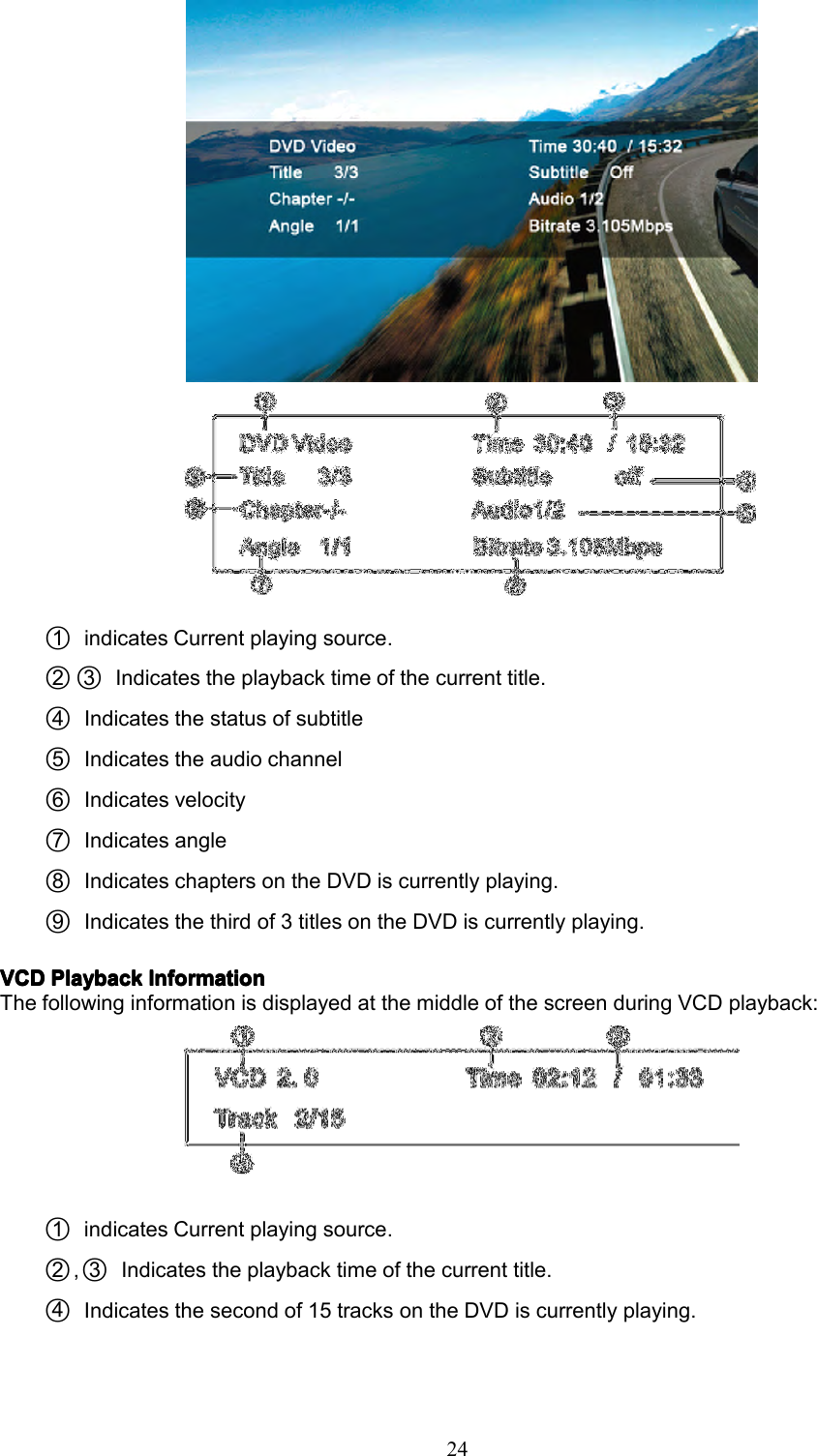
234.Enteratime/Tracknumberintothefieldusingthenumerickeypadontheremotecontroloronthescreen.5.PresstheOKO KOKOKbuttonontheremotecontroloronthetouchscreentogotothespecifiedlocationonthedisc.6.Pressthe(-/--)buttonontheremotecontrolortouchtheFAreaonthescreenagaintoexit.DirectDirectDirectDirectChapterC hapterChapterChapter////TrackT rackTrackTrackSelectionS electionSelectionSelectionDuringDVD,VCDandCDplayback,youcanusethenumerickeypadontheremotecontroltoaccessatrackdirectly.ViewingViewingViewingViewingana nananAlternateA lternateAlternateAlternatePictureP icturePicturePictureAngleA ngleAngleAngle(DVD( DVD(DVD(DVDOnly)O nly)Only)Only)SomeDVDscontainscenesthathavebeenshotsimultaneouslyfromdifferentangles.Fordiscsrecordedwithmultipleangles,pressthe(ANGLEANGLEANGLEANGLE))))buttonontheremotecontroltotoggleavailableanglesoftheon-screenimage.ZoomingZoomingZoomingZoomingPresstheZOOMZ OOMZOOMZOOMbuttonontheremotecontroltoenlargeandpanthroughthevideoimageusingthefollowingoptions:“Q1”,“Q2”,“Q3”,and“OFF”.Multi-LanguageMulti-LanguageMulti-LanguageMulti-LanguageDiscsD iscsDiscsDiscs(DVD( DVD(DVD(DVDOnly)O nly)Only)Only)ChangingChangingChangingChangingAudioA udioAudioAudioLanguageL anguageLanguageLanguageIfyouarewatchingadiscrecordedinmultiplelanguages,pressthe(AUDIOA UDIOAUDIOAUDIO))))buttonontheremotecontroltochoosealanguage.YoualsocantouchareaE,andthentouchthebutton.NOTENOTENOTENOTE:DuringVCDplayback,pressthe(AUDIOA UDIOAUDIOAUDIO))))buttonontheremotecontroltochoosebetweenLeftChannel,RightChannel,andStereo.ChangingChangingChangingChangingSubtitleS ubtitleSubtitleSubtitleLanguageL anguageLanguageLanguageIfyouarewatchingadiscrecordedinmultiplelanguageswithsubtitles,pressthe(SUBTS UBTSUBTSUBT))))buttonontheremotecontroltochoosethelanguageinwhichyouwouldlikethesubtitlestoappear.YoualsocantouchareaE,andthentouchthebutton.PlaybackPlaybackPlaybackPlaybackInformationI nformationInformationInformationDuringDVDandVCDplayback,pressthe(INFOI NFOINFOINFO)buttonontheremotecontrolortouchareaBtodisplayplaybackinformationonthescreen,includingthemediaplayingandcurrentplaybacktime.DVDDVDDVDDVDPlaybackP laybackPlaybackPlaybackInformationI nformationInformationInformationThefollowinginformationisdisplayedatthemiddleofthescreenduringDVDplayback:
241○indicatesCurrentplayingsource.2○3○Indicatestheplaybacktimeofthecurrenttitle.4○Indicatesthestatusofsubtitle5○Indicatestheaudiochannel6○Indicatesvelocity7○Indicatesangle8○IndicateschaptersontheDVDiscurrentlyplaying.9○Indicatesthethirdof3titlesontheDVDiscurrentlyplaying.VCDVCDVCDVCDPlaybackP laybackPlaybackPlaybackInformationI nformationInformationInformationThefollowinginformationisdisplayedatthemiddleofthescreenduringVCDplayback:1○indicatesCurrentplayingsource.2○,3○Indicatestheplaybacktimeofthecurrenttitle.4○Indicatesthesecondof15tracksontheDVDiscurrentlyplaying.
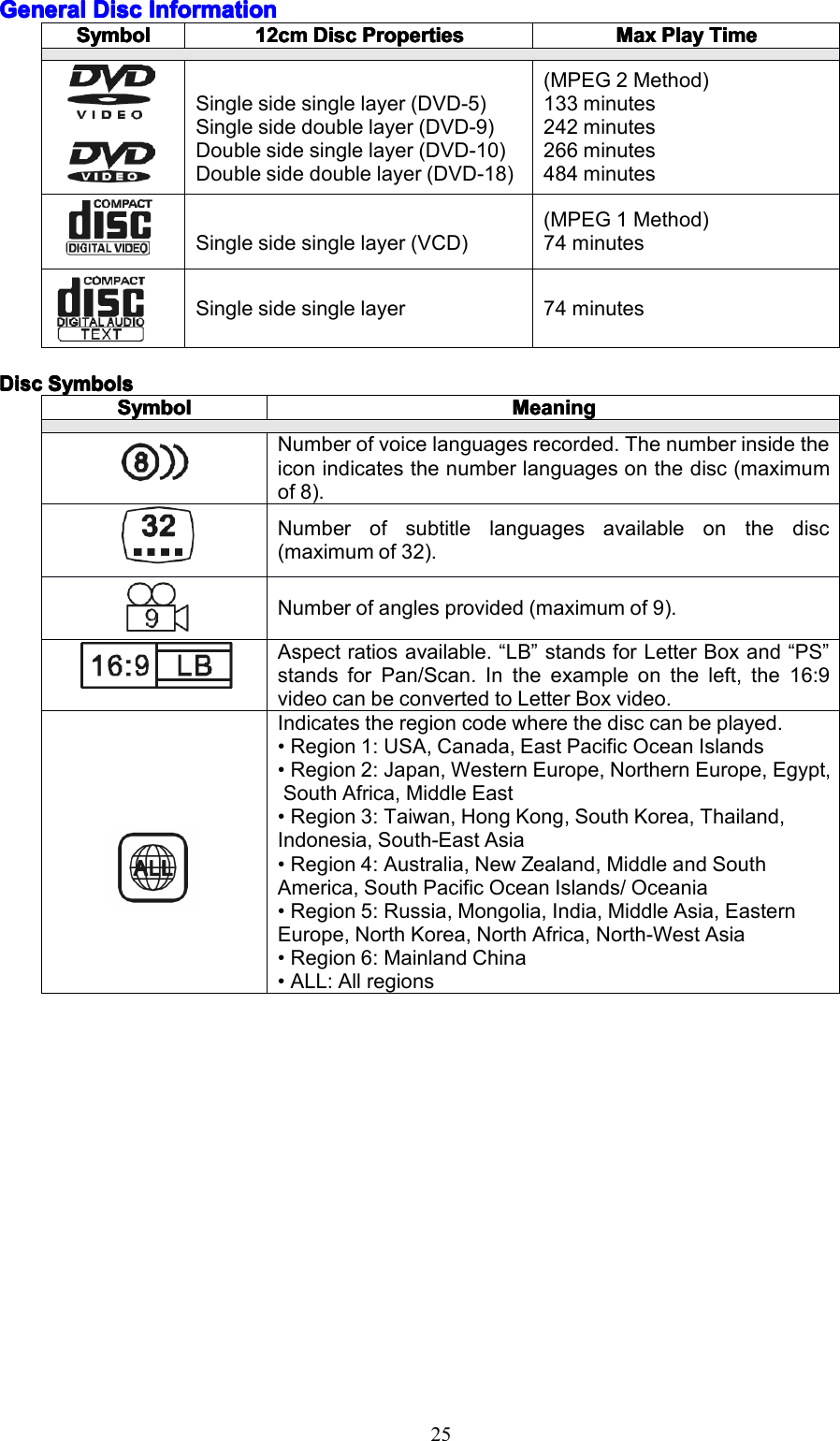
25GeneralGeneralGeneralGeneralDiscD iscDiscDiscInformationI nformationInformationInformationDiscDiscDiscDiscSymbolsS ymbolsSymbolsSymbolsSymbolSymbolSymbolSymbol12cm12cm12cm12cmDiscD iscDiscDiscPropertiesP ropertiesPropertiesPropertiesMaxMaxMaxMaxPlayP layPlayPlayTimeT imeTimeTimeSinglesidesinglelayer(DVD-5)Singlesidedoublelayer(DVD-9)Doublesidesinglelayer(DVD-10)Doublesidedoublelayer(DVD-18)(MPEG2Method)133minutes242minutes266minutes484minutesSinglesidesinglelayer(VCD)(MPEG1Method)74minutesSinglesidesinglelayer74minutesSymbolSymbolSymbolSymbolMeaningMeaningMeaningMeaningNumberofvoicelanguagesrecorded.Thenumberinsidetheiconindicatesthenumberlanguagesonthedisc(maximumof8).Numberofsubtitlelanguagesavailableonthedisc(maximumof32).Numberofanglesprovided(maximumof9).Aspectratiosavailable.“LB”standsforLetterBoxand“PS”standsforPan/Scan.Intheexampleontheleft,the16:9videocanbeconvertedtoLetterBoxvideo.Indicatestheregioncodewherethedisccanbeplayed.•Region1:USA,Canada,EastPacificOceanIslands•Region2:Japan,WesternEurope,NorthernEurope,Egypt,SouthAfrica,MiddleEast•Region3:Taiwan,HongKong,SouthKorea,Thailand,Indonesia,South-EastAsia•Region4:Australia,NewZealand,MiddleandSouthAmerica,SouthPacificOceanIslands/Oceania•Region5:Russia,Mongolia,India,MiddleAsia,EasternEurope,NorthKorea,NorthAfrica,North-WestAsia•Region6:MainlandChina•ALL:Allregions
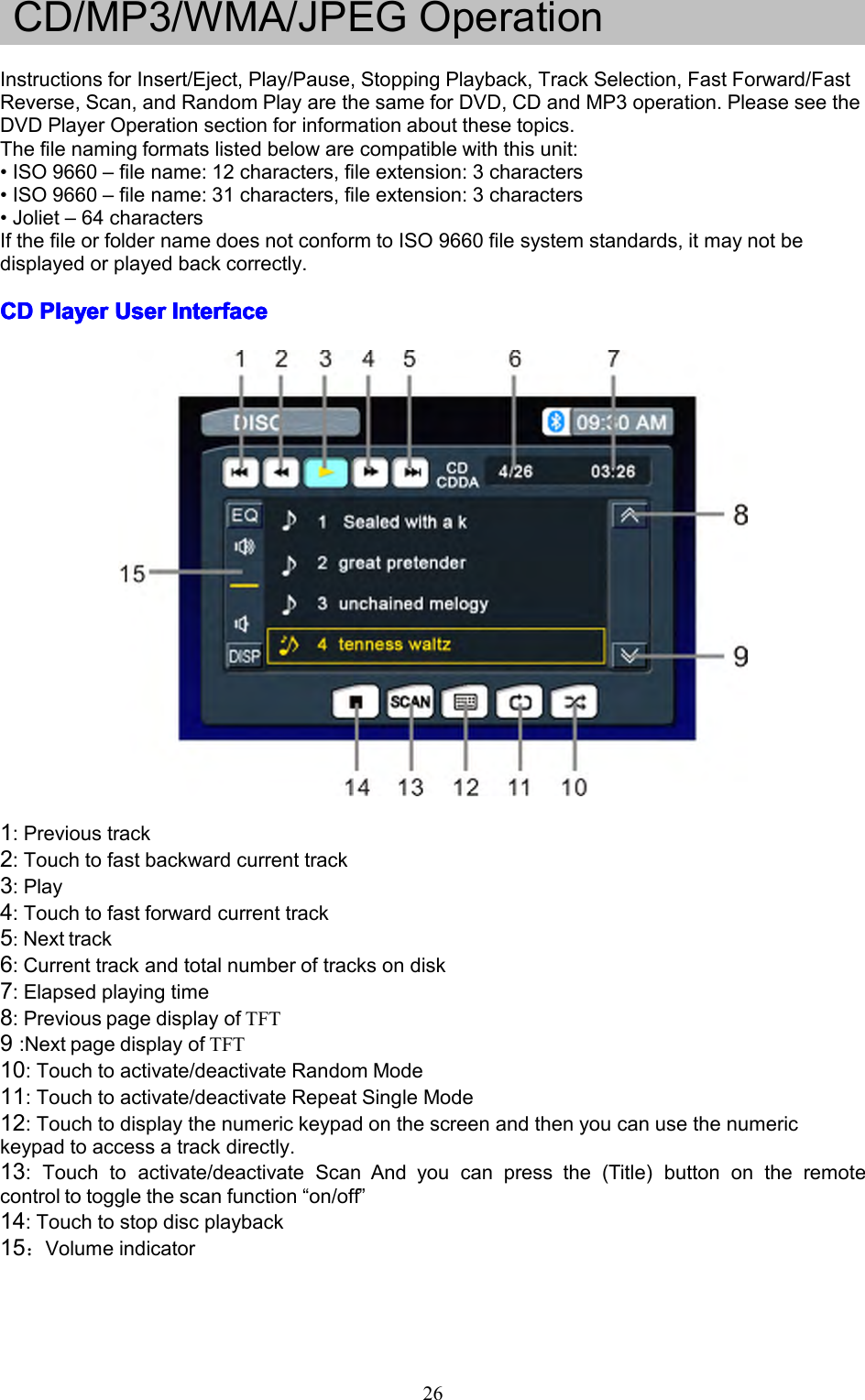
26CD/MP3/WMA/JPEGOperationInstructionsforInsert/Eject,Play/Pause,StoppingPlayback,TrackSelection,FastForward/FastReverse,Scan,andRandomPlayarethesameforDVD,CDandMP3operation.PleaseseetheDVDPlayerOperationsectionforinformationaboutthesetopics.Thefilenamingformatslistedbelowarecompatiblewiththisunit:•ISO9660–filename:12characters,fileextension:3characters•ISO9660–filename:31characters,fileextension:3characters•Joliet–64charactersIfthefileorfoldernamedoesnotconformtoISO9660filesystemstandards,itmaynotbedisplayedorplayedbackcorrectly.CDCDCDCDPlayerP layerPlayerPlayerUserU serUserUserInterfaceI nterfaceInterfaceInterface1:Previoustrack2:Touchtofastbackwardcurrenttrack3:Play4:Touchtofastforwardcurrenttrack5:Nexttrack6:Currenttrackandtotalnumberoftracksondisk7:Elapsedplayingtime8:PreviouspagedisplayofTFT9:NextpagedisplayofTFT10:Touchtoactivate/deactivateRandomMode11:Touchtoactivate/deactivateRepeatSingleMode12:Touchtodisplaythenumerickeypadonthescreenandthenyoucanusethenumerickeypadtoaccessatrackdirectly.13:Touchtoactivate/deactivateScanAndyoucanpressthe(Title)buttonontheremotecontroltotogglethescanfunction“on/off”14:Touchtostopdiscplayback15:Volumeindicator
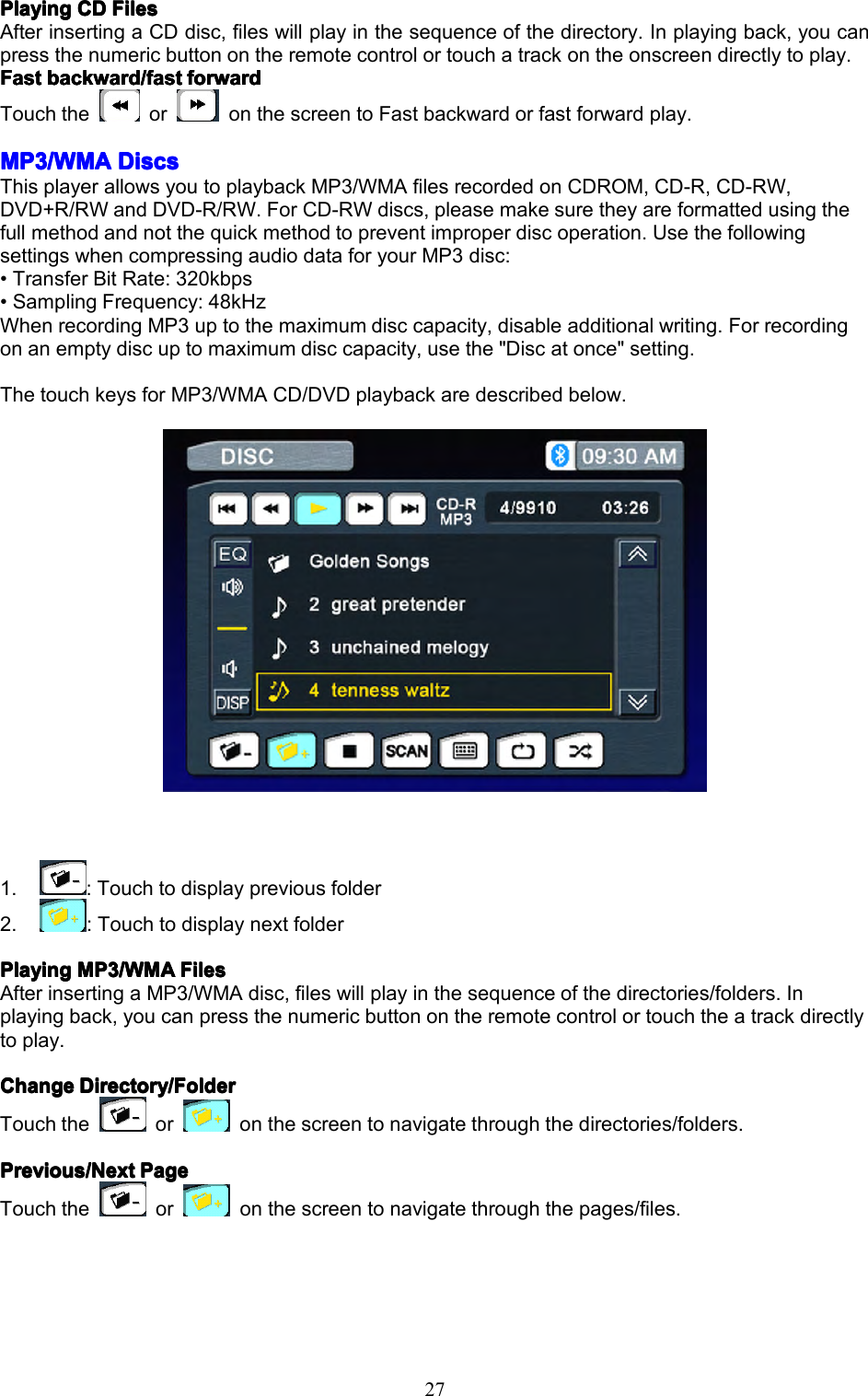
27PlayingPlayingPlayingPlayingCDC DCDCDFilesF ilesFilesFilesAfterinsertingaCDdisc,fileswillplayinthesequenceofthedirectory.Inplayingback,youcanpressthenumericbuttonontheremotecontrolortouchatrackontheonscreendirectlytoplay.FFFFastastastastbackward/fastb ackward/fastbackward/fastbackward/fastforwardf orwardforwardforwardTouchtheoronthescreentoFastbackwardorfastforwardplay.MP3/WMAMP3/WMAMP3/WMAMP3/WMADiscsD iscsDiscsDiscsThisplayerallowsyoutoplaybackMP3/WMAfilesrecordedonCDROM,CD-R,CD-RW,DVD+R/RWandDVD-R/RW.ForCD-RWdiscs,pleasemakesuretheyareformattedusingthefullmethodandnotthequickmethodtopreventimproperdiscoperation.UsethefollowingsettingswhencompressingaudiodataforyourMP3disc:•TransferBitRate:320kbps•SamplingFrequency:48kHzWhenrecordingMP3uptothemaximumdisccapacity,disableadditionalwriting.Forrecordingonanemptydiscuptomaximumdisccapacity,usethe"Discatonce"setting.ThetouchkeysforMP3/WMACD/DVDplaybackaredescribedbelow.1.:Touchtodisplaypreviousfolder2.:TouchtodisplaynextfolderPlayingPlayingPlayingPlayingMP3/WMAM P3/WMAMP3/WMAMP3/WMAFilesF ilesFilesFilesAfterinsertingaMP3/WMAdisc,fileswillplayinthesequenceofthedirectories/folders.Inplayingback,youcanpressthenumericbuttonontheremotecontrolortouchtheatrackdirectlytoplay.ChangeChangeChangeChangeDirectory/FolderD irectory/FolderDirectory/FolderDirectory/FolderTouchtheoronthescreentonavigatethroughthedirectories/folders.Previous/NextPrevious/NextPrevious/NextPrevious/NextPageP agePagePageTouchtheoronthescreentonavigatethroughthepages/files.
28JPEGJPEGJPEGJPEGpicturep icturepicturepicture1.BrowsepictureviaAnti-clockwise2.BrowsepictureviaClockwise
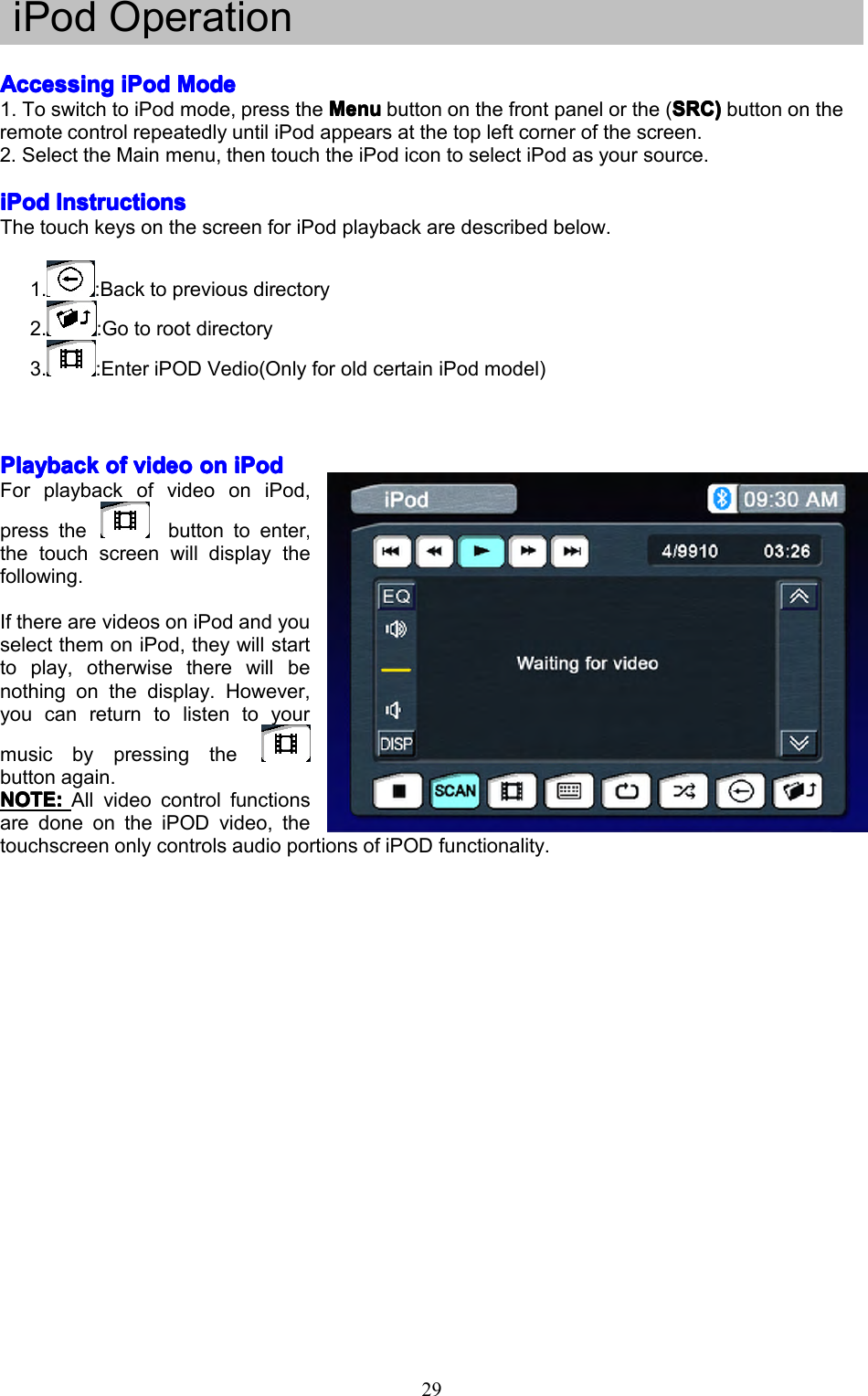
29iPodOperationAccessingAccessingAccessingAccessingiPodi PodiPodiPodModeM odeModeMode1.ToswitchtoiPodmode,presstheMenuM enuMenuMenubuttononthefrontpanelorthe(SRC)S RC)SRC)SRC)buttonontheremotecontrolrepeatedlyuntiliPodappearsatthetopleftcornerofthescreen.2.SelecttheMainmenu,thentouchtheiPodicontoselectiPodasyoursource.iPodiPodiPodiPodInstructionsI nstructionsInstructionsInstructionsThetouchkeysonthescreenforiPodplaybackaredescribedbelow.1.:Backtopreviousdirectory2.:Gotorootdirectory3.:EnteriPODVedio(OnlyforoldcertainiPodmodel)PlaybackPlaybackPlaybackPlaybackofo fofofvideov ideovideovideoono nononiPodi PodiPodiPodForplaybackofvideooniPod,pressthebuttontoenter,thetouchscreenwilldisplaythefollowing.IftherearevideosoniPodandyouselectthemoniPod,theywillstarttoplay,otherwisetherewillbenothingonthedisplay.However,youcanreturntolistentoyourmusicbypressingthebuttonagain.NOTE:NOTE:NOTE:NOTE:All videocontrolfunctionsaredoneontheiPODvideo,thetouchscreenonlycontrolsaudioportionsofiPODfunctionality.
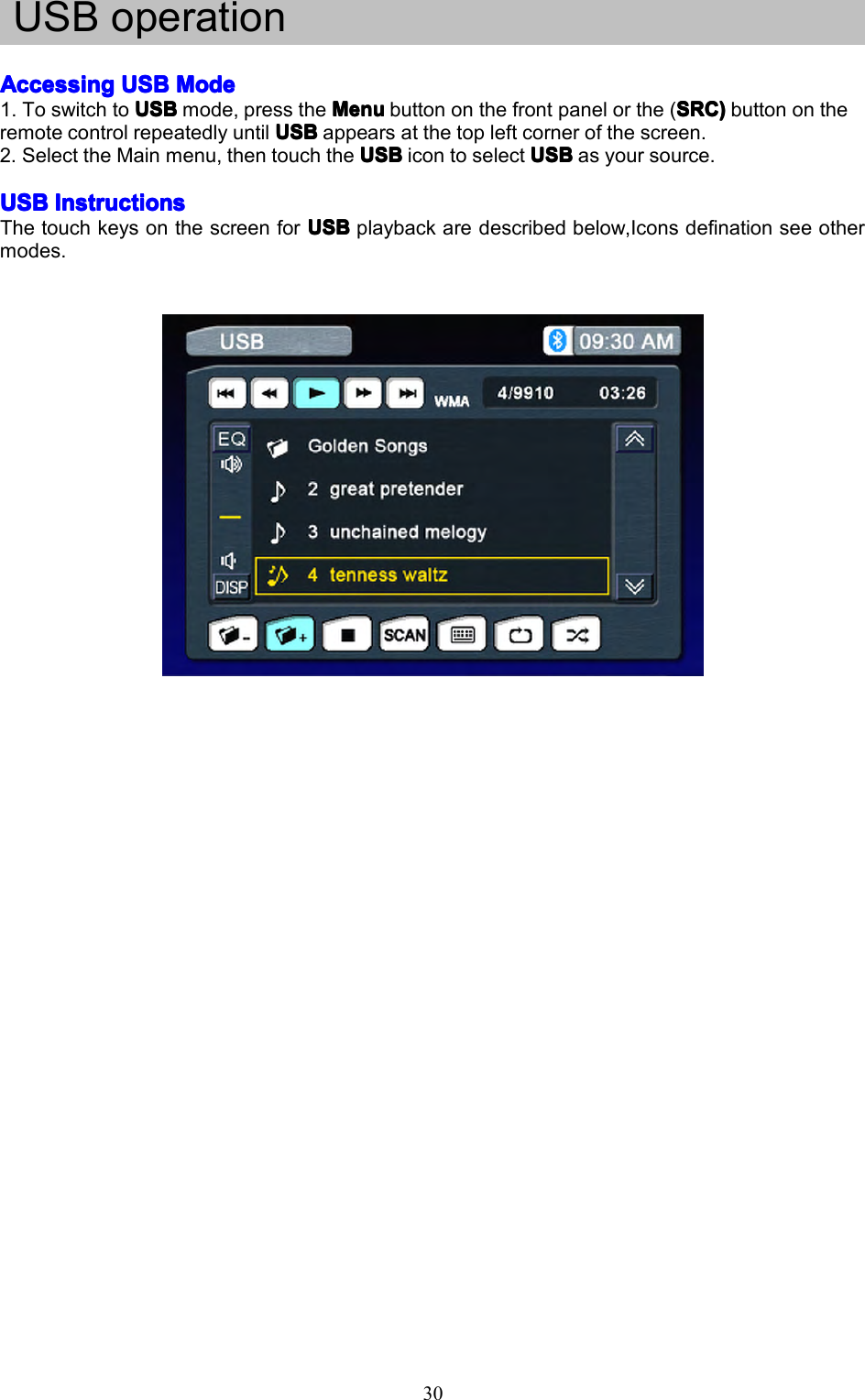
30USBoperationAccessingAccessingAccessingAccessingUSBU SBUSBUSBModeM odeModeMode1.ToswitchtoUSBUSBUSBUSBmode,presstheMenuM enuMenuMenubuttononthefrontpanelorthe(SRC)S RC)SRC)SRC)buttonontheremotecontrolrepeatedlyuntilUSBUSBUSBUSBappearsatthetopleftcornerofthescreen.2.SelecttheMainmenu,thentouchtheUSBU SBUSBUSBicontoselectUSBU SBUSBUSBasyoursource.USBUSBUSBUSBInstructionsI nstructionsInstructionsInstructionsThetouchkeysonthescreenforUSBU SBUSBUSBplaybackaredescribedbelow,Iconsdefinationseeothermodes.
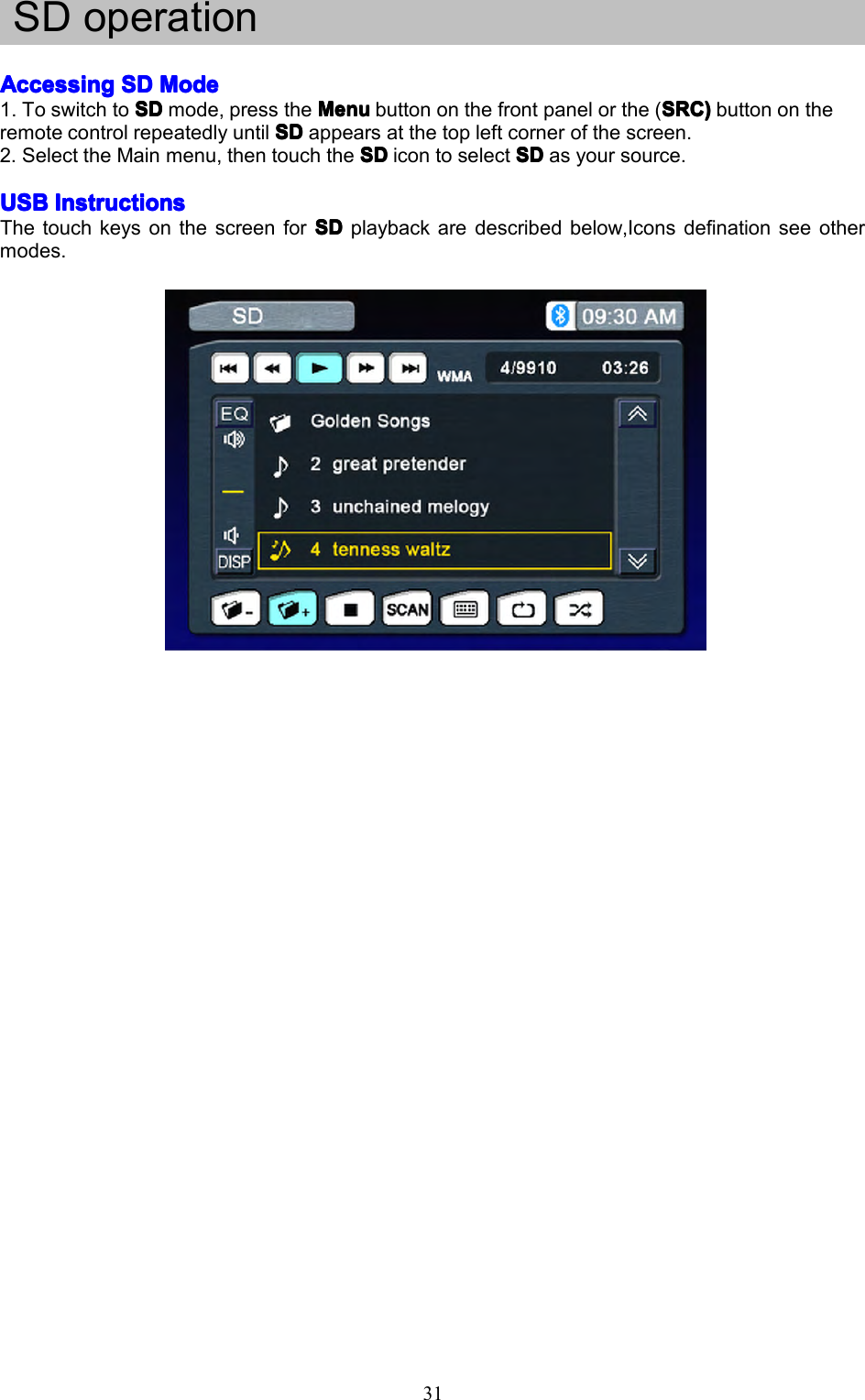
31SDoperationAccessingAccessingAccessingAccessingSDS DSDSDModeM odeModeMode1.ToswitchtoSDSDSDSDmode,presstheMenuM enuMenuMenubuttononthefrontpanelorthe(SRC)S RC)SRC)SRC)buttonontheremotecontrolrepeatedlyuntilSDSDSDSDappearsatthetopleftcornerofthescreen.2.SelecttheMainmenu,thentouchtheSDS DSDSDicontoselectSDS DSDSDasyoursource.USBUSBUSBUSBInstructionsI nstructionsInstructionsInstructionsThetouchkeysonthescreenforSDS DSDSDplaybackaredescribedbelow,Iconsdefinationseeothermodes.
32NavigationOperationAccessingAccessingAccessingAccessingNavigationN avigationNavigationNavigation1.AccesstheMAINM AINMAINMAINmenuandselecttheNAVIN AVINAVINAVIbuttononthetouch-screentoentertheNavigationOperationinterface.2.PresstheremotecontroltoswitchthesourcetoNavigation.3.PressNAVINAVINAVINAVIbuttononthefrontpaneloftheunit.NavigationNavigationNavigationNavigationOperationO perationOperationOperationPleasereadtheNavigationN avigationNavigationNavigationSoftwareS oftwareSoftwareSoftwareUserU serUserUserManualM anualManualManualFollowtheinstructionsonloadingmappinginformationfromtheDVD-ROMtotheSDCardini nininthet hethetheNavigationNavigationNavigationNavigationSoftwareS oftwareSoftwareSoftwareUserU serUserUserManual.M anual.Manual.Manual.ThismustbedonepriortoloadingtheSDCardintotheNavigationUnit.ListeningListeningListeningListeningtot ototoana nananAudioA udioAudioAudioprogramp rogramprogramprogramwhilew hilewhilewhileusing/viewingu sing/viewingusing/viewingusing/viewingthet hethetheNavigationN avigationNavigationNavigationYoucanlistentoanaudioprogramwhileusingNavigation.Todoso,dothefollowing:Selecttheaudiosource.ThesourcecanbetheTuner,SatelliteRadio,iPodortheaudiofromtheAUXinput.TouchtheNAVINAVINAVINAVIbuttononthefrontpaneltoselectNavigation.ThemapwillbeshownontheTFTdisplay,andaudiowillcontinuetoplaywhileyouareintheNavigationmode.Navigationvoicepromptswillmutetheaudiosource,givetheinstruction,andthenreturntotheaudiosourceToadjustaparameteroftheaudiosource(i.e.,selectadifferentradiostation),touchtheNAVIN AVINAVINAVIbutton.Thiswillreturnyoutotheaudiosourcescreen.Makeyouradjustments,andthenpresstheNAVINAVINAVINAVIbuttontoreturntheNavigationfunction.Navigationwillcontinuewhileyouareinanaudiosourcescreen,andvoicepromptswillcontinuewhileyoumakeadjustments.
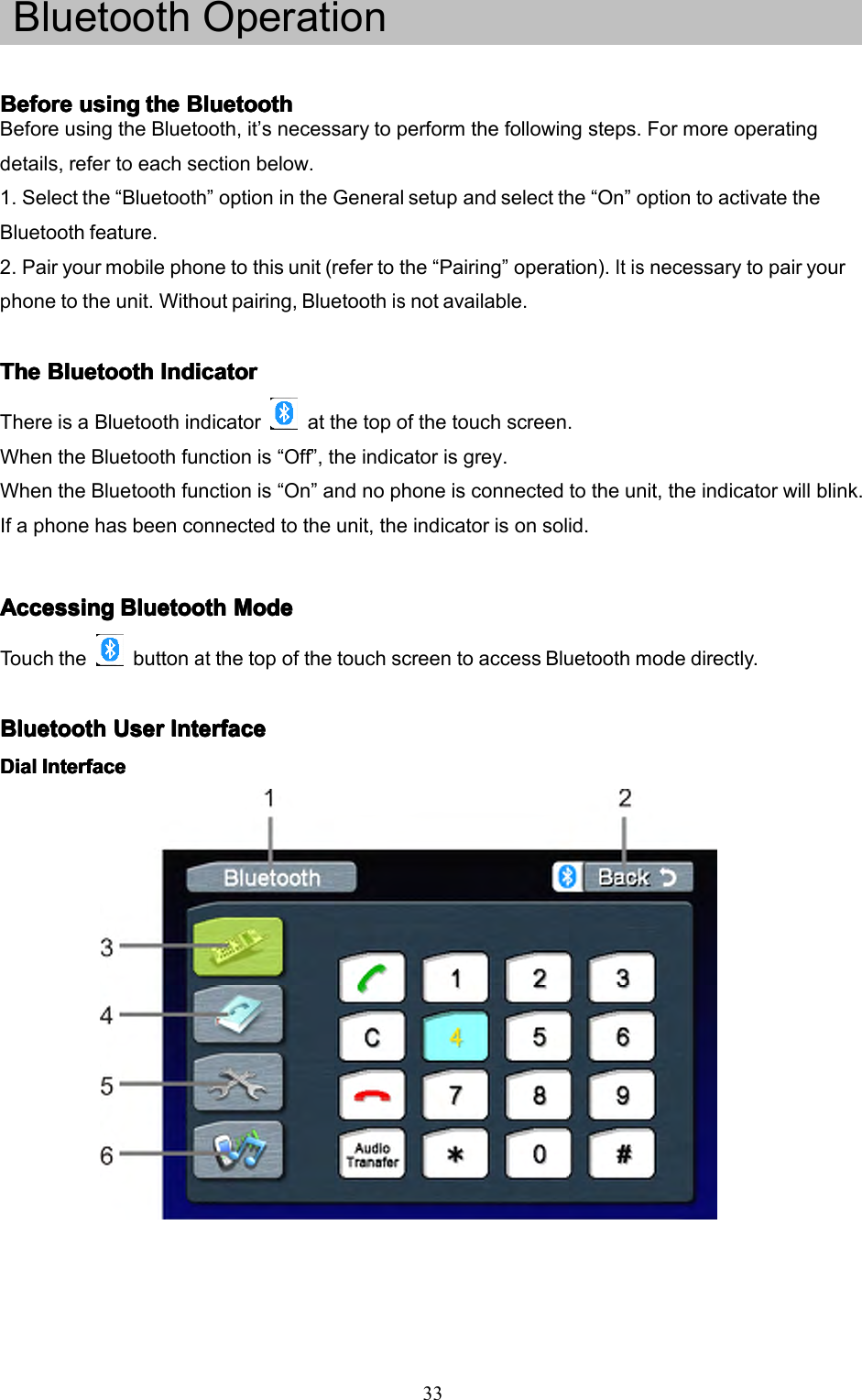
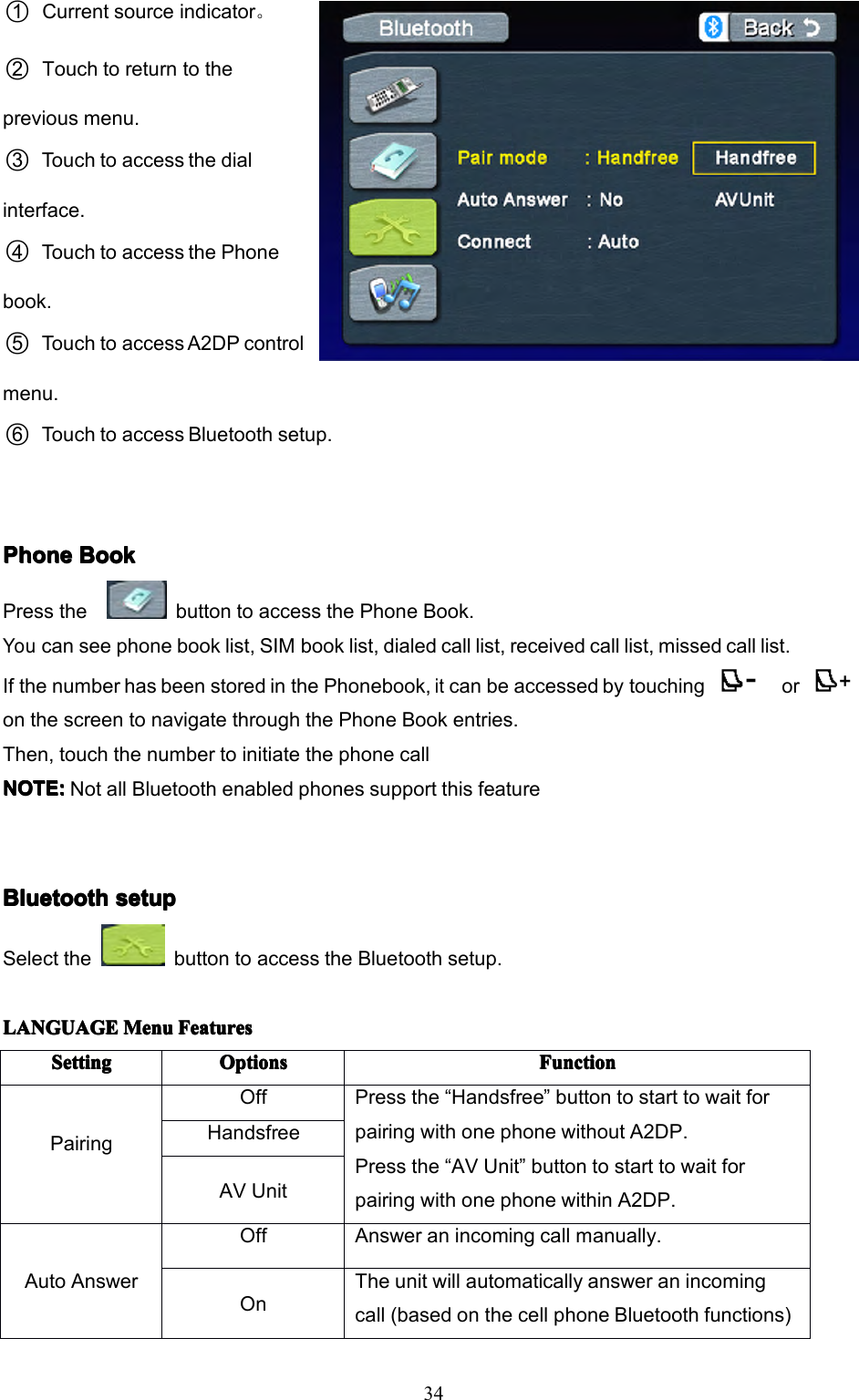
33BluetoothOperationBeforeBeforeBeforeBeforeusingu singusingusingthet hethetheBluetoothB luetoothBluetoothBluetoothBeforeusingtheBluetooth,it’snecessarytoperformthefollowingsteps.Formoreoperatingdetails,refertoeachsectionbelow.1.Selectthe“Bluetooth”optionintheGeneralsetupandselectthe“On”optiontoactivatetheBluetoothfeature.2.Pairyourmobilephonetothisunit(refertothe“Pairing”operation).Itisnecessarytopairyourphonetotheunit.Withoutpairing,Bluetoothisnotavailable.TheTheTheTheBluetoothB luetoothBluetoothBluetoothIndicatorI ndicatorIndicatorIndicatorThereisaBluetoothindicatoratthetopofthetouchscreen.WhentheBluetoothfunctionis“Off”,theindicatorisgrey.WhentheBluetoothfunctionis“On”andnophoneisconnectedtotheunit,theindicatorwillblink.Ifaphonehasbeenconnectedtotheunit,theindicatorisonsolid.AccessingAccessingAccessingAccessingBluetoothB luetoothBluetoothBluetoothModeM odeModeModeTouchthebuttonatthetopofthetouchscreentoaccessBluetoothmodedirectly.BluetoothBluetoothBluetoothBluetoothUserU serUserUserInterfaceI nterfaceInterfaceInterfaceDialDialDialDialInterfaceI nterfaceInterfaceInterface
341○Currentsourceindicator。2○Touchtoreturntothepreviousmenu.3○Touchtoaccessthedialinterface.4○TouchtoaccessthePhonebook.5○TouchtoaccessA2DPcontrolmenu.6○TouchtoaccessBluetoothsetup.PhonePhonePhonePhoneBookB ookBookBookPressthebuttontoaccessthePhoneBook.Youcanseephonebooklist,SIMbooklist,dialedcalllist,receivedcalllist,missedcalllist.IfthenumberhasbeenstoredinthePhonebook,itcanbeaccessedbytouchingoronthescreentonavigatethroughthePhoneBookentries.Then,touchthenumbertoinitiatethephonecallNOTE:NOTE:NOTE:NOTE:NotallBluetoothenabledphonessupportthisfeatureBluetoothBluetoothBluetoothBluetoothsetups etupsetupsetupSelectthebuttontoaccesstheBluetoothsetup.LANGUAGELANGUAGELANGUAGELANGUAGEMenuM enuMenuMenuFeaturesF eaturesFeaturesFeaturesSettingSettingSettingSettingOptionsOptionsOptionsOptionsFunctionFunctionFunctionFunctionPairingOffPressthe“Handsfree”buttontostarttowaitforpairingwithonephonewithoutA2DP.Pressthe“AVUnit”buttontostarttowaitforpairingwithonephonewithinA2DP.HandsfreeAVUnitAutoAnswerOffAnsweranincomingcallmanually.OnTheunitwillautomaticallyansweranincomingcall(basedonthecellphoneBluetoothfunctions)
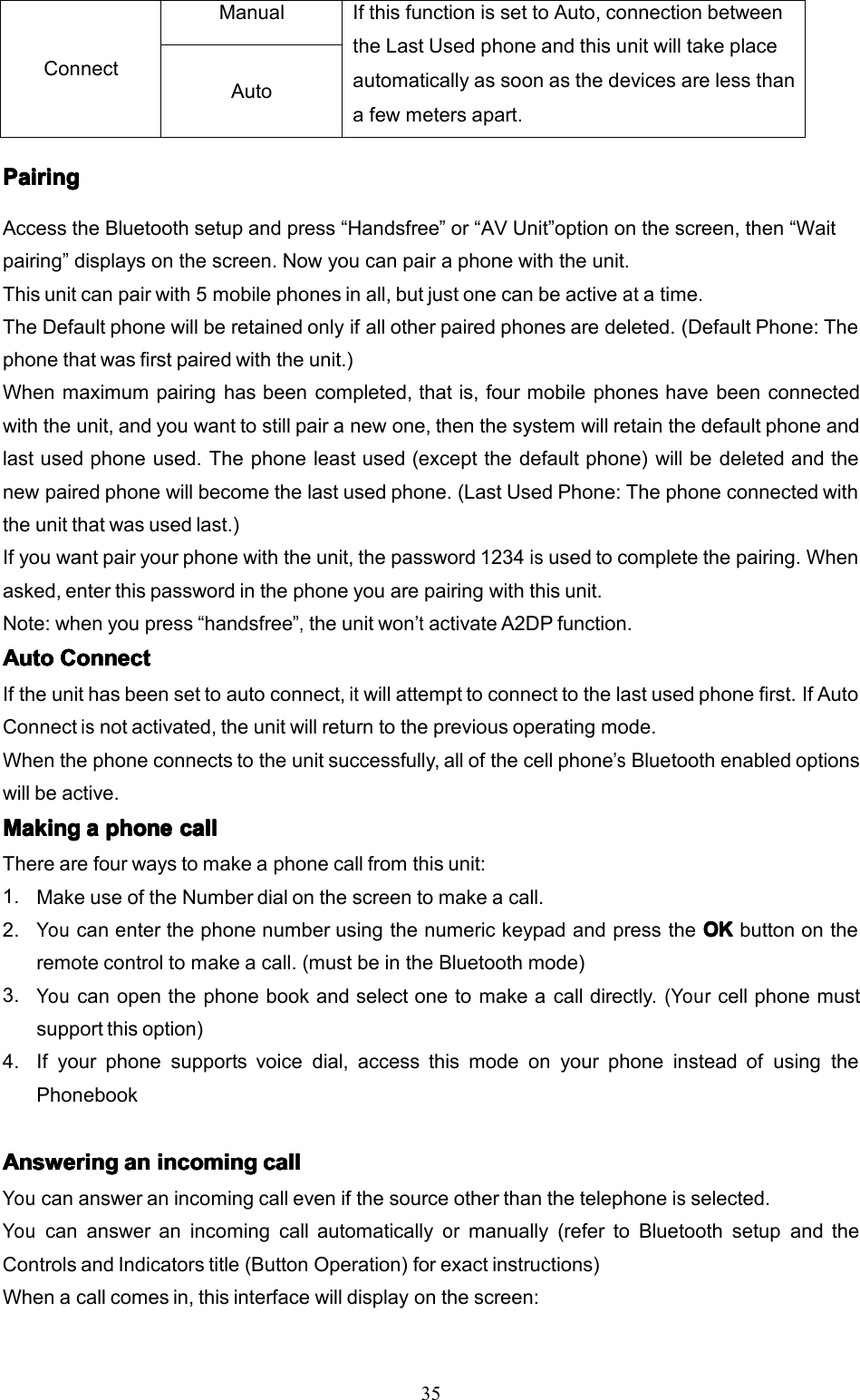
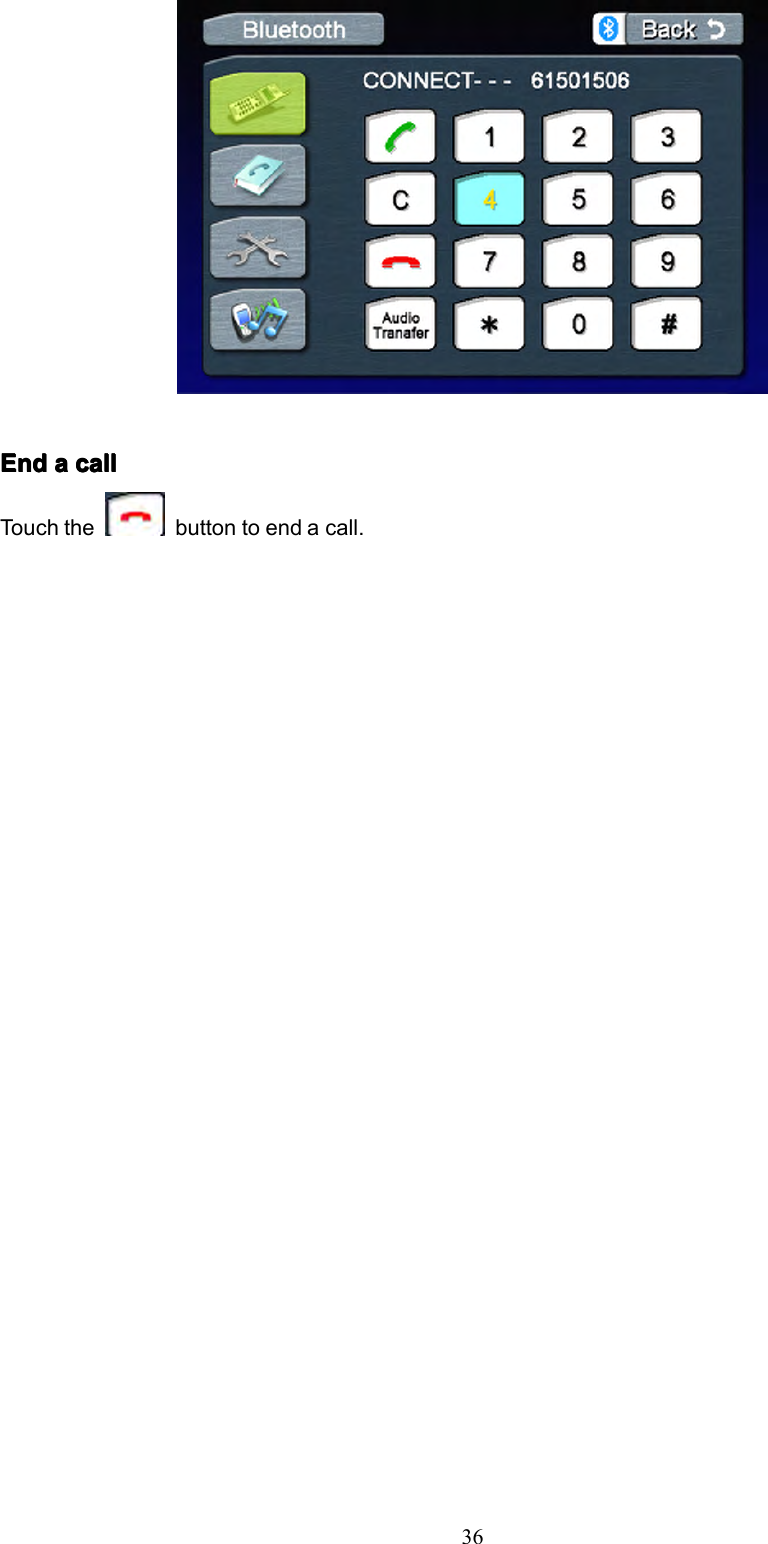
35PairingPairingPairingPairingAccesstheBluetoothsetupandpress“Handsfree”or“AVUnit”optiononthescreen,then“Waitpairing”displaysonthescreen.Nowyoucanpairaphonewiththeunit.Thisunitcanpairwith5mobilephonesinall,butjustonecanbeactiveatatime.TheDefaultphonewillberetainedonlyifallotherpairedphonesaredeleted.(DefaultPhone:Thephonethatwasfirstpairedwiththeunit.)Whenmaximumpairinghasbeencompleted,thatis,fourmobilephoneshavebeenconnectedwiththeunit,andyouwanttostillpairanewone,thenthesystemwillretainthedefaultphoneandlastusedphoneused.Thephoneleastused(exceptthedefaultphone)willbedeletedandthenewpairedphonewillbecomethelastusedphone.(LastUsedPhone:Thephoneconnectedwiththeunitthatwasusedlast.)Ifyouwantpairyourphonewiththeunit,thepassword1234isusedtocompletethepairing.Whenasked,enterthispasswordinthephoneyouarepairingwiththisunit.Note:whenyoupress“handsfree”,theunitwon’tactivateA2DPfunction.AutoAutoAutoAutoConnectC onnectConnectConnectIftheunithasbeensettoautoconnect,itwillattempttoconnecttothelastusedphonefirst.IfAutoConnectisnotactivated,theunitwillreturntothepreviousoperatingmode.Whenthephoneconnectstotheunitsuccessfully,allofthecellphone’sBluetoothenabledoptionswillbeactive.MakingMakingMakingMakingaaaaphonep honephonephonecallc allcallcallTherearefourwaystomakeaphonecallfromthisunit:1.MakeuseoftheNumberdialonthescreentomakeacall.2.YoucanenterthephonenumberusingthenumerickeypadandpresstheOKO KOKOKbuttonontheremotecontroltomakeacall.(mustbeintheBluetoothmode)3.Youcanopenthephonebookandselectonetomakeacalldirectly.(Yourcellphonemustsupportthisoption)4.Ifyourphonesupportsvoicedial,accessthismodeonyourphoneinsteadofusingthePhonebookAnsweringAnsweringAnsweringAnsweringana nananincomingi ncomingincomingincomingcallc allcallcallYoucanansweranincomingcallevenifthesourceotherthanthetelephoneisselected.Youcanansweranincomingcallautomaticallyormanually(refertoBluetoothsetupandtheControlsandIndicatorstitle(ButtonOperation)forexactinstructions)Whenacallcomesin,thisinterfacewilldisplayonthescreen:ConnectManualIfthisfunctionissettoAuto,connectionbetweentheLastUsedphoneandthisunitwilltakeplaceautomaticallyassoonasthedevicesarelessthanafewmetersapart.Auto
36EndEndEndEndaaaacallc allcallcallTouchthebuttontoendacall.
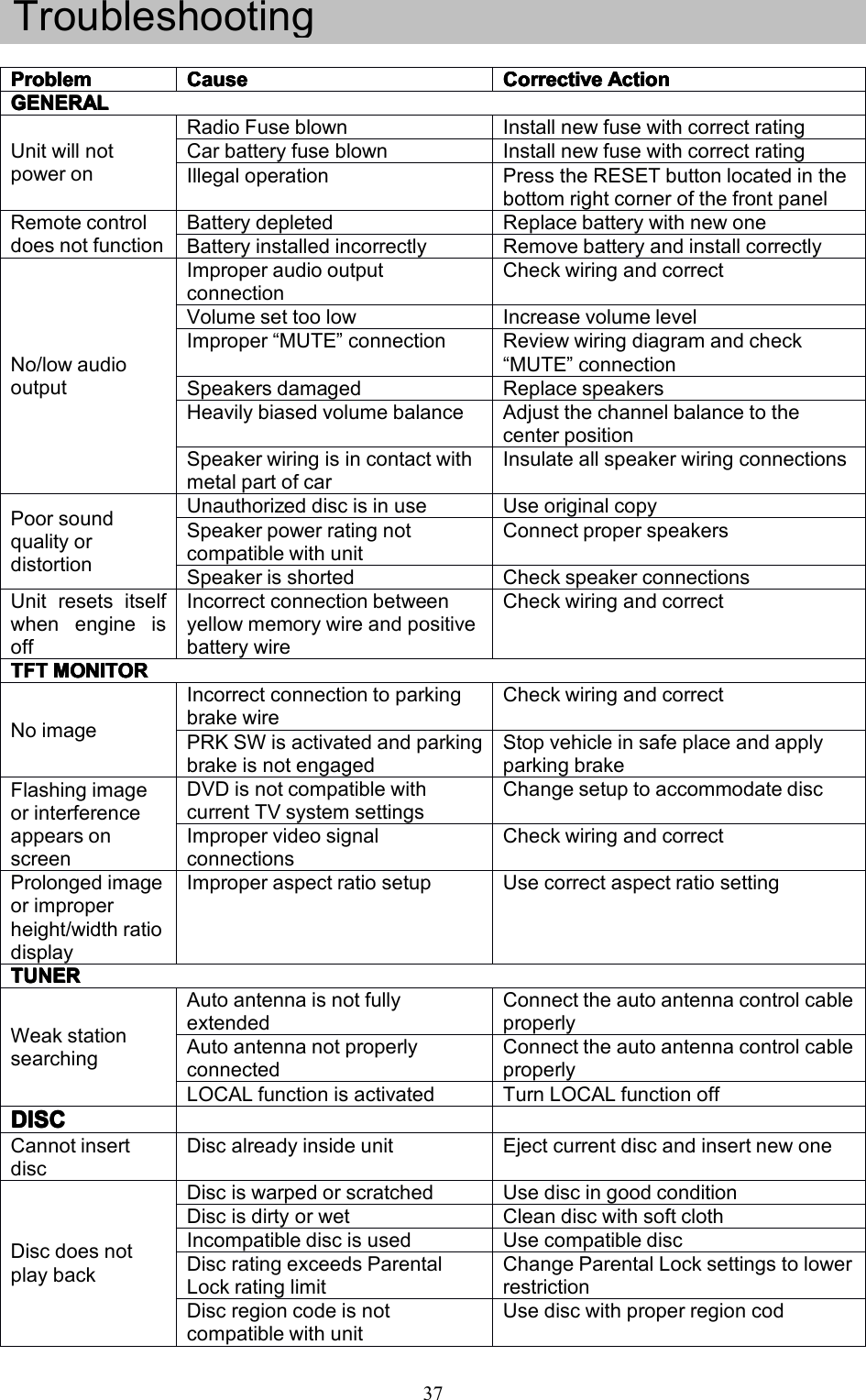
37TroubleshootingProblemProblemProblemProblemCauseCauseCauseCauseCorrectiveCorrectiveCorrectiveCorrectiveActionA ctionActionActionGENERALGENERALGENERALGENERALUnitwillnotpoweronRadioFuseblownInstallnewfusewithcorrectratingCarbatteryfuseblownInstallnewfusewithcorrectratingIllegaloperationPresstheRESETbuttonlocatedinthebottomrightcornerofthefrontpanelRemotecontroldoesnotfunctionBatterydepletedReplacebatterywithnewoneBatteryinstalledincorrectlyRemovebatteryandinstallcorrectlyNo/lowaudiooutputImproperaudiooutputconnectionCheckwiringandcorrectVolumesettoolowIncreasevolumelevelImproper“MUTE”connectionReviewwiringdiagramandcheck“MUTE”connectionSpeakersdamagedReplacespeakersHeavilybiasedvolumebalanceAdjustthechannelbalancetothecenterpositionSpeakerwiringisincontactwithmetalpartofcarInsulateallspeakerwiringconnectionsPoorsoundqualityordistortionUnauthorizeddiscisinuseUseoriginalcopySpeakerpowerratingnotcompatiblewithunitConnectproperspeakersSpeakerisshortedCheckspeakerconnectionsUnitresetsitselfwhenengineisoffIncorrectconnectionbetweenyellowmemorywireandpositivebatterywireCheckwiringandcorrectTFTTFTTFTTFTMONITORM ONITORMONITORMONITORNoimageIncorrectconnectiontoparkingbrakewireCheckwiringandcorrectPRKSWisactivatedandparkingbrakeisnotengagedStopvehicleinsafeplaceandapplyparkingbrakeFlashingimageorinterferenceappearsonscreenDVDisnotcompatiblewithcurrentTVsystemsettingsChangesetuptoaccommodatediscImpropervideosignalconnectionsCheckwiringandcorrectProlongedimageorimproperheight/widthratiodisplayImproperaspectratiosetupUsecorrectaspectratiosettingTUNERTUNERTUNERTUNERWeakstationsearchingAutoantennaisnotfullyextendedConnecttheautoantennacontrolcableproperlyAutoantennanotproperlyconnectedConnecttheautoantennacontrolcableproperlyLOCALfunctionisactivatedTurnLOCALfunctionoffDISCDISCDISCDISCCannotinsertdiscDiscalreadyinsideunitEjectcurrentdiscandinsertnewoneDiscdoesnotplaybackDisciswarpedorscratchedUsediscingoodconditionDiscisdirtyorwetCleandiscwithsoftclothIncompatiblediscisusedUsecompatiblediscDiscratingexceedsParentalLockratinglimitChangeParentalLocksettingstolowerrestrictionDiscregioncodeisnotcompatiblewithunitUsediscwithproperregioncod
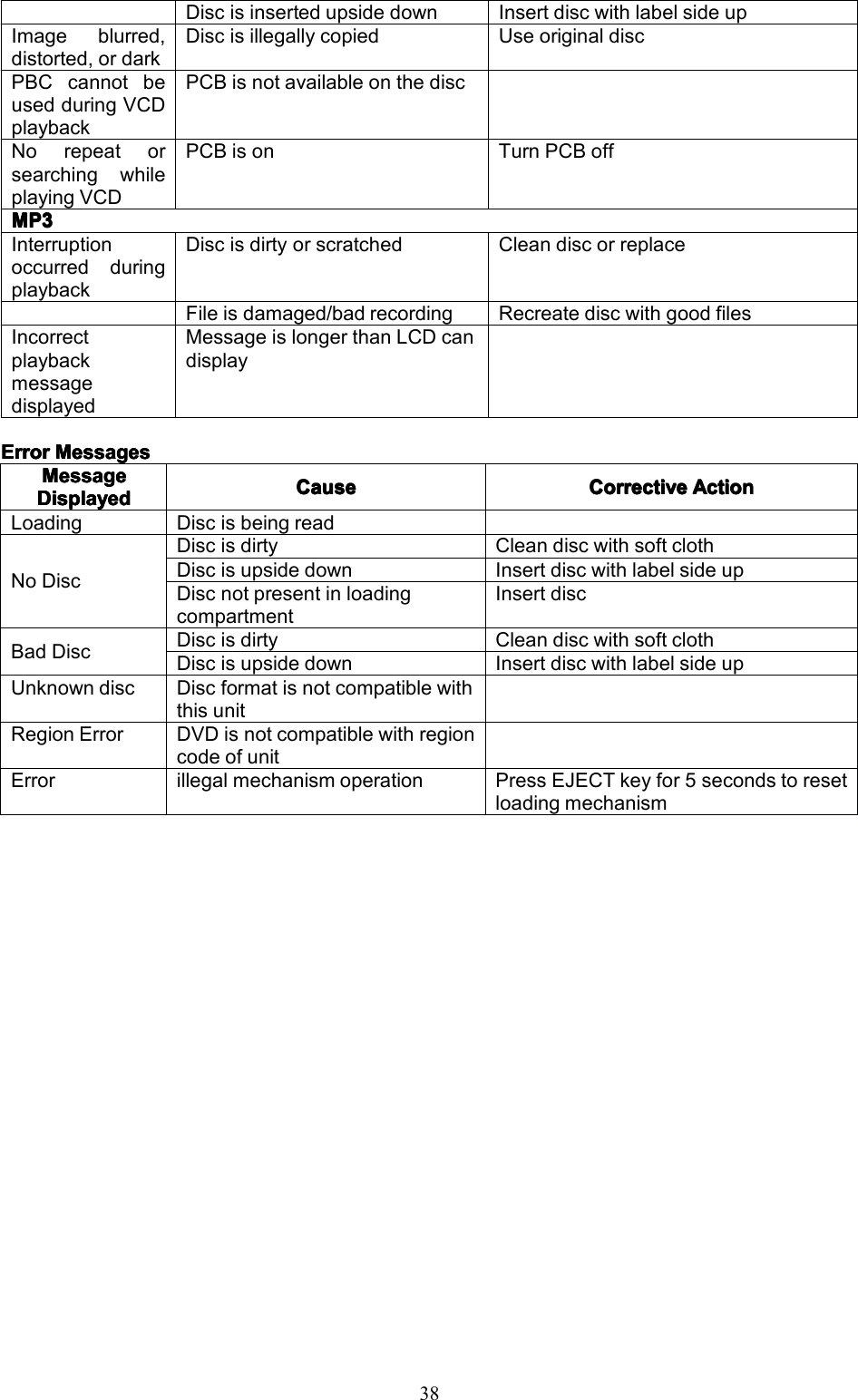
38ErrorErrorErrorErrorMessagesM essagesMessagesMessagesDiscisinsertedupsidedownInsertdiscwithlabelsideupImageblurred,distorted,ordarkDiscisillegallycopiedUseoriginaldiscPBCcannotbeusedduringVCDplaybackPCBisnotavailableonthediscNorepeatorsearchingwhileplayingVCDPCBisonTurnPCBoffMP3MP3MP3MP3InterruptionoccurredduringplaybackDiscisdirtyorscratchedCleandiscorreplaceFileisdamaged/badrecordingRecreatediscwithgoodfilesIncorrectplaybackmessagedisplayedMessageislongerthanLCDcandisplayMessageMessageMessageMessageDisplayedDisplayedDisplayedDisplayedCauseCauseCauseCauseCorrectiveCorrectiveCorrectiveCorrectiveActionA ctionActionActionLoadingDiscisbeingreadNoDiscDiscisdirtyCleandiscwithsoftclothDiscisupsidedownInsertdiscwithlabelsideupDiscnotpresentinloadingcompartmentInsertdiscBadDiscDiscisdirtyCleandiscwithsoftclothDiscisupsidedownInsertdiscwithlabelsideupUnknowndiscDiscformatisnotcompatiblewiththisunitRegionErrorDVDisnotcompatiblewithregioncodeofunitErrorillegalmechanismoperationPressEJECTkeyfor5secondstoresetloadingmechanism
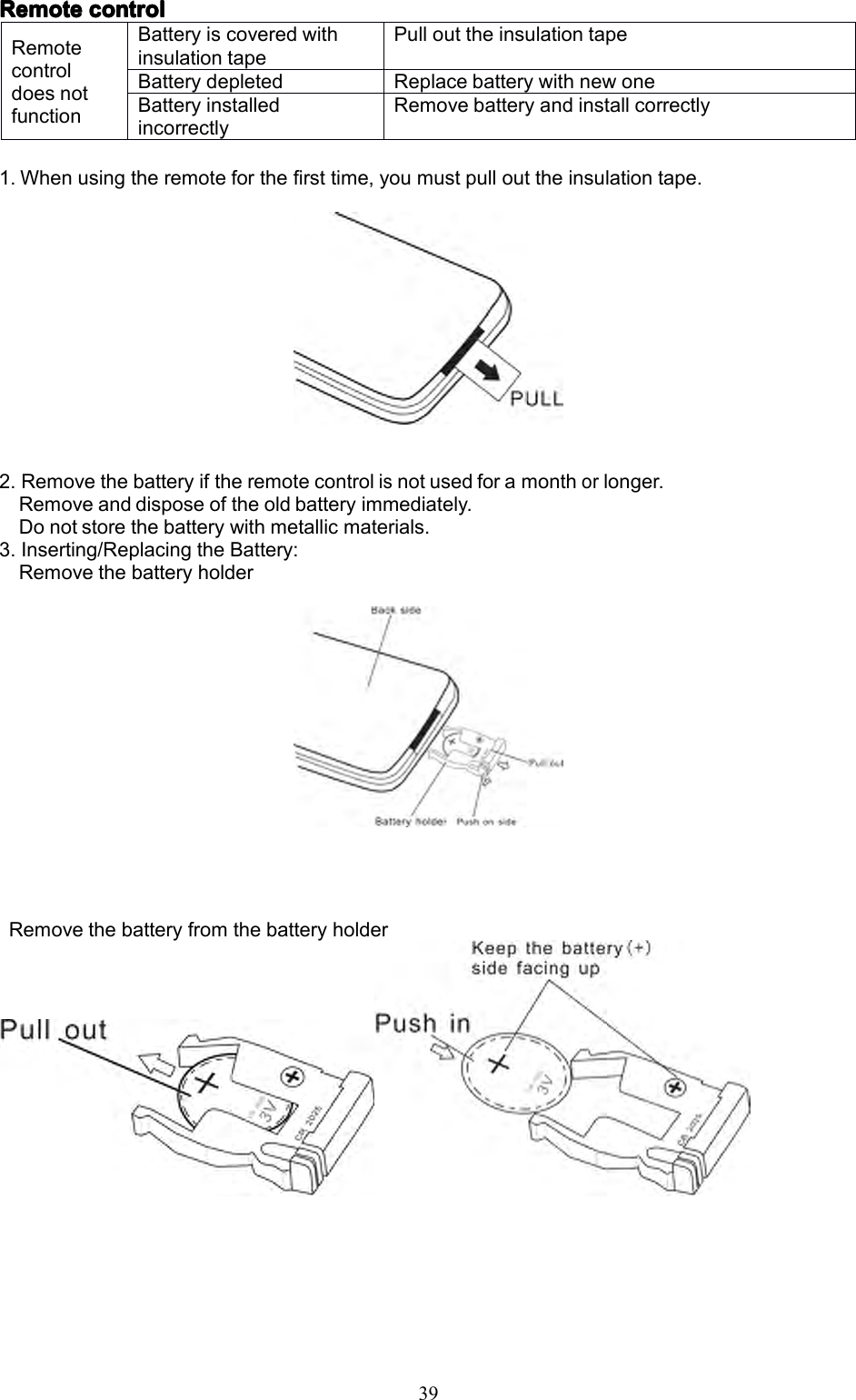
39RemoteRemoteRemoteRemotecontrolc ontrolcontrolcontrol1.Whenusingtheremoteforthefirsttime,youmustpullouttheinsulationtape.2.Removethebatteryiftheremotecontrolisnotusedforamonthorlonger.Removeanddisposeoftheoldbatteryimmediately.Donotstorethebatterywithmetallicmaterials.3.Inserting/ReplacingtheBattery:RemovethebatteryholderRemovethebatteryfromthebatteryholderRemotecontroldoesnotfunctionBatteryiscoveredwithinsulationtapePullouttheinsulationtapeBatterydepletedReplacebatterywithnewoneBatteryinstalledincorrectlyRemovebatteryandinstallcorrectly
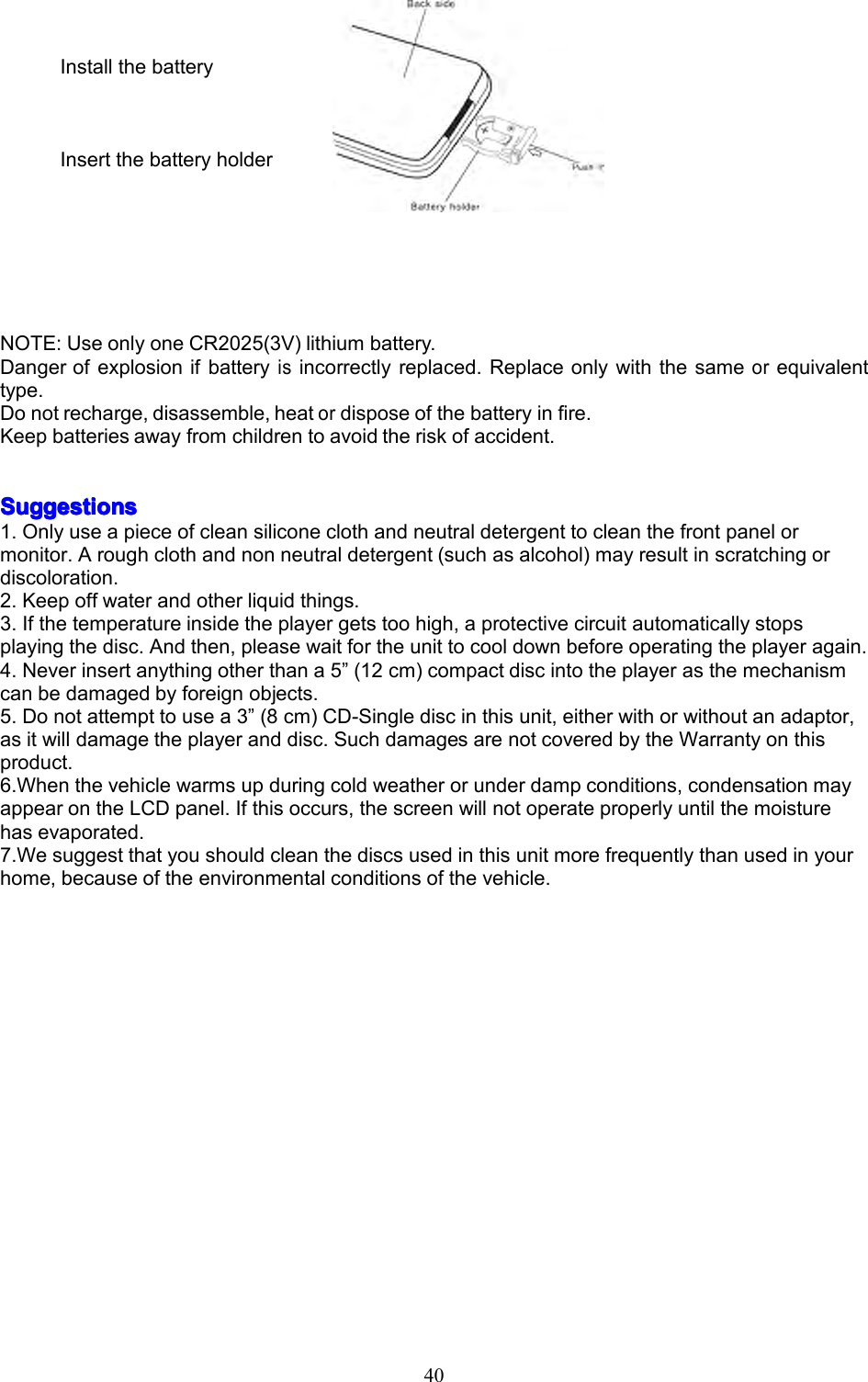
40InstallthebatteryInsertthebatteryholderNOTE:UseonlyoneCR2025(3V)lithiumbattery.Dangerofexplosionifbatteryisincorrectlyreplaced.Replaceonlywiththesameorequivalenttype.Donotrecharge,disassemble,heatordisposeofthebatteryinfire.Keepbatteriesawayfromchildrentoavoidtheriskofaccident.SSSSuggestionsuggestionsuggestionsuggestions1.Onlyuseapieceofcleansiliconeclothandneutraldetergenttocleanthefrontpanelormonitor.Aroughclothandnonneutraldetergent(suchasalcohol)mayresultinscratchingordiscoloration.2.Keepoffwaterandotherliquidthings.3.Ifthetemperatureinsidetheplayergetstoohigh,aprotectivecircuitautomaticallystopsplayingthedisc.Andthen,pleasewaitfortheunittocooldownbeforeoperatingtheplayeragain.4.Neverinsertanythingotherthana5”(12cm)compactdiscintotheplayerasthemechanismcanbedamagedbyforeignobjects.5.Donotattempttousea3”(8cm)CD-Singlediscinthisunit,eitherwithorwithoutanadaptor,asitwilldamagetheplayeranddisc.SuchdamagesarenotcoveredbytheWarrantyonthisproduct.6.Whenthevehiclewarmsupduringcoldweatherorunderdampconditions,condensationmayappearontheLCDpanel.Ifthisoccurs,thescreenwillnotoperateproperlyuntilthemoisturehasevaporated.7.Wesuggestthatyoushouldcleanthediscsusedinthisunitmorefrequentlythanusedinyourhome,becauseoftheenvironmentalconditionsofthevehicle.
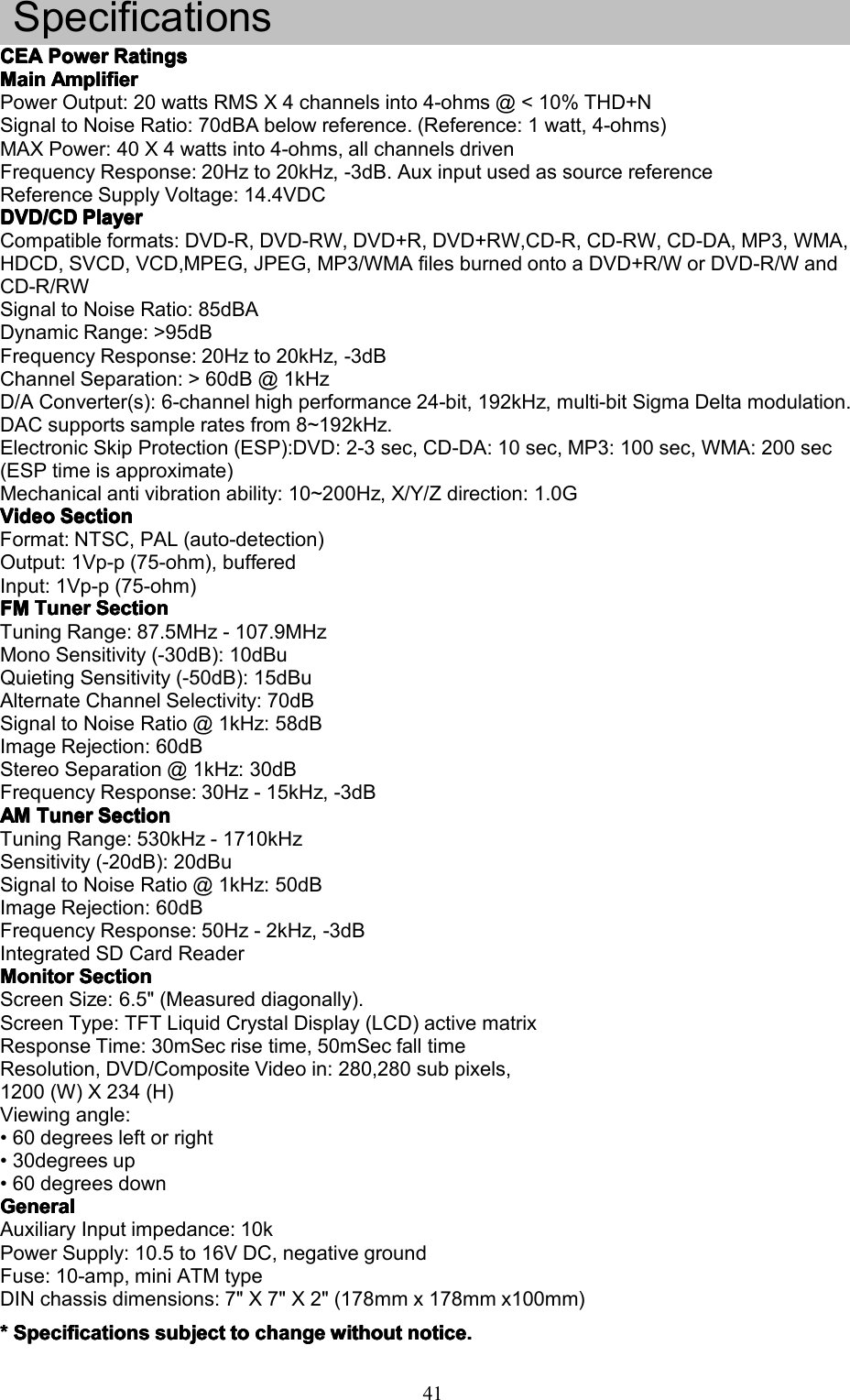
41SpecificationsCEACEACEACEAPowerP owerPowerPowerRatingsR atingsRatingsRatingsMainMainMainMainAmplifierA mplifierAmplifierAmplifierPowerOutput:20wattsRMSX4channelsinto4-ohms@<10%THD+NSignaltoNoiseRatio:70dBAbelowreference.(Reference:1watt,4-ohms)MAXPower:40X4wattsinto4-ohms,allchannelsdrivenFrequencyResponse:20Hzto20kHz,-3dB.AuxinputusedassourcereferenceReferenceSupplyVoltage:14.4VDCDVD/CDDVD/CDDVD/CDDVD/CDPlayerP layerPlayerPlayerCompatibleformats:DVD-R,DVD-RW,DVD+R,DVD+RW,CD-R,CD-RW,CD-DA,MP3,WMA,HDCD,SVCD,VCD,MPEG,JPEG,MP3/WMAfilesburnedontoaDVD+R/WorDVD-R/WandCD-R/RWSignaltoNoiseRatio:85dBADynamicRange:>95dBFrequencyResponse:20Hzto20kHz,-3dBChannelSeparation:>60dB@1kHzD/AConverter(s):6-channelhighperformance24-bit,192kHz,multi-bitSigmaDeltamodulation.DACsupportssampleratesfrom8~192kHz.ElectronicSkipProtection(ESP):DVD:2-3sec,CD-DA:10sec,MP3:100sec,WMA:200sec(ESPtimeisapproximate)Mechanicalantivibrationability:10~200Hz,X/Y/Zdirection:1.0GVideoVideoVideoVideoSectionS ectionSectionSectionFormat:NTSC,PAL(auto-detection)Output:1Vp-p(75-ohm),bufferedInput:1Vp-p(75-ohm)FMFMFMFMTunerT unerTunerTunerSectionS ectionSectionSectionTuningRange:87.5MHz-107.9MHzMonoSensitivity(-30dB):10dBuQuietingSensitivity(-50dB):15dBuAlternateChannelSelectivity:70dBSignaltoNoiseRatio@1kHz:58dBImageRejection:60dBStereoSeparation@1kHz:30dBFrequencyResponse:30Hz-15kHz,-3dBAMAMAMAMTunerT unerTunerTunerSectionS ectionSectionSectionTuningRange:530kHz-1710kHzSensitivity(-20dB):20dBuSignaltoNoiseRatio@1kHz:50dBImageRejection:60dBFrequencyResponse:50Hz-2kHz,-3dBIntegratedSDCardReaderMonitorMonitorMonitorMonitorSectionS ectionSectionSectionScreenSize:6.5"(Measureddiagonally).ScreenType:TFTLiquidCrystalDisplay(LCD)activematrixResponseTime:30mSecrisetime,50mSecfalltimeResolution,DVD/CompositeVideoin:280,280subpixels,1200(W)X234(H)Viewingangle:•60degreesleftorright•30degreesup•60degreesdownGeneralGeneralGeneralGeneralAuxiliaryInputimpedance:10kPowerSupply:10.5to16VDC,negativegroundFuse:10-amp,miniATMtypeDINchassisdimensions:7"X7"X2"(178mmx178mmx100mm)****SpecificationsS pecificationsSpecificationsSpecificationssubjects ubjectsubjectsubjecttot ototochangec hangechangechangewithoutw ithoutwithoutwithoutnotice.n otice.notice.notice.

Navigation menu