Samsung Electronics Co HHG3004H2 Home Gateway User Manual HHG 3004H2 02 15
Samsung Electronics Co Ltd Home Gateway HHG 3004H2 02 15
users manual
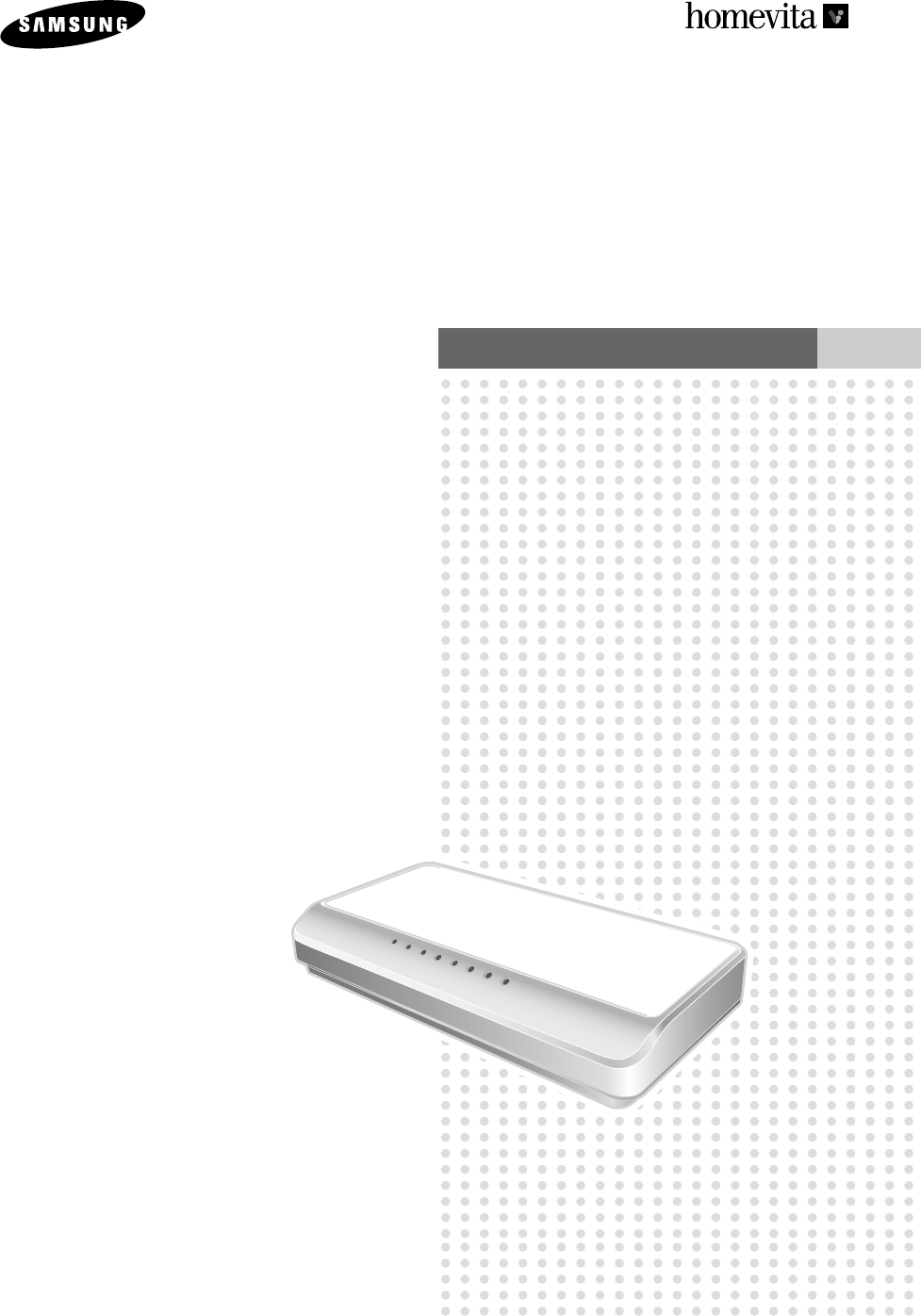
Home Gateway
HHG-3004H2
User’s Manual
ELECTRONICS
RUN WAN
LAN1
LAN2
LAN3
LAN4
PLC
RF
HHG-3004H2(16~21) 12/28/05 2:19 PM Page 21

HHG-3004H2(02~15) 12/28/05 2:18 PM Page 2
3
Features of the Home Gateway
Safety Instructions
Product Overview
Product Specifications
5
6
12
14
Introduction
1
Others
2
Maintenance and Troubleshooting
Glossary
FCC Notices
17
18
19
Table of Contents
HHG-3004H2(02~15) 12/28/05 2:18 PM Page 3
4
HOME GATEWAY
SYSTEM
Page 5
Introduction
The Home Gateway is a home network controller using diverse technologies such as Ethernet,
power line communication and RF communication. In addition to providing high speed Internet for
computer and information communication devices, it also monitors and controls the status of
electronic appliances (Light switch, Thermostat, Plug-in Adaptor and etc,).
PART 1
RUN WAN
LAN1
LAN2
LAN3
LAN4
PLC
RF
Page 6
Page 12
Page 14
Features of the Home Gateway
Safety Instructions
Product Overview
Product Specifications
HHG-3004H2(02~15) 12/28/05 2:18 PM Page 4
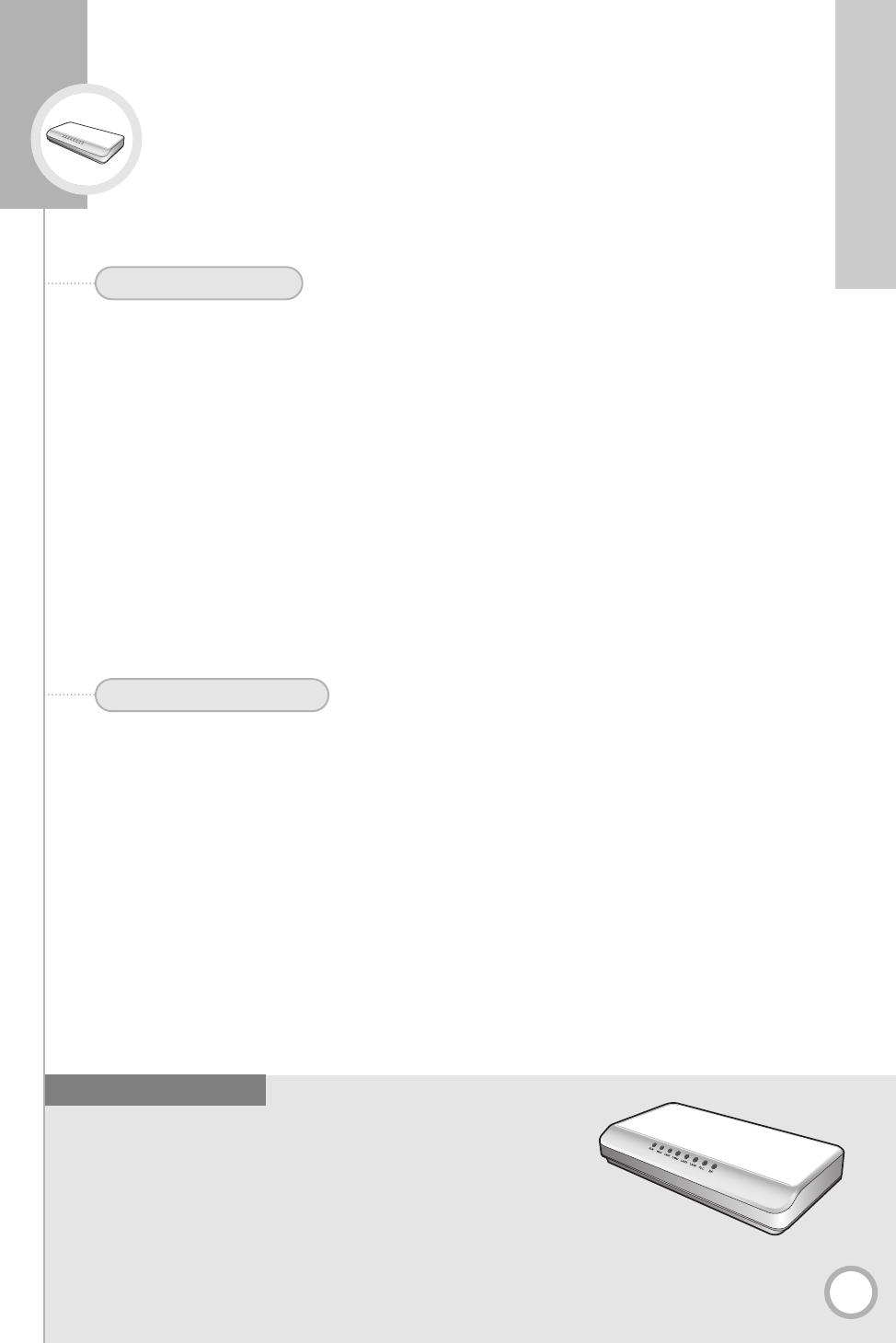
■4 Port Fast Ethernet Router
■External ADSL/Cable modem support (PPPoE)
■Very High Speed Data Communication
■Remote Web-based Access and Management
■Home device control using Power Line Communication (PLC/LonWorks)
■Home device control using RF communication
Features of the Home Gateway
5
PART 1. Introduction
◗
Diverse Applications
The Home Gateway provides connectivity across various network platforms, including
Ethernet, Power Line Control, and RF. Through its built-in web server, it provides an easy to
use interface enabling device monitoring and control. The homevita software also enables
automation, scheduling, and other advanced features providing easy and convenient control of
everyday tasks.
The Home Gateway enables Internet connectivity and sharing through standard TCP/IP
routing, Networking and AC power line communication using an Internet connection with
external ADSL or Cable modem.
◗
Remote Web-based Management
When connected to Broadband Internet, the Home Gateway offers remote access from almost
any Internet enabled computer. This allows users to securely log in to the home gateway when
away from home, and monitor and control their homevita system.
1. Main Features
◗
PLC (Power line communication) Home Device Control
The Home Gateway enables you to monitor and control various PLC devices such as
light switches.
◗
Internet Access from IT devices including PC
The Home Gateway enables you to access the Internet from multiple IT devices at the
same time.
◗
RF Home Appliances Control
The Home Gateway enables you to monitor and control the status of various RF electronic
devices including your home Thermostat.
2. Various Services
Main Features
✻
PLC (Power Line Communication) is a wire line technology that uses the AC wiring in your home for data transmission.
HHG-3004H2(02~15) 12/28/05 2:18 PM Page 5
6
Safety Instructions
• Please make sure that you read and follow all safety instructions described in this manual.
• This product is installed and managed by authorized installation personnel, so please consult the
installing dealer if there is any problem.
Caution
Please check the following items on the power supply system in order to prevent
electric shock accident.
Instructions on power supply cord
■
Only use the AC adapter provided with the product.
■
The power cord should meet the AC voltage standard of the region it will be used in.
■
The power cord, including the cable and the plugs at either end, must be rated to 150% of the
electricity supplied by the power source.
■
The power cord must be approved by the safety regulatory of the region it will be used in.
■
The power cord plug should be plugged into an IEC Female connector.
■
The power cord is the main device used to cut AC power. It should be installed in an easy to reach
place near the device in case the power cord needs to be unplugged.
Caution
Only a service person should open the product because the internal part of the
product can cause electric shock and system malfunction. Unplug the AC power cord
before opening the product.
Caution
The system power cord must be plugged into a properly grounded outlet to prevent
electric shock. Ensure that it is plugged into a grounded outlet.
Instructions before installing
■
Cut off the power sources of all the peripheral devices connected to the product.
■
Unplug the power cord to turn the power off.
■
Label each cable and communication line connected to I/O connector at the back of the product in
order to identify them, and then pull them out of the connector.
■
Do not attempt to repair any part of the power supply on your own. Contact your dealer if you
believe that it requires repair or maintenence.
Description of Safety Symbol
If the instructions are not followed, user may be injured, property
damage may occur or the product may not function properly.
If the instructions are not followed, user may be fatally injured or
seriously wounded.
Warning
Caution
HHG-3004H2(02~15) 12/28/05 2:18 PM Page 6
7
PART 1. Introduction
Warning
Do not install the product in locations with high humidity. It may result in a risk of
electric shock. Use the product within the operational humidity range specified in
the manual.
Caution
Keep plastic packaging away from children.
Instructions when installing
Warning
When installing the product, check the following before selecting the location.
■
Air is clean.
■
Proper ventilation is provided.
■
Not in direct sunlight, or near heat sources.
■
There is no vibration or physical shock.
■
Well away from electric devices causing strong electromagnetic radiation.
■
Outlet is properly grounded.
■
Enough space to reach power cords.
■
In areas where severe thunderstorm might occur, connect the system to a circuit breaker and
separate the communication lines from the modem.
■
If they wear the plastic package on their heads, they can suffocate.
Caution
Do not block any of the product's ports or vents. Do not put any object inside the
product.
■
If ports or vents are blocked with any material, internal parts of the product can be damaged and
result in a risk of fire or electric shock.
HHG-3004H2(02~15) 12/28/05 2:18 PM Page 7
8
Safety Instructions (continued)
Warning
Do not touch the power source plug with wet hands.
Instructions for connecting the power source
■
There is a risk of electric shock.
Warning
Connect power source directly to the outlet.
■
Otherwise it may result in a risk of fire.
Warning
Do not use a damaged or loose power source plug, cord or outlet.
■
It may result in a risk of fire.
Warning
When unplugging the power source, ensure you hold the plug.
■
If you pull the power cord, it can be damaged and result in a risk of fire or electric shock.
Warning
If there is any noise from the power source plug or the outlet, unplug the power
source and contact your dealer.
■
If the power source is left plugged in, it may result in a risk of electric shock and fire.
Warning
Do not bend the power cord and ensure it is not placed under a heavy object.
■
If the power source is left plugged in when the cord is damaged, it may result in a risk of electric
shock and fire.
Warning
When using multi-outlet extension cord, do not exceed the rating specifications
(voltage/current) of the extension cord.
■
If exceeding the rating of the extension cord, it may result in a risk of fire.
Warning
If water or other substances get inside the power source or the system, unplug the
power source and contact your dealer.
■
It may result in a risk of fire.
Warning
If the power source plug/outlet are covered with dust, clean them.
■
It may result in a risk of fire.
Warning
Plug the power source to an outlet with a grounding terminal.
■
Not using an outlet with a grounding terminal may result in a risk of electric shock.
HHG-3004H2(02~15) 12/28/05 2:18 PM Page 8
9
PART 1. Introduction
Warning
When cleaning the product, make sure that you unplug all the power source cables
before cleaning.
Instructions for using Home Gateway
■
It may result in a risk of electric shock.
Caution
Do not place candle, cigarette or other flame/heat source on or near the product.
■
Candles and cigarettes may result in a risk of fire.
Caution
Connectors or ports should be connected to designated devices only.
■
If undesignated devices are connected, it may result in a risk of electric shock and fire.
Warning
Do not place cup or any container filled with chemical or water on or near the product.
■
If chemical or other substances leak inside of the product, it can cause parts to be damaged and
result in a risk of electric shock and fire.
Warning
Do not expose the product to direct sunlight.
■
In particular, if the product is exposed to direct sunlight in an airtight space such as in a car, the
inside temperature of the product increases and it can cause its shape to be deformed or it may
result in a risk of fire.
Warning
If the product is dropped or broken due to any other reasons, disconnect the power
and have it checked by your dealer.
■
When using a damaged product, it may result in a risk of electric shock and fire.
Caution
When using the product with a modem connected, make sure you separate the power
cord from the modem and do not use the modem during a thunderstorm.
■
If the product is used with a modem during a thunderstorm, there is an increased risk of fire.
Caution
When attaching additional parts to the product or removing parts attached
separately, read and follow the instructions in the manual carefully.
Caution
When cleaning the product, only use a cleaner specified for computer cleaning.
Remove power to the product prior to cleaning. Reconnect power only after the
cleaner has completely dried.
■
When the product is activated without being dried completely, it may result in a risk of electric and fire.
Caution
If there is any unusual smell, stop using the product, separate the power source
plug and all other connected lines and call your dealer.
■
It may result in a risk of fire.
HHG-3004H2(02~15) 12/28/05 2:18 PM Page 9
10
Safety Instructions (continued)
Caution
Function extension and maintenance of the product must be entrusted to the service
personnel.
Instructions on function extension and maintenance
■
If you attempt to repair the product, it can injure you or cause system malfunction.
Caution
If you want to connect any other peripheral device to the product other than those
recommended by Samsung Electronics, contact your dealer first.
■
If you connect peripheral devices other than those recommended by Samsung, the product itself or
the peripheral devices might get damaged.
HHG-3004H2(02~15) 12/28/05 2:18 PM Page 10
11
PART 1. Introduction
Other instructions
Caution
Do not lift or move the product with the handle on the power supply.
Warning
Do not use the product in high humidity or heavy vapor.
■
You should use within the temperature and humidity specified in the manual.
Caution
When moving the product, you must first turn off the product and separate all cables
from the product.
Warning
Do not attempt repairing the power supply on your own. If there is any problem in the
power supply, contact your dealer.
Use only the AC Adapter that came with the product, and is specified in this manual.
Warning
Before removing power from the product, unplug power from each of the devices
connected to the product.
Warning
Note that electric current flowing from the power source, telephone and
communication cable is dangerous.
Warning
Do not connect, release or install cable to the product during a fire, flood or
thunderstorm.
HHG-3004H2(02~15) 12/28/05 2:18 PM Page 11
12
Product Overview
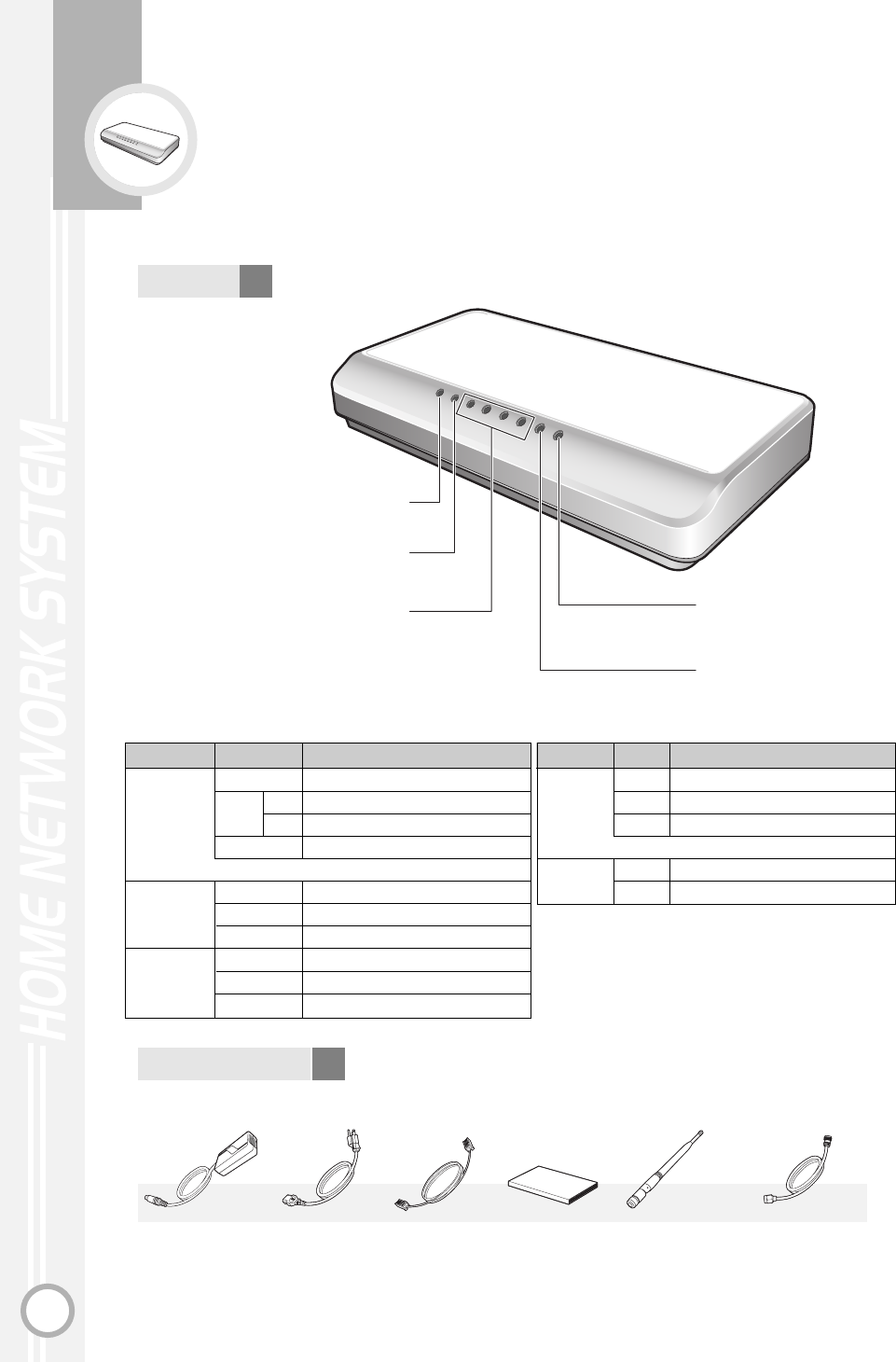
RUN WAN
LAN1
LAN2
LAN3
LAN4
PLC
RF
Functions of LED
Front
LED
RUN
WAN
LAN 1 2 3 4
State
ON
BLINK rapid
slow
OFF
ON
BLINK
OFF
ON
BLINK
OFF
Indicates ON and OFF state of the Home Gateway.
Indicates the Internet connection and
communication state.
Indicates LAN connection and
communication state.
Indicates RF data communication
state.
PLC communication state.
Functions
Abnormal state. i.e., this machine is out of order.
Initial power on state
Normal operaion
No Power, or Abnormal State
Normal linked state
Data transimission
Not connected state
Normal linked state
Data transimission
Not connected state
✻ In normal state, the LED should slowly blink periodocally (beginning a few seconds after unit is turned on.)
LED
PLC
RF
State
ON
BLINK
OFF
ON
OFF
Functions
Initial power on state
Normal operation
Abnormal state
Initial power on state
Norma state
✻
In normal state, the LED should blink periodocally (beginning about 1minute after unit is turned on.)
AC Adapter (1)
GL44-00048A
RUN LED
WAN LED
LAN 1 2 3 4 LEDs RF LED
PLC LED
LAN cable (1)
GL39-00095A
Manual (1)
GL68-00196A
Accessories
Power cord (1)
GL39-00094A
RF antenna (1)
EW92-00007A
RF extension cable (1)
EW92-00008A
HHG-3004H2(02~15) 12/28/05 2:18 PM Page 12
Equipment required for installation
13
PART 1. Introduction
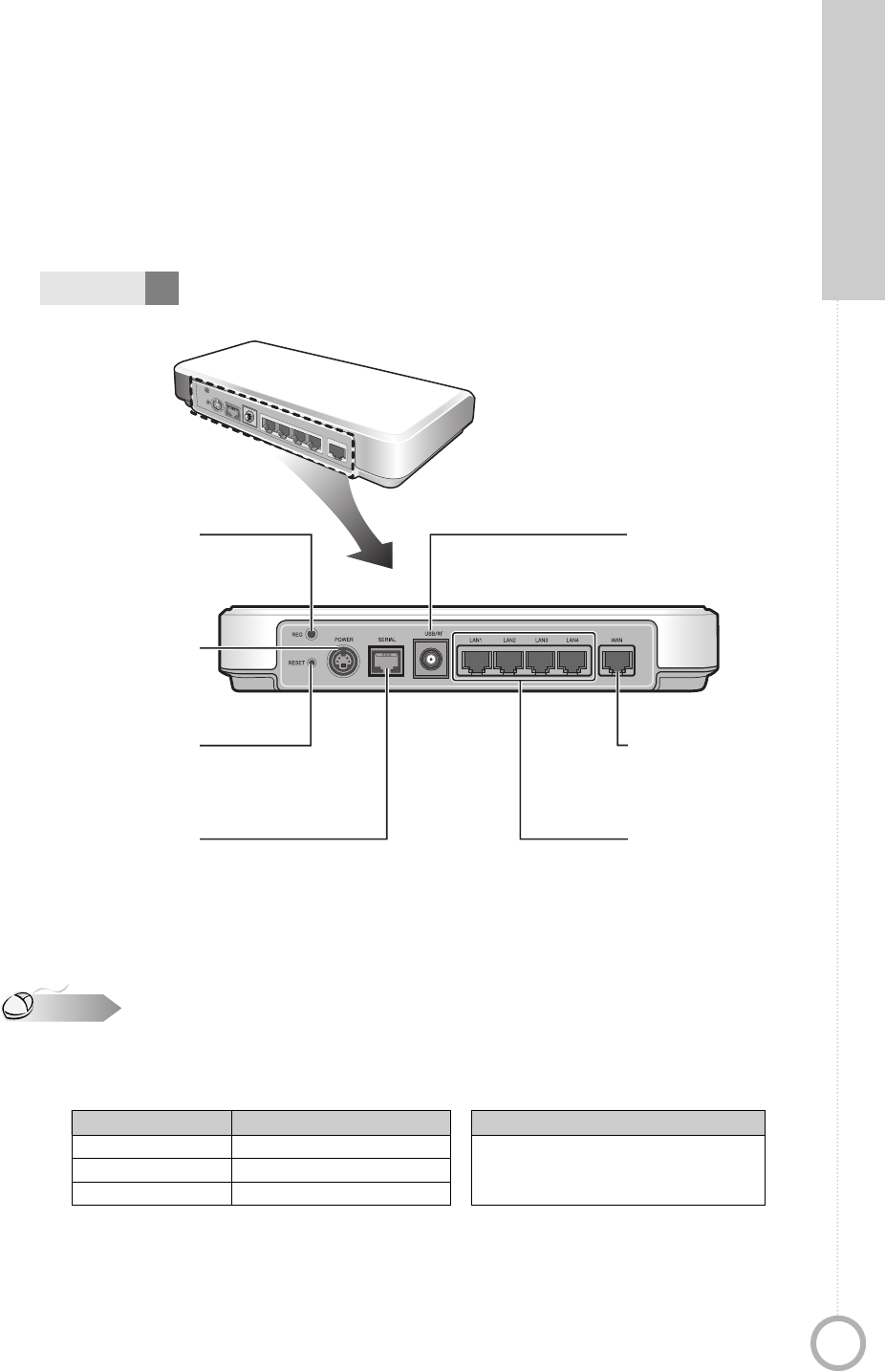
For Service Use Only
REG
Jack for connecting
the power source cable.
POWER
This button, when pressed,
resets the product to the
factory default settings.
RESET
For Service Use Only
SERIAL
RJ-45 jack for connecting
UTP cable for WAN
connectivity.
WAN
Connector for RF antenna.
USB/RF
RJ-45 jacks for LAN
connectivity.
LAN 1 2 3 4
Cable Ports
SERIAL/WAN
LAN 1 2 3 4
DC IN
UTP-5 cable
STP Cable
Power source cable
Antistatic strap
Cables to connect to each port
LAN cable
Computer equipped with an Ethernet card.
●
Check the package carefully for any missing or damaged parts. Contact you dealer to replace or
exchange them.
●
Cables that are connected to each port are shown in the table below.
●
UTP5 cable (UTP category 5 cabling), STP5 cable (STP category 5 cabling)
The cable types defined by the EIA/TIA-586 standard to support ethernet connection.
Category 5 cabling guarantees maximum 100 Mbps data transimission.
✻
UTP (unshielded twisted pair) , STP (shielded twisted pair)
Note
POWER
RESET
REG
USB
SERIAL
WAN
LAN1 LAN2 LAN3 LAN4
Back
HHG-3004H2(02~15) 12/28/05 2:18 PM Page 13
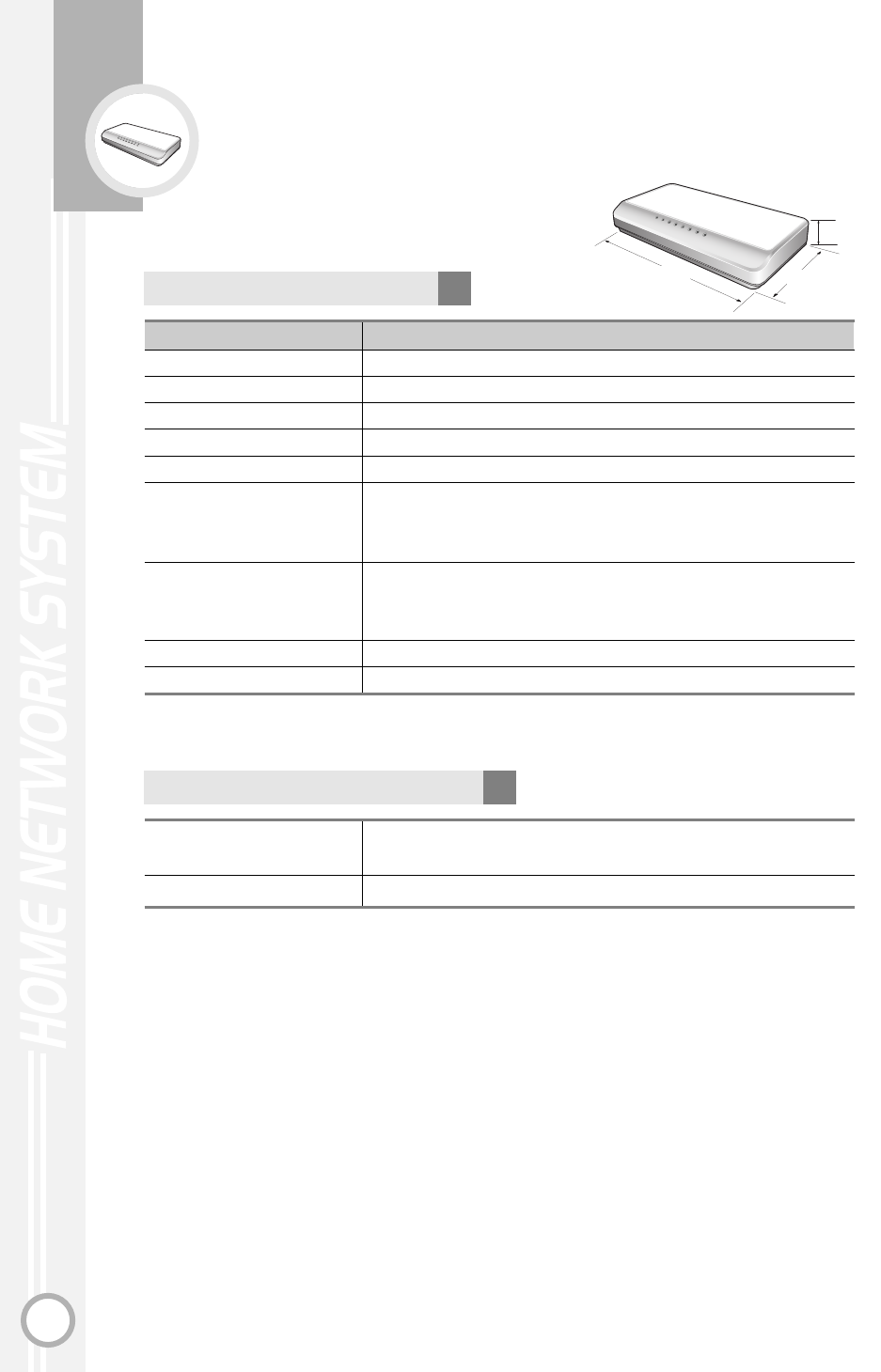
14
Product Specifications
Items Specifications
Fast Ethernet
Serial
Networking
PLC
RF
Power Source
Temperature and Humidity
Size (LxWxH)
Weight
10/100Base-T/Tx IEEE802.3 CSMA/CD compliant
RS-232C console port (For Service Use Only)
TCP/IP, DHCP Server/Client, NAT
Lonworks/Echelon
IEEE 802.15.4
Power Source : 110-220VAC
Frequency : 50Hz/60Hz
Power Consumption : 7W
Operation Temperature : 32˚F~104˚F
Storage Temperature : 32˚F~158˚F
Humidity : 0~90%
9 x 4.7 x 1.78 inches (230 x 120 x 45 mm)
24.7oz (700g)
Product Specifications
RUNWAN
LAN1
LAN2
LAN3
LAN4
PLC
RF
4.7 inch
9 inch
1.78 inch
Fast Ethernet
Serial
WAN : 1 port
LAN : 4 port
Port 1 : RS-232C
Maximum Number of Ports
HHG-3004H2(02~15) 12/28/05 2:18 PM Page 14
Main Control Unit Board
Memory
Serial/HA Interface
Ethernet LAN Switch
WAN
CPU Interface
Specification
Specification
15
PART 1. Introduction
Board Items
CPU S3C2510A, 166MHz, SAMSUNG
Flash Memory
– Boot Rom(512KB), Program Rom(16MB)
SDRAM
– 64MB
RS-232C/RS-485
– For console or HA connection
– IEEE 802.3 CSMA/CD compliant
– 4 port 10/100Base-T/Tx
– IEEE 802.3 CSMA/CD compliant
– 1 port 10/100Base-T/Tx
– Able to connect ADSL/Cable Modem
UART
LonWorks
– Data rates : 5.4Kbps
– Nodes : 127 nodes in a subnet
– Bandwidth : 132KHz, 115KHz
IEEE 802.15.4
– Data rates : 250Kbps
– Rated Output Power : 4 dBm
– Operating frequency : 2405~2475MHz
Specifications
Mother Board
PLC Board
(Power Line Communication)
RF Board
Board Types built on Home Gateway
HHG-3004H2(02~15) 12/28/05 2:18 PM Page 15
16
HOME GATEWAY
SYSTEM
Page 17
Others
Refer to this section for solutions to problems that can occur while using the Home Gateway.
PART 2
RUN WAN
LAN1
LAN2
LAN3
LAN4
PLC
RF
Page 18
Page 19
Maintenance and Troubleshooting
Glossary
FCC Notices
HHG-3004H2(16~21) 12/28/05 2:19 PM Page 16
17
PART 2. Others
Maintenance and Troubleshooting
Users must not attempt to remove the cover or disassemble the product.
Service must only be conducted by your dealer. If the device does not
work normally during operation, contact your dealer.
System
Power Source
related
problem
Power Source of
Home Gateway is
down.
➤➤➤
Ensure that the power cord is properly
plugged. In particular, the system connections
and the outlet part of the power source
should be checked.
Operation
related
problem
Home Network
does not work
properly.
➤➤➤Unplug the power cord and plug it in again.
Caution
HHG-3004H2(16~21) 12/28/05 2:19 PM Page 17
18
Glossary
Terms Descriptions
ADSL
ANT.
AP
CO
CSMA/CD
DHCP
DNS
DSLAM
ESP
FTP
GND
HA
HTTP
LAN
MCU
PLC
PPPoE
PSTN
SMS
TCP/IP
USB
UTP
WAN
Asymmetric Digital Subscriber Line
Antenna
Access Point
Central Office
Carrier Sense Multiple Access/Collision Detect
Dynamic Host Configuration Protocol
Domain Name System
Digital Subscriber Line Access Multiplexer
Encapsulating Security Payload
File Transfer Protocol
Ground
Home Automation
Hypertext Transfer Protocol
Local Area Network
Main Control Unit
Power Line Communication
Point-to-Point Protocol Over Ethernet
Public Switched Telephone Network
Short Message Service
Transmission Control Protocol/Internet Protocol
Universal Serial Bus
Unshielded Twisted Pair
Wide Area Network
HHG-3004H2(16~21) 12/28/05 2:19 PM Page 18

19
PART 2. Others
FCC Notices
➤
C
AUTION
Any changes or modifications in construction of this device which are not
expressly approved by the party responsible for compliance could void the
user's authority to operate the equipment.
This device complies with Part 15 of the FCC Rules. Operation is subject to
the following two conditions:
- This device may not cause harmful interference.
- This device must accept any interference received, including interference that
may cause undesired operation.
➤
INFORMATION TO THE USER
This equipment has been tested and found to comply with the limits for a
Class B digital device pursuant to Part 15 of the FCC Rules. These limits are
designed to provide reasonable protection against harmful interference in a
residential installation. This equipment generates, uses, and can radiate radio
frequency energy and, if not installed and used in accordance with the
manufacturer's instruction manual, may cause interference with radio
communications. However, there is no guarantee that interference will not
occur in a particular installation. If this equipment does cause harmful
interference to radio or television reception, which can be determined by
turning the equipment off and on, you are encouraged to try to correct the
interference by one or more of the following measures:
- Reorient or relocate the receiving antenna.
- Increase the separation between the equipment and the receiver.
- Connect the equipment into an outlet on a circuit different from that to which the
receiver is connected.
- Consult the dealer or an experienced radio/television technician for help.
➤
N
OTE
To comply with FCC requirements in section 1.1307, a minimum separation
distance of 1cm is required between the antenna and all persons.
HHG-3004H2(16~21) 12/28/05 2:19 PM Page 19

SAMSUNG CUSTOMER CARE CENTER
400 Valley Road, Suite 201, Mt. Arlington, NJ 07856
HHG-3004H2(16~21) 12/28/05 2:19 PM Page 20