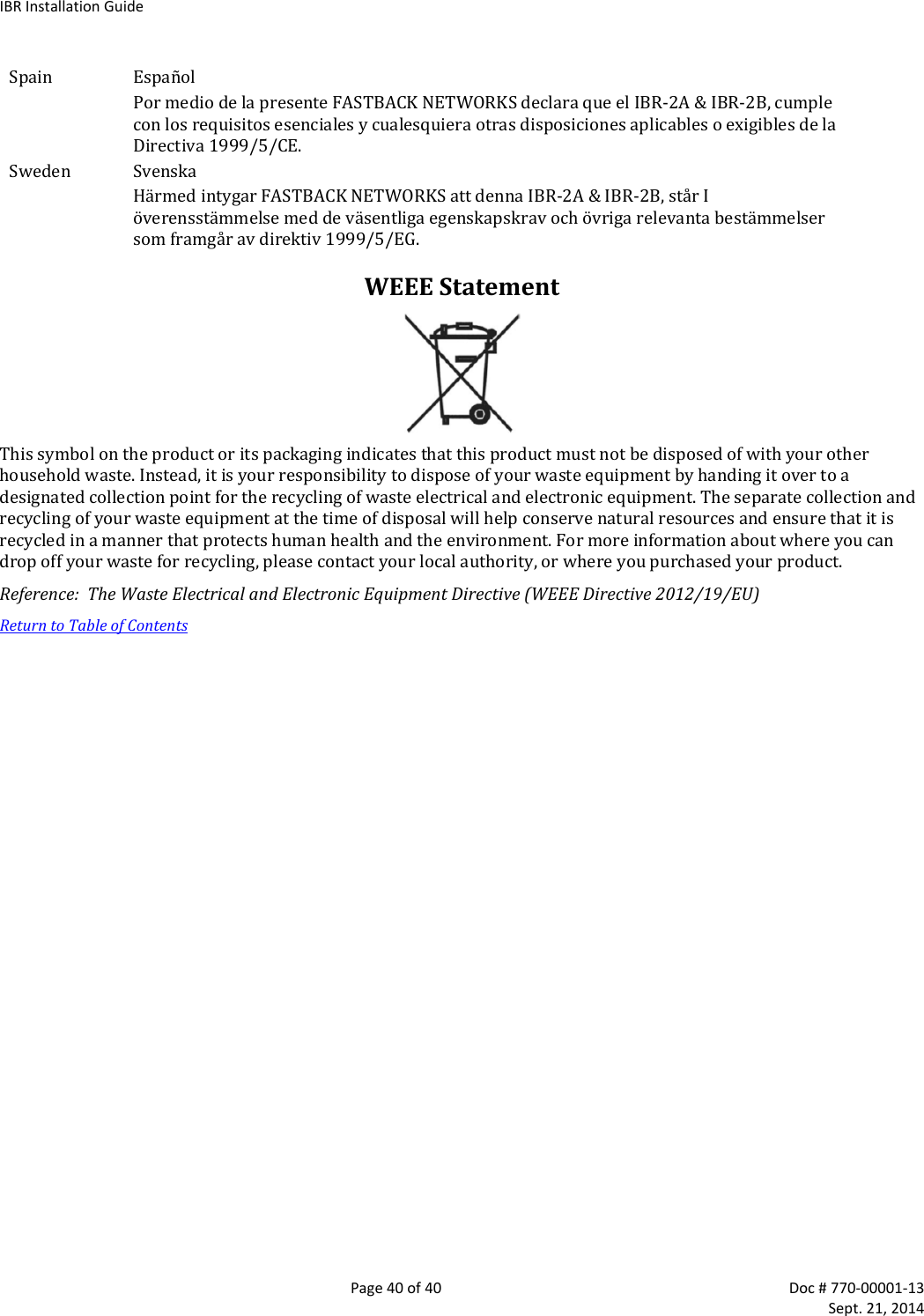
Skyline Partners Technology Fastback Networks 101 Intelligent Backhaul Radio ISM 5.8GHz band User Manual Installation manual
CBF Networks, Inc., dba Fastback Networks Intelligent Backhaul Radio ISM 5.8GHz band Installation manual
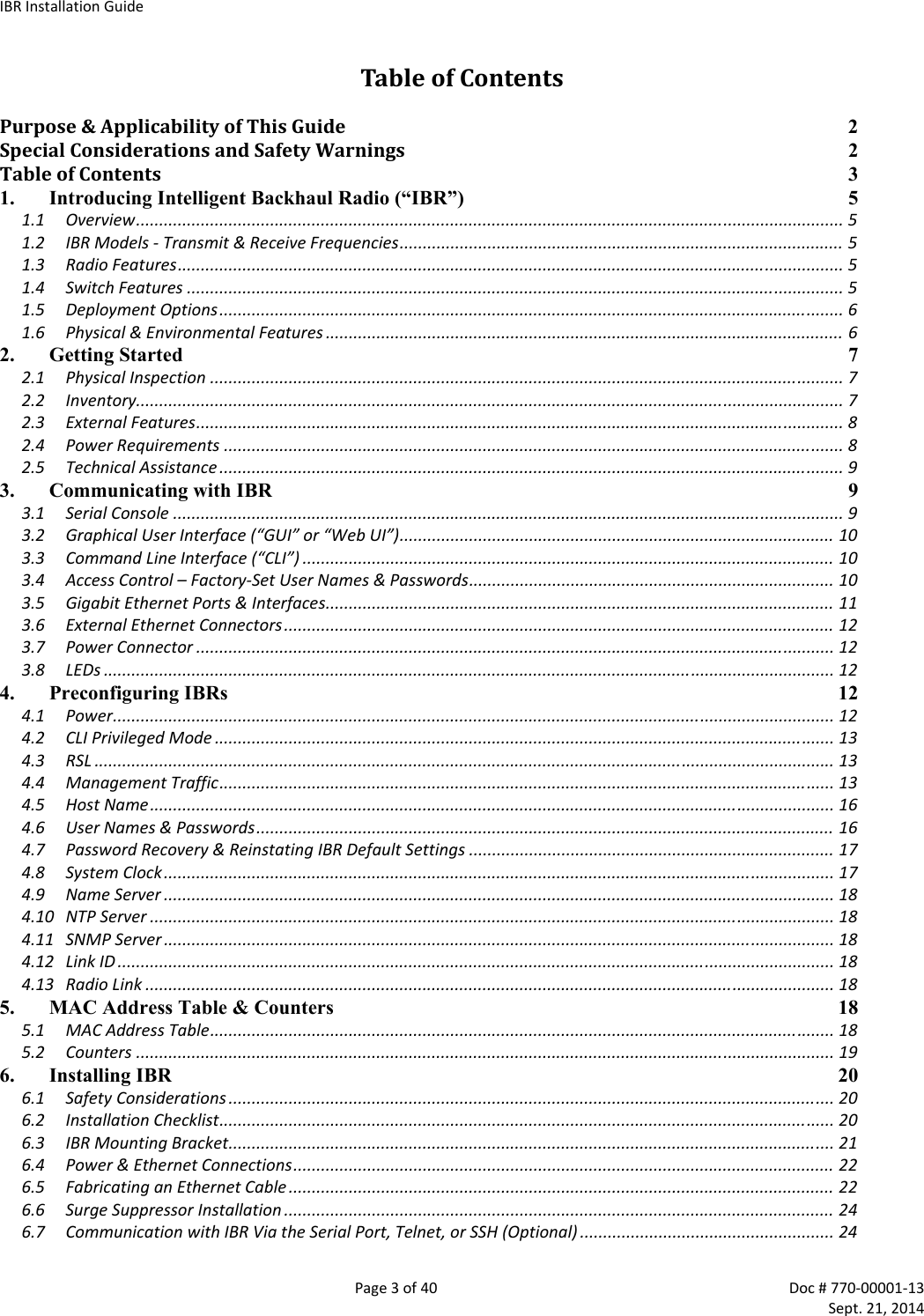
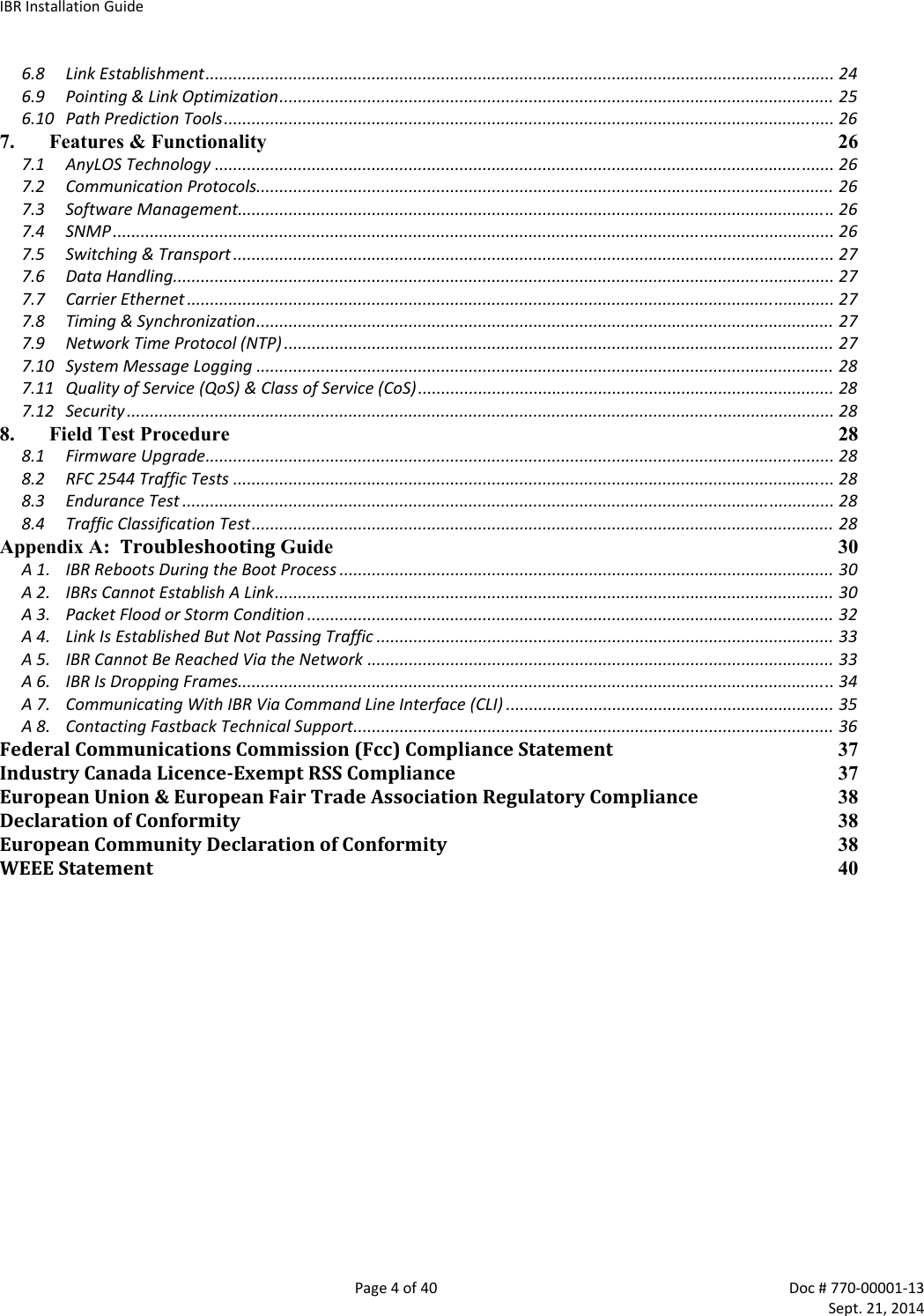
Contents
- 1. Install Guide
- 2. Installation manual
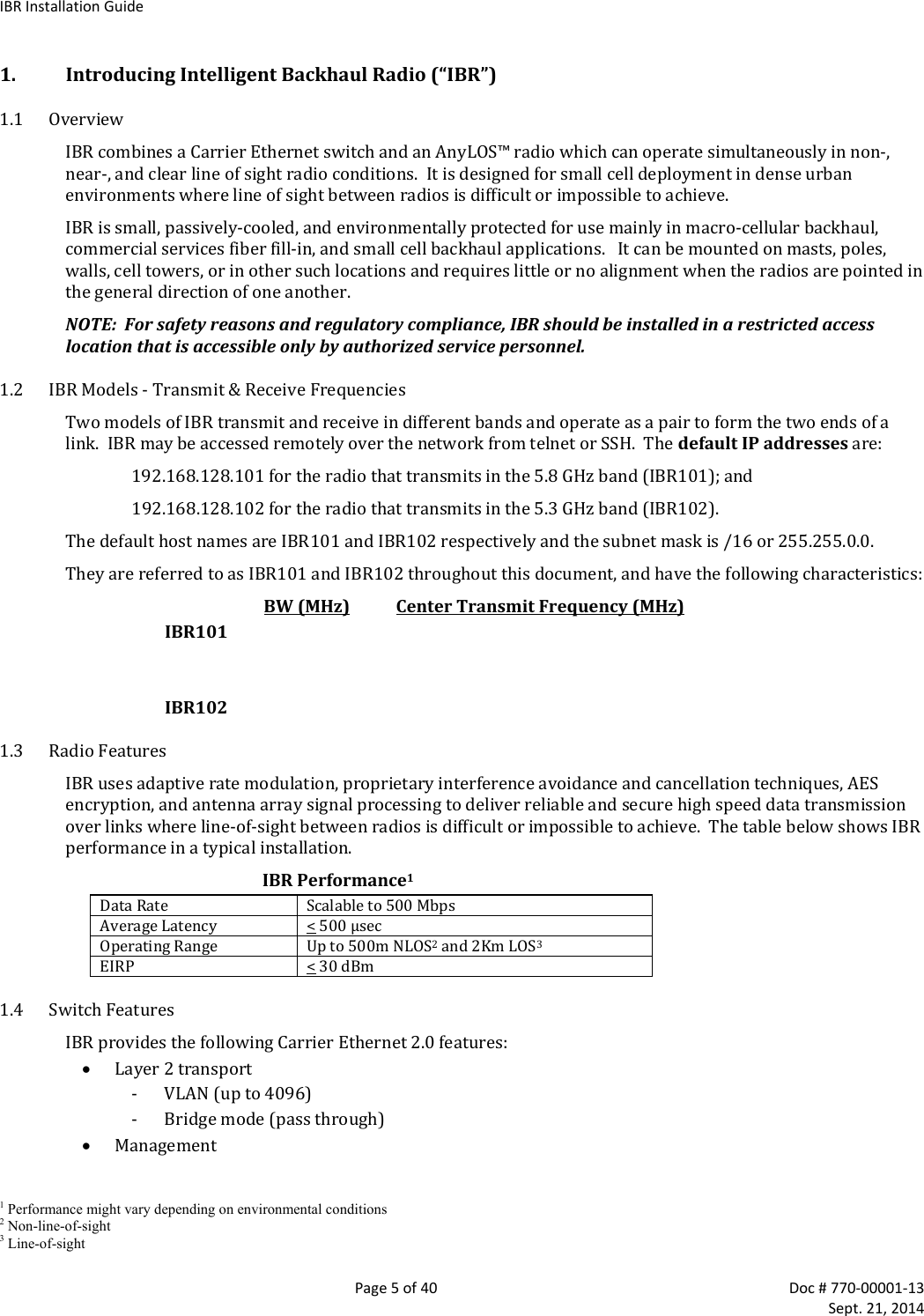
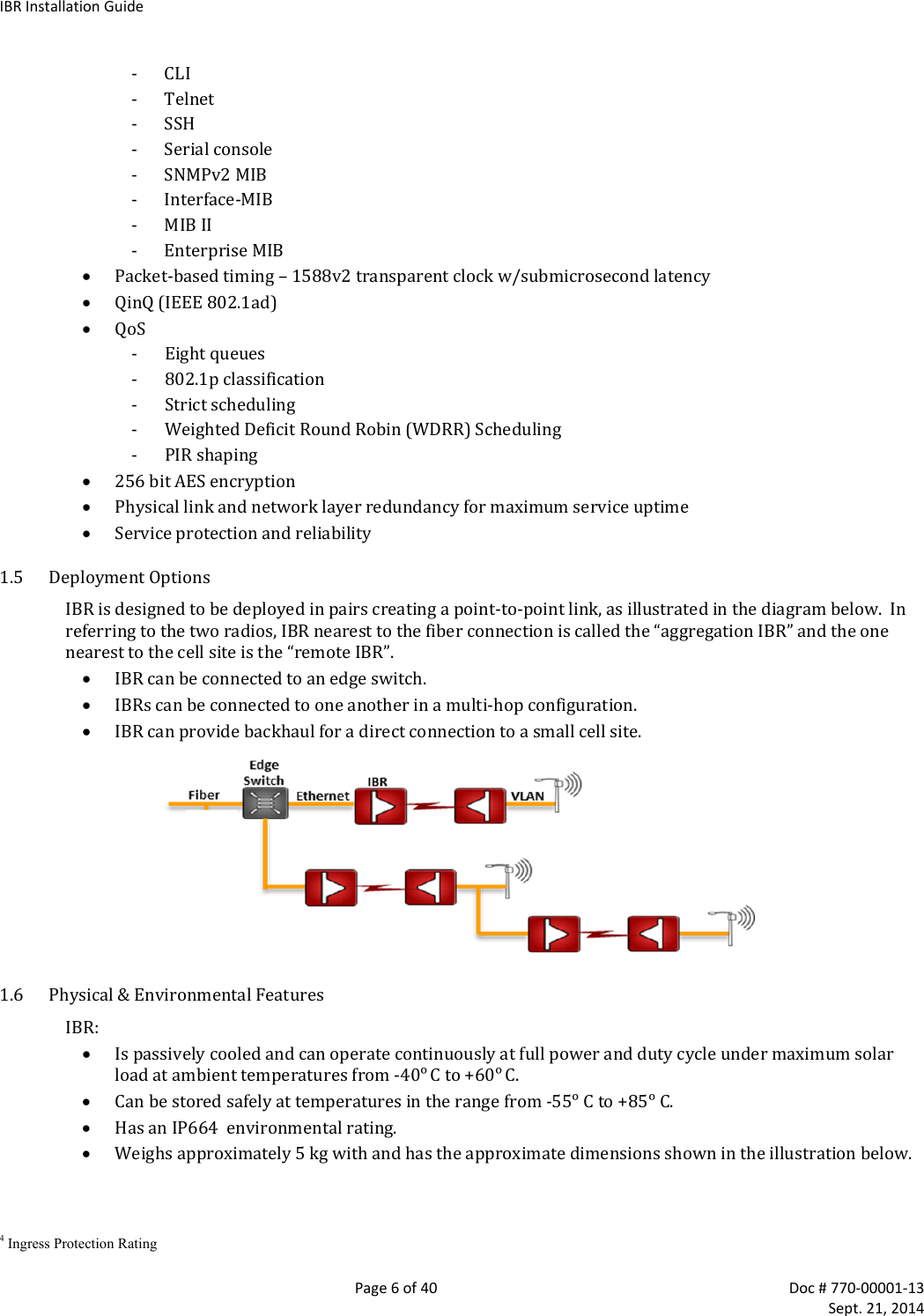
Installation manual
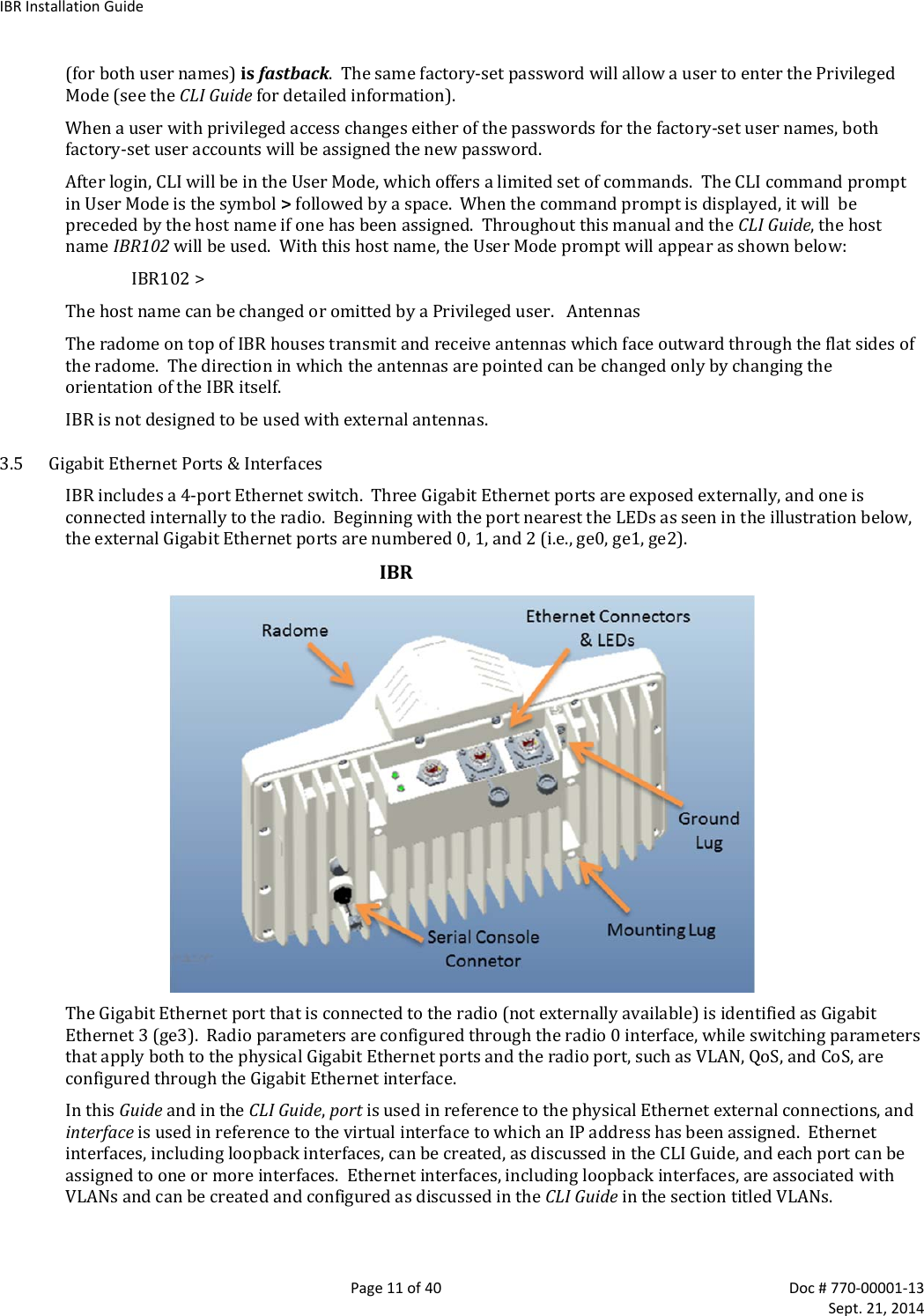
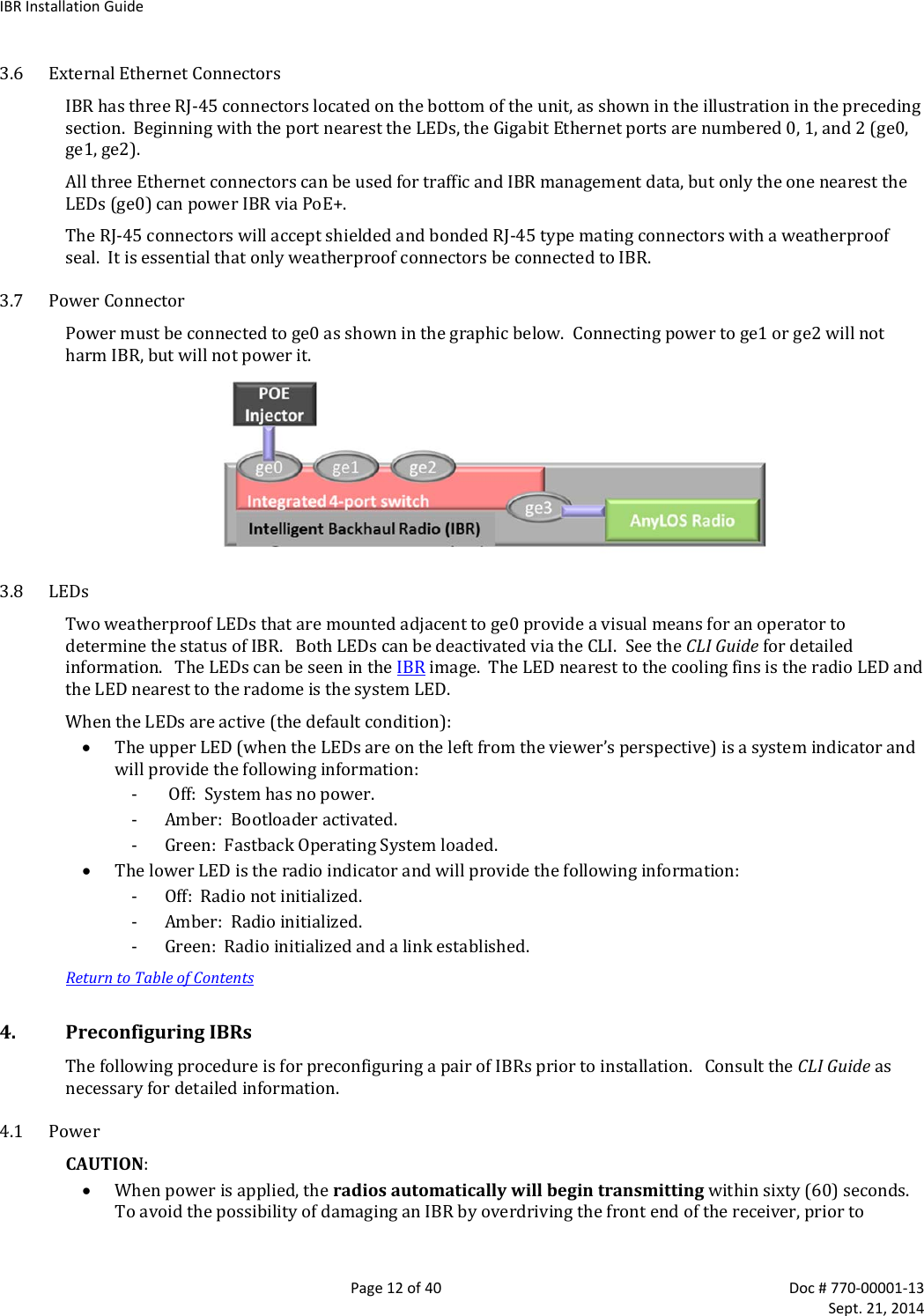
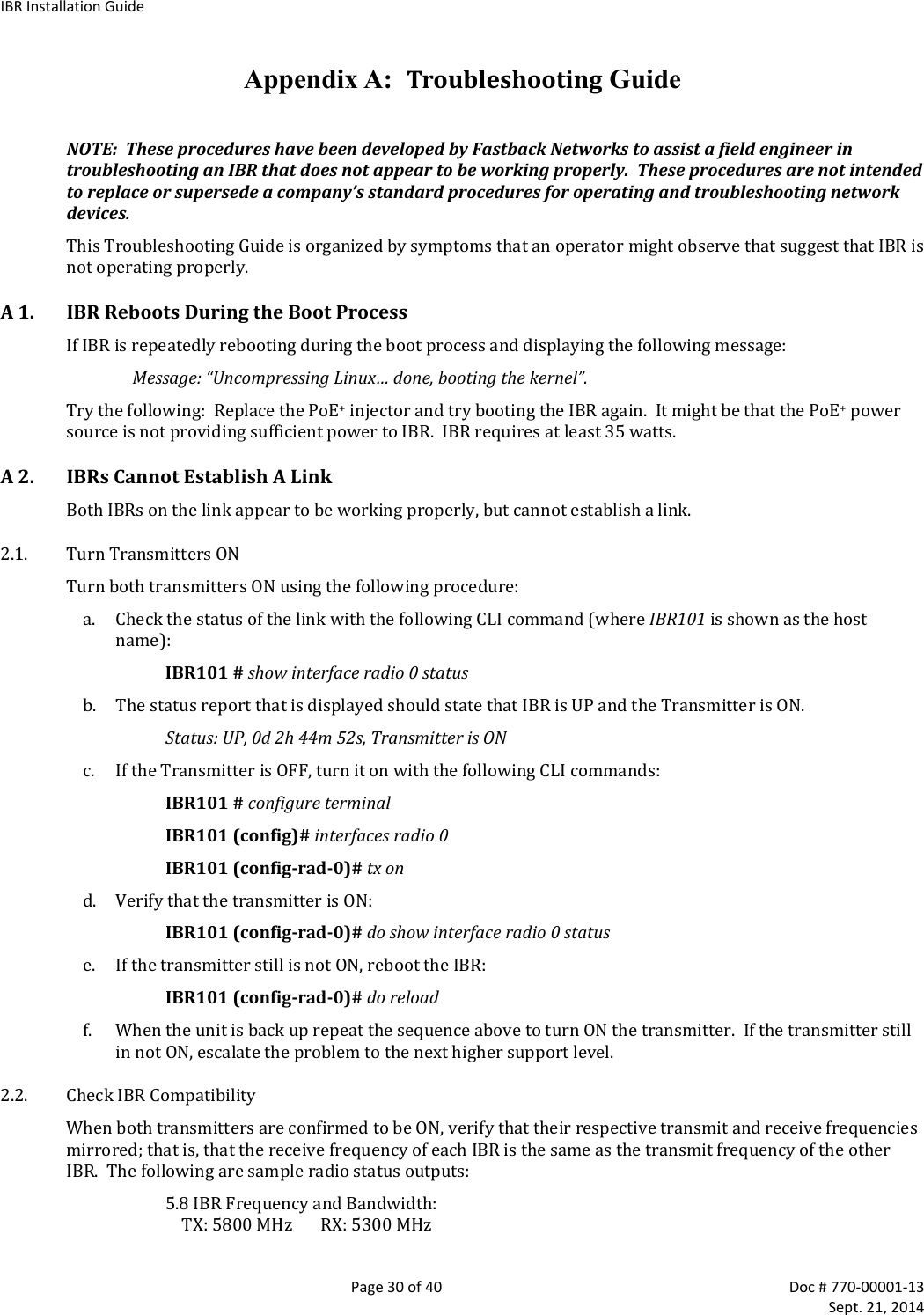
![IBRInstallationGuidePage13of40Doc#770‐00001‐13 Sept.21,2014connectingapowersource,positionthetwoIBRssothattheyaretiltedawayfromeachother,facingdownward,andseparatedbyatleastonemeter. IBRdoesnothaveapoweron/offswitch,eitherinhardwareorsoftware.Whenpowerisappliedtotheunit,IBRwillbeina“poweron”conditionandthesystemLEDbesidethege0portconnectorwillbeilluminated.ApplypowertoeachIBRusingaPoE+sourceconnectedtoGigabitEthernetinterface0.AlthoughPoE+sourcescanbeappliedharmlesslytoanyport,onlyge0canbeusedtopowerIBR.4.2 CLIPrivilegedModeEnterPrivilegedmodebyenteringtheenablecommand:IBR102>enableThefactory‐setpasswordforenteringPrivilegedmodeisfastback.ThePrivilegedModecommandprompt,withIBR102ashostnamewillbe: IBR102#ThefollowingCLIcommandsareavailableinPrivilegedmode.PrivilegedModeCommandsCommandDescriptionIBR102# ! Commentsclear Resetfunctionsalarms Clearalarmhistoryconfig Resettofactorydefaultscounters Clearcountersononeorallinterfacesconfigureterminal EnterGlobalConfigmodetomanagedeviceparameterscopy Copyafile(e.g.,running‐config)ethernet Ethernetsubcommandsexit ReturntoUserModeping[string] Sendmessagestonetworkhosts[hostnameorIPaddress]reload Halt&performacoldrestartshow Showrunningsysteminfo(seeCLIGuideforacompletelistofshowcmds)telnetIPaddressorhostnameofaremotesystemtraceroute PrinttheroutepacketstracetonetworkhostipIPv4ipv6IPv6[string]HostnameorIPaddresstotracetherouteupgradeUpgradecommandshttpUpgradehttp(enterA.B.C.D[/mask]oranyhttpserverIPaddress)sftpUpgradesftp(enterA.B.C.D[/mask]oranysftpserverIPaddress)tftpUpgradetftp(enterA.B.C.D[/mask]oranytftpserverIPaddress)ForadetaileddiscussionofCLIcommands,refertotheCLIGuide.4.3 RSLChecktheRSLoneachIBRusingthefollowingCLIcommandinthePrivilegedmode:IBR102#showinterfaceradio0statusRSLshouldbe‐36dBmorless.IfRSLisgreaterthan‐36dBm(e.g.,‐30dBm)oneitherIBR,thereceivedsignallevelistoohighandgreaterseparationoftheIBRsisrecommendedtoavoidreceiversaturation.4.4 ManagementTrafficIBRinterfacesshouldbeconfiguredinsuchawayastoseparateinternalmanagementtrafficfromuserdatatraffic(i.e.,preventmanagementtrafficfrombeingsentoverthenetwork).Thefollowingsequenceof](https://usermanual.wiki/Skyline-Partners-Technology-Fastback-Networks/101.Installation-manual/User-Guide-2405418-Page-13.png)
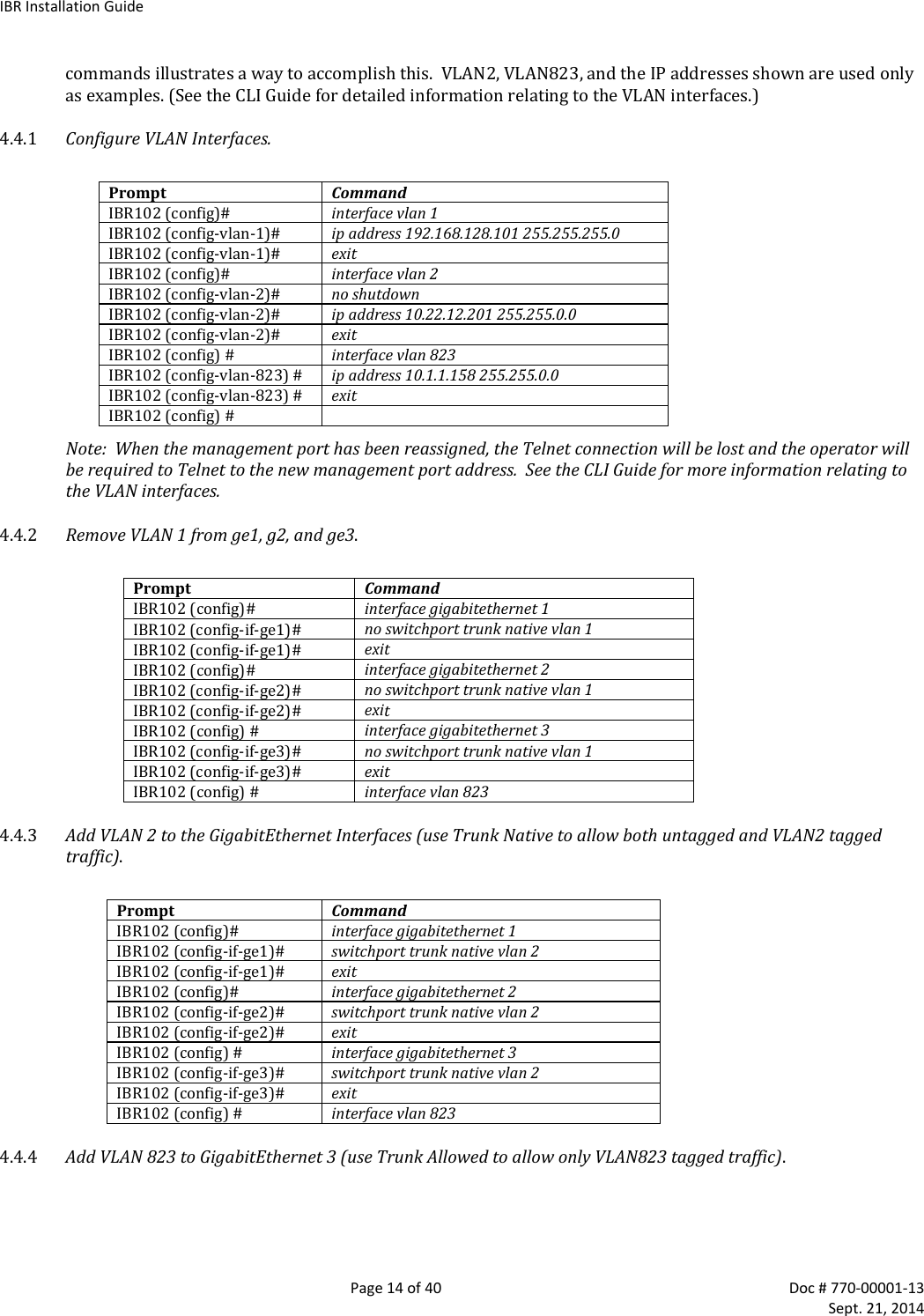
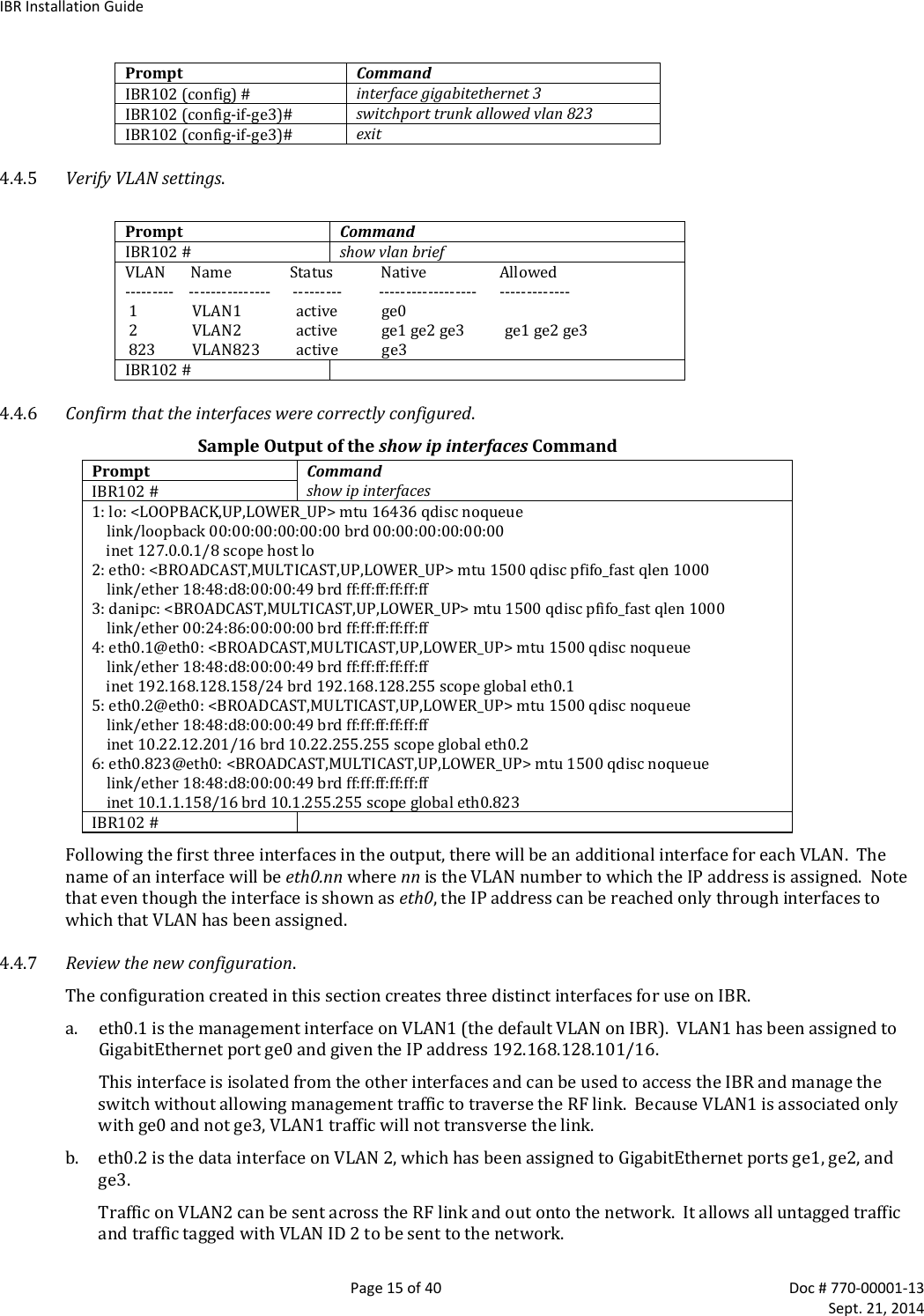
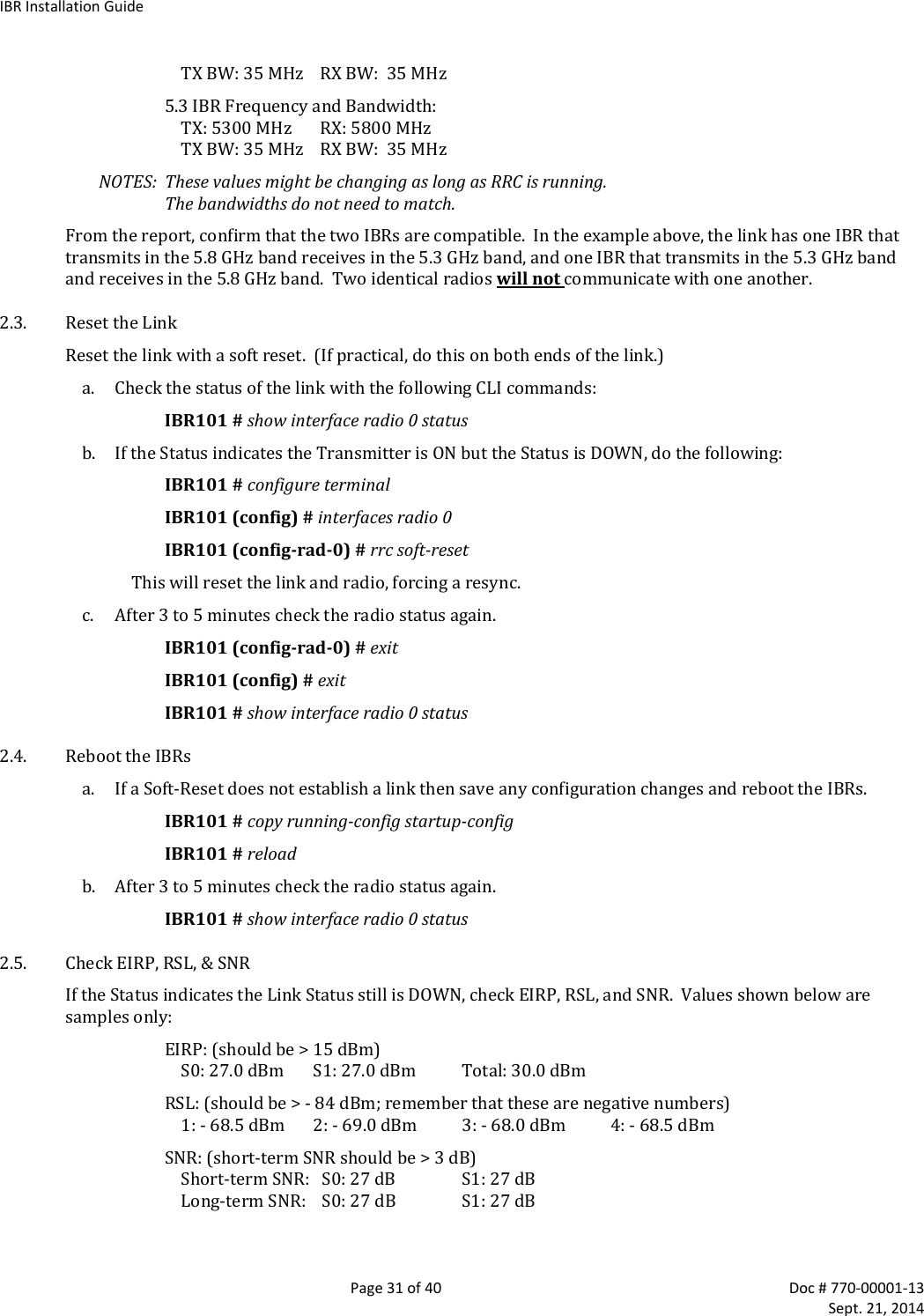
![IBRInstallationGuidePage16of40Doc#770‐00001‐13 Sept.21,2014GigabitEthernetports1and2arephysicalportsallowingconnectionstotheprovidernetwork.GigabitEthernet3isdedicatedtotheIBRRFlinkandcreatesawirelessbridgebetweentwonetworksegments.c. eth0.823isanisolateddebuginterfaceonVLAN823.VLAN823willallowtrafficonlytobesentfromoneIBRtotheotheracrossthewirelesslinkandrequiresthatthesenderbeloggedontooneoftheIBRs.OneuseofthisinterfaceistoallowausertosendpingpacketstotheoppositeIBRtoverifylinkintegrity.ThisVLANhasnoexposuretoaphysicalnetworkinterfacesotrafficonthisVLANisisolatedfromthenetwork.AnotherimportantuseofthisconfigurationistomanagethelinkpartnerfromthelocalIBR.4.4.8 SavetheNewConfiguration.Usethefollowingcommandstosavethenewsettingstothestartupconfigurationfile.IBR102#copyrunning‐configstartup‐config4.5 HostNameChangethehostname(optional)usingthefollowingcommandinGlobalConfigmode.IBR102(config)#hostname[newname]4.6 UserNames&PasswordsIBRcanbeconfiguredtorequirevalidusernamesandpasswordsforaccesstoCLIUserMode,CLIPrivilegedMode,andtheGUI.Eachusernameandpasswordwillbeindependentoftheothers.PasswordsarestoredpermanentlyinIBRandarenotpartofthestartup‐configorrunning‐configfiles.Passwordswillbedisplayedinencryptedformintheshowrunning‐configoutput.Passwordsarestringsofatleastsixandnotmorethansixteencharactersandcanincludeanyletter,anynumeral,andanyofthefollowingsymbols:!@$%4.6.1 CLIUserMode‐IBRcanbeconfiguredtorecognizeindividualusernames,eachwithitsownpassword.ThecommandtoconfigureUserModeusernamesandpasswordsis:IBR102(config)#username[user_id]password[newpassword]Ifthepasswordofanexistinguserisbeingchanged,user_idwillbetheusername(orID)oftheexistinguserandnewpasswordwillbethenewlyassignedpassword.Ifanewuserisbeingcreated,user_idwillbethenewusernameandnewpasswordtheassignedpasswordforthatuser.Thecommandtoremoveanexistingusernameis: IBR102(config)#nousername[user_id]whereuser_idisthenameoftheuserthatisbeingremoved.Thefactory‐setusernameisfbnandthepasswordisfastback.Thefactory‐setusername(fbn)cannotbechangedordeleted,butthepasswordforfbncanbechangedusingeitherofthefollowingcommands: IBR102(config)#usernamefbnpassword[newpassword]or IBR102(config)#enablepasswordlevel1[newpassword]wherenewpasswordisthenewlyassignedpassword.](https://usermanual.wiki/Skyline-Partners-Technology-Fastback-Networks/101.Installation-manual/User-Guide-2405418-Page-16.png)
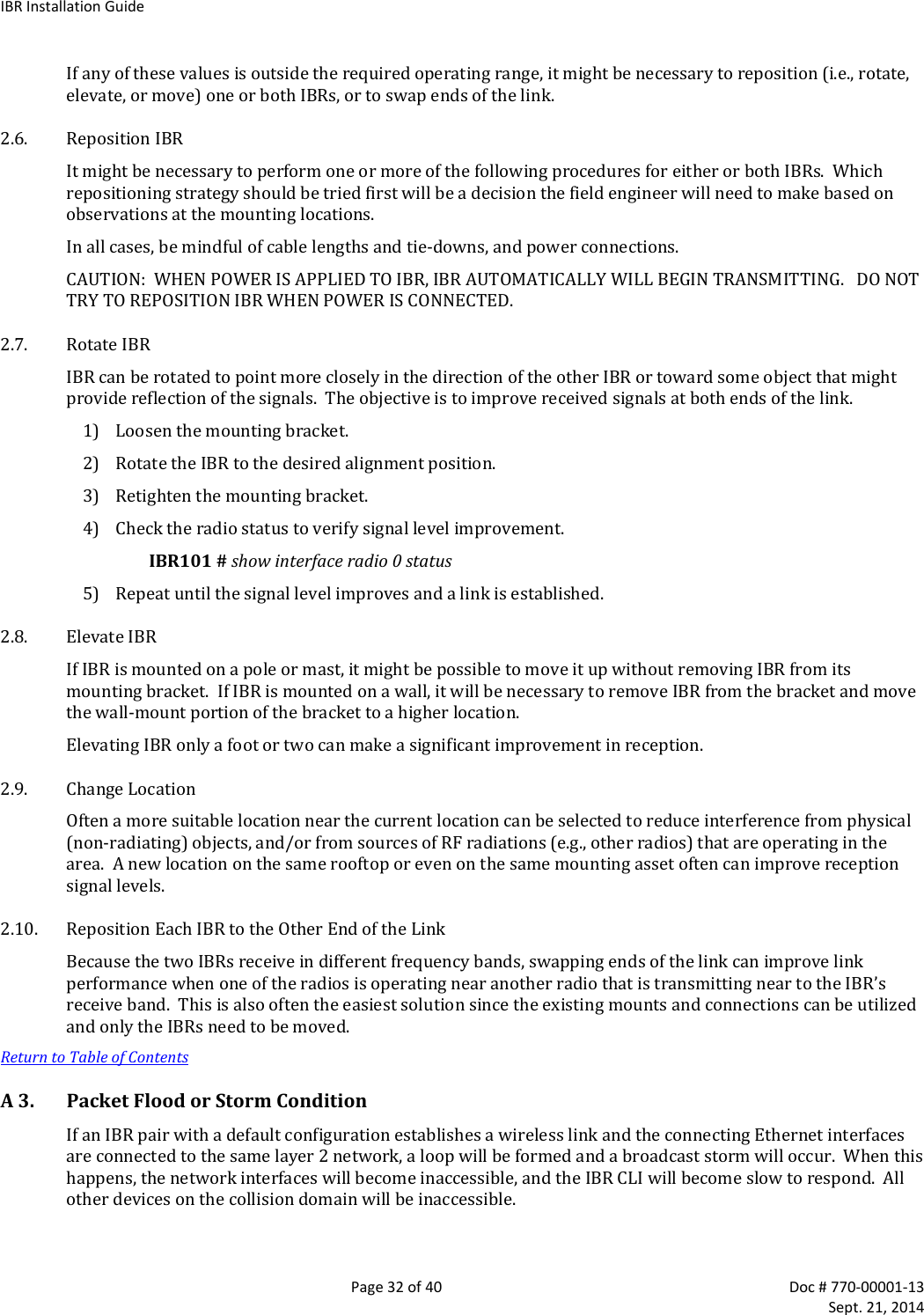
![IBRInstallationGuidePage17of40Doc#770‐00001‐13 Sept.21,20144.6.2 CLIPrivilegedMode–PrivilegedModecanbeenteredonlyfromUserModeandcanbeprotectedwithasinglepasswordforallusers.TherequirementtouseapasswordtoenterPrivilegedModecanbeenabledordisabledfromthePrivilegedModeasfollows:IBR102(config)#enablepassword{level(1‐15)}[newpassword]wherelevelmusteitherbethenumber1orthenumber15andnewpasswordisthenewlyassignedpassword. Whenlevel=1,thepasswordfortheusernamedfbnwillbechanged. Whenlevel=15,thepasswordtoenterPrivilegedModewillbeaffected. Whennoleveloptionisentered,PrivilegedModewillbeaffected.TherequirementforausertoenterapasswordtomovefromUserModetoPrivilegedModecanbedisabledusingthefollowingcommand;however,thisisnotarecommendedconfigurationbecauseitcancreatesecurityproblems: IBR102(config)#noenablepasswordThefollowingareexamplesofcommandsforcreating,changing,ordisablingpasswords.SettingPasswordsCommandDescriptionIBR102(config)# enablepasswordlevel1fastbackuserSetPWasfastbackuserfortheusernamedfbnenablepasswordlevel15fastb@ckuser SetthePWforalluserstoenterPrivilegeModeasfastb@ckuserenablepasswordfast$$$user SetthePWforalluserstoenterPrivilegeModeasfast$$$usernoenablepasswordlevel1 RemovetherequirementforfbntouseaPWtoenterUserModenoenablepasswordlevel15 RemovetherequirementforalluserstouseaPWtoenterPrivilegedModenoenablepasswordRemovetherequirementforalluserstouseaPWtoenterPrivilegedMode4.6.3 WebGraphicalUserInterface(GUI)–UsernamesandpasswordsfortheGUIaremanagedindependentlyfromCLIusernamesandpasswords.Foradditionalinformation,seetheGUIsectionoftheCLIGuide.4.7 PasswordRecovery&ReinstatingIBRDefaultSettingsIntheeventthatuserscannotgainaccesstoIBRbecausepasswordshavebeenforgotten,thefollowingprocedurecanbeusedtoresetallIBRsettingstotheirdefaultvalues,therebyallowingausertoregainaccesstoIBR.ThisprocedurewillbootIBRintoaLinuxrootshellsingle‐usermodewheretheusercanchangethePrivilegedModepassword. Initiateasystemrebootand,withintwo(2)seconds,pressCtrlCtointerrupttherebootprocess.EnterthefollowingcommandwhentheuMON>promptisdisplayed5:uMON>runflashlinuxsingle Thesystemwilltakeseveralminutestoreboot.WhentheLinuxpromptisdisplayed,enterthecommandpasswordrootandthenrespondtothesucceedingpromptstochangethePrivilegedModepasswordandrebootthesystembyenteringthecommandreboot. WhenIBRrebootstoCLIUserMode,usethedefaultusernameandpasswordtologontothesystem.UsethenewPrivilegeModepasswordtoenterPrivilegeMode. ThenfollowthestandardproceduretochangetheUserModeusernameandpassword.Note:Tointerruptanongoingreboot,interruptpowertoIBR.4.8 SystemClockThecommandtosettheIBRsystemclockisexecutedinGlobalConfigmodeandhasthefollowingform. 5 This works only with a serial console connection.](https://usermanual.wiki/Skyline-Partners-Technology-Fastback-Networks/101.Installation-manual/User-Guide-2405418-Page-17.png)
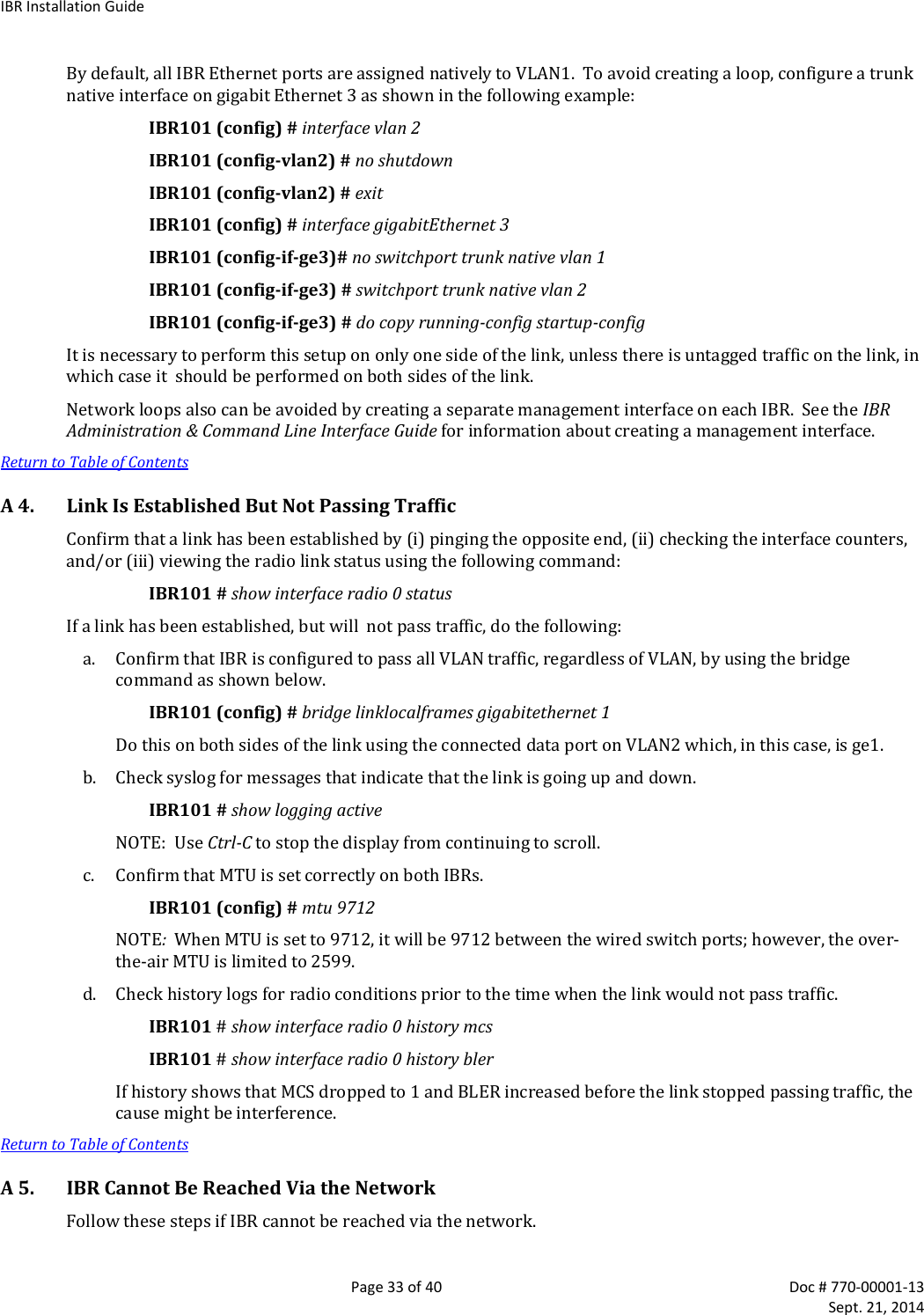
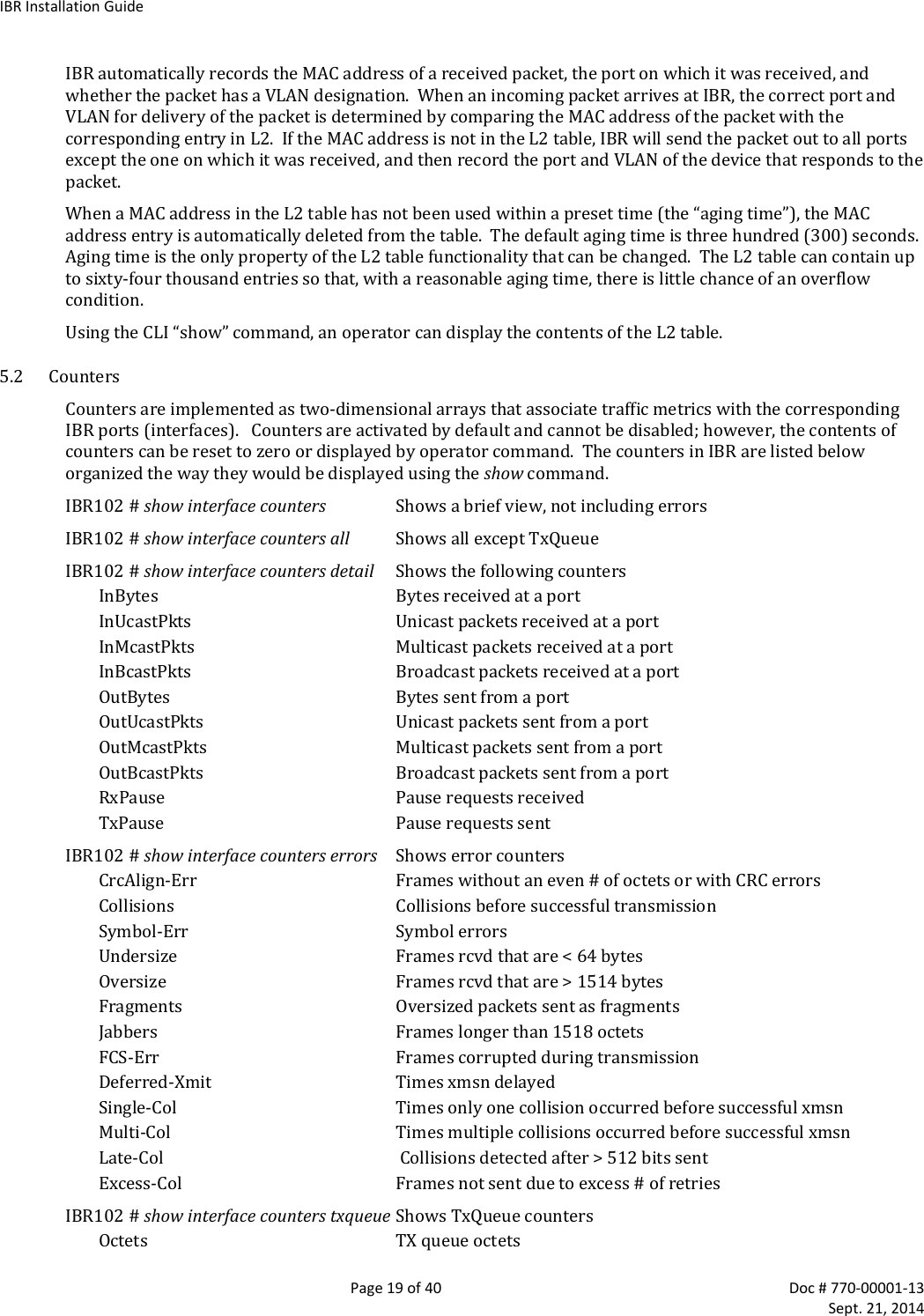
![IBRInstallationGuidePage18of40Doc#770‐00001‐13 Sept.21,2014IBR102(config)#clockset[hh:mm:ss][YYYY‐MM‐DD]wherealloftheargumentsareintegers.4.9 NameServerThefollowingcommandcanbeusedtoconfiguretheNameserver.IBR102(config)#ipname‐server[ip‐address}4.10 NTPServerThefollowingcommandcanbeusedtoconfiguretheNTPserver.IBR102(config)#ntpserver[ip‐address}4.11 SNMPServerCommandsforconfiguringSNMPareshowninthetablebelow.Fordetailedinformation,seetheCLIGuide.ConfiguringSNMPCommandDescriptionIBR102(config)#snmp‐server ConfigureSNMPcommunity SNMPcommunityconfigurationcontact SetthesystemcontactenableEnableSNMPnotificationtypes(traps)group SNMPgroupconfigurationhost SNMPtraphostconfigurationlocation Setthesystemlocationtrap‐envSetSNMPtrapenvironment(standardorx.733)trap‐thresholdsSetSNMPtrapthresholdvaluesview SNMPviewconfiguration4.12 LinkIDThecommandtosetLinkIDhasthefollowingsyntax:IBR102(config)#link‐id[linkname]wherelinknameisanalphanumericstringfromonetothirty‐twocharactersinlengththatcancontainanyofthefollowingsymbols:!@#$%‐_UsingLinkIDCommandPromptCommand RemarksIBR102(config)# interfaceradio0Configradiointerface“0”IBR102(config‐if‐rad0)# link‐id58$a2 SetslinkIDto“58$a2”IBR102(config‐if‐rad0)# exitReturntoGlobalConfigIBR102(config)# 4.13 RadioLinkIBRswillautomaticallyestablishalinkusingthebestfrequenciestooptimizedatathroughput.ReturntoTableofContents5. MACAddressTable&Counters5.1 MACAddressTableTheMACAddresstable,sometimesreferredtoastheL2(orLayer2)table,associatesMACaddresseswiththeirrespectiveVLAN’sandports.](https://usermanual.wiki/Skyline-Partners-Technology-Fastback-Networks/101.Installation-manual/User-Guide-2405418-Page-18.png)
![IBRInstallationGuidePage20of40Doc#770‐00001‐13 Sept.21,2014Packets TXqueuepacketsMCScounterscanbedisplayedusingthefollowingcommand: IBR102#showinterfacesradio0statusCounterscanbeclearedusingthefollowingcommands:IBR102#clearcountersmcsclearsmcscountersIBR102#clearcountersradioclearsradiocountersIBR102#clearcountersswitchclearscountersonallswitchinterfacesIBR102#clearcountersgigabitEthernet[arg]argcanbe0,1,2,or3ReturntoTableofContents6. InstallingIBR6.1 SafetyConsiderations Ensurethatgroundingisinaccordancewithlocalcodes.IBRshouldbegroundedusingthegroundlugconnectoronthebackofIBRwithalugsuchasPanduitTwo‐HoleStandardBarrelCopperLug,Panduitpart#LCD6‐14A‐L(shownbelow).Notethatsincethegroundinglugmountsbetweenthefins,anyluggreaterthan0.48inchesinwidthwillnotfit. Useoverheadworkmethodsand/orequipmentthatareappropriateforthelocation;e.g.,climbingequipment,ladder,manlift,etc. Notethelocationsofotherequipment,powerlines,vehicletraffic,andotherpotentialsafetyhazardsattheinstallationsite.6.2 InstallationChecklist ApretestedandpreconfiguredIBR.Note:Alinkwillrequireoneeachofa5.5GHzIBRanda5.7GHzIBR. IBRmountingbrackets. APoE+sourcecapableofsupplyingatleastthirty‐five(35)wattstotalontwopairs(pins4&5and7&8)oronallfourpairs. AsurgesuppressorthathasbeenvalidatedtofunctionproperlywithIBR,suchasTransectorModelT‐419899. MaterialsforgroundingIBR:‐ GroundingIBRrequiresterminatingthetwo‐holegroundlug,whichwillaccommodatetwoeach12‐24x1/2”orM6groundtaps.TheIBRchassishastwopre‐tappedholesforthislug.](https://usermanual.wiki/Skyline-Partners-Technology-Fastback-Networks/101.Installation-manual/User-Guide-2405418-Page-20.png)