Sokkia Topcon Z1 Zeal Z1 User Manual Z1 UserMan
Sokkia Topcon Co., Ltd. Zeal Z1 Z1 UserMan
Manual
27-Sep-2005
ZEAL
[Z1]
User's manual
Rev.01

27-Sep-2005
Revision history
Rev Date Content
Rev.01 27-Sep-2005 First edition

27-Sep-2005
Contents
1.General Description .........................................................................................................5
2.Product specification ........................................................................................................5
3.Pin Layout ........................................................................................................................6
4.Start Mode ........................................................................................................................6
Nomal Mode.......................................................................................................6
UART Setting Value Mode................................................................................6
Firmware Rewriting Mode................................................................................6
Automatic Scanning Mode ................................................................................6
Automatic Connection Mode.............................................................................7
5.Operation Mode................................................................................................................7
Command Mode................................................................................................. 7
Online Mode.......................................................................................................7
Park Mode..........................................................................................................7
Escape Mode ......................................................................................................7
Scan Escape Mode .............................................................................................7
Scan Mode..........................................................................................................7
Standby Mode ....................................................................................................7
6.Command..........................................................................................................................8
7.Result code........................................................................................................................9
Example:How to use “Zeal”............................................................................................... 10
27-Sep-2005
This device complies with Part 15 of the FCC Rules and RSS-210 of the IC Rules.
Operation is subject to the following two conditions:
(1) this device may not cause harmful interference, and (2) this device must accept any
interference received, including interference that may cause undesired operation.
FCC WARNING
Changes or modifications not expressly approved by the party responsible for
compliance could void the user’s authority to operate the equipment.
FCC NOTICE
This equipment has been tested and found to comply with the limits for a Class A digital
device, pursuant to part 15 of the FCC Rules. These limits are designed to provide
reasonable protection against harmful interference when the equipment is operated in a
commercial environment.
This equipment generates, uses and can radiate radio frequency energy and, if not
installed and used in accordance with the instructions, may cause harmful interference
to radio communications. Operation of this equipment in a residential area is likely to
cause harmful interference in which case the user will be required to correct the
interference at his own expense.
This transmitter must not be co-located or operated in conjunction with any other
antenna or transmitter.
The antenna shown in this filing must not be co-located or operated in conjunction with
any other antenna or transmitter. End users may not be provided with the module
installation instructions. OEM integrators and end users must be provided with
transmitter operating conditions for satisfying RF exposure compliance.
For portable applications OEM integrators need no SAR evaluation. The max
source-based time-averaged output of 0.46 mW is below the low threshold of 24mW for
d < 2.5 cm.
This equipment complies with FCC radiation exposure limits set forth for
uncontrolled equipment and meets the FCC radio frequency (RF) Exposure
Guidelines in Supplement C to OET65. This equipment has very low levels of
RF energy that it is deemed to comply without testing of specificabsorption ratio (SAR).

27-Sep-2005
1.General Description
This product is Bluetooth communication unit with UART I/F.
2.Product specification
Item Content
Product name ZEAL
Product ID Z1
Version 1.2
Protocol L2CAP, SDP, RFCOMM
Profile GAP, SPP, DUN
Data Rate 723.2/57.6kbps(asymmetrical. Max)
Modulation FHSS/GFSK 1Mbps, 1600hop/sec.
Bluetooth
I/F
Output Power Class2
Protocol Asynchronous Serial Communication
(Hardware Flow Control)
Signal Level Supply power
Baud rate 9600bps(Default)
UART
I/F
Connector LPC-12FDS+C
[HONDA TSUSHIN KOGYO CO., LTD.]
Power Supply Voltage +2.9 - +3.6V DC (Single power supply)
Operating Temperature Range -25 - +85℃
Outside Dimensions 35.0mm(L), 26.0(W), 4.5mm(H)
27-Sep-2005
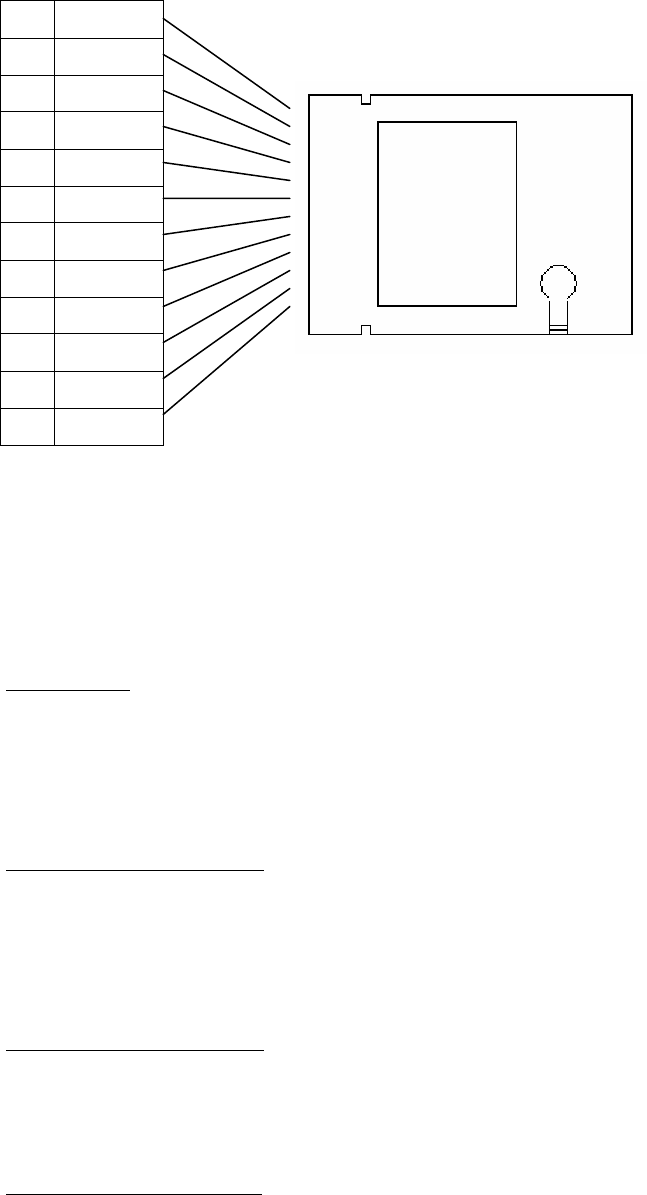
3.Pin Layout
1 PIO0
2 RXD
3 TXD
4 PIO1
5 GND
6 PIO2
7 RTS
8 CTS
9 PIO3
10 MODE0
11 MODE1
12 VCC
*The signal is a pull-up on the inside in 51KΩ
4.Start Mode
The start mode changes by the state of the mode pin when the power supply is turned
on.
Nomal Mode
(MODE0,MODE1) = (1,1)
UART communications setting:9600bps,Data8bit,StopBit 1,Parity none
It starts by the command mode.
UART Setting Value Mode
(MODE0,MODE1) = (0,1)
It starts by the UART setting to which internal is set, and it becomes a
command mode.
Firmware Rewriting Mode
(MODE0,MODE1) = (0,0)
When Farmuuea is rewritten with a special tool, it uses it.
Automatic Scanning Mode
(MODE0,MODE1) = (1,0)

27-Sep-2005
It starts by the UART setting to which internal is set, and it becomes a
scanning mode.
The mode is set beforehand according to "BTOM" command.
Automatic Connection Mode
(MODE0,MODE1) = (1,0)
It starts by the UART setting to which internal is set, and the automatic
connection mode.
The mode is set beforehand according to "BTOM" command.
5.Operation Mode
The operation mode changes by the command input.
Command Mode
Command input waiting state.
Online Mode
Bluetooth connection state of possible data communication.The input value is
delivered to the other party equipment as data.
Park Mode
State of low power consumption of Bluetooth(park)
Escape Mode
It is a state that the command can be input with the Bluetooth connection
maintained.
Scan Escape Mode
It is a state that the command can be input with the scanning maintained.
Scan Mode
State of scanning of Bluetooth
Standby Mode
State of low power consumption to stop Bluetooth function

27-Sep-2005
6.Command
The command character and the parameter are input following "BT".
LIST
Command Function Parameter
A To the scan mode None or access code
B UART baudrate change Bit rate(100bps unit)
BM UART communication mode change Value of mode flag
C Connected beginning None or clock offset
CU Connected beginning
to specified UUID
UUID or
UUID+clock offset
D Disconect or Release of scan mode
DM Disconect message setting Message character string
E State confirmation
F Connected condition flag setting Value of Condition flag
G guard time setting Guard time (80ms unit)
H To the standby mode
I Inquiry Detect maximum number
K Link key clear
L Internal setting display Value of setting flag
M BDAddress display
OC Device Class setting Device Class
OM Auto mode setting Value of mode flag
P Passkey change Bluetooth Passkey
Q To the park mode Interval,None=Release
QM park mode
Transition message setting
Message character string
R Escape mode to Online mode
T Information at connection equipment Bdaddress etc
TT Information at connection equipment Bdaddress etc
V Various parameter settings Value of parameter
X Equipment name setting Equipment name

27-Sep-2005
7.Result code
Character string that notifies result of command.
LIST
Result code Meaning
ACKN Command receipt
CONN Bluetooth connection completion
DISC Disconnect
TERM Command execution completion
NG00 Command execution failure
NG01 Undefined command
NG04 Page timeout
NG08 Connection timeout
NG0C Command of no permission
NG12 The value of the parameter is illegal.
NG30 L2CAP connection failure of SDP
NG31 L2CAP setting failure of SDP
NG32 Server channel acquisition failure
NG40 L2CAP connection failure of RFCOMM
NG41 L2CAP setting failure of RFCOMM
NG42 Data channel establishment failure of RFCOMM
NG43 Signal channel establishment failure of RFCOMM
NG44 DLCI becomes empty of RFCOMM
NG45 PN command failure of RFCOMM
NG46 MSC command failure of RFCOMM
27-Sep-2005
Example:How to use “Zeal”
■Preparation:
●Settings of your terminal software
Baud rate:9600
Data:8bit
Parity:none
Stop:1bit
Flow Control hardware
■When “Zeal” is used as a slave:
1. Issue a “BTA” command to “Zeal”.
2. Execute Device Discovery from the other Bluetooth terminal.
3. Execute Service Discovery when a device named ““Zeal”” is found.
4. Establish a connection when the “SerialPort” service is found.
■When “Zeal” is used as a master:
1. Issue a “BTI1” command to “Zeal” and execute Device Discovery.
(Change the parameter depending on the number of neighborhood devices,
e.g. if 3 devices, “BTI3”.)
2. Check whether the Bluetooth address found is the address of the other
Bluetooth device.
3. Set destination by “BTT1************”.
(************ indicates the address of the other Bluetooth device to which
the connection is made.)
4. Issue a “BTC” command. If “CONN” is displayed, connection is successful.
●How to disconnect “Zeal”:
・ When “Zeal” disconnects itself, wait for the guard time to end(The default
is 8seconds. The period can be changed by a BTG command) and then input a
“@@@BTD” command.
If “DISC” is displayed, disconnection is successful.
27-Sep-2005
■Security function:
●How to deactivate security function
1. Turn off the security function of the other Bluetooth device.
2. Turn off the security function of “Zeal”.
Issue a “BTF04” command.
(Note: The value set by the BTF command is stored.)
●How to activate authentication function
1. Issue a “BTF06” command.
(Authentication is executed upon request from one device even if the
security function of the other Bluetooth device is deactivated.)
2. Input the same Password (PIN code) as the one set for “Zeal” when the
other Bluetooth device
requests a Password (PIN code) upon connection.
Note: The same Password (PIN code) should be used in devices like “Zeal” for
which a Password (PIN code) upon connection.
(The password (PIN code is not requested) can be changed by a “BTP”
command. The default is “0123”.)