Techtuit SNDW2 GPS sports watch User Manual QSW100 20160124EN

Techtuit Co., Ltd. GPS sports watch QSW100 20160124EN

User manual

1         Nitro GPS sports watch User Manual                                                  Nitro_UM_V002 2015
2  Index: Button configuration ----------------------------------------------------------------------------3    Special button functions under any mode-----------------------------------------------4 Special button functions under any mode-----------------------------------------------5 Special button functions under Exercise preparation mode-----------------------6 Special button functions under exercise-------------------------------------------------7 Initial Setup-----------------------------------------------------------------------------------------9 Saving, browsing or sharing-----------------------------------------------------------------11 Start Exercising / Interval Training --------------------------------------------------------14 Records & Sync Log ---------------------------------------------------------------------------15 Alarm Setting -------------------------------------------------------------------------------------16 Setting/ Exercise /Page Setting -------------------------------------------------------------17 Auto Pause Setting -----------------------------------------------------------------------------19 Auto Lap Setting ---------------------------------------------------------------------------------20 Log Interval Setting -----------------------------------------------------------------------------21 Tempo / Auto Play Setting --------------------------------------------------------------------22 Pace alarm Setting ------------------------------------------------------------------------------23 HRM Alarm Setting ------------------------------------------------------------------------------24 Data Source / Calories Mode Setting -----------------------------------------------------25 Stride Setting--------------------------------------------------------------------------------------26 Sensor & Cellular Phone Setting------------------------------------------------------------27 System Setting ------------------------------------------------------------------------------------28 Unit & Vibrator Setting -------------------------------------------------------------------------29 Backlight/ Language/Display Setting ------------------------------------------------------30 Message / Date time Setting ------------------------------------------------------------------31 Time zone / Daylight / Date format Setting-----------------------------------------------32 Time format /Personal Setting----------------------------------------------------------------33 Birthday / Height / Weight /MAX HR / Wheel Setting----------------------------------33,34,35 Clear Log & Default-------------------------------------------------------------------------------36 About the Watch------------------------------------------------------------------------------------37 Part 15 of the FCC Rules-------------------------------------------------------------------------38
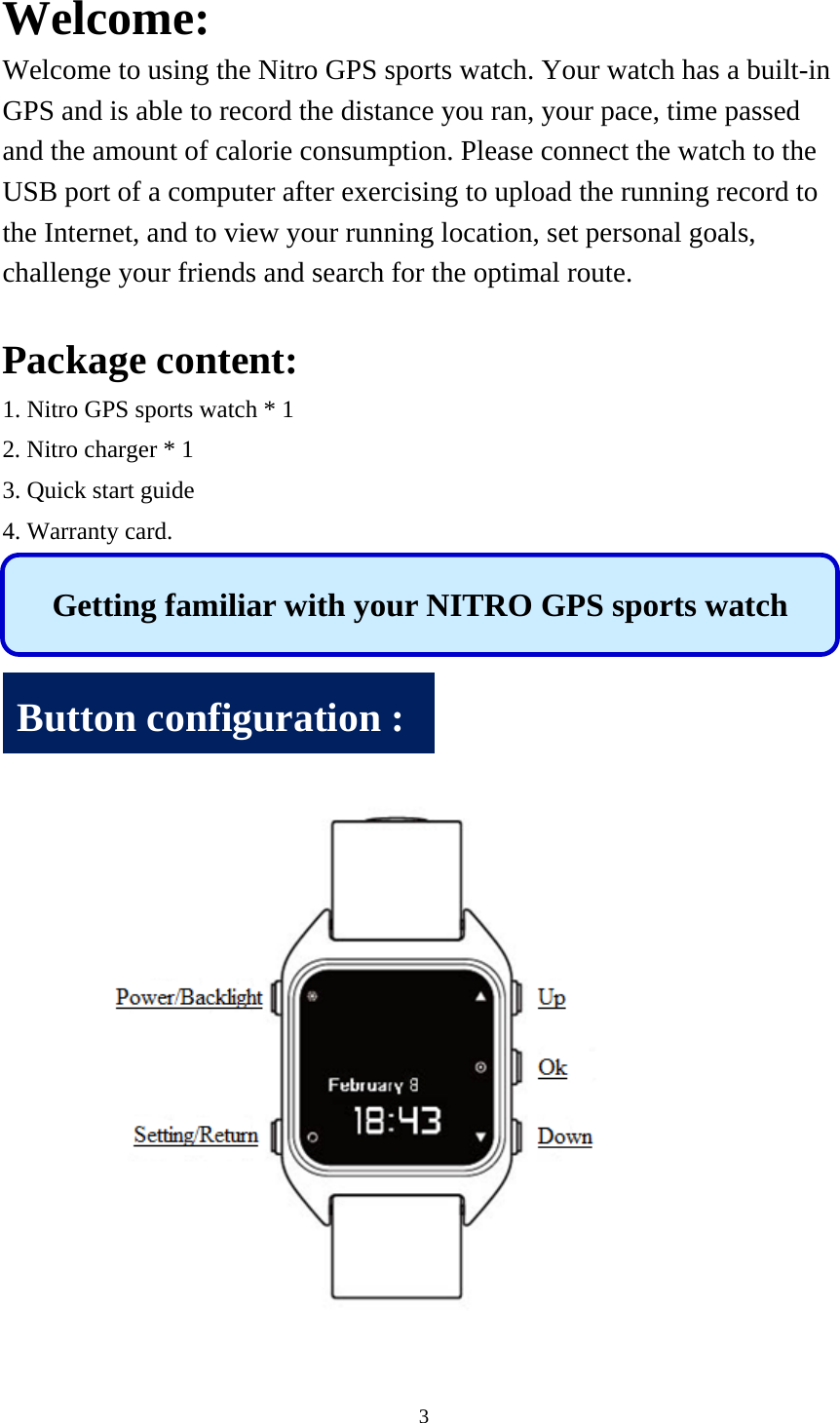
3  Welcome: Welcome to using the Nitro GPS sports watch. Your watch has a built-in GPS and is able to record the distance you ran, your pace, time passed and the amount of calorie consumption. Please connect the watch to the USB port of a computer after exercising to upload the running record to the Internet, and to view your running location, set personal goals, challenge your friends and search for the optimal route.  Package content: 1. Nitro GPS sports watch * 1 2. Nitro charger * 1 3. Quick start guide 4. Warranty card.          Getting familiar with your NITRO GPS sports watch Button configuration :
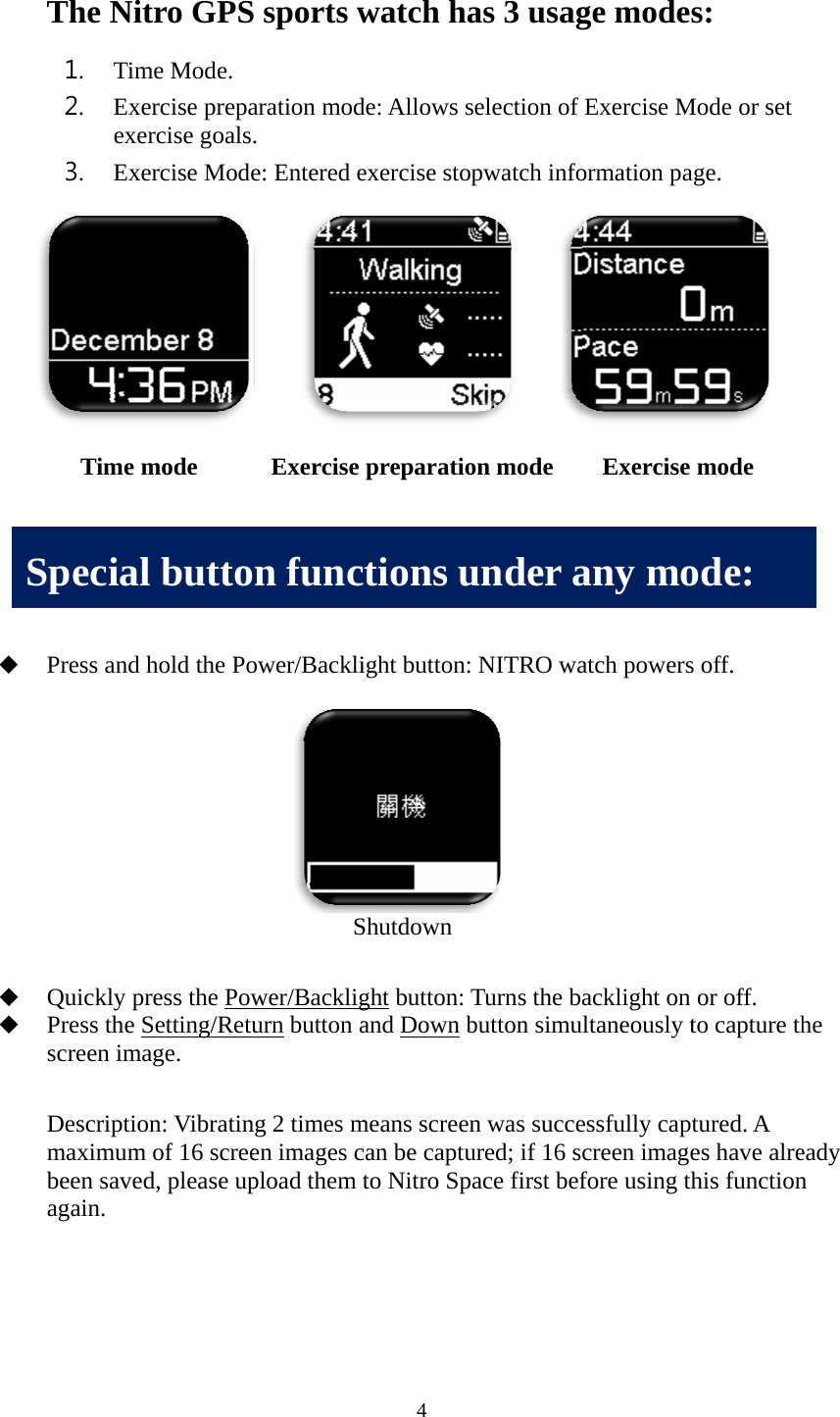
           SThe Nit1. Tim2. Exeexe3. Exe         Press and  Quickly pPress the Sscreen ima Descriptiomaximumbeen saveagain.     Time mSpecialtro GPSme Mode.  ercise prepaercise goalsercise Mode         hold the Popress the PowSetting/Retuage. on: Vibratinm of 16 screed, please upmode     l buttoS sports waration mod. e: Entered e     ower/BackliS wer/Backligurn button ang 2 times men images cpload them  Exercise n func4 watch hade: Allows sexercise stopight button: Shutdown ght button: Tand Down bmeans screencan be captuto Nitro Sppreparatioctions uas 3 usagselection of pwatch infoNITRO wa Turns the babutton simun was succeured; if 16 sace first befon mode   under age modesExercise Mormation paatch powersacklight on ultaneously tessfully captcreen imagefore using th Exercise any mos: Mode or set age. s off. or off. to capture thtured. A es have alrehis functionmode ode: he eady n
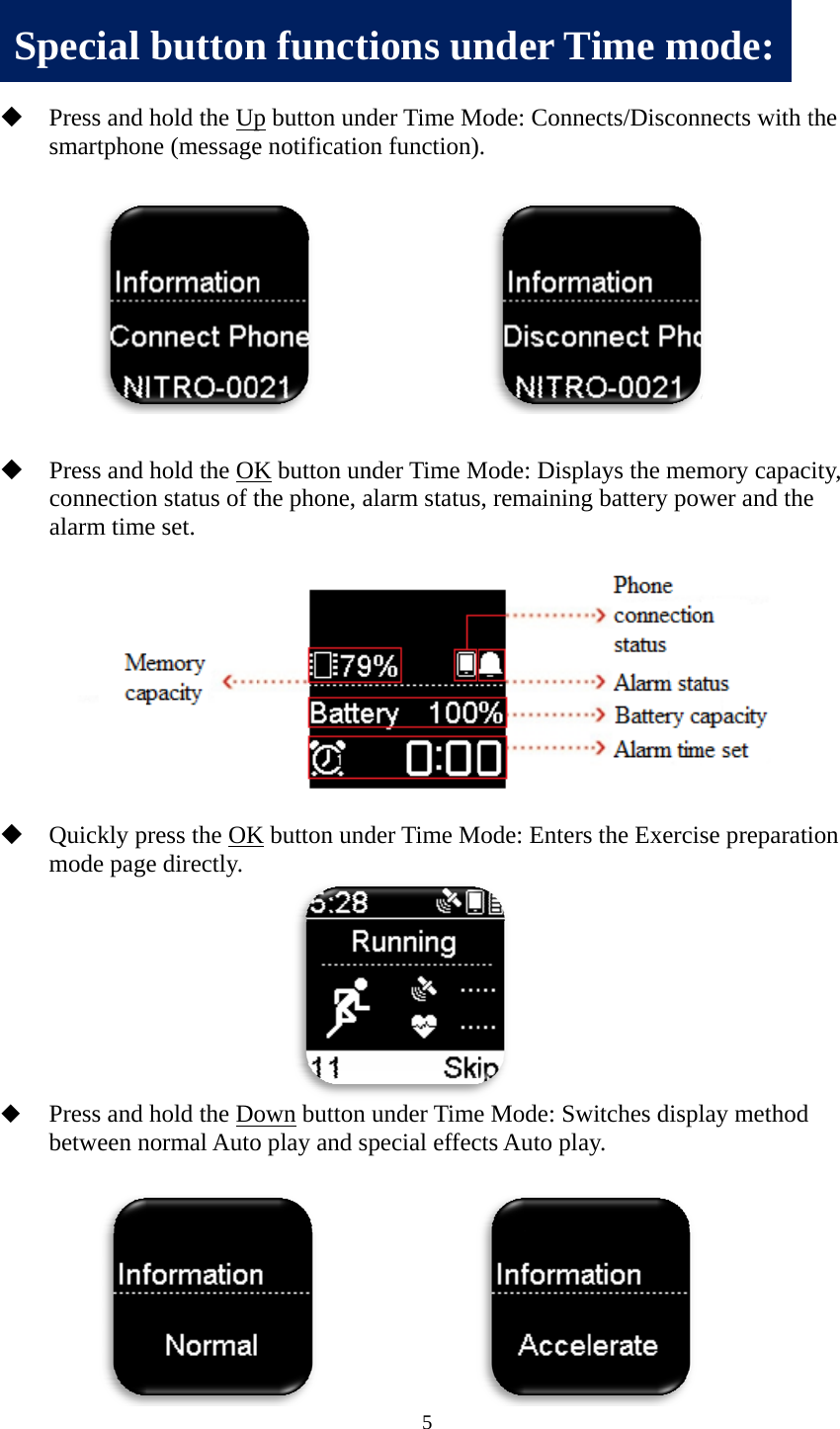
        S Press and smartphon Press and connectionalarm timeQuickly pmode pagPress and between n Special hold the Upne (messagehold the OKn status of te set. press the OKe directly. hold the Donormal Autobuttonp button unde notificatio     K button unthe phone, aK button undown button o play and s     n funct5 der Time Mon function)        nder Time Malarm statusder Time Munder Timepecial effec         tions unMode: Conne. Mode: Displs, remainingMode: Enters e Mode: Swcts Auto plander Tects/Disconlays the memg battery pows the Exerciwitches display.  Time mnnects with t  mory capacwer and the se preparatilay method ode: the ity, e ion
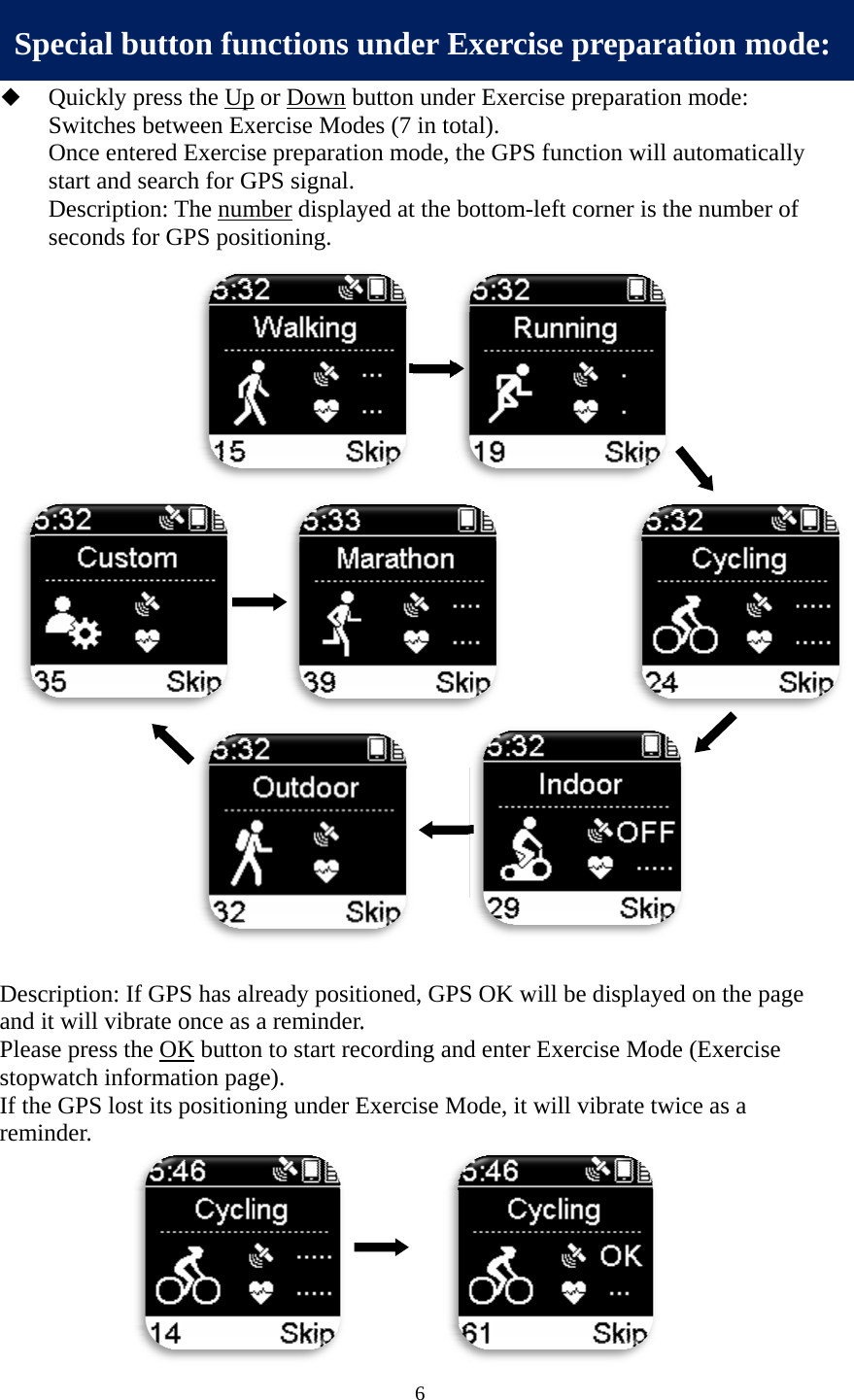
                     Desand PleastopIf thremSpQuickly pSwitches bOnce entestart and sDescriptioseconds fo                     scription: If it will vibrase press thepwatch inforhe GPS lost minder. pecial bupress the Upbetween Exered Exercissearch for Gon: The numor GPS posi               fGPS has alate once as e OK buttonrmation pagits positionutton funp or Down bxercise Modse preparatioGPS signal. mber displayitioning.          lready posita reminder.n to start recge).  ning under E  nctions u6 button underdes (7 in totaon mode, th yed at the bo  tioned, GPS.  cording andExercise Mo      under Exr Exercise pal).  he GPS funcottom-left c  S OK will bed enter Exerode, it will vxercise ppreparation ction will aucorner is thee displayed rcise Mode vibrate twic preparatmode: utomaticallye number ofon the page(Exercise ce as a tion mody f e de:
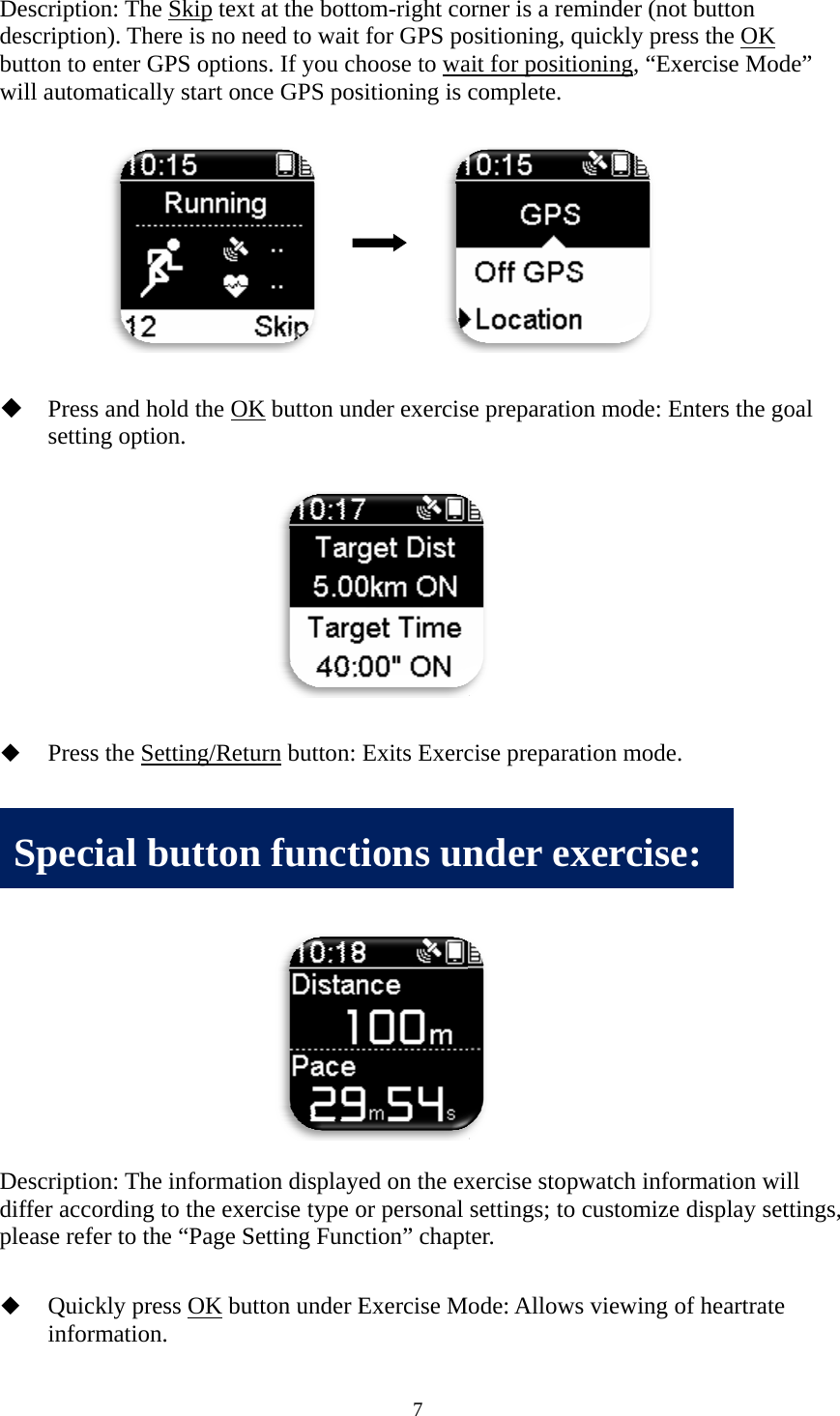
 Desdescbuttwill      一旦  Desdiffplea  Sscription: Thcription). Thton to enter l automaticaPress and setting opt Press the S 旦開始運動scription: Thfer accordinase refer to tQuickly pinformatioSpecial he Skip texthere is no nGPS optionally start onhold the OKtion. Setting/Retu模式,即進he informatg to the exethe “Page Spress OK buon. buttont at the bottoneed to wait ns. If you chnce GPS pos    K button unurn button: 進入運動碼tion displayeercise type oSetting Funcutton under En funct7 om-right cofor GPS pohoose to wasitioning is       nder exercisExits Exerc碼表資訊頁面ed on the exor personal ction” chaptExercise Mtions unorner is a remositioning, qait for positicomplete. e preparatio cise prepara面。  xercise stopsettings; to ter. ode: Allowsnder exminder (notquickly presioning, “Exe on mode: Enation mode. pwatch inforcustomize s viewing oxerciset button ss the OK ercise Modenters the gormation wildisplay settof heartrate e: e” oal l tings,
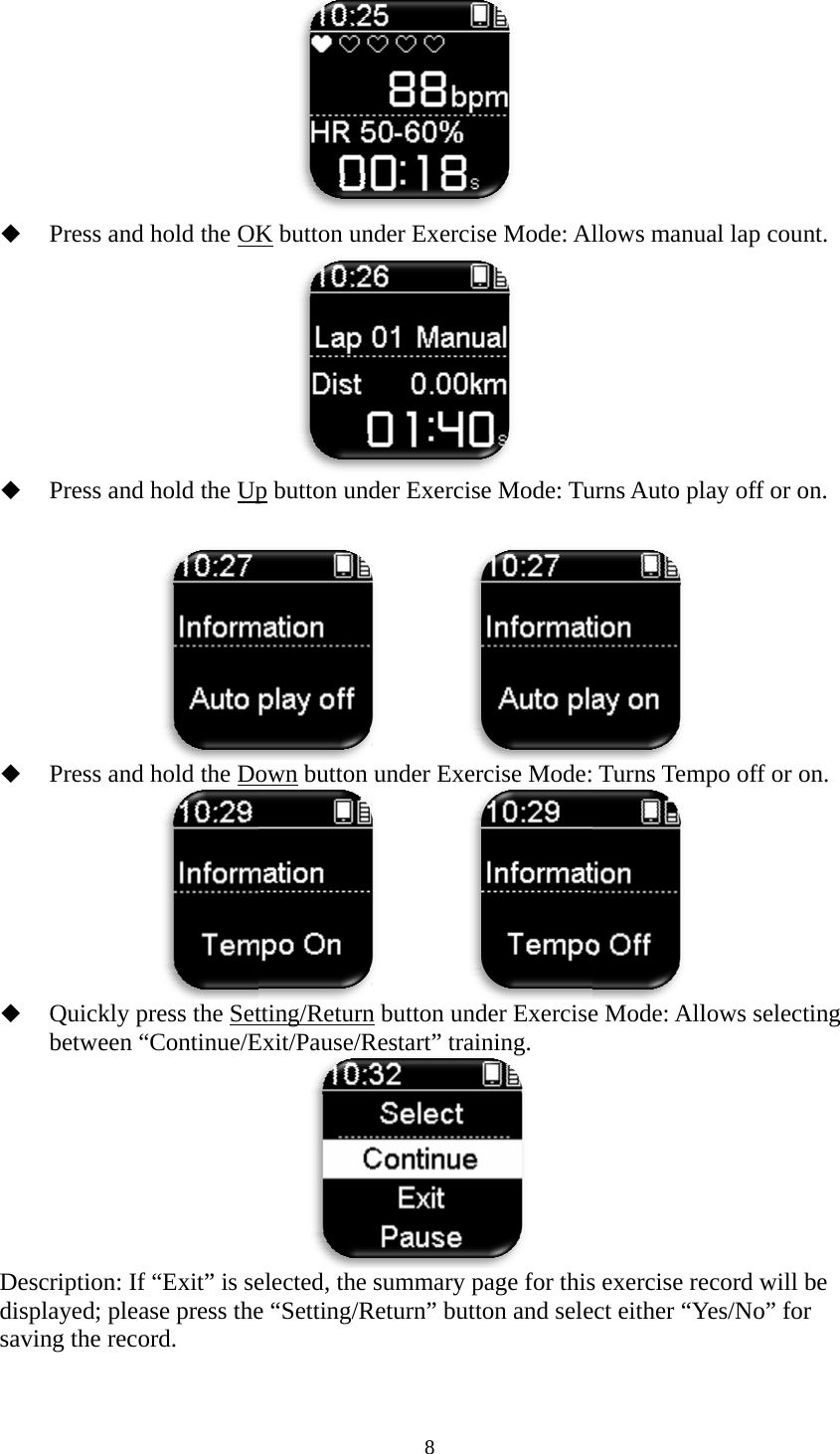
     DesdispsaviPress and Press and  Press and Quickly pbetween “scription: If played; pleaing the recohold the OKhold the Uphold the Dopress the Set“Continue/Ef“Exit” is sease press theord. K button unp button undown button tting/ReturnExit/Pause/Relected, the e “Setting/R8 nder Exercisder Exercis       under Exer       n button undRestart” traisummary pReturn” butt se Mode: Al e Mode: Turcise Mode:der Exercisening.  page for thiston and selellows manuurns Auto pl  Turns Tem e Mode: Alls exercise reect either “Yual lap counlay off or onmpo off or onlows selectiecord will bYes/No” for nt. n. n. ing be
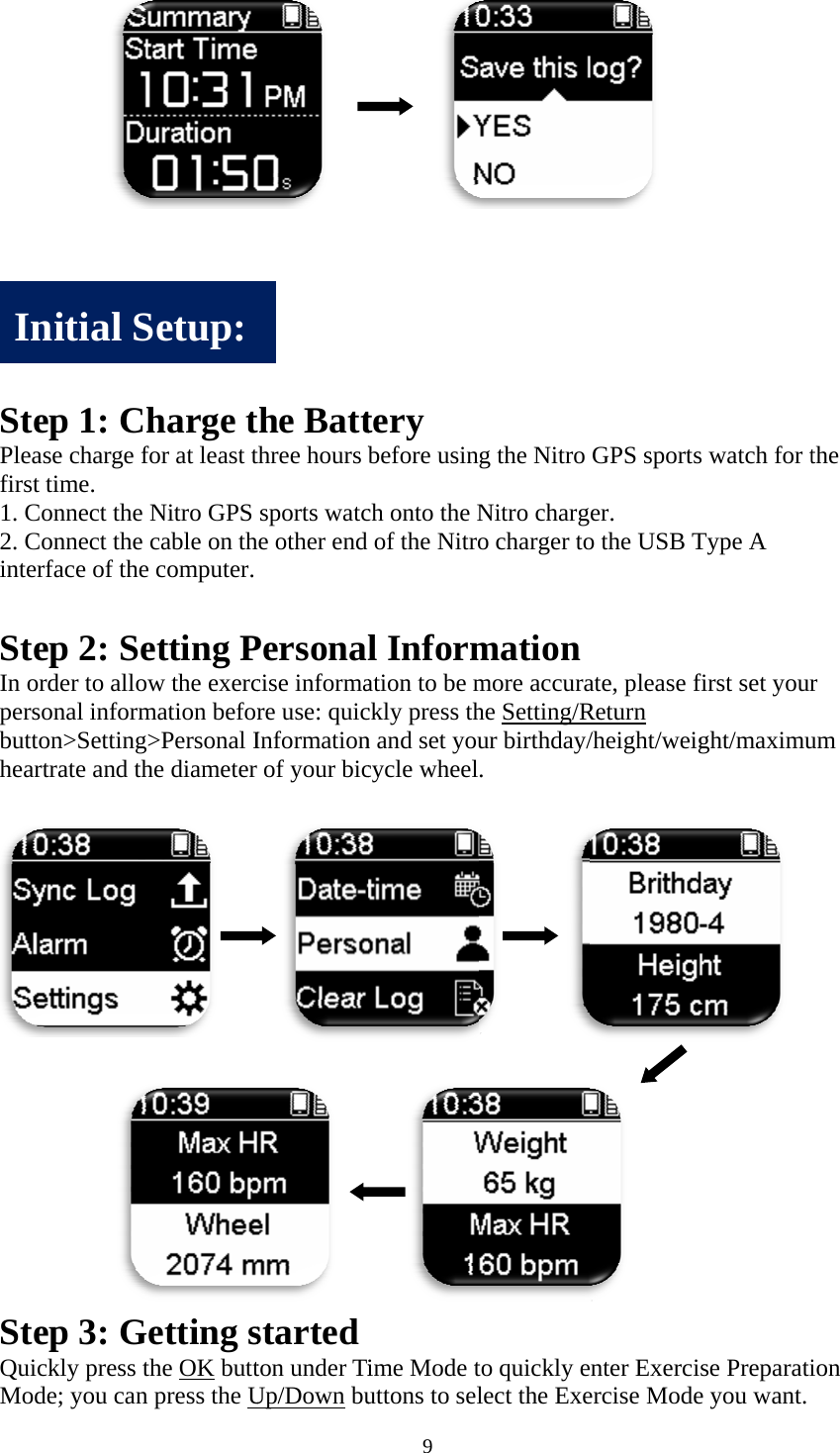
    StePleafirst1. C2. Cinte SteIn opersbutthear      SteQuiModInep 1: Case charge ft time.   Connect the Connect the erface of theep 2: Seorder to allosonal informton>Settingrtrate and thep 3: Gickly press tde; you cannitial Sharge tfor at least tNitro GPS cable on the computer. etting Pow the exercmation beforg>Personal Ihe diameter    Getting sthe OK buttn press the USetup:     the Battthree hours bsports watche other end Personacise informare use: quicInformationr of your bic    started ton under TiUp/Down bu9      tery before usinch onto the Nof the Nitrol Information to be mckly press thn and set youcycle wheelime Mode tuttons to selg the Nitro Nitro chargo charger tomation more accurahe Setting/Rur birthday/. to quickly elect the Exe GPS sportser.  o the USB Tate, please fReturn /height/weigenter Exerciercise Modes watch for tType A first set yourght/maximuse Preparatie you want. the r um ion
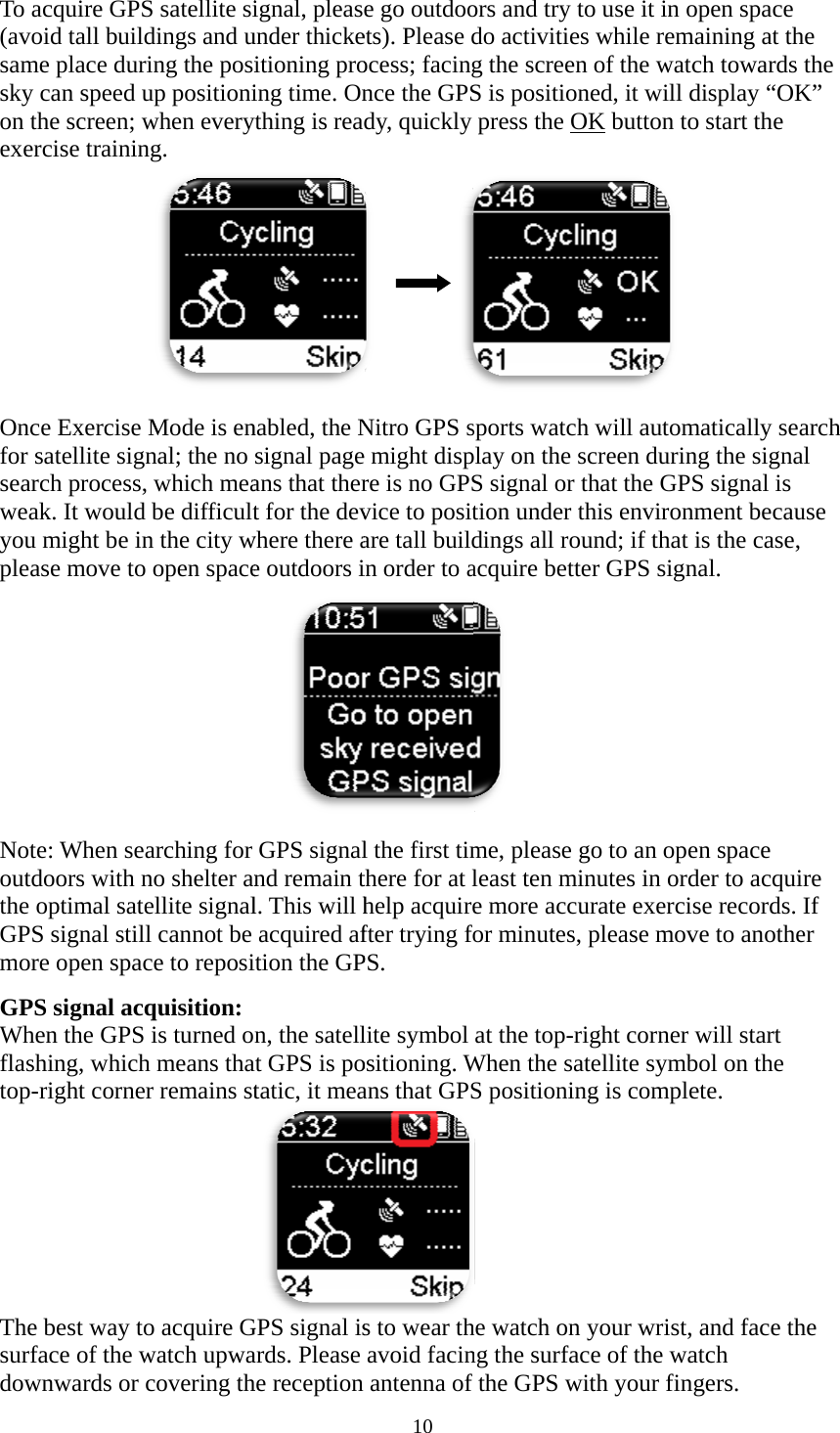
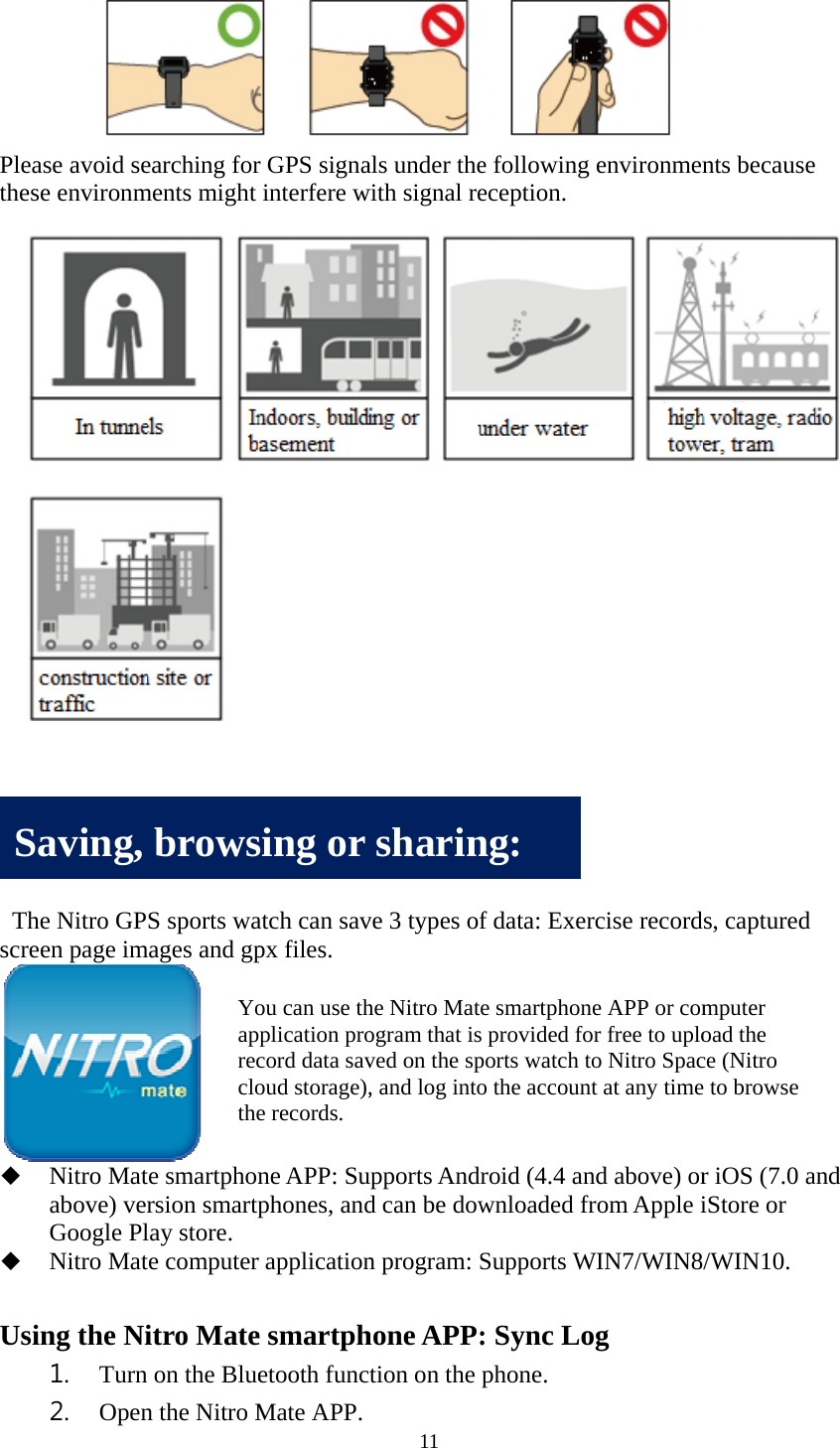
 To a(avosamsky on texer         Oncfor searweayouplea        Notoutdthe GPSmorGPSWhflashtop-Thesurfdowacquire GPSoid tall buildme place durcan speed uthe screen; wrcise trainin  ce Exercise satellite sigrch process,ak. It wouldu might be inase move to       te: When sedoors with noptimal sateS signal stilre open spacS signal acqen the GPShing, which-right cornee best way toface of the wwnwards or S satellite sidings and uring the posiup positioniwhen everyng. Mode is ennal; the no , which mead be difficultn the city wo open spacearching for no shelter anellite signall cannot be ce to reposiquisition:  is turned oh means thaer remains sto acquire Gwatch upwacovering thignal, pleasunder thickeitioning proing time. Onything is reanabled, the Nsignal pageans that thert for the devwhere there ae outdoors iGPS signalnd remain tl. This will hacquired afition the GPn, the satellat GPS is potatic, it meaGPS signal isards. Please he reception 10 e go outdooets). Please docess; facingnce the GPSdy, quickly Nitro GPS se might dispre is no GPSvice to positare tall buildin order to al the first timthere for at lhelp acquirefter trying foPS.  lite symbol ositioning. Wans that GPSs to wear thavoid facinantenna of ors and try tdo activitiesg the screenS is positionpress the Osports watchplay on the sS signal or ttion under tdings all rouacquire betteme, please gleast ten mie more accufor minutes, at the top-riWhen the saS positionin he watch on ng the surfacfthe GPS wto use it in os while remn of the watcned, it will dOK button toh will automscreen durinthat the GPthis environund; if that er GPS signgo to an opeinutes in ordurate exerciplease movight corner atellite symbng is compleyour wrist,ce of the waith your finopen space maining at thch towards display “OKo start the matically seang the signaS signal is nment becauis the case, nal. en space der to acquise records. ve to anothewill start bol on the ete.  and face thatch ngers. he the K” arch al use ire If er he
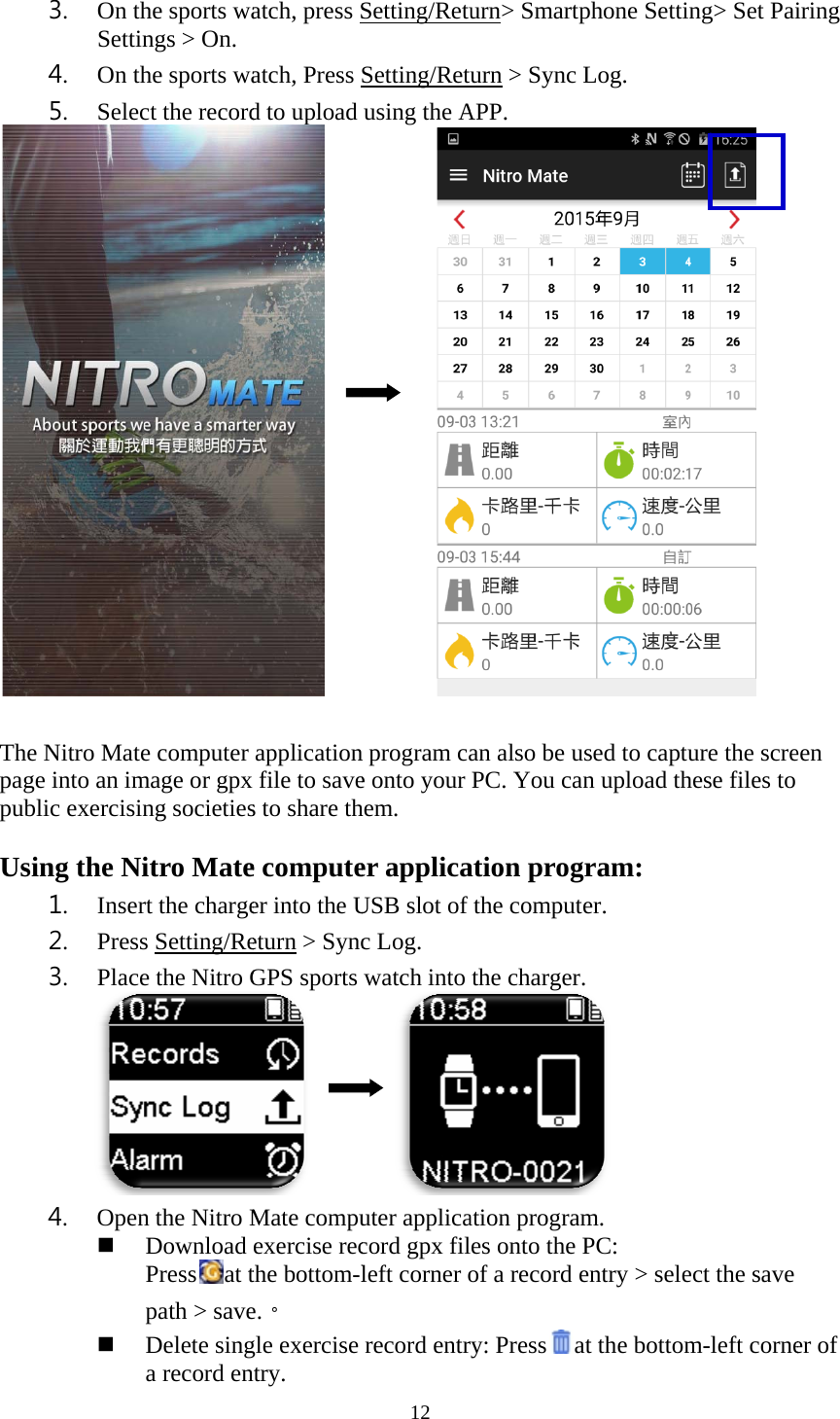
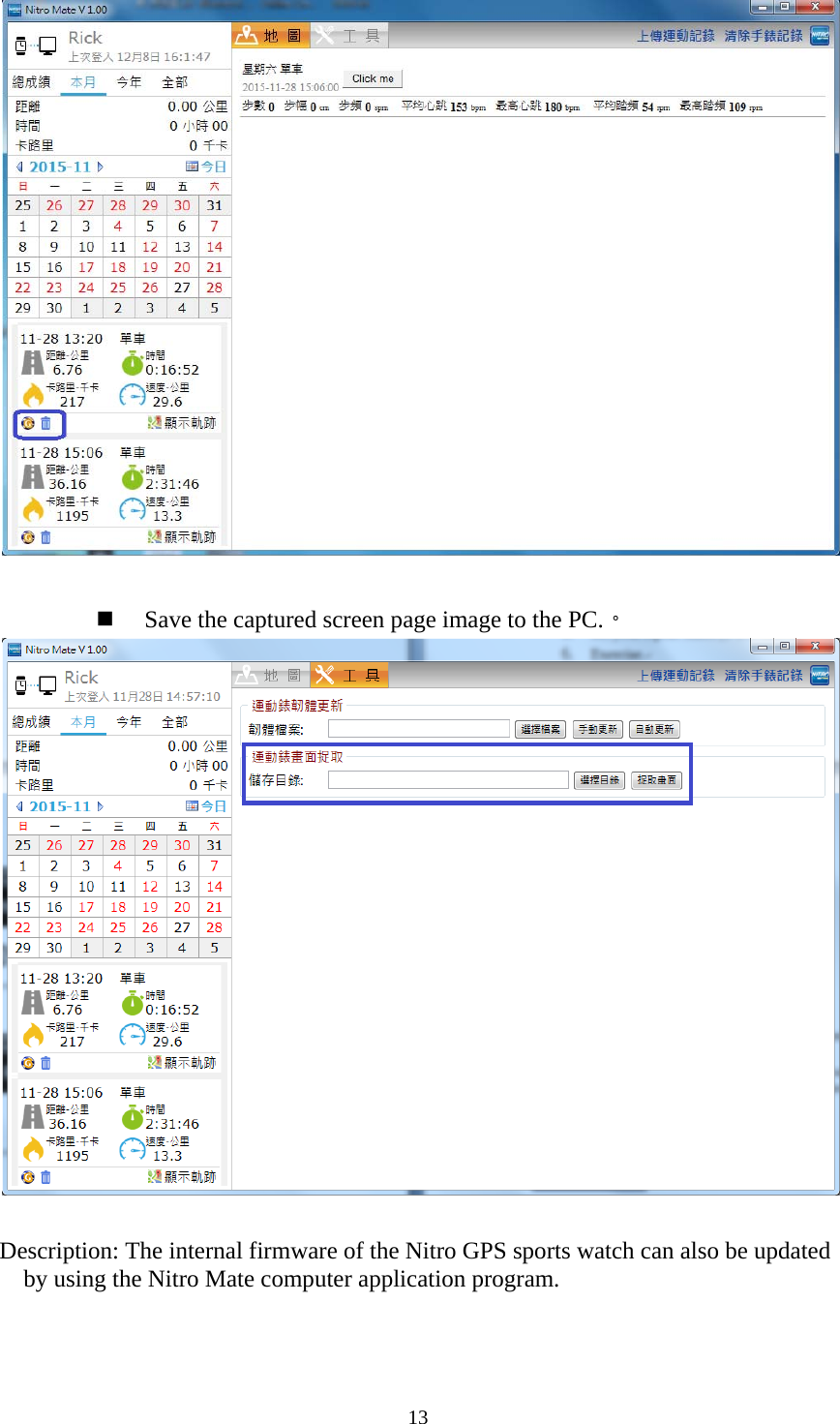
 Pleathes   Thscre  UsiSase avoid sese environmhe Nitro GPeen page imNitro Matabove) verGoogle PlNitro Mat ing the Ni1. Turn2. OpenSaving, earching forments might S sports wamages and gp te smartphonrsion smartplay store. te computeritro Maten on the Bluen the Nitro MbrowsYoaprecclothe r GPS signainterfere watch can savpx files. ne APP: Suphones, andr applicatione smartphetooth funcMate APP. sing or ou can use thpplication procord data savoud storage),e records. 11 als under thewith signal reve 3 types ofupports Andrd can be down program: Shone APP:tion on the sharinhe Nitro Matogram that isved on the sp, and log intoe following eception. f data: Exerroid (4.4 anwnloaded frSupports W: Sync Lophone. ng: e smartphons provided foports watch too the account environmenrcise recordnd above) orrom Apple iWIN7/WIN8og e APP or comor free to uploo Nitro Spact at any timents becauseds, captured r iOS (7.0 aiStore or /WIN10. mputer oad the ce (Nitro e to browse e  and
  Thepagpub Usi3. On thSettin4. On th5. Selece Nitro Matee into an imblic exercisining the Ni1. Inser2. Press3. Place4. Open  he sports wangs > On. he sports wact the recorde computer mage or gpx ng societiesitro Matert the charges Setting/Ree the Nitro Gn the Nitro MDownload Press at tpath > saveDelete singa record enatch, press Satch, Press d to upload     applicationfile to saves to share the computeer into the Ueturn > SyncGPS sports      Mate compuexercise recthe bottom-le.。 gle exercise ntry. 12 Setting/RetuSetting/Retuusing the A     n program cae onto your hem.  er applicaUSB slot of c Log. watch into   uter applicacord gpx filleft corner orecord entrurn> Smartpurn > Sync APP. an also be uPC. You caation progthe computthe chargeration prograes onto the of a record ery: Pressaphone SettiLog. used to captuan upload thgram: ter. r.  am. PC: entry > seleat the bottomng> Set Pai ure the screhese files to ect the save m-left corneiring een er of
13     Save the captured screen page image to the PC.。    Description: The internal firmware of the Nitro GPS sports watch can also be updated by using the Nitro Mate computer application program.
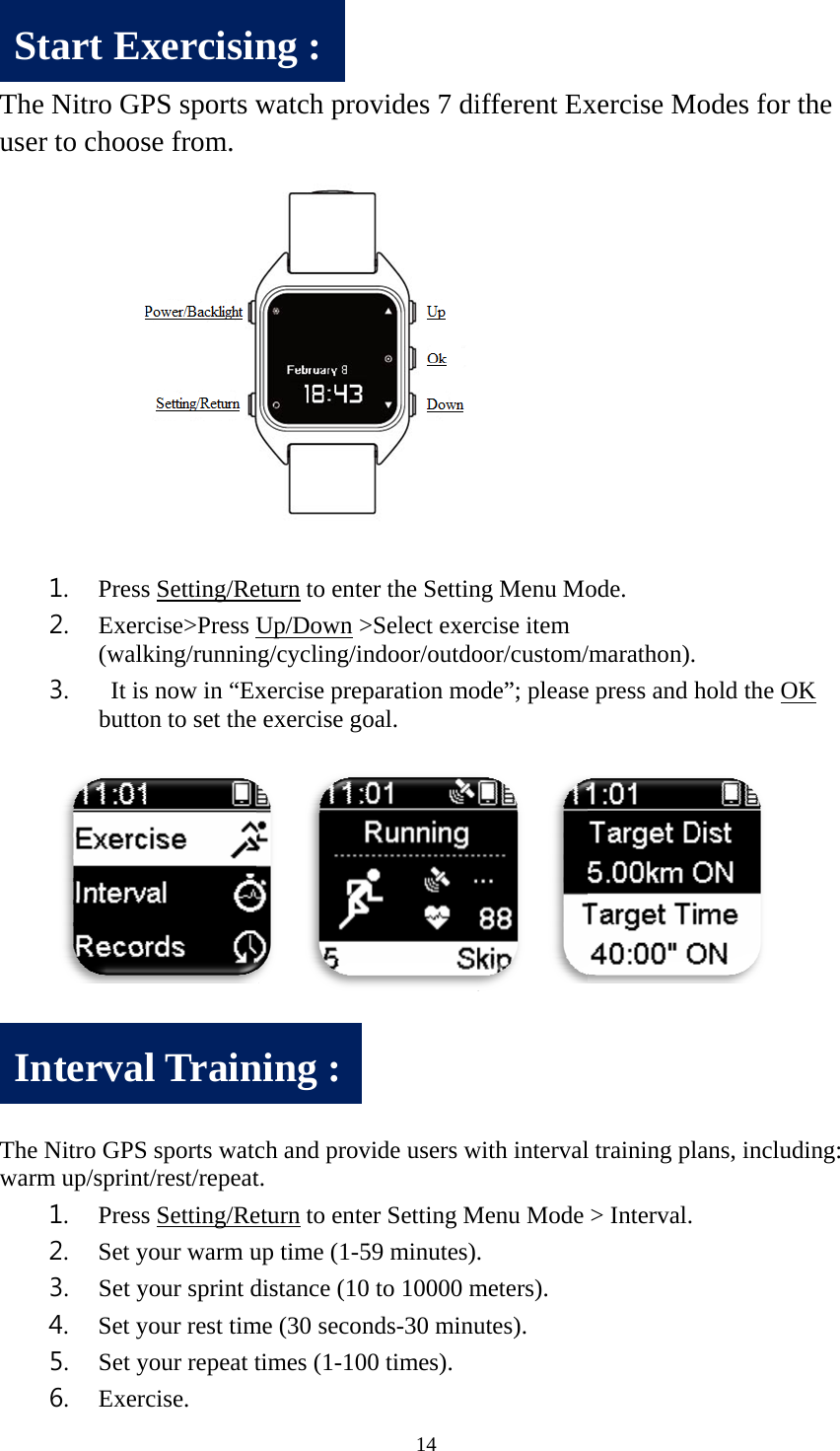
   Theuse   ThewarSIne Nitro GPer to choos1. Press2. Exer(walk3.  It isbutto  e Nitro GPSrm up/sprint1. Press2. Set y3. Set y4. Set y5. Set y6. ExerStart ExntervalPS sports wse from. s Setting/Recise>Press Uking/runnins now in “Exon to set theS sports watct/rest/repeats Setting/Reyour warm uyour sprint dyour rest timyour repeat tcise. xercisinl Trainwatch proeturn to enteUp/Down >ng/cycling/inxercise prep exercise go        ch and provt. eturn to enteup time (1-5distance (10me (30 secontimes (1-10ng : ning : 14 ovides 7 dier the Settin>Select exerndoor/outdoparation mooal.         vide users wer Setting M59 minutes)0 to 10000 mnds-30 minu0 times). ifferent Exng Menu Morcise item oor/custom/ode”; please     with intervalMenu Mode . meters). utes). xercise Mo ode. /marathon). e press and hl training pl> Interval. odes for thhold the OK  ans, includi         he K ing:
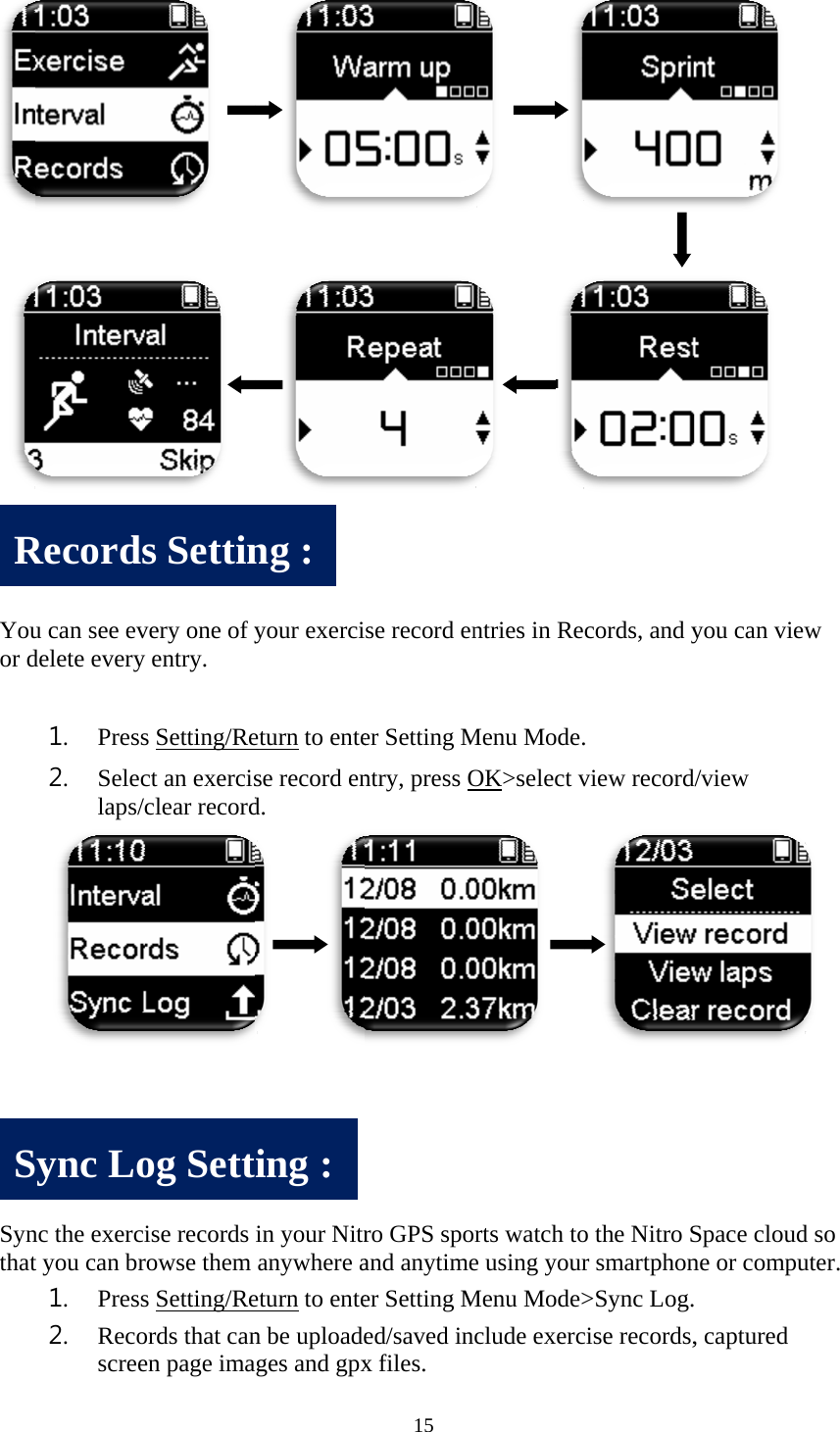
  Youor d   SynthatRS u can see evdelete every1. Press2. Seleclaps/c nc the exercit you can br1. Press2. RecoscreeRecordsSync Lo      very one of yy entry. s Setting/Rect an exercisclear record ise records rowse them s Setting/Reords that canen page imas Settinog Sett  your exercieturn to entese record end.      in your Nitranywhere aeturn to enten be uploadeages and gpxng : ing : 15 se record ener Setting Mntry, press Oro GPS spoand anytimeer Setting Med/saved inx files.             ntries in ReMenu Mode.OK>select v    rts watch toe using yourMenu Mode>clude exerc          cords, and y. view record o the Nitro Sr smartphon>Sync Log.cise records,           you can vied/view Space cloudne or compu         , captured           w  d so uter.
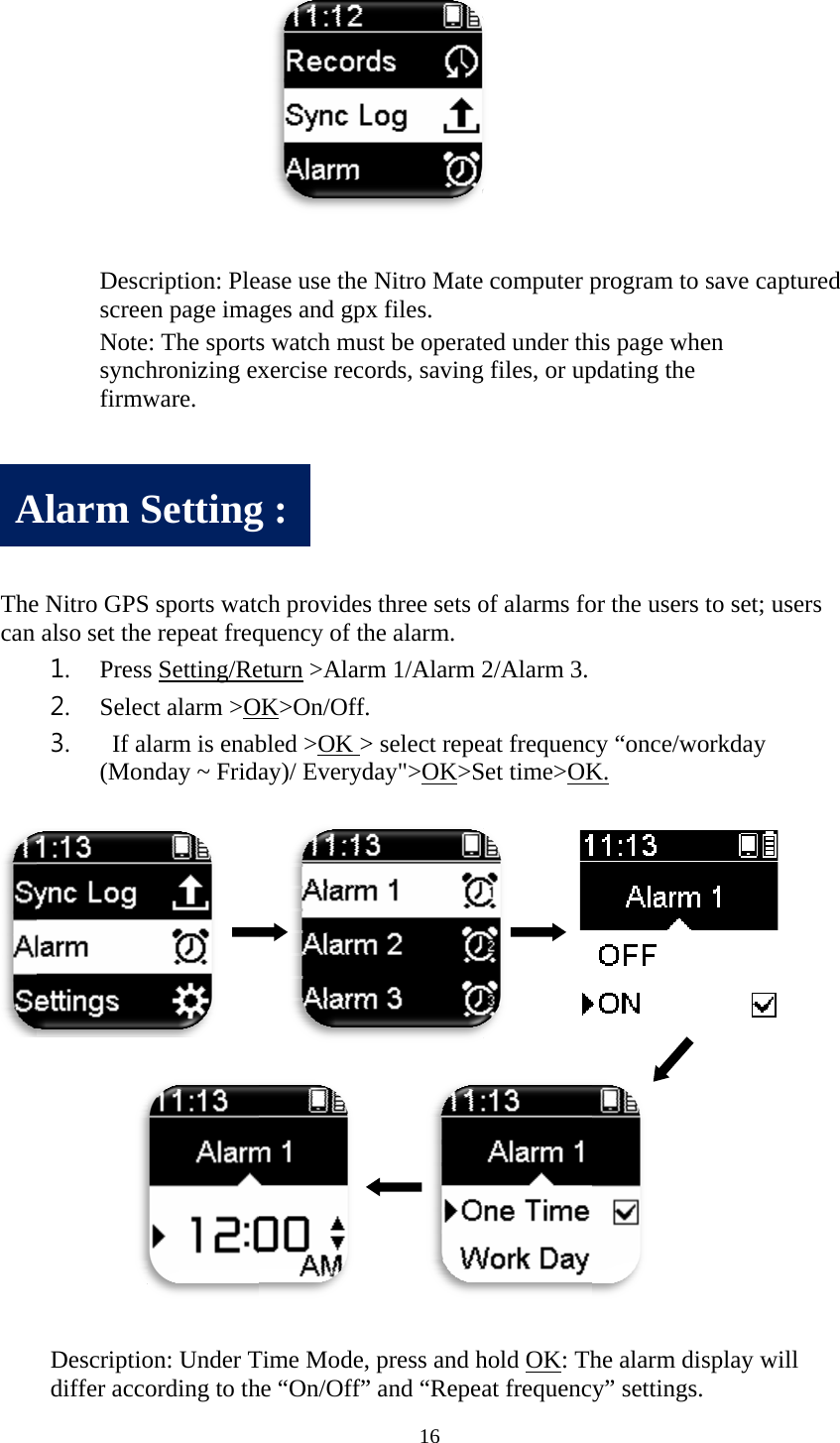
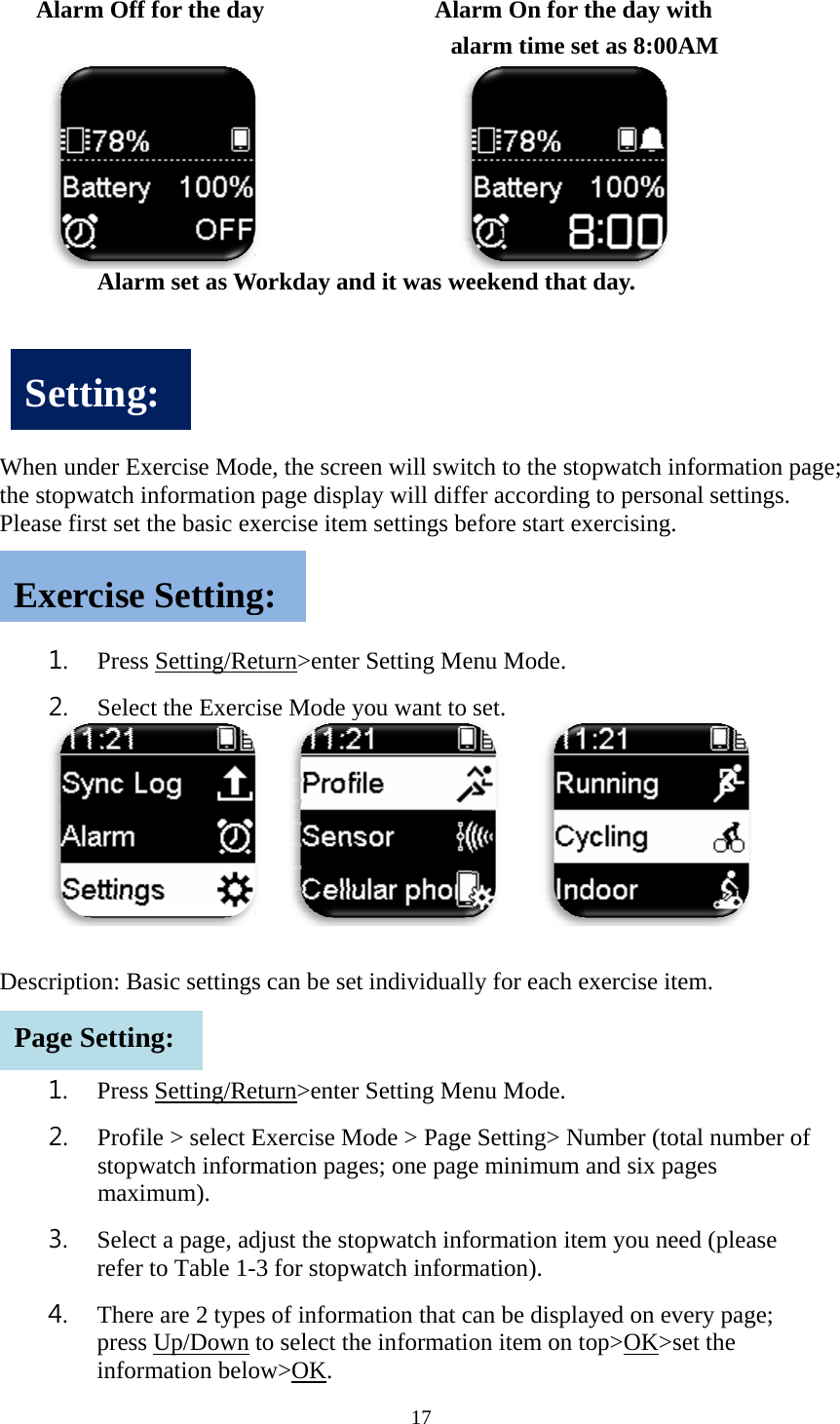
      Thecan      A   DescscreeNotesynchfirmw e Nitro GPSalso set the1. Press2. Selec3.  If al(Mon Descriptiodiffer accoAlarm Scription: Pleen page ima: The sportshronizing exware. S sports watce repeat freqs Setting/Rect alarm >Olarm is enabnday ~ Frida    on: Under Tording to thSettingease use the ages and gpxs watch musxercise recoch providesquency of theturn >AlarmOK>On/Off.bled >OK >ay)/ Everyd Time Mode,he “On/Off”g : 16 Nitro Matex files.   st be operatords, savings three sets ohe alarm. m 1/Alarm  > select repeday">OK>S press and h” and “Repee computer pted under thg files, or upof alarms fo2/Alarm 3. eat frequencSet time>OKhold OK: That frequencprogram to his page whepdating the or the users  cy “once/woK. he alarm disy” settings.save capturen to set; usersorkday splay will  red s
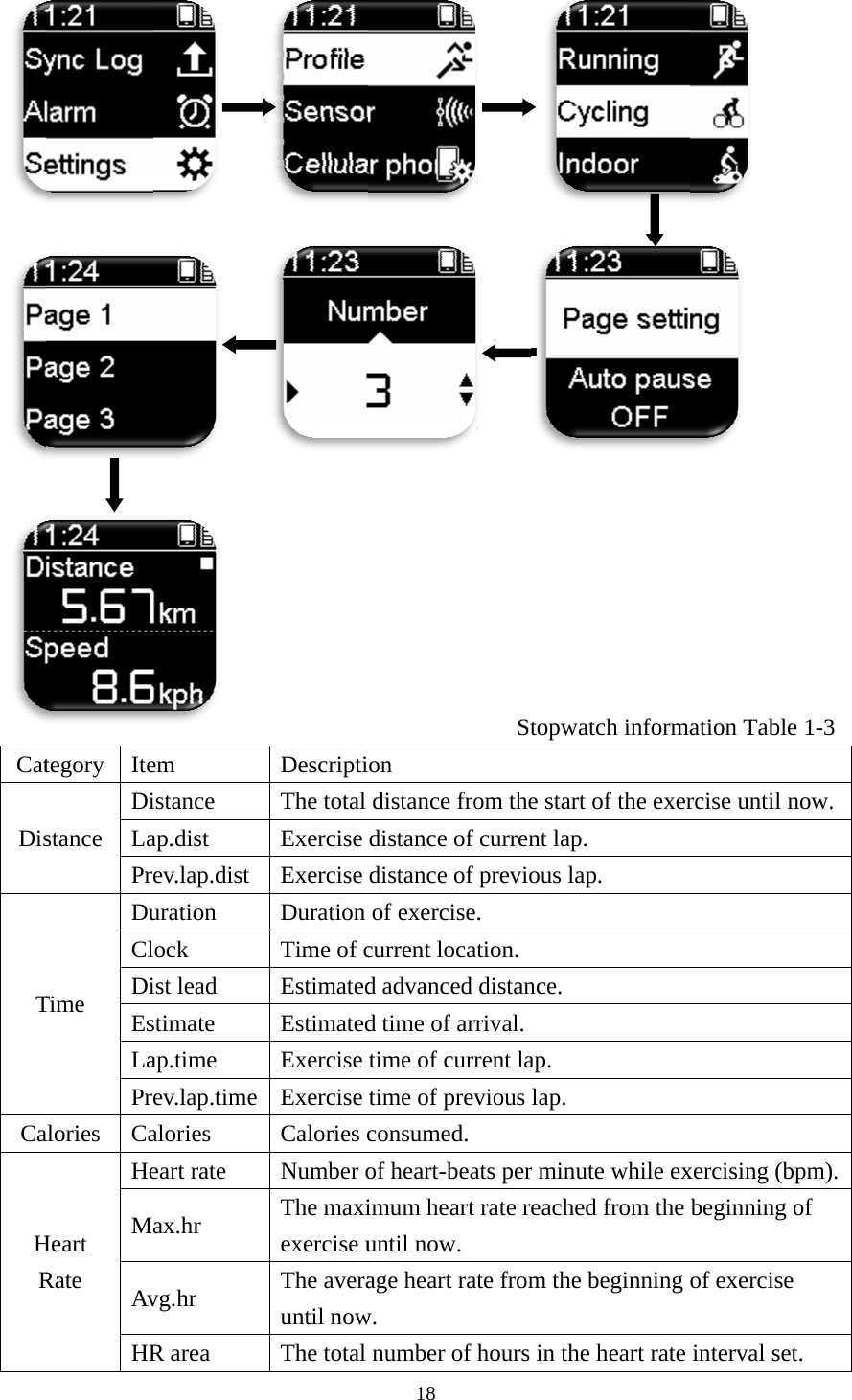
      Whthe Plea Des SEPaAlarm Off Alar en under Exstopwatch iase first set  1. Press2. Selec scription: Ba1. Press2. Profistopwmaxi3. Selecrefer 4. TherepressinforSettingExerciseage Settinf for the dayrm set as Wxercise Modinformationthe basic exs Setting/Rect the Exercasic settingss Setting/Reile > select Ewatch informimum). ct a page, adto Table 1-e are 2 types Up/Down rmation belog: e Settingng: y                  Workday ande, the screen page displaxercise itemeturn>enter cise Mode y  s can be seteturn>enter Exercise Mmation pagedjust the sto-3 for stopwes of informto select theow>OK. g: 17      Alaala       d it was ween will switay will diffem settings beSetting Meyou want to t individuallSetting Meode > Page es; one pageopwatch infowatch informmation that ce informatiorm On for arm time seekend thattch to the stoer accordingefore start eenu Mode.  set.    ly for each eenu Mode.  Setting> Ne minimum formation itemation). an be displaon item on tthe day wiet as 8:00A t day. opwatch infg to personaexercising. exercise itemNumber (totaand six pagem you neeayed on evetop>OK>seith  AM formation pal settings.  m. al number oges d (please ery page; et the page; of
 CatDisTCaHRtegory Itestance DiLaPrTime DuClDiEsLaPralories CaHeart Rate HeMAvHR          em istance ap.dist ev.lap.dist uration ock ist lead stimate ap.time ev.lap.time alories eart rate ax.hr vg.hr R area      DescriptiThe total Exercise Exercise Duration Time of cEstimatedEstimatedExercise Exercise Calories cNumber oThe maxiexercise uThe averauntil nowThe total 18 on distance frodistance of distance of of exercisecurrent locad advanced d time of artime of currtime of prevconsumed. of heart-beaimum heart until now.   age heart raw.  number of      Stopwaom the startfcurrent lapfprevious la. ation. distance. rival. rent lap. vious lap. ats per minurate reacheate from the hours in theatch informat of the exer. ap. ute while exed from the beginning e heart rate          ation Tablercise until nxercising (bpbeginning oof exercise interval set        1-3 now. pm). of t.
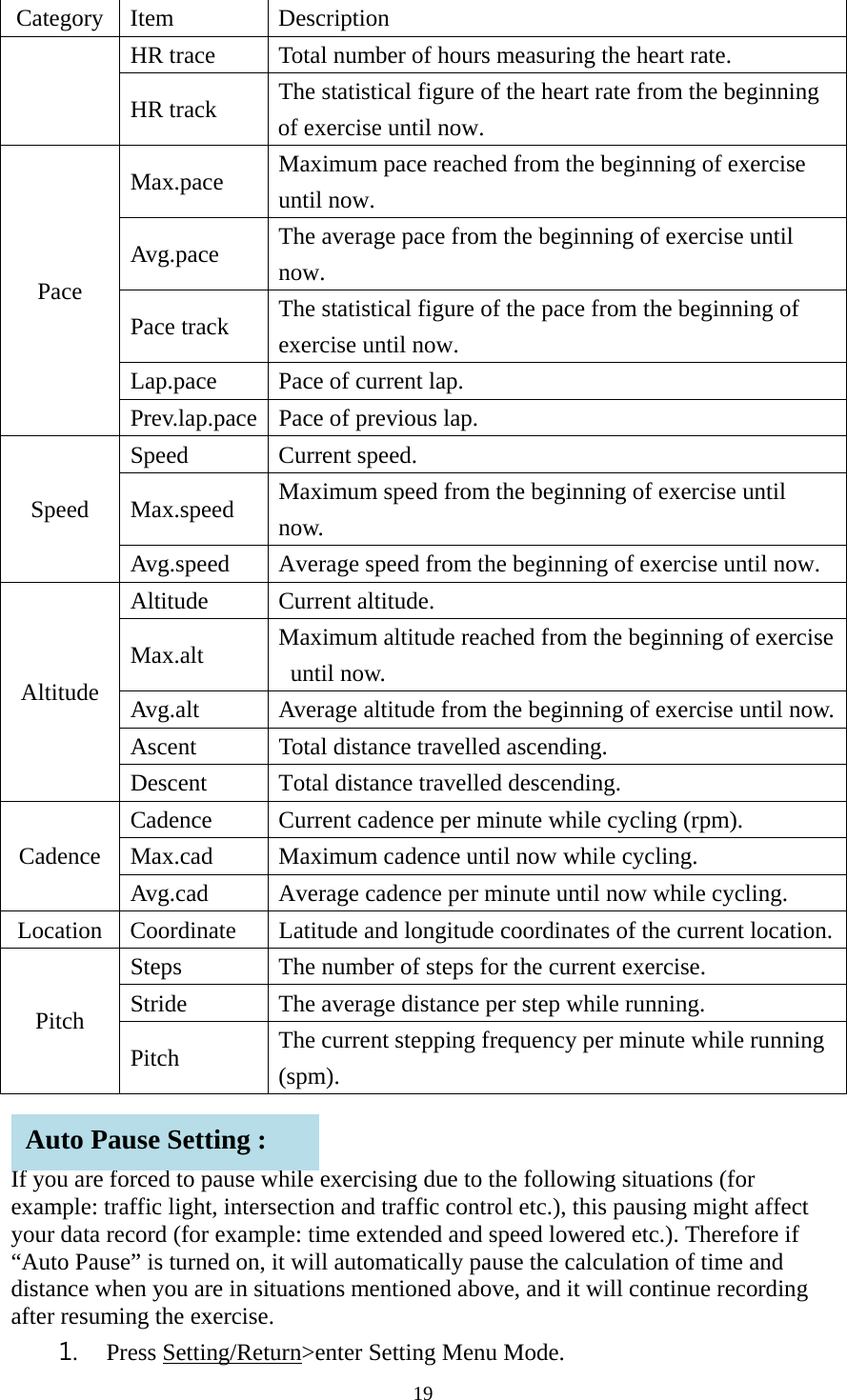
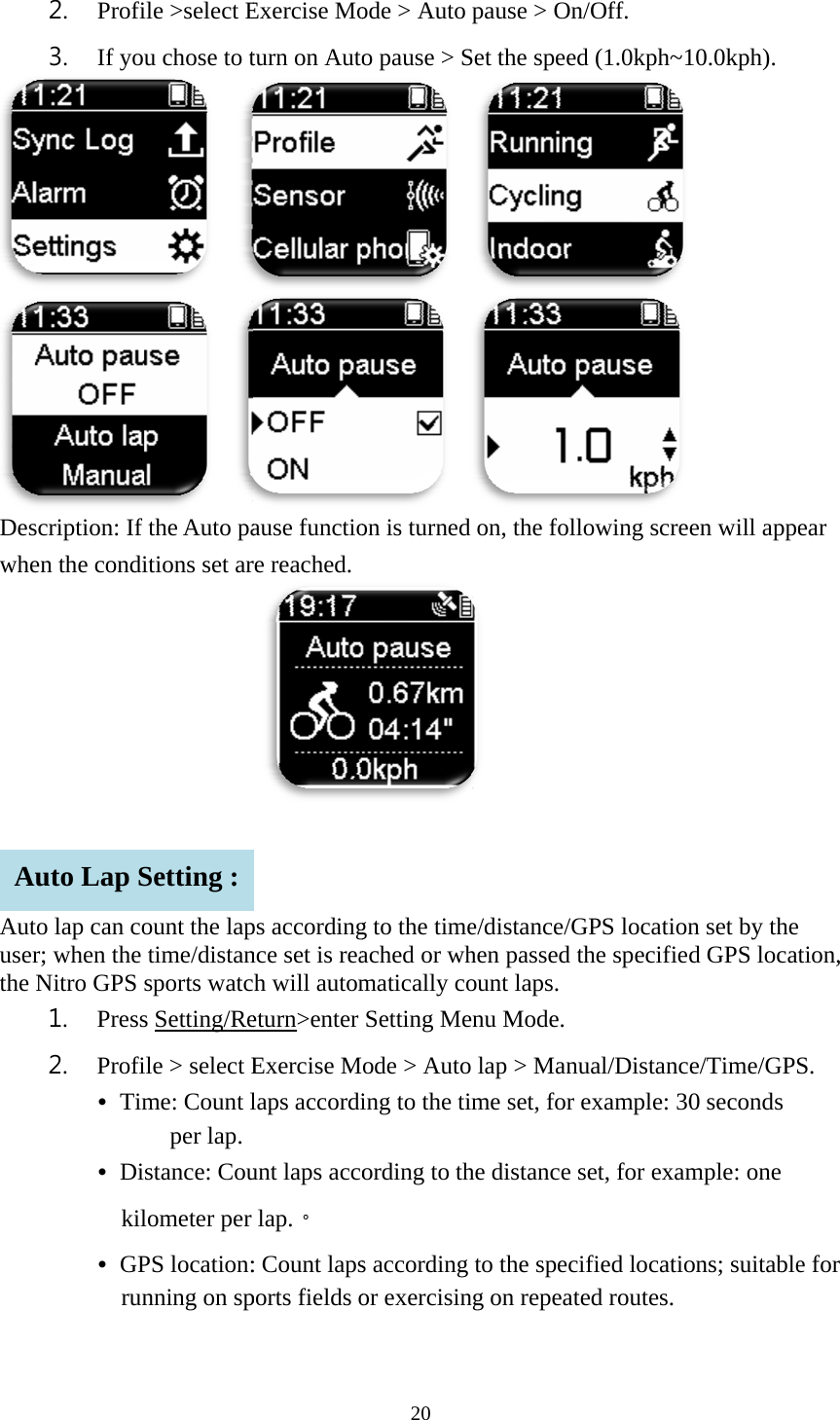
19  Category Item  Description HR trace  Total number of hours measuring the heart rate. HR track    The statistical figure of the heart rate from the beginning of exercise until now. Pace Max.pace  Maximum pace reached from the beginning of exercise until now. Avg.pace  The average pace from the beginning of exercise until now.  Pace track  The statistical figure of the pace from the beginning of exercise until now.   Lap.pace  Pace of current lap. Prev.lap.pace  Pace of previous lap. Speed Speed Current speed. Max.speed  Maximum speed from the beginning of exercise until now. Avg.speed  Average speed from the beginning of exercise until now. Altitude Altitude Current altitude. Max.alt  Maximum altitude reached from the beginning of exercise until now. Avg.alt  Average altitude from the beginning of exercise until now. Ascent  Total distance travelled ascending. Descent  Total distance travelled descending. Cadence Cadence  Current cadence per minute while cycling (rpm).   Max.cad Maximum cadence until now while cycling. Avg.cad  Average cadence per minute until now while cycling. Location  Coordinate  Latitude and longitude coordinates of the current location. Pitch Steps  The number of steps for the current exercise. Stride  The average distance per step while running. Pitch  The current stepping frequency per minute while running (spm).   If you are forced to pause while exercising due to the following situations (for example: traffic light, intersection and traffic control etc.), this pausing might affect your data record (for example: time extended and speed lowered etc.). Therefore if “Auto Pause” is turned on, it will automatically pause the calculation of time and distance when you are in situations mentioned above, and it will continue recording after resuming the exercise. 1. Press Setting/Return>enter Setting Menu Mode.  Auto Pause Setting :
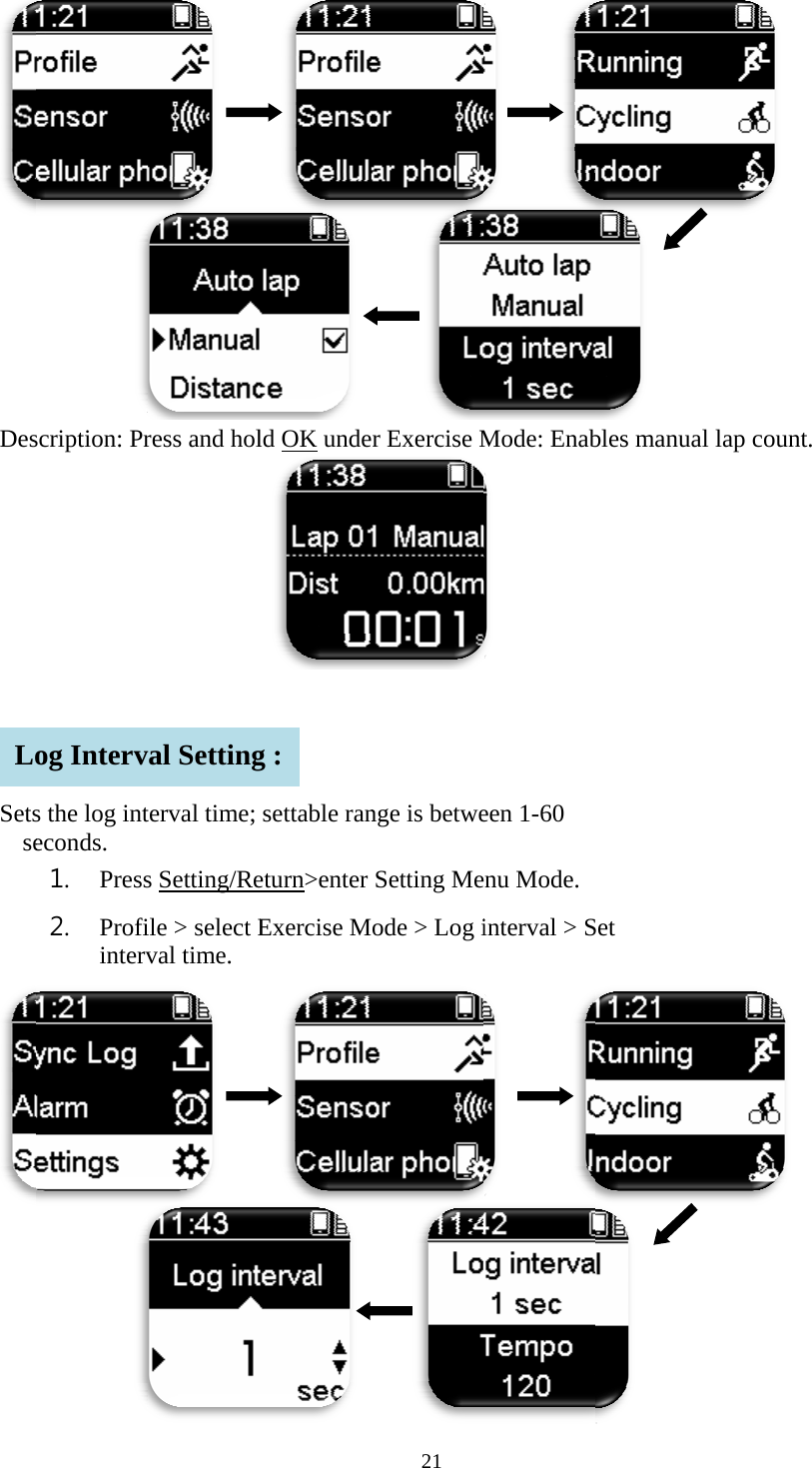
 Deswhe  Autuserthe     A2. Profi3. If youscription: If en the condito lap can cor; when the Nitro GPS 1. Press2. Profi • Tim • Dikil • GPrunuto Lap Sile >select Eu chose to t   fthe Auto paitions set arount the laptime/distansports watcs Setting/Reile > select Eme: Count lper lap. stance: Coulometer per PS location:nning on spSetting : Exercise Moturn on Autoause functiore reached. ps accordingnce set is reah will autometurn>enter Exercise Mlaps accordiunt laps accolap.。 : Count lapsports fields o20 ode > Auto o pause > S  on is turned g to the timeached or whmatically coSetting Meode > Autoing to the tiording to ths according or exercisinpause > OnSet the speedon, the foll e/distance/Ghen passed tount laps. enu Mode.   lap > Manume set, for he distance sto the specing on repeatn/Off. d (1.0kph~1 lowing screGPS locationthe specifiedual/Distancexample: 30set, for examified locatioed routes. 10.0kph).   en will appen set by thed GPS locate/Time/GPS0 seconds   mple: one   ons; suitableear e tion, S. e for
 Des   Setsse  Loscription: Prs the log inteconds. 1. Press2. Profiintervog Interv    ress and holterval time; s Setting/Reile > select Eval time.     val Setting   ld OK undesettable raneturn>enter Exercise M g : 21     r Exercise Mnge is betweSetting Meode > Log i     Mode: Enab een 1-60 enu Mode.  interval > S       bles manualSet  l lap count.
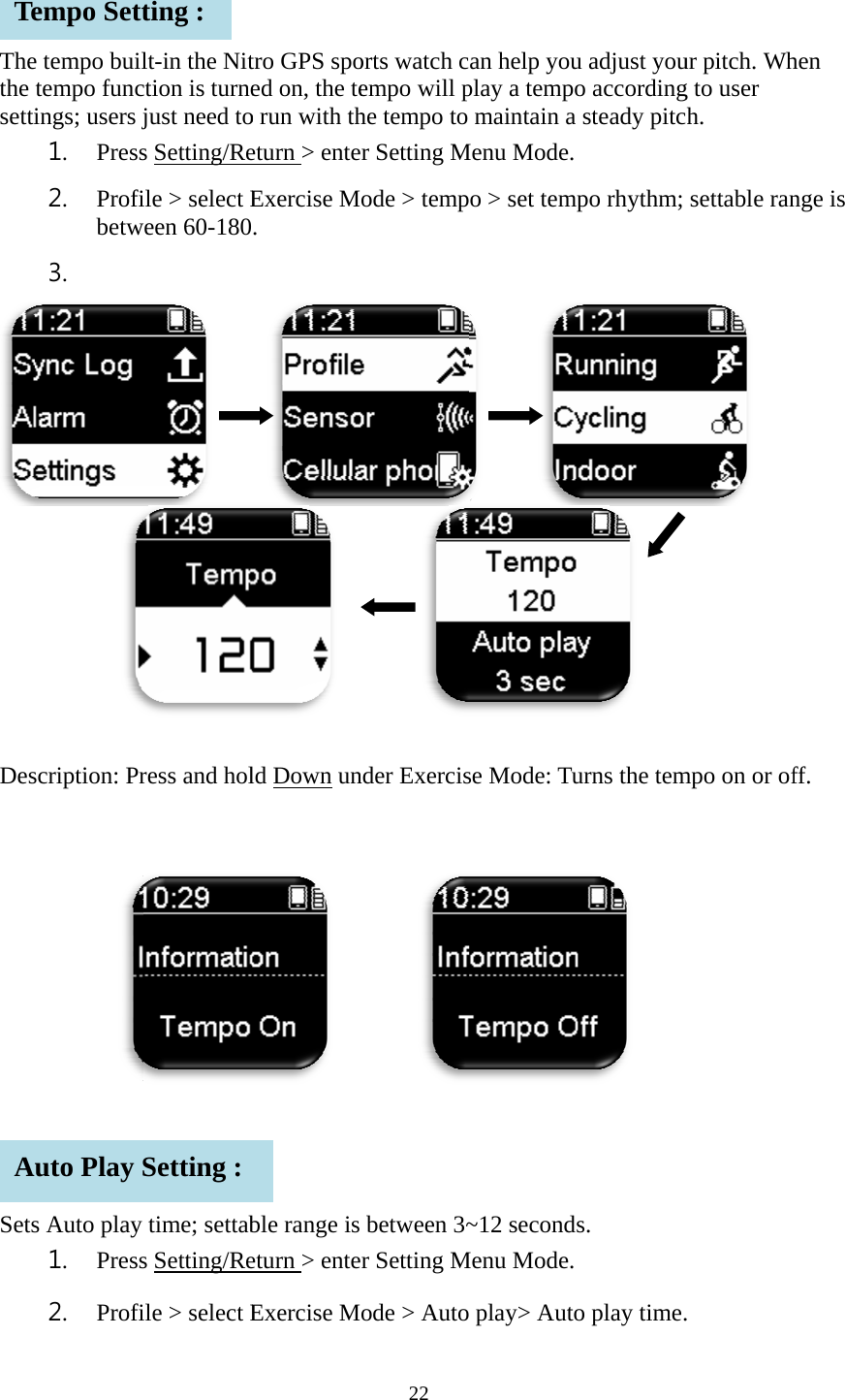
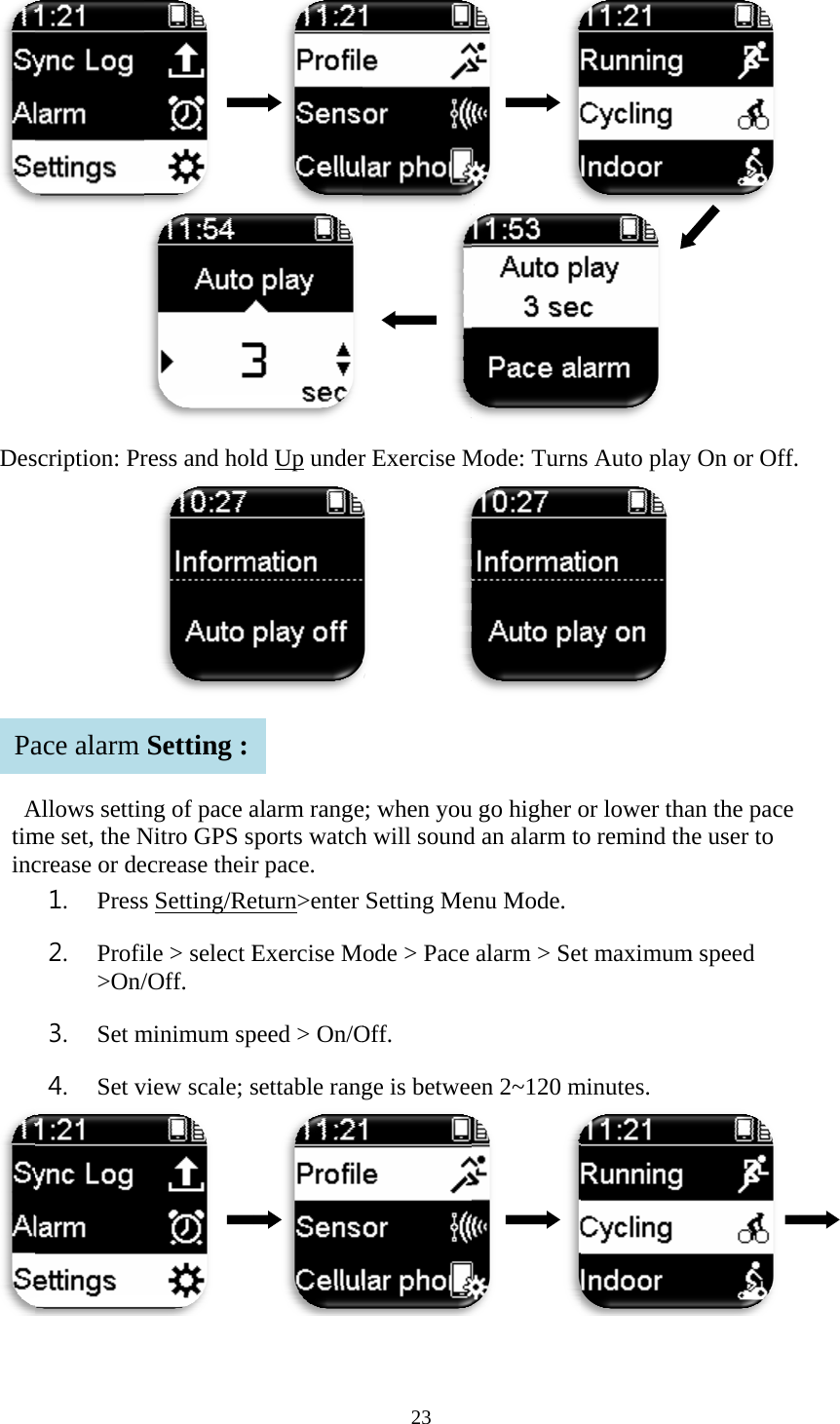
  Thethe setti Des     SetsTeAe tempo builtempo funcings; users j1. Press2. Profibetw3.  scription: Prs Auto play 1. Press2. Profiempo Settuto Play Slt-in the Nitction is turnejust need tos Setting/Reile > select Eween 60-180    ress and holtime; settabs Setting/Reile > select Eting : Setting : tro GPS spoed on, the teo run with theturn > enteExercise M.  ld Down un   ble range is eturn > enteExercise M22 orts watch cempo will phe tempo to er Setting Mode > tempnder Exercis    between 3~er Setting Mode > Autoan help youplay a tempomaintain a Menu Mode. o > set temp     se Mode: Tu~12 secondsMenu Mode.  play> Autou adjust youo accordingsteady pitcpo rhythm; urns the tem s.  o play time.ur pitch. Whg to user h. settable ran    mpo on or of. hen nge is  ff.
 Des AtimincPascription: PrAllows settinme set, the Ncrease or de1. Press2. Profi>On/3. Set m4. Set vace alarm     ress and holng of pace aNitro GPS secrease theirs Setting/Reile > select E/Off. minimum spview scale; s    Setting :    ld Up underalarm rangeports watchr pace. eturn>enter Exercise Mpeed > On/Osettable rang  23        r Exercise M       e; when youh will soundSetting Meode > Pace Off. ge is betwee      Mode: Turnsu go higher od an alarm toenu Mode.  alarm > Seen 2~120 m       s Auto play or lower thao remind tht maximumminutes.   y On or Off.an the pace he user to m speed
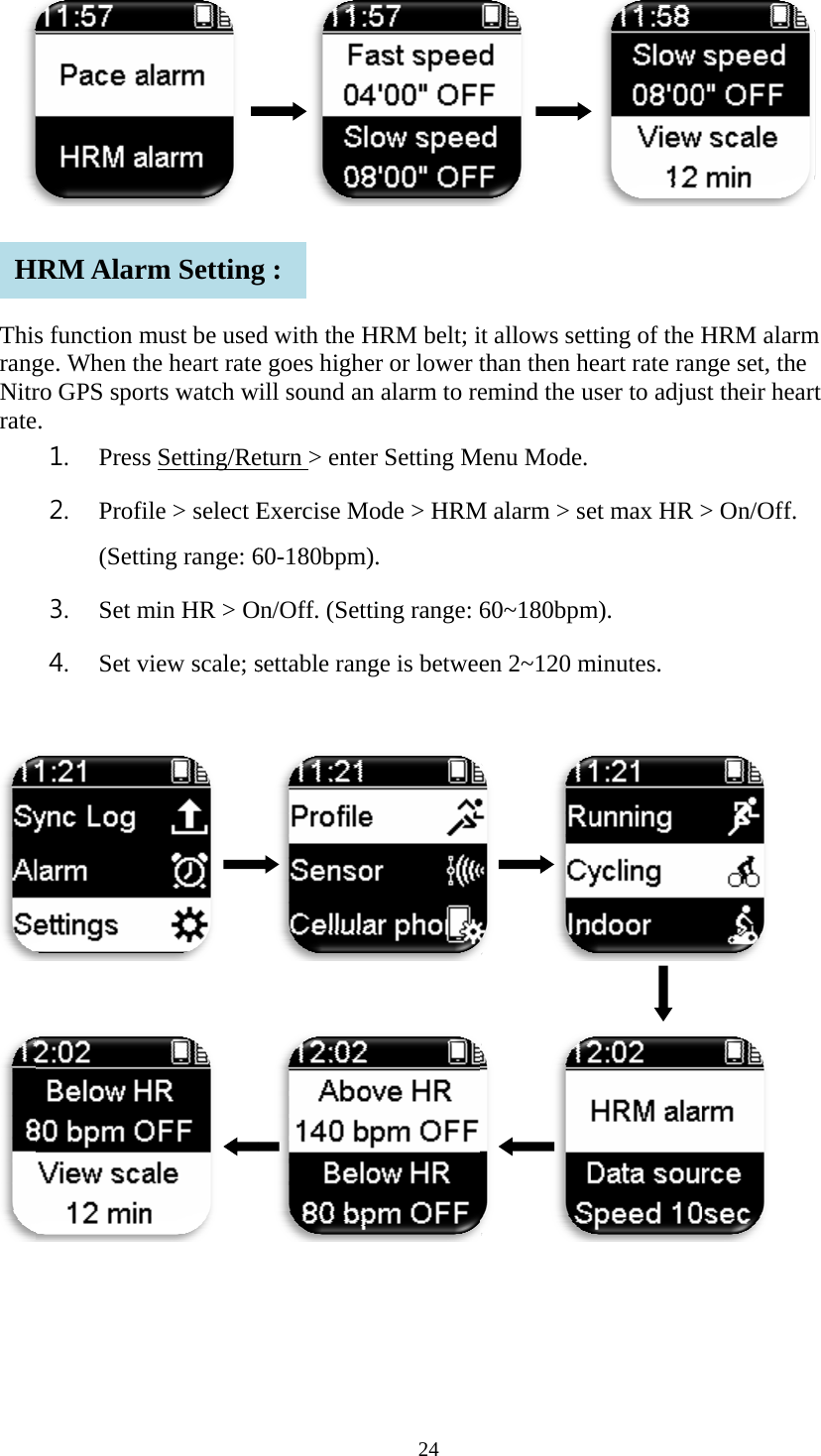
   ThisrangNitrrate       Hs function mge. When thro GPS spore. 1. Press2. Profi(Setti3. Set m4. Set v  HRM Alar  must be usedhe heart raterts watch ws Setting/Reile > select Eing range: 6min HR > Oview scale; s        m Setting    d with the He goes highewill sound aneturn > enteExercise M60-180bpm)On/Off. (Settsettable rang  g : 24 HRM belt; ier or lower tn alarm to reer Setting Mode > HRM). ting range: ge is betwee      it allows setthan then heemind the uMenu Mode. M alarm > se60~180bpmen 2~120 m          tting of the Heart rate ranuser to adjus et max HR >m). minutes. HRM alarmnge set, the st their hear> On/Off.         m rt
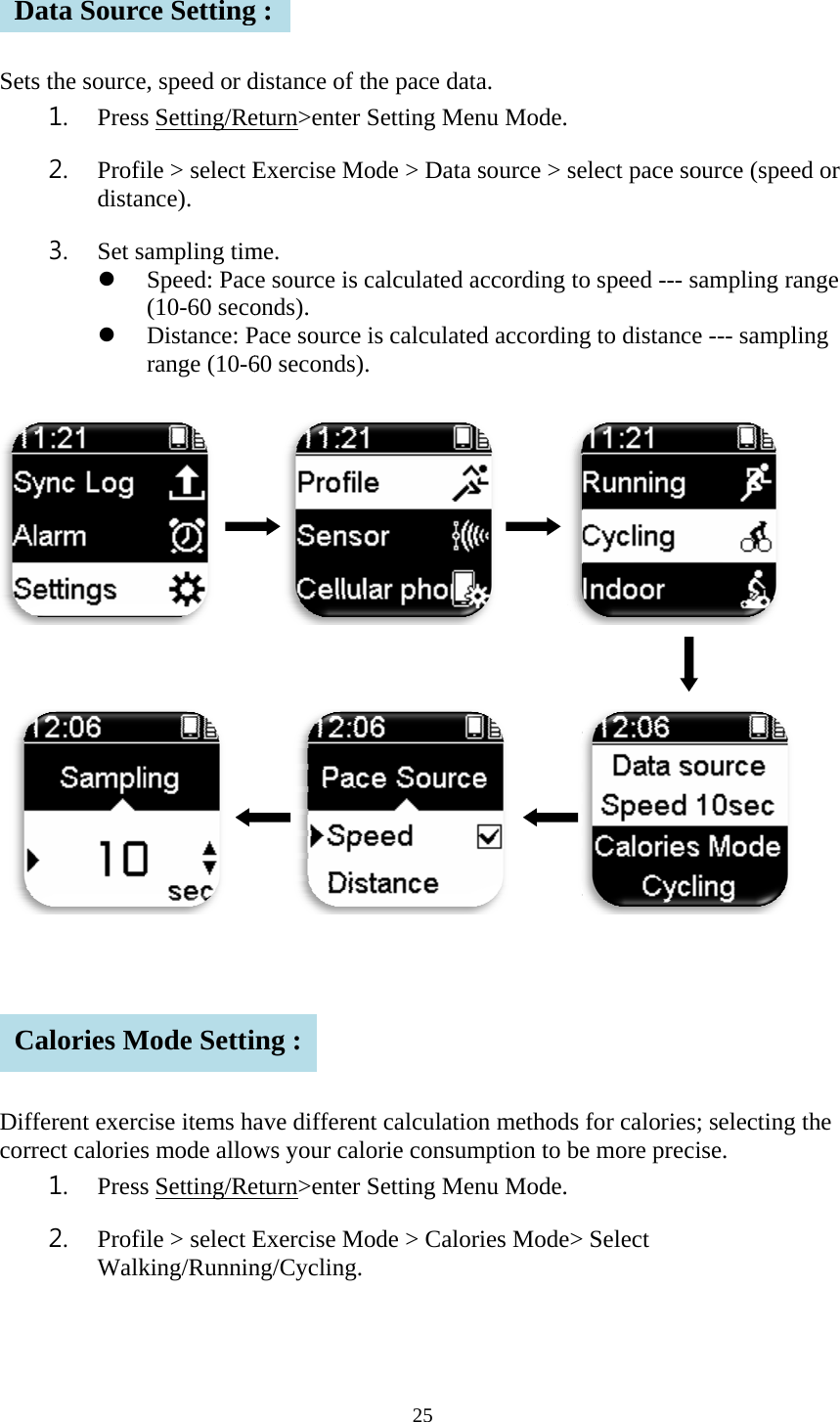
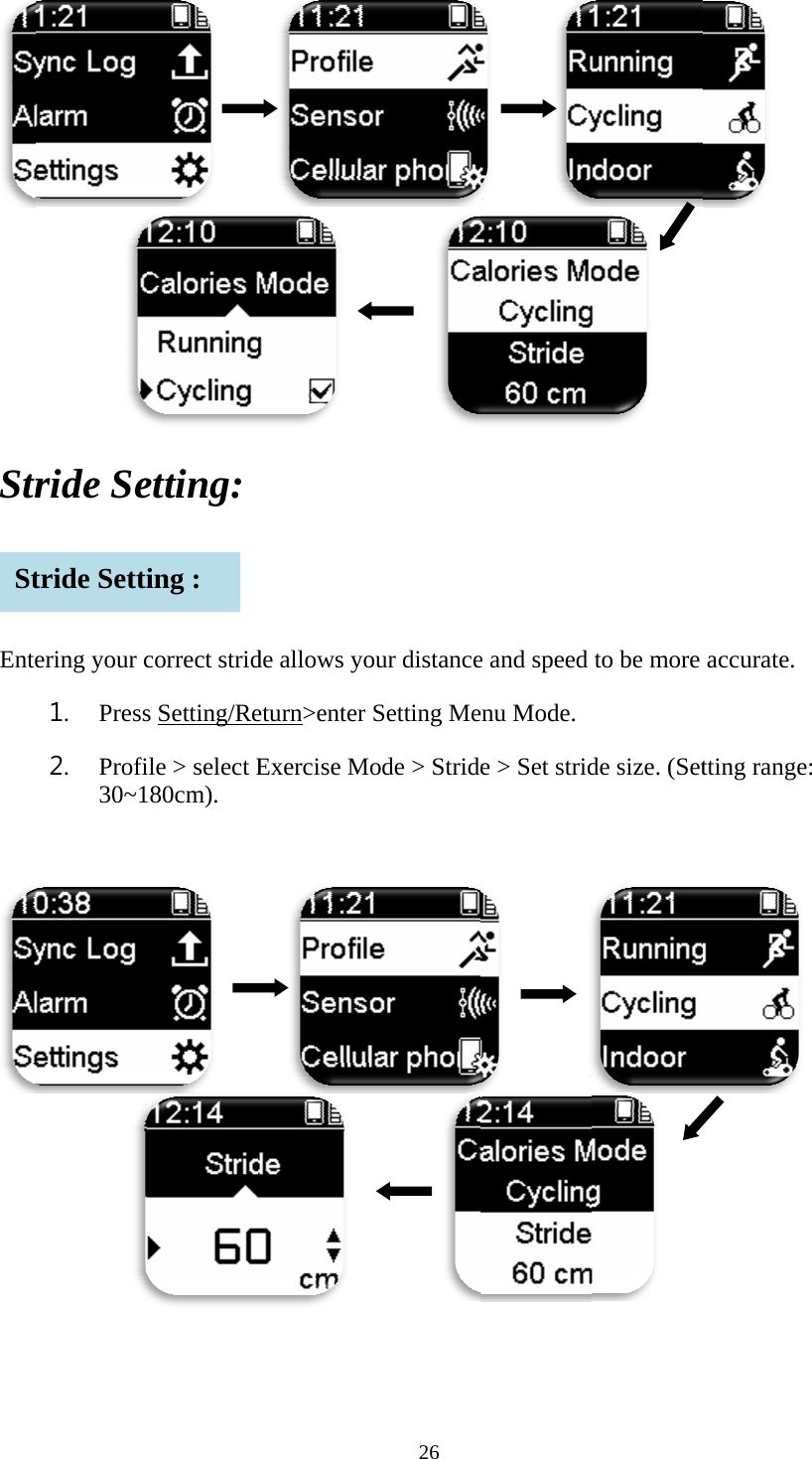
     Sets       DiffcorrDCs the source1. Press2. Profidistan3. Set s  ferent exercrect calories1. Press2. ProfiWalkata Sourcalories Me, speed or ds Setting/Reile > select Ence). ampling timSpeed: Pac(10-60 secoDistance: Prange (10-6        cise items has mode allows Setting/Reile > select Eking/Runnince SettingMode Settidistance of teturn>enter Exercise Mme. e source is onds). Pace source 60 seconds)     ave differenws your caleturn>enter Exercise Mng/Cycling. g : ing : 25 the pace datSetting Meode > Data calculated ais calculate. nt calculatiolorie consumSetting Meode > Calorta. enu Mode.  source > seaccording toed according            on methods mption to beenu Mode.  ries Mode>elect pace soo speed --- sg to distancfor caloriese more prec> Select ource (speesampling rae --- sampli   s; selecting cise. d or ange ing    the
     Str  Ente  St       ride Seering your c1. Press2. Profi30~1 tride Setti    etting: correct strids Setting/Reile > select E80cm).     ing :     de allows yoeturn>enter Exercise M  26      our distanceSetting Meode > Strid     e and speed enu Mode.  e > Set strid        to be more de size. (Set    accurate. tting range:
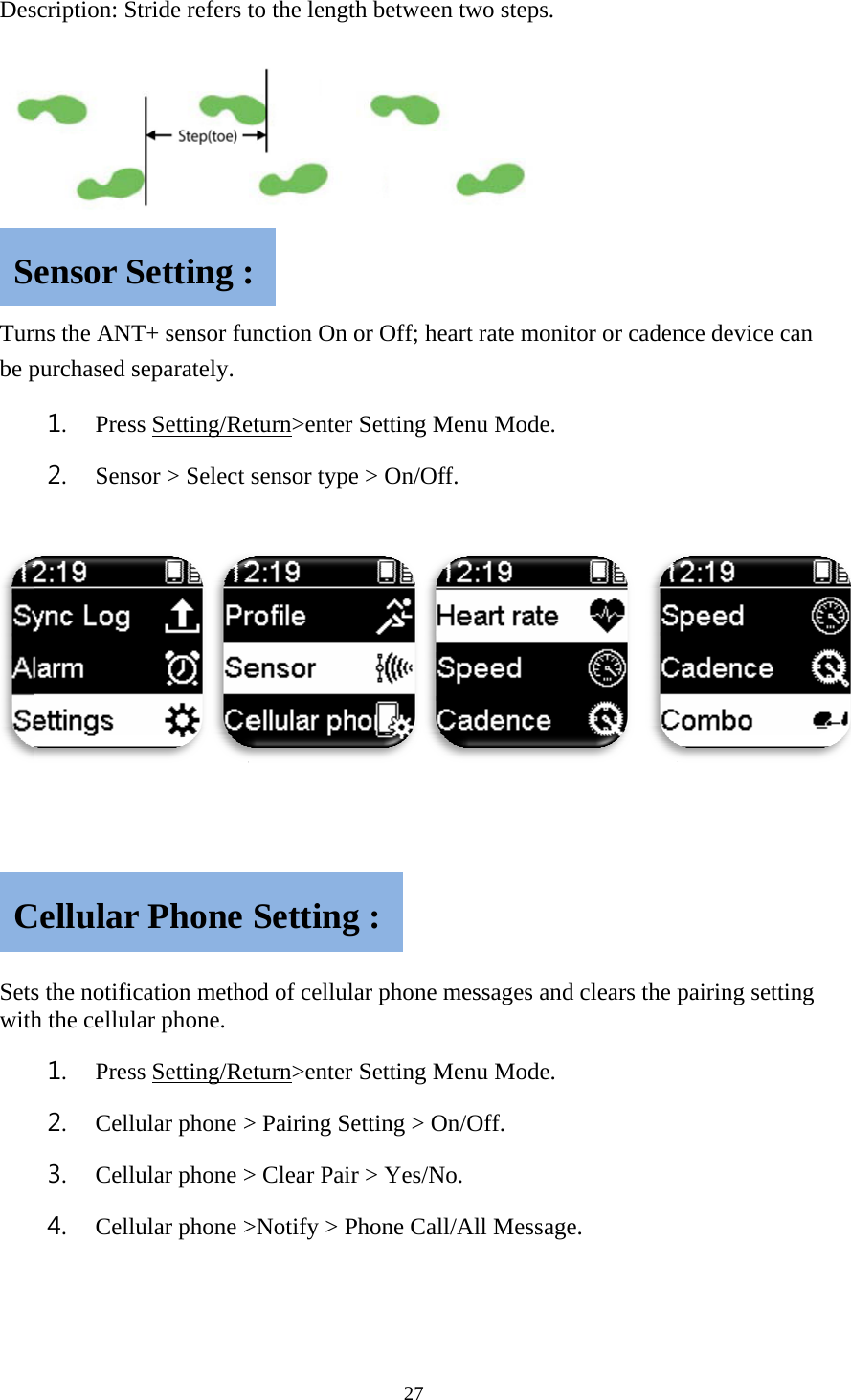
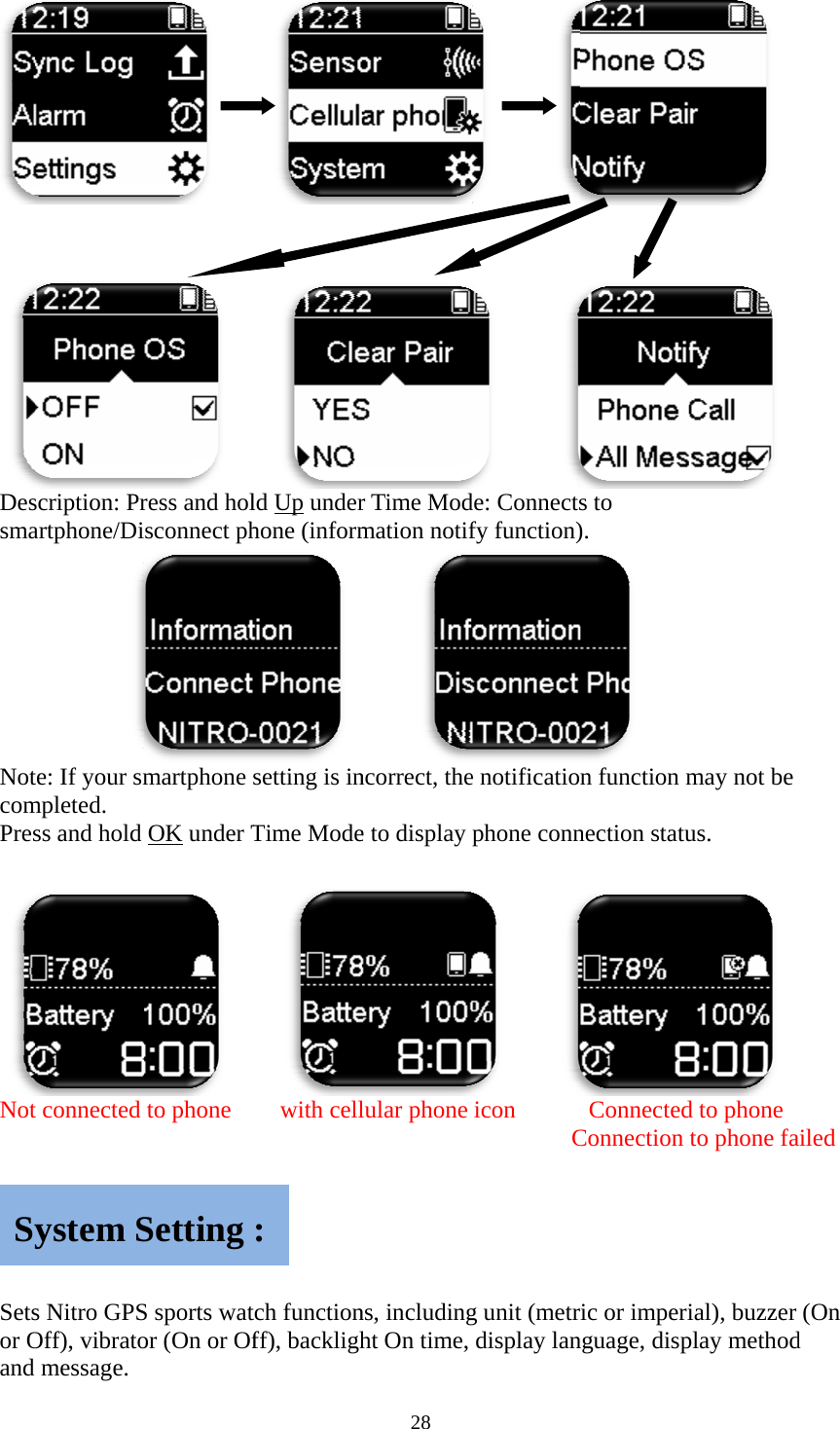
 Des Turnbe p   SetswithSCscription: Stns the ANTpurchased se1. Press2. Senso s the notifich the cellula1. Press2. Cellu3. Cellu4. Cellu ensor SCellular tride refers tT+ sensor fueparately. s Setting/Reor > Select cation methoar phone. s Setting/Reular phone >ular phone >ular phone >Setting :Phone to the lengthunction On oeturn>enter sensor typeod of cellulaeturn>enter > Pairing Se> Clear Pair>Notify > P: Setting27 h between tor Off; hearSetting Mee > On/Off. ar phone meSetting Meetting > On/r > Yes/No.Phone Call/Ag : two steps.  rt rate monitenu Mode.  essages andenu Mode.  /Off. All Messagetor or caden d clears the pe. nce device cpairing settican  ing
    DessmaNotcomPres Not  Setsor Oand Syscription: Prartphone/Dite: If your smmpleted. ss and hold t connected s Nitro GPSOff), vibratomessage. ystem S       ress and holsconnect phmartphone OK under T   to phone  S sports wator (On or OfSetting    ld Up underhone (inform  setting is inTime Mode    with celltch functionff), backligh: 28 r Time Modmation notif    ncorrect, thee to display lular phone ns, includinght On time,             de: Connectsfy function)e notificatiophone conn     icon      Cg unit (metrdisplay lans to ).   n function mnection statuConnectedConnection ric or imperinguage, disp    may not be us.   d to phone to phone faial), buzzer play method  ailed (On d
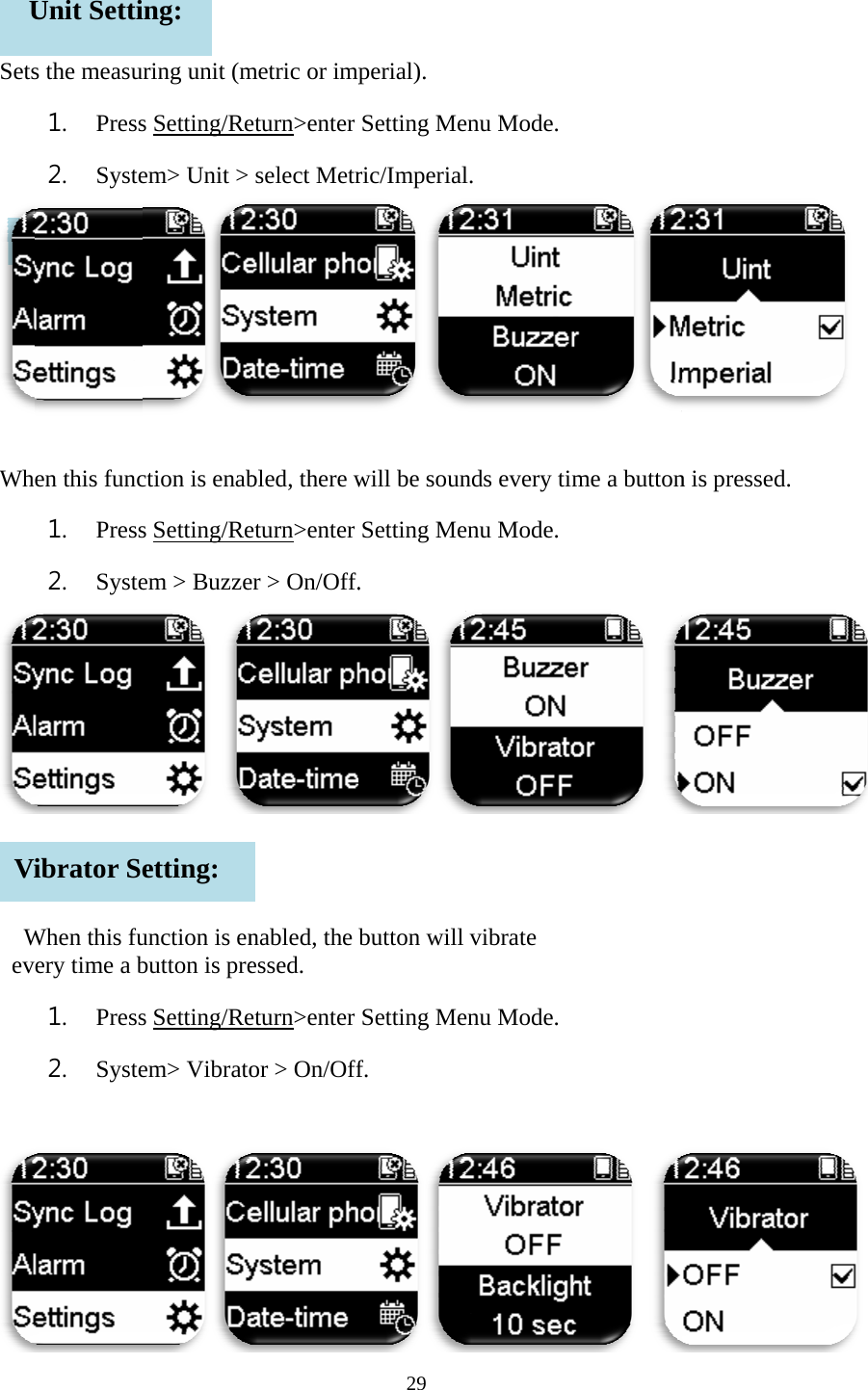
   Sets Wh  WevUVis the measu1. Press2. Systeen this func1. Press2. SysteWhen this fuery time a b1. Press2. Syste Unit SettiBuzzer ibrator Seuring unit (ms Setting/Reem> Unit > ction is enabs Setting/Reem > Buzze unction is enbutton is pres Setting/Reem> Vibratoing: etting: metric or impeturn>enter select Metrbled, there weturn>enter er > On/Off.nabled, the essed. eturn>enter or > On/Off29 perial).  Setting Meric/Imperialwill be sounSetting Me. button will Setting Mef. enu Mode.  l. nds every timenu Mode.  vibrate enu Mode.  me a button  n is pressed.
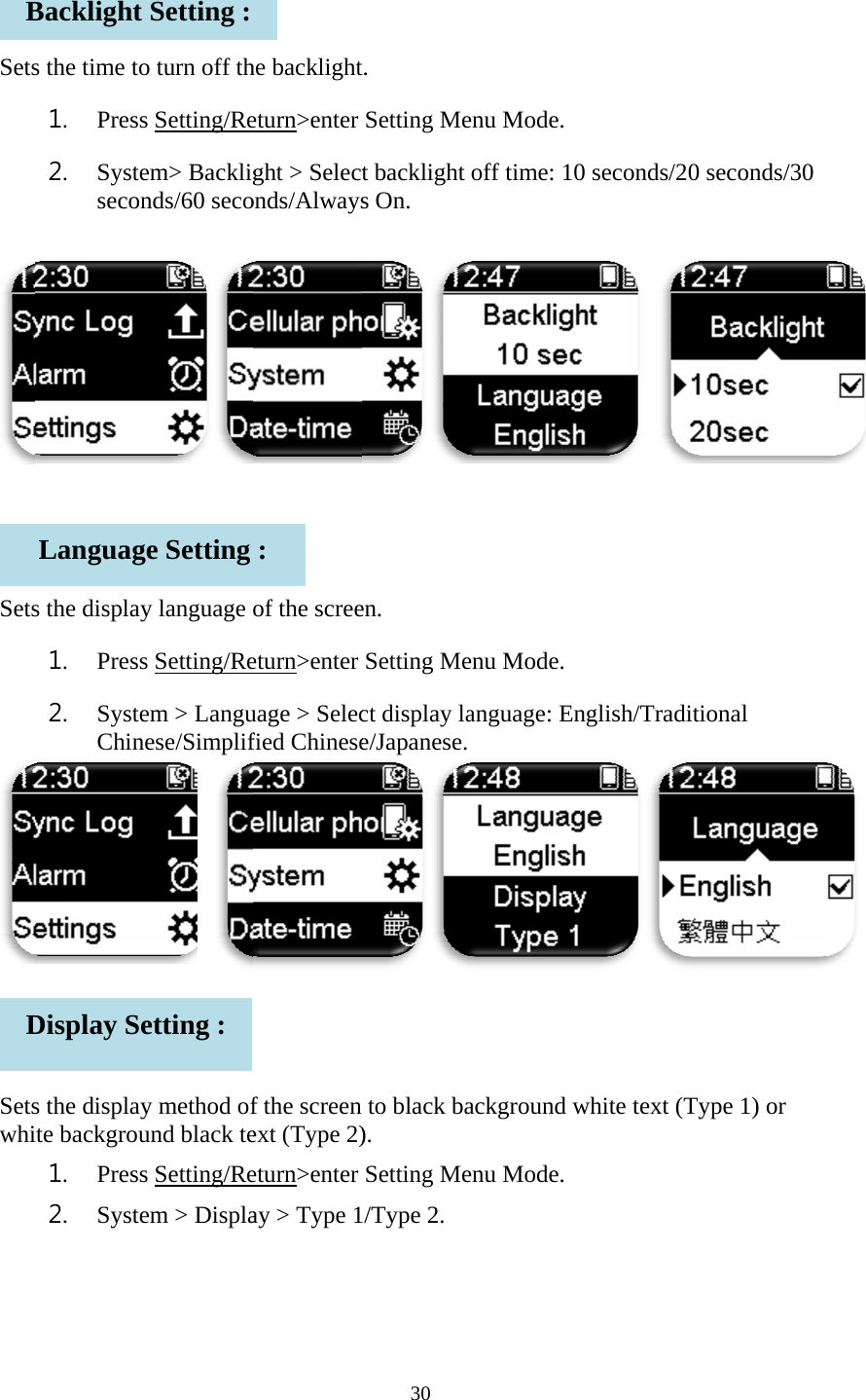
   Sets   Sets   SetswhiBDs the time to1. Press2. Systesecons the display1. Press2. SysteChins the displayite backgrou1. Press2. SysteBacklight LanguagDisplay Seo turn off ths Setting/Reem> Backlignds/60 secoy language s Setting/Reem > Langunese/Simplif y method ofund black tes Setting/Reem > DisplaSetting : ge Setting etting : he backlighteturn>enter ght > Selectonds/Alwaysof the screeeturn>enter uage > Selecfied Chinesef the screen ext (Type 2)eturn>enter ay > Type 1: 30 t. Setting Met backlight s On. en. Setting Mect display lae/Japanese. to black ba).  Setting Me/Type 2. enu Mode.  off time: 10enu Mode.  anguage: Enackground wenu Mode.  0 seconds/20 nglish/Tradiwhite text (T0 seconds/3itional Type 1) or 30
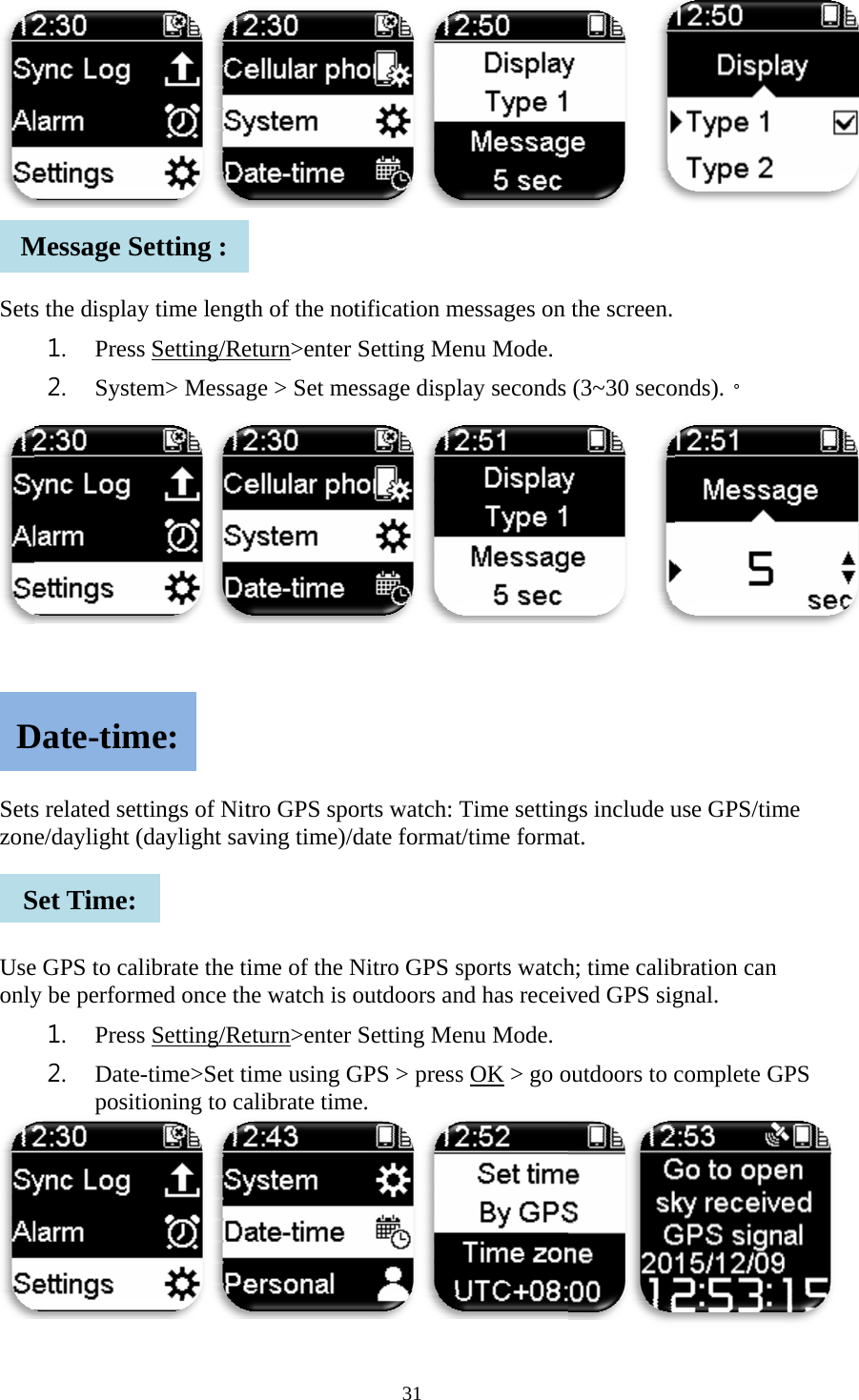
   Sets     Setszon  UseonlyMDSs the display1. Press2. Systes related sete/daylight (e GPS to caly be perform1. Press2. Date-positMessage SDate-timSet Time: y time lengts Setting/Reem> Messagttings of Nit(daylight savlibrate the timed once ths Setting/Re-time>Set titioning to caSetting : me: th of the noteturn>enter ge > Set metro GPS spoving time)/dime of the Nhe watch is oeturn>enter ime using Galibrate time31 tification mSetting Meessage displorts watch: Tdate formatNitro GPS soutdoors anSetting MeGPS > presse. messages on enu Mode.  lay seconds Time settingt/time formasports watchnd has receivenu Mode.  s OK > go o  the screen. (3~30 seco gs include uat. h; time calibved GPS sigoutdoors to c  onds).。 use GPS/timbration can gnal. complete Gme GPS
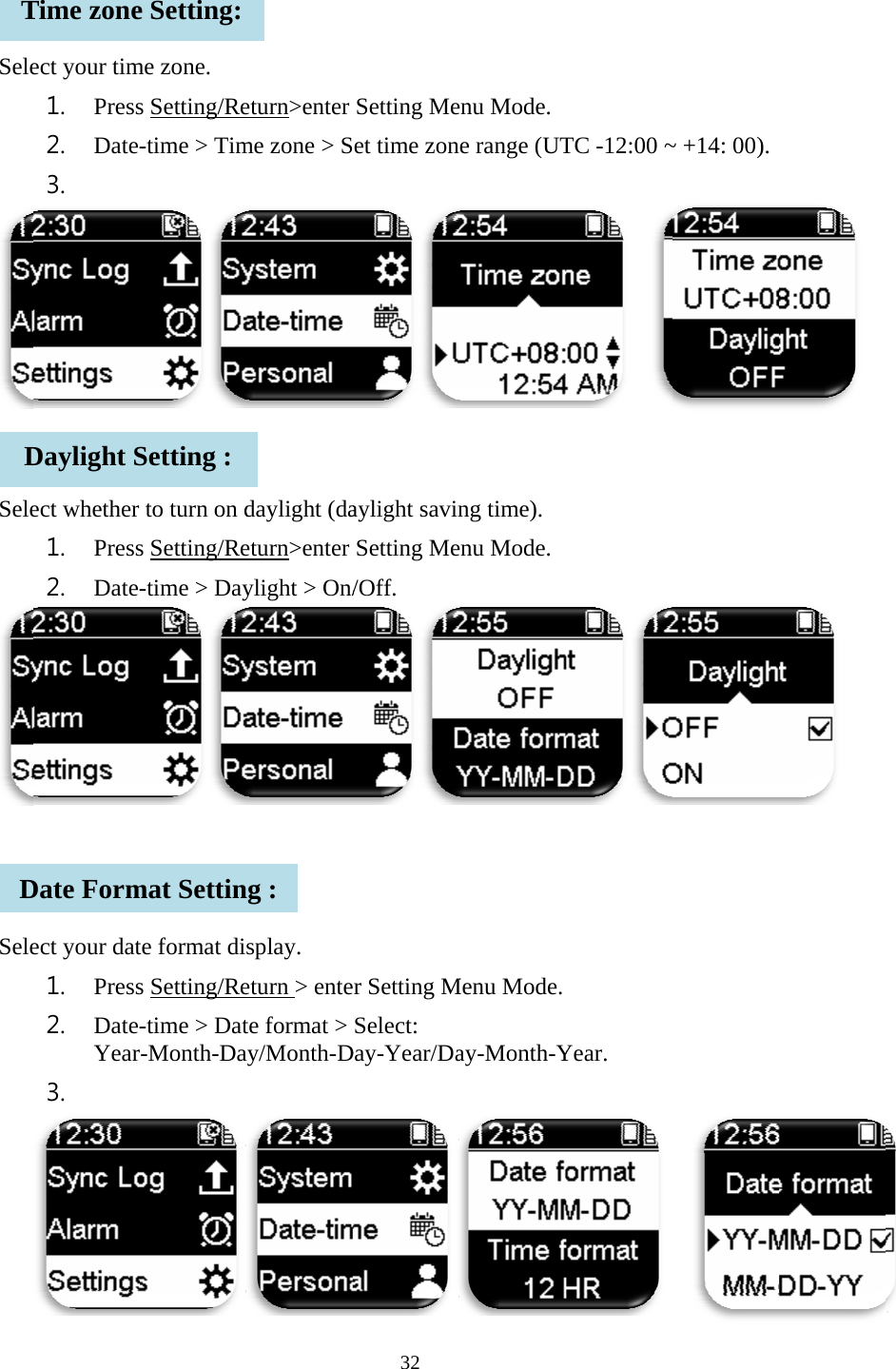
   Sele  Sele   SeleTDDect your tim1. Press2. Date-3.  ect whether 1. Press2. Date-ect your dat1. Press2. Date-Year3.  Time zoneDaylight SDate Formme zone. s Setting/Re-time > Timto turn on ds Setting/Re-time > Dayte format dis Setting/Re-time > Datr-Month-Dae Setting: Setting : mat Settineturn>enter me zone > Sdaylight (daeturn>enter ylight > On/splay. eturn > entete format > ay/Month-Dng : 32 Setting Meet time zonaylight savinSetting Me/Off.  er Setting MSelect: Day-Year/Daenu Mode.  e range (UTng time). enu Mode.  Menu Mode. ay-Month-YTC -12:00 ~  Year.   ~ +14: 00).
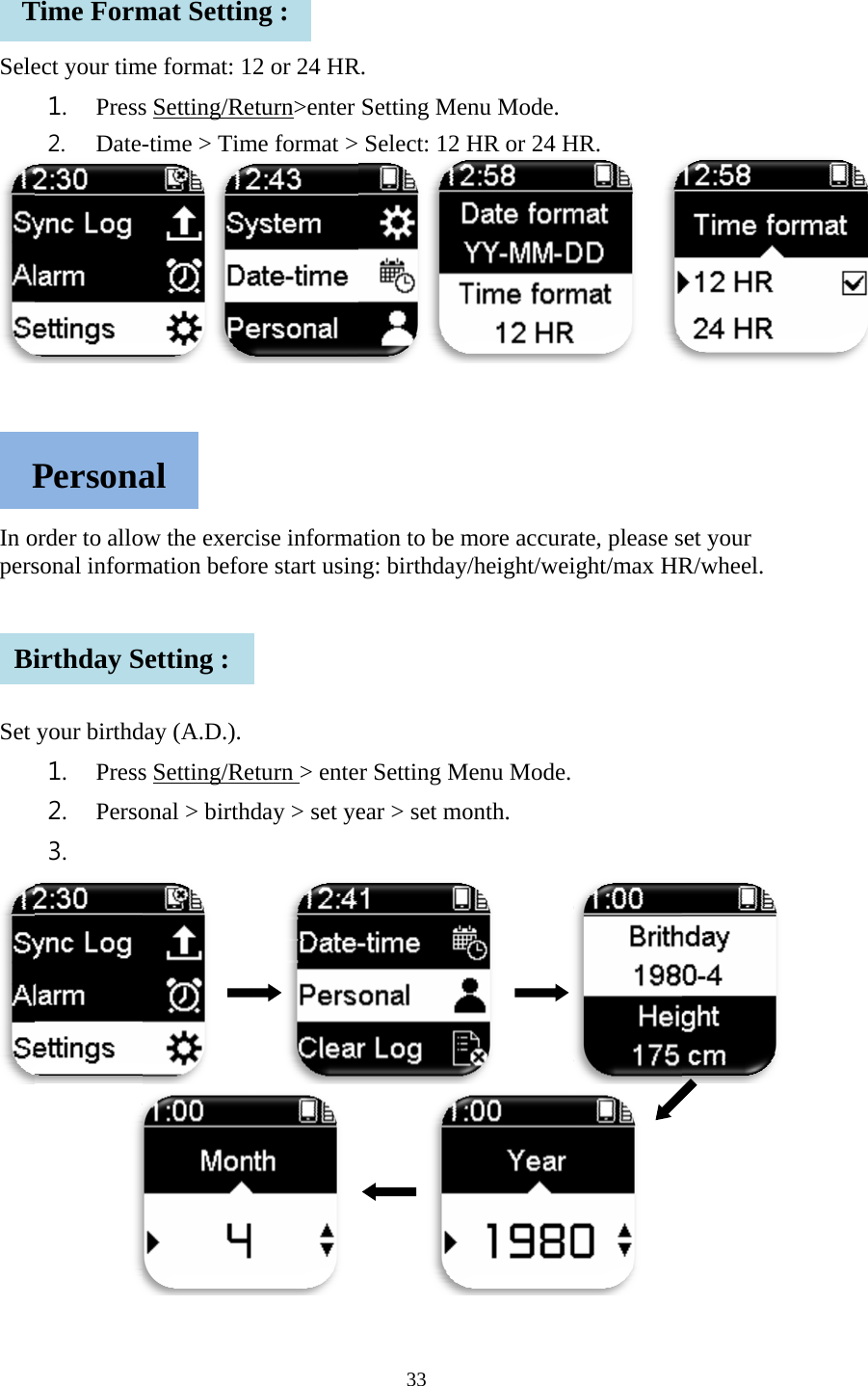
   Sele    In opers   Set  TPBiect your tim1. Press2. Date-order to allosonal informyour birthd1. Press2. Perso3.    Time FormPersonairthday Sme format: 1s Setting/Re-time > Timow the exercmation beforday (A.D.). s Setting/Reonal > birth    mat Settinal Setting : 2 or 24 HReturn>enter me format >cise informare start usineturn > enteday > set ye    ng : 33 R. Setting Me Select: 12 ation to be mng: birthdayer Setting Mear > set mo     enu Mode. HR or 24 Hmore accuray/height/weiMenu Mode. onth.       HR.  ate, please sight/max HR set your R/wheel.
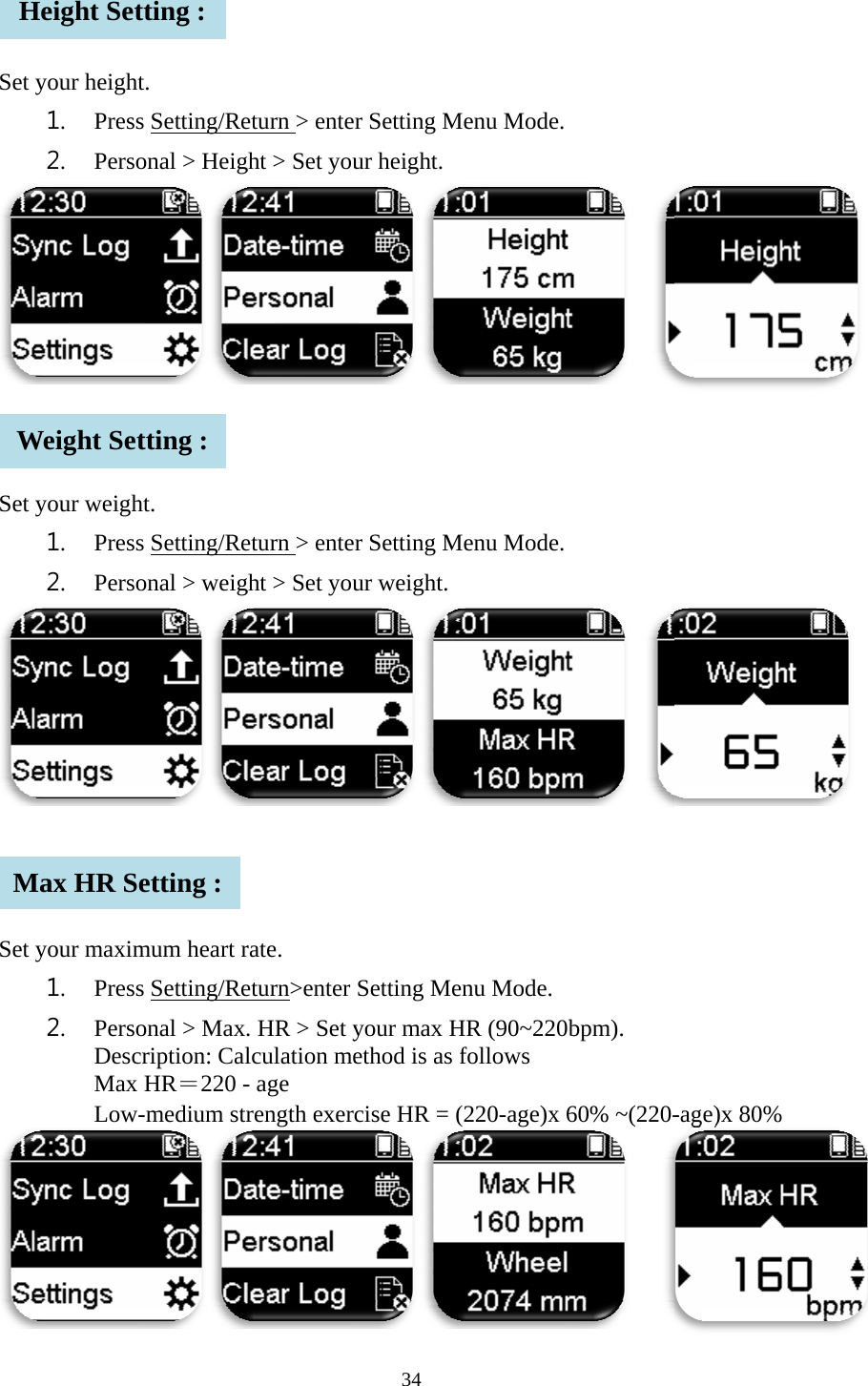
   Set   Set   Set    HWMyour height1. Press2. Persoyour weigh1. Press2. Persoyour maxim1. Press2. Perso Desc Max  Low-Height SetWeight SetMax HR Set. s Setting/Reonal > Height. s Setting/Reonal > weigmum heart rs Setting/Reonal > Maxcription: CalHR=220 --medium strtting : tting : etting : eturn > enteght > Set youeturn > enteght > Set yourate. eturn>enter . HR > Set ylculation me- age rength exer34 er Setting Mur height. er Setting Mur weight. Setting Meyour max Hethod is as fcise HR = (Menu Mode. Menu Mode. enu Mode. HR (90~220follows (220-age)x 6  bpm). 60% ~(220- -age)x 80% %
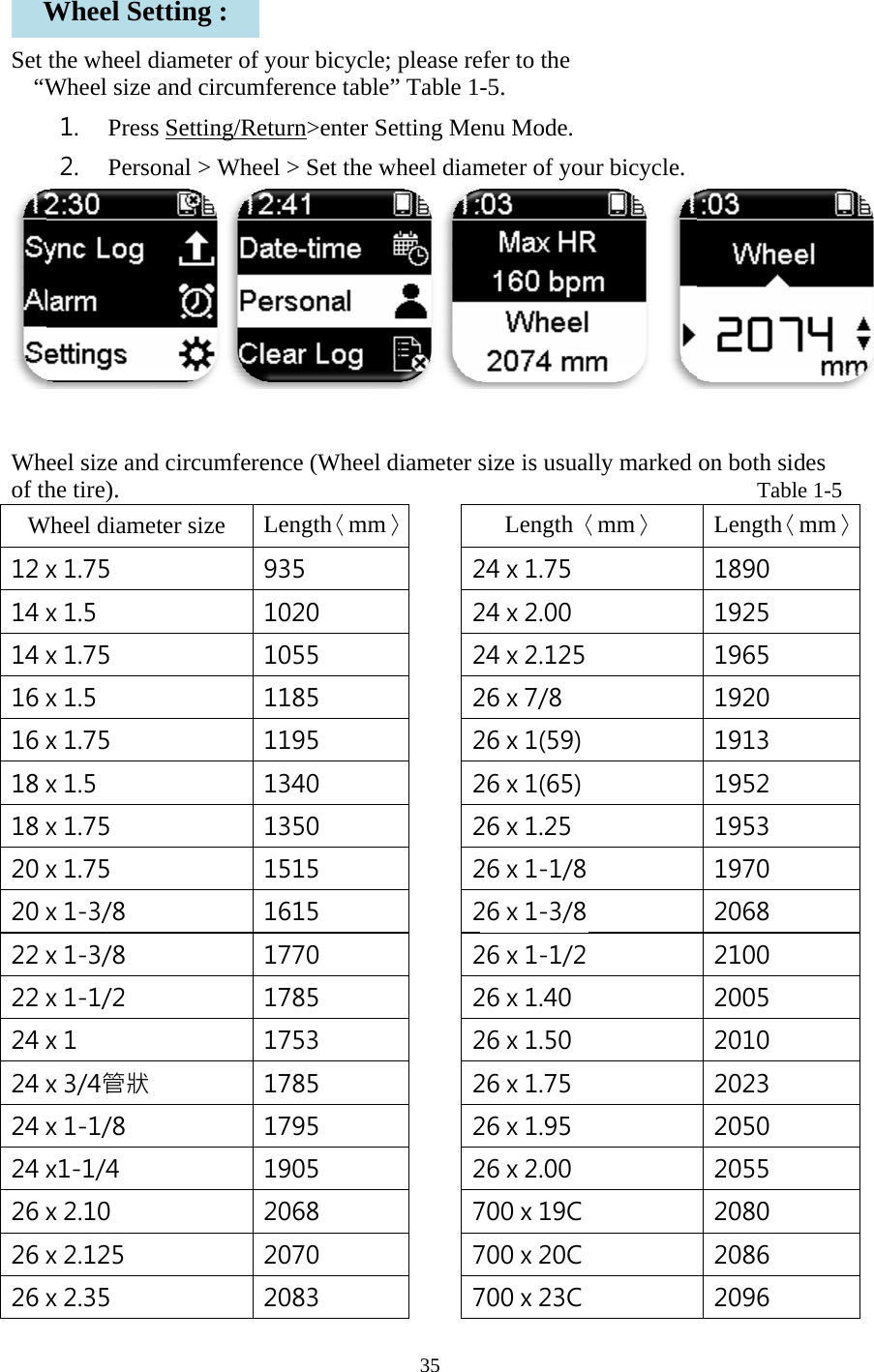
   Set “W Whof thW12 x14 x14 x16 x16 x18 x18 x20 x20 x22 x22 x24 x24 x24 x24 x26 x26 x26 xWthe wheel dWheel size 1. Press2. Persoeel size andhe tire).    Wheel diamex 1.75 x 1.5 x 1.75 x 1.5 x 1.75 x 1.5 x 1.75 x 1.75 x 1-3/8 x 1-3/8 x 1-1/2 x 1 x 3/4管狀 x 1-1/8 x1-1/4 x 2.10 x 2.125 x 2.35 Wheel Sediameter of and circums Setting/Reonal > Whed circumfere         eter size tting : your bicyclmference tabeturn>enter el > Set theence (Whee         Length〈mm935 1020 1055 1185 1195 1340 1350 1515 1615 1770 1785 1753 1785 1795 1905 2068 2070 2083 35 le; please rele” Table 1Setting Mee wheel diamel diameter s          m〉   2 2 2 2 2 2 2 2 2 2 2 2 2 2 2 7 7 7efer to the -5. enu Mode. meter of yousize is usual         Length〈24 x 1.75 24 x 2.00 24 x 2.125 26 x 7/8 26 x 1(59) 26 x 1(65) 26 x 1.25 26 x 1-1/8 26 x 1-3/8 26 x 1-1/2 26 x 1.40 26 x 1.50 26 x 1.75 26 x 1.95 26 x 2.00 700 x 19C 700 x 20C 700 x 23C ur bicycle.  lly marked          〈mm〉 on both sid     TableLength〈m1890 1925 1965 1920 1913 1952 1953 1970 2068 2100 2005 2010 2023 2050 2055 2080 2086 2096  des e 1-5       mm〉
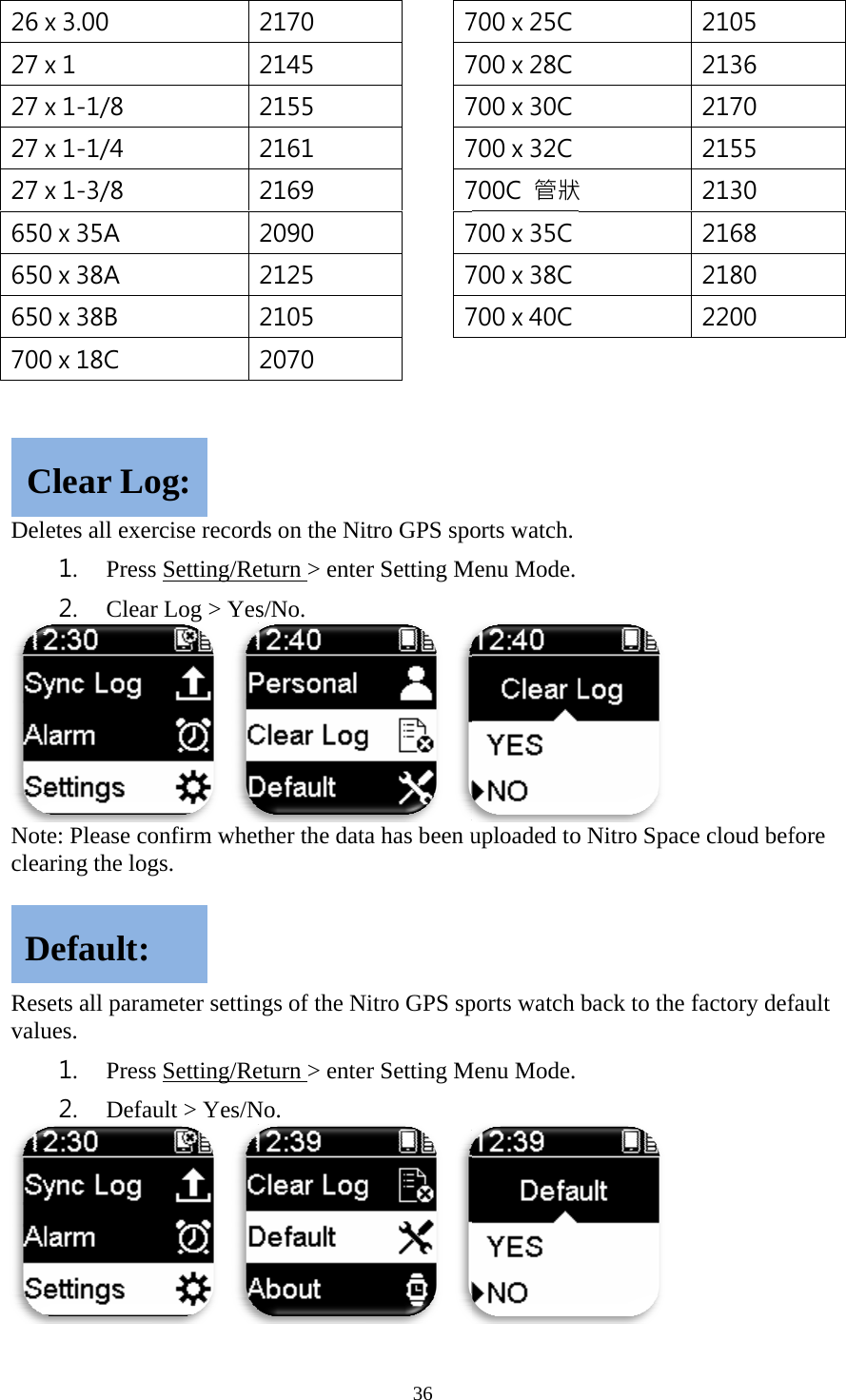
 26 x27 x27 x27 x27 x650650650700  DelNotclea   Resvalu CDx 3.00 x 1 x 1-1/8 x 1-1/4 x 1-3/8 0 x 35A 0 x 38A 0 x 38B 0 x 18C etes all exer1. Press2. Clearte: Please coaring the logsets all paramues. 1. Press2. DefaClear LoDefault: rcise records Setting/Rer Log > Yes onfirm whetgs. meter settins Setting/Reault > Yes/N og: 2170 2145 2155 2161 2169 2090 2125 2105 2070 ds on the Nieturn > entes/No. ther the datangs of the Neturn > enteNo. 36  7 7 7 7 7 7 7 7  itro GPS spoer Setting M a has been uNitro GPS sper Setting M 700 x 25C 700 x 28C 700 x 30C 700 x 32C 700C  管狀700 x 35C 700 x 38C 700 x 40C orts watch. Menu Mode. uploaded toports watch Menu Mode. 狀  o Nitro Spacback to the  2105 2136 2170 2155 2130 2168 2180 2200  ce cloud beffactory deffore fault
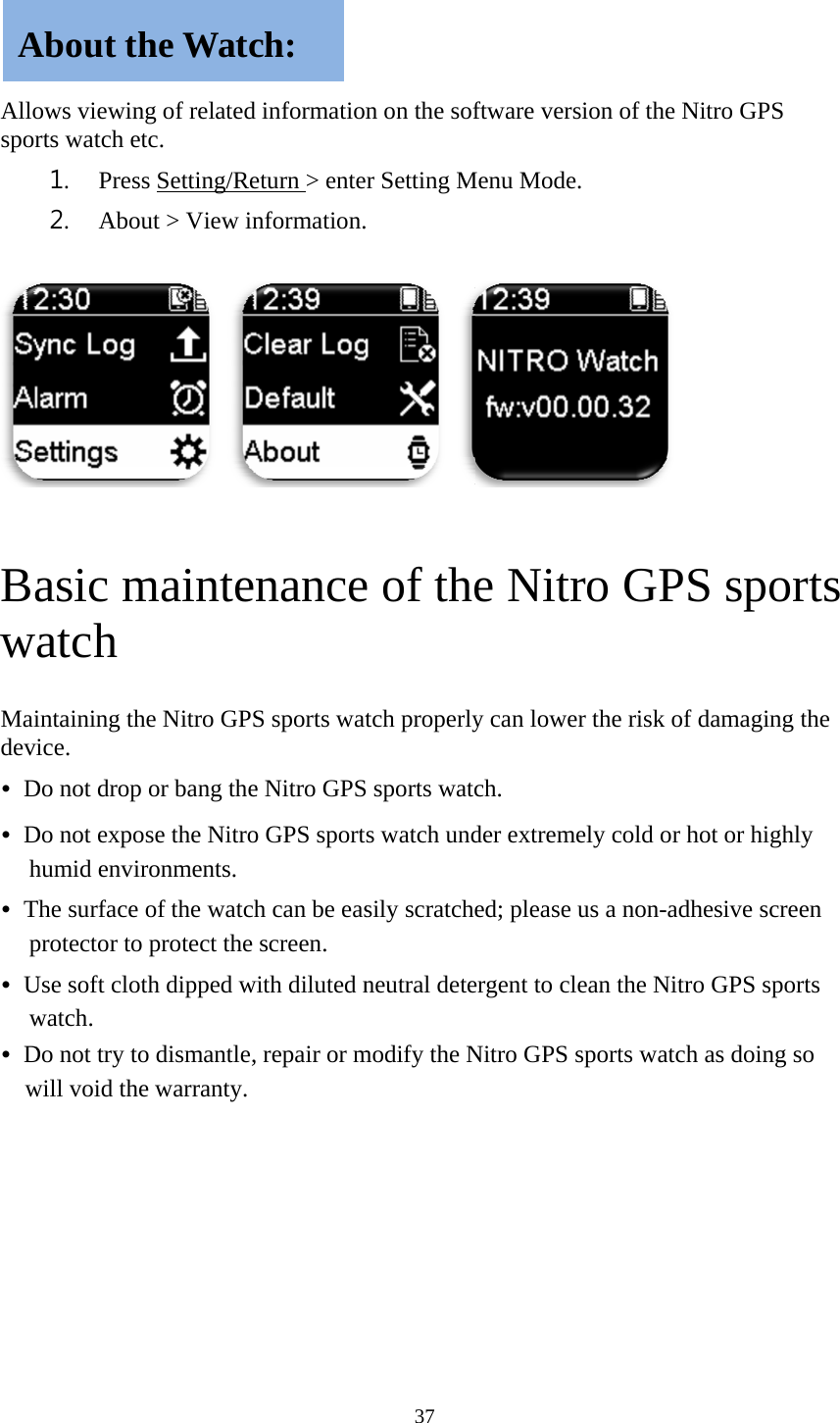
    Allospor Baw Maidev• D• Dh• Tp• Uw• Dw       Aows viewingrts watch et1. Press2. Abou asic match intaining thice. Do not drop Do not exposhumid envirThe surface oprotector to Use soft clotwatch. Do not try towill void theAbout thg of relatedtc. s Setting/Reut > View in maintene Nitro GPSor bang these the Nitroronments. of the watchprotect the th dipped wo dismantle,e warranty. he Watcd informationeturn > entenformation.nanceS sports wate Nitro GPSo GPS sporth can be easscreen. with diluted n repair or mch: 37 n on the sofer Setting M  e of thetch properlyS sports watcs watch undsily scratcheneutral detemodify the Nftware versiMenu Mode. e Nitry can lowerch. der extremeed; please uergent to cleNitro GPS spion of the N ro GPSr the risk of ely cold or hus a non-adhean the Nitroports watchNitro GPS S spordamaging thot or highlyhesive screeo GPS sporth as doing sorts the y en ts o
38  15.105(b) This equipment has been tested and found to comply with the limits for a Class B digital device, pursuant to part 15 of the FCC rules. These limits are designed to provide reasonable protection against harmful interference in a residential installation. This equipment generates, uses and can radiate radio frequency energy and, if not installed and used in accordance with the instructions, may cause harmful interference to radio communications. However, there is no guarantee that interference will not occur in a particular installation. If this equipment does cause harmful interference to radio or television reception, which can be determined by turning the equipment off and on, the user is encouraged to try to correct the interference by one or more of the following measures:   -Reorient or relocate the receiving antenna. -Increase the separation between the equipment and receiver. -Connect the equipment into an outlet on a circuit different from that to which the receiver is connected. -Consult the dealer or an experienced radio/TV technician for help.   FCC RF Radiation Exposure Statement: 1.      This Transmitter must not be co-located or operating in conjunction with any other antenna or transmitter. 2.      This equipment complies with FCC RF radiation exposure limits set forth for an uncontrolled environment.   15.21 You are cautioned that changes or modifications not expressly approved by the part responsible for compliance could void the user’s authority to operate the equipment.  15.19  This device complies with Part 15 of the FCC Rules.  Operation is subject to the following two conditions: 1) this device may not cause harmful interference and 2) this device must accept any interference received, including interference that may cause undesired operation of the device.

Navigation menu