Techtuit SNDW2 GPS sports watch User Manual QSW100 20160124EN
Techtuit Co., Ltd. GPS sports watch QSW100 20160124EN
Techtuit >
User manual
1
Nitro GPS sports watch
User Manual
Nitro_UM_V002 2015

2
Index:
Button configuration ----------------------------------------------------------------------------3
Special button functions under any mode-----------------------------------------------4
Special button functions under any mode-----------------------------------------------5
Special button functions under Exercise preparation mode-----------------------6
Special button functions under exercise-------------------------------------------------7
Initial Setup-----------------------------------------------------------------------------------------9
Saving, browsing or sharing-----------------------------------------------------------------11
Start Exercising / Interval Training --------------------------------------------------------14
Records & Sync Log ---------------------------------------------------------------------------15
Alarm Setting -------------------------------------------------------------------------------------16
Setting/ Exercise /Page Setting -------------------------------------------------------------17
Auto Pause Setting -----------------------------------------------------------------------------19
Auto Lap Setting ---------------------------------------------------------------------------------20
Log Interval Setting -----------------------------------------------------------------------------21
Tempo / Auto Play Setting --------------------------------------------------------------------22
Pace alarm Setting ------------------------------------------------------------------------------23
HRM Alarm Setting ------------------------------------------------------------------------------24
Data Source / Calories Mode Setting -----------------------------------------------------25
Stride Setting--------------------------------------------------------------------------------------26
Sensor & Cellular Phone Setting------------------------------------------------------------27
System Setting ------------------------------------------------------------------------------------28
Unit & Vibrator Setting -------------------------------------------------------------------------29
Backlight/ Language/Display Setting ------------------------------------------------------30
Message / Date time Setting ------------------------------------------------------------------31
Time zone / Daylight / Date format Setting-----------------------------------------------32
Time format /Personal Setting----------------------------------------------------------------33
Birthday / Height / Weight /MAX HR / Wheel Setting----------------------------------33,34,35
Clear Log & Default-------------------------------------------------------------------------------36
About the Watch------------------------------------------------------------------------------------37
Part 15 of the FCC Rules-------------------------------------------------------------------------38
3
Welcome:
Welcome to using the Nitro GPS sports watch. Your watch has a built-in
GPS and is able to record the distance you ran, your pace, time passed
and the amount of calorie consumption. Please connect the watch to the
USB port of a computer after exercising to upload the running record to
the Internet, and to view your running location, set personal goals,
challenge your friends and search for the optimal route.
Package content:
1. Nitro GPS sports watch * 1
2. Nitro charger * 1
3. Quick start guide
4. Warranty card.
Getting familiar with your NITRO GPS sports watch
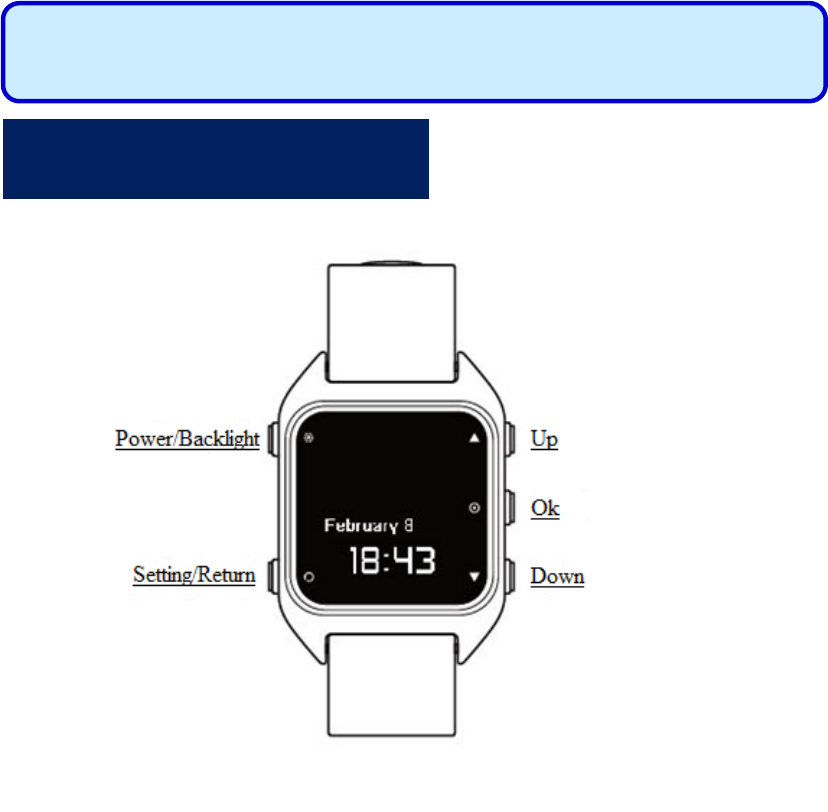
Button configuration :
S
The Ni
t
1. Ti
m
2. Ex
e
ex
e
3. Ex
e
Press and
Quickly
p
Press the
S
screen im
a
Descripti
o
maximu
m
b
een save
again.
Time
m
S
pecia
l
t
ro GP
S
m
e Mode.
e
rcise prep
a
e
rcise goals
e
rcise Mod
e
hold the P
o
p
ress the Po
w
S
etting/Ret
u
a
ge.
o
n: Vibrati
n
m
of 16 scre
e
d, please u
p
m
ode
l
butto
S
sports
w
a
ration mo
d
.
e
: Entered
e
o
wer/Backl
i
S
w
er/Backli
g
u
rn
b
utton
a
n
g 2 times
m
e
n images
c
p
load them
Exercise
n fun
c
4
w
atch h
a
d
e: Allows
s
e
xercise sto
p
i
ght button:
S
hutdown
g
ht
b
utton:
T
a
nd Down
b
m
eans scree
n
c
an be capt
u
to Nitro Sp
preparati
o
c
tions
u
a
s 3 usa
g
s
election of
p
watch inf
o
NITRO w
a
T
urns the b
a
b
utton sim
u
n
was succ
e
u
red; if 16 s
a
ce first be
f
o
n mode
u
nder
a
g
e mode
s
Exercise
M
o
rmation p
a
a
tch power
s
a
cklight on
u
ltaneously
t
e
ssfully cap
t
creen imag
e
f
ore using t
h
Exercise
a
ny m
o
s
:
M
ode or set
a
ge.
s
off.
or off.
t
o capture t
h
t
ured. A
e
s have alr
e
h
is functio
n
mode
o
de:
h
e
e
ady
n
S
Press and
smartpho
n
Press and
connectio
n
alarm tim
e
Quickly
p
mode pag
Press and
b
etween
n
S
pecial
hold the U
p
n
e (messag
e
hold the O
K
n
status of
t
e
set.
p
ress the O
K
e directly.
hold the D
o
n
ormal Aut
o
butto
n
p
b
utton un
d
e
notificati
o
K
b
utton u
n
t
he phone,
a
K
b
utton un
d
o
wn
b
utton
o
play and s
n
func
t
5
d
er Time
M
o
n function)
n
der Time
M
a
larm statu
s
d
er Time
M
under Tim
e
pecial effe
c
t
ions u
n
M
ode: Conn
e
.
M
ode: Disp
l
s
, remainin
g
M
ode: Enter
s
e
Mode: S
w
c
ts Auto pl
a
n
der
T
e
cts/Disco
n
l
ays the me
m
g
battery po
w
s
the Exerci
w
itches disp
l
a
y.
T
ime m
n
nects with
t
m
ory capac
w
er and th
e
se preparat
i
l
ay method
ode:
t
he
ity,
e
i
on
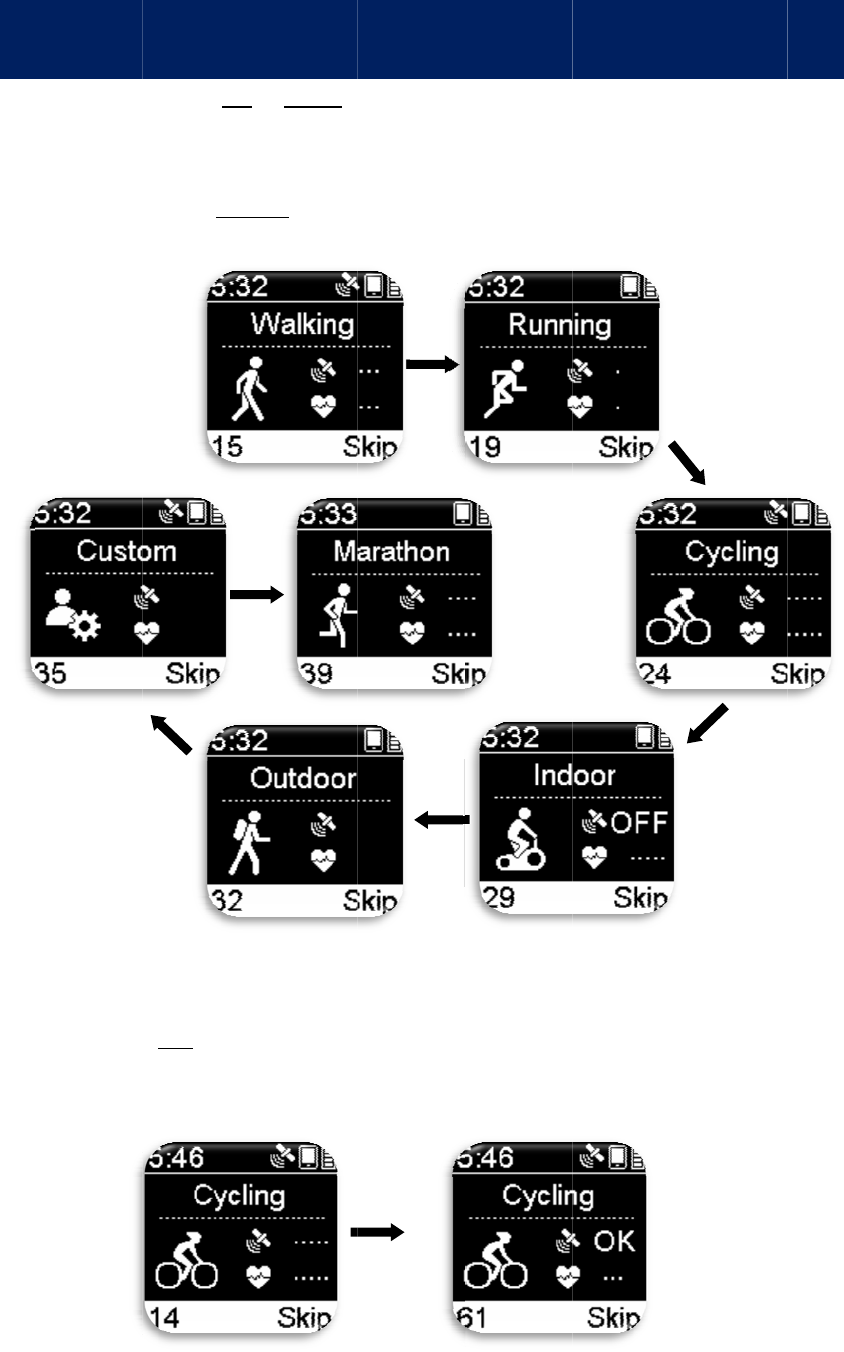
De
s
and
Ple
a
sto
p
If t
h
re
m
S
p
Quickly
p
Switches
b
Once ent
e
start and
s
Descripti
o
seconds f
o
s
cription: I
f
it will vibr
a
se press th
e
p
watch info
r
h
e GPS lost
m
inder.
p
ecial b
u
p
ress the U
p
b
etween E
x
e
red Exerci
s
s
earch for
G
o
n: The nu
m
o
r GPS pos
i
f
GPS has a
l
ate once as
e
OK
b
utto
n
r
mation pa
g
its positio
n
u
tton fu
n
p
or Down
b
x
ercise Mo
d
s
e preparati
o
G
PS signal.
m
be
r
displa
y
i
tioning.
l
ready posi
t
a reminder
.
n
to start re
c
g
e).
n
ing under
E
n
ctions
u
6
b
utton unde
r
d
es (7 in tot
a
o
n mode, t
h
y
ed at the b
o
t
ioned, GP
S
.
c
ording an
d
E
xercise M
o
u
nder E
x
r
Exercise
p
a
l).
h
e GPS fun
c
o
tto
m
-left
c
S
OK will b
e
d
enter Exe
r
o
de, it will
v
x
ercise
p
p
reparation
c
tion will a
u
c
orner is th
e
e
displayed
r
cise Mode
v
ibrate twi
c
p
repara
t
mode:
u
tomaticall
y
e
number o
f
on the pag
e
(Exercise
c
e as a
t
ion mo
d
y
f
e
d
e:
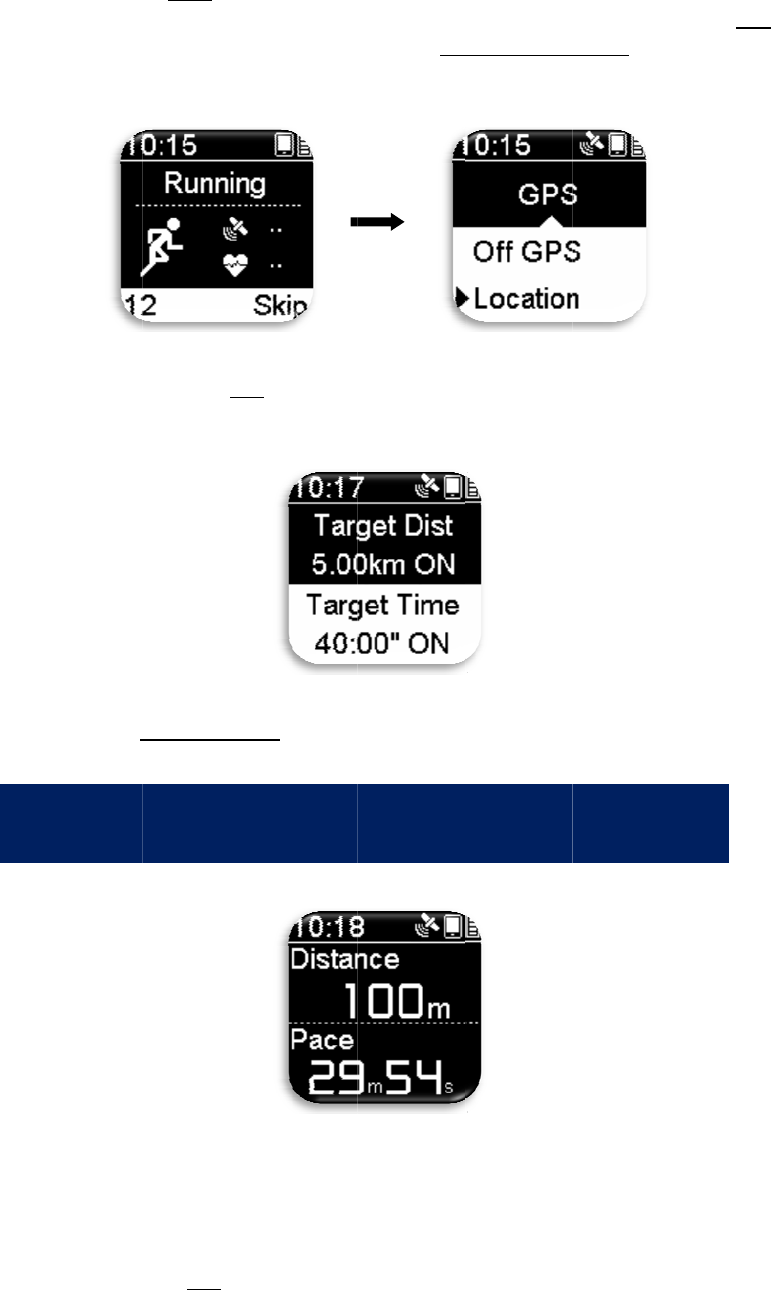
De
s
des
c
b
ut
t
wil
l
一
旦
De
s
dif
f
ple
a
S
s
cription: T
h
c
ription). T
h
t
on to enter
l
automatic
a
Press and
setting op
t
Press the
S
旦
開始運動
s
cription: T
h
f
er accordin
a
se refer to
t
Quickly
p
informati
o
S
pecial
h
e Skip tex
t
h
ere is no
n
GPS optio
n
a
lly start o
n
hold the O
K
t
ion.
S
etting/Ret
u
模式,即
進
h
e informa
t
g to the ex
e
t
he “Page
S
p
ress OK
bu
o
n.
butto
n
t
at the bott
o
n
eed to wait
n
s. If you c
h
n
ce GPS po
s
K
b
utton u
n
u
rn
b
utton:
進
入運動
碼
t
ion display
e
e
rcise type
o
S
etting Fun
c
u
tton under
E
n
func
t
7
om
-right c
o
for GPS p
o
h
oose to w
a
s
itioning is
n
der exerci
s
Exits Exer
c
碼
表資訊頁
面
e
d on the e
x
o
r personal
c
tion” chap
t
E
xercise M
t
ions u
n
o
rner is a re
m
o
sitioning,
q
a
it for posit
i
complete.
e preparati
o
c
ise prepar
a
面
。
x
ercise sto
p
settings; to
t
er.
ode: Allow
s
n
der e
x
m
inder (no
t
q
uickly pre
s
i
oning, “Ex
e
o
n mode: E
n
a
tion mode.
p
watch info
r
customize
s
viewing
o
x
ercis
e
t
button
s
s the OK
e
rcise Mod
e
n
ters the g
o
r
mation wi
l
display set
t
o
f heartrate
e
:
e
”
o
al
l
t
ings,
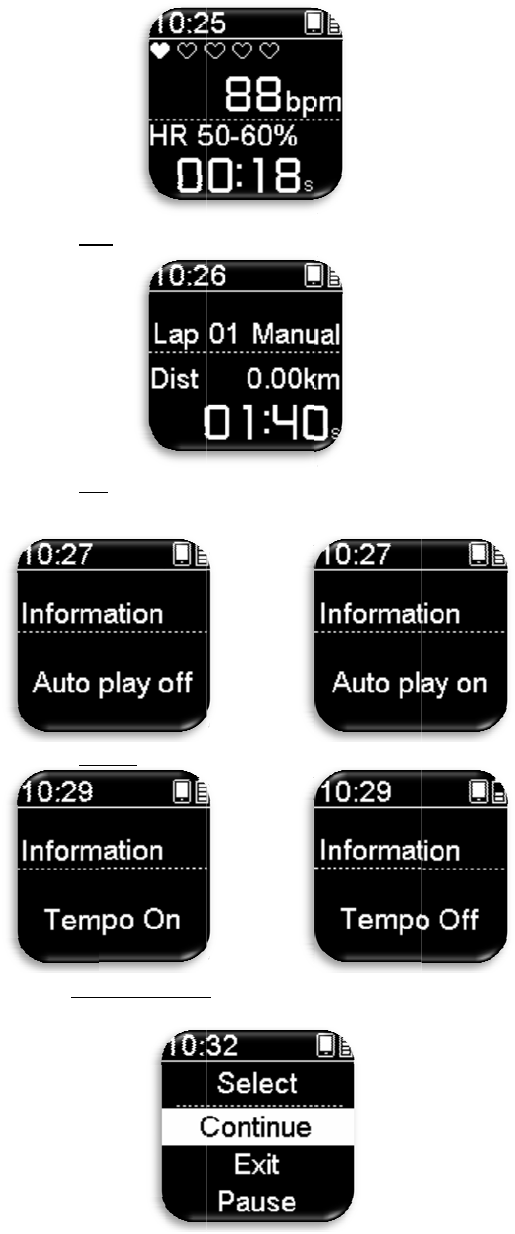
De
s
dis
p
sav
i
Press and
Press and
Press and
Quickly
p
b
etween
“
s
cription: I
f
p
layed; ple
a
i
ng the rec
o
hold the O
K
hold the U
p
hold the D
o
p
ress the Se
t
“
Continue/
E
f
“Exit” is s
e
a
se press th
e
o
rd.
K
b
utton u
n
p
b
utton un
d
o
wn
b
utton
t
ting/Retur
n
E
xit/Pause/
R
e
lected, the
e
“Setting/
R
8
n
der Exerci
s
d
er Exercis
under Exe
r
n
b
utton un
d
R
estart” trai
summary
p
R
eturn” but
t
s
e Mode: A
l
e Mode: T
u
r
cise Mode:
d
er Exercis
e
ning.
p
age for thi
s
t
on and sel
e
l
lows man
u
u
rns Auto p
l
Turns Te
m
e
Mode: Al
l
s
exe
r
cise r
e
e
ct either “
Y
u
al lap cou
n
l
ay off or o
n
m
po off or o
n
l
ows select
i
e
cord will
b
Y
es/No” for
n
t.
n
.
n
.
i
ng
b
e
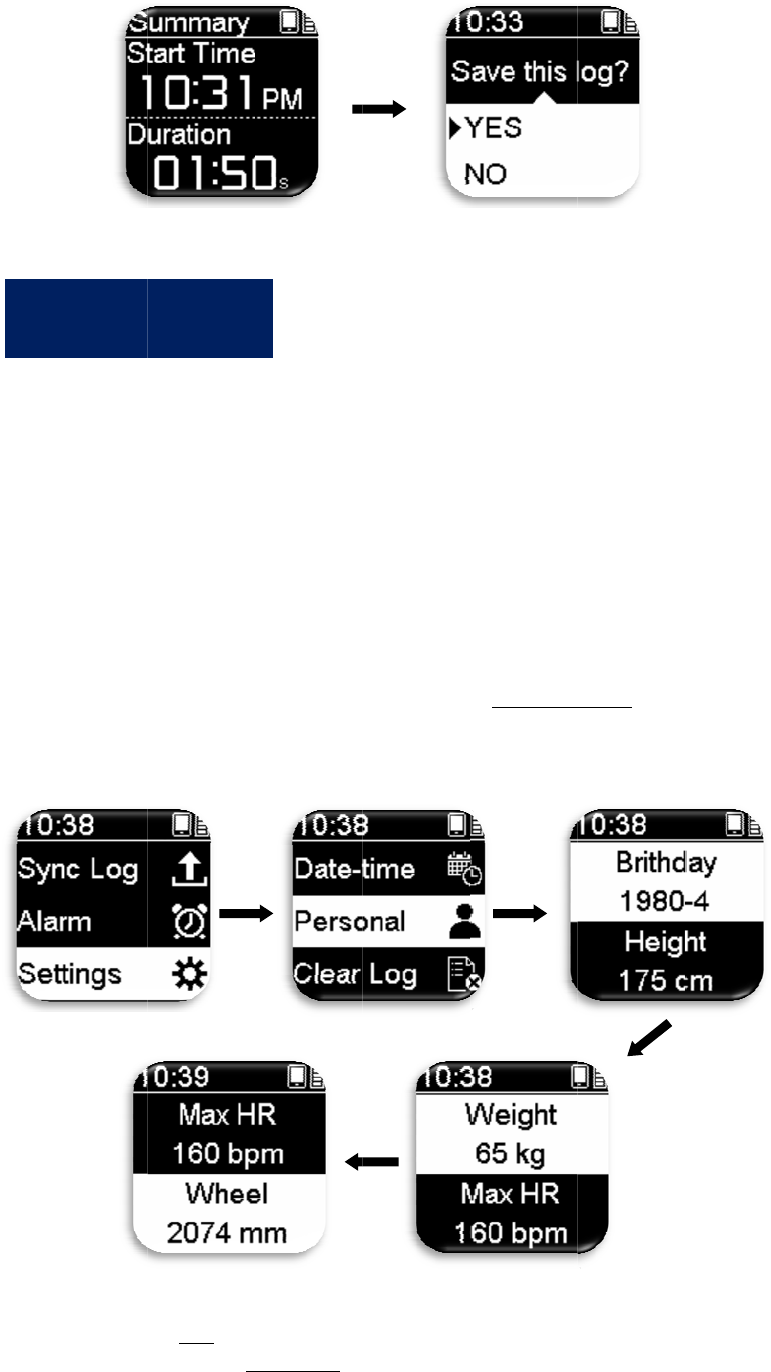
St
e
Ple
a
firs
t
1.
C
2.
C
int
e
St
e
In
o
per
s
b
ut
t
hea
r
St
e
Qu
i
Mo
d
I
n
e
p 1: C
a
se charge
f
t
time.
C
onnect the
C
onnect the
e
rface of th
e
e
p 2: S
e
o
rder to all
o
s
onal infor
m
t
on>Settin
g
r
trate and t
h
e
p 3:
G
i
ckly press
t
d
e; you ca
n
n
itial
S
harge
t
f
or at least
t
Nitro GPS
cable on t
h
e
computer.
e
tting
P
o
w the exer
c
m
ation befo
r
g
>Personal
I
h
e diamete
r
G
etting
s
t
he OK
b
ut
t
n
press the
U
S
etup:
t
he Bat
t
t
hree hours
b
sports wat
c
h
e other end
P
ersona
c
ise inform
a
r
e use: qui
c
I
nformatio
n
r
of your bi
c
s
tarted
t
on under T
i
U
p/Down
bu
9
t
ery
b
efore usin
c
h onto the
N
of the Nitr
o
l Infor
m
a
tion to be
m
c
kly press t
h
n
and set yo
u
c
ycle wheel
i
me Mode
t
u
ttons to se
l
g the Nitro
N
itro charg
o
charger t
o
m
ation
m
ore accur
a
h
e Setting/
R
u
r birthday
/
.
t
o quickly
e
l
ect the Ex
e
GPS sport
s
er.
o
the USB
T
a
te, please
f
R
eturn
/
height/wei
g
e
nter Exerci
e
rcise Mod
e
s
watch for
t
T
ype A
f
irst set you
r
g
ht/maxim
u
se Preparat
i
e
you want.
t
he
r
u
m
i
on
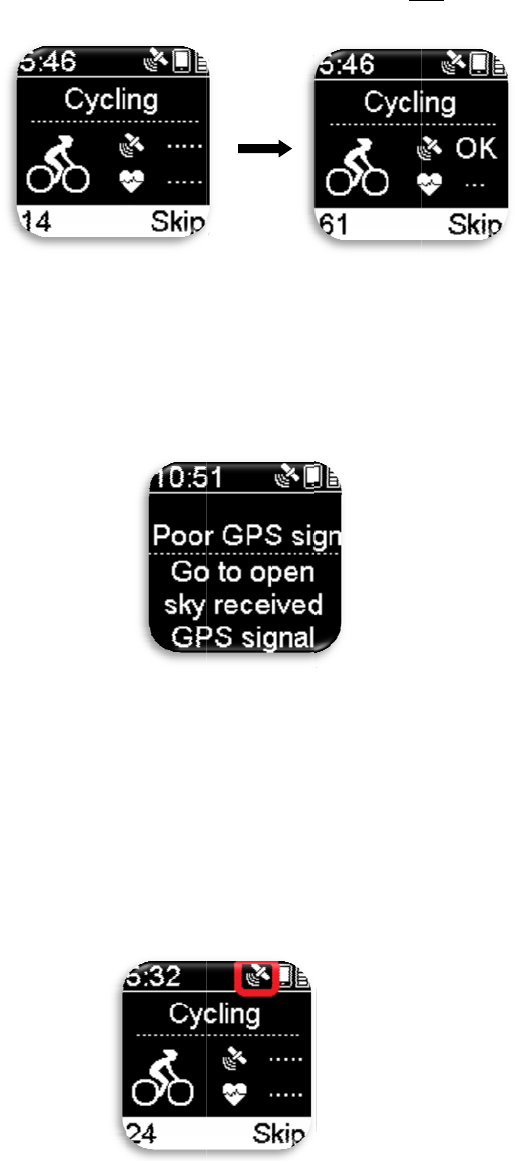
To
a
(av
o
sa
m
sky
on
t
exe
r
On
c
for
sea
r
we
a
yo
u
ple
a
No
t
out
d
the
GP
S
mo
r
GP
S
Wh
flas
h
top
-
Th
e
sur
f
do
w
a
cquire GP
S
o
id tall buil
d
m
e place du
r
can speed
u
t
he screen;
w
r
cise traini
n
c
e Exercise
satellite sig
r
ch process
,
a
k. It woul
d
u
might be i
n
a
se move t
o
t
e: When se
d
oors with
n
optimal sat
e
S
signal stil
r
e open spa
c
S
si
g
nal ac
q
en the GPS
h
ing, whic
h
-
right corn
e
e
best way t
o
f
ace of the
w
w
nwards or
S
satellite s
i
d
ings and
u
r
ing the pos
i
u
p position
i
w
hen ever
y
n
g.
Mode is e
n
nal; the no
,
which me
a
d
be difficul
t
n
the city
w
o
open spac
e
arching for
n
o shelter a
n
e
llite signa
l
l cannot be
c
e to repos
i
q
uisition:
is turned o
h
means th
a
e
r remains s
t
o
acquire
G
w
atch upw
a
covering t
h
i
gnal, pleas
u
nder thick
e
i
tioning pr
o
i
ng time. O
n
y
thing is rea
n
abled, the
N
signal pag
e
a
ns that the
r
t
for the de
v
w
here there
a
e
outdoors
i
GPS signa
l
n
d remain
t
l
. This will
h
acquired a
f
i
tion the G
P
n, the satel
l
a
t GPS is p
o
t
atic, it me
a
G
PS signal i
s
a
rds. Please
h
e reception
10
e go outdo
o
e
ts). Please
d
o
cess; facin
g
n
ce the GP
S
dy, quickly
N
itro GPS
s
e
might dis
p
r
e is no GP
S
v
ice to posi
t
a
re tall buil
d
i
n order to
a
l
the first ti
m
t
here for at
l
h
elp acquir
e
f
ter trying
fo
P
S.
l
ite symbol
o
sitioning.
W
a
ns that GP
S
s
to wear t
h
avoid faci
n
antenna o
f
o
rs and try
t
d
o activitie
s
g
the scree
n
S
is positio
n
press the
O
s
ports watc
h
p
lay on the
s
S
signal or
t
t
ion under
t
d
ings all ro
u
a
cquire bett
e
m
e, please
g
l
east ten m
i
e
more acc
u
fo
r minutes,
at the top-r
i
W
hen the s
a
S
positioni
n
h
e watch on
n
g the surfa
c
f
the GPS w
t
o use it in
o
s
while re
m
n
of the wat
c
n
ed, it will
d
OK
b
utton t
o
h
will auto
m
s
creen duri
n
t
hat the GP
t
his enviro
n
u
nd; if that
e
r GPS sig
n
g
o to an op
e
i
nutes in or
d
u
rate exerci
please mo
v
i
ght corner
a
tellite sym
b
n
g is compl
e
your wrist,
c
e of the w
a
ith your fi
n
o
pen space
m
aining at t
h
c
h towards
d
isplay “O
K
o
start the
m
atically se
a
n
g the sign
a
S signal is
n
ment beca
u
is the case,
n
al.
e
n space
d
er to acqu
i
se records.
v
e to anoth
e
will start
b
ol on the
e
te.
and face t
h
a
tch
n
gers.
h
e
the
K
”
a
rch
a
l
u
se
i
re
If
e
r
h
e
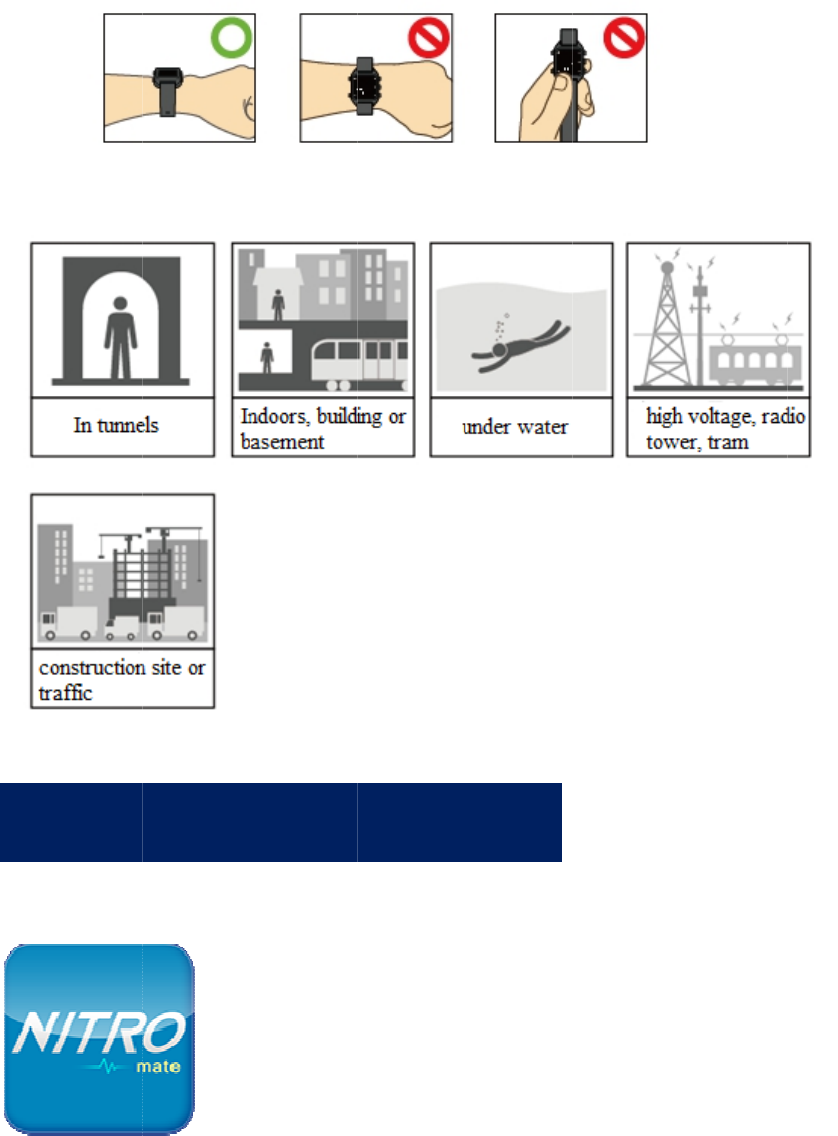
Ple
a
the
s
T
h
scr
e
Us
i
S
a
se avoid s
e
s
e environ
m
h
e Nitro GP
e
en page i
m
Nitro Ma
t
above) ve
r
Google P
l
Nitro Ma
t
i
n
g
the N
i
1. Tur
n
2. Ope
n
S
aving,
e
arching fo
r
m
ents might
S sports w
a
m
ages and g
p
t
e smartpho
n
r
sion smart
p
l
ay store.
t
e compute
r
i
tro Mat
e
n
on the Blu
e
n
the Nitro
M
brow
s
Y
o
a
p
re
c
cl
o
th
e
r
GPS sign
a
interfere
w
a
tch can sa
v
p
x files.
n
e APP: S
u
p
hones, an
d
r
applicatio
n
e
smartp
h
e
tooth func
M
ate APP.
s
ing or
o
u can use t
h
p
plication pr
o
c
ord data sa
v
o
ud storage)
,
e
records.
11
a
ls under th
e
w
ith signal r
e
v
e 3 types o
f
u
pports And
r
d
can be do
w
n
program:
S
h
one APP
:
tion on the
shari
n
h
e Nitro Mat
o
gram that i
s
v
ed on the s
p
,
and log int
o
e
following
e
ception.
f
data: Exe
r
r
oid (4.4 a
n
w
nloaded f
r
S
upports
W
:
S
y
nc L
o
phone.
n
g:
e smartphon
s
provided f
o
p
orts watch t
o
o
the accoun
t
environme
n
r
cise record
n
d above) o
r
r
om Apple
i
W
IN7/WIN8
og
e APP or co
m
o
r free to upl
o
o
Nitro Spa
c
t
at any tim
e
n
ts becaus
e
d
s, captured
r
iOS (7.0
a
i
Store or
/WIN10.
m
puter
o
ad the
c
e (Nitro
e
to browse
e
a
nd
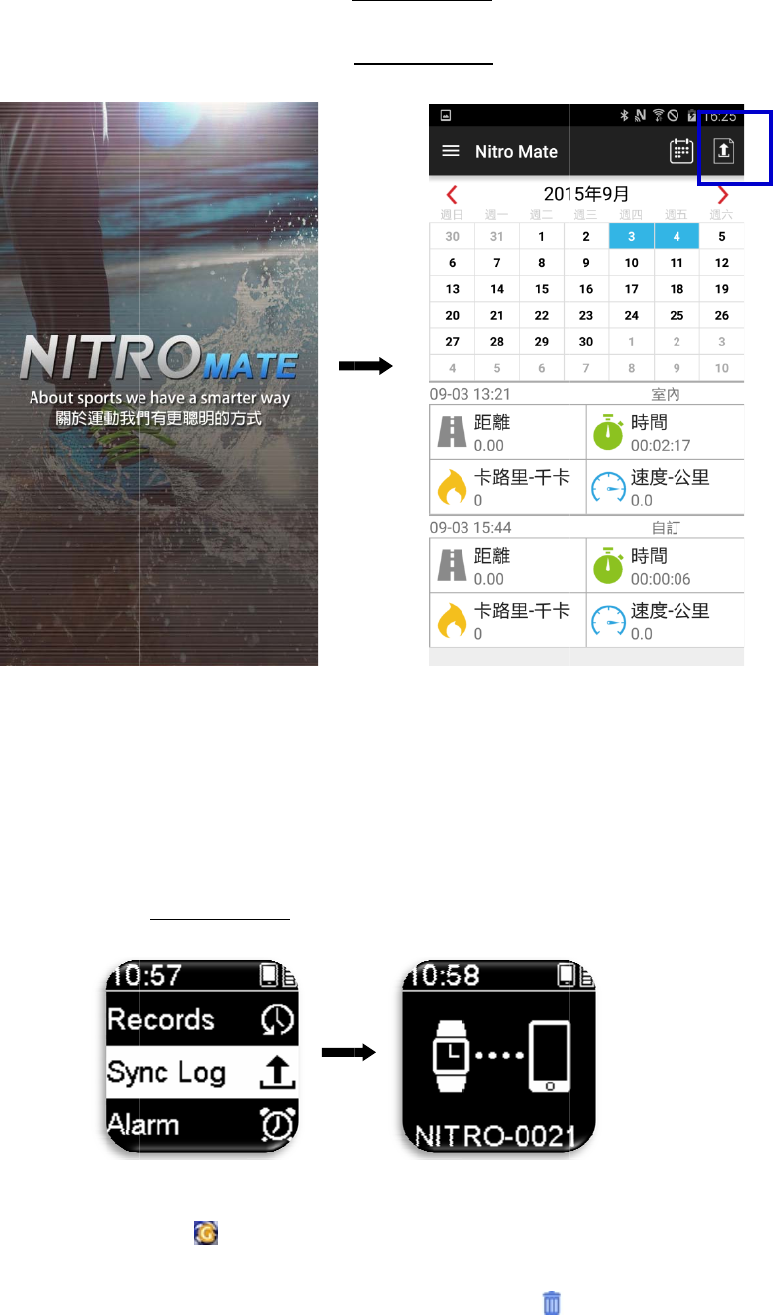
Th
e
pag
pu
b
Us
i
3. On t
h
Setti
n
4. On t
h
5. Sele
c
e
Nitro Mat
e
e into an i
m
b
lic exercisi
n
i
n
g
the N
i
1. Inse
r
2. Pres
s
3. Plac
e
4. Ope
n
h
e sports w
a
n
gs > On.
h
e sports w
a
c
t the recor
d
e
computer
m
age or gpx
n
g societie
s
i
tro Mat
e
r
t the charg
e
s
Setting/R
e
e
the Nitro
G
n
the Nitro
M
Download
Press at
t
path > sav
e
Delete sin
g
a record e
n
a
tch, press
S
a
tch, Press
d
to upload
applicatio
n
file to sav
e
s
to share t
h
e
comput
e
e
r into the
U
e
turn > Syn
c
G
PS sports
M
ate comp
u
exercise re
c
t
he botto
m
-
l
e
.。
g
le exercise
n
try.
12
S
etting/Ret
u
Setting/Ret
u
using the
A
n
program c
a
e
onto your
h
em.
e
r applic
a
U
SB slot of
c
Log.
watch into
u
ter applic
a
c
ord gpx fil
l
eft corner
o
record ent
r
u
rn> Smart
p
u
rn > Sync
A
PP.
a
n also be
u
PC. You c
a
a
tion pro
g
the compu
t
the charge
r
a
tion progr
a
es onto the
o
f a record
e
r
y: Press
a
p
hone Setti
Log.
u
sed to capt
u
a
n upload t
h
g
ram:
t
er.
r
.
a
m.
PC:
e
ntry > sel
e
a
t the botto
m
ng> Set Pa
i
u
re the scr
e
h
ese files to
e
ct the save
m
-left corn
e
i
ring
e
en
e
r of
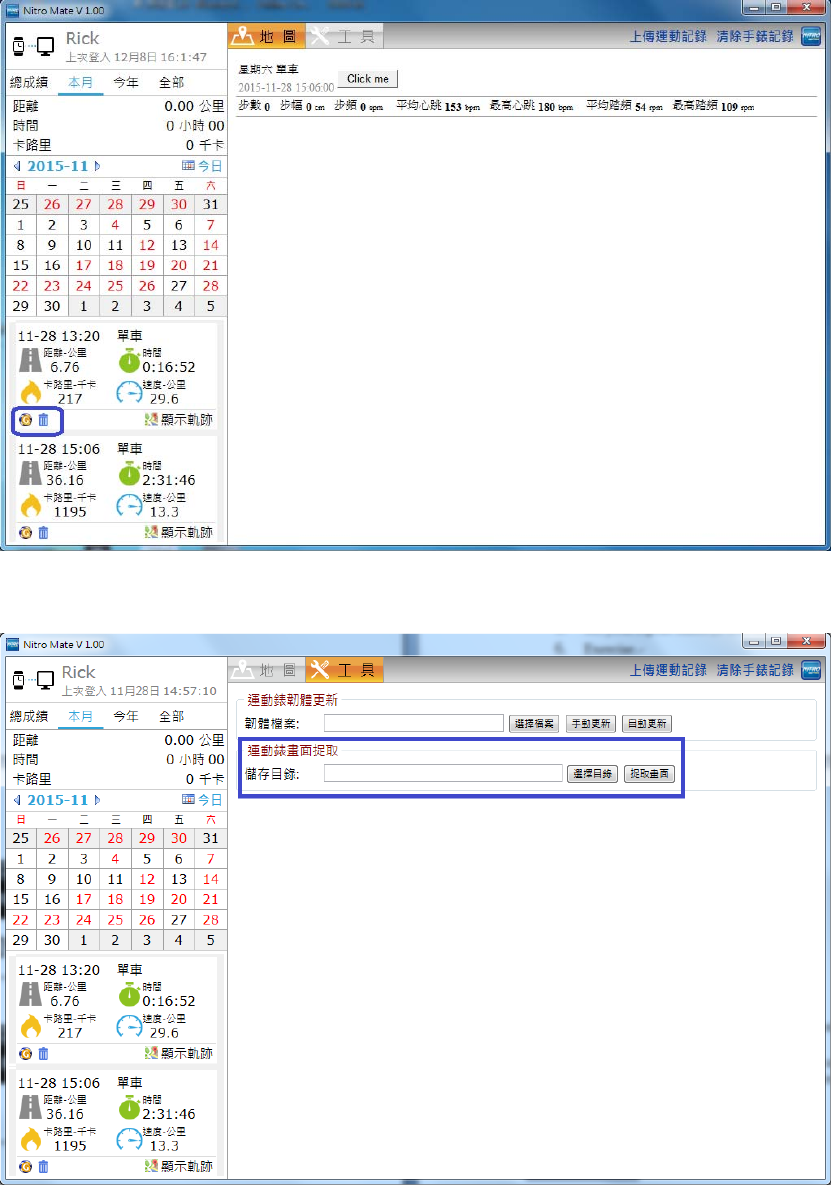
13
Save the captured screen page image to the PC.。
Description: The internal firmware of the Nitro GPS sports watch can also be updated
by using the Nitro Mate computer application program.
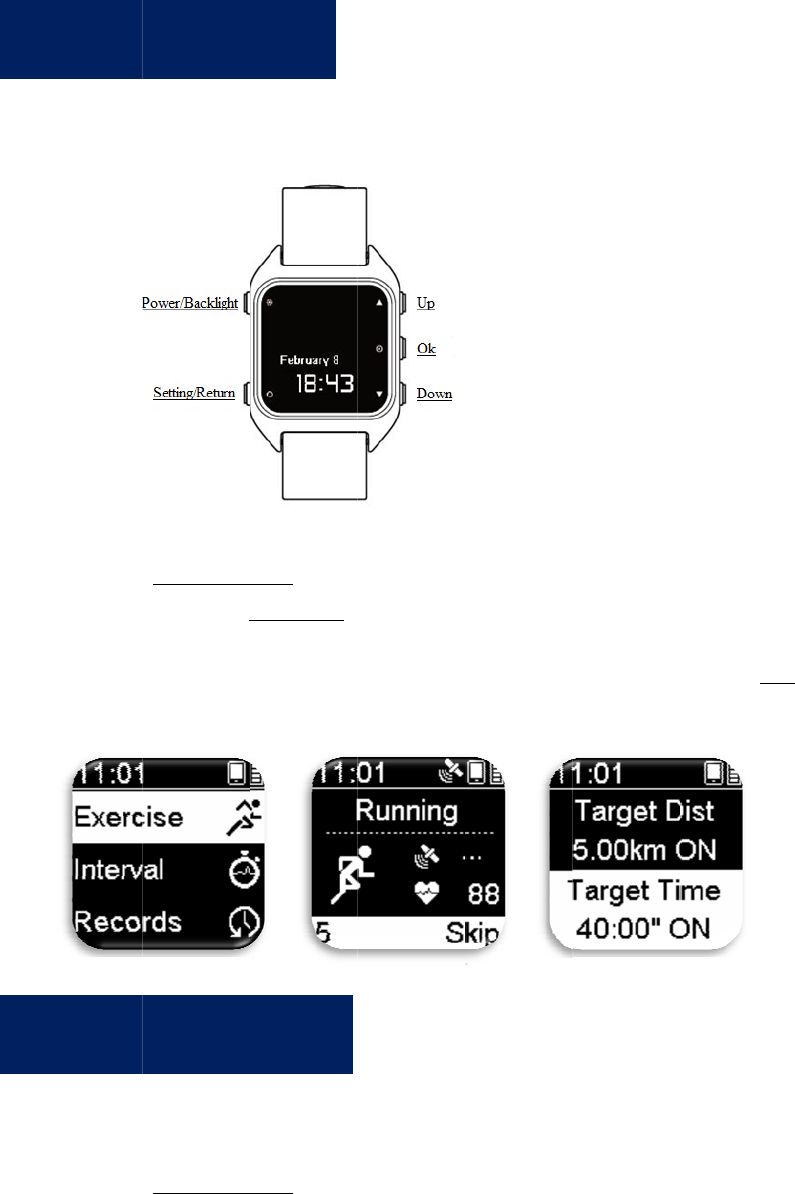
Th
e
us
e
Th
e
wa
r
S
I
n
e
Nitro G
P
e
r to choo
s
1. Pres
s
2. Exer
(wal
k
3. It i
s
b
utt
o
e
Nitro GP
S
r
m up/sprin
t
1. Pres
s
2. Set
y
3. Set
y
4. Set
y
5. Set
y
6. Exer
S
tart E
x
n
terva
l
P
S sports
w
s
e fro
m
.
s
Setting/R
e
cise>Press
U
k
ing/runni
n
s
now in “E
x
o
n to set the
S
sports wat
c
t
/rest/repea
t
s
Setting/R
e
y
our warm
u
y
our sprint
d
y
our rest ti
m
y
our repeat
t
cise.
x
ercisi
n
l
Trai
n
w
atch pr
o
e
turn to ent
e
U
p/Down
>
n
g/cycling/i
n
x
ercise pre
p
exercise g
o
c
h and pro
v
t
.
e
turn to ent
e
u
p time (1-
5
d
istance (1
0
m
e (30 seco
n
t
imes (1-10
n
g :
n
ing :
14
o
vides 7 d
i
e
r the Setti
n
>
Select exe
r
n
door/outd
o
p
aration m
o
o
al.
v
ide users
w
e
r Setting
M
5
9 minutes)
0
to 10000
m
n
ds-30 min
u
0 times).
i
fferent E
x
n
g Menu M
o
r
cise item
o
or/custom
/
o
de”; pleas
e
w
ith interva
l
M
enu Mode
.
m
eters).
u
tes).
x
ercise M
o
o
de.
/
marathon).
e
press and
h
l
training pl
> Interval.
o
des for t
h
h
old the O
K
ans, includ
i
h
e
K
i
ng:
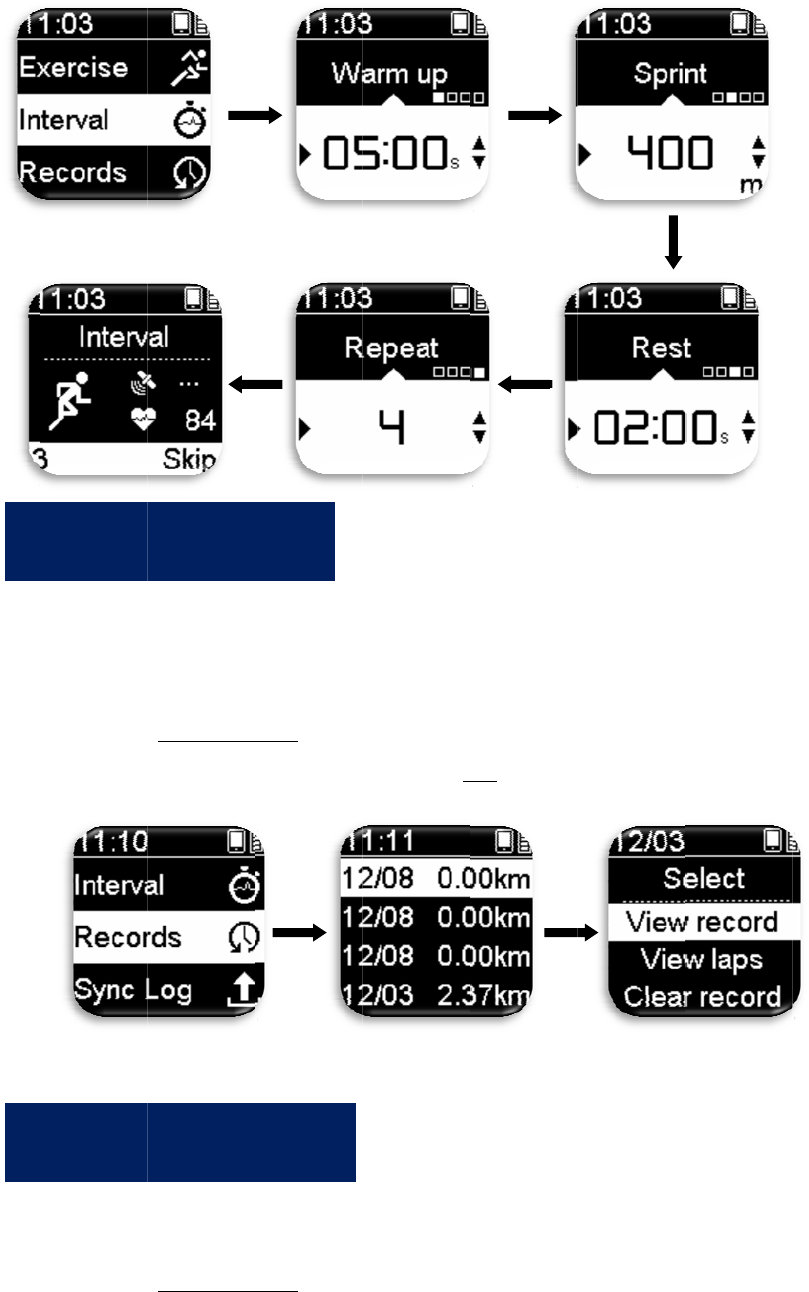
Yo
u
or
d
Sy
n
tha
t
R
S
u
can see e
v
d
elete ever
y
1. Pres
s
2. Sele
c
laps/
c
n
c the exerc
i
t
you can b
r
1. Pres
s
2. Rec
o
scre
e
R
ecord
s
S
ync L
o
v
ery one of
y
y
entry.
s
Setting/R
e
c
t an exerci
s
c
lear recor
d
i
se records
r
owse them
s
Setting/R
e
o
rds that ca
n
e
n page im
a
s
Setti
n
o
g Sett
y
our exerci
e
turn to ent
e
s
e record e
n
d
.
in your Nit
r
anywhere
a
e
turn to ent
e
n
be upload
e
a
ges and gp
x
n
g :
ing :
15
se record e
n
e
r Setting
M
n
try, press
O
r
o GPS spo
a
nd anytim
e
e
r Setting
M
e
d/saved in
x
files.
n
tries in Re
M
enu Mode
.
OK
>select
v
rts watch t
o
e
using you
r
M
enu Mode
>
clude exer
c
cords, and
y
.
v
iew recor
d
o
the Nitro
S
r
smartpho
n
>
Sync Log.
c
ise records
,
y
ou can vie
d
/view
S
pace clou
d
n
e or comp
u
,
captured
w
d
so
u
ter.
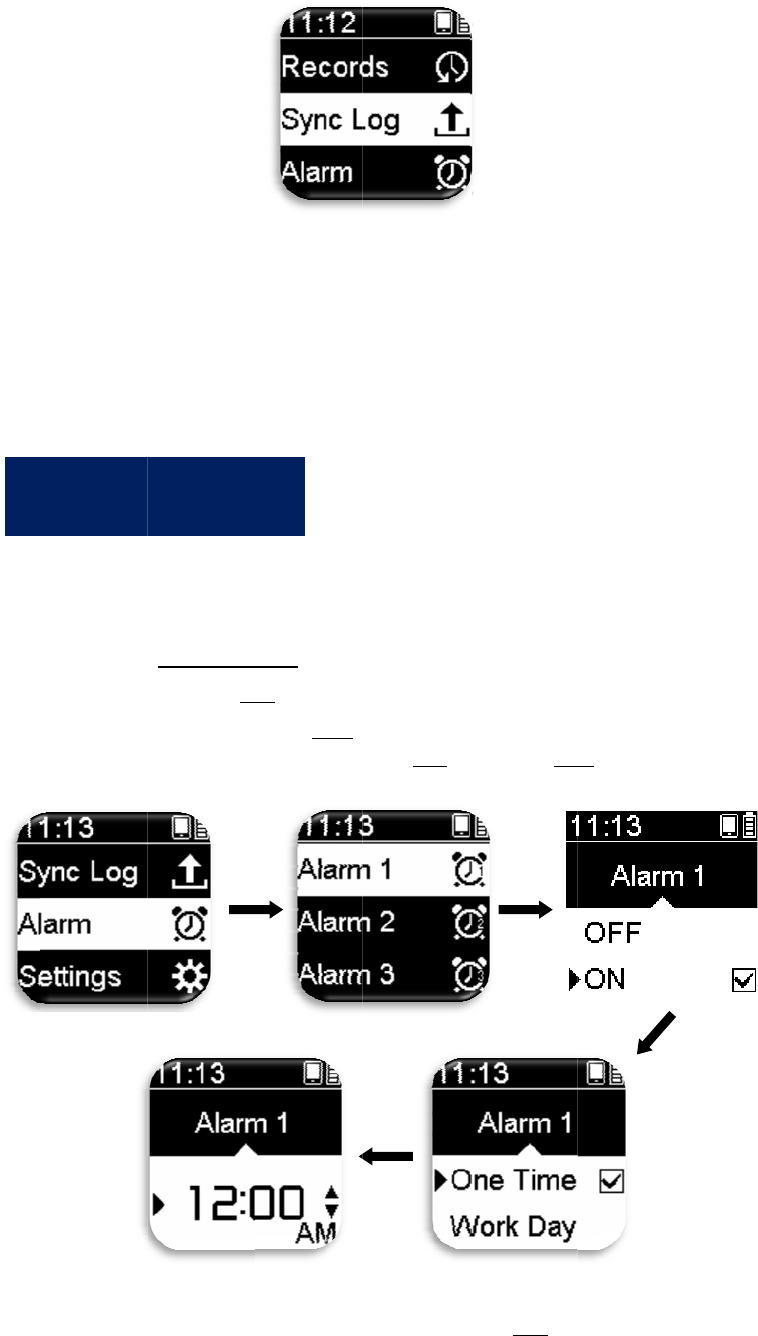
Th
e
can
A
Des
c
scre
e
Note
sync
h
firm
w
e
Nitro GP
S
also set th
e
1. Pres
s
2. Sele
c
3. If a
l
(Mo
n
Descripti
o
differ acc
o
A
larm
S
c
ription: Pl
e
e
n page im
a
: The sport
s
h
ronizing e
x
w
are.
S
sports wat
c
e
repeat fre
q
s
Setting/R
e
c
t alarm >
O
l
arm is ena
b
n
day ~ Frid
a
o
n: Under
T
o
rding to t
h
S
ettin
g
e
ase use the
a
ges and gp
x
s
watch mu
s
x
ercise rec
o
c
h provide
s
q
uency of t
h
e
turn >Alar
m
OK
>On/Off.
b
led >OK
>
a
y)/ Every
d
T
ime Mode,
h
e “On/Off
”
g
:
16
Nitro Mat
e
x
files.
s
t be opera
t
o
rds, savin
g
s
three sets
o
h
e alarm.
m
1/Alarm
>
select rep
e
d
ay">OK>
S
press and
h
”
and “Repe
e
computer
p
t
ed under t
h
g
files, or u
p
o
f alarms f
o
2/Alarm 3.
e
at frequen
c
S
et time>O
K
h
old OK: T
h
at frequenc
p
rogram to
h
is page wh
e
p
dating the
o
r the users
c
y “once/w
o
K
.
h
e alarm di
s
y” settings.
save captu
r
e
n
to set; user
s
o
rkday
s
play will
r
ed
s
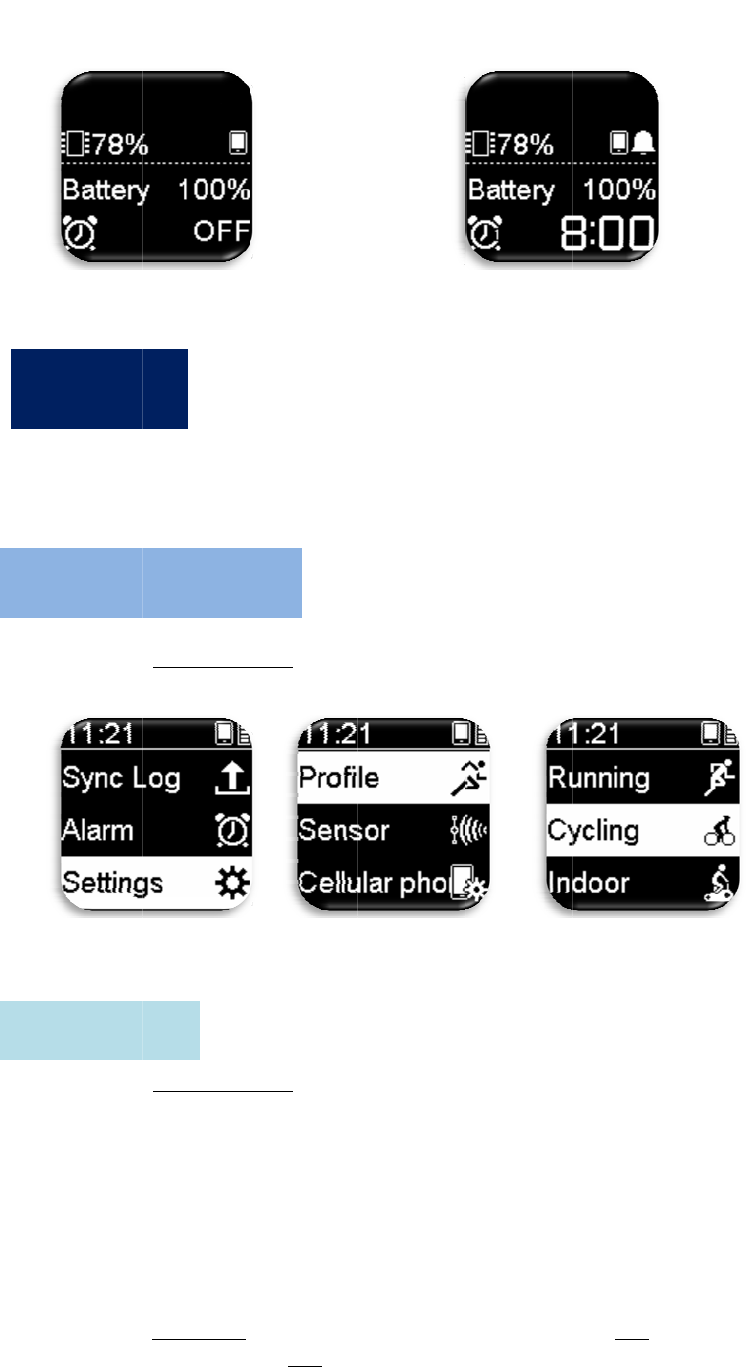
Wh
the
Ple
a
De
s
S
E
P
a
Alarm Of
f
Ala
r
en under E
x
stopwatch
i
a
se first set
1. Pres
s
2. Sele
c
s
cription: B
a
1. Pres
s
2. Prof
i
stop
w
max
i
3. Sele
c
refer
4. Ther
e
pres
s
info
r
S
ettin
g
E
xercis
e
ag
e Setti
n
f
for the da
y
r
m set as
W
x
ercise Mo
d
i
nformatio
n
the basic e
x
s
Setting/R
e
c
t the Exer
c
a
sic setting
s
s
Setting/R
e
i
le > select
E
w
atch infor
m
i
mum).
c
t a page, a
d
to Table 1
-
e
are 2 typ
e
s
Up/Down
r
mation bel
o
g
:
e
Settin
g
ng
:
y
W
orkda
y
an
d
e, the scre
e
n
page displ
a
x
ercise ite
m
e
turn>enter
c
ise Mode
y
s
can be se
t
e
turn>enter
E
xercise M
m
ation pag
e
d
just the st
o
-
3 for stop
w
e
s of infor
m
to select th
e
o
w>OK.
g
:
17
Ala
al
a
d it was w
e
e
n will swi
t
a
y will diff
e
m
settings b
e
Setting M
e
y
ou want to
t
individual
l
Setting M
e
ode > Page
e
s; one pag
e
o
pwatch in
fo
w
atch info
r
m
m
ation that
c
e
informati
o
rm On for
a
rm time s
e
ekend tha
t
t
ch to the st
o
e
r accordin
g
e
fore start
e
e
nu Mode.
set.
l
y for each
e
e
nu Mode.
Setting>
N
e
minimum
fo
rmation it
e
m
ation).
an be displ
a
o
n item on
t
the da
y
w
i
et as 8:00
A
t
da
y
.
o
pwatch in
f
g
to person
a
e
xercising.
e
xercise ite
m
N
umber (tot
a
and six pa
g
e
m you nee
a
yed on ev
e
t
op>OK>s
e
i
th
A
M
f
ormation
p
a
l settings.
m
.
a
l number
o
g
es
d (please
e
ry page;
e
t the
p
age;
o
f
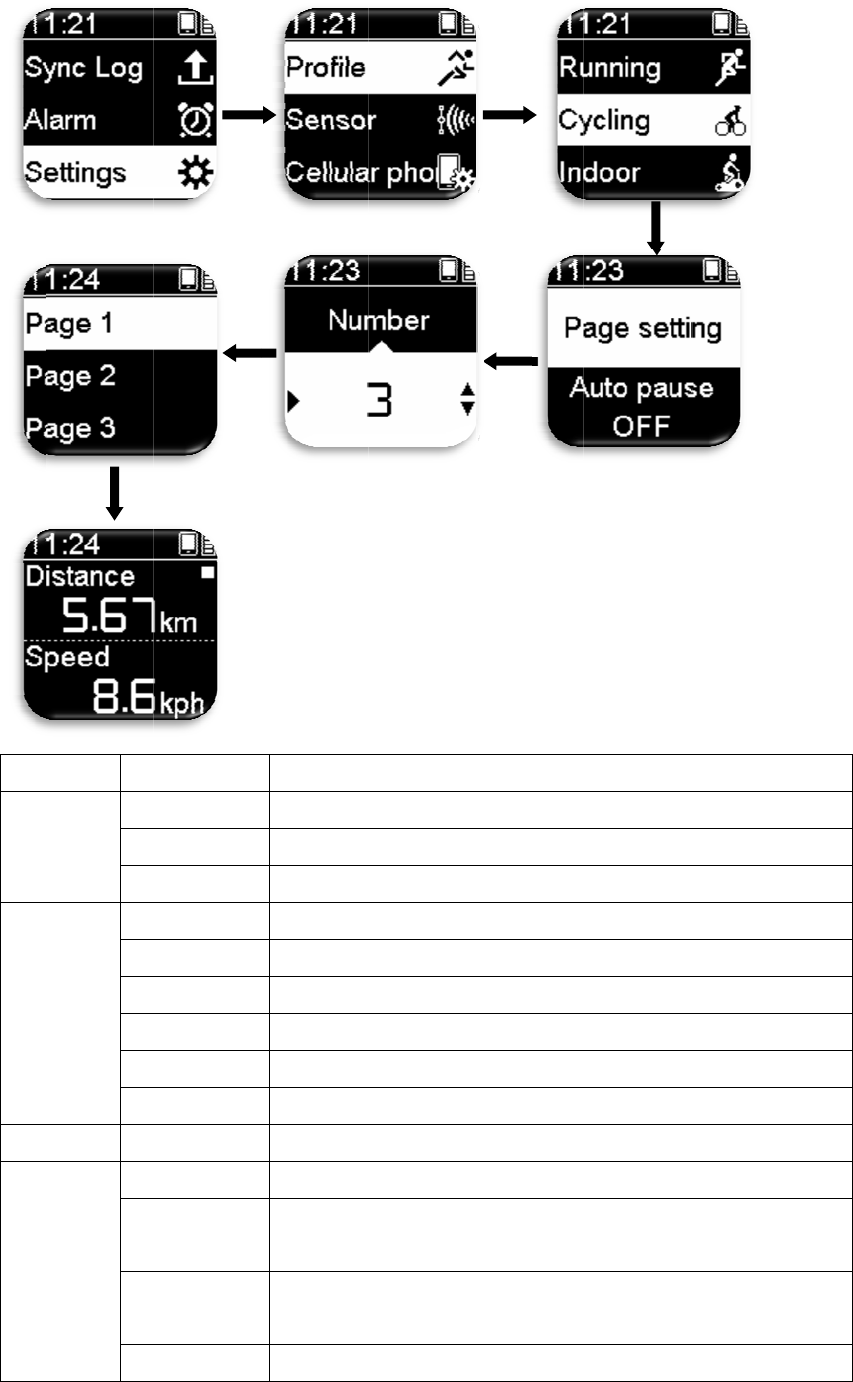
Ca
t
Di
s
T
C
a
H
R
t
egory It
e
s
tance
D
i
L
a
Pr
T
ime
D
u
Cl
D
i
E
s
L
a
Pr
a
lories C
a
H
eart
R
ate
H
e
M
A
v
H
R
em
i
stance
a
p.dist
ev.lap.dist
u
ratio
n
oc
k
i
st lea
d
s
timate
a
p.time
ev.lap.time
a
lories
e
art rate
ax.h
r
v
g.h
r
R
area
Descripti
The total
Exercise
Exercise
Duration
Time of
c
Estimate
d
Estimate
d
Exercise
Exercise
Calories
c
Number
o
The max
i
exercise
u
The aver
a
until no
w
The total
18
o
n
distance fr
o
distance o
f
distance o
f
of exercis
e
c
urrent loc
a
d
advanced
d
time of ar
time of cur
r
time of pre
v
c
onsumed.
o
f heart-
b
e
a
i
mum heart
u
ntil now.
a
ge heart r
a
w
.
number of
Stopw
a
o
m the star
t
f
current lap
f
previous l
a
.
a
tion.
distance.
r
ival.
r
ent lap.
v
ious lap.
a
ts per min
u
rate reach
e
a
te from the
hours in th
e
a
tch inform
a
t
of the exe
r
.
a
p.
u
te while e
x
e
d from the
beginning
e
heart rate
a
tion Table
r
cise until
n
x
ercising (b
p
beginning
o
of exercise
interval se
t
1-3
n
ow.
p
m).
o
f
t
.

19
Category Item Description
HR trace Total number of hours measuring the heart rate.
HR track The statistical figure of the heart rate from the beginning
of exercise until now.
Pace
Max.pace Maximum pace reached from the beginning of exercise
until now.
Avg.pace The average pace from the beginning of exercise until
now.
Pace track The statistical figure of the pace from the beginning of
exercise until now.
Lap.pace Pace of current lap.
Prev.lap.pace Pace of previous lap.
Speed
Speed Current speed.
Max.speed Maximum speed from the beginning of exercise until
now.
Avg.speed Average speed from the beginning of exercise until now.
Altitude
Altitude Current altitude.
Max.alt Maximum altitude reached from the beginning of exercise
until now.
Avg.alt Average altitude from the beginning of exercise until now.
Ascent Total distance travelled ascending.
Descent Total distance travelled descending.
Cadence
Cadence Current cadence per minute while cycling (rpm).
Max.cad Maximum cadence until now while cycling.
Avg.cad Average cadence per minute until now while cycling.
Location Coordinate Latitude and longitude coordinates of the current location.
Pitch
Steps The number of steps for the current exercise.
Stride The average distance per step while running.
Pitch The current stepping frequency per minute while running
(spm).
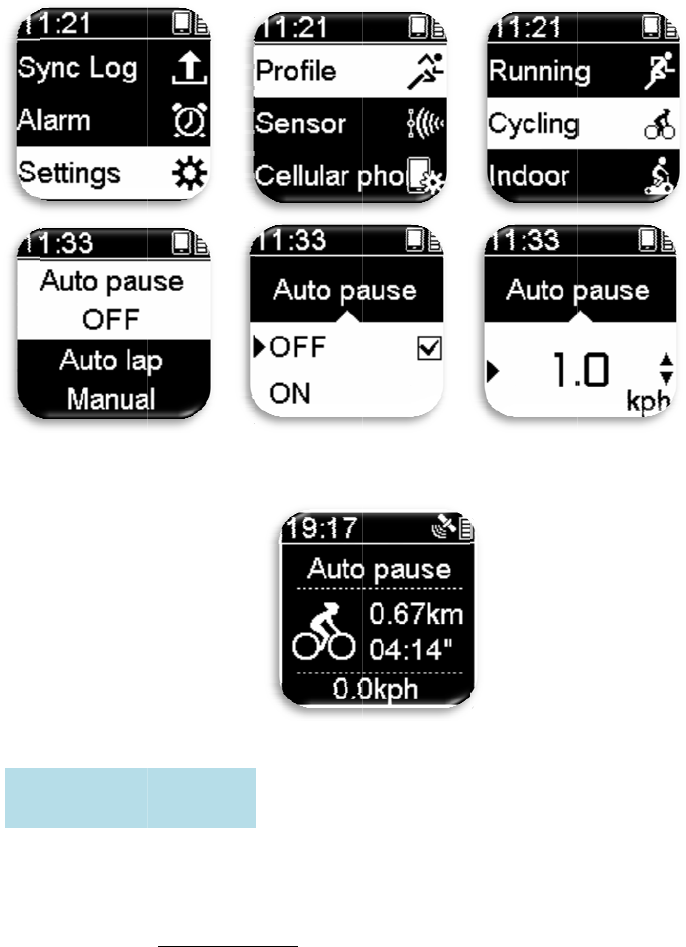
If you are forced to pause while exercising due to the following situations (for
example: traffic light, intersection and traffic control etc.), this pausing might affect
your data record (for example: time extended and speed lowered etc.). Therefore if
“Auto Pause” is turned on, it will automatically pause the calculation of time and
distance when you are in situations mentioned above, and it will continue recording
after resuming the exercise.
1. Press Setting/Return>enter Setting Menu Mode.
Auto Pause Setting :
De
s
wh
e
Au
t
use
r
the
A
2. Prof
i
3. If yo
u
s
cription: I
f
e
n the cond
i
t
o lap can c
o
r
; when the
Nitro GPS
1. Pres
s
2. Prof
i
• Ti
m
• Di
ki
l
• G
P
ru
n
uto Lap
S
i
le >select
E
u
chose to
t
f
the Auto p
a
i
tions set a
r
o
unt the la
p
time/dista
n
sports watc
s
Setting/R
e
i
le > select
E
m
e: Count
l
per lap.
stance: Co
u
l
ometer per
P
S location
:
n
ning on s
p
S
ettin
g
:
E
xercise M
o
t
urn on Aut
o
a
use functi
o
r
e reached.
p
s accordin
g
n
ce set is re
a
h will auto
m
e
turn>enter
E
xercise M
l
aps accord
i
u
nt laps acc
o
lap.。
:
Count lap
s
p
orts fields
o
20
o
de > Auto
o
pause >
S
o
n is turned
g
to the tim
e
a
ched or w
h
m
atically c
o
Setting M
e
ode > Auto
i
ng to the ti
o
rding to t
h
s
according
o
r exercisi
n
pause > O
n
S
et the spee
d
on, the fol
l
e
/distance/
G
h
en passed
t
o
unt laps.
e
nu Mode.
lap > Man
u
me set, for
h
e distance
s
to the spec
i
n
g on repeat
n
/Off.
d
(1.0kph~
1
l
owing scre
G
PS locatio
n
t
he specifie
d
u
al/Distanc
example: 3
0
s
et, for exa
m
i
fied locati
o
ed routes.
1
0.0kph).
en will app
e
n
set by th
e
d GPS loca
t
e/Time/GP
S
0
seconds
m
ple: one
o
ns; suitabl
e
e
ar
e
t
ion,
S
.
e
for
De
s
Set
s
s
e
L
o
s
cription: P
r
s
the log in
t
e
conds.
1. Pres
s
2. Prof
i
inter
v
og
Inter
v
r
ess and ho
l
t
erval time;
s
Setting/R
e
i
le > select
E
v
al time.
v
al Settin
g
l
d OK unde
settable ra
n
e
turn>enter
E
xercise M
g
:
21
r Exercise
M
n
ge is betw
e
Setting M
e
ode > Log
i
M
ode: Ena
b
e
en 1-60
e
nu Mode.
i
nterval >
S
b
les manua
l
S
et
l
lap count.
Th
e
the
sett
i
De
s
Set
s
T
e
A
e
tempo bui
l
tempo fun
c
i
ngs; users
j
1. Pres
s
2. Prof
i
b
et
w
3.
s
cription: P
r
s
Auto play
1. Pres
s
2. Prof
i
e
mpo Set
t
uto Pla
y
S
l
t-in the Ni
t
c
tion is turn
e
j
ust need t
o
s
Setting/R
e
i
le > select
E
w
een 60-180
r
ess and ho
l
time; setta
b
s
Setting/R
e
i
le > select
E
t
in
g
:
S
ettin
g
:
t
ro GPS sp
o
e
d on, the t
e
o
run with t
h
e
turn > ent
e
E
xercise M
.
l
d Down u
n
b
le range is
e
turn > ent
e
E
xercise M
22
o
rts watch c
e
mpo will
p
h
e tempo to
e
r Setting
M
ode > temp
n
der Exerci
s
between 3
~
e
r Setting
M
ode > Auto
an help yo
u
p
lay a temp
o
maintain a
M
enu Mode.
o > set tem
p
s
e Mode: T
u
~
12 second
s
M
enu Mode.
play> Aut
o
u
adjust yo
u
o
accordin
g
steady pitc
p
o rhythm;
u
rns the te
m
s
.
o
play time
.
u
r pitch. W
h
g
to user
h.
settable ra
n
m
po on or o
f
.
h
en
n
ge is
f
f.
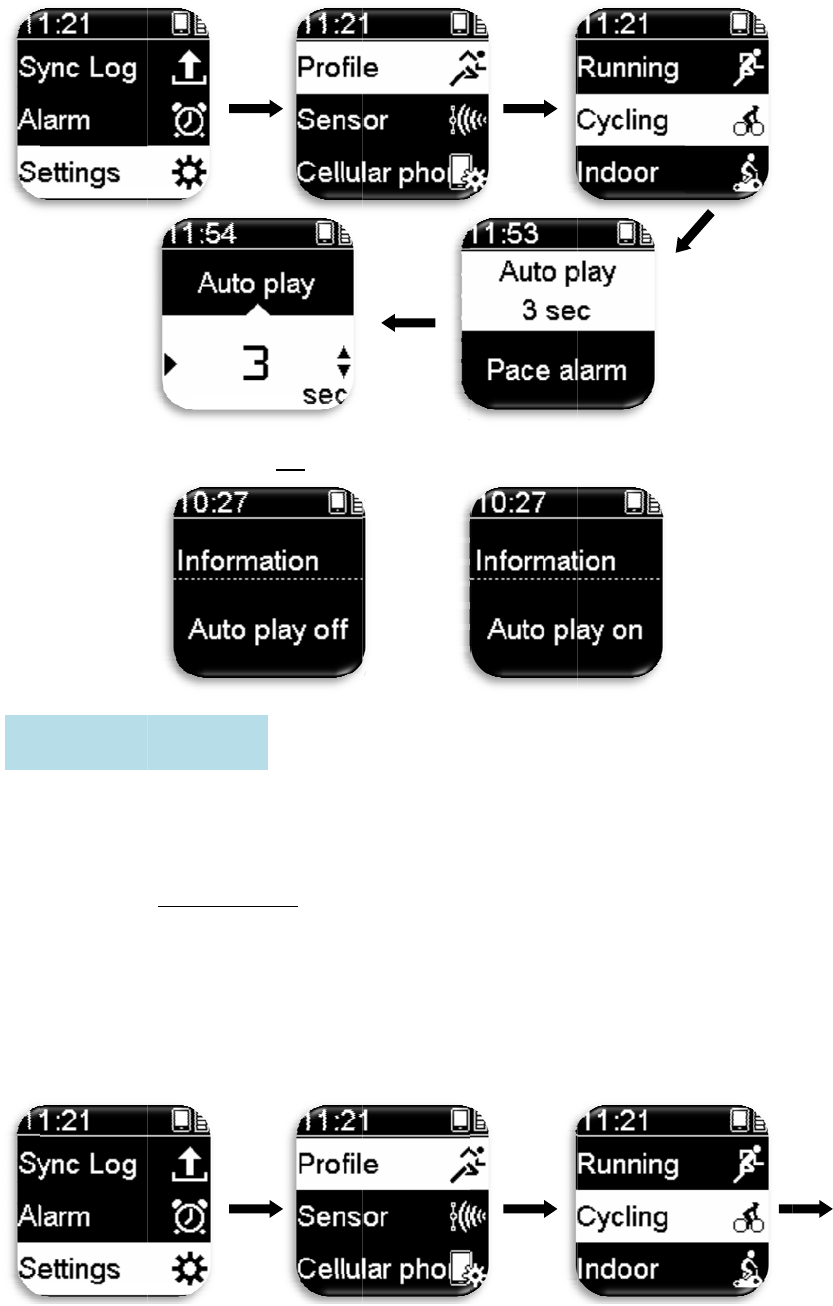
De
s
A
ti
m
in
c
P
a
s
cription: P
r
A
llows setti
n
m
e set, the
N
c
rease or d
e
1. Pres
s
2. Prof
i
>On
/
3. Set
m
4. Set
v
a
ce alarm
r
ess and ho
l
n
g of pace
a
N
itro GPS s
e
crease thei
r
s
Setting/R
e
i
le > select
E
/
Off.
m
inimum s
p
v
iew scale;
s
Setting :
l
d Up unde
r
a
larm rang
e
ports watc
h
r
pace.
e
turn>enter
E
xercise M
p
eed > On/
O
s
ettable ran
g
23
r
Exercise
M
e
; when yo
u
h
will soun
d
Setting M
e
ode > Pace
O
ff.
g
e is betwe
e
M
ode: Turn
s
u
go higher
o
d
an alarm t
o
e
nu Mode.
alarm > Se
e
n 2~120
m
s
Auto pla
y
o
r lower th
a
o
remind t
h
t maximu
m
m
inutes.
y
On or Off.
a
n the pace
h
e user to
m
speed
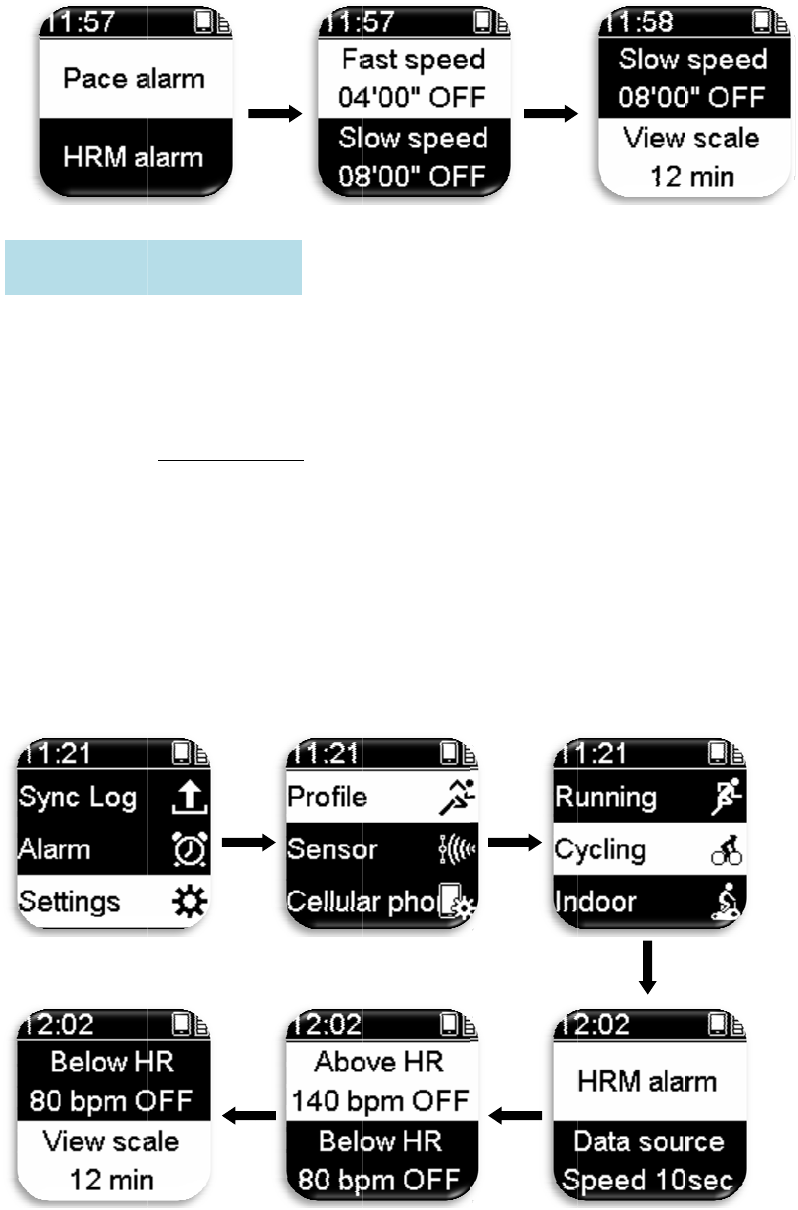
Thi
s
ran
g
Nit
r
rat
e
H
s
function
m
g
e. When t
h
r
o GPS spo
r
e
.
1. Pres
s
2. Prof
i
(Sett
i
3. Set
m
4. Set
v
H
RM Alar
m
ust be use
d
h
e heart rat
e
r
ts watch
w
s
Setting/R
e
i
le > select
E
i
ng range:
6
m
in HR >
O
v
iew scale;
s
m Settin
g
d
with the
H
e
goes high
e
w
ill sound a
n
e
turn > ent
e
E
xercise M
6
0-180bpm
)
O
n/Off. (Set
t
s
ettable ran
g
g
:
24
H
RM belt;
i
e
r or lower
t
n
alarm to r
e
e
r Setting
M
ode > HR
M
)
.
t
ing range:
g
e is betwe
e
i
t allows se
t
t
han then h
e
e
mind the
u
M
enu Mode.
M
alarm > s
e
6
0~180bp
m
e
n 2~120
m
t
ting of the
H
e
art rate ra
n
u
ser to adju
s
e
t max HR
>
m
).
m
inutes.
H
RM alar
m
n
ge set, the
s
t their hea
r
>
On/Off.
m
r
t
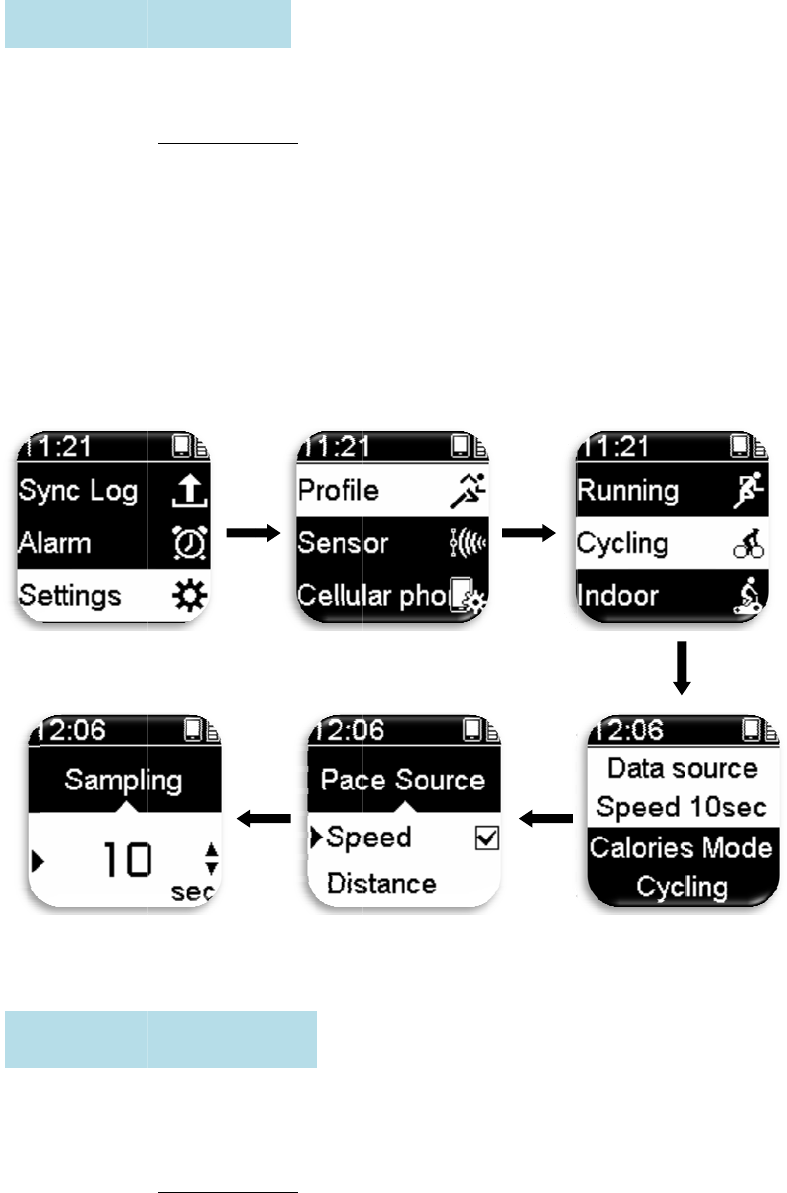
Set
s
Dif
f
cor
r
D
C
s
the sourc
e
1. Pres
s
2. Prof
i
dista
n
3. Set s
f
erent exer
c
r
ect calorie
s
1. Pres
s
2. Prof
i
Wal
k
ata Sour
c
alories
M
e
, speed or
d
s
Setting/R
e
i
le > select
E
n
ce).
ampling ti
m
Speed: Pac
(10-60 sec
o
Distance:
P
range (10-
6
c
ise items h
a
s
mode allo
w
s
Setting/R
e
i
le > select
E
k
ing/Runni
n
c
e Settin
g
M
ode Sett
i
d
istance of
t
e
turn>enter
E
xercise M
m
e.
e source is
o
nds).
P
ace source
6
0 seconds)
a
ve differe
n
w
s your ca
l
e
turn>enter
E
xercise M
n
g/Cycling.
g
:
i
n
g
:
25
t
he pace da
t
Setting M
e
ode > Data
calculated
a
is calculat
e
.
n
t calculati
o
l
orie consu
m
Setting M
e
ode > Calo
r
t
a.
e
nu Mode.
source > s
e
a
ccording t
o
e
d accordin
g
o
n methods
m
ption to b
e
e
nu Mode.
r
ies Mode
>
e
lect pace s
o
o
speed ---
s
g
to distanc
for calorie
s
e
more pre
c
>
Select
o
urce (spee
s
ampling r
a
e --- sampl
i
s
; selecting
c
ise.
d or
a
nge
i
ng
the
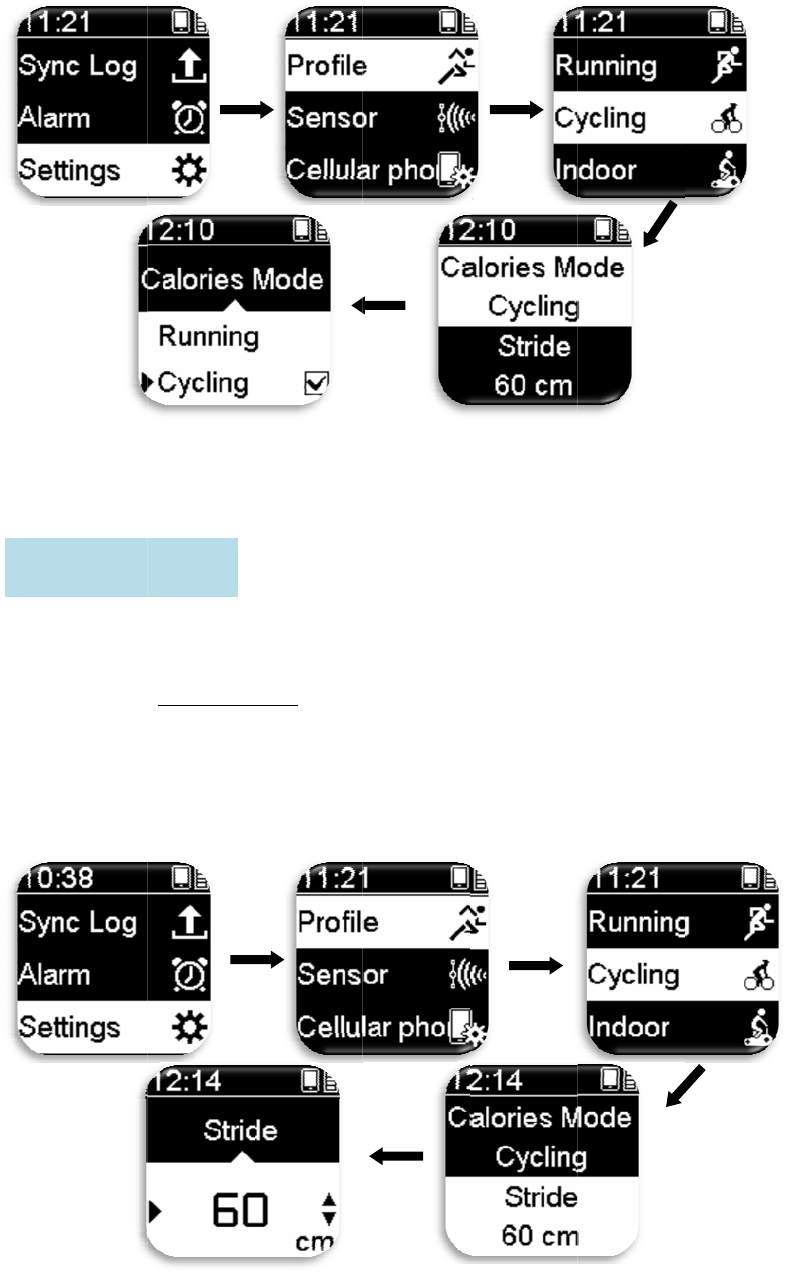
S
t
r
Ent
e
S
t
r
ide S
e
e
ring your
c
1. Pres
s
2. Prof
i
30~1
t
ride Sett
i
e
tting:
c
orrect stri
d
s
Setting/R
e
i
le > select
E
80c
m
).
i
n
g
:
d
e allows y
o
e
turn>enter
E
xercise M
26
o
ur distanc
e
Setting M
e
ode > Strid
e
and speed
e
nu Mode.
e > Set stri
d
to be more
d
e size. (Se
t
accurate.
t
ting range:
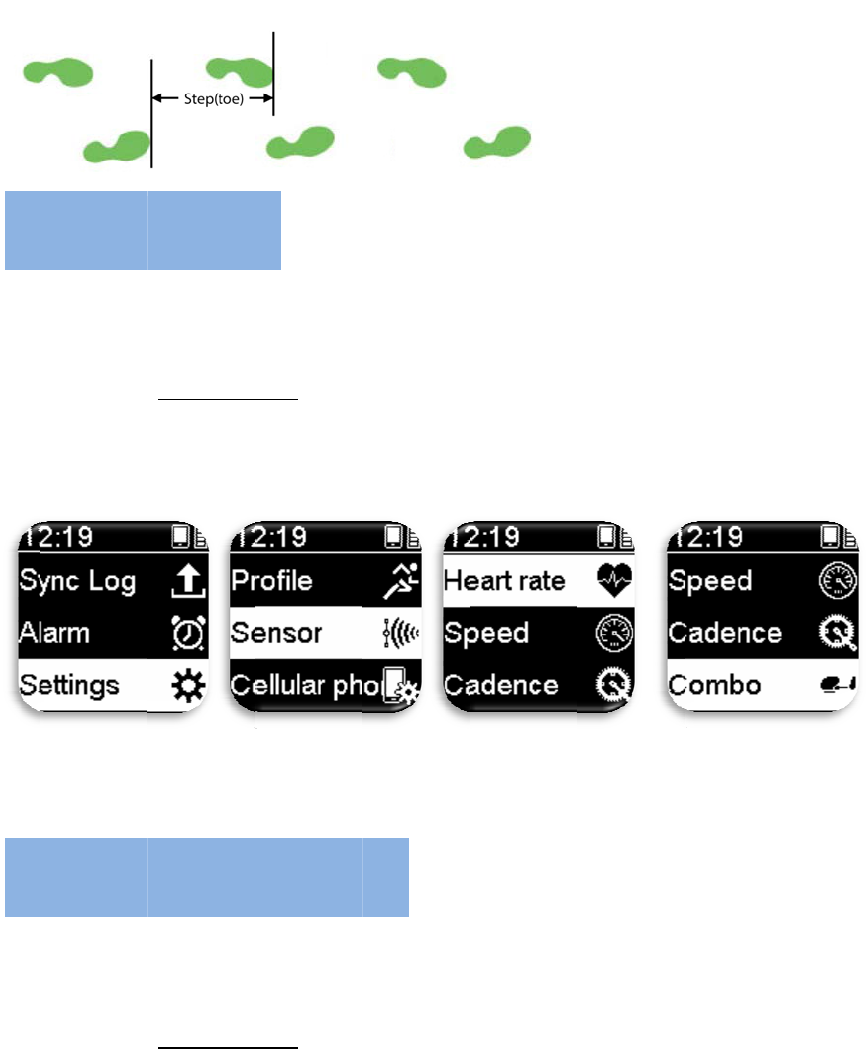
De
s
Tur
n
b
e
p
Set
s
wit
h
S
C
s
cription: S
t
n
s the AN
T
p
urchased s
e
1. Pres
s
2. Sens
o
s
the notifi
c
h
the cellul
a
1. Pres
s
2. Cell
u
3. Cell
u
4. Cell
u
enso
r
S
C
ellular
t
ride refers
t
T
+ sensor f
u
e
parately.
s
Setting/R
e
o
r > Select
c
ation meth
o
a
r phone.
s
Setting/R
e
u
lar phone
>
u
lar phone
>
u
lar phone
>
S
etting
:
Phone
t
o the lengt
h
u
nction On
o
e
turn>enter
sensor typ
e
o
d of cellul
a
e
turn>enter
>
Pairing S
e
>
Clear Pai
r
>
Notify >
P
:
Settin
g
27
h
between
t
o
r Off; hea
r
Setting M
e
e
> On/Off.
a
r phone m
e
Setting M
e
e
tting > On
/
r
> Yes/No.
P
hone Call/
A
g
:
t
wo steps.
r
t rate moni
t
e
nu Mode.
e
ssages an
d
e
nu Mode.
/
Off.
A
ll Messag
e
t
or or cade
n
d
clears the
p
e
.
n
ce device
c
p
airing sett
i
c
an
i
ng
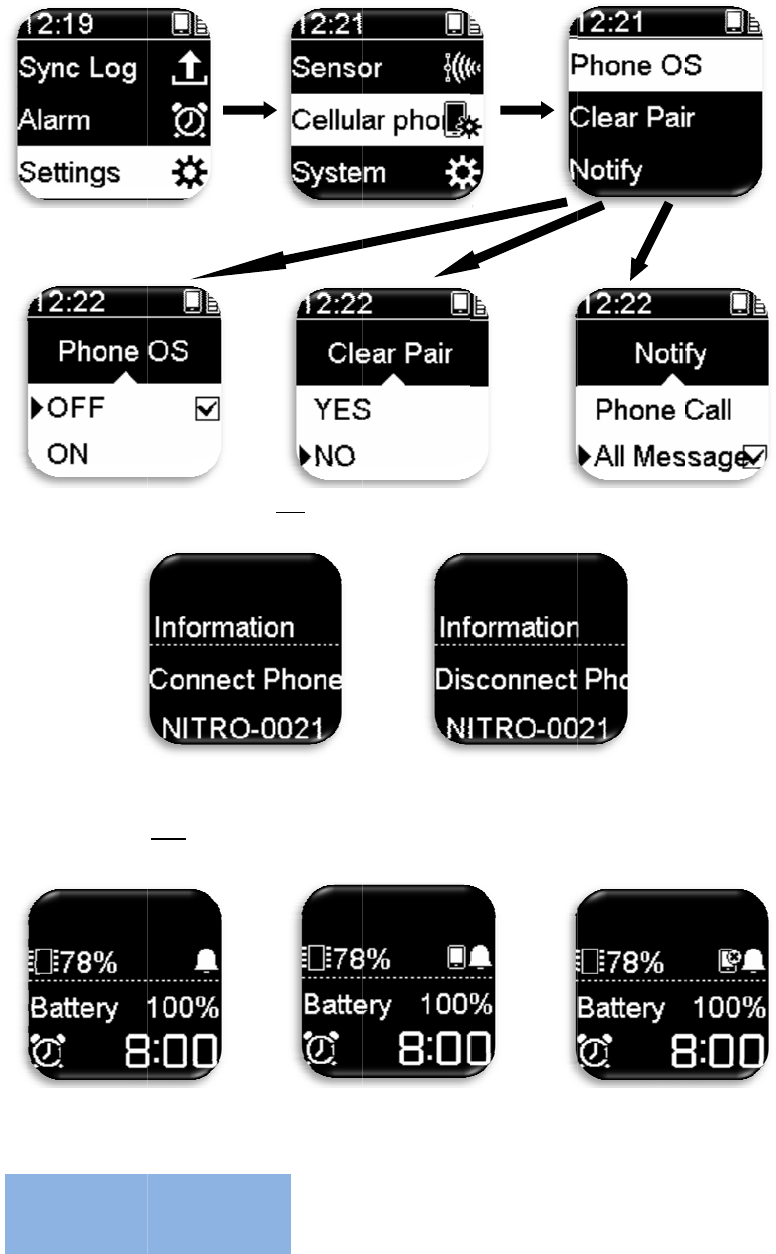
De
s
sm
a
No
t
co
m
Pre
s
No
t
Set
s
or
O
and
S
y
s
cription: P
r
a
rtphone/Di
t
e: If your s
m
m
plete
d
.
s
s and hold
t
connected
s
Nitro GP
S
O
ff), vibrat
o
message.
y
stem
S
r
ess and ho
l
sconnect p
h
m
artphone
OK under
T
to phone
S
sports wa
t
o
r (On or O
f
S
etting
l
d Up unde
r
h
one (infor
m
setting is i
n
T
ime Mod
e
with cel
l
t
ch functio
n
f
f), backlig
h
:
28
r
Time Mo
d
m
ation noti
f
n
correct, th
e
e
to display
l
ular phone
n
s, includin
g
h
t On time,
d
e: Connect
s
f
y function
)
e
notificatio
phone con
n
icon
C
g
unit (met
r
display la
n
s
to
)
.
n function
m
n
ection stat
u
Connecte
d
C
onnection
r
ic or imper
i
n
guage, dis
p
m
ay not be
u
s.
d
to phone
to phone f
a
i
al), buzzer
p
lay metho
d
a
ile
d
(On
d
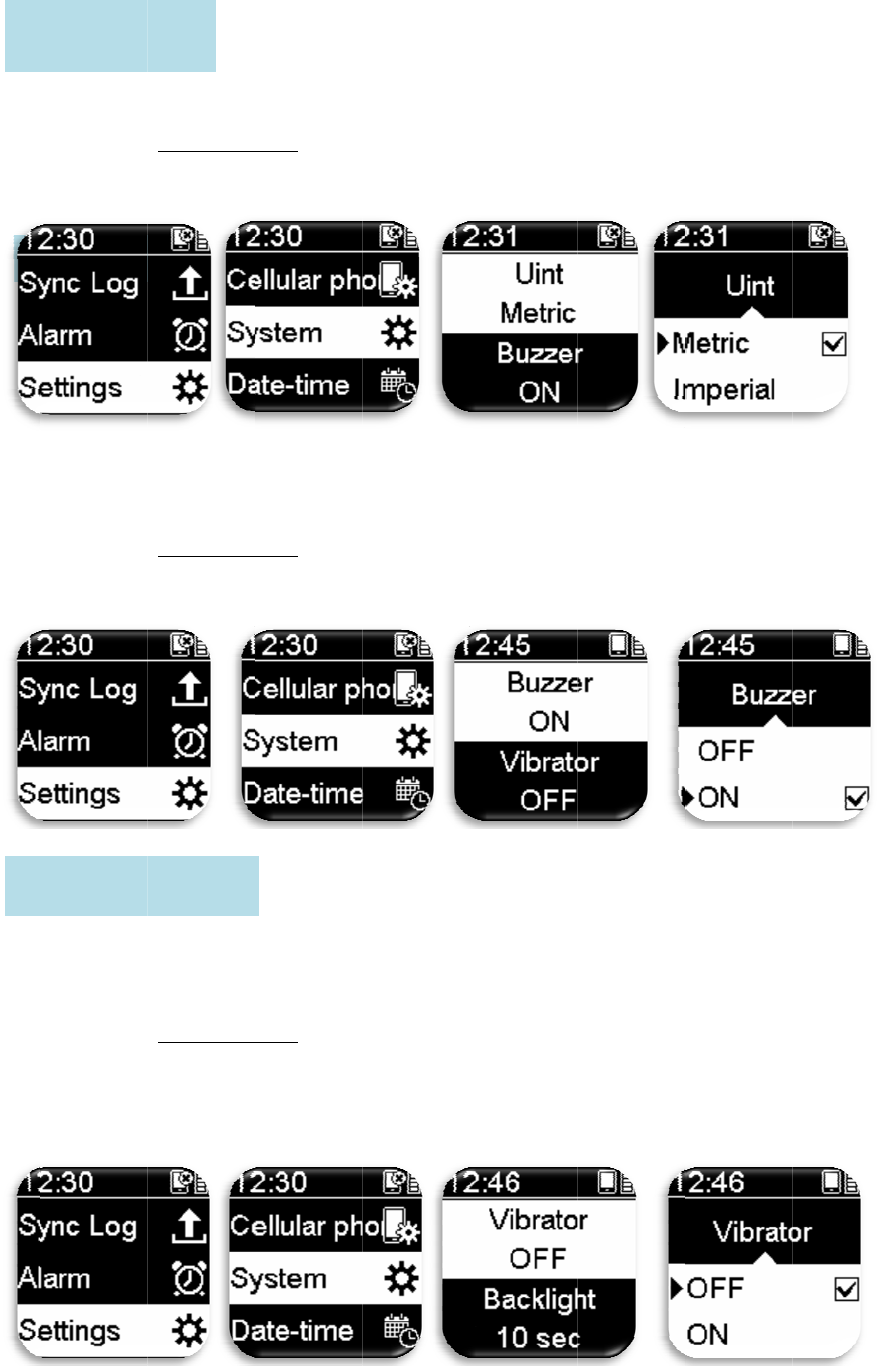
Set
s
Wh
W
ev
U
V
i
s
the meas
u
1. Pres
s
2. Syst
e
en this fun
c
1. Pres
s
2. Syst
e
W
hen this f
u
ery time a
b
1. Pres
s
2. Syst
e
U
nit Sett
i
Buzzer
i
brator S
e
u
ring unit (
m
s
Setting/R
e
e
m> Unit >
c
tion is ena
b
s
Setting/R
e
e
m > Buzz
e
u
nction is e
n
b
utton is pr
e
s
Setting/R
e
e
m> Vibrat
o
i
n
g
:
e
ttin
g
:
m
etric or im
p
e
turn>enter
select Met
r
b
led, there
w
e
turn>enter
e
r > On/Off
.
n
abled, the
e
ssed.
e
turn>enter
o
r > On/Of
f
29
p
erial).
Setting M
e
r
ic/Imperia
l
w
ill be sou
n
Setting M
e
.
button will
Setting M
e
f
.
e
nu Mode.
l
.
n
ds every ti
m
e
nu Mode.
vibrate
e
nu Mode.
m
e a butto
n
n
is pressed
.
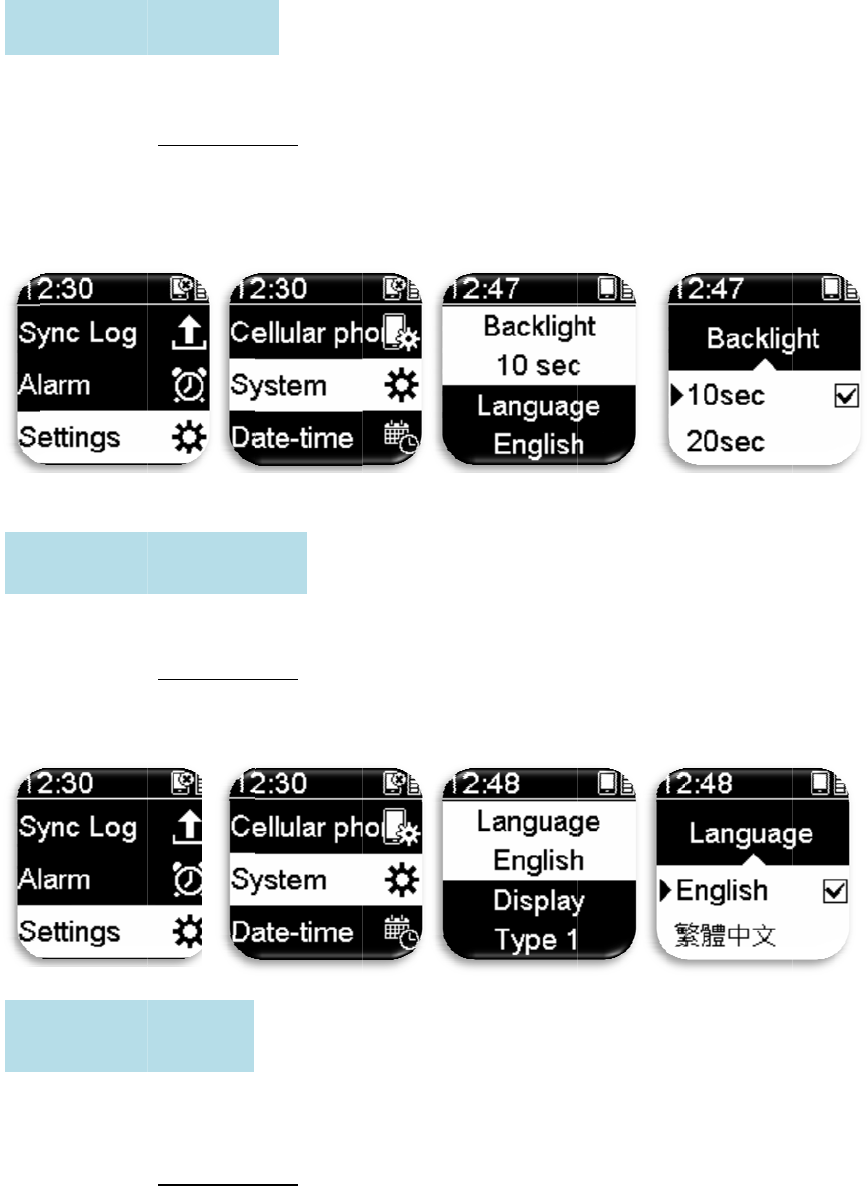
Set
s
Set
s
Set
s
wh
i
B
D
s
the time t
o
1. Pres
s
2. Syst
e
seco
n
s
the displa
y
1. Pres
s
2. Syst
e
Chi
n
s
the displa
y
i
te backgro
u
1. Pres
s
2. Syst
e
B
ackli
g
ht
Lan
g
ua
g
D
ispla
y
S
e
o
turn off t
h
s
Setting/R
e
e
m> Backli
g
n
ds/60 sec
o
y
language
s
Setting/R
e
e
m > Lang
u
n
ese/Simpli
f
y
method o
f
u
nd black t
e
s
Setting/R
e
e
m > Displ
a
Setting :
g
e Settin
g
e
ttin
g
:
h
e backligh
t
e
turn>enter
g
ht > Selec
t
o
nds/Alway
s
of the scre
e
e
turn>enter
u
age > Sele
c
f
ied Chines
e
f
the screen
e
xt (Type 2
)
e
turn>enter
a
y > Type 1
:
30
t
.
Setting M
e
t
backlight
s
On.
e
n.
Setting M
e
c
t display l
a
e
/Japanese.
to black b
a
)
.
Setting M
e
/Type 2.
e
nu Mode.
off time: 1
0
e
nu Mode.
a
nguage: E
n
a
ckground
w
e
nu Mode.
0
seconds/2
0
n
glish/Trad
i
w
hite text (
T
0
seconds/
3
i
tional
T
ype 1) or
3
0
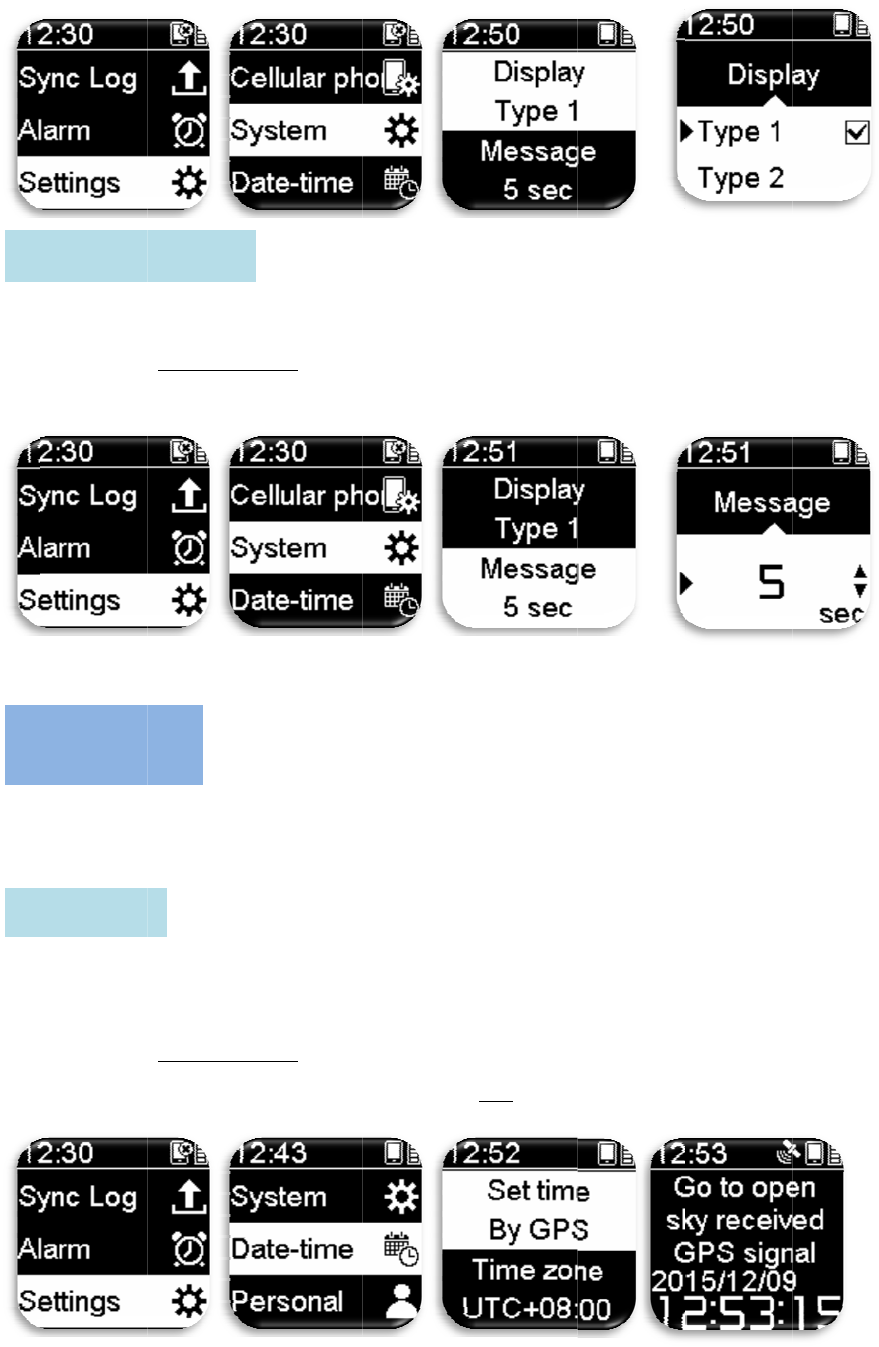
Set
s
Set
s
zon
Us
e
onl
y
M
D
S
s
the displa
y
1. Pres
s
2. Syst
e
s
related se
t
e/daylight
(
e
GPS to ca
l
y
be perfor
m
1. Pres
s
2. Date
-
posi
t
M
essa
g
e
S
D
ate-ti
m
S
et Time:
y
time leng
t
s
Setting/R
e
e
m> Messa
g
t
tings of Ni
t
(
daylight sa
v
l
ibrate the t
i
m
ed once t
h
s
Setting/R
e
-
time>Set t
i
t
ioning to c
a
S
ettin
g
:
m
e:
t
h of the no
t
e
turn>enter
g
e > Set m
e
t
ro GPS sp
o
v
ing time)/
d
i
me of the
N
h
e watch is
o
e
turn>enter
i
me using
G
a
librate tim
e
31
t
ification
m
Setting M
e
e
ssage disp
l
o
rts watch:
T
d
ate forma
t
N
itro GPS
s
o
utdoors a
n
Setting M
e
G
PS > pres
s
e
.
m
essages on
e
nu Mode.
l
ay seconds
T
ime settin
g
t
/time form
a
s
ports watc
h
n
d has recei
v
e
nu Mode.
s
OK > go
o
the screen.
(3~30 sec
o
g
s include
u
a
t.
h
; time cali
b
v
ed GPS si
g
o
utdoors to
c
o
nds).。
u
se GPS/ti
m
b
ration can
g
nal.
c
omplete
G
m
e
G
PS
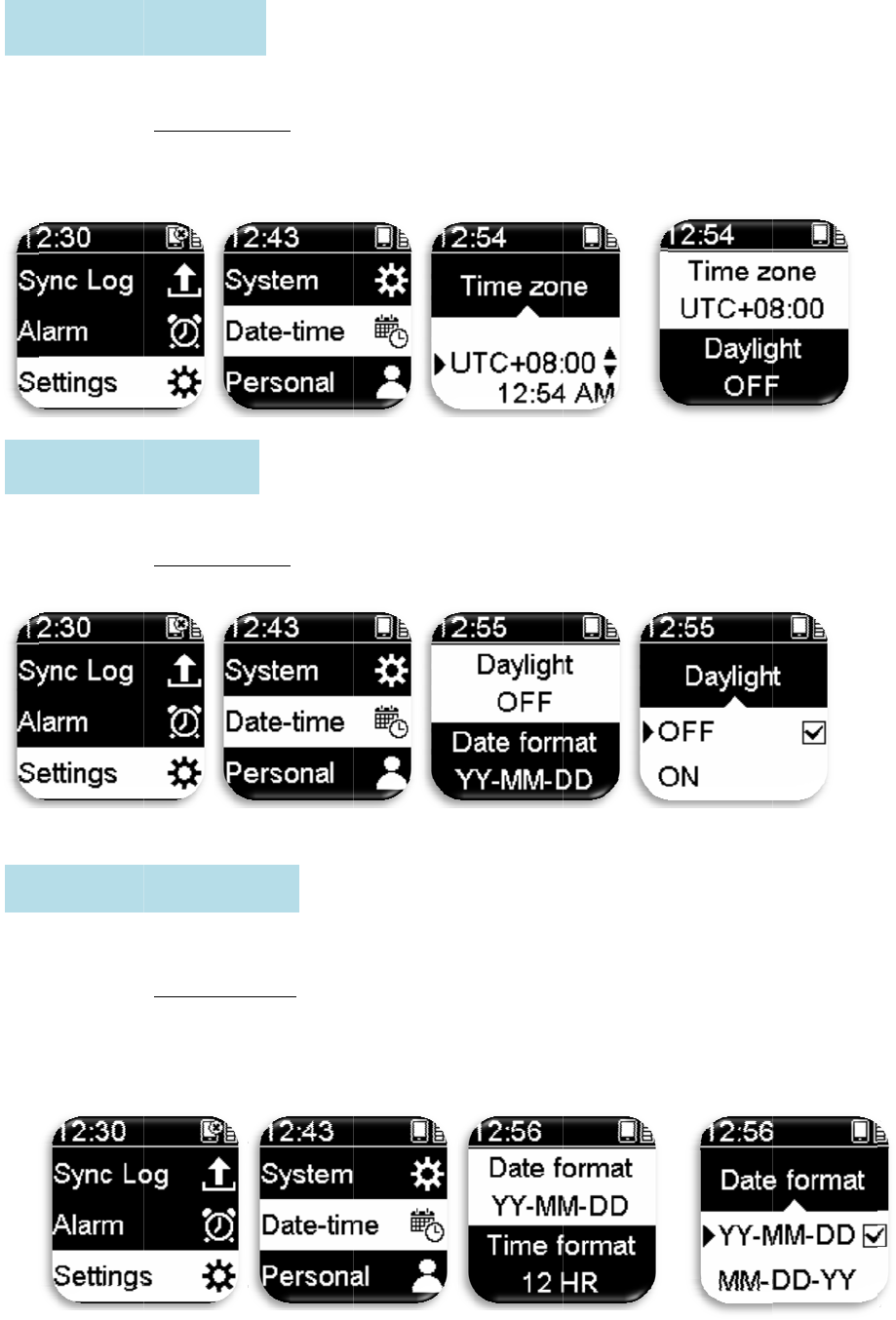
Sel
e
Sel
e
Sel
e
T
D
D
e
ct your ti
m
1. Pres
s
2. Date
-
3.
e
ct whether
1. Pres
s
2. Date
-
e
ct your da
t
1. Pres
s
2. Date
-
Yea
r
3.
T
ime zon
e
D
a
y
li
g
ht
S
D
ate For
m
m
e zone.
s
Setting/R
e
-
time > Ti
m
to turn on
d
s
Setting/R
e
-
time > Da
y
t
e format di
s
Setting/R
e
-
time > Da
t
r
-Month-D
a
e
Settin
g
:
S
ettin
g
:
m
at Setti
n
e
turn>enter
m
e zone > S
d
aylight (d
a
e
turn>enter
y
light > On
/
splay.
e
turn > ent
e
t
e format >
a
y/Month-
D
ng
:
32
Setting M
e
et time zon
a
ylight savi
n
Setting M
e
/
Off.
e
r Setting
M
Select:
D
ay-Year/D
a
e
nu Mode.
e range (U
T
n
g time).
e
nu Mode.
M
enu Mode.
a
y-Month-
Y
T
C -12:00
~
Y
ear.
~
+14: 00).
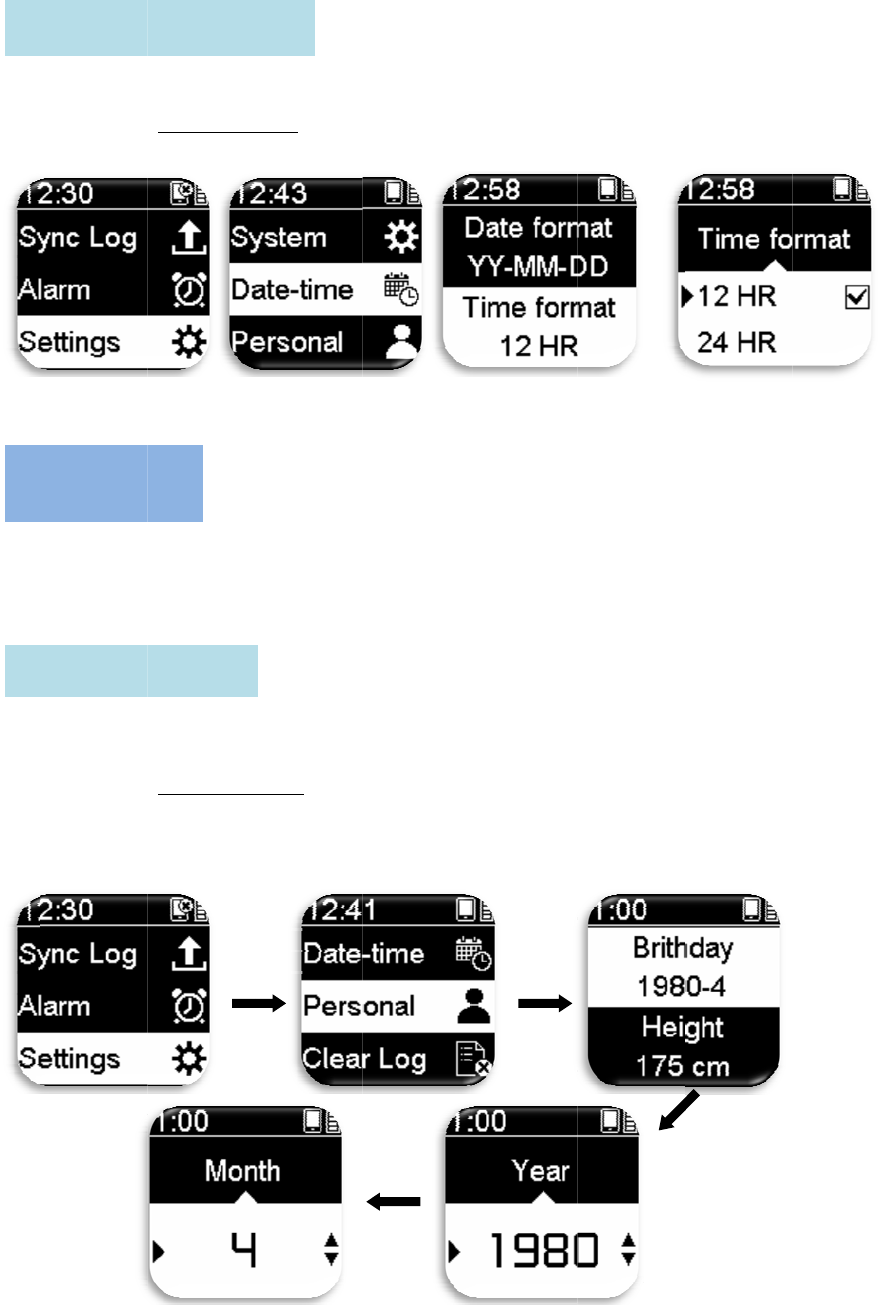
Sel
e
In
o
per
s
Set
T
P
B
i
e
ct your ti
m
1. Pres
s
2.
Date
-
o
rder to all
o
s
onal infor
m
your birth
d
1. Pres
s
2. Pers
o
3.
T
ime For
m
P
erson
a
i
rthda
y
S
m
e format: 1
s
Setting/R
e
-
time > Ti
m
o
w the exer
c
m
ation befo
r
d
ay (A.D.).
s
Setting/R
e
o
nal > birth
m
at Setti
n
a
l
S
ettin
g
:
2 or 24 H
R
e
turn>enter
m
e format >
c
ise inform
a
r
e start usi
n
e
turn > ent
e
day > set y
e
ng
:
33
R
.
Setting M
e
Select: 12
a
tion to be
m
n
g: birthda
y
e
r Setting
M
e
ar > set m
o
e
nu Mode.
HR or 24
H
m
ore accur
a
y
/height/we
i
M
enu Mode.
o
nth.
HR
.
a
te, please
s
i
ght/max H
R
s
et your
R
/wheel.
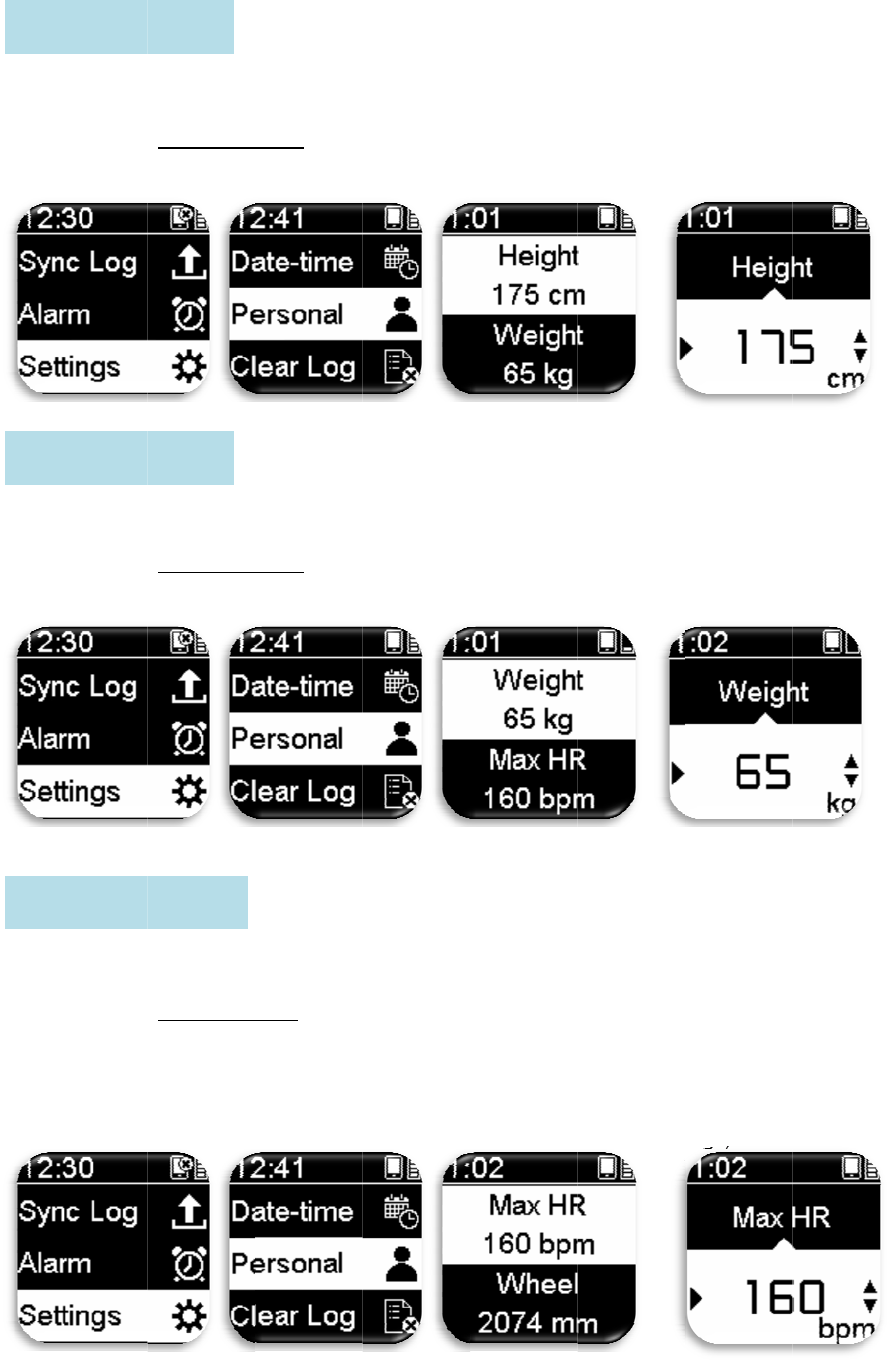
Set
Set
Set
H
W
M
your heigh
t
1. Pres
s
2. Pers
o
your weig
h
1. Pres
s
2. Pers
o
your maxi
m
1. Pres
s
2. Pers
o
Des
c
Max
Low
-
H
ei
g
ht Se
t
W
ei
g
ht Se
t
M
ax H
R
S
e
t
.
s
Setting/R
e
o
nal > Hei
g
h
t.
s
Setting/R
e
o
nal > wei
g
m
um heart
r
s
Setting/R
e
o
nal > Max
c
ription: Ca
l
H
R
=220
-
-
medium st
r
t
tin
g
:
t
tin
g
:
e
ttin
g
:
e
turn > ent
e
g
ht > Set yo
u
e
turn > ent
e
g
ht > Set yo
u
r
ate.
e
turn>enter
. HR > Set
y
l
culation m
e
-
age
r
ength exer
34
e
r Setting
M
u
r height.
e
r Setting
M
u
r weight.
Setting M
e
y
our max
H
e
thod is as
f
cise HR =
(
M
enu Mode.
M
enu Mode.
e
nu Mode.
H
R (90~220
f
ollows
(
220-age)x
6
bpm).
6
0% ~(220
-
-
age)x 80
%
%
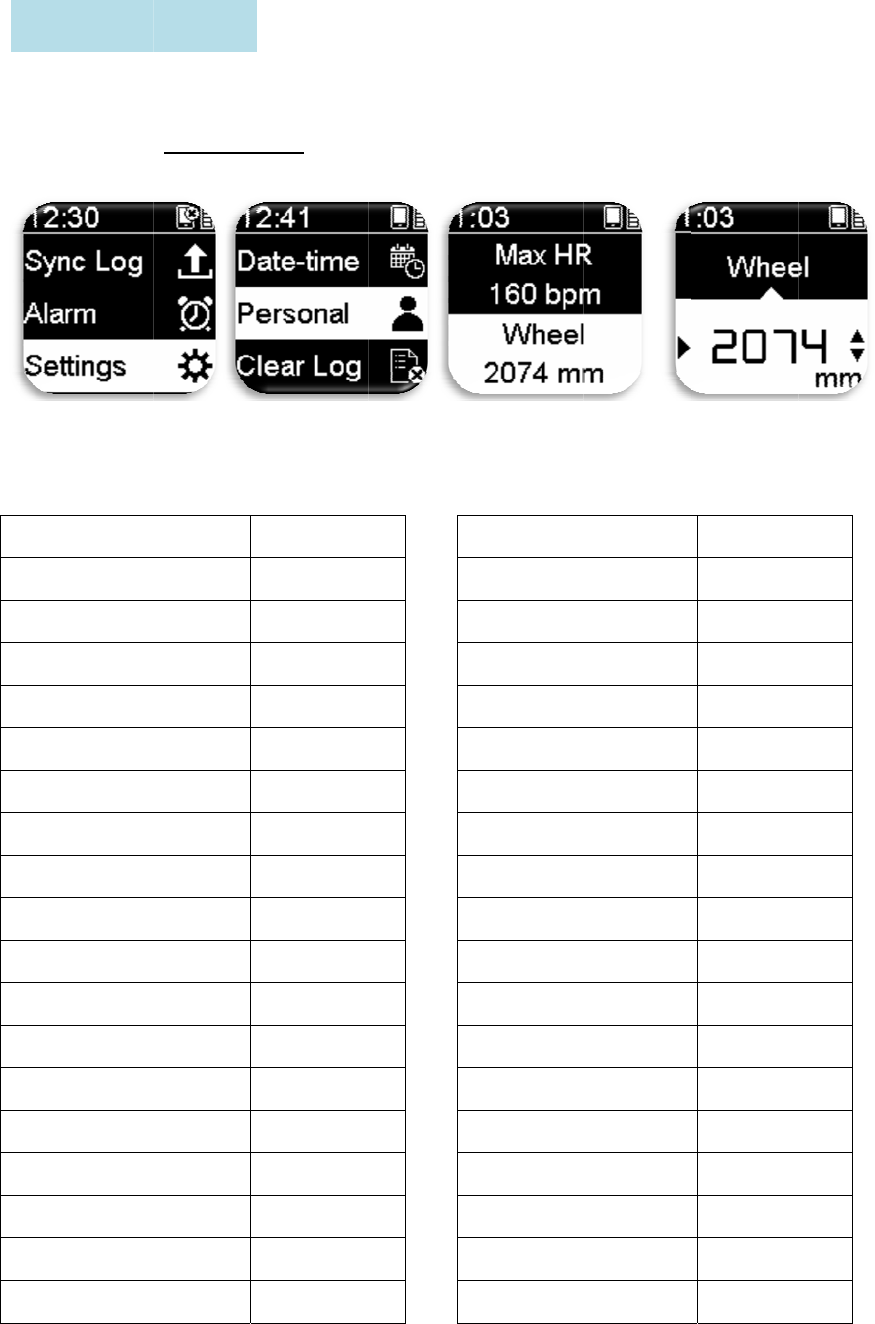
Set
“
W
Wh
of t
h
W
12
x
14
x
14
x
16
x
16
x
18
x
18
x
20
x
20
x
22
x
22
x
24
x
24
x
24
x
24
x
26
x
26
x
26
x
W
the wheel
d
W
heel size
1. Pres
s
2. Pers
o
eel size an
d
h
e tire).
W
heel diam
e
x
1.75
x
1.5
x
1.75
x
1.5
x
1.75
x
1.5
x
1.75
x
1.75
x
1-3/8
x
1-3/8
x
1-1/2
x
1
x
3/4管狀
x
1-1/8
x
1-1/4
x
2.10
x
2.125
x
2.35
W
heel Se
d
iameter of
and circu
m
s
Setting/R
e
o
nal > Whe
d
circumfer
e
e
ter size
ttin
g
:
your bicyc
l
m
ference tab
e
turn>enter
el > Set th
e
e
nce (Whe
e
Length〈m
m
935
1020
1055
1185
1195
1340
1350
1515
1615
1770
1785
1753
1785
1795
1905
2068
2070
2083
35
l
e; please r
e
le” Table 1
Setting M
e
e
wheel dia
m
e
l diameter
s
m
〉
2
2
2
2
2
2
2
2
2
2
2
2
2
2
2
7
7
7
e
fer to the
-5.
e
nu Mode.
m
eter of yo
u
s
ize is usua
l
Length
〈
2
4 x 1.75
2
4 x 2.00
2
4 x 2.125
2
6 x 7/8
2
6 x 1(59)
2
6 x 1(65)
2
6 x 1.25
2
6 x 1-1/8
2
6 x 1-3/8
2
6 x 1-1/2
2
6 x 1.40
2
6 x 1.50
2
6 x 1.75
2
6 x 1.95
2
6 x 2.00
7
00 x 19C
7
00 x 20C
7
00 x 23C
u
r bicycle.
l
ly marked
〈
mm〉
on both si
d
Tabl
e
Length〈
m
1890
1925
1965
1920
1913
1952
1953
1970
2068
2100
2005
2010
2023
2050
2055
2080
2086
2096
d
es
e
1-5
m
m〉
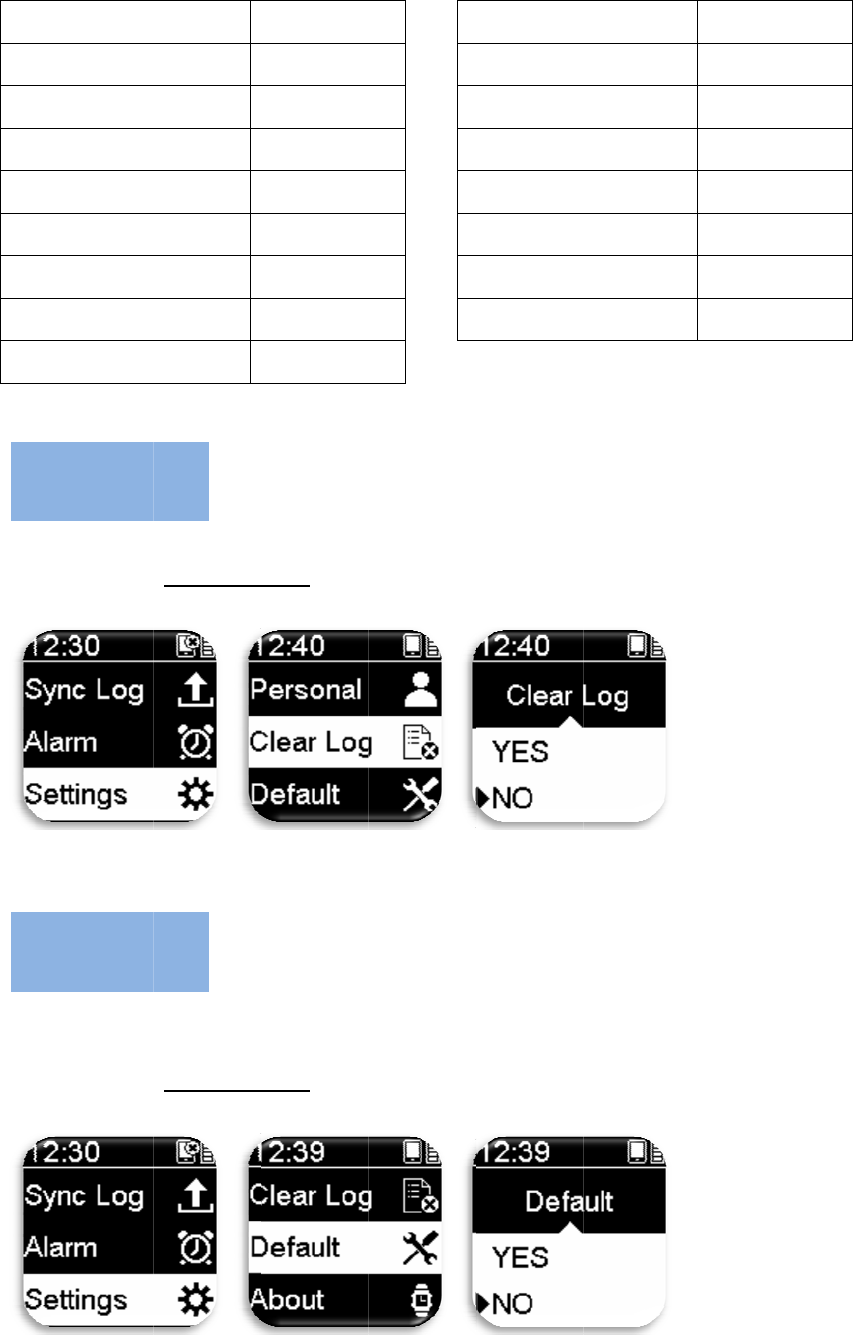
26
x
27
x
27
x
27
x
27
x
65
0
65
0
65
0
70
0
Del
No
t
cle
a
Re
s
val
u
C
D
x
3.00
x
1
x
1-1/8
x
1-1/4
x
1-3/8
0
x 35A
0
x 38A
0
x 38B
0
x 18C
etes all exe
r
1. Pres
s
2. Clea
r
t
e: Please c
o
a
ring the lo
g
s
ets all para
m
u
es.
1. Pres
s
2. Def
a
C
lear L
o
D
efault:
r
cise recor
d
s
Setting/R
e
r
Log > Ye
s
o
nfirm whe
t
g
s.
m
eter setti
n
s
Setting/R
e
a
ult > Yes/
N
o
g:
2170
2145
2155
2161
2169
2090
2125
2105
2070
d
s on the N
i
e
turn > ent
e
s
/No.
t
her the dat
a
n
gs of the
N
e
turn > ent
e
N
o.
36
7
7
7
7
7
7
7
7
i
tro GPS sp
o
e
r Setting
M
a
has been
u
N
itro GPS s
p
e
r Setting
M
7
00 x 25C
7
00 x 28C
7
00 x 30C
7
00 x 32C
7
00C 管
狀
7
00 x 35C
7
00 x 38C
7
00 x 40C
o
rts watch.
M
enu Mode.
u
ploaded t
o
p
orts watch
M
enu Mode.
狀
o
Nitro Spa
c
back to the
2105
2136
2170
2155
2130
2168
2180
2200
c
e cloud be
f
factory de
f
f
ore
f
ault
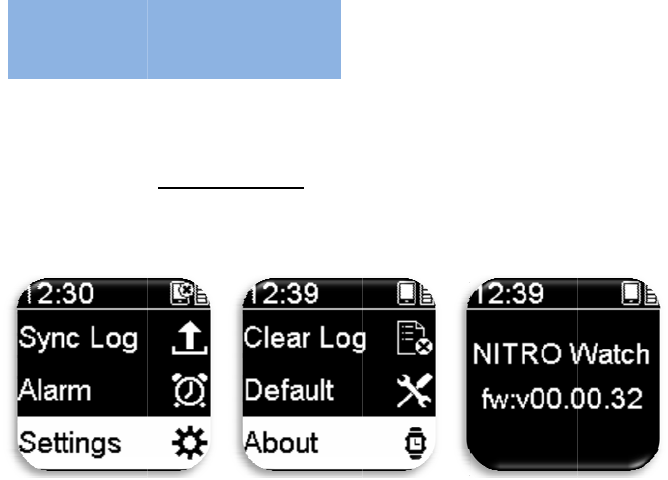
All
o
spo
r
B
a
w
Ma
i
dev
•
D
•
D
h
•
T
p
•
U
w
•
D
w
A
o
ws viewin
g
r
ts watch e
t
1. Pres
s
2. Abo
u
a
sic
m
atch
i
ntaining th
ice.
D
o not drop
D
o not expo
s
h
umid envi
r
T
he surface
o
p
rotector to
U
se soft clo
t
w
atch.
D
o not try t
o
w
ill void th
e
A
bout t
h
g
of relate
d
t
c.
s
Setting/R
e
u
t > View i
n
m
ainte
n
e Nitro GP
S
or bang th
e
s
e the Nitr
o
r
onments.
o
f the watc
h
protect the
t
h dipped
w
o
dismantle,
e
warranty.
h
e Wat
c
d
informatio
n
e
turn > ent
e
n
formation.
n
anc
e
S
sports wa
t
e
Nitro GP
S
o
GPS sport
h
can be ea
s
screen.
w
ith diluted
n
repair or
m
c
h:
37
n
on the so
f
e
r Setting
M
e
of th
e
t
ch properl
y
S
sports wat
c
s watch un
d
s
ily scratch
e
n
eutral det
e
m
odify the
N
f
tware vers
i
M
enu Mode.
e
Nit
r
y
can lowe
r
c
h.
d
er extrem
e
e
d; please
u
e
rgent to cl
e
N
itro GPS s
p
i
on of the
N
r
o GP
S
r
the risk of
e
ly cold or
h
u
s a non-ad
h
e
an the Nitr
o
p
orts watc
h
N
itro GPS
S
spo
r
damaging
t
h
ot or highl
y
h
esive scre
e
o
GPS spor
t
h
as doing s
o
r
ts
t
he
y
e
n
t
s
o

38
15.105(b)
This equipment has been tested and found to comply with the limits for a Class B
digital device, pursuant to part 15 of the FCC rules. These limits are designed to
provide reasonable protection against harmful interference in a residential installation.
This equipment generates, uses and can radiate radio frequency energy and, if not
installed and used in accordance with the instructions, may cause harmful interference
to radio communications. However, there is no guarantee that interference will not
occur in a particular installation. If this equipment does cause harmful interference to
radio or television reception, which can be determined by turning the equipment off
and on, the user is encouraged to try to correct the interference by one or more of the
following measures:
-Reorient or relocate the receiving antenna.
-Increase the separation between the equipment and receiver.
-Connect the equipment into an outlet on a circuit different from that to which the
receiver is connected.
-Consult the dealer or an experienced radio/TV technician for help.
FCC RF Radiation Exposure Statement:
1. This Transmitter must not be co-located or operating in conjunction with any
other antenna or transmitter.
2. This equipment complies with FCC RF radiation exposure limits set forth
for an uncontrolled environment.
15.21
You are cautioned that changes or modifications not expressly approved by the part responsible for
compliance could void the user’s authority to operate the equipment.
15.19
This device complies with Part 15 of the FCC Rules.
Operation is subject to the following two conditions:
1) this device may not cause harmful interference and
2) this device must accept any interference received, including interference that may cause undesired
operation of the device.