Teko Telecom Srl DFE Digital Front End User Manual

Teko Telecom Srl Digital Front End

Contents

User Manual

www.tekotelecom.itwww.tekotelecom.itLet us repeat !SIRIUS: Teko Telecom Modular Coverage and Capacity SystemTECHNICAL HANDBOOK  Doc ID Number 91 080 0781 - Rel. 04 english
www.tekotelecom.itwww.tekotelecom.itLet us repeat !english  Doc ID Number 91 080 0781 - Rel. 04BOLOGNA, 11/10/2010UPDATINGS:Rel. 02 (11/04/2011)Rel. 03 (15/03/2012)Rel. 04 (11/06/2012)Document Identication Number91 080 0781 – Rel. 04SIRIUS: Teko Telecom Modular Coverage and Capacity System
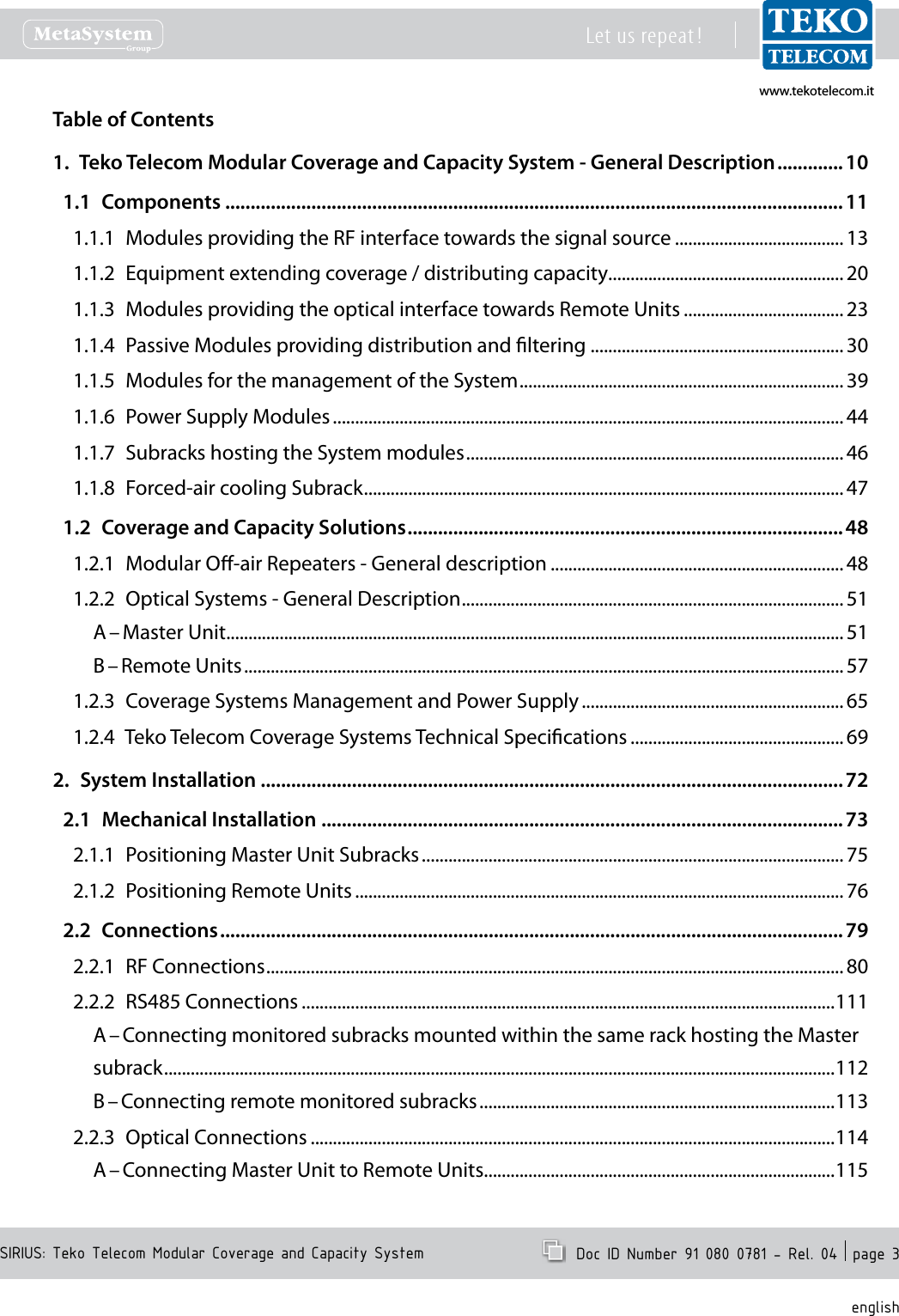
www.tekotelecom.itwww.tekotelecom.itSIRIUS: Teko Telecom Modular Coverage and Capacity SystemLet us repeat !  Doc ID Number 91 080 0781 - Rel. 04  page 3englishTable of Contents1.  Teko Telecom Modular Coverage and Capacity System - General Description ............. 101.1  Components ..........................................................................................................................111.1.1  Modules providing the RF interface towards the signal source ...................................... 131.1.2  Equipment extending coverage / distributing capacity ..................................................... 201.1.3  Modules providing the optical interface towards Remote Units .................................... 231.1.4  Passive Modules providing distribution and ltering .........................................................301.1.5  Modules for the management of the System ......................................................................... 391.1.6  Power Supply Modules ................................................................................................................... 441.1.7  Subracks hosting the System modules ..................................................................................... 461.1.8  Forced-air cooling Subrack ............................................................................................................ 471.2  Coverage and Capacity Solutions ......................................................................................481.2.1  Modular O-air Repeaters - General description .................................................................. 481.2.2  Optical Systems - General Description ...................................................................................... 51A – Master Unit ...........................................................................................................................................51B – Remote Units .......................................................................................................................................571.2.3  Coverage Systems Management and Power Supply ........................................................... 651.2.4  Teko Telecom Coverage Systems Technical Specications ................................................ 692.  System Installation ...................................................................................................................722.1  Mechanical Installation .......................................................................................................732.1.1  Positioning Master Unit Subracks ............................................................................................... 752.1.2  Positioning Remote Units .............................................................................................................. 762.2  Connections ...........................................................................................................................792.2.1  RF Connections .................................................................................................................................. 802.2.2  RS485 Connections ........................................................................................................................111A – Connecting monitored subracks mounted within the same rack hosting the Master subrack .......................................................................................................................................................112B – Connecting remote monitored subracks ................................................................................1132.2.3  Optical Connections ......................................................................................................................114A – Connecting Master Unit to Remote Units ...............................................................................115
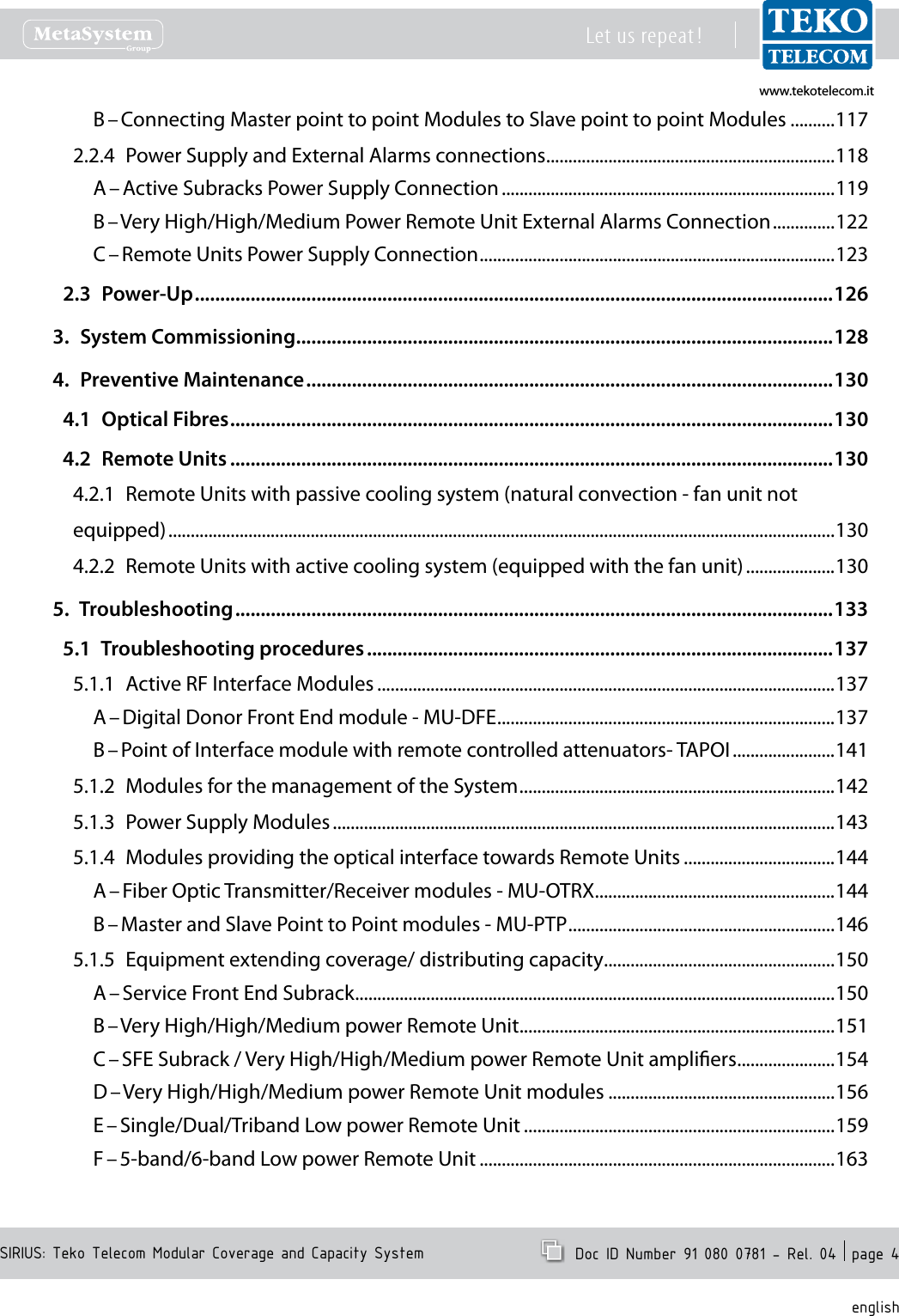
www.tekotelecom.itwww.tekotelecom.itSIRIUS: Teko Telecom Modular Coverage and Capacity SystemLet us repeat !  Doc ID Number 91 080 0781 - Rel. 04  page 4englishB – Connecting Master point to point Modules to Slave point to point Modules ..........1172.2.4  Power Supply and External Alarms connections .................................................................118A – Active Subracks Power Supply Connection ...........................................................................119B – Very High/High/Medium Power Remote Unit External Alarms Connection ..............122C – Remote Units Power Supply Connection ................................................................................1232.3  Power-Up ..............................................................................................................................1263.  System Commissioning ..........................................................................................................1284.  Preventive Maintenance ........................................................................................................1304.1  Optical Fibres .......................................................................................................................1304.2  Remote Units .......................................................................................................................1304.2.1  Remote Units with passive cooling system (natural convection - fan unit not equipped) ......................................................................................................................................................1304.2.2  Remote Units with active cooling system (equipped with the fan unit) ....................1305.  Troubleshooting ......................................................................................................................1335.1  Troubleshooting procedures ............................................................................................1375.1.1  Active RF Interface Modules .......................................................................................................137A – Digital Donor Front End module - MU-DFE ............................................................................137B – Point of Interface module with remote controlled attenuators- TAPOI .......................1415.1.2  Modules for the management of the System .......................................................................1425.1.3  Power Supply Modules .................................................................................................................1435.1.4  Modules providing the optical interface towards Remote Units ..................................144A – Fiber Optic Transmitter/Receiver modules - MU-OTRX ......................................................144B – Master and Slave Point to Point modules - MU-PTP ............................................................1465.1.5  Equipment extending coverage/ distributing capacity ....................................................150A – Service Front End Subrack ............................................................................................................150B – Very High/High/Medium power Remote Unit .......................................................................151C – SFE Subrack / Very High/High/Medium power Remote Unit ampliers ......................154D – Very High/High/Medium power Remote Unit modules ...................................................156E – Single/Dual/Triband Low power Remote Unit ......................................................................159F – 5-band/6-band Low power Remote Unit ................................................................................163
www.tekotelecom.itwww.tekotelecom.itSIRIUS: Teko Telecom Modular Coverage and Capacity SystemLet us repeat !  Doc ID Number 91 080 0781 - Rel. 04  page 5english5.1.6  Forced-air cooling subrack ..........................................................................................................1685.2  Flow charts ...........................................................................................................................1695.2.1  Received Optical Power out of range - Uplink path ...........................................................1705.2.2  Received Optical Power out of range - Downlink path .....................................................1715.3  Replacement Instructions .................................................................................................1725.3.1  Replacing the fan unit ...................................................................................................................1725.3.2  Replacing plug-in modules .........................................................................................................1735.3.3  Extracting guide rails for plug-in modules from active subracks ..................................1735.3.4  Cleaning optical connectors  ......................................................................................................174Attached DocumentsSafety RulesStandards
www.tekotelecom.itwww.tekotelecom.itSIRIUS: Teko Telecom Modular Coverage and Capacity SystemLet us repeat !  Doc ID Number 91 080 0781 - Rel. 04  page 6englishInitial NotesDeclaration of Conformity (*)According to Directive 1999/5/EC (R&TTE)We TEKO TELECOM hereby declare that the products described in this technical handbook are manufactured by TEKO TELECOM S.p.A. Via Meucci, 24/a 40024 Castel S. Pietro Terme (Bologna) – ITALY. All the above cited products are compliant with the essential requirements of article 3 and other relevant provisions of the Radio & Telecommunications Terminal Equipment Directive, n.1999/5/EC, when used for their intended purpose: improving coverage of mobile communication networks.Castel S. Pietro Terme (Bologna) – ITALYLegal representativeTeko Telecom S.p.A.a Socio Unico(*) A signed copy of the conformity declaration is available upon request. Please get in touch with our after sale service, lling in the form on line at the following Internet address: www.tekotelecom.itNote relevant to product utilization within the European Union (EU)It’s under user’s own responsibility to verify to be compliant to the National provisions or authorisations required.For further information refer to: http://ec.europa.eu/enterprise/sectors/rtte/index_en.htmEU directive 2002/96/EC – WEEE (Waste Electrical and Electronic Equipment)This product complies with the EU directive 2002/96/EC – WEEE (Waste Electrical and Electronic Equipment)The symbol  of  the  crossed container marked on the equipment shows that the product, at the end of its useful life, must be collected separately from other refuse. Therefore the user must deliver the equipment that  has  reached  the  end  of  its  life  to  the  special  dierentiated  electronic  and  electrotechnical  refuse collection  centres,  far  subsequent  dispatch  of  the  discarded  equipment  for  recycling,  treatment  and environmentally  compatible  disposal,  thus  contributing  in  preventing  possible  negative  eects  on  the environment  and  on  health  and  favouring  the  recycling  of  the  materials  from  which  the  equipment  is made.Illicit disposal of  the  product by the user  will  lead  to the  application of  the penalties provided far  by the national legislations of the various Member States on receipt of directive 2002/96/EC.For further information, please contact our after sales department: www.tekotelecom.itPackaging and Packaging Waste Directive 94/62/ECThe packaging of the product complies with the Directive 94/62/EC, concerning packaging and packaging waste. Environmentally harmful materials are not used for packaging.Packaging is made from materials that can easily be recycled after use. Depending on the means of transportation, the equipment is packed in a cardboard or wooden box, protected with expanded polystyrene or barrier bags.The packaging materials are marked according to ISO 11 469.Please do not throw packaging materials into unsorted waste but separate them according to local regulations waste disposal options.
www.tekotelecom.itwww.tekotelecom.itSIRIUS: Teko Telecom Modular Coverage and Capacity SystemLet us repeat !  Doc ID Number 91 080 0781 - Rel. 04  page 7englishCompliance  with  the  Maximum  Permissible  Exposure  (MPE)  limits  -  Examples  of  minimum  separation distance calculation, based on the EN 50385The following table summarizes the results of the calculations carried out assuming:zero losses between the output connector of Teko Telecom equipment and the input connector of the antenna•maximum gain estimated for outdoor Antenna Gi = 19dBi (for each band)•maximum gain estimated for indoor Antenna Gi = 7dBi (for each band)•no co-location or operation•  in conjunction with any other antenna or transmitter. Please note The following table is not meant to represent the actual compliance distance from a particular Teko Telecom Optical System or Modular Repeater, being antennas, cables, and other RF components not provided with Teko Telecom equipment.The actual compliance distance from a particular equipment can be calculated in the nal installation phase only - when antenna, cables and other RF components specications are available.Equipment Type Maximum Output PowerMinimum separation distance between a person and the antenna in order to comply with MPE limits [m]Indoor installation Outdoor installationE=6 [V/m] E=20 [V/m] E=6 [V/m] E=20 [V/m]Remote UnitandService Front End (TSFE)Low Power Single band Remote Units•Medium Power EGSM band Remote Unit•29dBm 1.8 0.6 7.1 2.3Medium Power DCS band Remote Unit 31dBm 2.2 0.7 8.9 2.8Low Power Dual band Remote Units•Medium Power UMTS band Remote Unit•32dBm 2.5 0.8 10.1 3.2Triband Low Power Remote Units 33.8dBm 3.1 1.0 12.3 3.9Dual band Medium Power Remote Units 34.6dBm 3.4 1.1 13.4 4.2Medium Power Triband Remote Units 35.6dBm 3.8 1.5 15.2 4.8Low Power 5-band Remote Unit•High Power TETRA Remote Unit•High Power TETRA Service Front End•36dBm 4.0 1.3 15.9 5.0High Power Single band Remote Units (LTE800 •or EGSM or DCS or UMTS)High Power Service Front End (LTE800 or EGSM •or DCS or UMTS or LTE2600)40dBm 6.3 2.0 25.1 8.0High Power Single band Remote Unit (LTE2600) 41dBm 7.1 2.2 28.1 8.9High  Power  Dual  band  Remote  Units  (LTE800 •and/or EGSM and/or DCS and/or UMTS)Very High Power Single band Remote Units•Very  High  Power Service Front  End  (LTE800  or •EGSM or DCS or UMTS)43dBm 8.9 2.8 35.6 11.2High  Power Dual Band  Remote Units  (LTE800  or EGSM or DCS or UMTS with LTE2600)43.5dBm 9.5 3.0 37.7 11.9High Power Tri Band Remote Units (LTE800 and/or EGSM and/or DCS and/or UMTS)44.7dBm 10.9 3.5 43.6 13.8High  Power  Tri  Band  Remote  Units  (LTE800  or EGSM or DCS or UMTS with LTE2600)45.1dBm 11.4 3.6 45.3 14.3Very High Power Dual Band Remote Units 46dBm 12.6 4.0 50.3 15.9Very High Power Tri Band Remote Units 47.8dBm 15.5 4.9 61.6 19.5Donor Front End(TDFE)Single Band TETRA Donor Front End 21dBm 0.7 0.2 2.8 0.9Single Band EGSM Donor Front End 23dBm 0.9 0.3 3.6 1.1Single Band DCS Donor Front End 25dBm 1.1 0.4 4.5 1.4Single Band LTE 800 or LTE2600 Donor Front End 26dBm 1.3 0.4 5.0 1.6Single Band UMTS Donor Front End 27dBm 1.4 0.5 5.6 1.8
www.tekotelecom.itwww.tekotelecom.itSIRIUS: Teko Telecom Modular Coverage and Capacity SystemLet us repeat !  Doc ID Number 91 080 0781 - Rel. 04  page 8englishOperation is subject to the following conditions: (1) this device may not cause interference, and (2) this device must accept any interference, including interference that may cause undesired operation of the device.Changes or modications not expressly approved by the party responsible for compliance could void the user’s authority to operate the equipment.The antenna(s) used for this transmitter must be installed to provide a separation distance of:at least 50cm for Low Power Remote Units family in Tri-Band system (with 8dB of maximum antenna gain for operating bands lower than •1.5GHz and 11dB for operating bands higher than 1.5GHz),at least 50cm for Low Power Remote Units family in Six-Band system (with 4.5dB of maximum antenna gain for operating bands lower •than 1.5GHz and 6.5dB for operating bands higher than 1.5GHz),at least 150cm for Very High Power Remote Units family in Tri-Band System (with 3.5dB of maximum antenna gain for operating bands •lower than 1.5GHz and 6.5dB for operating bands higher than 1.5GHz)at least 50cm for Donor Front End family (with 15.5dB of maximum antenna gain for operating bands lower than 1.5GHz and 19dB for •operating bands higher than 1.5GHz),at least 150cm for Very High Power Amplier radio module, equipped inside Service Front End  family  and Very  High Power Remote •Units family (with 8dB of maximum antenna gain for operating bands lower than 1.5GHz and 11.5dB for operating bands higher than 1.5GHz)from all persons assuming no co-location or operating in conjuction with any other antenna or transmitter.Specications of antennas, cables, RF components, etc will be provided only in the nal installation phase, being the external antenna not provided with equipment.Equipment will be accessible only to maintenance men, that must switch it o before any maintenance operation.Teko Telecom Coverage and Capacity Systems Technical Handbook© Copyright 2010-2012 Teko Telecom S.p.A. All rights reserved.The content of this manual is for informational use only. Information and specications regarding the products described in this document are subject to change without notice. The images shown in this document are for illustrative purposes only.Teko Telecom shall not be liable for technical or editorial errors contained in this manual.
www.tekotelecom.itwww.tekotelecom.itLet us repeat !english  Doc ID Number 91 080 0781 - Rel. 041.General Description1.General Description1.General Description1.General Description1.General Description1.General Description1.General Description1.General Description1.General Description1.General Description1.General Description1.General Description1.General Description1.General Description1.General Description1.General Description1.General Description1.General Description1.General Description1.General Description1.General Description1.General Description1.General Description1.General Description1.General Description1.General Description1.General DescriptionSIRIUS: Teko Telecom Modular Coverage and Capacity System
www.tekotelecom.itwww.tekotelecom.itSIRIUS: Teko Telecom Modular Coverage and Capacity SystemLet us repeat !  Doc ID Number 91 080 0781 - Rel. 04  page 10englishTeko Telecom Modular Coverage and Capacity System - General 1. DescriptionTeko Telecom Coverage and Capacity Systems are exible multi-band multi-operator Systems that provide a wide range of solutions to extend both indoor and outdoor cellular coverage in shadow areas -where the RF signal is not available- and to increase capacity in indoor and outdoor hot spots -where the operators need dedicated coverage.Modular  design  is  a  key  feature  of  Teko  Telecom  Systems:  it  oers  exible  conguration options to build the most suitable solution for any coverage need.SIRIUSStand-alone Modular Repeaters, Optical Systems as well as integrated solutions share a unique common platform: SIRIUS.SIRIUS includes a wide range of active and passive components that can be assembled in a variety of ways in order to provide easy to set-up, maintain, and upgrade products operating in the 380 to 2700MHz frequency range. SIRIUS components can be used in dierent Systems with dierent functionalities to meet present  needs  and  to  allow  system  adaptation  to  changing  conditions,  always  assuring optimized performances.Teko Telecom Master Unit is the core of SIRIUS modular design: it is a versatile modular rack-based platform that controls the whole Coverage System and, depending on its components conguration, is able to provide: the RF interface towards the signal source (BTS, Node B, Repeater),•the RF interface towards Service Antennas/leaky cable,•the optical interface towards up to 144 Remote Units.•This technical handbook describes the components of SIRIUS and how these components can be assembled to provide Optical Systems and Modular O-air Repeaters to improve coverage in dierent environments.
www.tekotelecom.itwww.tekotelecom.itSIRIUS: Teko Telecom Modular Coverage and Capacity SystemLet us repeat !  Doc ID Number 91 080 0781 - Rel. 04  page 11englishComponents1.1 The components of SIRIUS can be grouped in the following categories:Modules providing the RF interface towards the signal source1. Point of Interface (POI) module:•  is the single-band/single-operator interface towards a BTS or NodeB. The Point of Interface module is connected to the signal source via coaxial cable.Digital Donor Front End Module: • is the single-band/single-operator interface towards a Donor Antenna, providing a connection to a BTS or NodeB over an air link. Equipment extending coverage / distributing capacity2. Service  Front  End:•   is  the  single-band/multi-operator  interface  towards  a  Service Antenna. It provides wireless signal to the area to be covered (Modular Repeaters). In Optical Systems the Service Front End can be used to extend coverage to the area close to the Master Unit site.Remote Unit:•  is the multi-band/multi-operator equipment used in Optical Systems to distribute wireless signal throughout the area to be covered (extensive areas coverage/active DAS).Modules providing the optical interface towards Remote Units3. Fiber Optic Transmitter/Receiver Modules•  are the optical interface between Master Unit and Remote Units: they provide RF-to-Optical/Optical-to-RF conversion.Master  and  Slave Point to  Point Modules • perform  the  RF-to-Optical/Optical-to-RF conversion required by the optical point to point link connecting RF Interface modules to distant  Fiber Optic Transmitter/Receiver Modules. The optical  point  to  point link allows a separation distance -up to 20km- between RF Interface modules and Fiber Optic Transmitter/Receiver Modules.Passive Modules providing distribution and ltering4. Our passive components provide RF distribution and ltering.The  4-way  Combiner/Splitter  can  be  used  to  manage  up  to  4  RF  interface  modules operating in the same band; several models of Triplexers with built-in 1:4 Splitter/Combiner are available to distribute signals operating over up to 3 dierent bands. The multiplexers distribute signals operating over multiple dierent bands - up to 5 (pentaplexer);  up to 6 (esaplexer).Due to the exible conguration options of Teko Telecom Coverage and Capacity Systems, the same passive components can be used for dierent purposes.The • 4-way  Combiner/Splitter  can  be  used  to  manage  either  up  to  4  RF  interface
www.tekotelecom.itwww.tekotelecom.itSIRIUS: Teko Telecom Modular Coverage and Capacity SystemLet us repeat !  Doc ID Number 91 080 0781 - Rel. 04  page 12englishmodules,  operating  in  the  same  band (Multi-Operator  Systems)  or  up  to  4  Fiber Optic  Modules  (Fiber  Optic Transmitter/Receiver  Modules  or  Master  Point  to  Point Modules).The • Band  Splitter/Combiner  (Triplexer)  with  built-in  1:4  Splitter/Combiner can be used to manage up to 3 RF interface modules or Service Front End subracks, operating in  dierent bands,  and  up  to  4  Fiber Optic  Modules.  It  can also  manage up to 3 four-way splitter/combiner modules each connected to multiple RF interface modules, operating in the same band, and up to 4  Fiber Optic Modules.Modules for the management of the System5. The • Supervision Module allows the management of the whole Coverage System.The • Alarm Module is an optional module that can be equipped to increase the number of supported external alarms.Power Supply Modules6. The Coverage and Capacity Systems can be equipped with either AC (Universal mains, 85÷264Vac, 50-60Hz) or DC (-72÷-36Vdc) Power Supply modules.Subracks hosting the System modules7. Both active and passive subracks are available.Active  subracks•   are  provided  with  a  backplane  that  allows  the  management  and power supply of active modules.Passive subracks•  are used  to  host passive modules  that  do  not require  power nor management to function. Passive Subracks allow a reduction in the cost of the whole system.Forced-air cooling Subrack8. A forced-air cooling subrack is available to ensure the air ow required for proper cabinet installed equipment operation.Rack cabinets for hosting the System Subracks (indoor installation) and cabinets for Outdoor installation are also available.A detailed description of each Component of Teko Telecom Modular Coverage and Capacity System is provided in the following paragraphs.
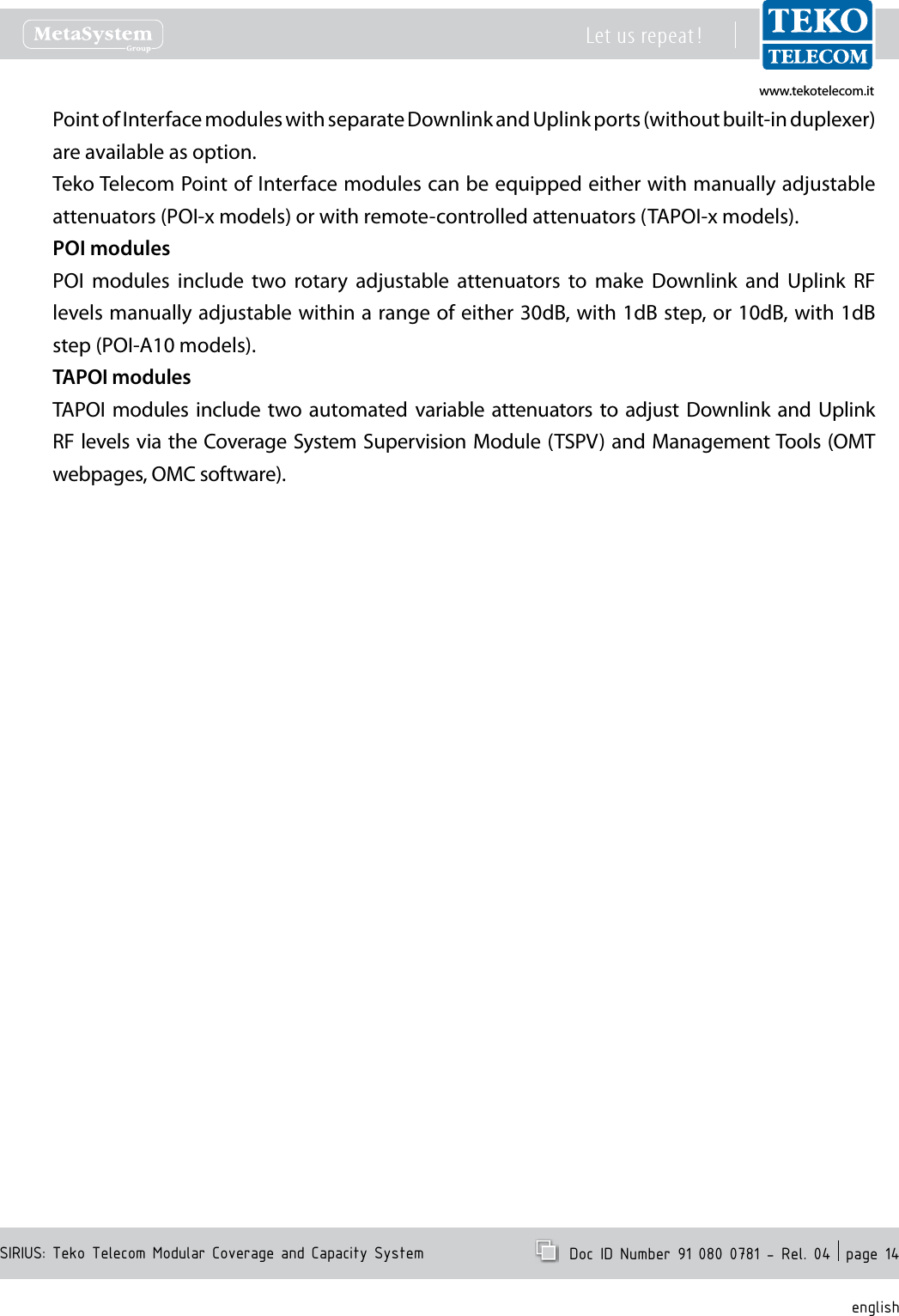
www.tekotelecom.itwww.tekotelecom.itSIRIUS: Teko Telecom Modular Coverage and Capacity SystemLet us repeat !  Doc ID Number 91 080 0781 - Rel. 04  page 13englishModules providing the RF interface towards the signal source1.1.1 Point Of Interface Modules•Point of Interface modules are used in Optical Systems to interface any kind of operator signal source -pico/micro/macro BTS or NodeB: each Point of Interface module is connected to a single mobile operator/ mobile band signal source via coaxial cable.Optical  Systems  can  be  equipped  with  one  Point  of  Interface  or  more  Point  of  Interface modules to make multiple congurations available: single operator (single band / multi-band) and multi-operator (single-band / multi-band).Passive Point Of Interface module (POI)with rotary adjustable attenuatorsPoint Of Interface module (TAPOI) with remote-controlled variable attenuatorsEach Point of  Interface module  includes  the  duplexer,  to separate/combine Downlink and Uplink  paths  and  two  variable  attenuators  to  make  both  Downlink  and  Uplink  RF  levels separately adjustable.A  monitor  port  is  available  either  for  measurements  or  for  external  wireless  modem coupling.Point Of Interface module block diagramULDLDLDLDLDLULULULULULDLDLDLDLDL-----OUTOUTOUTOUTOUT-IN-IN-IN-IN-INBTBTBTBTBTS PORTS PORTS PORTS PORTS PORTMONITMONITMONITMONITMONITOROROROROR
www.tekotelecom.itwww.tekotelecom.itSIRIUS: Teko Telecom Modular Coverage and Capacity SystemLet us repeat !  Doc ID Number 91 080 0781 - Rel. 04  page 14englishPoint of Interface modules with separate Downlink and Uplink ports (without built-in duplexer) are available as option.Teko Telecom Point of Interface modules can be equipped either with manually adjustable attenuators (POI-x models) or with remote-controlled attenuators (TAPOI-x models).POI modulesPOI  modules  include  two  rotary  adjustable  attenuators  to  make  Downlink  and  Uplink  RF levels manually adjustable within a range of either 30dB, with 1dB step, or 10dB, with 1dB step (POI-A10 models).TAPOI modulesTAPOI  modules include two automated  variable attenuators to adjust  Downlink and Uplink RF levels via the Coverage System Supervision Module (TSPV) and Management Tools (OMT webpages, OMC software).
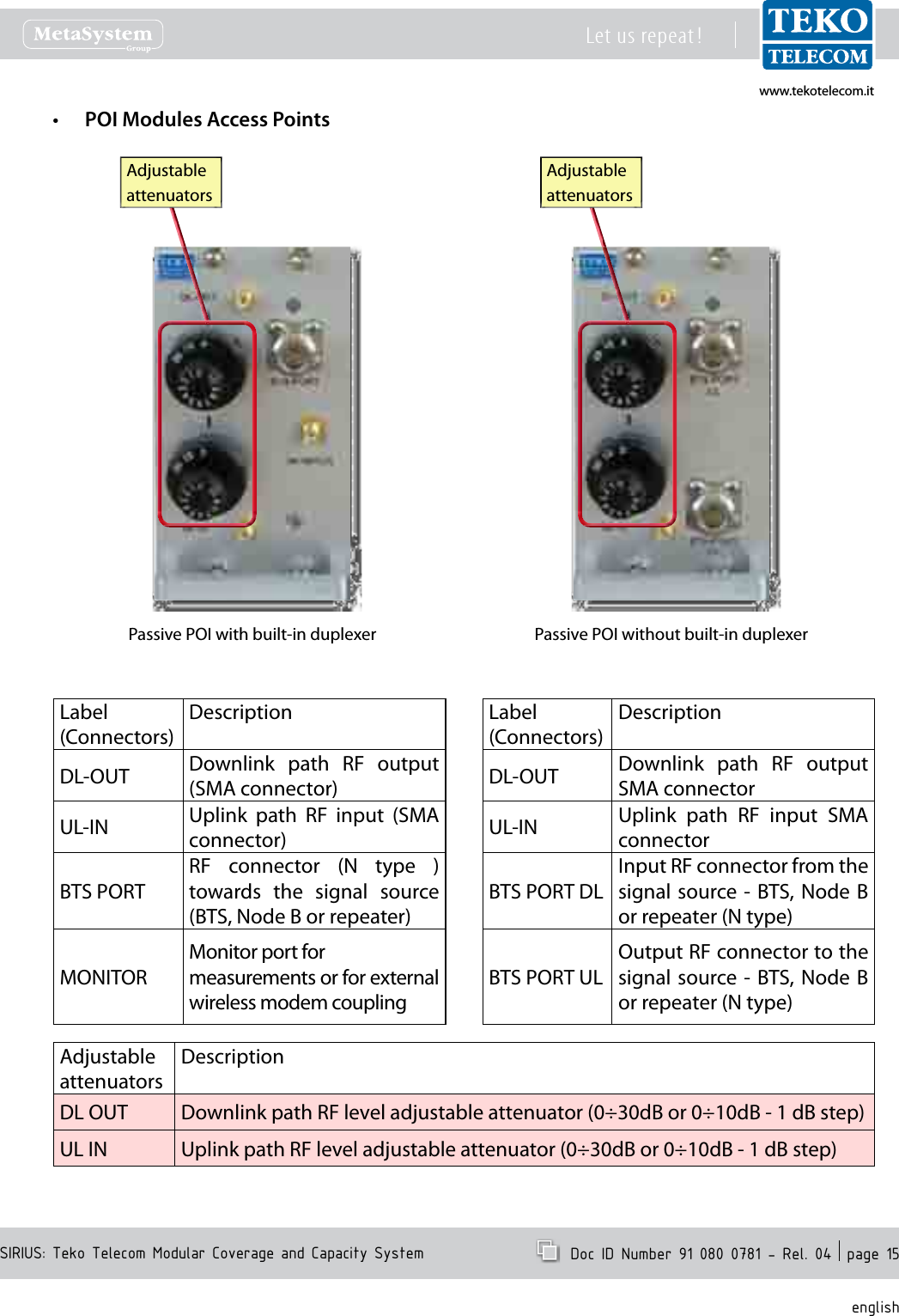
www.tekotelecom.itwww.tekotelecom.itSIRIUS: Teko Telecom Modular Coverage and Capacity SystemLet us repeat !  Doc ID Number 91 080 0781 - Rel. 04  page 15englishPOI Modules Access Points•Passive POI with built-in duplexer Passive POI without built-in duplexerAdjustableattenuatorsAdjustableattenuatorsLabel(Connectors)DescriptionDL-OUT Downlink  path  RF  output (SMA connector)UL-IN Uplink  path  RF  input  (SMA connector)BTS PORTRF  connector  (N  type  ) towards  the  signal  source (BTS, Node B or repeater)MONITORMonitor port formeasurements or for external wireless modem couplingLabel(Connectors)DescriptionDL-OUT Downlink  path  RF  output SMA connectorUL-IN Uplink  path  RF  input  SMA connectorBTS PORT DLInput RF connector from the signal source - BTS, Node  B or repeater (N type)BTS PORT ULOutput RF connector to the signal source - BTS, Node  B or repeater (N type)Adjustable attenuatorsDescriptionDL OUT Downlink path RF level adjustable attenuator (0÷30dB or 0÷10dB - 1 dB step)UL IN Uplink path RF level adjustable attenuator (0÷30dB or 0÷10dB - 1 dB step)
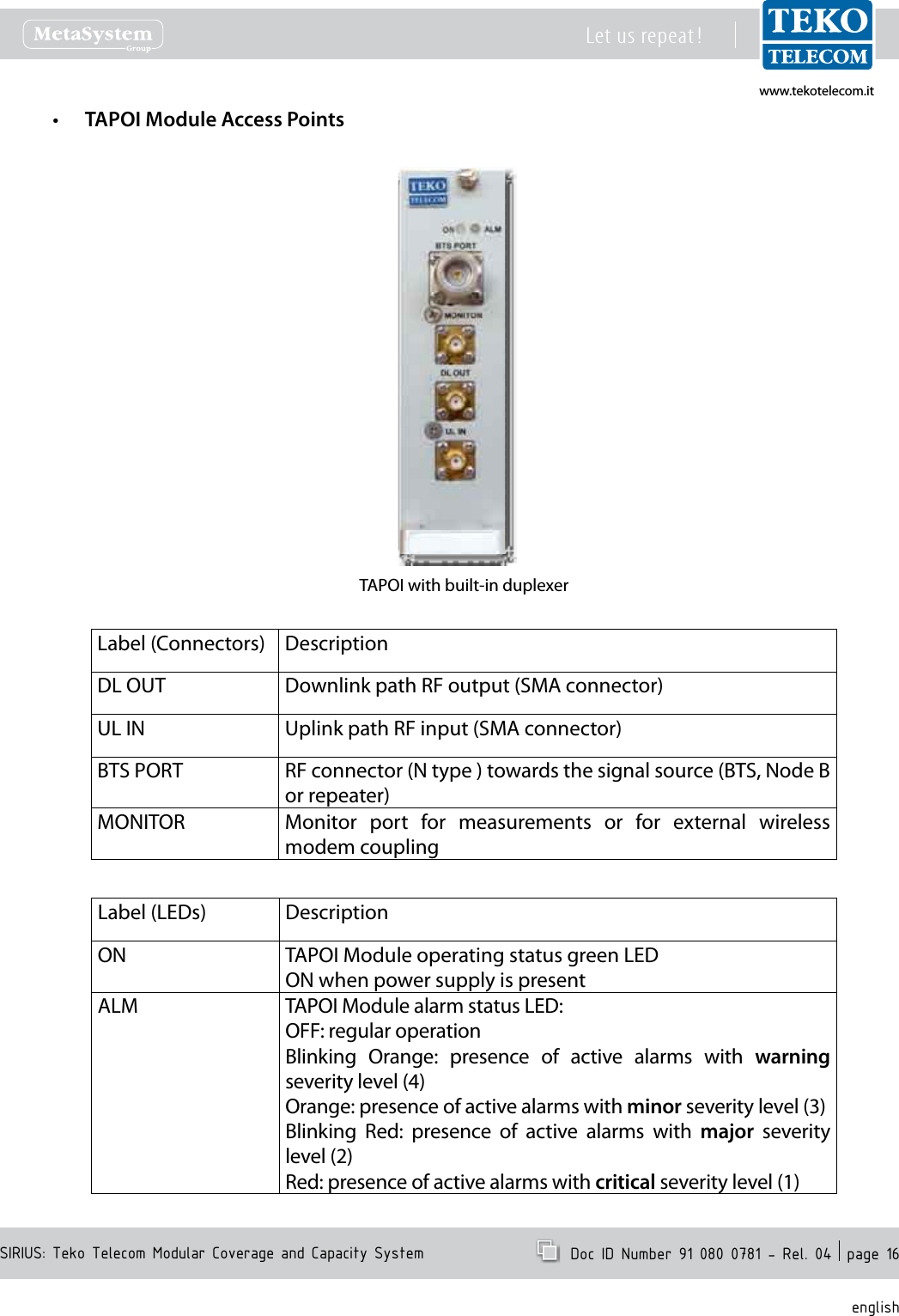
www.tekotelecom.itwww.tekotelecom.itSIRIUS: Teko Telecom Modular Coverage and Capacity SystemLet us repeat !  Doc ID Number 91 080 0781 - Rel. 04  page 16englishTAPOI Module Access Points•TAPOI with built-in duplexerLabel (Connectors) DescriptionDL OUT Downlink path RF output (SMA connector)UL IN Uplink path RF input (SMA connector)BTS PORT RF connector (N type ) towards the signal source (BTS, Node B or repeater)MONITOR Monitor  port  for  measurements  or  for  external  wireless modem couplingLabel (LEDs) DescriptionON TAPOI Module operating status green LEDON when power supply is presentALM TAPOI Module alarm status LED:OFF: regular operationBlinking  Orange:  presence  of  active  alarms  with  warning severity level (4)Orange: presence of active alarms with minor severity level (3)Blinking  Red:  presence  of  active  alarms  with  major  severity level (2)Red: presence of active alarms with critical severity level (1)
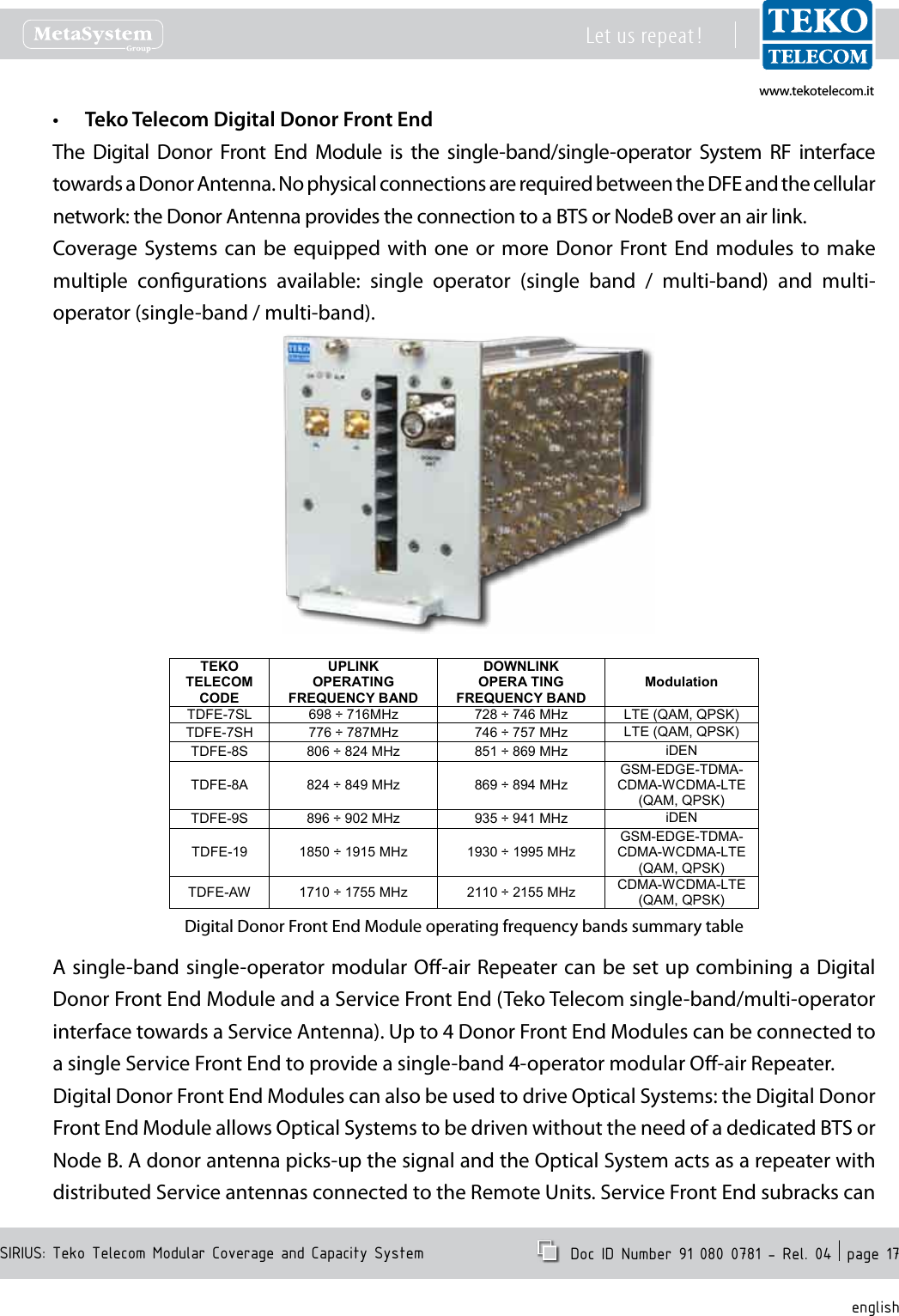
www.tekotelecom.itwww.tekotelecom.itSIRIUS: Teko Telecom Modular Coverage and Capacity SystemLet us repeat !  Doc ID Number 91 080 0781 - Rel. 04  page 17englishTeko Telecom Digital Donor Front End•The Digital Donor Front End Module is the single-band/single-operator System RF interfacetowardsaDonorAntenna.NophysicalconnectionsarerequiredbetweentheDFEandthecellularnetwork:theDonorAntennaprovidestheconnectiontoaBTSorNodeBoveranairlink.CoverageSystemscan be equippedwithone or moreDonor FrontEnd modules to makemultiple congurations available: single operator (single band / multi-band) and multi-operator(single-band/multi-band).TEKO TELECOMCODEUPLINKOPERATING FREQUENCY BANDDOWNLlNKOPERA TING FREQUENCY BANDModulationTDFE-7SL 698÷716MHz 728÷746 MHz LTE (QAM, QPSK)TDFE-7SH 776÷787MHz 746÷757 MHz LTE (QAM, QPSK)TDFE-8S806 ÷824 MHz 851÷869 MHz iDENTDFE-8A824 ÷849 MHz 869÷894 MHzGSM-EDGE-TDMA-CDMA-WCDMA-LTE (QAM, QPSK)TDFE-9S896 ÷902 MHz 935÷941 MHz iDENTDFE-191850 ÷1915 MHz1930 ÷1995 MHzGSM-EDGE-TDMA-CDMA-WCDMA-LTE (QAM, QPSK)TDFE-AW1710 ÷1755 MHz2110 ÷2155 MHz CDMA-WCDMA-LTE (QAM, QPSK)DigitalDonorFrontEndModuleoperatingfrequencybandssummarytableAsingle-bandsingle-operatormodularO-airRepeatercanbesetupcombiningaDigitalDonorFrontEndModuleandaServiceFrontEnd(TekoTelecomsingle-band/multi-operatorinterfacetowardsaServiceAntenna).Upto4DonorFrontEndModulescanbeconnectedtoasingleServiceFrontEndtoprovideasingle-band4-operatormodularO-airRepeater.DigitalDonorFrontEndModulescanalsobeusedtodriveOpticalSystems:theDigitalDonorFrontEndModuleallowsOpticalSystemstobedrivenwithouttheneedofadedicatedBTSorNodeB.Adonorantennapicks-upthesignalandtheOpticalSystemactsasarepeaterwithdistributedServiceantennasconnectedtotheRemoteUnits.ServiceFrontEndsubrackscan
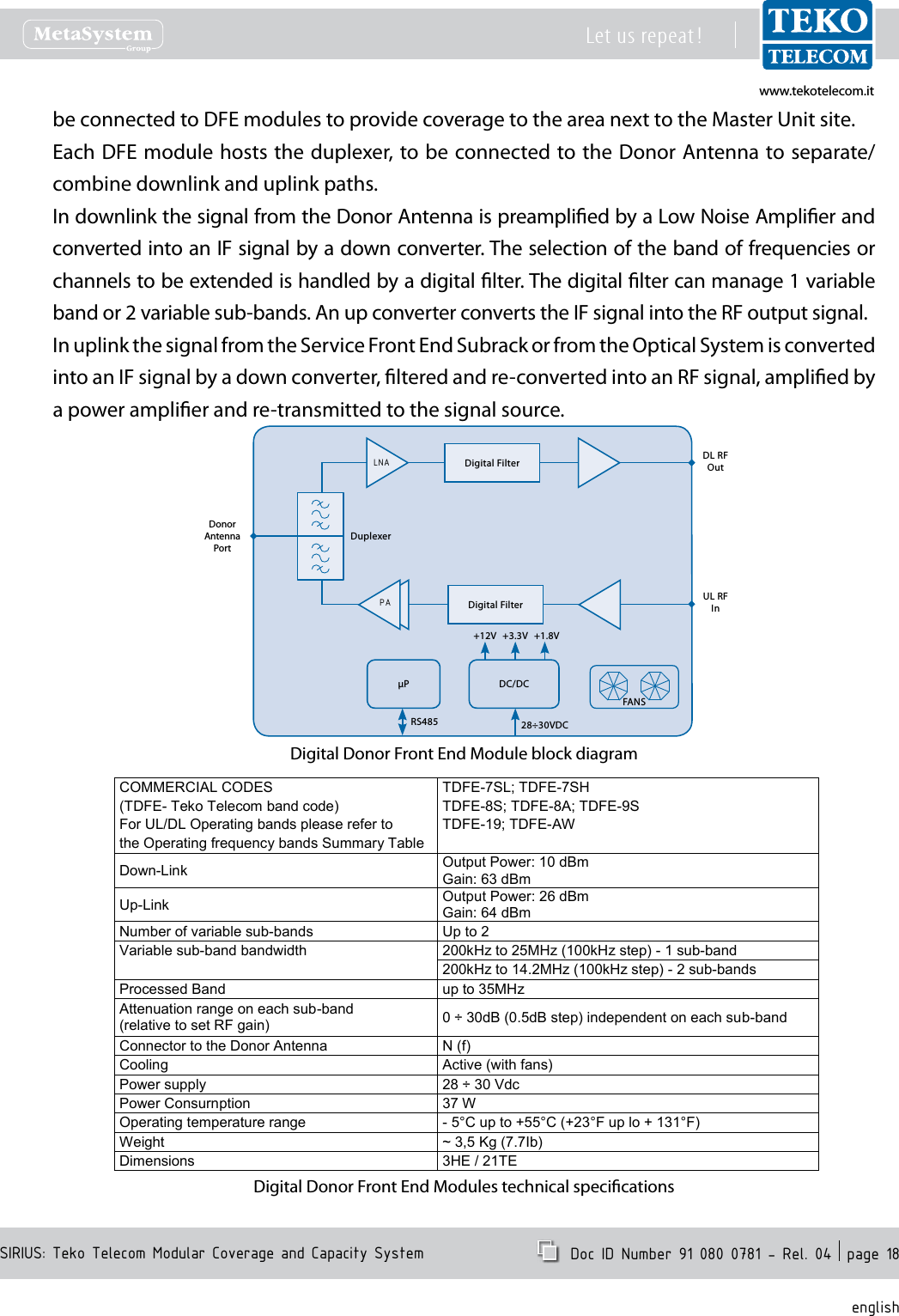
www.tekotelecom.itwww.tekotelecom.itSIRIUS: Teko Telecom Modular Coverage and Capacity SystemLet us repeat !  Doc ID Number 91 080 0781 - Rel. 04  page 18englishbeconnectedtoDFEmodulestoprovidecoveragetotheareanexttotheMasterUnitsite.EachDFEmodulehoststheduplexer,tobeconnectedtotheDonorAntennatoseparate/combinedownlinkanduplinkpaths.IndownlinkthesignalfromtheDonorAntennaispreampliedbyaLowNoiseAmplierandconvertedintoanIFsignalbyadownconverter.Theselectionofthebandoffrequenciesorchannelstobeextendedishandledbyadigitallter.Thedigitalltercanmanage1variablebandor2variablesub-bands.AnupconverterconvertstheIFsignalintotheRFoutputsignal.InuplinkthesignalfromtheServiceFrontEndSubrackorfromtheOpticalSystemisconvertedintoanIFsignalbyadownconverter,lteredandre-convertedintoanRFsignal,ampliedbyapoweramplierandre-transmittedtothesignalsource.DLRFOutULRFInDonorAntennaPortDuplexerμP DC/DC+12V +1.8V+3.3V28÷30VDCRS485FANSDigitalFilterDigitalFilterPALNADigitalDonorFrontEndModuleblockdiagramCOMMERCIAL CODES TDFE-7SL; TDFE-7SH(TDFE- Teko Telecom band code)TDFE-8S; TDFE-8A; TDFE-9SFor UL/DL Operating bands please refer to TDFE-19; TDFE-AWthe Operating frequency bands Summary TableDown-LinkOutput Power: 10 dBmGain: 63 dBmUp-LinkOutput Power: 26 dBmGain: 64 dBmNumber of variable sub-bandsUp to 2Variable sub-band bandwidth 200kHz to 25MHz (100kHz step) -1 sub-band200kHz to 14.2MHz (100kHz step) -2 sub-bandsProcessed Band up to 35MHzAttenuation range on each sub-band (relative to set RF gain) 0÷30dB (0.5dB step) independent on each sub-bandConnector to the Donor Antenna N (f)CoolingActive (with fans)Power supply28÷30 VdcPower Consurnption 37 WOperatingtemperature range -5°C up to +55°C (+23°F up lo + 131°F)Weight ~ 3,5 Kg (7.7Ib)Dimensions 3HE / 21TEDigitalDonorFrontEndModulestechnicalspecications
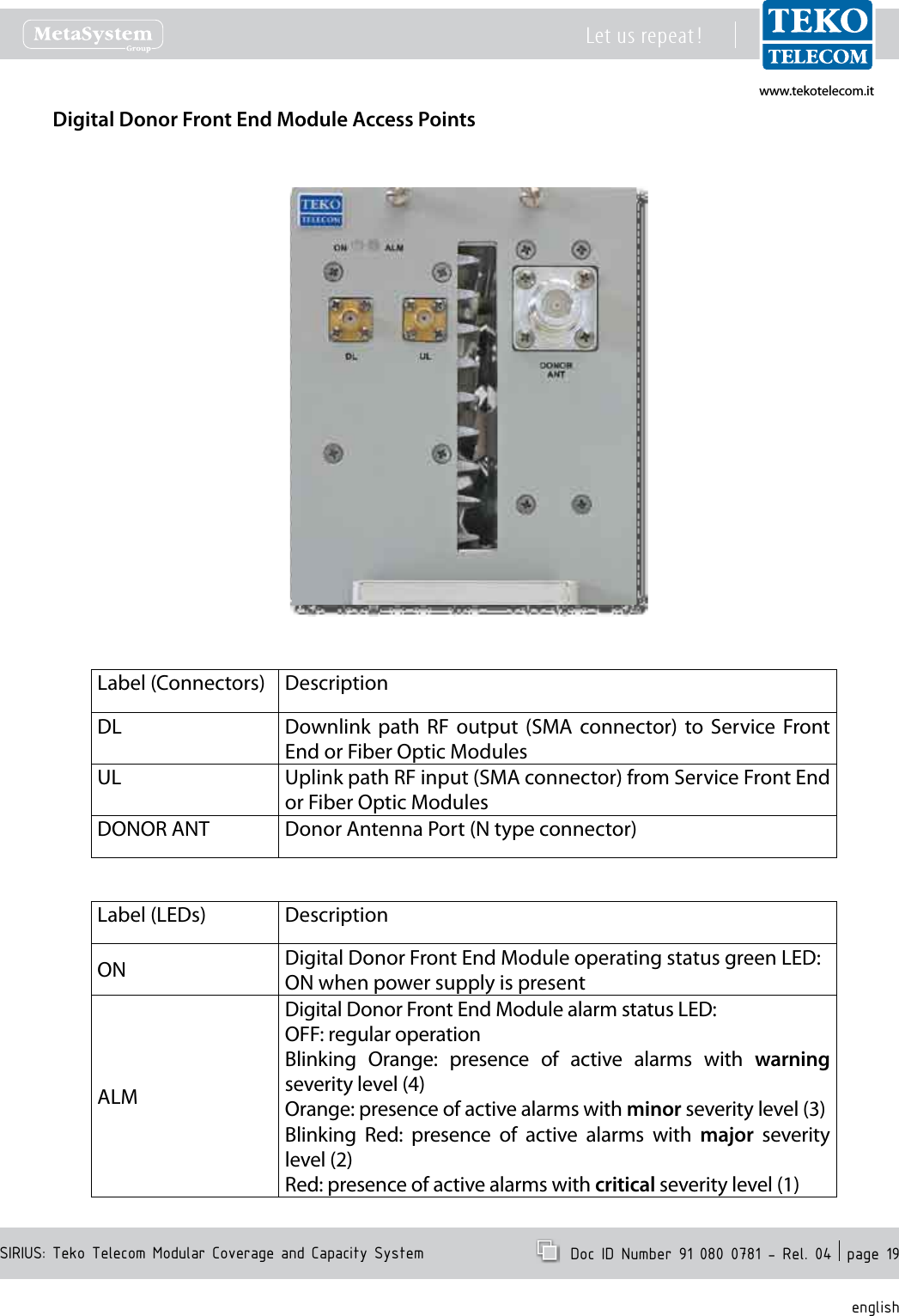
www.tekotelecom.itwww.tekotelecom.itSIRIUS: Teko Telecom Modular Coverage and Capacity SystemLet us repeat !  Doc ID Number 91 080 0781 - Rel. 04  page 19englishDigital Donor Front End Module Access PointsLabel (Connectors) DescriptionDL Downlink  path  RF  output  (SMA  connector)  to  Service  Front End or Fiber Optic ModulesUL Uplink path RF input (SMA connector) from Service Front End or Fiber Optic ModulesDONOR ANT Donor Antenna Port (N type connector)Label (LEDs) DescriptionON Digital Donor Front End Module operating status green LED:ON when power supply is presentALMDigital Donor Front End Module alarm status LED:OFF: regular operationBlinking  Orange:  presence  of  active  alarms  with  warning severity level (4)Orange: presence of active alarms with minor severity level (3)Blinking  Red:  presence  of  active  alarms  with  major  severity level (2)Red: presence of active alarms with critical severity level (1)
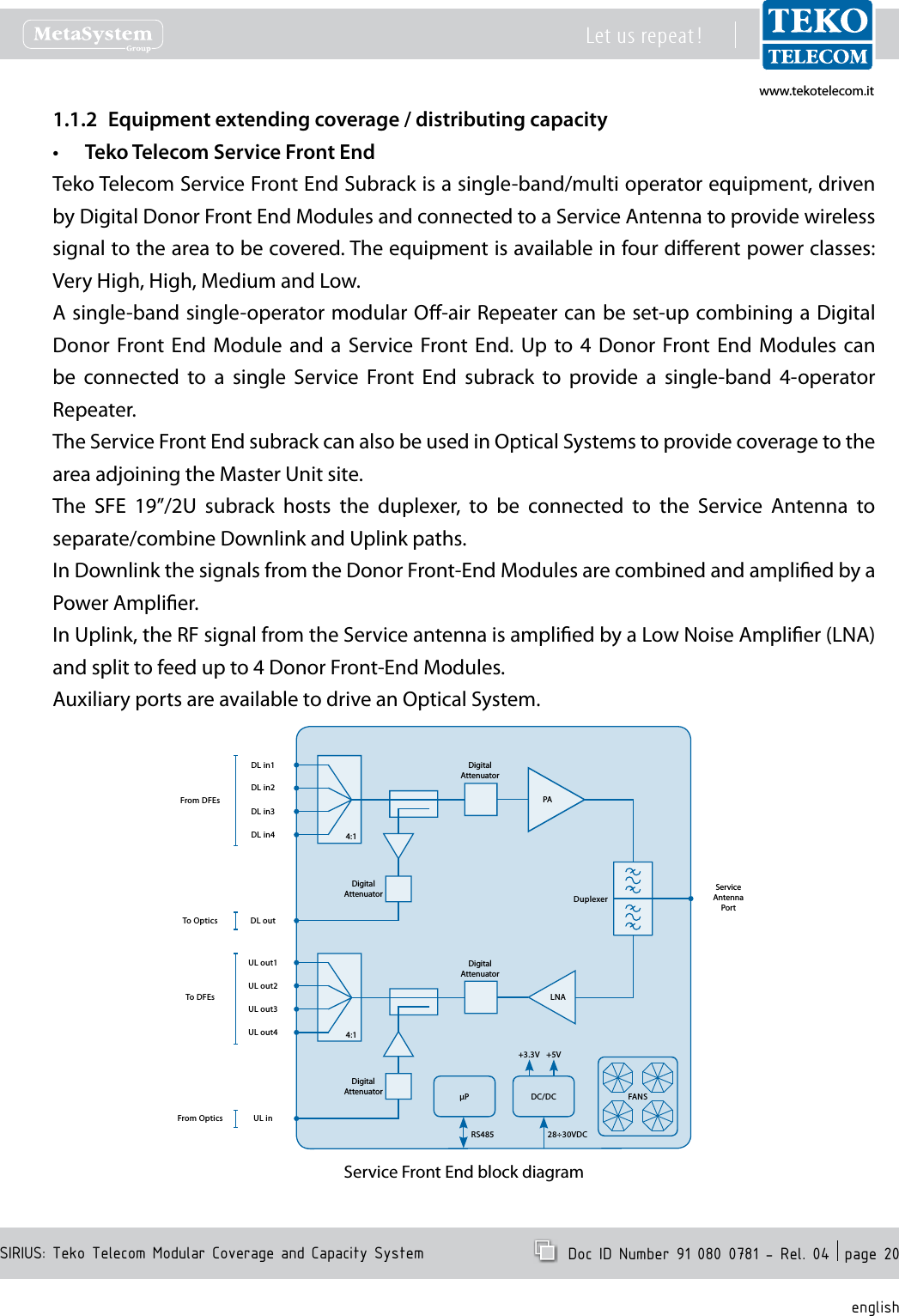
www.tekotelecom.itwww.tekotelecom.itSIRIUS: Teko Telecom Modular Coverage and Capacity SystemLet us repeat !  Doc ID Number 91 080 0781 - Rel. 04  page 20englishEquipment extending coverage / distributing capacity1.1.2 Teko Telecom Service Front End•Teko Telecom Service Front End Subrack is a single-band/multi operator equipment, driven by Digital Donor Front End Modules and connected to a Service Antenna to provide wireless signal to the area to be covered. The equipment is available in four dierent power classes: Very High, High, Medium and Low.A single-band single-operator modular O-air Repeater can be set-up combining a Digital Donor  Front End  Module  and  a  Service  Front End.  Up  to  4  Donor Front  End  Modules  can be  connected  to  a  single  Service  Front  End  subrack  to  provide  a  single-band  4-operator Repeater.The Service Front End subrack can also be used in Optical Systems to provide coverage to the area adjoining the Master Unit site.The  SFE  19”/2U  subrack  hosts  the  duplexer,  to  be  connected  to  the  Service  Antenna  to separate/combine Downlink and Uplink paths.In Downlink the signals from the Donor Front-End Modules are combined and amplied by a Power Amplier.In Uplink, the RF signal from the Service antenna is amplied by a Low Noise Amplier (LNA) and split to feed up to 4 Donor Front-End Modules.Auxiliary ports are available to drive an Optical System.PADL in1ServiceAntenna PortDuplexerP DC/DC+3.3V +5V28÷30VDCRS485DigitalAttenuatorDL in2DL in3DL in4DL outLNAUL out1 DigitalAttenuatorUL out2UL out3UL out4UL inDigitalAttenuatorDigitalAttenuator4:14:1FANSFrom DFEsTo DFEsTo OpticsFrom OpticsService Front End block diagram
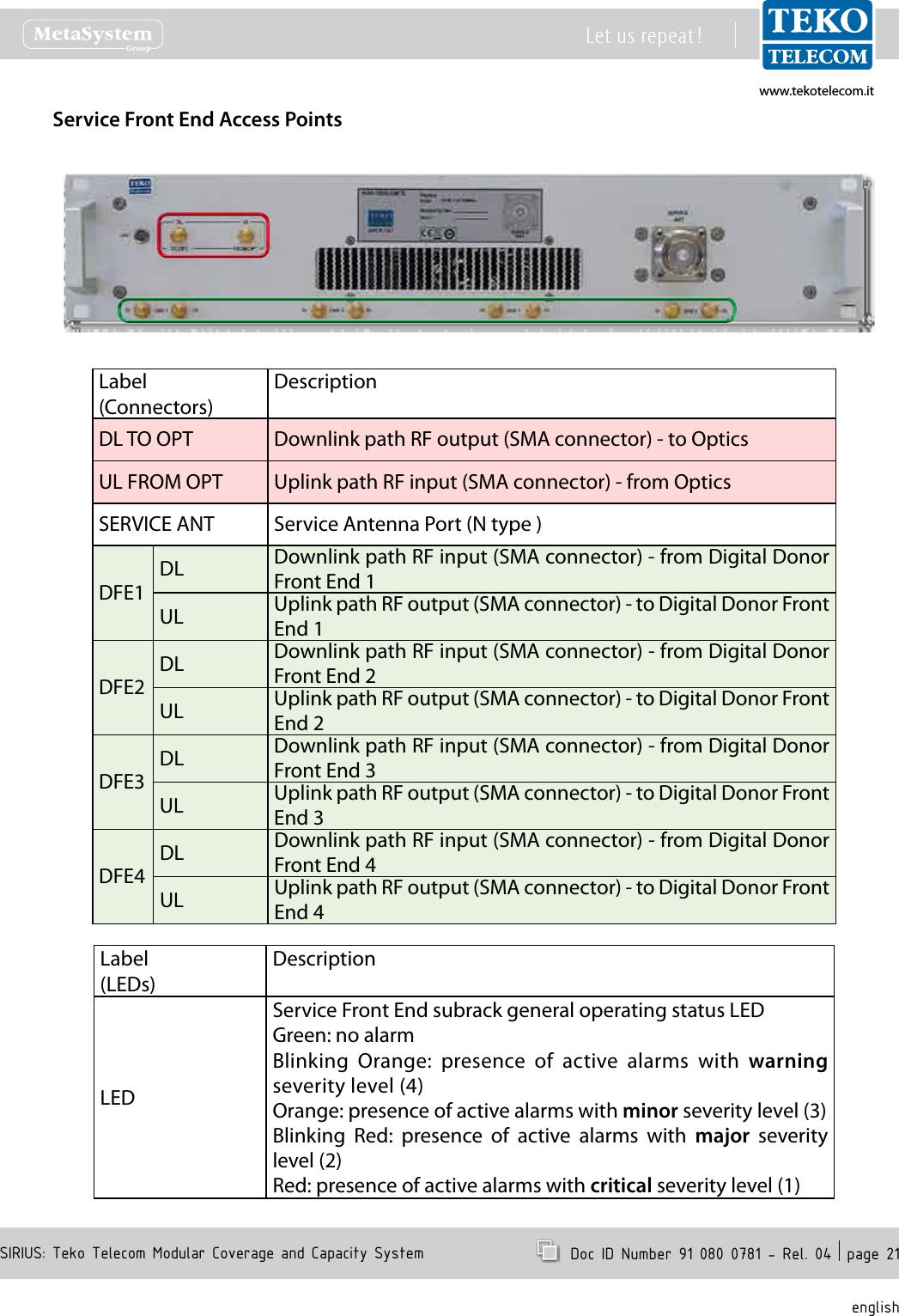
www.tekotelecom.itwww.tekotelecom.itSIRIUS: Teko Telecom Modular Coverage and Capacity SystemLet us repeat !  Doc ID Number 91 080 0781 - Rel. 04  page 21englishService Front End Access PointsLabel(Connectors)DescriptionDL TO OPT Downlink path RF output (SMA connector) - to OpticsUL FROM OPT Uplink path RF input (SMA connector) - from OpticsSERVICE ANT Service Antenna Port (N type )DFE1DL Downlink path RF input (SMA connector) - from Digital Donor Front End 1UL Uplink path RF output (SMA connector) - to Digital Donor Front End 1DFE2DL Downlink path RF input (SMA connector) - from Digital Donor Front End 2UL Uplink path RF output (SMA connector) - to Digital Donor Front End 2DFE3DL Downlink path RF input (SMA connector) - from Digital Donor Front End 3UL Uplink path RF output (SMA connector) - to Digital Donor Front End 3DFE4DL Downlink path RF input (SMA connector) - from Digital Donor Front End 4UL Uplink path RF output (SMA connector) - to Digital Donor Front End 4Label(LEDs)DescriptionLEDService Front End subrack general operating status LEDGreen: no alarmBlinking  Orange:  presence  of  active  alarms  with  warning severity level (4)Orange: presence of active alarms with minor severity level (3)Blinking  Red:  presence  of  active  alarms  with  major  severity level (2)Red: presence of active alarms with critical severity level (1)
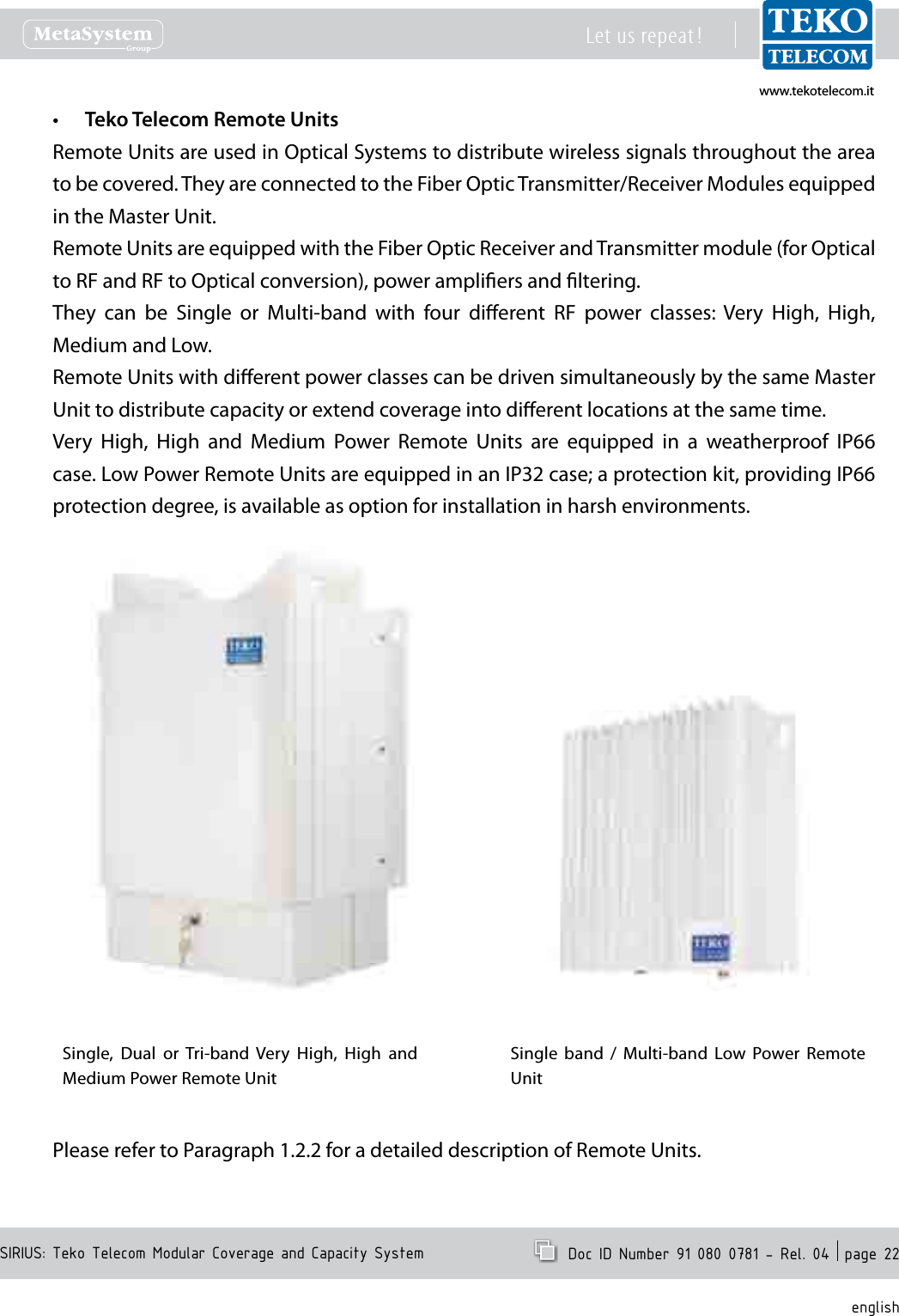
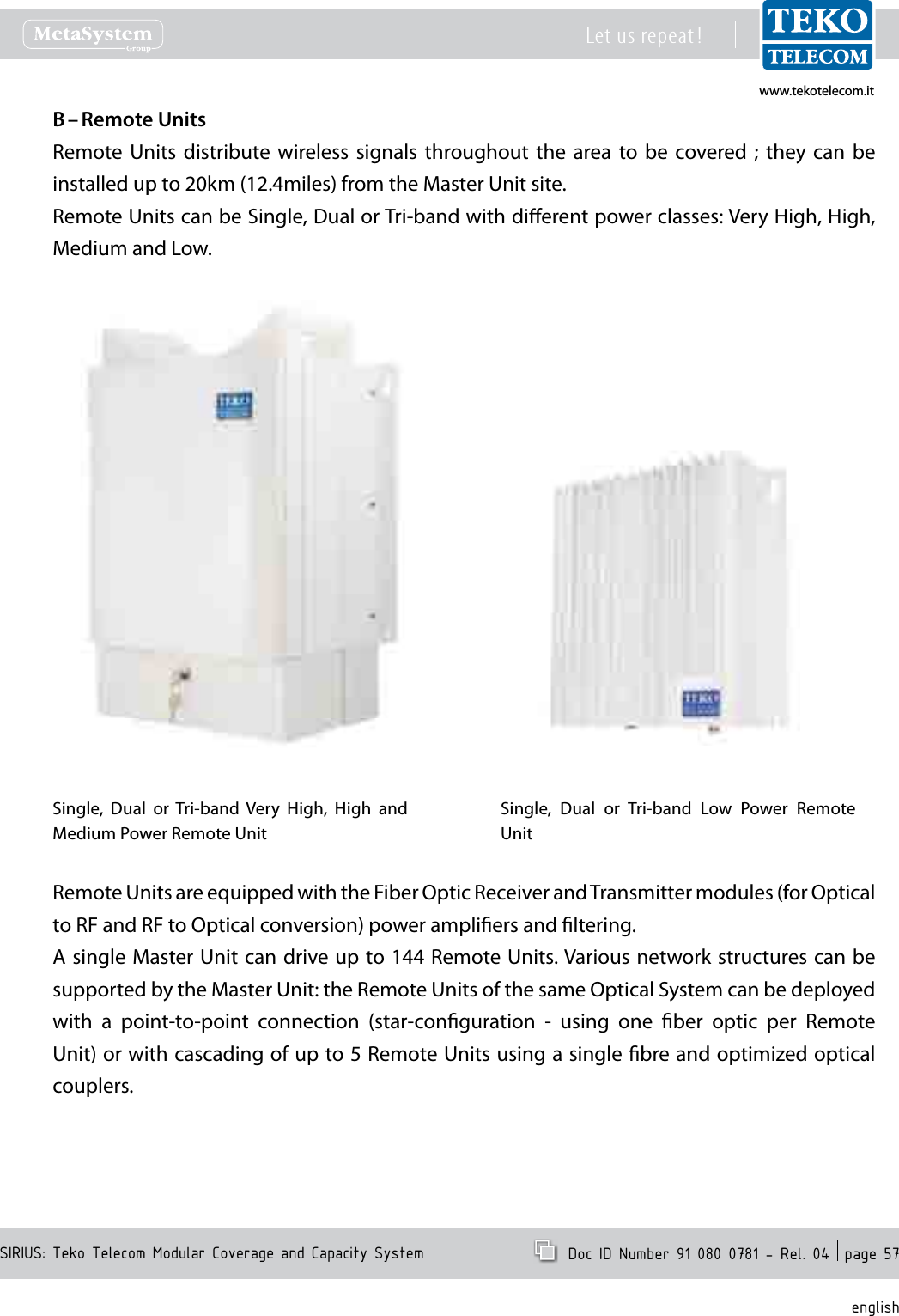
www.tekotelecom.itwww.tekotelecom.itSIRIUS: Teko Telecom Modular Coverage and Capacity SystemLet us repeat !  Doc ID Number 91 080 0781 - Rel. 04  page 22englishTeko Telecom Remote Units•Remote Units are used in Optical Systems to distribute wireless signals throughout the area to be covered. They are connected to the Fiber Optic Transmitter/Receiver Modules equipped in the Master Unit.Remote Units are equipped with the Fiber Optic Receiver and Transmitter module (for Optical to RF and RF to Optical conversion), power ampliers and ltering.They  can  be  Single  or  Multi-band  with  four  dierent  RF  power  classes:  Very  High,  High, Medium and Low.Remote Units with dierent power classes can be driven simultaneously by the same Master Unit to distribute capacity or extend coverage into dierent locations at the same time.Very  High,  High  and  Medium  Power  Remote  Units  are  equipped  in  a  weatherproof  IP66 case. Low Power Remote Units are equipped in an IP32 case; a protection kit, providing IP66 protection degree, is available as option for installation in harsh environments.Single,  Dual  or Tri-band  Very  High,  High  and Medium Power Remote UnitSingle  band  /  Multi-band  Low  Power  Remote UnitPlease refer to Paragraph 1.2.2 for a detailed description of Remote Units.
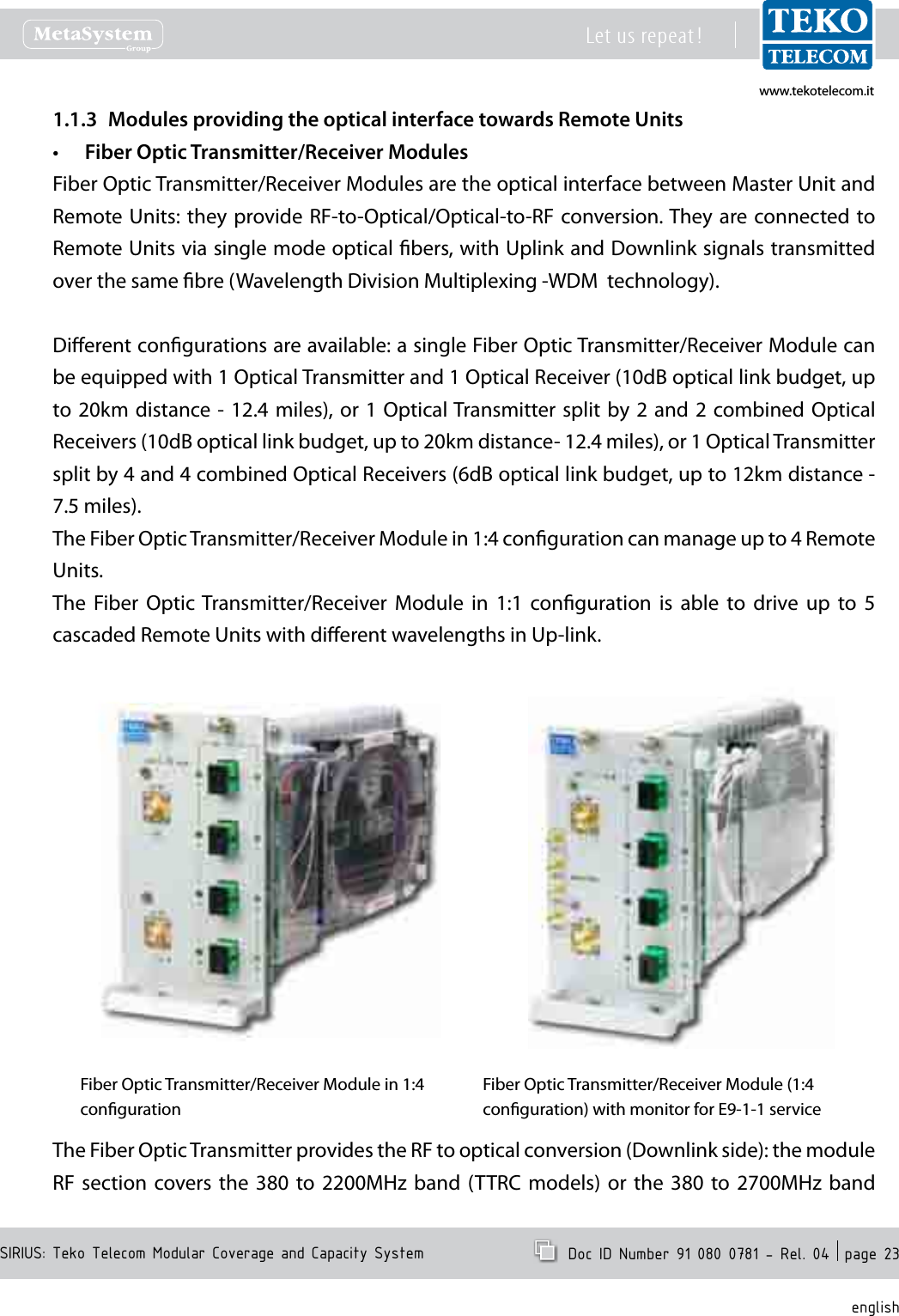
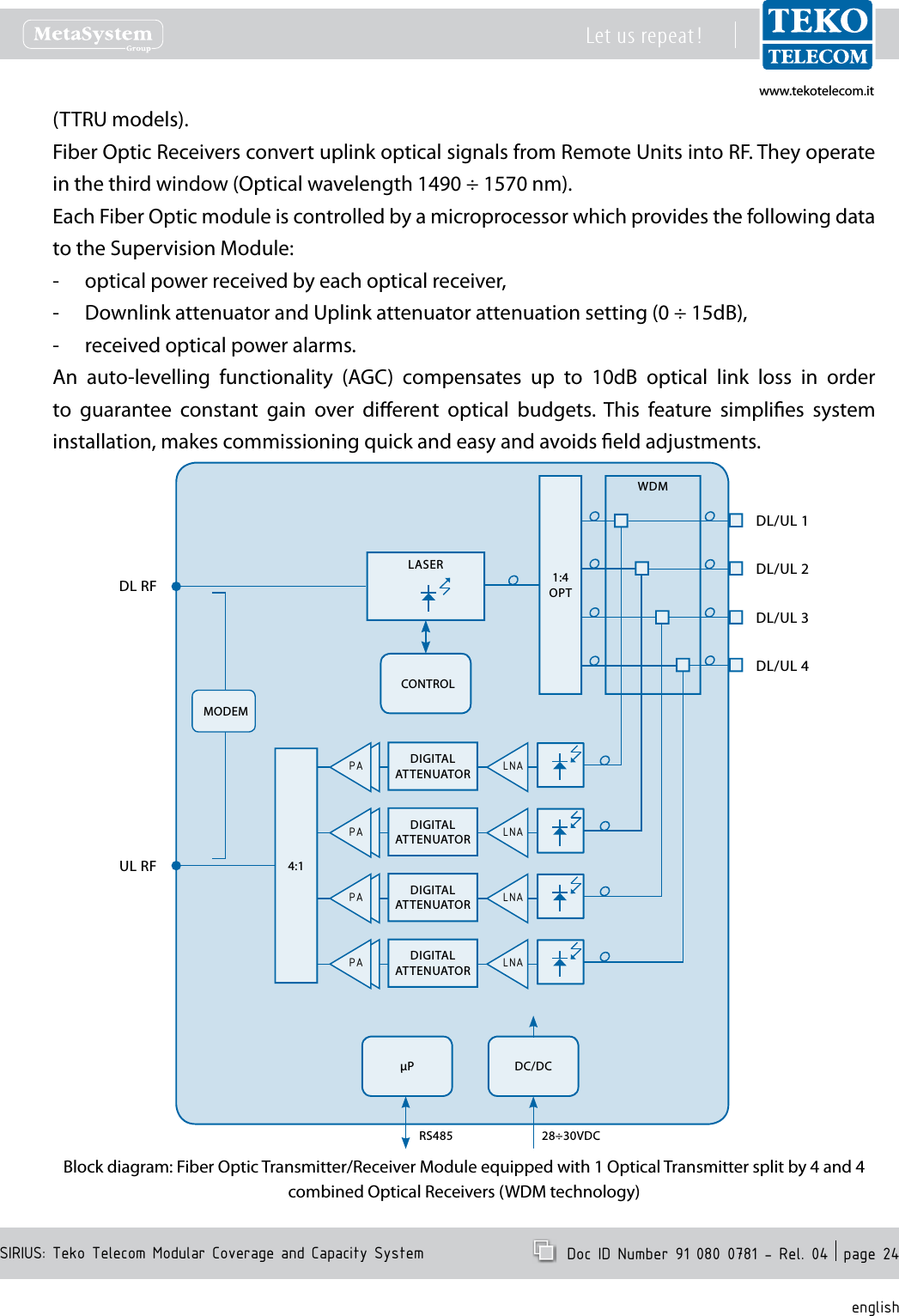
www.tekotelecom.itwww.tekotelecom.itSIRIUS: Teko Telecom Modular Coverage and Capacity SystemLet us repeat !  Doc ID Number 91 080 0781 - Rel. 04  page 23englishModules providing the optical interface towards Remote Units1.1.3 Fiber Optic Transmitter/Receiver Modules•Fiber Optic Transmitter/Receiver Modules are the optical interface between Master Unit and Remote Units: they provide RF-to-Optical/Optical-to-RF conversion. They are connected  to Remote Units via single mode optical bers, with Uplink and Downlink signals transmitted over the same bre (Wavelength Division Multiplexing -WDM  technology).Dierent congurations are available: a single Fiber Optic Transmitter/Receiver Module can be equipped with 1 Optical Transmitter and 1 Optical Receiver (10dB optical link budget, up to 20km distance - 12.4  miles), or  1 Optical Transmitter split by 2  and 2  combined Optical Receivers (10dB optical link budget, up to 20km distance- 12.4 miles), or 1 Optical Transmitter split by 4 and 4 combined Optical Receivers (6dB optical link budget, up to 12km distance - 7.5 miles).The Fiber Optic Transmitter/Receiver Module in 1:4 conguration can manage up to 4 Remote Units.The  Fiber  Optic  Transmitter/Receiver  Module  in  1:1  conguration  is  able  to  drive  up  to  5 cascaded Remote Units with dierent wavelengths in Up-link.Fiber Optic Transmitter/Receiver Module in 1:4 congurationFiber Optic Transmitter/Receiver Module (1:4 conguration) with monitor for E9-1-1 serviceThe Fiber Optic Transmitter provides the RF to optical conversion (Downlink side): the module RF  section  covers  the  380  to  2200MHz  band (TTRC  models)  or  the  380  to 2700MHz band
www.tekotelecom.itwww.tekotelecom.itSIRIUS: Teko Telecom Modular Coverage and Capacity SystemLet us repeat !  Doc ID Number 91 080 0781 - Rel. 04  page 24english(TTRU models).Fiber Optic Receivers convert uplink optical signals from Remote Units into RF. They operate in the third window (Optical wavelength 1490 ÷ 1570 nm).Each Fiber Optic module is controlled by a microprocessor which provides the following data to the Supervision Module:optical power received by each optical receiver, -Downlink attenuator and Uplink attenuator attenuation setting (0 ÷ 15dB), -received optical power alarms. -An  auto-levelling  functionality  (AGC)  compensates  up  to  10dB  optical  link  loss  in  order to  guarantee  constant  gain  over  dierent  optical  budgets.  This  feature  simplies  system installation, makes commissioning quick and easy and avoids eld adjustments.CONTROL1:4OPTMODEM4:1P DC/DC28÷30VDCRS485PA DIGITALATTENUATOR LNAPA DIGITALATTENUATOR LNAPA DIGITALATTENUATOR LNAPA DIGITALATTENUATOR LNADL RFWDMDL/UL 1DL/UL 3DL/UL 2DL/UL 4UL RFLASERBlock diagram: Fiber Optic Transmitter/Receiver Module equipped with 1 Optical Transmitter split by 4 and 4 combined Optical Receivers (WDM technology)
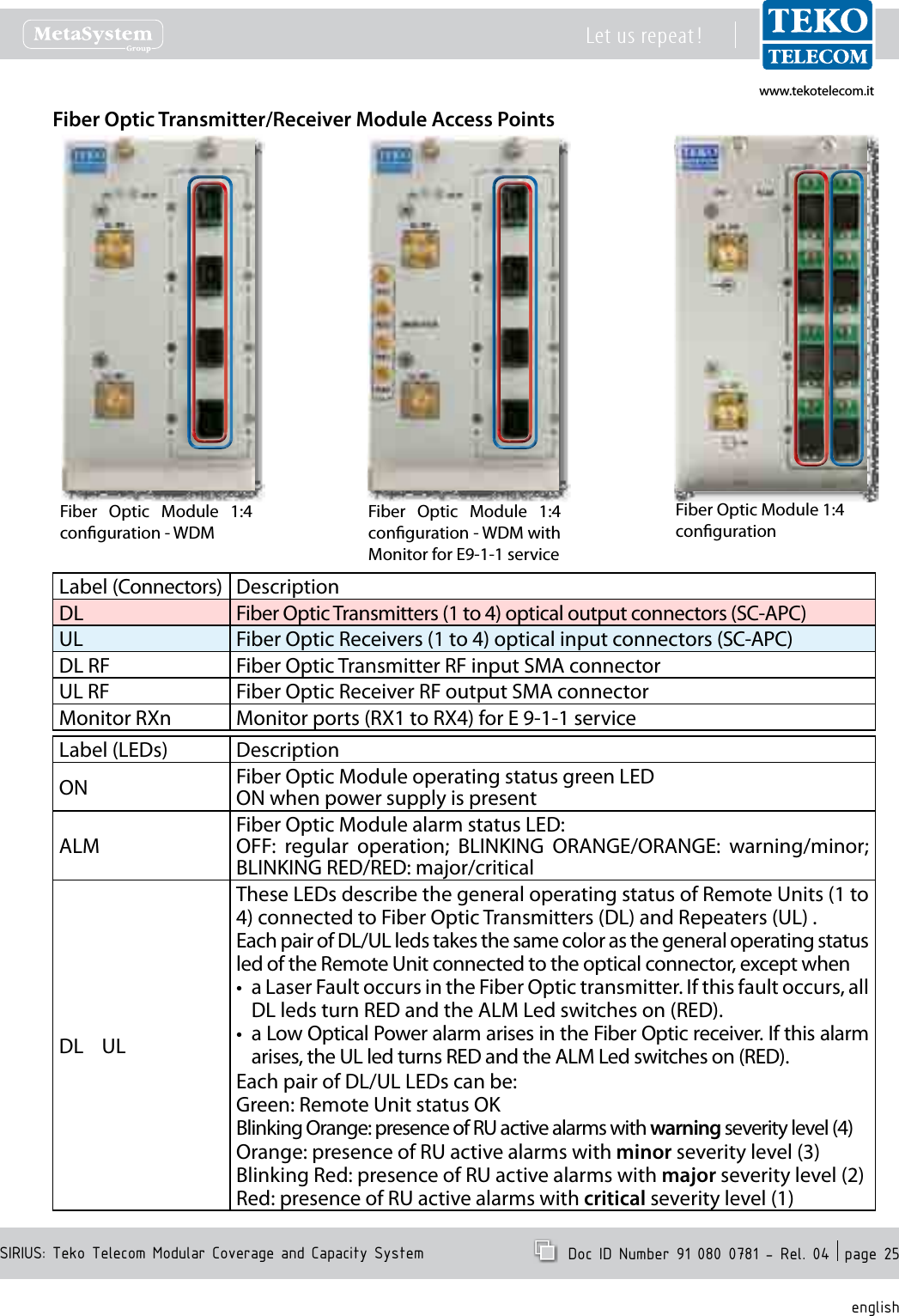
www.tekotelecom.itwww.tekotelecom.itSIRIUS: Teko Telecom Modular Coverage and Capacity SystemLet us repeat !  Doc ID Number 91 080 0781 - Rel. 04  page 25englishFiber Optic Transmitter/Receiver Module Access PointsLabel (Connectors) DescriptionDL Fiber Optic Transmitters (1 to 4) optical output connectors (SC-APC)UL Fiber Optic Receivers (1 to 4) optical input connectors (SC-APC)DL RF Fiber Optic Transmitter RF input SMA connectorUL RF Fiber Optic Receiver RF output SMA connectorMonitor RXn Monitor ports (RX1 to RX4) for E 9-1-1 serviceLabel (LEDs) DescriptionON Fiber Optic Module operating status green LEDON when power supply is presentALMFiber Optic Module alarm status LED:OFF:  regular  operation;  BLINKING  ORANGE/ORANGE:  warning/minor; BLINKING RED/RED: major/criticalDL    ULThese LEDs describe the general operating status of Remote Units (1 to 4) connected to Fiber Optic Transmitters (DL) and Repeaters (UL) .Each pair of DL/UL leds takes the same color as the general operating status led of the Remote Unit connected to the optical connector, except whena Laser Fault occurs in the Fiber Optic transmitter. If this fault occurs, all •DL leds turn RED and the ALM Led switches on (RED).a Low Optical Power alarm arises in the Fiber Optic receiver. If this alarm •arises, the UL led turns RED and the ALM Led switches on (RED).Each pair of DL/UL LEDs can be:Green: Remote Unit status OKBlinking Orange: presence of RU active alarms with warning severity level (4)Orange: presence of RU active alarms with minor severity level (3)Blinking Red: presence of RU active alarms with major severity level (2)Red: presence of RU active alarms with critical severity level (1)Fiber Optic Module 1:4 congurationFiber  Optic  Module  1:4 conguration - WDMFiber  Optic  Module  1:4 conguration - WDM with  Monitor for E9-1-1 service
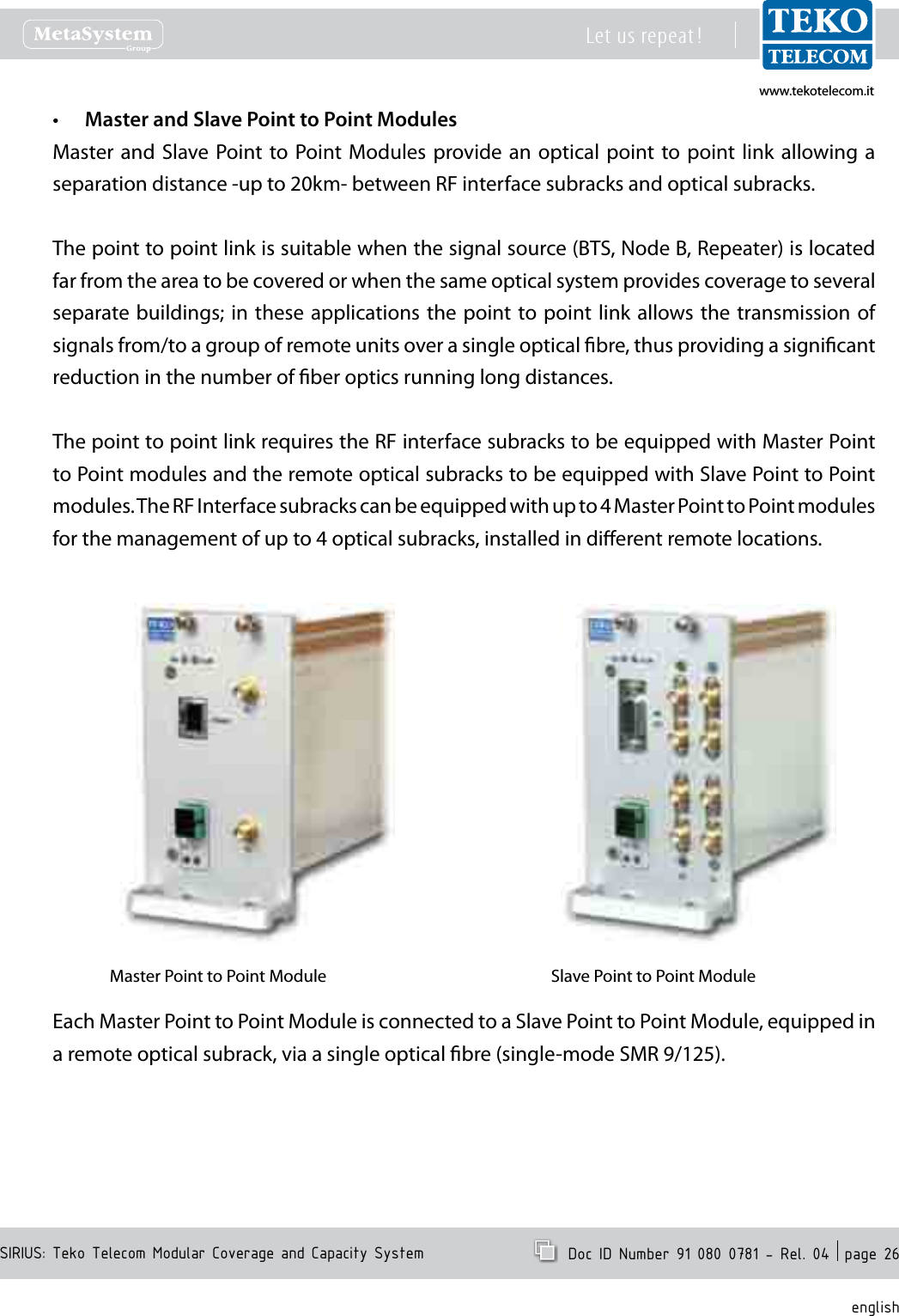
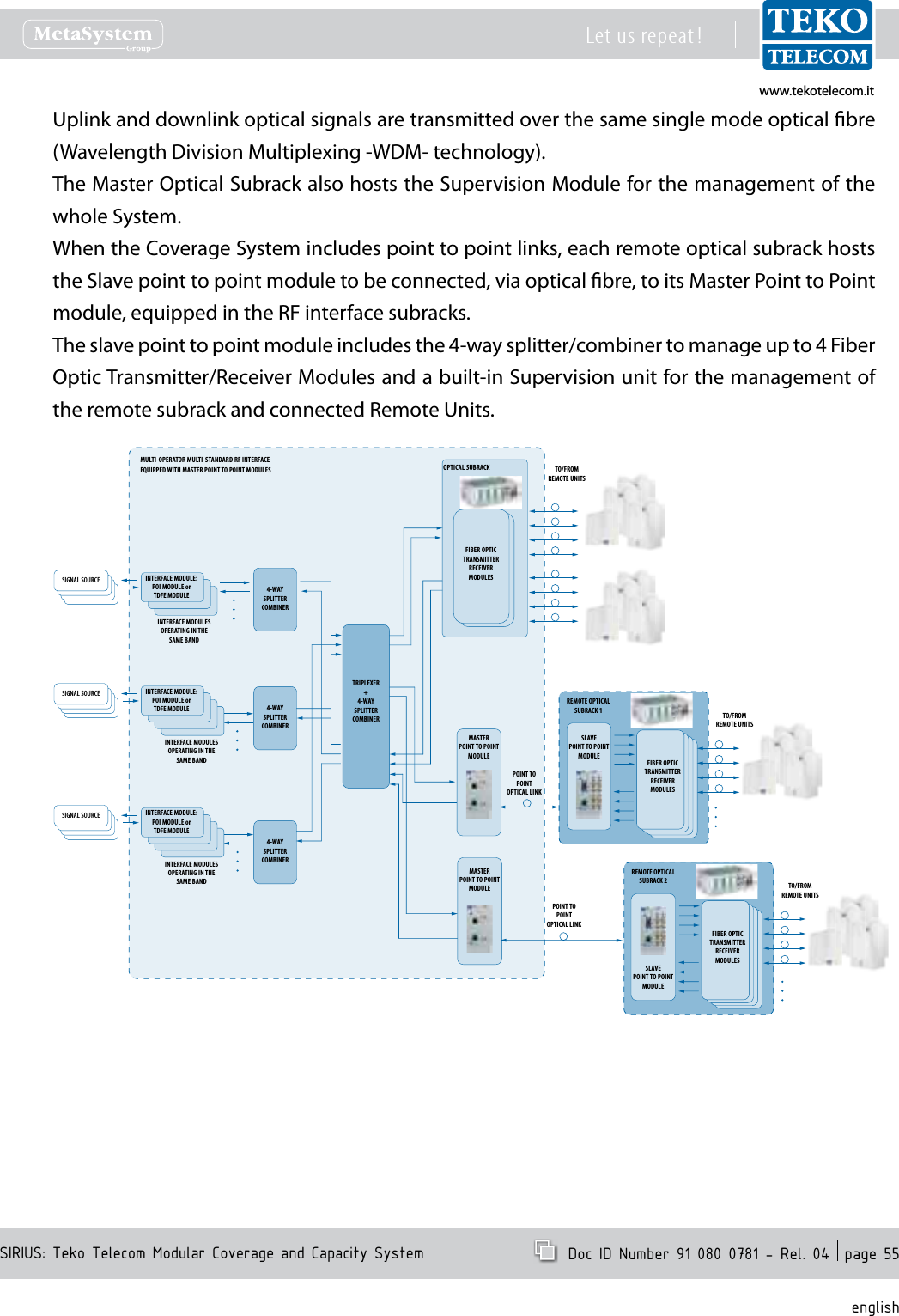
www.tekotelecom.itwww.tekotelecom.itSIRIUS: Teko Telecom Modular Coverage and Capacity SystemLet us repeat !  Doc ID Number 91 080 0781 - Rel. 04  page 26englishMaster and Slave Point to Point Modules•Master and  Slave Point to Point Modules  provide an  optical point to  point link  allowing a separation distance -up to 20km- between RF interface subracks and optical subracks.The point to point link is suitable when the signal source (BTS, Node B, Repeater) is located far from the area to be covered or when the same optical system provides coverage to several separate buildings; in these  applications the point to point link  allows the transmission of signals from/to a group of remote units over a single optical bre, thus providing a signicant reduction in the number of ber optics running long distances.The point to point link requires the RF interface subracks to be equipped with Master Point to Point modules and the remote optical subracks to be equipped with Slave Point to Point modules. The RF Interface subracks can be equipped with up to 4 Master Point to Point modules for the management of up to 4 optical subracks, installed in dierent remote locations.Master Point to Point Module Slave Point to Point ModuleEach Master Point to Point Module is connected to a Slave Point to Point Module, equipped in a remote optical subrack, via a single optical bre (single-mode SMR 9/125).
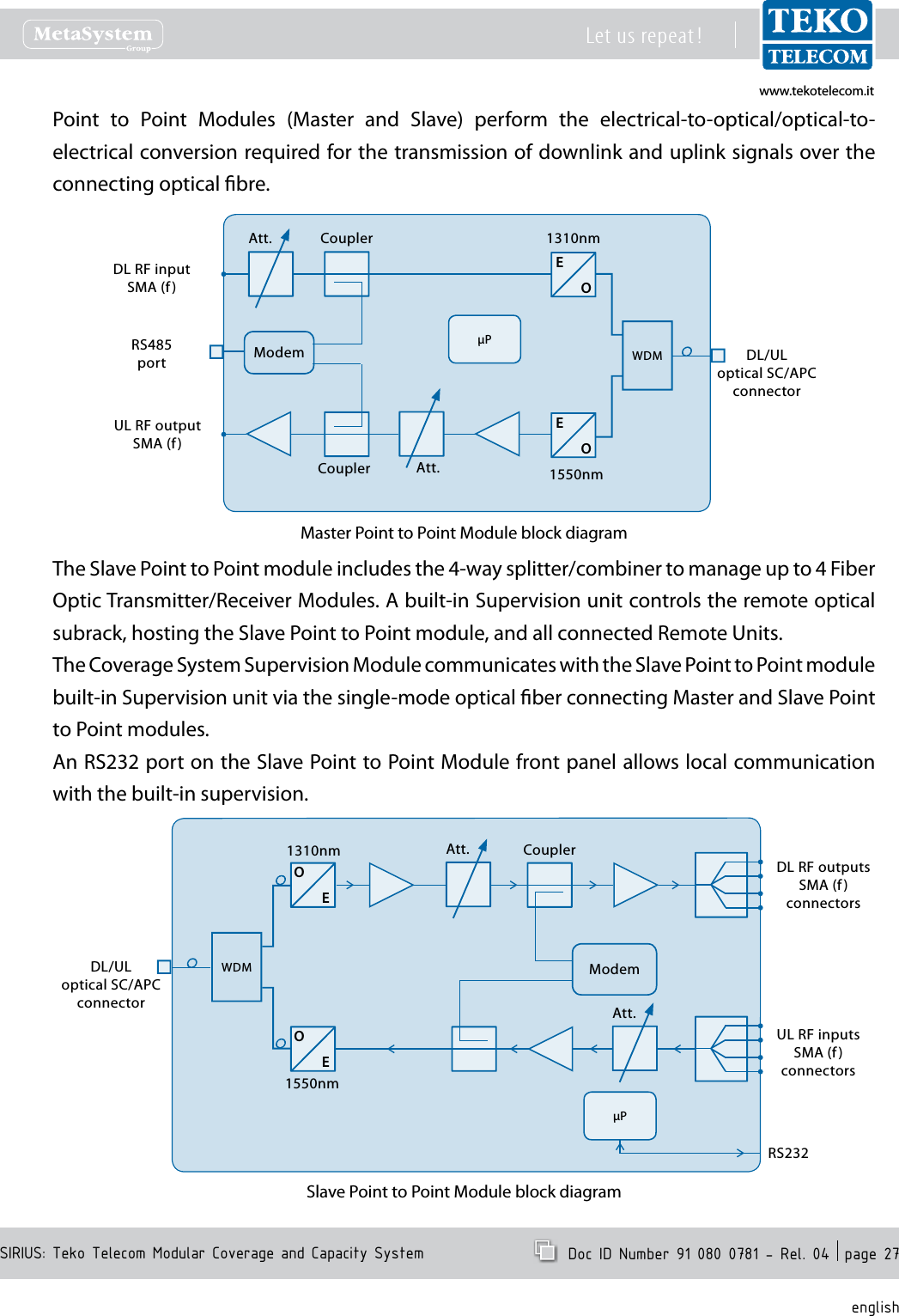
www.tekotelecom.itwww.tekotelecom.itSIRIUS: Teko Telecom Modular Coverage and Capacity SystemLet us repeat !  Doc ID Number 91 080 0781 - Rel. 04  page 27englishPoint  to  Point  Modules  (Master  and  Slave)  perform  the  electrical-to-optical/optical-to-electrical conversion required for the transmission of downlink and uplink signals over the connecting optical bre.1550nmUL RF outputSMA (f)DL RF inputSMA (f)RS485port1310nmEOEOCouplerCouplerAtt.Att.DL/ULoptical SC/APC connectorWDMModemPMaster Point to Point Module block diagramThe Slave Point to Point module includes the 4-way splitter/combiner to manage up to 4 Fiber Optic Transmitter/Receiver Modules. A built-in Supervision unit controls the remote optical subrack, hosting the Slave Point to Point module, and all connected Remote Units.The Coverage System Supervision Module communicates with the Slave Point to Point module built-in Supervision unit via the single-mode optical ber connecting Master and Slave Point to Point modules.An RS232 port on the Slave Point to Point Module front panel allows local communication with the built-in supervision.1310nmDL RF outputsSMA (f)connectorsUL RF inputsSMA (f)connectorsRS2321550nmOEOECouplerAtt.WDM ModemPDL/ULoptical SC/APC connectorAtt.Slave Point to Point Module block diagram
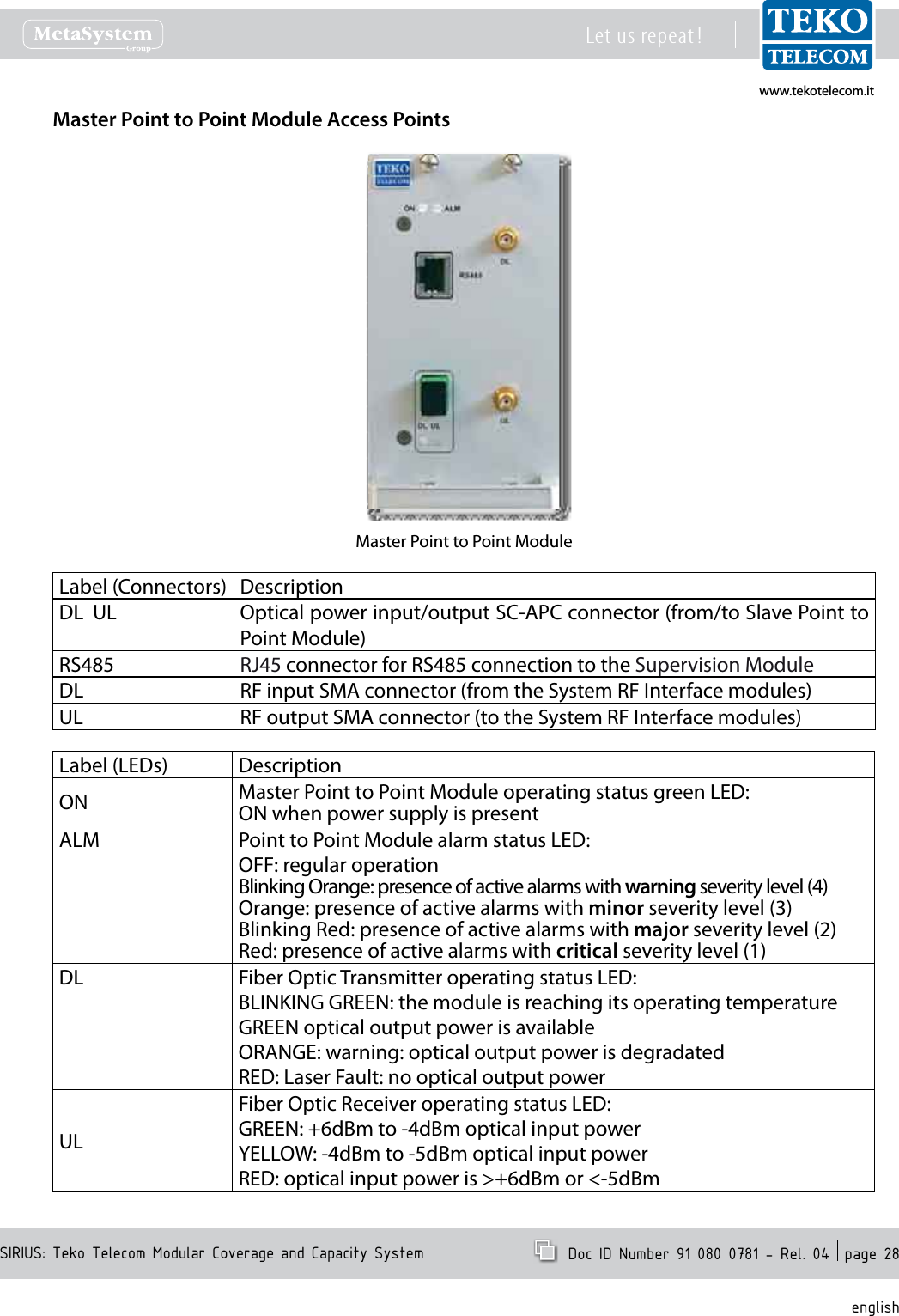
www.tekotelecom.itwww.tekotelecom.itSIRIUS: Teko Telecom Modular Coverage and Capacity SystemLet us repeat !  Doc ID Number 91 080 0781 - Rel. 04  page 28englishMaster Point to Point Module Access PointsMaster Point to Point ModuleLabel (Connectors) DescriptionDL  UL Optical power input/output SC-APC connector (from/to Slave Point to Point Module)RS485 RJ45 connector for RS485 connection to the Supervision ModuleDL RF input SMA connector (from the System RF Interface modules)UL RF output SMA connector (to the System RF Interface modules)Label (LEDs) DescriptionON Master Point to Point Module operating status green LED:ON when power supply is presentALM Point to Point Module alarm status LED:OFF: regular operationBlinking Orange: presence of active alarms with warning severity level (4)Orange: presence of active alarms with minor severity level (3)Blinking Red: presence of active alarms with major severity level (2)Red: presence of active alarms with critical severity level (1)DL Fiber Optic Transmitter operating status LED:BLINKING GREEN: the module is reaching its operating temperatureGREEN optical output power is availableORANGE: warning: optical output power is degradatedRED: Laser Fault: no optical output powerULFiber Optic Receiver operating status LED:GREEN: +6dBm to -4dBm optical input powerYELLOW: -4dBm to -5dBm optical input powerRED: optical input power is >+6dBm or <-5dBm
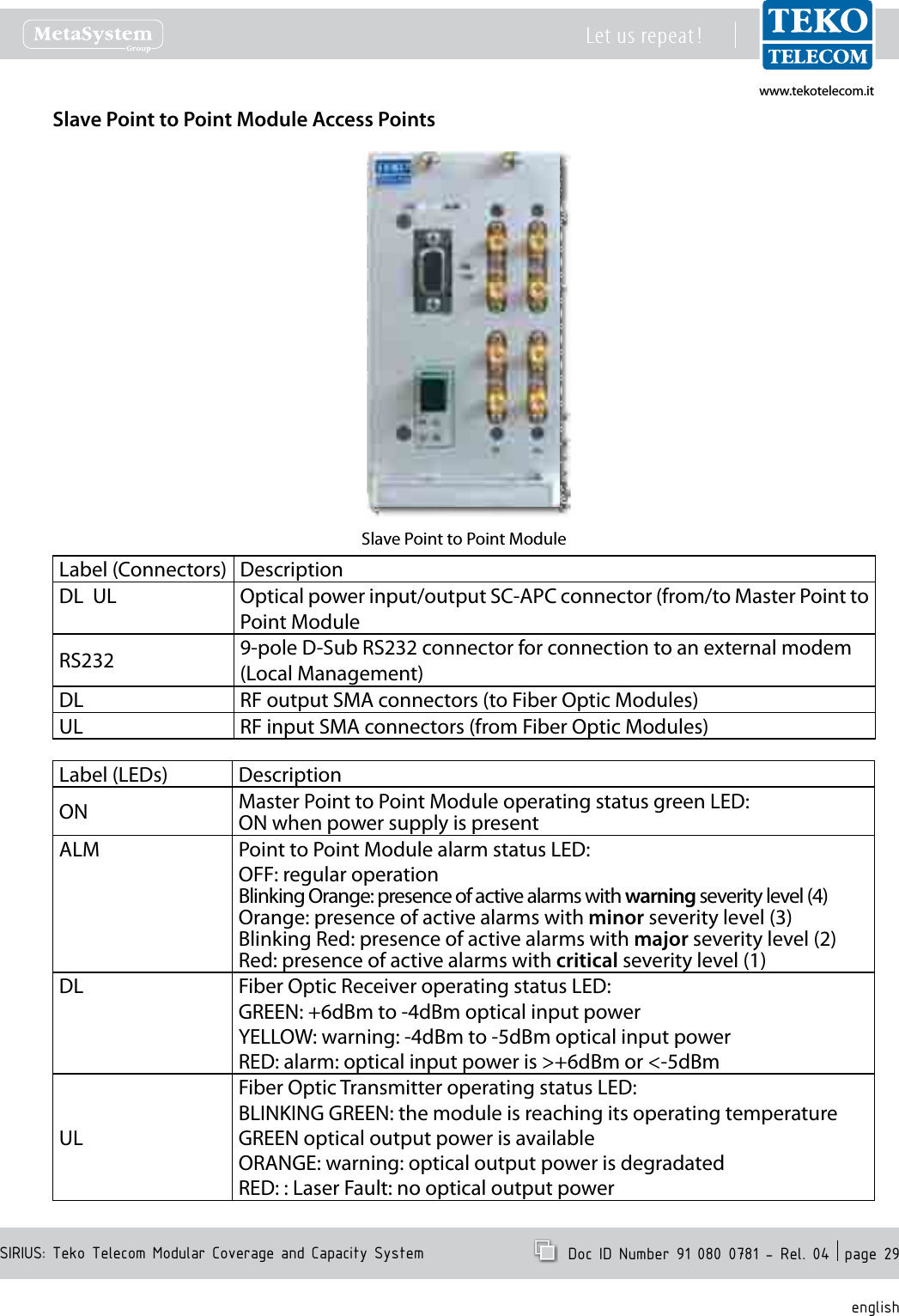
www.tekotelecom.itwww.tekotelecom.itSIRIUS: Teko Telecom Modular Coverage and Capacity SystemLet us repeat !  Doc ID Number 91 080 0781 - Rel. 04  page 29englishSlave Point to Point Module Access PointsSlave Point to Point ModuleLabel (Connectors) DescriptionDL  UL Optical power input/output SC-APC connector (from/to Master Point to Point ModuleRS232 9-pole D-Sub RS232 connector for connection to an external modem (Local Management)DL RF output SMA connectors (to Fiber Optic Modules)UL RF input SMA connectors (from Fiber Optic Modules)Label (LEDs) DescriptionON Master Point to Point Module operating status green LED:ON when power supply is presentALM Point to Point Module alarm status LED:OFF: regular operationBlinking Orange: presence of active alarms with warning severity level (4)Orange: presence of active alarms with minor severity level (3)Blinking Red: presence of active alarms with major severity level (2)Red: presence of active alarms with critical severity level (1)DL Fiber Optic Receiver operating status LED:GREEN: +6dBm to -4dBm optical input powerYELLOW: warning: -4dBm to -5dBm optical input powerRED: alarm: optical input power is >+6dBm or <-5dBmULFiber Optic Transmitter operating status LED:BLINKING GREEN: the module is reaching its operating temperatureGREEN optical output power is availableORANGE: warning: optical output power is degradatedRED: : Laser Fault: no optical output power
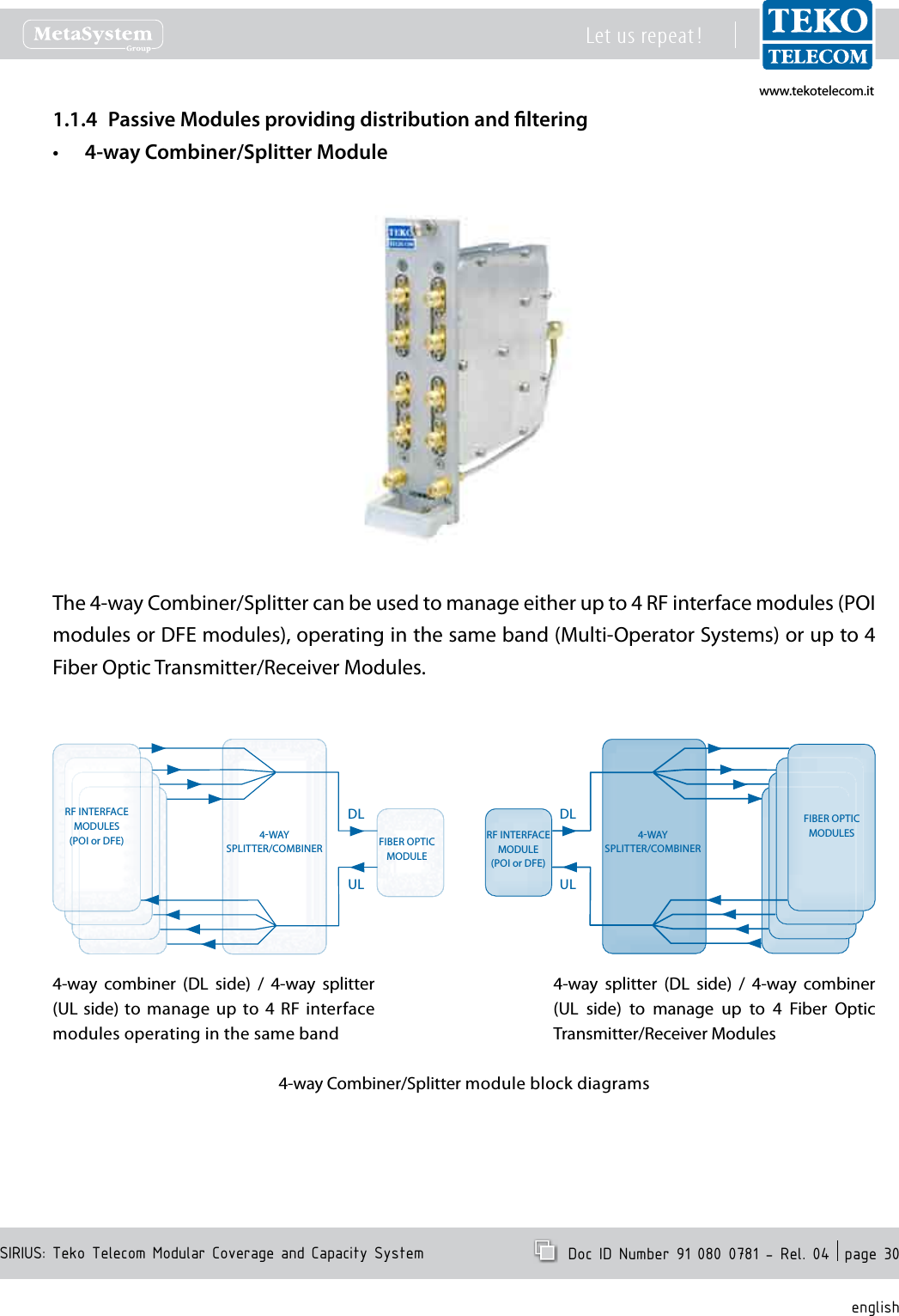
www.tekotelecom.itwww.tekotelecom.itSIRIUS: Teko Telecom Modular Coverage and Capacity SystemLet us repeat !  Doc ID Number 91 080 0781 - Rel. 04  page 30englishPassive Modules providing distribution and ltering1.1.4 4-way Combiner/Splitter Module•The 4-way Combiner/Splitter can be used to manage either up to 4 RF interface modules (POI modules or DFE modules), operating in the same band (Multi-Operator Systems) or up to 4 Fiber Optic Transmitter/Receiver Modules.4-way  combiner  (DL  side)  /  4-way  splitter (UL side) to  manage up to 4  RF interface modules operating in the same band4-way  splitter  (DL  side)  /  4-way  combiner (UL  side)  to  manage  up  to  4  Fiber  Optic Transmitter/Receiver ModulesRF INTERFACEMODULES(POI or DFE)FIBER OPTICMODULES4WAYSPLITTER/COMBINER4WAYSPLITTER/COMBINERDLULDLULRF INTERFACEMODULE(POI or DFE)FIBER OPTICMODULE4-way Combiner/Splitter module block diagrams
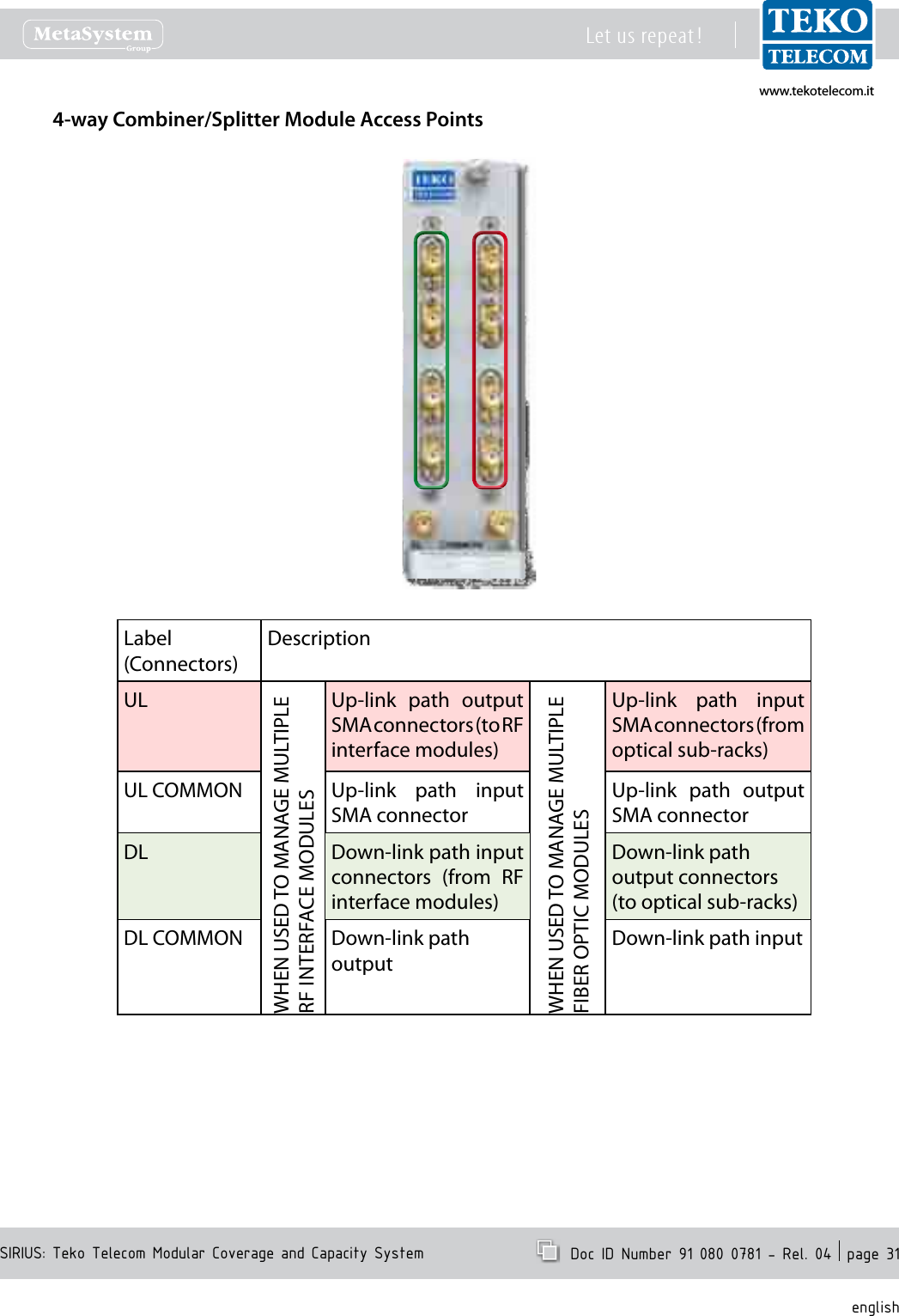
www.tekotelecom.itwww.tekotelecom.itSIRIUS: Teko Telecom Modular Coverage and Capacity SystemLet us repeat !  Doc ID Number 91 080 0781 - Rel. 04  page 31english4-way Combiner/Splitter Module Access PointsLabel(Connectors)DescriptionULWHEN USED TO MANAGE MULTIPLE RF INTERFACE MODULESUp-link  path  output SMA connectors (to RF interface modules)WHEN USED TO MANAGE MULTIPLE FIBER OPTIC MODULESUp-link  path  input SMA connectors (from optical sub-racks)UL COMMON Up-link  path  input SMA connectorUp-link  path  output SMA connectorDL Down-link path input connectors  (from  RF interface modules) Down-link path output connectors (to optical sub-racks) DL COMMON Down-link path outputDown-link path input
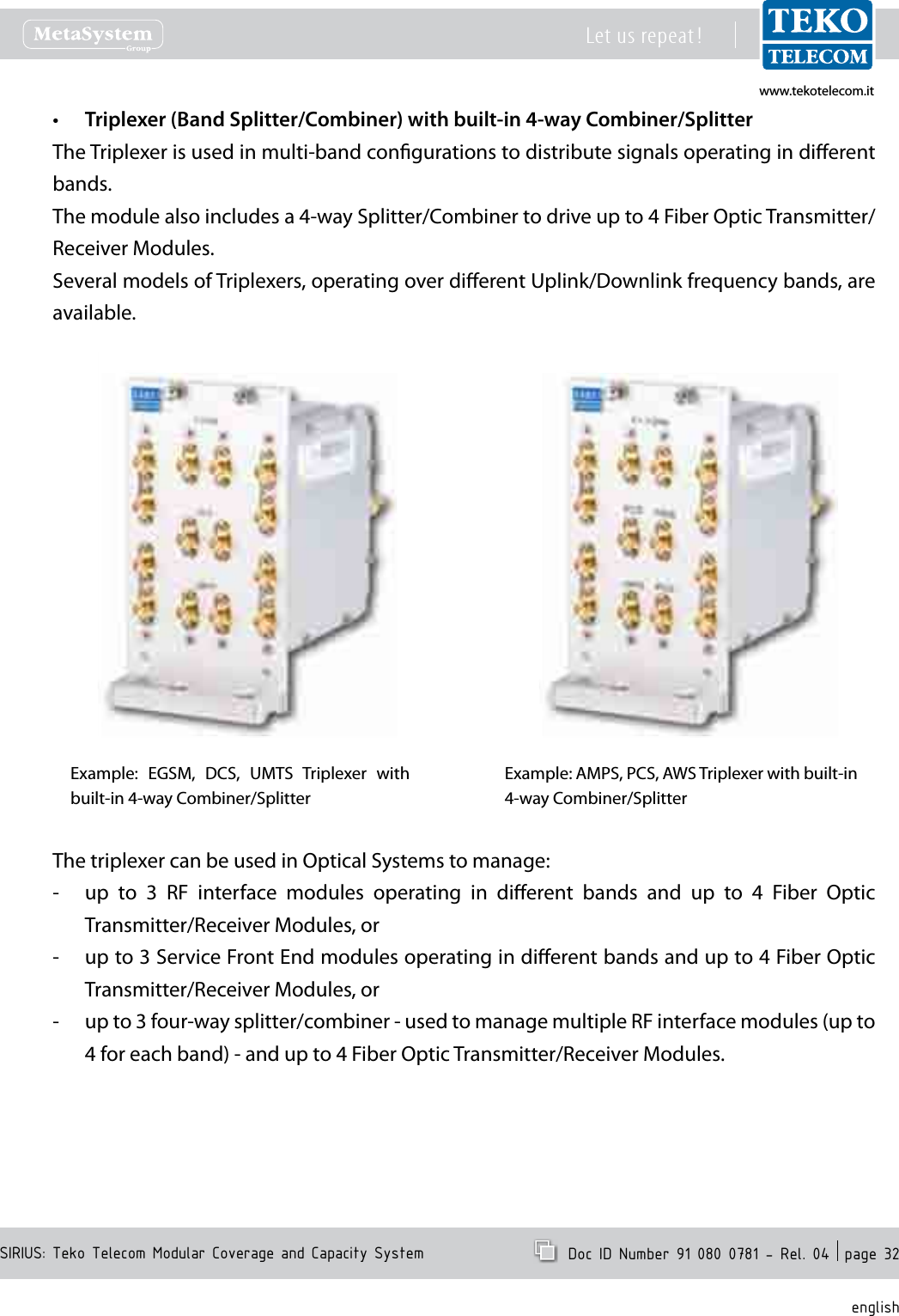
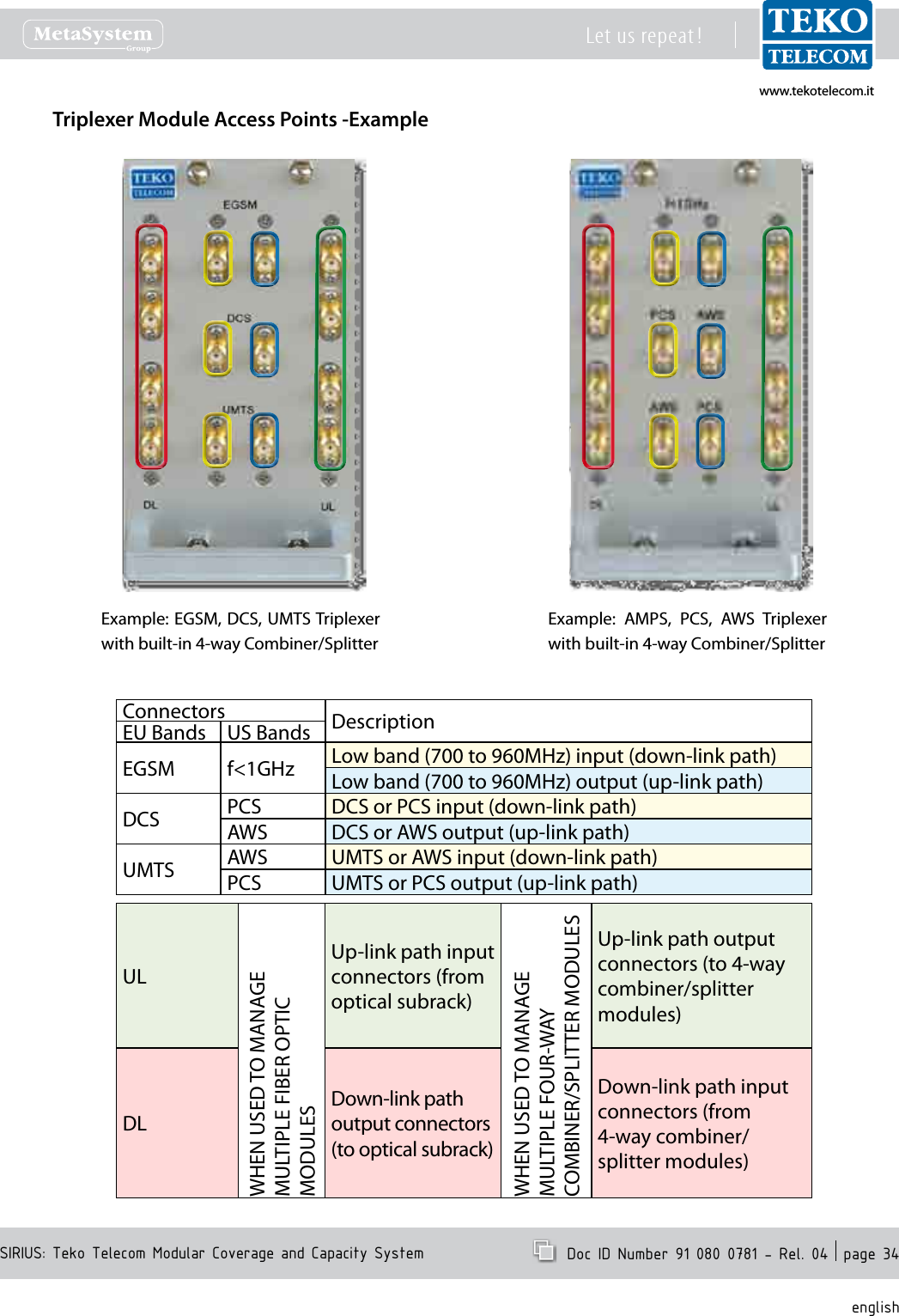
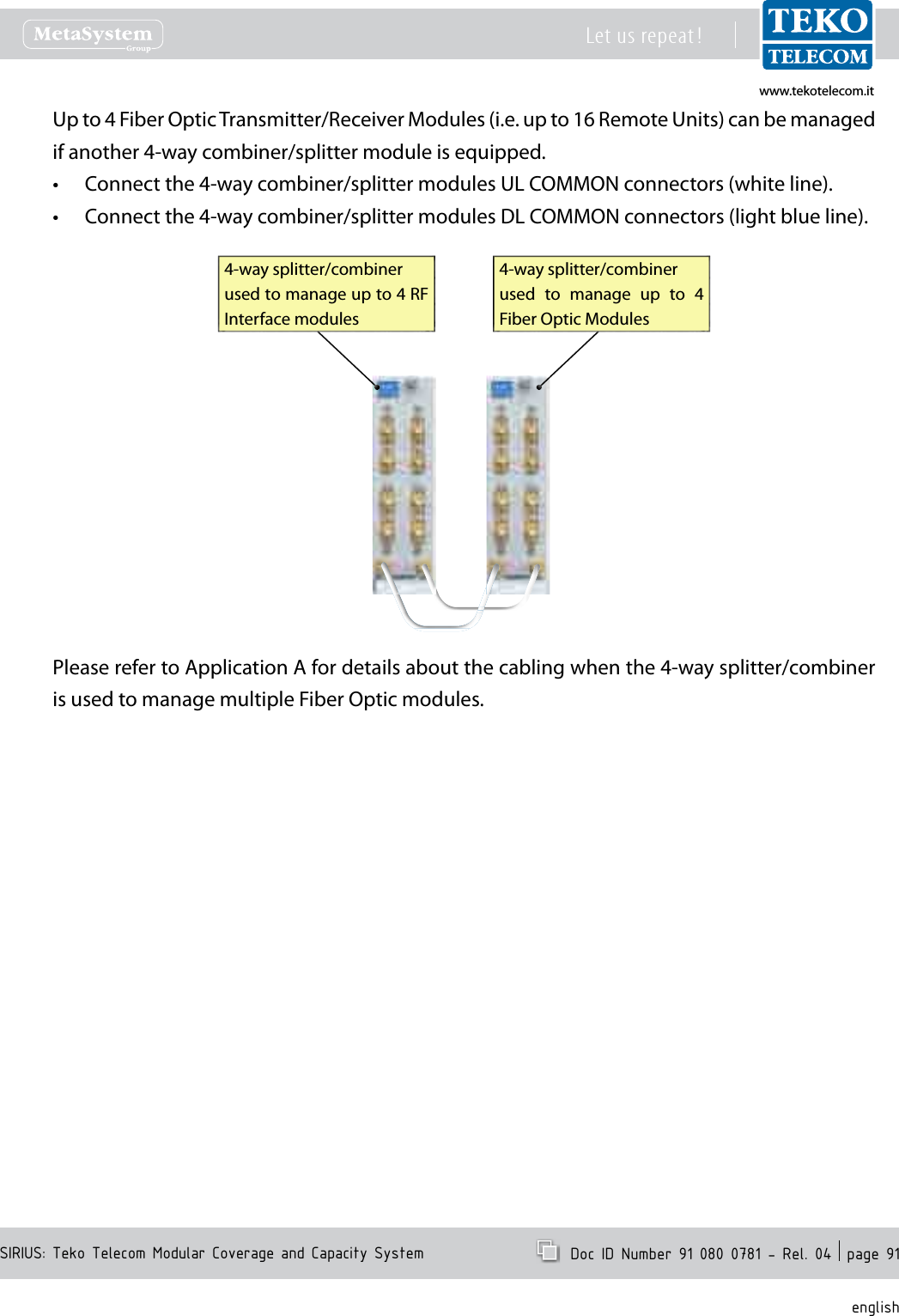
www.tekotelecom.itwww.tekotelecom.itSIRIUS: Teko Telecom Modular Coverage and Capacity SystemLet us repeat !  Doc ID Number 91 080 0781 - Rel. 04  page 32englishTriplexer (Band Splitter/Combiner) with built-in 4-way Combiner/Splitter•The Triplexer is used in multi-band congurations to distribute signals operating in dierent bands.The module also includes a 4-way Splitter/Combiner to drive up to 4 Fiber Optic Transmitter/Receiver Modules.Several models of Triplexers, operating over dierent Uplink/Downlink frequency bands, are available.Example:  EGSM,  DCS,  UMTS  Triplexer  with built-in 4-way Combiner/SplitterExample: AMPS, PCS, AWS Triplexer with built-in 4-way Combiner/Splitter The triplexer can be used in Optical Systems to manage:up  to  3  RF  interface  modules  operating  in  dierent  bands  and  up  to  4  Fiber  Optic  -Transmitter/Receiver Modules, orup to 3 Service Front End modules operating in dierent bands and up to 4 Fiber Optic  -Transmitter/Receiver Modules, orup to 3 four-way splitter/combiner - used to manage multiple RF interface modules (up to  -4 for each band) - and up to 4 Fiber Optic Transmitter/Receiver Modules.
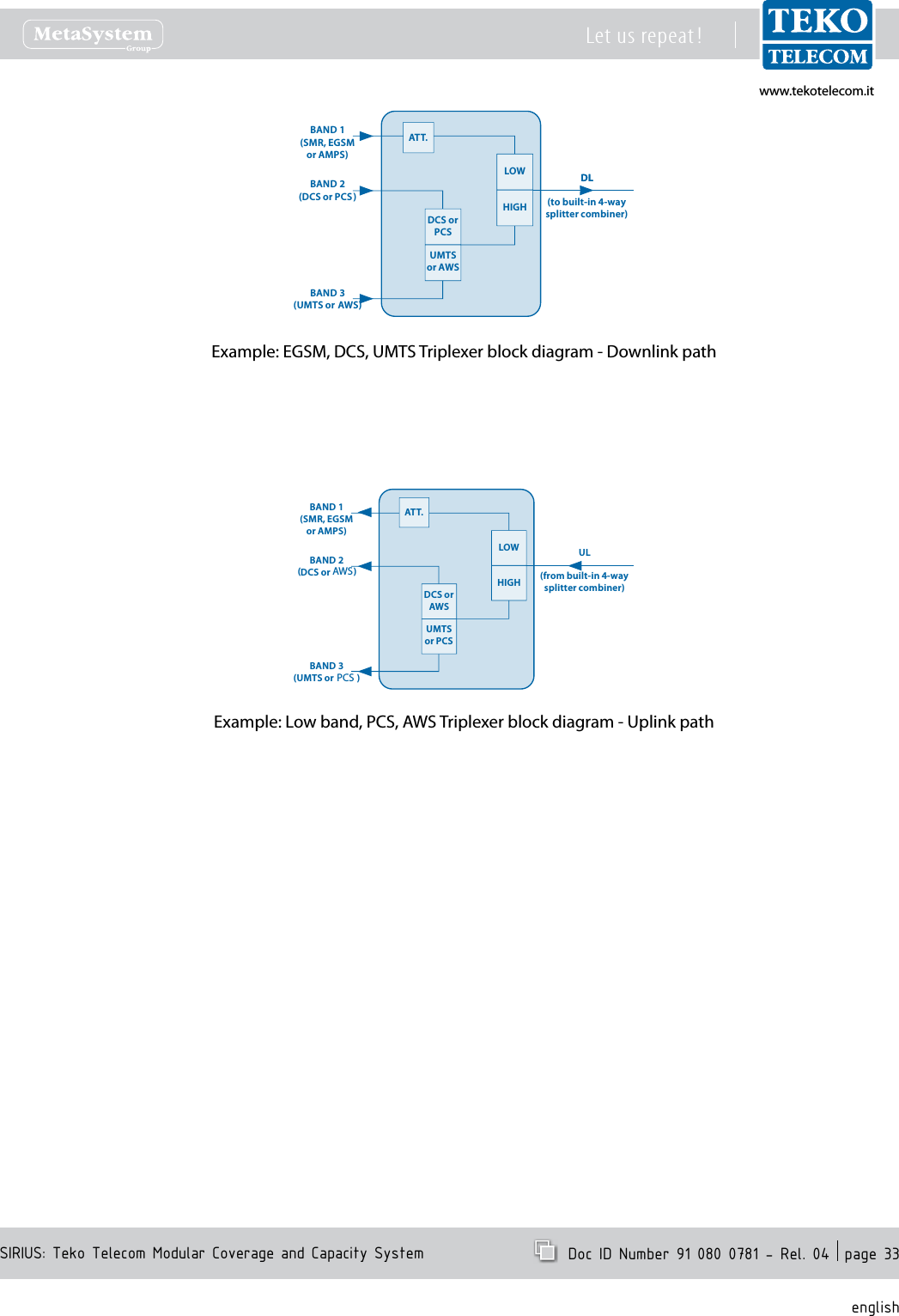
www.tekotelecom.itwww.tekotelecom.itSIRIUS: Teko Telecom Modular Coverage and Capacity SystemLet us repeat !  Doc ID Number 91 080 0781 - Rel. 04  page 33englishExample: EGSM, DCS, UMTS Triplexer block diagram - Downlink pathExample: Low band, PCS, AWS Triplexer block diagram - Uplink pathDLDCS or PCSUMTS or AWSHIGHLOWDL(to built-in 4-waysplitter combiner)BAND 1(SMR, EGSMor AMPS)BAND 2(DCS or PCS)BAND 3(UMTS or  AWS)ATT.DCS or AWSUMTS or PCSHIGHLOWBAND 1(SMR, EGSMor AMPS)BAND 2(DCS or PCS )BAND 3(UMTS or  AWS)UL(from built-in 4-way splitter combiner)ATT.PCSAWS
www.tekotelecom.itwww.tekotelecom.itSIRIUS: Teko Telecom Modular Coverage and Capacity SystemLet us repeat !  Doc ID Number 91 080 0781 - Rel. 04  page 34englishTriplexer Module Access Points -ExampleExample: EGSM, DCS, UMTS Triplexer with built-in 4-way Combiner/SplitterExample:  AMPS,  PCS,  AWS  Triplexer with built-in 4-way Combiner/Splitter Connectors DescriptionEU Bands US BandsEGSM  f<1GHz Low band (700 to 960MHz) input (down-link path) Low band (700 to 960MHz) output (up-link path)DCS PCS DCS or PCS input (down-link path)AWS DCS or AWS output (up-link path)UMTS AWS UMTS or AWS input (down-link path)PCS UMTS or PCS output (up-link path)ULWHEN USED TO MANAGE MULTIPLE FIBER OPTIC MODULESUp-link path input connectors (from optical subrack)WHEN USED TO MANAGE MULTIPLE FOUR-WAY COMBINER/SPLITTER MODULESUp-link path output connectors (to 4-way combiner/splitter modules)DLDown-link path output connectors (to optical subrack)Down-link path input connectors (from 4-way combiner/splitter modules)
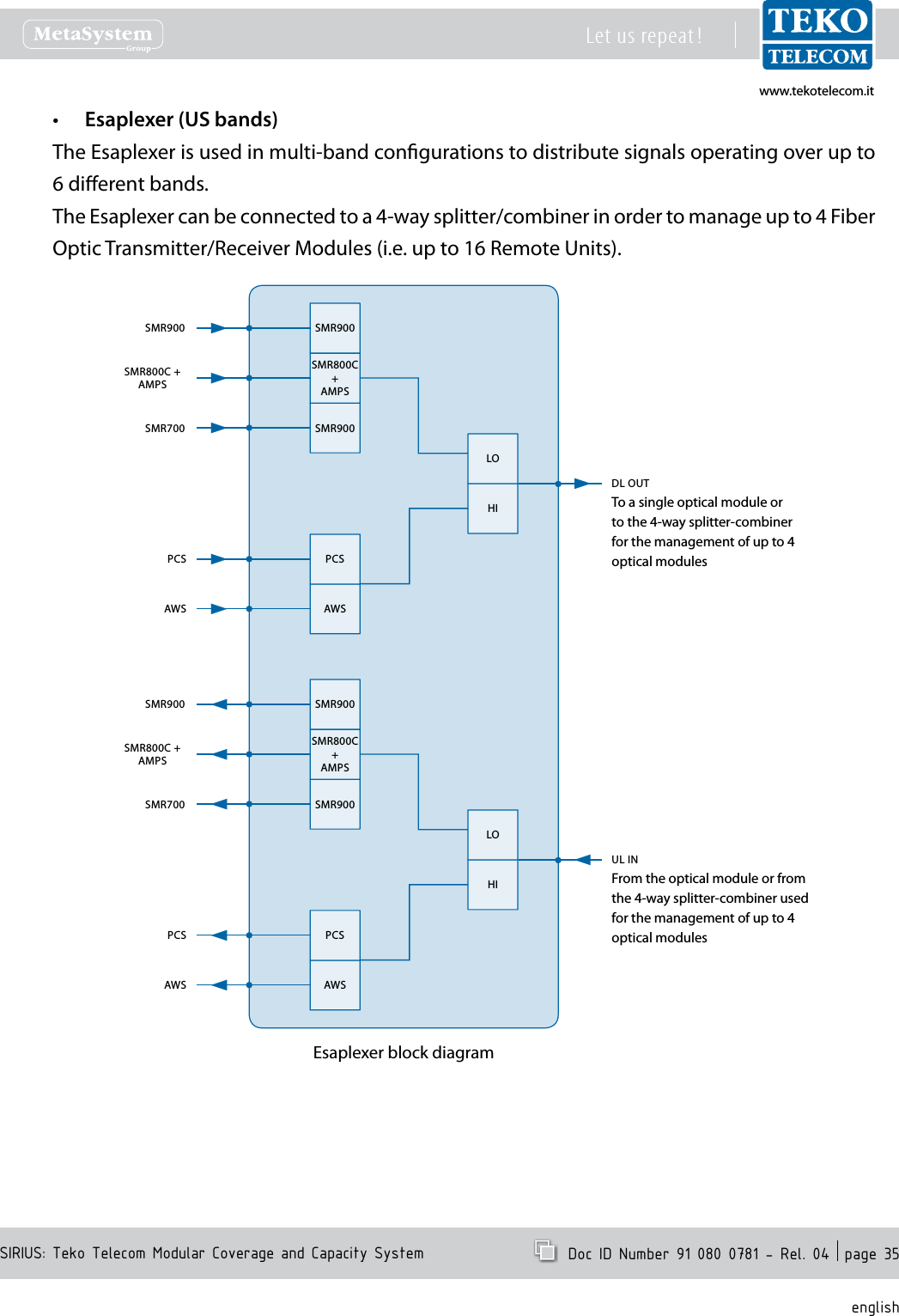
www.tekotelecom.itwww.tekotelecom.itSIRIUS: Teko Telecom Modular Coverage and Capacity SystemLet us repeat !  Doc ID Number 91 080 0781 - Rel. 04  page 35englishEsaplexer (US bands)•The Esaplexer is used in multi-band congurations to distribute signals operating over up to 6 dierent bands. The Esaplexer can be connected to a 4-way splitter/combiner in order to manage up to 4 Fiber Optic Transmitter/Receiver Modules (i.e. up to 16 Remote Units).Esaplexer block diagramSMR900SMR700DL OUTSMR900SMR900AWSAWSHISMR800C +AMPSSMR800C+AMPSPCSPCSLOTo a single optical module or to the 4-way splitter-combiner for the management of up to 4 optical modulesFrom the optical module or from the 4-way splitter-combiner used for the management of up to 4 optical modulesSMR900SMR700UL INSMR900SMR900AWSAWSHISMR800C +AMPSSMR800C+AMPSPCSPCSLO
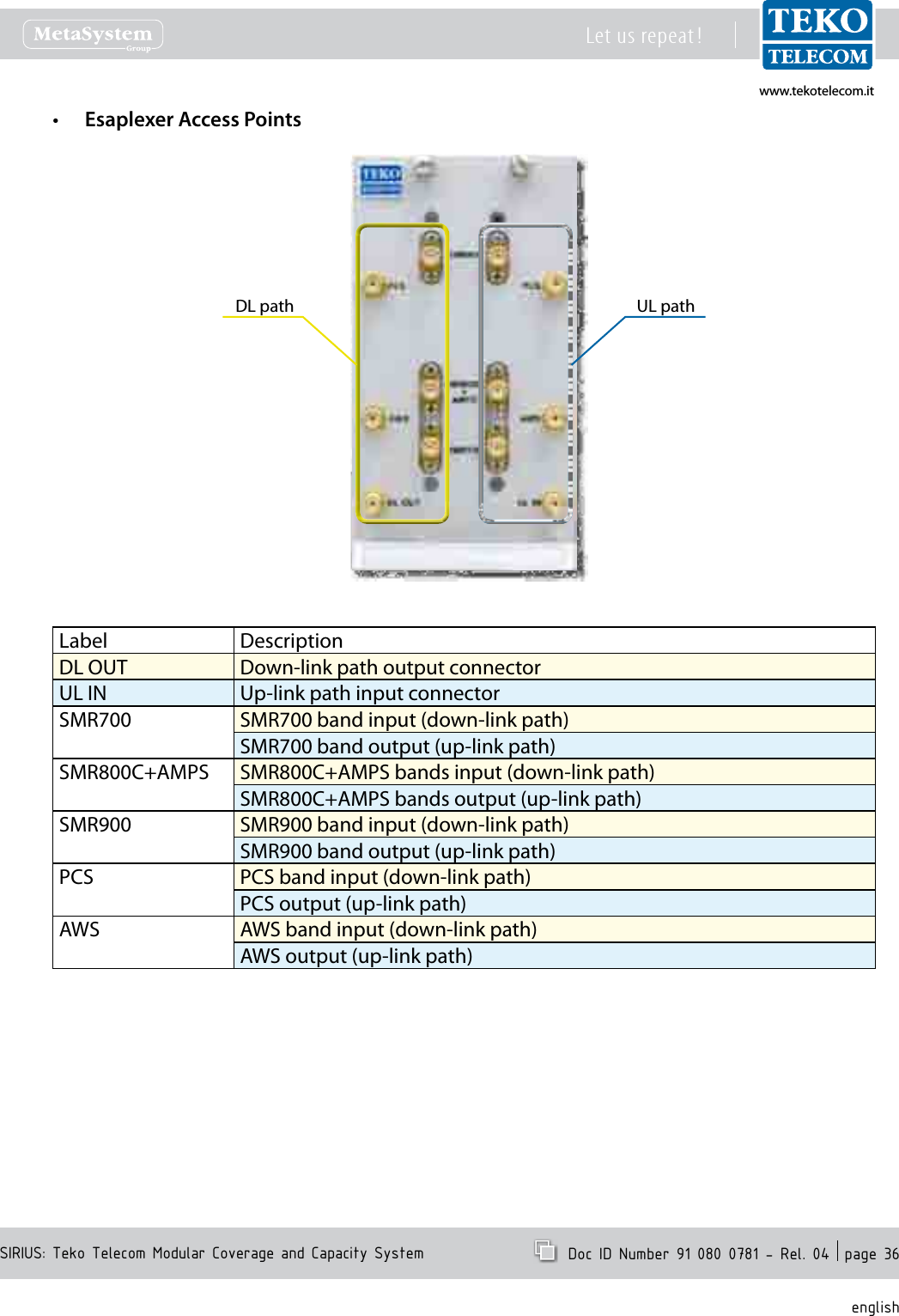
www.tekotelecom.itwww.tekotelecom.itSIRIUS: Teko Telecom Modular Coverage and Capacity SystemLet us repeat !  Doc ID Number 91 080 0781 - Rel. 04  page 36englishEsaplexer Access Points•DL path UL pathLabel DescriptionDL OUT Down-link path output connectorUL IN Up-link path input connectorSMR700 SMR700 band input (down-link path) SMR700 band output (up-link path)SMR800C+AMPS SMR800C+AMPS bands input (down-link path)SMR800C+AMPS bands output (up-link path)SMR900 SMR900 band input (down-link path)SMR900 band output (up-link path)PCS PCS band input (down-link path)PCS output (up-link path)AWS AWS band input (down-link path)AWS output (up-link path)
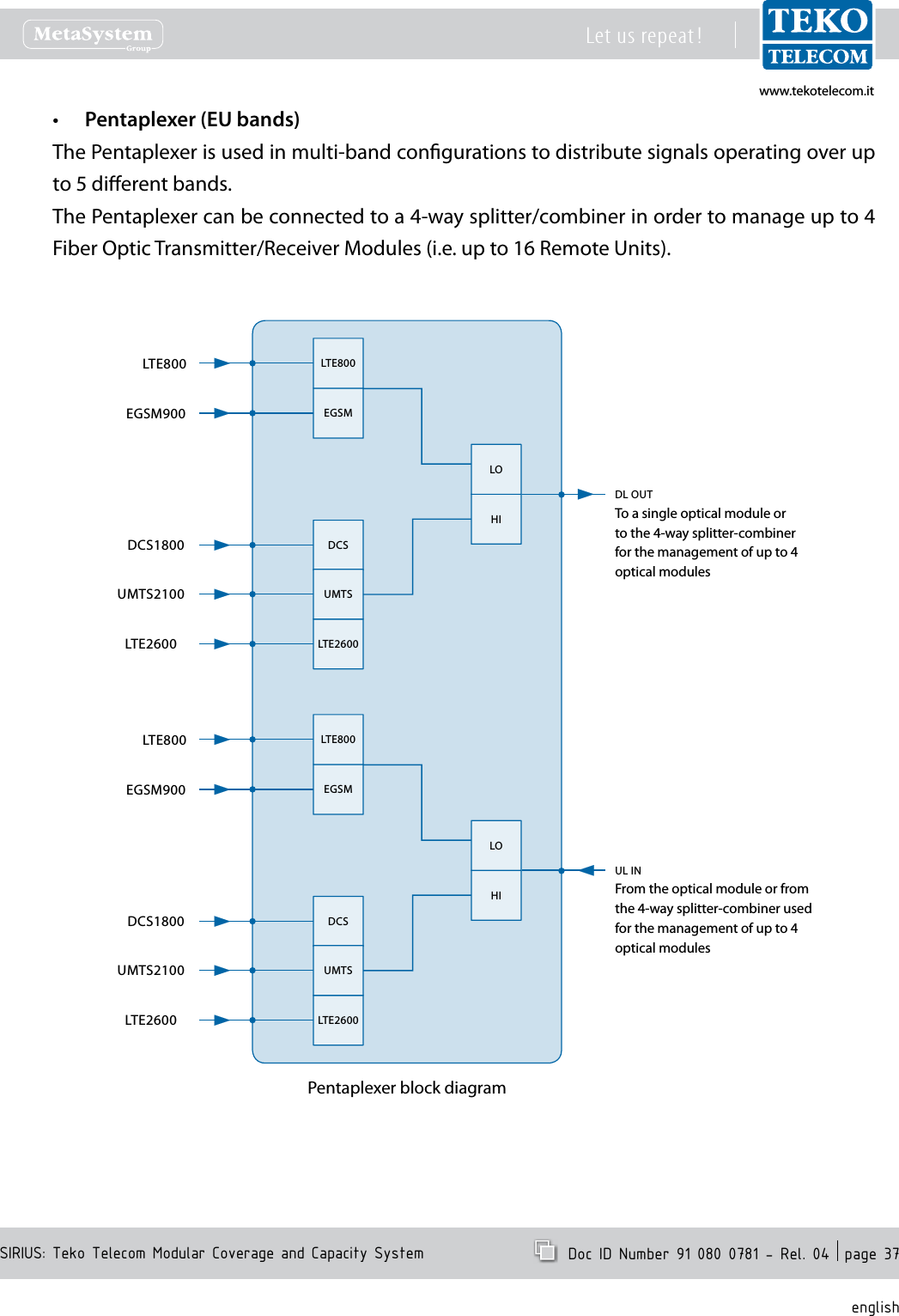
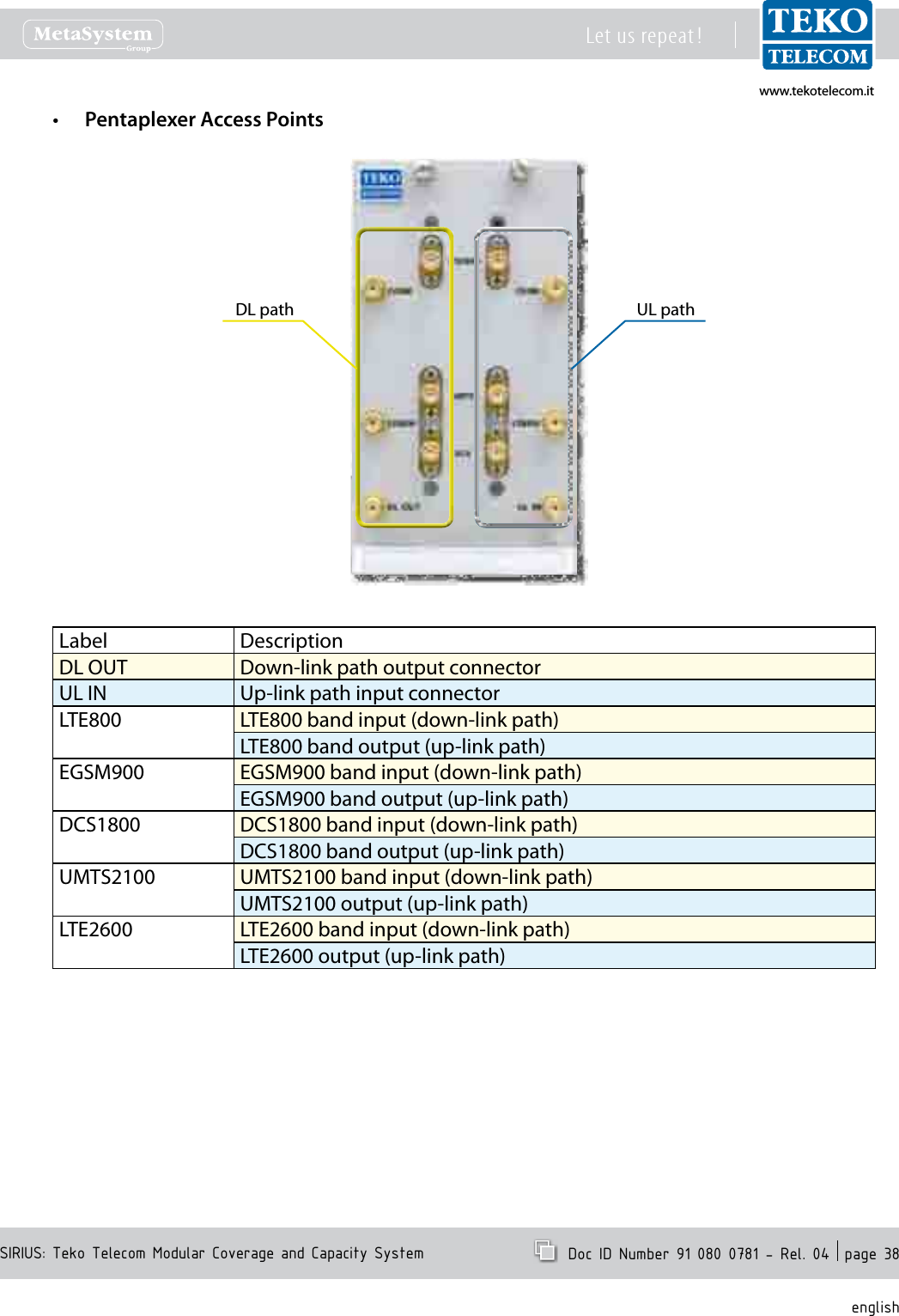
www.tekotelecom.itwww.tekotelecom.itSIRIUS: Teko Telecom Modular Coverage and Capacity SystemLet us repeat !  Doc ID Number 91 080 0781 - Rel. 04  page 37englishPentaplexer (EU bands)•The Pentaplexer is used in multi-band congurations to distribute signals operating over up to 5 dierent bands.The Pentaplexer can be connected to a 4-way splitter/combiner in order to manage up to 4 Fiber Optic Transmitter/Receiver Modules (i.e. up to 16 Remote Units).Pentaplexer block diagramDL OUTLTE800DCSLTE2600HIEGSMUMTSLOTo a single optical module or to the 4-way splitter-combiner for the management of up to 4 optical modulesFrom the optical module or from the 4-way splitter-combiner used for the management of up to 4 optical modulesUL INHILOLTE800EGSM900DCS1800UMTS2100LTE2600LTE800DCSLTE2600EGSMUMTSLTE800EGSM900DCS1800UMTS2100LTE2600
www.tekotelecom.itwww.tekotelecom.itSIRIUS: Teko Telecom Modular Coverage and Capacity SystemLet us repeat !  Doc ID Number 91 080 0781 - Rel. 04  page 38englishPentaplexer Access Points•DL path UL pathLabel DescriptionDL OUT Down-link path output connectorUL IN Up-link path input connectorLTE800 LTE800 band input (down-link path) LTE800 band output (up-link path)EGSM900 EGSM900 band input (down-link path)EGSM900 band output (up-link path)DCS1800 DCS1800 band input (down-link path)DCS1800 band output (up-link path)UMTS2100 UMTS2100 band input (down-link path)UMTS2100 output (up-link path)LTE2600 LTE2600 band input (down-link path)LTE2600 output (up-link path)
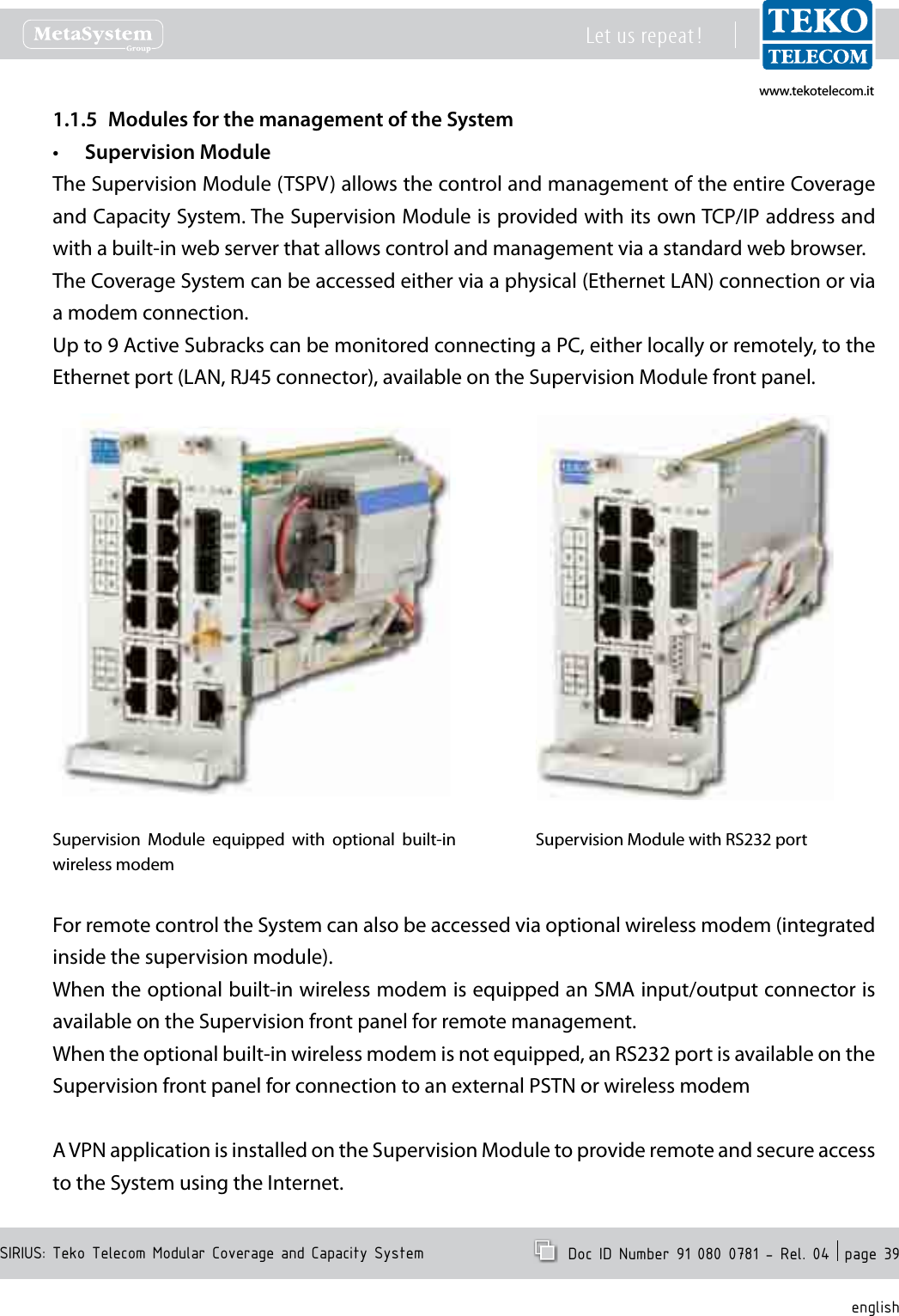
www.tekotelecom.itwww.tekotelecom.itSIRIUS: Teko Telecom Modular Coverage and Capacity SystemLet us repeat !  Doc ID Number 91 080 0781 - Rel. 04  page 39englishModules for the management of the System1.1.5 Supervision Module•The Supervision Module (TSPV) allows the control and management of the entire Coverage and Capacity System. The Supervision Module is provided with its own TCP/IP address and with a built-in web server that allows control and management via a standard web browser.The Coverage System can be accessed either via a physical (Ethernet LAN) connection or via a modem connection.Up to 9 Active Subracks can be monitored connecting a PC, either locally or remotely, to the Ethernet port (LAN, RJ45 connector), available on the Supervision Module front panel.Supervision  Module  equipped  with  optional  built-in wireless modemSupervision Module with RS232 portFor remote control the System can also be accessed via optional wireless modem (integrated inside the supervision module).When the optional built-in wireless modem is equipped an SMA input/output connector is available on the Supervision front panel for remote management.When the optional built-in wireless modem is not equipped, an RS232 port is available on the Supervision front panel for connection to an external PSTN or wireless modemA VPN application is installed on the Supervision Module to provide remote and secure access to the System using the Internet.
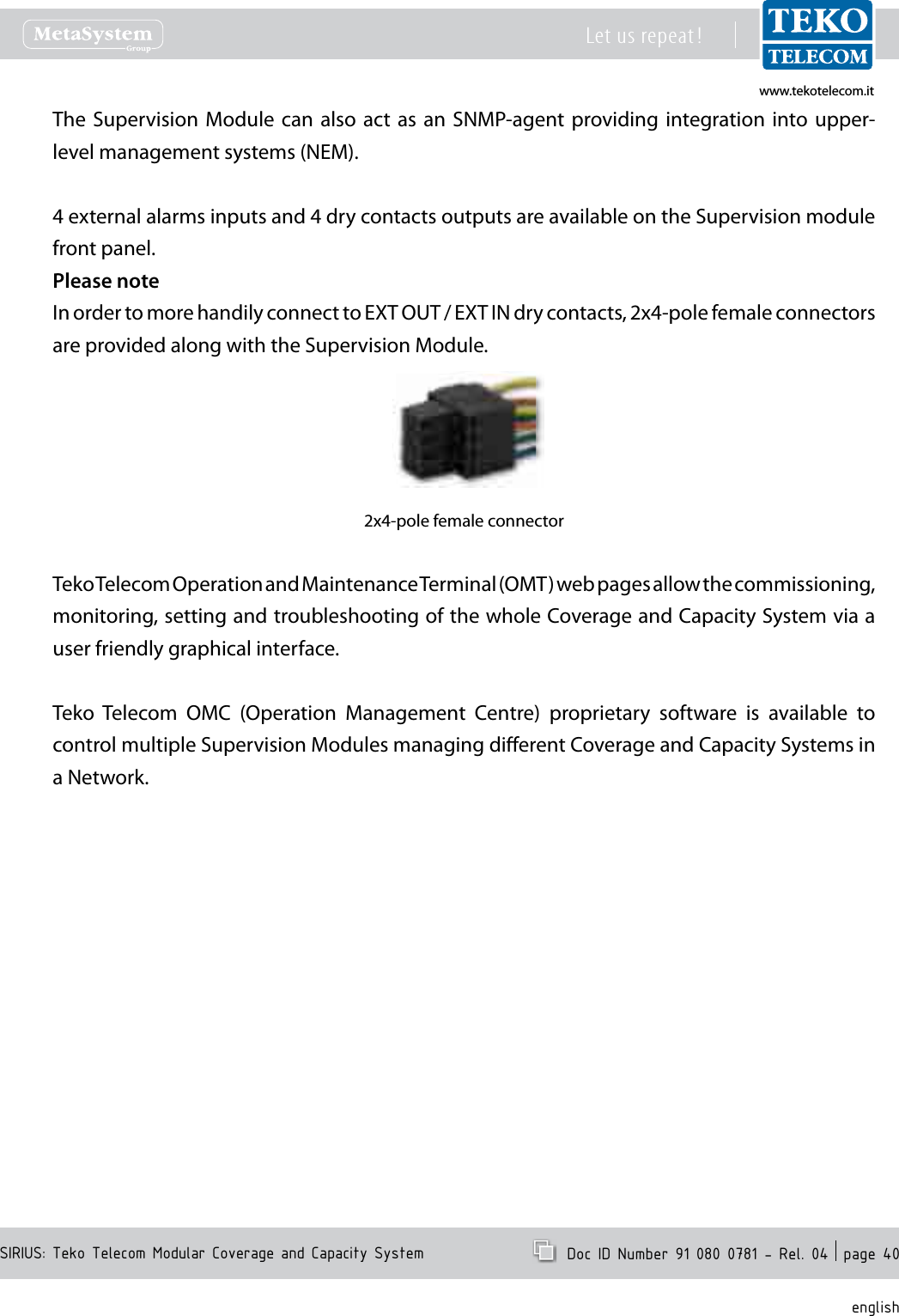
www.tekotelecom.itwww.tekotelecom.itSIRIUS: Teko Telecom Modular Coverage and Capacity SystemLet us repeat !  Doc ID Number 91 080 0781 - Rel. 04  page 40englishThe Supervision Module  can also act as  an  SNMP-agent providing integration into upper-level management systems (NEM).4 external alarms inputs and 4 dry contacts outputs are available on the Supervision module front panel.Please noteIn order to more handily connect to EXT OUT / EXT IN dry contacts, 2x4-pole female connectors are provided along with the Supervision Module.2x4-pole female connectorTeko Telecom Operation and Maintenance Terminal (OMT) web pages allow the commissioning, monitoring, setting and troubleshooting of the whole Coverage and Capacity System via a user friendly graphical interface.Teko  Telecom  OMC  (Operation  Management  Centre)  proprietary  software  is  available  to control multiple Supervision Modules managing dierent Coverage and Capacity Systems in a Network.
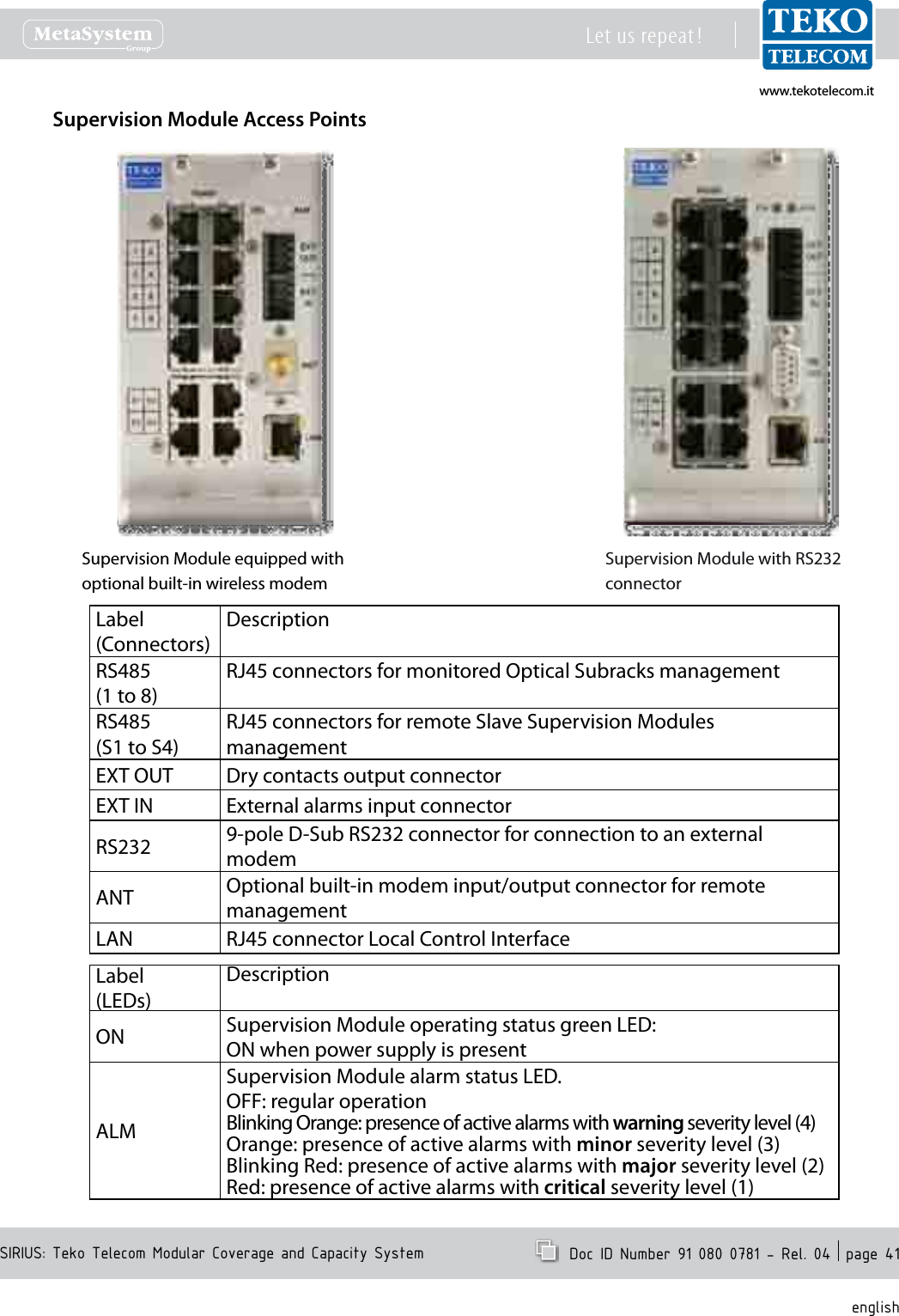
www.tekotelecom.itwww.tekotelecom.itSIRIUS: Teko Telecom Modular Coverage and Capacity SystemLet us repeat !  Doc ID Number 91 080 0781 - Rel. 04  page 41englishSupervision Module Access PointsSupervision Module equipped withoptional built-in wireless modemSupervision Module with RS232 connectorLabel(Connectors)DescriptionRS485(1 to 8) RJ45 connectors for monitored Optical Subracks managementRS485(S1 to S4) RJ45 connectors for remote Slave Supervision Modules managementEXT OUT Dry contacts output connectorEXT IN External alarms input connectorRS232 9-pole D-Sub RS232 connector for connection to an external modemANT Optional built-in modem input/output connector for remote managementLAN RJ45 connector Local Control InterfaceLabel(LEDs)DescriptionON Supervision Module operating status green LED:ON when power supply is presentALMSupervision Module alarm status LED.OFF: regular operationBlinking Orange: presence of active alarms with warning severity level (4)Orange: presence of active alarms with minor severity level (3)Blinking Red: presence of active alarms with major severity level (2)Red: presence of active alarms with critical severity level (1)
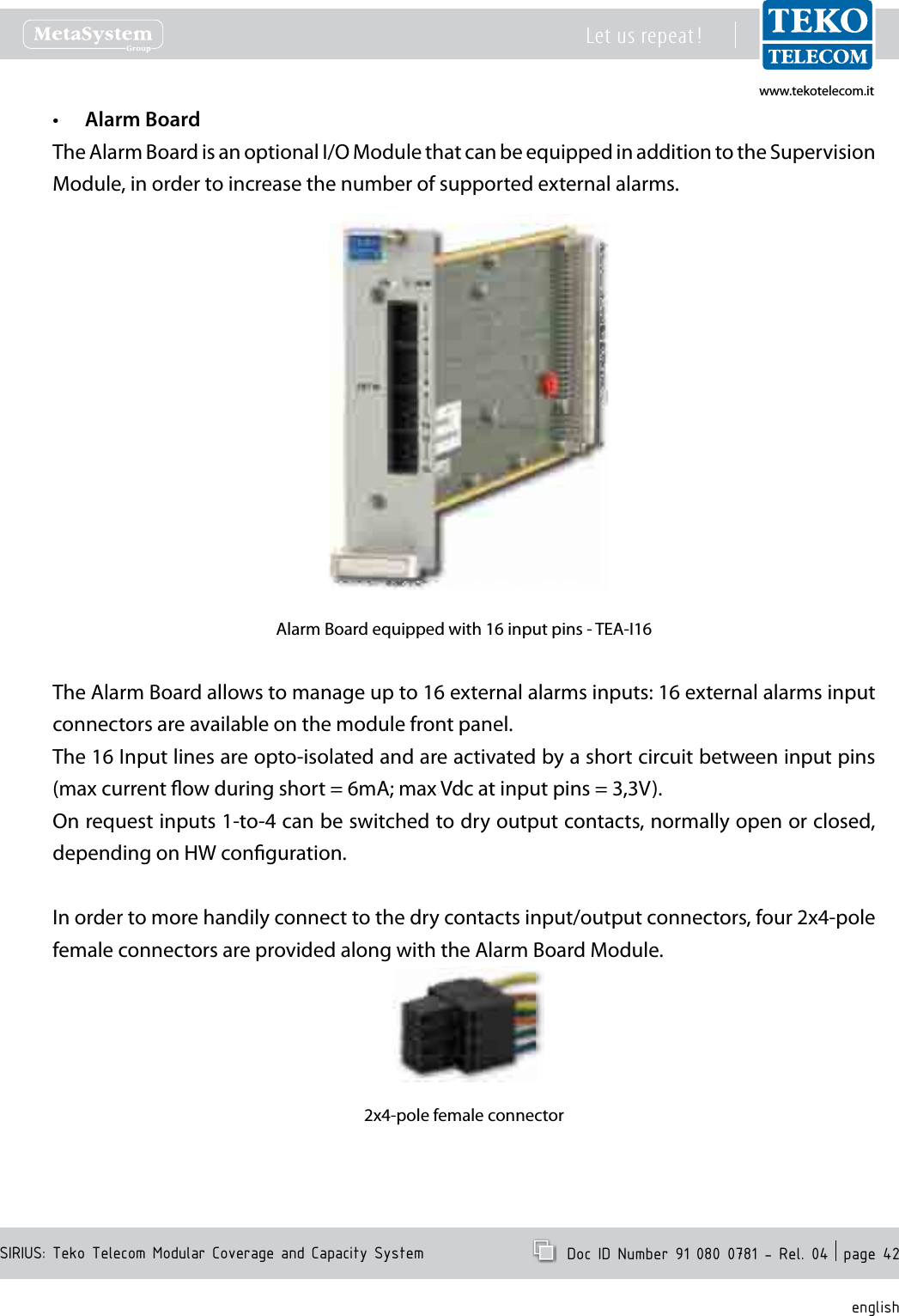
www.tekotelecom.itwww.tekotelecom.itSIRIUS: Teko Telecom Modular Coverage and Capacity SystemLet us repeat !  Doc ID Number 91 080 0781 - Rel. 04  page 42englishAlarm Board•The Alarm Board is an optional I/O Module that can be equipped in addition to the Supervision Module, in order to increase the number of supported external alarms.Alarm Board equipped with 16 input pins - TEA-I16The Alarm Board allows to manage up to 16 external alarms inputs: 16 external alarms input connectors are available on the module front panel.The 16 Input lines are opto-isolated and are activated by a short circuit between input pins (max current ow during short = 6mA; max Vdc at input pins = 3,3V).On request inputs 1-to-4 can be switched to dry output contacts, normally open or closed, depending on HW conguration.In order to more handily connect to the dry contacts input/output connectors, four 2x4-pole female connectors are provided along with the Alarm Board Module.2x4-pole female connector
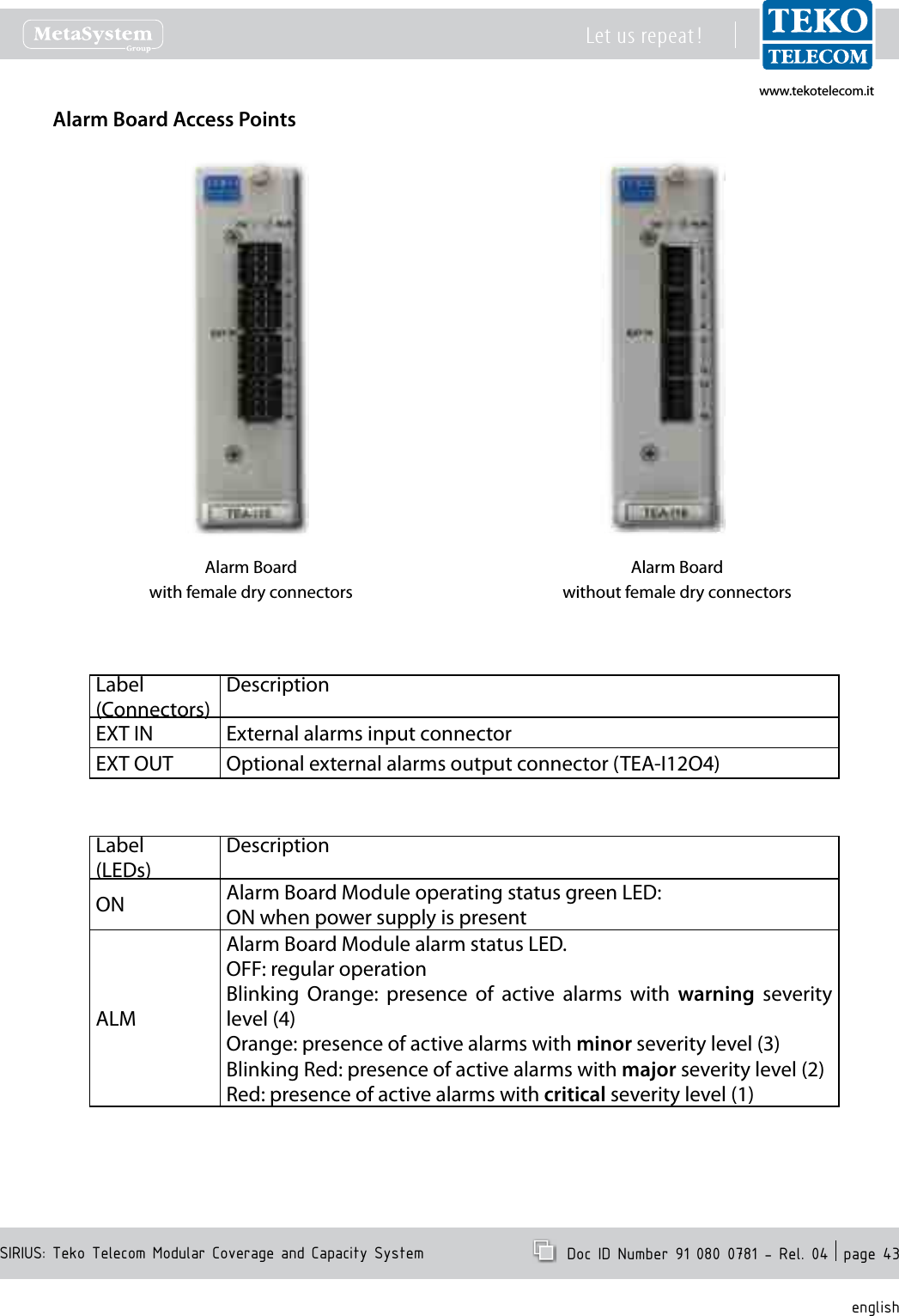
www.tekotelecom.itwww.tekotelecom.itSIRIUS: Teko Telecom Modular Coverage and Capacity SystemLet us repeat !  Doc ID Number 91 080 0781 - Rel. 04  page 43englishAlarm Board Access PointsAlarm Boardwith female dry connectorsAlarm Boardwithout female dry connectorsLabel(Connectors)DescriptionEXT IN External alarms input connectorEXT OUT Optional external alarms output connector (TEA-I12O4)Label(LEDs)DescriptionON Alarm Board Module operating status green LED:ON when power supply is presentALMAlarm Board Module alarm status LED.OFF: regular operationBlinking  Orange:  presence  of  active  alarms  with  warning  severity level (4)Orange: presence of active alarms with minor severity level (3)Blinking Red: presence of active alarms with major severity level (2)Red: presence of active alarms with critical severity level (1)
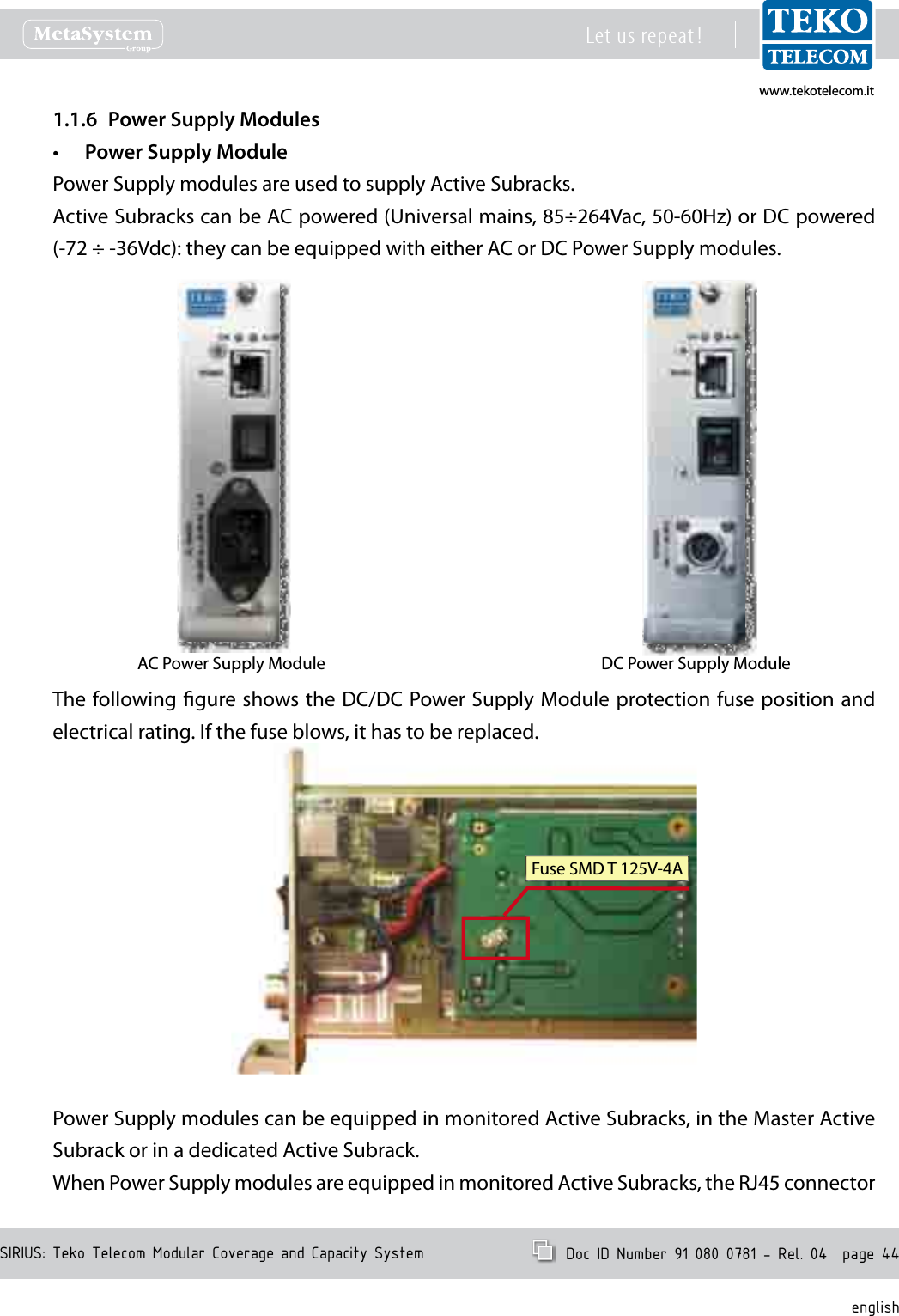
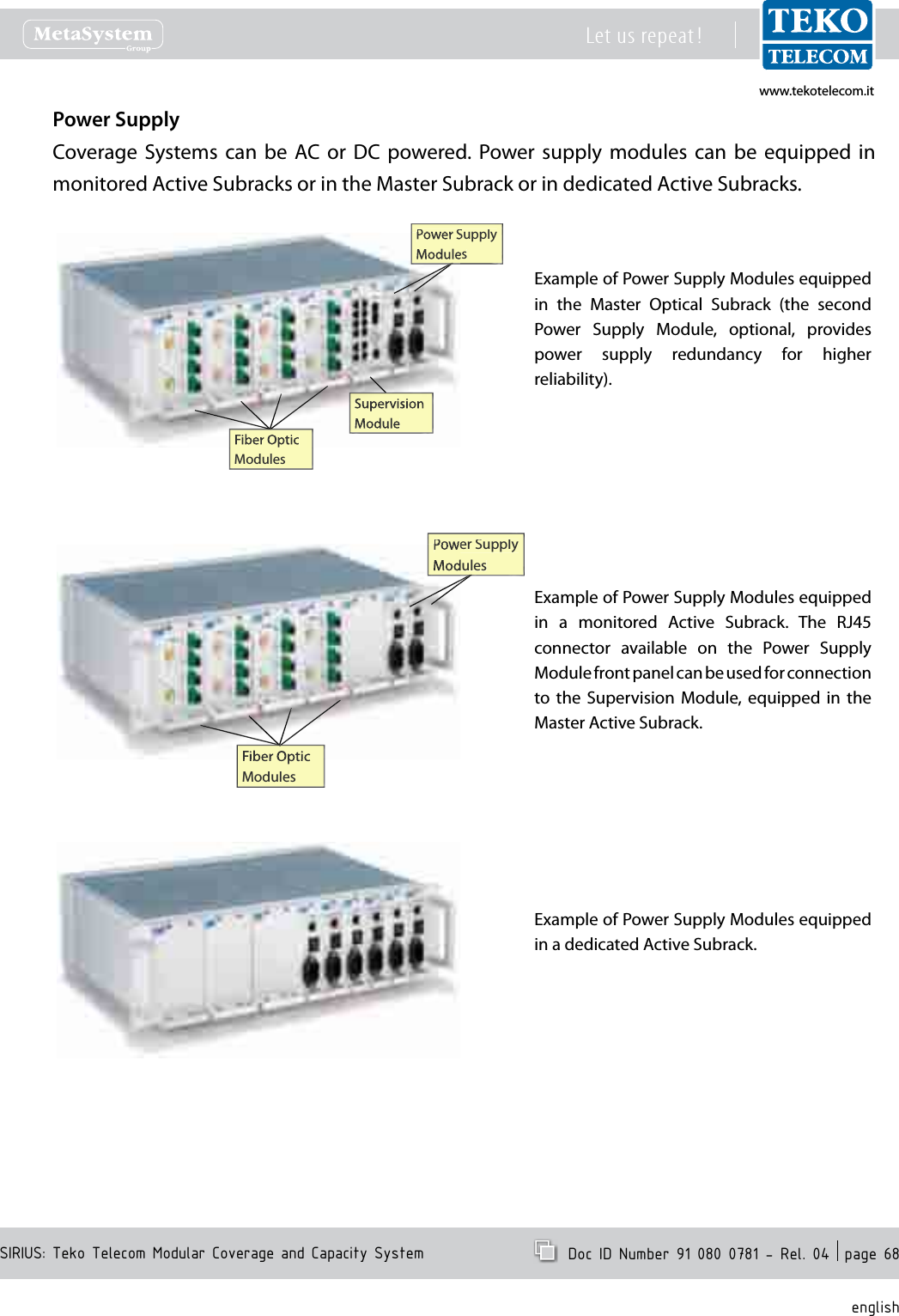
www.tekotelecom.itwww.tekotelecom.itSIRIUS: Teko Telecom Modular Coverage and Capacity SystemLet us repeat !  Doc ID Number 91 080 0781 - Rel. 04  page 44englishPower Supply Modules1.1.6 Power Supply Module•Power Supply modules are used to supply Active Subracks.Active Subracks can be AC powered (Universal mains, 85÷264Vac, 50-60Hz) or DC powered (-72 ÷ -36Vdc): they can be equipped with either AC or DC Power Supply modules.AC Power Supply Module DC Power Supply ModuleThe following gure shows the DC/DC Power Supply Module protection fuse position and electrical rating. If the fuse blows, it has to be replaced.If the fuse blows, it has to be replaced.Fuse SMD T 125V-4APower Supply modules can be equipped in monitored Active Subracks, in the Master Active Subrack or in a dedicated Active Subrack.When Power Supply modules are equipped in monitored Active Subracks, the RJ45 connector
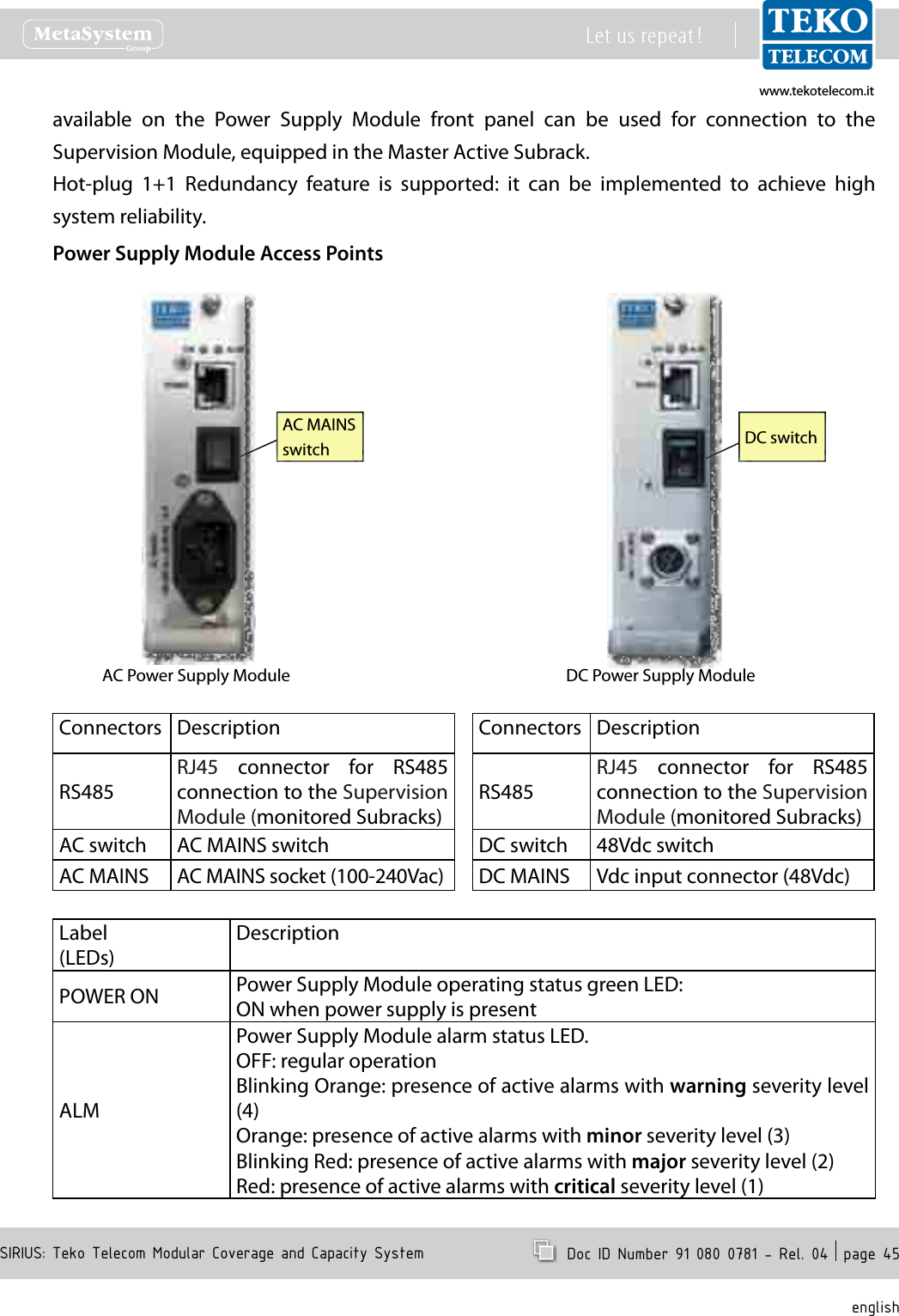
www.tekotelecom.itwww.tekotelecom.itSIRIUS: Teko Telecom Modular Coverage and Capacity SystemLet us repeat !  Doc ID Number 91 080 0781 - Rel. 04  page 45englishavailable  on  the  Power  Supply  Module  front  panel  can  be  used  for  connection  to  the Supervision Module, equipped in the Master Active Subrack.Hot-plug  1+1  Redundancy  feature  is  supported:  it  can  be  implemented  to  achieve  high system reliability.Power Supply Module Access PointsAC Power Supply Module DC Power Supply ModuleDC switchAC MAINS switchConnectors DescriptionRS485RJ45  connector  for  RS485 connection to the Supervision Module (monitored Subracks)AC switch AC MAINS switchAC MAINS AC MAINS socket (100-240Vac)Connectors DescriptionRS485RJ45  connector  for  RS485 connection to the Supervision Module (monitored Subracks)DC switch 48Vdc switchDC MAINS Vdc input connector (48Vdc)Label(LEDs)DescriptionPOWER ON Power Supply Module operating status green LED:ON when power supply is presentALMPower Supply Module alarm status LED.OFF: regular operationBlinking Orange: presence of active alarms with warning severity level (4)Orange: presence of active alarms with minor severity level (3)Blinking Red: presence of active alarms with major severity level (2)Red: presence of active alarms with critical severity level (1)
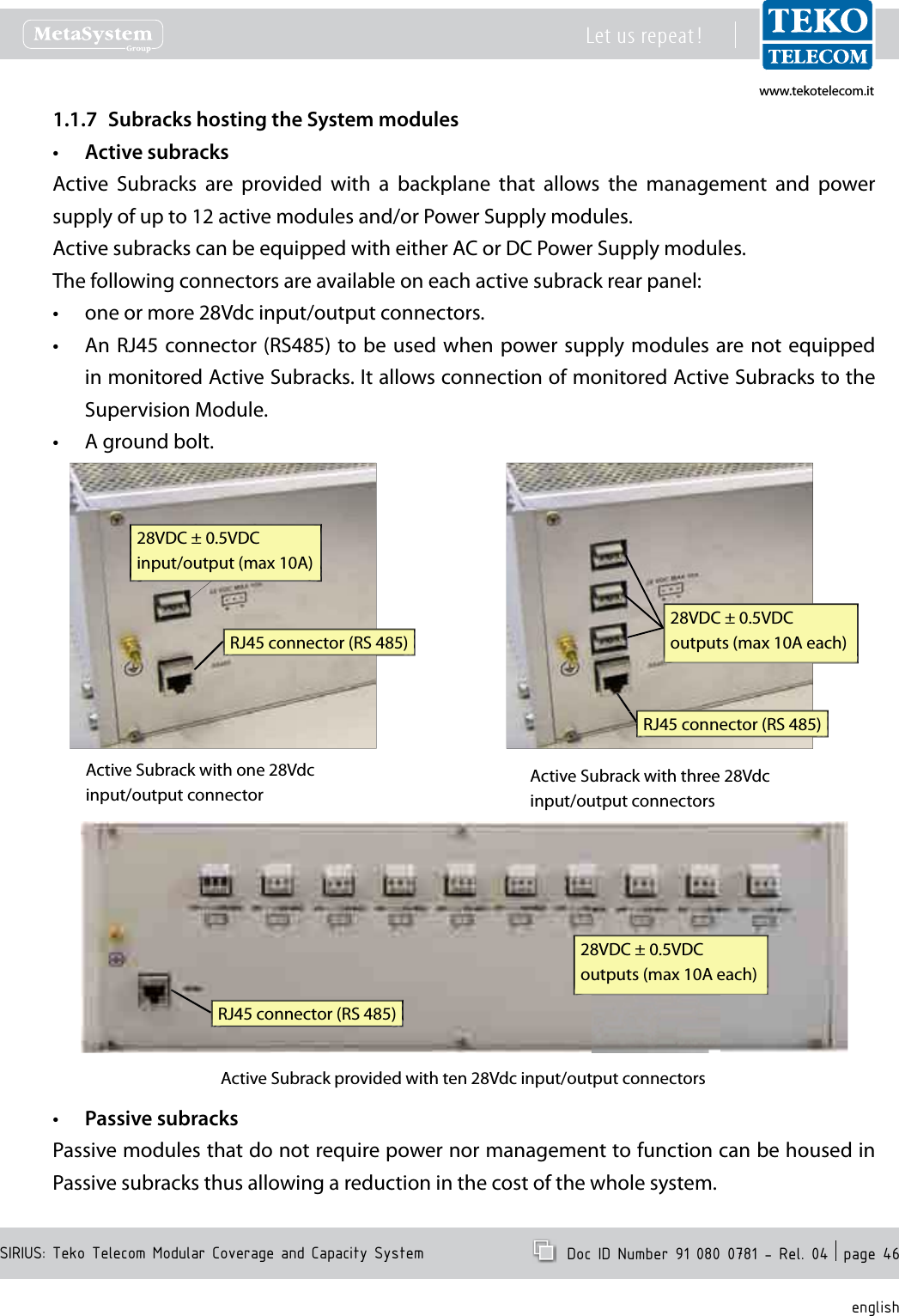
www.tekotelecom.itwww.tekotelecom.itSIRIUS: Teko Telecom Modular Coverage and Capacity SystemLet us repeat !  Doc ID Number 91 080 0781 - Rel. 04  page 46englishSubracks hosting the System modules1.1.7 Active subracks•Active  Subracks  are  provided  with  a  backplane  that  allows  the  management  and  power supply of up to 12 active modules and/or Power Supply modules.Active subracks can be equipped with either AC or DC Power Supply modules.The following connectors are available on each active subrack rear panel:one or more 28Vdc input/output connectors.•An RJ45 connector (RS485) to be used  when power supply modules  are not equipped •in monitored Active Subracks. It allows connection of monitored Active Subracks to the Supervision Module.A ground bolt.•28VDC ± 0.5VDCinput/output (max 10A)RJ45 connector (RS 485)Active Subrack with one 28Vdc input/output connector28VDC ± 0.5VDCoutputs (max 10A each)RJ45 connector (RS 485)Active Subrack with three 28Vdc input/output connectors28VDC ± 0.5VDCoutputs (max 10A each)RJ45 connector (RS 485)Active Subrack provided with ten 28Vdc input/output connectorsPassive subracks•Passive modules that do not require power nor management to function can be housed in Passive subracks thus allowing a reduction in the cost of the whole system.
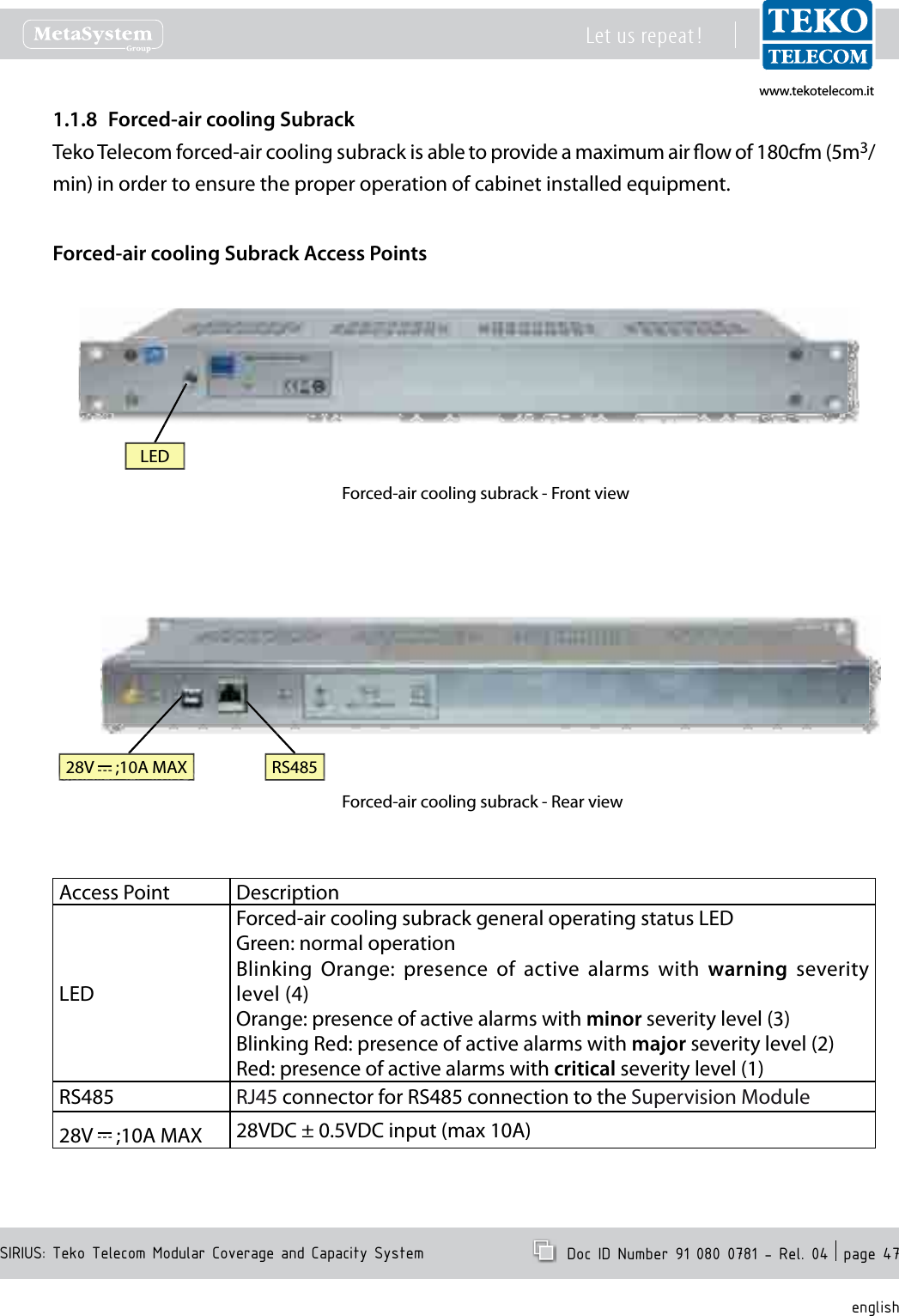
www.tekotelecom.itwww.tekotelecom.itSIRIUS: Teko Telecom Modular Coverage and Capacity SystemLet us repeat !  Doc ID Number 91 080 0781 - Rel. 04  page 47englishForced-air cooling Subrack1.1.8 Teko Telecom forced-air cooling subrack is able to provide a maximum air ow of 180cfm (5m3/min) in order to ensure the proper operation of cabinet installed equipment.Forced-air cooling Subrack Access PointsForced-air cooling subrack - Front viewForced-air cooling subrack - Rear view28V   ;10A MAX RS485LEDAccess Point DescriptionLEDForced-air cooling subrack general operating status LEDGreen: normal operationBlinking  Orange:  presence  of  active  alarms  with  warning  severity level (4)Orange: presence of active alarms with minor severity level (3)Blinking Red: presence of active alarms with major severity level (2)Red: presence of active alarms with critical severity level (1)RS485 RJ45 connector for RS485 connection to the Supervision Module28V   ;10A MAX 28VDC ± 0.5VDC input (max 10A)
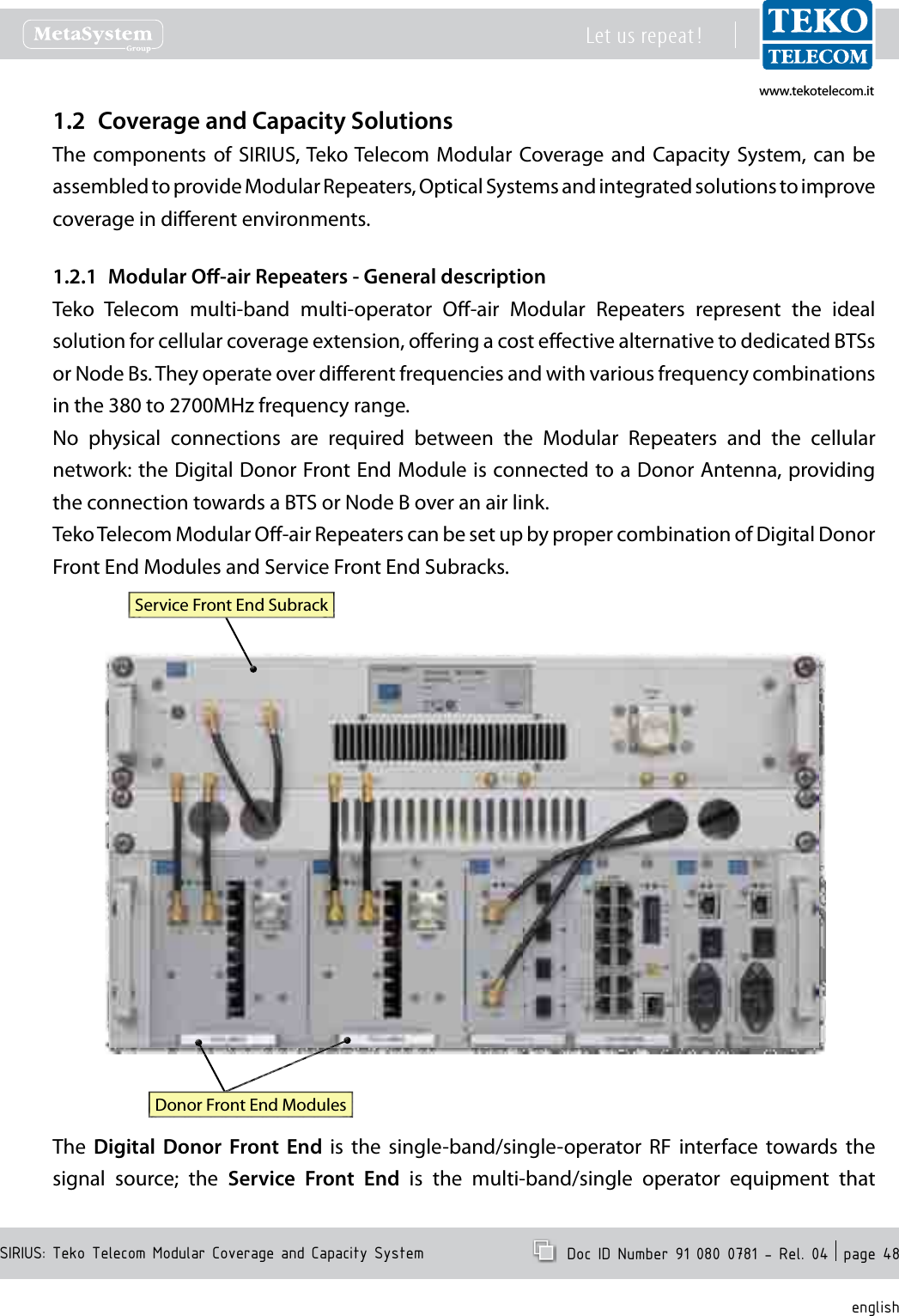
www.tekotelecom.itwww.tekotelecom.itSIRIUS: Teko Telecom Modular Coverage and Capacity SystemLet us repeat !  Doc ID Number 91 080 0781 - Rel. 04  page 48englishCoverage and Capacity Solutions1.2 The components of  SIRIUS, Teko Telecom  Modular  Coverage and  Capacity  System,  can  be assembled to provide Modular Repeaters, Optical Systems and integrated solutions to improve coverage in dierent environments.Modular O-air Repeaters - General description1.2.1 Teko  Telecom  multi-band  multi-operator  O-air  Modular  Repeaters  represent  the  ideal solution for cellular coverage extension, oering a cost eective alternative to dedicated BTSs or Node Bs. They operate over dierent frequencies and with various frequency combinations in the 380 to 2700MHz frequency range.No  physical  connections  are  required  between  the  Modular  Repeaters  and  the  cellular network: the Digital Donor Front End Module is connected to a Donor Antenna, providing the connection towards a BTS or Node B over an air link.Teko Telecom Modular O-air Repeaters can be set up by proper combination of Digital Donor Front End Modules and Service Front End Subracks.Donor Front End ModulesService Front End SubrackThe  Digital  Donor  Front  End  is  the  single-band/single-operator  RF  interface  towards  the signal  source;  the  Service  Front  End  is  the  multi-band/single  operator  equipment  that
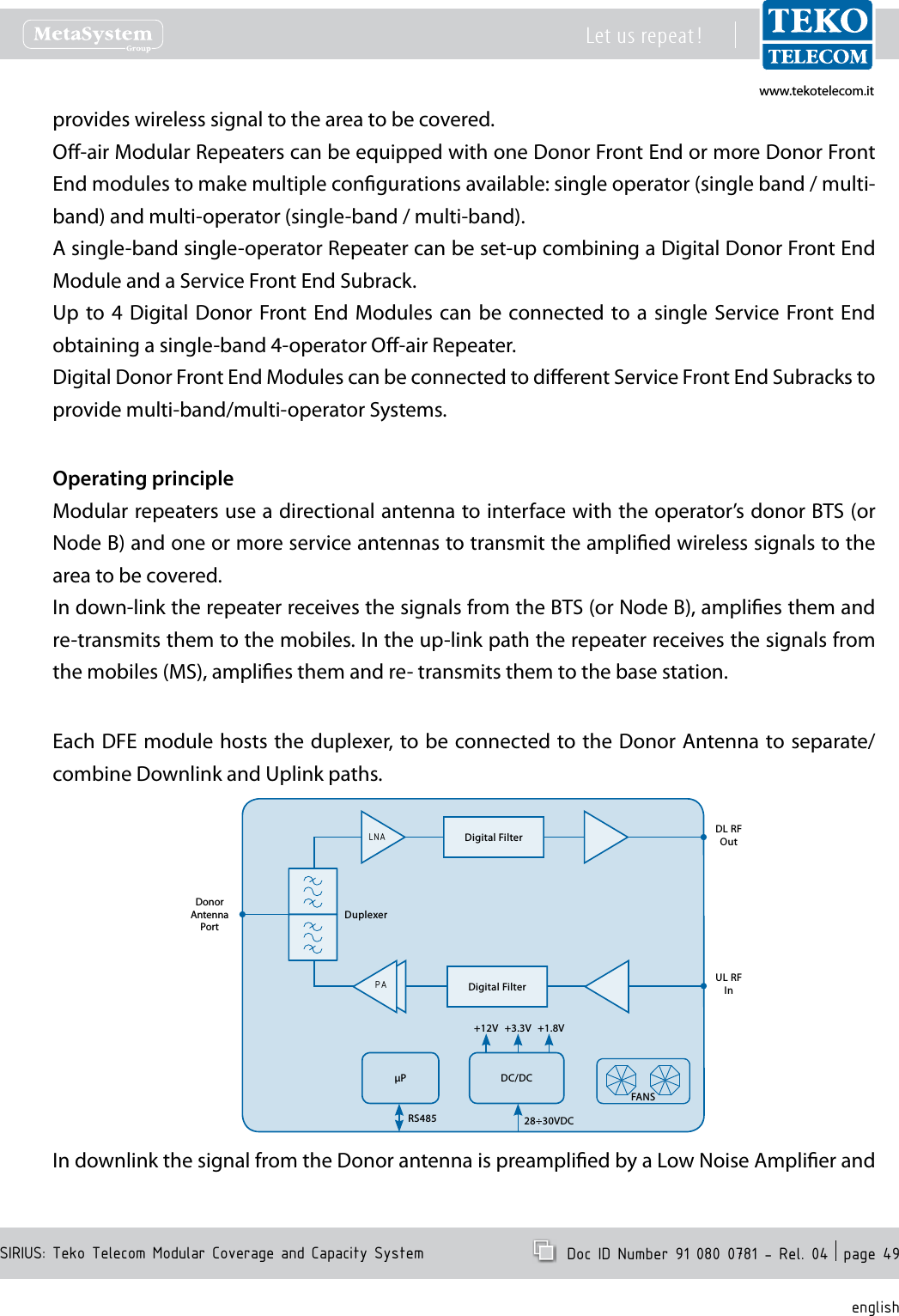
www.tekotelecom.itwww.tekotelecom.itSIRIUS: Teko Telecom Modular Coverage and Capacity SystemLet us repeat !  Doc ID Number 91 080 0781 - Rel. 04  page 49englishprovides wireless signal to the area to be covered.O-air Modular Repeaters can be equipped with one Donor Front End or more Donor Front End modules to make multiple congurations available: single operator (single band / multi-band) and multi-operator (single-band / multi-band).A single-band single-operator Repeater can be set-up combining a Digital Donor Front End Module and a Service Front End Subrack.Up to  4  Digital Donor Front End  Modules  can be connected to a  single  Service Front End obtaining a single-band 4-operator O-air Repeater.Digital Donor Front End Modules can be connected to dierent Service Front End Subracks to  provide multi-band/multi-operator Systems.Operating principleModular repeaters use a directional antenna to interface with the operator’s donor BTS (or Node B) and one or more service antennas to transmit the amplied wireless signals to the area to be covered.In down-link the repeater receives the signals from the BTS (or Node B), amplies them and re-transmits them to the mobiles. In the up-link path the repeater receives the signals from the mobiles (MS), amplies them and re- transmits them to the base station.Each DFE module hosts the duplexer, to be connected to the Donor Antenna to separate/combine Downlink and Uplink paths.DL RF OutUL RFInDonorAntenna PortDuplexerP DC/DC+12V +1.8V+3.3V28÷30VDCRS485FANSDigital FilterDigital FilterPALNAIn downlink the signal from the Donor antenna is preamplied by a Low Noise Amplier and
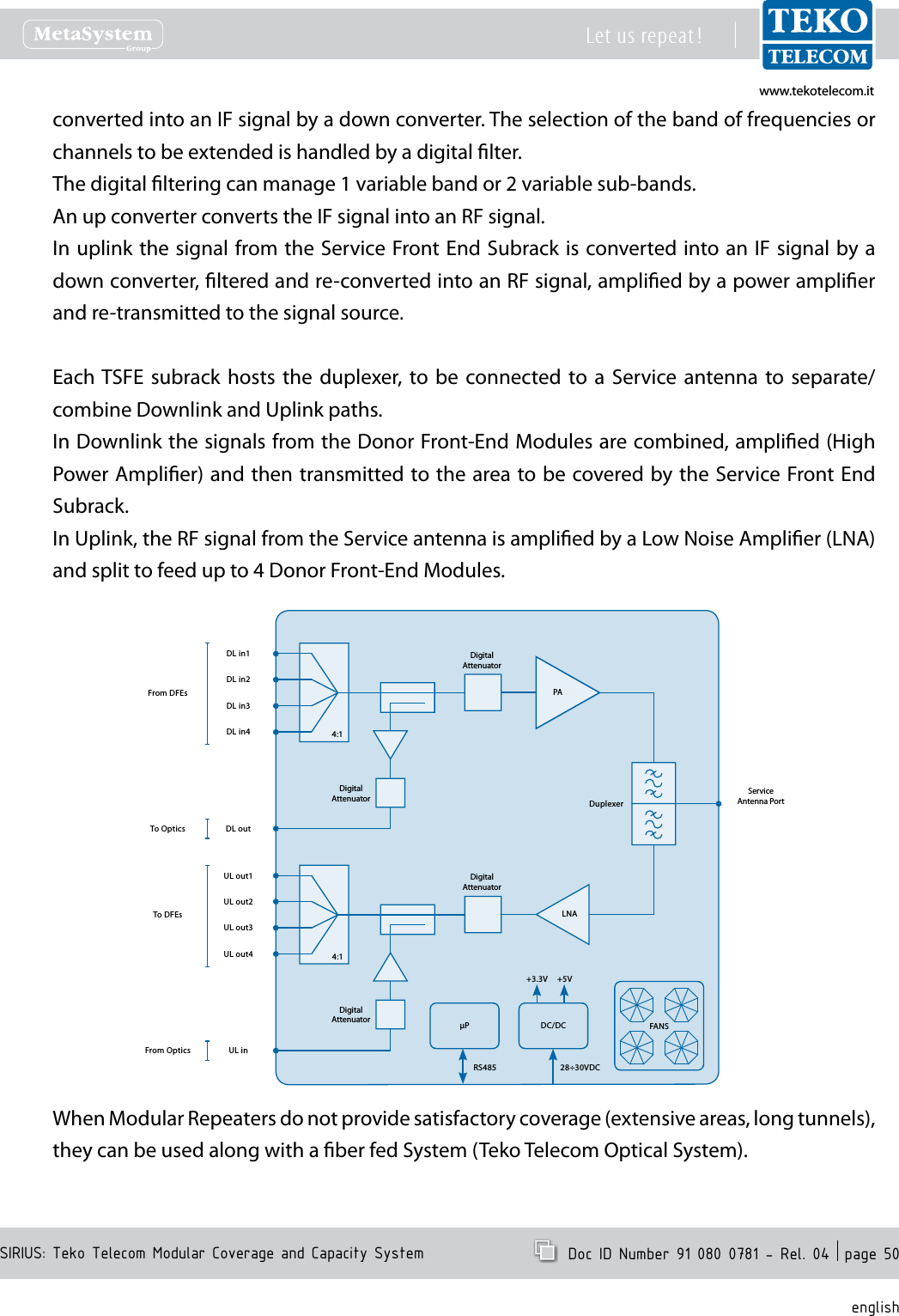
www.tekotelecom.itwww.tekotelecom.itSIRIUS: Teko Telecom Modular Coverage and Capacity SystemLet us repeat !  Doc ID Number 91 080 0781 - Rel. 04  page 50englishconverted into an IF signal by a down converter. The selection of the band of frequencies or channels to be extended is handled by a digital lter.The digital ltering can manage 1 variable band or 2 variable sub-bands.An up converter converts the IF signal into an RF signal.In uplink the signal from the Service Front End Subrack is converted into an IF signal by a down converter, ltered and re-converted into an RF signal, amplied by a power amplier and re-transmitted to the signal source.Each TSFE  subrack  hosts  the duplexer,  to  be  connected  to  a  Service  antenna  to  separate/combine Downlink and Uplink paths.In Downlink the signals from the Donor Front-End Modules are combined, amplied (High Power Amplier) and then transmitted to the area to be covered by the Service Front End Subrack.In Uplink, the RF signal from the Service antenna is amplied by a Low Noise Amplier (LNA) and split to feed up to 4 Donor Front-End Modules.PADL in1ServiceAntenna PortDuplexerP DC/DC+3.3V +5V28÷30VDCRS485DigitalAttenuatorDL in2DL in3DL in4DL outLNAUL out1 DigitalAttenuatorUL out2UL out3UL out4UL inDigitalAttenuatorDigitalAttenuator4:14:1FANSFrom DFEsTo DFEsTo OpticsFrom OpticsWhen Modular Repeaters do not provide satisfactory coverage (extensive areas, long tunnels), they can be used along with a ber fed System (Teko Telecom Optical System).
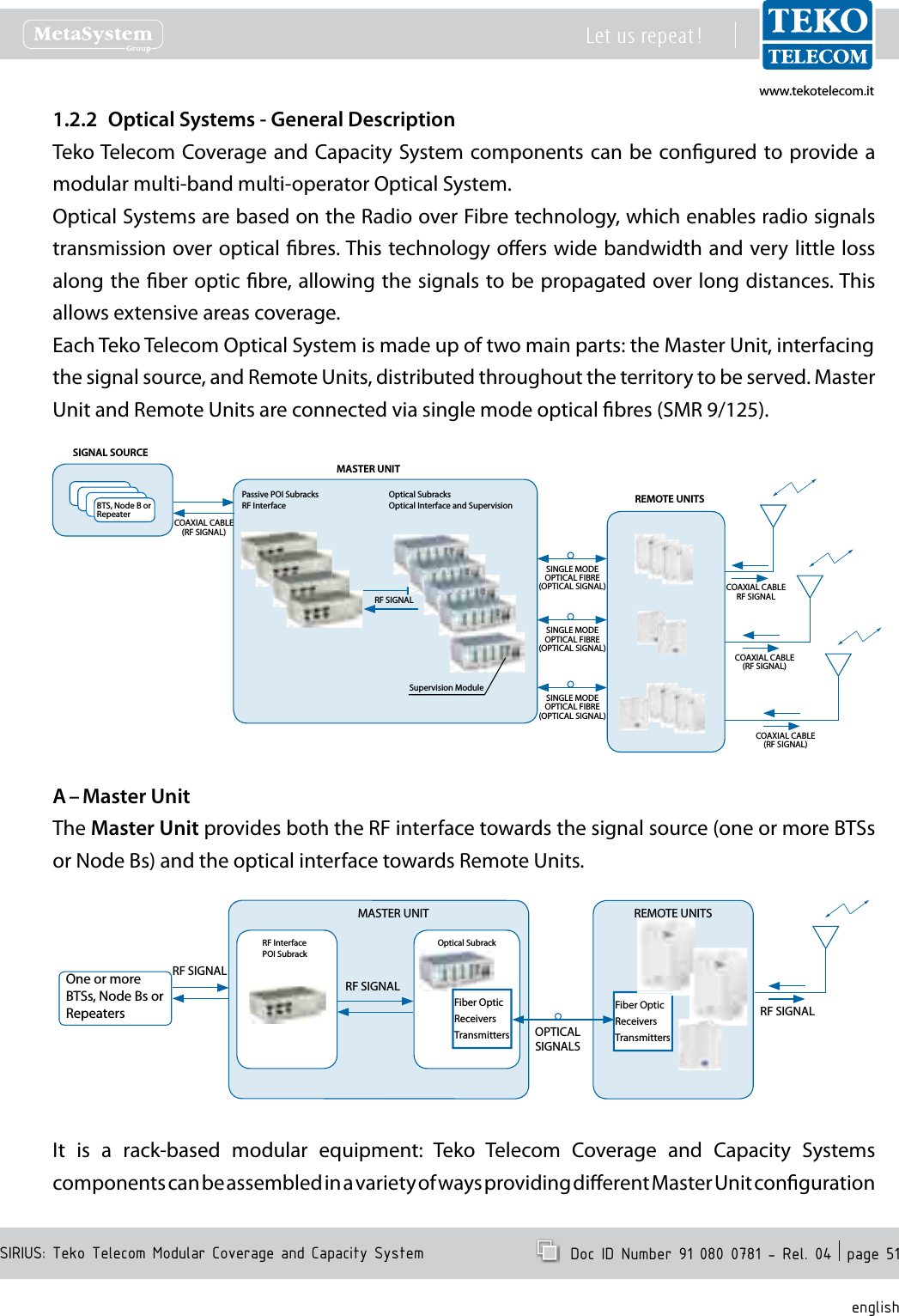
www.tekotelecom.itwww.tekotelecom.itSIRIUS: Teko Telecom Modular Coverage and Capacity SystemLet us repeat !  Doc ID Number 91 080 0781 - Rel. 04  page 51englishOptical Systems - General Description1.2.2 Teko Telecom Coverage and Capacity  System components can be congured to provide a modular multi-band multi-operator Optical System.Optical Systems are based on the Radio over Fibre technology, which enables radio signals transmission over optical bres. This technology oers wide bandwidth and very little loss along the ber optic bre, allowing the signals to be propagated over long distances. This allows extensive areas coverage.Each Teko Telecom Optical System is made up of two main parts: the Master Unit, interfacingthe signal source, and Remote Units, distributed throughout the territory to be served. Master Unit and Remote Units are connected via single mode optical bres (SMR 9/125).REMOTE UNITSPassive POI SubracksRF InterfaceOptical SubracksOptical Interface and SupervisionCOAXIAL CABLE(RF SIGNAL)BTS, Node B or RepeaterSIGNAL SOURCESINGLE MODE OPTICAL FIBRE(OPTICAL SIGNAL) COAXIAL CABLERF SIGNALCOAXIAL CABLE(RF SIGNAL)COAXIAL CABLE(RF SIGNAL)RF SIGNALSupervision ModuleMASTER UNITSINGLE MODE OPTICAL FIBRE(OPTICAL SIGNAL)SINGLE MODE OPTICAL FIBRE(OPTICAL SIGNAL)Master UnitA – The Master Unit provides both the RF interface towards the signal source (one or more BTSs or Node Bs) and the optical interface towards Remote Units.One or more BTSs, Node Bs or RepeatersRF SIGNALFiber OpticReceiversTransmittersREMOTE UNITSRF InterfacePOI SubrackMASTER UNITOptical SubrackRF SIGNALFiber OpticReceiversTransmitters OPTICALSIGNALSRF SIGNALIt  is  a  rack-based  modular  equipment:  Teko  Telecom  Coverage  and  Capacity  Systems components can be assembled in a variety of ways providing dierent Master Unit conguration
www.tekotelecom.itwww.tekotelecom.itSIRIUS: Teko Telecom Modular Coverage and Capacity SystemLet us repeat !  Doc ID Number 91 080 0781 - Rel. 04  page 52englishoptions.Each Master Unit can be equipped with one or more RF interface subracks subracks hosting RF interface modules) and with one or more Optical Subracks (Active Subracks hosting Fiber Optic Transmitter/Receiver modules).When the Master Unit is equipped with Master and Slave Point to Point Modules, RF interface subracks and optical subracks can be separated by a maximum distance of 20km.RF interface subracks•RF  Interface  subracks  operate  over  dierent  frequencies  and  with  various  frequency combinations in the frequency range from 380 to 2700MHz.Each  RF  interface subrack  can  be  equipped  with  one  or  more RF  Interface  modules.  Each module  interfaces  to  a  single  mobile  operator  /  mobile  standard  signal  source,  making multiple  congurations  available:  single  operator  (single  band  /  multi-band)  and  multi-operator (single-band / multi-band).Master Unit RF Interface modules can be Point of Interface (POI/TAPOI) modules and/or Donor Front End modules.Point of Interface modules are connected to the signal source via coaxial cable: each module is connected to a single operator/ single standard signal source (BTS or Node B). Master Units equipped with POI/TAPOI modules must be installed next to the donor BTS or Node B.POI modules can be equipped in passive subracks; TAPOI modules require active subracks (SUB-TRX).Donor  Front  End  modules  allow  the  Optical  System  to  be  driven  without  the  need  of  a dedicated BTS or  Node B: each Donor Front End module interfaces with a Donor Antenna oriented towards a BTS or NodeB (connection over an air link).Donor Front End modules require an active subrack (SUB-TRX). Each subrack can be equipped with up to 4 Donor Front End Modules.RF Interface subracks also host passive modules providing distribution and ltering:1:4 Splitter/Combiner•Band Splitter/Combiner (Triplexer) with built-in 1:4 Splitter/Combiner•Pentaplexer/Esaplexer.•Due to the exible conguration options of Teko Telecom Coverage and Capacity Systems, the same passive modules can be used for dierent purposes:the  4-way  splitter/combiner  can  be  used  to  manage:  multiple  RF  interface  modules, •operating  in  the  same  band  (Multi-Operator  Optical  Systems)  or  multiple  Fiber  Optic
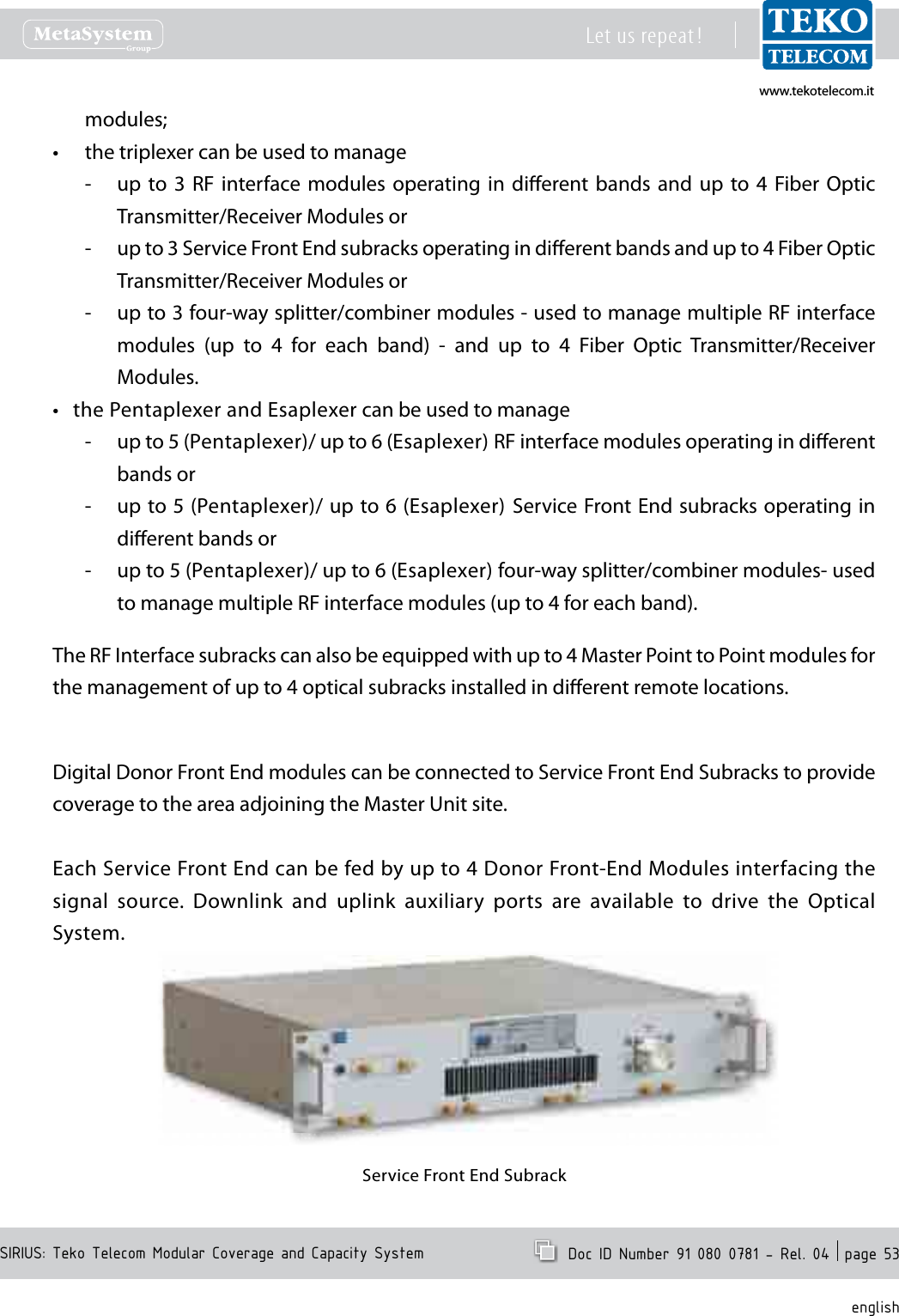
www.tekotelecom.itwww.tekotelecom.itSIRIUS: Teko Telecom Modular Coverage and Capacity SystemLet us repeat !  Doc ID Number 91 080 0781 - Rel. 04  page 53englishmodules;the triplexer can be used to manage•up  to 3  RF  interface modules  operating  in  dierent bands  and  up  to  4  Fiber Optic  -Transmitter/Receiver Modules orup to 3 Service Front End subracks operating in dierent bands and up to 4 Fiber Optic  -Transmitter/Receiver Modules orup to 3 four-way splitter/combiner modules - used to manage multiple RF interface  -modules  (up  to  4  for  each  band)  -  and  up  to  4  Fiber  Optic  Transmitter/Receiver Modules.the Pentaplexer and Esaplexer can be used to manage•up to 5 (Pentaplexer)/ up to 6 (Esaplexer) RF interface modules operating in dierent  -bands orup to 5 (Pentaplexer)/ up to 6 (Esaplexer)  Service Front End subracks operating in  -dierent bands orup to 5 (Pentaplexer)/ up to 6 (Esaplexer) four-way splitter/combiner modules- used  -to manage multiple RF interface modules (up to 4 for each band).The RF Interface subracks can also be equipped with up to 4 Master Point to Point modules for the management of up to 4 optical subracks installed in dierent remote locations.Digital Donor Front End modules can be connected to Service Front End Subracks to provide coverage to the area adjoining the Master Unit site.Each Service Front End can be fed by up to 4 Donor Front-End Modules interfacing the signal  source.  Downlink  and  uplink  auxiliary  ports  are  available  to  drive  the  Optical System.Service Front End Subrack
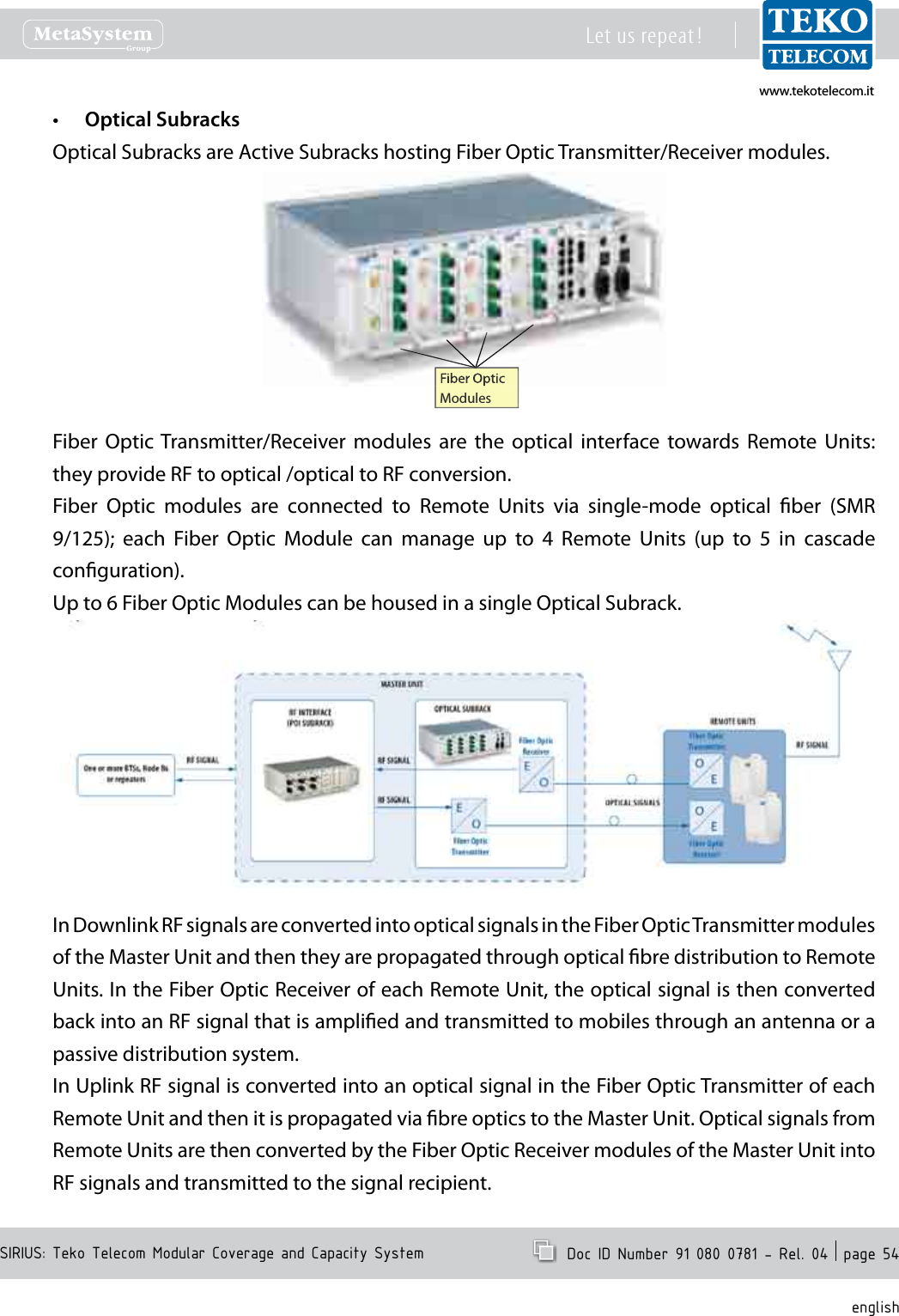
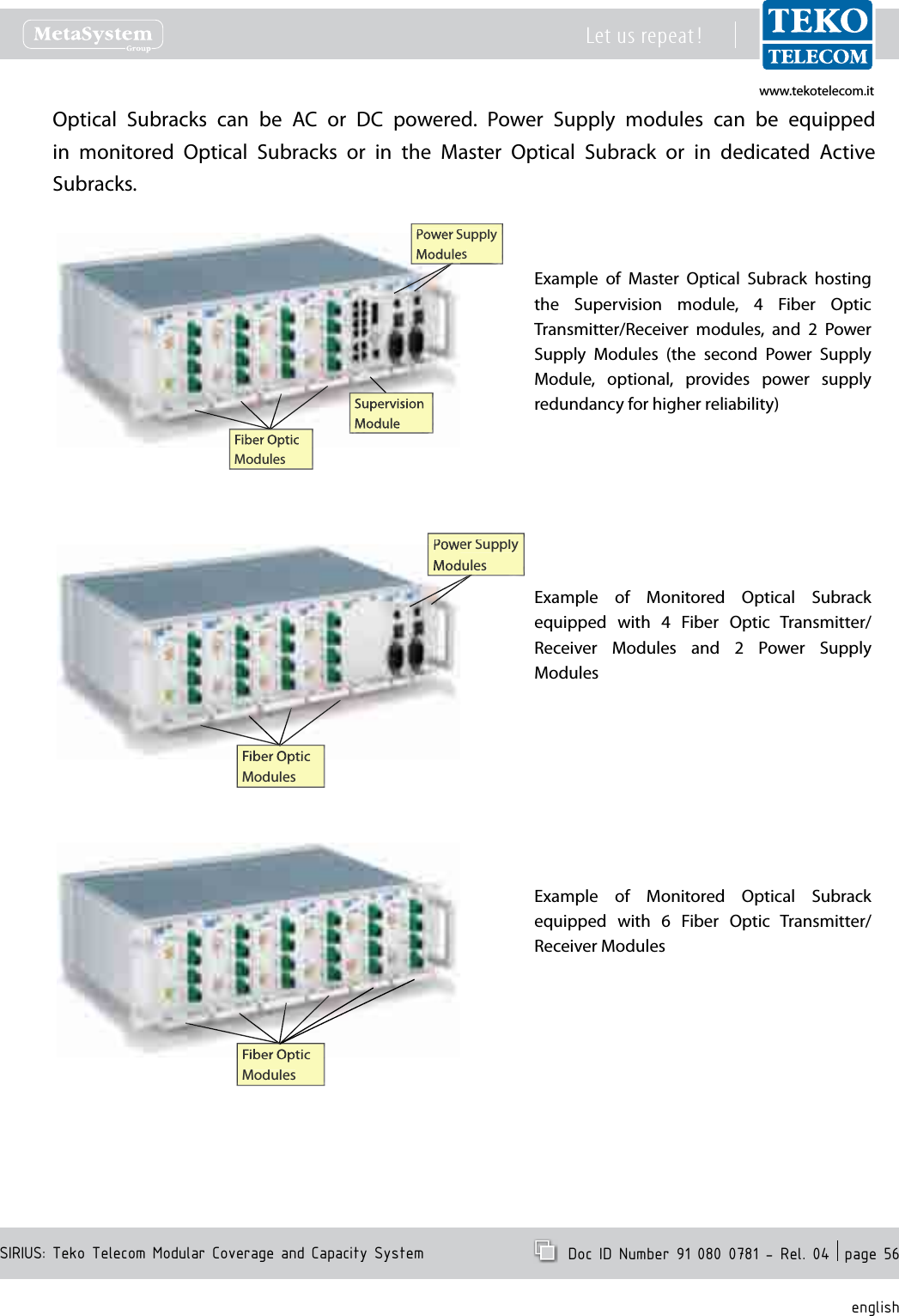
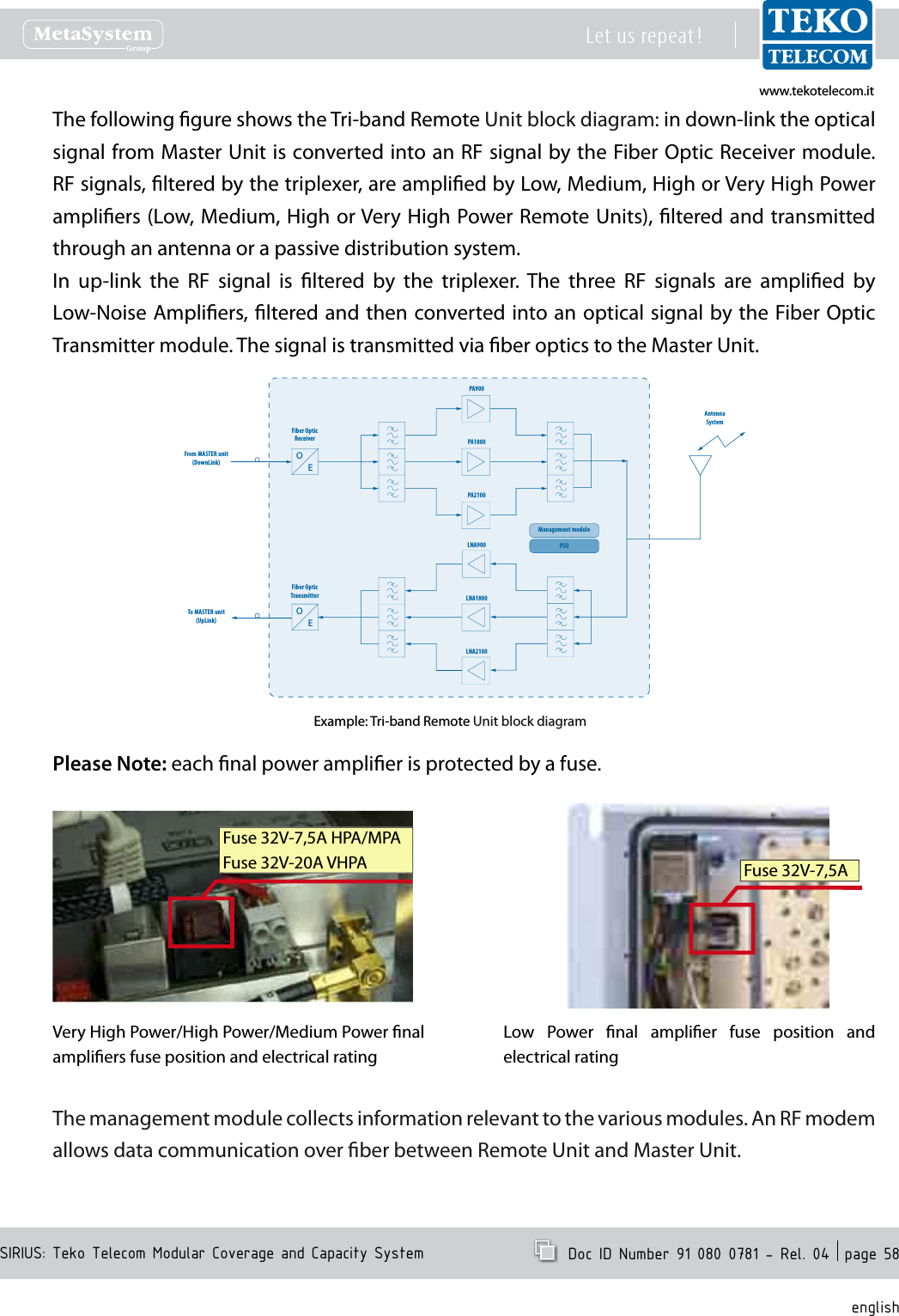
www.tekotelecom.itwww.tekotelecom.itSIRIUS: Teko Telecom Modular Coverage and Capacity SystemLet us repeat !  Doc ID Number 91 080 0781 - Rel. 04  page 54englishOptical Subracks•Optical Subracks are Active Subracks hosting Fiber Optic Transmitter/Receiver modules.Fiber OpticModulesFiber  Optic Transmitter/Receiver  modules  are  the  optical  interface  towards  Remote  Units: they provide RF to optical /optical to RF conversion.Fiber  Optic  modules  are  connected  to  Remote  Units  via  single-mode  optical  ber  (SMR 9/125);  each  Fiber  Optic  Module  can  manage  up  to  4  Remote  Units  (up  to  5  in  cascade conguration).Up to 6 Fiber Optic Modules can be housed in a single Optical Subrack.In Downlink RF signals are converted into optical signals in the Fiber Optic Transmitter modules of the Master Unit and then they are propagated through optical bre distribution to Remote Units. In the Fiber Optic Receiver of each Remote Unit, the optical signal is then converted back into an RF signal that is amplied and transmitted to mobiles through an antenna or a passive distribution system.In Uplink RF signal is converted into an optical signal in the Fiber Optic Transmitter of each Remote Unit and then it is propagated via bre optics to the Master Unit. Optical signals from Remote Units are then converted by the Fiber Optic Receiver modules of the Master Unit into RF signals and transmitted to the signal recipient.
www.tekotelecom.itwww.tekotelecom.itSIRIUS: Teko Telecom Modular Coverage and Capacity SystemLet us repeat !  Doc ID Number 91 080 0781 - Rel. 04  page 55englishUplink and downlink optical signals are transmitted over the same single mode optical bre (Wavelength Division Multiplexing -WDM- technology).The Master Optical Subrack also hosts the Supervision Module for the management of the whole System.When the Coverage System includes point to point links, each remote optical subrack hosts the Slave point to point module to be connected, via optical bre, to its Master Point to Point module, equipped in the RF interface subracks.The slave point to point module includes the 4-way splitter/combiner to manage up to 4 Fiber Optic Transmitter/Receiver Modules and a built-in Supervision unit for the management of the remote subrack and connected Remote Units.4-WAYSPLITTERCOMBINERTRIPLEXER+4-WAYSPLITTERCOMBINERFIBER OPTICTRANSMITTERRECEIVERMODULES4-WAYSPLITTERCOMBINER4-WAYSPLITTERCOMBINERTO/FROMREMOTE UNITSSIGNAL SOURCE SIGNAL SOURCE SIGNAL SOURCE INTERFACE MODULESOPERATING IN THESAME BANDINTERFACE MODULE:POI MODULE orTDFE MODULEINTERFACE MODULESOPERATING IN THESAME BANDINTERFACE MODULE:POI MODULE orTDFE MODULEINTERFACE MODULESOPERATING IN THESAME BANDINTERFACE MODULE:POI MODULE orTDFE MODULEMASTERPOINT TO POINTMODULESLAVEPOINT TO POINTMODULEPOINT TOPOINTOPTICAL LINKPOINT TOPOINTOPTICAL LINKMASTERPOINT TO POINTMODULEREMOTE OPTICAL SUBRACK 1FIBER OPTICTRANSMITTERRECEIVERMODULESTO/FROMREMOTE UNITSFIBER OPTICTRANSMITTERRECEIVERMODULESTO/FROMREMOTE UNITSSLAVEPOINT TO POINTMODULEREMOTE OPTICAL SUBRACK 2OPTICAL SUBRACKMULTI-OPERATOR MULTI-STANDARD RF INTERFACEEQUIPPED WITH MASTER POINT TO POINT MODULES
www.tekotelecom.itwww.tekotelecom.itSIRIUS: Teko Telecom Modular Coverage and Capacity SystemLet us repeat !  Doc ID Number 91 080 0781 - Rel. 04  page 56englishOptical  Subracks  can  be  AC  or  DC  powered.  Power  Supply  modules  can  be  equipped in  monitored  Optical  Subracks  or  in  the  Master  Optical  Subrack  or  in  dedicated  Active Subracks.Example  of  Master  Optical  Subrack  hosting the  Supervision  module,  4  Fiber  Optic Transmitter/Receiver  modules,  and  2  Power Supply  Modules  (the  second  Power  Supply Module,  optional,  provides  power  supply redundancy for higher reliability)Power Supply Power Supply ModulesModulesFiber OpticModulesSupervisionModulePower Supply Power Supply ModulesModulesFiber OpticFiber OpticModulesExample  of  Monitored  Optical  Subrack equipped  with  4  Fiber  Optic  Transmitter/Receiver  Modules  and  2  Power  Supply ModulesFiber OpticFiber OpticModulesExample  of  Monitored  Optical  Subrack equipped  with  6  Fiber  Optic  Transmitter/Receiver Modules
www.tekotelecom.itwww.tekotelecom.itSIRIUS: Teko Telecom Modular Coverage and Capacity SystemLet us repeat !  Doc ID Number 91 080 0781 - Rel. 04  page 57englishRemote UnitsB – Remote  Units  distribute  wireless  signals  throughout  the  area to  be  covered  ;  they  can  be installed up to 20km (12.4miles) from the Master Unit site.Remote Units can be Single, Dual or Tri-band with dierent power classes: Very High, High, Medium and Low.Single,  Dual  or Tri-band  Very  High,  High  and Medium Power Remote UnitSingle,  Dual  or  Tri-band  Low  Power  Remote UnitRemote Units are equipped with the Fiber Optic Receiver and Transmitter modules (for Optical to RF and RF to Optical conversion) power ampliers and ltering.A single Master Unit can  drive up to 144 Remote Units. Various network structures can be supported by the Master Unit: the Remote Units of the same Optical System can be deployed with  a  point-to-point  connection  (star-conguration  -  using  one  ber  optic  per  Remote Unit) or with cascading of up to 5 Remote Units using a single bre and optimized optical couplers.
www.tekotelecom.itwww.tekotelecom.itSIRIUS: Teko Telecom Modular Coverage and Capacity SystemLet us repeat !  Doc ID Number 91 080 0781 - Rel. 04  page 58englishThe following gure shows the Tri-band Remote Unit block diagram: in down-link the optical signal from Master Unit is converted into an RF signal by the Fiber Optic Receiver module. RF signals, ltered by the triplexer, are amplied by Low, Medium, High or Very High Power ampliers (Low, Medium, High or Very High Power Remote Units), ltered and transmitted through an antenna or a passive distribution system.In  up-link  the  RF  signal  is  ltered  by  the  triplexer.  The  three  RF  signals  are  amplied  by Low-Noise Ampliers, ltered and then converted into an optical signal by the Fiber Optic Transmitter module. The signal is transmitted via ber optics to the Master Unit.Fiber OpticReceiverFrom MASTER unit(DownLink)To MASTER unit(UpLink)PA900PA1800PA2100AntennaSystemLNA900LNA1800LNA2100Fiber OpticTransmitterManagement modulePSUOEOEExample: Tri-band Remote Unit block diagramPlease Note: each nal power amplier is protected by a fuse.Very High Power/High Power/Medium Power nal ampliers fuse position and electrical rating Fuse 32V-7,5A HPA/MPAFuse 32V-20A VHPA Fuse 32V-7,5ALow  Power  nal  amplier  fuse  position  and electrical rating The management module collects information relevant to the various modules. An RF modem allows data communication over ber between Remote Unit and Master Unit.
www.tekotelecom.itwww.tekotelecom.itSIRIUS: Teko Telecom Modular Coverage and Capacity SystemLet us repeat !  Doc ID Number 91 080 0781 - Rel. 04  page 59englishHigh/Medium Power Remote Units Composition•POWER  SUPPLY MODULESSUPERVISION MODULEFIBER  OPTIC MODULECAVITY 6-PLEXERPOWER AMPLIFIER (BAND1)POWER AMPLIFIER (BAND2)POWER AMPLIFIER (BAND3)PLEASE NOTE:The Very High/High/Medium Power Remote Unit case is equipped with a lock to guarantee protection  of  the  equipment.  The  following  procedure  describes  how  to  open  the equipment.OPENING THE REMOTE UNITUnlock the cables protection using the keys delivered with the equipment•Remove the cables protection•Remove the Remote Unit cover, sliding it downwards•Unscrew the 6 screws on the Remote Unit door•Open the Remote Unit door.•
www.tekotelecom.itwww.tekotelecom.itSIRIUS: Teko Telecom Modular Coverage and Capacity SystemLet us repeat !  Doc ID Number 91 080 0781 - Rel. 04  page 60englishVery High Power Remote Unit CompositionPOWER  SUPPLY MODULECAVITY 6-PLEXERSUPERVISION MODULEFIBER  OPTIC MODULEPOWER AMPLIFIER (BAND1)POWER AMPLIFIER (BAND2)POWER AMPLIFIER (BAND3)
www.tekotelecom.itwww.tekotelecom.itSIRIUS: Teko Telecom Modular Coverage and Capacity SystemLet us repeat !  Doc ID Number 91 080 0781 - Rel. 04  page 61englishLow Power Remote Units can be either AC powered (Universal mains, 85÷264Vac, 50-60Hz) or DC powered (-72 ÷ -36Vdc).The  following  gure  shows  the  DC  powered  Low  Power  DC/DC  Power  Supply  Module protection fuse position and electrical rating.Fuse SMD T 125V-4AVery  High/  High  and  Medium  power  Remote  Units  are  AC  powered  (Universal  mains, 85÷264Vac, 50-60Hz).The Very High Power Remote Unit Power Supply module is protected by 4 fuses. The following gure shows the protection fuses position and electrical ratings.F20A, 250VF25A, 250V
www.tekotelecom.itwww.tekotelecom.itSIRIUS: Teko Telecom Modular Coverage and Capacity SystemLet us repeat !  Doc ID Number 91 080 0781 - Rel. 04  page 62englishRemote Units External Access Points•Medium/ High and Very High Power Remote Units External Access PointsGROUNDOPTICALDL/UL WDMALARMRF PORTACMAINSLEDMedium power and Single band high power Remote UnitsBottom viewGROUNDOPTICALDL/UL WDMALARMRF PORTACMAINSLEDFANFANSDual band/Triband high power Remote Units Bottom viewVery high power Remote Units and high power Remote Units equipped with ampliers operating in the LTE2600 bandBottom viewGROUNDOPTICALDL/UL WDMALARMRF PORTACMAINSLEDFANFANSREMOTE UNIT GENERAL OPERATING STATUS LED DESCRIPTION LEDGreen: regular operation (no alarm)Blinking Orange: presence of active alarms with warning severity level (4)Orange: presence of active alarms with minor severity level (3)Blinking  Red:  presence  of  active  alarms  with major severity level (2)Red:  presence  of  active  alarms  with  critical severity level (1)Connectors DescriptionRF PORT Down Link/Up Link 7/16 RF connectorOPTICAL DL/UL WDM Optical bres input/output connectorGROUND Equipment groundingAC MAINS AC voltage input (100-240Vac) FAN Fans power supply and control connectorALARM Auxiliary alarms connector (4 in, 4 out)
www.tekotelecom.itwww.tekotelecom.itSIRIUS: Teko Telecom Modular Coverage and Capacity SystemLet us repeat !  Doc ID Number 91 080 0781 - Rel. 04  page 63englishLow Power Remote Units External Access Points (AC Powered)AC MAINSMAINS SOCKETMAINS SWITCHEXTOUT EXTIN RS232RF PORTLEDOPTICALDL/ULSingle/Dual/Tri-Band Low Power Remote Units External Access PointsVac MAINS CONNECTORAC MAINS SWITCH RS232RF PORTLEDOPTICALDL/ULEXTOUT EXTINSix-Band Low Power Remote Unit External Access PointsConnectors DescriptionRF PORT Down Link/Up Link RF connector (N type)OPTICAL DL/UL Optical bres input/output connectorAC MAINS AC voltage input (100-240Vac) and switchEXT OUT External alarms output connectorEXT IN External alarms input connectorRS 232 9-pole D-Sub RS232 connector for Local ManagementLEDRemote Unit general operating status LEDGreen: no alarmBlinking Orange: presence of active alarms with warning severity level (4)Orange: presence of active alarms with minor severity level (3)Blinking Red: presence of active alarms with major severity level (2)Red: presence of active alarms with critical severity level (1)
www.tekotelecom.itwww.tekotelecom.itSIRIUS: Teko Telecom Modular Coverage and Capacity SystemLet us repeat !  Doc ID Number 91 080 0781 - Rel. 04  page 64englishDC Powered Low Power Remote Unit External Access PointsVdc INPUT CONNECTOR48Vdc SWITCHEXTOUT EXTIN RS232RF PORTLEDOPTICALDL/ULConnectors DescriptionRF PORT Down Link/Up Link RF connector (N type)OPTICAL DL/UL Optical bres input/output connector48V  3A Vdc input connector (48Vdc) and switchEXT OUT External alarms output connectorEXT IN External alarms input connectorRS 232 9-pole D-Sub RS232 connector for Local ManagementLEDRemote Unit general operating status LEDGreen: no alarmBlinking  Orange:  presence  of  active  alarms  with  warning  severity level (4)Orange: presence of active alarms with minor severity level (3)Blinking Red: presence of active alarms with major severity level (2)Red: presence of active alarms with critical severity level (1)
www.tekotelecom.itwww.tekotelecom.itSIRIUS: Teko Telecom Modular Coverage and Capacity SystemLet us repeat !  Doc ID Number 91 080 0781 - Rel. 04  page 65englishCoverage Systems Management and Power Supply1.2.3 ManagementTeko Telecom Supervision Module (TSPV) allows the management of the entire Coverage and Capacity System.The System Supervision Module is able to manage the Active Subrack it is equipped in (Master Subrack) and up to other 12 Active Subracks (Monitored Subracks).Twelve ports (1 to 8 and S1 to S4) are available on the Supervision Module front panel to be connected to the RS485 ports of monitored Active Subracks.The  ports  numbered  from  1  to  8  are  available  for  the  connection  to  monitored  subracks mounted within the same rack hosting the Master Subrack.The other four ports (S1 to S4) are available for the management of remote subracks equipped with Slave supervision units.When the Coverage System includes point to point links these ports allow the management of  the  Slave  Point  to  Point  modules  built-in  Supervision  units.  Each  Slave  Point  to  Point module Supervision unit manages the remote optical subrack - hosting the module - and all connected Remote Units.The Coverage System Supervision Module communicates with the Slave Point to Point built-in Supervision via  the single-mode optical  ber (SMR 9/125) connecting Master and Slave Point to Point modules.When  the  Coverage System  does  not  include  point  to  point  links,  the  master  supervision module communicates with the Remote Units via the single-mode optical ber (SMR 9/125) connecting Fiber Optic modules to Remote Units.Address assignementEach monitored Subrack takes its address from the Supervision Module port it is connected to (please refer to Paragraph 2.2.2 RS485 Connections for details).The Active Subrack equipped with the Supervision Module (Master Subrack) takes address = 0 (zero).The whole Coverage System can be accessed and managed simply connecting a PC, either locally or remotely, to the IP address of the System Supervision Module.
www.tekotelecom.itwww.tekotelecom.itSIRIUS: Teko Telecom Modular Coverage and Capacity SystemLet us repeat !  Doc ID Number 91 080 0781 - Rel. 04  page 66englishEXAMPLE:OPTICAL SYSTEMMANAGEMENT ARCHITECTURE:Optical SystemSupervision ModulePassive RFInterfaceOptical and SupervisionMASTEROptical SubrackMonitored Optical Subrack8th MonitoredOptical SubrackOptical SystemMASTER UNIT REMOTE UNITSCommunication interfaces:Ethernet LAN,Modem, VPN, PPPMonitoring PCWeb interfaceLocal management is performed connecting a PC to the Ethernet port (LAN, RJ45 connector), available on the Supervision Module front panel. A local connection is required to perform commissioning.For remote control the System can be  accessed via Ethernet, via external PSTN or wireless modem or via optional built-in wireless modem.The  management  of  the  System  is  performed  via  web  pages:  the  Supervision  Module  is equipped with a web-server and each component of the System is associated to a web page displaying detailed information about the component.The Supervision Module is also equipped with an SNMP-agent, which allows the control of each parameter of the system via SNMP get/set/trap operations.The Supervision Module is also provided with an OpenVPN application that allows remote and secure access to the System using the Internet.Teko Telecom Operation and Maintenance Terminal (OMT) web pages show the Coverage System operating parameters and alarm status. They allow the commissioning, monitoring,
www.tekotelecom.itwww.tekotelecom.itSIRIUS: Teko Telecom Modular Coverage and Capacity SystemLet us repeat !  Doc ID Number 91 080 0781 - Rel. 04  page 67englishsetting and troubleshooting of the whole Coverage System.Teko Telecom Operation Management Centre  (OMC) proprietary software allows the management of multiple Teko Telecom Coverage and Capacity Systems in a Network.OMC is a client-server application: the server collects information, such  as  System status and alarms, relevant to the Systems in the Network. The Server communicates with each System Supervision Module via Ethernet (TCP-IP socket) or via PSTN or wireless modem.The Client provides access to the  information stored in the  Server database. It allows end-users to check the status of the Coverage Systems in the Network via a user friendly graphical interface.
www.tekotelecom.itwww.tekotelecom.itSIRIUS: Teko Telecom Modular Coverage and Capacity SystemLet us repeat !  Doc ID Number 91 080 0781 - Rel. 04  page 68englishPower SupplyCoverage  Systems can  be  AC  or  DC  powered. Power  supply  modules  can  be  equipped  in monitored Active Subracks or in the Master Subrack or in dedicated Active Subracks.Example of Power Supply Modules equipped in  the  Master  Optical  Subrack  (the  second Power  Supply  Module,  optional,  provides power  supply  redundancy  for  higher reliability).Power Supply Power Supply ModulesModulesFiber OpticModulesSupervisionModulePower Supply Power Supply ModulesModulesFiber OpticFiber OpticModulesExample of Power Supply Modules equipped in  a  monitored  Active  Subrack.  The  RJ45 connector  available  on  the  Power  Supply Module front panel can be used for connection to  the  Supervision  Module,  equipped  in  the Master Active Subrack.Example of Power Supply Modules equipped in a dedicated Active Subrack.
www.tekotelecom.itwww.tekotelecom.itSIRIUS: Teko Telecom Modular Coverage and Capacity SystemLet us repeat !  Doc ID Number 91 080 0781 - Rel. 04  page 69englishTeko Telecom Coverage Systems Technical Specications1.2.4 This paragraph makes Coverage and Capacity Systems mechanical, environmental and power supply  specications  available.  Please  refer  to  product  datasheets  for  detailed  electrical specications. Contact Teko Telecom Sales Oce for further information.Remote Units•Remote Unit modelDimensions(HxWxD)Weight Operating temperature rangeDegree of protection(IP)Power supplyLOW POWERSingle  /  Dual  / Triband350x350x100mm (13.78x13.78x3.94 in)max volume - heat sinks and connectors included13 kg(28.7 lbs)-20°C up to +55°C(-4°F up to +131°F)IP32 (box)IP66 (with optional pro-tection kit)85÷264Vac (50-60Hz) AC version-72 ÷ -36Vdc DC version6-band 395 x 414 x 144 mm (15.55 x 16.30 x 5.67in)max volume - heat sinks and connectors included19 kg(41.9lbs)MEDIUM POWERTriband 570x415x260mm(22.44x16.34x10.24 in)max volume - heat sinks, handles and connectors included30 kg(66.1 lbs)-20°C up to +55°C(-4°F up to +131°F)IP66 85÷264Vac (50-60Hz)Dual band 28 kg (61.73 lbs)Single band 26 kg (57.32 lbs)HIGH POWERTriband 570x415x260mm(22.44x16.34x10.24 in)max volume - heat sinks, handles and connectors included32 kg(70.5 lbs)-20°C up to +55°C(-4°F up to +131°F)IP66 85÷264Vac (50-60Hz)Dual band 30 kg(66.1 lbs)Single band 28 kg (61.73 lbs)VERY HIGH POWERTriband 620x415x260mm (24.41x16.34x10.24 in)max volume - heat sinks, handles and connectors included38 kg (83.78 lbs)-20°C up to +55°C(-4°F up to +131°F)IP66 85÷264Vac (50-60Hz)Dual band 37 kg (81.57 lbs)Single band 36 kg (79.37 lbs)
www.tekotelecom.itwww.tekotelecom.itSIRIUS: Teko Telecom Modular Coverage and Capacity SystemLet us repeat !  Doc ID Number 91 080 0781 - Rel. 04  page 70englishSystem Subracks•Dimensions 19”  -  3U  racks  /  depth  270  mm  (10.63  in)  -  Active  and  Passive Subracks19” - 2U rack / depth 360 mm (14.17 in) - Service Front End Subrack19” - 1U rack / depth 270 mm (10.63 in) - Forced-Air Cooling SubrackPower supply (Active Subracks) 85÷264Vac (50-60Hz) (TPSU/AC)-72÷-36Vdc (TPSU/48)Operating temperature range -5°C up to +55°C (+23°F up to +131°F) with proper forced-air cooling
www.tekotelecom.itwww.tekotelecom.itLet us repeat !  Doc ID Number 91 080 0781 - Rel. 04 englishSIRIUS: Teko Telecom Modular Coverage and Capacity System2.System Installation2.System Installation2.System Installation2.System Installation2.System Installation2.System Installation2.System Installation2.System Installation2.System Installation2.System Installation2.System Installation2.System Installation2.System Installation2.System Installation2.System Installation2.System Installation2.System Installation2.System Installation2.System Installation2.System Installation2.System Installation2.System Installation2.System Installation2.System Installation2.System Installation2.System Installation
www.tekotelecom.itwww.tekotelecom.itSIRIUS: Teko Telecom Modular Coverage and Capacity SystemLet us repeat !  Doc ID Number 91 080 0781 - Rel. 04  page 72englishSystem Installation2. Before installing the equipment, carefully read the safety rules herewith attached.A correct system installation and setting procedure requires a good knowledge and experience  in  installing  telecommunication  equipment. These  activities  should  be performed by skilled personnel only.A cabinet cooling forced air ventilation system, able to provide an air ow of up to 180cfm (5m3/min), is required to ensure cabinet installed equipment proper operation.In Finland, Norway and Sweden, the equipment is intended to be installed in RAL (Restricted Access Location), where the equipotential bonding has been applied.The RESTRICTED ACCESS LOCATION is a location for equipment where both of the following apply:-  access  can  only  be  gained  by  SERVICE  PERSONS  or  by  USERS  who  have  been instructed about the reasons for the restrictions applied to the location and about any precautions that shall be taken; and- access is through the use of a TOOL or lock and key, or other means of security, and is controlled by the authority responsible for the location.In Finland, Norway and Sweden, the equipment intended for connection to other equipment or  a  network  shall  have  a  marking  stating  that  the  equipment  must  be  connected  to  an earthed mains socket-outlet.In  Finland:  “Laite  on  liitettävä  suojamaadoituskoskettimilla  varustettuun pistorasiaan”In Norway: “Apparatet må tilkoples jordet stikkontakt”In Sweden: “Apparaten skall anslutas till jordat uttag”Initial CheckMake sure that the supply is complete and/or that the material has not been damaged during transport.The list of the materials that make up the equipment is described in the relative PACKING LIST.Should any parts be missing, or should some be damaged, kindly inform the Sales Dept. of Teko Telecom immediately, in order to facilitate replacing and/or repairing involved parts.
www.tekotelecom.itwww.tekotelecom.itSIRIUS: Teko Telecom Modular Coverage and Capacity SystemLet us repeat !  Doc ID Number 91 080 0781 - Rel. 04  page 73englishMechanical Installation2.1 Before  starting  mechanical  installation,  make  sure  that  the  components  of  the System are not powered.Master Units: make sure that the switches of all the power supply modules equipped in the System are set to O (OFF).Remote Units: make sure that Remote Units are not connected to the MAINS.Please NoteIf the Supervision Module is equipped with the optional wireless modem and/or the optional battery backup, before starting the System installation, please activate the options as follows:Battery  backup  option > :  the  two  internal  backup  batteries  are  not  connected  to  the Supervision  board  in  order  to  prevent  batteries  from  discharging  during  shipment.  To activate the option, perform the following steps:Remove the Supervision module (if necessary): loosen the four screws that x the module 1. to the Subrack and carefully slide the module forward.Connect the terminals of the two backup batteries to the J9 and J10 connectors, available 2. on the Supervision board.Please refer to the following gures for details about the cabling.BackupbatteriesBackup battery and Supervision board connections - Side viewBackup Battery and Supervision board connections - Top viewIf the 3.  optional wireless modem is equipped inside the Supervision module, please refer to the following procedure to insert the SIM card, otherwise carefully slide the Supervision module back into the slot and x its position tightening the 4 screws.BACKUP BATTERY SPECIFICATIONSNominal Voltage 3.7 VNominal Capacity > 1100 mAhType RechargeableCAUTIONRisk of explosion if battery is replaced by an incorrect type.Dispose of used batteries according to the instructions.Backup Batteries Installation and replacement should be performed by skilled personnel only.
www.tekotelecom.itwww.tekotelecom.itSIRIUS: Teko Telecom Modular Coverage and Capacity SystemLet us repeat !  Doc ID Number 91 080 0781 - Rel. 04  page 74englishWireless modem >  option: to insert the wireless modem  SIM  card perform  the  following steps:Remove the Supervision module (if necessary): loosen the four screws that x the module 1. to the Active Subrack and carefully slide the module forward.Insert the SIM card into the wireless modem.2. GSM/GPRS modem•Insert  the  SIM  card  (PIN  code disabled  /  data  transfer  enabled), with  the  gold  side  up,  into  the modem dedicated card slot.Push the SIM card into the slot until it clicks into place. The SIM card slot is provided with a lock switch (black slider on the left of the SIM slot).SIM cardin placeSIM lock switch openedClose the SIM lock switch.Move the black slider to the right position.The SIM card is locked in place.SIM cardlockedSIM lock switch closedSIM card - gold side upUMTS modem•Remove  the  SIM  card  holder cover.To  avoid  damages  to  the  cover, press  lightly  and  slide  the  cover away as shown in gure.SIM card holder coverSlide  the  SIM  card  holder  to  the open position and lift it up.Slide  the  SIM  card  (PIN  code disabled/data transfer enabled for 3G operation) into the card holder.SIM card holder -open positionLower  the  SIM  card  holder  and slide it back to the lock position.Replace  the  card  holder  cover, sliding  it  into  position  carefully, until it clicks.SIM card holder -lock positionCarefully slide the Supervision module back into the slot and x its position tightening the 3. 4 screws.
www.tekotelecom.itwww.tekotelecom.itSIRIUS: Teko Telecom Modular Coverage and Capacity SystemLet us repeat !  Doc ID Number 91 080 0781 - Rel. 04  page 75englishPositioning Master Unit Subracks2.1.1 The  modular  Master  Unit  is  composed of  19”  subracks (N3  compatible).  So,  it  needs  to  be positioned indoor or inside cabinets to guarantee the protection of the equipment against atmospheric agents, humidity and temperature changes.Fasten the rack cabinet, so as to prevent it from turning over.1. Connect the cabinet to the station ground.2. Position the subracks inside the cabinet as follows:3. mount the horizontal rails for support of the equipment;•insert each subrack into the rails and slide it into position carefully. Leave one unit distance •between active subracks for air ow to assure proper cooling;x each subrack to the vertical mounting guides of the cabinet using four screws, to be •inserted into the proper slots;connect each subrack to the cabinet ground bus bar;•insert the modules and tighten the screws available on the module front panel to fasten •the module to the subrack.Please noteMake sure that the System is equipped with the same type of Power Supply modules (same commercial code on handles).To make connections easier, position the subracks as follows:the Service Front End subrack should be positioned over the subrack / subracks hosting •RF interface modules (with TDFE subracks over POI subracks);the  subracks  hosting  RF  interface  modules  and/  or  passive  components  should  be •positioned over Optical Subracks;the subracks  hosting  Power Supply modules should  be  installed in the  lower position. •Power  supply  modules  providing  power  supply  to  other  active  subracks  should  be grouped on the right side of the subrack; the  forced-air  cooling  subrack  should  be  installed  below  the  subracks  hosting  Power •Supply modules, in order to ensure the air ow volume required for the equipment proper operation.
www.tekotelecom.itwww.tekotelecom.itSIRIUS: Teko Telecom Modular Coverage and Capacity SystemLet us repeat !  Doc ID Number 91 080 0781 - Rel. 04  page 76englishPositioning Remote Units2.1.2 Remote Units can be installed either outdoor (on a wall or pole) or inside specic cabinets. Very High/High/Medium power Remote Unit weatherproof IP66 case is equipped with handles to make mounting easier. Very High/High/Medium power Remote Units xing holes position is shown in the following gure.Dimensions (max volume - heat sinks, han-dles and connectors included)HIGH/MEDIUM POWER REMOTE UNIT•approx 570 x 415 x 260 mm (22.44 x 16.34 x 10.24 in)VERY HIGH POWER REMOTE UNIT•approx 620 x 415 x 260 mm (24.41 x 16.34 x 10.24 in)Weightapprox 30 kg (66.14 lbs) - Triband Medium •Power Remote Unitapprox  32  kg  (70.55  lbs)  -  Triband  High •Power Remote Unitapprox  38  Kg  (83.78  lbs)  -  Triband  Very •High Power Remote UnitAABBPOSITION OF THE PRECUT SLOTS IN THE EQUIPMENT SUPPORT BRACKETSThe SINGLE/DUAL/TRIBAND Low power Remote Units xing holes position is shown in the following gure.SINGLE/DUAL/TRIBAND REMOTE UNITSDimensions (max volume - heat sinks and connectors included):approx  350  x  350  x  100mm  (13.78  x 13.78 x 3.94 in)Weightapprox 13  kg  (28.7  lbs) -  Single/Dual/Triband Low Power Remote UnitPOSITION OF THE PRECUT SLOTS IN THE EQUIPMENT SUPPORT BRACKETSAB BA
www.tekotelecom.itwww.tekotelecom.itSIRIUS: Teko Telecom Modular Coverage and Capacity SystemLet us repeat !  Doc ID Number 91 080 0781 - Rel. 04  page 77englishThe SIX-BAND Low power Remote Unit xing holes position is shown in the following gure.6-BAND REMOTE UNITSDimensions (max volume - heat sinks and connectors included):approx  395  x  414  x  144  mm  (15.55  x 16.30 x 5.67in)Weightapprox 19 kg (41.9lbs)POSITION OF THE PRECUT SLOTS IN THE EQUIPMENT SUPPORT BRACKETSABBARemote Units have to be xed in vertical position on the wall or pole, or on the vertical guides present inside the cabinet.WALL MOUNTINGMark the four pre-cut slots position•Drill 4 holes at the marked position•Insert the dowels into the 4 holes•Screw 2 M8 screws into the 2 upper dowels•Hang the Remote Unit inserting the upper pre-cut slots (ref. A) through the screws•Fix the equipment position with other 2 M8 screws to be inserted through the lower pre-•cut slots (ref. B) into the lower holesAfter checking the correct positioning of the equipment, fully tighten the screws.•POLE MOUNTING: a pole mounting kit is available (option).Adequate Remote Units  mounting is  checked by  the following test: a  force, in addition to the  weight  of  the  equipment,  is  applied  downwards  through  the  centre  of  gravity  of  the equipment, for 1minute. The additional force shall be equal to three (3) times the weight of the equipment but not less than 50N. The equipment shall remain secure during the test.
www.tekotelecom.itwww.tekotelecom.itSIRIUS: Teko Telecom Modular Coverage and Capacity SystemLet us repeat !  Doc ID Number 91 080 0781 - Rel. 04  page 78englishIP66 PROTECTION KIT MOUNTING  LOW POWER REMOTE UNITSA protection kit, providing IP66 protection degree, is available as option for Low Power Remote Units outdoor or harsh environment installation.Protection kit mounting instructionsLead the equipment external connection cables through the cable glands, available on •the bottom of the IP66 protection kit.When the  Commissioning  of  the  equipment  has  been  completed• ,  carefully  slide  the IP66  kit  upwards and  tighten  the  cable  glands  until  the  gasket  of  the  lead-through  is tightly around the cable.Fully tighten the 4 screws available inside the 4 xing holes of the IP66 kit to fasten the kit •to the Unit - tool: 4mm (0.16in) Allen key.To remove the kit, loosen the 4 screws xing the kit to the Unit, loosen the cable glands and carefully slide the kit downwards.
www.tekotelecom.itwww.tekotelecom.itSIRIUS: Teko Telecom Modular Coverage and Capacity SystemLet us repeat !  Doc ID Number 91 080 0781 - Rel. 04  page 79englishConnections2.2 The following connections must be performed:RF connections•RF connections change according to the application scenario. This document describes how to:Connect RF interface modules (TDFE modules or Point of Interface modules) to 1.  a single Fiber Optic Transmitter/Receiver Module (Optical Systems).Connect RF interface modules to Master Point to Point modules.2. Connect RF interface modules to Passive Modules providing distribution and ltering and 3. Passive Modules to Optical Modules- Fiber Optic Transmitter/Receiver Modules or Master Point to Point modules (Optical Systems).Connect the Slave Point to Point module, equipped in a remote optical subrack, to Fiber 4. Optic Transmitter/Receiver Modules.Connect TSFE subracks to TDFE modules (Optical Systems and Modular Repeaters) and to 5. Passive Modules providing distribution and ltering (Optical Systems).Connect  the  equipment  providing  coverage  (TSFE  subracks  and  Remote  Units)  to  the 6. Antenna System.RS485 connections•Monitored Active Subracks have to be connected to the System Supervision Module (Optical Systems and Repeaters);OPTICAL connections•Remote Units have to be connected to Optical Subracks via ber optics (Optical Systems).When the Coverage System includes point to point links, the Master and Slave Point to Point modules have to be connected via ber optics.Power Supply connections•Active  Subracks  and  Remote  Units  have  to  be  connected  to  their  power  supply  sources (Optical Systems and Repeaters).Please NoteIn any event, the installer should never connect an antenna to the Master Unit BTS port.
www.tekotelecom.itwww.tekotelecom.itSIRIUS: Teko Telecom Modular Coverage and Capacity SystemLet us repeat !  Doc ID Number 91 080 0781 - Rel. 04  page 80englishRF Connections2.2.1 Connecting RF interface modules (TDFE modules or Point of Interface modules) to a 1. single Optical ModuleThe typical scenario for this module application is the single operator / single band Optical System. The RF interface subrack is equipped either with one POI module or with one Donor Front End module (single operator / single band Optical Systems). The Master Unit can drive 1  Fiber  Optic Transmitter/Receiver Module  (i.e. up  to  4  Remote Units  or  up  to  5  cascaded Remote Units).POI module driving a single Fiber Optic Transmitter/Receiver•BTS or Node B   POI MODULEFIXEDATTENUATORFIBER OPTICTRANSMITTERRECEIVERMODULETO/FROMREMOTE UNITSExample - Block diagram of single operator/single band Systems equipped with one POI moduleConnectionsConnect the POI module DL OUT connector to the Optical module DL RF connector (red line).Connect the POI module UL IN connector to the Optical module UL RF connector (blue line).
www.tekotelecom.itwww.tekotelecom.itSIRIUS: Teko Telecom Modular Coverage and Capacity SystemLet us repeat !  Doc ID Number 91 080 0781 - Rel. 04  page 81englishTDFE module driving a single Fiber Optic Transmitter/Receiver•FIBER OPTICTRANSMITTERRECEIVERMODULETO/FROMREMOTE UNITSDonorAntennaTDFE MODULEExample - Block diagram of single operator/single band Systems equipped with one DFE moduleConnectionsConnect the TDFE module DL output connector to the Optical module DL RF input connector (red line).Connect the TDFE module UL input connector to the Optical module UL RF output connector (blue line).
www.tekotelecom.itwww.tekotelecom.itSIRIUS: Teko Telecom Modular Coverage and Capacity SystemLet us repeat !  Doc ID Number 91 080 0781 - Rel. 04  page 82englishConnecting  RF  interface  modules  (TDFE  modules  or  Point  of  Interface  modules)  to 2. Master Point to Point modulesThe typical scenario for a point to point link application is an Optical System providing coverage to several separate buildings (up to 4); in this application the transmission of signals from/to a group of remote units over a single optical bre allows a signicant reduction in the number of ber optics running long distances. The point to point link requires the RF interface subracks to be equipped with the Master Point to Point module and the remote optical subracks to be equipped with the Slave Point to Point modules.An Optical System serving 4 remote optical subracks via point to point optical links is provided as example.RF INTERFACE SUBRACKBTS or Node B  FIXEDATTENUATORTDFE MODULEBand 1DonorAntennaPOI MODULEBand 2FIBER OPTICTRANSMITTERRECEIVERMODULESTO/FROMREMOTE UNITSMASTERPOINT TO POINTMODULESLAVEPOINT TO POINTMODULEPOINT TOPOINTOPTICAL LINKREMOTE OPTICAL SUBRACK 1FIBER OPTICTRANSMITTERRECEIVERMODULESTO/FROMREMOTE UNITSMASTERPOINT TO POINTMODULESLAVEPOINT TO POINTMODULEPOINT TOPOINTOPTICAL LINKREMOTE OPTICAL SUBRACK 2BTS or Node B  FIXEDATTENUATORPOI MODULEBand 3FIBER OPTICTRANSMITTERRECEIVERMODULESTO/FROMREMOTE UNITSMASTERPOINT TO POINTMODULESLAVEPOINT TO POINTMODULEPOINT TOPOINTOPTICAL LINKREMOTE OPTICAL SUBRACK  3BTS or Node B  FIXEDATTENUATORPOI MODULEBand 4FIBER OPTICTRANSMITTERRECEIVERMODULESTO/FROMREMOTE UNITSMASTERPOINT TO POINTMODULESLAVEPOINT TO POINTMODULEPOINT TOPOINTOPTICAL LINKREMOTE OPTICAL SUBRACK 4
www.tekotelecom.itwww.tekotelecom.itSIRIUS: Teko Telecom Modular Coverage and Capacity SystemLet us repeat !  Doc ID Number 91 080 0781 - Rel. 04  page 83englishConnectionsPOI and TAPOI modules -Connect the Point of Interface module DL OUT connector to the DL connector of the Master PTP module to be connected to the remote optical subrack to be served by the Point of Interface (red lines).Connect the Point of Interface module UL IN connector to the UL connector of the Master PTP module to be connected to the remote optical subrack to be served by the Point of Interface (blue lines).TDFE modules -Connect the Donor Front End DL connector to the DL connector of the Master PTP module to be connected to the remote optical subrack to be served by the DFE (red lines).Connect the Donor Front End UL connector to the UL connector of the Master PTP module to be connected to the remote optical subrack to be served by the DFE (blue lines).
www.tekotelecom.itwww.tekotelecom.itSIRIUS: Teko Telecom Modular Coverage and Capacity SystemLet us repeat !  Doc ID Number 91 080 0781 - Rel. 04  page 84englishConnecting3.    RF  Interface  Modules  TDFE  modules  or  Point  of  Interface  modules  to Passive Modules providing distribution and ltering and Passive Modules to Optical Modules- Fiber Optic Transmitter/Receiver Modules or Master Point to Point Modules (Optical Systems)Due to the exible conguration options of Teko Telecom Coverage and Capacity Systems, the same passive modules can be used for dierent purposes:the 4-way splitter/combiner can be used to manage:•one RF Interface module and multiple Fiber Optic Modules - Fiber Optic Transmitter/ -Receiver Modules  or  Master  Point to  Point Modules  (Single  Operator /  Single  Band Systems);multiple RF interface modules TDFE and/or Point of Interface modules) operating in  -the same band (Multi-Operator Systems).the triplexer can be used to manage:•up to 3 RF interface modules (TDFE and/or Point of Interface modules) operating in  -dierent bands and up to 4 Fiber Optic Modules orup to 3 four-way splitter/combiner - used to manage multiple RF interface modules    -(up to 4 for each band) - and up to 4 Fiber Optic Modules, orup  to  3  Service  Front  Ends  operating  in  dierent  bands  and  up  to  4  Fiber  Optic  -Modules.the Pentaplexer and Esaplexer can be used to manage•up to 5 (Pentaplexer)/ up to 6 (Esaplexer) RF interface modules operating in dierent  -bands orup to 5 (Pentaplexer)/ up to 6 (Esaplexer)  Service Front End subracks operating in  -dierent bands orup to 5 (Pentaplexer)/ up to 6 (Esaplexer) four-way splitter/combiner modules- used  -to manage multiple RF interface modules (up to 4 for each band).Connections  change  according  to  the  application  scenario:  the  following  describes  the connection mode for dierent modules applications.
www.tekotelecom.itwww.tekotelecom.itSIRIUS: Teko Telecom Modular Coverage and Capacity SystemLet us repeat !  Doc ID Number 91 080 0781 - Rel. 04  page 85english4-way  splitter/combiner  used  to  manage  1  RF  Interface  module  and Application A. multiple Fiber Optic Transmitter/Receiver modulesThe typical scenario for this module application is the single operator / single band Optical System.The RF interface subrack is equipped witheither one POI (TAPOI) module or one TDFE module,•the 4-way combiner / splitter to manage up to 4 Fiber Optic Transmitter/Receiver Modules •(i.e. up to 16 Remote Units).4-WAYSPLITTERCOMBINER USEDTO MANAGEUP TO 4 FIBEROPTIC MODULES BTS or Node B   POI MODULEFIXEDATTENUATORFIBER OPTICTRANSMITTERRECEIVERMODULESTO/FROMREMOTE UNITSREMOTE UNITS4-WAYSPLITTERCOMBINER USEDTO MANAGEUP TO 4 FIBEROPTIC MODULES FIBER OPTICTRANSMITTERRECEIVERMODULESTO/FROMREMOTE UNITSREMOTE UNITSTDFE MODULEDonorAntennaExamples - Block diagrams of single operator/single band Systems equipped with the 4-way combiner/splitter
www.tekotelecom.itwww.tekotelecom.itSIRIUS: Teko Telecom Modular Coverage and Capacity SystemLet us repeat !  Doc ID Number 91 080 0781 - Rel. 04  page 86englishConnectionsConnecting POI/TAPOI modules to the 4-way splitter/combiner•Connecting a TAPOI module to the 4-way splitter/combinerConnecting a POI module to the 4-way splitter/combinerConnect  the  POI  (TAPOI)  module  DL  OUT  connector  to  the  4-way  combiner/splitter  DL COMMON input connector (green line).Connect  the  4-way  combiner/splitter  UL  COMMON  output  connector  to  the  POI  (TAPOI) module UL IN connector (yellow line).Connecting TDFE modules to the 4-way splitter/combiner•Connect the DFE module DL connector to the 4-way combiner/splitter DL COMMON input connector (green line).Connect the 4-way combiner/splitter UL COMMON output connector to the POI module UL connector (yellow line).
www.tekotelecom.itwww.tekotelecom.itSIRIUS: Teko Telecom Modular Coverage and Capacity SystemLet us repeat !  Doc ID Number 91 080 0781 - Rel. 04  page 87englishConnecting the 4-way splitter/combiner to Fiber Optic Transmitter/Receiver modules:•Connect each Fiber Optic Transmitter/Receiver Module DL RF input connector to one of the 4-way combiner/splitter DL output connectors (red lines).Connect each Fiber Optic Transmitter/Receiver Module UL RF output connector to one of the  4-way combiner/splitter UL input connectors (blue lines).Please NoteEach 4-way splitter/combiner output/input connector not connected to ber optic modules, must be charged with a 50Ω dummy load.
www.tekotelecom.itwww.tekotelecom.itSIRIUS: Teko Telecom Modular Coverage and Capacity SystemLet us repeat !  Doc ID Number 91 080 0781 - Rel. 04  page 88english4-way  splitter/combiner  used  to  manage  multiple  RF  Interface  modules Application B. operating in the same bandThe typical scenario for this module application is the multi operator / single band Optical System: the RF Interface subracks can be equipped withup to 4 RF Interface modules operating in the same band: 1 POI module or 1 TDFE module •for each operator to be extendedthe 4-way combiner / splitter used to manage the RF Interface modules and one optical •subrack equipped with one Fiber Optic Transmitter/Receiver Module.Another  4-way  combiner/splitter  module  can  be  equipped  to  handle  up  to  4  Fiber  Optic Transmitter/Receiver Modules (please refer to Application A).The  3-operator  /  EGSM  RF  interface equipped  with  2  POI  modules  and  1 TDFE  module  is provided as example: it can be housed in 1 space-optimized 19”-3U subrack equipped with:the 4-way combiner/splitter module and•3 RF Interface modules operating in the same band (GSM or DCS or UMTS - AMPS or PCS •or AWS). The  4-way  combiner/splitter  module  managing  up  to  4  Fiber  Optic  Transmitter/Receiver Modules can be housed in the same subrack.4-way splitter/combiner used  to  manage  multiple RF Interface modulesPOI modules operating in the EGSM bandDFE module operating in the EGSM bandExample: 3-operator / EGSM RF interface layout
www.tekotelecom.itwww.tekotelecom.itSIRIUS: Teko Telecom Modular Coverage and Capacity SystemLet us repeat !  Doc ID Number 91 080 0781 - Rel. 04  page 89english4-WAYSPLITTERCOMBINERTO/FROMREMOTE UNITS4-WAYSPLITTERCOMBINER USEDTO MANAGEUP TO 4 FIBEROPTIC MODULES FIBER OPTICTRANSMITTERRECEIVERMODULESBTS or Node B  BTS or Node B  POI MODULEBand 1FIXEDATTENUATORPOI MODULEBand 1FIXEDATTENUATORTDFE MODULEBand 1DonorAntennaMulti-operator / single band Optical System block diagram - Example
www.tekotelecom.itwww.tekotelecom.itSIRIUS: Teko Telecom Modular Coverage and Capacity SystemLet us repeat !  Doc ID Number 91 080 0781 - Rel. 04  page 90englishConnectionsConnect each POI module DL OUT connector to one of the 4-way combiner/splitter DL input connectors (green lines).Connect each POI module UL-IN connector to one of the 4-way combiner/splitter UL output connectors (yellow lines).Connect  the  DFE  module  DL  connector  to  one  of  the  4-way  combiner/splitter  DL  input connectors (green lines).Connect  the  DFE  module  UL  connector  to  one  of  the  4-way  combiner/splitter  UL  output connectors (yellow lines).Connect the 4-way combiner/splitter DL COMMON output connector to the optical subrack DL RF input connector (red line).Connect the 4-way combiner/splitter UL COMMON input connector to the optical subrack UL RF output connector (blue line).Optical SubrackPLEASE NOTEEach  4-way  splitter/combiner output/input  connector  not connected  to  POI  modules, must  be  charged  with  a  50Ω dummy load
www.tekotelecom.itwww.tekotelecom.itSIRIUS: Teko Telecom Modular Coverage and Capacity SystemLet us repeat !  Doc ID Number 91 080 0781 - Rel. 04  page 91englishUp to 4 Fiber Optic Transmitter/Receiver Modules (i.e. up to 16 Remote Units) can be managed if another 4-way combiner/splitter module is equipped.Connect the 4-way combiner/splitter modules UL COMMON connectors (white line).•Connect the 4-way combiner/splitter modules DL COMMON connectors (light blue line).•4-way splitter/combiner used  to  manage  up  to  4 Fiber Optic Modules4-way splitter/combiner used to manage up to 4 RF Interface modulesPlease refer to Application A for details about the cabling when the 4-way splitter/combiner is used to manage multiple Fiber Optic modules.

Navigation menu