Testo SE and KGaA 04404000 testo 400 - Universal IAQ instrument User Manual Ubersetzung Zulassung
Testo SE & Co. KGaA testo 400 - Universal IAQ instrument Users Manual Ubersetzung Zulassung
Contents
- 1. Users manual_0975 0111 en 01
- 2. Users manual_0975 0122 en 01
- 3. Users Manual_Ubersetzung Zulassung
Users Manual_Ubersetzung Zulassung
![Pos: 2 /BAL/4xxx/ 0971 4011 [testo 400 - Klim a-Messgerät] KAL/Ti telseite_testo 400 @ 32\mo d_1535461140088_6. docx @ 413914 @ @ 1 testo 400 - Universal IAQ instrument Short instructions === Ende der Liste für Textmarke Inhalt1 ===](https://usermanual.wiki/Testo-SE-and-KGaA/04404000.Users-Manual-Ubersetzung-Zulassung/User-Guide-4163938-Page-1.png)
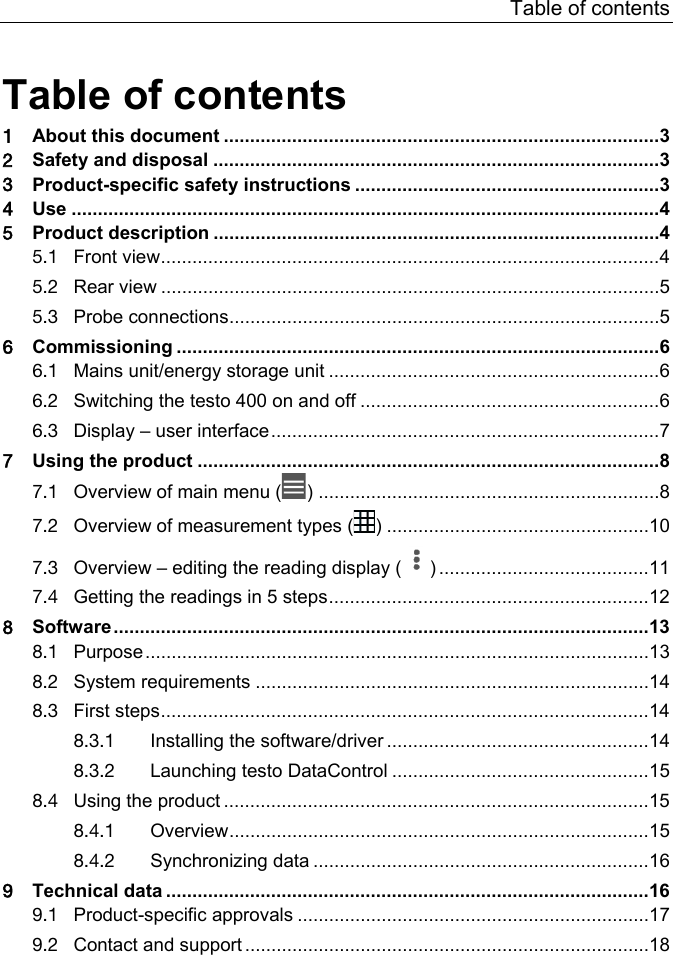
![1 About this document 3 Pos: 6 /BAL/Allg emein/01 Sicherheit und Entsorgung/01_01 Zu di esem Dokument/01_01_10 U1 Zu d iesem Dokument @ 30\mod_ 1520933199962_6.docx @ 388921 @ 1 @ 1 1 About this document Pos: 7 /BAL/Allg emein/01 Sicherheit und Entsorgung/01_01 Zu di esem Dokument/01_01_01 B estandteil des Gerä ts @ 13\mod_1372234681441_6. docx @ 163493 @ @ 1 • The instruction manual is an integral part of the instrument. Pos: 8 /BAL/Allg emein/01 Sicherheit und Entsorgung/01_01 Zu di esem Dokument/01_01_04 D okument aufbewahren @ 13\mo d_1372236534919_6.d ocx @ 163630 @ @ 1 • Keep this documentation to hand so that you can refer to it when necessary. Pos: 9 /BAL/Allg emein/01 Sicherheit und Entsorgung/01_01 Zu di esem Dokument/01_01_02 B AL aufmerksam lesen @ 13\mo d_1372236932079_6.do cx @ 163696 @ @ 1 • Please read this instruction manual through carefully and familiarize yourself with the product before putting it to use. Pos: 10 /BAL/Allg emein/01 Sicherheit und Entsorgung/01_01 Zu di esem Dokument/01_01_ 06 BAL weitergeben @ 13\mod_137223705 9173_6.doc x @ 163729 @ @ 1 • Hand this instruction manual on to any subsequent users of the product. Pos: 11 /BAL/Allg emein/01 Sicherheit und Entsorgung/01_01 Zu di esem Dokument/01_01_ 03 Sicherheits- und Warnhi nweise beachten @ 13\mod_ 1372237131307_6.docx @ 163762 @ @ 1 • Pay particular attention to the safety instructions and warning advice in order to prevent injury and damage to the product. Pos: 12 /BAL/4xxx/ 0971 4011 [testo 400 - Klim a-Messgerät] KAL/Hinweis _Weiterführende Informationen @ 32\mod_1537961112026_6.docx @ 417835 @ @ 1 You will also find further information about your testo 400 universal IAQ instrument in the online instruction manual on the Testo website, www.testo,com, under the product-specific download. Pos: 13 /BAL/Allg emein/01 Sicherheit und Entsorgung/01_00 Si cherheit und Entsorgung /01_00 U1 Sicherheit und Entsorgung @ 13\mod_13518503811 31_6.docx @ 149195 @ 1 @ 1 2 Safety and disposal Pos: 14 /BAL/Allg emein/01 Sicherheit und Entsorgung/01_03 Si cherheit/01_02_34 Hi nweis auf Beileger 0975 0111 Al lgmeine Sicherhe itshinweise_Kur zform @ 31\mo d_1526545839711_6.doc x @ 398395 @ @ 1 Take the testo Information document into account (accompanies the product). Pos: 15 /BAL/4xxx/ 0971 4011 [testo 400 - Klim a-Messgerät] KAL/Ü1 + Text Produktspezifische Sicherheitshinweise @ 32\mod_1535462338457_ 6.docx @ 413986 @ 1 @ 1 3 Product-specific safety instructions DANGER Integrated magnet Danger to life for persons with pacemakers! - Keep a distance of at least 20 cm between your pacemaker and the measuring instrument. ATTENTION Integrated magnet Damage to other devices! - Keep a safe distance from devices that may be damaged by magnetism (e.g. monitors, computers, credit cards, memory cards, etc.).](https://usermanual.wiki/Testo-SE-and-KGaA/04404000.Users-Manual-Ubersetzung-Zulassung/User-Guide-4163938-Page-5.png)
![4 Use 4 Pos: 16 /BAL/4xxx/ 0971 4011 [testo 400 - Klim a-Messgerät] KAL/ Ü1 + Text Verwendung @ 32\mod_15354626508 83_6.docx @ 414023 @ 1 @ 1 4 Use The testo 400 is an instrument for measuring climate-related parameters. The testo 400 is particularly suitable for carrying out comfort level measurements for workplace evaluation and flow measurements in and on air conditioning systems. The instrument is only to be used by qualified expert personnel. The product must not be used in potentially explosive atmospheres! Pos: 17 /BAL/4xxx/ 0971 4011 [testo 400 - Klim a-Messgerät] KAL/ Ü1 Produktbeschreibung @ 32\mod_1535462845989_6.do cx @ 414060 @ 1 @ 1 5 Product description Pos: 18 /BAL/4xxx/ 0971 4011 [testo 400 - Klim a-Messgerät] KAL/ Ü2 + Text Frontansicht @ 32\mo d_1535462894602_6.docx @ 414097 @ 2 @ 1 5.1 Front view 1 On/Off button 2 Display – user interface (see section 6.3) 3 USB port/mains connection 4 Probe connections (see section 5.3)](https://usermanual.wiki/Testo-SE-and-KGaA/04404000.Users-Manual-Ubersetzung-Zulassung/User-Guide-4163938-Page-6.png)
![5 Product description 5 Pos: 19 /BAL/4xx x/0971 4011 [testo 400 - Klim a-Messgerät] KAL/Ü2 + Text Rückansicht @ 32\mod_1535521784171_6.docx @ 414135 @ 2 @ 1 5.2 Rear view 1 Camera 2 Differential pressure measurement connections (+/- marking) 3 Magnets 4 Attachment point for carrying strap 5 USB port/mains connection CAUTION Make sure the pressure tube does not jump away from the connection socket. Risk of injury! - Ensure correct connection. Pos: 20 /BAL/4xxx/ 0971 4011 [testo 400 - Klim a-Messgerät] KAL/Ü2 + Text Fühleranschlüsse @ 32\mod_1535527303371_ 6.docx @ 414172 @ 2 @ 1 5.3 Probe connections](https://usermanual.wiki/Testo-SE-and-KGaA/04404000.Users-Manual-Ubersetzung-Zulassung/User-Guide-4163938-Page-7.png)
![6 Commissioning 6 1 Thermocouple probe type K connection (T1 and T2) 2 Probe connection with TUC connector (A and B) Pos: 21 /BAL/4xxx/ 0971 4011 [testo 400 - Klim a-Messgerät] KAL/Ü1 Inbetriebnahme @ 32\mod_1535527579242_ 6.docx @ 414209 @ 1 @ 1 6 Commissioning Pos: 22 /BAL/4xxx/ 0971 4011 [testo 400 - Klim a-Messgerät] KAL/Ü2 + Text Netzteil / Energiespeicher @ 32\mod_1535528075581_ 6.docx @ 414246 @ 2 @ 1 6.1 Mains unit/energy storage unit The measuring instrument is supplied with an energy storage unit. Fully charge the energy storage unit before using the measuring instrument. Plug the mains unit USB cable into the USB port on the side. If the mains unit is connected, the measuring instrument is automatically powered via the mains unit. Only charge the energy storage unit at an ambient temperature of 0 to 45 °C. Pos: 23 /BAL/4xxx/ 0971 4011 [testo 400 - Klim a-Messgerät] KAL/Ü2 + testo 400 Gerät ein- und ausschalten @ 32\mod_1535528616122_6. docx @ 414283 @ 2 @ 1 6.2 Switching the testo 400 on and off Current status Action Function Instrument off Press and hold down the button (> 3 sec) Instrument is switched on When the measuring instrument is started for the first time, the setup wizard guides you through the following setting parameters step by step: - Language - Country - Units - Wireless LAN - Date and time - Own company address - E-mail account - Customer registration After the setup wizard, a tutorial can be launched. The tutorial demonstrates the general operation and the most important functions of the measuring instrument using examples.](https://usermanual.wiki/Testo-SE-and-KGaA/04404000.Users-Manual-Ubersetzung-Zulassung/User-Guide-4163938-Page-8.png)
![6 Commissioning 7 Current status Action Function Instrument on Press the button briefly (< 1 sec) Instrument is switched to standby mode. The instrument is re-activated when the button is pressed again. Instrument on Press and hold down the button (> 1 sec) Choice: press [OK] to switch the instrument off or press [Cancel] to cancel switch-off of the instrument. The startup wizard and the tutorial can be executed again at any time in the main menu under Setup wizard. Measuring values that have not been saved are lost when the measuring instrument is switched off. Pos: 24 /BAL/4xxx/ 0971 4011 [testo 400 - Klim a-Messgerät] KAL/Ü2 + Text Display - Bedienoberfläche @ 32\mod_1535530204471_ 6.docx @ 414320 @ 2 @ 1 6.3 Display – user interface 1 Open main menu 2 Display of the measurement period 3 Display of calculated measurement results 4 Number of connected probes 5 Reading for each probe](https://usermanual.wiki/Testo-SE-and-KGaA/04404000.Users-Manual-Ubersetzung-Zulassung/User-Guide-4163938-Page-9.png)
![7 Using the product 8 6 Can be controlled with different function keys 7 Instrument status bar 8 Options 9 Edit reading display Further symbols on the user interface (without numbering) One level back Exit view Share report Search Favourite Delete More information Display report Multiple selection Pos: 25 /BAL/4xxx/ 0971 4011 [testo 400 - Klim a-Messgerät] KAL/ Ü1 Produkt verwenden @ 32\mod_ 1535530937119_6.docx @ 414357 @ 1 @ 1 7 Using the product Pos: 26 /BAL/4xxx/ 0971 4011 [testo 400 - Klim a-Messgerät] KAL/ Ü2 + Text Übersicht Hauptmenü @ 32\mod_1535531048893_6.d ocx @ 414394 @ 2 @ 1 7.1 Overview of main menu ( )](https://usermanual.wiki/Testo-SE-and-KGaA/04404000.Users-Manual-Ubersetzung-Zulassung/User-Guide-4163938-Page-10.png)
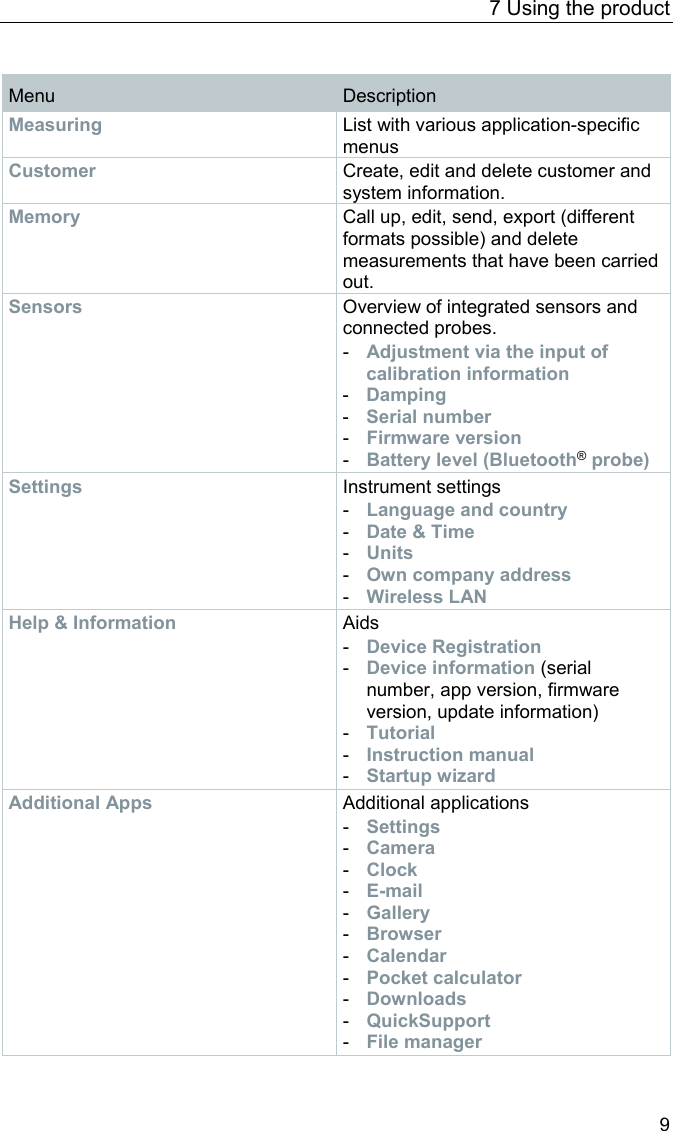
![7 Using the product 10 Pos: 27 /BAL/4xxx/ 0971 4011 [testo 400 - Klim a-Messgerät] KAL/Ü2 + Text Übersicht Messarten @ 32\mod_1535532166993_ 6.docx @ 414431 @ 2 @ 1 7.2 Overview of measurement types ( ) Measuring applications Basic view Volume flow – Duct Volume flow – Duct traverse (EN 12599) Volume flow – Duct traverse (ASHRAE 111) Volume flow – Outlet Volume flow – Funnel Volume flow – Pitot tube Volume flow – k-factor Comfort – PMV/PPD (EN 7730 / ASHRAE 55) Discomfort – Draft rate Differential temperature (ΔT) Differential pressure (ΔP) You will also find further information about the individual measurement types in the online instruction manual on the Testo website, www.testo,com, under the product-specific download.](https://usermanual.wiki/Testo-SE-and-KGaA/04404000.Users-Manual-Ubersetzung-Zulassung/User-Guide-4163938-Page-12.png)
![7 Using the product 11 Pos: 28 /BAL/4xxx/ 0971 4011 [testo 400 - Klim a-Messgerät] KAL/Ü2 + Text Übersicht Messwert-Anzeige bearbeiten @ 32\mod_1535535844196_ 6.docx @ 414505 @ 2 @ 1 7.3 Overview – editing the reading display ( ) Menu Description Edit view The display can be edited for each connected probe. The available measurement parameters can be selected and deselected and the unit for each parameter can be adjusted. These changes are saved for the next measurement. Zero pressure sensor Once the testo 400 has been brought into the operating position for a differential pressure measurement, the sensor should be zeroed against ambient air. Adjusting Degree of Emission If the testo 805i is connected, the selection of emissivity appears here. This can be set individually depending on the measuring surface.](https://usermanual.wiki/Testo-SE-and-KGaA/04404000.Users-Manual-Ubersetzung-Zulassung/User-Guide-4163938-Page-13.png)
![7 Using the product 12 Pos: 29 /BAL/4xxx/ 0971 4011 [testo 400 - Klim a-Messgerät] KAL/ Ü2 + Text In 5 Schritten zu den Messw erten @ 32\mod_1535536548820_ 6.docx @ 414542 @ 2 @ 1 7.4 Getting the readings in 5 steps 1 Switch instrument on: Press button > 1 sec. 2 Connect probe via cable or Bluetooth®. 3 Place probe in the application. 4 Start measurement and read off measuring values.](https://usermanual.wiki/Testo-SE-and-KGaA/04404000.Users-Manual-Ubersetzung-Zulassung/User-Guide-4163938-Page-14.png)
![8 Software 13 5 Save and send readings You will also find further information about your testo 400 universal IAQ instrument in the online instruction manual on the Testo website, www.testo,com, under the product-specific download. Pos: 30 /BAL/4xxx/ 0971 4011 [testo 400 - Klim a-Messgerät] KAL/Ü1 + Text Software @ 32\mod_153900235169 2_6.docx @ 419425 @ 122233233 @ 1 8 Software The testo 400 has a USB port, via which the measuring instrument can be connected to the PC. Knowledge of Windows® operating systems is required to work with the software. 8.1 Purpose The testo DataControl measurement data management and analysis software enhances the functionality of the testo 400 measuring instrument with lots of useful functions: • Manage and archive customer data and measuring point information • Read out, evaluate and archive measurement data • Presenting readings in graphic form • Create professional measurement reports from the existing measurement data • Conveniently add pictures and comments to measurement reports • Data import from and data export to the measuring instrument](https://usermanual.wiki/Testo-SE-and-KGaA/04404000.Users-Manual-Ubersetzung-Zulassung/User-Guide-4163938-Page-15.png)
![8 Software 14 8.2 System requirements Administrator rights are required for installation. Operating system The software can be run on the following operating systems: • Windows® 7 • Windows® 8 • Windows® 10 Calculator The computer must meet the requirements of the operating system in each case. The following requirements must also be met: • Interface USB 2 or higher • DualCore processor with minimum 1 GHz • Minimum 2 GB RAM • Minimum 5 GB available hard disk space • Screen with a resolution of at least 800 x 600 pixels 8.3 First steps 8.3.1 Installing the software/driver 1 Insert the program CD into the CD-ROM drive of the computer. or Download the program (www.testo.com/download-center) and unpack the zip file using a suitable compression tool. 2 Launch the TestoSetup.exe file. 3 Follow the instructions of the installation wizard. 4 Click on [Finish] to complete the software installation. 5 Once the software installation is completed, connect the instrument to the computer to continue with the driver installation. 6 Use the USB-cable to connect the instrument to the PC. The connection will be established.](https://usermanual.wiki/Testo-SE-and-KGaA/04404000.Users-Manual-Ubersetzung-Zulassung/User-Guide-4163938-Page-16.png)
![8 Software 15 8.3.2 Launching testo DataControl The user interface of the software is opened in the language of the operating system, if it is supported. If the operating system language is not supported, the user interface will be in English. Windows® program menu Windows® 7: Click on [Start] | All Programs | Testo | testo DataControl (double-click on left mouse button). Windows® 8: Click on [Start] | Right mouse button | Search (Enter the application name in the search field) | testo DataControl (double-click on left mouse button). Windows® 10: Click on [Start] | All Apps | Testo | testo DataControl (double-click on left mouse button). testo DataControl launches automatically. 8.4 Using the product 8.4.1 Overview 1 Main menu 3 Connection status of the measuring instrument 2 Update notification 4 Multi-function bar 5 Display area](https://usermanual.wiki/Testo-SE-and-KGaA/04404000.Users-Manual-Ubersetzung-Zulassung/User-Guide-4163938-Page-17.png)
![9 Technical data 16 Operation of the software is based on the same functional principle as the instrument firmware for the testo 400. You will also find further information about testo DataControl in the online instruction manual on the Testo website, www.testo,com, under the product-specific download. 8.4.2 Synchronizing data 1 Synchronization status 2 Display area The data can be synchronized selectively per customer or as a whole across all customers simultaneously. Pos: 31 /BAL/4xxx/ 0971 4011 [testo 400 - Klim a-Messgerät] KAL/Ü1 + Text Technische Daten @ 32\mod_1535537021434_ 6.docx @ 414579 @ 1 @ 1 9 Technical data General Feature Value Probe connections - 2x type K thermocouple - 2x Testo Universal Connector (TUC) for connecting cable probes to the corresponding plug - 1x differential pressure - 1x absolute pressure (integrated) - 4x Bluetooth® probe or testo Smart Probe Interfaces - Mini USB for connection to PC or for battery charging with mains unit - WLAN 802.11 b/g/n - Bluetooth® 4.0 Internal memory capacity 2 GB (corresponds to 1,000,000 readings) Rechargeable battery life 10 hours of continuous operation / 3200 mAh Measuring cycle 0.5 sec / display update 1 sec](https://usermanual.wiki/Testo-SE-and-KGaA/04404000.Users-Manual-Ubersetzung-Zulassung/User-Guide-4163938-Page-18.png)
![9 Technical data 17 Feature Value Operating temperature -5 to +45 °C Storage temperature -20 to +60 °C Charging temperature 0 to +45 °C Dimensions in mm 186 x 89 x 41 (L x W x H) Housing material PC, ABS, TPE Weight 500 g Protection class IP 40 Display 5.0 inch HD display (1280*720 pixels) Camera - Front camera 5.0 MP - Rear camera 8.0 MP Integrated sensors (at 22 °C, ±1 digit) Characteristics Measuring range Accuracy Resolution Temperature (TC type K)1 -200 to +1370 °C ± (0.3 °C + 0.1% of m.v.) Internal cold junction measurement: ± 0.5 °C 0.1 °C Temperature (NTC) -40 to +150 °C ±0.2 °C (-25.0 to +74.9 °C) ±0.4 °C (-40.0 to -25.1 °C) ±0.4 °C (+75.0 to +99.9 °C) ±0.5% of m.v. (rest) 0.1 °C Differential pressure2 -100 to +200 hPa ± (0.3 Pa + 1% of m.v.) (0 to 25 hPa) ±(0.1 hPa + 1.5% of m.v.) (25 to 200 hPa) 0.001 hPa Absolute pressure +700 to +1100 hPa ± 3 hPa 0.1 hPa 1 The accuracy information applies in an adjusted, stable temperature state. Plugging in the mains unit, charging the battery or adding digital probes can distort this temporarily, and additional errors may occur. 2 The accuracy specification applies immediately after zeroing of the sensor. For long-term measurements, mains operation with fully-charged battery is recommended. Pos: 32 /BAL/4xxx/ 0971 4011 [testo 400 - Klim a-Messgerät] KAL/ Ü2 + Text Produktspezifis che Zulassungen @ 32\mod_ 1535537763011_6.do cx @ 414616 @ 2 @ 1 9.1 Product-specific approvals Please find the current approvals in the attached Approval and Certification document(s).](https://usermanual.wiki/Testo-SE-and-KGaA/04404000.Users-Manual-Ubersetzung-Zulassung/User-Guide-4163938-Page-19.png)
![9 Technical data 18 Pos: 33 /BAL/4xxx/ 0971 4011 [testo 400 - Klim a-Messgerät] KAL/ Ü2 + Text Kontakt und Support @ 32\m od_1535537923693_6.doc x @ 414653 @ 2 @ 1 9.2 Contact and support If you have any questions or need further information, please contact your dealer or Testo Customer Service. For contact details, please visit www.testo.com/service-contact. === Ende der Liste für Textmarke Inhalt3 ===](https://usermanual.wiki/Testo-SE-and-KGaA/04404000.Users-Manual-Ubersetzung-Zulassung/User-Guide-4163938-Page-20.png)
![Pos: 35 /BAL/4xxx/ 0971 4011 [testo 400 - Klim a-Messgerät] KAL/Rückseite @ 32\mod_1535461139194_6.docx @ 413868 @ @ 1 Testo SE & Co. KGaA Testo-Strasse 1 D-79853 Lenzkirch Germany Phone: +49 7653 681-0 Fax: +49 7653 681-7699 E-mail: info@testo.de www.testo.com 0971 4011 en 01 === Ende der Liste für Textmarke Inhalt4 ===](https://usermanual.wiki/Testo-SE-and-KGaA/04404000.Users-Manual-Ubersetzung-Zulassung/User-Guide-4163938-Page-22.png)