Welland Technology WLD-1 Digital bluetooth body fat scale User Manual

Guangdong Welland Technology Co., Ltd. Digital bluetooth body fat scale Users Manual

Users Manual

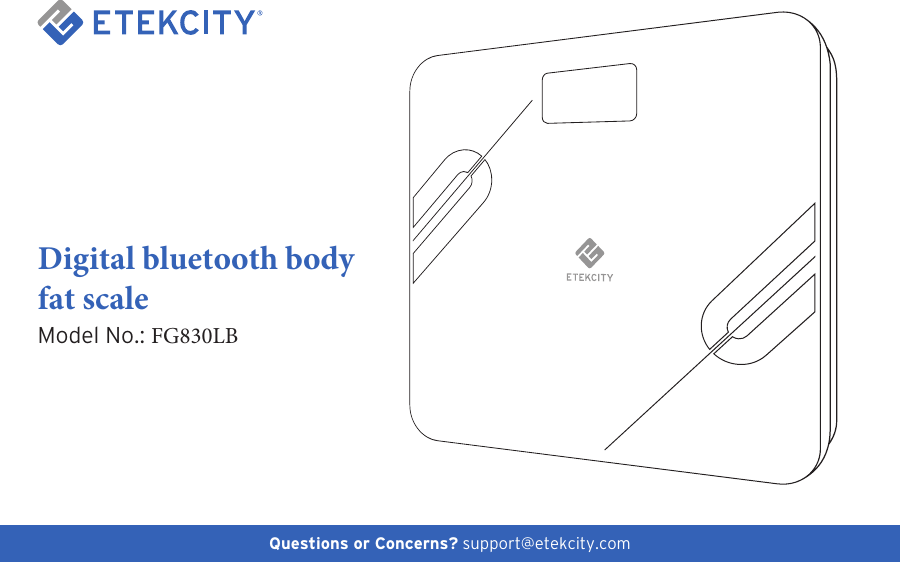
1Questions or Concerns? support@etekcity.comDigital bluetooth body fat scale Model No.: FG830LB
2Thank You.Thank you for purchasing the FG830LB Digital bluetooth body fat scale  by Etekcity. We are dedicated to providing our customers with quality products for building a better living. Should you have any questions or concerns about using your new product, feel free to reach out to our helpful Customer Support Team at (855) 686-3835 or by email at support@etekcity.com. We hope you enjoy your new product!
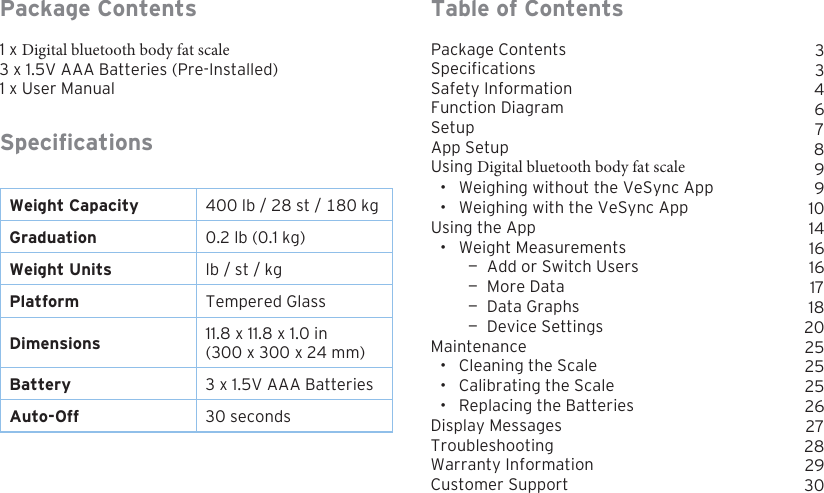
3Table of ContentsPackage ContentsSpecificationsSafety InformationFunction DiagramSetupApp SetupUsing Digital bluetooth body fat scale • Weighing without the VeSync App• Weighing with the VeSync AppUsing the App• Weight Measurements — Add or Switch Users — More Data — Data Graphs — Device SettingsMaintenance• Cleaning the Scale• Calibrating the Scale• Replacing the BatteriesDisplay MessagesTroubleshootingWarranty InformationCustomer SupportPackage Contents1 x Digital bluetooth body fat scale 3 x 1.5V AAA Batteries (Pre-Installed) 1 x User ManualSpecicationsWeight Capacity 400 lb / 28 st / 180 kgGraduation 0.2 lb (0.1 kg)Weight Units lb / st / kgPlatform Tempered GlassDimensions 11.8 x 11.8 x 1.0 in(300 x 300 x 24 mm)Battery 3 x 1.5V AAA BatteriesAuto-Off 30 seconds33467899101416161718202525252627282930
4Safety InformationGeneral Use• Check the scale before using. Do not use thescale if it is damaged in any way.•Do not strike or bang on the scale, and do notuse the scale if there is a slight crack on the glass.Due to the nature of tempered glass, the glasswill shatter if there is a slight crack. If you see acrack, contact Customer Service (page 30).Please read and follow all instructions and safety guidelines in this manual.NOTE:•This scale should not be used to diagnose or treatany medical condition.•Scale data should not be used as a substitute formedical advice from a healthcare professional.•This scale uses a harmless electrical current tomeasure body fat. We do not recommend usingthe scale if you use medical electronic equipmentsuch as a pacemaker. Consult a healthcareprofessional before use.• The glass platform is slippery when wet. Alwaysmake sure the platform and your feet are drybefore stepping on for measurement.•Place the scale on a hard, at surface to avoidtipping.• To weigh safely and accurately, stand with yourfeet shoulder-width apart while on the scale. Donot stand on the edge of the scale or jump on thescale.• Avoid standing on the scale for a long period oftime.•Do not overload the scale. Maximum weightcapacity is 400 lb (180 kg).• Keep the scale in a cool area with low humidity.Keep the scale away from heat sources, such asovens or heaters. Store the scale horizontally, notvertically.• For household use only. This scale is not intendedfor commercial use.• Handle with care.
5Batteries•Do not mix new and used batteries.• If the scale is not in use for a long period of time,remove the batteries to extend the lifetime of thescale.NOTE: This smart scale complies with Part 15 of the FCC Rules. Operation is subject to the following two conditions: (1) this device may not cause harmful interference, and (2) this device must accept any interference received, including interference that may cause undesired operation.
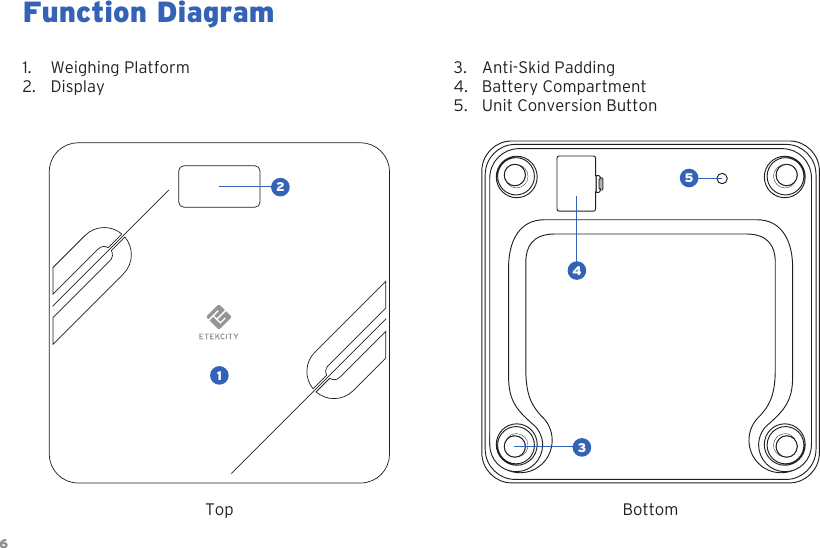
6Function Diagram1. Weighing Platform2. Display3. Anti-Skid Padding4. Battery Compartment5. Unit Conversion Button6Top Bottom12543
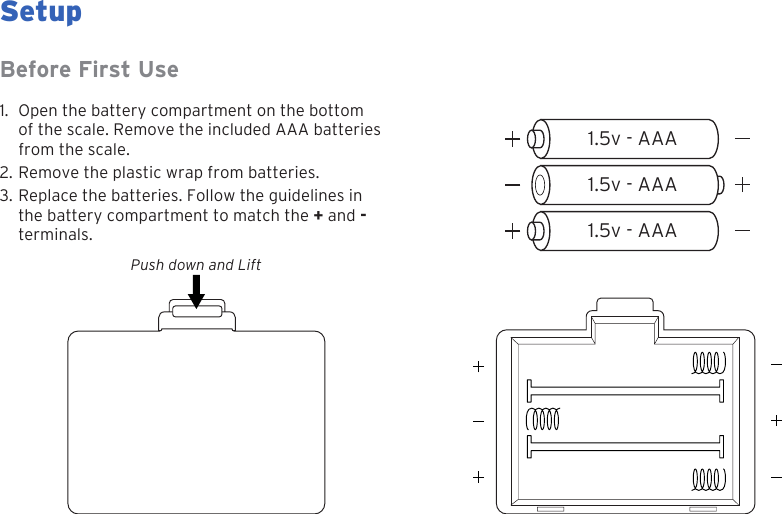
71.5v - AAA1.5v - AAA1.5v - AAASetupPush down and LiftBefore First Use1. Open the battery compartment on the bottomof the scale. Remove the included AAA batteriesfrom the scale.2. Remove the plastic wrap from batteries.3. Replace the batteries. Follow the guidelines inthe battery compartment to match the + and -terminals.
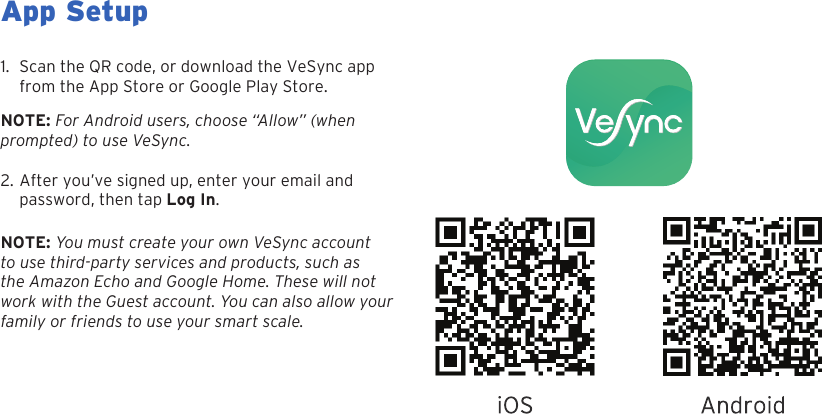
8App Setup1. Scan the QR code, or download the VeSync appfrom the App Store or Google Play Store.NOTE: For Android users, choose “Allow” (when  prompted) to use VeSync.2. After you’ve signed up, enter your email andpassword, then tap Log In.NOTE: You must create your own VeSync account to use third-party services and products, such as the Amazon Echo and Google Home. These will not work with the Guest account. You can also allow your family or friends to use your smart scale.
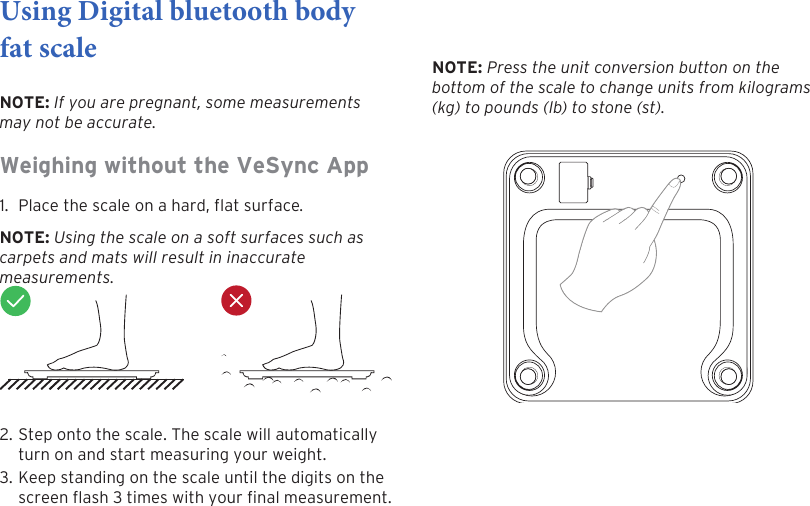
9Using Digital bluetooth body fat scale NOTE: If you are pregnant, some measurements may not be accurate.Weighing without the VeSync App 1. Place the scale on a hard, flat surface.NOTE: Using the scale on a soft surfaces such as carpets and mats will result in inaccurate measurements.2. Step onto the scale. The scale will automaticallyturn on and start measuring your weight.3. Keep standing on the scale until the digits on thescreen ash 3 times with your nal measurement.NOTE: Press the unit conversion button on the bottom of the scale to change units from kilograms (kg) to pounds (lb) to stone (st).
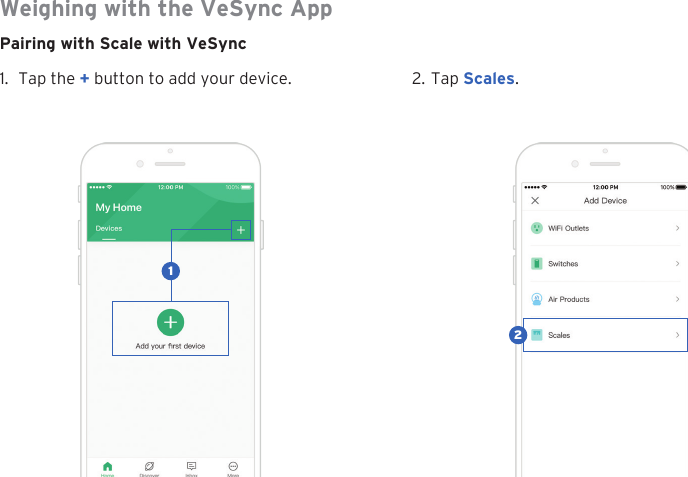
10Weighing with the VeSync AppPairing with Scale with VeSync1. Tap the + button to add your device. 2. Tap Scales.21
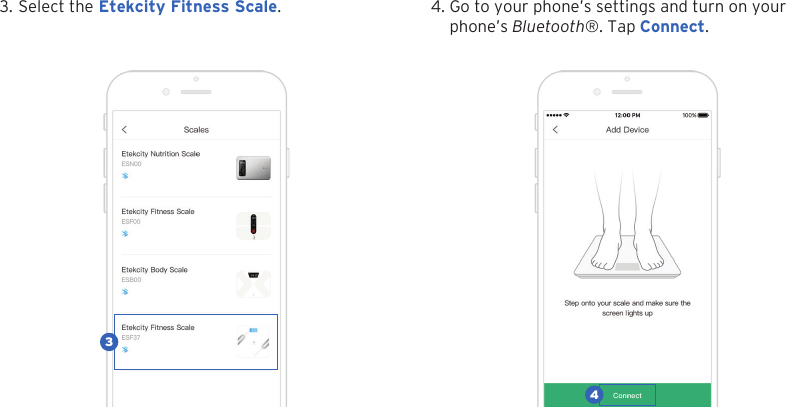
113. Select the Etekcity Fitness Scale. 4. Go to your phone’s settings and turn on yourphone’s Bluetooth®. Tap Connect.34
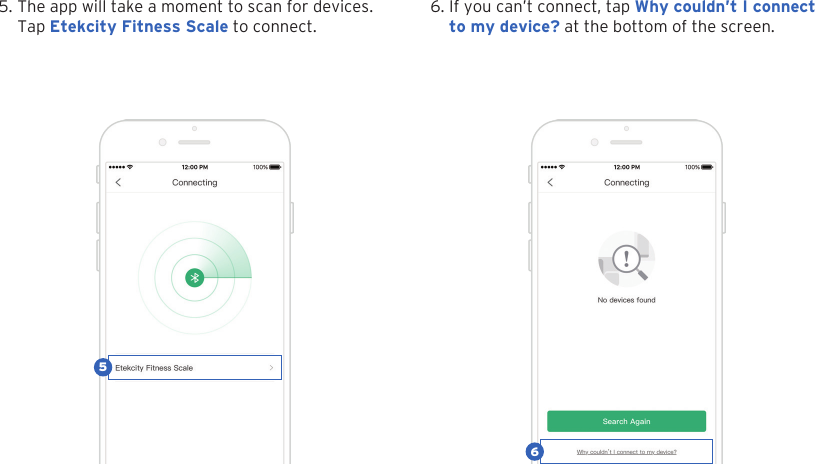
125. The app will take a moment to scan for devices.Tap Etekcity Fitness Scale to connect.6. If you can’t connect, tap Why couldn’t I connectto my device? at the bottom of the screen.56
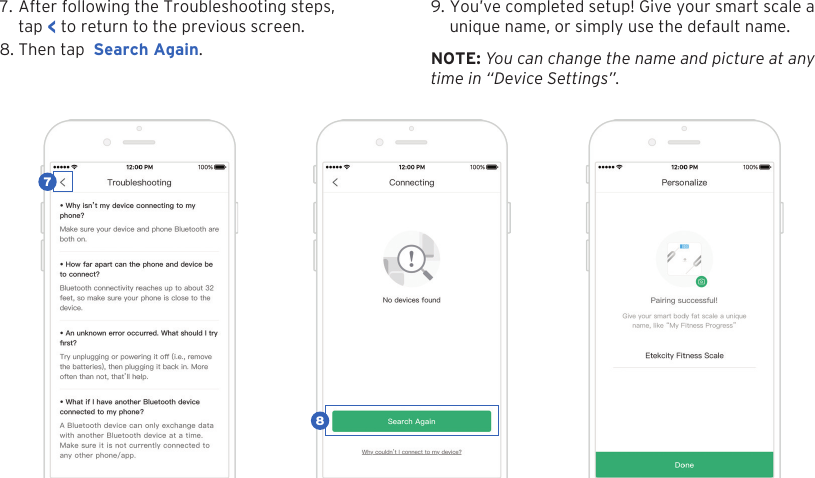
137. After following the Troubleshooting steps,tap < to return to the previous screen.8. Then tap  Search Again.9. You’ve completed setup! Give your smart scale aunique name, or simply use the default name.NOTE: You can change the name and picture at any  time in “Device Settings”.87
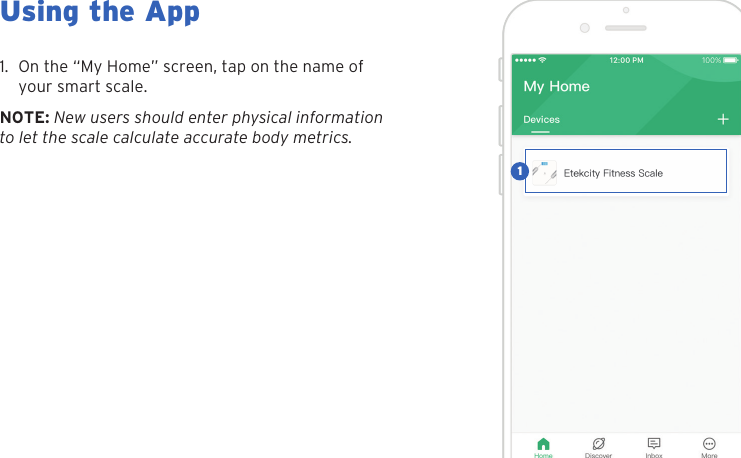
14Using the App1. On the “My Home” screen, tap on the name ofyour smart scale.NOTE: New users should enter physical information to let the scale calculate accurate body metrics.1
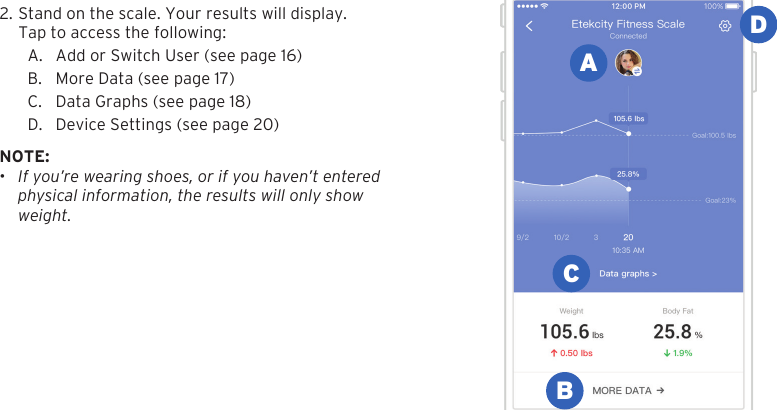
152. Stand on the scale. Your results will display.Tap to access the following:A. Add or Switch User (see page 16)B. More Data (see page 17)C. Data Graphs (see page 18)D. Device Settings (see page 20)NOTE: •If you’re wearing shoes, or if you haven’t enteredphysical information, the results will only showweight.ABCD
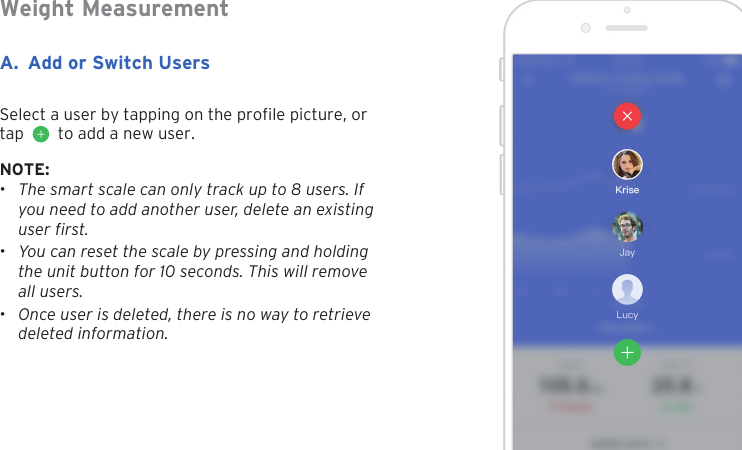
16A. Add or Switch UsersNOTE:•The smart scale can only track up to 8 users. Ifyou need to add another user, delete an existinguser first.•You can reset the scale by pressing and holdingthe unit button for 10 seconds. This will removeall users.•Once user is deleted, there is no way to retrievedeleted information.Weight MeasurementSelect a user by tapping on the prole picture, or tap     to add a new user.
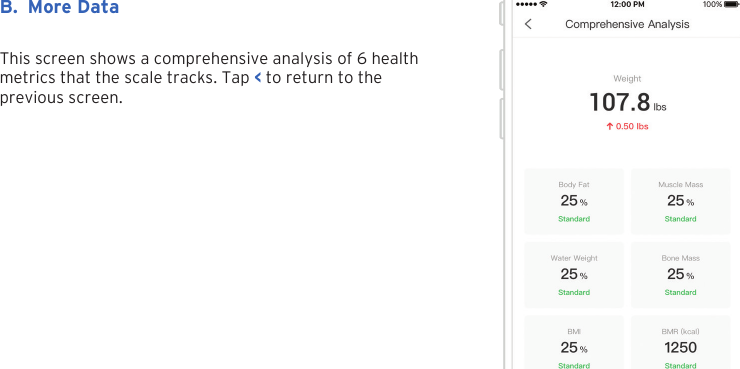
17B. More DataThis screen shows a comprehensive analysis of 6 health metrics that the scale tracks. Tap < to return to the previous screen.
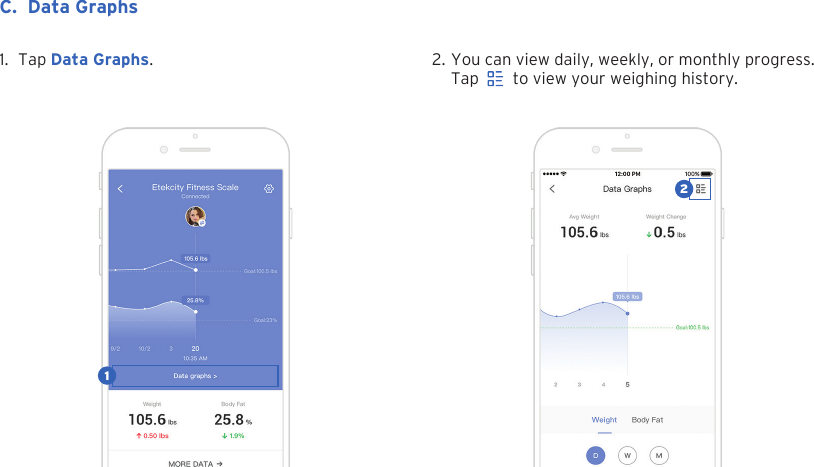
182. You can view daily, weekly, or monthly progress.Tap     to view your weighing history.1. Tap Data Graphs.C. Data Graphs12
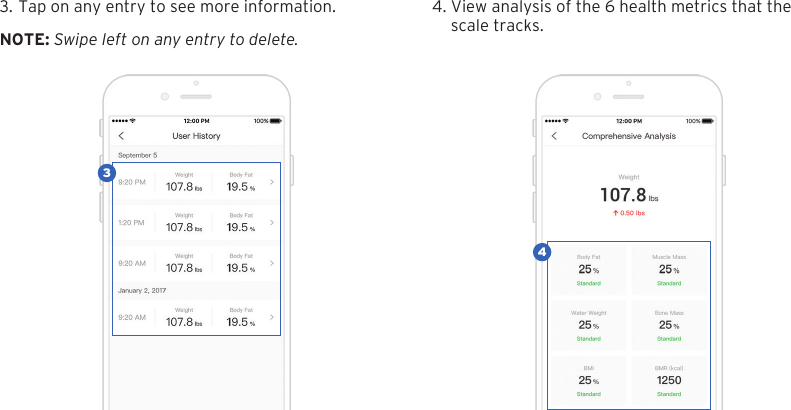
193. Tap on any entry to see more information. 4. View analysis of the 6 health metrics that thescale tracks.NOTE: Swipe left on any entry to delete.43
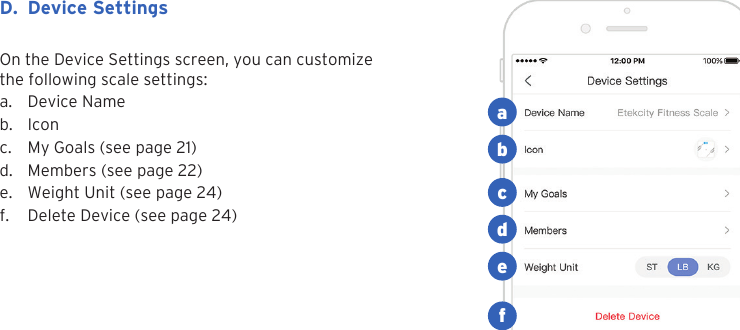
20On the Device Settings screen, you can customize the following scale settings:a. Device Nameb. Iconc. My Goals (see page 21)d. Members (see page 22)e. Weight Unit (see page 24)f. Delete Device (see page 24)D. Device Settingsabcdef
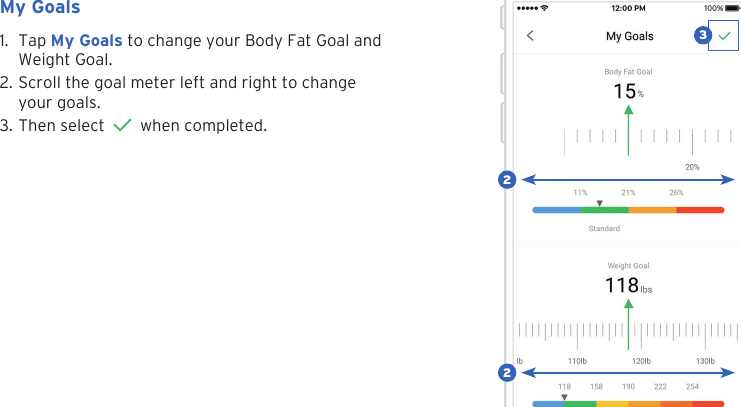
211. Tap My Goals to change your Body Fat Goal andWeight Goal.2. Scroll the goal meter left and right to changeyour goals.3. Then select   when completed.My Goals322
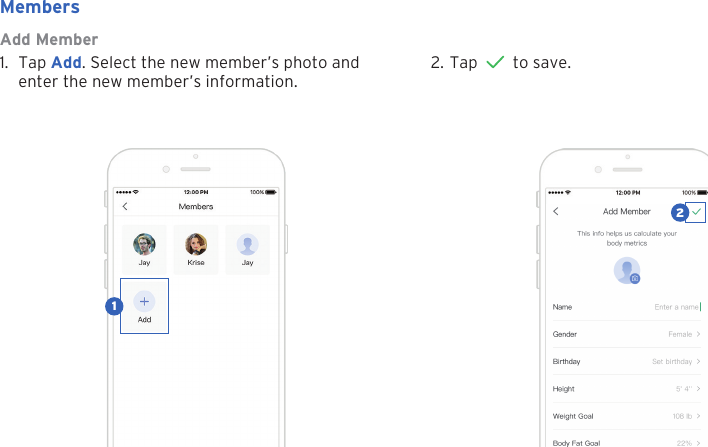
22Add Member1. Tap Add. Select the new member’s photo andenter the new member’s information.Members2. Tap   to save.12
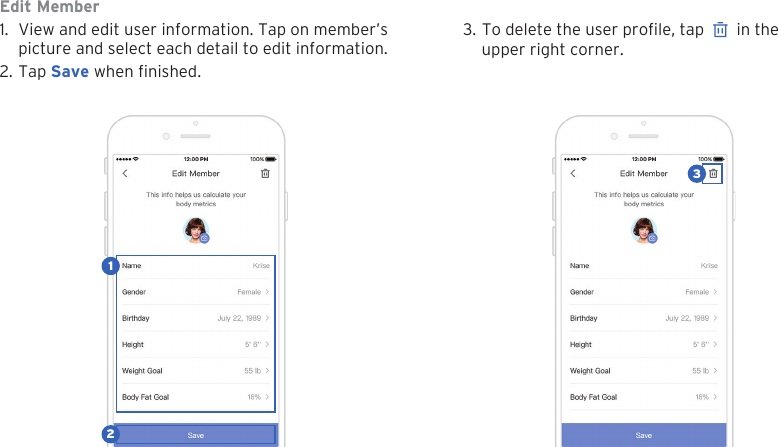
23Edit Member1. View and edit user information. Tap on member’spicture and select each detail to edit information.2. Tap Save when nished.3. To delete the user prole, tap   in the upper right corner.123
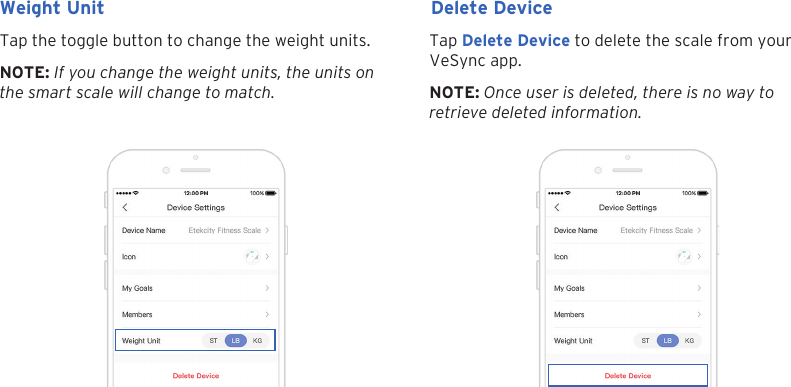
24Tap the toggle button to change the weight units. Tap Delete Device to delete the scale from your VeSync app.Weight Unit Delete DeviceNOTE: If you change the weight units, the units on the smart scale will change to match. NOTE: Once user is deleted, there is no way to retrieve deleted information.
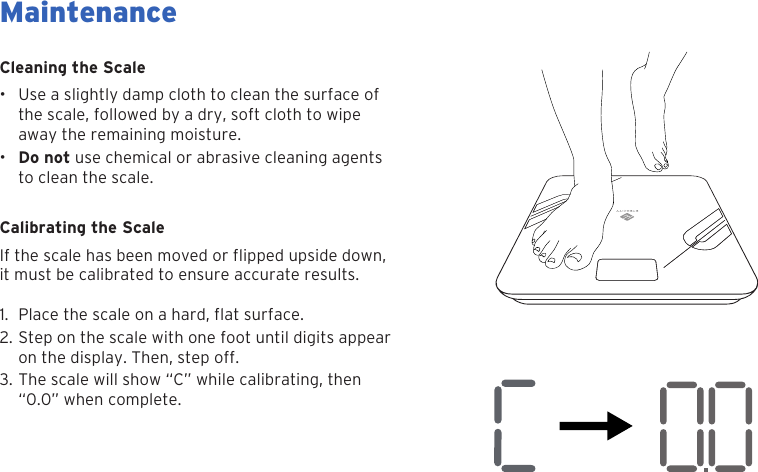
25Cleaning the Scale• Use a slightly damp cloth to clean the surface ofthe scale, followed by a dry, soft cloth to wipeaway the remaining moisture.•Do not use chemical or abrasive cleaning agentsto clean the scale.Calibrating the Scaleit must be calibrated to ensure accurate results.1. 2. Step on the scale with one foot until digits appearon the display. Then, step off.3. The scale will show “C” while calibrating, then“0.0” when complete.MaintenanceIf the scale has been moved or flipped upside down,Place the scale on a hard, flat surface.
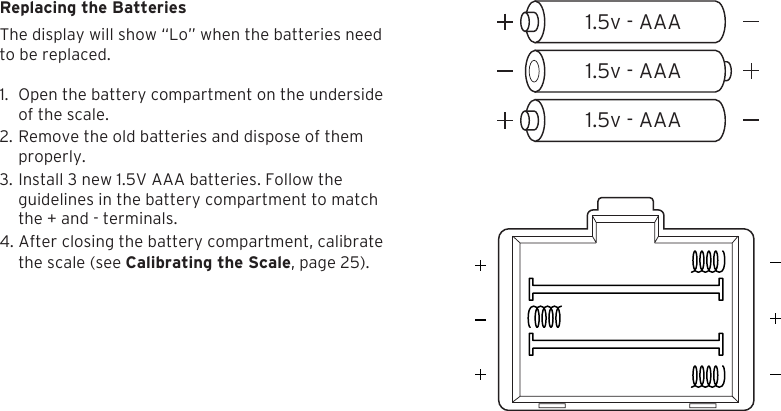
261.5v - AAA1.5v - AAA1.5v - AAAReplacing the BatteriesThe display will show “Lo” when the batteries need  to be replaced.1. Open the battery compartment on the undersideof the scale.2. Remove the old batteries and dispose of themproperly.3. Install 3 new 1.5V AAA batteries. Follow theguidelines in the battery compartment to matchthe + and - terminals.4. After closing the battery compartment, calibratethe scale (see Calibrating the Scale, page 25).
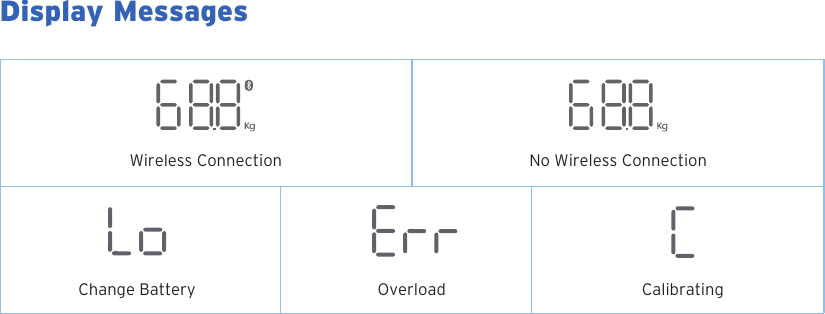
27Display MessagesWireless ConnectionChange Battery Overload CalibratingNo Wireless Connection
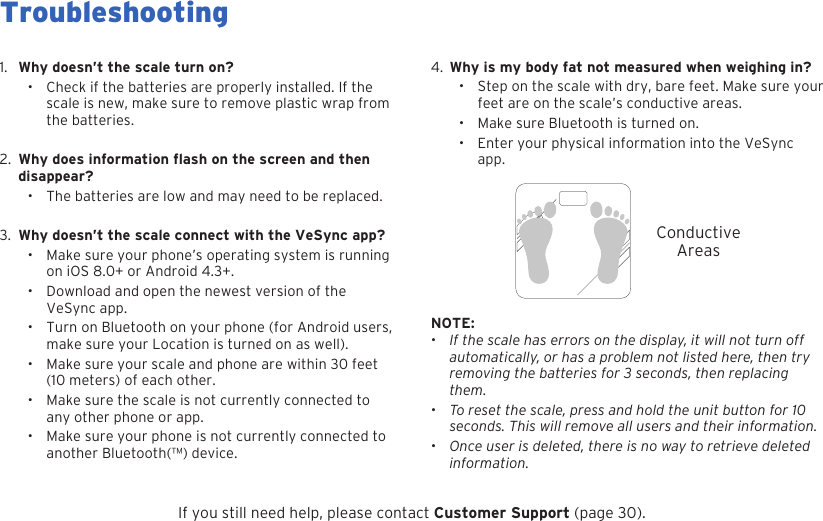
284.  Why is my body fat not measured when weighing in?• Step on the scale with dry, bare feet. Make sure your feet are on the scale’s conductive areas.• Make sure Bluetooth is turned on.• Enter your physical information into the VeSync app.1.  Why doesn’t the scale turn on?• Check if the batteries are properly installed. If the scale is new, make sure to remove plastic wrap from the batteries.2. disappear?• The batteries are low and may need to be replaced.3. Why doesn’t the scale connect with the VeSync app?•Make sure your phone’s operating system is running on iOS 8.0+ or Android 4.3+.• Download and open the newest version of the VeSync app.• Turn on Bluetooth on your phone (for Android users, make sure your Location is turned on as well).• Make sure your scale and phone are within 30 feet (10 meters) of each other.• Make sure the scale is not currently connected to any other phone or app.• Make sure your phone is not currently connected to another Bluetooth(™) device.ConductiveAreasNOTE: •If the scale has errors on the display, it will not turn off automatically, or has a problem not listed here, then try removing the batteries for 3 seconds, then replacing them.•  To reset the scale, press and hold the unit button for 10 seconds. This will remove all users and their information.•Once user is deleted, there is no way to retrieve deleted information.If you still need help, please contact Customer Support (page 30).TroubleshootingWhy does information flash on the screen and then
29Warranty InformationTerms & PolicyEtekcity warrants all products to be of the highest quality in material, craftsmanship, and service, effective from the date of purchase to the end of the warranty period. Etekcity will replace any product found to be defective due to manufacturer aws based on eligibility. Refunds are available within the rst 30 days of purchase. Refunds are only available to the original purchaser of the product. This warranty extends only to personal use and does not extend to any product that has been used for commercial, rental, or any other use in which the product is not intended for. There are no warranties other than the warranties expressly set forth with each product.This warranty is non-transferrable. Etekcity is not responsible in any way for any damages, losses, or inconveniences caused by equipment failure by user negligence, abuse, or use noncompliant with the user manual or any additional safety, use, or warnings included in the product packaging and manual.This warranty does not apply to the following:• Damage due to abuse, accident, alteration, misuse, tampering or vandalism.• Improper or inadequate maintenance. • Damage in return transit.• Unsupervised use by children under 18 years of age.Etekcity and its subsidiaries assume no liability for damage caused by the use of the product other than for its intended use or as instructed in the user manual. Some states do not allow this exclusion or limitation of incidental or consequential losses, so the foregoing disclaimer may not apply to you. This warranty gives you specic legal rights, and you may also have other rights which may vary from state to state.ALL EXPRESSED AND IMPLIED WARRANTIES, INCLUDING THE WARRANTY OF MERCHANTABILITY, ARE LIMITED TO THE PERIOD OF THE LIMITED WARRANTY.Additional 1-Year WarrantyYou can extend your 1-year warranty by an additional year. Log onto www.etekcity.com/warranty and enter your order number (for example, from Amazon or Houzz) to register your new product for the extended warranty.If you are unable to provide the order number for your product, please type a short note in the order number eld along with the date you received your product.Defective Products & ReturnsIf your product proves defective within the specied warranty period, please contact Customer Support via support@etekcity.com with your order number. Do not dispose of your product before contacting us. Once Customer Support has approved your request, please return the unit with a copy of the invoice or your order number.Product ESF37 Smart Fitness ScaleDefault Warranty Period 1 yearFor your own reference, we strongly recommend that you record your order number and date of purchase.Order Number:Date of Purchase:
30Customer SupportIf you encounter any issues or have any questions regarding your new product, please contact our helpful Customer Support Team. Your satisfaction is our goal!Customer SupportEtekcity Corporation1202 N Miller St., Suite AAnaheim, CA 92806Toll Free: (855) 686-3835 Email: support@etekcity.comSupport HoursMonday - Friday9:00 am - 5:00 pm PT*Please have your order confirmation number readybefore contacting customer support.
FCC WARNINGChanges or modifications not expressly approved by the party responsible for compliance could void the user's authority to operate the equipment. Note: This equipment has been tested and found to comply with the limits for a Class B digital device, pursuant to part 15 of the FCC Rules. These limits are designed to provide reasonable protection against harmful interference in a residential installation. This equipment generates uses and can radiate radio frequency energy and, if not installed and used in accordance with the instructions, may cause harmful interference to radio communications. However, there is no guarantee that interference will not occur in a particular installation. If this equipment does cause harmful interference to radio or television reception, which can be determined by turning the equipment off and on, the user is encouraged to try to correct the interference by one or more of the following measures:-Reorient or relocate the receiving antenna.-Increase the separation between the equipment and receiver.-Connect the equipment into an outlet on a circuit different from that to which the receiver is connected.-Consult the dealer or an experienced radio/TV technician for help.The device has been evaluated to meet general RF exposure requirement. The device can be used in portable exposure condition without restriction.This device complies with part 15 of the FCC Rules. Operation is subject to the following two conditions: (1) This device may not cause harmful interference, and (2) this device must accept any interference received, including interference that may cause undesired operation.
31Connect with us @Etekcity.
Scan here to join the community!Visit us at www.etekcity.comBuilding on better living.

Navigation menu