Westel Wireless Systems CI00059 RF Repeater/Base Station User Manual CHAPTER 3 INSTALLATION INSTRUCTIONS

Westel Wireless Systems Pty Ltd RF Repeater/Base Station CHAPTER 3 INSTALLATION INSTRUCTIONS

Manual Three

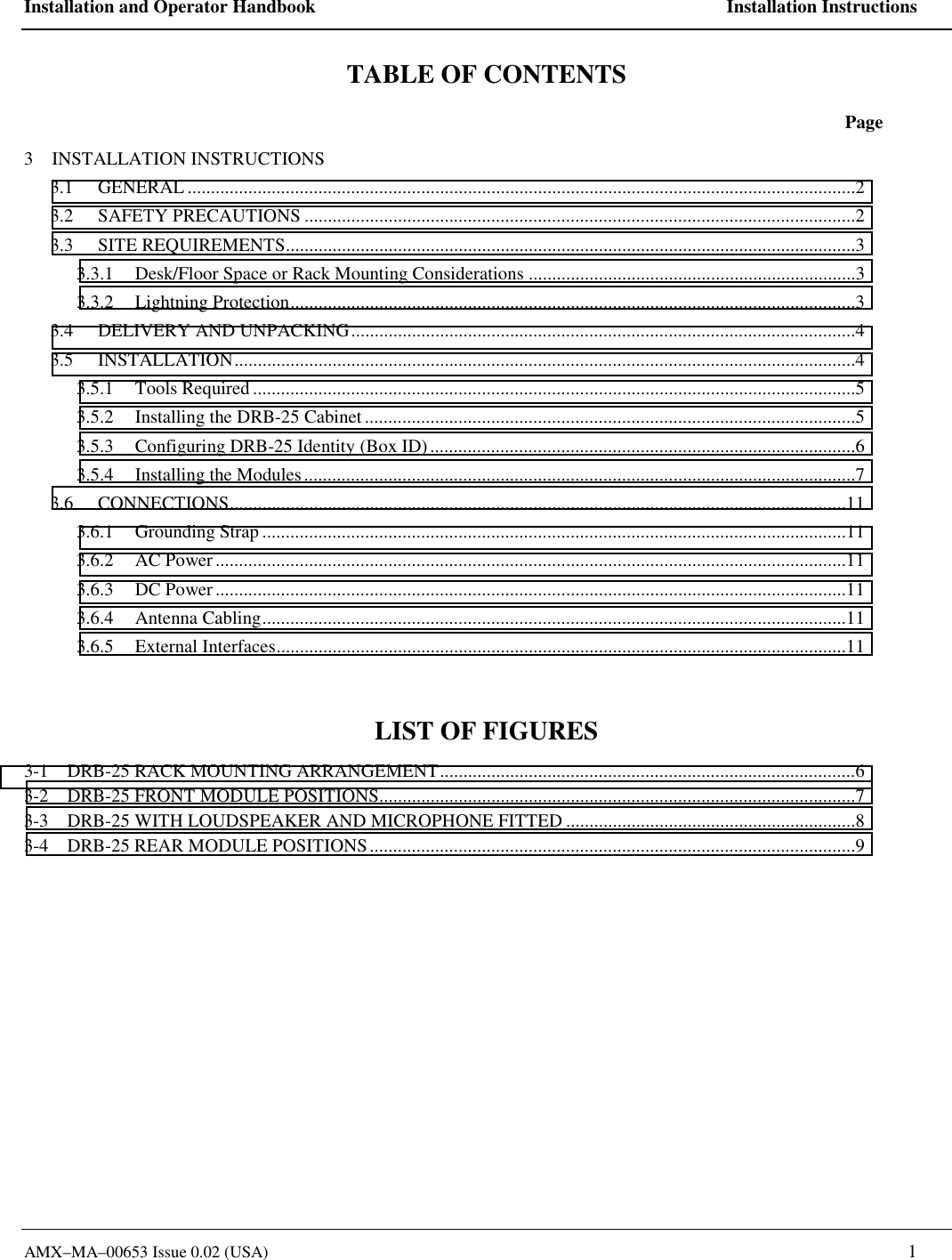
Installation and Operator Handbook    Installation Instructions AMX–MA–00653 Issue 0.02 (USA)   1 TABLE OF CONTENTS  Page 3    INSTALLATION INSTRUCTIONS 3.1 GENERAL ...............................................................................................................................................2 3.2 SAFETY PRECAUTIONS ......................................................................................................................2 3.3 SITE REQUIREMENTS..........................................................................................................................3 3.3.1  Desk/Floor Space or Rack Mounting Considerations ......................................................................3 3.3.2 Lightning Protection.........................................................................................................................3 3.4 DELIVERY AND UNPACKING............................................................................................................4 3.5 INSTALLATION.....................................................................................................................................4 3.5.1 Tools Required .................................................................................................................................5 3.5.2  Installing the DRB-25 Cabinet.........................................................................................................5 3.5.3  Configuring DRB-25 Identity (Box ID)...........................................................................................6 3.5.4  Installing the Modules......................................................................................................................7 3.6 CONNECTIONS....................................................................................................................................11 3.6.1 Grounding Strap .............................................................................................................................11 3.6.2 AC Power .......................................................................................................................................11 3.6.3 DC Power .......................................................................................................................................11 3.6.4 Antenna Cabling.............................................................................................................................11 3.6.5 External Interfaces..........................................................................................................................11  LIST OF FIGURES 3-1    DRB-25 RACK MOUNTING ARRANGEMENT.........................................................................................6 3-2    DRB-25 FRONT MODULE POSITIONS......................................................................................................7 3-3    DRB-25 WITH LOUDSPEAKER AND MICROPHONE FITTED ..............................................................8 3-4    DRB-25 REAR MODULE POSITIONS........................................................................................................9
Installation and Operator Handbook    Installation Instructions AMX–MA–00653 Issue 0.02 (USA)    2 3    INSTALLATION INSTRUCTIONS 3.1 GENERAL This chapter provides a detailed description of the installation procedure for the DRB-25 Dual Channel Radio System and should be read before starting the installation. Use the Installation Instructions in conjunction with the configuration checklist for the specific system being installed.  3.2 SAFETY PRECAUTIONS Observe standard safety procedures for the handling of electronic equipment: WARNING FOLLOW CORRECT LIFTING PROCEDURES FOR HEAVY ELECTRONIC EQUIPMENT. ATTE N TIONOB SER VEPRECAUTIONSFOR HANDLINGELE CTROSTATICSENSITIVEDEVICES  When removing or handling cards, use an anti-static wrist strap connected to ground and always place the card on an anti-static mat Handle modules by their edges and do not touch components or connectors.  Avoid placing the DRB-25 near any source of excessive heat Avoid placing the DRB-25 near a naked flame Avoid placing the DRB-25 in a wet or damp location Do not subject the DRB-25 to severe mechanical shock
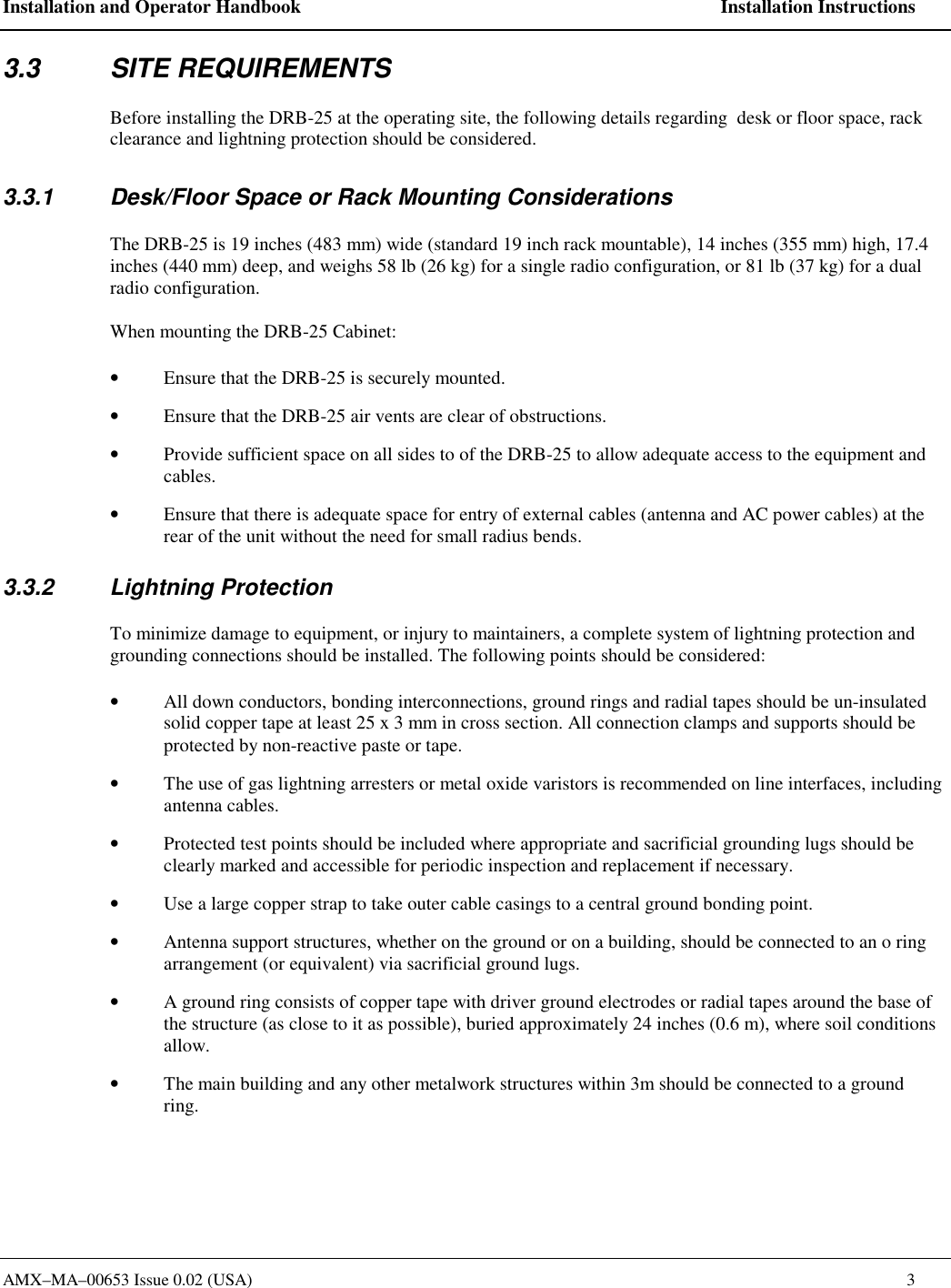
Installation and Operator Handbook    Installation Instructions AMX–MA–00653 Issue 0.02 (USA)    3 3.3 SITE REQUIREMENTS Before installing the DRB-25 at the operating site, the following details regarding  desk or floor space, rack clearance and lightning protection should be considered. 3.3.1  Desk/Floor Space or Rack Mounting Considerations The DRB-25 is 19 inches (483 mm) wide (standard 19 inch rack mountable), 14 inches (355 mm) high, 17.4 inches (440 mm) deep, and weighs 58 lb (26 kg) for a single radio configuration, or 81 lb (37 kg) for a dual radio configuration. When mounting the DRB-25 Cabinet:  •  Ensure that the DRB-25 is securely mounted. •  Ensure that the DRB-25 air vents are clear of obstructions. •  Provide sufficient space on all sides to of the DRB-25 to allow adequate access to the equipment and cables. •  Ensure that there is adequate space for entry of external cables (antenna and AC power cables) at the rear of the unit without the need for small radius bends. 3.3.2 Lightning Protection To minimize damage to equipment, or injury to maintainers, a complete system of lightning protection and grounding connections should be installed. The following points should be considered: •  All down conductors, bonding interconnections, ground rings and radial tapes should be un-insulated solid copper tape at least 25 x 3 mm in cross section. All connection clamps and supports should be protected by non-reactive paste or tape. •  The use of gas lightning arresters or metal oxide varistors is recommended on line interfaces, including antenna cables. •  Protected test points should be included where appropriate and sacrificial grounding lugs should be clearly marked and accessible for periodic inspection and replacement if necessary. •  Use a large copper strap to take outer cable casings to a central ground bonding point. •  Antenna support structures, whether on the ground or on a building, should be connected to an o ring arrangement (or equivalent) via sacrificial ground lugs. •  A ground ring consists of copper tape with driver ground electrodes or radial tapes around the base of the structure (as close to it as possible), buried approximately 24 inches (0.6 m), where soil conditions allow. •  The main building and any other metalwork structures within 3m should be connected to a ground ring.
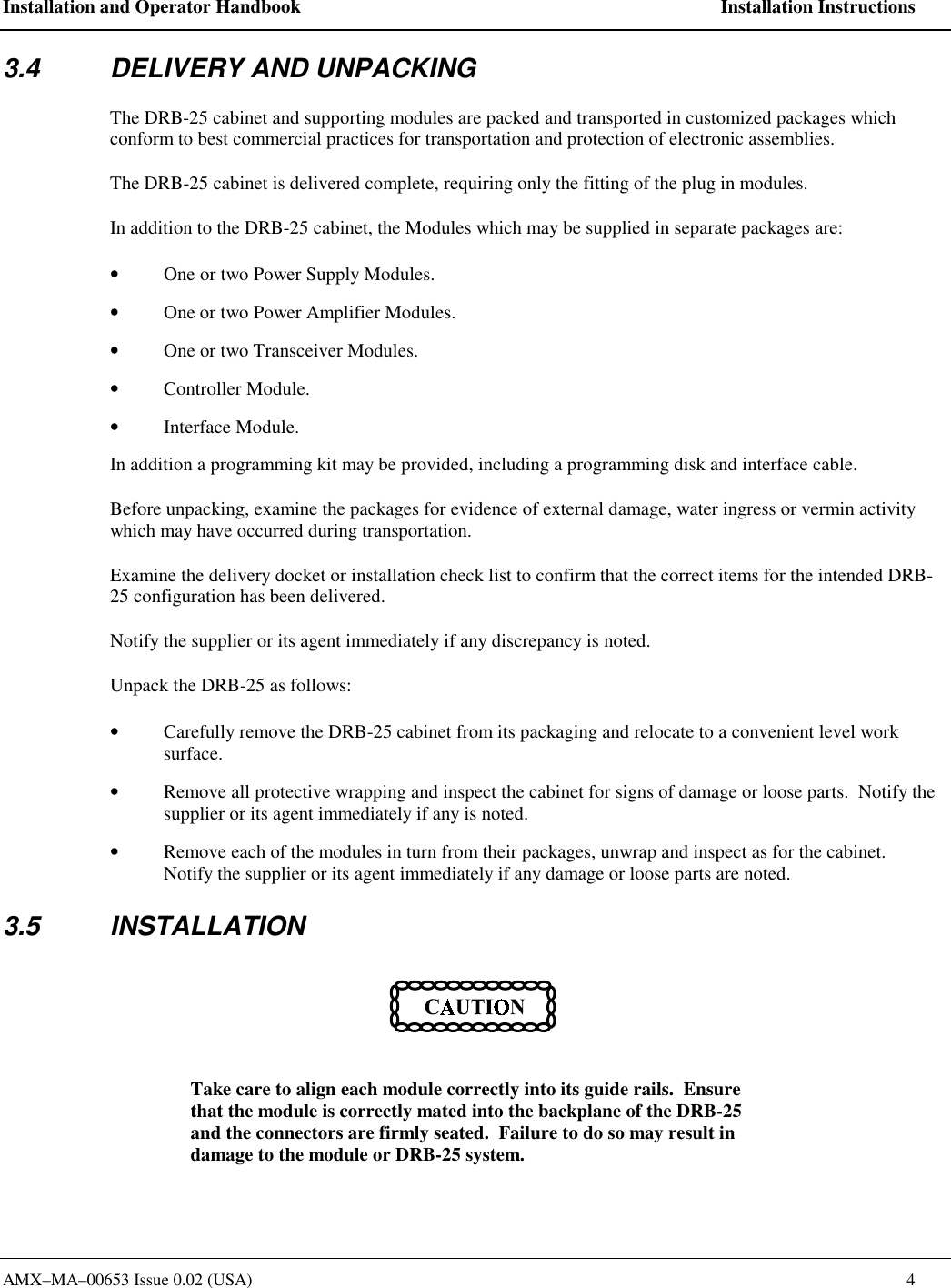
Installation and Operator Handbook    Installation Instructions AMX–MA–00653 Issue 0.02 (USA)    4 3.4  DELIVERY AND UNPACKING The DRB-25 cabinet and supporting modules are packed and transported in customized packages which conform to best commercial practices for transportation and protection of electronic assemblies.   The DRB-25 cabinet is delivered complete, requiring only the fitting of the plug in modules. In addition to the DRB-25 cabinet, the Modules which may be supplied in separate packages are: •  One or two Power Supply Modules. •  One or two Power Amplifier Modules. •  One or two Transceiver Modules. •  Controller Module. •  Interface Module. In addition a programming kit may be provided, including a programming disk and interface cable. Before unpacking, examine the packages for evidence of external damage, water ingress or vermin activity which may have occurred during transportation. Examine the delivery docket or installation check list to confirm that the correct items for the intended DRB-25 configuration has been delivered.   Notify the supplier or its agent immediately if any discrepancy is noted. Unpack the DRB-25 as follows: •  Carefully remove the DRB-25 cabinet from its packaging and relocate to a convenient level work surface. •  Remove all protective wrapping and inspect the cabinet for signs of damage or loose parts.  Notify the supplier or its agent immediately if any is noted. •  Remove each of the modules in turn from their packages, unwrap and inspect as for the cabinet.  Notify the supplier or its agent immediately if any damage or loose parts are noted. 3.5 INSTALLATION  Take care to align each module correctly into its guide rails.  Ensure that the module is correctly mated into the backplane of the DRB-25 and the connectors are firmly seated.  Failure to do so may result in damage to the module or DRB-25 system.
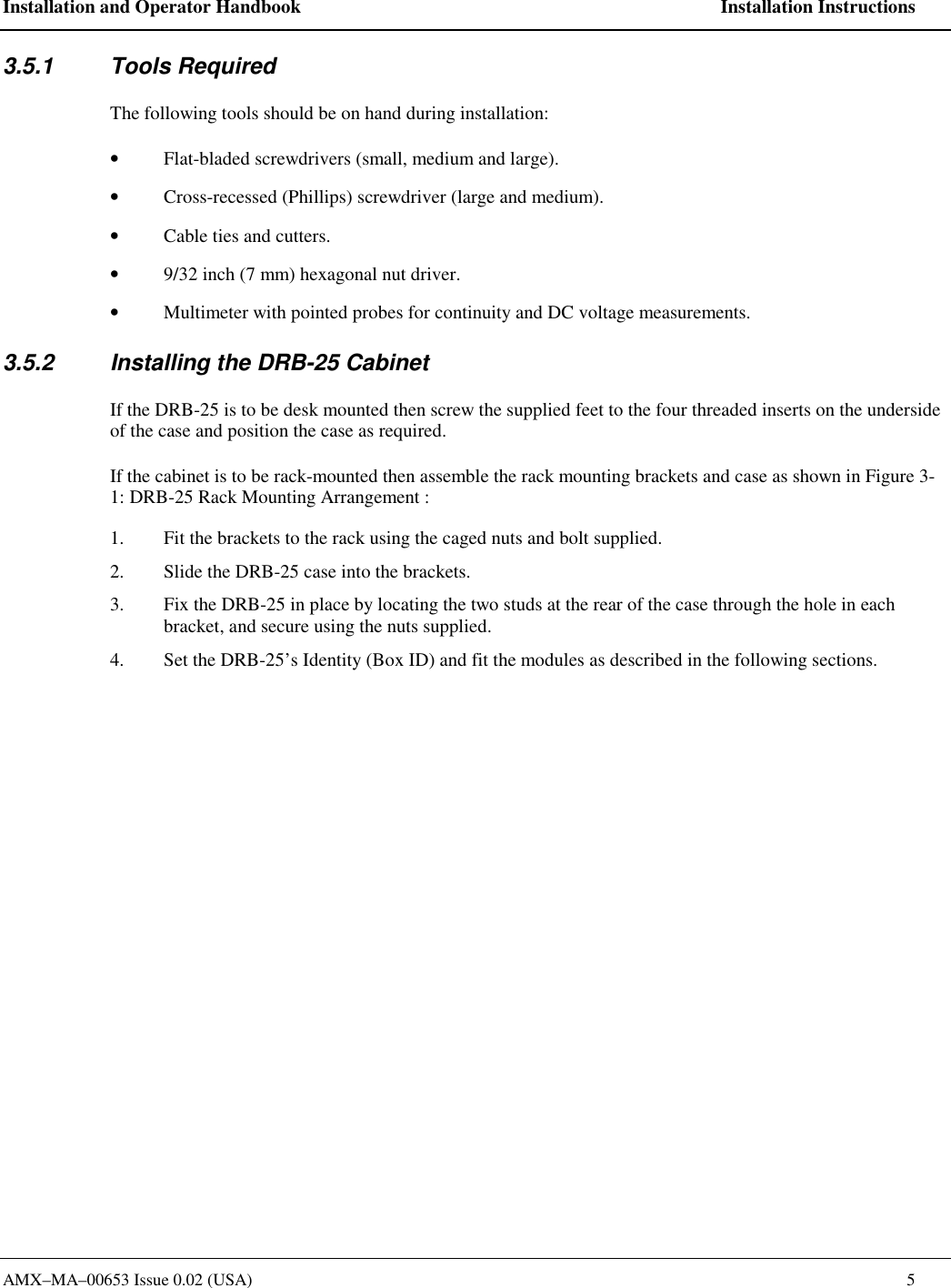
Installation and Operator Handbook    Installation Instructions AMX–MA–00653 Issue 0.02 (USA)    5 3.5.1 Tools Required The following tools should be on hand during installation: •  Flat-bladed screwdrivers (small, medium and large). •  Cross-recessed (Phillips) screwdriver (large and medium). •  Cable ties and cutters. •  9/32 inch (7 mm) hexagonal nut driver. •  Multimeter with pointed probes for continuity and DC voltage measurements. 3.5.2  Installing the DRB-25 Cabinet If the DRB-25 is to be desk mounted then screw the supplied feet to the four threaded inserts on the underside of the case and position the case as required.  If the cabinet is to be rack-mounted then assemble the rack mounting brackets and case as shown in Figure 3-1: DRB-25 Rack Mounting Arrangement :   1.  Fit the brackets to the rack using the caged nuts and bolt supplied. 2.  Slide the DRB-25 case into the brackets. 3.  Fix the DRB-25 in place by locating the two studs at the rear of the case through the hole in each bracket, and secure using the nuts supplied.  4.  Set the DRB-25’s Identity (Box ID) and fit the modules as described in the following sections.
Installation and Operator Handbook    Installation Instructions AMX–MA–00653 Issue 0.02 (USA)    6  Figure 3-1    DRB-25 Rack Mounting Arrangement 3.5.3  Configuring DRB-25 Identity (Box ID) An 8-way DIP switch on the backplane adjacent to Transceiver 2 enables a Box ID to be set for each DRB-25.  The switch is accessed from the front of the unit with the modules removed.  A total of 256 identities are available.   The Box ID is used by each Transceiver to determine its default settings on power-up. Transceiver modules can be programmed with up to 512 operating channels, and the default operating channel for each Transceiver is determined by the DRB-25 Box ID as detailed in Appendix A Table A-1. DRB-25 Box ID settings may be defined in a plan that covers all DRB-25 units in the network. The Box ID is also used by the Controller Module for network management purposes to enable it to identify itself within a  network.   The default factory setting is a box identity of zero.    To set the DIP switches:  1.  LOCATE the DIP switch on the upper right of the backplane, through the front of the DRB-25 case without the plug in modules fitted.
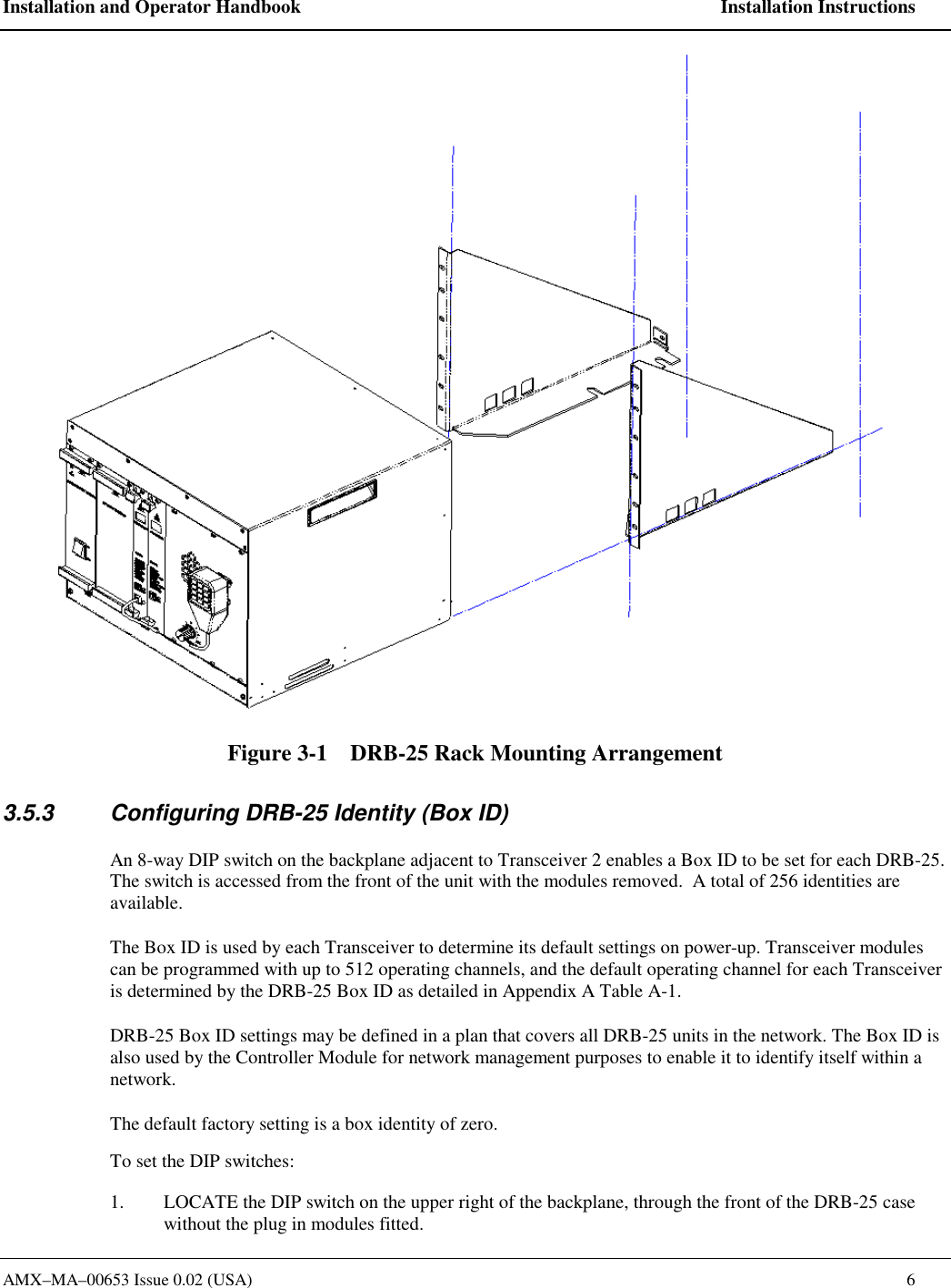
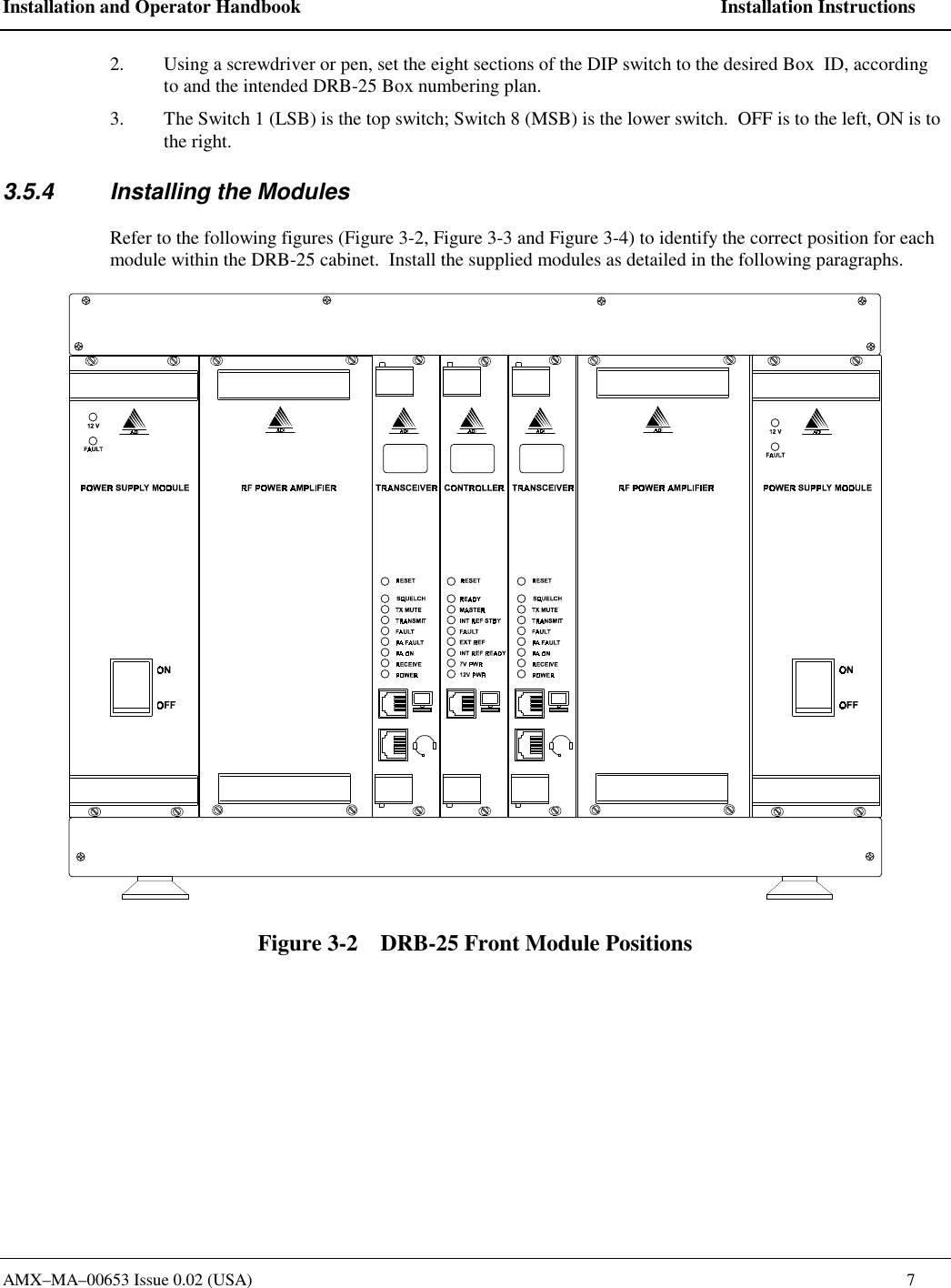
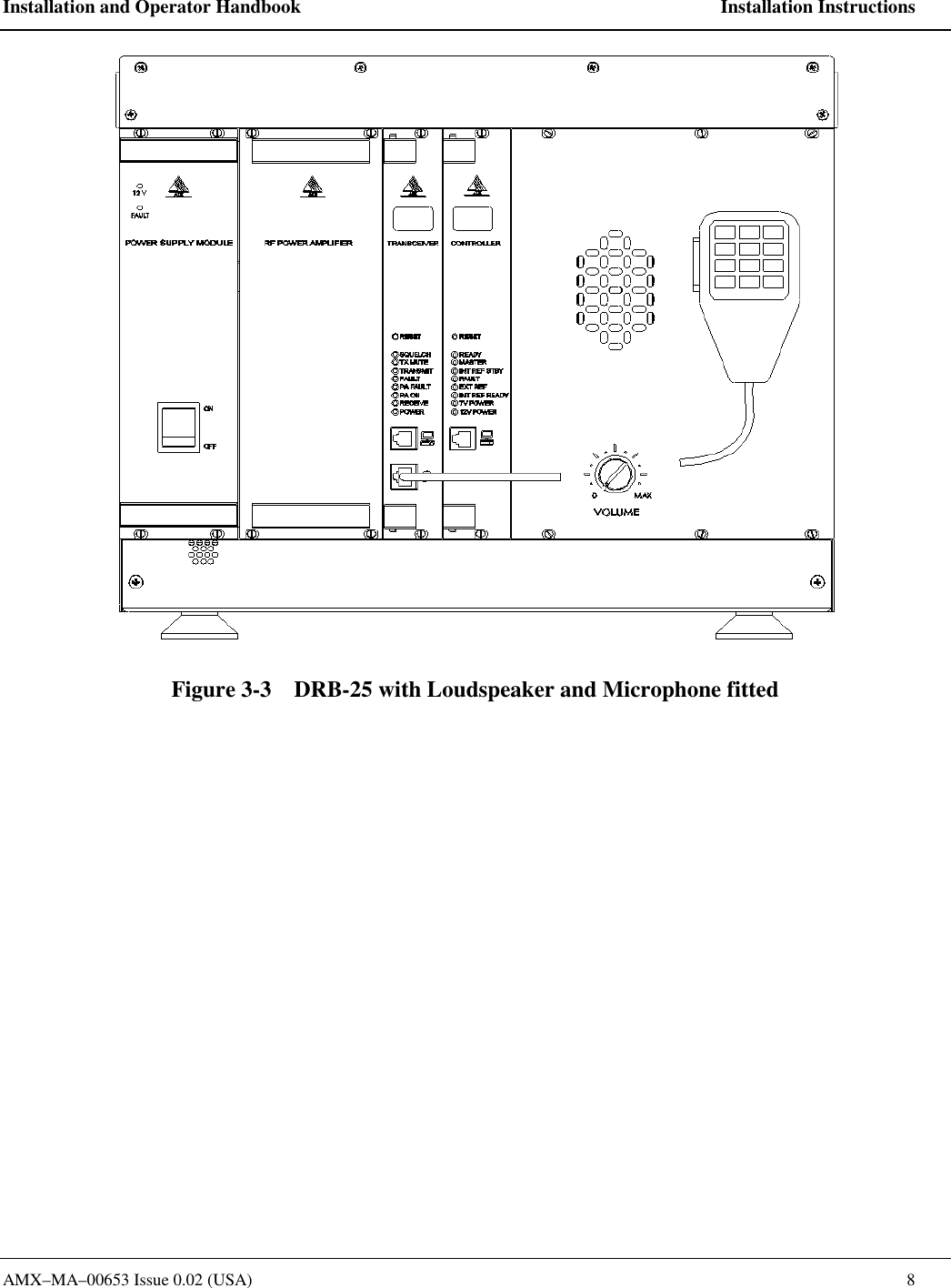
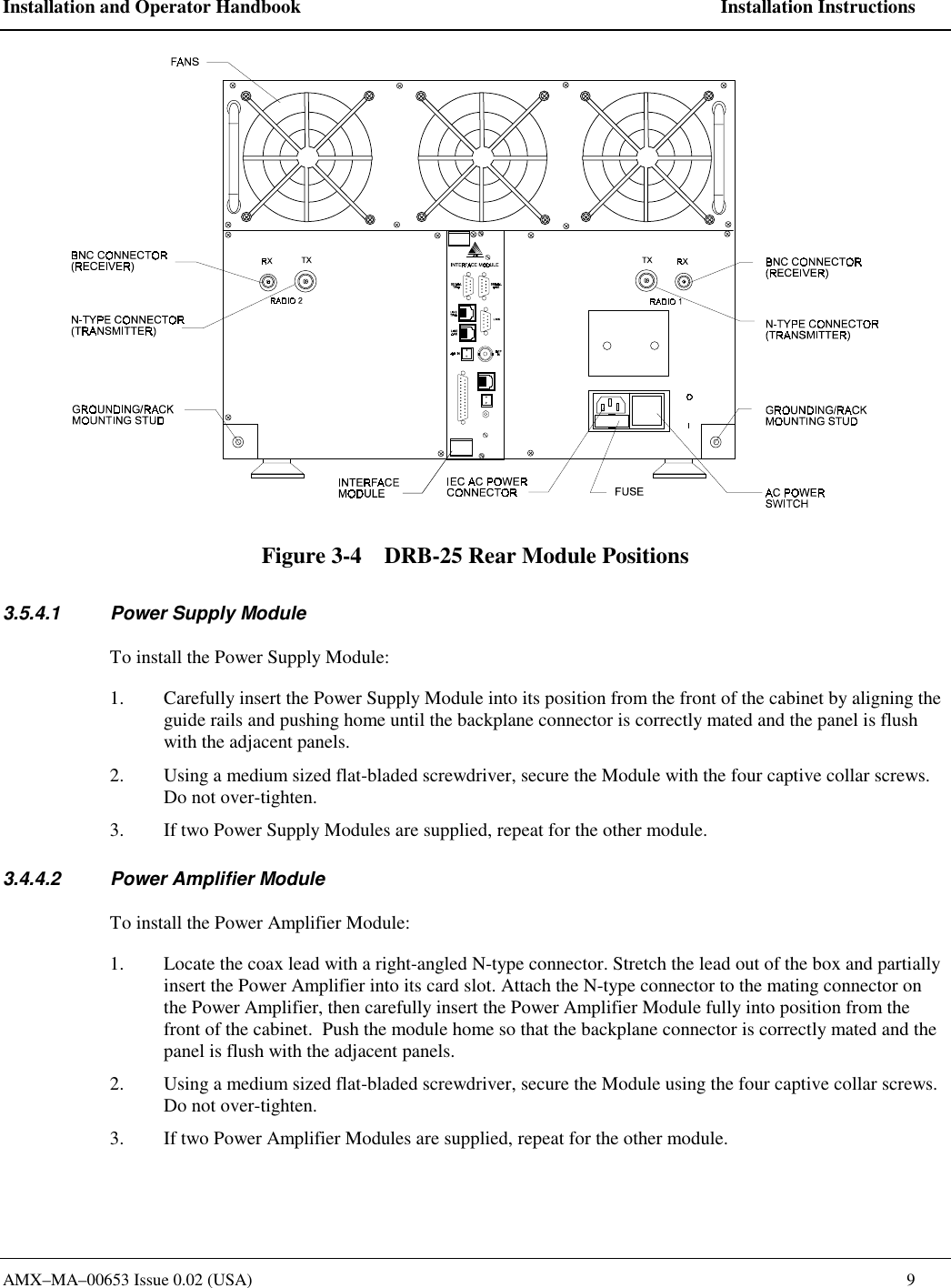
Installation and Operator Handbook    Installation Instructions AMX–MA–00653 Issue 0.02 (USA)    7 2.  Using a screwdriver or pen, set the eight sections of the DIP switch to the desired Box  ID, according to and the intended DRB-25 Box numbering plan.   3.  The Switch 1 (LSB) is the top switch; Switch 8 (MSB) is the lower switch.  OFF is to the left, ON is to the right.   3.5.4  Installing the Modules Refer to the following figures (Figure 3-2, Figure 3-3 and Figure 3-4) to identify the correct position for each module within the DRB-25 cabinet.  Install the supplied modules as detailed in the following paragraphs.  Figure 3-2    DRB-25 Front Module Positions
Installation and Operator Handbook    Installation Instructions AMX–MA–00653 Issue 0.02 (USA)    8  Figure 3-3    DRB-25 with Loudspeaker and Microphone fitted
Installation and Operator Handbook    Installation Instructions AMX–MA–00653 Issue 0.02 (USA)    9  Figure 3-4    DRB-25 Rear Module Positions 3.5.4.1  Power Supply Module To install the Power Supply Module: 1.  Carefully insert the Power Supply Module into its position from the front of the cabinet by aligning the guide rails and pushing home until the backplane connector is correctly mated and the panel is flush with the adjacent panels. 2.  Using a medium sized flat-bladed screwdriver, secure the Module with the four captive collar screws. Do not over-tighten. 3.  If two Power Supply Modules are supplied, repeat for the other module. 3.4.4.2  Power Amplifier Module To install the Power Amplifier Module: 1.  Locate the coax lead with a right-angled N-type connector. Stretch the lead out of the box and partially insert the Power Amplifier into its card slot. Attach the N-type connector to the mating connector on the Power Amplifier, then carefully insert the Power Amplifier Module fully into position from the front of the cabinet.  Push the module home so that the backplane connector is correctly mated and the panel is flush with the adjacent panels. 2.  Using a medium sized flat-bladed screwdriver, secure the Module using the four captive collar screws. Do not over-tighten. 3.  If two Power Amplifier Modules are supplied, repeat for the other module.
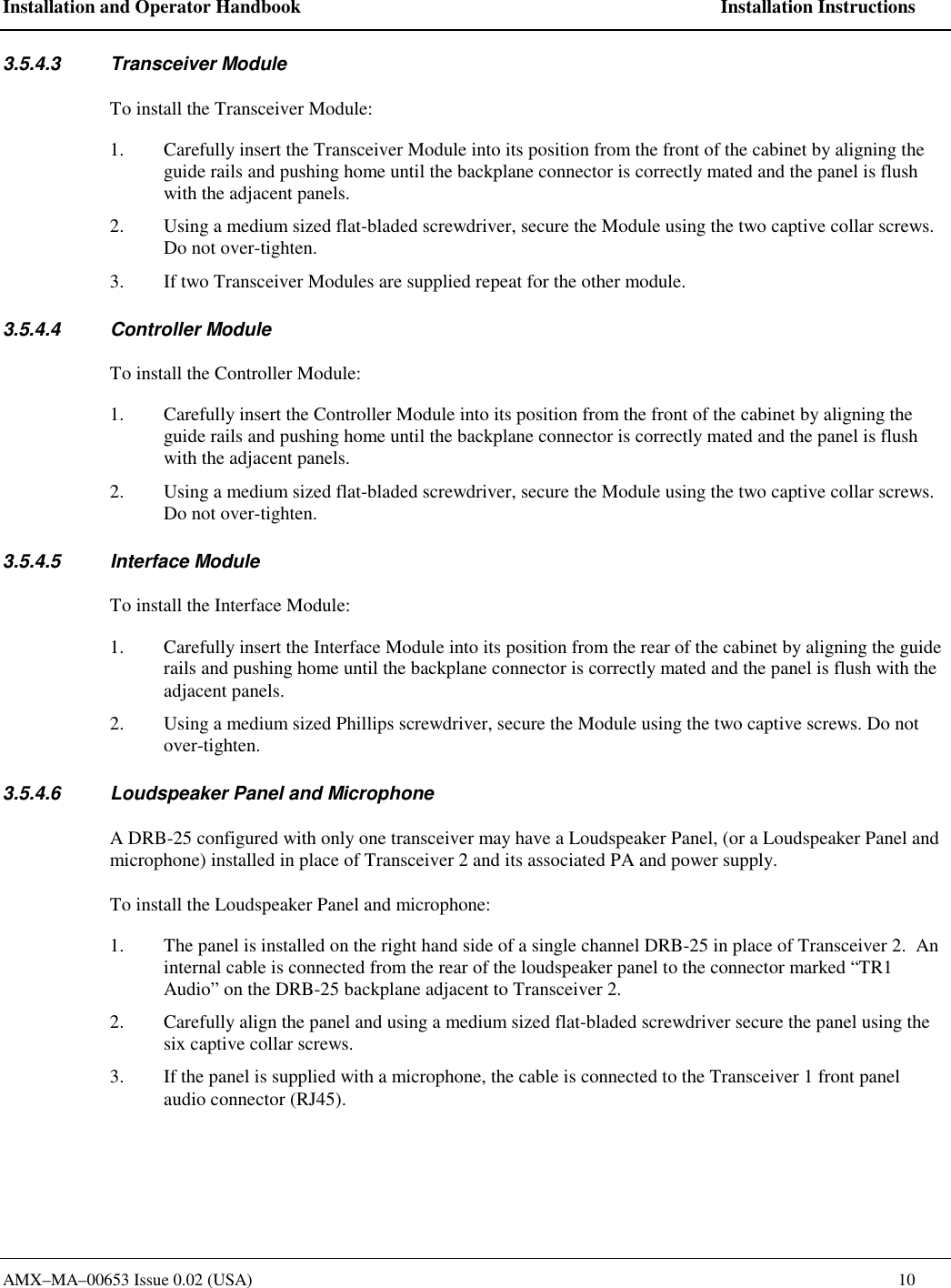
Installation and Operator Handbook    Installation Instructions AMX–MA–00653 Issue 0.02 (USA)    10 3.5.4.3 Transceiver Module To install the Transceiver Module: 1.  Carefully insert the Transceiver Module into its position from the front of the cabinet by aligning the guide rails and pushing home until the backplane connector is correctly mated and the panel is flush with the adjacent panels. 2.  Using a medium sized flat-bladed screwdriver, secure the Module using the two captive collar screws. Do not over-tighten. 3.  If two Transceiver Modules are supplied repeat for the other module. 3.5.4.4 Controller Module To install the Controller Module: 1.  Carefully insert the Controller Module into its position from the front of the cabinet by aligning the guide rails and pushing home until the backplane connector is correctly mated and the panel is flush with the adjacent panels. 2.  Using a medium sized flat-bladed screwdriver, secure the Module using the two captive collar screws. Do not over-tighten. 3.5.4.5 Interface Module To install the Interface Module: 1.  Carefully insert the Interface Module into its position from the rear of the cabinet by aligning the guide rails and pushing home until the backplane connector is correctly mated and the panel is flush with the adjacent panels. 2.  Using a medium sized Phillips screwdriver, secure the Module using the two captive screws. Do not over-tighten. 3.5.4.6  Loudspeaker Panel and Microphone A DRB-25 configured with only one transceiver may have a Loudspeaker Panel, (or a Loudspeaker Panel and microphone) installed in place of Transceiver 2 and its associated PA and power supply.   To install the Loudspeaker Panel and microphone: 1.  The panel is installed on the right hand side of a single channel DRB-25 in place of Transceiver 2.  An internal cable is connected from the rear of the loudspeaker panel to the connector marked “TR1 Audio” on the DRB-25 backplane adjacent to Transceiver 2. 2.  Carefully align the panel and using a medium sized flat-bladed screwdriver secure the panel using the six captive collar screws. 3.  If the panel is supplied with a microphone, the cable is connected to the Transceiver 1 front panel audio connector (RJ45).
Installation and Operator Handbook    Installation Instructions AMX–MA–00653 Issue 0.02 (USA)    11 3.6 CONNECTIONS 3.6.1 Grounding Strap Before connecting the DRB-25, it is recommended that a secure ground strap be connected from the grounding stud at the rear left hand side of the DRB-25 case to a substantial ground system: 1.  Locate the primary grounding stud at the rear of the chassis on the lower left hand side. 2.  Connect a grounding strap from an external grounding point or ground ring to the chassis primary grounding stud. 3.  Ensure good electrical contact and security of all connections. 3.6.2 AC Power An IEC standard AC power cable is provided with the AC and DC revert configurations.  Connect the AC power cable as follows: 1.  Set the power switch on the rear of the DRB-25 to OFF. 2.  Plug-in the IEC connector of the cable to the recessed IEC plug on the rear of the DRB-25. 3.  Connect the other end of the AC power cable to a properly protected and grounded AC power outlet. 3.6.3 DC Power External DC power connection for DC and DC revert configurations is via a 2-way terminal block mounted on the rear of the DRB-25 above the mains input receptacle.  Connect DC power cable as follows: 1.  Ensure that DC power is not applied to the cables being connected to the DRB-25. 2.  Strip back 3/8” of cable insulation on both positive and negative cables. 3.  Insert positive supply into the topmost terminal (Red)and negative supply into the lower terminal (Black). 4.  Secure both terminal screws and apply DC power to cable. DC configurations include an internal fuse within the DRB-25, however to allow isolation of the unit it is recommended that a circuit breaker or DC switch is placed in the DC circuit to the DRB-25.   3.6.4 Antenna Cabling The length and type of antenna cabling required depends on the system configuration and will be supplied separately.  Connect the Transmit (N-type) and Receive (BNC type) cables to the Transmit and Receive connectors on the rear of the cabinet to the Antenna system. 3.6.5 External Interfaces The DRB-25 supports the following external interfaces: •  Transceiver Module audio connector
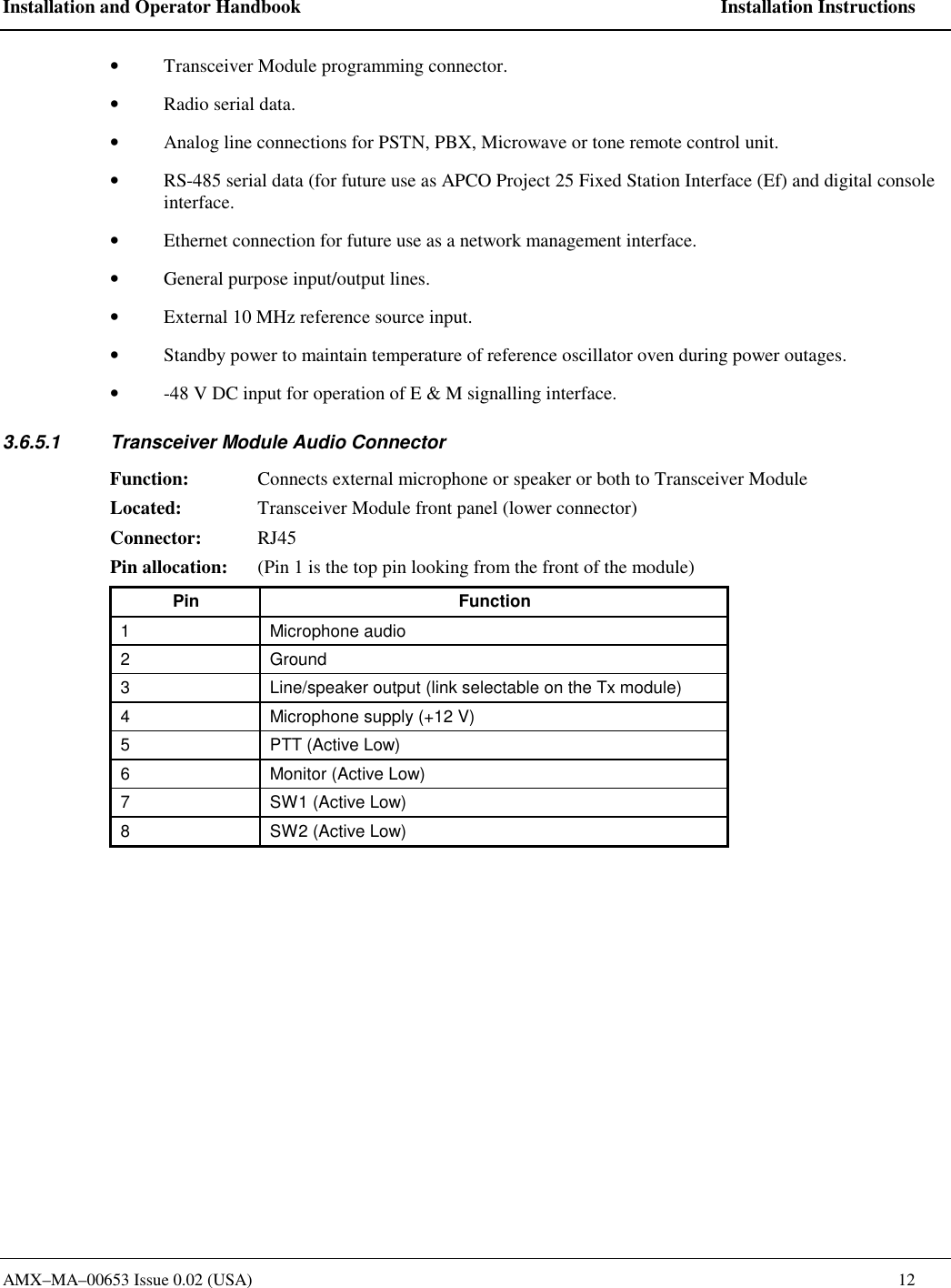
Installation and Operator Handbook    Installation Instructions AMX–MA–00653 Issue 0.02 (USA)    12 •  Transceiver Module programming connector.  •  Radio serial data.   •  Analog line connections for PSTN, PBX, Microwave or tone remote control unit.   •  RS-485 serial data (for future use as APCO Project 25 Fixed Station Interface (Ef) and digital console interface.   •  Ethernet connection for future use as a network management interface.  •  General purpose input/output lines.   •  External 10 MHz reference source input. •  Standby power to maintain temperature of reference oscillator oven during power outages.   •  -48 V DC input for operation of E & M signalling interface. 3.6.5.1  Transceiver Module Audio Connector Function:  Connects external microphone or speaker or both to Transceiver Module Located:  Transceiver Module front panel (lower connector) Connector: RJ45 Pin allocation:  (Pin 1 is the top pin looking from the front of the module) Pin Function 1 Microphone audio 2 Ground 3  Line/speaker output (link selectable on the Tx module) 4  Microphone supply (+12 V) 5  PTT (Active Low) 6  Monitor (Active Low) 7  SW1 (Active Low) 8  SW2 (Active Low)
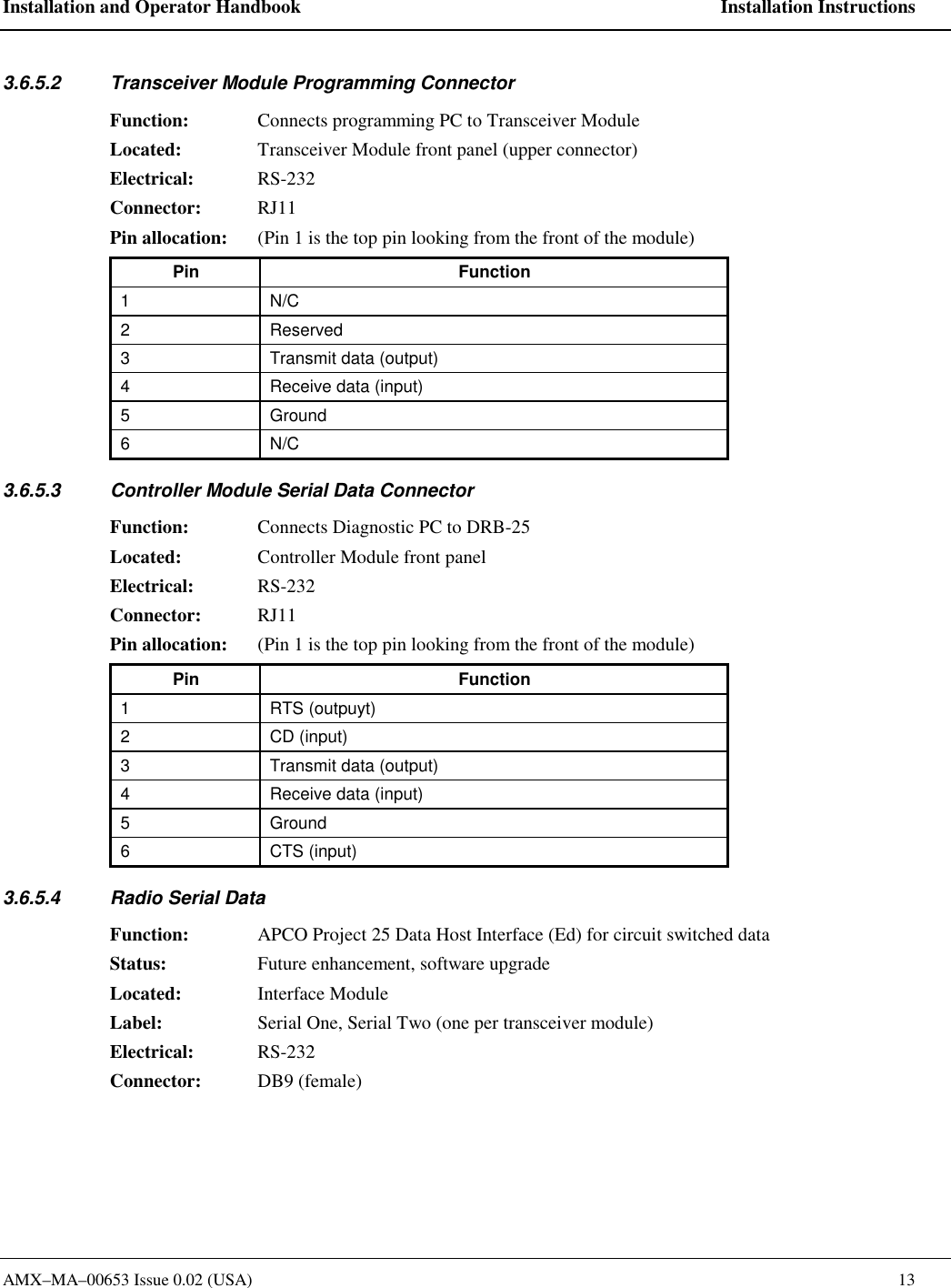
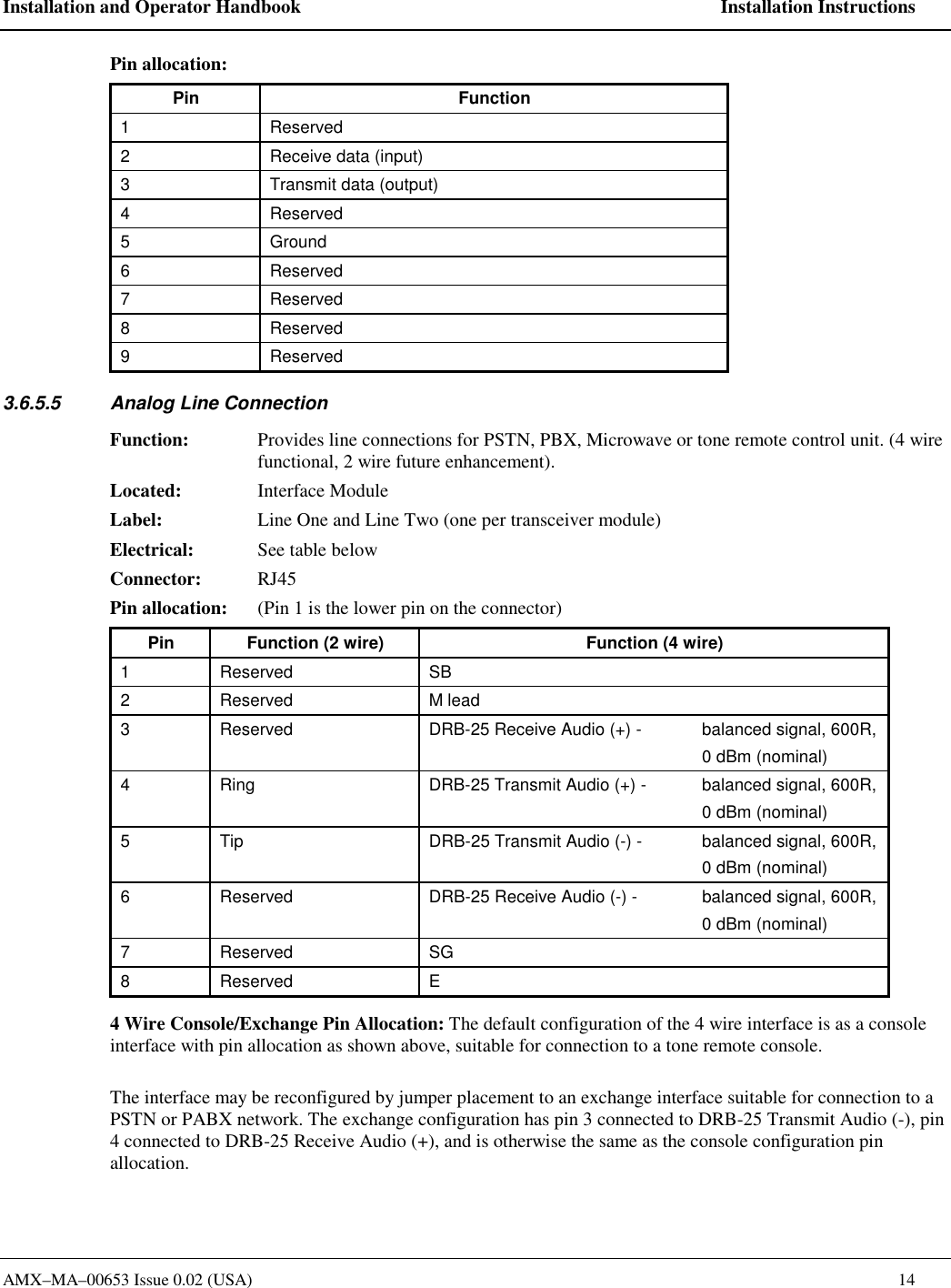
Installation and Operator Handbook    Installation Instructions AMX–MA–00653 Issue 0.02 (USA)    13 3.6.5.2  Transceiver Module Programming Connector Function:  Connects programming PC to Transceiver Module Located:  Transceiver Module front panel (upper connector) Electrical: RS-232 Connector: RJ11  Pin allocation:  (Pin 1 is the top pin looking from the front of the module) Pin Function 1 N/C 2 Reserved 3  Transmit data (output) 4  Receive data (input) 5 Ground 6 N/C 3.6.5.3  Controller Module Serial Data Connector Function:  Connects Diagnostic PC to DRB-25 Located:  Controller Module front panel  Electrical: RS-232 Connector: RJ11  Pin allocation:  (Pin 1 is the top pin looking from the front of the module) Pin Function 1 RTS (outpuyt) 2 CD (input) 3  Transmit data (output) 4  Receive data (input) 5 Ground 6 CTS (input) 3.6.5.4  Radio Serial Data Function:  APCO Project 25 Data Host Interface (Ed) for circuit switched data  Status:  Future enhancement, software upgrade Located:  Interface Module  Label:  Serial One, Serial Two (one per transceiver module) Electrical: RS-232 Connector: DB9 (female)
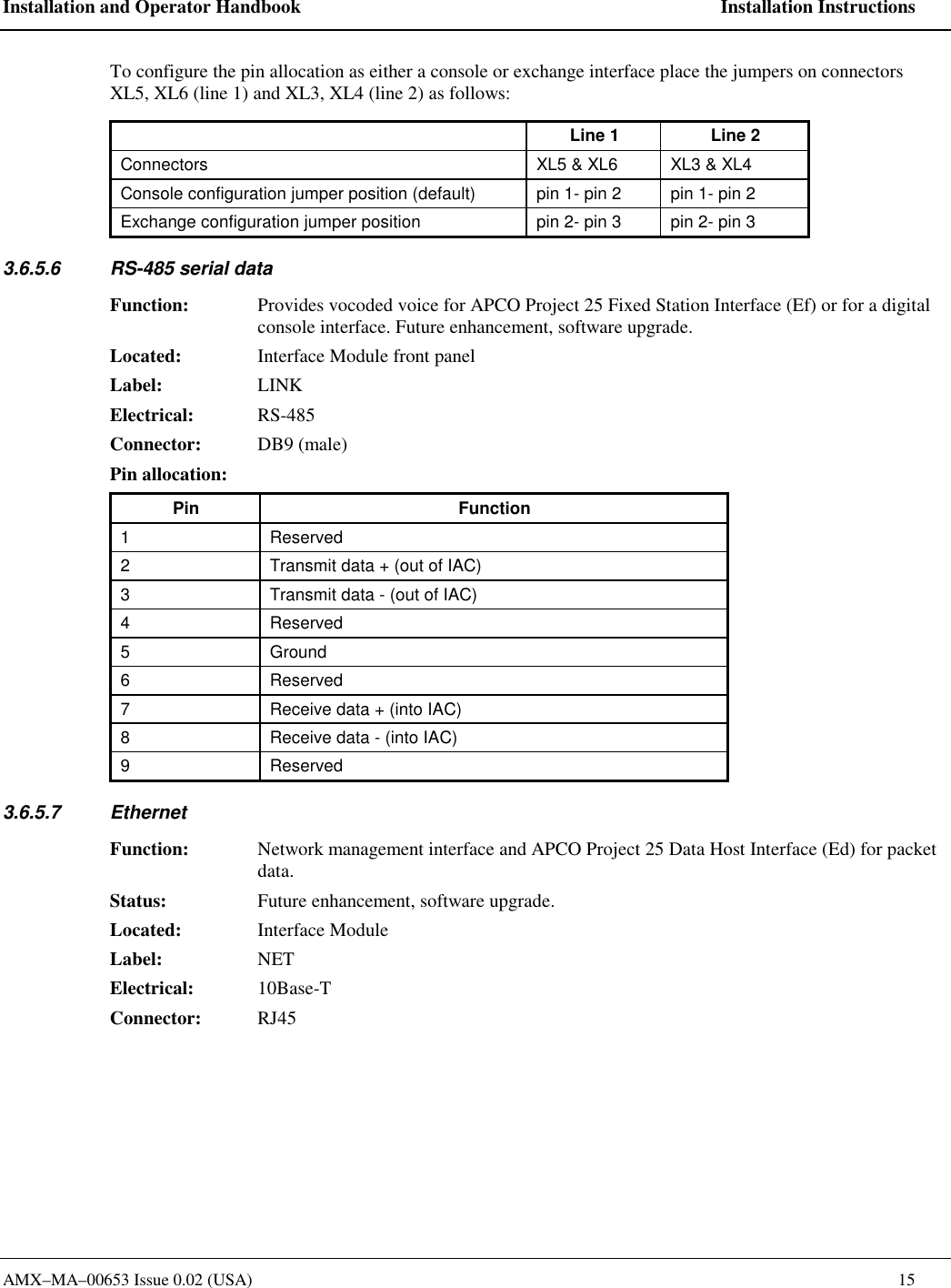
Installation and Operator Handbook    Installation Instructions AMX–MA–00653 Issue 0.02 (USA)    14 Pin allocation:   Pin Function 1 Reserved 2  Receive data (input) 3  Transmit data (output) 4 Reserved 5 Ground 6 Reserved 7 Reserved 8 Reserved 9 Reserved 3.6.5.5  Analog Line Connection Function:  Provides line connections for PSTN, PBX, Microwave or tone remote control unit. (4 wire functional, 2 wire future enhancement). Located: Interface Module Label:  Line One and Line Two (one per transceiver module) Electrical: See table below Connector: RJ45  Pin allocation:  (Pin 1 is the lower pin on the connector) Pin  Function (2 wire)  Function (4 wire) 1 Reserved  SB 2 Reserved  M lead 3  Reserved  DRB-25 Receive Audio (+) -  balanced signal, 600R,      0 dBm (nominal) 4  Ring  DRB-25 Transmit Audio (+) -  balanced signal, 600R,      0 dBm (nominal) 5  Tip  DRB-25 Transmit Audio (-) -  balanced signal, 600R,      0 dBm (nominal) 6  Reserved  DRB-25 Receive Audio (-) -  balanced signal, 600R,      0 dBm (nominal) 7 Reserved  SG 8 Reserved  E 4 Wire Console/Exchange Pin Allocation: The default configuration of the 4 wire interface is as a console interface with pin allocation as shown above, suitable for connection to a tone remote console.  The interface may be reconfigured by jumper placement to an exchange interface suitable for connection to a PSTN or PABX network. The exchange configuration has pin 3 connected to DRB-25 Transmit Audio (-), pin 4 connected to DRB-25 Receive Audio (+), and is otherwise the same as the console configuration pin allocation.
Installation and Operator Handbook    Installation Instructions AMX–MA–00653 Issue 0.02 (USA)    15 To configure the pin allocation as either a console or exchange interface place the jumpers on connectors XL5, XL6 (line 1) and XL3, XL4 (line 2) as follows:   Line 1  Line 2 Connectors  XL5 & XL6  XL3 & XL4 Console configuration jumper position (default)  pin 1- pin 2  pin 1- pin 2 Exchange configuration jumper position  pin 2- pin 3  pin 2- pin 3 3.6.5.6  RS-485 serial data  Function:  Provides vocoded voice for APCO Project 25 Fixed Station Interface (Ef) or for a digital console interface. Future enhancement, software upgrade.   Located:  Interface Module front panel Label: LINK Electrical: RS-485 Connector: DB9 (male) Pin allocation:   Pin Function 1 Reserved 2  Transmit data + (out of IAC) 3  Transmit data - (out of IAC) 4 Reserved 5 Ground 6 Reserved 7  Receive data + (into IAC) 8  Receive data - (into IAC) 9 Reserved 3.6.5.7 Ethernet Function:  Network management interface and APCO Project 25 Data Host Interface (Ed) for packet data.   Status:  Future enhancement, software upgrade.   Located: Interface Module Label: NET Electrical: 10Base-T Connector: RJ45
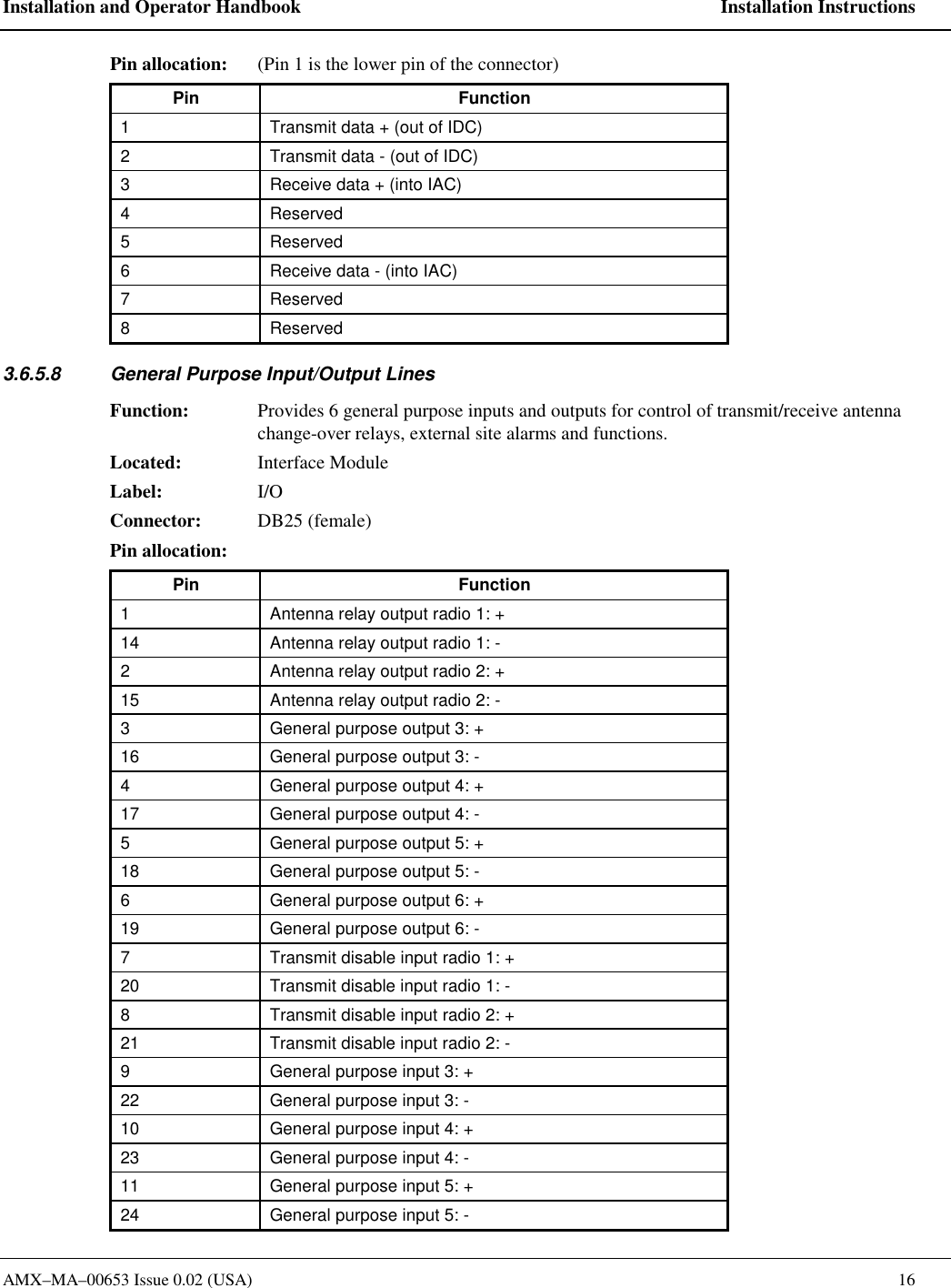
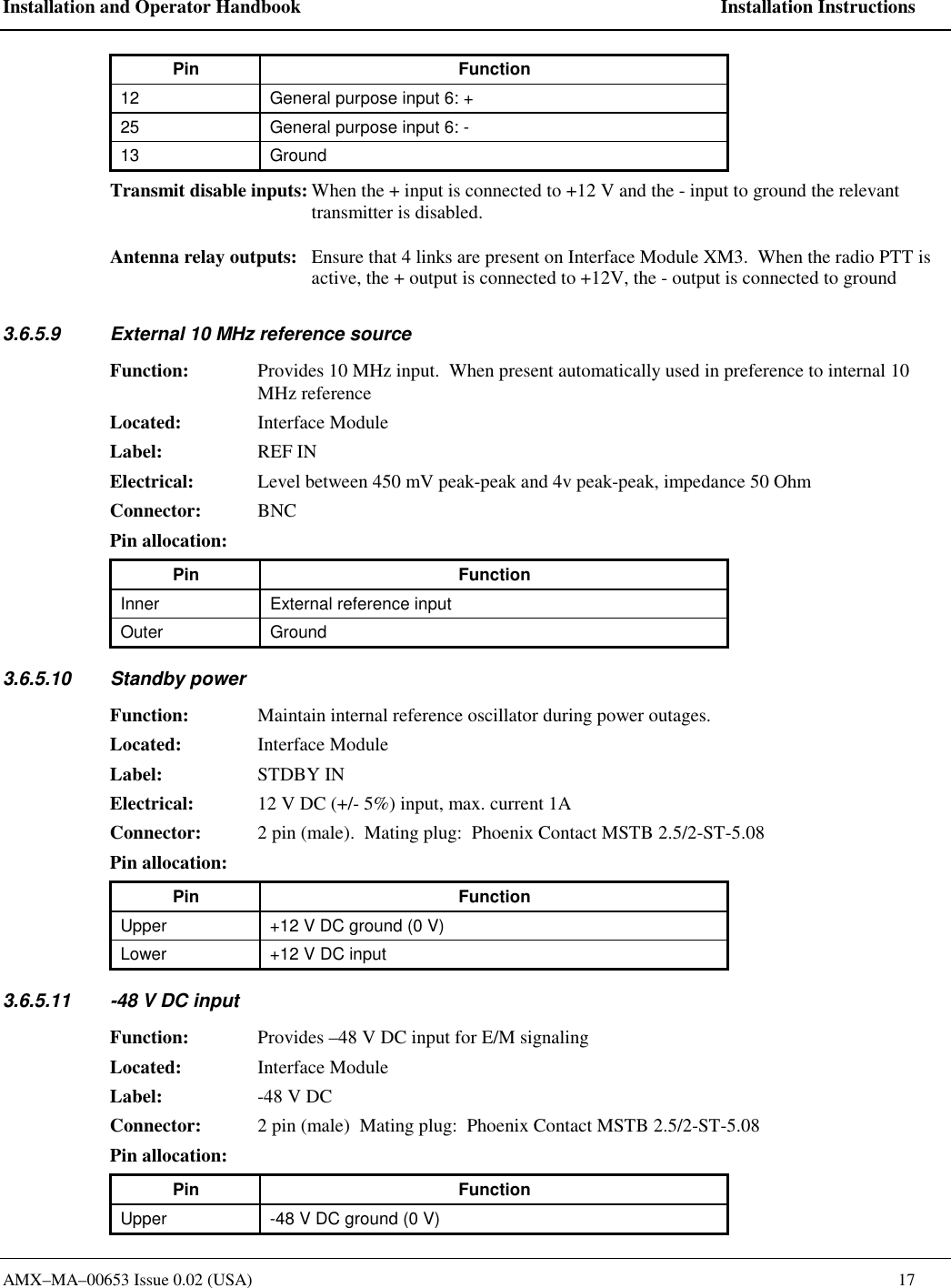
Installation and Operator Handbook    Installation Instructions AMX–MA–00653 Issue 0.02 (USA)    16 Pin allocation:  (Pin 1 is the lower pin of the connector) Pin Function 1  Transmit data + (out of IDC) 2  Transmit data - (out of IDC) 3  Receive data + (into IAC) 4 Reserved 5 Reserved 6  Receive data - (into IAC) 7 Reserved 8 Reserved 3.6.5.8  General Purpose Input/Output Lines Function:  Provides 6 general purpose inputs and outputs for control of transmit/receive antenna change-over relays, external site alarms and functions.   Located: Interface Module Label: I/O Connector:  DB25 (female)  Pin allocation:   Pin Function 1  Antenna relay output radio 1: +  14  Antenna relay output radio 1: -  2  Antenna relay output radio 2: +  15  Antenna relay output radio 2: -  3  General purpose output 3: + 16  General purpose output 3: - 4  General purpose output 4: + 17  General purpose output 4: - 5  General purpose output 5: + 18  General purpose output 5: - 6  General purpose output 6: + 19  General purpose output 6: - 7  Transmit disable input radio 1: + 20  Transmit disable input radio 1: - 8  Transmit disable input radio 2: + 21  Transmit disable input radio 2: -  9  General purpose input 3: + 22  General purpose input 3: - 10  General purpose input 4: + 23  General purpose input 4: - 11  General purpose input 5: + 24  General purpose input 5: -
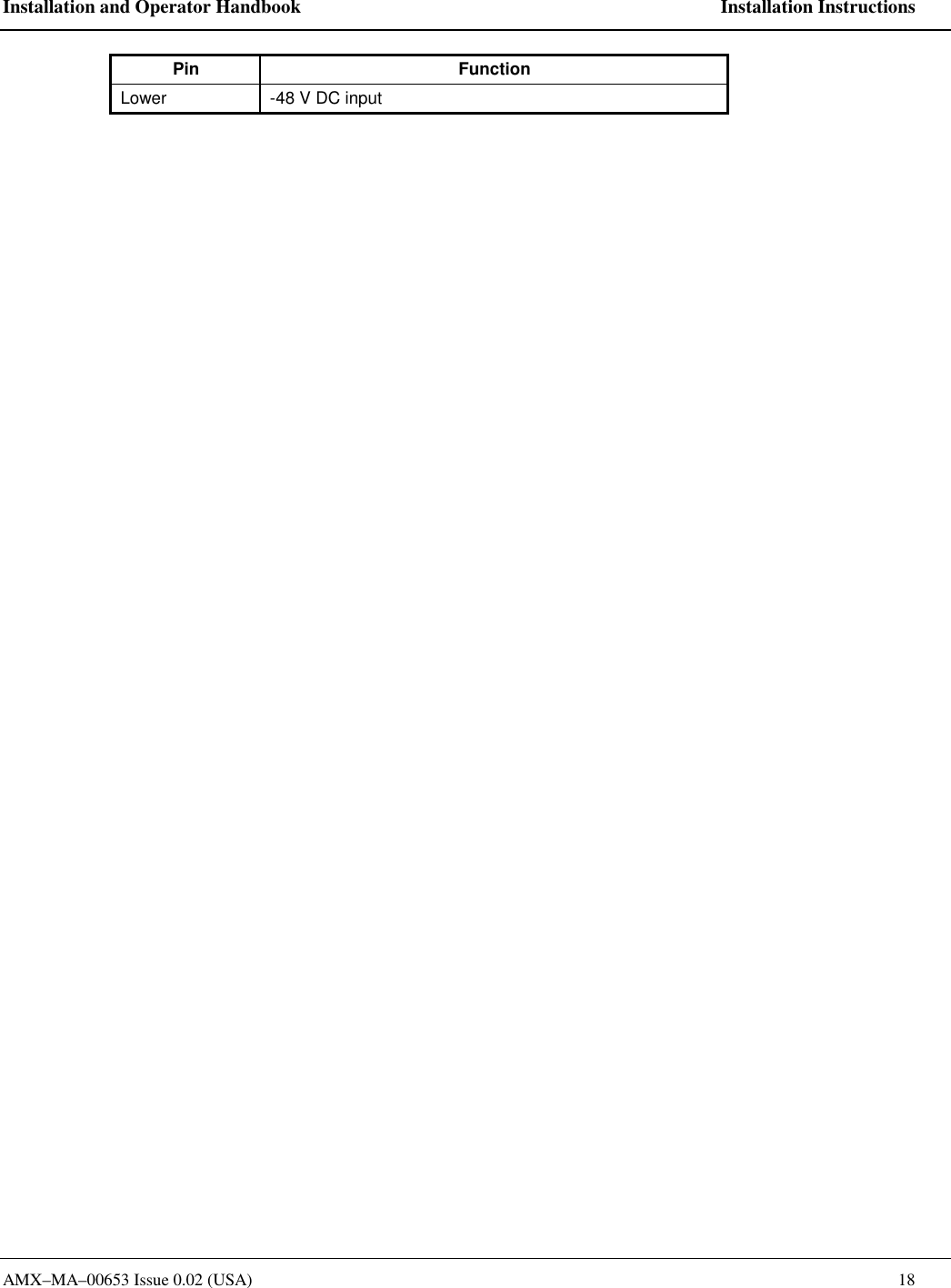
Installation and Operator Handbook    Installation Instructions AMX–MA–00653 Issue 0.02 (USA)    17 Pin Function 12  General purpose input 6: + 25  General purpose input 6: - 13 Ground Transmit disable inputs: When the + input is connected to +12 V and the - input to ground the relevant transmitter is disabled.  Antenna relay outputs:  Ensure that 4 links are present on Interface Module XM3.  When the radio PTT is active, the + output is connected to +12V, the - output is connected to ground 3.6.5.9  External 10 MHz reference source Function:  Provides 10 MHz input.  When present automatically used in preference to internal 10 MHz reference Located: Interface Module Label: REF IN Electrical:  Level between 450 mV peak-peak and 4v peak-peak, impedance 50 Ohm  Connector: BNC Pin allocation:   Pin Function Inner  External reference input Outer Ground 3.6.5.10 Standby power Function:  Maintain internal reference oscillator during power outages. Located: Interface Module Label: STDBY IN Electrical:  12 V DC (+/- 5%) input, max. current 1A Connector:  2 pin (male).  Mating plug:  Phoenix Contact MSTB 2.5/2-ST-5.08 Pin allocation:   Pin Function Upper  +12 V DC ground (0 V) Lower  +12 V DC input 3.6.5.11  -48 V DC input  Function:  Provides –48 V DC input for E/M signaling Located: Interface Module Label:  -48 V DC Connector:  2 pin (male)  Mating plug:  Phoenix Contact MSTB 2.5/2-ST-5.08 Pin allocation:   Pin Function Upper  -48 V DC ground (0 V)
Installation and Operator Handbook    Installation Instructions AMX–MA–00653 Issue 0.02 (USA)    18 Pin Function Lower  -48 V DC input

Navigation menu