Wireless Seismic 00401 Base Station Unit User Manual DeploymentGuide

Wireless Seismic, Inc. Base Station Unit DeploymentGuide

Contents

Users Manual 2

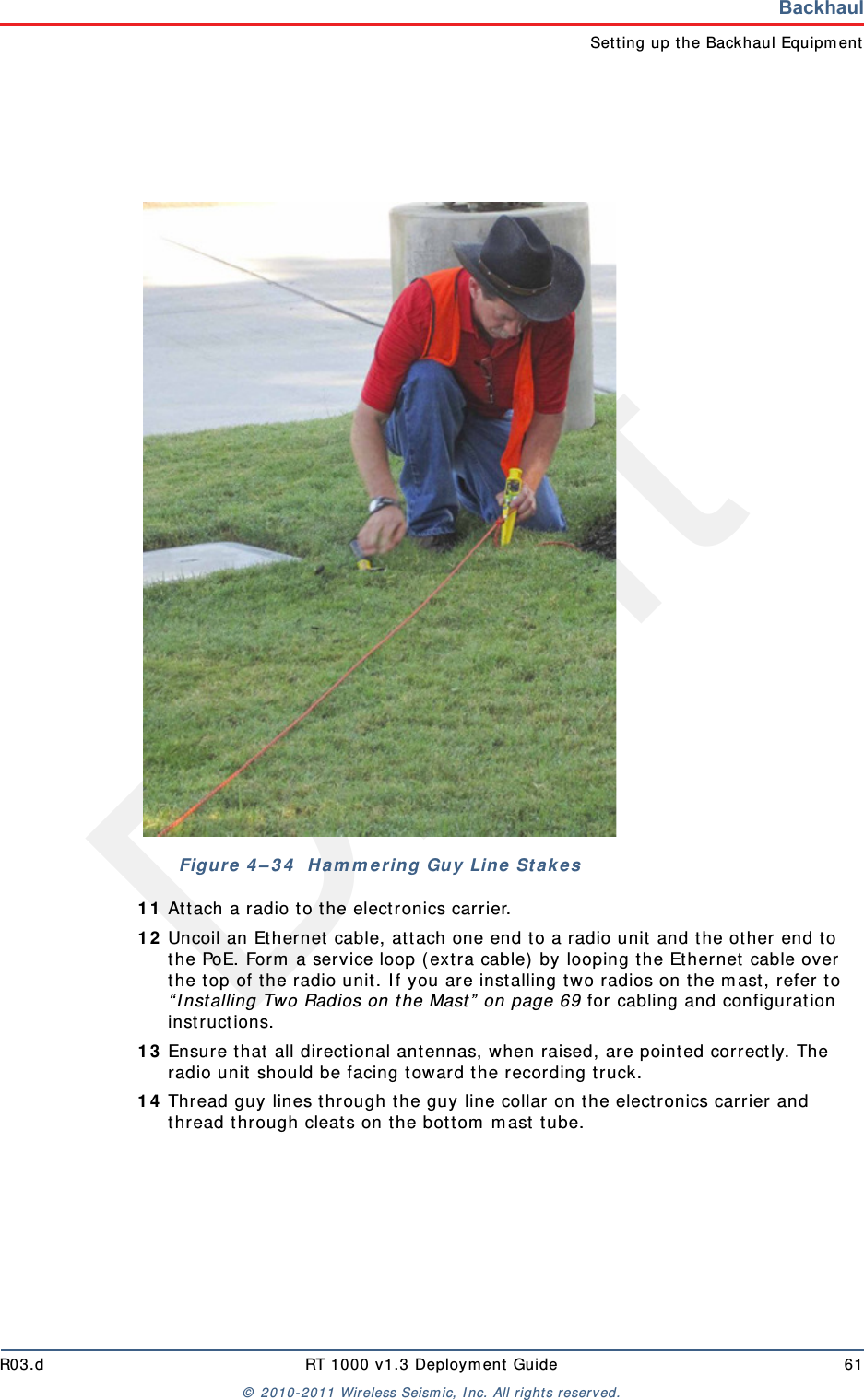
DraftR03.d RT 1000 v1.3 Deploym ent Guide 61©  2010- 2011 Wir eless Seism ic, I nc. All right s reserved.BackhaulSet t ing up t he Backhaul Equipm ent1 1 At t ach a radio t o t he elect ronics carrier.1 2 Uncoil an Ethernet  cable, at tach one end t o a radio unit and the ot her  end to the PoE. Form  a service loop ( ext ra cable)  by looping t he Ethernet  cable over the t op of t he radio unit. I f you are installing two radios on t he m ast , refer to “ I nst alling Two Radios on the Mast ”  on page 69 for cabling and configuration inst ructions.1 3 Ensur e t hat  all direct ional antennas, when raised, are point ed correct ly. The radio unit  should be facing t oward t he recording t ruck.1 4 Thread guy lines through t he guy line collar on t he electronics carrier and thread t hrough cleat s on t he bott om  m ast  tube.Figure  4 – 3 4   H a m m e r ing Guy Line  St a k es
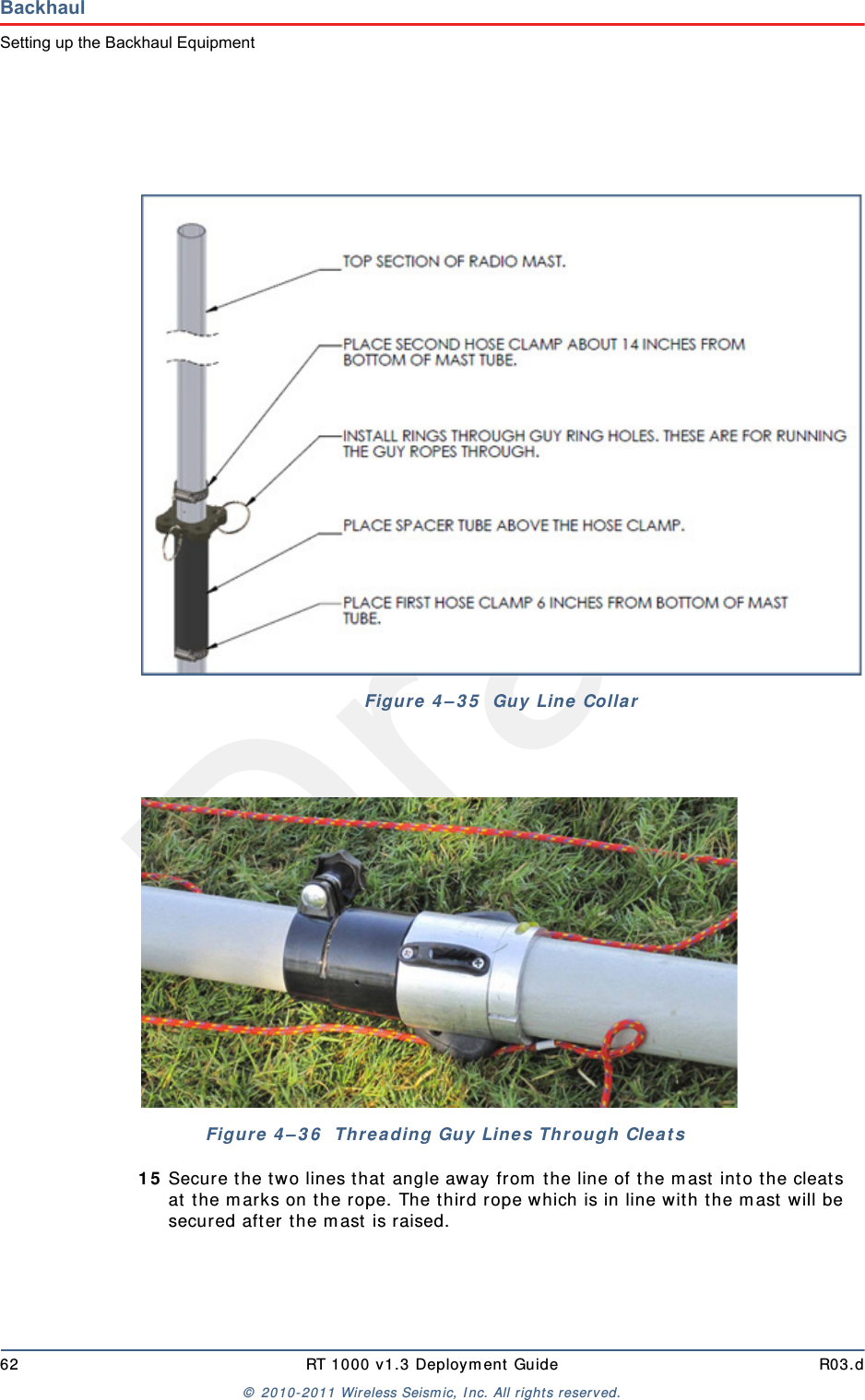
Draft62 RT 1000 v1.3 Deploym ent Guide R03.d©  2010- 2011 Wir eless Seism ic, I nc. All right s reserved.BackhaulSetting up the Backhaul Equipment1 5 Secure the t wo lines t hat  angle away from  the line of t he m ast  int o t he cleats at  t he m arks on t he rope. The t hird rope which is in line wit h t he m ast  will be secured aft er t he m ast  is raised.Figure  4 – 3 5   Guy Lin e  CollarFigure 4 – 3 6   Threa ding Guy Line s Through  Clea t s
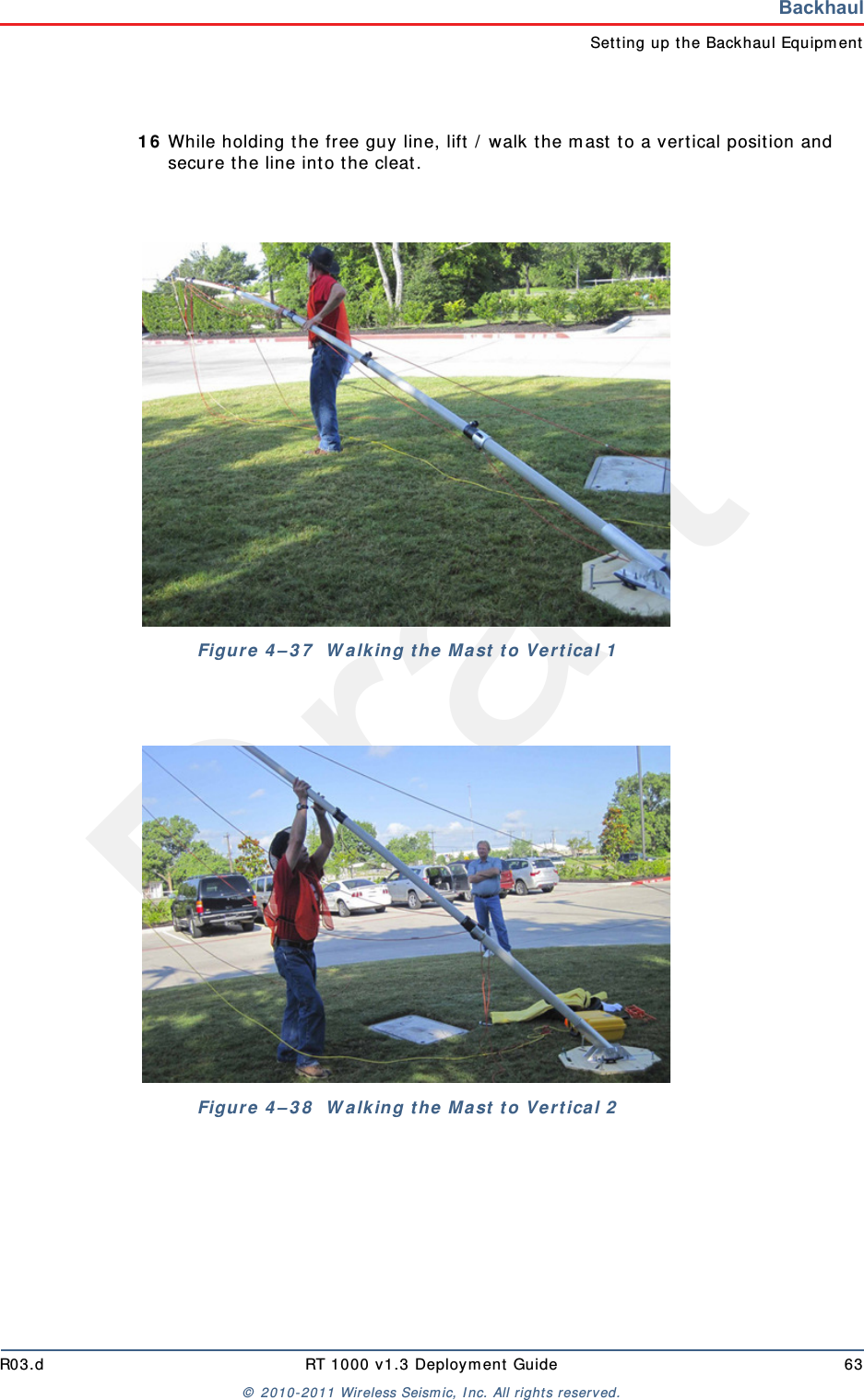
DraftR03.d RT 1000 v1.3 Deploym ent Guide 63©  2010- 2011 Wir eless Seism ic, I nc. All right s reserved.BackhaulSet t ing up t he Backhaul Equipm ent1 6 While holding the free guy line, lift  /  walk the m ast  t o a vertical posit ion and secure t he line int o the cleat.Figure  4 – 3 7   W a lk in g t he  M a st  t o Ve rt ica l 1Figure  4 – 3 8   W a lk in g t he  M a st  t o Ve rt ica l 2
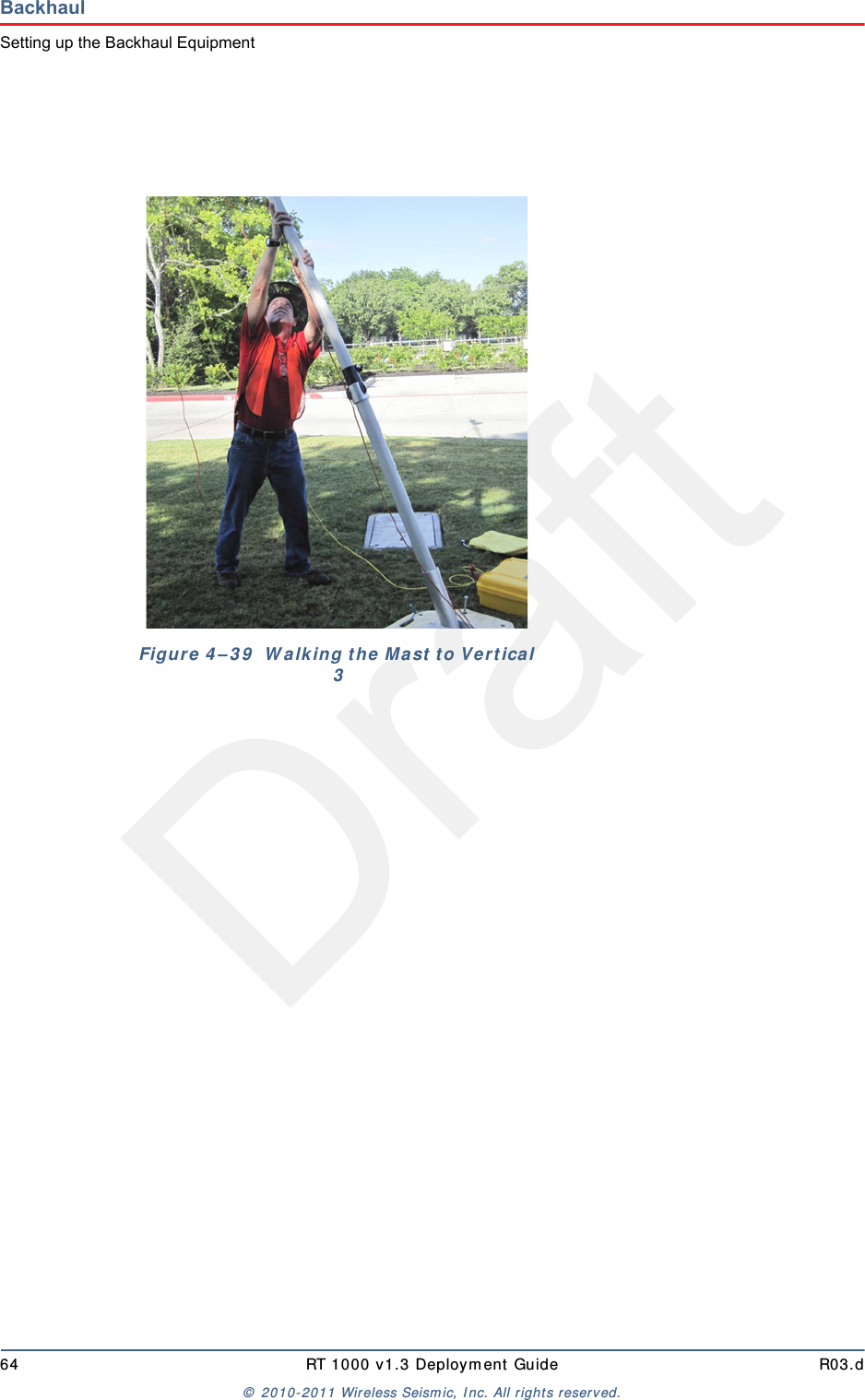
Draft64 RT 1000 v1.3 Deploym ent Guide R03.d©  2010- 2011 Wir eless Seism ic, I nc. All right s reserved.BackhaulSetting up the Backhaul EquipmentFigure  4 – 3 9   W alk ing t he  M a st  t o Ve r t ica l 3
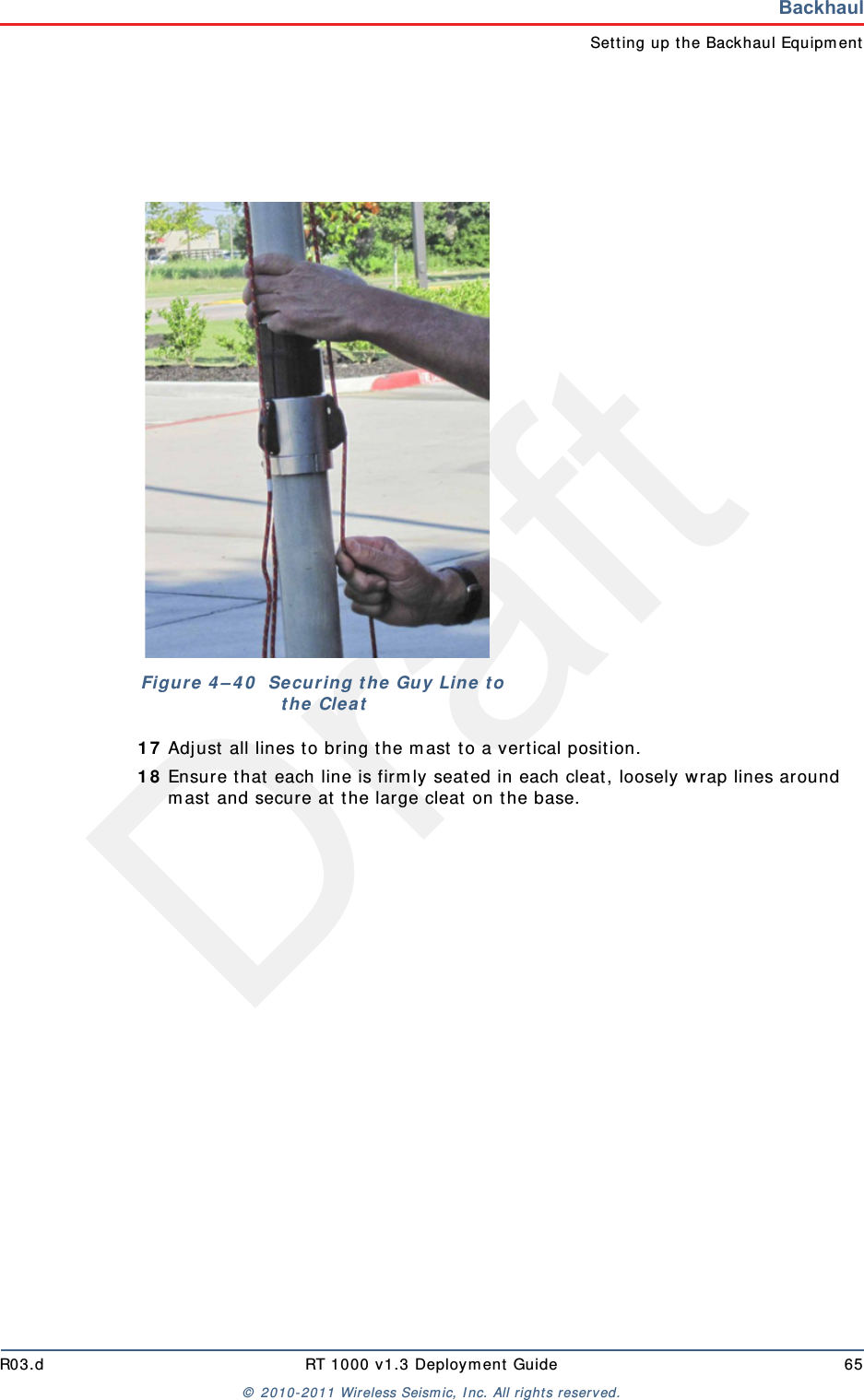
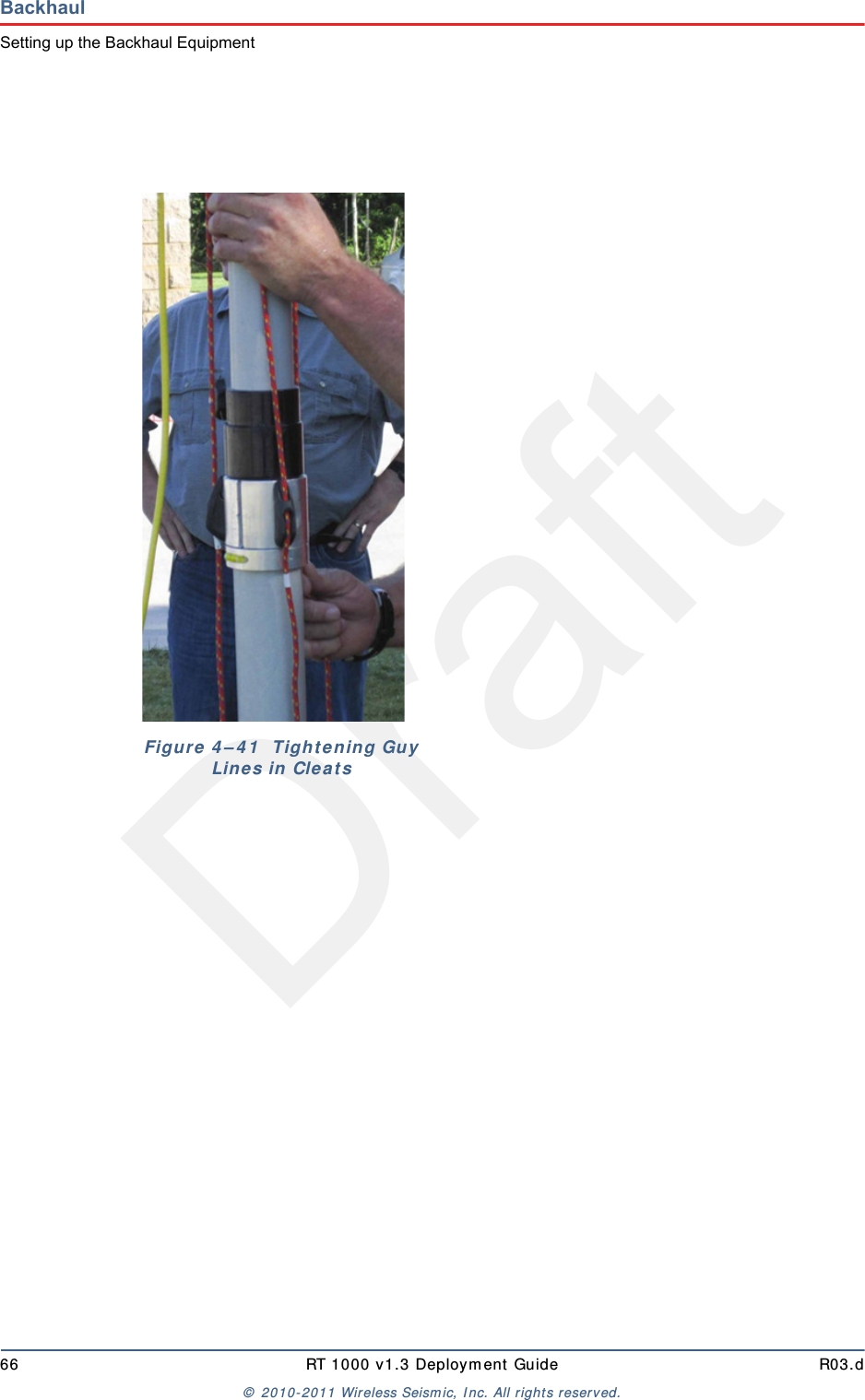
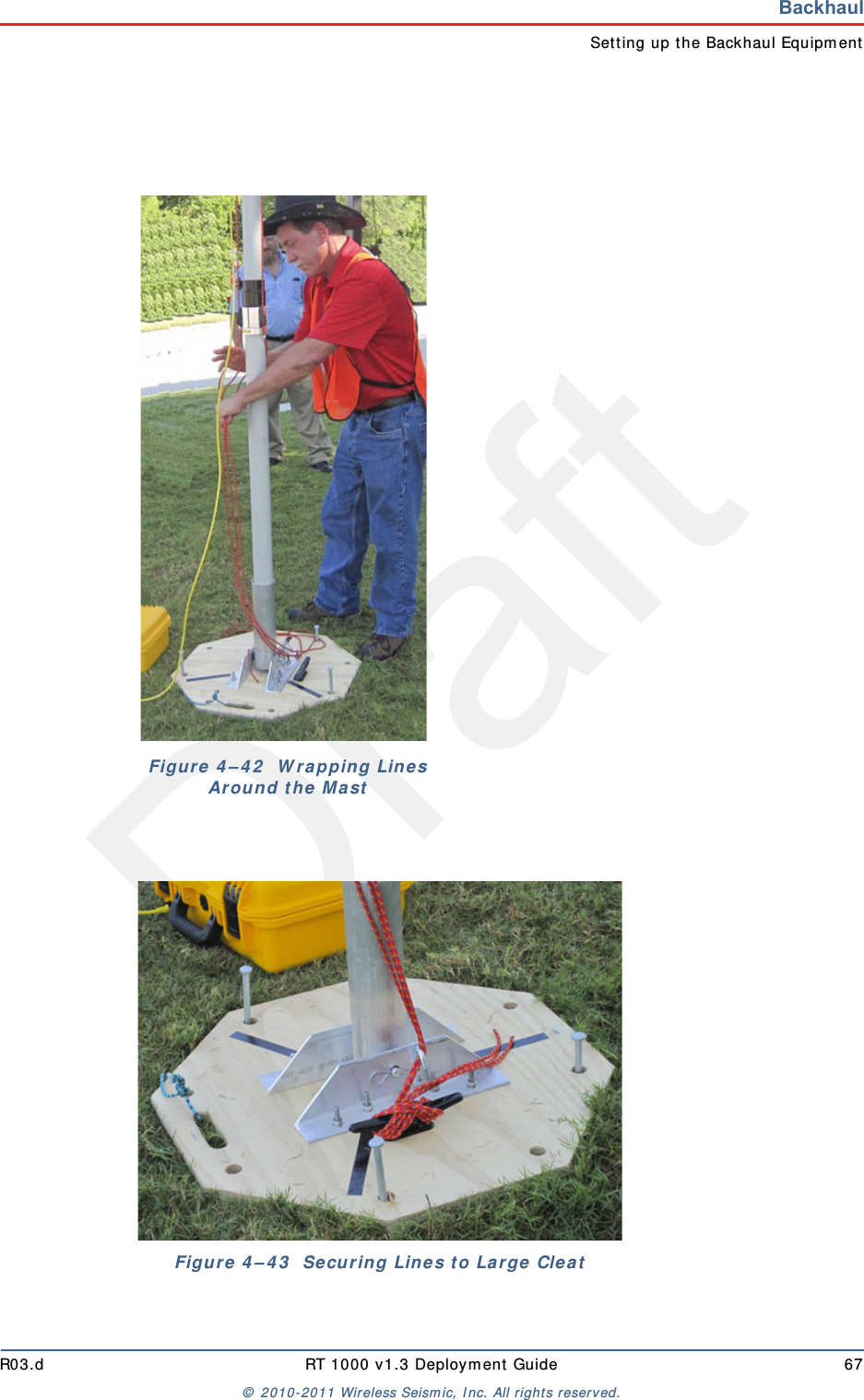
DraftR03.d RT 1000 v1.3 Deploym ent Guide 65©  2010- 2011 Wir eless Seism ic, I nc. All right s reserved.BackhaulSet t ing up t he Backhaul Equipm ent1 7 Adj ust all lines t o bring t he m ast t o a vertical posit ion.1 8 Ensur e t hat  each line is firm ly seat ed in each cleat, loosely wrap lines around m ast and secure at  t he large cleat  on t he base.Figu r e  4 – 4 0   Se cu r in g t h e  Guy  Lin e  t o t he Cleat
Draft66 RT 1000 v1.3 Deploym ent Guide R03.d©  2010- 2011 Wir eless Seism ic, I nc. All right s reserved.BackhaulSetting up the Backhaul EquipmentFigure 4 – 4 1   Tight ening Guy Lin e s in Cle a t s
DraftR03.d RT 1000 v1.3 Deploym ent Guide 67©  2010- 2011 Wir eless Seism ic, I nc. All right s reserved.BackhaulSet t ing up t he Backhaul Equipm entFigu r e  4 – 4 2   W r apping Lines Ar ound t he Ma stFigure  4 – 4 3   Se cur in g Lin e s t o La r ge  Cle a t
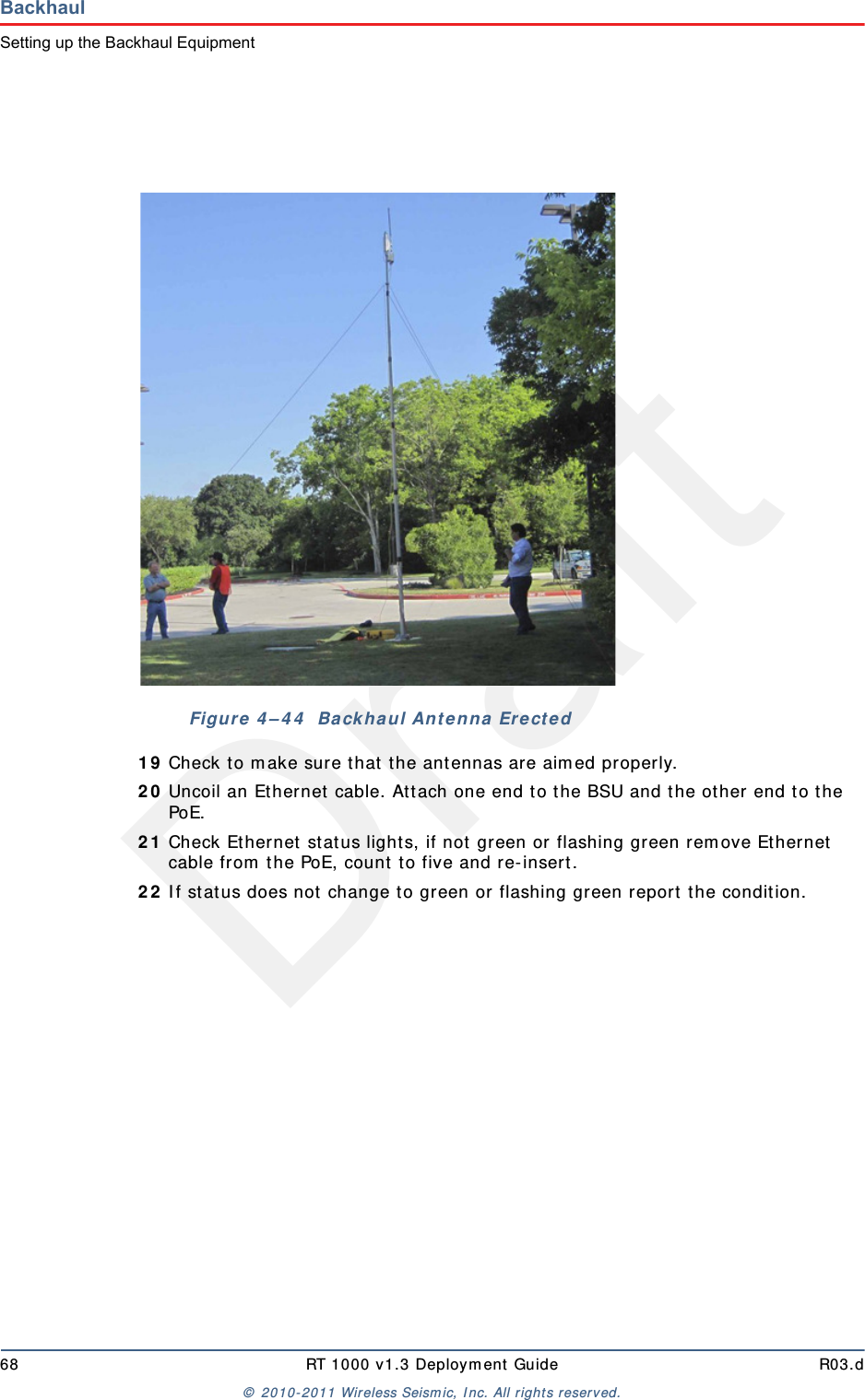
Draft68 RT 1000 v1.3 Deploym ent Guide R03.d©  2010- 2011 Wir eless Seism ic, I nc. All right s reserved.BackhaulSetting up the Backhaul Equipment1 9 Check to m ake sure t hat  the ant ennas are aim ed properly.2 0 Uncoil an Et hernet  cable. Att ach one end t o the BSU and t he ot her end t o the PoE.2 1 Check Ethernet stat us light s, if not  green or flashing green rem ove Ethernet  cable from  t he PoE, count  t o five and re- insert.2 2 I f stat us does not  change t o green or flashing green report  the condit ion. Figure  4 – 4 4   Ba ck haul Ant enna  Ere ct ed
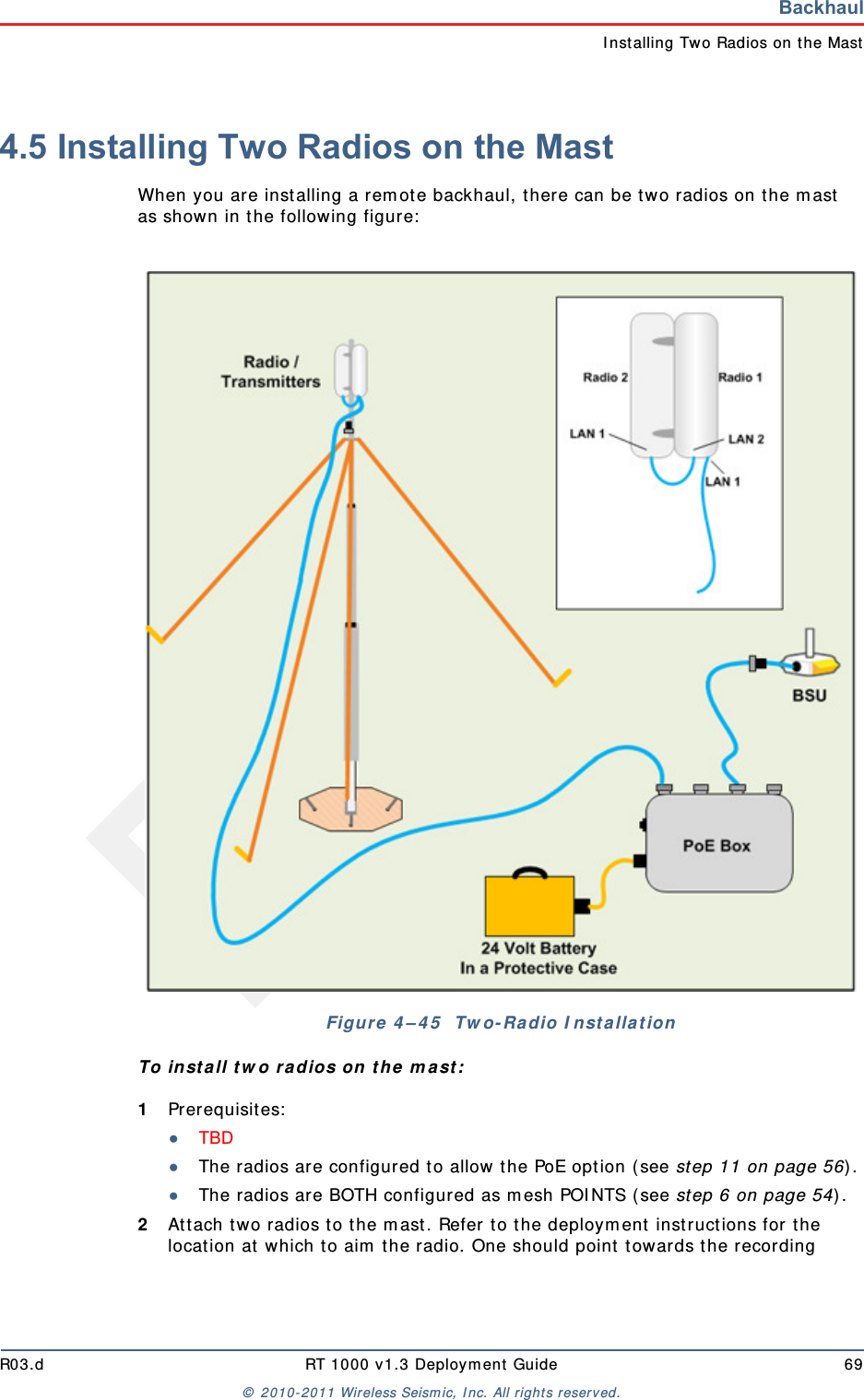
DraftR03.d RT 1000 v1.3 Deploym ent Guide 69©  2010- 2011 Wir eless Seism ic, I nc. All right s reserved.BackhaulI nstalling Two Radios on the Mast4.5 Installing Two Radios on the MastWhen you are inst alling a rem ot e backhaul, t here can be t wo radios on t he m ast  as shown in t he following figure:  To in st a ll t w o radios on t he m ast :1Prerequisit es:●TBD ●The radios are configured to allow  t he PoE opt ion ( see step 11 on page 56) .●The radios are BOTH configured as m esh POI NTS ( see st ep 6 on page 54) .2At t ach t wo radios t o t he m ast . Refer t o t he deploym ent  instructions for the locat ion at  which to aim  the radio. One should point t owards t he recording Figure 4 – 4 5   Tw o- Ra dio I nst a lla t ion
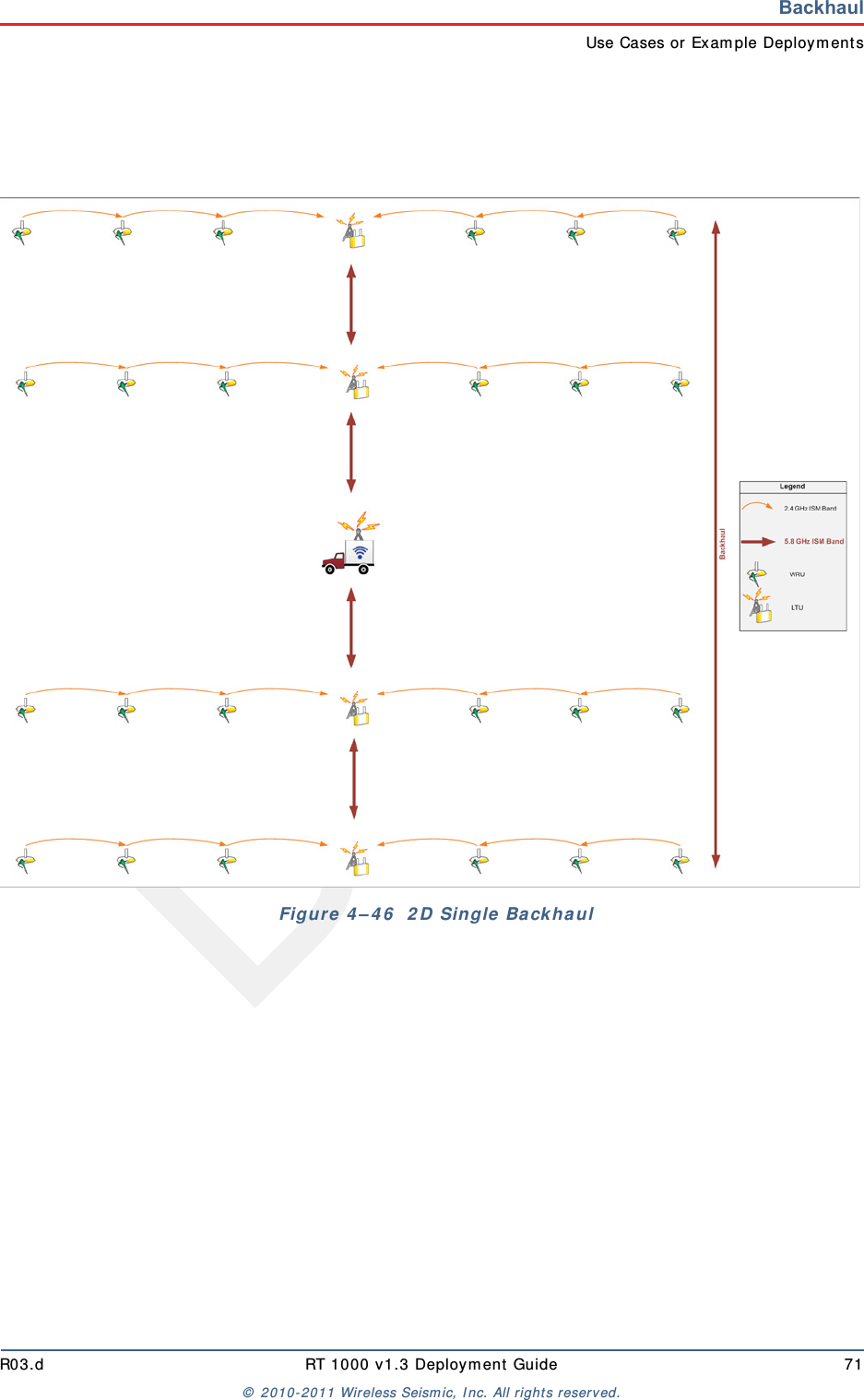
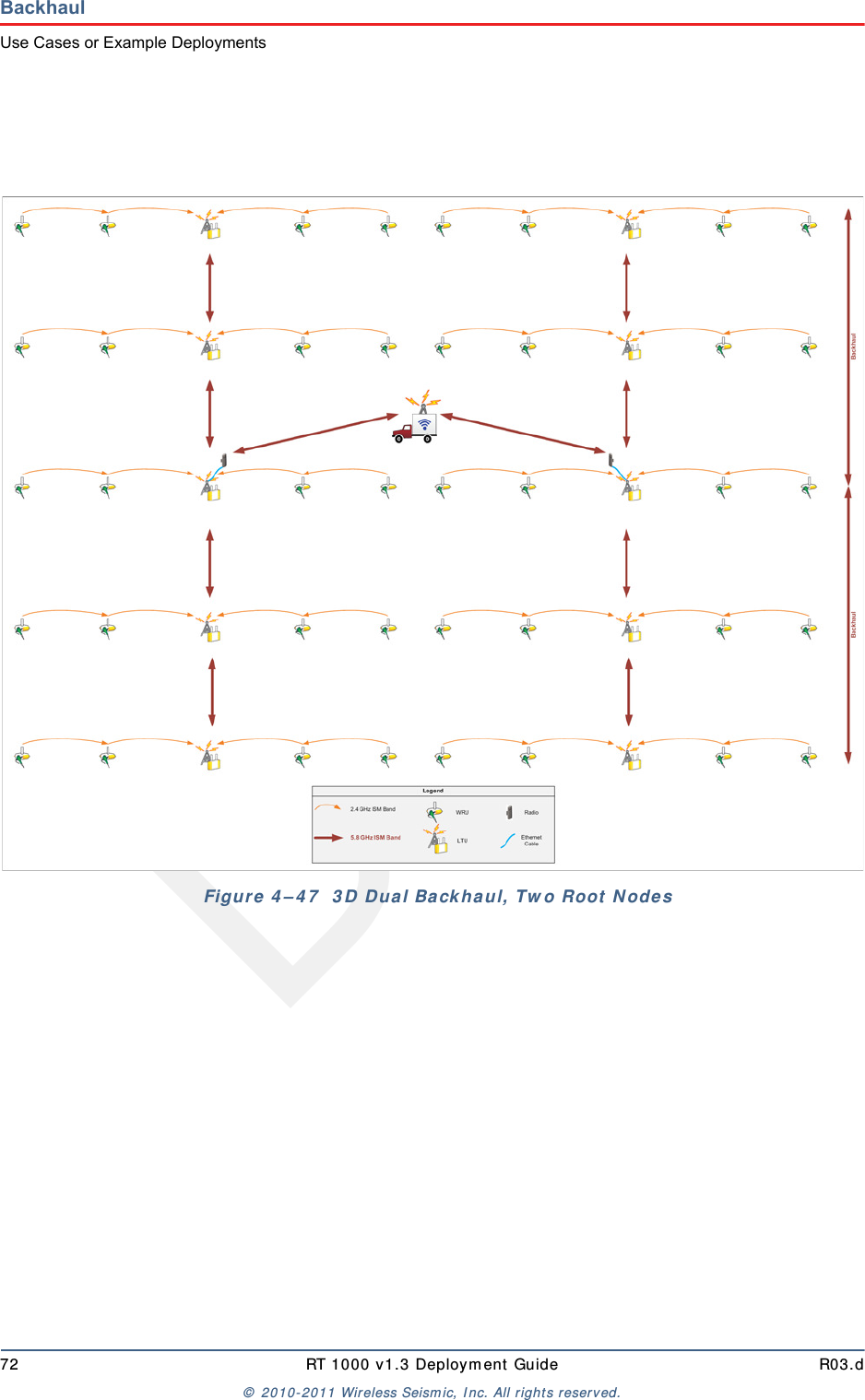
Draft70 RT 1000 v1.3 Deploym ent Guide R03.d©  2010- 2011 Wir eless Seism ic, I nc. All right s reserved.BackhaulRemoving the Backhaul Equipmenttruck ( uplink) , and t he other should point  t owards the next  rem ote backhaul locat ion ( downlink) .3Connect t he t wo radios with a short  Ethernet  cable:  Radio1/ LAN 2 t o Radio 2/LAN 1.4Connect Radio 1/ LAN 1 t o t he PoE.4.6 Removing the Backhaul EquipmentTBD 4.7 Use Cases or Example DeploymentsThis sect ion shows a few exam ple deploym ents.
DraftR03.d RT 1000 v1.3 Deploym ent Guide 71©  2010- 2011 Wir eless Seism ic, I nc. All right s reserved.BackhaulUse Cases or Exam ple Deploym ent sFigure 4 – 4 6   2 D Single  Ba ckha ul
Draft72 RT 1000 v1.3 Deploym ent Guide R03.d©  2010- 2011 Wir eless Seism ic, I nc. All right s reserved.BackhaulUse Cases or Example DeploymentsFigu r e  4 – 4 7   3 D Dua l Ba ck haul, Tw o Root  N odes
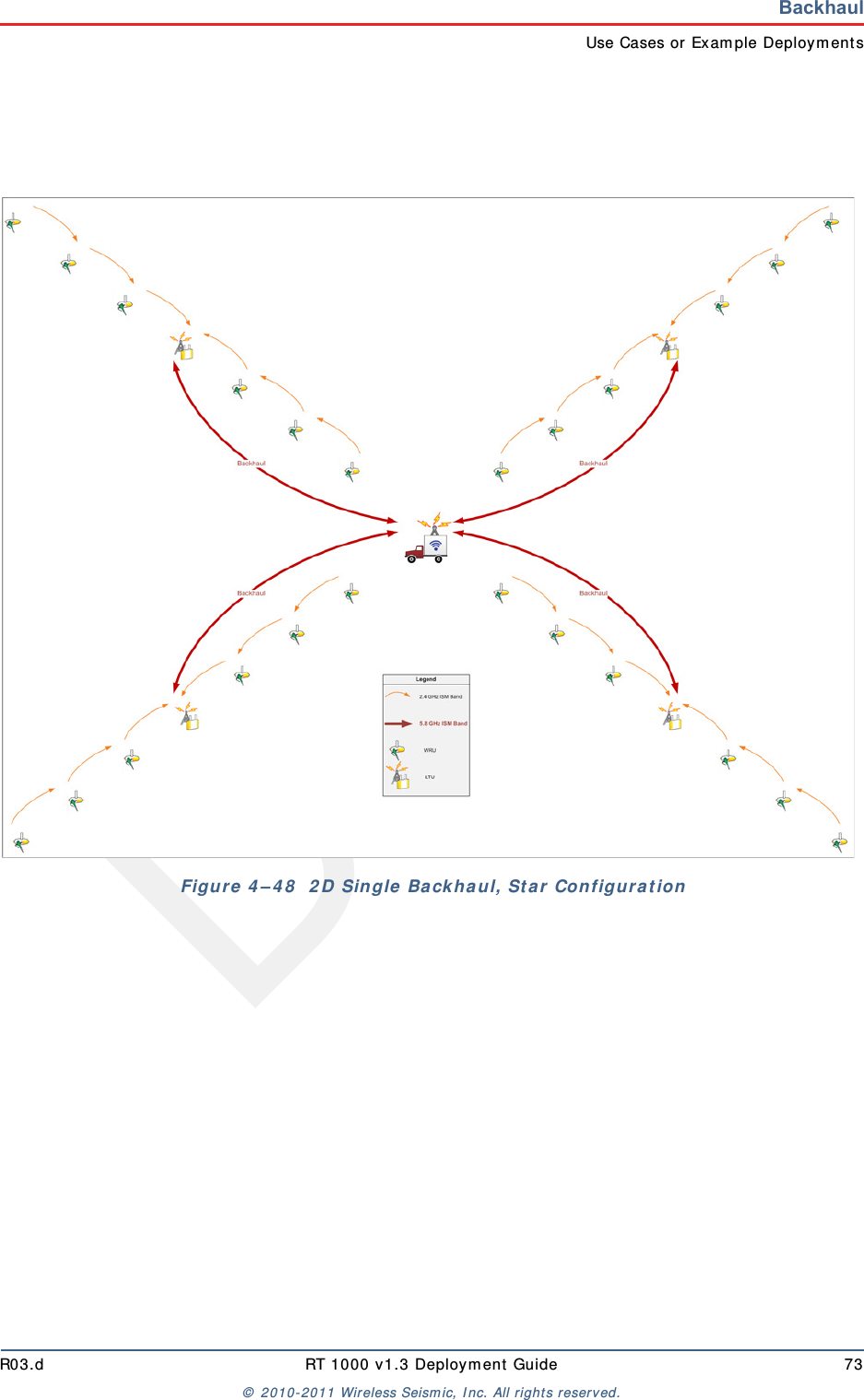
DraftR03.d RT 1000 v1.3 Deploym ent Guide 73©  2010- 2011 Wir eless Seism ic, I nc. All right s reserved.BackhaulUse Cases or Exam ple Deploym ent sFigure  4 – 4 8   2 D Single  Ba ckhaul, St ar Configura t ion
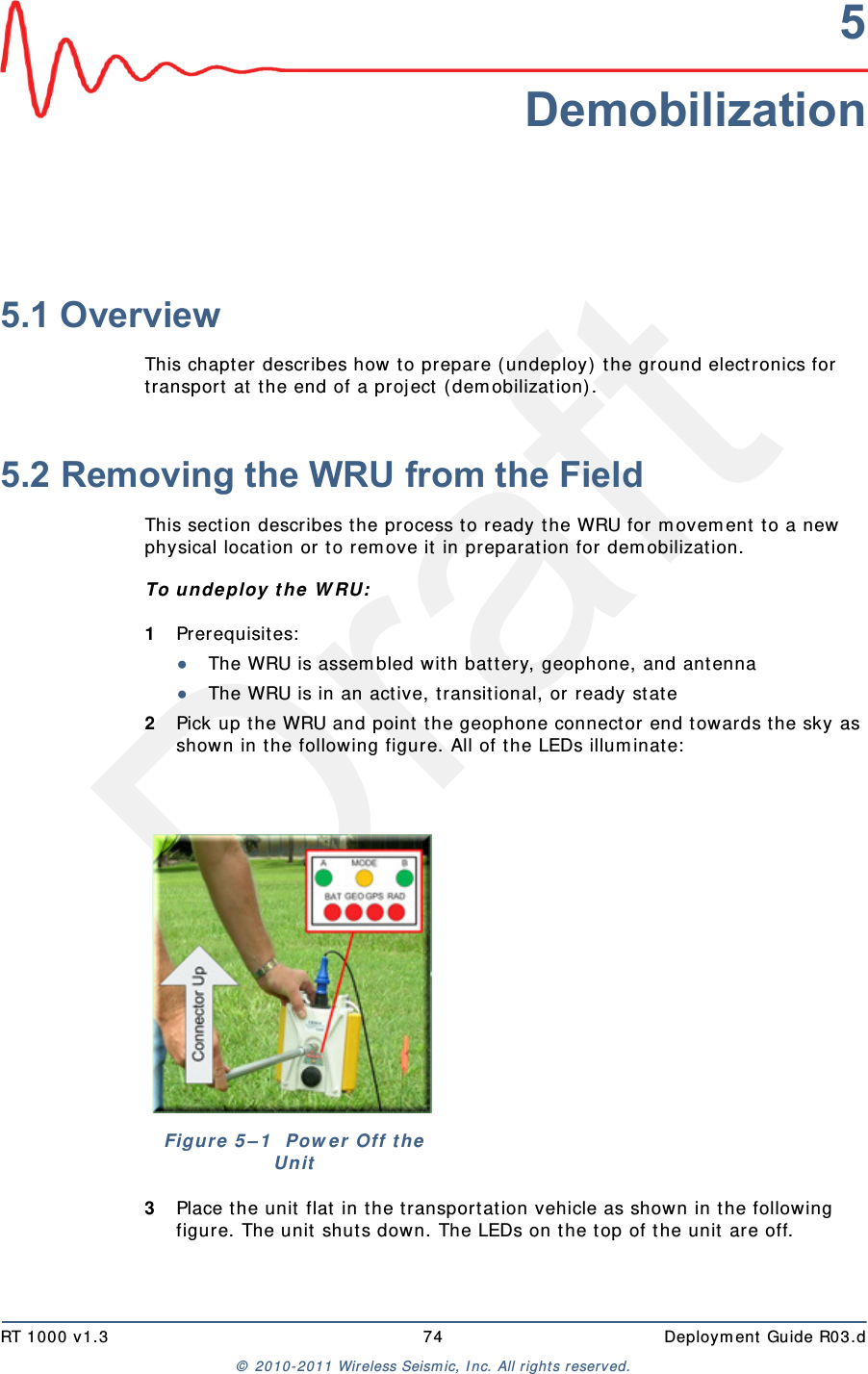
DraftRT 1000 v1.3 74  Deploym ent Guide R03.d©  2010- 2011 Wir eless Seism ic, I nc. All right s reserved.5Demobilization5.1 OverviewThis chapt er  describes how t o prepare (undeploy) t he ground electronics for transport  at  the end of a proj ect  ( dem obilization) . 5.2 Removing the WRU from the FieldThis sect ion describes t he process t o ready t he WRU for m ovem ent t o a new physical locat ion or t o rem ove it  in preparat ion for dem obilization.To un deploy t he W RU:1Prerequisit es:●The WRU is assem bled wit h bat t ery, geophone, and ant enna●The WRU is in an act ive, t ransit ional, or  ready stat e2Pick up the WRU and point  t he geophone connect or end t owards t he sky as shown in the following figure. All of the LEDs illum inat e:3Place t he unit flat  in t he t ransportat ion vehicle as shown in t he follow ing figure. The unit shut s down. The LEDs on the t op of the unit  are off.Figure 5 – 1   Pow e r  Off t he Un it
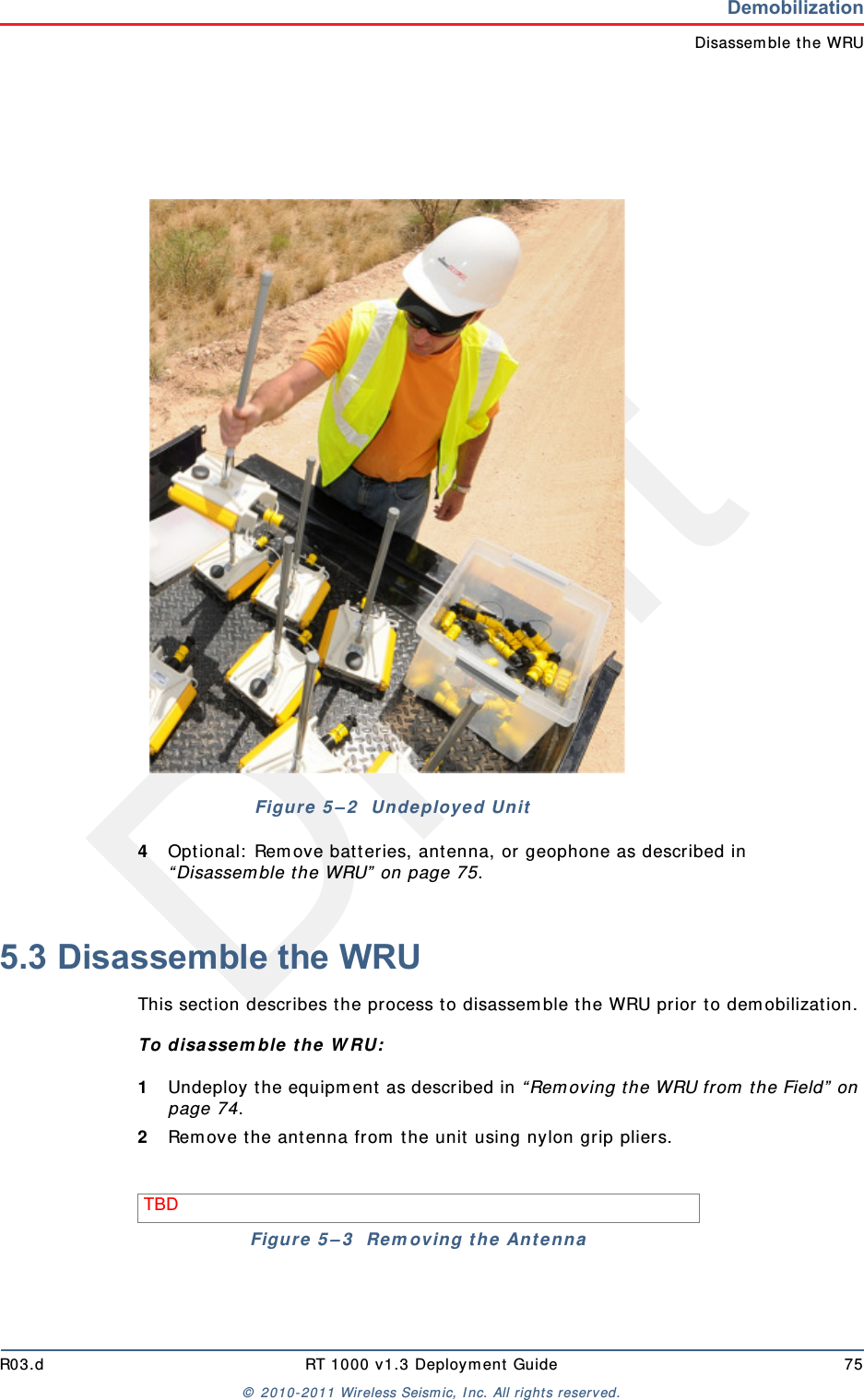
DraftR03.d RT 1000 v1.3 Deploym ent Guide 75©  2010- 2011 Wir eless Seism ic, I nc. All right s reserved.DemobilizationDisassem ble t he WRU4Opt ional:  Rem ove batt eries, ant enna, or geophone as described in “ Disassem ble t he WRU”  on page 75.5.3 Disassemble the WRU This sect ion describes t he process t o disassem ble the WRU prior to dem obilization.To disa sse m ble t h e  W RU:1Undeploy t he equipm ent as described in “ Rem oving t he WRU from  the Field”  on page 74.2Rem ove t he ant enna from  t he unit  using nylon grip pliers.Figu r e  5 – 2   Unde ployed UnitTBD Figure  5 – 3   Re m oving t he  Ant e nna
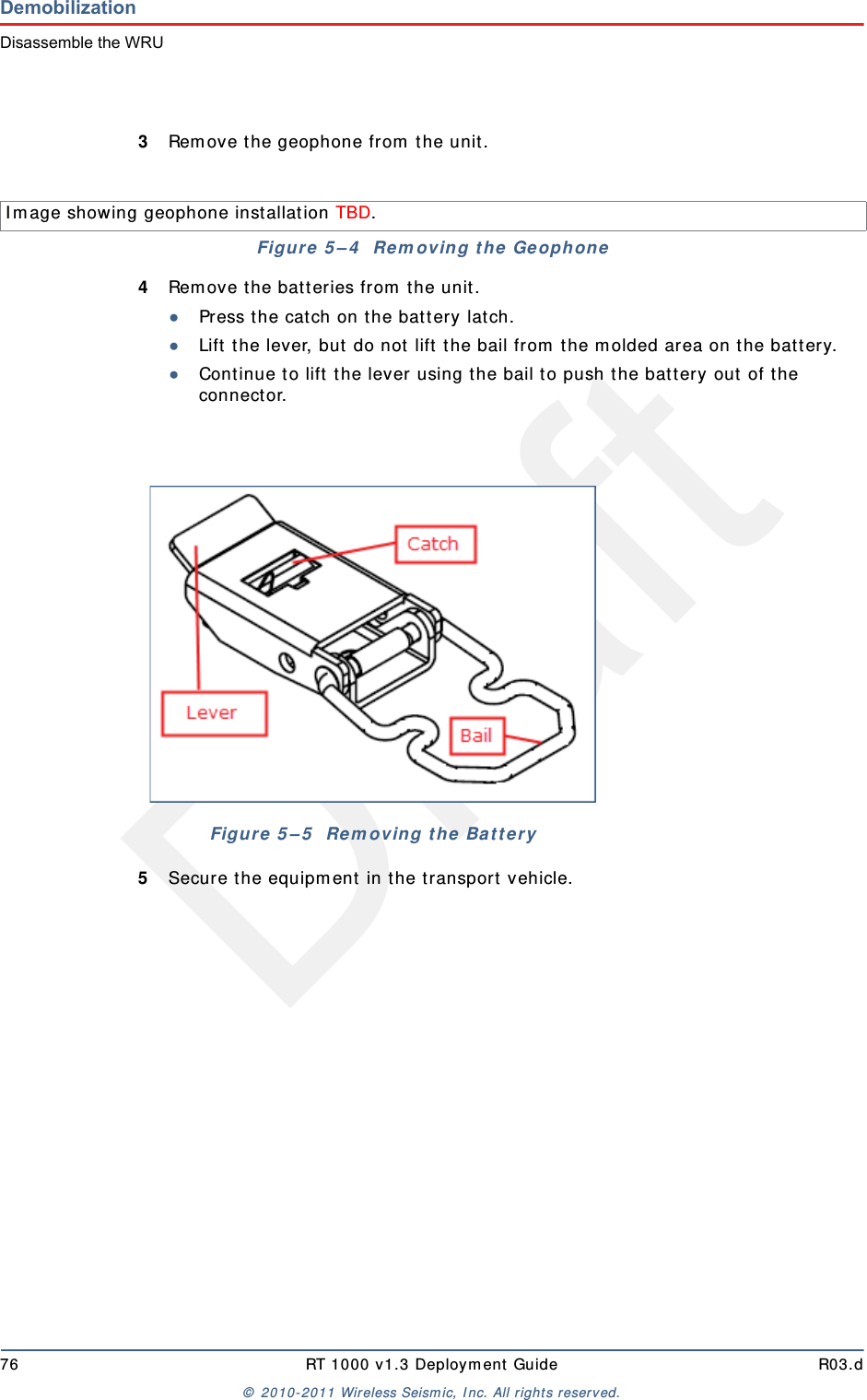
Draft76 RT 1000 v1.3 Deploym ent Guide R03.d©  2010- 2011 Wir eless Seism ic, I nc. All right s reserved.DemobilizationDisassemble the WRU3Rem ove t he geophone from  t he unit .4Rem ove t he bat t eries from  t he unit .●Press the cat ch on t he bat t ery latch.●Lift  t he lever, but  do not  lift t he bail from  t he m olded area on t he bat t ery.●Continue t o lift  the lever using t he bail t o push t he bat tery out  of t he connector. 5Secure the equipm ent  in t he t ransport  vehicle.I m age showing geophone inst allation TBD. Figure  5 – 4   Re m oving t h e  Ge ophoneFigure  5 – 5   Rem oving the  Ba t t er y
DraftRT 1000 v1.3 77  Deploym ent Guide R03.d©  2010- 2011 Wir eless Seism ic, I nc. All right s reserved.6Testing and Maintaining theEquipment6.1 OverviewThis chapt er  describes int ernal and ext ernal t ests for t he ground equipm ent . 6.2 Testing the LayoutTBD 6.2.1 Line TestsTBD 6.2.2 Source Control TestsTBD 6.2.3 Acquisition Parameter TestingTBD 6.2.4 Built-In-Self-Test (BIST)TBD WARNINGI n or der t o com ply wit h FCC radio frequency (RF)  exposurerequirem ent s, t he RT 1000 unit s m ust be inst alled so that a m inim umseparat ion dist ance of 20 cm  is m aint ained bet ween the ant enna( s)  andall persons at all t im es during norm al operat ion.
Draft78 RT 1000 v1.3 Deploym ent Guide R03.d©  2010- 2011 Wir eless Seism ic, I nc. All right s reserved.Testing and Maintaining the EquipmentMaintaining the Equipment6.3 Maintaining the EquipmentTBD 6.3.1 UnitsTBD 6.3.2 AntennasTBD 6.3.3 GeophonesTBD 6.3.4 CautionsTBD
DraftRT 1000 v1.3 79  Deploym ent Guide R03.d©  2010- 2011 Wir eless Seism ic, I nc. All right s reserved.7Troubleshooting and Tips7.1 Best PracticesThis sect ion provides som e t ips on wor king w ith t he equipm ent .7.1.1 24 Ah BatteriesI n or der t o m aint ain t he best  possible com m unication channel, observe the following t ips:Place a fully char ged 24 Ah bat t ery on t he backhaul ever y day.Keep ext ra 24 Ah bat t eries charged up at  the st aging area.St ore 24 Ah bat t eries at  the st aging area when not  in use. Deep discharging of t he bat t eries can short en t heir lifespan considerably.7.1.2 Fluidmesh RadiosI f you are having t rouble com m unicat ing with t he Fluidm esh radios, check t he following:Try sending a ping com m and in a CMD window t o t he I P address of t he radio.  I f you are t rying to connect direct ly wit h a com puter, m ake sure you have configured a privat e net work (see “ Create a Privat e Network”  on page 43) .Ensure t hat  you have configured t he radios as follows:●FM1100 =  m esh POI NT (rem ote backhaul)●FM3100 =  m esh END ( cent ral backhaul)I t  t akes one full m inut e t o see t he alignm ent  stat istics in the Fluidm esh GUI  ( from  the browser) , so be sure to wait for it . NOTEI f you configure t wo FM1100 radios on t he sam e m ast  t o be a m eshPOI NT and a m esh END, t hey will com m unicate over t he sw itch and lockever yt hing else out  of t he com m unicat ion loop. They m ust bot h beconfigur ed as m esh POI NTs.
Draft80 RT 1000 v1.3 Deploym ent Guide R03.d©  2010- 2011 Wir eless Seism ic, I nc. All right s reserved.Troubleshooting and TipsBest Practices7.1.3 PoEWhen t em perat ure swings are ext rem e, or weat her is severe, st ore t he PoE boxes in t he recording t ruck at night .To ensure a prot ect ed connect ion, be sure to use an Ethernet cable with a protective shell ( 65- 0051)  when connecting Ethernet  cables to the PoE ( see Figure 4–8 Prot ect ive Et hernet  Connector on page 34) .7.1.4 Urban EnvironmentsThe following could im pact  your configuration in urban environm ent s:You m ay need t o use repeaters when crossing a road.You m ay need t o adj ust WRU placem ent  and ant enna st rength when crossing a road.You will need t o consider t he presence of pow er  lines and buildings when placing WRUs and backhaul com ponents.7.1.5 Ethernet CablesUse CAT6 qualit y cables. To ensure a prot ect ed connect ion, be sure to use an Ethernet cable with a protective shell ( 65- 0051)  when connecting Ethernet  cables to the PoE ( see Figure 4–8 Prot ect ive Et hernet  Connector on page 34) .7.1.6 AntennasWhen placing or select ing antennas in, consider t he follow ing:I n areas where t here is a st eep inclinat ion, sm aller gain ant ennas m ay provide a bet t er signal. I n areas wher e t here is a st eep inclinat ion, t ry t o reduce t he inclination by going up or dow n at  an angle rat her t han straight  up or down.Use repeaters to cover overpass and steep inclinat ion sit uat ions.I f you need m ore signal strengt h, use an ext ender wit h a riser t o elevate t he ant enna.CAUTIONDo not  allow t he PoE batt ery t o rem ain connected at  a voltage of 22V orless. Dam age t o t he equipm ent  could occur.
DraftRT 1000 v1.3 81  Deploym ent Guide R03.d©  2010- 2011 Wir eless Seism ic, I nc. All right s reserved.8BatteriesThis chapt er  provides inform ation about t he bat teries and bat t ery requirem ent s. 8.1 Lithium Ion Battery SpecificationsThe RT 1000 uses one or t wo custom  int elligent  lit hium - ion bat teries w ith self-cont ained charging circuitry t hat  protect s the bat t eries from  overcharge, discharge, short  circuits, or extrem e t em perat ure charging. Bat t ery specifications are shown in the following table:Table 8 – 1   Lit h ium  I on Bat t e ry Spe cificat ion sVolt age Nom inal 3.7 VDCSh ut - off 2.8 VDCFull ( 90% )  charge 4.1 VDCFull ( 90% )  charge m AhApproxim ately 12,000 m Ah at  nom inal voltageFull ( 90% )  charge m WhApproxim ately 44,400 m Wh at nom inal volt ageConnect or 5 - pinLED One LED t hat indicat es charging st at us when connected t o t he charging st at ion as follows●Green – Charged●Red – Charging●Am ber – Transit ional phase bet ween charging and charged, or charge tem perature lim it s exceededLabel One bar code serial num ber label
Draft82 RT 1000 v1.3 Deploym ent Guide R03.d©  2010- 2011 Wir eless Seism ic, I nc. All right s reserved.BatteriesLithium Ion Battery Charger8.2 Lithium Ion Battery ChargerThe lit hium  ion bat t ery charger is designed t o operat e from  a single 10 A, 120 VAC service line.Tem perat ure Operat ing From  - 50° C to + 75° CCharging From  0°Cto+45°CAm bient  St orage ►From  - 20° C t o + 45° C for a m axim um  period of one m ont h►From  - 20° C t o + 35° C for a m axim um  of 6 m ont hs, aft er which t im e the batt ery packs will need t o be rechar ged t o above 50%  capacityTable 8 – 1   Lit h ium  I on Bat t e ry Spe cificat ion s
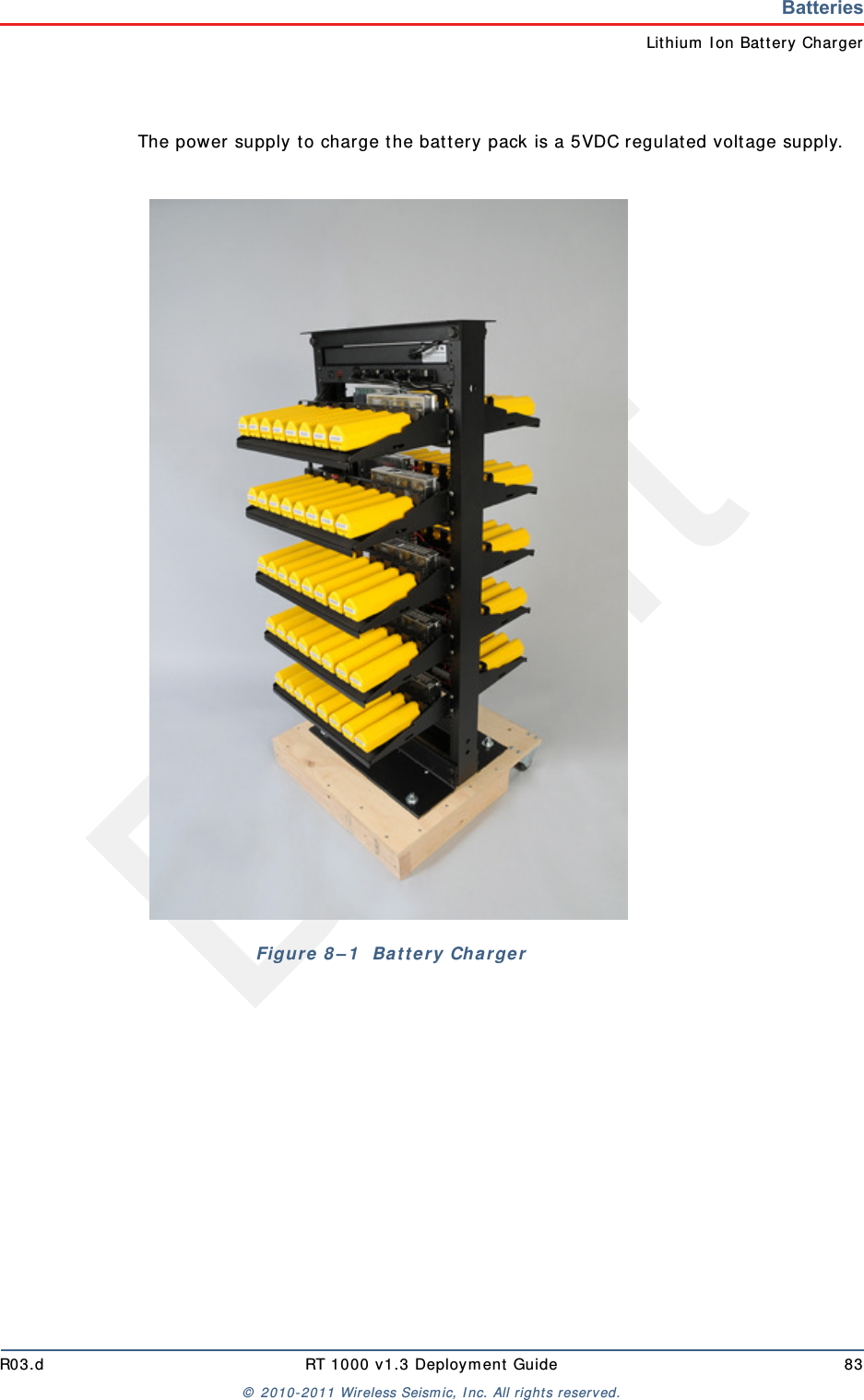
DraftR03.d RT 1000 v1.3 Deploym ent Guide 83©  2010- 2011 Wir eless Seism ic, I nc. All right s reserved.BatteriesLit hium  I on Bat tery ChargerThe power supply t o charge t he bat tery pack is a 5VDC regulat ed voltage supply.Figure 8 – 1   Ba t t e ry Char ger
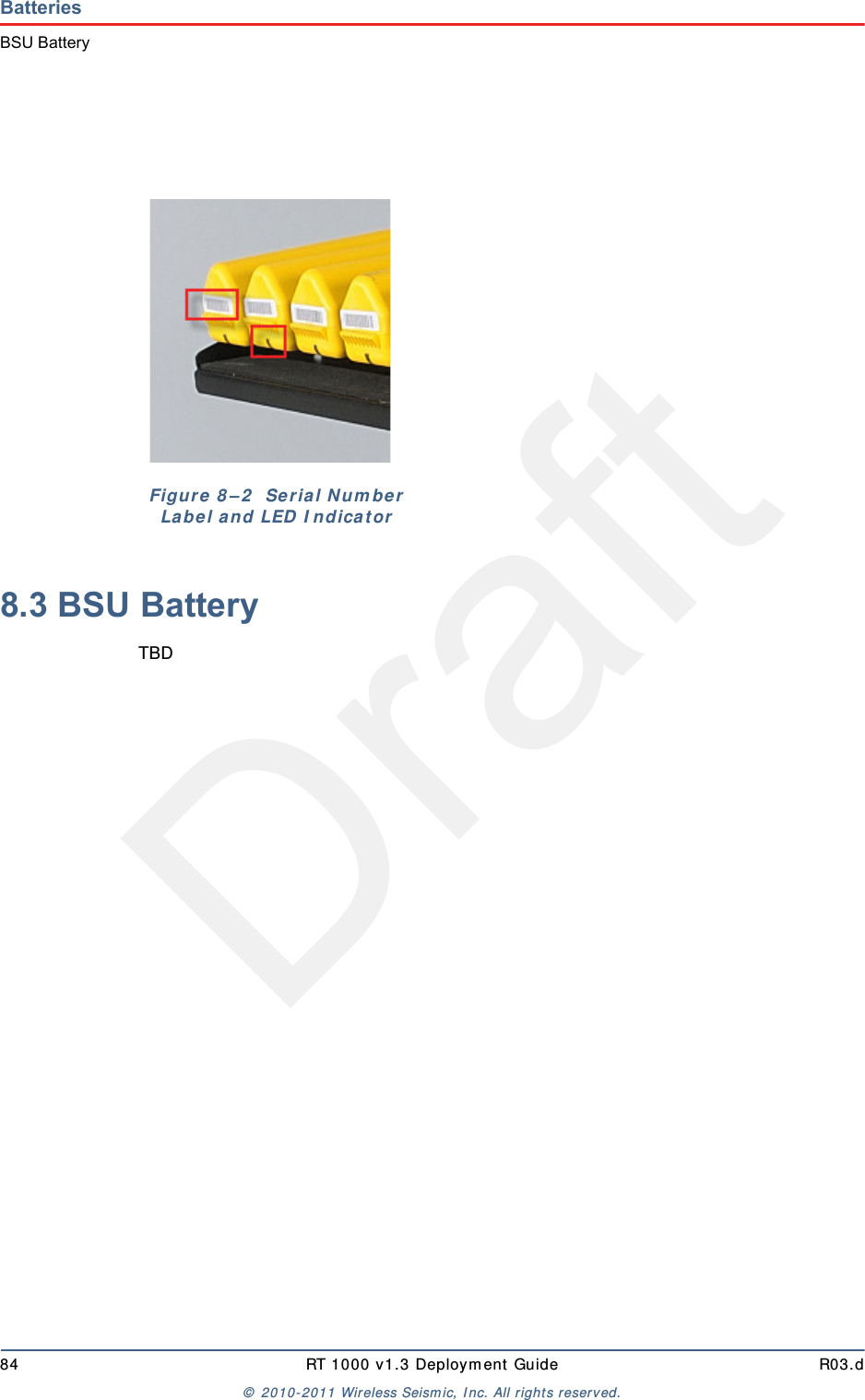
Draft84 RT 1000 v1.3 Deploym ent Guide R03.d©  2010- 2011 Wir eless Seism ic, I nc. All right s reserved.BatteriesBSU Battery8.3 BSU BatteryTBDFigu r e  8 – 2   Seria l N um be r  La be l a n d LED  I ndicat or
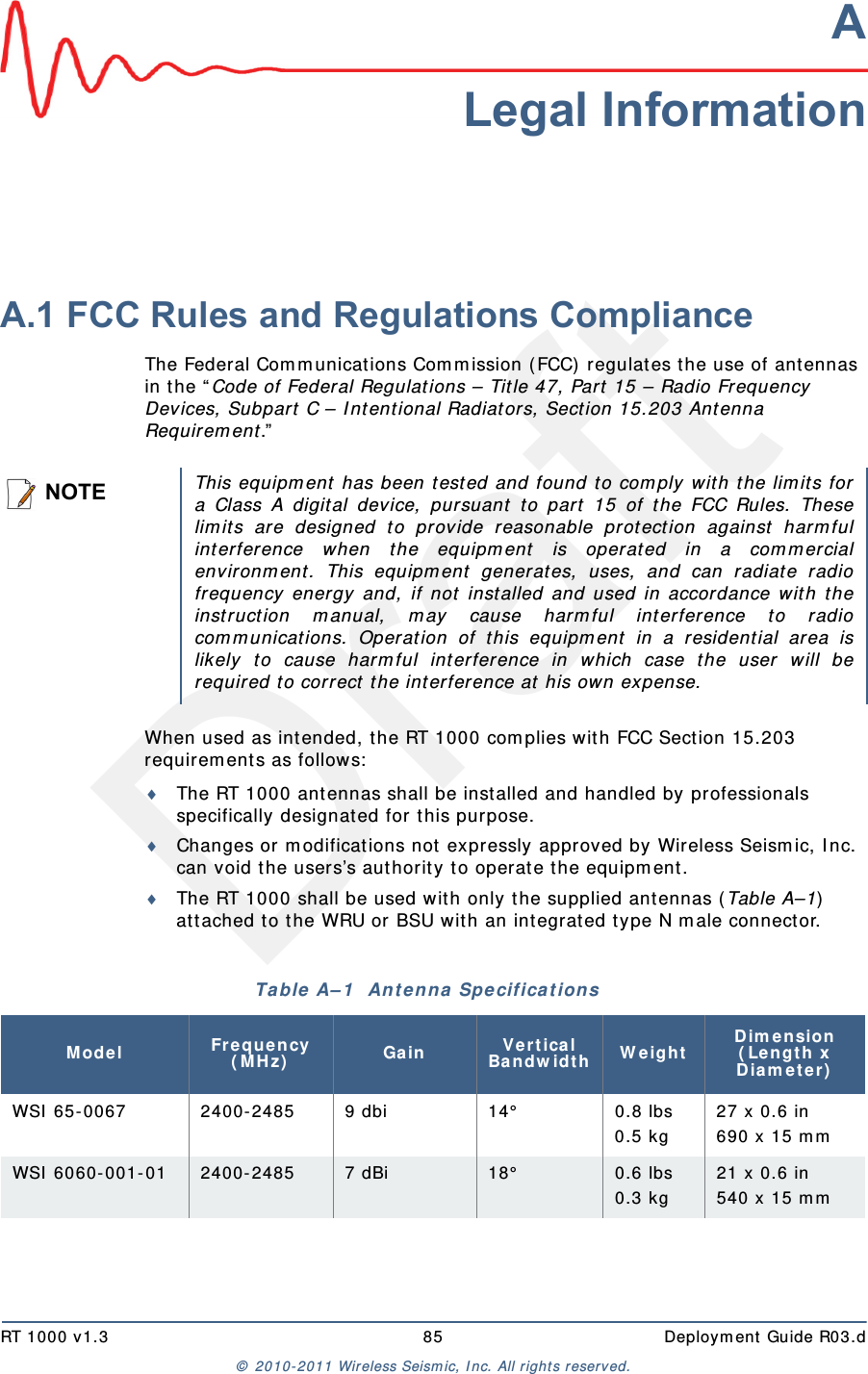
DraftRT 1000 v1.3 85  Deploym ent Guide R03.d©  2010- 2011 Wir eless Seism ic, I nc. All right s reserved.ALegal InformationA.1 FCC Rules and Regulations ComplianceThe Federal Com m unicat ions Com m ission ( FCC) regulates t he use of antennas in t he “ Code of Federal Regulat ions – Tit le 47, Part  15 – Radio Frequency Devices, Subpart  C – I nt ent ional Radiators, Sect ion 15.203 Antenna Requirem ent .”  When used as int ended, the RT 1000 com plies wit h FCC Section 15.203 requirem ent s as follow s:The RT 1000 antennas shall be installed and handled by professionals specifically designat ed for t his purpose.Changes or m odificat ions not expressly approved by Wireless Seism ic, I nc. can void t he users’s aut hority t o operat e t he equipm ent. The RT 1000 shall be used wit h only t he supplied ant ennas (Table A–1)  at t ached t o t he WRU or BSU wit h an integrat ed t ype N m ale connector.NOTEThis equipm ent  has been t ested and found t o com ply wit h t he lim it s fora Class A digital device, pursuant  to part  15 of t he FCC Rules. Theselim it s are designed t o provide reasonable protection against  harm fulint erference when t he equipm ent  is operated in a com m ercialenvironm ent. This equipm ent  generates, uses, and can radiat e radiofrequency energy and, if not inst alled and used in accordance w ith t heinst ruction m anual, m ay cause harm ful int erference t o radiocom m unications. Operat ion of this equipm ent in a r esidential area islikely t o cause har m ful int er fer ence in which case t he user w ill berequired t o correct  t he int erference at  his own expense.Table A– 1   An t e n n a  Spe cifica t ions Mode l Fr eque n cy ( MH z) Gain Vert ical Bandw idt h W eightDim ension  ( Le n gt h x D ia m e t e r )WSI  65- 0067 2400- 2485 9 dbi 14° 0.8 lbs0.5 kg27 x 0.6 in690 x 15 m mWSI  6060- 001- 01 24 00 - 24 85 7 dBi 18° 0.6 lbs 0.3 kg21 x 0.6 in540 x 15 m m
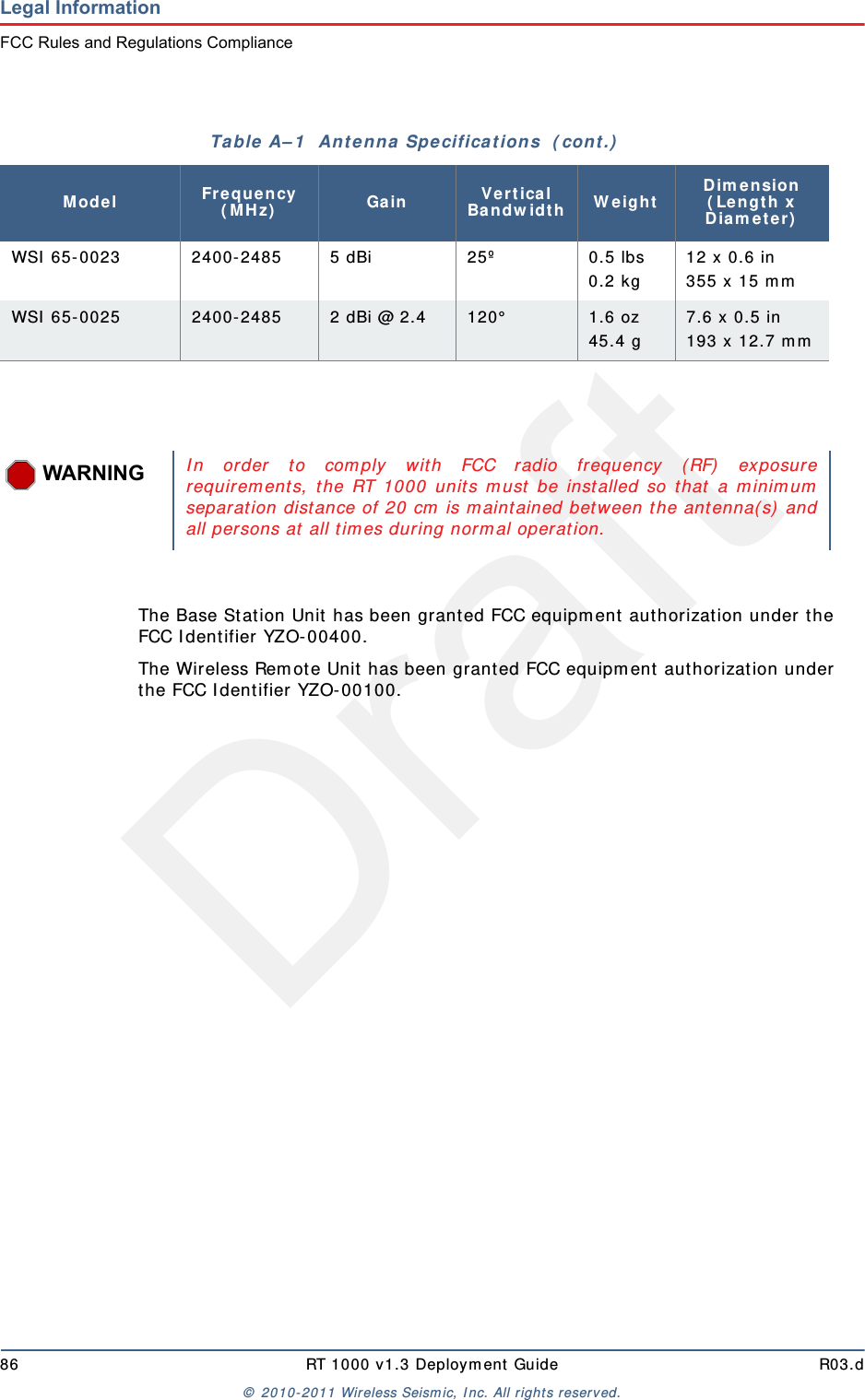
Draft86 RT 1000 v1.3 Deploym ent Guide R03.d©  2010- 2011 Wir eless Seism ic, I nc. All right s reserved.Legal InformationFCC Rules and Regulations ComplianceThe Base St at ion Unit has been grant ed FCC equipm ent  aut horizat ion under t he FCC I dentifier YZO-00400.The Wireless Rem ote Unit  has been grant ed FCC equipm ent  aut horization under the FCC I dent ifier YZO- 00100.WSI  65- 0023 2400- 2485 5 dBi 25º 0.5 lbs 0.2 kg12 x 0.6 in355 x 15 m mWSI  65- 0025 2400-2485 2 dBi @ 2.4 120°   1.6 oz 45.4 g7.6 x 0.5 in193 x 12.7 m mTable  A– 1   An t e nna  Specifica t ions  ( cont .)Mode l Fr eque n cy ( MH z) Gain Vert ical Bandw idt h W eightDim ension  ( Le n gt h x D ia m e t e r )WARNINGI n or der t o com ply wit h FCC radio frequency (RF)  exposurerequirem ent s, t he RT 1000 unit s m ust be inst alled so that a m inim umseparat ion dist ance of 20 cm  is m aint ained bet ween the ant enna( s)  andall persons at all t im es during norm al operat ion.
DraftRT 1000 v1.3 87  Deploym ent Guide R03.d©  2010- 2011 Wir eless Seism ic, I nc. All right s reserved.BFluidmesh Radio SpecificationsThe inform at ion in this chapt er is repr oduced here for your convenience from  the Fluidm esh dat a sheet available at  t he following locat ion:ht t p: / / ww w.fluidm esh.com / press- room / product- literature/ doc_det ails/ 160-flu id m esh - m it o- series ©  2005- 2010 Fluidm esh Net works, I nc. B.1 The Fluidmesh Mito SeriesThe Fluidm esh®  MI TO Series is a MI MO- based tri- band wir eless Ethernet  product  line designed and m anufact ured specifically for m ult i- service backhaul applicat ions.MI TO -  The Revolut ion in W irele ss Ba ckhauling Wit h t he MI TO product  line, Fluidm esh has developed a revolut ionary wireless backhaul solution t hat  is capable of offering extrem e perform ances with a sm all form  fact or. MI TO is a unique 2x2 MI MO solut ion wit h int egrat ed directional ant ennas which has allow ed Fluidm esh t o break t he m ould and creat e a product  line t hat  is a gam e changer in the w ireless backhauling arena. You won't  need t o inst all ext ernal antennas. You won't  need to deal with coaxial cables, light ing suppressors, and grounding. The Fluidm esh1100 MI TO and t he Fluidm esh 3100 MI TO have an int egrat ed radio-ant enna solut ion wit h an out door rat ed enclosure that is slightly bigger  t han t wo decks of cards. The Fluidm esh 11oo MI TO m ount s a 2x2 MI MO pat ch ant enna and can be used to creat e point  to point, point t o m ult ipoint, and m esh net works providing unparalleled perform ances and a com pact form  factor. The Fluidm esh 3100 MI TO m ount s a 2x2 MI MO sector  antenna and is designed for m edium  and large point t o m ult ipoint  deploym ents with up t o 150 client s.Tri- ba nd Radio oper a t ing a t  4 .9  GH z, and 5 .1 - 5 .8  GH z The Fluidm esh MI TO Series features one tri- band radio and can operat e at  4.9 GHz, and 5.1- 5.8 GHz and m odulat e up to 300 Mbps. The preferred frequency can be easily select ed through a web based int erface.Opt im ize d Prodigy Tra n sm ission Prot ocol for m ax im u m  Re lia bilit y  The Fluidm esh MI TO Series em ploys Prodigy, Fluidm esh's proprietary high perform ance 'int elligent ' transm ission prot ocol, built  to overcom e t he lim it s of st andard license- free protocols and t o deliver a wireless infrast ructure with a higher  level of r eliability. Pr odigy was developed t o transm it  any I P- com patible
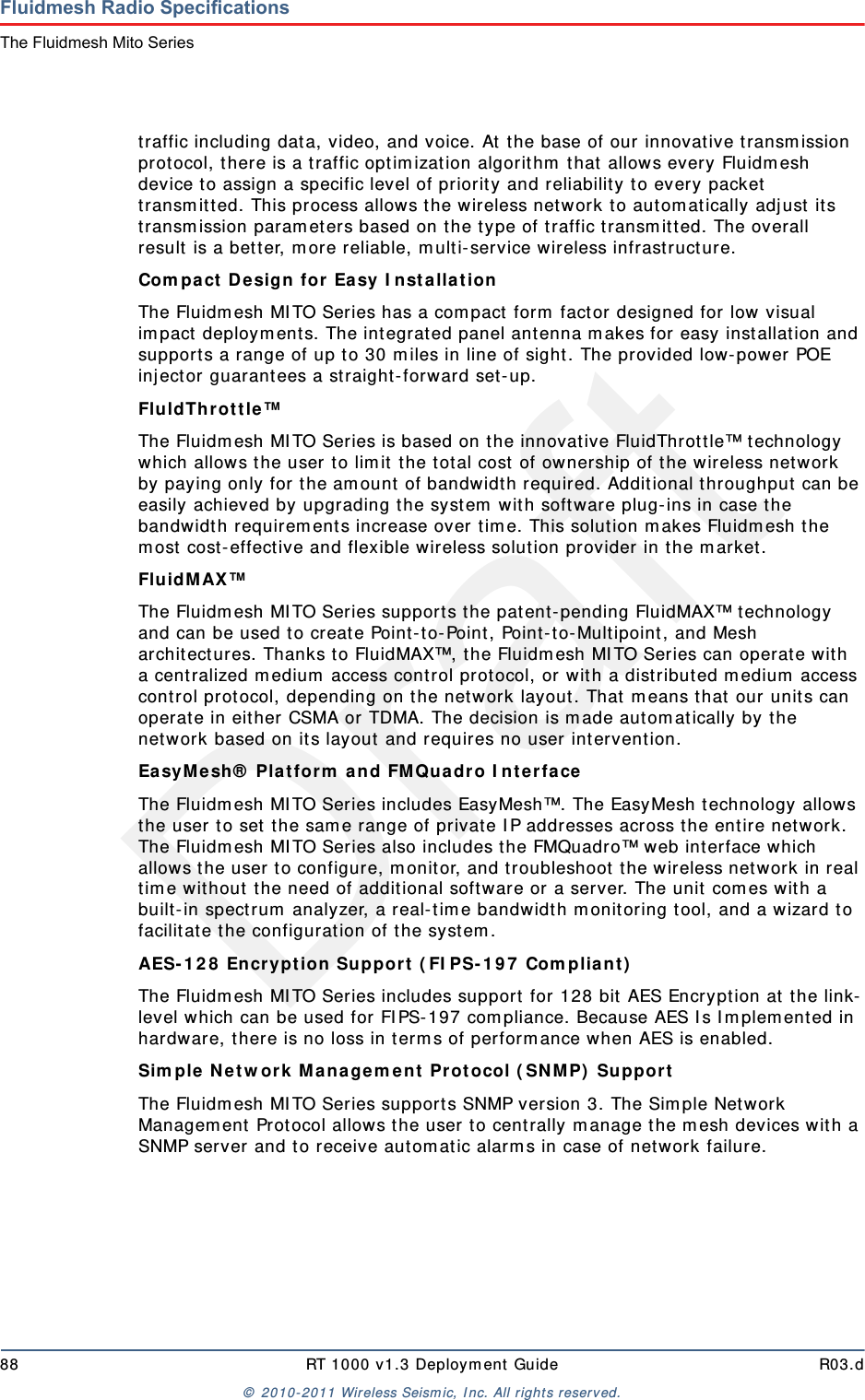
Draft88 RT 1000 v1.3 Deploym ent Guide R03.d©  2010- 2011 Wir eless Seism ic, I nc. All right s reserved.Fluidmesh Radio SpecificationsThe Fluidmesh Mito Seriestraffic including data, video, and voice. At  t he base of our innovat ive t ransm ission protocol, t here is a t raffic optim izat ion algorit hm  t hat allows every Fluidm esh device to assign a specific level of priority and reliabilit y t o every packet transm it t ed. This process allows the w ireless net work to aut om at ically adj ust its transm ission param et er s based on t he t ype of t raffic t ransm itt ed. The overall result is a bet t er, m ore reliable, m ult i- service wireless infrast ruct ure.Com pa ct De sign for  Easy I nst allat ion The Fluidm esh MI TO Series has a com pact  form  factor designed for  low visual im pact  deploym ent s. The integrat ed panel antenna m akes for easy inst allation and support s a range of up t o 30 m iles in line of sight . The provided low- power POE inj ector guarant ees a straight- forward set - up.Flu ldTh r ot t le ™ The Fluidm esh MI TO Series is based on the innovat ive FluidThrot t le™ technology which allows t he user t o lim it  t he t ot al cost  of ownership of the w ireless network by paying only for t he am ount of bandwidth required. Additional t hroughput  can be easily achieved by upgrading t he system  wit h soft ware plug- ins in case the bandwidt h requirem ents increase over t im e. This solut ion m akes Fluidm esh the m ost  cost- effect ive and flexible wir eless solut ion provider  in t he m arket .FluidMAX™ The Fluidm esh MI TO Series support s t he patent- pending FluidMAX™ t echnology and can be used t o create Point- to-Point, Point- t o- Multipoint , and Mesh archit ect ures. Thanks t o FluidMAX™, the Fluidm esh MI TO Series can operat e wit h a cent ralized m edium  access cont rol protocol, or with a distribut ed m edium  access cont rol prot ocol, depending on the net work layout . That m eans t hat  our unit s can operate in eit her CSMA or TDMA. The decision is m ade aut om atically by t he net work based on its layout  and requires no user int ervent ion.Ea sy M esh®  Pla t for m  a n d FM Quadr o I nt erface  The Fluidm esh MI TO Series includes EasyMesh™. The EasyMesh t echnology allows the user  t o set t he sam e range of private I P addresses across t he ent ire network. The Fluidm esh MI TO Series also includes t he FMQuadro™ web int erface w hich allows the user t o configure, m onit or, and t roubleshoot t he w ireless network in real tim e wit hout t he need of addit ional soft ware or a server. The unit com es wit h a built- in spect rum  analyzer, a real- tim e bandwidt h m onit oring t ool, and a w izard t o facilit ate t he configurat ion of t he syst em .AES- 1 2 8  Encrypt ion Support  ( FI PS- 1 9 7  Com plia n t )  The Fluidm esh MI TO Series includes support for 128 bit  AES Encrypt ion at t he link-level which can be used for FI PS- 197 com pliance. Because AES I s I m plem ent ed in hardware, t here is no loss in t erm s of perform ance w hen AES is enabled.Sim ple N et w ork  M a nage m ent  Pr ot ocol ( SN M P)  Suppor t  The Fluidm esh MI TO Series support s SNMP version 3. The Sim ple Net work Managem ent  Prot ocol allows t he user to centrally m anage t he m esh devices wit h a SNMP server and t o receive autom atic alarm s in case of net w or k failure.
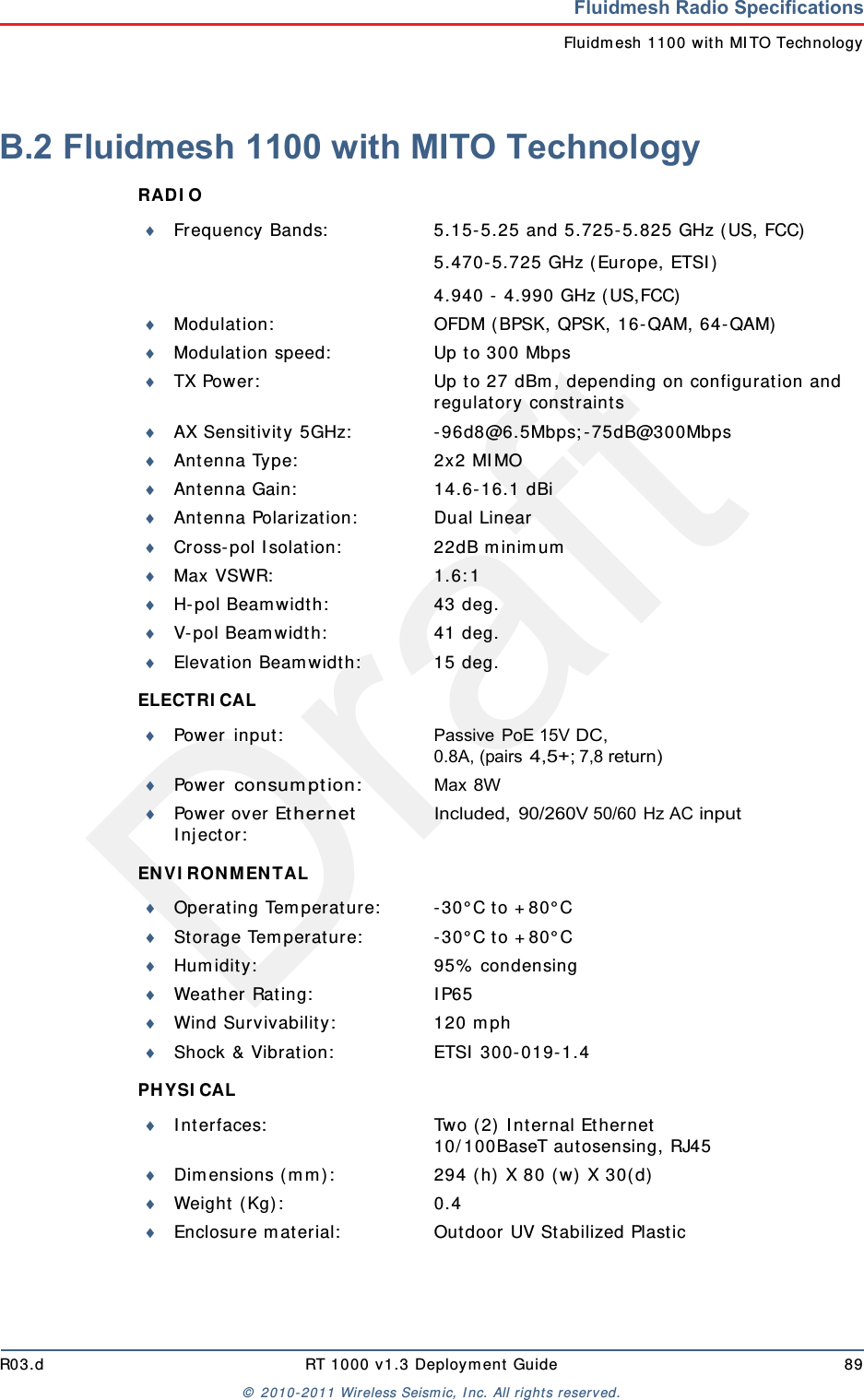
DraftR03.d RT 1000 v1.3 Deploym ent Guide 89©  2010- 2011 Wir eless Seism ic, I nc. All right s reserved.Fluidmesh Radio SpecificationsFluidm esh 1100 with MI TO TechnologyB.2 Fluidmesh 1100 with MITO TechnologyRAD I O ELECTRI CAL EN V I RO N MEN TAL PHYSI CAL Frequency Bands: 5.15- 5.25 and 5.725- 5.825 GHz ( US, FCC)5.470- 5.725 GHz (Europe, ETSI )4.940 -  4.990 GHz ( US,FCC)Modulat ion: OFDM ( BPSK, QPSK, 16- QAM, 64- QAM)Modulat ion speed: Up t o 300 MbpsTX Power: Up t o 27 dBm , depending on configuration and regulat ory const raintsAX Sensitivity 5GHz: - 96d8@6.5Mbps; - 75dB@300MbpsAnt enna Type: 2x2 MI MOAnt enna Gain: 14.6- 16.1 dBiAnt enna Polarizat ion: Dual LinearCross- pol I solat ion: 22dB m inim umMax VSWR: 1.6: 1H- pol Beam width: 43 deg.V-pol Beam widt h: 41 deg.Elevat ion Beam widt h: 15 deg.Power  in put : Passive PoE 15V DC, 0.8A, (pairs 4,5+; 7,8 return)Power  consum ption:Max 8WPower over Ether net I n j ect or :Included, 90/260V 50/60 Hz AC inputOperating Tem perat ure: - 30° C to + 80° CSt orage Tem perat ure: - 30° C to + 80° CHum idity: 95%  condensingWeat her Rat ing: I P65Wind Survivability: 120 m phShock & Vibrat ion: ETSI  300- 019- 1.4I nt erfaces: Two ( 2)  I nt ernal Et hernet10/ 100BaseT aut osensing, RJ45Dim ensions ( m m ) : 294 ( h)  X 80 ( w) X 30( d)Wei g h t  ( Kg) : 0 . 4Enclosure m at erial: Out door UV St abilized Plastic
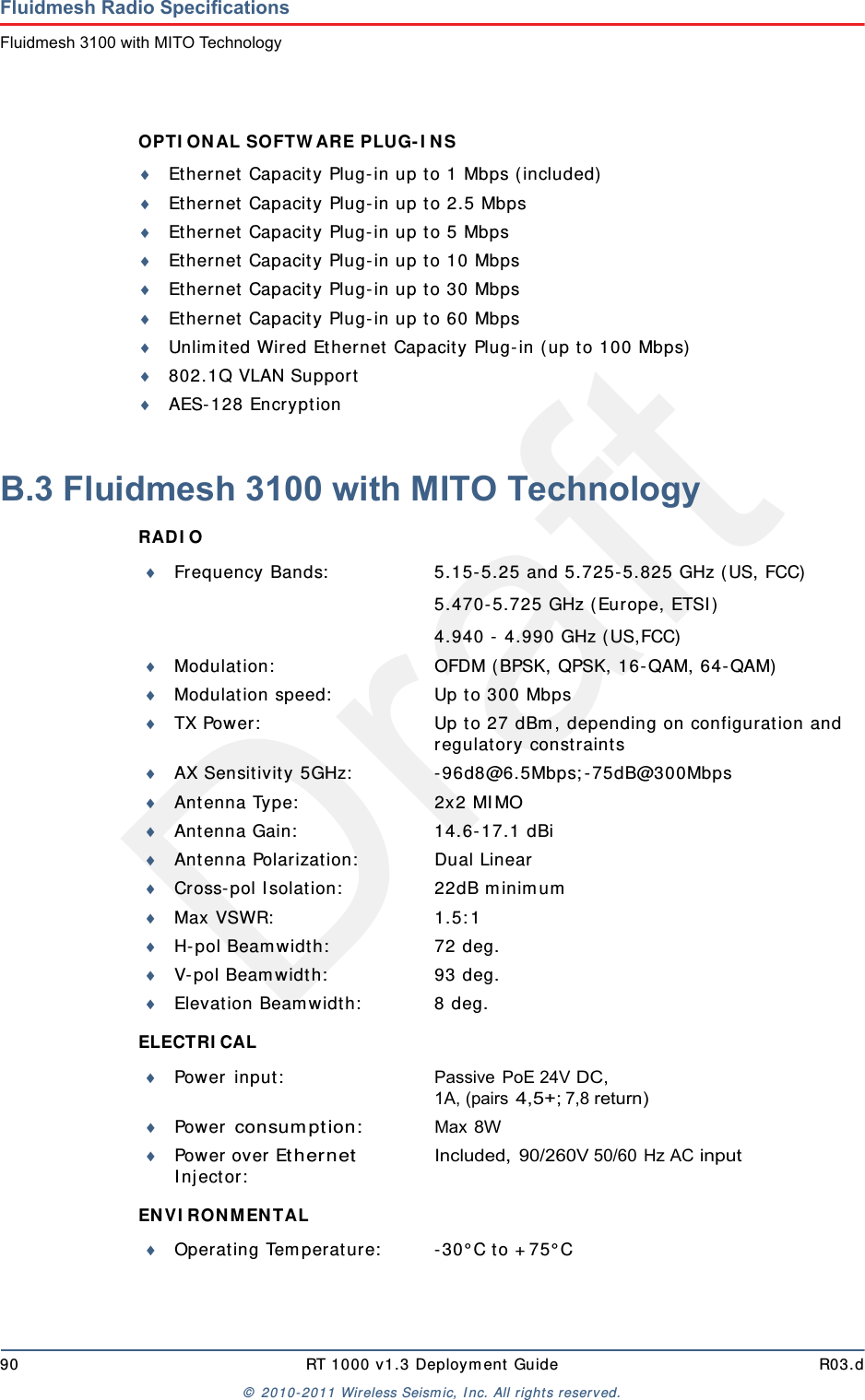
Draft90 RT 1000 v1.3 Deploym ent Guide R03.d©  2010- 2011 Wir eless Seism ic, I nc. All right s reserved.Fluidmesh Radio SpecificationsFluidmesh 3100 with MITO TechnologyOPTI ON AL SOFTW ARE PLUG- I N S Ethernet  Capacit y Plug-in up t o 1 Mbps ( included)Ethernet  Capacit y Plug-in up to 2.5 MbpsEthernet  Capacit y Plug-in up to 5 MbpsEthernet Capacity Plug- in up t o 10 MbpsEthernet Capacity Plug- in up t o 30 MbpsEthernet Capacity Plug- in up t o 60 MbpsUnlim ited Wired Ethernet  Capacit y Plug- in ( up t o 100 Mbps)802.1Q VLAN SupportAES-128 Encrypt ionB.3 Fluidmesh 3100 with MITO TechnologyRAD I O ELECTRI CAL EN V I RO N MEN TAL Frequency Bands: 5.15- 5.25 and 5.725- 5.825 GHz ( US, FCC)5.470- 5.725 GHz (Europe, ETSI )4.940 -  4.990 GHz ( US,FCC)Modulat ion: OFDM ( BPSK, QPSK, 16- QAM, 64- QAM)Modulat ion speed: Up t o 300 MbpsTX Power: Up t o 27 dBm , depending on configuration and regulat ory const raintsAX Sensitivity 5GHz: - 96d8@6.5Mbps; - 75dB@300MbpsAnt enna Type: 2x2 MI MOAnt enna Gain: 14.6- 17.1 dBiAnt enna Polarizat ion: Dual LinearCross- pol I solat ion: 22dB m inim umMax VSWR: 1.5: 1H- pol Beam width: 72 deg.V-pol Beam widt h: 93 deg.Elevat ion Beam widt h: 8 deg.Power  in put : Passive PoE 24V DC, 1A, (pairs 4,5+; 7,8 return)Power  consum ption:Max 8WPower over Ether net I n j ect or :Included, 90/260V 50/60 Hz AC inputOperating Tem perat ure: - 30° C to + 75° C
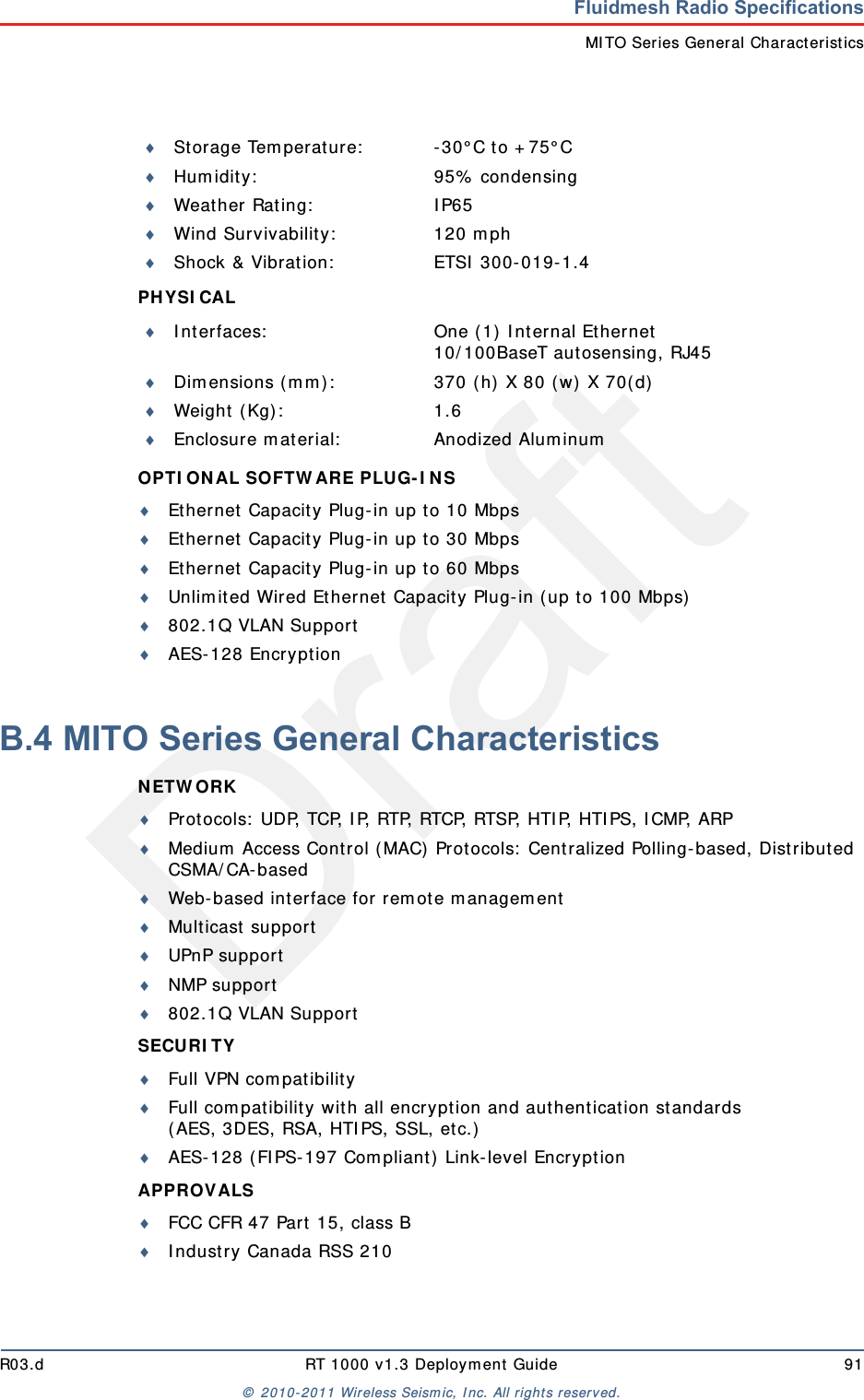
DraftR03.d RT 1000 v1.3 Deploym ent Guide 91©  2010- 2011 Wir eless Seism ic, I nc. All right s reserved.Fluidmesh Radio SpecificationsMI TO Ser ies General Charact er isticsPHYSI CAL OPTI ON AL SOFTW ARE PLUG- I N S Ethernet  Capacit y Plug-in up t o 10 MbpsEthernet  Capacit y Plug-in up t o 30 MbpsEthernet  Capacit y Plug-in up t o 60 MbpsUnlim ited Wired Ethernet Capacity Plug- in ( up t o 100 Mbps)802.1Q VLAN SupportAES- 128 EncryptionB.4 MITO Series General CharacteristicsN ETW ORK Prot ocols:  UDP, TCP, I P, RTP, RTCP, RTSP, HTI P, HTI PS, I CMP, ARPMedium  Access Cont rol ( MAC)  Protocols:  Centralized Polling-based, Distribut ed CSMA/ CA- basedWeb-based int erface for  rem ot e m anagem entMulticast  supportUPnP supportNMP support802.1Q VLAN SupportSECURI TY Full VPN com pat ibilityFull com pat ibilit y wit h all encr ypt ion and aut hent ication standards( AES, 3DES, RSA, HTI PS, SSL, et c.)AES-128 ( FIPS- 197 Com pliant)  Link- level Encrypt ionAPPROVALS FCC CFR 47 Part  15, class BI ndustry Canada RSS 210St orage Tem perat ure: - 30° C to + 75° CHum idity: 95%  condensingWeat her Rat ing: I P65Wind Survivability: 120 m phShock & Vibrat ion: ETSI  300- 019- 1.4I nt erfaces: One ( 1)  I nt ernal Et hernet10/ 100BaseT aut osensing, RJ45Dim ensions ( m m ) : 370 ( h)  X 80 ( w) X 70( d)Wei g h t  ( Kg) : 1 . 6Enclosure m at erial: Anodized Alum inum
Draft92 RT 1000 v1.3 Deploym ent Guide R03.d©  2010- 2011 Wir eless Seism ic, I nc. All right s reserved.Fluidmesh Radio SpecificationsMITO Series General CharacteristicsCEI !SUPPLI ED  ACCESSORI ES PoE I nj ect or wit h US/ EU/ UK Power CordPole Mount ing Kit  ( i.e.Pole Mount ing Kit  Max O.D. 2 in.)W ARRAN TY Two ( 2)  years on par t s and laborThree ( 3)  years opt ional ext ended warrant y plan wit h advanced replacem entFive ( 5)  year s opt ional extended warrant y plan wit h advanced replacem entCopyright  © 2005- 2010 Fluidm esh Net w orks, I nc. All rights reserved. Fluidm esh is a registered t radem ar k of Fluidm esh Net works, I nc. EasyMesh, FMQuadro, FluidMAX and FluidThrott le are t radem arks of Fluidm esh Networks, I nc. All ot her brand or product  nam es are t he t radem arks or registered t radem ar k of their respect ive holder( s) . I nform at ion contained herein is subj ect to change wit hout  not ice. The only warrant ies for Fluidm esh Net works pr oduct s and services are set forth in t he express warrant y st atem ents accom panying such product s and services. Not hing herein should be construed as constit ut ing an addit ional warranty. Fluidm esh Net works shall not be liable lor t echnical or edit orial errors or om issions cont ained herein.Fluidm esh Networks, I nc.18 Trem ont  Street , Suit e 730Bost on, MA 02108U.S.A.Tel. + 1 { 617)  209- 6080Fax. + 1 { 866}  458- 1522ww w.fluidm esh.cominfo@fluidm esh.comEMEA Headquart ers { I taly}Tel. + 39.02.0061.6189UK BranchTel. + 44.2078.553.132
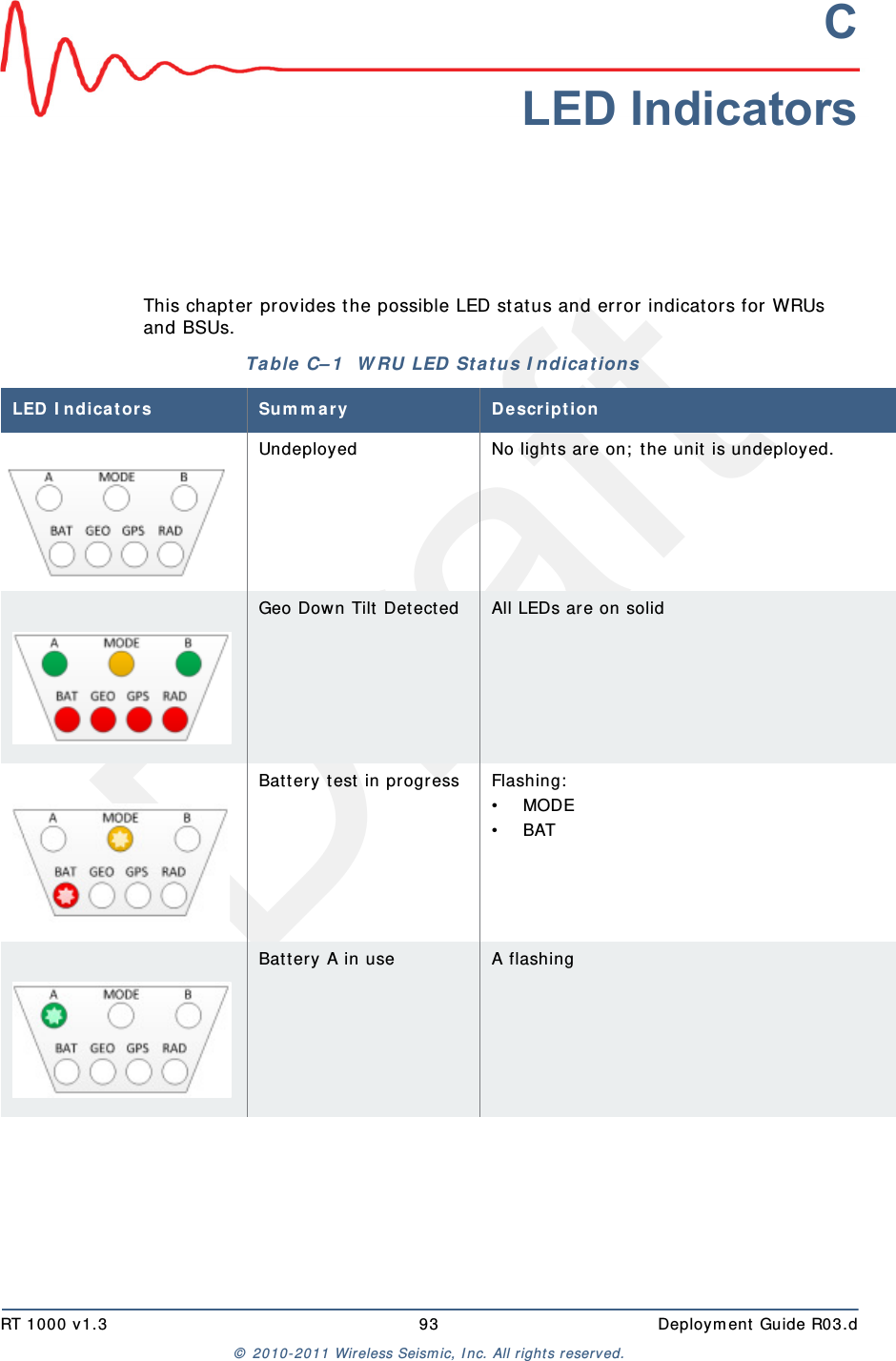
DraftRT 1000 v1.3 93  Deploym ent Guide R03.d©  2010- 2011 Wir eless Seism ic, I nc. All right s reserved.CLED IndicatorsThis chapt er  provides t he possible LED stat us and error indicator s for WRUs and BSUs. Table  C– 1   W RU LED  St a t us I ndicat ions LED I ndicat or s Sum m a r y D e scr ip t io nUndeployed No light s are on;  t he unit  is undeployed.Geo Dow n Tilt Det ected All LEDs are on solidBat tery t est in progress Flashing:• MODE• BATBat tery A in use A flashing
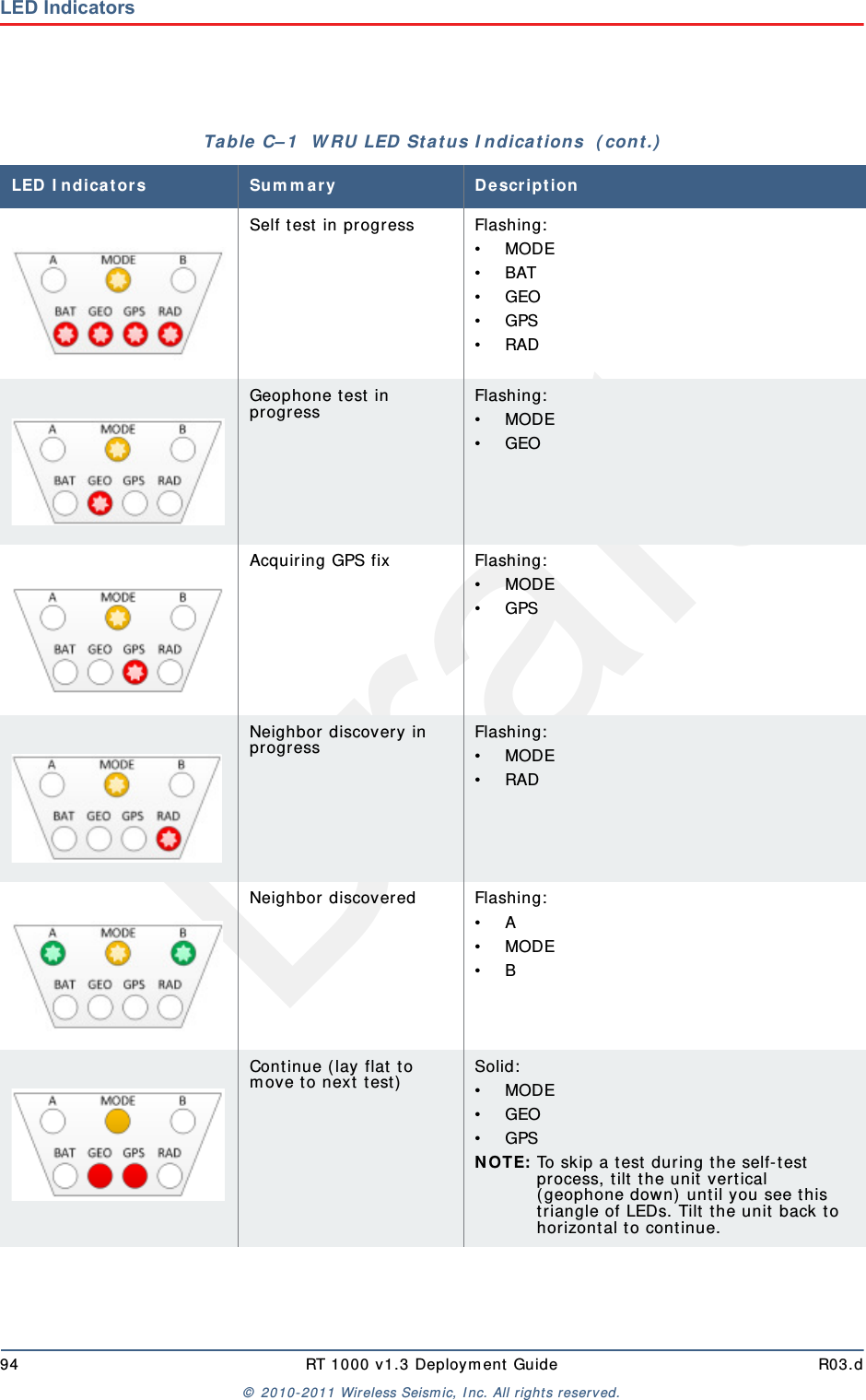
Draft94 RT 1000 v1.3 Deploym ent Guide R03.d©  2010- 2011 Wir eless Seism ic, I nc. All right s reserved.LED IndicatorsSelf t est  in progress Flashing:• MODE• BAT• GEO• GPS• RADGeophone t est in pr ogressFlashing:• MODE• GEOAcquiring GPS fix Flashing:• MODE• GPSNeighbor discovery in pr ogressFlashing:• MODE• RADNeighbor discovered Flashing:• A• MODE• BCont inue ( lay flat  t o m ove t o next  t est)Solid:• MODE• GEO• GPSN OTE: To skip a t est dur ing t he self- test pr ocess, t ilt t he unit vertical (geophone down) until you see t his triangle of LEDs. Tilt t he unit  back t o horizont al t o cont inue.Table  C– 1   W RU LED St at us I ndica t ions  ( cont .)LED I ndicat or s Sum m a r y D e scr ip t io n
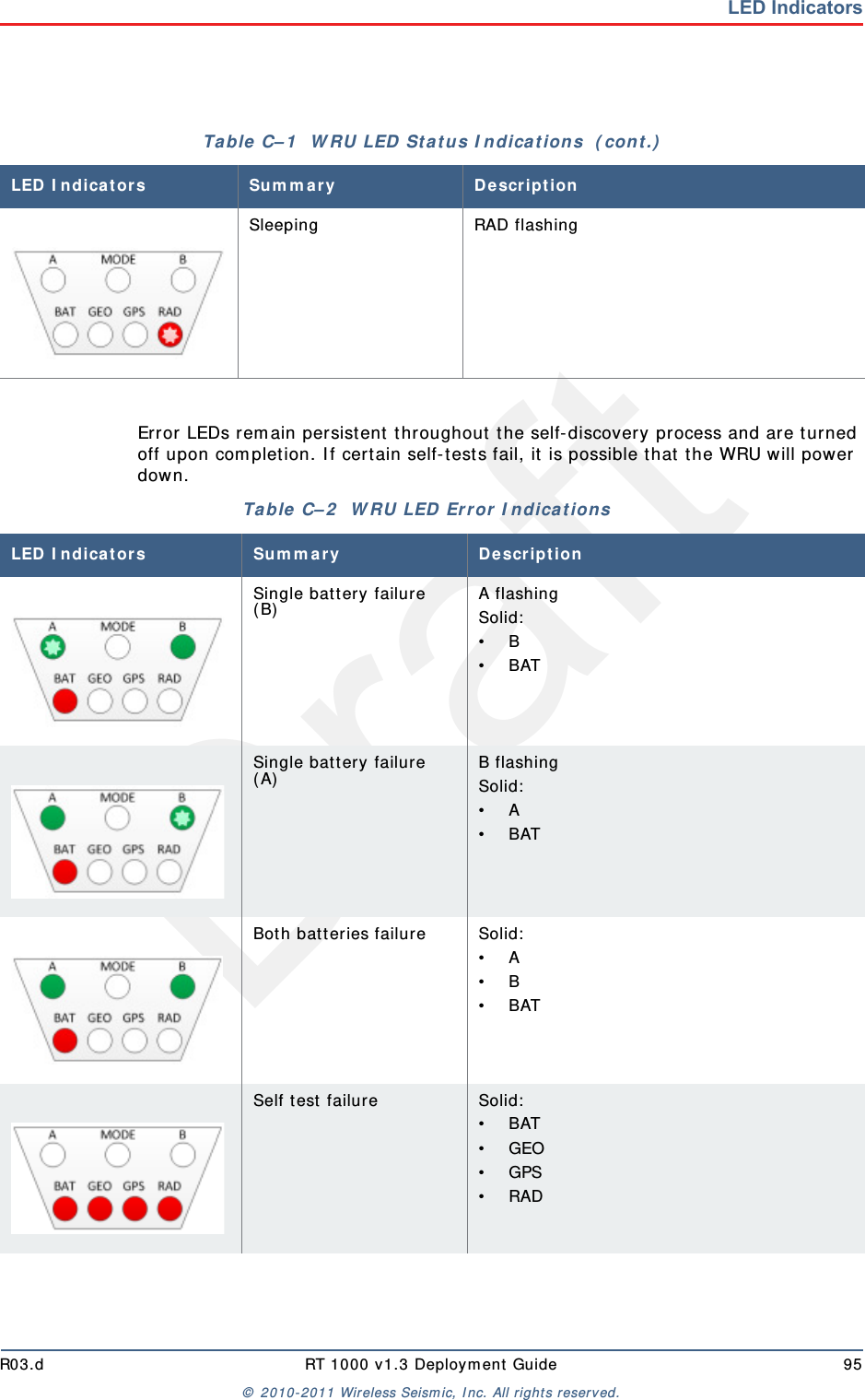
DraftR03.d RT 1000 v1.3 Deploym ent Guide 95©  2010- 2011 Wir eless Seism ic, I nc. All right s reserved.LED IndicatorsError LEDs rem ain persist ent  throughout  the self-discover y process and are t urned off upon com plet ion. I f cert ain self-t est s fail, it is possible that  t he WRU will power down. Sleeping RAD flashingTable  C– 1   W RU LED  St a t us I ndica t ion s  ( cont .)LED I ndicat or s Sum m a r y D e scr ip t io nTable  C– 2   W RU LED  Error I ndicat ions LED I ndicat or s Sum m ary De scr ipt io nSingle batt ery failure ( B)A flashingSolid:• B• BATSingle batt ery failure ( A)B flashingSolid:• A • BAT Both batt eries failure Solid:• A• B• BATSelf t est  failure Solid:• BAT• GEO• GPS• RAD
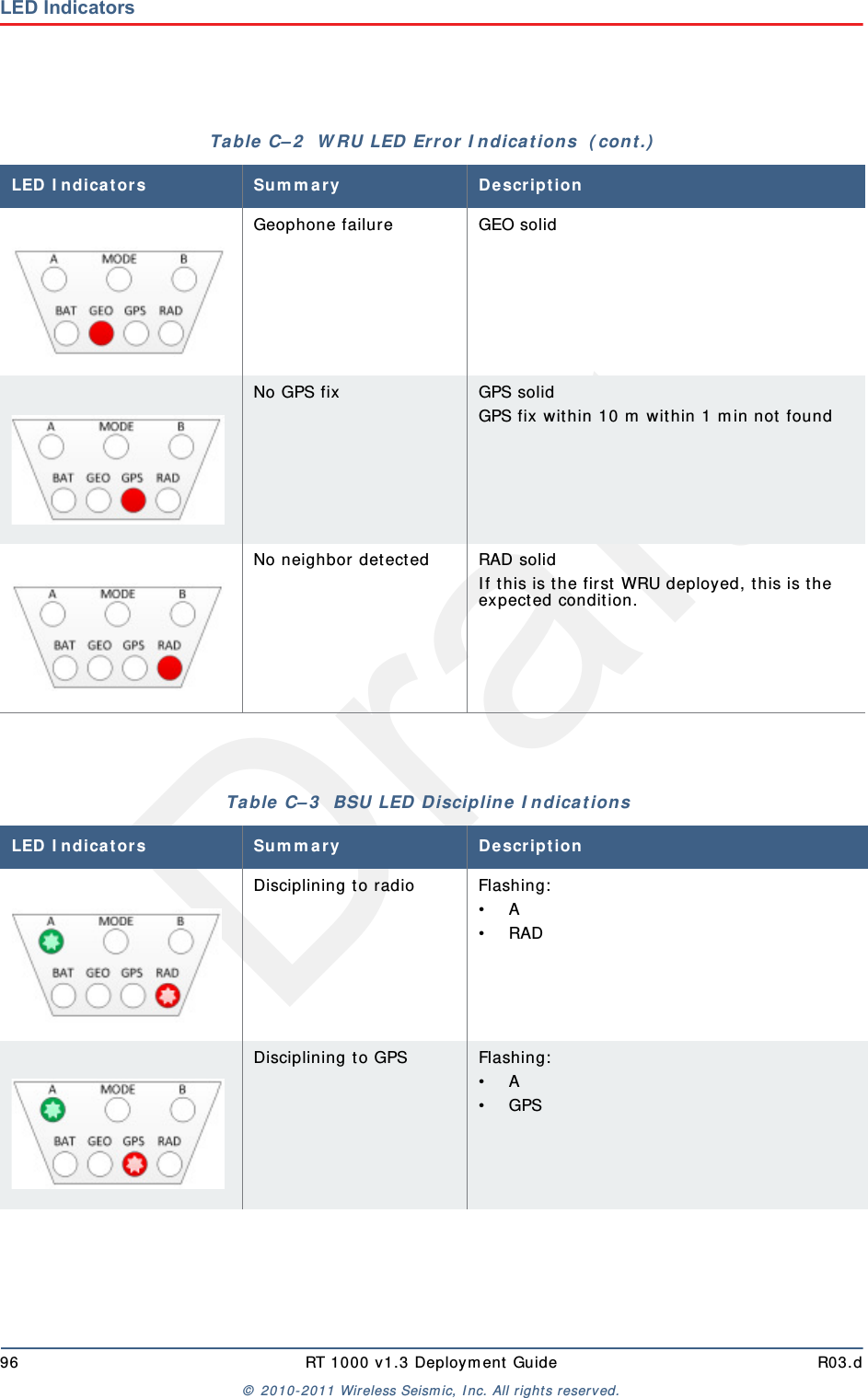
Draft96 RT 1000 v1.3 Deploym ent Guide R03.d©  2010- 2011 Wir eless Seism ic, I nc. All right s reserved.LED IndicatorsGeophone failure GEO solidNo GPS fix GPS solidGPS fix within 10 m  wit hin 1 m in not  foundNo neighbor det ected RAD solidI f this is t he first  WRU deployed, t his is t he expected condition. Table  C– 2   W RU LED  Error  I ndica t ions  ( cont .)LED I ndicat or s Sum m ary De scr ipt io nTable  C– 3   BSU LED  D iscipline I ndica t ions LED I ndicat or s Sum m ary De scr ipt io nDisciplining t o radio Flashing:• A• RADDisciplining t o GPS Flashing:• A• GPS
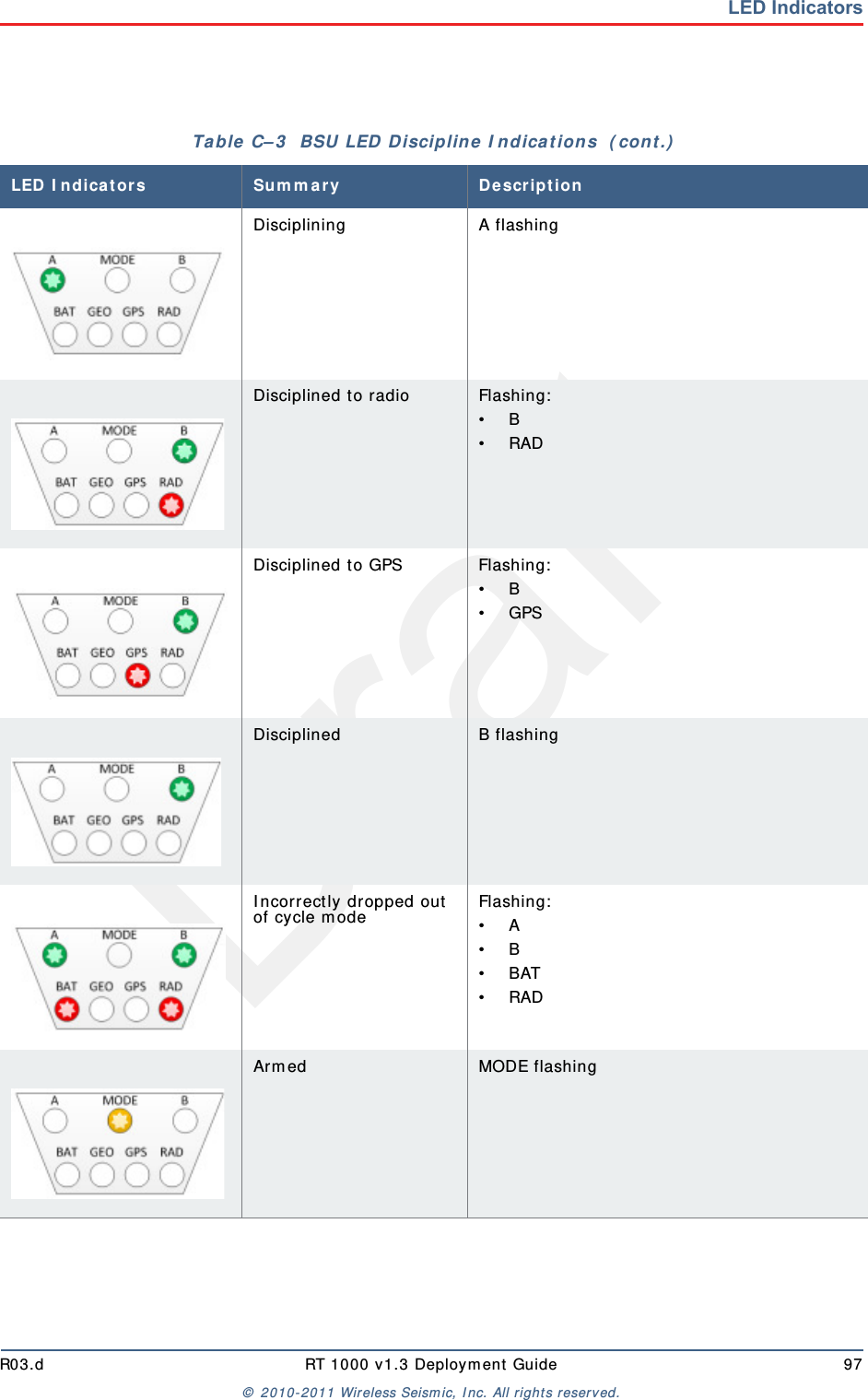
DraftR03.d RT 1000 v1.3 Deploym ent Guide 97©  2010- 2011 Wir eless Seism ic, I nc. All right s reserved.LED IndicatorsDisciplining A flashingDisciplined to radio Flashing:• B• RADDisciplined to GPS Flashing:• B• GPSDisciplined B flashingI ncorrect ly dropped out  of cycle m odeFlashing:• A• B• BAT• RADArm ed MODE flashingTable  C– 3   BSU LED  D iscipline I ndicat ions  ( cont .)LED I ndicat or s Sum m ary De scr ipt io n
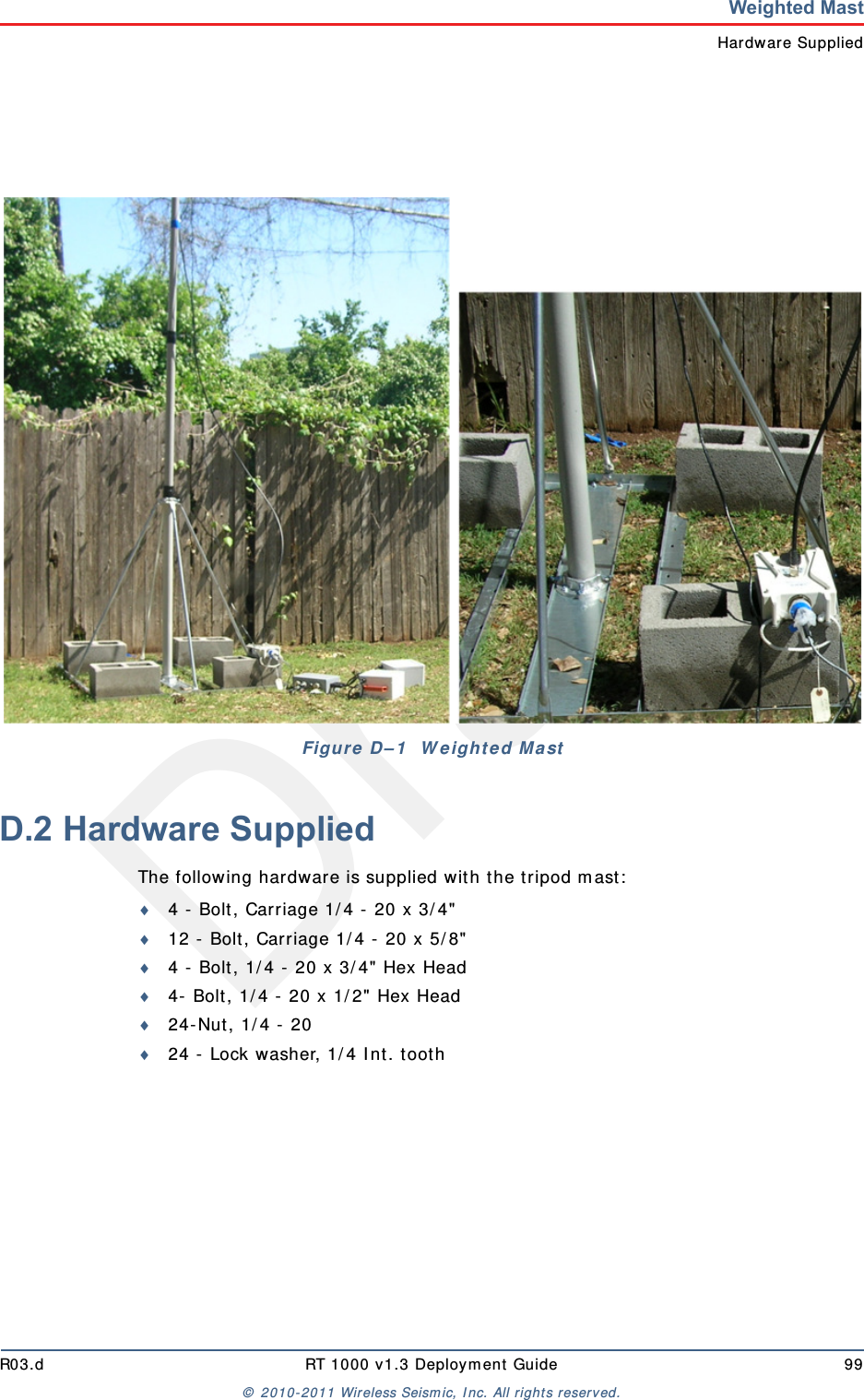
DraftRT 1000 v1.3 98  Deploym ent Guide R03.d©  2010- 2011 Wir eless Seism ic, I nc. All right s reserved.DWeighted MastThis sect ion describes t he m ast  t hat  uses w eight s t o m aint ain st ability.D.1 SpecificationsTripod Weight  =  50 lbs ( 22.73 kg)Minim um  m ast height  =  53”  ( includes 6”  for m ount ing)Base size =  48”  ( 1.2m )  x 48”  ( 1.2m )Support s up to 12 – 16”  x 8”  blocksPre-galvanized steel fram eAccept s up to 2.5”  m ast  ( not  included)
DraftR03.d RT 1000 v1.3 Deploym ent Guide 99©  2010- 2011 Wir eless Seism ic, I nc. All right s reserved.Weighted MastHardware SuppliedD.2 Hardware SuppliedThe following hardware is supplied wit h t he t ripod m ast:4 -  Bolt , Carriage 1/ 4 -  20 x 3/ 4"12 -  Bolt , Carriage 1/ 4 -  20 x 5/ 8"4 -  Bolt , 1/ 4 -  20 x 3/ 4"  Hex Head4-  Bolt , 1/ 4 -  20 x 1/ 2"  Hex Head24- Nut, 1/ 4 -  2024 -  Lock washer, 1/ 4 I nt . t oot hFigu r e  D– 1   W eight ed Ma st
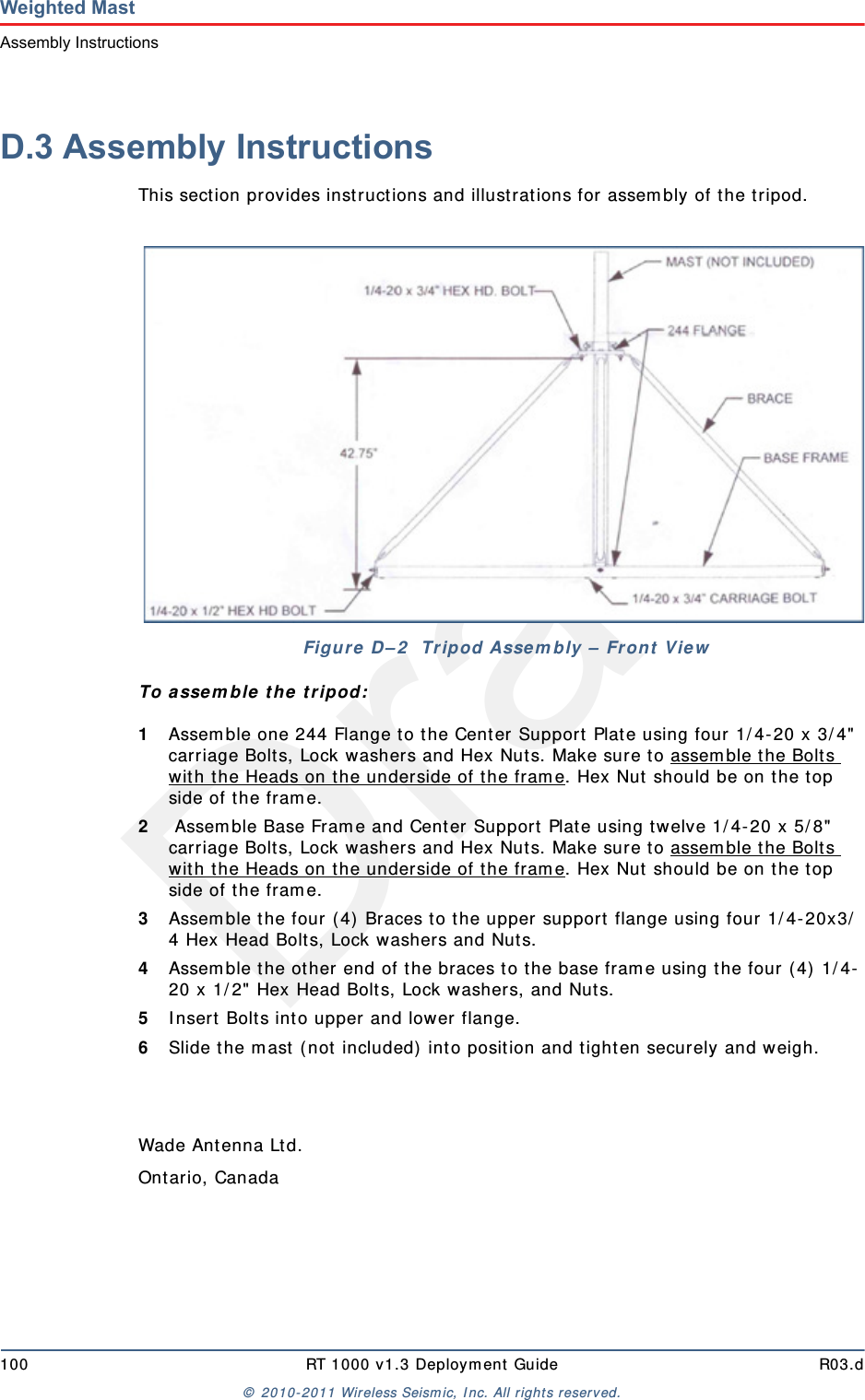
Draft100 RT 1000 v1.3 Deploym ent Guide R03.d©  2010- 2011 Wir eless Seism ic, I nc. All right s reserved.Weighted MastAssembly InstructionsD.3 Assembly InstructionsThis sect ion provides inst ruct ions and illustrat ions for assem bly of t he t ripod.To assem ble t he  t ripod:1Assem ble one 244 Flange t o t he Center Support  Plat e using four 1/ 4-20 x 3/ 4"  carriage Bolt s, Lock washers and Hex Nuts. Make sure to assem ble the Bolt s wit h the Heads on the underside of t he fram e. Hex Nut  should be on t he t op side of the fram e. 2 Assem ble Base Fram e and Center Support Plat e using t w elve 1/ 4- 20 x 5/ 8"  carriage Bolt s, Lock washers and Hex Nuts. Make sure to assem ble the Bolt s wit h the Heads on the underside of t he fram e. Hex Nut  should be on t he t op side of the fram e.3Assem ble t he four ( 4)  Braces to the upper support  flange using four 1/ 4- 20x3/4 Hex Head Bolt s, Lock washers and Nut s.4Assem ble the other end of t he braces t o the base fram e using the four ( 4)  1/ 4-20 x 1/ 2" Hex Head Bolts, Lock washer s, and Nuts.5I nsert  Bolt s int o upper and lower flange.6Slide t he m ast  ( not  included)  int o position and tighten securely and w eigh.Wade An t en n a Lt d .Ont ario, CanadaFigure  D – 2   Tripod Asse m bly –  Fron t  View
DraftRT 1000 v1.3 101  Deploym ent Guide R03.d©  2010- 2011 Wir eless Seism ic, I nc. All right s reserved.IndexAant e nnaspecificat ions 35, 85ant e nna s 85Bbackh a ul m a st s 39Ccon t act  9FFCC 85Section 15.203 85Hhe lp 9Mm o dif ica t ion s 85Sspe ci fica t io nsantenna 35, 85su pp or t e dantennas 35, 85Uuse rs 9
DraftIndexU102 RT 1000 v1.3 Deploym ent Guide R03.d©  2010- 2011 Wir eless Seism ic, I nc. All right s reserved.

Navigation menu