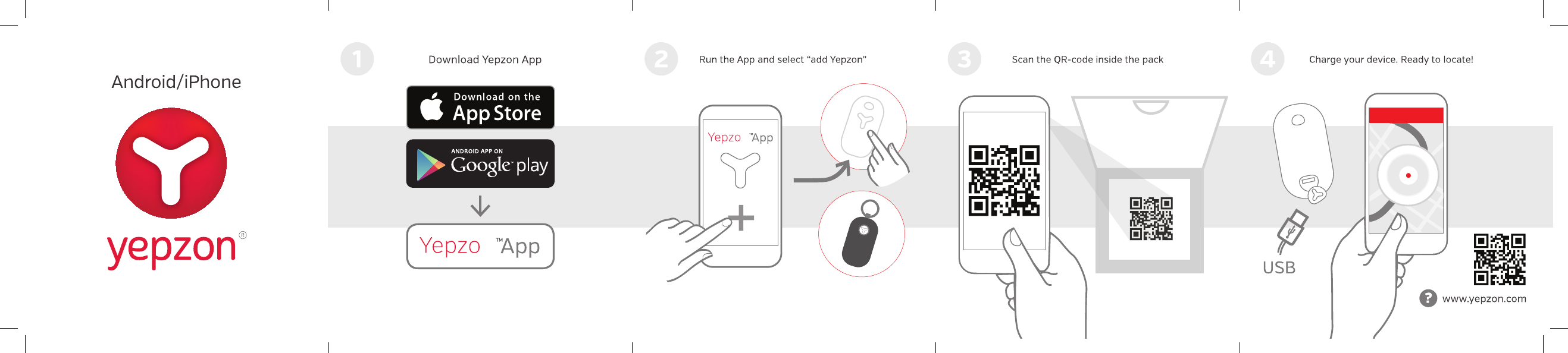
Yepzon YPZN1-20 GPS Tracker User Manual DRAFT Y1CC QuickStart
Yepzon Oy GPS Tracker DRAFT Y1CC QuickStart
Yepzon >
Users Manual

GETTING STARTED
When you first start using your Yepzon tracker, plug
it into a charger and if possible, charge it for two
hours. This ensures that the device wakes up
and has optimal performance.
A recommended precaution is to request a reset link
from the
Settings.
This is a link to your e-mail that
enables you to pair the tracker again if, for
example your phone breaks or you accidentally delete the
app. Your e-mail address is not collected, saved or used
by Yepzon for anything else than sending the reset link.
After pairing you should see your tracker in the
App either on a list or map view and you are able to
toggle between the views from the top
right corner icon. List view shows current status
of the device, map view shows the last location of the
Yepzon tracker on a map.
SETTINGS
l
n the Settings you are able to control the
following functions:
DATAUSAGE
Yepzon tracker has a built-in SIM card and it
uses mobile data to transfer positioning information
to the mobile app.
Your tracker includes 1 month of free data to start with,
after which you can easily purchase more via application
Settings
➔
Purchase more data
or yepzon. com/shop. We
recommend purchasing the pre-paid
monthly subscription as it includes unlimited usage.
lf you want to use your tracker outside EU, USA and
China, you must buy roaming through Yepzon app
Settings
➔
Purchase roaming package.
Price depends on
country and length of visit. Countries applicable and
prices can be found on yepzon.com/roaming.
LOCATING
Yepzon One 2.0 uses GSM, GPS and Wi-Fi
for positioning. In the app you can always see the
last known location based on either GSM cell
towers or WiFi hotspots.
Yepzon One 2.0 locates accurately on demand. Each
session lasts three minutes and can be repeated
sequentially as many times as needed. To activate the
GPS/WiFi positioning, tap "Locate accurately".
Time for accurate positioning to start depends on
settings. The longer the connection interval, the
longer the time required to start the locating.
Example: Connection interval is 5 minutes. The last
connection was at 12:00. The user taps the Locate
accurately icon at 12:01. Yepzon starts tracking after four
minutes, at 12:05.
Accuracy of the position can be checked by tapping the
location pin on the map, e.g. 2 km means that the real
position is not in the center of the red circle but
anywhere within the radius of 2 km. A typical GSM tower
accuracy is from a few hundred meters to several
kilometers, whereas GPS accuracy is typically 5-15 m
and WiFi 15-50m. If GPS signal is not strong enough (e.g.
indoors) and WiFi hotspots are not present, a rough
position based on GSM towers is shown.
More information, FAQ, announcements etc. available at
YEPZON.COM/SUPPORT
Please read carefully the Safety and Compliance leaflet
and content printed inside the packaging sleeve.
Note! Over six months of tracker inactivity may cause
SIM card deactivation and/or battery deep discharge.
•Set connection intervals = The tracker wakes up
to connect the cloud service only at set intervals, i.e.
it's not "online" all the time. Battery consumption
depends on these connection intervals and the
activity/movements of the device.
•Manage access rights = Adding and allowing more
users to locate and manage the Yepzon tracker. Note:
All users will have full access.
•Edit notifications = Decide what Yepzon activity
you want to be notified about.
• Turn off the Yepzon = Shuts down the tracker.
Note! After shutdown the tracker requires a charger
to be plugged in to turn on and wake up.
n
n
Yepzon ONE 2.0 - QUICK START
Safety and Compliance
Switch o the Yepzon in places where the use of cellular phones is not permitted or where it can create
interference, for example, onboard airplanes, in the vicinity of medical equipment, and at blasting sites.
Wireless devices are sensitive to interference, which can impair the functionality of the device.
The device is splash-proof but it is not designed to be worn when swimming, nor drop it underwater.
Do not subject the device to blows or drop it on hard surfaces.
The device is designed to be used at temperatures of -10 – +40°C. Coldness may impair the battery
capacity. Do not subject the device to great temperature variation so as to prevent condensation from
forming inside the device.
The device includes an integrated rechargeable battery, which cannot be removed. You should not
dispose of the device with household waste. Instead, return it to the place of purchase or to a recycling
point. You can check the location of the nearest recycling point from the local waste management au-
thorities. Do not attempt to remove or modify the battery as this may damage the device and create a
hazard.
Only use standard undamaged chargers equipped with a Micro USB connector. Avoid using excessive
force when plugging the connector into a port.Federal Communication Commission Interference Statement
This equipment has been tested and found to comply with the limits for a Class B digital device, pursuant to Part
15 of the FCC Rules. These limits are designed to provide reasonable protection against harmful interference in
a residential installation.
recycling point. You can check the location of the nearest recycling
point from the local waste management authorities. Do not attempt
to remove or modify the battery as this may damage the device and
create a hazard.
Only use standard undamaged chargers equipped with a Micro USB
connector. Avoid using excessive force when plugging the connector
into a port.
This device complies with part 15 of the FCC Rules. Operation is
subject to the following two conditions: (1) This device may not
cause harmful interference, and (2) this device must accept any
interference received, including interference that may cause
undesired operation.
This product meets applicable national SAR limits of 1.6W/kg. The
specific maximum SAR values can be found at yepzon.com/support.
When carrying the product or using it while worn on your body,
either use an accessory such as a holster or otherwise maintain a
distance of 0,5 cm from the body to ensure compliance with RF
exposure requirements.
This product does not contain any user-serviceable parts. Changes
or modifications made to this equipment not expressly approved by
the party responsible for compliance could void the user's authority
to operate the equipment.
You can read more on safety at www.yepzon.com/support.
You can find the manufacturer’s Declaration of Conformity at
www.yepzon.com/legal.

Safety and Compliance
Switch o the Yepzon in places where the use of cellular phones is
not permitted or where it can create interference, for example,
onboard airplanes, in the vicinity of medical equipment, and at
blasting sites.
Wireless devices are sensitive to interference, which can impair the
functionality of the device.
The device is splash-proof but it is not designed to be worn when
swimming, nor drop it underwater. Do not subject the device to
blows or drop it on hard surfaces.
The device is designed to be used at temperatures of -10 – +40°C.
Coldness may impair the battery capacity. Do not subject the device
to great temperature variation so as to prevent condensation from
forming inside the device.
The device includes an integrated rechargeable battery, which
cannot be removed. You should not dispose of the device with
household waste. Instead, return it to the place of purchase or to a
This equipment generates, uses and can radiate radio frequency energy and, if not installed and used in
accordance with the instructions, may cause harmful interference to radio communications. However,
there is no guarantee that interference will not occur in a particular installation. If this equipment does
cause harmful interference to radio or television reception, which can be determined by turning the
equipment off and on, the user is encouraged to try to correct the interference by one of the following
measures: Reorient or relocate the receiving antenna. Increase the separation between the equipment
and receiver. Connect the equipment into an outlet on a circuit different from that to which the receiver
is connected. Consult the dealer or an experienced radio/TV technician for help.
FCC Caution: To assure continued compliance, any changes or modifications not expressly approved
by the party responsible for compliance could void the user’s authority to operate this equipment.
(Example - use only shielded interface cables when connecting to computer or peripheral devices).
FCC Radiation Exposure Statement
This transmitter must not be co-located or operating in conjunction with any other antenna or transmitter.
This device complies with Part 15 of the FCC Rules. Operation is subject to the following two conditions:
(1) This device may not cause harmful interference, and (2) This device must accept any interference
received, including interference that may cause undesired operation.
This product meets applicable national SAR limits of 1.6W/kg. The specific maximum SAR values can
be found at yepzon.com/support. When carrying the product or using it while worn on your body,
either use an accessory such as a holster or otherwise maintain a distance of 0,5 cm from the body
to ensure compliance with RF exposure requirements.
This product does not contain any user-serviceable parts. Changes or modifications made to this
equipment not expressly approved by the party responsible for compliance could void the user's
authority to operate the equipment.
You can read more on safety at www.yepzon.com/support.
You can find the manufacturer’s Declaration of Conformity at www.yepzon.com/legal.