Z Com VG300 AVL TERMINAL User Manual 02

Z Com Inc AVL TERMINAL 02

Contents

User Manual 02

VG300 Quick Installation Guide1. Product PackagePlease go through each item listed below.  Your VG300 packagecontains the following items: One VG300 Wireless Data Unit One SMA Attached CDPD Antenna One Power Connector (Pin 1 is “+”, Pin2 is “-“) One VG300 User’s Quick Installation Guide2. Installation & SetupStep 1   Establish Hardware Connectiona. Connect the cellular antenna and GPS antenna to the VG300b. Using the power connector to connect to available DC power supply(DC 12V or Car Battery)c. Connect the RS-232 9 pins interface cable to the VG300.d. Connect the RS-232 cable with a male DB9 connector to your host.If your host has a DB25 connecting port, you need to get a DB25to DB9 adapter from the local electronics store.Step 2 Establish Software Test Environment for Terminal ProgramTo send AT Command to VG300, you must find a communicationsprogram to be operated in ASCII terminal emulation mode underyour PCs (host).  This will enable the PC to function as a terminalattached to the modem and will permit you to enter the AT Commandrequired for modem setup and diagnostics.  The followings are someexample programs:WINDOWS TERMINAL in WINDOWS 3.1HYPER TERMINAL in WINDOWS 95TELIX or similar alternativesIn the Terminal Program you choose, set the parameters of RS-232cable as follows:
  19200 bps, 8 data bits, No parity check and 1 stop bit.Caution:The above RS-232 parameters are set up for thecommunication between VG300 and the host.  They aredefault values for VG300 Data Module. You must set thesame parameters with your Terminal Programs so that thehost can obtain initial connection to the module.3. Connect to the CDPD NetworkFollowing procedures are available for the CDPD mode only . Pleaseswitch the operation mode to the CDPD. (There are two operationmodes for VG300. One is CDPD , the other is GPS.)A. Set the IP AddressThe IP Address, in form of ×××.×××.×××.××× (××× meansdecimal numbers from 0-255), should be provided by theCDPD network carrier or the service provider.  Use thecommand AT!I ×××.×××.×××.××× to set the IP Address.B. Set the Destination Server IP AddressThe Destination AVL(Automatic Vehicle Location) ServerIP Address, in form of ×××.×××.×××.××× (××× meansdecimal numbers from 0-255). Use the commandAts40=×××.×××.×××.×××/port # to set the IP Address andport number. e.g. Ats40=203.67.40.233/1025.C. Set UDP Tx.Use the command AT!g1 to set the VG300 in the UDP Tx.Mode.D. Set Side PreferenceContact your CDPD network carrier or the service providerfor the appointed Side Preference.  If this information is notavailable, you can use either the command AT\N3 or AT\N4to set Side Preference.  (AT\N3: A Side Preference, AT\N4:B Side Preference)E. Set the Auto Scan ModeSet the channel scan mode as “Auto Scan” with the
command AT!A1.F. Turn off the Hardware Flow ControlTurn off the hardware flow control with the AT\Q0command.G.. Save the set-up valuesUse the command AT&W to save all the above values.H. Reset Z-Card 300Use the command ATZ to reset VG300.I. Check the connectionEnter the command ATS57 to check if a response indicatesATS57=129 appears.  If yes, then Congratulations! You haveconnected to the CDPD network successfully.Then you can switch the operation mode back to GPS and power onthe VG300 again.4. AT Command Sets for VG300By using the terminal program, you can use the following ATCommand to configure the VG3001. AT@GPS0 Modem will send customer-defined special packet forAVL Serve r2. AT@RMCn Customer-Defined Packet Tx Time Interval n=0~3600EX  AT@RMC303. AT@GPS1 Modem will send standard NMEA 0183 GPS Packets.NMEA 0183 GPS packets can configure the time interval by usingthe following AT Commands4. AT@GGAn Set GGA data transmission time interval, n=0~3600sec. Ex. AT@GGA15. AT@GLLn Set GGA data transmission time interval, n=0~3600sec. Ex. AT@GLL26. AT@GSAn Set GGA data transmission time interval, n=0~3600sec. Ex. AT@GSA07. AT@GSV Set GGA data transmission time interval, n=0~3600 sec.Ex. AT@GSV48. AT@RMCn Set GGA data transmission time interval, n=0~3600sec. Ex. AT@RMC19. AT@VTGn Set GGA data transmission time interval, n=0~3600
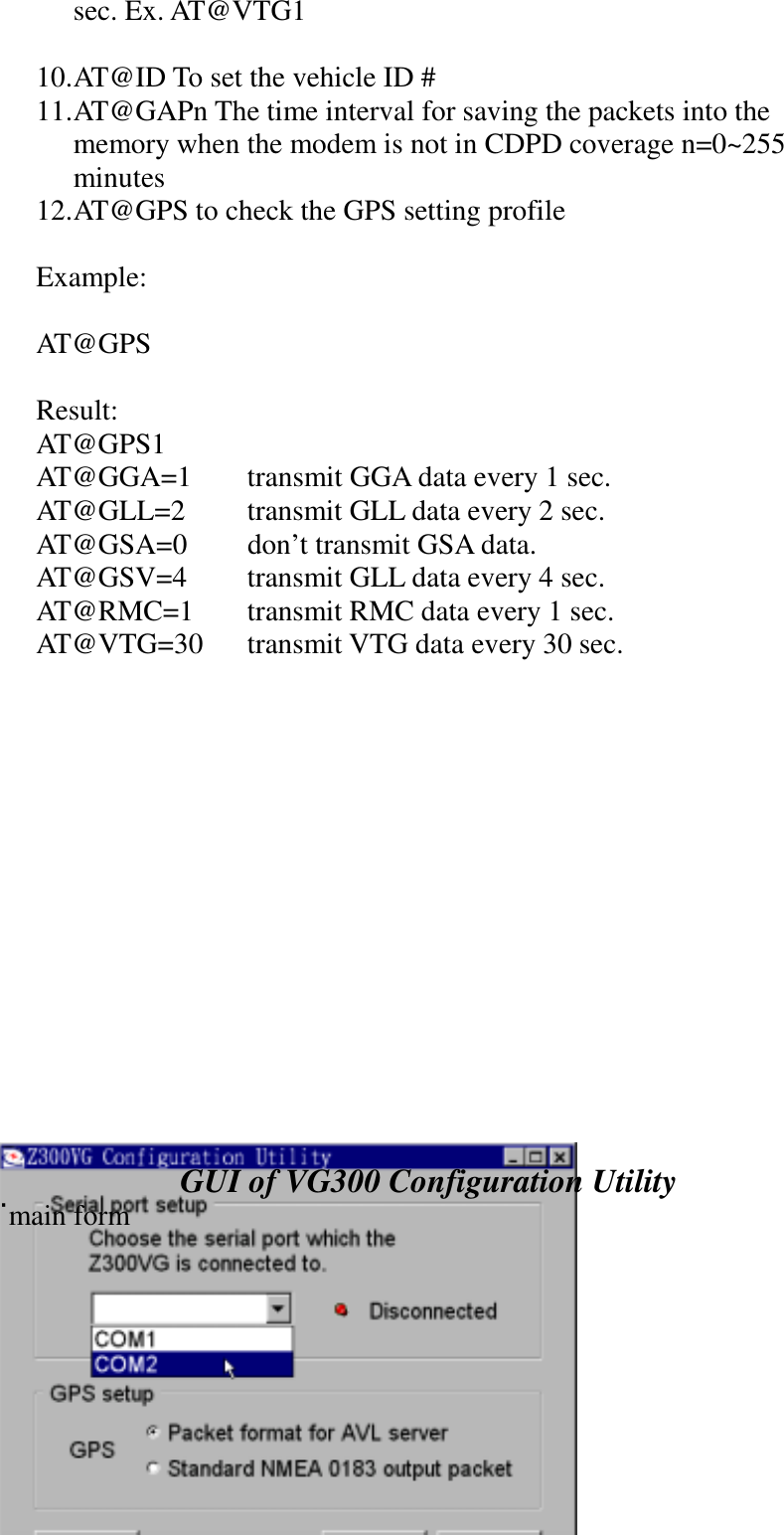
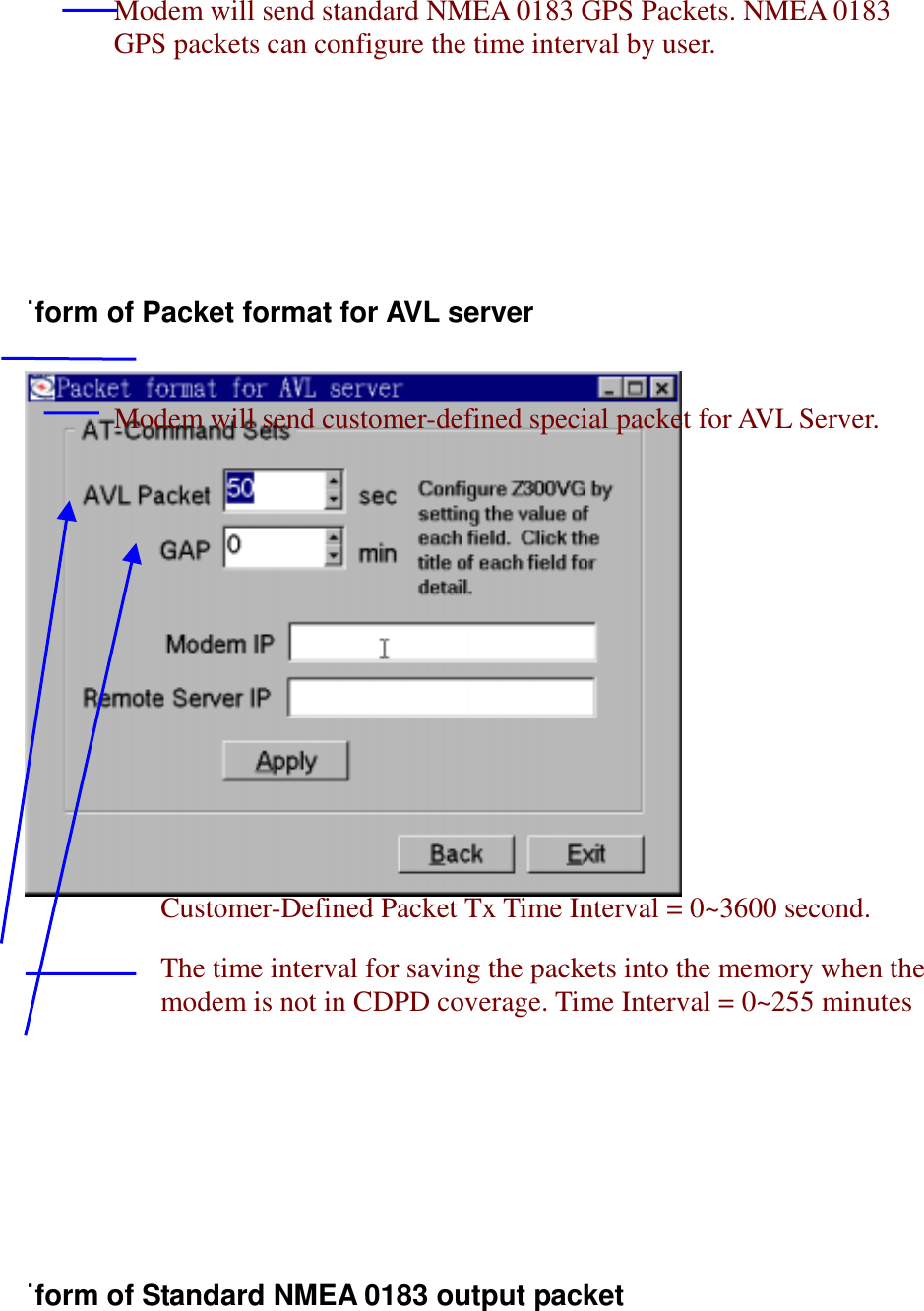
sec. Ex. AT@VTG110. AT@ID To set the vehicle ID #11. AT@GAPn The time interval for saving the packets into thememory when the modem is not in CDPD coverage n=0~255minutes12. AT@GPS to check the GPS setting profileExample:AT@GPSResult:AT@GPS1AT@GGA=1 transmit GGA data every 1 sec.AT@GLL=2 transmit GLL data every 2 sec.AT@GSA=0 don’t transmit GSA data.AT@GSV=4 transmit GLL data every 4 sec.AT@RMC=1 transmit RMC data every 1 sec.AT@VTG=30 transmit VTG data every 30 sec.GUI of VG300 Configuration Utility˙main form
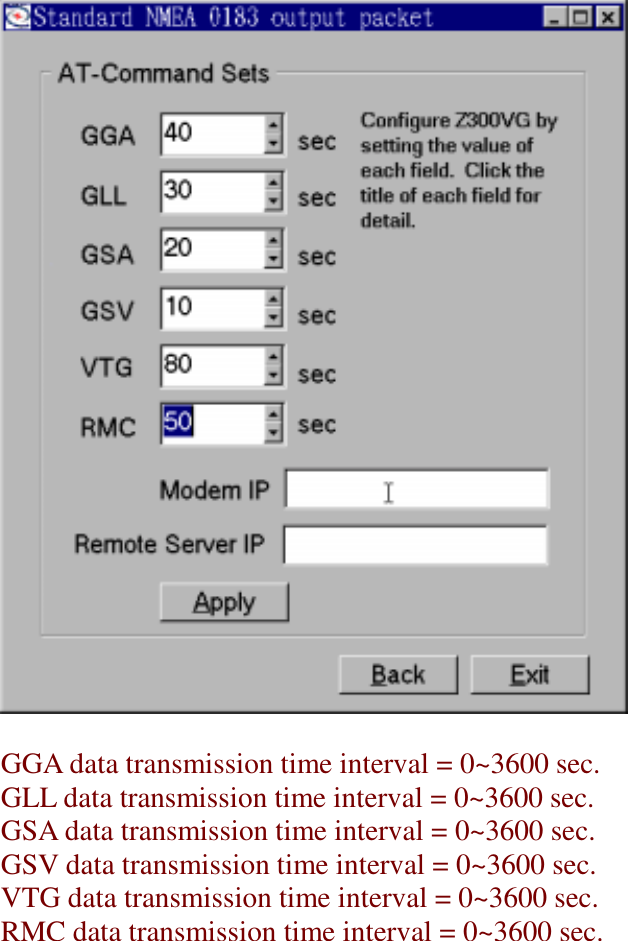
˙form of Packet format for AVL server˙form of Standard NMEA 0183 output packetModem will send customer-defined special packet for AVL Server.Modem will send standard NMEA 0183 GPS Packets. NMEA 0183GPS packets can configure the time interval by user.Customer-Defined Packet Tx Time Interval = 0~3600 second.The time interval for saving the packets into the memory when themodem is not in CDPD coverage. Time Interval = 0~255 minutes
GGA data transmission time interval = 0~3600 sec.GLL data transmission time interval = 0~3600 sec.GSA data transmission time interval = 0~3600 sec.GSV data transmission time interval = 0~3600 sec.VTG data transmission time interval = 0~3600 sec.RMC data transmission time interval = 0~3600 sec.

Navigation menu