ZhaofengweiTechnology ZR303RX Wireless baby monitor receiver User Manual

Shenzhen ZhaofengweiTechnology Co. Ltd. Wireless baby monitor receiver Users Manual

Users manual

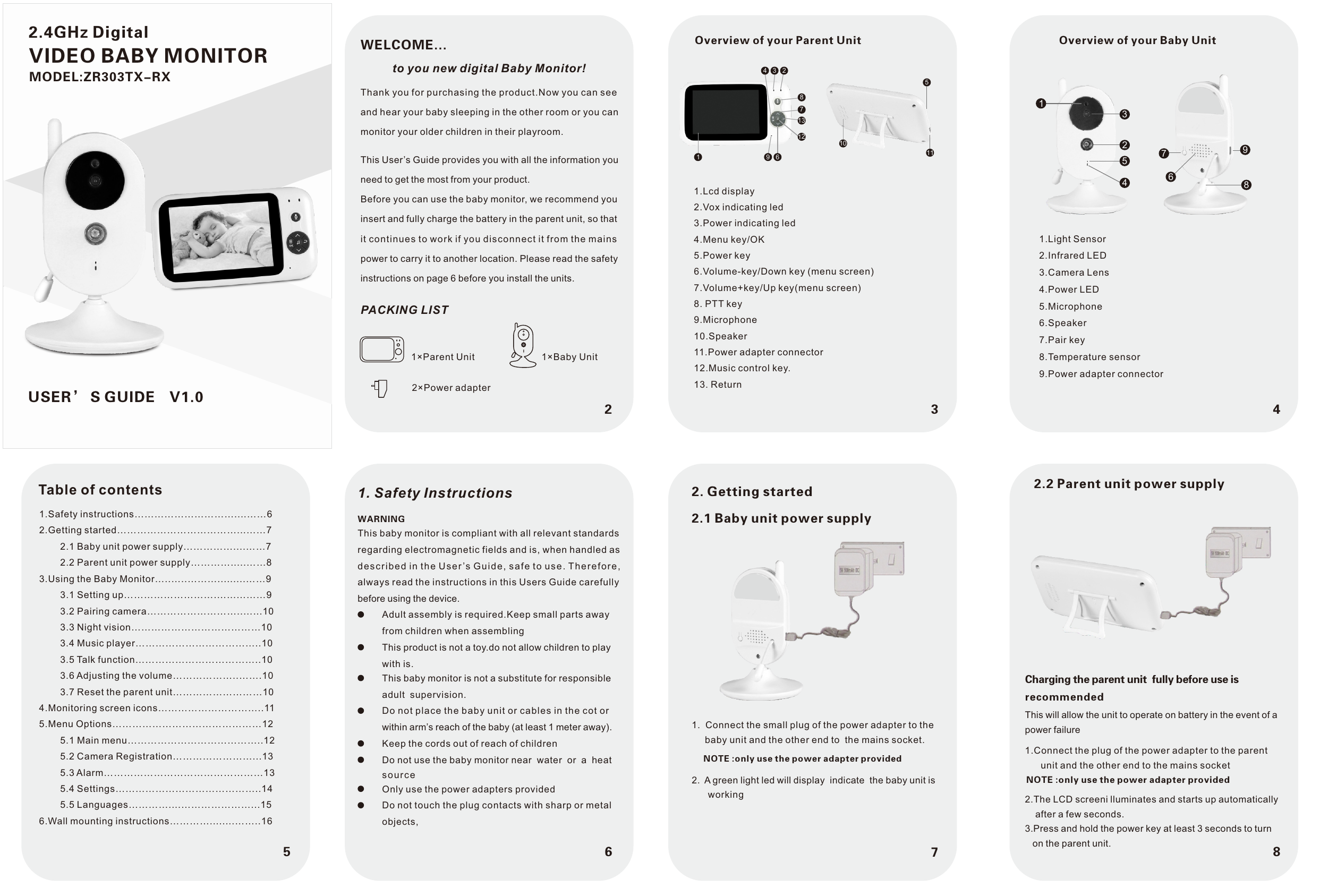
1. Safety InstructionsThis baby monitor is compliant with all relevant standardsregarding electromagnetic fields and is, when handled as described in the Use r ’s Guide, sa fe to u se . T he re fo re ,always read the instructions in this Users Guide carefully before using the device.WARNINGAdult assembly is required.Keep small parts away from children when assemblingThis product is not a toy.do not allow children to play with is.This baby monitor is not a substitute for responsible adult  supervision.Do not place the baby unit or cables in the cot or within arm’s reach of the baby (at least 1 meter away).Keep the cords out of reach of childrenDo not use the baby monitor near  water  or  a  heat source Only use the power adapters providedDo not touch the plug contacts with sharp or metal objects,WELCOME...to you new digital Baby Monitor!Thank you for purchasing the product.Now you can seeand hear your baby sleeping in the other room or you canmonitor your older children in their playroom. PACKING LIST1×Parent Unit 1×Baby Unit2×Power adapterThis User’s Guide provides you with all the information youneed to get the most from your product.Before you can use the baby monitor, we recommend youinsert and fully charge the battery in the parent unit, so thatit continues to work if you disconnect it from the mainspower to carry it to another location. Please read the safetyinstructions on page 6 before you install the units.234Overview of your Parent Unit1.Lcd display2.Vox indicating led3.Power indicating led4.Menu key/OK5.Power key6.Volume-key/Down key (menu screen)7.Volume+key/Up key(menu screen)8. PTT key9.Microphone10.Speaker11.Power adapter connector12.Music control key.13. ReturnOverview of your Baby Unit1.Light Sensor2.Infrared LED3.Camera Lens4.Power LED5.Microphone6.Speaker7.Pair key8.Temperature sensor9.Power adapter connector6785Table of contents1.Safety instructions…………………………....……62.Getting started………………………………...……7        2.1 Baby unit power supply……………....……7        2.2 Parent unit power supply………….....……83.Using the Baby Monitor…..…..……….........……9        3.1 Setting up……………………….…...………9        3.2 Pairing camera………………………..…...10        3.3 Night vision…………………………………10        3.4 Music player………………………………..10        3.5 Talk function………………………………..10        3.6 Adjusting the volume………………..…….10        3.7 Reset the parent unit………………………104.Monitoring screen icons…………………………..115.Menu Options………………………………………12        5.1 Main menu…………………………………..12        5.2 Camera Registration……………………...13        5.3 Alarm…………………………………………13        5.4 Settings……………………………………..14        5.5 Languages…………....…………………...156.Wall mounting instructions…………........……..162. Getting started2.1 Baby unit power supply1. Connect the small plug of the power adapter to thebaby unit and the other end to  the mains socket.NOTE :only use the power adapter provided2. A green light led will display  indicate  the baby unit isworking2.2 Parent unit power supplyCharging the parent unit  fully before use is recommendedThis will allow the unit to operate on battery in the event of a power failure1.Connect the plug of the power adapter to the parentunit and the other end to the mains socketNOTE :only use the power adapter provided2.The LCD screeni lluminates and starts up automaticallyafter a few seconds.3.Press and hold the power key at least 3 seconds to turnon the parent unit.513254862.4GHz DigitalVIDEO BABY MONITOR97USER’ S GUIDE V1.01110781312619234MODEL:ZR303TX-RX
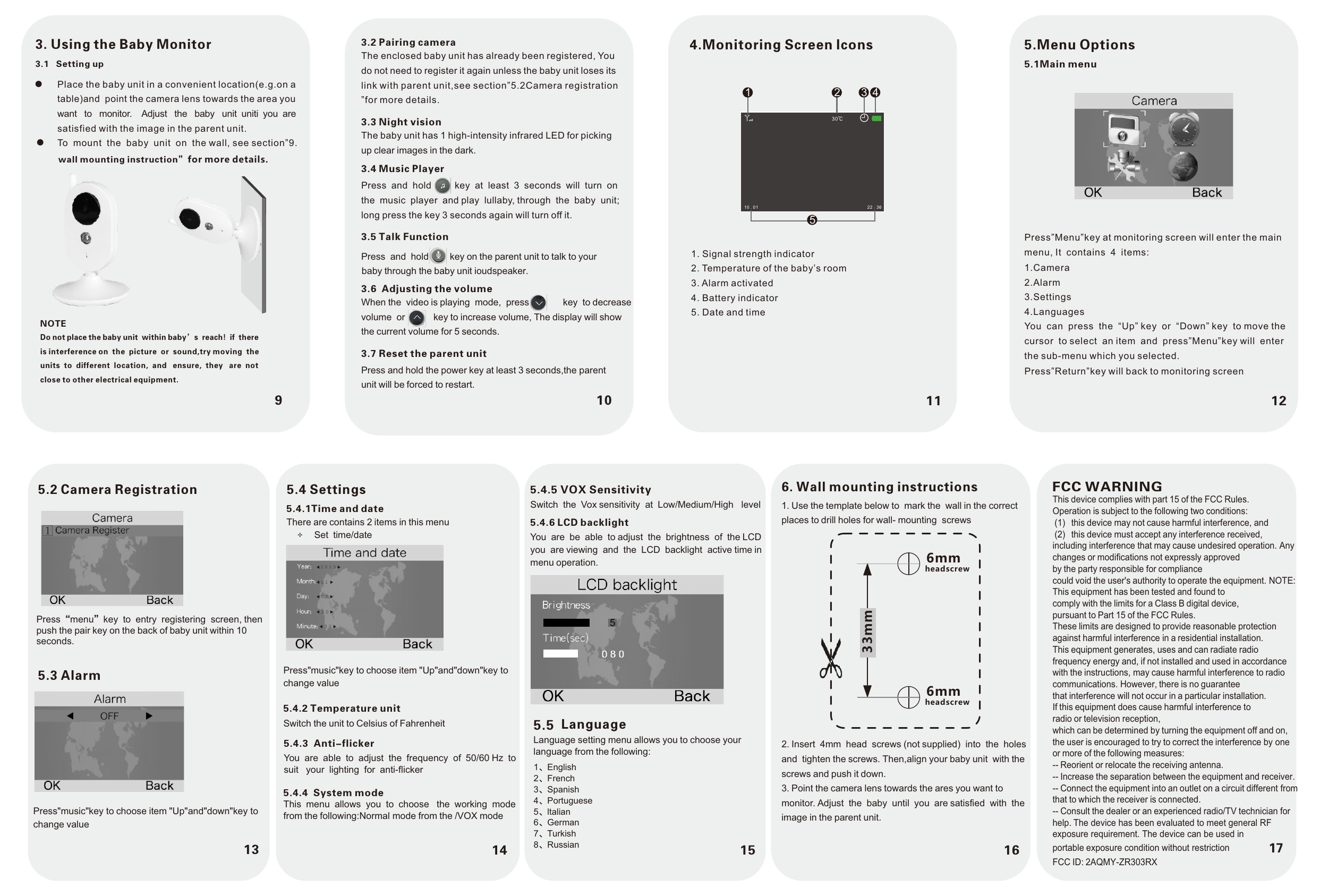
10 11 1293. Using the Baby MonitorPlace the baby unit in a convenient location(e.g.on atable)and  point the camera lens towards the area youwant   to   monitor.    Adjust   the   baby   unit  uniti  you  are satisfied with the image in the parent unit.To  mount  the  baby  unit  on  the wall, see section”9.3.1   Setting upwall mounting instruction”for more details.NOTEDo not place the baby unit  within baby’s  reach!  if  thereis interference on  the  picture  or  sound,try moving  the units  to  different  location,  and   ensure,  they   are  not close to other electrical equipment.3.2 Pairing cameraThe enclosed baby unit has already been registered, You do not need to register it again unless the baby unit loses its link with parent unit,see section”5.2Camera registration”for more details. 3.3 Night visionThe baby unit has 1 high-intensity infrared LED for picking up clear images in the dark.3.4 Music PlayerPress  and  hold         key  at  least  3  seconds  will  turn  on the  music  player  and play  lullaby, through  the  baby  unit; long press the key 3 seconds again will turn off it.3.5 Talk FunctionPress  and  hold        3.6  Adjusting the volumeWhen the  video is playing  mode,  press             key  to decrease volume  or           key to increase volume, The display will show the current volume for 5 seconds.3.7 Reset the parent unitPress and hold the power key at least 3 seconds,the parent unit will be forced to restart.4.Monitoring Screen lcons1. Signal strength indicator2. Temperature of the baby’s room3. Alarm activated4. Battery indicator5. Date and time5.Menu Options5.1Main menuPress”Menu”key at monitoring screen will enter the main menu, It  contains  4  items:1.Camera2.Alarm3.Settings4.LanguagesYou  can  press  the  “Up” key  or  “Down” key  to move thecursor  to select  an item  and  press”Menu”key will  enterthe sub-menu which you selected.Press”Return”key will back to monitoring screen161. Use the template below to  mark the  wall in the correctplaces to drill holes for wall- mounting  screws6. Wall mounting instructions2. Insert  4mm  head  screws (not supplied)  into  the  holesand  tighten the screws. Then,align your baby unit  with thescrews and push it down.3. Point the camera lens towards the ares you want tomonitor. Adjust  the  baby  until  you  are satisfied  with  theimage in the parent unit.33mm6mmheadscrew6mmheadscrew10 . 01 22 : 361135.2 Camera RegistrationPress“menu”key  to  entry  registering  screen, then push the pair key on the back of baby unit within 10 seconds.5.3 AlarmPress"music"key to choose item "Up"and"down"key to change value155.4.5 VOX Sensitivity Switch  the  Vox sensitivity  at  Low/Medium/High   level5.4.6 LCD backlightYou  are  be  able  to adjust  the  brightness  of  the LCDyou  are viewing  and  the  LCD  backlight  active time in menu operation.Language setting menu allows you to choose your language from the following:5.5 Language1、English  2、French3、Spanish4、Portuguese5、ltalian6、German7、Turkish8、Russiankey on the parent unit to talk to your baby through the baby unit ioudspeaker.30℃2 3 45145.4 Settings5.4.1Time and dateThere are contains 2 items in this menu Set  time/date Press"music"key to choose item "Up"and"down"key to change value5.4.2 Temperature unitSwitch the unit to Celsius of Fahrenheit5.4.3  Anti-flickerYou  are  able  to  adjust  the  frequency  of  50/60 Hz  to suit   your  lighting  for  anti-flicker5.4.4  System modeThis  menu  allows  you  to  choose   the  working  mode from the following:Normal mode from the /VOX mode2 0 1 50 10 72 03 3FCC WARNINGThis device complies with part 15 of the FCC Rules. Operation is subject to the following two conditions:(1)  this device may not cause harmful interference, and(2)  this device must accept any interference received, including interference that may cause undesired operation. Any changes or modifications not expressly approvedby the party responsible for compliancecould void the user's authority to operate the equipment. NOTE: This equipment has been tested and found tocomply with the limits for a Class B digital device,pursuant to Part 15 of the FCC Rules.These limits are designed to provide reasonable protection against harmful interference in a residential installation.This equipment generates, uses and can radiate radio frequency energy and, if not installed and used in accordance with the instructions, may cause harmful interference to radio communications. However, there is no guaranteethat interference will not occur in a particular installation.If this equipment does cause harmful interference toradio or television reception,which can be determined by turning the equipment off and on, the user is encouraged to try to correct the interference by one or more of the following measures:-- Reorient or relocate the receiving antenna.-- Increase the separation between the equipment and receiver. -- Connect the equipment into an outlet on a circuit different from that to which the receiver is connected.-- Consult the dealer or an experienced radio/TV technician for help. The device has been evaluated to meet general RF exposure requirement. The device can be used in 17 portable exposure condition without restriction FCC ID: 2AQMY-ZR303RX

Navigation menu