Zida Technologies MB-A815EP-11 Mainboard User Manual Manual A815E1 indd

Zida Technologies Ltd. Mainboard Manual A815E1 indd

users manual 4

 BIOS   Setup
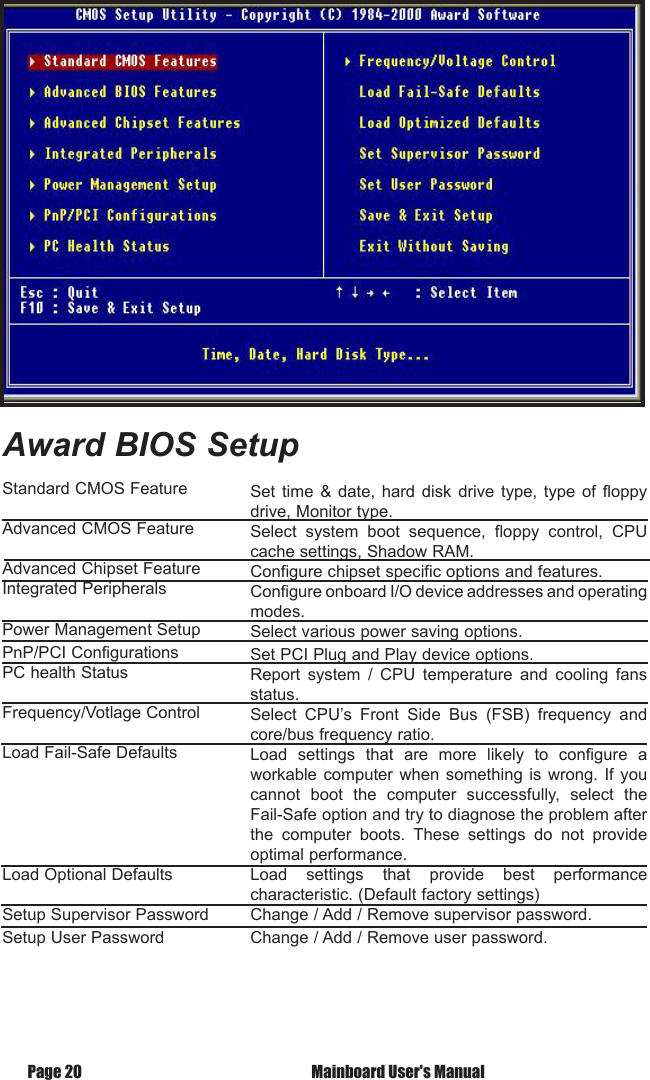
 Mainboard User's ManualPage 20Standard CMOS FeatureAdvanced CMOS FeatureAdvanced Chipset FeatureIntegrated Peripherals Power Management SetupPnP/PCI ConfigurationsPC health StatusFrequency/Votlage ControlLoad Fail-Safe DefaultsLoad Optional DefaultsSetup Supervisor PasswordSetup User PasswordSet  time  &  date,  hard  disk  drive  type,  type  of  floppy drive, Monitor type.Select  system  boot  sequence,  floppy  control,  CPU cache settings, Shadow RAM.Configure chipset specific options and features.Configure onboard I/O device addresses and operating  modes.Select various power saving options.Set PCI Plug and Play device options.Report  system  /  CPU  temperature  and  cooling  fans status.Select  CPU’s  Front  Side  Bus  (FSB)  frequency  and core/bus frequency ratio.Load  settings  that  are  more  likely  to  configure  a workable computer when something is wrong.  If  you cannot  boot  the  computer  successfully,  select  the Fail-Safe option and try to diagnose the problem after the  computer  boots.  These  settings  do  not  provide optimal performance.Load  settings  that  provide  best  performance characteristic. (Default factory settings)Change / Add / Remove supervisor password.Change / Add / Remove user password.Award BIOS Setup

Navigation menu